1
Introduction
 Module solutions to address growing RFFE complexity.
 PAMiD : PA + Duplexer + Filter + ASM
2
S011
 Take Qualcomm S011 for example[2]:
3
S011
 Application[2]:
 Covering LTE/WCDMA/HSUPA Band 1, 2, 3, 4, DCS, PCS,
Aux Ports
 Integration of SAW duplexers, Switches, Envelope Tracking
PA, Coupler
 Supporting Inter band Carrier Aggregation Bands 1+3 and
2+4
 Single ended in and outputs of all RX ports
4
S011
 Schematics[3]:
5
S011
 S011 should NOT be in the same shielding cavity with
WTR device to avoid VCO pulling issue[3].
S011 Transceiver
S011 Transceiver
PAD
VCO
Transceiver
Tx signal
6
S011
 It is acceptable to share the cavity with other[3].
LB PAMiD
MB PAMiD
HB PAMiD
7
S011
 Do not place S011 back-to-back with other heat-
generating components, such as application processor,
another PAs, or PMIC that may work at the same time
with S011[3]
 Otherwise, there will be thermal issue, thereby
aggravating RF performance.
8
S011
 Top layer layout [3]:
9
S011
 With 50 Ohm impedance, the wider the trace width is,
the larger gap between trace and reference GND will be.
 The wider the trace width is, the smaller the insertion
loss will be.
 Thus, if necessary, cut out can help minimize insertion
loss.
10
S011
 But cut out occupies more PCB space.
 Besides, according to the calculation, the parasitic
capacitance increases with cut out.
 Thus, cut out is a compromise.
3.7 mil 9.5 mil
2.2 mil
5.2 mil
Leng
11
S011
 Keep VDD_PA1, VDD_PA2 and VDD_2G as wide trace as
possible to avoid IR drop.
 Minimum 6 micro vias to next layers for VDD_PA1,
VDD_PA2 and VDD_2G, 2 micro vias for VDD_VBATT.
This can help avoid IR drop as well.
 DC supply layer 7 -> Make sure you have sufficient
amount of GND vias for heat dissipation from PA and
for GND currents[3].
12
S011
13
AFEM-9040 vs. S011 MB PAMid Features
 As shown below, in terms of block diagram, the AVAGO
MB PAMiD(AFEM-9040) is the nearly the same as
S011[4].
14
AFEM-9040 vs. S011 MB PAMid Features
 As shown below, in terms of foot print, the AFEM-9040
is the nearly the same as S011[4].
15
AFEM-9040 vs. S011 MB PAMid Features
 In other words, AFEM-9040 and S011 are NOT pin-to-pin
completely, but Co-PCB design is still feasible with
some layout modifications[4].
16
AFEM-9040 vs. S011 MB PAMid Features
 Both AFEM-9040 and S011 have an integrated coupler,
and the connection between PAMiDs is daisy-chain
design[5].
CPL_HB
CPL_IN
CPL_MB
CPL_IN
CPL_LB
CPL_IN
Transceiver
FBRX
HB PAMiD
MB PAMiD
LB PAMiD
17
AFEM-9040 vs. S011 MB PAMid Features
 For the pin marked as blue, AFEM-9040 regards it as
isolation pin of integrated coupler; S011 regards it as
GND pin[4].
ANT
GND
GND
 Thus, for the pin, we need to do some modifications
because of Co-PCB design.
AFEM-9040 S011
Blue Pad ISO GND
18
AFEM-9040 vs. S011 MB PAMid Features
 For the pin, we put three dummy pads, and make two of
them connect to GND and other PAMiDs individually.
ANT
GND
GND
To other PAMiDs
19
AFEM-9040 vs. S011 MB PAMid Features
 For AFEM-9040, we put a 0 ohm resistor to connect to
other PAMiDs.
 For S011, we put a 0 ohm resistor to connect to GND.
ANT
GND
GND
To other PAMiDs
ANT
GND
GND
To other PAMiDs
AFEM-9040 S011
AFEM-9040 S011
Blue Pad ISO GND
20
AFEM-9040 vs. S011 MB PAMid Features
 For the Co-PCB design, we should use merely three
pads to accommodate two components instead of four
pads.
ANT
GND
GND
ANT
GND
GND
21
AFEM-9040 vs. S011 MB PAMid Features
 Otherwise, for both AFEM-9040 and S011, there will be
stub.
ANT
GND
GND
ANT
GND
GND
AFEM-9040 S011
Stub Stub
22
AFEM-9040 vs. S011 MB PAMid Features
 Especially for AFEM-9040, chances are that the stub
affect the impedance, thereby aggravating the accuracy
of power detection and EVM performance.
Without stub
With stub
ANT
GND
GND
AFEM-9040
Stub
23
AFEM-9040 vs. S011 MB PAMid Features
 Again, for the pin marked as blue, AFEM-9040 regards it
as GND pin; S011 regards it as CPLin pin of integrated
coupler[4].
 As mentioned above, put merely three dummy pads.
ANT
GND
CPL
out
GND
ANT
GND
CPL
out
GND
ANT
GND
CPL
out
GND
24
AFEM-9040 vs. S011 MB PAMid Features
 Both AFEM-9040 and S011 have an integrated GSM PA
which is connected to transceiver[5].
Transceiver
Transceiver
25
AFEM-9040 vs. S011 MB PAMid Features
 For the pin marked as blue, AFEM-9040 regards it as
input pin of integrated GSM PA; S011 regards it as GND
pin[4].
 As mentioned above, put merely three dummy pads.
DATA
GND
CLK
VIO
GND
DATA
GND
CLK
VIO
GND
DATA
GND
CLK
VIO
GND
26
AFEM-9040 vs. S011 MB PAMid Features
 For B1 and B4 Rx, the connection between transceiver
and PAMiD for AFEM-9040 and S011 is as below[5]:
RX_B1_B4
SPDT
WTR3925
RX_B1
RX_B4 AFEM-9040
WTR3925
RX_B1
RX_B4 S011
27
AFEM-9040 vs. S011 MB PAMid Features
 The pads marked blue and pink for AFEM-9040 and
S011 are as the table: AFEM-9040 S011
Blue Pad RX_B1_B4 RX_B1
Pink Pad GND RX_B4
GND
GND
GND
GND
RX_B3
WTR3925
28
AFEM-9040 vs. S011 MB PAMid Features
 For AFEM-9040, put two 0 ohm resistors. One is
connected from PAMiD to transceiver, and the other is
connected to GND directly.
AFEM-9040
Blue Pad RX_B1_B4
Pink Pad GND
GND
GND
GND
GND
RX_B3
WTR3925
29
AFEM-9040 vs. S011 MB PAMid Features
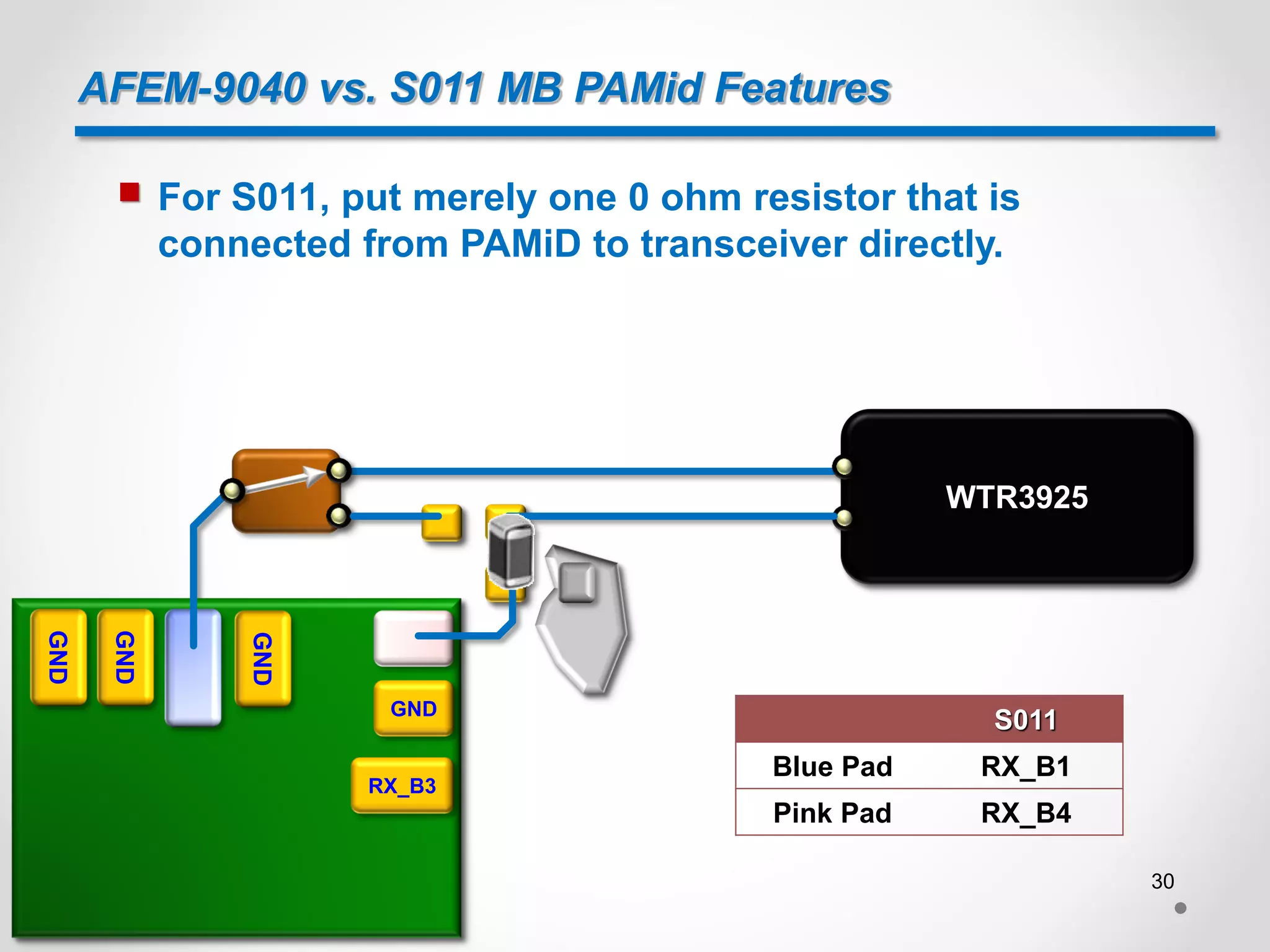
 For S011, put merely one 0 ohm resistor that is
connected from PAMiD to transceiver directly.
S011
Blue Pad RX_B1
Pink Pad RX_B4
GND
GND
GND
GND
RX_B3
WTR3925
30
AFEM-9040 vs. S011 MB PAMid Features
 For B34 and B39, the connection between transceiver
and PAMiD for AFEM-9040 and S011 is as below[5]:
RX_B34_B39
Diplexer
AFEM-9040
RX_B39
RX_B34 WTR3925
RX_B34_B39
Diplexer
S011 WTR3925
TRX_B34_B39
TRX_B34
TRX_B39
31
AFEM-9040 vs. S011 MB PAMid Features
 The pads marked green, yellow, pink and blue for
AFEM-9040 and S011 are as the table:
AFEM-9040 S011
Green RX_B34 TRX_B34
Yellow RX_B39 TRX_B39
Pink TRX_2 TX_MB2
Blue GND RX_B34_B39
GND
GND
RX_B3
GND
RX_B1
GND
GND
WTR3925
TRX_2 (Inner layer)
TRX_2 (Top layer)
32
AFEM-9040 vs. S011 MB PAMid Features
 For AFEM-9040, put 3 ohm resistors. The locations of
these 3 ohm resistors are as below :
AFEM-9040
Green RX_B34
Yellow RX_B39
Pink TRX_2
Blue GND
GND
GND
RX_B3
GND
RX_B1
GND
GND
WTR3925
TRX_2 (Inner layer)
TRX_2 (Top layer)
33
AFEM-9040 vs. S011 MB PAMid Features
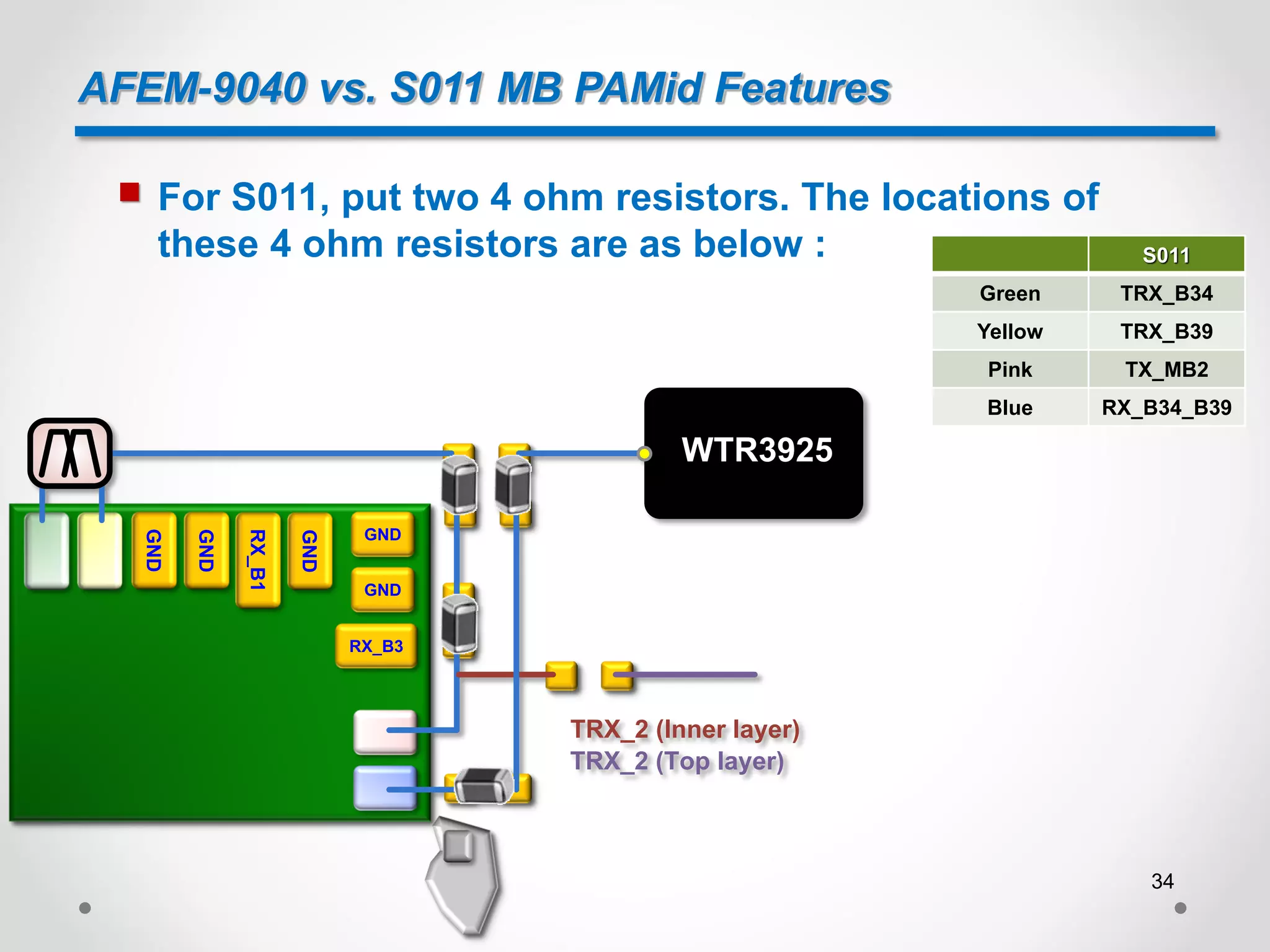
 For S011, put two 4 ohm resistors. The locations of
these 4 ohm resistors are as below :
GND
GND
RX_B3
GND
RX_B1
GND
GND
WTR3925
TRX_2 (Inner layer)
TRX_2 (Top layer)
S011
Green TRX_B34
Yellow TRX_B39
Pink TX_MB2
Blue RX_B34_B39
34
Reference
[1] Qualcomm and TDK Joint Venture, Qualcomm
[2] S011 TDK MB PAMiD Band 1, 2, 3, and 4, Device Specification, Qualcomm
[3] S011 TDK MB PAMID Design Checklist, Qualcomm
[4] Avago PAMid vs. Qcom PAMid, AVAGO
[5] WTR3925 + WTR4905 + Qualcomm RF360™ with HB, MB, and LB PAMiD Global 3DL CA
Design Example, Qualcomm
35

Introduction to PAMiD

  • 1.
  • 2.
    Introduction  Module solutionsto address growing RFFE complexity.  PAMiD : PA + Duplexer + Filter + ASM 2
  • 3.
    S011  Take QualcommS011 for example[2]: 3
  • 4.
    S011  Application[2]:  CoveringLTE/WCDMA/HSUPA Band 1, 2, 3, 4, DCS, PCS, Aux Ports  Integration of SAW duplexers, Switches, Envelope Tracking PA, Coupler  Supporting Inter band Carrier Aggregation Bands 1+3 and 2+4  Single ended in and outputs of all RX ports 4
  • 5.
  • 6.
    S011  S011 shouldNOT be in the same shielding cavity with WTR device to avoid VCO pulling issue[3]. S011 Transceiver S011 Transceiver PAD VCO Transceiver Tx signal 6
  • 7.
    S011  It isacceptable to share the cavity with other[3]. LB PAMiD MB PAMiD HB PAMiD 7
  • 8.
    S011  Do notplace S011 back-to-back with other heat- generating components, such as application processor, another PAs, or PMIC that may work at the same time with S011[3]  Otherwise, there will be thermal issue, thereby aggravating RF performance. 8
  • 9.
    S011  Top layerlayout [3]: 9
  • 10.
    S011  With 50Ohm impedance, the wider the trace width is, the larger gap between trace and reference GND will be.  The wider the trace width is, the smaller the insertion loss will be.  Thus, if necessary, cut out can help minimize insertion loss. 10
  • 11.
    S011  But cutout occupies more PCB space.  Besides, according to the calculation, the parasitic capacitance increases with cut out.  Thus, cut out is a compromise. 3.7 mil 9.5 mil 2.2 mil 5.2 mil Leng 11
  • 12.
    S011  Keep VDD_PA1,VDD_PA2 and VDD_2G as wide trace as possible to avoid IR drop.  Minimum 6 micro vias to next layers for VDD_PA1, VDD_PA2 and VDD_2G, 2 micro vias for VDD_VBATT. This can help avoid IR drop as well.  DC supply layer 7 -> Make sure you have sufficient amount of GND vias for heat dissipation from PA and for GND currents[3]. 12
  • 13.
  • 14.
    AFEM-9040 vs. S011MB PAMid Features  As shown below, in terms of block diagram, the AVAGO MB PAMiD(AFEM-9040) is the nearly the same as S011[4]. 14
  • 15.
    AFEM-9040 vs. S011MB PAMid Features  As shown below, in terms of foot print, the AFEM-9040 is the nearly the same as S011[4]. 15
  • 16.
    AFEM-9040 vs. S011MB PAMid Features  In other words, AFEM-9040 and S011 are NOT pin-to-pin completely, but Co-PCB design is still feasible with some layout modifications[4]. 16
  • 17.
    AFEM-9040 vs. S011MB PAMid Features  Both AFEM-9040 and S011 have an integrated coupler, and the connection between PAMiDs is daisy-chain design[5]. CPL_HB CPL_IN CPL_MB CPL_IN CPL_LB CPL_IN Transceiver FBRX HB PAMiD MB PAMiD LB PAMiD 17
  • 18.
    AFEM-9040 vs. S011MB PAMid Features  For the pin marked as blue, AFEM-9040 regards it as isolation pin of integrated coupler; S011 regards it as GND pin[4]. ANT GND GND  Thus, for the pin, we need to do some modifications because of Co-PCB design. AFEM-9040 S011 Blue Pad ISO GND 18
  • 19.
    AFEM-9040 vs. S011MB PAMid Features  For the pin, we put three dummy pads, and make two of them connect to GND and other PAMiDs individually. ANT GND GND To other PAMiDs 19
  • 20.
    AFEM-9040 vs. S011MB PAMid Features  For AFEM-9040, we put a 0 ohm resistor to connect to other PAMiDs.  For S011, we put a 0 ohm resistor to connect to GND. ANT GND GND To other PAMiDs ANT GND GND To other PAMiDs AFEM-9040 S011 AFEM-9040 S011 Blue Pad ISO GND 20
  • 21.
    AFEM-9040 vs. S011MB PAMid Features  For the Co-PCB design, we should use merely three pads to accommodate two components instead of four pads. ANT GND GND ANT GND GND 21
  • 22.
    AFEM-9040 vs. S011MB PAMid Features  Otherwise, for both AFEM-9040 and S011, there will be stub. ANT GND GND ANT GND GND AFEM-9040 S011 Stub Stub 22
  • 23.
    AFEM-9040 vs. S011MB PAMid Features  Especially for AFEM-9040, chances are that the stub affect the impedance, thereby aggravating the accuracy of power detection and EVM performance. Without stub With stub ANT GND GND AFEM-9040 Stub 23
  • 24.
    AFEM-9040 vs. S011MB PAMid Features  Again, for the pin marked as blue, AFEM-9040 regards it as GND pin; S011 regards it as CPLin pin of integrated coupler[4].  As mentioned above, put merely three dummy pads. ANT GND CPL out GND ANT GND CPL out GND ANT GND CPL out GND 24
  • 25.
    AFEM-9040 vs. S011MB PAMid Features  Both AFEM-9040 and S011 have an integrated GSM PA which is connected to transceiver[5]. Transceiver Transceiver 25
  • 26.
    AFEM-9040 vs. S011MB PAMid Features  For the pin marked as blue, AFEM-9040 regards it as input pin of integrated GSM PA; S011 regards it as GND pin[4].  As mentioned above, put merely three dummy pads. DATA GND CLK VIO GND DATA GND CLK VIO GND DATA GND CLK VIO GND 26
  • 27.
    AFEM-9040 vs. S011MB PAMid Features  For B1 and B4 Rx, the connection between transceiver and PAMiD for AFEM-9040 and S011 is as below[5]: RX_B1_B4 SPDT WTR3925 RX_B1 RX_B4 AFEM-9040 WTR3925 RX_B1 RX_B4 S011 27
  • 28.
    AFEM-9040 vs. S011MB PAMid Features  The pads marked blue and pink for AFEM-9040 and S011 are as the table: AFEM-9040 S011 Blue Pad RX_B1_B4 RX_B1 Pink Pad GND RX_B4 GND GND GND GND RX_B3 WTR3925 28
  • 29.
    AFEM-9040 vs. S011MB PAMid Features  For AFEM-9040, put two 0 ohm resistors. One is connected from PAMiD to transceiver, and the other is connected to GND directly. AFEM-9040 Blue Pad RX_B1_B4 Pink Pad GND GND GND GND GND RX_B3 WTR3925 29
  • 30.
    AFEM-9040 vs. S011MB PAMid Features  For S011, put merely one 0 ohm resistor that is connected from PAMiD to transceiver directly. S011 Blue Pad RX_B1 Pink Pad RX_B4 GND GND GND GND RX_B3 WTR3925 30
  • 31.
    AFEM-9040 vs. S011MB PAMid Features  For B34 and B39, the connection between transceiver and PAMiD for AFEM-9040 and S011 is as below[5]: RX_B34_B39 Diplexer AFEM-9040 RX_B39 RX_B34 WTR3925 RX_B34_B39 Diplexer S011 WTR3925 TRX_B34_B39 TRX_B34 TRX_B39 31
  • 32.
    AFEM-9040 vs. S011MB PAMid Features  The pads marked green, yellow, pink and blue for AFEM-9040 and S011 are as the table: AFEM-9040 S011 Green RX_B34 TRX_B34 Yellow RX_B39 TRX_B39 Pink TRX_2 TX_MB2 Blue GND RX_B34_B39 GND GND RX_B3 GND RX_B1 GND GND WTR3925 TRX_2 (Inner layer) TRX_2 (Top layer) 32
  • 33.
    AFEM-9040 vs. S011MB PAMid Features  For AFEM-9040, put 3 ohm resistors. The locations of these 3 ohm resistors are as below : AFEM-9040 Green RX_B34 Yellow RX_B39 Pink TRX_2 Blue GND GND GND RX_B3 GND RX_B1 GND GND WTR3925 TRX_2 (Inner layer) TRX_2 (Top layer) 33
  • 34.
    AFEM-9040 vs. S011MB PAMid Features  For S011, put two 4 ohm resistors. The locations of these 4 ohm resistors are as below : GND GND RX_B3 GND RX_B1 GND GND WTR3925 TRX_2 (Inner layer) TRX_2 (Top layer) S011 Green TRX_B34 Yellow TRX_B39 Pink TX_MB2 Blue RX_B34_B39 34
  • 35.
    Reference [1] Qualcomm andTDK Joint Venture, Qualcomm [2] S011 TDK MB PAMiD Band 1, 2, 3, and 4, Device Specification, Qualcomm [3] S011 TDK MB PAMID Design Checklist, Qualcomm [4] Avago PAMid vs. Qcom PAMid, AVAGO [5] WTR3925 + WTR4905 + Qualcomm RF360™ with HB, MB, and LB PAMiD Global 3DL CA Design Example, Qualcomm 35