Introduction to NS2
T S Pradeep Kumar
VIT Chennai
http://www.nsnam.com
http://www.pradeepkumar.org
pradeepkumarts@gmail.com
1
2
✤Linux Vs Windows
✤Network Simulation
✤Introduction to NS2
✤NS2 Architecture
✤OTCL
Overview
• Verss
Use Linux
Because….
✤Support has been stopped beyond
NS-2.27 in windows
✤Package Configuration is tedious in
windows
✤Use NS2 at your own risk in windows
✤Also now the recent architecture of
windows8x family is experiencing lot
of difficulties in tuning cygwin or
mingw.
3
Ò Linux for NS2
✕You may use any distributions like Ubuntu, Fedora, Linux
Mint, RHEL/CentOS, etc.
É Know basic commands (ls, chmod, tar, rpm, make, gedit, vi,
pwd, passwd, echo, cd, etc)
É Know the directory structure and shell prompt in linux and NS2
É Understand Path variables setting, Installation of packages and
dependencies for corresponding distribution.
4
Basic Linux Commands
✤ ls – to list the directory contents
✤ chmod – changing the mode of the file
✤ tar – tape archive (to compress or decompress)
✤ rpm – a type of installation file for linux
✤ make – to compile or recompile in linux
✤ gedit or vi – editors (similar like notepad)
✤ pwd - present working directory
✤ passwd – to change the user passwd
✤ echo – to echo to the screen
✤ cd – change directory
✤ mkdir – to create a directory
5
TS PRADEEP KUMAR
6
✤ To run the install file within the directory scope
✤ $prompt] ./install
✤ To run the install file in global scope is
✤ $prompt] install
Linux basics
TS PRADEEP KUMAR
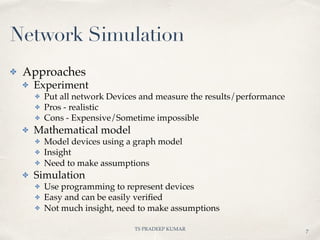
✤ Approaches
✤ Experiment
✤ Put all network Devices and measure the results/performance
✤ Pros - realistic
✤ Cons - Expensive/Sometime impossible
✤ Mathematical model
✤ Model devices using a graph model
✤ Insight
✤ Need to make assumptions
✤ Simulation
✤ Use programming to represent devices
✤ Easy and can be easily verified
✤ Not much insight, need to make assumptions
Network Simulation
7
TS PRADEEP KUMAR
A B C
✤ Network Simulation
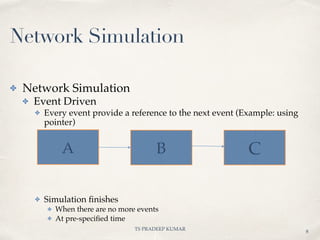
✤ Event Driven
✤ Every event provide a reference to the next event (Example: using
pointer)
✤ Simulation finishes
✤ When there are no more events
✤ At pre-specified time
8
Network Simulation
TS PRADEEP KUMAR
✤ NS is a discrete event simulator
✤ It provides support for
✤ Simulation of TCP
✤ Routing
✤ Huge number of protocols ranging from wired to wireless
networks
✤ Supports the addition of new entities like agent, packet,
application, queue, protocol, routing, etc.
9
About NS2
TS PRADEEP KUMAR
✤ NS2 is not a polished or a finished product
✤ Errors/Bugs are being discovered and corrected.
✤ Users of ns are requested to verify that the results are
not invalidated by bugs.
10
About NS2
TS PRADEEP KUMAR
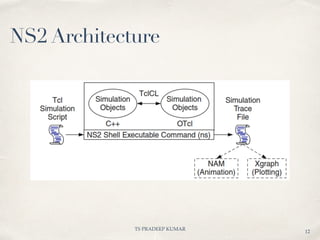
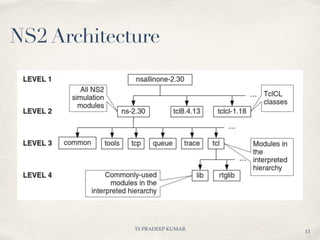
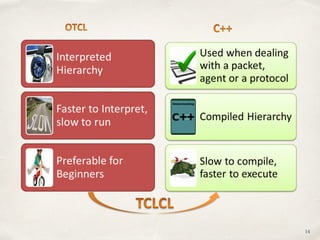
✤ Network Simulator 2 is an event driven Simulator
✤ It consists of
✤ C++ (Internally)
✤ OTCL (User Interface)
✤ TclCL (Interface between C++ and OTCL)
11
NS2 Architecture
TS PRADEEP KUMAR
12
NS2 Architecture
TS PRADEEP KUMAR
13
NS2 Architecture
14
✤ NS is a OTCL interpreter with network simulation
object libraries
✤ Relation between TCL & OTCL is similar to C & C++
✤ To run a Tcl File and animation file
✤ ns filename.tcl (or) tclsh filename.tcl
✤ nam filename.nam
15
OTCL
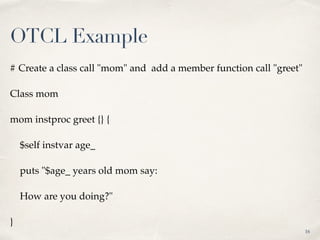
# Create a class call "mom" and add a member function call "greet"
Class mom
mom instproc greet {} {
$self instvar age_
puts "$age_ years old mom say:
How are you doing?"
}
16
OTCL Example
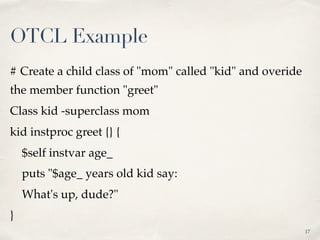
# Create a child class of "mom" called "kid" and overide
the member function "greet"
Class kid -superclass mom
kid instproc greet {} {
$self instvar age_
puts "$age_ years old kid say:
What's up, dude?"
}
17
OTCL Example
✤ # Create a mom and a kid object set each age
✤ set a [new mom]
✤ $a set age_ 45
✤ set b [new kid]
✤ $b set age_ 15
✤ # Calling member function "greet" of each object
✤ $a greet
✤ $b greet
18
OTCL Example
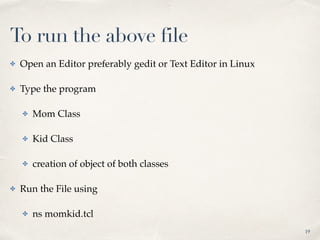
To run the above file
✤ Open an Editor preferably gedit or Text Editor in Linux
✤ Type the program
✤ Mom Class
✤ Kid Class
✤ creation of object of both classes
✤ Run the File using
✤ ns momkid.tcl
19
01
Questions?????

Introduction to ns2

  • 1.
    Introduction to NS2 TS Pradeep Kumar VIT Chennai http://www.nsnam.com http://www.pradeepkumar.org pradeepkumarts@gmail.com 1
  • 2.
    2 ✤Linux Vs Windows ✤NetworkSimulation ✤Introduction to NS2 ✤NS2 Architecture ✤OTCL Overview
  • 3.
    • Verss Use Linux Because…. ✤Supporthas been stopped beyond NS-2.27 in windows ✤Package Configuration is tedious in windows ✤Use NS2 at your own risk in windows ✤Also now the recent architecture of windows8x family is experiencing lot of difficulties in tuning cygwin or mingw. 3
  • 4.
    Ò Linux forNS2 ✕You may use any distributions like Ubuntu, Fedora, Linux Mint, RHEL/CentOS, etc. É Know basic commands (ls, chmod, tar, rpm, make, gedit, vi, pwd, passwd, echo, cd, etc) É Know the directory structure and shell prompt in linux and NS2 É Understand Path variables setting, Installation of packages and dependencies for corresponding distribution. 4
  • 5.
    Basic Linux Commands ✤ls – to list the directory contents ✤ chmod – changing the mode of the file ✤ tar – tape archive (to compress or decompress) ✤ rpm – a type of installation file for linux ✤ make – to compile or recompile in linux ✤ gedit or vi – editors (similar like notepad) ✤ pwd - present working directory ✤ passwd – to change the user passwd ✤ echo – to echo to the screen ✤ cd – change directory ✤ mkdir – to create a directory 5
  • 6.
    TS PRADEEP KUMAR 6 ✤To run the install file within the directory scope ✤ $prompt] ./install ✤ To run the install file in global scope is ✤ $prompt] install Linux basics
  • 7.
    TS PRADEEP KUMAR ✤Approaches ✤ Experiment ✤ Put all network Devices and measure the results/performance ✤ Pros - realistic ✤ Cons - Expensive/Sometime impossible ✤ Mathematical model ✤ Model devices using a graph model ✤ Insight ✤ Need to make assumptions ✤ Simulation ✤ Use programming to represent devices ✤ Easy and can be easily verified ✤ Not much insight, need to make assumptions Network Simulation 7
  • 8.
    TS PRADEEP KUMAR AB C ✤ Network Simulation ✤ Event Driven ✤ Every event provide a reference to the next event (Example: using pointer) ✤ Simulation finishes ✤ When there are no more events ✤ At pre-specified time 8 Network Simulation
  • 9.
    TS PRADEEP KUMAR ✤NS is a discrete event simulator ✤ It provides support for ✤ Simulation of TCP ✤ Routing ✤ Huge number of protocols ranging from wired to wireless networks ✤ Supports the addition of new entities like agent, packet, application, queue, protocol, routing, etc. 9 About NS2
  • 10.
    TS PRADEEP KUMAR ✤NS2 is not a polished or a finished product ✤ Errors/Bugs are being discovered and corrected. ✤ Users of ns are requested to verify that the results are not invalidated by bugs. 10 About NS2
  • 11.
    TS PRADEEP KUMAR ✤Network Simulator 2 is an event driven Simulator ✤ It consists of ✤ C++ (Internally) ✤ OTCL (User Interface) ✤ TclCL (Interface between C++ and OTCL) 11 NS2 Architecture
  • 12.
  • 13.
  • 14.
  • 15.
    ✤ NS isa OTCL interpreter with network simulation object libraries ✤ Relation between TCL & OTCL is similar to C & C++ ✤ To run a Tcl File and animation file ✤ ns filename.tcl (or) tclsh filename.tcl ✤ nam filename.nam 15 OTCL
  • 16.
    # Create aclass call "mom" and add a member function call "greet" Class mom mom instproc greet {} { $self instvar age_ puts "$age_ years old mom say: How are you doing?" } 16 OTCL Example
  • 17.
    # Create achild class of "mom" called "kid" and overide the member function "greet" Class kid -superclass mom kid instproc greet {} { $self instvar age_ puts "$age_ years old kid say: What's up, dude?" } 17 OTCL Example
  • 18.
    ✤ # Createa mom and a kid object set each age ✤ set a [new mom] ✤ $a set age_ 45 ✤ set b [new kid] ✤ $b set age_ 15 ✤ # Calling member function "greet" of each object ✤ $a greet ✤ $b greet 18 OTCL Example
  • 19.
    To run theabove file ✤ Open an Editor preferably gedit or Text Editor in Linux ✤ Type the program ✤ Mom Class ✤ Kid Class ✤ creation of object of both classes ✤ Run the File using ✤ ns momkid.tcl 19
  • 20.