Introduction to ICT Tools
(H5P, Mentimeter, Hot
Potatoes)
- Prof. Avinash Hegde, Department of Mechanical
Engineering, MITE, Moodabidri.
Briefing on proceedings of
FDP on Mastering Flipped
Classroom
01/08/2025
Organized by Dept. of ECE, MITE,
Moodabidri
Content:
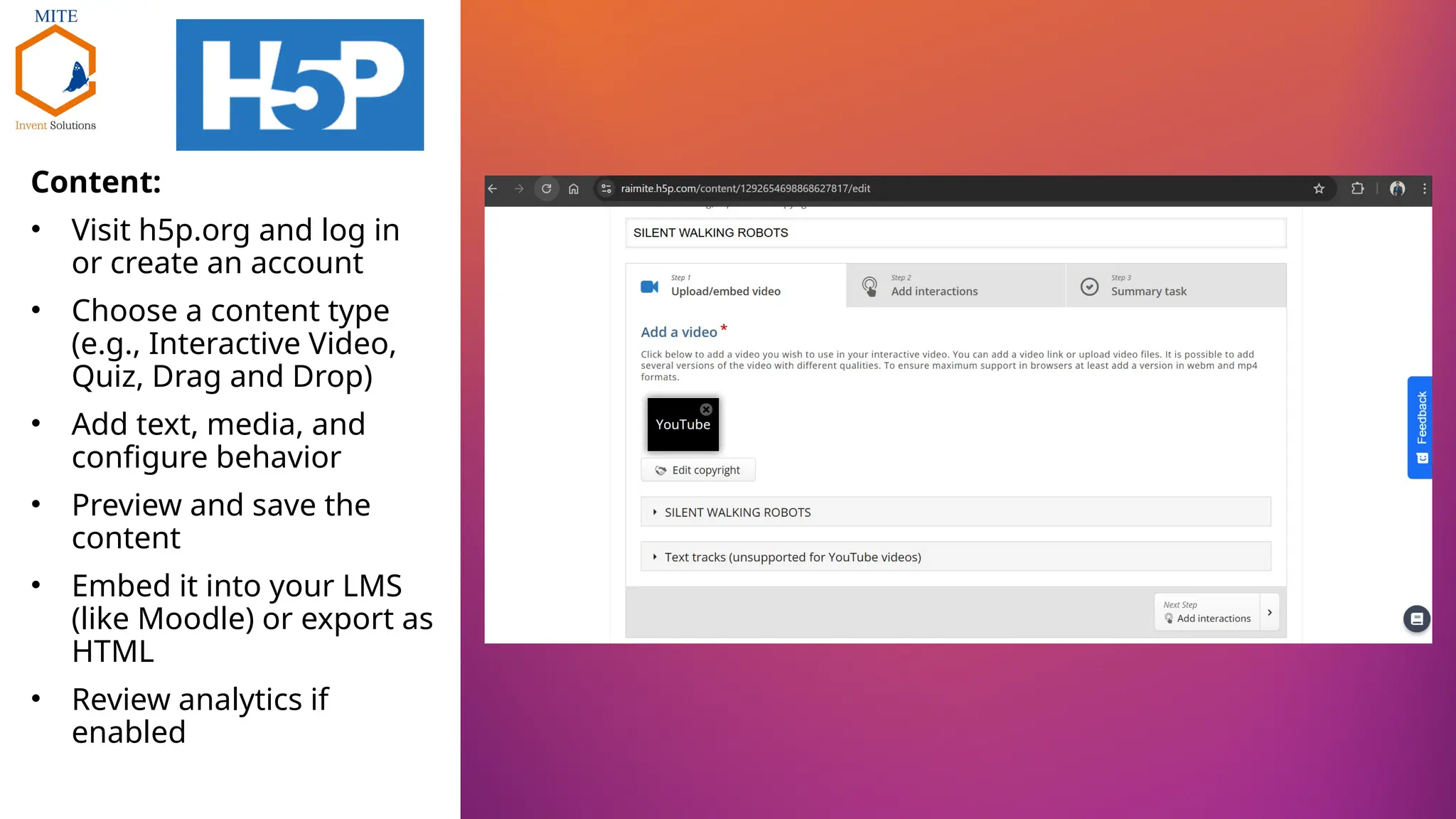
• Visit h5p.org and log in
or create an account
• Choose a content type
(e.g., Interactive Video,
Quiz, Drag and Drop)
• Add text, media, and
configure behavior
• Preview and save the
content
• Embed it into your LMS
(like Moodle) or export as
HTML
• Review analytics if
enabled
• Add interactions over video.
• Toolbar allows adding text,
images, questions, and
more.
• Preparing to make video
content engaging and
educational.
• Clickable interaction added:
What is Robotics?
• Appears at 0:05 with
informative content
• Enhances learner
engagement early in the
video
• Interactive quiz pops up at
0:09
• Question: What kind of robot
is shown?
• Options: Flying, Swimming,
Walking
• Makes content interactive
and checks understanding
• MCQ Display Time: 0:49 -
0:59
• Display style: Poster overlay
• Pauses video to ensure user
focuses on quiz
• Add options with correct
answer and feedback
• Custom feedback ranges for
scores
• Interactive learning through
immediate response
• SUMMARY –
• Question: Choose the
correct statement
• Three clear choices shown
• Summarizes understanding
of silent walking robot tech
• Create account and choose
free version to use.
• Start from scratch
• Choose any one, from the
options
• Word-cloud example
• Post your question and
choose from options to give
number of responses per
student
• Live responses opt-in
• Ask students to join
menti.com and join using the
8 digit code
• Pin on image.
• Post any image where you
want students to point on,
• Select correct area and
present.
• As the students point, you
will observe clicks/pins on
the image
• Jquiz: Creates multiple-choice,
short-answer, hybrid, or multi-
select quizzes.
• Jcloze: Builds gap-fill (fill-in-the-
blank) exercises. Great for
grammar and vocabulary.
• Jmatch: Makes matching or
drag-and-drop activities. Useful
for definitions, translations, etc.
• Jcross: Creates crossword
puzzles using your terms and
clues.
• Jmix: Builds jumbled sentence
exercises to teach sentence
structure or sequencing.
• The Masher: Combines multiple
Hot Potatoes exercises into a
single unit with navigation.
• Write your title, question and give
answers and feedbacks for
answers
• Select correct answers
J Quiz
• Options to explore
J Quiz
• After the question/s are ready,
export using option pointed.
• Do not use spaces in naming.
Instead use underscore _
J Quiz
• Output comes out as HTML file
J Quiz
• Select the part that needs to be
filled and use Gap option.
• Along with clues also give
alternative correct answers.
J Cloze
• Export and name without spaces
J Cloze
• Output comes out as HTML file
J Cloze

Introduction to ICT Tools (H5P, Mentimeter, Hot Potatoes).pptx

  • 1.
    Introduction to ICTTools (H5P, Mentimeter, Hot Potatoes) - Prof. Avinash Hegde, Department of Mechanical Engineering, MITE, Moodabidri. Briefing on proceedings of FDP on Mastering Flipped Classroom 01/08/2025 Organized by Dept. of ECE, MITE, Moodabidri
  • 2.
    Content: • Visit h5p.organd log in or create an account • Choose a content type (e.g., Interactive Video, Quiz, Drag and Drop) • Add text, media, and configure behavior • Preview and save the content • Embed it into your LMS (like Moodle) or export as HTML • Review analytics if enabled
  • 3.
    • Add interactionsover video. • Toolbar allows adding text, images, questions, and more. • Preparing to make video content engaging and educational. • Clickable interaction added: What is Robotics? • Appears at 0:05 with informative content • Enhances learner engagement early in the video
  • 4.
    • Interactive quizpops up at 0:09 • Question: What kind of robot is shown? • Options: Flying, Swimming, Walking • Makes content interactive and checks understanding • MCQ Display Time: 0:49 - 0:59 • Display style: Poster overlay • Pauses video to ensure user focuses on quiz
  • 5.
    • Add optionswith correct answer and feedback • Custom feedback ranges for scores • Interactive learning through immediate response • SUMMARY – • Question: Choose the correct statement • Three clear choices shown • Summarizes understanding of silent walking robot tech
  • 6.
    • Create accountand choose free version to use. • Start from scratch • Choose any one, from the options
  • 7.
    • Word-cloud example •Post your question and choose from options to give number of responses per student • Live responses opt-in • Ask students to join menti.com and join using the 8 digit code
  • 8.
    • Pin onimage. • Post any image where you want students to point on, • Select correct area and present. • As the students point, you will observe clicks/pins on the image
  • 9.
    • Jquiz: Createsmultiple-choice, short-answer, hybrid, or multi- select quizzes. • Jcloze: Builds gap-fill (fill-in-the- blank) exercises. Great for grammar and vocabulary. • Jmatch: Makes matching or drag-and-drop activities. Useful for definitions, translations, etc. • Jcross: Creates crossword puzzles using your terms and clues. • Jmix: Builds jumbled sentence exercises to teach sentence structure or sequencing. • The Masher: Combines multiple Hot Potatoes exercises into a single unit with navigation.
  • 10.
    • Write yourtitle, question and give answers and feedbacks for answers • Select correct answers J Quiz
  • 11.
    • Options toexplore J Quiz
  • 12.
    • After thequestion/s are ready, export using option pointed. • Do not use spaces in naming. Instead use underscore _ J Quiz
  • 13.
    • Output comesout as HTML file J Quiz
  • 14.
    • Select thepart that needs to be filled and use Gap option. • Along with clues also give alternative correct answers. J Cloze
  • 15.
    • Export andname without spaces J Cloze
  • 16.
    • Output comesout as HTML file J Cloze