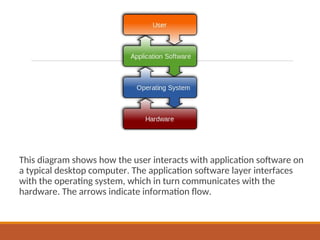
This diagram showshow the user interacts with application software on
a typical desktop computer. The application software layer interfaces
with the operating system, which in turn communicates with the
hardware. The arrows indicate information flow.
3.
Introduction
Hardware refers tothe physical equipment used for the input,
processing, output, and storage activities of a computer system.
The overall trends in hardware are that it becomes smaller, faster,
cheaper, and more powerful over time.
4.
Hardware consists of:
•Central processing unit (CPU). Manipulates the data and controls the tasks
performed by the other components.
• Primary storage. temporarily stores data and program instructions during
processing.
• Secondary storage. Stores data and programs for future use.
• Input technologies. Accept data and instructions and convert them to a form that
the computer can understand.
• Output technologies. Present data and information in a form people can
understand.
• Communication technologies. Provide for the flow of data from external computer
networks (e.g., the Internet and intranets) to the CPU, and from the CPU to
computer networks.
Computer Hierarchy
Mainframe Computers
◦Viewed as a type of server
◦ Used by large enterprises for extensive computing applications that are
accessed by thousands of users at one time.
◦ Examples of mainframe applications are airline reservation systems, Website
transaction processing systems (e.g., Amazon and eBay)
7.
Computer Hierarchy
•Personal computers(PCs)
– The smallest and least expensive
– It is important to point out that people frequently define a PC as a computer that
utilizes the Microsoft Windows operating system. In fact, there are a variety of PCs
available, many of which do not use Windows. One well-known example are the Apple
Macs, which use the Mac OS X operating system.
8.
Computer Hierarchy
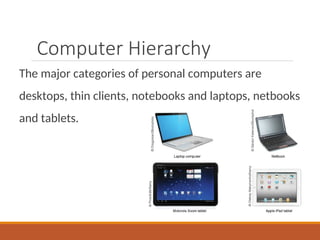
The majorcategories of personal computers are
desktops, thin clients, notebooks and laptops, netbooks
and tablets.
9.
Difference between clients
andservers
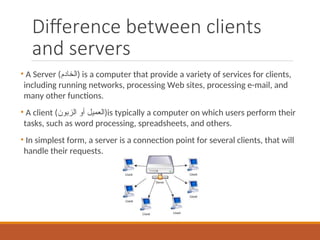
• A Server ()الخادم is a computer that provide a variety of services for clients,
including running networks, processing Web sites, processing e-mail, and
many other functions.
• A client (الزبون أو )العميلis typically a computer on which users perform their
tasks, such as word processing, spreadsheets, and others.
• In simplest form, a server is a connection point for several clients, that will
handle their requests.
10.
Input technologies
اإلدخال وحدات
•Accept data and instructions and convert them to a form the computer
understand.
• Two main types of input devices are:
– human data-entry devices: require human effort to input data.
• Examples are keyboard, mouse, touchscreen, and voice recognition.
– source-data automation devices: input data with minimal human intervention.
• Examples: Bar code readers.
Output technologies
اإلخراج وحدات
Presentdata and information in a form people can understand.
Monitors:
◦Cathode ray tubes: Video screens on which an electron beam illuminates pixels on display screen.
◦Liquid crystal display (LCDs): Flat displays that have liquid crystals between two polarizers to form
characters and images on a backlit screen.
Printers:
◦Laser : Use laser beams to write information on photosensitive drums; produce high-resolution
text and graphics.
◦Inkjet: Shoot fine streams of colored ink onto paper.
Speakers
◦output sounds
Projectors:
◦To display output on large boards
13.
The Central ProcessingUnit
المركزية المعالجة وحدة
Central processing unit (CPU)
performs the actual computation inside any computer
executes the instructions contained in software program
البرنامج في األوامر بتنفيذ تقوم
determines how fast your computer is
الحاسوب سرعة تحدد
is a microprocessorدقيق معالج (for example, Intel’s Core
i3, i5, and i7 chips) made up of millions of microscopic
transistors embedded in a circuit on a chip.
14.
Computer Memory
Two basiccategories of computer memory:
Primary storage. الرئيسية الذاكرة
◦ Temporarily stores data and program instructions during
processing.
Secondary storage. الثانوية الذاكرة
◦ Stores data and programs for future use.
◦ Also called “static memory”
15.
Memory Capacity الذاكرةسعة
bit Short for binary digit (0s and 1s), the only
data that a CPU can process.
byte An 8-bit string of data, needed to
represent any one alphanumeric character or
simple mathematical operation.
16.
Measurement Units القياسوحدات
The storage capacity of a computer is measured
in bytes.
Bits are used as units of measure only for
telecommunications capacity, as in how many
million bits per second can be sent through a
particular medium.
17.
Hierarchy of Memory
Capacity
-Kilobyte: is approximately 1,000 bytes.
- Megabyte: is approximately 1 million bytes.
- Gigabyte: is approximately 1 billion bytes.
◦ Most personal computers have gigabytes of RAM memory.
- Terabyte: is approximately 1 trillion bytes.
◦ The storage capacity of modern personal computers can be several
terabytes.
- Petabyte: is approximately 1,000 terabytes.
- Exabyte: is approximately 1,000 petabytes.
- Zettabyte: is approximately 1,000 exabytes.
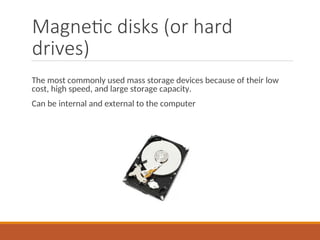
Magnetic disks (orhard
drives)
The most commonly used mass storage devices because of their low
cost, high speed, and large storage capacity.
Can be internal and external to the computer
20.
Optical Storage Devices
Unlikemagnetic media, optical storage devices do not
store data via magnetism. Rather, a laser reads the
surface of a reflective plastic platter.
Optical disk drives are slower than magnetic hard
drives, but they are less susceptible to damage from
contamination and more durable.
21.
Optical Storage Devices
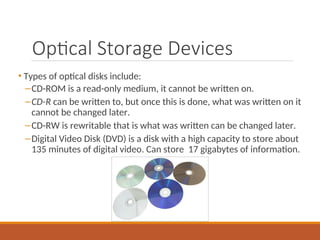
•Types of optical disks include:
–CD-ROM is a read-only medium, it cannot be written on.
–CD-R can be written to, but once this is done, what was written on it
cannot be changed later.
–CD-RW is rewritable that is what was written can be changed later.
–Digital Video Disk (DVD) is a disk with a high capacity to store about
135 minutes of digital video. Can store 17 gigabytes of information.
22.
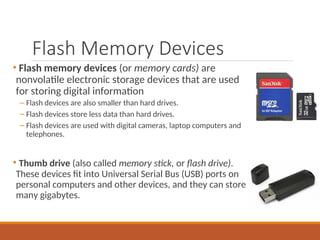
Flash Memory Devices
•Flash memory devices (or memory cards) are
nonvolatile electronic storage devices that are used
for storing digital information
– Flash devices are also smaller than hard drives.
– Flash devices store less data than hard drives.
– Flash devices are used with digital cameras, laptop computers and
telephones.
• Thumb drive (also called memory stick, or flash drive).
These devices fit into Universal Serial Bus (USB) ports on
personal computers and other devices, and they can store
many gigabytes.
Editor's Notes
#4 Example of communication technologies: modem, network interface card (NIC), Wi-Fi devices, and an access point.
#9 A client is software that (usually) connects to the server to perform actions. The client provide a user interface that allows users to carry out actions. It forwards these requests to the server, which carries out the action and returns a response.