Introduction to Git
10/2/2013
Rick Umali
rickumali@gmail.com
@rickumali
http://tech.rickumali.com/
This presentation is on Google Drive at:
http://sn.im/git-talk-2013
There you can read the 'speaker notes' for this
presentation.
What is Source Control?
Source code control is the most important
practice a coding professional can do.
A mechanism to track changes in source code.
Used for version history, auditing, and
recovery.
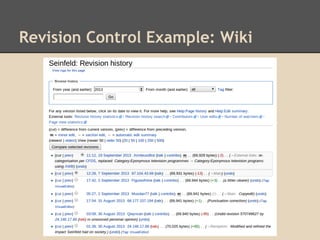
Revision Control Example: Wiki
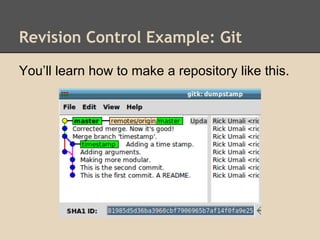
Revision Control Example: Git
You’ll learn how to make a repository like this.
Git
Git is an open source, distributed version
control system designed for speed and
efficiency.
Freedom
No "server" required
Unique architecture
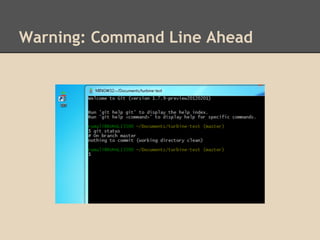
Warning: Command Line Ahead
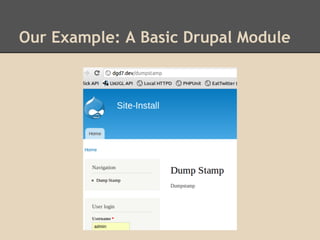
Our Example: A Basic Drupal Module
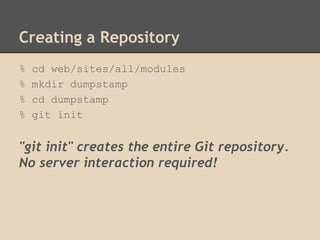
Creating a Repository
% cd web/sites/all/modules
% mkdir dumpstamp
% cd dumpstamp
% git init
"git init" creates the entire Git repository.
No server interaction required!
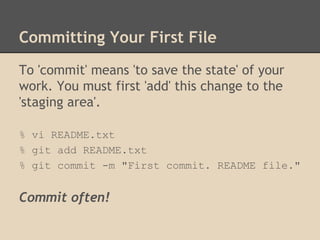
Committing Your First File
To 'commit' means 'to save the state' of your
work. You must first 'add' this change to the
'staging area'.
% vi README.txt
% git add README.txt
% git commit -m "First commit. README file."
Commit often!
Looking at the Repository History
% git log
% gitk
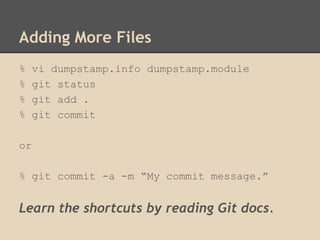
Adding More Files
% vi dumpstamp.info dumpstamp.module
% git status
% git add .
% git commit
or
% git commit -a -m “My commit message.”
Learn the shortcuts by reading Git docs.
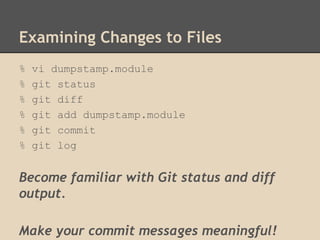
Examining Changes to Files
% vi dumpstamp.module
% git status
% git diff
% git add dumpstamp.module
% git commit
% git log
Become familiar with Git status and diff
output.
Make your commit messages meaningful!
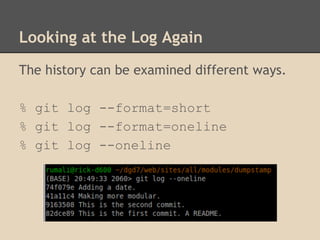
Looking at the Log Again
The history can be examined different ways.
% git log --format=short
% git log --format=oneline
% git log --oneline
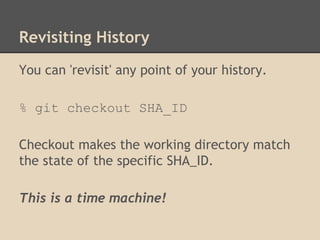
Revisiting History
You can 'revisit' any point of your history.
% git checkout SHA_ID
Checkout makes the working directory match
the state of the specific SHA_ID.
This is a time machine!
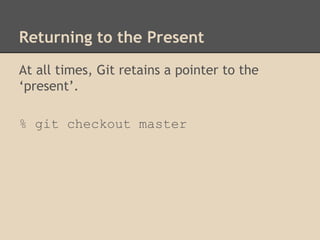
Returning to the Present
At all times, Git retains a pointer to the
‘present’.
% git checkout master
Branching and Merging Next, But...
What we have covered so far is probably 70-
80% of what you will do with git.
Adding and committing files are the heart of
git (and any version control system).
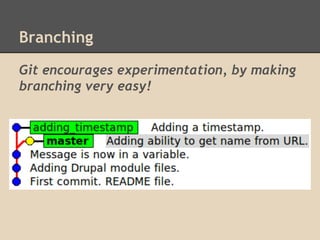
Git encourages experimentation, by making
branching very easy!
Branching
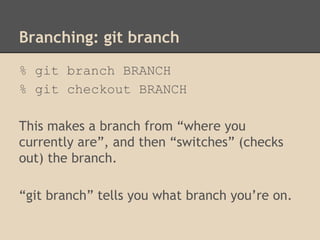
Branching: git branch
% git branch BRANCH
% git checkout BRANCH
This makes a branch from “where you
currently are”, and then “switches” (checks
out) the branch.
“git branch” tells you what branch you’re on.
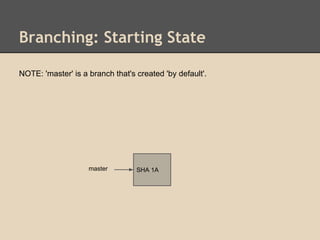
Branching: Starting State
SHA 1Amaster
NOTE: 'master' is a branch that's created 'by default'.
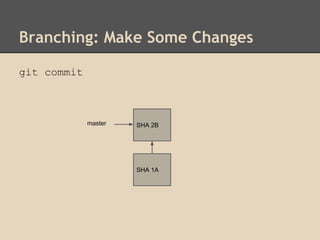
Branching: Make Some Changes
SHA 1A
SHA 2Bmaster
git commit
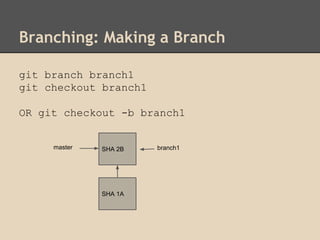
Branching: Making a Branch
SHA 1A
SHA 2Bmaster branch1
git branch branch1
git checkout branch1
OR git checkout -b branch1
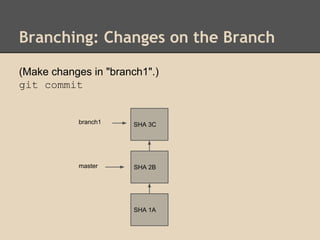
Branching: Changes on the Branch
SHA 1A
SHA 2Bmaster
SHA 3C
(Make changes in "branch1".)
git commit
branch1
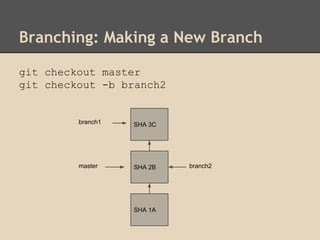
Branching: Making a New Branch
SHA 1A
SHA 2Bmaster
SHA 3C
git checkout master
git checkout -b branch2
branch1
branch2
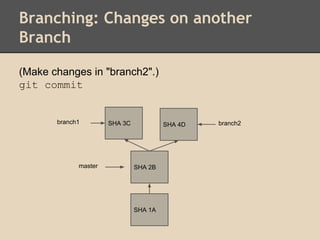
Branching: Changes on another
Branch
SHA 1A
SHA 2Bmaster
branch2SHA 4D
(Make changes in "branch2".)
git commit
branch1 SHA 3C
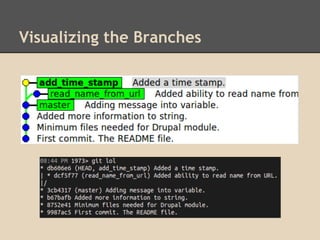
Visualizing the Branches
Merging
Bringing two branches together.
First 'checkout' the branch you want to merge
into (typically master), then 'merge' in branch.
% git checkout master
% git merge BRANCH
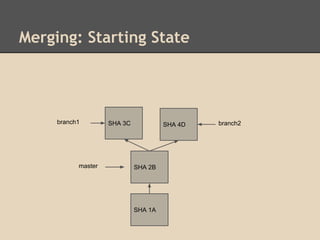
Merging: Starting State
SHA 1A
SHA 2Bmaster
branch2SHA 4Dbranch1 SHA 3C
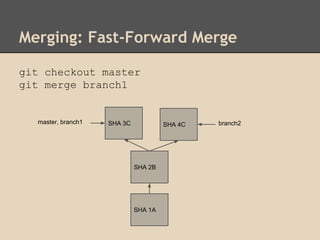
Merging: Fast-Forward Merge
git checkout master
git merge branch1
SHA 1A
SHA 2B
branch2SHA 4Cmaster, branch1 SHA 3C
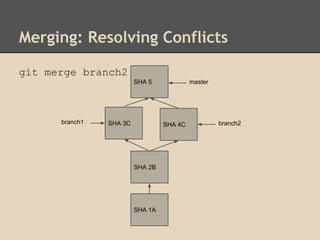
Merging: Resolving Conflicts
git merge branch2
SHA 1A
SHA 2B
branch2SHA 4Cbranch1 SHA 3C
SHA 5 master
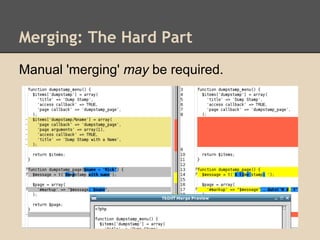
Merging: The Hard Part
Manual 'merging' may be required.
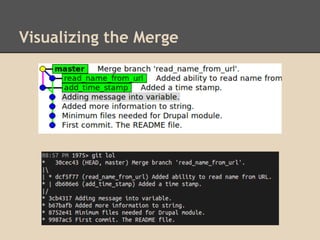
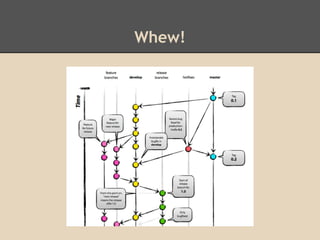
Visualizing the Merge
Whew!
Using Git “Remotely”
You can upload your local Git repository to a
public Git repository. These repositories are
known as remotes.
Using “remotes” is the key to collaborating.
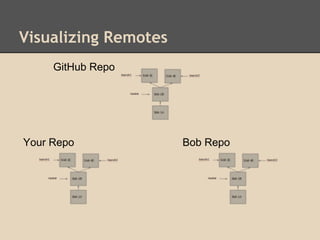
Visualizing Remotes
Your Repo Bob Repo
GitHub Repo
Uploading New Code to GitHub
Create a repository (on GitHub).
Add a 'remote' (via git remote add).
Upload your code (via git push).
Creating a Repository
git init
Adding a Remote
git remote adds a name for a repo at a
specific URL
git remote add origin git@github.com:rickumali/DumpStamp.
git
Your Repo GitHub Repo
(origin)
Dumpstamp.git
This is just a naming step!
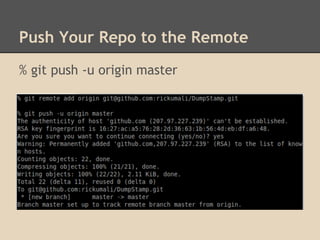
Push Your Repo to the Remote
% git push -u origin master
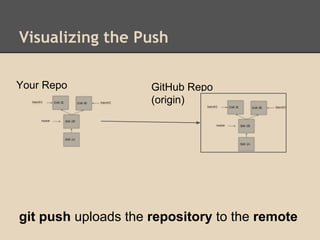
Visualizing the Push
git push uploads the repository to the remote
Your Repo GitHub Repo
(origin)
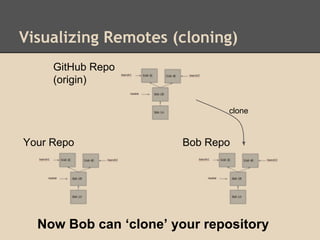
Visualizing Remotes (cloning)
Your Repo Bob Repo
GitHub Repo
(origin)
Now Bob can ‘clone’ your repository
clone
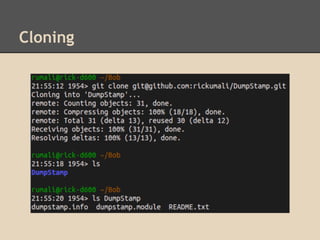
Cloning
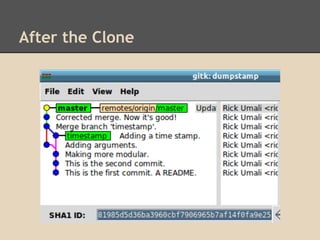
After the Clone
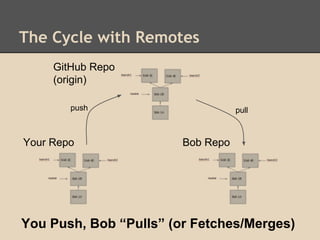
The Cycle with Remotes
Your Repo Bob Repo
GitHub Repo
(origin)
You Push, Bob “Pulls” (or Fetches/Merges)
pullpush
You Saw and Learned A Lot About Git
Typical Git Commands
Add, Commit, Log, Diff, Status
Branch and Merging
Git Remote Repositories
Next Steps
Install Git
Commit frequently and log verbosely
Experiment (branch) often
Introduction to Git
10/2/2013
Rick Umali
rickumali@gmail.com
@rickumali
http://tech.rickumali.com/
This presentation is on Google Drive at:
http://sn.im/git-talk-2013
There you can read the 'speaker notes' for this
presentation.
Resources
http://sethrobertson.github.io/GitBestPractices/
Great list of Git best practices.
http://git-scm.org/
Both "Pro Git" book, and Git reference
http://gitref.org/
A "quicker" Git reference
http://www-cs-students.stanford.edu/~blynn/gitmagic/
"Friendlier" Git walk-through (git magic).
http://www.mail-archive.com/dri-devel@lists.
sourceforge.net/msg39091.html
Linus on "clean history."
Resources
http://www.youtube.com/watch?v=4XpnKHJAok8
Linus Torvalds (Git creator) (May '07)
http://www.youtube.com/watch?v=8dhZ9BXQgc4
Randal Schwartz (Perl expert and Git old-timer) (Oct
'07)
http://www.youtube.com/watch?v=ZDR433b0HJY
Scott Chacon (Pro Git author) (July '11)

Introduction to Git

  • 1.
    Introduction to Git 10/2/2013 RickUmali rickumali@gmail.com @rickumali http://tech.rickumali.com/ This presentation is on Google Drive at: http://sn.im/git-talk-2013 There you can read the 'speaker notes' for this presentation.
  • 2.
    What is SourceControl? Source code control is the most important practice a coding professional can do. A mechanism to track changes in source code. Used for version history, auditing, and recovery.
  • 3.
  • 4.
    Revision Control Example:Git You’ll learn how to make a repository like this.
  • 5.
    Git Git is anopen source, distributed version control system designed for speed and efficiency. Freedom No "server" required Unique architecture
  • 6.
  • 7.
    Our Example: ABasic Drupal Module
  • 8.
    Creating a Repository %cd web/sites/all/modules % mkdir dumpstamp % cd dumpstamp % git init "git init" creates the entire Git repository. No server interaction required!
  • 9.
    Committing Your FirstFile To 'commit' means 'to save the state' of your work. You must first 'add' this change to the 'staging area'. % vi README.txt % git add README.txt % git commit -m "First commit. README file." Commit often!
  • 10.
    Looking at theRepository History % git log % gitk
  • 11.
    Adding More Files %vi dumpstamp.info dumpstamp.module % git status % git add . % git commit or % git commit -a -m “My commit message.” Learn the shortcuts by reading Git docs.
  • 12.
    Examining Changes toFiles % vi dumpstamp.module % git status % git diff % git add dumpstamp.module % git commit % git log Become familiar with Git status and diff output. Make your commit messages meaningful!
  • 13.
    Looking at theLog Again The history can be examined different ways. % git log --format=short % git log --format=oneline % git log --oneline
  • 14.
    Revisiting History You can'revisit' any point of your history. % git checkout SHA_ID Checkout makes the working directory match the state of the specific SHA_ID. This is a time machine!
  • 15.
    Returning to thePresent At all times, Git retains a pointer to the ‘present’. % git checkout master
  • 16.
    Branching and MergingNext, But... What we have covered so far is probably 70- 80% of what you will do with git. Adding and committing files are the heart of git (and any version control system).
  • 17.
    Git encourages experimentation,by making branching very easy! Branching
  • 18.
    Branching: git branch %git branch BRANCH % git checkout BRANCH This makes a branch from “where you currently are”, and then “switches” (checks out) the branch. “git branch” tells you what branch you’re on.
  • 19.
    Branching: Starting State SHA1Amaster NOTE: 'master' is a branch that's created 'by default'.
  • 20.
    Branching: Make SomeChanges SHA 1A SHA 2Bmaster git commit
  • 21.
    Branching: Making aBranch SHA 1A SHA 2Bmaster branch1 git branch branch1 git checkout branch1 OR git checkout -b branch1
  • 22.
    Branching: Changes onthe Branch SHA 1A SHA 2Bmaster SHA 3C (Make changes in "branch1".) git commit branch1
  • 23.
    Branching: Making aNew Branch SHA 1A SHA 2Bmaster SHA 3C git checkout master git checkout -b branch2 branch1 branch2
  • 24.
    Branching: Changes onanother Branch SHA 1A SHA 2Bmaster branch2SHA 4D (Make changes in "branch2".) git commit branch1 SHA 3C
  • 25.
  • 26.
    Merging Bringing two branchestogether. First 'checkout' the branch you want to merge into (typically master), then 'merge' in branch. % git checkout master % git merge BRANCH
  • 27.
    Merging: Starting State SHA1A SHA 2Bmaster branch2SHA 4Dbranch1 SHA 3C
  • 28.
    Merging: Fast-Forward Merge gitcheckout master git merge branch1 SHA 1A SHA 2B branch2SHA 4Cmaster, branch1 SHA 3C
  • 29.
    Merging: Resolving Conflicts gitmerge branch2 SHA 1A SHA 2B branch2SHA 4Cbranch1 SHA 3C SHA 5 master
  • 30.
    Merging: The HardPart Manual 'merging' may be required.
  • 31.
  • 32.
  • 33.
    Using Git “Remotely” Youcan upload your local Git repository to a public Git repository. These repositories are known as remotes. Using “remotes” is the key to collaborating.
  • 34.
    Visualizing Remotes Your RepoBob Repo GitHub Repo
  • 35.
    Uploading New Codeto GitHub Create a repository (on GitHub). Add a 'remote' (via git remote add). Upload your code (via git push).
  • 36.
  • 37.
    Adding a Remote gitremote adds a name for a repo at a specific URL git remote add origin git@github.com:rickumali/DumpStamp. git Your Repo GitHub Repo (origin) Dumpstamp.git This is just a naming step!
  • 38.
    Push Your Repoto the Remote % git push -u origin master
  • 39.
    Visualizing the Push gitpush uploads the repository to the remote Your Repo GitHub Repo (origin)
  • 40.
    Visualizing Remotes (cloning) YourRepo Bob Repo GitHub Repo (origin) Now Bob can ‘clone’ your repository clone
  • 41.
  • 42.
  • 43.
    The Cycle withRemotes Your Repo Bob Repo GitHub Repo (origin) You Push, Bob “Pulls” (or Fetches/Merges) pullpush
  • 44.
    You Saw andLearned A Lot About Git Typical Git Commands Add, Commit, Log, Diff, Status Branch and Merging Git Remote Repositories
  • 45.
    Next Steps Install Git Commitfrequently and log verbosely Experiment (branch) often
  • 46.
    Introduction to Git 10/2/2013 RickUmali rickumali@gmail.com @rickumali http://tech.rickumali.com/ This presentation is on Google Drive at: http://sn.im/git-talk-2013 There you can read the 'speaker notes' for this presentation.
  • 47.
    Resources http://sethrobertson.github.io/GitBestPractices/ Great list ofGit best practices. http://git-scm.org/ Both "Pro Git" book, and Git reference http://gitref.org/ A "quicker" Git reference http://www-cs-students.stanford.edu/~blynn/gitmagic/ "Friendlier" Git walk-through (git magic). http://www.mail-archive.com/dri-devel@lists. sourceforge.net/msg39091.html Linus on "clean history."
  • 48.
    Resources http://www.youtube.com/watch?v=4XpnKHJAok8 Linus Torvalds (Gitcreator) (May '07) http://www.youtube.com/watch?v=8dhZ9BXQgc4 Randal Schwartz (Perl expert and Git old-timer) (Oct '07) http://www.youtube.com/watch?v=ZDR433b0HJY Scott Chacon (Pro Git author) (July '11)