An Introduction to
FreeRTOS
1
Agenda
What is FreeRTOS?
What is an RTOS?
Why Use an RTOS?
FreeRTOS Alternatives
Key FreeRTOS Features
Supported Platforms
Licensing, Cost, and Ownership
More Details on Features
Additional Libraries, Add-ons, and OS Variants
FreeRTOS and Qt for Microcontrollers
Code Example (Arduino)
Getting Started
References
2
What is FreeRTOS?
● Real-time operating system (RTOS) kernel for embedded devices
● Ported to over 35 microcontroller platforms
● Open Source, distributed under an MIT License
3
What is an RTOS?
● Real-Time Operating System
● Supports running tasks with well-defined, consistent, fixed time constraints
● Event-driven or time-sharing, usually pre-emptive scheduling
● Predictable algorithm for dynamic memory allocation
● Some applications may only allow static memory allocation
● Often provides primitives for intertask communication and resource sharing
4
Why Use an RTOS?
1. Hard real-time requirement.
2. Running on low-end hardware (e.g. microcontroller) that does not support
resources of a full OS like Linux.
3. Need for multiple tasks, synchronization primitives, etc.
5
FreeRTOS Alternatives
1. Embedded Linux (sometimes with real-time extensions) or other embedded
(POSIX) OS.
2. Bare metal.
3. Other RTOS.
Some other of popular RTOSes:
Deos (DDC-I), embOS (SEGGER), Integrity (Green Hills Software), Keil RTX (ARM),
LynxOS (Lynx Software Technologies), MQX (Philips NXP/Freescale), Nucleus
(Mentor Graphics), QNX Neutrino (BlackBerry), PikeOS (Sysgo), SafeRTOS
(Wittenstein), ThreadX (Microsoft Express Logic), µC/OS (Micrium), VxWorks
(Wind River), Zephyr (Linux Foundation)
6
Key FreeRTOS Features
● Tiny, power-saving kernel with small memory footprint, low overhead, and fast
execution
● Support for 40+ architectures
● Modular libraries
● MIT licensed with commercial options
● Extensive documentation (book and reference manuals)
7
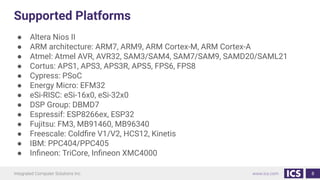
Supported Platforms
● Altera Nios II
● ARM architecture: ARM7, ARM9, ARM Cortex-M, ARM Cortex-A
● Atmel: Atmel AVR, AVR32, SAM3/SAM4, SAM7/SAM9, SAMD20/SAML21
● Cortus: APS1, APS3, APS3R, APS5, FPS6, FPS8
● Cypress: PSoC
● Energy Micro: EFM32
● eSi-RISC: eSi-16x0, eSi-32x0
● DSP Group: DBMD7
● Espressif: ESP8266ex, ESP32
● Fujitsu: FM3, MB91460, MB96340
● Freescale: Coldfire V1/V2, HCS12, Kinetis
● IBM: PPC404/PPC405
● Infineon: TriCore, Infineon XMC4000
8
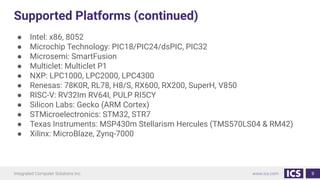
Supported Platforms (continued)
● Intel: x86, 8052
● Microchip Technology: PIC18/PIC24/dsPIC, PIC32
● Microsemi: SmartFusion
● Multiclet: Multiclet P1
● NXP: LPC1000, LPC2000, LPC4300
● Renesas: 78K0R, RL78, H8/S, RX600, RX200, SuperH, V850
● RISC-V: RV32Im RV64I, PULP RI5CY
● Silicon Labs: Gecko (ARM Cortex)
● STMicroelectronics: STM32, STR7
● Texas Instruments: MSP430m Stellarism Hercules (TMS570LS04 & RM42)
● Xilinx: MicroBlaze, Zynq-7000
9
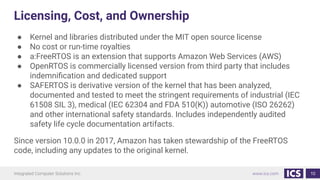
Licensing, Cost, and Ownership
● Kernel and libraries distributed under the MIT open source license
● No cost or run-time royalties
● a:FreeRTOS is an extension that supports Amazon Web Services (AWS)
● OpenRTOS is commercially licensed version from third party that includes
indemnification and dedicated support
● SAFERTOS is derivative version of the kernel that has been analyzed,
documented and tested to meet the stringent requirements of industrial (IEC
61508 SIL 3), medical (IEC 62304 and FDA 510(K)) automotive (ISO 26262)
and other international safety standards. Includes independently audited
safety life cycle documentation artifacts.
Since version 10.0.0 in 2017, Amazon has taken stewardship of the FreeRTOS
code, including any updates to the original kernel.
10
More Details On Features
● Tasks
● Queues, Mutexes, Semaphores
● Direct To Task Notifications
● Stream & Message Buffers
● Software Timers
● Event Groups (or "Flags")
● Static vs dynamic memory
● Heap Memory Management
● Stack Overflow Protection
● Co-Routines (deprecated)
● Features are configurable at compile time
11
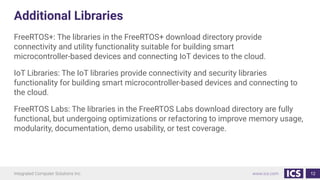
Additional Libraries
FreeRTOS+: The libraries in the FreeRTOS+ download directory provide
connectivity and utility functionality suitable for building smart
microcontroller-based devices and connecting IoT devices to the cloud.
IoT Libraries: The IoT libraries provide connectivity and security libraries
functionality for building smart microcontroller-based devices and connecting to
the cloud.
FreeRTOS Labs: The libraries in the FreeRTOS Labs download directory are fully
functional, but undergoing optimizations or refactoring to improve memory usage,
modularity, documentation, demo usability, or test coverage.
12
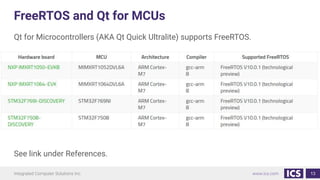
FreeRTOS and Qt for MCUs
Qt for Microcontrollers (AKA Qt Quick Ultralite) supports FreeRTOS.
See link under References.
13
Other UI Frameworks for MCUs
● Crank Storyboard (Crank)
● Embedded Wizard (TARA Systems)
● TouchGFX (STMicroelectronics)
● emWIN (SEGGER)
● uGFX (uGFX GmbH)
14
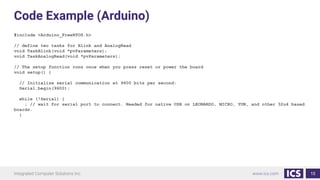
Code Example (Arduino)
#include <Arduino_FreeRTOS.h>
// define two tasks for Blink and AnalogRead
void TaskBlink(void *pvParameters);
void TaskAnalogRead(void *pvParameters);
// The setup function runs once when you press reset or power the board
void setup() {
// Initialize serial communication at 9600 bits per second:
Serial.begin(9600);
while (!Serial) {
; // wait for serial port to connect. Needed for native USB on LEONARDO, MICRO, YUN, and other 32u4 based
boards.
}
15
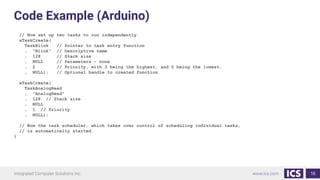
Code Example (Arduino)
// Now set up two tasks to run independently.
xTaskCreate(
TaskBlink // Pointer to task entry function
, "Blink" // Descriptive name
, 128 // Stack size
, NULL // Parameters - none
, 2 // Priority, with 3 being the highest, and 0 being the lowest.
, NULL); // Optional handle to created function
xTaskCreate(
TaskAnalogRead
, "AnalogRead"
, 128 // Stack size
, NULL
, 1 // Priority
, NULL);
// Now the task scheduler, which takes over control of scheduling individual tasks,
// is automatically started.
}
16
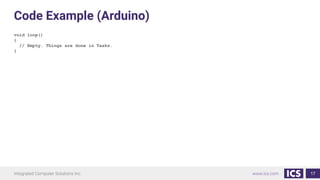
Code Example (Arduino)
void loop()
{
// Empty. Things are done in Tasks.
}
17
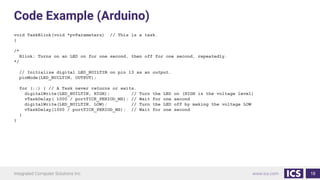
Code Example (Arduino)
void TaskBlink(void *pvParameters) // This is a task.
{
/*
Blink: Turns on an LED on for one second, then off for one second, repeatedly.
*/
// Initialize digital LED_BUILTIN on pin 13 as an output.
pinMode(LED_BUILTIN, OUTPUT);
for (;;) { // A Task never returns or exits.
digitalWrite(LED_BUILTIN, HIGH); // Turn the LED on (HIGH is the voltage level)
vTaskDelay( 1000 / portTICK_PERIOD_MS); // Wait for one second
digitalWrite(LED_BUILTIN, LOW); // Turn the LED off by making the voltage LOW
vTaskDelay(1000 / portTICK_PERIOD_MS); // Wait for one second
}
}
18
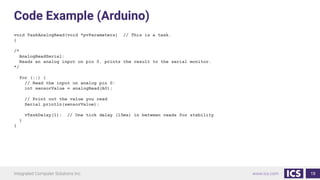
Code Example (Arduino)
void TaskAnalogRead(void *pvParameters) // This is a task.
{
/*
AnalogReadSerial:
Reads an analog input on pin 0, prints the result to the serial monitor.
*/
for (;;) {
// Read the input on analog pin 0:
int sensorValue = analogRead(A0);
// Print out the value you read
Serial.println(sensorValue);
vTaskDelay(1); // One tick delay (15ms) in between reads for stability
}
}
19
Getting Started - Linux Port
● Port to Linux that provides an environment to experiment with FreeRTOS and
develop FreeRTOS applications intended for later porting to real embedded
hardware.
● Uses POSIX threading.
● Application will not exhibit true real-time behavior.
See https://www.freertos.org/FreeRTOS-simulator-for-Linux.html
20
Getting Started - Windows Port
● Similar to Linux, runs on Windows
● Uses Windows scheduler for each FreeRTOS task
● Supports MinGW and Visual Studio compilers and Eclipse IDE
See
https://www.freertos.org/FreeRTOS-Windows-Simulator-Emulator-for-Visual-Studi
o-and-Eclipse-MingW.html
21
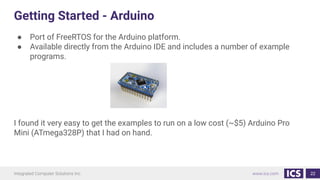
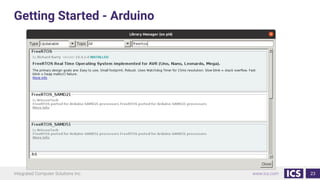
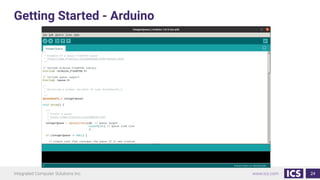
Getting Started - Arduino
● Port of FreeRTOS for the Arduino platform.
● Available directly from the Arduino IDE and includes a number of example
programs.
I found it very easy to get the examples to run on a low cost (~$5) Arduino Pro
Mini (ATmega328P) that I had on hand.
22
Getting Started - Arduino
23
Getting Started - Arduino
24
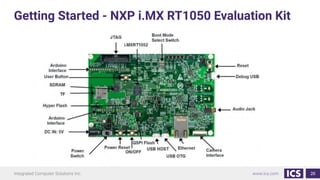
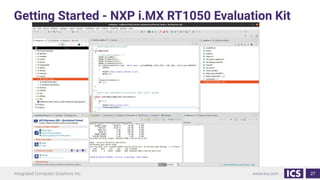
Getting Started - NXP i.MX RT1050 Evaluation Kit
● Evaluation kit for i.MX RT1050 Crossover MCU with Arm Cortex®-M7 core
● 256 MB SDRAM memory, 512 MB Hyper Flash, 64 MB QSPI Flash, socket for
SD card
● Small LCD display/touchscreen
● 6 axis sensors, audio in/out, Ethernet, CAN bus
● IDE is MCUXpresso (based on Eclipse)
● Supports FreeRTOS, Zephyr OS, Arm MBed OS, bare metal
● About US$100 with display
25
Getting Started - NXP i.MX RT1050 Evaluation Kit
26
Getting Started - NXP i.MX RT1050 Evaluation Kit
27
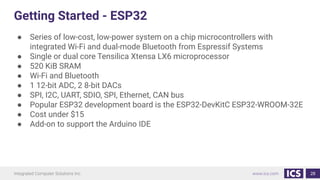
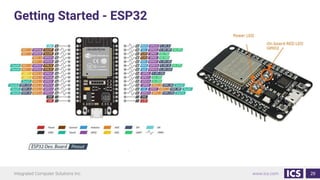
Getting Started - ESP32
● Series of low-cost, low-power system on a chip microcontrollers with
integrated Wi-Fi and dual-mode Bluetooth from Espressif Systems
● Single or dual core Tensilica Xtensa LX6 microprocessor
● 520 KiB SRAM
● Wi-Fi and Bluetooth
● 1 12-bit ADC, 2 8-bit DACs
● SPI, I2C, UART, SDIO, SPI, Ethernet, CAN bus
● Popular ESP32 development board is the ESP32-DevKitC ESP32-WROOM-32E
● Cost under $15
● Add-on to support the Arduino IDE
28
Getting Started - ESP32
29
References
1. https://www.freertos.org
2. https://www.freertos.org/Documentation/RTOS_book.html
3. https://forums.freertos.org
4. https://github.com/feilipu/Arduino_FreeRTOS_Library
5. https://doc.qt.io/QtForMCUs/qtul-using-with-freertos.html
30
Summary
● Most microcontrollers can't run a full OS like Linux.
● Some applications requires real-time processing.
● Leveraging an RTOS can save development time, improve reliability.
● FreeRTOS is one of the most popular solutions due to cost, performance,
features, scalability, and wide platform support.
31
Questions?
32

Introduction to FreeRTOS

  • 1.
  • 2.
    Agenda What is FreeRTOS? Whatis an RTOS? Why Use an RTOS? FreeRTOS Alternatives Key FreeRTOS Features Supported Platforms Licensing, Cost, and Ownership More Details on Features Additional Libraries, Add-ons, and OS Variants FreeRTOS and Qt for Microcontrollers Code Example (Arduino) Getting Started References 2
  • 3.
    What is FreeRTOS? ●Real-time operating system (RTOS) kernel for embedded devices ● Ported to over 35 microcontroller platforms ● Open Source, distributed under an MIT License 3
  • 4.
    What is anRTOS? ● Real-Time Operating System ● Supports running tasks with well-defined, consistent, fixed time constraints ● Event-driven or time-sharing, usually pre-emptive scheduling ● Predictable algorithm for dynamic memory allocation ● Some applications may only allow static memory allocation ● Often provides primitives for intertask communication and resource sharing 4
  • 5.
    Why Use anRTOS? 1. Hard real-time requirement. 2. Running on low-end hardware (e.g. microcontroller) that does not support resources of a full OS like Linux. 3. Need for multiple tasks, synchronization primitives, etc. 5
  • 6.
    FreeRTOS Alternatives 1. EmbeddedLinux (sometimes with real-time extensions) or other embedded (POSIX) OS. 2. Bare metal. 3. Other RTOS. Some other of popular RTOSes: Deos (DDC-I), embOS (SEGGER), Integrity (Green Hills Software), Keil RTX (ARM), LynxOS (Lynx Software Technologies), MQX (Philips NXP/Freescale), Nucleus (Mentor Graphics), QNX Neutrino (BlackBerry), PikeOS (Sysgo), SafeRTOS (Wittenstein), ThreadX (Microsoft Express Logic), µC/OS (Micrium), VxWorks (Wind River), Zephyr (Linux Foundation) 6
  • 7.
    Key FreeRTOS Features ●Tiny, power-saving kernel with small memory footprint, low overhead, and fast execution ● Support for 40+ architectures ● Modular libraries ● MIT licensed with commercial options ● Extensive documentation (book and reference manuals) 7
  • 8.
    Supported Platforms ● AlteraNios II ● ARM architecture: ARM7, ARM9, ARM Cortex-M, ARM Cortex-A ● Atmel: Atmel AVR, AVR32, SAM3/SAM4, SAM7/SAM9, SAMD20/SAML21 ● Cortus: APS1, APS3, APS3R, APS5, FPS6, FPS8 ● Cypress: PSoC ● Energy Micro: EFM32 ● eSi-RISC: eSi-16x0, eSi-32x0 ● DSP Group: DBMD7 ● Espressif: ESP8266ex, ESP32 ● Fujitsu: FM3, MB91460, MB96340 ● Freescale: Coldfire V1/V2, HCS12, Kinetis ● IBM: PPC404/PPC405 ● Infineon: TriCore, Infineon XMC4000 8
  • 9.
    Supported Platforms (continued) ●Intel: x86, 8052 ● Microchip Technology: PIC18/PIC24/dsPIC, PIC32 ● Microsemi: SmartFusion ● Multiclet: Multiclet P1 ● NXP: LPC1000, LPC2000, LPC4300 ● Renesas: 78K0R, RL78, H8/S, RX600, RX200, SuperH, V850 ● RISC-V: RV32Im RV64I, PULP RI5CY ● Silicon Labs: Gecko (ARM Cortex) ● STMicroelectronics: STM32, STR7 ● Texas Instruments: MSP430m Stellarism Hercules (TMS570LS04 & RM42) ● Xilinx: MicroBlaze, Zynq-7000 9
  • 10.
    Licensing, Cost, andOwnership ● Kernel and libraries distributed under the MIT open source license ● No cost or run-time royalties ● a:FreeRTOS is an extension that supports Amazon Web Services (AWS) ● OpenRTOS is commercially licensed version from third party that includes indemnification and dedicated support ● SAFERTOS is derivative version of the kernel that has been analyzed, documented and tested to meet the stringent requirements of industrial (IEC 61508 SIL 3), medical (IEC 62304 and FDA 510(K)) automotive (ISO 26262) and other international safety standards. Includes independently audited safety life cycle documentation artifacts. Since version 10.0.0 in 2017, Amazon has taken stewardship of the FreeRTOS code, including any updates to the original kernel. 10
  • 11.
    More Details OnFeatures ● Tasks ● Queues, Mutexes, Semaphores ● Direct To Task Notifications ● Stream & Message Buffers ● Software Timers ● Event Groups (or "Flags") ● Static vs dynamic memory ● Heap Memory Management ● Stack Overflow Protection ● Co-Routines (deprecated) ● Features are configurable at compile time 11
  • 12.
    Additional Libraries FreeRTOS+: Thelibraries in the FreeRTOS+ download directory provide connectivity and utility functionality suitable for building smart microcontroller-based devices and connecting IoT devices to the cloud. IoT Libraries: The IoT libraries provide connectivity and security libraries functionality for building smart microcontroller-based devices and connecting to the cloud. FreeRTOS Labs: The libraries in the FreeRTOS Labs download directory are fully functional, but undergoing optimizations or refactoring to improve memory usage, modularity, documentation, demo usability, or test coverage. 12
  • 13.
    FreeRTOS and Qtfor MCUs Qt for Microcontrollers (AKA Qt Quick Ultralite) supports FreeRTOS. See link under References. 13
  • 14.
    Other UI Frameworksfor MCUs ● Crank Storyboard (Crank) ● Embedded Wizard (TARA Systems) ● TouchGFX (STMicroelectronics) ● emWIN (SEGGER) ● uGFX (uGFX GmbH) 14
  • 15.
    Code Example (Arduino) #include<Arduino_FreeRTOS.h> // define two tasks for Blink and AnalogRead void TaskBlink(void *pvParameters); void TaskAnalogRead(void *pvParameters); // The setup function runs once when you press reset or power the board void setup() { // Initialize serial communication at 9600 bits per second: Serial.begin(9600); while (!Serial) { ; // wait for serial port to connect. Needed for native USB on LEONARDO, MICRO, YUN, and other 32u4 based boards. } 15
  • 16.
    Code Example (Arduino) //Now set up two tasks to run independently. xTaskCreate( TaskBlink // Pointer to task entry function , "Blink" // Descriptive name , 128 // Stack size , NULL // Parameters - none , 2 // Priority, with 3 being the highest, and 0 being the lowest. , NULL); // Optional handle to created function xTaskCreate( TaskAnalogRead , "AnalogRead" , 128 // Stack size , NULL , 1 // Priority , NULL); // Now the task scheduler, which takes over control of scheduling individual tasks, // is automatically started. } 16
  • 17.
    Code Example (Arduino) voidloop() { // Empty. Things are done in Tasks. } 17
  • 18.
    Code Example (Arduino) voidTaskBlink(void *pvParameters) // This is a task. { /* Blink: Turns on an LED on for one second, then off for one second, repeatedly. */ // Initialize digital LED_BUILTIN on pin 13 as an output. pinMode(LED_BUILTIN, OUTPUT); for (;;) { // A Task never returns or exits. digitalWrite(LED_BUILTIN, HIGH); // Turn the LED on (HIGH is the voltage level) vTaskDelay( 1000 / portTICK_PERIOD_MS); // Wait for one second digitalWrite(LED_BUILTIN, LOW); // Turn the LED off by making the voltage LOW vTaskDelay(1000 / portTICK_PERIOD_MS); // Wait for one second } } 18
  • 19.
    Code Example (Arduino) voidTaskAnalogRead(void *pvParameters) // This is a task. { /* AnalogReadSerial: Reads an analog input on pin 0, prints the result to the serial monitor. */ for (;;) { // Read the input on analog pin 0: int sensorValue = analogRead(A0); // Print out the value you read Serial.println(sensorValue); vTaskDelay(1); // One tick delay (15ms) in between reads for stability } } 19
  • 20.
    Getting Started -Linux Port ● Port to Linux that provides an environment to experiment with FreeRTOS and develop FreeRTOS applications intended for later porting to real embedded hardware. ● Uses POSIX threading. ● Application will not exhibit true real-time behavior. See https://www.freertos.org/FreeRTOS-simulator-for-Linux.html 20
  • 21.
    Getting Started -Windows Port ● Similar to Linux, runs on Windows ● Uses Windows scheduler for each FreeRTOS task ● Supports MinGW and Visual Studio compilers and Eclipse IDE See https://www.freertos.org/FreeRTOS-Windows-Simulator-Emulator-for-Visual-Studi o-and-Eclipse-MingW.html 21
  • 22.
    Getting Started -Arduino ● Port of FreeRTOS for the Arduino platform. ● Available directly from the Arduino IDE and includes a number of example programs. I found it very easy to get the examples to run on a low cost (~$5) Arduino Pro Mini (ATmega328P) that I had on hand. 22
  • 23.
  • 24.
  • 25.
    Getting Started -NXP i.MX RT1050 Evaluation Kit ● Evaluation kit for i.MX RT1050 Crossover MCU with Arm Cortex®-M7 core ● 256 MB SDRAM memory, 512 MB Hyper Flash, 64 MB QSPI Flash, socket for SD card ● Small LCD display/touchscreen ● 6 axis sensors, audio in/out, Ethernet, CAN bus ● IDE is MCUXpresso (based on Eclipse) ● Supports FreeRTOS, Zephyr OS, Arm MBed OS, bare metal ● About US$100 with display 25
  • 26.
    Getting Started -NXP i.MX RT1050 Evaluation Kit 26
  • 27.
    Getting Started -NXP i.MX RT1050 Evaluation Kit 27
  • 28.
    Getting Started -ESP32 ● Series of low-cost, low-power system on a chip microcontrollers with integrated Wi-Fi and dual-mode Bluetooth from Espressif Systems ● Single or dual core Tensilica Xtensa LX6 microprocessor ● 520 KiB SRAM ● Wi-Fi and Bluetooth ● 1 12-bit ADC, 2 8-bit DACs ● SPI, I2C, UART, SDIO, SPI, Ethernet, CAN bus ● Popular ESP32 development board is the ESP32-DevKitC ESP32-WROOM-32E ● Cost under $15 ● Add-on to support the Arduino IDE 28
  • 29.
  • 30.
    References 1. https://www.freertos.org 2. https://www.freertos.org/Documentation/RTOS_book.html 3.https://forums.freertos.org 4. https://github.com/feilipu/Arduino_FreeRTOS_Library 5. https://doc.qt.io/QtForMCUs/qtul-using-with-freertos.html 30
  • 31.
    Summary ● Most microcontrollerscan't run a full OS like Linux. ● Some applications requires real-time processing. ● Leveraging an RTOS can save development time, improve reliability. ● FreeRTOS is one of the most popular solutions due to cost, performance, features, scalability, and wide platform support. 31
  • 32.