

Introduction to Drupal 7

                           Session 6.2
                           Webforms


Drupalist: Kalin Chernev   Course by Init Lab (http://initlab.org)   1
Agenda
•    The Webform module – common uses
•    Administration overviews
•    Case study – making the contacts form
•    Popular add-on modules


Drupalist: Kalin Chernev   Course by Init Lab (http://initlab.org)   2
The Webform module
• Webform is the most popular and widely used
  module for making forms in Drupal
• The difference between Webform forms and
  content type forms
       – Content type forms are storing nodes
       – Webform forms do not make nodes, they send results
         over email directly
       – Results from Webform forms can be easily exported in
         excel sheet
• Common uses are surveys and contact forms

Drupalist: Kalin Chernev       Course by Init Lab (http://initlab.org)   3
Adding a new webform
• Download and install the module
• New content type Webform has been created
• You have to create a node from the Webform
  content type to attach your fields to it
• Go to node/add/webform and enter a title as
  Contact us


Drupalist: Kalin Chernev   Course by Init Lab (http://initlab.org)   4
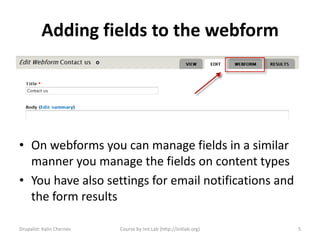
Adding fields to the webform


• On webforms you can manage fields in a similar
  manner you manage the fields on content types
• You have also settings for email notifications and
  the form results

Drupalist: Kalin Chernev   Course by Init Lab (http://initlab.org)   5
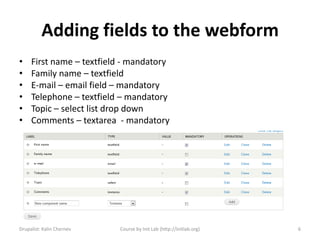
Adding fields to the webform
•    First name – textfield - mandatory
•    Family name – textfield
•    E-mail – email field – mandatory
•    Telephone – textfield – mandatory
•    Topic – select list drop down
•    Comments – textarea - mandatory


Drupalist: Kalin Chernev   Course by Init Lab (http://initlab.org)   6
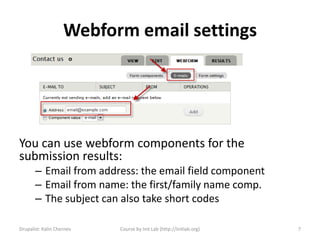
Webform email settings


You can use webform components for the
submission results:
       – Email from address: the email field component
       – Email from name: the first/family name comp.
       – The subject can also take short codes

Drupalist: Kalin Chernev   Course by Init Lab (http://initlab.org)   7
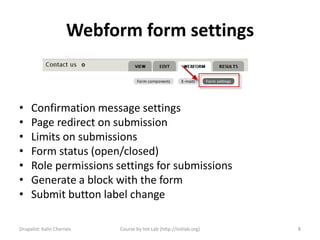
Webform form settings


•    Confirmation message settings
•    Page redirect on submission
•    Limits on submissions
•    Form status (open/closed)
•    Role permissions settings for submissions
•    Generate a block with the form
•    Submit button label change

Drupalist: Kalin Chernev   Course by Init Lab (http://initlab.org)   8
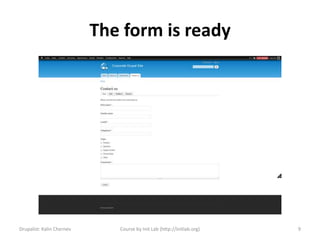
The form is ready


Drupalist: Kalin Chernev      Course by Init Lab (http://initlab.org)   9
Popular add-on modules
• Options Element: Provides a better UI for creating
  select list options.
• Select or Other: Allows for a textfield for "Other..."
  options in select lists and radio buttons.
• Date Popup (part of Date): Enables popup calendars in
  Webform date components.
• MIME Mail: Send HTML and attachments in e-mails
  sent by Webform.
• Mollom or CAPTCHA: Protect your webforms from
  spam.
• Webform Validation: Add advanced validation based on
  a variety of conditions.
Drupalist: Kalin Chernev   Course by Init Lab (http://initlab.org)   10
Time for questions


Drupalist: Kalin Chernev       Course by Init Lab (http://initlab.org)   11
Contacts
Kalin Chernev
       – E: kalata@shtrak.eu
       – T: twitter.com/kalinchernev
       – U: http://shtrak.eu/kalata


Drupalist: Kalin Chernev   Course by Init Lab (http://initlab.org)   12

Introduction to Drupal 7 - Webforms

  • 1.
    Introduction to Drupal7 Session 6.2 Webforms Drupalist: Kalin Chernev Course by Init Lab (http://initlab.org) 1
  • 2.
    Agenda • The Webform module – common uses • Administration overviews • Case study – making the contacts form • Popular add-on modules Drupalist: Kalin Chernev Course by Init Lab (http://initlab.org) 2
  • 3.
    The Webform module •Webform is the most popular and widely used module for making forms in Drupal • The difference between Webform forms and content type forms – Content type forms are storing nodes – Webform forms do not make nodes, they send results over email directly – Results from Webform forms can be easily exported in excel sheet • Common uses are surveys and contact forms Drupalist: Kalin Chernev Course by Init Lab (http://initlab.org) 3
  • 4.
    Adding a newwebform • Download and install the module • New content type Webform has been created • You have to create a node from the Webform content type to attach your fields to it • Go to node/add/webform and enter a title as Contact us Drupalist: Kalin Chernev Course by Init Lab (http://initlab.org) 4
  • 5.
    Adding fields tothe webform • On webforms you can manage fields in a similar manner you manage the fields on content types • You have also settings for email notifications and the form results Drupalist: Kalin Chernev Course by Init Lab (http://initlab.org) 5
  • 6.
    Adding fields tothe webform • First name – textfield - mandatory • Family name – textfield • E-mail – email field – mandatory • Telephone – textfield – mandatory • Topic – select list drop down • Comments – textarea - mandatory Drupalist: Kalin Chernev Course by Init Lab (http://initlab.org) 6
  • 7.
    Webform email settings Youcan use webform components for the submission results: – Email from address: the email field component – Email from name: the first/family name comp. – The subject can also take short codes Drupalist: Kalin Chernev Course by Init Lab (http://initlab.org) 7
  • 8.
    Webform form settings • Confirmation message settings • Page redirect on submission • Limits on submissions • Form status (open/closed) • Role permissions settings for submissions • Generate a block with the form • Submit button label change Drupalist: Kalin Chernev Course by Init Lab (http://initlab.org) 8
  • 9.
    The form isready Drupalist: Kalin Chernev Course by Init Lab (http://initlab.org) 9
  • 10.
    Popular add-on modules •Options Element: Provides a better UI for creating select list options. • Select or Other: Allows for a textfield for "Other..." options in select lists and radio buttons. • Date Popup (part of Date): Enables popup calendars in Webform date components. • MIME Mail: Send HTML and attachments in e-mails sent by Webform. • Mollom or CAPTCHA: Protect your webforms from spam. • Webform Validation: Add advanced validation based on a variety of conditions. Drupalist: Kalin Chernev Course by Init Lab (http://initlab.org) 10
  • 11.
    Time for questions Drupalist:Kalin Chernev Course by Init Lab (http://initlab.org) 11
  • 12.
    Contacts Kalin Chernev – E: kalata@shtrak.eu – T: twitter.com/kalinchernev – U: http://shtrak.eu/kalata Drupalist: Kalin Chernev Course by Init Lab (http://initlab.org) 12