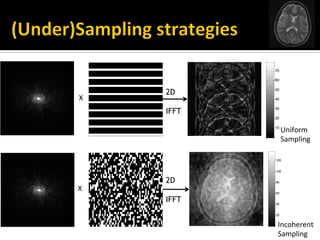
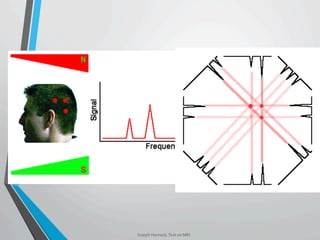
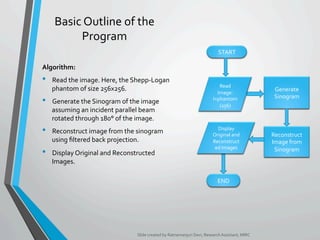
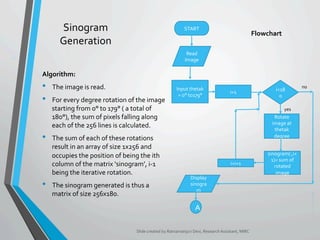
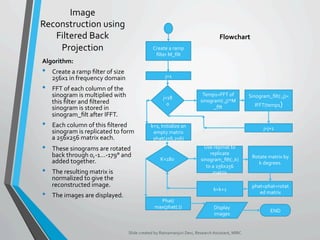
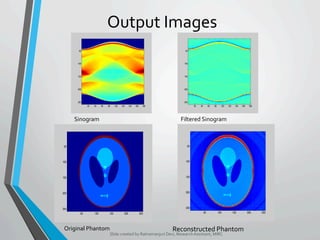
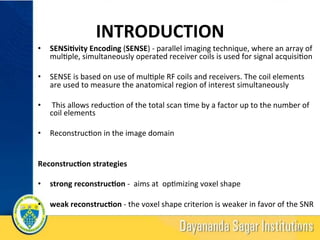
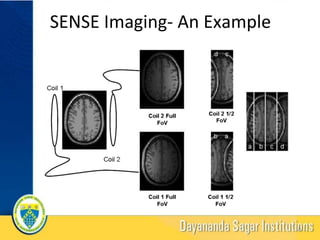
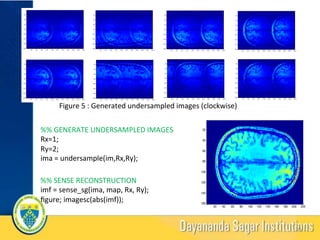
The document provides an overview of medical image processing, focusing on edge detection methods such as Sobel, Prewitt, Roberts, and the Canny edge detector, and discusses their implementation in MATLAB. It also covers image reconstruction using filtered back projection and the SENSE (Sensitivity Encoding) technique for parallel MRI imaging. The algorithms outlined include sinogram generation, image reconstruction strategies, and practical examples with MATLAB codes.


![INTRODUCTION
„ The abrupt changes or discontinuities in the intensity values in an image represent the
edges present in it.
„ Edge Detection is an approach used in Image Segmentation for detecting these edges.
„ These discontinuities are detected using first and second order derivatives
„ The first order derivative of choice is called the gradient.
„ The gradient of a 2D function f(x, y) (image) is defined by:
∇f = [Gx, Gy] = [∂f/∂x, ∂f/∂y]
where, Gx and Gy are gradients in the x and y direction respectively.
„ The gradient vector points in the direction of maximum rate of change, which are the
edges.
„ Second order derivatives are usually computed using the Laplacian method.
„ The Laplacian of a 2D function f(x,y) is defined by:
∇2f(x, y) = ∂2f(x y)/∂x2 +∂2f(x, y)/∂y2
„ Thus , edge detection can be carried out in one of the two ways:
→ Find places where the magnitude of the first derivative of the intensity is greater than a
specified threshold.
→ Find places where the second derivative of the intensity has a zero crossing.
„ The function ‘edge’ is used in MATLAB for edge detection.
Slide created by Ratnamanjuri Devi, Research Assistant, MIRC](https://image.slidesharecdn.com/dipir2013sg-161211034830/85/Introduction-to-Digital-image-processing-4-320.jpg)
![GRADIENT EDGE DETECTORS
These edge detectors use their respective masks shown on
the right to digitally approximate the first derivatives Gx
and Gy, using which the gradient is calculated;
g = [Gx2 + Gy2]1/2
The pixel is then said to be an edge pixel if g ≥ T, where T is
the specified threshold.
„ Sobel Edge Detector:
Syntax:
G = edge (f, ‘Sobel’, T, dir); where dir can be
‘Horizontal’, ’Vertical’ or ‘both’.
„ Prewitt Edge Detector:
Syntax:
G = edge (f,’Prewitt’, T, dir);
It is simpler to implement than Sobel but more
susceptible to noise.
„ Roberts Edge Detector:
Syntax:
G = edge (f,’Roberts’), T, dir);
Simplest and oldest edge detector. It is used to detect
edges at 45° angles. Slide created by Ratnamanjuri Devi, Research Assistant, MIRC
-1 -2 -1
0 0 0
1 2 1
-1 0 1
-2 0 2
-1 0 1
z1 z2 z3
z4 z5 z6
z7 z8 z9
-1 0 1
-1 0 1
-1 0 1
-1 -1 -1
0 0 0
1 1 1
-1 0
0 1
0 -1
1 0
Image
Neighbourhood
Sobel
Roberts
Prewitt](https://image.slidesharecdn.com/dipir2013sg-161211034830/85/Introduction-to-Digital-image-processing-5-320.jpg)
![SECOND ORDER DERIVATIVE EDGE DETECTORS
„ Laplacian of Gaussian:
§ The image is first smoothened using Gaussian filter. Hence, removing
high frequency noises.
§ It then yields a Laplacian which yields a double edge image.
§ Finding the zero crossing between the two edges gives us the edge.
Syntax:
G = edge(f, ‘log’, T, sigma); where sigma is the standard deviation of
the Gaussian filter, which determines the degree of image smoothening.
„ Canny Edge Detector:
§ Most powerful edge detector provided by function ‘edge’.
§ Image is smoothened using a Gaussian filter, after which its Gradient is
calculated using either of the three detectors.
§ It uses two thresholds, one for weak edges and other for strong edges
Syntax:
G = edge(f, ‘canny’, T, sigma); where T = [T1 T2]
Slide created by Ratnamanjuri Devi, Research Assistant, MIRC](https://image.slidesharecdn.com/dipir2013sg-161211034830/85/Introduction-to-Digital-image-processing-6-320.jpg)




![METHOD
Sense Reconstruc-on
1. The crea?on of an aliased, reduced FOV image for each coil array
element
2. A full FOV image is created by reversing the aliasing effect (i.e.
unfolding)
S1AA+S1BB S2AA+S2BB
S3AA+S3BB S4AA+S4BB
[y1]= [S1A S1B ]
[y2]= [S2A S2B ] [A]
[y3]= [S3A S3B ] [B]
[y4]= [S4A S4B ]
Solving Matrix -----------à
17](https://image.slidesharecdn.com/dipir2013sg-161211034830/85/Introduction-to-Digital-image-processing-17-320.jpg)
![RESULTS
Figure 3 : Parallel acquisi?on in MRI using 8 coil array (a):cartoon depic?on (b): from matlab code(clockwise)
%% PSUEDO CODE
load('brain_8ch.mat');
[m,n,t]=size(im);
for i=1:t
imagesc(abs(im(:,:,i)));
end %% MULTICOIL RECONSTRUCTION
mul?coil_recon = abs(sum(im,3));
mul?coil_sq_recon = sqrt(abs(sum(abs(im.^2),3)));
19](https://image.slidesharecdn.com/dipir2013sg-161211034830/85/Introduction-to-Digital-image-processing-19-320.jpg)
![REFERENCE
[1] Pruessmann KP, Weiger M, Scheidegger MB, Boesiger P,
“SENSE: Sensi?vity encoding for fast MRI”, Magne?c
Resonance in Medicine 1999; 42(5):952-962
[2] David J Larkman, Rita G Nunes, “Parallel magne?c
resonance imaging”, Phys. Med. Biol. 52 (2007) R15–
R55
[3] “Role of Parallel Imaging in Magne?c Resonance
Imaging”,Douglas C. Noll & Bradley P. Suqon,
Department of Biomedical Engineering, University of
Michigan Field Func?onal MRI
21](https://image.slidesharecdn.com/dipir2013sg-161211034830/85/Introduction-to-Digital-image-processing-21-320.jpg)