© 2013 IBM Corporation 
Understanding the Cloud v1.0, December 2014 
IBM Education 
Understanding The Cloud 
1 
by Alessandro Iudica
Agenda 
1. Welcome & Introduction 
2. What is Cloud? 
3. IBM and Cloud 
4. Cloud solutions for IBM partners 
2 © 2014 IBM Corporation 
2
Cloud we already know 
 All of us use for personal or business reasons, on regular basis, at least one or more cloud services 
like: 
 E-mail client: Gmail, Yahoo mail, MS Outlook (formerly Hotmail)… 
 Backup: Dropbox, iCloud, Google drive, MS OneDrive (formerly SkyDrive)… 
 Applications: Adobe Creative Cloud, Google Docs, MS Office 365 (formerly Business Productivity 
Online Suite)… 
3 © 2014 IBM Corporation 
3
Agenda 
1. Welcome & Introduction 
2. What is Cloud? 
3. IBM and Cloud 
4. Cloud solutions for IBM partners 
4 © 2014 IBM Corporation 
4
Answering the 1st question: What is Cloud? 
 In IT the term cloud computing indicates a number of technologies that enable delivering services 
for data archiving or elaboration trough hardware and software, by using resources distributed and 
virtualized, typically in a Client-Server architecture. 
 The core technologies for cloud are: virtualization, networking and storage; the combination of 
these technologies permit to deliver different levels of services. 
 Every day we use different cloud services that were impossible 10 yeas ago but the concept of cloud 
computing is more than 60 years old; at that time it was intended to make available the 
computational power of mainframes sharing “CPU Time”. For this purpose technologies were 
developed to use machines from distance via remote access. 
 IBM was the first company to deploy technologies for cloud computing on its mainframes and still 
continues to innovate its offering with newer and more powerful solutions like Watson, the next big 
step in artificial intelligence and Big Data analysis. 
5 © 2014 IBM Corporation 
5
Fundamentals of Cloud 
 Another definition: “Cloud computing is a model for enabling ubiquitous, convenient, on-demand 
network access to a shared pool of configurable computing resources (e.g., networks, servers, 
storage, applications, and services) that can be rapidly provisioned and released with minimal 
management effort or service provider interaction.” 
National Institute of Standards and Technology's (NIST) 
 Cloud computing permits the use of remote resources on different systems and globally; it’s 
availability is strongly dependent on network and delivery model of the cloud service. 
 Cloud computing enables companies to outsource part of its IT infrastructure drastically reducing 
TCO (total cost of ownership) and moving costs from CAPEX (capital expenditure, assets value 
decreases with use) to OPEX (operational expenditure, pay per use model). 
 The flexibility of technical solutions has the consequence of extreme scalability of resources that 
may be rapidly adjusted to fit different workloads. 
6 © 2014 IBM Corporation 
6 
Source: If applicable, describe source origin
What is the big deal about virtualization? 
 A variety of operating systems can be used on the same physical server 
 Servers can be automatically turned off when not needed 
 An Instance can be defined to optimized resources as required 
 Customers need fewer physical servers 
 Lower capital investments 
 Energy savings 
 Effective resource consolidation 
 Easier to manage 
 For example, moving the workload from one physical machine to another is simply as dragging 
a folder 
 Able to automatically add capacity as the load increases 
 Imagine how the demand on a mail server might changes throughout a 24 hr period 
 More resources can be added as the demand increases and removed as the demand decreases 
 You can attach a Security VM directly to the internet and have all other VMs controlled by 
the hypervisor come through it and if there is a security breach, it only impacts the Security VM. 
7 © 2014 IBM Corporation
 Common mistake: “Virtualization is needed to do cloud 
computing” 
This is NOT true 
 You can provide cloud capability via bare metal servers (just like SoftLayer does) 
 A bare metal cloud server is dedicated to a specific tenant, not shared among tenants. 
As such, the basic “unit” is an actual server: customers choose the type of server 
configuration they want from a menu offered by the provider. 
8 © 2014 IBM Corporation
Cloud characteristics 
Essential Characteristics (benefits): 
 On-demand self-service 
 A consumer can unilaterally provision computing capabilities, such as server time and 
network storage, as needed automatically without requiring human interaction with each 
service provider. 
 Broad network access 
 Capabilities are available over the network and accessed through standard mechanisms 
that promote use by heterogeneous thin or thick client platforms (e.g., mobile phones, 
tablets, laptops, and workstations). 
 Resource pooling 
 The provider’s computing resources are pooled to serve multiple consumers using a 
multi-tenant model, with different physical and virtual resources dynamically assigned 
and reassigned according to consumer demand. There is a sense of location 
independence in that the customer generally has no control or knowledge over the exact 
location of the provided resources but may be able to specify location at a higher level of 
abstraction (e.g., country, state, or datacenter). Examples of resources include storage, 
processing, memory, and network bandwidth. 
9 © 2014 IBM Corporation
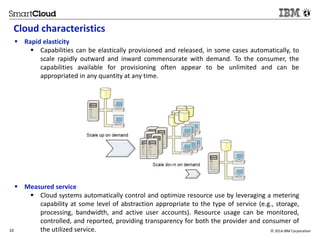
Cloud characteristics 
 Rapid elasticity 
 Capabilities can be elastically provisioned and released, in some cases automatically, to 
scale rapidly outward and inward commensurate with demand. To the consumer, the 
capabilities available for provisioning often appear to be unlimited and can be 
appropriated in any quantity at any time. 
 Measured service 
 Cloud systems automatically control and optimize resource use by leveraging a metering 
capability at some level of abstraction appropriate to the type of service (e.g., storage, 
processing, bandwidth, and active user accounts). Resource usage can be monitored, 
controlled, and reported, providing transparency for both the provider and consumer of 
the utilized service. 
10 © 2014 IBM Corporation
Other cloud computing benefits 
 Virtualization 
 Resources can be shared between many computing resources (physical servers or 
application servers). Provide more efficient utilization of IT resources and reduce 
hardware cost through resource consolidations and economies-of-scale. Lower Total 
Cost of Ownership and improving asset utilization. 
 The main advantage of virtualization in cloud computing is that the software is 
decoupled from the hardware. Decoupling allows hosting an individual application in 
an environment that is isolated from underlying operating system. 
 Virtual machines are completely isolated from hosts and other virtual machines 
(crash of a virtual machine does not affect other virtual machines). 
 Service Automation Management 
 IT environments that provide the capability to request, deliver, and manage IT 
services automatically. Reduce IT operational costs by automating the processes used 
to deliver and manage a cloud computing environment. 
11 © 2014 IBM Corporation
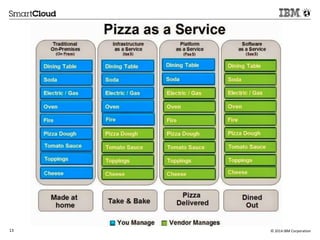
Delivery models 
 Cloud services can provide a customer with different delivery models based on different layers of 
services that can be offered: 
 IaaS: Infrastructure as a Service is the delivery model where cloud provider delivers a virtual 
infrastructure where an Hypervisor (software) runs virtual servers as hosts. Everything on server is 
managed by customer. 
 PaaS: Platform as a Service is the model where the cloud provider manages also OSs and 
middleware on customer’s virtual servers. 
 SaaS: Software as a Service is the most comprehensive model where provider manages also 
applications on customer’s servers, in addiction to what delivered by previous models. 
 Each one of this level of service can be delivered as public cloud, private cloud and hybrid that is a 
combination of the two before. 
12 © 2014 IBM Corporation 
12 
Source: If applicable, describe source origin
13 © 2014 IBM Corporation
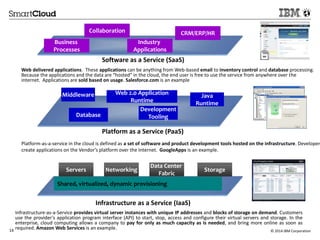
Collaboration 
CRM/ERP/HR 
Industry 
Applications 
Software as a Service (SaaS) 
Business 
Processes 
Web delivered applications. These applications can be anything from Web-based email to inventory control and database processing. 
Because the applications and the data are “hosted” in the cloud, the end user is free to use the service from anywhere over the 
internet. Applications are sold based on usage. Salesforce.com is an example 
Middleware 
High Volume 
Transactions 
Web 2.0 Application 
Runtime 
Development 
Tooling 
Platform as a Service (PaaS) 
Platform-as-a-service in the cloud is defined as a set of software and product development tools hosted on the infrastructure. Developers 
create applications on the Vendor’s platform over the Internet. GoogleApps is an example. 
Data Center 
Database 
Java 
Runtime 
Servers Networking Storage 
Fabric 
Shared, virtualized, dynamic provisioning 
Infrastructure as a Service (IaaS) 
Infrastructure-as-a-Service provides virtual server instances with unique IP addresses and blocks of storage on demand. Customers 
use the provider's application program interface (API) to start, stop, access and configure their virtual servers and storage. In the 
enterprise, cloud computing allows a company to pay for only as much capacity as is needed, and bring more online as soon as 
required. Amazon Web Services is an example. 
14 © 2014 IBM Corporation
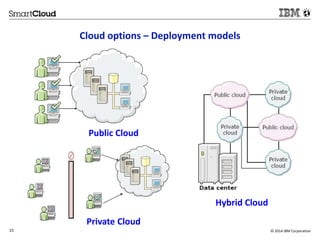
Cloud options – Deployment models 
Public Cloud 
Private Cloud 
Hybrid Cloud 
15 © 2014 IBM Corporation
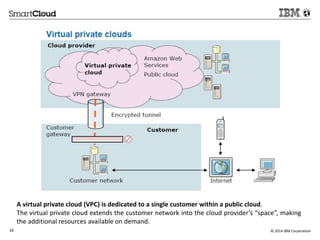
A virtual private cloud (VPC) is dedicated to a single customer within a public cloud. 
The virtual private cloud extends the customer network into the cloud provider’s “space”, making 
the additional resources available on demand. 
16 © 2014 IBM Corporation
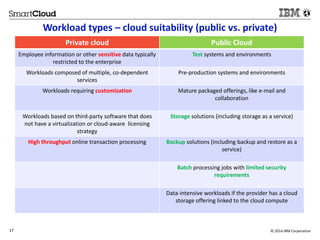
Workload types – cloud suitability (public vs. private) 
Private cloud Public Cloud 
Employee information or other sensitive data typically 
restricted to the enterprise 
Test systems and environments 
Workloads composed of multiple, co-dependent 
services 
Pre-production systems and environments 
Workloads requiring customization Mature packaged offerings, like e-mail and 
collaboration 
Workloads based on third-party software that does 
not have a virtualization or cloud-aware licensing 
strategy 
Storage solutions (including storage as a service) 
High throughput online transaction processing Backup solutions (including backup and restore as a 
service) 
Batch processing jobs with limited security 
requirements 
Data-intensive workloads if the provider has a cloud 
storage offering linked to the cloud compute 
17 © 2014 IBM Corporation
Agenda 
1. Welcome & Introduction 
2. What is Cloud? 
3. IBM and Cloud 
4. Cloud solutions for IBM partners 
18 © 2014 IBM Corporation 
18 
Source: If applicable, describe source origin
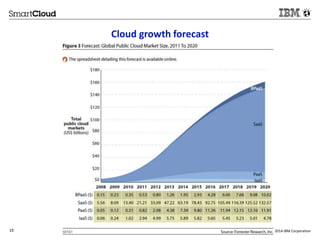
Cloud growth forecast 
19 For IBM Internal Use Only © 2014 IBM Corporation
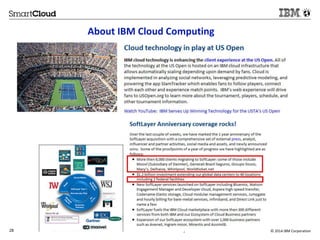
About IBM Cloud Computing 
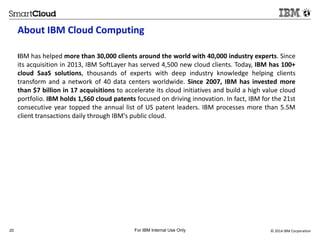
IBM has helped more than 30,000 clients around the world with 40,000 industry experts. Since 
its acquisition in 2013, IBM SoftLayer has served 4,500 new cloud clients. Today, IBM has 100+ 
cloud SaaS solutions, thousands of experts with deep industry knowledge helping clients 
transform and a network of 40 data centers worldwide. Since 2007, IBM has invested more 
than $7 billion in 17 acquisitions to accelerate its cloud initiatives and build a high value cloud 
portfolio. IBM holds 1,560 cloud patents focused on driving innovation. In fact, IBM for the 21st 
consecutive year topped the annual list of US patent leaders. IBM processes more than 5.5M 
client transactions daily through IBM's public cloud. 
20 For IBM Internal Use Only © 2014 IBM Corporation
© 2013 IBM Corporation 
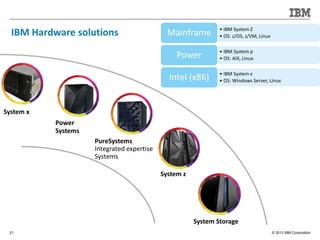
IBM Hardware solutions 
21 
System z 
PureSystems 
Integrated expertise 
Systems 
System Storage 
Power 
Systems 
System x 
• IBM System Z 
• OS: z/OS, z/VM, Linux Mainframe 
• IBM System p 
• OS: AIX, Linux Power 
• IBM System x 
• OS: Windows Server, Linux Intel (x86)
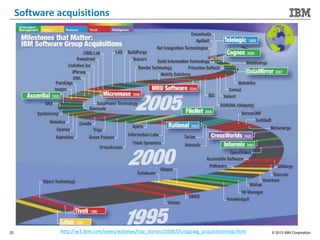
Software acquisitions 
22 http://w3.ibm.com/news/w3news/top_stories/2008/05/stgswg_acquisitionmap.html © 2013 IBM Corporation
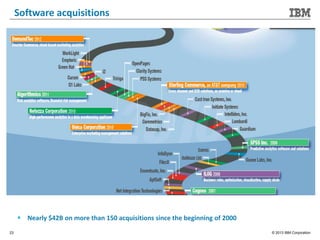
Software acquisitions 
 Nearly $42B on more than 150 acquisitions since the beginning of 2000 
23 © 2013 IBM Corporation
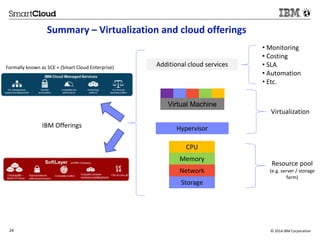
Summary – Virtualization and cloud offerings 
Additional cloud services 
Virtual Machine 
Hypervisor 
CPU 
Memory 
Network 
Storage 
• Monitoring 
• Costing 
• SLA 
• Automation 
• Etc. 
Virtualization 
Resource pool 
(e.g. server / storage 
farm) 
Formally known as SCE + (Smart Cloud Enterprise) 
IBM Offerings 
24 © 2014 IBM Corporation
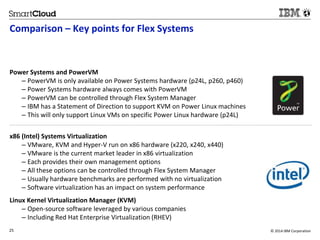
Comparison – Key points for Flex Systems 
Power Systems and PowerVM 
– PowerVM is only available on Power Systems hardware (p24L, p260, p460) 
– Power Systems hardware always comes with PowerVM 
– PowerVM can be controlled through Flex System Manager 
– IBM has a Statement of Direction to support KVM on Power Linux machines 
– This will only support Linux VMs on specific Power Linux hardware (p24L) 
x86 (Intel) Systems Virtualization 
– VMware, KVM and Hyper-V run on x86 hardware (x220, x240, x440) 
– VMware is the current market leader in x86 virtualization 
– Each provides their own management options 
– All these options can be controlled through Flex System Manager 
– Usually hardware benchmarks are performed with no virtualization 
– Software virtualization has an impact on system performance 
Linux Kernel Virtualization Manager (KVM) 
– Open-source software leveraged by various companies 
– Including Red Hat Enterprise Virtualization (RHEV) 
25 © 2014 IBM Corporation 
2
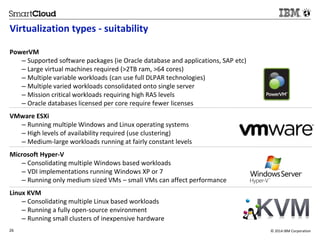
Virtualization types - suitability 
PowerVM 
– Supported software packages (ie Oracle database and applications, SAP etc) 
– Large virtual machines required (>2TB ram, >64 cores) 
– Multiple variable workloads (can use full DLPAR technologies) 
– Multiple varied workloads consolidated onto single server 
– Mission critical workloads requiring high RAS levels 
– Oracle databases licensed per core require fewer licenses 
VMware ESXi 
– Running multiple Windows and Linux operating systems 
– High levels of availability required (use clustering) 
– Medium-large workloads running at fairly constant levels 
Microsoft Hyper-V 
– Consolidating multiple Windows based workloads 
– VDI implementations running Windows XP or 7 
– Running only medium sized VMs – small VMs can affect performance 
Linux KVM 
– Consolidating multiple Linux based workloads 
– Running a fully open-source environment 
– Running small clusters of inexpensive hardware 
26 © 2014 IBM Corporation 
2
Highlights 
PowerVM 
+ Most reliable, most resilient, can reduce software licensing costs with hard partitioning 
– Limited application availability, more expensive hardware than x86, no support for Windows 
Operating Systems 
VMware 
+ Good operating system and application support, market leader on x86 
– Limited scaling capability, requires clustering for HA, using extra system resources 
Microsoft Hyper-V 
+ Windows feel for familiarity, works well with Microsoft OSes and applications 
– Most security vulnerabilities, not as flexible as other offerings, uses most resources 
Linux KVM 
+ Open-source so easily adaptable and constantly developed, community support 
– No fixed structure, limited scalability, not yet proven in enterprises 
27 © 2014 IBM Corporation 
2
About IBM Cloud Computing 
28 For IBM Internal Use Only © 2014 IBM Corporation
Agenda 
1. Welcome & Introduction 
2. What is Cloud? 
3. IBM and Cloud 
4. Cloud solutions for IBM partners 
29 © 2014 IBM Corporation 
29 
Source: If applicable, describe source origin
What are the benefits and the caveats to consider when 
considering moving a customer to cloud? 
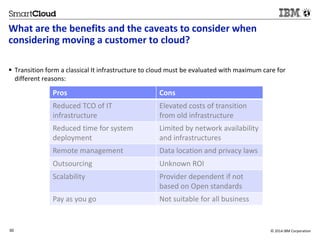
 Transition form a classical It infrastructure to cloud must be evaluated with maximum care for 
different reasons: 
Pros Cons 
Reduced TCO of IT 
infrastructure 
30 © 2014 IBM Corporation 
30 
Source: If applicable, describe source origin 
Elevated costs of transition 
from old infrastructure 
Reduced time for system 
deployment 
Limited by network availability 
and infrastructures 
Remote management Data location and privacy laws 
Outsourcing Unknown ROI 
Scalability Provider dependent if not 
based on Open standards 
Pay as you go Not suitable for all business
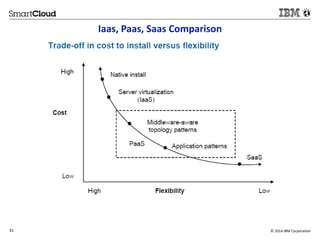
Iaas, Paas, Saas Comparison 
31 © 2014 IBM Corporation
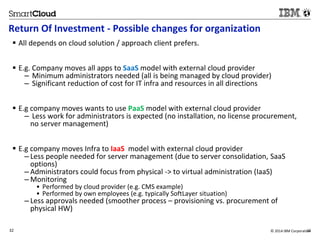
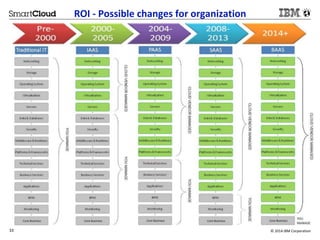
Return Of Investment - Possible changes for organization 
 All depends on cloud solution / approach client prefers. 
 E.g. Company moves all apps to SaaS model with external cloud provider 
– Minimum administrators needed (all is being managed by cloud provider) 
– Significant reduction of cost for IT infra and resources in all directions 
 E.g company moves wants to use PaaS model with external cloud provider 
– Less work for administrators is expected (no installation, no license procurement, 
no server management) 
 E.g company moves Infra to IaaS model with external cloud provider 
– Less people needed for server management (due to server consolidation, SaaS 
options) 
– Administrators could focus from physical -> to virtual administration (IaaS) 
– Monitoring 
• Performed by cloud provider (e.g. CMS example) 
• Performed by own employees (e.g. typically SoftLayer situation) 
– Less approvals needed (smoother process – provisioning vs. procurement of 
physical HW) 
32 © 2014 IBM Corporatio3n2
ROI - Possible changes for organization 
33 © 2014 IBM Corporation
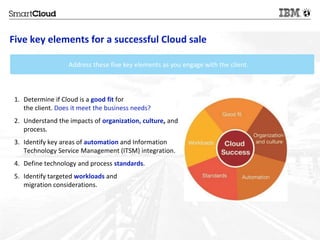
Five key elements for a successful Cloud sale 
Address these five key elements as you engage with the client. 
1. Determine if Cloud is a good fit for 
the client. Does it meet the business needs? 
2. Understand the impacts of organization, culture, and 
process. 
3. Identify key areas of automation and Information 
Technology Service Management (ITSM) integration. 
4. Define technology and process standards. 
5. Identify targeted workloads and 
migration considerations. 
34 © 2014 IBM Corporation
What is ROI Analytics and why is it important for Cloud? 
 Return on Investment 
– ROI is the financial return expected for a new operation model 
 Essentially, this involves quantifying the following: 
– Operational costs of the current IT process 
– Operational costs of performing the same using the cloud-based 
service 
– Investment needed to enable the cloud-based service 
– Effect on other processes directly and indirectly affected by the 
IT process being targeted 
– Investments and benefits of add-on software and services 
 Interactions and interdependencies between business 
processes and the IT processes significantly affect the costs 
and benefits the transformation 
 Principles of ROI analysis 
– Invariable processes are not considered 
– Risk factors have to be taken into account 
– Business gains (e.g. financial gain from speed to market, new 
products etc) are not calculated. These are typically calculated 
in a business case. 
35 © 2014 IBM Corporation
Challenges of ROI Analytics for Cloud 
The Challenge 
 Need common processes, models and tools to drive consistency of our offerings 
 Models & tools need to support pre-Sales through to Consulting 
 Should have common look and feel to ease adoption and show consistency with customers 
 Must be easily maintained with product releases and always reflect current capabilities of the 
offering 
 Must be accessible by our sales channels (Face to Face, Inside Sales, and Business Partners) 
Content Challenges 
 Need ability to quickly “run a ROI” with minimal data while maintain flexibility to “expand” the 
details to fine tune model if information is available 
 Do not require detailed information to be provided about the customer environment if not available 
 Default values must be both industry & geo accepted for cases in which customer-specific data is 
not available 
 Provide ability to expose calculations or detailed data points where sensible in the results views to 
enable deeper analysis 
 Hosted – to ensure you always have latest version and data available 
A common “agreed upon” method for calculating and presenting ROI and TCO is needed to 
insure consistency of analysis and messaging around our offerings. 
36 © 2014 IBM Corporation
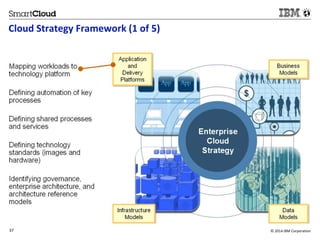
Cloud Strategy Framework (1 of 5) 
37 © 2014 IBM Corporation
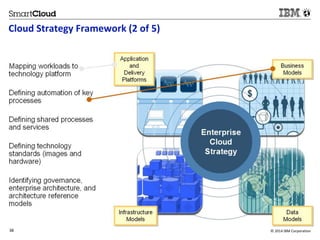
Cloud Strategy Framework (2 of 5) 
38 © 2014 IBM Corporation
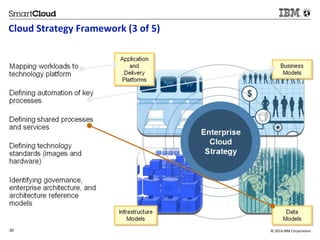
Cloud Strategy Framework (3 of 5) 
39 © 2014 IBM Corporation
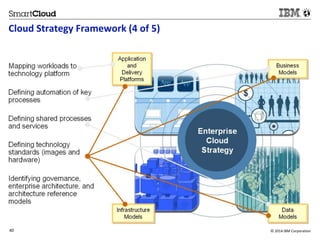
Cloud Strategy Framework (4 of 5) 
40 © 2014 IBM Corporation
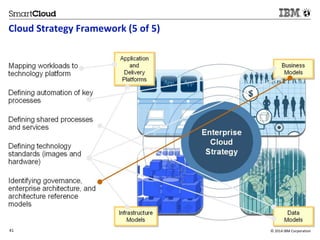
Cloud Strategy Framework (5 of 5) 
41 © 2014 IBM Corporation
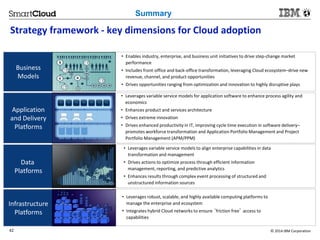
Summary 
Strategy framework - key dimensions for Cloud adoption 
Business 
Models 
• Enables industry, enterprise, and business unit initiatives to drive step-change market 
performance 
• Includes front-office and back-office transformation, leveraging Cloud ecosystem–drive new 
revenue, channel, and product opportunities 
• Drives opportunities ranging from optimization and innovation to highly disruptive plays 
Application 
and Delivery 
Platforms 
• Leverages variable service models for application software to enhance process agility and 
economics 
• Enhances product and services architecture 
• Drives extreme innovation 
• Drives enhanced productivity in IT, improving cycle time execution in software delivery– 
promotes workforce transformation and Application Portfolio Management and Project 
Portfolio Management (APM/PPM) 
Data 
Platforms 
• Leverages variable service models to align enterprise capabilities in data 
transformation and management 
• Drives actions to optimize process through efficient information 
management, reporting, and predictive analytics 
• Enhances results through complex event processing of structured and 
unstructured information sources 
Infrastructure 
Platforms 
• Leverages robust, scalable, and highly available computing platforms to 
manage the enterprise and ecosystem 
• Integrates hybrid Cloud networks to ensure ‘friction free’ access to 
capabilities 
42 © 2014 IBM Corporation
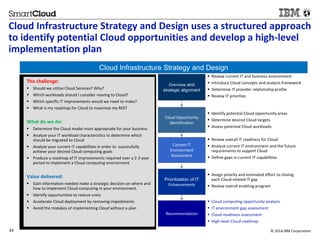
Cloud Infrastructure Strategy and Design uses a structured approach 
to identify potential Cloud opportunities and develop a high-level 
implementation plan 
Cloud Infrastructure Strategy and Design 
Overview and 
strategic alignment 
 Review current IT and business environment 
 Introduce Cloud concepts and analysis framework 
 Determine IT provider relationship profile 
 Review IT priorities 
Cloud Opportunity 
Identification 
 Identify potential Cloud opportunity areas 
 Determine desired Cloud targets 
 Assess potential Cloud workloads 
Current IT 
Environment 
Assessment 
 Review overall IT readiness for Cloud 
 Analyze current IT environment and the future 
requirements to support Cloud 
 Define gaps in current IT capabilities 
Prioritization of IT 
Enhancements 
 Assign priority and estimated effort to closing 
each Cloud-related IT gap 
 Review overall enabling program 
Recommendation 
 Cloud computing opportunity analysis 
 IT environment gap assessment 
 Cloud readiness assessment 
 High-level Cloud roadmap 
The challenge: 
 Should we utilize Cloud Services? Why? 
 Which workloads should I consider moving to Cloud? 
 Which specific IT improvements would we need to make? 
 What is my roadmap for Cloud to maximize my ROI? 
What do we do: 
 Determine the Cloud model most appropriate for your business 
 Analyze your IT workload characteristics to determine which 
should be migrated to Cloud 
 Analyze your current IT capabilities in order to successfully 
achieve your desired Cloud computing goals 
 Produce a roadmap of IT improvements required over a 2-3 year 
period to implement a Cloud computing environment 
Value delivered: 
 Gain information needed make a strategic decision on where and 
how to implement Cloud computing in your environment. 
 Identify opportunities to reduce costs 
 Accelerate Cloud deployment by removing impediments 
 Avoid the mistakes of implementing Cloud without a plan 
43 © 2014 IBM Corporation
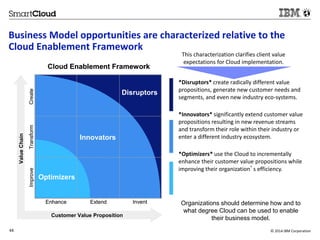
Business Model opportunities are characterized relative to the 
Cloud Enablement Framework 
This characterization clarifies client value 
expectations for Cloud implementation. 
*Disruptors* create radically different value 
propositions, generate new customer needs and 
segments, and even new industry eco-systems. 
*Innovators* significantly extend customer value 
propositions resulting in new revenue streams 
and transform their role within their industry or 
enter a different industry ecosystem. 
*Optimizers* use the Cloud to incrementally 
enhance their customer value propositions while 
improving their organization’s efficiency. 
Organizations should determine how and to 
what degree Cloud can be used to enable 
their business model. 
Improve Transform Create 
Cloud Enablement Framework 
Optimizers 
Disruptors 
Innovators 
Enhance Extend Invent 
Value Chain 
Customer Value Proposition 
44 © 2014 IBM Corporation
Network and resiliency services ensure that Cloud infrastructure 
integrates seamlessly with the enterprise IT architecture 
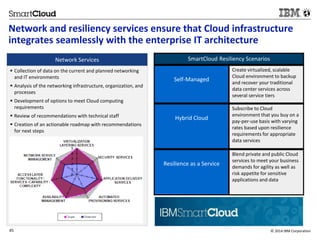
Network Services 
 Collection of data on the current and planned networking 
and IT environments 
 Analysis of the networking infrastructure, organization, and 
processes 
 Development of options to meet Cloud computing 
requirements 
 Review of recommendations with technical staff 
 Creation of an actionable roadmap with recommendations 
for next steps 
SmartCloud Resiliency Scenarios 
Self-Managed 
Create virtualized, scalable 
Cloud environment to backup 
and recover your traditional 
data center services across 
several service tiers 
Hybrid Cloud 
Subscribe to Cloud 
environment that you buy on a 
pay-per-use basis with varying 
rates based upon resilience 
requirements for appropriate 
data services 
Resilience as a Service 
Blend private and public Cloud 
services to meet your business 
demands for agility as well as 
risk appetite for sensitive 
applications and data 
45 © 2014 IBM Corporation
Workload Transformation Analysis (WTA) 
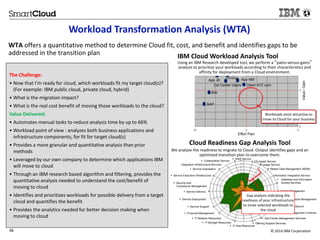
WTA offers a quantitative method to determine Cloud fit, cost, and benefit and identifies gaps to be 
addressed in the transition plan 
The Challenge: 
• Now that I’m ready for cloud, which workloads fit my target cloud(s)? 
(For example: IBM public cloud, private cloud, hybrid) 
• What is the migration impact? 
• What is the real cost benefit of moving those workloads to the cloud? 
Value Delivered: 
• Automates manual tasks to reduce analysis time by up to 66% 
• Workload point of view : analyzes both business applications and 
infrastructure components, for fit for target cloud(s) 
• Provides a more granular and quantitative analysis than prior 
methods 
• Leveraged by our own company to determine which applications IBM 
will move to cloud 
• Through an IBM research based algorithm and filtering, provides the 
quantitative analysis needed to understand the cost/benefit of 
moving to cloud 
• Identifies and prioritizes workloads for possible delivery from a target 
cloud and quantifies the benefit 
• Provides the analytics needed for better decision making when 
moving to cloud 
IBM Cloud Workload Analysis Tool 
Using an IBM Research developed tool, we perform a “pains-versus-gains” 
analysis to prioritize your workloads according to their characteristics and 
affinity for deployment from a Cloud environment. 
Exchange App NM 
Cal Center Users Client XYZ com 
Value / Gain 
Workloads most attractive to 
move to Cloud for your business 
Effort Pain 
App JK 
BW 
SAP 
Cloud Readiness Gap Analysis Tool 
We analyze the readiness to migrate to Cloud. Output identifies gaps and an 
optimized transition plan to overcome them. 
 Collaboration Service 
Integration Infrastructure Services 
 Service Automation 
 Service Executive Infrastructure 
 UNIX Service 
 CE-based Service 
 Usage Service 
 Master Data Management (MDM) 
Information Integration Service 
 Database and Information 
Access Services 
 Center Management 
Gap analysis indicating the 
 Information Lifestyle Management 
readiness of your infrastructure 
(ILM) 
to move selected workloads to 
 Enterprise Architecture 
the cloud 
 IT Governance & Management Contents 
 Sub-Center Management Services 
 Offering Support Services 
 Security and 
Compliance Management 
 Service Delivery 
 Service Deployment 
 Service Support 
 Financial Management 
 IT Network Resources 
 IT Storage Resources 
 IT Host Resources 
46 © 2014 IBM Corporation
Examples of workload migration considerations 
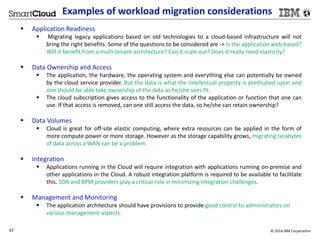
 Application Readiness 
 Migrating legacy applications based on old technologies to a cloud-based infrastructure will not 
bring the right benefits. Some of the questions to be considered are -> Is the application web-based? 
Will it benefit from a multi-tenant architecture? Can it scale out? Does it really need elasticity? 
 Data Ownership and Access 
 The application, the hardware, the operating system and everything else can potentially be owned 
by the cloud service provider. But the data is what the intellectual property is predicated upon and 
one should be able take ownership of the data as he/she sees fit. 
 The cloud subscription gives access to the functionality of the application or function that one can 
use. If that access is removed, can one still access the data, so he/she can retain ownership? 
 Data Volumes 
 Cloud is great for off-site elastic computing, where extra resources can be applied in the form of 
more compute power or more storage. However as the storage capability grows, migrating terabytes 
of data across aWAN can be a problem. 
 Integration 
 Applications running in the Cloud will require integration with applications running on-premise and 
other applications in the Cloud. A robust integration platform is required to be available to facilitate 
this. SOA and BPM providers play a critical role in minimizing integration challenges. 
 Management and Monitoring 
 The application architecture should have provisions to provide good control to administrators on 
various management aspects. 
47 © 2014 IBM Corporation
Examples of workload migration considerations 
 Cost Analysis 
 The business case for Cloud application migration is required to take the target Cloud platform into 
consideration. The migration and overhead costs vary widely based on the target Cloud platform and 
thus will skew the estimated cost savings. Cost analysis helps decide whether to go ahead with 
moving a particular application to the Cloud or not from a TCO/ROI perspective. Cost should include 
capital expenditure, operational expenditure, and overhead costs involved in migration. 
 Migration options 
 Defining a migration strategy involves understanding the different migration options available, 
establishing business priorities, and evolving a strategy that offers a fine balance between costs and 
meeting business priorities. Basically, enterprises have two core options with a cloud infrastructure - 
private or public. Against these, they have the following migration paths to consider - Infrastructure 
as a Service (IaaS), Software as a Service (SaaS) or Platform as a Service (PaaS). The choice is driven 
by priorities such as elasticity, business model, security, migration costs, etc. It is not uncommon for 
a large enterprise to leverage a hybrid approach in any of the migration options and paths. 
 Transition process 
 Actual process of migration, helps service providers realize the target IaaS architecture as a detailed 
design, covering the network, server, SAN, tools, processes, and people required for an operational 
model. It is underpinned by existing core competencies in network, compute, storage, tools, and 
process improvement and expertise in delivering advanced, virtualized data centers. 
48 © 2014 IBM Corporation
Summary 
 Be creative 
 Think “solution” not product. 
 Be a Cloud Orchestrator 
 Bring together the best combination of tools and techniques. 
 Envision the desired end state 
 Ask yourself, “What is driving or inspiring the move to Cloud for this client?” 
49 © 2014 IBM Corporation
Useful Cloud links 
• Think academy – Cloud >> https://w3.ibm.com/ibm/thinkacademy/#/home 
• Cloud burst program >> http://eureka.bluehost.ibm.com/ 
• Cloud university >> http://university.atlanta.ibm.com/cloud/ 
• Cloud & Smarter infrastructure Lab services and support >> 
Https://csite.tivlab.austin.ibm.com/home/index - 
• To receive IBM Cloud communications including MarketWires >> 
https://w3- 
connections.ibm.com/communities/service/html/memberjoinsubmit?communityUuid=0e4495a0-c36f- 
4dd4-9cda-f97900baadd0 
• IBM winning stories – Market Wires Archives >> 
https://w3-connections.ibm.com/wikis/home?lang=en-us#!/ 
wiki/Wdfcdd218c0e5_4d83_96e5_b62ca23e8a40/page/Archives_MarketWire 
•Example of client experience for cloud (accessible via MarketWires bulletin) - link 
50 © 2014 BM Corporation

Introduction to Cloud Computing

  • 1.
    © 2013 IBMCorporation Understanding the Cloud v1.0, December 2014 IBM Education Understanding The Cloud 1 by Alessandro Iudica
  • 2.
    Agenda 1. Welcome& Introduction 2. What is Cloud? 3. IBM and Cloud 4. Cloud solutions for IBM partners 2 © 2014 IBM Corporation 2
  • 3.
    Cloud we alreadyknow  All of us use for personal or business reasons, on regular basis, at least one or more cloud services like:  E-mail client: Gmail, Yahoo mail, MS Outlook (formerly Hotmail)…  Backup: Dropbox, iCloud, Google drive, MS OneDrive (formerly SkyDrive)…  Applications: Adobe Creative Cloud, Google Docs, MS Office 365 (formerly Business Productivity Online Suite)… 3 © 2014 IBM Corporation 3
  • 4.
    Agenda 1. Welcome& Introduction 2. What is Cloud? 3. IBM and Cloud 4. Cloud solutions for IBM partners 4 © 2014 IBM Corporation 4
  • 5.
    Answering the 1stquestion: What is Cloud?  In IT the term cloud computing indicates a number of technologies that enable delivering services for data archiving or elaboration trough hardware and software, by using resources distributed and virtualized, typically in a Client-Server architecture.  The core technologies for cloud are: virtualization, networking and storage; the combination of these technologies permit to deliver different levels of services.  Every day we use different cloud services that were impossible 10 yeas ago but the concept of cloud computing is more than 60 years old; at that time it was intended to make available the computational power of mainframes sharing “CPU Time”. For this purpose technologies were developed to use machines from distance via remote access.  IBM was the first company to deploy technologies for cloud computing on its mainframes and still continues to innovate its offering with newer and more powerful solutions like Watson, the next big step in artificial intelligence and Big Data analysis. 5 © 2014 IBM Corporation 5
  • 6.
    Fundamentals of Cloud  Another definition: “Cloud computing is a model for enabling ubiquitous, convenient, on-demand network access to a shared pool of configurable computing resources (e.g., networks, servers, storage, applications, and services) that can be rapidly provisioned and released with minimal management effort or service provider interaction.” National Institute of Standards and Technology's (NIST)  Cloud computing permits the use of remote resources on different systems and globally; it’s availability is strongly dependent on network and delivery model of the cloud service.  Cloud computing enables companies to outsource part of its IT infrastructure drastically reducing TCO (total cost of ownership) and moving costs from CAPEX (capital expenditure, assets value decreases with use) to OPEX (operational expenditure, pay per use model).  The flexibility of technical solutions has the consequence of extreme scalability of resources that may be rapidly adjusted to fit different workloads. 6 © 2014 IBM Corporation 6 Source: If applicable, describe source origin
  • 7.
    What is thebig deal about virtualization?  A variety of operating systems can be used on the same physical server  Servers can be automatically turned off when not needed  An Instance can be defined to optimized resources as required  Customers need fewer physical servers  Lower capital investments  Energy savings  Effective resource consolidation  Easier to manage  For example, moving the workload from one physical machine to another is simply as dragging a folder  Able to automatically add capacity as the load increases  Imagine how the demand on a mail server might changes throughout a 24 hr period  More resources can be added as the demand increases and removed as the demand decreases  You can attach a Security VM directly to the internet and have all other VMs controlled by the hypervisor come through it and if there is a security breach, it only impacts the Security VM. 7 © 2014 IBM Corporation
  • 8.
     Common mistake:“Virtualization is needed to do cloud computing” This is NOT true  You can provide cloud capability via bare metal servers (just like SoftLayer does)  A bare metal cloud server is dedicated to a specific tenant, not shared among tenants. As such, the basic “unit” is an actual server: customers choose the type of server configuration they want from a menu offered by the provider. 8 © 2014 IBM Corporation
  • 9.
    Cloud characteristics EssentialCharacteristics (benefits):  On-demand self-service  A consumer can unilaterally provision computing capabilities, such as server time and network storage, as needed automatically without requiring human interaction with each service provider.  Broad network access  Capabilities are available over the network and accessed through standard mechanisms that promote use by heterogeneous thin or thick client platforms (e.g., mobile phones, tablets, laptops, and workstations).  Resource pooling  The provider’s computing resources are pooled to serve multiple consumers using a multi-tenant model, with different physical and virtual resources dynamically assigned and reassigned according to consumer demand. There is a sense of location independence in that the customer generally has no control or knowledge over the exact location of the provided resources but may be able to specify location at a higher level of abstraction (e.g., country, state, or datacenter). Examples of resources include storage, processing, memory, and network bandwidth. 9 © 2014 IBM Corporation
  • 10.
    Cloud characteristics Rapid elasticity  Capabilities can be elastically provisioned and released, in some cases automatically, to scale rapidly outward and inward commensurate with demand. To the consumer, the capabilities available for provisioning often appear to be unlimited and can be appropriated in any quantity at any time.  Measured service  Cloud systems automatically control and optimize resource use by leveraging a metering capability at some level of abstraction appropriate to the type of service (e.g., storage, processing, bandwidth, and active user accounts). Resource usage can be monitored, controlled, and reported, providing transparency for both the provider and consumer of the utilized service. 10 © 2014 IBM Corporation
  • 11.
    Other cloud computingbenefits  Virtualization  Resources can be shared between many computing resources (physical servers or application servers). Provide more efficient utilization of IT resources and reduce hardware cost through resource consolidations and economies-of-scale. Lower Total Cost of Ownership and improving asset utilization.  The main advantage of virtualization in cloud computing is that the software is decoupled from the hardware. Decoupling allows hosting an individual application in an environment that is isolated from underlying operating system.  Virtual machines are completely isolated from hosts and other virtual machines (crash of a virtual machine does not affect other virtual machines).  Service Automation Management  IT environments that provide the capability to request, deliver, and manage IT services automatically. Reduce IT operational costs by automating the processes used to deliver and manage a cloud computing environment. 11 © 2014 IBM Corporation
  • 12.
    Delivery models Cloud services can provide a customer with different delivery models based on different layers of services that can be offered:  IaaS: Infrastructure as a Service is the delivery model where cloud provider delivers a virtual infrastructure where an Hypervisor (software) runs virtual servers as hosts. Everything on server is managed by customer.  PaaS: Platform as a Service is the model where the cloud provider manages also OSs and middleware on customer’s virtual servers.  SaaS: Software as a Service is the most comprehensive model where provider manages also applications on customer’s servers, in addiction to what delivered by previous models.  Each one of this level of service can be delivered as public cloud, private cloud and hybrid that is a combination of the two before. 12 © 2014 IBM Corporation 12 Source: If applicable, describe source origin
  • 13.
    13 © 2014IBM Corporation
  • 14.
    Collaboration CRM/ERP/HR Industry Applications Software as a Service (SaaS) Business Processes Web delivered applications. These applications can be anything from Web-based email to inventory control and database processing. Because the applications and the data are “hosted” in the cloud, the end user is free to use the service from anywhere over the internet. Applications are sold based on usage. Salesforce.com is an example Middleware High Volume Transactions Web 2.0 Application Runtime Development Tooling Platform as a Service (PaaS) Platform-as-a-service in the cloud is defined as a set of software and product development tools hosted on the infrastructure. Developers create applications on the Vendor’s platform over the Internet. GoogleApps is an example. Data Center Database Java Runtime Servers Networking Storage Fabric Shared, virtualized, dynamic provisioning Infrastructure as a Service (IaaS) Infrastructure-as-a-Service provides virtual server instances with unique IP addresses and blocks of storage on demand. Customers use the provider's application program interface (API) to start, stop, access and configure their virtual servers and storage. In the enterprise, cloud computing allows a company to pay for only as much capacity as is needed, and bring more online as soon as required. Amazon Web Services is an example. 14 © 2014 IBM Corporation
  • 15.
    Cloud options –Deployment models Public Cloud Private Cloud Hybrid Cloud 15 © 2014 IBM Corporation
  • 16.
    A virtual privatecloud (VPC) is dedicated to a single customer within a public cloud. The virtual private cloud extends the customer network into the cloud provider’s “space”, making the additional resources available on demand. 16 © 2014 IBM Corporation
  • 17.
    Workload types –cloud suitability (public vs. private) Private cloud Public Cloud Employee information or other sensitive data typically restricted to the enterprise Test systems and environments Workloads composed of multiple, co-dependent services Pre-production systems and environments Workloads requiring customization Mature packaged offerings, like e-mail and collaboration Workloads based on third-party software that does not have a virtualization or cloud-aware licensing strategy Storage solutions (including storage as a service) High throughput online transaction processing Backup solutions (including backup and restore as a service) Batch processing jobs with limited security requirements Data-intensive workloads if the provider has a cloud storage offering linked to the cloud compute 17 © 2014 IBM Corporation
  • 18.
    Agenda 1. Welcome& Introduction 2. What is Cloud? 3. IBM and Cloud 4. Cloud solutions for IBM partners 18 © 2014 IBM Corporation 18 Source: If applicable, describe source origin
  • 19.
    Cloud growth forecast 19 For IBM Internal Use Only © 2014 IBM Corporation
  • 20.
    About IBM CloudComputing IBM has helped more than 30,000 clients around the world with 40,000 industry experts. Since its acquisition in 2013, IBM SoftLayer has served 4,500 new cloud clients. Today, IBM has 100+ cloud SaaS solutions, thousands of experts with deep industry knowledge helping clients transform and a network of 40 data centers worldwide. Since 2007, IBM has invested more than $7 billion in 17 acquisitions to accelerate its cloud initiatives and build a high value cloud portfolio. IBM holds 1,560 cloud patents focused on driving innovation. In fact, IBM for the 21st consecutive year topped the annual list of US patent leaders. IBM processes more than 5.5M client transactions daily through IBM's public cloud. 20 For IBM Internal Use Only © 2014 IBM Corporation
  • 21.
    © 2013 IBMCorporation IBM Hardware solutions 21 System z PureSystems Integrated expertise Systems System Storage Power Systems System x • IBM System Z • OS: z/OS, z/VM, Linux Mainframe • IBM System p • OS: AIX, Linux Power • IBM System x • OS: Windows Server, Linux Intel (x86)
  • 22.
    Software acquisitions 22http://w3.ibm.com/news/w3news/top_stories/2008/05/stgswg_acquisitionmap.html © 2013 IBM Corporation
  • 23.
    Software acquisitions Nearly $42B on more than 150 acquisitions since the beginning of 2000 23 © 2013 IBM Corporation
  • 24.
    Summary – Virtualizationand cloud offerings Additional cloud services Virtual Machine Hypervisor CPU Memory Network Storage • Monitoring • Costing • SLA • Automation • Etc. Virtualization Resource pool (e.g. server / storage farm) Formally known as SCE + (Smart Cloud Enterprise) IBM Offerings 24 © 2014 IBM Corporation
  • 25.
    Comparison – Keypoints for Flex Systems Power Systems and PowerVM – PowerVM is only available on Power Systems hardware (p24L, p260, p460) – Power Systems hardware always comes with PowerVM – PowerVM can be controlled through Flex System Manager – IBM has a Statement of Direction to support KVM on Power Linux machines – This will only support Linux VMs on specific Power Linux hardware (p24L) x86 (Intel) Systems Virtualization – VMware, KVM and Hyper-V run on x86 hardware (x220, x240, x440) – VMware is the current market leader in x86 virtualization – Each provides their own management options – All these options can be controlled through Flex System Manager – Usually hardware benchmarks are performed with no virtualization – Software virtualization has an impact on system performance Linux Kernel Virtualization Manager (KVM) – Open-source software leveraged by various companies – Including Red Hat Enterprise Virtualization (RHEV) 25 © 2014 IBM Corporation 2
  • 26.
    Virtualization types -suitability PowerVM – Supported software packages (ie Oracle database and applications, SAP etc) – Large virtual machines required (>2TB ram, >64 cores) – Multiple variable workloads (can use full DLPAR technologies) – Multiple varied workloads consolidated onto single server – Mission critical workloads requiring high RAS levels – Oracle databases licensed per core require fewer licenses VMware ESXi – Running multiple Windows and Linux operating systems – High levels of availability required (use clustering) – Medium-large workloads running at fairly constant levels Microsoft Hyper-V – Consolidating multiple Windows based workloads – VDI implementations running Windows XP or 7 – Running only medium sized VMs – small VMs can affect performance Linux KVM – Consolidating multiple Linux based workloads – Running a fully open-source environment – Running small clusters of inexpensive hardware 26 © 2014 IBM Corporation 2
  • 27.
    Highlights PowerVM +Most reliable, most resilient, can reduce software licensing costs with hard partitioning – Limited application availability, more expensive hardware than x86, no support for Windows Operating Systems VMware + Good operating system and application support, market leader on x86 – Limited scaling capability, requires clustering for HA, using extra system resources Microsoft Hyper-V + Windows feel for familiarity, works well with Microsoft OSes and applications – Most security vulnerabilities, not as flexible as other offerings, uses most resources Linux KVM + Open-source so easily adaptable and constantly developed, community support – No fixed structure, limited scalability, not yet proven in enterprises 27 © 2014 IBM Corporation 2
  • 28.
    About IBM CloudComputing 28 For IBM Internal Use Only © 2014 IBM Corporation
  • 29.
    Agenda 1. Welcome& Introduction 2. What is Cloud? 3. IBM and Cloud 4. Cloud solutions for IBM partners 29 © 2014 IBM Corporation 29 Source: If applicable, describe source origin
  • 30.
    What are thebenefits and the caveats to consider when considering moving a customer to cloud?  Transition form a classical It infrastructure to cloud must be evaluated with maximum care for different reasons: Pros Cons Reduced TCO of IT infrastructure 30 © 2014 IBM Corporation 30 Source: If applicable, describe source origin Elevated costs of transition from old infrastructure Reduced time for system deployment Limited by network availability and infrastructures Remote management Data location and privacy laws Outsourcing Unknown ROI Scalability Provider dependent if not based on Open standards Pay as you go Not suitable for all business
  • 31.
    Iaas, Paas, SaasComparison 31 © 2014 IBM Corporation
  • 32.
    Return Of Investment- Possible changes for organization  All depends on cloud solution / approach client prefers.  E.g. Company moves all apps to SaaS model with external cloud provider – Minimum administrators needed (all is being managed by cloud provider) – Significant reduction of cost for IT infra and resources in all directions  E.g company moves wants to use PaaS model with external cloud provider – Less work for administrators is expected (no installation, no license procurement, no server management)  E.g company moves Infra to IaaS model with external cloud provider – Less people needed for server management (due to server consolidation, SaaS options) – Administrators could focus from physical -> to virtual administration (IaaS) – Monitoring • Performed by cloud provider (e.g. CMS example) • Performed by own employees (e.g. typically SoftLayer situation) – Less approvals needed (smoother process – provisioning vs. procurement of physical HW) 32 © 2014 IBM Corporatio3n2
  • 33.
    ROI - Possiblechanges for organization 33 © 2014 IBM Corporation
  • 34.
    Five key elementsfor a successful Cloud sale Address these five key elements as you engage with the client. 1. Determine if Cloud is a good fit for the client. Does it meet the business needs? 2. Understand the impacts of organization, culture, and process. 3. Identify key areas of automation and Information Technology Service Management (ITSM) integration. 4. Define technology and process standards. 5. Identify targeted workloads and migration considerations. 34 © 2014 IBM Corporation
  • 35.
    What is ROIAnalytics and why is it important for Cloud?  Return on Investment – ROI is the financial return expected for a new operation model  Essentially, this involves quantifying the following: – Operational costs of the current IT process – Operational costs of performing the same using the cloud-based service – Investment needed to enable the cloud-based service – Effect on other processes directly and indirectly affected by the IT process being targeted – Investments and benefits of add-on software and services  Interactions and interdependencies between business processes and the IT processes significantly affect the costs and benefits the transformation  Principles of ROI analysis – Invariable processes are not considered – Risk factors have to be taken into account – Business gains (e.g. financial gain from speed to market, new products etc) are not calculated. These are typically calculated in a business case. 35 © 2014 IBM Corporation
  • 36.
    Challenges of ROIAnalytics for Cloud The Challenge  Need common processes, models and tools to drive consistency of our offerings  Models & tools need to support pre-Sales through to Consulting  Should have common look and feel to ease adoption and show consistency with customers  Must be easily maintained with product releases and always reflect current capabilities of the offering  Must be accessible by our sales channels (Face to Face, Inside Sales, and Business Partners) Content Challenges  Need ability to quickly “run a ROI” with minimal data while maintain flexibility to “expand” the details to fine tune model if information is available  Do not require detailed information to be provided about the customer environment if not available  Default values must be both industry & geo accepted for cases in which customer-specific data is not available  Provide ability to expose calculations or detailed data points where sensible in the results views to enable deeper analysis  Hosted – to ensure you always have latest version and data available A common “agreed upon” method for calculating and presenting ROI and TCO is needed to insure consistency of analysis and messaging around our offerings. 36 © 2014 IBM Corporation
  • 37.
    Cloud Strategy Framework(1 of 5) 37 © 2014 IBM Corporation
  • 38.
    Cloud Strategy Framework(2 of 5) 38 © 2014 IBM Corporation
  • 39.
    Cloud Strategy Framework(3 of 5) 39 © 2014 IBM Corporation
  • 40.
    Cloud Strategy Framework(4 of 5) 40 © 2014 IBM Corporation
  • 41.
    Cloud Strategy Framework(5 of 5) 41 © 2014 IBM Corporation
  • 42.
    Summary Strategy framework- key dimensions for Cloud adoption Business Models • Enables industry, enterprise, and business unit initiatives to drive step-change market performance • Includes front-office and back-office transformation, leveraging Cloud ecosystem–drive new revenue, channel, and product opportunities • Drives opportunities ranging from optimization and innovation to highly disruptive plays Application and Delivery Platforms • Leverages variable service models for application software to enhance process agility and economics • Enhances product and services architecture • Drives extreme innovation • Drives enhanced productivity in IT, improving cycle time execution in software delivery– promotes workforce transformation and Application Portfolio Management and Project Portfolio Management (APM/PPM) Data Platforms • Leverages variable service models to align enterprise capabilities in data transformation and management • Drives actions to optimize process through efficient information management, reporting, and predictive analytics • Enhances results through complex event processing of structured and unstructured information sources Infrastructure Platforms • Leverages robust, scalable, and highly available computing platforms to manage the enterprise and ecosystem • Integrates hybrid Cloud networks to ensure ‘friction free’ access to capabilities 42 © 2014 IBM Corporation
  • 43.
    Cloud Infrastructure Strategyand Design uses a structured approach to identify potential Cloud opportunities and develop a high-level implementation plan Cloud Infrastructure Strategy and Design Overview and strategic alignment  Review current IT and business environment  Introduce Cloud concepts and analysis framework  Determine IT provider relationship profile  Review IT priorities Cloud Opportunity Identification  Identify potential Cloud opportunity areas  Determine desired Cloud targets  Assess potential Cloud workloads Current IT Environment Assessment  Review overall IT readiness for Cloud  Analyze current IT environment and the future requirements to support Cloud  Define gaps in current IT capabilities Prioritization of IT Enhancements  Assign priority and estimated effort to closing each Cloud-related IT gap  Review overall enabling program Recommendation  Cloud computing opportunity analysis  IT environment gap assessment  Cloud readiness assessment  High-level Cloud roadmap The challenge:  Should we utilize Cloud Services? Why?  Which workloads should I consider moving to Cloud?  Which specific IT improvements would we need to make?  What is my roadmap for Cloud to maximize my ROI? What do we do:  Determine the Cloud model most appropriate for your business  Analyze your IT workload characteristics to determine which should be migrated to Cloud  Analyze your current IT capabilities in order to successfully achieve your desired Cloud computing goals  Produce a roadmap of IT improvements required over a 2-3 year period to implement a Cloud computing environment Value delivered:  Gain information needed make a strategic decision on where and how to implement Cloud computing in your environment.  Identify opportunities to reduce costs  Accelerate Cloud deployment by removing impediments  Avoid the mistakes of implementing Cloud without a plan 43 © 2014 IBM Corporation
  • 44.
    Business Model opportunitiesare characterized relative to the Cloud Enablement Framework This characterization clarifies client value expectations for Cloud implementation. *Disruptors* create radically different value propositions, generate new customer needs and segments, and even new industry eco-systems. *Innovators* significantly extend customer value propositions resulting in new revenue streams and transform their role within their industry or enter a different industry ecosystem. *Optimizers* use the Cloud to incrementally enhance their customer value propositions while improving their organization’s efficiency. Organizations should determine how and to what degree Cloud can be used to enable their business model. Improve Transform Create Cloud Enablement Framework Optimizers Disruptors Innovators Enhance Extend Invent Value Chain Customer Value Proposition 44 © 2014 IBM Corporation
  • 45.
    Network and resiliencyservices ensure that Cloud infrastructure integrates seamlessly with the enterprise IT architecture Network Services  Collection of data on the current and planned networking and IT environments  Analysis of the networking infrastructure, organization, and processes  Development of options to meet Cloud computing requirements  Review of recommendations with technical staff  Creation of an actionable roadmap with recommendations for next steps SmartCloud Resiliency Scenarios Self-Managed Create virtualized, scalable Cloud environment to backup and recover your traditional data center services across several service tiers Hybrid Cloud Subscribe to Cloud environment that you buy on a pay-per-use basis with varying rates based upon resilience requirements for appropriate data services Resilience as a Service Blend private and public Cloud services to meet your business demands for agility as well as risk appetite for sensitive applications and data 45 © 2014 IBM Corporation
  • 46.
    Workload Transformation Analysis(WTA) WTA offers a quantitative method to determine Cloud fit, cost, and benefit and identifies gaps to be addressed in the transition plan The Challenge: • Now that I’m ready for cloud, which workloads fit my target cloud(s)? (For example: IBM public cloud, private cloud, hybrid) • What is the migration impact? • What is the real cost benefit of moving those workloads to the cloud? Value Delivered: • Automates manual tasks to reduce analysis time by up to 66% • Workload point of view : analyzes both business applications and infrastructure components, for fit for target cloud(s) • Provides a more granular and quantitative analysis than prior methods • Leveraged by our own company to determine which applications IBM will move to cloud • Through an IBM research based algorithm and filtering, provides the quantitative analysis needed to understand the cost/benefit of moving to cloud • Identifies and prioritizes workloads for possible delivery from a target cloud and quantifies the benefit • Provides the analytics needed for better decision making when moving to cloud IBM Cloud Workload Analysis Tool Using an IBM Research developed tool, we perform a “pains-versus-gains” analysis to prioritize your workloads according to their characteristics and affinity for deployment from a Cloud environment. Exchange App NM Cal Center Users Client XYZ com Value / Gain Workloads most attractive to move to Cloud for your business Effort Pain App JK BW SAP Cloud Readiness Gap Analysis Tool We analyze the readiness to migrate to Cloud. Output identifies gaps and an optimized transition plan to overcome them.  Collaboration Service Integration Infrastructure Services  Service Automation  Service Executive Infrastructure  UNIX Service  CE-based Service  Usage Service  Master Data Management (MDM) Information Integration Service  Database and Information Access Services  Center Management Gap analysis indicating the  Information Lifestyle Management readiness of your infrastructure (ILM) to move selected workloads to  Enterprise Architecture the cloud  IT Governance & Management Contents  Sub-Center Management Services  Offering Support Services  Security and Compliance Management  Service Delivery  Service Deployment  Service Support  Financial Management  IT Network Resources  IT Storage Resources  IT Host Resources 46 © 2014 IBM Corporation
  • 47.
    Examples of workloadmigration considerations  Application Readiness  Migrating legacy applications based on old technologies to a cloud-based infrastructure will not bring the right benefits. Some of the questions to be considered are -> Is the application web-based? Will it benefit from a multi-tenant architecture? Can it scale out? Does it really need elasticity?  Data Ownership and Access  The application, the hardware, the operating system and everything else can potentially be owned by the cloud service provider. But the data is what the intellectual property is predicated upon and one should be able take ownership of the data as he/she sees fit.  The cloud subscription gives access to the functionality of the application or function that one can use. If that access is removed, can one still access the data, so he/she can retain ownership?  Data Volumes  Cloud is great for off-site elastic computing, where extra resources can be applied in the form of more compute power or more storage. However as the storage capability grows, migrating terabytes of data across aWAN can be a problem.  Integration  Applications running in the Cloud will require integration with applications running on-premise and other applications in the Cloud. A robust integration platform is required to be available to facilitate this. SOA and BPM providers play a critical role in minimizing integration challenges.  Management and Monitoring  The application architecture should have provisions to provide good control to administrators on various management aspects. 47 © 2014 IBM Corporation
  • 48.
    Examples of workloadmigration considerations  Cost Analysis  The business case for Cloud application migration is required to take the target Cloud platform into consideration. The migration and overhead costs vary widely based on the target Cloud platform and thus will skew the estimated cost savings. Cost analysis helps decide whether to go ahead with moving a particular application to the Cloud or not from a TCO/ROI perspective. Cost should include capital expenditure, operational expenditure, and overhead costs involved in migration.  Migration options  Defining a migration strategy involves understanding the different migration options available, establishing business priorities, and evolving a strategy that offers a fine balance between costs and meeting business priorities. Basically, enterprises have two core options with a cloud infrastructure - private or public. Against these, they have the following migration paths to consider - Infrastructure as a Service (IaaS), Software as a Service (SaaS) or Platform as a Service (PaaS). The choice is driven by priorities such as elasticity, business model, security, migration costs, etc. It is not uncommon for a large enterprise to leverage a hybrid approach in any of the migration options and paths.  Transition process  Actual process of migration, helps service providers realize the target IaaS architecture as a detailed design, covering the network, server, SAN, tools, processes, and people required for an operational model. It is underpinned by existing core competencies in network, compute, storage, tools, and process improvement and expertise in delivering advanced, virtualized data centers. 48 © 2014 IBM Corporation
  • 49.
    Summary  Becreative  Think “solution” not product.  Be a Cloud Orchestrator  Bring together the best combination of tools and techniques.  Envision the desired end state  Ask yourself, “What is driving or inspiring the move to Cloud for this client?” 49 © 2014 IBM Corporation
  • 50.
    Useful Cloud links • Think academy – Cloud >> https://w3.ibm.com/ibm/thinkacademy/#/home • Cloud burst program >> http://eureka.bluehost.ibm.com/ • Cloud university >> http://university.atlanta.ibm.com/cloud/ • Cloud & Smarter infrastructure Lab services and support >> Https://csite.tivlab.austin.ibm.com/home/index - • To receive IBM Cloud communications including MarketWires >> https://w3- connections.ibm.com/communities/service/html/memberjoinsubmit?communityUuid=0e4495a0-c36f- 4dd4-9cda-f97900baadd0 • IBM winning stories – Market Wires Archives >> https://w3-connections.ibm.com/wikis/home?lang=en-us#!/ wiki/Wdfcdd218c0e5_4d83_96e5_b62ca23e8a40/page/Archives_MarketWire •Example of client experience for cloud (accessible via MarketWires bulletin) - link 50 © 2014 BM Corporation