Introduction to
OpenStack
Cinder
Sean McGinnis
2 of 24
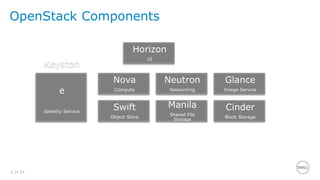
OpenStack Components
Horizon
UI
Keyston
e
Identity Service
Nova
Compute
Glance
Image Service
Neutron
Networking
Cinder
Block Storage
Manila
Shared File
Storage
Swift
Object Store
3 of 24
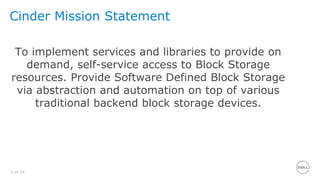
Cinder Mission Statement
To implement services and libraries to provide on
demand, self-service access to Block Storage
resources. Provide Software Defined Block Storage
via abstraction and automation on top of various
traditional backend block storage devices.
4 of 24
What is Cinder?
• Created in the OpenStack Folsom release (2012)
– Spun off from Nova volume
• Cinder manages block storage
– Different than shared file storage – that’s Manila
– Different than object storage – that’s Swift
– Provides management abstraction over a variety of backends
– Provides:
› Create/delete
› Attach/detach
› Snapshot
› Backup
• Volumes have lifecycles independent of VMs
5 of 24
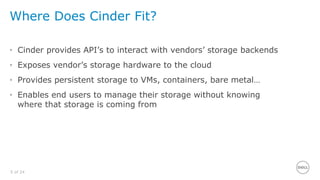
Where Does Cinder Fit?
• Cinder provides API’s to interact with vendors’ storage backends
• Exposes vendor’s storage hardware to the cloud
• Provides persistent storage to VMs, containers, bare metal…
• Enables end users to manage their storage without knowing
where that storage is coming from
6 of 24
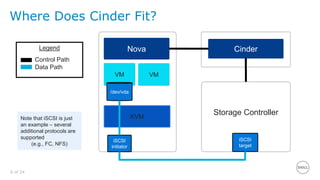
Where Does Cinder Fit?
Legend
Control Path
Data Path
Note that iSCSI is just
an example – several
additional protocols are
supported
(e.g., FC, NFS)
Storage Controller
Nova
VM
/dev/vda
KVM
iSCSI
initiator
Cinder
iSCSI
target
VM
7 of 24
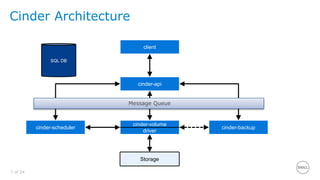
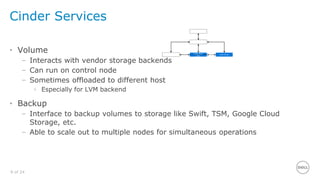
Cinder Architecture
cinder-api
cinder-scheduler
cinder-volume
driver
cinder-backup
SQL DB
client
REST
Storage
Message Queue
8 of 24
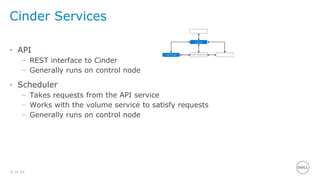
Cinder Services
• API
– REST interface to Cinder
– Generally runs on control node
• Scheduler
– Takes requests from the API service
– Works with the volume service to satisfy requests
– Generally runs on control node
9 of 24
Cinder Services
• Volume
– Interacts with vendor storage backends
– Can run on control node
– Sometimes offloaded to different host
› Especially for LVM backend
• Backup
– Interface to backup volumes to storage like Swift, TSM, Google Cloud
Storage, etc.
– Able to scale out to multiple nodes for simultaneous operations
10 of 24
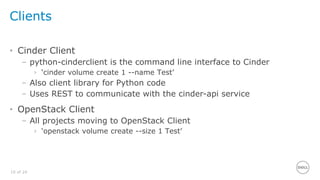
Clients
• Cinder Client
– python-cinderclient is the command line interface to Cinder
› ‘cinder volume create 1 --name Test’
– Also client library for Python code
– Uses REST to communicate with the cinder-api service
• OpenStack Client
– All projects moving to OpenStack Client
› ‘openstack volume create --size 1 Test’
11 of 24
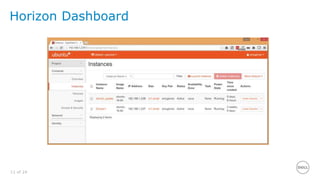
Horizon Dashboard
12 of 24
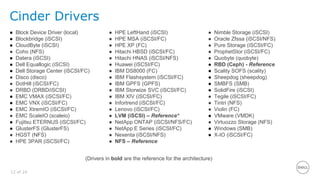
Cinder Drivers
● Block Device Driver (local)
● Blockbridge (iSCSI)
● CloudByte (iSCSI)
● Coho (NFS)
● Datera (iSCSI)
● Dell Equallogic (iSCSI)
● Dell Storage Center (iSCSI/FC)
● Disco (disco)
● DotHill (iSCSI/FC)
● DRBD (DRBD/iSCSI)
● EMC VMAX (iSCSI/FC)
● EMC VNX (iSCSI/FC)
● EMC XtremIO (iSCSI/FC)
● EMC ScaleIO (scaleio)
● Fujitsu ETERNUS (iSCSI/FC)
● GlusterFS (GlusterFS)
● HGST (NFS)
● HPE 3PAR (iSCSI/FC)
● HPE LeftHand (iSCSI)
● HPE MSA (iSCSI/FC)
● HPE XP (FC)
● Hitachi HBSD (iSCSI/FC)
● Hitachi HNAS (iSCSI/NFS)
● Huawei (iSCSI/FC)
● IBM DS8000 (FC)
● IBM Flashsystem (iSCSI/FC)
● IBM GPFS (GPFS)
● IBM Storwize SVC (iSCSI/FC)
● IBM XIV (iSCSI/FC)
● Infortrend (iSCSI/FC)
● Lenovo (iSCSI/FC)
● LVM (iSCSI) – Reference*
● NetApp ONTAP (iSCSI/NFS/FC)
● NetApp E Series (iSCSI/FC)
● Nexenta (iSCSI/NFS)
● NFS – Reference
● Nimble Storage (iSCSI)
● Oracle Zfssa (iSCSI/NFS)
● Pure Storage (iSCSI/FC)
● ProphetStor (iSCSI/FC)
● Quobyte (quobyte)
● RBD (Ceph) - Reference
● Scality SOFS (scality)
● Sheepdog (sheepdog)
● SMBFS (SMB)
● SolidFire (iSCSI)
● Tegile (iSCSI/FC)
● Tintri (NFS)
● Violin (FC)
● VMware (VMDK)
● Virtuozzo Storage (NFS)
● Windows (SMB)
● X-IO (iSCSI/FC)
(Drivers in bold are the reference for the architecture)
13 of 24
Minimum Driver Features
Drivers must implement support for the core
features:
 Volume Create/Delete
 Volume Attach/Detach
 Snapshot Create/Delete
 Create Volume from Snapshot
 Copy Image to Volume
 Copy Volume to Image
 Clone Volume
 Extend Volume
14 of 24
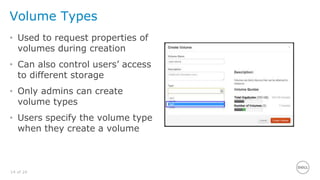
Volume Types
• Used to request properties of
volumes during creation
• Can also control users’ access
to different storage
• Only admins can create
volume types
• Users specify the volume type
when they create a volume
15 of 24
Volume Type Extra Specs
• Extra specs are used to set type properties
• Some standard, some vendor specific
– volume_backend_name=lvm1
– sio:provisioning_type:thin
– hp3par:persona=3
• Extra specs are only visible to the admin
16 of 24
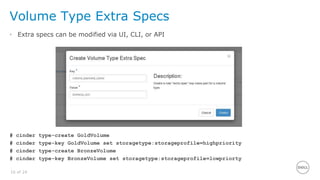
Volume Type Extra Specs
• Extra specs can be modified via UI, CLI, or API
# cinder type-create GoldVolume
# cinder type-key GoldVolume set storagetype:storageprofile=highpriority
# cinder type-create BronzeVolume
# cinder type-key BronzeVolume set storagetype:storageprofile=lowpriorty
17 of 24
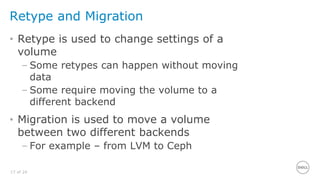
Retype and Migration
• Retype is used to change settings of a
volume
– Some retypes can happen without moving
data
– Some require moving the volume to a
different backend
• Migration is used to move a volume
between two different backends
– For example – from LVM to Ceph
18 of 24
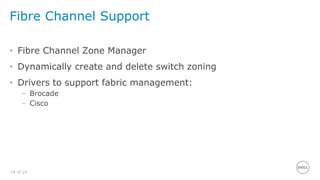
Fibre Channel Support
• Fibre Channel Zone Manager
• Dynamically create and delete switch zoning
• Drivers to support fabric management:
– Brocade
– Cisco
19 of 24
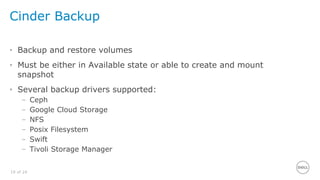
Cinder Backup
• Backup and restore volumes
• Must be either in Available state or able to create and mount
snapshot
• Several backup drivers supported:
– Ceph
– Google Cloud Storage
– NFS
– Posix Filesystem
– Swift
– Tivoli Storage Manager
20 of 24
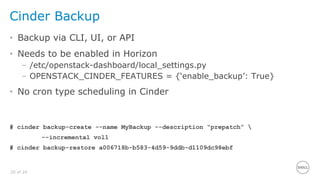
Cinder Backup
• Backup via CLI, UI, or API
• Needs to be enabled in Horizon
– /etc/openstack-dashboard/local_settings.py
– OPENSTACK_CINDER_FEATURES = {‘enable_backup’: True}
• No cron type scheduling in Cinder
# cinder backup-create --name MyBackup --description “prepatch” 
--incremental vol1
# cinder backup-restore a006718b-b583-4d59-9ddb-d1109dc98ebf
21 of 24
Mitaka Updates
• Basic support for replication
• Backup improvements
– Backup of snapshots
– Scale out of backup-service nodes
– Full and incremental backup
• Active/Active HA progress
• OS-brick library and client
• Rolling upgrades
• Work toward multiattach
• API microversions
22 of 24
Ongoing/Future Work
• Better support for replication
• Active/Active High Availability
• More backend storage support
• Better user error reporting
• Improved OpenStack Client support
23 of 24
References
OpenStack Documentation
• http://docs.openstack.org/
Cinder Developer Wiki
• https://wiki.openstack.org/wiki/Cinder
Bug and New Feature Tracking
• https://launchpad.net/cinder
Introduction to Cinder

Introduction to Cinder

  • 1.
  • 2.
    2 of 24 OpenStackComponents Horizon UI Keyston e Identity Service Nova Compute Glance Image Service Neutron Networking Cinder Block Storage Manila Shared File Storage Swift Object Store
  • 3.
    3 of 24 CinderMission Statement To implement services and libraries to provide on demand, self-service access to Block Storage resources. Provide Software Defined Block Storage via abstraction and automation on top of various traditional backend block storage devices.
  • 4.
    4 of 24 Whatis Cinder? • Created in the OpenStack Folsom release (2012) – Spun off from Nova volume • Cinder manages block storage – Different than shared file storage – that’s Manila – Different than object storage – that’s Swift – Provides management abstraction over a variety of backends – Provides: › Create/delete › Attach/detach › Snapshot › Backup • Volumes have lifecycles independent of VMs
  • 5.
    5 of 24 WhereDoes Cinder Fit? • Cinder provides API’s to interact with vendors’ storage backends • Exposes vendor’s storage hardware to the cloud • Provides persistent storage to VMs, containers, bare metal… • Enables end users to manage their storage without knowing where that storage is coming from
  • 6.
    6 of 24 WhereDoes Cinder Fit? Legend Control Path Data Path Note that iSCSI is just an example – several additional protocols are supported (e.g., FC, NFS) Storage Controller Nova VM /dev/vda KVM iSCSI initiator Cinder iSCSI target VM
  • 7.
    7 of 24 CinderArchitecture cinder-api cinder-scheduler cinder-volume driver cinder-backup SQL DB client REST Storage Message Queue
  • 8.
    8 of 24 CinderServices • API – REST interface to Cinder – Generally runs on control node • Scheduler – Takes requests from the API service – Works with the volume service to satisfy requests – Generally runs on control node
  • 9.
    9 of 24 CinderServices • Volume – Interacts with vendor storage backends – Can run on control node – Sometimes offloaded to different host › Especially for LVM backend • Backup – Interface to backup volumes to storage like Swift, TSM, Google Cloud Storage, etc. – Able to scale out to multiple nodes for simultaneous operations
  • 10.
    10 of 24 Clients •Cinder Client – python-cinderclient is the command line interface to Cinder › ‘cinder volume create 1 --name Test’ – Also client library for Python code – Uses REST to communicate with the cinder-api service • OpenStack Client – All projects moving to OpenStack Client › ‘openstack volume create --size 1 Test’
  • 11.
  • 12.
    12 of 24 CinderDrivers ● Block Device Driver (local) ● Blockbridge (iSCSI) ● CloudByte (iSCSI) ● Coho (NFS) ● Datera (iSCSI) ● Dell Equallogic (iSCSI) ● Dell Storage Center (iSCSI/FC) ● Disco (disco) ● DotHill (iSCSI/FC) ● DRBD (DRBD/iSCSI) ● EMC VMAX (iSCSI/FC) ● EMC VNX (iSCSI/FC) ● EMC XtremIO (iSCSI/FC) ● EMC ScaleIO (scaleio) ● Fujitsu ETERNUS (iSCSI/FC) ● GlusterFS (GlusterFS) ● HGST (NFS) ● HPE 3PAR (iSCSI/FC) ● HPE LeftHand (iSCSI) ● HPE MSA (iSCSI/FC) ● HPE XP (FC) ● Hitachi HBSD (iSCSI/FC) ● Hitachi HNAS (iSCSI/NFS) ● Huawei (iSCSI/FC) ● IBM DS8000 (FC) ● IBM Flashsystem (iSCSI/FC) ● IBM GPFS (GPFS) ● IBM Storwize SVC (iSCSI/FC) ● IBM XIV (iSCSI/FC) ● Infortrend (iSCSI/FC) ● Lenovo (iSCSI/FC) ● LVM (iSCSI) – Reference* ● NetApp ONTAP (iSCSI/NFS/FC) ● NetApp E Series (iSCSI/FC) ● Nexenta (iSCSI/NFS) ● NFS – Reference ● Nimble Storage (iSCSI) ● Oracle Zfssa (iSCSI/NFS) ● Pure Storage (iSCSI/FC) ● ProphetStor (iSCSI/FC) ● Quobyte (quobyte) ● RBD (Ceph) - Reference ● Scality SOFS (scality) ● Sheepdog (sheepdog) ● SMBFS (SMB) ● SolidFire (iSCSI) ● Tegile (iSCSI/FC) ● Tintri (NFS) ● Violin (FC) ● VMware (VMDK) ● Virtuozzo Storage (NFS) ● Windows (SMB) ● X-IO (iSCSI/FC) (Drivers in bold are the reference for the architecture)
  • 13.
    13 of 24 MinimumDriver Features Drivers must implement support for the core features:  Volume Create/Delete  Volume Attach/Detach  Snapshot Create/Delete  Create Volume from Snapshot  Copy Image to Volume  Copy Volume to Image  Clone Volume  Extend Volume
  • 14.
    14 of 24 VolumeTypes • Used to request properties of volumes during creation • Can also control users’ access to different storage • Only admins can create volume types • Users specify the volume type when they create a volume
  • 15.
    15 of 24 VolumeType Extra Specs • Extra specs are used to set type properties • Some standard, some vendor specific – volume_backend_name=lvm1 – sio:provisioning_type:thin – hp3par:persona=3 • Extra specs are only visible to the admin
  • 16.
    16 of 24 VolumeType Extra Specs • Extra specs can be modified via UI, CLI, or API # cinder type-create GoldVolume # cinder type-key GoldVolume set storagetype:storageprofile=highpriority # cinder type-create BronzeVolume # cinder type-key BronzeVolume set storagetype:storageprofile=lowpriorty
  • 17.
    17 of 24 Retypeand Migration • Retype is used to change settings of a volume – Some retypes can happen without moving data – Some require moving the volume to a different backend • Migration is used to move a volume between two different backends – For example – from LVM to Ceph
  • 18.
    18 of 24 FibreChannel Support • Fibre Channel Zone Manager • Dynamically create and delete switch zoning • Drivers to support fabric management: – Brocade – Cisco
  • 19.
    19 of 24 CinderBackup • Backup and restore volumes • Must be either in Available state or able to create and mount snapshot • Several backup drivers supported: – Ceph – Google Cloud Storage – NFS – Posix Filesystem – Swift – Tivoli Storage Manager
  • 20.
    20 of 24 CinderBackup • Backup via CLI, UI, or API • Needs to be enabled in Horizon – /etc/openstack-dashboard/local_settings.py – OPENSTACK_CINDER_FEATURES = {‘enable_backup’: True} • No cron type scheduling in Cinder # cinder backup-create --name MyBackup --description “prepatch” --incremental vol1 # cinder backup-restore a006718b-b583-4d59-9ddb-d1109dc98ebf
  • 21.
    21 of 24 MitakaUpdates • Basic support for replication • Backup improvements – Backup of snapshots – Scale out of backup-service nodes – Full and incremental backup • Active/Active HA progress • OS-brick library and client • Rolling upgrades • Work toward multiattach • API microversions
  • 22.
    22 of 24 Ongoing/FutureWork • Better support for replication • Active/Active High Availability • More backend storage support • Better user error reporting • Improved OpenStack Client support
  • 23.
    23 of 24 References OpenStackDocumentation • http://docs.openstack.org/ Cinder Developer Wiki • https://wiki.openstack.org/wiki/Cinder Bug and New Feature Tracking • https://launchpad.net/cinder