
Introduction
Language
email: shujatabbas9@gmail.com
FB/syedshujaatabbaszaidi@fb.com
What is a program
• A sequence of instructions that a computer can
interpret and execute;
– If I tell you the way from IBA Academic Block to
IBA Administration Block … I will tell sequence of
instructions…. Any wrong instruction leads to a
undesired result.
• A program is something that runs on your computer.
In case of MS Windows program is of .EXE or .COM
extensions
• MS Word, Power point, Excel are all computer
programs
2
Introduction to C
• C is a statically typed, compiled, general-
purpose, case-sensitive, free-form programming
language.
• It supports procedural, object-oriented, and
generic programming.
• C is regarded as a middle-level language, as it
comprises a combination of both high-level and
low-level language features
3
Introduction to C++ (Cont..)
• C++ was developed by Bjarne Stroustrup
starting in 1979 at Bell Labs in Murray Hill, New
Jersey.
• C++ is an enhancement to the C language and
originally named C with Classes but later it was
renamed C++ in 1983.
4
Introduction to C++ (Cont..)
Object- Oriented Programming
• C++ fully supports object-oriented programming,
including the four pillars of object-oriented
development:
• Encapsulation
• Data hiding
• Inheritance
• Polymorphism
5
The ANSI Standard
• The ANSI standard is an attempt to ensure
that C++ is portable -- that code you write for
Microsoft's compiler will compile without errors,
using a compiler on a Mac, UNIX, a Windows
box, or an Alpha.
Use of C++
.
• C++ is used by hundreds of thousands of
programmers in essentially every application
domain.
• C++ is being highly used to write device drivers
and other softwares that rely on direct
manipulation of hardware under real-time
constraints
Environment Setup
• Before you start doing programming using C++,
you need the following two softwares available
on your computer.
1. Text Editor
2. C++ Compiler
8
Environment Setup Cont…
• The files you create with your editor are called
source files, and for C++ they typically are
named with the extension .cpp
• C++ compiler, which will be used to compile your
source code into final executable program
9
Writing C++ Programs
• A programmer uses a text editor to create or
modify files containing C++ code.
• Code is also known as source code.
• A file containing source code is called a source
file.
• After a C++ source file has been created, the
programmer must invoke the C++ compiler
before the program can be executed (run).
10
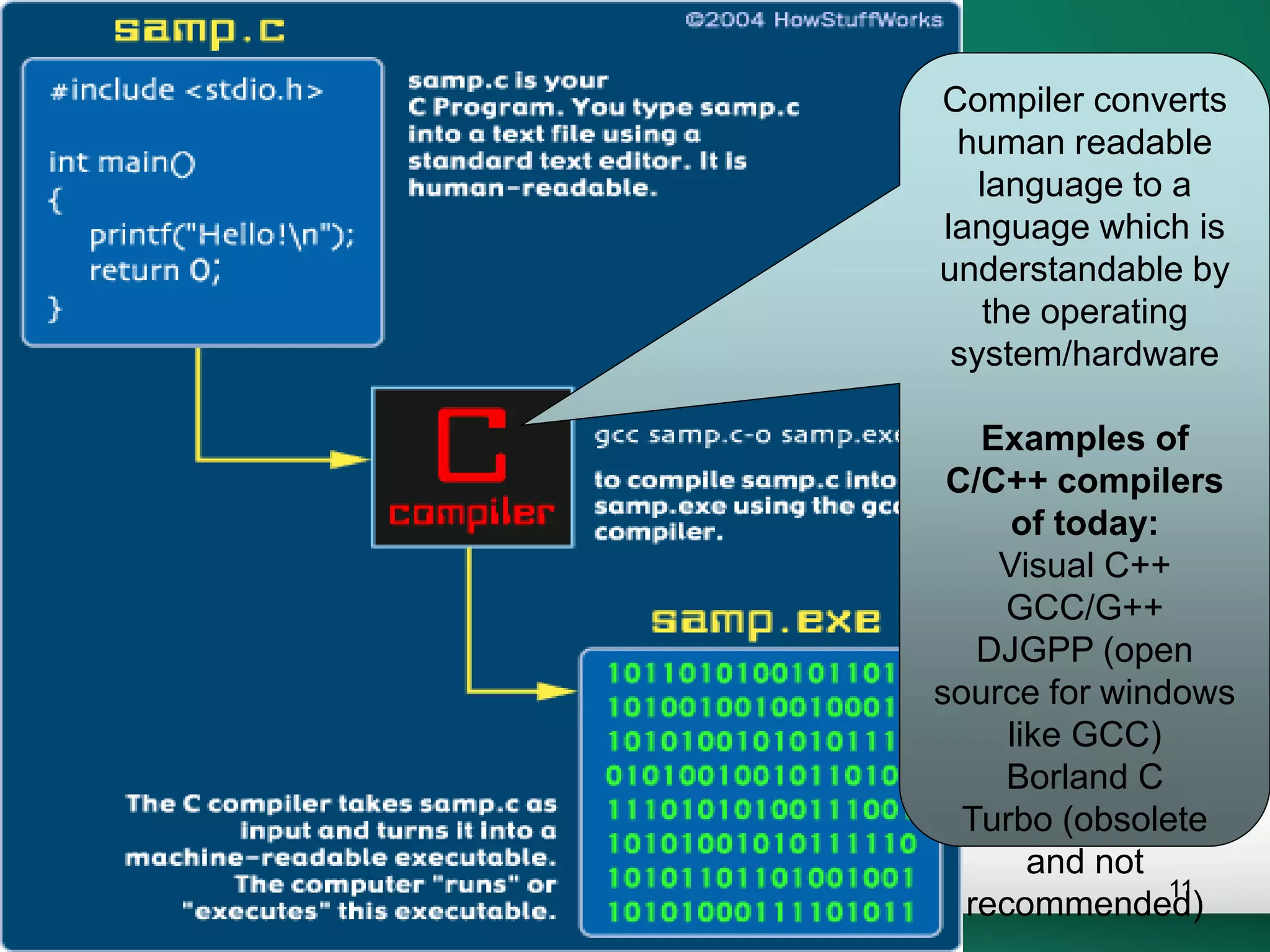
Compiler converts
human readable
language to a
language which is
understandable by
the operating
system/hardware
Examples of
C/C++ compilers
of today:
Visual C++
GCC/G++
DJGPP (open
source for windows
like GCC)
Borland C
Turbo (obsolete
and not
recommended)
11
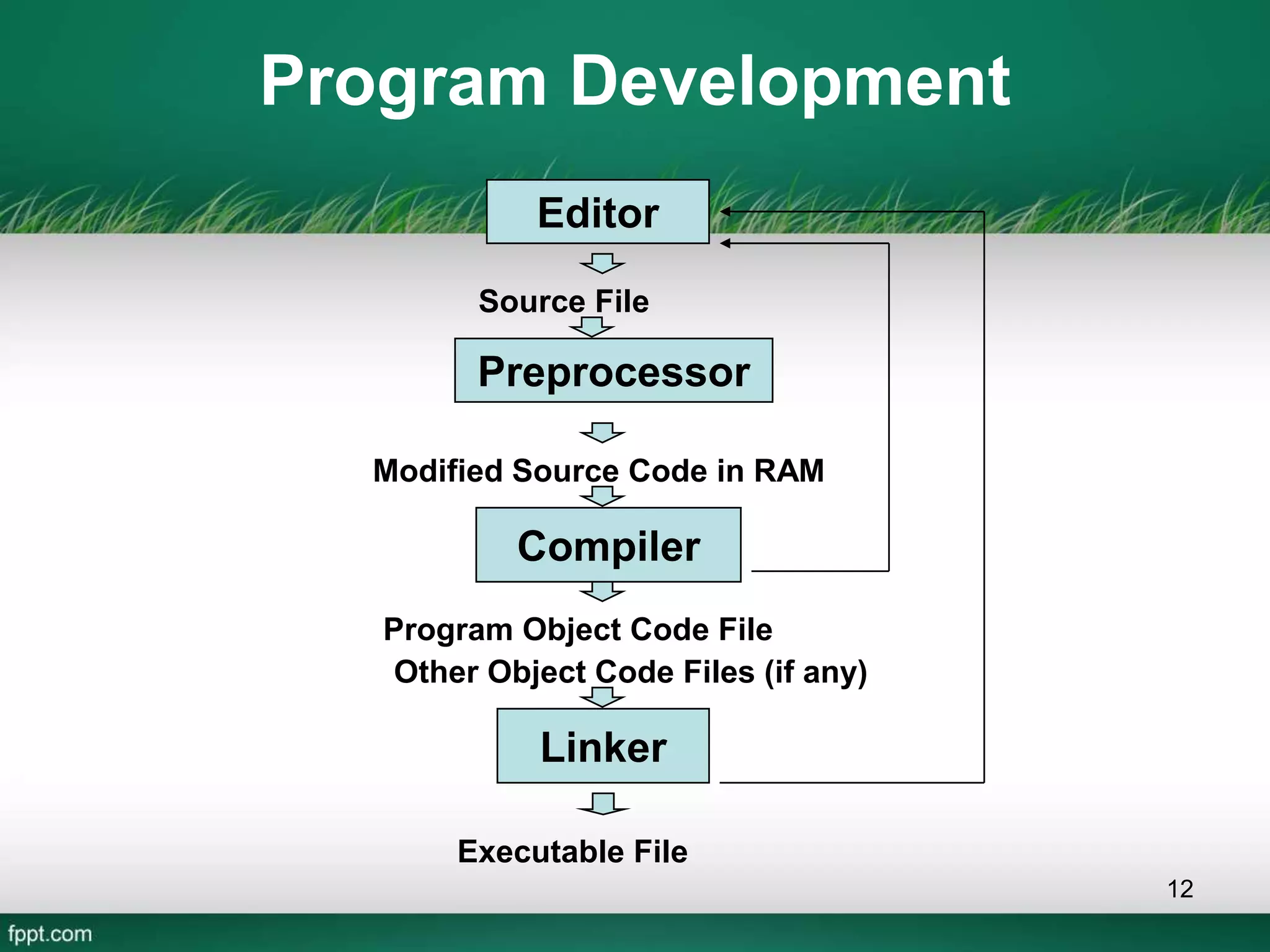
Program Development
12
Source File
Program Object Code File
Executable File
Preprocessor
Modified Source Code in RAM
Compiler
Linker
Other Object Code Files (if any)
Editor
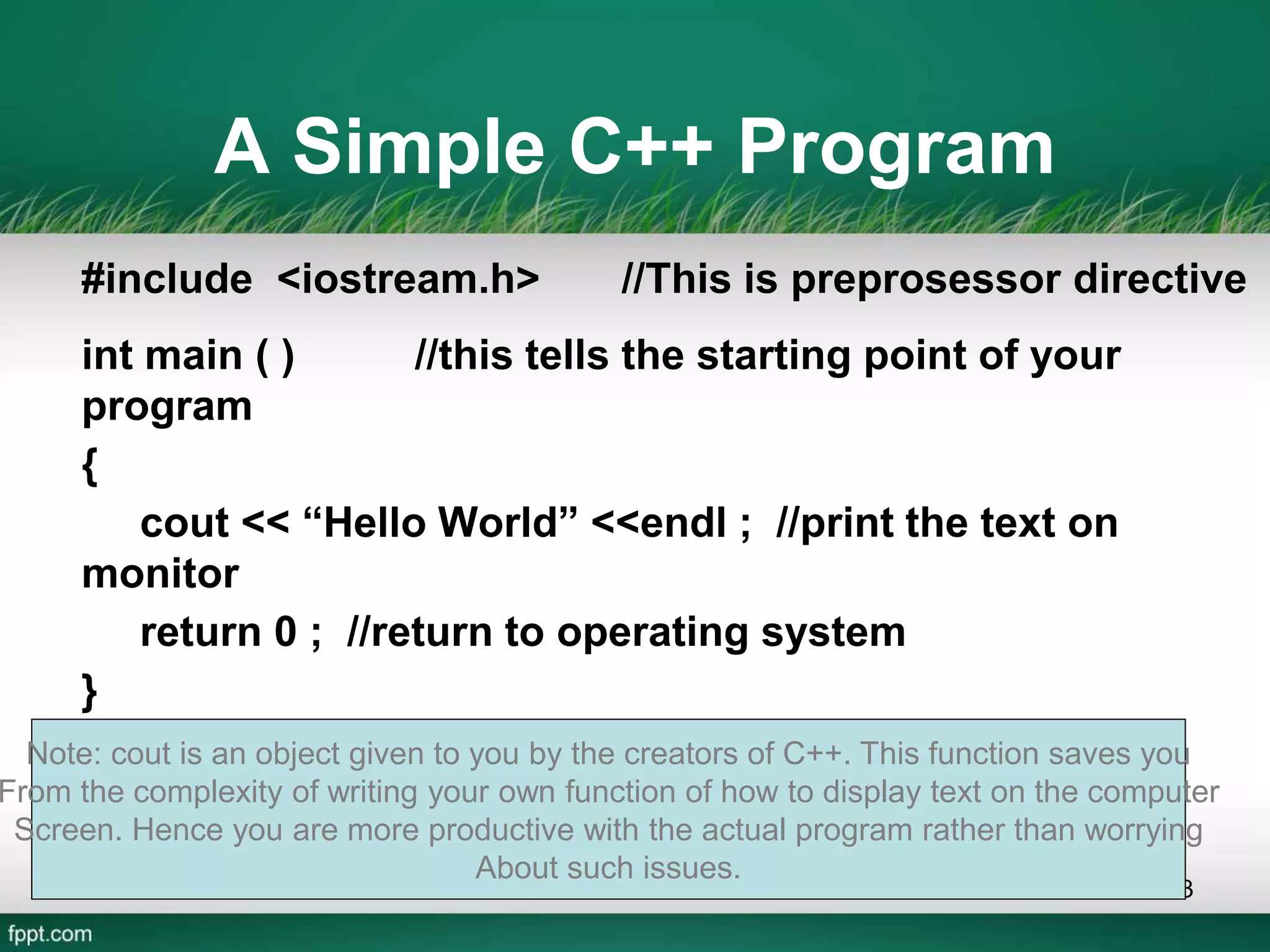
A Simple C++ Program
#include <iostream.h> //This is preprosessor directive
int main ( ) //this tells the starting point of your
program
{
cout << “Hello World” <<endl ; //print the text on
monitor
return 0 ; //return to operating system
}
13
Note: cout is an object given to you by the creators of C++. This function saves you
From the complexity of writing your own function of how to display text on the computer
Screen. Hence you are more productive with the actual program rather than worrying
About such issues.
Elements of C+ Program
Preprocessor Directive
• Preprocessor Directive tells computer to
load contents of a certain file
• #include
14
Elements of C+ Program
Header file
• Header file contains the implementation
code of the c++ functions and c++
keywords.
• Iostream.h, conio.h, stdio.h
15
Elements of C+ Program
• int main()
– C++ programs contain one or more functions,
exactly one of which must be main
– Parenthesis used to indicate a function
– int means that main "returns" an integer value
– Braces { and } indicate a block
• The bodies of all functions must be
contained in braces
– Braces indicate the block of function in c++
program
16
Elements of C+ Program
• return 0;
– A way to exit a function
– return 0, in this case, means that the program
terminated normally
• Linker
– When a function is called, linker locates it in the
library
– Inserts it into object program
– If function name is misspelled, the linker will
produce an error because it will not be able to
find function in the library
17
Elements of C+ Program
• Parenthesis ()
• Parenthesis are used to declare function.
Example Int main()
• Cout
• Cout is a keyword which displays the
result of program on monitor screen
• Cout<<“hello”;
18
Elements of C+ Program
• Int
• Int is a data type of function or variable
• Semicolon ;
• Semicolon is used to end the program
statement.
• Program Statement
• Program statement or simply statement is the
instruction in c++ programming language
19

Introduction to C Language (By: Shujaat Abbas)

  • 1.
  • 2.
    What is aprogram • A sequence of instructions that a computer can interpret and execute; – If I tell you the way from IBA Academic Block to IBA Administration Block … I will tell sequence of instructions…. Any wrong instruction leads to a undesired result. • A program is something that runs on your computer. In case of MS Windows program is of .EXE or .COM extensions • MS Word, Power point, Excel are all computer programs 2
  • 3.
    Introduction to C •C is a statically typed, compiled, general- purpose, case-sensitive, free-form programming language. • It supports procedural, object-oriented, and generic programming. • C is regarded as a middle-level language, as it comprises a combination of both high-level and low-level language features 3
  • 4.
    Introduction to C++(Cont..) • C++ was developed by Bjarne Stroustrup starting in 1979 at Bell Labs in Murray Hill, New Jersey. • C++ is an enhancement to the C language and originally named C with Classes but later it was renamed C++ in 1983. 4
  • 5.
    Introduction to C++(Cont..) Object- Oriented Programming • C++ fully supports object-oriented programming, including the four pillars of object-oriented development: • Encapsulation • Data hiding • Inheritance • Polymorphism 5
  • 6.
    The ANSI Standard •The ANSI standard is an attempt to ensure that C++ is portable -- that code you write for Microsoft's compiler will compile without errors, using a compiler on a Mac, UNIX, a Windows box, or an Alpha.
  • 7.
    Use of C++ . •C++ is used by hundreds of thousands of programmers in essentially every application domain. • C++ is being highly used to write device drivers and other softwares that rely on direct manipulation of hardware under real-time constraints
  • 8.
    Environment Setup • Beforeyou start doing programming using C++, you need the following two softwares available on your computer. 1. Text Editor 2. C++ Compiler 8
  • 9.
    Environment Setup Cont… •The files you create with your editor are called source files, and for C++ they typically are named with the extension .cpp • C++ compiler, which will be used to compile your source code into final executable program 9
  • 10.
    Writing C++ Programs •A programmer uses a text editor to create or modify files containing C++ code. • Code is also known as source code. • A file containing source code is called a source file. • After a C++ source file has been created, the programmer must invoke the C++ compiler before the program can be executed (run). 10
  • 11.
    Compiler converts human readable languageto a language which is understandable by the operating system/hardware Examples of C/C++ compilers of today: Visual C++ GCC/G++ DJGPP (open source for windows like GCC) Borland C Turbo (obsolete and not recommended) 11
  • 12.
    Program Development 12 Source File ProgramObject Code File Executable File Preprocessor Modified Source Code in RAM Compiler Linker Other Object Code Files (if any) Editor
  • 13.
    A Simple C++Program #include <iostream.h> //This is preprosessor directive int main ( ) //this tells the starting point of your program { cout << “Hello World” <<endl ; //print the text on monitor return 0 ; //return to operating system } 13 Note: cout is an object given to you by the creators of C++. This function saves you From the complexity of writing your own function of how to display text on the computer Screen. Hence you are more productive with the actual program rather than worrying About such issues.
  • 14.
    Elements of C+Program Preprocessor Directive • Preprocessor Directive tells computer to load contents of a certain file • #include 14
  • 15.
    Elements of C+Program Header file • Header file contains the implementation code of the c++ functions and c++ keywords. • Iostream.h, conio.h, stdio.h 15
  • 16.
    Elements of C+Program • int main() – C++ programs contain one or more functions, exactly one of which must be main – Parenthesis used to indicate a function – int means that main "returns" an integer value – Braces { and } indicate a block • The bodies of all functions must be contained in braces – Braces indicate the block of function in c++ program 16
  • 17.
    Elements of C+Program • return 0; – A way to exit a function – return 0, in this case, means that the program terminated normally • Linker – When a function is called, linker locates it in the library – Inserts it into object program – If function name is misspelled, the linker will produce an error because it will not be able to find function in the library 17
  • 18.
    Elements of C+Program • Parenthesis () • Parenthesis are used to declare function. Example Int main() • Cout • Cout is a keyword which displays the result of program on monitor screen • Cout<<“hello”; 18
  • 19.
    Elements of C+Program • Int • Int is a data type of function or variable • Semicolon ; • Semicolon is used to end the program statement. • Program Statement • Program statement or simply statement is the instruction in c++ programming language 19