INTRODUCING
AZURE
BASTIONDEM
O
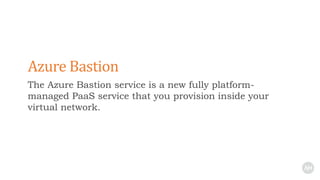
The Azure Bastion service is a new fully platform-
managed PaaS service that you provision inside your
virtual network.
Azure Bastion
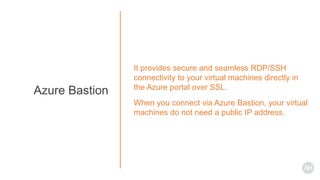
It provides secure and seamless RDP/SSH
connectivity to your virtual machines directly in
the Azure portal over SSL.
When you connect via Azure Bastion, your virtual
machines do not need a public IP address.
Azure Bastion
How Azure Bastion Works?
Azure VNET
Gateway
On-Premises
ExpressRoute
S2S VPN
Gateway
ExpressRoute
Gateway
Failover Connection
P2S VPN
Gateway Subnet
Production Environment
NSG
Availability Set
Jumpbox
Management Subnet
Availability Set
Active Directory
AD Subnet
NSG NSG
Azure VNET
Production Environment
NSG
Jumpbox
Management Subnet
Availability Set
Active Directory
AD Subnet
NSG
NSG
Internet
P
I
PRDP
SSH
Malicious User
Azure JIT
Azure VNET
Production Environment
NSG
Jumpbox
Management Subnet
Availability Set
Active Directory
AD Subnet
NSG
P
I
P
RDP
SSH
Azure VNET
Production Environment
NSG
Jumpbox
Management Subnet
Availability Set
Active Directory
AD Subnet
NSG
Internet
AzureBastionSubnet
10.0.200.0/27
P
I
P
HTTPS
RDP
SSH
Azure VNET
Production Environment
NSG
Jumpbox
Management Subnet
Availability Set
Active Directory
AD Subnet
NSG
AzureBastionSubnet
P
I
P
Azure
Management
Portal
RDP
SSH
RDP
SSH
HTTPS
HTTPS
1
2
3
3
You need bastion host for every
VNET to connect to virtual
machines in these VNETs
Azure VNET
Production Environment
NSG
Jumpbox
Management Subnet
Availability Set
Active Directory
AD Subnet
NSG
AzureBastionSubnet
P
I
P
Azure
Management
Portal
RDP
SSH
RDP
SSH
HTTPS
HTTPS
1
2
3
3
DEMO
Create a bastion host
Connect to a virtual machine
Work with a virtual machine session
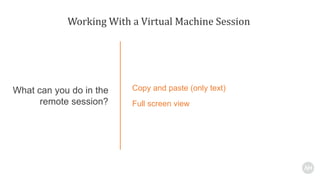
Working With a Virtual Machine Session
Copy and paste (only text)
Full screen view
What can you do in the
remote session?
Azure VNET
Jumpbox
Management SubnetAzureBastionSubnet
P
I
P
Azure
Management
Portal
HTTPS
HTTPS
1
2
3
NSG
RDP/SSH over SSL
End User Experience
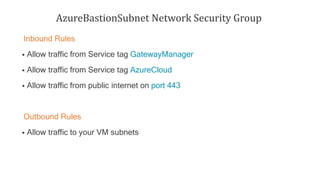
AzureBastionSubnet Network Security Group
Inbound Rules
 Allow traffic from Service tag GatewayManager
 Allow traffic from Service tag AzureCloud
 Allow traffic from public internet on port 443
Outbound Rules
 Allow traffic to your VM subnets
Azure VNET
Jumpbox
Management SubnetAzureBastionSubnet
P
I
P
Azure
Management
Portal
RDP
SSH
HTTPS
HTTPS
1
2
3
NSG
GatewayManager
NSG
AzureBastionSubnet
GatewayManager
ServiceTag
NSG
AzureCloud
ServiceTag
Internet
Any
Any
SSL
AzureBastionSubnet Network Security Group
REFERENCES
• Step-by-step guide – Create an Azure Bastion host
https://blog.ahasayen.com/introducing-azure-bastion
• Azure Bastion Documentation
https://docs.microsoft.com/cs-cz/azure/bastion/
• RDP to Azure Virtual machines using Azure Bastion video
https://youtu.be/eLjuWG-L57Q
About Me: http://ahasyaen.com
Blog: http://blog.ahasayen.com
Social Media: @ammarhasayen
CISSP | Microsoft MVP | Pluralsight Author |
Book Author
CONNECT ON
SOCIAL MEDIA
@ammarhasayen
CHECK OUT
MYCOURSES IN
PLURALSIGHT
https://www.pluralsight.com/authors/ammar-hasayen
Introducing Azure Bastion

Introducing Azure Bastion

Editor's Notes

  • #2 In this video, I am going to introduce you to Azure Bastion in Microsoft Azure and teach you how to create your first Azure bastion in a quick demo.
  • #3 The Azure Bastion service is a new fully platform-managed PaaS service that you provision inside your virtual network.
  • #4 It provides secure and seamless RDP/SSH connectivity to your virtual machines directly in the Azure portal over SSL. The good thing about this, is that When you connect via Azure Bastion, your virtual machines do not need a public IP address.
  • #5 If you are wondering how this works behind the scene, let me show you
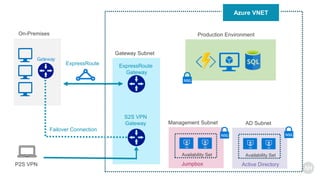
  • #6 Usually you have a VNET inside Azure, and you have your resources in one or more subnets. You may have a management subnet with one or more jumpboxes or bastion hosts that you use to do your administrative tasks and it contains all your remote administration tools. You might also have some sort of hybrid connectivity with your on-premises network and when you are outside the office, you use point to site VPN to securely access your VNET, which is the ideal situation.
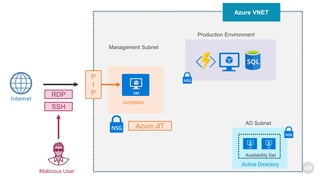
  • #7 But you might for some reasons have your jumbox host configured with a public IP that is exposed to the internet and you connect to the jumbox using RDP and SSH. Once you connect to the jumbox host, you then use it to connect internally to other resources. Now this mean, a malicious user can use port scanning to discover this public IP and use brute force attack to compromise your jumbox. As a best practice, you should have a network security group to restrict what ports and source IP addresses are allowed to connect or even better, you are using Azure Just in time access
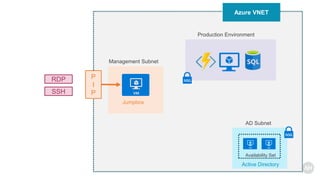
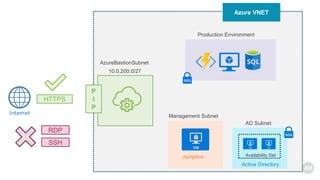
  • #8 But you still have this public IP address exposed. A better solution would be to remove this public IP address so that you don’t expose both RDP and SSH into your VNET, and reduce the attack surface in your VNET
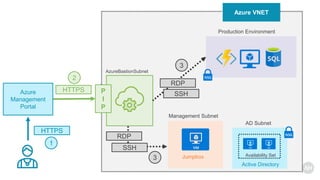
  • #9 Now your jumbox host does not have any public IP addresses, and you implement Azure bastion solution, which sits in its own managed subnet and expose a public IP address. This IP address however does not accept RDP or SSH connections. It only accept SSL connections.
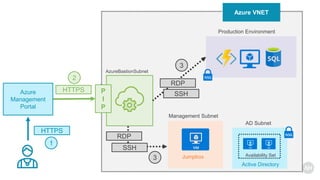
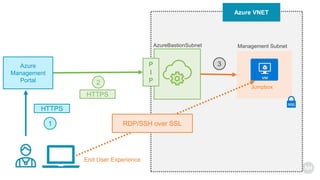
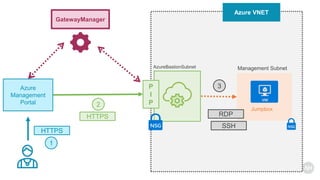
  • #10 So you connect to the Azure management portal over https using any browser, then you select a virtual machine to connect to. Now the Azure portal connects to the Azure Bastion service using the public IP and you get a new session in your browser and you can browse the desktop of the virtual machine and any other VMs inside your network using RDP or SSH. Think about the Azure bastion as a proxy, it receives connections from the internet using SSL and connects you back to your VMs using RDP and SSH. It also looks like remote desktop gateway solution or the RDP web access. You connect from a browser to a gateway that gives you back your RDP session in the browser.
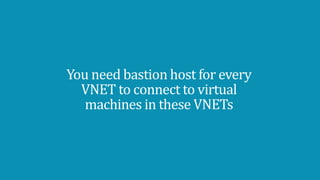
  • #11 Now keep in mind that the bastion host is attached to a virtual network, so for each vnet, you need a bastion host.
  • #12 So remember that the AzureBastion is attached to a VNET. If you have multiple Vnets that you want to RDP or SSH into from the Azure management portal, then you should deploy Azure bastion for each of those VNETS.
  • #13 To show you this in action, lets go to a demo where I will show you how to create a bastion host, connect to a virtual machine and work with a virtual machine session. ---------------------------------------------- The first thing we want to do is to register for the preview by running couple of PowerShell scripts Let’s install the Azure PowerShell module, enable script execution and then import the AzureRM module. Then I will connect to my Azure account, and type my account and password. Now we are ready to register for the preview, and to do that, we need to run the following commands to Enroll and register the subscription with Microsoft.network provider namespace. Now open a browser and type this URL aka.ms/bastionhost which will open the preview interface for the Azure management portal. I will add a resource and search for bastion and create the resource. Since this resource is attached to only one VNET, I will name this resource bastion-production as it is going to serve my production VNET, now I will pick one of the regions where this resource is available today, and choose my production vnet. As you can see, I should create a subnet with the name AzureBastionSubnet with a prefext at least /27 to host the bastion platform service. So I will go to my vnet and create a subnet. For convenient I will choose 10.0.200.0/27 but you can choose any IP address range, and I wil not configure any Network security groups for now. Once the subnet is created, I will return back to the create bastion wizard and here you can see we need a public IP resource ,and this is used by Azure bastionhost not for your VMs. Now once the deployment is done, I will go to one of my machines called the (ManagementVM) which is my jumbox machine. I have all my administrative tools installed there and I use it to manage resources in my VNet, But now as you see, this vm does not have any public Ips so I cannot to connect to it from the internet. But now when I hit connect, I have any option (bastion) and here I will type the management VM admin credentials as I would do if I was to connect to this management vm over RDP. A new browser window opens, and now I am connected to my managementVM over a browser session, without a public IP on that VM. To verify this is actually my management VM, you can see here the name of the machine, and the private IP address assigned to it. Now this is not a normal RDP session, so I cannot as per today, copy files from my local machine to the desktop of my management VM, but I can howoever copy text,so I will open notebad on my machine, copy a text, and then you can see here two small arrows, I will click here and it will grap the text I just copied from my local machine. I can also go to a full screen mode Now the final thing I want to show you is how to apply a network security group to the Azurebastionsubnet if you want to harden it. I already configured a network security group called nsg-bastion at this subnet and here is the inbound security rules you need to configure, allow https from internet, allw any traffic from a service tag called AzureCloud and from a service tag called Gateway manager. The rest of the rulse are the default ones
  • #14 As you saw in the demo, For browsers that support the advanced Clipboard API access, you can copy and paste text between your local device and the remote session in the same way you copy and paste between applications on your local device. Only text copy/paste is supported. You can also go to full screen mode.
  • #15 As you can see the end user experience is that you get an RDP or SSH session in your browser to your VMs inside your VNET without exposing a public IP in the VM
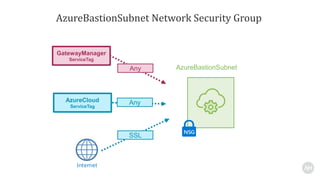
  • #16 If you want to apply a network security group to the Azurebastionsubnet, then for the inbound rules you should allow traffic from the gateway manager service tag, from the AzureCloud service tag and incoming traffic on port 443. For the outbound rules, you should allow traffic from the Azurebastionsubnet to the VMs you want to connect to.
  • #17 To better understand the network security group requirement for the Azure bastion subnet, the Azure portal and the azurebstion subnet use the Azure GatewayManager to facilitate such connectivity,
  • #18 so for your AzureBastionSubnet NSG, you need to allow ingress or inbound traffic from the gatewaymanager, and also from AzureCloud, which are both available as service tags in the network security group interface, and also you need to allow inbound https from the internet for this to work.
  • #19 Finally, I am going to leave you with some references to learn more about Azure bastion, including my blog post about this feature.
  • #20 Thank you for taking the time to watch this video, here are my contact details, so feel free to connect with my on social media and if you have further questions, please let me know.