© 2014 Farata Systems
JavaScript - Not Just a
Pretty Face
Yakov Fain, Farata Systems
© 2014 Farata Systems
Free bonus chapter on JavaScript:

https://github.com/oreillymedia/enterprise_web_development
© 2014 Farata Systems
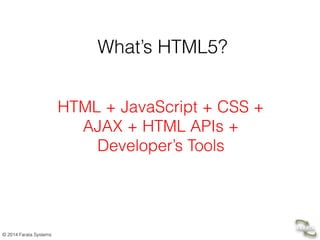
What’s HTML5?
HTML + JavaScript + CSS + 

AJAX + HTML APIs + 

Developer’s Tools
© 2014 Farata Systems
3
Where to Run JavaScript?
• In Your Web browser
• In any JavaScript Engine, e.g. Google’s V8 JavaScript,
Oracle’s JVM Nashorn, etc.
© 2014 Farata Systems
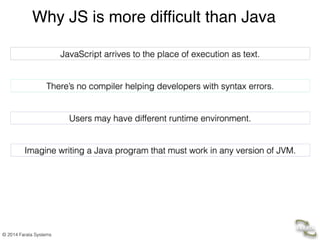
JavaScript arrives to the place of execution as text.
There’s no compiler helping developers with syntax errors.
Users may have different runtime environment.
Imagine writing a Java program that must work in any version of JVM.
Why JS is more difficult than Java
© 2014 Farata Systems
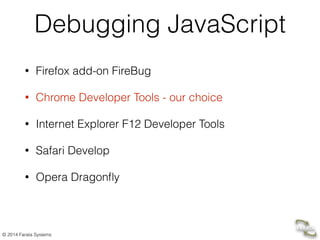
Debugging JavaScript
• Firefox add-on FireBug
• Chrome Developer Tools - our choice
• Internet Explorer F12 Developer Tools
• Safari Develop
• Opera Dragonfly
© 2014 Farata Systems
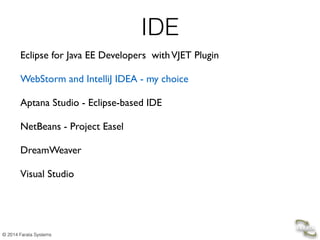
IDE
Eclipse for Java EE Developers withVJET Plugin 

WebStorm and IntelliJ IDEA - my choice

Aptana Studio - Eclipse-based IDE

NetBeans - Project Easel

DreamWeaver

Visual Studio

© 2014 Farata Systems
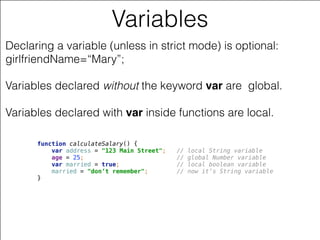
Variables
Declaring a variable (unless in strict mode) is optional:
girlfriendName=“Mary”;
Variables declared without the keyword var are global. 


Variables declared with var inside functions are local.
function calculateSalary() {

var address = "123 Main Street"; // local String variable

age = 25; // global Number variable 

var married = true; // local boolean variable

married = "don’t remember"; // now it’s String variable

}
© 2014 Farata Systems
Objects and Functions
© 2014 Farata Systems
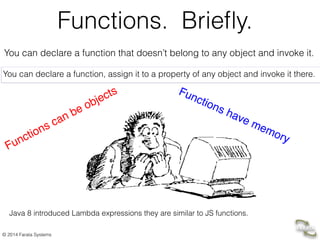
Functions. Briefly.
You can declare a function that doesn’t belong to any object and invoke it.
You can declare a function, assign it to a property of any object and invoke it there.
Functions can be objects Functions have memory
Java 8 introduced Lambda expressions they are similar to JS functions.
© 2014 Farata Systems
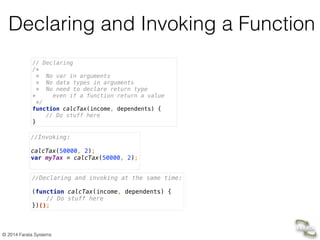
Declaring and Invoking a Function
// Declaring

/*

* No var in arguments

* No data types in arguments

* No need to declare return type

* even if a function return a value

*/

function calcTax(income, dependents) {

// Do stuff here

}
//Invoking:


calcTax(50000, 2); 

var myTax = calcTax(50000, 2);

//Declaring and invoking at the same time:


(function calcTax(income, dependents) {

// Do stuff here

})();
© 2014 Farata Systems
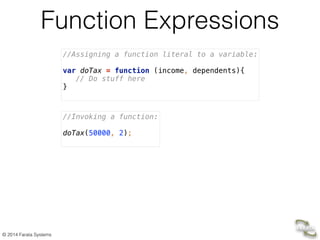
Function Expressions
//Assigning a function literal to a variable:


var doTax = function (income, dependents){

// Do stuff here

}
//Invoking a function:


doTax(50000, 2);

© 2014 Farata Systems
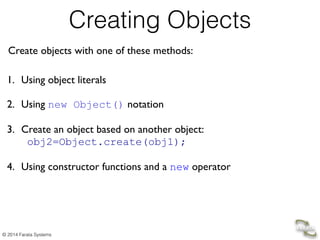
Creating Objects
Create objects with one of these methods:
1. Using object literals

!
2. Using new Object() notation

!
3. Create an object based on another object:

obj2=Object.create(obj1);

!
4. Using constructor functions and a new operator
© 2014 Farata Systems
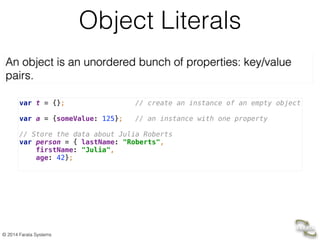
Object Literals
An object is an unordered bunch of properties: key/value
pairs.
var t = {}; // create an instance of an empty object


var a = {someValue: 125}; // an instance with one property


// Store the data about Julia Roberts

var person = { lastName: "Roberts",

firstName: "Julia",

age: 42};
© 2014 Farata Systems
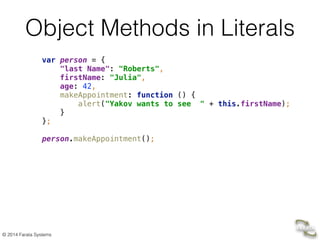
Object Methods in Literals
var person = {

"last Name": "Roberts",

firstName: "Julia",

age: 42,

makeAppointment: function () {

alert("Yakov wants to see " + this.firstName);

}

};


person.makeAppointment();
© 2014 Farata Systems
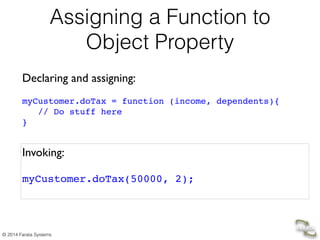
Assigning a Function to
Object Property
Declaring and assigning:	

!
myCustomer.doTax = function (income, dependents){!
// Do stuff here!
}
Invoking:	

!
myCustomer.doTax(50000, 2);!
© 2014 Farata Systems
Demo
• IntelliJ IDE, JavaScript, Chrome Developer Tools
© 2014 Farata Systems
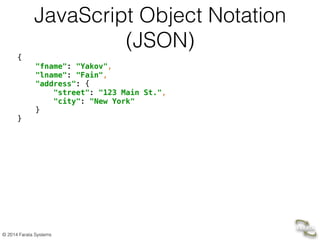
JavaScript Object Notation
(JSON)
{

"fname": "Yakov",

"lname": "Fain",

"address": {

"street": "123 Main St.",

"city": "New York"

}

}
© 2014 Farata Systems
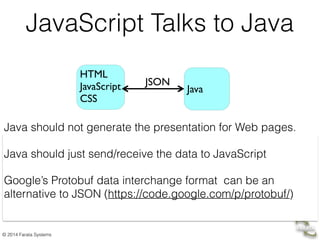
JavaScript Talks to Java
Java should not generate the presentation for Web pages.
Java should just send/receive the data to JavaScript
Google’s Protobuf data interchange format can be an
alternative to JSON (https://code.google.com/p/protobuf/)
HTML

JavaScript

CSS
!
Java
JSON
© 2014 Farata Systems
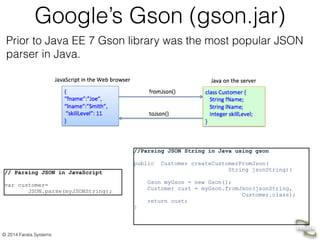
Google’s Gson (gson.jar)
//Parsing JSON String in Java using gson
!
public Customer createCustomerFromJson(

String jsonString){	

!
Gson myGson = new Gson();	

Customer cust = myGson.fromJson(jsonString,

Customer.class);	

return cust;
}
// Parsing JSON in JavaScript
!
var customer=	

JSON.parse(myJSONString);
Prior to Java EE 7 Gson library was the most popular JSON
parser in Java.
© 2014 Farata Systems
Constructor Functions
In Java, classes have constructors	

!
class Tax {
Tax(float income, 

int dependents){
// Do something here
}
…
public static void main(

String[] args){
// Creating 2 Tax objects
Tax t1 = new Tax(50000f, 3);
Tax t2 = new Tax(68000f, 1);
}
}
In JavaScript, a function can serve as a
constructor

!
!
function Tax(income, dependents){
// Do something here
}
…
// Creating 2 Tax objects
var t1 = new Tax(50000, 3);
var t2 = new Tax(68000, 1);
Name constructor functions with capital letters.
© 2014 Farata Systems
Prototypal Inheritance
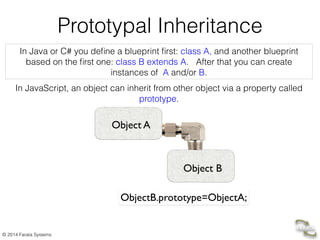
In Java or C# you define a blueprint first: class A, and another blueprint
based on the first one: class B extends A. After that you can create
instances of A and/or B.
In JavaScript, an object can inherit from other object via a property called
prototype.
Object A
Object B
ObjectB.prototype=ObjectA;
© 2014 Farata Systems
Who’s Your Daddy?
// Constructor function Person
function Person(name, title){
this.name=name;
this.title=title;
this.subordinates=[];
}
// Constructor function Employee
!
function Employee(name, title){
this.name=name;
this.title=title;
}
Person and Employee ses”.
© 2014 Farata Systems
Who’s Your Daddy?
// Constructor function Person
function Person(name, title){
this.name=name;
this.title=title;
this.subordinates=[];
}
// Constructor function Employee
!
function Employee(name, title){
this.name=name;
this.title=title;
}
Person and Employee ses”.
Let’s make an Employee a “subclass” of a Person:
Employee.prototype = new Person();
var emp = new Employee(“Mary”, “Specialist”);
If	
  a	
  JS	
  engine	
  won’t	
  find	
  a	
  property	
  in	
  Employee,	
  it’ll	
  keep	
  looking	
  in	
  its	
  
prototype	
  chain	
  –	
  Person	
  and	
  Object	
  .	

!
Mozilla	
  has	
  introduced	
  a	
  property	
  __proto__,	
  but	
  it’ll	
  become	
  official	
  
only	
  in	
  ECMA	
  6.	
  
© 2014 Farata Systems
Methods in Function Objects
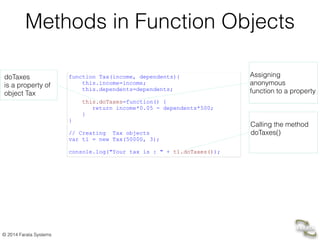
function Tax(income, dependents){
this.income=income;
this.dependents=dependents;
!
this.doTaxes=function() {
return income*0.05 - dependents*500;
}
}
// Creating Tax objects
var t1 = new Tax(50000, 3);
!
console.log("Your tax is : " + t1.doTaxes());
doTaxes 

is a property of
object Tax
Calling the method
doTaxes()
Assigning 

anonymous

function to a property
© 2014 Farata Systems
Private Variables in Function
Objects
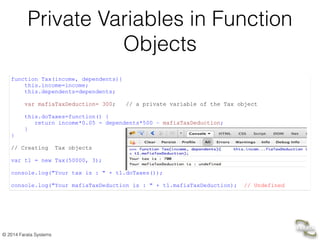
function Tax(income, dependents){
this.income=income;
this.dependents=dependents;
!
var mafiaTaxDeduction= 300; // a private variable of the Tax object
!
this.doTaxes=function() {
return income*0.05 - dependents*500 – mafiaTaxDeduction;
}
}
// Creating Tax objects
var t1 = new Tax(50000, 3);
!
console.log("Your tax is : " + t1.doTaxes());
!
console.log("Your mafiaTaxDeduction is : " + t1.mafiaTaxDeduction); // Undefined
© 2014 Farata Systems
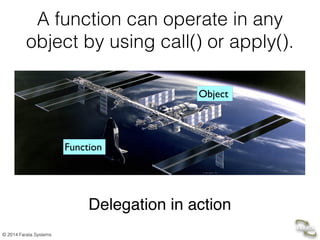
A function can operate in any
object by using call() or apply().
Delegation in action
Function
Object
© 2014 Farata Systems
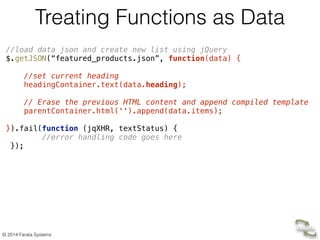
Treating Functions as Data
//load data json and create new list using jQuery

$.getJSON(“featured_products.json”, function(data) {


//set current heading

headingContainer.text(data.heading);


// Erase the previous HTML content and append compiled template

parentContainer.html('').append(data.items);


}).fail(function (jqXHR, textStatus) {

//error handling code goes here

});


© 2014 Farata Systems
Every Function Object Has
Methods apply() and call()
!
• apply() – Allows calling any function on any object. 

Parameters are given as an array.

• call() – Allows calling any function on any object.

Parameters are given as a comma-separated list.
With	
  apply() and	
  call() you	
  to	
  call	
  an	
  arbitrary	
  function	
  xyz()as	
  if	
  this	
  function	
  was	

declared	
  as	
  a	
  method	
  on	
  a	
  specified	
  object	
  (e.g.	
  myTaxObject):	


xyz.call(myTaxObject, 50000, 3); 	

!
xyz.apply(myTaxObject, [50000, 3]); 	
  
© 2014 Farata Systems
Passing a Callback to a Function
1. Declare a function that invokes a given function to process an array	

function applyHandlersToArray(someArray, someCallBackFunction){
for (var i = 0; i < someArray.length; i++)
// Invoke the callback
someCallBackFunction.call(this, someArray[i]);
!
}
} 	


2. Invoke a function providing an array and a function 	

to be called for every element of the array 	

applyHandlersToArray([1,2,3], function(data){
console.log("Hello from a callback. Processing the value " + data)}
);
© 2014 Farata Systems
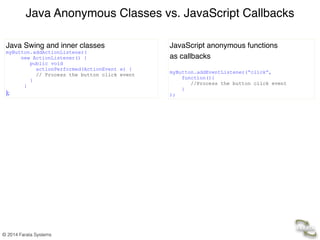
Java Anonymous Classes vs. JavaScript Callbacks
JavaScript anonymous functions!
as callbacks

!
myButton.addEventListener(“click”,
function(){
//Process the button click event	

}
);
Java Swing and inner classes	
  
myButton.addActionListener(

new ActionListener() {
public void

actionPerformed(ActionEvent e) {
// Process the button click event	

}
}
);
© 2014 Farata Systems
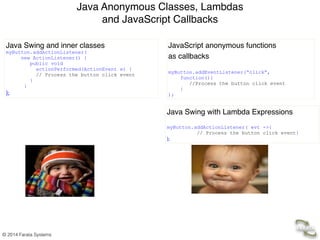
Java Anonymous Classes, Lambdas 

and JavaScript Callbacks
JavaScript anonymous functions!
as callbacks

!
myButton.addEventListener(“click”,
function(){
//Process the button click event	

}
);
Java Swing and inner classes	
  
myButton.addActionListener(

new ActionListener() {
public void

actionPerformed(ActionEvent e) {
// Process the button click event	

}
}
);
Java Swing with Lambda Expressions!
!
myButton.addActionListener( evt ->{
// Process the button click event}
);
© 2014 Farata Systems
Closures
© 2014 Farata Systems
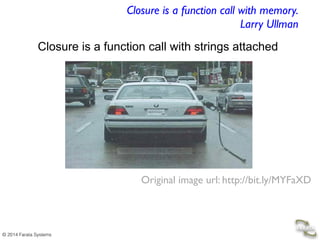
Closure is a function call with strings attached
Closure is a function call with memory.

Larry Ullman
Java 8 should support closures (JSR 335).
Original image url: http://bit.ly/MYFaXD
© 2014 Farata Systems
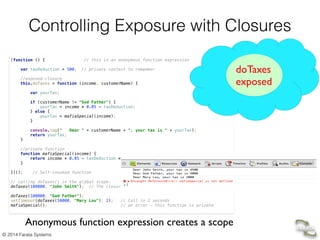
Controlling Exposure with Closures
(function () { // this is an anonymous function expression


var taxDeduction = 500; // private context to remember 


//exposed closure

this.doTaxes = function (income, customerName) {


var yourTax;


if (customerName != "God Father") {

yourTax = income * 0.05 - taxDeduction;

} else {

yourTax = mafiaSpecial(income);

}


console.log(" Dear " + customerName + ", your tax is " + yourTax);

return yourTax;

}


//private function

function mafiaSpecial(income) {

return income * 0.05 - taxDeduction * 2;

}


})(); // Self-invoked function


// calling doTaxes() in the global scope. 

doTaxes(100000, "John Smith"); // The closure remembers its context: taxDeduction=500


doTaxes(100000, "God Father");

setTimeout(doTaxes(50000, "Mary Lou"), 2); // Call in 2 seconds 

mafiaSpecial(); // an error - this function is private
doTaxes

exposed
Anonymous function expression creates a scope
© 2014 Farata Systems
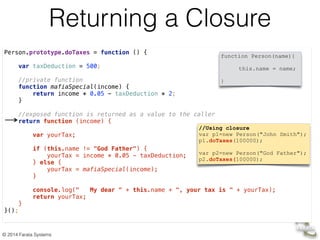
Person.prototype.doTaxes = function () {


var taxDeduction = 500;


//private function

function mafiaSpecial(income) {

return income * 0.05 - taxDeduction * 2;

}


//exposed function is returned as a value to the caller

return function (income) {


var yourTax;


if (this.name != "God Father") {

yourTax = income * 0.05 - taxDeduction;

} else {

yourTax = mafiaSpecial(income);

}


console.log(" My dear " + this.name + ", your tax is " + yourTax);

return yourTax;

}

}();
Returning a Closure
function Person(name){
this.name = name;
}
//Using closure
var p1=new Person("John Smith");
p1.doTaxes(100000);
!
var p2=new Person("God Father");
p2.doTaxes(100000);
© 2014 Farata Systems
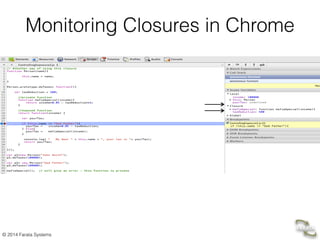
Monitoring Closures in Chrome
© 2014 Farata Systems
Demo
Runing closure in Chrome Developer Tools
© 2014 Farata Systems
JavaScript in a Web Browser
Tipically we place <script> tags at the bottom of HTML page.
© 2014 Farata Systems
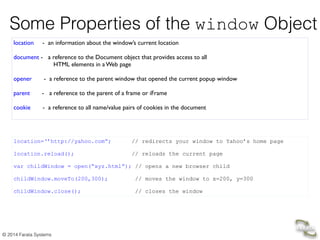
Some Properties of the window Object
location - an information about the window’s current location	


document - a reference to the Document object that provides access to all

HTML elements in a Web page

!
opener - a reference to the parent window that opened the current popup window	


parent - a reference to the parent of a frame or iFrame	

!
cookie - a reference to all name/value pairs of cookies in the document	

location=‘’http://yahoo.com”; // redirects your window to Yahoo’s home page
!
location.reload(); // reloads the current page
var childWindow = open(“xyz.html”); // opens a new browser child 


childWindow.moveTo(200,300); // moves the window to x=200, y=300


childWindow.close(); // closes the window
© 2014 Farata Systems
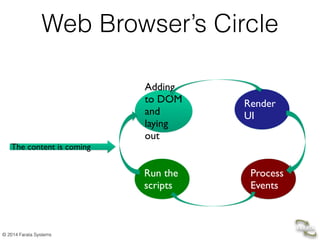
Web Browser’s Circle
Adding
to DOM
and
laying
out
Render
UI
Process
Events
Run the
scripts
The content is coming
© 2014 Farata Systems
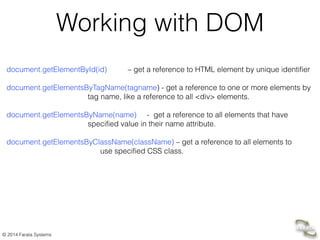
Working with DOM
!
document.getElementById(id) – get a reference to HTML element by unique identifier
!
document.getElementsByTagName(tagname) - get a reference to one or more elements by

tag name, like a reference to all <div> elements.
!
document.getElementsByName(name) - get a reference to all elements that have 

specified value in their name attribute.
!
document.getElementsByClassName(className) – get a reference to all elements to

use specified CSS class.
© 2014 Farata Systems
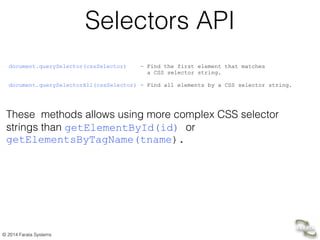
Selectors API
document.querySelector(cssSelector) – Find the first element that matches 

a CSS selector string.

document.querySelectorAll(cssSelector) – Find all elements by a CSS selector string.	

!


These methods allows using more complex CSS selector
strings than getElementById(id) or
getElementsByTagName(tname).
© 2014 Farata Systems
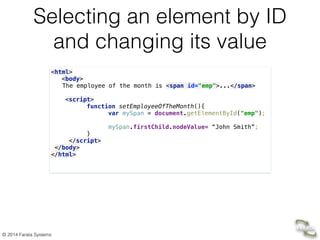
Selecting an element by ID
and changing its value
<html>

<body>

The employee of the month is <span id="emp">...</span>


<script>

function setEmployeeOfTheMonth(){ 

var mySpan = document.getElementById("emp"); 


mySpan.firstChild.nodeValue= “John Smith”; 

} 

</script>

</body>

</html>

!
© 2014 Farata Systems
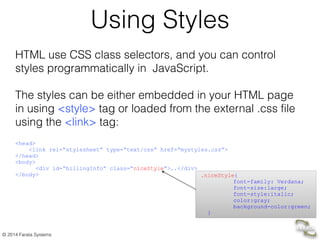
Using Styles
HTML use CSS class selectors, and you can control
styles programmatically in JavaScript.
!
The styles can be either embedded in your HTML page
in using <style> tag or loaded from the external .css file
using the <link> tag:
!
<head>	

<link rel=“stylesheet” type=“text/css” href=“mystyles.css”>	

</head>	

<body>	

<div id=“billingInfo” class=“niceStyle”>….</div>	

</body> .niceStyle{
font-family: Verdana;
font-size:large;
font-style:italic;
color:gray;
background-color:green;
}
© 2014 Farata Systems
Changing Styles in JavaScript
To find elements that use specified class selectors use
getElementsByClassName(), which returns a NodeList of
matching elements.
!
document.getElementsByClassName("niceStyle");
!
To change the selector on the HTML element, use the
attribute className: 	

!
document.getElementsByClassName("niceStyle")[0].className=“badStyle”;
© 2014 Farata Systems
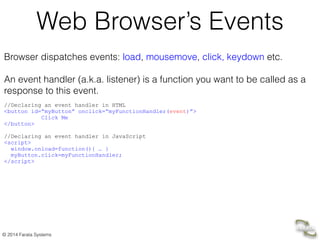
Web Browser’s Events
Browser dispatches events: load, mousemove, click, keydown etc.
!
An event handler (a.k.a. listener) is a function you want to be called as a
response to this event. 	
  
!
//Declaring an event handler in HTML
<button id=“myButton” onclick=“myFunctionHandler(event)”>

Click Me

</button>
	

//Declaring an event handler in JavaScript	

<script>	

window.onload=function(){ … }	

myButton.click=myFunctionHandler; 	

</script>
© 2014 Farata Systems
• Farata Systems:

http://faratasystems.com 

• My Video Lessons “Intro to Java and Java EE”:

http://bit.ly/UFrVHb 

• Blog: 

yakovfain.com

• Twitter:

@yfain
Contacts and Links

Intro to JavaScript

  • 1.
    © 2014 FarataSystems JavaScript - Not Just a Pretty Face Yakov Fain, Farata Systems
  • 2.
  • 3.
    © 2014 FarataSystems Free bonus chapter on JavaScript:
 https://github.com/oreillymedia/enterprise_web_development
  • 4.
    © 2014 FarataSystems What’s HTML5? HTML + JavaScript + CSS + 
 AJAX + HTML APIs + 
 Developer’s Tools
  • 5.
    © 2014 FarataSystems 3 Where to Run JavaScript? • In Your Web browser • In any JavaScript Engine, e.g. Google’s V8 JavaScript, Oracle’s JVM Nashorn, etc.
  • 6.
    © 2014 FarataSystems JavaScript arrives to the place of execution as text. There’s no compiler helping developers with syntax errors. Users may have different runtime environment. Imagine writing a Java program that must work in any version of JVM. Why JS is more difficult than Java
  • 7.
    © 2014 FarataSystems Debugging JavaScript • Firefox add-on FireBug • Chrome Developer Tools - our choice • Internet Explorer F12 Developer Tools • Safari Develop • Opera Dragonfly
  • 8.
    © 2014 FarataSystems IDE Eclipse for Java EE Developers withVJET Plugin 
 WebStorm and IntelliJ IDEA - my choice
 Aptana Studio - Eclipse-based IDE
 NetBeans - Project Easel
 DreamWeaver
 Visual Studio

  • 9.
    © 2014 FarataSystems Variables Declaring a variable (unless in strict mode) is optional: girlfriendName=“Mary”; Variables declared without the keyword var are global. 
 
 Variables declared with var inside functions are local. function calculateSalary() {
 var address = "123 Main Street"; // local String variable
 age = 25; // global Number variable 
 var married = true; // local boolean variable
 married = "don’t remember"; // now it’s String variable
 }
  • 10.
    © 2014 FarataSystems Objects and Functions
  • 11.
    © 2014 FarataSystems Functions. Briefly. You can declare a function that doesn’t belong to any object and invoke it. You can declare a function, assign it to a property of any object and invoke it there. Functions can be objects Functions have memory Java 8 introduced Lambda expressions they are similar to JS functions.
  • 12.
    © 2014 FarataSystems Declaring and Invoking a Function // Declaring
 /*
 * No var in arguments
 * No data types in arguments
 * No need to declare return type
 * even if a function return a value
 */
 function calcTax(income, dependents) {
 // Do stuff here
 } //Invoking:
 
 calcTax(50000, 2); 
 var myTax = calcTax(50000, 2);
 //Declaring and invoking at the same time:
 
 (function calcTax(income, dependents) {
 // Do stuff here
 })();
  • 13.
    © 2014 FarataSystems Function Expressions //Assigning a function literal to a variable:
 
 var doTax = function (income, dependents){
 // Do stuff here
 } //Invoking a function:
 
 doTax(50000, 2);

  • 14.
    © 2014 FarataSystems Creating Objects Create objects with one of these methods: 1. Using object literals
 ! 2. Using new Object() notation
 ! 3. Create an object based on another object:
 obj2=Object.create(obj1);
 ! 4. Using constructor functions and a new operator
  • 15.
    © 2014 FarataSystems Object Literals An object is an unordered bunch of properties: key/value pairs. var t = {}; // create an instance of an empty object
 
 var a = {someValue: 125}; // an instance with one property
 
 // Store the data about Julia Roberts
 var person = { lastName: "Roberts",
 firstName: "Julia",
 age: 42};
  • 16.
    © 2014 FarataSystems Object Methods in Literals var person = {
 "last Name": "Roberts",
 firstName: "Julia",
 age: 42,
 makeAppointment: function () {
 alert("Yakov wants to see " + this.firstName);
 }
 };
 
 person.makeAppointment();
  • 17.
    © 2014 FarataSystems Assigning a Function to Object Property Declaring and assigning: ! myCustomer.doTax = function (income, dependents){! // Do stuff here! } Invoking: ! myCustomer.doTax(50000, 2);!
  • 18.
    © 2014 FarataSystems Demo • IntelliJ IDE, JavaScript, Chrome Developer Tools
  • 19.
    © 2014 FarataSystems JavaScript Object Notation (JSON) {
 "fname": "Yakov",
 "lname": "Fain",
 "address": {
 "street": "123 Main St.",
 "city": "New York"
 }
 }
  • 20.
    © 2014 FarataSystems JavaScript Talks to Java Java should not generate the presentation for Web pages. Java should just send/receive the data to JavaScript Google’s Protobuf data interchange format can be an alternative to JSON (https://code.google.com/p/protobuf/) HTML
 JavaScript
 CSS ! Java JSON
  • 21.
    © 2014 FarataSystems Google’s Gson (gson.jar) //Parsing JSON String in Java using gson ! public Customer createCustomerFromJson(
 String jsonString){ ! Gson myGson = new Gson(); Customer cust = myGson.fromJson(jsonString,
 Customer.class); return cust; } // Parsing JSON in JavaScript ! var customer= JSON.parse(myJSONString); Prior to Java EE 7 Gson library was the most popular JSON parser in Java.
  • 22.
    © 2014 FarataSystems Constructor Functions In Java, classes have constructors ! class Tax { Tax(float income, 
 int dependents){ // Do something here } … public static void main(
 String[] args){ // Creating 2 Tax objects Tax t1 = new Tax(50000f, 3); Tax t2 = new Tax(68000f, 1); } } In JavaScript, a function can serve as a constructor
 ! ! function Tax(income, dependents){ // Do something here } … // Creating 2 Tax objects var t1 = new Tax(50000, 3); var t2 = new Tax(68000, 1); Name constructor functions with capital letters.
  • 23.
    © 2014 FarataSystems Prototypal Inheritance In Java or C# you define a blueprint first: class A, and another blueprint based on the first one: class B extends A. After that you can create instances of A and/or B. In JavaScript, an object can inherit from other object via a property called prototype. Object A Object B ObjectB.prototype=ObjectA;
  • 24.
    © 2014 FarataSystems Who’s Your Daddy? // Constructor function Person function Person(name, title){ this.name=name; this.title=title; this.subordinates=[]; } // Constructor function Employee ! function Employee(name, title){ this.name=name; this.title=title; } Person and Employee ses”.
  • 25.
    © 2014 FarataSystems Who’s Your Daddy? // Constructor function Person function Person(name, title){ this.name=name; this.title=title; this.subordinates=[]; } // Constructor function Employee ! function Employee(name, title){ this.name=name; this.title=title; } Person and Employee ses”. Let’s make an Employee a “subclass” of a Person: Employee.prototype = new Person(); var emp = new Employee(“Mary”, “Specialist”); If  a  JS  engine  won’t  find  a  property  in  Employee,  it’ll  keep  looking  in  its   prototype  chain  –  Person  and  Object  . ! Mozilla  has  introduced  a  property  __proto__,  but  it’ll  become  official   only  in  ECMA  6.  
  • 26.
    © 2014 FarataSystems Methods in Function Objects function Tax(income, dependents){ this.income=income; this.dependents=dependents; ! this.doTaxes=function() { return income*0.05 - dependents*500; } } // Creating Tax objects var t1 = new Tax(50000, 3); ! console.log("Your tax is : " + t1.doTaxes()); doTaxes 
 is a property of object Tax Calling the method doTaxes() Assigning 
 anonymous
 function to a property
  • 27.
    © 2014 FarataSystems Private Variables in Function Objects function Tax(income, dependents){ this.income=income; this.dependents=dependents; ! var mafiaTaxDeduction= 300; // a private variable of the Tax object ! this.doTaxes=function() { return income*0.05 - dependents*500 – mafiaTaxDeduction; } } // Creating Tax objects var t1 = new Tax(50000, 3); ! console.log("Your tax is : " + t1.doTaxes()); ! console.log("Your mafiaTaxDeduction is : " + t1.mafiaTaxDeduction); // Undefined
  • 28.
    © 2014 FarataSystems A function can operate in any object by using call() or apply(). Delegation in action Function Object
  • 29.
    © 2014 FarataSystems Treating Functions as Data //load data json and create new list using jQuery
 $.getJSON(“featured_products.json”, function(data) {
 
 //set current heading
 headingContainer.text(data.heading);
 
 // Erase the previous HTML content and append compiled template
 parentContainer.html('').append(data.items);
 
 }).fail(function (jqXHR, textStatus) {
 //error handling code goes here
 });
 

  • 30.
    © 2014 FarataSystems Every Function Object Has Methods apply() and call() ! • apply() – Allows calling any function on any object. 
 Parameters are given as an array.
 • call() – Allows calling any function on any object.
 Parameters are given as a comma-separated list. With  apply() and  call() you  to  call  an  arbitrary  function  xyz()as  if  this  function  was declared  as  a  method  on  a  specified  object  (e.g.  myTaxObject): 
 xyz.call(myTaxObject, 50000, 3); ! xyz.apply(myTaxObject, [50000, 3]);  
  • 31.
    © 2014 FarataSystems Passing a Callback to a Function 1. Declare a function that invokes a given function to process an array function applyHandlersToArray(someArray, someCallBackFunction){ for (var i = 0; i < someArray.length; i++) // Invoke the callback someCallBackFunction.call(this, someArray[i]); ! } } 2. Invoke a function providing an array and a function to be called for every element of the array applyHandlersToArray([1,2,3], function(data){ console.log("Hello from a callback. Processing the value " + data)} );
  • 32.
    © 2014 FarataSystems Java Anonymous Classes vs. JavaScript Callbacks JavaScript anonymous functions! as callbacks
 ! myButton.addEventListener(“click”, function(){ //Process the button click event } ); Java Swing and inner classes   myButton.addActionListener(
 new ActionListener() { public void
 actionPerformed(ActionEvent e) { // Process the button click event } } );
  • 33.
    © 2014 FarataSystems Java Anonymous Classes, Lambdas 
 and JavaScript Callbacks JavaScript anonymous functions! as callbacks
 ! myButton.addEventListener(“click”, function(){ //Process the button click event } ); Java Swing and inner classes   myButton.addActionListener(
 new ActionListener() { public void
 actionPerformed(ActionEvent e) { // Process the button click event } } ); Java Swing with Lambda Expressions! ! myButton.addActionListener( evt ->{ // Process the button click event} );
  • 34.
    © 2014 FarataSystems Closures
  • 35.
    © 2014 FarataSystems Closure is a function call with strings attached Closure is a function call with memory.
 Larry Ullman Java 8 should support closures (JSR 335). Original image url: http://bit.ly/MYFaXD
  • 36.
    © 2014 FarataSystems Controlling Exposure with Closures (function () { // this is an anonymous function expression
 
 var taxDeduction = 500; // private context to remember 
 
 //exposed closure
 this.doTaxes = function (income, customerName) {
 
 var yourTax;
 
 if (customerName != "God Father") {
 yourTax = income * 0.05 - taxDeduction;
 } else {
 yourTax = mafiaSpecial(income);
 }
 
 console.log(" Dear " + customerName + ", your tax is " + yourTax);
 return yourTax;
 }
 
 //private function
 function mafiaSpecial(income) {
 return income * 0.05 - taxDeduction * 2;
 }
 
 })(); // Self-invoked function
 
 // calling doTaxes() in the global scope. 
 doTaxes(100000, "John Smith"); // The closure remembers its context: taxDeduction=500
 
 doTaxes(100000, "God Father");
 setTimeout(doTaxes(50000, "Mary Lou"), 2); // Call in 2 seconds 
 mafiaSpecial(); // an error - this function is private doTaxes
 exposed Anonymous function expression creates a scope
  • 37.
    © 2014 FarataSystems Person.prototype.doTaxes = function () {
 
 var taxDeduction = 500;
 
 //private function
 function mafiaSpecial(income) {
 return income * 0.05 - taxDeduction * 2;
 }
 
 //exposed function is returned as a value to the caller
 return function (income) {
 
 var yourTax;
 
 if (this.name != "God Father") {
 yourTax = income * 0.05 - taxDeduction;
 } else {
 yourTax = mafiaSpecial(income);
 }
 
 console.log(" My dear " + this.name + ", your tax is " + yourTax);
 return yourTax;
 }
 }(); Returning a Closure function Person(name){ this.name = name; } //Using closure var p1=new Person("John Smith"); p1.doTaxes(100000); ! var p2=new Person("God Father"); p2.doTaxes(100000);
  • 38.
    © 2014 FarataSystems Monitoring Closures in Chrome
  • 39.
    © 2014 FarataSystems Demo Runing closure in Chrome Developer Tools
  • 40.
    © 2014 FarataSystems JavaScript in a Web Browser Tipically we place <script> tags at the bottom of HTML page.
  • 41.
    © 2014 FarataSystems Some Properties of the window Object location - an information about the window’s current location 
 document - a reference to the Document object that provides access to all
 HTML elements in a Web page
 ! opener - a reference to the parent window that opened the current popup window parent - a reference to the parent of a frame or iFrame ! cookie - a reference to all name/value pairs of cookies in the document location=‘’http://yahoo.com”; // redirects your window to Yahoo’s home page ! location.reload(); // reloads the current page var childWindow = open(“xyz.html”); // opens a new browser child 
 
 childWindow.moveTo(200,300); // moves the window to x=200, y=300
 
 childWindow.close(); // closes the window
  • 42.
    © 2014 FarataSystems Web Browser’s Circle Adding to DOM and laying out Render UI Process Events Run the scripts The content is coming
  • 43.
    © 2014 FarataSystems Working with DOM ! document.getElementById(id) – get a reference to HTML element by unique identifier ! document.getElementsByTagName(tagname) - get a reference to one or more elements by
 tag name, like a reference to all <div> elements. ! document.getElementsByName(name) - get a reference to all elements that have 
 specified value in their name attribute. ! document.getElementsByClassName(className) – get a reference to all elements to
 use specified CSS class.
  • 44.
    © 2014 FarataSystems Selectors API document.querySelector(cssSelector) – Find the first element that matches 
 a CSS selector string.
 document.querySelectorAll(cssSelector) – Find all elements by a CSS selector string. ! 
 These methods allows using more complex CSS selector strings than getElementById(id) or getElementsByTagName(tname).
  • 45.
    © 2014 FarataSystems Selecting an element by ID and changing its value <html>
 <body>
 The employee of the month is <span id="emp">...</span>
 
 <script>
 function setEmployeeOfTheMonth(){ 
 var mySpan = document.getElementById("emp"); 
 
 mySpan.firstChild.nodeValue= “John Smith”; 
 } 
 </script>
 </body>
 </html>
 !
  • 46.
    © 2014 FarataSystems Using Styles HTML use CSS class selectors, and you can control styles programmatically in JavaScript. ! The styles can be either embedded in your HTML page in using <style> tag or loaded from the external .css file using the <link> tag: ! <head> <link rel=“stylesheet” type=“text/css” href=“mystyles.css”> </head> <body> <div id=“billingInfo” class=“niceStyle”>….</div> </body> .niceStyle{ font-family: Verdana; font-size:large; font-style:italic; color:gray; background-color:green; }
  • 47.
    © 2014 FarataSystems Changing Styles in JavaScript To find elements that use specified class selectors use getElementsByClassName(), which returns a NodeList of matching elements. ! document.getElementsByClassName("niceStyle"); ! To change the selector on the HTML element, use the attribute className: ! document.getElementsByClassName("niceStyle")[0].className=“badStyle”;
  • 48.
    © 2014 FarataSystems Web Browser’s Events Browser dispatches events: load, mousemove, click, keydown etc. ! An event handler (a.k.a. listener) is a function you want to be called as a response to this event.   ! //Declaring an event handler in HTML <button id=“myButton” onclick=“myFunctionHandler(event)”>
 Click Me
 </button> //Declaring an event handler in JavaScript <script> window.onload=function(){ … } myButton.click=myFunctionHandler; </script>
  • 49.
    © 2014 FarataSystems • Farata Systems:
 http://faratasystems.com 
 • My Video Lessons “Intro to Java and Java EE”:
 http://bit.ly/UFrVHb 
 • Blog: 
 yakovfain.com
 • Twitter:
 @yfain Contacts and Links