Insurance Assistant
Handbook
&
Training Guide
Job Responsibilities
I. Answering Phones
II. Entering Payments
III. Updating and MaintainingPolicyholder’sRecords
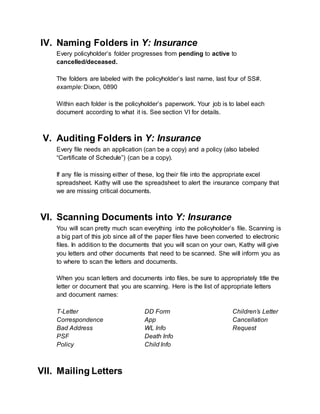
IV. Naming Foldersin Y: Insurance
V. Auditing Folders in Y: Insurance
VI. ScanningDocuments into Y: Insurance
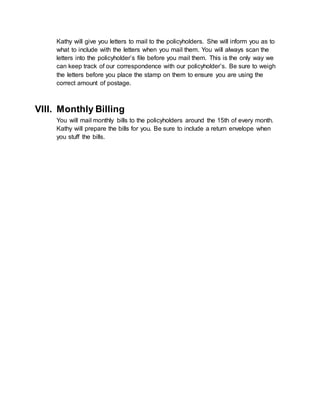
VII. Mailing Letters
VIII. Monthly Billing
Passwords and Login Information
Computer
INS2
ngat3706
MicrosoftOutlook
insurance2@ngat.org
Laura@2000
ABS
laura
ABS Shortcuts
To access shortcuts in ABS, click on the following words in the order they are written…
Agency Client Records Utilities
I. Answering Phones
You will answer the phones.
When policyholders call, verify the accuracy of their information in ABS.
This is how we keep the files up-to-date. Information to verify:
 address
 phone number
 email
 beneficiaries
 coverage amount
People will ask you all sorts of things regarding their policy. If you don’t know the
answer, ask Kathy. If she’s unavailable, take the caller’s name and phone
number and assure him or her that Kathy will return the call. Some general info
that frequently gets asked is covered below.
a. Group Term Life Insurance Policy (SSLI)
American Equity Investment Life Insurance Company (American Equity for
short) is our insurance provider for both the group term (GT) and the whole
life (WL) policies.
The GT policy is also referred to as State Supported Life Insurance (SSLI),
which is NOT to be confused with SGLI (the life insurance offered via the
Guard that NGAT has nothing to do with). People will call and confuse the
two.
NGAT’s GT policy offers $50,000 max individual coverage.
Once we are informed of a GT policyholder’s death, we get the money within
24 hours. Therefore, this money could be used for immediate expenses like
the funeral.
GT policy cuts the policyholder’s face amount in half at age 60, and the policy
expires at age 65. There is no cash value in a GT policy, so the policyholder
cannot get any money out of this policy. Some policyholders get mad about
this. But hey, it is in the policy if they read it.
GT policy will be canceled if there is no financial activity for at least six
months. So, if they are around six months past due (and you have them on
the phone), inform them of this cancelation policy. By the way, there are no
late fees.
How does a policyholdercancel a GT policy?
See Section III.
Policyholders can pay their premiums the following ways:
 Allotment. Payments extracted from drill-pay. DD Form 2558 is needed
for this process.
 Retired Pay. Payments extracted from retired pay.
 Online Bill Pay
 Monthly, 900M; Quarterly, 900Q; Semi-Annually, 900S; Annually, 900A
 Cash
 Check
 Money Order
 Credit Card
o ONLY over the phone or in person. We do not offer online credit
card transactions.
b. Whole Life Policy (WL-200)
This policy lasts until the policyholder reaches 100 years of age at which time
the 100-yr-old policyholder will get refunded his or her full amount of coverage
plus interest.
This policy offers $100,000 max individual coverage. However, if a person
wants more coverage, he or she can take out an additional WL-200 policy,
and so on…
This policy does not release the funds as quickly as the GT policy as the
insurance company requires the death certificate and other paperwork. It may
take up to a month or more until we get the money from the insurance
company.
c. Deaths
Hey, it’s life insurance, yeah? Kathy handles deaths. She will file a claim and
also get info for the “Taps” section of the NGAT News magazine.
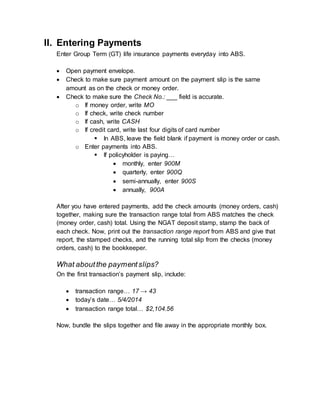
II. Entering Payments
Enter Group Term (GT) life insurance payments everyday into ABS.
 Open payment envelope.
 Check to make sure payment amount on the payment slip is the same
amount as on the check or money order.
 Check to make sure the Check No.: ___ field is accurate.
o If money order, write MO
o If check, write check number
o If cash, write CASH
o If credit card, write last four digits of card number
 In ABS, leave the field blank if payment is money order or cash.
o Enter payments into ABS.
 If policyholder is paying…
 monthly, enter 900M
 quarterly, enter 900Q
 semi-annually, enter 900S
 annually, 900A
After you have entered payments, add the check amounts (money orders, cash)
together, making sure the transaction range total from ABS matches the check
(money order, cash) total. Using the NGAT deposit stamp, stamp the back of
each check. Now, print out the transaction range report from ABS and give that
report, the stamped checks, and the running total slip from the checks (money
orders, cash) to the bookkeeper.
What aboutthe paymentslips?
On the first transaction’s payment slip, include:
 transaction range… 17 → 43
 today’s date… 5/4/2014
 transaction range total… $2,104.56
Now, bundle the slips together and file away in the appropriate monthly box.
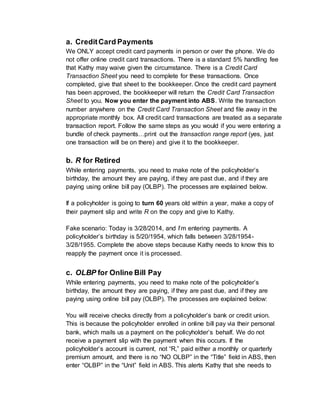
a. CreditCard Payments
We ONLY accept credit card payments in person or over the phone. We do
not offer online credit card transactions. There is a standard 5% handling fee
that Kathy may waive given the circumstance. There is a Credit Card
Transaction Sheet you need to complete for these transactions. Once
completed, give that sheet to the bookkeeper. Once the credit card payment
has been approved, the bookkeeper will return the Credit Card Transaction
Sheet to you. Now you enter the payment into ABS. Write the transaction
number anywhere on the Credit Card Transaction Sheet and file away in the
appropriate monthly box. All credit card transactions are treated as a separate
transaction report. Follow the same steps as you would if you were entering a
bundle of check payments…print out the transaction range report (yes, just
one transaction will be on there) and give it to the bookkeeper.
b. R for Retired
While entering payments, you need to make note of the policyholder’s
birthday, the amount they are paying, if they are past due, and if they are
paying using online bill pay (OLBP). The processes are explained below.
If a policyholder is going to turn 60 years old within a year, make a copy of
their payment slip and write R on the copy and give to Kathy.
Fake scenario: Today is 3/28/2014, and I’m entering payments. A
policyholder’s birthday is 5/20/1954, which falls between 3/28/1954-
3/28/1955. Complete the above steps because Kathy needs to know this to
reapply the payment once it is processed.
c. OLBP for Online Bill Pay
While entering payments, you need to make note of the policyholder’s
birthday, the amount they are paying, if they are past due, and if they are
paying using online bill pay (OLBP). The processes are explained below:
You will receive checks directly from a policyholder’s bank or credit union.
This is because the policyholder enrolled in online bill pay via their personal
bank, which mails us a payment on the policyholder’s behalf. We do not
receive a payment slip with the payment when this occurs. If the
policyholder’s account is current, not “R,” paid either a monthly or quarterly
premium amount, and there is no “NO OLBP” in the “Title” field in ABS, then
enter “OLBP” in the “Unit” field in ABS. This alerts Kathy that she needs to
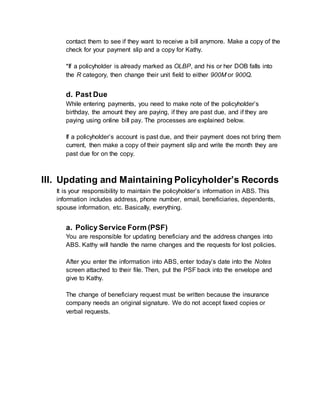
contact them to see if they want to receive a bill anymore. Make a copy of the
check for your payment slip and a copy for Kathy.
*If a policyholder is already marked as OLBP, and his or her DOB falls into
the R category, then change their unit field to either 900M or 900Q.
d. Past Due
While entering payments, you need to make note of the policyholder’s
birthday, the amount they are paying, if they are past due, and if they are
paying using online bill pay. The processes are explained below.
If a policyholder’s account is past due, and their payment does not bring them
current, then make a copy of their payment slip and write the month they are
past due for on the copy.
III. Updating and Maintaining Policyholder’s Records
It is your responsibility to maintain the policyholder’s information in ABS. This
information includes address, phone number, email, beneficiaries, dependents,
spouse information, etc. Basically, everything.
a. Policy Service Form (PSF)
You are responsible for updating beneficiary and the address changes into
ABS. Kathy will handle the name changes and the requests for lost policies.
After you enter the information into ABS, enter today’s date into the Notes
screen attached to their file. Then, put the PSF back into the envelope and
give to Kathy.
The change of beneficiary request must be written because the insurance
company needs an original signature. We do not accept faxed copies or
verbal requests.
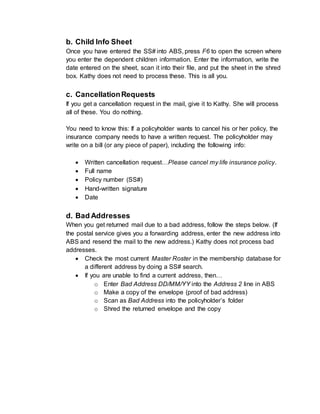
b. Child Info Sheet
Once you have entered the SS# into ABS, press F6 to open the screen where
you enter the dependent children information. Enter the information, write the
date entered on the sheet, scan it into their file, and put the sheet in the shred
box. Kathy does not need to process these. This is all you.
c. CancellationRequests
If you get a cancellation request in the mail, give it to Kathy. She will process
all of these. You do nothing.
You need to know this: If a policyholder wants to cancel his or her policy, the
insurance company needs to have a written request. The policyholder may
write on a bill (or any piece of paper), including the following info:
 Written cancellation request…Please cancel my life insurance policy.
 Full name
 Policy number (SS#)
 Hand-written signature
 Date
d. Bad Addresses
When you get returned mail due to a bad address, follow the steps below. (If
the postal service gives you a forwarding address, enter the new address into
ABS and resend the mail to the new address.) Kathy does not process bad
addresses.
 Check the most current Master Roster in the membership database for
a different address by doing a SS# search.
 If you are unable to find a current address, then…
o Enter Bad Address DD/MM/YY into the Address 2 line in ABS
o Make a copy of the envelope (proof of bad address)
o Scan as Bad Address into the policyholder’s folder
o Shred the returned envelope and the copy
IV. Naming Folders in Y: Insurance
Every policyholder’s folder progresses from pending to active to
cancelled/deceased.
The folders are labeled with the policyholder’s last name, last four of SS#.
example: Dixon, 0890
Within each folder is the policyholder’s paperwork. Your job is to label each
document according to what it is. See section VI for details.
V. Auditing Folders in Y: Insurance
Every file needs an application (can be a copy) and a policy (also labeled
“Certificate of Schedule”) (can be a copy).
If any file is missing either of these, log their file into the appropriate excel
spreadsheet. Kathy will use the spreadsheet to alert the insurance company that
we are missing critical documents.
VI. Scanning Documents into Y: Insurance
You will scan pretty much scan everything into the policyholder’s file. Scanning is
a big part of this job since all of the paper files have been converted to electronic
files. In addition to the documents that you will scan on your own, Kathy will give
you letters and other documents that need to be scanned. She will inform you as
to where to scan the letters and documents.
When you scan letters and documents into files, be sure to appropriately title the
letter or document that you are scanning. Here is the list of appropriate letters
and document names:
T-Letter
Correspondence
Bad Address
PSF
Policy
DD Form
App
WL Info
Death Info
Child Info
Children’s Letter
Cancellation
Request
VII. Mailing Letters
Kathy will give you letters to mail to the policyholders. She will inform you as to
what to include with the letters when you mail them. You will always scan the
letters into the policyholder’s file before you mail them. This is the only way we
can keep track of our correspondence with our policyholder’s. Be sure to weigh
the letters before you place the stamp on them to ensure you are using the
correct amount of postage.
VIII. Monthly Billing
You will mail monthly bills to the policyholders around the 15th of every month.
Kathy will prepare the bills for you. Be sure to include a return envelope when
you stuff the bills.

Insurance Assistant Job Description (1) (1)

  • 1.
  • 2.
    Job Responsibilities I. AnsweringPhones II. Entering Payments III. Updating and MaintainingPolicyholder’sRecords IV. Naming Foldersin Y: Insurance V. Auditing Folders in Y: Insurance VI. ScanningDocuments into Y: Insurance VII. Mailing Letters VIII. Monthly Billing Passwords and Login Information Computer INS2 ngat3706 MicrosoftOutlook insurance2@ngat.org Laura@2000 ABS laura ABS Shortcuts To access shortcuts in ABS, click on the following words in the order they are written… Agency Client Records Utilities
  • 3.
    I. Answering Phones Youwill answer the phones. When policyholders call, verify the accuracy of their information in ABS. This is how we keep the files up-to-date. Information to verify:  address  phone number  email  beneficiaries  coverage amount People will ask you all sorts of things regarding their policy. If you don’t know the answer, ask Kathy. If she’s unavailable, take the caller’s name and phone number and assure him or her that Kathy will return the call. Some general info that frequently gets asked is covered below. a. Group Term Life Insurance Policy (SSLI) American Equity Investment Life Insurance Company (American Equity for short) is our insurance provider for both the group term (GT) and the whole life (WL) policies. The GT policy is also referred to as State Supported Life Insurance (SSLI), which is NOT to be confused with SGLI (the life insurance offered via the Guard that NGAT has nothing to do with). People will call and confuse the two. NGAT’s GT policy offers $50,000 max individual coverage. Once we are informed of a GT policyholder’s death, we get the money within 24 hours. Therefore, this money could be used for immediate expenses like the funeral. GT policy cuts the policyholder’s face amount in half at age 60, and the policy expires at age 65. There is no cash value in a GT policy, so the policyholder cannot get any money out of this policy. Some policyholders get mad about this. But hey, it is in the policy if they read it. GT policy will be canceled if there is no financial activity for at least six months. So, if they are around six months past due (and you have them on
  • 4.
    the phone), informthem of this cancelation policy. By the way, there are no late fees. How does a policyholdercancel a GT policy? See Section III. Policyholders can pay their premiums the following ways:  Allotment. Payments extracted from drill-pay. DD Form 2558 is needed for this process.  Retired Pay. Payments extracted from retired pay.  Online Bill Pay  Monthly, 900M; Quarterly, 900Q; Semi-Annually, 900S; Annually, 900A  Cash  Check  Money Order  Credit Card o ONLY over the phone or in person. We do not offer online credit card transactions. b. Whole Life Policy (WL-200) This policy lasts until the policyholder reaches 100 years of age at which time the 100-yr-old policyholder will get refunded his or her full amount of coverage plus interest. This policy offers $100,000 max individual coverage. However, if a person wants more coverage, he or she can take out an additional WL-200 policy, and so on… This policy does not release the funds as quickly as the GT policy as the insurance company requires the death certificate and other paperwork. It may take up to a month or more until we get the money from the insurance company. c. Deaths Hey, it’s life insurance, yeah? Kathy handles deaths. She will file a claim and also get info for the “Taps” section of the NGAT News magazine.
  • 5.
    II. Entering Payments EnterGroup Term (GT) life insurance payments everyday into ABS.  Open payment envelope.  Check to make sure payment amount on the payment slip is the same amount as on the check or money order.  Check to make sure the Check No.: ___ field is accurate. o If money order, write MO o If check, write check number o If cash, write CASH o If credit card, write last four digits of card number  In ABS, leave the field blank if payment is money order or cash. o Enter payments into ABS.  If policyholder is paying…  monthly, enter 900M  quarterly, enter 900Q  semi-annually, enter 900S  annually, 900A After you have entered payments, add the check amounts (money orders, cash) together, making sure the transaction range total from ABS matches the check (money order, cash) total. Using the NGAT deposit stamp, stamp the back of each check. Now, print out the transaction range report from ABS and give that report, the stamped checks, and the running total slip from the checks (money orders, cash) to the bookkeeper. What aboutthe paymentslips? On the first transaction’s payment slip, include:  transaction range… 17 → 43  today’s date… 5/4/2014  transaction range total… $2,104.56 Now, bundle the slips together and file away in the appropriate monthly box.
  • 6.
    a. CreditCard Payments WeONLY accept credit card payments in person or over the phone. We do not offer online credit card transactions. There is a standard 5% handling fee that Kathy may waive given the circumstance. There is a Credit Card Transaction Sheet you need to complete for these transactions. Once completed, give that sheet to the bookkeeper. Once the credit card payment has been approved, the bookkeeper will return the Credit Card Transaction Sheet to you. Now you enter the payment into ABS. Write the transaction number anywhere on the Credit Card Transaction Sheet and file away in the appropriate monthly box. All credit card transactions are treated as a separate transaction report. Follow the same steps as you would if you were entering a bundle of check payments…print out the transaction range report (yes, just one transaction will be on there) and give it to the bookkeeper. b. R for Retired While entering payments, you need to make note of the policyholder’s birthday, the amount they are paying, if they are past due, and if they are paying using online bill pay (OLBP). The processes are explained below. If a policyholder is going to turn 60 years old within a year, make a copy of their payment slip and write R on the copy and give to Kathy. Fake scenario: Today is 3/28/2014, and I’m entering payments. A policyholder’s birthday is 5/20/1954, which falls between 3/28/1954- 3/28/1955. Complete the above steps because Kathy needs to know this to reapply the payment once it is processed. c. OLBP for Online Bill Pay While entering payments, you need to make note of the policyholder’s birthday, the amount they are paying, if they are past due, and if they are paying using online bill pay (OLBP). The processes are explained below: You will receive checks directly from a policyholder’s bank or credit union. This is because the policyholder enrolled in online bill pay via their personal bank, which mails us a payment on the policyholder’s behalf. We do not receive a payment slip with the payment when this occurs. If the policyholder’s account is current, not “R,” paid either a monthly or quarterly premium amount, and there is no “NO OLBP” in the “Title” field in ABS, then enter “OLBP” in the “Unit” field in ABS. This alerts Kathy that she needs to
  • 7.
    contact them tosee if they want to receive a bill anymore. Make a copy of the check for your payment slip and a copy for Kathy. *If a policyholder is already marked as OLBP, and his or her DOB falls into the R category, then change their unit field to either 900M or 900Q. d. Past Due While entering payments, you need to make note of the policyholder’s birthday, the amount they are paying, if they are past due, and if they are paying using online bill pay. The processes are explained below. If a policyholder’s account is past due, and their payment does not bring them current, then make a copy of their payment slip and write the month they are past due for on the copy. III. Updating and Maintaining Policyholder’s Records It is your responsibility to maintain the policyholder’s information in ABS. This information includes address, phone number, email, beneficiaries, dependents, spouse information, etc. Basically, everything. a. Policy Service Form (PSF) You are responsible for updating beneficiary and the address changes into ABS. Kathy will handle the name changes and the requests for lost policies. After you enter the information into ABS, enter today’s date into the Notes screen attached to their file. Then, put the PSF back into the envelope and give to Kathy. The change of beneficiary request must be written because the insurance company needs an original signature. We do not accept faxed copies or verbal requests.
  • 8.
    b. Child InfoSheet Once you have entered the SS# into ABS, press F6 to open the screen where you enter the dependent children information. Enter the information, write the date entered on the sheet, scan it into their file, and put the sheet in the shred box. Kathy does not need to process these. This is all you. c. CancellationRequests If you get a cancellation request in the mail, give it to Kathy. She will process all of these. You do nothing. You need to know this: If a policyholder wants to cancel his or her policy, the insurance company needs to have a written request. The policyholder may write on a bill (or any piece of paper), including the following info:  Written cancellation request…Please cancel my life insurance policy.  Full name  Policy number (SS#)  Hand-written signature  Date d. Bad Addresses When you get returned mail due to a bad address, follow the steps below. (If the postal service gives you a forwarding address, enter the new address into ABS and resend the mail to the new address.) Kathy does not process bad addresses.  Check the most current Master Roster in the membership database for a different address by doing a SS# search.  If you are unable to find a current address, then… o Enter Bad Address DD/MM/YY into the Address 2 line in ABS o Make a copy of the envelope (proof of bad address) o Scan as Bad Address into the policyholder’s folder o Shred the returned envelope and the copy
  • 9.
    IV. Naming Foldersin Y: Insurance Every policyholder’s folder progresses from pending to active to cancelled/deceased. The folders are labeled with the policyholder’s last name, last four of SS#. example: Dixon, 0890 Within each folder is the policyholder’s paperwork. Your job is to label each document according to what it is. See section VI for details. V. Auditing Folders in Y: Insurance Every file needs an application (can be a copy) and a policy (also labeled “Certificate of Schedule”) (can be a copy). If any file is missing either of these, log their file into the appropriate excel spreadsheet. Kathy will use the spreadsheet to alert the insurance company that we are missing critical documents. VI. Scanning Documents into Y: Insurance You will scan pretty much scan everything into the policyholder’s file. Scanning is a big part of this job since all of the paper files have been converted to electronic files. In addition to the documents that you will scan on your own, Kathy will give you letters and other documents that need to be scanned. She will inform you as to where to scan the letters and documents. When you scan letters and documents into files, be sure to appropriately title the letter or document that you are scanning. Here is the list of appropriate letters and document names: T-Letter Correspondence Bad Address PSF Policy DD Form App WL Info Death Info Child Info Children’s Letter Cancellation Request VII. Mailing Letters
  • 10.
    Kathy will giveyou letters to mail to the policyholders. She will inform you as to what to include with the letters when you mail them. You will always scan the letters into the policyholder’s file before you mail them. This is the only way we can keep track of our correspondence with our policyholder’s. Be sure to weigh the letters before you place the stamp on them to ensure you are using the correct amount of postage. VIII. Monthly Billing You will mail monthly bills to the policyholders around the 15th of every month. Kathy will prepare the bills for you. Be sure to include a return envelope when you stuff the bills.