Inside Android's UI
Embedded Linux Conference Europe 2012

          Karim Yaghmour
          @karimyaghmour

     karim.yaghmour@opersys.com


                              1
These slides are made available to you under a Creative Commons Share-              Delivered and/or customized by
Alike 3.0 license. The full terms of this license are here:
https://creativecommons.org/licenses/by-sa/3.0/


Attribution requirements and misc., PLEASE READ:
●   This slide must remain as-is in this specific location (slide #2), everything
    else you are free to change; including the logo :-)
●   Use of figures in other documents must feature the below “Originals at”
    URL immediately under that figure and the below copyright notice where
    appropriate.
●   You are free to fill in the “Delivered and/or customized by” space on the
    right as you see fit.
●   You are FORBIDEN from using the default “About” slide as-is or any of its
    contents.
●
    You are FORBIDEN from using any content provided by 3rd parties without
    the EXPLICIT consent from those parties.


(C) Copyright 2012, Opersys inc.
These slides created by: Karim Yaghmour
Originals at: www.opersys.com/community/docs

                                                                                             2
About
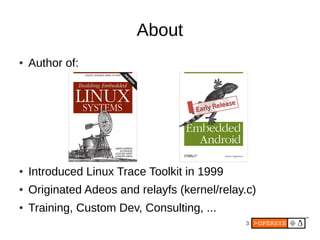
●   Author of:


●   Introduced Linux Trace Toolkit in 1999
●   Originated Adeos and relayfs (kernel/relay.c)
●   Training, Custom Dev, Consulting, ...
                                              3
Agenda
●   Android's UI, what's that?
●   Architecture Basics
●   Display Core
●   OpenGL
●   Input Layer
●   Relevant Apps and Services
●   System Startup
●   References and Pointers
                                 4
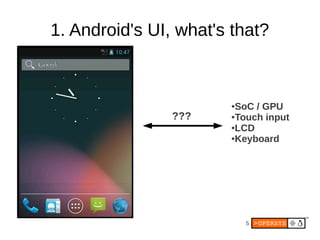
1. Android's UI, what's that?


                       ●SoC / GPU
                ???    ●Touch input

                       ●LCD

                       ●Keyboard


                           5
1.1. What I'm NOT covering
●   Media layer
●   StageFright
●   Video playback
●   Camera
●   DRM
●   Etc.


                              6
2. Architecture Basics
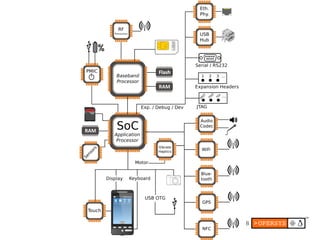
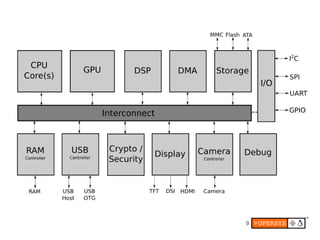
●   Hardware used to run Android
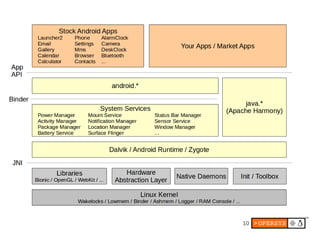
●   AOSP
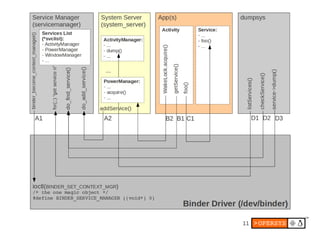
●   Binder
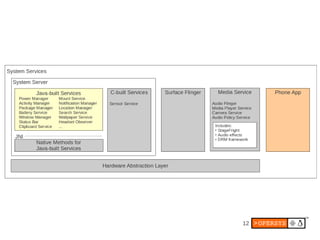
●   System Services
●   HAL


                                      7
8
9
10
11
12
/frameworks/base/core/...


                  /frameworks/base/services/java/...
AOSP-provided
    ASL
                  /frameworks/base/services/jni/


                  /hardware/libhardware/

                  /device/[MANUF.]/[DEVICE]
Manuf.-provided   /sdk/emulator/
Manuf. license
                  Kernel or module
Manuf.-provided
 GPL-license


                            13
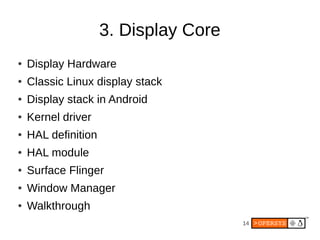
3. Display Core
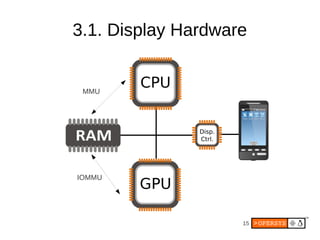
●   Display Hardware
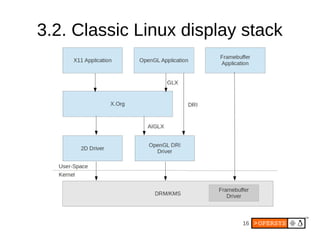
●   Classic Linux display stack
●   Display stack in Android
●   Kernel driver
●   HAL definition
●   HAL module
●   Surface Flinger
●   Window Manager
●   Walkthrough
                                       14
3.1. Display Hardware


 MMU


IOMMU


                    15
3.2. Classic Linux display stack


                          16
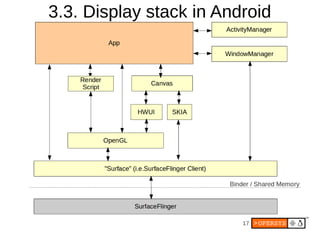
3.3. Display stack in Android


                         17
18
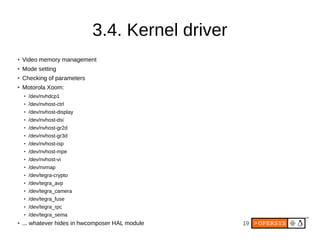
3.4. Kernel driver
●
    Video memory management
●
    Mode setting
●   Checking of parameters
●   Motorola Xoom:
    ●
        /dev/nvhdcp1
    ●   /dev/nvhost-ctrl
    ●   /dev/nvhost-display
    ●   /dev/nvhost-dsi
    ●
        /dev/nvhost-gr2d
    ●   /dev/nvhost-gr3d
    ●
        /dev/nvhost-isp
    ●
        /dev/nvhost-mpe
    ●   /dev/nvhost-vi
    ●   /dev/nvmap
    ●   /dev/tegra-crypto
    ●
        /dev/tegra_avp
    ●
        /dev/tegra_camera
    ●
        /dev/tegra_fuse
    ●   /dev/tegra_rpc
    ●   /dev/tegra_sema
●   ... whatever hides in hwcomposer HAL module    19
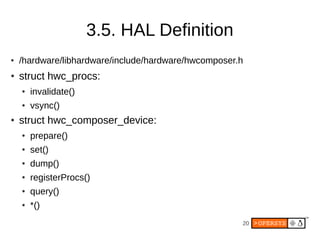
3.5. HAL Definition
●   /hardware/libhardware/include/hardware/hwcomposer.h
●   struct hwc_procs:
    ●   invalidate()
    ●   vsync()
●   struct hwc_composer_device:
    ●   prepare()
    ●   set()
    ●   dump()
    ●   registerProcs()
    ●   query()
    ●   *()
                                                      20
3.6. HAL module
●   Skeleton /hardware/libhardware/modules/hwcomposer.cpp
●   /system/lib/hw/hwcomposer.BOARD.so
●   /system/lib/hw/gralloc.BOARD.so
●   Ex. - Mot Xoom:
    ●   hwcomposer.tegra.so
    ●   gralloc.tegra.so
●   Surface Flinger hook:
    ●   /frameworks/native/services/surfaceflinger/DisplayHardware
        –   HWComposer.cpp
        –   Provides fake vsync if none is provided in HW


                                                            21
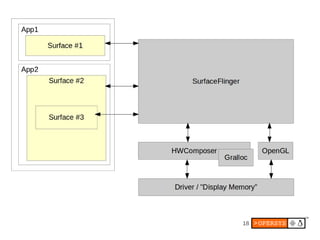
3.7. Surface Flinger
●   Actual server:
    ●   /frameworks/native/services/surfaceflinger
●   Client side:
    ●   /frameworks/native/libs/gui
●   Client / Server interface:
    ●   ISurfaceComposerClient.cpp
    ●   ISurfaceComposer.cpp
●   This is NOT an aidl'ed service
●   All communication is manually
    marshalled/unmarshalled
                                                     22
3.8. Window Manager
●   Server side:
    ●   /frameworks/base/services/java/com/android/server/wm/
         –   WindowManagerService.java
         –   Session.java
●   Client side:
    ●   /frameworks/base/core/java/android/view/
         –   WindowManager.java
         –   WindowManagerImpl.java
         –   ViewRootImpl.java
●   Interfaces:
    ●   IWindowManager.aidl
    ●   IWindowSession.aidl
●   Parameters (incl. z-order):
    ●   See WindowManager.java

                                                                23
3.9. Walkthrough
●   Activity Manager relies on Activity Thread
●   AT calls on attach() and makeVisible()
●   makeVisible does wm.addView()
●   vm.addView() - this also called by StatusBar to display itself
    ●   Creates a new ViewRootImpl
    ●   Call on its setView()
●   setView() calls on sWindowSession.add(...)
●   This results in call to WM's addWindow()
●   ViewRootImpl's performTraversals()
    ●   Calls on relayoutWindow()
    ●   Calls to WM session's relayout()
    ●   Call to WM's relayoutWindow()
    ●   Call to createSurfaceLocked()
    ●   new Surface(...)

                                                                     24
4. OpenGL
●   What's OpenGL?
●   What's in a modern-day GPU?
●   Software layers involved
●   Kernel driver
●   EGL libs
●   Native interface
●   Java interface
●   Software GL implementation

                                   25
4.1. What's OpenGL?
●   It's just an API ... nothing but an API ...
●   Check out Wikipedia
●   Multiple versions out
●   “ES” versions for embedded use
●   Up to ES 3.0
●   Android support up to ES 2.0


                                             26
4.2. What's in a modern-day GPU?
●   A tremendous amount of parallel processing units
●   “SIMD”-like instruction set
●   Video decoding/encoding capabilities
●   ...


                                           27
4.3. Software layers involved
●   Kernel driver
●   GL libraries
●   Native GL API
●   Java GL API


                                28
4.4. Kernel driver


            Y
         AR
      ET
    RI
  OP
PR


                       29
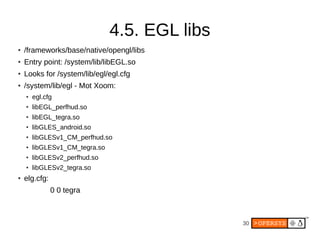
4.5. EGL libs
●   /frameworks/base/native/opengl/libs
●   Entry point: /system/lib/libEGL.so
●
    Looks for /system/lib/egl/egl.cfg
●   /system/lib/egl - Mot Xoom:
    ●   egl.cfg
    ●   libEGL_perfhud.so
    ●   libEGL_tegra.so
    ●   libGLES_android.so
    ●   libGLESv1_CM_perfhud.so
    ●   libGLESv1_CM_tegra.so
    ●   libGLESv2_perfhud.so
    ●   libGLESv2_tegra.so
●
    elg.cfg:
               0 0 tegra


                                                30
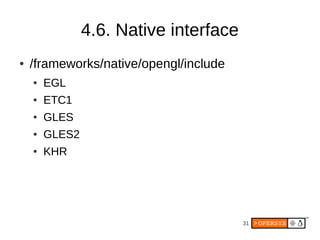
4.6. Native interface
●   /frameworks/native/opengl/include
    ●   EGL
    ●   ETC1
    ●   GLES
    ●   GLES2
    ●   KHR


                                        31
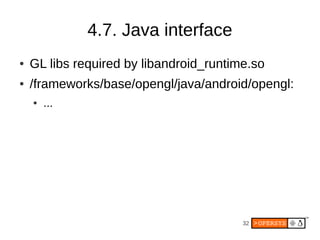
4.7. Java interface
●   GL libs required by libandroid_runtime.so
●   /frameworks/base/opengl/java/android/opengl:
    ●   ...


                                         32
4.8. Software GL implementation
●   /frameworks/native/opengl/libagl


                                       33
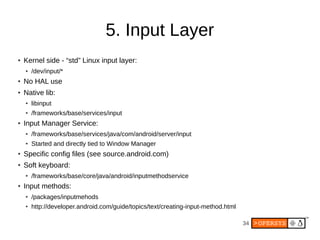
5. Input Layer
●   Kernel side - “std” Linux input layer:
    ●   /dev/input/*
●   No HAL use
●   Native lib:
    ●   libinput
    ●   /frameworks/base/services/input
●   Input Manager Service:
    ●   /frameworks/base/services/java/com/android/server/input
    ●   Started and directly tied to Window Manager
●   Specific config files (see source.android.com)
●   Soft keyboard:
    ●   /frameworks/base/core/java/android/inputmethodservice
●   Input methods:
    ●   /packages/inputmehods
    ●   http://developer.android.com/guide/topics/text/creating-input-method.html

                                                                                    34
6. Relevant Apps and Services
●   Launcher
●   StatusBar
●   Wallpaper Manager Service
●   Notification Service
●   App Widgets


                                35
6.1. Launcher
●   An app like any other
●   See /packages/app/Launcher2


                                  36
6.2. StatusBar
●   A unique app
●   See /frameworks/base/packages/SystemUI
●   Connects to Status Bar Manager and gives an
    interface it can use to call back into Status Bar
●   Can use setIcon() to display icons on the right
●   Provides a CPU usage add-on that renders
    straight on rest of display using higher z-order


                                           37
6.3. Wallpaper Manager Service
●   See
    /frameworks/base/services/java/com/android/se
    rver/WallpaperManagerService.java


                                       38
6.4. Notification Service
●   Toasts
●   Status bar notifications
●   Gets handle to Status Bar Service at
    instantiation
●   Uses handle to communicate with Status Bar


                                           39
6.5. App Widgets
●   See
    /frameworks/base/services/java/com/android/se
    rver/AppWidgetService.java


                                       40
7. System Startup
●   Kernel
●   Init
●   Boot animation
●   Launcher


                                   41
7.1. Boot animation
●   Started by Surface Flinger
●   “bootanim” binary
●   /frameworks/base/cmds/bootanimation
●   Relies on bootanimation.zip w/ PNGs (nothing but)
●   See
    https://github.com/CyanogenMod/android_vendor_cm/tree/jellybean/pre
    built/common/bootanimatino
●   Must contain a desc.txt:
           <width> <height> <fps>
           p <count> <pause> <path>
           p <count> <pause> <path>


                                                        42
8. References and Pointers
●   “Use the source, Luke”
●   Jim Huang's “Android Graphics”
●   Benjamin Zores' “Linux Magazine / France” articles
●   MIPS article on graphics internals:
●   http://developer.mips.com/2012/04/11/learning-about-
    android-graphics-subsystem/
●   Stéphane Marchesin's “Linux Graphics Drivers: an
    Introduction”
●   http://source.android.com/tech/input/index.html


                                                 43
Thank you ...

karim.yaghmour@opersys.com


                         44

Inside Android's UI

  • 1.
    Inside Android's UI EmbeddedLinux Conference Europe 2012 Karim Yaghmour @karimyaghmour karim.yaghmour@opersys.com 1
  • 2.
    These slides aremade available to you under a Creative Commons Share- Delivered and/or customized by Alike 3.0 license. The full terms of this license are here: https://creativecommons.org/licenses/by-sa/3.0/ Attribution requirements and misc., PLEASE READ: ● This slide must remain as-is in this specific location (slide #2), everything else you are free to change; including the logo :-) ● Use of figures in other documents must feature the below “Originals at” URL immediately under that figure and the below copyright notice where appropriate. ● You are free to fill in the “Delivered and/or customized by” space on the right as you see fit. ● You are FORBIDEN from using the default “About” slide as-is or any of its contents. ● You are FORBIDEN from using any content provided by 3rd parties without the EXPLICIT consent from those parties. (C) Copyright 2012, Opersys inc. These slides created by: Karim Yaghmour Originals at: www.opersys.com/community/docs 2
  • 3.
    About ● Author of: ● Introduced Linux Trace Toolkit in 1999 ● Originated Adeos and relayfs (kernel/relay.c) ● Training, Custom Dev, Consulting, ... 3
  • 4.
    Agenda ● Android's UI, what's that? ● Architecture Basics ● Display Core ● OpenGL ● Input Layer ● Relevant Apps and Services ● System Startup ● References and Pointers 4
  • 5.
    1. Android's UI,what's that? ●SoC / GPU ??? ●Touch input ●LCD ●Keyboard 5
  • 6.
    1.1. What I'mNOT covering ● Media layer ● StageFright ● Video playback ● Camera ● DRM ● Etc. 6
  • 7.
    2. Architecture Basics ● Hardware used to run Android ● AOSP ● Binder ● System Services ● HAL 7
  • 8.
  • 9.
  • 10.
  • 11.
  • 12.
  • 13.
    /frameworks/base/core/... /frameworks/base/services/java/... AOSP-provided ASL /frameworks/base/services/jni/ /hardware/libhardware/ /device/[MANUF.]/[DEVICE] Manuf.-provided /sdk/emulator/ Manuf. license Kernel or module Manuf.-provided GPL-license 13
  • 14.
    3. Display Core ● Display Hardware ● Classic Linux display stack ● Display stack in Android ● Kernel driver ● HAL definition ● HAL module ● Surface Flinger ● Window Manager ● Walkthrough 14
  • 15.
  • 16.
    3.2. Classic Linuxdisplay stack 16
  • 17.
    3.3. Display stackin Android 17
  • 18.
  • 19.
    3.4. Kernel driver ● Video memory management ● Mode setting ● Checking of parameters ● Motorola Xoom: ● /dev/nvhdcp1 ● /dev/nvhost-ctrl ● /dev/nvhost-display ● /dev/nvhost-dsi ● /dev/nvhost-gr2d ● /dev/nvhost-gr3d ● /dev/nvhost-isp ● /dev/nvhost-mpe ● /dev/nvhost-vi ● /dev/nvmap ● /dev/tegra-crypto ● /dev/tegra_avp ● /dev/tegra_camera ● /dev/tegra_fuse ● /dev/tegra_rpc ● /dev/tegra_sema ● ... whatever hides in hwcomposer HAL module 19
  • 20.
    3.5. HAL Definition ● /hardware/libhardware/include/hardware/hwcomposer.h ● struct hwc_procs: ● invalidate() ● vsync() ● struct hwc_composer_device: ● prepare() ● set() ● dump() ● registerProcs() ● query() ● *() 20
  • 21.
    3.6. HAL module ● Skeleton /hardware/libhardware/modules/hwcomposer.cpp ● /system/lib/hw/hwcomposer.BOARD.so ● /system/lib/hw/gralloc.BOARD.so ● Ex. - Mot Xoom: ● hwcomposer.tegra.so ● gralloc.tegra.so ● Surface Flinger hook: ● /frameworks/native/services/surfaceflinger/DisplayHardware – HWComposer.cpp – Provides fake vsync if none is provided in HW 21
  • 22.
    3.7. Surface Flinger ● Actual server: ● /frameworks/native/services/surfaceflinger ● Client side: ● /frameworks/native/libs/gui ● Client / Server interface: ● ISurfaceComposerClient.cpp ● ISurfaceComposer.cpp ● This is NOT an aidl'ed service ● All communication is manually marshalled/unmarshalled 22
  • 23.
    3.8. Window Manager ● Server side: ● /frameworks/base/services/java/com/android/server/wm/ – WindowManagerService.java – Session.java ● Client side: ● /frameworks/base/core/java/android/view/ – WindowManager.java – WindowManagerImpl.java – ViewRootImpl.java ● Interfaces: ● IWindowManager.aidl ● IWindowSession.aidl ● Parameters (incl. z-order): ● See WindowManager.java 23
  • 24.
    3.9. Walkthrough ● Activity Manager relies on Activity Thread ● AT calls on attach() and makeVisible() ● makeVisible does wm.addView() ● vm.addView() - this also called by StatusBar to display itself ● Creates a new ViewRootImpl ● Call on its setView() ● setView() calls on sWindowSession.add(...) ● This results in call to WM's addWindow() ● ViewRootImpl's performTraversals() ● Calls on relayoutWindow() ● Calls to WM session's relayout() ● Call to WM's relayoutWindow() ● Call to createSurfaceLocked() ● new Surface(...) 24
  • 25.
    4. OpenGL ● What's OpenGL? ● What's in a modern-day GPU? ● Software layers involved ● Kernel driver ● EGL libs ● Native interface ● Java interface ● Software GL implementation 25
  • 26.
    4.1. What's OpenGL? ● It's just an API ... nothing but an API ... ● Check out Wikipedia ● Multiple versions out ● “ES” versions for embedded use ● Up to ES 3.0 ● Android support up to ES 2.0 26
  • 27.
    4.2. What's ina modern-day GPU? ● A tremendous amount of parallel processing units ● “SIMD”-like instruction set ● Video decoding/encoding capabilities ● ... 27
  • 28.
    4.3. Software layersinvolved ● Kernel driver ● GL libraries ● Native GL API ● Java GL API 28
  • 29.
    4.4. Kernel driver Y AR ET RI OP PR 29
  • 30.
    4.5. EGL libs ● /frameworks/base/native/opengl/libs ● Entry point: /system/lib/libEGL.so ● Looks for /system/lib/egl/egl.cfg ● /system/lib/egl - Mot Xoom: ● egl.cfg ● libEGL_perfhud.so ● libEGL_tegra.so ● libGLES_android.so ● libGLESv1_CM_perfhud.so ● libGLESv1_CM_tegra.so ● libGLESv2_perfhud.so ● libGLESv2_tegra.so ● elg.cfg: 0 0 tegra 30
  • 31.
    4.6. Native interface ● /frameworks/native/opengl/include ● EGL ● ETC1 ● GLES ● GLES2 ● KHR 31
  • 32.
    4.7. Java interface ● GL libs required by libandroid_runtime.so ● /frameworks/base/opengl/java/android/opengl: ● ... 32
  • 33.
    4.8. Software GLimplementation ● /frameworks/native/opengl/libagl 33
  • 34.
    5. Input Layer ● Kernel side - “std” Linux input layer: ● /dev/input/* ● No HAL use ● Native lib: ● libinput ● /frameworks/base/services/input ● Input Manager Service: ● /frameworks/base/services/java/com/android/server/input ● Started and directly tied to Window Manager ● Specific config files (see source.android.com) ● Soft keyboard: ● /frameworks/base/core/java/android/inputmethodservice ● Input methods: ● /packages/inputmehods ● http://developer.android.com/guide/topics/text/creating-input-method.html 34
  • 35.
    6. Relevant Appsand Services ● Launcher ● StatusBar ● Wallpaper Manager Service ● Notification Service ● App Widgets 35
  • 36.
    6.1. Launcher ● An app like any other ● See /packages/app/Launcher2 36
  • 37.
    6.2. StatusBar ● A unique app ● See /frameworks/base/packages/SystemUI ● Connects to Status Bar Manager and gives an interface it can use to call back into Status Bar ● Can use setIcon() to display icons on the right ● Provides a CPU usage add-on that renders straight on rest of display using higher z-order 37
  • 38.
    6.3. Wallpaper ManagerService ● See /frameworks/base/services/java/com/android/se rver/WallpaperManagerService.java 38
  • 39.
    6.4. Notification Service ● Toasts ● Status bar notifications ● Gets handle to Status Bar Service at instantiation ● Uses handle to communicate with Status Bar 39
  • 40.
    6.5. App Widgets ● See /frameworks/base/services/java/com/android/se rver/AppWidgetService.java 40
  • 41.
    7. System Startup ● Kernel ● Init ● Boot animation ● Launcher 41
  • 42.
    7.1. Boot animation ● Started by Surface Flinger ● “bootanim” binary ● /frameworks/base/cmds/bootanimation ● Relies on bootanimation.zip w/ PNGs (nothing but) ● See https://github.com/CyanogenMod/android_vendor_cm/tree/jellybean/pre built/common/bootanimatino ● Must contain a desc.txt: <width> <height> <fps> p <count> <pause> <path> p <count> <pause> <path> 42
  • 43.
    8. References andPointers ● “Use the source, Luke” ● Jim Huang's “Android Graphics” ● Benjamin Zores' “Linux Magazine / France” articles ● MIPS article on graphics internals: ● http://developer.mips.com/2012/04/11/learning-about- android-graphics-subsystem/ ● Stéphane Marchesin's “Linux Graphics Drivers: an Introduction” ● http://source.android.com/tech/input/index.html 43
  • 44.