Information
Technology Project
Proposal
Here is where your presentation begins
Contents of this template
You can delete this slide when you’re done editing the presentation
Fonts
To view this template correctly in PowerPoint, download and install the fonts we
used
Used and alternative resources An assortment of graphic resources that are suitable for use in this presentation
Thanks slide You must keep it so that proper credits for our design are given
Colors All the colors used in this presentation
Icons and infographic resources These can be used in the template, and their size and color can be edited
Editable presentation theme You can edit the master slides easily. For more info, click here
For more info:
SLIDESGO | BLOG | FAQ
s
You can visit our sister projects:
FREEPIK | FLATICON | STORYSET | WEPIK | VIDEVO
Objectives
01 02 03
04 05 06
Table of contents
Resources Budget
Solutions Communication plan Conclusión
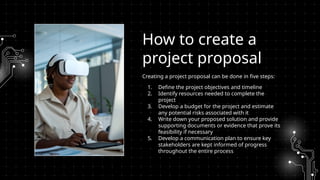
Creating a project proposal can be done in five steps:
1. Define the project objectives and timeline
2. Identify resources needed to complete the
project
3. Develop a budget for the project and estimate
any potential risks associated with it
4. Write down your proposed solution and provide
supporting documents or evidence that prove its
feasibility if necessary
5. Develop a communication plan to ensure key
stakeholders are kept informed of progress
throughout the entire process
How to create a
project proposal
Objectives of
the project
01
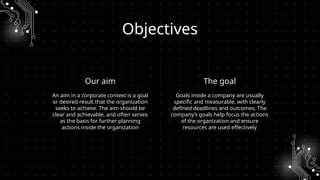
Objectives
Our aim The goal
An aim in a corporate context is a goal
or desired result that the organization
seeks to achieve. The aim should be
clear and achievable, and often serves
as the basis for further planning
actions inside the organization
Goals inside a company are usually
specific and measurable, with clearly
defined deadlines and outcomes. The
company’s goals help focus the actions
of the organization and ensure
resources are used effectively
Human
resources Financial resources Physical resources
Resources
The project team is
responsible for the successful
execution of the project. Our
team is composed of
experienced professionals
with the necessary skills and
expertise to complete the
project on time and
within budget
Our project budget is
$100,000. This budget
includes all expenses
associated with the project,
including salaries and
equipment. We have
allocated these resources to
ensure that we are able to
complete the project within
budget
Our project requires a
number of specialized pieces
of equipment. We will be
using [insert equipment and
their functions]. All
equipment is in good working
condition and has been
tested and calibrated prior to
use
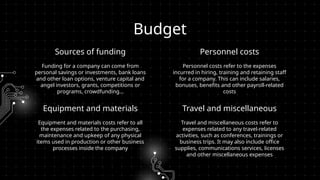
Sources of funding
Funding for a company can come from
personal savings or investments, bank loans
and other loan options, venture capital and
angel investors, grants, competitions or
programs, crowdfunding…
Personnel costs refer to the expenses
incurred in hiring, training and retaining staff
for a company. This can include salaries,
bonuses, benefits and other payroll-related
costs
Budget
Equipment and materials
Equipment and materials costs refer to all
the expenses related to the purchasing,
maintenance and upkeep of any physical
items used in production or other business
processes inside the company
Travel and miscellaneous costs refer to
expenses related to any travel-related
activities, such as conferences, trainings or
business trips. It may also include office
supplies, communications services, licenses
and other miscellaneous expenses
Personnel costs
Travel and miscellaneous
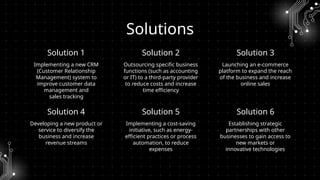
Solution 1
Developing a new product or
service to diversify the
business and increase
revenue streams
Implementing a cost-saving
initiative, such as energy-
efficient practices or process
automation, to reduce
expenses
Implementing a new CRM
(Customer Relationship
Management) system to
improve customer data
management and
sales tracking
Solution 4
Solutions
Solution 2 Solution 3
Outsourcing specific business
functions (such as accounting
or IT) to a third-party provider
to reduce costs and increase
time efficiency
Launching an e-commerce
platform to expand the reach
of the business and increase
online sales
Establishing strategic
partnerships with other
businesses to gain access to
new markets or
innovative technologies
Solution 5 Solution 6
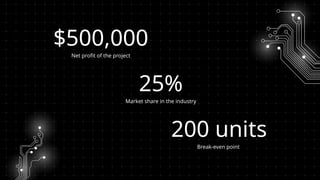
$500,000
Net profit of the project
Break-even point
Market share in the industry
200 units
25%
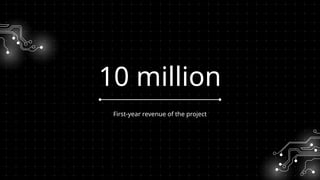
10 million
First-year revenue of the project
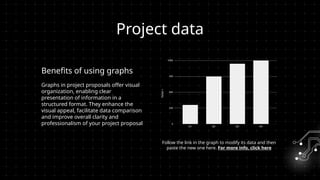
Project data
Benefits of using graphs
Follow the link in the graph to modify its data and then
paste the new one here. For more info, click here
Graphs in project proposals offer visual
organization, enabling clear
presentation of information in a
structured format. They enhance the
visual appeal, facilitate data comparison
and improve overall clarity and
professionalism of your project proposal
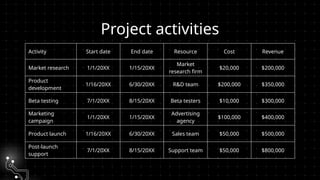
Project activities
Activity Start date End date Resource Cost Revenue
Market research 1/1/20XX 1/15/20XX
Market
research firm
$20,000 $200,000
Product
development
1/16/20XX 6/30/20XX R&D team $200,000 $350,000
Beta testing 7/1/20XX 8/15/20XX Beta testers $10,000 $300,000
Marketing
campaign
1/1/20XX 1/15/20XX
Advertising
agency
$100,000 $400,000
Product launch 1/16/20XX 6/30/20XX Sales team $50,000 $500,000
Post-launch
support
7/1/20XX 8/15/20XX Support team $50,000 $800,000
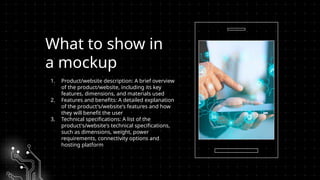
What to show in
a mockup
1. Product/website description: A brief overview
of the product/website, including its key
features, dimensions, and materials used
2. Features and benefits: A detailed explanation
of the product's/website's features and how
they will benefit the user
3. Technical specifications: A list of the
product's/website's technical specifications,
such as dimensions, weight, power
requirements, connectivity options and
hosting platform
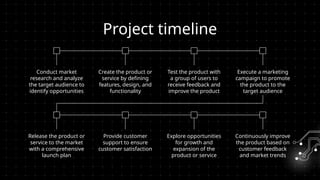
Project timeline
Conduct market
research and analyze
the target audience to
identify opportunities
Create the product or
service by defining
features, design, and
functionality
Test the product with
a group of users to
receive feedback and
improve the product
Execute a marketing
campaign to promote
the product to the
target audience
Release the product or
service to the market
with a comprehensive
launch plan
Provide customer
support to ensure
customer satisfaction
Explore opportunities
for growth and
expansion of the
product or service
Continuously improve
the product based on
customer feedback
and market trends
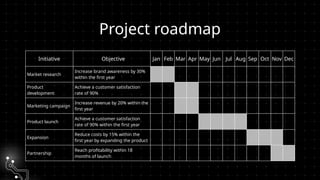
Project roadmap
Initiative Objective Jan Feb Mar Apr May Jun Jul Aug Sep Oct Nov Dec
Market research
Increase brand awareness by 30%
within the first year
Product
development
Achieve a customer satisfaction
rate of 90%
Marketing campaign
Increase revenue by 20% within the
first year
Product launch
Achieve a customer satisfaction
rate of 90% within the first year
Expansion
Reduce costs by 15% within the
first year by expanding the product
Partnership
Reach profitability within 18
months of launch
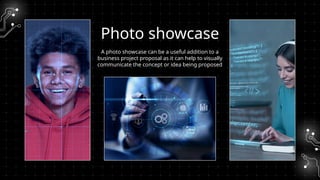
Photo showcase
A photo showcase can be a useful addition to a
business project proposal as it can help to visually
communicate the concept or idea being proposed
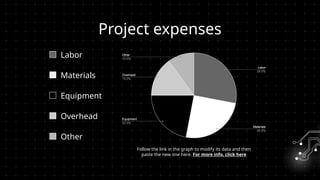
Project expenses
Labor
Follow the link in the graph to modify its data and then
paste the new one here. For more info, click here
Materials
Equipment
Overhead
Other
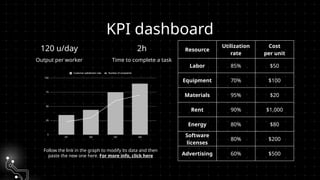
KPI dashboard
120 u/day 2h
Output per worker Time to complete a task
Follow the link in the graph to modify its data and then
paste the new one here. For more info, click here
Resource
Utilization
rate
Cost
per unit
Labor 85% $50
Equipment 70% $100
Materials 95% $20
Rent 90% $1,000
Energy 80% $80
Software
licenses
80% $200
Advertising 60% $500
CREDITS: This presentation template was created by Slidesgo, and
includes icons by Flaticon and infographics & images by Freepik
Thanks!
Do you have any questions?
youremail@freepik.com
+34 654 321 432
yourwebsite.com
Please keep this slide for attribution
Here’s an assortment of alternative resources whose style fits the one of this template:
Vectors
● Abstract background with circuits
Alternative resources
Resources
Did you like the resources in this template? Get them at these websites:
Vectors
● Modern cyber monday composition with flat design
● Abstract background with circuits
Photos
● Industrial designer working on 3d model
● Person using ai tool at job
● Close up hand holding smartphone
● Facial recognition collage concept
● Rpa concept with blurry hand touching screen
● Programming background with person working with codes on computer
Instructions for use
If you have a free account, in order to use this template, you must credit Slidesgo by keeping the Thanks slide. Please
refer to the next slide to read the instructions for premium users.
As a Free user, you are allowed to:
● Modify this template.
● Use it for both personal and commercial projects.
You are not allowed to:
● Sublicense, sell or rent any of Slidesgo Content (or a modified version of Slidesgo Content).
● Distribute Slidesgo Content unless it has been expressly authorized by Slidesgo.
● Include Slidesgo Content in an online or offline database or file.
● Offer Slidesgo templates (or modified versions of Slidesgo templates) for download.
● Acquire the copyright of Slidesgo Content.
For more information about editing slides, please read our FAQs or visit our blog:
https://slidesgo.com/faqs and https://slidesgo.com/slidesgo-school
As a Premium user, you can use this template without attributing Slidesgo or keeping the "Thanks" slide.
You are allowed to:
● Modify this template.
● Use it for both personal and commercial purposes.
● Hide or delete the “Thanks” slide and the mention to Slidesgo in the credits.
● Share this template in an editable format with people who are not part of your team.
You are not allowed to:
● Sublicense, sell or rent this Slidesgo Template (or a modified version of this Slidesgo Template).
● Distribute this Slidesgo Template (or a modified version of this Slidesgo Template) or include it in a database or in
any other product or service that offers downloadable images, icons or presentations that may be subject to
distribution or resale.
● Use any of the elements that are part of this Slidesgo Template in an isolated and separated way from this
Template.
● Register any of the elements that are part of this template as a trademark or logo, or register it as a work in an
intellectual property registry or similar.
For more information about editing slides, please read our FAQs or visit our blog:
https://slidesgo.com/faqs and https://slidesgo.com/slidesgo-school
Instructions for use (premium users)
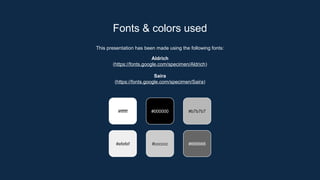
This presentation has been made using the following fonts:
Aldrich
(https://fonts.google.com/specimen/Aldrich)
Saira
(https://fonts.google.com/specimen/Saira)
Fonts & colors used
#ffffff #000000 #b7b7b7
#efefef #666666
#cccccc
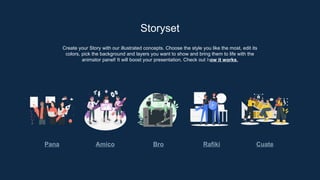
Create your Story with our illustrated concepts. Choose the style you like the most, edit its
colors, pick the background and layers you want to show and bring them to life with the
animator panel! It will boost your presentation. Check out how it works.
Storyset
Pana Amico Bro Rafiki Cuate
You can easily resize these resources without losing quality. To change the color, just ungroup the resource and click on
the object you want to change. Then, click on the paint bucket and select the color you want. Group the resource again
when you’re done. You can also look for more infographics on Slidesgo.
Use our editable graphic resources...
JANUARY FEBRUARY MARCH APRIL
PHASE 1
Task 1
Task 2
JANUARY FEBRUARY MARCH APRIL MAY JUNE
PHASE 1
PHASE 2
Task 1
Task 2
Task 1
Task 2
You can resize these icons without losing quality.
You can change the stroke and fill color; just select the icon and click on the paint bucket/pen.
In Google Slides, you can also use Flaticon’s extension, allowing you to customize and add even more icons.
...and our sets of editable icons
Educational Icons Medical Icons
Business Icons Teamwork Icons
Help & Support Icons Avatar Icons
Creative Process Icons Performing Arts Icons
Nature Icons
SEO & Marketing Icons
Information Technology Project Proposal by Slidesgo.pptx

Information Technology Project Proposal by Slidesgo.pptx

  • 1.
  • 2.
    Contents of thistemplate You can delete this slide when you’re done editing the presentation Fonts To view this template correctly in PowerPoint, download and install the fonts we used Used and alternative resources An assortment of graphic resources that are suitable for use in this presentation Thanks slide You must keep it so that proper credits for our design are given Colors All the colors used in this presentation Icons and infographic resources These can be used in the template, and their size and color can be edited Editable presentation theme You can edit the master slides easily. For more info, click here For more info: SLIDESGO | BLOG | FAQ s You can visit our sister projects: FREEPIK | FLATICON | STORYSET | WEPIK | VIDEVO
  • 3.
    Objectives 01 02 03 0405 06 Table of contents Resources Budget Solutions Communication plan Conclusión
  • 4.
    Creating a projectproposal can be done in five steps: 1. Define the project objectives and timeline 2. Identify resources needed to complete the project 3. Develop a budget for the project and estimate any potential risks associated with it 4. Write down your proposed solution and provide supporting documents or evidence that prove its feasibility if necessary 5. Develop a communication plan to ensure key stakeholders are kept informed of progress throughout the entire process How to create a project proposal
  • 5.
  • 6.
    Objectives Our aim Thegoal An aim in a corporate context is a goal or desired result that the organization seeks to achieve. The aim should be clear and achievable, and often serves as the basis for further planning actions inside the organization Goals inside a company are usually specific and measurable, with clearly defined deadlines and outcomes. The company’s goals help focus the actions of the organization and ensure resources are used effectively
  • 7.
    Human resources Financial resourcesPhysical resources Resources The project team is responsible for the successful execution of the project. Our team is composed of experienced professionals with the necessary skills and expertise to complete the project on time and within budget Our project budget is $100,000. This budget includes all expenses associated with the project, including salaries and equipment. We have allocated these resources to ensure that we are able to complete the project within budget Our project requires a number of specialized pieces of equipment. We will be using [insert equipment and their functions]. All equipment is in good working condition and has been tested and calibrated prior to use
  • 8.
    Sources of funding Fundingfor a company can come from personal savings or investments, bank loans and other loan options, venture capital and angel investors, grants, competitions or programs, crowdfunding… Personnel costs refer to the expenses incurred in hiring, training and retaining staff for a company. This can include salaries, bonuses, benefits and other payroll-related costs Budget Equipment and materials Equipment and materials costs refer to all the expenses related to the purchasing, maintenance and upkeep of any physical items used in production or other business processes inside the company Travel and miscellaneous costs refer to expenses related to any travel-related activities, such as conferences, trainings or business trips. It may also include office supplies, communications services, licenses and other miscellaneous expenses Personnel costs Travel and miscellaneous
  • 9.
    Solution 1 Developing anew product or service to diversify the business and increase revenue streams Implementing a cost-saving initiative, such as energy- efficient practices or process automation, to reduce expenses Implementing a new CRM (Customer Relationship Management) system to improve customer data management and sales tracking Solution 4 Solutions Solution 2 Solution 3 Outsourcing specific business functions (such as accounting or IT) to a third-party provider to reduce costs and increase time efficiency Launching an e-commerce platform to expand the reach of the business and increase online sales Establishing strategic partnerships with other businesses to gain access to new markets or innovative technologies Solution 5 Solution 6
  • 10.
    $500,000 Net profit ofthe project Break-even point Market share in the industry 200 units 25%
  • 11.
  • 12.
    Project data Benefits ofusing graphs Follow the link in the graph to modify its data and then paste the new one here. For more info, click here Graphs in project proposals offer visual organization, enabling clear presentation of information in a structured format. They enhance the visual appeal, facilitate data comparison and improve overall clarity and professionalism of your project proposal
  • 13.
    Project activities Activity Startdate End date Resource Cost Revenue Market research 1/1/20XX 1/15/20XX Market research firm $20,000 $200,000 Product development 1/16/20XX 6/30/20XX R&D team $200,000 $350,000 Beta testing 7/1/20XX 8/15/20XX Beta testers $10,000 $300,000 Marketing campaign 1/1/20XX 1/15/20XX Advertising agency $100,000 $400,000 Product launch 1/16/20XX 6/30/20XX Sales team $50,000 $500,000 Post-launch support 7/1/20XX 8/15/20XX Support team $50,000 $800,000
  • 14.
    What to showin a mockup 1. Product/website description: A brief overview of the product/website, including its key features, dimensions, and materials used 2. Features and benefits: A detailed explanation of the product's/website's features and how they will benefit the user 3. Technical specifications: A list of the product's/website's technical specifications, such as dimensions, weight, power requirements, connectivity options and hosting platform
  • 15.
    Project timeline Conduct market researchand analyze the target audience to identify opportunities Create the product or service by defining features, design, and functionality Test the product with a group of users to receive feedback and improve the product Execute a marketing campaign to promote the product to the target audience Release the product or service to the market with a comprehensive launch plan Provide customer support to ensure customer satisfaction Explore opportunities for growth and expansion of the product or service Continuously improve the product based on customer feedback and market trends
  • 16.
    Project roadmap Initiative ObjectiveJan Feb Mar Apr May Jun Jul Aug Sep Oct Nov Dec Market research Increase brand awareness by 30% within the first year Product development Achieve a customer satisfaction rate of 90% Marketing campaign Increase revenue by 20% within the first year Product launch Achieve a customer satisfaction rate of 90% within the first year Expansion Reduce costs by 15% within the first year by expanding the product Partnership Reach profitability within 18 months of launch
  • 17.
    Photo showcase A photoshowcase can be a useful addition to a business project proposal as it can help to visually communicate the concept or idea being proposed
  • 18.
    Project expenses Labor Follow thelink in the graph to modify its data and then paste the new one here. For more info, click here Materials Equipment Overhead Other
  • 19.
    KPI dashboard 120 u/day2h Output per worker Time to complete a task Follow the link in the graph to modify its data and then paste the new one here. For more info, click here Resource Utilization rate Cost per unit Labor 85% $50 Equipment 70% $100 Materials 95% $20 Rent 90% $1,000 Energy 80% $80 Software licenses 80% $200 Advertising 60% $500
  • 20.
    CREDITS: This presentationtemplate was created by Slidesgo, and includes icons by Flaticon and infographics & images by Freepik Thanks! Do you have any questions? youremail@freepik.com +34 654 321 432 yourwebsite.com Please keep this slide for attribution
  • 21.
    Here’s an assortmentof alternative resources whose style fits the one of this template: Vectors ● Abstract background with circuits Alternative resources
  • 22.
    Resources Did you likethe resources in this template? Get them at these websites: Vectors ● Modern cyber monday composition with flat design ● Abstract background with circuits Photos ● Industrial designer working on 3d model ● Person using ai tool at job ● Close up hand holding smartphone ● Facial recognition collage concept ● Rpa concept with blurry hand touching screen ● Programming background with person working with codes on computer
  • 23.
    Instructions for use Ifyou have a free account, in order to use this template, you must credit Slidesgo by keeping the Thanks slide. Please refer to the next slide to read the instructions for premium users. As a Free user, you are allowed to: ● Modify this template. ● Use it for both personal and commercial projects. You are not allowed to: ● Sublicense, sell or rent any of Slidesgo Content (or a modified version of Slidesgo Content). ● Distribute Slidesgo Content unless it has been expressly authorized by Slidesgo. ● Include Slidesgo Content in an online or offline database or file. ● Offer Slidesgo templates (or modified versions of Slidesgo templates) for download. ● Acquire the copyright of Slidesgo Content. For more information about editing slides, please read our FAQs or visit our blog: https://slidesgo.com/faqs and https://slidesgo.com/slidesgo-school
  • 24.
    As a Premiumuser, you can use this template without attributing Slidesgo or keeping the "Thanks" slide. You are allowed to: ● Modify this template. ● Use it for both personal and commercial purposes. ● Hide or delete the “Thanks” slide and the mention to Slidesgo in the credits. ● Share this template in an editable format with people who are not part of your team. You are not allowed to: ● Sublicense, sell or rent this Slidesgo Template (or a modified version of this Slidesgo Template). ● Distribute this Slidesgo Template (or a modified version of this Slidesgo Template) or include it in a database or in any other product or service that offers downloadable images, icons or presentations that may be subject to distribution or resale. ● Use any of the elements that are part of this Slidesgo Template in an isolated and separated way from this Template. ● Register any of the elements that are part of this template as a trademark or logo, or register it as a work in an intellectual property registry or similar. For more information about editing slides, please read our FAQs or visit our blog: https://slidesgo.com/faqs and https://slidesgo.com/slidesgo-school Instructions for use (premium users)
  • 25.
    This presentation hasbeen made using the following fonts: Aldrich (https://fonts.google.com/specimen/Aldrich) Saira (https://fonts.google.com/specimen/Saira) Fonts & colors used #ffffff #000000 #b7b7b7 #efefef #666666 #cccccc
  • 26.
    Create your Storywith our illustrated concepts. Choose the style you like the most, edit its colors, pick the background and layers you want to show and bring them to life with the animator panel! It will boost your presentation. Check out how it works. Storyset Pana Amico Bro Rafiki Cuate
  • 27.
    You can easilyresize these resources without losing quality. To change the color, just ungroup the resource and click on the object you want to change. Then, click on the paint bucket and select the color you want. Group the resource again when you’re done. You can also look for more infographics on Slidesgo. Use our editable graphic resources...
  • 30.
    JANUARY FEBRUARY MARCHAPRIL PHASE 1 Task 1 Task 2 JANUARY FEBRUARY MARCH APRIL MAY JUNE PHASE 1 PHASE 2 Task 1 Task 2 Task 1 Task 2
  • 33.
    You can resizethese icons without losing quality. You can change the stroke and fill color; just select the icon and click on the paint bucket/pen. In Google Slides, you can also use Flaticon’s extension, allowing you to customize and add even more icons. ...and our sets of editable icons
  • 34.
  • 35.
  • 36.
    Help & SupportIcons Avatar Icons
  • 37.
    Creative Process IconsPerforming Arts Icons
  • 38.
  • 39.