InDesign’s Image Frame
Adding Images & Photographs
Images & Photographs
One aspect of InDesign is the ability to combine images
and photographs to your documents. InDesign handles
images a little differently than the other applications. We
will review how to add an image to an InDesign
document.
RECTANGLE
FRAME
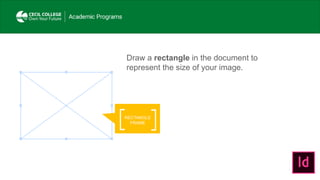
Draw a rectangle in the document to
represent the size of your image.
PLACE…
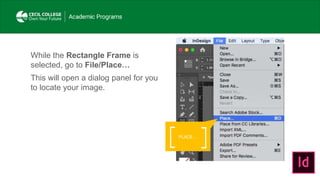
While the Rectangle Frame is
selected, go to File/Place…
This will open a dialog panel for you
to locate your image.
HIGH QUALITY
DISPLAY
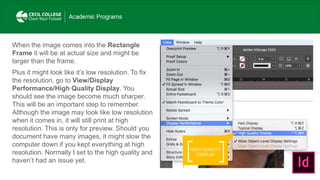
When the image comes into the Rectangle
Frame it will be at actual size and might be
larger than the frame.
Plus it might look like it’s low resolution. To fix
the resolution, go to View/Display
Performance/High Quality Display. You
should see the image become much sharper.
This will be an important step to remember.
Although the image may look like low resolution
when it comes in, it will still print at high
resolution. This is only for preview. Should you
document have many images, it might slow the
computer down if you kept everything at high
resolution. Normally I set to the high quality and
haven’t had an issue yet.
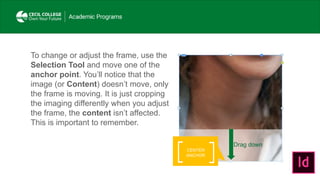
To change or adjust the frame, use the
Selection Tool and move one of the
anchor point. You’ll notice that the
image (or Content) doesn’t move, only
the frame is moving. It is just cropping
the imaging differently when you adjust
the frame, the content isn’t affected.
This is important to remember.
CENTER
ANCHOR
Drag down
FIT CONTENT
PROPORTIONALLY
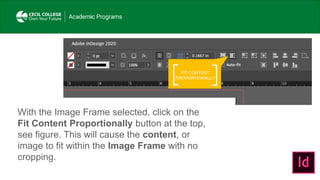
With the Image Frame selected, click on the
Fit Content Proportionally button at the top,
see figure. This will cause the content, or
image to fit within the Image Frame with no
cropping.
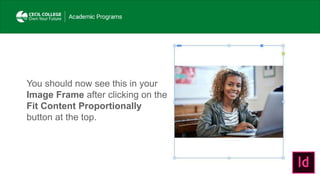
You should now see this in your
Image Frame after clicking on the
Fit Content Proportionally
button at the top.
IMAGE
FRAME
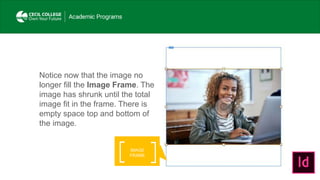
Notice now that the image no
longer fill the Image Frame. The
image has shrunk until the total
image fit in the frame. There is
empty space top and bottom of
the image.
CONTENT
FRAME
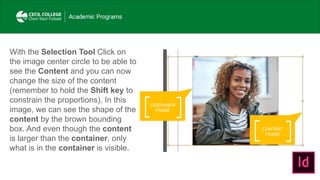
With the Selection Tool Click on
the image center circle to be able to
see the Content and you can now
change the size of the content
(remember to hold the Shift key to
constrain the proportions). In this
image, we can see the shape of the
content by the brown bounding
box. And even though the content
is larger than the container, only
what is in the container is visible.
CONTAINER
FRAME
CONTENT
FRAME
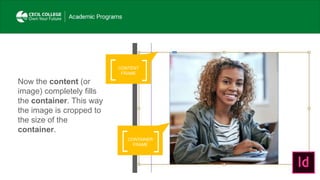
Now the content (or
image) completely fills
the container. This way
the image is cropped to
the size of the
container.
CONTAINER
FRAME
LOADED
ICON
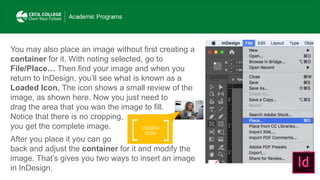
You may also place an image without first creating a
container for it. With noting selected, go to
File/Place… Then find your image and when you
return to InDesign, you’ll see what is known as a
Loaded Icon. The icon shows a small review of the
image, as shown here. Now you just need to
drag the area that you wan the image to fill.
Notice that there is no cropping,
you get the complete image.
After you place it you can go
back and adjust the container for it and modify the
image. That’s gives you two ways to insert an image
in InDesign.

InDesign's image frame

  • 1.
    InDesign’s Image Frame AddingImages & Photographs
  • 2.
    Images & Photographs Oneaspect of InDesign is the ability to combine images and photographs to your documents. InDesign handles images a little differently than the other applications. We will review how to add an image to an InDesign document.
  • 3.
    RECTANGLE FRAME Draw a rectanglein the document to represent the size of your image.
  • 4.
    PLACE… While the RectangleFrame is selected, go to File/Place… This will open a dialog panel for you to locate your image.
  • 5.
    HIGH QUALITY DISPLAY When theimage comes into the Rectangle Frame it will be at actual size and might be larger than the frame. Plus it might look like it’s low resolution. To fix the resolution, go to View/Display Performance/High Quality Display. You should see the image become much sharper. This will be an important step to remember. Although the image may look like low resolution when it comes in, it will still print at high resolution. This is only for preview. Should you document have many images, it might slow the computer down if you kept everything at high resolution. Normally I set to the high quality and haven’t had an issue yet.
  • 6.
    To change oradjust the frame, use the Selection Tool and move one of the anchor point. You’ll notice that the image (or Content) doesn’t move, only the frame is moving. It is just cropping the imaging differently when you adjust the frame, the content isn’t affected. This is important to remember. CENTER ANCHOR Drag down
  • 7.
    FIT CONTENT PROPORTIONALLY With theImage Frame selected, click on the Fit Content Proportionally button at the top, see figure. This will cause the content, or image to fit within the Image Frame with no cropping.
  • 8.
    You should nowsee this in your Image Frame after clicking on the Fit Content Proportionally button at the top.
  • 9.
    IMAGE FRAME Notice now thatthe image no longer fill the Image Frame. The image has shrunk until the total image fit in the frame. There is empty space top and bottom of the image.
  • 10.
    CONTENT FRAME With the SelectionTool Click on the image center circle to be able to see the Content and you can now change the size of the content (remember to hold the Shift key to constrain the proportions). In this image, we can see the shape of the content by the brown bounding box. And even though the content is larger than the container, only what is in the container is visible. CONTAINER FRAME
  • 11.
    CONTENT FRAME Now the content(or image) completely fills the container. This way the image is cropped to the size of the container. CONTAINER FRAME
  • 12.
    LOADED ICON You may alsoplace an image without first creating a container for it. With noting selected, go to File/Place… Then find your image and when you return to InDesign, you’ll see what is known as a Loaded Icon. The icon shows a small review of the image, as shown here. Now you just need to drag the area that you wan the image to fill. Notice that there is no cropping, you get the complete image. After you place it you can go back and adjust the container for it and modify the image. That’s gives you two ways to insert an image in InDesign.