Image Processing with
MATLAB
2
Lab (5)
Image Enhancement in Spatial Domain
LAB 5
Pixel Operations
4
Lab (5)
9- Quantization
 Reducing the number of colors in the image. (i.e. reducing number of bpp).
 Why?
 used for efficient compression.
 used in Discrete cosine Transformation (DCT) and Discrete Wavelet
Transformation (DWT).
5
Lab (5)
9- Quantization
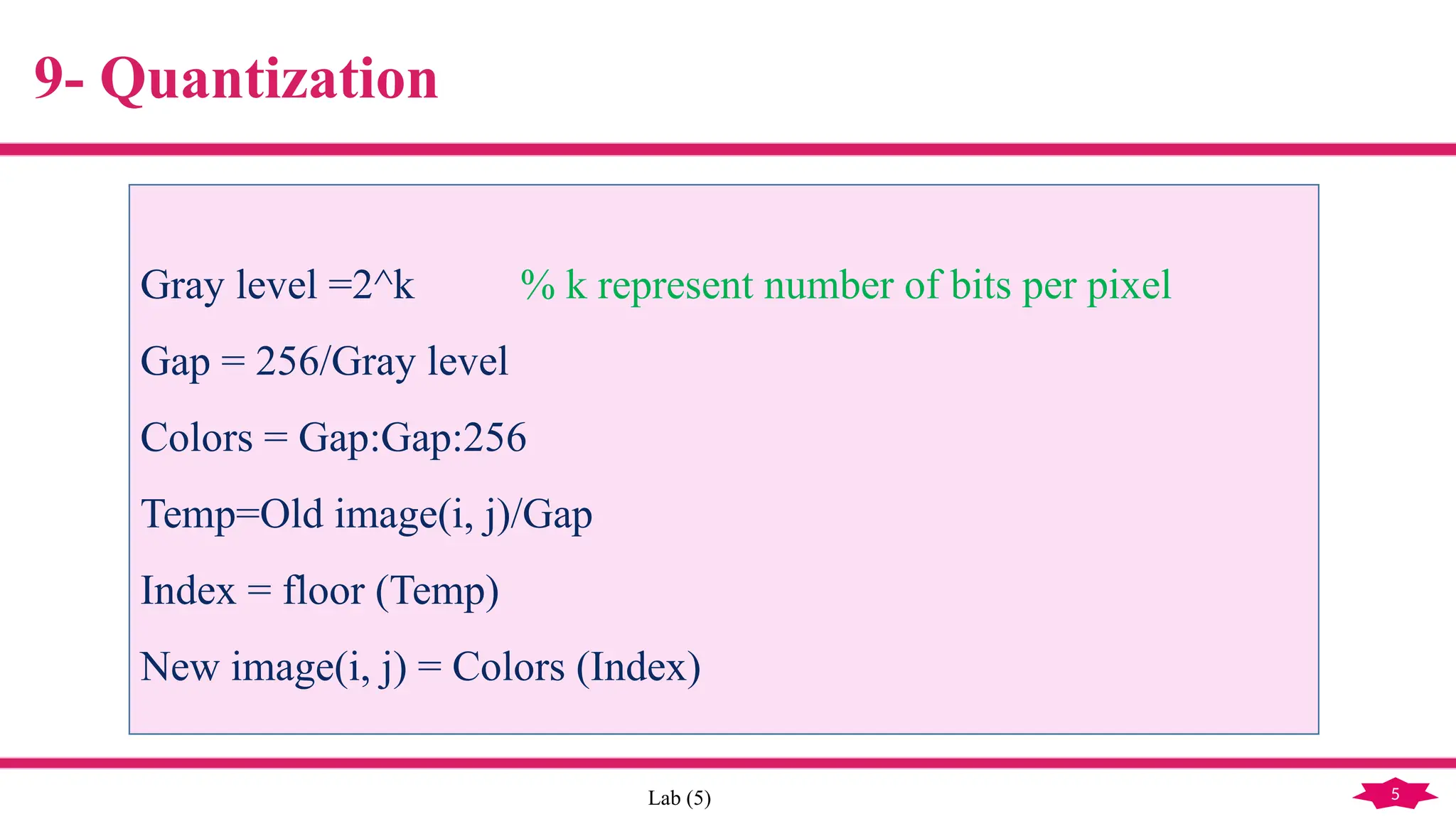
Gray level =2^k % k represent number of bits per pixel
Gap = 256/Gray level
Colors = Gap:Gap:256
Temp=Old image(i, j)/Gap
Index = floor (Temp)
New image(i, j) = Colors (Index)
Neighborhood Operations
7
Eng. Hadeer Mostafa Lab (5)
Neighborhood Operation
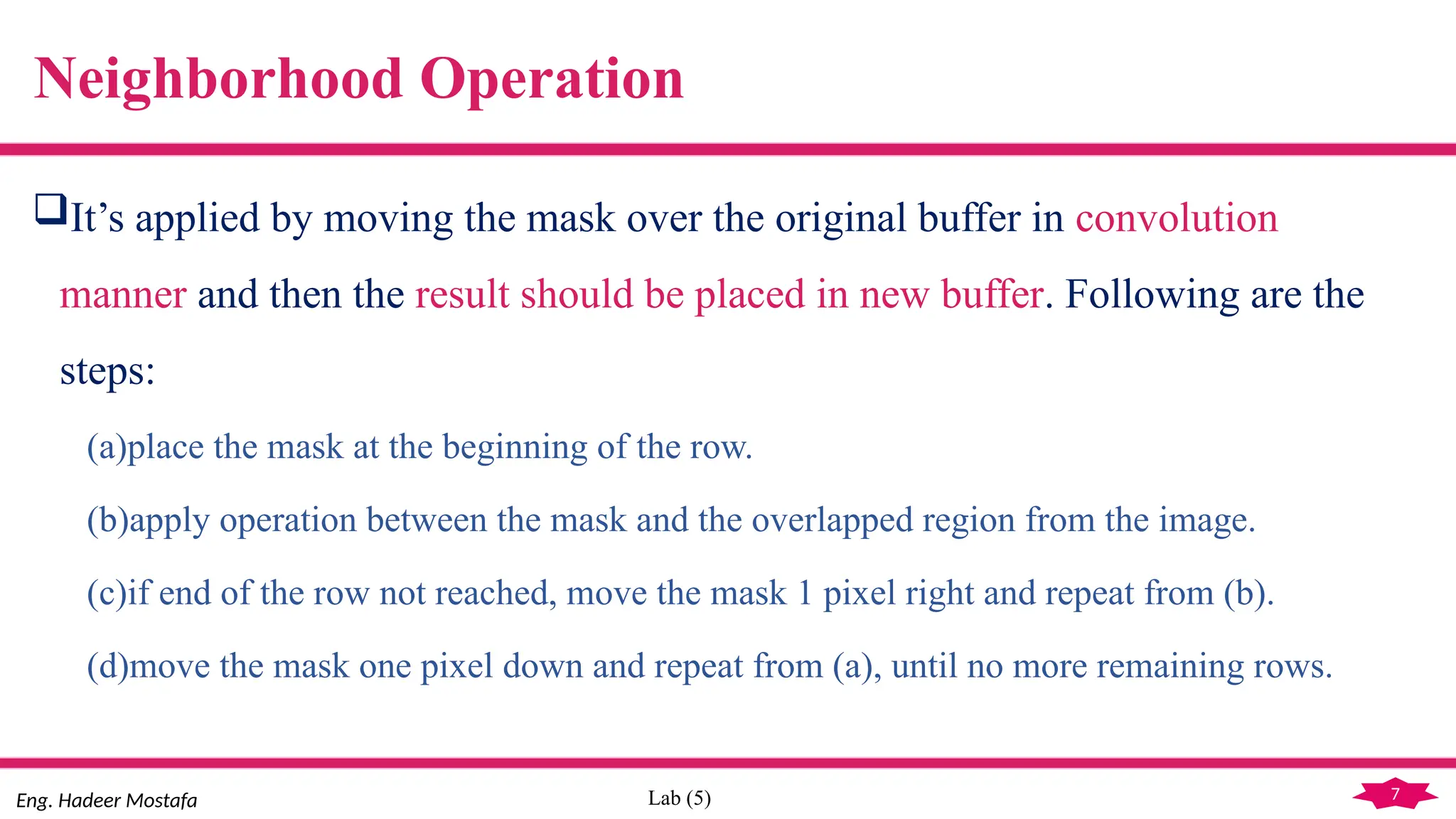
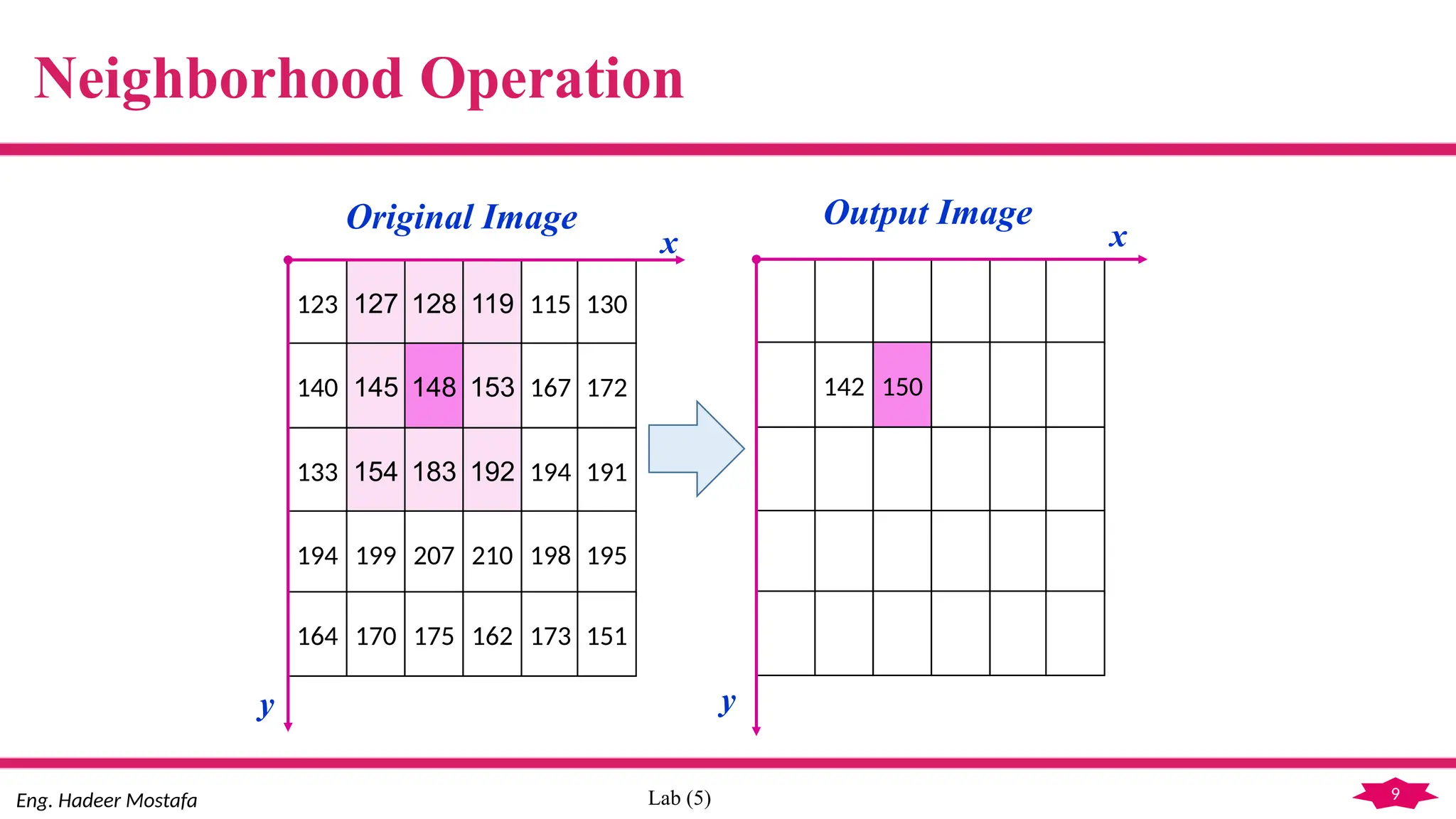
It’s applied by moving the mask over the original buffer in convolution
manner and then the result should be placed in new buffer. Following are the
steps:
(a)place the mask at the beginning of the row.
(b)apply operation between the mask and the overlapped region from the image.
(c)if end of the row not reached, move the mask 1 pixel right and repeat from (b).
(d)move the mask one pixel down and repeat from (a), until no more remaining rows.
8
Eng. Hadeer Mostafa Lab (5)
Neighborhood Operation
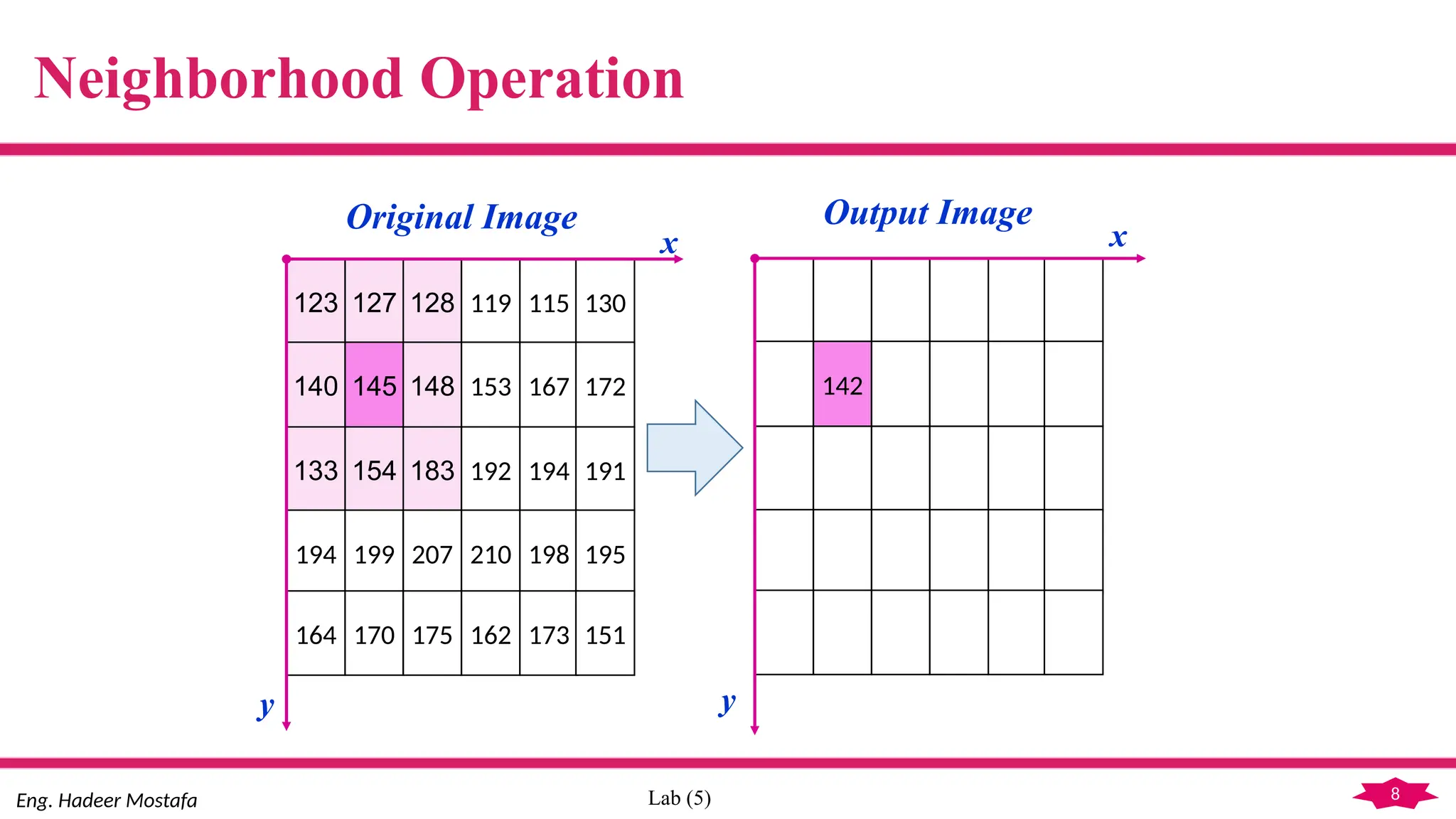
123 127 128 119 115 130
140 145 148 153 167 172
133 154 183 192 194 191
194 199 207 210 198 195
164 170 175 162 173 151
142
Original Image Output Image
x
y
x
y
9
Eng. Hadeer Mostafa Lab (5)
Neighborhood Operation
123 127 128 119 115 130
140 145 148 153 167 172
133 154 183 192 194 191
194 199 207 210 198 195
164 170 175 162 173 151
142 150
x
y
x
y
Original Image Output Image
10
Eng. Hadeer Mostafa Lab (5)
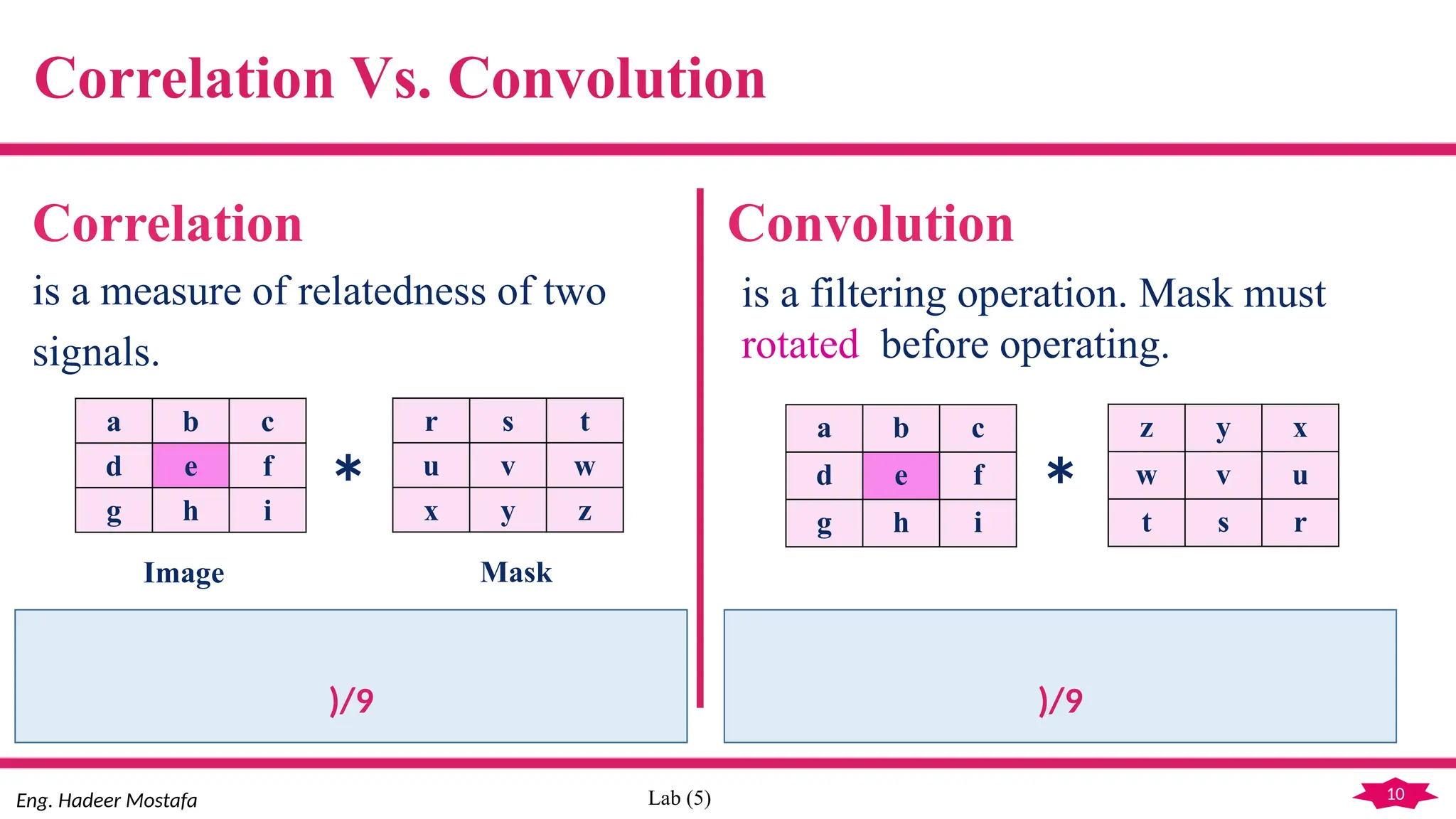
Correlation Vs. Convolution
Correlation Convolution
is a measure of relatedness of two
signals.
a b c
d e f
g h i
r s t
u v w
x y z
*
)/9
Image Mask
is a filtering operation. Mask must
rotated before operating.
a b c
d e f
g h i
z y x
w v u
t s r
*
)/9
11
Eng. Hadeer Mostafa Lab (5)
Problem of the Convolution
 Border pixels are not reached by the mask. This will results an image without
border pixels.
Possible Solutions:
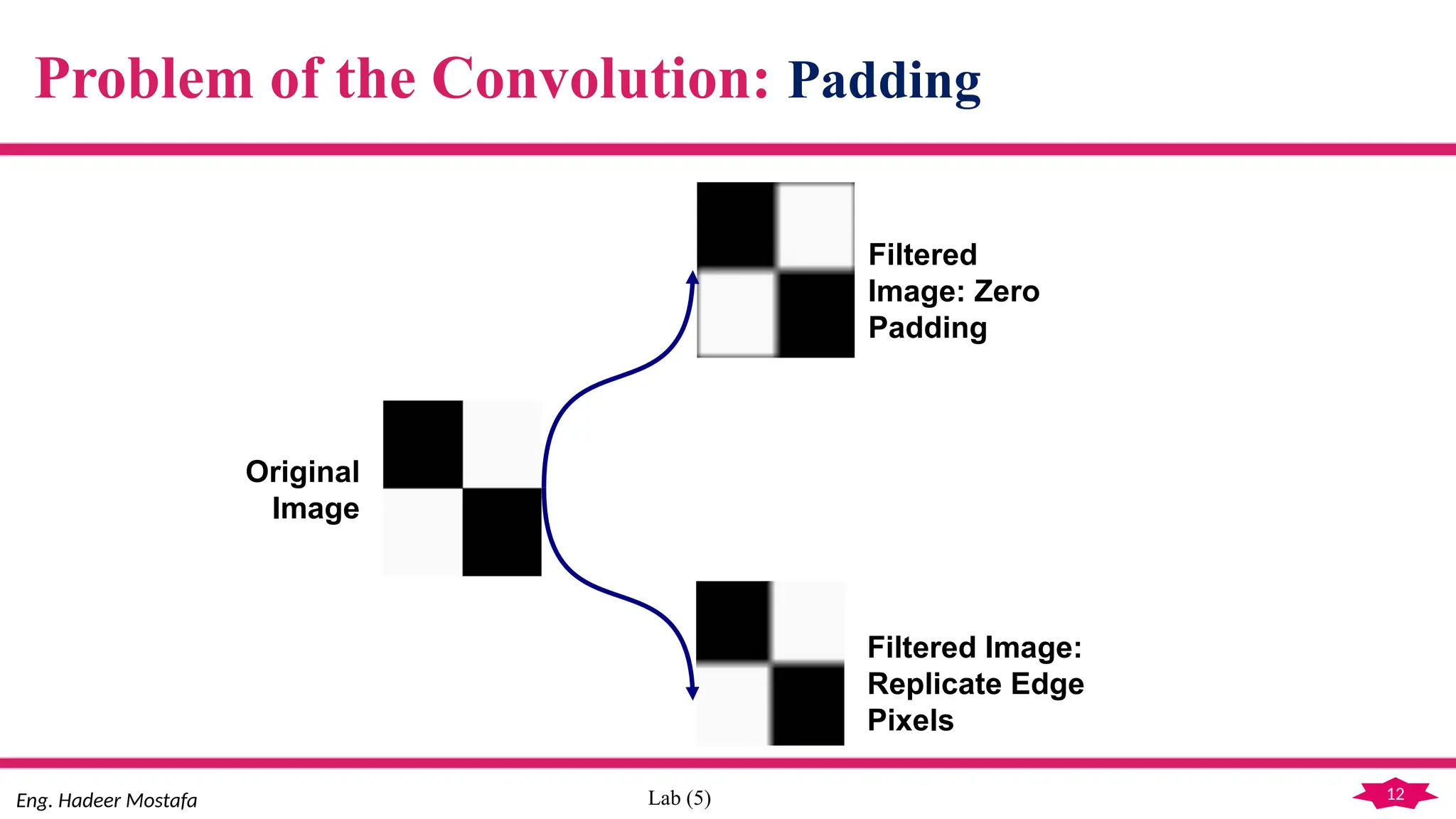
 Padding the original image before convolution, by adding rows and columns of
0’s.
 Padding the original image before convolution, by replicating rows and columns.
12
Eng. Hadeer Mostafa Lab (5)
Problem of the Convolution: Padding
Original
Image
Filtered
Image: Zero
Padding
Filtered Image:
Replicate Edge
Pixels
13
Eng. Hadeer Mostafa Lab (5)
Linear Vs. Non linear Filters
(a) Linear:
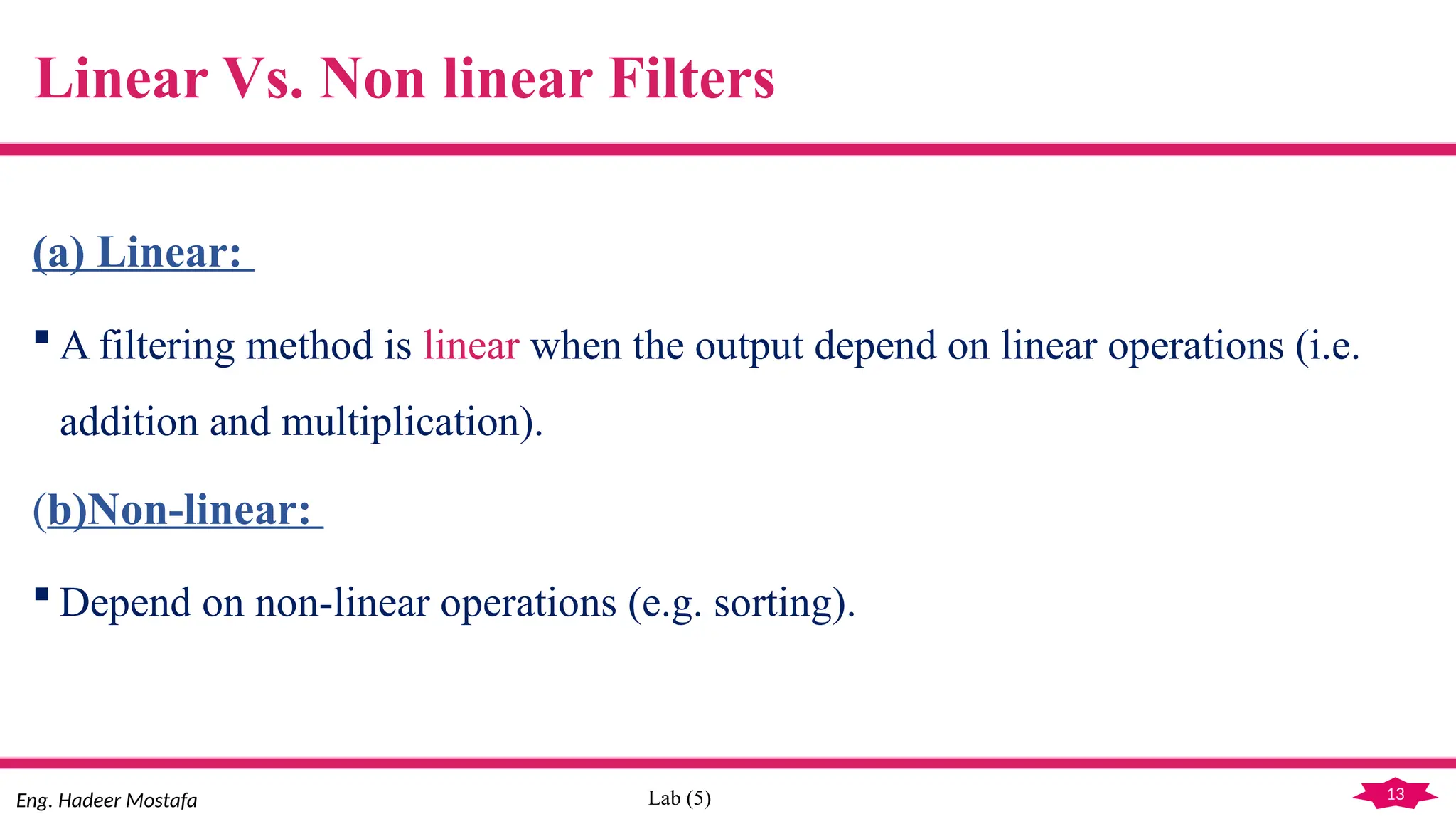
 A filtering method is linear when the output depend on linear operations (i.e.
addition and multiplication).
(b)Non-linear:
 Depend on non-linear operations (e.g. sorting).
14
Eng. Hadeer Mostafa Lab (5)
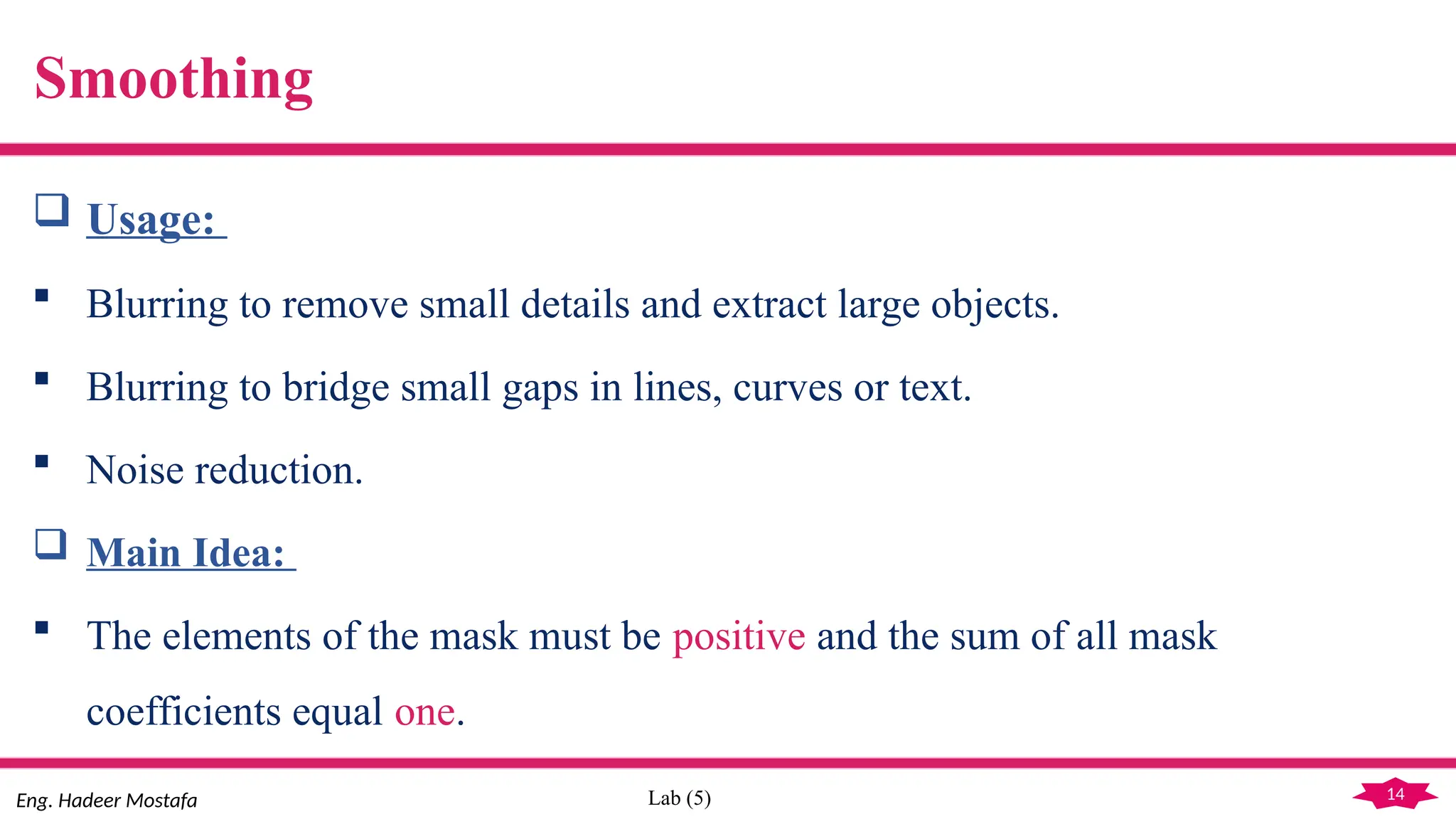
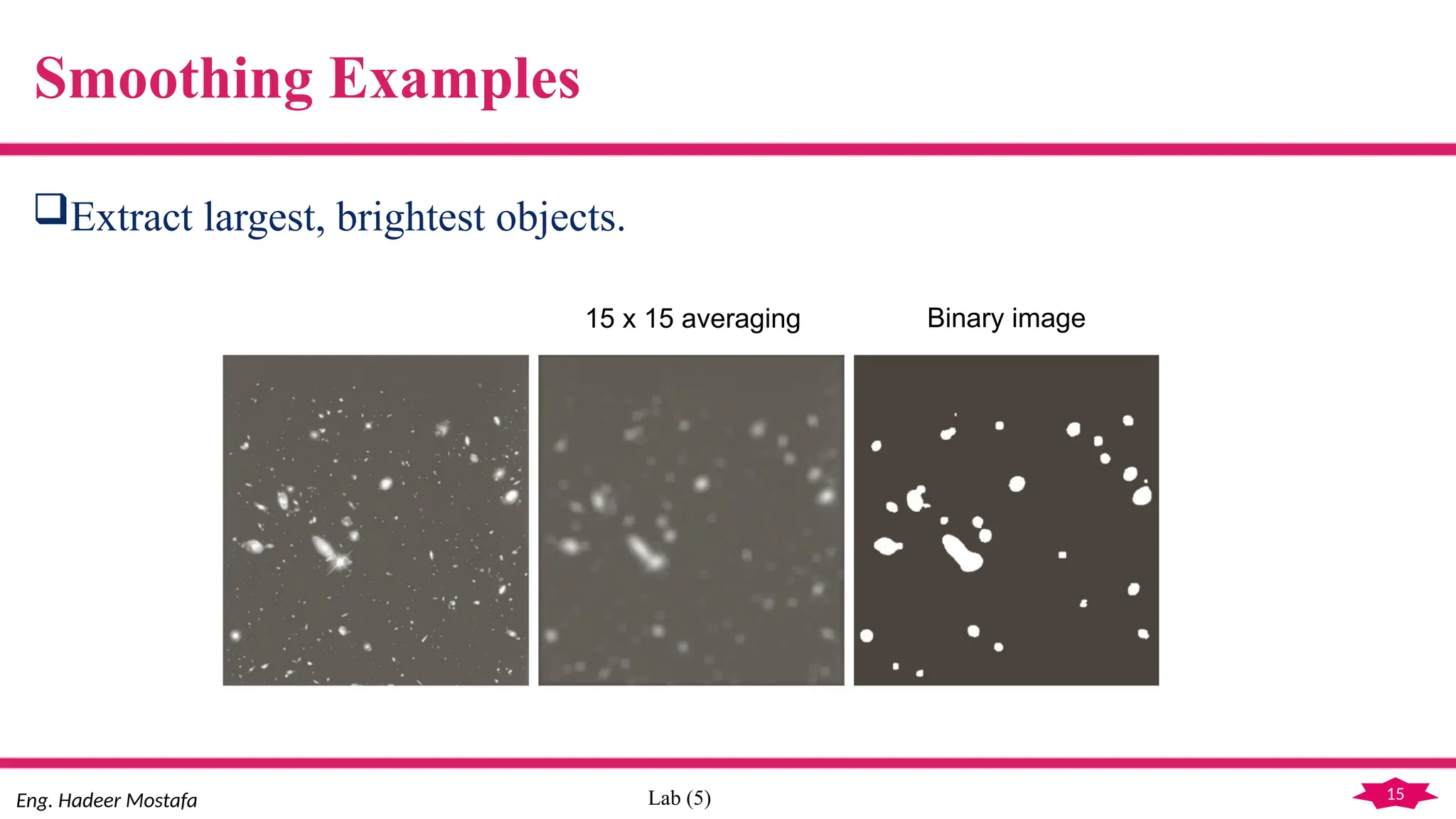
Smoothing
 Usage:
 Blurring to remove small details and extract large objects.
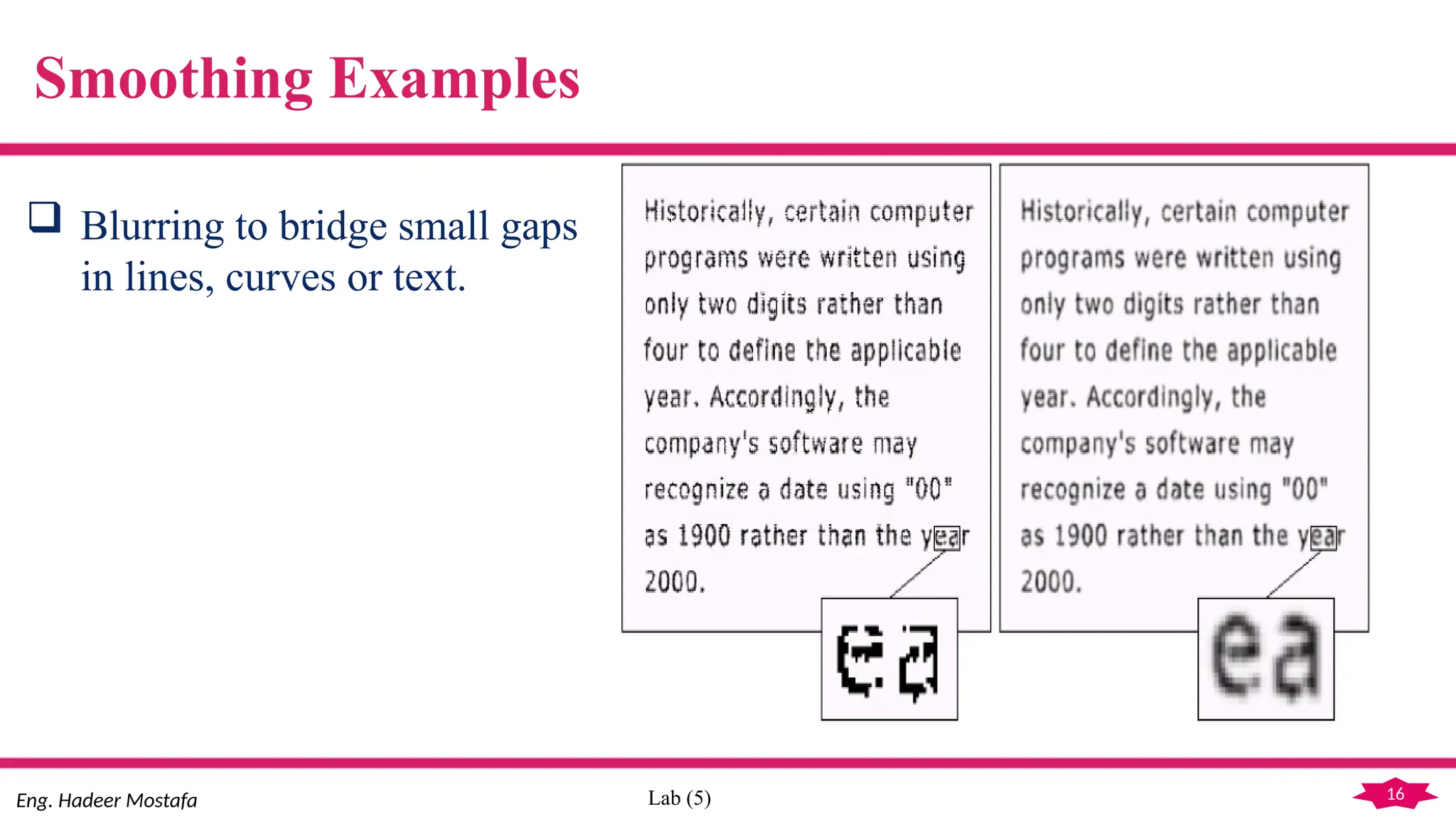
 Blurring to bridge small gaps in lines, curves or text.
 Noise reduction.
 Main Idea:
 The elements of the mask must be positive and the sum of all mask
coefficients equal one.
15
Eng. Hadeer Mostafa Lab (5)
Smoothing Examples
Extract largest, brightest objects.
15 x 15 averaging Binary image
16
Eng. Hadeer Mostafa Lab (5)
Smoothing Examples
 Blurring to bridge small gaps
in lines, curves or text.
17
Eng. Hadeer Mostafa Lab (5)
Smoothing Filters
 Smoothing Linear Filters:
 Mean (Averaging) Filter.
 Weighted (Gaussian) Filter.
 Smoothing Non linear Filters:
 Median
 Min
 Max
18
Eng. Hadeer Mostafa Lab (5)
Smoothing Linear Filters: Mean Filter
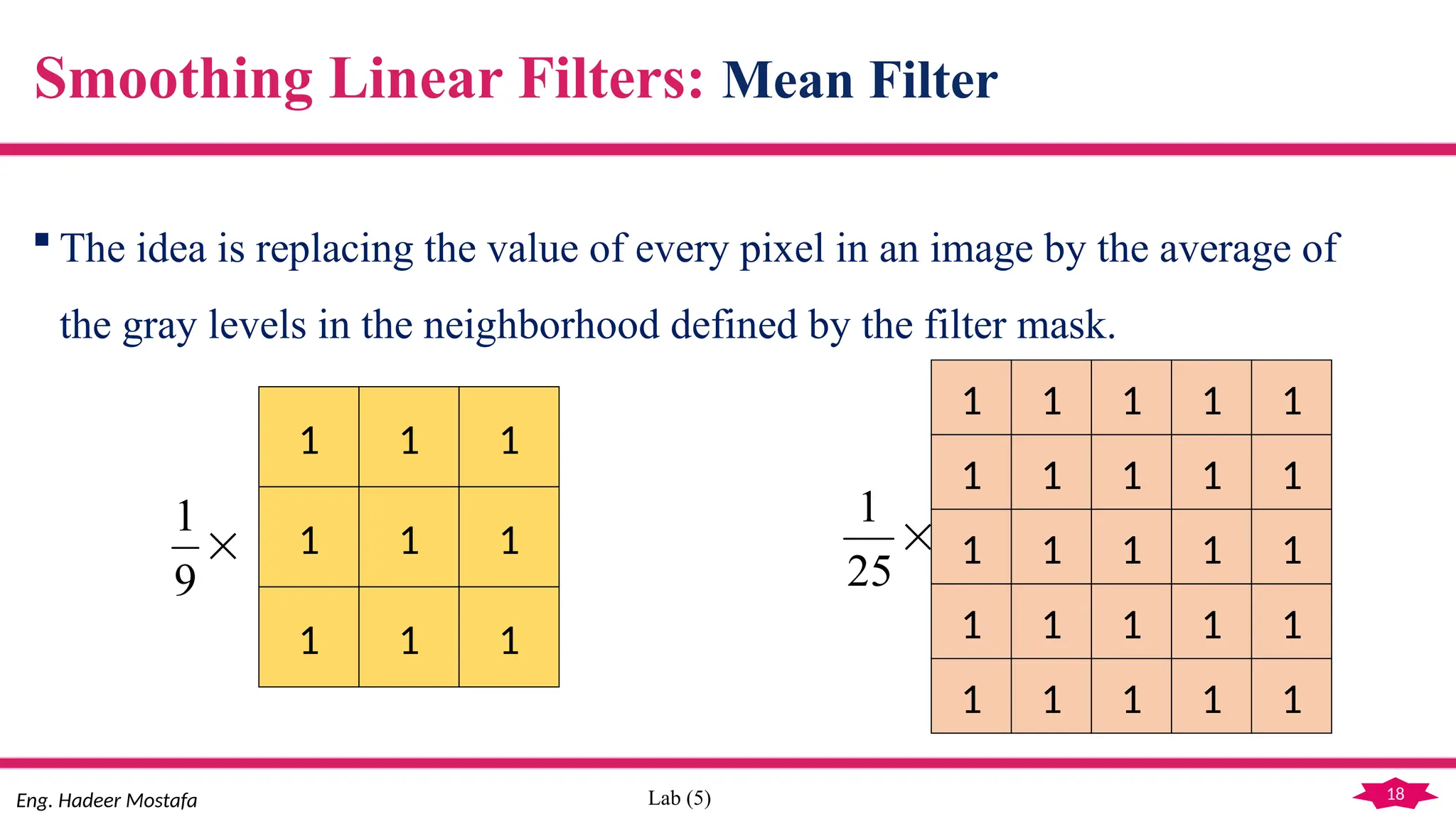
 The idea is replacing the value of every pixel in an image by the average of
the gray levels in the neighborhood defined by the filter mask.
1 1 1
1 1 1
1 1 1

9
1
1 1 1
1 1 1
1 1 1
1
1
1
1
1
1
1 1 1 1 1
1 1 1 1 1

25
1
19
Eng. Hadeer Mostafa Lab (5)
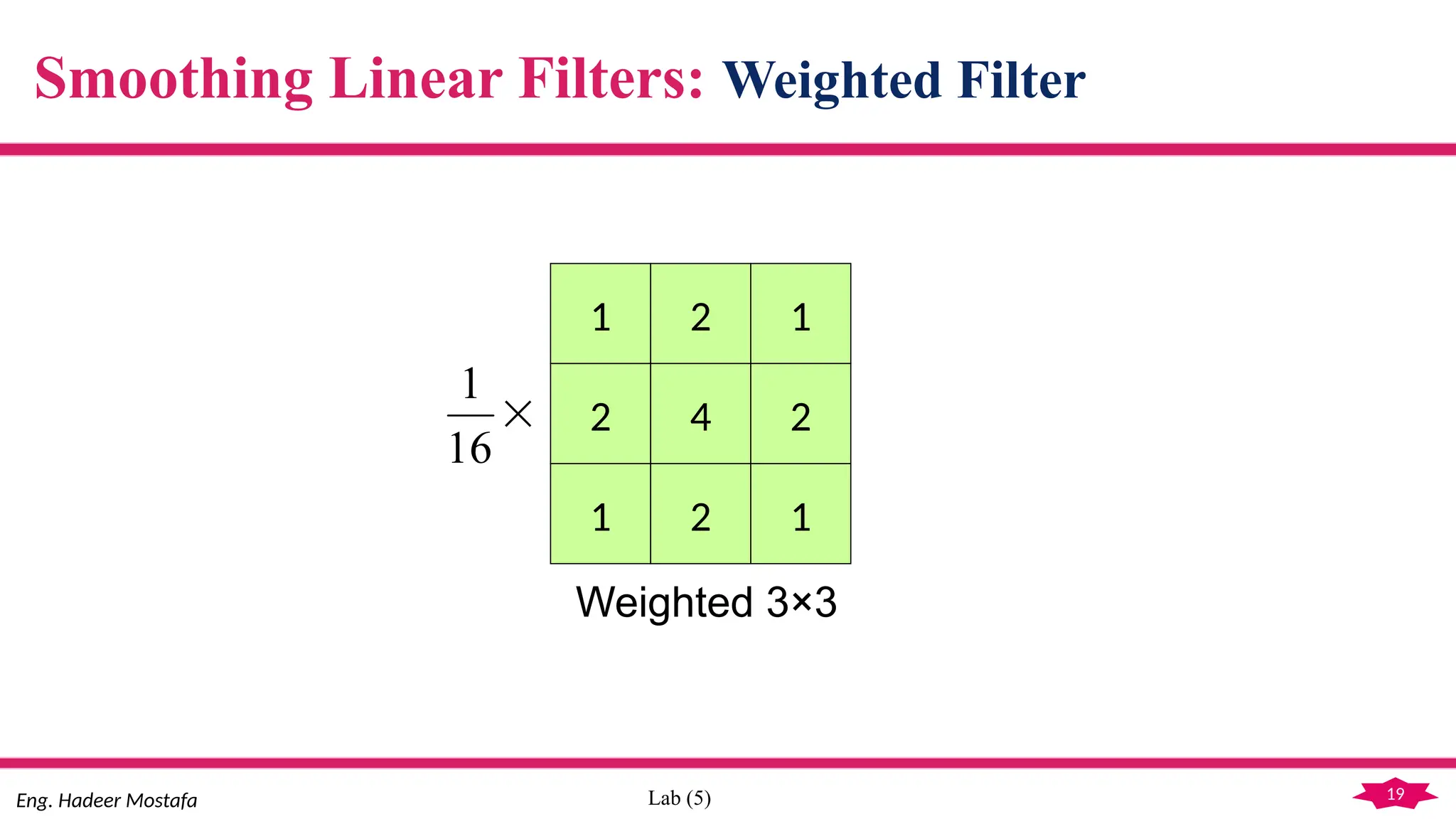
Smoothing Linear Filters: Weighted Filter
1 2 1
2 4 2
1 2 1

16
1
Weighted 3×3
20
Eng. Hadeer Mostafa Lab (5)
Compute the Gaussian
Filter with σ
 The value of σ determines the
degree of smoothing.
Smoothing Linear Filters: Weighted Filter
a. Compute Mask Size
N = integer [3.7 × σ – 0.5]
Mask Size = 2 × N + 1
b. Fill Mask
Gaussian Mask(i, j)=
x= [- Mask Size/2:Mask Size/2]
y= [- Mask Size/2:Mask Size/2]
21
Eng. Hadeer Mostafa Lab (5)
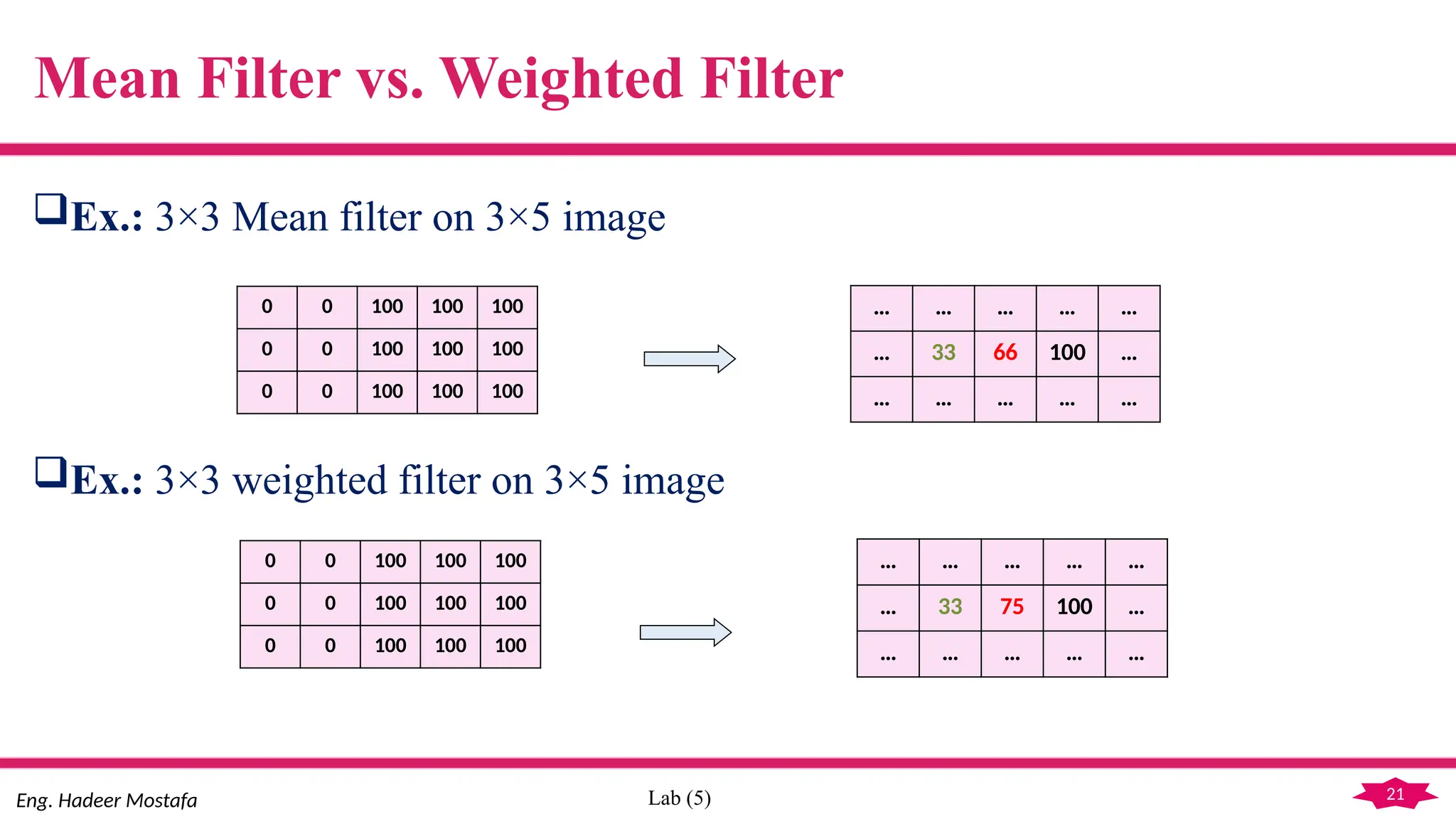
Mean Filter vs. Weighted Filter
Ex.: 3×3 Mean filter on 3×5 image
Ex.: 3×3 weighted filter on 3×5 image
0 0 100 100 100
0 0 100 100 100
0 0 100 100 100
… … … … …
… 33 66 100 …
… … … … …
0 0 100 100 100
0 0 100 100 100
0 0 100 100 100
… … … … …
… 33 75 100 …
… … … … …
22
Eng. Hadeer Mostafa Lab (5)
Both lead to smoothing, but the weighted filter is less blurring than the
mean filter (i.e. less side effect on the edges).
Mean Filter vs. Weighted Filter
23
Eng. Hadeer Mostafa Lab (5)
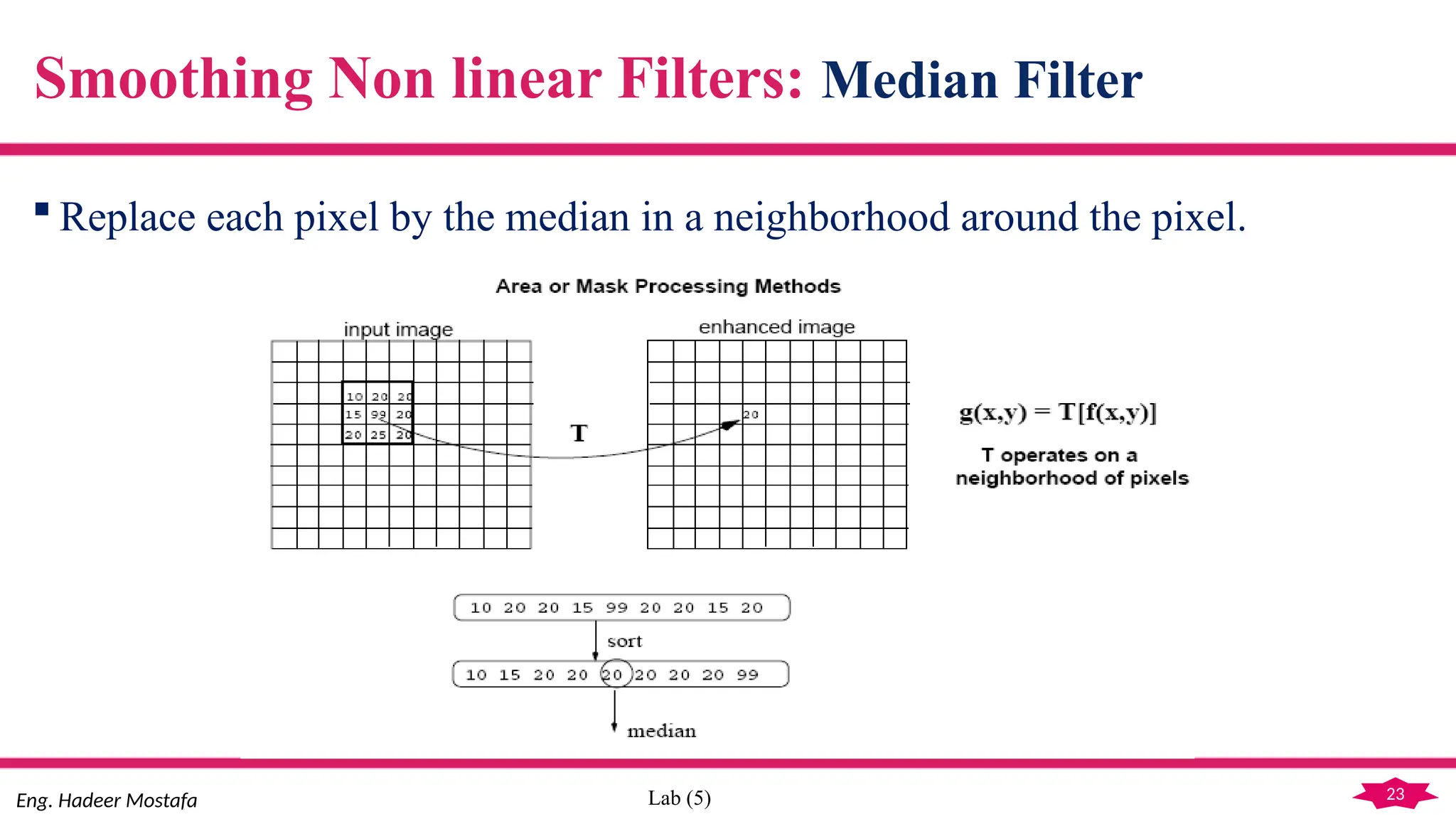
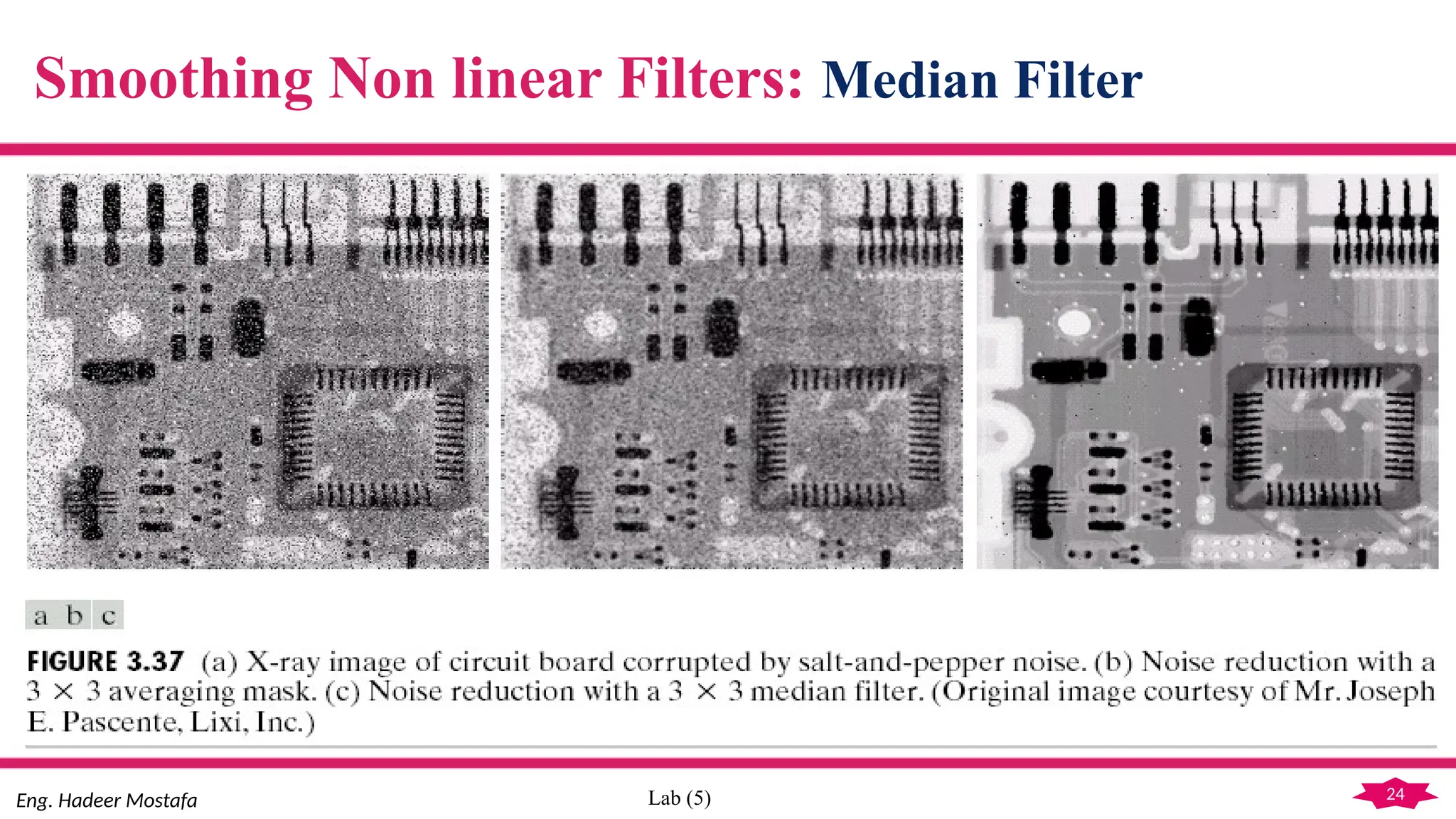
 Replace each pixel by the median in a neighborhood around the pixel.
Smoothing Non linear Filters: Median Filter
24
Eng. Hadeer Mostafa Lab (5)
Smoothing Non linear Filters: Median Filter
25
Eng. Hadeer Mostafa Lab (5)
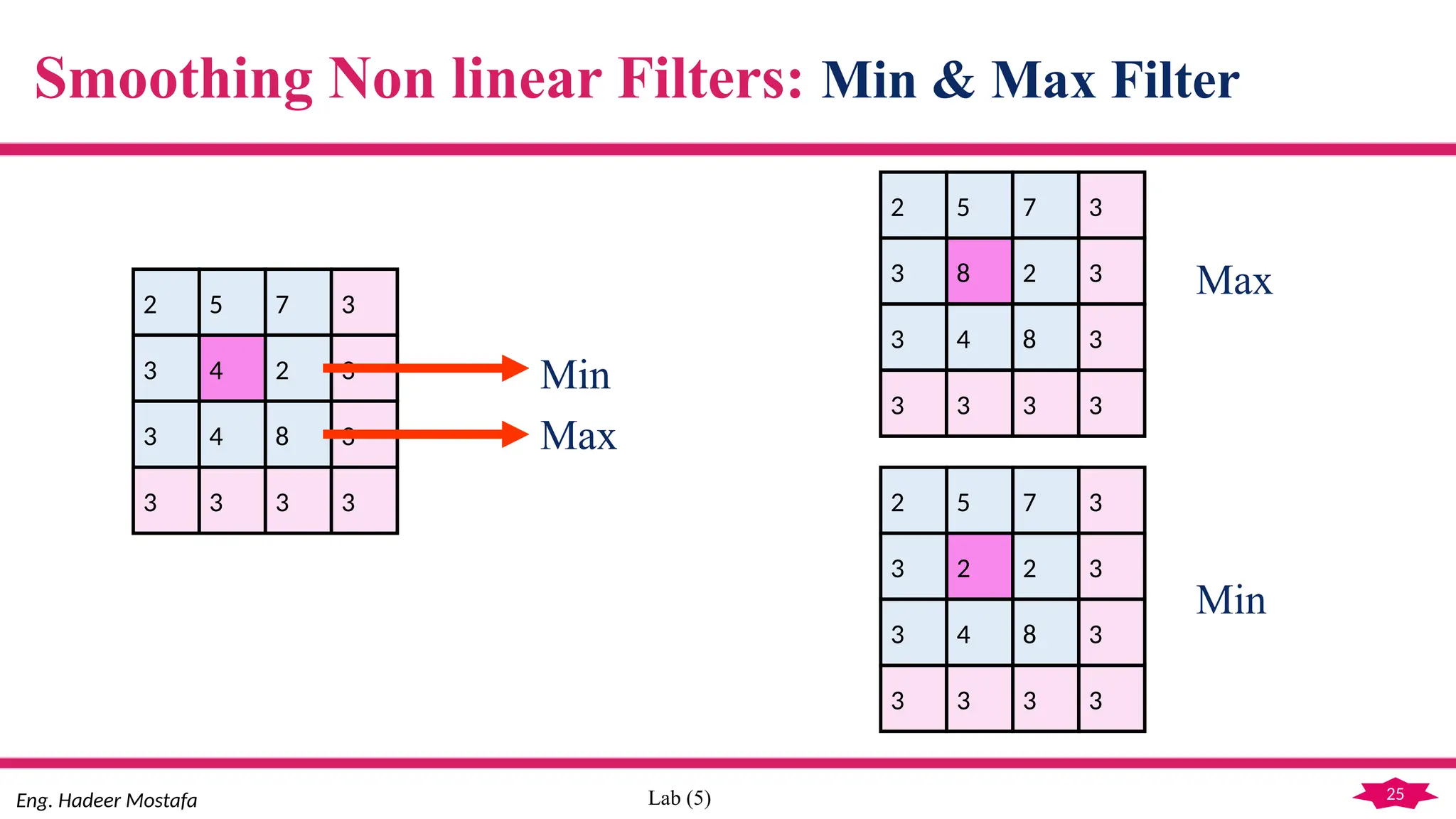
Smoothing Non linear Filters: Min & Max Filter
4
5
4
7
2
8
2
3
3
3
3
3
3 3 3 3
Min
Max
8
5
4
7
2
8
2
3
3
3
3
3
3 3 3 3
2
5
4
7
2
8
2
3
3
3
3
3
3 3 3 3
Max
Min
26
Lab (5)
Assignment
Smoothing with Mean Filter.
Smoothing with Weighted Filter.
Smoothing with Median Filter.
Smoothing with Max Filter.
Smoothing with Min Filter.
27
Lab (5)
THANK YOU

Image Processing with MATLAB (Lab 5).pptx

  • 1.
  • 2.
    2 Lab (5) Image Enhancementin Spatial Domain LAB 5
  • 3.
  • 4.
    4 Lab (5) 9- Quantization Reducing the number of colors in the image. (i.e. reducing number of bpp).  Why?  used for efficient compression.  used in Discrete cosine Transformation (DCT) and Discrete Wavelet Transformation (DWT).
  • 5.
    5 Lab (5) 9- Quantization Graylevel =2^k % k represent number of bits per pixel Gap = 256/Gray level Colors = Gap:Gap:256 Temp=Old image(i, j)/Gap Index = floor (Temp) New image(i, j) = Colors (Index)
  • 6.
  • 7.
    7 Eng. Hadeer MostafaLab (5) Neighborhood Operation It’s applied by moving the mask over the original buffer in convolution manner and then the result should be placed in new buffer. Following are the steps: (a)place the mask at the beginning of the row. (b)apply operation between the mask and the overlapped region from the image. (c)if end of the row not reached, move the mask 1 pixel right and repeat from (b). (d)move the mask one pixel down and repeat from (a), until no more remaining rows.
  • 8.
    8 Eng. Hadeer MostafaLab (5) Neighborhood Operation 123 127 128 119 115 130 140 145 148 153 167 172 133 154 183 192 194 191 194 199 207 210 198 195 164 170 175 162 173 151 142 Original Image Output Image x y x y
  • 9.
    9 Eng. Hadeer MostafaLab (5) Neighborhood Operation 123 127 128 119 115 130 140 145 148 153 167 172 133 154 183 192 194 191 194 199 207 210 198 195 164 170 175 162 173 151 142 150 x y x y Original Image Output Image
  • 10.
    10 Eng. Hadeer MostafaLab (5) Correlation Vs. Convolution Correlation Convolution is a measure of relatedness of two signals. a b c d e f g h i r s t u v w x y z * )/9 Image Mask is a filtering operation. Mask must rotated before operating. a b c d e f g h i z y x w v u t s r * )/9
  • 11.
    11 Eng. Hadeer MostafaLab (5) Problem of the Convolution  Border pixels are not reached by the mask. This will results an image without border pixels. Possible Solutions:  Padding the original image before convolution, by adding rows and columns of 0’s.  Padding the original image before convolution, by replicating rows and columns.
  • 12.
    12 Eng. Hadeer MostafaLab (5) Problem of the Convolution: Padding Original Image Filtered Image: Zero Padding Filtered Image: Replicate Edge Pixels
  • 13.
    13 Eng. Hadeer MostafaLab (5) Linear Vs. Non linear Filters (a) Linear:  A filtering method is linear when the output depend on linear operations (i.e. addition and multiplication). (b)Non-linear:  Depend on non-linear operations (e.g. sorting).
  • 14.
    14 Eng. Hadeer MostafaLab (5) Smoothing  Usage:  Blurring to remove small details and extract large objects.  Blurring to bridge small gaps in lines, curves or text.  Noise reduction.  Main Idea:  The elements of the mask must be positive and the sum of all mask coefficients equal one.
  • 15.
    15 Eng. Hadeer MostafaLab (5) Smoothing Examples Extract largest, brightest objects. 15 x 15 averaging Binary image
  • 16.
    16 Eng. Hadeer MostafaLab (5) Smoothing Examples  Blurring to bridge small gaps in lines, curves or text.
  • 17.
    17 Eng. Hadeer MostafaLab (5) Smoothing Filters  Smoothing Linear Filters:  Mean (Averaging) Filter.  Weighted (Gaussian) Filter.  Smoothing Non linear Filters:  Median  Min  Max
  • 18.
    18 Eng. Hadeer MostafaLab (5) Smoothing Linear Filters: Mean Filter  The idea is replacing the value of every pixel in an image by the average of the gray levels in the neighborhood defined by the filter mask. 1 1 1 1 1 1 1 1 1  9 1 1 1 1 1 1 1 1 1 1 1 1 1 1 1 1 1 1 1 1 1 1 1 1 1 1  25 1
  • 19.
    19 Eng. Hadeer MostafaLab (5) Smoothing Linear Filters: Weighted Filter 1 2 1 2 4 2 1 2 1  16 1 Weighted 3×3
  • 20.
    20 Eng. Hadeer MostafaLab (5) Compute the Gaussian Filter with σ  The value of σ determines the degree of smoothing. Smoothing Linear Filters: Weighted Filter a. Compute Mask Size N = integer [3.7 × σ – 0.5] Mask Size = 2 × N + 1 b. Fill Mask Gaussian Mask(i, j)= x= [- Mask Size/2:Mask Size/2] y= [- Mask Size/2:Mask Size/2]
  • 21.
    21 Eng. Hadeer MostafaLab (5) Mean Filter vs. Weighted Filter Ex.: 3×3 Mean filter on 3×5 image Ex.: 3×3 weighted filter on 3×5 image 0 0 100 100 100 0 0 100 100 100 0 0 100 100 100 … … … … … … 33 66 100 … … … … … … 0 0 100 100 100 0 0 100 100 100 0 0 100 100 100 … … … … … … 33 75 100 … … … … … …
  • 22.
    22 Eng. Hadeer MostafaLab (5) Both lead to smoothing, but the weighted filter is less blurring than the mean filter (i.e. less side effect on the edges). Mean Filter vs. Weighted Filter
  • 23.
    23 Eng. Hadeer MostafaLab (5)  Replace each pixel by the median in a neighborhood around the pixel. Smoothing Non linear Filters: Median Filter
  • 24.
    24 Eng. Hadeer MostafaLab (5) Smoothing Non linear Filters: Median Filter
  • 25.
    25 Eng. Hadeer MostafaLab (5) Smoothing Non linear Filters: Min & Max Filter 4 5 4 7 2 8 2 3 3 3 3 3 3 3 3 3 Min Max 8 5 4 7 2 8 2 3 3 3 3 3 3 3 3 3 2 5 4 7 2 8 2 3 3 3 3 3 3 3 3 3 Max Min
  • 26.
    26 Lab (5) Assignment Smoothing withMean Filter. Smoothing with Weighted Filter. Smoothing with Median Filter. Smoothing with Max Filter. Smoothing with Min Filter.
  • 27.

Editor's Notes

  • #11 If mask size=3 border(:,:,1)=padarray(pic(:,:,1),[1 1],'replicate','both'); border(:,:,2)=padarray(pic(:,:,2),[1 1],'replicate','both'); border(:,:,3)=padarray(pic(:,:,3),[1 1],'replicate','both');