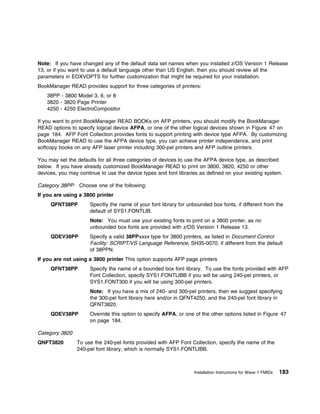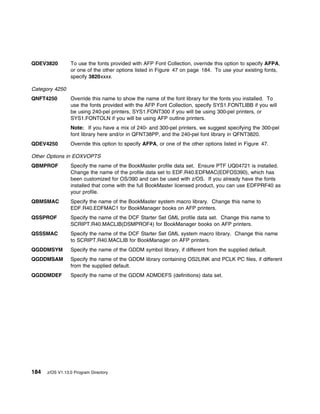







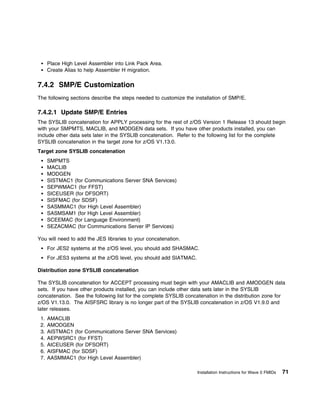
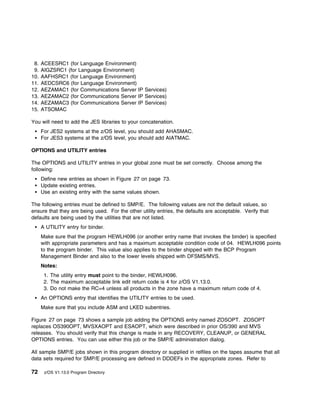

IBM
                Program Directory
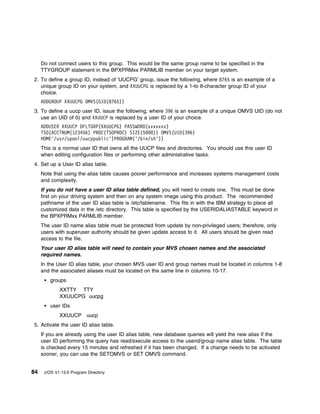
 For CBPDO Installation and ServerPac Reference
                          z/OS
                         V1.13.0
               Program Number 5694-A01


                CBPDO Level SMC1115

                   Service Level 1103


             Document Date: September 30, 2011


                        GI10-0670-13
Note

  Before using this information and the product it supports, be sure to read the general information under “Notices”
  on page 409.


This program directory (Document Date: September 30, 2011) applies to the elements of z/OS Version 1 Release 13, program
number 5694-A01.

FMIDs                                                                                                     System Name
(z/OS Element Base and Feature FMIDs are listed in Figure 1 on page 3)                                     z/OS V1.13.0


© Copyright International Business Machines Corporation 2001, 2011. All rights reserved.
US Government Users Restricted Rights – Use, duplication or disclosure restricted by GSA ADP Schedule Contract with IBM Corp.
Contents
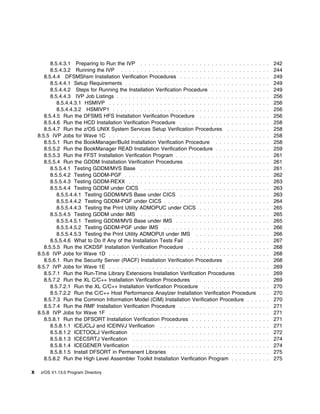
How to send your comments to IBM             . . . . . . . . . . . . . . . . . . . . . . . . . . . . . . . . . . . . . .   xvii

1.0 What is in this Program Directory? . . . . . . . . . . . . . .           . . . . . . . . . . . . . . . . . . . . . . .   1
1.1 z/OS V1.13.0 FMIDs Documented in this Program Directory                  . . . . . . . . . . . . . . . . . . . . . . .   2
   1.1.1 z/OS V1.13.0 Summary Table of Elements and Features                   . . . . . . . . . . . . . . . . . . . . .   . 2
1.2 How to Use this Program Directory . . . . . . . . . . . . . . .          . . . . . . . . . . . . . . . . . . . . . .    12

2.0   Program Materials . . . . . . . . . .      . . . . . . . . . . . . . . . . . . . . . . . . . . . . . . . . . . . .     15
2.1   Basic Machine-Readable Material . .        . . . . . . . . . . . . . . . . . . . . . . . . . . . . . . . . . . . .     15
2.2   Optional Machine-Readable Material         . . . . . . . . . . . . . . . . . . . . . . . . . . . . . . . . . . . .     15
2.3   Program Publications . . . . . . . . .     . . . . . . . . . . . . . . . . . . . . . . . . . . . . . . . . . . . .     15
2.4   Program Source Materials . . . . . .       . . . . . . . . . . . . . . . . . . . . . . . . . . . . . . . . . . . .     15
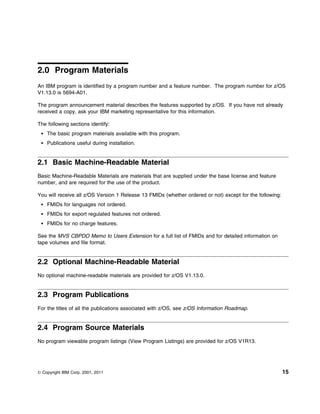
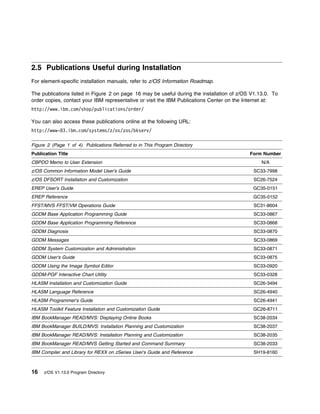
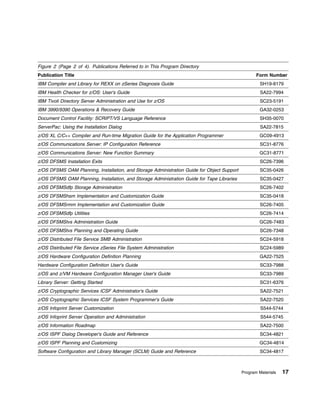
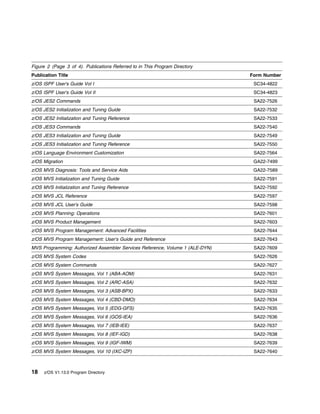
2.5   Publications Useful during Installation    . . . . . . . . . . . . . . . . . . . . . . . . . . . . . . . . . . . .     16

3.0   Program Support . . . . . . . . . . . . . . . . . . . . . . .      . . . . . . . . . . . . . . . . . . . . . . . .     21
3.1   Program Services . . . . . . . . . . . . . . . . . . . . . . .     . . . . . . . . . . . . . . . . . . . . . . . .     21
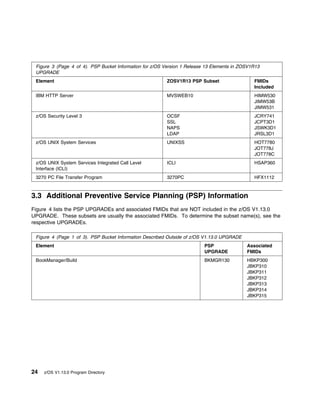
3.2   Preventive Service Planning (PSP) . . . . . . . . . . . . .        . . . . . . . . . . . . . . . . . . . . . . . .     21
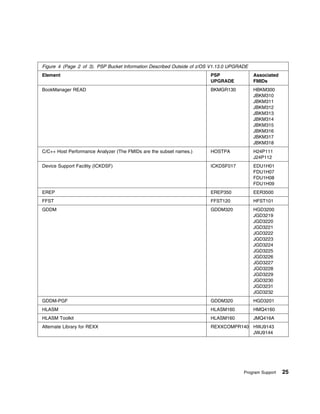
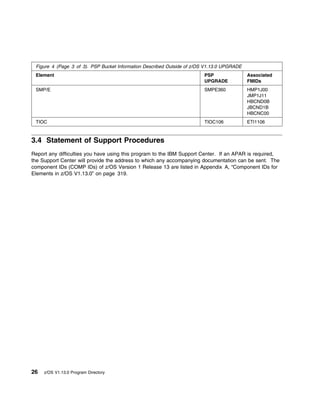
3.3   Additional Preventive Service Planning (PSP) Information           . . . . . . . . . . . . . . . . . . . . . . . .     24
3.4   Statement of Support Procedures . . . . . . . . . . . . . .        . . . . . . . . . . . . . . . . . . . . . . . .     26

4.0 Program and Service Level Information              . . . . . . . . . . . . . . . . . . . . . . . . . . . . . . . . .     27
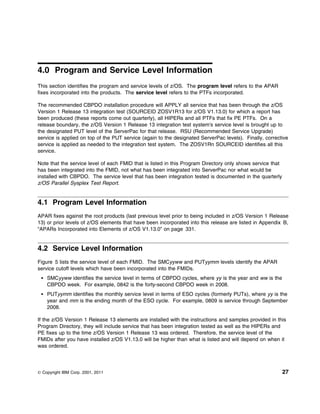
4.1 Program Level Information . . . . . . . . .        . . . . . . . . . . . . . . . . . . . . . . . . . . . . . . . . .     27
4.2 Service Level Information . . . . . . . . . .      . . . . . . . . . . . . . . . . . . . . . . . . . . . . . . . . .     27

5.0 Installation Requirements and Considerations               . . . . . . . . . . . . . . . . . . . . . . . . . . . . .     33
5.1 Driving System Requirements . . . . . . . . . . .          . . . . . . . . . . . . . . . . . . . . . . . . . . . . .     33
5.2 Target System Requirements . . . . . . . . . . .           . . . . . . . . . . . . . . . . . . . . . . . . . . . . .     33
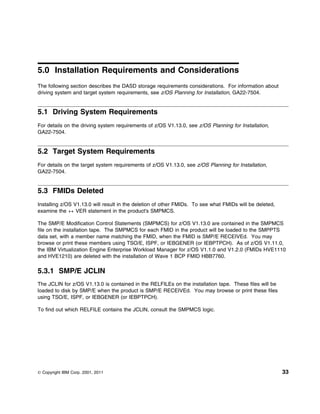
5.3 FMIDs Deleted . . . . . . . . . . . . . . . . . . . .      . . . . . . . . . . . . . . . . . . . . . . . . . . . . .     33
   5.3.1 SMP/E JCLIN . . . . . . . . . . . . . . . . . .       . . . . . . . . . . . . . . . . . . . . . . . . . . . . .     33
5.4 DASD Storage Requirements . . . . . . . . . . .            . . . . . . . . . . . . . . . . . . . . . . . . . . . . .     34
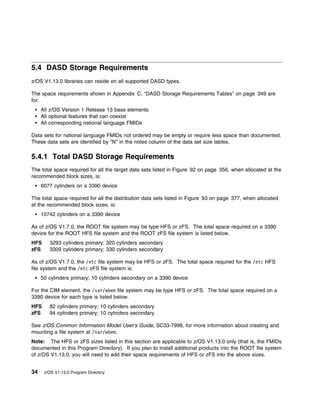
   5.4.1 Total DASD Storage Requirements . . . . .             . . . . . . . . . . . . . . . . . . . . . . . . . . . . .     34

6.0 Preparing the Installation Path . . . . . . . . . . . . . . . . . . . . . . . . . . . . . . . . . . . . . .              37
6.1 Overview for the Clone of Your System . . . . . . . . . . . . . . . . . . . . . . . . . . . . . . . . . .                37
6.2 Step 1: Separating File System Data Sets for z/OS V1.13.0 . . . . . . . . . . . . . . . . . . . . . . .                  37
6.3 Step 2: Cloning File System Data Sets . . . . . . . . . . . . . . . . . . . . . . . . . . . . . . . . . . .              38
   6.3.1 Using High Level Assembler, Program Management Binder, and SMP/E for Subsequent z/OS
    V1.13.0 Installs . . . . . . . . . . . . . . . . . . . . . . . . . . . . . . . . . . . . . . . . . . . . . . . . .       38
6.4 Step 3: Back Up Your Clone System . . . . . . . . . . . . . . . . . . . . . . . . . . . . . . . . . . . .                39
6.5 Step 4: Decide Which FMIDs to Install . . . . . . . . . . . . . . . . . . . . . . . . . . . . . . . . . . .              39
   6.5.1 Understanding SMP/E Zone Requirements . . . . . . . . . . . . . . . . . . . . . . . . . . . . . .                   40
   6.5.2 Installation Ripple Exceptions . . . . . . . . . . . . . . . . . . . . . . . . . . . . . . . . . . . . . .          41


© Copyright IBM Corp. 2001, 2011                                                                                             iii
6.5.2.1 Installing into empty SMP/E zones . . . . . . . . . . . . . . . . . . . .     . . . . . . . . . . . .   41
   6.5.3 Elements in each Wave, Ripple, and FMIDSET . . . . . . . . . . . . . . .           . . . . . . . . . . . .   42
      6.5.3.1 Elements in Wave 0 . . . . . . . . . . . . . . . . . . . . . . . . . . . .    . . . . . . . . . . . .   43
      6.5.3.2 Elements in Wave 1A . . . . . . . . . . . . . . . . . . . . . . . . . . . .   . . . . . . . . . . . .   43
      6.5.3.3 Elements in Wave 1AL . . . . . . . . . . . . . . . . . . . . . . . . . . .    . . . . . . . . . . . .   44
      6.5.3.4 Elements in Wave 1B . . . . . . . . . . . . . . . . . . . . . . . . . . . .   . . . . . . . . . . . .   45
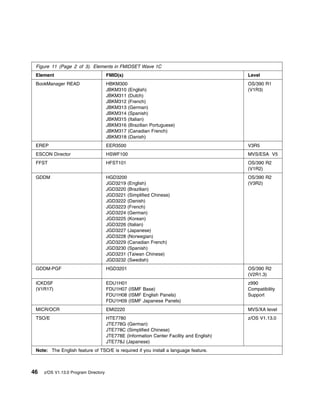
      6.5.3.5 Elements in Wave 1C . . . . . . . . . . . . . . . . . . . . . . . . . . .     . . . . . . . . . . . .   45
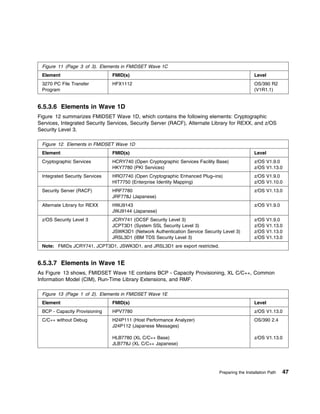
      6.5.3.6 Elements in Wave 1D . . . . . . . . . . . . . . . . . . . . . . . . . . .     . . . . . . . . . . . .   47
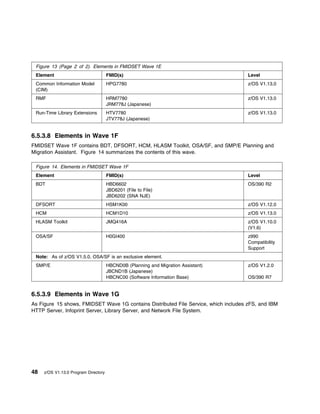
      6.5.3.7 Elements in Wave 1E . . . . . . . . . . . . . . . . . . . . . . . . . . . .   . . . . . . . . . . . .   47
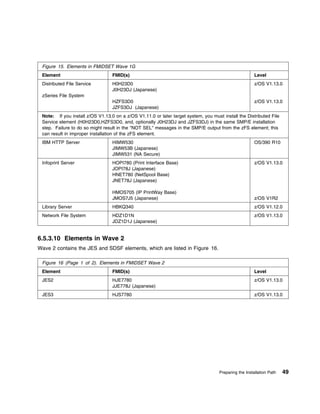
      6.5.3.8 Elements in Wave 1F . . . . . . . . . . . . . . . . . . . . . . . . . . . .   . . . . . . . . . . . .   48
      6.5.3.9 Elements in Wave 1G . . . . . . . . . . . . . . . . . . . . . . . . . . .     . . . . . . . . . . . .   48
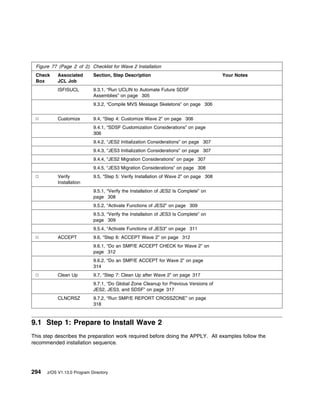
      6.5.3.10 Elements in Wave 2 . . . . . . . . . . . . . . . . . . . . . . . . . . . .   . . . . . . . . . . . .   49
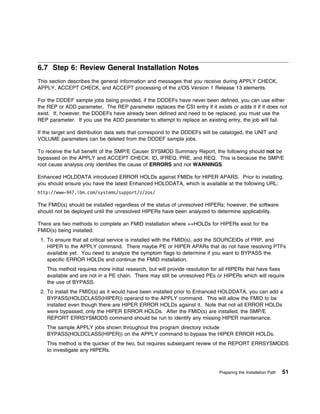
6.6 Step 5: Review Library Restructure/Renaming Notes . . . . . . . . . . . . . . .         . . . . . . . . . . . .   50
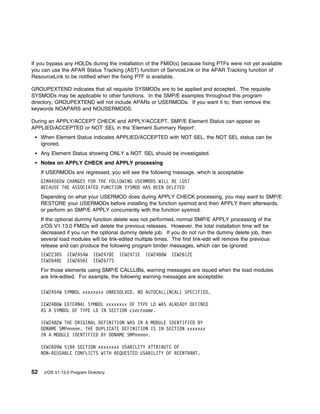
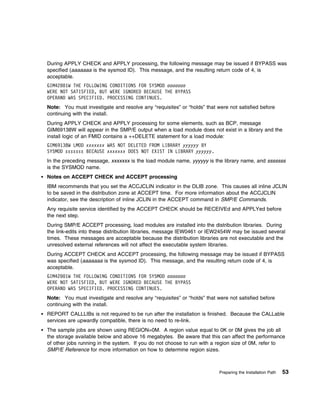
6.7 Step 6: Review General Installation Notes . . . . . . . . . . . . . . . . . . . . .     . . . . . . . . . . . .   51
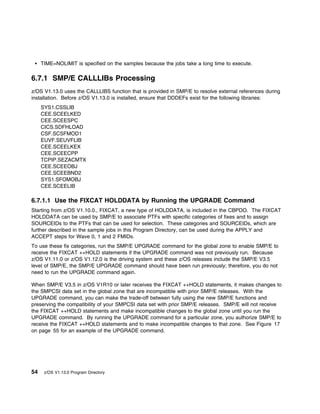
   6.7.1 SMP/E CALLLIBs Processing . . . . . . . . . . . . . . . . . . . . . . . . . .      . . . . . . . . . . . .   54
      6.7.1.1 Use the FIXCAT HOLDDATA by Running the UPGRADE Command                        . . . . . . . . . . . .   54

7.0 Installation Instructions for Wave 0 FMIDs . . . . . . . . . . . . . . .        . . . . . . . . . . . . . . . .   57
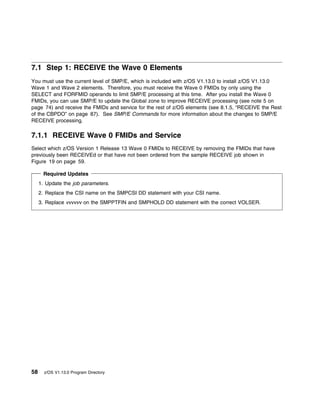
7.1 Step 1: RECEIVE the Wave 0 Elements . . . . . . . . . . . . . . . . . .         . . . . . . . . . . . . . . . .   58
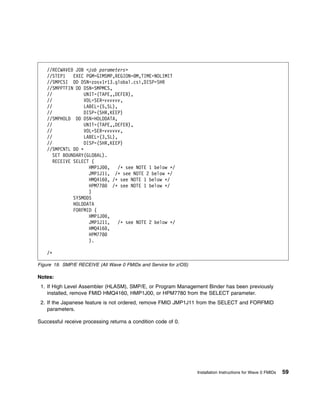
   7.1.1 RECEIVE Wave 0 FMIDs and Service . . . . . . . . . . . . . . . .           . . . . . . . . . . . . . . . .   58
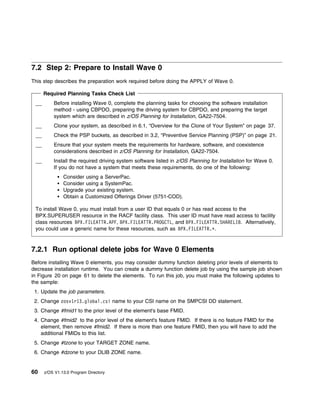
7.2 Step 2: Prepare to Install Wave 0 . . . . . . . . . . . . . . . . . . . . . .   . . . . . . . . . . . . . . . .   60
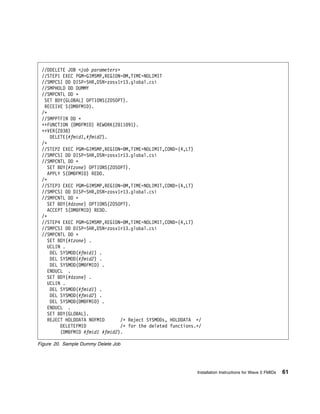
   7.2.1 Run optional delete jobs for Wave 0 Elements . . . . . . . . . . . .       . . . . . . . . . . . . . . . .   60
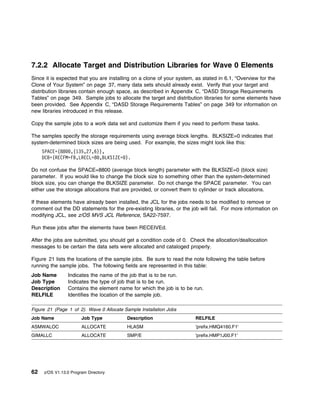
   7.2.2 Allocate Target and Distribution Libraries for Wave 0 Elements . .         . . . . . . . . . . . . . . . .   62
   7.2.3 Create File System Directories for Wave 0 . . . . . . . . . . . . . .      . . . . . . . . . . . . . . . .   63
   7.2.4 Define DDDEFs for Wave 0 Elements . . . . . . . . . . . . . . . . .        . . . . . . . . . . . . . . . .   63
7.3 Step 3: APPLY Wave 0 . . . . . . . . . . . . . . . . . . . . . . . . . . . .    . . . . . . . . . . . . . . . .   64
   7.3.1 Create a Cross-Zone Set . . . . . . . . . . . . . . . . . . . . . . . .    . . . . . . . . . . . . . . . .   64
   7.3.2 Select Which z/OS Version 1 Release 13 Wave 0 FMIDs to Install             . . . . . . . . . . . . . . . .   66
      7.3.2.1 Do an SMP/E APPLY CHECK for Wave 0 FMIDs and Service                  . . . . . . . . . . . . . . . .   67
         7.3.2.1.1 Messages expected during Binder APPLY CHECK . . . .              . . . . . . . . . . . . . . . .   68
      7.3.2.2 Do an SMP/E APPLY for Wave 0 FMIDs and Service . . . . .              . . . . . . . . . . . . . . . .   68
         7.3.2.2.1 Additional Messages Expected during Wave 0 APPLY . .             . . . . . . . . . . . . . . . .   70
            7.3.2.2.1.1 Messages expected during Binder APPLY . . . . . .           . . . . . . . . . . . . . . . .   70
7.4 Step 4: Wave 0 Customization . . . . . . . . . . . . . . . . . . . . . . . .    . . . . . . . . . . . . . . . .   70
   7.4.1 High Level Assembler . . . . . . . . . . . . . . . . . . . . . . . . . .   . . . . . . . . . . . . . . . .   70
   7.4.2 SMP/E Customization . . . . . . . . . . . . . . . . . . . . . . . . . .    . . . . . . . . . . . . . . . .   71
      7.4.2.1 Update SMP/E Entries . . . . . . . . . . . . . . . . . . . . . . .    . . . . . . . . . . . . . . . .   71

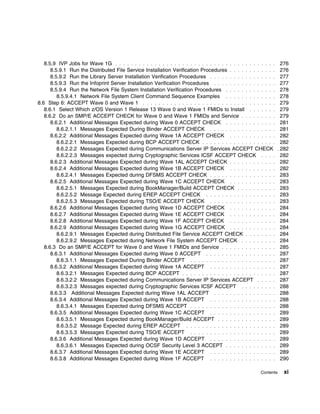
8.0 Installation Instructions for Wave 1 FMIDs . . . . . . . . .        . . . . . . . . . . . . . . . . . . . . . .   77
8.1 Step 1: Prepare to Install Wave 1 . . . . . . . . . . . . . . . .   . . . . . . . . . . . . . . . . . . . . . .   80
   8.1.1 Set up User and Group IDs Required for Installation . .        . . . . . . . . . . . . . . . . . . . . . .   81
   8.1.2 Root File System Size Changes in z/OS V1.13.0 . . . .          . . . . . . . . . . . . . . . . . . . . . .   85
   8.1.3 Driving System With an Active Root File System . . . .         . . . . . . . . . . . . . . . . . . . . . .   85
   8.1.4 Rename User Seclabel Beginning With 'SYS' if it Exists         . . . . . . . . . . . . . . . . . . . . . .   86
      8.1.4.1 Distributed File Service Installation Considerations .    . . . . . . . . . . . . . . . . . . . . . .   86
   8.1.5 RECEIVE the Rest of the CBPDO . . . . . . . . . . . . .        . . . . . . . . . . . . . . . . . . . . . .   87

iv   z/OS V1.13.0 Program Directory
8.1.6 Run Required and Optional Delete Jobs . . . . . . . . . . . . . . . . . . . . . . . . . . . . .         . .   87
      8.1.6.1 Run the Required Delete Job to Remove Obsolete Elements . . . . . . . . . . . . . .                . .   88
         8.1.6.1.1 Important Information to the Installer . . . . . . . . . . . . . . . . . . . . . . . . . .    .   . 89
      8.1.6.2 Run the Optional Delete Job for BCP before Wave 1A . . . . . . . . . . . . . . . . . .             .   . 90
      8.1.6.3 Run the Optional Delete Job for DFSMS after Wave 1A but before Wave 1B . . . . .                   .   . 91
      8.1.6.4 Run the Optional Delete Job for Other Elements . . . . . . . . . . . . . . . . . . . . . .         .   . 91
   8.1.7 Allocate Target and Distribution Libraries for Wave 1 Elements . . . . . . . . . . . . . . . .          .   . 91
   8.1.8 Create File System Directories . . . . . . . . . . . . . . . . . . . . . . . . . . . . . . . . . . .    .   . 96
   8.1.9 Define DDDEFs for Wave 1 Elements . . . . . . . . . . . . . . . . . . . . . . . . . . . . . . .         .   . 99
   8.1.10 Pre-APPLY Actions . . . . . . . . . . . . . . . . . . . . . . . . . . . . . . . . . . . . . . . . .    .    104
      8.1.10.1 Migration Actions . . . . . . . . . . . . . . . . . . . . . . . . . . . . . . . . . . . . . . .   .    104
      8.1.10.2 Migration Considerations for the Distributed File Service . . . . . . . . . . . . . . . .         .    105
      8.1.10.3 Migration Considerations for Integrated Cryptographic Services Facility (ICSF) . . .              .    105
8.2 Step 2: APPLY Wave 1 . . . . . . . . . . . . . . . . . . . . . . . . . . . . . . . . . . . . . . . . . .     .    105
   8.2.1 Select Which z/OS Wave 1 FMIDs to Install . . . . . . . . . . . . . . . . . . . . . . . . . . .         .    105
   8.2.2 Do an SMP/E APPLY CHECK for Wave 1 FMIDs and Service . . . . . . . . . . . . . . . .                    .    105
      8.2.2.1 Additional Messages Expected during Wave 1A APPLY CHECK . . . . . . . . . . . .                    .    107
         8.2.2.1.1 Messages Expected during BCP APPLY CHECK . . . . . . . . . . . . . . . . . . .                .    107
         8.2.2.1.2 Messages Expected during Communications Server IP Services APPLY CHECK                        .    108
         8.2.2.1.3 Messages expected during Cryptographic Services ICSF APPLY CHECK . . . .                      .    108
      8.2.2.2 Additional Messages Expected during Wave 1AL APPLY CHECK . . . . . . . . . . . .                   .    108
      8.2.2.3 Additional Messages Expected during Wave 1B APPLY CHECK . . . . . . . . . . . .                    .    108
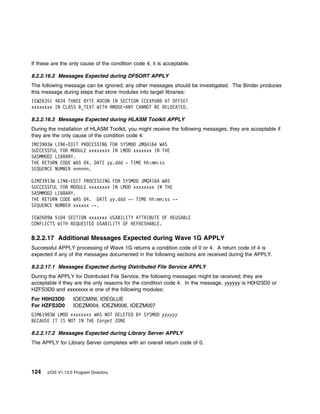
         8.2.2.3.1 Messages Expected during DFSMS APPLY CHECK . . . . . . . . . . . . . . . . .                  .    108
      8.2.2.4 Additional Messages Expected during Wave 1C APPLY CHECK . . . . . . . . . . . .                    .    108
         8.2.2.4.1 Messages Expected during BookManager/Build APPLY CHECK . . . . . . . . . .                    .    109
         8.2.2.4.2 Messages Expected during EREP APPLY CHECK . . . . . . . . . . . . . . . . . .                 .    109
         8.2.2.4.3 Messages Expected during TSO/E APPLY CHECK . . . . . . . . . . . . . . . . .                  .    109
      8.2.2.5 Additional Messages Expected during Wave 1D APPLY CHECK . . . . . . . . . . . .                    .    109
      8.2.2.6 Additional Messages Expected during Wave 1E APPLY CHECK . . . . . . . . . . . .                    .    110
      8.2.2.7 Additional Messages Expected during Wave 1F APPLY CHECK . . . . . . . . . . . .                    .    110
      8.2.2.8 Additional Messages Expected during Wave 1G APPLY CHECK . . . . . . . . . . . .                    .    110
         8.2.2.8.1 Messages Expected during Distributed File Service Apply Check . . . . . . . . .               .    110
         8.2.2.8.2 Messages Expected during Network File System Apply Check . . . . . . . . . . .                .    110
      8.2.2.9 Do an SMP/E APPLY for Wave 1 FMIDs and Service . . . . . . . . . . . . . . . . . . .               .    110
      8.2.2.10 Additional Messages Expected during Wave 1A APPLY . . . . . . . . . . . . . . . . .               .    113
         8.2.2.10.1 Messages Expected during BCP APPLY . . . . . . . . . . . . . . . . . . . . . . .             .    113
         8.2.2.10.2 Messages Expected during Communications Server IP Services APPLY . . . .                     .    113
         8.2.2.10.3 Messages Expected during Communications Server SNA Services APPLY . . .                      .    115
            8.2.2.10.3.1 Information Messages . . . . . . . . . . . . . . . . . . . . . . . . . . . . . . .      .    116
            8.2.2.10.3.2 Warning Messages . . . . . . . . . . . . . . . . . . . . . . . . . . . . . . . . .      .    116
         8.2.2.10.4 Messages expected during Cryptographic Services ICSF APPLY . . . . . . . . .                 .    116
         8.2.2.10.5 Messages Expected during ISPF APPLY . . . . . . . . . . . . . . . . . . . . . . .            .    117
         8.2.2.10.6 Messages Expected During Metal C Runtime Library APPLY . . . . . . . . . . .                 .    117
      8.2.2.11 Additional Messages Expected during Wave 1AL APPLY . . . . . . . . . . . . . . . .                .    117
         8.2.2.11.1 For XWindows X11R4 Feature . . . . . . . . . . . . . . . . . . . . . . . . . . . . .         .    117
      8.2.2.12 Additional Messages Expected during Wave 1B APPLY . . . . . . . . . . . . . . . . .               .    118

                                                                                                          Contents     v
8.2.2.12.1 Messages Expected during DFSMS APPLY . . . . . . . . . . . . . . . .                . . . . . .   118
      8.2.2.13 Additional Messages Expected during Wave 1C APPLY . . . . . . . . . . . .                . . . . . .   120
         8.2.2.13.1 Messages Expected during BookManager/Build APPLY . . . . . . . . .                  . . . . . .   121
         8.2.2.13.2 Messages Expected during EREP APPLY . . . . . . . . . . . . . . . . .               . . . . . .   121
         8.2.2.13.3 Messages Expected during TSO/E APPLY . . . . . . . . . . . . . . . . .              . . . . . .   121
      8.2.2.14 Additional Messages Expected during Wave 1D APPLY . . . . . . . . . . . .                . . . . . .   122
         8.2.2.14.1 Messages Expected during Cryptographic Services APPLY . . . . . . .                 . . . . . .   122
         8.2.2.14.2 Messages Expected During z/OS Security Level 3 APPLY . . . . . . . .                . . . . . .   123
      8.2.2.15 Additional Messages Expected during Wave 1E APPLY . . . . . . . . . . . .                . . . . . .   123
      8.2.2.16 Additional Messages Expected during Wave 1F APPLY . . . . . . . . . . . .                . . . . . .   123
         8.2.2.16.1 Messages Expected during Bulk Data Transfer (BDT) APPLY . . . . . .                 . . . . . .   123
         8.2.2.16.2 Messages Expected during DFSORT APPLY . . . . . . . . . . . . . . .                 . . . . . .   124
         8.2.2.16.3 Messages Expected during HLASM Toolkit APPLY . . . . . . . . . . . .                . . . . . .   124
      8.2.2.17 Additional Messages Expected during Wave 1G APPLY . . . . . . . . . . . .                . . . . . .   124
         8.2.2.17.1 Messages Expected during Distributed File Service APPLY . . . . . . .               . . . . . .   124
         8.2.2.17.2 Messages Expected during Library Server APPLY . . . . . . . . . . . .               . . . . . .   124
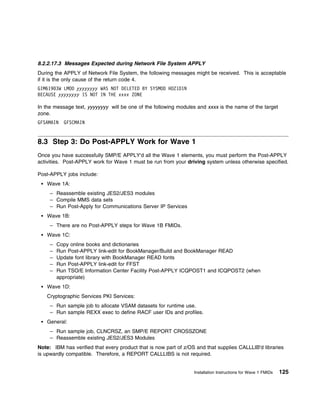
         8.2.2.17.3 Messages Expected during Network File System APPLY . . . . . . . .                  . . . . . .   125
8.3 Step 3: Do Post-APPLY Work for Wave 1 . . . . . . . . . . . . . . . . . . . . . . . . . .           . . . . . .   125
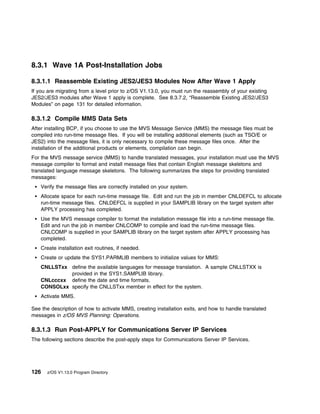
   8.3.1 Wave 1A Post-Installation Jobs . . . . . . . . . . . . . . . . . . . . . . . . . . . . . .     . . . . . .   126
      8.3.1.1 Reassemble Existing JES2/JES3 Modules Now After Wave 1 Apply . . . . .                    . . . . . .   126
      8.3.1.2 Compile MMS Data Sets . . . . . . . . . . . . . . . . . . . . . . . . . . . . . . .       . . . . . .   126
      8.3.1.3 Run Post-APPLY for Communications Server IP Services . . . . . . . . . . .                . . . . . .   126
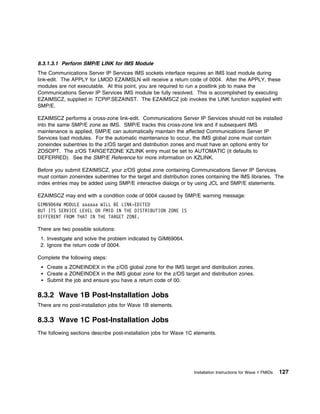
         8.3.1.3.1 Perform SMP/E LINK for IMS Module . . . . . . . . . . . . . . . . . . . .            . . . . . .   127
   8.3.2 Wave 1B Post-Installation Jobs . . . . . . . . . . . . . . . . . . . . . . . . . . . . . .     . . . . . .   127
   8.3.3 Wave 1C Post-Installation Jobs . . . . . . . . . . . . . . . . . . . . . . . . . . . . .       . . . . . .   127
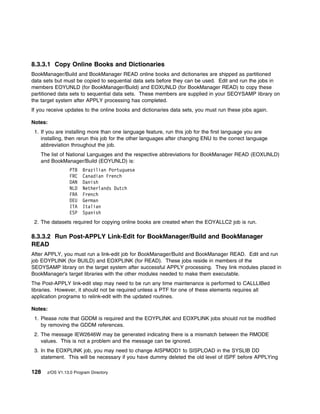
      8.3.3.1 Copy Online Books and Dictionaries . . . . . . . . . . . . . . . . . . . . . . . .        . . . . . .   128
      8.3.3.2 Run Post-APPLY Link-Edit for BookManager/Build and BookManager READ                       . . . . . .   128
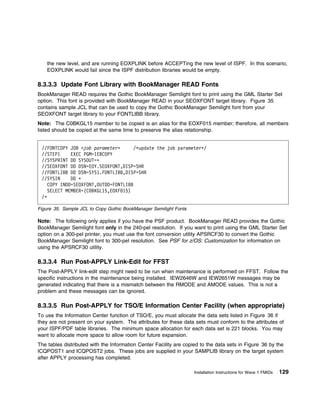
      8.3.3.3 Update Font Library with BookManager READ Fonts . . . . . . . . . . . . . .               . . . . . .   129
      8.3.3.4 Run Post-APPLY Link-Edit for FFST . . . . . . . . . . . . . . . . . . . . . . . .         . . . . . .   129
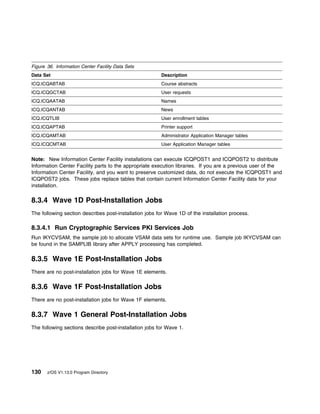
      8.3.3.5 Run Post-APPLY for TSO/E Information Center Facility (when appropriate) .                 . . . . . .   129
   8.3.4 Wave 1D Post-Installation Jobs . . . . . . . . . . . . . . . . . . . . . . . . . . . . .       . . . . . .   130
      8.3.4.1 Run Cryptographic Services PKI Services Job . . . . . . . . . . . . . . . . . .           . . . . . .   130
   8.3.5 Wave 1E Post-Installation Jobs . . . . . . . . . . . . . . . . . . . . . . . . . . . . . .     . . . . . .   130
   8.3.6 Wave 1F Post-Installation Jobs . . . . . . . . . . . . . . . . . . . . . . . . . . . . . .     . . . . . .   130
   8.3.7 Wave 1 General Post-Installation Jobs . . . . . . . . . . . . . . . . . . . . . . . . .        . . . . . .   130
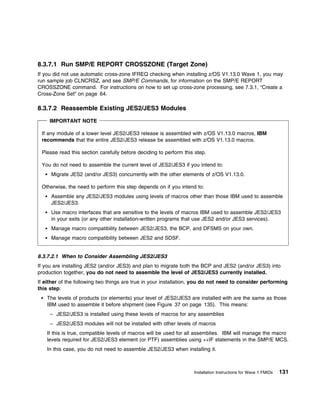
      8.3.7.1 Run SMP/E REPORT CROSSZONE (Target Zone) . . . . . . . . . . . . . . .                    . . . . . .   131
      8.3.7.2 Reassemble Existing JES2/JES3 Modules . . . . . . . . . . . . . . . . . . . .             . . . . . .   131
         8.3.7.2.1 When to Consider Assembling JES2/JES3 . . . . . . . . . . . . . . . . . .            . . . . . .   131
         8.3.7.2.2 SMP/E Management of Assemblies . . . . . . . . . . . . . . . . . . . . . .           . . . . . .   132
         8.3.7.2.3 Avoid Macro Incompatibilities . . . . . . . . . . . . . . . . . . . . . . . . .      . . . . . .   133
            8.3.7.2.3.1 Reassemble all JES2/JES3 Source Modules Using SMP/E . . . . .                   . . . . . .   133
            8.3.7.2.3.2 Use Copies of Old Macro Libraries for SMP/E Processing . . . . . .              . . . . . .   135
            8.3.7.2.3.3 Levels of Products IBM Uses to Assemble JES2/JES3 . . . . . . . .               . . . . . .   135
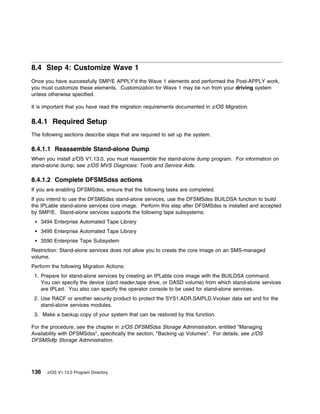
8.4 Step 4: Customize Wave 1 . . . . . . . . . . . . . . . . . . . . . . . . . . . . . . . . . . .      . . . . . .   136
   8.4.1 Required Setup . . . . . . . . . . . . . . . . . . . . . . . . . . . . . . . . . . . . . . .   . . . . . .   136
      8.4.1.1 Reassemble Stand-alone Dump . . . . . . . . . . . . . . . . . . . . . . . . . .           . . . . . .   136

vi   z/OS V1.13.0 Program Directory
8.4.1.2 Complete DFSMSdss actions . . . . . . . . . . . . . . . . . . . . . . . . . . . . . . .          . . .   136
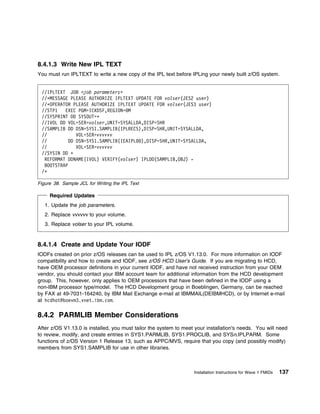
   8.4.1.3 Write New IPL TEXT . . . . . . . . . . . . . . . . . . . . . . . . . . . . . . . . . . . .       . . .   137
   8.4.1.4 Create and Update Your IODF . . . . . . . . . . . . . . . . . . . . . . . . . . . . . .          . . .   137
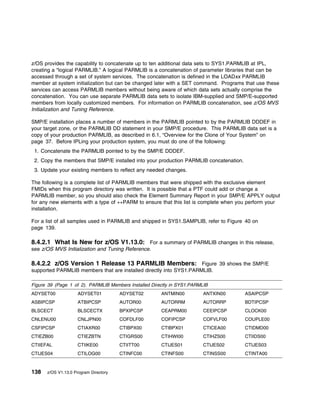
8.4.2 PARMLIB Member Considerations . . . . . . . . . . . . . . . . . . . . . . . . . . . . . . .           . . .   137
   8.4.2.1 What Is New for z/OS V1.13.0 . . . . . . . . . . . . . . . . . . . . . . . . . . . . . .         . . .   138
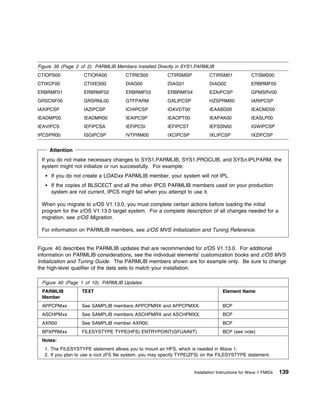
   8.4.2.2 z/OS Version 1 Release 13 PARMLIB Members . . . . . . . . . . . . . . . . . . . .                . . .   138
   8.4.2.3 IFAPRDxx Considerations . . . . . . . . . . . . . . . . . . . . . . . . . . . . . . . . .        . . .   148
   8.4.2.4 BPXPRMxx Updates . . . . . . . . . . . . . . . . . . . . . . . . . . . . . . . . . . . .         . . .   149
   8.4.2.5 LNKLSTxx Considerations . . . . . . . . . . . . . . . . . . . . . . . . . . . . . . . . .        . . .   151
      8.4.2.5.1 Making the Run-time Library Available . . . . . . . . . . . . . . . . . . . . . . .         . . .   151
         8.4.2.5.1.1 z/OS Elements and Features Using STEPLIB for Language Environment                      . . .   152
   8.4.2.6 PROGxx and IEAAPFxx Considerations . . . . . . . . . . . . . . . . . . . . . . . . .             . . .   153
8.4.3 PROCLIB Member Considerations . . . . . . . . . . . . . . . . . . . . . . . . . . . . . . .           . . .   153
   8.4.3.1 Copying Default PROCLIB Members . . . . . . . . . . . . . . . . . . . . . . . . . . .            . . .   154
   8.4.3.2 Ensuring that Entire Libraries are Accessible . . . . . . . . . . . . . . . . . . . . . .        . . .   157
   8.4.3.3 Customize Procedures for C/C++ without Debug . . . . . . . . . . . . . . . . . . . .             . . .   158
   8.4.3.4 Customize Language Environment Procedures . . . . . . . . . . . . . . . . . . . . .              . . .   158
8.4.4 z/OS Version 1 Release 13 ISPF Setup Considerations . . . . . . . . . . . . . . . . . .               . . .   158
   8.4.4.1 SMP/E Customization Considerations for ISPF . . . . . . . . . . . . . . . . . . . . .            . . .   167
   8.4.4.2 Update ISPF Command Table ISPTCM (if Required) . . . . . . . . . . . . . . . . .                 . . .   167
8.4.5 Element Customization . . . . . . . . . . . . . . . . . . . . . . . . . . . . . . . . . . . . .       . . .   167
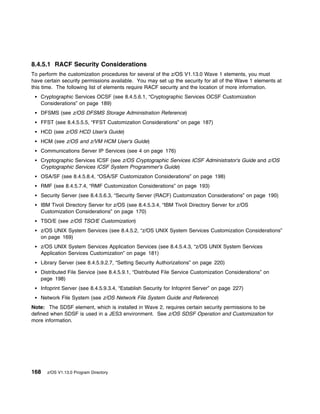
   8.4.5.1 RACF Security Considerations . . . . . . . . . . . . . . . . . . . . . . . . . . . . . .         . . .   168
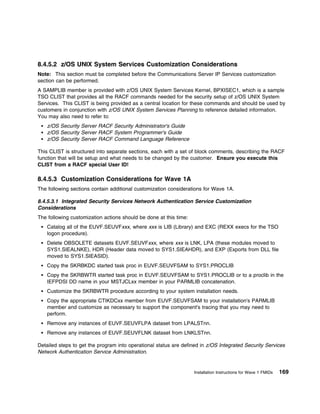
   8.4.5.2 z/OS UNIX System Services Customization Considerations . . . . . . . . . . . . .                 . . .   169
   8.4.5.3 Customization Considerations for Wave 1A . . . . . . . . . . . . . . . . . . . . . . .           . . .   169
      8.4.5.3.1 Integrated Security Services Network Authentication Service Customization
       Considerations . . . . . . . . . . . . . . . . . . . . . . . . . . . . . . . . . . . . . . . . . .   . . .   169
      8.4.5.3.2 Language Environment Customization Considerations . . . . . . . . . . . . . .               . . .   170
      8.4.5.3.3 Cryptographic Services ICSF Customization Considerations . . . . . . . . . .                . . .   170
      8.4.5.3.4 IBM Tivoli Directory Server for z/OS Customization Considerations . . . . . .               . . .   170
      8.4.5.3.5 IBM Health Checker for z/OS Customization Considerations . . . . . . . . . .                . . .   170
      8.4.5.3.6 ISPF Customization Considerations . . . . . . . . . . . . . . . . . . . . . . . . .         . . .   171
         8.4.5.3.6.1 ISPF C/S with TSO linemode in a GUI window . . . . . . . . . . . . . . .               . . .   171
         8.4.5.3.6.2 z/OS Version 1 Release 13 Sample Panels . . . . . . . . . . . . . . . . .              . . .   171
         8.4.5.3.6.3 Using the z/OS Version 1 Release 13 Sample Panels . . . . . . . . . . .                . . .   172
   8.4.5.4 Customization Considerations for Wave 1B . . . . . . . . . . . . . . . . . . . . . . .           . . .   172
      8.4.5.4.1 Communications Server IP Services Customization Considerations . . . . . .                  . . .   172
         8.4.5.4.1.1 CICS Sockets Interface Customization Considerations . . . . . . . . . . .              . . .   179
         8.4.5.4.1.2 IMS Sockets Interface Customization Considerations . . . . . . . . . . . .             . . .   179
         8.4.5.4.1.3 Network Print Facility Customization Considerations . . . . . . . . . . . .            . . .   180
         8.4.5.4.1.4 Communications Server Security Level 3 Customization Considerations .                  . . .   180
      8.4.5.4.2 DFSMS Customization Considerations . . . . . . . . . . . . . . . . . . . . . . .            . . .   180
         8.4.5.4.2.1 Make ISMF Available to the TSO User . . . . . . . . . . . . . . . . . . . .            . . .   180
         8.4.5.4.2.2 3800/3900 Printing Subsystem . . . . . . . . . . . . . . . . . . . . . . . . .         . . .   180
         8.4.5.4.2.3 Starter Set Information . . . . . . . . . . . . . . . . . . . . . . . . . . . . . .    . . .   180
         8.4.5.4.2.4 Activate CDRA . . . . . . . . . . . . . . . . . . . . . . . . . . . . . . . . . .      . . .   181
      8.4.5.4.3 z/OS UNIX System Services Application Services Customization . . . . . . . .                . . .   181

                                                                                                       Contents     vii
8.4.5.4.4 z/OS UNIX System Services: Integrated Call Level Interface (ICLI) Customization
           Considerations . . . . . . . . . . . . . . . . . . . . . . . . . . . . . . . . . . . . . . . . . . . . .     181
       8.4.5.5 Customization Considerations for Wave 1C . . . . . . . . . . . . . . . . . . . . . . . . . .             181
          8.4.5.5.1 BookManager/Build Customization Considerations . . . . . . . . . . . . . . . . . . .                181
          8.4.5.5.2 BookManager READ Customization Considerations . . . . . . . . . . . . . . . . . .                   182
             8.4.5.5.2.1 Customize Defaults in EOXVOPTS . . . . . . . . . . . . . . . . . . . . . . . . .               182
             8.4.5.5.2.2 Customize EOXMNALC for Data Set Allocation . . . . . . . . . . . . . . . . . .                 185
             8.4.5.5.2.3 Customize the Index Utility . . . . . . . . . . . . . . . . . . . . . . . . . . . . . .        185
             8.4.5.5.2.4 Set Bookshelf Defaults . . . . . . . . . . . . . . . . . . . . . . . . . . . . . . . .         186
             8.4.5.5.2.5 Set up ISPF Preprocessed Panels . . . . . . . . . . . . . . . . . . . . . . . . . .            186
          8.4.5.5.3 EREP Customization Considerations . . . . . . . . . . . . . . . . . . . . . . . . . . .             186
          8.4.5.5.4 ESCON Director Support Customization Considerations . . . . . . . . . . . . . . . .                 186
             8.4.5.5.4.1 ESCON Director Support Security . . . . . . . . . . . . . . . . . . . . . . . . . .            186
          8.4.5.5.5 FFST Customization Considerations . . . . . . . . . . . . . . . . . . . . . . . . . . .             187
          8.4.5.5.6 GDDM and GDDM-PGF Customization Considerations . . . . . . . . . . . . . . . .                      187
          8.4.5.5.7 ICKDSF Customization Considerations . . . . . . . . . . . . . . . . . . . . . . . . . .             188
          8.4.5.5.8 TSO/E Customization Considerations . . . . . . . . . . . . . . . . . . . . . . . . . . .            188
          8.4.5.5.9 3270 PC File Transfer Program Customization Considerations . . . . . . . . . . . .                  188
             8.4.5.5.9.1 Modify Translate Tables for 3270 PC File Transfer Program . . . . . . . . . . .                188
       8.4.5.6 Customization Considerations for Wave 1D . . . . . . . . . . . . . . . . . . . . . . . . . .             189
          8.4.5.6.1 Cryptographic Services OCSF Customization Considerations . . . . . . . . . . . . .                  189
          8.4.5.6.2 Alternate Library for REXX Customization Considerations . . . . . . . . . . . . . . .               189
             8.4.5.6.2.1 Activating Alternate Library for REXX . . . . . . . . . . . . . . . . . . . . . . . .          189
             8.4.5.6.2.2 Installing the Compiler Programming Table for the Alternate Library for REXX                 . 190
          8.4.5.6.3 Security Server (RACF) Customization Considerations . . . . . . . . . . . . . . . . .               190
             8.4.5.6.3.1 Prepare the RACF Database . . . . . . . . . . . . . . . . . . . . . . . . . . . . .            190
             8.4.5.6.3.2 Automate Dynamic Parse Initialization . . . . . . . . . . . . . . . . . . . . . . . .          190
             8.4.5.6.3.3 Data Encryption Standard (DES) for Passwords . . . . . . . . . . . . . . . . . .               191
             8.4.5.6.3.4 Additional Considerations before IPLing Your system . . . . . . . . . . . . . .                191
             8.4.5.6.3.5 Other System Considerations for Initial Installation . . . . . . . . . . . . . . . .           192
       8.4.5.7 Customization Considerations for Wave 1E . . . . . . . . . . . . . . . . . . . . . . . . . .             192
          8.4.5.7.1 Run-Time Library Extensions Customization Considerations . . . . . . . . . . . . .                  192
             8.4.5.7.1.1 Customization of the Run-Time Library Extensions for CICS . . . . . . . . . . .                192
             8.4.5.7.1.2 XL C/C++ Compiler Customization Considerations . . . . . . . . . . . . . . . .                 192
          8.4.5.7.2 Customization of the Performance Analyzer for CICS . . . . . . . . . . . . . . . . .                193
          8.4.5.7.3 CIM Customization Considerations . . . . . . . . . . . . . . . . . . . . . . . . . . . .            193
          8.4.5.7.4 RMF Customization Considerations . . . . . . . . . . . . . . . . . . . . . . . . . . . .            193
       8.4.5.8 Customization Considerations for Wave 1F . . . . . . . . . . . . . . . . . . . . . . . . . .             193
          8.4.5.8.1 BDT Customization Considerations . . . . . . . . . . . . . . . . . . . . . . . . . . . .            193
          8.4.5.8.2 DFSORT Customization Considerations . . . . . . . . . . . . . . . . . . . . . . . . .               194
             8.4.5.8.2.1 Change DFSORT Installation Options . . . . . . . . . . . . . . . . . . . . . . . .             194
             8.4.5.8.2.2 Change DFSORT SVC Name . . . . . . . . . . . . . . . . . . . . . . . . . . . .                 195
             8.4.5.8.2.3 Replacing IEBGENER with ICEGENER (optional) . . . . . . . . . . . . . . . . .                  196
             8.4.5.8.2.4 Make DFSORT Programs Available . . . . . . . . . . . . . . . . . . . . . . . . .               197
             8.4.5.8.2.5 Invoking DFSORT from a REXX CLIST . . . . . . . . . . . . . . . . . . . . . . .                197
          8.4.5.8.3 HCM Customization Considerations . . . . . . . . . . . . . . . . . . . . . . . . . . . .            198

viii   z/OS V1.13.0 Program Directory
8.4.5.8.4 OSA/SF Customization Considerations . . . . . . . . . . . . . . . . . . . . . .            . . . .    198
      8.4.5.9 Customization Considerations for Wave 1G . . . . . . . . . . . . . . . . . . . . . .            . . . .    198
         8.4.5.9.1 Distributed File Service Customization Considerations . . . . . . . . . . . . .            . . . .    198
            8.4.5.9.1.1 Customize the JCL Procedures . . . . . . . . . . . . . . . . . . . . . . .            . . . .    198
            8.4.5.9.1.2 RACF Updates for DFS/SMB/zFS . . . . . . . . . . . . . . . . . . . . . .              . . . .    198
            8.4.5.9.1.3 Running the dfs_cpfiles Program . . . . . . . . . . . . . . . . . . . . . . .         . . . .    199
            8.4.5.9.1.4 Additional DFS/SMB Considerations . . . . . . . . . . . . . . . . . . . . .           . . . .    199
            8.4.5.9.1.5 Installation Verification and Configuration Considerations . . . . . . . .            . . . .    200
         8.4.5.9.2 Library Server Customization Considerations . . . . . . . . . . . . . . . . . .            . . . .    200
            8.4.5.9.2.1 Library Server Catalog for z/OS . . . . . . . . . . . . . . . . . . . . . . .         . . . .    203
            8.4.5.9.2.2 Configuring Library Server . . . . . . . . . . . . . . . . . . . . . . . . . .        . . . .    204
            8.4.5.9.2.3 Advanced Customization Parameters . . . . . . . . . . . . . . . . . . . .             . . . .    211
            8.4.5.9.2.4 HTTP Server Customization Considerations . . . . . . . . . . . . . . . .              . . . .    217
            8.4.5.9.2.5 Updating Library Server Directories . . . . . . . . . . . . . . . . . . . . .         . . . .    219
            8.4.5.9.2.6 BookRead . . . . . . . . . . . . . . . . . . . . . . . . . . . . . . . . . . . .      . . . .    219
            8.4.5.9.2.7 Setting Security Authorizations . . . . . . . . . . . . . . . . . . . . . . . .       . . . .    220
            8.4.5.9.2.8 Additional Site Customization . . . . . . . . . . . . . . . . . . . . . . . . .       . . . .    224
            8.4.5.9.2.9 Performance Guidelines . . . . . . . . . . . . . . . . . . . . . . . . . . . .        . . . .    224
         8.4.5.9.3 Infoprint Server Customization Considerations . . . . . . . . . . . . . . . . .            . . . .    225
            8.4.5.9.3.1 Initialize NetSpool Message Log Data Set . . . . . . . . . . . . . . . . .            . . . .    225
            8.4.5.9.3.2 Initialize IP PrintWay basic mode Operational Data Sets . . . . . . . . .             . . . .    225
            8.4.5.9.3.3 Customize the UNIX Environment for Infoprint Server . . . . . . . . . .               . . . .    226
            8.4.5.9.3.4 Establish Security for Infoprint Server . . . . . . . . . . . . . . . . . . . .       . . . .    227
            8.4.5.9.3.5 Make Updates to the Communications Server IP Profile . . . . . . . . .                . . . .    228
            8.4.5.9.3.6 Customize IP PrintWay and NetSpool . . . . . . . . . . . . . . . . . . . .            . . . .    228
            8.4.5.9.3.7 Customize HTTP Server for Infoprint Central . . . . . . . . . . . . . . . .           . . . .    228
            8.4.5.9.3.8 Customize Distributed File Service for SMB Printing . . . . . . . . . . .             . . . .    228
            8.4.5.9.3.9 Download Client Code to Workstation . . . . . . . . . . . . . . . . . . . .           . . . .    229
         8.4.5.9.4 Network File System Customization Considerations . . . . . . . . . . . . . .               . . . .    229
8.5 Step 5: Verify Installation of Wave 0 and Wave 1 . . . . . . . . . . . . . . . . . . . . . . . .          . . . .    229
   8.5.1 IPL the z/OS System . . . . . . . . . . . . . . . . . . . . . . . . . . . . . . . . . . . . . .      . . . .    229
      8.5.1.1 File System Execution . . . . . . . . . . . . . . . . . . . . . . . . . . . . . . . . . .       . . . .    230
      8.5.1.2 BPXISETS and BPXISETD . . . . . . . . . . . . . . . . . . . . . . . . . . . . . . .             . . . .    230
   8.5.2 Verify Installation of z/OS Version 1 Release 13 Wave 0 and Wave 1 FMIDs . . . . .                   . . . .    232
      8.5.2.1 IVP Jobs for Wave 0 . . . . . . . . . . . . . . . . . . . . . . . . . . . . . . . . . . .       . . . .    234
         8.5.2.1.1 Run the High Level Assembler Installation Verification Procedure . . . . . .               . . . .    234
      8.5.2.2 Run the BCP and ISPF Installation Verification Procedure . . . . . . . . . . . . .              . . . .    235
         8.5.2.2.1 ISPF . . . . . . . . . . . . . . . . . . . . . . . . . . . . . . . . . . . . . . . . . .   . . . .    235
         8.5.2.2.2 ISPF SCLM . . . . . . . . . . . . . . . . . . . . . . . . . . . . . . . . . . . . . .      . . . .    236
   8.5.3 IVP Jobs for Wave 1A . . . . . . . . . . . . . . . . . . . . . . . . . . . . . . . . . . . . .       . . . .    237
      8.5.3.1 Run the Language Environment Installation Verification Procedure . . . . . . . .                . . . .    238
   8.5.4 IVP Jobs for Wave 1B . . . . . . . . . . . . . . . . . . . . . . . . . . . . . . . . . . . . .       . . . .    238
      8.5.4.1 Run the Communications Server IP Services Installation Verification Procedures                  . . . .    238
      8.5.4.2 Run the DFSMS Installation Verification Procedure . . . . . . . . . . . . . . . . .             . . . .    241
         8.5.4.2.1 DFSMSdfp OAM Installation Verification Procedure . . . . . . . . . . . . . .               . . . .    241
      8.5.4.3 DFSMSrmm Installation Verification Procedures . . . . . . . . . . . . . . . . . . .             . . . .    242

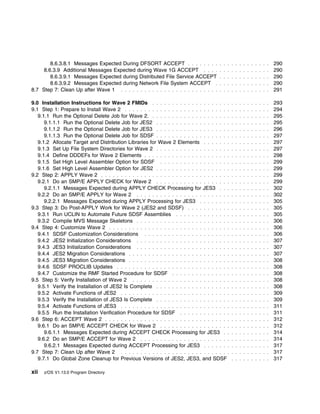
                                                                                                              Contents    ix
8.5.4.3.1 Preparing to Run the IVP . . . . . . . . . . . . . . . . . . . . . . . . . . . . . .       . . .   242
          8.5.4.3.2 Running the IVP . . . . . . . . . . . . . . . . . . . . . . . . . . . . . . . . . . .      . . .   244
       8.5.4.4 DFSMShsm Installation Verification Procedures . . . . . . . . . . . . . . . . . . . .           . . .   249
          8.5.4.4.1 Setup Requirements . . . . . . . . . . . . . . . . . . . . . . . . . . . . . . . . . .     . . .   249
          8.5.4.4.2 Steps for Running the Installation Verification Procedure . . . . . . . . . . . .          . . .   249
          8.5.4.4.3 IVP Job Listings . . . . . . . . . . . . . . . . . . . . . . . . . . . . . . . . . . . .   . . .   256
             8.5.4.4.3.1 HSMIVP . . . . . . . . . . . . . . . . . . . . . . . . . . . . . . . . . . . . . .    . . .   256
             8.5.4.4.3.2 HSMIVP1 . . . . . . . . . . . . . . . . . . . . . . . . . . . . . . . . . . . . .     . . .   256
       8.5.4.5 Run the DFSMS HFS Installation Verification Procedure . . . . . . . . . . . . . . .             . . .   256
       8.5.4.6 Run the HCD Installation Verification Procedure . . . . . . . . . . . . . . . . . . . .         . . .   258
       8.5.4.7 Run the z/OS UNIX System Services Setup Verification Procedures . . . . . . . .                 . . .   258
    8.5.5 IVP Jobs for Wave 1C . . . . . . . . . . . . . . . . . . . . . . . . . . . . . . . . . . . . . .     . . .   258
       8.5.5.1 Run the BookManager/Build Installation Verification Procedure . . . . . . . . . . .             . . .   258
       8.5.5.2 Run the BookManager READ Installation Verification Procedure . . . . . . . . . . .              . . .   259
       8.5.5.3 Run the FFST Installation Verification Program . . . . . . . . . . . . . . . . . . . . .        . . .   261
       8.5.5.4 Run the GDDM Installation Verification Procedures . . . . . . . . . . . . . . . . . .           . . .   261
          8.5.5.4.1 Testing GDDM/MVS Base . . . . . . . . . . . . . . . . . . . . . . . . . . . . . .          . . .   261
          8.5.5.4.2 Testing GDDM-PGF . . . . . . . . . . . . . . . . . . . . . . . . . . . . . . . . . .       . . .   262
          8.5.5.4.3 Testing GDDM-REXX . . . . . . . . . . . . . . . . . . . . . . . . . . . . . . . . .        . . .   263
          8.5.5.4.4 Testing GDDM under CICS . . . . . . . . . . . . . . . . . . . . . . . . . . . . .          . . .   263
             8.5.5.4.4.1 Testing GDDM/MVS Base under CICS . . . . . . . . . . . . . . . . . . . .              . . .   263
             8.5.5.4.4.2 Testing GDDM-PGF under CICS . . . . . . . . . . . . . . . . . . . . . . . .           . . .   264
             8.5.5.4.4.3 Testing the Print Utility ADMOPUC under CICS . . . . . . . . . . . . . . .            . . .   265
          8.5.5.4.5 Testing GDDM under IMS . . . . . . . . . . . . . . . . . . . . . . . . . . . . . .         . . .   265
             8.5.5.4.5.1 Testing GDDM/MVS Base under IMS . . . . . . . . . . . . . . . . . . . . .             . . .   265
             8.5.5.4.5.2 Testing GDDM-PGF under IMS . . . . . . . . . . . . . . . . . . . . . . . .            . . .   266
             8.5.5.4.5.3 Testing the Print Utility ADMOPUI under IMS . . . . . . . . . . . . . . . .           . . .   266
          8.5.5.4.6 What to Do If Any of the Installation Tests Fail . . . . . . . . . . . . . . . . . .       . . .   267
       8.5.5.5 Run the ICKDSF Installation Verification Procedure . . . . . . . . . . . . . . . . . .          . . .   268
    8.5.6 IVP Jobs for Wave 1D . . . . . . . . . . . . . . . . . . . . . . . . . . . . . . . . . . . . . .     . . .   268
       8.5.6.1 Run the Security Server (RACF) Installation Verification Procedures . . . . . . . .             . . .   268
    8.5.7 IVP Jobs for Wave 1E . . . . . . . . . . . . . . . . . . . . . . . . . . . . . . . . . . . . . .     . . .   269
       8.5.7.1 Run the Run-Time Library Extensions Installation Verification Procedures . . . . .              . . .   269
       8.5.7.2 Run the XL C/C++ Installation Verification Procedures . . . . . . . . . . . . . . . .           . . .   269
          8.5.7.2.1 Run the XL C/C++ Installation Verification Procedure . . . . . . . . . . . . . .           . . .   270
          8.5.7.2.2 Run the C/C++ Host Performance Anaylzer Installation Verification Procedure                . . .   270
       8.5.7.3 Run the Common Information Model (CIM) Installation Verification Procedure . . .                . . .   270
       8.5.7.4 Run the RMF Installation Verification Procedure . . . . . . . . . . . . . . . . . . . .         . . .   271
    8.5.8 IVP Jobs for Wave 1F . . . . . . . . . . . . . . . . . . . . . . . . . . . . . . . . . . . . . .     . . .   271
       8.5.8.1 Run the DFSORT Installation Verification Procedures . . . . . . . . . . . . . . . . .           . . .   271
          8.5.8.1.1 ICEJCLJ and ICEINVJ Verification . . . . . . . . . . . . . . . . . . . . . . . . .         . . .   271
          8.5.8.1.2 ICETOOLJ Verification . . . . . . . . . . . . . . . . . . . . . . . . . . . . . . . .      . . .   272
          8.5.8.1.3 ICECSRTJ Verification . . . . . . . . . . . . . . . . . . . . . . . . . . . . . . . .      . . .   274
          8.5.8.1.4 ICEGENER Verification . . . . . . . . . . . . . . . . . . . . . . . . . . . . . . . .      . . .   274
          8.5.8.1.5 Install DFSORT in Permanent Libraries . . . . . . . . . . . . . . . . . . . . . .          . . .   275
       8.5.8.2 Run the High Level Assembler Toolkit Installation Verification Program . . . . . . .            . . .   275

x    z/OS V1.13.0 Program Directory
8.5.9 IVP Jobs for Wave 1G . . . . . . . . . . . . . . . . . . . . . . . . . . . . . . . . . . . . . . . . .     276
      8.5.9.1 Run the Distributed File Service Installation Verification Procedures . . . . . . . . . . . .         276
      8.5.9.2 Run the Library Server Installation Verification Procedures . . . . . . . . . . . . . . . . .         277
      8.5.9.3 Run the Infoprint Server Installation Verification Procedures . . . . . . . . . . . . . . . .         277
      8.5.9.4 Run the Network File System Installation Verification Procedures . . . . . . . . . . . . .            278
         8.5.9.4.1 Network File System Client Command Sequence Examples . . . . . . . . . . . . .                   278
8.6 Step 6: ACCEPT Wave 0 and Wave 1 . . . . . . . . . . . . . . . . . . . . . . . . . . . . . . . . . .            279
   8.6.1 Select Which z/OS Version 1 Release 13 Wave 0 and Wave 1 FMIDs to Install . . . . . . .                    279
   8.6.2 Do an SMP/E ACCEPT CHECK for Wave 0 and Wave 1 FMIDs and Service . . . . . . . . .                         279
      8.6.2.1 Additional Messages Expected during Wave 0 ACCEPT CHECK . . . . . . . . . . . . .                     281
         8.6.2.1.1 Messages Expected During Binder ACCEPT CHECK . . . . . . . . . . . . . . . . .                   281
      8.6.2.2 Additional Messages Expected during Wave 1A ACCEPT CHECK . . . . . . . . . . . .                      282
         8.6.2.2.1 Messages Expected during BCP ACCEPT CHECK . . . . . . . . . . . . . . . . . . .                  282
         8.6.2.2.2 Messages Expected during Communications Server IP Services ACCEPT CHECK                        . 282
         8.6.2.2.3 Messages expected during Cryptographic Services ICSF ACCEPT CHECK . . . .                        282
      8.6.2.3 Additional Messages Expected during Wave 1AL ACCEPT CHECK . . . . . . . . . . . .                     282
      8.6.2.4 Additional Messages Expected during Wave 1B ACCEPT CHECK . . . . . . . . . . . .                      282
         8.6.2.4.1 Messages Expected during DFSMS ACCEPT CHECK . . . . . . . . . . . . . . . . .                    283
      8.6.2.5 Additional Messages Expected during Wave 1C ACCEPT CHECK . . . . . . . . . . . .                      283
         8.6.2.5.1 Messages Expected during BookManager/Build ACCEPT CHECK . . . . . . . . . .                      283
         8.6.2.5.2 Message Expected during EREP ACCEPT CHECK . . . . . . . . . . . . . . . . . .                    283
         8.6.2.5.3 Messages Expected during TSO/E ACCEPT CHECK . . . . . . . . . . . . . . . . .                    283
      8.6.2.6 Additional Messages Expected during Wave 1D ACCEPT CHECK . . . . . . . . . . . .                      284
      8.6.2.7 Additional Messages Expected during Wave 1E ACCEPT CHECK . . . . . . . . . . . .                      284
      8.6.2.8 Additional Messages Expected during Wave 1F ACCEPT CHECK . . . . . . . . . . . .                      284
      8.6.2.9 Additional Messages Expected during Wave 1G ACCEPT CHECK . . . . . . . . . . . .                      284
         8.6.2.9.1 Messages Expected during Distributed File Service ACCEPT CHECK . . . . . . . .                   284
         8.6.2.9.2 Messages Expected during Network File System ACCEPT CHECK . . . . . . . . .                      284
   8.6.3 Do an SMP/E ACCEPT for Wave 0 and Wave 1 FMIDs and Service . . . . . . . . . . . . . .                     285
      8.6.3.1 Additional Messages Expected during Wave 0 ACCEPT . . . . . . . . . . . . . . . . . .                 287
         8.6.3.1.1 Messages Expected During Binder ACCEPT . . . . . . . . . . . . . . . . . . . . . .               287
      8.6.3.2 Additional Messages Expected during Wave 1A ACCEPT . . . . . . . . . . . . . . . . .                  287
         8.6.3.2.1 Messages Expected during BCP ACCEPT . . . . . . . . . . . . . . . . . . . . . . . .              287
         8.6.3.2.2 Messages Expected during Communications Server IP Services ACCEPT . . . . .                      287
         8.6.3.2.3 Messages expected during Cryptographic Services ICSF ACCEPT . . . . . . . . .                    288
      8.6.3.3 Additional Messages Expected during Wave 1AL ACCEPT . . . . . . . . . . . . . . . .                   288
      8.6.3.4 Additional Messages Expected during Wave 1B ACCEPT . . . . . . . . . . . . . . . . .                  288
         8.6.3.4.1 Messages Expected during DFSMS ACCEPT . . . . . . . . . . . . . . . . . . . . . .                288
      8.6.3.5 Additional Messages Expected during Wave 1C ACCEPT . . . . . . . . . . . . . . . . .                  289
         8.6.3.5.1 Messages Expected during BookManager/Build ACCEPT . . . . . . . . . . . . . . .                  289
         8.6.3.5.2 Message Expected during EREP ACCEPT . . . . . . . . . . . . . . . . . . . . . . .                289
         8.6.3.5.3 Messages Expected during TSO/E ACCEPT . . . . . . . . . . . . . . . . . . . . . .                289
      8.6.3.6 Additional Messages Expected during Wave 1D ACCEPT . . . . . . . . . . . . . . . . .                  289
         8.6.3.6.1 Messages Expected during OCSF Security Level 3 ACCEPT . . . . . . . . . . . . .                  289
      8.6.3.7 Additional Messages Expected during Wave 1E ACCEPT . . . . . . . . . . . . . . . . .                  289
      8.6.3.8 Additional Messages Expected during Wave 1F ACCEPT . . . . . . . . . . . . . . . . .                  290

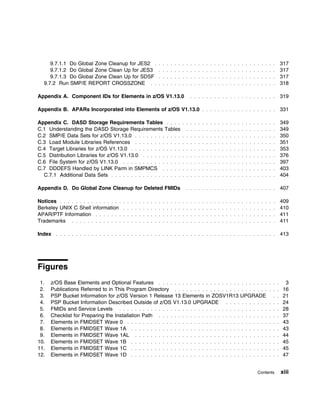
                                                                                                        Contents    xi
8.6.3.8.1 Messages Expected During DFSORT ACCEPT . . . . . . . .              . . . . . . . . . . . . .     290
     8.6.3.9 Additional Messages Expected during Wave 1G ACCEPT . . . .               . . . . . . . . . . . . .     290
        8.6.3.9.1 Messages Expected during Distributed File Service ACCEPT            . . . . . . . . . . . . .     290
        8.6.3.9.2 Messages Expected during Network File System ACCEPT .               . . . . . . . . . . . . .     290
8.7 Step 7: Clean Up after Wave 1 . . . . . . . . . . . . . . . . . . . . . . . . .   . . . . . . . . . . . . .     291

9.0 Installation Instructions for Wave 2 FMIDs . . . . . . . . . . . . . . . . . . . .        . . . . . . . . . .   293
9.1 Step 1: Prepare to Install Wave 2 . . . . . . . . . . . . . . . . . . . . . . . . . . .   . . . . . . . . . .   294
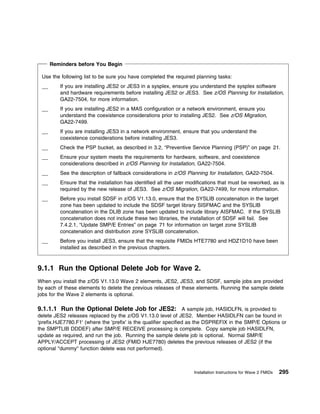
   9.1.1 Run the Optional Delete Job for Wave 2. . . . . . . . . . . . . . . . . . . . .      . . . . . . . . . .   295
      9.1.1.1 Run the Optional Delete Job for JES2 . . . . . . . . . . . . . . . . . . .      . . . . . . . . . .   295
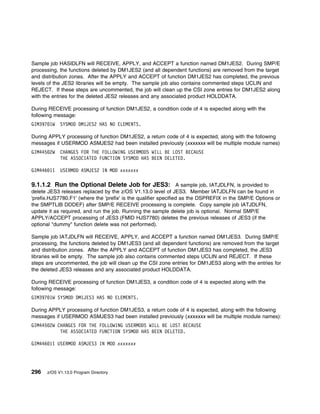
      9.1.1.2 Run the Optional Delete Job for JES3 . . . . . . . . . . . . . . . . . . .      . . . . . . . . . .   296
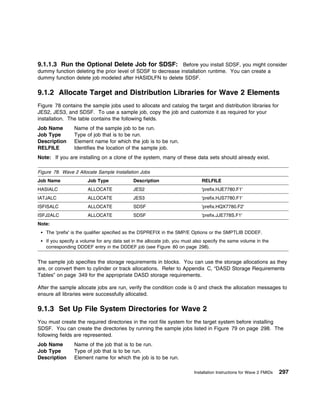
      9.1.1.3 Run the Optional Delete Job for SDSF . . . . . . . . . . . . . . . . . . .      . . . . . . . . . .   297
   9.1.2 Allocate Target and Distribution Libraries for Wave 2 Elements . . . . . . .         . . . . . . . . . .   297
   9.1.3 Set Up File System Directories for Wave 2 . . . . . . . . . . . . . . . . . . .      . . . . . . . . . .   297
   9.1.4 Define DDDEFs for Wave 2 Elements . . . . . . . . . . . . . . . . . . . . . .        . . . . . . . . . .   298
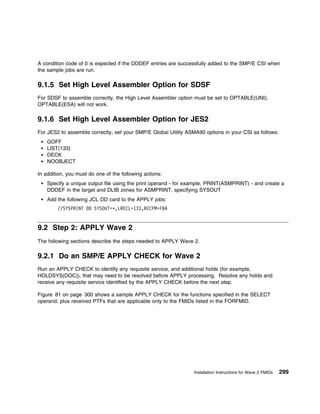
   9.1.5 Set High Level Assembler Option for SDSF . . . . . . . . . . . . . . . . . .         . . . . . . . . . .   299
   9.1.6 Set High Level Assembler Option for JES2 . . . . . . . . . . . . . . . . . . .       . . . . . . . . . .   299
9.2 Step 2: APPLY Wave 2 . . . . . . . . . . . . . . . . . . . . . . . . . . . . . . . . .    . . . . . . . . . .   299
   9.2.1 Do an SMP/E APPLY CHECK for Wave 2 . . . . . . . . . . . . . . . . . . .             . . . . . . . . . .   299
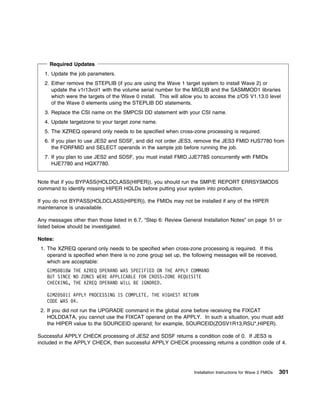
      9.2.1.1 Messages Expected during APPLY CHECK Processing for JES3 . . .                  . . . . . . . . . .   302
   9.2.2 Do an SMP/E APPLY for Wave 2 . . . . . . . . . . . . . . . . . . . . . . . .         . . . . . . . . . .   302
      9.2.2.1 Messages Expected during APPLY Processing for JES3 . . . . . . . .              . . . . . . . . . .   305
9.3 Step 3: Do Post-APPLY Work for Wave 2 (JES2 and SDSF) . . . . . . . . . . .               . . . . . . . . . .   305
   9.3.1 Run UCLIN to Automate Future SDSF Assemblies . . . . . . . . . . . . . .             . . . . . . . . . .   305
   9.3.2 Compile MVS Message Skeletons . . . . . . . . . . . . . . . . . . . . . . . .        . . . . . . . . . .   306
9.4 Step 4: Customize Wave 2 . . . . . . . . . . . . . . . . . . . . . . . . . . . . . . .    . . . . . . . . . .   306
   9.4.1 SDSF Customization Considerations . . . . . . . . . . . . . . . . . . . . . .        . . . . . . . . . .   306
   9.4.2 JES2 Initialization Considerations . . . . . . . . . . . . . . . . . . . . . . . .   . . . . . . . . . .   307
   9.4.3 JES3 Initialization Considerations . . . . . . . . . . . . . . . . . . . . . . . .   . . . . . . . . . .   307
   9.4.4 JES2 Migration Considerations . . . . . . . . . . . . . . . . . . . . . . . . . .    . . . . . . . . . .   307
   9.4.5 JES3 Migration Considerations . . . . . . . . . . . . . . . . . . . . . . . . . .    . . . . . . . . . .   308
   9.4.6 SDSF PROCLIB Updates . . . . . . . . . . . . . . . . . . . . . . . . . . . . .       . . . . . . . . . .   308
   9.4.7 Customize the RMF Started Procedure for SDSF . . . . . . . . . . . . . . .           . . . . . . . . . .   308
9.5 Step 5: Verify Installation of Wave 2 . . . . . . . . . . . . . . . . . . . . . . . . .   . . . . . . . . . .   308
   9.5.1 Verify the Installation of JES2 Is Complete . . . . . . . . . . . . . . . . . . .    . . . . . . . . . .   308
   9.5.2 Activate Functions of JES2 . . . . . . . . . . . . . . . . . . . . . . . . . . . .   . . . . . . . . . .   309
   9.5.3 Verify the Installation of JES3 Is Complete . . . . . . . . . . . . . . . . . . .    . . . . . . . . . .   309
   9.5.4 Activate Functions of JES3 . . . . . . . . . . . . . . . . . . . . . . . . . . . .   . . . . . . . . . .   311
   9.5.5 Run the Installation Verification Procedure for SDSF . . . . . . . . . . . . .       . . . . . . . . . .   311
9.6 Step 6: ACCEPT Wave 2 . . . . . . . . . . . . . . . . . . . . . . . . . . . . . . . .     . . . . . . . . . .   312
   9.6.1 Do an SMP/E ACCEPT CHECK for Wave 2 . . . . . . . . . . . . . . . . . .              . . . . . . . . . .   312
      9.6.1.1 Messages Expected during ACCEPT CHECK Processing for JES3 . .                   . . . . . . . . . .   314
   9.6.2 Do an SMP/E ACCEPT for Wave 2 . . . . . . . . . . . . . . . . . . . . . . .          . . . . . . . . . .   314
      9.6.2.1 Messages Expected during ACCEPT Processing for JES3 . . . . . . .               . . . . . . . . . .   317
9.7 Step 7: Clean Up after Wave 2 . . . . . . . . . . . . . . . . . . . . . . . . . . . .     . . . . . . . . . .   317
   9.7.1 Do Global Zone Cleanup for Previous Versions of JES2, JES3, and SDSF                 . . . . . . . . . .   317

xii   z/OS V1.13.0 Program Directory
9.7.1.1 Do Global Zone Cleanup for JES2 .              . . . . . . . . . . . . . . . . . . . . . . . . . . . . . .     317
     9.7.1.2 Do Global Zone Clean Up for JES3               . . . . . . . . . . . . . . . . . . . . . . . . . . . . . .     317
     9.7.1.3 Do Global Zone Clean Up for SDSF               . . . . . . . . . . . . . . . . . . . . . . . . . . . . . .     317
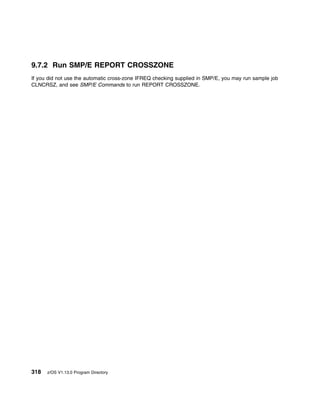
  9.7.2 Run SMP/E REPORT CROSSZONE . .                      . . . . . . . . . . . . . . . . . . . . . . . . . . . . . .     318

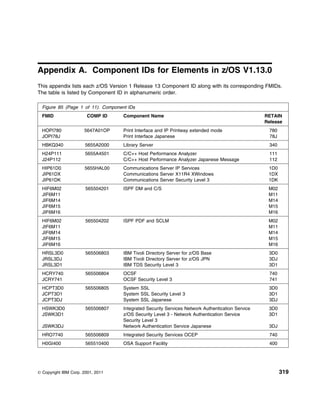
Appendix A. Component IDs for Elements in z/OS V1.13.0                      . . . . . . . . . . . . . . . . . . . . . .     319

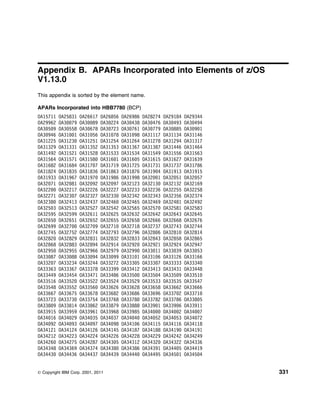
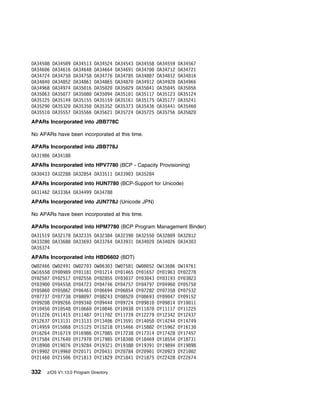
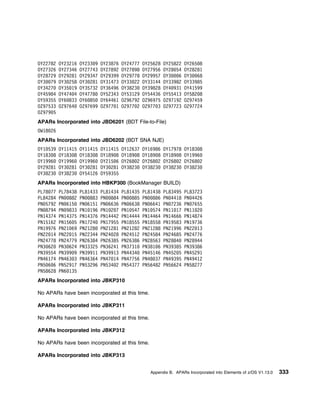
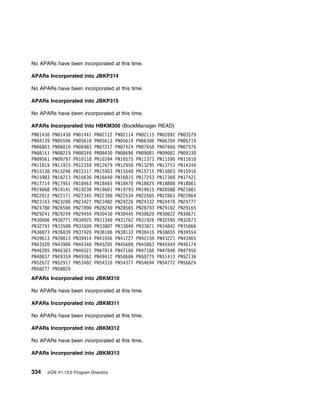
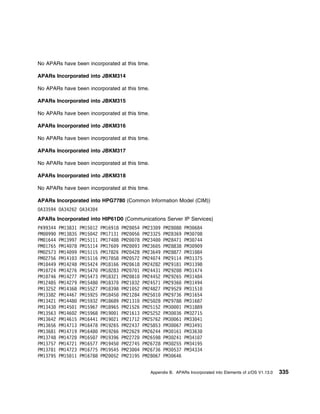
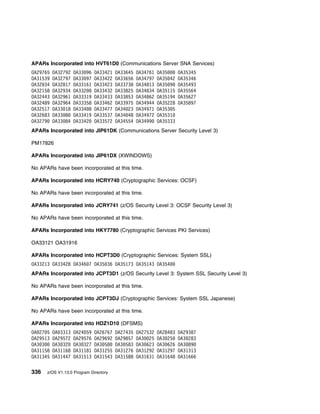
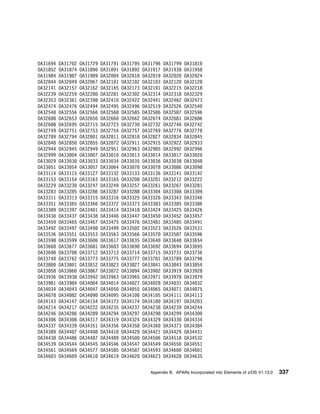
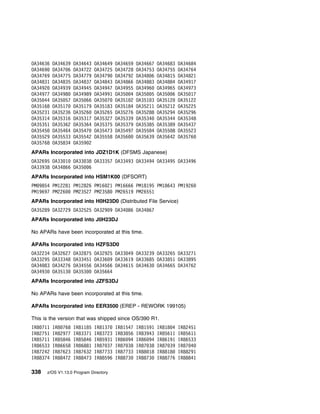
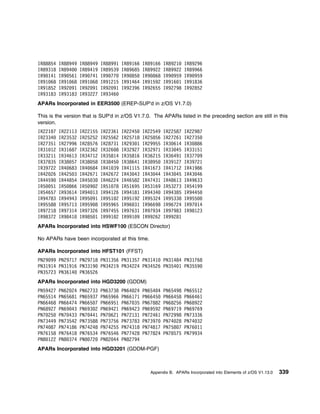
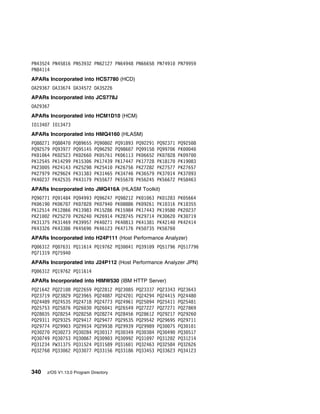
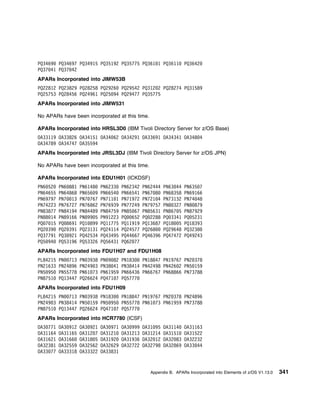
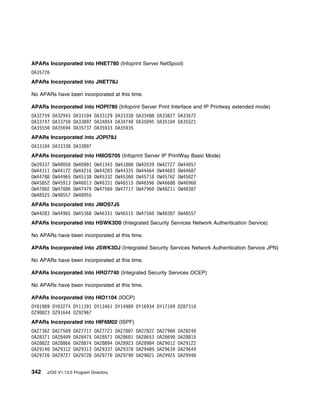
Appendix B. APARs Incorporated into Elements of z/OS V1.13.0                      . . . . . . . . . . . . . . . . . . .     331

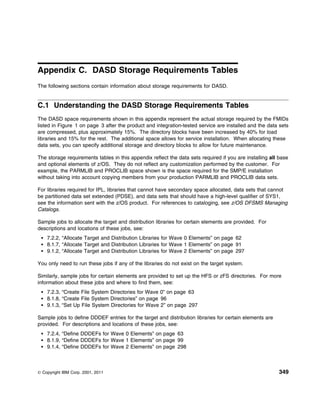
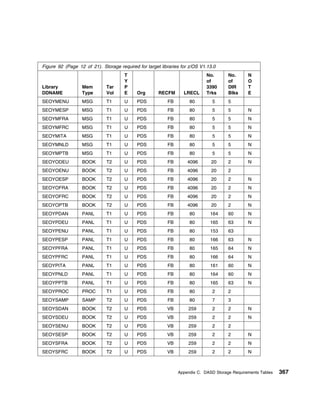
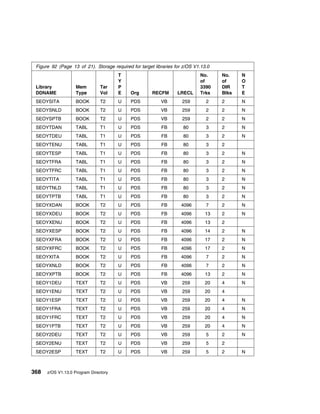
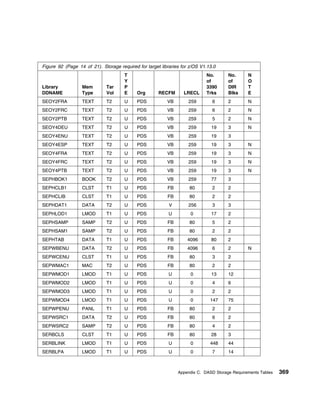
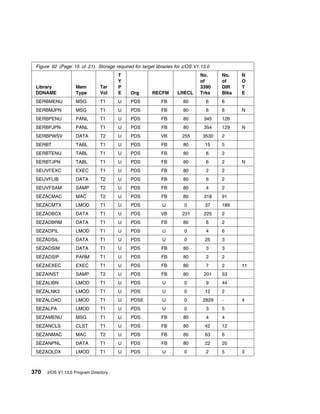
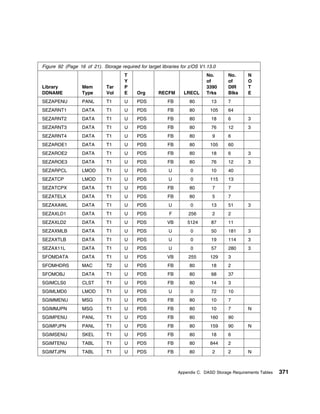
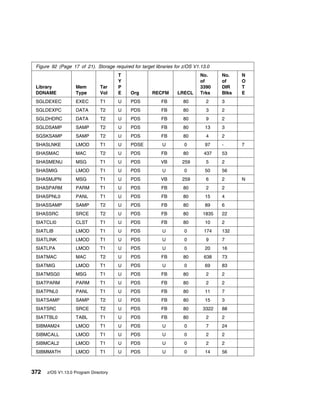
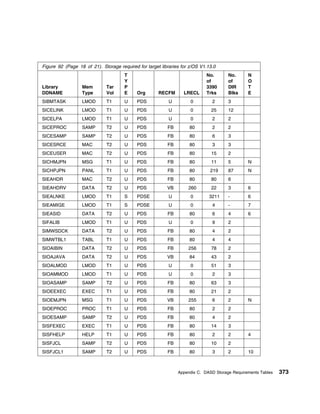
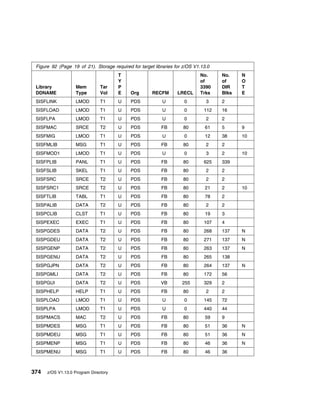
Appendix C. DASD Storage Requirements Tables . . . .                    . . . . . . . . . . . . . . . . . . . . . . . .     349
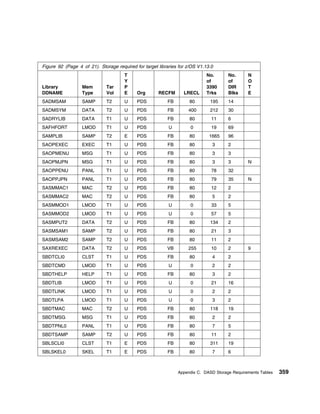
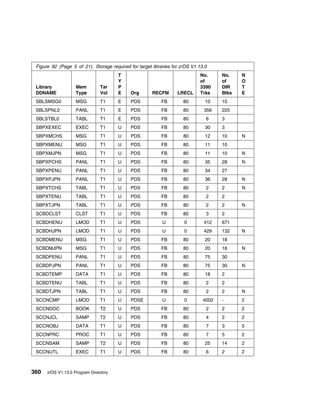
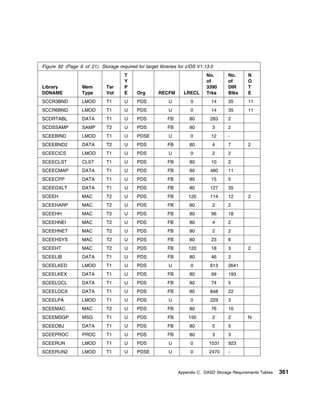
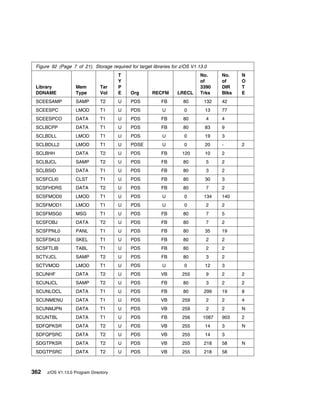
C.1 Understanding the DASD Storage Requirements Tables                    . . . . . . . . . . . . . . . . . . . . . . .     349
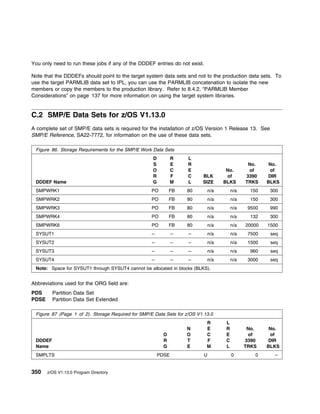
C.2 SMP/E Data Sets for z/OS V1.13.0 . . . . . . . . . . . .            . . . . . . . . . . . . . . . . . . . . . . . .     350
C.3 Load Module Libraries References . . . . . . . . . . . .            . . . . . . . . . . . . . . . . . . . . . . . .     351
C.4 Target Libraries for z/OS V1.13.0 . . . . . . . . . . . . .         . . . . . . . . . . . . . . . . . . . . . . . .     353
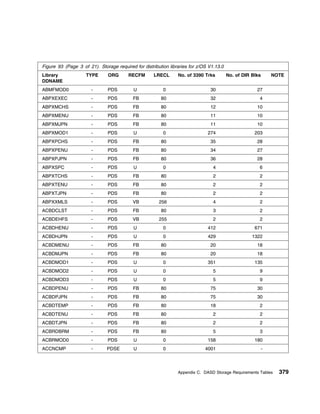
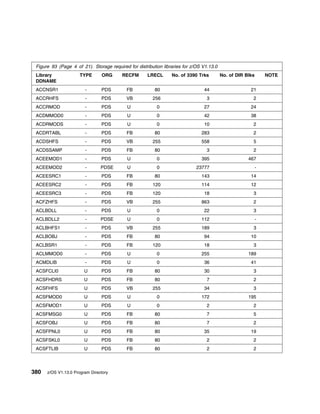
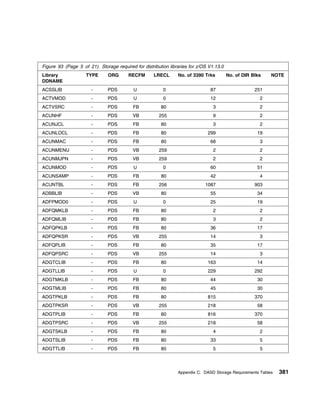
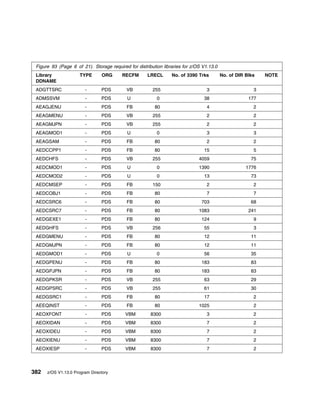
C.5 Distribution Libraries for z/OS V1.13.0 . . . . . . . . . .         . . . . . . . . . . . . . . . . . . . . . . . .     376
C.6 File System for z/OS V1.13.0 . . . . . . . . . . . . . . .          . . . . . . . . . . . . . . . . . . . . . . . .     397
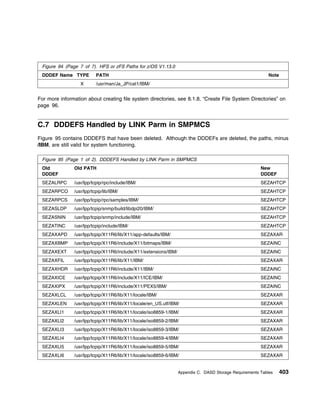
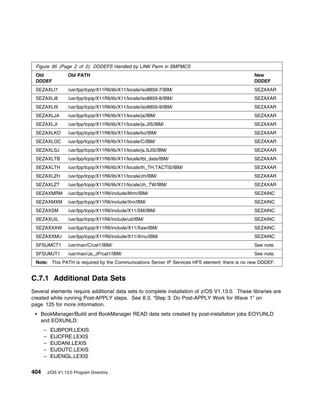
C.7 DDDEFS Handled by LINK Parm in SMPMCS . . . . .                     . . . . . . . . . . . . . . . . . . . . . . . .     403
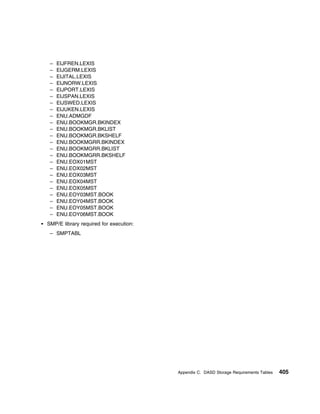
  C.7.1 Additional Data Sets . . . . . . . . . . . . . . . . . .        . . . . . . . . . . . . . . . . . . . . . . . .     404

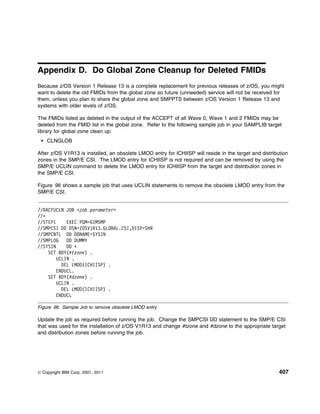
Appendix D. Do Global Zone Cleanup for Deleted FMIDs                      . . . . . . . . . . . . . . . . . . . . . . .     407

Notices . . . . . . . . . . . . . . . .   . . . . . . . . . . . . . . . . . . . . . . . . . . . . . . . . . . . . . . .     409
Berkeley UNIX C Shell information         . . . . . . . . . . . . . . . . . . . . . . . . . . . . . . . . . . . . . . .     410
APAR/PTF Information . . . . . . .        . . . . . . . . . . . . . . . . . . . . . . . . . . . . . . . . . . . . . . .     411
Trademarks . . . . . . . . . . . . .      . . . . . . . . . . . . . . . . . . . . . . . . . . . . . . . . . . . . . . .     411

Index   . . . . . . . . . . . . . . . . . . . . . . . . . . . . . . . . . . . . . . . . . . . . . . . . . . . . . . . .     413


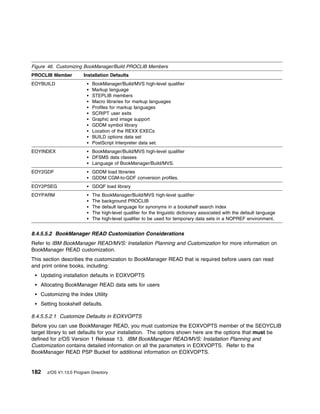
Figures
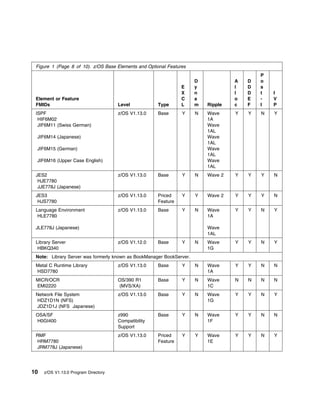
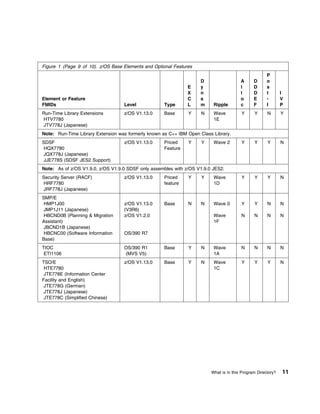
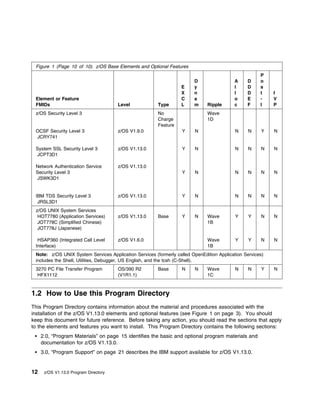
 1.   z/OS Base Elements and Optional Features . . . . . . . . . . . . . . . . . . . . . . . . . . . .              . . .     3
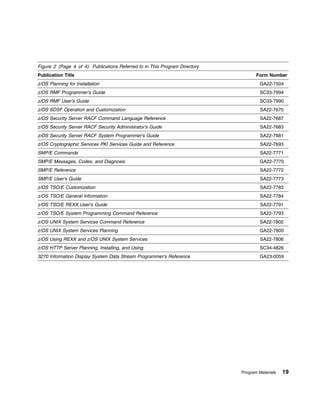
 2.   Publications Referred to in This Program Directory . . . . . . . . . . . . . . . . . . . . . . . .            . . .    16
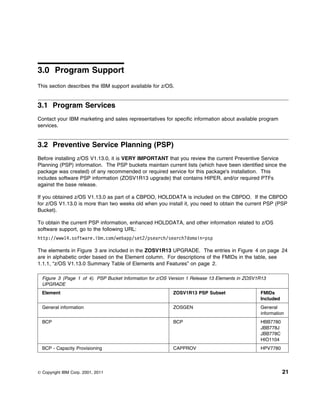
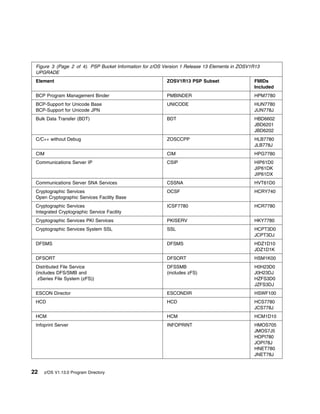
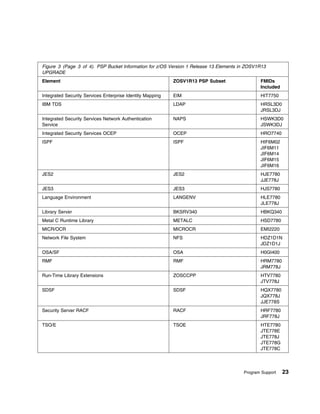
 3.   PSP Bucket Information for z/OS Version 1 Release 13 Elements in ZOSV1R13 UPGRADE                               . .    21
 4.   PSP Bucket Information Described Outside of z/OS V1.13.0 UPGRADE . . . . . . . . . . .                        . . .    24
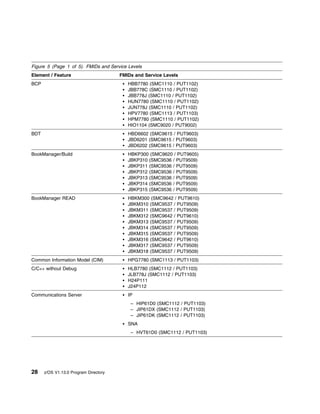
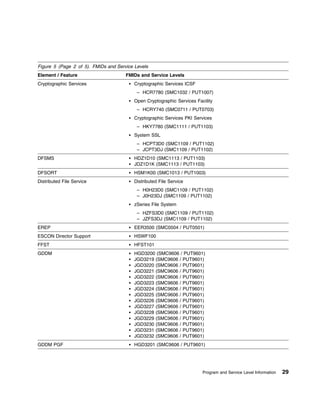
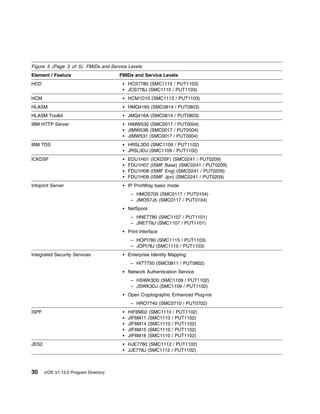
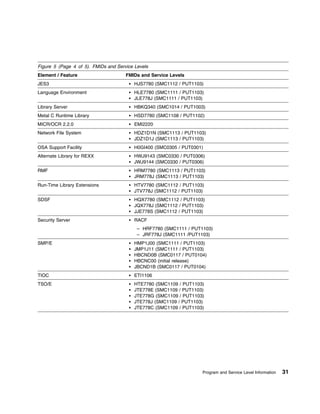
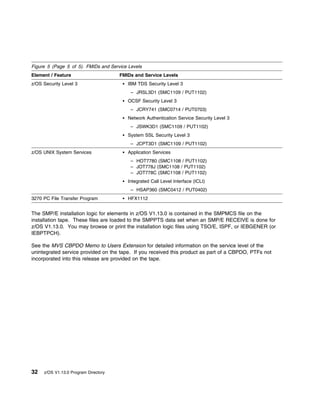
 5.   FMIDs and Service Levels . . . . . . . . . . . . . . . . . . . . . . . . . . . . . . . . . . . . . .          . . .    28
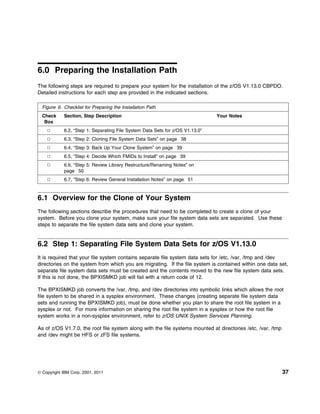
 6.   Checklist for Preparing the Installation Path . . . . . . . . . . . . . . . . . . . . . . . . . . . .         . . .    37
 7.   Elements in FMIDSET Wave 0 . . . . . . . . . . . . . . . . . . . . . . . . . . . . . . . . . . . .            . . .    43
 8.   Elements in FMIDSET Wave 1A . . . . . . . . . . . . . . . . . . . . . . . . . . . . . . . . . . .             . . .    43
 9.   Elements in FMIDSET Wave 1AL . . . . . . . . . . . . . . . . . . . . . . . . . . . . . . . . . .              . . .    44
10.   Elements in FMIDSET Wave 1B . . . . . . . . . . . . . . . . . . . . . . . . . . . . . . . . . . .             . . .    45
11.   Elements in FMIDSET Wave 1C . . . . . . . . . . . . . . . . . . . . . . . . . . . . . . . . . . .             . . .    45
12.   Elements in FMIDSET Wave 1D . . . . . . . . . . . . . . . . . . . . . . . . . . . . . . . . . . .             . . .    47


                                                                                                              Contents      xiii
13.   Elements in FMIDSET Wave 1E . . . . . . . . . . . . . . . . . . . . . . . . . . . . . . . . .             . . . . .   47
14.   Elements in FMIDSET Wave 1F . . . . . . . . . . . . . . . . . . . . . . . . . . . . . . . . .             . . . . .   48
15.   Elements in FMIDSET Wave 1G             . . . . . . . . . . . . . . . . . . . . . . . . . . . . . . . .   . . . .   . 49
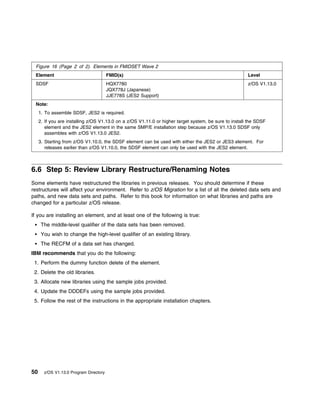
16.   Elements in FMIDSET Wave 2 . . . . . . . . . . . . . . . . . . . . . . . . . . . . . . . . . .            . . . .   . 49
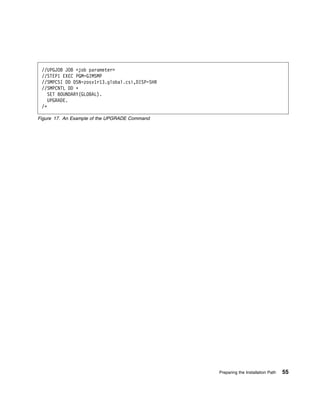
17.   An Example of the UPGRADE Command . . . . . . . . . . . . . . . . . . . . . . . . . . .                   . . . .   . 55
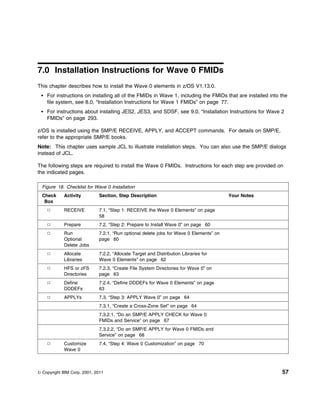
18.   Checklist for Wave 0 Installation . . . . . . . . . . . . . . . . . . . . . . . . . . . . . . . . .       . . . .   . 57
19.   SMP/E RECEIVE (All Wave 0 FMIDs and Service for z/OS)                   . . . . . . . . . . . . . . . .   . . . .   . 59
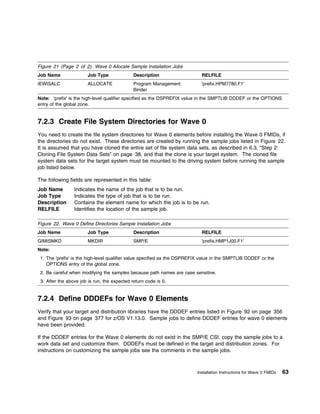
20.   Sample Dummy Delete Job           . . . . . . . . . . . . . . . . . . . . . . . . . . . . . . . . . . .   . . . .   . 61
21.   Wave 0 Allocate Sample Installation Jobs . . . . . . . . . . . . . . . . . . . . . . . . . . .            . . . .   . 62
22.   Wave 0 Define Directories Sample Installation Jobs . . . . . . . . . . . . . . . . . . . . .              . . . .   . 63
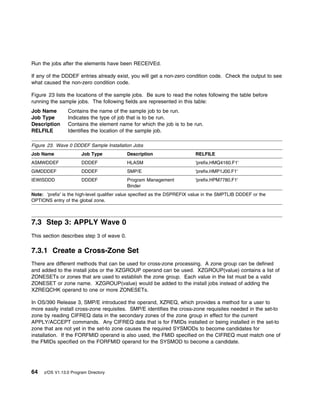
23.   Wave 0 DDDEF Sample Installation Jobs . . . . . . . . . . . . . . . . . . . . . . . . . . .               . . . .   . 64
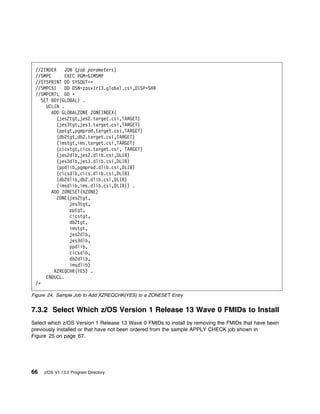
24.   Sample Job to Add XZREQCHK(YES) to a ZONESET Entry . . . . . . . . . . . . . . . .                        . . . .   . 66
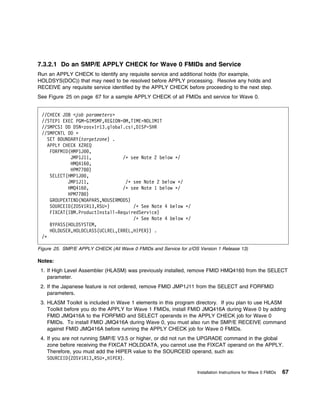
25.   SMP/E APPLY CHECK (All Wave 0 FMIDs and Service for z/OS Version 1 Release 13)                            . . . .   . 67
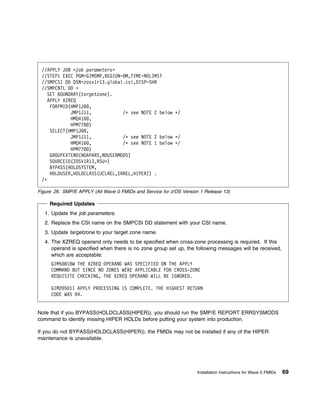
26.   SMP/E APPLY (All Wave 0 FMIDs and Service for z/OS Version 1 Release 13) . . . . .                        . . . .   . 69
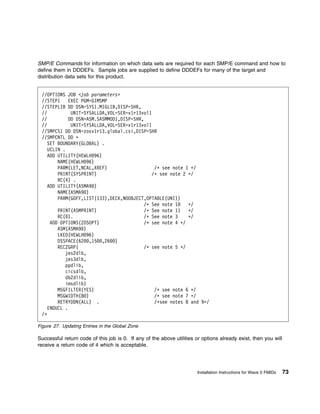
27.   Updating Entries in the Global Zone         . . . . . . . . . . . . . . . . . . . . . . . . . . . . . .   . . . .   . 73
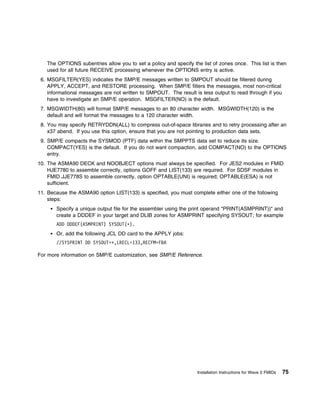
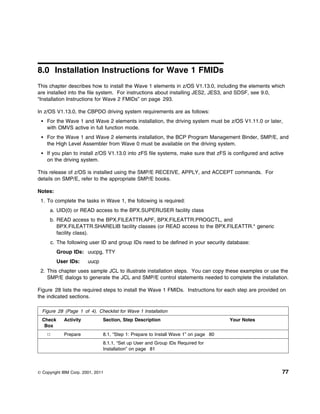
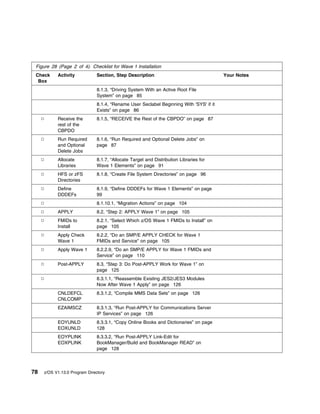
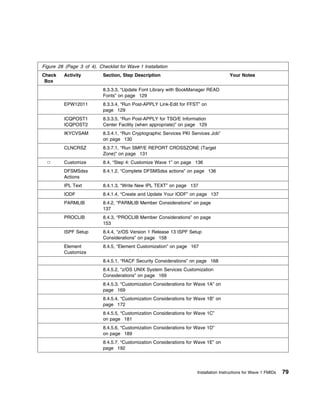
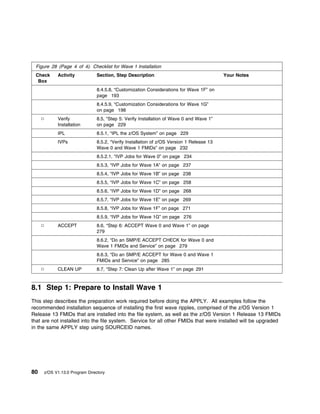
28.   Checklist for Wave 1 Installation . . . . . . . . . . . . . . . . . . . . . . . . . . . . . . . . .       . . . .   . 77
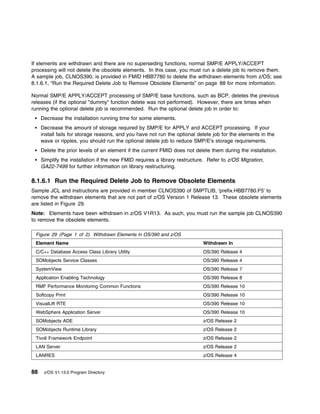
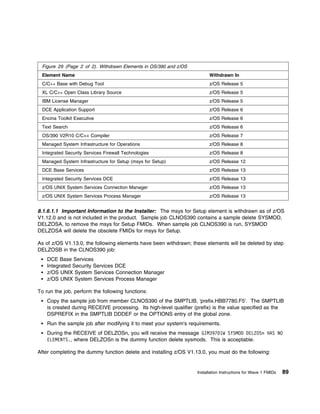
29.   Withdrawn Elements in OS/390 and z/OS . . . . . . . . . . . . . . . . . . . . . . . . . . .               . . . .   . 88
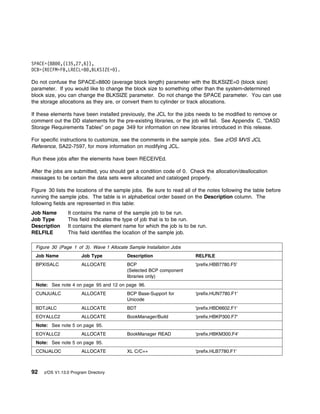
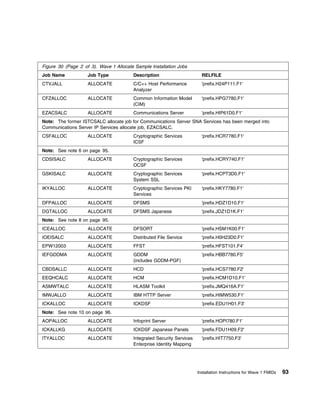
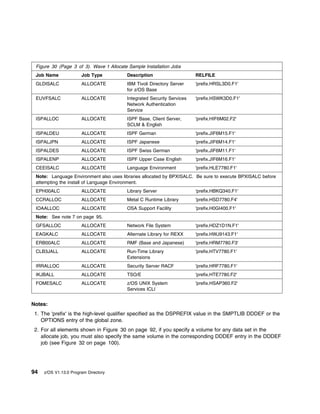
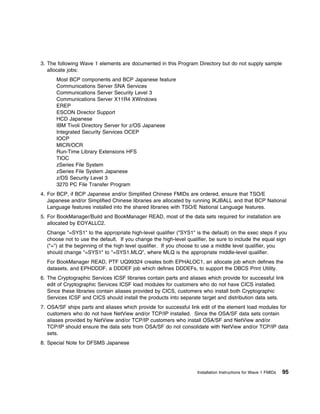
30.   Wave 1 Allocate Sample Installation Jobs . . . . . . . . . . . . . . . . . . . . . . . . . . .            . . . .   . 92
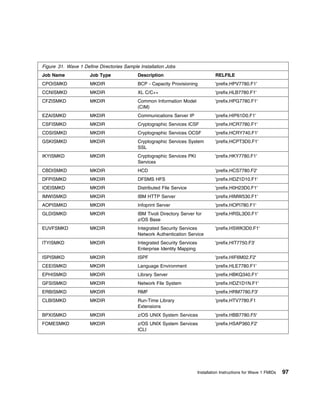
31.   Wave 1 Define Directories Sample Installation Jobs . . . . . . . . . . . . . . . . . . . . .              . . . .   . 97
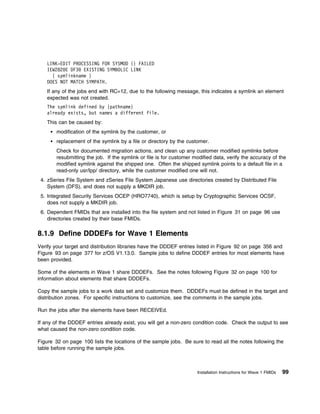
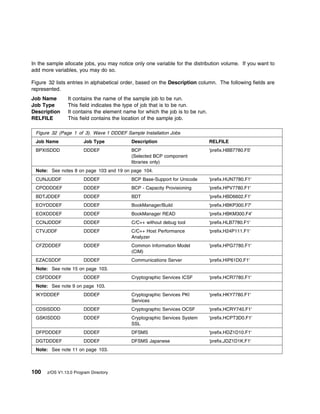
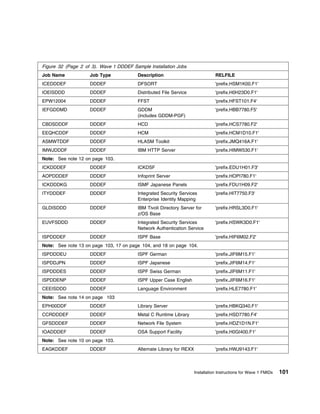
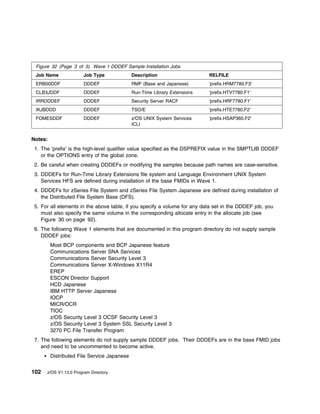
32.   Wave 1 DDDEF Sample Installation Jobs . . . . . . . . . . . . . . . . . . . . . . . . . . .               . . . .    100
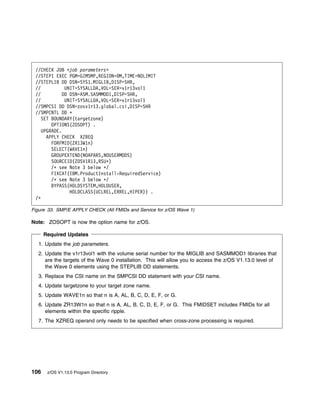
33.   SMP/E APPLY CHECK (All FMIDs and Service for z/OS Wave 1) . . . . . . . . . . . . .                       . . . .    106
34.   SMP/E APPLY (All FMIDs and Service for z/OS Version 1 Release 13 Wave 1) . . . . .                        . . . .    111
35.   Sample JCL to Copy Gothic BookManager Semilight Fonts . . . . . . . . . . . . . . . . .                   . . . .    129
36.   Information Center Facility Data Sets . . . . . . . . . . . . . . . . . . . . . . . . . . . . . .         . . . .    130
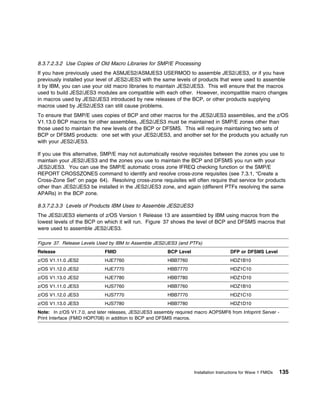
37.   Release Levels Used by IBM to Assemble JES2/JES3 (and PTFs)                     . . . . . . . . . . . .   . . . .    135
38.   Sample JCL for Writing the IPL Text . . . . . . . . . . . . . . . . . . . . . . . . . . . . . .           . . . .    137
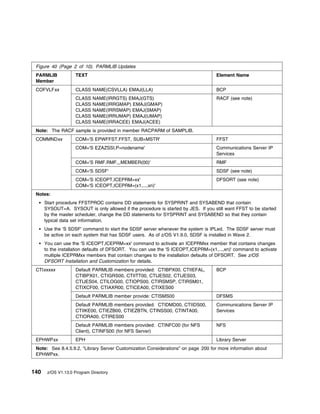
39.   PARMLIB Members Installed Directly in SYS1.PARMLIB . . . . . . . . . . . . . . . . . .                    . . . .    138
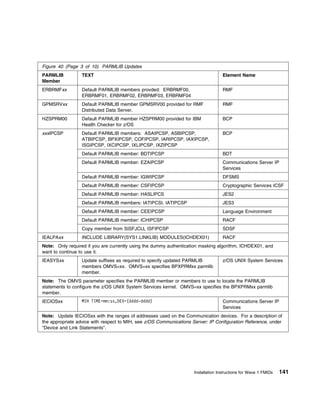
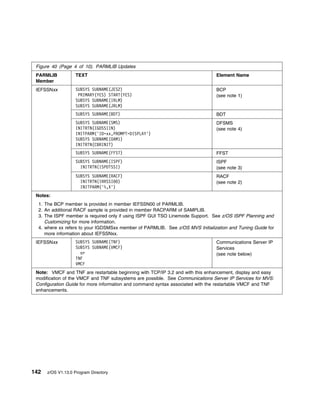
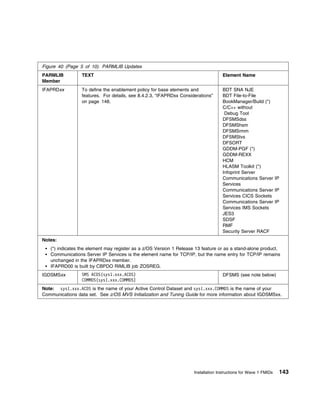
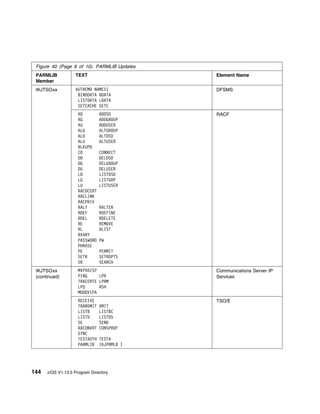
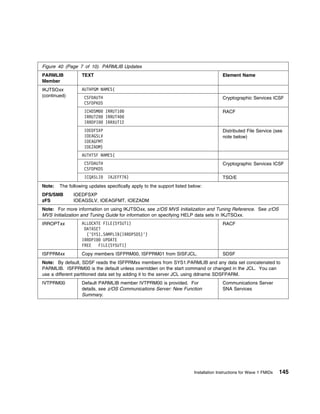
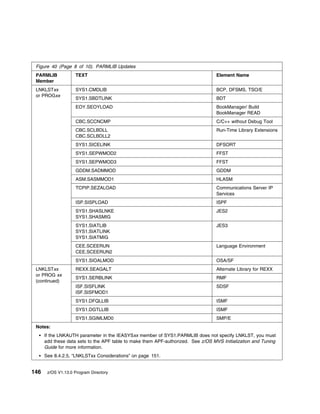
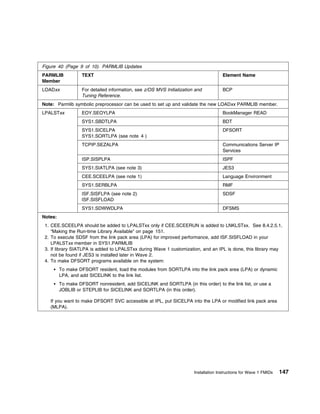
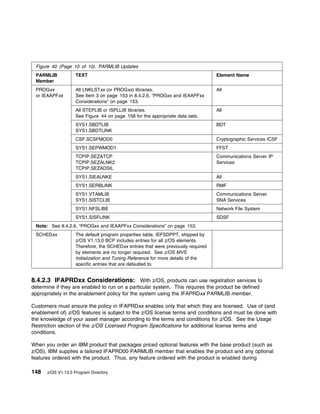
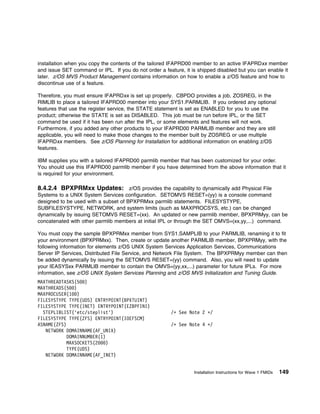
40.   PARMLIB Updates . . . . . . . . . . . . . . . . . . . . . . . . . . . . . . . . . . . . . . . . .         . . . .    139
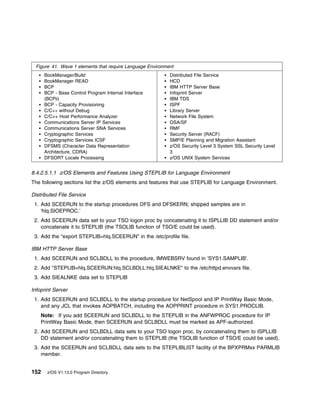
41.   Wave 1 elements that require Language Environment . . . . . . . . . . . . . . . . . . . .                 . . . .    152
42.   PROCLIB Member Updates . . . . . . . . . . . . . . . . . . . . . . . . . . . . . . . . . . .              . . . .    155
43.   PROCLIB Concatenation . . . . . . . . . . . . . . . . . . . . . . . . . . . . . . . . . . . . .           . . . .    157
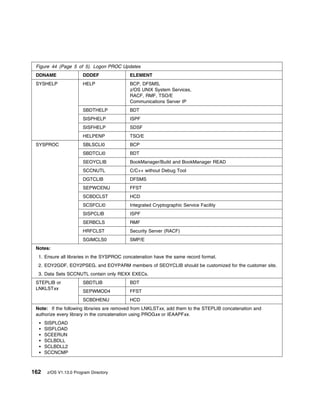
44.   Logon PROC Updates          . . . . . . . . . . . . . . . . . . . . . . . . . . . . . . . . . . . . . .   . . . .    158
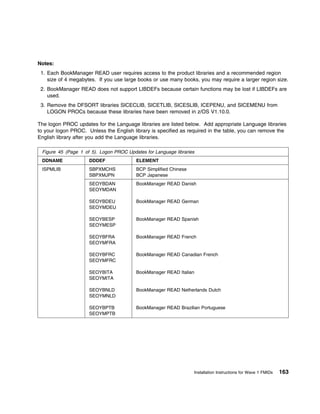
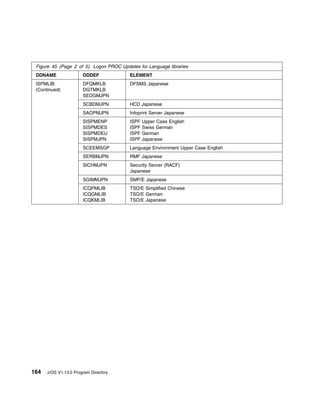
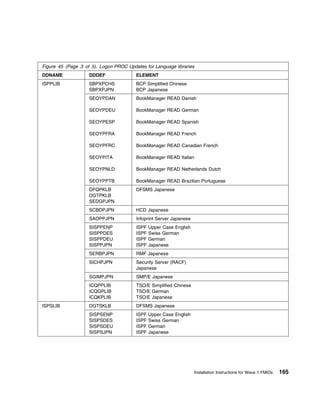
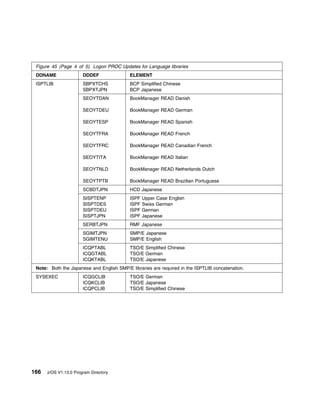
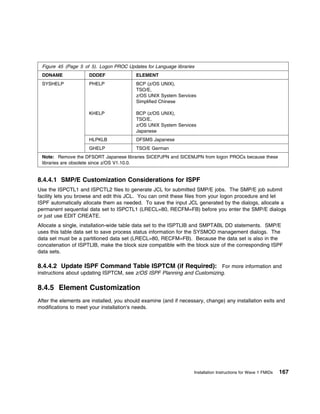
45.   Logon PROC Updates for Language libraries . . . . . . . . . . . . . . . . . . . . . . . . .               . . . .    163
46.   Customizing BookManager/Build PROCLIB Members . . . . . . . . . . . . . . . . . . . .                     . . . .    182
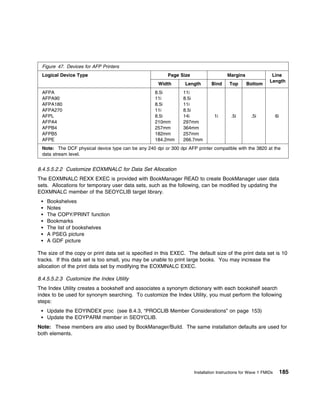
47.   Devices for AFP Printers . . . . . . . . . . . . . . . . . . . . . . . . . . . . . . . . . . . . .        . . . .    185
48.   Directories allocated by EPHISMKD during Library Server installation . . . . . . . . . . .                . . . .    204
49.   Language and Code Page Specification . . . . . . . . . . . . . . . . . . . . . . . . . . . .              . . . .    215
50.   Directives to Add to HTTP Server Configuration File . . . . . . . . . . . . . . . . . . . . .             . . . .    217
51.   Sample Pass Directive for Specifying PICDIR Paramater . . . . . . . . . . . . . . . . . .                 . . . .    218
52.   Sample Pass Directive for Specifying FRAMESDIR Paramater . . . . . . . . . . . . . . .                    . . . .    218
53.   Sample Pass Directive for Specifying LIBCENTERDIR Parameter . . . . . . . . . . . . .                     . . . .    218
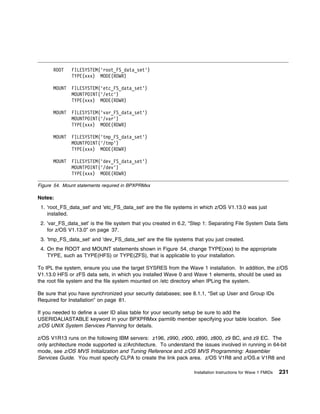
54.   Mount statements required in BPXPRMxx . . . . . . . . . . . . . . . . . . . . . . . . . . .               . . . .    231
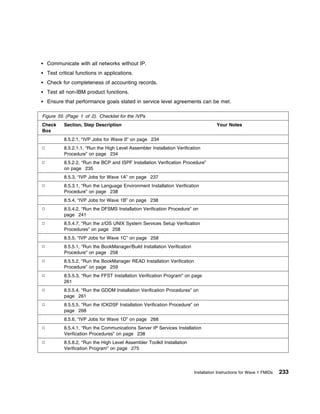
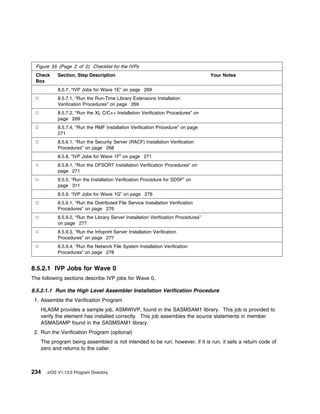
55.   Checklist for the IVPs . . . . . . . . . . . . . . . . . . . . . . . . . . . . . . . . . . . . . . .      . . . .    233
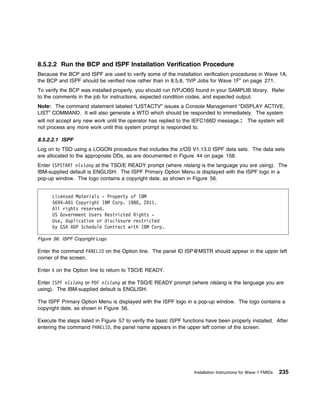
56.   ISPF Copyright Logo . . . . . . . . . . . . . . . . . . . . . . . . . . . . . . . . . . . . . . .         . . . .    235
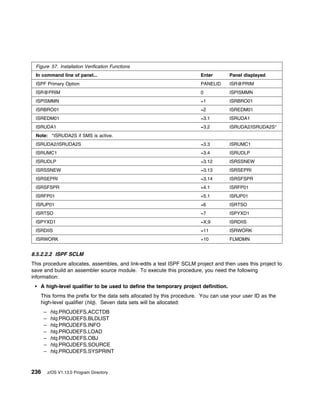
57.   Installation Verification Functions . . . . . . . . . . . . . . . . . . . . . . . . . . . . . . . .       . . . .    236
58.   DFSMSrmm Primary Option Menu              . . . . . . . . . . . . . . . . . . . . . . . . . . . . . . .   . . . .    245

xiv   z/OS V1.13.0 Program Directory
59.   DFSMSrmm Volume Menu . . . . . . . . . . . . . . . . . . . . . . . . . . . . . . . . . . . . . . .              .   245
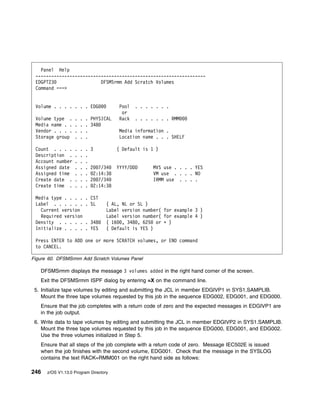
60.   DFSMSrmm Add Scratch Volumes Panel . . . . . . . . . . . . . . . . . . . . . . . . . . . . . .                  .   246
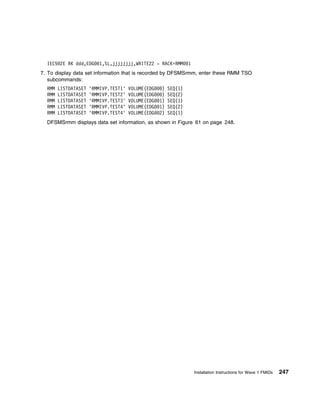
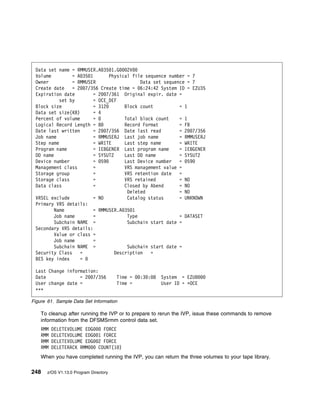
61.   Sample Data Set Information . . . . . . . . . . . . . . . . . . . . . . . . . . . . . . . . . . . . . .         .   248
62.   Example of a z/OS V1R13 DFSMShsm Startup Screen (IVP) . . . . . . . . . . . . . . . . . . .                     .   251
63.   Example of DFSMShsm Shutdown Screen . . . . . . . . . . . . . . . . . . . . . . . . . . . . . .                 .   255
64.   Expected results from DFSMS installation verification . . . . . . . . . . . . . . . . . . . . . . .             .   257
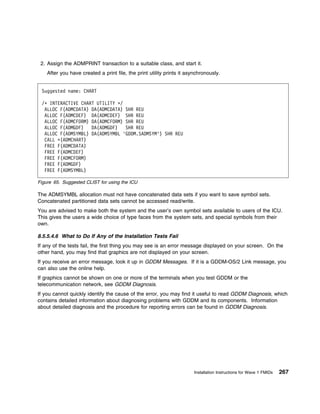
65.   Suggested CLIST for using the ICU . . . . . . . . . . . . . . . . . . . . . . . . . . . . . . . . . .           .   267
66.   IVP for Run-Time Library Extensions . . . . . . . . . . . . . . . . . . . . . . . . . . . . . . . . .           .   269
67.   IVPs for XL C/C++ Compilers . . . . . . . . . . . . . . . . . . . . . . . . . . . . . . . . . . . . .           .   270
68.   IVPs for C/C++ Host Performance Analyzer . . . . . . . . . . . . . . . . . . . . . . . . . . . . .              .   270
69.   Expected PRTAFTER SORTOUT Output from ICEJCLJ and ICEINVJ . . . . . . . . . . . . . .                           .   272
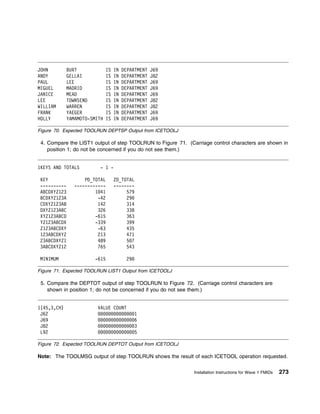
70.   Expected TOOLRUN DEPTSP Output from ICETOOLJ . . . . . . . . . . . . . . . . . . . . . .                        .   273
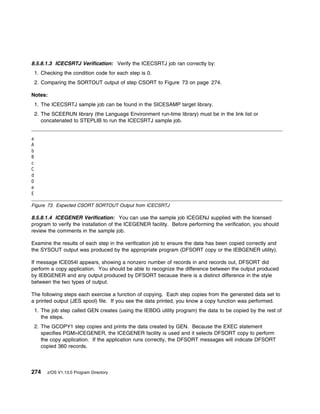
71.   Expected TOOLRUN LIST1 Output from ICETOOLJ . . . . . . . . . . . . . . . . . . . . . . . .                     .   273
72.   Expected TOOLRUN DEPTOT Output from ICETOOLJ . . . . . . . . . . . . . . . . . . . . . .                        .   273
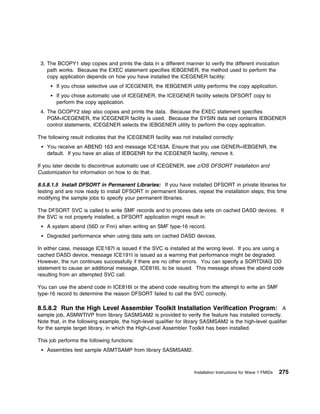
73.   Expected CSORT SORTOUT Output from ICECSRTJ . . . . . . . . . . . . . . . . . . . . . . .                       .   274
74.   Example of AIX client command sequence . . . . . . . . . . . . . . . . . . . . . . . . . . . . . .              .   279
75.   SMP/E ACCEPT CHECK (All FMIDs and Service for z/OS Version 1 Release 13 Wave 0 and
      Wave 1) . . . . . . . . . . . . . . . . . . . . . . . . . . . . . . . . . . . . . . . . . . . . . . . . . .     .   280
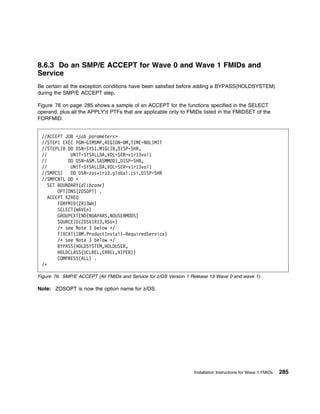
76.   SMP/E ACCEPT (All FMIDs and Service for z/OS Version 1 Release 13 Wave 0 and wave 1)                                285
77.   Checklist for Wave 2 Installation . . . . . . . . . . . . . . . . . . . . . . . . . . . . . . . . . . . .       .   293
78.   Wave 2 Allocate Sample Installation Jobs . . . . . . . . . . . . . . . . . . . . . . . . . . . . . .            .   297
79.   Wave 2 Define Directories Sample Installation Jobs . . . . . . . . . . . . . . . . . . . . . . . .              .   298
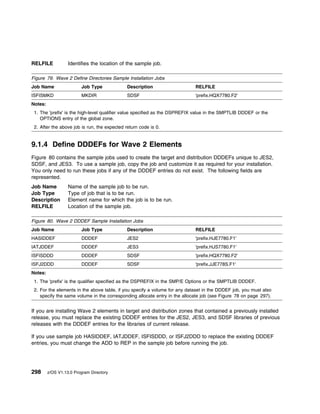
80.   Wave 2 DDDEF Sample Installation Jobs . . . . . . . . . . . . . . . . . . . . . . . . . . . . . .               .   298
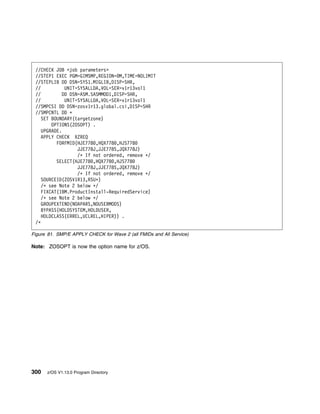
81.   SMP/E APPLY CHECK for Wave 2 (all FMIDs and All Service)                    . . . . . . . . . . . . . . . . .   .   300
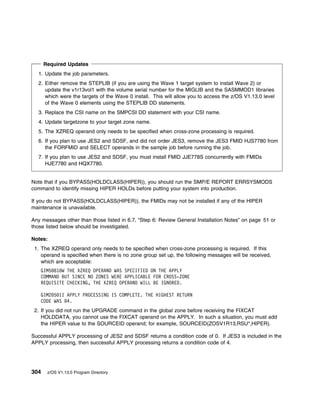
82.   SMP/E APPLY for Wave 2 (FMIDs and All Service) . . . . . . . . . . . . . . . . . . . . . . . .                  .   303
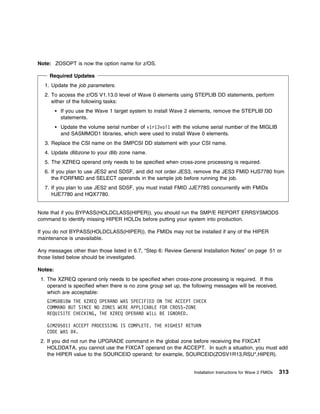
83.   SMP/E ACCEPT CHECK for Wave 2 (All FMIDs and All Service) . . . . . . . . . . . . . . . .                       .   312
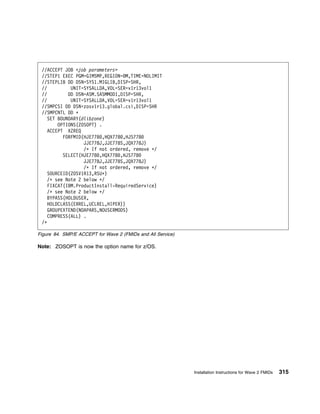
84.   SMP/E ACCEPT for Wave 2 (FMIDs and All Service) . . . . . . . . . . . . . . . . . . . . . . .                   .   315
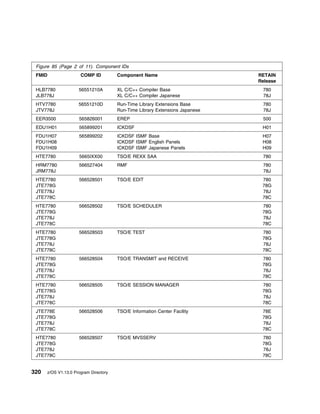
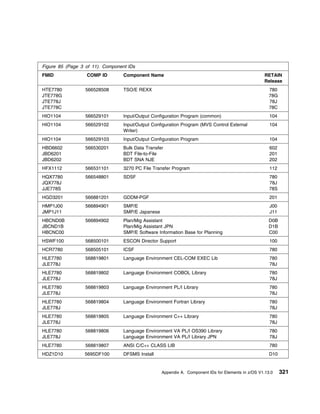
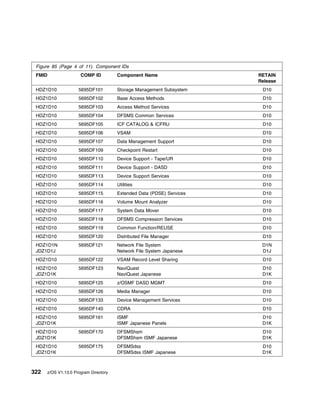
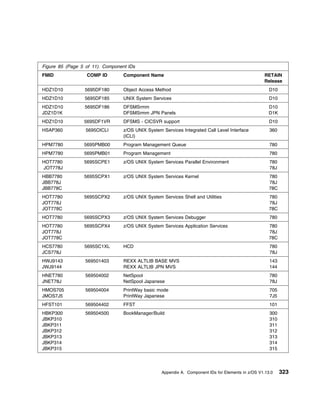
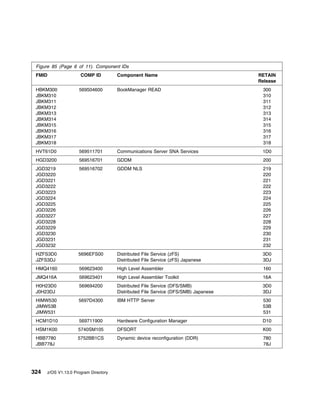
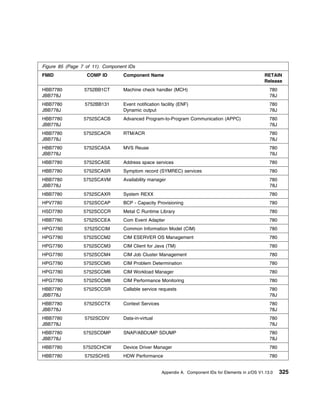
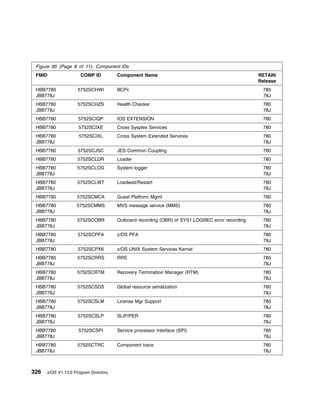
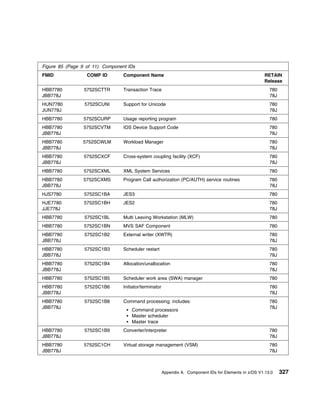
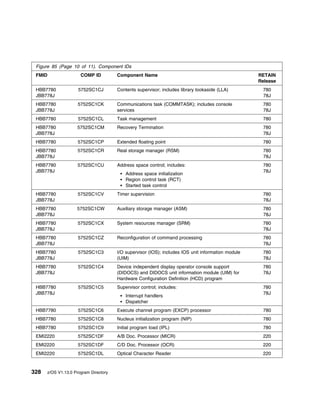
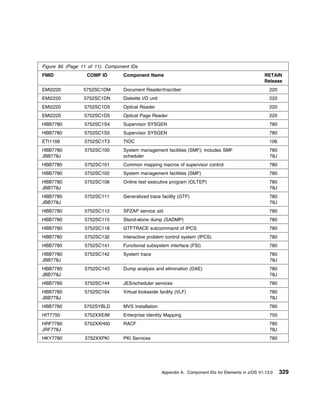
85.   Component IDs       . . . . . . . . . . . . . . . . . . . . . . . . . . . . . . . . . . . . . . . . . . . . .   .   319
86.   Storage Requirements for the SMP/E Work Data Sets . . . . . . . . . . . . . . . . . . . . . . .                 .   350
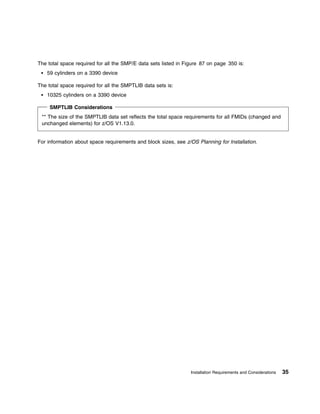
87.   Storage Required for SMP/E Data Sets for z/OS V1.13.0 . . . . . . . . . . . . . . . . . . . . .                 .   350
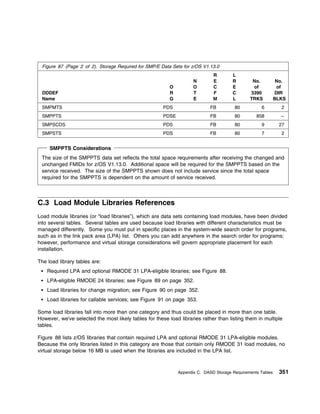
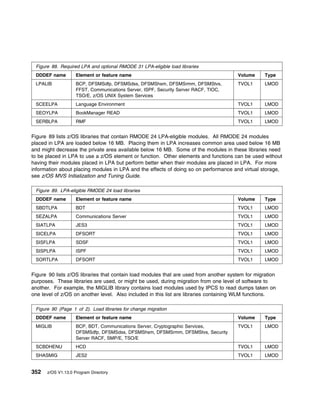
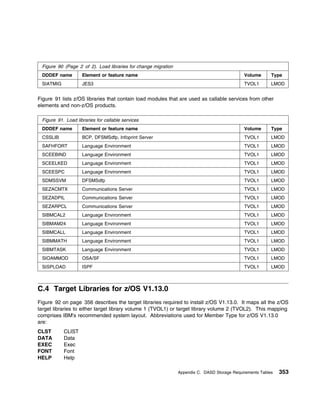
88.   Required LPA and optional RMODE 31 LPA-eligible load libraries . . . . . . . . . . . . . . . .                  .   352
89.   LPA-eligible RMODE 24 load libraries          . . . . . . . . . . . . . . . . . . . . . . . . . . . . . . . .   .   352
90.   Load libraries for change migration . . . . . . . . . . . . . . . . . . . . . . . . . . . . . . . . . .         .   352
91.   Load libraries for callable services . . . . . . . . . . . . . . . . . . . . . . . . . . . . . . . . . . .      .   353
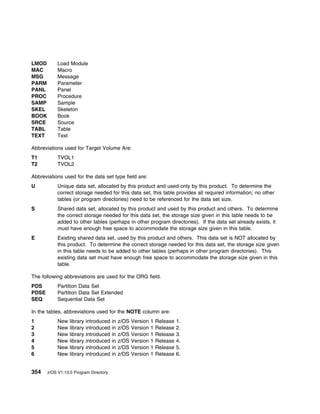
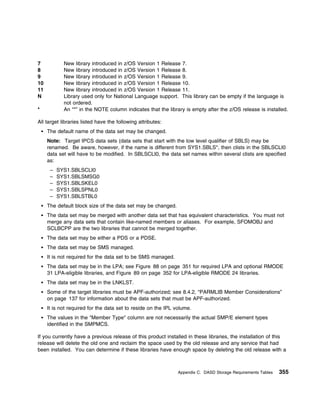
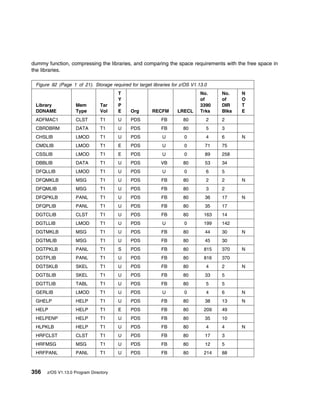
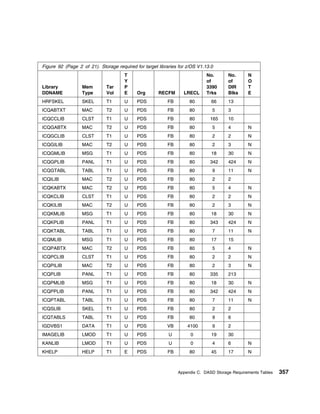
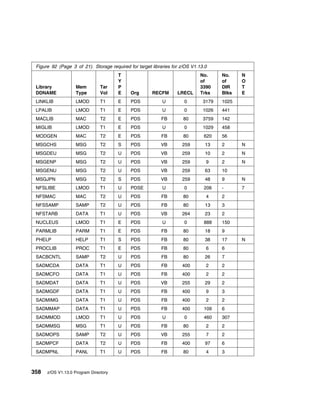
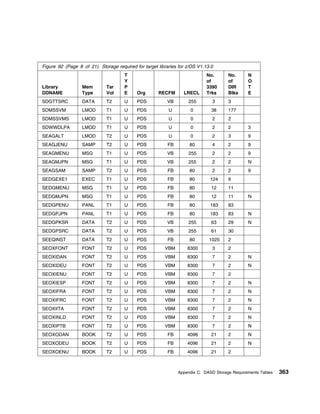
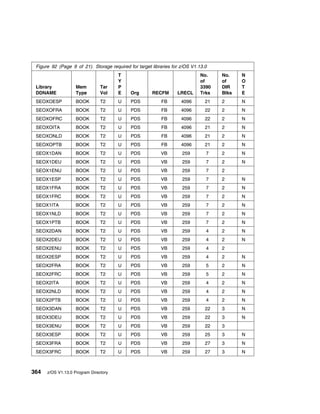
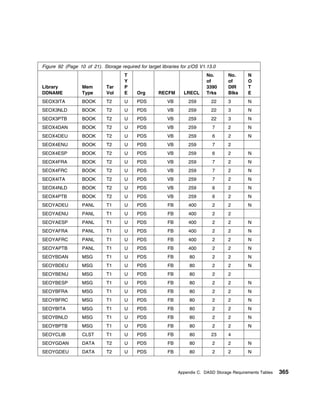
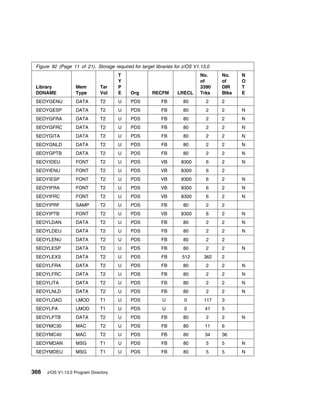
92.   Storage required for target libraries for z/OS V1.13.0 . . . . . . . . . . . . . . . . . . . . . . . .          .   356
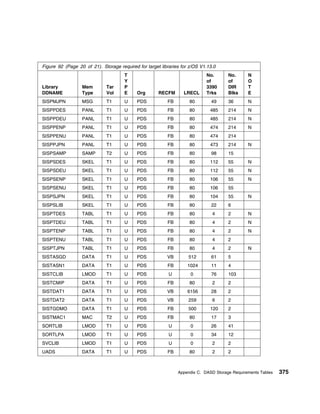
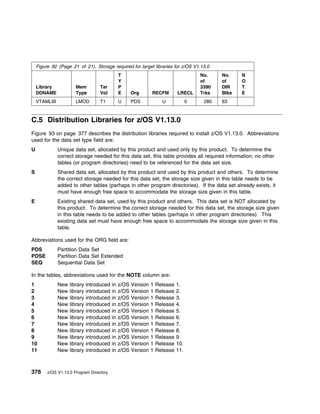
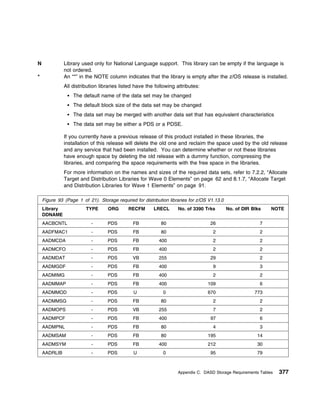
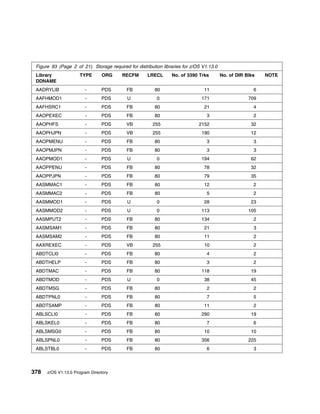
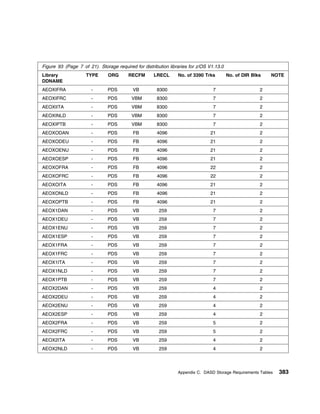
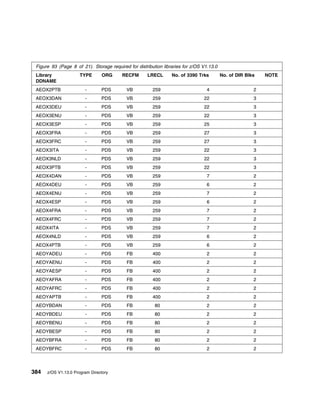
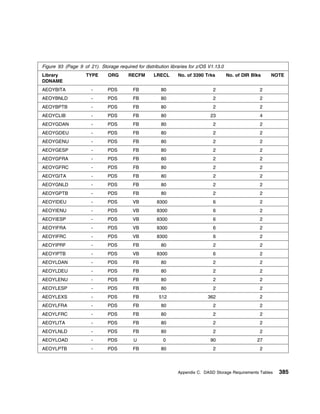
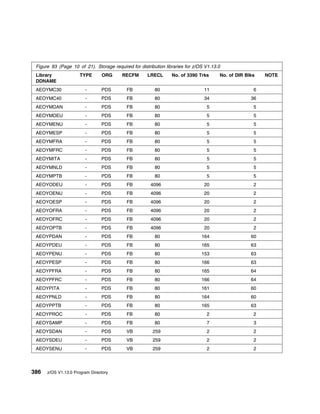
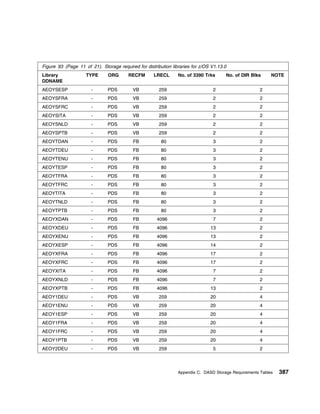
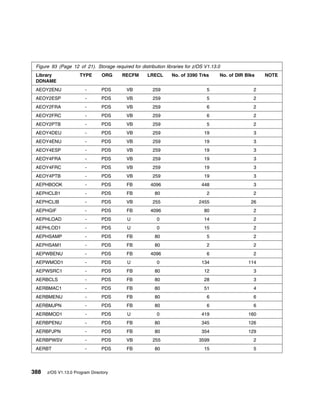
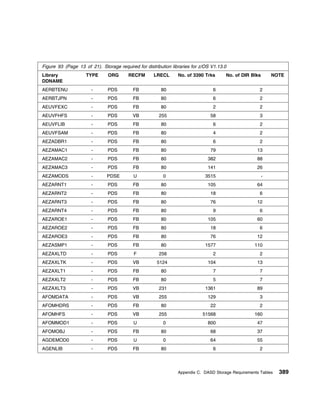
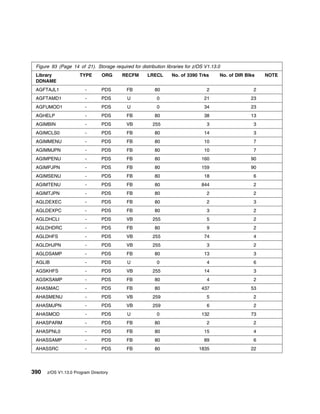
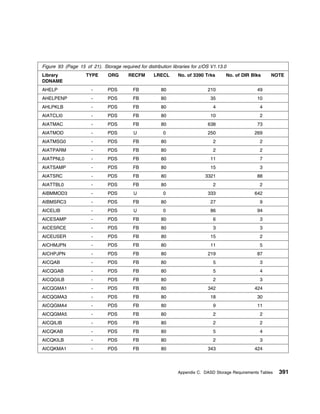
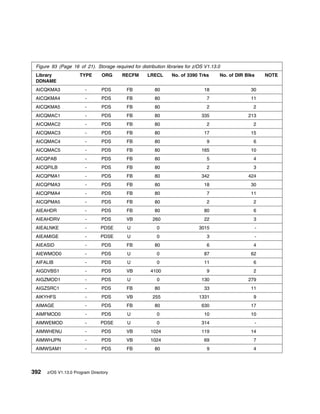
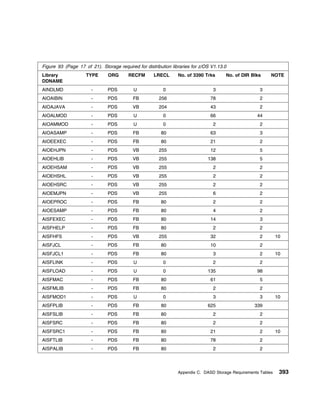
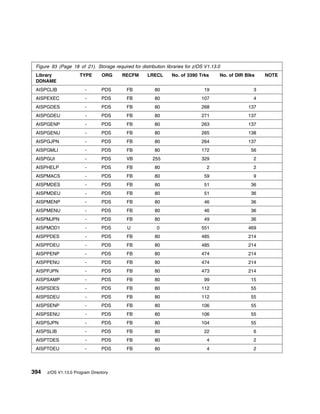
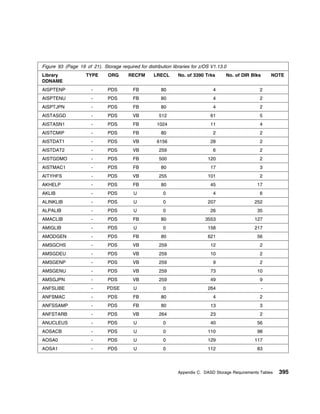
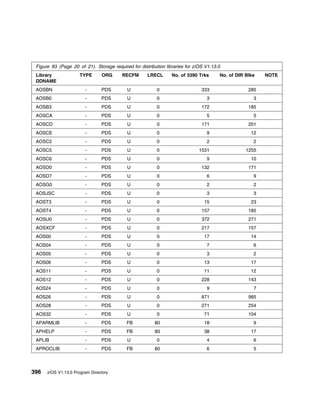
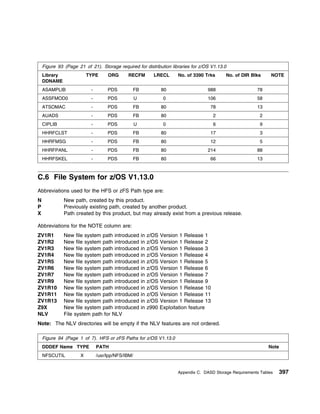
93.   Storage required for distribution libraries for z/OS V1.13.0 . . . . . . . . . . . . . . . . . . . . .          .   377
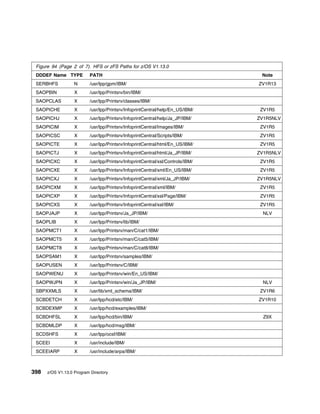
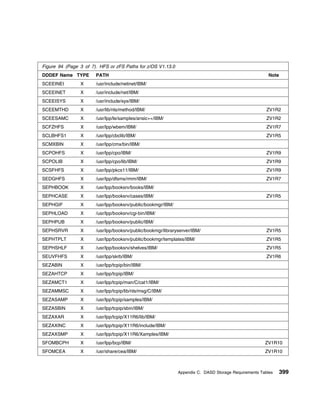
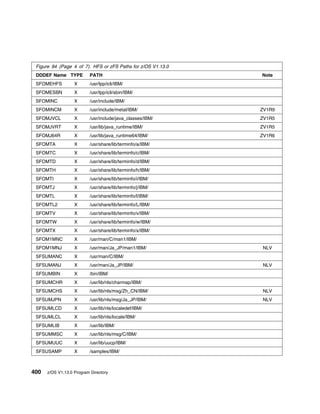
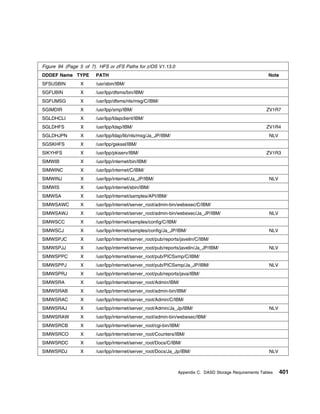
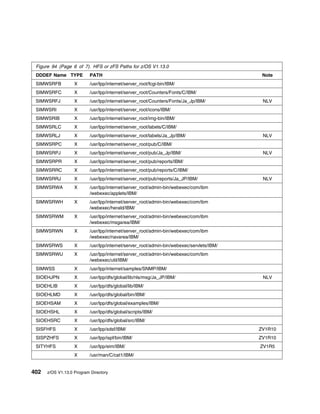
94.   HFS or zFS Paths for z/OS V1.13.0           . . . . . . . . . . . . . . . . . . . . . . . . . . . . . . . . .   .   397
95.   DDDEFS Handled by LINK Parm in SMPMCS                   . . . . . . . . . . . . . . . . . . . . . . . . . . .   .   403
96.   Sample Job to remove obsolete LMOD entry . . . . . . . . . . . . . . . . . . . . . . . . . . . .                .   407


                                                                                                              Figures     xv
xvi   z/OS V1.13.0 Program Directory
How to send your comments to IBM
Exclusive Elements of z/OS V1.13.0 (Service Level 1103)

When you send comments to IBM, you grant IBM a nonexclusive right to use or distribute your comments
in any way it believes appropriate without incurring any obligation to you.

IBM or any other organizations will only use the personal information that you supply to contact you about
the issues that you submit.

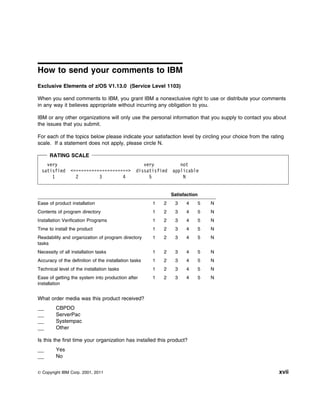
For each of the topics below please indicate your satisfaction level by circling your choice from the rating
scale. If a statement does not apply, please circle N.

      RATING SCALE
    very                                            very           not
  satisfied     <=====================>          dissatisfied   applicable
      1           2        3        4                 5             N


                                                                Satisfaction
Ease of product installation                           1   2     3    4    5   N
Contents of program directory                          1   2     3    4    5   N
Installation Verification Programs                     1   2     3    4    5   N
Time to install the product                            1   2     3    4    5   N
Readability and organization of program directory      1   2     3    4    5   N
tasks
Necessity of all installation tasks                    1   2     3    4    5   N
Accuracy of the definition of the installation tasks   1   2     3    4    5   N
Technical level of the installation tasks              1   2     3    4    5   N
Ease of getting the system into production after       1   2     3    4    5   N
installation


What order media was this product received?
         CBPDO
         ServerPac
         Systempac
         Other

Is this the first time your organization has installed this product?
         Yes
         No


© Copyright IBM Corp. 2001, 2011                                                                         xvii
Were the people who did the installation experienced with the installation of z/OS products?
        Yes
        No

If yes, how many years? __

If you have any comments to make about your ratings above, or any other aspect of the product
installation, please list them below:


Thank you for your participation.

Use one of the following methods to send us your comments:
 1. Send an e-mail to mhvrcfs@us.ibm.com
 2. Visit the Contact z/OS Web page at
    http://www.ibm.com/systems/z/os/zos/webqs.html
 3. Mail the comments to the following address:
        IBM Corporation
        Attention: MHVRCFS Reader Comments
        Department H6MA, Building 707
        2455 South Road
        Poughkeepsie, NY 12601-5400
        U.S.A.
 4. Fax the comments to us as follows:
        FAX (United States & Canada): 845+432-9405
        FAX (Other Countries): Your International Access Code +1+845+432-9405

Include the following information:
    Your name and address
    Your e-mail address
    Your telephone or fax number
    The publication title and order number:
    The topic and page number related to your comment
    The text of your comment.


xviii   z/OS V1.13.0 Program Directory
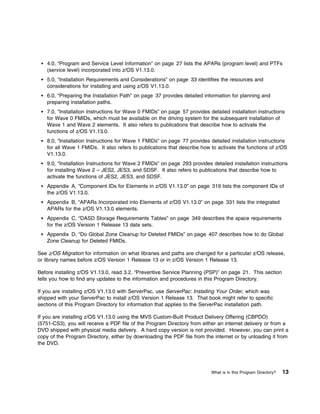
1.0 What is in this Program Directory?
This Program Directory addresses the installation of z/OS Version 1 Release 13, which is also referred to
as z/OS V1.13.0. See z/OS Planning for Installation, GA22-7504, for planning information on z/OS
V1.13.0. See z/OS Migration, GA22-7499 for information on migration to z/OS V1.13.0.

This Program Directory is intended for the system programmer who is responsible for installing the z/OS
Version 1 Release 13 elements using the CBPDO delivery option. If you are installing z/OS V1.13.0 with
ServerPac, use the book ServerPac: Installing Your Order, which is shipped with your ServerPac to install
z/OS. That book might refer to specific sections of this Program Directory for information that applies to
the ServerPac installation path.

z/OS.e Version 1 Release 8 was the final release of the z/OS.e operating system. z/OS.e is replaced by
System z New Application License Charges (zNALC), which is a pricing alternative for z/OS (5694-A01).

     Attention z/OS V1.13.0 Users

  Please be sure to review your Licensed Product Specification documentation. The z/OS Licensed
  Product Specification can be found on the IBM Online Library: z/OS V1 and Software Products DVD
  Collection, (SK3T-4271) that was delivered with your z/OS order.


The CBPDO installation of z/OS Version 1 Release 13 should occur in separate stages, called waves.
Each wave consists of multiple SMP/E steps that are documented later in this Program Directory. All
waves must be completed entirely.

The intent is that IBM ships, and you run, all elements at the single release level that IBM has subjected
to comprehensive system testing. However, recognizing some customers' reluctance to upgrade the JES2
and JES3 elements at the same time that they migrate to new levels of z/OS Version 1 Release 13, the
migration to the z/OS levels of JES2 or JES3 can be staged. This staging allows you to install z/OS while
maintaining the JES2 or JES3 elements at a compatible level with other systems. The z/OS V1.13.0
SDSF only assembles with the z/OS V1.13.0 JES2. Therefore, SDSF is installed in Wave 2.
 1. Wave 0 installs the FMIDs required for the driving system including HLASM, SMP/E and the Program
    Management Binder. This wave is documented in 7.0, “Installation Instructions for Wave 0 FMIDs” on
    page 57.
 2. Wave 1 installs the core set of FMIDs in z/OS. This wave is documented in 8.0, “Installation
    Instructions for Wave 1 FMIDs” on page 77.
 3. Wave 2 installs the z/OS Version 1 Release 13 level of the SDSF, JES2 or JES3 elements. This
    wave is documented in 9.0, “Installation Instructions for Wave 2 FMIDs” on page 293.
Note: Wave 2 can also be combined with Wave 1. Wave 2, however, cannot occur before Wave 1.

In OS/390 Release 3, the Program Directory expanded on the “wave” concept and further documented the
installation of all elements into ripples. These ripples take into consideration element dependencies and


© Copyright IBM Corp. 2001, 2011                                                                            1
natural installation separation points. The ripples give an overall installation scenario that includes every
element in order to expedite the CBPDO installation path.


1.1 z/OS V1.13.0 FMIDs Documented in this Program Directory
Installation instructions for all z/OS elements are included in this Program Directory. No other program
directories are required.

The z/OS V1.13.0 FMIDs can be found in 6.5.3, “Elements in each Wave, Ripple, and FMIDSET” on
page 42. Some elements documented in this Program Directory are also available as
separately-orderable products. Information for these separately-orderable products, such as target and
distribution libraries, is integrated in this Program Directory. Therefore, the separate program directories
are not necessary.

1.1.1 z/OS V1.13.0 Summary Table of Elements and Features
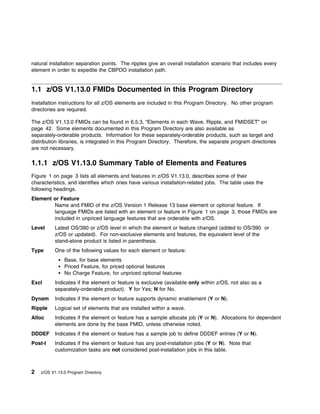
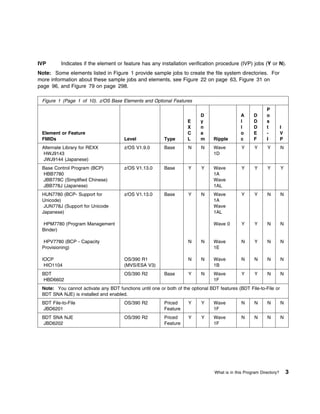
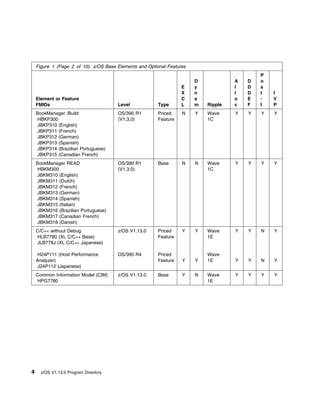
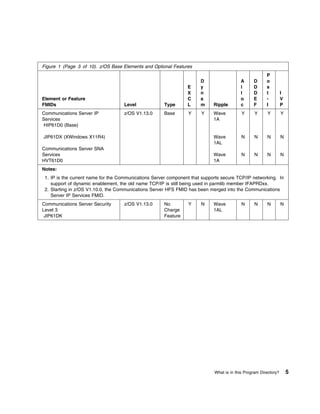
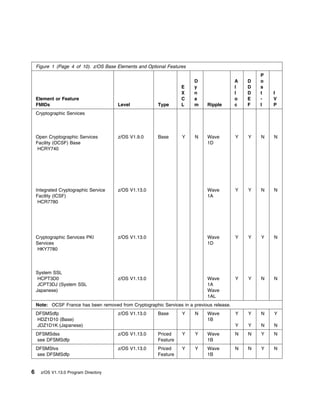
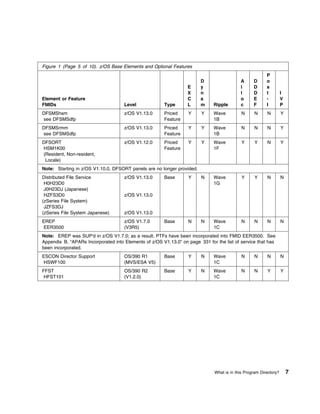
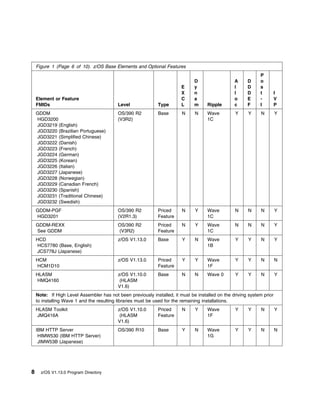
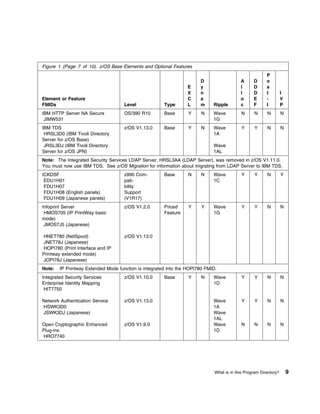
Figure 1 on page 3 lists all elements and features in z/OS V1.13.0, describes some of their
characteristics, and identifies which ones have various installation-related jobs. The table uses the
following headings.
Element or Feature
        Name and FMID of the z/OS Version 1 Release 13 base element or optional feature. If
        language FMIDs are listed with an element or feature in Figure 1 on page 3, those FMIDs are
        included in unpriced language features that are orderable with z/OS.
Level     Latest OS/390 or z/OS level in which the element or feature changed (added to OS/390 or
          z/OS or updated). For non-exclusive elements and features, the equivalent level of the
          stand-alone product is listed in parenthesis.
Type      One of the following values for each element or feature:
               Base, for base elements
               Priced Feature, for priced optional features
               No Charge Feature, for unpriced optional features
Excl      Indicates if the element or feature is exclusive (available only within z/OS, not also as a
          separately-orderable product). Y for Yes; N for No.
Dynam     Indicates if the element or feature supports dynamic enablement (Y or N).
Ripple    Logical set of elements that are installed within a wave.
Alloc     Indicates if the element or feature has a sample allocate job (Y or N). Allocations for dependent
          elements are done by the base FMID, unless otherwise noted.
DDDEF     Indicates if the element or feature has a sample job to define DDDEF entries (Y or N).
Post-I    Indicates if the element or feature has any post-installation jobs (Y or N). Note that
          customization tasks are not considered post-installation jobs in this table.


2   z/OS V1.13.0 Program Directory
IVP       Indicates if the element or feature has any installation verification procedure (IVP) jobs (Y or N).
Note: Some elements listed in Figure 1 provide sample jobs to create the file system directories. For
more information about these sample jobs and elements, see Figure 22 on page 63, Figure 31 on
page 96, and Figure 79 on page 298.

 Figure 1 (Page 1 of 10). z/OS Base Elements and Optional Features
                                                                                                            P
                                                                           D                  A      D      o
                                                                    E      y                  l      D      s
                                                                    X      n                  l      D      t         I
 Element or Feature                                                 C      a                  o      E      -         V
 FMIDs                                 Level              Type      L      m     Ripple       c      F      I         P
 Alternate Library for REXX            z/OS V1.9.0        Base       N     N     Wave          Y      Y     Y         N
 HWJ9143                                                                         1D
 JWJ9144 (Japanese)
 Base Control Program (BCP)            z/OS V1.13.0       Base       Y     Y     Wave          Y      Y     Y         Y
 HBB7780                                                                         1A
 JBB778C (Simplified Chinese)                                                    Wave
 JBB778J (Japanese)                                                              1AL
 HUN7780 (BCP- Support for             z/OS V1.13.0       Base       Y     N     Wave          Y      Y     N         N
 Unicode)                                                                        1A
  JUN778J (Support for Unicode                                                   Wave
 Japanese)                                                                       1AL

 HPM7780 (Program Management                                                     Wave 0        Y      Y     N         N
 Binder)

 HPV7780 (BCP - Capacity                                             N     N     Wave          N      Y     N         N
 Provisioning)                                                                   1E
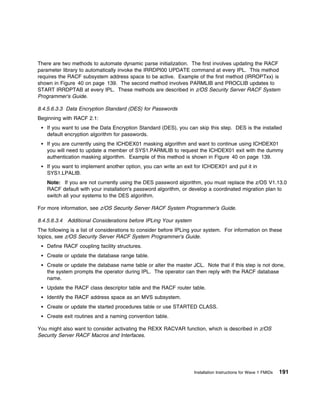
 IOCP                                  OS/390 R1                     N     N     Wave          N     N      N         N
  HIO1104                              (MVS/ESA V3)                              1B
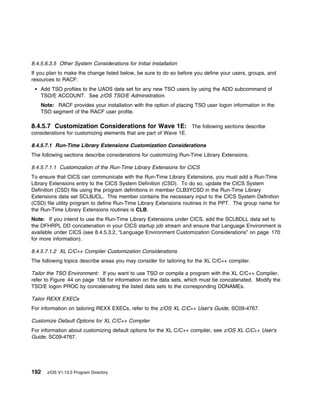
 BDT                                   OS/390 R2          Base       Y     N     Wave          Y      Y     N         N
 HBD6602                                                                         1F
 Note: You cannot activate any BDT functions until one or both of the optional BDT features (BDT File-to-File or
 BDT SNA NJE) is installed and enabled.
 BDT File-to-File                      OS/390 R2          Priced     Y     Y     Wave          N     N      N         N
 JBD6201                                                  Feature                1F
 BDT SNA NJE                           OS/390 R2          Priced     Y     Y     Wave          N     N      N         N
 JBD6202                                                  Feature                1F


                                                                                 What is in this Program Directory?       3
Figure 1 (Page 2 of 10). z/OS Base Elements and Optional Features
                                                                                             P
                                                                        D            A   D   o
                                                                   E    y            l   D   s
                                                                   X    n            l   D   t   I
    Element or Feature                                             C    a            o   E   -   V
    FMIDs                              Level            Type       L    m   Ripple   c   F   I   P
    BookManager /Build                 OS/390 R1        Priced     N    Y   Wave     Y   Y   Y   Y
    HBKP300                            (V1.3.0)         Feature             1C
    JBKP310 (English)
    JBKP311 (French)
    JBKP312 (German)
    JBKP313 (Spanish)
    JBKP314 (Brazilian Portuguese)
    JBKP315 (Canadian French)
    BookManager READ                   OS/390 R1        Base       N    N   Wave     Y   Y   Y   Y
    HBKM300                            (V1.3.0)                             1C
    JBKM310 (English)
    JBKM311 (Dutch)
    JBKM312 (French)
    JBKM313 (German)
    JBKM314 (Spanish)
    JBKM315 (Italian)
    JBKM316 (Brazilian Portuguese)
    JBKM317 (Canadian French)
    JBKM318 (Danish)
    C/C++ without Debug                z/OS V1.13.0     Priced     Y    Y   Wave     Y   Y   N   Y
    HLB7780 (XL C/C++ Base)                             Feature             1E
    JLB778J (XL C/C++ Japanese)

    H24P111 (Host Performance          OS/390 R4        Priced              Wave
    Analyzer)                                           Feature    Y    Y   1E       Y   Y   N   Y
    J24P112 (Japanese)
    Common Information Model (CIM)     z/OS V1.13.0     Base       Y    N   Wave     Y   Y   Y   Y
    HPG7780                                                                 1E


4     z/OS V1.13.0 Program Directory
Figure 1 (Page 3 of 10). z/OS Base Elements and Optional Features
                                                                                                        P
                                                                       D                  A      D      o
                                                                 E     y                  l      D      s
                                                                 X     n                  l      D      t         I
Element or Feature                                               C     a                  o      E      -         V
FMIDs                               Level             Type       L     m     Ripple       c      F      I         P
Communications Server IP            z/OS V1.13.0      Base       Y     Y     Wave          Y      Y     Y         Y
Services                                                                     1A
HIP61D0 (Base)

JIP61DX (XWindows X11R4)                                                     Wave          N     N      N         N
                                                                             1AL
Communications Server SNA
Services                                                                     Wave          N     N      N         N
HVT61D0                                                                      1A
Notes:
 1. IP is the current name for the Communications Server component that supports secure TCP/IP networking. In
    support of dynamic enablement, the old name TCP/IP is still being used in parmlib member IFAPRDxx.
 2. Starting in z/OS V1.10.0, the Communications Server HFS FMID has been merged into the Communications
    Server IP Services FMID.
Communications Server Security      z/OS V1.13.0      No         Y     N     Wave          N     N      N         N
Level 3                                               Charge                 1AL
 JIP61DK                                              Feature


                                                                             What is in this Program Directory?       5
Figure 1 (Page 4 of 10). z/OS Base Elements and Optional Features
                                                                                                    P
                                                                         D                  A   D   o
                                                                   E     y                  l   D   s
                                                                   X     n                  l   D   t   I
    Element or Feature                                             C     a                  o   E   -   V
    FMIDs                              Level             Type      L     m    Ripple        c   F   I   P
    Cryptographic Services


    Open Cryptographic Services        z/OS V1.9.0       Base      Y     N    Wave          Y   Y   N   N
    Facility (OCSF) Base                                                      1D
     HCRY740


    Integrated Cryptographic Service   z/OS V1.13.0                           Wave          Y   Y   N   N
    Facility (ICSF)                                                           1A
     HCR7780


    Cryptographic Services PKI         z/OS V1.13.0                           Wave          Y   Y   Y   N
    Services                                                                  1D
    HKY7780


    System SSL
     HCPT3D0                           z/OS V1.13.0                           Wave          Y   Y   N   N
     JCPT3DJ (System SSL                                                      1A
    Japanese)                                                                 Wave
                                                                              1AL
    Note: OCSF France has been removed from Cryptographic Services in a previous release.
    DFSMSdfp                           z/OS V1.13.0      Base      Y     N    Wave          Y   Y   N   Y
    HDZ1D10 (Base)                                                            1B
    JDZ1D1K (Japanese)                                                                      Y   Y   N   N
    DFSMSdss                           z/OS V1.13.0      Priced    Y     Y    Wave          N   N   Y   N
    see DFSMSdfp                                         Feature              1B
    DFSMStvs                           z/OS V1.13.0      Priced    Y     Y    Wave          N   N   Y   N
    see DFSMSdfp                                         Feature              1B


6     z/OS V1.13.0 Program Directory
Figure 1 (Page 5 of 10). z/OS Base Elements and Optional Features
                                                                                                          P
                                                                        D                   A      D      o
                                                                  E     y                   l      D      s
                                                                  X     n                   l      D      t         I
Element or Feature                                                C     a                   o      E      -         V
FMIDs                                Level              Type      L     m     Ripple        c      F      I         P
DFSMShsm                             z/OS V1.13.0       Priced     Y    Y     Wave           N     N      N         Y
see DFSMSdfp                                            Feature               1B
DFSMSrmm                             z/OS V1.13.0       Priced     Y    Y     Wave           N     N      N         Y
see DFSMSdfp                                            Feature               1B
DFSORT                               z/OS V1.12.0       Priced     Y    Y     Wave           Y      Y     N         Y
HSM1K00                                                 Feature               1F
(Resident, Non-resident,
 Locale)
Note: Starting in z/OS V1.10.0, DFSORT panels are no longer provided.
Distributed File Service             z/OS V1.13.0       Base       Y    N     Wave           Y      Y     N         N
 H0H23D0                                                                      1G
 J0H23DJ (Japanese)
 HZFS3D0                             z/OS V1.13.0
(zSeries File System)
 JZFS3DJ
(zSeries File System Japanese)       z/OS V1.13.0
EREP                                 z/OS V1.7.0        Base      N     N     Wave           N     N      N         N
EER3500                              (V3R5)                                   1C
Note: EREP was SUP'd in z/OS V1.7.0; as a result, PTFs have been incorporated into FMID EER3500. See
Appendix B, “APARs Incorporated into Elements of z/OS V1.13.0” on page 331 for the list of service that has
been incorporated.
ESCON Director Support               OS/390 R1          Base       Y    N     Wave           N     N      N         N
HSWF100                              (MVS/ESA V5)                             1C
FFST                                 OS/390 R2          Base       Y    N     Wave           N     N      Y         Y
 HFST101                             (V1.2.0)                                 1C


                                                                               What is in this Program Directory?       7
Figure 1 (Page 6 of 10). z/OS Base Elements and Optional Features
                                                                                                              P
                                                                               D                  A     D     o
                                                                         E     y                  l     D     s
                                                                         X     n                  l     D     t         I
    Element or Feature                                                   C     a                  o     E     -         V
    FMIDs                                  Level              Type       L     m     Ripple       c     F     I         P
    GDDM                                   OS/390 R2          Base       N     N     Wave         Y     Y      N        Y
    HGD3200                                (V3R2)                                    1C
    JGD3219 (English)
    JGD3220 (Brazilian Portuguese)
    JGD3221 (Simplified Chinese)
    JGD3222 (Danish)
    JGD3223 (French)
    JGD3224 (German)
    JGD3225 (Korean)
    JGD3226 (Italian)
    JGD3227 (Japanese)
    JGD3228 (Norwegian)
    JGD3229 (Canadian French)
    JGD3230 (Spanish)
    JGD3231 (Traditional Chinese)
    JGD3232 (Swedish)
    GDDM-PGF                               OS/390 R2          Priced     N     Y     Wave         N     N      N        Y
    HGD3201                                (V2R1.3)           Feature                1C
    GDDM-REXX                              OS/390 R2          Priced     N     Y     Wave         N     N      N        Y
    See GDDM                               (V3R2)             Feature                1C
    HCD                                    z/OS V1.13.0       Base       Y     N     Wave         Y     Y      N        Y
    HCS7780 (Base, English)                                                          1B
    JCS778J (Japanese)
    HCM                                    z/OS V1.13.0       Priced     Y     Y     Wave         Y     Y      N        N
    HCM1D10                                                   Feature                1F
    HLASM                                  z/OS V1.10.0       Base       N     N     Wave 0       Y     Y      N        Y
    HMQ4160                                 (HLASM
                                           V1.6)
    Note: If High Level Assembler has not been previously installed, it must be installed on the driving system prior
    to installing Wave 1 and the resulting libraries must be used for the remaining installations.
    HLASM Toolkit                          z/OS V1.10.0       Priced     N     Y     Wave         Y     Y      N        Y
    JMQ416A                                 (HLASM            Feature                1F
                                           V1.6)
    IBM HTTP Server                        OS/390 R10         Base       Y     N     Wave         Y     Y      N        N
     HIMW530 (IBM HTTP Server)                                                       1G
     JIMW53B (Japanese)


8     z/OS V1.13.0 Program Directory
Figure 1 (Page 7 of 10). z/OS Base Elements and Optional Features
                                                                                                         P
                                                                       D                   A      D      o
                                                                 E     y                   l      D      s
                                                                 X     n                   l      D      t         I
Element or Feature                                               C     a                   o      E      -         V
FMIDs                                Level             Type      L     m     Ripple        c      F      I         P
IBM HTTP Server NA Secure            OS/390 R10        Base       Y     N    Wave           N     N      N         N
 JIMW531                                                                     1G
IBM TDS                              z/OS V1.13.0      Base       Y     N    Wave           Y      Y     N         N
 HRSL3D0 (IBM Tivoli Directory                                               1A
Server for z/OS Base)
 JRSL3DJ (IBM Tivoli Directory                                               Wave
Server for z/OS JPN)                                                         1AL
Note: The Integrated Security Services LDAP Server, HRSL3AA (LDAP Server), was removed in z/OS V1.11.0.
You must now use IBM TDS. See z/OS Migration for information about migrating from LDAP Server to IBM TDS.
ICKDSF                               z990 Com-         Base       N     N    Wave           Y      Y     N         Y
 EDU1H01                             pati-                                   1C
 FDU1H07                             bility
 FDU1H08 (English panels)            Support
 FDU1H09 (Japanese panels)           (V1R17)
Infoprint Server                     z/OS V1.2.0       Priced     Y     Y    Wave           Y      Y     N         N
 HMOS705 (IP PrintWay basic                            Feature               1G
mode)
 JMOS7J5 (Japanese)

HNET780 (NetSpool)                   z/OS V1.13.0
JNET78J (Japanese)
HOPI780 (Print Interface and IP
Printway extended mode)
JOPI78J (Japanese)
Note:   IP Printway Extended Mode function is integrated into the HOPI780 FMID.
Integrated Security Services         z/OS V1.10.0      Base       Y     N    Wave           Y      Y     N         N
Enterprise Identity Mapping                                                  1D
 HIT7750

Network Authentication Service       z/OS V1.13.0                            Wave           Y      Y     N         N
HSWK3D0                                                                      1A
JSWK3DJ (Japanese)                                                           Wave
                                                                             1AL
Open Cryptographic Enhanced          z/OS V1.9.0                             Wave           N     N      N         N
Plug-ins                                                                     1D
HRO7740


                                                                              What is in this Program Directory?       9
Figure 1 (Page 8 of 10). z/OS Base Elements and Optional Features
                                                                                           P
                                                                      D            A   D   o
                                                                E     y            l   D   s
                                                                X     n            l   D   t   I
 Element or Feature                                             C     a            o   E   -   V
 FMIDs                                Level           Type      L     m   Ripple   c   F   I   P
 ISPF                                 z/OS V1.13.0    Base      Y     N   Wave     Y   Y   N   Y
  HIF6M02                                                                 1A
  JIF6M11 (Swiss German)                                                  Wave
                                                                          1AL
 JIF6M14 (Japanese)                                                       Wave
                                                                          1AL
 JIF6M15 (German)                                                         Wave
                                                                          1AL
 JIF6M16 (Upper Case English)                                             Wave
                                                                          1AL
 JES2                                 z/OS V1.13.0    Base      Y     N   Wave 2   Y   Y   Y   N
  HJE7780
  JJE778J (Japanese)
 JES3                                 z/OS V1.13.0    Priced    Y     Y   Wave 2   Y   Y   Y   N
  HJS7780                                             Feature
 Language Environment                 z/OS V1.13.0    Base      Y     N   Wave     Y   Y   N   Y
  HLE7780                                                                 1A

 JLE778J (Japanese)                                                       Wave
                                                                          1AL
 Library Server                       z/OS V1.12.0    Base      Y     N   Wave     Y   Y   N   Y
  HBKQ340                                                                 1G
 Note: Library Server was formerly known as BookManager BookServer.
 Metal C Runtime Library              z/OS V1.13.0    Base      Y     N   Wave     Y   Y   N   N
 HSD7780                                                                  1A
 MICR/OCR                             OS/390 R1       Base      Y     N   Wave     N   N   N   N
 EMI2220                              (MVS/XA)                            1C
 Network File System                  z/OS V1.13.0    Base      Y     N   Wave     Y   Y   N   Y
 HDZ1D1N (NFS)                                                            1G
 JDZ1D1J (NFS Japanese)
 OSA/SF                               z990            Base      Y     N   Wave     Y   Y   N   N
 H0GI400                              Compatibility                       1F
                                      Support
 RMF                                  z/OS V1.13.0    Priced    Y     Y   Wave     Y   Y   N   Y
 HRM7780                                              Feature             1E
 JRM778J (Japanese)


10   z/OS V1.13.0 Program Directory
Figure 1 (Page 9 of 10). z/OS Base Elements and Optional Features
                                                                                                      P
                                                                    D                   A      D      o
                                                               E    y                   l      D      s
                                                               X    n                   l      D      t       I
Element or Feature                                             C    a                   o      E      -       V
FMIDs                              Level             Type      L    m     Ripple        c      F      I       P
Run-Time Library Extensions        z/OS V1.13.0      Base      Y     N    Wave          Y      Y      N       Y
HTV7780                                                                   1E
JTV778J (Japanese)
Note: Run-Time Library Extension was formerly known as C++ IBM Open Class Library.
SDSF                               z/OS V1.13.0      Priced    Y     Y    Wave 2        Y      Y      Y       N
HQX7780                                              Feature
JQX778J (Japanese)
JJE778S (SDSF JES2 Support)
Note: As of z/OS V1.9.0, z/OS V1.9.0 SDSF only assembles with z/OS V1.9.0 JES2.
Security Server (RACF)             z/OS V1.13.0      Priced    Y     Y    Wave          Y      Y      Y       N
HRF7780                                              feature              1D
JRF778J (Japanese)
SMP/E
HMP1J00                            z/OS V1.13.0      Base      N     N    Wave 0        Y      Y      N       N
JMP1J11 (Japanese)                 (V3R6)
HBCND0B (Planning & Migration      z/OS V1.2.0                            Wave          N      N      N       N
Assistant)                                                                1F
JBCND1B (Japanese)
HBCNC00 (Software Information      OS/390 R7
Base)
TIOC                               OS/390 R1         Base      Y     N    Wave          N      N      N       N
 ETI1106                           (MVS V5)                               1A
TSO/E                              z/OS V1.13.0      Base      Y     N    Wave          Y      Y      Y       N
 HTE7780                                                                  1C
 JTE778E (Information Center
Facility and English)
 JTE778G (German)
 JTE778J (Japanese)
 JTE778C (Simplified Chinese)


                                                                         What is in this Program Directory?   11
Figure 1 (Page 10 of 10). z/OS Base Elements and Optional Features
                                                                                                      P
                                                                        D                  A    D     o
                                                                  E     y                  l    D     s
                                                                  X     n                  l    D     t    I
 Element or Feature                                               C     a                  o    E     -    V
 FMIDs                                 Level            Type      L     m     Ripple       c    F     I    P
 z/OS Security Level 3                                  No                    Wave
                                                        Charge                1D
                                                        Feature
 OCSF Security Level 3                 z/OS V1.9.0                 Y     N                 N     N     Y   N
 JCRY741

 System SSL Security Level 3           z/OS V1.13.0                Y     N                 N     N    N    N
 JCPT3D1

 Network Authentication Service        z/OS V1.13.0
 Security Level 3                                                  Y     N                 N     N    N    N
 JSWK3D1


 IBM TDS Security Level 3              z/OS V1.13.0                Y     N                 N     N    N    N
  JRSL3D1
 z/OS UNIX System Services
  HOT7780 (Application Services)       z/OS V1.13.0     Base       Y     N    Wave         Y     Y    N    N
  JOT778C (Simplified Chinese)                                                1B
  JOT778J (Japanese)

  HSAP360 (Integrated Call Level       z/OS V1.6.0                            Wave         Y     Y    N    N
 Interface)                                                                   1B
 Note: z/OS UNIX System Services Application Services (formerly called OpenEdition Application Services)
 includes the Shell, Utilities, Debugger, US English, and the tcsh (C-Shell).
 3270 PC File Transfer Program         OS/390 R2        Base       N     N    Wave         N     N     Y   N
  HFX1112                              (V1R1.1)                               1C


1.2 How to Use this Program Directory
This Program Directory contains information about the material and procedures associated with the
installation of the z/OS V1.13.0 elements and optional features (see Figure 1 on page 3). You should
keep this document for future reference. Before taking any action, you should read the sections that apply
to the elements and features you want to install. This Program Directory contains the following sections:
     2.0, “Program Materials” on page 15 identifies the basic and optional program materials and
     documentation for z/OS V1.13.0.
     3.0, “Program Support” on page 21 describes the IBM support available for z/OS V1.13.0.


12    z/OS V1.13.0 Program Directory
4.0, “Program and Service Level Information” on page 27 lists the APARs (program level) and PTFs
    (service level) incorporated into z/OS V1.13.0.
    5.0, “Installation Requirements and Considerations” on page 33 identifies the resources and
    considerations for installing and using z/OS V1.13.0.
    6.0, “Preparing the Installation Path” on page 37 provides detailed information for planning and
    preparing installation paths.
    7.0, “Installation Instructions for Wave 0 FMIDs” on page 57 provides detailed installation instructions
    for Wave 0 FMIDs, which must be available on the driving system for the subsequent installation of
    Wave 1 and Wave 2 elements. It also refers to publications that describe how to activate the
    functions of z/OS V1.13.0.
    8.0, “Installation Instructions for Wave 1 FMIDs” on page 77 provides detailed installation instructions
    for all Wave 1 FMIDs. It also refers to publications that describe how to activate the functions of z/OS
    V1.13.0.
    9.0, “Installation Instructions for Wave 2 FMIDs” on page 293 provides detailed installation instructions
    for installing Wave 2 – JES2, JES3, and SDSF. It also refers to publications that describe how to
    activate the functions of JES2, JES3, and SDSF.
    Appendix A, “Component IDs for Elements in z/OS V1.13.0” on page 319 lists the component IDs of
    the z/OS V1.13.0.
    Appendix B, “APARs Incorporated into Elements of z/OS V1.13.0” on page 331 lists the integrated
    APARs for the z/OS V1.13.0 elements.
    Appendix C, “DASD Storage Requirements Tables” on page 349 describes the space requirements
    for the z/OS Version 1 Release 13 data sets.
    Appendix D, “Do Global Zone Cleanup for Deleted FMIDs” on page 407 describes how to do Global
    Zone Cleanup for Deleted FMIDs.

See z/OS Migration for information on what libraries and paths are changed for a particular z/OS release,
or library names before z/OS Version 1 Release 13 or in z/OS Version 1 Release 13.

Before installing z/OS V1.13.0, read 3.2, “Preventive Service Planning (PSP)” on page 21. This section
tells you how to find any updates to the information and procedures in this Program Directory.

If you are installing z/OS V1.13.0 with ServerPac, use ServerPac: Installing Your Order, which was
shipped with your ServerPac to install z/OS Version 1 Release 13. That book might refer to specific
sections of this Program Directory for information that applies to the ServerPac installation path.

If you are installing z/OS V1.13.0 using the MVS Custom-Built Product Delivery Offering (CBPDO)
(5751-CS3), you will receive a PDF file of the Program Directory from either an internet delivery or from a
DVD shipped with physical media delivery. A hard copy version is not provided. However, you can print a
copy of the Program Directory, either by downloading the PDF file from the internet or by unloading it from
the DVD.


                                                                           What is in this Program Directory?   13
14   z/OS V1.13.0 Program Directory
2.0 Program Materials
An IBM program is identified by a program number and a feature number. The program number for z/OS
V1.13.0 is 5694-A01.

The program announcement material describes the features supported by z/OS. If you have not already
received a copy, ask your IBM marketing representative for this information.

The following sections identify:
    The basic program materials available with this program.
    Publications useful during installation.


2.1 Basic Machine-Readable Material
Basic Machine-Readable Materials are materials that are supplied under the base license and feature
number, and are required for the use of the product.

You will receive all z/OS Version 1 Release 13 FMIDs (whether ordered or not) except for the following:
    FMIDs for languages not ordered.
    FMIDs for export regulated features not ordered.
    FMIDs for no charge features.

See the MVS CBPDO Memo to Users Extension for a full list of FMIDs and for detailed information on
tape volumes and file format.


2.2 Optional Machine-Readable Material
No optional machine-readable materials are provided for z/OS V1.13.0.


2.3 Program Publications
For the titles of all the publications associated with z/OS, see z/OS Information Roadmap.


2.4 Program Source Materials
No program viewable program listings (View Program Listings) are provided for z/OS V1R13.


© Copyright IBM Corp. 2001, 2011                                                                          15
2.5 Publications Useful during Installation
For element-specific installation manuals, refer to z/OS Information Roadmap.

The publications listed in Figure 2 on page 16 may be useful during the installation of z/OS V1.13.0. To
order copies, contact your IBM representative or visit the IBM Publications Center on the Internet at:
http://www.ibm.com/shop/publications/order/

You can also access these publications online at the following URL:
http://www- 3.ibm.com/systems/z/os/zos/bkserv/

Figure 2 (Page 1 of 4). Publications Referred to in This Program Directory
Publication Title                                                                           Form Number
CBPDO Memo to User Extension                                                                     N/A
z/OS Common Information Model User's Guide                                                   SC33-7998
z/OS DFSORT Installation and Customization                                                   SC26-7524
EREP User's Guide                                                                            GC35-0151
EREP Reference                                                                               GC35-0152
FFST/MVS FFST/VM Operations Guide                                                            SC31-8604
GDDM Base Application Programming Guide                                                      SC33-0867
GDDM Base Application Programming Reference                                                  SC33-0868
GDDM Diagnosis                                                                               SC33-0870
GDDM Messages                                                                                SC33-0869
GDDM System Customization and Administration                                                 SC33-0871
GDDM User's Guide                                                                            SC33-0875
GDDM Using the Image Symbol Editor                                                           SC33-0920
GDDM-PGF Interactive Chart Utility                                                           SC33-0328
HLASM Installation and Customization Guide                                                   SC26-3494
HLASM Language Reference                                                                     SC26-4940
HLASM Programmer's Guide                                                                     SC26-4941
HLASM Toolkit Feature Installation and Customization Guide                                   GC26-8711
IBM BookManager READ/MVS: Displaying Online Books                                            SC38-2034
IBM BookManager BUILD/MVS: Installation Planning and Customization                           SC38-2037
IBM BookManager READ/MVS: Installation Planning and Customization                            SC38-2035
IBM BookManager READ/MVS Getting Started and Command Summary                                 SC38-2033
IBM Compiler and Library for REXX on zSeries User's Guide and Reference                      SH19-8160


16   z/OS V1.13.0 Program Directory
Figure 2 (Page 2 of 4). Publications Referred to in This Program Directory
Publication Title                                                                                   Form Number
IBM Compiler and Library for REXX on zSeries Diagnosis Guide                                          SH19-8179
IBM Health Checker for z/OS: User's Guide                                                             SA22-7994
IBM Tivoli Directory Server Administration and Use for z/OS                                           SC23-5191
IBM 3990/9390 Operations & Recovery Guide                                                            GA32-0253
Document Control Facility: SCRIPT/VS Language Reference                                               SH35-0070
ServerPac: Using the Installation Dialog                                                              SA22-7815
z/OS XL C/C++ Compiler and Run-time Migration Guide for the Application Programmer                   GC09-4913
z/OS Communications Server: IP Configuration Reference                                                SC31-8776
z/OS Communications Server: New Function Summary                                                     GC31-8771
z/OS DFSMS Installation Exits                                                                         SC26-7396
z/OS DFSMS OAM Planning, Installation, and Storage Administration Guide for Object Support            SC35-0426
z/OS DFSMS OAM Planning, Installation, and Storage Administration Guide for Tape Libraries            SC35-0427
z/OS DFSMSdfp Storage Administration                                                                  SC26-7402
z/OS DFSMShsm Implementation and Customization Guide                                                  SC35-0418
z/OS DFSMSrmm Implementation and Customization Guide                                                  SC26-7405
z/OS DFSMSdfp Utilities                                                                               SC26-7414
z/OS DFSMStvs Administration Guide                                                                   GC26-7483
z/OS DFSMStvs Planning and Operating Guide                                                            SC26-7348
z/OS Distributed File Service SMB Administration                                                      SC24-5918
z/OS Distributed File Service zSeries File System Administration                                      SC24-5989
z/OS Hardware Configuration Definition Planning                                                      GA22-7525
Hardware Configuration Definition User's Guide                                                        SC33-7988
z/OS and z/VM Hardware Configuration Manager User's Guide                                             SC33-7989
Library Server: Getting Started                                                                       SC31-6376
z/OS Cryptographic Services ICSF Administrator's Guide                                                SA22-7521
z/OS Cryptographic Services ICSF System Programmer's Guide                                            SA22-7520
z/OS Infoprint Server Customization                                                                   S544-5744
z/OS Infoprint Server Operation and Administration                                                    S544-5745
z/OS Information Roadmap                                                                              SA22-7500
z/OS ISPF Dialog Developer's Guide and Reference                                                      SC34-4821
z/OS ISPF Planning and Customizing                                                                   GC34-4814
Software Configuration and Library Manager (SCLM) Guide and Reference                                 SC34-4817


                                                                                             Program Materials   17
Figure 2 (Page 3 of 4). Publications Referred to in This Program Directory
Publication Title                                                              Form Number
z/OS ISPF User's Guide Vol I                                                    SC34-4822
z/OS ISPF User's Guide Vol II                                                   SC34-4823
z/OS JES2 Commands                                                              SA22-7526
z/OS JES2 Initialization and Tuning Guide                                       SA22-7532
z/OS JES2 Initialization and Tuning Reference                                   SA22-7533
z/OS JES3 Commands                                                              SA22-7540
z/OS JES3 Initialization and Tuning Guide                                       SA22-7549
z/OS JES3 Initialization and Tuning Reference                                   SA22-7550
z/OS Language Environment Customization                                         SA22-7564
z/OS Migration                                                                  GA22-7499
z/OS MVS Diagnosis: Tools and Service Aids                                      GA22-7589
z/OS MVS Initialization and Tuning Guide                                        SA22-7591
z/OS MVS Initialization and Tuning Reference                                    SA22-7592
z/OS MVS JCL Reference                                                          SA22-7597
z/OS MVS JCL User's Guide                                                       SA22-7598
z/OS MVS Planning: Operations                                                   SA22-7601
z/OS MVS Product Management                                                     SA22-7603
z/OS MVS Program Management: Advanced Facilities                                SA22-7644
z/OS MVS Program Management: User's Guide and Reference                         SA22-7643
MVS Programming: Authorized Assembler Services Reference, Volume 1 (ALE-DYN)    SA22-7609
z/OS MVS System Codes                                                           SA22-7626
z/OS MVS System Commands                                                        SA22-7627
z/OS MVS System Messages, Vol 1 (ABA-AOM)                                       SA22-7631
z/OS MVS System Messages, Vol 2 (ARC-ASA)                                       SA22-7632
z/OS MVS System Messages, Vol 3 (ASB-BPX)                                       SA22-7633
z/OS MVS System Messages, Vol 4 (CBD-DMO)                                       SA22-7634
z/OS MVS System Messages, Vol 5 (EDG-GFS)                                       SA22-7635
z/OS MVS System Messages, Vol 6 (GOS-IEA)                                       SA22-7636
z/OS MVS System Messages, Vol 7 (IEB-IEE)                                       SA22-7637
z/OS MVS System Messages, Vol 8 (IEF-IGD)                                       SA22-7638
z/OS MVS System Messages, Vol 9 (IGF-IWM)                                       SA22-7639
z/OS MVS System Messages, Vol 10 (IXC-IZP)                                      SA22-7640


18   z/OS V1.13.0 Program Directory
Figure 2 (Page 4 of 4). Publications Referred to in This Program Directory
Publication Title                                                                   Form Number
z/OS Planning for Installation                                                       GA22-7504
z/OS RMF Programmer's Guide                                                           SC33-7994
z/OS RMF User's Guide                                                                 SC33-7990
z/OS SDSF Operation and Customization                                                 SA22-7670
z/OS Security Server RACF Command Language Reference                                  SA22-7687
z/OS Security Server RACF Security Administrator's Guide                              SA22-7683
z/OS Security Server RACF System Programmer's Guide                                   SA22-7681
z/OS Cryptographic Services PKI Services Guide and Reference                          SA22-7693
SMP/E Commands                                                                        SA22-7771
SMP/E Messages, Codes, and Diagnosis                                                 GA22-7770
SMP/E Reference                                                                       SA22-7772
SMP/E User's Guide                                                                    SA22-7773
z/OS TSO/E Customization                                                              SA22-7783
z/OS TSO/E General Information                                                        SA22-7784
z/OS TSO/E REXX User's Guide                                                          SA22-7791
z/OS TSO/E System Programming Command Reference                                       SA22-7793
z/OS UNIX System Services Command Reference                                           SA22-7802
z/OS UNIX System Services Planning                                                   GA22-7800
z/OS Using REXX and z/OS UNIX System Services                                         SA22-7806
z/OS HTTP Server Planning, Installing, and Using                                      SC34-4826
3270 Information Display System Data Stream Programmer's Reference                   GA23-0059


                                                                             Program Materials   19
20   z/OS V1.13.0 Program Directory
3.0 Program Support
This section describes the IBM support available for z/OS.


3.1 Program Services
Contact your IBM marketing and sales representatives for specific information about available program
services.


3.2 Preventive Service Planning (PSP)
Before installing z/OS V1.13.0, it is VERY IMPORTANT that you review the current Preventive Service
Planning (PSP) information. The PSP buckets maintain current lists (which have been identified since the
package was created) of any recommended or required service for this package's installation. This
includes software PSP information (ZOSV1R13 upgrade) that contains HIPER, and/or required PTFs
against the base release.

If you obtained z/OS V1.13.0 as part of a CBPDO, HOLDDATA is included on the CBPDO. If the CBPDO
for z/OS V1.13.0 is more than two weeks old when you install it, you need to obtain the current PSP (PSP
Bucket).

To obtain the current PSP information, enhanced HOLDDATA, and other information related to z/OS
software support, go to the following URL:
http://www14.software.ibm.com/webapp/set2/psearch/search?domain=psp

The elements in Figure 3 are included in the ZOSV1R13 UPGRADE. The entries in Figure 4 on page 24
are in alphabetic order based on the Element column. For descriptions of the FMIDs in the table, see
1.1.1, “z/OS V1.13.0 Summary Table of Elements and Features” on page 2.

  Figure 3 (Page 1 of 4). PSP Bucket Information for z/OS Version 1 Release 13 Elements in ZOSV1R13
  UPGRADE
  Element                                                 ZOSV1R13 PSP Subset                   FMIDs
                                                                                                Included
  General information                                     ZOSGEN                                General
                                                                                                information
  BCP                                                     BCP                                   HBB7780
                                                                                                JBB778J
                                                                                                JBB778C
                                                                                                HIO1104
  BCP - Capacity Provisioning                             CAPPROV                               HPV7780


© Copyright IBM Corp. 2001, 2011                                                                           21
Figure 3 (Page 2 of 4). PSP Bucket Information for z/OS Version 1 Release 13 Elements in ZOSV1R13
 UPGRADE
 Element                                                 ZOSV1R13 PSP Subset                   FMIDs
                                                                                               Included
 BCP Program Management Binder                           PMBINDER                              HPM7780
 BCP-Support for Unicode Base                            UNICODE                               HUN7780
 BCP-Support for Unicode JPN                                                                   JUN778J
 Bulk Data Transfer (BDT)                                BDT                                   HBD6602
                                                                                               JBD6201
                                                                                               JBD6202
 C/C++ without Debug                                     ZOSCCPP                               HLB7780
                                                                                               JLB778J
 CIM                                                     CIM                                   HPG7780
 Communications Server IP                                CSIP                                  HIP61D0
                                                                                               JIP61DK
                                                                                               JIP61DX
 Communications Server SNA Services                      CSSNA                                 HVT61D0
 Cryptographic Services                                  OCSF                                  HCRY740
 Open Cryptographic Services Facility Base
 Cryptographic Services                                  ICSF7780                              HCR7780
 Integrated Cryptographic Service Facility
 Cryptographic Services PKI Services                     PKISERV                               HKY7780
 Cryptographic Services System SSL                       SSL                                   HCPT3D0
                                                                                               JCPT3DJ
 DFSMS                                                   DFSMS                                 HDZ1D10
                                                                                               JDZ1D1K
 DFSORT                                                  DFSORT                                HSM1K00
 Distributed File Service                                DFSSMB                                H0H23D0
 (includes DFS/SMB and                                   (includes zFS)                        J0H23DJ
  zSeries File System (zFS))                                                                   HZFS3D0
                                                                                               JZFS3DJ
 ESCON Director                                          ESCONDIR                              HSWF100
 HCD                                                     HCD                                   HCS7780
                                                                                               JCS778J
 HCM                                                     HCM                                   HCM1D10
 Infoprint Server                                        INFOPRINT                             HMOS705
                                                                                               JMOS7J5
                                                                                               HOPI780
                                                                                               JOPI78J
                                                                                               HNET780
                                                                                               JNET78J


22   z/OS V1.13.0 Program Directory
Figure 3 (Page 3 of 4). PSP Bucket Information for z/OS Version 1 Release 13 Elements in ZOSV1R13
UPGRADE
Element                                                    ZOSV1R13 PSP Subset                FMIDs
                                                                                              Included
Integrated Security Services Enterprise Identity Mapping   EIM                                HIT7750
IBM TDS                                                    LDAP                               HRSL3D0
                                                                                              JRSL3DJ
Integrated Security Services Network Authentication        NAPS                               HSWK3D0
Service                                                                                       JSWK3DJ
Integrated Security Services OCEP                          OCEP                               HRO7740
ISPF                                                       ISPF                               HIF6M02
                                                                                              JIF6M11
                                                                                              JIF6M14
                                                                                              JIF6M15
                                                                                              JIF6M16
JES2                                                       JES2                               HJE7780
                                                                                              JJE778J
JES3                                                       JES3                               HJS7780
Language Environment                                       LANGENV                            HLE7780
                                                                                              JLE778J
Library Server                                             BKSRV340                           HBKQ340
Metal C Runtime Library                                    METALC                             HSD7780
MICR/OCR                                                   MICROCR                            EMI2220
Network File System                                        NFS                                HDZ1D1N
                                                                                              JDZ1D1J
OSA/SF                                                     OSA                                H0GI400
RMF                                                        RMF                                HRM7780
                                                                                              JRM778J
Run-Time Library Extensions                                ZOSCCPP                            HTV7780
                                                                                              JTV778J
SDSF                                                       SDSF                               HQX7780
                                                                                              JQX778J
                                                                                              JJE778S
Security Server RACF                                       RACF                               HRF7780
                                                                                              JRF778J
TSO/E                                                      TSOE                               HTE7780
                                                                                              JTE778E
                                                                                              JTE778J
                                                                                              JTE778G
                                                                                              JTE778C


                                                                                       Program Support   23
Figure 3 (Page 4 of 4). PSP Bucket Information for z/OS Version 1 Release 13 Elements in ZOSV1R13
 UPGRADE
 Element                                                 ZOSV1R13 PSP Subset                   FMIDs
                                                                                               Included
 IBM HTTP Server                                         MVSWEB10                              HIMW530
                                                                                               JIMW53B
                                                                                               JIMW531
 z/OS Security Level 3                                   OCSF                                  JCRY741
                                                         SSL                                   JCPT3D1
                                                         NAPS                                  JSWK3D1
                                                         LDAP                                  JRSL3D1
 z/OS UNIX System Services                               UNIXSS                                HOT7780
                                                                                               JOT778J
                                                                                               JOT778C
 z/OS UNIX System Services Integrated Call Level         ICLI                                  HSAP360
 Interface (ICLI)
 3270 PC File Transfer Program                           3270PC                                HFX1112


3.3 Additional Preventive Service Planning (PSP) Information
Figure 4 lists the PSP UPGRADEs and associated FMIDs that are NOT included in the z/OS V1.13.0
UPGRADE. These subsets are usually the associated FMIDs. To determine the subset name(s), see the
respective UPGRADEs.

 Figure 4 (Page 1 of 3). PSP Bucket Information Described Outside of z/OS V1.13.0 UPGRADE
 Element                                                                  PSP               Associated
                                                                          UPGRADE           FMIDs
 BookManager/Build                                                        BKMGR130          HBKP300
                                                                                            JBKP310
                                                                                            JBKP311
                                                                                            JBKP312
                                                                                            JBKP313
                                                                                            JBKP314
                                                                                            JBKP315


24   z/OS V1.13.0 Program Directory
Figure 4 (Page 2 of 3). PSP Bucket Information Described Outside of z/OS V1.13.0 UPGRADE
Element                                                                 PSP                Associated
                                                                        UPGRADE            FMIDs
BookManager READ                                                        BKMGR130           HBKM300
                                                                                           JBKM310
                                                                                           JBKM311
                                                                                           JBKM312
                                                                                           JBKM313
                                                                                           JBKM314
                                                                                           JBKM315
                                                                                           JBKM316
                                                                                           JBKM317
                                                                                           JBKM318
C/C++ Host Performance Analyzer (The FMIDs are the subset names.)       HOSTPA             H24P111
                                                                                           J24P112
Device Support Facility (ICKDSF)                                        ICKDSF017          EDU1H01
                                                                                           FDU1H07
                                                                                           FDU1H08
                                                                                           FDU1H09
EREP                                                                    EREP350            EER3500
FFST                                                                    FFST120            HFST101
GDDM                                                                    GDDM320            HGD3200
                                                                                           JGD3219
                                                                                           JGD3220
                                                                                           JGD3221
                                                                                           JGD3222
                                                                                           JGD3223
                                                                                           JGD3224
                                                                                           JGD3225
                                                                                           JGD3226
                                                                                           JGD3227
                                                                                           JGD3228
                                                                                           JGD3229
                                                                                           JGD3230
                                                                                           JGD3231
                                                                                           JGD3232
GDDM-PGF                                                                GDDM320            HGD3201
HLASM                                                                   HLASM160           HMQ4160
HLASM Toolkit                                                           HLASM160           JMQ416A
Alternate Library for REXX                                              REXXCOMPR140 HWJ9143
                                                                                     JWJ9144


                                                                                      Program Support   25
Figure 4 (Page 3 of 3). PSP Bucket Information Described Outside of z/OS V1.13.0 UPGRADE
 Element                                                                 PSP                Associated
                                                                         UPGRADE            FMIDs
 SMP/E                                                                   SMPE360            HMP1J00
                                                                                            JMP1J11
                                                                                            HBCND0B
                                                                                            JBCND1B
                                                                                            HBCNC00
 TIOC                                                                    TIOC106            ETI1106


3.4 Statement of Support Procedures
Report any difficulties you have using this program to the IBM Support Center. If an APAR is required,
the Support Center will provide the address to which any accompanying documentation can be sent. The
component IDs (COMP IDs) of z/OS Version 1 Release 13 are listed in Appendix A, “Component IDs for
Elements in z/OS V1.13.0” on page 319.


26   z/OS V1.13.0 Program Directory
4.0 Program and Service Level Information
This section identifies the program and service levels of z/OS. The program level refers to the APAR
fixes incorporated into the products. The service level refers to the PTFs incorporated.

The recommended CBPDO installation procedure will APPLY all service that has been through the z/OS
Version 1 Release 13 integration test (SOURCEID ZOSV1R13 for z/OS V1.13.0) for which a report has
been produced (these reports come out quarterly), all HIPERs and all PTFs that fix PE PTFs. On a
release boundary, the z/OS Version 1 Release 13 integration test system's service level is brought up to
the designated PUT level of the ServerPac for that release. RSU (Recommended Service Upgrade)
service is applied on top of the PUT service (again to the designated ServerPac levels). Finally, corrective
service is applied as needed to the integration test system. The ZOSV1Rn SOURCEID identifies all this
service.

Note that the service level of each FMID that is listed in this Program Directory only shows service that
has been integrated into the FMID, not what has been integrated into ServerPac nor what would be
installed with CBPDO. The service level that has been integration tested is documented in the quarterly
z/OS Parallel Sysplex Test Report.


4.1 Program Level Information
APAR fixes against the root products (last previous level prior to being included in z/OS Version 1 Release
13) or prior levels of z/OS elements that have been incorporated into this release are listed in Appendix B,
“APARs Incorporated into Elements of z/OS V1.13.0” on page 331.


4.2 Service Level Information
Figure 5 lists the service level of each FMID. The SMCyyww and PUTyymm levels identify the APAR
service cutoff levels which have been incorporated into the FMIDs.
    SMCyyww identifies the service level in terms of CBPDO cycles, where yy is the year and ww is the
    CBPDO week. For example, 0842 is the forty-second CBPDO week in 2008.
    PUTyymm identifies the monthly service level in terms of ESO cycles (formerly PUTs), where yy is the
    year and mm is the ending month of the ESO cycle. For example, 0809 is service through September
    2008.

If the z/OS Version 1 Release 13 elements are installed with the instructions and samples provided in this
Program Directory, they will include service that has been integration tested as well as the HIPERs and
PE fixes up to the time z/OS Version 1 Release 13 was ordered. Therefore, the service level of the
FMIDs after you have installed z/OS V1.13.0 will be higher than what is listed and will depend on when it
was ordered.


© Copyright IBM Corp. 2001, 2011                                                                            27
Figure 5 (Page 1 of 5). FMIDs and Service Levels
Element / Feature                      FMIDs and Service Levels
BCP                                       HBB7780 (SMC1110 / PUT1102)
                                          JBB778C (SMC1110 / PUT1102)
                                          JBB778J (SMC1110 / PUT1102)
                                          HUN7780 (SMC1110 / PUT1102)
                                          JUN778J (SMC1110 / PUT1102)
                                          HPV7780 (SMC1113 / PUT1103)
                                          HPM7780 (SMC1110 / PUT1102)
                                          HIO1104 (SMC9020 / PUT9002)
BDT                                       HBD6602 (SMC9615 / PUT9603)
                                          JBD6201 (SMC9615 / PUT9603)
                                          JBD6202 (SMC9615 / PUT9603)
BookManager/Build                         HBKP300 (SMC9620 / PUT9605)
                                          JBKP310 (SMC9536 / PUT9509)
                                          JBKP311 (SMC9536 / PUT9509)
                                          JBKP312 (SMC9536 / PUT9509)
                                          JBKP313 (SMC9536 / PUT9509)
                                          JBKP314 (SMC9536 / PUT9509)
                                          JBKP315 (SMC9536 / PUT9509)
BookManager READ                          HBKM300 (SMC9642 / PUT9610)
                                          JBKM310 (SMC9537 / PUT9509)
                                          JBKM311 (SMC9537 / PUT9509)
                                          JBKM312 (SMC9642 / PUT9610)
                                          JBKM313 (SMC9537 / PUT9509)
                                          JBKM314 (SMC9537 / PUT9509)
                                          JBKM315 (SMC9537 / PUT9509)
                                          JBKM316 (SMC9642 / PUT9610)
                                          JBKM317 (SMC9537 / PUT9509)
                                          JBKM318 (SMC9537 / PUT9509)
Common Information Model (CIM)            HPG7780 (SMC1113 / PUT1103)
C/C++ without Debug                       HLB7780 (SMC1112 / PUT1103)
                                          JLB778J (SMC1112 / PUT1103)
                                          H24P111
                                          J24P112
Communications Server                     IP
                                           – HIP61D0 (SMC1112 / PUT1103)
                                           – JIP61DX (SMC1112 / PUT1103)
                                           – JIP61DK (SMC1112 / PUT1103)
                                          SNA
                                           – HVT61D0 (SMC1112 / PUT1103)


28    z/OS V1.13.0 Program Directory
Figure 5 (Page 2 of 5). FMIDs and Service Levels
Element / Feature                     FMIDs and Service Levels
Cryptographic Services                    Cryptographic Services ICSF
                                           – HCR7780 (SMC1032 / PUT1007)
                                          Open Cryptographic Services Facility
                                           – HCRY740 (SMC0711 / PUT0703)
                                          Cryptographic Services PKI Services
                                           – HKY7780 (SMC1111 / PUT1103)
                                          System SSL
                                           – HCPT3D0 (SMC1109 / PUT1102)
                                           – JCPT3DJ (SMC1109 / PUT1102)
DFSMS                                     HDZ1D10 (SMC1113 / PUT1103)
                                          JDZ1D1K (SMC1113 / PUT1103)
DFSORT                                    HSM1K00 (SMC1013 / PUT1003)
Distributed File Service                  Distributed File Service
                                           – H0H23D0 (SMC1109 / PUT1102)
                                           – J0H23DJ (SMC1109 / PUT1102)
                                          zSeries File System
                                           – HZFS3D0 (SMC1109 / PUT1102)
                                           – JZFS3DJ (SMC1109 / PUT1102)
EREP                                      EER3500 (SMC0504 / PUT0501)
ESCON Director Support                    HSWF100
FFST                                      HFST101
GDDM                                      HGD3200 (SMC9606 / PUT9601)
                                          JGD3219 (SMC9606 / PUT9601)
                                          JGD3220 (SMC9606 / PUT9601)
                                          JGD3221 (SMC9606 / PUT9601)
                                          JGD3222 (SMC9606 / PUT9601)
                                          JGD3223 (SMC9606 / PUT9601)
                                          JGD3224 (SMC9606 / PUT9601)
                                          JGD3225 (SMC9606 / PUT9601)
                                          JGD3226 (SMC9606 / PUT9601)
                                          JGD3227 (SMC9606 / PUT9601)
                                          JGD3228 (SMC9606 / PUT9601)
                                          JGD3229 (SMC9606 / PUT9601)
                                          JGD3230 (SMC9606 / PUT9601)
                                          JGD3231 (SMC9606 / PUT9601)
                                          JGD3232 (SMC9606 / PUT9601)
GDDM PGF                                  HGD3201 (SMC9606 / PUT9601)


                                                                         Program and Service Level Information   29
Figure 5 (Page 3 of 5). FMIDs and Service Levels
Element / Feature                       FMIDs and Service Levels
HCD                                        HCS7780 (SMC1115 / PUT1103)
                                           JCS778J (SMC1115 / PUT1103)
HCM                                        HCM1D10 (SMC1113 / PUT1103)
HLASM                                      HMQ4160 (SMC0814 / PUT0803)
HLASM Toolkit                              JMQ416A (SMC0814 / PUT0803)
IBM HTTP Server                            HIMW530 (SMC0017 / PUT0004)
                                           JIMW53B (SMC0017 / PUT0004)
                                           JIMW531 (SMC0017 / PUT0004)
IBM TDS                                    HRSL3D0 (SMC1109 / PUT1102)
                                           JRSL3DJ (SMC1109 / PUT1102)
ICKDSF                                     EDU1H01 (ICKDSF) (SMC0241 / PUT0209)
                                           FDU1H07 (ISMF Base) (SMC0241 / PUT0209)
                                           FDU1H08 (ISMF Eng) (SMC0241 / PUT0209)
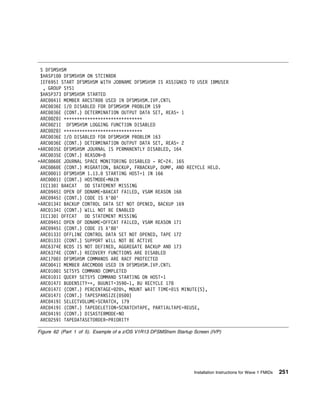
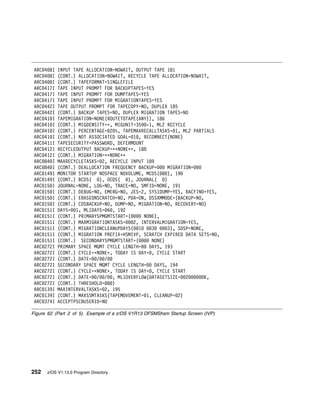
                                           FDU1H09 (ISMF Jpn) (SMC0241 / PUT0209)
Infoprint Server                           IP PrintWay basic mode
                                            – HMOS705 (SMC0117 / PUT0104)
                                            – JMOS7J5 (SMC0117 / PUT0104)
                                           NetSpool
                                            – HNET780 (SMC1107 / PUT1101)
                                            – JNET78J (SMC1107 / PUT1101)
                                           Print Interface
                                            – HOPI780 (SMC1115 / PUT1103)
                                            – JOPI78J (SMC1115 / PUT1103)
Integrated Security Services               Enterprise Identity Mapping
                                            – HIT7750 (SMC0811 / PUT0802)
                                           Network Authentication Service
                                            – HSWK3D0 (SMC1109 / PUT1102)
                                            – JSWK3DJ (SMC1109 / PUT1102)
                                           Open Cryptographic Enhanced Plug-ins
                                            – HRO7740 (SMC0710 / PUT0702)
ISPF                                       HIF6M02 (SMC1110 / PUT1102)
                                           JIF6M11 (SMC1110 / PUT1102)
                                           JIF6M14 (SMC1110 / PUT1102)
                                           JIF6M15 (SMC1110 / PUT1102)
                                           JIF6M16 (SMC1110 / PUT1102)
JES2                                       HJE7780 (SMC1112 / PUT1102)
                                           JJE778J (SMC1112 / PUT1102)


30     z/OS V1.13.0 Program Directory
Figure 5 (Page 4 of 5). FMIDs and Service Levels
Element / Feature                     FMIDs and Service Levels
JES3                                      HJS7780 (SMC1112 / PUT1103)
Language Environment                      HLE7780 (SMC1111 / PUT1103)
                                          JLE778J (SMC1111 / PUT1103)
Library Server                            HBKQ340 (SMC1014 / PUT1003)
Metal C Runtime Library                   HSD7780 (SMC1108 / PUT1102)
MICR/OCR 2.2.0                            EMI2220
Network File System                       HDZ1D1N (SMC1113 / PUT1103)
                                          JDZ1D1J (SMC1113 / PUT1103)
OSA Support Facility                      H0GI400 (SMC0305 / PUT0301)
Alternate Library for REXX                HWJ9143 (SMC0330 / PUT0306)
                                          JWJ9144 (SMC0330 / PUT0306)
RMF                                       HRM7780 (SMC1113 / PUT1103)
                                          JRM778J (SMC1113 / PUT1103)
Run-Time Library Extensions               HTV7780 (SMC1112 / PUT1103)
                                          JTV778J (SMC1112 / PUT1103)
SDSF                                      HQX7780 (SMC1112 / PUT1103)
                                          JQX778J (SMC1112 / PUT1103)
                                          JJE778S (SMC1112 / PUT1103)
Security Server                           RACF
                                           – HRF7780 (SMC1111 / PUT1103)
                                           – JRF778J (SMC1111 /PUT1103)
SMP/E                                     HMP1J00 (SMC1111 / PUT1103)
                                          JMP1J11 (SMC1111 / PUT1103)
                                          HBCND0B (SMC0117 / PUT0104)
                                          HBCNC00 (initial release)
                                          JBCND1B (SMC0117 / PUT0104)
TIOC                                      ETI1106
TSO/E                                     HTE7780 (SMC1109 / PUT1103)
                                          JTE778E (SMC1109 / PUT1103)
                                          JTE778G (SMC1109 / PUT1103)
                                          JTE778J (SMC1109 / PUT1103)
                                          JTE778C (SMC1109 / PUT1103)


                                                                    Program and Service Level Information   31
Figure 5 (Page 5 of 5). FMIDs and Service Levels
Element / Feature                     FMIDs and Service Levels
z/OS Security Level 3                     IBM TDS Security Level 3
                                           – JRSL3D1 (SMC1109 / PUT1102)
                                          OCSF Security Level 3
                                           – JCRY741 (SMC0714 / PUT0703)
                                          Network Authentication Service Security Level 3
                                           – JSWK3D1 (SMC1109 / PUT1102)
                                          System SSL Security Level 3
                                           – JCPT3D1 (SMC1109 / PUT1102)
z/OS UNIX System Services                 Application Services
                                           – HOT7780 (SMC1108 / PUT1102)
                                           – JOT778J (SMC1108 / PUT1102)
                                           – JOT778C (SMC1108 / PUT1102)
                                          Integrated Call Level Interface (ICLI)
                                           – HSAP360 (SMC0412 / PUT0402)
3270 PC File Transfer Program             HFX1112


The SMP/E installation logic for elements in z/OS V1.13.0 is contained in the SMPMCS file on the
installation tape. These files are loaded to the SMPPTS data set when an SMP/E RECEIVE is done for
z/OS V1.13.0. You may browse or print the installation logic files using TSO/E, ISPF, or IEBGENER (or
IEBPTPCH).

See the MVS CBPDO Memo to Users Extension for detailed information on the service level of the
unintegrated service provided on the tape. If you received this product as part of a CBPDO, PTFs not
incorporated into this release are provided on the tape.


32   z/OS V1.13.0 Program Directory
5.0 Installation Requirements and Considerations
The following section describes the DASD storage requirements considerations. For information about
driving system and target system requirements, see z/OS Planning for Installation, GA22-7504.


5.1 Driving System Requirements
For details on the driving system requirements of z/OS V1.13.0, see z/OS Planning for Installation,
GA22-7504.


5.2 Target System Requirements
For details on the target system requirements of z/OS V1.13.0, see z/OS Planning for Installation,
GA22-7504.


5.3 FMIDs Deleted
Installing z/OS V1.13.0 will result in the deletion of other FMIDs. To see what FMIDs will be deleted,
examine the ++ VER statement in the product's SMPMCS.

The SMP/E Modification Control Statements (SMPMCS) for z/OS V1.13.0 are contained in the SMPMCS
file on the installation tape. The SMPMCS for each FMID in the product will be loaded to the SMPPTS
data set, with a member name matching the FMID, when the FMID is SMP/E RECEIVEd. You may
browse or print these members using TSO/E, ISPF, or IEBGENER (or IEBPTPCH). As of z/OS V1.11.0,
the IBM Virtualization Engine Enterprise Workload Manager for z/OS V1.1.0 and V1.2.0 (FMIDs HVE1110
and HVE1210) are deleted with the installation of Wave 1 BCP FMID HBB7760.

5.3.1 SMP/E JCLIN
The JCLIN for z/OS V1.13.0 is contained in the RELFILEs on the installation tape. These files will be
loaded to disk by SMP/E when the product is SMP/E RECEIVEd. You may browse or print these files
using TSO/E, ISPF, or IEBGENER (or IEBPTPCH).

To find out which RELFILE contains the JCLIN, consult the SMPMCS logic.


© Copyright IBM Corp. 2001, 2011                                                                         33
5.4 DASD Storage Requirements
z/OS V1.13.0 libraries can reside on all supported DASD types.

The space requirements shown in Appendix C, “DASD Storage Requirements Tables” on page 349 are
for:
     All z/OS Version 1 Release 13 base elements
     All optional features that can coexist
     All corresponding national language FMIDs

Data sets for national language FMIDs not ordered may be empty or require less space than documented.
These data sets are identified by "N" in the notes column of the data set size tables.

5.4.1 Total DASD Storage Requirements
The total space required for all the target data sets listed in Figure 92 on page 356, when allocated at the
recommended block sizes, is:
     6077 cylinders on a 3390 device

The total space required for all the distribution data sets listed in Figure 93 on page 377, when allocated
at the recommended block sizes, is:
     10742 cylinders on a 3390 device

As of z/OS V1.7.0, the ROOT file system may be type HFS or zFS. The total space required on a 3390
device for the ROOT HFS file system and the ROOT zFS file system is listed below.
HFS     3293 cylinders primary; 320 cylinders secondary
zFS     3309 cylinders primary; 330 cylinders secondary

As of z/OS V1.7.0, the /etc file system may be HFS or zFS. The total space required for the /etc HFS
file system and the /etc zFS file system is:
     50 cylinders primary; 10 cylinders secondary on a 3390 device

For the CIM element, the /var/wbem file system may be type HFS or zFS. The total space required on a
3390 device for each type is listed below.
HFS     82 cylinders primary; 10 cylinders secondary
zFS     94 cylinders primary; 10 cylinders secondary

See z/OS Common Information Model User's Guide, SC33-7998, for more information about creating and
mounting a file system at /var/wbem.
Note: The HFS or zFS sizes listed in this section are applicable to z/OS V1.13.0 only (that is, the FMIDs
documented in this Program Directory). If you plan to install additional products into the ROOT file system
of z/OS V1.13.0, you will need to add their space requirements of HFS or zFS into the above sizes.


34    z/OS V1.13.0 Program Directory
The total space required for all the SMP/E data sets listed in Figure 87 on page 350 is:
    59 cylinders on a 3390 device

The total space required for all the SMPTLIB data sets is:
    10325 cylinders on a 3390 device

     SMPTLIB Considerations
 ** The size of the SMPTLIB data set reflects the total space requirements for all FMIDs (changed and
 unchanged elements) for z/OS V1.13.0.


For information about space requirements and block sizes, see z/OS Planning for Installation.


                                                                 Installation Requirements and Considerations   35
36   z/OS V1.13.0 Program Directory
6.0 Preparing the Installation Path
The following steps are required to prepare your system for the installation of the z/OS V1.13.0 CBPDO.
Detailed instructions for each step are provided in the indicated sections.

  Figure 6. Checklist for Preparing the Installation Path
  Check     Section, Step Description                                          Your Notes
   Box
            6.2, “Step 1: Separating File System Data Sets for z/OS V1.13.0”
            6.3, “Step 2: Cloning File System Data Sets” on page 38
            6.4, “Step 3: Back Up Your Clone System” on page 39
            6.5, “Step 4: Decide Which FMIDs to Install” on page 39
            6.6, “Step 5: Review Library Restructure/Renaming Notes” on
            page 50
            6.7, “Step 6: Review General Installation Notes” on page 51


6.1 Overview for the Clone of Your System
The following sections describe the procedures that need to be completed to create a clone of your
system. Before you clone your system, make sure your file system data sets are separated. Use these
steps to separate the file system data sets and clone your system.


6.2 Step 1: Separating File System Data Sets for z/OS V1.13.0
It is required that your file system contains separate file system data sets for /etc, /var, /tmp and /dev
directories on the system from which you are migrating. If the file system is contained within one data set,
separate file system data sets must be created and the contents moved to the new file system data sets.
If this is not done, the BPXISMKD job will fail with a return code of 12.

The BPXISMKD job converts the /var, /tmp, and /dev directories into symbolic links which allows the root
file system to be shared in a sysplex environment. These changes (creating separate file system data
sets and running the BPXISMKD job), must be done whether you plan to share the root file system in a
sysplex or not. For more information on sharing the root file system in a sysplex or how the root file
system works in a non-sysplex environment, refer to z/OS UNIX System Services Planning.

As of z/OS V1.7.0, the root file system along with the file systems mounted at directories /etc, /var, /tmp
and /dev might be HFS or zFS file systems.


© Copyright IBM Corp. 2001, 2011                                                                              37
6.3 Step 2: Cloning File System Data Sets
Make a clone, which is a separate IPLable copy, of your running system. The clone must include copies
of all system libraries that SMP/E updates, including the file system data sets, copies of the SMP/E CSI
data sets that describe the system libraries, and your PARMLIB and PROCLIB data sets.
Note: The order in which the waves and ripples are executed in the following pages assume a cloned
system is being used. If a cloned system is not being used, the order of the ripples in Wave 1 will have to
be changed. See 6.5.2, “Installation Ripple Exceptions” on page 41 for more details.

The clone becomes your target system. The system on which the installation jobs are processed is your
driving system. All of the changes made to the system during your installation will be made against the
clone system, not the driving system. Refer to z/OS Planning for Installation for instructions on how to
clone a system.
Note: Ensure the following tasks are completed before proceeding:
     The entire set of file system data sets are cloned. See 5.4.1, “Total DASD Storage Requirements” on
     page 34 for the new size of the root file system in this release.
     The DDDEF entries in the cloned SMP/E CSI have been updated to reference the proper file system
     paths for the cloned file system for your target system installation.

6.3.1 Using High Level Assembler, Program Management Binder, and
SMP/E for Subsequent z/OS V1.13.0 Installs
You must use the current release level of High Level Assembler, Program Management Binder, and
SMP/E which are shipped with z/OS V1.13.0 to install z/OS V1.13.0 Wave 1 and Wave 2 elements.
Therefore, you must first install SMP/E, the Program Management Binder, and High Level Assembler as
part of Wave 0.

SMP/E resides in the target system's MIGLIB library. High Level Assembler resides in the target system's
SASMMOD1 library. Program Management Binder resides in the target system's MIGLIB library as well
as other libraries. The Program Management Binder does still require SCEERUN for execution. If
SCEERUN is not in your LINKLST or LPALST on the driving system, you must add the appropriate
STEPLIB DD statement to any JCL and procedures (for example, SMP/E proc).
Note: Be sure the target system's MIGLIB and SASMMOD1 libraries are APF-authorized. For
information on authorizing the libraries, see z/OS MVS Programming: Authorized Assembler Services
Reference ALE-DYN.

If you choose not to STEPLIB to the target system's MIGLIB or SASMMOD1, you must:
     Install the current level of High Level Assembler, the Program Management Binder and SMP/E which
     are shipped in z/OS V1.13.0 on your target system.
     Make two clones of that target system. One is to be used as your new driving system. The other is
     to be used as your target system.


38    z/OS V1.13.0 Program Directory
6.4 Step 3: Back Up Your Clone System
After testing your clone system to ensure that it IPLs, back up your clone system to tape or DASD. Make
sure you have a backup of your clone system.

Also consider making a backup:
    After the APPLY step succeeds in each wave.
    After the ACCEPT step succeeds in each wave.
    After a successful IPL.
    At later stages in converting your system (after completing significant parts of the work and before
    starting new parts of the work).


6.5 Step 4: Decide Which FMIDs to Install
The elements of z/OS Version 1 Release 13 are integrated into a single package with compatible service
levels. Therefore, IBM expects that customers will migrate all elements of z/OS Version 1 Release 13 at
the same time, with the possible exception of JES2, SDSF, and JES3. The migration of JES2, SDSF, and
JES3 can be staged, if needed.

Note that you must install, with few exceptions, the entire z/OS product. For more details on the
exceptions, see z/OS Planning for Installation, section "Choosing the z/OS base and optional features".

The elements that need to be installed depend on the elements that are already installed on the target
system. If an element currently exists on the target system and it has not changed between the version
on the target system and this new release, it is not necessary to install the element. If it is not on the
target system or it has changed, the element must be installed.

The CBPDO installation of z/OS Version 1 Release 13 should occur in separate stages, which are called
waves. There are three waves, each one consisting of multiple SMP/E steps that are documented in this
Program Directory.
    Wave 0, during which elements that must be available on the driving system for the subsequent
    installation of Wave 1 and Wave 2 elements are installed.
    Wave 1, during which the core set of z/OS elements such as BCP, Language Environment,
    Communications Server IP Services and SNA Services, DFSMS, z/OS UNIX System Services, ISPF,
    and TSO/E are installed. Some of these core set elements are required to install other FMIDs.
    Wave 2, during which the z/OS level of the JES2, SDSF, and JES3 elements are installed.

OS/390 V1.3.0 expanded on the wave concept and further broke down the installation of all OS/390
V1.3.0 elements into ripples. Ripples take into consideration natural installation separation points, such as
element requisites and dependencies for SMP/E CALLLIBs. Some ripples are a subset of a wave and


                                                                               Preparing the Installation Path   39
some are an entire wave. In z/OS V1.11.0, a new ripple 1AL was introduced for National Language
FMIDs. The waves and their corresponding ripples are:
     Wave 0 (entire ripple)
     Wave 1
      – Wave 1A
      – Wave 1AL
      – Wave 1B
      – Wave 1C
      – Wave 1D
      – Wave 1E
      – Wave 1F
      – Wave 1G
     Wave 2 (entire ripple)

The ripples give an overall installation scenario that includes every element in order to expedite the
CBPDO installation path. Therefore, the ripples must be processed in the order specified, with all
FMIDs in a ripple installed.

Refer to 6.5.3, “Elements in each Wave, Ripple, and FMIDSET” on page 42 to find out which elements
are contained in each ripple and the last release in which an element was changed.
Note: Wave 2 is independent of Wave 1. Wave 2 can be combined with Wave 1; however, Wave 2
cannot occur before Wave 1.

6.5.1 Understanding SMP/E Zone Requirements
IBM recommends that you install all of z/OS Version 1 Release 13 (all base elements and all optional
features) into one SMP/E target zone and one SMP/E distribution zone with the following exceptions:
     Language Environment must not be installed into a target or distribution zone that contains the
     stand-alone products VS COBOL II or OS/VS COBOL. Language Environment contains element
     names that are used in VS COBOL II and OS/VS COBOL. Attempting to install into the same SMP/E
     zone renders both Language Environment and the COBOL products unusable.
     However, you can install Language Environment into the same target and distribution zones as any of
     the following products:
      –   IBM C/370 Library Version 2
      –   OS PL/I Library Version 1
      –   OS PL/I Library Version 2
      –   VS FORTRAN
     Do not attempt to install Language Environment into the same data sets as any of the following
     products. Language Environment contains parts and aliases. Attempting to install into the same data
     sets renders both Language Environment and these products unusable.
      – IBM C/370 Library Version 1
      – IBM C/370 Library Version 2


40    z/OS V1.13.0 Program Directory
–   OS PL/I Library Version 1
     –   OS PL/I Library Version 2
     –   OS/VS COBOL
     –   VS COBOL II
     –   VS FORTRAN
    In OS/390 Release 8, the OSA-1 function was no longer supported in OS/390 and is still not
    supported in z/OS. (Likewise, the OSA-1 feature, which is in OSA/SF V1, is not in OSA/SF V2).

Stand-alone products that install into z/OS Version 1 Release 13 load modules (or install into libraries that
can not be concatenated, such as SYS1.NUCLEUS) should also be kept in the same zones as z/OS.

IBM requires that you install all the elements into the same target zone except the following: JES2, JES3,
and SDSF.

Except for JES2, JES3 and SDSF, if you previously installed any of the elements or features into separate
zones, then you must either re-install them or use the SMP/E BUILDMCS command to get all the
elements and features into one target zone.

6.5.2 Installation Ripple Exceptions
Before you install Wave 0 and Wave 1 elements, you must ensure that the “cloned” file system
data sets are available on your driving system. Because some of the Wave 0 elements, SMP/E and
Program Management Binder, and some of the Wave 1 elements (notably Run-Time Library Extensions,
Language Environment, Communications Server IP Services, and z/OS UNIX System Services Integrated
Call Level Interface (ICLI) and DFSMS) contain SMP/E VER DELETE statements for the prior levels that
include FMIDs which are installed in the file system, installation of these elements attempts to access the
root file system to DELETE the prior FMIDs if they were installed. Because FMIDs that are installed in the
cloned file system will be deleted by SMP/E ++VER DELETE processing during Wave 0 and Wave 1
installation, you must ensure that the cloned file system is available (OMVS active in full function mode
and the file systems mounted) for SMP/E processing during Wave 0, Wave 1, and Wave 2. There are no
additional requirements for Wave 2; see z/OS Planning for Installation for details.

6.5.2.1 Installing into empty SMP/E zones
As of z/OS Version 1 Release 3, it is no longer possible to install into empty or partially empty SMP/E
zones. That is, you are required to install z/OS V1.13.0 CBPDO into zones which contain the full release
of z/OS from which you are migrating. This requirement is due to the sharing of load modules between
waves, the need to have SMP/E find those load modules in Wave 0, and the dependencies on the driving
system requirements which determine the wave order.


                                                                               Preparing the Installation Path   41
6.5.3 Elements in each Wave, Ripple, and FMIDSET
You must install the latest level of SMP/E, HLASM, and Program Management Binder in Wave 0 before
you install all the other waves and ripples. This way, you can make sure that the latest level of SMP/E,
HLASM, and Program Management Binder is used during the installation of the remaining waves and
ripples.

Figure 7 on page 43 through Figure 16 on page 49 contain the elements to be installed during each
wave and ripple of the z/OS Version 1 Release 13 installation. You should create an FMIDSET for each
ripple containing the elements listed in the corresponding table.

You will receive sample JCL in the data set member RIMLIB(FMIDSET) that creates FMIDSETs for the
installation of z/OS V1.13.0. FMIDSET(WAVE0, WAVE1A, WAVE1AL, WAVE1B,...WAVE2) are set up for
all elements for the specific ripple.

For the FMIDSETs (WAVE0, WAVE1A, WAVE1AL, WAVE1B,...WAVE2) created in Step 1 of the sample
FMIDSET job, edit the ripple FMIDSETs to remove any FMIDs you may already have on your system.

By default, language features and Communications Server Security Level 3 and z/OS Security Level 3
(both of which are optional unpriced features), are commented-out in Step 1. Therefore, if you ordered a
language, Communications Server Security Level 3, or z/OS Security Level 3, you must uncomment their
respective entries from Step 1 of the sample FMIDSET job.

For the FMIDSETs created in Step 2 of the sample FMIDSET job, you will also need to uncomment any
languages you have ordered. This ensures that any service for the languages is installed. Similarly, if
you ordered the z/OS Security Level 3 or Communications Server Security Level 3 features, you also must
uncomment those entries to install service for those features.

FMIDSET(ZR13W1A, ZR13W1AL, ZR13W1B,...ZR13W2) are set up to include all elements (new,
changed, and unchanged). These FMIDSETs will be used for applying and accepting service as
documented later in this program directory. Edit these FMIDSETs to uncomment the languages you
ordered and comment out the FMIDs for features that you did not order. Successful execution of the
FMIDSET sample job will produce a condition code of zero.

To determine which elements you need to install, refer to Figure 7 on page 43 through Figure 16 on
page 49 and check the Level column for the release in which an element was last changed.
     If the column begins with OS/390, that element changed in an OS/390 release.
     If the column begins with OS/390 but also has a version, release and modification in parentheses, that
     element changed in an OS/390 release but is non-exclusive. The level of the equivalent stand-alone
     product is in parenthesis. If you already have these FMIDs installed, you do not need to reinstall
     them; they should be removed from the FMIDSETs WAVE0, WAVE1A, through WAVE2 in the
     FMIDSET job.
     If the column begins with z/OS, that element changed in a z/OS release.


42    z/OS V1.13.0 Program Directory
If the column does NOT begin with OS/390 or z/OS, that element has not changed in OS/390 (all
   OS/390 releases have the same level) or z/OS, and it is the same level as the equivalent stand-alone
   product. The level of the equivalent stand-alone product is in the Level column. If you already have
   these FMIDs installed, you do NOT need to reinstall them (they should be removed from the
   FMIDSETs WAVE0, WAVE1A, through WAVE2 in the FMIDSET job).

The FMIDs listed in the Figure 7 through Figure 16 on page 49 are for the elements documented in this
program directory. To present a full z/OS Version 1 Release 13 view of the ripples, every element is
listed.

6.5.3.1 Elements in Wave 0
As Figure 7 shows, FMIDSET Wave 0 contains the z/OS V1.13.0 elements that must be installed on the
target system so they can be used for subsequent installations of Wave 1 and Wave 2 elements. This
includes SMP/E, HLASM, and Program Management Binder.

 Figure 7. Elements in FMIDSET Wave 0
 Element                       FMID(s)                                                            Level
 SMP/E                         HMP1J00                                                            z/OS V1.13.0
                               JMP1J11 (Japanese)                                                 (V3R6)
 HLASM                         HMQ4160                                                            z/OS V1.10.0
                                                                                                  (V1.6)
 Program Management            HPM7780                                                            z/OS V1.13.0
 Binder


6.5.3.2 Elements in Wave 1A
FMIDSET Wave 1A contains the elements that use SMP/E CALLLIB; these are summarized in Figure 8.
FMIDSET Wave 1A also contains elements UNICODE, IBM Tivoli Directory Server for z/OS, and TIOC.

 Figure 8 (Page 1 of 2). Elements in FMIDSET Wave 1A
 Element                       FMID(s)                                                            Level
 BCP                           HBB7780                                                            z/OS V1.13.0
                               HUN7780 (Support for Unicode)
 Note: BCP includes z/OS UNIX System Services Kernel and IBM Health Checker.
 Communications Server IP      HIP61D0                                                            z/OS V1.13.0
 Services
 Note: The Communications Server HFS FMID has been merged into the Communications Server IP Services
 FMID in z/OS V1R10 and later releases. The Communications Server IP Services FMID contains elements that
 are installed into the file system.
 Communications Server         HVT61D0                                                            z/OS V1.13.0
 SNA Services


                                                                               Preparing the Installation Path   43
Figure 8 (Page 2 of 2). Elements in FMIDSET Wave 1A
 Element                              FMID(s)                                         Level
 Cryptographic Services               HCR7780 (ICSF)                                  z/OS V1.13.0
                                      HCPT3D0 (System SSL)
 IBM Tivoli Directory Server          HRSL3D0                                         z/OS V1.13.0
 (IBM TDS)
 Integrated Security Services         HSWK3D0 (Network Authentication Service Base)   z/OS V1.13.0
 ISPF                                 HIF6M02                                         z/OS V1.13.0
 Language Environment                 HLE7780                                         z/OS V1.13.0
 Metal C Runtime Library              HSD7780                                         z/OS V1.13.0
 TIOC                                 ETI1106                                         MVS 3.8
                                                                                      Base


6.5.3.3 Elements in Wave 1AL
Figure 9 lists the elements that are installed as part of Wave 1AL. FMIDSET WAVE1AL includes the
language FMIDs for Wave 1A elements, along with the Communications Server XWindows X11R4 FMID
and Security Level 3 FMID.

 Figure 9. Elements in FMIDSET Wave 1AL
 Element                              FMID(s)                                         Level
 BCP                                  JBB778C (Simplified Chinese)                    z/OS V1.13.0
                                      JBB778J (Japanese)
                                      JUN778J (Unicode JPN)
 Communications Server                JIP61DK Security Level 3                        z/OS V1.13.0
                                      JIP61DX (XWindows X11R4)
 Note: FMID JIP61DK is export restricted.
 Cryptographic Services               JCPT3DJ (System SSL Japanese)                   z/OS V1.13.0
 IBM Tivoli Directory Server          JRSL3DJ (Japanese)                              z/OS V1.13.0
 (IBM TDS)
 Integrated Security Services         JSWK3DJ (Japanese)                              z/OS V1.13.0
 ISPF                                 JIF6M11   (Swiss German)                        z/OS V1.13.0
                                      JIF6M14   (Japanese)
                                      JIF6M15   (German)
                                      JIF6M16   (Upper Case English)
 Language Environment                 JLE778J (Japanese)                              z/OS V1.13.0


44   z/OS V1.13.0 Program Directory
6.5.3.4 Elements in Wave 1B
FMIDSET Wave 1B, summarized in Figure 10 on page 45, includes FMIDs of DFSMS, HCD, IOCP, and
z/OS UNIX System Services.

 Figure 10. Elements in FMIDSET Wave 1B
 Element                       FMID(s)                                                               Level
 DFSMS                         HDZ1D10                                                               z/OS V1.13.0
                               JDZ1D1K (Japanese)
 HCD                           HCS7780 (Base and English)                                            z/OS V1.13.0
                               JCS778J (Japanese)
 BCP                           HIO1104 (IOCP)                                                        MVS V3
 Note: The REWORK date for IOCP was changed in MVS/ESA SP 5.2.2 (to 1995093) to modify the COPYRIGHT
 statement. Because the code is exactly the same, it should not be reinstalled if you already have HIO1104
 installed.
 z/OS UNIX System Services     HOT7780 (Application Services)                                        z/OS V1.13.0
                               JOT778C (Chinese)
                               JOT778J (Japanese)
                               HSAP360 (Integrated Call Level Interface (ICLI))                      z/OS V1.6.0


6.5.3.5 Elements in Wave 1C
Figure 11 summarizes FMIDSET Wave 1C, which contains the following elements: BookManager/Build,
BookManager READ, EREP, ESCON, FFST, GDDM, ICKDSF, MICR/OCR, 3270 PC File Transfer
Program, and TSO/E.

 Figure 11 (Page 1 of 3). Elements in FMIDSET Wave 1C
 Element                       FMID(s)                                                               Level
 BookManager/Build             HBKP300                                                               OS/390 R1
                               JBKP310 (English)                                                     (V1R3)
                               JBKP311 (French)
                               JBKP312 (German)
                               JBKP313 (Spanish)
                               JBKP314 (Brazilian Portuguese)
                               JBKP315 (Canadian French)


                                                                                  Preparing the Installation Path   45
Figure 11 (Page 2 of 3). Elements in FMIDSET Wave 1C
 Element                              FMID(s)                                             Level
 BookManager READ                     HBKM300                                             OS/390 R1
                                      JBKM310 (English)                                   (V1R3)
                                      JBKM311 (Dutch)
                                      JBKM312 (French)
                                      JBKM313 (German)
                                      JBKM314 (Spanish)
                                      JBKM315 (Italian)
                                      JBKM316 (Brazilian Portuguese)
                                      JBKM317 (Canadian French)
                                      JBKM318 (Danish)
 EREP                                 EER3500                                             V3R5
 ESCON Director                       HSWF100                                             MVS/ESA V5
 FFST                                 HFST101                                             OS/390 R2
                                                                                          (V1R2)
 GDDM                                 HGD3200                                             OS/390 R2
                                      JGD3219 (English)                                   (V3R2)
                                      JGD3220 (Brazilian)
                                      JGD3221 (Simplified Chinese)
                                      JGD3222 (Danish)
                                      JGD3223 (French)
                                      JGD3224 (German)
                                      JGD3225 (Korean)
                                      JGD3226 (Italian)
                                      JGD3227 (Japanese)
                                      JGD3228 (Norwegian)
                                      JGD3229 (Canadian French)
                                      JGD3230 (Spanish)
                                      JGD3231 (Taiwan Chinese)
                                      JGD3232 (Swedish)
 GDDM-PGF                             HGD3201                                             OS/390 R2
                                                                                          (V2R1.3)
 ICKDSF                               EDU1H01                                             z990
 (V1R17)                              FDU1H07 (ISMF Base)                                 Compatibility
                                      FDU1H08 (ISMF English Panels)                       Support
                                      FDU1H09 (ISMF Japanese Panels)
 MICR/OCR                             EMI2220                                             MVS/XA level
 TSO/E                                HTE7780                                             z/OS V1.13.0
                                      JTE778G (German)
                                      JTE778C (Simplified Chinese)
                                      JTE778E (Information Center Facility and English)
                                      JTE778J (Japanese)
 Note: The English feature of TSO/E is required if you install a language feature.


46   z/OS V1.13.0 Program Directory
Figure 11 (Page 3 of 3). Elements in FMIDSET Wave 1C
 Element                        FMID(s)                                                           Level
 3270 PC File Transfer          HFX1112                                                           OS/390 R2
 Program                                                                                          (V1R1.1)


6.5.3.6 Elements in Wave 1D
Figure 12 summarizes FMIDSET Wave 1D, which contains the following elements: Cryptographic
Services, Integrated Security Services, Security Server (RACF), Alternate Library for REXX, and z/OS
Security Level 3.

 Figure 12. Elements in FMIDSET Wave 1D
 Element                        FMID(s)                                                           Level
 Cryptographic Services         HCRY740 (Open Cryptographic Services Facility Base)               z/OS V1.9.0
                                HKY7780 (PKI Services)                                            z/OS V1.13.0
 Integrated Security Services   HRO7740 (Open Cryptographic Enhanced Plug–ins)                    z/OS V1.9.0
                                HIT7750 (Enterprise Identity Mapping)                             z/OS V1.10.0
 Security Server (RACF)         HRF7780                                                           z/OS V1.13.0
                                JRF778J (Japanese)
 Alternate Library for REXX     HWJ9143                                                           z/OS V1.9.0
                                JWJ9144 (Japanese)
 z/OS Security Level 3          JCRY741 (OCSF Security Level 3)                                   z/OS   V1.9.0
                                JCPT3D1 (System SSL Security Level 3)                             z/OS   V1.13.0
                                JSWK3D1 (Network Authentication Service Security Level 3)         z/OS   V1.13.0
                                JRSL3D1 (IBM TDS Security Level 3)                                z/OS   V1.13.0
 Note: FMIDs JCRY741, JCPT3D1, JSWK3D1, and JRSL3D1 are export restricted.


6.5.3.7 Elements in Wave 1E
As Figure 13 shows, FMIDSET Wave 1E contains BCP - Capacity Provisioning, XL C/C++, Common
Information Model (CIM), Run-Time Library Extensions, and RMF.

 Figure 13 (Page 1 of 2). Elements in FMIDSET Wave 1E
 Element                        FMID(s)                                                           Level
 BCP - Capacity Provisioning    HPV7780                                                           z/OS V1.13.0
 C/C++ without Debug            H24P111 (Host Performance Analyzer)                               OS/390 2.4
                                J24P112 (Japanese Messages)

                                HLB7780 (XL C/C++ Base)                                           z/OS V1.13.0
                                JLB778J (XL C/C++ Japanese)


                                                                               Preparing the Installation Path   47
Figure 13 (Page 2 of 2). Elements in FMIDSET Wave 1E
 Element                              FMID(s)                                         Level
 Common Information Model             HPG7780                                         z/OS V1.13.0
 (CIM)
 RMF                                  HRM7780                                         z/OS V1.13.0
                                      JRM778J (Japanese)
 Run-Time Library Extensions          HTV7780                                         z/OS V1.13.0
                                      JTV778J (Japanese)


6.5.3.8 Elements in Wave 1F
FMIDSET Wave 1F contains BDT, DFSORT, HCM, HLASM Toolkit, OSA/SF, and SMP/E Planning and
Migration Assistant. Figure 14 summarizes the contents of this wave.

 Figure 14. Elements in FMIDSET Wave 1F
 Element                              FMID(s)                                         Level
 BDT                                  HBD6602                                         OS/390 R2
                                      JBD6201 (File to File)
                                      JBD6202 (SNA NJE)
 DFSORT                               HSM1K00                                         z/OS V1.12.0
 HCM                                  HCM1D10                                         z/OS V1.13.0
 HLASM Toolkit                        JMQ416A                                         z/OS V1.10.0
                                                                                      (V1.6)
 OSA/SF                               H0GI400                                         z990
                                                                                      Compatibility
                                                                                      Support
 Note: As of z/OS V1.5.0, OSA/SF is an exclusive element.
 SMP/E                                HBCND0B (Planning and Migration Assistant)      z/OS V1.2.0
                                      JBCND1B (Japanese)
                                      HBCNC00 (Software Information Base)             OS/390 R7


6.5.3.9 Elements in Wave 1G
As Figure 15 shows, FMIDSET Wave 1G contains Distributed File Service, which includes zFS, and IBM
HTTP Server, Infoprint Server, Library Server, and Network File System.


48   z/OS V1.13.0 Program Directory
Figure 15. Elements in FMIDSET Wave 1G
 Element                          FMID(s)                                                               Level
 Distributed File Service         H0H23D0                                                               z/OS V1.13.0
                                  J0H23DJ (Japanese)
 zSeries File System
                                  HZFS3D0                                                               z/OS V1.13.0
                                  JZFS3DJ (Japanese)
 Note: If you install z/OS V1.13.0 on a z/OS V1.11.0 or later target system, you must install the Distributed File
 Service element (H0H23D0,HZFS3D0, and, optionally J0H23DJ and JZFS3DJ) in the same SMP/E installation
 step. Failure to do so might result in the "NOT SEL" messages in the SMP/E output from the zFS element; this
 can result in improper installation of the zFS element.
 IBM HTTP Server                  HIMW530                                                               OS/390 R10
                                  JIMW53B (Japanese)
                                  JIMW531 (NA Secure)
 Infoprint Server                 HOPI780 (Print Interface Base)                                        z/OS V1.13.0
                                  JOPI78J (Japanese)
                                  HNET780 (NetSpool Base)
                                  JNET78J (Japanese)

                                  HMOS705 (IP PrintWay Base)
                                  JMOS7J5 (Japanese)                                                    z/OS V1R2
 Library Server                   HBKQ340                                                               z/OS V1.12.0
 Network File System              HDZ1D1N                                                               z/OS V1.13.0
                                  JDZ1D1J (Japanese)


6.5.3.10 Elements in Wave 2
Wave 2 contains the JES and SDSF elements, which are listed in Figure 16.

 Figure 16 (Page 1 of 2). Elements in FMIDSET Wave 2
 Element                          FMID(s)                                                               Level
 JES2                             HJE7780                                                               z/OS V1.13.0
                                  JJE778J (Japanese)
 JES3                             HJS7780                                                               z/OS V1.13.0


                                                                                     Preparing the Installation Path   49
Figure 16 (Page 2 of 2). Elements in FMIDSET Wave 2
  Element                               FMID(s)                                                         Level
  SDSF                                  HQX7780                                                         z/OS V1.13.0
                                        JQX778J (Japanese)
                                        JJE778S (JES2 Support)
  Note:
     1. To assemble SDSF, JES2 is required.
     2. If you are installing z/OS V1.13.0 on a z/OS V1.11.0 or higher target system, be sure to install the SDSF
        element and the JES2 element in the same SMP/E installation step because z/OS V1.13.0 SDSF only
        assembles with z/OS V1.13.0 JES2.
     3. Starting from z/OS V1.10.0, the SDSF element can be used with either the JES2 or JES3 element. For
        releases earlier than z/OS V1.10.0, the SDSF element can only be used with the JES2 element.


6.6 Step 5: Review Library Restructure/Renaming Notes
Some elements have restructured the libraries in previous releases. You should determine if these
restructures will affect your environment. Refer to z/OS Migration for a list of all the deleted data sets and
paths, and new data sets and paths. Refer to this book for information on what libraries and paths are
changed for a particular z/OS release.

If you are installing an element, and at least one of the following is true:
      The middle-level qualifier of the data sets has been removed.
      You wish to change the high-level qualifier of an existing library.
      The RECFM of a data set has changed.
IBM recommends that you do the following:
 1. Perform the dummy function delete of the element.
 2. Delete the old libraries.
 3. Allocate new libraries using the sample jobs provided.
 4. Update the DDDEFs using the sample jobs provided.
 5. Follow the rest of the instructions in the appropriate installation chapters.


50     z/OS V1.13.0 Program Directory
6.7 Step 6: Review General Installation Notes
This section describes the general information and messages that you receive during APPLY CHECK,
APPLY, ACCEPT CHECK, and ACCEPT processing of the z/OS Version 1 Release 13 elements.

For the DDDEF sample jobs being provided, if the DDDEFs have never been defined, you can use either
the REP or ADD parameter. The REP parameter replaces the CSI entry if it exists or adds it if it does not
exist. If, however, the DDDEFs have already been defined and need to be replaced, you must use the
REP parameter. If you use the ADD parameter to attempt to replace an existing entry, the job will fail.

If the target and distribution data sets that correspond to the DDDEFs will be cataloged, the UNIT and
VOLUME parameters can be deleted from the DDDEF sample jobs.

To receive the full benefit of the SMP/E Causer SYSMOD Summary Report, the following should not be
bypassed on the APPLY and ACCEPT CHECK: ID, IFREQ, PRE, and REQ. This is because the SMP/E
root cause analysis only identifies the cause of ERRORS and not WARNINGS.

Enhanced HOLDDATA introduced ERROR HOLDs against FMIDs for HIPER APARS. Prior to installing,
you should ensure you have the latest Enhanced HOLDDATA, which is available at the following URL:
http://www-947.ibm.com/systems/support/z/zos/

The FMID(s) should be installed regardless of the status of unresolved HIPERs; however, the software
should not be deployed until the unresolved HIPERs have been analyzed to determine applicability.

There are two methods to complete an FMID installation where ++HOLDs for HIPERs exist for the
FMID(s) being installed:
 1. To ensure that all critical service is installed with the FMID(s), add the SOURCEIDs of PRP, and
    HIPER to the APPLY command. There maybe PE or HIPER APARs that do not have resolving PTFs
    available yet. You need to analyze the symptom flags to determine if you want to BYPASS the
    specific ERROR HOLDs and continue the FMID installation.
    This method requires more initial research, but will provide resolution for all HIPERs that have fixes
    available and are not in a PE chain. There may still be unresolved PEs or HIPERs which will require
    the use of BYPASS.
 2. To install the FMID(s) as it would have been installed prior to Enhanced HOLDDATA, you can add a
    BYPASS(HOLDCLASS(HIPER)) operand to the APPLY command. This will allow the FMID to be
    installed even though there are HIPER ERROR HOLDs against it. Note that not all ERROR HOLDs
    were bypassed; only the HIPER ERROR HOLDs. After the FMID(s) are installed, the SMP/E
    REPORT ERRSYSMODS command should be run to identify any missing HIPER maintenance.
    The sample APPLY jobs shown throughout this program directory include
    BYPASS(HOLDCLASS(HIPER)) on the APPLY command to bypass the HIPER ERROR HOLDs.
    This method is the quicker of the two, but requires subsequent review of the REPORT ERRSYSMODS
    to investigate any HIPERs.


                                                                             Preparing the Installation Path   51
If you bypass any HOLDs during the installation of the FMID(s) because fixing PTFs were not yet available
you can use the APAR Status Tracking (AST) function of ServiceLink or the APAR Tracking function of
ResourceLink to be notified when the fixing PTF is available.

GROUPEXTEND indicates that all requisite SYSMODs are to be applied and accepted. The requisite
SYSMODs may be applicable to other functions. In the SMP/E examples throughout this program
directory, GROUPEXTEND will not include APARs or USERMODs. If you want it to, then remove the
keywords NOAPARS and NOUSERMODS.

During an APPLY/ACCEPT CHECK and APPLY/ACCEPT, SMP/E Element Status can appear as
APPLIED/ACCEPTED or NOT SEL in the 'Element Summary Report'.
     When Element Status indicates APPLIED/ACCEPTED with NOT SEL, the NOT SEL status can be
     ignored.
     Any Element Status showing ONLY a NOT SEL should be investigated.
     Notes on APPLY CHECK and APPLY processing
     If USERMODs are regressed, you will see the following message, which is acceptable:
     GIM445 2W CHANGES FOR THE FOLLOWING USERMODS WILL BE LOST
     BECAUSE THE ASSOCIATED FUNCTION SYSMOD HAS BEEN DELETED
     Depending on what your USERMOD does during APPLY CHECK processing, you may want to SMP/E
     RESTORE your USERMODs before installing the function sysmod and then APPLY them afterwards,
     or perform an SMP/E APPLY concurrently with the function sysmod.
     If the optional dummy function delete was not performed, normal SMP/E APPLY processing of the
     z/OS V1.13.0 FMIDs will delete the previous releases. However, the total installation time will be
     decreased if you run the optional dummy delete job. If you do not run the dummy delete job, then
     several load modules will be link-edited multiple times. The first link-edit will remove the previous
     release and can produce the following program binder messages, which can be ignored:
     IEW223 S    IEW2454W     IEW247 E   IEW2471E   IEW248 W   IEW2612E
     IEW2648E    IEW265 I     IEW2677S
     For those elements using SMP/E CALLLIBs, warning messages are issued when the load modules
     are link-edited. For example, the following warning messages are acceptable:

     IEW2454W SYMBOL xxxxxxxx UNRESOLVED. NO AUTOCALL(NCAL) SPECIFIED.

     IEW248 W EXTERNAL SYMBOL xxxxxxxx OF TYPE LD WAS ALREADY DEFINED
     AS A SYMBOL OF TYPE LD IN SECTION csectname.

     IEW2482W THE ORIGINAL DEFINITION WAS IN A MODULE IDENTIFIED BY
     DDNAME SMPnnnnn. THE DUPLICATE DEFINITION IS IN SECTION xxxxxxx
     IN A MODULE IDENTIFIED BY DDNAME SMPnnnnn.

     IEW26 9W 51 4 SECTION xxxxxxxx USABILITY ATTRIBUTE OF
     NON-REUSABLE CONFLICTS WITH REQUESTED USABILITY OF REENTRANT.


52    z/OS V1.13.0 Program Directory
During APPLY CHECK and APPLY processing, the following message may be issued if BYPASS was
specified (aaaaaaa is the sysmod ID). This message, and the resulting return code of 4, is
acceptable.
GIM42 1W THE FOLLOWING CONDITIONS FOR SYSMOD aaaaaaa
WERE NOT SATISFIED, BUT WERE IGNORED BECAUSE THE BYPASS
OPERAND WAS SPECIFIED. PROCESSING CONTINUES.
Note: You must investigate and resolve any “requisites” or “holds” that were not satisfied before
continuing with the install.
During APPLY CHECK and APPLY processing for some elements, such as BCP, message
GIM69138W will appear in the SMP/E output when a load module does not exist in a library and the
install logic of an FMID contains a ++DELETE statement for a load module:
GIM69138W LMOD xxxxxxx WAS NOT DELETED FROM LIBRARY yyyyyy BY
SYSMOD sssssss BECAUSE xxxxxxx DOES NOT EXIST IN LIBRARY yyyyyy.
In the preceding message, xxxxxxx is the load module name, yyyyyy is the library name, and sssssss
is the SYSMOD name.
Notes on ACCEPT CHECK and ACCEPT processing
IBM recommends that you set the ACCJCLIN indicator in the DLIB zone. This causes all inline JCLIN
to be saved in the distribution zone at ACCEPT time. For more information about the ACCJCLIN
indicator, see the description of inline JCLIN in the ACCEPT command in SMP/E Commands.
Any requisite service identified by the ACCEPT CHECK should be RECEIVEd and APPLYed before
the next step.
During SMP/E ACCEPT processing, load modules are installed into the distribution libraries. During
the link-edits into these distribution libraries, message IEW0461 or IEW2454W may be issued several
times. These messages are acceptable because the distribution libraries are not executable and the
unresolved external references will not affect the executable system libraries.
During ACCEPT CHECK and ACCEPT processing, the following message may be issued if BYPASS
was specified (aaaaaaa is the sysmod ID). This message, and the resulting return code of 4, is
acceptable.
GIM42 1W THE FOLLOWING CONDITIONS FOR SYSMOD aaaaaaa
WERE NOT SATISFIED, BUT WERE IGNORED BECAUSE THE BYPASS
OPERAND WAS SPECIFIED. PROCESSING CONTINUES.
Note: You must investigate and resolve any “requisites” or “holds” that were not satisfied before
continuing with the install.
REPORT CALLLIBs is not required to be run after the installation is finished. Because the CALLable
services are upwardly compatible, there is no need to re-link.
The sample jobs are shown using REGION=0M. A region value equal to 0K or 0M gives the job all
the storage available below and above 16 megabytes. Be aware that this can affect the performance
of other jobs running in the system. If you do not choose to run with a region size of 0M, refer to
SMP/E Reference for more information on how to determine region sizes.


                                                                         Preparing the Installation Path   53
TIME=NOLIMIT is specified on the samples because the jobs take a long time to execute.

6.7.1 SMP/E CALLLIBs Processing
z/OS V1.13.0 uses the CALLLIBS function that is provided in SMP/E to resolve external references during
installation. Before z/OS V1.13.0 is installed, ensure that DDDEFs exist for the following libraries:
     SYS1.CSSLIB
     CEE.SCEELKED
     CEE.SCEESPC
     CICS.SDFHLOAD
     CSF.SCSFMOD1
     EUVF.SEUVFLIB
     CEE.SCEELKEX
     CEE.SCEECPP
     TCPIP.SEZACMTX
     CEE.SCEEOBJ
     CEE.SCEEBND2
     SYS1.SFOMOBJ
     CEE.SCEELIB

6.7.1.1 Use the FIXCAT HOLDDATA by Running the UPGRADE Command
Starting from z/OS V1.10.0., FIXCAT, a new type of HOLDDATA, is included in the CBPDO. The FIXCAT
HOLDDATA can be used by SMP/E to associate PTFs with specific categories of fixes and to assign
SOURCEIDs to the PTFs that can be used for selection. These categories and SOURCEIDs, which are
further described in the sample jobs in this Program Directory, can be used during the APPLY and
ACCEPT steps for Wave 0, 1 and 2 FMIDs.
To use these fix categories, run the SMP/E UPGRADE command for the global zone to enable SMP/E to
receive the FIXCAT ++HOLD statements if the UPGRADE command was not previously run. Because
z/OS V1.11.0 or z/OS V1.12.0 is the driving system and these z/OS releases include the SMP/E V3.5
level of SMP/E, the SMP/E UPGRADE command should have been run previously; therefore, you do not
need to run the UPGRADE command again.

When SMP/E V3.5 in z/OS V1R10 or later receives the FIXCAT ++HOLD statements, it makes changes to
the SMPCSI data set in the global zone that are incompatible with prior SMP/E releases. With the
UPGRADE command, you can make the trade-off between fully using the new SMP/E functions and
preserving the compatibility of your SMPCSI data set with prior SMP/E releases. SMP/E will not receive
the FIXCAT ++HOLD statements and make incompatible changes to the global zone until you run the
UPGRADE command. By running the UPGRADE command for a particular zone, you authorize SMP/E to
receive the FIXCAT ++HOLD statements and to make incompatible changes to that zone. See Figure 17
on page 55 for an example of the UPGRADE command.


54    z/OS V1.13.0 Program Directory
//UPGJOB JOB <job parameter>
 //STEP1 EXEC PGM=GIMSMP
 //SMPCSI DD DSN=zosv1r13.global.csi,DISP=SHR
 //SMPCNTL DD ᑍ
    SET BOUNDARY(GLOBAL).
    UPGRADE.
 /ᑍ

Figure 17. An Example of the UPGRADE Command


                                                Preparing the Installation Path   55
56   z/OS V1.13.0 Program Directory
7.0 Installation Instructions for Wave 0 FMIDs
This chapter describes how to install the Wave 0 elements in z/OS V1.13.0.
    For instructions on installing all of the FMIDs in Wave 1, including the FMIDs that are installed into the
    file system, see 8.0, “Installation Instructions for Wave 1 FMIDs” on page 77.
    For instructions about installing JES2, JES3, and SDSF, see 9.0, “Installation Instructions for Wave 2
    FMIDs” on page 293.

z/OS is installed using the SMP/E RECEIVE, APPLY, and ACCEPT commands. For details on SMP/E,
refer to the appropriate SMP/E books.
Note: This chapter uses sample JCL to illustrate installation steps. You can also use the SMP/E dialogs
instead of JCL.

The following steps are required to install the Wave 0 FMIDs. Instructions for each step are provided on
the indicated pages.

  Figure 18. Checklist for Wave 0 Installation
  Check     Activity         Section, Step Description                                  Your Notes
   Box
            RECEIVE          7.1, “Step 1: RECEIVE the Wave 0 Elements” on page
                             58
            Prepare          7.2, “Step 2: Prepare to Install Wave 0” on page 60
            Run              7.2.1, “Run optional delete jobs for Wave 0 Elements” on
            Optional         page 60
            Delete Jobs
            Allocate         7.2.2, “Allocate Target and Distribution Libraries for
            Libraries        Wave 0 Elements” on page 62
            HFS or zFS       7.2.3, “Create File System Directories for Wave 0” on
            Directories      page 63
            Define           7.2.4, “Define DDDEFs for Wave 0 Elements” on page
            DDDEFs           63
            APPLYs           7.3, “Step 3: APPLY Wave 0” on page 64
                             7.3.1, “Create a Cross-Zone Set” on page 64
                             7.3.2.1, “Do an SMP/E APPLY CHECK for Wave 0
                             FMIDs and Service” on page 67
                             7.3.2.2, “Do an SMP/E APPLY for Wave 0 FMIDs and
                             Service” on page 68
            Customize        7.4, “Step 4: Wave 0 Customization” on page 70
            Wave 0


© Copyright IBM Corp. 2001, 2011                                                                           57
7.1 Step 1: RECEIVE the Wave 0 Elements
You must use the current level of SMP/E, which is included with z/OS V1.13.0 to install z/OS V1.13.0
Wave 1 and Wave 2 elements. Therefore, you must receive the Wave 0 FMIDs by only using the
SELECT and FORFMID operands to limit SMP/E processing at this time. After you install the Wave 0
FMIDs, you can use SMP/E to update the Global zone to improve RECEIVE processing (see note 5 on
page 74) and receive the FMIDs and service for the rest of z/OS elements (see 8.1.5, “RECEIVE the Rest
of the CBPDO” on page 87). See SMP/E Commands for more information about the changes to SMP/E
RECEIVE processing.

7.1.1 RECEIVE Wave 0 FMIDs and Service
Select which z/OS Version 1 Release 13 Wave 0 FMIDs to RECEIVE by removing the FMIDs that have
previously been RECEIVEd or that have not been ordered from the sample RECEIVE job shown in
Figure 19 on page 59.

       Required Updates
     1. Update the job parameters.
     2. Replace the CSI name on the SMPCSI DD statement with your CSI name.
     3. Replace vvvvvv on the SMPPTFIN and SMPHOLD DD statement with the correct VOLSER.


58     z/OS V1.13.0 Program Directory
//RECWAVE JOB <job parameters>
    //STEP1 EXEC PGM=GIMSMP,REGION= M,TIME=NOLIMIT
    //SMPCSI DD DSN=zosv1r13.global.csi,DISP=SHR
    //SMPPTFIN DD DSN=SMPMCS,
    //             UNIT=(TAPE,,DEFER),
    //             VOL=SER=vvvvvv,
    //             LABEL=(5,SL),
    //             DISP=(SHR,KEEP)
    //SMPHOLD DD DSN=HOLDDATA,
    //             UNIT=(TAPE,,DEFER),
    //             VOL=SER=vvvvvv,
    //             LABEL=(3,SL),
    //             DISP=(SHR,KEEP)
    //SMPCNTL DD ᑍ
       SET BOUNDARY(GLOBAL).
       RECEIVE SELECT (
                     HMP1J ,     /ᑍ see NOTE 1 below ᑍ/
                     JMP1J11, /ᑍ see NOTE 2 below ᑍ/
                     HMQ416 , /ᑍ see NOTE 1 below ᑍ/
                     HPM778   /ᑍ see NOTE 1 below ᑍ/
                     )
               SYSMODS
               HOLDDATA
               FORFMID (
                     HMP1J ,
                     JMP1J11,    /ᑍ see NOTE 2 below ᑍ/
                     HMQ416 ,
                     HPM778
                     ).

    /ᑍ

Figure 19. SMP/E RECEIVE (All Wave 0 FMIDs and Service for z/OS)

Notes:
 1. If High Level Assembler (HLASM), SMP/E, or Program Management Binder has been previously
    installed, remove FMID HMQ4160, HMP1J00, or HPM7780 from the SELECT parameter.
 2. If the Japanese feature is not ordered, remove FMID JMP1J11 from the SELECT and FORFMID
    parameters.

Successful receive processing returns a condition code of 0.


                                                                   Installation Instructions for Wave 0 FMIDs   59
7.2 Step 2: Prepare to Install Wave 0
This step describes the preparation work required before doing the APPLY of Wave 0.

     Required Planning Tasks Check List
         Before installing Wave 0, complete the planning tasks for choosing the software installation
         method - using CBPDO, preparing the driving system for CBPDO, and preparing the target
         system which are described in z/OS Planning for Installation, GA22-7504.
         Clone your system, as described in 6.1, “Overview for the Clone of Your System” on page 37.
         Check the PSP buckets, as described in 3.2, “Preventive Service Planning (PSP)” on page 21.
         Ensure that your system meets the requirements for hardware, software, and coexistence
         considerations described in z/OS Planning for Installation, GA22-7504.
         Install the required driving system software listed in z/OS Planning for Installation for Wave 0.
         If you do not have a system that meets these requirements, do one of the following:
              Consider using a ServerPac.
              Consider using a SystemPac.
              Upgrade your existing system.
              Obtain a Customized Offerings Driver (5751-COD).

 To install Wave 0, you must install from a user ID that equals 0 or has read access to the
 BPX.SUPERUSER resource in the RACF facility class. This user ID must have read access to facility
 class resources BPX.FILEATTR.APF, BPX.FILEATTR.PROGCTL, and BPX.FILEATTR.SHARELIB. Alternatively,
 you could use a generic name for these resources, such as BPX.FILEATTR.ᑍ.


7.2.1 Run optional delete jobs for Wave 0 Elements
Before installing Wave 0 elements, you may consider dummy function deleting prior levels of elements to
decrease installation runtime. You can create a dummy function delete job by using the sample job shown
in Figure 20 on page 61 to delete the elements. To run this job, you must make the following updates to
the sample:
 1. Update the job parameters.
 2. Change zosv1r13.global.csi name to your CSI name on the SMPCSI DD statement.
 3. Change #fmid1 to the prior level of the element's base FMID.
 4. Change #fmid2 to the prior level of the element's feature FMID. If there is no feature FMID for the
    element, then remove #fmid2. If there is more than one feature FMID, then you will have to add the
    additional FMIDs to this list.
 5. Change #tzone to your TARGET ZONE name.
 6. Change #dzone to your DLIB ZONE name.


60   z/OS V1.13.0 Program Directory
//DDELETE JOB <job parameters>
 //STEP1 EXEC PGM=GIMSMP,REGION= M,TIME=NOLIMIT
 //SMPCSI DD DISP=SHR,DSN=zosv1r13.global.csi
 //SMPHOLD DD DUMMY
 //SMPCNTL DD ᑍ
  SET BDY(GLOBAL) OPTIONS(ZOSOPT).
  RECEIVE S(DM FMID).
 /ᑍ
 //SMPPTFIN DD ᑍ
 ++FUNCTION (DM FMID) REWORK(2 11 91).
 ++VER(Z 38)
     DELETE(#fmid1,#fmid2).
 /ᑍ
 //STEP2 EXEC PGM=GIMSMP,REGION= M,TIME=NOLIMIT,COND=(4,LT)
 //SMPCSI DD DISP=SHR,DSN=zosv1r13.global.csi
 //SMPCNTL DD ᑍ
    SET BDY(#tzone) OPTIONS(ZOSOPT).
    APPLY S(DM FMID) REDO.
 /ᑍ
 //STEP3 EXEC PGM=GIMSMP,REGION= M,TIME=NOLIMIT,COND=(4,LT)
 //SMPCSI DD DISP=SHR,DSN=zosv1r13.global.csi
 //SMPCNTL DD ᑍ
    SET BDY(#dzone) OPTIONS(ZOSOPT).
    ACCEPT S(DM FMID) REDO.
 /ᑍ
 //STEP4 EXEC PGM=GIMSMP,REGION= M,TIME=NOLIMIT,COND=(4,LT)
 //SMPCSI DD DISP=SHR,DSN=zosv1r13.global.csi
 //SMPCNTL DD ᑍ
    SET BDY(#tzone) .
   UCLIN .
     DEL SYSMOD(#fmid1) .
     DEL SYSMOD(#fmid2) .
     DEL SYSMOD(DM FMID) .
   ENDUCL .
   SET BDY(#dzone) .
   UCLIN .
     DEL SYSMOD(#fmid1) .
     DEL SYSMOD(#fmid2) .
     DEL SYSMOD(DM FMID) .
   ENDUCL .
   SET BDY(GLOBAL).
   REJECT HOLDDATA NOFMID       /ᑍ Reject SYSMODs, HOLDDATA ᑍ/
         DELETEFMID             /ᑍ for the deleted functions.ᑍ/
         (DM FMID #fmid1 #fmid2).

Figure 20. Sample Dummy Delete Job


                                                             Installation Instructions for Wave 0 FMIDs   61
7.2.2 Allocate Target and Distribution Libraries for Wave 0 Elements
Since it is expected that you are installing on a clone of your system, as stated in 6.1, “Overview for the
Clone of Your System” on page 37, many data sets should already exist. Verify that your target and
distribution libraries contain enough space, as described in Appendix C, “DASD Storage Requirements
Tables” on page 349. Sample jobs to allocate the target and distribution libraries for some elements have
been provided. See Appendix C, “DASD Storage Requirements Tables” on page 349 for information on
new libraries introduced in this release.

Copy the sample jobs to a work data set and customize them if you need to perform these tasks.

The samples specify the storage requirements using average block lengths. BLKSIZE=0 indicates that
system-determined block sizes are being used. For example, the sizes might look like this:
     SPACE=(88 ,(135,27,6)),
     DCB=(RECFM=FB,LRECL=8 ,BLKSIZE= ).

Do not confuse the SPACE=8800 (average block length) parameter with the BLKSIZE=0 (block size)
parameter. If you would like to change the block size to something other than the system-determined
block size, you can change the BLKSIZE parameter. Do not change the SPACE parameter. You can
either use the storage allocations that are provided, or convert them to cylinder or track allocations.

If these elements have already been installed, the JCL for the jobs needs to be modified to remove or
comment out the DD statements for the pre-existing libraries, or the job will fail. For more information on
modifying JCL, see z/OS MVS JCL Reference, SA22-7597.

Run these jobs after the elements have been RECEIVEd.

After the jobs are submitted, you should get a condition code of 0. Check the allocation/deallocation
messages to be certain the data sets were allocated and cataloged properly.

Figure 21 lists the locations of the sample jobs. Be sure to read the note following the table before
running the sample jobs. The following fields are represented in this table:
Job Name        Indicates the name of the job that is to be run.
Job Type        Indicates the type of job that is to be run.
Description     Contains the element name for which the job is to be run.
RELFILE         Identifies the location of the sample job.

Figure 21 (Page 1 of 2). Wave 0 Allocate Sample Installation Jobs
Job Name               Job Type           Description                  RELFILE
ASMWALOC               ALLOCATE           HLASM                        'prefix.HMQ4160.F1'
GIMALLC                ALLOCATE           SMP/E                        'prefix.HMP1J00.F1'


62   z/OS V1.13.0 Program Directory
Figure 21 (Page 2 of 2). Wave 0 Allocate Sample Installation Jobs
Job Name                Job Type              Description                   RELFILE
IEWISALC                ALLOCATE              Program Management            'prefix.HPM7780.F1'
                                              Binder
Note: 'prefix' is the high-level qualifier specified as the DSPREFIX value in the SMPTLIB DDDEF or the OPTIONS
entry of the global zone.


7.2.3 Create File System Directories for Wave 0
You need to create the file system directories for Wave 0 elements before installing the Wave 0 FMIDs, if
the directories do not exist. These directories are created by running the sample jobs listed in Figure 22.
It is assumed that you have cloned the entire set of file system data sets, as described in 6.3, “Step 2:
Cloning File System Data Sets” on page 38, and that the clone is your target system. The cloned file
system data sets for the target system must be mounted to the driving system before running the sample
job listed below.

The following fields are represented in this table:
Job Name         Indicates the name of the job that is to be run.
Job Type         Indicates the type of job that is to be run.
Description      Contains the element name for which the job is to be run.
RELFILE          Identifies the location of the sample job.

Figure 22. Wave 0 Define Directories Sample Installation Jobs
Job Name                Job Type              Description                   RELFILE
GIMISMKD                MKDIR                 SMP/E                         'prefix.HMP1J00.F1'
Note:
 1. The 'prefix' is the high-level qualifier value specified as the DSPREFIX value in the SMPTLIB DDDEF or the
    OPTIONS entry of the global zone.
 2. Be careful when modifying the samples because path names are case sensitive.
 3. After the above job is run, the expected return code is 0.


7.2.4 Define DDDEFs for Wave 0 Elements
Verify that your target and distribution libraries have the DDDEF entries listed in Figure 92 on page 356
and Figure 93 on page 377 for z/OS V1.13.0. Sample jobs to define DDDEF entries for wave 0 elements
have been provided.

If the DDDEF entries for the Wave 0 elements do not exist in the SMP/E CSI, copy the sample jobs to a
work data set and customize them. DDDEFs must be defined in the target and distribution zones. For
instructions on customizing the sample jobs see the comments in the sample jobs.


                                                                          Installation Instructions for Wave 0 FMIDs   63
Run the jobs after the elements have been RECEIVEd.

If any of the DDDEF entries already exist, you will get a non-zero condition code. Check the output to see
what caused the non-zero condition code.

Figure 23 lists the locations of the sample jobs. Be sure to read the notes following the table before
running the sample jobs. The following fields are represented in this table:
Job Name        Contains the name of the sample job to be run.
Job Type        Indicates the type of job that is to be run.
Description     Contains the element name for which the job is to be run.
RELFILE         Identifies the location of the sample job.

Figure 23. Wave 0 DDDEF Sample Installation Jobs
Job Name               Job Type             Description                    RELFILE
ASMWDDEF               DDDEF                HLASM                          'prefix.HMQ4160.F1'
GIMDDDEF               DDDEF                SMP/E                          'prefix.HMP1J00.F1'
IEWISDDD               DDDEF                Program Management             'prefix.HPM7780.F1'
                                            Binder
Note: 'prefix' is the high-level qualifier value specified as the DSPREFIX value in the SMPTLIB DDDEF or the
OPTIONS entry of the global zone.


7.3 Step 3: APPLY Wave 0
This section describes step 3 of wave 0.

7.3.1 Create a Cross-Zone Set
There are different methods that can be used for cross-zone processing. A zone group can be defined
and added to the install jobs or the XZGROUP operand can be used. XZGROUP(value) contains a list of
ZONESETs or zones that are used to establish the zone group. Each value in the list must be a valid
ZONESET or zone name. XZGROUP(value) would be added to the install jobs instead of adding the
XZREQCHK operand to one or more ZONESETs.

In OS/390 Release 3, SMP/E introduced the operand, XZREQ, which provides a method for a user to
more easily install cross-zone requisites. SMP/E identifies the cross-zone requisites needed in the set-to
zone by reading CIFREQ data in the secondary zones of the zone group in effect for the current
APPLY/ACCEPT commands. Any CIFREQ data that is for FMIDs installed or being installed in the set-to
zone that are not yet in the set-to zone causes the required SYSMODs to become candidates for
installation. If the FORFMID operand is also used, the FMID specified on the CIFREQ must match one of
the FMIDs specified on the FORFMID operand for the SYSMOD to become a candidate.


64   z/OS V1.13.0 Program Directory
By adding the XZREQ operand, the CIFREQ SYSMODs are installed automatically into the set-to zone.
However, XZREQ does not install the CIFREQs in the other cross-dependent zones. An APPLY XZREQ
needs to be performed against the other zones to synchronize service.
Note: If SYSMODs being installed into the set-to zone have requirements against the other cross-zones,
that service must be APPLY'd to those zones before installation can be completed into the set-to zone.

For more information on this operand, refer to SMP/E Commands. See Figure 24 on page 66 for an
example of how to set up the ZONEINDEX, ZONESET, and XZREQCHK for use during the
APPLY/ACCEPT; see Figure 34 on page 111 for an example of the APPLY using the XZREQ operand.

     Required Updates
  1. Update the job parameters.
  2. Replace the CSI name on the SMPCSI DD statement with your CSI name.
  3. Update cross dependency zones and CSI names.


Successful processing returns a condition code of 0.


                                                                 Installation Instructions for Wave 0 FMIDs   65
//ZINDEX    JOB (job parameters)
 //SMPE       EXEC PGM=GIMSMP
 //SYSPRINT DD SYSOUT=ᑍ
 //SMPCSI     DD DSN=zosv1r13.global.csi,DISP=SHR
 //SMPCNTL DD ᑍ
    SET BDY(GLOBAL) .
      UCLIN .
        ADD GLOBALZONE ZONEINDEX(
          (jes2tgt,jes2.target.csi,TARGET)
          (jes3tgt,jes3.target.csi,TARGET)
          (pptgt,pgmprod.target.csi,TARGET)
          (db2tgt,db2.target.csi,TARGET)
          (imstgt,ims.target.csi,TARGET)
          (cicstgt,cics.target.csi, TARGET)
          (jes2dlb,jes2.dlib.csi,DLIB)
          (jes3dlb,jes3.dlib.csi,DLIB)
          (ppdlib,pgmprod.dlib.csi,DLIB)
          (cicsdlb,cics.dlib.csi,DLIB)
          (db2dlib,db2.dlib.csi,DLIB)
          (imsdlib,ims.dlib.csi,DLIB)) .
        ADD ZONESET(XZONE)
          ZONE(jes2tgt,
                jes3tgt,
                pptgt,
                cicstgt,
                db2tgt,
                imstgt,
                jes2dlb,
                jes3dlb,
                ppdlib,
                cicsdlb,
                db2dlib,
                imsdlib)
         XZREQCHK(YES) .
      ENDUCL.
 /ᑍ

Figure 24. Sample Job to Add XZREQCHK(YES) to a ZONESET Entry


7.3.2 Select Which z/OS Version 1 Release 13 Wave 0 FMIDs to Install
Select which z/OS Version 1 Release 13 Wave 0 FMIDs to install by removing the FMIDs that have been
previously installed or that have not been ordered from the sample APPLY CHECK job shown in
Figure 25 on page 67.


66   z/OS V1.13.0 Program Directory
7.3.2.1 Do an SMP/E APPLY CHECK for Wave 0 FMIDs and Service
Run an APPLY CHECK to identify any requisite service and additional holds (for example,
HOLDSYS(DOC)) that may need to be resolved before APPLY processing. Resolve any holds and
RECEIVE any requisite service identified by the APPLY CHECK before proceeding to the next step.
See Figure 25 on page 67 for a sample APPLY CHECK of all FMIDs and service for Wave 0.


 //CHECK JOB <job parameters>
 //STEP1 EXEC PGM=GIMSMP,REGION= M,TIME=NOLIMIT
 //SMPCSI DD DSN=zosv1r13.global.csi,DISP=SHR
 //SMPCNTL DD ᑍ
   SET BOUNDARY(targetzone) .
    APPLY CHECK XZREQ
     FORFMID(HMP1J ,
             JMP1J11,            /ᑍ see Note 2 below ᑍ/
             HMQ416 ,
             HPM778 )
     SELECT(HMP1J ,
            JMP1J11,              /ᑍ see Note 2 below ᑍ/
            HMQ416 ,             /ᑍ see Note 1 below ᑍ/
            HPM778 )
     GROUPEXTEND(NOAPARS,NOUSERMODS)
     SOURCEID(ZOSV1R13,RSUᑍ)         /ᑍ See Note 4 below ᑍ/
     FIXCAT(IBM.ProductInstall-RequiredService)
                                     /ᑍ See Note 4 below ᑍ/
     BYPASS(HOLDSYSTEM,
     HOLDUSER,HOLDCLASS(UCLREL,ERREL,HIPER)) .
 /ᑍ

Figure 25. SMP/E APPLY CHECK (All Wave 0 FMIDs and Service for z/OS Version 1 Release 13)

Notes:
 1. If High Level Assembler (HLASM) was previously installed, remove FMID HMQ4160 from the SELECT
    parameter.
 2. If the Japanese feature is not ordered, remove FMID JMP1J11 from the SELECT and FORFMID
    parameters.
 3. HLASM Toolkit is included in Wave 1 elements in this program directory. If you plan to use HLASM
    Toolkit before you do the APPLY for Wave 1 FMIDs, install FMID JMQ416A during Wave 0 by adding
    FMID JMQ416A to the FORFMID and SELECT operands in the APPLY CHECK job for Wave 0
    FMIDs. To install FMID JMQ416A during Wave 0, you must also run the SMP/E RECEIVE command
    against FMID JMQ416A before running the APPLY CHECK job for Wave 0 FMIDs.
 4. If you are not running SMP/E V3.5 or higher, or did not run the UPGRADE command in the global
    zone before receiving the FIXCAT HOLDDATA, you cannot use the FIXCAT operand on the APPLY.
    Therefore, you must add the HIPER value to the SOURCEID operand, such as:
    SOURCEID(ZOSV1R13,RSUᑍ,HIPER).

                                                                   Installation Instructions for Wave 0 FMIDs   67
Required Updates
     1. Update the job parameters.
     2. Replace the CSI name on the SMPCSI DD statement with your CSI name.
     3. Update targetzone to your target zone name.
     4. The XZREQ operand only needs to be specified when cross-zone processing is required. If this
        operand is specified when there is no zone group set up, the following messages will be received,
        which are acceptable:
       GIM5 81 W THE XZREQ OPERAND WAS SPECIFIED ON THE APPLY
       COMMAND BUT SINCE NO ZONES WERE APPLICABLE FOR CROSS-ZONE
       REQUISITE CHECKING, THE XZREQ OPERAND WILL BE IGNORED.

       GIM2 5 1I APPLY PROCESSING IS COMPLETE. THE HIGHEST RETURN
       CODE WAS 4.


Note that if you BYPASS(HOLDCLASS(HIPER)), you should run the SMP/E REPORT ERRSYSMODS
command to identify missing HIPER HOLDs before putting your system into production.

If you do not BYPASS(HOLDCLASS(HIPER)), the FMIDs may not be installed if any of the HIPER
maintenance is unavailable.

Any messages other than those stated in 6.7, “Step 6: Review General Installation Notes” on page 51,
and in the following section, need to be investigated.

Successful APPLY CHECK processing returns a condition code of 0 or 4.

7.3.2.1.1 Messages expected during Binder APPLY CHECK: During the APPLY CHECK of the
Binder, the following messages may be received and are acceptable if they are the only reasons for the
condition code 4.
GIM619 3W LMOD xxxxxxxx WAS NOT DELETED BY SYSMOD
HPM778 BECAUSE IT IS NOT IN THE target ZONE.

In the message text, xxxxxxxx will be one of the following LMODs:
AKJLKL 1     AMBLIST     HEWLD HEWLKED   IEWBFDAT   IEWBIND
IEWBLINK     IEWBXEP     IEWTPORT

7.3.2.2 Do an SMP/E APPLY for Wave 0 FMIDs and Service
Be certain that all the exception conditions have been satisfied before adding a BYPASS(HOLDSYSTEM)
during the SMP/E APPLY step. See Figure 26 on page 69 for a sample APPLY of all FMIDs and service
for Wave 0.


68     z/OS V1.13.0 Program Directory
//APPLY JOB <job parameters>
 //STEP1 EXEC PGM=GIMSMP,REGION= M,TIME=NOLIMIT
 //SMPCSI DD DSN=zosv1r13.global.csi,DISP=SHR
 //SMPCNTL DD ᑍ
   SET BOUNDARY(targetzone).
    APPLY XZREQ
     FORFMID(HMP1J ,
             JMP1J11,            /ᑍ see NOTE 2 below ᑍ/
             HMQ416 ,
             HPM778 )
     SELECT(HMP1J ,
             JMP1J11,            /ᑍ see NOTE 2 below ᑍ/
             HMQ416 ,            /ᑍ see NOTE 1 below ᑍ/
             HPM778 )
     GROUPEXTEND(NOAPARS,NOUSERMODS)
     SOURCEID(ZOSV1R13,RSUᑍ)
     BYPASS(HOLDSYSTEM,
     HOLDUSER,HOLDCLASS(UCLREL,ERREL,HIPER)) .
 /ᑍ

Figure 26. SMP/E APPLY (All Wave 0 FMIDs and Service for z/OS Version 1 Release 13)

     Required Updates
   1. Update the job parameters.
   2. Replace the CSI name on the SMPCSI DD statement with your CSI name.
   3. Update targetzone to your target zone name.
   4. The XZREQ operand only needs to be specified when cross-zone processing is required. If this
      operand is specified when there is no zone group set up, the following messages will be received,
      which are acceptable:
     GIM5 81 W THE XZREQ OPERAND WAS SPECIFIED ON THE APPLY
     COMMAND BUT SINCE NO ZONES WERE APPLICABLE FOR CROSS-ZONE
     REQUISITE CHECKING, THE XZREQ OPERAND WILL BE IGNORED.

     GIM2 5 1I APPLY PROCESSING IS COMPLETE. THE HIGHEST RETURN
     CODE WAS 4.


Note that if you BYPASS(HOLDCLASS(HIPER)), you should run the SMP/E REPORT ERRSYSMODS
command to identify missing HIPER HOLDs before putting your system into production.

If you do not BYPASS(HOLDCLASS(HIPER)), the FMIDs may not be installed if any of the HIPER
maintenance is unavailable.


                                                                    Installation Instructions for Wave 0 FMIDs   69
Notes:
 1. If High Level Assembler (HLASM) was previously installed, remove FMID HMQ4160 from the SELECT
    parameter.
 2. If the Japanese feature is not ordered, remove FMID JMP1J11 from the SELECT and FORFMID
    parameters.
 3. HLASM Toolkit is included in Wave 1 elements in this program directory. If you plan to use HLASM
    Toolkit before you do the APPLY for Wave 1 FMIDs and you have included FMID JMQ416A in the
    APPLY CHECK job for Wave 0 FMIDs, you must add FMID JMQ416A to the FORFMID and SELECT
    operands in the APPLY job for Wave 0 FMIDs.

Any messages other than those stated in 6.7, “Step 6: Review General Installation Notes” on page 51,
and in the following section, need to be investigated.

Successful APPLY processing returns a condition code of 0 or 4.

After the APPLY of Wave 0, proceed with the customization of Wave 0.

7.3.2.2.1 Additional Messages Expected during Wave 0 APPLY
This section describes additional messages you may receive during the Wave 0 APPLY.

7.3.2.2.1.1 Messages expected during Binder APPLY: During the APPLY of the Binder, the following
messages may be received and are acceptable if they are the only reasons for the condition code 4.
GIM619 3W LMOD xxxxxxxx WAS NOT DELETED BY SYSMOD
HPM778 BECAUSE IT IS NOT IN THE target ZONE.

In the message text, xxxxxxxx will be one of the following LMODs. If these are the only cause of the
condition code 4, it is acceptable.
AKJLKL 1    AMBLIST     HEWLD    HEWLKED   IEWBFDAT   IEWBIND
IEWBLINK    IEWBXEP     IEWTPORT


7.4 Step 4: Wave 0 Customization
This step describes the actions to be performed for customizing the Wave 0 elements.

7.4.1 High Level Assembler
Refer to HLASM Installation and Customization Guide for more information and instructions on High Level
Assembler customization.

You can customize any of the following items for High Level Assembler:
     Customize user exits.
     Change default OPTIONs and DDNAMEs.


70    z/OS V1.13.0 Program Directory
Place High Level Assembler into Link Pack Area.
      Create Alias to help Assembler H migration.

7.4.2 SMP/E Customization
The following sections describe the steps needed to customize the installation of SMP/E.

7.4.2.1 Update SMP/E Entries
The SYSLIB concatenation for APPLY processing for the rest of z/OS Version 1 Release 13 should begin
with your SMPMTS, MACLIB, and MODGEN data sets. If you have other products installed, you can
include other data sets later in the SYSLIB concatenation. Refer to the following list for the complete
SYSLIB concatenation in the target zone for z/OS V1.13.0.
Target zone SYSLIB concatenation
      SMPMTS
      MACLIB
      MODGEN
      SISTMAC1 (for Communications Server SNA Services)
      SEPWMAC1 (for FFST)
      SICEUSER (for DFSORT)
      SISFMAC (for SDSF)
      SASMMAC1 (for High Level Assembler)
      SASMSAM1 (for High Level Assembler)
      SCEEMAC (for Language Environment)
      SEZACMAC (for Communications Server IP Services)

You will need to add the JES libraries to your concatenation.
      For JES2 systems at the z/OS level, you should add SHASMAC.
      For JES3 systems at the z/OS level, you should add SIATMAC.

Distribution zone SYSLIB concatenation

The SYSLIB concatenation for ACCEPT processing must begin with your AMACLIB and AMODGEN data
sets. If you have other products installed, you can include other data sets later in the SYSLIB
concatenation. See the following list for the complete SYSLIB concatenation in the distribution zone for
z/OS V1.13.0. The AISFSRC library is no longer part of the SYSLIB concatenation in z/OS V1.9.0 and
later releases.
 1.   AMACLIB
 2.   AMODGEN
 3.   AISTMAC1 (for Communications Server SNA Services)
 4.   AEPWSRC1 (for FFST)
 5.   AICEUSER (for DFSORT)
 6.   AISFMAC (for SDSF)
 7.   AASMMAC1 (for High Level Assembler)

                                                                    Installation Instructions for Wave 0 FMIDs   71
8.   ACEESRC1 (for Language Environment)
 9.   AIGZSRC1 (for Language Environment)
10.   AAFHSRC1 (for Language Environment)
11.   AEDCSRC6 (for Language Environment)
12.   AEZAMAC1 (for Communications Server IP Services)
13.   AEZAMAC2 (for Communications Server IP Services)
14.   AEZAMAC3 (for Communications Server IP Services)
15.   ATSOMAC

You will need to add the JES libraries to your concatenation.
      For JES2 systems at the z/OS level, you should add AHASMAC.
      For JES3 systems at the z/OS level, you should add AIATMAC.

OPTIONS and UTILITY entries

The OPTIONS and UTILITY entries in your global zone must be set correctly. Choose among the
following:
      Define new entries as shown in Figure 27 on page 73.
      Update existing entries.
      Use an existing entry with the same values shown.

The following entries must be defined to SMP/E. The following values are not the default values, so
ensure that they are being used. For the other utility entries, the defaults are acceptable. Verify that
defaults are being used by the utilities that are not listed.
      A UTILITY entry for binder.
      Make sure that the program HEWLH096 (or another entry name that invokes the binder) is specified
      with appropriate parameters and has a maximum acceptable condition code of 04. HEWLH096 points
      to the program binder. This value also applies to the binder shipped with the BCP Program
      Management Binder and also to the lower levels shipped with DFSMS/MVS.
      Notes:
       1. The utility entry must point to the binder, HEWLH096.
       2. The maximum acceptable link edit return code is 4 for z/OS V1.13.0.
       3. Do not make the RC=4 unless all products in the zone have a maximum return code of 4.
      An OPTIONS entry that identifies the UTILITY entries to be used.
      Make sure that you include ASM and LKED subentries.

Figure 27 on page 73 shows a sample job adding the OPTIONS entry named ZOSOPT. ZOSOPT
replaces OS390OPT, MVSXAOPT and ESAOPT, which were described in prior OS/390 and MVS
releases. You should verify that this change is made in any RECOVERY, CLEANUP, or GENERAL
OPTIONS entries. You can use either this job or the SMP/E administration dialog.

All sample SMP/E jobs shown in this program directory or supplied in relfiles on the tapes assume that all
data sets required for SMP/E processing are defined in DDDEFs in the appropriate zones. Refer to

72     z/OS V1.13.0 Program Directory
SMP/E Commands for information on which data sets are required for each SMP/E command and how to
define them in DDDEFs. Sample jobs are supplied to define DDDEFs for many of the target and
distribution data sets for this product.


 //OPTIONS JOB <job parameters>
 //STEP1 EXEC PGM=GIMSMP
 //STEPLIB DD DSN=SYS1.MIGLIB,DISP=SHR,
 //           UNIT=SYSALLDA,VOL=SER=v1r13vol1
 //          DD DSN=ASM.SASMMOD1,DISP=SHR,
 //           UNIT=SYSALLDA,VOL=SER=v1r13vol1
 //SMPCSI DD DSN=zosv1r13.global.csi,DISP=SHR
 //SMPCNTL DD ᑍ
    SET BOUNDARY(GLOBAL) .
    UCLIN .
    ADD UTILITY(HEWLH 96)
        NAME(HEWLH 96)
        PARM(LET,NCAL,XREF)                    /ᑍ see note 1 ᑍ/
        PRINT(SYSPRINT)                       /ᑍ see note 2 ᑍ/
        RC(4) .
    ADD UTILITY(ASMA9 )
        NAME(ASMA9 )
        PARM(GOFF,LIST(133),DECK,NOOBJECT,OPTABLE(UNI))
                                           /ᑍ See note 1    ᑍ/
        PRINT(ASMPRINT)                    /ᑍ See note 11   ᑍ/
        RC( ).                             /ᑍ See note 3    ᑍ/
     ADD OPTIONS(ZOSOPT)                   /ᑍ see note 4 ᑍ/
        ASM(ASMA9 )
        LKED(HEWLH 96)
        DSSPACE(62 ,15 ,26 )
        RECZGRP(                           /ᑍ see note 5 ᑍ/
           jes2dlb,
           jes3dlb,
           ppdlib,
           cicsdlb,
           db2dlib,
           imsdlib)
        MSGFILTER(YES)                         /ᑍ see note 6 ᑍ/
        MSGWIDTH(8 )                           /ᑍ see note 7 ᑍ/
        RETRYDDN(ALL) .                        /ᑍsee notes 8 and 9ᑍ/
    ENDUCL .
 /ᑍ

Figure 27. Updating Entries in the Global Zone

Successful return code of this job is 0. If any of the above utilities or options already exist, then you will
receive a return code of 4 which is acceptable.


                                                                       Installation Instructions for Wave 0 FMIDs   73
Required Updates
     1. Update the job parameters.
     2. Update the v1r13vol1 with the volume serial number for the MIGLIB and SASMMOD1 libraries that
        are the targets of the Wave 0 installation. This will allow you to access the z/OS V1.13.0 level of
        the Wave 0 elements using the STEPLIB DD statements.
     3. Replace the CSI name on the SMPCSI DD statement with your CSI name.


Notes:
 1. IBM recommends LET,NCAL,XREF parameters for the Binder, although these are not default values.
    When you use the binder, use the defaults and do not specify the SIZE parameter.
     When the Program Management Binder stores a program object (PO) in a PDSE, the lowest program
     management (PM) format that will support the request is used by default. Earlier levels of the binder
     and program loader do not support new PM formats. For example, PO4 format program objects can
     only be executed or rebound on z/OS 1.3.0 or later. They can be copied on lower-level systems.
     The COMPAT option should be specified if you need to ensure that a program object can be loaded
     and executed on a specific lower level of the operating system or if you wish to explicitly request
     functionality that is available only in a later program object version than the default. The COMPAT
     option is specified as COMPAT=MIN (the default), or COMPAT=CURRENT or COMPAT=xxx, where
     xxx is the PM level corresponding to the lowest level system on which the program object can be
     loaded or the latest PO level. For information on valid values for the Compat option, see z/OS MVS
     Program Management: User's Guide and Reference and z/OS MVS Program Management: Advanced
     Facilities.
 2. To exploit the multitasking capability of SMP/E, ensure the ddname that is to contain output from the
    link edit utility is defined in a DDDEF entry which points to a SYSOUT class. SMP/E's default ddname
    for utility output is SYSPRINT, but it can be changed using the PRINT subentry of the LKED UTILITY
    entry.
 3. z/OS V1.13.0 expects a return code of 0 for all assemblies when the default parameters are used. If
    you modify the parameters, you may affect the maximum return code you receive for assemblies.
 4. Do not specify PEMAX, but allow SMP/E to use its default value.
 5. The improved RECEIVE processing of SMP/E prevents SMP/E from receiving a PTF if that PTF has
    already been accepted and purged from the global zone and SMPPTS data set. To do this, you need
    to tell SMP/E what zones to check when determining if a PTF has already been accepted.
     During RECEIVE processing, with all of the distribution zones specified in the RECEIVE Zone Group
     subentry, SMP/E will check each of the zones specified first before receiving a PTF. If that PTF is
     accepted in any of the specified zones, the PTF will not be received again. The zones may be
     specified in two ways:
          The RECEIVE Zone Group (RECZGRP) and RECEIVE Exclude Zone Group (RECEXZGRP)
          subentries in an OPTIONS entry
          Using the ZONEGROUP operand on the RECEIVE command.

74     z/OS V1.13.0 Program Directory
The OPTIONS subentries allow you to set a policy and specify the list of zones once. This list is then
   used for all future RECEIVE processing whenever the OPTIONS entry is active.
 6. MSGFILTER(YES) indicates the SMP/E messages written to SMPOUT should be filtered during
    APPLY, ACCEPT, and RESTORE processing. When SMP/E filters the messages, most non-critical
    informational messages are not written to SMPOUT. The result is less output to read through if you
    have to investigate an SMP/E operation. MSGFILTER(NO) is the default.
 7. MSGWIDTH(80) will format SMP/E messages to an 80 character width. MSGWIDTH(120) is the
    default and will format the messages to a 120 character width.
 8. You may specify RETRYDDN(ALL) to compress out-of-space libraries and to retry processing after an
    x37 abend. If you use this option, ensure that you are not pointing to production data sets.
 9. SMP/E compacts the SYSMOD (PTF) data within the SMPPTS data set to reduce its size.
    COMPACT(YES) is the default. If you do not want compaction, add COMPACT(NO) to the OPTIONS
    entry.
10. The ASMA90 DECK and NOOBJECT options must always be specified. For JES2 modules in FMID
    HJE7780 to assemble correctly, options GOFF and LIST(133) are required. For SDSF modules in
    FMID JJE778S to assemble correctly, option OPTABLE(UNI) is required; OPTABLE(ESA) is not
    sufficient.
11. Because the ASMA90 option LIST(133) is specified, you must complete either one of the following
    steps:
       Specify a unique output file for the assembler using the print operand "PRINT(ASMPRINT))" and
       create a DDDEF in your target and DLIB zones for ASMPRINT specifying SYSOUT; for example
       ADD DDDEF(ASMPRINT) SYSOUT(ᑍ).
       Or, add the following JCL DD card to the APPLY jobs:
       //SYSPRINT DD SYSOUT=ᑍ,LRECL=133,RECFM=FBA

For more information on SMP/E customization, see SMP/E Reference.


                                                                   Installation Instructions for Wave 0 FMIDs   75
76   z/OS V1.13.0 Program Directory
8.0 Installation Instructions for Wave 1 FMIDs
This chapter describes how to install the Wave 1 elements in z/OS V1.13.0, including the elements which
are installed into the file system. For instructions about installing JES2, JES3, and SDSF, see 9.0,
“Installation Instructions for Wave 2 FMIDs” on page 293.

In z/OS V1.13.0, the CBPDO driving system requirements are as follows:
    For the Wave 1 and Wave 2 elements installation, the driving system must be z/OS V1.11.0 or later,
    with OMVS active in full function mode.
    For the Wave 1 and Wave 2 elements installation, the BCP Program Management Binder, SMP/E, and
    the High Level Assembler from Wave 0 must be available on the driving system.
    If you plan to install z/OS V1.13.0 into zFS file systems, make sure that zFS is configured and active
    on the driving system.

This release of z/OS is installed using the SMP/E RECEIVE, APPLY, and ACCEPT commands. For
details on SMP/E, refer to the appropriate SMP/E books.

Notes:
 1. To complete the tasks in Wave 1, the following is required:
      a. UID(0) or READ access to the BPX.SUPERUSER facility class
      b. READ access to the BPX.FILEATTR.APF, BPX.FILEATTR.PROGCTL, and
         BPX.FILEATTR.SHARELIB facility classes (or READ access to the BPX.FILEATTR.* generic
         facility class).
      c. The following user ID and group IDs need to be defined in your security database:
          Group IDs: uucpg, TTY
          User IDs:     uucp
 2. This chapter uses sample JCL to illustrate installation steps. You can copy these examples or use the
    SMP/E dialogs to generate the JCL and SMP/E control statements needed to complete the installation.

Figure 28 lists the required steps to install the Wave 1 FMIDs. Instructions for each step are provided on
the indicated sections.

  Figure 28 (Page 1 of 4). Checklist for Wave 1 Installation
  Check     Activity           Section, Step Description                             Your Notes
   Box
            Prepare            8.1, “Step 1: Prepare to Install Wave 1” on page 80
                               8.1.1, “Set up User and Group IDs Required for
                               Installation” on page 81


© Copyright IBM Corp. 2001, 2011                                                                         77
Figure 28 (Page 2 of 4). Checklist for Wave 1 Installation
 Check     Activity            Section, Step Description                                 Your Notes
  Box
                               8.1.3, “Driving System With an Active Root File
                               System” on page 85
                               8.1.4, “Rename User Seclabel Beginning With 'SYS' if it
                               Exists” on page 86
           Receive the         8.1.5, “RECEIVE the Rest of the CBPDO” on page 87
           rest of the
           CBPDO
           Run Required        8.1.6, “Run Required and Optional Delete Jobs” on
           and Optional        page 87
           Delete Jobs
           Allocate            8.1.7, “Allocate Target and Distribution Libraries for
           Libraries           Wave 1 Elements” on page 91
           HFS or zFS          8.1.8, “Create File System Directories” on page 96
           Directories
           Define              8.1.9, “Define DDDEFs for Wave 1 Elements” on page
           DDDEFs              99
                               8.1.10.1, “Migration Actions” on page 104
           APPLY               8.2, “Step 2: APPLY Wave 1” on page 105
           FMIDs to            8.2.1, “Select Which z/OS Wave 1 FMIDs to Install” on
           Install             page 105
           Apply Check         8.2.2, “Do an SMP/E APPLY CHECK for Wave 1
           Wave 1              FMIDs and Service” on page 105
           Apply Wave 1        8.2.2.9, “Do an SMP/E APPLY for Wave 1 FMIDs and
                               Service” on page 110
           Post-APPLY          8.3, “Step 3: Do Post-APPLY Work for Wave 1” on
                               page 125
                               8.3.1.1, “Reassemble Existing JES2/JES3 Modules
                               Now After Wave 1 Apply” on page 126
           CNLDEFCL            8.3.1.2, “Compile MMS Data Sets” on page 126
           CNLCOMP
           EZAIMSCZ            8.3.1.3, “Run Post-APPLY for Communications Server
                               IP Services” on page 126
           EOYUNLD             8.3.3.1, “Copy Online Books and Dictionaries” on page
           EOXUNLD             128
           EOYPLINK            8.3.3.2, “Run Post-APPLY Link-Edit for
           EOXPLINK            BookManager/Build and BookManager READ” on
                               page 128


78   z/OS V1.13.0 Program Directory
Figure 28 (Page 3 of 4). Checklist for Wave 1 Installation
Check     Activity          Section, Step Description                                   Your Notes
 Box
                            8.3.3.3, “Update Font Library with BookManager READ
                            Fonts” on page 129
          EPW12011          8.3.3.4, “Run Post-APPLY Link-Edit for FFST” on
                            page 129
          ICQPOST1          8.3.3.5, “Run Post-APPLY for TSO/E Information
          ICQPOST2          Center Facility (when appropriate)” on page 129
          IKYCVSAM          8.3.4.1, “Run Cryptographic Services PKI Services Job”
                            on page 130
          CLNCRSZ           8.3.7.1, “Run SMP/E REPORT CROSSZONE (Target
                            Zone)” on page 131
          Customize         8.4, “Step 4: Customize Wave 1” on page 136
          DFSMSdss          8.4.1.2, “Complete DFSMSdss actions” on page 136
          Actions
          IPL Text          8.4.1.3, “Write New IPL TEXT” on page 137
          IODF              8.4.1.4, “Create and Update Your IODF” on page 137
          PARMLIB           8.4.2, “PARMLIB Member Considerations” on page
                            137
          PROCLIB           8.4.3, “PROCLIB Member Considerations” on page
                            153
          ISPF Setup        8.4.4, “z/OS Version 1 Release 13 ISPF Setup
                            Considerations” on page 158
          Element           8.4.5, “Element Customization” on page 167
          Customize
                            8.4.5.1, “RACF Security Considerations” on page 168
                            8.4.5.2, “z/OS UNIX System Services Customization
                            Considerations” on page 169
                            8.4.5.3, “Customization Considerations for Wave 1A” on
                            page 169
                            8.4.5.4, “Customization Considerations for Wave 1B” on
                            page 172
                            8.4.5.5, “Customization Considerations for Wave 1C”
                            on page 181
                            8.4.5.6, “Customization Considerations for Wave 1D”
                            on page 189
                            8.4.5.7, “Customization Considerations for Wave 1E” on
                            page 192


                                                                       Installation Instructions for Wave 1 FMIDs   79
Figure 28 (Page 4 of 4). Checklist for Wave 1 Installation
 Check     Activity            Section, Step Description                                  Your Notes
  Box
                               8.4.5.8, “Customization Considerations for Wave 1F” on
                               page 193
                               8.4.5.9, “Customization Considerations for Wave 1G”
                               on page 198
           Verify              8.5, “Step 5: Verify Installation of Wave 0 and Wave 1”
           Installation        on page 229
           IPL                 8.5.1, “IPL the z/OS System” on page 229
           IVPs                8.5.2, “Verify Installation of z/OS Version 1 Release 13
                               Wave 0 and Wave 1 FMIDs” on page 232
                               8.5.2.1, “IVP Jobs for Wave 0” on page 234
                               8.5.3, “IVP Jobs for Wave 1A” on page 237
                               8.5.4, “IVP Jobs for Wave 1B” on page 238
                               8.5.5, “IVP Jobs for Wave 1C” on page 258
                               8.5.6, “IVP Jobs for Wave 1D” on page 268
                               8.5.7, “IVP Jobs for Wave 1E” on page 269
                               8.5.8, “IVP Jobs for Wave 1F” on page 271
                               8.5.9, “IVP Jobs for Wave 1G” on page 276
           ACCEPT              8.6, “Step 6: ACCEPT Wave 0 and Wave 1” on page
                               279
                               8.6.2, “Do an SMP/E ACCEPT CHECK for Wave 0 and
                               Wave 1 FMIDs and Service” on page 279
                               8.6.3, “Do an SMP/E ACCEPT for Wave 0 and Wave 1
                               FMIDs and Service” on page 285
           CLEAN UP            8.7, “Step 7: Clean Up after Wave 1” on page 291


8.1 Step 1: Prepare to Install Wave 1
This step describes the preparation work required before doing the APPLY. All examples follow the
recommended installation sequence of installing the first wave ripples, comprised of the z/OS Version 1
Release 13 FMIDs that are installed into the file system, as well as the z/OS Version 1 Release 13 FMIDs
that are not installed into the file system. Service for all other FMIDs that were installed will be upgraded
in the same APPLY step using SOURCEID names.


80   z/OS V1.13.0 Program Directory
Required Planning Tasks Checklist
         Before installing z/OS Version 1 Release 13 Wave 1 FMIDs, complete the following planning
         tasks for choosing the software installation method; these are described in z/OS Planning for
         Installation, GA22-7504:
             Using CBPDO
             Preparing the driving system for CBPDO
             Preparing the target system
         Clone your system, as described in 6.1, “Overview for the Clone of Your System” on page 37.
         Check the PSP buckets, as described in 3.2, “Preventive Service Planning (PSP)” on page 21.
         To install Wave 1, the OMVS address space must be active in full function mode on the
         driving system. For driving system first wave requirements, see z/OS Planning for Installation.
         To install Wave 1, you must install from a user ID that equals 0 or has read access to the
         BPX.SUPERUSER resource in the RACF facility class. This user ID must have a home
         directory of ('/'), a program name of ('/bin/sh'), and needs read access to facility class
         resources BPX.FILEATTR.APF, BPX.FILEATTR.PROGCTL, and BPX.FILEATTR.SHARELIB
         (or BPX.FILEATTR.* if you choose to use a generic name for these resources).
         In addition, the installation of this product requires that certain user and group IDs be defined
         in your security database. They are Group IDs: TTY and uucpg and user ID: uucp. For
         details, see 8.1.1, “Set up User and Group IDs Required for Installation” on page 81 and the
         following:
             z/OS UNIX System Services Planning, GA22-7800
             z/OS Security Server RACF Security Administrator's Guide, SA22-7683
             z/OS Security Server RACF Command Language Reference, SA22-7687
         Ensure that your system meets the requirements for hardware, software, and coexistence
         considerations described in z/OS Planning for Installation, GA22-7504.
         Install the required driving system software listed in z/OS Planning for Installation. If you do
         not have a system that meets these requirements, do one of the following:
             Consider using a ServerPac.
             Upgrade your existing system.
             Obtain a Customized Offerings Driver (5751-COD).


8.1.1 Set up User and Group IDs Required for Installation
To install Wave 1, you must install from a user ID that equals 0 or has read access to the
BPX.SUPERUSER resource in the RACF facility class. This user ID must have a home directory of ('/'), a
program name of ("'/bin/sh'"), and needs read access to facility class resources BPX.FILEATTR.APF,
BPX.FILEATTR.SHARELIB, and BPX.FILEATTR.PROGCTL (or BPX.FILEATTR.* if you choose to use a
generic name for these resources).


                                                                      Installation Instructions for Wave 1 FMIDs   81
In addition, the installation of this product also requires that certain user ID and group IDs be defined in
your security database. They are:
Group IDs: uucpg, TTY
User IDs:      uucp

Note that these user and group IDs were first introduced as part of product customization in OS/390
release 4. As of z/OS V1.4.0, they are required for the installation of the product.

We highly recommend that you define them as uppercase IDs for ease of use and manageability.

On most UNIX systems, you use lowercase IDs. With z/OS UNIX, typically, you use uppercase user IDs
and group names in your security database. However, if these names conflict with your current naming
conventions in your security database at your installation, you can use lowercase, mixed case or alternate
names by creating and activating a User ID alias table. This table will associate alias names with
uppercase z/OS user ID and group names. Use of this table does degrade performance slightly. The
more names that you define, the greater the performance degradation. Hence, installations are
encouraged to continue using uppercase-only user IDs and group names in their security databases.

The GID and UID values assigned to these IDs cannot be used by any other ID. They must be
unique.

Assigning the same GID to multiple groups is not recommended. If you assign the same GID to multiple
groups, control at an individual group level is lost, because the GID is used in z/OS UNIX security checks.
RACF groups that have the same GID assignment are treated as a single group during the z/OS UNIX
security checks, thus allowing the sharing of resources between groups possibly unintentionally.

Likewise, assigning the same UID to multiple user IDs is also not recommended. The sharing of UIDs
allows each user access to all of the resources associated with the other users of that shared UID. The
shared access includes not only z/OS UNIX resources such as files, but also includes the possibility that
one user could access z/OS resources of the other user that are normally considered to be outside the
scope of z/OS UNIX.

The required user ID and group names must then be duplicated in all of your security databases
including the same UID and GID values in the OMVS segment.

This will ease the transporting of file system data sets from test systems to production systems. For
example, the group name 'TTY' on System 1 must have the same GID value on System 2 and System 3.

The following sections describe how to define these IDs to RACF. (If you are using an equivalent security
product, refer to that product's documentation.) All the RACF commands are issued by a TSO/E user ID
with RACF SPECIAL authority. Three procedures are described:
     If you use uppercase group and user IDs
     If you use mixed-case group and user IDs
     If you have problems using names uucp, uucpg and TTY


82    z/OS V1.13.0 Program Directory
If You Use Uppercase Group and User IDs:

RACF users can use the sample BPXISEC1 in SAMPLIB or the following commands.
 1. Define the TTY group, where 2 is an example of a unique group ID on your system.
    ADDGROUP TTY OMVS(GID(2))
    Do not connect users to this group. This is the same group that is specified on the TTYGROUP
    statement in the BPXPRMxx PARMLIB member on your target system.
 2. Define the UUCPG group, where 8765 is an example of a unique group ID on your system.
    ADDGROUP UUCPG OMVS(GID(8765))
 3. Define the UUCP user ID, where 123456 is an example of a unique account number and 396 is an
    example of a unique OMVS UID; do not use UID(0).
    ADDUSER UUCP DFLTGRP(UUCPG) PASSWORD(xxxxxxx)
    TSO(ACCTNUM(123456) PROC(TSOPROC) SIZE(5   )) OMVS(UID(396)
    HOME('/usr/spool/uucppublic') PROGRAM('/bin/sh'))

Again, note that your security database images MUST be synchronized. This means that the user
ID and group names need to have the same unique UID and GID values on all of your driving, test,
and production system images.

If synchronizing your databases is not possible for these entries at this time, you will need to continue to
run the FOMISCHO job against each of your systems after the installation of this product. However, this
is not the recommended method and should be avoided.

If You Use Mixed-Case Group and User IDs:

If you need to use mixed-case or lowercase group and user names on your system and the groups
(UUCPG, TTY) and user (UUCP) do not conflict with existing names, you can follow the steps for
uppercase IDs listed previously.

It is not necessary to add the lowercase or mixed-case names to your alias table, mapping them to
uppercase. Using the alias table causes poorer performance and increases systems management and
complexity. When lowercase or mixed-case names are not found in the alias table, or there is no table
active, they are folded to uppercase.

If You Have Problems Using Names uucp, uucpg and TTY:

If names such as UUCP, UUCPG, and TTY are not allowed on your system (or if they conflict with existing
names), the following are the RACF commands to define the group and user IDs:
 1. To define a group ID instead of 'TTY' group, issue the following command, where 2 is an example of a
    unique group ID on your system, and XXTTY is replaced by a 1-to 8-character group ID of your choice.
    ADDGROUP XXTTY OMVS(GID(2))


                                                                      Installation Instructions for Wave 1 FMIDs   83
Do not connect users to this group. This would be the same group name to be specified in the
     TTYGROUP statement in the BPXPRMxx PARMLIB member on your target system.
2. To define a group ID, instead of 'UUCPG' group, issue the following, where 8765 is an example of a
   unique group ID on your system, and XXUUCPG is replaced by a 1-to 8-character group ID of your
   choice.
     ADDGROUP XXUUCPG OMVS(GID(8765))
3. To define a uucp user ID, issue the following, where 396 is an example of a unique OMVS UID (do not
   use an UID of 0) and XXUUCP is replaced by a user ID of your choice.
     ADDUSER XXUUCP DFLTGRP(XXUUCPG) PASSWORD(xxxxxxx)
     TSO(ACCTNUM(123456) PROC(TSOPROC) SIZE(5   )) OMVS(UID(396)
     HOME'/usr/spool/uucppublic')PROGRAM('/bin/sh'))
     This is a normal user ID that owns all the UUCP files and directories. You should use this user ID
     when editing configuration files or performing other administrative tasks.
4. Set up a User ID alias table.
     Note that using the alias table causes poorer performance and increases systems management costs
     and complexity.
     If you do not have a user ID alias table defined, you will need to create one. This must be done
     first on your driving system and then on any system image using this product. The recommended
     pathname of the user ID alias table is /etc/tablename. This fits in with the IBM strategy to place all
     customized data in the /etc directory. This table is specified by the USERIDALIASTABLE keyword in
     the BPXPRMxx PARMLIB member.
     The user ID name alias table must be protected from update by non-privileged users; therefore, only
     users with superuser authority should be given update access to it. All users should be given read
     access to the file.
     Your user ID alias table will need to contain your MVS chosen names and the associated
     required names.
     In the User ID alias table, your chosen MVS user ID and group names must be located in columns 1-8
     and the associated aliases must be located on the same line in columns 10-17.
         groups
             XXTTY TTY
             XXUUCPG uucpg
         user IDs
             XXUUCP uucp
5. Activate the user ID alias table.
     If you are already using the user ID alias table, new database queries will yield the new alias if the
     user ID performing the query has read/execute access to the userid/group name alias table. The table
     is checked every 15 minutes and refreshed if it has been changed. If a change needs to be activated
     sooner, you can use the SETOMVS or SET OMVS command.


84    z/OS V1.13.0 Program Directory
If you are not already using the user ID alias table, you can use the SET OMVS operator command to
    activate it now (/etc/tablename is the name of your user ID alias table).
    SET OMVS USERIDALIASTABLE=/etc/tablename
    You can also use the SETOMVS operator command. See z/OS MVS System Commands, SA22-7627
    for a complete description of the SET OMVS and SETOMVS commands.
 6. Update your BPXPRMxx PARMLIB member specifying the USERIDALIASTABLE to make this change
    permanent for your next IPL.
 7. Perform these tasks on all of your driving, test, and production system images.

Again, note that these required user ID and group names should be synchronized in all of your
security databases including the same UID and GID values in the OMVS segment. This will
certainly ease the transporting of file system data sets from test systems to production systems.

If synchronizing your databases is not possible for these entries at this time, you will need to continue to
run the FOMISCHO job against each of your systems after the installation of this product. However, this
is not the recommended method and should be avoided.

For more details, see the following:
    z/OS    UNIX System Services Planning, GA22-7800.
    z/OS    MVS System Commands, SA22-7627.
    z/OS    Security Server RACF Security Administrator's Guide, SA22-7683.
    z/OS    Security Server RACF Command Language Reference, SA22-7687.

8.1.2 Root File System Size Changes in z/OS V1.13.0
Refer to 5.4.1, “Total DASD Storage Requirements” on page 34 for the total space required for the root
file system. You can also refer to the sample job BPXISHFS provided in prefix.HBB7780.F5 for the
allocation of the root file system. Refer to the sample job BPXISZFS provided in prefix.HBB7780.F5 for
the allocation of the root zFS if you plan to use a root zFS.

8.1.3 Driving System With an Active Root File System
TO INSTALL WAVE 1, YOU MUST HAVE OMVS ACTIVE IN FULL FUNCTION MODE on your driving
system (have a root file system) and complete the following activities:
 1. Update the target system's BPXPRMxx PARMLIB member with the following statements:
    ROOT     FILESYSTEM('root_FS_data_set')
             TYPE(xxx) MODE(RDWR)

    MOUNT    FILESYSTEM('etc_FS_data_set')
             MOUNTPOINT('/etc')
             TYPE(xxx) MODE(RDWR)


                                                                      Installation Instructions for Wave 1 FMIDs   85
Update 'root_FS_data_set' and 'etc_FS_data_set' with the names of your root file system and /etc file
     system into which you will install z/OS V1.13.0. If you plan to install z/OS V1.13.0 in a root zFS data
     set and zFS data set mounted at the /etc directory, specify TYPE(ZFS) on the root and mount
     statements shown above. If you plan to install z/OS V1.13.0 into HFS file systems, specify
     TYPE(HFS) on the root and mount statements shown above.
 2. Ensure that your target root file system data set has been increased prior to installing Wave 1
    elements. Refer to 5.4.1, “Total DASD Storage Requirements” on page 34 for the total space
    required for the root file system.
 3. If you have /etc and /var as symbolic links, run BPXISETD to convert the /etc and /var symbolic links
    to directories (see 8.5.1.2, “BPXISETS and BPXISETD” on page 230). Ensure your target system's
    /etc file system data set is mounted on the driving system. You may choose to have /var mounted on
    your driving system.
 4. Install and customize the z/OS V1.13.0 Wave 1 elements.
 5. Run BPXISETS to convert the /etc and /var directories to a symbolic link (see 8.5.1.2, “BPXISETS and
    BPXISETD” on page 230).
 6. IPL the target system using the BPXPRMxx parmlib tailored in step 1. OMVS will come up
    automatically with the Wave 1 root file system and /etc file system. If you install z/OS V1.13.0 into
    zFS file systems, ensure you have activated zFS on the target system before you IPL with the zFS file
    systems. For information on zFS considerations, see z/OS Distributed File Service zSeries File
    System Administration.
 7. Run the Wave 1 IVPs.

8.1.4 Rename User Seclabel Beginning With 'SYS' if it Exists
You should not have any user defined security labels (seclabel) beginning with 'SYS'. If you do have a
user defined seclabel beginning with 'SYS', you must first rename it and then update every profile that
uses this security label to specify the new user defined seclabel name.
Note: SYSHIGH, SYSLOW, SYSNONE, and SYSMULTI are special RACF-generated seclabels that are
not to be renamed.

8.1.4.1 Distributed File Service Installation Considerations
The Distributed File Service is a base element of z/OS which provides different types of file or print
services:
 1. SMB File/Print Serving Support
     The SMB file/print serving support provides distributed file/print service for Windows workstations.
     More information about SMB support can be found in z/OS Distributed File Service SMB
     Administration.
 2. zSeries File System (zFS) Support
     zFS is the support for a UNIX System Services physical file system that complements HFS. zFS file
     systems can be mounted for local access by USS applications or from Windows workstations using

86    z/OS V1.13.0 Program Directory
the SMB file serving support. More information about zFS support can be found in z/OS Distributed
    File Service zSeries File System Administration.

The Distributed File Service requires a UNIX System Service environment. Client and server
communications require a Transmission Control Protocol/Internet Protocol (TCP/IP) such as
Communications Server IP Services. A security facility, such as RACF, is also required.

If you plan to use the SMB password encryption support and want to exploit the hardware encryption
capability available through the Integrated Cryptographic Service Facility (ICSF) with the Cryptographic
Coprocessor Feature, be sure to follow the instructions in 8.4.5.6.1, “Cryptographic Services OCSF
Customization Considerations” on page 189.

If you plan to use the SMB print serving capabilities for shared printers, you must also install and configure
Infoprint Server or an equivalent product. Infoprint Server supplies DLL resident routines used by the DFS
server to route SMB print requests to JES queues for subsequent processing by InfoPrint Server. See
8.4.5.9.3, “Infoprint Server Customization Considerations” on page 225 for more information on Infoprint
Server.

8.1.5 RECEIVE the Rest of the CBPDO
RECEIVE FMIDs and service for other z/OS Version 1 Release 13 elements (excluding the Wave 0
elements since they have already been received). To do this, run the RCVPDO job and specify
EXCLUDE(HMP1J00, JMP1J11, HMQ4160, HPM7780). For more information, refer to MVS CBPDO
Memo to User Extension included with the CBPDO.

The CBPDO contains all non-integrated PTFs for every z/OS Version 1 Release 13 FMID. (Cumulative
service is included in CBPDO orders, so there is no separate cumulative service tape.) As a result,
maintenance may be delivered that is already APPLYed and ACCEPTed. If you did not add the ZOSOPT
option, as shown in Figure 27 on page 73, a mass RECEIVE will re-RECEIVE this service and will require
a large SMPPTS data set. You must actually USE the option in order to avoid re-RECEIVING the service.
In addition, the OS/390 R5 or later level of SMP/E will compact the data within the SMPPTS during
RECEIVE processing, thus saving space.

8.1.6 Run Required and Optional Delete Jobs
     Special Notes for All Delete Jobs

 IBM requires running the delete jobs according to the ripple order, not deleting all changing
 elements at once. For example, if you are installing Wave 1A, delete only the Wave 1A elements and
 continue with the APPLY of these elements. Once the Wave 1A installation is complete continue with
 the installation of the Wave 1B elements. For the ripple order, see 6.5.3, “Elements in each Wave,
 Ripple, and FMIDSET” on page 42. Failure to follow these install procedures will result in APPLY
 errors in Waves 1A and 1B (BCP and DFSMS elements).
 Note: The following sections describing the delete jobs are in alphabetical order, NOT ripple order.


                                                                      Installation Instructions for Wave 1 FMIDs   87
If elements are withdrawn and there are no superseding functions, normal SMP/E APPLY/ACCEPT
processing will not delete the obsolete elements. In this case, you must run a delete job to remove them.
A sample job, CLNOS390, is provided in FMID HBB7780 to delete the withdrawn elements from z/OS; see
8.1.6.1, “Run the Required Delete Job to Remove Obsolete Elements” on page 88 for more information.

Normal SMP/E APPLY/ACCEPT processing of SMP/E base functions, such as BCP, deletes the previous
releases (if the optional "dummy" function delete was not performed). However, there are times when
running the optional delete job is recommended. Run the optional delete job in order to:
     Decrease the installation running time for some elements.
     Decrease the amount of storage required by SMP/E for APPLY and ACCEPT processing. If your
     install fails for storage reasons, and you have not run the optional delete job for the elements in the
     wave or ripples, you should run the optional delete job to reduce SMP/E's storage requirements.
     Delete the prior levels of an element if the current FMID does not delete them during the installation.
     Simplify the installation if the new FMID requires a library restructure. Refer to z/OS Migration,
     GA22-7499 for further information on library restructuring.

8.1.6.1 Run the Required Delete Job to Remove Obsolete Elements
Sample JCL and instructions are provided in member CLNOS390 of SMPTLIB, 'prefix.HBB7780.F5' to
remove the withdrawn elements that are not part of z/OS Version 1 Release 13. These obsolete elements
are listed in Figure 29.
Note: Elements have been withdrawn in z/OS V1R13. As such, you must run the sample job CLNOS390
to remove the obsolete elements.

 Figure 29 (Page 1 of 2). Withdrawn Elements in OS/390 and z/OS
 Element Name                                                               Withdrawn In
 C/C++ Database Access Class Library Utility                                OS/390 Release 4
 SOMobjects Service Classes                                                 OS/390 Release 4
 SystemView                                                                 OS/390 Release 7
 Application Enabling Technology                                            OS/390 Release 8
 RMF Performance Monitoring Common Functions                                OS/390 Release 10
 Softcopy Print                                                             OS/390 Release 10
 VisualLift RTE                                                             OS/390 Release 10
 WebSphere Application Server                                               OS/390 Release 10
 SOMobjects ADE                                                             z/OS Release 2
 SOMobjects Runtime Library                                                 z/OS Release 2
 Tivoli Framework Endpoint                                                  z/OS Release 2
 LAN Server                                                                 z/OS Release 2
 LANRES                                                                     z/OS Release 4


88    z/OS V1.13.0 Program Directory
Figure 29 (Page 2 of 2). Withdrawn Elements in OS/390 and z/OS
 Element Name                                                             Withdrawn In
 C/C++ Base with Debug Tool                                               z/OS Release 5
 XL C/C++ Open Class Library Source                                       z/OS Release 5
 IBM License Manager                                                      z/OS Release 5
 DCE Application Support                                                  z/OS Release 6
 Encina Toolkit Executive                                                 z/OS Release 6
 Text Search                                                              z/OS Release 6
 OS/390 V2R10 C/C++ Compiler                                              z/OS Release 7
 Managed System Infrastructure for Operations                             z/OS Release 8
 Integrated Security Services Firewall Technologies                       z/OS Release 8
 Managed System Infrastructure for Setup (msys for Setup)                 z/OS Release 12
 DCE Base Services                                                        z/OS Release 13
 Integrated Security Services DCE                                         z/OS Release 13
 z/OS UNIX System Services Connection Manager                             z/OS Release 13
 z/OS UNIX System Services Process Manager                                z/OS Release 13


8.1.6.1.1 Important Information to the Installer: The msys for Setup element is withdrawn as of z/OS
V1.12.0 and is not included in the product. Sample job CLNOS390 contains a sample delete SYSMOD,
DELZOSA, to remove the msys for Setup FMIDs. When sample job CLNOS390 is run, SYSMOD
DELZOSA will delete the obsolete FMIDs for msys for Setup.

As of z/OS V1.13.0, the following elements have been withdrawn; these elements will be deleted by step
DELZOSB in the CLNOS390 job:
    DCE Base Services
    Integrated Security Services DCE
    z/OS UNIX System Services Connection Manager
    z/OS UNIX System Services Process Manager

To run the job, perform the following functions:
    Copy the sample job from member CLNOS390 of the SMPTLIB, 'prefix.HBB7780.F5'. The SMPTLIB
    is created during RECEIVE processing. Its high-level qualifier (prefix) is the value specified as the
    DSPREFIX in the SMPTLIB DDDEF or the OPTIONS entry of the global zone.
    Run the sample job after modifying it to meet your system's requirements.
    During the RECEIVE of DELZOSn, you will receive the message GIM397 1W SYSMOD DELZOSn HAS NO
    ELEMENTS., where DELZOSn is the dummy function delete sysmods. This is acceptable.

After completing the dummy function delete and installing z/OS V1.13.0, you must do the following:


                                                                    Installation Instructions for Wave 1 FMIDs   89
Remove the unused DDDEFs by running a UCLIN job.
     Run a cleanup job to remove the unused data sets.
     Remove obsolete paths from the file system.
Note: The msys for Setup element was withdrawn from z/OS V1R12. If you are migrating from z/OS
V1.11.0, run the CLNOS390 job to remove msys for Setup element. After the CLNOS390 job runs, some
of the msys for Setup data sets will still contain code because they are shared with other z/OS V1.11.0
elements. If you are migrating from z/OS V1.11.0, delete the empty msys for Setup data sets and
associated DDDEFs after z/OS V1.13.0 has been installed.

See z/OS Migration, GA22-7499 for more information on the obsolete data sets and the paths.

8.1.6.2 Run the Optional Delete Job for BCP before Wave 1A
Sample JCL that can be used to delete BCP functions is provided in member CLNDELFN of the
SMPTLIB, 'prefix.HBB7780.F5'. This sample JCL contains a dummy function, DM1FMID, that can be used
to delete functions replaced by the z/OS V1.13.0 level of BCP. This will delete prior levels of the BCP
(including National Language features), as well as z/OS UNIX System Services Kernel. During
processing, the functions deleted by DM1FMID (and all dependent functions) are removed from the target
and distribution zones.
The sample job does not include previous versions of all exclusive z/OS Version 1 Release 13 elements.
Previous versions of exclusive z/OS elements are deleted when their z/OS levels are applied.

To run the job:
 1. Copy the delete job from member CLNDELFN of the SMPTLIB, 'prefix.HBB7780.F5'. The SMPTLIB is
    created during RECEIVE processing. Its high-level qualifier (prefix) is the value specified as the
    DSPREFIX in the SMPTLIB DDDEF or the OPTIONS entry of the global zone.
 2. Run the sample job after modifying it to meet your system's requirements. The REDO option is
    specified in the sample job in case you have run a version of this job to delete a prior level of BCP.
 3. During the RECEIVE of DM1FMID, you will receive the message “GIM39701W SYSMOD DM1FMID
    HAS NO ELEMENTS.” This is acceptable.
 4. During the APPLY of DM1FMID, you will receive these messages from SMP/E and the binder:
     GIM23903 GIM50601 IEW2400I IEW2648E IEW2677S IEW2230S
     IEW2454W IEW2470E IEW2650I

These messages are expected when applying this dummy function, which leaves modules in a
non-executable condition. These messages can be ignored because APPLYing the BCP function will
rebuild the modules properly.

Successful processing of DM1FMID returns a condition code of 4.


90    z/OS V1.13.0 Program Directory
8.1.6.3 Run the Optional Delete Job for DFSMS after Wave 1A but before Wave 1B
Sample JCL that can be used to delete DFSMS functions is provided in member DFPCLNUP of the
SMPTLIB, 'prefix.HDZ1D10.F1'. This sample JCL contains a dummy function, DEL4SMS, that can be
used to delete functions replaced by the current level of DFSMS. This will delete prior levels of the
DFSMS (including National Language features). During SMP/E processing, the functions deleted by
DEL4SMS (and all dependent functions) are removed from the target and distribution zones. Note that if
you plan to run the sample job to delete DFSMS, ensure that the job is run after Wave 1A. Otherwise,
errors will occur during Wave 1A APPLY processing because BCP and DFSMS elements share some load
modules.
To run the job:
 1. Copy the delete job from member DFPCLNUP of the SMPTLIB, 'prefix.HDZ1D10.F1'. The SMPTLIB
    is created during RECEIVE processing. Its high-level qualifier (prefix) is the value specified as the
    DSPREFIX in the SMPTLIB DDDEF or the OPTIONS entry of the global zone.
 2. Run the sample job after modifying it to meet your system's requirements.
 3. During the RECEIVE of DEL4SMS, you will receive the message GIM397 1W SYSMOD DEL4SMS HAS NO
    ELEMENTS. This is acceptable.

Successful processing of DEL4SMS returns a condition code of 4.

8.1.6.4 Run the Optional Delete Job for Other Elements
Before installing a ripple, you might consider dummy function deleting prior levels of elements to decrease
installation runtime. You can create a dummy function delete job that is modeled after Figure 20 on
page 61 to delete other elements. For example, if you are renaming any libraries without changing the
DDDEF name, you should perform the optional delete job.

8.1.7 Allocate Target and Distribution Libraries for Wave 1 Elements
Since it is expected that you are installing on a clone of your system, as stated in 6.1, “Overview for the
Clone of Your System” on page 37, many data sets should already exist. Verify your target and
distribution libraries contain enough space as described in Appendix C, “DASD Storage Requirements
Tables” on page 349. If needed, sample jobs to allocate the target and distribution libraries for some
elements have been provided.

You can access the sample installation jobs by performing an SMP/E RECEIVE and then copying the jobs
from the relfiles to a work data set for editing and submission. See Figure 30 on page 92 Wave 1
Allocate Sample Installation Jobs to find the appropriate relfile data sets.

Copy the sample jobs to a work data set and customize them.

The samples specify the storage requirements using average block lengths. BLKSIZE=0 indicates that
system-determined block sizes are being used. For example, the sizes might look like this:


                                                                      Installation Instructions for Wave 1 FMIDs   91
SPACE=(88 ,(135,27,6)),
DCB=(RECFM=FB,LRECL=8 ,BLKSIZE= ).

Do not confuse the SPACE=8800 (average block length) parameter with the BLKSIZE=0 (block size)
parameter. If you would like to change the block size to something other than the system-determined
block size, you can change the BLKSIZE parameter. Do not change the SPACE parameter. You can use
the storage allocations as they are, or convert them to cylinder or track allocations.

If these elements have been installed previously, the JCL for the jobs needs to be modified to remove or
comment out the DD statements for the pre-existing libraries, or the job will fail. See Appendix C, “DASD
Storage Requirements Tables” on page 349 for information on new libraries introduced in this release.

For specific instructions to customize, see the comments in the sample jobs. See z/OS MVS JCL
Reference, SA22-7597, for more information on modifying JCL.

Run these jobs after the elements have been RECEIVEd.

After the jobs are submitted, you should get a condition code of 0. Check the allocation/deallocation
messages to be certain the data sets were allocated and cataloged properly.

Figure 30 lists the locations of the sample jobs. Be sure to read all of the notes following the table before
running the sample jobs. The table is in alphabetical order based on the Description column. The
following fields are represented in this table:
Job Name        It contains the name of the sample job to be run.
Job Type        This field indicates the type of job that is to be run.
Description     It contains the element name for which the job is to be run.
RELFILE         This field identifies the location of the sample job.

 Figure 30 (Page 1 of 3). Wave 1 Allocate Sample Installation Jobs
 Job Name              Job Type          Description                   RELFILE
 BPXISALC              ALLOCATE          BCP                           'prefix.HBB7780.F5'
                                         (Selected BCP component
                                         libraries only)
 Note: See note 4 on page 95 and 12 on page 96.
 CUNJUALC              ALLOCATE          BCP Base-Support for          'prefix.HUN7780.F1'
                                         Unicode
 BDTJALC               ALLOCATE          BDT                           'prefix.HBD6602.F1'
 EOYALLC2              ALLOCATE          BookManager/Build             'prefix.HBKP300.F7'
 Note: See note 5 on page 95.
 EOYALLC2              ALLOCATE          BookManager READ              'prefix.HBKM300.F4'
 Note: See note 5 on page 95.
 CCNJALOC              ALLOCATE          XL C/C++                      'prefix.HLB7780.F1'


92   z/OS V1.13.0 Program Directory
Figure 30 (Page 2 of 3). Wave 1 Allocate Sample Installation Jobs
Job Name            Job Type            Description                      RELFILE
CTVJALL             ALLOCATE            C/C++ Host Performance           'prefix.H24P111.F1'
                                        Analyzer
CFZALLOC            ALLOCATE            Common Information Model         'prefix.HPG7780.F1'
                                        (CIM)
EZACSALC            ALLOCATE            Communications Server            'prefix.HIP61D0.F1'
Note: The former ISTCSALC allocate job for Communications Server SNA Services has been merged into
Communications Server IP Services allocate job, EZACSALC.
CSFALLOC            ALLOCATE            Cryptographic Services           'prefix.HCR7780.F1'
                                        ICSF
Note: See note 6 on page 95.
CDSISALC            ALLOCATE            Cryptographic Services           'prefix.HCRY740.F1'
                                        OCSF
GSKISALC            ALLOCATE            Cryptographic Services           'prefix.HCPT3D0.F1'
                                        System SSL
IKYALLOC            ALLOCATE            Cryptographic Services PKI       'prefix.HKY7780.F1'
                                        Services
DFPALLOC            ALLOCATE            DFSMS                            'prefix.HDZ1D10.F1'
DGTALLOC            ALLOCATE            DFSMS Japanese                   'prefix.JDZ1D1K.F1'
Note: See note 8 on page 95.
ICEALLOC            ALLOCATE            DFSORT                           'prefix.HSM1K00.F1'
IOEISALC            ALLOCATE            Distributed File Service         'prefix.H0H23D0.F1'
EPW12003            ALLOCATE            FFST                             'prefix.HFST101.F4'
IEFGDDMA            ALLOCATE            GDDM                             'prefix.HBB7780.F5'
                                        (includes GDDM-PGF)
CBDSALLC            ALLOCATE            HCD                              'prefix.HCS7780.F2'
EEQHCALC            ALLOCATE            HCM                              'prefix.HCM1D10.F1'
ASMWTALC            ALLOCATE            HLASM Toolkit                    'prefix.JMQ416A.F1'
IMWJALLO            ALLOCATE            IBM HTTP Server                  'prefix.HIMW530.F1'
ICKALLOC            ALLOCATE            ICKDSF                           'prefix.EDU1H01.F3'
Note: See note 10 on page 96.
AOPALLOC            ALLOCATE            Infoprint Server                 'prefix.HOPI780.F1'
ICKALLKG            ALLOCATE            ICKDSF Japanese Panels           'prefix.FDU1H09.F2'
ITYALLOC            ALLOCATE            Integrated Security Services     'prefix.HIT7750.F3'
                                        Enterprise Identity Mapping


                                                                       Installation Instructions for Wave 1 FMIDs   93
Figure 30 (Page 3 of 3). Wave 1 Allocate Sample Installation Jobs
 Job Name              Job Type          Description                    RELFILE
 GLDISALC              ALLOCATE          IBM Tivoli Directory Server    'prefix.HRSL3D0.F1'
                                         for z/OS Base
 EUVFSALC              ALLOCATE          Integrated Security Services   'prefix.HSWK3D0.F1'
                                         Network Authentication
                                         Service
 ISPALLOC              ALLOCATE          ISPF Base, Client Server,      'prefix.HIF6M02.F2'
                                         SCLM & English
 ISPALDEU              ALLOCATE          ISPF German                    'prefix.JIF6M15.F1'
 ISPALJPN              ALLOCATE          ISPF Japanese                  'prefix.JIF6M14.F1'
 ISPALDES              ALLOCATE          ISPF Swiss German              'prefix.JIF6M11.F1'
 ISPALENP              ALLOCATE          ISPF Upper Case English        'prefix.JIF6M16.F1'
 CEEISALC              ALLOCATE          Language Environment           'prefix.HLE7780.F1'
 Note: Language Environment also uses libraries allocated by BPXISALC. Be sure to execute BPXISALC before
 attempting the install of Language Environment.
 EPH00ALC              ALLOCATE          Library Server                 'prefix.HBKQ340.F1'
 CCRALLOC              ALLOCATE          Metal C Runtime Library        'prefix.HSD7780.F4'
 IOAALLOC              ALLOCATE          OSA Support Facility           'prefix.H0GI400.F1'
 Note: See note 7 on page 95.
 GFSALLOC              ALLOCATE          Network File System            'prefix.HDZ1D1N.F1'
 EAGKALC               ALLOCATE          Alternate Library for REXX     'prefix.HWJ9143.F1'
 ERB00ALC              ALLOCATE          RMF (Base and Japanese)        'prefix.HRM7780.F3'
 CLB3JALL              ALLOCATE          Run-Time Library               'prefix.HTV7780.F1'
                                         Extensions
 IRRALLOC              ALLOCATE          Security Server RACF           'prefix.HRF7780.F1'
 IKJBALL               ALLOCATE          TSO/E                          'prefix.HTE7780.F2'
 FOMESALC              ALLOCATE          z/OS UNIX System               'prefix.HSAP360.F2'
                                         Services ICLI


Notes:
 1. The 'prefix' is the high-level qualifier specified as the DSPREFIX value in the SMPTLIB DDDEF or the
    OPTIONS entry of the global zone.
 2. For all elements shown in Figure 30 on page 92, if you specify a volume for any data set in the
    allocate job, you must also specify the same volume in the corresponding DDDEF entry in the DDDEF
    job (see Figure 32 on page 100).


94   z/OS V1.13.0 Program Directory
3. The following Wave 1 elements are documented in this Program Directory but do not supply sample
   allocate jobs:
      Most BCP components and BCP Japanese feature
      Communications Server SNA Services
      Communications Server Security Level 3
      Communications Server X11R4 XWindows
      EREP
      ESCON Director Support
      HCD Japanese
      IBM Tivoli Directory Server for z/OS Japanese
      Integrated Security Services OCEP
      IOCP
      MICR/OCR
      Run-Time Library Extensions HFS
      TIOC
      zSeries File System
      zSeries File System Japanese
      z/OS Security Level 3
      3270 PC File Transfer Program
4. For BCP, if BCP Japanese and/or Simplified Chinese FMIDs are ordered, ensure that TSO/E
   Japanese and/or Simplified Chinese libraries are allocated by running IKJBALL and that BCP National
   Language features installed into the shared libraries with TSO/E National Language features.
5. For BookManager/Build and BookManager READ, most of the data sets required for installation are
   allocated by EOYALLC2.
  Change "=SYS1" to the appropriate high-level qualifier ("SYS1" is the default) on the exec steps if you
  choose not to use the default. If you change the high-level qualifier, be sure to include the equal sign
  ("=") at the beginning of the high level qualifier. If you choose to use a middle level qualifier, you
  should change "=SYS1" to "=SYS1.MLQ", where MLQ is the appropriate middle-level qualifier.
  For BookManager READ, PTF UQ99324 creates both EPHALOC1, an allocate job which defines the
  datasets, and EPHDDDF, a DDDEF job which defines DDDEFs, to support the DBCS Print Utility.
6. The Cryptographic Services ICSF libraries contain parts and aliases which provide for successful link
   edit of Cryptographic Services ICSF load modules for customers who do not have CICS installed.
   Since these libraries contain aliases provided by CICS, customers who install both Cryptographic
   Services ICSF and CICS should install the products into separate target and distribution data sets.
7. OSA/SF ships parts and aliases which provide for successful link edit of the element load modules for
   customers who do not have NetView and/or TCP/IP installed. Since the OSA/SF data sets contain
   aliases provided by NetView and/or TCP/IP customers who install OSA/SF and NetView and/or
   TCP/IP should ensure the data sets from OSA/SF do not consolidate with NetView and/or TCP/IP data
   sets.
8. Special Note for DFSMS Japanese


                                                                   Installation Instructions for Wave 1 FMIDs   95
DFSMS Japanese and ICKDSF Japanese both share library DGTPKLB. If you ordered both of these,
     be sure to execute ICKALLKG before attempting to install DFSMS Japanese. Appendix C, “DASD
     Storage Requirements Tables” on page 349 describes the space requirements for DGTPKLB.
 9. The following element languages do not supply sample allocate jobs. Their allocation statements are
    in the base FMID jobs, and need to be uncommented to become active.
         Distributed File Service Japanese
         Infoprint Server Japanese
         IBM HTTP Server Japanese
         TSO/E German, Japanese, and Simplified Chinese
10. Sample job, ICKALLOC, incorrectly allocates sys1.linklib and sys1.samplib. These data sets already
    exist.
11. Starting from z/OS V1.10.0, the APPLY for the ISPF element installs load modules into the
    SYS1.LINKLIB library.
12. Prior to z/OS V1.11.0, the z/OS UNIX System Services Application Services libraries had been
    allocated by sample job FOMISALC. As of z/OS V1.11.0, these libraries are merged in sample job
    BPXISALC.

8.1.8 Create File System Directories
At this time, you need to create the file system directories that are required to install the Wave 1 elements
if the directories do not already exist in the target file system. For the files that install into the file system,
the target libraries are directories. These directories are created by running the sample jobs listed in
Figure 31. For new directories introduced in the current release, see C.6, “File System for z/OS V1.13.0”
on page 397. These jobs may also create or delete symbolic links in some cases. Ensure that you run
the BPXISMKD job before running the rest of the sample jobs. It is important that you refer to 6.2, “Step
1: Separating File System Data Sets for z/OS V1.13.0” on page 37 prior to running the BPXISMKD job.
Note: It is assumed that you have cloned the entire set of file system data sets as described in 6.3, “Step
2: Cloning File System Data Sets” on page 38 and that the clone is your target system. Before running
the mkdir jobs, ensure the cloned file system data sets mounted on the /tmp and /dev directories are
unmounted. After unmounting, verify these directories are empty. Also, ensure that the clone of /etc is
mounted, so that necessary /etc changes can be made by the mkdir jobs. If /etc and /var are symbolic
links, run BPXISETD to convert them back to a directory to mount them (see 8.5.1.2, “BPXISETS and
BPXISETD” on page 230).

The table is in alphabetical order based on the Description column. The following fields are represented
in this table:
Job Name         It contains the name of the sample job to be run.
Job Type         This field indicates the type of job that is to be run.
Description      It contains the element name for which the job is to be run.
RELFILE          This field identifies the location of the sample job.


96    z/OS V1.13.0 Program Directory
Figure 31. Wave 1 Define Directories Sample Installation Jobs
Job Name             Job Type              Description                             RELFILE
CPOISMKD             MKDIR                 BCP - Capacity Provisioning             'prefix.HPV7780.F1'
CCNISMKD             MKDIR                 XL C/C++                                'prefix.HLB7780.F1'
CFZISMKD             MKDIR                 Common Information Model                'prefix.HPG7780.F1'
                                           (CIM)
EZAISMKD             MKDIR                 Communications Server IP                'prefix.HIP61D0.F1'
CSFISMKD             MKDIR                 Cryptographic Services ICSF             'prefix.HCR7780.F1'
CDSISMKD             MKDIR                 Cryptographic Services OCSF             'prefix.HCRY740.F1'
GSKISMKD             MKDIR                 Cryptographic Services System           'prefix.HCPT3D0.F1'
                                           SSL
IKYISMKD             MKDIR                 Cryptographic Services PKI              'prefix.HKY7780.F1'
                                           Services
CBDISMKD             MKDIR                 HCD                                     'prefix.HCS7780.F2'
DFPISMKD             MKDIR                 DFSMS HFS                               'prefix.HDZ1D10.F1'
IOEISMKD             MKDIR                 Distributed File Service                'prefix.H0H23D0.F1'
IMWISMKD             MKDIR                 IBM HTTP Server                         'prefix.HIMW530.F1'
AOPISMKD             MKDIR                 Infoprint Server                        'prefix.HOPI780.F1'
GLDISMKD             MKDIR                 IBM Tivoli Directory Server for         'prefix.HRSL3D0.F1'
                                           z/OS Base
EUVFSMKD             MKDIR                 Integrated Security Services            'prefix.HSWK3D0.F1'
                                           Network Authentication Service
ITYISMKD             MKDIR                 Integrated Security Services            'prefix.HIT7750.F3'
                                           Enterprise Identity Mapping
ISPISMKD             MKDIR                 ISPF                                    'prefix.HIF6M02.F2'
CEEISMKD             MKDIR                 Language Environment                    'prefix.HLE7780.F1'
EPHISMKD             MKDIR                 Library Server                          'prefix.HBKQ340.F1'
GFSISMKD             MKDIR                 Network File System                     'prefix.HDZ1D1N.F1'
ERBISMKD             MKDIR                 RMF                                     'prefix.HRM7780.F3'
CLBISMKD             MKDIR                 Run-Time Library                        'prefix.HTV7780.F1
                                           Extensions
BPXISMKD             MKDIR                 z/OS UNIX System Services               'prefix.HBB7780.F5'
FOMESMKD             MKDIR                 z/OS UNIX System Services               'prefix.HSAP360.F2'
                                           ICLI


                                                                          Installation Instructions for Wave 1 FMIDs   97
Notes:
 1. The 'prefix' is the high-level qualifier value specified as the DSPREFIX value in the SMPTLIB DDDEF
    or the OPTIONS entry of the global zone.
 2. Be careful when modifying the samples because path names are case sensitive.
 3. After the jobs are submitted, you will get a return code of 0. Check the held output to ensure the
    directories and symbolic links were created properly.
     Return values, such as RC, RETVAL, ERRNO, and ERRNOJR, are documented in z/OS UNIX
     System Services Messages and Codes.
     If any of the jobs end with RC=0 but get the following message, it is acceptable. These messages are
     produced while deleting symlinks known to be obsolete, usually during migration from a previous
     release.
     Deleted obsolete symlink {symlinkname}
                              {sympath1}
     If any of the jobs end with RC=0 or RC=4 but get any of the following messages, it is acceptable.
     These messages are produced while deleting symlinks known to be obsolete, usually during migration
     from a previous release.
     Unlink not performed {symlinkname}
     Symlink exists, but does not name the obsolete path.
     existing link:   {sympath1}
     obsolete link:   {sympath2}

     Unlink not performed.
     Linkname {symlinkname} exists,
              but does not have the obsolete path
     existing path: {sympath1}
     obsolete path: {sympath2}

     Verified that the following symlinks
     do not point to paths known to be obsolete.
     No action take.
     Linkname {symlinkname}
     existing path: {sympath1}
     obsolete path: {sympath2}
     If you recognize the existing path as one that was modified manually, then the symlink should be
     deleted manually before attempting to SMP/E APPLY the product. ("Modified Manually" refers to
     actions outside the documented install process; it does not refer to normal configuration/customization
     tasks.)
     If you do not recognize the existing pathname, then it is probably already correct; the message can be
     ignored. Closer examination of the symlink is only necessary if the APPLY fails with the following
     message:


98    z/OS V1.13.0 Program Directory
LINK-EDIT PROCESSING FOR SYSMOD {} FAILED
    IEW282 E DF3 EXISTING SYMBOLIC LINK
      { symlinkname }
    DOES NOT MATCH SYMPATH.
    If any of the jobs end with RC=12, due to the following message, this indicates a symlink an element
    expected was not created.
    The symlink defined by {pathname}
    already exists, but names a different file.
    This can be caused by:
        modification of the symlink by the customer, or
        replacement of the symlink by a file or directory by the customer.
        Check for documented migration actions, and clean up any customer modified symlinks before
        resubmitting the job. If the symlink or file is for customer modified data, verify the accuracy of the
        modified symlink against the shipped one. Often the shipped symlink points to a default file in a
        read-only usr/lpp/ directory, while the customer modified one will not.
 4. zSeries File System and zSeries File System Japanese use directories created by Distributed File
    System (DFS), and does not supply a MKDIR job.
 5. Integrated Security Services OCEP (HRO7740), which is setup by Cryptographic Services OCSF,
    does not supply a MKDIR job.
 6. Dependent FMIDs that are installed into the file system and not listed in Figure 31 on page 96 use
    directories created by their base FMIDs.

8.1.9 Define DDDEFs for Wave 1 Elements
Verify your target and distribution libraries have the DDDEF entries listed in Figure 92 on page 356 and
Figure 93 on page 377 for z/OS V1.13.0. Sample jobs to define DDDEF entries for most elements have
been provided.

Some of the elements in Wave 1 share DDDEFs. See the notes following Figure 32 on page 100 for
information about elements that share DDDEFs.

Copy the sample jobs to a work data set and customize them. DDDEFs must be defined in the target and
distribution zones. For specific instructions to customize, see the comments in the sample jobs.

Run the jobs after the elements have been RECEIVEd.

If any of the DDDEF entries already exist, you will get a non-zero condition code. Check the output to see
what caused the non-zero condition code.

Figure 32 on page 100 lists the locations of the sample jobs. Be sure to read all the notes following the
table before running the sample jobs.


                                                                      Installation Instructions for Wave 1 FMIDs   99
In the sample allocate jobs, you may notice only one variable for the distribution volume. If you want to
add more variables, you may do so.

Figure 32 lists entries in alphabetical order, based on the Description column. The following fields are
represented.
Job Name        It contains the name of the sample job to be run.
Job Type        This field indicates the type of job that is to be run.
Description     It contains the element name for which the job is to be run.
RELFILE         This field contains the location of the sample job.

 Figure 32 (Page 1 of 3). Wave 1 DDDEF Sample Installation Jobs
 Job Name               Job Type           Description                         RELFILE
 BPXISDDD               DDDEF              BCP                                 'prefix.HBB7780.F5'
                                           (Selected BCP component
                                           libraries only)
 Note: See notes 8 on page 103 and 19 on page 104.
 CUNJUDDF               DDDEF              BCP Base-Support for Unicode        'prefix.HUN7780.F1'
 CPODDDEF               DDDEF              BCP - Capacity Provisioning         'prefix.HPV7780.F1'
 BDTJDDEF               DDDEF              BDT                                 'prefix.HBD6602.F1'
 EOYDDDEF               DDDEF              BookManager/Build                   'prefix.HBKP300.F7'
 EOXDDDEF               DDDEF              BookManager READ                    'prefix.HBKM300.F4'
 CCNJDDDF               DDDEF              C/C++ without debug tool            'prefix.HLB7780.F1'
 CTVJDDF                DDDEF              C/C++ Host Performance              'prefix.H24P111.F1'
                                           Analyzer
 CFZDDDEF               DDDEF              Common Information Model            'prefix.HPG7780.F1'
                                           (CIM)
 EZACSDDF               DDDEF              Communications Server               'prefix.HIP61D0.F1'
 Note: See note 15 on page 103.
 CSFDDDEF               DDDEF              Cryptographic Services ICSF         'prefix.HCR7780.F1'
 Note: See note 9 on page 103.
 IKYDDDEF               DDDEF              Cryptographic Services PKI          'prefix.HKY7780.F1'
                                           Services
 CDSISDDD               DDDEF              Cryptographic Services OCSF         'prefix.HCRY740.F1'
 GSKISDDD               DDDEF              Cryptographic Services System       'prefix.HCPT3D0.F1'
                                           SSL
 DFPDDDEF               DDDEF              DFSMS                               'prefix.HDZ1D10.F1'
 DGTDDDEF               DDDEF              DFSMS Japanese                      'prefix.JDZ1D1K.F1'
 Note: See note 11 on page 103.


100   z/OS V1.13.0 Program Directory
Figure 32 (Page 2 of 3). Wave 1 DDDEF Sample Installation Jobs
Job Name            Job Type             Description                             RELFILE
ICEDDDEF            DDDEF                DFSORT                                  'prefix.HSM1K00.F1'
IOEISDDD            DDDEF                Distributed File Service                'prefix.H0H23D0.F1'
EPW12004            DDDEF                FFST                                    'prefix.HFST101.F4'
IEFGDDMD            DDDEF                GDDM                                    'prefix.HBB7780.F5'
                                         (includes GDDM-PGF)
CBDSDDDF            DDDEF                HCD                                     'prefix.HCS7780.F2'
EEQHCDDF            DDDEF                HCM                                     'prefix.HCM1D10.F1'
ASMWTDDF            DDDEF                HLASM Toolkit                           'prefix.JMQ416A.F1'
IMWJDDDF            DDDEF                IBM HTTP Server                         'prefix.HIMW530.F1'
Note: See note 12 on page 103.
ICKDDDEF            DDDEF                ICKDSF                                  'prefix.EDU1H01.F3'
AOPDDDEF            DDDEF                Infoprint Server                        'prefix.HOPI780.F1'
ICKDDDKG            DDDEF                ISMF Japanese Panels                    'prefix.FDU1H09.F2'
ITYDDDEF            DDDEF                Integrated Security Services            'prefix.HIT7750.F3'
                                         Enterprise Identity Mapping
GLDISDDD            DDDEF                IBM Tivoli Directory Server for         'prefix.HRSL3D0.F1'
                                         z/OS Base
EUVFSDDD            DDDEF                Integrated Security Services            'prefix.HSWK3D0.F1'
                                         Network Authentication Service
ISPDDDEF            DDDEF                ISPF Base                               'prefix.HIF6M02.F2'
Note: See note 13 on page 103, 17 on page 104, and 18 on page 104.
ISPDDDEU            DDDEF                ISPF German                             'prefix.JIF6M15.F1'
ISPDDJPN            DDDEF                ISPF Japanese                           'prefix.JIF6M14.F1'
ISPDDDES            DDDEF                ISPF Swiss German                       'prefix.JIF6M11.F1'
ISPDDENP            DDDEF                ISPF Upper Case English                 'prefix.JIF6M16.F1'
CEEISDDD            DDDEF                Language Environment                    'prefix.HLE7780.F1'
Note: See note 14 on page 103
EPH00DDF            DDDEF                Library Server                          'prefix.HBKQ340.F1'
CCRDDDEF            DDDEF                Metal C Runtime Library                 'prefix.HSD7780.F4'
GFSDDDEF            DDDEF                Network File System                     'prefix.HDZ1D1N.F1'
IOADDDEF            DDDEF                OSA Support Facility                    'prefix.H0GI400.F1'
Note: See note 10 on page 103.
EAGKDDEF            DDDEF                Alternate Library for REXX              'prefix.HWJ9143.F1'


                                                                      Installation Instructions for Wave 1 FMIDs   101
Figure 32 (Page 3 of 3). Wave 1 DDDEF Sample Installation Jobs
 Job Name               Job Type             Description                   RELFILE
 ERB00DDF               DDDEF                RMF (Base and Japanese)       'prefix.HRM7780.F3'
 CLB3JDDF               DDDEF                Run-Time Library Extensions   'prefix.HTV7780.F1'
 IRRDDDEF               DDDEF                Security Server RACF          'prefix.HRF7780.F1'
 IKJBDDD                DDDEF                TSO/E                         'prefix.HTE7780.F2'
 FOMESDDF               DDDEF                z/OS UNIX System Services     'prefix.HSAP360.F2'
                                             ICLI


Notes:
 1. The 'prefix' is the high-level qualifier value specified as the DSPREFIX value in the SMPTLIB DDDEF
    or the OPTIONS entry of the global zone.
 2. Be careful when creating DDDEFs or modifying the samples because path names are case-sensitive.
 3. DDDEFs for Run-Time Library Extensions file system and Language Environment UNIX System
    Services HFS are defined during installation of the base FMIDs in Wave 1.
 4. DDDEFs for zSeries File System and zSeries File System Japanese are defined during installation of
    the Distributed File System Base (DFS).
 5. For all elements in the above table, if you specify a volume for any data set in the DDDEF job, you
    must also specify the same volume in the corresponding allocate entry in the allocate job (see
    Figure 30 on page 92).
 6. The following Wave 1 elements that are documented in this program directory do not supply sample
    DDDEF jobs:
         Most BCP components and BCP Japanese feature
         Communications Server SNA Services
         Communications Server Security Level 3
         Communications Server X-Windows X11R4
         EREP
         ESCON Director Support
         HCD Japanese
         IBM HTTP Server Japanese
         IOCP
         MICR/OCR
         TIOC
         z/OS Security Level 3 OCSF Security Level 3
         z/OS Security Level 3 System SSL Security Level 3
         3270 PC File Transfer Program
 7. The following elements do not supply sample DDDEF jobs. Their DDDEFs are in the base FMID jobs
    and need to be uncommented to become active.
         Distributed File Service Japanese


102   z/OS V1.13.0 Program Directory
TSO/E Japanese
       TSO/E German
       TSO/E Simplified Chinese
 8. If BCP Japanese and/or Simplified Chinese FMIDs are ordered, ensure that the DDDEFs of TSO/E
    Japanese and/or Simplified Chinese libraries are defined by running IKJBDDD since the BCP National
    Language features are installed into the shared libraries with TSO/E National Languages.
 9. The Cryptographic Services ICSF libraries contain parts and aliases that provide for successful link
    edit of Cryptographic Services ICSF load modules for customers who do not have CICS installed.
    Since these libraries contain aliases provided by CICS, customers who install both Cryptographic
    Services ICSF and CICS should install the products into separate target and distribution data sets.
10. OSA/SF ships parts and aliases that provide for successful link edit of the element load modules for
    customers who do not have the subsystem installed. Since these data sets contain aliases provided
    by the subsystem, customers who install OSA/SF and the subsystem should ensure the data sets from
    OSA/SF do not consolidate with the subsystem data sets.
11. Special Note for DFSMS Japanese.
   If DFSMS Japanese and ICKDSF Japanese are ordered, ensure that the DDDEFs of ICKDSF
   Japanese are defined by running ICKDDDKG so that the DFSMS Japanese feature can install into the
   shared libraries of ICKDSF Japanese.
12. For IBM HTTP Server, follow the instructions in this note for step DEFPATH, not the note in the prolog
    of the sample job.
   Change the -PathPrefix- string to the appropriate high level directory name. If you are installing in the
   path as defined, change "-PathPrefix-" to "". If you are upgrading releases or installing maintenance,
   change "PathPrefix-" to "/Service" or a more meaningful name. Note that the replacement string is
   case sensitive.
   Before running this step, verify that the changed path statements do not contain double slashes (such
   as //usr/lpp).
13. SMP/E apply processing for ISPF now uses CALLLIBS. This requires DDDEF entries to exist for the
    following data sets:
       SYS1.CSSLIB
       CEE.SCEELKED
       TCPIP.SEZACMTX
   It is assumed that these DDDEFs will already exist in the target zone. However, 'ADD DDDEF'
   statements are provided for these DDDEFs in the job ISPDDDEF, commented out. If required
   uncomment these statements and edit appropriately before running ISPDDDEF.
14. Language Environment also uses DDDEFs that sample job BPXISDDD creates. Be sure to run
    sample job BPXISDDD before you install Language Environment.
15. The former ISTCSDDF DDDEF job for Communications Server SNA Services has been merged into
    Communications Server IP Services DDDEF job, EZACSDDF.


                                                                   Installation Instructions for Wave 1 FMIDs   103
16. In z/OS V1.8.0, element msys for Operations was withdrawn. DDDEF CNMLINK had been provided
    by the msys for Operations element. Although msys for Operations has been withdrawn from z/OS
    V1.8.0, and later releases, the installation of OSA/SF (FMID H0GI400) PTFs still requires DDDEF
    CNMLINK to be defined in the target zone. The DDDEF for CNMLINK must point to an empty data
    set when Tivoli NetView for OS/390 V1R4 (5697-B82) is not installed. (Part of Tivoli NetView for
    OS/390 V1R4, as well as part of System Automation for z/OS V2R3, was included in msys for
    Operations.) Removing the DDDEF for CNMLINK will result in failures when installing OSA/SF PTFs.
17. Starting from z/OS V1.10.0, the ISPF element installs modules into the file system. Therefore, the
    sample job ISPDDDEF includes a DDDEF for the file system path.
18. Starting from z/OS V1.10.0, the APPLY for the ISPF element also installs load modules into the
    SYS1.LINKLIB library. A DDDEF is assumed to already exist for the SYS1.LINKLIB data set in the
    target zone. However, an 'ADD DDDEF' statement, which is commented out, is provided for this
    DDDEF in the job ISPDDDEF. If required, you can add a DDDEF into the target zone by
    uncommenting the 'ADD DDDEF' statement, editing it appropriately, and running the job ISPDDDEF.
19. The BPXISDDD sample job creates DDDEFs for z/OS UNIX System Services Application Services, as
    a result of the merge of job FOMISDDF in z/OS V1.11.0.

8.1.10 Pre-APPLY Actions
Before running APPLY of Wave 1, ensure that you have completed the required delete jobs documented
in 8.1.6, “Run Required and Optional Delete Jobs” on page 87.

8.1.10.1 Migration Actions
See z/OS Migration for more information about the required migration actions.
   Commands copied from CMDLIB to LPALIB
   SMP/E will be unable to maintain and apply product and service updates to commands which you
   copy from CMDLIB to LPALIB, unless you first identify the residency change to SMP/E. Therefore,
   IBM does not recommend that you copy commands from CMDLIB to LPALIB. If your installation feels
   it is necessary to place commands into LPALIB to achieve better runtime performance and you have
   previously copied the commands from CMDLIB to LPALIB, you must do one of the following:
      – Delete the old copies from LPALIB.
      – Replace with the new version of the commands.
   Because it is necessary to manually update LPALIB if you have copied your commands from CMDLIB
   to LPALIB, you may instead want to MLPA the commands, or add SYS1.CMDLIB to the LPA list
   rather than physically copying commands to LPALIB. If you choose to add CMDLIB to the LPA list,
   you must also add it to the APF list.
   Modified Modules and User Exits
   Installation of z/OS V1.13.0 elements may replace modified modules or User Exits that you may have
   changed during prior installations of the elements. To ensure that you do not lose these modified


104    z/OS V1.13.0 Program Directory
modules or User Exits, you may wish to save a copy of them prior to doing the APPLY. See z/OS
    Migration, GA22-7499, for additional information about reworking user modifications.

8.1.10.2 Migration Considerations for the Distributed File Service
For detailed information about the required migration actions, see z/OS Migration.

8.1.10.3 Migration Considerations for Integrated Cryptographic Services Facility
(ICSF)
See z/OS Migration for information about the required migration actions.


8.2 Step 2: APPLY Wave 1
The current level of SMP/E, the BCP Program Management Binder, and the High Level Assembler, which
are shipped with z/OS V1.13.0, must be installed first onto the target system. After these elements have
been installed in Wave 0, be sure that the appropriate STEPLIB DD statements have been added to your
install procedures. This is necessary because the level of SMP/E, BCP Program Management Binder,
and the High Level Assembler, which are shipped with z/OS V1.13.0, will be used to install the elements
in Wave 1. See 6.3.1, “Using High Level Assembler, Program Management Binder, and SMP/E for
Subsequent z/OS V1.13.0 Installs” on page 38 for more information. If SMP/E dialogs will be used, the
SMP/E libraries need to be concatenated when establishing the ISPF environment. See 8.4.4, “z/OS
Version 1 Release 13 ISPF Setup Considerations” on page 158 to identify the appropriate DD statements
and the SMP/E libraries that need to be concatenated.

8.2.1 Select Which z/OS Wave 1 FMIDs to Install
Select which z/OS Wave 1 FMIDs to install by choosing the appropriate FMIDSETs that were defined in
6.5.3, “Elements in each Wave, Ripple, and FMIDSET” on page 42. The sample SMP/E job in this
chapter shows the FMIDSETs being installed one at a time. Each job will be repeated for each ripple by
changing WAVE1n to WAVE1A, WAVE1AL, WAVE1B, WAVE1C, and so forth. If desired, multiple ripples
can be combined, but they must be run in order.

8.2.2 Do an SMP/E APPLY CHECK for Wave 1 FMIDs and Service
Before you proceed with the APPLY CHECK for Wave 1, you must complete all data set allocations,
DDDEFs, and file system directories for all the Wave 1 elements. This step is necessary because some
elements share data sets, file system paths, and DDDEFs.

Run an APPLY CHECK to identify any requisite service and additional holds (for example,
HOLDSYS(DOC,EC)) that may need to be resolved before APPLY processing. Resolve any holds and
RECEIVE any requisite service identified by the APPLY CHECK before the next step.

Figure 33 on page 106 shows a sample APPLY CHECK for the functions specified in the SELECT
operand, plus received PTFs that are applicable only to the FMIDs listed in the FORFMID.

                                                                   Installation Instructions for Wave 1 FMIDs   105
//CHECK JOB <job parameters>
 //STEP1 EXEC PGM=GIMSMP,REGION= M,TIME=NOLIMIT
 //STEPLIB DD DSN=SYS1.MIGLIB,DISP=SHR,
 //           UNIT=SYSALLDA,VOL=SER=v1r13vol1
 //          DD DSN=ASM.SASMMOD1,DISP=SHR,
 //           UNIT=SYSALLDA,VOL=SER=v1r13vol1
 //SMPCSI DD DSN=zosv1r13.global.csi,DISP=SHR
 //SMPCNTL DD ᑍ
    SET BOUNDARY(targetzone)
        OPTIONS(ZOSOPT) .
    UPGRADE.
      APPLY CHECK XZREQ
        FORFMID(ZR13W1n)
        SELECT(WAVE1n)
        GROUPEXTEND(NOAPARS,NOUSERMODS)
        SOURCEID(ZOSV1R13,RSUᑍ)
        /ᑍ see Note 3 below ᑍ/
        FIXCAT(IBM.ProductInstall-RequiredService)
        /ᑍ see Note 3 below ᑍ/
        BYPASS(HOLDSYSTEM,HOLDUSER,
                HOLDCLASS(UCLREL,ERREL,HIPER)) .
 /ᑍ

Figure 33. SMP/E APPLY CHECK (All FMIDs and Service for z/OS Wave 1)

Note: ZOSOPT is now the option name for z/OS.

      Required Updates
  1. Update the job parameters.
  2. Update the v1r13vol1 with the volume serial number for the MIGLIB and SASMMOD1 libraries that
     are the targets of the Wave 0 installation. This will allow you to access the z/OS V1.13.0 level of
     the Wave 0 elements using the STEPLIB DD statements.
  3. Replace the CSI name on the SMPCSI DD statement with your CSI name.
  4. Update targetzone to your target zone name.
  5. Update WAVE1n so that n is A, AL, B, C, D, E, F, or G.
  6. Update ZR13W1n so that n is A, AL, B, C, D, E, F, or G. This FMIDSET includes FMIDs for all
     elements within the specific ripple.
  7. The XZREQ operand only needs to be specified when cross-zone processing is required.


106    z/OS V1.13.0 Program Directory
Notes:
 1. Adding the FMIDSET(ZR13W1n) in the FORFMID operand ensures the PTF service for all FMIDs
    (new, changed, and unchanged) will get applied at the same time as the ripple for the new FMIDs is
    installed.
 2. The Program Management Binder requires SCEERUN for execution. If SCEERUN is not in your
    LINKLST or LPALST, you must add the appropriate STEPLIB DD statement to any JCL and
    procedures (for example, SMP/E proc) which invoke the binder for successful processing, such as
    conversion of LONGNAMEs to SHORTNAMEs.
 3. If you did not run the UPGRADE command in the global zone before receiving the FIXCAT
    HOLDDATA, you cannot use the FIXCAT operand on the APPLY. In such a situation, you must add
    the HIPER value to the SOURCEID operand; for example, SOURCEID(ZOSV1R13,RSU*,HIPER).

Investigate any messages other than those in 6.7, “Step 6: Review General Installation Notes” on page 51
or those listed in the following sections.
Note: The XZREQ operand only needs to be specified when cross-zone processing is required. If this
operand is specified when there is no zone group set up, the following messages will be received, which
are acceptable:
GIM5 81 W THE XZREQ OPERAND WAS SPECIFIED ON THE APPLY
COMMAND BUT SINCE NO ZONES WERE APPLICABLE FOR CROSS-ZONE
REQUISITE CHECKING, THE XZREQ OPERAND WILL BE IGNORED.

GIM2 5 1I APPLY PROCESSING IS COMPLETE. THE HIGHEST RETURN
CODE WAS 4.

8.2.2.1 Additional Messages Expected during Wave 1A APPLY CHECK
Successful APPLY CHECK processing of Wave 1A returns a condition code of 4.

8.2.2.1.1 Messages Expected during BCP APPLY CHECK
The following messages may be seen and are acceptable during BCP APPLY CHECK processing.
Successful APPLY CHECK processing returns a condition code of 4. Because of these messages, and
the resulting condition code, SMP/E produces one of the following messages for every load module that
was link-edited in the same utility invocation:
   GIM619 3W LMOD xxxxxxxx WAS NOT DELETED BY SYSMOD HBB778         BECAUSE IT IS NOT IN THE target
   ZONE, where xxxxxxx will be one of the load modules:
   AMDPRFMT   ATBINPVT   IEAIPL 4   IEANUC11   IEFITJT   IEFW21SD
   IWMO2CMD
   GIM23913W LINK-EDIT PROCESSING FOR SYSMOD HBB778 WAS SUCCESSFUL FOR MODULE xxxxxxxx IN LMOD
   xxxxxxxx IN THE xxxxxxxx LIBRARY. THE RETURN CODE WAS 4. DATE yy.ddd -- TIME hh:mm:ss --
   SEQUENCE NUMBER nnnnnn -- SYSPRINT FILE xxxxxxxx.


                                                                 Installation Instructions for Wave 1 FMIDs   107
GIM239 3W LINK-EDIT PROCESSING FOR SYSMOD HBB778 WAS SUCCESSFUL FOR MODULE xxxxxxxx IN LMOD
   xxxxxxxx IN THE xxxxxxxx LIBRARY. THE RETURN CODE WAS 4. DATE yy.ddd -- TIME hh:mm:ss --
   SEQUENCE NUMBER nnnnnn.

8.2.2.1.2 Messages Expected during Communications Server IP Services APPLY CHECK
During the APPLY CHECK of Communications Server IP Services, the following messages are received
and are acceptable. Successful APPLY CHECK processing returns a condition code of 4.
GIM619 3W LMOD xxxxxxxx WAS NOT DELETED BY SYSMOD HIP61D
BECAUSE IT IS NOT IN THE target ZONE.

In the message, xxxxxxx will be one of the following modules:
EZAADMLR    EZAFTSRV    EZAIMSLN       EZAPPRT    EZAPPSST   GXDEMO1
GXDEMO2     GXDEMO3     GXDEMO4        GXDEMO4A   GXDEMO5    GXDEMO6

8.2.2.1.3 Messages expected during Cryptographic Services ICSF APPLY CHECK
During the APPLY CHECK of Cryptographic Services, ICSF, the following messages are received and are
acceptable. In the message, xxxxxxxx will be one of the following modules:
CSFATWOT    CSFAVKID    CSFCVR1    CSFDSTAT
GIM619 3W LMOD xxxxxxxx WAS NOT DELETED BY SYSMOD HCR778
BECAUSE IT IS NOT IN THE target ZONE

8.2.2.2 Additional Messages Expected during Wave 1AL APPLY CHECK
Successful APPLY CHECK processing of Wave 1AL returns a condition code of 4.

8.2.2.3 Additional Messages Expected during Wave 1B APPLY CHECK
Successful APPLY CHECK processing of Wave 1B returns a condition code of 4.

8.2.2.3.1 Messages Expected during DFSMS APPLY CHECK
During the APPLY CHECK of DFSMS, the following message is received and is acceptable.
GIM619 3W LMOD xxxxxxxx WAS NOT DELETED BY SYSMOD HDZ1D1
BECAUSE IT IS NOT IN THE target ZONE

In the message text, xxxxxxxx is one of the following modules:
ARCZCUC    ARCZDLC   ARCZPUT     EDGCXTRC    EMODVOL1   OMODVOL1
Successful APPLY CHECK processing returns a condition code of 4.

8.2.2.4 Additional Messages Expected during Wave 1C APPLY CHECK
Successful APPLY CHECK processing of Wave 1C returns a condition code of 4.


108   z/OS V1.13.0 Program Directory
8.2.2.4.1 Messages Expected during BookManager/Build APPLY CHECK
During the installation of BookManager/Build, if you installed BookManager READ first you will receive
NOT SEL for the common parts; this indicates that BookManager READ retains ownership of the common
parts and is acceptable. The common parts are:
EOYALLC   EOYALLC2   EOYBOOK   EOYBKIND   EOYINDEX   EOYINDX
EOYPARM   EOY@PRIM   EIJBPOR   EIJCFRE    EIJDANI    EIJDUTC
EIJENGL   EIJFREN    EIJGERM   EIJITAL    EIJNORW    EIJPORT
EIJSPAN   EIJSWED    EIJUKEN

Successful APPLY CHECK processing returns a condition code of 4.

8.2.2.4.2 Messages Expected during EREP APPLY CHECK
You may receive the following messages:
GIM619 3W ALIAS IFCC9221 WAS NOT DELETED BY SYSMOD EER35
BECAUSE IT IS NOT IN THE target ZONE.

GIM619 3W LMOD IFCILG 4 WAS NOT DELETED BY SYSMOD EER35
BECAUSE IT IS NOT IN THE target ZONE.

8.2.2.4.3 Messages Expected during TSO/E APPLY CHECK
You might receive the following message, which is acceptable. In the message, xxxxxxxx will be one of
the following load modules for SYSMOD HTE7780:

IGC0006A IKJEFT02 IKJEFT09 IKJEGDRP IRXAPPC TEST

GIM619 3W LMOD xxxxxxxx WAS NOT DELETED BY SYSMOD HTE778
BECAUSE IT IS NOT IN THE target ZONE.

You might receive the following message, which is acceptable. In the message, xxxxxxx is the following
aliases for SYSMOD HTE7780:
GENTRANS IKJEFLIA IKJEGCAL IKJEGDEL IKJEGDRP IKJEGFRE
IKJEGGET IKJEGLOD IKJEGRUN TSOENV
GIM619 3W ALIAS xxxxxxx WAS NOT DELETED BY SYSMOD
HTE778 BECAUSE IT IS NOT IN THE target ZONE.

Successful APPLY CHECK processing returns a condition code of 4.

8.2.2.5 Additional Messages Expected during Wave 1D APPLY CHECK
Successful APPLY CHECK processing of Wave 1D returns a condition code of 0. However, if any of the
warning messages shown in 6.7, “Step 6: Review General Installation Notes” on page 51 are received in
the SMP/E output, then a return code of 4 is expected and is acceptable.


                                                                 Installation Instructions for Wave 1 FMIDs   109
8.2.2.6 Additional Messages Expected during Wave 1E APPLY CHECK
Successful APPLY CHECK processing of Wave 1E returns a condition code of 0.

8.2.2.7 Additional Messages Expected during Wave 1F APPLY CHECK
Successful APPLY CHECK processing returns a condition code of 0.

8.2.2.8 Additional Messages Expected during Wave 1G APPLY CHECK
Successful APPLY CHECK processing of Wave 1G returns a condition code of 0 or 4.

8.2.2.8.1 Messages Expected during Distributed File Service Apply Check
During the APPLY CHECK of Distributed File Service, you may receive the following message, where
yyyyyy is either H0H23D0 or HZFS3D0 and xxxxxxx is one of the following modules:
For H0H23D0 IOECMINI, IOEGLUE
For HZFS3D0 IOEZM004, IOEZM006, IOEZM007
GIM619 3W LMOD xxxxxxxx WAS NOT DELETED BY SYSMOD yyyyyy
BECAUSE IT IS NOT IN THE target ZONE

These messages are acceptable if they are the only cause of the return code 4.

8.2.2.8.2 Messages Expected during Network File System Apply Check
During the APPLY CHECK of Network File System, the following message might be received. This is
acceptable if it is the only cause of the return code 4.
GIM619 3W LMOD yyyyyyyy WAS NOT DELETED BY SYSMOD HDZ1D1N
BECAUSE yyyyyyyy IS NOT IN THE target ZONE

In the message text, yyyyyyyy will be one of the following modules and target is the name of the target
zone.
GFSAMAIN    GFSCMAIN

8.2.2.9 Do an SMP/E APPLY for Wave 1 FMIDs and Service
If you have bypassed a HOLDsystem for MSGSKEL, see 8.3.1.2, “Compile MMS Data Sets” on page 126,
for information about how to compile the MVS Message Service skeleton files after a successful APPLY.
Be certain that all the exception conditions have been satisfied before adding other conditions to the
BYPASS(HOLDSYSTEM(MSGSKEL)) during the SMP/E APPLY step.
Note: If you do JES2 or JES3 source maintenance, and have not previously installed the IFREQs for
JES2 or JES3, macros from the new z/OS Version 1 Release 13 release might be used when SMP/E
assembles JES2 or JES3 modules during APPLY and might cause parts of JES2 or JES3 to be
assembled at a different level than the rest of the element. This might result in initialization errors. See
8.3.7.2, “Reassemble Existing JES2/JES3 Modules” on page 131 for more information about JES2 or
JES3 macro compatibility and JES2 or JES3 assemblies. If you do not perform JES2 or JES3 source


110    z/OS V1.13.0 Program Directory
maintenance, have no inline source modifications, and do not use shared or cross-memory macros in your
JES2 or JES3 exits, this will not affect you. In this case, you can allow SMP/E to automatically resolve
IFREQs for JES2 or JES3.

Figure 34 shows a sample APPLY for the functions specified in the SELECT operand, plus received PTFs
that are applicable only to the FMIDs listed in the FORFMID.


 //APPLY JOB <job parameters>
 //STEP1 EXEC PGM=GIMSMP,REGION= M,TIME=NOLIMIT
 //STEPLIB DD DSN=SYS1.MIGLIB,DISP=SHR,
 //          UNIT=SYSALLDA,VOL=SER=v1r13vol1
 //         DD DSN=ASM.SASMMOD1,DISP=SHR,
 //          UNIT=SYSALLDA,VOL=SER=v1r13vol1
 //SMPCSI DD DSN=zosv1r13.global.csi,DISP=SHR
 //SMPCNTL DD ᑍ
    SET BOUNDARY(targetzone)
        OPTIONS(ZOSOPT) .
      APPLY XZREQ
        FORFMID(ZR13W1n)
        SELECT(WAVE1n)
        GROUPEXTEND(NOAPARS,NOUSERMODS)
        SOURCEID(ZOSV1R13,RSUᑍ)
        /ᑍ see Note 2 below ᑍ/
        FIXCAT(IBM.ProductInstall-RequiredService)
        /ᑍ see Note 2 below ᑍ/
        BYPASS(HOLDSYSTEM,HOLDUSER,
               HOLDCLASS(UCLREL,ERREL,HIPER))
        COMPRESS(ALL) .
 /ᑍ

Figure 34. SMP/E APPLY (All FMIDs and Service for z/OS Version 1 Release 13 Wave 1)

Note: ZOSOPT is now the option name for z/OS.


                                                                   Installation Instructions for Wave 1 FMIDs   111
Required Updates
  1. Update the job parameters, as needed.
  2. Update the v1r13vol1 with the volume serial number for the MIGLIB and the SASMMOD1 libraries
     which were the targets of the Wave 0 installation. This will allow you to access the z/OS V1.13.0
     level of the Wave 0 elements using the STEPLIB DD statements.
  3. Replace the CSI name on the SMPCSI DD statement with your CSI name.
  4. Update targetzone to your target zone name.
  5. Update WAVE1n so that n is A, AL, B, C, D, E, F, or G.
  6. Update ZR13W1n so that n is A, AL, B, C, D, E, F, or G. This FMIDSET includes FMIDs for all
     elements within the specific ripple.
  7. The XZREQ operand only needs to be specified when cross-zone processing is required.


Notes:
 1. Adding the FMIDSET(ZR13W1n) in the FORFMID operand ensures the PTF service for all FMIDs
    (new, changed, and unchanged) will get applied at the same time as the ripple for the new FMIDs is
    installed.
 2. If you did not run the UPGRADE command in the global zone before receiving the FIXCAT
    HOLDDATA, you cannot use the FIXCAT operand on the APPLY. In such a situation, you must add
    the HIPER value to the SOURCEID operand; for example, SOURCEID(ZOSV1R13,RSU*,HIPER).

Note that if you BYPASS(HOLDCLASS(HIPER)), you should run the SMP/E REPORT ERRSYSMODS
command to identify missing HIPER HOLDs before putting your system into production.

If you do not BYPASS(HOLDCLASS(HIPER)), the FMIDs may not be installed if any of the HIPER
maintenance is unavailable.

Any messages other than in 6.7, “Step 6: Review General Installation Notes” on page 51, or those listed
in the following sections need to be investigated.
Note: The XZREQ operand only needs to be specified when cross-zone processing is required. If this
operand is specified when there is no zone group set up, the following messages will be received, which
are acceptable:
GIM5 81 W THE XZREQ OPERAND WAS SPECIFIED ON THE APPLY
COMMAND BUT SINCE NO ZONES WERE APPLICABLE FOR CROSS-ZONE
REQUISITE CHECKING, THE XZREQ OPERAND WILL BE IGNORED.

GIM2 5 1I APPLY PROCESSING IS COMPLETE. THE HIGHEST RETURN
CODE WAS 4.


112    z/OS V1.13.0 Program Directory
8.2.2.10 Additional Messages Expected during Wave 1A APPLY
Scenario: During a CBPDO installation of z/OS V1.13.0, if the bind of IEANUC01 fails with the following
message produced, the SMP/E APPLY might fail for HBB7780, HDZ1D10, HIP61D0, and HFST101.
IEW2353E SECTION section CONTAINS INVALID DATA.
ERROR CODE IS 25 13

Cause: The z/OS V1.13.0 level of the Program Management Binder was not used for APPLY. The reason
could either be the MIGLIB library of z/OS V1.13.0 was not STEPLIBed to in the SMP/E APPLY step, or
be the MIGLIB library was not APF authorized.

Resolution: Add STEPLIB for the MIGLIB library in which the z/OS V1.13.0 level of the Program
Management Binder is installed to the SMP/E APPLY job, as shown in Figure 34 on page 111. Ensure
that the MIGLIB library is APF-authorized; then, rerun the SMP/E APPLY job.

8.2.2.10.1 Messages Expected during BCP APPLY
In addition to the general messages listed in 6.7, “Step 6: Review General Installation Notes” on page 51,
the following messages might be received during the APPLY of BCP. Message GIM23913W will be
received in the SMP/E output for each load module in the NUCLEUS library. These messages are
acceptable if they are the only reasons for the condition code 4.
    GIM619 3W LMOD xxxxxxxx WAS NOT DELETED BY SYSMOD HBB778         BECAUSE IT IS NOT IN THE target
    ZONE, where xxxxxxx is any of the following modules:
    AMDPRFMT ATBINPVT IEAIPL 4 IEANUC11 IEFITJT IEFW21SD IWMO2CMD
    GIM23913W LINK-EDIT PROCESSING FOR SYSMOD HBB778 WAS SUCCESSFUL FOR MODULE mmmmmmm IN LMOD
    nnnnnnnn IN THE NUCLEUS LIBRARY. THE RETURN CODE WAS 4. DATE yy.ddd -- TIME hh:mm:ss --
    SEQUENCE NUMBER nnnnnn -- SYSPRINT FILE xxxxxxxx.
    GIM239 3W LINK-EDIT PROCESSING FOR SYSMOD HBB778 WAS SUCCESSFUL FOR MODULE xxxxxxxx IN LMOD
    xxxxxxxx IN THE xxxxxxxx LIBRARY. THE RETURN CODE WAS 4. DATE yy.ddd -- TIME hh:mm:ss --
    SEQUENCE NUMBER nnnnnn.

8.2.2.10.2 Messages Expected during Communications Server IP Services APPLY
During the APPLY of Communications Server IP Services, the following messages are received:
    GIM627 1W THE ++DELETE MCS FOR LMOD ENTRY EZAIMSLN IN SYSMOD HIP61D            WAS NOT PROCESSED
    BECAUSE THE SYSLIB VALUE DOES NOT MATCH THE EXISTING SYSLIB VALUE
    GIM619 3W LMOD xxxxxxxx WAS NOT DELETED BY SYSMOD HIP61D         BECAUSE IT IS NOT IN THE target
    ZONE, where xxxxxxx will be one of the following modules:
    EZAADMLR   EZAFTSRV   EZAIMSLN   EZAPPRT    EZAPPSST   GXDEMO1
    GXDEMO2    GXDEMO3    GXDEMO4    GXDEMO4A   GXDEMO5    GXDEMO6

During the APPLY of HIP61D0, the following messages are expected:


                                                                  Installation Instructions for Wave 1 FMIDs   113
IEW2646W 4B 7 ESD RMODE(24) CONFLICTS WITH USER-SPECIFIED
RMODE(ANY) FOR xxxxxxxx.

IEW2651W 511C ESD AMODE 24 CONFLICTS WITH USER-SPECIFIED AMODE
31 FOR ENTRY POINT xxxxxxxx.

IEW2646W 4A 7 ESD RMODE(24) CONFLICTS WITH
USER-SPECIFIED RMODE(ANY) FOR SECTION xxxxxxxx.

For message IEW2646W, xxxxxxxx is the CSECT name. For message IEW2651W, xxxxxxxx is the entry
point name.

The APPLY step will complete with a condition code of 0004. Program Binder message IEW2454 will be
received for the load modules listed in the following data sets:
   TCPIP.SEZACMTX
   EZAAA 2      EZAADHTN     EZAAD BU       EZAAD B5     EZAAD OY     EZAAD OZ
   EZAAD PR     EZAAD PS     EZAAD PT       EZAAD PV     EZAAD PW     EZAAD P
   EZAAD P1     EZAAD P2     EZAAD P3       EZAAD XE     EZAAD XH     EZAAD YW
   EZAAD V      EZAAD W      EZAAD X        EZAAD Z      EZAAD 1L     EZAAD 2E
   EZAAD 28     EZAAD 4A     EZAAD 4C       EZAAD 4D     EZAAD 4E     EZAAD 4F
   EZAAD 4K     EZAAD 4L     EZAAD 4M       EZAAD 4V     EZAAD 65     EZAAE C
   EZAAE D      EZAAE G      EZAAE K        EZAAE L      EZAAE R      EZAAE S
   EZAAE T      EZAAE U      EZAAE 6        EZAAE 7      EZAAE 8      EZAAE 1D
   EZAAE 1H     EZAAE 16     EZAAE 2A       EZAAE 29     EZAAE 3Q     EZAAE 3V
   EZAAE 4A     EZAAE 46     EZAAE 47       EZAAE 5I     EZAAE 5      EZAAE 6
   EZAAE 61     EZABBWLD     EZABB A        EZABB B      EZABB C      EZABB F
   EZABB H      EZABB L      EZABB O        EZABB Q      EZABB R      EZABB T
   EZABB U      EZABB X      EZABB Z        EZABB 1      EZABB 2      EZABB 5
   EZABB 6      EZABB 11     EZABB 12       EZABB 4C     EZABB 4D     EZABB 4J
   EZACA K      EZACA L      EZACA M        EZACA Q      EZACA R      EZACA S
   EZACA U      EZACA W      EZACA Z        EZACA 1      EZACA 15     EZACA 16
   EZACA 19     EZAFTPMM     EZAFTPMT       EZAMSGLC     EZAMSGP      EZAMSGW
   EZAXTI       EZBCRSTK     EZBIEFTM       EZBIEGTM     EZBMSGMI     EZBPAINT
   EZBPAREV     EZBTTSRT     EZBWTOCR       EZBWTODM
   TCPIP.SEZADPIL
   EZAAD OX     EZAAD W3     EZAAD 64
   TCPIP.SEZARPCL
   EZAAD   BL   EZAAD   EB   EZAAD     OA   EZAAD   OJ   EZAAD   OK   EZAAD   OL
   EZAAD   OM   EZAAD   ON   EZAAD     OO   EZAAD   O9   EZAAD   PH   EZAAD   PI
   EZAAD   PJ   EZAAD   PY   EZAAD     QA   EZAAD   QB   EZAAD   QD   EZAAD   QE
   EZAAD   QF   EZAAD   QG   EZAAD     QH   EZAAD   QI   EZAAD   QJ   EZAAD   Q5
   EZAAD   Q6   EZAAD   Q7   EZAAD     Q8   EZAAD   Q9   EZAAD   TN   EZAAD   ZO
   EZAAD   13   EZAAD   4I   EZAAD     4J   EZAAD   7Z   EZAAD   8
   TCPIP.SEZALIBN


114   z/OS V1.13.0 Program Directory
EZAAD   TM   EZAAD TN   EZAAD UA   EZAAD UG   EZAAD UH   EZAAD U1
   EZAAD   U4   EZAAD U5   EZAAD U9   EZAAD VA   EZAAD VB   EZAAD VF
   EZAAD   VH   EZAAD VJ   EZAAD VP   EZAAD VQ   EZAAD VS   EZAAD V8
   EZAAD   V9
   TCPIP.SEZALOAD
   EZAESITE     EZAIMSLN   EZAMSGS    EZAPSMPL   EZATSITE   EZAVXLAT
   TCPIP.SEZATCP
   EZACIC 7

Because of these messages, and the resulting condition code, SMP/E produces one of the following
messages for every load module that was link-edited in the same utility invocation:
GIM239 3W LINK-EDIT PROCESSING FOR SYSMOD HIP61D WAS SUCCESSFUL
FOR MODULE xxxxxxxx IN LMOD xxxxxxxx IN THE xxxxxxx LIBRARY. THE
RETURN CODE WAS 4. DATE yy.ddd - TIME hh:mm:ss -
SEQUENCE NUMBER nnnnnn."

GIM23913W LINK-EDIT PROCESSING FOR SYSMOD HIP61D WAS SUCCESSFUL
FOR MODULE xxxxxxxx IN LMOD xxxxxxxx IN THE xxxxxxxx LIBRARY. THE
RETURN CODE WAS 4. DATE yy.ddd -- TIME hh:mm:ss --
SEQUENCE NUMBER nnnnnn -- SYSPRINT FILE xxxxxxxx.

The following MAC and MOD entries in the Communications Server IP Services FMID are superseded by
the same part entries in feature FMIDs. Therefore, these MAC and MOD entries might be flagged as
“NOT SEL” during the APPLY.
   MAC EZACDIRB
   MAC EZAODIRB
   MOD EZACXADE
   MOD EZACXAEN
   MOD EZACX3DE
   MOD EZACX3EN
   MOD EZACX3FR
   MOD EZACX3HD
   MOD EZACX3HE
   MOD EZACX3IK
   MOD EZACX3IV
   MOD EZAPX3CC
   MOD EZBISXGM
   MOD EZBISXES

8.2.2.10.3 Messages Expected during Communications Server SNA Services APPLY
During the installation of SNA Services, you may receive message GIM23903W or GIM23913W for the
load modules for HVT61D0 that are installed into the following libraries: LPALIB, LINKLIB, MIGLIB,
SISTCLIB, VTAMLIB.


                                                                  Installation Instructions for Wave 1 FMIDs   115
GIM239 3W LINK-EDIT PROCESSING FOR SYSMOD sysmod WAS SUCCESSFUL FOR
MODULE modname IN LMOD loadmod IN THE library LIBRARY. THE RETURN
CODE WAS 4. DATE yy.ddd - TIME hh:mm:ss - SEQUENCE
NUMBER seqno.

GIM23913I LINK-EDIT PROCESSING FOR SYSMOD sysmod WAS SUCCESSFUL FOR
MODULE modname IN LMOD loadmod IN THE library LIBRARY. THE RETURN
CODE WAS 4. DATE yy.ddd TIME hh:mm:ss SEQUENCE
NUMBER seqno SYSPRINT FILE sysprint.

8.2.2.10.3.1 Information Messages: During the installation of Communications Server SNA Services, you
may receive the following message, where symbol can be ISTAPCTI, ISTTSCCA, and ISTTSCLA.
IEW24 I 5D1 A REQUEST TO DELETE CSECT OR SYMBOL symbol
WAS RECEIVED, AND THE CSECT OR SYMBOL WAS NOT FOUND.

8.2.2.10.3.2 Warning Messages: During the installation of Communications Server SNA Services, you
may receive the following message during the apply:
IEW26 9W SECTION section name USABILITY ATTRIBUTE OF
         usability-option CONFLICTS WITH REQUESTED
         USABILITY OF usability-option

IEW2646W ESD RMODE(24) CONFLICTS WITH USER-SPECIFIED
         RMODE(ANY) FOR SECTION ISTxxxxx.

IEW2651W ESD AMODE 24 CONFLICTS WITH USER-SPECIFIED
         AMODE 31 FOR ENTRY POINT ISTxxxxx.

IEW266 W RESULTANT AMODE(24) AND USER-SPECIFIED
         RMODE(ANY) ARE INCOMPATIBLE FOR ISTxxxxx.
         AMODE HAS BEEN CHANGED TO (31).

IEW24    I 5D1 A REQUEST TO DELETE CSECT OR SYMBOL xxxxxxxx
           WAS RECEIVED, AND THE CSECT OR SYMBOL WAS NOT FOUND.

These messages can be ignored. If they are the only cause of the condition code 4, it is acceptable.

8.2.2.10.4 Messages expected during Cryptographic Services ICSF APPLY
During the APPLY of Cryptographic Services, ICSF, the following message is received and is acceptable;
xxxxxxxx will be one of the following modules:
CSFATWOT     CSFAVKID     CSFCVR1    CSFDSTAT

Successful APPLY processsing returns a condition code of 4.
GIM619 3W LMOD xxxxxxxx WAS NOT DELETED BY SYSMOD HCR778
BECAUSE IT IS NOT IN THE target ZONE


116     z/OS V1.13.0 Program Directory
8.2.2.10.5 Messages Expected during ISPF APPLY
During the installation of ISPF, you might receive one of the following messages. For LMOD IGC0009C,
the modules can be ISPSC93, ISPSC93Q, and ISPSC93X. For LMOD IGC0009D, the module can be
ISPSC94. If these are the only cause of the condition code 4, it is acceptable.
GIM239 3W LINK-EDIT PROCESSING FOR SYSMOD xxxxxxx WAS SUCCESSFUL
FOR MODULE xxxxxxxx IN LMOD xxxxxxxx IN THE xxxxxx LIBRARY. THE
RETURN CODE WAS 4. DATE yy.ddd - TIME hh:mm:ss
SEQUENCE NUMBER nnnnnn.

GIM23913W LINK-EDIT PROCESSING FOR SYSMOD xxxxxxx WAS SUCCESSFUL
FOR MODULE xxxxxxxx IN LMOD xxxxxxxx IN THE xxxxxxxx LIBRARY. THE
RETURN CODE WAS 4. DATE yy.ddd -- TIME hh:mm:ss --
SEQUENCE NUMBER xxxxxx --.

8.2.2.10.6 Messages Expected During Metal C Runtime Library APPLY
Messages from Metal C have the following format, where xxxxxxxx is one of the following symbols.
IEW2454W 92 3 SYMBOL xxxxxxxx UNRESOLVED. NO AUTOCALL (NCAL) SPECIFIED.
@@INTNAN   @@NANINT   @@PHLOAT   @@PHLOUT   ABS
ATOL       b_ecvt_i   b_fcvt_i   b_fecvt    b_ffcvt
b_fgcvt    b_fgecvt   b_gcvt_i   b_gecvt    b_lecvt
b_lfcvt    b_lgcvt    b_lgecvt   bintlg1    deci754
frstg31    frstg64    ISALPHA    ISUPPER    ISXDIGIT
i754nanp   i754pnan   i754type   STRTOLL    STRTOULL

8.2.2.11 Additional Messages Expected during Wave 1AL APPLY
Successful APPLY processing of Wave 1AL returns a condition code of 0.

8.2.2.11.1 For XWindows X11R4 Feature
Because the Language Environment routines are not linked during the link-edit of Communications Server
X11R4 XWindows, Program Binder message IEW2454 will be received for each load module in the
following data sets:
    TCPIP.SEZAOLDX
    TCPIP.SEZAXAWL
    TCPIP.SEZAXMLB
    TCPIP.SEZAXTLB
    TCPIP.SEZAX11L

Because of these messages, and the resulting condition code, SMP/E produces one of the following
messages for every load module that was link-edited in the same utility invocation. If these are the only
cause of the condition code 4, it is acceptable.


                                                                   Installation Instructions for Wave 1 FMIDs   117
GIM239 3W LINK-EDIT PROCESSING FOR SYSMOD JIP61DX WAS SUCCESSFUL
FOR MODULE xxxxxxxx IN LMOD xxxxxxxx IN THE xxxxxx LIBRARY. THE
RETURN CODE WAS 4. DATE yy.ddd - TIME hh:mm:ss
SEQUENCE NUMBER nnnnnn.

GIM23913W LINK-EDIT PROCESSING FOR SYSMOD JIP61DX WAS SUCCESSFUL
FOR MODULE xxxxxxxx IN LMOD xxxxxxxx IN THE xxxxxxxx LIBRARY. THE
RETURN CODE WAS 4. DATE yy.ddd -- TIME hh:mm:ss --
SEQUENCE NUMBER nnnnnn --."

During the APPLY of JIP61DX you may receive the following message:
IEW26 9W SECTION section name USABILITY ATTRIBUTE OF
usability-option CONFLICTS WITH REQUESTED USABILITY
OF usability-option.

8.2.2.12 Additional Messages Expected during Wave 1B APPLY
Successful APPLY processing of Wave 1B returns a condition code of 4.

8.2.2.12.1 Messages Expected during DFSMS APPLY
During the APPLY of DFSMS you may receive the following messages.
GIM619 3W LMOD yyyyyyyy WAS NOT DELETED BY SYSMOD HDZ1D1
BECAUSE yyyyyyyy IS NOT IN THE xxxx ZONE

In the message text, yyyyyyyy will be one of the following modules and xxxx is the name of the target
zone.
ARCZCUC   ARCZDLC    ARCZPUT     EDGCXTRC   EMODVOL1   OMODVOL1

You may also receive the following messages:
GIM632 1I     ALIAS DWW1RPCP WAS DELETED FROM THE LPALIB
              LIBRARY BY SYSMOD HDZ1D1 .

GIM632 1I     ALIAS DWW1RARR WAS DELETED FROM THE LPALIB
              LIBRARY BY SYSMOD HDZ1D1 .

GIM632 1I     ALIAS IDABLARR WAS DELETED FROM THE LPALIB
              LIBRARY BY SYSMOD HDZ1D1 .

GIM632 1I     ALIAS IDABLVBB WAS DELETED FROM THE LPALIB
              LIBRARY BY SYSMOD HDZ1D1 .

GIM632 1I     LMOD IDA 19BL WAS DELETED FROM THE LPALIB
              LIBRARY BY SYSMOD HDZ1D1 .


118   z/OS V1.13.0 Program Directory
GIM239 3W LINK-EDIT PROCESSING FOR SYSMOD HDZ1D1 WAS SUCCESSFUL FOR
MODULE xxxxxxxx IN LMOD xxxxxxxx IN THE xxxxxxxx LIBRARY.
THE RETURN CODE WAS 4. DATE yy.ddd -- TIME hh:mm:ss--
SEQUENCE NUMBER nnnnnn.
GIM23913W LINK-EDIT PROCESSING FOR SYSMOD xxxxxxx
WAS SUCCESSFUL FOR MODULE xxxxxxxx IN LMOD xxxxxxxx
IN THE xxxxxxxx LIBRARY. THE RETURN CODE WAS 4.
DATE yy.ddd - TIME hh:mm:ss-
SEQUENCE NUMBER xxxxxx-

SMP/E produces one of the preceding messages for every load module that was link-edited in the same
utility invocation.

The following unresolved external references may be encountered during the apply of DFSMS.

Messages from the Binder have the following format: display.
IEW2454W 92 3 SYMBOL xxxxxxxx UNRESOLVED. NO AUTOCALL (NCAL) SPECIFIED.

In the message, xxxxxxxx will be one of the following items:
EMODVOL1   HASPXSUB   IDACAT13   IDAOCEA1   IDAOCEA2   IDA 192G
IDA 192P   IEFAB4DC   IFG EX A   IFG RR B   IFG RR G   IFG RR H
IFG SIOA   IFG 19EV   IFG 19RC   IFG 19 P   IFG 191X   IFG 192A
IFG 192F   IFG 192I   IFG 192Y   IFG 193C   IFG 193G   IFG 194A
IFG 194F   IFG 194J   IFG 194K   IFG 195A   IFG 195B   IFG 195T
IFG 196V   IFG 198N   IFG 199B   IFG 2 EV   IFG 2 N    IFG 2 P
IFG 2 S    IFG 2 T    IFG 2 U    IFG 2 V    IFG 2 W    IFG 2 1A
IFG 2 2E   IFG 2 2L   IFG 2 4A   IFG 2 4J   IFG 2 9B   IFG 23 P
IFG 231P   IFG 231T   IFG 232Z   IFG 234J   IFG 239B   IFG 55ZZ
IFG 55 P   IFG 55 Y   IFG 551L   IFG 552B   IFG 552P   IFG 552X
IFG 553B   IFG 553F   IFG 554A   IFG 554J   IFG 554K   IFG 554L
IFG 554P   IFG 554T   IFG 555J   IFG 555T   IFG 556B   IFG 557A
IFG 559B   IFG 559C   IGC 1 1I   IGC 1 2    IGGDAP 1   IGGDYXCS
IGGPRE     IGGVRF     IGG 19EK   IGG 19JD   IGG 19SI   IGG 19 A
IGG 191A   IGG 191C   IGG 191G   IGG 191L   IGG 191Q   IGG 191R
IGG 1911   IGG 193A   IGG 193B   IGG 193M   IGG 193Y   IGG 193
IGG 1935   IGG 1946   IGG 196M   IGG 196R   IGG 196S   IGG 197A
IGG 197C   IGG 197L   IGG 197N   IGG 197V   IGG 198B   IGG 199F
IGG 2 FC   IGG 2 T1   IGG 2 T2   IGG 2 P    IGG 2 1A   IGG 2 1D
IGG 2 1P   IGG 2 1W   IGG 2 1Z   IGG 2 2A   IGG 2 2D   IGG 2 2I
IGG 2 28   IGG 2 29   IGG 2 3A   IGG 2 3B   IGG 2 3M   IGG 2 3Y
IGG 2 3Z   IGG 2 3    IGG 2 35   IGG 2 46   IGG 2 6M   IGG 213Z
IGG 29DM   IGG 32DB   IGG 325A   IGG 325H   IGG 325Z   IGG 55V1
IGG 55 P   IGG 553A   IGG 553F   IGG 553J   IGWFARC    IGWFTRFE
IGWFTROC   IHJ 19SI   ISTOCMDC   NSLCTRLO   NSLEHDRI   NSLEHDRO
NSLETRLI   NSLETRLO   NSLOHDRI   NSLOHDRO   OMODVOL1   READPSWD
SECLOADA


                                                                  Installation Instructions for Wave 1 FMIDs   119
The following messages may be ignored if the Binder was used to APPLY DFSMS. If these are the only
cause of the condition code 4, it is acceptable.
   IEW2651W 511C ESD AMODE 24 CONFLICTS WITH USER-SPECIFIED AMODE 31 FOR ENTRY POINT xxxxxxxx,
   where xxxxxxxx is one of the following items:
   ABA         ADRRELVL     ARCABAMA   CBRICONN   CBROPDDT   CBROPMLT
   CBRTRFMT    IGX   24
   IEW2651W 511C ESD AMODE 31 CONFLICTS WITH USER-SPECIFIED AMODE 24 FOR ENTRY POINT xxxxxxxx,
   where xxxxxxxx are:
   ARCFAIL    ARCFAIL2     ARCGIVER
   IEW2646W 4B 7 ESD RMODE(24) CONFLICTS WITH USER-SPECIFIED RMODE (ANY) FOR SECTION xxxxxxxx,
   where xxxxxxxx is one of the following:
   $PRIV    1      ARCASTAI     ARCAZMGS   ARCAZMGT   ARCAZMSG   ARCCBS
   ARCCBSLB        ARCCOPYX     ARCCOP78   ARCCPCDT   ARCCPYPT   ARCCSTAI
   ARCDECDH        ARCDSTAI     ARCDTOBJ   ARCDTSRC   ARCENCDH   ARCESD
   ARCESDLB        ARCESTAE     ARCESTAI   ARCETOBJ   ARCETSRC   ARCFAILL
   ARCFAILM        ARCGCPU      ARCGSTAI   ARCLANIT   ARCLANLB   ARCMINST
   ARCMSG          ARCMSGLB     ARCMSTAI   ARCNC      ARCPCABK   ARCPCADS
   ARCPCADV        ARCPCARV     ARCPCAUD   ARCPCAUT   ARCPCBEG   ARCPCCOM
   ARCPCDEF        ARCPCDIS     ARCPCDLV   ARCPCEBV   ARCPCEMD   ARCPCEND
   ARCPCFC         ARCPCFVL     ARCPCHLD   ARCPCLMC   ARCPCMIG   ARCPCOIF
   ARCPCON         ARCPCPAT     ARCPCRCY   ARCPCRES   ARCPCRPT   ARCPCRST
   ARCPCRTN        ARCPCSET     ARCPCSTP   ARCPCSTR   ARCPCSWI   ARCPDA
   ARCPPL          ARCPPL1      ARCPPL2    ARCSELTV   ARCTCMIG   ARCTCRES
   ARCTVPRM        ARCTVSV      ARCXSTAI   ARCYSCAN   ARCYSTAI   ARCZPVLD
   CBRHCLDL        CBRHCLLU     CBRHCLMK   CBRHTBSV   CBRKHLI    CBROPDDT
   CBROPMLT        CBRTRDEF     CBRTRFMT   CBRTRRCD   CBRTRSSM   DSNHLI
   IGDACTPT        IGDACTTT     IGX   24   OAMUTPCL   OSREQPCL   XSDTABLE
   IEW2635I 4B34 THREE BYTE ADCON IN SECTION ARCRPDS AT OFFSET nnnnnnnn IN CLASS B_TEXT WITH
   RMODE=ANY CANNOT BE RELOCATED.
   IEW2635I 4B34 THREE BYTE ADCON IN SECTION EDGMVSM AT OFFSET nnnnnnnn IN CLASS B_TEXT WITH
   RMODE=ANY CANNOT BE RELOCATED.
   IEW2635I 4B34 THREE BYTE ADCON IN SECTION GDEMCBOP AT OFFSET nnnnnnnn IN CLASS B_TEXT WITH
   RMODE=ANY CANNOT BE RELOCATED.
   IEW2635I 4B34 THREE BYTE ADCON IN SECTION GSLEXT3          AT OFFSET nnnnnnnn IN CLASS B_TEXT WITH
   RMODE=ANY CANNOT BE RELOCATED.
   IEW24 I 5D1 A REQUEST TO DELETE CSECT OR SYMBOL IFGDEBCK WAS RECEIVED, AND THE CSECT OR
   SYMBOL WAS NOT FOUND

8.2.2.13 Additional Messages Expected during Wave 1C APPLY
Successful APPLY processing of Wave 1C returns a condition code of 4.


120   z/OS V1.13.0 Program Directory
8.2.2.13.1 Messages Expected during BookManager/Build APPLY
During the installation of BookManager/Build, you receive the following messages:
    If you install BookManager READ first, you receive NOT SEL for the common parts, indicating that the
    BookManager READ retains ownership of the common parts. The common parts are:
    EOYALLC   EOYALLC2   EOYBOOK   EOYBKIND   EOYINDEX   EOYINDX
    EOYPARM   EOY@PRIM   EIJBPOR   EIJCFRE    EIJDANI    EIJDUTC
    EIJENGL   EIJFREN    EIJGERM   EIJITAL    EIJNORW    EIJPORT
    EIJSPAN   EIJSWED    EIJUKEN
    During the link-edit, one of the following messages is produced:
    IEW2454W SYMBOL xxxxxxxx UNRESOLVED. NO AUTOCALL (NCAL)
    SPECIFIED.

    IEW265 I MODULE ENTRY NOT PROVIDED. ENTRY DEFAULTS TO SECTION
    section-name.
    All external references are resolved when the Post-APPLY link-edit step is performed.
    Because of these messages, and the resulting condition code, SMP/E produces one of the following
    messages for every load module that was link-edited in the same utility invocation:
    GIM239 3W LINK-EDIT PROCESSING FOR SYSMOD xxxxxxx WAS
    SUCCESSFUL FOR MODULE xxxxxxxx IN LMOD xxxxxxxx IN THE
    xxxxxx LIBRARY. THE RETURN CODE WAS 4. DATE yy.ddd --
    TIME hh:mm.:ss SEQUENCE NUMBER nnnnnn.

    GIM23913W LINK-EDIT PROCESSING FOR SYSMOD xxxxxxx WAS
    SUCCESSFUL FOR MODULE xxxxxxxx IN LMOD xxxxxxxx IN THE
    xxxxxxxx LIBRARY. THE RETURN CODE WAS 4. DATE yy.ddd --
    TIME hh:mm:ss -- SEQUENCE NUMBER xxxxxx --.
    This message might be GIM23903I or GIM23913I, depending on the SMP/E service level that you
    have on your driving system. If these are the only cause of the condition code 4, it is acceptable.

8.2.2.13.2 Messages Expected during EREP APPLY
You may receive the following messages.
GIM619 3W ALIAS IFCC9221 WAS NOT DELETED BY SYSMOD EER35
BECAUSE IT IS NOT IN THE target ZONE.

GIM619 3W LMOD IFCILG 4 WAS NOT DELETED BY SYSMOD EER35
BECAUSE IT IS NOT IN THE target ZONE.

8.2.2.13.3 Messages Expected during TSO/E APPLY
During the installation of TSO/E, you will receive the following messages which are acceptable if they are
the only cause of condition code 4.
    GIM619 3W LMOD xxxxxxxx WAS NOT DELETED BY SYSMOD HTE778           BECAUSE IT IS NOT IN THE target
    ZONE, where xxxxxxx will be one of the following modules

                                                                   Installation Instructions for Wave 1 FMIDs   121
IGC    6A   IKJEFT 2     IKJEFT 9   IKJEGDRP   IRXAPPC    TEST
   GIM619 3W ALIAS xxxxxxxx WAS NOT DELETED BY SYSMOD HTE778 BECAUSE xxxxxxxx IS NOT IN THE
   target ZONE, where xxxxxxx will be one of the following ALIASs:
   GENTRANS    IKJEFLIA     IKJEGDRP   IKJEGRUN   IKJEGCAL    IKJEGLOD
   IKJEGGET    IKJEGFRE     IKJEGDEL   TSOENV
   IEW2454W SYMBOL xxxxxxxx UNRESOLVED. NO AUTOCALL (NCAL) SPECIFIED., where xxxxxxxx is one of
   the following load modules:
   ADFMDOLD    ADFMDFLT     ADFMDF 1   IKJEFLA    CHSFVMPC   IGC    9C
   IGC   9D

Because of these messages, and the resulting condition code, SMP/E produces one of the following
messages for every load module that was link-edited in the same utility invocation:
GIM239 3W LINK-EDIT PROCESSING FOR SYSMOD xxxxxxx WAS SUCCESSFUL
FOR MODULE xxxxxxxx IN LMOD xxxxxxxx IN THE xxxxxx LIBRARY.
THE RETURN CODE WAS 4. DATE yy.ddd - TIME hh:mm:ss
SEQUENCE NUMBER nnnnnn.

GIM23913W LINK-EDIT PROCESSING FOR SYSMOD xxxxxxx WAS SUCCESSFUL
FOR MODULE xxxxxxxx IN LMOD xxxxxxxx IN THE xxxxxxxx LIBRARY. THE
RETURN CODE WAS 4. DATE yy.ddd -- TIME hh:mm:ss --
SEQUENCE NUMBER xxxxxx --.

8.2.2.14 Additional Messages Expected during Wave 1D APPLY
Successful APPLY processing of Wave 1D returns a condition code of 0 or 4. However, if you have any
USERMODs installed, then you may see the following acceptable message:
GIM445 2W CHANGES FOR THE FOLLOWING USERMODS WILL BE LOST BECAUSE
THE ASSOCIATED FUNCTION SYSMOD HAS BEEN DELETED.

8.2.2.14.1 Messages Expected during Cryptographic Services APPLY
During the APPLY of Cryptographic Services the following messages may be received and are acceptable
if they are the only cause of the return code 4.
   GIM239 3W LINK-EDIT PROCESSING FOR SYSMOD HCRY74 WAS SUCCESSFUL FOR MODULE xxxxxxxx IN LMOD
   xxxxxxxx IN THE xxxxxxx LIBRARY. THE RETURN CODE WAS 4. DATE yy.ddd - TIME hh:mm:ss -
   SEQUENCE NUMBER nnnnnn.
   GIM23913W LINK-EDIT PROCESSING FOR SYSMOD HCRY74 WAS SUCCESSFUL for MODULE xxxxxxxx IN LMOD
   yyyyyyyy IN THE xxxxxxxx LIBRARY. THE RETURN CODE WAS 4. DATE yy.ddd -- TIME hh:mm:ss --
   SEQUENCE NUMBER nnnnnn --., where yyyyyyyy will be one of the following load modules:
   CDSNM 1     CDSNM 9      CDSNM 1    CDSNM 12   CDSNM 13    CDSNM 36
   CDSNM 37    CDSNM 38
   IEW248 W A711 EXTERNAL SYMBOL RANDOM OF TYPE LD WAS ALREADY DEFINED AS A SYMBOL OF TYPE LD
   IN SECTION RANDOM.


122   z/OS V1.13.0 Program Directory
IEW2482W A712 THE ORIGINAL DEFINITION WAS IN A MODULE IDENTIFIED BY DDNAME SMPLTS. THE
    DUPLICATE DEFINITION IS IN SECTION @@RANDM IN A MODULE IDENTIFIED BY DDNAME SMPxxxxx.

8.2.2.14.2 Messages Expected During z/OS Security Level 3 APPLY
During the APPLY of z/OS Security Level 3, the following messages may be received and are acceptable
if they are the only cause of the return code 4.
    GIM239 3W LINK-EDIT PROCESSING FOR SYSMOD JCRY741 WAS SUCCESSFUL FOR MODULE xxxxxxxx IN LMOD
    xxxxxxxx IN THE xxxxxxx LIBRARY. THE RETURN CODE WAS 4. DATE yy.ddd - TIME hh:mm:ss -
    SEQUENCE NUMBER nnnnnn.
    GIM23913W LINK-EDIT PROCESSING FOR SYSMOD JCRY741 WAS SUCCESSFUL FOR MODULE xxxxxxxx IN LMOD
    yyyyyyyy IN THE xxxxxxxx LIBRARY. THE RETURN CODE WAS 4. DATE yy.ddd -- TIME hh:mm:ss --
    SEQUENCE NUMBER nnnnnn --., where yyyyyyyy will be one of the following load modules
    CDSNM 36   CDSNM 37
    GIM619 3W LMOD xxxxxxxx WAS NOT DELETED BY SYSMOD xxxxxxx BECAUSE IT IS NOT IN THE target
    ZONE, where xxxxxxx will be one of the following modules:
    CDSNM 36   CDSNM 37

8.2.2.15 Additional Messages Expected during Wave 1E APPLY: Successful APPLY
processing of Wave 1E returns a condition code of 0.

8.2.2.16 Additional Messages Expected during Wave 1F APPLY
Successful APPLY processing of Wave 1F returns a condition code of 4.

8.2.2.16.1 Messages Expected during Bulk Data Transfer (BDT) APPLY
During the installation of Bulk Data Transfer (BDT), the following message is received for load modules
BDTUX10, BDTUX19, and UX08KYWD:
    During the link-edit, one of the following messages is produced:
    IEW2454W SYMBOL xxxxxxxx UNRESOLVED. NO AUTOCALL (NCAL)
    SPECIFIED.
    Because of these messages, and the resulting condition code, SMP/E produces one of the following
    messages for every load module that was link-edited in the same utility invocation:
    GIM239 3W LINK-EDIT PROCESSING FOR SYSMOD xxxxxxx WAS SUCCESSFUL
    FOR MODULE xxxxxxxx IN LMOD xxxxxxxx IN THE xxxxxx LIBRARY.
    THE RETURN CODE WAS 4. DATE yy.ddd - TIME hh:mm:ss
    SEQUENCE NUMBER nnnnnn.

    GIM23913W LINK-EDIT PROCESSING FOR SYSMOD xxxxxxx WAS SUCCESSFUL
    FOR MODULE xxxxxxxx IN LMOD xxxxxxxx IN THE xxxxxxxx LIBRARY.
    THE RETURN CODE WAS 4. DATE yy.ddd -- TIME hh:mm:ss --
    SEQUENCE NUMBER xxxxxx --.


                                                                   Installation Instructions for Wave 1 FMIDs   123
If these are the only cause of the condition code 4, it is acceptable.

8.2.2.16.2 Messages Expected during DFSORT APPLY
The following message can be ignored; any other messages should be investigated. The Binder produces
this message during steps that store modules into target libraries:
IEW2635I 4B34 THREE BYTE ADCON IN SECTION ICEXPUB AT OFFSET
xxxxxxxx IN CLASS B_TEXT WITH RMODE=ANY CANNOT BE RELOCATED.

8.2.2.16.3 Messages Expected during HLASM Toolkit APPLY
During the installation of HLASM Toolkit, you might receive the following messages; they are acceptable if
they are the only cause of the condition code 4:
IM239 3W LINK-EDIT PROCESSING FOR SYSMOD JMQ416A WAS
SUCCESSFUL FOR MODULE xxxxxxxx IN LMOD xxxxxxx IN THE
SASMMOD2 LIBRARY.
THE RETURN CODE WAS 4. DATE yy.ddd - TIME hh:mm:ss
SEQUENCE NUMBER nnnnnn.

GIM23913W LINK-EDIT PROCESSING FOR SYSMOD JMQ416A WAS
SUCCESSFUL FOR MODULE xxxxxxxx IN LMOD xxxxxxxx IN THE
SASMMOD2 LIBRARY.
THE RETURN CODE WAS 4. DATE yy.ddd -- TIME hh:mm:ss --
SEQUENCE NUMBER xxxxxx --.

IEW26 9W 51 4 SECTION xxxxxxx USABILITY ATTRIBUTE OF REUSABLE
CONFLICTS WITH REQUESTED USABILITY OF REFRESHABLE.

8.2.2.17 Additional Messages Expected during Wave 1G APPLY
Successful APPLY processing of Wave 1G returns a condition code of 0 or 4. A return code of 4 is
expected if any of the messages documented in the following sections are received during the APPLY.

8.2.2.17.1 Messages Expected during Distributed File Service APPLY
During the APPLY for Distributed File Service, the following messages might be received; they are
acceptable if they are the only reasons for the condition code 4. In the message, yyyyyy is H0H23D0 or
HZFS3D0 and xxxxxxxx is one of the following modules:
For H0H23D0        IOECMINI, IOEGLUE
For HZFS3D0        IOEZM004, IOEZM006, IOEZM007
GIM619 3W LMOD xxxxxxxx WAS NOT DELETED BY SYSMOD yyyyyy
BECAUSE IT IS NOT IN THE target ZONE

8.2.2.17.2 Messages Expected during Library Server APPLY
The APPLY for Library Server completes with an overall return code of 0.


124    z/OS V1.13.0 Program Directory
8.2.2.17.3 Messages Expected during Network File System APPLY
During the APPLY of Network File System, the following messages might be received. This is acceptable
if it is the only cause of the return code 4.
GIM619 3W LMOD yyyyyyyy WAS NOT DELETED BY SYSMOD HDZ1D1N
BECAUSE yyyyyyyy IS NOT IN THE xxxx ZONE

In the message text, yyyyyyyy will be one of the following modules and xxxx is the name of the target
zone.
GFSAMAIN   GFSCMAIN


8.3 Step 3: Do Post-APPLY Work for Wave 1
Once you have successfully SMP/E APPLY'd all the Wave 1 elements, you must perform the Post-APPLY
activities. Post-APPLY work for Wave 1 must be run from your driving system unless otherwise specified.

Post-APPLY jobs include:
   Wave 1A:
     – Reassemble existing JES2/JES3 modules
     – Compile MMS data sets
     – Run Post-Apply for Communications Server IP Services
   Wave 1B:
     – There are no Post-APPLY steps for Wave 1B FMIDs.
   Wave 1C:
     –   Copy online books and dictionaries
     –   Run Post-APPLY link-edit for BookManager/Build and BookManager READ
     –   Update font library with BookManager READ fonts
     –   Run Post-APPLY link-edit for FFST
     –   Run TSO/E Information Center Facility Post-APPLY ICQPOST1 and ICQPOST2 (when
         appropriate)
   Wave 1D:
   Cryptographic Services PKI Services:
     – Run sample job to allocate VSAM datasets for runtime use.
     – Run sample REXX exec to define RACF user IDs and profiles.
   General:
     – Run sample job, CLNCRSZ, an SMP/E REPORT CROSSZONE
     – Reassemble existing JES2/JES3 Modules
Note: IBM has verified that every product that is now part of z/OS and that supplies CALLLIB'd libraries
is upwardly compatible. Therefore, a REPORT CALLLIBS is not required.


                                                                  Installation Instructions for Wave 1 FMIDs   125
8.3.1 Wave 1A Post-Installation Jobs

8.3.1.1 Reassemble Existing JES2/JES3 Modules Now After Wave 1 Apply
If you are migrating from a level prior to z/OS V1.13.0, you must run the reassembly of your existing
JES2/JES3 modules after Wave 1 apply is complete. See 8.3.7.2, “Reassemble Existing JES2/JES3
Modules” on page 131 for detailed information.

8.3.1.2 Compile MMS Data Sets
After installing BCP, if you choose to use the MVS Message Service (MMS) the message files must be
compiled into run-time message files. If you will be installing additional elements (such as TSO/E or
JES2) into the message files, it is only necessary to compile these message files once. After the
installation of the additional products or elements, compilation can begin.
For the MVS message service (MMS) to handle translated messages, your installation must use the MVS
message compiler to format and install message files that contain English message skeletons and
translated language message skeletons. The following summarizes the steps for providing translated
messages:
    Verify the message files are correctly installed on your system.
    Allocate space for each run-time message file. Edit and run the job in member CNLDEFCL to allocate
    run-time message files. CNLDEFCL is supplied in your SAMPLIB library on the target system after
    APPLY processing has completed.
    Use the MVS message compiler to format the installation message file into a run-time message file.
    Edit and run the job in member CNLCOMP to compile and load the run-time message files.
    CNLCOMP is supplied in your SAMPLIB library on the target system after APPLY processing has
    completed.
    Create installation exit routines, if needed.
    Create or update the SYS1.PARMLIB members to initialize values for MMS:
    CNLLSTxx define the available languages for message translation. A sample CNLLSTXX is
             provided in the SYS1.SAMPLIB library.
    CNLcccxx define the date and time formats.
    CONSOLxx specify the CNLLSTxx member in effect for the system.
    Activate MMS.

See the description of how to activate MMS, creating installation exits, and how to handle translated
messages in z/OS MVS Planning: Operations.

8.3.1.3 Run Post-APPLY for Communications Server IP Services
The following sections describe the post-apply steps for Communications Server IP Services.


126   z/OS V1.13.0 Program Directory
8.3.1.3.1 Perform SMP/E LINK for IMS Module
The Communications Server IP Services IMS sockets interface requires an IMS load module during
link-edit. The APPLY for LMOD EZAIMSLN will receive a return code of 0004. After the APPLY, these
modules are not executable. At this point, you are required to run a postlink job to make the
Communications Server IP Services IMS module be fully resolved. This is accomplished by executing
EZAIMSCZ, supplied in TCPIP.SEZAINST. The EZAIMSCZ job invokes the LINK function supplied with
SMP/E.

EZAIMSCZ performs a cross-zone link-edit. Communications Server IP Services should not be installed
into the same SMP/E zone as IMS. SMP/E tracks this cross-zone link and if subsequent IMS
maintenance is applied, SMP/E can automatically maintain the affected Communications Server IP
Services load modules. For the automatic maintenance to occur, the IMS global zone must contain
zoneindex subentries to the z/OS target and distribution zones and must have an options entry for
ZOSOPT. The z/OS TARGETZONE XZLINK entry must be set to AUTOMATIC (it defaults to
DEFERRED). See the SMP/E Reference for more information on XZLINK.

Before you submit EZAIMSCZ, your z/OS global zone containing Communications Server IP Services
must contain zoneindex subentries for the target and distribution zones containing the IMS libraries. The
index entries may be added using SMP/E interactive dialogs or by using JCL and SMP/E statements.

EZAIMSCZ may end with a condition code of 0004 caused by SMP/E warning message:
GIM69 64W MODULE aaaaaa WILL BE LINK-EDITED
BUT ITS SERVICE LEVEL OR FMID IN THE DISTRIBUTION ZONE IS
DIFFERENT FROM THAT IN THE TARGET ZONE.

There are two possible solutions:
 1. Investigate and solve the problem indicated by GIM69064.
 2. Ignore the return code of 0004.

Complete the following steps:
    Create a ZONEINDEX in the z/OS global zone for the IMS target and distribution zones.
    Create a ZONEINDEX in the IMS global zone for the z/OS target and distribution zones.
    Submit the job and ensure you have a return code of 00.

8.3.2 Wave 1B Post-Installation Jobs
There are no post-installation jobs for Wave 1B elements.

8.3.3 Wave 1C Post-Installation Jobs
The following sections describe post-installation jobs for Wave 1C elements.


                                                                  Installation Instructions for Wave 1 FMIDs   127
8.3.3.1 Copy Online Books and Dictionaries
BookManager/Build and BookManager READ online books and dictionaries are shipped as partitioned
data sets but must be copied to sequential data sets before they can be used. Edit and run the jobs in
members EOYUNLD (for BookManager/Build) and EOXUNLD (for BookManager READ) to copy these
partitioned data sets to sequential data sets. These members are supplied in your SEOYSAMP library on
the target system after APPLY processing has completed.
If you receive updates to the online books and dictionaries data sets, you must run these jobs again.

Notes:
 1. If you are installing more than one language feature, run this job for the first language you are
    installing, then rerun this job for the other languages after changing ENU to the correct language
    abbreviation throughout the job.
    The list of National Languages and the respective abbreviations for BookManager READ (EOXUNLD)
    and BookManager/Build (EOYUNLD) is:
                 PTB   Brazilian Portuguese
                 FRC   Canadian French
                 DAN   Danish
                 NLD   Netherlands Dutch
                 FRA   French
                 DEU   German
                 ITA   Italian
                 ESP   Spanish
 2. The datasets required for copying online books are created when the EOYALLC2 job is run.

8.3.3.2 Run Post-APPLY Link-Edit for BookManager/Build and BookManager
READ
After APPLY, you must run a link-edit job for BookManager/Build and BookManager READ. Edit and run
job EOYPLINK (for BUILD) and EOXPLINK (for READ). These jobs reside in members of the
SEOYSAMP library on the target system after successful APPLY processing. They link modules placed in
BookManager's target libraries with the other modules needed to make them executable.
The Post-APPLY link-edit step may need to be run any time maintenance is performed to CALLLIBed
libraries. However, it should not be required unless a PTF for one of these elements requires all
application programs to relink-edit with the updated routines.

Notes:
 1. Please note that GDDM is required and the EOYPLINK and EOXPLINK jobs should not be modified
    by removing the GDDM references.
 2. The message IEW2646W may be generated indicating there is a mismatch between the RMODE
    values. This is not a problem and the message can be ignored.
 3. In the EOXPLINK job, you may need to change AISPMOD1 to SISPLOAD in the SYSLIB DD
    statement. This will be necessary if you have dummy deleted the old level of ISPF before APPLYing

128   z/OS V1.13.0 Program Directory
the new level, and are running EOXPLINK before ACCEPTing the new level of ISPF. In this scenario,
    EOXPLINK would fail since the ISPF distribution libraries would be empty.

8.3.3.3 Update Font Library with BookManager READ Fonts
BookManager READ requires the Gothic BookManager Semilight font to print using the GML Starter Set
option. This font is provided with BookManager READ in your SEOXFONT target library. Figure 35
contains sample JCL that can be used to copy the Gothic BookManager Semilight font from your
SEOXFONT target library to your FONTLIBB library.
Note: The C0BKGL15 member to be copied is an alias for the EOXF015 member; therefore, all members
listed should be copied at the same time to preserve the alias relationship.


 //FONTCOPY JOB <job parameter>      /ᑍupdate the job parameterᑍ/
 //STEP1     EXEC PGM=IEBCOPY
 //SYSPRINT DD SYSOUT=ᑍ
 //SEOXFONT DD DSN=EOY.SEOXFONT,DISP=SHR
 //FONTLIBB DD DSN=SYS1.FONTLIBB,DISP=SHR
 //SYSIN     DD ᑍ
    COPY INDD=SEOXFONT,OUTDD=FONTLIBB
    SELECT MEMBER=(C BKGL15,EOXF 15)
 /ᑍ

Figure 35. Sample JCL to Copy Gothic BookManager Semilight Fonts

Note: The following only applies if you have the PSF product. BookManager READ provides the Gothic
BookManager Semilight font only in the 240-pel resolution. If you want to print using the GML Starter Set
option on a 300-pel printer, you must use the font conversion utility APSRCF30 to convert the Gothic
BookManager Semilight font to 300-pel resolution. See PSF for z/OS: Customization for information on
using the APSRCF30 utility.

8.3.3.4 Run Post-APPLY Link-Edit for FFST
The Post-APPLY link-edit step might need to be run when maintenance is performed on FFST. Follow the
specific instructions in the maintenance being installed. IEW2646W and IEW2651W messages may be
generated indicating that there is a mismatch between the RMODE and AMODE values. This is not a
problem and these messages can be ignored.

8.3.3.5 Run Post-APPLY for TSO/E Information Center Facility (when appropriate)
To use the Information Center function of TSO/E, you must allocate the data sets listed in Figure 36 if
they are not present on your system. The attributes for these data sets must conform to the attributes of
your ISPF/PDF table libraries. The minimum space allocation for each data set is 221 blocks. You may
want to allocate more space to allow room for future expansion.
The tables distributed with the Information Center Facility are copied to the data sets in Figure 36 by the
ICQPOST1 and ICQPOST2 jobs. These jobs are supplied in your SAMPLIB library on the target system
after APPLY processing has completed.

                                                                    Installation Instructions for Wave 1 FMIDs   129
Figure 36. Information Center Facility Data Sets
Data Set                                                Description
ICQ.ICQABTAB                                            Course abstracts
ICQ.ICQGCTAB                                            User requests
ICQ.ICQAATAB                                            Names
ICQ.ICQANTAB                                            News
ICQ.ICQTLIB                                             User enrollment tables
ICQ.ICQAPTAB                                            Printer support
ICQ.ICQAMTAB                                            Administrator Application Manager tables
ICQ.ICQCMTAB                                            User Application Manager tables


Note: New Information Center Facility installations can execute ICQPOST1 and ICQPOST2 to distribute
Information Center Facility parts to the appropriate execution libraries. If you are a previous user of the
Information Center Facility, and you want to preserve customized data, do not execute the ICQPOST1 and
ICQPOST2 jobs. These jobs replace tables that contain current Information Center Facility data for your
installation.

8.3.4 Wave 1D Post-Installation Jobs
The following section describes post-installation jobs for Wave 1D of the installation process.

8.3.4.1 Run Cryptographic Services PKI Services Job
Run IKYCVSAM, the sample job to allocate VSAM data sets for runtime use. Sample job IKYCVSAM can
be found in the SAMPLIB library after APPLY processing has completed.

8.3.5 Wave 1E Post-Installation Jobs
There are no post-installation jobs for Wave 1E elements.

8.3.6 Wave 1F Post-Installation Jobs
There are no post-installation jobs for Wave 1F elements.

8.3.7 Wave 1 General Post-Installation Jobs
The following sections describe post-installation jobs for Wave 1.


130    z/OS V1.13.0 Program Directory
8.3.7.1 Run SMP/E REPORT CROSSZONE (Target Zone)
If you did not use automatic cross-zone IFREQ checking when installing z/OS V1.13.0 Wave 1, you may
run sample job CLNCRSZ, and see SMP/E Commands, for information on the SMP/E REPORT
CROSSZONE command. For instructions on how to set up cross-zone processing, see 7.3.1, “Create a
Cross-Zone Set” on page 64.

8.3.7.2 Reassemble Existing JES2/JES3 Modules
     IMPORTANT NOTE

 If any module of a lower level JES2/JES3 release is assembled with z/OS V1.13.0 macros, IBM
 recommends that the entire JES2/JES3 release be assembled with z/OS V1.13.0 macros.

 Please read this section carefully before deciding to perform this step.

 You do not need to assemble the current level of JES2/JES3 if you intend to:
     Migrate JES2 (and/or JES3) concurrently with the other elements of z/OS V1.13.0.

 Otherwise, the need to perform this step depends on if you intend to:
     Assemble any JES2/JES3 modules using levels of macros other than those IBM used to assemble
     JES2/JES3.
     Use macro interfaces that are sensitive to the levels of macros IBM used to assemble JES2/JES3
     in your exits (or any other installation-written programs that use JES2 and/or JES3 services).
     Manage macro compatibility between JES2/JES3, the BCP, and DFSMS on your own.
     Manage macro compatibility between JES2 and SDSF.


8.3.7.2.1 When to Consider Assembling JES2/JES3
If you are installing JES2 (and/or JES3) and plan to migrate both the BCP and JES2 (and/or JES3) into
production together, you do not need to assemble the level of JES2/JES3 currently installed.
If either of the following two things are true in your installation, you do not need to consider performing
this step:
    The levels of products (or elements) your level of JES2/JES3 are installed with are the same as those
    IBM used to assemble it before shipment (see Figure 37 on page 135). This means:
     – JES2/JES3 is installed using these levels of macros for any assemblies
     – JES2/JES3 modules will not be installed with other levels of macros
    If this is true, compatible levels of macros will be used for all assemblies. IBM will manage the macro
    levels required for JES2/JES3 element (or PTF) assemblies using ++IF statements in the SMP/E MCS.
    In this case, you do not need to assemble JES2/JES3 when installing it.


                                                                   Installation Instructions for Wave 1 FMIDs   131
Your installation does not do source maintenance for JES2/JES3, has no source modifications to
    JES2/JES3, and uses no common or cross-memory storage mappings sensitive to product level in
    JES2/JES3 exits or other installation-written programs that interface with JES2/JES3. Note that
    source maintenance includes the installation of SRC or SRCUPD APAR fixes from IBM.
    If this is true, you do not need to assemble JES2/JES3 when installing it.

If a consistent set of macros is not used to assemble all of JES2/JES3, assemblies might fail, or you could
have problems with JES2/JES3. Symptoms could include JES2/JES3 failing to initialize, abending, or
functioning incorrectly. If neither of the statements above are applicable to your installation, you should
consider assembling your old JES2/JES3 when upgrading the BCP or DFSMS.
Note: It has always been necessary to use a consistent set of macros to assemble JES2/JES3.

8.3.7.2.2 SMP/E Management of Assemblies
SMP/E will assemble source modules when any of these conditions exist and SMP/E can determine where
to put the assembled module:
    The ASSEMBLE indicator is on in the module's MOD entry, and SRC or SRCUPD elements are
    supplied with a SYSMOD being installed.
    A SYSMOD (PTF, APAR, or USERMOD) that specifies ASSEM or PREFIX on a ++MAC or
    ++MACUPD statement is installed.
    A SYSMOD that contains both ++SRCUPD and ++MOD statements is installed, the source module
    has been updated by another SYSMOD (identified by UMIDs in the SRC entry), and the other
    SYSMOD is not PRE'd or SUP'd by the SYSMOD being installed. For example, SMP/E will attempt to
    assemble a PTF that updates a source module that was previously altered with a USERMOD.
    A SYSMOD with both ++SRCUPD and ++MOD statements is installed, and the source module has
    been previously assembled by the installation of another SYSMOD (identified by the RMID in the MOD
    entry) that is not PRE'd or SUP'd by the SYSMOD being installed.
    A SYSMOD that updates a macro with one or more GENASM subentries in its MAC entry is installed.
    A SYSMOD having only SRC or SRCUPD elements is installed.
    ASSEM is specified on the APPLY or ACCEPT commands.
         Note
      IBM recommends that you not use the ASSEM keyword on the APPLY and ACCEPT commands
      for assembling JES2/JES3. This will prevent automatic assembly of source modules if they are
      changed by future SYSMODs.


Most IBM-supplied PTFs for JES2/JES3 contain both (SRC) or SRCUPD and MOD elements. Elements
shipped as part of these PTFs will be assembled only if one of the above conditions is met. Some
IBM-supplied PTFs for JES2/JES3 contain only MOD elements. IBM-supplied APARs contain either MOD
or SRC (or SRCUPD) elements. PTFs and APARs having only MOD elements will not be assembled at
your installation. Those with only SRC or SRCUPD will always cause assembly of the affected element.


132   z/OS V1.13.0 Program Directory
IBM will manage the macro levels required for JES2/JES3 product (or PTF) assemblies using ++IF
statements in the SMP/E MCS.

8.3.7.2.3 Avoid Macro Incompatibilities
Macro incompatibilities can be avoided by:
   Reassembling all JES2/JES3 source modules and using SMP/E to manage future assemblies
   automatically
   Using copies of old macro libraries for SMP/E processing
   Installing and performing JES2/JES3 assemblies with the same levels of products IBM used to
   assemble your level of JES2/JES3 before shipment
   Performing no JES2/JES3 assemblies during installation or when installing service, installing no source
   modifications to JES2/JES3, and using no product-level, sensitive, common, or cross-memory storage
   mappings in exits or other installation-written programs that interact with JES2/JES3.

8.3.7.2.3.1 Reassemble all JES2/JES3 Source Modules Using SMP/E
There are sample jobs to reassemble JES2/JES3 using an SMP/E USERMOD in SYS1.SAMPLIB.
JES2       Job in SYS1.SHASSAMP(HASISMPA)
JES3       Job in SYS1.SIATSAMP(IATJ3ASM)

This USERMOD, ASMJES2/ASMJES3, will direct SMP/E to assemble all JES2/JES3 source modules
using the PREFIX operand of ++MAC. It will also install an empty macro, $ASMJES or ASMJES3. If you
choose this method, you should both APPLY and ACCEPT ASMJES2/ASMJES3.

This USERMOD will cause SMP/E to both assemble JES2/JES3 and set the ASSEMBLE indicators in the
MOD entries for all source-maintained JES2/JES3 modules. The ASSEMBLE indicators will cause SMP/E
to automatically reassemble and relink-edit modules when source updates are shipped by PTFs.
Specifying the ASSEM keyword on the APPLY and ACCEPT commands will not set the ASSEMBLE
indicators in the MOD entries. For more information about SMP/E management of assemblies and MOD
entry contents, see SMP/E User's Guide, SMP/E Reference, and SMP/E Commands.

Usage Notes for ASMJES2/ASMJES3:
 1. If ASMJES2 or ASMJES3 are installed, message GIM23903W can be expected and will be issued
    many times.
 2. Exits will only be assembled if they have been installed with SMP/E and if they begin with the
    characters "HAS" for JES2 ("IAT" for JES3). The ASMJES2/ASMJES3 USERMOD will not cause user
    exits beginning with prefixes other than "HAS" (or "IAT") to be assembled automatically during the
    installation of service.
 3. If JES2/JES3 is not installed in the same SMP/E zone as the BCP and Communications Server SNA
    Services, the SMPMTS, MACLIB, MODGEN, SEZACMAC and SISTMAC1 libraries defined in the
    z/OS zone must be part of the SYSLIB concatenation used for the installation of this USERMOD.


                                                                 Installation Instructions for Wave 1 FMIDs   133
4. Since this is a USERMOD, the following should be considered when deciding whether to ACCEPT or
   APPLY this USERMOD.
      a. With ASMJES2/ASMJES3 in ACCEPT state, maintenance can be RESTOREd without removing
         ASMJES2/ASMJES3. This method also ensures that modules maintained with certain macros are
         assembled with the same macros during RESTORE processing. It is, therefore, recommended
         that you ACCEPT this USERMOD.
      b. With ASMJES2/ASMJES3 only in APPLY state, if you need to RESTORE a SYSMOD, you must
         also RESTORE ASMJES2/ASMJES3. If ASMJES2/ASMJES3 and the maintenance have been
         RESTOREd, ASMJES2/ASMJES3 may be installed again with an APPLY. This will assemble ALL
         the JES2/JES3 modules again. Since many assemblies may be done unnecessarily in this case,
         having ASMJES2/ASMJES3 only in APPLY state is NOT the recommended method.
      c. RESTORE processing of ASMJES2/ASMJES3 will not remove the ASSEMBLE indicators from the
         MOD entries.
      d. Due to the volume of output which will result from the APPLY/ACCEPT of ASMJES2/ASMJES3,
         you may want to direct SYSPRINT output from the assembler to DUMMY, using a unique DD
         name, to suppress printing while preserving the output from other utilities invoked by SMP/E. To
         direct assembler SYSPRINT to DUMMY, use the PRINT subentry of the assembler UTILITY entry
         in your target or DLIB zone to point to a unique DD name. Then use this DD name to define a
         DDDEF with a data set name of NULLFILE, or on a DD statement using DUMMY.
5. If a new module is added to JES2/JES3 in the service stream, you will need to copy this USERMOD
   and rename the macro (for example, it could be renamed ASMNEW). The PREFIX parameter of the
   ++MAC statement could then be used to specify the new module name. This will cause SMP/E to
   assemble only the new module. Alternatively, APPLY REDO could be used to reinstall this
   USERMOD to set the indicators in the new module. This alternative is NOT recommended because
   unnecessary assemblies will be performed.
  Note: When new source-maintained parts are introduced by PTFs, those PTFs will have a ++HOLD
  for ACTION, to notify you that the new parts should be assembled if you used this USERMOD.
6. When ASMJES2/ASMJES3 is installed, the RMID of all MOD entries for JES2/JES3 will be changed to
   ASMJES2/ASMJES3. To determine the actual service level of a module, use the UMID subentries of
   the SRC entries. There will be a UMID subentry containing the actual service level for each module.
7. Expect the following message for JES2/JES3 elements that are not source-maintained. If there is no
   SRC entry for the element, it is not source-maintained.
  GIM444 1W (module name) WAS NOT ASSEMBLED FOR MAC ASMJES2
  (or ASMJES3) IN SYSMOD ASMJES2 (or ASMJES3) BECAUSE SMP/E
  COULD NOT FIND ASSEMBLER INPUT FOR (module name)
8. The ASMJES2/ASMJES3 USERMOD must be installed using the BYPASS(ID) operand of the APPLY
   command to bypass all MODID checks identified by GIM38202E messages. Message GIM38202W is
   expected when BYPASS(ID) is used for all modules that have been affected by applied service and
   can be ignored.


134    z/OS V1.13.0 Program Directory
8.3.7.2.3.2 Use Copies of Old Macro Libraries for SMP/E Processing
If you have previously used the ASMJES2/ASMJES3 USERMOD to assemble JES2/JES3, or if you have
previously installed your level of JES2/JES3 with the same levels of products that were used to assemble
it by IBM, you can use your old macro libraries to maintain JES2/JES3. This will ensure that the macros
used to build JES2/JES3 modules are compatible with each other. However, incompatible macro changes
in macros used by JES2/JES3 introduced by new releases of the BCP, or other products supplying
macros used by JES2/JES3 can still cause problems.
To ensure that SMP/E uses copies of BCP and other macros for the JES2/JES3 assemblies, and the z/OS
V1.13.0 BCP macros for other assemblies, JES2/JES3 must be maintained in SMP/E zones other than
those used to maintain the new levels of the BCP or DFSMS. This will require maintaining two sets of
BCP or DFSMS products: one set with your JES2/JES3, and another set for the products you actually run
with your JES2/JES3.

If you use this alternative, SMP/E may not automatically resolve requisites between the zones you use to
maintain your JES2/JES3 and the zones you use to maintain the BCP and DFSMS you run with your
JES2/JES3. You can use the SMP/E automatic cross zone IFREQ checking function or the SMP/E
REPORT CROSSZONES command to identify and resolve cross-zone requisites (see 7.3.1, “Create a
Cross-Zone Set” on page 64). Resolving cross-zone requisites will often require that service for products
other than JES2/JES3 be installed in the JES2/JES3 zone, and again (different PTFs resolving the same
APARs) in the BCP zone.

8.3.7.2.3.3 Levels of Products IBM Uses to Assemble JES2/JES3
The JES2/JES3 elements of z/OS Version 1 Release 13 are assembled by IBM using macros from the
lowest levels of the BCP on which it will run. Figure 37 shows the level of BCP and DFSMS macros that
were used to assemble JES2/JES3.

Figure 37. Release Levels Used by IBM to Assemble JES2/JES3 (and PTFs)
Release                      FMID                        BCP Level                      DFP or DFSMS Level
z/OS V1.11.0 JES2            HJE7760                     HBB7760                        HDZ1B10
z/OS V1.12.0 JES2            HJE7770                     HBB7770                        HDZ1C10
z/OS V1.13.0 JES2            HJE7780                     HBB7780                        HDZ1D10
z/OS V1.11.0 JES3            HJS7760                     HBB7760                        HDZ1B10
z/OS V1.12.0 JES3            HJS7770                     HBB7770                        HDZ1C10
z/OS V1.13.0 JES3            HJS7780                     HBB7780                        HDZ1D10
Note: In z/OS V1.7.0, and later releases, JES2/JES3 assembly required macro AOPSMF6 from Infoprint Server -
Print Interface (FMID HOPI708) in addition to BCP and DFSMS macros.


                                                                     Installation Instructions for Wave 1 FMIDs   135
8.4 Step 4: Customize Wave 1
Once you have successfully SMP/E APPLY'd the Wave 1 elements and performed the Post-APPLY work,
you must customize these elements. Customization for Wave 1 may be run from your driving system
unless otherwise specified.

It is important that you have read the migration requirements documented in z/OS Migration.

8.4.1 Required Setup
The following sections describe steps that are required to set up the system.

8.4.1.1 Reassemble Stand-alone Dump
When you install z/OS V1.13.0, you must reassemble the stand-alone dump program. For information on
stand-alone dump, see z/OS MVS Diagnosis: Tools and Service Aids.

8.4.1.2 Complete DFSMSdss actions
If you are enabling DFSMSdss, ensure that the following tasks are completed.
If you intend to use the DFSMSdss stand-alone services, use the DFSMSdss BUILDSA function to build
the IPLable stand-alone services core image. Perform this step after DFSMSdss is installed and accepted
by SMP/E. Stand-alone services supports the following tape subsystems:
    3494 Enterprise Automated Tape Library
    3495 Enterprise Automated Tape Library
    3590 Enterprise Tape Subsystem
Restriction: Stand-alone services does not allow you to create the core image on an SMS-managed
volume.
Perform the following Migration Actions:
 1. Prepare for stand-alone services by creating an IPLable core image with the BUILDSA command.
    You can specify the device (card reader,tape drive, or DASD volume) from which stand-alone services
    are IPLed. You also can specify the operator console to be used for stand-alone services.
 2. Use RACF or another security product to protect the SYS1.ADR.SAIPLD.Vvolser data set and for the
    stand-alone services modules.
 3. Make a backup copy of your system that can be restored by this function.

For the procedure, see the chapter in z/OS DFSMSdss Storage Administration, entitled "Managing
Availability with DFSMSdss", specifically the section, "Backing up Volumes". For details, see z/OS
DFSMSdfp Storage Administration.


136   z/OS V1.13.0 Program Directory
8.4.1.3 Write New IPL TEXT
You must run IPLTEXT to write a new copy of the IPL text before IPLing your newly built z/OS system.


 //IPLTEXT JOB <job parameters>
 //ᑍMESSAGE PLEASE AUTHORIZE IPLTEXT UPDATE FOR volser(JES2 user)
 //ᑍOPERATOR PLEASE AUTHORIZE IPLTEXT UPDATE FOR volser(JES3 user)
 //STP1   EXEC PGM=ICKDSF,REGION= M
 //SYSPRINT DD SYSOUT=ᑍ
 //IVOL DD VOL=SER=volser,UNIT=SYSALLDA,DISP=SHR
 //SAMPLIB DD DSN=SYS1.SAMPLIB(IPLRECS),DISP=SHR,UNIT=SYSALLDA,
 //            VOL=SER=vvvvvv
 //         DD DSN=SYS1.SAMPLIB(IEAIPL ),DISP=SHR,UNIT=SYSALLDA,
 //            VOL=SER=vvvvvv
 //SYSIN DD ᑍ
  REFORMAT DDNAME(IVOL) VERIFY(volser) IPLDD(SAMPLIB,OBJ) -
  BOOTSTRAP
 /ᑍ

Figure 38. Sample JCL for Writing the IPL Text

     Required Updates
   1. Update the job parameters.
   2. Replace vvvvvv to your volume.
   3. Replace volser to your IPL volume.


8.4.1.4 Create and Update Your IODF
IODFs created on prior z/OS releases can be used to IPL z/OS V1.13.0. For more information on IODF
compatibility and how to create and IODF, see z/OS HCD User's Guide. If you are migrating to HCD,
have OEM processor definitions in your current IODF, and have not received instruction from your OEM
vendor, you should contact your IBM account team for additional information from the HCD development
group. This, however, only applies to OEM processors that have been defined in the IODF using a
non-IBM processor type/model. The HCD Development group in Boeblingen, Germany, can be reached
by FAX at 49-7031-164240, by IBM Mail Exchange e-mail at IBMMAIL(DEIBMHCD), or by Internet e-mail
at hcdhot@boevm3.vnet.ibm.com.

8.4.2 PARMLIB Member Considerations
After z/OS V1.13.0 is installed, you must tailor the system to meet your installation's needs. You will need
to review, modify, and create entries in SYS1.PARMLIB, SYS1.PROCLIB, and SYSn.IPLPARM. Some
functions of z/OS Version 1 Release 13, such as APPC/MVS, require that you copy (and possibly modify)
members from SYS1.SAMPLIB for use in other libraries.


                                                                   Installation Instructions for Wave 1 FMIDs   137
z/OS provides the capability to concatenate up to ten additional data sets to SYS1.PARMLIB at IPL,
creating a “logical PARMLIB.” A logical PARMLIB is a concatenation of parameter libraries that can be
accessed through a set of system services. The concatenation is defined in the LOADxx PARMLIB
member at system initialization but can be changed later with a SET command. Programs that use these
services can access PARMLIB members without being aware of which data sets actually comprise the
concatenation. You can use separate PARMLIB data sets to isolate IBM-supplied and SMP/E-supported
members from locally customized members. For information on PARMLIB concatenation, see z/OS MVS
Initialization and Tuning Reference.

SMP/E installation places a number of members in the PARMLIB pointed to by the PARMLIB DDDEF in
your target zone, or the PARMLIB DD statement in your SMP/E procedure. This PARMLIB data set is a
copy of your production PARMLIB, as described in 6.1, “Overview for the Clone of Your System” on
page 37. Before IPLing your production system, you must do one of the following:
 1. Concatenate the PARMLIB pointed to by the SMP/E DDDEF.
 2. Copy the members that SMP/E installed into your production PARMLIB concatenation.
 3. Update your existing members to reflect any needed changes.

The following is a complete list of PARMLIB members that were shipped with the exclusive element
FMIDs when this program directory was written. It is possible that a PTF could add or change a
PARMLIB member, so you should also check the Element Summary Report in your SMP/E APPLY output
for any new elements with a type of ++PARM to ensure that this list is complete when you perform your
installation.

For a list of all samples used in PARMLIB and shipped in SYS1.SAMPLIB, refer to Figure 40 on
page 139.

8.4.2.1 What Is New for z/OS V1.13.0: For a summary of PARMLIB changes in this release,
see z/OS MVS Initialization and Tuning Reference.

8.4.2.2 z/OS Version 1 Release 13 PARMLIB Members: Figure 39 shows the SMP/E
supported PARMLIB members that are installed directly into SYS1.PARMLIB.

Figure 39 (Page 1 of 2). PARMLIB Members Installed Directly in SYS1.PARMLIB
ADYSET00             ADYSET01          ADYSET02        ANTMIN00          ANTXIN00       ASAIPCSP
ASBIPCSP             ATBIPCSP          AUTOR00         AUTORRM           AUTORRP        BDTIPCSP
BLSCECT              BLSCECTX          BPXIPCSP        CEAPRM00          CEEIPCSP       CLOCK00
CNLENU00             CNLJPN00          COFDLF00        COFIPCSP          COFVLF00       COUPLE00
CSFIPCSP             CTIAXR00          CTIBPX00        CTIBPX01          CTICEA00       CTIDMD00
CTIEZB00             CTIEZBTN          CTIGRS00        CTIHWI00          CTIHZS00       CTIIDS00
CTIIEFAL             CTIIKE00          CTIITT00        CTIJES01          CTIJES02       CTIJES03
CTIJES04             CTILOG00          CTINFC00        CTINFS00          CTINSS00       CTINTA00


138   z/OS V1.13.0 Program Directory
Figure 39 (Page 2 of 2). PARMLIB Members Installed Directly in SYS1.PARMLIB
CTIOPS00            CTIORA00           CTIRES00           CTIRSMSP            CTIRSM01              CTISMS00
CTIXCF00            CTIXES00           DIAG00             DIAG01              DIAG02                ERBRMF00
ERBRMF01            ERBRMF02           ERBRMF03           ERBRMF04            EZAIPCSP              GPMSRV00
GRSCNF00            GRSRNL00           GTFPARM            GXLIPCSP            HZSPRM00              IARIPCSP
IAXIPCSP            IAZIPCSP           ICHIPCSP           IDAVDT00            IEAABD00              IEACMD00
IEADMP00            IEADMR00           IEAIPCSP           IEAOPT00            IEAPAK00              IEASLP00
IEAVIPCS            IEFIPCSA           IEFIPCSI           IEFIPCST            IEFSSN00              IGWIPCSP
IPCSPR00            ISGIPCSP           IVTPRM00           IXCIPCSP            IXLIPCSP              IXZIPCSP


     Attention
 If you do not make necessary changes to SYS1.PARMLIB, SYS1.PROCLIB, and SYSn.IPLPARM, the
 system might not initialize or run successfully. For example:
     If you do not create a LOADxx PARMLIB member, your system will not IPL.
     If the copies of BLSCECT and all the other IPCS PARMLIB members used on your production
     system are not current, IPCS might fail when you attempt to use it.

 When you migrate to z/OS V1.13.0, you must complete certain actions before loading the initial
 program for the z/OS V1.13.0 target system. For a complete description of all changes needed for a
 migration, see z/OS Migration.

 For information on PARMLIB members, see z/OS MVS Initialization and Tuning Reference.


Figure 40 describes the PARMLIB updates that are recommended for z/OS V1.13.0. For additional
information on PARMLIB considerations, see the individual elements' customization books and z/OS MVS
Initialization and Tuning Guide. The PARMLIB members shown are for example only. Be sure to change
the high-level qualifier of the data sets to match your installation.

 Figure 40 (Page 1 of 10). PARMLIB Updates
 PARMLIB           TEXT                                                              Element Name
 Member
 APPCPMxx          See SAMPLIB members APPCPMRX and APPCPMXX.                        BCP
 ASCHPMxx          See SAMPLIB members ASCHPMRX and ASCHPMXX.                        BCP
 AXR00             See SAMPLIB member AXR00.                                         BCP
 BPXPRMxx          FILESYSTYPE TYPE(HFS) ENTRYPOINT(GFUAINIT)                        BCP (see note)
 Notes:
   1. The FILESYSTYPE statement allows you to mount an HFS, which is needed in Wave 1.
   2. If you plan to use a root zFS file system, you may specify TYPE(ZFS) on the FILESYSTYPE statement.


                                                                      Installation Instructions for Wave 1 FMIDs   139
Figure 40 (Page 2 of 10). PARMLIB Updates
 PARMLIB             TEXT                                                          Element Name
 Member
 COFVLFxx            CLASS NAME(CSVLLA) EMAJ(LLA)                                  BCP
                     CLASS   NAME(IRRGTS) EMAJ(GTS)                                RACF (see note)
                     CLASS   NAME(IRRGMAP) EMAJ(GMAP)
                     CLASS   NAME(IRRSMAP) EMAJ(SMAP)
                     CLASS   NAME(IRRUMAP) EMAJ(UMAP)
                     CLASS   NAME(IRRACEE) EMAJ(ACEE)
 Note: The RACF sample is provided in member RACPARM of SAMPLIB.
 COMMNDxx            COM='S EPWFFST.FFST, SUB=MSTR'                                FFST
                     COM='S EZAZSSI,P=nodename'                                    Communications Server IP
                                                                                   Services
                     COM='S RMF.RMF,,,MEMBER(00)'                                  RMF
                     COM='S SDSF'                                                  SDSF (see note)
                     COM='S ICEOPT,ICEPRM=xx'                                      DFSORT (see note)
                     COM='S ICEOPT,ICEPRM=(x1,...,xn)'
 Notes:
      Start procedure FFSTPROC contains DD statements for SYSPRINT and SYSABEND that contain
      SYSOUT=A. SYSOUT is only allowed if the procedure is started by JES. If you still want FFST to be started
      by the master scheduler, change the DD statements for SYSPRINT and SYSABEND so that they contain
      typical data set information.
      Use the 'S SDSF' command to start the SDSF server whenever the system is IPLed. The SDSF server must
      be active on each system that has SDSF users. As of z/OS V1.9.0, SDSF is installed in Wave 2.
      You can use the 'S ICEOPT,ICEPRM=xx' command to activate an ICEPRMxx member that contains changes
      to the installation defaults of DFSORT. You can use the 'S ICEOPT,ICEPRM=(x1,...,xn)' command to activate
      multiple ICEPRMxx members that contain changes to the installation defaults of DFSORT. See z/OS
      DFSORT Installation and Customization for details.
 CTIxxxxx            Default PARMLIB members provided: CTIBPX00, CTIIEFAL,         BCP
                     CTIBPX01, CTIGRS00, CTIITT00, CTIJES02, CTIJES03,
                     CTIJES04, CTILOG00, CTIOPS00, CTIRSMSP, CTIRSM01,
                     CTIXCF00, CTIAXR00, CTICEA00, CTIXES00
                     Default PARMLIB member provide: CTISMS00                      DFSMS
                     Default PARMLIB members provided: CTIDMD00, CTIIDS00,         Communications Server IP
                     CTIIKE00, CTIEZB00, CTIEZBTN, CTINSS00, CTINTA00,             Services
                     CTIORA00, CTIRES00
                     Default PARMLIB members provided: CTINFC00 (for NFS           NFS
                     Client), CTINFS00 (for NFS Server)
 EPHWPxx             EPH                                                           Library Server
 Note: See 8.4.5.9.2, “Library Server Customization Considerations” on page 200 for more information about
 EPHWPxx.


140    z/OS V1.13.0 Program Directory
Figure 40 (Page 3 of 10). PARMLIB Updates
PARMLIB           TEXT                                                              Element Name
Member
ERBRMFxx          Default PARMLIB members provded: ERBRMF00,                        RMF
                  ERBRMF01, ERBRMF02, ERBRMF03, ERBRMF04
GPMSRVxx          Default PARMLIB member GPMSRV00 provided for RMF                  RMF
                  Distributed Data Server.
HZSPRM00          Default PARMLIB member HZSPRM00 provided for IBM                  BCP
                  Health Checker for z/OS
xxxIPCSP          Default PARMLIB members: ASAIPCSP, ASBIPCSP,                      BCP
                  ATBIPCSP, BPXIPCSP, COFIPCSP, IARIPCSP, IAXIPCSP,
                  ISGIPCSP, IXCIPCSP, IXLIPCSP, IXZIPCSP
                  Default PARMLIB member: BDTIPCSP                                  BDT
                  Default PARMLIB member: EZAIPCSP                                  Communications Server IP
                                                                                    Services
                  Default PARMLIB member: IGWIPCSP                                  DFSMS
                  Default PARMLIB member: CSFIPCSP                                  Cryptographic Services ICSF
                  Default PARMLIB member: HASLIPCS                                  JES2
                  Default PARMLIB members: IATIPCSI, IATIPCSP                       JES3
                  Default PARMLIB member: CEEIPCSP                                  Language Environment
                  Default PARMLIB member: ICHIPCSP                                  RACF
                  Copy member from SISFJCLL ISFIPCSP                                SDSF
IEALPAxx          INCLUDE LIBRARY(SYS1.LINKLIB) MODULES(ICHDEX01)                   RACF
Note: Only required if you are currently using the dummy authentication masking algorithm, ICHDEX01, and
want to continue to use it.
IEASYSxx          Update suffixes as required to specify updated PARMLIB            z/OS UNIX System Services
                  members OMVS=xx. OMVS=xx specifies BPXPRMxx parmlib
                  member.
Note: The OMVS parameter specifies the PARMLIB member or members to use to locate the PARMLIB
statements to configure the z/OS UNIX System Services kernel. OMVS=xx specifies the BPXPRMxx parmlib
member.
IECIOSxx          MIH TIME=mm:ss,DEV=(dddd-dddd)                                    Communications Server IP
                                                                                    Services
Note: Update IECIOSxx with the ranges of addresses used on the Communication devices. For a description of
the appropriate advice with respect to MIH, see z/OS Communications Server: IP Configuration Reference, under
"Device and Link Statements".


                                                                     Installation Instructions for Wave 1 FMIDs   141
Figure 40 (Page 4 of 10). PARMLIB Updates
 PARMLIB            TEXT                                                       Element Name
 Member
 IEFSSNxx           SUBSYS SUBNAME(JES2)                                       BCP
                     PRIMARY(YES) START(YES)                                   (see note 1)
                    SUBSYS SUBNAME(IRLM)
                    SUBSYS SUBNAME(JRLM)
                    SUBSYS SUBNAME(BDT)                                        BDT
                    SUBSYS SUBNAME(SMS)                                        DFSMS
                    INITRTN(IGDSSIIN)                                          (see note 4)
                    INITPARM('ID=xx,PROMPT=DISPLAY')
                    SUBSYS SUBNAME(OAM1)
                    INITRTN(CBRINIT)
                    SUBSYS SUBNAME(FFST)                                       FFST
                    SUBSYS SUBNAME(ISPF)                                       ISPF
                      INITRTN(ISPDTSSI)                                        (see note 3)
                    SUBSYS SUBNAME(RACF)                                       RACF
                      INITRTN(IRRSSI )                                         (see note 2)
                      INITPARM('%,X')
 Notes:
  1. The BCP member is provided in member IEFSSN00 of PARMLIB.
  2. An additional RACF sample is provided in member RACPARM of SAMPLIB.
  3. The ISPF member is required only if using ISPF GUI TSO Linemode Support. See z/OS ISPF Planning and
     Customizing for more information.
  4. where xx refers to your IGDSMSxx member of PARMLIB. See z/OS MVS Initialization and Tuning Guide for
     more information about IEFSSNxx.
 IEFSSNxx           SUBSYS SUBNAME(TNF)                                        Communications Server IP
                    SUBSYS SUBNAME(VMCF)                                       Services
                      or                                                       (see note below)
                    TNF
                    VMCF
 Note: VMCF and TNF are restartable beginning with TCP/IP 3.2 and with this enhancement, display and easy
 modification of the VMCF and TNF subsystems are possible. See Communications Server IP Services for MVS:
 Configuration Guide for more information and command syntax associated with the restartable VMCF and TNF
 enhancements.


142   z/OS V1.13.0 Program Directory
Figure 40 (Page 5 of 10). PARMLIB Updates
PARMLIB          TEXT                                                               Element Name
Member
IFAPRDxx         To define the enablement policy for base elements and              BDT SNA NJE
                 features. For details, see 8.4.2.3, “IFAPRDxx Considerations”      BDT File-to-File
                 on page 148.                                                       BookManager/Build (*)
                                                                                    C/C++ without
                                                                                     Debug Tool
                                                                                    DFSMSdss
                                                                                    DFSMShsm
                                                                                    DFSMSrmm
                                                                                    DFSMStvs
                                                                                    DFSORT
                                                                                    GDDM-PGF (*)
                                                                                    GDDM-REXX
                                                                                    HCM
                                                                                    HLASM Toolkit (*)
                                                                                    Infoprint Server
                                                                                    Communications Server IP
                                                                                    Services
                                                                                    Communications Server IP
                                                                                    Services CICS Sockets
                                                                                    Communications Server IP
                                                                                    Services IMS Sockets
                                                                                    JES3
                                                                                    SDSF
                                                                                    RMF
                                                                                    Security Server RACF
Notes:
   (*) indicates the element may register as a z/OS Version 1 Release 13 feature or as a stand-alone product.
   Communications Server IP Services is the element name for TCP/IP, but the name entry for TCP/IP remains
   unchanged in the IFAPRDxx member.
   IFAPRD00 is built by CBPDO RIMLIB job ZOSREG.
IGDSMSxx         SMS ACDS(sys1.xxx.ACDS)                                            DFSMS (see note below)
                 COMMDS(sys1.xxx.COMMDS)
Note: sys1.xxx.ACDS is the name of your Active Control Dataset and sys1.xxx.COMMDS is the name of your
Communications data set. See z/OS MVS Initialization and Tuning Guide for more information about IGDSMSxx.


                                                                     Installation Instructions for Wave 1 FMIDs   143
Figure 40 (Page 6 of 10). PARMLIB Updates
 PARMLIB            TEXT                     Element Name
 Member
 IKJTSOxx           AUTHCMD NAMES(           DFSMS
                     BINDDATA BDATA
                     LISTDATA LDATA
                     SETCACHE SETC
                     AD         ADDSD        RACF
                     AG         ADDGROUP
                     AU         ADDUSER
                     ALG        ALTGROUP
                     ALD        ALTDSD
                     ALU        ALTUSER
                     BLKUPD
                     CO         CONNECT
                     DD         DELDSD
                     DG         DELGROUP
                     DU         DELUSER
                     LD         LISTDSD
                     LG         LISTGRP
                     LU         LISTUSER
                     RACDCERT
                     RACLINK
                     RACPRIV
                     RALT       RALTER
                     RDEF       RDEFINE
                     RDEL       RDELETE
                     RE         REMOVE
                     RL         RLIST
                     RVARY
                     PASSWORD   PW
                     PHRASE
                     PE         PERMIT
                     SETR       SETROPTS
                     SR         SEARCH
 IKJTSOxx            MVPXDISP                Communications Server IP
 (continued)         PING     LPR            Services
                     TRACERTE LPRM
                     LPQ      RSH
                     MODDVIPA
                     RECEIVE                 TSO/E
                     TRANSMIT   XMIT
                     LISTB      LISTBC
                     LISTD      LISTDS
                     SE         SEND
                     RACONVRT   CONSPROF
                     SYNC
                     TESTAUTH   TESTA
                     PARMLIB    IKJPRMLB )


144   z/OS V1.13.0 Program Directory
Figure 40 (Page 7 of 10). PARMLIB Updates
PARMLIB           TEXT                                                                  Element Name
Member
IKJTSOxx          AUTHPGM NAMES(
(continued)        CSFDAUTH                                                             Cryptographic Services ICSF
                   CSFDPKDS
                   ICHDSM     IRRUT1                                                    RACF
                   IRRUT2     IRRUT4
                   IRRDPI     IRRXUTI2
                   IOEDFSXP                                                             Distributed File Service (see
                   IOEAGSLV                                                             note below)
                   IOEAGFMT
                   IOEZADM)
                  AUTHTSF NAMES(
                   CSFDAUTH                                                             Cryptographic Services ICSF
                   CSFDPKDS
                   ICQASLI     IKJEFF76)                                                TSO/E
Note:   The following updates specifically apply to the support listed below:
DFS/SMB       IOEDFSXP
zFS           IOEAGSLV, IOEAGFMT, IOEZADM
Note: For more information on using IKJTSOxx, see z/OS MVS Initialization and Tuning Reference. See z/OS
MVS Initialization and Tuning Guide for information on specifying HELP data sets in IKJTSOxx.
IRROPTxx          ALLOCATE FILE(SYSUT1)                                                 RACF
                   DATASET
                    ('SYS1.SAMPLIB(IRRDPSDS)')
                  IRRDPI   UPDATE
                  FREE   FILE(SYSUT1)
ISFPRMxx          Copy members ISFPRM00, ISFPRM01 from SISFJCL.                         SDSF
Note: By default, SDSF reads the ISFPRMxx members from SYS1.PARMLIB and any data set concatenated to
PARMLIB. ISFPRM00 is the default unless overridden on the start command or changed in the JCL. You can
use a different partitioned data set by adding it to the server JCL using ddname SDSFPARM.
IVTPRM00          Default PARMLIB member IVTPRM00 is provided. For                      Communications Server
                  details, see z/OS Communications Server: New Function                 SNA Services
                  Summary.


                                                                         Installation Instructions for Wave 1 FMIDs   145
Figure 40 (Page 8 of 10). PARMLIB Updates
 PARMLIB             TEXT                                                          Element Name
 Member
 LNKLSTxx            SYS1.CMDLIB                                                   BCP, DFSMS, TSO/E
 or PROGxx
                     SYS1.SBDTLINK                                                 BDT
                     EOY.SEOYLOAD                                                  BookManager/ Build
                                                                                   BookManager READ
                     CBC.SCCNCMP                                                   C/C++ without Debug Tool
                     CBC.SCLBDLL                                                   Run-Time Library Extensions
                     CBC.SCLBDLL2
                     SYS1.SICELINK                                                 DFSORT
                     SYS1.SEPWMOD2                                                 FFST
                     SYS1.SEPWMOD3                                                 FFST
                     GDDM.SADMMOD                                                  GDDM
                     ASM.SASMMOD1                                                  HLASM
                     TCPIP.SEZALOAD                                                Communications Server IP
                                                                                   Services
                     ISP.SISPLOAD                                                  ISPF
                     SYS1.SHASLNKE                                                 JES2
                     SYS1.SHASMIG
                     SYS1.SIATLIB                                                  JES3
                     SYS1.SIATLINK
                     SYS1.SIATMIG
                     CEE.SCEERUN                                                   Language Environment
                     CEE.SCEERUN2
                     SYS1.SIOALMOD                                                 OSA/SF
 LNKLSTxx            REXX.SEAGALT                                                  Alternate Library for REXX
 or PROG xx
                     SYS1.SERBLINK                                                 RMF
 (continued)
                     ISF.SISFLINK                                                  SDSF
                     ISF.SISFMOD1
                     SYS1.DFQLLIB                                                  ISMF
                     SYS1.DGTLLIB                                                  ISMF
                     SYS1.SGIMLMD0                                                 SMP/E
 Notes:
      If the LNKAUTH parameter in the IEASYSxx member of SYS1.PARMLIB does not specify LNKLST, you must
      add these data sets to the APF table to make them APF-authorized. See z/OS MVS Initialization and Tuning
      Guide for more information.
      See 8.4.2.5, “LNKLSTxx Considerations” on page 151.


146    z/OS V1.13.0 Program Directory
Figure 40 (Page 9 of 10). PARMLIB Updates
PARMLIB            TEXT                                                                Element Name
Member
LOADxx             For detailed information, see z/OS MVS Initialization and           BCP
                   Tuning Reference.
Note: Parmlib symbolic preprocessor can be used to set up and validate the new LOADxx PARMLIB member.
LPALSTxx           EOY.SEOYLPA                                                         BookManager READ
                   SYS1.SBDTLPA                                                        BDT
                   SYS1.SICELPA                                                        DFSORT
                   SYS1.SORTLPA (see note 4 )
                   TCPIP.SEZALPA                                                       Communications Server IP
                                                                                       Services
                   ISP.SISPLPA                                                         ISPF
                   SYS1.SIATLPA (see note 3)                                           JES3
                   CEE.SCEELPA (see note 1)                                            Language Environment
                   SYS1.SERBLPA                                                        RMF
                   ISF.SISFLPA (see note 2)                                            SDSF
                   ISF.SISFLOAD
                   SYS1.SDWWDLPA                                                       DFSMS
Notes:
 1. CEE.SCEELPA should be added to LPALSTxx only if CEE.SCEERUN is added to LNKLSTxx. See 8.4.2.5.1,
    “Making the Run-time Library Available” on page 151.
 2. To execute SDSF from the link pack area (LPA) for improved performance, add ISF.SISFLOAD in your
    LPALSTxx member in SYS1.PARMLIB
 3. If library SIATLPA is added to LPALSTxx during Wave 1 customization, and an IPL is done, this library may
    not be found if JES3 is installed later in Wave 2.
 4. To make DFSORT programs available on the system:
         To make DFSORT resident, load the modules from SORTLPA into the link pack area (LPA) or dynamic
         LPA, and add SICELINK to the link list.
         To make DFSORT nonresident, add SICELINK and SORTLPA (in this order) to the link list, or use a
         JOBLIB or STEPLIB for SICELINK and SORTLPA (in this order).

   If you want to make DFSORT SVC accessible at IPL, put SICELPA into the LPA or modified link pack area
   (MLPA).


                                                                        Installation Instructions for Wave 1 FMIDs   147
Figure 40 (Page 10 of 10). PARMLIB Updates
 PARMLIB            TEXT                                                           Element Name
 Member
 PROGxx             All LNKLSTxx (or PROGxx) libraries.                            All
 or IEAAPFxx        See item 3 on page 153 in 8.4.2.6, “PROGxx and IEAAPFxx
                    Considerations” on page 153.
                    All STEPLIB or ISPLLIB libraries.                              All
                    See Figure 44 on page 158 for the appropriate data sets.
                    SYS1.SBDTLIB                                                   BDT
                    SYS1.SBDTLINK
                    CSF.SCSFMOD0                                                   Cryptographic Services ICSF
                    SYS1.SEPWMOD1                                                  FFST
                    TCPIP.SEZATCP                                                  Communications Server IP
                    TCPIP.SEZALNK2                                                 Services
                    TCPIP.SEZADSIL
                    SYS1.SIEALNKE                                                  All
                    SYS1.SERBLINK                                                  RMF
                    SYS1.VTAMLIB                                                   Communications Server
                    SYS1.SISTCLIB                                                  SNA Services
                    SYS1.NFSLIBE                                                   Network File System
                    SYS1.SISFLINK                                                  SDSF
 Note: See 8.4.2.6, “PROGxx and IEAAPFxx Considerations” on page 153.
 SCHEDxx            The default program properties table, IEFSDPPT, shipped by
                    z/OS V1.13.0 BCP includes entries for all z/OS elements.
                    Therefore, the SCHEDxx entries that were previously required
                    by elements are no longer required. See z/OS MVS
                    Initialization and Tuning Reference for more details of the
                    specific entries that are defaulted to.


8.4.2.3 IFAPRDxx Considerations: With z/OS, products can use registration services to
determine if they are enabled to run on a particular system. This requires the product be defined
appropriately in the enablement policy for the system using the IFAPRDxx PARMLIB member.

Customers must ensure the policy in IFAPRDxx enables only that which they are licensed. Use of (and
enablement of) z/OS features is subject to the z/OS license terms and conditions and must be done with
the knowledge of your asset manager according to the terms and conditions for z/OS. See the Usage
Restriction section of the z/OS Licensed Program Specifications for additional license terms and
conditions.

When you order an IBM product that packages priced optional features with the base product (such as
z/OS), IBM supplies a tailored IFAPRD00 PARMLIB member that enables the product and any optional
features ordered with the product. Thus, any feature ordered with the product is enabled during

148   z/OS V1.13.0 Program Directory
installation when you copy the contents of the tailored IFAPRD00 member to an active IFAPRDxx member
and issue SET command or IPL. If you do not order a feature, it is shipped disabled but you can enable it
later. z/OS MVS Product Management contains information on how to enable a z/OS feature and how to
discontinue use of a feature.

Therefore, you must ensure IFAPRDxx is set up properly. CBPDO provides a job, ZOSREG, in the
RIMLIB to place a tailored IFAPRD00 member into your SYS1.PARMLIB. If you ordered any optional
features that use the register service, the STATE statement is set as ENABLED for you to use the
product; otherwise the STATE is set as DISABLED. This job must be run before IPL, or the SET
command be used if it has been run after the IPL, or some elements and features will not work.
Furthermore, if you added any other products to your IFAPRD00 PARMLIB member and they are still
applicable, you will need to make those changes to the member built by ZOSREG or use multiple
IFAPRDxx members. See z/OS Planning for Installation for additional information on enabling z/OS
features.

IBM supplies you with a tailored IFAPRD00 parmlib member that has been customized for your order.
You should use this IFAPRD00 parmlib member if you have determined from the above information that it
is required for your environment.

8.4.2.4 BPXPRMxx Updates: z/OS provides the capability to dynamically add Physical File
Systems to a UNIX System Services configuration. SETOMVS RESET=(yy) is a console command
designed to be used with a subset of BPXPRMxx parmlib statements. FILESYSTYPE,
SUBFILESYSTYPE, NETWORK, and system limits (such as MAXPROCSYS, etc.) can be changed
dynamically by issuing SETOMVS RESET=(xx). An updated or new parmlib member, BPXPRMyy, can be
concatenated with other parmlib members at initial IPL or through the SET OMVS=(xx,yy,...) command.

You must copy the sample BPXPRMxx member from SYS1.SAMPLIB to your PARMLIB, renaming it to fit
your environment (BPXPRMxx). Then, create or update another PARMLIB member, BPXPRMyy, with the
following information for elements z/OS UNIX System Services Application Services, Communications
Server IP Services, Distributed File Service, and Network File System. The BPXPRMyy member can then
be added dynamically by issuing the SETOMVS RESET=(yy) command. Also, you will need to update
your IEASYSxx PARMLIB member to contain the OMVS=(yy,xx,...) parameter for future IPLs. For more
information, see z/OS UNIX System Services Planning and z/OS MVS Initialization and Tuning Guide.
MAXTHREADTASKS(5 )
MAXTHREADS(5 )
MAXPROCUSER(1 )
FILESYSTYPE TYPE(UDS) ENTRYPOINT(BPXTUINT)
FILESYSTYPE TYPE(INET) ENTRYPOINT(EZBPFINI)
  STEPLIBLIST('etc/steplist')                          /ᑍ See Note 2 ᑍ/
FILESYSTYPE TYPE(ZFS) ENTRYPOINT(IOEFSCM)
ASNAME(ZFS)                                            /ᑍ See Note 4 ᑍ/
   NETWORK DOMAINNAME(AF_UNIX)
            DOMAINNUMBER(1)
            MAXSOCKETS(2    )
            TYPE(UDS)
   NETWORK DOMAINNAME(AF_INET)


                                                                 Installation Instructions for Wave 1 FMIDs   149
DOMAINNUMBER(2)
           MAXSOCKETS(64   )
           TYPE(INET)
   IPCSEMNSEMS(5 )
   IPCSHMMPAGES(2 48)
FILESYSTYPE TYPE(NFS) ENTRYPOINT(GFSCINIT)
   PARM(' ')
   ASNAME(GFSCPROC)
   ASNAME(GFSCPROC)

Notes:
 1. The values listed in the previous figure are the minimum values needed to load the initial program.
 2. STEPLIBLIST('etc/steplib') will need to be added under FILESYSTYPE(INET) ENTRYPOINT(EZBPFINI).
 3. For installation parameters, see z/OS Network File System Guide and Reference.
 4. This entry is required to run ZFS; for more information, see z/OS Distributed File Service zSeries File
    System Administration.
 5. See z/OS UNIX System Services Planning for information about how to specify the appropriate
    MAXFILEPROC value in the BPXPRMxx PARMLIB member.

If you have more than one AF_NET transport providers on an MVS image, you must use the common
INET, CINET. CINET is defined in BPXPRMxx to identify the use of the Common INET physical file
system. For example, in the preceding created PARMLIB member, BPXPRMyy will need to be updated
instead with the following information:
FILESYSTYPE TYPE (CINET) ENTRYPOINT(BPXTCINT)
    NETWORK DOMAINNAME(AF_INET)
        DOMAINNUMBER(2)
        MAXSOCKETS(64    )
        TYPE(CINET)
        INADDRANYPORT(4    )                               /ᑍ SEE NOTE ᑍ/
        INADDRANYCOUNT(2     )                             /ᑍ SEE NOTE ᑍ/
    SUBFILESYSTYPE NAME(tcpjob1)
                    TYPE(CINET)
                    ENTRYPOINT(EZBPFINI)
    SUBFILESYSTYPE NAME(tcpjob2)
                    TYPE(CINET)
                    ENTRYPOINT(EZBPFINI)
    SUBFILESYSTYPE NAME(tcpjob3)
                    TYPE(CINET)
                    ENTRYPOINT(EZBPFINI)
    SUBFILESYSTYPE NAME(STC1)
                    TYPE(CINET)
                    ENTRYPOINT(EZBPFINI)


150   z/OS V1.13.0 Program Directory
Note: The INADDRANYPORT assignment is coordinated with similar PORT assignments in the
PROFILE.TCPIP data set. For customizing the Communications Server IP Services file system
statements, see z/OS UNIX System Services Planning and z/OS MVS Initialization and Tuning Guide.

8.4.2.5 LNKLSTxx Considerations
 1. In addition to the data sets you specify in LNKLSTxx or on LNKLST statements in PROGxx, the
    system automatically places these data sets at the beginning of the link list (unless overridden by a
    SYSLIB statement in PROGxx):
       SYS1.LINKLIB
       SYS1.MIGLIB
       SYS1.CSSLIB
       SYS1.SIEALNKE
       SYS1.SIEAMIGE
   Note: As of z/OS V1.8.0, data sets SYS1.SIEALNKE and SYS1.SIEAMIGE MUST be cataloged to
   ensure that these data sets are located during IPL.
 2. If you plan to run the SDSF server and ISF.SISFLOAD is not defined in the LNKLST or LPA, you must
    also add ISF.SISFLINK to your LNKLSTxx member of SYS1.PARMLIB or to a LNKLST statement in a
    PROGxx member.
 3. The JES2, JES3, or SDSF libraries are created after JES2, JES3, or SDSF is installed in Wave 2.
    However, if you add the JES2, JES3, or SDSF libraries to the link list during Wave 1 customization,
    load the initial program, and then install JES2, JES3, or SDSF in Wave 2, the JES2, JES3, or SDSF
    libraries might not be found.
 4. TCPIP.SEZALNK2 is optional but not recommended. The member in SEZALNK2 is reserved for the
    NCS administrator and is not copied to your existing LINKLIB data sets. The NCS administrator must
    have a separate TSO logon procedure, with SEZALNK2 added to the STEPLIB concatenation.
    SEZALNK2 must be RACF-protected so that unauthorized users are denied access. You must also
    APF authorize the SEZALNK2 library.
 5. To make DFSORT programs available on the system, use either of the following procedures:
       To make DFSORT resident, load the modules from SORTLPA into the link pack area (LPA) or
       dynamic LPA, and add SICELINK to the link list.
       To make DFSORT nonresident, add SICELINK and SORTLPA (in this order) to the link list, or use
       a JOBLIB or STEPLIB for SICELINK and SORTLPA (in this order).

8.4.2.5.1 Making the Run-time Library Available
Many elements, features and functions of z/OS Version 1 Release 13 require the run-time library provided
by Language Environment, SCEERUN and SCEERUN2, to be made available in the program search
order. The best way to do that is by adding the SCEERUN and SCEERUN2 data sets in LNKLST.
Figure 41 lists the z/OS Version 1 Release 13 elements, features and functions in Wave 1 that require
Language Environment. The list was generated by analyzing which elements use the SMP/E CALLLIBS
function to include Language Environment stubs and reviewing Post-APPLY link edit jobs supplied by
elements.


                                                                   Installation Instructions for Wave 1 FMIDs   151
Figure 41. Wave 1 elements that require Language Environment
      BookManager/Build                                    Distributed File Service
      BookManager READ                                     HCD
      BCP                                                  IBM HTTP Server Base
      BCP - Base Control Program Internal Interface        Infoprint Server
      (BCPii)                                              IBM TDS
      BCP - Capacity Provisioning                          ISPF
      C/C++ without Debug                                  Library Server
      C/C++ Host Performance Analyzer                      Network File System
      Communications Server IP Services                    OSA/SF
      Communications Server SNA Services                   RMF
      Cryptographic Services                               Security Server (RACF)
      Cryptographic Services ICSF                          SMP/E Planning and Migration Assistant
      DFSMS (Character Data Representation                 z/OS Security Level 3 System SSL Security Level
      Architecture, CDRA)                                  3
      DFSORT Locale Processing                             z/OS UNIX System Services


8.4.2.5.1.1 z/OS Elements and Features Using STEPLIB for Language Environment
The following sections list the z/OS elements and features that use STEPLIB for Language Environment.

Distributed File Service
 1. Add SCEERUN to the startup procedures DFS and DFSKERN; shipped samples are in
    'hlq.SIOEPROC.'
 2. Add SCEERUN data set to your TSO logon proc by concatenating it to ISPLLIB DD statement and/or
    concatenate it to STEPLIB (the TSOLIB function of TSO/E could be used).
 3. Add the “export STEPLIB=hlq.SCEERUN” in the /etc/profile file.

IBM HTTP Server Base
 1. Add SCEERUN and SCLBDLL to the procedure, IMWEBSRV found in 'SYS1.SAMPLIB'.
 2. Add "STEPLIB=hlq.SCEERUN:hlq.SCLBDLL:hlq.SIEALNKE" to the /etc/httpd.envvars file.
 3. Add SIEALNKE data set to STEPLIB

Infoprint Server
 1. Add SCEERUN and SCLBDLL to the startup procedure for NetSpool and IP PrintWay Basic Mode,
    and any JCL that invokes AOPBATCH, including the AOPPRINT procedure in SYS1.PROCLIB.
    Note: If you add SCEERUN and SCLBDLL to the STEPLIB in the ANFWPROC procedure for IP
    PrintWay Basic Mode, then SCEERUN and SCLBDLL must be marked as APF-authorized.
 2. Add SCEERUN and SCLBDLL data sets to your TSO logon proc, by concatenating them to ISPLLIB
    DD statement and/or concatenating them to STEPLIB (the TSOLIB function of TSO/E could be used).
 3. Add the SCEERUN and SCLBDLL data sets to the STEPLIBLIST facility of the BPXPRMxx PARMLIB
    member.


152    z/OS V1.13.0 Program Directory
Note: If you add SCEERUN and SCLBDLL to the STEPLIBLIST facility of the BPXPRMxx PARMLIB
   member, then SCEERUN and SCLBDLL must be marked as APF-authorized.
 4. Add export STEPLIB=hlq.SCEERUN:hlq.SCLBDLL to the /etc/rc file.
 5. Remove the following statements from the /etc/profile file:
      if [-z "$STEPLIB"] && tty -s;
      then
        export STEPLIB=none
        exec sh -L
        fi
 6. Replace with export STEPLIB=hlq.SCEERUN:hlq.SCLBDLL in the /etc/profile file.

Network File System
Add SCEERUN to the startup procedures; shipped samples are
   GFSAPROC (server)
   GFSCPROC (client)

8.4.2.6 PROGxx and IEAAPFxx Considerations
 1. See z/OS MVS Initialization and Tuning Guide for information about using the PROGxx and IEAAPFxx
    PARMLIB members.
 2. If the default for the LNKAUTH system parameter is taken (LNKAUTH=LNKLST) or is specified in
    IEASYSxx, or by the operator, libraries in the LNKLST concatenation are authorized when accessed
    as part of the LNKLST concatenation. However, if they are accessed outside the LNKLST
    concatenation (for example, through a STEPLIB) they will not be APF authorized unless they are
    specified in PROGxx or IEAAPFxx. Therefore, you must include any LNKLST libraries that are to be
    accessed outside the LNKLST in PROGxx or IEAAPFxx.
 3. Except for concatenations opened during system initialization, an unauthorized library concatenated to
    any authorized libraries will cause the system to consider all the concatenated libraries unauthorized.
    Therefore, if one library in a concatenation must be APF authorized, you must include all libraries in
    that concatenation in PROGxx.

8.4.3 PROCLIB Member Considerations
This section describes the PROCLIB customization that must be performed for the Wave 1 elements.
PROCLIB customization consists of three steps:
 1. Ensure the default PROCLIB members have been copied to your default PROCLIB to pick up the new
    and changed members.
 2. Update individual sample members provided and ensure they are accessible to the system, as shown
    in Figure 42 on page 154.
 3. Ensure entire libraries are accessible to the system, as shown in Figure 43 on page 157.


                                                                   Installation Instructions for Wave 1 FMIDs   153
The following figure, shown in ripple order, describes the PROCLIB updates that are required for z/OS
V1.13.0. Note that PARMLIB concatenation function has been incorporated into some sample procedures.
IBM recommends you base your customized procedures on the IBM-supplied samples. For additional
information on PROCLIB considerations, see the customization books for the particular element.

8.4.3.1 Copying Default PROCLIB Members: After the PROCLIB updates are complete, the
members listed in Figure 42 must be made accessible to the system by copying them to a procedure
library that is in your JES procedure library concatenation.


154   z/OS V1.13.0 Program Directory
Figure 42 (Page 1 of 3). PROCLIB Member Updates
PROCLIB        Action to Take                                                        Element Name
Member
ASCH           Ensure these procedures are correctly customized for your             BCP
ASCHINT        environment. They are provided in your PROCLIB data set.              HCD
APPC                                                                                 DFSMS
AVM
AXRNN
AXRPSTRT
BCDPROC
BLSJIPCS
BLSJPRMI
BPXAS
BPXOINIT
CBDJCMPR
CBDJIMPT
CBDJIOCP
CBDJRPTS
CBDJXMIT
CBDQAJSK
CBDQDISP
CEA
CVAFTR
DEALLOC
DFM
DLF
DUMPSRV
GTF
HIS
HZR
IEESYSAS
IEEVMPCR
IFGOCETR
INIT
IXGLOGRS
LINKS
LKED
LLA
LOGROUTE
OMVS
RDR
RDR3200
RDR400
RMTGEN
VLF
XWTR


                                                                 Installation Instructions for Wave 1 FMIDs   155
Figure 42 (Page 2 of 3). PROCLIB Member Updates
 PROCLIB           Action to Take                                                       Element Name
 Member
 BDT$V2SP          Copy these procedures and update for your environment.               BDT
 BDT$V2TP          BDT$V2SP is the started procedure for BDT. BDT$V2TP is the
                   started procedure for the BDT transaction queuing integrity (TQI)
                   address space. Both of these procedures are provided in your
                   SBDTSAMP library.
 CFZCIM            Procedure is provided in your PROCLIB data set. Update for your      Common Information
                   environment.                                                         Model (CIM)
 EOYBUILD          Change these procedures for your environment. Sample members         BookManager/Build
 EOYINDEX          are provided in your SEOYPROC library.                               BookManager READ
 EZAZSSI           A sample member is provided in your SEZAINST library.                Communications Server
                                                                                        IP Services
 HZSPROC           The HZSPROC sample member is provided in SAMPLIB library             BCP
                   and must be copied to PROCLIB. See IBM Health Checker for
                   z/OS: User's Guide for information about updating the sample proc.
 ICEOPT            The procedure is provided in your PROCLIB data set.                  DFSORT
 IOEP0001          These are SIOEPROC library members. The aliases DFS,                 Distributed File Service
 IOEP0003          DFSKERN, and ZFS are provided to refer to IOEP0001, IEOP0003,
 IOEP0004          and IOEP0004, respectively. DFS is the sample procedure for
                   running the DFS server. DFSKERN is the sample procedure for
 IOEP0002 *        running the DFS server DFSKERN process in a separate address
                   space. ZFS is the sample procedure for running ZFS. Ensure
                   these aliases are maintained and reflect local updates to these
                   sample procedures.
                   * Note: Although the DFS client function was removed in z/OS
                   V1R13, DFSCM (sample procedure for running the DFS client) and
                   IOEP0002 are still shipped. Their only purpose now, however, is to
                   issue error message IOEP12402E to customers who still have the
                   DFS client configured on their system.
 EPWFFST           Copy this procedure and update for your environment. Sample          FFST
                   member is provided in your SEPWSRC2 library.
 ASMAC             Change these procedures for your environment. Sample members         High Level Assembler
 ASMACL            are provided in your SASMSAM1 library.
 ASMACLG
                   If the previous release of High Level Assembler has been used,
 ASMACG
                   users might have become accustomed to using the old procedure
                   names of HLASMC, HLASMCG, HLASMCLG and HLASMCL. To
                   make the transition from the previous release, in your SASMSAM1
                   library, these old procedure names appear as aliases for the
                   sample supplied procedures.


156   z/OS V1.13.0 Program Directory
Figure 42 (Page 3 of 3). PROCLIB Member Updates
 PROCLIB          Action to Take                                                          Element Name
 Member
 ANFWPROC         Procedures are provided in your PROCLIB data set. Update your           Infoprint Server
 APIJPJCL         environment, as described in z/OS Infoprint Server Customization.
 AOPPRINT
 AOPSTART
 AOPSTOP
 DSSRV            DSSRV is an alias in the SGLDSAMP library.                              IBM TDS Server
 GFSAPROC         Update for your environment. These members are provided in your         Network File System
 GFSCPROC         NFSSAMP library. GFSAPROC is a sample MVSNFS procedure,
                  GFSCPROC is a sample MVSNFSC procedure.
 IOAOSASF         Copy this procedure and update for your environment. Sample             OSA/SF
                  member is provided in your SIOASAMP library.
 RACF             This supplied procedure may be updated. See member RACPROC              RACF
                  in SAMPLIB.
 RMF              These supplied procedures may be updated, if you would like. See        RMF
 RMFCSC           the comments provided in this member of your PROCLIB data set.
 RMFGAT
 RMFM3B
 GPMSERVE
 GPM4CIM
 SDSF             Copy member ISFSRJCL from your SISFJCL data set to PROCLIB              SDSF
                  and call it SDSF to define the SDSF server. The SDSF server is
                  only needed if you intend to define initialization statements or
                  exploit the sysplex support in place of the ISFPARMS macros. If
                  you do not plan to run the SDSF server, copying this PROCLIB
                  member is not required.


8.4.3.2 Ensuring that Entire Libraries are Accessible: The following procedure libraries,
which are shown in ripple order, must either be copied to SYS1.PROCLIB or be added to a PROCLIB
concatenation accessible to JES. Customization considerations for these data sets are detailed after this
figure.

 Figure 43 (Page 1 of 2). PROCLIB Concatenation
 DDNAME         Element                                           Note
 SEOYPROC       BookManager/Build
 SCCNPRC        C/C++ without debug tool
 SCEEPROC       Language Environment
 SGLDSAMP       IBM Tivoli Directory Server for z/OS              This data set contains various LDAP
                                                                  procedures and sample jobs.


                                                                      Installation Instructions for Wave 1 FMIDs   157
Figure 43 (Page 2 of 2). PROCLIB Concatenation
 DDNAME           Element                                          Note
 SIOEPROC         Distributed File Service                         Contains aliases DFS, DFSKERN, ZFS, and
                                                                   DFSCM (see Figure 42 on page 154); ensure
                                                                   these aliases are maintained. Note that with
                                                                   the removal of DCE support in z/OS V1R13,
                                                                   DFSCM has limited function but is still
                                                                   required.


8.4.3.3 Customize Procedures for C/C++ without Debug: You may customize the
procedures provided by C/C++ without Debug. For more information, see z/OS XL C/C++ User's Guide,
SC09-4767.

8.4.3.4 Customize Language Environment Procedures: You may customize the
procedures provided by Language Environment. For more information, see z/OS Language Environment
Customization, SA22-7564.

8.4.4 z/OS Version 1 Release 13 ISPF Setup Considerations
Figure 44 shows the data sets that must be concatenated to ISPF DDNAMEs in the logon procedure to
use z/OS V1.13.0 functions. See Figure 45 on page 163 for Logon Proc using language libraries.

 Figure 44 (Page 1 of 5). Logon PROC Updates
 DDNAME                 DDDEF                ELEMENT
 ISPILIB                SISPSAMP             ISPF
 Note: ISPILIB is used for image support (bitmaps) for ISPF C/S.
 ISPLLIB                DFQLLIB              DFSMS
                        DGTLLIB
                        SCBDHENU             HCD
                        SGIMLMD0             SMP/E
 Note:
      To avoid needing SYS1.NUCLEUS in your ISPLLIB, use the parameter UIM_LIBNAME in the HCD profile to
      point to the data set containing the UIMs and UDTs. If the keyword is omitted, SYS1.NUCLEUS is assumed.
      If UIM_LIBNAME=* is specified, HCD assumes the UIM data sets are part of the ISPLLIB or STEPLIB
      DDNAME.
      Data sets in the LNKLSTxx or the LPALSTxx should not be included in the ISPLLIB or STEPLIB DDNAME.


158    z/OS V1.13.0 Program Directory
Figure 44 (Page 2 of 5). Logon PROC Updates
DDNAME             DDDEF              ELEMENT
ISPMLIB            SBLSMSG0           BCP
                   SBPXMENU           BCP (z/OS UNIX)
                   SBDTMSG            BDT
                   SEOYBENU           BookManager/Build and BookManager READ
                   SEOYMENU
                   SEPHMSG1           BookManager Read (for DBCS Print Utility only)
                   DGTMLIB            DFSMS
                   DFQMLIB
                   SEDGMENU
                   SADMMSG            GDDM
                   SCBDMENU           HCD
                   SEZAMENU           Communications Server IP Services
                   SCSFMSG0           Cryptographic Services ICSF
                   SAOPMENU           Infoprint Server
                   SISPMENU           ISPF
                   SIATMSG0           JES3
                   SERBMENU           RMF
                   SISFMLIB           SDSF
                   HRFMSG             Security Server (RACF)
                   SGIMMENU           SMP/E
                   ICQMLIB            TSO/E


                                                                Installation Instructions for Wave 1 FMIDs   159
Figure 44 (Page 3 of 5). Logon PROC Updates
 DDNAME                DDDEF           ELEMENT
 ISPPLIB               SBLSPNL0        BCP
                       SBPXPENU        BCP (z/OS UNIX)
                       SBDTPNL0        BDT
                       SEOYPENU        BookManager READ
                       SEPHPNL1        BookManager Read (for DBCS Print Utility only)
                       DFQPLIB         DFSMS
                       DGTPLIB
                       SEDGPENU
                       SEPWPENU        FFST
                       SADMPNL         GDDM
                       SCBDPENU        HCD
                       SEZAPENU        Communications Server IP Services
                       SCSFPNL0        Cryptographic Services ICSF
                       SAOPPENU        Infoprint Server
                       SISPPENU        ISPF
                       SHASPNL0        JES2
                       SIATPNL0        JES3
                       SERBPENU        RMF
                       SISFPLIB        SDSF
                       HRFPANL         Security Server (RACF)
                       SGIMPENU        SMP/E
                       ICQPLIB         TSO/E
 ISPSLIB               SBLSKEL0        BCP
                       DGTSLIB         DFSMS
                       SCSFSKL0        Cryptographic Services ICSF
                       SISPSLIB        ISPF
                       SISPSENU        ISPF
                       SISFSLIB        SDSF
                       HRFSKEL         Security Server (RACF)
                       SGIMSENU        SMP/E
                       ICQSLIB         TSO/E


160   z/OS V1.13.0 Program Directory
Figure 44 (Page 4 of 5). Logon PROC Updates
DDNAME               DDDEF                ELEMENT
ISPTLIB              SBLSTBL0             BCP
                     SBPXTENU             BCP (z/OS UNIX)
                     SEOYTENU             BookManager/Build and BookManager READ
                     SEPHTBL1             BookManager Read (for DBCS Print Utility only)
                     DGTTLIB              DFSMS
                     SCBDTENU             HCD
                     SCSFTLIB             Cryptographic Services ICSF
                     SEZAPENU             Communications Server IP Services
                     SISPTENU             ISPF
                     SIATTBL0             JES3
                     SERBT                RMF
                     SERBTENU
                     SISFTLIB             SDSF
                     SGIMTENU             SMP/E
                     SMPTABL
                     ICQTLIB              TSO/E
Note: SMPTABL is required for SMP/E in the ISPF concatenation, but does not have a DDDEF. For more
information on how to allocate the SMPTABL, see 8.4.4.1, “SMP/E Customization Considerations for ISPF” on
page 167.
SYSEXEC              SBPXEXEC             BCP (z/OS UNIX)
                     SEOYCLIB             BookManager/Build and BookManager READ
                     SEZAEXEC             Communications Server
                     SEDGEXE1             DFSMS
                     SIOEEXEC             Distributed File Service
                     SEPWSRC1             FFST
                     SAOPEXEC             Infoprint Server
                     SISPEXEC             ISPF
                     SISFEXEC             SDSF
                     SGLDEXEC             IBM TDS Server
Notes:
 1. Ensure all libraries in the SYSEXEC concatenation have the same record format.
 2. The libraries in SYSEXEC could be put in the SYSPROC DD instead.


                                                                     Installation Instructions for Wave 1 FMIDs   161
Figure 44 (Page 5 of 5). Logon PROC Updates
 DDNAME                DDDEF               ELEMENT
 SYSHELP               HELP                BCP, DFSMS,
                                           z/OS UNIX System Services,
                                           RACF, RMF, TSO/E
                                           Communications Server IP
                       SBDTHELP            BDT
                       SISPHELP            ISPF
                       SISFHELP            SDSF
                       HELPENP             TSO/E
 SYSPROC               SBLSCLI0            BCP
                       SBDTCLI0            BDT
                       SEOYCLIB            BookManager/Build and BookManager READ
                       SCCNUTL             C/C++ without Debug Tool
                       DGTCLIB             DFSMS
                       SEPWCENU            FFST
                       SCBDCLST            HCD
                       SCSFCLI0            Integrated Cryptographic Service Facility
                       SISPCLIB            ISPF
                       SERBCLS             RMF
                       HRFCLST             Security Server (RACF)
                       SGIMCLS0            SMP/E
 Notes:
  1. Ensure all libraries in the SYSPROC concatenation have the same record format.
  2. EOY2GDF, EOY2PSEG, and EOYPARM members of SEOYCLIB should be customized for the customer site.
  3. Data Sets SCCNUTL contain only REXX EXECs.
 STEPLIB or            SBDTLIB             BDT
 LNKLSTxx
                       SEPWMOD4            FFST
                       SCBDHENU            HCD
 Note: If the following libraries are removed from LNKLSTxx, add them to the STEPLIB concatenation and
 authorize every library in the concatenation using PROGxx or IEAAPFxx.
      SISPLOAD
      SISFLOAD
      SCEERUN
      SCLBDLL
      SCLBDLL2
      SCCNCMP


162   z/OS V1.13.0 Program Directory
Notes:
 1. Each BookManager READ user requires access to the product libraries and a recommended region
    size of 4 megabytes. If you use large books or use many books, you may require a larger region size.
 2. BookManager READ does not support LIBDEFs because certain functions may be lost if LIBDEFs are
    used.
 3. Remove the DFSORT libraries SICECLIB, SICETLIB, SICESLIB, ICEPENU, and SICEMENU from
    LOGON PROCs because these libraries have been removed in z/OS V1.10.0.

The logon PROC updates for the Language libraries are listed below. Add appropriate Language libraries
to your logon PROC. Unless the English library is specified as required in the table, you can remove the
English library after you add the Language libraries.

 Figure 45 (Page 1 of 5). Logon PROC Updates for Language libraries
 DDNAME              DDDEF               ELEMENT
 ISPMLIB             SBPXMCHS            BCP Simplified Chinese
                     SBPXMJPN            BCP Japanese
                     SEOYBDAN            BookManager READ Danish
                     SEOYMDAN

                     SEOYBDEU            BookManager READ German
                     SEOYMDEU

                     SEOYBESP            BookManager READ Spanish
                     SEOYMESP

                     SEOYBFRA            BookManager READ French
                     SEOYMFRA

                     SEOYBFRC            BookManager READ Canadian French
                     SEOYMFRC

                     SEOYBITA            BookManager READ Italian
                     SEOYMITA

                     SEOYBNLD            BookManager READ Netherlands Dutch
                     SEOYMNLD

                     SEOYBPTB            BookManager READ Brazilian Portuguese
                     SEOYMPTB


                                                                  Installation Instructions for Wave 1 FMIDs   163
Figure 45 (Page 2 of 5). Logon PROC Updates for Language libraries
 DDNAME                DDDEF             ELEMENT
 ISPMLIB               DFQMKLB           DFSMS Japanese
 (Continued)           DGTMKLB
                       SEDGMJPN
                       SCBDMJPN          HCD Japanese
                       SAOPMJPN          Infoprint Server Japanese
                       SISPMENP          ISPF   Upper Case English
                       SISPMDES          ISPF   Swiss German
                       SISPMDEU          ISPF   German
                       SISPMJPN          ISPF   Japanese
                       SCEEMSGP          Language Environment Upper Case English
                       SERBMJPN          RMF Japanese
                       SICHMJPN          Security Server (RACF)
                                         Japanese
                       SGIMMJPN          SMP/E Japanese
                       ICQPMLIB          TSO/E Simplified Chinese
                       ICQGMLIB          TSO/E German
                       ICQKMLIB          TSO/E Japanese


164   z/OS V1.13.0 Program Directory
Figure 45 (Page 3 of 5). Logon PROC Updates for Language libraries
DDNAME              DDDEF               ELEMENT
ISPPLIB             SBPXPCHS            BCP Simplified Chinese
                    SBPXPJPN            BCP Japanese
                    SEOYPDAN            BookManager READ Danish

                    SEOYPDEU            BookManager READ German

                    SEOYPESP            BookManager READ Spanish

                    SEOYPFRA            BookManager READ French

                    SEOYPFRC            BookManager READ Canadian French

                    SEOYPITA            BookManager READ Italian

                    SEOYPNLD            BookManager READ Netherlands Dutch

                    SEOYPPTB            BookManager READ Brazilian Portuguese
                    DFQPKLB             DFSMS Japanese
                    DGTPKLB
                    SEDGPJPN
                    SCBDPJPN            HCD Japanese
                    SAOPPJPN            Infoprint Server Japanese
                    SISPPENP            ISPF   Upper Case English
                    SISPPDES            ISPF   Swiss German
                    SISPPDEU            ISPF   German
                    SISPPJPN            ISPF   Japanese
                    SERBPJPN            RMF Japanese
                    SICHPJPN            Security Server (RACF)
                                        Japanese
                    SGIMPJPN            SMP/E Japanese
                    ICQPPLIB            TSO/E Simplified Chinese
                    ICQGPLIB            TSO/E German
                    ICQKPLIB            TSO/E Japanese
ISPSLIB             DGTSKLB             DFSMS Japanese
                    SISPSENP            ISPF   Upper Case English
                    SISPSDES            ISPF   Swiss German
                    SISPSDEU            ISPF   German
                    SISPSJPN            ISPF   Japanese


                                                                    Installation Instructions for Wave 1 FMIDs   165
Figure 45 (Page 4 of 5). Logon PROC Updates for Language libraries
 DDNAME                DDDEF               ELEMENT
 ISPTLIB               SBPXTCHS            BCP Simplified Chinese
                       SBPXTJPN            BCP Japanese
                       SEOYTDAN            BookManager READ Danish

                       SEOYTDEU            BookManager READ German

                       SEOYTESP            BookManager READ Spanish

                       SEOYTFRA            BookManager READ French

                       SEOYTFRC            BookManager READ Canadian French

                       SEOYTITA            BookManager READ Italian

                       SEOYTNLD            BookManager READ Netherlands Dutch

                       SEOYTPTB            BookManager READ Brazilian Portuguese
                       SCBDTJPN            HCD Japanese
                       SISPTENP            ISPF   Upper Case English
                       SISPTDES            ISPF   Swiss German
                       SISPTDEU            ISPF   German
                       SISPTJPN            ISPF   Japanese
                       SERBTJPN            RMF Japanese
                       SGIMTJPN            SMP/E Japanese
                       SGIMTENU            SMP/E English
                       ICQPTABL            TSO/E Simplified Chinese
                       ICQGTABL            TSO/E German
                       ICQKTABL            TSO/E Japanese
 Note: Both the Japanese and English SMP/E libraries are required in the ISPTLIB concatenation.
 SYSEXEC               ICQGCLIB            TSO/E German
                       ICQKCLIB            TSO/E Japanese
                       ICQPCLIB            TSO/E Simplified Chinese


166   z/OS V1.13.0 Program Directory
Figure 45 (Page 5 of 5). Logon PROC Updates for Language libraries
 DDNAME               DDDEF               ELEMENT
 SYSHELP              PHELP               BCP (z/OS UNIX),
                                          TSO/E,
                                          z/OS UNIX System Services
                                          Simplified Chinese

                      KHELP               BCP (z/OS UNIX),
                                          TSO/E,
                                          z/OS UNIX System Services
                                          Japanese
                      HLPKLB              DFSMS Japanese
                      GHELP               TSO/E German
 Note: Remove the DFSORT Japanese libraries SICEPJPN and SICEMJPN from logon PROCs because these
 libraries are obsolete since z/OS V1.10.0.


8.4.4.1 SMP/E Customization Considerations for ISPF
Use the ISPCTL1 and ISPCTL2 files to generate JCL for submitted SMP/E jobs. The SMP/E job submit
facility lets you browse and edit this JCL. You can omit these files from your logon procedure and let
ISPF automatically allocate them as needed. To save the input JCL generated by the dialogs, allocate a
permanent sequential data set to ISPCTL1 (LRECL=80, RECFM=FB) before you enter the SMP/E dialogs
or just use EDIT CREATE.
Allocate a single, installation-wide table data set to the ISPTLIB and SMPTABL DD statements. SMP/E
uses this table data set to save process status information for the SYSMOD management dialogs. The
data set must be a partitioned data set (LRECL=80, RECFM=FB). Because the data set is also in the
concatenation of ISPTLIB, make the block size compatible with the block size of the corresponding ISPF
data sets.

8.4.4.2 Update ISPF Command Table ISPTCM (if Required): For more information and
instructions about updating ISPTCM, see z/OS ISPF Planning and Customizing.

8.4.5 Element Customization
After the elements are installed, you should examine (and if necessary, change) any installation exits and
modifications to meet your installation's needs.


                                                                   Installation Instructions for Wave 1 FMIDs   167
8.4.5.1 RACF Security Considerations
To perform the customization procedures for several of the z/OS V1.13.0 Wave 1 elements, you must
have certain security permissions available. You may set up the security for all of the Wave 1 elements at
this time. The following list of elements require RACF security and the location of more information.
   Cryptographic Services OCSF (see 8.4.5.6.1, “Cryptographic Services OCSF Customization
   Considerations” on page 189)
   DFSMS (see z/OS DFSMS Storage Administration Reference)
   FFST (see 8.4.5.5.5, “FFST Customization Considerations” on page 187)
   HCD (see z/OS HCD User's Guide)
   HCM (see z/OS and z/VM HCM User's Guide)
   Communications Server IP Services (see 4 on page 176)
   Cryptographic Services ICSF (see z/OS Cryptographic Services ICSF Administrator's Guide and z/OS
   Cryptographic Services ICSF System Programmer's Guide)
   OSA/SF (see 8.4.5.8.4, “OSA/SF Customization Considerations” on page 198)
   RMF (see 8.4.5.7.4, “RMF Customization Considerations” on page 193)
   Security Server (see 8.4.5.6.3, “Security Server (RACF) Customization Considerations” on page 190)
   IBM Tivoli Directory Server for z/OS (see 8.4.5.3.4, “IBM Tivoli Directory Server for z/OS
   Customization Considerations” on page 170)
   TSO/E (see z/OS TSO/E Customization)
   z/OS UNIX System Services (see 8.4.5.2, “z/OS UNIX System Services Customization Considerations”
   on page 169)
   z/OS UNIX System Services Application Services (see 8.4.5.4.3, “z/OS UNIX System Services
   Application Services Customization” on page 181)
   Library Server (see 8.4.5.9.2.7, “Setting Security Authorizations” on page 220)
   Distributed File Service (see 8.4.5.9.1, “Distributed File Service Customization Considerations” on
   page 198)
   Infoprint Server (see 8.4.5.9.3.4, “Establish Security for Infoprint Server” on page 227)
   Network File System (see z/OS Network File System Guide and Reference)
Note: The SDSF element, which is installed in Wave 2, requires certain security permissions to be
defined when SDSF is used in a JES3 environment. See z/OS SDSF Operation and Customization for
more information.


168   z/OS V1.13.0 Program Directory
8.4.5.2 z/OS UNIX System Services Customization Considerations
Note: This section must be completed before the Communications Server IP Services customization
section can be performed.
A SAMPLIB member is provided with z/OS UNIX System Services Kernel, BPXISEC1, which is a sample
TSO CLIST that provides all the RACF commands needed for the security setup of z/OS UNIX System
Services. This CLIST is being provided as a central location for these commands and should be used by
customers in conjunction with z/OS UNIX System Services Planning to reference detailed information.
You may also need to refer to:
    z/OS Security Server RACF Security Administrator's Guide
    z/OS Security Server RACF System Programmer's Guide
    z/OS Security Server RACF Command Language Reference

This CLIST is structured into separate sections, each with a set of block comments, describing the RACF
function that will be setup and what needs to be changed by the customer. Ensure you execute this
CLIST from a RACF special User ID!

8.4.5.3 Customization Considerations for Wave 1A
The following sections contain additional customization considerations for Wave 1A.

8.4.5.3.1 Integrated Security Services Network Authentication Service Customization
Considerations
The following customization actions should be done at this time:
    Catalog all of the EUVF.SEUVFxxx, where xxx is LIB (Library) and EXC (REXX execs for the TSO
    logon procedure).
    Delete OBSOLETE datasets EUVF.SEUVFxxx, where xxx is LNK, LPA (these modules moved to
    SYS1.SIEALNKE), HDR (Header data moved to SYS1.SIEAHDR), and EXP (Exports from DLL file
    moved to SYS1.SIEASID).
    Copy the SKRBKDC started task proc in EUVF.SEUVFSAM to SYS1.PROCLIB
    Copy the SKRBWTR started task proc in EUVF.SEUVFSAM to SYS1.PROCLIB or to a proclib in the
    IEFPDSI DD name in your MSTJCLxx member in your PARMLIB concatenation.
    Customize the SKRBWTR procedure according to your system installation needs.
    Copy the appropriate CTIKDCxx member from EUVF.SEUVFSAM to your installation's PARMLIB
    member and customize as necessary to support the component's tracing that you may need to
    perform.
    Remove any instances of EUVF.SEUVFLPA dataset from LPALSTnn.
    Remove any instances of EUVF.SEUVFLNK dataset from LNKLSTnn.

Detailed steps to get the program into operational status are defined in z/OS Integrated Security Services
Network Authentication Service Administration.


                                                                   Installation Instructions for Wave 1 FMIDs   169
8.4.5.3.2 Language Environment Customization Considerations
Refer to z/OS Language Environment Customization for more information and instructions on Language
Environment customization. You can customize any of the following items for Language Environment:
    Default run-time options
    User exits:
      – Assembler user exit
      – High-level language user exit
      – Abnormal termination exit
    CLISTs
    Place Language Environment modules in the link pack area
    COBOL COBPACKs
    Fortran LIBPACKs
    Make Language Environment available under CICS (optional)
      – Add CICS PPT entries
      – Add DCT entries
      – Add Language Environment-CICS data sets to CICS startup job stream
    Language-specific features:
      –    OS/VS COBOL Compatibility Library
      –    COBOL parameter list exit
      –    COBOL reusable environment
      –    C/C++ Base locale time information
      –    Improving performance on IMS/DC
      –    Fortran unit attribute table
      –    VS Fortran compatibility unit attribute table
      –    VS Fortran compatibility run-time options
      –    VS Fortran compatibility error option table

8.4.5.3.3 Cryptographic Services ICSF Customization Considerations
Refer to z/OS Cryptographic Services ICSF Administrator's Guide and z/OS Cryptographic Services ICSF
System Programmer's Guide for more information on Cryptographic Services ICSF customization.

8.4.5.3.4 IBM Tivoli Directory Server for z/OS Customization Considerations
Refer to the IBM Tivoli Directory Server Administration and Use for z/OS.

8.4.5.3.5 IBM Health Checker for z/OS Customization Considerations
The IBM Health Checker for z/OS also provides the following samples in SYS1.SAMPLIB:
HZSALLCP allocates the persistent data dataset. This sample must be updated so HZSPROC and this
         sample reflect the same dataset.
HZSPRINT prints the current, or logstream copies of message buffers

170       z/OS V1.13.0 Program Directory
HZSMSGNJ processes the check's message table

Refer to IBM Health Checker for z/OS: User's Guide for more information and instructions about IBM
Health Checker customization.

8.4.5.3.6 ISPF Customization Considerations
Refer to z/OS ISPF Planning and Customizing for more detailed information on customizing ISPF.

8.4.5.3.6.1 ISPF C/S with TSO linemode in a GUI window
See z/OS ISPF Planning and Customizing for information on customizing ISPF C/S to display TSO
linemode output in a GUI window.

8.4.5.3.6.2 z/OS Version 1 Release 13 Sample Panels
Sample ISPF panels are provided to enable panels for most z/OS Version 1 Release 13 elements. These
panels reside in the SISPPENU data set after APPLY processing. Two sample panels are supplied:
ISR@390S      This sample panel is distributed with options used by system programmers and
              administrators. It includes options for:
                 GDDM Print Queue Manager
                 HCD I/O configuration
                 APPC Administration Dialog
                 Work Load Manager
                 FFST dump formatting
                 Infoprint Server
                 RMF
                 SMP/E
                 TCP/IP NPF
ISR@390U      This sample menu panel includes the options used by most ISPF users. It includes options
              for:
                 BookManager/Build
                 BookManager/Read Online Documentation
                 BookManager/Read Bookshelf Index Creation
                 DFSMSrmm/ISMF
                 DFSMSdfp/ISMF
                 BDT File-to-File Feature
                 IPCS for dump reading
                 z/OS Unix Browse Files
                 z/OS Unix Edit Files
                 z/OS Unix Shell
                 Security Server
                 TSO/E Information Center Facility
                 SDSF

Options for these elements have not been included in the samples:


                                                                Installation Instructions for Wave 1 FMIDs   171
Communications Server SNA Services IPCS Trace
     The panels for this element require extensive setup. Refer to "Installing the VTAM Dump Analysis
     Enhancements and the VIT Analysis Tool" in z/OS Communications Server: New Function Summary
     for information about enabling these panels.

ISPF Customization for RACF panels
If your installation uses the TSO/E session manager, and you want it to capture the output of RACF
panels, specify PANEL(ICHP00SM) instead of PANEL(ICHP00), in ISR@390U. For example, change:
12,'PANEL(ICHP     ) SCRNAME(SECURITY)'
to
12,'PANEL(ICHP     SM) SCRNAME(SECURITY)'

8.4.5.3.6.3 Using the z/OS Version 1 Release 13 Sample Panels
Starting from z/OS V1.9.0 ISPF, the sample panel ISR@390 was no longer included in the product. The
ISR@PRIM panel now includes these two options:
12 z/OS System z/OS system programmer applications
13 z/OS User   z/OS user applications

Thus ISR@PRIM is now the same as ISR@390 that was in previous releases. Therefore, no
customization is needed to replace the Primary Option menu with ISR@390. The sample USERMOD,
OS39001, documented for previous releases, is no longer required and should not be used.

8.4.5.4 Customization Considerations for Wave 1B
The following sections contain additional customization considerations for Wave 1B.

8.4.5.4.1 Communications Server IP Services Customization Considerations
Perform the following steps to complete the installation and initial customization of the Communications
Server IP Services address space and key servers. At the completion of these steps, the
Communications Server will have been set up for a basic configuration with no network attachments.
Additional customization will be required to link the host to the network, bring up additional services,
and optimize the use of initially configured services.

By choosing appropriate data set names and procedure names, these configuration steps can be done
without interfering with any existing IP configuration. However, some customers may choose to simply
review these steps and instead do IP configuration according to procedures they already have in place.

Refer to z/OS Communications Server: New Function Summary and z/OS Communications Server: IP
Configuration Guide. for more detailed customization instructions.

Before running the verification procedure you must have a fully functional OMVS environment and a fully
functional security environment, either RACF or some other security program.


172    z/OS V1.13.0 Program Directory
The following steps must be run from a TSO user ID with an OMVS segment defined. The user ID must
be uid=0 or permitted to access the 'BPX.SUPERUSER' facility class. The user ID must also be able to
create and write to the required TSO datasets and hierarchical file system files and to perform RACF
definitions. Steps in the EZARACFI job provide guidance for creating the entries that are required to
complete the Communications Server IP IVP.

The PROCLIB used to contain the IVP procedures (IVP_proclib_dsn) must be in the PROCLIB
concatenation. Before executing the steps, the following values must be known:
    target_lib_hlq: high level qualifier of the TCP/IP target libraries (SEZAxxxx data sets). This will have
    been selected when the HLQ variable was chosen for the EZACSALC job run earlier in the Program
    Directory steps.
    dyn_alc_hlq: high level qualifier of dynamically allocated TCP/IP data sets. Default is TCPIP, but we
    recommend use of TCPIVP.
    Default_RACF_group: RACF group to which TCPIP and server procedures will be permitted. Default
    is OMVSGRP, which is the value used by the z/OS UNIX IVP. If you change the RACF Group for the
    z/OS UNIX IVP, it will need to be changed here as well. This group must be defined before the
    instructions below are executed.
    TCPIP_PROFILE_name: data set name for the TCPIP.PROFILE. Defaults to
    TCPIP.PROFILE.TCPIP, but we recommend use of 'TCPIVP.TCPPARMS(PROFILE)'. For the
    purpose of these installation verification procedures, this must be an MVS data set, not an HFS file.
    TCPIP_DATA_name: data set name for the TCPIP.DATA data set. Defaults to TCPIP.TCPIP.DATA,
    but we recommend use of 'TCPIVP.TCPPARMS(TCPDATA)'. For the purpose of these installation
    verification procedures, this must be in an MVS data set, not an HFS file.
    TCPIP_procname: procedure name chosen for the TCP/IP address space; defaults to TCPIP.
    SYSLOGD_procname: procedure name for syslog daemon; defaults to SYSLOGD
    FTPD_procname: procedure name for FTP daemon; defaults to FTPD.
    IVP_proclib_dsn: data set name of the IVP-specific procedure library.
    IVP_jcllib_dsn: data set name for batch jobs used for installation and verification.
    IVP_configuration_dsn: name of partitioned dataset to be used to contain configuration files for
    executing the IVP. We recommend use of 'TCPIVP.TCPPARMS'
    hostname: The name of the system as it will be known in the TCP network.
Note: To avoid accidently overlaying an existing system environment, a default is not used. The
preceding environment settings are meant to be discarded and not used in a live network.

When executing the following steps, you must use the same value for each of the highlighted variables
(for example, dyn_alc_hlq) for each step where that variable is required.

Also verify:
    the Communications Server IP Services datasets have been added to the appropriate LNKLSTxx and
    LPALSTxx members of PARMLIB.

                                                                    Installation Instructions for Wave 1 FMIDs   173
BPXPRMxx parmlib member in use by OMVS has been updated for Communications Server IP
   Services.
      – Check there is a FILESYSTYPE statement specifying entry point EZBPFINI, as shown in the
        following example.
        FILESYSTYPE TYPE(INET) ENTRYPOINT(EZBPFINI)
        NETWORK DOMAINNAME(AF_INET)
        DOMAINNUMBER(2)
        MAXSOCKETS(6    )
      – If any changes are required, the new OMVS parameters may be updated by using the SETOMVS
        RESET=(yy) command or by re-IPLing.

Customization steps
 1. Allocate required data sets
        Customize the EZAGETIN job
         – This job allocates required TCPIP datasets, such as translation tables, HOSTS.LOCAL,
           ETC.SERVICES, etc
         – Copy the sample job to a JCL data set of your choice: target_lib_hlq.SEZAINST(EZAGETIN)
           to IVP_jcllib_dsn(EZAGETIN)
         – Fill in any required parameters on the //JOB statement
         – Set the DSPREFIX variable on the //PROC statement to dyn_alc_hlq or accept the default of
           TCPIP.
         – Set the TGTPRFX variable to target_lib_hlq or accept the default of TCPIP.
         – Set variables on the //PROC statement for the DASD volume serial and type where the
           datasets will be allocated
        Run the EZAGETIN job.
         – Expected results: The job should complete with all steps receiving a condition code 0.
        Update the dyn_alc_hlqHOSTS.LOCAL file
         – Copy an existing HOST entry, change the IP address to the loopback address and fill in the
           appropriate hostname value; for example:
             HOST : 127. . .1           :hostname ::::
         – Comment out the additional sample HOST, NET, and GATEWAY statements.
        Run makesite to create the hlq.HOSTS.ADDRINFO and hlq.HOSTS.SITEINFO datasets
         – From TSO, issue the following command:
             makesite hlq=dyn_alc_hlq
         – Expected results:
               - The following messages should be seen at the TSO session:


174    z/OS V1.13.0 Program Directory
EZA 547I Writing out dyn_alc_hlq.HOSTS.SITEINFO ...
               EZA 548I Writing out dyn_alc_hlq.HOSTS.ADDRINFO ...
             - Messages EZA0550I through EZA0566I will also be generated showing statistics from the
               input data set read and the output data sets created.
2. Allocate the partitioned dataset for IVP configuration
       If not already allocated, IVP_configuration_dsn must be allocated now. To do so, copy the
       allocation job: target_lib_hlq.SEZAINST(ALOCPARM) to IVP_jcllib_dsn(ALOCPARM).
       Fill in any required parameters on the //JOB statement.
       Change the //ALLOCT EXEC statement to set the DSN variable to IVP_configuration_dsn, or
       accept the default of 'TCPIVP.TCPPARMS'.
       Change the //ALLOCT EXEC statement to set the DSP variable to the appropriate final disposition
       of the dataset, or accept the default of 'CATLG'.
       Change the //ALLOCT EXEC statement to set the TVOL1 variable to the volume serial of the
       volume on which you wish to allocate the data set.
       Submit the ALOCPARM job.
        – Expected results: The job should complete with a condition code 0.
3. Customize the TCP/IP address space
       Customize the procedure for starting the TCP/IP address space:
        – Copy the sample start procedure from the SEZAINST library to the appropriate proclib:
          target_lib_hlq.SEZAINST(TCPIPROC) to IVP_proclib_dsn(TCPIP_procname)
        – Make changes necessary to fit your environment
             - If desired, change the default jobname to the chosen procedure name on the //PROC
               statement: TCPIP to TCPIP_procname
               Note: If the system is configured for common INET (CINET is specified in the
               BPXPRMxx member of SYS1.PARMLIB), the name chosen for the TCP/IP start procedure
               must match the one used for the SUBFILESYSTYPE NAME value. For this IVP, however,
               common INET will not be used. See z/OS UNIX System Services Planning for details.
             - Set up the //PROFILE DD card to point to the data set to be used to contain the
               TCPIP.PROFILE.
                   Either uncomment one of the provided statements (to use either
                   TCPIP.PROFILE.TCPIP or TCPIVP.TCPPARMS(PROFILE) as the value of
                   TCPIP_PROFILE_name) -or-
                   Copy one of the provided //PROFILE DD statements, uncomment it, and set DSN
                   equal to TCPIP_PROFILE_name
             - If desired, change the default TCPIP.DATA name to the selected TCPIP_DATA_name
                   Set up the //SYSTCPD DD card to point to data set to be used to contain the
                   TCPIP.DATA

                                                                 Installation Instructions for Wave 1 FMIDs   175
– Either uncomment one of the provided statements (to use either
                        TCPIP.SEZAINST(TCPDATA) or the recommended value of
                        TCPIVP.TCPPARMS(TCPDATA) as the value of TCPIP_DATA_name) -or-
                      – Copy one of the provided //SYSTCPD DD statements, uncomment it, and set DSN
                        equal to TCPIP_DATA_name
                     Comment out the PARM= card of the //EXEC statement. Uncomment the SET
                     statement on the line above the EXEC statement and specify the appropriate dsname
                     for the TCPIP.DATA data set. Uncomment the two lines for the PARM, following the
                     EXEC statement, that specifies the setting for the RESOLVER_CONFIG environment
                     variable.
                     //ᑍ SET PARM1=TCPIVP.TCPPARMS(TCPDATA) ...
                     //ᑍ PARM=('&PARMS',
                     //ᑍ 'ENVAR("RESOLVER_CONFIG=//''&PARM1''")')
                     If not using 'TCPIVP.TCPPARMS(TCPDATA)' for TCPIP_DATA_name, change the
                     ENVAR setting on the //EXEC statement to use TCPIP_DATA_name.
       Customize the TCPIP profile data set
        – Copy the sample TCPIP profile dataset from the SEZAINST library to the selected location:
          target_lib_hlq.SEZAINST(SAMPPROF) to TCPIP_PROFILE_name
            Note: If TCPIP_PROFILE_name is not an existing data set, it will need to be allocated.
        – If not using the default value for FTPD_procname, change the PORT statement that specifies
          FTPD1 to the chosen FTPD_procname1 (be sure to add the 1 at the end).
       Customize the TCPIP.DATA data set
        – Copy the sample TCPIP.DATA dataset from the SEZAINST library to the selected location:
          target_lib_hlq.SEZAINST(TCPDATA) to TCPIP_DATA_name.
            Note: If TCPIP_DATA_name is not an existing data set, it will need to be allocated.
        – Set TCPIPJOBNAME to the value of TCPIP_procname.
        – Set HOSTNAME statement to the hostname of the system as it will be known in the TCP
          network.
        – Set DOMAINORIGIN statement to the domain for this host or comment out the statement.
        – Set DATASETPREFIX to the value of dyn_alc_hlq.
4. Do required RACF definitions
       Customize the EZARACFI job
        – This job will perform the RACF definitions and define OMVS segments required for the TCP/IP
          address and servers.
        – Copy the sample job to a JCL data set of your choice: target_lib_hlq.SEZAINST(EZARACFI)
          to IVP_jcllib_dsn(EZARACFI).
        – Fill in any required parameters on the //JOB statement.

176   z/OS V1.13.0 Program Directory
– If not using the default value for Default_RACF_group, change the DFLTGRP(OMVSGRP)
  definitions on the ADDUSER statements for the DAEMONS step to use the selected value for
  Default_RACF_group. (Note, it is assumed this group has already been created.).
– If desired, comment out ADDUSER and RDEFINE statements for any servers for which you
  do not want to do RACF definitions at this time. Note, however, the step will be terminated by
  the first comment statement, so move any comments to the end of the //SYSTSIN input.
– For this IVP, RACF definitions are required for the TCPIP, SYSLOGD, and FTPD started
  procedures.
– If not using the default value for TCPIP_procname, change 'TCPIP' on the ADDUSER and
  RDEFINE statements to the selected value for TCPIP_procname.
– If not using the default value for SYSLOGD_procname, change 'SYSLOGD' on the ADDUSER
  and RDEFINE statements to the selected value for SYSLOGD_procname.
– If not using the default value for FTPD_procname, change 'FTPD' on the ADDUSER and
  RDEFINE statements to the selected value for FTPD_procname.
  Note: For the purposes of the IVP, the preceding RACF definitions are the only ones used.
  You may, however, wish to uncomment additional RACF definitions for other applications that
  are not part of the IVP in the EZARACF sample.
– Additional steps are required when running with BPX.DAEMON set up (If you are not running
  with BPX.DAEMON, skip to Step 4 on page 178.)
    - If you have a BPX.DAEMON environment, you must ensure all load modules loaded into
      an address space come from controlled libraries. If a module is loaded from a
      noncontrolled library, the address space loses its authorization. This means you must
      define all the libraries from where modules may be loaded as program controlled. See
      z/OS UNIX System Services Planning for more information on the BPX.DAEMON facility.
      The following steps, found in EZARACF, can be used for including z/OS IP in an existing
      BPX.DAEMON environment.
    - Permit servers to the BPX.DAEMON facility.(EZARACF)
          Uncomment the //BPXDAEMN EXEC statement and the //SYSTSPRT DD and
          //SYSTSIN DD cards associated with it.
          Uncomment (remove the //*) RACF statements to permit (PE) the TCP/IP address
          space and the FTP daemon to the FACILITY class.
          If not using the default value for TCPIP_procname change 'TCPIP' on the PE
          statement to the selected value for TCPIP_procname.
          If not using the default value for FTPD_procname change 'FTPD' on the PE statement
          to the selected value for FTPD_procname.
    - Enable program control for runtime library modules
          Uncomment the //PADS EXEC statement and the //SYSTSPRT and //SYSTSIN DD
          cards associated with it.


                                                        Installation Instructions for Wave 1 FMIDs   177
Uncomment (remove the //*) RALT statements for 'SYS1.LINKLIB', 'cee.SCEERUN',
                     and 'tcpip.SEZALOAD'.
                     Change the high level qualifier for the C run-time library from 'cee' to the appropriate
                     high level qualifier.
                     Change the 'volser' value on the RALT statement to the volume serial for the C
                     run-time library.
                     Change the high level qualifier for the TCP/IP load libraries from 'tcpip' to
                     target_lib_hlq.
                     Change the 'volser' value on the RALT statement for the TCP/IP load library to the
                     volume serial for the TCP/IP load library.
                     Uncomment the SETROPTS statement and move it to immediately after the last
                     uncommented RALT statement.
       Run the EZARACFI job
        – Expected results: The job completes with condition code 0 and no error messages.
              - Note, if the users are already defined to RACF, error messages for 'invalid user ID' are
                generated. Successful ADDUSER definitions produce only the TSO 'READY' prompt in
                the output.
              - The condition code returned is the condition code for the last RACF command issued, so
                read the job output to verify the RACF definitions were done.
5. Customize SYSLOGD
       Copy the sample start procedure from the SEZAINST library to the appropriate PROCLIB:
       target_lib_hlq.SEZAINST(SYSLOGD) to IVP_proclib_dsn(SYSLOGD_procname).
       If desired, change the default jobname to the chosen procedure name on the //PROC statement:
       SYSLOGD to SYSLOGD_procname.
       Comment out the //CONFHFS EXEC statement and uncomment the //CONFPDS EXEC
       statement.
       On the //CONFPDS EXEC statement, either accept the default location for the configuration file or
       change TCPIVP.TCPPARMS(SYSLOG) to IVP_configuration_dsn(SYSLOG).
       Copy the sample configuration file to the IVP-specific configuration files:
       /usr/lpp/tcpip/samples/syslog.conf to IVP_configuration_dsn(SYSLOG).
       From TSO, this can be done with an OGET command (note that the command should be issued
       on one line):
       oget '/usr/lpp/tcpip/samples/syslog.conf'
       'IVP_configuration_dsn (SYSLOG)'
6. Customize FTP
       Set up the FTPD proc


178   z/OS V1.13.0 Program Directory
– Copy the sample start procedure from the SEZAINST library to the appropriate proclib:
          target_lib_hlq.SEZAINST(FTPD) to IVP_proclib_dsn(FTPD_procname).
        – If desired, change the default jobname to the chosen procedure name on the //PROC
          statement: FTPD to FTPD_procname.
        – Comment out the first PARM= card on the //EXEC statement. Uncomment the SET statement
          and both lines of the second PARM= on the //EXEC statement. Change PARM1= on the //
          SET statement to point to the appropriate TCPIP.DATA data set.
       Uncomment the //SYSFTPD DD statement which specifies TCPIVP.TCPPARMS(FTPSDATA).
        – On the //SYSFTPD DD statement, either accept the default location for the server FTP.DATA
          file or change TCPIVP.TCPPARMS(FTPSDATA) to IVP_configuration_dsn(FTPSDATA).
       Uncomment the //SYSTCPD DD statement which specifies TCPIVP.TCPPARMS(TCPDATA).
       On the //SYSTCPD DD statement, either accept the default location for the TCPIP.DATA set or
       change TCPIVP.TCPPARMS (TCPDATA) to TCPIP_DATA_name.
 7. Set up the server and client FTP.DATA files
       Copy the sample server FTP.DATA file to the appropriate server FTP.DATA file:
       target_lib_hlq.SEZAINST(FTPSDATA) to IVP_configuration_dsn(FTPSDATA)
       Copy the sample client FTP.DATA file to the appropriate client FTP.DATA file:
       target_lib_hlq.SEZAINST(FTCDATA) to IVP_configuration_dsn(FTCDATA)
   Note: See z/OS Communications Server: SNA Resource Definition Reference and z/OS
   Communications Server: SNA Network Implementation Guide for detailed information on setting up
   and verifying VTAM configuration.
   Ensure the IVP_Default_LUs are defined to VTAM. Sample definitions are provided in
   target_lib_hlq.SEZAINST(IVPLU).
     – The IVP_Default_LUs must be defined in a dataset that is in the concatenation of datasets
       specified on the VTAMLST DD statement in the procedure used to start VTAM.
     – If changes were made to the VTAMLST concatenation, stop and restart VTAM.
   Refresh LLA
   If LLA is running and has not been refreshed since the Communications Server for code was installed,
   refresh LLA before proceeding with the IVP.

8.4.5.4.1.1 CICS Sockets Interface Customization Considerations
Refer to the z/OS Communications Server: IP CICS Sockets Guide for the customization required to use
the CICS Sockets Interface.

8.4.5.4.1.2 IMS Sockets Interface Customization Considerations
Refer to the z/OS Communications Server: IP IMS Sockets Guide for the customization required to use
the IMS Sockets Interface.


                                                                  Installation Instructions for Wave 1 FMIDs   179
8.4.5.4.1.3 Network Print Facility Customization Considerations
Refer to the z/OS Communications Server: IP Configuration Reference.

8.4.5.4.1.4 Communications Server Security Level 3 Customization Considerations
Refer to the z/OS Communications Server: IP Configuration Reference.

8.4.5.4.2 DFSMS Customization Considerations
For information on activating Object Access Method, see z/OS DFSMS OAM Planning, Installation, and
Storage Administration Guide for Tape Libraries or z/OS DFSMS OAM Planning, Installation, and Storage
Administration Guide for Object Support.
For information on activating DFSMShsm, see z/OS DFSMShsm Implementation and Customization
Guide.
For information on activating DFSMSrmm, see z/OS DFSMSrmm Implementation and Customization
Guide.

8.4.5.4.2.1 Make ISMF Available to the TSO User
To make ISMF available to the TSO users, refer to z/OS DFSMS Using the Interactive Storage
Management Facility. For cataloging information, see z/OS DFSMS Managing Catalogs.

8.4.5.4.2.2 3800/3900 Printing Subsystem
If you are installing an IBM 3800 or 3900 Printing Subsystem for the first time, you must install library
character sets, graphic character modification modules, and character arrangement tables in
SYS1.IMAGELIB. A job to accomplish this task is contained in member LCSBLD1 of SYS1.SAMPLIB
after DFSMS has been installed. If you have run LCSBLD1 previously, you do not need to rerun it after
installing DFSMS.

8.4.5.4.2.3 Starter Set Information
The Starter Set is a pre-defined Source Control Data Set (SCDS) containing information that defines a
specific storage management policy.
This is provided as a sample SCDS to allow new SMS installations to start SMS before having to go
through defining the construct definitions, and writing the Automatic Class Selection (ACS) routines.

The sample SCDS named SCDS.PRIMARY.LINEAR is packaged in the target library SYS1.IGDVBS1 as
member DFPSSCDS.

SYS1.SAMPLIB will contain the following members:
DFPSSDCR source ACS routine for DATACLAS
DFPSSMCR source ACS routine for MGMTCLAS
DFPSSSCR source ACS routine for STORCLAS
DFPSSSGR source ACS routine for STORGRP


180   z/OS V1.13.0 Program Directory
DFPSSIMP JCL to IMPORT SCDS
             Note: After the SMP/E APPLY is performed for DFSMS, run job DFPSSIMP available in
             SYS1.SAMPLIB to IMPORT 'SCDS.PRIMARY.LINEAR' from target library SYS1.IGDVBS1.

For more information about the Starter Set, refer to the z/OS DFSMSdfp Storage Administration. This
manual contains a detailed description of the sample SCDS.

8.4.5.4.2.4 Activate CDRA
If your installation will use the Character Data Representation Architecture (CDRA) and numeric
conversion routines provided in this release of z/OS, you must activate the function by tailoring and
running SYS1.SAMPLIB(CDRAINIT).
Language Environment is required for Distributed FileManager (DFM/MVS) to do CDRA conversions. If
your installation's link list does not refer to the Language Environment runtime library, you must add the
appropriate STEPLIB DD statement to DFM startup procedure SYS1.PROCLIB(DFM). You must also
make the same change to SYS1.SAMPLIB(GDETPDEF) and rerun it.

8.4.5.4.3 z/OS UNIX System Services Application Services Customization
For details on getting the shell and utilities in operational status, see z/OS UNIX System Services
Planning.

8.4.5.4.4 z/OS UNIX System Services: Integrated Call Level Interface (ICLI) Customization
Considerations
Detailed steps to get the Integrated Call Level Interface (ICLI) in operational status are defined in SAP on
DB2 UDB for OS/390 and z/OS: Planning Guide, SAP Web Application Server 6.20, and SAP R/3 on DB2
UDB for OS/390 and z/OS: Connectivity Guide

8.4.5.5 Customization Considerations for Wave 1C
The following sections contain additional customization considerations for Wave 1c.

8.4.5.5.1 BookManager/Build Customization Considerations
Before you can use BookManager/Build, you must set some defaults for your site by customizing the
PROCLIB members EOYBUILD and EOYINDEX (shipped in EOY.SEOYPROC) and the EOY2GDF,
EOY2PSEG, and EOYPARM members of EOY.SEOYCLIB, as shown in Figure 46. See IBM
BookManager BUILD/MVS: Installation Planning and Customization for more information on
BookManager/Build customization.


                                                                    Installation Instructions for Wave 1 FMIDs   181
Figure 46. Customizing BookManager/Build PROCLIB Members
PROCLIB Member          Installation Defaults
EOYBUILD                    BookManager/Build/MVS high-level qualifier
                            Markup language
                            STEPLIB members
                            Macro libraries for markup languages
                            Profiles for markup languages
                            SCRIPT user exits
                            Graphic and image support
                            GDDM symbol library
                            Location of the REXX EXECs
                            BUILD options data set
                            PostScript Interpreter data set.
EOYINDEX                    BookManager/Build/MVS high-level qualifier
                            DFSMS data classes
                            Language of BookManager/Build/MVS.
EOY2GDF                     GDDM load libraries
                            GDDM CGM-to-GDF conversion profiles.
EOY2PSEG                    GDQF load library
EOYPARM                     The   BookManager/Build/MVS high-level qualifier
                            The   background PROCLIB
                            The   default language for synonyms in a bookshelf search index
                            The   high-level qualifier for the linguistic dictionary associated with the default language
                            The   high-level qualifier to be used for temporary data sets in a NOPREF environment.


8.4.5.5.2 BookManager READ Customization Considerations
Refer to IBM BookManager READ/MVS: Installation Planning and Customization for more information on
BookManager READ customization.
This section describes the customization to BookManager READ that is required before users can read
and print online books, including:
   Updating installation defaults in EOXVOPTS
   Allocating BookManager READ data sets for users
   Customizing the Index Utility
   Setting bookshelf defaults.

8.4.5.5.2.1 Customize Defaults in EOXVOPTS
Before you can use BookManager READ, you must customize the EOXVOPTS member of the SEOYCLIB
target library to set defaults for your installation. The options shown here are the options that must be
defined for z/OS Version 1 Release 13. IBM BookManager READ/MVS: Installation Planning and
Customization contains detailed information on all the parameters in EOXVOPTS. Refer to the
BookManager READ PSP Bucket for additional information on EOXVOPTS.


182   z/OS V1.13.0 Program Directory
Note: If you have changed any of the default data set names when you installed z/OS Version 1 Release
13, or if you want to use a default language other than US English, then you should review all the
parameters in EOXVOPTS for further customization that might be required for your installation.
BookManager READ provides support for three categories of printers:
    38PP - 3800 Model 3, 6, or 8
    3820 - 3820 Page Printer
    4250 - 4250 ElectroCompositor

If you want to print BookManager READ BOOKs on AFP printers, you should modify the BookManager
READ options to specify logical device AFPA, or one of the other logical devices shown in Figure 47 on
page 184. AFP Font Collection provides fonts to support printing with device type AFPA. By customizing
BookManager READ to use the AFPA device type, you can achieve printer independence, and print
softcopy books on any AFP laser printer including 300-pel printers and AFP outline printers.

You may set the defaults for all three categories of devices to use the AFPA device type, as described
below. If you have already customized BookManager READ to print on 3800, 3820, 4250 or other
devices, you may continue to use the device types and font libraries as defined on your existing system.

Category 38PP: Choose one of the following:
If you are using a 3800 printer
     QFNT38PP         Specifiy the name of your font library for unbounded box fonts, if different from the
                      default of SYS1.FONTLIB.
                      Note: You must use your existing fonts to print on a 3800 printer, as no
                      unbounded box fonts are provided with z/OS Version 1 Release 13.
     QDEV38PP         Specify a valid 38PPxxxx type for 3800 printers, as listed in Document Control
                      Facility: SCRIPT/VS Language Reference, SH35-0070, if different from the default
                      of 38PPN.
If you are not using a 3800 printer This option supports AFP page printers
     QFNT38PP         Specify the name of a bounded box font library. To use the fonts provided with AFP
                      Font Collection, specify SYS1.FONTLIBB if you will be using 240-pel printers, or
                      SYS1.FONT300 if you will be using 300-pel printers.
                      Note: If you have a mix of 240- and 300-pel printers, then we suggest specifying
                      the 300-pel font library here and/or in QFNT4250, and the 240-pel font library in
                      QFNT3820.
     QDEV38PP         Override this option to specify AFPA, or one of the other options listed in Figure 47
                      on page 184.

Category 3820
QNFT3820        To use the 240-pel fonts provided with AFP Font Collection, specify the name of the
                240-pel font library, which is normally SYS1.FONTLIBB.


                                                                   Installation Instructions for Wave 1 FMIDs   183
QDEV3820         To use the fonts provided with AFP Font Collection, override this option to specify AFPA,
                 or one of the other options listed in Figure 47 on page 184. To use your existing fonts,
                 specify 3820xxxx.

Category 4250
QNFT4250         Override this name to show the name of the font library for the fonts you installed. To
                 use the fonts provided with the AFP Font Collection, specify SYS1.FONTLIBB if you will
                 be using 240-pel printers, SYS1.FONT300 if you will be using 300-pel printers, or
                 SYS1.FONTOLN if you will be using AFP outline printers.
                 Note: If you have a mix of 240- and 300-pel printers, we suggest specifying the 300-pel
                 font library here and/or in QFNT38PP, and the 240-pel font library in QFNT3820.
QDEV4250         Override this option to specify AFPA, or one of the other options listed in Figure 47.

Other Options in EOXVOPTS
QBMPROF          Specify the name of the BookMaster profile data set. Ensure PTF UQ04721 is installed.
                 Change the name of the profile data set to EDF.R40.EDFMAC(EDFOS390), which has
                 been customized for OS/390 and can be used with z/OS. If you already have the fonts
                 installed that come with the full BookMaster licensed product, you can use EDFPRF40 as
                 your profile.
QBMSMAC          Specify the name of the BookMaster system macro library. Change this name to
                 EDF.R40.EDFMAC1 for BookManager books on AFP printers.
QSSPROF          Specify the name of the DCF Starter Set GML profile data set. Change this name to
                 SCRIPT.R40.MACLIB(DSMPROF4) for BookManager books on AFP printers.
QSSSMAC          Specify the name of the DCF Starter Set GML system macro library. Change this name
                 to SCRIPT.R40.MACLIB for BookManager on AFP printers.
QGDDMSYM         Specify the name of the GDDM symbol library, if different from the supplied default.
QGDDMSAM         Specify the name of the GDDM library containing OS2LINK and PCLK PC files, if different
                 from the supplied default.
QGDDMDEF         Specify the name of the GDDM ADMDEFS (definitions) data set.


184   z/OS V1.13.0 Program Directory
Figure 47. Devices for AFP Printers
 Logical Device Type                                     Page Size                    Margins                 Line
                                                                                                             Length
                                                     Width       Length       Bind     Top      Bottom
 AFPA                                               8.5i        11i
 AFPA90                                             11i         8.5i
 AFPA180                                            8.5i        11i
 AFPA270                                            11i         8.5i
 AFPL                                               8.5i        14i            1i       .5i        .5i            6i
 AFPA4                                              210mm       297mm
 AFPB4                                              257mm       364mm
 AFPB5                                              182mm       257mm
 AFPE                                               184.2mm     266.7mm
 Note: The DCF physical device type can be any 240 dpi or 300 dpi AFP printer compatible with the 3820 at the
 data stream level.


8.4.5.5.2.2 Customize EOXMNALC for Data Set Allocation
The EOXMNALC REXX EXEC is provided with BookManager READ to create BookManager user data
sets. Allocations for temporary user data sets, such as the following, can be modified by updating the
EOXMNALC member of the SEOYCLIB target library.
    Bookshelves
    Notes
    The COPY/PRINT function
    Bookmarks
    The list of bookshelves
    A PSEG picture
    A GDF picture

The size of the copy or print data set is specified in this EXEC. The default size of the print data set is 10
tracks. If this data set is too small, you may be unable to print large books. You may increase the
allocation of the print data set by modifying the EOXMNALC EXEC.

8.4.5.5.2.3 Customize the Index Utility
The Index Utility creates a bookshelf and associates a synonym dictionary with each bookshelf search
index to be used for synonym searching. To customize the Index Utility, you must perform the following
steps:
    Update the EOYINDEX proc (see 8.4.3, “PROCLIB Member Considerations” on page 153)
    Update the EOYPARM member in SEOYCLIB.
Note: These members are also used by BookManager/Build. The same installation defaults are used for
both elements.


                                                                     Installation Instructions for Wave 1 FMIDs        185
8.4.5.5.2.4 Set Bookshelf Defaults
You must complete the customization of BookManager READ by setting the default bookshelf for users.
Complete this step by performing the tasks in 8.5.5.2, “Run the BookManager READ Installation
Verification Procedure” on page 259.

8.4.5.5.2.5 Set up ISPF Preprocessed Panels
You might want to use the ISPF ISPPREP facility to build preprocessed versions of the ISPF panels. This
step is optional, but may improve BookManager performance, depending on your system environment. An
example would be to convert the entire partitioned SEOYPENU data set and unconditionally write the
preprocessed panels to your PREP.SEOYPENU partitioned data set. Both data sets should be cataloged.
The command for this example would look like this:
SELECT PGM(ISPPREP) PARM(INPAN('EOY.SEOYPENU(ᑍ)'),
       OUTPAN('EOY.PREP.SEOYPENU( )'), REPLACE) NEWAPPL

The partitioned data set containing the preprocessed panels must be concatenated into the ISPPLIB
search string for the ISPF start-up CLIST. Do not replace the SEOYPENU data set with the partitioned
data set created by the preprocessing procedure. For more information on using ISPPREP, see z/OS
ISPF Dialog Developer's Guide and Reference.

There are 9 panels in the SEOYPENU data set which will not undergo preprocessing:
EOYML         EOXPNEF    EOXXN EOXXQ1     EOXXQ3   EOXX82
EOXX83        EOXX92     EOXX93

You will have to copy these 9 panels into the preprocessed panel library, or concatenate the SEOYPENU
data set behind your PREP.SEOYPENU library in your ISPPLIB concatenation list.

8.4.5.5.3 EREP Customization Considerations
The JCL job used to run EREP should include an EXEC PGM=IFCEREP1 statement. Refer to EREP
User's Guide for more information. For more information on creating, maintaining, and refreshing the
SYS1.LOGREC data set or the Logrec Log Stream, see z/OS MVS Diagnosis: Tools and Service Aids.

8.4.5.5.4 ESCON Director Support Customization Considerations: The following sections describe
customization considerations for ESCON Director Support.

8.4.5.5.4.1 ESCON Director Support Security
Installation of ESCON Director Support enables nonauthorized programs to issue I/O to online switches
using the EXCP access method, if the switch control unit/device has been defined to z/OS Version 1
Release 13. To control access to a switch from a host processor, any combination of the following can be
used:
   Keep the device offline to z/OS Version 1 Release 13 to prevent nonauthorized programs from
   allocating the device. OFFLINE=YES is the IOCP default. (ESCON Director Support itself does not
   require a switch to be online to z/OS Version 1 Release 13 in order to retrieve device information.)


186      z/OS V1.13.0 Program Directory
Add a z/OS Version 1 Release 13 system authorization facility (SAF) exit to monitor and control
   allocation to switches. z/OS Version 1 Release 13 allocation will call SAF whenever a user or
   program allocates a switch.
   Monitor and control allocation to switches using RACF. RACF provides a RACF class descriptor table
   entry, DEVICES, to control allocation to unit record, teleprocessing, and graphics devices.

8.4.5.5.5 FFST Customization Considerations
See the FFST/MVS FFST/VM Operations Guide for more information on how to get the program into
operational status by coding macros.
   Considerations when invoking FFST in a NetView environment:
   Make sure NetView tasks CNMCALRT and BNJDSERV are active for Alerts to appear on the NPDA
   alert screen. See the help for NCCF LIST and NCCF START for more information. If your installation
   uses NetView filters to prevent certain data from being collected or displayed, ensure that a filter is not
   blocking CPU information. You may automate the setting of the CPU hardware monitor filter during
   NetView initialization by updating CNMSTYLE as follows:
     – Locate "PDFILTER" and in that section add the following statement to allow FFST to pass CPU
       Generic Alerts to NetView, where x represents a unique suffix.
       NPDA.PDFILTER.x = NPDA SRFILTER AREC PASS TREF CPU
   See NetView Administration Reference for more information about this statement.
   Considerations when invoking FFST with RACF:
   If you use RACF or another security program to protect any of the FFST data sets, verify the
   application programmer has the necessary access for the following data sets:
     – FFST message log to review the messages that are issued when a probe statement is executed
     – FFST CLIST library to invoke the translators and to format the diagnostic output
     – FFST panel library to invoke the help screens for the translators and the dump formatter
     – Data sets allocated for the outputs produced by FFST
     – In addition, you need to associate the RACF SYSSTC1 user ID with the FFST started task using
       the RACF STARTED class or using an entry in the RACF started procedures table, ICHRIN03.
       See z/OS Security Server RACF System Programmer's Guide for additional information.

8.4.5.5.6 GDDM and GDDM-PGF Customization Considerations
Refer to GDDM System Customization and Administration for more information on GDDM customization.
Customization includes tuning the operating-system-related values and defining input and output devices
to GDDM. These activities include:
   Activating language features
   Updating GDDM defaults
   Defining GDDM to TSO
   Defining GDDM to CICS
   Defining GDDM to IMS

                                                                    Installation Instructions for Wave 1 FMIDs   187
Making GDDM-OS/2 available
    Making GDDM-PCLK available
    Making GDDM-REXX available
    Reblocking any existing objects

8.4.5.5.7 ICKDSF Customization Considerations
ICKDSF now provides a sample job for creating the stand-alone tape. Edit and submit
SYS1.SAMPLIB(ICKSAT) to copy the ICKDSF Stand-Alone program to an unlabeled tape. Consult the
instructions in the sample job for more information. Successful creation of a stand-alone tape returns a
condition code of 0. Refer to the Device Support Facilities User's Guide for additional information on
loading the stand-alone tape.

8.4.5.5.8 TSO/E Customization Considerations
TSO/E Dynamic Broadcast Support, which was introduced in z/OS V1R3, allows more flexible broadcast
dataset processing:
    You can switch to a different broadcast data set dynamically without an IPL.
    System programmers can specify the IKJTSOxx parmlib member on the IPL parameters.
    The TSO/E dynamic broadcast support includes system commands to allow an installation to
    dynamically activate an IKJTSOxx parmlib member (SET IKJTSO=xx) and display the settings of the
    active IKJTSOxx parmlib member (DISPLAY IKJTSO). These system commands complement the
    TSO/E PARMLIB command in providing greater flexibility when customizing TSO/E parmlib settings.
    You are no longer required to name the broadcast data set SYS1.BRODCAST. You can specify the
    broadcast data set name that you wish to use on the new BRODCAST parameter on the SEND
    statement of the IKJTSOxx parmlib member.
    The entry for the broadcast data set is no longer needed in master JCL. Instead, TSO/E allocates the
    broadcast data set during IPL.
    TSO/E now allows you to log on even if the broadcast data set has not yet been allocated.
Refer to z/OS TSO/E General Information for more information.
Refer to z/OS TSO/E Customization for more information on TSO/E customization.

8.4.5.5.9 3270 PC File Transfer Program Customization Considerations
The following sections describe various customization considerations for 3270 PC File Transfer Program.

8.4.5.5.9.1 Modify Translate Tables for 3270 PC File Transfer Program
The translate tables included in this program, which convert between ASCII and EBCDIC codes, might not
be suitable for your installation. These tables may be modified by patching the IND$FILE module.
The translate character that is most likely to cause problems is the EBCDIC character X'3F' that
translates to an ASCII X'1A'. This later character is treated as an end-of-file (EOF) in many personal
computer programs, especially editors.


188   z/OS V1.13.0 Program Directory
The entry points to the IND$FILE module are:
EBCDASCI       EBCDIC to ASCII translate table
ASCIEBCD       ASCII to EBCDIC translate table

Refer to the binder listing for the proper offsets for these entry points. It is advised that the USERMOD
SMP/E format be used to modify the translation tables.

The example below shows how to change the EBCDIC character “3F” to translate to “5B” instead of “1A”:
1. Find the offset of the EBCDIC-to-
   ASCII translation table (EBCDASCI)                        2 F4
2. Add the character value "3F" to that address            +    3F
                                                           ------
3. This is the verify address                            = 2 F7F

++USERMOD(ᑍᑍᑍᑍᑍᑍᑍ) .                   (ᑍᑍᑍᑍᑍᑍᑍ = ALPHABETIC NAME)
++VER(Z 38)   FMID(HFX11 2) .
++ZAP(EBCDASCI) .
  NAME EBCDASCI
VER 2 F7F 1A
REP 2 F7F 5B
  IDRDATA ᑍᑍᑍᑍᑍᑍᑍ

If you change the EBCDASCI table to translate X'3F' to some other character, you should also change
the ASCIEBCD table to translate that ASCII character back to X'3F'.

8.4.5.6 Customization Considerations for Wave 1D: The following sections describe
customization considerations and tasks for Wave 1D.

8.4.5.6.1 Cryptographic Services OCSF Customization Considerations
Security Level 3 may be applied at any time after the base. To remove Security Level 3 after apply,
OCSF Base must be dummy deleted and reinstalled. Your order will only contain the fmids appropriate for
your country code. Applying these fmids will activate the correct security level. Detailed steps to get
OCSF into operational status are defined in z/OS Open Cryptographic Services Facility Application
Programming. This book describes:
    Installation of service providers
    Setup of RACF facility classes needed to run applications using OCSF
    IVP procedures

8.4.5.6.2 Alternate Library for REXX Customization Considerations
The following sections describe various considerations for customizing Alternate Library for REXX.

8.4.5.6.2.1 Activating Alternate Library for REXX
Alternate Library for REXX is fully operational when the SMP/E installation and the customization activities
described below are complete. If you do not APF-Authorize the load module library, REXX.SEAGALT, you


                                                                     Installation Instructions for Wave 1 FMIDs   189
will get an abend condition when the Alternate Library for REXX routines are requested by an
APF-Authorized routine.

8.4.5.6.2.2 Installing the Compiler Programming Table for the Alternate Library for REXX
The Compiler Programming Table (CPT), IRXCMPTM, is the TSO/E module that identifies a library to
TSO/E. As of the integration of the Alternate Library for REXX into z/OS V1R9, TSO/E has changed the
IRXCMPTM default to specify the values of the Alternate Library for REXX. As for z/OS V1R9, or later, if
the TSO/E IRXCMPTM default is acceptable to you:
    You no longer need to modify IRXCMPTM; do not install any USERMODs to IRXCMPTM.
    You no longer need to override SYS1.LINKLIB(IRXCMPTM) with an LPA list entry for
    REXX.SEAGALT (the load library of the Alternate Library for REXX, which provides a customized
    IRXCMPTM). REXX.SEAGALT(IRXCMPTM) of the Alternate Library for REXX matches the
    TSO/E-changed default.

8.4.5.6.3 Security Server (RACF) Customization Considerations
Refer to z/OS Security Server RACF System Programmer's Guide and z/OS Migration for more
information on Security Server customization.

8.4.5.6.3.1 Prepare the RACF Database
Before you load the initial program with the new RACF active, complete either of the following actions:
    Allocate, format, and catalog a RACF database on the target system (IRRMIN00 with PARM=NEW).
    Upgrade the existing RACF database templates to the current level of the RACF templates that are
    shipped with z/OS V1.13.0 (IRRMIN00 with PARM=UPDATE).
    If your templates are already at the level required by this release, you do not need to update the
    templates. Message IRR8025 may be issued and no further action is required.

You can create or upgrade a RACF database by running the IRRMIN00 utility, as described in z/OS
Security Server RACF System Programmer's Guide. Sample jobs are provided in SYS1.SAMPLIB
member RACJCL.

It is recommended that a backup database is created that RACF will maintain as a duplicate of the
primary. Those migrating from a prior level of RACF should not update both the primary and backup
database templates at the same time.

8.4.5.6.3.2 Automate Dynamic Parse Initialization
Note: Because all RACF installations must activate dynamic parse after each IPL, it is strongly
recommended that you automate dynamic parse initialization.
The IRRDPI00 command builds a “dynamic” table for parsing segment-related keywords. Dynamic parse
is used to add, list, alter, or delete DFP, TSO, or any other nonbase segment information with the RACF
commands.


190   z/OS V1.13.0 Program Directory
There are two methods to automate dynamic parse initialization. The first involves updating the RACF
parameter library to automatically invoke the IRRDPI00 UPDATE command at every IPL. This method
requires the RACF subsystem address space to be active. Example of the first method (IRROPTxx) is
shown in Figure 40 on page 139. The second method involves PARMLIB and PROCLIB updates to
START IRRDPTAB at every IPL. These methods are described in z/OS Security Server RACF System
Programmer's Guide.

8.4.5.6.3.3 Data Encryption Standard (DES) for Passwords
Beginning with RACF 2.1:
    If you want to use the Data Encryption Standard (DES), you can skip this step. DES is the installed
    default encryption algorithm for passwords.
    If you are currently using the ICHDEX01 masking algorithm and want to continue using ICHDEX01
    you will need to update a member of SYS1.PARMLIB to request the ICHDEX01 exit with the dummy
    authentication masking algorithm. Example of this method is shown in Figure 40 on page 139.
    If you want to implement another option, you can write an exit for ICHDEX01 and put it in
    SYS1.LPALIB.
    Note: If you are not currently using the DES password algorithm, you must replace the z/OS V1.13.0
    RACF default with your installation's password algorithm, or develop a coordinated migration plan to
    switch all your systems to the DES algorithm.

For more information, see z/OS Security Server RACF System Programmer's Guide.

8.4.5.6.3.4 Additional Considerations before IPLing Your system
The following is a list of considerations to consider before IPLing your system. For information on these
topics, see z/OS Security Server RACF System Programmer's Guide.
    Define RACF coupling facility structures.
    Create or update the database range table.
    Create or update the database name table or alter the master JCL. Note that if this step is not done,
    the system prompts the operator during IPL. The operator can then reply with the RACF database
    name.
    Update the RACF class descriptor table and the RACF router table.
    Identify the RACF address space as an MVS subsystem.
    Create or update the started procedures table or use STARTED CLASS.
    Create exit routines and a naming convention table.

You might also want to consider activating the REXX RACVAR function, which is described in z/OS
Security Server RACF Macros and Interfaces.


                                                                   Installation Instructions for Wave 1 FMIDs   191
8.4.5.6.3.5 Other System Considerations for Initial Installation
If you plan to make the change listed below, be sure to do so before you define your users, groups, and
resources to RACF:
    Add TSO profiles to the UADS data set for any new TSO users by using the ADD subcommand of
    TSO/E ACCOUNT. See z/OS TSO/E Administration.
    Note: RACF provides your installation with the option of placing TSO user logon information in the
    TSO segment of the RACF user profile.

8.4.5.7 Customization Considerations for Wave 1E: The following sections describe
considerations for customizing elements that are part of Wave 1E.

8.4.5.7.1 Run-Time Library Extensions Customization Considerations
The following sections describe considerations for customizing Run-Time Library Extensions.

8.4.5.7.1.1 Customization of the Run-Time Library Extensions for CICS
To ensure that CICS can communicate with the Run-Time Library Extensions, you must add a Run-Time
Library Extensions entry to the CICS System Definition (CSD). To do so, update the CICS System
Definition (CSD) file using the program definitions in member CLB3YCSD in the Run-Time Library
Extensions data set SCLBJCL. This member contains the necessary input to the CICS System Definition
(CSD) file utility program to define Run-Time Library Extensions routines in the PPT. The group name for
the Run-Time Library Extensions routines is CLB.
Note: If you intend to use the Run-Time Library Extensions under CICS, add the SCLBDLL data set to
the DFHRPL DD concatenation in your CICS startup job stream and ensure that Language Environment is
available under CICS (see 8.4.5.3.2, “Language Environment Customization Considerations” on page 170
for more information).

8.4.5.7.1.2 XL C/C++ Compiler Customization Considerations
The following topics describe areas you may consider for tailoring for the XL C/C++ compiler.

Tailor the TSO Environment: If you want to use TSO or compile a program with the XL C/C++ Compiler,
refer to Figure 44 on page 158 for information on the data sets, which must be concatenated. Modify the
TSO/E logon PROC by concatenating the listed data sets to the corresponding DDNAMEs.

Tailor REXX EXECs
For information on tailoring REXX EXECs, refer to the z/OS XL C/C++ User's Guide, SC09-4767.

Customize Default Options for XL C/C++ Compiler
For information about customizing default options for the XL C/C++ compiler, see z/OS XL C/C++ User's
Guide, SC09-4767.


192   z/OS V1.13.0 Program Directory
8.4.5.7.2 Customization of the Performance Analyzer for CICS
To ensure that CICS/ESA can communicate with the Performance Analyzer, you must add Performance
Analyzer entries to the CICS processing program table (PPT). To do so, update the CICS system
definition (CSD) file using the program definitions in member CTVSCSD in the Performance Analyzer data
set SCTVJCL. PTF UQ35263 must be installed to obtain the member. This member contains the
necessary input to the CICS System Definition (CSD) file utility program to define the Performance
Analyzer routines in the PPT. The group name for the Performance Analyzer routines is EQA.
Note: If you intend to use the Performance Analyzer under CICS, add the SCTVMOD data set to the
DFHRPL DD concatenation in your CICS startup job stream and ensure that Language Environment is
available under CICS (refer to 8.4.5.3.2, “Language Environment Customization Considerations” on
page 170 for more information).

8.4.5.7.3 CIM Customization Considerations
The customization for element CIM has to be done after IPL of your target system. For detailed
information on how to customize CIM for z/OS, refer to z/OS Common Information Model User's Guide.

8.4.5.7.4 RMF Customization Considerations
If you are a new RMF customer, skip the first two steps. These steps are optional for existing RMF
customers.
 1. Redefine the user reports for RMF, using the ERBRMFU utility.
 2. Reinstall your user exits, ensuring that they run in 31-bit mode.
 3. Customize the RMF Monitor III CLISTs.
   If the RMF CLISTs and default naming conventions are not acceptable, you can modify the RMF
   CLIST ERBRMF3X, which invokes RMF, displaying the primary menu. This CLIST can be found in
   your RMF SERBCLS system library. Follow the instructions in the commented text to customize the
   CLIST to your local environment.
 4. Refer to z/OS RMF User's Guide, SC33-7990, for a description of all customization steps that are
    required for new RMF customers as well as for installations that are migrating from a previous release.

8.4.5.8 Customization Considerations for Wave 1F: The following sections describe
customizations considerations for Wave 1F.

8.4.5.8.1 BDT Customization Considerations
Perform the following steps to activate BDT; these steps are described in more detail in z/OS BDT
Installation. All samples are in the SBDTSAMP library.
   If a JES3 environment:
     – Add CONSOLE and SYSID statements to the JES3 initialization stream.
     – If installing SNA/NJE, add or modify the NJERMT statement in the JES3 INISH stream.


                                                                    Installation Instructions for Wave 1 FMIDs   193
Update SYS1.VTAMLST (see sample BDT$VTAM) to define a Communications Server SNA Services
    application to support BDT.
    Allocate BDT and TQI data sets (see sample BDT$ALOC).
    Run the BDTTQBCH utility program (see sample BDT$TQFM) to format the:
      – TQI checkpointing and bitmap data sets
      – Message data set for each processor.
    Create the BDT initialization stream:
      – See sample BDT$FTF for a JES2 or JES3 file-to-file only installation.
      – See sample BDT$NJE for a JES3 SNA NJE only installation.
      – See sample BDT$MIX for a JES3 file-to-file and SNA NJE installation.
    Create user exits, as described in z/OS BDT Installation. Assemble and link-edit the BDT user exits
    into the proper load libraries. If you are a migrating customer, you must reassemble all user exit
    routines.

8.4.5.8.2 DFSORT Customization Considerations
Refer to z/OS DFSORT Installation and Customization for more information and instructions on DFSORT
customization.

8.4.5.8.2.1 Change DFSORT Installation Options
Starting from z/OS V1.10.0, you can change DFSORT installation options by creating and using
ICEPRMxx members in concatenated PARMLIB. This method simplifies the management of DFSORT
installation options, particularly in multisystem environments.
You can activate the ICEPRMxx members that you want to use by issuing an appropriate START ICEOPT
command from the console, or by including a START ICEOPT command in an appropriate COMMNDxx
member in PARMLIB. Before you activate your ICEPRMxx members by using a COMMNDxx member, it
is recommended that you test the ICEPRMxx members by activating them from the console. ICEOPT
issues messages to the console to indicate the status of your changes to the installation defaults, and
errors that it detects. Be sure to review these console messages and the return code from ICEOPT.

It is recommended that you use ICEPRMxx members to change DFSORT installation options because
they are easier to use and more flexible than the old method using the ICEMAC macro and SMP/E
USERMODs. However, the old method is still supported.

In a multisystem environment, you can only activate ICEPRMxx parmlib members that contain DFSORT
installation options in z/OS V1.10.0 or later. For z/OS V1.10.0 or later, the installation options in the
activated ICEPRMxx members are merged with the ICEMAC installation options at run time. The
activated ICEPRMxx members have no effect on the systems running z/OS V1.9.0, or earlier. For
systems running z/OS V1.9.0, or earlier, you must use the ICEMAC macro and SMP/E USERMODs to
change DFSORT installation options.


194    z/OS V1.13.0 Program Directory
Give the user ID that is assigned to the ICEOPT started task READ access to the ICEPRMxx PARMLIB
members. For example,
ADDSD 'SYS1.PARMLIB' UACC(NONE)
PERMIT 'SYS1.PARMLIB' CLASS(DATASET) ID(userid) ACCESS(READ)

See z/OS DFSORT Installation and Customization, SC26-7524, for information about ICEPRMxx
members, the START ICEOPT command, ICEOPT messages and return codes, and the syntax for
options that you can specify using the ICEPRMxx members.
Note: You can control who can issue the START ICEOPT command by using MVS Console Security.
See “Planning for Console Security” in MVS Planning: Operations, SA22-7601, for information about
controlling who can issue the START ICEOPT command.

8.4.5.8.2.2 Change DFSORT SVC Name
Sample jobs ICESVREC and ICESVAPP set the name of the SVC that DFSORT uses. You can change
the default SVC name by either specifying an alternate routing code or assigning a user SVC number.
With slight modification, you can use ICESVREC and ICESVAPP sample jobs in SICESAMP to create this
SVC.
   To specify SVC 109 with the alternate routing code:
    – Install an SMP/E USERMOD that creates a copy of IGX00017 named IGX00038; then load it into
      LPA or MLPA.
    – In the sample job ICESVREC, change the name ICESVC to IGX00038.
    – Modify the DFSORT default installation options to specify SVC=(,ALT). You can perform this
      modification any time after you apply the DFSORT element by using the ICEPRMxx PARMLIB
      member (recommended), or by using the ICEMAC macro and an SMP/E USERMOD. See the
      “Changing the Installation Defaults” topic in z/OS DFSORT Installation and Customization.
   To assign a user SVC number:
    – Select an available type-3 SVC number nnn in the range 200-255.
    – Install an SMP/E USERMOD to create a copy of IGX00017 with a different name. For example,
      you could name the copy ICESVC.
    – Create or modify an IEASVCxx member of parmlib to add the SVC. If you used the name
      ICESVC for the copy of IGX00017, and chose 255 as the SVC number, the entry would look like
      this:
       SVCPARM 255,REPLACE,TYPE(3),EPNAME(ICESVC)
    – Then load a copy of IGX00017 into LPA or MLPA.
    – Modify the DFSORT default installation options to specify SVC=nnn, where nnn is the SVC
      number that you selected. You can perform this modification any time after you apply the
      DFSORT element by using the ICEPRMxx PARMLIB member (recommended), or by using the
      ICEMAC macro and an SMP/E USERMOD. See the “Changing the DFSORT Installation Defaults”
      topic in z/OS DFSORT Installation and Customization.


                                                              Installation Instructions for Wave 1 FMIDs   195
Load the initial program.
Note: DFSORT can be tested without making the SVC available as long as you do not write DFSORT
SMF records (type 16 records).

Without the SVC available, DFSORT performance with input, output, or work data sets on cached DASD
devices (for example, IBM 3990 Model 3) may be degraded. Always use the SVC if you will be running
benchmarks.

The DFSORT SVC is available after it is loaded in LPA. You can load the SVC in LPA by using one of
the following methods:
   Add the SVC load module to MLPA by specifying it in the IEALPAxx PARMLIB member that is used
   for IPL.
   On a supported release of z/OS, add the SICELPA library to the LPA list in the LPALSTxx PARMLIB
   member that is used for a cold start (CLPA) IPL.

For more information about loading modules in LPA, see z/OS MVS Initialization and Tuning Guide, z/OS
MVS Initialization and Tuning Reference, and z/OS MVS System Commands.

8.4.5.8.2.3 Replacing IEBGENER with ICEGENER (optional)
You can achieve more efficient processing for jobs set up to use the IEBGENER system utility by using
the ICEGENER facility of DFSORT. Qualifying IEBGENER jobs are processed by the equivalent (though
not identical), but more efficient, DFSORT copy function. If, for any reason, the DFSORT copy function
cannot be used (for example, when IEBGENER control statements are specified), control is automatically
transferred to the IEBGENER system utility. DFSORT transfers control to IEBGENER using the name for
IEBGENER from the environment installation module (ICEAM2 or ICEAM4) or time-of-day installation
module (ICETD1-4) used for the run. The ICEGENER facility can be used either for selected IEBGENER
jobs or automatically for all IEBGENER jobs.

You can invoke ICEGENER in one of the following ways:
   For selective use, substitute the name ICEGENER (or the alias SORTGENR) for the name
   IEBGENER in any jobs you choose.
   To make ICEGENER the system's default "IEBGENER", install an SMP/E USERMOD to create an
   alias of “IEBGENER” for ICEGENER. With slight modification, you can use the ICEGAREC and
   ICEGAAPP sample jobs in SICESAMP to create this alias. Then place the ICEGENER load module
   ahead of IEBGENER in the system's search order for programs. For example, you can place the
   ICEGENER load module with its new alias in LPA. All jobs and programs that call IEBGENER will
   then execute ICEGENER instead. If ICEGENER needs to call IEBGENER, it will do so automatically.
   For information about placing modules in LPA and Dynamic LPA, and about placing libraries ahead of
   the LINKLIB library in the link list, see z/OS MVS Initialization and Tuning Reference.
For notes and restrictions pertaining to the use of ICEGENER, see z/OS DFSORT Installation and
Customization.


196   z/OS V1.13.0 Program Directory
8.4.5.8.2.4 Make DFSORT Programs Available
After you install DFSORT, make its programs available on the system. To activate the ICEPRMxx
members using the START ICEOPT started task command of DFSORT, ensure that the ICEOPT PROC
of DFSORT is in PROCLIB. See the “System Planning Considerations” chapter in z/OS DFSORT
Installation and Customization for information about using the START ICEOPT command.
To run DFSORT resident, complete the following actions:
   Load the modules from SORTLPA into LPA or Dynamic LPA.
   Add SICELINK to the link list.

To run DFSORT nonresident, perform either of these actions:
   Add SICELINK and SORTLPA (in this order) to the link list.
   Use a JOBLIB or STEPLIB for SICELINK and SORTLPA (in this order).

If you plan to record DFSORT SMF type-16 records or use IBM cached DASD devices, the DFSORT SVC
must be accessible:
   Load the DFSORT SVC from SICELPA into LPA or MLPA.
   IPL to make the SVC available.

Notes:
 1. For information about adding modules to LPA, Dynamic LPA, and the link list, and for information
    about assigning user SVC numbers, see z/OS MVS Initialization and Tuning Guide and z/OS MVS
    Initialization and Tuning Reference.
 2. You can combine SORTLIB with SICELINK. If you combine these libraries, you will only need to
    supply a SORTLIB DD statement for tape work data set sort or Conventional merge applications that
    use dynamic linkedit of user exits. You will have to specify SORTLIB=SYSTEM as an installation
    default by using an ICEPRMxx member of PARMLIB (recommended), or by using the ICEMAC macro
    and an SMP/E USERMOD. See the “Changing the Installation Defaults” topic in z/OS DFSORT
    Installation and Customization.

8.4.5.8.2.5 Invoking DFSORT from a REXX CLIST
DFSORT can be invoked from a REXX CLIST. If DFSORT is available in the program search order, you
can invoke DFSORT with:
ADDRESS LINKMVS ICEMAN

If DFSORT is not available in program search order, you can invoke DFSORT with:
"CALL 'SYS1.SICELINK(SORT)'"

SYS1.SICELINK is the name of your SICELINK library used for installation.


                                                                Installation Instructions for Wave 1 FMIDs   197
8.4.5.8.3 HCM Customization Considerations
For information about setting up TCP/IP communication between HCM on the workstations and HCD on
the z/OS host or for information about downloading the workstation code, see z/OS and z/VM HCM User's
Guide.

8.4.5.8.4 OSA/SF Customization Considerations
See the z196, System z10, System z9 and Eserver zSeries book for information on how to:
    Set up OSA/SF
      –    Create started procedure
      –    CreateStartup Profile
      –    Create Configuration and Master Index file
      –    What to do after OSA/SF is started
    Download and Install the OSA/SF GUI
    Start the OSA/SF GUI
    Customize OSAs Using the GUI or REXX EXECs
Note: When placing the OSA/SF SIOALMOD library in LNKLST it must be after the TCPIP SEZALOAD
library.

8.4.5.9 Customization Considerations for Wave 1G
8.4.5.9.1 Distributed File Service Customization Considerations
Before proceeding with the customization activities specific to the Distributed File Service, review 8.1.4.1,
“Distributed File Service Installation Considerations” on page 86 to insure that the other elements used by
DFS or SMB processing are installed and set-up.
Detailed steps to get the program into operational status are defined in Distributed File Service SMB
Administration.

8.4.5.9.1.1 Customize the JCL Procedures
Refer to Figure 42 on page 154 for more information on the distribution library DDNAME=SIOEPROC
containing the JCL procedures for the Distributed File Service.

8.4.5.9.1.2 RACF Updates for DFS/SMB/zFS
To use DFS/SMB and zFS, you must create RACF definitions. For detailed information about the required
group, user, and started tasks, refer to one of the appropriate books:
    z/OS Distributed File Service zSeries File System Administration
    z/OS Distributed File Service SMB Administration

If you wish to exploit hardware encryption capabilities for SMB password encryption, the OCSF Base
component of the Cryptographic Service element must be operational. See 8.1.4.1, “Distributed File


198       z/OS V1.13.0 Program Directory
Service Installation Considerations” on page 86 for more information on hardware encryption relative to
SMB support. To use OCSF, you must permit the user ID defined previously for the DFS/SMB server
daemon (usually the user ID DFS) to use the OCSF services. See to 8.4.5.6.1, “Cryptographic Services
OCSF Customization Considerations” on page 189 and z/OS Open Cryptographic Services Facility
Application Programming (“Configuring and Getting Started” chapter) for more information.

If ICSF is active, you need to PERMIT the DFS user ID READ access to the profiles in the CSFSERV
general resource class. See 8.4.5.3.3, “Cryptographic Services ICSF Customization Considerations” on
page 170 for references to the appropriate ICSF documentation that describes the CSFSERV resource
class.

For details on RACF, see the following:
   z/OS UNIX System Services Planning
   z/OS Security Server RACF Security Administrator's Guide
   z/OS Security Server RACF Command Language Reference

8.4.5.9.1.3 Running the dfs_cpfiles Program
The dfs_cpfiles program creates new HFS /etc envar, ioepdcf, and CacheInfo files that are needed to
customize the SMB File/Print server support. The dfs_cpfiles program does not delete or replace any files
that exist. The dfs_cpfiles program should be run now if SMB support will be used.
To invoke the dfs_cpfile program:
 1. Log in as root on the local machine. In z/OS DFS, this means as a user with UID = 0.
 2. While in the z/OS UNIX shell environment, invoke the z/OS Default Configuration Files Creation
    program by entering the following:
   $ /usr/lpp/dfs/global/scripts/dfs_cpfiles
   See z/OS Distributed File Service SMB Administration for more information about the dfs_cpfiles
   program.

8.4.5.9.1.4 Additional DFS/SMB Considerations
   Authorized Libraries:
   The DFS Server runs as an APF-authorized server when it is used as an SMB File/Print server. You
   must always insure that any DLLs or other libraries used by the DFS server are APF-authorized. Use
   the exattr +a command to APF-authorize a library.
   SMB Print Serving:
   If you plan to use the SMB print serving capability, you must complete the installation and
   customization described in 8.4.5.9.3, “Infoprint Server Customization Considerations” on page 225.
   Be sure that the Infoprint Server DLLs that reside in /usr/lpp/Printsrv/lib are APF-authorized.
   SMB Password Encryption
   To use SMB password encryption, you must specify the following statement in the
   /etc/dfs/home/dfskern/envar file created by the dfs_cpfiles program:


                                                                 Installation Instructions for Wave 1 FMIDs   199
_IOE_SMB_CLEAR_PW=ALLOWED|NOTALLOWED
    If you do have the hardware encryption capabilities of the Cryptographic Coprocessor Feature or do
    not wish to use hardware encryption for SMB password encryption, you can specify
    _IOE_SMB_OCSF=OFF in the /etc/dfs/home/dfskern/envar file.
    If you will exploit hardware encryption capabilities provided by the Cryptographic Coprocessor Feature,
    you must use OCSF. Refer to 8.4.5.9.1.2, “RACF Updates for DFS/SMB/zFS” on page 198 for
    information on how to permit the DFS/SMB server daemon to use OCSF services. Also, use of OCSF
    requires that the OCSF DLLs that reside in /usr/lib be APF-authorized.

8.4.5.9.1.5 Installation Verification and Configuration Considerations
After installation verification, you will be instructed to perform configuration activities to define the files to
be exported by the DFS server for access by SMB clients. Refer to 8.5.9.1, “Run the Distributed File
Service Installation Verification Procedures” on page 276 for more information.

8.4.5.9.2 Library Server Customization Considerations
Before you can use Library Server, you must set certain defaults for your site. You do this by configuring
both the Library Server and the IBM HTTP Server. When finished, you can run a simple test from a
browser to verify Library Server is working. After you are up and running, you must be sure to set and
maintain the proper security authorizations to Library Server objects.

Notes:
 1. Extended Shelf Support (optional): In addition to regular BookManager bookshelves, which can only
    contain BookManager books, Library Server can support extended shelves, which can contain
    BookManager books and/or Adobe PDF files. Before enabling Extended Shelf Support, and any other
    PDF-related functions, XML Toolkit 1.10 (5655-J51) FMID HXML1A0 must be installed and configured.
    Enabling Extended Shelf Support in Library Server without first making XML Toolkit 1.10 available will
    result in a message indicating that XML Toolkit is not detected.
    It is possible to have multiple versions of XML Toolkit installed on z/OS; any one of them could be
    configured as the system default. As such, you must ensure that version 1.10 is installed and is the
    version that is available to Library Server. Making XML Toolkit available includes the possible use of
    a STEPLIB (for SIXMLOD1), as described in the XML Toolkit User's Guide. That STEPLIB may be
    added to the IBM HTTP Server started task. However, it is only necessary if Library Server is unable
    to load XML Toolkit 1.10 from an HFS (or zFS) directory, or by using the system load module search
    order (see z/OS MVS Initialization and Tuning Guide). Library Server determines the HFS (or zFS)
    search order for loading XML Toolkit 1.10 according to the following calculation:
      a. If the EPHXERCESCROOT keyword in the bookmgr.8 configuration file specifies an existing HFS
         (or zFS) directory that has a lib/ subdirectory, that directory is used.
         For example, the following directory, which is specified in Library Server's bookmgr.8 file, can be
         used if directory /usr/lpp/ixm/IBM/xml4c-5_7/lib exists.
         EPHXERCESCROOT=/usr/lpp/ixm/IBM/xml4c-5_7


200    z/OS V1.13.0 Program Directory
See 8.4.5.9.2.3, “Advanced Customization Parameters” on page 211 for details about
      EPHXERCESCROOT.
   b. If the EPHXERCESCROOT keyword in the bookmgr.8 configuration file specifies a non-existent
      HFS (or zFS) path, or if it specfies an existing directory that does not have a lib/ subdirectory,
      any xml4c path specified within the LIBPATH environment variable is used.
      For example, the following directory, which is specified in the IBM HTTP Server's httpd.envvars
      file, could be used.
      LIBPATH=.:/usr/lpp/ixm/IBM/xml4c-5_7/lib:other-directories
    c. If the EPHXERCESCROOT keyword is not specified in the bookmgr.8 configuration file (or if it
       specifies an empty value), any xml4c library directory that is specified within the LIBPATH
       environment variable is used (see 1b).
      However, if no xml4c library directory is specified within LIBPATH, the directory specified by the
      XERCESCROOT environment variable is used. For example, the following directory, which is
      specified in the IBM HTTP Server's httpd.envvars file could be used:
      XERCESCROOT=/usr/lpp/ixm/IBM/xml4c-5_7
   d. If none of the EPHXERCESCROOT, LIBPATH, or XERCESCROOT values described in items 1a
      on page 200, 1b, or 1c are specified, then the following default XML Toolkit 1.10 root directory
      value is used:
      /usr/lpp/ixm/IBM/xml4c-5_7
  If XML Toolkit can not be loaded from the HFS (or zFS) path as determined by any of the preceding
  steps, loading from the system load module search order or the SIXMLOD1 load library specified
  using STEPLIB in the started task for the IBM HTTP Server is attempted. If XML Toolkit 1.10 can not
  be loaded by any of these means, an end user error message is issued whenever a function that
  requires XML access runs.
  Also, see the XKS_Validator.README file in the ../cgi-bin/ directory for information on how to
  manually create your own extended shelves, if you choose not to create them interactively with Library
  Server.
2. Shelf Indexing Support (optional): The new Shelf Indexing support for Library Server requires
   Extended Shelf Support to be enabled (see Note 1 on page 200). The Shelf Indexer tool can be run
   through the Library Server Administration User interface or by a command line interface. For
   information on how to run the command line version of the Shelf Indexer tool, see the
   ShelfIndexer.README file in the ../cgi-bin/ directory.
3. InfoCenter Support (optional): The new InfoCenter support for Library Server requires Shelf Indexing
   Support to be enabled (see Note 2). A Java Runtime Environment using IBM 31-bit SDK for z/OS,
   Java 2 Technology Edition, V6 (HJVA600) at Service Release 8 (SR8), or IBM 31-bit SDK for z/OS,
   Java 2 Technology Edition, V5 (HJVA500) must be enabled using the PATH and LIBPATH
   environment variables, or using the Library Server advanced customization parameter of
   EPHJAVA_HOME in the bookmgr.8 configuration file. See section “Managing Your Library Server” in
   Library Server: Getting Started for details. It also requires configuring the Java Bridge Java Server
   included with Library Server.


                                                                  Installation Instructions for Wave 1 FMIDs   201
Although the Java Bridge Java Server is usually started automatically by Library Server, there are
  times when it needs to be manually started (for example, when HJVA600 is not at a minimum of
  service release SR8). To do so, make a copy of the startjbjs.sh script (shipped in the ../cgi-bin/
  directory), and launch your copy of the script after having customized the values indicated within
  (HTTP_PORT_NUMBER, JBJS_PORT_NUMBER, LOG_FILE, PID_FILE and exported
  SERVER_HOST).
  To ensure that the JVM for the Java Bridge Java Server has enough memory to initialize, it is
  recommended that a 1200MB region size be made available to the Library Server process in OMVS.
  To do so, specify MAXASSIZE=1258291200 in the BPXPRMxx system PARMLIB. Or, for an
  individual user ID, use the RACF ALTUSER command to specify ASSIZEMAX=1258291200 as the
  limit.
  This 1200MB region size is based on specifying a maximum memory heap size of 1000MB
  (-Xmx1000m) on EPHJB_INDEX_JVM_ARGUMENTS, as recommended in 8.4.5.9.2.3, “Advanced
  Customization Parameters” on page 211. Any increase or reduction to that -Xmx specification will
  result in a corresponding increase or reduction to the 1200MB region size requirement.
  It is important to note that the z/OS system default region size of 200MB in OMVS is generally
  insufficient for Library Server, and using that system default, or other insufficient region size, may
  cause initialization of the Java Bridge Java Server JVM to fail. If this happens, a connection error
  occurs and diagnostic instructions are written to the ephjbcgi log file (see the description of the
  EPHJBCGI_LOG_FILE" parameter, in 8.4.5.9.2.3, “Advanced Customization Parameters” on
  page 211).
  Note that before any changes that are edited into the bookmgr.8 file can become fully-effective, any
  Java Bridge Java Server process that is running must be killed and then restarted, either automatically
  or manually, as described above.
4. Java-applet-based Administration Interface (optional): This new administrative interface for Library
   Server requires that the "Display Java-based administrative interface" option be enabled. A Java
   Runtime Environment using IBM 31-bit SDK for z/OS, Java 2 Technology Edition, V6 (HJVA600) at
   Service Release 8 (SR8), or IBM 31-bit SDK for z/OS, Java 2 Technology Edition, V5 (HJVA500) must
   also be enabled using the PATH and LIBPATH environment variables, or using the Library Server
   advanced customization parameter of EPHJAVA_HOME in the bookmgr.80 configuration file. See
   section “Managing Your Library Server” in Library Server: Getting Started for details. It also requires
   configuring the Java Bridge Java Server included with Library Server.
  Although the Library Server usually starts the Java Bridge Java Server automatically, there are times
  (for example, when HJVA600 is not at a minimum of service release SR8) when it needs to be
  manually started. To do so, make a copy of the startjbjs.sh script (shipped in the ../cgi-bin/
  directory), and launch your copy of the script after having customized the values indicated within
  (HTTP_PORT_NUMBER, JBJS_PORT_NUMBER, LOG_FILE, PID_FILE and exported
  SERVER_HOST).
  To ensure that the JVM for the Java Bridge Java Server has enough memory to initialize, it is
  recommended that a 1200MB region size be made available to the Library Server process in OMVS.
  To do so, specify MAXASSIZE=1258291200 in the BPXPRMxx system PARMLIB. Or, for an


202   z/OS V1.13.0 Program Directory
individual user ID, use the RACF ALTUSER command to specify ASSIZEMAX=1258291200 as the
    limit.
    This 1200MB region size is based on specifying a maximum memory heap size of 1000MB
    (-Xmx1000m) on EPHJB_INDEX_JVM_ARGUMENTS, as recommended in 8.4.5.9.2.3, “Advanced
    Customization Parameters” on page 211. Any increase or reduction to that -Xmx specification will
    result in a corresponding increase or reduction to the 1200MB region size requirement.
    It is important to note that the z/OS system default region size of 200MB in OMVS is generally
    insufficient for Library Server, and using that system default, or other insufficient region size, may
    cause initialization of the Java Bridge Java Server JVM to fail. If this happens, a connection error
    occurs and diagnostic instructions are written to the ephjbcgi log file (see the EPHJBCGI_LOG_FILE
    parameter, as described in 8.4.5.9.2.3, “Advanced Customization Parameters” on page 211).
    Note that before any changes that are edited into the bookmgr.8 file can become fully effective, any
    Java Bridge Java Server process that is running must be killed and then restarted, either automatically
    or manually, as described above.
 5. Personal Bookcase Support (optional): The Personal Bookcase feature introduced with Library
    Server 3.4 includes an optional email password reminder function for the Personal Bookcase owners.
    To enable this function, the new MAILAGENT configuration keyword and value must be added to the
    bookmgr.8 file, as described in “Configuring without Migration Considerations” on page 208. Support
    for the Personal Bookcase feature itself is enabled by default and will operate without the password
    reminder function, if MAILAGENT is not configured. Personal Bookcase support might be disabled by
    using the Library Server Administrator User interface or by adding the new PERSONALBC keyword to
    the booksrv.80 file as described below in "Migration Considerations".
 6. Shared HFS Limitation. Refer to INFO APAR II14061 for details.

8.4.5.9.2.1 Library Server Catalog for z/OS
The Library Server Catalog, a set of HFS files, contains additional information about books, PDF files, and
InfoCenters, which is used to improve Library Server performance. The catalog information is collected by
the Rebuild Catalog function, which can be run from the Library Server Administration page or in batch
mode. See the Library Server: Getting Started softcopy book for an explanation of the Administration
page. It is necessary to rebuild the catalog after the installation of Library Server. Subsequently,
whenever there is a change to the books, shelves, PDF files, or InfoCenters known to Library Server,
REBUILD CATALOG MUST BE RUN. For any changes to the directories (or their contents) on the
Administration page, including adding, changing or removing directories, REBUILD CATALOG MUST BE
RUN. If you choose to catalog books stored in MVS datasets, then for any changes to the QLSHELF=
parameter (see page 210) including adding, changing, or removing bookshelf list datasets, the
bookshelves they refer to, or the books referred to by the bookshelves, REBUILD CATALOG MUST BE
RUN. Though you may choose NOT to catalog books in MVS datasets, the books in file system
directories (especially those shipped with Library Server) MUST be cataloged. This can be done using the
/H parameter of the batch catalog facility. See sample members EPHCATJC and EPHCATSC in the
SEPHSAMP dataset for an explanation of Library Server batch catalog facility. See Library Server:
Getting Started for information regarding the benefit of cataloging books in MVS datasets.


                                                                   Installation Instructions for Wave 1 FMIDs   203
HFS and zFS Directories: When job EPHISMKD was run as part of the Library Server installation, the
directories shown in Figure 48 on page 204 were allocated in the root HFS or zFS for the target system.
All references to subdirectories in the following sections assume the base paths listed in Figure 48 on
page 204. If you change any of these path names for your site, use those names as your reference
instead. Do not use DBCS characters, blanks, tabs or control characters in file system pathnames or file
names that will be used with Library Server.


/usr/lpp/booksrv/
/usr/lpp/booksrv/books/
/usr/lpp/booksrv/books/IBM/
/usr/lpp/booksrv/cases
/usr/lpp/booksrv/cases/IBM
/usr/lpp/booksrv/cgi-bin/
/usr/lpp/booksrv/cgi-bin/catalog/
/usr/lpp/booksrv/cgi-bin/catalog/books
/usr/lpp/booksrv/cgi-bin/catalog/cases
/usr/lpp/booksrv/cgi-bin/catalog/docnums
/usr/lpp/booksrv/cgi-bin/catalog/infocenters
/usr/lpp/booksrv/cgi-bin/catalog/shelves
/usr/lpp/booksrv/cgi-bin/IBM/
/usr/lpp/booksrv/public/
/usr/lpp/booksrv/public/bookmgr/
/usr/lpp/booksrv/public/bookmgr/frames/
/usr/lpp/booksrv/public/bookmgr/IBM/
/usr/lpp/booksrv/public/bookmgr/libraryserver
/usr/lpp/booksrv/public/bookmgr/libraryserver/IBM
/usr/lpp/booksrv/public/bookmgr/notes/
/usr/lpp/booksrv/public/bookmgr/pictures/
/usr/lpp/booksrv/public/bookmgr/templates
/usr/lpp/booksrv/public/bookmgr/templates/IBM
/usr/lpp/booksrv/public/bookmgr/templates/template1
/usr/lpp/booksrv/public/bookmgr/templates/template2
/usr/lpp/booksrv/public/bookmgr/templates/template3
/usr/lpp/booksrv/public/IBM/
/usr/lpp/booksrv/shelves
/usr/lpp/booksrv/shelves/IBM

Figure 48. Directories allocated by EPHISMKD during Library Server installation

8.4.5.9.2.2 Configuring Library Server
IBM suggests the use of /etc/booksrv/ as the directory for the Library Server configuration files. The
Library Server configuration files are shipped as bookmgr.conf and booksrv.conf in the ../cgi.bin/
directory. All of the following examples refer to configuration files in the /etc/booksrv/ directory and with
a file extension of 80, which refers to the default port number 80. You may use the appropriate directory
and port for your installation as provided through our customization parameters. An explanation of each
configuration parameter is provided in detail in “Configuring without Migration Considerations” on
page 208.

204    z/OS V1.13.0 Program Directory
An environment variable, EPHConfigPath, can be set to the name of the directory which will contain the
Library Server configuration files. For example, setting EPHConfigPath = /etc/booksrv/configs (do not
end path with a slash), will cause Library Server to first search /etc/booksrv/configs/ for the
configuration files. Setting an environment variable can be done in various ways. One way is to include
the environment variable in the /etc/httpd.envvars file that is used by the HTTP Server. The search order
for the configuration files is:
 1.   Directory specified by EPHConfigPath environment variable
 2.   Directory /etc/booksrv/
 3.   Directory /etc/
 4.   Current working directory (typically /cgi-bin/)
Note: Library Server cannot run without valid configuration files.

Configuring with Migration Considerations
The following changes were made to the sample Library Server configuration files from V3.1 to V3.2:
      VIRTUALPORT=
      Added to bookmgr.8 (see page 208 for details).
      EPHJB_SERVER_PORT=, EPHJAVA_HOME=, EPHJB_MAX_CONN_ATTEMPTS=,
      EPHJB_DELAY_BEFORE_RECONNECT=, EPHJB_LISTENER_COUNT=,
      EPHJB_CONNECTION_TYPE=, EPHJB_JVM_ARGUMENTS=, and
      EPHJB_INDEX_JVM_ARGUMENTS=
      Added to bookmgr.8 for InfoCenter support only; for more information, see 8.4.5.9.2.3, “Advanced
      Customization Parameters” on page 211.

The following changes were made to the sample Library Server configuration files from V3.2 to V3.3. For
more information, refer to 8.4.5.9.2.3, “Advanced Customization Parameters” on page 211.
      NEWADMIN=
      Added to booksrv.8
      ADMIN_APPLET_SERVER_PORT=
      Added to bookmgr.8
      EPHJBCGI_LOG_FILE=
      Added to bookmgr.8 (see page 211)
      IC_MAX_TOPICS_PER_BOOII=
      Added to bookmgr.8 (see page 211)
The following changes were made to sample Library Server configuration files from V3.3 to V3.4:
      PERSONALBC=
      Added to bookmgr.8 to disable Personal Book Case support (see page 207)
      MAILAGENT=


                                                                     Installation Instructions for Wave 1 FMIDs   205
Added to bookmgr.8 to enable email password reminder function (see page 209)
   EPHJB_SERVER_RESULT_FILE=
   Added to bookmgr.8 ; (see 8.4.5.9.2.3, “Advanced Customization Parameters” on page 211).
   EPHXERCESCROOT=
   Added to bookmgr.8 as a way to ensure that Library Server attempts to load XML Toolkit 1.10 from
   the correct HFS (or zFS) path, if applicable (see 8.4.5.9.2.3, “Advanced Customization Parameters” on
   page 211).

Migration Actions
   A simple approach to migration is to use your current (customized) configuration files, bookmgr.8 and
   booksrv.8 , or your equivalent. Make the following changes to your current configuration files, if
   necessary:
      – Remove the line FOOTER= from bookmgr.8 .
      – Add a line FRAMESDIR= to bookmgr.8 (see 8.4.5.9.2.3, “Advanced Customization Parameters”
        on page 211 for details for FRAMESDIR=).
      – Add a line FRAMES=0 to booksrv.8 .
      – Add a line FOOTER= to booksrv.8 (the FOOTER=value should be set to the same value as it
        was in your bookmgr.8 file).
        Note: Library Server will use the FOOTER= value from bookmgr.8 if FOOTER= is not found in
        booksrv.8 .. When Save Settings on the Administration panel is selected, the FOOTER=
        parameter will be copied from bookmgr.8 to booksrv.8 .
      – Add a line LIBCENTERDIR= to bookmgr.8 (see 8.4.5.9.2.3, “Advanced Customization
        Parameters” on page 211 for details for LIBCENTERDIR=).
      – Add a line VIRTUALPORT= to bookmgr.8 (see page 209 for details).
      – Add the following lines to bookmgr.8 (see “Updating bookmgr.80” on page 208 and 8.4.5.9.2.3,
        “Advanced Customization Parameters” on page 211 for details).
        EPHJB_SERVER_PORT=
        EPHJAVA_HOME=
        EPHJB_MAX_CONN_ATTEMPTS=
        EPHJB_DELAY_BEFORE_RECONNECT=
        EPHJB_LISTENER_COUNT=
        EPHJB_CONNECTION_TYPE=
        EPHJB_JVM_ARGUMENTS=
        EPHJB_INDEX_JVM_ARGUMENTS=
        These parameters are ONLY needed for InfoCenter support.
      – Add a line NEWADMIN=1 to booksrv.8 to use the new Java-based administrative interface of
        Library Server. If you do not want use the new administrative interface, specify NEWADMIN=0
        instead.


206    z/OS V1.13.0 Program Directory
Note that starting in V3.4, when NEWADMIN=1, before launching the Java-applet-based
    administrative interface, Library Server will first check for the existence and compatability of Java
    running at both the server and the client. The version of Java running on the client must be the
    same or greater than the version running on the server. It does this check by passing the Java
    version running at the client on the URL for the link to the Administration function on the Library
    Page. If Library Server determines that the Java versions are incompatible, or if the
    Administration URL does not contain the client Java version, the original (non-Java-applet-based)
    administrative interface is launched.
    Because of the Java compatability checking, for any direct external Administration links (for
    example, bookmarks) that do not contain the client version of Java, forcing the launch of the
    Java-applet-based adminstrative interface can be accomplished either using the following URL:
    http://your.hostname/bookmgr-cgi/ephjbcgi/adminApplet
    or by configuring the following redirect in your HTTP Server:
    Redirect permanent /bookmgr-cgi/EPHBOOKS/ADMINISTRATION
    http://your.hostname/bookmgr-cgi/ephjbcgi.exe/adminApplet
 – If you use the new Java-based administrative interface, add a line
   ADMIN_APPLET_SERVER_PORT= to bookmgr.8 . See 8.4.5.9.2.3, “Advanced Customization
   Parameters” on page 211 for details.
 – If you use the new Java-based administrative interface or InfoCenter support is needed, add a line
   EPHJBCGI_LOG_FILE= to bookmgr.8 . See 8.4.5.9.2.3, “Advanced Customization Parameters”
   on page 211 for details.
 – If using InfoCenter support, and it is necessary to save a copy of the most recently generated
   HTML on the server, add an EPHJB_SERVER_RESULT_FILE= line to bookmgr.8 . See
   8.4.5.9.2.3, “Advanced Customization Parameters” on page 211 for details.
 – If InfoCenter support is needed, add a line IC_MAX_TOPICS_PER_BOOII= to bookmgr.8 . See
   8.4.5.9.2.3, “Advanced Customization Parameters” on page 211 for details.
 – If you want to disable Personal Bookcase support (new feature for V3.4), either use the Library
   Server Administrator interface or include a line PERSONALBC=0 in the booksrv.80 file. If you
   want to enable the Personal Bookcase email reminder function, configure the MAILAGENT= line in
   bookmgr.8 , as described in “Configuring without Migration Considerations” on page 208.
 – Add the EPHXERCESCROOT= line to bookmgr.8 and specify the value for the XML Toolkit 1.10
   HFS (or zFS) root path (see 8.4.5.9.2.3, “Advanced Customization Parameters” on page 211) for
   details). This parameter applies only to extended shelf, InfoCenter, and shelf indexing support.
The migration actions primarily involve modifying and/or copying your existing (customized)
configuration files, note files, and Library Center files. Using your existing files, rather than creating
new ones, preserves your configuration settings and notes, and lets you avoid having to redo
administrative tasks. Therefore, as you prepare to migrate, do not delete or alter your existing
configuration files or any files in the notes directory, unless you do not intend to use them with the
new level of Library Server.


                                                                  Installation Instructions for Wave 1 FMIDs   207
– Note Files - Migrating the notes in the notes directory will make them available to the Library
        Server. If you do not migrate them, they will not appear in the books for which they were entered.
        To migrate book notes, copy all the files from your existing notes directory to the new one. The
        default directory for saving book notes is /usr/lpp/booksrv/public/bookmgr/notes/. You can
        override this default by specifying a directory on the NOTEDIR parameter of the bookmgr.8
        configuration file.
      – Library Center Files - Migrating the files in the libraryserver directory will make them available to
        the Library Server. If you do not migrate them, the related Library Centers will not appear when
        selecting Browse Library Centers on the Library Server Library Page. To migrate the Library
        Centers, copy all of the files from your existing libraryserver directory to the new one. The default
        directory for Library Centers is /usr/lpp/booksrv/public/bookmgr/libraryserver/. You can
        override this default by specifying a directory on the LIBCENTERDIR parameter of the bookmgr.8
        configuration file.
      – InfoCenters - Follow these steps:
          1. Migrate your current customized booksrv.8 as described previously.
          2. Reindex the InfoCenters.
          3. Recatalog the PDF files that are extracted from the InfoCenters (if any).
    Customers who migrate from earlier versions of BookServer to Library Server and have directories
    /usr/lpp/booksrv/bkshelf/, and /usr/lpp/booksrv/bkcase/ specified on the Administration Page
    should remove them. The bkshelf and bkcase samples are not shipped with Library Server for z/OS.
    Customers are free to copy these directories from an earlier version to Library Server for z/OS, if
    desired.
    Directory /usr/lpp/booksrv/books/ continues to be shipped with Library Server for z/OS. The
    directory /usr/lpp/booksrv/books/ will be automatically included in rebuild catalog processing and the
    books therein will be cataloged. The directory /usr/lpp/booksrv/books/ will no longer need to be
    specified under book collections on the Administration Page.

Configuring without Migration Considerations
To configure Library Server, you must customize parameters in Library Server configuration files located in
/etc/booksrv/. First copy ../cgi-bin/bookmgr.conf to /etc/booksrv/bookmgr.8 . Only change the
contents of /etc/booksrv/bookmgr.8 . Do not change the contents of ../cgi-bin/bookmgr.conf. The
mode setting on this file should be 644.
Note: 80 is the default port setting for IBM HTTP Server. IBM HTTP Server configuration allows for port
numbers other than 80 to be specified. Contact your IBM HTTP Server administrator (Webmaster) or
systems programmer for the correct port number to use. Specify the correct port number as the file
extension, instead of 80, when copying ../cgi-bin/bookmgr.conf to /etc/booksrv/bookmgr.8 .

Updating bookmgr.80
Update the following statements in /etc/booksrv/bookmgr.8 Do not use DBCS characters, blanks, tabs or
control characters in any of the following parameters.
    EPHXERCESCROOT= (optional)

208    z/OS V1.13.0 Program Directory
This parameter points to the root directory of XML Toolkit 1.10, as installed in the HFS (or zFS)
filesystem. It is used to ensure that Library Server loads XML Toolkit 1.10 from the correct path. This
is especially important if XML Toolkit 1.10 is not the installed system default, or when the
XERCESCROOT or LIBPATH environment variables specified in /etc/httpd.envvars need to point to
a different version of XML Toolkit, as needed by another application. (Note 1 on page 200 describes
the relationship between the EPHXERCESCROOT configuration keyword, and the XERCESCROOT
and LIBPATH environment variables.)
If the SIXMLOD1 load library is installed and STEPLIBed in the IBM HTTP Server started task, an
HFS (or zFS) XML Toolkit path need not be specified by the EPHXERCESCROOT keyword (nor by
the XERCESCROOT and LIBPATH environment variables) for Library Server.
HOSTNAME=your.hostname (optional)
Replace your.hostname with the fully qualified domain name or IP address of your server machine.
You may also specify HOSTNAME=SERVER_NAME or HOSTNAME=(blank), in which case the
SERVER_NAME environment variable is used. Another option is to specify
HOSTNAME=$HTTP_HOST. In this case, the HTTP__HOST environment variable is used. The
value of HTTP_HOST is the name of the server where Library Server is running as it is known to the
browser at the client workstation. HTTP_HOST should be used when Network Configuration is such
that Library Server is known by more than one name. One example is when a firewall is used to
separate the internet from your organization's intranet.
VIRTUALPORT= (optional)
This parameter specifies the port number used for the URLs on the Library Server pages, when the
number used by the User's web browser is different from the value of the SERVER_PORT
environment variable. SERVER_PORT will not contain the number used by the User's web browser
when the network configuration is similar to the one where HOSTNAME requires a value. A proxy or
firewall may remap the port number as well as the HOSTNAME from the internet to the intranet.
VIRTUALPORT supports networks that are configured to use one, and only one, alias for the port
number.
CLIB=EPH.EPHCLIB (optional, but required for vector graphics)
Replace CLIB=EPH.EPHCLIB with the SEPHCLIB dataset name for your system.
MAILAGENT= (optional, but required for email notification)
MAILAGENT must be configured to enable the email reminder function of the Personal Bookcase
feature. MAILAGENT can be configured to specify an email address, the value "sendmail", or the
node and job of the SMTP as would be configured to customize the SMTPNOTE exec shipped by
Communication Server for z/OS.
When the SMTP function of Communication Server for z/OS is configured and used, MAILAGENT
should specify the SMTP node and job. For example, in the following statement, SMTPJOB should be
concatenated to SMTPNODE with a period (.).
MAILAGENT=SMTPNODE.SMTPJOB,
The TSO transmit command will be used to send the password reminder message using the SMTP
server.

                                                               Installation Instructions for Wave 1 FMIDs   209
When the UNIX sendmail command is enabled and preferred, configure MAILAGENT to specify
  "sendmail", as shown:
  MAILAGENT=sendmail
  When neither SMTP nor sendmail is available, the password reminder function can be enabled by
  configuring an email address, as shown:
  MAILAGENT=somebody@us.ibm.com.
  In this case, the person monitoring the specified email address would manually recover the password
  and reply to the email that was sent to request password recovery.
  For more information on retrieving and recovering the passwords and the Personal Bookcase feature,
  see Library Server: Getting Started, SC31-6376.
  EPHXERCESCROOT= (optional)
  Add the value for the XML Toolkit 1.10 HFS (or zFS) root path (see 8.4.5.9.2.3, “Advanced
  Customization Parameters” on page 211). This parameter applies only to extended shelf, InfoCenter,
  and shelf indexing support.
  EPHJB_SERVER_PORT= (optional)
  The Java Bridge Java Server component, which implements the InfoCenter-related and Admin
  Applet-related functions of Library Server, communicates with the C++ executable through a local
  TCP/IP connection. The specified port is the port on which the Java Bridge Java Server listens for
  requests.
  Never use any value that might be used in URLs. Never use the same value as VIRTUALPORT.
  The default TCP/IP port number which the Java Bridge Java Server listens on is 15195. This number
  must not be used by any other applications. In particular, it must not be the same port as used by any
  webserver or the port number specified by VIRTUALPORT. Additional authority is required when the
  value is below 1024.
  GDDMGDF=EPH.ADMGDF (optional, but required for vector graphics)
  EPH.ADMGDF is the default high level qualifier (HLQ) used to create temporary ADMGDF data sets.
  Replace with the HLQ for your site. A global security definition must be set to write access for this
  HLQ. This is not a fully qualified dataset name.
  QLSHELF=EOY.BKLSHELF (optional, but required to access BookManager READ/MVS data sets)
  EOY.BKLSHELF is the default BookManager READ/MVS Bookshelf List dataset name. The
  BookManager READ/MVS Bookshelf List datasets contain the dataset names and descriptions of
  BookManager READ/MVS bookshelves used by your site.
  Replace the default with the name or names for your site. The BookManager READ/MVS Bookshelf
  List data set names can be found in the EOXVOPTS member used in BookManager READ/MVS
  under the QLSHELF parameter.
  Separate each data set name with a semicolon (;). Do not surround data set names with single
  quotes. They are considered fully qualified dataset names.
  Do this:            EOY.BKLSHELF;NEXT.BKLSHELF

210   z/OS V1.13.0 Program Directory
Don't do this: EOY.BKLSHELF;'NEXT.BKLSHELF'
    GDDMSYM=GDDM.SADMSYM
    GDDM.SADMSYM is the default GDDM 3.2 symbol set data set name. Replace with the data set
    name for your site.
    GDDMMOD=GDDM.SADMMOD
    GDDM.SADMMOD is the default GDDM 3.2 load library data set name. Replace with the data set
    name for your site.

8.4.5.9.2.3 Advanced Customization Parameters
The bookmgr.8 parameters described below are optional and considered advanced features, unless
Library Server is installed into a READONLY HFS. Advanced Customization is required to run in a
READONLY HFS in order to specify writable directories for the non-writable default directories. It is
suggested that you first install the product as-is. After you have this installation working and become
familiar with the configuration you can modify these parameters to suit your needs. The publication
Library Server: Getting Started contains the step-by-step procedures to activate the functions of Library
Server.

Whenever you specify a directory in one of the following parameters, you must specify the full path to the
directory (note that directory path names are case-sensitive).
Note: Do not use DBCS characters, blanks, tabs or control characters in any of the following parameters.
    ADMIN_APPLET_SERVER_PORT= (optional)
    This parameter specifies the TCP/IP port on which the RMI processing thread listens for requests from
    Administrative Applet. Never use the same value as that of the EPHJB_SERVER_PORT or
    VIRTUALPORT parameter. If no value is specified, the default 14042 is used.
    EPHJBCGI_LOG_FILE= (optional)
    This parameter specifies the fully qualified HFS file name to which the ephjbcgi C++ executable logs
    messages. If no value is specified, the default stderr is used.
    EPHJB_SERVER_RESULT_FILE= (optional)
    This parameter specifies the fully qualified HFS (or zFS) file name to which the Java-based InfoCenter
    support code writes a copy of the HTML it has generated to be served to the browser client. If no
    value is specified, this file is not written.
    IC_MAX_TOPICS_PER_BOOII= (optional)
    This parameter specifies the maximum allowable InfoCenter topics per InfoCenter Index file, which is
    created by the InfoCenter indexing function. The value for this parameter is 585 in the sample
    bookmgr.8 . It is suggested that you use this value to achieve optimal indexing speed and searching
    performance. When this parameter is omitted or is given a value that is less than or equal to zero, an
    unlimited number of topics per InfoCenter Index file is attempted by the indexing function.
    EPHJAVA_HOME= (optional)


                                                                   Installation Instructions for Wave 1 FMIDs   211
This parameter is a fully qualified path to JRE when you run Java Bridge Java Server. If it is not
  found, the PATH environment variable is used.
  EPHJB_MAX_CONN_ATTEMPTS= (optional)
  This parameter specifies the number of times ephjbcgi.exe tries to connect to Java Bridge Java
  Server. If no value is specified, the default is 3.
  EPHJB_DELAY_BEFORE_RECONNECT= (optional)
  This parameter specifies the time in ms that ephjbcgi.exe waits before trying to reconnect. If no value
  is specified, the default is 5 ms.
  EPHJB_LISTENER_COUNT= (optional)
  This parameter specifies the number of clients that can wait to connect to Java Bridge Java Server. If
  no value is specified, the default is 15.
  EPHJB_CONNECTION_TYPE= (optional)
  This parameter specifies transport mechanism between ephjbcgi.exe and Java Bridge Java Server.
  If no value is specified, the default is TCP/IP. Only TCP/IP is supported currently.
  EPHJB_JVM_ARGUMENTS= (optional, but recommended)
  This parameter specifies the extra arguments to be passed to the JVM of the Java Bridge Java
  Server. Arguments are case sensitive and multiple arguments must be separated with blanks. The
  Java Bridge Java Server must be tuned for transactional performance. It is suggested that you use
  the following specification:
  EPHJB_JVM_ARGUMENTS=-Xms4m -Xmx2           m
  EPHJB_INDEX_JVM_ARGUMENTS= (optional, but recommended)
  This parameter specifies the extra arguments to be passed to the JVM that is used for indexing
  InfoCenters. Separate multiple arguments with blanks. Arguments are case sensitive. The indexing
  JVM must be tuned for long-run performance. However, the Generational/Concurrent garbage
  collection policy must be used because indexing creates large numbers of short-lived objects. It is
  suggested that you use the following specification:
  EPHJB_INDEX_JVM_ARGUMENTS=-Xms2           m -Xmx1   m -Xmso512k -Xss512k
  -Xgcpolicy:gencon
  LOGDIR=
  This parameter controls the location of the following types of files.

      Log Type                                            File Name
      BOOK access log                                     bookmgr.log
      Diagnostic output log                               bookmgr.dbg
      Site customized Library page header                 library.htm
      Site customized header                              bmheader.htm


212   z/OS V1.13.0 Program Directory
Log Type                                              File Name
 Site customized footer                                bmfooter.htm
 Java Bridge Java Server Log                           jbjs.log
 Advanced Linguistic Search PDF indexing log           logwrt.dbg
 Indexing debug log for each InfoCenter indexing job   index_jobPPP.log (PPP is the process ID of an
 that is submitted from the Library Server             indexing job)
 Administration interface


If used, all the files must reside in the same directory, which is specified with the LOGDIR= parameter.
If you have not specified a directory for LOGDIR=, the default directory is the ../cgi-bin/ subdirectory.
To specify your own directory, enter the fully qualified path name of a directory. The directory must
already exist. Do not end the path name with a forward slash (for example, use LOGDIR=/bookserver
not LOGDIR=/bookserver/). The initial mode setting for the directory should be 755.
To use a customized Library page header, copy the appropriate ../cgi-bin/library.samp file to the
directory specified on the LOGDIR= parameter (or the default directory), renaming it to library.htm. If
you do not want to use a customized Library page header, then you must not place a library.htm into
the LOGDIR= directory (or the default directory).
Note: Use of a Library page header may have a slight performance impact.
A customized header can be displayed at the top of most pages. To use a customized header, copy
file ../cgi-bin/custhead.htm to the directory specified on the LOGDIR= parameter (or the default
directory), renaming custhead.htm to bmheader.htm. Customize bmheader.htm as desired. Directions
for implementing a customized header are contained in ../cgi-bin/custhead.htm. If you do not want
to use a customized header, then you must not place a bmheader.htm into the LOGDIR= directory (or
the default directory).
Note: Use of a customized header may have a slight performance impact.
A customized footer can be displayed at the bottom of all pages. To use a customized footer, copy
file ../cgi-bin/custfoot.htm to the directory specified on the LOGDIR= parameter (or the default
directory), renaming custfoot.htm to bmfooter.htm. Customize bmfooter.htm as desired.
Directions for implementing a customized footer are contained in ../cgi-bin/custfoot.htm. If you do
not want to use a customized footer, then you must not place a bmfooter.htm into the LOGDIR=
directory (or the default directory).
Note: Use of a customized footer may have a slight performance impact.
NOTEDIR=
This parameter specifies the directory to store notes about BOOKs. These notes are created by
Library Server users (see Library Server: Getting Started). Therefore, the notes directory must have
read, write, and search (execute) access for users. The initial mode setting for this directory should
be 755. If no directory is specified, the default is the ../public/bookmgr/notes/ subdirectory. To
specify your own directory, enter the fully qualified path name of a directory. The last subdirectory in
the path name must be “notes.” The directory must already exist. Do not end the path name with a
forward slash (for example, NOTEDIR=/u/yourdir/notes not NOTEDIR=/u/yourdir/notes/).

                                                                    Installation Instructions for Wave 1 FMIDs   213
PICDIR=
  This parameter specifies the directory to use for building and storing pictures from BookManager
  BOOKs. If no value is specified, the default is the ../public/bookmgr/pictures/ subdirectory. When
  a Library Server client requests display of a picture from a BOOK, Library Server reformats or extracts
  the picture into a web-ready image file, which is placed in this directory, so the client can access it.
  Once displayed, the pictures may be left in the directory, to speed future retrieval. The directory may
  be cleared from the Library Server Administration page, which is documented in the Library Server:
  Getting Started. The specified directory must be readable, writable, and searchable by Library Server
  users. Therefore, the initial mode setting for the directory should be 755. To specify your own
  directory, enter the fully qualified path name of a directory. The directory must already exist. Do not
  end the path name with a forward slash (for example, PICDIR=/bookserver/pictures not
  PICDIR=/bookserver/pictures/).
  Note: If you specify this parameter, you must also provide a Pass Directive, as shown in Figure 51
  on page 217. If you change the URL template within the Pass Directive, then you must also specify
  the PICURL= parameter described below.
  PICURL=
  By default, graphics within a book are referred to by a URL prefixed with /bookmgr/pictures. To locate
  and serve the graphics, the HTTP Server uses the pass rule for /bookmgr/*. To use a URL prefix for
  graphics other than /bookmgr/pictures/, specify PICURL. PICURL specifies a relative URL used by the
  web browser. Do not end the URL address name with a forward slash (for example, use
  PICURL=/yoururl/pictures not PICURL=/yoururl/pictures/).
  Note: If you specify this parameter you must add a Pass rule statement in the /etc/httpd.conf file,
  as shown in the following example. This parameter may be used in conjunction with the PICDIR
  directory setting.
  Pass /yoururl/pictures/ᑍ             /bookserver/pictures/ᑍ
  CATALOG=
  This parameter identifies the directory to build the catalog of documents in. If no value is specified,
  the default is the ../cgi-bin/catalog/ subdirectory. The catalog does not contain the document text,
  it contains brief identifying information about the document. The catalog is used to find documents,
  when a client does a search for a document name, document number, or title. The catalog can be
  rebuilt from the Administration page, as documented in Library Server: Getting Started. In addition, if
  an uncataloged BOOK is selected by a client on the collection display for the directory containing the
  book, then the BOOK is automatically added to the catalog. The catalog directory must be readable,
  writable, and searchable by Library Server users. Therefore, the initial mode setting for the directory
  should be 755. To specify your own directory, enter the fully qualified path name of a directory. The
  directory must already exist. Do not end the path name with a forward slash (for example,
  CATALOG=/yourdir/catalog not CATALOG=/yourdir/catalog/).
  LANGUAGE=
  This is the language in which the Library Server user interface is displayed. The default language is
  English (ENU). To specify another language, change ENU to one of the languages in Figure 49 on
  page 215. In addition, the code pages specified in the IBM HTTP Server configuration file (httpd.conf)


214   z/OS V1.13.0 Program Directory
may need to be changed. Refer to Figure 49 on page 215 for the correct settings. If a DBCS
  language (Japanese, Korean, Simplified Chinese, or Traditional Chinese) is selected, set ENUExecs
  YES in your IBM HTTP Server configuration file. If another application must be run without ENUExecs
  YES, then use an alternate IBM HTTP Server for that application.
  To make the help text and the Library Server: Getting Started BOOK and PDF file available for the
  language selected, locate the BOOK and PDF files in the ../books/ directory with the suffix that
  matches the 3-character language code; then, change the suffix to ".boo" and ".pdf" for the BOOK and
  PDF files, respectively. For example, for DAN (Danish), locate "ephzai40.dan" and copy it to
  "ephzai40.boo" and locate "ephzai40.pdan" and copy it to "ephzai40.pdf." After changing the suffix of
  the file, the Library Server catalog should be rebuilt to catalog these files.

Figure 49 (Page 1 of 2). Language and Code Page Specification
LANGUAGE=            Default FsCp     Default NetCp       Book File Name               PDF File Name
Brazilian Portuguese
PTB                  IBM-1047         ISO8859-1           ephzhi40.ptb                 ephzhi40.pptb
Danish
DAN                  IBM-1047         ISO8859-1           ephzai40.dan                 ephzai40.pdan
English
ENU                  IBM-1047         ISO8859-1           ephz2i40.boo                 ephz2i40.pdf
French
FRA                  IBM-1047         ISO8859-1           ephzdi40.fra                 ephzdi40.pfra
German
DEU                  IBM-1047         ISO8859-1           ephzbi40.deu                 ephzbi40.pdeu
Italian
ITA                  IBM-1047         ISO8859-1           ephzei40.ita                 ephzei40.pita
Japanese
JPN                  IBM-939          IBM-932C            ephzli40.jpn                 ephzli40.pjpn
Korean
KOR                  IBM-933          IBM-949             ephzmi40.kor                 ephzmi40.pkor
Netherlands Dutch
NLD                  IBM-1047         ISO8859-1           ephzfi40.nld                 ephzfi40.pnld
Norwegian
NOR                  IBM-1047         ISO8859-1           ephzgi40.nor                 ephzgi40.pnor
Simplified Chinese
CHS                  IBM-935          IBM-1381            ephzji40.chs                 ephzji40.pchs
Spanish
ESP                  IBM-1047         ISO8859-1           ephzci40.esp                 ephzci40.pesp


                                                                 Installation Instructions for Wave 1 FMIDs   215
Figure 49 (Page 2 of 2). Language and Code Page Specification
 LANGUAGE=           Default FsCp       Default NetCp       Book File Name           PDF File Name
 Swedish
 SVE                 IBM-1047           ISO8859-1           ephzii40.sve             ephzii40.psve
 Traditional Chinese
 CHT                 IBM-937            IBM-950             ephzki40.cht             ephzki40.pcht


   FRAMESDIR=
   This parameter specifies the directory to use for building and caching frames related files from
   BookManager BOOKs. If no value is specified, the default is the ../public/bookmgr/frames/
   subdirectory. When a Library Server client requests display of a page from a BOOK, the frames table
   of contents data is cached in this directory, so that the client can access it. The HTML is placed in
   this directory, so that the client can access it. The specified directory must be readable, writable, and
   searchable by Library Server users. Therefore, the initial mode setting for the directory should be 755.
   To specify your own directory, enter the fully qualified path name of a directory. The directory must
   already exist. Do not end the path name with a forward slash, for example,
   FRAMESDIR=/var/booksrv/frames NOT FRAMESDIR=/var/booksrv/frames/. If you specify FRAMESDIR,
   you must provide the appropriate pass directive in the IBM HTTP Server configuration file as shown in
   Figure 51 on page 217.
   LIBCENTERDIR=
   This directory specifies the directory that will contain configured Library Centers. If no value is
   specified, the default is ../public/bookmgr/libraryserver. The specified directory must be readable
   and searchable by Library Server users and must be writable by the Library Server Administrator.
   Therefore, the initial mode setting for the directory should be 755. To specify your own directory,
   enter the fully qualified pathname of the directory. The directory must exist. Do not end the pathname
   with a forward slash. For example, specify LIBCENTERDIR=/var/booksrv/libraryserver instead of
   LIBCENTERDIR=/var/booksrv/libraryserver/. If you specify LIBCENTERDIR, you must provide the
   appropriate pass directive in the HTTP Server configuration file, as described in Figure 52 on
   page 218.

Copying BOOKSRV.CONF: The booksrv.conf file is located in the ../cgi-bin/. subdirectory. You must
copy ../cgi-bin/booksrv.conf to /etc/booksrv/booksrv.8 . The mode setting on this file should be 666.
This file will be updated by the Administration form.
Note: 80 is the default port setting for IBM HTTP Server. IBM HTTP Server configuration allows for port
numbers other than 80 to be specified. Contact your IBM HTTP Server for z/OS administrator or systems
programmer for the correct port number to use. Specify the correct port number as the file extension
when copying ../cgi-bin/booksrv.conf to /etc/booksrv/booksrv.8 .


216    z/OS V1.13.0 Program Directory
8.4.5.9.2.4 HTTP Server Customization Considerations
You must configure your HTTP server so it knows which requests to accept from a browser, how to
respond (either by running a CGI script or by sending a document), and where to find requested
resources.
The AddType directives describing the file extensions of “.bin” and “.jar” must be defined (or defaulted) as
having binary encoding. The file extension of “.txt” must be defined or defaulted as having text encoding.

The HTTP Server must have the proper DefaultFsCp and DefaultNetCp for the language set, as described
in 8.4.5.9.2.3, “Advanced Customization Parameters” on page 211. Refer to Figure 49 on page 215 for
the correct configurations. If DefaultFsCp is set to anything other than IBM-1047, you must also set
ENUExecs YES in the HTTP Server configuration file. If you do not configure the code page specifications
correctly, the Create New InfoCenter function in the Library Server Admin Applet will consistently fail with
the Invalid ID edit error when it attempts to save changes.

If you have a large number of documents and/or directories containing them, you may need to increase
the value of MaxContentLengthBuffer, OutputTimeout, and ScriptTimeout in the HTTP Server
configuration file.

All customers must add the exec and pass directives shown in Figure 50 to the HTTP server configuration
file httpd.conf. For more information about this file, see z/OS HTTP Server Planning, Installing, and
Using. Sample member EPHTTPD of the SEPHSAMP dataset contains these directives.

 Figure 50. Directives to Add to HTTP Server Configuration File
 Directive      URL Template                       HFS Directory (created in job EPHISMKD)
 exec           /bookmgr-cgi/bookmgr.cmd*          /usr/lpp/booksrv/cgi-bin/EPHBOOKS*
 exec           /bookmgr-cgi/bookmgr.exe*          /usr/lpp/booksrv/cgi-bin/EPHBOOKS*
 exec           /bookmgr-cgi/*                     /usr/lpp/booksrv/cgi-bin/*
 pass           /bookmgr/*                         /usr/lpp/booksrv/public/bookmgr/*
 pass           /libraryserver/*                   /usr/lpp/booksrv/public/bookmgr/libraryserver/*
 Note:
     The exec and pass directives show the default locations for the CGI script and documents. If you change the
     default paths, be sure to change the directives accordingly. The first two exec directives maintain compatibility
     with BookServer V2.1 and BookServer V2.2 URLs and bookmarks.
     All Library Server exec and pass directives must be inserted in the HTTP Server configuration before the
     existing 'pass /ᑍ' directive. This will prevent an HTTP 404 error.


If you are specifying a PICDIR= parameter (as described in 8.4.5.9.2.3, “Advanced Customization
Parameters” on page 211), you must provide the appropriate pass directive. This pass directive must
precede the /bookmgr/* pass directive shown in Figure 50. The sample pass directive shown in Figure 51
would be used if your PICDIR= specifies /var/booksrv/pictures.


                                                                          Installation Instructions for Wave 1 FMIDs   217
Figure 51. Sample Pass Directive for Specifying PICDIR Paramater
 Directive        URL Template             HFS Directory
 pass             /bookmgr/pictures/*      /var/booksrv/pictures/*
 Note: You may change the URL template for this pass directive if you also specify the new URL template in the
 PICURL= parameter on page 214


If you are specifying a FRAMESDIR= parameter (as described in 8.4.5.9.2.3, “Advanced Customization
Parameters” on page 211), you must also provide the appropriate pass directive. This pass directive must
precede the /bookmgr/* pass directive shown in Figure 51 on page 217. The sample pass directive
shown in Figure 52 would be used if your FRAMESDIR= specifies /var/booksrv/frames.

 Figure 52. Sample Pass Directive for Specifying FRAMESDIR Paramater
 Directive        URL Template             HFS Directory
 pass             /bookmgr/frames/*        /var/booksrv/frames/*


If you are specifying LIBCENTERDIR= parameter (as described in 8.4.5.9.2.3, “Advanced Customization
Parameters” on page 211), you must also provide the appropriate pass directive. This pass directive must
replace the /libraryserver/* pass directive shown in Figure 50 on page 217. The sample pass directive
shown in Figure 53 would be used if your LIBCENTERDIR= specifies /var/booksrv/libcenter.

 Figure 53. Sample Pass Directive for Specifying LIBCENTERDIR Parameter
 Directive        URL Template           HFS Directory
 pass             /libcenter/*           /var/booksrv/libcenter/*


To make the exec and pass directive changes take effect, restart the HTTP Server.

These directives operate as follows:
    The exec directives are used to specify templates for requests to which the server will respond by
    running a CGI script.
    For example, using the exec directives listed in Figure 50 on page 217, if your server receives the
    request /bookmgr-cgi/EPHBOOKS/library, it will locate the CGI script EPHBOOKS in
    /usr/lpp/booksrv/cgi-bin/ and run it with library passed as an input parameter.
    The pass directives are used to specify templates for requests to which the server will respond by
    sending a document.
    The pass directive listed in Figure 50 on page 217 would cause the server to respond to any request
    beginning /bookmgr/ by sending a document from /usr/lpp/booksrv/public/bookmgr/. Anything
    following /bookmgr/ would also be used to identify the document. For example, your server would
    respond to the request /bookmgr/library.gif with the document in file
    /usr/lpp/booksrv/public/bookmgr/library.gif.


218     z/OS V1.13.0 Program Directory
8.4.5.9.2.5 Updating Library Server Directories
Whenever you create, change, or delete directories that house Library Server books, bookshelves, or
bookcases, you must update the Library Server Administration page to reflect the changes.
 1. Go to the Administrative Web page at the following URL (replace your.hostname with the domain
    name or IP address of your server).
   http://your.hostname/bookmgr-cgi/EPHBOOKS/administration
   Depending on the value that you specify for the NEWADMIN keyword in the booksrv.8 configuration
   file, you get either the new Java-applet-based administrative interface (NEWADMIN=1) or the old
   non-Java-applet-based administrative interface (NEWADMIN=0).
   To use the new Java-applet-based administrative interface, refer to the explanation of the
   NEWADMIN= configuration keyword in 8.4.5.9.2.2, “Configuring Library Server” on page 204.
 2. Enter your administration password. The initial password is BOOKMGR (uppercase). You must
    change this to a different password.
 3. Update the directory path names that are displayed in the list boxes to reflect the actual changes that
    you made.
 4. If you use the non-Java-applet-based administrative interface, click Save Settings to save the
    changes to the booksrv.8 file. If you use the Java-applet-based administrative interface, the changes
    are saved automatically to the booksrv.8 file.
 5. Run Rebuild Catalog.

8.4.5.9.2.6 BookRead
BookRead, an API provided with Library Server, is required for z/OS UNIX System Services "man
command" to function.
BookRead requires the use of the members installed in the SEPHTAB dataset. If the SEPHTAB dataset
is other than EPH.SEPHTAB, BookRead must be given the appropriate HLQ or fully qualified dataset
name. Originally, the EPHWP00 member of SYS1.PARMLIB was used to specify the HLQ or fully
qualified dataset name. A sample of EPHWP00 is provided in the SEPHSAMP dataset. Although
EPHWP00 continues to be supported, IBM recommends use of an alternative method to provide
BookRead with the name for the SEPHTAB dataset. An environment variable, EPHBookReadConfig,
should now be used to specify a directory name for the file, bookread.conf. The file bookread.conf must
contain either the HLQ of the SEPHTAB dataset or DSN=(the fully qualified dataset name). BookRead will
search for the name of the SEPHTAB dataset in the following order:
   If the environment variable EPHBookReadConfig exists, and the bookread.conf file in the directory
   specified in the variable exists, the HLQ or the fully qualified dataset name will be used.
   If EPHBookReadConfig or bookread.conf do not exist in the directory specified in
   EPHBookReadConfig, BookRead will check for file /etc/booksrv/bookread.conf. The HLQ or fully
   qualified dataset name in /etc/booksrv/bookread.conf will be used.


                                                                   Installation Instructions for Wave 1 FMIDs   219
If bookread.conf is not found as explained above, BookRead will check for
    SYS1.PARMLIB(EPHWP00). If found, the HLQ or fully qualified dataset name in EPHWP00 will be
    used.
    If none of the above methods provides an HLQ or fully qualified dataset name for the SEPHTAB
    dataset, EPH.SEPHTAB will be used.
Note: BookRead must have access to the members of the SEPHTAB dataset to function.

8.4.5.9.2.7 Setting Security Authorizations Warning: Any Library Server recommendations or examples
of access bit (mode) settings (for example, 644 for files and 755 for directories) contained in this Program
Directory or the sample jobs are to be used only as initial test settings. The objective of these initial
settings is to allow full access to all functions of Library Server for the IVP process and initial testing.
They are not intended as recommendations for production or pilot program security and these may
introduce security exposures. The remainder of this section explains access requirements.

The installation's security staff must review all security before allowing the product to leave the initial test
phase. Library Server does not recommend specific security settings, except as described above. Library
Server support does not provide evaluations of site security arrangements.

The following information should be used by the installation's security staff to assist in their security
review:
    Library Server provides a simple password mechanism to protect the Administration pages. These
    pages may be displayed without the password. The password is stored in /etc/booksrv/booksrv.8 .
    Other than the Library Server Administration password mentioned above, security for Library Server
    should be implemented using the IBM HTTP Server security and authorization features in combination
    with your security product (for example, RACF). Refer to z/OS HTTP Server Planning, Installing, and
    Using for information about security and authorization facilities provided by the IBM HTTP Server.
    Library Server itself does not employ the concept of "user ID"; however, the IBM HTTP Server may do
    so.
    By default, all Library Server-supplied HFS files are contained within the Library Server directory
    structure. While the Library Server product may be installed in any directory desired, the names of the
    subdirectories under the primary Library Server directory must not be changed, except as provided for
    by the parameters of /etc/booksrv/bookmgr.8 (see 8.4.5.9.2.3, “Advanced Customization
    Parameters” on page 211 for more information).
    Except for the dataset named in the CLIB= parameter of /etc/bookmgr.8 (see below), Library Server
    does not require access to any of the distributed 'EPH.**' MVS datasets for normal operation.
    BookRead, and therefore the z/OS UNIX System Services man command, requires access to the
    EPH.SEPHTAB dataset. All other datasets are used only for installation and maintenance activities.
    Directories used to store data created by the running Library Server need read, write, and execute
    access.
    For a directory, the execute access bit actually controls searching the directory, not executing its
    contents; the execute bit of a file controls whether the file can be executed or not. Files used to store
    data created by the running Library Server need read and write access.

220    z/OS V1.13.0 Program Directory
Unlike most of the traditional Library Server functions to which the above security information applies,
    the Java-Applet-based administration functions, InfoCenter-related administration functions, or
    InfoCenter-related end user functions run on the persistent Java Bridge Java Server. Thus, to perform
    these functions, the user ID under which the Java Bridge Java Server runs (not the end user's user
    ID) requires adequate authority. Because the Java Bridge Java Server does all its processing under
    the user ID that originally started it, each end user has the same authority to perform these functions.
    You can restrict access to these functions by authenticating access to the following Library Server
    Administration pages (replace your.hostname with the domain name or IP address of your server).
    http://your.hostname/bookmgr-cgi/ephjbcgi.exe/adminapplet
    http://your.hostname/bookmgr/adminapplet.jar

Access requirements by file, for general use of Library Server:
    All use of Library Server requires:
     – Read, execute access to the ../cgi-bin/ directory and its contents
     – Read access to files /etc/booksrv/bookmgr.8 and /etc/booksrv/booksrv.8
    Only read access is ever required to /etc/booksrv/bookmgr.8 during normal operation of Library
    Server.
    This file cannot be updated using the Administration panel; it may only be changed by logging onto an
    MVS user ID and editing it.
    To use the Administration panel to change settings or to change the administration password, Library
    Server requires:
     – Read, write access to file /etc/booksrv/booksrv.8 .
    To use Java-based Administrative interface, Library Server requires:
     – Read and execute access to a Java 1.6 JVM or Java 1.5 JVM.
    To access InfoCenter-related functions for administrative or display purposes, Library Server requires:
     – Read and execute access to a Java 1.5 JVM or Java 1.5 JVM.

In addition to the above, specific functions of Library Server require additional access as follows:
    To use the Administration panel to process shelves, cases, indexes, catalog, InfoCenters, etc., Library
    Server requires:
     – Read, write, execute access to the following directories:
        .../shelves/ 1
        .../cases/ 1
        .../books/ 1
        .../cgi-bin/catalog/ 2
        .../cgi-bin/catalog/books/ 2
        .../cgi-bin/catalog/cases/ 2
        .../cgi-bin/catalog/docnums/ 2
        .../cgi-bin/catalog/infocenters/      2

        .../cgi-bin/catalog/shelves/ 2

                                                                     Installation Instructions for Wave 1 FMIDs   221
– Read, write access to the contents of the above directories
      – Read and write access to file /etc/booksrv/booksrv.8
      – Indexing PDF files requires write access to the PDF file itself.
      – Read, write, execute access to the InfoCenter directories specified on the Manage InfoCenters
        page, as documented in Library Server: Getting Started, and all subdirectories, including the
        authority to create new files and subdirectories.
        Note: Only the user ID under which the Java Bridge Java Server is running needs this access.
      – Read access to the files within the InfoCenter directories and their subdirectories.
        Note: Only the user ID under which the Java Bridge Java Server is running needs this access.
  For searching, displaying and navigating BookManager Books, Library Server requires:
      – Read, write access to the ../cgi-bin/bookmgr.log 2 file, if Log Book Access Requests has been
        selected on the Administration panel.
      – Read, write, execute access to the following directories:     2


        .../cgi-bin/catalog/
        .../cgi-bin/catalog/books/
        .../cgi-bin/catalog/cases/
        .../cgi-bin/catalog/docnums/
        .../cgi-bin/catalog/shelves/
        Cataloging a book or PDF file involves creating or updating one new file in each directory. Library
        Server automatically catalogs a book when an uncataloged BOOK is requested from the collection
        page.
      – Read, write access to all files within the following directories (unless all book files were previously
        cataloged): 2
        .../cgi-bin/catalog/
        .../cgi-bin/catalog/books/
        .../cgi-bin/catalog/cases/
        .../cgi-bin/catalog/docnums/
        .../cgi-bin/catalog/shelves/
      – Read, execute access to all Library Server directories.   1


      – Read access to all other files within the Library Server directory structure.   1


      – Read, execute access to the InfoCenter directories that are specified on the Manage InfoCenters
        page and all subdirectories.
        Note: Only the user ID under which the Java Bridge Java Server is running needs this access.
      – Read access to the files within the InfoCenter directories and their subdirectories.


222    z/OS V1.13.0 Program Directory
Note: Only the user ID under which the Java Bridge Java Server is running needs this access.
      If some book or PDF files are stored in MVS datasets instead of in HFS, read access is required to
      those MVS datasets containing the Books, PDF files, shelves, indexes, and bookshelf lists (bookshelf
      list datasets must be identified with the QLSHELF= parameter in the /etc/booksrv/bookmgr.8 file.)
      If the books contain graphics or you have migrated book datasets that you want Library Server to
      automatically recall, the following additional access is required:
       – Read, write, execute access to the ../public/bookmgr/pictures/ 2 directory.
           This directory is used for work files required to extract or convert graphics embedded in BOOKs
           into a format understandable by Web browsers, and for caching previously-converted graphics.
       – Read, write access to all files in ../public/bookmgr/pictures/.                      2


       – Read, execute access to the MVS dataset named in the CLIB= parameter of /etc/bookmgr.8 .                                  2


       – Write access to the HLQ specified on the GDDMGDF parameter of /etc/bookmgr.8 .(2)
      If a Library Center is displayed, the following additional access is required.
       – Read, execute access to the ../public/bookmgr/libraryserver/ 2 directory and its
         sub-directories.
      To create a Library Center, the following access is required.
       – Read, write, execute to the ../public/bookmgr/libraryserver/ 2 directory and it's sub-directories.
      If the option to present frames-based EUI for books is selected on the Administration panel:
       – Read, write, execute access to the ../public/bookmgr/frames/ 2 directory.
           This directory holds the workfiles required to render frames-based HTML for books in the Web
           browser.
       – Read, write access to all files in ../public/bookmgr/frames/                     2


      To add (normally available to all users) notes, or delete (requires Administration password) notes, the
      following is required:
       – Read, write, execute access to ../public/bookmgr/notes/                      2


       – Read, write access to all files within ../public/bookmgr/notes/ 2, in addition to the access
         required for searching and displaying books (see previous item)
      Selecting Generate Diagnostic Output on the administration panel (see Library Server for z/OS) will
      write certain Library Server information to the various log files under the directories specified by


1   The default directories for books, bookshelves, and bookcases are ../books/, ../shelves/, and ../cases/. Additional directories
    may be specified on the Administration panel. All additional directories, and their contents, require the same access as the default
    directories and contents. Refer to the Library Server: Getting Started softcopy book for more information about organizing your
    Library Server library.
2   This directory path may be changed, using parameters in the /etc/booksrv/bookmgr.8 file.


                                                                                     Installation Instructions for Wave 1 FMIDs    223
LOGDIR= (2) (for example, ../cgi-bin/bookmgr.dbg and ../cgi-bin/jbjs.log). Some of this
    information, such as the administration password, might compromise the security of Library Server.
    Notes:
      1. Setting an EPHDEBUG=ON environment variable in the IBM HTTP Server's httpd.envvars file
         causes logging of certain Library Server information to the bookmgr.dbg file; it also logs
         pre-configuration processing information to stderr (usually the cgi-error log file of the IBM HTTP
         Server). With EPHDEBUG=ON, this behavior occurs regardless of whether the Generate
         Diagnostic Output option was selected on the administration panel.
      2. If you are using any vendor security products, such as ACF2 or Top Secret, contact Vendor
         Products or visit the web site for information about Vendor product compatibility with z/OS.
        http://www- 3.ibm.com/systems/z/os/zos/software/index.html

8.4.5.9.2.8 Additional Site Customization
You can set other site options by using the Library Server Administration form at the following URL;
replace your.hostname with the domain name or IP address of your server.
http://your.hostname/bookmgr-cgi/EPHBOOKS/administration

To use the new JAVA-applet-based administrative interface, see the explanation of the NEWADMIN=
configuration keyword in 8.4.5.9.2.2, “Configuring Library Server” on page 204.
Note: If you have selected 'Produce running IBM footer' on the Administration form, you have the option
to change the ibm.com link found in the footer. To change it to point to your own Page (bmrouter.htm),
copy the appropriate ../public/custrout.htm file to the /usr/lpp/booksrv/public/bookmgr/ directory as
file bmrouter.htm. The mode setting on this file should be 644. Edit the file bmrouter.htm, as desired.

8.4.5.9.2.9 Performance Guidelines
The following is a list of general guidelines for improving performance of z/OS UNIX and Library Server.
Your MVS system programmer should implement these recommendations.
    Update PARMLIB to give the IBM HTTP Server server a higher service priority. For more information,
    see z/OS HTTP Server Planning, Installing, and Using
    If you are using a data set migration product, ensure that ONLY books and PDF files are migrated.
    Never migrate bookshelf datasets or bookshelf list datasets.
    Refer to z/OS HTTP Server Planning, Installing, and Using for more information about performance.
    Check the settings for ServerPriority, MaxActiveThreads, and MinActiveThreads.
    If enabling Extended Shelf Support and Shelf Indexer Support, see the notes in 8.4.5.9.2, “Library
    Server Customization Considerations” on page 200. See XML Toolkit documentation for performance
    information.
    It is strongly recommended that the filesystem (HFS or zFS) containing an InfoCenter not be shared
    when you index that InfoCenter.
    Avoid setting the HEAPCHK ON Language Environment run-time option using the the
    CEE_RUNOPTS environment variable, especially when indexing InfoCenters.

224    z/OS V1.13.0 Program Directory
Although PDF files in Variable Blocked MVS datasets present performance issues in Library Server,
    copying them to Fixed Blocked MVS datasets to improve performance is discouraged because
    resultant padding may corrupt the PDF. If possible, it is recommended that PDF files intended for use
    in the Library Server library be stored as HFS or zFS files, instead of as MVS datasets.
    Do not enable/create the Library Page header (library.htm) unless it is really needed. Refer to
    8.4.5.9.2.3, “Advanced Customization Parameters” on page 211.
    Do not enable the header (bmheader.htm) or footer (bmfooter.htm) unless it is really needed. Refer to
    8.4.5.9.2.3, “Advanced Customization Parameters” on page 211.
    Because the InfoCenter indexing is highly resource intensive, do not start more than one InfoCenter
    indexing job at a time. Instead, specify all of the InfoCenters to be indexed in one indexing job.
    Specify adequate storage limits for the indexing and Java Bridge JVMs, as described in 8.4.5.9.2.3,
    “Advanced Customization Parameters” on page 211 and in Note 3 on page 201 and Note 4 on
    page 202.
    Avoid setting the RPTOPT ON Language Environment run-time option using the CEE_RUNOPTS
    environment variable (for example, in /etc/httpd.envvars). Doing so would typically write a report to
    the IBM HTTP Server logs for every Library Server transaction.
    Ensure that Language Environment CEE dumps are targeted to a writable directory by specifying an
    appropriate dump target. This can be accomplished by setting the _CEE_DMPTARG environment
    variable (for example, by specifying _CEE_DMPTARG=/tmp in /etc/httpd.envvars).

8.4.5.9.3 Infoprint Server Customization Considerations
Detailed steps to get the program into operational status are defined in z/OS Infoprint Server
Customization, S544-5744.

8.4.5.9.3.1 Initialize NetSpool Message Log Data Set
If you are using NetSpool, you may continue to use your existing message log data set, or you may record
messages in the common message log. If you are customizing NetSpool for the first time, use of the
common message log is recommended. If you want to also use the optional NetSpool message log data
set, SYS1.SAMPLIB member APIMIJCL can be used to allocate and initialize the NetSpool message log
data set. Refer to z/OS Infoprint Server Customization for information on using the common message log.

8.4.5.9.3.2 Initialize IP PrintWay basic mode Operational Data Sets
This step is required only for IP PrintWay basic mode. If you are using (or migrating to) IP PrintWay
extended mode, you do not need these data sets.
For IP PrintWay basic mode, the transmission queue and message log data sets must be allocated and
primed. The following jobs are provided in SYS1.SAMPLIB to perform this function:
ANFDEAL        Allocates IP PrintWay transmission queue data set
ANFQINIT       Initializes IP PrintWay transmission queue data set
ANFMIJCL       Allocates and initializes IP PrintWay message log data set


                                                                   Installation Instructions for Wave 1 FMIDs   225
If you used IP PrintWay in a previous z/OS release, you may use your existing transmission queue and
message log data sets.

8.4.5.9.3.3 Customize the UNIX Environment for Infoprint Server
The customization steps described in this section are sufficient for a default configuration. Only the lpd
and printer inventory daemons are started in the default configuration. If you want to use any of the
following functions, additional customization is required:
    Infoprint Central
    Infoprint Server subsystem
    IP PrintWay Extended Mode
    IPP Server
    NetSpool
    SNMP subagent
    Transform manager

Refer to z/OS Infoprint Server Customization for additional customization for these functions.
 1. Create the configuration files for the Infoprint Server daemons:
    A sample job is provided in SYS1.SAMPLIB(AOPCPETC) to copy the sample configuration files from
    /usr/lpp/Printsrv/samples to /etc/Printsrv. Review the comments in the job to determine which
    configuration files are required for your installation, and then run the job to create the configuration
    files.
    The defaults provided in the sample aopd.conf file will start the printer inventory manager and the
    LPD. If you want to modify any of the defaults, refer to z/OS Infoprint Server Customization. If you
    are migrating from a previous level of Infoprint Server, and/or you are using NetSpool or IP PrintWay
    Extended Mode, you must update the aopd.conf file to start the appropriate daemons.
    Note: Infoprint Server will default to search for its configuration file in /etc/Printsrv/aopd.conf. If
    you change the name or directory for this file, see z/OS Infoprint Server Customization for information
    on how to configure your environment.
 2. Modify /etc/profile to update the following environment variables:
        PATH
        Add /usr/lpp/Printsrv/bin to the PATH environment variable.
        Note: The /usr/lpp/Printsrv/bin directory must occur before /bin in the PATH environment
        variable so the Print Interface and IP Printway extended mode version of the lp, lpstat, and cancel
        commands will be invoked.
        LIBPATH
        Add /usr/lpp/Printsrv/lib to the LIBPATH environment variable.
        MANPATH
        Add /usr/lpp/Printsrv/man/%L to the MANPATH environment variable.


226   z/OS V1.13.0 Program Directory
Note: The /usr/lpp/Printsrv/man/%L directory must occur before /usr/man/%L in the MANPATH
        environment variable so the Print Interface and IP Printway extended mode version of the lp,
        lpstat, and cancel man pages will be displayed.
        NLSPATH
        Add /usr/lpp/Printsrv/%L/%N to the NLSPATH environment variable.
    Infoprint Server may optionally use additional environment variables to set defaults for operation.
    Refer to z/OS Infoprint Server Customization for detailed information on the usage of these
    parameters.
 3. Review the aopstart EXEC for possible updates. For security reasons, Infoprint Server daemons use
    some variables only if they are set in the aopstart EXEC. Daemons do not use the same variables set
    in the /etc/profile file. For information about how to set variables in the aopstart EXEC, refer to
    z/OS Infoprint Server Customization.

8.4.5.9.3.4 Establish Security for Infoprint Server
 1. Define or update RACF profiles for Infoprint Server security.
    A sample CLIST is provided in SYS1.SAMPLIB(AOPRACF) that can be used to define the security
    environment for Infoprint Server. This CLIST must be modified before it is run. All commands are
    commented out by default. The CLIST can be used to perform the following functions:
        Define two RACF groups for print administrators and operators. The default names for these
        groups are:
        AOPADMIN        RACF group for administrators who maintain the Printer Inventory.
        AOPOPER         RACF group for operators who will control starting and stopping the Infoprint
                        Server daemons.
        Note: You may use one RACF group for both AOPADMIN and AOPOPER if your installation's
        security policy does not require a distinction between operators and administrators. For more
        information on security considerations for Infoprint Server, refer to z/OS Infoprint Server
        Customization, S544-5744.
        Create a RACF profile in the PRINTSRV class named AOP.ADMINISTRATOR to control who has
        access to the printer inventory. You must name this profile AOP.ADMINISTRATOR. Alternatively,
        you can use your existing AOPADMIN profile in the FACILITY class. Refer to z/OS Infoprint
        Server Customization, S544-5744, for information about why it is desirable to use the PRINTSRV
        class profile rather than the previously-defined FACILITY class profile.
        Define the AOPSTART and AOPSTOP procedures in the STARTED class and define a user ID to
        be associated with these started procedures.
 2. Customize permissions:
    Run the aopsetup shell script to define permissions, specifying the names of the operator group and
    administrator group you defined in the previous step. To run the aopsetup shell script, you must run it
    from a user ID that has UID=0 or has read access to the BPX.SUPERUSER facility class.


                                                                    Installation Instructions for Wave 1 FMIDs   227
Note: The aopsetup shell script requires access to the directory defined as base-directory in the
    aopd.conf configuration file. The default for base-directory is /var/Printsrv. Therefore, you must have
    access to the /var/Printsrv directory before you can run aopsetup. If you have your target system's
    /var file system mounted to your driving system, you may run aopsetup from your driving system. If
    you do not have access to the target system's /var from your driving system, you must run aopsetup
    from the target system. If you want to run aopsetup from the driving system, refer to the comments in
    the aopsetup shell script for information on the proper syntax to invoke the script.
    To run the aopsetup shell script using the default names listed in the previous step, enter:
    /usr/lpp/Printsrv/bin/aopsetup AOPOPER AOPADMIN
    You can run aopsetup from an rlogin shell, from an OMVS session, or using BPXBATCH.

8.4.5.9.3.5 Make Updates to the Communications Server IP Profile
Print Interface requires the use of TCP port 515 in a default configuration. Ensure dataset
hlq.PROFILE.TCPIP does not reserve port 515 for another application. You may need to ensure the ports
listed below are not reserved, if you want to use these functions of Infoprint Server:

SNMP agent/sub-agent                                    ports 161 and 162
IPP server                                              port 631

See z/OS Communications Server: IP Configuration Reference for more information.

8.4.5.9.3.6 Customize IP PrintWay and NetSpool
If you are using the IP PrintWay or NetSpool components of Infoprint Server, additional customization is
required.
    For NetSpool, logical printers must be defined to VTAM with APPL definition statements.
    For IP PrintWay Basic Mode, the functional subsystem must be defined to JES.
    For IP PrintWay Extended Mode, job selection criteria must be defined in the printer inventory.

Refer to z/OS Infoprint Server Customization, S544-5744 for instructions on customizing IP PrintWay and
NetSpool. If you are migrating from previous levels of Infoprint Server, see z/OS Migrationfor migration
considerations.

8.4.5.9.3.7 Customize HTTP Server for Infoprint Central
If you want to use the print management functions provided by Infoprint Central for the web, you must
customize the HTTP Server, and update the httpd.conf and httpd.envvars files to include configuration
information for Infoprint Server. See z/OS Infoprint Server Customization for instructions on customizing
the HTTP Server for use with Infoprint Server.

8.4.5.9.3.8 Customize Distributed File Service for SMB Printing
If you want to use the SMB file/print server to send print data to Print Interface and IP Printway extended
mode, make the following modifications to /etc/dfs/home/dfskern/envar:
    LIBPATH

228   z/OS V1.13.0 Program Directory
Add /usr/lpp/Printsrv/lib to the LIBPATH environment variable.

8.4.5.9.3.9 Download Client Code to Workstation
The Infoprint Port Monitor allows Windows users to print to any z/OS printer defined in the Printer
Inventory, using standard print-submission methods from Windows applications that support printing. The
Infoprint Port Monitor is located in a subdirectory of the /usr/lpp/Printsrv/win/ directory, depending on
locale. It is downloaded to the workstation using FTP. The directory locations for each NLV are shown
below:
English        /usr/lpp/Printsrv/win/En_US/
Japanese       /usr/lpp/Printsrv/win/Ja_JP/

Refer to z/OS Infoprint Server User's Guide for instructions to download the client code to the workstation.

8.4.5.9.4 Network File System Customization Considerations
Detailed steps to get the program into operational status are defined in z/OS Network File System Guide
and Reference. Omitting these steps will prevent successful operation of the program.


8.5 Step 5: Verify Installation of Wave 0 and Wave 1
After you have successfully completed the following steps, you should verify the installation of the Wave 0
and Wave 1 elements:
    SMP/E APPLYed the Wave 0 and Wave 1 elements,
    Performed the Post-APPLY work, and
    Finished the minimal customization documented in 8.4, “Step 4: Customize Wave 1” on page 136,

The Wave 0 and Wave 1 installation verification procedures (IVPs) should be run from your target system,
unless specifically noted.

8.5.1 IPL the z/OS System


                                                                     Installation Instructions for Wave 1 FMIDs   229
Attention

 Do not IPL the new release in a production environment until you have tested the new release with a
 simulated production load that includes all applications and all non-IBM products, which ensures
 service level agreements can be met.

 Do not IPL in a shared resource environment unless you have installed service for any applicable
 toleration and coexistence PTFs on lower z/OS releases that will coexist with z/OS V1R13. To identify
 the required coexistence PTFs that must be installed on lower z/OS releases, receive the latest
 HOLDDATA and run the SMP/E MISSINGFIX command with a fix category (FIXCAT) of
 “IBM.Coexistence.z/OS.V1R13.” See z/OS Migration, GA22-7499, for information about identifying
 service required for coexistence.

 Do not IPL the z/OS V1.13.0 system with a root file system used with previous z/OS releases.
 Invoking programs contained in previous file systems, may result in unpredictable behavior.


8.5.1.1 File System Execution: When a z/OS system is loaded with the initial program, the root
file system must be mounted in read-only mode during execution. After the Wave 1 elements were
installed during SMP/E APPLY processing, customization of some elements requires updates to the target
system /etc and /var file systems. These updates must have been completed at this point.

8.5.1.2 BPXISETS and BPXISETD: Before IPLing, you will need to convert the /etc and /var
directories to symbolic links. First unmount the HFS or zFS data sets on the /etc and /var directories.
Use the BPXISETS REXX exec found in SAMPLIB to convert the /etc and /var directories to symbolic
links. To submit the REXX exec in the background, you can use the BPXISJCL provided in SAMPLIB.

If, for any reason, you require the /etc or /var symbolic links to be removed and the /etc or /var directories
recreated, use the BPXISETD REXX exec from SAMPLIB. Again, the BPXISJCL job can be used to
submit this in the background.

Ensure the separate HFS or zFS data sets for your target /tmp and /dev directories are created in
preparation to IPL your z/OS V1.13.0 system. The BPXPRMxx member should contain the following
mount statements:


230    z/OS V1.13.0 Program Directory
ROOT    FILESYSTEM('root_FS_data_set')
              TYPE(xxx) MODE(RDWR)

      MOUNT   FILESYSTEM('etc_FS_data_set')
              MOUNTPOINT('/etc')
              TYPE(xxx) MODE(RDWR)

      MOUNT   FILESYSTEM('var_FS_data_set')
              MOUNTPOINT('/var')
              TYPE(xxx) MODE(RDWR)

      MOUNT   FILESYSTEM('tmp_FS_data_set')
              MOUNTPOINT('/tmp')
              TYPE(xxx) MODE(RDWR)

      MOUNT   FILESYSTEM('dev_FS_data_set')
              MOUNTPOINT('/dev')
              TYPE(xxx) MODE(RDWR)

Figure 54. Mount statements required in BPXPRMxx

Notes:
 1. 'root_FS_data_set' and 'etc_FS_data_set' are the file systems in which z/OS V1.13.0 was just
    installed.
 2. 'var_FS_data_set' is the file system that you created in 6.2, “Step 1: Separating File System Data Sets
    for z/OS V1.13.0” on page 37.
 3. 'tmp_FS_data_set' and 'dev_FS_data_set' are the file systems that you just created.
 4. On the ROOT and MOUNT statements shown in Figure 54, change TYPE(xxx) to the appropriate
    TYPE, such as TYPE(HFS) or TYPE(ZFS), that is applicable to your installation.

To IPL the system, ensure you use the target SYSRES from the Wave 1 installation. In addition, the z/OS
V1.13.0 HFS or zFS data sets, in which you installed Wave 0 and Wave 1 elements, should be used as
the root file system and the file system mounted on /etc directory when IPLing the system.

Be sure that you have synchronized your security databases; see 8.1.1, “Set up User and Group IDs
Required for Installation” on page 81.

If you needed to define a user ID alias table for your security setup be sure to add the
USERIDALIASTABLE keyword in your BPXPRMxx parmlib member specifying your table location. See
z/OS UNIX System Services Planning for details.

z/OS V1R13 runs on the following IBM servers: z196, z990, z900, z890, z800, z9 BC, and z9 EC. The
only architecture mode supported is z/Architecture. To understand the issues involved in running in 64-bit
mode, see z/OS MVS Initialization and Tuning Reference and z/OS MVS Programming: Assembler
Services Guide. You must specify CLPA to create the link pack area. z/OS V1R8 and z/OS.e V1R8 and

                                                                  Installation Instructions for Wave 1 FMIDs   231
higher support the latest specialty engine, the System z9 Integrated Information Processor (zIIP). This is
a specialty engine for running database workloads.

If your system is a z900 or z800 server and you are running RMF with the intention to monitor devices
other than tape and DASD, you must IPL with the CMB system parameter and describe the number of
extra measurement blocks required. One extra measurement block is required for each extra device
number to be monitored. See z/OS MVS Initialization and Tuning Reference for more information on this
parameter.

IEA299I may be received during system initialization. This message is issued only if a conditional
resource initialization module (RIM) is not found. Processing continues because z/OS Version 1 Release
13 is not dependent on the function of the indicated RIM. However, subsystems, program products, or
applications might require conditional RIMs. Check the installation procedures for any subsystem that fails
for mention of the indicated RIM. Any RIMs shipped by these products must reside in the
SYS1.NUCLEUS library.

The following messages might be issued one or more times, depending on which products you have
installed and which I/O device types are defined to your system during IPL:
    IEA 93I MODULE IEANUC 1 CONTAINS UNRESOLVED WEAK EXTERNAL REFERENCE <name>.
    References to modules with any of the following names can be ignored:
    AOMATTN     AOMATTNT     CBRATTN    IARYGGTS   IECTATEN   IECTCATN
    IECTCQSC    IEDQATTN     IFFIOM     IRDVATT1   ISTZFMAA   ISTZFMAB
    IXCIOATX
    IEA 93I MODULE IGGDDT 1 CONTAINS UNRESOLVED WEAK EXTERNAL REFERENCE <name>.
    All such messages for unresolved external references in IGGDDT01 can be ignored. For more
    information, see APAR II03282.
    IEA 93I    MODULE IGC116 CONTAINS UNRESOLVED WEAK EXTERNAL REFERENCE IGX 3         7.

8.5.2 Verify Installation of z/OS Version 1 Release 13 Wave 0 and
Wave 1 FMIDs
To verify that the z/OS Version 1 Release 13 elements are installed, you should make at least the
following minimal checks:
    Initialize the system.
    Initialize JES.
    Submit a job and check its output. (You can run the BCP installation verification job provided in
    member IVPJOBS in your SAMPLIB data set.)
    If CICS or IMS is installed, initialize a region and sign on to a terminal.
    For more complete checks, you can perform the following tasks:
    Run critical production jobs.


232    z/OS V1.13.0 Program Directory
Communicate with all networks without IP.
  Test critical functions in applications.
  Check for completeness of accounting records.
  Test all non-IBM product functions.
  Ensure that performance goals stated in service level agreements can be met.

Figure 55 (Page 1 of 2). Checklist for the IVPs
Check     Section, Step Description                                                   Your Notes
Box
          8.5.2.1, “IVP Jobs for Wave 0” on page 234
          8.5.2.1.1, “Run the High Level Assembler Installation Verification
          Procedure” on page 234
          8.5.2.2, “Run the BCP and ISPF Installation Verification Procedure”
          on page 235
          8.5.3, “IVP Jobs for Wave 1A” on page 237
          8.5.3.1, “Run the Language Environment Installation Verification
          Procedure” on page 238
          8.5.4, “IVP Jobs for Wave 1B” on page 238
          8.5.4.2, “Run the DFSMS Installation Verification Procedure” on
          page 241
          8.5.4.7, “Run the z/OS UNIX System Services Setup Verification
          Procedures” on page 258
          8.5.5, “IVP Jobs for Wave 1C” on page 258
          8.5.5.1, “Run the BookManager/Build Installation Verification
          Procedure” on page 258
          8.5.5.2, “Run the BookManager READ Installation Verification
          Procedure” on page 259
          8.5.5.3, “Run the FFST Installation Verification Program” on page
          261
          8.5.5.4, “Run the GDDM Installation Verification Procedures” on
          page 261
          8.5.5.5, “Run the ICKDSF Installation Verification Procedure” on
          page 268
          8.5.6, “IVP Jobs for Wave 1D” on page 268
          8.5.4.1, “Run the Communications Server IP Services Installation
          Verification Procedures” on page 238
          8.5.8.2, “Run the High Level Assembler Toolkit Installation
          Verification Program” on page 275


                                                                          Installation Instructions for Wave 1 FMIDs   233
Figure 55 (Page 2 of 2). Checklist for the IVPs
 Check     Section, Step Description                                                Your Notes
 Box
           8.5.7, “IVP Jobs for Wave 1E” on page 269
           8.5.7.1, “Run the Run-Time Library Extensions Installation
           Verification Procedures” on page 269
           8.5.7.2, “Run the XL C/C++ Installation Verification Procedures” on
           page 269
           8.5.7.4, “Run the RMF Installation Verification Procedure” on page
           271
           8.5.6.1, “Run the Security Server (RACF) Installation Verification
           Procedures” on page 268
           8.5.8, “IVP Jobs for Wave 1F” on page 271
           8.5.8.1, “Run the DFSORT Installation Verification Procedures” on
           page 271
           9.5.5, “Run the Installation Verification Procedure for SDSF” on
           page 311
           8.5.9, “IVP Jobs for Wave 1G” on page 276
           8.5.9.1, “Run the Distributed File Service Installation Verification
           Procedures” on page 276
           8.5.9.2, “Run the Library Server Installation Verification Procedures”
           on page 277
           8.5.9.3, “Run the Infoprint Server Installation Verification
           Procedures” on page 277
           8.5.9.4, “Run the Network File System Installation Verification
           Procedures” on page 278


8.5.2.1 IVP Jobs for Wave 0
The following sections describe IVP jobs for Wave 0.

8.5.2.1.1 Run the High Level Assembler Installation Verification Procedure
 1. Assemble the Verification Program
   HLASM provides a sample job, ASMWIVP, found in the SASMSAM1 library. This job is provided to
   verify the element has installed correctly. This job assembles the source statements in member
   ASMASAMP found in the SASMSAM1 library.
 2. Run the Verification Program (optional)
   The program being assembled is not intended to be run; however, if it is run, it sets a return code of
   zero and returns to the caller.


234   z/OS V1.13.0 Program Directory
8.5.2.2 Run the BCP and ISPF Installation Verification Procedure
Because the BCP and ISPF are used to verify some of the installation verification procedures in Wave 1A,
the BCP and ISPF should be verified now rather than in 8.5.8, “IVP Jobs for Wave 1F” on page 271.
To verify the BCP was installed properly, you should run IVPJOBS found in your SAMPLIB library. Refer
to the comments in the job for instructions, expected condition codes, and expected output.
Note: The command statement labeled “LISTACTV” issues a Console Management “DISPLAY ACTIVE,
LIST” COMMAND. It will also generate a WTO which should be responded to immediately. The system
will not accept any new work until the operator has replied to the IEFC166D message.:          The system will
not process any more work until this system prompt is responded to.

8.5.2.2.1 ISPF
Log on to TSO using a LOGON procedure that includes the z/OS V1.13.0 ISPF data sets. The data sets
are allocated to the appropriate DDs, as are documented in Figure 44 on page 158.
Enter ISPSTART nlslang at the TSO/E READY prompt (where nlslang is the language you are using). The
IBM-supplied default is ENGLISH. The ISPF Primary Option Menu is displayed with the ISPF logo in a
pop-up window. The logo contains a copyright date, as shown in Figure 56.


      Licensed Materials - Property of IBM
      5694-A 1 Copyright IBM Corp. 198 , 2 11.
      All rights reserved.
      US Government Users Restricted Rights -
      Use, duplication or disclosure restricted
      by GSA ADP Schedule Contract with IBM Corp.

Figure 56. ISPF Copyright Logo

Enter the command PANELID on the Option line. The panel ID ISP@MSTR should appear in the upper left
corner of the screen.

Enter X on the Option line to return to TSO/E READY.

Enter ISPF nlslang or PDF nlslang at the TSO/E READY prompt (where nlslang is the language you are
using). The IBM-supplied default is ENGLISH.

The ISPF Primary Option Menu is displayed with the ISPF logo in a pop-up window. The logo contains a
copyright date, as shown in Figure 56.

Execute the steps listed in Figure 57 to verify the basic ISPF functions have been properly installed. After
entering the command PANELID, the panel name appears in the upper left corner of the screen.


                                                                   Installation Instructions for Wave 1 FMIDs   235
Figure 57. Installation Verification Functions
 In command line of panel...                                           Enter       Panel displayed
 ISPF Primary Option                                                   PANELID     ISR@PRIM
 ISR@PRIM                                                              0           ISPISMMN
 ISPISMMN                                                              =1          ISRBRO01
 ISRBRO01                                                              =2          ISREDM01
 ISREDM01                                                              =3.1        ISRUDA1
 ISRUDA1                                                               =3.2        ISRUDA2/ISRUDA2S*
 Note: *ISRUDA2S if SMS is active.
 ISRUDA2/ISRUDA2S                                                      =3.3        ISRUMC1
 ISRUMC1                                                               =3.4        ISRUDLP
 ISRUDLP                                                               =3.12       ISRSSNEW
 ISRSSNEW                                                              =3.13       ISRSEPRI
 ISRSEPRI                                                              =3.14       ISRSFSPR
 ISRSFSPR                                                              =4.1        ISRFP01
 ISRFP01                                                               =5.1        ISRJP01
 ISRJP01                                                               =6          ISRTSO
 ISRTSO                                                                =7          ISPYXD1
 ISPYXD1                                                               =X;9        ISRDIIS
 ISRDIIS                                                               =11         ISRWORK
 ISRWORK                                                               =10         FLMDMN


8.5.2.2.2 ISPF SCLM
This procedure allocates, assembles, and link-edits a test ISPF SCLM project and then uses this project to
save and build an assembler source module. To execute this procedure, you need the following
information:
   A high-level qualifier to be used to define the temporary project definition.
   This forms the prefix for the data sets allocated by this procedure. You can use your user ID as the
   high-level qualifier (hlq). Seven data sets will be allocated:
      –    hlq.PROJDEFS.ACCTDB
      –    hlq.PROJDEFS.BLDLIST
      –    hlq.PROJDEFS.INFO
      –    hlq.PROJDEFS.LOAD
      –    hlq.PROJDEFS.OBJ
      –    hlq.PROJDEFS.SOURCE
      –    hlq.PROJDEFS.SYSPRINT


236       z/OS V1.13.0 Program Directory
These data sets must not previously exist. A minimum of nine 3390 DASD tracks are required for the
    allocation. At the end of the procedure you are given the option to delete these data sets.
    The name of the SCLM macro library.
    The SMP/E DDDEF for SISPMACS points to this data set.
    A volume serial for a VSAM data set.
    The volume used for the allocation of the hlq.PROJDEFS.ACCTDB data set.
    The location of the High Level Assembler module ASMA90.
    This location will be either in normal MVS search sequence (STEPLIB, LINKLST, LPA, etc.) or the
    High Level Assembler data set name (SASMMOD1).

After you have obtained the required information, follow these steps to perform the installation verification:
 1. From the ISPF Primary Option Panel, select Option 10, SCLM.
 2. From the SCLM panel, select Option 6, TSO or SCLM Commands.
 3. Enter the command: FLMIVP
 4. Answer the prompts with the information gathered during preparation.
 5. At this point, the procedure will:
        Allocate the necessary data sets. (If the data set allocation fails, diagnose the problem, take
        corrective action, and then rerun the FLMIVP procedure.)
        Create, assemble, and link-edit the SCLM project definition
        Test the installation by executing SAVE and BUILD commands
        Indicate if the installation test passed or failed. If the test failed, the messages reported to the
        screen and the contents of the hlq.PROJDEFS.SYSPRINT and hlq.PROJDEFS.BLDLIST data sets
        can be used to determine the cause of the failure. If you cannot determine the cause of the
        failure, contact the IBM Support Center.
        Prompt you to determine if the data sets should be deleted or retained.
    If errors occur during the SCLM installation verification procedure, use the FLMIVPC EXEC to delete
    the data sets allocated by FLMIVP.

8.5.3 IVP Jobs for Wave 1A
There are currently no installation verification procedures for the following elements in Wave 1A:
    Communications Server SNA Services
    TIOC
    Cryptographic Services ICSF
    System SSL


                                                                     Installation Instructions for Wave 1 FMIDs   237
8.5.3.1 Run the Language Environment Installation Verification Procedure: To
verify that Language Environment is installed properly, run CEEWIVP in your SCEESAMP library. If the
z/OS XL C/C++ compiler uses 64-bit virtual memory, ensure that MEMLIMIT > 0. The actual value of
MEMLIMIT might vary with each customer. See the comments in the job for instructions, expected
condition codes, and expected output.
Note: As of z/OS V1R8, the IPA Link step of the z/OS XL C/C++ compiler uses 64-bit virtual memory,
which requires sufficient storage above the 2 GB bar (2 GB address line). For information about using
MEMLIMIT to ensure that sufficient storage above the 2 GB bar is available for the IPA Link step, see
8.5.7.2, “Run the XL C/C++ Installation Verification Procedures” on page 269.

8.5.4 IVP Jobs for Wave 1B

8.5.4.1 Run the Communications Server IP Services Installation Verification
Procedures
Before beginning the installation verification procedures for Communications Server IP Services,
SNA(VTAM) must be started in order for Communications Server IP Services to initialize successfully. To
start VTAM from the MVS operator console, issue the following command:
S VTAM_procname,,,(LIST=start_list_id)

Expected results: The following messages will be displayed on the MVS operator console:
IST 2 I VTAM INITIALIZATION COMPLETE FOR CSV1R13
IST1349I COMPONENT ID IS 5695-117 1-1D
Before beginning the installation verification procedures for Communications Server IP Services, verify you
have all the required values as listed beginning on page 173.
 1. Set up TSO user's TCPIP.DATA
    On the TSO user ID from which the IVP will be executed, the SYSTCPD DD card of the TSO logon
    procedure must point to the data set specified by TCPIP_DATA_name. Either change the TSO logon
    procedure (and log off and on again), or do the following steps to override the SYSTCPD definition for
    the rest of the TSO logon session:
        In TSO ready mode or from TSO option 6, drop the existing definition by entering the following
        command:
        FREE FI(SYSTCPD)
        Establish the new SYSTCPD definition with this command:
        ALLOC FI(SYSTCPD) DS('TCPIP_DATA_name')
 2. Start the SYSLOG daemon
        From the MVS operator console, issue:
        S SYSLOGD_procname
        Expected results:


238   z/OS V1.13.0 Program Directory
FSUM1248 SYSLOGD_procname INITIALIZATION COMPLETE
3. Start TCP/IP
      From the MVS operator console, issue
      S TCPIP_procname
      Expected results:
      The following messages will be displayed on the MVS operator console:
      EZZ42 2I Z/OS UNIX - TCP/IP CONNECTION ESTABLISHED FOR TCPIP_procname
      EZB6473I TCP/IP STACK FUNCTIONS INITIALIZATION COMPLETE
      EZAIN11I ALL TCPIP SERVICES FOR PROC tcpproc_name ARE AVAILABLE.
4. Start the FTP daemon
      From the MVS operator console, issue
      S FTPD_procname
      Expected results:
       – The FTPD_procname task will end after forking another task. The forked task (for example,
         FTPD1), will remain running.
       – The following message will be displayed on the MVS operator console:
          EZY27 2I SERVER-FTP: INITIALIZATION COMPLETED AT nn:nn:nn ON mm/dd/yy
5. Test the following commands from TSO:
      Issue:
      ping loopback
      Expected results:
      CS VyRx: Pinging host LOOPBACK (127. . .1).
      Ping #1 response took n.nnn seconds.
      Issue
      netstat home
      Expected results:
      MVS TCP/IP NETSTAT CS VyRx     TCPIP NAME:
      TCPIP_procname hh:mm:ss

      Home address list:

      Address             Link             Flg

      -------             ----             ---

      127. . .1           LOOPBACK         P


                                                              Installation Instructions for Wave 1 FMIDs   239
Note: If you are using the sample profile without any changes, then you will not see the ‘P’ under
       the Flg header.
6. Set up environment variables required in the z/OS UNIX Shell
       Set the following environment variables in the z/OS UNIX Shell for the user ID on which the IVP
       will be executed. From the z/OS UNIX shell, issue the following commands:
       export X_SITE="//'dyn_alc_hlq.HOSTS.SITEINFO'"
       export X_ADDR="//'dyn_alc_hlq.HOSTS.ADDRINFO'"
       export RESOLVER_CONFIG="//'TCPIP_DATA_name'"
7. Test commands from the z/OS UNIX shell
       The following steps may require superuser authority to execute.
       Ensure you have write access to your local directory. Then, in the z/OS UNIX shell, copy the
       verification shell script to your local directory. For example:
       cp /usr/lpp/tcpip/samples/ivp.scp /your_target_directory/ivp.scp
       Run the shell script, directing output to a file.
       ivp.scp > ivp.out
       The following tests are done by the shell script. The script will display the expected results and
       the actual results.
       oping loopback
       onetstat -h
       Review the ivp.out file, ensuring the actual results match the expected results.
8. Test the following commands from the MVS operator console
       Issue the following DISPLAY command:
       display tcpip,TCPIP_procname,netstat,home
       Expected results:
       EZZ25    I NETSTAT CS VxRy TCPIP_procname

       HOME ADDRESS LIST:

       ADDRESS               LINK               FLG

       127. . .1             LOOPBACK           P

       1 OF 1 RECORDS DISPLAYED
9. Run the IVPFTP batch job to verify that FTP has been correctly set up
       This job will get a sample file, FTPTESTP, from the target_lib_hlq.SEZAINST partitioned dataset
       and store it into the /tmp directory. It will then get the file from the /tmp directory hfs and store it
       in the IVP_configuration_dsn partitioned data set as FTPTESTG.


240   z/OS V1.13.0 Program Directory
Copy IVP test job to your chosen JCL dataset: target_lib_hlq.SEZAINST(IVPFTP) to
       IVP_jcllib_dsn(IVPFTP)
       Fill in any required parameters on the //JOB statement.
       Change the //SYSFTPD DD card to set the DSN variable to IVP_configuration_dsn(FTCDATA), or
       accept the default of 'TCPIVP.TCPPARMS(FTCDATA)' for the FTP client FTP.DATA file.
       Change the //SYSTCPD DD card to set the DSN variable to TCPIP_DATA_name, or accept the
       default of 'TCPIVP.TCPPARMS(TCPDATA)'.
       Change the input values for 'userid password' to match the TSO user ID and password to be used
       for the FTP client. For example:
       USER1 USER1PW
       Change the PUT statement to specify the appropriate SEZAINST dataset for sample dataset to be
       moved: 'tcpip' to target_lib_hlq.
       Change the GET statement to specify the appropriate location for the retrieved dataset:
       'TCPIVP.TCPPARMS' to IVP_configuration_dsn (or accept the default of 'TCPIVP.TCPPARMS')
       Submit batch IVPFTP
       Expected results:
           – The job should complete with condition code zero.
           – The /tmp directory should contain a file called ftptestp.
           – The IVP_configuration_dsn should contain member FTPTESTG.
           – Both the new file and the new partitioned dataset member should contain the one line:
             The File Transfer Protocol is working!!!

8.5.4.2 Run the DFSMS Installation Verification Procedure: To test the successful
installation of DFSMS, run the following IVPs found in SAMPLIB:
DFPS1IVP    DFPS2IVP    DFPS3IVP    DFPX1IVP   DFPX2IVP    DFPX3IVP
Note: The members with the prefix 'DFPS' use SMS managed volumes and datasets. The members
with the prefix 'DFPX' use non-SMS managed volumes and datasets.

8.5.4.2.1 DFSMSdfp OAM Installation Verification Procedure: It is recommended that you run the
OAM Installation Verification Program (CBRSAMIV) at initial installation and at migration. CBRSAMIV
verifies that OAM object support is successfully installed and operational. It ensures that the proper
environment exists for applications to utilize the OSREQ Macro Application Programming Interface (API).

For detailed information about how to run the IVP program (CBRSAMIV) and invoke the OSREQ API,
refer to z/OS DFSMS OAM Planning, Installation, and Storage Administration Guide for Object Support,
SC35-0426.


                                                                         Installation Instructions for Wave 1 FMIDs   241
8.5.4.3    DFSMSrmm Installation Verification Procedures
      DFSMSrmm Samples Provided in SAMPLIB
      EDGIVPPM Sample Parmlib for Use in the IVP
      EDGIVP1 IVP Job 1 to Initialize Tape Volumes
      EDGIVP2 IVP Job 2 to Use Tape Volumes


This topic helps you prepare for and run the DFSMSrmm installation verification procedures (IVP). You
can use the IVP to ensure that the DFSMSrmm functional component has been successfully installed by
SMP/E and can be activated on your system. The IVP does not test all the functions in DFSMSrmm but
validates that the key interfaces are in place.

8.5.4.3.1 Preparing to Run the IVP: Before you run the IVP, you need to activate some of
DFSMSrmm's functions. This topic lists and describes the steps you should perform to set up
DFSMSrmm for the IVP. Chapter 2. Implementing DFSMSrmm in z/OS DFSMSrmm Implementation and
Customization Guide, SC26-7405 contains all the steps needed to install DFSMSrmm.

If this is first time you are setting up DFSMSrmm, follow all the steps described in this topic. If your
system has previously been set up for use with DFSMSrmm, you might not need to perform all the steps
listed here. Evaluate your installation setup to determine which steps you can omit.
 1. Install DFSMSrmm with SMP/E.
   Ensure that DFSMS including DFSMSrmm is SMP/E applied.
   Once you have used SMP/E to install DFSMSrmm, IPL your system without performing any
   implementation tasks and have DFSMSrmm take no part in removable media management. The
   ability to run without DFSMSrmm is especially helpful if you are running another tape management
   product in production.
 2. Update SYS1.PARMLIB members.
   For detailed instructions, see "Step 5: Updating SYS1.PARMLIB Members" in z/OS DFSMSrmm
   Implementation and Customization Guide. At a minimum, you should update IEFSSNxx. and
   IKJTSOxx. Also update IFAPRDxx.
 3. Update the procedure library.
   Refer to "Step 8: Updating the Procedure Library" in z/OS DFSMSrmm Implementation and
   Customization Guide for detailed instructions. Use member EDGDFRMM of SYS1.SAMPLIB as a
   sample DFSMSrmm procedure.
 4. Assign DFSMSrmm a RACF user ID.
   Perform this step if you want to use a specific RACF user ID for DFSMSrmm during the IVP. When
   running on a system with RACF installed, assign DFSMSrmm a RACF user ID by adding a profile in
   the STARTED class as described in "Step 9: Assigning DFSMSrmm a RACF User ID" in z/OS
   DFSMSrmm Implementation and Customization Guide. You can use the DFSMSrmm procedure name
   that you created in Step 3 as the RACF user ID but any installation-selected RACF user ID is


242    z/OS V1.13.0 Program Directory
acceptable. As data sets are created for use by the DFSMSrmm procedure, add the RACF user ID to
   the access list for the data sets. "Table 6. Data Sets Requiring Access by the DFSMSrmm RACF
   User ID" in z/OS DFSMSrmm Implementation and Customization Guide lists the data sets that the
   DFSMSrmm procedure should be able to access.
   If you are using an equivalent security product, review the RACF-related information to determine the
   changes that might be required to run DFSMSrmm with that product.
 5. Define parmlib member EDGRMMxx.
   Refer to "Step 10: Defining Parmlib Member EDGRMMxx" in z/OS DFSMSrmm Implementation and
   Customization Guide for detailed instructions. Use member EDGIVPPM of SYS1.SAMPLIB as a
   sample parmlib member.
 6. Specify DFSMSrmm options.
   Refer to "Chapter 10. Using the Parmlib Member EDGRMMxx" in z/OS DFSMSrmm Implementation
   and Customization Guide, SC26-7405, for information on tailoring the DFSMSrmm sample parmlib
   member EDGIVPPM to specify DFSMSrmm options for the IVP.
   During the IVP, DFSMSrmm runs in record-only mode. DFSMSrmm records information about tape
   volumes, but does no validation. You can tailor EDGIVPPM to specify that DFSMSrmm run in warning
   mode or protect mode if you want DFSMSrmm to validate volumes.
   If you are running the IVP on a system with no other tape management system you can select any
   mode: record-only, warning or protect. If there is a possibility of accidental use of the wrong tape
   volumes, we suggest that you run in protect mode. However, if you run the IVP on a system where
   others are using tape including the use of scratch tapes, be aware that DFSMSrmm rejects all scratch
   tapes not defined to it while running in protect mode. See "Defining System Options: OPTION" in
   z/OS DFSMSrmm Implementation and Customization Guide for information about DFSMSrmm modes
   of operation.
 7. Create the DFSMSrmm control data set.
   Refer to "Step 12: Creating the DFSMSrmm Control Data Set" in z/OS DFSMSrmm Implementation
   and Customization Guide for detailed instructions. You can use the sample JCL in member
   EDGJMFAL in SYS1.SAMPLIB to allocate a control data set. Ensure that the control data set name is
   the same as that specified in the parmlib member EDGRMMxx that you created. Initialize the control
   data set by running the EDGUTIL utility. You can use the sample JCL in member EDGJUTIL in
   SYS1.SAMPLIB. Set the rack and bin count fields to 0.
 8. Create the journal.
   Refer to "Step 13: Creating the Journal" in z/OS DFSMSrmm Implementation and Customization
   Guide for detailed instructions. You can use sample JCL in member EDGJNLAL in SYS1.SAMPLIB to
   allocate a journal data set.
 9. Make the DFSMSrmm ISPF Dialog available to users.
   Refer to "Step 15: Making the DFSMSrmm ISPF Dialog Available to Users" for instructions to make
   the DFSMSrmm dialog available to users.
10. Restart z/OS with DFSMSrmm implemented.


                                                                 Installation Instructions for Wave 1 FMIDs   243
You are ready to start the system with DFSMSrmm implemented. Refer to "Step 16: Restarting z/OS
   with DFSMSrmm Implemented" in z/OS DFSMSrmm Implementation and Customization Guide for
   information on conditions that determine if you need to IPL the system to restart z/OS with
   DFSMSrmm implemented. Perform this step so that the changes you made to IEFSSNxx and other
   parmlib members when you performed Step 2 take effect.
11. Start DFSMSrmm.
   Refer to "Step 19: Starting DFSMSrmm" for detailed instructions. When you start DFSMSrmm, if it
   issues message EDG0103D, reply 'RETRY'. If you do not reply 'RETRY', DFSMSrmm will not record
   any tape usage activity.

DFSMSrmm is activated and you are ready to run the IVP.

8.5.4.3.2 Running the IVP: To run the IVP, perform these steps:
 1. You need three tape volumes that do not have any data on them, and a single tape unit online to your
    system. Ask your tape librarian to externally label these volumes EDG000, EDG001, and EDG002 for
    your testing.
   Ensure that the tape volumes you use are suitable for use with DFSMSrmm during the IVP. For
   example, if you have an existing tape management system, check that the volumes are either not
   managed by it or are designated for use with DFSMSrmm for testing.
 2. Ensure that TSO help information has been correctly installed by entering this command from a TSO
    terminal:
   HELP RMM
   DFSMSrmm lists help information for the RMM TSO subcommand, including a list of subcommands,
   function, syntax, and operands.
 3. Add some shelf locations to DFSMSrmm by entering this RMM TSO command from a TSO terminal:
   RMM ADDRACK RMM         COUNT(1 )
 4. Add some volumes to DFSMSrmm by using the DFSMSrmm ISPF dialog. Enter this command from a
    TSO terminal:
   %RMMISPF
   DFSMSrmm displays the DFSMSrmm ISPF dialog primary option menu as shown in Figure 58 on
   page 245.


244   z/OS V1.13.0 Program Directory
Panel Help
 -----------------------------------------------------------------
 EDG@PRIM         REMOVABLE MEDIA MANAGER (DFSMSrmm) - z/OS V1R13
 Option ===> VOLUME

      OPTIONS         -   Specify dialog options and defaults
 1    USER            -   General user facilities
 2    LIBRARIAN       -   Librarian functions
 3    ADMINISTRATOR   -   Administrator functions
 4    SUPPORT         -   System support facilities
 5    COMMANDS        -   Full DFSMSrmm structured dialog
 6    LOCAL           -   Installation defined dialog
 X    EXIT            -   Exit DFSMSrmm Dialog

 Enter selected option or END command.        For more info., enter HELP
 or PF1.

Figure 58. DFSMSrmm Primary Option Menu

     Enter VOLUME on the option line to display the DFSMSrmm Volume Menu, as shown in Figure 58.
     DFSMSrmm displays a panel, as shown in Figure 59.


  Panel Help
 -----------------------------------------------------------
 EDGPT                        DFSMSrmm Volume Menu
 Option ===>

      OPTIONS   -   Specify dialog options and defaults
 1    DISPLAY   -   Display volume information
 2    ADD       -   Add a new volume
 3    CHANGE    -   Change volume information
 4    RELEASE   -   Delete or release a volume
 5    SEARCH    -   Search for volumes
 6    REQUEST   -   Request a volume
 7    ADDSCR    -   Add one or more SCRATCH volumes
 8    CONFIRM   -   Confirm librarian or operator actions
 9    STACKED   -   Add one or more stacked volumes


 Enter selected option or END command.        For more info., enter
 HELP or PF1.

Figure 59. DFSMSrmm Volume Menu

     Select option 7, ADDSCR, and press ENTER. DFSMSrmm displays the DFSMSrmm Add Scratch
     Volumes panel shown in Figure 60 on page 246. Complete the details as shown in the panel and
     press ENTER:

                                                                 Installation Instructions for Wave 1 FMIDs   245
Panel Help
 -----------------------------------------------------------------
 EDGPT23                  DFSMSrmm Add Scratch Volumes
 Command ===>


 Volume . . . . . . . EDG                Pool   . . . . . . .
                                          or
 Volume type .     .   .   . PHYSICAL    Rack   . . . . . . . RMM
 Media name . .    .   .   . 348
 Vendor . . . .    .   .   .             Media information .
 Storage group     .   .   .             Location name . . . SHELF

 Count . . . .     .   .   . 3          ( Default is 1 )
 Description .     .   .   .
 Account number    .   .   .
 Assigned date     .   .   . 2 7/34     YYYY/DDD       MVS use . . . . YES
 Assigned time     .   .   . 2:14:38                   VM use . . . . NO
 Create date .     .   .   . 2 7/34                    IRMM use . . . .
 Create time .     .   .   . 2:14:38

 Media type . . . .        . CST
 Label . . . . . .         . SL    ( AL, NL or SL )
   Current version                 Label version number( for example 3 )
   Required version                Label version number( for example 4 )
 Density . . . . .         . 348   ( 16 , 348 , 625 or ᑍ )
 Initialize . . . .        . YES   ( Default is YES )

 Press ENTER to ADD one or more SCRATCH volumes, or END command
 to CANCEL.

Figure 60. DFSMSrmm Add Scratch Volumes Panel

   DFSMSrmm displays the message 3 volumes added in the right hand corner of the screen.
   Exit the DFSMSrmm ISPF dialog by entering =X on the command line.
 5. Initialize tape volumes by editing and submitting the JCL in member EDGIVP1 in SYS1.SAMPLIB.
    Mount the three tape volumes requested by this job in the sequence EDG002, EDG001, and EDG000.
   Ensure that the job completes with a return code of zero and the expected messages in EDGIVP1 are
   in the job output.
 6. Write data to tape volumes by editing and submitting the JCL in member EDGIVP2 in SYS1.SAMPLIB.
    Mount the three tape volumes requested by this job in the sequence EDG000, EDG001, and EDG002.
    Use the three volumes initialized in Step 5.
   Ensure that all steps of the job complete with a return code of zero. Message IEC502E is issued
   when the job finishes with the second volume, EDG001. Check that the message in the SYSLOG
   contains the text RACK=RMM001 on the right hand side as follows:

246   z/OS V1.13.0 Program Directory
IEC5 2E RK ddd,EDG      1,SL,jjjjjjjj,WRITE22 - RACK=RMM        1
7. To display data set information that is recorded by DFSMSrmm, enter these RMM TSO
   subcommands:
  RMM   LISTDATASET   'RMMIVP.TEST1'   VOLUME(EDG    )   SEQ(1)
  RMM   LISTDATASET   'RMMIVP.TEST2'   VOLUME(EDG    )   SEQ(2)
  RMM   LISTDATASET   'RMMIVP.TEST3'   VOLUME(EDG   1)   SEQ(1)
  RMM   LISTDATASET   'RMMIVP.TEST4'   VOLUME(EDG   1)   SEQ(2)
  RMM   LISTDATASET   'RMMIVP.TEST4'   VOLUME(EDG   2)   SEQ(1)
  DFSMSrmm displays data set information, as shown in Figure 61 on page 248.


                                                                      Installation Instructions for Wave 1 FMIDs   247
Data set name = RMMUSER.A 35 1.G      2V
 Volume         = A 35 1       Physical file sequence number = 7
 Owner          = RMMUSER                   Data set sequence = 7
 Create date    = 2 7/356 Create time = 6:24:42 System ID = EZU35
 Expiration date         = 2 7/361 Original expir. date =
           set by        = OCE_DEF
 Block size              = 312        Block count          = 1
 Data set size(KB)       = 4
 Percent of volume       =            Total block count    = 1
 Logical Record Length = 8            Record Format        = FB
 Date last written       = 2 7/356 Date last read          = 2 7/356
 Job name                = RMMUSERJ Last job name          = RMMUSERJ
 Step name               = WRITE      Last step name       = WRITE
 Program name            = IEBGENER Last program name      = IEBGENER
 DD name                 = SYSUT2     Last DD name         = SYSUT2
 Device number           = 59         Last Device number   = 59
 Management class        =            VRS management value =
 Storage group           =            VRS retention date   =
 Storage class           =            VRS retained         = NO
 Data class              =            Closed by Abend      = NO
                                       Deleted             = NO
 VRSEL exclude           = NO          Catalog status      = UNKNOWN
 Primary VRS details:
         Name            = RMMUSER.A 35 1
         Job name        =             Type                = DATASET
         Subchain NAME =               Subchain start date =
 Secondary VRS details:
         Value or class =
         Job name        =
         Subchain NAME =               Subchain start date =
 Security Class    =              Description   =
 BES key index     =

 Last Change information:
 Date             = 2 7/356             Time =   :3 : 8   System = EZU
 User change date =                     Time =            User ID = ᑍOCE
 ᑍᑍᑍ

Figure 61. Sample Data Set Information

    To cleanup after running the IVP or to prepare to rerun the IVP, issue these commands to remove
    information from the DFSMSrmm control data set.
    RMM   DELETEVOLUME EDG        FORCE
    RMM   DELETEVOLUME EDG      1 FORCE
    RMM   DELETEVOLUME EDG      2 FORCE
    RMM   DELETERACK RMM        COUNT(1 )
    When you have completed running the IVP, you can return the three volumes to your tape library.

248    z/OS V1.13.0 Program Directory
8.5.4.4     DFSMShsm Installation Verification Procedures: The DFSMShsm installation
verification procedure (IVP) is an optional procedure that verifies that the DFSMShsm product is correctly
installed and can be started and stopped using a minimum of DASD resources.

When the System Modification Program/Extended (SMP/E) installs the DFSMShsm product modules onto
an MVS system, it places the ARCIVPST member into SYS1.SAMPLIB. This ARCIVPST member is the
job that you run for the IVP procedure.
Note: If you have not performed an initial program load for your MVS system with the CLPA (clear link
pack area) option, do it before you run DFSMShsm.

8.5.4.4.1 Setup Requirements: The following information is required to run the DFSMShsm IVP:
    The catalog, with its associated alias, which must be defined before attempting to run the IVP.
    The name of the IVP user ID.
    A high-level qualifier for the data sets that are required by the IVP.
    A volume serial number and unit type of a device containing one free cylinder for a temporary user
    catalog.
    A name for a temporary user catalog for the migration control data set (MCDS).
    The name of the system master catalog.
    The job control parameters for each job. (Usually this is defined as HSM.)
    The volume serial number and unit type of a device containing one free cylinder for a temporary
    MCDS.
    The version of JES (either JES2 or JES3) on the system.
    Note: In an SMS environment, no consideration is given to whether data sets allocated by the IVP
    are SMS or non-SMS managed.

8.5.4.4.2 Steps for Running the Installation Verification Procedure: The following steps are used to
prepare for and run the DFSMShsm installation verification procedure:
 1. Edit the job ARCIVPST inserting the correct parameters in the job statement. See "HSMIVP" in z/OS
    DFSMShsm Implementation and Customization Guide for a listing of ARCIVPST.
 2. After the edit, run the job in ARCIVPST. The result of this job is a partitioned data set named
    DFSMSHSM.IVP.CNTL, containing the member HSMIVP1. The partitioned data set is allocated on
    one cylinder of SYSDA.
 3. Edit member HSMIVP1 in the DFSMSHSM.IVP.CNTL data set. Globally change the HSMIVP1
    parameters by substituting the values determined in 8.5.4.4.1, “Setup Requirements.” For a listing of
    HSMIVP1 parameters, see "HSMIVP1" in z/OS DFSMShsm Implementation and Customization Guide.
 4. Run the HSMIVP1 job to create the following:
        A user catalog
        An MCDS VSAM data set
        A startup procedure DFSMSHSM in SYS1.PROCLIB
        Note: If a startup procedure named DFSMSHSM already exists in the SYS1.PROCLIB data set,
        it will be overwritten.


                                                                   Installation Instructions for Wave 1 FMIDs   249
Members ARCCMD00, HSMIVP2, and UCLINCHK in the partitioned data set
       DFSMSHSM.IVP.CNTL
       Rule: If the HSMIVP1 job is submitted while you are editing member HSMIVP1, you must exit the
       edit so that the HSMIVP1 job can update the partitioned data set DFSMSHSM.IVP.CNTL.
5. After job HSMIVP1 has completed, start DFSMShsm by typing the command S DFSMSHSM from the
   system console.
6. Review the console messages created as IVP output. Scan the console for messages ARC0001I and
   ARC0008I informing you that DFSMShsm has started and that initialization has completed. See
   Figure 62 on page 251 for an example of the console screen. For a description of the messages, use
   LookAt or see MVS System Messages.
7. Run job UCLINCHK.
  The job attempts actions which fail if DFSMShsm is correctly installed; you should expect to receive
  message SYSTEM ACTION AGAINST A MIGRATED DATA SET FAILED or DATA SET IS NOT MIGRATED/BACKED
  UP and a return code of 12 from IDCAMS. You may also receive other error messages during the
  IDCAMS job, depending on your system environment:
  IKJ56231I DATA SET HSM13 .UCLINCHK NOT ALLOCATED, SYSTEM OR
  INSTALLATION ERROR. DYNAMIC ALLOCATION REASON CODE IS X'    17FF'

  IGD 4 1I UNEXPECTED CATALOG LOCATE PROCESSING ERROR - RETURN CODE 38
  REASON CODE 4

  IDC3    3I FUNCTION TERMINATED, CONDITION CODE IS 12
  Note: A request to mount volume "MIGRAT" is an error condition that indicates that UCLIN has not
  run or has not run correctly.
  Do not progress to the next step until the UCLINCHK job has run with the result described in Step 7.


250   z/OS V1.13.0 Program Directory
S DFSMSHSM
 $HASP1    DFSMSHSM ON STCINRDR
 IEF695I START DFSMSHSM WITH JOBNAME DFSMSHSM IS ASSIGNED TO USER IBMUSER
  , GROUP SYS1
 $HASP373 DFSMSHSM STARTED
 ARC 41I MEMBER ARCSTR     USED IN DFSMSHSM.IVP.CNTL
 ARC 36E I/O DISABLED FOR DFSMSHSM PROBLEM 159
 ARC 36E (CONT.) DETERMINATION OUTPUT DATA SET, REAS= 1
 ARC 2 I ᑍᑍᑍᑍᑍᑍᑍᑍᑍᑍᑍᑍᑍᑍᑍᑍᑍᑍᑍᑍᑍᑍᑍᑍᑍᑍᑍᑍᑍᑍ
 ARC 21I DFSMSHSM LOGGING FUNCTION DISABLED
 ARC 2 I ᑍᑍᑍᑍᑍᑍᑍᑍᑍᑍᑍᑍᑍᑍᑍᑍᑍᑍᑍᑍᑍᑍᑍᑍᑍᑍᑍᑍᑍᑍ
 ARC 36E I/O DISABLED FOR DFSMSHSM PROBLEM 163
 ARC 36E (CONT.) DETERMINATION OUTPUT DATA SET, REAS= 2
ᑍARC 35E DFSMSHSM JOURNAL IS PERMANENTLY DISABLED, 164
 ARC 35E (CONT.) REASON=8
ᑍARC 86 E JOURNAL SPACE MONITORING DISABLED - RC=24. 165
 ARC 86 E (CONT.) MIGRATION, BACKUP, FRBACKUP, DUMP, AND RECYCLE HELD.
 ARC    1I DFSMSHSM 1.13. STARTING HOST=1 IN 166
 ARC    1I (CONT.) HOSTMODE=MAIN
 IEC13 I BAKCAT    DD STATEMENT MISSING
 ARC 945I OPEN OF DDNAME=BAKCAT FAILED, VSAM REASON 168
 ARC 945I (CONT.) CODE IS X'8 '
ᑍARC 134I BACKUP CONTROL DATA SET NOT OPENED, BACKUP 169
 ARC 134I (CONT.) WILL NOT BE ENABLED
 IEC13 I OFFCAT    DD STATEMENT MISSING
 ARC 945I OPEN OF DDNAME=OFFCAT FAILED, VSAM REASON 171
 ARC 945I (CONT.) CODE IS X'8 '
 ARC 133I OFFLINE CONTROL DATA SET NOT OPENED, TAPE 172
 ARC 133I (CONT.) SUPPORT WILL NOT BE ACTIVE
 ARC6374E BCDS IS NOT DEFINED, AGGREGATE BACKUP AND 173
 ARC6374E (CONT.) RECOVERY FUNCTIONS ARE DISABLED
 ARC17 I DFSMSHSM COMMANDS ARE RACF PROTECTED
 ARC 41I MEMBER ARCCMD     USED IN DFSMSHSM.IVP.CNTL
 ARC 1 I SETSYS COMMAND COMPLETED
 ARC 1 1I QUERY SETSYS COMMAND STARTING ON HOST=1
 ARC 147I BUDENSITY=ᑍ, BUUNIT=359 -1, BU RECYCLE 178
 ARC 147I (CONT.) PERCENTAGE= 2 %, MOUNT WAIT TIME= 15 MINUTE(S),
 ARC 147I (CONT.) TAPESPANSIZE( 5 )
 ARC 419I SELECTVOLUME=SCRATCH, 179
 ARC 419I (CONT.) TAPEDELETION=SCRATCHTAPE, PARTIALTAPE=REUSE,
 ARC 419I (CONT.) DISASTERMODE=NO
 ARC 259I TAPEDATASETORDER=PRIORITY

Figure 62 (Part 1 of 5). Example of a z/OS V1R13 DFSMShsm Startup Screen (IVP)


                                                                  Installation Instructions for Wave 1 FMIDs   251
ARC   4 8I   INPUT TAPE ALLOCATION=NOWAIT, OUTPUT TAPE 181
 ARC   4 8I   (CONT.) ALLOCATION=NOWAIT, RECYCLE TAPE ALLOCATION=NOWAIT,
 ARC   4 8I   (CONT.) TAPEFORMAT=SINGLEFILE
 ARC   417I   TAPE INPUT PROMPT FOR BACKUPTAPES=YES
 ARC   417I   TAPE INPUT PROMPT FOR DUMPTAPES=YES
 ARC   417I   TAPE INPUT PROMPT FOR MIGRATIONTAPES=YES
 ARC   442I   TAPE OUTPUT PROMPT FOR TAPECOPY=NO, DUPLEX 185
 ARC   442I   (CONT.) BACKUP TAPES=NO, DUPLEX MIGRATION TAPES=NO
 ARC   41 I   TAPEMIGRATION=NONE(ROUTETOTAPE(ANY)), 186
 ARC   41 I   (CONT.) MIGDENSITY=ᑍ, MIGUNIT=359 -1, ML2 RECYCLE
 ARC   41 I   (CONT.) PERCENTAGE= 2 %, TAPEMAXRECALLTASKS= 1, ML2 PARTIALS
 ARC   41 I   (CONT.) NOT ASSOCIATED GOAL= 1 , RECONNECT(NONE)
 ARC   411I   TAPESECURITY=PASSWORD, DEFERMOUNT
 ARC   412I   RECYCLEOUTPUT BACKUP=ᑍᑍNONEᑍᑍ, 188
 ARC   412I   (CONT.) MIGRATION=ᑍᑍNONEᑍᑍ
 ARC   84 I   MAXRECYCLETASKS= 2, RECYCLE INPUT 189
 ARC   84 I   (CONT.) DEALLOCATION FREQUENCY BACKUP=       MIGRATION=
 ARC   149I   MONITOR STARTUP NOSPACE NOVOLUME, MCDS( 8 ), 19
 ARC   149I   (CONT.) BCDS(   ), OCDS(   ), JOURNAL(     )
 ARC   15 I   JOURNAL=NONE, LOG=NO, TRACE=NO, SMFID=NONE, 191
 ARC   15 I   (CONT.) DEBUG=NO, EMERG=NO, JES=2, SYS1DUMP=YES, RACFIND=YES,
 ARC   15 I   (CONT.) ERASEONSCRATCH=NO, PDA=ON, DSSXMMODE=(BACKUP=NO,
 ARC   15 I   (CONT.) CDSBACKUP=NO, DUMP=NO, MIGRATION=NO, RECOVERY=NO)
 ARC   151I   DAYS= 1, ML1DAYS= 6 , 192
 ARC   151I   (CONT.) PRIMARYSPMGMTSTART=(      NONE),
 ARC   151I   (CONT.) MAXMIGRATIONTASKS=    2, INTERVALMIGRATION=YES,
 ARC   151I   (CONT.) MIGRATIONCLEANUPDAYS( 1      3       3), SDSP=NONE,
 ARC   151I   (CONT.) MIGRATION PREFIX=HSMIVP, SCRATCH EXPIRED DATA SETS=NO,
 ARC   151I   (CONT.) SECONDARYSPMGMTSTART=(       NONE)
 ARC   272I   PRIMARY SPACE MGMT CYCLE LENGTH=    DAYS, 193
 ARC   272I   (CONT.) CYCLE=ᑍNONEᑍ, TODAY IS DAY= , CYCLE START
 ARC   272I   (CONT.) DATE= / /
 ARC   272I   SECONDARY SPACE MGMT CYCLE LENGTH=     DAYS, 194
 ARC   272I   (CONT.) CYCLE=ᑍNONEᑍ, TODAY IS DAY= , CYCLE START
 ARC   272I   (CONT.) DATE= / / , ML1OVERFLOW(DATASETSIZE= 2              K,
 ARC   272I   (CONT.) THRESHOLD= 8 )
 ARC   139I   MAXINTERVALTASKS= 2, 195
 ARC   139I   (CONT.) MAXSSMTASKS(TAPEMOVEMENT= 1, CLEANUP= 2)
 ARC   374I   ACCEPTPSCBUSERID=NO

Figure 62 (Part 2 of 5). Example of a z/OS V1R13 DFSMShsm Startup Screen (IVP)


252     z/OS V1.13.0 Program Directory
ARC 152I   MAXRECALLTASKS=15, 197
 ARC 152I   (CONT.) RECALL=ANYSTORAGEVOLUME(LIKE), MAXEXTENTS= ,
 ARC 152I   (CONT.) CONVERSION=NO, VOLCOUNT=ᑍNONEᑍ,
 ARC 152I   (CONT.) TAPERECALLLIMITS(TASK=    15, TAPE=    2 )
 ARC 153I   SCRATCHFREQ=9999, SYSOUT(CLASS=A, COPIES= 1, 198
 ARC 153I   (CONT.) SPECIAL FORMS=NONE), SWAP=YES, PERMISSION=NO,
 ARC 153I   (CONT.) EXITS=NONE, UNLOAD=NO, DATASETSERIALIZATION=DFHSM,
 ARC 153I   (CONT.) USECMS=NO, ONDEMANDMIGRATION=NO,
 ARC 153I   (CONT.) ODMNOTIFICATIONLIMIT= 1
 ARC 418I   TAPEUTILIZATION PERCENT= 97, LIBRARYMIGRATION
 ARC 418I   TAPEUTILIZATION PERCENT= 97, LIBRARYBACKUP
 ARC 418I   TAPEUTILIZATION PERCENT= 97, UNIT=348 2 1
 ARC 418I   (CONT.) CAPACITYMODE=ᑍᑍNONEᑍᑍ
 ARC 418I   TAPEUTILIZATION PERCENT= 97, UNIT=348 X 2 2
 ARC 418I   (CONT.) CAPACITYMODE=ᑍᑍNONEᑍᑍ
 ARC 418I   TAPEUTILIZATION PERCENT= 97, UNIT=349 2 3
 ARC 418I   (CONT.) CAPACITYMODE=ᑍᑍNONEᑍᑍ
 ARC 418I   TAPEUTILIZATION PERCENT= 97, UNIT=359 -1 2 4
 ARC 418I   (CONT.) CAPACITYMODE=ᑍᑍNONEᑍᑍ
 ARC 638I   MAXDUMPTASKS= 2, ADSTART=(                ), 2 5
 ARC 638I   (CONT.) DUMPIO=(1,4), VOLUMEDUMP=(STANDARD),
 ARC 638I   (CONT.) MAXDUMPRECOVERTASKS= 1
 ARC 274I   BACKUP=NO, SPILL=NO, MAXDSRECOVERTASKS= 2, 2 6
 ARC 274I   (CONT.) MAXDSTAPERECOVERTASKS= 2
 ARC 154I   MAXBACKUPTASKS= 2, ABSTART= (                ), 2 7
 ARC 154I   (CONT.) VERSIONS= 2, FREQUENCY=      , SKIPABPRIMARY=NO, BACKUP
 ARC 154I   (CONT.) PREFIX=HSMIVP, INCREMENTALBACKUP=ORIGINAL,
 ARC 154I   (CONT.) PROFILEBACKUP=YES, INUSE=(RETRY=NO, DELAY= 15,
 ARC 154I   (CONT.) SERIALIZATION=REQUIRED)
 ARC 269I   DS DASD BACKUP TASKS= 2, DS TAPE BACKUP 2 8
 ARC 269I   (CONT.) TASKS= 2, DEMOUNTDELAY= 6 , MAXIDLETASKS= , DS
 ARC 269I   (CONT.) BACKUP MAX DASD SIZE=      3    , DS BACKUP STD DASD
 ARC 269I   (CONT.) SIZE=     3    , SWITCHTAPES TIME=     ,
 ARC 269I   (CONT.) PARTIALTAPE=MARKFULL, GENVSAMCOMPNAMES=YES
 ARC1823I   MAXCOPYPOOL (FRBACKUP TASKS= 15, FRRECOV 2 9
 ARC1823I   (CONT.) TASKS= 15, DSS TASKS= 24),
 ARC1823I   (CONT.) FASTREPLICATION(DATASETRECOVERY=NONE
 ARC1823I   (CONT.) FCRELATION=EXTENT VOLUMEPAIRMESSAGES=NO)
 ARC 375I   CDSVERSIONBACKUP, 21
 ARC 375I   (CONT.) MCDSBACKUPDSN=HSMIVP.MCDS.BACKUP,
 ARC 375I   (CONT.) BCDSBACKUPDSN=HSMIVP.BCDS.BACKUP,
 ARC 375I   (CONT.) OCDSBACKUPDSN=HSMIVP.OCDS.BACKUP,
 ARC 375I   (CONT.) JRNLBACKUPDSN=HSMIVP.JRNL.BACKUP

Figure 62 (Part 3 of 5). Example of a z/OS V1R13 DFSMShsm Startup Screen (IVP)


                                                                  Installation Instructions for Wave 1 FMIDs   253
ARC 376I   BACKUPCOPIES=   4, BACKUPDEVICECATEGORY=TAPE 211
 ARC 376I   (CONT.) UNITNAME=359 -1, DENSITY=ᑍ, RETPD=    7, NOPARALLEL,
 ARC 376I   (CONT.) LATESTFINALQUALIFIER=V        , DATAMOVER=HSM
 ARC 2 3I   CSALIMITS=YES, CSA CURRENTLY USED= BYTES, 212
 ARC 2 3I   (CONT.) MWE= , MAXIMUM= K BYTES, ACTIVE= %, INACTIVE= %
 ARC 34 I   COMPACTION OPTIONS ARE: TAPEMIGRATION=NO, 213
 ARC 34 I   (CONT.) DASDMIGRATION=NO, TAPEBACKUP=NO, DASDBACKUP=NO,
 ARC 34 I   (CONT.) TAPEHARDWARECOMPACT=NO
 ARC 341I   COMPACT PERCENT IS 4 %
 ARC 339I   OPTIMUMDASDBLOCKING=YES, LOGGING LEVEL=FULL, 215
 ARC 339I   (CONT.) LOG TYPE=SYSOUT A
 ARC6 8I    AGGREGATE BACKUP/RECOVERY PROCNAME = DFHSMABR
 ARC6 9I    AGGREGATE BACKUP/RECOVERY MAXADDRESSSPACE = 1
 ARC6366I   AGGREGATE BACKUP/RECOVERY UNIT NAME = 359 -1
 ARC6368I   AGGREGATE BACKUP/RECOVERY ACTIVITY LOG 219
 ARC6368I   (CONT.) MESSAGE LEVEL IS FULL
 ARC6371I   AGGREGATE RECOVERY ML2 TAPE UNIT NAME = 359 -1
 ARC6372I   NUMBER OF ABARS I/O BUFFERS = 1
 ARC6373I   ABARS ACTIVITY LOG OUTPUT TYPE = SYSOUT(A)
 ARC6 33I   AGGREGATE RECOVERY UNIT NAME = 359 -1
 ARC6 36I   AGGREGATE BACKUP OPTIMIZE = 3
 ARC6 36I   AGGREGATE RECOVERY TGTGDS = SOURCE
 ARC6 36I   AGGREGATE RECOVERY ABARSVOLCOUNT = ᑍNONEᑍ
 ARC6 36I   AGGREGATE RECOVERY PERCENTUTILIZED = 8
 ARC6 36I   AGGREGATE BACKUP/RECOVERY ABARSDELETEACTIVITY 228
 ARC6 36I   (CONT.) = NO
 ARC6 36I   AGGREGATE BACKUP/RECOVERY ABARSTAPES = STACK
 ARC6 36I   AGGREGATE BACKUP ABARSKIP = NOPPRC, NOXRC
 ARC15 I    PLEXNAME=ARCPLEX ,PROMOTE PRIMARYHOST=NO, 231
 ARC15 I    (CONT.) PROMOTE SSM=NO,COMMON RECALL QUEUE BASE NAME=ᑍᑍᑍᑍᑍ,
 ARC15 I    (CONT.) COMMON RECALL QUEUE TAPEDATASETORDER=ᑍᑍᑍᑍᑍ
 ARC 468I   EXTENDEDTTOC=N
 ARC 1 1I   QUERY SETSYS COMMAND COMPLETED ON HOST=1
 ARC 1 1I   QUERY STARTUP COMMAND STARTING ON HOST=1
 ARC 143I   PARMLIB MEMBER=ARCCMD , DFSMSHSM AUTHORIZED 235
 ARC 143I   (CONT.) USERID=HSMIVP, HOSTID=1, PRIMARY HOST=YES, LOGSW=NO,
 ARC 143I   (CONT.) STARTUP=YES, EMERGENCY=NO, CDSQ=YES, CDSR=NO, PDA=YES,
 ARC 143I   (CONT.) RESTART=NOT SPECIFIED, CDSSHR=NOT SPECIFIED,
 ARC 143I   (CONT.) RNAMEDSN=NO, STARTUP PARMLIB MEMBER=ARCSTR
 ARC 249I   CELLS=(2 ,1 ,1 ,5 ,2 ),HOSTMODE=MAIN
 ARC 1 1I   QUERY STARTUP COMMAND COMPLETED ON HOST=1
 ARC 1 1I   QUERY CSALIMITS COMMAND STARTING ON HOST=1
 ARC 2 3I   CSALIMITS=YES, CSA CURRENTLY USED= BYTES, 239
 ARC 2 3I   (CONT.) MWE= , MAXIMUM= K BYTES, ACTIVE= %, INACTIVE= %

Figure 62 (Part 4 of 5). Example of a z/OS V1R13 DFSMShsm Startup Screen (IVP)


254   z/OS V1.13.0 Program Directory
ARC 1 1I QUERY CSALIMITS COMMAND COMPLETED ON HOST=1
 ARC 38I RESOURCE MANAGER SUCCESSFULLY ADDED. RETURN 241
 ARC 38I (CONT.) CODE=
 ARC   8I DFSMSHSM INITIALIZATION SUCCESSFUL

Figure 62 (Part 5 of 5). Example of a z/OS V1R13 DFSMShsm Startup Screen (IVP)

 8. After starting DFSMShsm, ensure that you receive messages ARC0001I and ARC0008I, which
    indicate that the IVP has successfully completed.
    Note that you can expect to see error messages that are issued because many data sets are not
    allocated until later in the DFSMShsm installation when the starter set jobs are run.
 9. Prevent extraneous error messages from occurring when you stop DFSMShsm by putting the system
    in debug mode.
    For example, if you specify F   DFSMSHSM,SETSYS DEBUG, then DFSMShsm operates in debug mode.
10. Stop DFSMShsm
    For example, if you specify F DFSMSHSM,STOP, DFSMShsm stops with a message ARC0002I, which
    indicates DFSMShsm has stopped successfully. See Figure 63 for an example of the shutdown
    screen.


 F DFSMSHSM,STOP
 ARC 16I DFSMShsm SHUTDOWN HAS BEEN REQUESTED
 ARC   2I DFSMShsm SHUTDOWN HAS COMPLETED
 $HASP395 DFSMSHSM   ENDED
 $HASP15 DFSMSHSM    OUTGRP=1.1.1 ON PRT1     2 (2) RECORDS
 $HASP15 DFSMSHSM    OUTGRP=2.1.1 ON PRT1     7 (7) RECORDS
 $HASP16 PRT1        INACTIVE - CLASS=AJ
 $HASP25 DFSMSHSM    IS PURGED

Figure 63. Example of DFSMShsm Shutdown Screen

    You can start the IVP again from the beginning at any time by returning to Step 5.
11. Run job HSMIVP2, which is a member of DFSMSHSM.IVP.CNTL, to remove the IVP temporary data
    sets from your system.
12. After running the IVP, you can delete member DFSMSHSM from the SYS1.PROCLIB data set and
    delete the DFSMSHSM.IVP.CNTL data set. They are no longer needed. The DFSMSHSM
    configuration and the parameters in the ARCCMD00 member created by the IVP are used to
    determine if the product is correctly installed and can be started and stopped. They are not intended
    for use in a fully functional DFSMShsm environment. Return to "How to Implement DFSMShsm" in
    z/OS DFSMShsm Implementation and Customization Guide for the next steps to take to implement
    DFSMShsm.


                                                                  Installation Instructions for Wave 1 FMIDs   255
8.5.4.4.3 IVP Job Listings: The following sections list, with editing instructions, the jobs involved in
IVP.

8.5.4.4.3.1 HSMIVP: ARCIVPST is an IEBUPDTE job, HSMIVP, that creates the partitioned data set
DFSMSHSM.IVP.CNTL. Be sure to change the job control statement before running this job. For an
example listing of the HSMIVP job, refer to the samples provided in SYS1.SAMPLIB.

8.5.4.4.3.2 HSMIVP1: This job allocates data sets on your system for the DFSMShsm IVP. For an
example listing of the HSMIVP1 job, refer to the samples provided in SYS1.SAMPLIB. Note that you must
ensure that you globally change the following values before submitting this job.
?UCATUNIT        Defines a unit type for the temporary user catalog.
?UCATVOL         Defines the volume serial number of the volume for the temporary user catalog.
?UCATNAM         Defines the name of the temporary user catalog for the MCDS.
?MCATNAM         Defines the name and password of the system master catalog.
?JOBPARM         Defines the job control parameters that are used for each job.
?HIQUAL          Defines the high-level qualifier for the data sets used by the IVP. Usually this is defined as
                 HSM. This value must be between 1 and 7 characters; the first character must be
                 alphabetic. This value must be different from the value that is specified for the high-level
                 qualifier on the control data set. Ensure that this IVP parameter is unique so that it does
                 not conflict with any other alias currently in use.
?CDSUNIT         Defines a unit type for the temporary MCDS.
?CDSVOL          Defines the volume serial number of the volume for the temporary MCDS.
?JESVER          Defines the version of JES on the system as either JES2 or JES3.

8.5.4.5 Run the DFSMS HFS Installation Verification Procedure
To validate the DFSMS function that is installed in the file system, perform the following verification steps
if DFSMS is installed in an HFS. Note that the confighfs script shown below is intended to be run with a
mounted HFS file system; it is not intended to be run when a zFS file system is mounted.
 1. Note that confighfs is located under the /usr/lpp/dfsms/bin directory
 2. Invoke the following confighfs command under the OMVS shell after you have successfully applied the
    HDZ1D10 FMID. (In this example, -l is the lowercase of the letter l.) Figure 64 on page 257 shows
    the expected output.
    confighfs -l /


256    z/OS V1.13.0 Program Directory
HFS Limits
 Maximum virtual storage: ________32(MB)
 Minimum fixed storage:   _________ (MB)

Statistics for file system OMVS.ROOT.HFS
( 3/29/    3: 7pm )
 File system size:_____25848
                  _1 .96875(MB)
 Used pages:      _____12 37
                  _47. 19531(MB)
 Attribute pages: ________83
                    .32421875(MB)
 Cached pages:    ________27
                    .1 546875(MB)
 Seq I/O reqs:    __________________19
 Random I/O reqs: ___________________
 Lookup hit:      __________________76
 Lookup miss:     __________________53
 1st page hit:    _________________118
 1st page miss:   __________________19
 Index new tops: ___________________
 Index splits:    ___________________
 Index joins:     ___________________
 Index read hit: _________________323
 Index read miss: __________________17
 Index write hit: __________________31
 Index write miss:___________________
 RFS flags        __________________82(HEX)
 RFS error flags: ___________________ (HEX)
 High foramt RFN: ________________3 2B(HEX)
 Member count:    _________________945
 Sync interval:   __________________6 (seconds)

Figure 64. Expected results from DFSMS installation verification

The example in Figure 64 assumes the root HFS at / belongs to (is owned by) the target system. If the
target system has been added to a shared HFS in a sysplex environment, then the sysplex root HFS may
be owned by another system. If the owning system is at a lower level, then an error can occur:
ERRNO=134(86) REASON=11A2 4F6. For the purposes of the IVP, this reason code can be ignored.

In addition, Figure 64 assumes that an HFS is mounted. Do not run confighfs when a zFS file system is
mounted because it will result in an error message.


                                                                   Installation Instructions for Wave 1 FMIDs   257
8.5.4.6 Run the HCD Installation Verification Procedure: To verify that HCD is installed,
you should at least make the following minimal checks.
 1. Issue the 'D IOS,CONFIG' command and verify the resulting IOS506I message.
 2. Invoke HCD. You will receive the primary task selection panel of HCD, Hardware Configuration.
    Verify that it says "z/OS V1.13 HCD" at the first line of the panel. Select "What's new in this release"
    from the primary task selection panel. Verify it says "What's New in This Release" at the heading of
    the panel. Finally, scroll forward. You will see:
      What's New in This Release
    This panel tells you what changes have been made in the present release. If you have not used HCD
    before, select Item 8, 'Getting Started with This Dialog' on the primary selection panel for "Overview of
    Changes".
    For information on HCD support for new processor types and the enhanced capabilities of new
    processor models, select 'Query supported hardware and installed UIMs' on the primary selection
    panel and then 'List supported processors.'
    For information on new functions and enhancements of the present HCD release, move your cursor to
    a highlighted topic, then press Enter. Pressing F12 on the panel describing the selected topic returns
    you to this panel to select another topic.

8.5.4.7 Run the z/OS UNIX System Services Setup Verification Procedures: Refer
to the z/OS UNIX System Services setup verification procedure in z/OS UNIX System Services Planning.

8.5.5 IVP Jobs for Wave 1C
There are currently no installation verification procedures for the following elements in Wave 1C:
    MICR/OCR
    TSO/E

8.5.5.1 Run the BookManager/Build Installation Verification Procedure: To run
BookManager/Build (and the installation verification procedure), full function of Document Composition
Facility (Release 4, 5748-XX9) is required. For detailed software requirement information, see z/OS
Planning for Installation, Appendix B.
If BookManager/Build has been enabled (see 8.4.2.3, “IFAPRDxx Considerations” on page 148) verify
BookManager/Build has been installed properly by performing the following steps:
 1. Log on to a user ID and start ISPF.
 2. Select the BookManager/Build option from the ISPF panel you have previously customized.
    BookManager/Build logo information is displayed.
 3. Press Enter and the BookManager/Build main panel is displayed.
 4. Type 'EOY.SEOYSAMP(EOYSAMP)' in the Other partitioned or sequential data set field and press Enter.
    (The data set name might have been changed locally.)


258    z/OS V1.13.0 Program Directory
5. Press Enter to confirm the output data set name.
 6. The BUILD Options panel is displayed; press Enter.
 7. The SCRIPT Command Options panel is displayed; press Enter.
 8. The Job Statement Information Panel is displayed. Tailor the JCL to the user ID used to sign on to
    BookManager. Press F6 to submit the job.
 9. When the job ends, examine the condition codes and SYSOUT messages. If all condition codes are
    0's and no error messages are displayed, you have successfully completed the BookManager/Build
    installation verification procedure.

8.5.5.2 Run the BookManager READ Installation Verification Procedure: To make
the BookManager READ/MVS bookshelf available and to verify BookManager READ has been installed
properly, perform the following steps. For more information on the panels described in this section, see
IBM BookManager READ/MVS: Displaying Online Books.
 1. Log on to a user ID and start ISPF.
 2. Select the BookManager READ option from the ISPF panel you have previously customized in
    8.4.5.3.6, “ISPF Customization Considerations” on page 171.
 3. Press Enter.
    A warning panel is displayed that indicates a failure opening the data set because there are no
    bookshelves currently available.
 4. Press Enter. If your function key definitions are not showing at the bottom of the screen, type FKA on
    the command line and press Enter.
 5. Select BOOKS on the menu bar; the BOOKS pull-down is displayed.
 6. Select PERFORM FILE FUNCTIONS in the BOOKS pull-down. The PERFORM FILE FUNCTIONS
    window is displayed.
 7. Select ADD in the FUNCTION TO PERFORM field; the ADD BOOKSHELF window is displayed.
 8. Type the BookManager READ bookshelf data set name in the DATA SET NAME field and press
    Enter. This data set was created when the online books were copied from the SMP/E target libraries
    to sequential data sets. See 8.3.3.1, “Copy Online Books and Dictionaries” on page 128 for more
    information about copying online books. If you used the data set names specified in the supplied
    sample JCL, type the following for the bookshelf data set name. Be sure to type single quotation
    marks immediately before and after the name, as shown:
    'EOY.ENU.BOOKMGRR.BKSHELF'
    Note: This value is the fully-qualified default data set name, as specified in the sample unload job.
    The ENU qualifier specifies English. The BOOKSHELF LIST DATA SET TO BE MODIFIED window is
    displayed. The DATA SET NAME field contains the data set name of your personal bookshelf list.
 9. Replace the bookshelf list data set name in the DATA SET NAME field with the fully-qualified data set
    name of your site's system bookshelf list. This data set name is specified in the EOXVOPTS option
    QLSHELF. QLSHELF specifies the data set names that contain the list of bookshelves available to all


                                                                  Installation Instructions for Wave 1 FMIDs   259
users. At least one data set name must be specified in the QLSHELF variable. The EOXVOPTS
    member shipped with BookManager READ specifies:
       QLSHELF = "'EOY.BKLSHELF'"
    Then press Enter. The BOOKSHELF LIST DATA SET TO BE MODIFIED window is removed and the
    bookshelf is added to the system bookshelf list.
10. Press PF5 to refresh the bookshelf list. The BookManager READ bookshelf is now in the list.
11. If you installed the BookManager READ bookshelf search index and books using the default data set
    names, go to 13. Otherwise, modify the BookManager READ bookshelf displayed before using it by
    following these procedures:
      a. Type a slash (/) over the underscore to the left of the bookshelf name.
      b. Select BOOKS on the menu bar.
      c. Select PERFORM FILE FUNCTIONS. The PERFORM FILE FUNCTIONS window is displayed.
      d. Select EDIT in the FUNCTION TO PERFORM field. It is assumed that you used the default data
         set names, except for a different high-level qualifier. If you chose completely different data set
         names, see the chapter on "Performing File Functions" in IBM BookManager READ/MVS:
         Displaying Online Books, SC38-2034.
      e. Select CHANGE HIGH-LEVEL QUALIFIERS in the EDIT BOOKSHELF window. The CHANGE
         HIGH-LEVEL QUALIFIERS window is displayed.
      f. Type EOY.ENU in the FROM field. Type the new high-level qualifier(s) in the TO field.
        Note: The ENU qualifier specifies English.
      g. Press Enter; a confirmation window is displayed.
      h. Select YES to accept the change and return to the EDIT BOOKSHELF window.
12. Press F12 twice to return to the bookshelf list.
13. Move the cursor to the bookshelf listed and press Enter. The bookshelf is displayed with the list of
    books on it. The cursor is next to the first book (IBM BookManager READ/MVS: Getting Started).
14. Press Enter to display the book.
15. Move the cursor to the command line, and type the following command: SEARCH online
    Then, press Enter. The LIST ALL TOPICS WITH MATCHES window is displayed. The cursor is next
    to the first entry.
16. Press Enter to see the selected topic.
17. Select BOOKS on the menu bar.
18. Select EXIT BOOKMANAGER in the BOOKS pull-down. A confirmation window is displayed.
19. Select YES in the confirmation window to exit BookManager.
    The installation verification is complete.


260    z/OS V1.13.0 Program Directory
Note: If you are also installing BookManager/Build, you should add its online bookshelf data set
    name to the system bookshelf list data set.

8.5.5.3 Run the FFST Installation Verification Program: FFST provides a program for
execution to verify you have installed FFST correctly. Perform the following steps to ensure successful
installation of FFST.
 1. Start FFST with the procedure (EPWFFST) provided.
 2. Execute the IVP provided. This is found in your SEPWSRC2 data set, member EPW12012. This job
    issues several EPW90xxI messages. See FFST/MVS FFST/VM Operations Guide, SC31-8604, for
    detailed explanations.

This completes the testing of FFST.

8.5.5.4 Run the GDDM Installation Verification Procedures: The installation verification
procedures for OS/390 GDDM consist of:
    Testing GDDM/MVS Base.
    Testing GDDM-PGF
    Testing GDDM-REXX.
    Testing GDDM Under CICS (if applicable):
     – Testing GDDM-PGF Under CICS
     – Testing the Print Utility ADMOPUC Under CICS
    Testing GDDM Under IMS (if applicable):
     – Testing GDDM-PGF Under IMS
     – Testing the Print Utility ADMOPUI Under IMS

8.5.5.4.1 Testing GDDM/MVS Base
Before performing the installation verification procedures, ensure the default User Control key is set. The
default User Control key is PA3. If your keyboard does not have a PA3 key, or the PA3 key is already
used by another application, set the User Control key to another value. To do this, add the following
nickname user default specification to the external defaults file, or external defaults module:
ADMMNICK FAM=1,PROCOPT=((CTLKEY,type,value))
where type defines the type of key selected for entering User Control (1=PF key, 4=PA key), and value
defines the number of the PF or PA key to be used. The line must start with a space in column 1.
For more information about nicknames and supplying user-default specifications, see GDDM System
Customization and Administration.
For more information about User Control, see the GDDM User's Guide.

This is how to test that GDDM/MVS has been installed successfully for use under TSO:
 1. Allocate the GDDM symbol and map data sets on your TSO session by typing:
    ALLOC F(ADMSYMBL) DA('GDDM.SADMSYM') SHR REU
    ALLOC F(ADMGDF)   DA('GDDM.SADMGDF') SHR REU


                                                                   Installation Instructions for Wave 1 FMIDs   261
If you also intend to use this step to test the GDDM TSO Print Utility, you must allocate the Master
   Print Queue data set:
   ALLOC F(ADMPRNTQ) DA('your-master-print-queue') SHR REU
 2. Run the GDDM installation verification program:
   CALL ᑍ(ADMUGC) 'FROM(ADMTEST)'
   A picture should be displayed that shows the words 'Welcome to GDDM Version 3.2'. This picture is
   the ADMTEST ADMGDF from the SADMGDF data set being displayed by the ADMUGC conversion
   utility.
   If the terminal does not support graphics, the following message will be displayed:
   ADM 275 W GRAPHICS CANNOT BE SHOWN. REASON CODE 3
 3. Go into GDDM User Control by pressing the User Control key.
   The User Control panel should now be superimposed on the bottom of the display, using the language
   specified by the NATLANG external default.
   While you are in this panel, you can also test the GDDM print utility if you have already customized it.
   For information about the print utility, see GDDM System Customization and Administration. To create
   a file for testing the GDDM print utility using GDDM User Control:
      a. Press PF4 for the User Control output panel.
      b. Type the terminal ID of the printer to which you want to send the output, as defined to
         Communications Server SNA Services, or in your external defaults module.
      c. Press PF4 to send the file to be printed. A highlighted message is displayed when the print has
         completed successfully.
 4. Press PF3 until you are back in TSO.

This completes the test of the graphic and alphanumeric functions of GDDM/MVS.

8.5.5.4.2 Testing GDDM-PGF
If GDDM-PGF has been enabled (see 8.4.2.3, “IFAPRDxx Considerations” on page 148), verify
GDDM-PGF has been installed properly by performing the following steps:
 1. Use the commands suggested for a CLIST in Figure 65 on page 267 to call the Interactive Chart
    Utility (ICU).
   When you start, the Home Panel of the ICU is displayed in the language specified in the NATLANG
   external default.
   For information about using the ICU, you can access the built-in help facility by pressing the PF1 key;
   you can also find more information in GDDM-PGF Interactive Chart Utility.
 2. This is what you do:
      a. Type    to move to the Chart by Example panel.
      b. Type 1 on the Chart by Example panel to get data headings and titles for your chart.


262    z/OS V1.13.0 Program Directory
c. Type any number from 1 through 7 on the Chart by Example - Data panel to get the sample data
        supplied with the ICU.
     d. Display the data by pressing PF5, the Display key.
     e. Return to the Home panel by pressing PF12.
     f. Exit the ICU by pressing PF9 twice.

This completes the tests of the graphic and alphanumeric functions of GDDM-PGF.

8.5.5.4.3 Testing GDDM-REXX
If GDDM-REXX has been enabled (see 8.4.2.3, “IFAPRDxx Considerations” on page 148), verify
GDDM-REXX has been installed properly by performing the following steps:
 1. Allocate the GDDM map and symbol set data sets to your session by typing:
    ALLOC F(ADMGDF) DA('GDDM.SADMGDF') SHR REU
    ALLOC F(ADMSYMBL) DA('GDDM.SADMSYM') SHR REU
 2. Type the command EXEC 'GDDM.SADMSAM(ERXMODEL)' from a terminal that can display graphics.
 3. Press ENTER.
    A picture is displayed, with the large characters “GDDM-REXX” near the top of the screen.
 4. Press ENTER again or press the PF3 key to return to TSO.

8.5.5.4.4 Testing GDDM under CICS
This section describes how to verify the installation of GDDM under the CICS subsystem.
To test GDDM under CICS, you must have allocated the required GDDM VSAM data sets, defined them
to CICS, and included them in the CICS startup JCL. You must also have defined GDDM to CICS in your
CICS tables or CSD.

8.5.5.4.4.1 Testing GDDM/MVS Base under CICS
Before performing the installation verification procedures, ensure the default User Control key is set. The
default User Control key is PA3. If your keyboard does not have a PA3 key, or the PA3 key is already
used by another application, set the User Control key to another value. To do this, add the following
nickname user default specification to the external defaults file, or external defaults module:
ADMMNICK FAM=1,PROCOPT=((CTLKEY,type,value))
where type defines the type of key selected for entering User Control (1=PF.key, 4=PA key) and value
defines the number of the PF or PA key to be used. The line must start with a space in column 1.
For more information about nicknames and supplying user-default specifications, see GDDM System
Customization and Administration.
For more information about User Control, see the GDDM User's Guide.
This is how to test GDDM/MVS has been installed successfully for use under the CICS subsystem:
 1. Type the transaction name for the GDDM/MVS installation verification program: ADMA.

                                                                   Installation Instructions for Wave 1 FMIDs   263
2. Press ENTER
   A picture should be displayed that shows the words “Welcome to GDDM Version 3.2”. This picture is
   the ADMTEST ADMGDF, which is stored in the ADMF data set.
 3. Go into GDDM User Control by pressing the User Control key.
   The User Control panel should now be superimposed on the bottom of the display, using the language
   specified by the NATLANG external default.
   While you are in this panel, you can also test the GDDM print utility if you have already customized it.
   For information about the print utility, see GDDM System Customization and Administration. To create
   a print file for testing the GDDM print utility using GDDM User Control:
      a. Press PF4 for the User Control output panel.
      b. Type the terminal ID of the printer to which you want to send the output, as defined in your TCT.
      c. Press PF4 to send the file to be printed.
        A highlighted message is displayed when the print has completed successfully.
 4. Press PF3 until you have left the transaction.
This completes the test of the graphic and alphanumeric functions of GDDM/MVS under CICS.

8.5.5.4.4.2 Testing GDDM-PGF under CICS
This is how to test GDDM-PGF has been installed successfully for use under the CICS subsystem:
 1. Type the transaction name for the ICU: ADMC
 2. Press ENTER.
   The Home Panel of the ICU is displayed in the language specified in the NATLANG external default.
   For information about using the ICU, you can access the built-in help facility by pressing the PF1 key;
   you can also find more information in GDDM-PGF Interactive Chart Utility.
 3. This is what you do:
      a. Type    to move to the Chart by Example panel.
      b. Type 1 on the Chart by Example panel to get data headings and titles for your chart.
      c. Type any number from 1 through 7 on the Chart by Example - Data panel to get the sample data
         supplied with the ICU.
      d. Display the data by pressing PF5, the Display key.
      e. Return to the Home panel by pressing PF12
      f. Exit the ICU by pressing PF9 twice.
This tests the graphic and alphanumeric functions of GDDM-PGF under CICS.


264    z/OS V1.13.0 Program Directory
8.5.5.4.4.3 Testing the Print Utility ADMOPUC under CICS
To test the GDDM print utility ADMOPUC, use the tests in 8.5.5.4.4.1, “Testing GDDM/MVS Base under
CICS” on page 263.
For information about setting up the print utility and how to select particular printers, see GDDM System
Customization and Administration.

8.5.5.4.5 Testing GDDM under IMS: This section describes how to verify the installation of GDDM
under the IMS subsystem.

8.5.5.4.5.1 Testing GDDM/MVS Base under IMS
 1. Type the transaction name for the Image Symbol Editor: ADM ISSE
 2. Press ENTER.
    If you are not familiar with the Image Symbol Editor, there is a help facility you can view by pressing
    the PF1 key. You can also find more information in GDDM Using the Image Symbol Editor.
    When you start the transaction, the first panel of the Image Symbol Editor is displayed. It is called
    Step Selection.
    This is what you do:
     a. Type the symbol set name ADMDHII. (note the final period), and choose option 2, Edit Symbol
        Set.
     b. Press ENTER.
        The next panel, Symbol Selection, is displayed.
     c. Press PF6.
        A different set of characters should be displayed on the same panel. (If GDDM message
        ADM0824 or ADM0825 is displayed, and some of the characters are displayed as “?”, this does
        not invalidate the test).
     d. Move the cursor to a nonblank character in the set of characters (not one in reverse-video).
     e. Press ENTER
        The display should change to the Symbol Definition panel, and the pixel pattern of the chosen
        symbol should be displayed at the left of the screen. (If message ADM0824 or ADM0825 was
        displayed earlier, the symbol is the one that could not be displayed and not the “?” chosen).
     f. Leave the cursor where it is, and type the command TEST ON
     g. Press ENTER
        If your device supports programmed symbols (PS), a small copy of the character should be
        displayed below and to the right of the pixel pattern. Otherwise, GDDM message ADM0861 is
        displayed, but this does not invalidate the test.
     h. Exit the Image Symbol Editor by pressing PF3 three times.
This tests both the graphic and alphanumeric functions of GDDM.

                                                                    Installation Instructions for Wave 1 FMIDs   265
If your workstation is capable of showing graphics, but does not have PS support, you can test the graphic
functions of GDDM/MVS by running one of the sample programs, described in the GDDM Base
Application Programming Reference.

8.5.5.4.5.2 Testing GDDM-PGF under IMS
This is how to test GDDM-PGF has been installed successfully for IMS:
 1. Type the transaction name for the ICU: ADM CHART
 2. Press ENTER.
   The Home Panel of the ICU is displayed in the language specified by the NATLANG external default.
   For information about using the ICU, you can access the built-in help facility by pressing the PF1 key;
   you can also find more information in GDDM-PGF Interactive Chart Utility.
 3. This is what you do:
      a. Type 0 to move to the Chart by Example panel.
      b. Type 1 on the Chart by Example panel to get data headings and titles for your chart.
      c. Type any number from 1 through 7 on the Chart by Example - Data panel to get the sample data
         supplied with the ICU.
      d. Display the data by pressing PF5, the Display key.
      e. If you have a printer, create a print file so you can later test the GDDM print utility (see 8.5.5.4.5.3,
         “Testing the Print Utility ADMOPUI under IMS”):
          1) Press PF4, the Print key.
          2) Type the LTERM name of the printer.
          3) Press ENTER.
             The message CHART SUCCESSFULLY OUTPUT is displayed.
      f. Return to the Home panel by pressing PF12.
      g. Exit the ICU by pressing PF9 twice.
This completes the tests of the graphic and alphanumeric functions of GDDM-PGF under IMS.

8.5.5.4.5.3 Testing the Print Utility ADMOPUI under IMS
This is how to test the print utility ADMOPUI has been installed successfully for IMS. However, before you
can start, you must have a GDDM file for it to print. If GDDM-PGF has been ENABLED, you can use the
ICU to produce one; see 8.5.5.4.5.2, “Testing GDDM-PGF under IMS.”
If GDDM-PGF has not been installed, you can create a print file using the IMS version of the sample
program ADMUSP1. The source for this program is called ADMUSP1I.
Find the program in the sample library SADMSAM, and compile and link-edit it as described in GDDM
Base Application Programming Guide.
 1. Give the LTERM name on the transaction invocation.


266    z/OS V1.13.0 Program Directory
2. Assign the ADMPRINT transaction to a suitable class, and start it.
    After you have created a print file, the print utility prints it asynchronously.


 Suggested name: CHART

 /ᑍ INTERACTIVE CHART UTILITY ᑍ/
  ALLOC F(ADMCDATA) DA(ADMCDATA) SHR REU
  ALLOC F(ADMCDEF) DA(ADMCDEF) SHR REU
  ALLOC F(ADMCFORM) DA(ADMCFORM) SHR REU
  ALLOC F(ADMGDF)   DA(ADMGDF)   SHR REU
  ALLOC F(ADMSYMBL) DA(ADMSYMBL 'GDDM.SADMSYM') SHR REU
  CALL ᑍ(ADMCHART)
  FREE F(ADMCDATA)
  FREE F(ADMCDEF)
  FREE F(ADMCFORM)
  FREE F(ADMGDF)
  FREE F(ADMSYMBL)

Figure 65. Suggested CLIST for using the ICU

The ADMSYMBL allocation must not have concatenated data sets if you want to save symbol sets.
Concatenated partitioned data sets cannot be accessed read/write.
You are advised to make both the system and the user’s own symbol sets available to users of the ICU.
This gives the users a wide choice of type faces from the system sets, and special symbols from their
own.

8.5.5.4.6 What to Do If Any of the Installation Tests Fail
If any of the tests fail, the first thing you may see is an error message displayed on your screen. On the
other hand, you may find that graphics are not displayed on your screen.
If you receive an error message, look it up in GDDM Messages. If it is a GDDM-OS/2 Link message, you
can also use the online help.
If graphics cannot be shown on one or more of the terminals when you test GDDM or the
telecommunication network, see GDDM Diagnosis.
If you cannot quickly identify the cause of the error, you may find it useful to read GDDM Diagnosis, which
contains detailed information about diagnosing problems with GDDM and its components. Information
about detailed diagnosis and the procedure for reporting errors can be found in GDDM Diagnosis.


                                                                        Installation Instructions for Wave 1 FMIDs   267
8.5.5.5 Run the ICKDSF Installation Verification Procedure: SYS1.SAMPLIB(ICKVER)
contains the ICKDSF Installation Verification Procedure. Copy ICKVER to a work data set. Edit and
submit ICKVER to verify the installation of ICKDSF. The job may be executed against any offline device
that is supported; it will not alter the volume in any way. Note that ICKDSF was placed in SYS1.LINKLIB
by SMP/E. Note that ccuu specifies the address (in hexadecimal) of the device to be analyzed.

The following information messages will appear in the SYSPRINT data set due to the execution of the
above job. The contents of these messages may vary slightly due to variations on your particular pack.
    VERIFY HEADER ON OUTPUT
    ICKDSF - MVS/ESA DEVICE SUPPORT FACILITIES 17.
    ANALYZE UNIT(ccuu) NODRIVE SCAN CYLR(1,2)
    ICK 7 I DEVICE INFORMATION FOR ccuu IS CURRENTLY AS FOLLOWS:
    PHYSICAL DEVICE = xxxx
    STORAGE CONTROLLER = xxxx
    STORAGE CONTROL DESCRIPTOR = xx
    DEVICE DESCRIPTOR = xx
    ADDITIONAL DEVICE INFORMATION = xxxxxxxx
    TRKS/CYL = xx, # PRIMARY CYLS = xxxxx
    ICK 4   I DEVICE IS IN SIMPLEX STATE
    ICK   91I ccuu NED= xxxx.xxx.xxx.xx.xxxxxxxxxxxx
    ICK 3 91I EXISTING VOLUME SERIAL READ = xxxxxx
    ICK 14 I ccuu ANALYZE STARTED
    ICK 14 8I ccuu DATA VERIFICATION TEST STARTED
    ICK 14 5I ccuu ALL DATA 'MACHINE READABLE' WITHOUT ERRORS
    ICK 14 6I ccuu ANALYZE ENDED
    ICK    1I FUNCTION COMPLETED, HIGHEST CONDITION CODE WAS
    hh:mm:ss dd/mm/yy

The Device Support Facilities User's Guide and Reference Release 17, GC35-0033, has more information
about using ICKDSF.

8.5.6 IVP Jobs for Wave 1D
There are currently no installation verification procedures for the following elements in Wave 1D:
    Cryptographic Services
     – OCSF
     – PKI Services

8.5.6.1 Run the Security Server (RACF) Installation Verification Procedures
If Security Server (RACF) has been enabled (see 8.4.2.3, “IFAPRDxx Considerations” on page 148),
verify it has been installed properly by IPLing z/OS V1.13.0. If you receive message ICH520I stating z/OS
SECURITY SERVER (RACF HRF778 ) IS ACTIVE, RACF will have been installed and initialized successfully.


268   z/OS V1.13.0 Program Directory
8.5.7 IVP Jobs for Wave 1E
The following sections describe installation verification procedures for Wave 1E.

8.5.7.1 Run the Run-Time Library Extensions Installation Verification Procedures
There is one IVP job you should run to ensure the Run-Time Library Extensions was properly installed.
The JCL can be found in your SCLBJCL library. Refer to the JCL for instructions and expected output.

Figure 66. IVP for Run-Time Library Extensions
Job name       Job Description
CLB3JIV1       Verify the IO Streams Class Library and Complex Class Library installation


8.5.7.2 Run the XL C/C++ Installation Verification Procedures
If XL C/C++ has been enabled (see 8.4.2.3, “IFAPRDxx Considerations” on page 148), verify the following
C/C++ components have been installed properly:
    XL C/C++ Base Compiler
    C/C++ Host Performance Analyzer

Notes:
 1. As of z/OS V1R8, the IPA Link step of the z/OS XL C/C++ compiler uses 64-bit virtual memory, which
    requires sufficient storage above the 2 GB bar (2 GB address line). You can set the MEMLIMIT
    system parameter to provide the required virtual storage above the 2 GB bar. Use the following
    checklist to ensure that sufficient storage above the 2 GB bar is available:
         Increase the default size of the MEMLIMIT system parameter in the SMFPRMxx PARMLIB
         member to 3 GB.
         Increase the MEMLIMIT value for z/OS UNIX System Services users through the RACF OMVS
         segment to 3 GB.
         If you use the IEFUSI exit routine, ensure that the MEMLIMIT value is more than 3 GB.
    For additional information about the MEMLIMIT system parameter, see z/OS MVS Programming:
    Extended Addressability Guide.
 2. The CCNJIV1 and CCNJIV2 IVP jobs allocate one of the temporary data sets as a PDSE data set.
    You cannot allocate a PDSE data set to a VIO device type or to multiple volumes. Before you run
    these two IVP jobs, check the storage and data classes that allocate temporary data sets to verify if
    you can allocate temporary datasets as PDSE data sets. You can check the class by viewing the
    dataclas attributes in the panel that is displayed for option 4 of ISMF.
    If you cannot allocate temporary data sets as PDSE data sets due to system configuration; for
    example, the device type is VIO or the volume count of SMS-managed data sets is greater than one,
    add the following code to the DFSMS DATACLAS routines:


                                                                        Installation Instructions for Wave 1 FMIDs   269
FILTLIST CCPGM                  /ᑍ       IPALINK Note               ᑍ/
     INCLUDE(CCNᑍ)                  /ᑍ       Desc: Bypass CCNᑍ Programs ᑍ/
    IF
       ((&DATACLAS = '') &&
       (&PGM EQ &CCPGM)) THEN       /ᑍ       Bypass CCNᑍ C/C++ Programs   ᑍ/
       DO                           /ᑍ       Example: CCNDRVR             ᑍ/
          SET &DATACLAS = ''        /ᑍ       Bypass Dataclas              ᑍ/
          WRITE 'DC IS BLANKED OUT' /ᑍ       Write out a Message          ᑍ/
          EXIT CODE( )              /ᑍ       Exit Routine                 ᑍ/
       END

8.5.7.2.1 Run the XL C/C++ Installation Verification Procedure
There are two IVP jobs you should run to ensure the C/C++ compilers were properly installed. The JCL
can be found in your SCCNJCL library. Refer to the JCL for instructions and expected output.

Figure 67. IVPs for XL C/C++ Compilers
Job name       Job Description
CCNJIV1        Verify the XL C Compiler Installation
CCNJIV2        Verify the XL C++ Compiler Installation


8.5.7.2.2 Run the C/C++ Host Performance Anaylzer Installation Verification Procedure
There is one IVP job you should run to ensure the C/C++ Host Performance Analyzer is properly installed
(see Figure 68). The JCL can be found in your SCTVJCL library. Refer to the JCL for instructions and
expected output. Ensure the following service has been applied to the C/C++ Host Performance Analyzer:
UQ 7576    UQ 7577   UQ 8624     UQ16 61   UQ16 62       UQ23233
UQ23234    UQ35263   UQ47678     UQ58554   UQ78 78       UQ78229

Figure 68. IVPs for C/C++ Host Performance Analyzer
Job name         Job Description
PROFFUNC         Sample JCL For Function Level Trace


8.5.7.3 Run the Common Information Model (CIM) Installation Verification
Procedure: To verify Common Information Model (CIM) is installed, run sample job, CFZIVP. The IVP
job CFZIVP can be found in library SAMPLIB. Before you run the CIM IVP job, ensure that you have
created and mounted a file system at the /var/wbem directory. For information about creating and
mounting a file system at the /var/wbem directory, see z/OS Common Information Model User's Guide.


270   z/OS V1.13.0 Program Directory
8.5.7.4 Run the RMF Installation Verification Procedure: If RMF has been enabled (see
8.4.2.3, “IFAPRDxx Considerations” on page 148), verify RMF has been installed properly by performing
the following steps:
    Test the new element level by issuing the START command for RMF with PARMLIB member
    ERBRMF02 and reply with the desired options or GO.
    Modify RMF to start one or more Monitor II background sessions, using member ERBRMF03. This
    member tests all Monitor II reports.
    Modify RMF to start a Monitor III data gatherer session, using member ERBRMF04, and then start a
    data reporter session.
    Request several reports on the Monitor III report screen to verify these functions are working.

Monitor I and II and the Monitor III gatherer will run without further attention until the sessions are over or
until the next IPL.
For more information on starting RMF and available options, see z/OS RMF User's Guide.

8.5.8 IVP Jobs for Wave 1F
There are currently no installation verification procedures for the following elements in Wave 1F:
    BDT
    HCM
    OSA/SF
Note: The ISPF installation verification procedures are described in 8.5.2.2, “Run the BCP and ISPF
Installation Verification Procedure” on page 235.

8.5.8.1 Run the DFSORT Installation Verification Procedures: Once you have
completed your configuration, you should review, modify, and run the following sample jobs to verify
DFSORT is installed correctly.
    ICEJCLJ, to invoke DFSORT directly. Sorts and copies a data set.
    ICEINVJ, to invoke DFSORT from an assembler program. Sorts and copies a data set.
    ICETOOLJ, to invoke ICETOOL directly. Performs multiple operations which include listing your
    installation defaults, copying and sorting data sets, displaying statistics and printing reports.
    ICECSRTJ, if you use Locale Processing at your site, to verify data is sorted correctly using the
    Danish locale (LOCALE=DA_DK). To run this job, you must have the Language Environment element
    installed, and have the SCEERUN library available for the job to use.
    ICEGENJ, to invoke ICEGENER directly. Copies a data set.

8.5.8.1.1 ICEJCLJ and ICEINVJ Verification
Verify the ICEJCLJ and ICEINVJ jobs each ran correctly by:
 1. Checking the condition code for each step is 0.

                                                                      Installation Instructions for Wave 1 FMIDs   271
2. Comparing the SORTOUT output of step PRTAFTER to Figure 69 on page 272, which shows what
    the first 20 records and last 10 records of the 360 output records look like.


ᑍᑍᑍᑍᑍ      1ᑍᑍᑍᑍᑍᑍᑍᑍᑍᑍᑍᑍᑍᑍᑍᑍᑍᑍᑍᑍᑍᑍᑍᑍᑍᑍᑍᑍABCDEFGHIJKLMNOPᑍᑍᑍᑍᑍ
ᑍᑍᑍᑍᑍ     37ᑍᑍᑍᑍᑍᑍᑍᑍᑍᑍᑍᑍᑍᑍᑍᑍᑍᑍᑍᑍᑍᑍᑍᑍᑍᑍᑍᑍABCDEFGHIJKLMNOPᑍᑍᑍᑍᑍ
ᑍᑍᑍᑍᑍ     73ᑍᑍᑍᑍᑍᑍᑍᑍᑍᑍᑍᑍᑍᑍᑍᑍᑍᑍᑍᑍᑍᑍᑍᑍᑍᑍᑍᑍABCDEFGHIJKLMNOPᑍᑍᑍᑍᑍ
ᑍᑍᑍᑍᑍ    1 9ᑍᑍᑍᑍᑍᑍᑍᑍᑍᑍᑍᑍᑍᑍᑍᑍᑍᑍᑍᑍᑍᑍᑍᑍᑍᑍᑍᑍABCDEFGHIJKLMNOPᑍᑍᑍᑍᑍ
ᑍᑍᑍᑍᑍ    145ᑍᑍᑍᑍᑍᑍᑍᑍᑍᑍᑍᑍᑍᑍᑍᑍᑍᑍᑍᑍᑍᑍᑍᑍᑍᑍᑍᑍABCDEFGHIJKLMNOPᑍᑍᑍᑍᑍ
ᑍᑍᑍᑍᑍ    181ᑍᑍᑍᑍᑍᑍᑍᑍᑍᑍᑍᑍᑍᑍᑍᑍᑍᑍᑍᑍᑍᑍᑍᑍᑍᑍᑍᑍABCDEFGHIJKLMNOPᑍᑍᑍᑍᑍ
ᑍᑍᑍᑍᑍ    217ᑍᑍᑍᑍᑍᑍᑍᑍᑍᑍᑍᑍᑍᑍᑍᑍᑍᑍᑍᑍᑍᑍᑍᑍᑍᑍᑍᑍABCDEFGHIJKLMNOPᑍᑍᑍᑍᑍ
ᑍᑍᑍᑍᑍ    253ᑍᑍᑍᑍᑍᑍᑍᑍᑍᑍᑍᑍᑍᑍᑍᑍᑍᑍᑍᑍᑍᑍᑍᑍᑍᑍᑍᑍABCDEFGHIJKLMNOPᑍᑍᑍᑍᑍ
ᑍᑍᑍᑍᑍ    289ᑍᑍᑍᑍᑍᑍᑍᑍᑍᑍᑍᑍᑍᑍᑍᑍᑍᑍᑍᑍᑍᑍᑍᑍᑍᑍᑍᑍABCDEFGHIJKLMNOPᑍᑍᑍᑍᑍ
ᑍᑍᑍᑍᑍ    325ᑍᑍᑍᑍᑍᑍᑍᑍᑍᑍᑍᑍᑍᑍᑍᑍᑍᑍᑍᑍᑍᑍᑍᑍᑍᑍᑍᑍABCDEFGHIJKLMNOPᑍᑍᑍᑍᑍ
ᑍᑍᑍᑍᑍ      2ᑍᑍᑍᑍᑍᑍᑍᑍᑍᑍᑍᑍᑍᑍᑍᑍᑍᑍᑍᑍᑍᑍᑍᑍᑍᑍᑍᑍBCDEFGHIJKLMNOPQᑍᑍᑍᑍᑍ
ᑍᑍᑍᑍᑍ     38ᑍᑍᑍᑍᑍᑍᑍᑍᑍᑍᑍᑍᑍᑍᑍᑍᑍᑍᑍᑍᑍᑍᑍᑍᑍᑍᑍᑍBCDEFGHIJKLMNOPQᑍᑍᑍᑍᑍ
ᑍᑍᑍᑍᑍ     74ᑍᑍᑍᑍᑍᑍᑍᑍᑍᑍᑍᑍᑍᑍᑍᑍᑍᑍᑍᑍᑍᑍᑍᑍᑍᑍᑍᑍBCDEFGHIJKLMNOPQᑍᑍᑍᑍᑍ
ᑍᑍᑍᑍᑍ    11 ᑍᑍᑍᑍᑍᑍᑍᑍᑍᑍᑍᑍᑍᑍᑍᑍᑍᑍᑍᑍᑍᑍᑍᑍᑍᑍᑍᑍBCDEFGHIJKLMNOPQᑍᑍᑍᑍᑍ
ᑍᑍᑍᑍᑍ    146ᑍᑍᑍᑍᑍᑍᑍᑍᑍᑍᑍᑍᑍᑍᑍᑍᑍᑍᑍᑍᑍᑍᑍᑍᑍᑍᑍᑍBCDEFGHIJKLMNOPQᑍᑍᑍᑍᑍ
ᑍᑍᑍᑍᑍ    182ᑍᑍᑍᑍᑍᑍᑍᑍᑍᑍᑍᑍᑍᑍᑍᑍᑍᑍᑍᑍᑍᑍᑍᑍᑍᑍᑍᑍBCDEFGHIJKLMNOPQᑍᑍᑍᑍᑍ
ᑍᑍᑍᑍᑍ    218ᑍᑍᑍᑍᑍᑍᑍᑍᑍᑍᑍᑍᑍᑍᑍᑍᑍᑍᑍᑍᑍᑍᑍᑍᑍᑍᑍᑍBCDEFGHIJKLMNOPQᑍᑍᑍᑍᑍ
ᑍᑍᑍᑍᑍ    254ᑍᑍᑍᑍᑍᑍᑍᑍᑍᑍᑍᑍᑍᑍᑍᑍᑍᑍᑍᑍᑍᑍᑍᑍᑍᑍᑍᑍBCDEFGHIJKLMNOPQᑍᑍᑍᑍᑍ
ᑍᑍᑍᑍᑍ    29 ᑍᑍᑍᑍᑍᑍᑍᑍᑍᑍᑍᑍᑍᑍᑍᑍᑍᑍᑍᑍᑍᑍᑍᑍᑍᑍᑍᑍBCDEFGHIJKLMNOPQᑍᑍᑍᑍᑍ
ᑍᑍᑍᑍᑍ    326ᑍᑍᑍᑍᑍᑍᑍᑍᑍᑍᑍᑍᑍᑍᑍᑍᑍᑍᑍᑍᑍᑍᑍᑍᑍᑍᑍᑍBCDEFGHIJKLMNOPQᑍᑍᑍᑍᑍ
.
.
.
ᑍᑍᑍᑍᑍ     36ᑍᑍᑍᑍᑍᑍᑍᑍᑍᑍᑍᑍᑍᑍᑍᑍᑍᑍᑍᑍᑍᑍᑍᑍᑍᑍᑍᑍ9ABCDEFGHIJKLMNOᑍᑍᑍᑍᑍ
ᑍᑍᑍᑍᑍ     72ᑍᑍᑍᑍᑍᑍᑍᑍᑍᑍᑍᑍᑍᑍᑍᑍᑍᑍᑍᑍᑍᑍᑍᑍᑍᑍᑍᑍ9ABCDEFGHIJKLMNOᑍᑍᑍᑍᑍ
ᑍᑍᑍᑍᑍ    1 8ᑍᑍᑍᑍᑍᑍᑍᑍᑍᑍᑍᑍᑍᑍᑍᑍᑍᑍᑍᑍᑍᑍᑍᑍᑍᑍᑍᑍ9ABCDEFGHIJKLMNOᑍᑍᑍᑍᑍ
ᑍᑍᑍᑍᑍ    144ᑍᑍᑍᑍᑍᑍᑍᑍᑍᑍᑍᑍᑍᑍᑍᑍᑍᑍᑍᑍᑍᑍᑍᑍᑍᑍᑍᑍ9ABCDEFGHIJKLMNOᑍᑍᑍᑍᑍ
ᑍᑍᑍᑍᑍ    18 ᑍᑍᑍᑍᑍᑍᑍᑍᑍᑍᑍᑍᑍᑍᑍᑍᑍᑍᑍᑍᑍᑍᑍᑍᑍᑍᑍᑍ9ABCDEFGHIJKLMNOᑍᑍᑍᑍᑍ
ᑍᑍᑍᑍᑍ    216ᑍᑍᑍᑍᑍᑍᑍᑍᑍᑍᑍᑍᑍᑍᑍᑍᑍᑍᑍᑍᑍᑍᑍᑍᑍᑍᑍᑍ9ABCDEFGHIJKLMNOᑍᑍᑍᑍᑍ
ᑍᑍᑍᑍᑍ    252ᑍᑍᑍᑍᑍᑍᑍᑍᑍᑍᑍᑍᑍᑍᑍᑍᑍᑍᑍᑍᑍᑍᑍᑍᑍᑍᑍᑍ9ABCDEFGHIJKLMNOᑍᑍᑍᑍᑍ
ᑍᑍᑍᑍᑍ    288ᑍᑍᑍᑍᑍᑍᑍᑍᑍᑍᑍᑍᑍᑍᑍᑍᑍᑍᑍᑍᑍᑍᑍᑍᑍᑍᑍᑍ9ABCDEFGHIJKLMNOᑍᑍᑍᑍᑍ
ᑍᑍᑍᑍᑍ    324ᑍᑍᑍᑍᑍᑍᑍᑍᑍᑍᑍᑍᑍᑍᑍᑍᑍᑍᑍᑍᑍᑍᑍᑍᑍᑍᑍᑍ9ABCDEFGHIJKLMNOᑍᑍᑍᑍᑍ
ᑍᑍᑍᑍᑍ    36 ᑍᑍᑍᑍᑍᑍᑍᑍᑍᑍᑍᑍᑍᑍᑍᑍᑍᑍᑍᑍᑍᑍᑍᑍᑍᑍᑍᑍ9ABCDEFGHIJKLMNOᑍᑍᑍᑍᑍ

Figure 69. Expected PRTAFTER SORTOUT Output from ICEJCLJ and ICEINVJ

8.5.8.1.2 ICETOOLJ Verification: To verify that the ICETOOLJ job ran correctly, follow these steps:
 1. Check that the condition code for each step is 0.
 2. Check that “V1R12” is shown in the heading of the DFLTS output of step TOOLRUN. See z/OS
    DFSORT Installation and Customization for an example of how the complete DFLTS output will look if
    you have not changed any DFSORT installation options. If you have changed DFSORT installation
    options, the output should reflect the options you selected. In either case, dates in your listing will
    differ from those in the example output.
 3. Compare the DEPTSP output of step TOOLRUN to Figure 70 on page 273.


272     z/OS V1.13.0 Program Directory
JOHN         BURT             IS   IN   DEPARTMENT   J69
ANDY         GELLAI           IS   IN   DEPARTMENT   J82
PAUL         LEE              IS   IN   DEPARTMENT   J69
MIGUEL       MADRID           IS   IN   DEPARTMENT   J69
JANICE       MEAD             IS   IN   DEPARTMENT   J69
LEE          TOWNSEND         IS   IN   DEPARTMENT   J82
WILLIAM      WARREN           IS   IN   DEPARTMENT   J82
FRANK        YAEGER           IS   IN   DEPARTMENT   J69
HOLLY        YAMAMOTO-SMITH   IS   IN   DEPARTMENT   J69

Figure 70. Expected TOOLRUN DEPTSP Output from ICETOOLJ

 4. Compare the LIST1 output of step TOOLRUN to Figure 71. (Carriage control characters are shown in
    position 1; do not be concerned if you do not see them.)


1KEYS AND TOTALS          - 1 -

 KEY                PD_TOTAL       ZD_TOTAL
 ----------     ------------       --------
 ABCDXYZ123             1 41            579
 BCDXYZ123A              -42            29
 CDXYZ123AB              142            314
 DXYZ123ABC              326            338
 XYZ123ABCD             -615            363
 YZ123ABCDX             -339            399
 Z123ABCDXY              -63            435
 123ABCDXYZ              213            471
 23ABCDXYZ1              489            5 7
 3ABCDXYZ12              765            543

 MINIMUM                -615              29

Figure 71. Expected TOOLRUN LIST1 Output from ICETOOLJ

 5. Compare the DEPTOT output of step TOOLRUN to Figure 72. (Carriage control characters are
    shown in position 1; do not be concerned if you do not see them.)


1(45,3,CH)               VALUE COUNT
 J62                                           1
 J69                                           6
 J82                                           3
 L92                                           5

Figure 72. Expected TOOLRUN DEPTOT Output from ICETOOLJ

Note: The TOOLMSG output of step TOOLRUN shows the result of each ICETOOL operation requested.


                                                              Installation Instructions for Wave 1 FMIDs   273
8.5.8.1.3 ICECSRTJ Verification: Verify the ICECSRTJ job ran correctly by:
    1. Checking the condition code for each step is 0.
    2. Comparing the SORTOUT output of step CSORT to Figure 73 on page 274.

Notes:
    1. The ICECSRTJ sample job can be found in the SICESAMP target library.
    2. The SCEERUN library (the Language Environment run-time library) must be in the link list or
       concatenated to STEPLIB to run the ICECSRTJ sample job.


a
A
b
B
c
C
d
D
e
E

Figure 73. Expected CSORT SORTOUT Output from ICECSRTJ

8.5.8.1.4 ICEGENER Verification: You can use the sample job ICEGENJ supplied with the licensed
program to verify the installation of the ICEGENER facility. Before performing the verification, you should
review the comments in the sample job.

Examine the results of each step in the verification job to ensure the data has been copied correctly and
the SYSOUT output was produced by the appropriate program (DFSORT copy or the IEBGENER utility).

If message ICE054I appears, showing a nonzero number of records in and records out, DFSORT did
perform a copy application. You should be able to recognize the difference between the output produced
by IEBGENER and any output produced by DFSORT because there is a distinct difference in the style
between the two types of output.

The following steps each exercise a function of copying. Each step copies from the generated data set to
a printed output (JES spool) file. If you see the data printed, you know a copy function was performed.
    1. The job step called GEN creates (using the IEBDG utility program) the data to be copied by the rest of
       the steps.
    2. The GCOPY1 step copies and prints the data created by GEN. Because the EXEC statement
       specifies PGM=ICEGENER, the ICEGENER facility is used and it selects DFSORT copy to perform
       the copy application. If the application runs correctly, the DFSORT messages will indicate DFSORT
       copied 360 records.


274      z/OS V1.13.0 Program Directory
3. The BCOPY1 step copies and prints the data in a different manner to verify the different invocation
    path works. Because the EXEC statement specifies IEBGENER, the method used to perform the
    copy application depends on how you have installed the ICEGENER facility:
        If you chose selective use of ICEGENER, the IEBGENER utility performs the copy application.
        If you chose automatic use of ICEGENER, the ICEGENER facility selects DFSORT copy to
        perform the copy application.
 4. The GCOPY2 step also copies and prints the data. Because the EXEC statement specifies
    PGM=ICEGENER, the ICEGENER facility is used. Because the SYSIN data set contains IEBGENER
    control statements, ICEGENER selects the IEBGENER utility to perform the copy application.

The following result indicates that the ICEGENER facility was not installed correctly:
    You receive an ABEND 163 and message ICE163A. Ensure that you use GENER=IEBGENR, the
    default. If you have an alias of IEBGENR for the ICEGENER facility, remove it.

If you later decide to discontinue automatic use of ICEGENER, see z/OS DFSORT Installation and
Customization for information on how to do that.

8.5.8.1.5 Install DFSORT in Permanent Libraries: If you have installed DFSORT in private libraries for
testing and are now ready to install DFSORT in permanent libraries, repeat the installation steps, this time
modifying the sample jobs to specify your permanent libraries.

The DFSORT SVC is called to write SMF records and to process data sets on cached DASD devices. If
the SVC is not properly installed, a DFSORT application might result in:
    A system abend (56D or Fnn) when writing an SMF type-16 record.
    Degraded performance when using data sets on cached DASD devices.

In either case, message ICE187I is issued if the SVC is installed at the wrong level. If you are using a
cached DASD device, message ICE191I is issued as a warning that performance might be degraded.
However, the run continues successfully if there are no other errors. You can specify a SORTDIAG DD
statement to cause an additional message, ICE816I, to be issued. This message shows the abend code
resulting from an attempted SVC call.

You can use the abend code in ICE816I or the abend code resulting from the attempt to write an SMF
type-16 record to determine the reason DFSORT failed to call the SVC correctly.

8.5.8.2 Run the High Level Assembler Toolkit Installation Verification Program: A
sample job, ASMWTIVP from library SASMSAM2 is provided to verify the feature has installed correctly.
Note that, in the following example, the high-level qualifier for library SASMSAM2 is the high-level qualifier
for the sample target library, in which the High-Level Assembler Toolkit has been installed.

This job performs the following functions:
    Assembles test sample ASMTSAMP from library SASMSAM2.


                                                                     Installation Instructions for Wave 1 FMIDs   275
Link edits test sample ASMTSAMP from library SASMSAM2.
    Disassembles test module ASMTSAMP.
    Creates language extraction file.

ASMWTIVP uses TSO Batch to carry out its functions.

8.5.9 IVP Jobs for Wave 1G
This section describes various installation verification procedures for Wave 1G.

8.5.9.1 Run the Distributed File Service Installation Verification Procedures
To ensure the installation of the Distributed File Service completed successfully, do the following:
 1. Start the DFS started task:
    S DFS,PARM='-nodfs'
    View SYSLOG and look for the following message:
    IOEP 11 3I DFS kernel initialization complete.
    This indicates that the DFS server has started successfully. The server can be used as an SMB
    file/print server after additional configuration is performed (see below).
 2. If the BPXPRMxx entry for zFS was made, determine if zFS is started. To do this, view SYSLOG and
    look for the following message:
    IOEZ    55I ZFS kernel: Initialization Complete.
    The following message in SYSLOG indicates a possible error:
    nn BPXF 32D FILESYSTYPE ZFS Terminated. Reply 'R' when
       ready to restart. Reply 'I' to ignore.
    The possible cause is the started task could not initialize; contact the IBM Support Center for help.
    Note: If a problem is detected during the installation verification, please ensure that all of the
    installation steps for the Distributed File Service have been completed. It may be helpful to review the
    installation and post installation steps that are summarized in the publication referenced for the post
    installation customization work described below.
    You must now perform additional configuration work to enable the SMB file/print support or the ZFS
    support.
    To use the SMB File/Print support, see the Post Installation Processing section in z/OS Distributed File
    Service SMB Administration.
    To use the zFS support, you must now refer to z/OS Distributed File Service zSeries File System
    Administration for instructions on how to define zFS aggregates and file systems.


276   z/OS V1.13.0 Program Directory
8.5.9.2 Run the Library Server Installation Verification Procedures
Once you have completed your configuration, you should verify Library Server works from a browser. You
can run a simple verification test by using the sample welcome page in ../public/index.html.
 1. Copy ../usr/lpp/booksrv/public/index.html to the /usr/lpp/booksrv/public/bookmgr/index.html
    directory. The mode setting on this file should be 644.
 2. From a web browser, open the URL http://your.hostname/bookmgr/ (replacing your.hostname with
    the domain name or IP address of your server). The index.html welcome page should display. If not,
    check the AlwaysWelcome parameter in the ICS configuration file (httpd.conf) is set to On and
    index.html is listed as one of the default welcome file names.
 3. From a web browser, open the URL http://your.hostname/bookmgr-cgi/EPHBOOKS (replace
    your.hostname with the domain name or IP address of your server). The Library Server library page
    should display.

8.5.9.3 Run the Infoprint Server Installation Verification Procedures
If Infoprint Server has been enabled (see Figure 40 on page 139), verify Infoprint Server has been
installed properly by performing the steps described in this section. This installation verification procedure
(IVP) assumes the customization described in 8.4.5.9.3, “Infoprint Server Customization Considerations”
on page 225 has been completed, and the logon proc is set up as described in 8.4.4, “z/OS Version 1
Release 13 ISPF Setup Considerations” on page 158 so you have access to the Infoprint Server ISPF
panels. The IVP described in this section verifies the Printer Inventory Manager and Print Interface
components of Infoprint Server. No IVP is provided for the NetSpool or IP PrintWay components. You
can perform a simple verification test by printing a file using the lp command.
 1. Start the Printer Inventory Manager.
    Start the Printer Inventory Manager by entering the following command from within z/OS UNIX System
    Services:
    aopstart
    Note: You must be connected to the RACF group AOPOPER to successfully issue the aopstart
    command.
 2. Define one or more printers using the Infoprint Server ISPF panels.
    For detailed information on defining printers, refer to z/OS Infoprint Server Operation and
    Administration.
 3. Ensure your PATH environment variable is correctly set with /usr/lpp/Printsrv/bin concatenated
    ahead of /bin before you attempt to enter the lp command.
 4. Print a sample file to the printer you just defined. You can print the sample configuration file provided
    with Print Interface and IP Printway extended mode by entering the following command from within
    z/OS UNIX System Services (printer_name is the name of the printer that you defined in step 2):
    lp -d printer_name /etc/Printsrv/aopd.conf
    Note: The lp command will place the file on the JES spool. Either IP PrintWay or PSF must be
    configured, depending on the type of printer you defined, to send the file to the physical printer.

                                                                     Installation Instructions for Wave 1 FMIDs   277
8.5.9.4 Run the Network File System Installation Verification Procedures
This installation verification procedure (IVP) assumes the customization described in the z/OS Network
File System Guide and Reference has been completed. This includes the installation of the mvslogin,
mvslogout (or mvslogut), and showattr commands on the clients which enable the client users to
access the MVS system and to display system attributes. For the clients with PCNFSD support, the
PCNFSD protocol enables the clients to access the MVS system without issuing the mvslogin and
mvslogout commands. For details, refer to the same manual (section on "Installing the Client Enabling
Commands" and appendix on "Using the PCNFSD Protocol").
In this step, you manually verify your system is installed correctly. Before you begin, perform the following
sequence of steps:
 1. Have the Network Controller (for example, IBM 3172 Controller) attached to your system.
 2. Ensure the following have started correctly:
           z/OS UNIX
           Communications Server IP Services
           PORTMAPPER, or RPCBIND if using IPv6
           Network File System Server

For the server, the operator's console should display the following GFSA348I message:
GFSA348I z/OS NETWORK FILE SYSTEM SERVER
  (HDZ1D1N) STARTED.

For the client, the operator's console should display the following GFSC700I message:
GFSC7 I z/OS NETWORK FILE SYSTEM CLIENT
  (HDZ1D1N) STARTED.

Use any of the Network File System clients to verify the operation of the server. This section contains an
example of using the AIX client to verify the server is operational. See z/OS Network File System Guide
and Reference for information about the supported Network File System clients.

8.5.9.4.1 Network File System Client Command Sequence Examples
Figure 74 on page 279 illustrates the command sequences used by an AIX Network File System client
and the expected confirmation of operation. In the example, the following parameters are used:

mvshost          Specifies the nickname of the remote host where the Network File System is running.

user01           Specifies the MVS login user ID. See z/OS Security Server RACF Security Administrator's
                 Guide for information on how to define a RACF user ID for the Network File System client
                 user in order to access the Network File System.

nfstest          Specifies the MVS data set's high-level qualifier or is an alias of a user catalog. Usually,
                 MVS data sets are RACF protected, unless RACF is not used at your site at all. Also nfstest
                 should be specified in the EXPORTS file before the Network File System Server is started.
                 Refer to the z/OS Network File System Guide and Reference (section on "Allocating and


278       z/OS V1.13.0 Program Directory
Modifying the Exports Data Set" and appendix on "Sample Exports Data Set"), for
             information on how to update the EXPORTS file.


  $ mkdir /mvsdir
  $ su
  Password:
  # mount mvshost:nfstest /mvsdir
  # <enter "control and D" to exit super user mode>
  $ mvslogin mvshost user 1
  Password required
  GFSA973A Enter MVS password:
  GFSA955I user 1 logged in ok.
  $ cat > "/mvsdir/testfile"
  This is a string of text entered.
  <enter "control and D" keys to finish entering the data>
  $ cat "/mvsdir/testfile"
  This is a string of text entered.
  $

Figure 74. Example of AIX client command sequence


8.6 Step 6: ACCEPT Wave 0 and Wave 1
The following sections contain detailed information about the ACCEPT process for Wave 0 and Wave 1.

8.6.1 Select Which z/OS Version 1 Release 13 Wave 0 and Wave 1
FMIDs to Install
Select which z/OS Version 1 Release 13 Wave 0 and Wave 1 FMIDs to ACCEPT by choosing the
appropriate FMIDSETs that were defined in 6.5.3, “Elements in each Wave, Ripple, and FMIDSET” on
page 42. The example shows the FMIDSETs being installed one at a time and must be repeated for
each ripple by changing WAVEn to WAVE0, WAVE1A, WAVE1AL, WAVE1B, WAVE1C, and so forth. If
desired, multiple ripples can be combined, but they must be run in order.

8.6.2 Do an SMP/E ACCEPT CHECK for Wave 0 and Wave 1 FMIDs
and Service
Run an ACCEPT CHECK to identify any requisite service and additional holds (for example,
HOLDSYS(DOC,EC)) that may need to be resolved before ACCEPT processing. Resolve any holds and
RECEIVE and APPLY any requisite service identified by ACCEPT CHECK before the next step.

Figure 75 on page 280 shows a sample of an ACCEPT CHECK for the functions specified in the SELECT
operand, plus all the APPLY'd PTFs that are applicable only to FMIDs listed in the FMIDSET of the
FORFMID.


                                                                Installation Instructions for Wave 1 FMIDs   279
//CHECK JOB <job parameters>
 //STEP1 EXEC PGM=GIMSMP,REGION= M,TIME=NOLIMIT
 //STEPLIB DD DSN=SYS1.MIGLIB,DISP=SHR,
 //           UNIT=SYSALLDA,VOL=SER=v1r13vol1
 //          DD DSN=ASM.SASMMOD1,DISP=SHR,
 //           UNIT=SYSALLDA,VOL=SER=v1r13vol1
 //SMPCSI     DD DSN=zosv1r13.global.csi,DISP=SHR
 //SMPCNTL DD ᑍ
    SET BOUNDARY(dlibzone)
        OPTIONS(ZOSOPT) .
    UPGRADE.
    ACCEPT CHECK XZREQ
             FORFMID(ZR13Wn)
             SELECT(WAVEn)
             GROUPEXTEND(NOAPARS,NOUSERMODS)
             SOURCEID(ZOSV1R13,RSUᑍ)
             /ᑍ see Note 4 below ᑍ/
             FIXCAT(IBM.ProductInstall-RequiredService)
             /ᑍ see Note 4 below ᑍ/
             BYPASS(HOLDSYSTEM,
             HOLDUSER,HOLDCLASS(UCLREL,ERREL,HIPER)) .
 /ᑍ

Figure 75. SMP/E ACCEPT CHECK (All FMIDs and Service for z/OS Version 1 Release 13 Wave 0 and Wave 1)

Note: ZOSOPT is the option name for z/OS.

      Required Updates
  1. Update the job parameters.
  2. Update the v1r13vol1 with the volume serial number for the MIGLIB and SASMMOD1 libraries that
     are the targets of the Wave 0 installation. This will allow you to access the z/OS V1.13.0 level of
     the Wave 0 elements using the STEPLIB DD statements.
  3. Replace the CSI name on the SMPCSI DD statement with your CSI name.
  4. Update dlibzone to your dlib zone name.
  5. Update WAVEn to change n to 0, 1A, 1AL, 1B, 1C, 1D, 1E, 1F or 1G. If you choose to perform
     the DUMMY DELETE option to remove the FMIDs of prior releases, you must ACCEPT Wave 1A
     and Wave 1C concurrently and then Wave 0 and Wave 1B concurrently because of the prereq
     requirements. Then continue with the ACCEPT of Wave 1AL, 1D, 1E, 1F, and 1G.
  6. Update ZR13Wn to change n to 0, 1A, 1AL, 1B, 1C, 1D, 1E, 1F or 1G. This FMIDSET includes
     FMIDs for all elements within the specific ripple.
  7. The XZREQ operand only needs to be specified when cross-zone processing is required.


280    z/OS V1.13.0 Program Directory
Note that if you BYPASS(HOLDCLASS(HIPER)), you should run the SMP/E REPORT ERRSYSMODS
command to identify missing HIPER HOLDs before putting your system into production.

Any messages other than those listed in 6.7, “Step 6: Review General Installation Notes” on page 51 or
those listed in the following sections need to be investigated.

Notes:
 1. Adding the FMIDSET(ZR13Wn) in the FORFMID operand ensures the PTF service for all FMIDs (new,
    changed, and unchanged) will get accepted at the same time as the ripple for the new FMIDs is
    installed.
 2. The XZREQ operand only needs to be specified when cross-zone processing is required. If this
    operand is specified when there is no zone group set up, the following messages will be received and
    are acceptable:
   GIM5 81 W THE XZREQ OPERAND WAS SPECIFIED ON THE ACCEPT
   COMMAND BUT SINCE NO ZONES WERE APPLICABLE FOR CROSS-ZONE
   REQUISITE CHECKING, THE XZREQ OPERAND WILL BE IGNORED.

   GIM2 5 1I ACCEPT PROCESSING IS COMPLETE. THE HIGHEST RETURN
   CODE WAS 4.
 3. While ACCEPTing this wave, there may be PTFs identified through ++ IF REQs which must also be
    ACCEPTed. It is possible that these PTFs, which must be installed, are for FMIDs which will be
    deleted in a subsequent ripple. In this case, you may have to add BYPASS(APPLYCHECK) in order
    to have the IF REQ'd PTFs ACCEPTed since the PTFs' FMIDs are no longer applicable in the target
    zone.
 4. If you did not run the UPGRADE command in the global zone before receiving the FIXCAT
    HOLDDATA, you cannot use the FIXCAT operand on the ACCEPT. In such a situation, you must add
    the HIPER value to the SOURCEID operand; for example, SOURCEID(ZOSV1R13,RSU*,HIPER).

8.6.2.1 Additional Messages Expected during Wave 0 ACCEPT CHECK
Successful ACCEPT CHECK processing of Wave 0 returns a condition code of 0 or 4.

8.6.2.1.1 Messages Expected During Binder ACCEPT CHECK: During the ACCEPT CHECK of the
Binder, the following messages may be received; they are acceptable if they are the only reasons for the
condition code 4.
GIM619 3W LMOD xxxxxxxx WAS NOT DELETED BY SYSMOD
HPM778 BECAUSE IT IS NOT IN THE dlib ZONE

In the message text, xxxxxxxx will be one of the following LMODs. If these are the only cause of the
condition code 4, it is acceptable.
AKJLKL 1   ABLIST    HEWLD      HEWLKED   IEWBFDAT   IEWBIND
IEWBLINK   IEWBXEP   IEWTPORT


                                                                  Installation Instructions for Wave 1 FMIDs   281
8.6.2.2 Additional Messages Expected during Wave 1A ACCEPT CHECK
Successful ACCEPT CHECK processing of Wave 1A returns a condition code of 4.

8.6.2.2.1 Messages Expected during BCP ACCEPT CHECK
You might receive the following message, which is acceptable:
GIM619 3W LMOD xxxxxxxx WAS NOT DELETED BY SYSMOD HBB778
BECAUSE xxxxxxxx IS NOT IN THE dlib ZONE

In the message text, xxxxxxx is one of the modules listed below:
AMDPRFMT   ATBINPVT     IEAIPL 4       IEANUC11   IEFITJT
IEFW21SD   IWMO2CMD

Successful ACCEPT CHECK processing returns a condition code of 4.

8.6.2.2.2 Messages Expected during Communications Server IP Services ACCEPT CHECK
During the ACCEPT CHECK of Communications Server IP Services, the following messages are received,
which are acceptable:
GIM619 3W LMOD xxxxxxxx WAS NOT DELETED BY SYSMOD HIP61D
BECAUSE xxxxxxxx IS NOT IN THE dlib ZONE

In the message text, xxxxxxx will be one of the following modules:
EZAADMLR   EZAFTSRV     EZAIMSLN       EZAPPRT    EZAPPSST   GXDEMO1
GXDEMO2    GXDEMO3      GXDEMO4        GXDEMO4A   GXDEMO5    GXDEMO6

8.6.2.2.3 Messages expected during Cryptographic Services ICSF ACCEPT CHECK
During the ACCEPT CHECK of Cryptographic Services, ICSF, the following messages are received and
are acceptable.
GIM619 3W LMOD xxxxxxxx WAS NOT DELETED BY SYSMOD HCR778
BECAUSE IT IS NOT IN THE dlib ZONE

In the message, xxxxxxxx will be one of the following modules:
CSFATWOT   CSFAVKID     CSFCVR1    CSFDSTAT

8.6.2.3 Additional Messages Expected during Wave 1AL ACCEPT CHECK
Successful ACCEPT CHECK processing of Wave 1AL returns a condition code of 0 or 4.

8.6.2.4 Additional Messages Expected during Wave 1B ACCEPT CHECK
Successful ACCEPT CHECK processing of Wave 1B returns a condition code of 4.


282   z/OS V1.13.0 Program Directory
8.6.2.4.1 Messages Expected during DFSMS ACCEPT CHECK
The following messages may be received during DFSMS ACCEPT CHECK processing:
GIM619 3W LMOD yyyyyyyy WAS NOT DELETED BY HDZ1D1        BECAUSE
yyyyyyyy IS NOT IN THE xxxx ZONE

In the message, yyyyyyyy will be one of the following modules and xxxx is the name of the distribution
zone.
ARCZCUC ARCZDLC      ARCZPUT    EDGCXTRC   EMODVOL1   IDA 19BL
OMODVOL1

Successful ACCEPT CHECK processing returns a condition code of 4.

8.6.2.5 Additional Messages Expected during Wave 1C ACCEPT CHECK
Successful ACCEPT CHECK processing of Wave 1C returns a condition code of 0.

8.6.2.5.1 Messages Expected during BookManager/Build ACCEPT CHECK
During the installation of BookManager/Build, if you installed BookManager READ first, you will receive
NOT SEL for the common parts, indicating that BookManager READ retains ownership of the common
parts. This is acceptable. The common parts are:
EOYALLC   EOYALLC2    EOYBOOK    EOYBKIND EOYINDEX    EOYINDX
EOYPARM   EOY@PRIM    EIJBPOR    EIJCFRE EIJDANI      EIJDUTC
EIJENGL   EIJFREN     EIJGERM    EIJITAL EIJNORW      EIJPORT
EIJSPAN   EIJSWED     EIJUKEN

Successful ACCEPT CHECK processing returns a condition code of 0.

8.6.2.5.2 Message Expected during EREP ACCEPT CHECK
You may expect to receive the following message.
GIM619 3W LMOD IFCILG 4 WAS NOT DELETED BY SYSMOD EER35
BECAUSE IT IS NOT IN THE dlib ZONE

8.6.2.5.3 Messages Expected during TSO/E ACCEPT CHECK
You might receive the following message, which is acceptable.
GIM619 3W LMOD xxxxxxx WAS NOT DELETED BY SYSMOD HTE778
BECAUSE IT IS NOT IN THE dlib ZONE

In the message text, xxxxxxx is one of the following aliases for SYSMOD HTE7780:
IGC   6A IKJEFT 2 IKJEFT 9 IKJEGDRP IRXAPPC TEST

Successful ACCEPT CHECK processing returns a condition code of 4.


                                                                   Installation Instructions for Wave 1 FMIDs   283
8.6.2.6 Additional Messages Expected during Wave 1D ACCEPT CHECK
Successful ACCEPT CHECK processing of Wave 1D returns a condition code of 0 or 4.

8.6.2.7 Additional Messages Expected during Wave 1E ACCEPT CHECK
Successful ACCEPT CHECK processing of Wave 1E returns a condition code of 0 .

8.6.2.8 Additional Messages Expected during Wave 1F ACCEPT CHECK
Successful ACCEPT CHECK processing of Wave 1F returns a condition code of 0.

8.6.2.9 Additional Messages Expected during Wave 1G ACCEPT CHECK
Successful ACCEPT CHECK processing of Wave 1G returns a condition code of 0 or 4. Successful
ACCEPT CHECK processing of Wave 1G returns a condition code of 4 when the expected messages
documented in the following section are issued.

8.6.2.9.1 Messages Expected during Distributed File Service ACCEPT CHECK
During the ACCEPT CHECK of Distributed File Service, the following message might be received. This
message is acceptable if it is the only cause of the return code 4.
GIM619 3W LMOD xxxxxxxx WAS NOT DELETED BY SYSMOD yyyyyy
BECAUSE IT IS NOT IN THE dlib ZONE

In the message text, yyyyyy is either H0H23D0 or HZFS3D0 and xxxxxxxx will be one of the following
modules:
For H0H23D0          IOECMINI, IOEGLUE
For HZFS3D0          IOEZM004, IOEZM006, IOEZM007

8.6.2.9.2 Messages Expected during Network File System ACCEPT CHECK
During the ACCEPT CHECK of Network File System, the following messages might be received. This
message is acceptable if it is the only cause of the return code 4.
GIM619 3W LMOD yyyyyyyy WAS NOT DELETED BY SYSMOD HDZ1D1N
BECAUSE yyyyyyyy IS NOT IN THE xxxx ZONE

In the message text, yyyyyyyy will be one of the following modules and xxxx is the name of the distribution
zone.
GFSAMAIN   GFSCMAIN


284   z/OS V1.13.0 Program Directory
8.6.3 Do an SMP/E ACCEPT for Wave 0 and Wave 1 FMIDs and
Service
Be certain all the exception conditions have been satisfied before adding a BYPASS(HOLDSYSTEM)
during the SMP/E ACCEPT step.

Figure 76 on page 285 shows a sample of an ACCEPT for the functions specified in the SELECT
operand, plus all the APPLY'd PTFs that are applicable only to FMIDs listed in the FMIDSET of the
FORFMID.


 //ACCEPT JOB <job parameters>
 //STEP1 EXEC PGM=GIMSMP,REGION= M,TIME=NOLIMIT
 //STEPLIB DD DSN=SYS1.MIGLIB,DISP=SHR,
 //          UNIT=SYSALLDA,VOL=SER=v1r13vol1
 //         DD DSN=ASM.SASMMOD1,DISP=SHR,
 //          UNIT=SYSALLDA,VOL=SER=v1r13vol1
 //SMPCSI    DD DSN=zosv1r13.global.csi,DISP=SHR
 //SMPCNTL DD ᑍ
    SET BOUNDARY(dlibzone)
        OPTIONS(ZOSOPT) .
    ACCEPT XZREQ
        FORFMID(ZR13Wn)
        SELECT(WAVEn)
        GROUPEXTEND(NOAPARS,NOUSERMODS)
        SOURCEID(ZOSV1R13,RSUᑍ)
        /ᑍ see Note 3 below ᑍ/
        FIXCAT(IBM.ProductInstall-RequiredService)
        /ᑍ see Note 3 below ᑍ/
        BYPASS(HOLDSYSTEM,HOLDUSER,
        HOLDCLASS(UCLREL,ERREL,HIPER))
        COMPRESS(ALL) .
 /ᑍ

Figure 76. SMP/E ACCEPT (All FMIDs and Service for z/OS Version 1 Release 13 Wave 0 and wave 1)

Note: ZOSOPT is now the option name for z/OS.


                                                                  Installation Instructions for Wave 1 FMIDs   285
Required Updates
  1. Update the job parameters.
  2. Update the v1r13vol1 with the volume serial number for the MIGLIB and SASMMOD1 libraries that
     are the targets of the Wave 0 installation. By doing so, you can access the z/OS V1.13.0 level of
     Wave 0 elements using the STEPLIB DD statements.
  3. Replace the CSI name on the SMPCSI DD statement with your CSI name.
  4. Update dlibzone to your dlib zone name.
  5. Update WAVEn to change n to 0, 1A, 1AL, 1B, 1C, 1D, 1E, 1F, or 1G. If you choose to perform
     the DUMMY DELETE option to remove the FMIDs of prior releases, you must ACCEPT Wave 1A
     and Wave 1C concurrently and then Wave 0 and Wave 1B concurrently because of the prereq
     requirements. Then, continue with the ACCEPT of WAVE 1AL, 1D, 1E, 1F, and 1G.
  6. Update ZR13Wn to change n to 0, 1A, 1AL, 1B, 1C, 1D, 1E, 1F, or 1G. This FMIDSET includes
     FMIDs for all elements within the specific ripple.
  7. The XZREQ operand only needs to be specified when cross-zone processing is required.


Note that if you BYPASS(HOLDCLASS(HIPER)), you should run the SMP/E REPORT ERRSYSMODS
command to identify missing HIPER HOLDs before putting your system into production.

If you do not BYPASS(HOLDCLASS(HIPER)), the FMIDs may not be installed if any of the HIPER
maintenance is unavailable.

Any messages other than in 6.7, “Step 6: Review General Installation Notes” on page 51 or those listed in
the following sections need to be investigated.

Notes:
 1. Adding the FMIDSET(ZR13Wn) in the FORFMID operand ensures that the PTF service for all FMIDs
    (new, changed, unchanged) will get accepted at the same time as the ripple for the new FMIDs is
    installed.
 2. The XZREQ operand only needs to be specified when cross-zone processing is required. If this
    operand is specified when there is no zone group set up, the following messages will be received,
    which are acceptable:
   GIM5 81 W THE XZREQ OPERAND WAS SPECIFIED ON THE ACCEPT
   COMMAND BUT SINCE NO ZONES WERE APPLICABLE FOR CROSS-ZONE
   REQUISITE CHECKING, THE XZREQ OPERAND WILL BE IGNORED.

   GIM2 5 1I ACCEPT PROCESSING IS COMPLETE. THE HIGHEST RETURN
   CODE WAS 4.
 3. If you did not run the UPGRADE command in the global zone before receiving the FIXCAT
    HOLDDATA, you cannot use the FIXCAT operand on the ACCEPT. In such a situation, you must add
    the HIPER value to the SOURCEID operand; for example, SOURCEID(ZOSV1R13,RSU*,HIPER).


286    z/OS V1.13.0 Program Directory
8.6.3.1 Additional Messages Expected during Wave 0 ACCEPT
Successful ACCEPT processing returns a condition code of 0 or 4.

8.6.3.1.1 Messages Expected During Binder ACCEPT
During the ACCEPT of the Binder, the following messages may be received and are acceptable if they are
the only reasons for the condition code 4.
GIM619 3W LMOD xxxxxxxx WAS NOT DELETED
BY SYSMOD HPM778 BECAUSE IT IS NOT IN THE dlib ZONE

In the message text, xxxxxxxx will be one of the following LMODs. If these are the only cause of the
condition code 4, it is acceptable.
AKJLKL 1   AMBLIST    HEWLD HEWLKED   IEWBFDAT   IEWBIND
IEWBLINK   IEWBXEP    IEWTPORT

8.6.3.2 Additional Messages Expected during Wave 1A ACCEPT
Successful ACCEPT processing of Wave 1A returns a condition code of 4.

8.6.3.2.1 Messages Expected during BCP ACCEPT
You might receive the following messages, which are acceptable.
GIM619 3W LMOD xxxxxxxx WAS NOT DELETED BY SYSMOD HBB778
BECAUSE xxxxxxxx IS NOT IN THE dlib ZONE

In the message, xxxxxxx is one of the following modules:
AMDPRFMT   ATBINPVT   IEAIPL 4   IEANUC11   IEFITJT    IEFW21SD
IWMO2CMD

Successful ACCEPT processing returns a condition code of 4.

8.6.3.2.2 Messages Expected during Communications Server IP Services ACCEPT
During the ACCEPT of Communications Server IP Services, the following messages are received and are
acceptable:
GIM619 3W LMOD xxxxxxxx WAS NOT DELETED BY SYSMOD HIP61D
BECAUSE xxxxxxxx IS NOT IN THE dlib ZONE

In the message, xxxxxxx will be one of the following modules:
EZAADMLR   EZAFTSRV   EZAIMSLN   EZAPPRT    EZAPPSST    GXDEMO1
GXDEMO2    GXDEMO3    GXDEMO4    GXDEMO4A   GXDEMO5     GXDEMO6

The following MOD entries in the Communications Server IP Services FMID are superseded by MOD
entries in feature FMIDs. Therefore, these MOD entries might be flagged as “NOT SEL” during the
ACCEPT.
   MAC EZACDIRB

                                                                  Installation Instructions for Wave 1 FMIDs   287
MAC EZAODIRB
   MOD EZACXADE
   MOD EZACXAEN
   MOD EZACX3DE
   MOD EZACX3EN
   MOD EZACX3FR
   MOD EZACX3HD
   MOD EZACX3HE
   MOD EZACX3IK
   MOD EZACX3IV
   MOD EZAPX3CC
   MOD EZBISXGM
   MOD EZBISXES

8.6.3.2.3 Messages expected during Cryptographic Services ICSF ACCEPT
During the ACCEPT of Cryptographic Services, ICSF, the following messages are received and are
acceptable.
GIM619 3W LMOD xxxxxxxx WAS NOT DELETED BY SYSMOD HCR778
BECAUSE IT IS NOT IN THE dlib ZONE

In the message, xxxxxxxx will be one of the following modules:
CSFATWOT   CSFAVKID     CSFCVR1    CSFDSTAT

8.6.3.3    Additional Messages Expected during Wave 1AL ACCEPT
Successful ACCEPT processing of Wave 1AL returns a condition code of 0 or 4.

8.6.3.4 Additional Messages Expected during Wave 1B ACCEPT
Successful ACCEPT processing of Wave 1B returns a condition code of 4.

8.6.3.4.1 Messages Expected during DFSMS ACCEPT
The following messages may be received during ACCEPT processing of DFSMS.
GIM619 3W LMOD yyyyyyyy WAS NOT DELETED BY HDZ1D1         BECAUSE
yyyyyyyy IS NOT IN THE xxxx ZONE

In the message, yyyyyyyy will be one of the following modules and xxxx is the name of the distribution
zone.
ARCZCUC ARCZDLC      ARCZPUT     EDGCXTRC   EMODVOL1   IDA 19BL
OMODVOL1

Successful ACCEPT processing returns a condition code of 4.


288   z/OS V1.13.0 Program Directory
8.6.3.5 Additional Messages Expected during Wave 1C ACCEPT
Successful ACCEPT processing of Wave 1C returns a condition code of 4.

8.6.3.5.1 Messages Expected during BookManager/Build ACCEPT
During the installation of BookManager/Build, if you installed BookManager READ first, you will receive
NOT SEL for the common parts, indicating BookManager READ retains ownership of the common parts.
This is acceptable. The common parts are:
EOYALLC   EOYALLC2   EOYBOOK   EOYBKIND   EOYINDEX   EOYINDX
EOYPARM   EOY@PRIM   EIJBPOR   EIJCFRE    EIJDANI    EIJDUTC
EIJENGL   EIJFREN    EIJGERM   EIJITAL    EIJNORW    EIJPORT
EIJSPAN   EIJSWED    EIJUKEN

Successful ACCEPT processing returns a condition code of 0.

8.6.3.5.2 Message Expected during EREP ACCEPT
GIM619 3W LMOD IFCILG 4 WAS NOT DELETED BY SYSMOD EER35
BECAUSE IT IS NOT IN THE dlib ZONE

8.6.3.5.3 Messages Expected during TSO/E ACCEPT
You might receive the following message, which is acceptable.
GIM619 3W ALIAS xxxxxxx WAS NOT DELETED BY SYSMOD HTE778
BECAUSE IT IS NOT IN THE dlib ZONE

In the message text, xxxxxxx is one of the following aliases for SYSMOD HTE7780:
IGC   6A IKJEFT 2 IKJEFT 9 IKJEGDRP IRXAPPC TEST

Successful ACCEPT processing returns a condition code of 4.

8.6.3.6 Additional Messages Expected during Wave 1D ACCEPT
Successful ACCEPT processing of Wave 1D returns a condition code of 0 or 4.

8.6.3.6.1 Messages Expected during OCSF Security Level 3 ACCEPT
During the ACCEPT of OCSF Security Level 3, the following messages might be received. These
messages are acceptable if they are the only cause of return code 4.
GIM619 3W LMOD CDSNM 36 WAS NOT DELETED BY SYSMOD
JCRY741 BECAUSE CDSNM 36 IS NOT IN THE dlib ZONE

GIM619 3W LMOD CDSNM 37 WAS NOT DELETED BY SYSMOD
JCRY741 BECAUSE CDSNM 37 IS NOT IN THE dlib ZONE

8.6.3.7 Additional Messages Expected during Wave 1E ACCEPT
Successful ACCEPT processing of Wave 1E returns a condition code of 0.

                                                                 Installation Instructions for Wave 1 FMIDs   289
8.6.3.8 Additional Messages Expected during Wave 1F ACCEPT
Successful ACCEPT processing of Wave 1F returns a condition code of 0 or 4.

8.6.3.8.1 Messages Expected During DFSORT ACCEPT
IEW2454W messages can be ignored if they are issued for symbols starting with “CEE,” such as:
CEEINT, CEESTART, CEEBETBL, CEETREC, CEESETL, CEEQRYL, CEEARLU, CEESTXF, and
CEESCOL. (Other unlisted symbols starting with “CEE” can also be ignored.) These are typical
messages from the Binder during steps that store modules into distribution libraries when you ACCEPT
DFSORT FMIDs and PTFs at the same time. Any other messages should be investigated.

8.6.3.9 Additional Messages Expected during Wave 1G ACCEPT
Successful ACCEPT processing of Wave 1G returns a condition code of 0 or 4. Successful ACCEPT
processing of Wave 1G returns a condition code of 4 when the expected messages documented in the
following section are issued.

8.6.3.9.1 Messages Expected during Distributed File Service ACCEPT
During the ACCEPT of Distributed File Service, the following messages might be received. These
messages are acceptable if they are the only cause of the return code 4.
GIM619 3W LMOD xxxxxxxx WAS NOT DELETED BY SYSMOD yyyyyyy
BECAUSE IT IS NOT IN THE xxxx ZONE

In the message text, yyyyyyy is either H0H23D0 or HZFS3D0, xxxxxxxx is one of the following modules,
and xxxx is the name of the distribution zone.
For H0H23D0       IOECMINI, IOEGLUE
For HZFS3D0       IOEZM004, IOEZM006, IOEZM007

8.6.3.9.2 Messages Expected during Network File System ACCEPT
During the ACCEPT of Network File System, the following message might be received. This message is
acceptable if it is the only cause of the return code 4.
GIM619 3W LMOD yyyyyyyy WAS NOT DELETED BY SYSMOD HDZ1D1N
BECAUSE yyyyyyyy IS NOT IN THE xxxx ZONE

In the message text, yyyyyyyy will be one of the following modules and xxxx is the name of the distribution
zone.
GFSAMAIN   GFSCMAIN


290   z/OS V1.13.0 Program Directory
8.7 Step 7: Clean Up after Wave 1
To do an optional global zone cleanup, see Appendix D, “Do Global Zone Cleanup for Deleted FMIDs” on
page 407.

Refer to z/OS Migration for a complete list of clean up activities including:
    Delete obsolete libraries, DDDEFs and Zones
    Run SMP/E Report Crosszone


                                                                     Installation Instructions for Wave 1 FMIDs   291
292   z/OS V1.13.0 Program Directory
9.0 Installation Instructions for Wave 2 FMIDs
Starting from z/OS V1.10.0, SDSF can be used with JES2, JES3, or both JES2 and JES3.
    If you plan to use SDSF and JES2, install FMIDs HQX7780, HJE7780, JJE778S, JQX778J, and
    JJE778J (if ordered).
    If you plan to use SDSF and JES3, install FMIDs HQX7780, HJS7780, and JQX778J (if ordered).
    If you plan to use SDSF with both JES2 and JES3, install FMIDs HQX7780, HJE7780, JJE778S,
    HJS7780, JQX778J, and JJE778J (if ordered).

You can install JES2, JES3, and SDSF by using the SMP/E RECEIVE, APPLY, and ACCEPT commands.
For details about SMP/E, see the appropriate SMP/E books.
Note: This chapter uses sample JCL to illustrate installation steps. You can use the SMP/E dialogs
instead of JCL.

The following table is an outline of the individual steps required to install JES2, JES3, and SDSF.
Detailed instructions for each step are discussed on the indicated pages.

  Figure 77 (Page 1 of 2). Checklist for Wave 2 Installation
  Check     Associated        Section, Step Description                                Your Notes
  Box       JCL Job
                              9.1, “Step 1: Prepare to Install Wave 2” on page 294
            HASIDLFN          9.1.1, “Run the Optional Delete Job for Wave 2.” on
            IATJDLFN          page 295
            HASIALC           9.1.2, “Allocate Target and Distribution Libraries for
            ISFISALC          Wave 2 Elements” on page 297
            ISFJ2ALC
            IATJALC
            ISFISMKD          9.1.3, “Set Up File System Directories for Wave 2” on
                              page 297
            HASIDDEF          9.1.4, “Define DDDEFs for Wave 2 Elements” on page
            ISFISDDD          298
            ISFJ2DDD
            IATJDDEF
            APPLY             9.2, “Step 2: APPLY Wave 2” on page 299
                              9.2.1, “Do an SMP/E APPLY CHECK for Wave 2” on
                              page 299
                              9.2.2, “Do an SMP/E APPLY for Wave 2” on page 302
            Post-APPLY        9.3, “Step 3: Do Post-APPLY Work for Wave 2 (JES2
                              and SDSF)” on page 305


© Copyright IBM Corp. 2001, 2011                                                                      293
Figure 77 (Page 2 of 2). Checklist for Wave 2 Installation
 Check     Associated       Section, Step Description                                  Your Notes
 Box       JCL Job
           ISFISUCL         9.3.1, “Run UCLIN to Automate Future SDSF
                            Assemblies” on page 305
                            9.3.2, “Compile MVS Message Skeletons” on page 306


           Customize        9.4, “Step 4: Customize Wave 2” on page 306
                            9.4.1, “SDSF Customization Considerations” on page
                            306
                            9.4.2, “JES2 Initialization Considerations” on page 307
                            9.4.3, “JES3 Initialization Considerations” on page 307
                            9.4.4, “JES2 Migration Considerations” on page 307
                            9.4.5, “JES3 Migration Considerations” on page 308
           Verify           9.5, “Step 5: Verify Installation of Wave 2” on page 308
           Installation
                            9.5.1, “Verify the Installation of JES2 Is Complete” on
                            page 308
                            9.5.2, “Activate Functions of JES2” on page 309
                            9.5.3, “Verify the Installation of JES3 Is Complete” on
                            page 309
                            9.5.4, “Activate Functions of JES3” on page 311
           ACCEPT           9.6, “Step 6: ACCEPT Wave 2” on page 312
                            9.6.1, “Do an SMP/E ACCEPT CHECK for Wave 2” on
                            page 312
                            9.6.2, “Do an SMP/E ACCEPT for Wave 2” on page
                            314
           Clean Up         9.7, “Step 7: Clean Up after Wave 2” on page 317
                            9.7.1, “Do Global Zone Cleanup for Previous Versions of
                            JES2, JES3, and SDSF” on page 317
           CLNCRSZ          9.7.2, “Run SMP/E REPORT CROSSZONE” on page
                            318


9.1 Step 1: Prepare to Install Wave 2
This step describes the preparation work required before doing the APPLY. All examples follow the
recommended installation sequence.


294   z/OS V1.13.0 Program Directory
Reminders before You Begin

 Use the following list to be sure you have completed the required planning tasks:
         If you are installing JES2 or JES3 in a sysplex, ensure you understand the sysplex software
         and hardware requirements before installing JES2 or JES3. See z/OS Planning for Installation,
         GA22-7504, for more information.
         If you are installing JES2 in a MAS configuration or a network environment, ensure you
         understand the coexistence considerations prior to installing JES2. See z/OS Migration,
         GA22-7499.
         If you are installing JES3 in a network environment, ensure that you understand the
         coexistence considerations before installing JES3.
         Check the PSP bucket, as described in 3.2, “Preventive Service Planning (PSP)” on page 21.
         Ensure your system meets the requirements for hardware, software, and coexistence
         considerations described in z/OS Planning for Installation, GA22-7504.
         See the description of fallback considerations in z/OS Planning for Installation, GA22-7504.
         Ensure that the installation has identified all the user modifications that must be reworked, as is
         required by the new release of JES3. See z/OS Migration, GA22-7499, for more information.
         Before you install SDSF in z/OS V1.13.0, ensure that the SYSLIB concatenation in the target
         zone has been updated to include the SDSF target library SISFMAC and the SYSLIB
         concatenation in the DLIB zone has been updated to include library AISFMAC. If the SYSLIB
         concatenation does not include these two libraries, the installation of SDSF will fail. See
         7.4.2.1, “Update SMP/E Entries” on page 71 for information on target zone SYSLIB
         concatenation and distribution zone SYSLIB concatenation.
         Before you install JES3, ensure that the requisite FMIDs HTE7780 and HDZ1D10 have been
         installed as described in the previous chapters.


9.1.1 Run the Optional Delete Job for Wave 2.
When you install the z/OS V1.13.0 Wave 2 elements, JES2, JES3, and SDSF, sample jobs are provided
by each of these elements to delete the previous releases of these elements. Running the sample delete
jobs for the Wave 2 elements is optional.

9.1.1.1 Run the Optional Delete Job for JES2: A sample job, HASIDLFN, is provided to
delete JES2 releases replaced by the z/OS V1.13.0 level of JES2. Member HASIDLFN can be found in
'prefix.HJE7780.F1' (where the 'prefix' is the qualifier specified as the DSPREFIX in the SMP/E Options or
the SMPTLIB DDDEF) after SMP/E RECEIVE processing is complete. Copy sample job HASIDLFN,
update as required, and run the job. Running the sample delete job is optional. Normal SMP/E
APPLY/ACCEPT processing of JES2 (FMID HJE7780) deletes the previous releases of JES2 (if the
optional "dummy" function delete was not performed).


                                                                    Installation Instructions for Wave 2 FMIDs   295
Sample job HASIDLFN will RECEIVE, APPLY, and ACCEPT a function named DM1JES2. During SMP/E
processing, the functions deleted by DM1JES2 (and all dependent functions) are removed from the target
and distribution zones. After the APPLY and ACCEPT of function DM1JES2 has completed, the previous
levels of the JES2 libraries will be empty. The sample job also contains commented steps UCLIN and
REJECT. If these steps are uncommented, the job will clean up the CSI zone entries for DM1JES2 along
with the entries for the deleted JES2 releases and any associated product HOLDDATA.

During RECEIVE processing of function DM1JES2, a condition code of 4 is expected along with the
following message:
GIM397 1W   SYSMOD DM1JES2 HAS NO ELEMENTS.

During APPLY processing of function DM1JES2, a return code of 4 is expected, along with the following
messages if USERMOD ASMJES2 had been installed previously (xxxxxxx will be multiple module names)
GIM445 2W   CHANGES FOR THE FOLLOWING USERMODS WILL BE LOST BECAUSE
            THE ASSOCIATED FUNCTION SYSMOD HAS BEEN DELETED.

GIM446 1I   USERMOD ASMJES2 IN MOD xxxxxxx

9.1.1.2 Run the Optional Delete Job for JES3: A sample job, IATJDLFN, is provided to
delete JES3 releases replaced by the z/OS V1.13.0 level of JES3. Member IATJDLFN can be found in
'prefix.HJS7780.F1' (where the 'prefix' is the qualifier specified as the DSPREFIX in the SMP/E Options or
the SMPTLIB DDDEF) after SMP/E RECEIVE processing is complete. Copy sample job IATJDLFN,
update it as required, and run the job. Running the sample delete job is optional. Normal SMP/E
APPLY/ACCEPT processing of JES3 (FMID HJS7780) deletes the previous releases of JES3 (if the
optional "dummy" function delete was not performed).

Sample job IATJDLFN will RECEIVE, APPLY, and ACCEPT a function named DM1JES3. During SMP/E
processing, the functions deleted by DM1JES3 (and all dependent functions) are removed from the target
and distribution zones. After the APPLY and ACCEPT of function DM1JES3 has completed, the JES3
libraries will be empty. The sample job also contains commented steps UCLIN and REJECT. If these
steps are uncommented, the job will clean up the CSI zone entries for DM1JES3 along with the entries for
the deleted JES3 releases and any associated product HOLDDATA.

During RECEIVE processing of function DM1JES3, a condition code of 4 is expected along with the
following message:
GIM397 1W SYSMOD DM1JES3 HAS NO ELEMENTS.

During APPLY processing of function DM1JES3, a return code of 4 is expected, along with the following
messages if USERMOD ASMJES3 had been installed previously (xxxxxxx will be multiple module names):
GIM445 2W CHANGES FOR THE FOLLOWING USERMODS WILL BE LOST BECAUSE
           THE ASSOCIATED FUNCTION SYSMOD HAS BEEN DELETED.

GIM446 1I USERMOD ASMJES3 IN MOD xxxxxxx


296   z/OS V1.13.0 Program Directory
9.1.1.3 Run the Optional Delete Job for SDSF: Before you install SDSF, you might consider
dummy function deleting the prior level of SDSF to decrease installation runtime. You can create a
dummy function delete job modeled after HASIDLFN to delete SDSF.

9.1.2 Allocate Target and Distribution Libraries for Wave 2 Elements
Figure 78 contains the sample jobs used to allocate and catalog the target and distribution libraries for
JES2, JES3, and SDSF. To use a sample job, copy the job and customize it as required for your
installation. The table contains the following fields.
Job Name        Name of the sample job to be run.
Job Type        Type of job that is to be run.
Description     Element name for which the job is to be run.
RELFILE         Identifies the location of the sample job.
Note: If you are installing on a clone of the system, many of these data sets should already exist.

Figure 78. Wave 2 Allocate Sample Installation Jobs
Job Name              Job Type              Description                      RELFILE
HASIALC               ALLOCATE              JES2                             'prefix.HJE7780.F1'
IATJALC               ALLOCATE              JES3                             'prefix.HJS7780.F1'
ISFISALC              ALLOCATE              SDSF                             'prefix.HQX7780.F2'
ISFJ2ALC              ALLOCATE              SDSF                             'prefix.JJE778S.F1'
Note:
   The 'prefix' is the qualifier specified as the DSPREFIX in the SMP/E Options or the SMPTLIB DDDEF.
   If you specify a volume for any data set in the allocate job, you must also specify the same volume in the
   corresponding DDDEF entry in the DDDEF job (see Figure 80 on page 298).


The sample job specifies the storage requirements in blocks. You can use the storage allocations as they
are, or convert them to cylinder or track allocations. Refer to Appendix C, “DASD Storage Requirements
Tables” on page 349 for the appropriate DASD storage requirements.

After the sample allocate jobs are run, verify the condition code is 0 and check the allocation messages to
ensure all libraries were successfully allocated.

9.1.3 Set Up File System Directories for Wave 2
You must create the required directories in the root file system for the target system before installing
SDSF. You can create the directories by running the sample jobs listed in Figure 79 on page 298. The
following fields are represented.
Job Name        Name of the job that is to be run.
Job Type        Type of job that is to be run.
Description     Element name for which the job is to be run.

                                                                         Installation Instructions for Wave 2 FMIDs   297
RELFILE            Identifies the location of the sample job.

Figure 79. Wave 2 Define Directories Sample Installation Jobs
Job Name                 Job Type             Description                   RELFILE
ISFISMKD                 MKDIR                SDSF                          'prefix.HQX7780.F2'
Notes:
 1. The 'prefix' is the high-level qualifier value specified as the DSPREFIX value in the SMPTLIB DDDEF or the
    OPTIONS entry of the global zone.
 2. After the above job is run, the expected return code is 0.


9.1.4 Define DDDEFs for Wave 2 Elements
Figure 80 contains the sample jobs used to create the target and distribution DDDEFs unique to JES2,
SDSF, and JES3. To use a sample job, copy the job and customize it as required for your installation.
You only need to run these jobs if any of the DDDEF entries do not exist. The following fields are
represented.
Job Name           Name of the sample job to be run.
Job Type           Type of job that is to be run.
Description        Element name for which the job is to be run.
RELFILE            Location of the sample job.

Figure 80. Wave 2 DDDEF Sample Installation Jobs
Job Name                 Job Type             Description                   RELFILE
HASIDDEF                 DDDEF                JES2                          'prefix.HJE7780.F1'
IATJDDEF                 DDDEF                JES3                          'prefix.HJS7780.F1'
ISFISDDD                 DDDEF                SDSF                          'prefix.HQX7780.F2'
ISFJ2DDD                 DDDEF                SDSF                          'prefix.JJE778S.F1'
Notes:
 1. The 'prefix' is the qualifier specified as the DSPREFIX in the SMP/E Options or the SMPTLIB DDDEF.
 2. For the elements in the above table, if you specify a volume for any dataset in the DDDEF job, you must also
    specify the same volume in the corresponding allocate entry in the allocate job (see Figure 78 on page 297).


If you are installing Wave 2 elements in target and distribution zones that contained a previously installed
release, you must replace the existing DDDEF entries for the JES2, JES3, and SDSF libraries of previous
releases with the DDDEF entries for the libraries of current release.

If you use sample job HASIDDEF, IATJDDEF, ISFISDDD, or ISFJ2DDD to replace the existing DDDEF
entries, you must change the ADD to REP in the sample job before running the job.


298      z/OS V1.13.0 Program Directory
A condition code of 0 is expected if the DDDEF entries are successfully added to the SMP/E CSI when
the sample jobs are run.

9.1.5 Set High Level Assembler Option for SDSF
For SDSF to assemble correctly, the High Level Assembler option must be set to OPTABLE(UNI);
OPTABLE(ESA) will not work.

9.1.6 Set High Level Assembler Option for JES2
For JES2 to assemble correctly, set your SMP/E Global Utility ASMA90 options in your CSI as follows:
    GOFF
    LIST(133)
    DECK
    NOOBJECT

In addition, you must do one of the following actions:
    Specify a unique output file using the print operand - for example, PRINT(ASMPRINT) - and create a
    DDDEF in the target and DLIB zones for ASMPRINT, specifying SYSOUT
    Add the following JCL DD card to the APPLY jobs:
        //SYSPRINT DD SYSOUT=ᑍ,LRECL=133,RECFM=FBA


9.2 Step 2: APPLY Wave 2
The following sections describe the steps needed to APPLY Wave 2.

9.2.1 Do an SMP/E APPLY CHECK for Wave 2
Run an APPLY CHECK to identify any requisite service, and additional holds (for example,
HOLDSYS(DOC)), that may need to be resolved before APPLY processing. Resolve any holds and
receive any requisite service identified by the APPLY CHECK before the next step.

Figure 81 on page 300 shows a sample APPLY CHECK for the functions specified in the SELECT
operand, plus received PTFs that are applicable only to the FMIDs listed in the FORFMID.


                                                                Installation Instructions for Wave 2 FMIDs   299
//CHECK JOB <job parameters>
 //STEP1 EXEC PGM=GIMSMP,REGION= M,TIME=NOLIMIT
 //STEPLIB DD DSN=SYS1.MIGLIB,DISP=SHR,
 //           UNIT=SYSALLDA,VOL=SER=v1r13vol1
 //          DD DSN=ASM.SASMMOD1,DISP=SHR,
 //           UNIT=SYSALLDA,VOL=SER=v1r13vol1
 //SMPCSI DD DSN=zosv1r13.global.csi,DISP=SHR
 //SMPCNTL DD ᑍ
    SET BOUNDARY(targetzone)
        OPTIONS(ZOSOPT) .
    UPGRADE.
    APPLY CHECK XZREQ
          FORFMID(HJE778 ,HQX778 ,HJS778
                   JJE778J,JJE778S,JQX778J)
                   /ᑍ If not ordered, remove ᑍ/
          SELECT(HJE778 ,HQX778 ,HJS778
                   JJE778J,JJE778S,JQX778J)
                   /ᑍ If not ordered, remove ᑍ/
    SOURCEID(ZOSV1R13,RSUᑍ)
    /ᑍ see Note 2 below ᑍ/
    FIXCAT(IBM.ProductInstall-RequiredService)
    /ᑍ see Note 2 below ᑍ/
    GROUPEXTEND(NOAPARS,NOUSERMODS)
    BYPASS(HOLDSYSTEM,HOLDUSER,
    HOLDCLASS(ERREL,UCLREL,HIPER)) .
 /ᑍ

Figure 81. SMP/E APPLY CHECK for Wave 2 (all FMIDs and All Service)

Note: ZOSOPT is now the option name for z/OS.


300   z/OS V1.13.0 Program Directory
Required Updates
  1. Update the job parameters.
  2. Either remove the STEPLIB (if you are using the Wave 1 target system to install Wave 2) or
     update the v1r13vol1 with the volume serial number for the MIGLIB and the SASMMOD1 libraries
     which were the targets of the Wave 0 install. This will allow you to access the z/OS V1.13.0 level
     of the Wave 0 elements using the STEPLIB DD statements.
  3. Replace the CSI name on the SMPCSI DD statement with your CSI name.
  4. Update targetzone to your target zone name.
  5. The XZREQ operand only needs to be specified when cross-zone processing is required.
  6. If you plan to use JES2 and SDSF, and did not order JES3, remove the JES3 FMID HJS7780 from
     the FORFMID and SELECT operands in the sample job before running the job.
  7. If you plan to use JES2 and SDSF, you must install FMID JJE778S concurrently with FMIDs
     HJE7780 and HQX7780.


Note that if you BYPASS(HOLDCLASS(HIPER)), you should run the SMP/E REPORT ERRSYSMODS
command to identify missing HIPER HOLDs before putting your system into production.

If you do not BYPASS(HOLDCLASS(HIPER)), the FMIDs may not be installed if any of the HIPER
maintenance is unavailable.

Any messages other than those listed in 6.7, “Step 6: Review General Installation Notes” on page 51 or
listed below should be investigated.

Notes:
 1. The XZREQ operand only needs to be specified when cross-zone processing is required. If this
    operand is specified when there is no zone group set up, the following messages will be received,
    which are acceptable:
   GIM5 81 W THE XZREQ OPERAND WAS SPECIFIED ON THE APPLY COMMAND
   BUT SINCE NO ZONES WERE APPLICABLE FOR CROSS-ZONE REQUISITE
   CHECKING, THE XZREQ OPERAND WILL BE IGNORED.

   GIM2 5 1I APPLY PROCESSING IS COMPLETE. THE HIGHEST RETURN
   CODE WAS 4.
 2. If you did not run the UPGRADE command in the global zone before receiving the FIXCAT
    HOLDDATA, you cannot use the FIXCAT operand on the APPLY. In such a situation, you must add
    the HIPER value to the SOURCEID operand; for example, SOURCEID(ZOSV1R13,RSU*,HIPER).

Successful APPLY CHECK processing of JES2 and SDSF returns a condition code of 0. If JES3 is
included in the APPLY CHECK, then successful APPLY CHECK processing returns a condition code of 4.


                                                                 Installation Instructions for Wave 2 FMIDs   301
9.2.1.1 Messages Expected during APPLY CHECK Processing for JES3: During the
installation of the JES3 component you can expect to receive the following messages:
GIM619 3W LMOD IATUX86 WAS NOT DELETED BY SYSMOD HJS778
BECAUSE IATUX86 IS NOT IN THE target ZONE

GIM619 3W LMOD IATIMDL WAS NOT DELETED BY SYSMOD HJS778
BECAUSE IATIMDL IS NOT IN THE target ZONE

These messages are acceptable. Any messages other than the messages listed above or the messages
identified in 6.7, “Step 6: Review General Installation Notes” on page 51 must be investigated.

A condition code of 4 is expected during APPLY CHECK processing for JES3.

9.2.2 Do an SMP/E APPLY for Wave 2
Do not specify ASSEM on the APPLY command for JES2 or JES3. The specification of ASSEM on the
APPLY command can cause serviceability problems. See 8.3.7.2, “Reassemble Existing JES2/JES3
Modules” on page 131 for recommended ways of assembling JES2 modules.

Be certain that all exception conditions have been satisfied before adding a BYPASS(HOLDSYSTEM)
during the SMP/E APPLY step.

Figure 82 on page 303 shows a sample APPLY for the functions specified in the SELECT operand, plus
received PTFs that are applicable only to the FMIDs listed in the FORFMID.


302   z/OS V1.13.0 Program Directory
//APPLY JOB <job parameters>
 //STEP1 EXEC PGM=GIMSMP,REGION= M,TIME=NOLIMIT
 //STEPLIB DD DSN=SYS1.MIGLIB,DISP=SHR,
 //          UNIT=SYSALLDA,VOL=SER=v1r13vol1
 //         DD DSN=ASM.SASMMOD1,DISP=SHR,
 //          UNIT=SYSALLDA,VOL=SER=v1r13vol1
 //SMPCSI DD DSN=zosv1r13.global.csi,DISP=SHR
 //SMPCNTL DD ᑍ
    SET BOUNDARY(targetzone)
        OPTIONS(ZOSOPT) .
    APPLY XZREQ
          FORFMID(HJE778 ,HQX778 ,HJS778
                  JJE778J,JJE778S,JQX778J)
                  /ᑍ If not ordered, remove ᑍ/
          SELECT(HJE778 ,HQX778 ,HJS778
                 JJE778J,JQX778J,JJE778S)
                 /ᑍ If not ordered, remove ᑍ/
    SOURCEID(ZOSV1R13,RSUᑍ)
    /ᑍ see Note 2 below ᑍ/
    FIXCAT(IBM.ProductInstall-RequiredService)
    /ᑍ see Note 2 below ᑍ/
    BYPASS(HOLDSYSTEM,HOLDUSER,
    HOLDCLASS(ERREL,UCLREL,HIPER))
    GROUPEXTEND(NOAPARS,NOUSERMODS)
    COMPRESS(ALL) .
 /ᑍ

Figure 82. SMP/E APPLY for Wave 2 (FMIDs and All Service)

Note: ZOSOPT is now the option name for z/OS.


                                                            Installation Instructions for Wave 2 FMIDs   303
Required Updates
  1. Update the job parameters.
  2. Either remove the STEPLIB (if you are using the Wave 1 target system to install Wave 2) or
     update the v1r13vol1 with the volume serial number for the MIGLIB and the SASMMOD1 libraries
     which were the targets of the Wave 0 install. This will allow you to access the z/OS V1.13.0 level
     of the Wave 0 elements using the STEPLIB DD statements.
  3. Replace the CSI name on the SMPCSI DD statement with your CSI name.
  4. Update targetzone to your target zone name.
  5. The XZREQ operand only needs to be specified when cross-zone processing is required.
  6. If you plan to use JES2 and SDSF, and did not order JES3, remove the JES3 FMID HJS7780 from
     the FORFMID and SELECT operands in the sample job before running the job.
  7. If you plan to use JES2 and SDSF, you must install FMID JJE778S concurrently with FMIDs
     HJE7780 and HQX7780.


Note that if you BYPASS(HOLDCLASS(HIPER)), you should run the SMP/E REPORT ERRSYSMODS
command to identify missing HIPER HOLDs before putting your system into production.

If you do not BYPASS(HOLDCLASS(HIPER)), the FMIDs may not be installed if any of the HIPER
maintenance is unavailable.

Any messages other than those listed in 6.7, “Step 6: Review General Installation Notes” on page 51 or
those listed below should be investigated.

Notes:
 1. The XZREQ operand only needs to be specified when cross-zone processing is required. If this
    operand is specified when there is no zone group set up, the following messages will be received,
    which are acceptable:
   GIM5 81 W THE XZREQ OPERAND WAS SPECIFIED ON THE APPLY
   COMMAND BUT SINCE NO ZONES WERE APPLICABLE FOR CROSS-ZONE
   REQUISITE CHECKING, THE XZREQ OPERAND WILL BE IGNORED.

   GIM2 5 1I APPLY PROCESSING IS COMPLETE. THE HIGHEST RETURN
   CODE WAS 4.
 2. If you did not run the UPGRADE command in the global zone before receiving the FIXCAT
    HOLDDATA, you cannot use the FIXCAT operand on the APPLY. In such a situation, you must add
    the HIPER value to the SOURCEID operand; for example, SOURCEID(ZOSV1R13,RSU*,HIPER).

Successful APPLY processing of JES2 and SDSF returns a condition code of 0. If JES3 is included in the
APPLY processing, then successful APPLY processing returns a condition code of 4.


304    z/OS V1.13.0 Program Directory
9.2.2.1 Messages Expected during APPLY Processing for JES3
During the installation of the JES3 component you can expect to receive the following messages:
GIM619 3W LMOD IATUX86 WAS NOT DELETED BY SYSMOD HJS778
BECAUSE IATUX86 IS NOT IN THE target ZONE

GIM619 3W LMOD IATIMDL WAS NOT DELETED BY SYSMOD HJS778
BECAUSE IATIMDL IS NOT IN THE target ZONE

GIM239 3W LINK-EDIT PROCESSING FOR SYSMOD xxxxxxx WAS SUCCESSFUL
FOR MODULE xxxxxxxx IN LMOD xxxxxxxx IN THE xxxxxx
LIBRARY. THE RETURN CODE WAS 4.
Note: This message might be GIM23903I, depending on the SMP/E service level you have on your
driving system.

You might receive either message GIM23903W or the following GIM23913W message for load modules
IATNUCF and IATNUCI:
GIM23913W LINK-EDIT PROCESSING FOR SYSMOD HJS778 WAS SUCCESSFUL
FOR MODULE xxxxxxxx IN LMOD xxxxxxxx IN THE SIATLIB LIBRARY.
THE RETURN CODE WAS 4. DATE yy.ddd - TIME hh:mm:ss -
SEQUENCE NUMBER nnnnnn - SYSPRINT FILE nnnnnnnn.

These messages are acceptable. Because of the following IEW2454W messages, and the resulting
condition code, SMP/E will produce message GIM23903W for every load module that was link-edited in
the same utility invocation.

During the installation of the JES3 component you might receive IEW2454W messages (unresolved
external references) during the link-edit of load module IATNUCF. The references are:
DSDDDR   DSIFCT IATCNINX    LJMFFCT   SMFBUFAB   SMFBUFBL
TAPDDR   VARYLFCT

You might also receive an IEW0461 or IEW2454W message during the link-edit of load module IATNUCI
with an unresolved external reference for IATINIT. These messages are acceptable.


9.3 Step 3: Do Post-APPLY Work for Wave 2 (JES2 and SDSF)

9.3.1 Run UCLIN to Automate Future SDSF Assemblies
IBM suggests you run UCLIN to automate future assemblies when JES2 service is installed. Sample JCL
ISFISUCL to do this can be found in the SISFJCL1 library.

After the APPLY processing has completed, run the UCLIN sample job of ISFISUCL that points to the
UCLIN stream within the SISFJCL1 library for z/OS V1.13.0 JES2. Instructions in ISFISUCL indicate the


                                                                 Installation Instructions for Wave 2 FMIDs   305
changes required to run the job, such as specification of the SMP/E procedure name, target zone, and
how to update the UCLIN DD.

After you make the required changes, run the job against the zone containing SDSF and JES2.
Maintenance applied to any JES2 macro that has been included in the UCLIN job will cause the affected
SDSF parts to be reassembled.

The UCLIN jobs create a GENASM subentry in the MAC entry for each JES2 macro that is referenced by
SDSF. The GENASM subentries created specify the SDSF modules that reference the JES2 macro. The
UCLIN ADD function is used instead of REP so that any existing GENASM subentries are not replaced by
these jobs.

Whenever SMP/E applies maintenance to a JES2 macro, the associated SDSF modules are reassembled
and relink-edited. This facility remains in effect as long as the CSI entry describing the JES2 macro is not
replaced (for example, when a new level of JES2 is installed). If the entry is replaced, the UCLIN job
needs to be rerun to restore the required GENASM entries.

If the UCLIN job is not run to automate assemblies, SDSF must be reassembled whenever SMP/E applies
maintenance to a JES2 macro. The procedure to reassemble SDSF can be found in the SISFJCL1
library. Member ISFASMP uses an SMP/E job to RECEIVE and APPLY a sample USERMOD to perform
the assemblies and link-edits under the control of SMP/E. Sample job ISFASMP is an optional job to
reassemble SDSF when needed. It is not required to be run after a normal Wave 2 Apply.

9.3.2 Compile MVS Message Skeletons
If HOLDSYSTEM for MSGSKEL is bypassed, you must compile the MVS message skeleton files required
by MVS Message Service (MMS) after the SMP/E installation is finished. For more information on
compiling the MMS skeletons, refer to 8.3.1.2, “Compile MMS Data Sets” on page 126.


9.4 Step 4: Customize Wave 2
Once you have successfully SMP/E APPLY'd JES2 and SDSF, you must customize JES2 and SDSF.
Customization may be run from your driving system.

9.4.1 SDSF Customization Considerations
Refer to z/OS SDSF Operation and Customization, SA22-7670, for more information on SDSF
customization.
Note: When running SDSF in a JES3 environment, you must define SDSF security by using SAF to
create the profiles and to activate the classes that are used by SDSF. See z/OS SDSF Operation and
Customization, SA22-7670, for details.

SDSF can be run from the link list, link pack area, a steplib, or TSOLIB command. To run SDSF from a
steplib, add the SISFLOAD data set as a steplib to your TSO logon procedure and as a steplib to the


306   z/OS V1.13.0 Program Directory
server JCL. Note that because the SISFLOAD data set must be authorized, any libraries concatenated to
your steplib must also be authorized. If you plan to run the SDSF server, you must also add the
SISFLINK data set to your LNKLSTxx member of SYS1.PARMLIB.

9.4.2 JES2 Initialization Considerations
You will need to update the following PARMLIB and PROCLIB members prior to IPL of the new JES2
system:
    LNKLSTxx to include libraries SHASLNKE and SHASMIG
    Logon procedures used for IPCS setup to include the JES2 libraries SHASMIG, SHASPARM, and
    SHASPNL0
    PROGxx to APF-authorize libraries SHASLNKE and SHASMIG
    JES2 cataloged procedures to include the library SHASLNKE, if the procedures contain a STEPLIB
    and the library names have been changed.

9.4.3 JES3 Initialization Considerations
You will need to update the following PARMLIB and PROCLIB members prior to IPLing the JES3 system:
    LNKLSTxx to include JES3 libraries SIATLIB, SIATLINK, and SIATMIG (if STEPLIBs are not used in
    the JES3 cataloged procedures or you are using the JES3 DLOG facility).
    LPALSTxx to include JES3 library SIATLPA
    PROGxx to APF-authorize libraries SIATLIB, SIATLINK, SIATMIG, and SIATLPA.
    JES3 cataloged procedures to include the libraries SIATLIB, SIATLINK, and SIATMIG if the
    procedures contain a STEPLIB and the library names have been changed.
    Logon procedures used for IPCS setup to include JES3 libraries SIATCLI0, SIATMSG0, SIATPNL0,
    and SIATTBL0.
    IFAPRD00 to include JES3. Ensure the correct program number is specified.

JES3 enforces the system name (specified in member IEASYMxx or IEASYSxx in PARMLIB) for the
current system matches a name specified on the NAME parameter of a MAINPROC statement in your
JES3 initialization deck.

9.4.4 JES2 Migration Considerations
For details on how to create or update your initialization deck, see z/OS JES2 Initialization and Tuning
Reference, SA22-7533. For JES2 migration actions, see z/OS Migration, GA22-7499.


                                                                   Installation Instructions for Wave 2 FMIDs   307
9.4.5 JES3 Migration Considerations
For details on how to create or update your initialization deck, see z/OS JES3 Initialization and Tuning
Guide, SA22-7549. For JES3 migration actions, see z/OS Migration, GA22-7499.

9.4.6 SDSF PROCLIB Updates
Copy member ISFSRJCL from your SISFJCL data set to PROCLIB and call it SDSF in order to define the
SDSF server. The SDSF server is only needed if you intend to define initialization statements or exploit
the sysplex support in place of the ISFPARMS macros. If you do not plan to run the SDSF server, it is
not required to copy this PROCLIB member.

9.4.7 Customize the RMF Started Procedure for SDSF
If both RMF and SDSF have been enabled (see 8.4.2.3, “IFAPRDxx Considerations” on page 148) and
you want to use the sysplex DA function in SDSF, modules in the SISFLOAD data set must be made
accessible to the RMF started task on each system in the sysplex.

If you have added SISFLOAD to the link list or link pack area, no action is necessary. RMF can load the
SDSF modules it needs from the link list or link pack area.

If you are running SDSF in a TSO STEPLIB, you must add a STEPLIB to the RMF started task procedure.
Add the following statement to your RMF procedure in PROCLIB for each system in the sysplex (where
hlq is the high-level qualifier for your SDSF data set):
//STEPLIB DD DSN=hlq.SISFLOAD,DISP=SHR


9.5 Step 5: Verify Installation of Wave 2
Once you have successfully SMP/E APPLY'd JES2 and finished the customization, you must verify the
installation of JES2. The installation verification procedure should be run from your target system.

9.5.1 Verify the Installation of JES2 Is Complete
To verify JES2 is installed, you should, at a minimum, make the following checks:

      Attention Sysplex Customers

 Do not IPL the new release in a production environment until you have tested the new release with a
 simulated production load that includes all applications and all non-IBM products, and ensures service
 level agreements can be met.


Minimal check:


308    z/OS V1.13.0 Program Directory
Initialize the system.
    Initialize JES.
    Submit a job and check its output. (You can run the BCP installation verification job provided in
    member IVPJOBS in your SAMPLIB data set.)
More complete checks:
    Run a mixture of jobs, for example:
     –   Jobs   that produce large amounts of SYSOUT
     –   Jobs   that submit other jobs to the internal reader
     –   Jobs   with many SYSOUT data sets
     –   Jobs   with many DD statements
     –   Jobs   that perform dynamic allocations
    Test NJE lines.
    Test RJE/RJP lines.
    Send output to JES- and PSF-controlled printers.
    Issue TSO/E LOGON, TRANSMIT, RECEIVE, SUBMIT, STATUS, CANCEL, and LOGOFF
    commands.
    Ensure all exit routines and local modifications perform correctly.
    Run all production jobs.
    Communicate with all networks.
    Test critical functions in applications.
    Check for completeness of accounting records.
    Test all non-IBM product functions.
    Ensure performance goals stated in service level agreements can be met.

9.5.2 Activate Functions of JES2
To activate specific functions of JES2, see the following books:
    z/OS   Planning for Installation, GA22-7504
    z/OS   Introduction and Release Guide, GA22-7502
    z/OS   JES2 Initialization and Tuning Guide, SA22-7532
    z/OS   JES2 Initialization and Tuning Reference, SA22-7533
    z/OS   JES2 Commands, SA22-7526

9.5.3 Verify the Installation of JES3 Is Complete
To verify JES3 is installed, you should make at least the following minimal checks:


                                                                    Installation Instructions for Wave 2 FMIDs   309
Attention
      For JES3, if you are in a global/local complex, each system must be a member of the same
      sysplex.
      Do not IPL the new release in a production environment until you have tested the new release with
      a simulated production load that includes all applications and all non-IBM products, and ensures
      service level agreements can be met.


Minimal check:
   Initialize the system.
   Initialize JES.
   Note: For JES3, you should see at least the following message:
   ᑍIAT31         JES3 v.r.m SYSTEM COLDSTART ON yy.ddd
   Submit a job.
   Check the job's output.
More complete checks:
   Perform all the JES3 restarts (for example, COLD, HOT, HOT with ANALYSIS, WARM, WARM with
   REPLACE). All restarts should be performed with various jobs in different stages of execution (for
   example, OUTSERV, C/I, MAIN).
   Bring up a JES3 global/local environment. Verify all systems connect properly. Submit jobs to all
   processors and verify the jobs run successfully.
   In the global/local environment, perform a DSI to switch global processors. Verify both processors
   connect properly. Once the DSI is complete, submit jobs to run on each processor. Verify the jobs
   run to completion.
   Perform a DSI again to switch the global back to the original processor.
   Bring up a C/I FSS address space if you plan to use one in production. Verify jobs run successfully
   through the C/I FSS.
   Run a mixture of jobs, for example:
      –    Jobs that produce large amounts of SYSOUT
      –    Jobs that submit other jobs to the internal reader
      –    Jobs with many SYSOUT data sets
      –    Jobs with many DD statements
      –    Jobs that perform dynamic allocations
      –    Jobs that use or create dynamic output descriptors
      –    DJC net jobs
   Test miscellaneous JES3 functions:
      – Inquiry and Modify commands
      – Dump Core utility

310       z/OS V1.13.0 Program Directory
– Display DSP
    Test NJE lines.
    Test RJE/RJP lines.
    Send output to JES- and PSF-controlled printers.
    Issue TSO/E LOGON, TRANSMIT, RECEIVE, SUBMIT, STATUS, CANCEL, and LOGOFF
    commands.
    Ensure all exit routines and local modifications perform correctly.
    Run all production jobs.
    Communicate with all networks.
    Test critical functions in applications.
    Check for completeness of accounting records.
    Test all non-IBM product functions.
    Ensure performance goals stated in service level agreements can be met.

9.5.4 Activate Functions of JES3
To activate specific functions of JES3, see the following books:
    z/OS Introduction and Release Guide, GA22-7502
    z/OS JES3 Initialization and Tuning Guide, SA22-7549
    z/OS JES3 Commands, SA22-7540

9.5.5 Run the Installation Verification Procedure for SDSF
If SDSF has been enabled (see 8.4.2.3, “IFAPRDxx Considerations” on page 148), verify SDSF has been
installed properly. To do so, you might want to access SDSF once through ISPF and once through TSO.
    If you made changes to your TSO logon procedure, log off the system and then log on again to
    execute the modified procedure. If you made changes to your ISPF initialization CLIST, exit ISPF and
    then reaccess it.
    Access SDSF
     1. Accessing SDSF from ISPF:
        If you used the ISPF sample panels to enable SDSF, select Option 13 from the ISPF Primary
        Options Menu, and Option 14 on the z/OS Applications panel. The SDSF Primary Option Menu
        should be displayed. You can display the panel name by entering PANELID on the COMMAND
        INPUT line. The panel name should be ISFPCU41.
        If you did not use the ISPF sample panels, select the SDSF option from the ISPF panel you
        added it to. The SDSF Primary Option Menu, ISFPCU41, should be displayed. If the panel is not


                                                                    Installation Instructions for Wave 2 FMIDs   311
displayed, has only options LOG, DA, O, and H, or is garbled, check the modifications to the ISPF
        panel that the SDSF option was added and correct the problems before continuing.
      2. Accessing SDSF from TSO:
        From TSO, enter SDSF or ISF. The SDSF Primary Option Menu should be displayed.


9.6 Step 6: ACCEPT Wave 2

9.6.1 Do an SMP/E ACCEPT CHECK for Wave 2
Run an ACCEPT CHECK to identify any requisite service, and additional holds (for example,
HOLDSYS(DOC)), that may need to be resolved before ACCEPT processing. Resolve any holds and
receive any requisite service identified by the ACCEPT CHECK before the next step.

Figure 83 shows a sample ACCEPT CHECK for the functions specified in the SELECT operand, plus
APPLYed PTFs that are applicable only to the FMIDs listed in the FORFMID.


 //CHECK JOB <job parameters>
 //STEP1 EXEC PGM=GIMSMP,REGION= M,TIME=NOLIMIT
 //STEPLIB DD DSN=SYS1.MIGLIB,DISP=SHR,
 //           UNIT=SYSALLDA,VOL=SER=v1r13vol1
 //          DD DSN=ASM.SASMMOD1,DISP=SHR,
 //           UNIT=SYSALLDA,VOL=SER=v1r13vol1
 //SMPCSI DD DSN=zosv1r13.global.csi,DISP=SHR
 //SMPCNTL DD ᑍ
    SET BOUNDARY(dlibzone)
        OPTIONS(ZOSOPT) .
    UPGRADE.
    ACCEPT CHECK XZREQ
          FORFMID(HJE778 ,HQX778 ,HJS778
                   JJE778J,JJE778S,JQX778J)
                   /ᑍ If not ordered, remove ᑍ/
          SELECT(HJE778 ,HQX778 ,HJS778
                   JJE778J,JJE778S,JQX778J)
                   /ᑍ If not ordered, remove ᑍ/
    SOURCEID(ZOSV1R13,RSUᑍ)
    /ᑍ see Note 2 below ᑍ/
    FIXCAT(IBM.ProductInstall-RequiredService)
    /ᑍ see Note 2 below ᑍ/
    GROUPEXTEND(NOAPARS,NOUSERMODS)
    BYPASS(HOLDSYSTEM,HOLDUSER,
    HOLDCLASS(ERREL,UCLREL,HIPER)) .
 /ᑍ

Figure 83. SMP/E ACCEPT CHECK for Wave 2 (All FMIDs and All Service)


312    z/OS V1.13.0 Program Directory
Note: ZOSOPT is now the option name for z/OS.

     Required Updates
  1. Update the job parameters.
  2. To access the z/OS V1.13.0 level of Wave 0 elements using STEPLIB DD statements, perform
     either of the following tasks:
         If you use the Wave 1 target system to install Wave 2 elements, remove the STEPLIB DD
         statements.
         Update the volume serial number of v1r13vol1 with the volume serial number of the MIGLIB
         and SASMMOD1 libraries, which were used to install Wave 0 elements.
  3. Replace the CSI name on the SMPCSI DD statement with your CSI name.
  4. Update dlibzone to your dlib zone name.
  5. The XZREQ operand only needs to be specified when cross-zone processing is required.
  6. If you plan to use JES2 and SDSF, and did not order JES3, remove the JES3 FMID HJS7780 from
     the FORFMID and SELECT operands in the sample job before running the job.
  7. If you plan to use JES2 and SDSF, you must install FMID JJE778S concurrently with FMIDs
     HJE7780 and HQX7780.


Note that if you BYPASS(HOLDCLASS(HIPER)), you should run the SMP/E REPORT ERRSYSMODS
command to identify missing HIPER HOLDs before putting your system into production.

If you do not BYPASS(HOLDCLASS(HIPER)), the FMIDs may not be installed if any of the HIPER
maintenance is unavailable.

Any messages other than those listed in 6.7, “Step 6: Review General Installation Notes” on page 51 or
those listed below should be investigated.

Notes:
 1. The XZREQ operand only needs to be specified when cross-zone processing is required. If this
    operand is specified when there is no zone group set up, the following messages will be received,
    which are acceptable:
   GIM5 81 W THE XZREQ OPERAND WAS SPECIFIED ON THE ACCEPT CHECK
   COMMAND BUT SINCE NO ZONES WERE APPLICABLE FOR CROSS-ZONE
   REQUISITE CHECKING, THE XZREQ OPERAND WILL BE IGNORED.

   GIM2 5 1I ACCEPT PROCESSING IS COMPLETE. THE HIGHEST RETURN
   CODE WAS 4.
 2. If you did not run the UPGRADE command in the global zone before receiving the FIXCAT
    HOLDDATA, you cannot use the FIXCAT operand on the ACCEPT. In such a situation, you must add
    the HIPER value to the SOURCEID operand; for example, SOURCEID(ZOSV1R13,RSU*,HIPER).


                                                                 Installation Instructions for Wave 2 FMIDs   313
Successful ACCEPT CHECK processing for JES2 and SDSF returns a condition code of 0.

9.6.1.1 Messages Expected during ACCEPT CHECK Processing for JES3: During
the installation of the JES3 component you can expect to receive the following messages:
GIM619 3W LMOD IATUX86 WAS NOT DELETED BY SYSMOD HJS778
BECAUSE IATUX86 IS NOT IN THE dlib ZONE

GIM619 3W LMOD IATIMDL WAS NOT DELETED BY SYSMOD HJS778
BECAUSE IATIMDL IS NOT IN THE dlib ZONE

A condition code of 4 is expected during ACCEPT CHECK processing.

9.6.2 Do an SMP/E ACCEPT for Wave 2
Do not specify ASSEM on the ACCEPT command for JES2, JES3, and SDSF. The specification of
ASSEM on the ACCEPT command can cause serviceability problems. Refer to 8.3.7.2, “Reassemble
Existing JES2/JES3 Modules” on page 131 for recommended ways of assembling JES2 and JES3
modules.

Figure 84 on page 315 shows a sample ACCEPT for the functions specified in the SELECT operand, plus
APPLY'd PTFs that are applicable only to the FMIDs listed in the FORFMID.


314   z/OS V1.13.0 Program Directory
//ACCEPT JOB <job parameters>
 //STEP1 EXEC PGM=GIMSMP,REGION= M,TIME=NOLIMIT
 //STEPLIB DD DSN=SYS1.MIGLIB,DISP=SHR,
 //          UNIT=SYSALLDA,VOL=SER=v1r13vol1
 //         DD DSN=ASM.SASMMOD1,DISP=SHR,
 //          UNIT=SYSALLDA,VOL=SER=v1r13vol1
 //SMPCSI DD DSN=zosv1r13.global.csi,DISP=SHR
 //SMPCNTL DD ᑍ
    SET BOUNDARY(dlibzone)
        OPTIONS(ZOSOPT) .
    ACCEPT XZREQ
          FORFMID(HJE778 ,HQX778 ,HJS778
                  JJE778J,JJE778S,JQX778J)
                  /ᑍ If not ordered, remove ᑍ/
          SELECT(HJE778 ,HQX778 ,HJS778
                  JJE778J,JJE778S,JQX778J)
                  /ᑍ If not ordered, remove ᑍ/
    SOURCEID(ZOSV1R13,RSUᑍ)
    /ᑍ see Note 2 below ᑍ/
    FIXCAT(IBM.ProductInstall-RequiredService)
    /ᑍ see Note 2 below ᑍ/
    BYPASS(HOLDUSER,
    HOLDCLASS(ERREL,UCLREL,HIPER))
    GROUPEXTEND(NOAPARS,NOUSERMODS)
    COMPRESS(ALL) .
 /ᑍ

Figure 84. SMP/E ACCEPT for Wave 2 (FMIDs and All Service)

Note: ZOSOPT is now the option name for z/OS.


                                                             Installation Instructions for Wave 2 FMIDs   315
Required Updates
  1. Update the job parameters.
  2. Either remove the STEPLIB (if you are using the Wave 1 target system to install Wave 2) or
     update the v1r13vol1 with the volume serial number of the MIGLIB and the SASMMOD1 libraries
     used to install Wave 0 (if any elements were installed in Wave 0) to access the z/OS V1.13.0 level
     of Wave 0 elements using STEPLIB DD statements.
  3. Replace the CSI name on the SMPCSI DD statement with your CSI name.
  4. Update dlibzone to your dlib zone name.
  5. The XZREQ operand only needs to be specified when cross-zone processing is required.
  6. If you plan to use JES2 and SDSF, and did not order JES3, remove the JES3 FMID HJS7780 from
     the FORFMID and SELECT operands in the sample job before running the job.
  7. If you plan to use JES2 and SDSF, you must install FMID JJE778S concurrently with FMIDs
     HJE7780 and HQX7780.


Note that if you BYPASS(HOLDCLASS(HIPER)), you should run the SMP/E REPORT ERRSYSMODS
command to identify missing HIPER HOLDs before putting your system into production.

If you do not BYPASS(HOLDCLASS(HIPER)), the FMIDs may not be installed if any of the HIPER
maintenance is unavailable.

Any messages other than those listed in 6.7, “Step 6: Review General Installation Notes” on page 51 or
those listed below should be investigated.

Notes:
 1. The XZREQ operand only needs to be specified when cross-zone processing is required. If this
    operand is specified when there is no zone group set up, the following messages will be received,
    which are acceptable:
   GIM5 81 W THE XZREQ OPERAND WAS SPECIFIED ON THE ACCEPT COMMAND
   BUT SINCE NO ZONES WERE APPLICABLE FOR CROSS-ZONE REQUISITE
   CHECKING, THE XZREQ OPERAND WILL BE IGNORED.

   GIM2 5 1I ACCEPT PROCESSING IS COMPLETE. THE HIGHEST RETURN
   CODE WAS 4.
 2. If you did not run the UPGRADE command in the global zone before receiving the FIXCAT
    HOLDDATA, you cannot use the FIXCAT operand on the ACCEPT. In such a situation, you must add
    the HIPER value to the SOURCEID operand; for example, SOURCEID(ZOSV1R13,RSU*,HIPER).

Successful ACCEPT processing of JES2 and SDSF returns a condition code of 0.


316    z/OS V1.13.0 Program Directory
9.6.2.1 Messages Expected during ACCEPT Processing for JES3: During the
installation of the JES3 component you can expect to receive the following messages:
GIM619 3W LMOD IATUX86 WAS NOT DELETED BY SYSMOD HJS778
BECAUSE IATUX86 IS NOT IN THE dlib ZONE

GIM619 3W LMOD IATIMDL WAS NOT DELETED BY SYSMOD HJS778
BECAUSE IATIMDL IS NOT IN THE dlib ZONE

A condition code of 4 is expected during ACCEPT processing for JES3.


9.7 Step 7: Clean Up after Wave 2
The following sections describe steps to perform after Wave 2.

9.7.1 Do Global Zone Cleanup for Previous Versions of JES2, JES3,
and SDSF
Because each version of JES2, JES3, and SDSF are complete replacements for previous versions of
JES2, JES3, and SDSF, you might want to delete the old FMIDs so future (unneeded) service will not be
received for them, unless you plan to share the SMPPTS between z/OS V1.13.0 and systems having
other levels of JES2, JES3, and SDSF.

The FMIDs listed as deleted in the output of the ACCEPT of the base FMIDs (HJE7780, HJS7780, and
HQX7780) can be deleted from the FMID list in the global zone.

9.7.1.1 Do Global Zone Cleanup for JES2: Sample job HASIGCLN is provided by the JES2
element. You can use HASIGCLN to delete old JES2 FMIDs, the associated SYSMODS of these JES2
FMIDs, and HOLDDATA from the SMP/E global zone. To perform the deletion, copy member HASIGCLN
from JES2 library SHASSAMP, modify it for your environment, and run the job.

9.7.1.2 Do Global Zone Clean Up for JES3: Sample job IATIGCLN is provided by the JES3
element. You can use IATIGCLN to delete old JES3 FMIDs, the associated SYSMODS of these JES3
FMIDs, and HOLDDATA from the SMP/E global zone. To perform the deletion, copy member IATIGCLN
from JES3 library SIATSAMP, modify it for your environment, and run the job.

9.7.1.3 Do Global Zone Clean Up for SDSF: Sample job ISFIGCLN is provided by the SDSF
element. You can use ISFIGCLN to delete old SDSF FMIDs, the associated SYSMODS of these SDSF
FMIDs, and HOLDDATA from the SMP/E global zone. To perform the deletion, copy member ISFIGCLN
from SDSF library SISFJCL, modify it for your environment, and run the job. This sample job completes
with a return code of 4.


                                                                 Installation Instructions for Wave 2 FMIDs   317
9.7.2 Run SMP/E REPORT CROSSZONE
If you did not use the automatic cross-zone IFREQ checking supplied in SMP/E, you may run sample job
CLNCRSZ, and see SMP/E Commands to run REPORT CROSSZONE.


318   z/OS V1.13.0 Program Directory
Appendix A. Component IDs for Elements in z/OS V1.13.0
This appendix lists each z/OS Version 1 Release 13 Component ID along with its corresponding FMIDs.
The table is listed by Component ID in alphanumeric order.

  Figure 85 (Page 1 of 11). Component IDs
  FMID                  COMP ID     Component Name                                                RETAIN
                                                                                                  Release
  HOPI780             5647A01OP     Print Interface and IP Printway extended mode                  780
  JOPI78J                           Print Interface Japanese                                       78J
  HBKQ340              5655A2000    Library Server                                                 340
  H24P111              5655A4501    C/C++ Host Performance Analyzer                                111
  J24P112                           C/C++ Host Performance Analyzer Japanese Message               112
  HIP61D0             5655HAL00     Communications Server IP Services                              1D0
  JIP61DX                           Communications Server X11R4 XWindows                           1DX
  JIP61DK                           Communications Server Security Level 3                         1DK
  HIF6M02              565504201    ISPF DM and C/S                                                M02
  JIF6M11                                                                                          M11
  JIF6M14                                                                                          M14
  JIF6M15                                                                                          M15
  JIF6M16                                                                                          M16
  HIF6M02              565504202    ISPF PDF and SCLM                                              M02
  JIF6M11                                                                                          M11
  JIF6M14                                                                                          M14
  JIF6M15                                                                                          M15
  JIF6M16                                                                                          M16
  HRSL3D0              565506803    IBM Tivoli Directory Server for z/OS Base                      3D0
  JRSL3DJ                           IBM Tivoli Directory Server for z/OS JPN                       3DJ
  JRSL3D1                           IBM TDS Security Level 3                                       3D1
  HCRY740              565506804    OCSF                                                           740
  JCRY741                           OCSF Security Level 3                                          741
  HCPT3D0              565506805    System SSL                                                     3D0
  JCPT3D1                           System SSL Security Level 3                                    3D1
  JCPT3DJ                           System SSL Japanese                                            3DJ
  HSWK3D0              565506807    Integrated Security Services Network Authentication Service    3D0
  JSWK3D1                           z/OS Security Level 3 - Network Authentication Service         3D1
                                    Security Level 3
  JSWK3DJ                           Network Authentication Service Japanese                        3DJ
  HRO7740              565506809    Integrated Security Services OCEP                              740
  H0GI400              565510400    OSA Support Facility                                           400


© Copyright IBM Corp. 2001, 2011                                                                         319
Figure 85 (Page 2 of 11). Component IDs
 FMID                 COMP ID          Component Name                         RETAIN
                                                                              Release
 HLB7780             56551210A         XL C/C++ Compiler Base                  780
 JLB778J                               XL C/C++ Compiler Japanese              78J
 HTV7780             56551210D         Run-Time Library Extensions Base        780
 JTV778J                               Run-Time Library Extensions Japanese    78J
 EER3500             565826001         EREP                                    500
 EDU1H01             565899201         ICKDSF                                  H01
 FDU1H07             565899202         ICKDSF ISMF Base                        H07
 FDU1H08                               ICKDSF ISMF English Panels              H08
 FDU1H09                               ICKDSF ISMF Japanese Panels             H09
 HTE7780             5665IXX00         TSO/E REXX SAA                          780
 HRM7780             566527404         RMF                                     780
 JRM778J                                                                       78J
 HTE7780             566528501         TSO/E EDIT                              780
 JTE778G                                                                       78G
 JTE778J                                                                       78J
 JTE778C                                                                       78C
 HTE7780             566528502         TSO/E SCHEDULER                         780
 JTE778G                                                                       78G
 JTE778J                                                                       78J
 JTE778C                                                                       78C
 HTE7780             566528503         TSO/E TEST                              780
 JTE778G                                                                       78G
 JTE778J                                                                       78J
 JTE778C                                                                       78C
 HTE7780             566528504         TSO/E TRANSMIT and RECEIVE              780
 JTE778G                                                                       78G
 JTE778J                                                                       78J
 JTE778C                                                                       78C
 HTE7780             566528505         TSO/E SESSION MANAGER                   780
 JTE778G                                                                       78G
 JTE778J                                                                       78J
 JTE778C                                                                       78C
 JTE778E             566528506         TSO/E Information Center Facility       78E
 JTE778G                                                                       78G
 JTE778J                                                                       78J
 JTE778C                                                                       78C
 HTE7780             566528507         TSO/E MVSSERV                           780
 JTE778G                                                                       78G
 JTE778J                                                                       78J
 JTE778C                                                                       78C


320   z/OS V1.13.0 Program Directory
Figure 85 (Page 3 of 11). Component IDs
FMID              COMP ID         Component Name                                                    RETAIN
                                                                                                    Release
HTE7780           566528508       TSO/E REXX                                                           780
JTE778G                                                                                                78G
JTE778J                                                                                                78J
JTE778C                                                                                                78C
HIO1104           566529101       Input/Output Configuration Program (common)                          104
HIO1104           566529102       Input/Output Configuration Program (MVS Control External             104
                                  Writer)
HIO1104           566529103       Input/Output Configuration Program                                   104
HBD6602           566530201       Bulk Data Transfer                                                   602
JBD6201                           BDT File-to-File                                                     201
JBD6202                           BDT SNA NJE                                                          202
HFX1112           566531101       3270 PC File Transfer Program                                        112
HQX7780           566548801       SDSF                                                                 780
JQX778J                                                                                                78J
JJE778S                                                                                                78S
HGD3201           566881201       GDDM-PGF                                                             201
HMP1J00           566894901       SMP/E                                                                J00
JMP1J11                           SMP/E Japanese                                                       J11
HBCND0B           566894902       Plan/Mig Assistant                                                   D0B
JBCND1B                           Plan/Mig Assistant JPN                                               D1B
HBCNC00                           SMP/E Software Information Base for Planning                         C00
HSWF100           568500101       ESCON Director Support                                               100
HCR7780           568505101       ICSF                                                                 780
HLE7780           568819801       Language Environment CEL-COM EXEC Lib                                780
JLE778J                                                                                                78J
HLE7780           568819802       Language Environment COBOL Library                                   780
JLE778J                                                                                                78J
HLE7780           568819803       Language Environment PL/I Library                                    780
JLE778J                                                                                                78J
HLE7780           568819804       Language Environment Fortran Library                                 780
JLE778J                                                                                                78J
HLE7780           568819805       Language Environment C++ Library                                     780
JLE778J                                                                                                78J
HLE7780           568819806       Language Environment VA PL/I OS390 Library                           780
JLE778J                           Language Environment VA PL/I Library JPN                             78J
HLE7780           568819807       ANSI C/C++ CLASS LIB                                                 780
HDZ1D10          5695DF100        DFSMS Install                                                        D10


                                                   Appendix A. Component IDs for Elements in z/OS V1.13.0    321
Figure 85 (Page 4 of 11). Component IDs
 FMID                 COMP ID          Component Name                  RETAIN
                                                                       Release
 HDZ1D10             5695DF101         Storage Management Subsystem     D10
 HDZ1D10             5695DF102         Base Access Methods              D10
 HDZ1D10             5695DF103         Access Method Services           D10
 HDZ1D10             5695DF104         DFSMS Common Services            D10
 HDZ1D10             5695DF105         ICF CATALOG & ICFRU              D10
 HDZ1D10             5695DF106         VSAM                             D10
 HDZ1D10             5695DF107         Data Management Support          D10
 HDZ1D10             5695DF109         Checkpoint Restart               D10
 HDZ1D10             5695DF110         Device Support - Tape/UR         D10
 HDZ1D10             5695DF111         Device Support - DASD            D10
 HDZ1D10             5695DF113         Device Support Services          D10
 HDZ1D10             5695DF114         Utilities                        D10
 HDZ1D10             5695DF115         Extended Data (PDSE) Services    D10
 HDZ1D10             5695DF116         Volume Mount Analyzer            D10
 HDZ1D10             5695DF117         System Data Mover                D10
 HDZ1D10             5695DF118         DFSMS Compression Services       D10
 HDZ1D10             5695DF119         Common Function/REUSE            D10
 HDZ1D10             5695DF120         Distributed File Manager         D10
 HDZ1D1N             5695DF121         Network File System              D1N
 JDZ1D1J                               Network File System Japanese     D1J
 HDZ1D10             5695DF122         VSAM Record Level Sharing        D10
 HDZ1D10             5695DF123         NaviQuest                        D10
 JDZ1D1K                               NaviQuest Japanese               D1K
 HDZ1D10             5695DF125         z/OSMF DASD MGMT                 D10
 HDZ1D10             5695DF126         Media Manager                    D10
 HDZ1D10             5695DF133         Device Management Services       D10
 HDZ1D10             5695DF140         CDRA                             D10
 HDZ1D10             5695DF161         ISMF                             D10
 JDZ1D1K                               ISMF Japanese Panels             D1K
 HDZ1D10             5695DF170         DFSMShsm                         D10
 JDZ1D1K                               DFSMShsm ISMF Japanese           D1K
 HDZ1D10             5695DF175         DFSMSdss                         D10
 JDZ1D1K                               DFSMSdss ISMF Japanese           D1K


322   z/OS V1.13.0 Program Directory
Figure 85 (Page 5 of 11). Component IDs
FMID              COMP ID         Component Name                                                    RETAIN
                                                                                                    Release
HDZ1D10          5695DF180        Object Access Method                                                 D10
HDZ1D10          5695DF185        UNIX System Services                                                 D10
HDZ1D10          5695DF186        DFSMSrmm                                                             D10
JDZ1D1K                           DFSMSrmm JPN Panels                                                  D1K
HDZ1D10          5695DF1VR        DFSMS - CICSVR support                                               D10
HSAP360           5695OICLI       z/OS UNIX System Services Integrated Call Level Interface            360
                                  (ICLI)
HPM7780          5695PMB00        Program Management Queue                                             780
HPM7780          5695PMB01        Program Management                                                   780
HOT7780          5695SCPE1        z/OS UNIX System Services Parallel Environment                       780
JOT778J                                                                                                78J
HBB7780          5695SCPX1        z/OS UNIX System Services Kernel                                     780
JBB778J                                                                                                78J
JBB778C                                                                                                78C
HOT7780          5695SCPX2        z/OS UNIX System Services Shell and Utilities                        780
JOT778J                                                                                                78J
JOT778C                                                                                                78C
HOT7780          5695SCPX3        z/OS UNIX System Services Debugger                                   780
HOT7780          5695SCPX4        z/OS UNIX System Services Application Services                       780
JOT778J                                                                                                78J
JOT778C                                                                                                78C
HCS7780          5695SC1XL        HCD                                                                  780
JCS778J                                                                                                78J
HWJ9143           569501403       REXX ALTLIB BASE MVS                                                 143
JWJ9144                           REXX ALTLIB JPN MVS                                                  144
HNET780           569504002       NetSpool                                                             780
JNET78J                           NetSpool Japanese                                                    78J
HMOS705           569504004       PrintWay basic mode                                                  705
JMOS7J5                           PrintWay Japanese                                                    7J5
HFST101           569504402       FFST                                                                 101
HBKP300           569504500       BookManager/Build                                                    300
JBKP310                                                                                                310
JBKP311                                                                                                311
JBKP312                                                                                                312
JBKP313                                                                                                313
JBKP314                                                                                                314
JBKP315                                                                                                315


                                                   Appendix A. Component IDs for Elements in z/OS V1.13.0    323
Figure 85 (Page 6 of 11). Component IDs
 FMID                 COMP ID          Component Name                                RETAIN
                                                                                     Release
 HBKM300             569504600         BookManager READ                               300
 JBKM310                                                                              310
 JBKM311                                                                              311
 JBKM312                                                                              312
 JBKM313                                                                              313
 JBKM314                                                                              314
 JBKM315                                                                              315
 JBKM316                                                                              316
 JBKM317                                                                              317
 JBKM318                                                                              318
 HVT61D0             569511701         Communications Server SNA Services             1D0
 HGD3200             569516701         GDDM                                           200
 JGD3219             569516702         GDDM NLS                                       219
 JGD3220                                                                              220
 JGD3221                                                                              221
 JGD3222                                                                              222
 JGD3223                                                                              223
 JGD3224                                                                              224
 JGD3225                                                                              225
 JGD3226                                                                              226
 JGD3227                                                                              227
 JGD3228                                                                              228
 JGD3229                                                                              229
 JGD3230                                                                              230
 JGD3231                                                                              231
 JGD3232                                                                              232
 HZFS3D0             5696EFS00         Distributed File Service (zFS)                 3D0
 JZFS3DJ                               Distributed File Service (zFS) Japanese        3DJ
 HMQ4160             569623400         High Level Assembler                           160
 JMQ416A             569623401         High Level Assembler Toolkit                   16A
 H0H23D0             569694200         Distributed File Service (DFS/SMB)             3D0
 J0H23DJ                               Distributed File Service (DFS/SMB) Japanese    3DJ
 HIMW530             5697D4300         IBM HTTP Server                                530
 JIMW53B                                                                              53B
 JIMW531                                                                              531
 HCM1D10             569711900         Hardware Configuration Manager                 D10
 HSM1K00             5740SM105         DFSORT                                         K00
 HBB7780             5752BB1CS         Dynamic device reconfiguration (DDR)           780
 JBB778J                                                                              78J


324   z/OS V1.13.0 Program Directory
Figure 85 (Page 7 of 11). Component IDs
FMID              COMP ID         Component Name                                                      RETAIN
                                                                                                      Release
HBB7780          5752BB1CT        Machine check handler (MCH)                                            780
JBB778J                                                                                                  78J
HBB7780          5752BB131        Event notification facility (ENF)                                      780
JBB778J                           Dynamic output                                                         78J
HBB7780          5752SCACB        Advanced Program-to-Program Communication (APPC)                       780
JBB778J                                                                                                  78J
HBB7780          5752SCACR        RTM/ACR                                                                780
JBB778J                                                                                                  78J
HBB7780          5752SCASA        MVS Reuse                                                              780
JBB778J                                                                                                  78J
HBB7780          5752SCASE        Address space services                                                 780
HBB7780          5752SCASR        Symptom record (SYMREC) services                                       780
HBB7780          5752SCAVM        Availability manager                                                   780
JBB778J                                                                                                  78J
HBB7780          5752SCAXR        System REXX                                                            780
HPV7780          5752SCCAP        BCP - Capacity Provisioning                                            780
HSD7780          5752SCCCR        Metal C Runtime Library                                                780
HBB7780          5752SCCEA        Com Event Adapter                                                      780
HPG7780          5752SCCIM        Common Information Model (CIM)                                         780
HPG7780          5752SCCM2        CIM ESERVER OS Management                                              780
HPG7780          5752SCCM3        CIM Client for Java (TM)                                               780
HPG7780          5752SCCM4        CIM Job Cluster Management                                             780
HPG7780          5752SCCM5        CIM Problem Determination                                              780
HPG7780          5752SCCM6        CIM Workload Manager                                                   780
HPG7780          5752SCCM8        CIM Performance Monitoring                                             780
HBB7780          5752SCCSR        Callable service requests                                              780
JBB778J                                                                                                  78J
HBB7780          5752SCCTX        Context Services                                                       780
JBB778J                                                                                                  78J
HBB7780          5752SCDIV        Data-in-virtual                                                        780
JBB778J                                                                                                  78J
HBB7780          5752SCDMP        SNAP/ABDUMP SDUMP                                                      780
JBB778J                                                                                                  78J
HBB7780          5752SCHCW        Device Driver Manager                                                  780
HBB7780          5752SCHIS        HDW Performance                                                        780


                                                     Appendix A. Component IDs for Elements in z/OS V1.13.0    325
Figure 85 (Page 8 of 11). Component IDs
 FMID                 COMP ID          Component Name                                            RETAIN
                                                                                                 Release
 HBB7780             5752SCHWI         BCPii                                                      780
 JBB778J                                                                                          78J
 HBB7780             5752SCHZS         Health Checker                                             780
 JBB778J                                                                                          78J
 HBB7780             5752SCIQP         IOS EXTENSION                                              780
 HBB7780             5752SCIXE         Cross Sysplex Services                                     780
 HBB7780             5752SCIXL         Cross System Extended Services                             780
 JBB778J                                                                                          78J
 HBB7780             5752SCJSC         JES Common Coupling                                        780
 HBB7780             5752SCLDR         Loader                                                     780
 HBB7780            5752SCLOG          System logger                                              780
 JBB778J                                                                                          78J
 HBB7780            5752SCLWT          Loadwait/Restart                                           780
 JBB778J                                                                                          78J
 HBB7780            5752SCMCA          Guest Platform Mgmt                                        780
 HBB7780            5752SCMMS          MVS message service (MMS)                                  780
 JBB778J                                                                                          78J
 HBB7780            5752SCOBR          Outboard recording (OBR) of SYS1.LOGREC error recording    780
 JBB778J                                                                                          78J
 HBB7780             5752SCPFA         z/OS PFA                                                   780
 JBB778J                                                                                          78J
 HBB7780             5752SCPX6         z/OS UNIX System Services Kernel                           780
 HBB7780            5752SCRRS          RRS                                                        780
 JBB778J                                                                                          78J
 HBB7780            5752SCRTM          Recovery Termination Manager (RTM)                         780
 JBB778J                                                                                          78J
 HBB7780            5752SCSDS          Global resource serialization                              780
 JBB778J                                                                                          78J
 HBB7780            5752SCSLM          License Mgr Support                                        780
 JBB778J                                                                                          78J
 HBB7780             5752SCSLP         SLIP/PER                                                   780
 JBB778J                                                                                          78J
 HBB7780             5752SCSPI         Service processor interface (SPI)                          780
 JBB778J                                                                                          78J
 HBB7780            5752SCTRC          Component trace                                            780
 JBB778J                                                                                          78J


326   z/OS V1.13.0 Program Directory
Figure 85 (Page 9 of 11). Component IDs
FMID              COMP ID         Component Name                                                          RETAIN
                                                                                                          Release
HBB7780          5752SCTTR        Transaction Trace                                                          780
JBB778J                                                                                                      78J
HUN7780          5752SCUNI        Support for Unicode                                                        780
JUN778J                                                                                                      78J
HBB7780          5752SCURP        Usage reporting program                                                    780
HBB7780          5752SCVTM        IOS Device Support Code                                                    780
JBB778J                                                                                                      78J
HBB7780          5752SCWLM        Workload Manager                                                           780
JBB778J                                                                                                      78J
HBB7780          5752SCXCF        Cross-system coupling facility (XCF)                                       780
JBB778J                                                                                                      78J
HBB7780          5752SCXML        XML System Services                                                        780
HBB7780          5752SCXMS        Program Call authorization (PC/AUTH) service routines                      780
JBB778J                                                                                                      78J
HJS7780          5752SC1BA        JES3                                                                       780
HJE7780          5752SC1BH        JES2                                                                       780
JJE778J                                                                                                      78J
HBB7780          5752SC1BL        Multi Leaving Workstation (MLW)                                            780
HBB7780          5752SC1BN        MVS SAF Component                                                          780
HBB7780          5752SC1B2        External writer (XWTR)                                                     780
JBB778J                                                                                                      78J
HBB7780          5752SC1B3        Scheduler restart                                                          780
JBB778J                                                                                                      78J
HBB7780          5752SC1B4        Allocation/unallocation                                                    780
JBB778J                                                                                                      78J
HBB7780          5752SC1B5        Scheduler work area (SWA) manager                                          780
HBB7780          5752SC1B6        Initiator/terminator                                                       780
JBB778J                                                                                                      78J
HBB7780          5752SC1B8        Command processing; includes:                                              780
JBB778J                                                                                                      78J
                                      Command processors
                                      Master scheduler
                                      Master trace
HBB7780          5752SC1B9        Converter/interpreter                                                      780
JBB778J                                                                                                      78J
HBB7780          5752SC1CH        Virtual storage management (VSM)                                           780
JBB778J                                                                                                      78J


                                                         Appendix A. Component IDs for Elements in z/OS V1.13.0    327
Figure 85 (Page 10 of 11). Component IDs
 FMID                 COMP ID          Component Name                                               RETAIN
                                                                                                    Release
 HBB7780             5752SC1CJ         Contents supervisor; includes library lookaside (LLA)         780
 JBB778J                                                                                             78J
 HBB7780             5752SC1CK         Communications task (COMMTASK); includes console              780
 JBB778J                               services                                                      78J
 HBB7780             5752SC1CL         Task management                                               780
 HBB7780            5752SC1CM          Recovery Termination                                          780
 JBB778J                                                                                             78J
 HBB7780             5752SC1CP         Extended floating point                                       780
 HBB7780             5752SC1CR         Real storage manager (RSM)                                    780
 JBB778J                                                                                             78J
 HBB7780             5752SC1CU         Address space control; includes:                              780
 JBB778J                                                                                             78J
                                           Address space initialization
                                           Region control task (RCT)
                                           Started task control
 HBB7780             5752SC1CV         Timer supervision                                             780
 JBB778J                                                                                             78J
 HBB7780            5752SC1CW          Auxiliary storage manager (ASM)                               780
 JBB778J                                                                                             78J
 HBB7780             5752SC1CX         System resources manager (SRM)                                780
 JBB778J                                                                                             78J
 HBB7780             5752SC1CZ         Reconfiguration of command processing                         780
 JBB778J                                                                                             78J
 HBB7780             5752SC1C3         I/O supervisor (IOS); includes IOS unit information module    780
 JBB778J                               (UIM)                                                         78J
 HBB7780             5752SC1C4         Device independent display operator console support           780
 JBB778J                               (DIDOCS) and DIDOCS unit information module (UIM) for         78J
                                       Hardware Configuration Definition (HCD) program
 HBB7780             5752SC1C5         Supervisor control; includes:                                 780
 JBB778J                                                                                             78J
                                           Interrupt handlers
                                           Dispatcher
 HBB7780             5752SC1C6         Execute channel program (EXCP) processor                      780
 HBB7780             5752SC1C8         Nucleus initialization program (NIP)                          780
 HBB7780             5752SC1C9         Initial program load (IPL)                                    780
 EMI2220             5752SC1DF         A/B Doc. Processor (MICR)                                     220
 EMI2220             5752SC1DF         C/D Doc. Processor (OCR)                                      220
 EMI2220             5752SC1DL         Optical Character Reader                                      220


328   z/OS V1.13.0 Program Directory
Figure 85 (Page 11 of 11). Component IDs
FMID              COMP ID         Component Name                                                       RETAIN
                                                                                                       Release
EMI2220          5752SC1DM        Document Reader/Inscriber                                               220
EMI2220          5752SC1DN        Diskette I/O unit                                                       220
EMI2220          5752SC1D5        Optical Reader                                                          220
EMI2220          5752SC1D5        Optical Page Reader                                                     220
HBB7780          5752SC1S4        Supervisor SYSGEN                                                       780
HBB7780          5752SC1S5        Supervisor SYSGEN                                                       780
ETI1106          5752SC1T3        TIOC                                                                    106
HBB7780          5752SC100        System management facilities (SMF); includes SMF                        780
JBB778J                           scheduler                                                               78J
HBB7780          5752SC101        Common mapping macros of supervisor control                             780
HBB7780          5752SC102        System management facilities (SMF)                                      780
HBB7780          5752SC106        Online test executive program (OLTEP)                                   780
JBB778J                                                                                                   78J
HBB7780          5752SC111        Generalized trace facility (GTF)                                        780
JBB778J                                                                                                   78J
HBB7780          5752SC112        SPZAP service aid                                                       780
HBB7780          5752SC115        Stand-alone dump (SADMP)                                                780
HBB7780          5752SC118        GTFTRACE subcommand of IPCS                                             780
HBB7780          5752SC132        Interactive problem control system (IPCS)                               780
HBB7780          5752SC141        Functional subsystem interface (FSI)                                    780
HBB7780          5752SC142        System trace                                                            780
JBB778J                                                                                                   78J
HBB7780          5752SC143        Dump analysis and elimination (DAE)                                     780
JBB778J                                                                                                   78J
HBB7780          5752SC144        JES/scheduler services                                                  780
HBB7780          5752SC164        Virtual lookaside facility (VLF)                                        780
JBB778J                                                                                                   78J
HBB7780          5752SYBLD        MVS Installation                                                        780
HIT7750          5752XXEIM        Enterprise Identity Mapping                                             750
HRF7780          5752XXH00        RACF                                                                    780
JRF778J                                                                                                   78J
HKY7780          5752XXPKI        PKI Services                                                            780


                                                      Appendix A. Component IDs for Elements in z/OS V1.13.0    329
330   z/OS V1.13.0 Program Directory
Appendix B. APARs Incorporated into Elements of z/OS
V1.13.0
This appendix is sorted by the element name.

APARs Incorporated into HBB7780 (BCP)
OA15711   OA25831   OA26617   OA26856   OA26986   OA28274   OA29184   OA29344
OA29962   OA3 79    OA3 89    OA3 224   OA3 438   OA3 476   OA3 493   OA3 494
OA3 5 9   OA3 558   OA3 678   OA3 723   OA3 761   OA3 779   OA3 885   OA3 9 1
OA3 946   OA31 1    OA31 56   OA31 78   OA31 98   OA31117   OA31134   OA31146
OA31225   OA3123    OA31251   OA31254   OA31264   OA31278   OA31294   OA31317
OA31329   OA31331   OA31352   OA31353   OA31367   OA31387   OA31446   OA31464
OA31492   OA31521   OA31528   OA31533   OA31534   OA31549   OA31556   OA31563
OA31564   OA31571   OA3158    OA316 1   OA316 5   OA31615   OA31627   OA31639
OA31682   OA31684   OA317 7   OA31719   OA31725   OA31731   OA31737   OA31786
OA31824   OA31835   OA31836   OA31863   OA31876   OA319 4   OA31913   OA31915
OA31933   OA31967   OA3197    OA31986   OA31998   OA32 1    OA32 51   OA32 57
OA32 71   OA32 81   OA32 92   OA32 97   OA32123   OA3213    OA32132   OA32169
OA322     OA32217   OA32226   OA32227   OA32233   OA32236   OA32255   OA32258
OA32271   OA323 7   OA32327   OA3233    OA32342   OA32343   OA32356   OA32374
OA3238    OA32413   OA32437   OA3246    OA32465   OA32469   OA32481   OA32492
OA325 3   OA32513   OA32527   OA32542   OA32565   OA3257    OA32581   OA32583
OA32595   OA32599   OA32611   OA32625   OA32632   OA32642   OA32643   OA32645
OA3265    OA32651   OA32652   OA32655   OA32658   OA32666   OA32668   OA32676
OA32699   OA327     OA327 9   OA3271    OA32718   OA32737   OA32743   OA32744
OA32745   OA32752   OA32774   OA32793   OA32796   OA328 6   OA3281    OA32814
OA3282    OA32829   OA32831   OA32832   OA32833   OA32843   OA32858   OA32865
OA32868   OA32883   OA32894   OA32914   OA3292    OA32921   OA32924   OA32947
OA3295    OA32955   OA32966   OA32979   OA3299    OA33 11   OA33 39   OA33 53
OA33 87   OA33 88   OA33 94   OA33 99   OA331 1   OA331 6   OA33126   OA33166
OA332 7   OA33234   OA33244   OA33272   OA333 5   OA333 7   OA33333   OA3334
OA33363   OA33367   OA33378   OA33399   OA33412   OA33413   OA33431   OA33448
OA33449   OA33454   OA33471   OA33486   OA335     OA335 4   OA335 9   OA3351
OA33516   OA3352    OA33522   OA33524   OA33529   OA33533   OA33535   OA33547
OA33548   OA33552   OA3356    OA33626   OA33628   OA33658   OA33662   OA33666
OA33667   OA33675   OA33678   OA33682   OA33686   OA33696   OA337 2   OA3371
OA33723   OA3373    OA33754   OA33768   OA3378    OA33782   OA33786   OA338 5
OA338 9   OA33814   OA33862   OA33879   OA33888   OA339 1   OA339 6   OA33911
OA33915   OA33959   OA33961   OA33968   OA33985   OA34      OA34 2    OA34 7
OA34 16   OA34 29   OA34 35   OA34 37   OA34 4    OA34 52   OA34 53   OA34 72
OA34 92   OA34 93   OA34 97   OA34 98   OA341 6   OA34115   OA34116   OA34118
OA34121   OA34124   OA34126   OA34145   OA34187   OA34188   OA3419    OA34191
OA34212   OA34223   OA34224   OA34226   OA34228   OA34229   OA34242   OA34249
OA3426    OA34275   OA34287   OA343 5   OA34312   OA3432    OA34322   OA34336
OA34348   OA34369   OA34374   OA3438    OA34386   OA34391   OA344 5   OA34419
OA3443    OA34436   OA34437   OA34439   OA3444    OA34495   OA345 1   OA345 4


© Copyright IBM Corp. 2001, 2011                                                331
OA345 8   OA345 9   OA34513   OA34524   OA34543   OA34558   OA34559   OA34567
OA346 6   OA34616   OA34648   OA34664   OA34691   OA347     OA34712   OA34721
OA34724   OA3475    OA34758   OA34776   OA34785   OA348 7   OA34812   OA34816
OA3484    OA34852   OA34861   OA34865   OA3487    OA34912   OA34928   OA34966
OA34968   OA34974   OA35 16   OA35 2    OA35 29   OA35 41   OA35 45   OA35 56
OA35 63   OA35 77   OA35 8    OA35 94   OA351 1   OA35117   OA35123   OA35124
OA35125   OA35149   OA35155   OA35159   OA35161   OA35175   OA35177   OA35241
OA3529    OA3532    OA3535    OA35352   OA35373   OA35436   OA35441   OA3546
OA3551    OA35557   OA35566   OA35621   OA35724   OA35725   OA35756   OA3582
APARs Incorporated into JBB778C

No APARs have been incorporated at this time.

APARs Incorporated into JBB778J
OA31986 OA34188
APARs Incorporated into HPV7780 (BCP - Capacity Provisioning)
OA3 433 OA32288 OA32854 OA33511 OA339 3 OA35284
APARs Incorporated into HUN7780 (BCP-Support for Unicode)
OA31462 OA33364 OA34499 OA34788
APARs Incorporated into JUN778J (Unicode JPN)

No APARs have been incorporated at this time.

APARs Incorporated into HPM7780 (BCP Program Management Binder)
OA31519 OA32178 OA32335 OA32384 OA3239 OA3255               OA328 9 OA32812
OA3328 OA33688 OA33693 OA33764 OA33931 OA34 2               OA34 26 OA343 3
OA35374
APARs Incorporated into HBD6602 (BDT)
OW 2466   OW 2491   OW 27 3   OW 63 3   OW 7581   OW 8 52   OW13686   OW14761
OW16558   OY 989    OY 1181   OY 1214   OY 1465   OY 1657   OY 1963   OY 2278
OY 25 7   OY 2517   OY 2556   OY 2855   OY 3 37   OY 3 43   OY 3193   OY 3823
OY 39     OY 4558   OY 4723   OY 4746   OY 4757   OY 4797   OY 496    OY 575
OY 586    OY 5862   OY 6461   OY 6694   OY 6854   OY 7282   OY 7358   OY 7532
OY 7737   OY 7738   OY 8 97   OY 8243   OY 852    OY 8693   OY 9 47   OY 9152
OY 92 8   OY 9266   OY 934    OY 9444   OY 9724   OY 981    OY 9814   OY1 11
OY1 45    OY1 548   OY1 66    OY1 846   OY1 938   OY11 7    OY11117   OY11225
OY11226   OY11415   OY11487   OY117 2   OY11739   OY12279   OY12342   OY12437
OY12637   OY13131   OY13133   OY134 6   OY13591   OY14 5    OY14244   OY14749
OY14959   OY15 68   OY15125   OY15218   OY15466   OY15882   OY15962   OY1613
OY16264   OY16719   OY16986   OY17 85   OY17238   OY17314   OY17428   OY17457
OY17584   OY1764    OY17978   OY17985   OY183 8   OY18469   OY18554   OY18731
OY189 8   OY19 76   OY19284   OY19321   OY19388   OY19391   OY19894   OY19898
OY199 2   OY1996    OY2 171   OY2 431   OY2 784   OY2 9 1   OY2 923   OY21 2
OY2146    OY215 6   OY21813   OY21829   OY21841   OY21875   OY22428   OY22674

332   z/OS V1.13.0 Program Directory
OY22782   OY23216   OY233 9   OY23876   OY24777   OY25628   OY25822   OY265 8
OY27326   OY27346   OY27743   OY27892   OY27898   OY27956   OY28 54   OY28281
OY28729   OY29281   OY29347   OY29399   OY29778   OY29957   OY3   6   OY3 68
OY3 79    OY3 258   OY3 281   OY31473   OY33 22   OY33144   OY33982   OY33985
OY3427    OY35 19   OY35732   OY36496   OY3823    OY39828   OY4 931   OY41599
OY459 4   OY474 4   OY4778    OY52343   OY53129   OY54436   OY55413   OY582 8
OY59355   OY6 833   OY6 85    OY64461   OZ96792   OZ96975   OZ97192   OZ97459
OZ97533   OZ9764    OZ97699   OZ977 1   OZ977 2   OZ977 3   OZ97723   OZ97724
OZ979 5
APARs Incorporated into JBD6201 (BDT File-to-File)
OW18 26
APARs Incorporated into JBD6202 (BDT SNA NJE)
OY1 539   OY11415   OY11415   OY11415   OY12637   OY16986   OY17978   OY183 8
OY183 8   OY183 8   OY183 8   OY189 8   OY189 8   OY189 8   OY189 8   OY1996
OY1996    OY1996    OY1996    OY215 6   OY268 2   OY268 2   OY268 2   OY268 2
OY29281   OY3 281   OY3 281   OY3 281   OY3823    OY3823    OY3823    OY3823
OY3823    OY3823    OY54126   OY59355
APARs Incorporated into HBKP300 (BookManager BUILD)
PL78 77   PL78438   PL81433   PL81434   PL81435   PL81438   PL83495   PL83723
PL84284   PN 882    PN 883    PN 884    PN 885    PN 886    PN 4418   PN 4426
PN 5792   PN 615    PN 6151   PN 6636   PN 6638   PN 6641   PN 7236   PN 7655
PN 8794   PN 9833   PN1 196   PN1 2 7   PN1 547   PN1 574   PN11 17   PN11 2
PN14374   PN14375   PN14376   PN14442   PN14444   PN14464   PN14666   PN14874
PN15162   PN156 5   PN1724    PN17955   PN18555   PN18558   PN19583   PN19736
PN19976   PN21 69   PN2128    PN21281   PN21282   PN21288   PN21996   PN22 13
PN22 14   PN22 15   PN22344   PN24 28   PN24512   PN24584   PN24685   PN24776
PN24778   PN24779   PN26384   PN26385   PN26386   PN28563   PN2884    PN28944
PN3 62    PN3 624   PN33325   PN36241   PN3731    PN381 6   PN39385   PN39386
PN39554   PN399 9   PN39911   PN39913   PN4434    PN45146   PN452 5   PN45291
PN46174   PN463 3   PN46364   PN47 14   PN47756   PN48 37   PN49395   PN49412
PN5 6 6   PN52917   PN53296   PN534 2   PN54377   PN56482   PN56624   PN58277
PN58628   PN6 135
APARs Incorporated into JBKP310

No APARs have been incorporated at this time.

APARs Incorporated into JBKP311

No APARs have been incorporated at this time.

APARs Incorporated into JBKP312

No APARs have been incorporated at this time.

APARs Incorporated into JBKP313


                                                     Appendix B. APARs Incorporated into Elements of z/OS V1.13.0   333
No APARs have been incorporated at this time.

APARs Incorporated into JBKP314

No APARs have been incorporated at this time.

APARs Incorporated into JBKP315

No APARs have been incorporated at this time.

APARs Incorporated into HBKM300 (BookManager READ)
PN 1436   PN 1438   PN 1441   PN 2112   PN 2114   PN 2115   PN 2892   PN 3579
PN 4139   PN 5596   PN 561    PN 5613   PN 5614   PN 63 6   PN 67 4   PN 6719
PN 68 3   PN 681    PN 6983   PN 7217   PN 7424   PN 7658   PN 766    PN 7976
PN 8151   PN 8219   PN 8349   PN 843    PN 8696   PN 9 81   PN 9 81   PN 933
PN 9561   PN 9797   PN1 118   PN1 394   PN1 575   PN11373   PN1159    PN1161
PN11819   PN11915   PN12359   PN12679   PN1295    PN13295   PN13753   PN14344
PN15138   PN15246   PN15317   PN155 3   PN1554    PN15715   PN158 3   PN15916
PN15983   PN16213   PN16636   PN1664    PN16815   PN17253   PN17368   PN17421
PN17714   PN17951   PN18463   PN18465   PN1847    PN18625   PN188     PN18861
PN19 68   PN19141   PN19238   PN196 1   PN19793   PN19815   PN2 588   PN21881
PN22 12   PN22171   PN22345   PN2239    PN22534   PN22685   PN22863   PN22864
PN23143   PN232     PN23427   PN23482   PN24226   PN24332   PN24478   PN24777
PN2478    PN265 6   PN2789    PN2824    PN28565   PN287 3   PN291 2   PN29165
PN29241   PN29249   PN29459   PN3 43    PN3 445   PN3 62    PN3 622   PN3 671
PN3 686   PN3 771   PN3 925   PN3134    PN31762   PN31926   PN32595   PN32673
PN32793   PN335 8   PN335 9   PN338 7   PN33849   PN33871   PN34842   PN35 66
PN36 73   PN36839   PN3742    PN381 6   PN38133   PN3841    PN38855   PN39554
PN39613   PN39813   PN39914   PN41 56   PN41227   PN4215    PN43221   PN43465
PN4352    PN439     PN4434    PN452 5   PN456 9   PN45863   PN45949   PN46174
PN46285   PN463 3   PN46521   PN47 14   PN47166   PN47168   PN4784    PN47956
PN48 37   PN49359   PN49362   PN49412   PN5 6 6   PN5 775   PN51413   PN52136
PN52672   PN52917   PN534 2   PN5431    PN54377   PN54694   PN54772   PN56624
PN58277   PN5882
APARs Incorporated into JBKM310

No APARs have been incorporated at this time.

APARs Incorporated into JBKM311

No APARs have been incorporated at this time.

APARs Incorporated into JBKM312

No APARs have been incorporated at this time.

APARs Incorporated into JBKM313


334   z/OS V1.13.0 Program Directory
No APARs have been incorporated at this time.

APARs Incorporated into JBKM314

No APARs have been incorporated at this time.

APARs Incorporated into JBKM315

No APARs have been incorporated at this time.

APARs Incorporated into JBKM316

No APARs have been incorporated at this time.

APARs Incorporated into JBKM317

No APARs have been incorporated at this time.

APARs Incorporated into JBKM318

No APARs have been incorporated at this time.

APARs Incorporated into HPG7780 (Common Information Model (CIM))
OA33594 OA34262 OA343 4
APARs Incorporated into HIP61D0 (Communications Server IP Services)
PK99344   PM13831   PM15 12   PM16918   PM2 54    PM233 9   PM28 88    PM3 684
PM 99     PM13835   PM15 42   PM17131   PM2 56    PM23325   PM28369    PM3 7 8
PM 1644   PM13997   PM15111   PM174 8   PM2 78    PM234     PM28471    PM3 744
PM 1765   PM14 78   PM15114   PM176 9   PM2 93    PM236 5   PM28838    PM3 9 9
PM 2573   PM14 99   PM15115   PM17826   PM2 428   PM23649   PM28877    PM31 84
PM 2756   PM141 3   PM15116   PM17858   PM2 572   PM24 74   PM29114    PM31375
PM1 449   PM14248   PM15424   PM18166   PM2 618   PM24282   PM29181    PM31398
PM1 724   PM14276   PM1547    PM18283   PM2 7 1   PM24431   PM292 8    PM31474
PM1 746   PM14277   PM15473   PM18321   PM2 81    PM24452   PM29265    PM31484
PM12485   PM14279   PM1548    PM1837    PM21 32   PM24571   PM2936     PM31494
PM13252   PM14368   PM15527   PM18398   PM21 52   PM24827   PM29529    PM3151
PM13382   PM14467   PM15925   PM1845    PM21284   PM25 1    PM29736    PM31654
PM13421   PM1448    PM15932   PM18689   PM2131    PM25 28   PM29788    PM31687
PM1343    PM145 1   PM15967   PM18965   PM21526   PM25152   PM3    1   PM31889
PM13563   PM146 2   PM15968   PM19 1    PM21613   PM25252   PM3 36     PM32715
PM13642   PM14615   PM16441   PM19 21   PM21712   PM25762   PM3 61     PM33 41
PM13656   PM14713   PM16478   PM19265   PM22437   PM25853   PM3 67     PM33491
PM13681   PM14719   PM1648    PM19266   PM22629   PM26244   PM3 161    PM3363
PM13748   PM1472    PM165 7   PM19396   PM2272    PM26598   PM3 241    PM341 7
PM13757   PM14721   PM16577   PM1945    PM22745   PM26728   PM3 255    PM34195
PM13781   PM14723   PM16775   PM19545   PM23 4    PM26736   PM3 537    PM34334
PM13795   PM15 11   PM16788   PM2 52    PM23195   PM28 67   PM3 646


                                                     Appendix B. APARs Incorporated into Elements of z/OS V1.13.0   335
APARs Incorporated into HVT61D0 (Communications Server SNA Services)
OA29765   OA32792   OA33 96   OA33421   OA33645   OA34761   OA35      OA35345
OA31539   OA32797   OA33 97   OA33422   OA33656   OA34797   OA35 42   OA35346
OA32 34   OA32817   OA33161   OA33423   OA33738   OA34813   OA35 9    OA35493
OA32158   OA32934   OA332 8   OA33432   OA33825   OA34834   OA35115   OA35564
OA32443   OA32961   OA33319   OA33433   OA33853   OA34862   OA35194   OA35627
OA32489   OA32964   OA33358   OA33462   OA33975   OA34944   OA35228   OA35897
OA32517   OA33 18   OA334 8   OA33477   OA34 23   OA34971   OA353 5
OA32683   OA33 8    OA33419   OA33537   OA34 48   OA34972   OA3531
OA3279    OA33 84   OA3342    OA33572   OA34554   OA3499    OA35333
APARs Incorporated into JIP61DK (Communications Server Security Level 3)

PM17826

APARs Incorporated into JIP61DX (XWINDOWS)

No APARs have been incorporated at this time.

APARs Incorporated into HCRY740 (Cryptographic Services: OCSF)

No APARs have been incorporated at this time.

APARs Incorporated into JCRY741 (z/OS Security Level 3: OCSF Security Level 3)

No APARs have been incorporated at this time.

APARs Incorporated into HKY7780 (Cryptographic Services PKI Services)

OA33121 OA31916

APARs Incorporated into HCPT3D0 (Cryptographic Services: System SSL)
OA33213 OA33428 OA346 7 OA35 36 OA35173 OA35143 OA354
APARs Incorporated into JCPT3D1 (z/OS Security Level 3: System SSL Security Level 3)

No APARs have been incorporated at this time.

APARs Incorporated into JCPT3DJ (Cryptographic Services: System SSL Japanese)

No APARs have been incorporated at this time.

APARs Incorporated into HDZ1D10 (DFSMS)
OA 27 5   OA 3313   OA24 59   OA26767   OA27435   OA27532   OA28483   OA29387
OA29513   OA29572   OA29576   OA29692   OA29857   OA3 25    OA3 25    OA3 283
OA3 3     OA3 32    OA3 327   OA3 58    OA3 583   OA3 623   OA3 626   OA3 89
OA31158   OA31168   OA31181   OA31255   OA31276   OA31292   OA31297   OA31313
OA31345   OA31447   OA31513   OA31543   OA31588   OA31631   OA31648   OA31666

336   z/OS V1.13.0 Program Directory
OA31694   OA317 2   OA31729   OA31791   OA31795   OA31796   OA31799   OA3181
OA31852   OA31874   OA3189    OA31891   OA31892   OA31917   OA31938   OA3195
OA31984   OA31987   OA31989   OA32 4    OA32 18   OA32 19   OA32 2    OA32 24
OA32 44   OA32 49   OA32 67   OA321 1   OA321 2   OA321 3   OA3212    OA32128
OA32141   OA32157   OA32162   OA32165   OA32173   OA32191   OA32215   OA32218
OA32239   OA32259   OA3228    OA32281   OA323 2   OA32314   OA32318   OA32329
OA32353   OA32361   OA32398   OA3241    OA32422   OA32441   OA32462   OA32473
OA32474   OA32476   OA32494   OA32495   OA32496   OA32519   OA32526   OA3254
OA32548   OA32556   OA32566   OA32568   OA32585   OA32586   OA32587   OA32596
OA326 8   OA32653   OA32656   OA3266    OA32662   OA32674   OA32681   OA32686
OA32688   OA32695   OA32715   OA32723   OA3273    OA32732   OA3274    OA32742
OA32749   OA32751   OA32753   OA32754   OA32757   OA32769   OA32776   OA32778
OA32789   OA32794   OA328 1   OA32811   OA32818   OA32827   OA32834   OA32845
OA32848   OA3285    OA32855   OA32872   OA32911   OA32915   OA32922   OA32933
OA32944   OA32945   OA32949   OA32951   OA32963   OA32985   OA32992   OA32996
OA32999   OA33 4    OA33 7    OA33 1    OA33 13   OA33 14   OA33 17   OA33 2
OA33 29   OA33 3    OA33 33   OA33 34   OA33 35   OA33 36   OA33 38   OA33 48
OA33 51   OA33 54   OA33 57   OA33 64   OA33 7    OA33 78   OA33 86   OA33 98
OA33114   OA33115   OA33127   OA33132   OA33133   OA33136   OA33141   OA33142
OA33153   OA33154   OA33163   OA33165   OA332     OA332 1   OA33212   OA33222
OA33229   OA3323    OA33247   OA33249   OA33257   OA33261   OA33267   OA33281
OA33283   OA33285   OA33286   OA33287   OA33288   OA333 4   OA333 8   OA333 9
OA33311   OA33313   OA33315   OA33316   OA33325   OA33326   OA33343   OA33346
OA33351   OA33365   OA33366   OA33372   OA33373   OA33383   OA33385   OA33386
OA33389   OA33397   OA334 1   OA33414   OA33418   OA33424   OA33425   OA33426
OA3343    OA33437   OA33438   OA33446   OA33447   OA3345    OA33452   OA33457
OA33459   OA33465   OA33467   OA33475   OA33476   OA33481   OA33485   OA33491
OA33492   OA33497   OA33498   OA33499   OA335 2   OA33523   OA33526   OA33531
OA33536   OA33551   OA33553   OA33563   OA33566   OA3357    OA33587   OA33596
OA33598   OA33599   OA336 6   OA33617   OA33635   OA3364    OA33648   OA33654
OA33668   OA33677   OA33681   OA33683   OA3369    OA33692   OA33694   OA33695
OA33698   OA337 8   OA33712   OA33713   OA33714   OA33715   OA33731   OA33736
OA3374    OA33762   OA33773   OA33775   OA33777   OA33781   OA33789   OA33796
OA338     OA338 1   OA33812   OA33823   OA33827   OA33841   OA33843   OA33854
OA33858   OA3386    OA33867   OA33872   OA33894   OA339 2   OA33919   OA33928
OA33936   OA33938   OA33942   OA33963   OA33965   OA33971   OA33978   OA33979
OA33981   OA33984   OA34 4    OA34 14   OA34 27   OA34 28   OA34 31   OA34 32
OA34 34   OA34 43   OA34 47   OA34 5    OA34 55   OA34 65   OA34 71   OA34 75
OA34 78   OA34 82   OA34 9    OA34 95   OA341     OA341 5   OA34111   OA34113
OA34143   OA34147   OA34154   OA34173   OA34174   OA3418    OA34197   OA342 3
OA34214   OA34217   OA34222   OA34235   OA34237   OA34238   OA34239   OA34244
OA34246   OA34286   OA34289   OA34294   OA34297   OA34298   OA34299   OA343
OA343 6   OA343 8   OA34317   OA34319   OA34324   OA34329   OA3433    OA34334
OA34337   OA34339   OA34351   OA34356   OA34358   OA3436    OA34373   OA34384
OA34389   OA344 7   OA344 8   OA3441    OA3442    OA34421   OA34429   OA34431
OA34438   OA34486   OA34487   OA34489   OA345     OA345 6   OA34518   OA34532
OA34539   OA34544   OA34545   OA34546   OA34547   OA34549   OA3455    OA34551
OA34561   OA34569   OA34577   OA34585   OA34587   OA34593   OA346     OA346 1
OA346 3   OA346 9   OA3461    OA34619   OA3462    OA34623   OA34628   OA34635


                                                     Appendix B. APARs Incorporated into Elements of z/OS V1.13.0   337
OA34636   OA34639   OA34643   OA34649   OA34659   OA34667   OA34683   OA34684
OA3469    OA347 6   OA34722   OA34725   OA34728   OA34753   OA34755   OA34764
OA34769   OA34775   OA34779   OA3479    OA34792   OA348 6   OA34815   OA34821
OA34831   OA34835   OA34837   OA34843   OA34866   OA34883   OA34884   OA34917
OA3492    OA34939   OA34945   OA34947   OA34955   OA3496    OA34965   OA34973
OA34977   OA3498    OA34989   OA34991   OA35 4    OA35 5    OA35 6    OA35 17
OA35 44   OA35 57   OA35 66   OA35 7    OA351 2   OA351 3   OA3512    OA35122
OA35168   OA3517    OA35179   OA35183   OA35184   OA35211   OA35212   OA35225
OA35231   OA35236   OA3526    OA35265   OA35276   OA35288   OA35294   OA35296
OA35314   OA35316   OA35317   OA35327   OA35339   OA3534    OA35344   OA35348
OA35351   OA35362   OA35364   OA35375   OA35379   OA35385   OA35389   OA35437
OA3545    OA35464   OA3547    OA35473   OA35497   OA355 4   OA355 8   OA35523
OA35529   OA35533   OA35542   OA35558   OA356     OA35639   OA35642   OA3576
OA35768   OA35834   OA359 2
APARs Incorporated into JDZ1D1K (DFSMS Japanese)
OA32695 OA33 1 OA33 38 OA33357 OA33493 OA33494 OA33495 OA33496
OA33938 OA34866 OA35 6
APARs Incorporated into HSM1K00 (DFSORT)
PM 9854 PM12281 PM12826 PM16 21 PM16666 PM18195 PM18643 PM1926
PM19697 PM226   PM23527 PM2358 PM26519 PM26551
APARs Incorporated into H0H23D0 (Distributed File Service)
OA35289 OA32729 OA32525 OA329 9 OA34 86 OA34867
APARs Incorporated into J0H23DJ

No APARs have been incorporated at this time.

APARs Incorporated into HZFS3D0
OA32234   OA32627   OA32875   OA32925 OA33 49 OA33239 OA33265 OA33271
OA33295   OA33348   OA33451   OA336 9 OA33619 OA33685 OA33851 OA33895
OA34 83   OA34276   OA34556   OA34566 OA34615 OA3463 OA34665 OA34762
OA3493    OA3513    OA353     OA35664
APARs Incorporated into JZFS3DJ

No APARs have been incorporated at this time.

APARs Incorporated into EER3500 (EREP - REWORK 199105)

This is the version that was shipped since OS/390 R1.
IR8 711   IR8 768   IR81185   IR8137    IR81547   IR81591   IR818 4   IR82451
IR82751   IR82977   IR83371   IR83723   IR83856   IR83943   IR85611   IR85611
IR85711   IR85846   IR85846   IR85931   IR86 94   IR86 94   IR86191   IR86533
IR86533   IR86658   IR86881   IR87 37   IR87 38   IR87 38   IR87 39   IR87 4
IR87242   IR87623   IR87632   IR87733   IR87733   IR88 18   IR8818    IR88291
IR88374   IR88472   IR88473   IR88596   IR8873    IR8873    IR88776   IR88841

338   z/OS V1.13.0 Program Directory
IR88854   IR88949   IR88949   IR88991   IR89166   IR89166   IR8921    IR89296
IR89318   IR894     IR89419   IR89539   IR89685   IR89922   IR89922   IR89966
IR9 141   IR9 561   IR9 741   IR9 77    IR9 85    IR9 868   IR9 959   IR9 959
IR91 68   IR91 68   IR91 68   IR91215   IR91464   IR91592   IR916 1   IR91836
IR91852   IR92 91   IR92 91   IR92 91   IR92396   IR92655   IR92798   IR92852
IR93183   IR93183   IR93227   IR9346
APARs Incorporated in EER3500 (EREP-SUP'd in z/OS V1.7.0)

This is the version that is SUP'd in z/OS V1.7.0. The APARs listed in the preceding section are still in this
version.
IR221 7   IR22113   IR22155   IR22361   IR2245    IR22549   IR22587   IR22987
IR2334    IR23532   IR25252   IR25562   IR25718   IR25856   IR27261   IR2735
IR27351   IR27996   IR28576   IR28731   IR293 1   IR29955   IR3 614   IR3 886
IR31 12   IR31687   IR32362   IR326 8   IR32927   IR32971   IR33 45   IR33151
IR33211   IR34613   IR34712   IR35814   IR35816   IR36215   IR36491   IR377 9
IR37835   IR38 57   IR38 58   IR3845    IR38641   IR3895    IR39127   IR39721
IR39722   IR4 683   IR4 684   IR41 39   IR41115   IR41673   IR41712   IR41986
IR42 26   IR425 3   IR42671   IR42672   IR43 43   IR43 44   IR43 45   IR43 46
IR4459    IR44854   IR45 3    IR46224   IR46582   IR47431   IR48613   IR49633
IR5 51    IR5 866   IR5 9 2   IR51 78   IR51695   IR53169   IR53273   IR54199
IR54657   IR93614   IR94 13   IR94126   IR94181   IR9434    IR94385   IR9445
IR94783   IR94943   IR95 91   IR951 2   IR95192   IR95324   IR95338   IR955
IR95588   IR95713   IR959 8   IR95965   IR96 31   IR96698   IR96724   IR97 14
IR97218   IR97314   IR97326   IR97455   IR97631   IR97934   IR97983   IR98123
IR98372   IR9841    IR985 1   IR991 2   IR991 9   IR99262   IR99281
APARs Incorporated into HSWF100 (ESCON Director)

No APARs have been incorporated at this time.

APARs Incorporated into HFST101 (FFST)
PN29 99 PN29717 PN29718 PN31356 PN31357 PN3141 PN31484 PN31768
PN31914 PN31916 PN3319 PN34219 PN34224 PN34526 PN354 1 PN3559
PN35723 PN3614 PN36526
APARs Incorporated into HGD3200 (GDDM)
PN59427   PN62 24   PN62733   PN63738   PN64 24   PN654 4   PN65498   PN65512
PN65514   PN65681   PN65937   PN65966   PN66171   PN6645    PN66458   PN66461
PN66468   PN66474   PN665 7   PN66951   PN67 35   PN67882   PN68256   PN68922
PN68927   PN69 43   PN693 2   PN69421   PN69423   PN69592   PN69719   PN69769
PN7 25    PN7 433   PN7 441   PN7 621   PN72131   PN72461   PN72998   PN73336
PN73449   PN73542   PN73588   PN73756   PN73783   PN7397    PN74 28   PN74 32
PN74 87   PN74186   PN74248   PN74255   PN74318   PN74817   PN758 7   PN76 11
PN76158   PN76418   PN76534   PN76546   PN77428   PN77824   PN78575   PN79934
PN8 122   PN8 374   PN8 72    PN82 44   PN82794
APARs Incorporated into HGD3201 (GDDM-PGF)


                                                     Appendix B. APARs Incorporated into Elements of z/OS V1.13.0   339
PN43524 PN45816 PN53932 PN62127 PN64948 PN66658 PN7491                PN79959
PN84114
APARs Incorporated into HCS7780 (HCD)
OA29367 OA33674 OA34572 OA35226
APARs Incorporated into JCS778J
OA29367
APARs Incorporated into HCM1D10 (HCM)
IO134 7 IO13473
APARs Incorporated into HMQ4160 (HLASM)
PQ88271   PQ8847    PQ89655   PQ9 8 2   PQ91893   PQ92291   PQ92371   PQ925 8
PQ92579   PQ93977   PQ95145   PQ96292   PQ986 7   PQ99158   PQ997 6   PK    4
PK 1 64   PK 2523   PK 266    PK 5761   PK 6113   PK 6652   PK 7828   PK 97
PK12545   PK14299   PK153 6   PK17439   PK17447   PK17728   PK1817    PK19 83
PK23 5    PK24143   PK25298   PK2541    PK26756   PK27282   PK27577   PK27657
PK27979   PK29624   PK31383   PK31465   PK34746   PK36579   PK37 14   PK37 93
PK4 237   PK42535   PK43179   PK55677   PK55678   PK56245   PK56672   PK58463
APARs Incorporated into JMQ416A (HLASM Toolkit)
PQ9 771   PQ91484   PQ94993   PQ96247   PQ98212   PK 1 63   PK 1283   PK 5664
PK 619    PK 67 7   PK 7828   PK 794    PK 8886   PK 9261   PK1 316   PK1 355
PK12514   PK12866   PK13983   PK15286   PK15984   PK17443   PK1958    PK2 237
PK21 2    PK2527    PK2624    PK26914   PK28745   PK29714   PK3 62    PK3 719
PK31375   PK31469   PK39957   PK4 271   PK4 813   PK41381   PK4214    PK42414
PK43326   PK43386   PK45696   PK46123   PK47176   PK5 735   PK5676
APARs Incorporated into H24P111 (Host Performance Analyzer)
PQ 6312 PQ 7631 PQ11614 PQ19762 PQ3          41 PQ391 9 PQ51796 PQ517796
PQ71319 PQ7594
APARs Incorporated into J24P112 (Host Performance Analyzer JPN)
PQ 6312 PQ19762 PQ11614
APARs Incorporated into HIMW530 (IBM HTTP Server)
PQ21642   PQ221 8   PQ22659   PQ22812   PQ23 85   PQ23337   PQ23343   PQ23643
PQ23719   PQ23829   PQ23965   PQ24 87   PQ242 1   PQ24294   PQ24415   PQ2448
PQ24489   PQ24535   PQ24718   PQ24773   PQ24961   PQ25 94   PQ25411   PQ25481
PQ25753   PQ25876   PQ26 3    PQ26 41   PQ26549   PQ27227   PQ27271   PQ27869
PQ28 35   PQ28254   PQ28258   PQ28274   PQ28456   PQ28612   PQ29217   PQ2926
PQ29311   PQ29325   PQ29417   PQ29477   PQ29535   PQ29542   PQ29695   PQ29711
PQ29774   PQ299 3   PQ29934   PQ29938   PQ29939   PQ29989   PQ3 75    PQ3 1 1
PQ3 27    PQ3 273   PQ3 284   PQ3 317   PQ3 349   PQ3 384   PQ3 49    PQ3 517
PQ3 749   PQ3 753   PQ3 867   PQ3 9 3   PQ3 992   PQ31 97   PQ312 2   PQ31214
PQ31234   PW31375   PQ31524   PQ31589   PQ316 1   PQ32463   PQ32584   PQ32626
PQ32768   PQ33 62   PQ33 77   PQ33156   PQ33186   PQ33453   PQ33623   PQ34123


340   z/OS V1.13.0 Program Directory
PQ3469 PQ34697 PQ34915 PQ35192 PQ35775 PQ361 1 PQ3611                 PQ3642
PQ37 41 PQ37 42
APARs Incorporated into JIMW53B
PQ22812 PQ23829 PQ28258 PQ2926 PQ29542 PQ312 2 PQ28274 PQ31589
PQ25753 PQ28456 PQ24961 PQ25 94 PQ29477 PQ35775
APARs Incorporated into JIMW531

No APARs have been incorporated at this time.

APARs Incorporated into HRSL3D0 (IBM Tivoli Directory Server for z/OS Base)
OA33119 OA33826 OA34151 OA34 62 OA34291 OA33691 OA34341 OA348 4
OA34789 OA34747 OA35594
APARs Incorporated into JRSL3DJ (IBM Tivoli Directory Server for z/OS JPN)

No APARs have been incorporated at this time.

APARs Incorporated into EDU1H01 (ICKDSF)
PN6 52    PN6 881   PN6148    PN6233    PN62342   PN62444   PN63 44   PN635 7
PN64655   PN64868   PN656 9   PN6654    PN66541   PN67 8    PN68358   PN69166
PN69797   PN7 13    PN7 767   PN711 1   PN71972   PN721 4   PN73132   PN74 48
PN74223   PN76727   PN76862   PN76939   PN77249   PN79757   PN8 327   PN8 879
PN83877   PN84194   PN84489   PN84759   PN85 67   PN85631   PN867 5   PN87929
PN88 14   PN89166   PN899 5   PN91223   PQ 652    PQ 2288   PQ 3341   PQ 5231
PQ 7 15   PQ 8691   PQ1 899   PQ11775   PQ11919   PQ13687   PQ18 5    PQ18393
PQ2 39    PQ2 391   PQ23131   PQ24114   PQ24577   PQ268     PQ29648   PQ3238
PQ37791   PQ38921   PQ42534   PQ43495   PQ44667   PQ46396   PQ47472   PQ49243
PQ5 94    PQ53196   PQ53326   PQ56431   PQ62 77
APARs Incorporated into FDU1H07 and FDU1H08
PL84215   PN 713    PN 3938   PN 9 82   PN183   PN18847 PN19767 PN2 378
PN21633   PN24896   PN249 3   PN38 41   PN38414 PN42498 PN426 2 PN5 159
PN5 95    PN55778   PN61 73   PN61959   PN66436 PN66767 PN68866 PN73788
PN8751    PQ13447   PQ26624   PQ471 7   PQ5777
APARs Incorporated into FDU1H09
PL84215 PN 713 PN 3938 PN183   PN18847 PN19767 PN2 378 PN24896
PN249 3 PN38414 PN5 159 PN5 95 PN55778 PN61 73 PN61959 PN73788
PN8751 PQ13447 PQ26624 PQ471 7 PQ5777
APARs Incorporated into HCR7780 (ICSF)
OA3 771   OA3 912   OA3 921   OA3 971   OA3 999   OA31 95   OA3114    OA31163
OA31164   OA31165   OA312 7   OA3121    OA31213   OA31214   OA3151    OA31522
OA31621   OA3166    OA318 5   OA3192    OA31936   OA32 12   OA32 83   OA32232
OA32381   OA32559   OA32562   OA32629   OA32722   OA32798   OA32869   OA33 44
OA33 77   OA33318   OA33322   OA33831


                                                     Appendix B. APARs Incorporated into Elements of z/OS V1.13.0   341
APARs Incorporated into HNET780 (Infoprint Server NetSpool)
OA35726
APARs Incorporated into JNET78J

No APARs have been incorporated at this time.

APARs Incorporated into HOPI780 (Infoprint Server Print Interface and IP Printway extended mode)
OA32759 OA32943 OA331 4 OA33129 OA33338 OA33488 OA33627 OA33672
OA33747 OA3375 OA33897 OA34 54 OA3474 OA35 95 OA351 4 OA35521
OA3555 OA35694 OA35737 OA35933 OA35935
APARs Incorporated into JOPI78J
OA331 4 OA33338 OA33897
APARs Incorporated into HMOS705 (Infoprint Server IP PrintWay Basic Mode)
OW39337   OW4 5     OW4 9 1   OW41343   OW418 8   OW42 39   OW42727   OW44 57
OW44111   OW44172   OW44216   OW44283   OW44335   OW44464   OW446 3   OW44687
OW44788   OW44965   OW45138   OW45332   OW45368   OW45718   OW45762   OW45827
OW45852   OW45913   OW46 13   OW46331   OW46515   OW46596   OW46688   OW46968
OW47 2    OW47 86   OW47479   OW4756    OW47717   OW4796    OW48211   OW48387
OW48525   OW48557   OW48955
APARs Incorporated into JMOS7J5
OW44283 OW44965 OW45368 OW46331 OW46515 OW4756              OW48387 OW48557
APARs Incorporated into HSWK3D0 (Integrated Security Services Network Authentication Service)

No APARs have been incorporated at this time.

APARs Incorporated into JSWK3DJ (Integrated Security Services Network Authentication Service JPN)

No APARs have been incorporated at this time.

APARs Incorporated into HRO7740 (Integrated Security Services OCEP)

No APARs have been incorporated at this time.

APARs Incorporated into HIO1104 (IOCP)
OY 1989 OY 3274 OY11391 OY13461 OY14989 OY16934 OY17169 OZ8731
OZ9 23 OZ91644 OZ92967
APARs Incorporated into HIF6M02 (ISPF)
OA27362   OA275 9   OA27717   OA27721   OA278 7   OA27822   OA2798    OA2824
OA28371   OA284 9   OA28475   OA28571   OA286 1   OA28653   OA2869    OA28815
OA28822   OA28866   OA28874   OA28894   OA28923   OA28984   OA29 12   OA29122
OA2914    OA29312   OA29313   OA29337   OA29378   OA29489   OA29639   OA29649
OA29726   OA29727   OA29728   OA2977    OA2979    OA29821   OA29925   OA29948


342   z/OS V1.13.0 Program Directory
OA29967   OA3 2     OA3 51    OA3 57    OA3 86    OA3 114   OA3 176   OA3 217
OA3 249   OA3 277   OA3 3 1   OA3 3 2   OA3 3 4   OA3 332   OA3 359   OA3 389
OA3 4 9   OA3 439   OA3 5 8   OA3 52    OA3 553   OA3 6 1   OA3 621   OA3 681
OA3 691   OA3 7 1   OA3 799   OA3 843   OA3 864   OA3 869   OA3 932   OA31 57
OA31 64   OA31 66   OA311 8   OA31113   OA31196   OA31198   OA31249   OA31273
OA31312   OA31348   OA31373   OA314 1   OA3145    OA31516   OA31623   OA31628
OA31634   OA31662   OA31677   OA31678   OA31727   OA31777   OA31779   OA318 3
OA31846   OA31912   OA31945   OA3199    OA31994   OA32112   OA32117   OA32133
OA32137   OA32148   OA32253   OA32296   OA32315   OA32323   OA32346   OA32354
OA32421   OA32498   OA32623   OA3268    OA32691   OA32734   OA3278    OA32861
OA3297    OA3298    OA33198   OA332 2   OA33214   OA33231   OA33235   OA3324
OA333 1   OA3333    OA3336    OA33396   OA33427   OA33441   OA3348    OA33581
OA33588   OA33595   OA33733   OA33791   OA33848   OA33924   OA33982   OA3399
OA34 12   OA34 3    OA34123   OA3413    OA34136   OA34139   OA34179   OA34185
OA34194   OA34278   OA343 9   OA34538   OA34582   OA34592   OA34626   OA34735
OA34864   OA34876   OA34914   OA34994   OA35 37   OA35 52   OA35153   OA35163
OA353 4   OA354 2   OA35416   OA35595   OA35735
APARs Incorporated into JIF6M11
OA27362 OA278 7 OA2824 OA29122 OA2914 OA29337 OA29727 OA2977
OA3 277 OA3 6 1 OA3 799 OA31113 OA31249 OA31779 OA31994 OA32117
OA32296 OA32623 OA3297 OA33214 OA33427 OA3348 OA33848 OA33982
OA34278
APARs Incorporated into JIF6M14
OA27362 OA278 7 OA2824 OA2914 OA29337 OA2977 OA3 57 OA3 277
OA3 6 1 OA3 799 OA31113 OA31249 OA31779 OA31994 OA32117 OA32296
OA32623 OA3297 OA33214 OA33427 OA3348 OA33848 OA33982 OA34278
APARs Incorporated into JIF6M15
OA27362 OA278 7 OA2824 OA29122 OA2914 OA29337 OA29727 OA2977
OA3 277 OA3 6 1 OA3 799 OA31113 OA31249 OA31779 OA31994 OA32117
OA32296 OA32623 OA3297 OA33214 OA33427 OA3348 OA33848 OA33982
OA34278
APARs Incorporated into JIF6M16
OA27362   OA278 7 OA2824 OA29122 OA2914 OA29337 OA29727 OA2977
OA3 57    OA3 277 OA3 6 1 OA3 799 OA31113 OA31249 OA31779 OA31994
OA32117   OA32296 OA32623 OA3297 OA33214 OA33427 OA3348 OA33848
OA33982   OA34278
APARs Incorporated into HJE7780 (JES2)
OA31356   OA31379   OA315 6   OA3162    OA31675   OA31778   OA318 6   OA31927
OA32 89   OA3211    OA32195   OA32211   OA32216   OA32252   OA32312   OA32333
OA32463   OA32471   OA32532   OA32551   OA32634   OA32636   OA32761   OA328
OA33 32   OA33 63   OA33275   OA33359   OA33377   OA33398   OA334 7   OA33514
OA33592   OA33621   OA33718   OA33725   OA33835   OA3389    OA33917   OA34 6
OA34 19   OA34 84   OA34128   OA34164   OA34293   OA34412   OA34521   OA34646


                                                     Appendix B. APARs Incorporated into Elements of z/OS V1.13.0   343
OA34759 OA34796 OA349 6 OA3491 OA34987 OA35 1 OA35165 OA35182
OA35277 OA35281 OA35313 OA35396 OA35443 OA35661 OA35871

APARs Incorporated into JJE778J

No APARs have been incorporated at this time.

APARs Incorporated into HJS7780 (JES3)
OA31583   OA31776   OA31896   OA31962   OA31971   OA321 9   OA3219    OA32269
OA32297   OA32438   OA326 3   OA32781   OA32853   OA3287    OA32918   OA32946
OA32952   OA33 4    OA33245   OA3325    OA33262   OA33274   OA33279   OA33337
OA33519   OA33525   OA336 1   OA3366    OA33772   OA33787   OA33913   OA33916
OA3397    OA3398    OA34117   OA34192   OA34221   OA34234   OA34243   OA34254
OA34382   OA344 9   OA34423   OA34584   OA34642   OA34656   OA3466    OA34733
OA34746   OA34846   OA34913   OA34953   OA3516    OA35237   OA35273   OA35599
OA35615   OA35716

APARs Incorporated into HLE7780 (Language Environment)
PK64372   PK76234   PK76454   PK77547   PK81323   PK84174   PK84982   PK86329
PK89736   PK91942   PK92 7    PK92288   PK92953   PK94217   PK953 3   PK955
PK98 75   PK99 1    PK99455   PM 482    PM 1376   PM 1457   PM 4219   PM 512
PM 5853   PM 6422   PM 7162   PM1 77    PM11862   PM13 12   PM13172   PM13222
PM13285   PM13288   PM13987   PM14256   PM14398   PM14442   PM14442   PM15192
PM15456   PM17 52   PM19214   PM19759   PM19768   PM2 932   PM21647   PM22187
PM2224    PM22878   PM23437   PM24226   PM24895   PM251 7   PM25713   PM27
PM27475   PM28 39   PM29628   PM33453   PM33468   PQ94363
APARs Incorporated into JLE778J

No APARs have been incorporated at this time.

APARs Incorporated into HBKQ340 (Library Server)
PK 597    PK 923    PK 924    PK 925    PK 926    PK 484    PK 4853   PK 55 8
PK 5936   PK 6228   PK 6388   PK 7338   PK 989    PK11562   PK1157    PK117 1
PK11842   PK12 6    PK15793   PK15999   PK23738   PK23747   PK28639   PK2958
PK29736   PK29852   PK3 944   PK32288   PK32638   PK33227   PK37254   PK39755
PK4 427   PK41434   PK41967   PK425 3   PK44146   PK46625   PK4727    PK47559
PK49973   PK513     PK53 91   PK55135   PK6 83    PK63549   PK66872   PK68682
PK71682   PK72541   PK76 97   PK77164   PK77933   PK78432   PK83869   PK89 18
PK92 3    PK93418   PK943 3   PM 4736   PM 5213   PM 88 8   PM193 9   PM2 712
PM21661   PM22488   PM28131   PM2841    PM28411   PM321 6   PM32141   PQ83 12
PQ91844   PQ91845
APARs Incorporated into HSD7780 (Metal C Runtime Library)
OA3 396 OA34838
APARs Incorporated into EMI2220 (MICR/OCR)


344   z/OS V1.13.0 Program Directory
Service up to, and including, PUT8605 Program Update Tape (service
level) is included in this FMID.

APARs Incorporated into HDZ1D1N (Network File System)
OA3 91    OA313 3   OA31797   OA31946   OA31974   OA32 16   OA32151   OA32154
OA3216    OA32273   OA32284   OA32423   OA3244    OA32449   OA32468   OA32539
OA32564   OA32616   OA32764   OA328 3   OA32826   OA32835   OA32836   OA32847
OA32877   OA32929   OA32939   OA32967   OA32969   OA331 7   OA3316    OA33224
OA33233   OA33314   OA33331   OA33464   OA33518   OA33539   OA33558   OA33561
OA33571   OA336 4   OA33753   OA3377    OA33868   OA33877   OA339 4   OA33939
OA33991   OA33999   OA34 1    OA34 42   OA34 67   OA34 68   OA34 88   OA3412
OA34127   OA34159   OA34161   OA342 6   OA34227   OA3423    OA34236   OA3424
OA34241   OA34256   OA34269   OA34277   OA34281   OA34284   OA34357   OA34359
OA34393   OA34484   OA34514   OA34528   OA34529   OA34641   OA347 1   OA34713
OA34719   OA34734   OA34763   OA34765   OA34794   OA34822   OA34879   OA35 65
OA35113   OA35116   OA35189   OA35192   OA35456   OA35461   OA35462   OA35488
OA35524   OA35618   OA3589    OA3589
APARs Incorporated into JDZ1D1J (NFS Japanese)
OA32468 OA32539 OA32835
APARs Incorporated into H0GI400 (OSA/SF)
OW5118    OW5172    OW54217 OW5499      OW55733 OW57242
APARs Incorporated into HRM7780 (RMF)
OA32719 OA3327 OA33967 OA34 58 OA3416 OA34199 OA3448 OA3486
OA34872 OA35 76 OA353 6 OA35319 OA355 7 OA35525 OA35675 OA35811
APARs Incorporated into JRM778J
OA32719 OA34872
APARs Incorporated into HQX7780 (SDSF)
PK98      PK99 11   PM 1352 PM 2 11 PM 2628 PM 4342 PM 4682 PM 5177
PM 8592   PM 985    PM1 262 PM12871 PM16342 PM17357 PM17598 PM18746
PM19 68   PM19778   PM2222 PM22891 PM23391 PM24152 PM2495 PM25456
PM25758   PM27146   PM29711

APARs Incorporated into JQX778J

No APARs have been incorporated at this time.

APARs Incorporated into JJE778S (SDSF JES2 Support)

No APARs have been incorporated at this time.

APARs Incorporated into JRSL3D1 (z/OS Security Level 3 IBM TDS Security Level 3)

No APARs have been incorporated at this time.


                                                     Appendix B. APARs Incorporated into Elements of z/OS V1.13.0   345
APARs Incorporated into HRF7780 (Security Server: RACF)
OA33264   OA28112   OA3   511   OA31142   OA32619   OA33591   OA33932   OA34696
OA29937   OA29 37   OA3   555   OA32 58   OA32766   OA33634   OA34332   OA34784
OA32134   OA3 46    OA3   556   OA32387   OA32842   OA337 3   OA34376   OA34929
OA32746   OA3 191   OA3   617   OA32491   OA3313    OA33788   OA34694   OA35112
OA35244   OA35258
APARs Incorporated into JRF778J

No APARs have been incorporated at this time.

APARs Incorporated into HIT7750 (Integrated Security Services Enterprise Identity Mapping)

No APARs have been incorporated at this time.

APARs Incorporated into HWJ9143 (Alternate Library for REXX)
PN71194 PQ     96
APARs Incorporated into JWJ9144 (Alternate Library for REXX (Japanese))

No APARs have been incorporated at this time.

APARs Incorporated into HTV7780 (Run-Time Library Extensions)

No APARs have been incorporated at this time.

APARs Incorporated into JTV778J (Run-Time Library Extensions JPN)

No APARs have been incorporated at this time.

APARs Incorporated into HMP1J00 and JMP1J11 (SMP/E)
IO 8762   IO 8897   IO 9256     IO 9341   IO 9355   IO 9386   IO 9452   IO 9476
IO 9513   IO 9549   IO 9716     IO 994    IO1 26    IO1 344   IO1 362   IO1 377
IO1 392   IO1 4 4   IO1 494     IO1 537   IO1 55    IO1 675   IO1 688   IO1 753
IO1 924   IO1 945   IO11169     IO11349   IO11433   IO11458   IO11463   IO11487
IO11583   IO11698   IO118 5     IO11793   IO11941   IO12183   IO12263   IO12338
IO1238    IO1294    IO13217     IO13229   IO13463   IO13643   IO1371    IO13944
APARs Incorporated into HBCND0B (SMP/E Planning and Migration Assistant)
IR39 2 IR39263 IR39454 IR39791 IR39923 IR39982 IR4 499 IR4 721
IR41 32 IR41 82 IR41 93 IR41714 IR42543 IR42962 IR43513
APARs Incorporated into JBCND1B (SMP/E Planning and Migration Assistant JPN)

No APARs have been incoporated at this time.

APARs Incorporated into HBCNC00


346   z/OS V1.13.0 Program Directory
No APARs have been incorporated at this time.

APARs Incorporated into ETI1106 (TIOC)
OZ27476   OZ28922   OZ34273 OZ36819 OZ39784 OZ42197 OZ42972 OZ43111
OZ43223   OZ4349    OZ44359 OZ44765 OZ45384 OZ46377 OZ46729 OZ48113
OZ48875   OZ496 8   AZ49617 AZ5 214 AZ51683 AZ56262 AZ56745 AZ573 5
AZ5927    AZ61617   AZ62 47
APARs Incorporated into HTE7780 (TSO/E)
OA32483 OA3234      OA 72 4 OA33631 OA31919 OA34318 OA34496 OA31592
APARs Incorporated into JTE778E

No APARs have been incorporated at this time.

APARs Incorporated into JTE778C

No APARs have been incorporated at this time.

APARs Incorporated into JTE778G

No APARs have been incorporated at this time.

APARs Incorporated into JTE778J

No APARs have been incorporated at this time.

APARs Incorporated into HLB7780 (XL C/C++)
PM26 39 PM26374 PM28181 PM28317 PM28653 PM2987        PM299 5 PM3 822
PM3 989 PM31768 PM32669
APARs Incorporated into JLB778J (XL C/C++ JPN)

No APARs have been incorporated at this time.

APARs Incorporated into JSWK3D1 (z/OS Security Level 3 - Network Authentication Service Security
Level 3)

No APARs have been incorporated at this time.

APARs Incorporated into HOT7780 (z/OS UNIX System Services Application Services)
OA31468 OA32    7 OA33436 OA33638 OA34328
APARs Incorporated into JOT778J

No APARs have been incorporated at this time.

APARs Incorporated into JOT778C


                                                Appendix B. APARs Incorporated into Elements of z/OS V1.13.0   347
No APARs have been incorporated at this time.

APARs Incorporated into HSAP360
OW5 61     OW5 612 OW54912 OA 6552 OA 6563
APARs Incorporated into HFX1112 (3270 PC File Transfer Program)

No APARs have been incorporated at this time.


348      z/OS V1.13.0 Program Directory
Appendix C. DASD Storage Requirements Tables
The following sections contain information about storage requirements for DASD.


C.1 Understanding the DASD Storage Requirements Tables
The DASD space requirements shown in this appendix represent the actual storage required by the FMIDs
listed in Figure 1 on page 3 after the product and integration-tested service are installed and the data sets
are compressed, plus approximately 15%. The directory blocks have been increased by 40% for load
libraries and 15% for the rest. The additional space allows for service installation. When allocating these
data sets, you can specify additional storage and directory blocks to allow for future maintenance.

The storage requirements tables in this appendix reflect the data sets required if you are installing all base
and optional elements of z/OS. They do not reflect any customization performed by the customer. For
example, the PARMLIB and PROCLIB space shown is the space required for the SMP/E installation
without taking into account copying members from your production PARMLIB and PROCLIB data sets.

For libraries required for IPL, libraries that cannot have secondary space allocated, data sets that cannot
be partitioned data set extended (PDSE), and data sets that should have a high-level qualifier of SYS1,
see the information sent with the z/OS product. For references to cataloging, see z/OS DFSMS Managing
Catalogs.

Sample jobs to allocate the target and distribution libraries for certain elements are provided. For
descriptions and locations of these jobs, see:
    7.2.2, “Allocate Target and Distribution Libraries for Wave 0 Elements” on page 62
    8.1.7, “Allocate Target and Distribution Libraries for Wave 1 Elements” on page 91
    9.1.2, “Allocate Target and Distribution Libraries for Wave 2 Elements” on page 297

You only need to run these jobs if any of the libraries do not exist on the target system.

Similarly, sample jobs for certain elements are provided to set up the HFS or zFS directories. For more
information about these jobs and where to find them, see:
    7.2.3, “Create File System Directories for Wave 0” on page 63
    8.1.8, “Create File System Directories” on page 96
    9.1.3, “Set Up File System Directories for Wave 2” on page 297

Sample jobs to define DDDEF entries for the target and distribution libraries for certain elements are
provided. For descriptions and locations of these jobs, see:
    7.2.4, “Define DDDEFs for Wave 0 Elements” on page 63
    8.1.9, “Define DDDEFs for Wave 1 Elements” on page 99
    9.1.4, “Define DDDEFs for Wave 2 Elements” on page 298


© Copyright IBM Corp. 2001, 2011                                                                          349
You only need to run these jobs if any of the DDDEF entries do not exist.

Note that the DDDEFs should point to the target system data sets and not to the production data sets. To
use the target PARMLIB data set to IPL, you can use the PARMLIB concatenation to isolate the new
members or copy the members to the production library. Refer to 8.4.2, “PARMLIB Member
Considerations” on page 137 for more information on using the target system libraries.


C.2 SMP/E Data Sets for z/OS V1.13.0
A complete set of SMP/E data sets is required for the installation of z/OS Version 1 Release 13. See
SMP/E Reference, SA22-7772, for information on the use of these data sets.

 Figure 86. Storage Requirements for the SMP/E Work Data Sets
                                                    D           R    L
                                                    S           E    R                       No.     No.
                                                    O           C    E             No.       of      of
                                                    R           F    C    BLK      of       3390    DIR
 DDDEF Name                                         G           M    L    SIZE    BLKS      TRKS    BLKS
 SMPWRK1                                            PO         FB    80     n/a       n/a     150      300
 SMPWRK2                                            PO         FB    80     n/a       n/a     150      300
 SMPWRK3                                            PO         FB    80     n/a       n/a    9500      990
 SMPWRK4                                            PO         FB    80     n/a       n/a     132      300
 SMPWRK6                                            PO         FB    80     n/a       n/a   20000   1500
 SYSUT1                                             --          --   --     n/a       n/a    7500      seq
 SYSUT2                                             --          --   --     n/a       n/a    1500      seq
 SYSUT3                                             --          --   --     n/a       n/a     960      seq
 SYSUT4                                             --          --   --     n/a       n/a    3000      seq
 Note: Space for SYSUT1 through SYSUT4 cannot be allocated in blocks (BLKS).


Abbreviations used for the ORG field are:
PDS      Partition Data Set
PDSE     Partition Data Set Extended

 Figure 87 (Page 1 of 2). Storage Required for SMP/E Data Sets for z/OS V1.13.0
                                                                            R     L
                                                                     N      E     R          No.     No.
                                                           O         O      C     E          of      of
 DDDEF                                                     R         T      F     C         3390    DIR
 Name                                                      G         E      M     L         TRKS    BLKS
 SMPLTS                                                  PDSE              U          0        0        --


350    z/OS V1.13.0 Program Directory
Figure 87 (Page 2 of 2). Storage Required for SMP/E Data Sets for z/OS V1.13.0
                                                                              R        L
                                                                     N        E        R        No.           No.
                                                          O          O        C        E        of            of
 DDDEF                                                    R          T        F        C       3390          DIR
 Name                                                     G          E        M        L       TRKS          BLKS
 SMPMTS                                                PDS                  FB          80          6          2
 SMPPTS                                                PDSE                 FB          80        858          --
 SMPSCDS                                               PDS                  FB          80          9         27
 SMPSTS                                                PDS                  FB          80          7          2


     SMPPTS Considerations
 The size of the SMPPTS data set reflects the total space requirements after receiving the changed and
 unchanged FMIDs for z/OS V1.13.0. Additional space will be required for the SMPPTS based on the
 service received. The size of the SMPPTS shown does not include service since the total space
 required for the SMPPTS is dependent on the amount of service received.


C.3 Load Module Libraries References
Load module libraries (or “load libraries”), which are data sets containing load modules, have been divided
into several tables. Several tables are used because load libraries with different characteristics must be
managed differently. Some you must put in specific places in the system-wide search order for programs,
such as in the link pack area (LPA) list. Others you can add anywhere in the search order for programs;
however, performance and virtual storage considerations will govern appropriate placement for each
installation.

The load library tables are:
    Required LPA and optional RMODE 31 LPA-eligible libraries; see Figure 88.
    LPA-eligible RMODE 24 libraries; see Figure 89 on page 352.
    Load libraries for change migration; see Figure 90 on page 352.
    Load libraries for callable services; see Figure 91 on page 353.

Some load libraries fall into more than one category and thus could be placed in more than one table.
However, we've selected the most likely tables for these load libraries rather than listing them in multiple
tables.

Figure 88 lists z/OS libraries that contain required LPA and optional RMODE 31 LPA-eligible modules.
Because the only libraries listed in this category are those that contain only RMODE 31 load modules, no
virtual storage below 16 MB is used when the libraries are included in the LPA list.


                                                              Appendix C. DASD Storage Requirements Tables    351
Figure 88. Required LPA and optional RMODE 31 LPA-eligible load libraries
 DDDEF name         Element or feature name                                            Volume      Type
 LPALIB             BCP, DFSMSdfp, DFSMSdss, DFSMShsm, DFSMSrmm, DFSMStvs,             TVOL1       LMOD
                    FFST, Communications Server, ISPF, Security Server RACF, TIOC,
                    TSO/E, z/OS UNIX System Services
 SCEELPA            Language Environment                                               TVOL1       LMOD
 SEOYLPA            BookManager READ                                                   TVOL1       LMOD
 SERBLPA            RMF                                                                TVOL1       LMOD


Figure 89 lists z/OS libraries that contain RMODE 24 LPA-eligible modules. All RMODE 24 modules
placed in LPA are loaded below 16 MB. Placing them in LPA increases common area used below 16 MB
and might decrease the private area available below 16 MB. Some of the modules in these libraries need
to be placed in LPA to use a z/OS element or function. Other elements and functions can be used without
having their modules placed in LPA but perform better when their modules are placed in LPA. For more
information about placing modules in LPA and the effects of doing so on performance and virtual storage,
see z/OS MVS Initialization and Tuning Guide.

 Figure 89. LPA-eligible RMODE 24 load libraries
 DDDEF name         Element or feature name                                            Volume      Type
 SBDTLPA            BDT                                                                TVOL1       LMOD
 SEZALPA            Communications Server                                              TVOL1       LMOD
 SIATLPA            JES3                                                               TVOL1       LMOD
 SICELPA            DFSORT                                                             TVOL1       LMOD
 SISFLPA            SDSF                                                               TVOL1       LMOD
 SISPLPA            ISPF                                                               TVOL1       LMOD
 SORTLPA            DFSORT                                                             TVOL1       LMOD


Figure 90 lists z/OS libraries that contain load modules that are used from another system for migration
purposes. These libraries are used, or might be used, during migration from one level of software to
another. For example, the MIGLIB library contains load modules used by IPCS to read dumps taken on
one level of z/OS on another level. Also included in this list are libraries containing WLM functions.

 Figure 90 (Page 1 of 2). Load libraries for change migration
 DDDEF name         Element or feature name                                            Volume      Type
 MIGLIB             BCP, BDT, Communications Server, Cryptographic Services,           TVOL1       LMOD
                    DFSMSdfp, DFSMSdss, DFSMShsm, DFSMSrmm, DFSMStvs, Security
                    Server RACF, SMP/E, TSO/E
 SCBDHENU           HCD                                                                TVOL1       LMOD
 SHASMIG            JES2                                                               TVOL1       LMOD


352   z/OS V1.13.0 Program Directory
Figure 90 (Page 2 of 2). Load libraries for change migration
 DDDEF name         Element or feature name                                                   Volume       Type
 SIATMIG            JES3                                                                      TVOL1        LMOD


Figure 91 lists z/OS libraries that contain load modules that are used as callable services from other
elements and non-z/OS products.

 Figure 91. Load libraries for callable services
 DDDEF name         Element or feature name                                                   Volume       Type
 CSSLIB             BCP, DFSMSdfp, Infoprint Server                                           TVOL1        LMOD
 SAFHFORT           Language Environment                                                      TVOL1        LMOD
 SCEEBIND           Language Environment                                                      TVOL1        LMOD
 SCEELKED           Language Environment                                                      TVOL1        LMOD
 SCEESPC            Language Environment                                                      TVOL1        LMOD
 SDMSSVM            DFSMSdfp                                                                  TVOL1        LMOD
 SEZACMTX           Communications Server                                                     TVOL1        LMOD
 SEZADPIL           Communications Server                                                     TVOL1        LMOD
 SEZARPCL           Communications Server                                                     TVOL1        LMOD
 SIBMCAL2           Language Environment                                                      TVOL1        LMOD
 SIBMAM24           Language Environment                                                      TVOL1        LMOD
 SIBMCALL           Language Environment                                                      TVOL1        LMOD
 SIBMMATH           Language Environment                                                      TVOL1        LMOD
 SIBMTASK           Language Environment                                                      TVOL1        LMOD
 SIOAMMOD           OSA/SF                                                                    TVOL1        LMOD
 SISPLOAD           ISPF                                                                      TVOL1        LMOD


C.4 Target Libraries for z/OS V1.13.0
Figure 92 on page 356 describes the target libraries required to install z/OS V1.13.0. It maps all the z/OS
target libraries to either target library volume 1 (TVOL1) or target library volume 2 (TVOL2). This mapping
comprises IBM's recommended system layout. Abbreviations used for Member Type for z/OS V1.13.0
are:
CLST       CLIST
DATA       Data
EXEC       Exec
FONT       Font
HELP       Help

                                                                Appendix C. DASD Storage Requirements Tables   353
LMOD        Load Module
MAC         Macro
MSG         Message
PARM        Parameter
PANL        Panel
PROC        Procedure
SAMP        Sample
SKEL        Skeleton
BOOK        Book
SRCE        Source
TABL        Table
TEXT        Text

Abbreviations used for Target Volume Are:
T1          TVOL1
T2          TVOL2

Abbreviations used for the data set type field are:
U           Unique data set, allocated by this product and used only by this product. To determine the
            correct storage needed for this data set, this table provides all required information; no other
            tables (or program directories) need to be referenced for the data set size.
S           Shared data set, allocated by this product and used by this product and others. To determine
            the correct storage needed for this data set, the storage size given in this table needs to be
            added to other tables (perhaps in other program directories). If the data set already exists, it
            must have enough free space to accommodate the storage size given in this table.
E           Existing shared data set, used by this product and others. This data set is NOT allocated by
            this product. To determine the correct storage needed for this data set, the storage size given
            in this table needs to be added to other tables (perhaps in other program directories). This
            existing data set must have enough free space to accommodate the storage size given in this
            table.

The following abbreviations are used for the ORG field.
PDS         Partition Data Set
PDSE        Partition Data Set Extended
SEQ         Sequential Data Set

In the tables, abbreviations used for the NOTE column are:
1           New   library   introduced   in   z/OS   Version   1   Release   1.
2           New   library   introduced   in   z/OS   Version   1   Release   2.
3           New   library   introduced   in   z/OS   Version   1   Release   3.
4           New   library   introduced   in   z/OS   Version   1   Release   4.
5           New   library   introduced   in   z/OS   Version   1   Release   5.
6           New   library   introduced   in   z/OS   Version   1   Release   6.


354    z/OS V1.13.0 Program Directory
7           New library introduced in z/OS Version 1 Release 7.
8           New library introduced in z/OS Version 1 Release 8.
9           New library introduced in z/OS Version 1 Release 9.
10          New library introduced in z/OS Version 1 Release 10.
11          New library introduced in z/OS Version 1 Release 11.
N           Library used only for National Language support. This library can be empty if the language is
            not ordered.
*           An “*” in the NOTE column indicates that the library is empty after the z/OS release is installed.

All target libraries listed have the following attributes:
     The default name of the data set may be changed.
     Note: Target IPCS data sets (data sets that start with the low level qualifier of SBLS) may be
     renamed. Be aware, however, if the name is different from SYS1.SBLS*, then clists in the SBLSCLI0
     data set will have to be modified. In SBLSCLI0, the data set names within several clists are specified
     as:
      –   SYS1.SBLSCLI0
      –   SYS1.SBLSMSG0
      –   SYS1.SBLSKEL0
      –   SYS1.SBLSPNL0
      –   SYS1.SBLSTBL0
     The default block size of the data set may be changed.
     The data set may be merged with another data set that has equivalent characteristics. You must not
     merge any data sets that contain like-named members or aliases. For example, SFOMOBJ and
     SCLBCPP are the two libraries that cannot be merged together.
     The data set may be either a PDS or a PDSE.
     The data set may be SMS managed.
     It is not required for the data set to be SMS managed.
     The data set may be in the LPA; see Figure 88 on page 351 for required LPA and optional RMODE
     31 LPA-eligible libraries, and Figure 89 on page 352 for LPA-eligible RMODE 24 libraries.
     The data set may be in the LNKLST.
     Some of the target libraries must be APF-authorized; see 8.4.2, “PARMLIB Member Considerations”
     on page 137 for information about the data sets that must be APF-authorized.
     It is not required for the data set to reside on the IPL volume.
     The values in the "Member Type" column are not necessarily the actual SMP/E element types
     identified in the SMPMCS.

If you currently have a previous release of this product installed in these libraries, the installation of this
release will delete the old one and reclaim the space used by the old release and any service that had
been installed. You can determine if these libraries have enough space by deleting the old release with a


                                                               Appendix C. DASD Storage Requirements Tables   355
dummy function, compressing the libraries, and comparing the space requirements with the free space in
the libraries.

 Figure 92 (Page 1 of 21). Storage required for target libraries for z/OS V1.13.0
                                       T                                      No.    No.    N
                                       Y                                      of     of     O
 Library            Mem         Tar    P                                      3390   DIR    T
 DDNAME             Type        Vol    E     Org       RECFM       LRECL      Trks   Blks   E
 ADFMAC1            CLST        T1     U     PDS           FB         80        2    2
 CBRDBRM            DATA        T1     U     PDS           FB         80        5    3
 CHSLIB             LMOD        T1     U     PDS            U         0         4    6      N
 CMDLIB             LMOD        T1     E     PDS            U         0         71   75
 CSSLIB             LMOD        T1     E     PDS            U         0         89   258
 DBBLIB             DATA        T1     U     PDS           VB         80        53   34
 DFQLLIB            LMOD        T1     U     PDS            U         0         6    5
 DFQMKLB            MSG         T1     U     PDS           FB         80        2    2      N
 DFQMLIB            MSG         T1     U     PDS           FB         80        3    2
 DFQPKLB            PANL        T1     U     PDS           FB         80        36   17     N
 DFQPLIB            PANL        T1     U     PDS           FB         80        35   17
 DGTCLIB            CLST        T1     U     PDS           FB         80       163   14
 DGTLLIB            LMOD        T1     U     PDS            U         0        199   142
 DGTMKLB            MSG         T1     U     PDS           FB         80        44   30     N
 DGTMLIB            MSG         T1     U     PDS           FB         80        45   30
 DGTPKLB            PANL        T1     S     PDS           FB         80       815   370    N
 DGTPLIB            PANL        T1     U     PDS           FB         80       816   370
 DGTSKLB            SKEL        T1     U     PDS           FB         80        4    2      N
 DGTSLIB            SKEL        T1     U     PDS           FB         80        33   5
 DGTTLIB            TABL        T1     U     PDS           FB         80        5    5
 GERLIB             LMOD        T1     U     PDS            U         0         4    6      N
 GHELP              HELP        T1     U     PDS           FB         80        38   13     N
 HELP               HELP        T1     E     PDS           FB         80       209   49
 HELPENP            HELP        T1     U     PDS           FB         80        35   10
 HLPKLB             HELP        T1     U     PDS           FB         80        4    4      N
 HRFCLST            CLST        T1     U     PDS           FB         80        17   3
 HRFMSG             MSG         T1     U     PDS           FB         80        12   5
 HRFPANL            PANL        T1     U     PDS           FB         80       214   88


356   z/OS V1.13.0 Program Directory
Figure 92 (Page 2 of 21). Storage required for target libraries for z/OS V1.13.0
                                      T                                      No.      No.      N
                                      Y                                      of       of       O
Library           Mem         Tar     P                                      3390     DIR      T
DDNAME            Type        Vol     E     Org       RECFM       LRECL      Trks     Blks     E
HRFSKEL           SKEL        T1      U     PDS           FB         80        66     13
ICQABTXT          MAC         T2      U     PDS           FB         80        5      3
ICQCCLIB          CLST        T1      U     PDS           FB         80       165     10
ICQGABTX          MAC         T2      U     PDS           FB         80        5      4        N
ICQGCLIB          CLST        T1      U     PDS           FB         80        2      2        N
ICQGILIB          MAC         T2      U     PDS           FB         80        2      3        N
ICQGMLIB          MSG         T1      U     PDS           FB         80        18     30       N
ICQGPLIB          PANL        T1      U     PDS           FB         80       342     424      N
ICQGTABL          TABL        T1      U     PDS           FB         80        9      11       N
ICQILIB           MAC         T2      U     PDS           FB         80        2      2
ICQKABTX          MAC         T2      U     PDS           FB         80        5      4        N
ICQKCLIB          CLST        T1      U     PDS           FB         80        2      2        N
ICQKILIB          MAC         T2      U     PDS           FB         80        2      3        N
ICQKMLIB          MSG         T1      U     PDS           FB         80        18     30       N
ICQKPLIB          PANL        T1      U     PDS           FB         80       343     424      N
ICQKTABL          TABL        T1      U     PDS           FB         80        7      11       N
ICQMLIB           MSG         T1      U     PDS           FB         80        17     15
ICQPABTX          MAC         T2      U     PDS           FB         80        5      4        N
ICQPCLIB          CLST        T1      U     PDS           FB         80        2      2        N
ICQPILIB          MAC         T2      U     PDS           FB         80        2      3        N
ICQPLIB           PANL        T1      U     PDS           FB         80       335     213
ICQPMLIB          MSG         T1      U     PDS           FB         80        18     30       N
ICQPPLIB          PANL        T1      U     PDS           FB         80       342     424      N
ICQPTABL          TABL        T1      U     PDS           FB         80        7      11       N
ICQSLIB           SKEL        T1      U     PDS           FB         80        2      2
ICQTABLS          TABL        T1      U     PDS           FB         80        9      6
IGDVBS1           DATA        T1      U     PDS           VB        4100       9      2
IMAGELIB          LMOD        T1      U     PDS            U         0         19     30
KANLIB            LMOD        T1      U     PDS            U         0         4      6        N
KHELP             HELP        T1      E     PDS           FB         80        45     17       N


                                                               Appendix C. DASD Storage Requirements Tables   357
Figure 92 (Page 3 of 21). Storage required for target libraries for z/OS V1.13.0
                                       T                                      No.     No.    N
                                       Y                                      of      of     O
 Library            Mem         Tar    P                                      3390    DIR    T
 DDNAME             Type        Vol    E     Org       RECFM       LRECL      Trks    Blks   E
 LINKLIB            LMOD        T1     E     PDS            U         0        3179   1025
 LPALIB             LMOD        T1     E     PDS            U         0        1026   441
 MACLIB             MAC         T2     E     PDS           FB         80       3759   142
 MIGLIB             LMOD        T1     E     PDS            U         0        1029   458
 MODGEN             MAC         T2     E     PDS           FB         80       620    56
 MSGCHS             MSG         T2     S     PDS           VB        259        13    2      N
 MSGDEU             MSG         T2     U     PDS           VB        259        10    2      N
 MSGENP             MSG         T2     U     PDS           VB        259        9     2      N
 MSGENU             MSG         T2     U     PDS           VB        259        63    10
 MSGJPN             MSG         T2     S     PDS           VB        259        48    9      N
 NFSLIBE            LMOD        T1     U     PDSE           U         0        206    -      7
 NFSMAC             MAC         T2     U     PDS           FB         80        4     2
 NFSSAMP            SAMP        T2     U     PDS           FB         80        13    3
 NFSTARB            DATA        T1     U     PDS           VB        264        23    2
 NUCLEUS            LMOD        T1     E     PDS            U         0        888    150
 PARMLIB            PARM        T1     E     PDS           FB         80        18    9
 PHELP              HELP        T1     S     PDS           FB         80        38    17     N
 PROCLIB            PROC        T1     E     PDS           FB         80        6     6
 SACBCNTL           SAMP        T2     U     PDS           FB         80        26    7
 SADMCDA            DATA        T1     U     PDS           FB        400        2     2
 SADMCFO            DATA        T1     U     PDS           FB        400        2     2
 SADMDAT            DATA        T1     U     PDS           VB        255        29    2
 SADMGDF            DATA        T1     U     PDS           FB        400        9     3
 SADMIMG            DATA        T1     U     PDS           FB        400        2     2
 SADMMAP            DATA        T1     U     PDS           FB        400       109    6
 SADMMOD            LMOD        T1     U     PDS            U         0        460    307
 SADMMSG            MSG         T1     U     PDS           FB         80        2     2
 SADMOPS            SAMP        T2     U     PDS           VB        255        7     2
 SADMPCF            DATA        T2     U     PDS           FB        400        97    6
 SADMPNL            PANL        T1     U     PDS           FB         80        4     3


358   z/OS V1.13.0 Program Directory
Figure 92 (Page 4 of 21). Storage required for target libraries for z/OS V1.13.0
                                      T                                      No.      No.      N
                                      Y                                      of       of       O
Library           Mem         Tar     P                                      3390     DIR      T
DDNAME            Type        Vol     E     Org       RECFM       LRECL      Trks     Blks     E
SADMSAM           SAMP        T2      U     PDS           FB         80       195     14
SADMSYM           DATA        T2      U     PDS           FB        400       212     30
SADRYLIB          DATA        T1      U     PDS           FB         80        11     6
SAFHFORT          LMOD        T1      U     PDS            U         0         19     69
SAMPLIB           SAMP        T2      E     PDS           FB         80       1665    96
SAOPEXEC          EXEC        T1      U     PDS           FB         80        3      2
SAOPMENU          MSG         T1      U     PDS           FB         80        3      3
SAOPMJPN          MSG         T1      U     PDS           FB         80        3      3        N
SAOPPENU          PANL        T1      U     PDS           FB         80        78     32
SAOPPJPN          PANL        T1      U     PDS           FB         80        79     35       N
SASMMAC1          MAC         T2      U     PDS           FB         80        12     2
SASMMAC2          MAC         T2      U     PDS           FB         80        5      2
SASMMOD1          LMOD        T1      U     PDS            U         0         33     5
SASMMOD2          LMOD        T1      U     PDS            U         0         57     5
SASMPUT2          DATA        T2      U     PDS           FB         80       134     2
SASMSAM1          SAMP        T2      U     PDS           FB         80        21     3
SASMSAM2          SAMP        T2      U     PDS           FB         80        11     2
SAXREXEC          DATA        T2      U     PDS           VB        255        10     2        9
SBDTCLI0          CLST        T1      U     PDS           FB         80        4      2
SBDTCMD           LMOD        T1      U     PDS            U         0         2      2
SBDTHELP          HELP        T1      U     PDS           FB         80        3      2
SBDTLIB           LMOD        T1      U     PDS            U         0         21     16
SBDTLINK          LMOD        T1      U     PDS            U         0         2      2
SBDTLPA           LMOD        T1      U     PDS            U         0         3      2
SBDTMAC           MAC         T2      U     PDS           FB         80       118     19
SBDTMSG           MSG         T1      U     PDS           FB         80        2      2
SBDTPNL0          PANL        T1      U     PDS           FB         80        7      5
SBDTSAMP          SAMP        T2      U     PDS           FB         80        11     2
SBLSCLI0          CLST        T1      E     PDS           FB         80       311     19
SBLSKEL0          SKEL        T1      E     PDS           FB         80        7      6


                                                               Appendix C. DASD Storage Requirements Tables   359
Figure 92 (Page 5 of 21). Storage required for target libraries for z/OS V1.13.0
                                       T                                      No.     No.    N
                                       Y                                      of      of     O
 Library            Mem         Tar    P                                      3390    DIR    T
 DDNAME             Type        Vol    E     Org       RECFM       LRECL      Trks    Blks   E
 SBLSMSG0           MSG         T1     E     PDS           FB         80        10    10
 SBLSPNL0           PANL        T1     E     PDS           FB         80       356    225
 SBLSTBL0           TABL        T1     E     PDS           FB         80        6     3
 SBPXEXEC           EXEC        T1     U     PDS           FB         80        30    3
 SBPXMCHS           MSG         T1     U     PDS           FB         80        12    10     N
 SBPXMENU           MSG         T1     U     PDS           FB         80        11    10
 SBPXMJPN           MSG         T1     U     PDS           FB         80        11    10     N
 SBPXPCHS           PANL        T1     U     PDS           FB         80        35    28     N
 SBPXPENU           PANL        T1     U     PDS           FB         80        34    27
 SBPXPJPN           PANL        T1     U     PDS           FB         80        36    28     N
 SBPXTCHS           TABL        T1     U     PDS           FB         80        2     2      N
 SBPXTENU           TABL        T1     U     PDS           FB         80        2     2
 SBPXTJPN           TABL        T1     U     PDS           FB         80        2     2      N
 SCBDCLST           CLST        T1     U     PDS           FB         80        3     2
 SCBDHENU           LMOD        T1     U     PDS            U         0        412    671
 SCBDHJPN           LMOD        T1     U     PDS            U         0        429    132    N
 SCBDMENU           MSG         T1     U     PDS           FB         80        20    18
 SCBDMJPN           MSG         T1     U     PDS           FB         80        20    18     N
 SCBDPENU           PANL        T1     U     PDS           FB         80        75    30
 SCBDPJPN           PANL        T1     U     PDS           FB         80        75    30     N
 SCBDTEMP           DATA        T1     U     PDS           FB         80        18    2
 SCBDTENU           TABL        T1     U     PDS           FB         80        2     2
 SCBDTJPN           TABL        T1     U     PDS           FB         80        2     2      N
 SCCNCMP            LMOD        T1     U     PDSE           U         0        4002   -      2
 SCCNDOC            BOOK        T2     U     PDS           FB         80        2     2      2
 SCCNJCL            SAMP        T2     U     PDS           FB         80        4     2      2
 SCCNOBJ            DATA        T1     U     PDS           FB         80        7     3      5
 SCCNPRC            PROC        T1     U     PDS           FB         80        7     5      2
 SCCNSAM            SAMP        T2     U     PDS           FB         80        25    14     2
 SCCNUTL            EXEC        T1     U     PDS           FB         80        6     2      2


360   z/OS V1.13.0 Program Directory
Figure 92 (Page 6 of 21). Storage required for target libraries for z/OS V1.13.0
                                      T                                      No.      No.      N
                                      Y                                      of       of       O
Library           Mem         Tar     P                                      3390     DIR      T
DDNAME            Type        Vol     E     Org       RECFM       LRECL      Trks     Blks     E
SCCR3BND          LMOD        T1      U     PDS            U         0         14     35       11
SCCR6BND          LMOD        T1      U     PDS            U         0         14     35       11
SCDRTABL          DATA        T1      U     PDS           FB         80       283     2
SCDSSAMP          SAMP        T2      U     PDS           FB         80        3      2
SCEEBIND          LMOD        T1      U     PDSE           U         0         12     -
SCEEBND2          DATA        T2      U     PDS           FB         80        4      7        2
SCEECICS          LMOD        T1      U     PDS            U         0         2      2
SCEECLST          CLST        T1      U     PDS           FB         80        10     2
SCEECMAP          DATA        T1      U     PDS           FB         80       480     11
SCEECPP           DATA        T1      U     PDS           FB         80        15     5
SCEEGXLT          DATA        T1      U     PDS           FB         80       127     35
SCEEH             MAC         T2      U     PDS           FB        120       114     12       2
SCEEHARP          MAC         T2      U     PDS           FB         80        2      2
SCEEHH            MAC         T2      U     PDS           FB         80        96     18
SCEEHNEI          MAC         T2      U     PDS           FB         80        4      2
SCEEHNET          MAC         T2      U     PDS           FB         80        2      2
SCEEHSYS          MAC         T2      U     PDS           FB         80        23     6
SCEEHT            MAC         T2      U     PDS           FB        120        18     3        2
SCEELIB           DATA        T1      U     PDS           FB         80        46     2
SCEELKED          LMOD        T1      U     PDS            U         0        613     2641
SCEELKEX          DATA        T1      U     PDS           FB         80        99     193
SCEELOCL          DATA        T1      U     PDS           FB         80        74     5
SCEELOCX          DATA        T1      U     PDS           FB         80       848     22
SCEELPA           LMOD        T1      U     PDS            U         0        229     3
SCEEMAC           MAC         T2      U     PDS           FB         80        76     10
SCEEMSGP          MSG         T1      U     PDS           FB        150        2      2        N
SCEEOBJ           DATA        T1      U     PDS           FB         80        5      5
SCEEPROC          PROC        T1      U     PDS           FB         80        3      3
SCEERUN           LMOD        T1      U     PDS            U         0        1531    923
SCEERUN2          LMOD        T1      U     PDSE           U         0        2470    -


                                                               Appendix C. DASD Storage Requirements Tables   361
Figure 92 (Page 7 of 21). Storage required for target libraries for z/OS V1.13.0
                                       T                                      No.     No.    N
                                       Y                                      of      of     O
 Library            Mem         Tar    P                                      3390    DIR    T
 DDNAME             Type        Vol    E     Org       RECFM       LRECL      Trks    Blks   E
 SCEESAMP           SAMP        T2     U     PDS           FB         80       132    42
 SCEESPC            LMOD        T1     U     PDS            U         0         13    77
 SCEESPCO           DATA        T1     U     PDS           FB         80        4     4
 SCLBCPP            DATA        T1     U     PDS           FB         80        83    9
 SCLBDLL            LMOD        T1     U     PDS            U         0         19    3
 SCLBDLL2           LMOD        T1     U     PDSE           U         0         20    -      2
 SCLBHH             DATA        T2     U     PDS           FB        120        10    2
 SCLBJCL            SAMP        T2     U     PDS           FB         80        5     2
 SCLBSID            DATA        T1     U     PDS           FB         80        3     2
 SCSFCLI0           CLST        T1     U     PDS           FB         80        30    3
 SCSFHDRS           DATA        T2     U     PDS           FB         80        7     2
 SCSFMOD0           LMOD        T1     U     PDS            U         0        134    140
 SCSFMOD1           LMOD        T1     U     PDS            U         0         2     2
 SCSFMSG0           MSG         T1     U     PDS           FB         80        7     5
 SCSFOBJ            DATA        T2     U     PDS           FB         80        7     2
 SCSFPNL0           PANL        T1     U     PDS           FB         80        35    19
 SCSFSKL0           SKEL        T1     U     PDS           FB         80        2     2
 SCSFTLIB           TABL        T1     U     PDS           FB         80        2     2
 SCTVJCL            SAMP        T2     U     PDS           FB         80        3     2
 SCTVMOD            LMOD        T1     U     PDS            U         0         12    3
 SCUNHF             DATA        T2     U     PDS           VB        255        9     2      2
 SCUNJCL            SAMP        T2     U     PDS           FB         80        3     2      2
 SCUNLOCL           DATA        T1     U     PDS           FB         80       299    19     8
 SCUNMENU           DATA        T1     U     PDS           VB        259        2     2      4
 SCUNMJPN           DATA        T1     U     PDS           VB        259        2     2      N
 SCUNTBL            DATA        T1     U     PDS           FB        256       1087   903    2
 SDFQPKSR           DATA        T2     U     PDS           VB        255        14    3      N
 SDFQPSRC           DATA        T2     U     PDS           VB        255        14    3
 SDGTPKSR           DATA        T2     U     PDS           VB        255       218    58     N
 SDGTPSRC           DATA        T2     U     PDS           VB        255       218    58


362   z/OS V1.13.0 Program Directory
Figure 92 (Page 8 of 21). Storage required for target libraries for z/OS V1.13.0
                                      T                                      No.      No.      N
                                      Y                                      of       of       O
Library           Mem         Tar     P                                      3390     DIR      T
DDNAME            Type        Vol     E     Org       RECFM       LRECL      Trks     Blks     E
SDGTTSRC          DATA        T2      U     PDS           VB        255        3      3
SDMSSVM           LMOD        T1      U     PDS            U         0         38     177
SDMSSVMS          LMOD        T1      U     PDS            U         0         2      2
SDWWDLPA          LMOD        T1      U     PDS            U         0         2      2        3
SEAGALT           LMOD        T2      U     PDS            U         0         2      3        9
SEAGJENU          SAMP        T2      U     PDS           FB         80        4      2        9
SEAGMENU          MSG         T1      U     PDS           VB        255        2      2        9
SEAGMJPN          MSG         T1      U     PDS           VB        255        2      2        N
SEAGSAM           SAMP        T2      U     PDS           FB         80        2      2        9
SEDGEXE1          EXEC        T1      U     PDS           FB         80       124     9
SEDGMENU          MSG         T1      U     PDS           FB         80        12     11
SEDGMJPN          MSG         T1      U     PDS           FB         80        12     11       N
SEDGPENU          PANL        T1      U     PDS           FB         80       183     83
SEDGPJPN          PANL        T1      U     PDS           FB         80       183     83       N
SEDGPKSR          DATA        T2      U     PDS           VB        255        63     29       N
SEDGPSRC          DATA        T2      U     PDS           VB        255        61     30
SEEQINST          DATA        T2      U     PDS           FB         80       1025    2
SEOXFONT          FONT        T2      U     PDS          VBM        8300       3      2
SEOXIDAN          FONT        T2      U     PDS          VBM        8300       7      2        N
SEOXIDEU          FONT        T2      U     PDS          VBM        8300       7      2        N
SEOXIENU          FONT        T2      U     PDS          VBM        8300       7      2
SEOXIESP          FONT        T2      U     PDS          VBM        8300       7      2        N
SEOXIFRA          FONT        T2      U     PDS          VBM        8300       7      2        N
SEOXIFRC          FONT        T2      U     PDS          VBM        8300       7      2        N
SEOXIITA          FONT        T2      U     PDS          VBM        8300       7      2        N
SEOXINLD          FONT        T2      U     PDS          VBM        8300       7      2        N
SEOXIPTB          FONT        T2      U     PDS          VBM        8300       7      2        N
SEOXODAN          BOOK        T2      U     PDS           FB        4096       21     2        N
SEOXODEU          BOOK        T2      U     PDS           FB        4096       21     2        N
SEOXOENU          BOOK        T2      U     PDS           FB        4096       21     2


                                                               Appendix C. DASD Storage Requirements Tables   363
Figure 92 (Page 9 of 21). Storage required for target libraries for z/OS V1.13.0
                                       T                                      No.    No.    N
                                       Y                                      of     of     O
 Library            Mem         Tar    P                                      3390   DIR    T
 DDNAME             Type        Vol    E     Org       RECFM       LRECL      Trks   Blks   E
 SEOXOESP           BOOK        T2     U     PDS           FB        4096       21   2      N
 SEOXOFRA           BOOK        T2     U     PDS           FB        4096       22   2      N
 SEOXOFRC           BOOK        T2     U     PDS           FB        4096       22   2      N
 SEOXOITA           BOOK        T2     U     PDS           FB        4096       21   2      N
 SEOXONLD           BOOK        T2     U     PDS           FB        4096       21   2      N
 SEOXOPTB           BOOK        T2     U     PDS           FB        4096       21   2      N
 SEOX1DAN           BOOK        T2     U     PDS           VB        259        7    2      N
 SEOX1DEU           BOOK        T2     U     PDS           VB        259        7    2      N
 SEOX1ENU           BOOK        T2     U     PDS           VB        259        7    2
 SEOX1ESP           BOOK        T2     U     PDS           VB        259        7    2      N
 SEOX1FRA           BOOK        T2     U     PDS           VB        259        7    2      N
 SEOX1FRC           BOOK        T2     U     PDS           VB        259        7    2      N
 SEOX1ITA           BOOK        T2     U     PDS           VB        259        7    2      N
 SEOX1NLD           BOOK        T2     U     PDS           VB        259        7    2      N
 SEOX1PTB           BOOK        T2     U     PDS           VB        259        7    2      N
 SEOX2DAN           BOOK        T2     U     PDS           VB        259        4    2      N
 SEOX2DEU           BOOK        T2     U     PDS           VB        259        4    2      N
 SEOX2ENU           BOOK        T2     U     PDS           VB        259        4    2
 SEOX2ESP           BOOK        T2     U     PDS           VB        259        4    2      N
 SEOX2FRA           BOOK        T2     U     PDS           VB        259        5    2      N
 SEOX2FRC           BOOK        T2     U     PDS           VB        259        5    2      N
 SEOX2ITA           BOOK        T2     U     PDS           VB        259        4    2      N
 SEOX2NLD           BOOK        T2     U     PDS           VB        259        4    2      N
 SEOX2PTB           BOOK        T2     U     PDS           VB        259        4    2      N
 SEOX3DAN           BOOK        T2     U     PDS           VB        259        22   3      N
 SEOX3DEU           BOOK        T2     U     PDS           VB        259        22   3      N
 SEOX3ENU           BOOK        T2     U     PDS           VB        259        22   3
 SEOX3ESP           BOOK        T2     U     PDS           VB        259        25   3      N
 SEOX3FRA           BOOK        T2     U     PDS           VB        259        27   3      N
 SEOX3FRC           BOOK        T2     U     PDS           VB        259        27   3      N


364   z/OS V1.13.0 Program Directory
Figure 92 (Page 10 of 21). Storage required for target libraries for z/OS V1.13.0
                                      T                                     No.       No.      N
                                      Y                                     of        of       O
Library           Mem         Tar     P                                     3390      DIR      T
DDNAME            Type        Vol     E     Org       RECFM       LRECL     Trks      Blks     E
SEOX3ITA          BOOK        T2      U     PDS           VB        259        22     3        N
SEOX3NLD          BOOK        T2      U     PDS           VB        259        22     3        N
SEOX3PTB          BOOK        T2      U     PDS           VB        259        22     3        N
SEOX4DAN          BOOK        T2      U     PDS           VB        259        7      2        N
SEOX4DEU          BOOK        T2      U     PDS           VB        259        6      2        N
SEOX4ENU          BOOK        T2      U     PDS           VB        259        7      2
SEOX4ESP          BOOK        T2      U     PDS           VB        259        6      2        N
SEOX4FRA          BOOK        T2      U     PDS           VB        259        7      2        N
SEOX4FRC          BOOK        T2      U     PDS           VB        259        7      2        N
SEOX4ITA          BOOK        T2      U     PDS           VB        259        7      2        N
SEOX4NLD          BOOK        T2      U     PDS           VB        259        6      2        N
SEOX4PTB          BOOK        T2      U     PDS           VB        259        6      2        N
SEOYADEU          PANL        T1      U     PDS           FB        400        2      2        N
SEOYAENU          PANL        T1      U     PDS           FB        400        2      2
SEOYAESP          PANL        T1      U     PDS           FB        400        2      2        N
SEOYAFRA          PANL        T1      U     PDS           FB        400        2      2        N
SEOYAFRC          PANL        T1      U     PDS           FB        400        2      2        N
SEOYAPTB          PANL        T1      U     PDS           FB        400        2      2        N
SEOYBDAN          MSG         T1      U     PDS           FB        80         2      2        N
SEOYBDEU          MSG         T1      U     PDS           FB        80         2      2        N
SEOYBENU          MSG         T1      U     PDS           FB        80         2      2
SEOYBESP          MSG         T1      U     PDS           FB        80         2      2        N
SEOYBFRA          MSG         T1      U     PDS           FB        80         2      2        N
SEOYBFRC          MSG         T1      U     PDS           FB        80         2      2        N
SEOYBITA          MSG         T1      U     PDS           FB        80         2      2        N
SEOYBNLD          MSG         T1      U     PDS           FB        80         2      2        N
SEOYBPTB          MSG         T1      U     PDS           FB        80         2      2        N
SEOYCLIB          CLST        T1      U     PDS           FB        80         23     4
SEOYGDAN          DATA        T2      U     PDS           FB        80         2      2        N
SEOYGDEU          DATA        T2      U     PDS           FB        80         2      2        N


                                                               Appendix C. DASD Storage Requirements Tables   365
Figure 92 (Page 11 of 21). Storage required for target libraries for z/OS V1.13.0
                                       T                                     No.     No.    N
                                       Y                                     of      of     O
 Library            Mem         Tar    P                                     3390    DIR    T
 DDNAME             Type        Vol    E     Org       RECFM       LRECL     Trks    Blks   E
 SEOYGENU           DATA        T2     U     PDS           FB        80         2    2
 SEOYGESP           DATA        T2     U     PDS           FB        80         2    2      N
 SEOYGFRA           DATA        T2     U     PDS           FB        80         2    2      N
 SEOYGFRC           DATA        T2     U     PDS           FB        80         2    2      N
 SEOYGITA           DATA        T2     U     PDS           FB        80         2    2      N
 SEOYGNLD           DATA        T2     U     PDS           FB        80         2    2      N
 SEOYGPTB           DATA        T2     U     PDS           FB        80         2    2      N
 SEOYIDEU           FONT        T2     U     PDS           VB       8300        6    2      N
 SEOYIENU           FONT        T2     U     PDS           VB       8300        6    2
 SEOYIESP           FONT        T2     U     PDS           VB       8300        6    2      N
 SEOYIFRA           FONT        T2     U     PDS           VB       8300        6    2      N
 SEOYIFRC           FONT        T2     U     PDS           VB       8300        6    2      N
 SEOYIPRF           SAMP        T2     U     PDS           FB        80         2    2
 SEOYIPTB           FONT        T2     U     PDS           VB       8300        6    2      N
 SEOYLDAN           DATA        T2     U     PDS           FB        80         2    2      N
 SEOYLDEU           DATA        T2     U     PDS           FB        80         2    2      N
 SEOYLENU           DATA        T2     U     PDS           FB        80         2    2
 SEOYLESP           DATA        T2     U     PDS           FB        80         2    2      N
 SEOYLEXS           DATA        T2     U     PDS           FB        512       362   2
 SEOYLFRA           DATA        T2     U     PDS           FB        80         2    2      N
 SEOYLFRC           DATA        T2     U     PDS           FB        80         2    2      N
 SEOYLITA           DATA        T2     U     PDS           FB        80         2    2      N
 SEOYLNLD           DATA        T2     U     PDS           FB        80         2    2      N
 SEOYLOAD           LMOD        T1     U     PDS            U         0        117   3
 SEOYLPA            LMOD        T1     U     PDS            U         0         41   5
 SEOYLPTB           DATA        T2     U     PDS           FB        80         2    2      N
 SEOYMC30           MAC         T2     U     PDS           FB        80         11   6
 SEOYMC40           MAC         T2     U     PDS           FB        80         34   36
 SEOYMDAN           MSG         T1     U     PDS           FB        80         5    5      N
 SEOYMDEU           MSG         T1     U     PDS           FB        80         5    5      N


366   z/OS V1.13.0 Program Directory
Figure 92 (Page 12 of 21). Storage required for target libraries for z/OS V1.13.0
                                      T                                     No.       No.      N
                                      Y                                     of        of       O
Library           Mem         Tar     P                                     3390      DIR      T
DDNAME            Type        Vol     E     Org       RECFM       LRECL     Trks      Blks     E
SEOYMENU          MSG         T1      U     PDS           FB        80         5      5
SEOYMESP          MSG         T1      U     PDS           FB        80         5      5        N
SEOYMFRA          MSG         T1      U     PDS           FB        80         5      5        N
SEOYMFRC          MSG         T1      U     PDS           FB        80         5      5        N
SEOYMITA          MSG         T1      U     PDS           FB        80         5      5        N
SEOYMNLD          MSG         T1      U     PDS           FB        80         5      5        N
SEOYMPTB          MSG         T1      U     PDS           FB        80         5      5        N
SEOYODEU          BOOK        T2      U     PDS           FB       4096        20     2        N
SEOYOENU          BOOK        T2      U     PDS           FB       4096        20     2
SEOYOESP          BOOK        T2      U     PDS           FB       4096        20     2        N
SEOYOFRA          BOOK        T2      U     PDS           FB       4096        20     2        N
SEOYOFRC          BOOK        T2      U     PDS           FB       4096        20     2        N
SEOYOPTB          BOOK        T2      U     PDS           FB       4096        20     2        N
SEOYPDAN          PANL        T1      U     PDS           FB        80        164     60       N
SEOYPDEU          PANL        T1      U     PDS           FB        80        165     63       N
SEOYPENU          PANL        T1      U     PDS           FB        80        153     63
SEOYPESP          PANL        T1      U     PDS           FB        80        166     63       N
SEOYPFRA          PANL        T1      U     PDS           FB        80        165     64       N
SEOYPFRC          PANL        T1      U     PDS           FB        80        166     64       N
SEOYPITA          PANL        T1      U     PDS           FB        80        161     60       N
SEOYPNLD          PANL        T1      U     PDS           FB        80        164     60       N
SEOYPPTB          PANL        T1      U     PDS           FB        80        165     63       N
SEOYPROC          PROC        T1      U     PDS           FB        80         2      2
SEOYSAMP          SAMP        T2      U     PDS           FB        80         7      3
SEOYSDAN          BOOK        T2      U     PDS           VB        259        2      2        N
SEOYSDEU          BOOK        T2      U     PDS           VB        259        2      2        N
SEOYSENU          BOOK        T2      U     PDS           VB        259        2      2
SEOYSESP          BOOK        T2      U     PDS           VB        259        2      2        N
SEOYSFRA          BOOK        T2      U     PDS           VB        259        2      2        N
SEOYSFRC          BOOK        T2      U     PDS           VB        259        2      2        N


                                                               Appendix C. DASD Storage Requirements Tables   367
Figure 92 (Page 13 of 21). Storage required for target libraries for z/OS V1.13.0
                                       T                                     No.     No.    N
                                       Y                                     of      of     O
 Library            Mem         Tar    P                                     3390    DIR    T
 DDNAME             Type        Vol    E     Org       RECFM       LRECL     Trks    Blks   E
 SEOYSITA           BOOK        T2     U     PDS           VB        259        2    2      N
 SEOYSNLD           BOOK        T2     U     PDS           VB        259        2    2      N
 SEOYSPTB           BOOK        T2     U     PDS           VB        259        2    2      N
 SEOYTDAN           TABL        T1     U     PDS           FB        80         3    2      N
 SEOYTDEU           TABL        T1     U     PDS           FB        80         3    2      N
 SEOYTENU           TABL        T1     U     PDS           FB        80         3    2
 SEOYTESP           TABL        T1     U     PDS           FB        80         3    2      N
 SEOYTFRA           TABL        T1     U     PDS           FB        80         3    2      N
 SEOYTFRC           TABL        T1     U     PDS           FB        80         3    2      N
 SEOYTITA           TABL        T1     U     PDS           FB        80         3    2      N
 SEOYTNLD           TABL        T1     U     PDS           FB        80         3    2      N
 SEOYTPTB           TABL        T1     U     PDS           FB        80         3    2      N
 SEOYXDAN           BOOK        T2     U     PDS           FB       4096        7    2      N
 SEOYXDEU           BOOK        T2     U     PDS           FB       4096        13   2      N
 SEOYXENU           BOOK        T2     U     PDS           FB       4096        13   2
 SEOYXESP           BOOK        T2     U     PDS           FB       4096        14   2      N
 SEOYXFRA           BOOK        T2     U     PDS           FB       4096        17   2      N
 SEOYXFRC           BOOK        T2     U     PDS           FB       4096        17   2      N
 SEOYXITA           BOOK        T2     U     PDS           FB       4096        7    2      N
 SEOYXNLD           BOOK        T2     U     PDS           FB       4096        7    2      N
 SEOYXPTB           BOOK        T2     U     PDS           FB       4096        13   2      N
 SEOY1DEU           TEXT        T2     U     PDS           VB        259        20   4      N
 SEOY1ENU           TEXT        T2     U     PDS           VB        259        20   4
 SEOY1ESP           TEXT        T2     U     PDS           VB        259        20   4      N
 SEOY1FRA           TEXT        T2     U     PDS           VB        259        20   4      N
 SEOY1FRC           TEXT        T2     U     PDS           VB        259        20   4      N
 SEOY1PTB           TEXT        T2     U     PDS           VB        259        20   4      N
 SEOY2DEU           TEXT        T2     U     PDS           VB        259        5    2      N
 SEOY2ENU           TEXT        T2     U     PDS           VB        259        5    2
 SEOY2ESP           TEXT        T2     U     PDS           VB        259        5    2      N


368   z/OS V1.13.0 Program Directory
Figure 92 (Page 14 of 21). Storage required for target libraries for z/OS V1.13.0
                                      T                                     No.       No.      N
                                      Y                                     of        of       O
Library           Mem         Tar     P                                     3390      DIR      T
DDNAME            Type        Vol     E     Org       RECFM       LRECL     Trks      Blks     E
SEOY2FRA          TEXT        T2      U     PDS           VB        259        6      2        N
SEOY2FRC          TEXT        T2      U     PDS           VB        259        6      2        N
SEOY2PTB          TEXT        T2      U     PDS           VB        259        5      2        N
SEOY4DEU          TEXT        T2      U     PDS           VB        259        19     3        N
SEOY4ENU          TEXT        T2      U     PDS           VB        259        19     3
SEOY4ESP          TEXT        T2      U     PDS           VB        259        19     3        N
SEOY4FRA          TEXT        T2      U     PDS           VB        259        19     3        N
SEOY4FRC          TEXT        T2      U     PDS           VB        259        19     3        N
SEOY4PTB          TEXT        T2      U     PDS           VB        259        19     3        N
SEPHBOK1          BOOK        T2      U     PDS           VB        259        77     3
SEPHCLB1          CLST        T1      U     PDS           FB        80         2      2
SEPHCLIB          CLST        T1      U     PDS           FB        80         2      2
SEPHDAT1          DATA        T2      U     PDS            V        256        3      3
SEPHLOD1          LMOD        T1      U     PDS            U         0         17     2
SEPHSAMP          SAMP        T2      U     PDS           FB        80         5      2
SEPHSAM1          SAMP        T2      U     PDS           FB        80         2      2
SEPHTAB           DATA        T1      U     PDS           FB       4096        80     2
SEPWBENU          DATA        T2      U     PDS           FB       4096        6      2        N
SEPWCENU          CLST        T1      U     PDS           FB        80         3      2
SEPWMAC1          MAC         T2      U     PDS           FB        80         2      2
SEPWMOD1          LMOD        T1      U     PDS            U         0         13     12
SEPWMOD2          LMOD        T1      U     PDS            U         0         4      6
SEPWMOD3          LMOD        T1      U     PDS            U         0         2      2
SEPWMOD4          LMOD        T1      U     PDS            U         0        147     75
SEPWPENU          PANL        T1      U     PDS           FB        80         2      2
SEPWSRC1          DATA        T2      U     PDS           FB        80         6      2
SEPWSRC2          SAMP        T2      U     PDS           FB        80         4      2
SERBCLS           CLST        T1      U     PDS           FB        80         28     3
SERBLINK          LMOD        T1      U     PDS            U         0        448     44
SERBLPA           LMOD        T1      U     PDS            U         0         7      14


                                                               Appendix C. DASD Storage Requirements Tables   369
Figure 92 (Page 15 of 21). Storage required for target libraries for z/OS V1.13.0
                                       T                                     No.      No.    N
                                       Y                                     of       of     O
 Library            Mem         Tar    P                                     3390     DIR    T
 DDNAME             Type        Vol    E     Org       RECFM       LRECL     Trks     Blks   E
 SERBMENU           MSG         T1     U     PDS           FB        80         6     6
 SERBMJPN           MSG         T1     U     PDS           FB        80         6     6      N
 SERBPENU           PANL        T1     U     PDS           FB        80        345    126
 SERBPJPN           PANL        T1     U     PDS           FB        80        354    129    N
 SERBPWSV           DATA        T2     U     PDS           VB        255       3530   2
 SERBT              TABL        T1     U     PDS           FB        80         15    5
 SERBTENU           TABL        T1     U     PDS           FB        80         6     2
 SERBTJPN           TABL        T1     U     PDS           FB        80         6     2      N
 SEUVFEXC           EXEC        T1     U     PDS           FB        80         2     2
 SEUVFLIB           DATA        T2     U     PDS           FB        80         6     2
 SEUVFSAM           SAMP        T2     U     PDS           FB        80         4     2
 SEZACMAC           MAC         T2     U     PDS           FB        80        318    91
 SEZACMTX           LMOD        T1     U     PDS            U         0         37    189
 SEZADBCX           DATA        T1     U     PDS           VB        231       225    2
 SEZADBRM           DATA        T1     U     PDS           FB        80         6     2
 SEZADPIL           LMOD        T1     U     PDS            U         0         4     6
 SEZADSIL           DATA        T1     U     PDS            U         0         25    3
 SEZADSIM           DATA        T1     U     PDS           FB        80         3     3
 SEZADSIP           PARM        T1     U     PDS           FB        80         2     2
 SEZAEXEC           EXEC        T1     U     PDS           FB        80         7     2      11
 SEZAINST           SAMP        T2     U     PDS           FB        80        201    53
 SEZALIBN           LMOD        T1     U     PDS            U         0         9     44
 SEZALNK2           LMOD        T1     U     PDS            U         0         12    2
 SEZALOAD           LMOD        T1     U     PDSE           U         0        2829   -      4
 SEZALPA            LMOD        T1     U     PDS            U         0         3     5
 SEZAMENU           MSG         T1     U     PDS           FB        80         4     4
 SEZANCLS           CLST        T1     U     PDS           FB        80         42    12
 SEZANMAC           MAC         T2     U     PDS           FB        80         63    6
 SEZANPNL           DATA        T1     U     PDS           FB        80         22    20
 SEZAOLDX           LMOD        T1     U     PDS            U         0         2     5      3


370   z/OS V1.13.0 Program Directory
Figure 92 (Page 16 of 21). Storage required for target libraries for z/OS V1.13.0
                                      T                                     No.       No.      N
                                      Y                                     of        of       O
Library           Mem         Tar     P                                     3390      DIR      T
DDNAME            Type        Vol     E     Org       RECFM       LRECL     Trks      Blks     E
SEZAPENU          PANL        T1      U     PDS           FB        80         13     7
SEZARNT1          DATA        T1      U     PDS           FB        80        105     64
SEZARNT2          DATA        T1      U     PDS           FB        80         18     6        3
SEZARNT3          DATA        T1      U     PDS           FB        80         76     12       3
SEZARNT4          DATA        T1      U     PDS           FB        80         9      6
SEZAROE1          DATA        T1      U     PDS           FB        80        105     60
SEZAROE2          DATA        T1      U     PDS           FB        80         18     6        3
SEZAROE3          DATA        T1      U     PDS           FB        80         76     12       3
SEZARPCL          LMOD        T1      U     PDS            U         0         10     40
SEZATCP           LMOD        T1      U     PDS            U         0        115     13
SEZATCPX          DATA        T1      U     PDS           FB        80         7      7
SEZATELX          DATA        T1      U     PDS           FB        80         5      7
SEZAXAWL          DATA        T1      U     PDS            U         0         13     51       3
SEZAXLD1          DATA        T1      U     PDS            F        256        2      2
SEZAXLD2          DATA        T1      U     PDS           VB       5124        87     11
SEZAXMLB          DATA        T1      U     PDS            U         0         50     181      3
SEZAXTLB          DATA        T1      U     PDS            U         0         19     114      3
SEZAX11L          DATA        T1      U     PDS            U         0         57     280      3
SFOMDATA          DATA        T1      U     PDS           VB        255       129     3
SFOMHDRS          MAC         T2      U     PDS           FB        80         18     2
SFOMOBJ           DATA        T1      U     PDS           FB        80         68     37
SGIMCLS0          CLST        T1      U     PDS           FB        80         14     3
SGIMLMD0          LMOD        T1      U     PDS            U         0         72     10
SGIMMENU          MSG         T1      U     PDS           FB        80         10     7
SGIMMJPN          MSG         T1      U     PDS           FB        80         10     7        N
SGIMPENU          PANL        T1      U     PDS           FB        80        160     90
SGIMPJPN          PANL        T1      U     PDS           FB        80        159     90       N
SGIMSENU          SKEL        T1      U     PDS           FB        80         18     6
SGIMTENU          TABL        T1      U     PDS           FB        80        844     2
SGIMTJPN          TABL        T1      U     PDS           FB        80         2      2        N


                                                               Appendix C. DASD Storage Requirements Tables   371
Figure 92 (Page 17 of 21). Storage required for target libraries for z/OS V1.13.0
                                       T                                     No.      No.    N
                                       Y                                     of       of     O
 Library            Mem         Tar    P                                     3390     DIR    T
 DDNAME             Type        Vol    E     Org       RECFM       LRECL     Trks     Blks   E
 SGLDEXEC           EXEC        T1     U     PDS           FB        80         2     3
 SGLDEXPC           DATA        T2     U     PDS           FB        80         3     2
 SGLDHDRC           DATA        T2     U     PDS           FB        80         9     2
 SGLDSAMP           SAMP        T2     U     PDS           FB        80         13    3
 SGSKSAMP           SAMP        T2     U     PDS           FB        80         4     2
 SHASLNKE           LMOD        T1     U     PDSE           U         0         97    -      7
 SHASMAC            MAC         T2     U     PDS           FB        80        437    53
 SHASMENU           MSG         T1     U     PDS           VB        259        5     2
 SHASMIG            LMOD        T1     U     PDS            U         0         50    56
 SHASMJPN           MSG         T1     U     PDS           VB        259        6     2      N
 SHASPARM           PARM        T1     U     PDS           FB        80         2     2
 SHASPNL0           PANL        T1     U     PDS           FB        80         15    4
 SHASSAMP           SAMP        T2     U     PDS           FB        80         89    6
 SHASSRC            SRCE        T2     U     PDS           FB        80        1835   22
 SIATCLI0           CLST        T1     U     PDS           FB        80         10    2
 SIATLIB            LMOD        T1     U     PDS            U         0        174    132
 SIATLINK           LMOD        T1     U     PDS            U         0         9     7
 SIATLPA            LMOD        T1     U     PDS            U         0         20    16
 SIATMAC            MAC         T2     U     PDS           FB        80        638    73
 SIATMIG            LMOD        T1     U     PDS            U         0         69    83
 SIATMSG0           MSG         T1     U     PDS           FB        80         2     2
 SIATPARM           PARM        T1     U     PDS           FB        80         2     2
 SIATPNL0           PANL        T1     U     PDS           FB        80         11    7
 SIATSAMP           SAMP        T2     U     PDS           FB        80         15    3
 SIATSRC            SRCE        T2     U     PDS           FB        80        3322   88
 SIATTBL0           TABL        T1     U     PDS           FB        80         2     2
 SIBMAM24           LMOD        T1     U     PDS            U         0         7     24
 SIBMCALL           LMOD        T1     U     PDS            U         0         2     2
 SIBMCAL2           LMOD        T1     U     PDS            U         0         2     2
 SIBMMATH           LMOD        T1     U     PDS            U         0         14    56


372   z/OS V1.13.0 Program Directory
Figure 92 (Page 18 of 21). Storage required for target libraries for z/OS V1.13.0
                                      T                                     No.       No.      N
                                      Y                                     of        of       O
Library           Mem         Tar     P                                     3390      DIR      T
DDNAME            Type        Vol     E     Org       RECFM       LRECL     Trks      Blks     E
SIBMTASK          LMOD        T1      U     PDS            U         0         2      3
SICELINK          LMOD        T1      U     PDS            U         0         25     12
SICELPA           LMOD        T1      U     PDS            U         0         2      2
SICEPROC          SAMP        T2      U     PDS           FB        80         2      2
SICESAMP          SAMP        T2      U     PDS           FB        80         6      3
SICESRCE          MAC         T2      U     PDS           FB        80         3      3
SICEUSER          MAC         T2      U     PDS           FB        80         15     2
SICHMJPN          MSG         T1      U     PDS           FB        80         11     5        N
SICHPJPN          PANL        T1      U     PDS           FB        80        219     87       N
SIEAHDR           MAC         T2      U     PDS           FB        80         80     6
SIEAHDRV          DATA        T2      U     PDS           VB        260        22     3        6
SIEALNKE          LMOD        T1      S     PDSE           U         0        3211    -        6
SIEAMIGE          LMOD        T1      S     PDSE           U         0         4      -        7
SIEASID           DATA        T2      U     PDS           FB        80         6      4        6
SIFALIB           LMOD        T1      U     PDS            U         0         9      2
SIMWSDCK          DATA        T2      U     PDS           FB        80         4      2
SIMWTBL1          TABL        T1      U     PDS           FB        80         4      4
SIOAIBIN          DATA        T2      U     PDS           FB        256        78     2
SIOAJAVA          DATA        T2      U     PDS           VB        84         43     2
SIOALMOD          LMOD        T1      U     PDS            U         0         51     3
SIOAMMOD          LMOD        T1      U     PDS            U         0         2      3
SIOASAMP          SAMP        T2      U     PDS           FB        80         63     3
SIOEEXEC          EXEC        T1      U     PDS           FB        80         21     2
SIOEMJPN          MSG         T1      U     PDS           VB        255        6      2        N
SIOEPROC          PROC        T1      U     PDS           FB        80         2      2
SIOESAMP          SAMP        T2      U     PDS           FB        80         4      2
SISFEXEC          EXEC        T1      U     PDS           FB        80         14     3
SISFHELP          HELP        T1      U     PDS           FB        80         2      2        4
SISFJCL           SAMP        T2      U     PDS           FB        80         10     2
SISFJCL1          SAMP        T2      U     PDS           FB        80         3      2        10


                                                               Appendix C. DASD Storage Requirements Tables   373
Figure 92 (Page 19 of 21). Storage required for target libraries for z/OS V1.13.0
                                       T                                     No.     No.    N
                                       Y                                     of      of     O
 Library            Mem         Tar    P                                     3390    DIR    T
 DDNAME             Type        Vol    E     Org       RECFM       LRECL     Trks    Blks   E
 SISFLINK           LMOD        T1     U     PDS            U         0         3    2
 SISFLOAD           LMOD        T1     U     PDS            U         0        112   16
 SISFLPA            LMOD        T1     U     PDS            U         0         2    2
 SISFMAC            SRCE        T2     U     PDS           FB        80         61   5      9
 SISFMIG            LMOD        T1     U     PDS            U         0         12   38     10
 SISFMLIB           MSG         T1     U     PDS           FB        80         2    2
 SISFMOD1           LMOD        T1     U     PDS            U         0         3    2      10
 SISFPLIB           PANL        T1     U     PDS           FB        80        625   339
 SISFSLIB           SKEL        T1     U     PDS           FB        80         2    2
 SISFSRC            SRCE        T2     U     PDS           FB        80         2    2
 SISFSRC1           SRCE        T2     U     PDS           FB        80         21   2      10
 SISFTLIB           TABL        T1     U     PDS           FB        80         78   2
 SISPALIB           DATA        T2     U     PDS           FB        80         2    2
 SISPCLIB           CLST        T1     U     PDS           FB        80         19   3
 SISPEXEC           EXEC        T1     U     PDS           FB        80        107   4
 SISPGDES           DATA        T2     U     PDS           FB        80        268   137    N
 SISPGDEU           DATA        T2     U     PDS           FB        80        271   137    N
 SISPGENP           DATA        T2     U     PDS           FB        80        263   137    N
 SISPGENU           DATA        T2     U     PDS           FB        80        265   138
 SISPGJPN           DATA        T2     U     PDS           FB        80        264   137    N
 SISPGMLI           DATA        T2     U     PDS           FB        80        172   56
 SISPGUI            DATA        T2     U     PDS           VB        255       329   2
 SISPHELP           HELP        T1     U     PDS           FB        80         2    2
 SISPLOAD           LMOD        T1     U     PDS            U         0        145   72
 SISPLPA            LMOD        T1     U     PDS            U         0        440   44
 SISPMACS           MAC         T2     U     PDS           FB        80         59   9
 SISPMDES           MSG         T1     U     PDS           FB        80         51   36     N
 SISPMDEU           MSG         T1     U     PDS           FB        80         51   36     N
 SISPMENP           MSG         T1     U     PDS           FB        80         46   36     N
 SISPMENU           MSG         T1     U     PDS           FB        80         46   36


374   z/OS V1.13.0 Program Directory
Figure 92 (Page 20 of 21). Storage required for target libraries for z/OS V1.13.0
                                      T                                     No.       No.      N
                                      Y                                     of        of       O
Library           Mem         Tar     P                                     3390      DIR      T
DDNAME            Type        Vol     E     Org       RECFM       LRECL     Trks      Blks     E
SISPMJPN          MSG         T1      U     PDS           FB        80         49     36       N
SISPPDES          PANL        T1      U     PDS           FB        80        485     214      N
SISPPDEU          PANL        T1      U     PDS           FB        80        485     214      N
SISPPENP          PANL        T1      U     PDS           FB        80        474     214      N
SISPPENU          PANL        T1      U     PDS           FB        80        474     214
SISPPJPN          PANL        T1      U     PDS           FB        80        473     214      N
SISPSAMP          SAMP        T2      U     PDS           FB        80         98     15
SISPSDES          SKEL        T1      U     PDS           FB        80        112     55       N
SISPSDEU          SKEL        T1      U     PDS           FB        80        112     55       N
SISPSENP          SKEL        T1      U     PDS           FB        80        106     55       N
SISPSENU          SKEL        T1      U     PDS           FB        80        106     55
SISPSJPN          SKEL        T1      U     PDS           FB        80        104     55       N
SISPSLIB          SKEL        T1      U     PDS           FB        80         22     6
SISPTDES          TABL        T1      U     PDS           FB        80         4      2        N
SISPTDEU          TABL        T1      U     PDS           FB        80         4      2        N
SISPTENP          TABL        T1      U     PDS           FB        80         4      2        N
SISPTENU          TABL        T1      U     PDS           FB        80         4      2
SISPTJPN          TABL        T1      U     PDS           FB        80         4      2        N
SISTASGD          DATA        T1      U     PDS           VB        512        61     5
SISTASN1          DATA        T1      U     PDS           FB       1024        11     4
SISTCLIB          LMOD        T1      U     PDS            U         0         76     103
SISTCMIP          DATA        T1      U     PDS           FB        80         2      2
SISTDAT1          DATA        T1      U     PDS           VB       6156        28     2
SISTDAT2          DATA        T1      U     PDS           VB        259        6      2
SISTGDMO          DATA        T1      U     PDS           FB        500       120     2
SISTMAC1          MAC         T2      U     PDS           FB        80         17     3
SORTLIB           LMOD        T1      U     PDS            U         0         26     41
SORTLPA           LMOD        T1      U     PDS            U         0         34     12
SVCLIB            LMOD        T1      U     PDS            U         0         2      2
UADS              DATA        T1      U     PDS           FB        80         2      2


                                                               Appendix C. DASD Storage Requirements Tables   375
Figure 92 (Page 21 of 21). Storage required for target libraries for z/OS V1.13.0
                                                T                                        No.    No.    N
                                                Y                                        of     of     O
    Library            Mem         Tar          P                                        3390   DIR    T
    DDNAME             Type        Vol          E      Org       RECFM         LRECL     Trks   Blks   E
    VTAMLIB            LMOD        T1           U      PDS             U             0    280   83


C.5 Distribution Libraries for z/OS V1.13.0
Figure 93 on page 377 describes the distribution libraries required to install z/OS V1.13.0. Abbreviations
used for the data set type field are:
U             Unique data set, allocated by this product and used only by this product. To determine the
              correct storage needed for this data set, this table provides all required information; no other
              tables (or program directories) need to be referenced for the data set size.
S             Shared data set, allocated by this product and used by this product and others. To determine
              the correct storage needed for this data set, the storage size given in this table needs to be
              added to other tables (perhaps in other program directories). If the data set already exists, it
              must have enough free space to accommodate the storage size given in this table.
E             Existing shared data set, used by this product and others. This data set is NOT allocated by
              this product. To determine the correct storage needed for this data set, the storage size given
              in this table needs to be added to other tables (perhaps in other program directories). This
              existing data set must have enough free space to accommodate the storage size given in this
              table.

Abbreviations used for the ORG field are:
PDS           Partition Data Set
PDSE          Partition Data Set Extended
SEQ           Sequential Data Set

In the tables, abbreviations used for the NOTE column are:
1             New   library   introduced   in   z/OS   Version   1   Release   1.
2             New   library   introduced   in   z/OS   Version   1   Release   2.
3             New   library   introduced   in   z/OS   Version   1   Release   3.
4             New   library   introduced   in   z/OS   Version   1   Release   4.
5             New   library   introduced   in   z/OS   Version   1   Release   5.
6             New   library   introduced   in   z/OS   Version   1   Release   6.
7             New   library   introduced   in   z/OS   Version   1   Release   7.
8             New   library   introduced   in   z/OS   Version   1   Release   8.
9             New   library   introduced   in   z/OS   Version   1   Release   9.
10            New   library   introduced   in   z/OS   Version   1   Release   10.
11            New   library   introduced   in   z/OS   Version   1   Release   11.


376      z/OS V1.13.0 Program Directory
N             Library used only for National Language support. This library can be empty if the language is
              not ordered.
*             An “*” in the NOTE column indicates that the library is empty after the z/OS release is installed.
              All distribution libraries listed have the following attributes:
                  The default name of the data set may be changed
                  The default block size of the data set may be changed
                  The data set may be merged with another data set that has equivalent characteristics
                  The data set may be either a PDS or a PDSE.

              If you currently have a previous release of this product installed in these libraries, the
              installation of this release will delete the old one and reclaim the space used by the old release
              and any service that had been installed. You can determine whether or not these libraries
              have enough space by deleting the old release with a dummy function, compressing the
              libraries, and comparing the space requirements with the free space in the libraries.
              For more information on the names and sizes of the required data sets, refer to 7.2.2, “Allocate
              Target and Distribution Libraries for Wave 0 Elements” on page 62 and 8.1.7, “Allocate Target
              and Distribution Libraries for Wave 1 Elements” on page 91.

    Figure 93 (Page 1 of 21). Storage required for distribution libraries for z/OS V1.13.0
    Library             TYPE       ORG      RECFM       LRECL       No. of 3390 Trks         No. of DIR Blks   NOTE
    DDNAME
    AACBCNTL               -       PDS         FB           80                     26                      7
    AADFMAC1               -       PDS         FB           80                       2                     2
    AADMCDA                -       PDS         FB          400                       2                     2
    AADMCFO                -       PDS         FB          400                       2                     2
    AADMDAT                -       PDS        VB           255                     29                      2
    AADMGDF                -       PDS         FB          400                       9                     3
    AADMIMG                -       PDS         FB          400                       2                     2
    AADMMAP                -       PDS         FB          400                    109                      6
    AADMMOD                -       PDS         U             0                    670                    773
    AADMMSG                -       PDS         FB           80                       2                     2
    AADMOPS                -       PDS        VB           255                       7                     2
    AADMPCF                -       PDS         FB          400                     97                      6
    AADMPNL                -       PDS         FB           80                       4                     3
    AADMSAM                -       PDS         FB           80                    195                     14
    AADMSYM                -       PDS         FB          400                    212                     30
    AADRLIB                -       PDS         U             0                     95                     79


                                                                    Appendix C. DASD Storage Requirements Tables   377
Figure 93 (Page 2 of 21). Storage required for distribution libraries for z/OS V1.13.0
 Library              TYPE      ORG      RECFM       LRECL       No. of 3390 Trks         No. of DIR Blks   NOTE
 DDNAME
 AADRYLIB               -       PDS         FB           80                     11                      6
 AAFHMOD1               -       PDS         U             0                    171                    709
 AAFHSRC1               -       PDS         FB           80                     21                      4
 AAOPEXEC               -       PDS         FB           80                       3                     2
 AAOPHFS                -       PDS        VB           255                   2152                     32
 AAOPHJPN               -       PDS        VB           255                    190                     12
 AAOPMENU               -       PDS         FB           80                       3                     3
 AAOPMJPN               -       PDS         FB           80                       3                     3
 AAOPMOD1               -       PDS         U             0                    194                     62
 AAOPPENU               -       PDS         FB           80                     78                     32
 AAOPPJPN               -       PDS         FB           80                     79                     35
 AASMMAC1               -       PDS         FB           80                     12                      2
 AASMMAC2               -       PDS         FB           80                       5                     2
 AASMMOD1               -       PDS         U             0                     28                     23
 AASMMOD2               -       PDS         U             0                    113                    105
 AASMPUT2               -       PDS         FB           80                    134                      2
 AASMSAM1               -       PDS         FB           80                     21                      3
 AASMSAM2               -       PDS         FB           80                     11                      2
 AAXREXEC               -       PDS        VB           255                     10                      2
 ABDTCLI0               -       PDS         FB           80                       4                     2
 ABDTHELP               -       PDS         FB           80                       3                     2
 ABDTMAC                -       PDS         FB           80                    118                     19
 ABDTMOD                -       PDS         U             0                     38                     45
 ABDTMSG                -       PDS         FB           80                       2                     2
 ABDTPNL0               -       PDS         FB           80                       7                     5
 ABDTSAMP               -       PDS         FB           80                     11                      2
 ABLSCLI0               -       PDS         FB           80                    290                     19
 ABLSKEL0               -       PDS         FB           80                       7                     6
 ABLSMSG0               -       PDS         FB           80                     10                     10
 ABLSPNL0               -       PDS         FB           80                    356                    225
 ABLSTBL0               -       PDS         FB           80                       6                     3


378   z/OS V1.13.0 Program Directory
Figure 93 (Page 3 of 21). Storage required for distribution libraries for z/OS V1.13.0
Library             TYPE       ORG      RECFM       LRECL       No. of 3390 Trks         No. of DIR Blks       NOTE
DDNAME
ABMFMOD0               -       PDS         U             0                     30                     27
ABPXEXEC               -       PDS         FB           80                     32                      4
ABPXMCHS               -       PDS         FB           80                     12                     10
ABPXMENU               -       PDS         FB           80                     11                     10
ABPXMJPN               -       PDS         FB           80                     11                     10
ABPXMOD1               -       PDS         U             0                    274                    203
ABPXPCHS               -       PDS         FB           80                     35                     28
ABPXPENU               -       PDS         FB           80                     34                     27
ABPXPJPN               -       PDS         FB           80                     36                     28
ABPXSPC                -       PDS         U             0                       4                     6
ABPXTCHS               -       PDS         FB           80                       2                     2
ABPXTENU               -       PDS         FB           80                       2                     2
ABPXTJPN               -       PDS         FB           80                       2                     2
ABPXXMLS               -       PDS        VB           256                       4                     2
ACBDCLST               -       PDS         FB           80                       3                     2
ACBDEHFS               -       PDS        VB           255                       2                     2
ACBDHENU               -       PDS         U             0                    412                    671
ACBDHJPN               -       PDS         U             0                    429                   1322
ACBDMENU               -       PDS         FB           80                     20                     18
ACBDMJPN               -       PDS         FB           80                     20                     18
ACBDMOD1               -       PDS         U             0                    351                    135
ACBDMOD2               -       PDS         U             0                       5                     9
ACBDMOD3               -       PDS         U             0                       5                     9
ACBDPENU               -       PDS         FB           80                     75                     30
ACBDPJPN               -       PDS         FB           80                     75                     30
ACBDTEMP               -       PDS         FB           80                     18                      2
ACBDTENU               -       PDS         FB           80                       2                     2
ACBDTJPN               -       PDS         FB           80                       2                     2
ACBRDBRM               -       PDS         FB           80                       5                     3
ACBRMOD0               -       PDS         U             0                    158                    180
ACCNCMP                -      PDSE         U             0                   4001                          -


                                                                Appendix C. DASD Storage Requirements Tables     379
Figure 93 (Page 4 of 21). Storage required for distribution libraries for z/OS V1.13.0
 Library              TYPE      ORG      RECFM       LRECL       No. of 3390 Trks         No. of DIR Blks       NOTE
 DDNAME
 ACCNSR1                -       PDS         FB           80                     44                     21
 ACCRHFS                -       PDS        VB           256                       3                     2
 ACCRMOD                -       PDS         U             0                     27                     24
 ACDMMOD0               -       PDS         U             0                     42                     38
 ACDRMODS               -       PDS         U             0                     10                      2
 ACDRTABL               -       PDS         FB           80                    283                      2
 ACDSHFS                -       PDS        VB           255                    558                      5
 ACDSSAMP               -       PDS         FB           80                       3                     2
 ACEEMOD1               -       PDS         U             0                    395                    467
 ACEEMOD2               -       PDSE        U             0                  23777                          -
 ACEESRC1               -       PDS         FB           80                    143                     14
 ACEESRC2               -       PDS         FB          120                    114                     12
 ACEESRC3               -       PDS         FB          120                     18                      3
 ACFZHFS                -       PDS        VB           255                    863                      2
 ACLBDLL                -       PDS         U             0                     22                      3
 ACLBDLL2               -       PDSE        U             0                    112                          -
 ACLBHFS1               -       PDS        VB           255                    189                      3
 ACLBOBJ                -       PDS         FB           80                     94                     10
 ACLBSR1                -       PDS         FB          120                     18                      3
 ACLMMOD0               -       PDS         U             0                    255                    189
 ACMDLIB                -       PDS         U             0                     36                     41
 ACSFCLI0               U       PDS         FB           80                     30                      3
 ACSFHDRS               U       PDS         FB           80                       7                     2
 ACSFHFS                U       PDS        VB           255                     34                      3
 ACSFMOD0               U       PDS         U             0                    172                    195
 ACSFMOD1               U       PDS         U             0                       2                     2
 ACSFMSG0               U       PDS         FB           80                       7                     5
 ACSFOBJ                U       PDS         FB           80                       7                     2
 ACSFPNL0               U       PDS         FB           80                     35                     19
 ACSFSKL0               U       PDS         FB           80                       2                     2
 ACSFTLIB               U       PDS         FB           80                       2                     2


380   z/OS V1.13.0 Program Directory
Figure 93 (Page 5 of 21). Storage required for distribution libraries for z/OS V1.13.0
Library             TYPE       ORG      RECFM       LRECL       No. of 3390 Trks         No. of DIR Blks   NOTE
DDNAME
ACSSLIB                -       PDS         U             0                     87                    251
ACTVMOD                -       PDS         U             0                     12                      2
ACTVSRC                -       PDS         FB           80                       3                     2
ACUNHF                 -       PDS        VB           255                       9                     2
ACUNJCL                -       PDS         FB           80                       3                     2
ACUNLOCL               -       PDS         FB           80                    299                     19
ACUNMAC                -       PDS         FB           80                     68                      3
ACUNMENU               -       PDS        VB           259                       2                     2
ACUNMJPN               -       PDS        VB           259                       2                     2
ACUNMOD                -       PDS         U             0                     60                     51
ACUNSAMP               -       PDS         FB           80                     42                      4
ACUNTBL                -       PDS         FB          256                   1087                    903
ADBBLIB                -       PDS        VB            80                     55                     34
ADFPMOD0               -       PDS         U             0                     25                     19
ADFQMKLB               -       PDS         FB           80                       2                     2
ADFQMLIB               -       PDS         FB           80                       3                     2
ADFQPKLB               -       PDS         FB           80                     36                     17
ADFQPKSR               -       PDS        VB           255                     14                      3
ADFQPLIB               -       PDS         FB           80                     35                     17
ADFQPSRC               -       PDS        VB           255                     14                      3
ADGTCLIB               -       PDS         FB           80                    163                     14
ADGTLLIB               -       PDS         U             0                    229                    292
ADGTMKLB               -       PDS         FB           80                     44                     30
ADGTMLIB               -       PDS         FB           80                     45                     30
ADGTPKLB               -       PDS         FB           80                    815                    370
ADGTPKSR               -       PDS        VB           255                    218                     58
ADGTPLIB               -       PDS         FB           80                    816                    370
ADGTPSRC               -       PDS        VB           255                    218                     58
ADGTSKLB               -       PDS         FB           80                       4                     2
ADGTSLIB               -       PDS         FB           80                     33                      5
ADGTTLIB               -       PDS         FB           80                       5                     5


                                                                Appendix C. DASD Storage Requirements Tables   381
Figure 93 (Page 6 of 21). Storage required for distribution libraries for z/OS V1.13.0
 Library              TYPE      ORG      RECFM       LRECL       No. of 3390 Trks         No. of DIR Blks   NOTE
 DDNAME
 ADGTTSRC               -       PDS        VB           255                       3                     3
 ADMSSVM                -       PDS         U             0                     38                    177
 AEAGJENU               -       PDS         FB           80                       4                     2
 AEAGMENU               -       PDS        VB           255                       2                     2
 AEAGMJPN               -       PDS        VB           255                       2                     2
 AEAGMOD1               -       PDS         U             0                       3                     3
 AEAGSAM                -       PDS         FB           80                       2                     2
 AEDCCPP1               -       PDS         FB           80                     15                      5
 AEDCHFS                -       PDS        VB           255                   4059                     75
 AEDCMOD1               -       PDS         U             0                   1390                   1776
 AEDCMOD2               -       PDS         U             0                     13                     73
 AEDCMSEP               -       PDS         FB          150                       2                     2
 AEDCOBJ1               -       PDS         FB           80                       7                     7
 AEDCSRC6               -       PDS         FB           80                    703                     68
 AEDCSRC7               -       PDS         FB           80                   1083                    241
 AEDGEXE1               -       PDS         FB           80                    124                      9
 AEDGHFS                -       PDS        VB           256                     55                      3
 AEDGMENU               -       PDS         FB           80                     12                     11
 AEDGMJPN               -       PDS         FB           80                     12                     11
 AEDGMOD1               -       PDS         U             0                     56                     35
 AEDGPENU               -       PDS         FB           80                    183                     83
 AEDGPJPN               -       PDS         FB           80                    183                     83
 AEDGPKSR               -       PDS        VB           255                     63                     29
 AEDGPSRC               -       PDS        VB           255                     61                     30
 AEDGSRC1               -       PDS         FB           80                     17                      2
 AEEQINST               -       PDS         FB           80                   1025                      2
 AEOXFONT               -       PDS        VBM         8300                       3                     2
 AEOXIDAN               -       PDS        VBM         8300                       7                     2
 AEOXIDEU               -       PDS        VBM         8300                       7                     2
 AEOXIENU               -       PDS        VBM         8300                       7                     2
 AEOXIESP               -       PDS        VBM         8300                       7                     2


382   z/OS V1.13.0 Program Directory
Figure 93 (Page 7 of 21). Storage required for distribution libraries for z/OS V1.13.0
Library             TYPE       ORG      RECFM       LRECL       No. of 3390 Trks         No. of DIR Blks   NOTE
DDNAME
AEOXIFRA               -       PDS        VB          8300                       7                     2
AEOXIFRC               -       PDS        VBM         8300                       7                     2
AEOXIITA               -       PDS        VBM         8300                       7                     2
AEOXINLD               -       PDS        VBM         8300                       7                     2
AEOXIPTB               -       PDS        VBM         8300                       7                     2
AEOXODAN               -       PDS         FB         4096                     21                      2
AEOXODEU               -       PDS         FB         4096                     21                      2
AEOXOENU               -       PDS         FB         4096                     21                      2
AEOXOESP               -       PDS         FB         4096                     21                      2
AEOXOFRA               -       PDS         FB         4096                     22                      2
AEOXOFRC               -       PDS         FB         4096                     22                      2
AEOXOITA               -       PDS         FB         4096                     21                      2
AEOXONLD               -       PDS         FB         4096                     21                      2
AEOXOPTB               -       PDS         FB         4096                     21                      2
AEOX1DAN               -       PDS        VB           259                       7                     2
AEOX1DEU               -       PDS        VB           259                       7                     2
AEOX1ENU               -       PDS        VB           259                       7                     2
AEOX1ESP               -       PDS        VB           259                       7                     2
AEOX1FRA               -       PDS        VB           259                       7                     2
AEOX1FRC               -       PDS        VB           259                       7                     2
AEOX1ITA               -       PDS        VB           259                       7                     2
AEOX1NLD               -       PDS        VB           259                       7                     2
AEOX1PTB               -       PDS        VB           259                       7                     2
AEOX2DAN               -       PDS        VB           259                       4                     2
AEOX2DEU               -       PDS        VB           259                       4                     2
AEOX2ENU               -       PDS        VB           259                       4                     2
AEOX2ESP               -       PDS        VB           259                       4                     2
AEOX2FRA               -       PDS        VB           259                       5                     2
AEOX2FRC               -       PDS        VB           259                       5                     2
AEOX2ITA               -       PDS        VB           259                       4                     2
AEOX2NLD               -       PDS        VB           259                       4                     2


                                                                Appendix C. DASD Storage Requirements Tables   383
Figure 93 (Page 8 of 21). Storage required for distribution libraries for z/OS V1.13.0
 Library              TYPE      ORG      RECFM       LRECL       No. of 3390 Trks         No. of DIR Blks   NOTE
 DDNAME
 AEOX2PTB               -       PDS        VB           259                       4                     2
 AEOX3DAN               -       PDS        VB           259                     22                      3
 AEOX3DEU               -       PDS        VB           259                     22                      3
 AEOX3ENU               -       PDS        VB           259                     22                      3
 AEOX3ESP               -       PDS        VB           259                     25                      3
 AEOX3FRA               -       PDS        VB           259                     27                      3
 AEOX3FRC               -       PDS        VB           259                     27                      3
 AEOX3ITA               -       PDS        VB           259                     22                      3
 AEOX3NLD               -       PDS        VB           259                     22                      3
 AEOX3PTB               -       PDS        VB           259                     22                      3
 AEOX4DAN               -       PDS        VB           259                       7                     2
 AEOX4DEU               -       PDS        VB           259                       6                     2
 AEOX4ENU               -       PDS        VB           259                       7                     2
 AEOX4ESP               -       PDS        VB           259                       6                     2
 AEOX4FRA               -       PDS        VB           259                       7                     2
 AEOX4FRC               -       PDS        VB           259                       7                     2
 AEOX4ITA               -       PDS        VB           259                       7                     2
 AEOX4NLD               -       PDS        VB           259                       6                     2
 AEOX4PTB               -       PDS        VB           259                       6                     2
 AEOYADEU               -       PDS         FB          400                       2                     2
 AEOYAENU               -       PDS         FB          400                       2                     2
 AEOYAESP               -       PDS         FB          400                       2                     2
 AEOYAFRA               -       PDS         FB          400                       2                     2
 AEOYAFRC               -       PDS         FB          400                       2                     2
 AEOYAPTB               -       PDS         FB          400                       2                     2
 AEOYBDAN               -       PDS         FB           80                       2                     2
 AEOYBDEU               -       PDS         FB           80                       2                     2
 AEOYBENU               -       PDS         FB           80                       2                     2
 AEOYBESP               -       PDS         FB           80                       2                     2
 AEOYBFRA               -       PDS         FB           80                       2                     2
 AEOYBFRC               -       PDS         FB           80                       2                     2


384   z/OS V1.13.0 Program Directory
Figure 93 (Page 9 of 21). Storage required for distribution libraries for z/OS V1.13.0
Library             TYPE       ORG      RECFM       LRECL       No. of 3390 Trks         No. of DIR Blks   NOTE
DDNAME
AEOYBITA               -       PDS         FB           80                       2                     2
AEOYBNLD               -       PDS         FB           80                       2                     2
AEOYBPTB               -       PDS         FB           80                       2                     2
AEOYCLIB               -       PDS         FB           80                     23                      4
AEOYGDAN               -       PDS         FB           80                       2                     2
AEOYGDEU               -       PDS         FB           80                       2                     2
AEOYGENU               -       PDS         FB           80                       2                     2
AEOYGESP               -       PDS         FB           80                       2                     2
AEOYGFRA               -       PDS         FB           80                       2                     2
AEOYGFRC               -       PDS         FB           80                       2                     2
AEOYGITA               -       PDS         FB           80                       2                     2
AEOYGNLD               -       PDS         FB           80                       2                     2
AEOYGPTB               -       PDS         FB           80                       2                     2
AEOYIDEU               -       PDS        VB          8300                       6                     2
AEOYIENU               -       PDS        VB          8300                       6                     2
AEOYIESP               -       PDS        VB          8300                       6                     2
AEOYIFRA               -       PDS        VB          8300                       6                     2
AEOYIFRC               -       PDS        VB          8300                       6                     2
AEOYIPRF               -       PDS         FB           80                       2                     2
AEOYIPTB               -       PDS        VB          8300                       6                     2
AEOYLDAN               -       PDS         FB           80                       2                     2
AEOYLDEU               -       PDS         FB           80                       2                     2
AEOYLENU               -       PDS         FB           80                       2                     2
AEOYLESP               -       PDS         FB           80                       2                     2
AEOYLEXS               -       PDS         FB          512                    362                      2
AEOYLFRA               -       PDS         FB           80                       2                     2
AEOYLFRC               -       PDS         FB           80                       2                     2
AEOYLITA               -       PDS         FB           80                       2                     2
AEOYLNLD               -       PDS         FB           80                       2                     2
AEOYLOAD               -       PDS         U             0                     90                     27
AEOYLPTB               -       PDS         FB           80                       2                     2


                                                                Appendix C. DASD Storage Requirements Tables   385
Figure 93 (Page 10 of 21). Storage required for distribution libraries for z/OS V1.13.0
 Library              TYPE      ORG      RECFM       LRECL       No. of 3390 Trks      No. of DIR Blks   NOTE
 DDNAME
 AEOYMC30               -       PDS        FB            80                     11                   6
 AEOYMC40               -       PDS        FB            80                     34                  36
 AEOYMDAN               -       PDS        FB            80                      5                   5
 AEOYMDEU               -       PDS        FB            80                      5                   5
 AEOYMENU               -       PDS        FB            80                      5                   5
 AEOYMESP               -       PDS        FB            80                      5                   5
 AEOYMFRA               -       PDS        FB            80                      5                   5
 AEOYMFRC               -       PDS        FB            80                      5                   5
 AEOYMITA               -       PDS        FB            80                      5                   5
 AEOYMNLD               -       PDS        FB            80                      5                   5
 AEOYMPTB               -       PDS        FB            80                      5                   5
 AEOYODEU               -       PDS        FB          4096                     20                   2
 AEOYOENU               -       PDS        FB          4096                     20                   2
 AEOYOESP               -       PDS        FB          4096                     20                   2
 AEOYOFRA               -       PDS        FB          4096                     20                   2
 AEOYOFRC               -       PDS        FB          4096                     20                   2
 AEOYOPTB               -       PDS        FB          4096                     20                   2
 AEOYPDAN               -       PDS        FB            80                    164                  60
 AEOYPDEU               -       PDS        FB            80                    165                  63
 AEOYPENU               -       PDS        FB            80                    153                  63
 AEOYPESP               -       PDS        FB            80                    166                  63
 AEOYPFRA               -       PDS        FB            80                    165                  64
 AEOYPFRC               -       PDS        FB            80                    166                  64
 AEOYPITA               -       PDS        FB            80                    161                  60
 AEOYPNLD               -       PDS        FB            80                    164                  60
 AEOYPPTB               -       PDS        FB            80                    165                  63
 AEOYPROC               -       PDS        FB            80                      2                   2
 AEOYSAMP               -       PDS        FB            80                      7                   3
 AEOYSDAN               -       PDS        VB           259                      2                   2
 AEOYSDEU               -       PDS        VB           259                      2                   2
 AEOYSENU               -       PDS        VB           259                      2                   2


386   z/OS V1.13.0 Program Directory
Figure 93 (Page 11 of 21). Storage required for distribution libraries for z/OS V1.13.0
Library             TYPE       ORG      RECFM       LRECL       No. of 3390 Trks      No. of DIR Blks      NOTE
DDNAME
AEOYSESP               -       PDS        VB           259                      2                     2
AEOYSFRA               -       PDS        VB           259                      2                     2
AEOYSFRC               -       PDS        VB           259                      2                     2
AEOYSITA               -       PDS        VB           259                      2                     2
AEOYSNLD               -       PDS        VB           259                      2                     2
AEOYSPTB               -       PDS        VB           259                      2                     2
AEOYTDAN               -       PDS        FB            80                      3                     2
AEOYTDEU               -       PDS        FB            80                      3                     2
AEOYTENU               -       PDS        FB            80                      3                     2
AEOYTESP               -       PDS        FB            80                      3                     2
AEOYTFRA               -       PDS        FB            80                      3                     2
AEOYTFRC               -       PDS        FB            80
Program Directory For CBPDO Installation and ServerPac Reference z/OS

Program Directory For CBPDO Installation and ServerPac Reference z/OS

  • 1.
    IBM Program Directory For CBPDO Installation and ServerPac Reference z/OS V1.13.0 Program Number 5694-A01 CBPDO Level SMC1115 Service Level 1103 Document Date: September 30, 2011 GI10-0670-13
  • 2.
    Note Beforeusing this information and the product it supports, be sure to read the general information under “Notices” on page 409. This program directory (Document Date: September 30, 2011) applies to the elements of z/OS Version 1 Release 13, program number 5694-A01. FMIDs System Name (z/OS Element Base and Feature FMIDs are listed in Figure 1 on page 3) z/OS V1.13.0 © Copyright International Business Machines Corporation 2001, 2011. All rights reserved. US Government Users Restricted Rights – Use, duplication or disclosure restricted by GSA ADP Schedule Contract with IBM Corp.
  • 3.
    Contents How to sendyour comments to IBM . . . . . . . . . . . . . . . . . . . . . . . . . . . . . . . . . . . . . . xvii 1.0 What is in this Program Directory? . . . . . . . . . . . . . . . . . . . . . . . . . . . . . . . . . . . . . 1 1.1 z/OS V1.13.0 FMIDs Documented in this Program Directory . . . . . . . . . . . . . . . . . . . . . . . 2 1.1.1 z/OS V1.13.0 Summary Table of Elements and Features . . . . . . . . . . . . . . . . . . . . . . 2 1.2 How to Use this Program Directory . . . . . . . . . . . . . . . . . . . . . . . . . . . . . . . . . . . . . 12 2.0 Program Materials . . . . . . . . . . . . . . . . . . . . . . . . . . . . . . . . . . . . . . . . . . . . . . 15 2.1 Basic Machine-Readable Material . . . . . . . . . . . . . . . . . . . . . . . . . . . . . . . . . . . . . . 15 2.2 Optional Machine-Readable Material . . . . . . . . . . . . . . . . . . . . . . . . . . . . . . . . . . . . 15 2.3 Program Publications . . . . . . . . . . . . . . . . . . . . . . . . . . . . . . . . . . . . . . . . . . . . . 15 2.4 Program Source Materials . . . . . . . . . . . . . . . . . . . . . . . . . . . . . . . . . . . . . . . . . . 15 2.5 Publications Useful during Installation . . . . . . . . . . . . . . . . . . . . . . . . . . . . . . . . . . . . 16 3.0 Program Support . . . . . . . . . . . . . . . . . . . . . . . . . . . . . . . . . . . . . . . . . . . . . . . 21 3.1 Program Services . . . . . . . . . . . . . . . . . . . . . . . . . . . . . . . . . . . . . . . . . . . . . . . 21 3.2 Preventive Service Planning (PSP) . . . . . . . . . . . . . . . . . . . . . . . . . . . . . . . . . . . . . 21 3.3 Additional Preventive Service Planning (PSP) Information . . . . . . . . . . . . . . . . . . . . . . . . 24 3.4 Statement of Support Procedures . . . . . . . . . . . . . . . . . . . . . . . . . . . . . . . . . . . . . . 26 4.0 Program and Service Level Information . . . . . . . . . . . . . . . . . . . . . . . . . . . . . . . . . 27 4.1 Program Level Information . . . . . . . . . . . . . . . . . . . . . . . . . . . . . . . . . . . . . . . . . . 27 4.2 Service Level Information . . . . . . . . . . . . . . . . . . . . . . . . . . . . . . . . . . . . . . . . . . . 27 5.0 Installation Requirements and Considerations . . . . . . . . . . . . . . . . . . . . . . . . . . . . . 33 5.1 Driving System Requirements . . . . . . . . . . . . . . . . . . . . . . . . . . . . . . . . . . . . . . . . 33 5.2 Target System Requirements . . . . . . . . . . . . . . . . . . . . . . . . . . . . . . . . . . . . . . . . 33 5.3 FMIDs Deleted . . . . . . . . . . . . . . . . . . . . . . . . . . . . . . . . . . . . . . . . . . . . . . . . . 33 5.3.1 SMP/E JCLIN . . . . . . . . . . . . . . . . . . . . . . . . . . . . . . . . . . . . . . . . . . . . . . . 33 5.4 DASD Storage Requirements . . . . . . . . . . . . . . . . . . . . . . . . . . . . . . . . . . . . . . . . 34 5.4.1 Total DASD Storage Requirements . . . . . . . . . . . . . . . . . . . . . . . . . . . . . . . . . . 34 6.0 Preparing the Installation Path . . . . . . . . . . . . . . . . . . . . . . . . . . . . . . . . . . . . . . 37 6.1 Overview for the Clone of Your System . . . . . . . . . . . . . . . . . . . . . . . . . . . . . . . . . . 37 6.2 Step 1: Separating File System Data Sets for z/OS V1.13.0 . . . . . . . . . . . . . . . . . . . . . . . 37 6.3 Step 2: Cloning File System Data Sets . . . . . . . . . . . . . . . . . . . . . . . . . . . . . . . . . . . 38 6.3.1 Using High Level Assembler, Program Management Binder, and SMP/E for Subsequent z/OS V1.13.0 Installs . . . . . . . . . . . . . . . . . . . . . . . . . . . . . . . . . . . . . . . . . . . . . . . . . 38 6.4 Step 3: Back Up Your Clone System . . . . . . . . . . . . . . . . . . . . . . . . . . . . . . . . . . . . 39 6.5 Step 4: Decide Which FMIDs to Install . . . . . . . . . . . . . . . . . . . . . . . . . . . . . . . . . . . 39 6.5.1 Understanding SMP/E Zone Requirements . . . . . . . . . . . . . . . . . . . . . . . . . . . . . . 40 6.5.2 Installation Ripple Exceptions . . . . . . . . . . . . . . . . . . . . . . . . . . . . . . . . . . . . . . 41 © Copyright IBM Corp. 2001, 2011 iii
  • 4.
    6.5.2.1 Installing intoempty SMP/E zones . . . . . . . . . . . . . . . . . . . . . . . . . . . . . . . . 41 6.5.3 Elements in each Wave, Ripple, and FMIDSET . . . . . . . . . . . . . . . . . . . . . . . . . . . 42 6.5.3.1 Elements in Wave 0 . . . . . . . . . . . . . . . . . . . . . . . . . . . . . . . . . . . . . . . . 43 6.5.3.2 Elements in Wave 1A . . . . . . . . . . . . . . . . . . . . . . . . . . . . . . . . . . . . . . . . 43 6.5.3.3 Elements in Wave 1AL . . . . . . . . . . . . . . . . . . . . . . . . . . . . . . . . . . . . . . . 44 6.5.3.4 Elements in Wave 1B . . . . . . . . . . . . . . . . . . . . . . . . . . . . . . . . . . . . . . . . 45 6.5.3.5 Elements in Wave 1C . . . . . . . . . . . . . . . . . . . . . . . . . . . . . . . . . . . . . . . 45 6.5.3.6 Elements in Wave 1D . . . . . . . . . . . . . . . . . . . . . . . . . . . . . . . . . . . . . . . 47 6.5.3.7 Elements in Wave 1E . . . . . . . . . . . . . . . . . . . . . . . . . . . . . . . . . . . . . . . . 47 6.5.3.8 Elements in Wave 1F . . . . . . . . . . . . . . . . . . . . . . . . . . . . . . . . . . . . . . . . 48 6.5.3.9 Elements in Wave 1G . . . . . . . . . . . . . . . . . . . . . . . . . . . . . . . . . . . . . . . 48 6.5.3.10 Elements in Wave 2 . . . . . . . . . . . . . . . . . . . . . . . . . . . . . . . . . . . . . . . . 49 6.6 Step 5: Review Library Restructure/Renaming Notes . . . . . . . . . . . . . . . . . . . . . . . . . . . 50 6.7 Step 6: Review General Installation Notes . . . . . . . . . . . . . . . . . . . . . . . . . . . . . . . . . 51 6.7.1 SMP/E CALLLIBs Processing . . . . . . . . . . . . . . . . . . . . . . . . . . . . . . . . . . . . . . 54 6.7.1.1 Use the FIXCAT HOLDDATA by Running the UPGRADE Command . . . . . . . . . . . . 54 7.0 Installation Instructions for Wave 0 FMIDs . . . . . . . . . . . . . . . . . . . . . . . . . . . . . . . 57 7.1 Step 1: RECEIVE the Wave 0 Elements . . . . . . . . . . . . . . . . . . . . . . . . . . . . . . . . . . 58 7.1.1 RECEIVE Wave 0 FMIDs and Service . . . . . . . . . . . . . . . . . . . . . . . . . . . . . . . . 58 7.2 Step 2: Prepare to Install Wave 0 . . . . . . . . . . . . . . . . . . . . . . . . . . . . . . . . . . . . . . 60 7.2.1 Run optional delete jobs for Wave 0 Elements . . . . . . . . . . . . . . . . . . . . . . . . . . . . 60 7.2.2 Allocate Target and Distribution Libraries for Wave 0 Elements . . . . . . . . . . . . . . . . . . 62 7.2.3 Create File System Directories for Wave 0 . . . . . . . . . . . . . . . . . . . . . . . . . . . . . . 63 7.2.4 Define DDDEFs for Wave 0 Elements . . . . . . . . . . . . . . . . . . . . . . . . . . . . . . . . . 63 7.3 Step 3: APPLY Wave 0 . . . . . . . . . . . . . . . . . . . . . . . . . . . . . . . . . . . . . . . . . . . . 64 7.3.1 Create a Cross-Zone Set . . . . . . . . . . . . . . . . . . . . . . . . . . . . . . . . . . . . . . . . 64 7.3.2 Select Which z/OS Version 1 Release 13 Wave 0 FMIDs to Install . . . . . . . . . . . . . . . . 66 7.3.2.1 Do an SMP/E APPLY CHECK for Wave 0 FMIDs and Service . . . . . . . . . . . . . . . . 67 7.3.2.1.1 Messages expected during Binder APPLY CHECK . . . . . . . . . . . . . . . . . . . . 68 7.3.2.2 Do an SMP/E APPLY for Wave 0 FMIDs and Service . . . . . . . . . . . . . . . . . . . . . 68 7.3.2.2.1 Additional Messages Expected during Wave 0 APPLY . . . . . . . . . . . . . . . . . . 70 7.3.2.2.1.1 Messages expected during Binder APPLY . . . . . . . . . . . . . . . . . . . . . . 70 7.4 Step 4: Wave 0 Customization . . . . . . . . . . . . . . . . . . . . . . . . . . . . . . . . . . . . . . . . 70 7.4.1 High Level Assembler . . . . . . . . . . . . . . . . . . . . . . . . . . . . . . . . . . . . . . . . . . 70 7.4.2 SMP/E Customization . . . . . . . . . . . . . . . . . . . . . . . . . . . . . . . . . . . . . . . . . . 71 7.4.2.1 Update SMP/E Entries . . . . . . . . . . . . . . . . . . . . . . . . . . . . . . . . . . . . . . . 71 8.0 Installation Instructions for Wave 1 FMIDs . . . . . . . . . . . . . . . . . . . . . . . . . . . . . . . 77 8.1 Step 1: Prepare to Install Wave 1 . . . . . . . . . . . . . . . . . . . . . . . . . . . . . . . . . . . . . . 80 8.1.1 Set up User and Group IDs Required for Installation . . . . . . . . . . . . . . . . . . . . . . . . 81 8.1.2 Root File System Size Changes in z/OS V1.13.0 . . . . . . . . . . . . . . . . . . . . . . . . . . 85 8.1.3 Driving System With an Active Root File System . . . . . . . . . . . . . . . . . . . . . . . . . . 85 8.1.4 Rename User Seclabel Beginning With 'SYS' if it Exists . . . . . . . . . . . . . . . . . . . . . . 86 8.1.4.1 Distributed File Service Installation Considerations . . . . . . . . . . . . . . . . . . . . . . . 86 8.1.5 RECEIVE the Rest of the CBPDO . . . . . . . . . . . . . . . . . . . . . . . . . . . . . . . . . . . 87 iv z/OS V1.13.0 Program Directory
  • 5.
    8.1.6 Run Requiredand Optional Delete Jobs . . . . . . . . . . . . . . . . . . . . . . . . . . . . . . . 87 8.1.6.1 Run the Required Delete Job to Remove Obsolete Elements . . . . . . . . . . . . . . . . 88 8.1.6.1.1 Important Information to the Installer . . . . . . . . . . . . . . . . . . . . . . . . . . . . 89 8.1.6.2 Run the Optional Delete Job for BCP before Wave 1A . . . . . . . . . . . . . . . . . . . . 90 8.1.6.3 Run the Optional Delete Job for DFSMS after Wave 1A but before Wave 1B . . . . . . . 91 8.1.6.4 Run the Optional Delete Job for Other Elements . . . . . . . . . . . . . . . . . . . . . . . . 91 8.1.7 Allocate Target and Distribution Libraries for Wave 1 Elements . . . . . . . . . . . . . . . . . . 91 8.1.8 Create File System Directories . . . . . . . . . . . . . . . . . . . . . . . . . . . . . . . . . . . . . 96 8.1.9 Define DDDEFs for Wave 1 Elements . . . . . . . . . . . . . . . . . . . . . . . . . . . . . . . . . 99 8.1.10 Pre-APPLY Actions . . . . . . . . . . . . . . . . . . . . . . . . . . . . . . . . . . . . . . . . . . 104 8.1.10.1 Migration Actions . . . . . . . . . . . . . . . . . . . . . . . . . . . . . . . . . . . . . . . . 104 8.1.10.2 Migration Considerations for the Distributed File Service . . . . . . . . . . . . . . . . . 105 8.1.10.3 Migration Considerations for Integrated Cryptographic Services Facility (ICSF) . . . . 105 8.2 Step 2: APPLY Wave 1 . . . . . . . . . . . . . . . . . . . . . . . . . . . . . . . . . . . . . . . . . . . 105 8.2.1 Select Which z/OS Wave 1 FMIDs to Install . . . . . . . . . . . . . . . . . . . . . . . . . . . . 105 8.2.2 Do an SMP/E APPLY CHECK for Wave 1 FMIDs and Service . . . . . . . . . . . . . . . . . 105 8.2.2.1 Additional Messages Expected during Wave 1A APPLY CHECK . . . . . . . . . . . . . 107 8.2.2.1.1 Messages Expected during BCP APPLY CHECK . . . . . . . . . . . . . . . . . . . . 107 8.2.2.1.2 Messages Expected during Communications Server IP Services APPLY CHECK . 108 8.2.2.1.3 Messages expected during Cryptographic Services ICSF APPLY CHECK . . . . . 108 8.2.2.2 Additional Messages Expected during Wave 1AL APPLY CHECK . . . . . . . . . . . . . 108 8.2.2.3 Additional Messages Expected during Wave 1B APPLY CHECK . . . . . . . . . . . . . 108 8.2.2.3.1 Messages Expected during DFSMS APPLY CHECK . . . . . . . . . . . . . . . . . . 108 8.2.2.4 Additional Messages Expected during Wave 1C APPLY CHECK . . . . . . . . . . . . . 108 8.2.2.4.1 Messages Expected during BookManager/Build APPLY CHECK . . . . . . . . . . . 109 8.2.2.4.2 Messages Expected during EREP APPLY CHECK . . . . . . . . . . . . . . . . . . . 109 8.2.2.4.3 Messages Expected during TSO/E APPLY CHECK . . . . . . . . . . . . . . . . . . 109 8.2.2.5 Additional Messages Expected during Wave 1D APPLY CHECK . . . . . . . . . . . . . 109 8.2.2.6 Additional Messages Expected during Wave 1E APPLY CHECK . . . . . . . . . . . . . 110 8.2.2.7 Additional Messages Expected during Wave 1F APPLY CHECK . . . . . . . . . . . . . 110 8.2.2.8 Additional Messages Expected during Wave 1G APPLY CHECK . . . . . . . . . . . . . 110 8.2.2.8.1 Messages Expected during Distributed File Service Apply Check . . . . . . . . . . 110 8.2.2.8.2 Messages Expected during Network File System Apply Check . . . . . . . . . . . . 110 8.2.2.9 Do an SMP/E APPLY for Wave 1 FMIDs and Service . . . . . . . . . . . . . . . . . . . . 110 8.2.2.10 Additional Messages Expected during Wave 1A APPLY . . . . . . . . . . . . . . . . . . 113 8.2.2.10.1 Messages Expected during BCP APPLY . . . . . . . . . . . . . . . . . . . . . . . . 113 8.2.2.10.2 Messages Expected during Communications Server IP Services APPLY . . . . . 113 8.2.2.10.3 Messages Expected during Communications Server SNA Services APPLY . . . . 115 8.2.2.10.3.1 Information Messages . . . . . . . . . . . . . . . . . . . . . . . . . . . . . . . . 116 8.2.2.10.3.2 Warning Messages . . . . . . . . . . . . . . . . . . . . . . . . . . . . . . . . . . 116 8.2.2.10.4 Messages expected during Cryptographic Services ICSF APPLY . . . . . . . . . . 116 8.2.2.10.5 Messages Expected during ISPF APPLY . . . . . . . . . . . . . . . . . . . . . . . . 117 8.2.2.10.6 Messages Expected During Metal C Runtime Library APPLY . . . . . . . . . . . . 117 8.2.2.11 Additional Messages Expected during Wave 1AL APPLY . . . . . . . . . . . . . . . . . 117 8.2.2.11.1 For XWindows X11R4 Feature . . . . . . . . . . . . . . . . . . . . . . . . . . . . . . 117 8.2.2.12 Additional Messages Expected during Wave 1B APPLY . . . . . . . . . . . . . . . . . . 118 Contents v
  • 6.
    8.2.2.12.1 Messages Expectedduring DFSMS APPLY . . . . . . . . . . . . . . . . . . . . . . 118 8.2.2.13 Additional Messages Expected during Wave 1C APPLY . . . . . . . . . . . . . . . . . . 120 8.2.2.13.1 Messages Expected during BookManager/Build APPLY . . . . . . . . . . . . . . . 121 8.2.2.13.2 Messages Expected during EREP APPLY . . . . . . . . . . . . . . . . . . . . . . . 121 8.2.2.13.3 Messages Expected during TSO/E APPLY . . . . . . . . . . . . . . . . . . . . . . . 121 8.2.2.14 Additional Messages Expected during Wave 1D APPLY . . . . . . . . . . . . . . . . . . 122 8.2.2.14.1 Messages Expected during Cryptographic Services APPLY . . . . . . . . . . . . . 122 8.2.2.14.2 Messages Expected During z/OS Security Level 3 APPLY . . . . . . . . . . . . . . 123 8.2.2.15 Additional Messages Expected during Wave 1E APPLY . . . . . . . . . . . . . . . . . . 123 8.2.2.16 Additional Messages Expected during Wave 1F APPLY . . . . . . . . . . . . . . . . . . 123 8.2.2.16.1 Messages Expected during Bulk Data Transfer (BDT) APPLY . . . . . . . . . . . . 123 8.2.2.16.2 Messages Expected during DFSORT APPLY . . . . . . . . . . . . . . . . . . . . . 124 8.2.2.16.3 Messages Expected during HLASM Toolkit APPLY . . . . . . . . . . . . . . . . . . 124 8.2.2.17 Additional Messages Expected during Wave 1G APPLY . . . . . . . . . . . . . . . . . . 124 8.2.2.17.1 Messages Expected during Distributed File Service APPLY . . . . . . . . . . . . . 124 8.2.2.17.2 Messages Expected during Library Server APPLY . . . . . . . . . . . . . . . . . . 124 8.2.2.17.3 Messages Expected during Network File System APPLY . . . . . . . . . . . . . . 125 8.3 Step 3: Do Post-APPLY Work for Wave 1 . . . . . . . . . . . . . . . . . . . . . . . . . . . . . . . . 125 8.3.1 Wave 1A Post-Installation Jobs . . . . . . . . . . . . . . . . . . . . . . . . . . . . . . . . . . . . 126 8.3.1.1 Reassemble Existing JES2/JES3 Modules Now After Wave 1 Apply . . . . . . . . . . . 126 8.3.1.2 Compile MMS Data Sets . . . . . . . . . . . . . . . . . . . . . . . . . . . . . . . . . . . . . 126 8.3.1.3 Run Post-APPLY for Communications Server IP Services . . . . . . . . . . . . . . . . . 126 8.3.1.3.1 Perform SMP/E LINK for IMS Module . . . . . . . . . . . . . . . . . . . . . . . . . . 127 8.3.2 Wave 1B Post-Installation Jobs . . . . . . . . . . . . . . . . . . . . . . . . . . . . . . . . . . . . 127 8.3.3 Wave 1C Post-Installation Jobs . . . . . . . . . . . . . . . . . . . . . . . . . . . . . . . . . . . 127 8.3.3.1 Copy Online Books and Dictionaries . . . . . . . . . . . . . . . . . . . . . . . . . . . . . . 128 8.3.3.2 Run Post-APPLY Link-Edit for BookManager/Build and BookManager READ . . . . . . 128 8.3.3.3 Update Font Library with BookManager READ Fonts . . . . . . . . . . . . . . . . . . . . 129 8.3.3.4 Run Post-APPLY Link-Edit for FFST . . . . . . . . . . . . . . . . . . . . . . . . . . . . . . 129 8.3.3.5 Run Post-APPLY for TSO/E Information Center Facility (when appropriate) . . . . . . . 129 8.3.4 Wave 1D Post-Installation Jobs . . . . . . . . . . . . . . . . . . . . . . . . . . . . . . . . . . . 130 8.3.4.1 Run Cryptographic Services PKI Services Job . . . . . . . . . . . . . . . . . . . . . . . . 130 8.3.5 Wave 1E Post-Installation Jobs . . . . . . . . . . . . . . . . . . . . . . . . . . . . . . . . . . . . 130 8.3.6 Wave 1F Post-Installation Jobs . . . . . . . . . . . . . . . . . . . . . . . . . . . . . . . . . . . . 130 8.3.7 Wave 1 General Post-Installation Jobs . . . . . . . . . . . . . . . . . . . . . . . . . . . . . . . 130 8.3.7.1 Run SMP/E REPORT CROSSZONE (Target Zone) . . . . . . . . . . . . . . . . . . . . . 131 8.3.7.2 Reassemble Existing JES2/JES3 Modules . . . . . . . . . . . . . . . . . . . . . . . . . . 131 8.3.7.2.1 When to Consider Assembling JES2/JES3 . . . . . . . . . . . . . . . . . . . . . . . . 131 8.3.7.2.2 SMP/E Management of Assemblies . . . . . . . . . . . . . . . . . . . . . . . . . . . . 132 8.3.7.2.3 Avoid Macro Incompatibilities . . . . . . . . . . . . . . . . . . . . . . . . . . . . . . . 133 8.3.7.2.3.1 Reassemble all JES2/JES3 Source Modules Using SMP/E . . . . . . . . . . . 133 8.3.7.2.3.2 Use Copies of Old Macro Libraries for SMP/E Processing . . . . . . . . . . . . 135 8.3.7.2.3.3 Levels of Products IBM Uses to Assemble JES2/JES3 . . . . . . . . . . . . . . 135 8.4 Step 4: Customize Wave 1 . . . . . . . . . . . . . . . . . . . . . . . . . . . . . . . . . . . . . . . . . 136 8.4.1 Required Setup . . . . . . . . . . . . . . . . . . . . . . . . . . . . . . . . . . . . . . . . . . . . . 136 8.4.1.1 Reassemble Stand-alone Dump . . . . . . . . . . . . . . . . . . . . . . . . . . . . . . . . 136 vi z/OS V1.13.0 Program Directory
  • 7.
    8.4.1.2 Complete DFSMSdssactions . . . . . . . . . . . . . . . . . . . . . . . . . . . . . . . . . . 136 8.4.1.3 Write New IPL TEXT . . . . . . . . . . . . . . . . . . . . . . . . . . . . . . . . . . . . . . . 137 8.4.1.4 Create and Update Your IODF . . . . . . . . . . . . . . . . . . . . . . . . . . . . . . . . . 137 8.4.2 PARMLIB Member Considerations . . . . . . . . . . . . . . . . . . . . . . . . . . . . . . . . . . 137 8.4.2.1 What Is New for z/OS V1.13.0 . . . . . . . . . . . . . . . . . . . . . . . . . . . . . . . . . 138 8.4.2.2 z/OS Version 1 Release 13 PARMLIB Members . . . . . . . . . . . . . . . . . . . . . . . 138 8.4.2.3 IFAPRDxx Considerations . . . . . . . . . . . . . . . . . . . . . . . . . . . . . . . . . . . . 148 8.4.2.4 BPXPRMxx Updates . . . . . . . . . . . . . . . . . . . . . . . . . . . . . . . . . . . . . . . 149 8.4.2.5 LNKLSTxx Considerations . . . . . . . . . . . . . . . . . . . . . . . . . . . . . . . . . . . . 151 8.4.2.5.1 Making the Run-time Library Available . . . . . . . . . . . . . . . . . . . . . . . . . . 151 8.4.2.5.1.1 z/OS Elements and Features Using STEPLIB for Language Environment . . . 152 8.4.2.6 PROGxx and IEAAPFxx Considerations . . . . . . . . . . . . . . . . . . . . . . . . . . . . 153 8.4.3 PROCLIB Member Considerations . . . . . . . . . . . . . . . . . . . . . . . . . . . . . . . . . . 153 8.4.3.1 Copying Default PROCLIB Members . . . . . . . . . . . . . . . . . . . . . . . . . . . . . . 154 8.4.3.2 Ensuring that Entire Libraries are Accessible . . . . . . . . . . . . . . . . . . . . . . . . . 157 8.4.3.3 Customize Procedures for C/C++ without Debug . . . . . . . . . . . . . . . . . . . . . . . 158 8.4.3.4 Customize Language Environment Procedures . . . . . . . . . . . . . . . . . . . . . . . . 158 8.4.4 z/OS Version 1 Release 13 ISPF Setup Considerations . . . . . . . . . . . . . . . . . . . . . 158 8.4.4.1 SMP/E Customization Considerations for ISPF . . . . . . . . . . . . . . . . . . . . . . . . 167 8.4.4.2 Update ISPF Command Table ISPTCM (if Required) . . . . . . . . . . . . . . . . . . . . 167 8.4.5 Element Customization . . . . . . . . . . . . . . . . . . . . . . . . . . . . . . . . . . . . . . . . 167 8.4.5.1 RACF Security Considerations . . . . . . . . . . . . . . . . . . . . . . . . . . . . . . . . . 168 8.4.5.2 z/OS UNIX System Services Customization Considerations . . . . . . . . . . . . . . . . 169 8.4.5.3 Customization Considerations for Wave 1A . . . . . . . . . . . . . . . . . . . . . . . . . . 169 8.4.5.3.1 Integrated Security Services Network Authentication Service Customization Considerations . . . . . . . . . . . . . . . . . . . . . . . . . . . . . . . . . . . . . . . . . . . . . 169 8.4.5.3.2 Language Environment Customization Considerations . . . . . . . . . . . . . . . . . 170 8.4.5.3.3 Cryptographic Services ICSF Customization Considerations . . . . . . . . . . . . . 170 8.4.5.3.4 IBM Tivoli Directory Server for z/OS Customization Considerations . . . . . . . . . 170 8.4.5.3.5 IBM Health Checker for z/OS Customization Considerations . . . . . . . . . . . . . 170 8.4.5.3.6 ISPF Customization Considerations . . . . . . . . . . . . . . . . . . . . . . . . . . . . 171 8.4.5.3.6.1 ISPF C/S with TSO linemode in a GUI window . . . . . . . . . . . . . . . . . . 171 8.4.5.3.6.2 z/OS Version 1 Release 13 Sample Panels . . . . . . . . . . . . . . . . . . . . 171 8.4.5.3.6.3 Using the z/OS Version 1 Release 13 Sample Panels . . . . . . . . . . . . . . 172 8.4.5.4 Customization Considerations for Wave 1B . . . . . . . . . . . . . . . . . . . . . . . . . . 172 8.4.5.4.1 Communications Server IP Services Customization Considerations . . . . . . . . . 172 8.4.5.4.1.1 CICS Sockets Interface Customization Considerations . . . . . . . . . . . . . . 179 8.4.5.4.1.2 IMS Sockets Interface Customization Considerations . . . . . . . . . . . . . . . 179 8.4.5.4.1.3 Network Print Facility Customization Considerations . . . . . . . . . . . . . . . 180 8.4.5.4.1.4 Communications Server Security Level 3 Customization Considerations . . . . 180 8.4.5.4.2 DFSMS Customization Considerations . . . . . . . . . . . . . . . . . . . . . . . . . . 180 8.4.5.4.2.1 Make ISMF Available to the TSO User . . . . . . . . . . . . . . . . . . . . . . . 180 8.4.5.4.2.2 3800/3900 Printing Subsystem . . . . . . . . . . . . . . . . . . . . . . . . . . . . 180 8.4.5.4.2.3 Starter Set Information . . . . . . . . . . . . . . . . . . . . . . . . . . . . . . . . . 180 8.4.5.4.2.4 Activate CDRA . . . . . . . . . . . . . . . . . . . . . . . . . . . . . . . . . . . . . 181 8.4.5.4.3 z/OS UNIX System Services Application Services Customization . . . . . . . . . . . 181 Contents vii
  • 8.
    8.4.5.4.4 z/OS UNIXSystem Services: Integrated Call Level Interface (ICLI) Customization Considerations . . . . . . . . . . . . . . . . . . . . . . . . . . . . . . . . . . . . . . . . . . . . . 181 8.4.5.5 Customization Considerations for Wave 1C . . . . . . . . . . . . . . . . . . . . . . . . . . 181 8.4.5.5.1 BookManager/Build Customization Considerations . . . . . . . . . . . . . . . . . . . 181 8.4.5.5.2 BookManager READ Customization Considerations . . . . . . . . . . . . . . . . . . 182 8.4.5.5.2.1 Customize Defaults in EOXVOPTS . . . . . . . . . . . . . . . . . . . . . . . . . 182 8.4.5.5.2.2 Customize EOXMNALC for Data Set Allocation . . . . . . . . . . . . . . . . . . 185 8.4.5.5.2.3 Customize the Index Utility . . . . . . . . . . . . . . . . . . . . . . . . . . . . . . 185 8.4.5.5.2.4 Set Bookshelf Defaults . . . . . . . . . . . . . . . . . . . . . . . . . . . . . . . . 186 8.4.5.5.2.5 Set up ISPF Preprocessed Panels . . . . . . . . . . . . . . . . . . . . . . . . . . 186 8.4.5.5.3 EREP Customization Considerations . . . . . . . . . . . . . . . . . . . . . . . . . . . 186 8.4.5.5.4 ESCON Director Support Customization Considerations . . . . . . . . . . . . . . . . 186 8.4.5.5.4.1 ESCON Director Support Security . . . . . . . . . . . . . . . . . . . . . . . . . . 186 8.4.5.5.5 FFST Customization Considerations . . . . . . . . . . . . . . . . . . . . . . . . . . . 187 8.4.5.5.6 GDDM and GDDM-PGF Customization Considerations . . . . . . . . . . . . . . . . 187 8.4.5.5.7 ICKDSF Customization Considerations . . . . . . . . . . . . . . . . . . . . . . . . . . 188 8.4.5.5.8 TSO/E Customization Considerations . . . . . . . . . . . . . . . . . . . . . . . . . . . 188 8.4.5.5.9 3270 PC File Transfer Program Customization Considerations . . . . . . . . . . . . 188 8.4.5.5.9.1 Modify Translate Tables for 3270 PC File Transfer Program . . . . . . . . . . . 188 8.4.5.6 Customization Considerations for Wave 1D . . . . . . . . . . . . . . . . . . . . . . . . . . 189 8.4.5.6.1 Cryptographic Services OCSF Customization Considerations . . . . . . . . . . . . . 189 8.4.5.6.2 Alternate Library for REXX Customization Considerations . . . . . . . . . . . . . . . 189 8.4.5.6.2.1 Activating Alternate Library for REXX . . . . . . . . . . . . . . . . . . . . . . . . 189 8.4.5.6.2.2 Installing the Compiler Programming Table for the Alternate Library for REXX . 190 8.4.5.6.3 Security Server (RACF) Customization Considerations . . . . . . . . . . . . . . . . . 190 8.4.5.6.3.1 Prepare the RACF Database . . . . . . . . . . . . . . . . . . . . . . . . . . . . . 190 8.4.5.6.3.2 Automate Dynamic Parse Initialization . . . . . . . . . . . . . . . . . . . . . . . . 190 8.4.5.6.3.3 Data Encryption Standard (DES) for Passwords . . . . . . . . . . . . . . . . . . 191 8.4.5.6.3.4 Additional Considerations before IPLing Your system . . . . . . . . . . . . . . 191 8.4.5.6.3.5 Other System Considerations for Initial Installation . . . . . . . . . . . . . . . . 192 8.4.5.7 Customization Considerations for Wave 1E . . . . . . . . . . . . . . . . . . . . . . . . . . 192 8.4.5.7.1 Run-Time Library Extensions Customization Considerations . . . . . . . . . . . . . 192 8.4.5.7.1.1 Customization of the Run-Time Library Extensions for CICS . . . . . . . . . . . 192 8.4.5.7.1.2 XL C/C++ Compiler Customization Considerations . . . . . . . . . . . . . . . . 192 8.4.5.7.2 Customization of the Performance Analyzer for CICS . . . . . . . . . . . . . . . . . 193 8.4.5.7.3 CIM Customization Considerations . . . . . . . . . . . . . . . . . . . . . . . . . . . . 193 8.4.5.7.4 RMF Customization Considerations . . . . . . . . . . . . . . . . . . . . . . . . . . . . 193 8.4.5.8 Customization Considerations for Wave 1F . . . . . . . . . . . . . . . . . . . . . . . . . . 193 8.4.5.8.1 BDT Customization Considerations . . . . . . . . . . . . . . . . . . . . . . . . . . . . 193 8.4.5.8.2 DFSORT Customization Considerations . . . . . . . . . . . . . . . . . . . . . . . . . 194 8.4.5.8.2.1 Change DFSORT Installation Options . . . . . . . . . . . . . . . . . . . . . . . . 194 8.4.5.8.2.2 Change DFSORT SVC Name . . . . . . . . . . . . . . . . . . . . . . . . . . . . 195 8.4.5.8.2.3 Replacing IEBGENER with ICEGENER (optional) . . . . . . . . . . . . . . . . . 196 8.4.5.8.2.4 Make DFSORT Programs Available . . . . . . . . . . . . . . . . . . . . . . . . . 197 8.4.5.8.2.5 Invoking DFSORT from a REXX CLIST . . . . . . . . . . . . . . . . . . . . . . . 197 8.4.5.8.3 HCM Customization Considerations . . . . . . . . . . . . . . . . . . . . . . . . . . . . 198 viii z/OS V1.13.0 Program Directory
  • 9.
    8.4.5.8.4 OSA/SF CustomizationConsiderations . . . . . . . . . . . . . . . . . . . . . . . . . . 198 8.4.5.9 Customization Considerations for Wave 1G . . . . . . . . . . . . . . . . . . . . . . . . . . 198 8.4.5.9.1 Distributed File Service Customization Considerations . . . . . . . . . . . . . . . . . 198 8.4.5.9.1.1 Customize the JCL Procedures . . . . . . . . . . . . . . . . . . . . . . . . . . . 198 8.4.5.9.1.2 RACF Updates for DFS/SMB/zFS . . . . . . . . . . . . . . . . . . . . . . . . . . 198 8.4.5.9.1.3 Running the dfs_cpfiles Program . . . . . . . . . . . . . . . . . . . . . . . . . . . 199 8.4.5.9.1.4 Additional DFS/SMB Considerations . . . . . . . . . . . . . . . . . . . . . . . . . 199 8.4.5.9.1.5 Installation Verification and Configuration Considerations . . . . . . . . . . . . 200 8.4.5.9.2 Library Server Customization Considerations . . . . . . . . . . . . . . . . . . . . . . 200 8.4.5.9.2.1 Library Server Catalog for z/OS . . . . . . . . . . . . . . . . . . . . . . . . . . . 203 8.4.5.9.2.2 Configuring Library Server . . . . . . . . . . . . . . . . . . . . . . . . . . . . . . 204 8.4.5.9.2.3 Advanced Customization Parameters . . . . . . . . . . . . . . . . . . . . . . . . 211 8.4.5.9.2.4 HTTP Server Customization Considerations . . . . . . . . . . . . . . . . . . . . 217 8.4.5.9.2.5 Updating Library Server Directories . . . . . . . . . . . . . . . . . . . . . . . . . 219 8.4.5.9.2.6 BookRead . . . . . . . . . . . . . . . . . . . . . . . . . . . . . . . . . . . . . . . . 219 8.4.5.9.2.7 Setting Security Authorizations . . . . . . . . . . . . . . . . . . . . . . . . . . . . 220 8.4.5.9.2.8 Additional Site Customization . . . . . . . . . . . . . . . . . . . . . . . . . . . . . 224 8.4.5.9.2.9 Performance Guidelines . . . . . . . . . . . . . . . . . . . . . . . . . . . . . . . . 224 8.4.5.9.3 Infoprint Server Customization Considerations . . . . . . . . . . . . . . . . . . . . . 225 8.4.5.9.3.1 Initialize NetSpool Message Log Data Set . . . . . . . . . . . . . . . . . . . . . 225 8.4.5.9.3.2 Initialize IP PrintWay basic mode Operational Data Sets . . . . . . . . . . . . . 225 8.4.5.9.3.3 Customize the UNIX Environment for Infoprint Server . . . . . . . . . . . . . . 226 8.4.5.9.3.4 Establish Security for Infoprint Server . . . . . . . . . . . . . . . . . . . . . . . . 227 8.4.5.9.3.5 Make Updates to the Communications Server IP Profile . . . . . . . . . . . . . 228 8.4.5.9.3.6 Customize IP PrintWay and NetSpool . . . . . . . . . . . . . . . . . . . . . . . . 228 8.4.5.9.3.7 Customize HTTP Server for Infoprint Central . . . . . . . . . . . . . . . . . . . . 228 8.4.5.9.3.8 Customize Distributed File Service for SMB Printing . . . . . . . . . . . . . . . 228 8.4.5.9.3.9 Download Client Code to Workstation . . . . . . . . . . . . . . . . . . . . . . . . 229 8.4.5.9.4 Network File System Customization Considerations . . . . . . . . . . . . . . . . . . 229 8.5 Step 5: Verify Installation of Wave 0 and Wave 1 . . . . . . . . . . . . . . . . . . . . . . . . . . . . 229 8.5.1 IPL the z/OS System . . . . . . . . . . . . . . . . . . . . . . . . . . . . . . . . . . . . . . . . . . 229 8.5.1.1 File System Execution . . . . . . . . . . . . . . . . . . . . . . . . . . . . . . . . . . . . . . 230 8.5.1.2 BPXISETS and BPXISETD . . . . . . . . . . . . . . . . . . . . . . . . . . . . . . . . . . . 230 8.5.2 Verify Installation of z/OS Version 1 Release 13 Wave 0 and Wave 1 FMIDs . . . . . . . . . 232 8.5.2.1 IVP Jobs for Wave 0 . . . . . . . . . . . . . . . . . . . . . . . . . . . . . . . . . . . . . . . 234 8.5.2.1.1 Run the High Level Assembler Installation Verification Procedure . . . . . . . . . . 234 8.5.2.2 Run the BCP and ISPF Installation Verification Procedure . . . . . . . . . . . . . . . . . 235 8.5.2.2.1 ISPF . . . . . . . . . . . . . . . . . . . . . . . . . . . . . . . . . . . . . . . . . . . . . . 235 8.5.2.2.2 ISPF SCLM . . . . . . . . . . . . . . . . . . . . . . . . . . . . . . . . . . . . . . . . . . 236 8.5.3 IVP Jobs for Wave 1A . . . . . . . . . . . . . . . . . . . . . . . . . . . . . . . . . . . . . . . . . 237 8.5.3.1 Run the Language Environment Installation Verification Procedure . . . . . . . . . . . . 238 8.5.4 IVP Jobs for Wave 1B . . . . . . . . . . . . . . . . . . . . . . . . . . . . . . . . . . . . . . . . . 238 8.5.4.1 Run the Communications Server IP Services Installation Verification Procedures . . . . 238 8.5.4.2 Run the DFSMS Installation Verification Procedure . . . . . . . . . . . . . . . . . . . . . 241 8.5.4.2.1 DFSMSdfp OAM Installation Verification Procedure . . . . . . . . . . . . . . . . . . 241 8.5.4.3 DFSMSrmm Installation Verification Procedures . . . . . . . . . . . . . . . . . . . . . . . 242 Contents ix
  • 10.
    8.5.4.3.1 Preparing toRun the IVP . . . . . . . . . . . . . . . . . . . . . . . . . . . . . . . . . 242 8.5.4.3.2 Running the IVP . . . . . . . . . . . . . . . . . . . . . . . . . . . . . . . . . . . . . . 244 8.5.4.4 DFSMShsm Installation Verification Procedures . . . . . . . . . . . . . . . . . . . . . . . 249 8.5.4.4.1 Setup Requirements . . . . . . . . . . . . . . . . . . . . . . . . . . . . . . . . . . . . . 249 8.5.4.4.2 Steps for Running the Installation Verification Procedure . . . . . . . . . . . . . . . 249 8.5.4.4.3 IVP Job Listings . . . . . . . . . . . . . . . . . . . . . . . . . . . . . . . . . . . . . . . 256 8.5.4.4.3.1 HSMIVP . . . . . . . . . . . . . . . . . . . . . . . . . . . . . . . . . . . . . . . . . 256 8.5.4.4.3.2 HSMIVP1 . . . . . . . . . . . . . . . . . . . . . . . . . . . . . . . . . . . . . . . . 256 8.5.4.5 Run the DFSMS HFS Installation Verification Procedure . . . . . . . . . . . . . . . . . . 256 8.5.4.6 Run the HCD Installation Verification Procedure . . . . . . . . . . . . . . . . . . . . . . . 258 8.5.4.7 Run the z/OS UNIX System Services Setup Verification Procedures . . . . . . . . . . . 258 8.5.5 IVP Jobs for Wave 1C . . . . . . . . . . . . . . . . . . . . . . . . . . . . . . . . . . . . . . . . . 258 8.5.5.1 Run the BookManager/Build Installation Verification Procedure . . . . . . . . . . . . . . 258 8.5.5.2 Run the BookManager READ Installation Verification Procedure . . . . . . . . . . . . . . 259 8.5.5.3 Run the FFST Installation Verification Program . . . . . . . . . . . . . . . . . . . . . . . . 261 8.5.5.4 Run the GDDM Installation Verification Procedures . . . . . . . . . . . . . . . . . . . . . 261 8.5.5.4.1 Testing GDDM/MVS Base . . . . . . . . . . . . . . . . . . . . . . . . . . . . . . . . . 261 8.5.5.4.2 Testing GDDM-PGF . . . . . . . . . . . . . . . . . . . . . . . . . . . . . . . . . . . . . 262 8.5.5.4.3 Testing GDDM-REXX . . . . . . . . . . . . . . . . . . . . . . . . . . . . . . . . . . . . 263 8.5.5.4.4 Testing GDDM under CICS . . . . . . . . . . . . . . . . . . . . . . . . . . . . . . . . 263 8.5.5.4.4.1 Testing GDDM/MVS Base under CICS . . . . . . . . . . . . . . . . . . . . . . . 263 8.5.5.4.4.2 Testing GDDM-PGF under CICS . . . . . . . . . . . . . . . . . . . . . . . . . . . 264 8.5.5.4.4.3 Testing the Print Utility ADMOPUC under CICS . . . . . . . . . . . . . . . . . . 265 8.5.5.4.5 Testing GDDM under IMS . . . . . . . . . . . . . . . . . . . . . . . . . . . . . . . . . 265 8.5.5.4.5.1 Testing GDDM/MVS Base under IMS . . . . . . . . . . . . . . . . . . . . . . . . 265 8.5.5.4.5.2 Testing GDDM-PGF under IMS . . . . . . . . . . . . . . . . . . . . . . . . . . . 266 8.5.5.4.5.3 Testing the Print Utility ADMOPUI under IMS . . . . . . . . . . . . . . . . . . . 266 8.5.5.4.6 What to Do If Any of the Installation Tests Fail . . . . . . . . . . . . . . . . . . . . . 267 8.5.5.5 Run the ICKDSF Installation Verification Procedure . . . . . . . . . . . . . . . . . . . . . 268 8.5.6 IVP Jobs for Wave 1D . . . . . . . . . . . . . . . . . . . . . . . . . . . . . . . . . . . . . . . . . 268 8.5.6.1 Run the Security Server (RACF) Installation Verification Procedures . . . . . . . . . . . 268 8.5.7 IVP Jobs for Wave 1E . . . . . . . . . . . . . . . . . . . . . . . . . . . . . . . . . . . . . . . . . 269 8.5.7.1 Run the Run-Time Library Extensions Installation Verification Procedures . . . . . . . . 269 8.5.7.2 Run the XL C/C++ Installation Verification Procedures . . . . . . . . . . . . . . . . . . . 269 8.5.7.2.1 Run the XL C/C++ Installation Verification Procedure . . . . . . . . . . . . . . . . . 270 8.5.7.2.2 Run the C/C++ Host Performance Anaylzer Installation Verification Procedure . . . 270 8.5.7.3 Run the Common Information Model (CIM) Installation Verification Procedure . . . . . . 270 8.5.7.4 Run the RMF Installation Verification Procedure . . . . . . . . . . . . . . . . . . . . . . . 271 8.5.8 IVP Jobs for Wave 1F . . . . . . . . . . . . . . . . . . . . . . . . . . . . . . . . . . . . . . . . . 271 8.5.8.1 Run the DFSORT Installation Verification Procedures . . . . . . . . . . . . . . . . . . . . 271 8.5.8.1.1 ICEJCLJ and ICEINVJ Verification . . . . . . . . . . . . . . . . . . . . . . . . . . . . 271 8.5.8.1.2 ICETOOLJ Verification . . . . . . . . . . . . . . . . . . . . . . . . . . . . . . . . . . . 272 8.5.8.1.3 ICECSRTJ Verification . . . . . . . . . . . . . . . . . . . . . . . . . . . . . . . . . . . 274 8.5.8.1.4 ICEGENER Verification . . . . . . . . . . . . . . . . . . . . . . . . . . . . . . . . . . . 274 8.5.8.1.5 Install DFSORT in Permanent Libraries . . . . . . . . . . . . . . . . . . . . . . . . . 275 8.5.8.2 Run the High Level Assembler Toolkit Installation Verification Program . . . . . . . . . . 275 x z/OS V1.13.0 Program Directory
  • 11.
    8.5.9 IVP Jobsfor Wave 1G . . . . . . . . . . . . . . . . . . . . . . . . . . . . . . . . . . . . . . . . . 276 8.5.9.1 Run the Distributed File Service Installation Verification Procedures . . . . . . . . . . . . 276 8.5.9.2 Run the Library Server Installation Verification Procedures . . . . . . . . . . . . . . . . . 277 8.5.9.3 Run the Infoprint Server Installation Verification Procedures . . . . . . . . . . . . . . . . 277 8.5.9.4 Run the Network File System Installation Verification Procedures . . . . . . . . . . . . . 278 8.5.9.4.1 Network File System Client Command Sequence Examples . . . . . . . . . . . . . 278 8.6 Step 6: ACCEPT Wave 0 and Wave 1 . . . . . . . . . . . . . . . . . . . . . . . . . . . . . . . . . . 279 8.6.1 Select Which z/OS Version 1 Release 13 Wave 0 and Wave 1 FMIDs to Install . . . . . . . 279 8.6.2 Do an SMP/E ACCEPT CHECK for Wave 0 and Wave 1 FMIDs and Service . . . . . . . . . 279 8.6.2.1 Additional Messages Expected during Wave 0 ACCEPT CHECK . . . . . . . . . . . . . 281 8.6.2.1.1 Messages Expected During Binder ACCEPT CHECK . . . . . . . . . . . . . . . . . 281 8.6.2.2 Additional Messages Expected during Wave 1A ACCEPT CHECK . . . . . . . . . . . . 282 8.6.2.2.1 Messages Expected during BCP ACCEPT CHECK . . . . . . . . . . . . . . . . . . . 282 8.6.2.2.2 Messages Expected during Communications Server IP Services ACCEPT CHECK . 282 8.6.2.2.3 Messages expected during Cryptographic Services ICSF ACCEPT CHECK . . . . 282 8.6.2.3 Additional Messages Expected during Wave 1AL ACCEPT CHECK . . . . . . . . . . . . 282 8.6.2.4 Additional Messages Expected during Wave 1B ACCEPT CHECK . . . . . . . . . . . . 282 8.6.2.4.1 Messages Expected during DFSMS ACCEPT CHECK . . . . . . . . . . . . . . . . . 283 8.6.2.5 Additional Messages Expected during Wave 1C ACCEPT CHECK . . . . . . . . . . . . 283 8.6.2.5.1 Messages Expected during BookManager/Build ACCEPT CHECK . . . . . . . . . . 283 8.6.2.5.2 Message Expected during EREP ACCEPT CHECK . . . . . . . . . . . . . . . . . . 283 8.6.2.5.3 Messages Expected during TSO/E ACCEPT CHECK . . . . . . . . . . . . . . . . . 283 8.6.2.6 Additional Messages Expected during Wave 1D ACCEPT CHECK . . . . . . . . . . . . 284 8.6.2.7 Additional Messages Expected during Wave 1E ACCEPT CHECK . . . . . . . . . . . . 284 8.6.2.8 Additional Messages Expected during Wave 1F ACCEPT CHECK . . . . . . . . . . . . 284 8.6.2.9 Additional Messages Expected during Wave 1G ACCEPT CHECK . . . . . . . . . . . . 284 8.6.2.9.1 Messages Expected during Distributed File Service ACCEPT CHECK . . . . . . . . 284 8.6.2.9.2 Messages Expected during Network File System ACCEPT CHECK . . . . . . . . . 284 8.6.3 Do an SMP/E ACCEPT for Wave 0 and Wave 1 FMIDs and Service . . . . . . . . . . . . . . 285 8.6.3.1 Additional Messages Expected during Wave 0 ACCEPT . . . . . . . . . . . . . . . . . . 287 8.6.3.1.1 Messages Expected During Binder ACCEPT . . . . . . . . . . . . . . . . . . . . . . 287 8.6.3.2 Additional Messages Expected during Wave 1A ACCEPT . . . . . . . . . . . . . . . . . 287 8.6.3.2.1 Messages Expected during BCP ACCEPT . . . . . . . . . . . . . . . . . . . . . . . . 287 8.6.3.2.2 Messages Expected during Communications Server IP Services ACCEPT . . . . . 287 8.6.3.2.3 Messages expected during Cryptographic Services ICSF ACCEPT . . . . . . . . . 288 8.6.3.3 Additional Messages Expected during Wave 1AL ACCEPT . . . . . . . . . . . . . . . . 288 8.6.3.4 Additional Messages Expected during Wave 1B ACCEPT . . . . . . . . . . . . . . . . . 288 8.6.3.4.1 Messages Expected during DFSMS ACCEPT . . . . . . . . . . . . . . . . . . . . . . 288 8.6.3.5 Additional Messages Expected during Wave 1C ACCEPT . . . . . . . . . . . . . . . . . 289 8.6.3.5.1 Messages Expected during BookManager/Build ACCEPT . . . . . . . . . . . . . . . 289 8.6.3.5.2 Message Expected during EREP ACCEPT . . . . . . . . . . . . . . . . . . . . . . . 289 8.6.3.5.3 Messages Expected during TSO/E ACCEPT . . . . . . . . . . . . . . . . . . . . . . 289 8.6.3.6 Additional Messages Expected during Wave 1D ACCEPT . . . . . . . . . . . . . . . . . 289 8.6.3.6.1 Messages Expected during OCSF Security Level 3 ACCEPT . . . . . . . . . . . . . 289 8.6.3.7 Additional Messages Expected during Wave 1E ACCEPT . . . . . . . . . . . . . . . . . 289 8.6.3.8 Additional Messages Expected during Wave 1F ACCEPT . . . . . . . . . . . . . . . . . 290 Contents xi
  • 12.
    8.6.3.8.1 Messages ExpectedDuring DFSORT ACCEPT . . . . . . . . . . . . . . . . . . . . . 290 8.6.3.9 Additional Messages Expected during Wave 1G ACCEPT . . . . . . . . . . . . . . . . . 290 8.6.3.9.1 Messages Expected during Distributed File Service ACCEPT . . . . . . . . . . . . . 290 8.6.3.9.2 Messages Expected during Network File System ACCEPT . . . . . . . . . . . . . . 290 8.7 Step 7: Clean Up after Wave 1 . . . . . . . . . . . . . . . . . . . . . . . . . . . . . . . . . . . . . . 291 9.0 Installation Instructions for Wave 2 FMIDs . . . . . . . . . . . . . . . . . . . . . . . . . . . . . . 293 9.1 Step 1: Prepare to Install Wave 2 . . . . . . . . . . . . . . . . . . . . . . . . . . . . . . . . . . . . . 294 9.1.1 Run the Optional Delete Job for Wave 2. . . . . . . . . . . . . . . . . . . . . . . . . . . . . . . 295 9.1.1.1 Run the Optional Delete Job for JES2 . . . . . . . . . . . . . . . . . . . . . . . . . . . . . 295 9.1.1.2 Run the Optional Delete Job for JES3 . . . . . . . . . . . . . . . . . . . . . . . . . . . . . 296 9.1.1.3 Run the Optional Delete Job for SDSF . . . . . . . . . . . . . . . . . . . . . . . . . . . . . 297 9.1.2 Allocate Target and Distribution Libraries for Wave 2 Elements . . . . . . . . . . . . . . . . . 297 9.1.3 Set Up File System Directories for Wave 2 . . . . . . . . . . . . . . . . . . . . . . . . . . . . . 297 9.1.4 Define DDDEFs for Wave 2 Elements . . . . . . . . . . . . . . . . . . . . . . . . . . . . . . . . 298 9.1.5 Set High Level Assembler Option for SDSF . . . . . . . . . . . . . . . . . . . . . . . . . . . . 299 9.1.6 Set High Level Assembler Option for JES2 . . . . . . . . . . . . . . . . . . . . . . . . . . . . . 299 9.2 Step 2: APPLY Wave 2 . . . . . . . . . . . . . . . . . . . . . . . . . . . . . . . . . . . . . . . . . . . 299 9.2.1 Do an SMP/E APPLY CHECK for Wave 2 . . . . . . . . . . . . . . . . . . . . . . . . . . . . . 299 9.2.1.1 Messages Expected during APPLY CHECK Processing for JES3 . . . . . . . . . . . . . 302 9.2.2 Do an SMP/E APPLY for Wave 2 . . . . . . . . . . . . . . . . . . . . . . . . . . . . . . . . . . 302 9.2.2.1 Messages Expected during APPLY Processing for JES3 . . . . . . . . . . . . . . . . . . 305 9.3 Step 3: Do Post-APPLY Work for Wave 2 (JES2 and SDSF) . . . . . . . . . . . . . . . . . . . . . 305 9.3.1 Run UCLIN to Automate Future SDSF Assemblies . . . . . . . . . . . . . . . . . . . . . . . . 305 9.3.2 Compile MVS Message Skeletons . . . . . . . . . . . . . . . . . . . . . . . . . . . . . . . . . . 306 9.4 Step 4: Customize Wave 2 . . . . . . . . . . . . . . . . . . . . . . . . . . . . . . . . . . . . . . . . . 306 9.4.1 SDSF Customization Considerations . . . . . . . . . . . . . . . . . . . . . . . . . . . . . . . . 306 9.4.2 JES2 Initialization Considerations . . . . . . . . . . . . . . . . . . . . . . . . . . . . . . . . . . 307 9.4.3 JES3 Initialization Considerations . . . . . . . . . . . . . . . . . . . . . . . . . . . . . . . . . . 307 9.4.4 JES2 Migration Considerations . . . . . . . . . . . . . . . . . . . . . . . . . . . . . . . . . . . . 307 9.4.5 JES3 Migration Considerations . . . . . . . . . . . . . . . . . . . . . . . . . . . . . . . . . . . . 308 9.4.6 SDSF PROCLIB Updates . . . . . . . . . . . . . . . . . . . . . . . . . . . . . . . . . . . . . . . 308 9.4.7 Customize the RMF Started Procedure for SDSF . . . . . . . . . . . . . . . . . . . . . . . . . 308 9.5 Step 5: Verify Installation of Wave 2 . . . . . . . . . . . . . . . . . . . . . . . . . . . . . . . . . . . 308 9.5.1 Verify the Installation of JES2 Is Complete . . . . . . . . . . . . . . . . . . . . . . . . . . . . . 308 9.5.2 Activate Functions of JES2 . . . . . . . . . . . . . . . . . . . . . . . . . . . . . . . . . . . . . . 309 9.5.3 Verify the Installation of JES3 Is Complete . . . . . . . . . . . . . . . . . . . . . . . . . . . . . 309 9.5.4 Activate Functions of JES3 . . . . . . . . . . . . . . . . . . . . . . . . . . . . . . . . . . . . . . 311 9.5.5 Run the Installation Verification Procedure for SDSF . . . . . . . . . . . . . . . . . . . . . . . 311 9.6 Step 6: ACCEPT Wave 2 . . . . . . . . . . . . . . . . . . . . . . . . . . . . . . . . . . . . . . . . . . 312 9.6.1 Do an SMP/E ACCEPT CHECK for Wave 2 . . . . . . . . . . . . . . . . . . . . . . . . . . . . 312 9.6.1.1 Messages Expected during ACCEPT CHECK Processing for JES3 . . . . . . . . . . . . 314 9.6.2 Do an SMP/E ACCEPT for Wave 2 . . . . . . . . . . . . . . . . . . . . . . . . . . . . . . . . . 314 9.6.2.1 Messages Expected during ACCEPT Processing for JES3 . . . . . . . . . . . . . . . . . 317 9.7 Step 7: Clean Up after Wave 2 . . . . . . . . . . . . . . . . . . . . . . . . . . . . . . . . . . . . . . 317 9.7.1 Do Global Zone Cleanup for Previous Versions of JES2, JES3, and SDSF . . . . . . . . . . 317 xii z/OS V1.13.0 Program Directory
  • 13.
    9.7.1.1 Do GlobalZone Cleanup for JES2 . . . . . . . . . . . . . . . . . . . . . . . . . . . . . . . 317 9.7.1.2 Do Global Zone Clean Up for JES3 . . . . . . . . . . . . . . . . . . . . . . . . . . . . . . 317 9.7.1.3 Do Global Zone Clean Up for SDSF . . . . . . . . . . . . . . . . . . . . . . . . . . . . . . 317 9.7.2 Run SMP/E REPORT CROSSZONE . . . . . . . . . . . . . . . . . . . . . . . . . . . . . . . . 318 Appendix A. Component IDs for Elements in z/OS V1.13.0 . . . . . . . . . . . . . . . . . . . . . . 319 Appendix B. APARs Incorporated into Elements of z/OS V1.13.0 . . . . . . . . . . . . . . . . . . . 331 Appendix C. DASD Storage Requirements Tables . . . . . . . . . . . . . . . . . . . . . . . . . . . . 349 C.1 Understanding the DASD Storage Requirements Tables . . . . . . . . . . . . . . . . . . . . . . . 349 C.2 SMP/E Data Sets for z/OS V1.13.0 . . . . . . . . . . . . . . . . . . . . . . . . . . . . . . . . . . . . 350 C.3 Load Module Libraries References . . . . . . . . . . . . . . . . . . . . . . . . . . . . . . . . . . . . 351 C.4 Target Libraries for z/OS V1.13.0 . . . . . . . . . . . . . . . . . . . . . . . . . . . . . . . . . . . . . 353 C.5 Distribution Libraries for z/OS V1.13.0 . . . . . . . . . . . . . . . . . . . . . . . . . . . . . . . . . . 376 C.6 File System for z/OS V1.13.0 . . . . . . . . . . . . . . . . . . . . . . . . . . . . . . . . . . . . . . . 397 C.7 DDDEFS Handled by LINK Parm in SMPMCS . . . . . . . . . . . . . . . . . . . . . . . . . . . . . 403 C.7.1 Additional Data Sets . . . . . . . . . . . . . . . . . . . . . . . . . . . . . . . . . . . . . . . . . . 404 Appendix D. Do Global Zone Cleanup for Deleted FMIDs . . . . . . . . . . . . . . . . . . . . . . . 407 Notices . . . . . . . . . . . . . . . . . . . . . . . . . . . . . . . . . . . . . . . . . . . . . . . . . . . . . . . 409 Berkeley UNIX C Shell information . . . . . . . . . . . . . . . . . . . . . . . . . . . . . . . . . . . . . . . 410 APAR/PTF Information . . . . . . . . . . . . . . . . . . . . . . . . . . . . . . . . . . . . . . . . . . . . . . 411 Trademarks . . . . . . . . . . . . . . . . . . . . . . . . . . . . . . . . . . . . . . . . . . . . . . . . . . . . 411 Index . . . . . . . . . . . . . . . . . . . . . . . . . . . . . . . . . . . . . . . . . . . . . . . . . . . . . . . . 413 Figures 1. z/OS Base Elements and Optional Features . . . . . . . . . . . . . . . . . . . . . . . . . . . . . . . 3 2. Publications Referred to in This Program Directory . . . . . . . . . . . . . . . . . . . . . . . . . . . 16 3. PSP Bucket Information for z/OS Version 1 Release 13 Elements in ZOSV1R13 UPGRADE . . 21 4. PSP Bucket Information Described Outside of z/OS V1.13.0 UPGRADE . . . . . . . . . . . . . . 24 5. FMIDs and Service Levels . . . . . . . . . . . . . . . . . . . . . . . . . . . . . . . . . . . . . . . . . 28 6. Checklist for Preparing the Installation Path . . . . . . . . . . . . . . . . . . . . . . . . . . . . . . . 37 7. Elements in FMIDSET Wave 0 . . . . . . . . . . . . . . . . . . . . . . . . . . . . . . . . . . . . . . . 43 8. Elements in FMIDSET Wave 1A . . . . . . . . . . . . . . . . . . . . . . . . . . . . . . . . . . . . . . 43 9. Elements in FMIDSET Wave 1AL . . . . . . . . . . . . . . . . . . . . . . . . . . . . . . . . . . . . . 44 10. Elements in FMIDSET Wave 1B . . . . . . . . . . . . . . . . . . . . . . . . . . . . . . . . . . . . . . 45 11. Elements in FMIDSET Wave 1C . . . . . . . . . . . . . . . . . . . . . . . . . . . . . . . . . . . . . . 45 12. Elements in FMIDSET Wave 1D . . . . . . . . . . . . . . . . . . . . . . . . . . . . . . . . . . . . . . 47 Contents xiii
  • 14.
    13. Elements in FMIDSET Wave 1E . . . . . . . . . . . . . . . . . . . . . . . . . . . . . . . . . . . . . . 47 14. Elements in FMIDSET Wave 1F . . . . . . . . . . . . . . . . . . . . . . . . . . . . . . . . . . . . . . 48 15. Elements in FMIDSET Wave 1G . . . . . . . . . . . . . . . . . . . . . . . . . . . . . . . . . . . . . 49 16. Elements in FMIDSET Wave 2 . . . . . . . . . . . . . . . . . . . . . . . . . . . . . . . . . . . . . . . 49 17. An Example of the UPGRADE Command . . . . . . . . . . . . . . . . . . . . . . . . . . . . . . . . 55 18. Checklist for Wave 0 Installation . . . . . . . . . . . . . . . . . . . . . . . . . . . . . . . . . . . . . . 57 19. SMP/E RECEIVE (All Wave 0 FMIDs and Service for z/OS) . . . . . . . . . . . . . . . . . . . . . 59 20. Sample Dummy Delete Job . . . . . . . . . . . . . . . . . . . . . . . . . . . . . . . . . . . . . . . . 61 21. Wave 0 Allocate Sample Installation Jobs . . . . . . . . . . . . . . . . . . . . . . . . . . . . . . . . 62 22. Wave 0 Define Directories Sample Installation Jobs . . . . . . . . . . . . . . . . . . . . . . . . . . 63 23. Wave 0 DDDEF Sample Installation Jobs . . . . . . . . . . . . . . . . . . . . . . . . . . . . . . . . 64 24. Sample Job to Add XZREQCHK(YES) to a ZONESET Entry . . . . . . . . . . . . . . . . . . . . . 66 25. SMP/E APPLY CHECK (All Wave 0 FMIDs and Service for z/OS Version 1 Release 13) . . . . . 67 26. SMP/E APPLY (All Wave 0 FMIDs and Service for z/OS Version 1 Release 13) . . . . . . . . . . 69 27. Updating Entries in the Global Zone . . . . . . . . . . . . . . . . . . . . . . . . . . . . . . . . . . . 73 28. Checklist for Wave 1 Installation . . . . . . . . . . . . . . . . . . . . . . . . . . . . . . . . . . . . . . 77 29. Withdrawn Elements in OS/390 and z/OS . . . . . . . . . . . . . . . . . . . . . . . . . . . . . . . . 88 30. Wave 1 Allocate Sample Installation Jobs . . . . . . . . . . . . . . . . . . . . . . . . . . . . . . . . 92 31. Wave 1 Define Directories Sample Installation Jobs . . . . . . . . . . . . . . . . . . . . . . . . . . 97 32. Wave 1 DDDEF Sample Installation Jobs . . . . . . . . . . . . . . . . . . . . . . . . . . . . . . . 100 33. SMP/E APPLY CHECK (All FMIDs and Service for z/OS Wave 1) . . . . . . . . . . . . . . . . . 106 34. SMP/E APPLY (All FMIDs and Service for z/OS Version 1 Release 13 Wave 1) . . . . . . . . . 111 35. Sample JCL to Copy Gothic BookManager Semilight Fonts . . . . . . . . . . . . . . . . . . . . . 129 36. Information Center Facility Data Sets . . . . . . . . . . . . . . . . . . . . . . . . . . . . . . . . . . 130 37. Release Levels Used by IBM to Assemble JES2/JES3 (and PTFs) . . . . . . . . . . . . . . . . 135 38. Sample JCL for Writing the IPL Text . . . . . . . . . . . . . . . . . . . . . . . . . . . . . . . . . . 137 39. PARMLIB Members Installed Directly in SYS1.PARMLIB . . . . . . . . . . . . . . . . . . . . . . 138 40. PARMLIB Updates . . . . . . . . . . . . . . . . . . . . . . . . . . . . . . . . . . . . . . . . . . . . . 139 41. Wave 1 elements that require Language Environment . . . . . . . . . . . . . . . . . . . . . . . . 152 42. PROCLIB Member Updates . . . . . . . . . . . . . . . . . . . . . . . . . . . . . . . . . . . . . . . 155 43. PROCLIB Concatenation . . . . . . . . . . . . . . . . . . . . . . . . . . . . . . . . . . . . . . . . . 157 44. Logon PROC Updates . . . . . . . . . . . . . . . . . . . . . . . . . . . . . . . . . . . . . . . . . . 158 45. Logon PROC Updates for Language libraries . . . . . . . . . . . . . . . . . . . . . . . . . . . . . 163 46. Customizing BookManager/Build PROCLIB Members . . . . . . . . . . . . . . . . . . . . . . . . 182 47. Devices for AFP Printers . . . . . . . . . . . . . . . . . . . . . . . . . . . . . . . . . . . . . . . . . 185 48. Directories allocated by EPHISMKD during Library Server installation . . . . . . . . . . . . . . . 204 49. Language and Code Page Specification . . . . . . . . . . . . . . . . . . . . . . . . . . . . . . . . 215 50. Directives to Add to HTTP Server Configuration File . . . . . . . . . . . . . . . . . . . . . . . . . 217 51. Sample Pass Directive for Specifying PICDIR Paramater . . . . . . . . . . . . . . . . . . . . . . 218 52. Sample Pass Directive for Specifying FRAMESDIR Paramater . . . . . . . . . . . . . . . . . . . 218 53. Sample Pass Directive for Specifying LIBCENTERDIR Parameter . . . . . . . . . . . . . . . . . 218 54. Mount statements required in BPXPRMxx . . . . . . . . . . . . . . . . . . . . . . . . . . . . . . . 231 55. Checklist for the IVPs . . . . . . . . . . . . . . . . . . . . . . . . . . . . . . . . . . . . . . . . . . . 233 56. ISPF Copyright Logo . . . . . . . . . . . . . . . . . . . . . . . . . . . . . . . . . . . . . . . . . . . 235 57. Installation Verification Functions . . . . . . . . . . . . . . . . . . . . . . . . . . . . . . . . . . . . 236 58. DFSMSrmm Primary Option Menu . . . . . . . . . . . . . . . . . . . . . . . . . . . . . . . . . . . 245 xiv z/OS V1.13.0 Program Directory
  • 15.
    59. DFSMSrmm Volume Menu . . . . . . . . . . . . . . . . . . . . . . . . . . . . . . . . . . . . . . . . 245 60. DFSMSrmm Add Scratch Volumes Panel . . . . . . . . . . . . . . . . . . . . . . . . . . . . . . . 246 61. Sample Data Set Information . . . . . . . . . . . . . . . . . . . . . . . . . . . . . . . . . . . . . . . 248 62. Example of a z/OS V1R13 DFSMShsm Startup Screen (IVP) . . . . . . . . . . . . . . . . . . . . 251 63. Example of DFSMShsm Shutdown Screen . . . . . . . . . . . . . . . . . . . . . . . . . . . . . . . 255 64. Expected results from DFSMS installation verification . . . . . . . . . . . . . . . . . . . . . . . . 257 65. Suggested CLIST for using the ICU . . . . . . . . . . . . . . . . . . . . . . . . . . . . . . . . . . . 267 66. IVP for Run-Time Library Extensions . . . . . . . . . . . . . . . . . . . . . . . . . . . . . . . . . . 269 67. IVPs for XL C/C++ Compilers . . . . . . . . . . . . . . . . . . . . . . . . . . . . . . . . . . . . . . 270 68. IVPs for C/C++ Host Performance Analyzer . . . . . . . . . . . . . . . . . . . . . . . . . . . . . . 270 69. Expected PRTAFTER SORTOUT Output from ICEJCLJ and ICEINVJ . . . . . . . . . . . . . . . 272 70. Expected TOOLRUN DEPTSP Output from ICETOOLJ . . . . . . . . . . . . . . . . . . . . . . . 273 71. Expected TOOLRUN LIST1 Output from ICETOOLJ . . . . . . . . . . . . . . . . . . . . . . . . . 273 72. Expected TOOLRUN DEPTOT Output from ICETOOLJ . . . . . . . . . . . . . . . . . . . . . . . 273 73. Expected CSORT SORTOUT Output from ICECSRTJ . . . . . . . . . . . . . . . . . . . . . . . . 274 74. Example of AIX client command sequence . . . . . . . . . . . . . . . . . . . . . . . . . . . . . . . 279 75. SMP/E ACCEPT CHECK (All FMIDs and Service for z/OS Version 1 Release 13 Wave 0 and Wave 1) . . . . . . . . . . . . . . . . . . . . . . . . . . . . . . . . . . . . . . . . . . . . . . . . . . . 280 76. SMP/E ACCEPT (All FMIDs and Service for z/OS Version 1 Release 13 Wave 0 and wave 1) 285 77. Checklist for Wave 2 Installation . . . . . . . . . . . . . . . . . . . . . . . . . . . . . . . . . . . . . 293 78. Wave 2 Allocate Sample Installation Jobs . . . . . . . . . . . . . . . . . . . . . . . . . . . . . . . 297 79. Wave 2 Define Directories Sample Installation Jobs . . . . . . . . . . . . . . . . . . . . . . . . . 298 80. Wave 2 DDDEF Sample Installation Jobs . . . . . . . . . . . . . . . . . . . . . . . . . . . . . . . 298 81. SMP/E APPLY CHECK for Wave 2 (all FMIDs and All Service) . . . . . . . . . . . . . . . . . . 300 82. SMP/E APPLY for Wave 2 (FMIDs and All Service) . . . . . . . . . . . . . . . . . . . . . . . . . 303 83. SMP/E ACCEPT CHECK for Wave 2 (All FMIDs and All Service) . . . . . . . . . . . . . . . . . 312 84. SMP/E ACCEPT for Wave 2 (FMIDs and All Service) . . . . . . . . . . . . . . . . . . . . . . . . 315 85. Component IDs . . . . . . . . . . . . . . . . . . . . . . . . . . . . . . . . . . . . . . . . . . . . . . 319 86. Storage Requirements for the SMP/E Work Data Sets . . . . . . . . . . . . . . . . . . . . . . . . 350 87. Storage Required for SMP/E Data Sets for z/OS V1.13.0 . . . . . . . . . . . . . . . . . . . . . . 350 88. Required LPA and optional RMODE 31 LPA-eligible load libraries . . . . . . . . . . . . . . . . . 352 89. LPA-eligible RMODE 24 load libraries . . . . . . . . . . . . . . . . . . . . . . . . . . . . . . . . . 352 90. Load libraries for change migration . . . . . . . . . . . . . . . . . . . . . . . . . . . . . . . . . . . 352 91. Load libraries for callable services . . . . . . . . . . . . . . . . . . . . . . . . . . . . . . . . . . . . 353 92. Storage required for target libraries for z/OS V1.13.0 . . . . . . . . . . . . . . . . . . . . . . . . . 356 93. Storage required for distribution libraries for z/OS V1.13.0 . . . . . . . . . . . . . . . . . . . . . . 377 94. HFS or zFS Paths for z/OS V1.13.0 . . . . . . . . . . . . . . . . . . . . . . . . . . . . . . . . . . 397 95. DDDEFS Handled by LINK Parm in SMPMCS . . . . . . . . . . . . . . . . . . . . . . . . . . . . 403 96. Sample Job to remove obsolete LMOD entry . . . . . . . . . . . . . . . . . . . . . . . . . . . . . 407 Figures xv
  • 16.
    xvi z/OS V1.13.0 Program Directory
  • 17.
    How to sendyour comments to IBM Exclusive Elements of z/OS V1.13.0 (Service Level 1103) When you send comments to IBM, you grant IBM a nonexclusive right to use or distribute your comments in any way it believes appropriate without incurring any obligation to you. IBM or any other organizations will only use the personal information that you supply to contact you about the issues that you submit. For each of the topics below please indicate your satisfaction level by circling your choice from the rating scale. If a statement does not apply, please circle N. RATING SCALE very very not satisfied <=====================> dissatisfied applicable 1 2 3 4 5 N Satisfaction Ease of product installation 1 2 3 4 5 N Contents of program directory 1 2 3 4 5 N Installation Verification Programs 1 2 3 4 5 N Time to install the product 1 2 3 4 5 N Readability and organization of program directory 1 2 3 4 5 N tasks Necessity of all installation tasks 1 2 3 4 5 N Accuracy of the definition of the installation tasks 1 2 3 4 5 N Technical level of the installation tasks 1 2 3 4 5 N Ease of getting the system into production after 1 2 3 4 5 N installation What order media was this product received? CBPDO ServerPac Systempac Other Is this the first time your organization has installed this product? Yes No © Copyright IBM Corp. 2001, 2011 xvii
  • 18.
    Were the peoplewho did the installation experienced with the installation of z/OS products? Yes No If yes, how many years? __ If you have any comments to make about your ratings above, or any other aspect of the product installation, please list them below: Thank you for your participation. Use one of the following methods to send us your comments: 1. Send an e-mail to mhvrcfs@us.ibm.com 2. Visit the Contact z/OS Web page at http://www.ibm.com/systems/z/os/zos/webqs.html 3. Mail the comments to the following address: IBM Corporation Attention: MHVRCFS Reader Comments Department H6MA, Building 707 2455 South Road Poughkeepsie, NY 12601-5400 U.S.A. 4. Fax the comments to us as follows: FAX (United States & Canada): 845+432-9405 FAX (Other Countries): Your International Access Code +1+845+432-9405 Include the following information: Your name and address Your e-mail address Your telephone or fax number The publication title and order number: The topic and page number related to your comment The text of your comment. xviii z/OS V1.13.0 Program Directory
  • 19.
    1.0 What isin this Program Directory? This Program Directory addresses the installation of z/OS Version 1 Release 13, which is also referred to as z/OS V1.13.0. See z/OS Planning for Installation, GA22-7504, for planning information on z/OS V1.13.0. See z/OS Migration, GA22-7499 for information on migration to z/OS V1.13.0. This Program Directory is intended for the system programmer who is responsible for installing the z/OS Version 1 Release 13 elements using the CBPDO delivery option. If you are installing z/OS V1.13.0 with ServerPac, use the book ServerPac: Installing Your Order, which is shipped with your ServerPac to install z/OS. That book might refer to specific sections of this Program Directory for information that applies to the ServerPac installation path. z/OS.e Version 1 Release 8 was the final release of the z/OS.e operating system. z/OS.e is replaced by System z New Application License Charges (zNALC), which is a pricing alternative for z/OS (5694-A01). Attention z/OS V1.13.0 Users Please be sure to review your Licensed Product Specification documentation. The z/OS Licensed Product Specification can be found on the IBM Online Library: z/OS V1 and Software Products DVD Collection, (SK3T-4271) that was delivered with your z/OS order. The CBPDO installation of z/OS Version 1 Release 13 should occur in separate stages, called waves. Each wave consists of multiple SMP/E steps that are documented later in this Program Directory. All waves must be completed entirely. The intent is that IBM ships, and you run, all elements at the single release level that IBM has subjected to comprehensive system testing. However, recognizing some customers' reluctance to upgrade the JES2 and JES3 elements at the same time that they migrate to new levels of z/OS Version 1 Release 13, the migration to the z/OS levels of JES2 or JES3 can be staged. This staging allows you to install z/OS while maintaining the JES2 or JES3 elements at a compatible level with other systems. The z/OS V1.13.0 SDSF only assembles with the z/OS V1.13.0 JES2. Therefore, SDSF is installed in Wave 2. 1. Wave 0 installs the FMIDs required for the driving system including HLASM, SMP/E and the Program Management Binder. This wave is documented in 7.0, “Installation Instructions for Wave 0 FMIDs” on page 57. 2. Wave 1 installs the core set of FMIDs in z/OS. This wave is documented in 8.0, “Installation Instructions for Wave 1 FMIDs” on page 77. 3. Wave 2 installs the z/OS Version 1 Release 13 level of the SDSF, JES2 or JES3 elements. This wave is documented in 9.0, “Installation Instructions for Wave 2 FMIDs” on page 293. Note: Wave 2 can also be combined with Wave 1. Wave 2, however, cannot occur before Wave 1. In OS/390 Release 3, the Program Directory expanded on the “wave” concept and further documented the installation of all elements into ripples. These ripples take into consideration element dependencies and © Copyright IBM Corp. 2001, 2011 1
  • 20.
    natural installation separationpoints. The ripples give an overall installation scenario that includes every element in order to expedite the CBPDO installation path. 1.1 z/OS V1.13.0 FMIDs Documented in this Program Directory Installation instructions for all z/OS elements are included in this Program Directory. No other program directories are required. The z/OS V1.13.0 FMIDs can be found in 6.5.3, “Elements in each Wave, Ripple, and FMIDSET” on page 42. Some elements documented in this Program Directory are also available as separately-orderable products. Information for these separately-orderable products, such as target and distribution libraries, is integrated in this Program Directory. Therefore, the separate program directories are not necessary. 1.1.1 z/OS V1.13.0 Summary Table of Elements and Features Figure 1 on page 3 lists all elements and features in z/OS V1.13.0, describes some of their characteristics, and identifies which ones have various installation-related jobs. The table uses the following headings. Element or Feature Name and FMID of the z/OS Version 1 Release 13 base element or optional feature. If language FMIDs are listed with an element or feature in Figure 1 on page 3, those FMIDs are included in unpriced language features that are orderable with z/OS. Level Latest OS/390 or z/OS level in which the element or feature changed (added to OS/390 or z/OS or updated). For non-exclusive elements and features, the equivalent level of the stand-alone product is listed in parenthesis. Type One of the following values for each element or feature: Base, for base elements Priced Feature, for priced optional features No Charge Feature, for unpriced optional features Excl Indicates if the element or feature is exclusive (available only within z/OS, not also as a separately-orderable product). Y for Yes; N for No. Dynam Indicates if the element or feature supports dynamic enablement (Y or N). Ripple Logical set of elements that are installed within a wave. Alloc Indicates if the element or feature has a sample allocate job (Y or N). Allocations for dependent elements are done by the base FMID, unless otherwise noted. DDDEF Indicates if the element or feature has a sample job to define DDDEF entries (Y or N). Post-I Indicates if the element or feature has any post-installation jobs (Y or N). Note that customization tasks are not considered post-installation jobs in this table. 2 z/OS V1.13.0 Program Directory
  • 21.
    IVP Indicates if the element or feature has any installation verification procedure (IVP) jobs (Y or N). Note: Some elements listed in Figure 1 provide sample jobs to create the file system directories. For more information about these sample jobs and elements, see Figure 22 on page 63, Figure 31 on page 96, and Figure 79 on page 298. Figure 1 (Page 1 of 10). z/OS Base Elements and Optional Features P D A D o E y l D s X n l D t I Element or Feature C a o E - V FMIDs Level Type L m Ripple c F I P Alternate Library for REXX z/OS V1.9.0 Base N N Wave Y Y Y N HWJ9143 1D JWJ9144 (Japanese) Base Control Program (BCP) z/OS V1.13.0 Base Y Y Wave Y Y Y Y HBB7780 1A JBB778C (Simplified Chinese) Wave JBB778J (Japanese) 1AL HUN7780 (BCP- Support for z/OS V1.13.0 Base Y N Wave Y Y N N Unicode) 1A JUN778J (Support for Unicode Wave Japanese) 1AL HPM7780 (Program Management Wave 0 Y Y N N Binder) HPV7780 (BCP - Capacity N N Wave N Y N N Provisioning) 1E IOCP OS/390 R1 N N Wave N N N N HIO1104 (MVS/ESA V3) 1B BDT OS/390 R2 Base Y N Wave Y Y N N HBD6602 1F Note: You cannot activate any BDT functions until one or both of the optional BDT features (BDT File-to-File or BDT SNA NJE) is installed and enabled. BDT File-to-File OS/390 R2 Priced Y Y Wave N N N N JBD6201 Feature 1F BDT SNA NJE OS/390 R2 Priced Y Y Wave N N N N JBD6202 Feature 1F What is in this Program Directory? 3
  • 22.
    Figure 1 (Page2 of 10). z/OS Base Elements and Optional Features P D A D o E y l D s X n l D t I Element or Feature C a o E - V FMIDs Level Type L m Ripple c F I P BookManager /Build OS/390 R1 Priced N Y Wave Y Y Y Y HBKP300 (V1.3.0) Feature 1C JBKP310 (English) JBKP311 (French) JBKP312 (German) JBKP313 (Spanish) JBKP314 (Brazilian Portuguese) JBKP315 (Canadian French) BookManager READ OS/390 R1 Base N N Wave Y Y Y Y HBKM300 (V1.3.0) 1C JBKM310 (English) JBKM311 (Dutch) JBKM312 (French) JBKM313 (German) JBKM314 (Spanish) JBKM315 (Italian) JBKM316 (Brazilian Portuguese) JBKM317 (Canadian French) JBKM318 (Danish) C/C++ without Debug z/OS V1.13.0 Priced Y Y Wave Y Y N Y HLB7780 (XL C/C++ Base) Feature 1E JLB778J (XL C/C++ Japanese) H24P111 (Host Performance OS/390 R4 Priced Wave Analyzer) Feature Y Y 1E Y Y N Y J24P112 (Japanese) Common Information Model (CIM) z/OS V1.13.0 Base Y N Wave Y Y Y Y HPG7780 1E 4 z/OS V1.13.0 Program Directory
  • 23.
    Figure 1 (Page3 of 10). z/OS Base Elements and Optional Features P D A D o E y l D s X n l D t I Element or Feature C a o E - V FMIDs Level Type L m Ripple c F I P Communications Server IP z/OS V1.13.0 Base Y Y Wave Y Y Y Y Services 1A HIP61D0 (Base) JIP61DX (XWindows X11R4) Wave N N N N 1AL Communications Server SNA Services Wave N N N N HVT61D0 1A Notes: 1. IP is the current name for the Communications Server component that supports secure TCP/IP networking. In support of dynamic enablement, the old name TCP/IP is still being used in parmlib member IFAPRDxx. 2. Starting in z/OS V1.10.0, the Communications Server HFS FMID has been merged into the Communications Server IP Services FMID. Communications Server Security z/OS V1.13.0 No Y N Wave N N N N Level 3 Charge 1AL JIP61DK Feature What is in this Program Directory? 5
  • 24.
    Figure 1 (Page4 of 10). z/OS Base Elements and Optional Features P D A D o E y l D s X n l D t I Element or Feature C a o E - V FMIDs Level Type L m Ripple c F I P Cryptographic Services Open Cryptographic Services z/OS V1.9.0 Base Y N Wave Y Y N N Facility (OCSF) Base 1D HCRY740 Integrated Cryptographic Service z/OS V1.13.0 Wave Y Y N N Facility (ICSF) 1A HCR7780 Cryptographic Services PKI z/OS V1.13.0 Wave Y Y Y N Services 1D HKY7780 System SSL HCPT3D0 z/OS V1.13.0 Wave Y Y N N JCPT3DJ (System SSL 1A Japanese) Wave 1AL Note: OCSF France has been removed from Cryptographic Services in a previous release. DFSMSdfp z/OS V1.13.0 Base Y N Wave Y Y N Y HDZ1D10 (Base) 1B JDZ1D1K (Japanese) Y Y N N DFSMSdss z/OS V1.13.0 Priced Y Y Wave N N Y N see DFSMSdfp Feature 1B DFSMStvs z/OS V1.13.0 Priced Y Y Wave N N Y N see DFSMSdfp Feature 1B 6 z/OS V1.13.0 Program Directory
  • 25.
    Figure 1 (Page5 of 10). z/OS Base Elements and Optional Features P D A D o E y l D s X n l D t I Element or Feature C a o E - V FMIDs Level Type L m Ripple c F I P DFSMShsm z/OS V1.13.0 Priced Y Y Wave N N N Y see DFSMSdfp Feature 1B DFSMSrmm z/OS V1.13.0 Priced Y Y Wave N N N Y see DFSMSdfp Feature 1B DFSORT z/OS V1.12.0 Priced Y Y Wave Y Y N Y HSM1K00 Feature 1F (Resident, Non-resident, Locale) Note: Starting in z/OS V1.10.0, DFSORT panels are no longer provided. Distributed File Service z/OS V1.13.0 Base Y N Wave Y Y N N H0H23D0 1G J0H23DJ (Japanese) HZFS3D0 z/OS V1.13.0 (zSeries File System) JZFS3DJ (zSeries File System Japanese) z/OS V1.13.0 EREP z/OS V1.7.0 Base N N Wave N N N N EER3500 (V3R5) 1C Note: EREP was SUP'd in z/OS V1.7.0; as a result, PTFs have been incorporated into FMID EER3500. See Appendix B, “APARs Incorporated into Elements of z/OS V1.13.0” on page 331 for the list of service that has been incorporated. ESCON Director Support OS/390 R1 Base Y N Wave N N N N HSWF100 (MVS/ESA V5) 1C FFST OS/390 R2 Base Y N Wave N N Y Y HFST101 (V1.2.0) 1C What is in this Program Directory? 7
  • 26.
    Figure 1 (Page6 of 10). z/OS Base Elements and Optional Features P D A D o E y l D s X n l D t I Element or Feature C a o E - V FMIDs Level Type L m Ripple c F I P GDDM OS/390 R2 Base N N Wave Y Y N Y HGD3200 (V3R2) 1C JGD3219 (English) JGD3220 (Brazilian Portuguese) JGD3221 (Simplified Chinese) JGD3222 (Danish) JGD3223 (French) JGD3224 (German) JGD3225 (Korean) JGD3226 (Italian) JGD3227 (Japanese) JGD3228 (Norwegian) JGD3229 (Canadian French) JGD3230 (Spanish) JGD3231 (Traditional Chinese) JGD3232 (Swedish) GDDM-PGF OS/390 R2 Priced N Y Wave N N N Y HGD3201 (V2R1.3) Feature 1C GDDM-REXX OS/390 R2 Priced N Y Wave N N N Y See GDDM (V3R2) Feature 1C HCD z/OS V1.13.0 Base Y N Wave Y Y N Y HCS7780 (Base, English) 1B JCS778J (Japanese) HCM z/OS V1.13.0 Priced Y Y Wave Y Y N N HCM1D10 Feature 1F HLASM z/OS V1.10.0 Base N N Wave 0 Y Y N Y HMQ4160 (HLASM V1.6) Note: If High Level Assembler has not been previously installed, it must be installed on the driving system prior to installing Wave 1 and the resulting libraries must be used for the remaining installations. HLASM Toolkit z/OS V1.10.0 Priced N Y Wave Y Y N Y JMQ416A (HLASM Feature 1F V1.6) IBM HTTP Server OS/390 R10 Base Y N Wave Y Y N N HIMW530 (IBM HTTP Server) 1G JIMW53B (Japanese) 8 z/OS V1.13.0 Program Directory
  • 27.
    Figure 1 (Page7 of 10). z/OS Base Elements and Optional Features P D A D o E y l D s X n l D t I Element or Feature C a o E - V FMIDs Level Type L m Ripple c F I P IBM HTTP Server NA Secure OS/390 R10 Base Y N Wave N N N N JIMW531 1G IBM TDS z/OS V1.13.0 Base Y N Wave Y Y N N HRSL3D0 (IBM Tivoli Directory 1A Server for z/OS Base) JRSL3DJ (IBM Tivoli Directory Wave Server for z/OS JPN) 1AL Note: The Integrated Security Services LDAP Server, HRSL3AA (LDAP Server), was removed in z/OS V1.11.0. You must now use IBM TDS. See z/OS Migration for information about migrating from LDAP Server to IBM TDS. ICKDSF z990 Com- Base N N Wave Y Y N Y EDU1H01 pati- 1C FDU1H07 bility FDU1H08 (English panels) Support FDU1H09 (Japanese panels) (V1R17) Infoprint Server z/OS V1.2.0 Priced Y Y Wave Y Y N N HMOS705 (IP PrintWay basic Feature 1G mode) JMOS7J5 (Japanese) HNET780 (NetSpool) z/OS V1.13.0 JNET78J (Japanese) HOPI780 (Print Interface and IP Printway extended mode) JOPI78J (Japanese) Note: IP Printway Extended Mode function is integrated into the HOPI780 FMID. Integrated Security Services z/OS V1.10.0 Base Y N Wave Y Y N N Enterprise Identity Mapping 1D HIT7750 Network Authentication Service z/OS V1.13.0 Wave Y Y N N HSWK3D0 1A JSWK3DJ (Japanese) Wave 1AL Open Cryptographic Enhanced z/OS V1.9.0 Wave N N N N Plug-ins 1D HRO7740 What is in this Program Directory? 9
  • 28.
    Figure 1 (Page8 of 10). z/OS Base Elements and Optional Features P D A D o E y l D s X n l D t I Element or Feature C a o E - V FMIDs Level Type L m Ripple c F I P ISPF z/OS V1.13.0 Base Y N Wave Y Y N Y HIF6M02 1A JIF6M11 (Swiss German) Wave 1AL JIF6M14 (Japanese) Wave 1AL JIF6M15 (German) Wave 1AL JIF6M16 (Upper Case English) Wave 1AL JES2 z/OS V1.13.0 Base Y N Wave 2 Y Y Y N HJE7780 JJE778J (Japanese) JES3 z/OS V1.13.0 Priced Y Y Wave 2 Y Y Y N HJS7780 Feature Language Environment z/OS V1.13.0 Base Y N Wave Y Y N Y HLE7780 1A JLE778J (Japanese) Wave 1AL Library Server z/OS V1.12.0 Base Y N Wave Y Y N Y HBKQ340 1G Note: Library Server was formerly known as BookManager BookServer. Metal C Runtime Library z/OS V1.13.0 Base Y N Wave Y Y N N HSD7780 1A MICR/OCR OS/390 R1 Base Y N Wave N N N N EMI2220 (MVS/XA) 1C Network File System z/OS V1.13.0 Base Y N Wave Y Y N Y HDZ1D1N (NFS) 1G JDZ1D1J (NFS Japanese) OSA/SF z990 Base Y N Wave Y Y N N H0GI400 Compatibility 1F Support RMF z/OS V1.13.0 Priced Y Y Wave Y Y N Y HRM7780 Feature 1E JRM778J (Japanese) 10 z/OS V1.13.0 Program Directory
  • 29.
    Figure 1 (Page9 of 10). z/OS Base Elements and Optional Features P D A D o E y l D s X n l D t I Element or Feature C a o E - V FMIDs Level Type L m Ripple c F I P Run-Time Library Extensions z/OS V1.13.0 Base Y N Wave Y Y N Y HTV7780 1E JTV778J (Japanese) Note: Run-Time Library Extension was formerly known as C++ IBM Open Class Library. SDSF z/OS V1.13.0 Priced Y Y Wave 2 Y Y Y N HQX7780 Feature JQX778J (Japanese) JJE778S (SDSF JES2 Support) Note: As of z/OS V1.9.0, z/OS V1.9.0 SDSF only assembles with z/OS V1.9.0 JES2. Security Server (RACF) z/OS V1.13.0 Priced Y Y Wave Y Y Y N HRF7780 feature 1D JRF778J (Japanese) SMP/E HMP1J00 z/OS V1.13.0 Base N N Wave 0 Y Y N N JMP1J11 (Japanese) (V3R6) HBCND0B (Planning & Migration z/OS V1.2.0 Wave N N N N Assistant) 1F JBCND1B (Japanese) HBCNC00 (Software Information OS/390 R7 Base) TIOC OS/390 R1 Base Y N Wave N N N N ETI1106 (MVS V5) 1A TSO/E z/OS V1.13.0 Base Y N Wave Y Y Y N HTE7780 1C JTE778E (Information Center Facility and English) JTE778G (German) JTE778J (Japanese) JTE778C (Simplified Chinese) What is in this Program Directory? 11
  • 30.
    Figure 1 (Page10 of 10). z/OS Base Elements and Optional Features P D A D o E y l D s X n l D t I Element or Feature C a o E - V FMIDs Level Type L m Ripple c F I P z/OS Security Level 3 No Wave Charge 1D Feature OCSF Security Level 3 z/OS V1.9.0 Y N N N Y N JCRY741 System SSL Security Level 3 z/OS V1.13.0 Y N N N N N JCPT3D1 Network Authentication Service z/OS V1.13.0 Security Level 3 Y N N N N N JSWK3D1 IBM TDS Security Level 3 z/OS V1.13.0 Y N N N N N JRSL3D1 z/OS UNIX System Services HOT7780 (Application Services) z/OS V1.13.0 Base Y N Wave Y Y N N JOT778C (Simplified Chinese) 1B JOT778J (Japanese) HSAP360 (Integrated Call Level z/OS V1.6.0 Wave Y Y N N Interface) 1B Note: z/OS UNIX System Services Application Services (formerly called OpenEdition Application Services) includes the Shell, Utilities, Debugger, US English, and the tcsh (C-Shell). 3270 PC File Transfer Program OS/390 R2 Base N N Wave N N Y N HFX1112 (V1R1.1) 1C 1.2 How to Use this Program Directory This Program Directory contains information about the material and procedures associated with the installation of the z/OS V1.13.0 elements and optional features (see Figure 1 on page 3). You should keep this document for future reference. Before taking any action, you should read the sections that apply to the elements and features you want to install. This Program Directory contains the following sections: 2.0, “Program Materials” on page 15 identifies the basic and optional program materials and documentation for z/OS V1.13.0. 3.0, “Program Support” on page 21 describes the IBM support available for z/OS V1.13.0. 12 z/OS V1.13.0 Program Directory
  • 31.
    4.0, “Program andService Level Information” on page 27 lists the APARs (program level) and PTFs (service level) incorporated into z/OS V1.13.0. 5.0, “Installation Requirements and Considerations” on page 33 identifies the resources and considerations for installing and using z/OS V1.13.0. 6.0, “Preparing the Installation Path” on page 37 provides detailed information for planning and preparing installation paths. 7.0, “Installation Instructions for Wave 0 FMIDs” on page 57 provides detailed installation instructions for Wave 0 FMIDs, which must be available on the driving system for the subsequent installation of Wave 1 and Wave 2 elements. It also refers to publications that describe how to activate the functions of z/OS V1.13.0. 8.0, “Installation Instructions for Wave 1 FMIDs” on page 77 provides detailed installation instructions for all Wave 1 FMIDs. It also refers to publications that describe how to activate the functions of z/OS V1.13.0. 9.0, “Installation Instructions for Wave 2 FMIDs” on page 293 provides detailed installation instructions for installing Wave 2 – JES2, JES3, and SDSF. It also refers to publications that describe how to activate the functions of JES2, JES3, and SDSF. Appendix A, “Component IDs for Elements in z/OS V1.13.0” on page 319 lists the component IDs of the z/OS V1.13.0. Appendix B, “APARs Incorporated into Elements of z/OS V1.13.0” on page 331 lists the integrated APARs for the z/OS V1.13.0 elements. Appendix C, “DASD Storage Requirements Tables” on page 349 describes the space requirements for the z/OS Version 1 Release 13 data sets. Appendix D, “Do Global Zone Cleanup for Deleted FMIDs” on page 407 describes how to do Global Zone Cleanup for Deleted FMIDs. See z/OS Migration for information on what libraries and paths are changed for a particular z/OS release, or library names before z/OS Version 1 Release 13 or in z/OS Version 1 Release 13. Before installing z/OS V1.13.0, read 3.2, “Preventive Service Planning (PSP)” on page 21. This section tells you how to find any updates to the information and procedures in this Program Directory. If you are installing z/OS V1.13.0 with ServerPac, use ServerPac: Installing Your Order, which was shipped with your ServerPac to install z/OS Version 1 Release 13. That book might refer to specific sections of this Program Directory for information that applies to the ServerPac installation path. If you are installing z/OS V1.13.0 using the MVS Custom-Built Product Delivery Offering (CBPDO) (5751-CS3), you will receive a PDF file of the Program Directory from either an internet delivery or from a DVD shipped with physical media delivery. A hard copy version is not provided. However, you can print a copy of the Program Directory, either by downloading the PDF file from the internet or by unloading it from the DVD. What is in this Program Directory? 13
  • 32.
    14 z/OS V1.13.0 Program Directory
  • 33.
    2.0 Program Materials AnIBM program is identified by a program number and a feature number. The program number for z/OS V1.13.0 is 5694-A01. The program announcement material describes the features supported by z/OS. If you have not already received a copy, ask your IBM marketing representative for this information. The following sections identify: The basic program materials available with this program. Publications useful during installation. 2.1 Basic Machine-Readable Material Basic Machine-Readable Materials are materials that are supplied under the base license and feature number, and are required for the use of the product. You will receive all z/OS Version 1 Release 13 FMIDs (whether ordered or not) except for the following: FMIDs for languages not ordered. FMIDs for export regulated features not ordered. FMIDs for no charge features. See the MVS CBPDO Memo to Users Extension for a full list of FMIDs and for detailed information on tape volumes and file format. 2.2 Optional Machine-Readable Material No optional machine-readable materials are provided for z/OS V1.13.0. 2.3 Program Publications For the titles of all the publications associated with z/OS, see z/OS Information Roadmap. 2.4 Program Source Materials No program viewable program listings (View Program Listings) are provided for z/OS V1R13. © Copyright IBM Corp. 2001, 2011 15
  • 34.
    2.5 Publications Usefulduring Installation For element-specific installation manuals, refer to z/OS Information Roadmap. The publications listed in Figure 2 on page 16 may be useful during the installation of z/OS V1.13.0. To order copies, contact your IBM representative or visit the IBM Publications Center on the Internet at: http://www.ibm.com/shop/publications/order/ You can also access these publications online at the following URL: http://www- 3.ibm.com/systems/z/os/zos/bkserv/ Figure 2 (Page 1 of 4). Publications Referred to in This Program Directory Publication Title Form Number CBPDO Memo to User Extension N/A z/OS Common Information Model User's Guide SC33-7998 z/OS DFSORT Installation and Customization SC26-7524 EREP User's Guide GC35-0151 EREP Reference GC35-0152 FFST/MVS FFST/VM Operations Guide SC31-8604 GDDM Base Application Programming Guide SC33-0867 GDDM Base Application Programming Reference SC33-0868 GDDM Diagnosis SC33-0870 GDDM Messages SC33-0869 GDDM System Customization and Administration SC33-0871 GDDM User's Guide SC33-0875 GDDM Using the Image Symbol Editor SC33-0920 GDDM-PGF Interactive Chart Utility SC33-0328 HLASM Installation and Customization Guide SC26-3494 HLASM Language Reference SC26-4940 HLASM Programmer's Guide SC26-4941 HLASM Toolkit Feature Installation and Customization Guide GC26-8711 IBM BookManager READ/MVS: Displaying Online Books SC38-2034 IBM BookManager BUILD/MVS: Installation Planning and Customization SC38-2037 IBM BookManager READ/MVS: Installation Planning and Customization SC38-2035 IBM BookManager READ/MVS Getting Started and Command Summary SC38-2033 IBM Compiler and Library for REXX on zSeries User's Guide and Reference SH19-8160 16 z/OS V1.13.0 Program Directory
  • 35.
    Figure 2 (Page2 of 4). Publications Referred to in This Program Directory Publication Title Form Number IBM Compiler and Library for REXX on zSeries Diagnosis Guide SH19-8179 IBM Health Checker for z/OS: User's Guide SA22-7994 IBM Tivoli Directory Server Administration and Use for z/OS SC23-5191 IBM 3990/9390 Operations & Recovery Guide GA32-0253 Document Control Facility: SCRIPT/VS Language Reference SH35-0070 ServerPac: Using the Installation Dialog SA22-7815 z/OS XL C/C++ Compiler and Run-time Migration Guide for the Application Programmer GC09-4913 z/OS Communications Server: IP Configuration Reference SC31-8776 z/OS Communications Server: New Function Summary GC31-8771 z/OS DFSMS Installation Exits SC26-7396 z/OS DFSMS OAM Planning, Installation, and Storage Administration Guide for Object Support SC35-0426 z/OS DFSMS OAM Planning, Installation, and Storage Administration Guide for Tape Libraries SC35-0427 z/OS DFSMSdfp Storage Administration SC26-7402 z/OS DFSMShsm Implementation and Customization Guide SC35-0418 z/OS DFSMSrmm Implementation and Customization Guide SC26-7405 z/OS DFSMSdfp Utilities SC26-7414 z/OS DFSMStvs Administration Guide GC26-7483 z/OS DFSMStvs Planning and Operating Guide SC26-7348 z/OS Distributed File Service SMB Administration SC24-5918 z/OS Distributed File Service zSeries File System Administration SC24-5989 z/OS Hardware Configuration Definition Planning GA22-7525 Hardware Configuration Definition User's Guide SC33-7988 z/OS and z/VM Hardware Configuration Manager User's Guide SC33-7989 Library Server: Getting Started SC31-6376 z/OS Cryptographic Services ICSF Administrator's Guide SA22-7521 z/OS Cryptographic Services ICSF System Programmer's Guide SA22-7520 z/OS Infoprint Server Customization S544-5744 z/OS Infoprint Server Operation and Administration S544-5745 z/OS Information Roadmap SA22-7500 z/OS ISPF Dialog Developer's Guide and Reference SC34-4821 z/OS ISPF Planning and Customizing GC34-4814 Software Configuration and Library Manager (SCLM) Guide and Reference SC34-4817 Program Materials 17
  • 36.
    Figure 2 (Page3 of 4). Publications Referred to in This Program Directory Publication Title Form Number z/OS ISPF User's Guide Vol I SC34-4822 z/OS ISPF User's Guide Vol II SC34-4823 z/OS JES2 Commands SA22-7526 z/OS JES2 Initialization and Tuning Guide SA22-7532 z/OS JES2 Initialization and Tuning Reference SA22-7533 z/OS JES3 Commands SA22-7540 z/OS JES3 Initialization and Tuning Guide SA22-7549 z/OS JES3 Initialization and Tuning Reference SA22-7550 z/OS Language Environment Customization SA22-7564 z/OS Migration GA22-7499 z/OS MVS Diagnosis: Tools and Service Aids GA22-7589 z/OS MVS Initialization and Tuning Guide SA22-7591 z/OS MVS Initialization and Tuning Reference SA22-7592 z/OS MVS JCL Reference SA22-7597 z/OS MVS JCL User's Guide SA22-7598 z/OS MVS Planning: Operations SA22-7601 z/OS MVS Product Management SA22-7603 z/OS MVS Program Management: Advanced Facilities SA22-7644 z/OS MVS Program Management: User's Guide and Reference SA22-7643 MVS Programming: Authorized Assembler Services Reference, Volume 1 (ALE-DYN) SA22-7609 z/OS MVS System Codes SA22-7626 z/OS MVS System Commands SA22-7627 z/OS MVS System Messages, Vol 1 (ABA-AOM) SA22-7631 z/OS MVS System Messages, Vol 2 (ARC-ASA) SA22-7632 z/OS MVS System Messages, Vol 3 (ASB-BPX) SA22-7633 z/OS MVS System Messages, Vol 4 (CBD-DMO) SA22-7634 z/OS MVS System Messages, Vol 5 (EDG-GFS) SA22-7635 z/OS MVS System Messages, Vol 6 (GOS-IEA) SA22-7636 z/OS MVS System Messages, Vol 7 (IEB-IEE) SA22-7637 z/OS MVS System Messages, Vol 8 (IEF-IGD) SA22-7638 z/OS MVS System Messages, Vol 9 (IGF-IWM) SA22-7639 z/OS MVS System Messages, Vol 10 (IXC-IZP) SA22-7640 18 z/OS V1.13.0 Program Directory
  • 37.
    Figure 2 (Page4 of 4). Publications Referred to in This Program Directory Publication Title Form Number z/OS Planning for Installation GA22-7504 z/OS RMF Programmer's Guide SC33-7994 z/OS RMF User's Guide SC33-7990 z/OS SDSF Operation and Customization SA22-7670 z/OS Security Server RACF Command Language Reference SA22-7687 z/OS Security Server RACF Security Administrator's Guide SA22-7683 z/OS Security Server RACF System Programmer's Guide SA22-7681 z/OS Cryptographic Services PKI Services Guide and Reference SA22-7693 SMP/E Commands SA22-7771 SMP/E Messages, Codes, and Diagnosis GA22-7770 SMP/E Reference SA22-7772 SMP/E User's Guide SA22-7773 z/OS TSO/E Customization SA22-7783 z/OS TSO/E General Information SA22-7784 z/OS TSO/E REXX User's Guide SA22-7791 z/OS TSO/E System Programming Command Reference SA22-7793 z/OS UNIX System Services Command Reference SA22-7802 z/OS UNIX System Services Planning GA22-7800 z/OS Using REXX and z/OS UNIX System Services SA22-7806 z/OS HTTP Server Planning, Installing, and Using SC34-4826 3270 Information Display System Data Stream Programmer's Reference GA23-0059 Program Materials 19
  • 38.
    20 z/OS V1.13.0 Program Directory
  • 39.
    3.0 Program Support Thissection describes the IBM support available for z/OS. 3.1 Program Services Contact your IBM marketing and sales representatives for specific information about available program services. 3.2 Preventive Service Planning (PSP) Before installing z/OS V1.13.0, it is VERY IMPORTANT that you review the current Preventive Service Planning (PSP) information. The PSP buckets maintain current lists (which have been identified since the package was created) of any recommended or required service for this package's installation. This includes software PSP information (ZOSV1R13 upgrade) that contains HIPER, and/or required PTFs against the base release. If you obtained z/OS V1.13.0 as part of a CBPDO, HOLDDATA is included on the CBPDO. If the CBPDO for z/OS V1.13.0 is more than two weeks old when you install it, you need to obtain the current PSP (PSP Bucket). To obtain the current PSP information, enhanced HOLDDATA, and other information related to z/OS software support, go to the following URL: http://www14.software.ibm.com/webapp/set2/psearch/search?domain=psp The elements in Figure 3 are included in the ZOSV1R13 UPGRADE. The entries in Figure 4 on page 24 are in alphabetic order based on the Element column. For descriptions of the FMIDs in the table, see 1.1.1, “z/OS V1.13.0 Summary Table of Elements and Features” on page 2. Figure 3 (Page 1 of 4). PSP Bucket Information for z/OS Version 1 Release 13 Elements in ZOSV1R13 UPGRADE Element ZOSV1R13 PSP Subset FMIDs Included General information ZOSGEN General information BCP BCP HBB7780 JBB778J JBB778C HIO1104 BCP - Capacity Provisioning CAPPROV HPV7780 © Copyright IBM Corp. 2001, 2011 21
  • 40.
    Figure 3 (Page2 of 4). PSP Bucket Information for z/OS Version 1 Release 13 Elements in ZOSV1R13 UPGRADE Element ZOSV1R13 PSP Subset FMIDs Included BCP Program Management Binder PMBINDER HPM7780 BCP-Support for Unicode Base UNICODE HUN7780 BCP-Support for Unicode JPN JUN778J Bulk Data Transfer (BDT) BDT HBD6602 JBD6201 JBD6202 C/C++ without Debug ZOSCCPP HLB7780 JLB778J CIM CIM HPG7780 Communications Server IP CSIP HIP61D0 JIP61DK JIP61DX Communications Server SNA Services CSSNA HVT61D0 Cryptographic Services OCSF HCRY740 Open Cryptographic Services Facility Base Cryptographic Services ICSF7780 HCR7780 Integrated Cryptographic Service Facility Cryptographic Services PKI Services PKISERV HKY7780 Cryptographic Services System SSL SSL HCPT3D0 JCPT3DJ DFSMS DFSMS HDZ1D10 JDZ1D1K DFSORT DFSORT HSM1K00 Distributed File Service DFSSMB H0H23D0 (includes DFS/SMB and (includes zFS) J0H23DJ zSeries File System (zFS)) HZFS3D0 JZFS3DJ ESCON Director ESCONDIR HSWF100 HCD HCD HCS7780 JCS778J HCM HCM HCM1D10 Infoprint Server INFOPRINT HMOS705 JMOS7J5 HOPI780 JOPI78J HNET780 JNET78J 22 z/OS V1.13.0 Program Directory
  • 41.
    Figure 3 (Page3 of 4). PSP Bucket Information for z/OS Version 1 Release 13 Elements in ZOSV1R13 UPGRADE Element ZOSV1R13 PSP Subset FMIDs Included Integrated Security Services Enterprise Identity Mapping EIM HIT7750 IBM TDS LDAP HRSL3D0 JRSL3DJ Integrated Security Services Network Authentication NAPS HSWK3D0 Service JSWK3DJ Integrated Security Services OCEP OCEP HRO7740 ISPF ISPF HIF6M02 JIF6M11 JIF6M14 JIF6M15 JIF6M16 JES2 JES2 HJE7780 JJE778J JES3 JES3 HJS7780 Language Environment LANGENV HLE7780 JLE778J Library Server BKSRV340 HBKQ340 Metal C Runtime Library METALC HSD7780 MICR/OCR MICROCR EMI2220 Network File System NFS HDZ1D1N JDZ1D1J OSA/SF OSA H0GI400 RMF RMF HRM7780 JRM778J Run-Time Library Extensions ZOSCCPP HTV7780 JTV778J SDSF SDSF HQX7780 JQX778J JJE778S Security Server RACF RACF HRF7780 JRF778J TSO/E TSOE HTE7780 JTE778E JTE778J JTE778G JTE778C Program Support 23
  • 42.
    Figure 3 (Page4 of 4). PSP Bucket Information for z/OS Version 1 Release 13 Elements in ZOSV1R13 UPGRADE Element ZOSV1R13 PSP Subset FMIDs Included IBM HTTP Server MVSWEB10 HIMW530 JIMW53B JIMW531 z/OS Security Level 3 OCSF JCRY741 SSL JCPT3D1 NAPS JSWK3D1 LDAP JRSL3D1 z/OS UNIX System Services UNIXSS HOT7780 JOT778J JOT778C z/OS UNIX System Services Integrated Call Level ICLI HSAP360 Interface (ICLI) 3270 PC File Transfer Program 3270PC HFX1112 3.3 Additional Preventive Service Planning (PSP) Information Figure 4 lists the PSP UPGRADEs and associated FMIDs that are NOT included in the z/OS V1.13.0 UPGRADE. These subsets are usually the associated FMIDs. To determine the subset name(s), see the respective UPGRADEs. Figure 4 (Page 1 of 3). PSP Bucket Information Described Outside of z/OS V1.13.0 UPGRADE Element PSP Associated UPGRADE FMIDs BookManager/Build BKMGR130 HBKP300 JBKP310 JBKP311 JBKP312 JBKP313 JBKP314 JBKP315 24 z/OS V1.13.0 Program Directory
  • 43.
    Figure 4 (Page2 of 3). PSP Bucket Information Described Outside of z/OS V1.13.0 UPGRADE Element PSP Associated UPGRADE FMIDs BookManager READ BKMGR130 HBKM300 JBKM310 JBKM311 JBKM312 JBKM313 JBKM314 JBKM315 JBKM316 JBKM317 JBKM318 C/C++ Host Performance Analyzer (The FMIDs are the subset names.) HOSTPA H24P111 J24P112 Device Support Facility (ICKDSF) ICKDSF017 EDU1H01 FDU1H07 FDU1H08 FDU1H09 EREP EREP350 EER3500 FFST FFST120 HFST101 GDDM GDDM320 HGD3200 JGD3219 JGD3220 JGD3221 JGD3222 JGD3223 JGD3224 JGD3225 JGD3226 JGD3227 JGD3228 JGD3229 JGD3230 JGD3231 JGD3232 GDDM-PGF GDDM320 HGD3201 HLASM HLASM160 HMQ4160 HLASM Toolkit HLASM160 JMQ416A Alternate Library for REXX REXXCOMPR140 HWJ9143 JWJ9144 Program Support 25
  • 44.
    Figure 4 (Page3 of 3). PSP Bucket Information Described Outside of z/OS V1.13.0 UPGRADE Element PSP Associated UPGRADE FMIDs SMP/E SMPE360 HMP1J00 JMP1J11 HBCND0B JBCND1B HBCNC00 TIOC TIOC106 ETI1106 3.4 Statement of Support Procedures Report any difficulties you have using this program to the IBM Support Center. If an APAR is required, the Support Center will provide the address to which any accompanying documentation can be sent. The component IDs (COMP IDs) of z/OS Version 1 Release 13 are listed in Appendix A, “Component IDs for Elements in z/OS V1.13.0” on page 319. 26 z/OS V1.13.0 Program Directory
  • 45.
    4.0 Program andService Level Information This section identifies the program and service levels of z/OS. The program level refers to the APAR fixes incorporated into the products. The service level refers to the PTFs incorporated. The recommended CBPDO installation procedure will APPLY all service that has been through the z/OS Version 1 Release 13 integration test (SOURCEID ZOSV1R13 for z/OS V1.13.0) for which a report has been produced (these reports come out quarterly), all HIPERs and all PTFs that fix PE PTFs. On a release boundary, the z/OS Version 1 Release 13 integration test system's service level is brought up to the designated PUT level of the ServerPac for that release. RSU (Recommended Service Upgrade) service is applied on top of the PUT service (again to the designated ServerPac levels). Finally, corrective service is applied as needed to the integration test system. The ZOSV1Rn SOURCEID identifies all this service. Note that the service level of each FMID that is listed in this Program Directory only shows service that has been integrated into the FMID, not what has been integrated into ServerPac nor what would be installed with CBPDO. The service level that has been integration tested is documented in the quarterly z/OS Parallel Sysplex Test Report. 4.1 Program Level Information APAR fixes against the root products (last previous level prior to being included in z/OS Version 1 Release 13) or prior levels of z/OS elements that have been incorporated into this release are listed in Appendix B, “APARs Incorporated into Elements of z/OS V1.13.0” on page 331. 4.2 Service Level Information Figure 5 lists the service level of each FMID. The SMCyyww and PUTyymm levels identify the APAR service cutoff levels which have been incorporated into the FMIDs. SMCyyww identifies the service level in terms of CBPDO cycles, where yy is the year and ww is the CBPDO week. For example, 0842 is the forty-second CBPDO week in 2008. PUTyymm identifies the monthly service level in terms of ESO cycles (formerly PUTs), where yy is the year and mm is the ending month of the ESO cycle. For example, 0809 is service through September 2008. If the z/OS Version 1 Release 13 elements are installed with the instructions and samples provided in this Program Directory, they will include service that has been integration tested as well as the HIPERs and PE fixes up to the time z/OS Version 1 Release 13 was ordered. Therefore, the service level of the FMIDs after you have installed z/OS V1.13.0 will be higher than what is listed and will depend on when it was ordered. © Copyright IBM Corp. 2001, 2011 27
  • 46.
    Figure 5 (Page1 of 5). FMIDs and Service Levels Element / Feature FMIDs and Service Levels BCP HBB7780 (SMC1110 / PUT1102) JBB778C (SMC1110 / PUT1102) JBB778J (SMC1110 / PUT1102) HUN7780 (SMC1110 / PUT1102) JUN778J (SMC1110 / PUT1102) HPV7780 (SMC1113 / PUT1103) HPM7780 (SMC1110 / PUT1102) HIO1104 (SMC9020 / PUT9002) BDT HBD6602 (SMC9615 / PUT9603) JBD6201 (SMC9615 / PUT9603) JBD6202 (SMC9615 / PUT9603) BookManager/Build HBKP300 (SMC9620 / PUT9605) JBKP310 (SMC9536 / PUT9509) JBKP311 (SMC9536 / PUT9509) JBKP312 (SMC9536 / PUT9509) JBKP313 (SMC9536 / PUT9509) JBKP314 (SMC9536 / PUT9509) JBKP315 (SMC9536 / PUT9509) BookManager READ HBKM300 (SMC9642 / PUT9610) JBKM310 (SMC9537 / PUT9509) JBKM311 (SMC9537 / PUT9509) JBKM312 (SMC9642 / PUT9610) JBKM313 (SMC9537 / PUT9509) JBKM314 (SMC9537 / PUT9509) JBKM315 (SMC9537 / PUT9509) JBKM316 (SMC9642 / PUT9610) JBKM317 (SMC9537 / PUT9509) JBKM318 (SMC9537 / PUT9509) Common Information Model (CIM) HPG7780 (SMC1113 / PUT1103) C/C++ without Debug HLB7780 (SMC1112 / PUT1103) JLB778J (SMC1112 / PUT1103) H24P111 J24P112 Communications Server IP – HIP61D0 (SMC1112 / PUT1103) – JIP61DX (SMC1112 / PUT1103) – JIP61DK (SMC1112 / PUT1103) SNA – HVT61D0 (SMC1112 / PUT1103) 28 z/OS V1.13.0 Program Directory
  • 47.
    Figure 5 (Page2 of 5). FMIDs and Service Levels Element / Feature FMIDs and Service Levels Cryptographic Services Cryptographic Services ICSF – HCR7780 (SMC1032 / PUT1007) Open Cryptographic Services Facility – HCRY740 (SMC0711 / PUT0703) Cryptographic Services PKI Services – HKY7780 (SMC1111 / PUT1103) System SSL – HCPT3D0 (SMC1109 / PUT1102) – JCPT3DJ (SMC1109 / PUT1102) DFSMS HDZ1D10 (SMC1113 / PUT1103) JDZ1D1K (SMC1113 / PUT1103) DFSORT HSM1K00 (SMC1013 / PUT1003) Distributed File Service Distributed File Service – H0H23D0 (SMC1109 / PUT1102) – J0H23DJ (SMC1109 / PUT1102) zSeries File System – HZFS3D0 (SMC1109 / PUT1102) – JZFS3DJ (SMC1109 / PUT1102) EREP EER3500 (SMC0504 / PUT0501) ESCON Director Support HSWF100 FFST HFST101 GDDM HGD3200 (SMC9606 / PUT9601) JGD3219 (SMC9606 / PUT9601) JGD3220 (SMC9606 / PUT9601) JGD3221 (SMC9606 / PUT9601) JGD3222 (SMC9606 / PUT9601) JGD3223 (SMC9606 / PUT9601) JGD3224 (SMC9606 / PUT9601) JGD3225 (SMC9606 / PUT9601) JGD3226 (SMC9606 / PUT9601) JGD3227 (SMC9606 / PUT9601) JGD3228 (SMC9606 / PUT9601) JGD3229 (SMC9606 / PUT9601) JGD3230 (SMC9606 / PUT9601) JGD3231 (SMC9606 / PUT9601) JGD3232 (SMC9606 / PUT9601) GDDM PGF HGD3201 (SMC9606 / PUT9601) Program and Service Level Information 29
  • 48.
    Figure 5 (Page3 of 5). FMIDs and Service Levels Element / Feature FMIDs and Service Levels HCD HCS7780 (SMC1115 / PUT1103) JCS778J (SMC1115 / PUT1103) HCM HCM1D10 (SMC1113 / PUT1103) HLASM HMQ4160 (SMC0814 / PUT0803) HLASM Toolkit JMQ416A (SMC0814 / PUT0803) IBM HTTP Server HIMW530 (SMC0017 / PUT0004) JIMW53B (SMC0017 / PUT0004) JIMW531 (SMC0017 / PUT0004) IBM TDS HRSL3D0 (SMC1109 / PUT1102) JRSL3DJ (SMC1109 / PUT1102) ICKDSF EDU1H01 (ICKDSF) (SMC0241 / PUT0209) FDU1H07 (ISMF Base) (SMC0241 / PUT0209) FDU1H08 (ISMF Eng) (SMC0241 / PUT0209) FDU1H09 (ISMF Jpn) (SMC0241 / PUT0209) Infoprint Server IP PrintWay basic mode – HMOS705 (SMC0117 / PUT0104) – JMOS7J5 (SMC0117 / PUT0104) NetSpool – HNET780 (SMC1107 / PUT1101) – JNET78J (SMC1107 / PUT1101) Print Interface – HOPI780 (SMC1115 / PUT1103) – JOPI78J (SMC1115 / PUT1103) Integrated Security Services Enterprise Identity Mapping – HIT7750 (SMC0811 / PUT0802) Network Authentication Service – HSWK3D0 (SMC1109 / PUT1102) – JSWK3DJ (SMC1109 / PUT1102) Open Cryptographic Enhanced Plug-ins – HRO7740 (SMC0710 / PUT0702) ISPF HIF6M02 (SMC1110 / PUT1102) JIF6M11 (SMC1110 / PUT1102) JIF6M14 (SMC1110 / PUT1102) JIF6M15 (SMC1110 / PUT1102) JIF6M16 (SMC1110 / PUT1102) JES2 HJE7780 (SMC1112 / PUT1102) JJE778J (SMC1112 / PUT1102) 30 z/OS V1.13.0 Program Directory
  • 49.
    Figure 5 (Page4 of 5). FMIDs and Service Levels Element / Feature FMIDs and Service Levels JES3 HJS7780 (SMC1112 / PUT1103) Language Environment HLE7780 (SMC1111 / PUT1103) JLE778J (SMC1111 / PUT1103) Library Server HBKQ340 (SMC1014 / PUT1003) Metal C Runtime Library HSD7780 (SMC1108 / PUT1102) MICR/OCR 2.2.0 EMI2220 Network File System HDZ1D1N (SMC1113 / PUT1103) JDZ1D1J (SMC1113 / PUT1103) OSA Support Facility H0GI400 (SMC0305 / PUT0301) Alternate Library for REXX HWJ9143 (SMC0330 / PUT0306) JWJ9144 (SMC0330 / PUT0306) RMF HRM7780 (SMC1113 / PUT1103) JRM778J (SMC1113 / PUT1103) Run-Time Library Extensions HTV7780 (SMC1112 / PUT1103) JTV778J (SMC1112 / PUT1103) SDSF HQX7780 (SMC1112 / PUT1103) JQX778J (SMC1112 / PUT1103) JJE778S (SMC1112 / PUT1103) Security Server RACF – HRF7780 (SMC1111 / PUT1103) – JRF778J (SMC1111 /PUT1103) SMP/E HMP1J00 (SMC1111 / PUT1103) JMP1J11 (SMC1111 / PUT1103) HBCND0B (SMC0117 / PUT0104) HBCNC00 (initial release) JBCND1B (SMC0117 / PUT0104) TIOC ETI1106 TSO/E HTE7780 (SMC1109 / PUT1103) JTE778E (SMC1109 / PUT1103) JTE778G (SMC1109 / PUT1103) JTE778J (SMC1109 / PUT1103) JTE778C (SMC1109 / PUT1103) Program and Service Level Information 31
  • 50.
    Figure 5 (Page5 of 5). FMIDs and Service Levels Element / Feature FMIDs and Service Levels z/OS Security Level 3 IBM TDS Security Level 3 – JRSL3D1 (SMC1109 / PUT1102) OCSF Security Level 3 – JCRY741 (SMC0714 / PUT0703) Network Authentication Service Security Level 3 – JSWK3D1 (SMC1109 / PUT1102) System SSL Security Level 3 – JCPT3D1 (SMC1109 / PUT1102) z/OS UNIX System Services Application Services – HOT7780 (SMC1108 / PUT1102) – JOT778J (SMC1108 / PUT1102) – JOT778C (SMC1108 / PUT1102) Integrated Call Level Interface (ICLI) – HSAP360 (SMC0412 / PUT0402) 3270 PC File Transfer Program HFX1112 The SMP/E installation logic for elements in z/OS V1.13.0 is contained in the SMPMCS file on the installation tape. These files are loaded to the SMPPTS data set when an SMP/E RECEIVE is done for z/OS V1.13.0. You may browse or print the installation logic files using TSO/E, ISPF, or IEBGENER (or IEBPTPCH). See the MVS CBPDO Memo to Users Extension for detailed information on the service level of the unintegrated service provided on the tape. If you received this product as part of a CBPDO, PTFs not incorporated into this release are provided on the tape. 32 z/OS V1.13.0 Program Directory
  • 51.
    5.0 Installation Requirementsand Considerations The following section describes the DASD storage requirements considerations. For information about driving system and target system requirements, see z/OS Planning for Installation, GA22-7504. 5.1 Driving System Requirements For details on the driving system requirements of z/OS V1.13.0, see z/OS Planning for Installation, GA22-7504. 5.2 Target System Requirements For details on the target system requirements of z/OS V1.13.0, see z/OS Planning for Installation, GA22-7504. 5.3 FMIDs Deleted Installing z/OS V1.13.0 will result in the deletion of other FMIDs. To see what FMIDs will be deleted, examine the ++ VER statement in the product's SMPMCS. The SMP/E Modification Control Statements (SMPMCS) for z/OS V1.13.0 are contained in the SMPMCS file on the installation tape. The SMPMCS for each FMID in the product will be loaded to the SMPPTS data set, with a member name matching the FMID, when the FMID is SMP/E RECEIVEd. You may browse or print these members using TSO/E, ISPF, or IEBGENER (or IEBPTPCH). As of z/OS V1.11.0, the IBM Virtualization Engine Enterprise Workload Manager for z/OS V1.1.0 and V1.2.0 (FMIDs HVE1110 and HVE1210) are deleted with the installation of Wave 1 BCP FMID HBB7760. 5.3.1 SMP/E JCLIN The JCLIN for z/OS V1.13.0 is contained in the RELFILEs on the installation tape. These files will be loaded to disk by SMP/E when the product is SMP/E RECEIVEd. You may browse or print these files using TSO/E, ISPF, or IEBGENER (or IEBPTPCH). To find out which RELFILE contains the JCLIN, consult the SMPMCS logic. © Copyright IBM Corp. 2001, 2011 33
  • 52.
    5.4 DASD StorageRequirements z/OS V1.13.0 libraries can reside on all supported DASD types. The space requirements shown in Appendix C, “DASD Storage Requirements Tables” on page 349 are for: All z/OS Version 1 Release 13 base elements All optional features that can coexist All corresponding national language FMIDs Data sets for national language FMIDs not ordered may be empty or require less space than documented. These data sets are identified by "N" in the notes column of the data set size tables. 5.4.1 Total DASD Storage Requirements The total space required for all the target data sets listed in Figure 92 on page 356, when allocated at the recommended block sizes, is: 6077 cylinders on a 3390 device The total space required for all the distribution data sets listed in Figure 93 on page 377, when allocated at the recommended block sizes, is: 10742 cylinders on a 3390 device As of z/OS V1.7.0, the ROOT file system may be type HFS or zFS. The total space required on a 3390 device for the ROOT HFS file system and the ROOT zFS file system is listed below. HFS 3293 cylinders primary; 320 cylinders secondary zFS 3309 cylinders primary; 330 cylinders secondary As of z/OS V1.7.0, the /etc file system may be HFS or zFS. The total space required for the /etc HFS file system and the /etc zFS file system is: 50 cylinders primary; 10 cylinders secondary on a 3390 device For the CIM element, the /var/wbem file system may be type HFS or zFS. The total space required on a 3390 device for each type is listed below. HFS 82 cylinders primary; 10 cylinders secondary zFS 94 cylinders primary; 10 cylinders secondary See z/OS Common Information Model User's Guide, SC33-7998, for more information about creating and mounting a file system at /var/wbem. Note: The HFS or zFS sizes listed in this section are applicable to z/OS V1.13.0 only (that is, the FMIDs documented in this Program Directory). If you plan to install additional products into the ROOT file system of z/OS V1.13.0, you will need to add their space requirements of HFS or zFS into the above sizes. 34 z/OS V1.13.0 Program Directory
  • 53.
    The total spacerequired for all the SMP/E data sets listed in Figure 87 on page 350 is: 59 cylinders on a 3390 device The total space required for all the SMPTLIB data sets is: 10325 cylinders on a 3390 device SMPTLIB Considerations ** The size of the SMPTLIB data set reflects the total space requirements for all FMIDs (changed and unchanged elements) for z/OS V1.13.0. For information about space requirements and block sizes, see z/OS Planning for Installation. Installation Requirements and Considerations 35
  • 54.
    36 z/OS V1.13.0 Program Directory
  • 55.
    6.0 Preparing theInstallation Path The following steps are required to prepare your system for the installation of the z/OS V1.13.0 CBPDO. Detailed instructions for each step are provided in the indicated sections. Figure 6. Checklist for Preparing the Installation Path Check Section, Step Description Your Notes Box 6.2, “Step 1: Separating File System Data Sets for z/OS V1.13.0” 6.3, “Step 2: Cloning File System Data Sets” on page 38 6.4, “Step 3: Back Up Your Clone System” on page 39 6.5, “Step 4: Decide Which FMIDs to Install” on page 39 6.6, “Step 5: Review Library Restructure/Renaming Notes” on page 50 6.7, “Step 6: Review General Installation Notes” on page 51 6.1 Overview for the Clone of Your System The following sections describe the procedures that need to be completed to create a clone of your system. Before you clone your system, make sure your file system data sets are separated. Use these steps to separate the file system data sets and clone your system. 6.2 Step 1: Separating File System Data Sets for z/OS V1.13.0 It is required that your file system contains separate file system data sets for /etc, /var, /tmp and /dev directories on the system from which you are migrating. If the file system is contained within one data set, separate file system data sets must be created and the contents moved to the new file system data sets. If this is not done, the BPXISMKD job will fail with a return code of 12. The BPXISMKD job converts the /var, /tmp, and /dev directories into symbolic links which allows the root file system to be shared in a sysplex environment. These changes (creating separate file system data sets and running the BPXISMKD job), must be done whether you plan to share the root file system in a sysplex or not. For more information on sharing the root file system in a sysplex or how the root file system works in a non-sysplex environment, refer to z/OS UNIX System Services Planning. As of z/OS V1.7.0, the root file system along with the file systems mounted at directories /etc, /var, /tmp and /dev might be HFS or zFS file systems. © Copyright IBM Corp. 2001, 2011 37
  • 56.
    6.3 Step 2:Cloning File System Data Sets Make a clone, which is a separate IPLable copy, of your running system. The clone must include copies of all system libraries that SMP/E updates, including the file system data sets, copies of the SMP/E CSI data sets that describe the system libraries, and your PARMLIB and PROCLIB data sets. Note: The order in which the waves and ripples are executed in the following pages assume a cloned system is being used. If a cloned system is not being used, the order of the ripples in Wave 1 will have to be changed. See 6.5.2, “Installation Ripple Exceptions” on page 41 for more details. The clone becomes your target system. The system on which the installation jobs are processed is your driving system. All of the changes made to the system during your installation will be made against the clone system, not the driving system. Refer to z/OS Planning for Installation for instructions on how to clone a system. Note: Ensure the following tasks are completed before proceeding: The entire set of file system data sets are cloned. See 5.4.1, “Total DASD Storage Requirements” on page 34 for the new size of the root file system in this release. The DDDEF entries in the cloned SMP/E CSI have been updated to reference the proper file system paths for the cloned file system for your target system installation. 6.3.1 Using High Level Assembler, Program Management Binder, and SMP/E for Subsequent z/OS V1.13.0 Installs You must use the current release level of High Level Assembler, Program Management Binder, and SMP/E which are shipped with z/OS V1.13.0 to install z/OS V1.13.0 Wave 1 and Wave 2 elements. Therefore, you must first install SMP/E, the Program Management Binder, and High Level Assembler as part of Wave 0. SMP/E resides in the target system's MIGLIB library. High Level Assembler resides in the target system's SASMMOD1 library. Program Management Binder resides in the target system's MIGLIB library as well as other libraries. The Program Management Binder does still require SCEERUN for execution. If SCEERUN is not in your LINKLST or LPALST on the driving system, you must add the appropriate STEPLIB DD statement to any JCL and procedures (for example, SMP/E proc). Note: Be sure the target system's MIGLIB and SASMMOD1 libraries are APF-authorized. For information on authorizing the libraries, see z/OS MVS Programming: Authorized Assembler Services Reference ALE-DYN. If you choose not to STEPLIB to the target system's MIGLIB or SASMMOD1, you must: Install the current level of High Level Assembler, the Program Management Binder and SMP/E which are shipped in z/OS V1.13.0 on your target system. Make two clones of that target system. One is to be used as your new driving system. The other is to be used as your target system. 38 z/OS V1.13.0 Program Directory
  • 57.
    6.4 Step 3:Back Up Your Clone System After testing your clone system to ensure that it IPLs, back up your clone system to tape or DASD. Make sure you have a backup of your clone system. Also consider making a backup: After the APPLY step succeeds in each wave. After the ACCEPT step succeeds in each wave. After a successful IPL. At later stages in converting your system (after completing significant parts of the work and before starting new parts of the work). 6.5 Step 4: Decide Which FMIDs to Install The elements of z/OS Version 1 Release 13 are integrated into a single package with compatible service levels. Therefore, IBM expects that customers will migrate all elements of z/OS Version 1 Release 13 at the same time, with the possible exception of JES2, SDSF, and JES3. The migration of JES2, SDSF, and JES3 can be staged, if needed. Note that you must install, with few exceptions, the entire z/OS product. For more details on the exceptions, see z/OS Planning for Installation, section "Choosing the z/OS base and optional features". The elements that need to be installed depend on the elements that are already installed on the target system. If an element currently exists on the target system and it has not changed between the version on the target system and this new release, it is not necessary to install the element. If it is not on the target system or it has changed, the element must be installed. The CBPDO installation of z/OS Version 1 Release 13 should occur in separate stages, which are called waves. There are three waves, each one consisting of multiple SMP/E steps that are documented in this Program Directory. Wave 0, during which elements that must be available on the driving system for the subsequent installation of Wave 1 and Wave 2 elements are installed. Wave 1, during which the core set of z/OS elements such as BCP, Language Environment, Communications Server IP Services and SNA Services, DFSMS, z/OS UNIX System Services, ISPF, and TSO/E are installed. Some of these core set elements are required to install other FMIDs. Wave 2, during which the z/OS level of the JES2, SDSF, and JES3 elements are installed. OS/390 V1.3.0 expanded on the wave concept and further broke down the installation of all OS/390 V1.3.0 elements into ripples. Ripples take into consideration natural installation separation points, such as element requisites and dependencies for SMP/E CALLLIBs. Some ripples are a subset of a wave and Preparing the Installation Path 39
  • 58.
    some are anentire wave. In z/OS V1.11.0, a new ripple 1AL was introduced for National Language FMIDs. The waves and their corresponding ripples are: Wave 0 (entire ripple) Wave 1 – Wave 1A – Wave 1AL – Wave 1B – Wave 1C – Wave 1D – Wave 1E – Wave 1F – Wave 1G Wave 2 (entire ripple) The ripples give an overall installation scenario that includes every element in order to expedite the CBPDO installation path. Therefore, the ripples must be processed in the order specified, with all FMIDs in a ripple installed. Refer to 6.5.3, “Elements in each Wave, Ripple, and FMIDSET” on page 42 to find out which elements are contained in each ripple and the last release in which an element was changed. Note: Wave 2 is independent of Wave 1. Wave 2 can be combined with Wave 1; however, Wave 2 cannot occur before Wave 1. 6.5.1 Understanding SMP/E Zone Requirements IBM recommends that you install all of z/OS Version 1 Release 13 (all base elements and all optional features) into one SMP/E target zone and one SMP/E distribution zone with the following exceptions: Language Environment must not be installed into a target or distribution zone that contains the stand-alone products VS COBOL II or OS/VS COBOL. Language Environment contains element names that are used in VS COBOL II and OS/VS COBOL. Attempting to install into the same SMP/E zone renders both Language Environment and the COBOL products unusable. However, you can install Language Environment into the same target and distribution zones as any of the following products: – IBM C/370 Library Version 2 – OS PL/I Library Version 1 – OS PL/I Library Version 2 – VS FORTRAN Do not attempt to install Language Environment into the same data sets as any of the following products. Language Environment contains parts and aliases. Attempting to install into the same data sets renders both Language Environment and these products unusable. – IBM C/370 Library Version 1 – IBM C/370 Library Version 2 40 z/OS V1.13.0 Program Directory
  • 59.
    OS PL/I Library Version 1 – OS PL/I Library Version 2 – OS/VS COBOL – VS COBOL II – VS FORTRAN In OS/390 Release 8, the OSA-1 function was no longer supported in OS/390 and is still not supported in z/OS. (Likewise, the OSA-1 feature, which is in OSA/SF V1, is not in OSA/SF V2). Stand-alone products that install into z/OS Version 1 Release 13 load modules (or install into libraries that can not be concatenated, such as SYS1.NUCLEUS) should also be kept in the same zones as z/OS. IBM requires that you install all the elements into the same target zone except the following: JES2, JES3, and SDSF. Except for JES2, JES3 and SDSF, if you previously installed any of the elements or features into separate zones, then you must either re-install them or use the SMP/E BUILDMCS command to get all the elements and features into one target zone. 6.5.2 Installation Ripple Exceptions Before you install Wave 0 and Wave 1 elements, you must ensure that the “cloned” file system data sets are available on your driving system. Because some of the Wave 0 elements, SMP/E and Program Management Binder, and some of the Wave 1 elements (notably Run-Time Library Extensions, Language Environment, Communications Server IP Services, and z/OS UNIX System Services Integrated Call Level Interface (ICLI) and DFSMS) contain SMP/E VER DELETE statements for the prior levels that include FMIDs which are installed in the file system, installation of these elements attempts to access the root file system to DELETE the prior FMIDs if they were installed. Because FMIDs that are installed in the cloned file system will be deleted by SMP/E ++VER DELETE processing during Wave 0 and Wave 1 installation, you must ensure that the cloned file system is available (OMVS active in full function mode and the file systems mounted) for SMP/E processing during Wave 0, Wave 1, and Wave 2. There are no additional requirements for Wave 2; see z/OS Planning for Installation for details. 6.5.2.1 Installing into empty SMP/E zones As of z/OS Version 1 Release 3, it is no longer possible to install into empty or partially empty SMP/E zones. That is, you are required to install z/OS V1.13.0 CBPDO into zones which contain the full release of z/OS from which you are migrating. This requirement is due to the sharing of load modules between waves, the need to have SMP/E find those load modules in Wave 0, and the dependencies on the driving system requirements which determine the wave order. Preparing the Installation Path 41
  • 60.
    6.5.3 Elements ineach Wave, Ripple, and FMIDSET You must install the latest level of SMP/E, HLASM, and Program Management Binder in Wave 0 before you install all the other waves and ripples. This way, you can make sure that the latest level of SMP/E, HLASM, and Program Management Binder is used during the installation of the remaining waves and ripples. Figure 7 on page 43 through Figure 16 on page 49 contain the elements to be installed during each wave and ripple of the z/OS Version 1 Release 13 installation. You should create an FMIDSET for each ripple containing the elements listed in the corresponding table. You will receive sample JCL in the data set member RIMLIB(FMIDSET) that creates FMIDSETs for the installation of z/OS V1.13.0. FMIDSET(WAVE0, WAVE1A, WAVE1AL, WAVE1B,...WAVE2) are set up for all elements for the specific ripple. For the FMIDSETs (WAVE0, WAVE1A, WAVE1AL, WAVE1B,...WAVE2) created in Step 1 of the sample FMIDSET job, edit the ripple FMIDSETs to remove any FMIDs you may already have on your system. By default, language features and Communications Server Security Level 3 and z/OS Security Level 3 (both of which are optional unpriced features), are commented-out in Step 1. Therefore, if you ordered a language, Communications Server Security Level 3, or z/OS Security Level 3, you must uncomment their respective entries from Step 1 of the sample FMIDSET job. For the FMIDSETs created in Step 2 of the sample FMIDSET job, you will also need to uncomment any languages you have ordered. This ensures that any service for the languages is installed. Similarly, if you ordered the z/OS Security Level 3 or Communications Server Security Level 3 features, you also must uncomment those entries to install service for those features. FMIDSET(ZR13W1A, ZR13W1AL, ZR13W1B,...ZR13W2) are set up to include all elements (new, changed, and unchanged). These FMIDSETs will be used for applying and accepting service as documented later in this program directory. Edit these FMIDSETs to uncomment the languages you ordered and comment out the FMIDs for features that you did not order. Successful execution of the FMIDSET sample job will produce a condition code of zero. To determine which elements you need to install, refer to Figure 7 on page 43 through Figure 16 on page 49 and check the Level column for the release in which an element was last changed. If the column begins with OS/390, that element changed in an OS/390 release. If the column begins with OS/390 but also has a version, release and modification in parentheses, that element changed in an OS/390 release but is non-exclusive. The level of the equivalent stand-alone product is in parenthesis. If you already have these FMIDs installed, you do not need to reinstall them; they should be removed from the FMIDSETs WAVE0, WAVE1A, through WAVE2 in the FMIDSET job. If the column begins with z/OS, that element changed in a z/OS release. 42 z/OS V1.13.0 Program Directory
  • 61.
    If the columndoes NOT begin with OS/390 or z/OS, that element has not changed in OS/390 (all OS/390 releases have the same level) or z/OS, and it is the same level as the equivalent stand-alone product. The level of the equivalent stand-alone product is in the Level column. If you already have these FMIDs installed, you do NOT need to reinstall them (they should be removed from the FMIDSETs WAVE0, WAVE1A, through WAVE2 in the FMIDSET job). The FMIDs listed in the Figure 7 through Figure 16 on page 49 are for the elements documented in this program directory. To present a full z/OS Version 1 Release 13 view of the ripples, every element is listed. 6.5.3.1 Elements in Wave 0 As Figure 7 shows, FMIDSET Wave 0 contains the z/OS V1.13.0 elements that must be installed on the target system so they can be used for subsequent installations of Wave 1 and Wave 2 elements. This includes SMP/E, HLASM, and Program Management Binder. Figure 7. Elements in FMIDSET Wave 0 Element FMID(s) Level SMP/E HMP1J00 z/OS V1.13.0 JMP1J11 (Japanese) (V3R6) HLASM HMQ4160 z/OS V1.10.0 (V1.6) Program Management HPM7780 z/OS V1.13.0 Binder 6.5.3.2 Elements in Wave 1A FMIDSET Wave 1A contains the elements that use SMP/E CALLLIB; these are summarized in Figure 8. FMIDSET Wave 1A also contains elements UNICODE, IBM Tivoli Directory Server for z/OS, and TIOC. Figure 8 (Page 1 of 2). Elements in FMIDSET Wave 1A Element FMID(s) Level BCP HBB7780 z/OS V1.13.0 HUN7780 (Support for Unicode) Note: BCP includes z/OS UNIX System Services Kernel and IBM Health Checker. Communications Server IP HIP61D0 z/OS V1.13.0 Services Note: The Communications Server HFS FMID has been merged into the Communications Server IP Services FMID in z/OS V1R10 and later releases. The Communications Server IP Services FMID contains elements that are installed into the file system. Communications Server HVT61D0 z/OS V1.13.0 SNA Services Preparing the Installation Path 43
  • 62.
    Figure 8 (Page2 of 2). Elements in FMIDSET Wave 1A Element FMID(s) Level Cryptographic Services HCR7780 (ICSF) z/OS V1.13.0 HCPT3D0 (System SSL) IBM Tivoli Directory Server HRSL3D0 z/OS V1.13.0 (IBM TDS) Integrated Security Services HSWK3D0 (Network Authentication Service Base) z/OS V1.13.0 ISPF HIF6M02 z/OS V1.13.0 Language Environment HLE7780 z/OS V1.13.0 Metal C Runtime Library HSD7780 z/OS V1.13.0 TIOC ETI1106 MVS 3.8 Base 6.5.3.3 Elements in Wave 1AL Figure 9 lists the elements that are installed as part of Wave 1AL. FMIDSET WAVE1AL includes the language FMIDs for Wave 1A elements, along with the Communications Server XWindows X11R4 FMID and Security Level 3 FMID. Figure 9. Elements in FMIDSET Wave 1AL Element FMID(s) Level BCP JBB778C (Simplified Chinese) z/OS V1.13.0 JBB778J (Japanese) JUN778J (Unicode JPN) Communications Server JIP61DK Security Level 3 z/OS V1.13.0 JIP61DX (XWindows X11R4) Note: FMID JIP61DK is export restricted. Cryptographic Services JCPT3DJ (System SSL Japanese) z/OS V1.13.0 IBM Tivoli Directory Server JRSL3DJ (Japanese) z/OS V1.13.0 (IBM TDS) Integrated Security Services JSWK3DJ (Japanese) z/OS V1.13.0 ISPF JIF6M11 (Swiss German) z/OS V1.13.0 JIF6M14 (Japanese) JIF6M15 (German) JIF6M16 (Upper Case English) Language Environment JLE778J (Japanese) z/OS V1.13.0 44 z/OS V1.13.0 Program Directory
  • 63.
    6.5.3.4 Elements inWave 1B FMIDSET Wave 1B, summarized in Figure 10 on page 45, includes FMIDs of DFSMS, HCD, IOCP, and z/OS UNIX System Services. Figure 10. Elements in FMIDSET Wave 1B Element FMID(s) Level DFSMS HDZ1D10 z/OS V1.13.0 JDZ1D1K (Japanese) HCD HCS7780 (Base and English) z/OS V1.13.0 JCS778J (Japanese) BCP HIO1104 (IOCP) MVS V3 Note: The REWORK date for IOCP was changed in MVS/ESA SP 5.2.2 (to 1995093) to modify the COPYRIGHT statement. Because the code is exactly the same, it should not be reinstalled if you already have HIO1104 installed. z/OS UNIX System Services HOT7780 (Application Services) z/OS V1.13.0 JOT778C (Chinese) JOT778J (Japanese) HSAP360 (Integrated Call Level Interface (ICLI)) z/OS V1.6.0 6.5.3.5 Elements in Wave 1C Figure 11 summarizes FMIDSET Wave 1C, which contains the following elements: BookManager/Build, BookManager READ, EREP, ESCON, FFST, GDDM, ICKDSF, MICR/OCR, 3270 PC File Transfer Program, and TSO/E. Figure 11 (Page 1 of 3). Elements in FMIDSET Wave 1C Element FMID(s) Level BookManager/Build HBKP300 OS/390 R1 JBKP310 (English) (V1R3) JBKP311 (French) JBKP312 (German) JBKP313 (Spanish) JBKP314 (Brazilian Portuguese) JBKP315 (Canadian French) Preparing the Installation Path 45
  • 64.
    Figure 11 (Page2 of 3). Elements in FMIDSET Wave 1C Element FMID(s) Level BookManager READ HBKM300 OS/390 R1 JBKM310 (English) (V1R3) JBKM311 (Dutch) JBKM312 (French) JBKM313 (German) JBKM314 (Spanish) JBKM315 (Italian) JBKM316 (Brazilian Portuguese) JBKM317 (Canadian French) JBKM318 (Danish) EREP EER3500 V3R5 ESCON Director HSWF100 MVS/ESA V5 FFST HFST101 OS/390 R2 (V1R2) GDDM HGD3200 OS/390 R2 JGD3219 (English) (V3R2) JGD3220 (Brazilian) JGD3221 (Simplified Chinese) JGD3222 (Danish) JGD3223 (French) JGD3224 (German) JGD3225 (Korean) JGD3226 (Italian) JGD3227 (Japanese) JGD3228 (Norwegian) JGD3229 (Canadian French) JGD3230 (Spanish) JGD3231 (Taiwan Chinese) JGD3232 (Swedish) GDDM-PGF HGD3201 OS/390 R2 (V2R1.3) ICKDSF EDU1H01 z990 (V1R17) FDU1H07 (ISMF Base) Compatibility FDU1H08 (ISMF English Panels) Support FDU1H09 (ISMF Japanese Panels) MICR/OCR EMI2220 MVS/XA level TSO/E HTE7780 z/OS V1.13.0 JTE778G (German) JTE778C (Simplified Chinese) JTE778E (Information Center Facility and English) JTE778J (Japanese) Note: The English feature of TSO/E is required if you install a language feature. 46 z/OS V1.13.0 Program Directory
  • 65.
    Figure 11 (Page3 of 3). Elements in FMIDSET Wave 1C Element FMID(s) Level 3270 PC File Transfer HFX1112 OS/390 R2 Program (V1R1.1) 6.5.3.6 Elements in Wave 1D Figure 12 summarizes FMIDSET Wave 1D, which contains the following elements: Cryptographic Services, Integrated Security Services, Security Server (RACF), Alternate Library for REXX, and z/OS Security Level 3. Figure 12. Elements in FMIDSET Wave 1D Element FMID(s) Level Cryptographic Services HCRY740 (Open Cryptographic Services Facility Base) z/OS V1.9.0 HKY7780 (PKI Services) z/OS V1.13.0 Integrated Security Services HRO7740 (Open Cryptographic Enhanced Plug–ins) z/OS V1.9.0 HIT7750 (Enterprise Identity Mapping) z/OS V1.10.0 Security Server (RACF) HRF7780 z/OS V1.13.0 JRF778J (Japanese) Alternate Library for REXX HWJ9143 z/OS V1.9.0 JWJ9144 (Japanese) z/OS Security Level 3 JCRY741 (OCSF Security Level 3) z/OS V1.9.0 JCPT3D1 (System SSL Security Level 3) z/OS V1.13.0 JSWK3D1 (Network Authentication Service Security Level 3) z/OS V1.13.0 JRSL3D1 (IBM TDS Security Level 3) z/OS V1.13.0 Note: FMIDs JCRY741, JCPT3D1, JSWK3D1, and JRSL3D1 are export restricted. 6.5.3.7 Elements in Wave 1E As Figure 13 shows, FMIDSET Wave 1E contains BCP - Capacity Provisioning, XL C/C++, Common Information Model (CIM), Run-Time Library Extensions, and RMF. Figure 13 (Page 1 of 2). Elements in FMIDSET Wave 1E Element FMID(s) Level BCP - Capacity Provisioning HPV7780 z/OS V1.13.0 C/C++ without Debug H24P111 (Host Performance Analyzer) OS/390 2.4 J24P112 (Japanese Messages) HLB7780 (XL C/C++ Base) z/OS V1.13.0 JLB778J (XL C/C++ Japanese) Preparing the Installation Path 47
  • 66.
    Figure 13 (Page2 of 2). Elements in FMIDSET Wave 1E Element FMID(s) Level Common Information Model HPG7780 z/OS V1.13.0 (CIM) RMF HRM7780 z/OS V1.13.0 JRM778J (Japanese) Run-Time Library Extensions HTV7780 z/OS V1.13.0 JTV778J (Japanese) 6.5.3.8 Elements in Wave 1F FMIDSET Wave 1F contains BDT, DFSORT, HCM, HLASM Toolkit, OSA/SF, and SMP/E Planning and Migration Assistant. Figure 14 summarizes the contents of this wave. Figure 14. Elements in FMIDSET Wave 1F Element FMID(s) Level BDT HBD6602 OS/390 R2 JBD6201 (File to File) JBD6202 (SNA NJE) DFSORT HSM1K00 z/OS V1.12.0 HCM HCM1D10 z/OS V1.13.0 HLASM Toolkit JMQ416A z/OS V1.10.0 (V1.6) OSA/SF H0GI400 z990 Compatibility Support Note: As of z/OS V1.5.0, OSA/SF is an exclusive element. SMP/E HBCND0B (Planning and Migration Assistant) z/OS V1.2.0 JBCND1B (Japanese) HBCNC00 (Software Information Base) OS/390 R7 6.5.3.9 Elements in Wave 1G As Figure 15 shows, FMIDSET Wave 1G contains Distributed File Service, which includes zFS, and IBM HTTP Server, Infoprint Server, Library Server, and Network File System. 48 z/OS V1.13.0 Program Directory
  • 67.
    Figure 15. Elementsin FMIDSET Wave 1G Element FMID(s) Level Distributed File Service H0H23D0 z/OS V1.13.0 J0H23DJ (Japanese) zSeries File System HZFS3D0 z/OS V1.13.0 JZFS3DJ (Japanese) Note: If you install z/OS V1.13.0 on a z/OS V1.11.0 or later target system, you must install the Distributed File Service element (H0H23D0,HZFS3D0, and, optionally J0H23DJ and JZFS3DJ) in the same SMP/E installation step. Failure to do so might result in the "NOT SEL" messages in the SMP/E output from the zFS element; this can result in improper installation of the zFS element. IBM HTTP Server HIMW530 OS/390 R10 JIMW53B (Japanese) JIMW531 (NA Secure) Infoprint Server HOPI780 (Print Interface Base) z/OS V1.13.0 JOPI78J (Japanese) HNET780 (NetSpool Base) JNET78J (Japanese) HMOS705 (IP PrintWay Base) JMOS7J5 (Japanese) z/OS V1R2 Library Server HBKQ340 z/OS V1.12.0 Network File System HDZ1D1N z/OS V1.13.0 JDZ1D1J (Japanese) 6.5.3.10 Elements in Wave 2 Wave 2 contains the JES and SDSF elements, which are listed in Figure 16. Figure 16 (Page 1 of 2). Elements in FMIDSET Wave 2 Element FMID(s) Level JES2 HJE7780 z/OS V1.13.0 JJE778J (Japanese) JES3 HJS7780 z/OS V1.13.0 Preparing the Installation Path 49
  • 68.
    Figure 16 (Page2 of 2). Elements in FMIDSET Wave 2 Element FMID(s) Level SDSF HQX7780 z/OS V1.13.0 JQX778J (Japanese) JJE778S (JES2 Support) Note: 1. To assemble SDSF, JES2 is required. 2. If you are installing z/OS V1.13.0 on a z/OS V1.11.0 or higher target system, be sure to install the SDSF element and the JES2 element in the same SMP/E installation step because z/OS V1.13.0 SDSF only assembles with z/OS V1.13.0 JES2. 3. Starting from z/OS V1.10.0, the SDSF element can be used with either the JES2 or JES3 element. For releases earlier than z/OS V1.10.0, the SDSF element can only be used with the JES2 element. 6.6 Step 5: Review Library Restructure/Renaming Notes Some elements have restructured the libraries in previous releases. You should determine if these restructures will affect your environment. Refer to z/OS Migration for a list of all the deleted data sets and paths, and new data sets and paths. Refer to this book for information on what libraries and paths are changed for a particular z/OS release. If you are installing an element, and at least one of the following is true: The middle-level qualifier of the data sets has been removed. You wish to change the high-level qualifier of an existing library. The RECFM of a data set has changed. IBM recommends that you do the following: 1. Perform the dummy function delete of the element. 2. Delete the old libraries. 3. Allocate new libraries using the sample jobs provided. 4. Update the DDDEFs using the sample jobs provided. 5. Follow the rest of the instructions in the appropriate installation chapters. 50 z/OS V1.13.0 Program Directory
  • 69.
    6.7 Step 6:Review General Installation Notes This section describes the general information and messages that you receive during APPLY CHECK, APPLY, ACCEPT CHECK, and ACCEPT processing of the z/OS Version 1 Release 13 elements. For the DDDEF sample jobs being provided, if the DDDEFs have never been defined, you can use either the REP or ADD parameter. The REP parameter replaces the CSI entry if it exists or adds it if it does not exist. If, however, the DDDEFs have already been defined and need to be replaced, you must use the REP parameter. If you use the ADD parameter to attempt to replace an existing entry, the job will fail. If the target and distribution data sets that correspond to the DDDEFs will be cataloged, the UNIT and VOLUME parameters can be deleted from the DDDEF sample jobs. To receive the full benefit of the SMP/E Causer SYSMOD Summary Report, the following should not be bypassed on the APPLY and ACCEPT CHECK: ID, IFREQ, PRE, and REQ. This is because the SMP/E root cause analysis only identifies the cause of ERRORS and not WARNINGS. Enhanced HOLDDATA introduced ERROR HOLDs against FMIDs for HIPER APARS. Prior to installing, you should ensure you have the latest Enhanced HOLDDATA, which is available at the following URL: http://www-947.ibm.com/systems/support/z/zos/ The FMID(s) should be installed regardless of the status of unresolved HIPERs; however, the software should not be deployed until the unresolved HIPERs have been analyzed to determine applicability. There are two methods to complete an FMID installation where ++HOLDs for HIPERs exist for the FMID(s) being installed: 1. To ensure that all critical service is installed with the FMID(s), add the SOURCEIDs of PRP, and HIPER to the APPLY command. There maybe PE or HIPER APARs that do not have resolving PTFs available yet. You need to analyze the symptom flags to determine if you want to BYPASS the specific ERROR HOLDs and continue the FMID installation. This method requires more initial research, but will provide resolution for all HIPERs that have fixes available and are not in a PE chain. There may still be unresolved PEs or HIPERs which will require the use of BYPASS. 2. To install the FMID(s) as it would have been installed prior to Enhanced HOLDDATA, you can add a BYPASS(HOLDCLASS(HIPER)) operand to the APPLY command. This will allow the FMID to be installed even though there are HIPER ERROR HOLDs against it. Note that not all ERROR HOLDs were bypassed; only the HIPER ERROR HOLDs. After the FMID(s) are installed, the SMP/E REPORT ERRSYSMODS command should be run to identify any missing HIPER maintenance. The sample APPLY jobs shown throughout this program directory include BYPASS(HOLDCLASS(HIPER)) on the APPLY command to bypass the HIPER ERROR HOLDs. This method is the quicker of the two, but requires subsequent review of the REPORT ERRSYSMODS to investigate any HIPERs. Preparing the Installation Path 51
  • 70.
    If you bypassany HOLDs during the installation of the FMID(s) because fixing PTFs were not yet available you can use the APAR Status Tracking (AST) function of ServiceLink or the APAR Tracking function of ResourceLink to be notified when the fixing PTF is available. GROUPEXTEND indicates that all requisite SYSMODs are to be applied and accepted. The requisite SYSMODs may be applicable to other functions. In the SMP/E examples throughout this program directory, GROUPEXTEND will not include APARs or USERMODs. If you want it to, then remove the keywords NOAPARS and NOUSERMODS. During an APPLY/ACCEPT CHECK and APPLY/ACCEPT, SMP/E Element Status can appear as APPLIED/ACCEPTED or NOT SEL in the 'Element Summary Report'. When Element Status indicates APPLIED/ACCEPTED with NOT SEL, the NOT SEL status can be ignored. Any Element Status showing ONLY a NOT SEL should be investigated. Notes on APPLY CHECK and APPLY processing If USERMODs are regressed, you will see the following message, which is acceptable: GIM445 2W CHANGES FOR THE FOLLOWING USERMODS WILL BE LOST BECAUSE THE ASSOCIATED FUNCTION SYSMOD HAS BEEN DELETED Depending on what your USERMOD does during APPLY CHECK processing, you may want to SMP/E RESTORE your USERMODs before installing the function sysmod and then APPLY them afterwards, or perform an SMP/E APPLY concurrently with the function sysmod. If the optional dummy function delete was not performed, normal SMP/E APPLY processing of the z/OS V1.13.0 FMIDs will delete the previous releases. However, the total installation time will be decreased if you run the optional dummy delete job. If you do not run the dummy delete job, then several load modules will be link-edited multiple times. The first link-edit will remove the previous release and can produce the following program binder messages, which can be ignored: IEW223 S IEW2454W IEW247 E IEW2471E IEW248 W IEW2612E IEW2648E IEW265 I IEW2677S For those elements using SMP/E CALLLIBs, warning messages are issued when the load modules are link-edited. For example, the following warning messages are acceptable: IEW2454W SYMBOL xxxxxxxx UNRESOLVED. NO AUTOCALL(NCAL) SPECIFIED. IEW248 W EXTERNAL SYMBOL xxxxxxxx OF TYPE LD WAS ALREADY DEFINED AS A SYMBOL OF TYPE LD IN SECTION csectname. IEW2482W THE ORIGINAL DEFINITION WAS IN A MODULE IDENTIFIED BY DDNAME SMPnnnnn. THE DUPLICATE DEFINITION IS IN SECTION xxxxxxx IN A MODULE IDENTIFIED BY DDNAME SMPnnnnn. IEW26 9W 51 4 SECTION xxxxxxxx USABILITY ATTRIBUTE OF NON-REUSABLE CONFLICTS WITH REQUESTED USABILITY OF REENTRANT. 52 z/OS V1.13.0 Program Directory
  • 71.
    During APPLY CHECKand APPLY processing, the following message may be issued if BYPASS was specified (aaaaaaa is the sysmod ID). This message, and the resulting return code of 4, is acceptable. GIM42 1W THE FOLLOWING CONDITIONS FOR SYSMOD aaaaaaa WERE NOT SATISFIED, BUT WERE IGNORED BECAUSE THE BYPASS OPERAND WAS SPECIFIED. PROCESSING CONTINUES. Note: You must investigate and resolve any “requisites” or “holds” that were not satisfied before continuing with the install. During APPLY CHECK and APPLY processing for some elements, such as BCP, message GIM69138W will appear in the SMP/E output when a load module does not exist in a library and the install logic of an FMID contains a ++DELETE statement for a load module: GIM69138W LMOD xxxxxxx WAS NOT DELETED FROM LIBRARY yyyyyy BY SYSMOD sssssss BECAUSE xxxxxxx DOES NOT EXIST IN LIBRARY yyyyyy. In the preceding message, xxxxxxx is the load module name, yyyyyy is the library name, and sssssss is the SYSMOD name. Notes on ACCEPT CHECK and ACCEPT processing IBM recommends that you set the ACCJCLIN indicator in the DLIB zone. This causes all inline JCLIN to be saved in the distribution zone at ACCEPT time. For more information about the ACCJCLIN indicator, see the description of inline JCLIN in the ACCEPT command in SMP/E Commands. Any requisite service identified by the ACCEPT CHECK should be RECEIVEd and APPLYed before the next step. During SMP/E ACCEPT processing, load modules are installed into the distribution libraries. During the link-edits into these distribution libraries, message IEW0461 or IEW2454W may be issued several times. These messages are acceptable because the distribution libraries are not executable and the unresolved external references will not affect the executable system libraries. During ACCEPT CHECK and ACCEPT processing, the following message may be issued if BYPASS was specified (aaaaaaa is the sysmod ID). This message, and the resulting return code of 4, is acceptable. GIM42 1W THE FOLLOWING CONDITIONS FOR SYSMOD aaaaaaa WERE NOT SATISFIED, BUT WERE IGNORED BECAUSE THE BYPASS OPERAND WAS SPECIFIED. PROCESSING CONTINUES. Note: You must investigate and resolve any “requisites” or “holds” that were not satisfied before continuing with the install. REPORT CALLLIBs is not required to be run after the installation is finished. Because the CALLable services are upwardly compatible, there is no need to re-link. The sample jobs are shown using REGION=0M. A region value equal to 0K or 0M gives the job all the storage available below and above 16 megabytes. Be aware that this can affect the performance of other jobs running in the system. If you do not choose to run with a region size of 0M, refer to SMP/E Reference for more information on how to determine region sizes. Preparing the Installation Path 53
  • 72.
    TIME=NOLIMIT is specifiedon the samples because the jobs take a long time to execute. 6.7.1 SMP/E CALLLIBs Processing z/OS V1.13.0 uses the CALLLIBS function that is provided in SMP/E to resolve external references during installation. Before z/OS V1.13.0 is installed, ensure that DDDEFs exist for the following libraries: SYS1.CSSLIB CEE.SCEELKED CEE.SCEESPC CICS.SDFHLOAD CSF.SCSFMOD1 EUVF.SEUVFLIB CEE.SCEELKEX CEE.SCEECPP TCPIP.SEZACMTX CEE.SCEEOBJ CEE.SCEEBND2 SYS1.SFOMOBJ CEE.SCEELIB 6.7.1.1 Use the FIXCAT HOLDDATA by Running the UPGRADE Command Starting from z/OS V1.10.0., FIXCAT, a new type of HOLDDATA, is included in the CBPDO. The FIXCAT HOLDDATA can be used by SMP/E to associate PTFs with specific categories of fixes and to assign SOURCEIDs to the PTFs that can be used for selection. These categories and SOURCEIDs, which are further described in the sample jobs in this Program Directory, can be used during the APPLY and ACCEPT steps for Wave 0, 1 and 2 FMIDs. To use these fix categories, run the SMP/E UPGRADE command for the global zone to enable SMP/E to receive the FIXCAT ++HOLD statements if the UPGRADE command was not previously run. Because z/OS V1.11.0 or z/OS V1.12.0 is the driving system and these z/OS releases include the SMP/E V3.5 level of SMP/E, the SMP/E UPGRADE command should have been run previously; therefore, you do not need to run the UPGRADE command again. When SMP/E V3.5 in z/OS V1R10 or later receives the FIXCAT ++HOLD statements, it makes changes to the SMPCSI data set in the global zone that are incompatible with prior SMP/E releases. With the UPGRADE command, you can make the trade-off between fully using the new SMP/E functions and preserving the compatibility of your SMPCSI data set with prior SMP/E releases. SMP/E will not receive the FIXCAT ++HOLD statements and make incompatible changes to the global zone until you run the UPGRADE command. By running the UPGRADE command for a particular zone, you authorize SMP/E to receive the FIXCAT ++HOLD statements and to make incompatible changes to that zone. See Figure 17 on page 55 for an example of the UPGRADE command. 54 z/OS V1.13.0 Program Directory
  • 73.
    //UPGJOB JOB <jobparameter> //STEP1 EXEC PGM=GIMSMP //SMPCSI DD DSN=zosv1r13.global.csi,DISP=SHR //SMPCNTL DD ᑍ SET BOUNDARY(GLOBAL). UPGRADE. /ᑍ Figure 17. An Example of the UPGRADE Command Preparing the Installation Path 55
  • 74.
    56 z/OS V1.13.0 Program Directory
  • 75.
    7.0 Installation Instructionsfor Wave 0 FMIDs This chapter describes how to install the Wave 0 elements in z/OS V1.13.0. For instructions on installing all of the FMIDs in Wave 1, including the FMIDs that are installed into the file system, see 8.0, “Installation Instructions for Wave 1 FMIDs” on page 77. For instructions about installing JES2, JES3, and SDSF, see 9.0, “Installation Instructions for Wave 2 FMIDs” on page 293. z/OS is installed using the SMP/E RECEIVE, APPLY, and ACCEPT commands. For details on SMP/E, refer to the appropriate SMP/E books. Note: This chapter uses sample JCL to illustrate installation steps. You can also use the SMP/E dialogs instead of JCL. The following steps are required to install the Wave 0 FMIDs. Instructions for each step are provided on the indicated pages. Figure 18. Checklist for Wave 0 Installation Check Activity Section, Step Description Your Notes Box RECEIVE 7.1, “Step 1: RECEIVE the Wave 0 Elements” on page 58 Prepare 7.2, “Step 2: Prepare to Install Wave 0” on page 60 Run 7.2.1, “Run optional delete jobs for Wave 0 Elements” on Optional page 60 Delete Jobs Allocate 7.2.2, “Allocate Target and Distribution Libraries for Libraries Wave 0 Elements” on page 62 HFS or zFS 7.2.3, “Create File System Directories for Wave 0” on Directories page 63 Define 7.2.4, “Define DDDEFs for Wave 0 Elements” on page DDDEFs 63 APPLYs 7.3, “Step 3: APPLY Wave 0” on page 64 7.3.1, “Create a Cross-Zone Set” on page 64 7.3.2.1, “Do an SMP/E APPLY CHECK for Wave 0 FMIDs and Service” on page 67 7.3.2.2, “Do an SMP/E APPLY for Wave 0 FMIDs and Service” on page 68 Customize 7.4, “Step 4: Wave 0 Customization” on page 70 Wave 0 © Copyright IBM Corp. 2001, 2011 57
  • 76.
    7.1 Step 1:RECEIVE the Wave 0 Elements You must use the current level of SMP/E, which is included with z/OS V1.13.0 to install z/OS V1.13.0 Wave 1 and Wave 2 elements. Therefore, you must receive the Wave 0 FMIDs by only using the SELECT and FORFMID operands to limit SMP/E processing at this time. After you install the Wave 0 FMIDs, you can use SMP/E to update the Global zone to improve RECEIVE processing (see note 5 on page 74) and receive the FMIDs and service for the rest of z/OS elements (see 8.1.5, “RECEIVE the Rest of the CBPDO” on page 87). See SMP/E Commands for more information about the changes to SMP/E RECEIVE processing. 7.1.1 RECEIVE Wave 0 FMIDs and Service Select which z/OS Version 1 Release 13 Wave 0 FMIDs to RECEIVE by removing the FMIDs that have previously been RECEIVEd or that have not been ordered from the sample RECEIVE job shown in Figure 19 on page 59. Required Updates 1. Update the job parameters. 2. Replace the CSI name on the SMPCSI DD statement with your CSI name. 3. Replace vvvvvv on the SMPPTFIN and SMPHOLD DD statement with the correct VOLSER. 58 z/OS V1.13.0 Program Directory
  • 77.
    //RECWAVE JOB <jobparameters> //STEP1 EXEC PGM=GIMSMP,REGION= M,TIME=NOLIMIT //SMPCSI DD DSN=zosv1r13.global.csi,DISP=SHR //SMPPTFIN DD DSN=SMPMCS, // UNIT=(TAPE,,DEFER), // VOL=SER=vvvvvv, // LABEL=(5,SL), // DISP=(SHR,KEEP) //SMPHOLD DD DSN=HOLDDATA, // UNIT=(TAPE,,DEFER), // VOL=SER=vvvvvv, // LABEL=(3,SL), // DISP=(SHR,KEEP) //SMPCNTL DD ᑍ SET BOUNDARY(GLOBAL). RECEIVE SELECT ( HMP1J , /ᑍ see NOTE 1 below ᑍ/ JMP1J11, /ᑍ see NOTE 2 below ᑍ/ HMQ416 , /ᑍ see NOTE 1 below ᑍ/ HPM778 /ᑍ see NOTE 1 below ᑍ/ ) SYSMODS HOLDDATA FORFMID ( HMP1J , JMP1J11, /ᑍ see NOTE 2 below ᑍ/ HMQ416 , HPM778 ). /ᑍ Figure 19. SMP/E RECEIVE (All Wave 0 FMIDs and Service for z/OS) Notes: 1. If High Level Assembler (HLASM), SMP/E, or Program Management Binder has been previously installed, remove FMID HMQ4160, HMP1J00, or HPM7780 from the SELECT parameter. 2. If the Japanese feature is not ordered, remove FMID JMP1J11 from the SELECT and FORFMID parameters. Successful receive processing returns a condition code of 0. Installation Instructions for Wave 0 FMIDs 59
  • 78.
    7.2 Step 2:Prepare to Install Wave 0 This step describes the preparation work required before doing the APPLY of Wave 0. Required Planning Tasks Check List Before installing Wave 0, complete the planning tasks for choosing the software installation method - using CBPDO, preparing the driving system for CBPDO, and preparing the target system which are described in z/OS Planning for Installation, GA22-7504. Clone your system, as described in 6.1, “Overview for the Clone of Your System” on page 37. Check the PSP buckets, as described in 3.2, “Preventive Service Planning (PSP)” on page 21. Ensure that your system meets the requirements for hardware, software, and coexistence considerations described in z/OS Planning for Installation, GA22-7504. Install the required driving system software listed in z/OS Planning for Installation for Wave 0. If you do not have a system that meets these requirements, do one of the following: Consider using a ServerPac. Consider using a SystemPac. Upgrade your existing system. Obtain a Customized Offerings Driver (5751-COD). To install Wave 0, you must install from a user ID that equals 0 or has read access to the BPX.SUPERUSER resource in the RACF facility class. This user ID must have read access to facility class resources BPX.FILEATTR.APF, BPX.FILEATTR.PROGCTL, and BPX.FILEATTR.SHARELIB. Alternatively, you could use a generic name for these resources, such as BPX.FILEATTR.ᑍ. 7.2.1 Run optional delete jobs for Wave 0 Elements Before installing Wave 0 elements, you may consider dummy function deleting prior levels of elements to decrease installation runtime. You can create a dummy function delete job by using the sample job shown in Figure 20 on page 61 to delete the elements. To run this job, you must make the following updates to the sample: 1. Update the job parameters. 2. Change zosv1r13.global.csi name to your CSI name on the SMPCSI DD statement. 3. Change #fmid1 to the prior level of the element's base FMID. 4. Change #fmid2 to the prior level of the element's feature FMID. If there is no feature FMID for the element, then remove #fmid2. If there is more than one feature FMID, then you will have to add the additional FMIDs to this list. 5. Change #tzone to your TARGET ZONE name. 6. Change #dzone to your DLIB ZONE name. 60 z/OS V1.13.0 Program Directory
  • 79.
    //DDELETE JOB <jobparameters> //STEP1 EXEC PGM=GIMSMP,REGION= M,TIME=NOLIMIT //SMPCSI DD DISP=SHR,DSN=zosv1r13.global.csi //SMPHOLD DD DUMMY //SMPCNTL DD ᑍ SET BDY(GLOBAL) OPTIONS(ZOSOPT). RECEIVE S(DM FMID). /ᑍ //SMPPTFIN DD ᑍ ++FUNCTION (DM FMID) REWORK(2 11 91). ++VER(Z 38) DELETE(#fmid1,#fmid2). /ᑍ //STEP2 EXEC PGM=GIMSMP,REGION= M,TIME=NOLIMIT,COND=(4,LT) //SMPCSI DD DISP=SHR,DSN=zosv1r13.global.csi //SMPCNTL DD ᑍ SET BDY(#tzone) OPTIONS(ZOSOPT). APPLY S(DM FMID) REDO. /ᑍ //STEP3 EXEC PGM=GIMSMP,REGION= M,TIME=NOLIMIT,COND=(4,LT) //SMPCSI DD DISP=SHR,DSN=zosv1r13.global.csi //SMPCNTL DD ᑍ SET BDY(#dzone) OPTIONS(ZOSOPT). ACCEPT S(DM FMID) REDO. /ᑍ //STEP4 EXEC PGM=GIMSMP,REGION= M,TIME=NOLIMIT,COND=(4,LT) //SMPCSI DD DISP=SHR,DSN=zosv1r13.global.csi //SMPCNTL DD ᑍ SET BDY(#tzone) . UCLIN . DEL SYSMOD(#fmid1) . DEL SYSMOD(#fmid2) . DEL SYSMOD(DM FMID) . ENDUCL . SET BDY(#dzone) . UCLIN . DEL SYSMOD(#fmid1) . DEL SYSMOD(#fmid2) . DEL SYSMOD(DM FMID) . ENDUCL . SET BDY(GLOBAL). REJECT HOLDDATA NOFMID /ᑍ Reject SYSMODs, HOLDDATA ᑍ/ DELETEFMID /ᑍ for the deleted functions.ᑍ/ (DM FMID #fmid1 #fmid2). Figure 20. Sample Dummy Delete Job Installation Instructions for Wave 0 FMIDs 61
  • 80.
    7.2.2 Allocate Targetand Distribution Libraries for Wave 0 Elements Since it is expected that you are installing on a clone of your system, as stated in 6.1, “Overview for the Clone of Your System” on page 37, many data sets should already exist. Verify that your target and distribution libraries contain enough space, as described in Appendix C, “DASD Storage Requirements Tables” on page 349. Sample jobs to allocate the target and distribution libraries for some elements have been provided. See Appendix C, “DASD Storage Requirements Tables” on page 349 for information on new libraries introduced in this release. Copy the sample jobs to a work data set and customize them if you need to perform these tasks. The samples specify the storage requirements using average block lengths. BLKSIZE=0 indicates that system-determined block sizes are being used. For example, the sizes might look like this: SPACE=(88 ,(135,27,6)), DCB=(RECFM=FB,LRECL=8 ,BLKSIZE= ). Do not confuse the SPACE=8800 (average block length) parameter with the BLKSIZE=0 (block size) parameter. If you would like to change the block size to something other than the system-determined block size, you can change the BLKSIZE parameter. Do not change the SPACE parameter. You can either use the storage allocations that are provided, or convert them to cylinder or track allocations. If these elements have already been installed, the JCL for the jobs needs to be modified to remove or comment out the DD statements for the pre-existing libraries, or the job will fail. For more information on modifying JCL, see z/OS MVS JCL Reference, SA22-7597. Run these jobs after the elements have been RECEIVEd. After the jobs are submitted, you should get a condition code of 0. Check the allocation/deallocation messages to be certain the data sets were allocated and cataloged properly. Figure 21 lists the locations of the sample jobs. Be sure to read the note following the table before running the sample jobs. The following fields are represented in this table: Job Name Indicates the name of the job that is to be run. Job Type Indicates the type of job that is to be run. Description Contains the element name for which the job is to be run. RELFILE Identifies the location of the sample job. Figure 21 (Page 1 of 2). Wave 0 Allocate Sample Installation Jobs Job Name Job Type Description RELFILE ASMWALOC ALLOCATE HLASM 'prefix.HMQ4160.F1' GIMALLC ALLOCATE SMP/E 'prefix.HMP1J00.F1' 62 z/OS V1.13.0 Program Directory
  • 81.
    Figure 21 (Page2 of 2). Wave 0 Allocate Sample Installation Jobs Job Name Job Type Description RELFILE IEWISALC ALLOCATE Program Management 'prefix.HPM7780.F1' Binder Note: 'prefix' is the high-level qualifier specified as the DSPREFIX value in the SMPTLIB DDDEF or the OPTIONS entry of the global zone. 7.2.3 Create File System Directories for Wave 0 You need to create the file system directories for Wave 0 elements before installing the Wave 0 FMIDs, if the directories do not exist. These directories are created by running the sample jobs listed in Figure 22. It is assumed that you have cloned the entire set of file system data sets, as described in 6.3, “Step 2: Cloning File System Data Sets” on page 38, and that the clone is your target system. The cloned file system data sets for the target system must be mounted to the driving system before running the sample job listed below. The following fields are represented in this table: Job Name Indicates the name of the job that is to be run. Job Type Indicates the type of job that is to be run. Description Contains the element name for which the job is to be run. RELFILE Identifies the location of the sample job. Figure 22. Wave 0 Define Directories Sample Installation Jobs Job Name Job Type Description RELFILE GIMISMKD MKDIR SMP/E 'prefix.HMP1J00.F1' Note: 1. The 'prefix' is the high-level qualifier value specified as the DSPREFIX value in the SMPTLIB DDDEF or the OPTIONS entry of the global zone. 2. Be careful when modifying the samples because path names are case sensitive. 3. After the above job is run, the expected return code is 0. 7.2.4 Define DDDEFs for Wave 0 Elements Verify that your target and distribution libraries have the DDDEF entries listed in Figure 92 on page 356 and Figure 93 on page 377 for z/OS V1.13.0. Sample jobs to define DDDEF entries for wave 0 elements have been provided. If the DDDEF entries for the Wave 0 elements do not exist in the SMP/E CSI, copy the sample jobs to a work data set and customize them. DDDEFs must be defined in the target and distribution zones. For instructions on customizing the sample jobs see the comments in the sample jobs. Installation Instructions for Wave 0 FMIDs 63
  • 82.
    Run the jobsafter the elements have been RECEIVEd. If any of the DDDEF entries already exist, you will get a non-zero condition code. Check the output to see what caused the non-zero condition code. Figure 23 lists the locations of the sample jobs. Be sure to read the notes following the table before running the sample jobs. The following fields are represented in this table: Job Name Contains the name of the sample job to be run. Job Type Indicates the type of job that is to be run. Description Contains the element name for which the job is to be run. RELFILE Identifies the location of the sample job. Figure 23. Wave 0 DDDEF Sample Installation Jobs Job Name Job Type Description RELFILE ASMWDDEF DDDEF HLASM 'prefix.HMQ4160.F1' GIMDDDEF DDDEF SMP/E 'prefix.HMP1J00.F1' IEWISDDD DDDEF Program Management 'prefix.HPM7780.F1' Binder Note: 'prefix' is the high-level qualifier value specified as the DSPREFIX value in the SMPTLIB DDDEF or the OPTIONS entry of the global zone. 7.3 Step 3: APPLY Wave 0 This section describes step 3 of wave 0. 7.3.1 Create a Cross-Zone Set There are different methods that can be used for cross-zone processing. A zone group can be defined and added to the install jobs or the XZGROUP operand can be used. XZGROUP(value) contains a list of ZONESETs or zones that are used to establish the zone group. Each value in the list must be a valid ZONESET or zone name. XZGROUP(value) would be added to the install jobs instead of adding the XZREQCHK operand to one or more ZONESETs. In OS/390 Release 3, SMP/E introduced the operand, XZREQ, which provides a method for a user to more easily install cross-zone requisites. SMP/E identifies the cross-zone requisites needed in the set-to zone by reading CIFREQ data in the secondary zones of the zone group in effect for the current APPLY/ACCEPT commands. Any CIFREQ data that is for FMIDs installed or being installed in the set-to zone that are not yet in the set-to zone causes the required SYSMODs to become candidates for installation. If the FORFMID operand is also used, the FMID specified on the CIFREQ must match one of the FMIDs specified on the FORFMID operand for the SYSMOD to become a candidate. 64 z/OS V1.13.0 Program Directory
  • 83.
    By adding theXZREQ operand, the CIFREQ SYSMODs are installed automatically into the set-to zone. However, XZREQ does not install the CIFREQs in the other cross-dependent zones. An APPLY XZREQ needs to be performed against the other zones to synchronize service. Note: If SYSMODs being installed into the set-to zone have requirements against the other cross-zones, that service must be APPLY'd to those zones before installation can be completed into the set-to zone. For more information on this operand, refer to SMP/E Commands. See Figure 24 on page 66 for an example of how to set up the ZONEINDEX, ZONESET, and XZREQCHK for use during the APPLY/ACCEPT; see Figure 34 on page 111 for an example of the APPLY using the XZREQ operand. Required Updates 1. Update the job parameters. 2. Replace the CSI name on the SMPCSI DD statement with your CSI name. 3. Update cross dependency zones and CSI names. Successful processing returns a condition code of 0. Installation Instructions for Wave 0 FMIDs 65
  • 84.
    //ZINDEX JOB (job parameters) //SMPE EXEC PGM=GIMSMP //SYSPRINT DD SYSOUT=ᑍ //SMPCSI DD DSN=zosv1r13.global.csi,DISP=SHR //SMPCNTL DD ᑍ SET BDY(GLOBAL) . UCLIN . ADD GLOBALZONE ZONEINDEX( (jes2tgt,jes2.target.csi,TARGET) (jes3tgt,jes3.target.csi,TARGET) (pptgt,pgmprod.target.csi,TARGET) (db2tgt,db2.target.csi,TARGET) (imstgt,ims.target.csi,TARGET) (cicstgt,cics.target.csi, TARGET) (jes2dlb,jes2.dlib.csi,DLIB) (jes3dlb,jes3.dlib.csi,DLIB) (ppdlib,pgmprod.dlib.csi,DLIB) (cicsdlb,cics.dlib.csi,DLIB) (db2dlib,db2.dlib.csi,DLIB) (imsdlib,ims.dlib.csi,DLIB)) . ADD ZONESET(XZONE) ZONE(jes2tgt, jes3tgt, pptgt, cicstgt, db2tgt, imstgt, jes2dlb, jes3dlb, ppdlib, cicsdlb, db2dlib, imsdlib) XZREQCHK(YES) . ENDUCL. /ᑍ Figure 24. Sample Job to Add XZREQCHK(YES) to a ZONESET Entry 7.3.2 Select Which z/OS Version 1 Release 13 Wave 0 FMIDs to Install Select which z/OS Version 1 Release 13 Wave 0 FMIDs to install by removing the FMIDs that have been previously installed or that have not been ordered from the sample APPLY CHECK job shown in Figure 25 on page 67. 66 z/OS V1.13.0 Program Directory
  • 85.
    7.3.2.1 Do anSMP/E APPLY CHECK for Wave 0 FMIDs and Service Run an APPLY CHECK to identify any requisite service and additional holds (for example, HOLDSYS(DOC)) that may need to be resolved before APPLY processing. Resolve any holds and RECEIVE any requisite service identified by the APPLY CHECK before proceeding to the next step. See Figure 25 on page 67 for a sample APPLY CHECK of all FMIDs and service for Wave 0. //CHECK JOB <job parameters> //STEP1 EXEC PGM=GIMSMP,REGION= M,TIME=NOLIMIT //SMPCSI DD DSN=zosv1r13.global.csi,DISP=SHR //SMPCNTL DD ᑍ SET BOUNDARY(targetzone) . APPLY CHECK XZREQ FORFMID(HMP1J , JMP1J11, /ᑍ see Note 2 below ᑍ/ HMQ416 , HPM778 ) SELECT(HMP1J , JMP1J11, /ᑍ see Note 2 below ᑍ/ HMQ416 , /ᑍ see Note 1 below ᑍ/ HPM778 ) GROUPEXTEND(NOAPARS,NOUSERMODS) SOURCEID(ZOSV1R13,RSUᑍ) /ᑍ See Note 4 below ᑍ/ FIXCAT(IBM.ProductInstall-RequiredService) /ᑍ See Note 4 below ᑍ/ BYPASS(HOLDSYSTEM, HOLDUSER,HOLDCLASS(UCLREL,ERREL,HIPER)) . /ᑍ Figure 25. SMP/E APPLY CHECK (All Wave 0 FMIDs and Service for z/OS Version 1 Release 13) Notes: 1. If High Level Assembler (HLASM) was previously installed, remove FMID HMQ4160 from the SELECT parameter. 2. If the Japanese feature is not ordered, remove FMID JMP1J11 from the SELECT and FORFMID parameters. 3. HLASM Toolkit is included in Wave 1 elements in this program directory. If you plan to use HLASM Toolkit before you do the APPLY for Wave 1 FMIDs, install FMID JMQ416A during Wave 0 by adding FMID JMQ416A to the FORFMID and SELECT operands in the APPLY CHECK job for Wave 0 FMIDs. To install FMID JMQ416A during Wave 0, you must also run the SMP/E RECEIVE command against FMID JMQ416A before running the APPLY CHECK job for Wave 0 FMIDs. 4. If you are not running SMP/E V3.5 or higher, or did not run the UPGRADE command in the global zone before receiving the FIXCAT HOLDDATA, you cannot use the FIXCAT operand on the APPLY. Therefore, you must add the HIPER value to the SOURCEID operand, such as: SOURCEID(ZOSV1R13,RSUᑍ,HIPER). Installation Instructions for Wave 0 FMIDs 67
  • 86.
    Required Updates 1. Update the job parameters. 2. Replace the CSI name on the SMPCSI DD statement with your CSI name. 3. Update targetzone to your target zone name. 4. The XZREQ operand only needs to be specified when cross-zone processing is required. If this operand is specified when there is no zone group set up, the following messages will be received, which are acceptable: GIM5 81 W THE XZREQ OPERAND WAS SPECIFIED ON THE APPLY COMMAND BUT SINCE NO ZONES WERE APPLICABLE FOR CROSS-ZONE REQUISITE CHECKING, THE XZREQ OPERAND WILL BE IGNORED. GIM2 5 1I APPLY PROCESSING IS COMPLETE. THE HIGHEST RETURN CODE WAS 4. Note that if you BYPASS(HOLDCLASS(HIPER)), you should run the SMP/E REPORT ERRSYSMODS command to identify missing HIPER HOLDs before putting your system into production. If you do not BYPASS(HOLDCLASS(HIPER)), the FMIDs may not be installed if any of the HIPER maintenance is unavailable. Any messages other than those stated in 6.7, “Step 6: Review General Installation Notes” on page 51, and in the following section, need to be investigated. Successful APPLY CHECK processing returns a condition code of 0 or 4. 7.3.2.1.1 Messages expected during Binder APPLY CHECK: During the APPLY CHECK of the Binder, the following messages may be received and are acceptable if they are the only reasons for the condition code 4. GIM619 3W LMOD xxxxxxxx WAS NOT DELETED BY SYSMOD HPM778 BECAUSE IT IS NOT IN THE target ZONE. In the message text, xxxxxxxx will be one of the following LMODs: AKJLKL 1 AMBLIST HEWLD HEWLKED IEWBFDAT IEWBIND IEWBLINK IEWBXEP IEWTPORT 7.3.2.2 Do an SMP/E APPLY for Wave 0 FMIDs and Service Be certain that all the exception conditions have been satisfied before adding a BYPASS(HOLDSYSTEM) during the SMP/E APPLY step. See Figure 26 on page 69 for a sample APPLY of all FMIDs and service for Wave 0. 68 z/OS V1.13.0 Program Directory
  • 87.
    //APPLY JOB <jobparameters> //STEP1 EXEC PGM=GIMSMP,REGION= M,TIME=NOLIMIT //SMPCSI DD DSN=zosv1r13.global.csi,DISP=SHR //SMPCNTL DD ᑍ SET BOUNDARY(targetzone). APPLY XZREQ FORFMID(HMP1J , JMP1J11, /ᑍ see NOTE 2 below ᑍ/ HMQ416 , HPM778 ) SELECT(HMP1J , JMP1J11, /ᑍ see NOTE 2 below ᑍ/ HMQ416 , /ᑍ see NOTE 1 below ᑍ/ HPM778 ) GROUPEXTEND(NOAPARS,NOUSERMODS) SOURCEID(ZOSV1R13,RSUᑍ) BYPASS(HOLDSYSTEM, HOLDUSER,HOLDCLASS(UCLREL,ERREL,HIPER)) . /ᑍ Figure 26. SMP/E APPLY (All Wave 0 FMIDs and Service for z/OS Version 1 Release 13) Required Updates 1. Update the job parameters. 2. Replace the CSI name on the SMPCSI DD statement with your CSI name. 3. Update targetzone to your target zone name. 4. The XZREQ operand only needs to be specified when cross-zone processing is required. If this operand is specified when there is no zone group set up, the following messages will be received, which are acceptable: GIM5 81 W THE XZREQ OPERAND WAS SPECIFIED ON THE APPLY COMMAND BUT SINCE NO ZONES WERE APPLICABLE FOR CROSS-ZONE REQUISITE CHECKING, THE XZREQ OPERAND WILL BE IGNORED. GIM2 5 1I APPLY PROCESSING IS COMPLETE. THE HIGHEST RETURN CODE WAS 4. Note that if you BYPASS(HOLDCLASS(HIPER)), you should run the SMP/E REPORT ERRSYSMODS command to identify missing HIPER HOLDs before putting your system into production. If you do not BYPASS(HOLDCLASS(HIPER)), the FMIDs may not be installed if any of the HIPER maintenance is unavailable. Installation Instructions for Wave 0 FMIDs 69
  • 88.
    Notes: 1. IfHigh Level Assembler (HLASM) was previously installed, remove FMID HMQ4160 from the SELECT parameter. 2. If the Japanese feature is not ordered, remove FMID JMP1J11 from the SELECT and FORFMID parameters. 3. HLASM Toolkit is included in Wave 1 elements in this program directory. If you plan to use HLASM Toolkit before you do the APPLY for Wave 1 FMIDs and you have included FMID JMQ416A in the APPLY CHECK job for Wave 0 FMIDs, you must add FMID JMQ416A to the FORFMID and SELECT operands in the APPLY job for Wave 0 FMIDs. Any messages other than those stated in 6.7, “Step 6: Review General Installation Notes” on page 51, and in the following section, need to be investigated. Successful APPLY processing returns a condition code of 0 or 4. After the APPLY of Wave 0, proceed with the customization of Wave 0. 7.3.2.2.1 Additional Messages Expected during Wave 0 APPLY This section describes additional messages you may receive during the Wave 0 APPLY. 7.3.2.2.1.1 Messages expected during Binder APPLY: During the APPLY of the Binder, the following messages may be received and are acceptable if they are the only reasons for the condition code 4. GIM619 3W LMOD xxxxxxxx WAS NOT DELETED BY SYSMOD HPM778 BECAUSE IT IS NOT IN THE target ZONE. In the message text, xxxxxxxx will be one of the following LMODs. If these are the only cause of the condition code 4, it is acceptable. AKJLKL 1 AMBLIST HEWLD HEWLKED IEWBFDAT IEWBIND IEWBLINK IEWBXEP IEWTPORT 7.4 Step 4: Wave 0 Customization This step describes the actions to be performed for customizing the Wave 0 elements. 7.4.1 High Level Assembler Refer to HLASM Installation and Customization Guide for more information and instructions on High Level Assembler customization. You can customize any of the following items for High Level Assembler: Customize user exits. Change default OPTIONs and DDNAMEs. 70 z/OS V1.13.0 Program Directory
  • 89.
    Place High LevelAssembler into Link Pack Area. Create Alias to help Assembler H migration. 7.4.2 SMP/E Customization The following sections describe the steps needed to customize the installation of SMP/E. 7.4.2.1 Update SMP/E Entries The SYSLIB concatenation for APPLY processing for the rest of z/OS Version 1 Release 13 should begin with your SMPMTS, MACLIB, and MODGEN data sets. If you have other products installed, you can include other data sets later in the SYSLIB concatenation. Refer to the following list for the complete SYSLIB concatenation in the target zone for z/OS V1.13.0. Target zone SYSLIB concatenation SMPMTS MACLIB MODGEN SISTMAC1 (for Communications Server SNA Services) SEPWMAC1 (for FFST) SICEUSER (for DFSORT) SISFMAC (for SDSF) SASMMAC1 (for High Level Assembler) SASMSAM1 (for High Level Assembler) SCEEMAC (for Language Environment) SEZACMAC (for Communications Server IP Services) You will need to add the JES libraries to your concatenation. For JES2 systems at the z/OS level, you should add SHASMAC. For JES3 systems at the z/OS level, you should add SIATMAC. Distribution zone SYSLIB concatenation The SYSLIB concatenation for ACCEPT processing must begin with your AMACLIB and AMODGEN data sets. If you have other products installed, you can include other data sets later in the SYSLIB concatenation. See the following list for the complete SYSLIB concatenation in the distribution zone for z/OS V1.13.0. The AISFSRC library is no longer part of the SYSLIB concatenation in z/OS V1.9.0 and later releases. 1. AMACLIB 2. AMODGEN 3. AISTMAC1 (for Communications Server SNA Services) 4. AEPWSRC1 (for FFST) 5. AICEUSER (for DFSORT) 6. AISFMAC (for SDSF) 7. AASMMAC1 (for High Level Assembler) Installation Instructions for Wave 0 FMIDs 71
  • 90.
    8. ACEESRC1 (for Language Environment) 9. AIGZSRC1 (for Language Environment) 10. AAFHSRC1 (for Language Environment) 11. AEDCSRC6 (for Language Environment) 12. AEZAMAC1 (for Communications Server IP Services) 13. AEZAMAC2 (for Communications Server IP Services) 14. AEZAMAC3 (for Communications Server IP Services) 15. ATSOMAC You will need to add the JES libraries to your concatenation. For JES2 systems at the z/OS level, you should add AHASMAC. For JES3 systems at the z/OS level, you should add AIATMAC. OPTIONS and UTILITY entries The OPTIONS and UTILITY entries in your global zone must be set correctly. Choose among the following: Define new entries as shown in Figure 27 on page 73. Update existing entries. Use an existing entry with the same values shown. The following entries must be defined to SMP/E. The following values are not the default values, so ensure that they are being used. For the other utility entries, the defaults are acceptable. Verify that defaults are being used by the utilities that are not listed. A UTILITY entry for binder. Make sure that the program HEWLH096 (or another entry name that invokes the binder) is specified with appropriate parameters and has a maximum acceptable condition code of 04. HEWLH096 points to the program binder. This value also applies to the binder shipped with the BCP Program Management Binder and also to the lower levels shipped with DFSMS/MVS. Notes: 1. The utility entry must point to the binder, HEWLH096. 2. The maximum acceptable link edit return code is 4 for z/OS V1.13.0. 3. Do not make the RC=4 unless all products in the zone have a maximum return code of 4. An OPTIONS entry that identifies the UTILITY entries to be used. Make sure that you include ASM and LKED subentries. Figure 27 on page 73 shows a sample job adding the OPTIONS entry named ZOSOPT. ZOSOPT replaces OS390OPT, MVSXAOPT and ESAOPT, which were described in prior OS/390 and MVS releases. You should verify that this change is made in any RECOVERY, CLEANUP, or GENERAL OPTIONS entries. You can use either this job or the SMP/E administration dialog. All sample SMP/E jobs shown in this program directory or supplied in relfiles on the tapes assume that all data sets required for SMP/E processing are defined in DDDEFs in the appropriate zones. Refer to 72 z/OS V1.13.0 Program Directory
  • 91.
    SMP/E Commands forinformation on which data sets are required for each SMP/E command and how to define them in DDDEFs. Sample jobs are supplied to define DDDEFs for many of the target and distribution data sets for this product. //OPTIONS JOB <job parameters> //STEP1 EXEC PGM=GIMSMP //STEPLIB DD DSN=SYS1.MIGLIB,DISP=SHR, // UNIT=SYSALLDA,VOL=SER=v1r13vol1 // DD DSN=ASM.SASMMOD1,DISP=SHR, // UNIT=SYSALLDA,VOL=SER=v1r13vol1 //SMPCSI DD DSN=zosv1r13.global.csi,DISP=SHR //SMPCNTL DD ᑍ SET BOUNDARY(GLOBAL) . UCLIN . ADD UTILITY(HEWLH 96) NAME(HEWLH 96) PARM(LET,NCAL,XREF) /ᑍ see note 1 ᑍ/ PRINT(SYSPRINT) /ᑍ see note 2 ᑍ/ RC(4) . ADD UTILITY(ASMA9 ) NAME(ASMA9 ) PARM(GOFF,LIST(133),DECK,NOOBJECT,OPTABLE(UNI)) /ᑍ See note 1 ᑍ/ PRINT(ASMPRINT) /ᑍ See note 11 ᑍ/ RC( ). /ᑍ See note 3 ᑍ/ ADD OPTIONS(ZOSOPT) /ᑍ see note 4 ᑍ/ ASM(ASMA9 ) LKED(HEWLH 96) DSSPACE(62 ,15 ,26 ) RECZGRP( /ᑍ see note 5 ᑍ/ jes2dlb, jes3dlb, ppdlib, cicsdlb, db2dlib, imsdlib) MSGFILTER(YES) /ᑍ see note 6 ᑍ/ MSGWIDTH(8 ) /ᑍ see note 7 ᑍ/ RETRYDDN(ALL) . /ᑍsee notes 8 and 9ᑍ/ ENDUCL . /ᑍ Figure 27. Updating Entries in the Global Zone Successful return code of this job is 0. If any of the above utilities or options already exist, then you will receive a return code of 4 which is acceptable. Installation Instructions for Wave 0 FMIDs 73
  • 92.
    Required Updates 1. Update the job parameters. 2. Update the v1r13vol1 with the volume serial number for the MIGLIB and SASMMOD1 libraries that are the targets of the Wave 0 installation. This will allow you to access the z/OS V1.13.0 level of the Wave 0 elements using the STEPLIB DD statements. 3. Replace the CSI name on the SMPCSI DD statement with your CSI name. Notes: 1. IBM recommends LET,NCAL,XREF parameters for the Binder, although these are not default values. When you use the binder, use the defaults and do not specify the SIZE parameter. When the Program Management Binder stores a program object (PO) in a PDSE, the lowest program management (PM) format that will support the request is used by default. Earlier levels of the binder and program loader do not support new PM formats. For example, PO4 format program objects can only be executed or rebound on z/OS 1.3.0 or later. They can be copied on lower-level systems. The COMPAT option should be specified if you need to ensure that a program object can be loaded and executed on a specific lower level of the operating system or if you wish to explicitly request functionality that is available only in a later program object version than the default. The COMPAT option is specified as COMPAT=MIN (the default), or COMPAT=CURRENT or COMPAT=xxx, where xxx is the PM level corresponding to the lowest level system on which the program object can be loaded or the latest PO level. For information on valid values for the Compat option, see z/OS MVS Program Management: User's Guide and Reference and z/OS MVS Program Management: Advanced Facilities. 2. To exploit the multitasking capability of SMP/E, ensure the ddname that is to contain output from the link edit utility is defined in a DDDEF entry which points to a SYSOUT class. SMP/E's default ddname for utility output is SYSPRINT, but it can be changed using the PRINT subentry of the LKED UTILITY entry. 3. z/OS V1.13.0 expects a return code of 0 for all assemblies when the default parameters are used. If you modify the parameters, you may affect the maximum return code you receive for assemblies. 4. Do not specify PEMAX, but allow SMP/E to use its default value. 5. The improved RECEIVE processing of SMP/E prevents SMP/E from receiving a PTF if that PTF has already been accepted and purged from the global zone and SMPPTS data set. To do this, you need to tell SMP/E what zones to check when determining if a PTF has already been accepted. During RECEIVE processing, with all of the distribution zones specified in the RECEIVE Zone Group subentry, SMP/E will check each of the zones specified first before receiving a PTF. If that PTF is accepted in any of the specified zones, the PTF will not be received again. The zones may be specified in two ways: The RECEIVE Zone Group (RECZGRP) and RECEIVE Exclude Zone Group (RECEXZGRP) subentries in an OPTIONS entry Using the ZONEGROUP operand on the RECEIVE command. 74 z/OS V1.13.0 Program Directory
  • 93.
    The OPTIONS subentriesallow you to set a policy and specify the list of zones once. This list is then used for all future RECEIVE processing whenever the OPTIONS entry is active. 6. MSGFILTER(YES) indicates the SMP/E messages written to SMPOUT should be filtered during APPLY, ACCEPT, and RESTORE processing. When SMP/E filters the messages, most non-critical informational messages are not written to SMPOUT. The result is less output to read through if you have to investigate an SMP/E operation. MSGFILTER(NO) is the default. 7. MSGWIDTH(80) will format SMP/E messages to an 80 character width. MSGWIDTH(120) is the default and will format the messages to a 120 character width. 8. You may specify RETRYDDN(ALL) to compress out-of-space libraries and to retry processing after an x37 abend. If you use this option, ensure that you are not pointing to production data sets. 9. SMP/E compacts the SYSMOD (PTF) data within the SMPPTS data set to reduce its size. COMPACT(YES) is the default. If you do not want compaction, add COMPACT(NO) to the OPTIONS entry. 10. The ASMA90 DECK and NOOBJECT options must always be specified. For JES2 modules in FMID HJE7780 to assemble correctly, options GOFF and LIST(133) are required. For SDSF modules in FMID JJE778S to assemble correctly, option OPTABLE(UNI) is required; OPTABLE(ESA) is not sufficient. 11. Because the ASMA90 option LIST(133) is specified, you must complete either one of the following steps: Specify a unique output file for the assembler using the print operand "PRINT(ASMPRINT))" and create a DDDEF in your target and DLIB zones for ASMPRINT specifying SYSOUT; for example ADD DDDEF(ASMPRINT) SYSOUT(ᑍ). Or, add the following JCL DD card to the APPLY jobs: //SYSPRINT DD SYSOUT=ᑍ,LRECL=133,RECFM=FBA For more information on SMP/E customization, see SMP/E Reference. Installation Instructions for Wave 0 FMIDs 75
  • 94.
    76 z/OS V1.13.0 Program Directory
  • 95.
    8.0 Installation Instructionsfor Wave 1 FMIDs This chapter describes how to install the Wave 1 elements in z/OS V1.13.0, including the elements which are installed into the file system. For instructions about installing JES2, JES3, and SDSF, see 9.0, “Installation Instructions for Wave 2 FMIDs” on page 293. In z/OS V1.13.0, the CBPDO driving system requirements are as follows: For the Wave 1 and Wave 2 elements installation, the driving system must be z/OS V1.11.0 or later, with OMVS active in full function mode. For the Wave 1 and Wave 2 elements installation, the BCP Program Management Binder, SMP/E, and the High Level Assembler from Wave 0 must be available on the driving system. If you plan to install z/OS V1.13.0 into zFS file systems, make sure that zFS is configured and active on the driving system. This release of z/OS is installed using the SMP/E RECEIVE, APPLY, and ACCEPT commands. For details on SMP/E, refer to the appropriate SMP/E books. Notes: 1. To complete the tasks in Wave 1, the following is required: a. UID(0) or READ access to the BPX.SUPERUSER facility class b. READ access to the BPX.FILEATTR.APF, BPX.FILEATTR.PROGCTL, and BPX.FILEATTR.SHARELIB facility classes (or READ access to the BPX.FILEATTR.* generic facility class). c. The following user ID and group IDs need to be defined in your security database: Group IDs: uucpg, TTY User IDs: uucp 2. This chapter uses sample JCL to illustrate installation steps. You can copy these examples or use the SMP/E dialogs to generate the JCL and SMP/E control statements needed to complete the installation. Figure 28 lists the required steps to install the Wave 1 FMIDs. Instructions for each step are provided on the indicated sections. Figure 28 (Page 1 of 4). Checklist for Wave 1 Installation Check Activity Section, Step Description Your Notes Box Prepare 8.1, “Step 1: Prepare to Install Wave 1” on page 80 8.1.1, “Set up User and Group IDs Required for Installation” on page 81 © Copyright IBM Corp. 2001, 2011 77
  • 96.
    Figure 28 (Page2 of 4). Checklist for Wave 1 Installation Check Activity Section, Step Description Your Notes Box 8.1.3, “Driving System With an Active Root File System” on page 85 8.1.4, “Rename User Seclabel Beginning With 'SYS' if it Exists” on page 86 Receive the 8.1.5, “RECEIVE the Rest of the CBPDO” on page 87 rest of the CBPDO Run Required 8.1.6, “Run Required and Optional Delete Jobs” on and Optional page 87 Delete Jobs Allocate 8.1.7, “Allocate Target and Distribution Libraries for Libraries Wave 1 Elements” on page 91 HFS or zFS 8.1.8, “Create File System Directories” on page 96 Directories Define 8.1.9, “Define DDDEFs for Wave 1 Elements” on page DDDEFs 99 8.1.10.1, “Migration Actions” on page 104 APPLY 8.2, “Step 2: APPLY Wave 1” on page 105 FMIDs to 8.2.1, “Select Which z/OS Wave 1 FMIDs to Install” on Install page 105 Apply Check 8.2.2, “Do an SMP/E APPLY CHECK for Wave 1 Wave 1 FMIDs and Service” on page 105 Apply Wave 1 8.2.2.9, “Do an SMP/E APPLY for Wave 1 FMIDs and Service” on page 110 Post-APPLY 8.3, “Step 3: Do Post-APPLY Work for Wave 1” on page 125 8.3.1.1, “Reassemble Existing JES2/JES3 Modules Now After Wave 1 Apply” on page 126 CNLDEFCL 8.3.1.2, “Compile MMS Data Sets” on page 126 CNLCOMP EZAIMSCZ 8.3.1.3, “Run Post-APPLY for Communications Server IP Services” on page 126 EOYUNLD 8.3.3.1, “Copy Online Books and Dictionaries” on page EOXUNLD 128 EOYPLINK 8.3.3.2, “Run Post-APPLY Link-Edit for EOXPLINK BookManager/Build and BookManager READ” on page 128 78 z/OS V1.13.0 Program Directory
  • 97.
    Figure 28 (Page3 of 4). Checklist for Wave 1 Installation Check Activity Section, Step Description Your Notes Box 8.3.3.3, “Update Font Library with BookManager READ Fonts” on page 129 EPW12011 8.3.3.4, “Run Post-APPLY Link-Edit for FFST” on page 129 ICQPOST1 8.3.3.5, “Run Post-APPLY for TSO/E Information ICQPOST2 Center Facility (when appropriate)” on page 129 IKYCVSAM 8.3.4.1, “Run Cryptographic Services PKI Services Job” on page 130 CLNCRSZ 8.3.7.1, “Run SMP/E REPORT CROSSZONE (Target Zone)” on page 131 Customize 8.4, “Step 4: Customize Wave 1” on page 136 DFSMSdss 8.4.1.2, “Complete DFSMSdss actions” on page 136 Actions IPL Text 8.4.1.3, “Write New IPL TEXT” on page 137 IODF 8.4.1.4, “Create and Update Your IODF” on page 137 PARMLIB 8.4.2, “PARMLIB Member Considerations” on page 137 PROCLIB 8.4.3, “PROCLIB Member Considerations” on page 153 ISPF Setup 8.4.4, “z/OS Version 1 Release 13 ISPF Setup Considerations” on page 158 Element 8.4.5, “Element Customization” on page 167 Customize 8.4.5.1, “RACF Security Considerations” on page 168 8.4.5.2, “z/OS UNIX System Services Customization Considerations” on page 169 8.4.5.3, “Customization Considerations for Wave 1A” on page 169 8.4.5.4, “Customization Considerations for Wave 1B” on page 172 8.4.5.5, “Customization Considerations for Wave 1C” on page 181 8.4.5.6, “Customization Considerations for Wave 1D” on page 189 8.4.5.7, “Customization Considerations for Wave 1E” on page 192 Installation Instructions for Wave 1 FMIDs 79
  • 98.
    Figure 28 (Page4 of 4). Checklist for Wave 1 Installation Check Activity Section, Step Description Your Notes Box 8.4.5.8, “Customization Considerations for Wave 1F” on page 193 8.4.5.9, “Customization Considerations for Wave 1G” on page 198 Verify 8.5, “Step 5: Verify Installation of Wave 0 and Wave 1” Installation on page 229 IPL 8.5.1, “IPL the z/OS System” on page 229 IVPs 8.5.2, “Verify Installation of z/OS Version 1 Release 13 Wave 0 and Wave 1 FMIDs” on page 232 8.5.2.1, “IVP Jobs for Wave 0” on page 234 8.5.3, “IVP Jobs for Wave 1A” on page 237 8.5.4, “IVP Jobs for Wave 1B” on page 238 8.5.5, “IVP Jobs for Wave 1C” on page 258 8.5.6, “IVP Jobs for Wave 1D” on page 268 8.5.7, “IVP Jobs for Wave 1E” on page 269 8.5.8, “IVP Jobs for Wave 1F” on page 271 8.5.9, “IVP Jobs for Wave 1G” on page 276 ACCEPT 8.6, “Step 6: ACCEPT Wave 0 and Wave 1” on page 279 8.6.2, “Do an SMP/E ACCEPT CHECK for Wave 0 and Wave 1 FMIDs and Service” on page 279 8.6.3, “Do an SMP/E ACCEPT for Wave 0 and Wave 1 FMIDs and Service” on page 285 CLEAN UP 8.7, “Step 7: Clean Up after Wave 1” on page 291 8.1 Step 1: Prepare to Install Wave 1 This step describes the preparation work required before doing the APPLY. All examples follow the recommended installation sequence of installing the first wave ripples, comprised of the z/OS Version 1 Release 13 FMIDs that are installed into the file system, as well as the z/OS Version 1 Release 13 FMIDs that are not installed into the file system. Service for all other FMIDs that were installed will be upgraded in the same APPLY step using SOURCEID names. 80 z/OS V1.13.0 Program Directory
  • 99.
    Required Planning TasksChecklist Before installing z/OS Version 1 Release 13 Wave 1 FMIDs, complete the following planning tasks for choosing the software installation method; these are described in z/OS Planning for Installation, GA22-7504: Using CBPDO Preparing the driving system for CBPDO Preparing the target system Clone your system, as described in 6.1, “Overview for the Clone of Your System” on page 37. Check the PSP buckets, as described in 3.2, “Preventive Service Planning (PSP)” on page 21. To install Wave 1, the OMVS address space must be active in full function mode on the driving system. For driving system first wave requirements, see z/OS Planning for Installation. To install Wave 1, you must install from a user ID that equals 0 or has read access to the BPX.SUPERUSER resource in the RACF facility class. This user ID must have a home directory of ('/'), a program name of ('/bin/sh'), and needs read access to facility class resources BPX.FILEATTR.APF, BPX.FILEATTR.PROGCTL, and BPX.FILEATTR.SHARELIB (or BPX.FILEATTR.* if you choose to use a generic name for these resources). In addition, the installation of this product requires that certain user and group IDs be defined in your security database. They are Group IDs: TTY and uucpg and user ID: uucp. For details, see 8.1.1, “Set up User and Group IDs Required for Installation” on page 81 and the following: z/OS UNIX System Services Planning, GA22-7800 z/OS Security Server RACF Security Administrator's Guide, SA22-7683 z/OS Security Server RACF Command Language Reference, SA22-7687 Ensure that your system meets the requirements for hardware, software, and coexistence considerations described in z/OS Planning for Installation, GA22-7504. Install the required driving system software listed in z/OS Planning for Installation. If you do not have a system that meets these requirements, do one of the following: Consider using a ServerPac. Upgrade your existing system. Obtain a Customized Offerings Driver (5751-COD). 8.1.1 Set up User and Group IDs Required for Installation To install Wave 1, you must install from a user ID that equals 0 or has read access to the BPX.SUPERUSER resource in the RACF facility class. This user ID must have a home directory of ('/'), a program name of ("'/bin/sh'"), and needs read access to facility class resources BPX.FILEATTR.APF, BPX.FILEATTR.SHARELIB, and BPX.FILEATTR.PROGCTL (or BPX.FILEATTR.* if you choose to use a generic name for these resources). Installation Instructions for Wave 1 FMIDs 81
  • 100.
    In addition, theinstallation of this product also requires that certain user ID and group IDs be defined in your security database. They are: Group IDs: uucpg, TTY User IDs: uucp Note that these user and group IDs were first introduced as part of product customization in OS/390 release 4. As of z/OS V1.4.0, they are required for the installation of the product. We highly recommend that you define them as uppercase IDs for ease of use and manageability. On most UNIX systems, you use lowercase IDs. With z/OS UNIX, typically, you use uppercase user IDs and group names in your security database. However, if these names conflict with your current naming conventions in your security database at your installation, you can use lowercase, mixed case or alternate names by creating and activating a User ID alias table. This table will associate alias names with uppercase z/OS user ID and group names. Use of this table does degrade performance slightly. The more names that you define, the greater the performance degradation. Hence, installations are encouraged to continue using uppercase-only user IDs and group names in their security databases. The GID and UID values assigned to these IDs cannot be used by any other ID. They must be unique. Assigning the same GID to multiple groups is not recommended. If you assign the same GID to multiple groups, control at an individual group level is lost, because the GID is used in z/OS UNIX security checks. RACF groups that have the same GID assignment are treated as a single group during the z/OS UNIX security checks, thus allowing the sharing of resources between groups possibly unintentionally. Likewise, assigning the same UID to multiple user IDs is also not recommended. The sharing of UIDs allows each user access to all of the resources associated with the other users of that shared UID. The shared access includes not only z/OS UNIX resources such as files, but also includes the possibility that one user could access z/OS resources of the other user that are normally considered to be outside the scope of z/OS UNIX. The required user ID and group names must then be duplicated in all of your security databases including the same UID and GID values in the OMVS segment. This will ease the transporting of file system data sets from test systems to production systems. For example, the group name 'TTY' on System 1 must have the same GID value on System 2 and System 3. The following sections describe how to define these IDs to RACF. (If you are using an equivalent security product, refer to that product's documentation.) All the RACF commands are issued by a TSO/E user ID with RACF SPECIAL authority. Three procedures are described: If you use uppercase group and user IDs If you use mixed-case group and user IDs If you have problems using names uucp, uucpg and TTY 82 z/OS V1.13.0 Program Directory
  • 101.
    If You UseUppercase Group and User IDs: RACF users can use the sample BPXISEC1 in SAMPLIB or the following commands. 1. Define the TTY group, where 2 is an example of a unique group ID on your system. ADDGROUP TTY OMVS(GID(2)) Do not connect users to this group. This is the same group that is specified on the TTYGROUP statement in the BPXPRMxx PARMLIB member on your target system. 2. Define the UUCPG group, where 8765 is an example of a unique group ID on your system. ADDGROUP UUCPG OMVS(GID(8765)) 3. Define the UUCP user ID, where 123456 is an example of a unique account number and 396 is an example of a unique OMVS UID; do not use UID(0). ADDUSER UUCP DFLTGRP(UUCPG) PASSWORD(xxxxxxx) TSO(ACCTNUM(123456) PROC(TSOPROC) SIZE(5 )) OMVS(UID(396) HOME('/usr/spool/uucppublic') PROGRAM('/bin/sh')) Again, note that your security database images MUST be synchronized. This means that the user ID and group names need to have the same unique UID and GID values on all of your driving, test, and production system images. If synchronizing your databases is not possible for these entries at this time, you will need to continue to run the FOMISCHO job against each of your systems after the installation of this product. However, this is not the recommended method and should be avoided. If You Use Mixed-Case Group and User IDs: If you need to use mixed-case or lowercase group and user names on your system and the groups (UUCPG, TTY) and user (UUCP) do not conflict with existing names, you can follow the steps for uppercase IDs listed previously. It is not necessary to add the lowercase or mixed-case names to your alias table, mapping them to uppercase. Using the alias table causes poorer performance and increases systems management and complexity. When lowercase or mixed-case names are not found in the alias table, or there is no table active, they are folded to uppercase. If You Have Problems Using Names uucp, uucpg and TTY: If names such as UUCP, UUCPG, and TTY are not allowed on your system (or if they conflict with existing names), the following are the RACF commands to define the group and user IDs: 1. To define a group ID instead of 'TTY' group, issue the following command, where 2 is an example of a unique group ID on your system, and XXTTY is replaced by a 1-to 8-character group ID of your choice. ADDGROUP XXTTY OMVS(GID(2)) Installation Instructions for Wave 1 FMIDs 83
  • 102.
    Do not connectusers to this group. This would be the same group name to be specified in the TTYGROUP statement in the BPXPRMxx PARMLIB member on your target system. 2. To define a group ID, instead of 'UUCPG' group, issue the following, where 8765 is an example of a unique group ID on your system, and XXUUCPG is replaced by a 1-to 8-character group ID of your choice. ADDGROUP XXUUCPG OMVS(GID(8765)) 3. To define a uucp user ID, issue the following, where 396 is an example of a unique OMVS UID (do not use an UID of 0) and XXUUCP is replaced by a user ID of your choice. ADDUSER XXUUCP DFLTGRP(XXUUCPG) PASSWORD(xxxxxxx) TSO(ACCTNUM(123456) PROC(TSOPROC) SIZE(5 )) OMVS(UID(396) HOME'/usr/spool/uucppublic')PROGRAM('/bin/sh')) This is a normal user ID that owns all the UUCP files and directories. You should use this user ID when editing configuration files or performing other administrative tasks. 4. Set up a User ID alias table. Note that using the alias table causes poorer performance and increases systems management costs and complexity. If you do not have a user ID alias table defined, you will need to create one. This must be done first on your driving system and then on any system image using this product. The recommended pathname of the user ID alias table is /etc/tablename. This fits in with the IBM strategy to place all customized data in the /etc directory. This table is specified by the USERIDALIASTABLE keyword in the BPXPRMxx PARMLIB member. The user ID name alias table must be protected from update by non-privileged users; therefore, only users with superuser authority should be given update access to it. All users should be given read access to the file. Your user ID alias table will need to contain your MVS chosen names and the associated required names. In the User ID alias table, your chosen MVS user ID and group names must be located in columns 1-8 and the associated aliases must be located on the same line in columns 10-17. groups XXTTY TTY XXUUCPG uucpg user IDs XXUUCP uucp 5. Activate the user ID alias table. If you are already using the user ID alias table, new database queries will yield the new alias if the user ID performing the query has read/execute access to the userid/group name alias table. The table is checked every 15 minutes and refreshed if it has been changed. If a change needs to be activated sooner, you can use the SETOMVS or SET OMVS command. 84 z/OS V1.13.0 Program Directory
  • 103.
    If you arenot already using the user ID alias table, you can use the SET OMVS operator command to activate it now (/etc/tablename is the name of your user ID alias table). SET OMVS USERIDALIASTABLE=/etc/tablename You can also use the SETOMVS operator command. See z/OS MVS System Commands, SA22-7627 for a complete description of the SET OMVS and SETOMVS commands. 6. Update your BPXPRMxx PARMLIB member specifying the USERIDALIASTABLE to make this change permanent for your next IPL. 7. Perform these tasks on all of your driving, test, and production system images. Again, note that these required user ID and group names should be synchronized in all of your security databases including the same UID and GID values in the OMVS segment. This will certainly ease the transporting of file system data sets from test systems to production systems. If synchronizing your databases is not possible for these entries at this time, you will need to continue to run the FOMISCHO job against each of your systems after the installation of this product. However, this is not the recommended method and should be avoided. For more details, see the following: z/OS UNIX System Services Planning, GA22-7800. z/OS MVS System Commands, SA22-7627. z/OS Security Server RACF Security Administrator's Guide, SA22-7683. z/OS Security Server RACF Command Language Reference, SA22-7687. 8.1.2 Root File System Size Changes in z/OS V1.13.0 Refer to 5.4.1, “Total DASD Storage Requirements” on page 34 for the total space required for the root file system. You can also refer to the sample job BPXISHFS provided in prefix.HBB7780.F5 for the allocation of the root file system. Refer to the sample job BPXISZFS provided in prefix.HBB7780.F5 for the allocation of the root zFS if you plan to use a root zFS. 8.1.3 Driving System With an Active Root File System TO INSTALL WAVE 1, YOU MUST HAVE OMVS ACTIVE IN FULL FUNCTION MODE on your driving system (have a root file system) and complete the following activities: 1. Update the target system's BPXPRMxx PARMLIB member with the following statements: ROOT FILESYSTEM('root_FS_data_set') TYPE(xxx) MODE(RDWR) MOUNT FILESYSTEM('etc_FS_data_set') MOUNTPOINT('/etc') TYPE(xxx) MODE(RDWR) Installation Instructions for Wave 1 FMIDs 85
  • 104.
    Update 'root_FS_data_set' and'etc_FS_data_set' with the names of your root file system and /etc file system into which you will install z/OS V1.13.0. If you plan to install z/OS V1.13.0 in a root zFS data set and zFS data set mounted at the /etc directory, specify TYPE(ZFS) on the root and mount statements shown above. If you plan to install z/OS V1.13.0 into HFS file systems, specify TYPE(HFS) on the root and mount statements shown above. 2. Ensure that your target root file system data set has been increased prior to installing Wave 1 elements. Refer to 5.4.1, “Total DASD Storage Requirements” on page 34 for the total space required for the root file system. 3. If you have /etc and /var as symbolic links, run BPXISETD to convert the /etc and /var symbolic links to directories (see 8.5.1.2, “BPXISETS and BPXISETD” on page 230). Ensure your target system's /etc file system data set is mounted on the driving system. You may choose to have /var mounted on your driving system. 4. Install and customize the z/OS V1.13.0 Wave 1 elements. 5. Run BPXISETS to convert the /etc and /var directories to a symbolic link (see 8.5.1.2, “BPXISETS and BPXISETD” on page 230). 6. IPL the target system using the BPXPRMxx parmlib tailored in step 1. OMVS will come up automatically with the Wave 1 root file system and /etc file system. If you install z/OS V1.13.0 into zFS file systems, ensure you have activated zFS on the target system before you IPL with the zFS file systems. For information on zFS considerations, see z/OS Distributed File Service zSeries File System Administration. 7. Run the Wave 1 IVPs. 8.1.4 Rename User Seclabel Beginning With 'SYS' if it Exists You should not have any user defined security labels (seclabel) beginning with 'SYS'. If you do have a user defined seclabel beginning with 'SYS', you must first rename it and then update every profile that uses this security label to specify the new user defined seclabel name. Note: SYSHIGH, SYSLOW, SYSNONE, and SYSMULTI are special RACF-generated seclabels that are not to be renamed. 8.1.4.1 Distributed File Service Installation Considerations The Distributed File Service is a base element of z/OS which provides different types of file or print services: 1. SMB File/Print Serving Support The SMB file/print serving support provides distributed file/print service for Windows workstations. More information about SMB support can be found in z/OS Distributed File Service SMB Administration. 2. zSeries File System (zFS) Support zFS is the support for a UNIX System Services physical file system that complements HFS. zFS file systems can be mounted for local access by USS applications or from Windows workstations using 86 z/OS V1.13.0 Program Directory
  • 105.
    the SMB fileserving support. More information about zFS support can be found in z/OS Distributed File Service zSeries File System Administration. The Distributed File Service requires a UNIX System Service environment. Client and server communications require a Transmission Control Protocol/Internet Protocol (TCP/IP) such as Communications Server IP Services. A security facility, such as RACF, is also required. If you plan to use the SMB password encryption support and want to exploit the hardware encryption capability available through the Integrated Cryptographic Service Facility (ICSF) with the Cryptographic Coprocessor Feature, be sure to follow the instructions in 8.4.5.6.1, “Cryptographic Services OCSF Customization Considerations” on page 189. If you plan to use the SMB print serving capabilities for shared printers, you must also install and configure Infoprint Server or an equivalent product. Infoprint Server supplies DLL resident routines used by the DFS server to route SMB print requests to JES queues for subsequent processing by InfoPrint Server. See 8.4.5.9.3, “Infoprint Server Customization Considerations” on page 225 for more information on Infoprint Server. 8.1.5 RECEIVE the Rest of the CBPDO RECEIVE FMIDs and service for other z/OS Version 1 Release 13 elements (excluding the Wave 0 elements since they have already been received). To do this, run the RCVPDO job and specify EXCLUDE(HMP1J00, JMP1J11, HMQ4160, HPM7780). For more information, refer to MVS CBPDO Memo to User Extension included with the CBPDO. The CBPDO contains all non-integrated PTFs for every z/OS Version 1 Release 13 FMID. (Cumulative service is included in CBPDO orders, so there is no separate cumulative service tape.) As a result, maintenance may be delivered that is already APPLYed and ACCEPTed. If you did not add the ZOSOPT option, as shown in Figure 27 on page 73, a mass RECEIVE will re-RECEIVE this service and will require a large SMPPTS data set. You must actually USE the option in order to avoid re-RECEIVING the service. In addition, the OS/390 R5 or later level of SMP/E will compact the data within the SMPPTS during RECEIVE processing, thus saving space. 8.1.6 Run Required and Optional Delete Jobs Special Notes for All Delete Jobs IBM requires running the delete jobs according to the ripple order, not deleting all changing elements at once. For example, if you are installing Wave 1A, delete only the Wave 1A elements and continue with the APPLY of these elements. Once the Wave 1A installation is complete continue with the installation of the Wave 1B elements. For the ripple order, see 6.5.3, “Elements in each Wave, Ripple, and FMIDSET” on page 42. Failure to follow these install procedures will result in APPLY errors in Waves 1A and 1B (BCP and DFSMS elements). Note: The following sections describing the delete jobs are in alphabetical order, NOT ripple order. Installation Instructions for Wave 1 FMIDs 87
  • 106.
    If elements arewithdrawn and there are no superseding functions, normal SMP/E APPLY/ACCEPT processing will not delete the obsolete elements. In this case, you must run a delete job to remove them. A sample job, CLNOS390, is provided in FMID HBB7780 to delete the withdrawn elements from z/OS; see 8.1.6.1, “Run the Required Delete Job to Remove Obsolete Elements” on page 88 for more information. Normal SMP/E APPLY/ACCEPT processing of SMP/E base functions, such as BCP, deletes the previous releases (if the optional "dummy" function delete was not performed). However, there are times when running the optional delete job is recommended. Run the optional delete job in order to: Decrease the installation running time for some elements. Decrease the amount of storage required by SMP/E for APPLY and ACCEPT processing. If your install fails for storage reasons, and you have not run the optional delete job for the elements in the wave or ripples, you should run the optional delete job to reduce SMP/E's storage requirements. Delete the prior levels of an element if the current FMID does not delete them during the installation. Simplify the installation if the new FMID requires a library restructure. Refer to z/OS Migration, GA22-7499 for further information on library restructuring. 8.1.6.1 Run the Required Delete Job to Remove Obsolete Elements Sample JCL and instructions are provided in member CLNOS390 of SMPTLIB, 'prefix.HBB7780.F5' to remove the withdrawn elements that are not part of z/OS Version 1 Release 13. These obsolete elements are listed in Figure 29. Note: Elements have been withdrawn in z/OS V1R13. As such, you must run the sample job CLNOS390 to remove the obsolete elements. Figure 29 (Page 1 of 2). Withdrawn Elements in OS/390 and z/OS Element Name Withdrawn In C/C++ Database Access Class Library Utility OS/390 Release 4 SOMobjects Service Classes OS/390 Release 4 SystemView OS/390 Release 7 Application Enabling Technology OS/390 Release 8 RMF Performance Monitoring Common Functions OS/390 Release 10 Softcopy Print OS/390 Release 10 VisualLift RTE OS/390 Release 10 WebSphere Application Server OS/390 Release 10 SOMobjects ADE z/OS Release 2 SOMobjects Runtime Library z/OS Release 2 Tivoli Framework Endpoint z/OS Release 2 LAN Server z/OS Release 2 LANRES z/OS Release 4 88 z/OS V1.13.0 Program Directory
  • 107.
    Figure 29 (Page2 of 2). Withdrawn Elements in OS/390 and z/OS Element Name Withdrawn In C/C++ Base with Debug Tool z/OS Release 5 XL C/C++ Open Class Library Source z/OS Release 5 IBM License Manager z/OS Release 5 DCE Application Support z/OS Release 6 Encina Toolkit Executive z/OS Release 6 Text Search z/OS Release 6 OS/390 V2R10 C/C++ Compiler z/OS Release 7 Managed System Infrastructure for Operations z/OS Release 8 Integrated Security Services Firewall Technologies z/OS Release 8 Managed System Infrastructure for Setup (msys for Setup) z/OS Release 12 DCE Base Services z/OS Release 13 Integrated Security Services DCE z/OS Release 13 z/OS UNIX System Services Connection Manager z/OS Release 13 z/OS UNIX System Services Process Manager z/OS Release 13 8.1.6.1.1 Important Information to the Installer: The msys for Setup element is withdrawn as of z/OS V1.12.0 and is not included in the product. Sample job CLNOS390 contains a sample delete SYSMOD, DELZOSA, to remove the msys for Setup FMIDs. When sample job CLNOS390 is run, SYSMOD DELZOSA will delete the obsolete FMIDs for msys for Setup. As of z/OS V1.13.0, the following elements have been withdrawn; these elements will be deleted by step DELZOSB in the CLNOS390 job: DCE Base Services Integrated Security Services DCE z/OS UNIX System Services Connection Manager z/OS UNIX System Services Process Manager To run the job, perform the following functions: Copy the sample job from member CLNOS390 of the SMPTLIB, 'prefix.HBB7780.F5'. The SMPTLIB is created during RECEIVE processing. Its high-level qualifier (prefix) is the value specified as the DSPREFIX in the SMPTLIB DDDEF or the OPTIONS entry of the global zone. Run the sample job after modifying it to meet your system's requirements. During the RECEIVE of DELZOSn, you will receive the message GIM397 1W SYSMOD DELZOSn HAS NO ELEMENTS., where DELZOSn is the dummy function delete sysmods. This is acceptable. After completing the dummy function delete and installing z/OS V1.13.0, you must do the following: Installation Instructions for Wave 1 FMIDs 89
  • 108.
    Remove the unusedDDDEFs by running a UCLIN job. Run a cleanup job to remove the unused data sets. Remove obsolete paths from the file system. Note: The msys for Setup element was withdrawn from z/OS V1R12. If you are migrating from z/OS V1.11.0, run the CLNOS390 job to remove msys for Setup element. After the CLNOS390 job runs, some of the msys for Setup data sets will still contain code because they are shared with other z/OS V1.11.0 elements. If you are migrating from z/OS V1.11.0, delete the empty msys for Setup data sets and associated DDDEFs after z/OS V1.13.0 has been installed. See z/OS Migration, GA22-7499 for more information on the obsolete data sets and the paths. 8.1.6.2 Run the Optional Delete Job for BCP before Wave 1A Sample JCL that can be used to delete BCP functions is provided in member CLNDELFN of the SMPTLIB, 'prefix.HBB7780.F5'. This sample JCL contains a dummy function, DM1FMID, that can be used to delete functions replaced by the z/OS V1.13.0 level of BCP. This will delete prior levels of the BCP (including National Language features), as well as z/OS UNIX System Services Kernel. During processing, the functions deleted by DM1FMID (and all dependent functions) are removed from the target and distribution zones. The sample job does not include previous versions of all exclusive z/OS Version 1 Release 13 elements. Previous versions of exclusive z/OS elements are deleted when their z/OS levels are applied. To run the job: 1. Copy the delete job from member CLNDELFN of the SMPTLIB, 'prefix.HBB7780.F5'. The SMPTLIB is created during RECEIVE processing. Its high-level qualifier (prefix) is the value specified as the DSPREFIX in the SMPTLIB DDDEF or the OPTIONS entry of the global zone. 2. Run the sample job after modifying it to meet your system's requirements. The REDO option is specified in the sample job in case you have run a version of this job to delete a prior level of BCP. 3. During the RECEIVE of DM1FMID, you will receive the message “GIM39701W SYSMOD DM1FMID HAS NO ELEMENTS.” This is acceptable. 4. During the APPLY of DM1FMID, you will receive these messages from SMP/E and the binder: GIM23903 GIM50601 IEW2400I IEW2648E IEW2677S IEW2230S IEW2454W IEW2470E IEW2650I These messages are expected when applying this dummy function, which leaves modules in a non-executable condition. These messages can be ignored because APPLYing the BCP function will rebuild the modules properly. Successful processing of DM1FMID returns a condition code of 4. 90 z/OS V1.13.0 Program Directory
  • 109.
    8.1.6.3 Run theOptional Delete Job for DFSMS after Wave 1A but before Wave 1B Sample JCL that can be used to delete DFSMS functions is provided in member DFPCLNUP of the SMPTLIB, 'prefix.HDZ1D10.F1'. This sample JCL contains a dummy function, DEL4SMS, that can be used to delete functions replaced by the current level of DFSMS. This will delete prior levels of the DFSMS (including National Language features). During SMP/E processing, the functions deleted by DEL4SMS (and all dependent functions) are removed from the target and distribution zones. Note that if you plan to run the sample job to delete DFSMS, ensure that the job is run after Wave 1A. Otherwise, errors will occur during Wave 1A APPLY processing because BCP and DFSMS elements share some load modules. To run the job: 1. Copy the delete job from member DFPCLNUP of the SMPTLIB, 'prefix.HDZ1D10.F1'. The SMPTLIB is created during RECEIVE processing. Its high-level qualifier (prefix) is the value specified as the DSPREFIX in the SMPTLIB DDDEF or the OPTIONS entry of the global zone. 2. Run the sample job after modifying it to meet your system's requirements. 3. During the RECEIVE of DEL4SMS, you will receive the message GIM397 1W SYSMOD DEL4SMS HAS NO ELEMENTS. This is acceptable. Successful processing of DEL4SMS returns a condition code of 4. 8.1.6.4 Run the Optional Delete Job for Other Elements Before installing a ripple, you might consider dummy function deleting prior levels of elements to decrease installation runtime. You can create a dummy function delete job that is modeled after Figure 20 on page 61 to delete other elements. For example, if you are renaming any libraries without changing the DDDEF name, you should perform the optional delete job. 8.1.7 Allocate Target and Distribution Libraries for Wave 1 Elements Since it is expected that you are installing on a clone of your system, as stated in 6.1, “Overview for the Clone of Your System” on page 37, many data sets should already exist. Verify your target and distribution libraries contain enough space as described in Appendix C, “DASD Storage Requirements Tables” on page 349. If needed, sample jobs to allocate the target and distribution libraries for some elements have been provided. You can access the sample installation jobs by performing an SMP/E RECEIVE and then copying the jobs from the relfiles to a work data set for editing and submission. See Figure 30 on page 92 Wave 1 Allocate Sample Installation Jobs to find the appropriate relfile data sets. Copy the sample jobs to a work data set and customize them. The samples specify the storage requirements using average block lengths. BLKSIZE=0 indicates that system-determined block sizes are being used. For example, the sizes might look like this: Installation Instructions for Wave 1 FMIDs 91
  • 110.
    SPACE=(88 ,(135,27,6)), DCB=(RECFM=FB,LRECL=8 ,BLKSIZE=). Do not confuse the SPACE=8800 (average block length) parameter with the BLKSIZE=0 (block size) parameter. If you would like to change the block size to something other than the system-determined block size, you can change the BLKSIZE parameter. Do not change the SPACE parameter. You can use the storage allocations as they are, or convert them to cylinder or track allocations. If these elements have been installed previously, the JCL for the jobs needs to be modified to remove or comment out the DD statements for the pre-existing libraries, or the job will fail. See Appendix C, “DASD Storage Requirements Tables” on page 349 for information on new libraries introduced in this release. For specific instructions to customize, see the comments in the sample jobs. See z/OS MVS JCL Reference, SA22-7597, for more information on modifying JCL. Run these jobs after the elements have been RECEIVEd. After the jobs are submitted, you should get a condition code of 0. Check the allocation/deallocation messages to be certain the data sets were allocated and cataloged properly. Figure 30 lists the locations of the sample jobs. Be sure to read all of the notes following the table before running the sample jobs. The table is in alphabetical order based on the Description column. The following fields are represented in this table: Job Name It contains the name of the sample job to be run. Job Type This field indicates the type of job that is to be run. Description It contains the element name for which the job is to be run. RELFILE This field identifies the location of the sample job. Figure 30 (Page 1 of 3). Wave 1 Allocate Sample Installation Jobs Job Name Job Type Description RELFILE BPXISALC ALLOCATE BCP 'prefix.HBB7780.F5' (Selected BCP component libraries only) Note: See note 4 on page 95 and 12 on page 96. CUNJUALC ALLOCATE BCP Base-Support for 'prefix.HUN7780.F1' Unicode BDTJALC ALLOCATE BDT 'prefix.HBD6602.F1' EOYALLC2 ALLOCATE BookManager/Build 'prefix.HBKP300.F7' Note: See note 5 on page 95. EOYALLC2 ALLOCATE BookManager READ 'prefix.HBKM300.F4' Note: See note 5 on page 95. CCNJALOC ALLOCATE XL C/C++ 'prefix.HLB7780.F1' 92 z/OS V1.13.0 Program Directory
  • 111.
    Figure 30 (Page2 of 3). Wave 1 Allocate Sample Installation Jobs Job Name Job Type Description RELFILE CTVJALL ALLOCATE C/C++ Host Performance 'prefix.H24P111.F1' Analyzer CFZALLOC ALLOCATE Common Information Model 'prefix.HPG7780.F1' (CIM) EZACSALC ALLOCATE Communications Server 'prefix.HIP61D0.F1' Note: The former ISTCSALC allocate job for Communications Server SNA Services has been merged into Communications Server IP Services allocate job, EZACSALC. CSFALLOC ALLOCATE Cryptographic Services 'prefix.HCR7780.F1' ICSF Note: See note 6 on page 95. CDSISALC ALLOCATE Cryptographic Services 'prefix.HCRY740.F1' OCSF GSKISALC ALLOCATE Cryptographic Services 'prefix.HCPT3D0.F1' System SSL IKYALLOC ALLOCATE Cryptographic Services PKI 'prefix.HKY7780.F1' Services DFPALLOC ALLOCATE DFSMS 'prefix.HDZ1D10.F1' DGTALLOC ALLOCATE DFSMS Japanese 'prefix.JDZ1D1K.F1' Note: See note 8 on page 95. ICEALLOC ALLOCATE DFSORT 'prefix.HSM1K00.F1' IOEISALC ALLOCATE Distributed File Service 'prefix.H0H23D0.F1' EPW12003 ALLOCATE FFST 'prefix.HFST101.F4' IEFGDDMA ALLOCATE GDDM 'prefix.HBB7780.F5' (includes GDDM-PGF) CBDSALLC ALLOCATE HCD 'prefix.HCS7780.F2' EEQHCALC ALLOCATE HCM 'prefix.HCM1D10.F1' ASMWTALC ALLOCATE HLASM Toolkit 'prefix.JMQ416A.F1' IMWJALLO ALLOCATE IBM HTTP Server 'prefix.HIMW530.F1' ICKALLOC ALLOCATE ICKDSF 'prefix.EDU1H01.F3' Note: See note 10 on page 96. AOPALLOC ALLOCATE Infoprint Server 'prefix.HOPI780.F1' ICKALLKG ALLOCATE ICKDSF Japanese Panels 'prefix.FDU1H09.F2' ITYALLOC ALLOCATE Integrated Security Services 'prefix.HIT7750.F3' Enterprise Identity Mapping Installation Instructions for Wave 1 FMIDs 93
  • 112.
    Figure 30 (Page3 of 3). Wave 1 Allocate Sample Installation Jobs Job Name Job Type Description RELFILE GLDISALC ALLOCATE IBM Tivoli Directory Server 'prefix.HRSL3D0.F1' for z/OS Base EUVFSALC ALLOCATE Integrated Security Services 'prefix.HSWK3D0.F1' Network Authentication Service ISPALLOC ALLOCATE ISPF Base, Client Server, 'prefix.HIF6M02.F2' SCLM & English ISPALDEU ALLOCATE ISPF German 'prefix.JIF6M15.F1' ISPALJPN ALLOCATE ISPF Japanese 'prefix.JIF6M14.F1' ISPALDES ALLOCATE ISPF Swiss German 'prefix.JIF6M11.F1' ISPALENP ALLOCATE ISPF Upper Case English 'prefix.JIF6M16.F1' CEEISALC ALLOCATE Language Environment 'prefix.HLE7780.F1' Note: Language Environment also uses libraries allocated by BPXISALC. Be sure to execute BPXISALC before attempting the install of Language Environment. EPH00ALC ALLOCATE Library Server 'prefix.HBKQ340.F1' CCRALLOC ALLOCATE Metal C Runtime Library 'prefix.HSD7780.F4' IOAALLOC ALLOCATE OSA Support Facility 'prefix.H0GI400.F1' Note: See note 7 on page 95. GFSALLOC ALLOCATE Network File System 'prefix.HDZ1D1N.F1' EAGKALC ALLOCATE Alternate Library for REXX 'prefix.HWJ9143.F1' ERB00ALC ALLOCATE RMF (Base and Japanese) 'prefix.HRM7780.F3' CLB3JALL ALLOCATE Run-Time Library 'prefix.HTV7780.F1' Extensions IRRALLOC ALLOCATE Security Server RACF 'prefix.HRF7780.F1' IKJBALL ALLOCATE TSO/E 'prefix.HTE7780.F2' FOMESALC ALLOCATE z/OS UNIX System 'prefix.HSAP360.F2' Services ICLI Notes: 1. The 'prefix' is the high-level qualifier specified as the DSPREFIX value in the SMPTLIB DDDEF or the OPTIONS entry of the global zone. 2. For all elements shown in Figure 30 on page 92, if you specify a volume for any data set in the allocate job, you must also specify the same volume in the corresponding DDDEF entry in the DDDEF job (see Figure 32 on page 100). 94 z/OS V1.13.0 Program Directory
  • 113.
    3. The followingWave 1 elements are documented in this Program Directory but do not supply sample allocate jobs: Most BCP components and BCP Japanese feature Communications Server SNA Services Communications Server Security Level 3 Communications Server X11R4 XWindows EREP ESCON Director Support HCD Japanese IBM Tivoli Directory Server for z/OS Japanese Integrated Security Services OCEP IOCP MICR/OCR Run-Time Library Extensions HFS TIOC zSeries File System zSeries File System Japanese z/OS Security Level 3 3270 PC File Transfer Program 4. For BCP, if BCP Japanese and/or Simplified Chinese FMIDs are ordered, ensure that TSO/E Japanese and/or Simplified Chinese libraries are allocated by running IKJBALL and that BCP National Language features installed into the shared libraries with TSO/E National Language features. 5. For BookManager/Build and BookManager READ, most of the data sets required for installation are allocated by EOYALLC2. Change "=SYS1" to the appropriate high-level qualifier ("SYS1" is the default) on the exec steps if you choose not to use the default. If you change the high-level qualifier, be sure to include the equal sign ("=") at the beginning of the high level qualifier. If you choose to use a middle level qualifier, you should change "=SYS1" to "=SYS1.MLQ", where MLQ is the appropriate middle-level qualifier. For BookManager READ, PTF UQ99324 creates both EPHALOC1, an allocate job which defines the datasets, and EPHDDDF, a DDDEF job which defines DDDEFs, to support the DBCS Print Utility. 6. The Cryptographic Services ICSF libraries contain parts and aliases which provide for successful link edit of Cryptographic Services ICSF load modules for customers who do not have CICS installed. Since these libraries contain aliases provided by CICS, customers who install both Cryptographic Services ICSF and CICS should install the products into separate target and distribution data sets. 7. OSA/SF ships parts and aliases which provide for successful link edit of the element load modules for customers who do not have NetView and/or TCP/IP installed. Since the OSA/SF data sets contain aliases provided by NetView and/or TCP/IP customers who install OSA/SF and NetView and/or TCP/IP should ensure the data sets from OSA/SF do not consolidate with NetView and/or TCP/IP data sets. 8. Special Note for DFSMS Japanese Installation Instructions for Wave 1 FMIDs 95
  • 114.
    DFSMS Japanese andICKDSF Japanese both share library DGTPKLB. If you ordered both of these, be sure to execute ICKALLKG before attempting to install DFSMS Japanese. Appendix C, “DASD Storage Requirements Tables” on page 349 describes the space requirements for DGTPKLB. 9. The following element languages do not supply sample allocate jobs. Their allocation statements are in the base FMID jobs, and need to be uncommented to become active. Distributed File Service Japanese Infoprint Server Japanese IBM HTTP Server Japanese TSO/E German, Japanese, and Simplified Chinese 10. Sample job, ICKALLOC, incorrectly allocates sys1.linklib and sys1.samplib. These data sets already exist. 11. Starting from z/OS V1.10.0, the APPLY for the ISPF element installs load modules into the SYS1.LINKLIB library. 12. Prior to z/OS V1.11.0, the z/OS UNIX System Services Application Services libraries had been allocated by sample job FOMISALC. As of z/OS V1.11.0, these libraries are merged in sample job BPXISALC. 8.1.8 Create File System Directories At this time, you need to create the file system directories that are required to install the Wave 1 elements if the directories do not already exist in the target file system. For the files that install into the file system, the target libraries are directories. These directories are created by running the sample jobs listed in Figure 31. For new directories introduced in the current release, see C.6, “File System for z/OS V1.13.0” on page 397. These jobs may also create or delete symbolic links in some cases. Ensure that you run the BPXISMKD job before running the rest of the sample jobs. It is important that you refer to 6.2, “Step 1: Separating File System Data Sets for z/OS V1.13.0” on page 37 prior to running the BPXISMKD job. Note: It is assumed that you have cloned the entire set of file system data sets as described in 6.3, “Step 2: Cloning File System Data Sets” on page 38 and that the clone is your target system. Before running the mkdir jobs, ensure the cloned file system data sets mounted on the /tmp and /dev directories are unmounted. After unmounting, verify these directories are empty. Also, ensure that the clone of /etc is mounted, so that necessary /etc changes can be made by the mkdir jobs. If /etc and /var are symbolic links, run BPXISETD to convert them back to a directory to mount them (see 8.5.1.2, “BPXISETS and BPXISETD” on page 230). The table is in alphabetical order based on the Description column. The following fields are represented in this table: Job Name It contains the name of the sample job to be run. Job Type This field indicates the type of job that is to be run. Description It contains the element name for which the job is to be run. RELFILE This field identifies the location of the sample job. 96 z/OS V1.13.0 Program Directory
  • 115.
    Figure 31. Wave1 Define Directories Sample Installation Jobs Job Name Job Type Description RELFILE CPOISMKD MKDIR BCP - Capacity Provisioning 'prefix.HPV7780.F1' CCNISMKD MKDIR XL C/C++ 'prefix.HLB7780.F1' CFZISMKD MKDIR Common Information Model 'prefix.HPG7780.F1' (CIM) EZAISMKD MKDIR Communications Server IP 'prefix.HIP61D0.F1' CSFISMKD MKDIR Cryptographic Services ICSF 'prefix.HCR7780.F1' CDSISMKD MKDIR Cryptographic Services OCSF 'prefix.HCRY740.F1' GSKISMKD MKDIR Cryptographic Services System 'prefix.HCPT3D0.F1' SSL IKYISMKD MKDIR Cryptographic Services PKI 'prefix.HKY7780.F1' Services CBDISMKD MKDIR HCD 'prefix.HCS7780.F2' DFPISMKD MKDIR DFSMS HFS 'prefix.HDZ1D10.F1' IOEISMKD MKDIR Distributed File Service 'prefix.H0H23D0.F1' IMWISMKD MKDIR IBM HTTP Server 'prefix.HIMW530.F1' AOPISMKD MKDIR Infoprint Server 'prefix.HOPI780.F1' GLDISMKD MKDIR IBM Tivoli Directory Server for 'prefix.HRSL3D0.F1' z/OS Base EUVFSMKD MKDIR Integrated Security Services 'prefix.HSWK3D0.F1' Network Authentication Service ITYISMKD MKDIR Integrated Security Services 'prefix.HIT7750.F3' Enterprise Identity Mapping ISPISMKD MKDIR ISPF 'prefix.HIF6M02.F2' CEEISMKD MKDIR Language Environment 'prefix.HLE7780.F1' EPHISMKD MKDIR Library Server 'prefix.HBKQ340.F1' GFSISMKD MKDIR Network File System 'prefix.HDZ1D1N.F1' ERBISMKD MKDIR RMF 'prefix.HRM7780.F3' CLBISMKD MKDIR Run-Time Library 'prefix.HTV7780.F1 Extensions BPXISMKD MKDIR z/OS UNIX System Services 'prefix.HBB7780.F5' FOMESMKD MKDIR z/OS UNIX System Services 'prefix.HSAP360.F2' ICLI Installation Instructions for Wave 1 FMIDs 97
  • 116.
    Notes: 1. The'prefix' is the high-level qualifier value specified as the DSPREFIX value in the SMPTLIB DDDEF or the OPTIONS entry of the global zone. 2. Be careful when modifying the samples because path names are case sensitive. 3. After the jobs are submitted, you will get a return code of 0. Check the held output to ensure the directories and symbolic links were created properly. Return values, such as RC, RETVAL, ERRNO, and ERRNOJR, are documented in z/OS UNIX System Services Messages and Codes. If any of the jobs end with RC=0 but get the following message, it is acceptable. These messages are produced while deleting symlinks known to be obsolete, usually during migration from a previous release. Deleted obsolete symlink {symlinkname} {sympath1} If any of the jobs end with RC=0 or RC=4 but get any of the following messages, it is acceptable. These messages are produced while deleting symlinks known to be obsolete, usually during migration from a previous release. Unlink not performed {symlinkname} Symlink exists, but does not name the obsolete path. existing link: {sympath1} obsolete link: {sympath2} Unlink not performed. Linkname {symlinkname} exists, but does not have the obsolete path existing path: {sympath1} obsolete path: {sympath2} Verified that the following symlinks do not point to paths known to be obsolete. No action take. Linkname {symlinkname} existing path: {sympath1} obsolete path: {sympath2} If you recognize the existing path as one that was modified manually, then the symlink should be deleted manually before attempting to SMP/E APPLY the product. ("Modified Manually" refers to actions outside the documented install process; it does not refer to normal configuration/customization tasks.) If you do not recognize the existing pathname, then it is probably already correct; the message can be ignored. Closer examination of the symlink is only necessary if the APPLY fails with the following message: 98 z/OS V1.13.0 Program Directory
  • 117.
    LINK-EDIT PROCESSING FORSYSMOD {} FAILED IEW282 E DF3 EXISTING SYMBOLIC LINK { symlinkname } DOES NOT MATCH SYMPATH. If any of the jobs end with RC=12, due to the following message, this indicates a symlink an element expected was not created. The symlink defined by {pathname} already exists, but names a different file. This can be caused by: modification of the symlink by the customer, or replacement of the symlink by a file or directory by the customer. Check for documented migration actions, and clean up any customer modified symlinks before resubmitting the job. If the symlink or file is for customer modified data, verify the accuracy of the modified symlink against the shipped one. Often the shipped symlink points to a default file in a read-only usr/lpp/ directory, while the customer modified one will not. 4. zSeries File System and zSeries File System Japanese use directories created by Distributed File System (DFS), and does not supply a MKDIR job. 5. Integrated Security Services OCEP (HRO7740), which is setup by Cryptographic Services OCSF, does not supply a MKDIR job. 6. Dependent FMIDs that are installed into the file system and not listed in Figure 31 on page 96 use directories created by their base FMIDs. 8.1.9 Define DDDEFs for Wave 1 Elements Verify your target and distribution libraries have the DDDEF entries listed in Figure 92 on page 356 and Figure 93 on page 377 for z/OS V1.13.0. Sample jobs to define DDDEF entries for most elements have been provided. Some of the elements in Wave 1 share DDDEFs. See the notes following Figure 32 on page 100 for information about elements that share DDDEFs. Copy the sample jobs to a work data set and customize them. DDDEFs must be defined in the target and distribution zones. For specific instructions to customize, see the comments in the sample jobs. Run the jobs after the elements have been RECEIVEd. If any of the DDDEF entries already exist, you will get a non-zero condition code. Check the output to see what caused the non-zero condition code. Figure 32 on page 100 lists the locations of the sample jobs. Be sure to read all the notes following the table before running the sample jobs. Installation Instructions for Wave 1 FMIDs 99
  • 118.
    In the sampleallocate jobs, you may notice only one variable for the distribution volume. If you want to add more variables, you may do so. Figure 32 lists entries in alphabetical order, based on the Description column. The following fields are represented. Job Name It contains the name of the sample job to be run. Job Type This field indicates the type of job that is to be run. Description It contains the element name for which the job is to be run. RELFILE This field contains the location of the sample job. Figure 32 (Page 1 of 3). Wave 1 DDDEF Sample Installation Jobs Job Name Job Type Description RELFILE BPXISDDD DDDEF BCP 'prefix.HBB7780.F5' (Selected BCP component libraries only) Note: See notes 8 on page 103 and 19 on page 104. CUNJUDDF DDDEF BCP Base-Support for Unicode 'prefix.HUN7780.F1' CPODDDEF DDDEF BCP - Capacity Provisioning 'prefix.HPV7780.F1' BDTJDDEF DDDEF BDT 'prefix.HBD6602.F1' EOYDDDEF DDDEF BookManager/Build 'prefix.HBKP300.F7' EOXDDDEF DDDEF BookManager READ 'prefix.HBKM300.F4' CCNJDDDF DDDEF C/C++ without debug tool 'prefix.HLB7780.F1' CTVJDDF DDDEF C/C++ Host Performance 'prefix.H24P111.F1' Analyzer CFZDDDEF DDDEF Common Information Model 'prefix.HPG7780.F1' (CIM) EZACSDDF DDDEF Communications Server 'prefix.HIP61D0.F1' Note: See note 15 on page 103. CSFDDDEF DDDEF Cryptographic Services ICSF 'prefix.HCR7780.F1' Note: See note 9 on page 103. IKYDDDEF DDDEF Cryptographic Services PKI 'prefix.HKY7780.F1' Services CDSISDDD DDDEF Cryptographic Services OCSF 'prefix.HCRY740.F1' GSKISDDD DDDEF Cryptographic Services System 'prefix.HCPT3D0.F1' SSL DFPDDDEF DDDEF DFSMS 'prefix.HDZ1D10.F1' DGTDDDEF DDDEF DFSMS Japanese 'prefix.JDZ1D1K.F1' Note: See note 11 on page 103. 100 z/OS V1.13.0 Program Directory
  • 119.
    Figure 32 (Page2 of 3). Wave 1 DDDEF Sample Installation Jobs Job Name Job Type Description RELFILE ICEDDDEF DDDEF DFSORT 'prefix.HSM1K00.F1' IOEISDDD DDDEF Distributed File Service 'prefix.H0H23D0.F1' EPW12004 DDDEF FFST 'prefix.HFST101.F4' IEFGDDMD DDDEF GDDM 'prefix.HBB7780.F5' (includes GDDM-PGF) CBDSDDDF DDDEF HCD 'prefix.HCS7780.F2' EEQHCDDF DDDEF HCM 'prefix.HCM1D10.F1' ASMWTDDF DDDEF HLASM Toolkit 'prefix.JMQ416A.F1' IMWJDDDF DDDEF IBM HTTP Server 'prefix.HIMW530.F1' Note: See note 12 on page 103. ICKDDDEF DDDEF ICKDSF 'prefix.EDU1H01.F3' AOPDDDEF DDDEF Infoprint Server 'prefix.HOPI780.F1' ICKDDDKG DDDEF ISMF Japanese Panels 'prefix.FDU1H09.F2' ITYDDDEF DDDEF Integrated Security Services 'prefix.HIT7750.F3' Enterprise Identity Mapping GLDISDDD DDDEF IBM Tivoli Directory Server for 'prefix.HRSL3D0.F1' z/OS Base EUVFSDDD DDDEF Integrated Security Services 'prefix.HSWK3D0.F1' Network Authentication Service ISPDDDEF DDDEF ISPF Base 'prefix.HIF6M02.F2' Note: See note 13 on page 103, 17 on page 104, and 18 on page 104. ISPDDDEU DDDEF ISPF German 'prefix.JIF6M15.F1' ISPDDJPN DDDEF ISPF Japanese 'prefix.JIF6M14.F1' ISPDDDES DDDEF ISPF Swiss German 'prefix.JIF6M11.F1' ISPDDENP DDDEF ISPF Upper Case English 'prefix.JIF6M16.F1' CEEISDDD DDDEF Language Environment 'prefix.HLE7780.F1' Note: See note 14 on page 103 EPH00DDF DDDEF Library Server 'prefix.HBKQ340.F1' CCRDDDEF DDDEF Metal C Runtime Library 'prefix.HSD7780.F4' GFSDDDEF DDDEF Network File System 'prefix.HDZ1D1N.F1' IOADDDEF DDDEF OSA Support Facility 'prefix.H0GI400.F1' Note: See note 10 on page 103. EAGKDDEF DDDEF Alternate Library for REXX 'prefix.HWJ9143.F1' Installation Instructions for Wave 1 FMIDs 101
  • 120.
    Figure 32 (Page3 of 3). Wave 1 DDDEF Sample Installation Jobs Job Name Job Type Description RELFILE ERB00DDF DDDEF RMF (Base and Japanese) 'prefix.HRM7780.F3' CLB3JDDF DDDEF Run-Time Library Extensions 'prefix.HTV7780.F1' IRRDDDEF DDDEF Security Server RACF 'prefix.HRF7780.F1' IKJBDDD DDDEF TSO/E 'prefix.HTE7780.F2' FOMESDDF DDDEF z/OS UNIX System Services 'prefix.HSAP360.F2' ICLI Notes: 1. The 'prefix' is the high-level qualifier value specified as the DSPREFIX value in the SMPTLIB DDDEF or the OPTIONS entry of the global zone. 2. Be careful when creating DDDEFs or modifying the samples because path names are case-sensitive. 3. DDDEFs for Run-Time Library Extensions file system and Language Environment UNIX System Services HFS are defined during installation of the base FMIDs in Wave 1. 4. DDDEFs for zSeries File System and zSeries File System Japanese are defined during installation of the Distributed File System Base (DFS). 5. For all elements in the above table, if you specify a volume for any data set in the DDDEF job, you must also specify the same volume in the corresponding allocate entry in the allocate job (see Figure 30 on page 92). 6. The following Wave 1 elements that are documented in this program directory do not supply sample DDDEF jobs: Most BCP components and BCP Japanese feature Communications Server SNA Services Communications Server Security Level 3 Communications Server X-Windows X11R4 EREP ESCON Director Support HCD Japanese IBM HTTP Server Japanese IOCP MICR/OCR TIOC z/OS Security Level 3 OCSF Security Level 3 z/OS Security Level 3 System SSL Security Level 3 3270 PC File Transfer Program 7. The following elements do not supply sample DDDEF jobs. Their DDDEFs are in the base FMID jobs and need to be uncommented to become active. Distributed File Service Japanese 102 z/OS V1.13.0 Program Directory
  • 121.
    TSO/E Japanese TSO/E German TSO/E Simplified Chinese 8. If BCP Japanese and/or Simplified Chinese FMIDs are ordered, ensure that the DDDEFs of TSO/E Japanese and/or Simplified Chinese libraries are defined by running IKJBDDD since the BCP National Language features are installed into the shared libraries with TSO/E National Languages. 9. The Cryptographic Services ICSF libraries contain parts and aliases that provide for successful link edit of Cryptographic Services ICSF load modules for customers who do not have CICS installed. Since these libraries contain aliases provided by CICS, customers who install both Cryptographic Services ICSF and CICS should install the products into separate target and distribution data sets. 10. OSA/SF ships parts and aliases that provide for successful link edit of the element load modules for customers who do not have the subsystem installed. Since these data sets contain aliases provided by the subsystem, customers who install OSA/SF and the subsystem should ensure the data sets from OSA/SF do not consolidate with the subsystem data sets. 11. Special Note for DFSMS Japanese. If DFSMS Japanese and ICKDSF Japanese are ordered, ensure that the DDDEFs of ICKDSF Japanese are defined by running ICKDDDKG so that the DFSMS Japanese feature can install into the shared libraries of ICKDSF Japanese. 12. For IBM HTTP Server, follow the instructions in this note for step DEFPATH, not the note in the prolog of the sample job. Change the -PathPrefix- string to the appropriate high level directory name. If you are installing in the path as defined, change "-PathPrefix-" to "". If you are upgrading releases or installing maintenance, change "PathPrefix-" to "/Service" or a more meaningful name. Note that the replacement string is case sensitive. Before running this step, verify that the changed path statements do not contain double slashes (such as //usr/lpp). 13. SMP/E apply processing for ISPF now uses CALLLIBS. This requires DDDEF entries to exist for the following data sets: SYS1.CSSLIB CEE.SCEELKED TCPIP.SEZACMTX It is assumed that these DDDEFs will already exist in the target zone. However, 'ADD DDDEF' statements are provided for these DDDEFs in the job ISPDDDEF, commented out. If required uncomment these statements and edit appropriately before running ISPDDDEF. 14. Language Environment also uses DDDEFs that sample job BPXISDDD creates. Be sure to run sample job BPXISDDD before you install Language Environment. 15. The former ISTCSDDF DDDEF job for Communications Server SNA Services has been merged into Communications Server IP Services DDDEF job, EZACSDDF. Installation Instructions for Wave 1 FMIDs 103
  • 122.
    16. In z/OSV1.8.0, element msys for Operations was withdrawn. DDDEF CNMLINK had been provided by the msys for Operations element. Although msys for Operations has been withdrawn from z/OS V1.8.0, and later releases, the installation of OSA/SF (FMID H0GI400) PTFs still requires DDDEF CNMLINK to be defined in the target zone. The DDDEF for CNMLINK must point to an empty data set when Tivoli NetView for OS/390 V1R4 (5697-B82) is not installed. (Part of Tivoli NetView for OS/390 V1R4, as well as part of System Automation for z/OS V2R3, was included in msys for Operations.) Removing the DDDEF for CNMLINK will result in failures when installing OSA/SF PTFs. 17. Starting from z/OS V1.10.0, the ISPF element installs modules into the file system. Therefore, the sample job ISPDDDEF includes a DDDEF for the file system path. 18. Starting from z/OS V1.10.0, the APPLY for the ISPF element also installs load modules into the SYS1.LINKLIB library. A DDDEF is assumed to already exist for the SYS1.LINKLIB data set in the target zone. However, an 'ADD DDDEF' statement, which is commented out, is provided for this DDDEF in the job ISPDDDEF. If required, you can add a DDDEF into the target zone by uncommenting the 'ADD DDDEF' statement, editing it appropriately, and running the job ISPDDDEF. 19. The BPXISDDD sample job creates DDDEFs for z/OS UNIX System Services Application Services, as a result of the merge of job FOMISDDF in z/OS V1.11.0. 8.1.10 Pre-APPLY Actions Before running APPLY of Wave 1, ensure that you have completed the required delete jobs documented in 8.1.6, “Run Required and Optional Delete Jobs” on page 87. 8.1.10.1 Migration Actions See z/OS Migration for more information about the required migration actions. Commands copied from CMDLIB to LPALIB SMP/E will be unable to maintain and apply product and service updates to commands which you copy from CMDLIB to LPALIB, unless you first identify the residency change to SMP/E. Therefore, IBM does not recommend that you copy commands from CMDLIB to LPALIB. If your installation feels it is necessary to place commands into LPALIB to achieve better runtime performance and you have previously copied the commands from CMDLIB to LPALIB, you must do one of the following: – Delete the old copies from LPALIB. – Replace with the new version of the commands. Because it is necessary to manually update LPALIB if you have copied your commands from CMDLIB to LPALIB, you may instead want to MLPA the commands, or add SYS1.CMDLIB to the LPA list rather than physically copying commands to LPALIB. If you choose to add CMDLIB to the LPA list, you must also add it to the APF list. Modified Modules and User Exits Installation of z/OS V1.13.0 elements may replace modified modules or User Exits that you may have changed during prior installations of the elements. To ensure that you do not lose these modified 104 z/OS V1.13.0 Program Directory
  • 123.
    modules or UserExits, you may wish to save a copy of them prior to doing the APPLY. See z/OS Migration, GA22-7499, for additional information about reworking user modifications. 8.1.10.2 Migration Considerations for the Distributed File Service For detailed information about the required migration actions, see z/OS Migration. 8.1.10.3 Migration Considerations for Integrated Cryptographic Services Facility (ICSF) See z/OS Migration for information about the required migration actions. 8.2 Step 2: APPLY Wave 1 The current level of SMP/E, the BCP Program Management Binder, and the High Level Assembler, which are shipped with z/OS V1.13.0, must be installed first onto the target system. After these elements have been installed in Wave 0, be sure that the appropriate STEPLIB DD statements have been added to your install procedures. This is necessary because the level of SMP/E, BCP Program Management Binder, and the High Level Assembler, which are shipped with z/OS V1.13.0, will be used to install the elements in Wave 1. See 6.3.1, “Using High Level Assembler, Program Management Binder, and SMP/E for Subsequent z/OS V1.13.0 Installs” on page 38 for more information. If SMP/E dialogs will be used, the SMP/E libraries need to be concatenated when establishing the ISPF environment. See 8.4.4, “z/OS Version 1 Release 13 ISPF Setup Considerations” on page 158 to identify the appropriate DD statements and the SMP/E libraries that need to be concatenated. 8.2.1 Select Which z/OS Wave 1 FMIDs to Install Select which z/OS Wave 1 FMIDs to install by choosing the appropriate FMIDSETs that were defined in 6.5.3, “Elements in each Wave, Ripple, and FMIDSET” on page 42. The sample SMP/E job in this chapter shows the FMIDSETs being installed one at a time. Each job will be repeated for each ripple by changing WAVE1n to WAVE1A, WAVE1AL, WAVE1B, WAVE1C, and so forth. If desired, multiple ripples can be combined, but they must be run in order. 8.2.2 Do an SMP/E APPLY CHECK for Wave 1 FMIDs and Service Before you proceed with the APPLY CHECK for Wave 1, you must complete all data set allocations, DDDEFs, and file system directories for all the Wave 1 elements. This step is necessary because some elements share data sets, file system paths, and DDDEFs. Run an APPLY CHECK to identify any requisite service and additional holds (for example, HOLDSYS(DOC,EC)) that may need to be resolved before APPLY processing. Resolve any holds and RECEIVE any requisite service identified by the APPLY CHECK before the next step. Figure 33 on page 106 shows a sample APPLY CHECK for the functions specified in the SELECT operand, plus received PTFs that are applicable only to the FMIDs listed in the FORFMID. Installation Instructions for Wave 1 FMIDs 105
  • 124.
    //CHECK JOB <jobparameters> //STEP1 EXEC PGM=GIMSMP,REGION= M,TIME=NOLIMIT //STEPLIB DD DSN=SYS1.MIGLIB,DISP=SHR, // UNIT=SYSALLDA,VOL=SER=v1r13vol1 // DD DSN=ASM.SASMMOD1,DISP=SHR, // UNIT=SYSALLDA,VOL=SER=v1r13vol1 //SMPCSI DD DSN=zosv1r13.global.csi,DISP=SHR //SMPCNTL DD ᑍ SET BOUNDARY(targetzone) OPTIONS(ZOSOPT) . UPGRADE. APPLY CHECK XZREQ FORFMID(ZR13W1n) SELECT(WAVE1n) GROUPEXTEND(NOAPARS,NOUSERMODS) SOURCEID(ZOSV1R13,RSUᑍ) /ᑍ see Note 3 below ᑍ/ FIXCAT(IBM.ProductInstall-RequiredService) /ᑍ see Note 3 below ᑍ/ BYPASS(HOLDSYSTEM,HOLDUSER, HOLDCLASS(UCLREL,ERREL,HIPER)) . /ᑍ Figure 33. SMP/E APPLY CHECK (All FMIDs and Service for z/OS Wave 1) Note: ZOSOPT is now the option name for z/OS. Required Updates 1. Update the job parameters. 2. Update the v1r13vol1 with the volume serial number for the MIGLIB and SASMMOD1 libraries that are the targets of the Wave 0 installation. This will allow you to access the z/OS V1.13.0 level of the Wave 0 elements using the STEPLIB DD statements. 3. Replace the CSI name on the SMPCSI DD statement with your CSI name. 4. Update targetzone to your target zone name. 5. Update WAVE1n so that n is A, AL, B, C, D, E, F, or G. 6. Update ZR13W1n so that n is A, AL, B, C, D, E, F, or G. This FMIDSET includes FMIDs for all elements within the specific ripple. 7. The XZREQ operand only needs to be specified when cross-zone processing is required. 106 z/OS V1.13.0 Program Directory
  • 125.
    Notes: 1. Addingthe FMIDSET(ZR13W1n) in the FORFMID operand ensures the PTF service for all FMIDs (new, changed, and unchanged) will get applied at the same time as the ripple for the new FMIDs is installed. 2. The Program Management Binder requires SCEERUN for execution. If SCEERUN is not in your LINKLST or LPALST, you must add the appropriate STEPLIB DD statement to any JCL and procedures (for example, SMP/E proc) which invoke the binder for successful processing, such as conversion of LONGNAMEs to SHORTNAMEs. 3. If you did not run the UPGRADE command in the global zone before receiving the FIXCAT HOLDDATA, you cannot use the FIXCAT operand on the APPLY. In such a situation, you must add the HIPER value to the SOURCEID operand; for example, SOURCEID(ZOSV1R13,RSU*,HIPER). Investigate any messages other than those in 6.7, “Step 6: Review General Installation Notes” on page 51 or those listed in the following sections. Note: The XZREQ operand only needs to be specified when cross-zone processing is required. If this operand is specified when there is no zone group set up, the following messages will be received, which are acceptable: GIM5 81 W THE XZREQ OPERAND WAS SPECIFIED ON THE APPLY COMMAND BUT SINCE NO ZONES WERE APPLICABLE FOR CROSS-ZONE REQUISITE CHECKING, THE XZREQ OPERAND WILL BE IGNORED. GIM2 5 1I APPLY PROCESSING IS COMPLETE. THE HIGHEST RETURN CODE WAS 4. 8.2.2.1 Additional Messages Expected during Wave 1A APPLY CHECK Successful APPLY CHECK processing of Wave 1A returns a condition code of 4. 8.2.2.1.1 Messages Expected during BCP APPLY CHECK The following messages may be seen and are acceptable during BCP APPLY CHECK processing. Successful APPLY CHECK processing returns a condition code of 4. Because of these messages, and the resulting condition code, SMP/E produces one of the following messages for every load module that was link-edited in the same utility invocation: GIM619 3W LMOD xxxxxxxx WAS NOT DELETED BY SYSMOD HBB778 BECAUSE IT IS NOT IN THE target ZONE, where xxxxxxx will be one of the load modules: AMDPRFMT ATBINPVT IEAIPL 4 IEANUC11 IEFITJT IEFW21SD IWMO2CMD GIM23913W LINK-EDIT PROCESSING FOR SYSMOD HBB778 WAS SUCCESSFUL FOR MODULE xxxxxxxx IN LMOD xxxxxxxx IN THE xxxxxxxx LIBRARY. THE RETURN CODE WAS 4. DATE yy.ddd -- TIME hh:mm:ss -- SEQUENCE NUMBER nnnnnn -- SYSPRINT FILE xxxxxxxx. Installation Instructions for Wave 1 FMIDs 107
  • 126.
    GIM239 3W LINK-EDITPROCESSING FOR SYSMOD HBB778 WAS SUCCESSFUL FOR MODULE xxxxxxxx IN LMOD xxxxxxxx IN THE xxxxxxxx LIBRARY. THE RETURN CODE WAS 4. DATE yy.ddd -- TIME hh:mm:ss -- SEQUENCE NUMBER nnnnnn. 8.2.2.1.2 Messages Expected during Communications Server IP Services APPLY CHECK During the APPLY CHECK of Communications Server IP Services, the following messages are received and are acceptable. Successful APPLY CHECK processing returns a condition code of 4. GIM619 3W LMOD xxxxxxxx WAS NOT DELETED BY SYSMOD HIP61D BECAUSE IT IS NOT IN THE target ZONE. In the message, xxxxxxx will be one of the following modules: EZAADMLR EZAFTSRV EZAIMSLN EZAPPRT EZAPPSST GXDEMO1 GXDEMO2 GXDEMO3 GXDEMO4 GXDEMO4A GXDEMO5 GXDEMO6 8.2.2.1.3 Messages expected during Cryptographic Services ICSF APPLY CHECK During the APPLY CHECK of Cryptographic Services, ICSF, the following messages are received and are acceptable. In the message, xxxxxxxx will be one of the following modules: CSFATWOT CSFAVKID CSFCVR1 CSFDSTAT GIM619 3W LMOD xxxxxxxx WAS NOT DELETED BY SYSMOD HCR778 BECAUSE IT IS NOT IN THE target ZONE 8.2.2.2 Additional Messages Expected during Wave 1AL APPLY CHECK Successful APPLY CHECK processing of Wave 1AL returns a condition code of 4. 8.2.2.3 Additional Messages Expected during Wave 1B APPLY CHECK Successful APPLY CHECK processing of Wave 1B returns a condition code of 4. 8.2.2.3.1 Messages Expected during DFSMS APPLY CHECK During the APPLY CHECK of DFSMS, the following message is received and is acceptable. GIM619 3W LMOD xxxxxxxx WAS NOT DELETED BY SYSMOD HDZ1D1 BECAUSE IT IS NOT IN THE target ZONE In the message text, xxxxxxxx is one of the following modules: ARCZCUC ARCZDLC ARCZPUT EDGCXTRC EMODVOL1 OMODVOL1 Successful APPLY CHECK processing returns a condition code of 4. 8.2.2.4 Additional Messages Expected during Wave 1C APPLY CHECK Successful APPLY CHECK processing of Wave 1C returns a condition code of 4. 108 z/OS V1.13.0 Program Directory
  • 127.
    8.2.2.4.1 Messages Expectedduring BookManager/Build APPLY CHECK During the installation of BookManager/Build, if you installed BookManager READ first you will receive NOT SEL for the common parts; this indicates that BookManager READ retains ownership of the common parts and is acceptable. The common parts are: EOYALLC EOYALLC2 EOYBOOK EOYBKIND EOYINDEX EOYINDX EOYPARM EOY@PRIM EIJBPOR EIJCFRE EIJDANI EIJDUTC EIJENGL EIJFREN EIJGERM EIJITAL EIJNORW EIJPORT EIJSPAN EIJSWED EIJUKEN Successful APPLY CHECK processing returns a condition code of 4. 8.2.2.4.2 Messages Expected during EREP APPLY CHECK You may receive the following messages: GIM619 3W ALIAS IFCC9221 WAS NOT DELETED BY SYSMOD EER35 BECAUSE IT IS NOT IN THE target ZONE. GIM619 3W LMOD IFCILG 4 WAS NOT DELETED BY SYSMOD EER35 BECAUSE IT IS NOT IN THE target ZONE. 8.2.2.4.3 Messages Expected during TSO/E APPLY CHECK You might receive the following message, which is acceptable. In the message, xxxxxxxx will be one of the following load modules for SYSMOD HTE7780: IGC0006A IKJEFT02 IKJEFT09 IKJEGDRP IRXAPPC TEST GIM619 3W LMOD xxxxxxxx WAS NOT DELETED BY SYSMOD HTE778 BECAUSE IT IS NOT IN THE target ZONE. You might receive the following message, which is acceptable. In the message, xxxxxxx is the following aliases for SYSMOD HTE7780: GENTRANS IKJEFLIA IKJEGCAL IKJEGDEL IKJEGDRP IKJEGFRE IKJEGGET IKJEGLOD IKJEGRUN TSOENV GIM619 3W ALIAS xxxxxxx WAS NOT DELETED BY SYSMOD HTE778 BECAUSE IT IS NOT IN THE target ZONE. Successful APPLY CHECK processing returns a condition code of 4. 8.2.2.5 Additional Messages Expected during Wave 1D APPLY CHECK Successful APPLY CHECK processing of Wave 1D returns a condition code of 0. However, if any of the warning messages shown in 6.7, “Step 6: Review General Installation Notes” on page 51 are received in the SMP/E output, then a return code of 4 is expected and is acceptable. Installation Instructions for Wave 1 FMIDs 109
  • 128.
    8.2.2.6 Additional MessagesExpected during Wave 1E APPLY CHECK Successful APPLY CHECK processing of Wave 1E returns a condition code of 0. 8.2.2.7 Additional Messages Expected during Wave 1F APPLY CHECK Successful APPLY CHECK processing returns a condition code of 0. 8.2.2.8 Additional Messages Expected during Wave 1G APPLY CHECK Successful APPLY CHECK processing of Wave 1G returns a condition code of 0 or 4. 8.2.2.8.1 Messages Expected during Distributed File Service Apply Check During the APPLY CHECK of Distributed File Service, you may receive the following message, where yyyyyy is either H0H23D0 or HZFS3D0 and xxxxxxx is one of the following modules: For H0H23D0 IOECMINI, IOEGLUE For HZFS3D0 IOEZM004, IOEZM006, IOEZM007 GIM619 3W LMOD xxxxxxxx WAS NOT DELETED BY SYSMOD yyyyyy BECAUSE IT IS NOT IN THE target ZONE These messages are acceptable if they are the only cause of the return code 4. 8.2.2.8.2 Messages Expected during Network File System Apply Check During the APPLY CHECK of Network File System, the following message might be received. This is acceptable if it is the only cause of the return code 4. GIM619 3W LMOD yyyyyyyy WAS NOT DELETED BY SYSMOD HDZ1D1N BECAUSE yyyyyyyy IS NOT IN THE target ZONE In the message text, yyyyyyyy will be one of the following modules and target is the name of the target zone. GFSAMAIN GFSCMAIN 8.2.2.9 Do an SMP/E APPLY for Wave 1 FMIDs and Service If you have bypassed a HOLDsystem for MSGSKEL, see 8.3.1.2, “Compile MMS Data Sets” on page 126, for information about how to compile the MVS Message Service skeleton files after a successful APPLY. Be certain that all the exception conditions have been satisfied before adding other conditions to the BYPASS(HOLDSYSTEM(MSGSKEL)) during the SMP/E APPLY step. Note: If you do JES2 or JES3 source maintenance, and have not previously installed the IFREQs for JES2 or JES3, macros from the new z/OS Version 1 Release 13 release might be used when SMP/E assembles JES2 or JES3 modules during APPLY and might cause parts of JES2 or JES3 to be assembled at a different level than the rest of the element. This might result in initialization errors. See 8.3.7.2, “Reassemble Existing JES2/JES3 Modules” on page 131 for more information about JES2 or JES3 macro compatibility and JES2 or JES3 assemblies. If you do not perform JES2 or JES3 source 110 z/OS V1.13.0 Program Directory
  • 129.
    maintenance, have noinline source modifications, and do not use shared or cross-memory macros in your JES2 or JES3 exits, this will not affect you. In this case, you can allow SMP/E to automatically resolve IFREQs for JES2 or JES3. Figure 34 shows a sample APPLY for the functions specified in the SELECT operand, plus received PTFs that are applicable only to the FMIDs listed in the FORFMID. //APPLY JOB <job parameters> //STEP1 EXEC PGM=GIMSMP,REGION= M,TIME=NOLIMIT //STEPLIB DD DSN=SYS1.MIGLIB,DISP=SHR, // UNIT=SYSALLDA,VOL=SER=v1r13vol1 // DD DSN=ASM.SASMMOD1,DISP=SHR, // UNIT=SYSALLDA,VOL=SER=v1r13vol1 //SMPCSI DD DSN=zosv1r13.global.csi,DISP=SHR //SMPCNTL DD ᑍ SET BOUNDARY(targetzone) OPTIONS(ZOSOPT) . APPLY XZREQ FORFMID(ZR13W1n) SELECT(WAVE1n) GROUPEXTEND(NOAPARS,NOUSERMODS) SOURCEID(ZOSV1R13,RSUᑍ) /ᑍ see Note 2 below ᑍ/ FIXCAT(IBM.ProductInstall-RequiredService) /ᑍ see Note 2 below ᑍ/ BYPASS(HOLDSYSTEM,HOLDUSER, HOLDCLASS(UCLREL,ERREL,HIPER)) COMPRESS(ALL) . /ᑍ Figure 34. SMP/E APPLY (All FMIDs and Service for z/OS Version 1 Release 13 Wave 1) Note: ZOSOPT is now the option name for z/OS. Installation Instructions for Wave 1 FMIDs 111
  • 130.
    Required Updates 1. Update the job parameters, as needed. 2. Update the v1r13vol1 with the volume serial number for the MIGLIB and the SASMMOD1 libraries which were the targets of the Wave 0 installation. This will allow you to access the z/OS V1.13.0 level of the Wave 0 elements using the STEPLIB DD statements. 3. Replace the CSI name on the SMPCSI DD statement with your CSI name. 4. Update targetzone to your target zone name. 5. Update WAVE1n so that n is A, AL, B, C, D, E, F, or G. 6. Update ZR13W1n so that n is A, AL, B, C, D, E, F, or G. This FMIDSET includes FMIDs for all elements within the specific ripple. 7. The XZREQ operand only needs to be specified when cross-zone processing is required. Notes: 1. Adding the FMIDSET(ZR13W1n) in the FORFMID operand ensures the PTF service for all FMIDs (new, changed, and unchanged) will get applied at the same time as the ripple for the new FMIDs is installed. 2. If you did not run the UPGRADE command in the global zone before receiving the FIXCAT HOLDDATA, you cannot use the FIXCAT operand on the APPLY. In such a situation, you must add the HIPER value to the SOURCEID operand; for example, SOURCEID(ZOSV1R13,RSU*,HIPER). Note that if you BYPASS(HOLDCLASS(HIPER)), you should run the SMP/E REPORT ERRSYSMODS command to identify missing HIPER HOLDs before putting your system into production. If you do not BYPASS(HOLDCLASS(HIPER)), the FMIDs may not be installed if any of the HIPER maintenance is unavailable. Any messages other than in 6.7, “Step 6: Review General Installation Notes” on page 51, or those listed in the following sections need to be investigated. Note: The XZREQ operand only needs to be specified when cross-zone processing is required. If this operand is specified when there is no zone group set up, the following messages will be received, which are acceptable: GIM5 81 W THE XZREQ OPERAND WAS SPECIFIED ON THE APPLY COMMAND BUT SINCE NO ZONES WERE APPLICABLE FOR CROSS-ZONE REQUISITE CHECKING, THE XZREQ OPERAND WILL BE IGNORED. GIM2 5 1I APPLY PROCESSING IS COMPLETE. THE HIGHEST RETURN CODE WAS 4. 112 z/OS V1.13.0 Program Directory
  • 131.
    8.2.2.10 Additional MessagesExpected during Wave 1A APPLY Scenario: During a CBPDO installation of z/OS V1.13.0, if the bind of IEANUC01 fails with the following message produced, the SMP/E APPLY might fail for HBB7780, HDZ1D10, HIP61D0, and HFST101. IEW2353E SECTION section CONTAINS INVALID DATA. ERROR CODE IS 25 13 Cause: The z/OS V1.13.0 level of the Program Management Binder was not used for APPLY. The reason could either be the MIGLIB library of z/OS V1.13.0 was not STEPLIBed to in the SMP/E APPLY step, or be the MIGLIB library was not APF authorized. Resolution: Add STEPLIB for the MIGLIB library in which the z/OS V1.13.0 level of the Program Management Binder is installed to the SMP/E APPLY job, as shown in Figure 34 on page 111. Ensure that the MIGLIB library is APF-authorized; then, rerun the SMP/E APPLY job. 8.2.2.10.1 Messages Expected during BCP APPLY In addition to the general messages listed in 6.7, “Step 6: Review General Installation Notes” on page 51, the following messages might be received during the APPLY of BCP. Message GIM23913W will be received in the SMP/E output for each load module in the NUCLEUS library. These messages are acceptable if they are the only reasons for the condition code 4. GIM619 3W LMOD xxxxxxxx WAS NOT DELETED BY SYSMOD HBB778 BECAUSE IT IS NOT IN THE target ZONE, where xxxxxxx is any of the following modules: AMDPRFMT ATBINPVT IEAIPL 4 IEANUC11 IEFITJT IEFW21SD IWMO2CMD GIM23913W LINK-EDIT PROCESSING FOR SYSMOD HBB778 WAS SUCCESSFUL FOR MODULE mmmmmmm IN LMOD nnnnnnnn IN THE NUCLEUS LIBRARY. THE RETURN CODE WAS 4. DATE yy.ddd -- TIME hh:mm:ss -- SEQUENCE NUMBER nnnnnn -- SYSPRINT FILE xxxxxxxx. GIM239 3W LINK-EDIT PROCESSING FOR SYSMOD HBB778 WAS SUCCESSFUL FOR MODULE xxxxxxxx IN LMOD xxxxxxxx IN THE xxxxxxxx LIBRARY. THE RETURN CODE WAS 4. DATE yy.ddd -- TIME hh:mm:ss -- SEQUENCE NUMBER nnnnnn. 8.2.2.10.2 Messages Expected during Communications Server IP Services APPLY During the APPLY of Communications Server IP Services, the following messages are received: GIM627 1W THE ++DELETE MCS FOR LMOD ENTRY EZAIMSLN IN SYSMOD HIP61D WAS NOT PROCESSED BECAUSE THE SYSLIB VALUE DOES NOT MATCH THE EXISTING SYSLIB VALUE GIM619 3W LMOD xxxxxxxx WAS NOT DELETED BY SYSMOD HIP61D BECAUSE IT IS NOT IN THE target ZONE, where xxxxxxx will be one of the following modules: EZAADMLR EZAFTSRV EZAIMSLN EZAPPRT EZAPPSST GXDEMO1 GXDEMO2 GXDEMO3 GXDEMO4 GXDEMO4A GXDEMO5 GXDEMO6 During the APPLY of HIP61D0, the following messages are expected: Installation Instructions for Wave 1 FMIDs 113
  • 132.
    IEW2646W 4B 7ESD RMODE(24) CONFLICTS WITH USER-SPECIFIED RMODE(ANY) FOR xxxxxxxx. IEW2651W 511C ESD AMODE 24 CONFLICTS WITH USER-SPECIFIED AMODE 31 FOR ENTRY POINT xxxxxxxx. IEW2646W 4A 7 ESD RMODE(24) CONFLICTS WITH USER-SPECIFIED RMODE(ANY) FOR SECTION xxxxxxxx. For message IEW2646W, xxxxxxxx is the CSECT name. For message IEW2651W, xxxxxxxx is the entry point name. The APPLY step will complete with a condition code of 0004. Program Binder message IEW2454 will be received for the load modules listed in the following data sets: TCPIP.SEZACMTX EZAAA 2 EZAADHTN EZAAD BU EZAAD B5 EZAAD OY EZAAD OZ EZAAD PR EZAAD PS EZAAD PT EZAAD PV EZAAD PW EZAAD P EZAAD P1 EZAAD P2 EZAAD P3 EZAAD XE EZAAD XH EZAAD YW EZAAD V EZAAD W EZAAD X EZAAD Z EZAAD 1L EZAAD 2E EZAAD 28 EZAAD 4A EZAAD 4C EZAAD 4D EZAAD 4E EZAAD 4F EZAAD 4K EZAAD 4L EZAAD 4M EZAAD 4V EZAAD 65 EZAAE C EZAAE D EZAAE G EZAAE K EZAAE L EZAAE R EZAAE S EZAAE T EZAAE U EZAAE 6 EZAAE 7 EZAAE 8 EZAAE 1D EZAAE 1H EZAAE 16 EZAAE 2A EZAAE 29 EZAAE 3Q EZAAE 3V EZAAE 4A EZAAE 46 EZAAE 47 EZAAE 5I EZAAE 5 EZAAE 6 EZAAE 61 EZABBWLD EZABB A EZABB B EZABB C EZABB F EZABB H EZABB L EZABB O EZABB Q EZABB R EZABB T EZABB U EZABB X EZABB Z EZABB 1 EZABB 2 EZABB 5 EZABB 6 EZABB 11 EZABB 12 EZABB 4C EZABB 4D EZABB 4J EZACA K EZACA L EZACA M EZACA Q EZACA R EZACA S EZACA U EZACA W EZACA Z EZACA 1 EZACA 15 EZACA 16 EZACA 19 EZAFTPMM EZAFTPMT EZAMSGLC EZAMSGP EZAMSGW EZAXTI EZBCRSTK EZBIEFTM EZBIEGTM EZBMSGMI EZBPAINT EZBPAREV EZBTTSRT EZBWTOCR EZBWTODM TCPIP.SEZADPIL EZAAD OX EZAAD W3 EZAAD 64 TCPIP.SEZARPCL EZAAD BL EZAAD EB EZAAD OA EZAAD OJ EZAAD OK EZAAD OL EZAAD OM EZAAD ON EZAAD OO EZAAD O9 EZAAD PH EZAAD PI EZAAD PJ EZAAD PY EZAAD QA EZAAD QB EZAAD QD EZAAD QE EZAAD QF EZAAD QG EZAAD QH EZAAD QI EZAAD QJ EZAAD Q5 EZAAD Q6 EZAAD Q7 EZAAD Q8 EZAAD Q9 EZAAD TN EZAAD ZO EZAAD 13 EZAAD 4I EZAAD 4J EZAAD 7Z EZAAD 8 TCPIP.SEZALIBN 114 z/OS V1.13.0 Program Directory
  • 133.
    EZAAD TM EZAAD TN EZAAD UA EZAAD UG EZAAD UH EZAAD U1 EZAAD U4 EZAAD U5 EZAAD U9 EZAAD VA EZAAD VB EZAAD VF EZAAD VH EZAAD VJ EZAAD VP EZAAD VQ EZAAD VS EZAAD V8 EZAAD V9 TCPIP.SEZALOAD EZAESITE EZAIMSLN EZAMSGS EZAPSMPL EZATSITE EZAVXLAT TCPIP.SEZATCP EZACIC 7 Because of these messages, and the resulting condition code, SMP/E produces one of the following messages for every load module that was link-edited in the same utility invocation: GIM239 3W LINK-EDIT PROCESSING FOR SYSMOD HIP61D WAS SUCCESSFUL FOR MODULE xxxxxxxx IN LMOD xxxxxxxx IN THE xxxxxxx LIBRARY. THE RETURN CODE WAS 4. DATE yy.ddd - TIME hh:mm:ss - SEQUENCE NUMBER nnnnnn." GIM23913W LINK-EDIT PROCESSING FOR SYSMOD HIP61D WAS SUCCESSFUL FOR MODULE xxxxxxxx IN LMOD xxxxxxxx IN THE xxxxxxxx LIBRARY. THE RETURN CODE WAS 4. DATE yy.ddd -- TIME hh:mm:ss -- SEQUENCE NUMBER nnnnnn -- SYSPRINT FILE xxxxxxxx. The following MAC and MOD entries in the Communications Server IP Services FMID are superseded by the same part entries in feature FMIDs. Therefore, these MAC and MOD entries might be flagged as “NOT SEL” during the APPLY. MAC EZACDIRB MAC EZAODIRB MOD EZACXADE MOD EZACXAEN MOD EZACX3DE MOD EZACX3EN MOD EZACX3FR MOD EZACX3HD MOD EZACX3HE MOD EZACX3IK MOD EZACX3IV MOD EZAPX3CC MOD EZBISXGM MOD EZBISXES 8.2.2.10.3 Messages Expected during Communications Server SNA Services APPLY During the installation of SNA Services, you may receive message GIM23903W or GIM23913W for the load modules for HVT61D0 that are installed into the following libraries: LPALIB, LINKLIB, MIGLIB, SISTCLIB, VTAMLIB. Installation Instructions for Wave 1 FMIDs 115
  • 134.
    GIM239 3W LINK-EDITPROCESSING FOR SYSMOD sysmod WAS SUCCESSFUL FOR MODULE modname IN LMOD loadmod IN THE library LIBRARY. THE RETURN CODE WAS 4. DATE yy.ddd - TIME hh:mm:ss - SEQUENCE NUMBER seqno. GIM23913I LINK-EDIT PROCESSING FOR SYSMOD sysmod WAS SUCCESSFUL FOR MODULE modname IN LMOD loadmod IN THE library LIBRARY. THE RETURN CODE WAS 4. DATE yy.ddd TIME hh:mm:ss SEQUENCE NUMBER seqno SYSPRINT FILE sysprint. 8.2.2.10.3.1 Information Messages: During the installation of Communications Server SNA Services, you may receive the following message, where symbol can be ISTAPCTI, ISTTSCCA, and ISTTSCLA. IEW24 I 5D1 A REQUEST TO DELETE CSECT OR SYMBOL symbol WAS RECEIVED, AND THE CSECT OR SYMBOL WAS NOT FOUND. 8.2.2.10.3.2 Warning Messages: During the installation of Communications Server SNA Services, you may receive the following message during the apply: IEW26 9W SECTION section name USABILITY ATTRIBUTE OF usability-option CONFLICTS WITH REQUESTED USABILITY OF usability-option IEW2646W ESD RMODE(24) CONFLICTS WITH USER-SPECIFIED RMODE(ANY) FOR SECTION ISTxxxxx. IEW2651W ESD AMODE 24 CONFLICTS WITH USER-SPECIFIED AMODE 31 FOR ENTRY POINT ISTxxxxx. IEW266 W RESULTANT AMODE(24) AND USER-SPECIFIED RMODE(ANY) ARE INCOMPATIBLE FOR ISTxxxxx. AMODE HAS BEEN CHANGED TO (31). IEW24 I 5D1 A REQUEST TO DELETE CSECT OR SYMBOL xxxxxxxx WAS RECEIVED, AND THE CSECT OR SYMBOL WAS NOT FOUND. These messages can be ignored. If they are the only cause of the condition code 4, it is acceptable. 8.2.2.10.4 Messages expected during Cryptographic Services ICSF APPLY During the APPLY of Cryptographic Services, ICSF, the following message is received and is acceptable; xxxxxxxx will be one of the following modules: CSFATWOT CSFAVKID CSFCVR1 CSFDSTAT Successful APPLY processsing returns a condition code of 4. GIM619 3W LMOD xxxxxxxx WAS NOT DELETED BY SYSMOD HCR778 BECAUSE IT IS NOT IN THE target ZONE 116 z/OS V1.13.0 Program Directory
  • 135.
    8.2.2.10.5 Messages Expectedduring ISPF APPLY During the installation of ISPF, you might receive one of the following messages. For LMOD IGC0009C, the modules can be ISPSC93, ISPSC93Q, and ISPSC93X. For LMOD IGC0009D, the module can be ISPSC94. If these are the only cause of the condition code 4, it is acceptable. GIM239 3W LINK-EDIT PROCESSING FOR SYSMOD xxxxxxx WAS SUCCESSFUL FOR MODULE xxxxxxxx IN LMOD xxxxxxxx IN THE xxxxxx LIBRARY. THE RETURN CODE WAS 4. DATE yy.ddd - TIME hh:mm:ss SEQUENCE NUMBER nnnnnn. GIM23913W LINK-EDIT PROCESSING FOR SYSMOD xxxxxxx WAS SUCCESSFUL FOR MODULE xxxxxxxx IN LMOD xxxxxxxx IN THE xxxxxxxx LIBRARY. THE RETURN CODE WAS 4. DATE yy.ddd -- TIME hh:mm:ss -- SEQUENCE NUMBER xxxxxx --. 8.2.2.10.6 Messages Expected During Metal C Runtime Library APPLY Messages from Metal C have the following format, where xxxxxxxx is one of the following symbols. IEW2454W 92 3 SYMBOL xxxxxxxx UNRESOLVED. NO AUTOCALL (NCAL) SPECIFIED. @@INTNAN @@NANINT @@PHLOAT @@PHLOUT ABS ATOL b_ecvt_i b_fcvt_i b_fecvt b_ffcvt b_fgcvt b_fgecvt b_gcvt_i b_gecvt b_lecvt b_lfcvt b_lgcvt b_lgecvt bintlg1 deci754 frstg31 frstg64 ISALPHA ISUPPER ISXDIGIT i754nanp i754pnan i754type STRTOLL STRTOULL 8.2.2.11 Additional Messages Expected during Wave 1AL APPLY Successful APPLY processing of Wave 1AL returns a condition code of 0. 8.2.2.11.1 For XWindows X11R4 Feature Because the Language Environment routines are not linked during the link-edit of Communications Server X11R4 XWindows, Program Binder message IEW2454 will be received for each load module in the following data sets: TCPIP.SEZAOLDX TCPIP.SEZAXAWL TCPIP.SEZAXMLB TCPIP.SEZAXTLB TCPIP.SEZAX11L Because of these messages, and the resulting condition code, SMP/E produces one of the following messages for every load module that was link-edited in the same utility invocation. If these are the only cause of the condition code 4, it is acceptable. Installation Instructions for Wave 1 FMIDs 117
  • 136.
    GIM239 3W LINK-EDITPROCESSING FOR SYSMOD JIP61DX WAS SUCCESSFUL FOR MODULE xxxxxxxx IN LMOD xxxxxxxx IN THE xxxxxx LIBRARY. THE RETURN CODE WAS 4. DATE yy.ddd - TIME hh:mm:ss SEQUENCE NUMBER nnnnnn. GIM23913W LINK-EDIT PROCESSING FOR SYSMOD JIP61DX WAS SUCCESSFUL FOR MODULE xxxxxxxx IN LMOD xxxxxxxx IN THE xxxxxxxx LIBRARY. THE RETURN CODE WAS 4. DATE yy.ddd -- TIME hh:mm:ss -- SEQUENCE NUMBER nnnnnn --." During the APPLY of JIP61DX you may receive the following message: IEW26 9W SECTION section name USABILITY ATTRIBUTE OF usability-option CONFLICTS WITH REQUESTED USABILITY OF usability-option. 8.2.2.12 Additional Messages Expected during Wave 1B APPLY Successful APPLY processing of Wave 1B returns a condition code of 4. 8.2.2.12.1 Messages Expected during DFSMS APPLY During the APPLY of DFSMS you may receive the following messages. GIM619 3W LMOD yyyyyyyy WAS NOT DELETED BY SYSMOD HDZ1D1 BECAUSE yyyyyyyy IS NOT IN THE xxxx ZONE In the message text, yyyyyyyy will be one of the following modules and xxxx is the name of the target zone. ARCZCUC ARCZDLC ARCZPUT EDGCXTRC EMODVOL1 OMODVOL1 You may also receive the following messages: GIM632 1I ALIAS DWW1RPCP WAS DELETED FROM THE LPALIB LIBRARY BY SYSMOD HDZ1D1 . GIM632 1I ALIAS DWW1RARR WAS DELETED FROM THE LPALIB LIBRARY BY SYSMOD HDZ1D1 . GIM632 1I ALIAS IDABLARR WAS DELETED FROM THE LPALIB LIBRARY BY SYSMOD HDZ1D1 . GIM632 1I ALIAS IDABLVBB WAS DELETED FROM THE LPALIB LIBRARY BY SYSMOD HDZ1D1 . GIM632 1I LMOD IDA 19BL WAS DELETED FROM THE LPALIB LIBRARY BY SYSMOD HDZ1D1 . 118 z/OS V1.13.0 Program Directory
  • 137.
    GIM239 3W LINK-EDITPROCESSING FOR SYSMOD HDZ1D1 WAS SUCCESSFUL FOR MODULE xxxxxxxx IN LMOD xxxxxxxx IN THE xxxxxxxx LIBRARY. THE RETURN CODE WAS 4. DATE yy.ddd -- TIME hh:mm:ss-- SEQUENCE NUMBER nnnnnn. GIM23913W LINK-EDIT PROCESSING FOR SYSMOD xxxxxxx WAS SUCCESSFUL FOR MODULE xxxxxxxx IN LMOD xxxxxxxx IN THE xxxxxxxx LIBRARY. THE RETURN CODE WAS 4. DATE yy.ddd - TIME hh:mm:ss- SEQUENCE NUMBER xxxxxx- SMP/E produces one of the preceding messages for every load module that was link-edited in the same utility invocation. The following unresolved external references may be encountered during the apply of DFSMS. Messages from the Binder have the following format: display. IEW2454W 92 3 SYMBOL xxxxxxxx UNRESOLVED. NO AUTOCALL (NCAL) SPECIFIED. In the message, xxxxxxxx will be one of the following items: EMODVOL1 HASPXSUB IDACAT13 IDAOCEA1 IDAOCEA2 IDA 192G IDA 192P IEFAB4DC IFG EX A IFG RR B IFG RR G IFG RR H IFG SIOA IFG 19EV IFG 19RC IFG 19 P IFG 191X IFG 192A IFG 192F IFG 192I IFG 192Y IFG 193C IFG 193G IFG 194A IFG 194F IFG 194J IFG 194K IFG 195A IFG 195B IFG 195T IFG 196V IFG 198N IFG 199B IFG 2 EV IFG 2 N IFG 2 P IFG 2 S IFG 2 T IFG 2 U IFG 2 V IFG 2 W IFG 2 1A IFG 2 2E IFG 2 2L IFG 2 4A IFG 2 4J IFG 2 9B IFG 23 P IFG 231P IFG 231T IFG 232Z IFG 234J IFG 239B IFG 55ZZ IFG 55 P IFG 55 Y IFG 551L IFG 552B IFG 552P IFG 552X IFG 553B IFG 553F IFG 554A IFG 554J IFG 554K IFG 554L IFG 554P IFG 554T IFG 555J IFG 555T IFG 556B IFG 557A IFG 559B IFG 559C IGC 1 1I IGC 1 2 IGGDAP 1 IGGDYXCS IGGPRE IGGVRF IGG 19EK IGG 19JD IGG 19SI IGG 19 A IGG 191A IGG 191C IGG 191G IGG 191L IGG 191Q IGG 191R IGG 1911 IGG 193A IGG 193B IGG 193M IGG 193Y IGG 193 IGG 1935 IGG 1946 IGG 196M IGG 196R IGG 196S IGG 197A IGG 197C IGG 197L IGG 197N IGG 197V IGG 198B IGG 199F IGG 2 FC IGG 2 T1 IGG 2 T2 IGG 2 P IGG 2 1A IGG 2 1D IGG 2 1P IGG 2 1W IGG 2 1Z IGG 2 2A IGG 2 2D IGG 2 2I IGG 2 28 IGG 2 29 IGG 2 3A IGG 2 3B IGG 2 3M IGG 2 3Y IGG 2 3Z IGG 2 3 IGG 2 35 IGG 2 46 IGG 2 6M IGG 213Z IGG 29DM IGG 32DB IGG 325A IGG 325H IGG 325Z IGG 55V1 IGG 55 P IGG 553A IGG 553F IGG 553J IGWFARC IGWFTRFE IGWFTROC IHJ 19SI ISTOCMDC NSLCTRLO NSLEHDRI NSLEHDRO NSLETRLI NSLETRLO NSLOHDRI NSLOHDRO OMODVOL1 READPSWD SECLOADA Installation Instructions for Wave 1 FMIDs 119
  • 138.
    The following messagesmay be ignored if the Binder was used to APPLY DFSMS. If these are the only cause of the condition code 4, it is acceptable. IEW2651W 511C ESD AMODE 24 CONFLICTS WITH USER-SPECIFIED AMODE 31 FOR ENTRY POINT xxxxxxxx, where xxxxxxxx is one of the following items: ABA ADRRELVL ARCABAMA CBRICONN CBROPDDT CBROPMLT CBRTRFMT IGX 24 IEW2651W 511C ESD AMODE 31 CONFLICTS WITH USER-SPECIFIED AMODE 24 FOR ENTRY POINT xxxxxxxx, where xxxxxxxx are: ARCFAIL ARCFAIL2 ARCGIVER IEW2646W 4B 7 ESD RMODE(24) CONFLICTS WITH USER-SPECIFIED RMODE (ANY) FOR SECTION xxxxxxxx, where xxxxxxxx is one of the following: $PRIV 1 ARCASTAI ARCAZMGS ARCAZMGT ARCAZMSG ARCCBS ARCCBSLB ARCCOPYX ARCCOP78 ARCCPCDT ARCCPYPT ARCCSTAI ARCDECDH ARCDSTAI ARCDTOBJ ARCDTSRC ARCENCDH ARCESD ARCESDLB ARCESTAE ARCESTAI ARCETOBJ ARCETSRC ARCFAILL ARCFAILM ARCGCPU ARCGSTAI ARCLANIT ARCLANLB ARCMINST ARCMSG ARCMSGLB ARCMSTAI ARCNC ARCPCABK ARCPCADS ARCPCADV ARCPCARV ARCPCAUD ARCPCAUT ARCPCBEG ARCPCCOM ARCPCDEF ARCPCDIS ARCPCDLV ARCPCEBV ARCPCEMD ARCPCEND ARCPCFC ARCPCFVL ARCPCHLD ARCPCLMC ARCPCMIG ARCPCOIF ARCPCON ARCPCPAT ARCPCRCY ARCPCRES ARCPCRPT ARCPCRST ARCPCRTN ARCPCSET ARCPCSTP ARCPCSTR ARCPCSWI ARCPDA ARCPPL ARCPPL1 ARCPPL2 ARCSELTV ARCTCMIG ARCTCRES ARCTVPRM ARCTVSV ARCXSTAI ARCYSCAN ARCYSTAI ARCZPVLD CBRHCLDL CBRHCLLU CBRHCLMK CBRHTBSV CBRKHLI CBROPDDT CBROPMLT CBRTRDEF CBRTRFMT CBRTRRCD CBRTRSSM DSNHLI IGDACTPT IGDACTTT IGX 24 OAMUTPCL OSREQPCL XSDTABLE IEW2635I 4B34 THREE BYTE ADCON IN SECTION ARCRPDS AT OFFSET nnnnnnnn IN CLASS B_TEXT WITH RMODE=ANY CANNOT BE RELOCATED. IEW2635I 4B34 THREE BYTE ADCON IN SECTION EDGMVSM AT OFFSET nnnnnnnn IN CLASS B_TEXT WITH RMODE=ANY CANNOT BE RELOCATED. IEW2635I 4B34 THREE BYTE ADCON IN SECTION GDEMCBOP AT OFFSET nnnnnnnn IN CLASS B_TEXT WITH RMODE=ANY CANNOT BE RELOCATED. IEW2635I 4B34 THREE BYTE ADCON IN SECTION GSLEXT3 AT OFFSET nnnnnnnn IN CLASS B_TEXT WITH RMODE=ANY CANNOT BE RELOCATED. IEW24 I 5D1 A REQUEST TO DELETE CSECT OR SYMBOL IFGDEBCK WAS RECEIVED, AND THE CSECT OR SYMBOL WAS NOT FOUND 8.2.2.13 Additional Messages Expected during Wave 1C APPLY Successful APPLY processing of Wave 1C returns a condition code of 4. 120 z/OS V1.13.0 Program Directory
  • 139.
    8.2.2.13.1 Messages Expectedduring BookManager/Build APPLY During the installation of BookManager/Build, you receive the following messages: If you install BookManager READ first, you receive NOT SEL for the common parts, indicating that the BookManager READ retains ownership of the common parts. The common parts are: EOYALLC EOYALLC2 EOYBOOK EOYBKIND EOYINDEX EOYINDX EOYPARM EOY@PRIM EIJBPOR EIJCFRE EIJDANI EIJDUTC EIJENGL EIJFREN EIJGERM EIJITAL EIJNORW EIJPORT EIJSPAN EIJSWED EIJUKEN During the link-edit, one of the following messages is produced: IEW2454W SYMBOL xxxxxxxx UNRESOLVED. NO AUTOCALL (NCAL) SPECIFIED. IEW265 I MODULE ENTRY NOT PROVIDED. ENTRY DEFAULTS TO SECTION section-name. All external references are resolved when the Post-APPLY link-edit step is performed. Because of these messages, and the resulting condition code, SMP/E produces one of the following messages for every load module that was link-edited in the same utility invocation: GIM239 3W LINK-EDIT PROCESSING FOR SYSMOD xxxxxxx WAS SUCCESSFUL FOR MODULE xxxxxxxx IN LMOD xxxxxxxx IN THE xxxxxx LIBRARY. THE RETURN CODE WAS 4. DATE yy.ddd -- TIME hh:mm.:ss SEQUENCE NUMBER nnnnnn. GIM23913W LINK-EDIT PROCESSING FOR SYSMOD xxxxxxx WAS SUCCESSFUL FOR MODULE xxxxxxxx IN LMOD xxxxxxxx IN THE xxxxxxxx LIBRARY. THE RETURN CODE WAS 4. DATE yy.ddd -- TIME hh:mm:ss -- SEQUENCE NUMBER xxxxxx --. This message might be GIM23903I or GIM23913I, depending on the SMP/E service level that you have on your driving system. If these are the only cause of the condition code 4, it is acceptable. 8.2.2.13.2 Messages Expected during EREP APPLY You may receive the following messages. GIM619 3W ALIAS IFCC9221 WAS NOT DELETED BY SYSMOD EER35 BECAUSE IT IS NOT IN THE target ZONE. GIM619 3W LMOD IFCILG 4 WAS NOT DELETED BY SYSMOD EER35 BECAUSE IT IS NOT IN THE target ZONE. 8.2.2.13.3 Messages Expected during TSO/E APPLY During the installation of TSO/E, you will receive the following messages which are acceptable if they are the only cause of condition code 4. GIM619 3W LMOD xxxxxxxx WAS NOT DELETED BY SYSMOD HTE778 BECAUSE IT IS NOT IN THE target ZONE, where xxxxxxx will be one of the following modules Installation Instructions for Wave 1 FMIDs 121
  • 140.
    IGC 6A IKJEFT 2 IKJEFT 9 IKJEGDRP IRXAPPC TEST GIM619 3W ALIAS xxxxxxxx WAS NOT DELETED BY SYSMOD HTE778 BECAUSE xxxxxxxx IS NOT IN THE target ZONE, where xxxxxxx will be one of the following ALIASs: GENTRANS IKJEFLIA IKJEGDRP IKJEGRUN IKJEGCAL IKJEGLOD IKJEGGET IKJEGFRE IKJEGDEL TSOENV IEW2454W SYMBOL xxxxxxxx UNRESOLVED. NO AUTOCALL (NCAL) SPECIFIED., where xxxxxxxx is one of the following load modules: ADFMDOLD ADFMDFLT ADFMDF 1 IKJEFLA CHSFVMPC IGC 9C IGC 9D Because of these messages, and the resulting condition code, SMP/E produces one of the following messages for every load module that was link-edited in the same utility invocation: GIM239 3W LINK-EDIT PROCESSING FOR SYSMOD xxxxxxx WAS SUCCESSFUL FOR MODULE xxxxxxxx IN LMOD xxxxxxxx IN THE xxxxxx LIBRARY. THE RETURN CODE WAS 4. DATE yy.ddd - TIME hh:mm:ss SEQUENCE NUMBER nnnnnn. GIM23913W LINK-EDIT PROCESSING FOR SYSMOD xxxxxxx WAS SUCCESSFUL FOR MODULE xxxxxxxx IN LMOD xxxxxxxx IN THE xxxxxxxx LIBRARY. THE RETURN CODE WAS 4. DATE yy.ddd -- TIME hh:mm:ss -- SEQUENCE NUMBER xxxxxx --. 8.2.2.14 Additional Messages Expected during Wave 1D APPLY Successful APPLY processing of Wave 1D returns a condition code of 0 or 4. However, if you have any USERMODs installed, then you may see the following acceptable message: GIM445 2W CHANGES FOR THE FOLLOWING USERMODS WILL BE LOST BECAUSE THE ASSOCIATED FUNCTION SYSMOD HAS BEEN DELETED. 8.2.2.14.1 Messages Expected during Cryptographic Services APPLY During the APPLY of Cryptographic Services the following messages may be received and are acceptable if they are the only cause of the return code 4. GIM239 3W LINK-EDIT PROCESSING FOR SYSMOD HCRY74 WAS SUCCESSFUL FOR MODULE xxxxxxxx IN LMOD xxxxxxxx IN THE xxxxxxx LIBRARY. THE RETURN CODE WAS 4. DATE yy.ddd - TIME hh:mm:ss - SEQUENCE NUMBER nnnnnn. GIM23913W LINK-EDIT PROCESSING FOR SYSMOD HCRY74 WAS SUCCESSFUL for MODULE xxxxxxxx IN LMOD yyyyyyyy IN THE xxxxxxxx LIBRARY. THE RETURN CODE WAS 4. DATE yy.ddd -- TIME hh:mm:ss -- SEQUENCE NUMBER nnnnnn --., where yyyyyyyy will be one of the following load modules: CDSNM 1 CDSNM 9 CDSNM 1 CDSNM 12 CDSNM 13 CDSNM 36 CDSNM 37 CDSNM 38 IEW248 W A711 EXTERNAL SYMBOL RANDOM OF TYPE LD WAS ALREADY DEFINED AS A SYMBOL OF TYPE LD IN SECTION RANDOM. 122 z/OS V1.13.0 Program Directory
  • 141.
    IEW2482W A712 THEORIGINAL DEFINITION WAS IN A MODULE IDENTIFIED BY DDNAME SMPLTS. THE DUPLICATE DEFINITION IS IN SECTION @@RANDM IN A MODULE IDENTIFIED BY DDNAME SMPxxxxx. 8.2.2.14.2 Messages Expected During z/OS Security Level 3 APPLY During the APPLY of z/OS Security Level 3, the following messages may be received and are acceptable if they are the only cause of the return code 4. GIM239 3W LINK-EDIT PROCESSING FOR SYSMOD JCRY741 WAS SUCCESSFUL FOR MODULE xxxxxxxx IN LMOD xxxxxxxx IN THE xxxxxxx LIBRARY. THE RETURN CODE WAS 4. DATE yy.ddd - TIME hh:mm:ss - SEQUENCE NUMBER nnnnnn. GIM23913W LINK-EDIT PROCESSING FOR SYSMOD JCRY741 WAS SUCCESSFUL FOR MODULE xxxxxxxx IN LMOD yyyyyyyy IN THE xxxxxxxx LIBRARY. THE RETURN CODE WAS 4. DATE yy.ddd -- TIME hh:mm:ss -- SEQUENCE NUMBER nnnnnn --., where yyyyyyyy will be one of the following load modules CDSNM 36 CDSNM 37 GIM619 3W LMOD xxxxxxxx WAS NOT DELETED BY SYSMOD xxxxxxx BECAUSE IT IS NOT IN THE target ZONE, where xxxxxxx will be one of the following modules: CDSNM 36 CDSNM 37 8.2.2.15 Additional Messages Expected during Wave 1E APPLY: Successful APPLY processing of Wave 1E returns a condition code of 0. 8.2.2.16 Additional Messages Expected during Wave 1F APPLY Successful APPLY processing of Wave 1F returns a condition code of 4. 8.2.2.16.1 Messages Expected during Bulk Data Transfer (BDT) APPLY During the installation of Bulk Data Transfer (BDT), the following message is received for load modules BDTUX10, BDTUX19, and UX08KYWD: During the link-edit, one of the following messages is produced: IEW2454W SYMBOL xxxxxxxx UNRESOLVED. NO AUTOCALL (NCAL) SPECIFIED. Because of these messages, and the resulting condition code, SMP/E produces one of the following messages for every load module that was link-edited in the same utility invocation: GIM239 3W LINK-EDIT PROCESSING FOR SYSMOD xxxxxxx WAS SUCCESSFUL FOR MODULE xxxxxxxx IN LMOD xxxxxxxx IN THE xxxxxx LIBRARY. THE RETURN CODE WAS 4. DATE yy.ddd - TIME hh:mm:ss SEQUENCE NUMBER nnnnnn. GIM23913W LINK-EDIT PROCESSING FOR SYSMOD xxxxxxx WAS SUCCESSFUL FOR MODULE xxxxxxxx IN LMOD xxxxxxxx IN THE xxxxxxxx LIBRARY. THE RETURN CODE WAS 4. DATE yy.ddd -- TIME hh:mm:ss -- SEQUENCE NUMBER xxxxxx --. Installation Instructions for Wave 1 FMIDs 123
  • 142.
    If these arethe only cause of the condition code 4, it is acceptable. 8.2.2.16.2 Messages Expected during DFSORT APPLY The following message can be ignored; any other messages should be investigated. The Binder produces this message during steps that store modules into target libraries: IEW2635I 4B34 THREE BYTE ADCON IN SECTION ICEXPUB AT OFFSET xxxxxxxx IN CLASS B_TEXT WITH RMODE=ANY CANNOT BE RELOCATED. 8.2.2.16.3 Messages Expected during HLASM Toolkit APPLY During the installation of HLASM Toolkit, you might receive the following messages; they are acceptable if they are the only cause of the condition code 4: IM239 3W LINK-EDIT PROCESSING FOR SYSMOD JMQ416A WAS SUCCESSFUL FOR MODULE xxxxxxxx IN LMOD xxxxxxx IN THE SASMMOD2 LIBRARY. THE RETURN CODE WAS 4. DATE yy.ddd - TIME hh:mm:ss SEQUENCE NUMBER nnnnnn. GIM23913W LINK-EDIT PROCESSING FOR SYSMOD JMQ416A WAS SUCCESSFUL FOR MODULE xxxxxxxx IN LMOD xxxxxxxx IN THE SASMMOD2 LIBRARY. THE RETURN CODE WAS 4. DATE yy.ddd -- TIME hh:mm:ss -- SEQUENCE NUMBER xxxxxx --. IEW26 9W 51 4 SECTION xxxxxxx USABILITY ATTRIBUTE OF REUSABLE CONFLICTS WITH REQUESTED USABILITY OF REFRESHABLE. 8.2.2.17 Additional Messages Expected during Wave 1G APPLY Successful APPLY processing of Wave 1G returns a condition code of 0 or 4. A return code of 4 is expected if any of the messages documented in the following sections are received during the APPLY. 8.2.2.17.1 Messages Expected during Distributed File Service APPLY During the APPLY for Distributed File Service, the following messages might be received; they are acceptable if they are the only reasons for the condition code 4. In the message, yyyyyy is H0H23D0 or HZFS3D0 and xxxxxxxx is one of the following modules: For H0H23D0 IOECMINI, IOEGLUE For HZFS3D0 IOEZM004, IOEZM006, IOEZM007 GIM619 3W LMOD xxxxxxxx WAS NOT DELETED BY SYSMOD yyyyyy BECAUSE IT IS NOT IN THE target ZONE 8.2.2.17.2 Messages Expected during Library Server APPLY The APPLY for Library Server completes with an overall return code of 0. 124 z/OS V1.13.0 Program Directory
  • 143.
    8.2.2.17.3 Messages Expectedduring Network File System APPLY During the APPLY of Network File System, the following messages might be received. This is acceptable if it is the only cause of the return code 4. GIM619 3W LMOD yyyyyyyy WAS NOT DELETED BY SYSMOD HDZ1D1N BECAUSE yyyyyyyy IS NOT IN THE xxxx ZONE In the message text, yyyyyyyy will be one of the following modules and xxxx is the name of the target zone. GFSAMAIN GFSCMAIN 8.3 Step 3: Do Post-APPLY Work for Wave 1 Once you have successfully SMP/E APPLY'd all the Wave 1 elements, you must perform the Post-APPLY activities. Post-APPLY work for Wave 1 must be run from your driving system unless otherwise specified. Post-APPLY jobs include: Wave 1A: – Reassemble existing JES2/JES3 modules – Compile MMS data sets – Run Post-Apply for Communications Server IP Services Wave 1B: – There are no Post-APPLY steps for Wave 1B FMIDs. Wave 1C: – Copy online books and dictionaries – Run Post-APPLY link-edit for BookManager/Build and BookManager READ – Update font library with BookManager READ fonts – Run Post-APPLY link-edit for FFST – Run TSO/E Information Center Facility Post-APPLY ICQPOST1 and ICQPOST2 (when appropriate) Wave 1D: Cryptographic Services PKI Services: – Run sample job to allocate VSAM datasets for runtime use. – Run sample REXX exec to define RACF user IDs and profiles. General: – Run sample job, CLNCRSZ, an SMP/E REPORT CROSSZONE – Reassemble existing JES2/JES3 Modules Note: IBM has verified that every product that is now part of z/OS and that supplies CALLLIB'd libraries is upwardly compatible. Therefore, a REPORT CALLLIBS is not required. Installation Instructions for Wave 1 FMIDs 125
  • 144.
    8.3.1 Wave 1APost-Installation Jobs 8.3.1.1 Reassemble Existing JES2/JES3 Modules Now After Wave 1 Apply If you are migrating from a level prior to z/OS V1.13.0, you must run the reassembly of your existing JES2/JES3 modules after Wave 1 apply is complete. See 8.3.7.2, “Reassemble Existing JES2/JES3 Modules” on page 131 for detailed information. 8.3.1.2 Compile MMS Data Sets After installing BCP, if you choose to use the MVS Message Service (MMS) the message files must be compiled into run-time message files. If you will be installing additional elements (such as TSO/E or JES2) into the message files, it is only necessary to compile these message files once. After the installation of the additional products or elements, compilation can begin. For the MVS message service (MMS) to handle translated messages, your installation must use the MVS message compiler to format and install message files that contain English message skeletons and translated language message skeletons. The following summarizes the steps for providing translated messages: Verify the message files are correctly installed on your system. Allocate space for each run-time message file. Edit and run the job in member CNLDEFCL to allocate run-time message files. CNLDEFCL is supplied in your SAMPLIB library on the target system after APPLY processing has completed. Use the MVS message compiler to format the installation message file into a run-time message file. Edit and run the job in member CNLCOMP to compile and load the run-time message files. CNLCOMP is supplied in your SAMPLIB library on the target system after APPLY processing has completed. Create installation exit routines, if needed. Create or update the SYS1.PARMLIB members to initialize values for MMS: CNLLSTxx define the available languages for message translation. A sample CNLLSTXX is provided in the SYS1.SAMPLIB library. CNLcccxx define the date and time formats. CONSOLxx specify the CNLLSTxx member in effect for the system. Activate MMS. See the description of how to activate MMS, creating installation exits, and how to handle translated messages in z/OS MVS Planning: Operations. 8.3.1.3 Run Post-APPLY for Communications Server IP Services The following sections describe the post-apply steps for Communications Server IP Services. 126 z/OS V1.13.0 Program Directory
  • 145.
    8.3.1.3.1 Perform SMP/ELINK for IMS Module The Communications Server IP Services IMS sockets interface requires an IMS load module during link-edit. The APPLY for LMOD EZAIMSLN will receive a return code of 0004. After the APPLY, these modules are not executable. At this point, you are required to run a postlink job to make the Communications Server IP Services IMS module be fully resolved. This is accomplished by executing EZAIMSCZ, supplied in TCPIP.SEZAINST. The EZAIMSCZ job invokes the LINK function supplied with SMP/E. EZAIMSCZ performs a cross-zone link-edit. Communications Server IP Services should not be installed into the same SMP/E zone as IMS. SMP/E tracks this cross-zone link and if subsequent IMS maintenance is applied, SMP/E can automatically maintain the affected Communications Server IP Services load modules. For the automatic maintenance to occur, the IMS global zone must contain zoneindex subentries to the z/OS target and distribution zones and must have an options entry for ZOSOPT. The z/OS TARGETZONE XZLINK entry must be set to AUTOMATIC (it defaults to DEFERRED). See the SMP/E Reference for more information on XZLINK. Before you submit EZAIMSCZ, your z/OS global zone containing Communications Server IP Services must contain zoneindex subentries for the target and distribution zones containing the IMS libraries. The index entries may be added using SMP/E interactive dialogs or by using JCL and SMP/E statements. EZAIMSCZ may end with a condition code of 0004 caused by SMP/E warning message: GIM69 64W MODULE aaaaaa WILL BE LINK-EDITED BUT ITS SERVICE LEVEL OR FMID IN THE DISTRIBUTION ZONE IS DIFFERENT FROM THAT IN THE TARGET ZONE. There are two possible solutions: 1. Investigate and solve the problem indicated by GIM69064. 2. Ignore the return code of 0004. Complete the following steps: Create a ZONEINDEX in the z/OS global zone for the IMS target and distribution zones. Create a ZONEINDEX in the IMS global zone for the z/OS target and distribution zones. Submit the job and ensure you have a return code of 00. 8.3.2 Wave 1B Post-Installation Jobs There are no post-installation jobs for Wave 1B elements. 8.3.3 Wave 1C Post-Installation Jobs The following sections describe post-installation jobs for Wave 1C elements. Installation Instructions for Wave 1 FMIDs 127
  • 146.
    8.3.3.1 Copy OnlineBooks and Dictionaries BookManager/Build and BookManager READ online books and dictionaries are shipped as partitioned data sets but must be copied to sequential data sets before they can be used. Edit and run the jobs in members EOYUNLD (for BookManager/Build) and EOXUNLD (for BookManager READ) to copy these partitioned data sets to sequential data sets. These members are supplied in your SEOYSAMP library on the target system after APPLY processing has completed. If you receive updates to the online books and dictionaries data sets, you must run these jobs again. Notes: 1. If you are installing more than one language feature, run this job for the first language you are installing, then rerun this job for the other languages after changing ENU to the correct language abbreviation throughout the job. The list of National Languages and the respective abbreviations for BookManager READ (EOXUNLD) and BookManager/Build (EOYUNLD) is: PTB Brazilian Portuguese FRC Canadian French DAN Danish NLD Netherlands Dutch FRA French DEU German ITA Italian ESP Spanish 2. The datasets required for copying online books are created when the EOYALLC2 job is run. 8.3.3.2 Run Post-APPLY Link-Edit for BookManager/Build and BookManager READ After APPLY, you must run a link-edit job for BookManager/Build and BookManager READ. Edit and run job EOYPLINK (for BUILD) and EOXPLINK (for READ). These jobs reside in members of the SEOYSAMP library on the target system after successful APPLY processing. They link modules placed in BookManager's target libraries with the other modules needed to make them executable. The Post-APPLY link-edit step may need to be run any time maintenance is performed to CALLLIBed libraries. However, it should not be required unless a PTF for one of these elements requires all application programs to relink-edit with the updated routines. Notes: 1. Please note that GDDM is required and the EOYPLINK and EOXPLINK jobs should not be modified by removing the GDDM references. 2. The message IEW2646W may be generated indicating there is a mismatch between the RMODE values. This is not a problem and the message can be ignored. 3. In the EOXPLINK job, you may need to change AISPMOD1 to SISPLOAD in the SYSLIB DD statement. This will be necessary if you have dummy deleted the old level of ISPF before APPLYing 128 z/OS V1.13.0 Program Directory
  • 147.
    the new level,and are running EOXPLINK before ACCEPTing the new level of ISPF. In this scenario, EOXPLINK would fail since the ISPF distribution libraries would be empty. 8.3.3.3 Update Font Library with BookManager READ Fonts BookManager READ requires the Gothic BookManager Semilight font to print using the GML Starter Set option. This font is provided with BookManager READ in your SEOXFONT target library. Figure 35 contains sample JCL that can be used to copy the Gothic BookManager Semilight font from your SEOXFONT target library to your FONTLIBB library. Note: The C0BKGL15 member to be copied is an alias for the EOXF015 member; therefore, all members listed should be copied at the same time to preserve the alias relationship. //FONTCOPY JOB <job parameter> /ᑍupdate the job parameterᑍ/ //STEP1 EXEC PGM=IEBCOPY //SYSPRINT DD SYSOUT=ᑍ //SEOXFONT DD DSN=EOY.SEOXFONT,DISP=SHR //FONTLIBB DD DSN=SYS1.FONTLIBB,DISP=SHR //SYSIN DD ᑍ COPY INDD=SEOXFONT,OUTDD=FONTLIBB SELECT MEMBER=(C BKGL15,EOXF 15) /ᑍ Figure 35. Sample JCL to Copy Gothic BookManager Semilight Fonts Note: The following only applies if you have the PSF product. BookManager READ provides the Gothic BookManager Semilight font only in the 240-pel resolution. If you want to print using the GML Starter Set option on a 300-pel printer, you must use the font conversion utility APSRCF30 to convert the Gothic BookManager Semilight font to 300-pel resolution. See PSF for z/OS: Customization for information on using the APSRCF30 utility. 8.3.3.4 Run Post-APPLY Link-Edit for FFST The Post-APPLY link-edit step might need to be run when maintenance is performed on FFST. Follow the specific instructions in the maintenance being installed. IEW2646W and IEW2651W messages may be generated indicating that there is a mismatch between the RMODE and AMODE values. This is not a problem and these messages can be ignored. 8.3.3.5 Run Post-APPLY for TSO/E Information Center Facility (when appropriate) To use the Information Center function of TSO/E, you must allocate the data sets listed in Figure 36 if they are not present on your system. The attributes for these data sets must conform to the attributes of your ISPF/PDF table libraries. The minimum space allocation for each data set is 221 blocks. You may want to allocate more space to allow room for future expansion. The tables distributed with the Information Center Facility are copied to the data sets in Figure 36 by the ICQPOST1 and ICQPOST2 jobs. These jobs are supplied in your SAMPLIB library on the target system after APPLY processing has completed. Installation Instructions for Wave 1 FMIDs 129
  • 148.
    Figure 36. InformationCenter Facility Data Sets Data Set Description ICQ.ICQABTAB Course abstracts ICQ.ICQGCTAB User requests ICQ.ICQAATAB Names ICQ.ICQANTAB News ICQ.ICQTLIB User enrollment tables ICQ.ICQAPTAB Printer support ICQ.ICQAMTAB Administrator Application Manager tables ICQ.ICQCMTAB User Application Manager tables Note: New Information Center Facility installations can execute ICQPOST1 and ICQPOST2 to distribute Information Center Facility parts to the appropriate execution libraries. If you are a previous user of the Information Center Facility, and you want to preserve customized data, do not execute the ICQPOST1 and ICQPOST2 jobs. These jobs replace tables that contain current Information Center Facility data for your installation. 8.3.4 Wave 1D Post-Installation Jobs The following section describes post-installation jobs for Wave 1D of the installation process. 8.3.4.1 Run Cryptographic Services PKI Services Job Run IKYCVSAM, the sample job to allocate VSAM data sets for runtime use. Sample job IKYCVSAM can be found in the SAMPLIB library after APPLY processing has completed. 8.3.5 Wave 1E Post-Installation Jobs There are no post-installation jobs for Wave 1E elements. 8.3.6 Wave 1F Post-Installation Jobs There are no post-installation jobs for Wave 1F elements. 8.3.7 Wave 1 General Post-Installation Jobs The following sections describe post-installation jobs for Wave 1. 130 z/OS V1.13.0 Program Directory
  • 149.
    8.3.7.1 Run SMP/EREPORT CROSSZONE (Target Zone) If you did not use automatic cross-zone IFREQ checking when installing z/OS V1.13.0 Wave 1, you may run sample job CLNCRSZ, and see SMP/E Commands, for information on the SMP/E REPORT CROSSZONE command. For instructions on how to set up cross-zone processing, see 7.3.1, “Create a Cross-Zone Set” on page 64. 8.3.7.2 Reassemble Existing JES2/JES3 Modules IMPORTANT NOTE If any module of a lower level JES2/JES3 release is assembled with z/OS V1.13.0 macros, IBM recommends that the entire JES2/JES3 release be assembled with z/OS V1.13.0 macros. Please read this section carefully before deciding to perform this step. You do not need to assemble the current level of JES2/JES3 if you intend to: Migrate JES2 (and/or JES3) concurrently with the other elements of z/OS V1.13.0. Otherwise, the need to perform this step depends on if you intend to: Assemble any JES2/JES3 modules using levels of macros other than those IBM used to assemble JES2/JES3. Use macro interfaces that are sensitive to the levels of macros IBM used to assemble JES2/JES3 in your exits (or any other installation-written programs that use JES2 and/or JES3 services). Manage macro compatibility between JES2/JES3, the BCP, and DFSMS on your own. Manage macro compatibility between JES2 and SDSF. 8.3.7.2.1 When to Consider Assembling JES2/JES3 If you are installing JES2 (and/or JES3) and plan to migrate both the BCP and JES2 (and/or JES3) into production together, you do not need to assemble the level of JES2/JES3 currently installed. If either of the following two things are true in your installation, you do not need to consider performing this step: The levels of products (or elements) your level of JES2/JES3 are installed with are the same as those IBM used to assemble it before shipment (see Figure 37 on page 135). This means: – JES2/JES3 is installed using these levels of macros for any assemblies – JES2/JES3 modules will not be installed with other levels of macros If this is true, compatible levels of macros will be used for all assemblies. IBM will manage the macro levels required for JES2/JES3 element (or PTF) assemblies using ++IF statements in the SMP/E MCS. In this case, you do not need to assemble JES2/JES3 when installing it. Installation Instructions for Wave 1 FMIDs 131
  • 150.
    Your installation doesnot do source maintenance for JES2/JES3, has no source modifications to JES2/JES3, and uses no common or cross-memory storage mappings sensitive to product level in JES2/JES3 exits or other installation-written programs that interface with JES2/JES3. Note that source maintenance includes the installation of SRC or SRCUPD APAR fixes from IBM. If this is true, you do not need to assemble JES2/JES3 when installing it. If a consistent set of macros is not used to assemble all of JES2/JES3, assemblies might fail, or you could have problems with JES2/JES3. Symptoms could include JES2/JES3 failing to initialize, abending, or functioning incorrectly. If neither of the statements above are applicable to your installation, you should consider assembling your old JES2/JES3 when upgrading the BCP or DFSMS. Note: It has always been necessary to use a consistent set of macros to assemble JES2/JES3. 8.3.7.2.2 SMP/E Management of Assemblies SMP/E will assemble source modules when any of these conditions exist and SMP/E can determine where to put the assembled module: The ASSEMBLE indicator is on in the module's MOD entry, and SRC or SRCUPD elements are supplied with a SYSMOD being installed. A SYSMOD (PTF, APAR, or USERMOD) that specifies ASSEM or PREFIX on a ++MAC or ++MACUPD statement is installed. A SYSMOD that contains both ++SRCUPD and ++MOD statements is installed, the source module has been updated by another SYSMOD (identified by UMIDs in the SRC entry), and the other SYSMOD is not PRE'd or SUP'd by the SYSMOD being installed. For example, SMP/E will attempt to assemble a PTF that updates a source module that was previously altered with a USERMOD. A SYSMOD with both ++SRCUPD and ++MOD statements is installed, and the source module has been previously assembled by the installation of another SYSMOD (identified by the RMID in the MOD entry) that is not PRE'd or SUP'd by the SYSMOD being installed. A SYSMOD that updates a macro with one or more GENASM subentries in its MAC entry is installed. A SYSMOD having only SRC or SRCUPD elements is installed. ASSEM is specified on the APPLY or ACCEPT commands. Note IBM recommends that you not use the ASSEM keyword on the APPLY and ACCEPT commands for assembling JES2/JES3. This will prevent automatic assembly of source modules if they are changed by future SYSMODs. Most IBM-supplied PTFs for JES2/JES3 contain both (SRC) or SRCUPD and MOD elements. Elements shipped as part of these PTFs will be assembled only if one of the above conditions is met. Some IBM-supplied PTFs for JES2/JES3 contain only MOD elements. IBM-supplied APARs contain either MOD or SRC (or SRCUPD) elements. PTFs and APARs having only MOD elements will not be assembled at your installation. Those with only SRC or SRCUPD will always cause assembly of the affected element. 132 z/OS V1.13.0 Program Directory
  • 151.
    IBM will managethe macro levels required for JES2/JES3 product (or PTF) assemblies using ++IF statements in the SMP/E MCS. 8.3.7.2.3 Avoid Macro Incompatibilities Macro incompatibilities can be avoided by: Reassembling all JES2/JES3 source modules and using SMP/E to manage future assemblies automatically Using copies of old macro libraries for SMP/E processing Installing and performing JES2/JES3 assemblies with the same levels of products IBM used to assemble your level of JES2/JES3 before shipment Performing no JES2/JES3 assemblies during installation or when installing service, installing no source modifications to JES2/JES3, and using no product-level, sensitive, common, or cross-memory storage mappings in exits or other installation-written programs that interact with JES2/JES3. 8.3.7.2.3.1 Reassemble all JES2/JES3 Source Modules Using SMP/E There are sample jobs to reassemble JES2/JES3 using an SMP/E USERMOD in SYS1.SAMPLIB. JES2 Job in SYS1.SHASSAMP(HASISMPA) JES3 Job in SYS1.SIATSAMP(IATJ3ASM) This USERMOD, ASMJES2/ASMJES3, will direct SMP/E to assemble all JES2/JES3 source modules using the PREFIX operand of ++MAC. It will also install an empty macro, $ASMJES or ASMJES3. If you choose this method, you should both APPLY and ACCEPT ASMJES2/ASMJES3. This USERMOD will cause SMP/E to both assemble JES2/JES3 and set the ASSEMBLE indicators in the MOD entries for all source-maintained JES2/JES3 modules. The ASSEMBLE indicators will cause SMP/E to automatically reassemble and relink-edit modules when source updates are shipped by PTFs. Specifying the ASSEM keyword on the APPLY and ACCEPT commands will not set the ASSEMBLE indicators in the MOD entries. For more information about SMP/E management of assemblies and MOD entry contents, see SMP/E User's Guide, SMP/E Reference, and SMP/E Commands. Usage Notes for ASMJES2/ASMJES3: 1. If ASMJES2 or ASMJES3 are installed, message GIM23903W can be expected and will be issued many times. 2. Exits will only be assembled if they have been installed with SMP/E and if they begin with the characters "HAS" for JES2 ("IAT" for JES3). The ASMJES2/ASMJES3 USERMOD will not cause user exits beginning with prefixes other than "HAS" (or "IAT") to be assembled automatically during the installation of service. 3. If JES2/JES3 is not installed in the same SMP/E zone as the BCP and Communications Server SNA Services, the SMPMTS, MACLIB, MODGEN, SEZACMAC and SISTMAC1 libraries defined in the z/OS zone must be part of the SYSLIB concatenation used for the installation of this USERMOD. Installation Instructions for Wave 1 FMIDs 133
  • 152.
    4. Since thisis a USERMOD, the following should be considered when deciding whether to ACCEPT or APPLY this USERMOD. a. With ASMJES2/ASMJES3 in ACCEPT state, maintenance can be RESTOREd without removing ASMJES2/ASMJES3. This method also ensures that modules maintained with certain macros are assembled with the same macros during RESTORE processing. It is, therefore, recommended that you ACCEPT this USERMOD. b. With ASMJES2/ASMJES3 only in APPLY state, if you need to RESTORE a SYSMOD, you must also RESTORE ASMJES2/ASMJES3. If ASMJES2/ASMJES3 and the maintenance have been RESTOREd, ASMJES2/ASMJES3 may be installed again with an APPLY. This will assemble ALL the JES2/JES3 modules again. Since many assemblies may be done unnecessarily in this case, having ASMJES2/ASMJES3 only in APPLY state is NOT the recommended method. c. RESTORE processing of ASMJES2/ASMJES3 will not remove the ASSEMBLE indicators from the MOD entries. d. Due to the volume of output which will result from the APPLY/ACCEPT of ASMJES2/ASMJES3, you may want to direct SYSPRINT output from the assembler to DUMMY, using a unique DD name, to suppress printing while preserving the output from other utilities invoked by SMP/E. To direct assembler SYSPRINT to DUMMY, use the PRINT subentry of the assembler UTILITY entry in your target or DLIB zone to point to a unique DD name. Then use this DD name to define a DDDEF with a data set name of NULLFILE, or on a DD statement using DUMMY. 5. If a new module is added to JES2/JES3 in the service stream, you will need to copy this USERMOD and rename the macro (for example, it could be renamed ASMNEW). The PREFIX parameter of the ++MAC statement could then be used to specify the new module name. This will cause SMP/E to assemble only the new module. Alternatively, APPLY REDO could be used to reinstall this USERMOD to set the indicators in the new module. This alternative is NOT recommended because unnecessary assemblies will be performed. Note: When new source-maintained parts are introduced by PTFs, those PTFs will have a ++HOLD for ACTION, to notify you that the new parts should be assembled if you used this USERMOD. 6. When ASMJES2/ASMJES3 is installed, the RMID of all MOD entries for JES2/JES3 will be changed to ASMJES2/ASMJES3. To determine the actual service level of a module, use the UMID subentries of the SRC entries. There will be a UMID subentry containing the actual service level for each module. 7. Expect the following message for JES2/JES3 elements that are not source-maintained. If there is no SRC entry for the element, it is not source-maintained. GIM444 1W (module name) WAS NOT ASSEMBLED FOR MAC ASMJES2 (or ASMJES3) IN SYSMOD ASMJES2 (or ASMJES3) BECAUSE SMP/E COULD NOT FIND ASSEMBLER INPUT FOR (module name) 8. The ASMJES2/ASMJES3 USERMOD must be installed using the BYPASS(ID) operand of the APPLY command to bypass all MODID checks identified by GIM38202E messages. Message GIM38202W is expected when BYPASS(ID) is used for all modules that have been affected by applied service and can be ignored. 134 z/OS V1.13.0 Program Directory
  • 153.
    8.3.7.2.3.2 Use Copiesof Old Macro Libraries for SMP/E Processing If you have previously used the ASMJES2/ASMJES3 USERMOD to assemble JES2/JES3, or if you have previously installed your level of JES2/JES3 with the same levels of products that were used to assemble it by IBM, you can use your old macro libraries to maintain JES2/JES3. This will ensure that the macros used to build JES2/JES3 modules are compatible with each other. However, incompatible macro changes in macros used by JES2/JES3 introduced by new releases of the BCP, or other products supplying macros used by JES2/JES3 can still cause problems. To ensure that SMP/E uses copies of BCP and other macros for the JES2/JES3 assemblies, and the z/OS V1.13.0 BCP macros for other assemblies, JES2/JES3 must be maintained in SMP/E zones other than those used to maintain the new levels of the BCP or DFSMS. This will require maintaining two sets of BCP or DFSMS products: one set with your JES2/JES3, and another set for the products you actually run with your JES2/JES3. If you use this alternative, SMP/E may not automatically resolve requisites between the zones you use to maintain your JES2/JES3 and the zones you use to maintain the BCP and DFSMS you run with your JES2/JES3. You can use the SMP/E automatic cross zone IFREQ checking function or the SMP/E REPORT CROSSZONES command to identify and resolve cross-zone requisites (see 7.3.1, “Create a Cross-Zone Set” on page 64). Resolving cross-zone requisites will often require that service for products other than JES2/JES3 be installed in the JES2/JES3 zone, and again (different PTFs resolving the same APARs) in the BCP zone. 8.3.7.2.3.3 Levels of Products IBM Uses to Assemble JES2/JES3 The JES2/JES3 elements of z/OS Version 1 Release 13 are assembled by IBM using macros from the lowest levels of the BCP on which it will run. Figure 37 shows the level of BCP and DFSMS macros that were used to assemble JES2/JES3. Figure 37. Release Levels Used by IBM to Assemble JES2/JES3 (and PTFs) Release FMID BCP Level DFP or DFSMS Level z/OS V1.11.0 JES2 HJE7760 HBB7760 HDZ1B10 z/OS V1.12.0 JES2 HJE7770 HBB7770 HDZ1C10 z/OS V1.13.0 JES2 HJE7780 HBB7780 HDZ1D10 z/OS V1.11.0 JES3 HJS7760 HBB7760 HDZ1B10 z/OS V1.12.0 JES3 HJS7770 HBB7770 HDZ1C10 z/OS V1.13.0 JES3 HJS7780 HBB7780 HDZ1D10 Note: In z/OS V1.7.0, and later releases, JES2/JES3 assembly required macro AOPSMF6 from Infoprint Server - Print Interface (FMID HOPI708) in addition to BCP and DFSMS macros. Installation Instructions for Wave 1 FMIDs 135
  • 154.
    8.4 Step 4:Customize Wave 1 Once you have successfully SMP/E APPLY'd the Wave 1 elements and performed the Post-APPLY work, you must customize these elements. Customization for Wave 1 may be run from your driving system unless otherwise specified. It is important that you have read the migration requirements documented in z/OS Migration. 8.4.1 Required Setup The following sections describe steps that are required to set up the system. 8.4.1.1 Reassemble Stand-alone Dump When you install z/OS V1.13.0, you must reassemble the stand-alone dump program. For information on stand-alone dump, see z/OS MVS Diagnosis: Tools and Service Aids. 8.4.1.2 Complete DFSMSdss actions If you are enabling DFSMSdss, ensure that the following tasks are completed. If you intend to use the DFSMSdss stand-alone services, use the DFSMSdss BUILDSA function to build the IPLable stand-alone services core image. Perform this step after DFSMSdss is installed and accepted by SMP/E. Stand-alone services supports the following tape subsystems: 3494 Enterprise Automated Tape Library 3495 Enterprise Automated Tape Library 3590 Enterprise Tape Subsystem Restriction: Stand-alone services does not allow you to create the core image on an SMS-managed volume. Perform the following Migration Actions: 1. Prepare for stand-alone services by creating an IPLable core image with the BUILDSA command. You can specify the device (card reader,tape drive, or DASD volume) from which stand-alone services are IPLed. You also can specify the operator console to be used for stand-alone services. 2. Use RACF or another security product to protect the SYS1.ADR.SAIPLD.Vvolser data set and for the stand-alone services modules. 3. Make a backup copy of your system that can be restored by this function. For the procedure, see the chapter in z/OS DFSMSdss Storage Administration, entitled "Managing Availability with DFSMSdss", specifically the section, "Backing up Volumes". For details, see z/OS DFSMSdfp Storage Administration. 136 z/OS V1.13.0 Program Directory
  • 155.
    8.4.1.3 Write NewIPL TEXT You must run IPLTEXT to write a new copy of the IPL text before IPLing your newly built z/OS system. //IPLTEXT JOB <job parameters> //ᑍMESSAGE PLEASE AUTHORIZE IPLTEXT UPDATE FOR volser(JES2 user) //ᑍOPERATOR PLEASE AUTHORIZE IPLTEXT UPDATE FOR volser(JES3 user) //STP1 EXEC PGM=ICKDSF,REGION= M //SYSPRINT DD SYSOUT=ᑍ //IVOL DD VOL=SER=volser,UNIT=SYSALLDA,DISP=SHR //SAMPLIB DD DSN=SYS1.SAMPLIB(IPLRECS),DISP=SHR,UNIT=SYSALLDA, // VOL=SER=vvvvvv // DD DSN=SYS1.SAMPLIB(IEAIPL ),DISP=SHR,UNIT=SYSALLDA, // VOL=SER=vvvvvv //SYSIN DD ᑍ REFORMAT DDNAME(IVOL) VERIFY(volser) IPLDD(SAMPLIB,OBJ) - BOOTSTRAP /ᑍ Figure 38. Sample JCL for Writing the IPL Text Required Updates 1. Update the job parameters. 2. Replace vvvvvv to your volume. 3. Replace volser to your IPL volume. 8.4.1.4 Create and Update Your IODF IODFs created on prior z/OS releases can be used to IPL z/OS V1.13.0. For more information on IODF compatibility and how to create and IODF, see z/OS HCD User's Guide. If you are migrating to HCD, have OEM processor definitions in your current IODF, and have not received instruction from your OEM vendor, you should contact your IBM account team for additional information from the HCD development group. This, however, only applies to OEM processors that have been defined in the IODF using a non-IBM processor type/model. The HCD Development group in Boeblingen, Germany, can be reached by FAX at 49-7031-164240, by IBM Mail Exchange e-mail at IBMMAIL(DEIBMHCD), or by Internet e-mail at hcdhot@boevm3.vnet.ibm.com. 8.4.2 PARMLIB Member Considerations After z/OS V1.13.0 is installed, you must tailor the system to meet your installation's needs. You will need to review, modify, and create entries in SYS1.PARMLIB, SYS1.PROCLIB, and SYSn.IPLPARM. Some functions of z/OS Version 1 Release 13, such as APPC/MVS, require that you copy (and possibly modify) members from SYS1.SAMPLIB for use in other libraries. Installation Instructions for Wave 1 FMIDs 137
  • 156.
    z/OS provides thecapability to concatenate up to ten additional data sets to SYS1.PARMLIB at IPL, creating a “logical PARMLIB.” A logical PARMLIB is a concatenation of parameter libraries that can be accessed through a set of system services. The concatenation is defined in the LOADxx PARMLIB member at system initialization but can be changed later with a SET command. Programs that use these services can access PARMLIB members without being aware of which data sets actually comprise the concatenation. You can use separate PARMLIB data sets to isolate IBM-supplied and SMP/E-supported members from locally customized members. For information on PARMLIB concatenation, see z/OS MVS Initialization and Tuning Reference. SMP/E installation places a number of members in the PARMLIB pointed to by the PARMLIB DDDEF in your target zone, or the PARMLIB DD statement in your SMP/E procedure. This PARMLIB data set is a copy of your production PARMLIB, as described in 6.1, “Overview for the Clone of Your System” on page 37. Before IPLing your production system, you must do one of the following: 1. Concatenate the PARMLIB pointed to by the SMP/E DDDEF. 2. Copy the members that SMP/E installed into your production PARMLIB concatenation. 3. Update your existing members to reflect any needed changes. The following is a complete list of PARMLIB members that were shipped with the exclusive element FMIDs when this program directory was written. It is possible that a PTF could add or change a PARMLIB member, so you should also check the Element Summary Report in your SMP/E APPLY output for any new elements with a type of ++PARM to ensure that this list is complete when you perform your installation. For a list of all samples used in PARMLIB and shipped in SYS1.SAMPLIB, refer to Figure 40 on page 139. 8.4.2.1 What Is New for z/OS V1.13.0: For a summary of PARMLIB changes in this release, see z/OS MVS Initialization and Tuning Reference. 8.4.2.2 z/OS Version 1 Release 13 PARMLIB Members: Figure 39 shows the SMP/E supported PARMLIB members that are installed directly into SYS1.PARMLIB. Figure 39 (Page 1 of 2). PARMLIB Members Installed Directly in SYS1.PARMLIB ADYSET00 ADYSET01 ADYSET02 ANTMIN00 ANTXIN00 ASAIPCSP ASBIPCSP ATBIPCSP AUTOR00 AUTORRM AUTORRP BDTIPCSP BLSCECT BLSCECTX BPXIPCSP CEAPRM00 CEEIPCSP CLOCK00 CNLENU00 CNLJPN00 COFDLF00 COFIPCSP COFVLF00 COUPLE00 CSFIPCSP CTIAXR00 CTIBPX00 CTIBPX01 CTICEA00 CTIDMD00 CTIEZB00 CTIEZBTN CTIGRS00 CTIHWI00 CTIHZS00 CTIIDS00 CTIIEFAL CTIIKE00 CTIITT00 CTIJES01 CTIJES02 CTIJES03 CTIJES04 CTILOG00 CTINFC00 CTINFS00 CTINSS00 CTINTA00 138 z/OS V1.13.0 Program Directory
  • 157.
    Figure 39 (Page2 of 2). PARMLIB Members Installed Directly in SYS1.PARMLIB CTIOPS00 CTIORA00 CTIRES00 CTIRSMSP CTIRSM01 CTISMS00 CTIXCF00 CTIXES00 DIAG00 DIAG01 DIAG02 ERBRMF00 ERBRMF01 ERBRMF02 ERBRMF03 ERBRMF04 EZAIPCSP GPMSRV00 GRSCNF00 GRSRNL00 GTFPARM GXLIPCSP HZSPRM00 IARIPCSP IAXIPCSP IAZIPCSP ICHIPCSP IDAVDT00 IEAABD00 IEACMD00 IEADMP00 IEADMR00 IEAIPCSP IEAOPT00 IEAPAK00 IEASLP00 IEAVIPCS IEFIPCSA IEFIPCSI IEFIPCST IEFSSN00 IGWIPCSP IPCSPR00 ISGIPCSP IVTPRM00 IXCIPCSP IXLIPCSP IXZIPCSP Attention If you do not make necessary changes to SYS1.PARMLIB, SYS1.PROCLIB, and SYSn.IPLPARM, the system might not initialize or run successfully. For example: If you do not create a LOADxx PARMLIB member, your system will not IPL. If the copies of BLSCECT and all the other IPCS PARMLIB members used on your production system are not current, IPCS might fail when you attempt to use it. When you migrate to z/OS V1.13.0, you must complete certain actions before loading the initial program for the z/OS V1.13.0 target system. For a complete description of all changes needed for a migration, see z/OS Migration. For information on PARMLIB members, see z/OS MVS Initialization and Tuning Reference. Figure 40 describes the PARMLIB updates that are recommended for z/OS V1.13.0. For additional information on PARMLIB considerations, see the individual elements' customization books and z/OS MVS Initialization and Tuning Guide. The PARMLIB members shown are for example only. Be sure to change the high-level qualifier of the data sets to match your installation. Figure 40 (Page 1 of 10). PARMLIB Updates PARMLIB TEXT Element Name Member APPCPMxx See SAMPLIB members APPCPMRX and APPCPMXX. BCP ASCHPMxx See SAMPLIB members ASCHPMRX and ASCHPMXX. BCP AXR00 See SAMPLIB member AXR00. BCP BPXPRMxx FILESYSTYPE TYPE(HFS) ENTRYPOINT(GFUAINIT) BCP (see note) Notes: 1. The FILESYSTYPE statement allows you to mount an HFS, which is needed in Wave 1. 2. If you plan to use a root zFS file system, you may specify TYPE(ZFS) on the FILESYSTYPE statement. Installation Instructions for Wave 1 FMIDs 139
  • 158.
    Figure 40 (Page2 of 10). PARMLIB Updates PARMLIB TEXT Element Name Member COFVLFxx CLASS NAME(CSVLLA) EMAJ(LLA) BCP CLASS NAME(IRRGTS) EMAJ(GTS) RACF (see note) CLASS NAME(IRRGMAP) EMAJ(GMAP) CLASS NAME(IRRSMAP) EMAJ(SMAP) CLASS NAME(IRRUMAP) EMAJ(UMAP) CLASS NAME(IRRACEE) EMAJ(ACEE) Note: The RACF sample is provided in member RACPARM of SAMPLIB. COMMNDxx COM='S EPWFFST.FFST, SUB=MSTR' FFST COM='S EZAZSSI,P=nodename' Communications Server IP Services COM='S RMF.RMF,,,MEMBER(00)' RMF COM='S SDSF' SDSF (see note) COM='S ICEOPT,ICEPRM=xx' DFSORT (see note) COM='S ICEOPT,ICEPRM=(x1,...,xn)' Notes: Start procedure FFSTPROC contains DD statements for SYSPRINT and SYSABEND that contain SYSOUT=A. SYSOUT is only allowed if the procedure is started by JES. If you still want FFST to be started by the master scheduler, change the DD statements for SYSPRINT and SYSABEND so that they contain typical data set information. Use the 'S SDSF' command to start the SDSF server whenever the system is IPLed. The SDSF server must be active on each system that has SDSF users. As of z/OS V1.9.0, SDSF is installed in Wave 2. You can use the 'S ICEOPT,ICEPRM=xx' command to activate an ICEPRMxx member that contains changes to the installation defaults of DFSORT. You can use the 'S ICEOPT,ICEPRM=(x1,...,xn)' command to activate multiple ICEPRMxx members that contain changes to the installation defaults of DFSORT. See z/OS DFSORT Installation and Customization for details. CTIxxxxx Default PARMLIB members provided: CTIBPX00, CTIIEFAL, BCP CTIBPX01, CTIGRS00, CTIITT00, CTIJES02, CTIJES03, CTIJES04, CTILOG00, CTIOPS00, CTIRSMSP, CTIRSM01, CTIXCF00, CTIAXR00, CTICEA00, CTIXES00 Default PARMLIB member provide: CTISMS00 DFSMS Default PARMLIB members provided: CTIDMD00, CTIIDS00, Communications Server IP CTIIKE00, CTIEZB00, CTIEZBTN, CTINSS00, CTINTA00, Services CTIORA00, CTIRES00 Default PARMLIB members provided: CTINFC00 (for NFS NFS Client), CTINFS00 (for NFS Server) EPHWPxx EPH Library Server Note: See 8.4.5.9.2, “Library Server Customization Considerations” on page 200 for more information about EPHWPxx. 140 z/OS V1.13.0 Program Directory
  • 159.
    Figure 40 (Page3 of 10). PARMLIB Updates PARMLIB TEXT Element Name Member ERBRMFxx Default PARMLIB members provded: ERBRMF00, RMF ERBRMF01, ERBRMF02, ERBRMF03, ERBRMF04 GPMSRVxx Default PARMLIB member GPMSRV00 provided for RMF RMF Distributed Data Server. HZSPRM00 Default PARMLIB member HZSPRM00 provided for IBM BCP Health Checker for z/OS xxxIPCSP Default PARMLIB members: ASAIPCSP, ASBIPCSP, BCP ATBIPCSP, BPXIPCSP, COFIPCSP, IARIPCSP, IAXIPCSP, ISGIPCSP, IXCIPCSP, IXLIPCSP, IXZIPCSP Default PARMLIB member: BDTIPCSP BDT Default PARMLIB member: EZAIPCSP Communications Server IP Services Default PARMLIB member: IGWIPCSP DFSMS Default PARMLIB member: CSFIPCSP Cryptographic Services ICSF Default PARMLIB member: HASLIPCS JES2 Default PARMLIB members: IATIPCSI, IATIPCSP JES3 Default PARMLIB member: CEEIPCSP Language Environment Default PARMLIB member: ICHIPCSP RACF Copy member from SISFJCLL ISFIPCSP SDSF IEALPAxx INCLUDE LIBRARY(SYS1.LINKLIB) MODULES(ICHDEX01) RACF Note: Only required if you are currently using the dummy authentication masking algorithm, ICHDEX01, and want to continue to use it. IEASYSxx Update suffixes as required to specify updated PARMLIB z/OS UNIX System Services members OMVS=xx. OMVS=xx specifies BPXPRMxx parmlib member. Note: The OMVS parameter specifies the PARMLIB member or members to use to locate the PARMLIB statements to configure the z/OS UNIX System Services kernel. OMVS=xx specifies the BPXPRMxx parmlib member. IECIOSxx MIH TIME=mm:ss,DEV=(dddd-dddd) Communications Server IP Services Note: Update IECIOSxx with the ranges of addresses used on the Communication devices. For a description of the appropriate advice with respect to MIH, see z/OS Communications Server: IP Configuration Reference, under "Device and Link Statements". Installation Instructions for Wave 1 FMIDs 141
  • 160.
    Figure 40 (Page4 of 10). PARMLIB Updates PARMLIB TEXT Element Name Member IEFSSNxx SUBSYS SUBNAME(JES2) BCP PRIMARY(YES) START(YES) (see note 1) SUBSYS SUBNAME(IRLM) SUBSYS SUBNAME(JRLM) SUBSYS SUBNAME(BDT) BDT SUBSYS SUBNAME(SMS) DFSMS INITRTN(IGDSSIIN) (see note 4) INITPARM('ID=xx,PROMPT=DISPLAY') SUBSYS SUBNAME(OAM1) INITRTN(CBRINIT) SUBSYS SUBNAME(FFST) FFST SUBSYS SUBNAME(ISPF) ISPF INITRTN(ISPDTSSI) (see note 3) SUBSYS SUBNAME(RACF) RACF INITRTN(IRRSSI ) (see note 2) INITPARM('%,X') Notes: 1. The BCP member is provided in member IEFSSN00 of PARMLIB. 2. An additional RACF sample is provided in member RACPARM of SAMPLIB. 3. The ISPF member is required only if using ISPF GUI TSO Linemode Support. See z/OS ISPF Planning and Customizing for more information. 4. where xx refers to your IGDSMSxx member of PARMLIB. See z/OS MVS Initialization and Tuning Guide for more information about IEFSSNxx. IEFSSNxx SUBSYS SUBNAME(TNF) Communications Server IP SUBSYS SUBNAME(VMCF) Services or (see note below) TNF VMCF Note: VMCF and TNF are restartable beginning with TCP/IP 3.2 and with this enhancement, display and easy modification of the VMCF and TNF subsystems are possible. See Communications Server IP Services for MVS: Configuration Guide for more information and command syntax associated with the restartable VMCF and TNF enhancements. 142 z/OS V1.13.0 Program Directory
  • 161.
    Figure 40 (Page5 of 10). PARMLIB Updates PARMLIB TEXT Element Name Member IFAPRDxx To define the enablement policy for base elements and BDT SNA NJE features. For details, see 8.4.2.3, “IFAPRDxx Considerations” BDT File-to-File on page 148. BookManager/Build (*) C/C++ without Debug Tool DFSMSdss DFSMShsm DFSMSrmm DFSMStvs DFSORT GDDM-PGF (*) GDDM-REXX HCM HLASM Toolkit (*) Infoprint Server Communications Server IP Services Communications Server IP Services CICS Sockets Communications Server IP Services IMS Sockets JES3 SDSF RMF Security Server RACF Notes: (*) indicates the element may register as a z/OS Version 1 Release 13 feature or as a stand-alone product. Communications Server IP Services is the element name for TCP/IP, but the name entry for TCP/IP remains unchanged in the IFAPRDxx member. IFAPRD00 is built by CBPDO RIMLIB job ZOSREG. IGDSMSxx SMS ACDS(sys1.xxx.ACDS) DFSMS (see note below) COMMDS(sys1.xxx.COMMDS) Note: sys1.xxx.ACDS is the name of your Active Control Dataset and sys1.xxx.COMMDS is the name of your Communications data set. See z/OS MVS Initialization and Tuning Guide for more information about IGDSMSxx. Installation Instructions for Wave 1 FMIDs 143
  • 162.
    Figure 40 (Page6 of 10). PARMLIB Updates PARMLIB TEXT Element Name Member IKJTSOxx AUTHCMD NAMES( DFSMS BINDDATA BDATA LISTDATA LDATA SETCACHE SETC AD ADDSD RACF AG ADDGROUP AU ADDUSER ALG ALTGROUP ALD ALTDSD ALU ALTUSER BLKUPD CO CONNECT DD DELDSD DG DELGROUP DU DELUSER LD LISTDSD LG LISTGRP LU LISTUSER RACDCERT RACLINK RACPRIV RALT RALTER RDEF RDEFINE RDEL RDELETE RE REMOVE RL RLIST RVARY PASSWORD PW PHRASE PE PERMIT SETR SETROPTS SR SEARCH IKJTSOxx MVPXDISP Communications Server IP (continued) PING LPR Services TRACERTE LPRM LPQ RSH MODDVIPA RECEIVE TSO/E TRANSMIT XMIT LISTB LISTBC LISTD LISTDS SE SEND RACONVRT CONSPROF SYNC TESTAUTH TESTA PARMLIB IKJPRMLB ) 144 z/OS V1.13.0 Program Directory
  • 163.
    Figure 40 (Page7 of 10). PARMLIB Updates PARMLIB TEXT Element Name Member IKJTSOxx AUTHPGM NAMES( (continued) CSFDAUTH Cryptographic Services ICSF CSFDPKDS ICHDSM IRRUT1 RACF IRRUT2 IRRUT4 IRRDPI IRRXUTI2 IOEDFSXP Distributed File Service (see IOEAGSLV note below) IOEAGFMT IOEZADM) AUTHTSF NAMES( CSFDAUTH Cryptographic Services ICSF CSFDPKDS ICQASLI IKJEFF76) TSO/E Note: The following updates specifically apply to the support listed below: DFS/SMB IOEDFSXP zFS IOEAGSLV, IOEAGFMT, IOEZADM Note: For more information on using IKJTSOxx, see z/OS MVS Initialization and Tuning Reference. See z/OS MVS Initialization and Tuning Guide for information on specifying HELP data sets in IKJTSOxx. IRROPTxx ALLOCATE FILE(SYSUT1) RACF DATASET ('SYS1.SAMPLIB(IRRDPSDS)') IRRDPI UPDATE FREE FILE(SYSUT1) ISFPRMxx Copy members ISFPRM00, ISFPRM01 from SISFJCL. SDSF Note: By default, SDSF reads the ISFPRMxx members from SYS1.PARMLIB and any data set concatenated to PARMLIB. ISFPRM00 is the default unless overridden on the start command or changed in the JCL. You can use a different partitioned data set by adding it to the server JCL using ddname SDSFPARM. IVTPRM00 Default PARMLIB member IVTPRM00 is provided. For Communications Server details, see z/OS Communications Server: New Function SNA Services Summary. Installation Instructions for Wave 1 FMIDs 145
  • 164.
    Figure 40 (Page8 of 10). PARMLIB Updates PARMLIB TEXT Element Name Member LNKLSTxx SYS1.CMDLIB BCP, DFSMS, TSO/E or PROGxx SYS1.SBDTLINK BDT EOY.SEOYLOAD BookManager/ Build BookManager READ CBC.SCCNCMP C/C++ without Debug Tool CBC.SCLBDLL Run-Time Library Extensions CBC.SCLBDLL2 SYS1.SICELINK DFSORT SYS1.SEPWMOD2 FFST SYS1.SEPWMOD3 FFST GDDM.SADMMOD GDDM ASM.SASMMOD1 HLASM TCPIP.SEZALOAD Communications Server IP Services ISP.SISPLOAD ISPF SYS1.SHASLNKE JES2 SYS1.SHASMIG SYS1.SIATLIB JES3 SYS1.SIATLINK SYS1.SIATMIG CEE.SCEERUN Language Environment CEE.SCEERUN2 SYS1.SIOALMOD OSA/SF LNKLSTxx REXX.SEAGALT Alternate Library for REXX or PROG xx SYS1.SERBLINK RMF (continued) ISF.SISFLINK SDSF ISF.SISFMOD1 SYS1.DFQLLIB ISMF SYS1.DGTLLIB ISMF SYS1.SGIMLMD0 SMP/E Notes: If the LNKAUTH parameter in the IEASYSxx member of SYS1.PARMLIB does not specify LNKLST, you must add these data sets to the APF table to make them APF-authorized. See z/OS MVS Initialization and Tuning Guide for more information. See 8.4.2.5, “LNKLSTxx Considerations” on page 151. 146 z/OS V1.13.0 Program Directory
  • 165.
    Figure 40 (Page9 of 10). PARMLIB Updates PARMLIB TEXT Element Name Member LOADxx For detailed information, see z/OS MVS Initialization and BCP Tuning Reference. Note: Parmlib symbolic preprocessor can be used to set up and validate the new LOADxx PARMLIB member. LPALSTxx EOY.SEOYLPA BookManager READ SYS1.SBDTLPA BDT SYS1.SICELPA DFSORT SYS1.SORTLPA (see note 4 ) TCPIP.SEZALPA Communications Server IP Services ISP.SISPLPA ISPF SYS1.SIATLPA (see note 3) JES3 CEE.SCEELPA (see note 1) Language Environment SYS1.SERBLPA RMF ISF.SISFLPA (see note 2) SDSF ISF.SISFLOAD SYS1.SDWWDLPA DFSMS Notes: 1. CEE.SCEELPA should be added to LPALSTxx only if CEE.SCEERUN is added to LNKLSTxx. See 8.4.2.5.1, “Making the Run-time Library Available” on page 151. 2. To execute SDSF from the link pack area (LPA) for improved performance, add ISF.SISFLOAD in your LPALSTxx member in SYS1.PARMLIB 3. If library SIATLPA is added to LPALSTxx during Wave 1 customization, and an IPL is done, this library may not be found if JES3 is installed later in Wave 2. 4. To make DFSORT programs available on the system: To make DFSORT resident, load the modules from SORTLPA into the link pack area (LPA) or dynamic LPA, and add SICELINK to the link list. To make DFSORT nonresident, add SICELINK and SORTLPA (in this order) to the link list, or use a JOBLIB or STEPLIB for SICELINK and SORTLPA (in this order). If you want to make DFSORT SVC accessible at IPL, put SICELPA into the LPA or modified link pack area (MLPA). Installation Instructions for Wave 1 FMIDs 147
  • 166.
    Figure 40 (Page10 of 10). PARMLIB Updates PARMLIB TEXT Element Name Member PROGxx All LNKLSTxx (or PROGxx) libraries. All or IEAAPFxx See item 3 on page 153 in 8.4.2.6, “PROGxx and IEAAPFxx Considerations” on page 153. All STEPLIB or ISPLLIB libraries. All See Figure 44 on page 158 for the appropriate data sets. SYS1.SBDTLIB BDT SYS1.SBDTLINK CSF.SCSFMOD0 Cryptographic Services ICSF SYS1.SEPWMOD1 FFST TCPIP.SEZATCP Communications Server IP TCPIP.SEZALNK2 Services TCPIP.SEZADSIL SYS1.SIEALNKE All SYS1.SERBLINK RMF SYS1.VTAMLIB Communications Server SYS1.SISTCLIB SNA Services SYS1.NFSLIBE Network File System SYS1.SISFLINK SDSF Note: See 8.4.2.6, “PROGxx and IEAAPFxx Considerations” on page 153. SCHEDxx The default program properties table, IEFSDPPT, shipped by z/OS V1.13.0 BCP includes entries for all z/OS elements. Therefore, the SCHEDxx entries that were previously required by elements are no longer required. See z/OS MVS Initialization and Tuning Reference for more details of the specific entries that are defaulted to. 8.4.2.3 IFAPRDxx Considerations: With z/OS, products can use registration services to determine if they are enabled to run on a particular system. This requires the product be defined appropriately in the enablement policy for the system using the IFAPRDxx PARMLIB member. Customers must ensure the policy in IFAPRDxx enables only that which they are licensed. Use of (and enablement of) z/OS features is subject to the z/OS license terms and conditions and must be done with the knowledge of your asset manager according to the terms and conditions for z/OS. See the Usage Restriction section of the z/OS Licensed Program Specifications for additional license terms and conditions. When you order an IBM product that packages priced optional features with the base product (such as z/OS), IBM supplies a tailored IFAPRD00 PARMLIB member that enables the product and any optional features ordered with the product. Thus, any feature ordered with the product is enabled during 148 z/OS V1.13.0 Program Directory
  • 167.
    installation when youcopy the contents of the tailored IFAPRD00 member to an active IFAPRDxx member and issue SET command or IPL. If you do not order a feature, it is shipped disabled but you can enable it later. z/OS MVS Product Management contains information on how to enable a z/OS feature and how to discontinue use of a feature. Therefore, you must ensure IFAPRDxx is set up properly. CBPDO provides a job, ZOSREG, in the RIMLIB to place a tailored IFAPRD00 member into your SYS1.PARMLIB. If you ordered any optional features that use the register service, the STATE statement is set as ENABLED for you to use the product; otherwise the STATE is set as DISABLED. This job must be run before IPL, or the SET command be used if it has been run after the IPL, or some elements and features will not work. Furthermore, if you added any other products to your IFAPRD00 PARMLIB member and they are still applicable, you will need to make those changes to the member built by ZOSREG or use multiple IFAPRDxx members. See z/OS Planning for Installation for additional information on enabling z/OS features. IBM supplies you with a tailored IFAPRD00 parmlib member that has been customized for your order. You should use this IFAPRD00 parmlib member if you have determined from the above information that it is required for your environment. 8.4.2.4 BPXPRMxx Updates: z/OS provides the capability to dynamically add Physical File Systems to a UNIX System Services configuration. SETOMVS RESET=(yy) is a console command designed to be used with a subset of BPXPRMxx parmlib statements. FILESYSTYPE, SUBFILESYSTYPE, NETWORK, and system limits (such as MAXPROCSYS, etc.) can be changed dynamically by issuing SETOMVS RESET=(xx). An updated or new parmlib member, BPXPRMyy, can be concatenated with other parmlib members at initial IPL or through the SET OMVS=(xx,yy,...) command. You must copy the sample BPXPRMxx member from SYS1.SAMPLIB to your PARMLIB, renaming it to fit your environment (BPXPRMxx). Then, create or update another PARMLIB member, BPXPRMyy, with the following information for elements z/OS UNIX System Services Application Services, Communications Server IP Services, Distributed File Service, and Network File System. The BPXPRMyy member can then be added dynamically by issuing the SETOMVS RESET=(yy) command. Also, you will need to update your IEASYSxx PARMLIB member to contain the OMVS=(yy,xx,...) parameter for future IPLs. For more information, see z/OS UNIX System Services Planning and z/OS MVS Initialization and Tuning Guide. MAXTHREADTASKS(5 ) MAXTHREADS(5 ) MAXPROCUSER(1 ) FILESYSTYPE TYPE(UDS) ENTRYPOINT(BPXTUINT) FILESYSTYPE TYPE(INET) ENTRYPOINT(EZBPFINI) STEPLIBLIST('etc/steplist') /ᑍ See Note 2 ᑍ/ FILESYSTYPE TYPE(ZFS) ENTRYPOINT(IOEFSCM) ASNAME(ZFS) /ᑍ See Note 4 ᑍ/ NETWORK DOMAINNAME(AF_UNIX) DOMAINNUMBER(1) MAXSOCKETS(2 ) TYPE(UDS) NETWORK DOMAINNAME(AF_INET) Installation Instructions for Wave 1 FMIDs 149
  • 168.
    DOMAINNUMBER(2) MAXSOCKETS(64 ) TYPE(INET) IPCSEMNSEMS(5 ) IPCSHMMPAGES(2 48) FILESYSTYPE TYPE(NFS) ENTRYPOINT(GFSCINIT) PARM(' ') ASNAME(GFSCPROC) ASNAME(GFSCPROC) Notes: 1. The values listed in the previous figure are the minimum values needed to load the initial program. 2. STEPLIBLIST('etc/steplib') will need to be added under FILESYSTYPE(INET) ENTRYPOINT(EZBPFINI). 3. For installation parameters, see z/OS Network File System Guide and Reference. 4. This entry is required to run ZFS; for more information, see z/OS Distributed File Service zSeries File System Administration. 5. See z/OS UNIX System Services Planning for information about how to specify the appropriate MAXFILEPROC value in the BPXPRMxx PARMLIB member. If you have more than one AF_NET transport providers on an MVS image, you must use the common INET, CINET. CINET is defined in BPXPRMxx to identify the use of the Common INET physical file system. For example, in the preceding created PARMLIB member, BPXPRMyy will need to be updated instead with the following information: FILESYSTYPE TYPE (CINET) ENTRYPOINT(BPXTCINT) NETWORK DOMAINNAME(AF_INET) DOMAINNUMBER(2) MAXSOCKETS(64 ) TYPE(CINET) INADDRANYPORT(4 ) /ᑍ SEE NOTE ᑍ/ INADDRANYCOUNT(2 ) /ᑍ SEE NOTE ᑍ/ SUBFILESYSTYPE NAME(tcpjob1) TYPE(CINET) ENTRYPOINT(EZBPFINI) SUBFILESYSTYPE NAME(tcpjob2) TYPE(CINET) ENTRYPOINT(EZBPFINI) SUBFILESYSTYPE NAME(tcpjob3) TYPE(CINET) ENTRYPOINT(EZBPFINI) SUBFILESYSTYPE NAME(STC1) TYPE(CINET) ENTRYPOINT(EZBPFINI) 150 z/OS V1.13.0 Program Directory
  • 169.
    Note: The INADDRANYPORTassignment is coordinated with similar PORT assignments in the PROFILE.TCPIP data set. For customizing the Communications Server IP Services file system statements, see z/OS UNIX System Services Planning and z/OS MVS Initialization and Tuning Guide. 8.4.2.5 LNKLSTxx Considerations 1. In addition to the data sets you specify in LNKLSTxx or on LNKLST statements in PROGxx, the system automatically places these data sets at the beginning of the link list (unless overridden by a SYSLIB statement in PROGxx): SYS1.LINKLIB SYS1.MIGLIB SYS1.CSSLIB SYS1.SIEALNKE SYS1.SIEAMIGE Note: As of z/OS V1.8.0, data sets SYS1.SIEALNKE and SYS1.SIEAMIGE MUST be cataloged to ensure that these data sets are located during IPL. 2. If you plan to run the SDSF server and ISF.SISFLOAD is not defined in the LNKLST or LPA, you must also add ISF.SISFLINK to your LNKLSTxx member of SYS1.PARMLIB or to a LNKLST statement in a PROGxx member. 3. The JES2, JES3, or SDSF libraries are created after JES2, JES3, or SDSF is installed in Wave 2. However, if you add the JES2, JES3, or SDSF libraries to the link list during Wave 1 customization, load the initial program, and then install JES2, JES3, or SDSF in Wave 2, the JES2, JES3, or SDSF libraries might not be found. 4. TCPIP.SEZALNK2 is optional but not recommended. The member in SEZALNK2 is reserved for the NCS administrator and is not copied to your existing LINKLIB data sets. The NCS administrator must have a separate TSO logon procedure, with SEZALNK2 added to the STEPLIB concatenation. SEZALNK2 must be RACF-protected so that unauthorized users are denied access. You must also APF authorize the SEZALNK2 library. 5. To make DFSORT programs available on the system, use either of the following procedures: To make DFSORT resident, load the modules from SORTLPA into the link pack area (LPA) or dynamic LPA, and add SICELINK to the link list. To make DFSORT nonresident, add SICELINK and SORTLPA (in this order) to the link list, or use a JOBLIB or STEPLIB for SICELINK and SORTLPA (in this order). 8.4.2.5.1 Making the Run-time Library Available Many elements, features and functions of z/OS Version 1 Release 13 require the run-time library provided by Language Environment, SCEERUN and SCEERUN2, to be made available in the program search order. The best way to do that is by adding the SCEERUN and SCEERUN2 data sets in LNKLST. Figure 41 lists the z/OS Version 1 Release 13 elements, features and functions in Wave 1 that require Language Environment. The list was generated by analyzing which elements use the SMP/E CALLLIBS function to include Language Environment stubs and reviewing Post-APPLY link edit jobs supplied by elements. Installation Instructions for Wave 1 FMIDs 151
  • 170.
    Figure 41. Wave1 elements that require Language Environment BookManager/Build Distributed File Service BookManager READ HCD BCP IBM HTTP Server Base BCP - Base Control Program Internal Interface Infoprint Server (BCPii) IBM TDS BCP - Capacity Provisioning ISPF C/C++ without Debug Library Server C/C++ Host Performance Analyzer Network File System Communications Server IP Services OSA/SF Communications Server SNA Services RMF Cryptographic Services Security Server (RACF) Cryptographic Services ICSF SMP/E Planning and Migration Assistant DFSMS (Character Data Representation z/OS Security Level 3 System SSL Security Level Architecture, CDRA) 3 DFSORT Locale Processing z/OS UNIX System Services 8.4.2.5.1.1 z/OS Elements and Features Using STEPLIB for Language Environment The following sections list the z/OS elements and features that use STEPLIB for Language Environment. Distributed File Service 1. Add SCEERUN to the startup procedures DFS and DFSKERN; shipped samples are in 'hlq.SIOEPROC.' 2. Add SCEERUN data set to your TSO logon proc by concatenating it to ISPLLIB DD statement and/or concatenate it to STEPLIB (the TSOLIB function of TSO/E could be used). 3. Add the “export STEPLIB=hlq.SCEERUN” in the /etc/profile file. IBM HTTP Server Base 1. Add SCEERUN and SCLBDLL to the procedure, IMWEBSRV found in 'SYS1.SAMPLIB'. 2. Add "STEPLIB=hlq.SCEERUN:hlq.SCLBDLL:hlq.SIEALNKE" to the /etc/httpd.envvars file. 3. Add SIEALNKE data set to STEPLIB Infoprint Server 1. Add SCEERUN and SCLBDLL to the startup procedure for NetSpool and IP PrintWay Basic Mode, and any JCL that invokes AOPBATCH, including the AOPPRINT procedure in SYS1.PROCLIB. Note: If you add SCEERUN and SCLBDLL to the STEPLIB in the ANFWPROC procedure for IP PrintWay Basic Mode, then SCEERUN and SCLBDLL must be marked as APF-authorized. 2. Add SCEERUN and SCLBDLL data sets to your TSO logon proc, by concatenating them to ISPLLIB DD statement and/or concatenating them to STEPLIB (the TSOLIB function of TSO/E could be used). 3. Add the SCEERUN and SCLBDLL data sets to the STEPLIBLIST facility of the BPXPRMxx PARMLIB member. 152 z/OS V1.13.0 Program Directory
  • 171.
    Note: If youadd SCEERUN and SCLBDLL to the STEPLIBLIST facility of the BPXPRMxx PARMLIB member, then SCEERUN and SCLBDLL must be marked as APF-authorized. 4. Add export STEPLIB=hlq.SCEERUN:hlq.SCLBDLL to the /etc/rc file. 5. Remove the following statements from the /etc/profile file: if [-z "$STEPLIB"] && tty -s; then export STEPLIB=none exec sh -L fi 6. Replace with export STEPLIB=hlq.SCEERUN:hlq.SCLBDLL in the /etc/profile file. Network File System Add SCEERUN to the startup procedures; shipped samples are GFSAPROC (server) GFSCPROC (client) 8.4.2.6 PROGxx and IEAAPFxx Considerations 1. See z/OS MVS Initialization and Tuning Guide for information about using the PROGxx and IEAAPFxx PARMLIB members. 2. If the default for the LNKAUTH system parameter is taken (LNKAUTH=LNKLST) or is specified in IEASYSxx, or by the operator, libraries in the LNKLST concatenation are authorized when accessed as part of the LNKLST concatenation. However, if they are accessed outside the LNKLST concatenation (for example, through a STEPLIB) they will not be APF authorized unless they are specified in PROGxx or IEAAPFxx. Therefore, you must include any LNKLST libraries that are to be accessed outside the LNKLST in PROGxx or IEAAPFxx. 3. Except for concatenations opened during system initialization, an unauthorized library concatenated to any authorized libraries will cause the system to consider all the concatenated libraries unauthorized. Therefore, if one library in a concatenation must be APF authorized, you must include all libraries in that concatenation in PROGxx. 8.4.3 PROCLIB Member Considerations This section describes the PROCLIB customization that must be performed for the Wave 1 elements. PROCLIB customization consists of three steps: 1. Ensure the default PROCLIB members have been copied to your default PROCLIB to pick up the new and changed members. 2. Update individual sample members provided and ensure they are accessible to the system, as shown in Figure 42 on page 154. 3. Ensure entire libraries are accessible to the system, as shown in Figure 43 on page 157. Installation Instructions for Wave 1 FMIDs 153
  • 172.
    The following figure,shown in ripple order, describes the PROCLIB updates that are required for z/OS V1.13.0. Note that PARMLIB concatenation function has been incorporated into some sample procedures. IBM recommends you base your customized procedures on the IBM-supplied samples. For additional information on PROCLIB considerations, see the customization books for the particular element. 8.4.3.1 Copying Default PROCLIB Members: After the PROCLIB updates are complete, the members listed in Figure 42 must be made accessible to the system by copying them to a procedure library that is in your JES procedure library concatenation. 154 z/OS V1.13.0 Program Directory
  • 173.
    Figure 42 (Page1 of 3). PROCLIB Member Updates PROCLIB Action to Take Element Name Member ASCH Ensure these procedures are correctly customized for your BCP ASCHINT environment. They are provided in your PROCLIB data set. HCD APPC DFSMS AVM AXRNN AXRPSTRT BCDPROC BLSJIPCS BLSJPRMI BPXAS BPXOINIT CBDJCMPR CBDJIMPT CBDJIOCP CBDJRPTS CBDJXMIT CBDQAJSK CBDQDISP CEA CVAFTR DEALLOC DFM DLF DUMPSRV GTF HIS HZR IEESYSAS IEEVMPCR IFGOCETR INIT IXGLOGRS LINKS LKED LLA LOGROUTE OMVS RDR RDR3200 RDR400 RMTGEN VLF XWTR Installation Instructions for Wave 1 FMIDs 155
  • 174.
    Figure 42 (Page2 of 3). PROCLIB Member Updates PROCLIB Action to Take Element Name Member BDT$V2SP Copy these procedures and update for your environment. BDT BDT$V2TP BDT$V2SP is the started procedure for BDT. BDT$V2TP is the started procedure for the BDT transaction queuing integrity (TQI) address space. Both of these procedures are provided in your SBDTSAMP library. CFZCIM Procedure is provided in your PROCLIB data set. Update for your Common Information environment. Model (CIM) EOYBUILD Change these procedures for your environment. Sample members BookManager/Build EOYINDEX are provided in your SEOYPROC library. BookManager READ EZAZSSI A sample member is provided in your SEZAINST library. Communications Server IP Services HZSPROC The HZSPROC sample member is provided in SAMPLIB library BCP and must be copied to PROCLIB. See IBM Health Checker for z/OS: User's Guide for information about updating the sample proc. ICEOPT The procedure is provided in your PROCLIB data set. DFSORT IOEP0001 These are SIOEPROC library members. The aliases DFS, Distributed File Service IOEP0003 DFSKERN, and ZFS are provided to refer to IOEP0001, IEOP0003, IOEP0004 and IOEP0004, respectively. DFS is the sample procedure for running the DFS server. DFSKERN is the sample procedure for IOEP0002 * running the DFS server DFSKERN process in a separate address space. ZFS is the sample procedure for running ZFS. Ensure these aliases are maintained and reflect local updates to these sample procedures. * Note: Although the DFS client function was removed in z/OS V1R13, DFSCM (sample procedure for running the DFS client) and IOEP0002 are still shipped. Their only purpose now, however, is to issue error message IOEP12402E to customers who still have the DFS client configured on their system. EPWFFST Copy this procedure and update for your environment. Sample FFST member is provided in your SEPWSRC2 library. ASMAC Change these procedures for your environment. Sample members High Level Assembler ASMACL are provided in your SASMSAM1 library. ASMACLG If the previous release of High Level Assembler has been used, ASMACG users might have become accustomed to using the old procedure names of HLASMC, HLASMCG, HLASMCLG and HLASMCL. To make the transition from the previous release, in your SASMSAM1 library, these old procedure names appear as aliases for the sample supplied procedures. 156 z/OS V1.13.0 Program Directory
  • 175.
    Figure 42 (Page3 of 3). PROCLIB Member Updates PROCLIB Action to Take Element Name Member ANFWPROC Procedures are provided in your PROCLIB data set. Update your Infoprint Server APIJPJCL environment, as described in z/OS Infoprint Server Customization. AOPPRINT AOPSTART AOPSTOP DSSRV DSSRV is an alias in the SGLDSAMP library. IBM TDS Server GFSAPROC Update for your environment. These members are provided in your Network File System GFSCPROC NFSSAMP library. GFSAPROC is a sample MVSNFS procedure, GFSCPROC is a sample MVSNFSC procedure. IOAOSASF Copy this procedure and update for your environment. Sample OSA/SF member is provided in your SIOASAMP library. RACF This supplied procedure may be updated. See member RACPROC RACF in SAMPLIB. RMF These supplied procedures may be updated, if you would like. See RMF RMFCSC the comments provided in this member of your PROCLIB data set. RMFGAT RMFM3B GPMSERVE GPM4CIM SDSF Copy member ISFSRJCL from your SISFJCL data set to PROCLIB SDSF and call it SDSF to define the SDSF server. The SDSF server is only needed if you intend to define initialization statements or exploit the sysplex support in place of the ISFPARMS macros. If you do not plan to run the SDSF server, copying this PROCLIB member is not required. 8.4.3.2 Ensuring that Entire Libraries are Accessible: The following procedure libraries, which are shown in ripple order, must either be copied to SYS1.PROCLIB or be added to a PROCLIB concatenation accessible to JES. Customization considerations for these data sets are detailed after this figure. Figure 43 (Page 1 of 2). PROCLIB Concatenation DDNAME Element Note SEOYPROC BookManager/Build SCCNPRC C/C++ without debug tool SCEEPROC Language Environment SGLDSAMP IBM Tivoli Directory Server for z/OS This data set contains various LDAP procedures and sample jobs. Installation Instructions for Wave 1 FMIDs 157
  • 176.
    Figure 43 (Page2 of 2). PROCLIB Concatenation DDNAME Element Note SIOEPROC Distributed File Service Contains aliases DFS, DFSKERN, ZFS, and DFSCM (see Figure 42 on page 154); ensure these aliases are maintained. Note that with the removal of DCE support in z/OS V1R13, DFSCM has limited function but is still required. 8.4.3.3 Customize Procedures for C/C++ without Debug: You may customize the procedures provided by C/C++ without Debug. For more information, see z/OS XL C/C++ User's Guide, SC09-4767. 8.4.3.4 Customize Language Environment Procedures: You may customize the procedures provided by Language Environment. For more information, see z/OS Language Environment Customization, SA22-7564. 8.4.4 z/OS Version 1 Release 13 ISPF Setup Considerations Figure 44 shows the data sets that must be concatenated to ISPF DDNAMEs in the logon procedure to use z/OS V1.13.0 functions. See Figure 45 on page 163 for Logon Proc using language libraries. Figure 44 (Page 1 of 5). Logon PROC Updates DDNAME DDDEF ELEMENT ISPILIB SISPSAMP ISPF Note: ISPILIB is used for image support (bitmaps) for ISPF C/S. ISPLLIB DFQLLIB DFSMS DGTLLIB SCBDHENU HCD SGIMLMD0 SMP/E Note: To avoid needing SYS1.NUCLEUS in your ISPLLIB, use the parameter UIM_LIBNAME in the HCD profile to point to the data set containing the UIMs and UDTs. If the keyword is omitted, SYS1.NUCLEUS is assumed. If UIM_LIBNAME=* is specified, HCD assumes the UIM data sets are part of the ISPLLIB or STEPLIB DDNAME. Data sets in the LNKLSTxx or the LPALSTxx should not be included in the ISPLLIB or STEPLIB DDNAME. 158 z/OS V1.13.0 Program Directory
  • 177.
    Figure 44 (Page2 of 5). Logon PROC Updates DDNAME DDDEF ELEMENT ISPMLIB SBLSMSG0 BCP SBPXMENU BCP (z/OS UNIX) SBDTMSG BDT SEOYBENU BookManager/Build and BookManager READ SEOYMENU SEPHMSG1 BookManager Read (for DBCS Print Utility only) DGTMLIB DFSMS DFQMLIB SEDGMENU SADMMSG GDDM SCBDMENU HCD SEZAMENU Communications Server IP Services SCSFMSG0 Cryptographic Services ICSF SAOPMENU Infoprint Server SISPMENU ISPF SIATMSG0 JES3 SERBMENU RMF SISFMLIB SDSF HRFMSG Security Server (RACF) SGIMMENU SMP/E ICQMLIB TSO/E Installation Instructions for Wave 1 FMIDs 159
  • 178.
    Figure 44 (Page3 of 5). Logon PROC Updates DDNAME DDDEF ELEMENT ISPPLIB SBLSPNL0 BCP SBPXPENU BCP (z/OS UNIX) SBDTPNL0 BDT SEOYPENU BookManager READ SEPHPNL1 BookManager Read (for DBCS Print Utility only) DFQPLIB DFSMS DGTPLIB SEDGPENU SEPWPENU FFST SADMPNL GDDM SCBDPENU HCD SEZAPENU Communications Server IP Services SCSFPNL0 Cryptographic Services ICSF SAOPPENU Infoprint Server SISPPENU ISPF SHASPNL0 JES2 SIATPNL0 JES3 SERBPENU RMF SISFPLIB SDSF HRFPANL Security Server (RACF) SGIMPENU SMP/E ICQPLIB TSO/E ISPSLIB SBLSKEL0 BCP DGTSLIB DFSMS SCSFSKL0 Cryptographic Services ICSF SISPSLIB ISPF SISPSENU ISPF SISFSLIB SDSF HRFSKEL Security Server (RACF) SGIMSENU SMP/E ICQSLIB TSO/E 160 z/OS V1.13.0 Program Directory
  • 179.
    Figure 44 (Page4 of 5). Logon PROC Updates DDNAME DDDEF ELEMENT ISPTLIB SBLSTBL0 BCP SBPXTENU BCP (z/OS UNIX) SEOYTENU BookManager/Build and BookManager READ SEPHTBL1 BookManager Read (for DBCS Print Utility only) DGTTLIB DFSMS SCBDTENU HCD SCSFTLIB Cryptographic Services ICSF SEZAPENU Communications Server IP Services SISPTENU ISPF SIATTBL0 JES3 SERBT RMF SERBTENU SISFTLIB SDSF SGIMTENU SMP/E SMPTABL ICQTLIB TSO/E Note: SMPTABL is required for SMP/E in the ISPF concatenation, but does not have a DDDEF. For more information on how to allocate the SMPTABL, see 8.4.4.1, “SMP/E Customization Considerations for ISPF” on page 167. SYSEXEC SBPXEXEC BCP (z/OS UNIX) SEOYCLIB BookManager/Build and BookManager READ SEZAEXEC Communications Server SEDGEXE1 DFSMS SIOEEXEC Distributed File Service SEPWSRC1 FFST SAOPEXEC Infoprint Server SISPEXEC ISPF SISFEXEC SDSF SGLDEXEC IBM TDS Server Notes: 1. Ensure all libraries in the SYSEXEC concatenation have the same record format. 2. The libraries in SYSEXEC could be put in the SYSPROC DD instead. Installation Instructions for Wave 1 FMIDs 161
  • 180.
    Figure 44 (Page5 of 5). Logon PROC Updates DDNAME DDDEF ELEMENT SYSHELP HELP BCP, DFSMS, z/OS UNIX System Services, RACF, RMF, TSO/E Communications Server IP SBDTHELP BDT SISPHELP ISPF SISFHELP SDSF HELPENP TSO/E SYSPROC SBLSCLI0 BCP SBDTCLI0 BDT SEOYCLIB BookManager/Build and BookManager READ SCCNUTL C/C++ without Debug Tool DGTCLIB DFSMS SEPWCENU FFST SCBDCLST HCD SCSFCLI0 Integrated Cryptographic Service Facility SISPCLIB ISPF SERBCLS RMF HRFCLST Security Server (RACF) SGIMCLS0 SMP/E Notes: 1. Ensure all libraries in the SYSPROC concatenation have the same record format. 2. EOY2GDF, EOY2PSEG, and EOYPARM members of SEOYCLIB should be customized for the customer site. 3. Data Sets SCCNUTL contain only REXX EXECs. STEPLIB or SBDTLIB BDT LNKLSTxx SEPWMOD4 FFST SCBDHENU HCD Note: If the following libraries are removed from LNKLSTxx, add them to the STEPLIB concatenation and authorize every library in the concatenation using PROGxx or IEAAPFxx. SISPLOAD SISFLOAD SCEERUN SCLBDLL SCLBDLL2 SCCNCMP 162 z/OS V1.13.0 Program Directory
  • 181.
    Notes: 1. EachBookManager READ user requires access to the product libraries and a recommended region size of 4 megabytes. If you use large books or use many books, you may require a larger region size. 2. BookManager READ does not support LIBDEFs because certain functions may be lost if LIBDEFs are used. 3. Remove the DFSORT libraries SICECLIB, SICETLIB, SICESLIB, ICEPENU, and SICEMENU from LOGON PROCs because these libraries have been removed in z/OS V1.10.0. The logon PROC updates for the Language libraries are listed below. Add appropriate Language libraries to your logon PROC. Unless the English library is specified as required in the table, you can remove the English library after you add the Language libraries. Figure 45 (Page 1 of 5). Logon PROC Updates for Language libraries DDNAME DDDEF ELEMENT ISPMLIB SBPXMCHS BCP Simplified Chinese SBPXMJPN BCP Japanese SEOYBDAN BookManager READ Danish SEOYMDAN SEOYBDEU BookManager READ German SEOYMDEU SEOYBESP BookManager READ Spanish SEOYMESP SEOYBFRA BookManager READ French SEOYMFRA SEOYBFRC BookManager READ Canadian French SEOYMFRC SEOYBITA BookManager READ Italian SEOYMITA SEOYBNLD BookManager READ Netherlands Dutch SEOYMNLD SEOYBPTB BookManager READ Brazilian Portuguese SEOYMPTB Installation Instructions for Wave 1 FMIDs 163
  • 182.
    Figure 45 (Page2 of 5). Logon PROC Updates for Language libraries DDNAME DDDEF ELEMENT ISPMLIB DFQMKLB DFSMS Japanese (Continued) DGTMKLB SEDGMJPN SCBDMJPN HCD Japanese SAOPMJPN Infoprint Server Japanese SISPMENP ISPF Upper Case English SISPMDES ISPF Swiss German SISPMDEU ISPF German SISPMJPN ISPF Japanese SCEEMSGP Language Environment Upper Case English SERBMJPN RMF Japanese SICHMJPN Security Server (RACF) Japanese SGIMMJPN SMP/E Japanese ICQPMLIB TSO/E Simplified Chinese ICQGMLIB TSO/E German ICQKMLIB TSO/E Japanese 164 z/OS V1.13.0 Program Directory
  • 183.
    Figure 45 (Page3 of 5). Logon PROC Updates for Language libraries DDNAME DDDEF ELEMENT ISPPLIB SBPXPCHS BCP Simplified Chinese SBPXPJPN BCP Japanese SEOYPDAN BookManager READ Danish SEOYPDEU BookManager READ German SEOYPESP BookManager READ Spanish SEOYPFRA BookManager READ French SEOYPFRC BookManager READ Canadian French SEOYPITA BookManager READ Italian SEOYPNLD BookManager READ Netherlands Dutch SEOYPPTB BookManager READ Brazilian Portuguese DFQPKLB DFSMS Japanese DGTPKLB SEDGPJPN SCBDPJPN HCD Japanese SAOPPJPN Infoprint Server Japanese SISPPENP ISPF Upper Case English SISPPDES ISPF Swiss German SISPPDEU ISPF German SISPPJPN ISPF Japanese SERBPJPN RMF Japanese SICHPJPN Security Server (RACF) Japanese SGIMPJPN SMP/E Japanese ICQPPLIB TSO/E Simplified Chinese ICQGPLIB TSO/E German ICQKPLIB TSO/E Japanese ISPSLIB DGTSKLB DFSMS Japanese SISPSENP ISPF Upper Case English SISPSDES ISPF Swiss German SISPSDEU ISPF German SISPSJPN ISPF Japanese Installation Instructions for Wave 1 FMIDs 165
  • 184.
    Figure 45 (Page4 of 5). Logon PROC Updates for Language libraries DDNAME DDDEF ELEMENT ISPTLIB SBPXTCHS BCP Simplified Chinese SBPXTJPN BCP Japanese SEOYTDAN BookManager READ Danish SEOYTDEU BookManager READ German SEOYTESP BookManager READ Spanish SEOYTFRA BookManager READ French SEOYTFRC BookManager READ Canadian French SEOYTITA BookManager READ Italian SEOYTNLD BookManager READ Netherlands Dutch SEOYTPTB BookManager READ Brazilian Portuguese SCBDTJPN HCD Japanese SISPTENP ISPF Upper Case English SISPTDES ISPF Swiss German SISPTDEU ISPF German SISPTJPN ISPF Japanese SERBTJPN RMF Japanese SGIMTJPN SMP/E Japanese SGIMTENU SMP/E English ICQPTABL TSO/E Simplified Chinese ICQGTABL TSO/E German ICQKTABL TSO/E Japanese Note: Both the Japanese and English SMP/E libraries are required in the ISPTLIB concatenation. SYSEXEC ICQGCLIB TSO/E German ICQKCLIB TSO/E Japanese ICQPCLIB TSO/E Simplified Chinese 166 z/OS V1.13.0 Program Directory
  • 185.
    Figure 45 (Page5 of 5). Logon PROC Updates for Language libraries DDNAME DDDEF ELEMENT SYSHELP PHELP BCP (z/OS UNIX), TSO/E, z/OS UNIX System Services Simplified Chinese KHELP BCP (z/OS UNIX), TSO/E, z/OS UNIX System Services Japanese HLPKLB DFSMS Japanese GHELP TSO/E German Note: Remove the DFSORT Japanese libraries SICEPJPN and SICEMJPN from logon PROCs because these libraries are obsolete since z/OS V1.10.0. 8.4.4.1 SMP/E Customization Considerations for ISPF Use the ISPCTL1 and ISPCTL2 files to generate JCL for submitted SMP/E jobs. The SMP/E job submit facility lets you browse and edit this JCL. You can omit these files from your logon procedure and let ISPF automatically allocate them as needed. To save the input JCL generated by the dialogs, allocate a permanent sequential data set to ISPCTL1 (LRECL=80, RECFM=FB) before you enter the SMP/E dialogs or just use EDIT CREATE. Allocate a single, installation-wide table data set to the ISPTLIB and SMPTABL DD statements. SMP/E uses this table data set to save process status information for the SYSMOD management dialogs. The data set must be a partitioned data set (LRECL=80, RECFM=FB). Because the data set is also in the concatenation of ISPTLIB, make the block size compatible with the block size of the corresponding ISPF data sets. 8.4.4.2 Update ISPF Command Table ISPTCM (if Required): For more information and instructions about updating ISPTCM, see z/OS ISPF Planning and Customizing. 8.4.5 Element Customization After the elements are installed, you should examine (and if necessary, change) any installation exits and modifications to meet your installation's needs. Installation Instructions for Wave 1 FMIDs 167
  • 186.
    8.4.5.1 RACF SecurityConsiderations To perform the customization procedures for several of the z/OS V1.13.0 Wave 1 elements, you must have certain security permissions available. You may set up the security for all of the Wave 1 elements at this time. The following list of elements require RACF security and the location of more information. Cryptographic Services OCSF (see 8.4.5.6.1, “Cryptographic Services OCSF Customization Considerations” on page 189) DFSMS (see z/OS DFSMS Storage Administration Reference) FFST (see 8.4.5.5.5, “FFST Customization Considerations” on page 187) HCD (see z/OS HCD User's Guide) HCM (see z/OS and z/VM HCM User's Guide) Communications Server IP Services (see 4 on page 176) Cryptographic Services ICSF (see z/OS Cryptographic Services ICSF Administrator's Guide and z/OS Cryptographic Services ICSF System Programmer's Guide) OSA/SF (see 8.4.5.8.4, “OSA/SF Customization Considerations” on page 198) RMF (see 8.4.5.7.4, “RMF Customization Considerations” on page 193) Security Server (see 8.4.5.6.3, “Security Server (RACF) Customization Considerations” on page 190) IBM Tivoli Directory Server for z/OS (see 8.4.5.3.4, “IBM Tivoli Directory Server for z/OS Customization Considerations” on page 170) TSO/E (see z/OS TSO/E Customization) z/OS UNIX System Services (see 8.4.5.2, “z/OS UNIX System Services Customization Considerations” on page 169) z/OS UNIX System Services Application Services (see 8.4.5.4.3, “z/OS UNIX System Services Application Services Customization” on page 181) Library Server (see 8.4.5.9.2.7, “Setting Security Authorizations” on page 220) Distributed File Service (see 8.4.5.9.1, “Distributed File Service Customization Considerations” on page 198) Infoprint Server (see 8.4.5.9.3.4, “Establish Security for Infoprint Server” on page 227) Network File System (see z/OS Network File System Guide and Reference) Note: The SDSF element, which is installed in Wave 2, requires certain security permissions to be defined when SDSF is used in a JES3 environment. See z/OS SDSF Operation and Customization for more information. 168 z/OS V1.13.0 Program Directory
  • 187.
    8.4.5.2 z/OS UNIXSystem Services Customization Considerations Note: This section must be completed before the Communications Server IP Services customization section can be performed. A SAMPLIB member is provided with z/OS UNIX System Services Kernel, BPXISEC1, which is a sample TSO CLIST that provides all the RACF commands needed for the security setup of z/OS UNIX System Services. This CLIST is being provided as a central location for these commands and should be used by customers in conjunction with z/OS UNIX System Services Planning to reference detailed information. You may also need to refer to: z/OS Security Server RACF Security Administrator's Guide z/OS Security Server RACF System Programmer's Guide z/OS Security Server RACF Command Language Reference This CLIST is structured into separate sections, each with a set of block comments, describing the RACF function that will be setup and what needs to be changed by the customer. Ensure you execute this CLIST from a RACF special User ID! 8.4.5.3 Customization Considerations for Wave 1A The following sections contain additional customization considerations for Wave 1A. 8.4.5.3.1 Integrated Security Services Network Authentication Service Customization Considerations The following customization actions should be done at this time: Catalog all of the EUVF.SEUVFxxx, where xxx is LIB (Library) and EXC (REXX execs for the TSO logon procedure). Delete OBSOLETE datasets EUVF.SEUVFxxx, where xxx is LNK, LPA (these modules moved to SYS1.SIEALNKE), HDR (Header data moved to SYS1.SIEAHDR), and EXP (Exports from DLL file moved to SYS1.SIEASID). Copy the SKRBKDC started task proc in EUVF.SEUVFSAM to SYS1.PROCLIB Copy the SKRBWTR started task proc in EUVF.SEUVFSAM to SYS1.PROCLIB or to a proclib in the IEFPDSI DD name in your MSTJCLxx member in your PARMLIB concatenation. Customize the SKRBWTR procedure according to your system installation needs. Copy the appropriate CTIKDCxx member from EUVF.SEUVFSAM to your installation's PARMLIB member and customize as necessary to support the component's tracing that you may need to perform. Remove any instances of EUVF.SEUVFLPA dataset from LPALSTnn. Remove any instances of EUVF.SEUVFLNK dataset from LNKLSTnn. Detailed steps to get the program into operational status are defined in z/OS Integrated Security Services Network Authentication Service Administration. Installation Instructions for Wave 1 FMIDs 169
  • 188.
    8.4.5.3.2 Language EnvironmentCustomization Considerations Refer to z/OS Language Environment Customization for more information and instructions on Language Environment customization. You can customize any of the following items for Language Environment: Default run-time options User exits: – Assembler user exit – High-level language user exit – Abnormal termination exit CLISTs Place Language Environment modules in the link pack area COBOL COBPACKs Fortran LIBPACKs Make Language Environment available under CICS (optional) – Add CICS PPT entries – Add DCT entries – Add Language Environment-CICS data sets to CICS startup job stream Language-specific features: – OS/VS COBOL Compatibility Library – COBOL parameter list exit – COBOL reusable environment – C/C++ Base locale time information – Improving performance on IMS/DC – Fortran unit attribute table – VS Fortran compatibility unit attribute table – VS Fortran compatibility run-time options – VS Fortran compatibility error option table 8.4.5.3.3 Cryptographic Services ICSF Customization Considerations Refer to z/OS Cryptographic Services ICSF Administrator's Guide and z/OS Cryptographic Services ICSF System Programmer's Guide for more information on Cryptographic Services ICSF customization. 8.4.5.3.4 IBM Tivoli Directory Server for z/OS Customization Considerations Refer to the IBM Tivoli Directory Server Administration and Use for z/OS. 8.4.5.3.5 IBM Health Checker for z/OS Customization Considerations The IBM Health Checker for z/OS also provides the following samples in SYS1.SAMPLIB: HZSALLCP allocates the persistent data dataset. This sample must be updated so HZSPROC and this sample reflect the same dataset. HZSPRINT prints the current, or logstream copies of message buffers 170 z/OS V1.13.0 Program Directory
  • 189.
    HZSMSGNJ processes thecheck's message table Refer to IBM Health Checker for z/OS: User's Guide for more information and instructions about IBM Health Checker customization. 8.4.5.3.6 ISPF Customization Considerations Refer to z/OS ISPF Planning and Customizing for more detailed information on customizing ISPF. 8.4.5.3.6.1 ISPF C/S with TSO linemode in a GUI window See z/OS ISPF Planning and Customizing for information on customizing ISPF C/S to display TSO linemode output in a GUI window. 8.4.5.3.6.2 z/OS Version 1 Release 13 Sample Panels Sample ISPF panels are provided to enable panels for most z/OS Version 1 Release 13 elements. These panels reside in the SISPPENU data set after APPLY processing. Two sample panels are supplied: ISR@390S This sample panel is distributed with options used by system programmers and administrators. It includes options for: GDDM Print Queue Manager HCD I/O configuration APPC Administration Dialog Work Load Manager FFST dump formatting Infoprint Server RMF SMP/E TCP/IP NPF ISR@390U This sample menu panel includes the options used by most ISPF users. It includes options for: BookManager/Build BookManager/Read Online Documentation BookManager/Read Bookshelf Index Creation DFSMSrmm/ISMF DFSMSdfp/ISMF BDT File-to-File Feature IPCS for dump reading z/OS Unix Browse Files z/OS Unix Edit Files z/OS Unix Shell Security Server TSO/E Information Center Facility SDSF Options for these elements have not been included in the samples: Installation Instructions for Wave 1 FMIDs 171
  • 190.
    Communications Server SNAServices IPCS Trace The panels for this element require extensive setup. Refer to "Installing the VTAM Dump Analysis Enhancements and the VIT Analysis Tool" in z/OS Communications Server: New Function Summary for information about enabling these panels. ISPF Customization for RACF panels If your installation uses the TSO/E session manager, and you want it to capture the output of RACF panels, specify PANEL(ICHP00SM) instead of PANEL(ICHP00), in ISR@390U. For example, change: 12,'PANEL(ICHP ) SCRNAME(SECURITY)' to 12,'PANEL(ICHP SM) SCRNAME(SECURITY)' 8.4.5.3.6.3 Using the z/OS Version 1 Release 13 Sample Panels Starting from z/OS V1.9.0 ISPF, the sample panel ISR@390 was no longer included in the product. The ISR@PRIM panel now includes these two options: 12 z/OS System z/OS system programmer applications 13 z/OS User z/OS user applications Thus ISR@PRIM is now the same as ISR@390 that was in previous releases. Therefore, no customization is needed to replace the Primary Option menu with ISR@390. The sample USERMOD, OS39001, documented for previous releases, is no longer required and should not be used. 8.4.5.4 Customization Considerations for Wave 1B The following sections contain additional customization considerations for Wave 1B. 8.4.5.4.1 Communications Server IP Services Customization Considerations Perform the following steps to complete the installation and initial customization of the Communications Server IP Services address space and key servers. At the completion of these steps, the Communications Server will have been set up for a basic configuration with no network attachments. Additional customization will be required to link the host to the network, bring up additional services, and optimize the use of initially configured services. By choosing appropriate data set names and procedure names, these configuration steps can be done without interfering with any existing IP configuration. However, some customers may choose to simply review these steps and instead do IP configuration according to procedures they already have in place. Refer to z/OS Communications Server: New Function Summary and z/OS Communications Server: IP Configuration Guide. for more detailed customization instructions. Before running the verification procedure you must have a fully functional OMVS environment and a fully functional security environment, either RACF or some other security program. 172 z/OS V1.13.0 Program Directory
  • 191.
    The following stepsmust be run from a TSO user ID with an OMVS segment defined. The user ID must be uid=0 or permitted to access the 'BPX.SUPERUSER' facility class. The user ID must also be able to create and write to the required TSO datasets and hierarchical file system files and to perform RACF definitions. Steps in the EZARACFI job provide guidance for creating the entries that are required to complete the Communications Server IP IVP. The PROCLIB used to contain the IVP procedures (IVP_proclib_dsn) must be in the PROCLIB concatenation. Before executing the steps, the following values must be known: target_lib_hlq: high level qualifier of the TCP/IP target libraries (SEZAxxxx data sets). This will have been selected when the HLQ variable was chosen for the EZACSALC job run earlier in the Program Directory steps. dyn_alc_hlq: high level qualifier of dynamically allocated TCP/IP data sets. Default is TCPIP, but we recommend use of TCPIVP. Default_RACF_group: RACF group to which TCPIP and server procedures will be permitted. Default is OMVSGRP, which is the value used by the z/OS UNIX IVP. If you change the RACF Group for the z/OS UNIX IVP, it will need to be changed here as well. This group must be defined before the instructions below are executed. TCPIP_PROFILE_name: data set name for the TCPIP.PROFILE. Defaults to TCPIP.PROFILE.TCPIP, but we recommend use of 'TCPIVP.TCPPARMS(PROFILE)'. For the purpose of these installation verification procedures, this must be an MVS data set, not an HFS file. TCPIP_DATA_name: data set name for the TCPIP.DATA data set. Defaults to TCPIP.TCPIP.DATA, but we recommend use of 'TCPIVP.TCPPARMS(TCPDATA)'. For the purpose of these installation verification procedures, this must be in an MVS data set, not an HFS file. TCPIP_procname: procedure name chosen for the TCP/IP address space; defaults to TCPIP. SYSLOGD_procname: procedure name for syslog daemon; defaults to SYSLOGD FTPD_procname: procedure name for FTP daemon; defaults to FTPD. IVP_proclib_dsn: data set name of the IVP-specific procedure library. IVP_jcllib_dsn: data set name for batch jobs used for installation and verification. IVP_configuration_dsn: name of partitioned dataset to be used to contain configuration files for executing the IVP. We recommend use of 'TCPIVP.TCPPARMS' hostname: The name of the system as it will be known in the TCP network. Note: To avoid accidently overlaying an existing system environment, a default is not used. The preceding environment settings are meant to be discarded and not used in a live network. When executing the following steps, you must use the same value for each of the highlighted variables (for example, dyn_alc_hlq) for each step where that variable is required. Also verify: the Communications Server IP Services datasets have been added to the appropriate LNKLSTxx and LPALSTxx members of PARMLIB. Installation Instructions for Wave 1 FMIDs 173
  • 192.
    BPXPRMxx parmlib memberin use by OMVS has been updated for Communications Server IP Services. – Check there is a FILESYSTYPE statement specifying entry point EZBPFINI, as shown in the following example. FILESYSTYPE TYPE(INET) ENTRYPOINT(EZBPFINI) NETWORK DOMAINNAME(AF_INET) DOMAINNUMBER(2) MAXSOCKETS(6 ) – If any changes are required, the new OMVS parameters may be updated by using the SETOMVS RESET=(yy) command or by re-IPLing. Customization steps 1. Allocate required data sets Customize the EZAGETIN job – This job allocates required TCPIP datasets, such as translation tables, HOSTS.LOCAL, ETC.SERVICES, etc – Copy the sample job to a JCL data set of your choice: target_lib_hlq.SEZAINST(EZAGETIN) to IVP_jcllib_dsn(EZAGETIN) – Fill in any required parameters on the //JOB statement – Set the DSPREFIX variable on the //PROC statement to dyn_alc_hlq or accept the default of TCPIP. – Set the TGTPRFX variable to target_lib_hlq or accept the default of TCPIP. – Set variables on the //PROC statement for the DASD volume serial and type where the datasets will be allocated Run the EZAGETIN job. – Expected results: The job should complete with all steps receiving a condition code 0. Update the dyn_alc_hlqHOSTS.LOCAL file – Copy an existing HOST entry, change the IP address to the loopback address and fill in the appropriate hostname value; for example: HOST : 127. . .1 :hostname :::: – Comment out the additional sample HOST, NET, and GATEWAY statements. Run makesite to create the hlq.HOSTS.ADDRINFO and hlq.HOSTS.SITEINFO datasets – From TSO, issue the following command: makesite hlq=dyn_alc_hlq – Expected results: - The following messages should be seen at the TSO session: 174 z/OS V1.13.0 Program Directory
  • 193.
    EZA 547I Writingout dyn_alc_hlq.HOSTS.SITEINFO ... EZA 548I Writing out dyn_alc_hlq.HOSTS.ADDRINFO ... - Messages EZA0550I through EZA0566I will also be generated showing statistics from the input data set read and the output data sets created. 2. Allocate the partitioned dataset for IVP configuration If not already allocated, IVP_configuration_dsn must be allocated now. To do so, copy the allocation job: target_lib_hlq.SEZAINST(ALOCPARM) to IVP_jcllib_dsn(ALOCPARM). Fill in any required parameters on the //JOB statement. Change the //ALLOCT EXEC statement to set the DSN variable to IVP_configuration_dsn, or accept the default of 'TCPIVP.TCPPARMS'. Change the //ALLOCT EXEC statement to set the DSP variable to the appropriate final disposition of the dataset, or accept the default of 'CATLG'. Change the //ALLOCT EXEC statement to set the TVOL1 variable to the volume serial of the volume on which you wish to allocate the data set. Submit the ALOCPARM job. – Expected results: The job should complete with a condition code 0. 3. Customize the TCP/IP address space Customize the procedure for starting the TCP/IP address space: – Copy the sample start procedure from the SEZAINST library to the appropriate proclib: target_lib_hlq.SEZAINST(TCPIPROC) to IVP_proclib_dsn(TCPIP_procname) – Make changes necessary to fit your environment - If desired, change the default jobname to the chosen procedure name on the //PROC statement: TCPIP to TCPIP_procname Note: If the system is configured for common INET (CINET is specified in the BPXPRMxx member of SYS1.PARMLIB), the name chosen for the TCP/IP start procedure must match the one used for the SUBFILESYSTYPE NAME value. For this IVP, however, common INET will not be used. See z/OS UNIX System Services Planning for details. - Set up the //PROFILE DD card to point to the data set to be used to contain the TCPIP.PROFILE. Either uncomment one of the provided statements (to use either TCPIP.PROFILE.TCPIP or TCPIVP.TCPPARMS(PROFILE) as the value of TCPIP_PROFILE_name) -or- Copy one of the provided //PROFILE DD statements, uncomment it, and set DSN equal to TCPIP_PROFILE_name - If desired, change the default TCPIP.DATA name to the selected TCPIP_DATA_name Set up the //SYSTCPD DD card to point to data set to be used to contain the TCPIP.DATA Installation Instructions for Wave 1 FMIDs 175
  • 194.
    – Either uncommentone of the provided statements (to use either TCPIP.SEZAINST(TCPDATA) or the recommended value of TCPIVP.TCPPARMS(TCPDATA) as the value of TCPIP_DATA_name) -or- – Copy one of the provided //SYSTCPD DD statements, uncomment it, and set DSN equal to TCPIP_DATA_name Comment out the PARM= card of the //EXEC statement. Uncomment the SET statement on the line above the EXEC statement and specify the appropriate dsname for the TCPIP.DATA data set. Uncomment the two lines for the PARM, following the EXEC statement, that specifies the setting for the RESOLVER_CONFIG environment variable. //ᑍ SET PARM1=TCPIVP.TCPPARMS(TCPDATA) ... //ᑍ PARM=('&PARMS', //ᑍ 'ENVAR("RESOLVER_CONFIG=//''&PARM1''")') If not using 'TCPIVP.TCPPARMS(TCPDATA)' for TCPIP_DATA_name, change the ENVAR setting on the //EXEC statement to use TCPIP_DATA_name. Customize the TCPIP profile data set – Copy the sample TCPIP profile dataset from the SEZAINST library to the selected location: target_lib_hlq.SEZAINST(SAMPPROF) to TCPIP_PROFILE_name Note: If TCPIP_PROFILE_name is not an existing data set, it will need to be allocated. – If not using the default value for FTPD_procname, change the PORT statement that specifies FTPD1 to the chosen FTPD_procname1 (be sure to add the 1 at the end). Customize the TCPIP.DATA data set – Copy the sample TCPIP.DATA dataset from the SEZAINST library to the selected location: target_lib_hlq.SEZAINST(TCPDATA) to TCPIP_DATA_name. Note: If TCPIP_DATA_name is not an existing data set, it will need to be allocated. – Set TCPIPJOBNAME to the value of TCPIP_procname. – Set HOSTNAME statement to the hostname of the system as it will be known in the TCP network. – Set DOMAINORIGIN statement to the domain for this host or comment out the statement. – Set DATASETPREFIX to the value of dyn_alc_hlq. 4. Do required RACF definitions Customize the EZARACFI job – This job will perform the RACF definitions and define OMVS segments required for the TCP/IP address and servers. – Copy the sample job to a JCL data set of your choice: target_lib_hlq.SEZAINST(EZARACFI) to IVP_jcllib_dsn(EZARACFI). – Fill in any required parameters on the //JOB statement. 176 z/OS V1.13.0 Program Directory
  • 195.
    – If notusing the default value for Default_RACF_group, change the DFLTGRP(OMVSGRP) definitions on the ADDUSER statements for the DAEMONS step to use the selected value for Default_RACF_group. (Note, it is assumed this group has already been created.). – If desired, comment out ADDUSER and RDEFINE statements for any servers for which you do not want to do RACF definitions at this time. Note, however, the step will be terminated by the first comment statement, so move any comments to the end of the //SYSTSIN input. – For this IVP, RACF definitions are required for the TCPIP, SYSLOGD, and FTPD started procedures. – If not using the default value for TCPIP_procname, change 'TCPIP' on the ADDUSER and RDEFINE statements to the selected value for TCPIP_procname. – If not using the default value for SYSLOGD_procname, change 'SYSLOGD' on the ADDUSER and RDEFINE statements to the selected value for SYSLOGD_procname. – If not using the default value for FTPD_procname, change 'FTPD' on the ADDUSER and RDEFINE statements to the selected value for FTPD_procname. Note: For the purposes of the IVP, the preceding RACF definitions are the only ones used. You may, however, wish to uncomment additional RACF definitions for other applications that are not part of the IVP in the EZARACF sample. – Additional steps are required when running with BPX.DAEMON set up (If you are not running with BPX.DAEMON, skip to Step 4 on page 178.) - If you have a BPX.DAEMON environment, you must ensure all load modules loaded into an address space come from controlled libraries. If a module is loaded from a noncontrolled library, the address space loses its authorization. This means you must define all the libraries from where modules may be loaded as program controlled. See z/OS UNIX System Services Planning for more information on the BPX.DAEMON facility. The following steps, found in EZARACF, can be used for including z/OS IP in an existing BPX.DAEMON environment. - Permit servers to the BPX.DAEMON facility.(EZARACF) Uncomment the //BPXDAEMN EXEC statement and the //SYSTSPRT DD and //SYSTSIN DD cards associated with it. Uncomment (remove the //*) RACF statements to permit (PE) the TCP/IP address space and the FTP daemon to the FACILITY class. If not using the default value for TCPIP_procname change 'TCPIP' on the PE statement to the selected value for TCPIP_procname. If not using the default value for FTPD_procname change 'FTPD' on the PE statement to the selected value for FTPD_procname. - Enable program control for runtime library modules Uncomment the //PADS EXEC statement and the //SYSTSPRT and //SYSTSIN DD cards associated with it. Installation Instructions for Wave 1 FMIDs 177
  • 196.
    Uncomment (remove the//*) RALT statements for 'SYS1.LINKLIB', 'cee.SCEERUN', and 'tcpip.SEZALOAD'. Change the high level qualifier for the C run-time library from 'cee' to the appropriate high level qualifier. Change the 'volser' value on the RALT statement to the volume serial for the C run-time library. Change the high level qualifier for the TCP/IP load libraries from 'tcpip' to target_lib_hlq. Change the 'volser' value on the RALT statement for the TCP/IP load library to the volume serial for the TCP/IP load library. Uncomment the SETROPTS statement and move it to immediately after the last uncommented RALT statement. Run the EZARACFI job – Expected results: The job completes with condition code 0 and no error messages. - Note, if the users are already defined to RACF, error messages for 'invalid user ID' are generated. Successful ADDUSER definitions produce only the TSO 'READY' prompt in the output. - The condition code returned is the condition code for the last RACF command issued, so read the job output to verify the RACF definitions were done. 5. Customize SYSLOGD Copy the sample start procedure from the SEZAINST library to the appropriate PROCLIB: target_lib_hlq.SEZAINST(SYSLOGD) to IVP_proclib_dsn(SYSLOGD_procname). If desired, change the default jobname to the chosen procedure name on the //PROC statement: SYSLOGD to SYSLOGD_procname. Comment out the //CONFHFS EXEC statement and uncomment the //CONFPDS EXEC statement. On the //CONFPDS EXEC statement, either accept the default location for the configuration file or change TCPIVP.TCPPARMS(SYSLOG) to IVP_configuration_dsn(SYSLOG). Copy the sample configuration file to the IVP-specific configuration files: /usr/lpp/tcpip/samples/syslog.conf to IVP_configuration_dsn(SYSLOG). From TSO, this can be done with an OGET command (note that the command should be issued on one line): oget '/usr/lpp/tcpip/samples/syslog.conf' 'IVP_configuration_dsn (SYSLOG)' 6. Customize FTP Set up the FTPD proc 178 z/OS V1.13.0 Program Directory
  • 197.
    – Copy thesample start procedure from the SEZAINST library to the appropriate proclib: target_lib_hlq.SEZAINST(FTPD) to IVP_proclib_dsn(FTPD_procname). – If desired, change the default jobname to the chosen procedure name on the //PROC statement: FTPD to FTPD_procname. – Comment out the first PARM= card on the //EXEC statement. Uncomment the SET statement and both lines of the second PARM= on the //EXEC statement. Change PARM1= on the // SET statement to point to the appropriate TCPIP.DATA data set. Uncomment the //SYSFTPD DD statement which specifies TCPIVP.TCPPARMS(FTPSDATA). – On the //SYSFTPD DD statement, either accept the default location for the server FTP.DATA file or change TCPIVP.TCPPARMS(FTPSDATA) to IVP_configuration_dsn(FTPSDATA). Uncomment the //SYSTCPD DD statement which specifies TCPIVP.TCPPARMS(TCPDATA). On the //SYSTCPD DD statement, either accept the default location for the TCPIP.DATA set or change TCPIVP.TCPPARMS (TCPDATA) to TCPIP_DATA_name. 7. Set up the server and client FTP.DATA files Copy the sample server FTP.DATA file to the appropriate server FTP.DATA file: target_lib_hlq.SEZAINST(FTPSDATA) to IVP_configuration_dsn(FTPSDATA) Copy the sample client FTP.DATA file to the appropriate client FTP.DATA file: target_lib_hlq.SEZAINST(FTCDATA) to IVP_configuration_dsn(FTCDATA) Note: See z/OS Communications Server: SNA Resource Definition Reference and z/OS Communications Server: SNA Network Implementation Guide for detailed information on setting up and verifying VTAM configuration. Ensure the IVP_Default_LUs are defined to VTAM. Sample definitions are provided in target_lib_hlq.SEZAINST(IVPLU). – The IVP_Default_LUs must be defined in a dataset that is in the concatenation of datasets specified on the VTAMLST DD statement in the procedure used to start VTAM. – If changes were made to the VTAMLST concatenation, stop and restart VTAM. Refresh LLA If LLA is running and has not been refreshed since the Communications Server for code was installed, refresh LLA before proceeding with the IVP. 8.4.5.4.1.1 CICS Sockets Interface Customization Considerations Refer to the z/OS Communications Server: IP CICS Sockets Guide for the customization required to use the CICS Sockets Interface. 8.4.5.4.1.2 IMS Sockets Interface Customization Considerations Refer to the z/OS Communications Server: IP IMS Sockets Guide for the customization required to use the IMS Sockets Interface. Installation Instructions for Wave 1 FMIDs 179
  • 198.
    8.4.5.4.1.3 Network PrintFacility Customization Considerations Refer to the z/OS Communications Server: IP Configuration Reference. 8.4.5.4.1.4 Communications Server Security Level 3 Customization Considerations Refer to the z/OS Communications Server: IP Configuration Reference. 8.4.5.4.2 DFSMS Customization Considerations For information on activating Object Access Method, see z/OS DFSMS OAM Planning, Installation, and Storage Administration Guide for Tape Libraries or z/OS DFSMS OAM Planning, Installation, and Storage Administration Guide for Object Support. For information on activating DFSMShsm, see z/OS DFSMShsm Implementation and Customization Guide. For information on activating DFSMSrmm, see z/OS DFSMSrmm Implementation and Customization Guide. 8.4.5.4.2.1 Make ISMF Available to the TSO User To make ISMF available to the TSO users, refer to z/OS DFSMS Using the Interactive Storage Management Facility. For cataloging information, see z/OS DFSMS Managing Catalogs. 8.4.5.4.2.2 3800/3900 Printing Subsystem If you are installing an IBM 3800 or 3900 Printing Subsystem for the first time, you must install library character sets, graphic character modification modules, and character arrangement tables in SYS1.IMAGELIB. A job to accomplish this task is contained in member LCSBLD1 of SYS1.SAMPLIB after DFSMS has been installed. If you have run LCSBLD1 previously, you do not need to rerun it after installing DFSMS. 8.4.5.4.2.3 Starter Set Information The Starter Set is a pre-defined Source Control Data Set (SCDS) containing information that defines a specific storage management policy. This is provided as a sample SCDS to allow new SMS installations to start SMS before having to go through defining the construct definitions, and writing the Automatic Class Selection (ACS) routines. The sample SCDS named SCDS.PRIMARY.LINEAR is packaged in the target library SYS1.IGDVBS1 as member DFPSSCDS. SYS1.SAMPLIB will contain the following members: DFPSSDCR source ACS routine for DATACLAS DFPSSMCR source ACS routine for MGMTCLAS DFPSSSCR source ACS routine for STORCLAS DFPSSSGR source ACS routine for STORGRP 180 z/OS V1.13.0 Program Directory
  • 199.
    DFPSSIMP JCL toIMPORT SCDS Note: After the SMP/E APPLY is performed for DFSMS, run job DFPSSIMP available in SYS1.SAMPLIB to IMPORT 'SCDS.PRIMARY.LINEAR' from target library SYS1.IGDVBS1. For more information about the Starter Set, refer to the z/OS DFSMSdfp Storage Administration. This manual contains a detailed description of the sample SCDS. 8.4.5.4.2.4 Activate CDRA If your installation will use the Character Data Representation Architecture (CDRA) and numeric conversion routines provided in this release of z/OS, you must activate the function by tailoring and running SYS1.SAMPLIB(CDRAINIT). Language Environment is required for Distributed FileManager (DFM/MVS) to do CDRA conversions. If your installation's link list does not refer to the Language Environment runtime library, you must add the appropriate STEPLIB DD statement to DFM startup procedure SYS1.PROCLIB(DFM). You must also make the same change to SYS1.SAMPLIB(GDETPDEF) and rerun it. 8.4.5.4.3 z/OS UNIX System Services Application Services Customization For details on getting the shell and utilities in operational status, see z/OS UNIX System Services Planning. 8.4.5.4.4 z/OS UNIX System Services: Integrated Call Level Interface (ICLI) Customization Considerations Detailed steps to get the Integrated Call Level Interface (ICLI) in operational status are defined in SAP on DB2 UDB for OS/390 and z/OS: Planning Guide, SAP Web Application Server 6.20, and SAP R/3 on DB2 UDB for OS/390 and z/OS: Connectivity Guide 8.4.5.5 Customization Considerations for Wave 1C The following sections contain additional customization considerations for Wave 1c. 8.4.5.5.1 BookManager/Build Customization Considerations Before you can use BookManager/Build, you must set some defaults for your site by customizing the PROCLIB members EOYBUILD and EOYINDEX (shipped in EOY.SEOYPROC) and the EOY2GDF, EOY2PSEG, and EOYPARM members of EOY.SEOYCLIB, as shown in Figure 46. See IBM BookManager BUILD/MVS: Installation Planning and Customization for more information on BookManager/Build customization. Installation Instructions for Wave 1 FMIDs 181
  • 200.
    Figure 46. CustomizingBookManager/Build PROCLIB Members PROCLIB Member Installation Defaults EOYBUILD BookManager/Build/MVS high-level qualifier Markup language STEPLIB members Macro libraries for markup languages Profiles for markup languages SCRIPT user exits Graphic and image support GDDM symbol library Location of the REXX EXECs BUILD options data set PostScript Interpreter data set. EOYINDEX BookManager/Build/MVS high-level qualifier DFSMS data classes Language of BookManager/Build/MVS. EOY2GDF GDDM load libraries GDDM CGM-to-GDF conversion profiles. EOY2PSEG GDQF load library EOYPARM The BookManager/Build/MVS high-level qualifier The background PROCLIB The default language for synonyms in a bookshelf search index The high-level qualifier for the linguistic dictionary associated with the default language The high-level qualifier to be used for temporary data sets in a NOPREF environment. 8.4.5.5.2 BookManager READ Customization Considerations Refer to IBM BookManager READ/MVS: Installation Planning and Customization for more information on BookManager READ customization. This section describes the customization to BookManager READ that is required before users can read and print online books, including: Updating installation defaults in EOXVOPTS Allocating BookManager READ data sets for users Customizing the Index Utility Setting bookshelf defaults. 8.4.5.5.2.1 Customize Defaults in EOXVOPTS Before you can use BookManager READ, you must customize the EOXVOPTS member of the SEOYCLIB target library to set defaults for your installation. The options shown here are the options that must be defined for z/OS Version 1 Release 13. IBM BookManager READ/MVS: Installation Planning and Customization contains detailed information on all the parameters in EOXVOPTS. Refer to the BookManager READ PSP Bucket for additional information on EOXVOPTS. 182 z/OS V1.13.0 Program Directory
  • 201.
    Note: If youhave changed any of the default data set names when you installed z/OS Version 1 Release 13, or if you want to use a default language other than US English, then you should review all the parameters in EOXVOPTS for further customization that might be required for your installation. BookManager READ provides support for three categories of printers: 38PP - 3800 Model 3, 6, or 8 3820 - 3820 Page Printer 4250 - 4250 ElectroCompositor If you want to print BookManager READ BOOKs on AFP printers, you should modify the BookManager READ options to specify logical device AFPA, or one of the other logical devices shown in Figure 47 on page 184. AFP Font Collection provides fonts to support printing with device type AFPA. By customizing BookManager READ to use the AFPA device type, you can achieve printer independence, and print softcopy books on any AFP laser printer including 300-pel printers and AFP outline printers. You may set the defaults for all three categories of devices to use the AFPA device type, as described below. If you have already customized BookManager READ to print on 3800, 3820, 4250 or other devices, you may continue to use the device types and font libraries as defined on your existing system. Category 38PP: Choose one of the following: If you are using a 3800 printer QFNT38PP Specifiy the name of your font library for unbounded box fonts, if different from the default of SYS1.FONTLIB. Note: You must use your existing fonts to print on a 3800 printer, as no unbounded box fonts are provided with z/OS Version 1 Release 13. QDEV38PP Specify a valid 38PPxxxx type for 3800 printers, as listed in Document Control Facility: SCRIPT/VS Language Reference, SH35-0070, if different from the default of 38PPN. If you are not using a 3800 printer This option supports AFP page printers QFNT38PP Specify the name of a bounded box font library. To use the fonts provided with AFP Font Collection, specify SYS1.FONTLIBB if you will be using 240-pel printers, or SYS1.FONT300 if you will be using 300-pel printers. Note: If you have a mix of 240- and 300-pel printers, then we suggest specifying the 300-pel font library here and/or in QFNT4250, and the 240-pel font library in QFNT3820. QDEV38PP Override this option to specify AFPA, or one of the other options listed in Figure 47 on page 184. Category 3820 QNFT3820 To use the 240-pel fonts provided with AFP Font Collection, specify the name of the 240-pel font library, which is normally SYS1.FONTLIBB. Installation Instructions for Wave 1 FMIDs 183
  • 202.
    QDEV3820 To use the fonts provided with AFP Font Collection, override this option to specify AFPA, or one of the other options listed in Figure 47 on page 184. To use your existing fonts, specify 3820xxxx. Category 4250 QNFT4250 Override this name to show the name of the font library for the fonts you installed. To use the fonts provided with the AFP Font Collection, specify SYS1.FONTLIBB if you will be using 240-pel printers, SYS1.FONT300 if you will be using 300-pel printers, or SYS1.FONTOLN if you will be using AFP outline printers. Note: If you have a mix of 240- and 300-pel printers, we suggest specifying the 300-pel font library here and/or in QFNT38PP, and the 240-pel font library in QFNT3820. QDEV4250 Override this option to specify AFPA, or one of the other options listed in Figure 47. Other Options in EOXVOPTS QBMPROF Specify the name of the BookMaster profile data set. Ensure PTF UQ04721 is installed. Change the name of the profile data set to EDF.R40.EDFMAC(EDFOS390), which has been customized for OS/390 and can be used with z/OS. If you already have the fonts installed that come with the full BookMaster licensed product, you can use EDFPRF40 as your profile. QBMSMAC Specify the name of the BookMaster system macro library. Change this name to EDF.R40.EDFMAC1 for BookManager books on AFP printers. QSSPROF Specify the name of the DCF Starter Set GML profile data set. Change this name to SCRIPT.R40.MACLIB(DSMPROF4) for BookManager books on AFP printers. QSSSMAC Specify the name of the DCF Starter Set GML system macro library. Change this name to SCRIPT.R40.MACLIB for BookManager on AFP printers. QGDDMSYM Specify the name of the GDDM symbol library, if different from the supplied default. QGDDMSAM Specify the name of the GDDM library containing OS2LINK and PCLK PC files, if different from the supplied default. QGDDMDEF Specify the name of the GDDM ADMDEFS (definitions) data set. 184 z/OS V1.13.0 Program Directory
  • 203.
    Figure 47. Devicesfor AFP Printers Logical Device Type Page Size Margins Line Length Width Length Bind Top Bottom AFPA 8.5i 11i AFPA90 11i 8.5i AFPA180 8.5i 11i AFPA270 11i 8.5i AFPL 8.5i 14i 1i .5i .5i 6i AFPA4 210mm 297mm AFPB4 257mm 364mm AFPB5 182mm 257mm AFPE 184.2mm 266.7mm Note: The DCF physical device type can be any 240 dpi or 300 dpi AFP printer compatible with the 3820 at the data stream level. 8.4.5.5.2.2 Customize EOXMNALC for Data Set Allocation The EOXMNALC REXX EXEC is provided with BookManager READ to create BookManager user data sets. Allocations for temporary user data sets, such as the following, can be modified by updating the EOXMNALC member of the SEOYCLIB target library. Bookshelves Notes The COPY/PRINT function Bookmarks The list of bookshelves A PSEG picture A GDF picture The size of the copy or print data set is specified in this EXEC. The default size of the print data set is 10 tracks. If this data set is too small, you may be unable to print large books. You may increase the allocation of the print data set by modifying the EOXMNALC EXEC. 8.4.5.5.2.3 Customize the Index Utility The Index Utility creates a bookshelf and associates a synonym dictionary with each bookshelf search index to be used for synonym searching. To customize the Index Utility, you must perform the following steps: Update the EOYINDEX proc (see 8.4.3, “PROCLIB Member Considerations” on page 153) Update the EOYPARM member in SEOYCLIB. Note: These members are also used by BookManager/Build. The same installation defaults are used for both elements. Installation Instructions for Wave 1 FMIDs 185
  • 204.
    8.4.5.5.2.4 Set BookshelfDefaults You must complete the customization of BookManager READ by setting the default bookshelf for users. Complete this step by performing the tasks in 8.5.5.2, “Run the BookManager READ Installation Verification Procedure” on page 259. 8.4.5.5.2.5 Set up ISPF Preprocessed Panels You might want to use the ISPF ISPPREP facility to build preprocessed versions of the ISPF panels. This step is optional, but may improve BookManager performance, depending on your system environment. An example would be to convert the entire partitioned SEOYPENU data set and unconditionally write the preprocessed panels to your PREP.SEOYPENU partitioned data set. Both data sets should be cataloged. The command for this example would look like this: SELECT PGM(ISPPREP) PARM(INPAN('EOY.SEOYPENU(ᑍ)'), OUTPAN('EOY.PREP.SEOYPENU( )'), REPLACE) NEWAPPL The partitioned data set containing the preprocessed panels must be concatenated into the ISPPLIB search string for the ISPF start-up CLIST. Do not replace the SEOYPENU data set with the partitioned data set created by the preprocessing procedure. For more information on using ISPPREP, see z/OS ISPF Dialog Developer's Guide and Reference. There are 9 panels in the SEOYPENU data set which will not undergo preprocessing: EOYML EOXPNEF EOXXN EOXXQ1 EOXXQ3 EOXX82 EOXX83 EOXX92 EOXX93 You will have to copy these 9 panels into the preprocessed panel library, or concatenate the SEOYPENU data set behind your PREP.SEOYPENU library in your ISPPLIB concatenation list. 8.4.5.5.3 EREP Customization Considerations The JCL job used to run EREP should include an EXEC PGM=IFCEREP1 statement. Refer to EREP User's Guide for more information. For more information on creating, maintaining, and refreshing the SYS1.LOGREC data set or the Logrec Log Stream, see z/OS MVS Diagnosis: Tools and Service Aids. 8.4.5.5.4 ESCON Director Support Customization Considerations: The following sections describe customization considerations for ESCON Director Support. 8.4.5.5.4.1 ESCON Director Support Security Installation of ESCON Director Support enables nonauthorized programs to issue I/O to online switches using the EXCP access method, if the switch control unit/device has been defined to z/OS Version 1 Release 13. To control access to a switch from a host processor, any combination of the following can be used: Keep the device offline to z/OS Version 1 Release 13 to prevent nonauthorized programs from allocating the device. OFFLINE=YES is the IOCP default. (ESCON Director Support itself does not require a switch to be online to z/OS Version 1 Release 13 in order to retrieve device information.) 186 z/OS V1.13.0 Program Directory
  • 205.
    Add a z/OSVersion 1 Release 13 system authorization facility (SAF) exit to monitor and control allocation to switches. z/OS Version 1 Release 13 allocation will call SAF whenever a user or program allocates a switch. Monitor and control allocation to switches using RACF. RACF provides a RACF class descriptor table entry, DEVICES, to control allocation to unit record, teleprocessing, and graphics devices. 8.4.5.5.5 FFST Customization Considerations See the FFST/MVS FFST/VM Operations Guide for more information on how to get the program into operational status by coding macros. Considerations when invoking FFST in a NetView environment: Make sure NetView tasks CNMCALRT and BNJDSERV are active for Alerts to appear on the NPDA alert screen. See the help for NCCF LIST and NCCF START for more information. If your installation uses NetView filters to prevent certain data from being collected or displayed, ensure that a filter is not blocking CPU information. You may automate the setting of the CPU hardware monitor filter during NetView initialization by updating CNMSTYLE as follows: – Locate "PDFILTER" and in that section add the following statement to allow FFST to pass CPU Generic Alerts to NetView, where x represents a unique suffix. NPDA.PDFILTER.x = NPDA SRFILTER AREC PASS TREF CPU See NetView Administration Reference for more information about this statement. Considerations when invoking FFST with RACF: If you use RACF or another security program to protect any of the FFST data sets, verify the application programmer has the necessary access for the following data sets: – FFST message log to review the messages that are issued when a probe statement is executed – FFST CLIST library to invoke the translators and to format the diagnostic output – FFST panel library to invoke the help screens for the translators and the dump formatter – Data sets allocated for the outputs produced by FFST – In addition, you need to associate the RACF SYSSTC1 user ID with the FFST started task using the RACF STARTED class or using an entry in the RACF started procedures table, ICHRIN03. See z/OS Security Server RACF System Programmer's Guide for additional information. 8.4.5.5.6 GDDM and GDDM-PGF Customization Considerations Refer to GDDM System Customization and Administration for more information on GDDM customization. Customization includes tuning the operating-system-related values and defining input and output devices to GDDM. These activities include: Activating language features Updating GDDM defaults Defining GDDM to TSO Defining GDDM to CICS Defining GDDM to IMS Installation Instructions for Wave 1 FMIDs 187
  • 206.
    Making GDDM-OS/2 available Making GDDM-PCLK available Making GDDM-REXX available Reblocking any existing objects 8.4.5.5.7 ICKDSF Customization Considerations ICKDSF now provides a sample job for creating the stand-alone tape. Edit and submit SYS1.SAMPLIB(ICKSAT) to copy the ICKDSF Stand-Alone program to an unlabeled tape. Consult the instructions in the sample job for more information. Successful creation of a stand-alone tape returns a condition code of 0. Refer to the Device Support Facilities User's Guide for additional information on loading the stand-alone tape. 8.4.5.5.8 TSO/E Customization Considerations TSO/E Dynamic Broadcast Support, which was introduced in z/OS V1R3, allows more flexible broadcast dataset processing: You can switch to a different broadcast data set dynamically without an IPL. System programmers can specify the IKJTSOxx parmlib member on the IPL parameters. The TSO/E dynamic broadcast support includes system commands to allow an installation to dynamically activate an IKJTSOxx parmlib member (SET IKJTSO=xx) and display the settings of the active IKJTSOxx parmlib member (DISPLAY IKJTSO). These system commands complement the TSO/E PARMLIB command in providing greater flexibility when customizing TSO/E parmlib settings. You are no longer required to name the broadcast data set SYS1.BRODCAST. You can specify the broadcast data set name that you wish to use on the new BRODCAST parameter on the SEND statement of the IKJTSOxx parmlib member. The entry for the broadcast data set is no longer needed in master JCL. Instead, TSO/E allocates the broadcast data set during IPL. TSO/E now allows you to log on even if the broadcast data set has not yet been allocated. Refer to z/OS TSO/E General Information for more information. Refer to z/OS TSO/E Customization for more information on TSO/E customization. 8.4.5.5.9 3270 PC File Transfer Program Customization Considerations The following sections describe various customization considerations for 3270 PC File Transfer Program. 8.4.5.5.9.1 Modify Translate Tables for 3270 PC File Transfer Program The translate tables included in this program, which convert between ASCII and EBCDIC codes, might not be suitable for your installation. These tables may be modified by patching the IND$FILE module. The translate character that is most likely to cause problems is the EBCDIC character X'3F' that translates to an ASCII X'1A'. This later character is treated as an end-of-file (EOF) in many personal computer programs, especially editors. 188 z/OS V1.13.0 Program Directory
  • 207.
    The entry pointsto the IND$FILE module are: EBCDASCI EBCDIC to ASCII translate table ASCIEBCD ASCII to EBCDIC translate table Refer to the binder listing for the proper offsets for these entry points. It is advised that the USERMOD SMP/E format be used to modify the translation tables. The example below shows how to change the EBCDIC character “3F” to translate to “5B” instead of “1A”: 1. Find the offset of the EBCDIC-to- ASCII translation table (EBCDASCI) 2 F4 2. Add the character value "3F" to that address + 3F ------ 3. This is the verify address = 2 F7F ++USERMOD(ᑍᑍᑍᑍᑍᑍᑍ) . (ᑍᑍᑍᑍᑍᑍᑍ = ALPHABETIC NAME) ++VER(Z 38) FMID(HFX11 2) . ++ZAP(EBCDASCI) . NAME EBCDASCI VER 2 F7F 1A REP 2 F7F 5B IDRDATA ᑍᑍᑍᑍᑍᑍᑍ If you change the EBCDASCI table to translate X'3F' to some other character, you should also change the ASCIEBCD table to translate that ASCII character back to X'3F'. 8.4.5.6 Customization Considerations for Wave 1D: The following sections describe customization considerations and tasks for Wave 1D. 8.4.5.6.1 Cryptographic Services OCSF Customization Considerations Security Level 3 may be applied at any time after the base. To remove Security Level 3 after apply, OCSF Base must be dummy deleted and reinstalled. Your order will only contain the fmids appropriate for your country code. Applying these fmids will activate the correct security level. Detailed steps to get OCSF into operational status are defined in z/OS Open Cryptographic Services Facility Application Programming. This book describes: Installation of service providers Setup of RACF facility classes needed to run applications using OCSF IVP procedures 8.4.5.6.2 Alternate Library for REXX Customization Considerations The following sections describe various considerations for customizing Alternate Library for REXX. 8.4.5.6.2.1 Activating Alternate Library for REXX Alternate Library for REXX is fully operational when the SMP/E installation and the customization activities described below are complete. If you do not APF-Authorize the load module library, REXX.SEAGALT, you Installation Instructions for Wave 1 FMIDs 189
  • 208.
    will get anabend condition when the Alternate Library for REXX routines are requested by an APF-Authorized routine. 8.4.5.6.2.2 Installing the Compiler Programming Table for the Alternate Library for REXX The Compiler Programming Table (CPT), IRXCMPTM, is the TSO/E module that identifies a library to TSO/E. As of the integration of the Alternate Library for REXX into z/OS V1R9, TSO/E has changed the IRXCMPTM default to specify the values of the Alternate Library for REXX. As for z/OS V1R9, or later, if the TSO/E IRXCMPTM default is acceptable to you: You no longer need to modify IRXCMPTM; do not install any USERMODs to IRXCMPTM. You no longer need to override SYS1.LINKLIB(IRXCMPTM) with an LPA list entry for REXX.SEAGALT (the load library of the Alternate Library for REXX, which provides a customized IRXCMPTM). REXX.SEAGALT(IRXCMPTM) of the Alternate Library for REXX matches the TSO/E-changed default. 8.4.5.6.3 Security Server (RACF) Customization Considerations Refer to z/OS Security Server RACF System Programmer's Guide and z/OS Migration for more information on Security Server customization. 8.4.5.6.3.1 Prepare the RACF Database Before you load the initial program with the new RACF active, complete either of the following actions: Allocate, format, and catalog a RACF database on the target system (IRRMIN00 with PARM=NEW). Upgrade the existing RACF database templates to the current level of the RACF templates that are shipped with z/OS V1.13.0 (IRRMIN00 with PARM=UPDATE). If your templates are already at the level required by this release, you do not need to update the templates. Message IRR8025 may be issued and no further action is required. You can create or upgrade a RACF database by running the IRRMIN00 utility, as described in z/OS Security Server RACF System Programmer's Guide. Sample jobs are provided in SYS1.SAMPLIB member RACJCL. It is recommended that a backup database is created that RACF will maintain as a duplicate of the primary. Those migrating from a prior level of RACF should not update both the primary and backup database templates at the same time. 8.4.5.6.3.2 Automate Dynamic Parse Initialization Note: Because all RACF installations must activate dynamic parse after each IPL, it is strongly recommended that you automate dynamic parse initialization. The IRRDPI00 command builds a “dynamic” table for parsing segment-related keywords. Dynamic parse is used to add, list, alter, or delete DFP, TSO, or any other nonbase segment information with the RACF commands. 190 z/OS V1.13.0 Program Directory
  • 209.
    There are twomethods to automate dynamic parse initialization. The first involves updating the RACF parameter library to automatically invoke the IRRDPI00 UPDATE command at every IPL. This method requires the RACF subsystem address space to be active. Example of the first method (IRROPTxx) is shown in Figure 40 on page 139. The second method involves PARMLIB and PROCLIB updates to START IRRDPTAB at every IPL. These methods are described in z/OS Security Server RACF System Programmer's Guide. 8.4.5.6.3.3 Data Encryption Standard (DES) for Passwords Beginning with RACF 2.1: If you want to use the Data Encryption Standard (DES), you can skip this step. DES is the installed default encryption algorithm for passwords. If you are currently using the ICHDEX01 masking algorithm and want to continue using ICHDEX01 you will need to update a member of SYS1.PARMLIB to request the ICHDEX01 exit with the dummy authentication masking algorithm. Example of this method is shown in Figure 40 on page 139. If you want to implement another option, you can write an exit for ICHDEX01 and put it in SYS1.LPALIB. Note: If you are not currently using the DES password algorithm, you must replace the z/OS V1.13.0 RACF default with your installation's password algorithm, or develop a coordinated migration plan to switch all your systems to the DES algorithm. For more information, see z/OS Security Server RACF System Programmer's Guide. 8.4.5.6.3.4 Additional Considerations before IPLing Your system The following is a list of considerations to consider before IPLing your system. For information on these topics, see z/OS Security Server RACF System Programmer's Guide. Define RACF coupling facility structures. Create or update the database range table. Create or update the database name table or alter the master JCL. Note that if this step is not done, the system prompts the operator during IPL. The operator can then reply with the RACF database name. Update the RACF class descriptor table and the RACF router table. Identify the RACF address space as an MVS subsystem. Create or update the started procedures table or use STARTED CLASS. Create exit routines and a naming convention table. You might also want to consider activating the REXX RACVAR function, which is described in z/OS Security Server RACF Macros and Interfaces. Installation Instructions for Wave 1 FMIDs 191
  • 210.
    8.4.5.6.3.5 Other SystemConsiderations for Initial Installation If you plan to make the change listed below, be sure to do so before you define your users, groups, and resources to RACF: Add TSO profiles to the UADS data set for any new TSO users by using the ADD subcommand of TSO/E ACCOUNT. See z/OS TSO/E Administration. Note: RACF provides your installation with the option of placing TSO user logon information in the TSO segment of the RACF user profile. 8.4.5.7 Customization Considerations for Wave 1E: The following sections describe considerations for customizing elements that are part of Wave 1E. 8.4.5.7.1 Run-Time Library Extensions Customization Considerations The following sections describe considerations for customizing Run-Time Library Extensions. 8.4.5.7.1.1 Customization of the Run-Time Library Extensions for CICS To ensure that CICS can communicate with the Run-Time Library Extensions, you must add a Run-Time Library Extensions entry to the CICS System Definition (CSD). To do so, update the CICS System Definition (CSD) file using the program definitions in member CLB3YCSD in the Run-Time Library Extensions data set SCLBJCL. This member contains the necessary input to the CICS System Definition (CSD) file utility program to define Run-Time Library Extensions routines in the PPT. The group name for the Run-Time Library Extensions routines is CLB. Note: If you intend to use the Run-Time Library Extensions under CICS, add the SCLBDLL data set to the DFHRPL DD concatenation in your CICS startup job stream and ensure that Language Environment is available under CICS (see 8.4.5.3.2, “Language Environment Customization Considerations” on page 170 for more information). 8.4.5.7.1.2 XL C/C++ Compiler Customization Considerations The following topics describe areas you may consider for tailoring for the XL C/C++ compiler. Tailor the TSO Environment: If you want to use TSO or compile a program with the XL C/C++ Compiler, refer to Figure 44 on page 158 for information on the data sets, which must be concatenated. Modify the TSO/E logon PROC by concatenating the listed data sets to the corresponding DDNAMEs. Tailor REXX EXECs For information on tailoring REXX EXECs, refer to the z/OS XL C/C++ User's Guide, SC09-4767. Customize Default Options for XL C/C++ Compiler For information about customizing default options for the XL C/C++ compiler, see z/OS XL C/C++ User's Guide, SC09-4767. 192 z/OS V1.13.0 Program Directory
  • 211.
    8.4.5.7.2 Customization ofthe Performance Analyzer for CICS To ensure that CICS/ESA can communicate with the Performance Analyzer, you must add Performance Analyzer entries to the CICS processing program table (PPT). To do so, update the CICS system definition (CSD) file using the program definitions in member CTVSCSD in the Performance Analyzer data set SCTVJCL. PTF UQ35263 must be installed to obtain the member. This member contains the necessary input to the CICS System Definition (CSD) file utility program to define the Performance Analyzer routines in the PPT. The group name for the Performance Analyzer routines is EQA. Note: If you intend to use the Performance Analyzer under CICS, add the SCTVMOD data set to the DFHRPL DD concatenation in your CICS startup job stream and ensure that Language Environment is available under CICS (refer to 8.4.5.3.2, “Language Environment Customization Considerations” on page 170 for more information). 8.4.5.7.3 CIM Customization Considerations The customization for element CIM has to be done after IPL of your target system. For detailed information on how to customize CIM for z/OS, refer to z/OS Common Information Model User's Guide. 8.4.5.7.4 RMF Customization Considerations If you are a new RMF customer, skip the first two steps. These steps are optional for existing RMF customers. 1. Redefine the user reports for RMF, using the ERBRMFU utility. 2. Reinstall your user exits, ensuring that they run in 31-bit mode. 3. Customize the RMF Monitor III CLISTs. If the RMF CLISTs and default naming conventions are not acceptable, you can modify the RMF CLIST ERBRMF3X, which invokes RMF, displaying the primary menu. This CLIST can be found in your RMF SERBCLS system library. Follow the instructions in the commented text to customize the CLIST to your local environment. 4. Refer to z/OS RMF User's Guide, SC33-7990, for a description of all customization steps that are required for new RMF customers as well as for installations that are migrating from a previous release. 8.4.5.8 Customization Considerations for Wave 1F: The following sections describe customizations considerations for Wave 1F. 8.4.5.8.1 BDT Customization Considerations Perform the following steps to activate BDT; these steps are described in more detail in z/OS BDT Installation. All samples are in the SBDTSAMP library. If a JES3 environment: – Add CONSOLE and SYSID statements to the JES3 initialization stream. – If installing SNA/NJE, add or modify the NJERMT statement in the JES3 INISH stream. Installation Instructions for Wave 1 FMIDs 193
  • 212.
    Update SYS1.VTAMLST (seesample BDT$VTAM) to define a Communications Server SNA Services application to support BDT. Allocate BDT and TQI data sets (see sample BDT$ALOC). Run the BDTTQBCH utility program (see sample BDT$TQFM) to format the: – TQI checkpointing and bitmap data sets – Message data set for each processor. Create the BDT initialization stream: – See sample BDT$FTF for a JES2 or JES3 file-to-file only installation. – See sample BDT$NJE for a JES3 SNA NJE only installation. – See sample BDT$MIX for a JES3 file-to-file and SNA NJE installation. Create user exits, as described in z/OS BDT Installation. Assemble and link-edit the BDT user exits into the proper load libraries. If you are a migrating customer, you must reassemble all user exit routines. 8.4.5.8.2 DFSORT Customization Considerations Refer to z/OS DFSORT Installation and Customization for more information and instructions on DFSORT customization. 8.4.5.8.2.1 Change DFSORT Installation Options Starting from z/OS V1.10.0, you can change DFSORT installation options by creating and using ICEPRMxx members in concatenated PARMLIB. This method simplifies the management of DFSORT installation options, particularly in multisystem environments. You can activate the ICEPRMxx members that you want to use by issuing an appropriate START ICEOPT command from the console, or by including a START ICEOPT command in an appropriate COMMNDxx member in PARMLIB. Before you activate your ICEPRMxx members by using a COMMNDxx member, it is recommended that you test the ICEPRMxx members by activating them from the console. ICEOPT issues messages to the console to indicate the status of your changes to the installation defaults, and errors that it detects. Be sure to review these console messages and the return code from ICEOPT. It is recommended that you use ICEPRMxx members to change DFSORT installation options because they are easier to use and more flexible than the old method using the ICEMAC macro and SMP/E USERMODs. However, the old method is still supported. In a multisystem environment, you can only activate ICEPRMxx parmlib members that contain DFSORT installation options in z/OS V1.10.0 or later. For z/OS V1.10.0 or later, the installation options in the activated ICEPRMxx members are merged with the ICEMAC installation options at run time. The activated ICEPRMxx members have no effect on the systems running z/OS V1.9.0, or earlier. For systems running z/OS V1.9.0, or earlier, you must use the ICEMAC macro and SMP/E USERMODs to change DFSORT installation options. 194 z/OS V1.13.0 Program Directory
  • 213.
    Give the userID that is assigned to the ICEOPT started task READ access to the ICEPRMxx PARMLIB members. For example, ADDSD 'SYS1.PARMLIB' UACC(NONE) PERMIT 'SYS1.PARMLIB' CLASS(DATASET) ID(userid) ACCESS(READ) See z/OS DFSORT Installation and Customization, SC26-7524, for information about ICEPRMxx members, the START ICEOPT command, ICEOPT messages and return codes, and the syntax for options that you can specify using the ICEPRMxx members. Note: You can control who can issue the START ICEOPT command by using MVS Console Security. See “Planning for Console Security” in MVS Planning: Operations, SA22-7601, for information about controlling who can issue the START ICEOPT command. 8.4.5.8.2.2 Change DFSORT SVC Name Sample jobs ICESVREC and ICESVAPP set the name of the SVC that DFSORT uses. You can change the default SVC name by either specifying an alternate routing code or assigning a user SVC number. With slight modification, you can use ICESVREC and ICESVAPP sample jobs in SICESAMP to create this SVC. To specify SVC 109 with the alternate routing code: – Install an SMP/E USERMOD that creates a copy of IGX00017 named IGX00038; then load it into LPA or MLPA. – In the sample job ICESVREC, change the name ICESVC to IGX00038. – Modify the DFSORT default installation options to specify SVC=(,ALT). You can perform this modification any time after you apply the DFSORT element by using the ICEPRMxx PARMLIB member (recommended), or by using the ICEMAC macro and an SMP/E USERMOD. See the “Changing the Installation Defaults” topic in z/OS DFSORT Installation and Customization. To assign a user SVC number: – Select an available type-3 SVC number nnn in the range 200-255. – Install an SMP/E USERMOD to create a copy of IGX00017 with a different name. For example, you could name the copy ICESVC. – Create or modify an IEASVCxx member of parmlib to add the SVC. If you used the name ICESVC for the copy of IGX00017, and chose 255 as the SVC number, the entry would look like this: SVCPARM 255,REPLACE,TYPE(3),EPNAME(ICESVC) – Then load a copy of IGX00017 into LPA or MLPA. – Modify the DFSORT default installation options to specify SVC=nnn, where nnn is the SVC number that you selected. You can perform this modification any time after you apply the DFSORT element by using the ICEPRMxx PARMLIB member (recommended), or by using the ICEMAC macro and an SMP/E USERMOD. See the “Changing the DFSORT Installation Defaults” topic in z/OS DFSORT Installation and Customization. Installation Instructions for Wave 1 FMIDs 195
  • 214.
    Load the initialprogram. Note: DFSORT can be tested without making the SVC available as long as you do not write DFSORT SMF records (type 16 records). Without the SVC available, DFSORT performance with input, output, or work data sets on cached DASD devices (for example, IBM 3990 Model 3) may be degraded. Always use the SVC if you will be running benchmarks. The DFSORT SVC is available after it is loaded in LPA. You can load the SVC in LPA by using one of the following methods: Add the SVC load module to MLPA by specifying it in the IEALPAxx PARMLIB member that is used for IPL. On a supported release of z/OS, add the SICELPA library to the LPA list in the LPALSTxx PARMLIB member that is used for a cold start (CLPA) IPL. For more information about loading modules in LPA, see z/OS MVS Initialization and Tuning Guide, z/OS MVS Initialization and Tuning Reference, and z/OS MVS System Commands. 8.4.5.8.2.3 Replacing IEBGENER with ICEGENER (optional) You can achieve more efficient processing for jobs set up to use the IEBGENER system utility by using the ICEGENER facility of DFSORT. Qualifying IEBGENER jobs are processed by the equivalent (though not identical), but more efficient, DFSORT copy function. If, for any reason, the DFSORT copy function cannot be used (for example, when IEBGENER control statements are specified), control is automatically transferred to the IEBGENER system utility. DFSORT transfers control to IEBGENER using the name for IEBGENER from the environment installation module (ICEAM2 or ICEAM4) or time-of-day installation module (ICETD1-4) used for the run. The ICEGENER facility can be used either for selected IEBGENER jobs or automatically for all IEBGENER jobs. You can invoke ICEGENER in one of the following ways: For selective use, substitute the name ICEGENER (or the alias SORTGENR) for the name IEBGENER in any jobs you choose. To make ICEGENER the system's default "IEBGENER", install an SMP/E USERMOD to create an alias of “IEBGENER” for ICEGENER. With slight modification, you can use the ICEGAREC and ICEGAAPP sample jobs in SICESAMP to create this alias. Then place the ICEGENER load module ahead of IEBGENER in the system's search order for programs. For example, you can place the ICEGENER load module with its new alias in LPA. All jobs and programs that call IEBGENER will then execute ICEGENER instead. If ICEGENER needs to call IEBGENER, it will do so automatically. For information about placing modules in LPA and Dynamic LPA, and about placing libraries ahead of the LINKLIB library in the link list, see z/OS MVS Initialization and Tuning Reference. For notes and restrictions pertaining to the use of ICEGENER, see z/OS DFSORT Installation and Customization. 196 z/OS V1.13.0 Program Directory
  • 215.
    8.4.5.8.2.4 Make DFSORTPrograms Available After you install DFSORT, make its programs available on the system. To activate the ICEPRMxx members using the START ICEOPT started task command of DFSORT, ensure that the ICEOPT PROC of DFSORT is in PROCLIB. See the “System Planning Considerations” chapter in z/OS DFSORT Installation and Customization for information about using the START ICEOPT command. To run DFSORT resident, complete the following actions: Load the modules from SORTLPA into LPA or Dynamic LPA. Add SICELINK to the link list. To run DFSORT nonresident, perform either of these actions: Add SICELINK and SORTLPA (in this order) to the link list. Use a JOBLIB or STEPLIB for SICELINK and SORTLPA (in this order). If you plan to record DFSORT SMF type-16 records or use IBM cached DASD devices, the DFSORT SVC must be accessible: Load the DFSORT SVC from SICELPA into LPA or MLPA. IPL to make the SVC available. Notes: 1. For information about adding modules to LPA, Dynamic LPA, and the link list, and for information about assigning user SVC numbers, see z/OS MVS Initialization and Tuning Guide and z/OS MVS Initialization and Tuning Reference. 2. You can combine SORTLIB with SICELINK. If you combine these libraries, you will only need to supply a SORTLIB DD statement for tape work data set sort or Conventional merge applications that use dynamic linkedit of user exits. You will have to specify SORTLIB=SYSTEM as an installation default by using an ICEPRMxx member of PARMLIB (recommended), or by using the ICEMAC macro and an SMP/E USERMOD. See the “Changing the Installation Defaults” topic in z/OS DFSORT Installation and Customization. 8.4.5.8.2.5 Invoking DFSORT from a REXX CLIST DFSORT can be invoked from a REXX CLIST. If DFSORT is available in the program search order, you can invoke DFSORT with: ADDRESS LINKMVS ICEMAN If DFSORT is not available in program search order, you can invoke DFSORT with: "CALL 'SYS1.SICELINK(SORT)'" SYS1.SICELINK is the name of your SICELINK library used for installation. Installation Instructions for Wave 1 FMIDs 197
  • 216.
    8.4.5.8.3 HCM CustomizationConsiderations For information about setting up TCP/IP communication between HCM on the workstations and HCD on the z/OS host or for information about downloading the workstation code, see z/OS and z/VM HCM User's Guide. 8.4.5.8.4 OSA/SF Customization Considerations See the z196, System z10, System z9 and Eserver zSeries book for information on how to: Set up OSA/SF – Create started procedure – CreateStartup Profile – Create Configuration and Master Index file – What to do after OSA/SF is started Download and Install the OSA/SF GUI Start the OSA/SF GUI Customize OSAs Using the GUI or REXX EXECs Note: When placing the OSA/SF SIOALMOD library in LNKLST it must be after the TCPIP SEZALOAD library. 8.4.5.9 Customization Considerations for Wave 1G 8.4.5.9.1 Distributed File Service Customization Considerations Before proceeding with the customization activities specific to the Distributed File Service, review 8.1.4.1, “Distributed File Service Installation Considerations” on page 86 to insure that the other elements used by DFS or SMB processing are installed and set-up. Detailed steps to get the program into operational status are defined in Distributed File Service SMB Administration. 8.4.5.9.1.1 Customize the JCL Procedures Refer to Figure 42 on page 154 for more information on the distribution library DDNAME=SIOEPROC containing the JCL procedures for the Distributed File Service. 8.4.5.9.1.2 RACF Updates for DFS/SMB/zFS To use DFS/SMB and zFS, you must create RACF definitions. For detailed information about the required group, user, and started tasks, refer to one of the appropriate books: z/OS Distributed File Service zSeries File System Administration z/OS Distributed File Service SMB Administration If you wish to exploit hardware encryption capabilities for SMB password encryption, the OCSF Base component of the Cryptographic Service element must be operational. See 8.1.4.1, “Distributed File 198 z/OS V1.13.0 Program Directory
  • 217.
    Service Installation Considerations”on page 86 for more information on hardware encryption relative to SMB support. To use OCSF, you must permit the user ID defined previously for the DFS/SMB server daemon (usually the user ID DFS) to use the OCSF services. See to 8.4.5.6.1, “Cryptographic Services OCSF Customization Considerations” on page 189 and z/OS Open Cryptographic Services Facility Application Programming (“Configuring and Getting Started” chapter) for more information. If ICSF is active, you need to PERMIT the DFS user ID READ access to the profiles in the CSFSERV general resource class. See 8.4.5.3.3, “Cryptographic Services ICSF Customization Considerations” on page 170 for references to the appropriate ICSF documentation that describes the CSFSERV resource class. For details on RACF, see the following: z/OS UNIX System Services Planning z/OS Security Server RACF Security Administrator's Guide z/OS Security Server RACF Command Language Reference 8.4.5.9.1.3 Running the dfs_cpfiles Program The dfs_cpfiles program creates new HFS /etc envar, ioepdcf, and CacheInfo files that are needed to customize the SMB File/Print server support. The dfs_cpfiles program does not delete or replace any files that exist. The dfs_cpfiles program should be run now if SMB support will be used. To invoke the dfs_cpfile program: 1. Log in as root on the local machine. In z/OS DFS, this means as a user with UID = 0. 2. While in the z/OS UNIX shell environment, invoke the z/OS Default Configuration Files Creation program by entering the following: $ /usr/lpp/dfs/global/scripts/dfs_cpfiles See z/OS Distributed File Service SMB Administration for more information about the dfs_cpfiles program. 8.4.5.9.1.4 Additional DFS/SMB Considerations Authorized Libraries: The DFS Server runs as an APF-authorized server when it is used as an SMB File/Print server. You must always insure that any DLLs or other libraries used by the DFS server are APF-authorized. Use the exattr +a command to APF-authorize a library. SMB Print Serving: If you plan to use the SMB print serving capability, you must complete the installation and customization described in 8.4.5.9.3, “Infoprint Server Customization Considerations” on page 225. Be sure that the Infoprint Server DLLs that reside in /usr/lpp/Printsrv/lib are APF-authorized. SMB Password Encryption To use SMB password encryption, you must specify the following statement in the /etc/dfs/home/dfskern/envar file created by the dfs_cpfiles program: Installation Instructions for Wave 1 FMIDs 199
  • 218.
    _IOE_SMB_CLEAR_PW=ALLOWED|NOTALLOWED If you do have the hardware encryption capabilities of the Cryptographic Coprocessor Feature or do not wish to use hardware encryption for SMB password encryption, you can specify _IOE_SMB_OCSF=OFF in the /etc/dfs/home/dfskern/envar file. If you will exploit hardware encryption capabilities provided by the Cryptographic Coprocessor Feature, you must use OCSF. Refer to 8.4.5.9.1.2, “RACF Updates for DFS/SMB/zFS” on page 198 for information on how to permit the DFS/SMB server daemon to use OCSF services. Also, use of OCSF requires that the OCSF DLLs that reside in /usr/lib be APF-authorized. 8.4.5.9.1.5 Installation Verification and Configuration Considerations After installation verification, you will be instructed to perform configuration activities to define the files to be exported by the DFS server for access by SMB clients. Refer to 8.5.9.1, “Run the Distributed File Service Installation Verification Procedures” on page 276 for more information. 8.4.5.9.2 Library Server Customization Considerations Before you can use Library Server, you must set certain defaults for your site. You do this by configuring both the Library Server and the IBM HTTP Server. When finished, you can run a simple test from a browser to verify Library Server is working. After you are up and running, you must be sure to set and maintain the proper security authorizations to Library Server objects. Notes: 1. Extended Shelf Support (optional): In addition to regular BookManager bookshelves, which can only contain BookManager books, Library Server can support extended shelves, which can contain BookManager books and/or Adobe PDF files. Before enabling Extended Shelf Support, and any other PDF-related functions, XML Toolkit 1.10 (5655-J51) FMID HXML1A0 must be installed and configured. Enabling Extended Shelf Support in Library Server without first making XML Toolkit 1.10 available will result in a message indicating that XML Toolkit is not detected. It is possible to have multiple versions of XML Toolkit installed on z/OS; any one of them could be configured as the system default. As such, you must ensure that version 1.10 is installed and is the version that is available to Library Server. Making XML Toolkit available includes the possible use of a STEPLIB (for SIXMLOD1), as described in the XML Toolkit User's Guide. That STEPLIB may be added to the IBM HTTP Server started task. However, it is only necessary if Library Server is unable to load XML Toolkit 1.10 from an HFS (or zFS) directory, or by using the system load module search order (see z/OS MVS Initialization and Tuning Guide). Library Server determines the HFS (or zFS) search order for loading XML Toolkit 1.10 according to the following calculation: a. If the EPHXERCESCROOT keyword in the bookmgr.8 configuration file specifies an existing HFS (or zFS) directory that has a lib/ subdirectory, that directory is used. For example, the following directory, which is specified in Library Server's bookmgr.8 file, can be used if directory /usr/lpp/ixm/IBM/xml4c-5_7/lib exists. EPHXERCESCROOT=/usr/lpp/ixm/IBM/xml4c-5_7 200 z/OS V1.13.0 Program Directory
  • 219.
    See 8.4.5.9.2.3, “AdvancedCustomization Parameters” on page 211 for details about EPHXERCESCROOT. b. If the EPHXERCESCROOT keyword in the bookmgr.8 configuration file specifies a non-existent HFS (or zFS) path, or if it specfies an existing directory that does not have a lib/ subdirectory, any xml4c path specified within the LIBPATH environment variable is used. For example, the following directory, which is specified in the IBM HTTP Server's httpd.envvars file, could be used. LIBPATH=.:/usr/lpp/ixm/IBM/xml4c-5_7/lib:other-directories c. If the EPHXERCESCROOT keyword is not specified in the bookmgr.8 configuration file (or if it specifies an empty value), any xml4c library directory that is specified within the LIBPATH environment variable is used (see 1b). However, if no xml4c library directory is specified within LIBPATH, the directory specified by the XERCESCROOT environment variable is used. For example, the following directory, which is specified in the IBM HTTP Server's httpd.envvars file could be used: XERCESCROOT=/usr/lpp/ixm/IBM/xml4c-5_7 d. If none of the EPHXERCESCROOT, LIBPATH, or XERCESCROOT values described in items 1a on page 200, 1b, or 1c are specified, then the following default XML Toolkit 1.10 root directory value is used: /usr/lpp/ixm/IBM/xml4c-5_7 If XML Toolkit can not be loaded from the HFS (or zFS) path as determined by any of the preceding steps, loading from the system load module search order or the SIXMLOD1 load library specified using STEPLIB in the started task for the IBM HTTP Server is attempted. If XML Toolkit 1.10 can not be loaded by any of these means, an end user error message is issued whenever a function that requires XML access runs. Also, see the XKS_Validator.README file in the ../cgi-bin/ directory for information on how to manually create your own extended shelves, if you choose not to create them interactively with Library Server. 2. Shelf Indexing Support (optional): The new Shelf Indexing support for Library Server requires Extended Shelf Support to be enabled (see Note 1 on page 200). The Shelf Indexer tool can be run through the Library Server Administration User interface or by a command line interface. For information on how to run the command line version of the Shelf Indexer tool, see the ShelfIndexer.README file in the ../cgi-bin/ directory. 3. InfoCenter Support (optional): The new InfoCenter support for Library Server requires Shelf Indexing Support to be enabled (see Note 2). A Java Runtime Environment using IBM 31-bit SDK for z/OS, Java 2 Technology Edition, V6 (HJVA600) at Service Release 8 (SR8), or IBM 31-bit SDK for z/OS, Java 2 Technology Edition, V5 (HJVA500) must be enabled using the PATH and LIBPATH environment variables, or using the Library Server advanced customization parameter of EPHJAVA_HOME in the bookmgr.8 configuration file. See section “Managing Your Library Server” in Library Server: Getting Started for details. It also requires configuring the Java Bridge Java Server included with Library Server. Installation Instructions for Wave 1 FMIDs 201
  • 220.
    Although the JavaBridge Java Server is usually started automatically by Library Server, there are times when it needs to be manually started (for example, when HJVA600 is not at a minimum of service release SR8). To do so, make a copy of the startjbjs.sh script (shipped in the ../cgi-bin/ directory), and launch your copy of the script after having customized the values indicated within (HTTP_PORT_NUMBER, JBJS_PORT_NUMBER, LOG_FILE, PID_FILE and exported SERVER_HOST). To ensure that the JVM for the Java Bridge Java Server has enough memory to initialize, it is recommended that a 1200MB region size be made available to the Library Server process in OMVS. To do so, specify MAXASSIZE=1258291200 in the BPXPRMxx system PARMLIB. Or, for an individual user ID, use the RACF ALTUSER command to specify ASSIZEMAX=1258291200 as the limit. This 1200MB region size is based on specifying a maximum memory heap size of 1000MB (-Xmx1000m) on EPHJB_INDEX_JVM_ARGUMENTS, as recommended in 8.4.5.9.2.3, “Advanced Customization Parameters” on page 211. Any increase or reduction to that -Xmx specification will result in a corresponding increase or reduction to the 1200MB region size requirement. It is important to note that the z/OS system default region size of 200MB in OMVS is generally insufficient for Library Server, and using that system default, or other insufficient region size, may cause initialization of the Java Bridge Java Server JVM to fail. If this happens, a connection error occurs and diagnostic instructions are written to the ephjbcgi log file (see the description of the EPHJBCGI_LOG_FILE" parameter, in 8.4.5.9.2.3, “Advanced Customization Parameters” on page 211). Note that before any changes that are edited into the bookmgr.8 file can become fully-effective, any Java Bridge Java Server process that is running must be killed and then restarted, either automatically or manually, as described above. 4. Java-applet-based Administration Interface (optional): This new administrative interface for Library Server requires that the "Display Java-based administrative interface" option be enabled. A Java Runtime Environment using IBM 31-bit SDK for z/OS, Java 2 Technology Edition, V6 (HJVA600) at Service Release 8 (SR8), or IBM 31-bit SDK for z/OS, Java 2 Technology Edition, V5 (HJVA500) must also be enabled using the PATH and LIBPATH environment variables, or using the Library Server advanced customization parameter of EPHJAVA_HOME in the bookmgr.80 configuration file. See section “Managing Your Library Server” in Library Server: Getting Started for details. It also requires configuring the Java Bridge Java Server included with Library Server. Although the Library Server usually starts the Java Bridge Java Server automatically, there are times (for example, when HJVA600 is not at a minimum of service release SR8) when it needs to be manually started. To do so, make a copy of the startjbjs.sh script (shipped in the ../cgi-bin/ directory), and launch your copy of the script after having customized the values indicated within (HTTP_PORT_NUMBER, JBJS_PORT_NUMBER, LOG_FILE, PID_FILE and exported SERVER_HOST). To ensure that the JVM for the Java Bridge Java Server has enough memory to initialize, it is recommended that a 1200MB region size be made available to the Library Server process in OMVS. To do so, specify MAXASSIZE=1258291200 in the BPXPRMxx system PARMLIB. Or, for an 202 z/OS V1.13.0 Program Directory
  • 221.
    individual user ID,use the RACF ALTUSER command to specify ASSIZEMAX=1258291200 as the limit. This 1200MB region size is based on specifying a maximum memory heap size of 1000MB (-Xmx1000m) on EPHJB_INDEX_JVM_ARGUMENTS, as recommended in 8.4.5.9.2.3, “Advanced Customization Parameters” on page 211. Any increase or reduction to that -Xmx specification will result in a corresponding increase or reduction to the 1200MB region size requirement. It is important to note that the z/OS system default region size of 200MB in OMVS is generally insufficient for Library Server, and using that system default, or other insufficient region size, may cause initialization of the Java Bridge Java Server JVM to fail. If this happens, a connection error occurs and diagnostic instructions are written to the ephjbcgi log file (see the EPHJBCGI_LOG_FILE parameter, as described in 8.4.5.9.2.3, “Advanced Customization Parameters” on page 211). Note that before any changes that are edited into the bookmgr.8 file can become fully effective, any Java Bridge Java Server process that is running must be killed and then restarted, either automatically or manually, as described above. 5. Personal Bookcase Support (optional): The Personal Bookcase feature introduced with Library Server 3.4 includes an optional email password reminder function for the Personal Bookcase owners. To enable this function, the new MAILAGENT configuration keyword and value must be added to the bookmgr.8 file, as described in “Configuring without Migration Considerations” on page 208. Support for the Personal Bookcase feature itself is enabled by default and will operate without the password reminder function, if MAILAGENT is not configured. Personal Bookcase support might be disabled by using the Library Server Administrator User interface or by adding the new PERSONALBC keyword to the booksrv.80 file as described below in "Migration Considerations". 6. Shared HFS Limitation. Refer to INFO APAR II14061 for details. 8.4.5.9.2.1 Library Server Catalog for z/OS The Library Server Catalog, a set of HFS files, contains additional information about books, PDF files, and InfoCenters, which is used to improve Library Server performance. The catalog information is collected by the Rebuild Catalog function, which can be run from the Library Server Administration page or in batch mode. See the Library Server: Getting Started softcopy book for an explanation of the Administration page. It is necessary to rebuild the catalog after the installation of Library Server. Subsequently, whenever there is a change to the books, shelves, PDF files, or InfoCenters known to Library Server, REBUILD CATALOG MUST BE RUN. For any changes to the directories (or their contents) on the Administration page, including adding, changing or removing directories, REBUILD CATALOG MUST BE RUN. If you choose to catalog books stored in MVS datasets, then for any changes to the QLSHELF= parameter (see page 210) including adding, changing, or removing bookshelf list datasets, the bookshelves they refer to, or the books referred to by the bookshelves, REBUILD CATALOG MUST BE RUN. Though you may choose NOT to catalog books in MVS datasets, the books in file system directories (especially those shipped with Library Server) MUST be cataloged. This can be done using the /H parameter of the batch catalog facility. See sample members EPHCATJC and EPHCATSC in the SEPHSAMP dataset for an explanation of Library Server batch catalog facility. See Library Server: Getting Started for information regarding the benefit of cataloging books in MVS datasets. Installation Instructions for Wave 1 FMIDs 203
  • 222.
    HFS and zFSDirectories: When job EPHISMKD was run as part of the Library Server installation, the directories shown in Figure 48 on page 204 were allocated in the root HFS or zFS for the target system. All references to subdirectories in the following sections assume the base paths listed in Figure 48 on page 204. If you change any of these path names for your site, use those names as your reference instead. Do not use DBCS characters, blanks, tabs or control characters in file system pathnames or file names that will be used with Library Server. /usr/lpp/booksrv/ /usr/lpp/booksrv/books/ /usr/lpp/booksrv/books/IBM/ /usr/lpp/booksrv/cases /usr/lpp/booksrv/cases/IBM /usr/lpp/booksrv/cgi-bin/ /usr/lpp/booksrv/cgi-bin/catalog/ /usr/lpp/booksrv/cgi-bin/catalog/books /usr/lpp/booksrv/cgi-bin/catalog/cases /usr/lpp/booksrv/cgi-bin/catalog/docnums /usr/lpp/booksrv/cgi-bin/catalog/infocenters /usr/lpp/booksrv/cgi-bin/catalog/shelves /usr/lpp/booksrv/cgi-bin/IBM/ /usr/lpp/booksrv/public/ /usr/lpp/booksrv/public/bookmgr/ /usr/lpp/booksrv/public/bookmgr/frames/ /usr/lpp/booksrv/public/bookmgr/IBM/ /usr/lpp/booksrv/public/bookmgr/libraryserver /usr/lpp/booksrv/public/bookmgr/libraryserver/IBM /usr/lpp/booksrv/public/bookmgr/notes/ /usr/lpp/booksrv/public/bookmgr/pictures/ /usr/lpp/booksrv/public/bookmgr/templates /usr/lpp/booksrv/public/bookmgr/templates/IBM /usr/lpp/booksrv/public/bookmgr/templates/template1 /usr/lpp/booksrv/public/bookmgr/templates/template2 /usr/lpp/booksrv/public/bookmgr/templates/template3 /usr/lpp/booksrv/public/IBM/ /usr/lpp/booksrv/shelves /usr/lpp/booksrv/shelves/IBM Figure 48. Directories allocated by EPHISMKD during Library Server installation 8.4.5.9.2.2 Configuring Library Server IBM suggests the use of /etc/booksrv/ as the directory for the Library Server configuration files. The Library Server configuration files are shipped as bookmgr.conf and booksrv.conf in the ../cgi.bin/ directory. All of the following examples refer to configuration files in the /etc/booksrv/ directory and with a file extension of 80, which refers to the default port number 80. You may use the appropriate directory and port for your installation as provided through our customization parameters. An explanation of each configuration parameter is provided in detail in “Configuring without Migration Considerations” on page 208. 204 z/OS V1.13.0 Program Directory
  • 223.
    An environment variable,EPHConfigPath, can be set to the name of the directory which will contain the Library Server configuration files. For example, setting EPHConfigPath = /etc/booksrv/configs (do not end path with a slash), will cause Library Server to first search /etc/booksrv/configs/ for the configuration files. Setting an environment variable can be done in various ways. One way is to include the environment variable in the /etc/httpd.envvars file that is used by the HTTP Server. The search order for the configuration files is: 1. Directory specified by EPHConfigPath environment variable 2. Directory /etc/booksrv/ 3. Directory /etc/ 4. Current working directory (typically /cgi-bin/) Note: Library Server cannot run without valid configuration files. Configuring with Migration Considerations The following changes were made to the sample Library Server configuration files from V3.1 to V3.2: VIRTUALPORT= Added to bookmgr.8 (see page 208 for details). EPHJB_SERVER_PORT=, EPHJAVA_HOME=, EPHJB_MAX_CONN_ATTEMPTS=, EPHJB_DELAY_BEFORE_RECONNECT=, EPHJB_LISTENER_COUNT=, EPHJB_CONNECTION_TYPE=, EPHJB_JVM_ARGUMENTS=, and EPHJB_INDEX_JVM_ARGUMENTS= Added to bookmgr.8 for InfoCenter support only; for more information, see 8.4.5.9.2.3, “Advanced Customization Parameters” on page 211. The following changes were made to the sample Library Server configuration files from V3.2 to V3.3. For more information, refer to 8.4.5.9.2.3, “Advanced Customization Parameters” on page 211. NEWADMIN= Added to booksrv.8 ADMIN_APPLET_SERVER_PORT= Added to bookmgr.8 EPHJBCGI_LOG_FILE= Added to bookmgr.8 (see page 211) IC_MAX_TOPICS_PER_BOOII= Added to bookmgr.8 (see page 211) The following changes were made to sample Library Server configuration files from V3.3 to V3.4: PERSONALBC= Added to bookmgr.8 to disable Personal Book Case support (see page 207) MAILAGENT= Installation Instructions for Wave 1 FMIDs 205
  • 224.
    Added to bookmgr.8to enable email password reminder function (see page 209) EPHJB_SERVER_RESULT_FILE= Added to bookmgr.8 ; (see 8.4.5.9.2.3, “Advanced Customization Parameters” on page 211). EPHXERCESCROOT= Added to bookmgr.8 as a way to ensure that Library Server attempts to load XML Toolkit 1.10 from the correct HFS (or zFS) path, if applicable (see 8.4.5.9.2.3, “Advanced Customization Parameters” on page 211). Migration Actions A simple approach to migration is to use your current (customized) configuration files, bookmgr.8 and booksrv.8 , or your equivalent. Make the following changes to your current configuration files, if necessary: – Remove the line FOOTER= from bookmgr.8 . – Add a line FRAMESDIR= to bookmgr.8 (see 8.4.5.9.2.3, “Advanced Customization Parameters” on page 211 for details for FRAMESDIR=). – Add a line FRAMES=0 to booksrv.8 . – Add a line FOOTER= to booksrv.8 (the FOOTER=value should be set to the same value as it was in your bookmgr.8 file). Note: Library Server will use the FOOTER= value from bookmgr.8 if FOOTER= is not found in booksrv.8 .. When Save Settings on the Administration panel is selected, the FOOTER= parameter will be copied from bookmgr.8 to booksrv.8 . – Add a line LIBCENTERDIR= to bookmgr.8 (see 8.4.5.9.2.3, “Advanced Customization Parameters” on page 211 for details for LIBCENTERDIR=). – Add a line VIRTUALPORT= to bookmgr.8 (see page 209 for details). – Add the following lines to bookmgr.8 (see “Updating bookmgr.80” on page 208 and 8.4.5.9.2.3, “Advanced Customization Parameters” on page 211 for details). EPHJB_SERVER_PORT= EPHJAVA_HOME= EPHJB_MAX_CONN_ATTEMPTS= EPHJB_DELAY_BEFORE_RECONNECT= EPHJB_LISTENER_COUNT= EPHJB_CONNECTION_TYPE= EPHJB_JVM_ARGUMENTS= EPHJB_INDEX_JVM_ARGUMENTS= These parameters are ONLY needed for InfoCenter support. – Add a line NEWADMIN=1 to booksrv.8 to use the new Java-based administrative interface of Library Server. If you do not want use the new administrative interface, specify NEWADMIN=0 instead. 206 z/OS V1.13.0 Program Directory
  • 225.
    Note that startingin V3.4, when NEWADMIN=1, before launching the Java-applet-based administrative interface, Library Server will first check for the existence and compatability of Java running at both the server and the client. The version of Java running on the client must be the same or greater than the version running on the server. It does this check by passing the Java version running at the client on the URL for the link to the Administration function on the Library Page. If Library Server determines that the Java versions are incompatible, or if the Administration URL does not contain the client Java version, the original (non-Java-applet-based) administrative interface is launched. Because of the Java compatability checking, for any direct external Administration links (for example, bookmarks) that do not contain the client version of Java, forcing the launch of the Java-applet-based adminstrative interface can be accomplished either using the following URL: http://your.hostname/bookmgr-cgi/ephjbcgi/adminApplet or by configuring the following redirect in your HTTP Server: Redirect permanent /bookmgr-cgi/EPHBOOKS/ADMINISTRATION http://your.hostname/bookmgr-cgi/ephjbcgi.exe/adminApplet – If you use the new Java-based administrative interface, add a line ADMIN_APPLET_SERVER_PORT= to bookmgr.8 . See 8.4.5.9.2.3, “Advanced Customization Parameters” on page 211 for details. – If you use the new Java-based administrative interface or InfoCenter support is needed, add a line EPHJBCGI_LOG_FILE= to bookmgr.8 . See 8.4.5.9.2.3, “Advanced Customization Parameters” on page 211 for details. – If using InfoCenter support, and it is necessary to save a copy of the most recently generated HTML on the server, add an EPHJB_SERVER_RESULT_FILE= line to bookmgr.8 . See 8.4.5.9.2.3, “Advanced Customization Parameters” on page 211 for details. – If InfoCenter support is needed, add a line IC_MAX_TOPICS_PER_BOOII= to bookmgr.8 . See 8.4.5.9.2.3, “Advanced Customization Parameters” on page 211 for details. – If you want to disable Personal Bookcase support (new feature for V3.4), either use the Library Server Administrator interface or include a line PERSONALBC=0 in the booksrv.80 file. If you want to enable the Personal Bookcase email reminder function, configure the MAILAGENT= line in bookmgr.8 , as described in “Configuring without Migration Considerations” on page 208. – Add the EPHXERCESCROOT= line to bookmgr.8 and specify the value for the XML Toolkit 1.10 HFS (or zFS) root path (see 8.4.5.9.2.3, “Advanced Customization Parameters” on page 211) for details). This parameter applies only to extended shelf, InfoCenter, and shelf indexing support. The migration actions primarily involve modifying and/or copying your existing (customized) configuration files, note files, and Library Center files. Using your existing files, rather than creating new ones, preserves your configuration settings and notes, and lets you avoid having to redo administrative tasks. Therefore, as you prepare to migrate, do not delete or alter your existing configuration files or any files in the notes directory, unless you do not intend to use them with the new level of Library Server. Installation Instructions for Wave 1 FMIDs 207
  • 226.
    – Note Files- Migrating the notes in the notes directory will make them available to the Library Server. If you do not migrate them, they will not appear in the books for which they were entered. To migrate book notes, copy all the files from your existing notes directory to the new one. The default directory for saving book notes is /usr/lpp/booksrv/public/bookmgr/notes/. You can override this default by specifying a directory on the NOTEDIR parameter of the bookmgr.8 configuration file. – Library Center Files - Migrating the files in the libraryserver directory will make them available to the Library Server. If you do not migrate them, the related Library Centers will not appear when selecting Browse Library Centers on the Library Server Library Page. To migrate the Library Centers, copy all of the files from your existing libraryserver directory to the new one. The default directory for Library Centers is /usr/lpp/booksrv/public/bookmgr/libraryserver/. You can override this default by specifying a directory on the LIBCENTERDIR parameter of the bookmgr.8 configuration file. – InfoCenters - Follow these steps: 1. Migrate your current customized booksrv.8 as described previously. 2. Reindex the InfoCenters. 3. Recatalog the PDF files that are extracted from the InfoCenters (if any). Customers who migrate from earlier versions of BookServer to Library Server and have directories /usr/lpp/booksrv/bkshelf/, and /usr/lpp/booksrv/bkcase/ specified on the Administration Page should remove them. The bkshelf and bkcase samples are not shipped with Library Server for z/OS. Customers are free to copy these directories from an earlier version to Library Server for z/OS, if desired. Directory /usr/lpp/booksrv/books/ continues to be shipped with Library Server for z/OS. The directory /usr/lpp/booksrv/books/ will be automatically included in rebuild catalog processing and the books therein will be cataloged. The directory /usr/lpp/booksrv/books/ will no longer need to be specified under book collections on the Administration Page. Configuring without Migration Considerations To configure Library Server, you must customize parameters in Library Server configuration files located in /etc/booksrv/. First copy ../cgi-bin/bookmgr.conf to /etc/booksrv/bookmgr.8 . Only change the contents of /etc/booksrv/bookmgr.8 . Do not change the contents of ../cgi-bin/bookmgr.conf. The mode setting on this file should be 644. Note: 80 is the default port setting for IBM HTTP Server. IBM HTTP Server configuration allows for port numbers other than 80 to be specified. Contact your IBM HTTP Server administrator (Webmaster) or systems programmer for the correct port number to use. Specify the correct port number as the file extension, instead of 80, when copying ../cgi-bin/bookmgr.conf to /etc/booksrv/bookmgr.8 . Updating bookmgr.80 Update the following statements in /etc/booksrv/bookmgr.8 Do not use DBCS characters, blanks, tabs or control characters in any of the following parameters. EPHXERCESCROOT= (optional) 208 z/OS V1.13.0 Program Directory
  • 227.
    This parameter pointsto the root directory of XML Toolkit 1.10, as installed in the HFS (or zFS) filesystem. It is used to ensure that Library Server loads XML Toolkit 1.10 from the correct path. This is especially important if XML Toolkit 1.10 is not the installed system default, or when the XERCESCROOT or LIBPATH environment variables specified in /etc/httpd.envvars need to point to a different version of XML Toolkit, as needed by another application. (Note 1 on page 200 describes the relationship between the EPHXERCESCROOT configuration keyword, and the XERCESCROOT and LIBPATH environment variables.) If the SIXMLOD1 load library is installed and STEPLIBed in the IBM HTTP Server started task, an HFS (or zFS) XML Toolkit path need not be specified by the EPHXERCESCROOT keyword (nor by the XERCESCROOT and LIBPATH environment variables) for Library Server. HOSTNAME=your.hostname (optional) Replace your.hostname with the fully qualified domain name or IP address of your server machine. You may also specify HOSTNAME=SERVER_NAME or HOSTNAME=(blank), in which case the SERVER_NAME environment variable is used. Another option is to specify HOSTNAME=$HTTP_HOST. In this case, the HTTP__HOST environment variable is used. The value of HTTP_HOST is the name of the server where Library Server is running as it is known to the browser at the client workstation. HTTP_HOST should be used when Network Configuration is such that Library Server is known by more than one name. One example is when a firewall is used to separate the internet from your organization's intranet. VIRTUALPORT= (optional) This parameter specifies the port number used for the URLs on the Library Server pages, when the number used by the User's web browser is different from the value of the SERVER_PORT environment variable. SERVER_PORT will not contain the number used by the User's web browser when the network configuration is similar to the one where HOSTNAME requires a value. A proxy or firewall may remap the port number as well as the HOSTNAME from the internet to the intranet. VIRTUALPORT supports networks that are configured to use one, and only one, alias for the port number. CLIB=EPH.EPHCLIB (optional, but required for vector graphics) Replace CLIB=EPH.EPHCLIB with the SEPHCLIB dataset name for your system. MAILAGENT= (optional, but required for email notification) MAILAGENT must be configured to enable the email reminder function of the Personal Bookcase feature. MAILAGENT can be configured to specify an email address, the value "sendmail", or the node and job of the SMTP as would be configured to customize the SMTPNOTE exec shipped by Communication Server for z/OS. When the SMTP function of Communication Server for z/OS is configured and used, MAILAGENT should specify the SMTP node and job. For example, in the following statement, SMTPJOB should be concatenated to SMTPNODE with a period (.). MAILAGENT=SMTPNODE.SMTPJOB, The TSO transmit command will be used to send the password reminder message using the SMTP server. Installation Instructions for Wave 1 FMIDs 209
  • 228.
    When the UNIXsendmail command is enabled and preferred, configure MAILAGENT to specify "sendmail", as shown: MAILAGENT=sendmail When neither SMTP nor sendmail is available, the password reminder function can be enabled by configuring an email address, as shown: MAILAGENT=somebody@us.ibm.com. In this case, the person monitoring the specified email address would manually recover the password and reply to the email that was sent to request password recovery. For more information on retrieving and recovering the passwords and the Personal Bookcase feature, see Library Server: Getting Started, SC31-6376. EPHXERCESCROOT= (optional) Add the value for the XML Toolkit 1.10 HFS (or zFS) root path (see 8.4.5.9.2.3, “Advanced Customization Parameters” on page 211). This parameter applies only to extended shelf, InfoCenter, and shelf indexing support. EPHJB_SERVER_PORT= (optional) The Java Bridge Java Server component, which implements the InfoCenter-related and Admin Applet-related functions of Library Server, communicates with the C++ executable through a local TCP/IP connection. The specified port is the port on which the Java Bridge Java Server listens for requests. Never use any value that might be used in URLs. Never use the same value as VIRTUALPORT. The default TCP/IP port number which the Java Bridge Java Server listens on is 15195. This number must not be used by any other applications. In particular, it must not be the same port as used by any webserver or the port number specified by VIRTUALPORT. Additional authority is required when the value is below 1024. GDDMGDF=EPH.ADMGDF (optional, but required for vector graphics) EPH.ADMGDF is the default high level qualifier (HLQ) used to create temporary ADMGDF data sets. Replace with the HLQ for your site. A global security definition must be set to write access for this HLQ. This is not a fully qualified dataset name. QLSHELF=EOY.BKLSHELF (optional, but required to access BookManager READ/MVS data sets) EOY.BKLSHELF is the default BookManager READ/MVS Bookshelf List dataset name. The BookManager READ/MVS Bookshelf List datasets contain the dataset names and descriptions of BookManager READ/MVS bookshelves used by your site. Replace the default with the name or names for your site. The BookManager READ/MVS Bookshelf List data set names can be found in the EOXVOPTS member used in BookManager READ/MVS under the QLSHELF parameter. Separate each data set name with a semicolon (;). Do not surround data set names with single quotes. They are considered fully qualified dataset names. Do this: EOY.BKLSHELF;NEXT.BKLSHELF 210 z/OS V1.13.0 Program Directory
  • 229.
    Don't do this:EOY.BKLSHELF;'NEXT.BKLSHELF' GDDMSYM=GDDM.SADMSYM GDDM.SADMSYM is the default GDDM 3.2 symbol set data set name. Replace with the data set name for your site. GDDMMOD=GDDM.SADMMOD GDDM.SADMMOD is the default GDDM 3.2 load library data set name. Replace with the data set name for your site. 8.4.5.9.2.3 Advanced Customization Parameters The bookmgr.8 parameters described below are optional and considered advanced features, unless Library Server is installed into a READONLY HFS. Advanced Customization is required to run in a READONLY HFS in order to specify writable directories for the non-writable default directories. It is suggested that you first install the product as-is. After you have this installation working and become familiar with the configuration you can modify these parameters to suit your needs. The publication Library Server: Getting Started contains the step-by-step procedures to activate the functions of Library Server. Whenever you specify a directory in one of the following parameters, you must specify the full path to the directory (note that directory path names are case-sensitive). Note: Do not use DBCS characters, blanks, tabs or control characters in any of the following parameters. ADMIN_APPLET_SERVER_PORT= (optional) This parameter specifies the TCP/IP port on which the RMI processing thread listens for requests from Administrative Applet. Never use the same value as that of the EPHJB_SERVER_PORT or VIRTUALPORT parameter. If no value is specified, the default 14042 is used. EPHJBCGI_LOG_FILE= (optional) This parameter specifies the fully qualified HFS file name to which the ephjbcgi C++ executable logs messages. If no value is specified, the default stderr is used. EPHJB_SERVER_RESULT_FILE= (optional) This parameter specifies the fully qualified HFS (or zFS) file name to which the Java-based InfoCenter support code writes a copy of the HTML it has generated to be served to the browser client. If no value is specified, this file is not written. IC_MAX_TOPICS_PER_BOOII= (optional) This parameter specifies the maximum allowable InfoCenter topics per InfoCenter Index file, which is created by the InfoCenter indexing function. The value for this parameter is 585 in the sample bookmgr.8 . It is suggested that you use this value to achieve optimal indexing speed and searching performance. When this parameter is omitted or is given a value that is less than or equal to zero, an unlimited number of topics per InfoCenter Index file is attempted by the indexing function. EPHJAVA_HOME= (optional) Installation Instructions for Wave 1 FMIDs 211
  • 230.
    This parameter isa fully qualified path to JRE when you run Java Bridge Java Server. If it is not found, the PATH environment variable is used. EPHJB_MAX_CONN_ATTEMPTS= (optional) This parameter specifies the number of times ephjbcgi.exe tries to connect to Java Bridge Java Server. If no value is specified, the default is 3. EPHJB_DELAY_BEFORE_RECONNECT= (optional) This parameter specifies the time in ms that ephjbcgi.exe waits before trying to reconnect. If no value is specified, the default is 5 ms. EPHJB_LISTENER_COUNT= (optional) This parameter specifies the number of clients that can wait to connect to Java Bridge Java Server. If no value is specified, the default is 15. EPHJB_CONNECTION_TYPE= (optional) This parameter specifies transport mechanism between ephjbcgi.exe and Java Bridge Java Server. If no value is specified, the default is TCP/IP. Only TCP/IP is supported currently. EPHJB_JVM_ARGUMENTS= (optional, but recommended) This parameter specifies the extra arguments to be passed to the JVM of the Java Bridge Java Server. Arguments are case sensitive and multiple arguments must be separated with blanks. The Java Bridge Java Server must be tuned for transactional performance. It is suggested that you use the following specification: EPHJB_JVM_ARGUMENTS=-Xms4m -Xmx2 m EPHJB_INDEX_JVM_ARGUMENTS= (optional, but recommended) This parameter specifies the extra arguments to be passed to the JVM that is used for indexing InfoCenters. Separate multiple arguments with blanks. Arguments are case sensitive. The indexing JVM must be tuned for long-run performance. However, the Generational/Concurrent garbage collection policy must be used because indexing creates large numbers of short-lived objects. It is suggested that you use the following specification: EPHJB_INDEX_JVM_ARGUMENTS=-Xms2 m -Xmx1 m -Xmso512k -Xss512k -Xgcpolicy:gencon LOGDIR= This parameter controls the location of the following types of files. Log Type File Name BOOK access log bookmgr.log Diagnostic output log bookmgr.dbg Site customized Library page header library.htm Site customized header bmheader.htm 212 z/OS V1.13.0 Program Directory
  • 231.
    Log Type File Name Site customized footer bmfooter.htm Java Bridge Java Server Log jbjs.log Advanced Linguistic Search PDF indexing log logwrt.dbg Indexing debug log for each InfoCenter indexing job index_jobPPP.log (PPP is the process ID of an that is submitted from the Library Server indexing job) Administration interface If used, all the files must reside in the same directory, which is specified with the LOGDIR= parameter. If you have not specified a directory for LOGDIR=, the default directory is the ../cgi-bin/ subdirectory. To specify your own directory, enter the fully qualified path name of a directory. The directory must already exist. Do not end the path name with a forward slash (for example, use LOGDIR=/bookserver not LOGDIR=/bookserver/). The initial mode setting for the directory should be 755. To use a customized Library page header, copy the appropriate ../cgi-bin/library.samp file to the directory specified on the LOGDIR= parameter (or the default directory), renaming it to library.htm. If you do not want to use a customized Library page header, then you must not place a library.htm into the LOGDIR= directory (or the default directory). Note: Use of a Library page header may have a slight performance impact. A customized header can be displayed at the top of most pages. To use a customized header, copy file ../cgi-bin/custhead.htm to the directory specified on the LOGDIR= parameter (or the default directory), renaming custhead.htm to bmheader.htm. Customize bmheader.htm as desired. Directions for implementing a customized header are contained in ../cgi-bin/custhead.htm. If you do not want to use a customized header, then you must not place a bmheader.htm into the LOGDIR= directory (or the default directory). Note: Use of a customized header may have a slight performance impact. A customized footer can be displayed at the bottom of all pages. To use a customized footer, copy file ../cgi-bin/custfoot.htm to the directory specified on the LOGDIR= parameter (or the default directory), renaming custfoot.htm to bmfooter.htm. Customize bmfooter.htm as desired. Directions for implementing a customized footer are contained in ../cgi-bin/custfoot.htm. If you do not want to use a customized footer, then you must not place a bmfooter.htm into the LOGDIR= directory (or the default directory). Note: Use of a customized footer may have a slight performance impact. NOTEDIR= This parameter specifies the directory to store notes about BOOKs. These notes are created by Library Server users (see Library Server: Getting Started). Therefore, the notes directory must have read, write, and search (execute) access for users. The initial mode setting for this directory should be 755. If no directory is specified, the default is the ../public/bookmgr/notes/ subdirectory. To specify your own directory, enter the fully qualified path name of a directory. The last subdirectory in the path name must be “notes.” The directory must already exist. Do not end the path name with a forward slash (for example, NOTEDIR=/u/yourdir/notes not NOTEDIR=/u/yourdir/notes/). Installation Instructions for Wave 1 FMIDs 213
  • 232.
    PICDIR= Thisparameter specifies the directory to use for building and storing pictures from BookManager BOOKs. If no value is specified, the default is the ../public/bookmgr/pictures/ subdirectory. When a Library Server client requests display of a picture from a BOOK, Library Server reformats or extracts the picture into a web-ready image file, which is placed in this directory, so the client can access it. Once displayed, the pictures may be left in the directory, to speed future retrieval. The directory may be cleared from the Library Server Administration page, which is documented in the Library Server: Getting Started. The specified directory must be readable, writable, and searchable by Library Server users. Therefore, the initial mode setting for the directory should be 755. To specify your own directory, enter the fully qualified path name of a directory. The directory must already exist. Do not end the path name with a forward slash (for example, PICDIR=/bookserver/pictures not PICDIR=/bookserver/pictures/). Note: If you specify this parameter, you must also provide a Pass Directive, as shown in Figure 51 on page 217. If you change the URL template within the Pass Directive, then you must also specify the PICURL= parameter described below. PICURL= By default, graphics within a book are referred to by a URL prefixed with /bookmgr/pictures. To locate and serve the graphics, the HTTP Server uses the pass rule for /bookmgr/*. To use a URL prefix for graphics other than /bookmgr/pictures/, specify PICURL. PICURL specifies a relative URL used by the web browser. Do not end the URL address name with a forward slash (for example, use PICURL=/yoururl/pictures not PICURL=/yoururl/pictures/). Note: If you specify this parameter you must add a Pass rule statement in the /etc/httpd.conf file, as shown in the following example. This parameter may be used in conjunction with the PICDIR directory setting. Pass /yoururl/pictures/ᑍ /bookserver/pictures/ᑍ CATALOG= This parameter identifies the directory to build the catalog of documents in. If no value is specified, the default is the ../cgi-bin/catalog/ subdirectory. The catalog does not contain the document text, it contains brief identifying information about the document. The catalog is used to find documents, when a client does a search for a document name, document number, or title. The catalog can be rebuilt from the Administration page, as documented in Library Server: Getting Started. In addition, if an uncataloged BOOK is selected by a client on the collection display for the directory containing the book, then the BOOK is automatically added to the catalog. The catalog directory must be readable, writable, and searchable by Library Server users. Therefore, the initial mode setting for the directory should be 755. To specify your own directory, enter the fully qualified path name of a directory. The directory must already exist. Do not end the path name with a forward slash (for example, CATALOG=/yourdir/catalog not CATALOG=/yourdir/catalog/). LANGUAGE= This is the language in which the Library Server user interface is displayed. The default language is English (ENU). To specify another language, change ENU to one of the languages in Figure 49 on page 215. In addition, the code pages specified in the IBM HTTP Server configuration file (httpd.conf) 214 z/OS V1.13.0 Program Directory
  • 233.
    may need tobe changed. Refer to Figure 49 on page 215 for the correct settings. If a DBCS language (Japanese, Korean, Simplified Chinese, or Traditional Chinese) is selected, set ENUExecs YES in your IBM HTTP Server configuration file. If another application must be run without ENUExecs YES, then use an alternate IBM HTTP Server for that application. To make the help text and the Library Server: Getting Started BOOK and PDF file available for the language selected, locate the BOOK and PDF files in the ../books/ directory with the suffix that matches the 3-character language code; then, change the suffix to ".boo" and ".pdf" for the BOOK and PDF files, respectively. For example, for DAN (Danish), locate "ephzai40.dan" and copy it to "ephzai40.boo" and locate "ephzai40.pdan" and copy it to "ephzai40.pdf." After changing the suffix of the file, the Library Server catalog should be rebuilt to catalog these files. Figure 49 (Page 1 of 2). Language and Code Page Specification LANGUAGE= Default FsCp Default NetCp Book File Name PDF File Name Brazilian Portuguese PTB IBM-1047 ISO8859-1 ephzhi40.ptb ephzhi40.pptb Danish DAN IBM-1047 ISO8859-1 ephzai40.dan ephzai40.pdan English ENU IBM-1047 ISO8859-1 ephz2i40.boo ephz2i40.pdf French FRA IBM-1047 ISO8859-1 ephzdi40.fra ephzdi40.pfra German DEU IBM-1047 ISO8859-1 ephzbi40.deu ephzbi40.pdeu Italian ITA IBM-1047 ISO8859-1 ephzei40.ita ephzei40.pita Japanese JPN IBM-939 IBM-932C ephzli40.jpn ephzli40.pjpn Korean KOR IBM-933 IBM-949 ephzmi40.kor ephzmi40.pkor Netherlands Dutch NLD IBM-1047 ISO8859-1 ephzfi40.nld ephzfi40.pnld Norwegian NOR IBM-1047 ISO8859-1 ephzgi40.nor ephzgi40.pnor Simplified Chinese CHS IBM-935 IBM-1381 ephzji40.chs ephzji40.pchs Spanish ESP IBM-1047 ISO8859-1 ephzci40.esp ephzci40.pesp Installation Instructions for Wave 1 FMIDs 215
  • 234.
    Figure 49 (Page2 of 2). Language and Code Page Specification LANGUAGE= Default FsCp Default NetCp Book File Name PDF File Name Swedish SVE IBM-1047 ISO8859-1 ephzii40.sve ephzii40.psve Traditional Chinese CHT IBM-937 IBM-950 ephzki40.cht ephzki40.pcht FRAMESDIR= This parameter specifies the directory to use for building and caching frames related files from BookManager BOOKs. If no value is specified, the default is the ../public/bookmgr/frames/ subdirectory. When a Library Server client requests display of a page from a BOOK, the frames table of contents data is cached in this directory, so that the client can access it. The HTML is placed in this directory, so that the client can access it. The specified directory must be readable, writable, and searchable by Library Server users. Therefore, the initial mode setting for the directory should be 755. To specify your own directory, enter the fully qualified path name of a directory. The directory must already exist. Do not end the path name with a forward slash, for example, FRAMESDIR=/var/booksrv/frames NOT FRAMESDIR=/var/booksrv/frames/. If you specify FRAMESDIR, you must provide the appropriate pass directive in the IBM HTTP Server configuration file as shown in Figure 51 on page 217. LIBCENTERDIR= This directory specifies the directory that will contain configured Library Centers. If no value is specified, the default is ../public/bookmgr/libraryserver. The specified directory must be readable and searchable by Library Server users and must be writable by the Library Server Administrator. Therefore, the initial mode setting for the directory should be 755. To specify your own directory, enter the fully qualified pathname of the directory. The directory must exist. Do not end the pathname with a forward slash. For example, specify LIBCENTERDIR=/var/booksrv/libraryserver instead of LIBCENTERDIR=/var/booksrv/libraryserver/. If you specify LIBCENTERDIR, you must provide the appropriate pass directive in the HTTP Server configuration file, as described in Figure 52 on page 218. Copying BOOKSRV.CONF: The booksrv.conf file is located in the ../cgi-bin/. subdirectory. You must copy ../cgi-bin/booksrv.conf to /etc/booksrv/booksrv.8 . The mode setting on this file should be 666. This file will be updated by the Administration form. Note: 80 is the default port setting for IBM HTTP Server. IBM HTTP Server configuration allows for port numbers other than 80 to be specified. Contact your IBM HTTP Server for z/OS administrator or systems programmer for the correct port number to use. Specify the correct port number as the file extension when copying ../cgi-bin/booksrv.conf to /etc/booksrv/booksrv.8 . 216 z/OS V1.13.0 Program Directory
  • 235.
    8.4.5.9.2.4 HTTP ServerCustomization Considerations You must configure your HTTP server so it knows which requests to accept from a browser, how to respond (either by running a CGI script or by sending a document), and where to find requested resources. The AddType directives describing the file extensions of “.bin” and “.jar” must be defined (or defaulted) as having binary encoding. The file extension of “.txt” must be defined or defaulted as having text encoding. The HTTP Server must have the proper DefaultFsCp and DefaultNetCp for the language set, as described in 8.4.5.9.2.3, “Advanced Customization Parameters” on page 211. Refer to Figure 49 on page 215 for the correct configurations. If DefaultFsCp is set to anything other than IBM-1047, you must also set ENUExecs YES in the HTTP Server configuration file. If you do not configure the code page specifications correctly, the Create New InfoCenter function in the Library Server Admin Applet will consistently fail with the Invalid ID edit error when it attempts to save changes. If you have a large number of documents and/or directories containing them, you may need to increase the value of MaxContentLengthBuffer, OutputTimeout, and ScriptTimeout in the HTTP Server configuration file. All customers must add the exec and pass directives shown in Figure 50 to the HTTP server configuration file httpd.conf. For more information about this file, see z/OS HTTP Server Planning, Installing, and Using. Sample member EPHTTPD of the SEPHSAMP dataset contains these directives. Figure 50. Directives to Add to HTTP Server Configuration File Directive URL Template HFS Directory (created in job EPHISMKD) exec /bookmgr-cgi/bookmgr.cmd* /usr/lpp/booksrv/cgi-bin/EPHBOOKS* exec /bookmgr-cgi/bookmgr.exe* /usr/lpp/booksrv/cgi-bin/EPHBOOKS* exec /bookmgr-cgi/* /usr/lpp/booksrv/cgi-bin/* pass /bookmgr/* /usr/lpp/booksrv/public/bookmgr/* pass /libraryserver/* /usr/lpp/booksrv/public/bookmgr/libraryserver/* Note: The exec and pass directives show the default locations for the CGI script and documents. If you change the default paths, be sure to change the directives accordingly. The first two exec directives maintain compatibility with BookServer V2.1 and BookServer V2.2 URLs and bookmarks. All Library Server exec and pass directives must be inserted in the HTTP Server configuration before the existing 'pass /ᑍ' directive. This will prevent an HTTP 404 error. If you are specifying a PICDIR= parameter (as described in 8.4.5.9.2.3, “Advanced Customization Parameters” on page 211), you must provide the appropriate pass directive. This pass directive must precede the /bookmgr/* pass directive shown in Figure 50. The sample pass directive shown in Figure 51 would be used if your PICDIR= specifies /var/booksrv/pictures. Installation Instructions for Wave 1 FMIDs 217
  • 236.
    Figure 51. SamplePass Directive for Specifying PICDIR Paramater Directive URL Template HFS Directory pass /bookmgr/pictures/* /var/booksrv/pictures/* Note: You may change the URL template for this pass directive if you also specify the new URL template in the PICURL= parameter on page 214 If you are specifying a FRAMESDIR= parameter (as described in 8.4.5.9.2.3, “Advanced Customization Parameters” on page 211), you must also provide the appropriate pass directive. This pass directive must precede the /bookmgr/* pass directive shown in Figure 51 on page 217. The sample pass directive shown in Figure 52 would be used if your FRAMESDIR= specifies /var/booksrv/frames. Figure 52. Sample Pass Directive for Specifying FRAMESDIR Paramater Directive URL Template HFS Directory pass /bookmgr/frames/* /var/booksrv/frames/* If you are specifying LIBCENTERDIR= parameter (as described in 8.4.5.9.2.3, “Advanced Customization Parameters” on page 211), you must also provide the appropriate pass directive. This pass directive must replace the /libraryserver/* pass directive shown in Figure 50 on page 217. The sample pass directive shown in Figure 53 would be used if your LIBCENTERDIR= specifies /var/booksrv/libcenter. Figure 53. Sample Pass Directive for Specifying LIBCENTERDIR Parameter Directive URL Template HFS Directory pass /libcenter/* /var/booksrv/libcenter/* To make the exec and pass directive changes take effect, restart the HTTP Server. These directives operate as follows: The exec directives are used to specify templates for requests to which the server will respond by running a CGI script. For example, using the exec directives listed in Figure 50 on page 217, if your server receives the request /bookmgr-cgi/EPHBOOKS/library, it will locate the CGI script EPHBOOKS in /usr/lpp/booksrv/cgi-bin/ and run it with library passed as an input parameter. The pass directives are used to specify templates for requests to which the server will respond by sending a document. The pass directive listed in Figure 50 on page 217 would cause the server to respond to any request beginning /bookmgr/ by sending a document from /usr/lpp/booksrv/public/bookmgr/. Anything following /bookmgr/ would also be used to identify the document. For example, your server would respond to the request /bookmgr/library.gif with the document in file /usr/lpp/booksrv/public/bookmgr/library.gif. 218 z/OS V1.13.0 Program Directory
  • 237.
    8.4.5.9.2.5 Updating LibraryServer Directories Whenever you create, change, or delete directories that house Library Server books, bookshelves, or bookcases, you must update the Library Server Administration page to reflect the changes. 1. Go to the Administrative Web page at the following URL (replace your.hostname with the domain name or IP address of your server). http://your.hostname/bookmgr-cgi/EPHBOOKS/administration Depending on the value that you specify for the NEWADMIN keyword in the booksrv.8 configuration file, you get either the new Java-applet-based administrative interface (NEWADMIN=1) or the old non-Java-applet-based administrative interface (NEWADMIN=0). To use the new Java-applet-based administrative interface, refer to the explanation of the NEWADMIN= configuration keyword in 8.4.5.9.2.2, “Configuring Library Server” on page 204. 2. Enter your administration password. The initial password is BOOKMGR (uppercase). You must change this to a different password. 3. Update the directory path names that are displayed in the list boxes to reflect the actual changes that you made. 4. If you use the non-Java-applet-based administrative interface, click Save Settings to save the changes to the booksrv.8 file. If you use the Java-applet-based administrative interface, the changes are saved automatically to the booksrv.8 file. 5. Run Rebuild Catalog. 8.4.5.9.2.6 BookRead BookRead, an API provided with Library Server, is required for z/OS UNIX System Services "man command" to function. BookRead requires the use of the members installed in the SEPHTAB dataset. If the SEPHTAB dataset is other than EPH.SEPHTAB, BookRead must be given the appropriate HLQ or fully qualified dataset name. Originally, the EPHWP00 member of SYS1.PARMLIB was used to specify the HLQ or fully qualified dataset name. A sample of EPHWP00 is provided in the SEPHSAMP dataset. Although EPHWP00 continues to be supported, IBM recommends use of an alternative method to provide BookRead with the name for the SEPHTAB dataset. An environment variable, EPHBookReadConfig, should now be used to specify a directory name for the file, bookread.conf. The file bookread.conf must contain either the HLQ of the SEPHTAB dataset or DSN=(the fully qualified dataset name). BookRead will search for the name of the SEPHTAB dataset in the following order: If the environment variable EPHBookReadConfig exists, and the bookread.conf file in the directory specified in the variable exists, the HLQ or the fully qualified dataset name will be used. If EPHBookReadConfig or bookread.conf do not exist in the directory specified in EPHBookReadConfig, BookRead will check for file /etc/booksrv/bookread.conf. The HLQ or fully qualified dataset name in /etc/booksrv/bookread.conf will be used. Installation Instructions for Wave 1 FMIDs 219
  • 238.
    If bookread.conf isnot found as explained above, BookRead will check for SYS1.PARMLIB(EPHWP00). If found, the HLQ or fully qualified dataset name in EPHWP00 will be used. If none of the above methods provides an HLQ or fully qualified dataset name for the SEPHTAB dataset, EPH.SEPHTAB will be used. Note: BookRead must have access to the members of the SEPHTAB dataset to function. 8.4.5.9.2.7 Setting Security Authorizations Warning: Any Library Server recommendations or examples of access bit (mode) settings (for example, 644 for files and 755 for directories) contained in this Program Directory or the sample jobs are to be used only as initial test settings. The objective of these initial settings is to allow full access to all functions of Library Server for the IVP process and initial testing. They are not intended as recommendations for production or pilot program security and these may introduce security exposures. The remainder of this section explains access requirements. The installation's security staff must review all security before allowing the product to leave the initial test phase. Library Server does not recommend specific security settings, except as described above. Library Server support does not provide evaluations of site security arrangements. The following information should be used by the installation's security staff to assist in their security review: Library Server provides a simple password mechanism to protect the Administration pages. These pages may be displayed without the password. The password is stored in /etc/booksrv/booksrv.8 . Other than the Library Server Administration password mentioned above, security for Library Server should be implemented using the IBM HTTP Server security and authorization features in combination with your security product (for example, RACF). Refer to z/OS HTTP Server Planning, Installing, and Using for information about security and authorization facilities provided by the IBM HTTP Server. Library Server itself does not employ the concept of "user ID"; however, the IBM HTTP Server may do so. By default, all Library Server-supplied HFS files are contained within the Library Server directory structure. While the Library Server product may be installed in any directory desired, the names of the subdirectories under the primary Library Server directory must not be changed, except as provided for by the parameters of /etc/booksrv/bookmgr.8 (see 8.4.5.9.2.3, “Advanced Customization Parameters” on page 211 for more information). Except for the dataset named in the CLIB= parameter of /etc/bookmgr.8 (see below), Library Server does not require access to any of the distributed 'EPH.**' MVS datasets for normal operation. BookRead, and therefore the z/OS UNIX System Services man command, requires access to the EPH.SEPHTAB dataset. All other datasets are used only for installation and maintenance activities. Directories used to store data created by the running Library Server need read, write, and execute access. For a directory, the execute access bit actually controls searching the directory, not executing its contents; the execute bit of a file controls whether the file can be executed or not. Files used to store data created by the running Library Server need read and write access. 220 z/OS V1.13.0 Program Directory
  • 239.
    Unlike most ofthe traditional Library Server functions to which the above security information applies, the Java-Applet-based administration functions, InfoCenter-related administration functions, or InfoCenter-related end user functions run on the persistent Java Bridge Java Server. Thus, to perform these functions, the user ID under which the Java Bridge Java Server runs (not the end user's user ID) requires adequate authority. Because the Java Bridge Java Server does all its processing under the user ID that originally started it, each end user has the same authority to perform these functions. You can restrict access to these functions by authenticating access to the following Library Server Administration pages (replace your.hostname with the domain name or IP address of your server). http://your.hostname/bookmgr-cgi/ephjbcgi.exe/adminapplet http://your.hostname/bookmgr/adminapplet.jar Access requirements by file, for general use of Library Server: All use of Library Server requires: – Read, execute access to the ../cgi-bin/ directory and its contents – Read access to files /etc/booksrv/bookmgr.8 and /etc/booksrv/booksrv.8 Only read access is ever required to /etc/booksrv/bookmgr.8 during normal operation of Library Server. This file cannot be updated using the Administration panel; it may only be changed by logging onto an MVS user ID and editing it. To use the Administration panel to change settings or to change the administration password, Library Server requires: – Read, write access to file /etc/booksrv/booksrv.8 . To use Java-based Administrative interface, Library Server requires: – Read and execute access to a Java 1.6 JVM or Java 1.5 JVM. To access InfoCenter-related functions for administrative or display purposes, Library Server requires: – Read and execute access to a Java 1.5 JVM or Java 1.5 JVM. In addition to the above, specific functions of Library Server require additional access as follows: To use the Administration panel to process shelves, cases, indexes, catalog, InfoCenters, etc., Library Server requires: – Read, write, execute access to the following directories: .../shelves/ 1 .../cases/ 1 .../books/ 1 .../cgi-bin/catalog/ 2 .../cgi-bin/catalog/books/ 2 .../cgi-bin/catalog/cases/ 2 .../cgi-bin/catalog/docnums/ 2 .../cgi-bin/catalog/infocenters/ 2 .../cgi-bin/catalog/shelves/ 2 Installation Instructions for Wave 1 FMIDs 221
  • 240.
    – Read, writeaccess to the contents of the above directories – Read and write access to file /etc/booksrv/booksrv.8 – Indexing PDF files requires write access to the PDF file itself. – Read, write, execute access to the InfoCenter directories specified on the Manage InfoCenters page, as documented in Library Server: Getting Started, and all subdirectories, including the authority to create new files and subdirectories. Note: Only the user ID under which the Java Bridge Java Server is running needs this access. – Read access to the files within the InfoCenter directories and their subdirectories. Note: Only the user ID under which the Java Bridge Java Server is running needs this access. For searching, displaying and navigating BookManager Books, Library Server requires: – Read, write access to the ../cgi-bin/bookmgr.log 2 file, if Log Book Access Requests has been selected on the Administration panel. – Read, write, execute access to the following directories: 2 .../cgi-bin/catalog/ .../cgi-bin/catalog/books/ .../cgi-bin/catalog/cases/ .../cgi-bin/catalog/docnums/ .../cgi-bin/catalog/shelves/ Cataloging a book or PDF file involves creating or updating one new file in each directory. Library Server automatically catalogs a book when an uncataloged BOOK is requested from the collection page. – Read, write access to all files within the following directories (unless all book files were previously cataloged): 2 .../cgi-bin/catalog/ .../cgi-bin/catalog/books/ .../cgi-bin/catalog/cases/ .../cgi-bin/catalog/docnums/ .../cgi-bin/catalog/shelves/ – Read, execute access to all Library Server directories. 1 – Read access to all other files within the Library Server directory structure. 1 – Read, execute access to the InfoCenter directories that are specified on the Manage InfoCenters page and all subdirectories. Note: Only the user ID under which the Java Bridge Java Server is running needs this access. – Read access to the files within the InfoCenter directories and their subdirectories. 222 z/OS V1.13.0 Program Directory
  • 241.
    Note: Only theuser ID under which the Java Bridge Java Server is running needs this access. If some book or PDF files are stored in MVS datasets instead of in HFS, read access is required to those MVS datasets containing the Books, PDF files, shelves, indexes, and bookshelf lists (bookshelf list datasets must be identified with the QLSHELF= parameter in the /etc/booksrv/bookmgr.8 file.) If the books contain graphics or you have migrated book datasets that you want Library Server to automatically recall, the following additional access is required: – Read, write, execute access to the ../public/bookmgr/pictures/ 2 directory. This directory is used for work files required to extract or convert graphics embedded in BOOKs into a format understandable by Web browsers, and for caching previously-converted graphics. – Read, write access to all files in ../public/bookmgr/pictures/. 2 – Read, execute access to the MVS dataset named in the CLIB= parameter of /etc/bookmgr.8 . 2 – Write access to the HLQ specified on the GDDMGDF parameter of /etc/bookmgr.8 .(2) If a Library Center is displayed, the following additional access is required. – Read, execute access to the ../public/bookmgr/libraryserver/ 2 directory and its sub-directories. To create a Library Center, the following access is required. – Read, write, execute to the ../public/bookmgr/libraryserver/ 2 directory and it's sub-directories. If the option to present frames-based EUI for books is selected on the Administration panel: – Read, write, execute access to the ../public/bookmgr/frames/ 2 directory. This directory holds the workfiles required to render frames-based HTML for books in the Web browser. – Read, write access to all files in ../public/bookmgr/frames/ 2 To add (normally available to all users) notes, or delete (requires Administration password) notes, the following is required: – Read, write, execute access to ../public/bookmgr/notes/ 2 – Read, write access to all files within ../public/bookmgr/notes/ 2, in addition to the access required for searching and displaying books (see previous item) Selecting Generate Diagnostic Output on the administration panel (see Library Server for z/OS) will write certain Library Server information to the various log files under the directories specified by 1 The default directories for books, bookshelves, and bookcases are ../books/, ../shelves/, and ../cases/. Additional directories may be specified on the Administration panel. All additional directories, and their contents, require the same access as the default directories and contents. Refer to the Library Server: Getting Started softcopy book for more information about organizing your Library Server library. 2 This directory path may be changed, using parameters in the /etc/booksrv/bookmgr.8 file. Installation Instructions for Wave 1 FMIDs 223
  • 242.
    LOGDIR= (2) (forexample, ../cgi-bin/bookmgr.dbg and ../cgi-bin/jbjs.log). Some of this information, such as the administration password, might compromise the security of Library Server. Notes: 1. Setting an EPHDEBUG=ON environment variable in the IBM HTTP Server's httpd.envvars file causes logging of certain Library Server information to the bookmgr.dbg file; it also logs pre-configuration processing information to stderr (usually the cgi-error log file of the IBM HTTP Server). With EPHDEBUG=ON, this behavior occurs regardless of whether the Generate Diagnostic Output option was selected on the administration panel. 2. If you are using any vendor security products, such as ACF2 or Top Secret, contact Vendor Products or visit the web site for information about Vendor product compatibility with z/OS. http://www- 3.ibm.com/systems/z/os/zos/software/index.html 8.4.5.9.2.8 Additional Site Customization You can set other site options by using the Library Server Administration form at the following URL; replace your.hostname with the domain name or IP address of your server. http://your.hostname/bookmgr-cgi/EPHBOOKS/administration To use the new JAVA-applet-based administrative interface, see the explanation of the NEWADMIN= configuration keyword in 8.4.5.9.2.2, “Configuring Library Server” on page 204. Note: If you have selected 'Produce running IBM footer' on the Administration form, you have the option to change the ibm.com link found in the footer. To change it to point to your own Page (bmrouter.htm), copy the appropriate ../public/custrout.htm file to the /usr/lpp/booksrv/public/bookmgr/ directory as file bmrouter.htm. The mode setting on this file should be 644. Edit the file bmrouter.htm, as desired. 8.4.5.9.2.9 Performance Guidelines The following is a list of general guidelines for improving performance of z/OS UNIX and Library Server. Your MVS system programmer should implement these recommendations. Update PARMLIB to give the IBM HTTP Server server a higher service priority. For more information, see z/OS HTTP Server Planning, Installing, and Using If you are using a data set migration product, ensure that ONLY books and PDF files are migrated. Never migrate bookshelf datasets or bookshelf list datasets. Refer to z/OS HTTP Server Planning, Installing, and Using for more information about performance. Check the settings for ServerPriority, MaxActiveThreads, and MinActiveThreads. If enabling Extended Shelf Support and Shelf Indexer Support, see the notes in 8.4.5.9.2, “Library Server Customization Considerations” on page 200. See XML Toolkit documentation for performance information. It is strongly recommended that the filesystem (HFS or zFS) containing an InfoCenter not be shared when you index that InfoCenter. Avoid setting the HEAPCHK ON Language Environment run-time option using the the CEE_RUNOPTS environment variable, especially when indexing InfoCenters. 224 z/OS V1.13.0 Program Directory
  • 243.
    Although PDF filesin Variable Blocked MVS datasets present performance issues in Library Server, copying them to Fixed Blocked MVS datasets to improve performance is discouraged because resultant padding may corrupt the PDF. If possible, it is recommended that PDF files intended for use in the Library Server library be stored as HFS or zFS files, instead of as MVS datasets. Do not enable/create the Library Page header (library.htm) unless it is really needed. Refer to 8.4.5.9.2.3, “Advanced Customization Parameters” on page 211. Do not enable the header (bmheader.htm) or footer (bmfooter.htm) unless it is really needed. Refer to 8.4.5.9.2.3, “Advanced Customization Parameters” on page 211. Because the InfoCenter indexing is highly resource intensive, do not start more than one InfoCenter indexing job at a time. Instead, specify all of the InfoCenters to be indexed in one indexing job. Specify adequate storage limits for the indexing and Java Bridge JVMs, as described in 8.4.5.9.2.3, “Advanced Customization Parameters” on page 211 and in Note 3 on page 201 and Note 4 on page 202. Avoid setting the RPTOPT ON Language Environment run-time option using the CEE_RUNOPTS environment variable (for example, in /etc/httpd.envvars). Doing so would typically write a report to the IBM HTTP Server logs for every Library Server transaction. Ensure that Language Environment CEE dumps are targeted to a writable directory by specifying an appropriate dump target. This can be accomplished by setting the _CEE_DMPTARG environment variable (for example, by specifying _CEE_DMPTARG=/tmp in /etc/httpd.envvars). 8.4.5.9.3 Infoprint Server Customization Considerations Detailed steps to get the program into operational status are defined in z/OS Infoprint Server Customization, S544-5744. 8.4.5.9.3.1 Initialize NetSpool Message Log Data Set If you are using NetSpool, you may continue to use your existing message log data set, or you may record messages in the common message log. If you are customizing NetSpool for the first time, use of the common message log is recommended. If you want to also use the optional NetSpool message log data set, SYS1.SAMPLIB member APIMIJCL can be used to allocate and initialize the NetSpool message log data set. Refer to z/OS Infoprint Server Customization for information on using the common message log. 8.4.5.9.3.2 Initialize IP PrintWay basic mode Operational Data Sets This step is required only for IP PrintWay basic mode. If you are using (or migrating to) IP PrintWay extended mode, you do not need these data sets. For IP PrintWay basic mode, the transmission queue and message log data sets must be allocated and primed. The following jobs are provided in SYS1.SAMPLIB to perform this function: ANFDEAL Allocates IP PrintWay transmission queue data set ANFQINIT Initializes IP PrintWay transmission queue data set ANFMIJCL Allocates and initializes IP PrintWay message log data set Installation Instructions for Wave 1 FMIDs 225
  • 244.
    If you usedIP PrintWay in a previous z/OS release, you may use your existing transmission queue and message log data sets. 8.4.5.9.3.3 Customize the UNIX Environment for Infoprint Server The customization steps described in this section are sufficient for a default configuration. Only the lpd and printer inventory daemons are started in the default configuration. If you want to use any of the following functions, additional customization is required: Infoprint Central Infoprint Server subsystem IP PrintWay Extended Mode IPP Server NetSpool SNMP subagent Transform manager Refer to z/OS Infoprint Server Customization for additional customization for these functions. 1. Create the configuration files for the Infoprint Server daemons: A sample job is provided in SYS1.SAMPLIB(AOPCPETC) to copy the sample configuration files from /usr/lpp/Printsrv/samples to /etc/Printsrv. Review the comments in the job to determine which configuration files are required for your installation, and then run the job to create the configuration files. The defaults provided in the sample aopd.conf file will start the printer inventory manager and the LPD. If you want to modify any of the defaults, refer to z/OS Infoprint Server Customization. If you are migrating from a previous level of Infoprint Server, and/or you are using NetSpool or IP PrintWay Extended Mode, you must update the aopd.conf file to start the appropriate daemons. Note: Infoprint Server will default to search for its configuration file in /etc/Printsrv/aopd.conf. If you change the name or directory for this file, see z/OS Infoprint Server Customization for information on how to configure your environment. 2. Modify /etc/profile to update the following environment variables: PATH Add /usr/lpp/Printsrv/bin to the PATH environment variable. Note: The /usr/lpp/Printsrv/bin directory must occur before /bin in the PATH environment variable so the Print Interface and IP Printway extended mode version of the lp, lpstat, and cancel commands will be invoked. LIBPATH Add /usr/lpp/Printsrv/lib to the LIBPATH environment variable. MANPATH Add /usr/lpp/Printsrv/man/%L to the MANPATH environment variable. 226 z/OS V1.13.0 Program Directory
  • 245.
    Note: The /usr/lpp/Printsrv/man/%Ldirectory must occur before /usr/man/%L in the MANPATH environment variable so the Print Interface and IP Printway extended mode version of the lp, lpstat, and cancel man pages will be displayed. NLSPATH Add /usr/lpp/Printsrv/%L/%N to the NLSPATH environment variable. Infoprint Server may optionally use additional environment variables to set defaults for operation. Refer to z/OS Infoprint Server Customization for detailed information on the usage of these parameters. 3. Review the aopstart EXEC for possible updates. For security reasons, Infoprint Server daemons use some variables only if they are set in the aopstart EXEC. Daemons do not use the same variables set in the /etc/profile file. For information about how to set variables in the aopstart EXEC, refer to z/OS Infoprint Server Customization. 8.4.5.9.3.4 Establish Security for Infoprint Server 1. Define or update RACF profiles for Infoprint Server security. A sample CLIST is provided in SYS1.SAMPLIB(AOPRACF) that can be used to define the security environment for Infoprint Server. This CLIST must be modified before it is run. All commands are commented out by default. The CLIST can be used to perform the following functions: Define two RACF groups for print administrators and operators. The default names for these groups are: AOPADMIN RACF group for administrators who maintain the Printer Inventory. AOPOPER RACF group for operators who will control starting and stopping the Infoprint Server daemons. Note: You may use one RACF group for both AOPADMIN and AOPOPER if your installation's security policy does not require a distinction between operators and administrators. For more information on security considerations for Infoprint Server, refer to z/OS Infoprint Server Customization, S544-5744. Create a RACF profile in the PRINTSRV class named AOP.ADMINISTRATOR to control who has access to the printer inventory. You must name this profile AOP.ADMINISTRATOR. Alternatively, you can use your existing AOPADMIN profile in the FACILITY class. Refer to z/OS Infoprint Server Customization, S544-5744, for information about why it is desirable to use the PRINTSRV class profile rather than the previously-defined FACILITY class profile. Define the AOPSTART and AOPSTOP procedures in the STARTED class and define a user ID to be associated with these started procedures. 2. Customize permissions: Run the aopsetup shell script to define permissions, specifying the names of the operator group and administrator group you defined in the previous step. To run the aopsetup shell script, you must run it from a user ID that has UID=0 or has read access to the BPX.SUPERUSER facility class. Installation Instructions for Wave 1 FMIDs 227
  • 246.
    Note: The aopsetupshell script requires access to the directory defined as base-directory in the aopd.conf configuration file. The default for base-directory is /var/Printsrv. Therefore, you must have access to the /var/Printsrv directory before you can run aopsetup. If you have your target system's /var file system mounted to your driving system, you may run aopsetup from your driving system. If you do not have access to the target system's /var from your driving system, you must run aopsetup from the target system. If you want to run aopsetup from the driving system, refer to the comments in the aopsetup shell script for information on the proper syntax to invoke the script. To run the aopsetup shell script using the default names listed in the previous step, enter: /usr/lpp/Printsrv/bin/aopsetup AOPOPER AOPADMIN You can run aopsetup from an rlogin shell, from an OMVS session, or using BPXBATCH. 8.4.5.9.3.5 Make Updates to the Communications Server IP Profile Print Interface requires the use of TCP port 515 in a default configuration. Ensure dataset hlq.PROFILE.TCPIP does not reserve port 515 for another application. You may need to ensure the ports listed below are not reserved, if you want to use these functions of Infoprint Server: SNMP agent/sub-agent ports 161 and 162 IPP server port 631 See z/OS Communications Server: IP Configuration Reference for more information. 8.4.5.9.3.6 Customize IP PrintWay and NetSpool If you are using the IP PrintWay or NetSpool components of Infoprint Server, additional customization is required. For NetSpool, logical printers must be defined to VTAM with APPL definition statements. For IP PrintWay Basic Mode, the functional subsystem must be defined to JES. For IP PrintWay Extended Mode, job selection criteria must be defined in the printer inventory. Refer to z/OS Infoprint Server Customization, S544-5744 for instructions on customizing IP PrintWay and NetSpool. If you are migrating from previous levels of Infoprint Server, see z/OS Migrationfor migration considerations. 8.4.5.9.3.7 Customize HTTP Server for Infoprint Central If you want to use the print management functions provided by Infoprint Central for the web, you must customize the HTTP Server, and update the httpd.conf and httpd.envvars files to include configuration information for Infoprint Server. See z/OS Infoprint Server Customization for instructions on customizing the HTTP Server for use with Infoprint Server. 8.4.5.9.3.8 Customize Distributed File Service for SMB Printing If you want to use the SMB file/print server to send print data to Print Interface and IP Printway extended mode, make the following modifications to /etc/dfs/home/dfskern/envar: LIBPATH 228 z/OS V1.13.0 Program Directory
  • 247.
    Add /usr/lpp/Printsrv/lib tothe LIBPATH environment variable. 8.4.5.9.3.9 Download Client Code to Workstation The Infoprint Port Monitor allows Windows users to print to any z/OS printer defined in the Printer Inventory, using standard print-submission methods from Windows applications that support printing. The Infoprint Port Monitor is located in a subdirectory of the /usr/lpp/Printsrv/win/ directory, depending on locale. It is downloaded to the workstation using FTP. The directory locations for each NLV are shown below: English /usr/lpp/Printsrv/win/En_US/ Japanese /usr/lpp/Printsrv/win/Ja_JP/ Refer to z/OS Infoprint Server User's Guide for instructions to download the client code to the workstation. 8.4.5.9.4 Network File System Customization Considerations Detailed steps to get the program into operational status are defined in z/OS Network File System Guide and Reference. Omitting these steps will prevent successful operation of the program. 8.5 Step 5: Verify Installation of Wave 0 and Wave 1 After you have successfully completed the following steps, you should verify the installation of the Wave 0 and Wave 1 elements: SMP/E APPLYed the Wave 0 and Wave 1 elements, Performed the Post-APPLY work, and Finished the minimal customization documented in 8.4, “Step 4: Customize Wave 1” on page 136, The Wave 0 and Wave 1 installation verification procedures (IVPs) should be run from your target system, unless specifically noted. 8.5.1 IPL the z/OS System Installation Instructions for Wave 1 FMIDs 229
  • 248.
    Attention Do notIPL the new release in a production environment until you have tested the new release with a simulated production load that includes all applications and all non-IBM products, which ensures service level agreements can be met. Do not IPL in a shared resource environment unless you have installed service for any applicable toleration and coexistence PTFs on lower z/OS releases that will coexist with z/OS V1R13. To identify the required coexistence PTFs that must be installed on lower z/OS releases, receive the latest HOLDDATA and run the SMP/E MISSINGFIX command with a fix category (FIXCAT) of “IBM.Coexistence.z/OS.V1R13.” See z/OS Migration, GA22-7499, for information about identifying service required for coexistence. Do not IPL the z/OS V1.13.0 system with a root file system used with previous z/OS releases. Invoking programs contained in previous file systems, may result in unpredictable behavior. 8.5.1.1 File System Execution: When a z/OS system is loaded with the initial program, the root file system must be mounted in read-only mode during execution. After the Wave 1 elements were installed during SMP/E APPLY processing, customization of some elements requires updates to the target system /etc and /var file systems. These updates must have been completed at this point. 8.5.1.2 BPXISETS and BPXISETD: Before IPLing, you will need to convert the /etc and /var directories to symbolic links. First unmount the HFS or zFS data sets on the /etc and /var directories. Use the BPXISETS REXX exec found in SAMPLIB to convert the /etc and /var directories to symbolic links. To submit the REXX exec in the background, you can use the BPXISJCL provided in SAMPLIB. If, for any reason, you require the /etc or /var symbolic links to be removed and the /etc or /var directories recreated, use the BPXISETD REXX exec from SAMPLIB. Again, the BPXISJCL job can be used to submit this in the background. Ensure the separate HFS or zFS data sets for your target /tmp and /dev directories are created in preparation to IPL your z/OS V1.13.0 system. The BPXPRMxx member should contain the following mount statements: 230 z/OS V1.13.0 Program Directory
  • 249.
    ROOT FILESYSTEM('root_FS_data_set') TYPE(xxx) MODE(RDWR) MOUNT FILESYSTEM('etc_FS_data_set') MOUNTPOINT('/etc') TYPE(xxx) MODE(RDWR) MOUNT FILESYSTEM('var_FS_data_set') MOUNTPOINT('/var') TYPE(xxx) MODE(RDWR) MOUNT FILESYSTEM('tmp_FS_data_set') MOUNTPOINT('/tmp') TYPE(xxx) MODE(RDWR) MOUNT FILESYSTEM('dev_FS_data_set') MOUNTPOINT('/dev') TYPE(xxx) MODE(RDWR) Figure 54. Mount statements required in BPXPRMxx Notes: 1. 'root_FS_data_set' and 'etc_FS_data_set' are the file systems in which z/OS V1.13.0 was just installed. 2. 'var_FS_data_set' is the file system that you created in 6.2, “Step 1: Separating File System Data Sets for z/OS V1.13.0” on page 37. 3. 'tmp_FS_data_set' and 'dev_FS_data_set' are the file systems that you just created. 4. On the ROOT and MOUNT statements shown in Figure 54, change TYPE(xxx) to the appropriate TYPE, such as TYPE(HFS) or TYPE(ZFS), that is applicable to your installation. To IPL the system, ensure you use the target SYSRES from the Wave 1 installation. In addition, the z/OS V1.13.0 HFS or zFS data sets, in which you installed Wave 0 and Wave 1 elements, should be used as the root file system and the file system mounted on /etc directory when IPLing the system. Be sure that you have synchronized your security databases; see 8.1.1, “Set up User and Group IDs Required for Installation” on page 81. If you needed to define a user ID alias table for your security setup be sure to add the USERIDALIASTABLE keyword in your BPXPRMxx parmlib member specifying your table location. See z/OS UNIX System Services Planning for details. z/OS V1R13 runs on the following IBM servers: z196, z990, z900, z890, z800, z9 BC, and z9 EC. The only architecture mode supported is z/Architecture. To understand the issues involved in running in 64-bit mode, see z/OS MVS Initialization and Tuning Reference and z/OS MVS Programming: Assembler Services Guide. You must specify CLPA to create the link pack area. z/OS V1R8 and z/OS.e V1R8 and Installation Instructions for Wave 1 FMIDs 231
  • 250.
    higher support thelatest specialty engine, the System z9 Integrated Information Processor (zIIP). This is a specialty engine for running database workloads. If your system is a z900 or z800 server and you are running RMF with the intention to monitor devices other than tape and DASD, you must IPL with the CMB system parameter and describe the number of extra measurement blocks required. One extra measurement block is required for each extra device number to be monitored. See z/OS MVS Initialization and Tuning Reference for more information on this parameter. IEA299I may be received during system initialization. This message is issued only if a conditional resource initialization module (RIM) is not found. Processing continues because z/OS Version 1 Release 13 is not dependent on the function of the indicated RIM. However, subsystems, program products, or applications might require conditional RIMs. Check the installation procedures for any subsystem that fails for mention of the indicated RIM. Any RIMs shipped by these products must reside in the SYS1.NUCLEUS library. The following messages might be issued one or more times, depending on which products you have installed and which I/O device types are defined to your system during IPL: IEA 93I MODULE IEANUC 1 CONTAINS UNRESOLVED WEAK EXTERNAL REFERENCE <name>. References to modules with any of the following names can be ignored: AOMATTN AOMATTNT CBRATTN IARYGGTS IECTATEN IECTCATN IECTCQSC IEDQATTN IFFIOM IRDVATT1 ISTZFMAA ISTZFMAB IXCIOATX IEA 93I MODULE IGGDDT 1 CONTAINS UNRESOLVED WEAK EXTERNAL REFERENCE <name>. All such messages for unresolved external references in IGGDDT01 can be ignored. For more information, see APAR II03282. IEA 93I MODULE IGC116 CONTAINS UNRESOLVED WEAK EXTERNAL REFERENCE IGX 3 7. 8.5.2 Verify Installation of z/OS Version 1 Release 13 Wave 0 and Wave 1 FMIDs To verify that the z/OS Version 1 Release 13 elements are installed, you should make at least the following minimal checks: Initialize the system. Initialize JES. Submit a job and check its output. (You can run the BCP installation verification job provided in member IVPJOBS in your SAMPLIB data set.) If CICS or IMS is installed, initialize a region and sign on to a terminal. For more complete checks, you can perform the following tasks: Run critical production jobs. 232 z/OS V1.13.0 Program Directory
  • 251.
    Communicate with allnetworks without IP. Test critical functions in applications. Check for completeness of accounting records. Test all non-IBM product functions. Ensure that performance goals stated in service level agreements can be met. Figure 55 (Page 1 of 2). Checklist for the IVPs Check Section, Step Description Your Notes Box 8.5.2.1, “IVP Jobs for Wave 0” on page 234 8.5.2.1.1, “Run the High Level Assembler Installation Verification Procedure” on page 234 8.5.2.2, “Run the BCP and ISPF Installation Verification Procedure” on page 235 8.5.3, “IVP Jobs for Wave 1A” on page 237 8.5.3.1, “Run the Language Environment Installation Verification Procedure” on page 238 8.5.4, “IVP Jobs for Wave 1B” on page 238 8.5.4.2, “Run the DFSMS Installation Verification Procedure” on page 241 8.5.4.7, “Run the z/OS UNIX System Services Setup Verification Procedures” on page 258 8.5.5, “IVP Jobs for Wave 1C” on page 258 8.5.5.1, “Run the BookManager/Build Installation Verification Procedure” on page 258 8.5.5.2, “Run the BookManager READ Installation Verification Procedure” on page 259 8.5.5.3, “Run the FFST Installation Verification Program” on page 261 8.5.5.4, “Run the GDDM Installation Verification Procedures” on page 261 8.5.5.5, “Run the ICKDSF Installation Verification Procedure” on page 268 8.5.6, “IVP Jobs for Wave 1D” on page 268 8.5.4.1, “Run the Communications Server IP Services Installation Verification Procedures” on page 238 8.5.8.2, “Run the High Level Assembler Toolkit Installation Verification Program” on page 275 Installation Instructions for Wave 1 FMIDs 233
  • 252.
    Figure 55 (Page2 of 2). Checklist for the IVPs Check Section, Step Description Your Notes Box 8.5.7, “IVP Jobs for Wave 1E” on page 269 8.5.7.1, “Run the Run-Time Library Extensions Installation Verification Procedures” on page 269 8.5.7.2, “Run the XL C/C++ Installation Verification Procedures” on page 269 8.5.7.4, “Run the RMF Installation Verification Procedure” on page 271 8.5.6.1, “Run the Security Server (RACF) Installation Verification Procedures” on page 268 8.5.8, “IVP Jobs for Wave 1F” on page 271 8.5.8.1, “Run the DFSORT Installation Verification Procedures” on page 271 9.5.5, “Run the Installation Verification Procedure for SDSF” on page 311 8.5.9, “IVP Jobs for Wave 1G” on page 276 8.5.9.1, “Run the Distributed File Service Installation Verification Procedures” on page 276 8.5.9.2, “Run the Library Server Installation Verification Procedures” on page 277 8.5.9.3, “Run the Infoprint Server Installation Verification Procedures” on page 277 8.5.9.4, “Run the Network File System Installation Verification Procedures” on page 278 8.5.2.1 IVP Jobs for Wave 0 The following sections describe IVP jobs for Wave 0. 8.5.2.1.1 Run the High Level Assembler Installation Verification Procedure 1. Assemble the Verification Program HLASM provides a sample job, ASMWIVP, found in the SASMSAM1 library. This job is provided to verify the element has installed correctly. This job assembles the source statements in member ASMASAMP found in the SASMSAM1 library. 2. Run the Verification Program (optional) The program being assembled is not intended to be run; however, if it is run, it sets a return code of zero and returns to the caller. 234 z/OS V1.13.0 Program Directory
  • 253.
    8.5.2.2 Run theBCP and ISPF Installation Verification Procedure Because the BCP and ISPF are used to verify some of the installation verification procedures in Wave 1A, the BCP and ISPF should be verified now rather than in 8.5.8, “IVP Jobs for Wave 1F” on page 271. To verify the BCP was installed properly, you should run IVPJOBS found in your SAMPLIB library. Refer to the comments in the job for instructions, expected condition codes, and expected output. Note: The command statement labeled “LISTACTV” issues a Console Management “DISPLAY ACTIVE, LIST” COMMAND. It will also generate a WTO which should be responded to immediately. The system will not accept any new work until the operator has replied to the IEFC166D message.: The system will not process any more work until this system prompt is responded to. 8.5.2.2.1 ISPF Log on to TSO using a LOGON procedure that includes the z/OS V1.13.0 ISPF data sets. The data sets are allocated to the appropriate DDs, as are documented in Figure 44 on page 158. Enter ISPSTART nlslang at the TSO/E READY prompt (where nlslang is the language you are using). The IBM-supplied default is ENGLISH. The ISPF Primary Option Menu is displayed with the ISPF logo in a pop-up window. The logo contains a copyright date, as shown in Figure 56. Licensed Materials - Property of IBM 5694-A 1 Copyright IBM Corp. 198 , 2 11. All rights reserved. US Government Users Restricted Rights - Use, duplication or disclosure restricted by GSA ADP Schedule Contract with IBM Corp. Figure 56. ISPF Copyright Logo Enter the command PANELID on the Option line. The panel ID ISP@MSTR should appear in the upper left corner of the screen. Enter X on the Option line to return to TSO/E READY. Enter ISPF nlslang or PDF nlslang at the TSO/E READY prompt (where nlslang is the language you are using). The IBM-supplied default is ENGLISH. The ISPF Primary Option Menu is displayed with the ISPF logo in a pop-up window. The logo contains a copyright date, as shown in Figure 56. Execute the steps listed in Figure 57 to verify the basic ISPF functions have been properly installed. After entering the command PANELID, the panel name appears in the upper left corner of the screen. Installation Instructions for Wave 1 FMIDs 235
  • 254.
    Figure 57. InstallationVerification Functions In command line of panel... Enter Panel displayed ISPF Primary Option PANELID ISR@PRIM ISR@PRIM 0 ISPISMMN ISPISMMN =1 ISRBRO01 ISRBRO01 =2 ISREDM01 ISREDM01 =3.1 ISRUDA1 ISRUDA1 =3.2 ISRUDA2/ISRUDA2S* Note: *ISRUDA2S if SMS is active. ISRUDA2/ISRUDA2S =3.3 ISRUMC1 ISRUMC1 =3.4 ISRUDLP ISRUDLP =3.12 ISRSSNEW ISRSSNEW =3.13 ISRSEPRI ISRSEPRI =3.14 ISRSFSPR ISRSFSPR =4.1 ISRFP01 ISRFP01 =5.1 ISRJP01 ISRJP01 =6 ISRTSO ISRTSO =7 ISPYXD1 ISPYXD1 =X;9 ISRDIIS ISRDIIS =11 ISRWORK ISRWORK =10 FLMDMN 8.5.2.2.2 ISPF SCLM This procedure allocates, assembles, and link-edits a test ISPF SCLM project and then uses this project to save and build an assembler source module. To execute this procedure, you need the following information: A high-level qualifier to be used to define the temporary project definition. This forms the prefix for the data sets allocated by this procedure. You can use your user ID as the high-level qualifier (hlq). Seven data sets will be allocated: – hlq.PROJDEFS.ACCTDB – hlq.PROJDEFS.BLDLIST – hlq.PROJDEFS.INFO – hlq.PROJDEFS.LOAD – hlq.PROJDEFS.OBJ – hlq.PROJDEFS.SOURCE – hlq.PROJDEFS.SYSPRINT 236 z/OS V1.13.0 Program Directory
  • 255.
    These data setsmust not previously exist. A minimum of nine 3390 DASD tracks are required for the allocation. At the end of the procedure you are given the option to delete these data sets. The name of the SCLM macro library. The SMP/E DDDEF for SISPMACS points to this data set. A volume serial for a VSAM data set. The volume used for the allocation of the hlq.PROJDEFS.ACCTDB data set. The location of the High Level Assembler module ASMA90. This location will be either in normal MVS search sequence (STEPLIB, LINKLST, LPA, etc.) or the High Level Assembler data set name (SASMMOD1). After you have obtained the required information, follow these steps to perform the installation verification: 1. From the ISPF Primary Option Panel, select Option 10, SCLM. 2. From the SCLM panel, select Option 6, TSO or SCLM Commands. 3. Enter the command: FLMIVP 4. Answer the prompts with the information gathered during preparation. 5. At this point, the procedure will: Allocate the necessary data sets. (If the data set allocation fails, diagnose the problem, take corrective action, and then rerun the FLMIVP procedure.) Create, assemble, and link-edit the SCLM project definition Test the installation by executing SAVE and BUILD commands Indicate if the installation test passed or failed. If the test failed, the messages reported to the screen and the contents of the hlq.PROJDEFS.SYSPRINT and hlq.PROJDEFS.BLDLIST data sets can be used to determine the cause of the failure. If you cannot determine the cause of the failure, contact the IBM Support Center. Prompt you to determine if the data sets should be deleted or retained. If errors occur during the SCLM installation verification procedure, use the FLMIVPC EXEC to delete the data sets allocated by FLMIVP. 8.5.3 IVP Jobs for Wave 1A There are currently no installation verification procedures for the following elements in Wave 1A: Communications Server SNA Services TIOC Cryptographic Services ICSF System SSL Installation Instructions for Wave 1 FMIDs 237
  • 256.
    8.5.3.1 Run theLanguage Environment Installation Verification Procedure: To verify that Language Environment is installed properly, run CEEWIVP in your SCEESAMP library. If the z/OS XL C/C++ compiler uses 64-bit virtual memory, ensure that MEMLIMIT > 0. The actual value of MEMLIMIT might vary with each customer. See the comments in the job for instructions, expected condition codes, and expected output. Note: As of z/OS V1R8, the IPA Link step of the z/OS XL C/C++ compiler uses 64-bit virtual memory, which requires sufficient storage above the 2 GB bar (2 GB address line). For information about using MEMLIMIT to ensure that sufficient storage above the 2 GB bar is available for the IPA Link step, see 8.5.7.2, “Run the XL C/C++ Installation Verification Procedures” on page 269. 8.5.4 IVP Jobs for Wave 1B 8.5.4.1 Run the Communications Server IP Services Installation Verification Procedures Before beginning the installation verification procedures for Communications Server IP Services, SNA(VTAM) must be started in order for Communications Server IP Services to initialize successfully. To start VTAM from the MVS operator console, issue the following command: S VTAM_procname,,,(LIST=start_list_id) Expected results: The following messages will be displayed on the MVS operator console: IST 2 I VTAM INITIALIZATION COMPLETE FOR CSV1R13 IST1349I COMPONENT ID IS 5695-117 1-1D Before beginning the installation verification procedures for Communications Server IP Services, verify you have all the required values as listed beginning on page 173. 1. Set up TSO user's TCPIP.DATA On the TSO user ID from which the IVP will be executed, the SYSTCPD DD card of the TSO logon procedure must point to the data set specified by TCPIP_DATA_name. Either change the TSO logon procedure (and log off and on again), or do the following steps to override the SYSTCPD definition for the rest of the TSO logon session: In TSO ready mode or from TSO option 6, drop the existing definition by entering the following command: FREE FI(SYSTCPD) Establish the new SYSTCPD definition with this command: ALLOC FI(SYSTCPD) DS('TCPIP_DATA_name') 2. Start the SYSLOG daemon From the MVS operator console, issue: S SYSLOGD_procname Expected results: 238 z/OS V1.13.0 Program Directory
  • 257.
    FSUM1248 SYSLOGD_procname INITIALIZATIONCOMPLETE 3. Start TCP/IP From the MVS operator console, issue S TCPIP_procname Expected results: The following messages will be displayed on the MVS operator console: EZZ42 2I Z/OS UNIX - TCP/IP CONNECTION ESTABLISHED FOR TCPIP_procname EZB6473I TCP/IP STACK FUNCTIONS INITIALIZATION COMPLETE EZAIN11I ALL TCPIP SERVICES FOR PROC tcpproc_name ARE AVAILABLE. 4. Start the FTP daemon From the MVS operator console, issue S FTPD_procname Expected results: – The FTPD_procname task will end after forking another task. The forked task (for example, FTPD1), will remain running. – The following message will be displayed on the MVS operator console: EZY27 2I SERVER-FTP: INITIALIZATION COMPLETED AT nn:nn:nn ON mm/dd/yy 5. Test the following commands from TSO: Issue: ping loopback Expected results: CS VyRx: Pinging host LOOPBACK (127. . .1). Ping #1 response took n.nnn seconds. Issue netstat home Expected results: MVS TCP/IP NETSTAT CS VyRx TCPIP NAME: TCPIP_procname hh:mm:ss Home address list: Address Link Flg ------- ---- --- 127. . .1 LOOPBACK P Installation Instructions for Wave 1 FMIDs 239
  • 258.
    Note: If youare using the sample profile without any changes, then you will not see the ‘P’ under the Flg header. 6. Set up environment variables required in the z/OS UNIX Shell Set the following environment variables in the z/OS UNIX Shell for the user ID on which the IVP will be executed. From the z/OS UNIX shell, issue the following commands: export X_SITE="//'dyn_alc_hlq.HOSTS.SITEINFO'" export X_ADDR="//'dyn_alc_hlq.HOSTS.ADDRINFO'" export RESOLVER_CONFIG="//'TCPIP_DATA_name'" 7. Test commands from the z/OS UNIX shell The following steps may require superuser authority to execute. Ensure you have write access to your local directory. Then, in the z/OS UNIX shell, copy the verification shell script to your local directory. For example: cp /usr/lpp/tcpip/samples/ivp.scp /your_target_directory/ivp.scp Run the shell script, directing output to a file. ivp.scp > ivp.out The following tests are done by the shell script. The script will display the expected results and the actual results. oping loopback onetstat -h Review the ivp.out file, ensuring the actual results match the expected results. 8. Test the following commands from the MVS operator console Issue the following DISPLAY command: display tcpip,TCPIP_procname,netstat,home Expected results: EZZ25 I NETSTAT CS VxRy TCPIP_procname HOME ADDRESS LIST: ADDRESS LINK FLG 127. . .1 LOOPBACK P 1 OF 1 RECORDS DISPLAYED 9. Run the IVPFTP batch job to verify that FTP has been correctly set up This job will get a sample file, FTPTESTP, from the target_lib_hlq.SEZAINST partitioned dataset and store it into the /tmp directory. It will then get the file from the /tmp directory hfs and store it in the IVP_configuration_dsn partitioned data set as FTPTESTG. 240 z/OS V1.13.0 Program Directory
  • 259.
    Copy IVP testjob to your chosen JCL dataset: target_lib_hlq.SEZAINST(IVPFTP) to IVP_jcllib_dsn(IVPFTP) Fill in any required parameters on the //JOB statement. Change the //SYSFTPD DD card to set the DSN variable to IVP_configuration_dsn(FTCDATA), or accept the default of 'TCPIVP.TCPPARMS(FTCDATA)' for the FTP client FTP.DATA file. Change the //SYSTCPD DD card to set the DSN variable to TCPIP_DATA_name, or accept the default of 'TCPIVP.TCPPARMS(TCPDATA)'. Change the input values for 'userid password' to match the TSO user ID and password to be used for the FTP client. For example: USER1 USER1PW Change the PUT statement to specify the appropriate SEZAINST dataset for sample dataset to be moved: 'tcpip' to target_lib_hlq. Change the GET statement to specify the appropriate location for the retrieved dataset: 'TCPIVP.TCPPARMS' to IVP_configuration_dsn (or accept the default of 'TCPIVP.TCPPARMS') Submit batch IVPFTP Expected results: – The job should complete with condition code zero. – The /tmp directory should contain a file called ftptestp. – The IVP_configuration_dsn should contain member FTPTESTG. – Both the new file and the new partitioned dataset member should contain the one line: The File Transfer Protocol is working!!! 8.5.4.2 Run the DFSMS Installation Verification Procedure: To test the successful installation of DFSMS, run the following IVPs found in SAMPLIB: DFPS1IVP DFPS2IVP DFPS3IVP DFPX1IVP DFPX2IVP DFPX3IVP Note: The members with the prefix 'DFPS' use SMS managed volumes and datasets. The members with the prefix 'DFPX' use non-SMS managed volumes and datasets. 8.5.4.2.1 DFSMSdfp OAM Installation Verification Procedure: It is recommended that you run the OAM Installation Verification Program (CBRSAMIV) at initial installation and at migration. CBRSAMIV verifies that OAM object support is successfully installed and operational. It ensures that the proper environment exists for applications to utilize the OSREQ Macro Application Programming Interface (API). For detailed information about how to run the IVP program (CBRSAMIV) and invoke the OSREQ API, refer to z/OS DFSMS OAM Planning, Installation, and Storage Administration Guide for Object Support, SC35-0426. Installation Instructions for Wave 1 FMIDs 241
  • 260.
    8.5.4.3 DFSMSrmm Installation Verification Procedures DFSMSrmm Samples Provided in SAMPLIB EDGIVPPM Sample Parmlib for Use in the IVP EDGIVP1 IVP Job 1 to Initialize Tape Volumes EDGIVP2 IVP Job 2 to Use Tape Volumes This topic helps you prepare for and run the DFSMSrmm installation verification procedures (IVP). You can use the IVP to ensure that the DFSMSrmm functional component has been successfully installed by SMP/E and can be activated on your system. The IVP does not test all the functions in DFSMSrmm but validates that the key interfaces are in place. 8.5.4.3.1 Preparing to Run the IVP: Before you run the IVP, you need to activate some of DFSMSrmm's functions. This topic lists and describes the steps you should perform to set up DFSMSrmm for the IVP. Chapter 2. Implementing DFSMSrmm in z/OS DFSMSrmm Implementation and Customization Guide, SC26-7405 contains all the steps needed to install DFSMSrmm. If this is first time you are setting up DFSMSrmm, follow all the steps described in this topic. If your system has previously been set up for use with DFSMSrmm, you might not need to perform all the steps listed here. Evaluate your installation setup to determine which steps you can omit. 1. Install DFSMSrmm with SMP/E. Ensure that DFSMS including DFSMSrmm is SMP/E applied. Once you have used SMP/E to install DFSMSrmm, IPL your system without performing any implementation tasks and have DFSMSrmm take no part in removable media management. The ability to run without DFSMSrmm is especially helpful if you are running another tape management product in production. 2. Update SYS1.PARMLIB members. For detailed instructions, see "Step 5: Updating SYS1.PARMLIB Members" in z/OS DFSMSrmm Implementation and Customization Guide. At a minimum, you should update IEFSSNxx. and IKJTSOxx. Also update IFAPRDxx. 3. Update the procedure library. Refer to "Step 8: Updating the Procedure Library" in z/OS DFSMSrmm Implementation and Customization Guide for detailed instructions. Use member EDGDFRMM of SYS1.SAMPLIB as a sample DFSMSrmm procedure. 4. Assign DFSMSrmm a RACF user ID. Perform this step if you want to use a specific RACF user ID for DFSMSrmm during the IVP. When running on a system with RACF installed, assign DFSMSrmm a RACF user ID by adding a profile in the STARTED class as described in "Step 9: Assigning DFSMSrmm a RACF User ID" in z/OS DFSMSrmm Implementation and Customization Guide. You can use the DFSMSrmm procedure name that you created in Step 3 as the RACF user ID but any installation-selected RACF user ID is 242 z/OS V1.13.0 Program Directory
  • 261.
    acceptable. As datasets are created for use by the DFSMSrmm procedure, add the RACF user ID to the access list for the data sets. "Table 6. Data Sets Requiring Access by the DFSMSrmm RACF User ID" in z/OS DFSMSrmm Implementation and Customization Guide lists the data sets that the DFSMSrmm procedure should be able to access. If you are using an equivalent security product, review the RACF-related information to determine the changes that might be required to run DFSMSrmm with that product. 5. Define parmlib member EDGRMMxx. Refer to "Step 10: Defining Parmlib Member EDGRMMxx" in z/OS DFSMSrmm Implementation and Customization Guide for detailed instructions. Use member EDGIVPPM of SYS1.SAMPLIB as a sample parmlib member. 6. Specify DFSMSrmm options. Refer to "Chapter 10. Using the Parmlib Member EDGRMMxx" in z/OS DFSMSrmm Implementation and Customization Guide, SC26-7405, for information on tailoring the DFSMSrmm sample parmlib member EDGIVPPM to specify DFSMSrmm options for the IVP. During the IVP, DFSMSrmm runs in record-only mode. DFSMSrmm records information about tape volumes, but does no validation. You can tailor EDGIVPPM to specify that DFSMSrmm run in warning mode or protect mode if you want DFSMSrmm to validate volumes. If you are running the IVP on a system with no other tape management system you can select any mode: record-only, warning or protect. If there is a possibility of accidental use of the wrong tape volumes, we suggest that you run in protect mode. However, if you run the IVP on a system where others are using tape including the use of scratch tapes, be aware that DFSMSrmm rejects all scratch tapes not defined to it while running in protect mode. See "Defining System Options: OPTION" in z/OS DFSMSrmm Implementation and Customization Guide for information about DFSMSrmm modes of operation. 7. Create the DFSMSrmm control data set. Refer to "Step 12: Creating the DFSMSrmm Control Data Set" in z/OS DFSMSrmm Implementation and Customization Guide for detailed instructions. You can use the sample JCL in member EDGJMFAL in SYS1.SAMPLIB to allocate a control data set. Ensure that the control data set name is the same as that specified in the parmlib member EDGRMMxx that you created. Initialize the control data set by running the EDGUTIL utility. You can use the sample JCL in member EDGJUTIL in SYS1.SAMPLIB. Set the rack and bin count fields to 0. 8. Create the journal. Refer to "Step 13: Creating the Journal" in z/OS DFSMSrmm Implementation and Customization Guide for detailed instructions. You can use sample JCL in member EDGJNLAL in SYS1.SAMPLIB to allocate a journal data set. 9. Make the DFSMSrmm ISPF Dialog available to users. Refer to "Step 15: Making the DFSMSrmm ISPF Dialog Available to Users" for instructions to make the DFSMSrmm dialog available to users. 10. Restart z/OS with DFSMSrmm implemented. Installation Instructions for Wave 1 FMIDs 243
  • 262.
    You are readyto start the system with DFSMSrmm implemented. Refer to "Step 16: Restarting z/OS with DFSMSrmm Implemented" in z/OS DFSMSrmm Implementation and Customization Guide for information on conditions that determine if you need to IPL the system to restart z/OS with DFSMSrmm implemented. Perform this step so that the changes you made to IEFSSNxx and other parmlib members when you performed Step 2 take effect. 11. Start DFSMSrmm. Refer to "Step 19: Starting DFSMSrmm" for detailed instructions. When you start DFSMSrmm, if it issues message EDG0103D, reply 'RETRY'. If you do not reply 'RETRY', DFSMSrmm will not record any tape usage activity. DFSMSrmm is activated and you are ready to run the IVP. 8.5.4.3.2 Running the IVP: To run the IVP, perform these steps: 1. You need three tape volumes that do not have any data on them, and a single tape unit online to your system. Ask your tape librarian to externally label these volumes EDG000, EDG001, and EDG002 for your testing. Ensure that the tape volumes you use are suitable for use with DFSMSrmm during the IVP. For example, if you have an existing tape management system, check that the volumes are either not managed by it or are designated for use with DFSMSrmm for testing. 2. Ensure that TSO help information has been correctly installed by entering this command from a TSO terminal: HELP RMM DFSMSrmm lists help information for the RMM TSO subcommand, including a list of subcommands, function, syntax, and operands. 3. Add some shelf locations to DFSMSrmm by entering this RMM TSO command from a TSO terminal: RMM ADDRACK RMM COUNT(1 ) 4. Add some volumes to DFSMSrmm by using the DFSMSrmm ISPF dialog. Enter this command from a TSO terminal: %RMMISPF DFSMSrmm displays the DFSMSrmm ISPF dialog primary option menu as shown in Figure 58 on page 245. 244 z/OS V1.13.0 Program Directory
  • 263.
    Panel Help ----------------------------------------------------------------- EDG@PRIM REMOVABLE MEDIA MANAGER (DFSMSrmm) - z/OS V1R13 Option ===> VOLUME OPTIONS - Specify dialog options and defaults 1 USER - General user facilities 2 LIBRARIAN - Librarian functions 3 ADMINISTRATOR - Administrator functions 4 SUPPORT - System support facilities 5 COMMANDS - Full DFSMSrmm structured dialog 6 LOCAL - Installation defined dialog X EXIT - Exit DFSMSrmm Dialog Enter selected option or END command. For more info., enter HELP or PF1. Figure 58. DFSMSrmm Primary Option Menu Enter VOLUME on the option line to display the DFSMSrmm Volume Menu, as shown in Figure 58. DFSMSrmm displays a panel, as shown in Figure 59. Panel Help ----------------------------------------------------------- EDGPT DFSMSrmm Volume Menu Option ===> OPTIONS - Specify dialog options and defaults 1 DISPLAY - Display volume information 2 ADD - Add a new volume 3 CHANGE - Change volume information 4 RELEASE - Delete or release a volume 5 SEARCH - Search for volumes 6 REQUEST - Request a volume 7 ADDSCR - Add one or more SCRATCH volumes 8 CONFIRM - Confirm librarian or operator actions 9 STACKED - Add one or more stacked volumes Enter selected option or END command. For more info., enter HELP or PF1. Figure 59. DFSMSrmm Volume Menu Select option 7, ADDSCR, and press ENTER. DFSMSrmm displays the DFSMSrmm Add Scratch Volumes panel shown in Figure 60 on page 246. Complete the details as shown in the panel and press ENTER: Installation Instructions for Wave 1 FMIDs 245
  • 264.
    Panel Help ----------------------------------------------------------------- EDGPT23 DFSMSrmm Add Scratch Volumes Command ===> Volume . . . . . . . EDG Pool . . . . . . . or Volume type . . . . PHYSICAL Rack . . . . . . . RMM Media name . . . . . 348 Vendor . . . . . . . Media information . Storage group . . . Location name . . . SHELF Count . . . . . . . 3 ( Default is 1 ) Description . . . . Account number . . . Assigned date . . . 2 7/34 YYYY/DDD MVS use . . . . YES Assigned time . . . 2:14:38 VM use . . . . NO Create date . . . . 2 7/34 IRMM use . . . . Create time . . . . 2:14:38 Media type . . . . . CST Label . . . . . . . SL ( AL, NL or SL ) Current version Label version number( for example 3 ) Required version Label version number( for example 4 ) Density . . . . . . 348 ( 16 , 348 , 625 or ᑍ ) Initialize . . . . . YES ( Default is YES ) Press ENTER to ADD one or more SCRATCH volumes, or END command to CANCEL. Figure 60. DFSMSrmm Add Scratch Volumes Panel DFSMSrmm displays the message 3 volumes added in the right hand corner of the screen. Exit the DFSMSrmm ISPF dialog by entering =X on the command line. 5. Initialize tape volumes by editing and submitting the JCL in member EDGIVP1 in SYS1.SAMPLIB. Mount the three tape volumes requested by this job in the sequence EDG002, EDG001, and EDG000. Ensure that the job completes with a return code of zero and the expected messages in EDGIVP1 are in the job output. 6. Write data to tape volumes by editing and submitting the JCL in member EDGIVP2 in SYS1.SAMPLIB. Mount the three tape volumes requested by this job in the sequence EDG000, EDG001, and EDG002. Use the three volumes initialized in Step 5. Ensure that all steps of the job complete with a return code of zero. Message IEC502E is issued when the job finishes with the second volume, EDG001. Check that the message in the SYSLOG contains the text RACK=RMM001 on the right hand side as follows: 246 z/OS V1.13.0 Program Directory
  • 265.
    IEC5 2E RKddd,EDG 1,SL,jjjjjjjj,WRITE22 - RACK=RMM 1 7. To display data set information that is recorded by DFSMSrmm, enter these RMM TSO subcommands: RMM LISTDATASET 'RMMIVP.TEST1' VOLUME(EDG ) SEQ(1) RMM LISTDATASET 'RMMIVP.TEST2' VOLUME(EDG ) SEQ(2) RMM LISTDATASET 'RMMIVP.TEST3' VOLUME(EDG 1) SEQ(1) RMM LISTDATASET 'RMMIVP.TEST4' VOLUME(EDG 1) SEQ(2) RMM LISTDATASET 'RMMIVP.TEST4' VOLUME(EDG 2) SEQ(1) DFSMSrmm displays data set information, as shown in Figure 61 on page 248. Installation Instructions for Wave 1 FMIDs 247
  • 266.
    Data set name= RMMUSER.A 35 1.G 2V Volume = A 35 1 Physical file sequence number = 7 Owner = RMMUSER Data set sequence = 7 Create date = 2 7/356 Create time = 6:24:42 System ID = EZU35 Expiration date = 2 7/361 Original expir. date = set by = OCE_DEF Block size = 312 Block count = 1 Data set size(KB) = 4 Percent of volume = Total block count = 1 Logical Record Length = 8 Record Format = FB Date last written = 2 7/356 Date last read = 2 7/356 Job name = RMMUSERJ Last job name = RMMUSERJ Step name = WRITE Last step name = WRITE Program name = IEBGENER Last program name = IEBGENER DD name = SYSUT2 Last DD name = SYSUT2 Device number = 59 Last Device number = 59 Management class = VRS management value = Storage group = VRS retention date = Storage class = VRS retained = NO Data class = Closed by Abend = NO Deleted = NO VRSEL exclude = NO Catalog status = UNKNOWN Primary VRS details: Name = RMMUSER.A 35 1 Job name = Type = DATASET Subchain NAME = Subchain start date = Secondary VRS details: Value or class = Job name = Subchain NAME = Subchain start date = Security Class = Description = BES key index = Last Change information: Date = 2 7/356 Time = :3 : 8 System = EZU User change date = Time = User ID = ᑍOCE ᑍᑍᑍ Figure 61. Sample Data Set Information To cleanup after running the IVP or to prepare to rerun the IVP, issue these commands to remove information from the DFSMSrmm control data set. RMM DELETEVOLUME EDG FORCE RMM DELETEVOLUME EDG 1 FORCE RMM DELETEVOLUME EDG 2 FORCE RMM DELETERACK RMM COUNT(1 ) When you have completed running the IVP, you can return the three volumes to your tape library. 248 z/OS V1.13.0 Program Directory
  • 267.
    8.5.4.4 DFSMShsm Installation Verification Procedures: The DFSMShsm installation verification procedure (IVP) is an optional procedure that verifies that the DFSMShsm product is correctly installed and can be started and stopped using a minimum of DASD resources. When the System Modification Program/Extended (SMP/E) installs the DFSMShsm product modules onto an MVS system, it places the ARCIVPST member into SYS1.SAMPLIB. This ARCIVPST member is the job that you run for the IVP procedure. Note: If you have not performed an initial program load for your MVS system with the CLPA (clear link pack area) option, do it before you run DFSMShsm. 8.5.4.4.1 Setup Requirements: The following information is required to run the DFSMShsm IVP: The catalog, with its associated alias, which must be defined before attempting to run the IVP. The name of the IVP user ID. A high-level qualifier for the data sets that are required by the IVP. A volume serial number and unit type of a device containing one free cylinder for a temporary user catalog. A name for a temporary user catalog for the migration control data set (MCDS). The name of the system master catalog. The job control parameters for each job. (Usually this is defined as HSM.) The volume serial number and unit type of a device containing one free cylinder for a temporary MCDS. The version of JES (either JES2 or JES3) on the system. Note: In an SMS environment, no consideration is given to whether data sets allocated by the IVP are SMS or non-SMS managed. 8.5.4.4.2 Steps for Running the Installation Verification Procedure: The following steps are used to prepare for and run the DFSMShsm installation verification procedure: 1. Edit the job ARCIVPST inserting the correct parameters in the job statement. See "HSMIVP" in z/OS DFSMShsm Implementation and Customization Guide for a listing of ARCIVPST. 2. After the edit, run the job in ARCIVPST. The result of this job is a partitioned data set named DFSMSHSM.IVP.CNTL, containing the member HSMIVP1. The partitioned data set is allocated on one cylinder of SYSDA. 3. Edit member HSMIVP1 in the DFSMSHSM.IVP.CNTL data set. Globally change the HSMIVP1 parameters by substituting the values determined in 8.5.4.4.1, “Setup Requirements.” For a listing of HSMIVP1 parameters, see "HSMIVP1" in z/OS DFSMShsm Implementation and Customization Guide. 4. Run the HSMIVP1 job to create the following: A user catalog An MCDS VSAM data set A startup procedure DFSMSHSM in SYS1.PROCLIB Note: If a startup procedure named DFSMSHSM already exists in the SYS1.PROCLIB data set, it will be overwritten. Installation Instructions for Wave 1 FMIDs 249
  • 268.
    Members ARCCMD00, HSMIVP2,and UCLINCHK in the partitioned data set DFSMSHSM.IVP.CNTL Rule: If the HSMIVP1 job is submitted while you are editing member HSMIVP1, you must exit the edit so that the HSMIVP1 job can update the partitioned data set DFSMSHSM.IVP.CNTL. 5. After job HSMIVP1 has completed, start DFSMShsm by typing the command S DFSMSHSM from the system console. 6. Review the console messages created as IVP output. Scan the console for messages ARC0001I and ARC0008I informing you that DFSMShsm has started and that initialization has completed. See Figure 62 on page 251 for an example of the console screen. For a description of the messages, use LookAt or see MVS System Messages. 7. Run job UCLINCHK. The job attempts actions which fail if DFSMShsm is correctly installed; you should expect to receive message SYSTEM ACTION AGAINST A MIGRATED DATA SET FAILED or DATA SET IS NOT MIGRATED/BACKED UP and a return code of 12 from IDCAMS. You may also receive other error messages during the IDCAMS job, depending on your system environment: IKJ56231I DATA SET HSM13 .UCLINCHK NOT ALLOCATED, SYSTEM OR INSTALLATION ERROR. DYNAMIC ALLOCATION REASON CODE IS X' 17FF' IGD 4 1I UNEXPECTED CATALOG LOCATE PROCESSING ERROR - RETURN CODE 38 REASON CODE 4 IDC3 3I FUNCTION TERMINATED, CONDITION CODE IS 12 Note: A request to mount volume "MIGRAT" is an error condition that indicates that UCLIN has not run or has not run correctly. Do not progress to the next step until the UCLINCHK job has run with the result described in Step 7. 250 z/OS V1.13.0 Program Directory
  • 269.
    S DFSMSHSM $HASP1 DFSMSHSM ON STCINRDR IEF695I START DFSMSHSM WITH JOBNAME DFSMSHSM IS ASSIGNED TO USER IBMUSER , GROUP SYS1 $HASP373 DFSMSHSM STARTED ARC 41I MEMBER ARCSTR USED IN DFSMSHSM.IVP.CNTL ARC 36E I/O DISABLED FOR DFSMSHSM PROBLEM 159 ARC 36E (CONT.) DETERMINATION OUTPUT DATA SET, REAS= 1 ARC 2 I ᑍᑍᑍᑍᑍᑍᑍᑍᑍᑍᑍᑍᑍᑍᑍᑍᑍᑍᑍᑍᑍᑍᑍᑍᑍᑍᑍᑍᑍᑍ ARC 21I DFSMSHSM LOGGING FUNCTION DISABLED ARC 2 I ᑍᑍᑍᑍᑍᑍᑍᑍᑍᑍᑍᑍᑍᑍᑍᑍᑍᑍᑍᑍᑍᑍᑍᑍᑍᑍᑍᑍᑍᑍ ARC 36E I/O DISABLED FOR DFSMSHSM PROBLEM 163 ARC 36E (CONT.) DETERMINATION OUTPUT DATA SET, REAS= 2 ᑍARC 35E DFSMSHSM JOURNAL IS PERMANENTLY DISABLED, 164 ARC 35E (CONT.) REASON=8 ᑍARC 86 E JOURNAL SPACE MONITORING DISABLED - RC=24. 165 ARC 86 E (CONT.) MIGRATION, BACKUP, FRBACKUP, DUMP, AND RECYCLE HELD. ARC 1I DFSMSHSM 1.13. STARTING HOST=1 IN 166 ARC 1I (CONT.) HOSTMODE=MAIN IEC13 I BAKCAT DD STATEMENT MISSING ARC 945I OPEN OF DDNAME=BAKCAT FAILED, VSAM REASON 168 ARC 945I (CONT.) CODE IS X'8 ' ᑍARC 134I BACKUP CONTROL DATA SET NOT OPENED, BACKUP 169 ARC 134I (CONT.) WILL NOT BE ENABLED IEC13 I OFFCAT DD STATEMENT MISSING ARC 945I OPEN OF DDNAME=OFFCAT FAILED, VSAM REASON 171 ARC 945I (CONT.) CODE IS X'8 ' ARC 133I OFFLINE CONTROL DATA SET NOT OPENED, TAPE 172 ARC 133I (CONT.) SUPPORT WILL NOT BE ACTIVE ARC6374E BCDS IS NOT DEFINED, AGGREGATE BACKUP AND 173 ARC6374E (CONT.) RECOVERY FUNCTIONS ARE DISABLED ARC17 I DFSMSHSM COMMANDS ARE RACF PROTECTED ARC 41I MEMBER ARCCMD USED IN DFSMSHSM.IVP.CNTL ARC 1 I SETSYS COMMAND COMPLETED ARC 1 1I QUERY SETSYS COMMAND STARTING ON HOST=1 ARC 147I BUDENSITY=ᑍ, BUUNIT=359 -1, BU RECYCLE 178 ARC 147I (CONT.) PERCENTAGE= 2 %, MOUNT WAIT TIME= 15 MINUTE(S), ARC 147I (CONT.) TAPESPANSIZE( 5 ) ARC 419I SELECTVOLUME=SCRATCH, 179 ARC 419I (CONT.) TAPEDELETION=SCRATCHTAPE, PARTIALTAPE=REUSE, ARC 419I (CONT.) DISASTERMODE=NO ARC 259I TAPEDATASETORDER=PRIORITY Figure 62 (Part 1 of 5). Example of a z/OS V1R13 DFSMShsm Startup Screen (IVP) Installation Instructions for Wave 1 FMIDs 251
  • 270.
    ARC 4 8I INPUT TAPE ALLOCATION=NOWAIT, OUTPUT TAPE 181 ARC 4 8I (CONT.) ALLOCATION=NOWAIT, RECYCLE TAPE ALLOCATION=NOWAIT, ARC 4 8I (CONT.) TAPEFORMAT=SINGLEFILE ARC 417I TAPE INPUT PROMPT FOR BACKUPTAPES=YES ARC 417I TAPE INPUT PROMPT FOR DUMPTAPES=YES ARC 417I TAPE INPUT PROMPT FOR MIGRATIONTAPES=YES ARC 442I TAPE OUTPUT PROMPT FOR TAPECOPY=NO, DUPLEX 185 ARC 442I (CONT.) BACKUP TAPES=NO, DUPLEX MIGRATION TAPES=NO ARC 41 I TAPEMIGRATION=NONE(ROUTETOTAPE(ANY)), 186 ARC 41 I (CONT.) MIGDENSITY=ᑍ, MIGUNIT=359 -1, ML2 RECYCLE ARC 41 I (CONT.) PERCENTAGE= 2 %, TAPEMAXRECALLTASKS= 1, ML2 PARTIALS ARC 41 I (CONT.) NOT ASSOCIATED GOAL= 1 , RECONNECT(NONE) ARC 411I TAPESECURITY=PASSWORD, DEFERMOUNT ARC 412I RECYCLEOUTPUT BACKUP=ᑍᑍNONEᑍᑍ, 188 ARC 412I (CONT.) MIGRATION=ᑍᑍNONEᑍᑍ ARC 84 I MAXRECYCLETASKS= 2, RECYCLE INPUT 189 ARC 84 I (CONT.) DEALLOCATION FREQUENCY BACKUP= MIGRATION= ARC 149I MONITOR STARTUP NOSPACE NOVOLUME, MCDS( 8 ), 19 ARC 149I (CONT.) BCDS( ), OCDS( ), JOURNAL( ) ARC 15 I JOURNAL=NONE, LOG=NO, TRACE=NO, SMFID=NONE, 191 ARC 15 I (CONT.) DEBUG=NO, EMERG=NO, JES=2, SYS1DUMP=YES, RACFIND=YES, ARC 15 I (CONT.) ERASEONSCRATCH=NO, PDA=ON, DSSXMMODE=(BACKUP=NO, ARC 15 I (CONT.) CDSBACKUP=NO, DUMP=NO, MIGRATION=NO, RECOVERY=NO) ARC 151I DAYS= 1, ML1DAYS= 6 , 192 ARC 151I (CONT.) PRIMARYSPMGMTSTART=( NONE), ARC 151I (CONT.) MAXMIGRATIONTASKS= 2, INTERVALMIGRATION=YES, ARC 151I (CONT.) MIGRATIONCLEANUPDAYS( 1 3 3), SDSP=NONE, ARC 151I (CONT.) MIGRATION PREFIX=HSMIVP, SCRATCH EXPIRED DATA SETS=NO, ARC 151I (CONT.) SECONDARYSPMGMTSTART=( NONE) ARC 272I PRIMARY SPACE MGMT CYCLE LENGTH= DAYS, 193 ARC 272I (CONT.) CYCLE=ᑍNONEᑍ, TODAY IS DAY= , CYCLE START ARC 272I (CONT.) DATE= / / ARC 272I SECONDARY SPACE MGMT CYCLE LENGTH= DAYS, 194 ARC 272I (CONT.) CYCLE=ᑍNONEᑍ, TODAY IS DAY= , CYCLE START ARC 272I (CONT.) DATE= / / , ML1OVERFLOW(DATASETSIZE= 2 K, ARC 272I (CONT.) THRESHOLD= 8 ) ARC 139I MAXINTERVALTASKS= 2, 195 ARC 139I (CONT.) MAXSSMTASKS(TAPEMOVEMENT= 1, CLEANUP= 2) ARC 374I ACCEPTPSCBUSERID=NO Figure 62 (Part 2 of 5). Example of a z/OS V1R13 DFSMShsm Startup Screen (IVP) 252 z/OS V1.13.0 Program Directory
  • 271.
    ARC 152I MAXRECALLTASKS=15, 197 ARC 152I (CONT.) RECALL=ANYSTORAGEVOLUME(LIKE), MAXEXTENTS= , ARC 152I (CONT.) CONVERSION=NO, VOLCOUNT=ᑍNONEᑍ, ARC 152I (CONT.) TAPERECALLLIMITS(TASK= 15, TAPE= 2 ) ARC 153I SCRATCHFREQ=9999, SYSOUT(CLASS=A, COPIES= 1, 198 ARC 153I (CONT.) SPECIAL FORMS=NONE), SWAP=YES, PERMISSION=NO, ARC 153I (CONT.) EXITS=NONE, UNLOAD=NO, DATASETSERIALIZATION=DFHSM, ARC 153I (CONT.) USECMS=NO, ONDEMANDMIGRATION=NO, ARC 153I (CONT.) ODMNOTIFICATIONLIMIT= 1 ARC 418I TAPEUTILIZATION PERCENT= 97, LIBRARYMIGRATION ARC 418I TAPEUTILIZATION PERCENT= 97, LIBRARYBACKUP ARC 418I TAPEUTILIZATION PERCENT= 97, UNIT=348 2 1 ARC 418I (CONT.) CAPACITYMODE=ᑍᑍNONEᑍᑍ ARC 418I TAPEUTILIZATION PERCENT= 97, UNIT=348 X 2 2 ARC 418I (CONT.) CAPACITYMODE=ᑍᑍNONEᑍᑍ ARC 418I TAPEUTILIZATION PERCENT= 97, UNIT=349 2 3 ARC 418I (CONT.) CAPACITYMODE=ᑍᑍNONEᑍᑍ ARC 418I TAPEUTILIZATION PERCENT= 97, UNIT=359 -1 2 4 ARC 418I (CONT.) CAPACITYMODE=ᑍᑍNONEᑍᑍ ARC 638I MAXDUMPTASKS= 2, ADSTART=( ), 2 5 ARC 638I (CONT.) DUMPIO=(1,4), VOLUMEDUMP=(STANDARD), ARC 638I (CONT.) MAXDUMPRECOVERTASKS= 1 ARC 274I BACKUP=NO, SPILL=NO, MAXDSRECOVERTASKS= 2, 2 6 ARC 274I (CONT.) MAXDSTAPERECOVERTASKS= 2 ARC 154I MAXBACKUPTASKS= 2, ABSTART= ( ), 2 7 ARC 154I (CONT.) VERSIONS= 2, FREQUENCY= , SKIPABPRIMARY=NO, BACKUP ARC 154I (CONT.) PREFIX=HSMIVP, INCREMENTALBACKUP=ORIGINAL, ARC 154I (CONT.) PROFILEBACKUP=YES, INUSE=(RETRY=NO, DELAY= 15, ARC 154I (CONT.) SERIALIZATION=REQUIRED) ARC 269I DS DASD BACKUP TASKS= 2, DS TAPE BACKUP 2 8 ARC 269I (CONT.) TASKS= 2, DEMOUNTDELAY= 6 , MAXIDLETASKS= , DS ARC 269I (CONT.) BACKUP MAX DASD SIZE= 3 , DS BACKUP STD DASD ARC 269I (CONT.) SIZE= 3 , SWITCHTAPES TIME= , ARC 269I (CONT.) PARTIALTAPE=MARKFULL, GENVSAMCOMPNAMES=YES ARC1823I MAXCOPYPOOL (FRBACKUP TASKS= 15, FRRECOV 2 9 ARC1823I (CONT.) TASKS= 15, DSS TASKS= 24), ARC1823I (CONT.) FASTREPLICATION(DATASETRECOVERY=NONE ARC1823I (CONT.) FCRELATION=EXTENT VOLUMEPAIRMESSAGES=NO) ARC 375I CDSVERSIONBACKUP, 21 ARC 375I (CONT.) MCDSBACKUPDSN=HSMIVP.MCDS.BACKUP, ARC 375I (CONT.) BCDSBACKUPDSN=HSMIVP.BCDS.BACKUP, ARC 375I (CONT.) OCDSBACKUPDSN=HSMIVP.OCDS.BACKUP, ARC 375I (CONT.) JRNLBACKUPDSN=HSMIVP.JRNL.BACKUP Figure 62 (Part 3 of 5). Example of a z/OS V1R13 DFSMShsm Startup Screen (IVP) Installation Instructions for Wave 1 FMIDs 253
  • 272.
    ARC 376I BACKUPCOPIES= 4, BACKUPDEVICECATEGORY=TAPE 211 ARC 376I (CONT.) UNITNAME=359 -1, DENSITY=ᑍ, RETPD= 7, NOPARALLEL, ARC 376I (CONT.) LATESTFINALQUALIFIER=V , DATAMOVER=HSM ARC 2 3I CSALIMITS=YES, CSA CURRENTLY USED= BYTES, 212 ARC 2 3I (CONT.) MWE= , MAXIMUM= K BYTES, ACTIVE= %, INACTIVE= % ARC 34 I COMPACTION OPTIONS ARE: TAPEMIGRATION=NO, 213 ARC 34 I (CONT.) DASDMIGRATION=NO, TAPEBACKUP=NO, DASDBACKUP=NO, ARC 34 I (CONT.) TAPEHARDWARECOMPACT=NO ARC 341I COMPACT PERCENT IS 4 % ARC 339I OPTIMUMDASDBLOCKING=YES, LOGGING LEVEL=FULL, 215 ARC 339I (CONT.) LOG TYPE=SYSOUT A ARC6 8I AGGREGATE BACKUP/RECOVERY PROCNAME = DFHSMABR ARC6 9I AGGREGATE BACKUP/RECOVERY MAXADDRESSSPACE = 1 ARC6366I AGGREGATE BACKUP/RECOVERY UNIT NAME = 359 -1 ARC6368I AGGREGATE BACKUP/RECOVERY ACTIVITY LOG 219 ARC6368I (CONT.) MESSAGE LEVEL IS FULL ARC6371I AGGREGATE RECOVERY ML2 TAPE UNIT NAME = 359 -1 ARC6372I NUMBER OF ABARS I/O BUFFERS = 1 ARC6373I ABARS ACTIVITY LOG OUTPUT TYPE = SYSOUT(A) ARC6 33I AGGREGATE RECOVERY UNIT NAME = 359 -1 ARC6 36I AGGREGATE BACKUP OPTIMIZE = 3 ARC6 36I AGGREGATE RECOVERY TGTGDS = SOURCE ARC6 36I AGGREGATE RECOVERY ABARSVOLCOUNT = ᑍNONEᑍ ARC6 36I AGGREGATE RECOVERY PERCENTUTILIZED = 8 ARC6 36I AGGREGATE BACKUP/RECOVERY ABARSDELETEACTIVITY 228 ARC6 36I (CONT.) = NO ARC6 36I AGGREGATE BACKUP/RECOVERY ABARSTAPES = STACK ARC6 36I AGGREGATE BACKUP ABARSKIP = NOPPRC, NOXRC ARC15 I PLEXNAME=ARCPLEX ,PROMOTE PRIMARYHOST=NO, 231 ARC15 I (CONT.) PROMOTE SSM=NO,COMMON RECALL QUEUE BASE NAME=ᑍᑍᑍᑍᑍ, ARC15 I (CONT.) COMMON RECALL QUEUE TAPEDATASETORDER=ᑍᑍᑍᑍᑍ ARC 468I EXTENDEDTTOC=N ARC 1 1I QUERY SETSYS COMMAND COMPLETED ON HOST=1 ARC 1 1I QUERY STARTUP COMMAND STARTING ON HOST=1 ARC 143I PARMLIB MEMBER=ARCCMD , DFSMSHSM AUTHORIZED 235 ARC 143I (CONT.) USERID=HSMIVP, HOSTID=1, PRIMARY HOST=YES, LOGSW=NO, ARC 143I (CONT.) STARTUP=YES, EMERGENCY=NO, CDSQ=YES, CDSR=NO, PDA=YES, ARC 143I (CONT.) RESTART=NOT SPECIFIED, CDSSHR=NOT SPECIFIED, ARC 143I (CONT.) RNAMEDSN=NO, STARTUP PARMLIB MEMBER=ARCSTR ARC 249I CELLS=(2 ,1 ,1 ,5 ,2 ),HOSTMODE=MAIN ARC 1 1I QUERY STARTUP COMMAND COMPLETED ON HOST=1 ARC 1 1I QUERY CSALIMITS COMMAND STARTING ON HOST=1 ARC 2 3I CSALIMITS=YES, CSA CURRENTLY USED= BYTES, 239 ARC 2 3I (CONT.) MWE= , MAXIMUM= K BYTES, ACTIVE= %, INACTIVE= % Figure 62 (Part 4 of 5). Example of a z/OS V1R13 DFSMShsm Startup Screen (IVP) 254 z/OS V1.13.0 Program Directory
  • 273.
    ARC 1 1IQUERY CSALIMITS COMMAND COMPLETED ON HOST=1 ARC 38I RESOURCE MANAGER SUCCESSFULLY ADDED. RETURN 241 ARC 38I (CONT.) CODE= ARC 8I DFSMSHSM INITIALIZATION SUCCESSFUL Figure 62 (Part 5 of 5). Example of a z/OS V1R13 DFSMShsm Startup Screen (IVP) 8. After starting DFSMShsm, ensure that you receive messages ARC0001I and ARC0008I, which indicate that the IVP has successfully completed. Note that you can expect to see error messages that are issued because many data sets are not allocated until later in the DFSMShsm installation when the starter set jobs are run. 9. Prevent extraneous error messages from occurring when you stop DFSMShsm by putting the system in debug mode. For example, if you specify F DFSMSHSM,SETSYS DEBUG, then DFSMShsm operates in debug mode. 10. Stop DFSMShsm For example, if you specify F DFSMSHSM,STOP, DFSMShsm stops with a message ARC0002I, which indicates DFSMShsm has stopped successfully. See Figure 63 for an example of the shutdown screen. F DFSMSHSM,STOP ARC 16I DFSMShsm SHUTDOWN HAS BEEN REQUESTED ARC 2I DFSMShsm SHUTDOWN HAS COMPLETED $HASP395 DFSMSHSM ENDED $HASP15 DFSMSHSM OUTGRP=1.1.1 ON PRT1 2 (2) RECORDS $HASP15 DFSMSHSM OUTGRP=2.1.1 ON PRT1 7 (7) RECORDS $HASP16 PRT1 INACTIVE - CLASS=AJ $HASP25 DFSMSHSM IS PURGED Figure 63. Example of DFSMShsm Shutdown Screen You can start the IVP again from the beginning at any time by returning to Step 5. 11. Run job HSMIVP2, which is a member of DFSMSHSM.IVP.CNTL, to remove the IVP temporary data sets from your system. 12. After running the IVP, you can delete member DFSMSHSM from the SYS1.PROCLIB data set and delete the DFSMSHSM.IVP.CNTL data set. They are no longer needed. The DFSMSHSM configuration and the parameters in the ARCCMD00 member created by the IVP are used to determine if the product is correctly installed and can be started and stopped. They are not intended for use in a fully functional DFSMShsm environment. Return to "How to Implement DFSMShsm" in z/OS DFSMShsm Implementation and Customization Guide for the next steps to take to implement DFSMShsm. Installation Instructions for Wave 1 FMIDs 255
  • 274.
    8.5.4.4.3 IVP JobListings: The following sections list, with editing instructions, the jobs involved in IVP. 8.5.4.4.3.1 HSMIVP: ARCIVPST is an IEBUPDTE job, HSMIVP, that creates the partitioned data set DFSMSHSM.IVP.CNTL. Be sure to change the job control statement before running this job. For an example listing of the HSMIVP job, refer to the samples provided in SYS1.SAMPLIB. 8.5.4.4.3.2 HSMIVP1: This job allocates data sets on your system for the DFSMShsm IVP. For an example listing of the HSMIVP1 job, refer to the samples provided in SYS1.SAMPLIB. Note that you must ensure that you globally change the following values before submitting this job. ?UCATUNIT Defines a unit type for the temporary user catalog. ?UCATVOL Defines the volume serial number of the volume for the temporary user catalog. ?UCATNAM Defines the name of the temporary user catalog for the MCDS. ?MCATNAM Defines the name and password of the system master catalog. ?JOBPARM Defines the job control parameters that are used for each job. ?HIQUAL Defines the high-level qualifier for the data sets used by the IVP. Usually this is defined as HSM. This value must be between 1 and 7 characters; the first character must be alphabetic. This value must be different from the value that is specified for the high-level qualifier on the control data set. Ensure that this IVP parameter is unique so that it does not conflict with any other alias currently in use. ?CDSUNIT Defines a unit type for the temporary MCDS. ?CDSVOL Defines the volume serial number of the volume for the temporary MCDS. ?JESVER Defines the version of JES on the system as either JES2 or JES3. 8.5.4.5 Run the DFSMS HFS Installation Verification Procedure To validate the DFSMS function that is installed in the file system, perform the following verification steps if DFSMS is installed in an HFS. Note that the confighfs script shown below is intended to be run with a mounted HFS file system; it is not intended to be run when a zFS file system is mounted. 1. Note that confighfs is located under the /usr/lpp/dfsms/bin directory 2. Invoke the following confighfs command under the OMVS shell after you have successfully applied the HDZ1D10 FMID. (In this example, -l is the lowercase of the letter l.) Figure 64 on page 257 shows the expected output. confighfs -l / 256 z/OS V1.13.0 Program Directory
  • 275.
    HFS Limits Maximumvirtual storage: ________32(MB) Minimum fixed storage: _________ (MB) Statistics for file system OMVS.ROOT.HFS ( 3/29/ 3: 7pm ) File system size:_____25848 _1 .96875(MB) Used pages: _____12 37 _47. 19531(MB) Attribute pages: ________83 .32421875(MB) Cached pages: ________27 .1 546875(MB) Seq I/O reqs: __________________19 Random I/O reqs: ___________________ Lookup hit: __________________76 Lookup miss: __________________53 1st page hit: _________________118 1st page miss: __________________19 Index new tops: ___________________ Index splits: ___________________ Index joins: ___________________ Index read hit: _________________323 Index read miss: __________________17 Index write hit: __________________31 Index write miss:___________________ RFS flags __________________82(HEX) RFS error flags: ___________________ (HEX) High foramt RFN: ________________3 2B(HEX) Member count: _________________945 Sync interval: __________________6 (seconds) Figure 64. Expected results from DFSMS installation verification The example in Figure 64 assumes the root HFS at / belongs to (is owned by) the target system. If the target system has been added to a shared HFS in a sysplex environment, then the sysplex root HFS may be owned by another system. If the owning system is at a lower level, then an error can occur: ERRNO=134(86) REASON=11A2 4F6. For the purposes of the IVP, this reason code can be ignored. In addition, Figure 64 assumes that an HFS is mounted. Do not run confighfs when a zFS file system is mounted because it will result in an error message. Installation Instructions for Wave 1 FMIDs 257
  • 276.
    8.5.4.6 Run theHCD Installation Verification Procedure: To verify that HCD is installed, you should at least make the following minimal checks. 1. Issue the 'D IOS,CONFIG' command and verify the resulting IOS506I message. 2. Invoke HCD. You will receive the primary task selection panel of HCD, Hardware Configuration. Verify that it says "z/OS V1.13 HCD" at the first line of the panel. Select "What's new in this release" from the primary task selection panel. Verify it says "What's New in This Release" at the heading of the panel. Finally, scroll forward. You will see: What's New in This Release This panel tells you what changes have been made in the present release. If you have not used HCD before, select Item 8, 'Getting Started with This Dialog' on the primary selection panel for "Overview of Changes". For information on HCD support for new processor types and the enhanced capabilities of new processor models, select 'Query supported hardware and installed UIMs' on the primary selection panel and then 'List supported processors.' For information on new functions and enhancements of the present HCD release, move your cursor to a highlighted topic, then press Enter. Pressing F12 on the panel describing the selected topic returns you to this panel to select another topic. 8.5.4.7 Run the z/OS UNIX System Services Setup Verification Procedures: Refer to the z/OS UNIX System Services setup verification procedure in z/OS UNIX System Services Planning. 8.5.5 IVP Jobs for Wave 1C There are currently no installation verification procedures for the following elements in Wave 1C: MICR/OCR TSO/E 8.5.5.1 Run the BookManager/Build Installation Verification Procedure: To run BookManager/Build (and the installation verification procedure), full function of Document Composition Facility (Release 4, 5748-XX9) is required. For detailed software requirement information, see z/OS Planning for Installation, Appendix B. If BookManager/Build has been enabled (see 8.4.2.3, “IFAPRDxx Considerations” on page 148) verify BookManager/Build has been installed properly by performing the following steps: 1. Log on to a user ID and start ISPF. 2. Select the BookManager/Build option from the ISPF panel you have previously customized. BookManager/Build logo information is displayed. 3. Press Enter and the BookManager/Build main panel is displayed. 4. Type 'EOY.SEOYSAMP(EOYSAMP)' in the Other partitioned or sequential data set field and press Enter. (The data set name might have been changed locally.) 258 z/OS V1.13.0 Program Directory
  • 277.
    5. Press Enterto confirm the output data set name. 6. The BUILD Options panel is displayed; press Enter. 7. The SCRIPT Command Options panel is displayed; press Enter. 8. The Job Statement Information Panel is displayed. Tailor the JCL to the user ID used to sign on to BookManager. Press F6 to submit the job. 9. When the job ends, examine the condition codes and SYSOUT messages. If all condition codes are 0's and no error messages are displayed, you have successfully completed the BookManager/Build installation verification procedure. 8.5.5.2 Run the BookManager READ Installation Verification Procedure: To make the BookManager READ/MVS bookshelf available and to verify BookManager READ has been installed properly, perform the following steps. For more information on the panels described in this section, see IBM BookManager READ/MVS: Displaying Online Books. 1. Log on to a user ID and start ISPF. 2. Select the BookManager READ option from the ISPF panel you have previously customized in 8.4.5.3.6, “ISPF Customization Considerations” on page 171. 3. Press Enter. A warning panel is displayed that indicates a failure opening the data set because there are no bookshelves currently available. 4. Press Enter. If your function key definitions are not showing at the bottom of the screen, type FKA on the command line and press Enter. 5. Select BOOKS on the menu bar; the BOOKS pull-down is displayed. 6. Select PERFORM FILE FUNCTIONS in the BOOKS pull-down. The PERFORM FILE FUNCTIONS window is displayed. 7. Select ADD in the FUNCTION TO PERFORM field; the ADD BOOKSHELF window is displayed. 8. Type the BookManager READ bookshelf data set name in the DATA SET NAME field and press Enter. This data set was created when the online books were copied from the SMP/E target libraries to sequential data sets. See 8.3.3.1, “Copy Online Books and Dictionaries” on page 128 for more information about copying online books. If you used the data set names specified in the supplied sample JCL, type the following for the bookshelf data set name. Be sure to type single quotation marks immediately before and after the name, as shown: 'EOY.ENU.BOOKMGRR.BKSHELF' Note: This value is the fully-qualified default data set name, as specified in the sample unload job. The ENU qualifier specifies English. The BOOKSHELF LIST DATA SET TO BE MODIFIED window is displayed. The DATA SET NAME field contains the data set name of your personal bookshelf list. 9. Replace the bookshelf list data set name in the DATA SET NAME field with the fully-qualified data set name of your site's system bookshelf list. This data set name is specified in the EOXVOPTS option QLSHELF. QLSHELF specifies the data set names that contain the list of bookshelves available to all Installation Instructions for Wave 1 FMIDs 259
  • 278.
    users. At leastone data set name must be specified in the QLSHELF variable. The EOXVOPTS member shipped with BookManager READ specifies: QLSHELF = "'EOY.BKLSHELF'" Then press Enter. The BOOKSHELF LIST DATA SET TO BE MODIFIED window is removed and the bookshelf is added to the system bookshelf list. 10. Press PF5 to refresh the bookshelf list. The BookManager READ bookshelf is now in the list. 11. If you installed the BookManager READ bookshelf search index and books using the default data set names, go to 13. Otherwise, modify the BookManager READ bookshelf displayed before using it by following these procedures: a. Type a slash (/) over the underscore to the left of the bookshelf name. b. Select BOOKS on the menu bar. c. Select PERFORM FILE FUNCTIONS. The PERFORM FILE FUNCTIONS window is displayed. d. Select EDIT in the FUNCTION TO PERFORM field. It is assumed that you used the default data set names, except for a different high-level qualifier. If you chose completely different data set names, see the chapter on "Performing File Functions" in IBM BookManager READ/MVS: Displaying Online Books, SC38-2034. e. Select CHANGE HIGH-LEVEL QUALIFIERS in the EDIT BOOKSHELF window. The CHANGE HIGH-LEVEL QUALIFIERS window is displayed. f. Type EOY.ENU in the FROM field. Type the new high-level qualifier(s) in the TO field. Note: The ENU qualifier specifies English. g. Press Enter; a confirmation window is displayed. h. Select YES to accept the change and return to the EDIT BOOKSHELF window. 12. Press F12 twice to return to the bookshelf list. 13. Move the cursor to the bookshelf listed and press Enter. The bookshelf is displayed with the list of books on it. The cursor is next to the first book (IBM BookManager READ/MVS: Getting Started). 14. Press Enter to display the book. 15. Move the cursor to the command line, and type the following command: SEARCH online Then, press Enter. The LIST ALL TOPICS WITH MATCHES window is displayed. The cursor is next to the first entry. 16. Press Enter to see the selected topic. 17. Select BOOKS on the menu bar. 18. Select EXIT BOOKMANAGER in the BOOKS pull-down. A confirmation window is displayed. 19. Select YES in the confirmation window to exit BookManager. The installation verification is complete. 260 z/OS V1.13.0 Program Directory
  • 279.
    Note: If youare also installing BookManager/Build, you should add its online bookshelf data set name to the system bookshelf list data set. 8.5.5.3 Run the FFST Installation Verification Program: FFST provides a program for execution to verify you have installed FFST correctly. Perform the following steps to ensure successful installation of FFST. 1. Start FFST with the procedure (EPWFFST) provided. 2. Execute the IVP provided. This is found in your SEPWSRC2 data set, member EPW12012. This job issues several EPW90xxI messages. See FFST/MVS FFST/VM Operations Guide, SC31-8604, for detailed explanations. This completes the testing of FFST. 8.5.5.4 Run the GDDM Installation Verification Procedures: The installation verification procedures for OS/390 GDDM consist of: Testing GDDM/MVS Base. Testing GDDM-PGF Testing GDDM-REXX. Testing GDDM Under CICS (if applicable): – Testing GDDM-PGF Under CICS – Testing the Print Utility ADMOPUC Under CICS Testing GDDM Under IMS (if applicable): – Testing GDDM-PGF Under IMS – Testing the Print Utility ADMOPUI Under IMS 8.5.5.4.1 Testing GDDM/MVS Base Before performing the installation verification procedures, ensure the default User Control key is set. The default User Control key is PA3. If your keyboard does not have a PA3 key, or the PA3 key is already used by another application, set the User Control key to another value. To do this, add the following nickname user default specification to the external defaults file, or external defaults module: ADMMNICK FAM=1,PROCOPT=((CTLKEY,type,value)) where type defines the type of key selected for entering User Control (1=PF key, 4=PA key), and value defines the number of the PF or PA key to be used. The line must start with a space in column 1. For more information about nicknames and supplying user-default specifications, see GDDM System Customization and Administration. For more information about User Control, see the GDDM User's Guide. This is how to test that GDDM/MVS has been installed successfully for use under TSO: 1. Allocate the GDDM symbol and map data sets on your TSO session by typing: ALLOC F(ADMSYMBL) DA('GDDM.SADMSYM') SHR REU ALLOC F(ADMGDF) DA('GDDM.SADMGDF') SHR REU Installation Instructions for Wave 1 FMIDs 261
  • 280.
    If you alsointend to use this step to test the GDDM TSO Print Utility, you must allocate the Master Print Queue data set: ALLOC F(ADMPRNTQ) DA('your-master-print-queue') SHR REU 2. Run the GDDM installation verification program: CALL ᑍ(ADMUGC) 'FROM(ADMTEST)' A picture should be displayed that shows the words 'Welcome to GDDM Version 3.2'. This picture is the ADMTEST ADMGDF from the SADMGDF data set being displayed by the ADMUGC conversion utility. If the terminal does not support graphics, the following message will be displayed: ADM 275 W GRAPHICS CANNOT BE SHOWN. REASON CODE 3 3. Go into GDDM User Control by pressing the User Control key. The User Control panel should now be superimposed on the bottom of the display, using the language specified by the NATLANG external default. While you are in this panel, you can also test the GDDM print utility if you have already customized it. For information about the print utility, see GDDM System Customization and Administration. To create a file for testing the GDDM print utility using GDDM User Control: a. Press PF4 for the User Control output panel. b. Type the terminal ID of the printer to which you want to send the output, as defined to Communications Server SNA Services, or in your external defaults module. c. Press PF4 to send the file to be printed. A highlighted message is displayed when the print has completed successfully. 4. Press PF3 until you are back in TSO. This completes the test of the graphic and alphanumeric functions of GDDM/MVS. 8.5.5.4.2 Testing GDDM-PGF If GDDM-PGF has been enabled (see 8.4.2.3, “IFAPRDxx Considerations” on page 148), verify GDDM-PGF has been installed properly by performing the following steps: 1. Use the commands suggested for a CLIST in Figure 65 on page 267 to call the Interactive Chart Utility (ICU). When you start, the Home Panel of the ICU is displayed in the language specified in the NATLANG external default. For information about using the ICU, you can access the built-in help facility by pressing the PF1 key; you can also find more information in GDDM-PGF Interactive Chart Utility. 2. This is what you do: a. Type to move to the Chart by Example panel. b. Type 1 on the Chart by Example panel to get data headings and titles for your chart. 262 z/OS V1.13.0 Program Directory
  • 281.
    c. Type anynumber from 1 through 7 on the Chart by Example - Data panel to get the sample data supplied with the ICU. d. Display the data by pressing PF5, the Display key. e. Return to the Home panel by pressing PF12. f. Exit the ICU by pressing PF9 twice. This completes the tests of the graphic and alphanumeric functions of GDDM-PGF. 8.5.5.4.3 Testing GDDM-REXX If GDDM-REXX has been enabled (see 8.4.2.3, “IFAPRDxx Considerations” on page 148), verify GDDM-REXX has been installed properly by performing the following steps: 1. Allocate the GDDM map and symbol set data sets to your session by typing: ALLOC F(ADMGDF) DA('GDDM.SADMGDF') SHR REU ALLOC F(ADMSYMBL) DA('GDDM.SADMSYM') SHR REU 2. Type the command EXEC 'GDDM.SADMSAM(ERXMODEL)' from a terminal that can display graphics. 3. Press ENTER. A picture is displayed, with the large characters “GDDM-REXX” near the top of the screen. 4. Press ENTER again or press the PF3 key to return to TSO. 8.5.5.4.4 Testing GDDM under CICS This section describes how to verify the installation of GDDM under the CICS subsystem. To test GDDM under CICS, you must have allocated the required GDDM VSAM data sets, defined them to CICS, and included them in the CICS startup JCL. You must also have defined GDDM to CICS in your CICS tables or CSD. 8.5.5.4.4.1 Testing GDDM/MVS Base under CICS Before performing the installation verification procedures, ensure the default User Control key is set. The default User Control key is PA3. If your keyboard does not have a PA3 key, or the PA3 key is already used by another application, set the User Control key to another value. To do this, add the following nickname user default specification to the external defaults file, or external defaults module: ADMMNICK FAM=1,PROCOPT=((CTLKEY,type,value)) where type defines the type of key selected for entering User Control (1=PF.key, 4=PA key) and value defines the number of the PF or PA key to be used. The line must start with a space in column 1. For more information about nicknames and supplying user-default specifications, see GDDM System Customization and Administration. For more information about User Control, see the GDDM User's Guide. This is how to test GDDM/MVS has been installed successfully for use under the CICS subsystem: 1. Type the transaction name for the GDDM/MVS installation verification program: ADMA. Installation Instructions for Wave 1 FMIDs 263
  • 282.
    2. Press ENTER A picture should be displayed that shows the words “Welcome to GDDM Version 3.2”. This picture is the ADMTEST ADMGDF, which is stored in the ADMF data set. 3. Go into GDDM User Control by pressing the User Control key. The User Control panel should now be superimposed on the bottom of the display, using the language specified by the NATLANG external default. While you are in this panel, you can also test the GDDM print utility if you have already customized it. For information about the print utility, see GDDM System Customization and Administration. To create a print file for testing the GDDM print utility using GDDM User Control: a. Press PF4 for the User Control output panel. b. Type the terminal ID of the printer to which you want to send the output, as defined in your TCT. c. Press PF4 to send the file to be printed. A highlighted message is displayed when the print has completed successfully. 4. Press PF3 until you have left the transaction. This completes the test of the graphic and alphanumeric functions of GDDM/MVS under CICS. 8.5.5.4.4.2 Testing GDDM-PGF under CICS This is how to test GDDM-PGF has been installed successfully for use under the CICS subsystem: 1. Type the transaction name for the ICU: ADMC 2. Press ENTER. The Home Panel of the ICU is displayed in the language specified in the NATLANG external default. For information about using the ICU, you can access the built-in help facility by pressing the PF1 key; you can also find more information in GDDM-PGF Interactive Chart Utility. 3. This is what you do: a. Type to move to the Chart by Example panel. b. Type 1 on the Chart by Example panel to get data headings and titles for your chart. c. Type any number from 1 through 7 on the Chart by Example - Data panel to get the sample data supplied with the ICU. d. Display the data by pressing PF5, the Display key. e. Return to the Home panel by pressing PF12 f. Exit the ICU by pressing PF9 twice. This tests the graphic and alphanumeric functions of GDDM-PGF under CICS. 264 z/OS V1.13.0 Program Directory
  • 283.
    8.5.5.4.4.3 Testing thePrint Utility ADMOPUC under CICS To test the GDDM print utility ADMOPUC, use the tests in 8.5.5.4.4.1, “Testing GDDM/MVS Base under CICS” on page 263. For information about setting up the print utility and how to select particular printers, see GDDM System Customization and Administration. 8.5.5.4.5 Testing GDDM under IMS: This section describes how to verify the installation of GDDM under the IMS subsystem. 8.5.5.4.5.1 Testing GDDM/MVS Base under IMS 1. Type the transaction name for the Image Symbol Editor: ADM ISSE 2. Press ENTER. If you are not familiar with the Image Symbol Editor, there is a help facility you can view by pressing the PF1 key. You can also find more information in GDDM Using the Image Symbol Editor. When you start the transaction, the first panel of the Image Symbol Editor is displayed. It is called Step Selection. This is what you do: a. Type the symbol set name ADMDHII. (note the final period), and choose option 2, Edit Symbol Set. b. Press ENTER. The next panel, Symbol Selection, is displayed. c. Press PF6. A different set of characters should be displayed on the same panel. (If GDDM message ADM0824 or ADM0825 is displayed, and some of the characters are displayed as “?”, this does not invalidate the test). d. Move the cursor to a nonblank character in the set of characters (not one in reverse-video). e. Press ENTER The display should change to the Symbol Definition panel, and the pixel pattern of the chosen symbol should be displayed at the left of the screen. (If message ADM0824 or ADM0825 was displayed earlier, the symbol is the one that could not be displayed and not the “?” chosen). f. Leave the cursor where it is, and type the command TEST ON g. Press ENTER If your device supports programmed symbols (PS), a small copy of the character should be displayed below and to the right of the pixel pattern. Otherwise, GDDM message ADM0861 is displayed, but this does not invalidate the test. h. Exit the Image Symbol Editor by pressing PF3 three times. This tests both the graphic and alphanumeric functions of GDDM. Installation Instructions for Wave 1 FMIDs 265
  • 284.
    If your workstationis capable of showing graphics, but does not have PS support, you can test the graphic functions of GDDM/MVS by running one of the sample programs, described in the GDDM Base Application Programming Reference. 8.5.5.4.5.2 Testing GDDM-PGF under IMS This is how to test GDDM-PGF has been installed successfully for IMS: 1. Type the transaction name for the ICU: ADM CHART 2. Press ENTER. The Home Panel of the ICU is displayed in the language specified by the NATLANG external default. For information about using the ICU, you can access the built-in help facility by pressing the PF1 key; you can also find more information in GDDM-PGF Interactive Chart Utility. 3. This is what you do: a. Type 0 to move to the Chart by Example panel. b. Type 1 on the Chart by Example panel to get data headings and titles for your chart. c. Type any number from 1 through 7 on the Chart by Example - Data panel to get the sample data supplied with the ICU. d. Display the data by pressing PF5, the Display key. e. If you have a printer, create a print file so you can later test the GDDM print utility (see 8.5.5.4.5.3, “Testing the Print Utility ADMOPUI under IMS”): 1) Press PF4, the Print key. 2) Type the LTERM name of the printer. 3) Press ENTER. The message CHART SUCCESSFULLY OUTPUT is displayed. f. Return to the Home panel by pressing PF12. g. Exit the ICU by pressing PF9 twice. This completes the tests of the graphic and alphanumeric functions of GDDM-PGF under IMS. 8.5.5.4.5.3 Testing the Print Utility ADMOPUI under IMS This is how to test the print utility ADMOPUI has been installed successfully for IMS. However, before you can start, you must have a GDDM file for it to print. If GDDM-PGF has been ENABLED, you can use the ICU to produce one; see 8.5.5.4.5.2, “Testing GDDM-PGF under IMS.” If GDDM-PGF has not been installed, you can create a print file using the IMS version of the sample program ADMUSP1. The source for this program is called ADMUSP1I. Find the program in the sample library SADMSAM, and compile and link-edit it as described in GDDM Base Application Programming Guide. 1. Give the LTERM name on the transaction invocation. 266 z/OS V1.13.0 Program Directory
  • 285.
    2. Assign theADMPRINT transaction to a suitable class, and start it. After you have created a print file, the print utility prints it asynchronously. Suggested name: CHART /ᑍ INTERACTIVE CHART UTILITY ᑍ/ ALLOC F(ADMCDATA) DA(ADMCDATA) SHR REU ALLOC F(ADMCDEF) DA(ADMCDEF) SHR REU ALLOC F(ADMCFORM) DA(ADMCFORM) SHR REU ALLOC F(ADMGDF) DA(ADMGDF) SHR REU ALLOC F(ADMSYMBL) DA(ADMSYMBL 'GDDM.SADMSYM') SHR REU CALL ᑍ(ADMCHART) FREE F(ADMCDATA) FREE F(ADMCDEF) FREE F(ADMCFORM) FREE F(ADMGDF) FREE F(ADMSYMBL) Figure 65. Suggested CLIST for using the ICU The ADMSYMBL allocation must not have concatenated data sets if you want to save symbol sets. Concatenated partitioned data sets cannot be accessed read/write. You are advised to make both the system and the user’s own symbol sets available to users of the ICU. This gives the users a wide choice of type faces from the system sets, and special symbols from their own. 8.5.5.4.6 What to Do If Any of the Installation Tests Fail If any of the tests fail, the first thing you may see is an error message displayed on your screen. On the other hand, you may find that graphics are not displayed on your screen. If you receive an error message, look it up in GDDM Messages. If it is a GDDM-OS/2 Link message, you can also use the online help. If graphics cannot be shown on one or more of the terminals when you test GDDM or the telecommunication network, see GDDM Diagnosis. If you cannot quickly identify the cause of the error, you may find it useful to read GDDM Diagnosis, which contains detailed information about diagnosing problems with GDDM and its components. Information about detailed diagnosis and the procedure for reporting errors can be found in GDDM Diagnosis. Installation Instructions for Wave 1 FMIDs 267
  • 286.
    8.5.5.5 Run theICKDSF Installation Verification Procedure: SYS1.SAMPLIB(ICKVER) contains the ICKDSF Installation Verification Procedure. Copy ICKVER to a work data set. Edit and submit ICKVER to verify the installation of ICKDSF. The job may be executed against any offline device that is supported; it will not alter the volume in any way. Note that ICKDSF was placed in SYS1.LINKLIB by SMP/E. Note that ccuu specifies the address (in hexadecimal) of the device to be analyzed. The following information messages will appear in the SYSPRINT data set due to the execution of the above job. The contents of these messages may vary slightly due to variations on your particular pack. VERIFY HEADER ON OUTPUT ICKDSF - MVS/ESA DEVICE SUPPORT FACILITIES 17. ANALYZE UNIT(ccuu) NODRIVE SCAN CYLR(1,2) ICK 7 I DEVICE INFORMATION FOR ccuu IS CURRENTLY AS FOLLOWS: PHYSICAL DEVICE = xxxx STORAGE CONTROLLER = xxxx STORAGE CONTROL DESCRIPTOR = xx DEVICE DESCRIPTOR = xx ADDITIONAL DEVICE INFORMATION = xxxxxxxx TRKS/CYL = xx, # PRIMARY CYLS = xxxxx ICK 4 I DEVICE IS IN SIMPLEX STATE ICK 91I ccuu NED= xxxx.xxx.xxx.xx.xxxxxxxxxxxx ICK 3 91I EXISTING VOLUME SERIAL READ = xxxxxx ICK 14 I ccuu ANALYZE STARTED ICK 14 8I ccuu DATA VERIFICATION TEST STARTED ICK 14 5I ccuu ALL DATA 'MACHINE READABLE' WITHOUT ERRORS ICK 14 6I ccuu ANALYZE ENDED ICK 1I FUNCTION COMPLETED, HIGHEST CONDITION CODE WAS hh:mm:ss dd/mm/yy The Device Support Facilities User's Guide and Reference Release 17, GC35-0033, has more information about using ICKDSF. 8.5.6 IVP Jobs for Wave 1D There are currently no installation verification procedures for the following elements in Wave 1D: Cryptographic Services – OCSF – PKI Services 8.5.6.1 Run the Security Server (RACF) Installation Verification Procedures If Security Server (RACF) has been enabled (see 8.4.2.3, “IFAPRDxx Considerations” on page 148), verify it has been installed properly by IPLing z/OS V1.13.0. If you receive message ICH520I stating z/OS SECURITY SERVER (RACF HRF778 ) IS ACTIVE, RACF will have been installed and initialized successfully. 268 z/OS V1.13.0 Program Directory
  • 287.
    8.5.7 IVP Jobsfor Wave 1E The following sections describe installation verification procedures for Wave 1E. 8.5.7.1 Run the Run-Time Library Extensions Installation Verification Procedures There is one IVP job you should run to ensure the Run-Time Library Extensions was properly installed. The JCL can be found in your SCLBJCL library. Refer to the JCL for instructions and expected output. Figure 66. IVP for Run-Time Library Extensions Job name Job Description CLB3JIV1 Verify the IO Streams Class Library and Complex Class Library installation 8.5.7.2 Run the XL C/C++ Installation Verification Procedures If XL C/C++ has been enabled (see 8.4.2.3, “IFAPRDxx Considerations” on page 148), verify the following C/C++ components have been installed properly: XL C/C++ Base Compiler C/C++ Host Performance Analyzer Notes: 1. As of z/OS V1R8, the IPA Link step of the z/OS XL C/C++ compiler uses 64-bit virtual memory, which requires sufficient storage above the 2 GB bar (2 GB address line). You can set the MEMLIMIT system parameter to provide the required virtual storage above the 2 GB bar. Use the following checklist to ensure that sufficient storage above the 2 GB bar is available: Increase the default size of the MEMLIMIT system parameter in the SMFPRMxx PARMLIB member to 3 GB. Increase the MEMLIMIT value for z/OS UNIX System Services users through the RACF OMVS segment to 3 GB. If you use the IEFUSI exit routine, ensure that the MEMLIMIT value is more than 3 GB. For additional information about the MEMLIMIT system parameter, see z/OS MVS Programming: Extended Addressability Guide. 2. The CCNJIV1 and CCNJIV2 IVP jobs allocate one of the temporary data sets as a PDSE data set. You cannot allocate a PDSE data set to a VIO device type or to multiple volumes. Before you run these two IVP jobs, check the storage and data classes that allocate temporary data sets to verify if you can allocate temporary datasets as PDSE data sets. You can check the class by viewing the dataclas attributes in the panel that is displayed for option 4 of ISMF. If you cannot allocate temporary data sets as PDSE data sets due to system configuration; for example, the device type is VIO or the volume count of SMS-managed data sets is greater than one, add the following code to the DFSMS DATACLAS routines: Installation Instructions for Wave 1 FMIDs 269
  • 288.
    FILTLIST CCPGM /ᑍ IPALINK Note ᑍ/ INCLUDE(CCNᑍ) /ᑍ Desc: Bypass CCNᑍ Programs ᑍ/ IF ((&DATACLAS = '') && (&PGM EQ &CCPGM)) THEN /ᑍ Bypass CCNᑍ C/C++ Programs ᑍ/ DO /ᑍ Example: CCNDRVR ᑍ/ SET &DATACLAS = '' /ᑍ Bypass Dataclas ᑍ/ WRITE 'DC IS BLANKED OUT' /ᑍ Write out a Message ᑍ/ EXIT CODE( ) /ᑍ Exit Routine ᑍ/ END 8.5.7.2.1 Run the XL C/C++ Installation Verification Procedure There are two IVP jobs you should run to ensure the C/C++ compilers were properly installed. The JCL can be found in your SCCNJCL library. Refer to the JCL for instructions and expected output. Figure 67. IVPs for XL C/C++ Compilers Job name Job Description CCNJIV1 Verify the XL C Compiler Installation CCNJIV2 Verify the XL C++ Compiler Installation 8.5.7.2.2 Run the C/C++ Host Performance Anaylzer Installation Verification Procedure There is one IVP job you should run to ensure the C/C++ Host Performance Analyzer is properly installed (see Figure 68). The JCL can be found in your SCTVJCL library. Refer to the JCL for instructions and expected output. Ensure the following service has been applied to the C/C++ Host Performance Analyzer: UQ 7576 UQ 7577 UQ 8624 UQ16 61 UQ16 62 UQ23233 UQ23234 UQ35263 UQ47678 UQ58554 UQ78 78 UQ78229 Figure 68. IVPs for C/C++ Host Performance Analyzer Job name Job Description PROFFUNC Sample JCL For Function Level Trace 8.5.7.3 Run the Common Information Model (CIM) Installation Verification Procedure: To verify Common Information Model (CIM) is installed, run sample job, CFZIVP. The IVP job CFZIVP can be found in library SAMPLIB. Before you run the CIM IVP job, ensure that you have created and mounted a file system at the /var/wbem directory. For information about creating and mounting a file system at the /var/wbem directory, see z/OS Common Information Model User's Guide. 270 z/OS V1.13.0 Program Directory
  • 289.
    8.5.7.4 Run theRMF Installation Verification Procedure: If RMF has been enabled (see 8.4.2.3, “IFAPRDxx Considerations” on page 148), verify RMF has been installed properly by performing the following steps: Test the new element level by issuing the START command for RMF with PARMLIB member ERBRMF02 and reply with the desired options or GO. Modify RMF to start one or more Monitor II background sessions, using member ERBRMF03. This member tests all Monitor II reports. Modify RMF to start a Monitor III data gatherer session, using member ERBRMF04, and then start a data reporter session. Request several reports on the Monitor III report screen to verify these functions are working. Monitor I and II and the Monitor III gatherer will run without further attention until the sessions are over or until the next IPL. For more information on starting RMF and available options, see z/OS RMF User's Guide. 8.5.8 IVP Jobs for Wave 1F There are currently no installation verification procedures for the following elements in Wave 1F: BDT HCM OSA/SF Note: The ISPF installation verification procedures are described in 8.5.2.2, “Run the BCP and ISPF Installation Verification Procedure” on page 235. 8.5.8.1 Run the DFSORT Installation Verification Procedures: Once you have completed your configuration, you should review, modify, and run the following sample jobs to verify DFSORT is installed correctly. ICEJCLJ, to invoke DFSORT directly. Sorts and copies a data set. ICEINVJ, to invoke DFSORT from an assembler program. Sorts and copies a data set. ICETOOLJ, to invoke ICETOOL directly. Performs multiple operations which include listing your installation defaults, copying and sorting data sets, displaying statistics and printing reports. ICECSRTJ, if you use Locale Processing at your site, to verify data is sorted correctly using the Danish locale (LOCALE=DA_DK). To run this job, you must have the Language Environment element installed, and have the SCEERUN library available for the job to use. ICEGENJ, to invoke ICEGENER directly. Copies a data set. 8.5.8.1.1 ICEJCLJ and ICEINVJ Verification Verify the ICEJCLJ and ICEINVJ jobs each ran correctly by: 1. Checking the condition code for each step is 0. Installation Instructions for Wave 1 FMIDs 271
  • 290.
    2. Comparing theSORTOUT output of step PRTAFTER to Figure 69 on page 272, which shows what the first 20 records and last 10 records of the 360 output records look like. ᑍᑍᑍᑍᑍ 1ᑍᑍᑍᑍᑍᑍᑍᑍᑍᑍᑍᑍᑍᑍᑍᑍᑍᑍᑍᑍᑍᑍᑍᑍᑍᑍᑍᑍABCDEFGHIJKLMNOPᑍᑍᑍᑍᑍ ᑍᑍᑍᑍᑍ 37ᑍᑍᑍᑍᑍᑍᑍᑍᑍᑍᑍᑍᑍᑍᑍᑍᑍᑍᑍᑍᑍᑍᑍᑍᑍᑍᑍᑍABCDEFGHIJKLMNOPᑍᑍᑍᑍᑍ ᑍᑍᑍᑍᑍ 73ᑍᑍᑍᑍᑍᑍᑍᑍᑍᑍᑍᑍᑍᑍᑍᑍᑍᑍᑍᑍᑍᑍᑍᑍᑍᑍᑍᑍABCDEFGHIJKLMNOPᑍᑍᑍᑍᑍ ᑍᑍᑍᑍᑍ 1 9ᑍᑍᑍᑍᑍᑍᑍᑍᑍᑍᑍᑍᑍᑍᑍᑍᑍᑍᑍᑍᑍᑍᑍᑍᑍᑍᑍᑍABCDEFGHIJKLMNOPᑍᑍᑍᑍᑍ ᑍᑍᑍᑍᑍ 145ᑍᑍᑍᑍᑍᑍᑍᑍᑍᑍᑍᑍᑍᑍᑍᑍᑍᑍᑍᑍᑍᑍᑍᑍᑍᑍᑍᑍABCDEFGHIJKLMNOPᑍᑍᑍᑍᑍ ᑍᑍᑍᑍᑍ 181ᑍᑍᑍᑍᑍᑍᑍᑍᑍᑍᑍᑍᑍᑍᑍᑍᑍᑍᑍᑍᑍᑍᑍᑍᑍᑍᑍᑍABCDEFGHIJKLMNOPᑍᑍᑍᑍᑍ ᑍᑍᑍᑍᑍ 217ᑍᑍᑍᑍᑍᑍᑍᑍᑍᑍᑍᑍᑍᑍᑍᑍᑍᑍᑍᑍᑍᑍᑍᑍᑍᑍᑍᑍABCDEFGHIJKLMNOPᑍᑍᑍᑍᑍ ᑍᑍᑍᑍᑍ 253ᑍᑍᑍᑍᑍᑍᑍᑍᑍᑍᑍᑍᑍᑍᑍᑍᑍᑍᑍᑍᑍᑍᑍᑍᑍᑍᑍᑍABCDEFGHIJKLMNOPᑍᑍᑍᑍᑍ ᑍᑍᑍᑍᑍ 289ᑍᑍᑍᑍᑍᑍᑍᑍᑍᑍᑍᑍᑍᑍᑍᑍᑍᑍᑍᑍᑍᑍᑍᑍᑍᑍᑍᑍABCDEFGHIJKLMNOPᑍᑍᑍᑍᑍ ᑍᑍᑍᑍᑍ 325ᑍᑍᑍᑍᑍᑍᑍᑍᑍᑍᑍᑍᑍᑍᑍᑍᑍᑍᑍᑍᑍᑍᑍᑍᑍᑍᑍᑍABCDEFGHIJKLMNOPᑍᑍᑍᑍᑍ ᑍᑍᑍᑍᑍ 2ᑍᑍᑍᑍᑍᑍᑍᑍᑍᑍᑍᑍᑍᑍᑍᑍᑍᑍᑍᑍᑍᑍᑍᑍᑍᑍᑍᑍBCDEFGHIJKLMNOPQᑍᑍᑍᑍᑍ ᑍᑍᑍᑍᑍ 38ᑍᑍᑍᑍᑍᑍᑍᑍᑍᑍᑍᑍᑍᑍᑍᑍᑍᑍᑍᑍᑍᑍᑍᑍᑍᑍᑍᑍBCDEFGHIJKLMNOPQᑍᑍᑍᑍᑍ ᑍᑍᑍᑍᑍ 74ᑍᑍᑍᑍᑍᑍᑍᑍᑍᑍᑍᑍᑍᑍᑍᑍᑍᑍᑍᑍᑍᑍᑍᑍᑍᑍᑍᑍBCDEFGHIJKLMNOPQᑍᑍᑍᑍᑍ ᑍᑍᑍᑍᑍ 11 ᑍᑍᑍᑍᑍᑍᑍᑍᑍᑍᑍᑍᑍᑍᑍᑍᑍᑍᑍᑍᑍᑍᑍᑍᑍᑍᑍᑍBCDEFGHIJKLMNOPQᑍᑍᑍᑍᑍ ᑍᑍᑍᑍᑍ 146ᑍᑍᑍᑍᑍᑍᑍᑍᑍᑍᑍᑍᑍᑍᑍᑍᑍᑍᑍᑍᑍᑍᑍᑍᑍᑍᑍᑍBCDEFGHIJKLMNOPQᑍᑍᑍᑍᑍ ᑍᑍᑍᑍᑍ 182ᑍᑍᑍᑍᑍᑍᑍᑍᑍᑍᑍᑍᑍᑍᑍᑍᑍᑍᑍᑍᑍᑍᑍᑍᑍᑍᑍᑍBCDEFGHIJKLMNOPQᑍᑍᑍᑍᑍ ᑍᑍᑍᑍᑍ 218ᑍᑍᑍᑍᑍᑍᑍᑍᑍᑍᑍᑍᑍᑍᑍᑍᑍᑍᑍᑍᑍᑍᑍᑍᑍᑍᑍᑍBCDEFGHIJKLMNOPQᑍᑍᑍᑍᑍ ᑍᑍᑍᑍᑍ 254ᑍᑍᑍᑍᑍᑍᑍᑍᑍᑍᑍᑍᑍᑍᑍᑍᑍᑍᑍᑍᑍᑍᑍᑍᑍᑍᑍᑍBCDEFGHIJKLMNOPQᑍᑍᑍᑍᑍ ᑍᑍᑍᑍᑍ 29 ᑍᑍᑍᑍᑍᑍᑍᑍᑍᑍᑍᑍᑍᑍᑍᑍᑍᑍᑍᑍᑍᑍᑍᑍᑍᑍᑍᑍBCDEFGHIJKLMNOPQᑍᑍᑍᑍᑍ ᑍᑍᑍᑍᑍ 326ᑍᑍᑍᑍᑍᑍᑍᑍᑍᑍᑍᑍᑍᑍᑍᑍᑍᑍᑍᑍᑍᑍᑍᑍᑍᑍᑍᑍBCDEFGHIJKLMNOPQᑍᑍᑍᑍᑍ . . . ᑍᑍᑍᑍᑍ 36ᑍᑍᑍᑍᑍᑍᑍᑍᑍᑍᑍᑍᑍᑍᑍᑍᑍᑍᑍᑍᑍᑍᑍᑍᑍᑍᑍᑍ9ABCDEFGHIJKLMNOᑍᑍᑍᑍᑍ ᑍᑍᑍᑍᑍ 72ᑍᑍᑍᑍᑍᑍᑍᑍᑍᑍᑍᑍᑍᑍᑍᑍᑍᑍᑍᑍᑍᑍᑍᑍᑍᑍᑍᑍ9ABCDEFGHIJKLMNOᑍᑍᑍᑍᑍ ᑍᑍᑍᑍᑍ 1 8ᑍᑍᑍᑍᑍᑍᑍᑍᑍᑍᑍᑍᑍᑍᑍᑍᑍᑍᑍᑍᑍᑍᑍᑍᑍᑍᑍᑍ9ABCDEFGHIJKLMNOᑍᑍᑍᑍᑍ ᑍᑍᑍᑍᑍ 144ᑍᑍᑍᑍᑍᑍᑍᑍᑍᑍᑍᑍᑍᑍᑍᑍᑍᑍᑍᑍᑍᑍᑍᑍᑍᑍᑍᑍ9ABCDEFGHIJKLMNOᑍᑍᑍᑍᑍ ᑍᑍᑍᑍᑍ 18 ᑍᑍᑍᑍᑍᑍᑍᑍᑍᑍᑍᑍᑍᑍᑍᑍᑍᑍᑍᑍᑍᑍᑍᑍᑍᑍᑍᑍ9ABCDEFGHIJKLMNOᑍᑍᑍᑍᑍ ᑍᑍᑍᑍᑍ 216ᑍᑍᑍᑍᑍᑍᑍᑍᑍᑍᑍᑍᑍᑍᑍᑍᑍᑍᑍᑍᑍᑍᑍᑍᑍᑍᑍᑍ9ABCDEFGHIJKLMNOᑍᑍᑍᑍᑍ ᑍᑍᑍᑍᑍ 252ᑍᑍᑍᑍᑍᑍᑍᑍᑍᑍᑍᑍᑍᑍᑍᑍᑍᑍᑍᑍᑍᑍᑍᑍᑍᑍᑍᑍ9ABCDEFGHIJKLMNOᑍᑍᑍᑍᑍ ᑍᑍᑍᑍᑍ 288ᑍᑍᑍᑍᑍᑍᑍᑍᑍᑍᑍᑍᑍᑍᑍᑍᑍᑍᑍᑍᑍᑍᑍᑍᑍᑍᑍᑍ9ABCDEFGHIJKLMNOᑍᑍᑍᑍᑍ ᑍᑍᑍᑍᑍ 324ᑍᑍᑍᑍᑍᑍᑍᑍᑍᑍᑍᑍᑍᑍᑍᑍᑍᑍᑍᑍᑍᑍᑍᑍᑍᑍᑍᑍ9ABCDEFGHIJKLMNOᑍᑍᑍᑍᑍ ᑍᑍᑍᑍᑍ 36 ᑍᑍᑍᑍᑍᑍᑍᑍᑍᑍᑍᑍᑍᑍᑍᑍᑍᑍᑍᑍᑍᑍᑍᑍᑍᑍᑍᑍ9ABCDEFGHIJKLMNOᑍᑍᑍᑍᑍ Figure 69. Expected PRTAFTER SORTOUT Output from ICEJCLJ and ICEINVJ 8.5.8.1.2 ICETOOLJ Verification: To verify that the ICETOOLJ job ran correctly, follow these steps: 1. Check that the condition code for each step is 0. 2. Check that “V1R12” is shown in the heading of the DFLTS output of step TOOLRUN. See z/OS DFSORT Installation and Customization for an example of how the complete DFLTS output will look if you have not changed any DFSORT installation options. If you have changed DFSORT installation options, the output should reflect the options you selected. In either case, dates in your listing will differ from those in the example output. 3. Compare the DEPTSP output of step TOOLRUN to Figure 70 on page 273. 272 z/OS V1.13.0 Program Directory
  • 291.
    JOHN BURT IS IN DEPARTMENT J69 ANDY GELLAI IS IN DEPARTMENT J82 PAUL LEE IS IN DEPARTMENT J69 MIGUEL MADRID IS IN DEPARTMENT J69 JANICE MEAD IS IN DEPARTMENT J69 LEE TOWNSEND IS IN DEPARTMENT J82 WILLIAM WARREN IS IN DEPARTMENT J82 FRANK YAEGER IS IN DEPARTMENT J69 HOLLY YAMAMOTO-SMITH IS IN DEPARTMENT J69 Figure 70. Expected TOOLRUN DEPTSP Output from ICETOOLJ 4. Compare the LIST1 output of step TOOLRUN to Figure 71. (Carriage control characters are shown in position 1; do not be concerned if you do not see them.) 1KEYS AND TOTALS - 1 - KEY PD_TOTAL ZD_TOTAL ---------- ------------ -------- ABCDXYZ123 1 41 579 BCDXYZ123A -42 29 CDXYZ123AB 142 314 DXYZ123ABC 326 338 XYZ123ABCD -615 363 YZ123ABCDX -339 399 Z123ABCDXY -63 435 123ABCDXYZ 213 471 23ABCDXYZ1 489 5 7 3ABCDXYZ12 765 543 MINIMUM -615 29 Figure 71. Expected TOOLRUN LIST1 Output from ICETOOLJ 5. Compare the DEPTOT output of step TOOLRUN to Figure 72. (Carriage control characters are shown in position 1; do not be concerned if you do not see them.) 1(45,3,CH) VALUE COUNT J62 1 J69 6 J82 3 L92 5 Figure 72. Expected TOOLRUN DEPTOT Output from ICETOOLJ Note: The TOOLMSG output of step TOOLRUN shows the result of each ICETOOL operation requested. Installation Instructions for Wave 1 FMIDs 273
  • 292.
    8.5.8.1.3 ICECSRTJ Verification:Verify the ICECSRTJ job ran correctly by: 1. Checking the condition code for each step is 0. 2. Comparing the SORTOUT output of step CSORT to Figure 73 on page 274. Notes: 1. The ICECSRTJ sample job can be found in the SICESAMP target library. 2. The SCEERUN library (the Language Environment run-time library) must be in the link list or concatenated to STEPLIB to run the ICECSRTJ sample job. a A b B c C d D e E Figure 73. Expected CSORT SORTOUT Output from ICECSRTJ 8.5.8.1.4 ICEGENER Verification: You can use the sample job ICEGENJ supplied with the licensed program to verify the installation of the ICEGENER facility. Before performing the verification, you should review the comments in the sample job. Examine the results of each step in the verification job to ensure the data has been copied correctly and the SYSOUT output was produced by the appropriate program (DFSORT copy or the IEBGENER utility). If message ICE054I appears, showing a nonzero number of records in and records out, DFSORT did perform a copy application. You should be able to recognize the difference between the output produced by IEBGENER and any output produced by DFSORT because there is a distinct difference in the style between the two types of output. The following steps each exercise a function of copying. Each step copies from the generated data set to a printed output (JES spool) file. If you see the data printed, you know a copy function was performed. 1. The job step called GEN creates (using the IEBDG utility program) the data to be copied by the rest of the steps. 2. The GCOPY1 step copies and prints the data created by GEN. Because the EXEC statement specifies PGM=ICEGENER, the ICEGENER facility is used and it selects DFSORT copy to perform the copy application. If the application runs correctly, the DFSORT messages will indicate DFSORT copied 360 records. 274 z/OS V1.13.0 Program Directory
  • 293.
    3. The BCOPY1step copies and prints the data in a different manner to verify the different invocation path works. Because the EXEC statement specifies IEBGENER, the method used to perform the copy application depends on how you have installed the ICEGENER facility: If you chose selective use of ICEGENER, the IEBGENER utility performs the copy application. If you chose automatic use of ICEGENER, the ICEGENER facility selects DFSORT copy to perform the copy application. 4. The GCOPY2 step also copies and prints the data. Because the EXEC statement specifies PGM=ICEGENER, the ICEGENER facility is used. Because the SYSIN data set contains IEBGENER control statements, ICEGENER selects the IEBGENER utility to perform the copy application. The following result indicates that the ICEGENER facility was not installed correctly: You receive an ABEND 163 and message ICE163A. Ensure that you use GENER=IEBGENR, the default. If you have an alias of IEBGENR for the ICEGENER facility, remove it. If you later decide to discontinue automatic use of ICEGENER, see z/OS DFSORT Installation and Customization for information on how to do that. 8.5.8.1.5 Install DFSORT in Permanent Libraries: If you have installed DFSORT in private libraries for testing and are now ready to install DFSORT in permanent libraries, repeat the installation steps, this time modifying the sample jobs to specify your permanent libraries. The DFSORT SVC is called to write SMF records and to process data sets on cached DASD devices. If the SVC is not properly installed, a DFSORT application might result in: A system abend (56D or Fnn) when writing an SMF type-16 record. Degraded performance when using data sets on cached DASD devices. In either case, message ICE187I is issued if the SVC is installed at the wrong level. If you are using a cached DASD device, message ICE191I is issued as a warning that performance might be degraded. However, the run continues successfully if there are no other errors. You can specify a SORTDIAG DD statement to cause an additional message, ICE816I, to be issued. This message shows the abend code resulting from an attempted SVC call. You can use the abend code in ICE816I or the abend code resulting from the attempt to write an SMF type-16 record to determine the reason DFSORT failed to call the SVC correctly. 8.5.8.2 Run the High Level Assembler Toolkit Installation Verification Program: A sample job, ASMWTIVP from library SASMSAM2 is provided to verify the feature has installed correctly. Note that, in the following example, the high-level qualifier for library SASMSAM2 is the high-level qualifier for the sample target library, in which the High-Level Assembler Toolkit has been installed. This job performs the following functions: Assembles test sample ASMTSAMP from library SASMSAM2. Installation Instructions for Wave 1 FMIDs 275
  • 294.
    Link edits testsample ASMTSAMP from library SASMSAM2. Disassembles test module ASMTSAMP. Creates language extraction file. ASMWTIVP uses TSO Batch to carry out its functions. 8.5.9 IVP Jobs for Wave 1G This section describes various installation verification procedures for Wave 1G. 8.5.9.1 Run the Distributed File Service Installation Verification Procedures To ensure the installation of the Distributed File Service completed successfully, do the following: 1. Start the DFS started task: S DFS,PARM='-nodfs' View SYSLOG and look for the following message: IOEP 11 3I DFS kernel initialization complete. This indicates that the DFS server has started successfully. The server can be used as an SMB file/print server after additional configuration is performed (see below). 2. If the BPXPRMxx entry for zFS was made, determine if zFS is started. To do this, view SYSLOG and look for the following message: IOEZ 55I ZFS kernel: Initialization Complete. The following message in SYSLOG indicates a possible error: nn BPXF 32D FILESYSTYPE ZFS Terminated. Reply 'R' when ready to restart. Reply 'I' to ignore. The possible cause is the started task could not initialize; contact the IBM Support Center for help. Note: If a problem is detected during the installation verification, please ensure that all of the installation steps for the Distributed File Service have been completed. It may be helpful to review the installation and post installation steps that are summarized in the publication referenced for the post installation customization work described below. You must now perform additional configuration work to enable the SMB file/print support or the ZFS support. To use the SMB File/Print support, see the Post Installation Processing section in z/OS Distributed File Service SMB Administration. To use the zFS support, you must now refer to z/OS Distributed File Service zSeries File System Administration for instructions on how to define zFS aggregates and file systems. 276 z/OS V1.13.0 Program Directory
  • 295.
    8.5.9.2 Run theLibrary Server Installation Verification Procedures Once you have completed your configuration, you should verify Library Server works from a browser. You can run a simple verification test by using the sample welcome page in ../public/index.html. 1. Copy ../usr/lpp/booksrv/public/index.html to the /usr/lpp/booksrv/public/bookmgr/index.html directory. The mode setting on this file should be 644. 2. From a web browser, open the URL http://your.hostname/bookmgr/ (replacing your.hostname with the domain name or IP address of your server). The index.html welcome page should display. If not, check the AlwaysWelcome parameter in the ICS configuration file (httpd.conf) is set to On and index.html is listed as one of the default welcome file names. 3. From a web browser, open the URL http://your.hostname/bookmgr-cgi/EPHBOOKS (replace your.hostname with the domain name or IP address of your server). The Library Server library page should display. 8.5.9.3 Run the Infoprint Server Installation Verification Procedures If Infoprint Server has been enabled (see Figure 40 on page 139), verify Infoprint Server has been installed properly by performing the steps described in this section. This installation verification procedure (IVP) assumes the customization described in 8.4.5.9.3, “Infoprint Server Customization Considerations” on page 225 has been completed, and the logon proc is set up as described in 8.4.4, “z/OS Version 1 Release 13 ISPF Setup Considerations” on page 158 so you have access to the Infoprint Server ISPF panels. The IVP described in this section verifies the Printer Inventory Manager and Print Interface components of Infoprint Server. No IVP is provided for the NetSpool or IP PrintWay components. You can perform a simple verification test by printing a file using the lp command. 1. Start the Printer Inventory Manager. Start the Printer Inventory Manager by entering the following command from within z/OS UNIX System Services: aopstart Note: You must be connected to the RACF group AOPOPER to successfully issue the aopstart command. 2. Define one or more printers using the Infoprint Server ISPF panels. For detailed information on defining printers, refer to z/OS Infoprint Server Operation and Administration. 3. Ensure your PATH environment variable is correctly set with /usr/lpp/Printsrv/bin concatenated ahead of /bin before you attempt to enter the lp command. 4. Print a sample file to the printer you just defined. You can print the sample configuration file provided with Print Interface and IP Printway extended mode by entering the following command from within z/OS UNIX System Services (printer_name is the name of the printer that you defined in step 2): lp -d printer_name /etc/Printsrv/aopd.conf Note: The lp command will place the file on the JES spool. Either IP PrintWay or PSF must be configured, depending on the type of printer you defined, to send the file to the physical printer. Installation Instructions for Wave 1 FMIDs 277
  • 296.
    8.5.9.4 Run theNetwork File System Installation Verification Procedures This installation verification procedure (IVP) assumes the customization described in the z/OS Network File System Guide and Reference has been completed. This includes the installation of the mvslogin, mvslogout (or mvslogut), and showattr commands on the clients which enable the client users to access the MVS system and to display system attributes. For the clients with PCNFSD support, the PCNFSD protocol enables the clients to access the MVS system without issuing the mvslogin and mvslogout commands. For details, refer to the same manual (section on "Installing the Client Enabling Commands" and appendix on "Using the PCNFSD Protocol"). In this step, you manually verify your system is installed correctly. Before you begin, perform the following sequence of steps: 1. Have the Network Controller (for example, IBM 3172 Controller) attached to your system. 2. Ensure the following have started correctly: z/OS UNIX Communications Server IP Services PORTMAPPER, or RPCBIND if using IPv6 Network File System Server For the server, the operator's console should display the following GFSA348I message: GFSA348I z/OS NETWORK FILE SYSTEM SERVER (HDZ1D1N) STARTED. For the client, the operator's console should display the following GFSC700I message: GFSC7 I z/OS NETWORK FILE SYSTEM CLIENT (HDZ1D1N) STARTED. Use any of the Network File System clients to verify the operation of the server. This section contains an example of using the AIX client to verify the server is operational. See z/OS Network File System Guide and Reference for information about the supported Network File System clients. 8.5.9.4.1 Network File System Client Command Sequence Examples Figure 74 on page 279 illustrates the command sequences used by an AIX Network File System client and the expected confirmation of operation. In the example, the following parameters are used: mvshost Specifies the nickname of the remote host where the Network File System is running. user01 Specifies the MVS login user ID. See z/OS Security Server RACF Security Administrator's Guide for information on how to define a RACF user ID for the Network File System client user in order to access the Network File System. nfstest Specifies the MVS data set's high-level qualifier or is an alias of a user catalog. Usually, MVS data sets are RACF protected, unless RACF is not used at your site at all. Also nfstest should be specified in the EXPORTS file before the Network File System Server is started. Refer to the z/OS Network File System Guide and Reference (section on "Allocating and 278 z/OS V1.13.0 Program Directory
  • 297.
    Modifying the ExportsData Set" and appendix on "Sample Exports Data Set"), for information on how to update the EXPORTS file. $ mkdir /mvsdir $ su Password: # mount mvshost:nfstest /mvsdir # <enter "control and D" to exit super user mode> $ mvslogin mvshost user 1 Password required GFSA973A Enter MVS password: GFSA955I user 1 logged in ok. $ cat > "/mvsdir/testfile" This is a string of text entered. <enter "control and D" keys to finish entering the data> $ cat "/mvsdir/testfile" This is a string of text entered. $ Figure 74. Example of AIX client command sequence 8.6 Step 6: ACCEPT Wave 0 and Wave 1 The following sections contain detailed information about the ACCEPT process for Wave 0 and Wave 1. 8.6.1 Select Which z/OS Version 1 Release 13 Wave 0 and Wave 1 FMIDs to Install Select which z/OS Version 1 Release 13 Wave 0 and Wave 1 FMIDs to ACCEPT by choosing the appropriate FMIDSETs that were defined in 6.5.3, “Elements in each Wave, Ripple, and FMIDSET” on page 42. The example shows the FMIDSETs being installed one at a time and must be repeated for each ripple by changing WAVEn to WAVE0, WAVE1A, WAVE1AL, WAVE1B, WAVE1C, and so forth. If desired, multiple ripples can be combined, but they must be run in order. 8.6.2 Do an SMP/E ACCEPT CHECK for Wave 0 and Wave 1 FMIDs and Service Run an ACCEPT CHECK to identify any requisite service and additional holds (for example, HOLDSYS(DOC,EC)) that may need to be resolved before ACCEPT processing. Resolve any holds and RECEIVE and APPLY any requisite service identified by ACCEPT CHECK before the next step. Figure 75 on page 280 shows a sample of an ACCEPT CHECK for the functions specified in the SELECT operand, plus all the APPLY'd PTFs that are applicable only to FMIDs listed in the FMIDSET of the FORFMID. Installation Instructions for Wave 1 FMIDs 279
  • 298.
    //CHECK JOB <jobparameters> //STEP1 EXEC PGM=GIMSMP,REGION= M,TIME=NOLIMIT //STEPLIB DD DSN=SYS1.MIGLIB,DISP=SHR, // UNIT=SYSALLDA,VOL=SER=v1r13vol1 // DD DSN=ASM.SASMMOD1,DISP=SHR, // UNIT=SYSALLDA,VOL=SER=v1r13vol1 //SMPCSI DD DSN=zosv1r13.global.csi,DISP=SHR //SMPCNTL DD ᑍ SET BOUNDARY(dlibzone) OPTIONS(ZOSOPT) . UPGRADE. ACCEPT CHECK XZREQ FORFMID(ZR13Wn) SELECT(WAVEn) GROUPEXTEND(NOAPARS,NOUSERMODS) SOURCEID(ZOSV1R13,RSUᑍ) /ᑍ see Note 4 below ᑍ/ FIXCAT(IBM.ProductInstall-RequiredService) /ᑍ see Note 4 below ᑍ/ BYPASS(HOLDSYSTEM, HOLDUSER,HOLDCLASS(UCLREL,ERREL,HIPER)) . /ᑍ Figure 75. SMP/E ACCEPT CHECK (All FMIDs and Service for z/OS Version 1 Release 13 Wave 0 and Wave 1) Note: ZOSOPT is the option name for z/OS. Required Updates 1. Update the job parameters. 2. Update the v1r13vol1 with the volume serial number for the MIGLIB and SASMMOD1 libraries that are the targets of the Wave 0 installation. This will allow you to access the z/OS V1.13.0 level of the Wave 0 elements using the STEPLIB DD statements. 3. Replace the CSI name on the SMPCSI DD statement with your CSI name. 4. Update dlibzone to your dlib zone name. 5. Update WAVEn to change n to 0, 1A, 1AL, 1B, 1C, 1D, 1E, 1F or 1G. If you choose to perform the DUMMY DELETE option to remove the FMIDs of prior releases, you must ACCEPT Wave 1A and Wave 1C concurrently and then Wave 0 and Wave 1B concurrently because of the prereq requirements. Then continue with the ACCEPT of Wave 1AL, 1D, 1E, 1F, and 1G. 6. Update ZR13Wn to change n to 0, 1A, 1AL, 1B, 1C, 1D, 1E, 1F or 1G. This FMIDSET includes FMIDs for all elements within the specific ripple. 7. The XZREQ operand only needs to be specified when cross-zone processing is required. 280 z/OS V1.13.0 Program Directory
  • 299.
    Note that ifyou BYPASS(HOLDCLASS(HIPER)), you should run the SMP/E REPORT ERRSYSMODS command to identify missing HIPER HOLDs before putting your system into production. Any messages other than those listed in 6.7, “Step 6: Review General Installation Notes” on page 51 or those listed in the following sections need to be investigated. Notes: 1. Adding the FMIDSET(ZR13Wn) in the FORFMID operand ensures the PTF service for all FMIDs (new, changed, and unchanged) will get accepted at the same time as the ripple for the new FMIDs is installed. 2. The XZREQ operand only needs to be specified when cross-zone processing is required. If this operand is specified when there is no zone group set up, the following messages will be received and are acceptable: GIM5 81 W THE XZREQ OPERAND WAS SPECIFIED ON THE ACCEPT COMMAND BUT SINCE NO ZONES WERE APPLICABLE FOR CROSS-ZONE REQUISITE CHECKING, THE XZREQ OPERAND WILL BE IGNORED. GIM2 5 1I ACCEPT PROCESSING IS COMPLETE. THE HIGHEST RETURN CODE WAS 4. 3. While ACCEPTing this wave, there may be PTFs identified through ++ IF REQs which must also be ACCEPTed. It is possible that these PTFs, which must be installed, are for FMIDs which will be deleted in a subsequent ripple. In this case, you may have to add BYPASS(APPLYCHECK) in order to have the IF REQ'd PTFs ACCEPTed since the PTFs' FMIDs are no longer applicable in the target zone. 4. If you did not run the UPGRADE command in the global zone before receiving the FIXCAT HOLDDATA, you cannot use the FIXCAT operand on the ACCEPT. In such a situation, you must add the HIPER value to the SOURCEID operand; for example, SOURCEID(ZOSV1R13,RSU*,HIPER). 8.6.2.1 Additional Messages Expected during Wave 0 ACCEPT CHECK Successful ACCEPT CHECK processing of Wave 0 returns a condition code of 0 or 4. 8.6.2.1.1 Messages Expected During Binder ACCEPT CHECK: During the ACCEPT CHECK of the Binder, the following messages may be received; they are acceptable if they are the only reasons for the condition code 4. GIM619 3W LMOD xxxxxxxx WAS NOT DELETED BY SYSMOD HPM778 BECAUSE IT IS NOT IN THE dlib ZONE In the message text, xxxxxxxx will be one of the following LMODs. If these are the only cause of the condition code 4, it is acceptable. AKJLKL 1 ABLIST HEWLD HEWLKED IEWBFDAT IEWBIND IEWBLINK IEWBXEP IEWTPORT Installation Instructions for Wave 1 FMIDs 281
  • 300.
    8.6.2.2 Additional MessagesExpected during Wave 1A ACCEPT CHECK Successful ACCEPT CHECK processing of Wave 1A returns a condition code of 4. 8.6.2.2.1 Messages Expected during BCP ACCEPT CHECK You might receive the following message, which is acceptable: GIM619 3W LMOD xxxxxxxx WAS NOT DELETED BY SYSMOD HBB778 BECAUSE xxxxxxxx IS NOT IN THE dlib ZONE In the message text, xxxxxxx is one of the modules listed below: AMDPRFMT ATBINPVT IEAIPL 4 IEANUC11 IEFITJT IEFW21SD IWMO2CMD Successful ACCEPT CHECK processing returns a condition code of 4. 8.6.2.2.2 Messages Expected during Communications Server IP Services ACCEPT CHECK During the ACCEPT CHECK of Communications Server IP Services, the following messages are received, which are acceptable: GIM619 3W LMOD xxxxxxxx WAS NOT DELETED BY SYSMOD HIP61D BECAUSE xxxxxxxx IS NOT IN THE dlib ZONE In the message text, xxxxxxx will be one of the following modules: EZAADMLR EZAFTSRV EZAIMSLN EZAPPRT EZAPPSST GXDEMO1 GXDEMO2 GXDEMO3 GXDEMO4 GXDEMO4A GXDEMO5 GXDEMO6 8.6.2.2.3 Messages expected during Cryptographic Services ICSF ACCEPT CHECK During the ACCEPT CHECK of Cryptographic Services, ICSF, the following messages are received and are acceptable. GIM619 3W LMOD xxxxxxxx WAS NOT DELETED BY SYSMOD HCR778 BECAUSE IT IS NOT IN THE dlib ZONE In the message, xxxxxxxx will be one of the following modules: CSFATWOT CSFAVKID CSFCVR1 CSFDSTAT 8.6.2.3 Additional Messages Expected during Wave 1AL ACCEPT CHECK Successful ACCEPT CHECK processing of Wave 1AL returns a condition code of 0 or 4. 8.6.2.4 Additional Messages Expected during Wave 1B ACCEPT CHECK Successful ACCEPT CHECK processing of Wave 1B returns a condition code of 4. 282 z/OS V1.13.0 Program Directory
  • 301.
    8.6.2.4.1 Messages Expectedduring DFSMS ACCEPT CHECK The following messages may be received during DFSMS ACCEPT CHECK processing: GIM619 3W LMOD yyyyyyyy WAS NOT DELETED BY HDZ1D1 BECAUSE yyyyyyyy IS NOT IN THE xxxx ZONE In the message, yyyyyyyy will be one of the following modules and xxxx is the name of the distribution zone. ARCZCUC ARCZDLC ARCZPUT EDGCXTRC EMODVOL1 IDA 19BL OMODVOL1 Successful ACCEPT CHECK processing returns a condition code of 4. 8.6.2.5 Additional Messages Expected during Wave 1C ACCEPT CHECK Successful ACCEPT CHECK processing of Wave 1C returns a condition code of 0. 8.6.2.5.1 Messages Expected during BookManager/Build ACCEPT CHECK During the installation of BookManager/Build, if you installed BookManager READ first, you will receive NOT SEL for the common parts, indicating that BookManager READ retains ownership of the common parts. This is acceptable. The common parts are: EOYALLC EOYALLC2 EOYBOOK EOYBKIND EOYINDEX EOYINDX EOYPARM EOY@PRIM EIJBPOR EIJCFRE EIJDANI EIJDUTC EIJENGL EIJFREN EIJGERM EIJITAL EIJNORW EIJPORT EIJSPAN EIJSWED EIJUKEN Successful ACCEPT CHECK processing returns a condition code of 0. 8.6.2.5.2 Message Expected during EREP ACCEPT CHECK You may expect to receive the following message. GIM619 3W LMOD IFCILG 4 WAS NOT DELETED BY SYSMOD EER35 BECAUSE IT IS NOT IN THE dlib ZONE 8.6.2.5.3 Messages Expected during TSO/E ACCEPT CHECK You might receive the following message, which is acceptable. GIM619 3W LMOD xxxxxxx WAS NOT DELETED BY SYSMOD HTE778 BECAUSE IT IS NOT IN THE dlib ZONE In the message text, xxxxxxx is one of the following aliases for SYSMOD HTE7780: IGC 6A IKJEFT 2 IKJEFT 9 IKJEGDRP IRXAPPC TEST Successful ACCEPT CHECK processing returns a condition code of 4. Installation Instructions for Wave 1 FMIDs 283
  • 302.
    8.6.2.6 Additional MessagesExpected during Wave 1D ACCEPT CHECK Successful ACCEPT CHECK processing of Wave 1D returns a condition code of 0 or 4. 8.6.2.7 Additional Messages Expected during Wave 1E ACCEPT CHECK Successful ACCEPT CHECK processing of Wave 1E returns a condition code of 0 . 8.6.2.8 Additional Messages Expected during Wave 1F ACCEPT CHECK Successful ACCEPT CHECK processing of Wave 1F returns a condition code of 0. 8.6.2.9 Additional Messages Expected during Wave 1G ACCEPT CHECK Successful ACCEPT CHECK processing of Wave 1G returns a condition code of 0 or 4. Successful ACCEPT CHECK processing of Wave 1G returns a condition code of 4 when the expected messages documented in the following section are issued. 8.6.2.9.1 Messages Expected during Distributed File Service ACCEPT CHECK During the ACCEPT CHECK of Distributed File Service, the following message might be received. This message is acceptable if it is the only cause of the return code 4. GIM619 3W LMOD xxxxxxxx WAS NOT DELETED BY SYSMOD yyyyyy BECAUSE IT IS NOT IN THE dlib ZONE In the message text, yyyyyy is either H0H23D0 or HZFS3D0 and xxxxxxxx will be one of the following modules: For H0H23D0 IOECMINI, IOEGLUE For HZFS3D0 IOEZM004, IOEZM006, IOEZM007 8.6.2.9.2 Messages Expected during Network File System ACCEPT CHECK During the ACCEPT CHECK of Network File System, the following messages might be received. This message is acceptable if it is the only cause of the return code 4. GIM619 3W LMOD yyyyyyyy WAS NOT DELETED BY SYSMOD HDZ1D1N BECAUSE yyyyyyyy IS NOT IN THE xxxx ZONE In the message text, yyyyyyyy will be one of the following modules and xxxx is the name of the distribution zone. GFSAMAIN GFSCMAIN 284 z/OS V1.13.0 Program Directory
  • 303.
    8.6.3 Do anSMP/E ACCEPT for Wave 0 and Wave 1 FMIDs and Service Be certain all the exception conditions have been satisfied before adding a BYPASS(HOLDSYSTEM) during the SMP/E ACCEPT step. Figure 76 on page 285 shows a sample of an ACCEPT for the functions specified in the SELECT operand, plus all the APPLY'd PTFs that are applicable only to FMIDs listed in the FMIDSET of the FORFMID. //ACCEPT JOB <job parameters> //STEP1 EXEC PGM=GIMSMP,REGION= M,TIME=NOLIMIT //STEPLIB DD DSN=SYS1.MIGLIB,DISP=SHR, // UNIT=SYSALLDA,VOL=SER=v1r13vol1 // DD DSN=ASM.SASMMOD1,DISP=SHR, // UNIT=SYSALLDA,VOL=SER=v1r13vol1 //SMPCSI DD DSN=zosv1r13.global.csi,DISP=SHR //SMPCNTL DD ᑍ SET BOUNDARY(dlibzone) OPTIONS(ZOSOPT) . ACCEPT XZREQ FORFMID(ZR13Wn) SELECT(WAVEn) GROUPEXTEND(NOAPARS,NOUSERMODS) SOURCEID(ZOSV1R13,RSUᑍ) /ᑍ see Note 3 below ᑍ/ FIXCAT(IBM.ProductInstall-RequiredService) /ᑍ see Note 3 below ᑍ/ BYPASS(HOLDSYSTEM,HOLDUSER, HOLDCLASS(UCLREL,ERREL,HIPER)) COMPRESS(ALL) . /ᑍ Figure 76. SMP/E ACCEPT (All FMIDs and Service for z/OS Version 1 Release 13 Wave 0 and wave 1) Note: ZOSOPT is now the option name for z/OS. Installation Instructions for Wave 1 FMIDs 285
  • 304.
    Required Updates 1. Update the job parameters. 2. Update the v1r13vol1 with the volume serial number for the MIGLIB and SASMMOD1 libraries that are the targets of the Wave 0 installation. By doing so, you can access the z/OS V1.13.0 level of Wave 0 elements using the STEPLIB DD statements. 3. Replace the CSI name on the SMPCSI DD statement with your CSI name. 4. Update dlibzone to your dlib zone name. 5. Update WAVEn to change n to 0, 1A, 1AL, 1B, 1C, 1D, 1E, 1F, or 1G. If you choose to perform the DUMMY DELETE option to remove the FMIDs of prior releases, you must ACCEPT Wave 1A and Wave 1C concurrently and then Wave 0 and Wave 1B concurrently because of the prereq requirements. Then, continue with the ACCEPT of WAVE 1AL, 1D, 1E, 1F, and 1G. 6. Update ZR13Wn to change n to 0, 1A, 1AL, 1B, 1C, 1D, 1E, 1F, or 1G. This FMIDSET includes FMIDs for all elements within the specific ripple. 7. The XZREQ operand only needs to be specified when cross-zone processing is required. Note that if you BYPASS(HOLDCLASS(HIPER)), you should run the SMP/E REPORT ERRSYSMODS command to identify missing HIPER HOLDs before putting your system into production. If you do not BYPASS(HOLDCLASS(HIPER)), the FMIDs may not be installed if any of the HIPER maintenance is unavailable. Any messages other than in 6.7, “Step 6: Review General Installation Notes” on page 51 or those listed in the following sections need to be investigated. Notes: 1. Adding the FMIDSET(ZR13Wn) in the FORFMID operand ensures that the PTF service for all FMIDs (new, changed, unchanged) will get accepted at the same time as the ripple for the new FMIDs is installed. 2. The XZREQ operand only needs to be specified when cross-zone processing is required. If this operand is specified when there is no zone group set up, the following messages will be received, which are acceptable: GIM5 81 W THE XZREQ OPERAND WAS SPECIFIED ON THE ACCEPT COMMAND BUT SINCE NO ZONES WERE APPLICABLE FOR CROSS-ZONE REQUISITE CHECKING, THE XZREQ OPERAND WILL BE IGNORED. GIM2 5 1I ACCEPT PROCESSING IS COMPLETE. THE HIGHEST RETURN CODE WAS 4. 3. If you did not run the UPGRADE command in the global zone before receiving the FIXCAT HOLDDATA, you cannot use the FIXCAT operand on the ACCEPT. In such a situation, you must add the HIPER value to the SOURCEID operand; for example, SOURCEID(ZOSV1R13,RSU*,HIPER). 286 z/OS V1.13.0 Program Directory
  • 305.
    8.6.3.1 Additional MessagesExpected during Wave 0 ACCEPT Successful ACCEPT processing returns a condition code of 0 or 4. 8.6.3.1.1 Messages Expected During Binder ACCEPT During the ACCEPT of the Binder, the following messages may be received and are acceptable if they are the only reasons for the condition code 4. GIM619 3W LMOD xxxxxxxx WAS NOT DELETED BY SYSMOD HPM778 BECAUSE IT IS NOT IN THE dlib ZONE In the message text, xxxxxxxx will be one of the following LMODs. If these are the only cause of the condition code 4, it is acceptable. AKJLKL 1 AMBLIST HEWLD HEWLKED IEWBFDAT IEWBIND IEWBLINK IEWBXEP IEWTPORT 8.6.3.2 Additional Messages Expected during Wave 1A ACCEPT Successful ACCEPT processing of Wave 1A returns a condition code of 4. 8.6.3.2.1 Messages Expected during BCP ACCEPT You might receive the following messages, which are acceptable. GIM619 3W LMOD xxxxxxxx WAS NOT DELETED BY SYSMOD HBB778 BECAUSE xxxxxxxx IS NOT IN THE dlib ZONE In the message, xxxxxxx is one of the following modules: AMDPRFMT ATBINPVT IEAIPL 4 IEANUC11 IEFITJT IEFW21SD IWMO2CMD Successful ACCEPT processing returns a condition code of 4. 8.6.3.2.2 Messages Expected during Communications Server IP Services ACCEPT During the ACCEPT of Communications Server IP Services, the following messages are received and are acceptable: GIM619 3W LMOD xxxxxxxx WAS NOT DELETED BY SYSMOD HIP61D BECAUSE xxxxxxxx IS NOT IN THE dlib ZONE In the message, xxxxxxx will be one of the following modules: EZAADMLR EZAFTSRV EZAIMSLN EZAPPRT EZAPPSST GXDEMO1 GXDEMO2 GXDEMO3 GXDEMO4 GXDEMO4A GXDEMO5 GXDEMO6 The following MOD entries in the Communications Server IP Services FMID are superseded by MOD entries in feature FMIDs. Therefore, these MOD entries might be flagged as “NOT SEL” during the ACCEPT. MAC EZACDIRB Installation Instructions for Wave 1 FMIDs 287
  • 306.
    MAC EZAODIRB MOD EZACXADE MOD EZACXAEN MOD EZACX3DE MOD EZACX3EN MOD EZACX3FR MOD EZACX3HD MOD EZACX3HE MOD EZACX3IK MOD EZACX3IV MOD EZAPX3CC MOD EZBISXGM MOD EZBISXES 8.6.3.2.3 Messages expected during Cryptographic Services ICSF ACCEPT During the ACCEPT of Cryptographic Services, ICSF, the following messages are received and are acceptable. GIM619 3W LMOD xxxxxxxx WAS NOT DELETED BY SYSMOD HCR778 BECAUSE IT IS NOT IN THE dlib ZONE In the message, xxxxxxxx will be one of the following modules: CSFATWOT CSFAVKID CSFCVR1 CSFDSTAT 8.6.3.3 Additional Messages Expected during Wave 1AL ACCEPT Successful ACCEPT processing of Wave 1AL returns a condition code of 0 or 4. 8.6.3.4 Additional Messages Expected during Wave 1B ACCEPT Successful ACCEPT processing of Wave 1B returns a condition code of 4. 8.6.3.4.1 Messages Expected during DFSMS ACCEPT The following messages may be received during ACCEPT processing of DFSMS. GIM619 3W LMOD yyyyyyyy WAS NOT DELETED BY HDZ1D1 BECAUSE yyyyyyyy IS NOT IN THE xxxx ZONE In the message, yyyyyyyy will be one of the following modules and xxxx is the name of the distribution zone. ARCZCUC ARCZDLC ARCZPUT EDGCXTRC EMODVOL1 IDA 19BL OMODVOL1 Successful ACCEPT processing returns a condition code of 4. 288 z/OS V1.13.0 Program Directory
  • 307.
    8.6.3.5 Additional MessagesExpected during Wave 1C ACCEPT Successful ACCEPT processing of Wave 1C returns a condition code of 4. 8.6.3.5.1 Messages Expected during BookManager/Build ACCEPT During the installation of BookManager/Build, if you installed BookManager READ first, you will receive NOT SEL for the common parts, indicating BookManager READ retains ownership of the common parts. This is acceptable. The common parts are: EOYALLC EOYALLC2 EOYBOOK EOYBKIND EOYINDEX EOYINDX EOYPARM EOY@PRIM EIJBPOR EIJCFRE EIJDANI EIJDUTC EIJENGL EIJFREN EIJGERM EIJITAL EIJNORW EIJPORT EIJSPAN EIJSWED EIJUKEN Successful ACCEPT processing returns a condition code of 0. 8.6.3.5.2 Message Expected during EREP ACCEPT GIM619 3W LMOD IFCILG 4 WAS NOT DELETED BY SYSMOD EER35 BECAUSE IT IS NOT IN THE dlib ZONE 8.6.3.5.3 Messages Expected during TSO/E ACCEPT You might receive the following message, which is acceptable. GIM619 3W ALIAS xxxxxxx WAS NOT DELETED BY SYSMOD HTE778 BECAUSE IT IS NOT IN THE dlib ZONE In the message text, xxxxxxx is one of the following aliases for SYSMOD HTE7780: IGC 6A IKJEFT 2 IKJEFT 9 IKJEGDRP IRXAPPC TEST Successful ACCEPT processing returns a condition code of 4. 8.6.3.6 Additional Messages Expected during Wave 1D ACCEPT Successful ACCEPT processing of Wave 1D returns a condition code of 0 or 4. 8.6.3.6.1 Messages Expected during OCSF Security Level 3 ACCEPT During the ACCEPT of OCSF Security Level 3, the following messages might be received. These messages are acceptable if they are the only cause of return code 4. GIM619 3W LMOD CDSNM 36 WAS NOT DELETED BY SYSMOD JCRY741 BECAUSE CDSNM 36 IS NOT IN THE dlib ZONE GIM619 3W LMOD CDSNM 37 WAS NOT DELETED BY SYSMOD JCRY741 BECAUSE CDSNM 37 IS NOT IN THE dlib ZONE 8.6.3.7 Additional Messages Expected during Wave 1E ACCEPT Successful ACCEPT processing of Wave 1E returns a condition code of 0. Installation Instructions for Wave 1 FMIDs 289
  • 308.
    8.6.3.8 Additional MessagesExpected during Wave 1F ACCEPT Successful ACCEPT processing of Wave 1F returns a condition code of 0 or 4. 8.6.3.8.1 Messages Expected During DFSORT ACCEPT IEW2454W messages can be ignored if they are issued for symbols starting with “CEE,” such as: CEEINT, CEESTART, CEEBETBL, CEETREC, CEESETL, CEEQRYL, CEEARLU, CEESTXF, and CEESCOL. (Other unlisted symbols starting with “CEE” can also be ignored.) These are typical messages from the Binder during steps that store modules into distribution libraries when you ACCEPT DFSORT FMIDs and PTFs at the same time. Any other messages should be investigated. 8.6.3.9 Additional Messages Expected during Wave 1G ACCEPT Successful ACCEPT processing of Wave 1G returns a condition code of 0 or 4. Successful ACCEPT processing of Wave 1G returns a condition code of 4 when the expected messages documented in the following section are issued. 8.6.3.9.1 Messages Expected during Distributed File Service ACCEPT During the ACCEPT of Distributed File Service, the following messages might be received. These messages are acceptable if they are the only cause of the return code 4. GIM619 3W LMOD xxxxxxxx WAS NOT DELETED BY SYSMOD yyyyyyy BECAUSE IT IS NOT IN THE xxxx ZONE In the message text, yyyyyyy is either H0H23D0 or HZFS3D0, xxxxxxxx is one of the following modules, and xxxx is the name of the distribution zone. For H0H23D0 IOECMINI, IOEGLUE For HZFS3D0 IOEZM004, IOEZM006, IOEZM007 8.6.3.9.2 Messages Expected during Network File System ACCEPT During the ACCEPT of Network File System, the following message might be received. This message is acceptable if it is the only cause of the return code 4. GIM619 3W LMOD yyyyyyyy WAS NOT DELETED BY SYSMOD HDZ1D1N BECAUSE yyyyyyyy IS NOT IN THE xxxx ZONE In the message text, yyyyyyyy will be one of the following modules and xxxx is the name of the distribution zone. GFSAMAIN GFSCMAIN 290 z/OS V1.13.0 Program Directory
  • 309.
    8.7 Step 7:Clean Up after Wave 1 To do an optional global zone cleanup, see Appendix D, “Do Global Zone Cleanup for Deleted FMIDs” on page 407. Refer to z/OS Migration for a complete list of clean up activities including: Delete obsolete libraries, DDDEFs and Zones Run SMP/E Report Crosszone Installation Instructions for Wave 1 FMIDs 291
  • 310.
    292 z/OS V1.13.0 Program Directory
  • 311.
    9.0 Installation Instructionsfor Wave 2 FMIDs Starting from z/OS V1.10.0, SDSF can be used with JES2, JES3, or both JES2 and JES3. If you plan to use SDSF and JES2, install FMIDs HQX7780, HJE7780, JJE778S, JQX778J, and JJE778J (if ordered). If you plan to use SDSF and JES3, install FMIDs HQX7780, HJS7780, and JQX778J (if ordered). If you plan to use SDSF with both JES2 and JES3, install FMIDs HQX7780, HJE7780, JJE778S, HJS7780, JQX778J, and JJE778J (if ordered). You can install JES2, JES3, and SDSF by using the SMP/E RECEIVE, APPLY, and ACCEPT commands. For details about SMP/E, see the appropriate SMP/E books. Note: This chapter uses sample JCL to illustrate installation steps. You can use the SMP/E dialogs instead of JCL. The following table is an outline of the individual steps required to install JES2, JES3, and SDSF. Detailed instructions for each step are discussed on the indicated pages. Figure 77 (Page 1 of 2). Checklist for Wave 2 Installation Check Associated Section, Step Description Your Notes Box JCL Job 9.1, “Step 1: Prepare to Install Wave 2” on page 294 HASIDLFN 9.1.1, “Run the Optional Delete Job for Wave 2.” on IATJDLFN page 295 HASIALC 9.1.2, “Allocate Target and Distribution Libraries for ISFISALC Wave 2 Elements” on page 297 ISFJ2ALC IATJALC ISFISMKD 9.1.3, “Set Up File System Directories for Wave 2” on page 297 HASIDDEF 9.1.4, “Define DDDEFs for Wave 2 Elements” on page ISFISDDD 298 ISFJ2DDD IATJDDEF APPLY 9.2, “Step 2: APPLY Wave 2” on page 299 9.2.1, “Do an SMP/E APPLY CHECK for Wave 2” on page 299 9.2.2, “Do an SMP/E APPLY for Wave 2” on page 302 Post-APPLY 9.3, “Step 3: Do Post-APPLY Work for Wave 2 (JES2 and SDSF)” on page 305 © Copyright IBM Corp. 2001, 2011 293
  • 312.
    Figure 77 (Page2 of 2). Checklist for Wave 2 Installation Check Associated Section, Step Description Your Notes Box JCL Job ISFISUCL 9.3.1, “Run UCLIN to Automate Future SDSF Assemblies” on page 305 9.3.2, “Compile MVS Message Skeletons” on page 306 Customize 9.4, “Step 4: Customize Wave 2” on page 306 9.4.1, “SDSF Customization Considerations” on page 306 9.4.2, “JES2 Initialization Considerations” on page 307 9.4.3, “JES3 Initialization Considerations” on page 307 9.4.4, “JES2 Migration Considerations” on page 307 9.4.5, “JES3 Migration Considerations” on page 308 Verify 9.5, “Step 5: Verify Installation of Wave 2” on page 308 Installation 9.5.1, “Verify the Installation of JES2 Is Complete” on page 308 9.5.2, “Activate Functions of JES2” on page 309 9.5.3, “Verify the Installation of JES3 Is Complete” on page 309 9.5.4, “Activate Functions of JES3” on page 311 ACCEPT 9.6, “Step 6: ACCEPT Wave 2” on page 312 9.6.1, “Do an SMP/E ACCEPT CHECK for Wave 2” on page 312 9.6.2, “Do an SMP/E ACCEPT for Wave 2” on page 314 Clean Up 9.7, “Step 7: Clean Up after Wave 2” on page 317 9.7.1, “Do Global Zone Cleanup for Previous Versions of JES2, JES3, and SDSF” on page 317 CLNCRSZ 9.7.2, “Run SMP/E REPORT CROSSZONE” on page 318 9.1 Step 1: Prepare to Install Wave 2 This step describes the preparation work required before doing the APPLY. All examples follow the recommended installation sequence. 294 z/OS V1.13.0 Program Directory
  • 313.
    Reminders before YouBegin Use the following list to be sure you have completed the required planning tasks: If you are installing JES2 or JES3 in a sysplex, ensure you understand the sysplex software and hardware requirements before installing JES2 or JES3. See z/OS Planning for Installation, GA22-7504, for more information. If you are installing JES2 in a MAS configuration or a network environment, ensure you understand the coexistence considerations prior to installing JES2. See z/OS Migration, GA22-7499. If you are installing JES3 in a network environment, ensure that you understand the coexistence considerations before installing JES3. Check the PSP bucket, as described in 3.2, “Preventive Service Planning (PSP)” on page 21. Ensure your system meets the requirements for hardware, software, and coexistence considerations described in z/OS Planning for Installation, GA22-7504. See the description of fallback considerations in z/OS Planning for Installation, GA22-7504. Ensure that the installation has identified all the user modifications that must be reworked, as is required by the new release of JES3. See z/OS Migration, GA22-7499, for more information. Before you install SDSF in z/OS V1.13.0, ensure that the SYSLIB concatenation in the target zone has been updated to include the SDSF target library SISFMAC and the SYSLIB concatenation in the DLIB zone has been updated to include library AISFMAC. If the SYSLIB concatenation does not include these two libraries, the installation of SDSF will fail. See 7.4.2.1, “Update SMP/E Entries” on page 71 for information on target zone SYSLIB concatenation and distribution zone SYSLIB concatenation. Before you install JES3, ensure that the requisite FMIDs HTE7780 and HDZ1D10 have been installed as described in the previous chapters. 9.1.1 Run the Optional Delete Job for Wave 2. When you install the z/OS V1.13.0 Wave 2 elements, JES2, JES3, and SDSF, sample jobs are provided by each of these elements to delete the previous releases of these elements. Running the sample delete jobs for the Wave 2 elements is optional. 9.1.1.1 Run the Optional Delete Job for JES2: A sample job, HASIDLFN, is provided to delete JES2 releases replaced by the z/OS V1.13.0 level of JES2. Member HASIDLFN can be found in 'prefix.HJE7780.F1' (where the 'prefix' is the qualifier specified as the DSPREFIX in the SMP/E Options or the SMPTLIB DDDEF) after SMP/E RECEIVE processing is complete. Copy sample job HASIDLFN, update as required, and run the job. Running the sample delete job is optional. Normal SMP/E APPLY/ACCEPT processing of JES2 (FMID HJE7780) deletes the previous releases of JES2 (if the optional "dummy" function delete was not performed). Installation Instructions for Wave 2 FMIDs 295
  • 314.
    Sample job HASIDLFNwill RECEIVE, APPLY, and ACCEPT a function named DM1JES2. During SMP/E processing, the functions deleted by DM1JES2 (and all dependent functions) are removed from the target and distribution zones. After the APPLY and ACCEPT of function DM1JES2 has completed, the previous levels of the JES2 libraries will be empty. The sample job also contains commented steps UCLIN and REJECT. If these steps are uncommented, the job will clean up the CSI zone entries for DM1JES2 along with the entries for the deleted JES2 releases and any associated product HOLDDATA. During RECEIVE processing of function DM1JES2, a condition code of 4 is expected along with the following message: GIM397 1W SYSMOD DM1JES2 HAS NO ELEMENTS. During APPLY processing of function DM1JES2, a return code of 4 is expected, along with the following messages if USERMOD ASMJES2 had been installed previously (xxxxxxx will be multiple module names) GIM445 2W CHANGES FOR THE FOLLOWING USERMODS WILL BE LOST BECAUSE THE ASSOCIATED FUNCTION SYSMOD HAS BEEN DELETED. GIM446 1I USERMOD ASMJES2 IN MOD xxxxxxx 9.1.1.2 Run the Optional Delete Job for JES3: A sample job, IATJDLFN, is provided to delete JES3 releases replaced by the z/OS V1.13.0 level of JES3. Member IATJDLFN can be found in 'prefix.HJS7780.F1' (where the 'prefix' is the qualifier specified as the DSPREFIX in the SMP/E Options or the SMPTLIB DDDEF) after SMP/E RECEIVE processing is complete. Copy sample job IATJDLFN, update it as required, and run the job. Running the sample delete job is optional. Normal SMP/E APPLY/ACCEPT processing of JES3 (FMID HJS7780) deletes the previous releases of JES3 (if the optional "dummy" function delete was not performed). Sample job IATJDLFN will RECEIVE, APPLY, and ACCEPT a function named DM1JES3. During SMP/E processing, the functions deleted by DM1JES3 (and all dependent functions) are removed from the target and distribution zones. After the APPLY and ACCEPT of function DM1JES3 has completed, the JES3 libraries will be empty. The sample job also contains commented steps UCLIN and REJECT. If these steps are uncommented, the job will clean up the CSI zone entries for DM1JES3 along with the entries for the deleted JES3 releases and any associated product HOLDDATA. During RECEIVE processing of function DM1JES3, a condition code of 4 is expected along with the following message: GIM397 1W SYSMOD DM1JES3 HAS NO ELEMENTS. During APPLY processing of function DM1JES3, a return code of 4 is expected, along with the following messages if USERMOD ASMJES3 had been installed previously (xxxxxxx will be multiple module names): GIM445 2W CHANGES FOR THE FOLLOWING USERMODS WILL BE LOST BECAUSE THE ASSOCIATED FUNCTION SYSMOD HAS BEEN DELETED. GIM446 1I USERMOD ASMJES3 IN MOD xxxxxxx 296 z/OS V1.13.0 Program Directory
  • 315.
    9.1.1.3 Run theOptional Delete Job for SDSF: Before you install SDSF, you might consider dummy function deleting the prior level of SDSF to decrease installation runtime. You can create a dummy function delete job modeled after HASIDLFN to delete SDSF. 9.1.2 Allocate Target and Distribution Libraries for Wave 2 Elements Figure 78 contains the sample jobs used to allocate and catalog the target and distribution libraries for JES2, JES3, and SDSF. To use a sample job, copy the job and customize it as required for your installation. The table contains the following fields. Job Name Name of the sample job to be run. Job Type Type of job that is to be run. Description Element name for which the job is to be run. RELFILE Identifies the location of the sample job. Note: If you are installing on a clone of the system, many of these data sets should already exist. Figure 78. Wave 2 Allocate Sample Installation Jobs Job Name Job Type Description RELFILE HASIALC ALLOCATE JES2 'prefix.HJE7780.F1' IATJALC ALLOCATE JES3 'prefix.HJS7780.F1' ISFISALC ALLOCATE SDSF 'prefix.HQX7780.F2' ISFJ2ALC ALLOCATE SDSF 'prefix.JJE778S.F1' Note: The 'prefix' is the qualifier specified as the DSPREFIX in the SMP/E Options or the SMPTLIB DDDEF. If you specify a volume for any data set in the allocate job, you must also specify the same volume in the corresponding DDDEF entry in the DDDEF job (see Figure 80 on page 298). The sample job specifies the storage requirements in blocks. You can use the storage allocations as they are, or convert them to cylinder or track allocations. Refer to Appendix C, “DASD Storage Requirements Tables” on page 349 for the appropriate DASD storage requirements. After the sample allocate jobs are run, verify the condition code is 0 and check the allocation messages to ensure all libraries were successfully allocated. 9.1.3 Set Up File System Directories for Wave 2 You must create the required directories in the root file system for the target system before installing SDSF. You can create the directories by running the sample jobs listed in Figure 79 on page 298. The following fields are represented. Job Name Name of the job that is to be run. Job Type Type of job that is to be run. Description Element name for which the job is to be run. Installation Instructions for Wave 2 FMIDs 297
  • 316.
    RELFILE Identifies the location of the sample job. Figure 79. Wave 2 Define Directories Sample Installation Jobs Job Name Job Type Description RELFILE ISFISMKD MKDIR SDSF 'prefix.HQX7780.F2' Notes: 1. The 'prefix' is the high-level qualifier value specified as the DSPREFIX value in the SMPTLIB DDDEF or the OPTIONS entry of the global zone. 2. After the above job is run, the expected return code is 0. 9.1.4 Define DDDEFs for Wave 2 Elements Figure 80 contains the sample jobs used to create the target and distribution DDDEFs unique to JES2, SDSF, and JES3. To use a sample job, copy the job and customize it as required for your installation. You only need to run these jobs if any of the DDDEF entries do not exist. The following fields are represented. Job Name Name of the sample job to be run. Job Type Type of job that is to be run. Description Element name for which the job is to be run. RELFILE Location of the sample job. Figure 80. Wave 2 DDDEF Sample Installation Jobs Job Name Job Type Description RELFILE HASIDDEF DDDEF JES2 'prefix.HJE7780.F1' IATJDDEF DDDEF JES3 'prefix.HJS7780.F1' ISFISDDD DDDEF SDSF 'prefix.HQX7780.F2' ISFJ2DDD DDDEF SDSF 'prefix.JJE778S.F1' Notes: 1. The 'prefix' is the qualifier specified as the DSPREFIX in the SMP/E Options or the SMPTLIB DDDEF. 2. For the elements in the above table, if you specify a volume for any dataset in the DDDEF job, you must also specify the same volume in the corresponding allocate entry in the allocate job (see Figure 78 on page 297). If you are installing Wave 2 elements in target and distribution zones that contained a previously installed release, you must replace the existing DDDEF entries for the JES2, JES3, and SDSF libraries of previous releases with the DDDEF entries for the libraries of current release. If you use sample job HASIDDEF, IATJDDEF, ISFISDDD, or ISFJ2DDD to replace the existing DDDEF entries, you must change the ADD to REP in the sample job before running the job. 298 z/OS V1.13.0 Program Directory
  • 317.
    A condition codeof 0 is expected if the DDDEF entries are successfully added to the SMP/E CSI when the sample jobs are run. 9.1.5 Set High Level Assembler Option for SDSF For SDSF to assemble correctly, the High Level Assembler option must be set to OPTABLE(UNI); OPTABLE(ESA) will not work. 9.1.6 Set High Level Assembler Option for JES2 For JES2 to assemble correctly, set your SMP/E Global Utility ASMA90 options in your CSI as follows: GOFF LIST(133) DECK NOOBJECT In addition, you must do one of the following actions: Specify a unique output file using the print operand - for example, PRINT(ASMPRINT) - and create a DDDEF in the target and DLIB zones for ASMPRINT, specifying SYSOUT Add the following JCL DD card to the APPLY jobs: //SYSPRINT DD SYSOUT=ᑍ,LRECL=133,RECFM=FBA 9.2 Step 2: APPLY Wave 2 The following sections describe the steps needed to APPLY Wave 2. 9.2.1 Do an SMP/E APPLY CHECK for Wave 2 Run an APPLY CHECK to identify any requisite service, and additional holds (for example, HOLDSYS(DOC)), that may need to be resolved before APPLY processing. Resolve any holds and receive any requisite service identified by the APPLY CHECK before the next step. Figure 81 on page 300 shows a sample APPLY CHECK for the functions specified in the SELECT operand, plus received PTFs that are applicable only to the FMIDs listed in the FORFMID. Installation Instructions for Wave 2 FMIDs 299
  • 318.
    //CHECK JOB <jobparameters> //STEP1 EXEC PGM=GIMSMP,REGION= M,TIME=NOLIMIT //STEPLIB DD DSN=SYS1.MIGLIB,DISP=SHR, // UNIT=SYSALLDA,VOL=SER=v1r13vol1 // DD DSN=ASM.SASMMOD1,DISP=SHR, // UNIT=SYSALLDA,VOL=SER=v1r13vol1 //SMPCSI DD DSN=zosv1r13.global.csi,DISP=SHR //SMPCNTL DD ᑍ SET BOUNDARY(targetzone) OPTIONS(ZOSOPT) . UPGRADE. APPLY CHECK XZREQ FORFMID(HJE778 ,HQX778 ,HJS778 JJE778J,JJE778S,JQX778J) /ᑍ If not ordered, remove ᑍ/ SELECT(HJE778 ,HQX778 ,HJS778 JJE778J,JJE778S,JQX778J) /ᑍ If not ordered, remove ᑍ/ SOURCEID(ZOSV1R13,RSUᑍ) /ᑍ see Note 2 below ᑍ/ FIXCAT(IBM.ProductInstall-RequiredService) /ᑍ see Note 2 below ᑍ/ GROUPEXTEND(NOAPARS,NOUSERMODS) BYPASS(HOLDSYSTEM,HOLDUSER, HOLDCLASS(ERREL,UCLREL,HIPER)) . /ᑍ Figure 81. SMP/E APPLY CHECK for Wave 2 (all FMIDs and All Service) Note: ZOSOPT is now the option name for z/OS. 300 z/OS V1.13.0 Program Directory
  • 319.
    Required Updates 1. Update the job parameters. 2. Either remove the STEPLIB (if you are using the Wave 1 target system to install Wave 2) or update the v1r13vol1 with the volume serial number for the MIGLIB and the SASMMOD1 libraries which were the targets of the Wave 0 install. This will allow you to access the z/OS V1.13.0 level of the Wave 0 elements using the STEPLIB DD statements. 3. Replace the CSI name on the SMPCSI DD statement with your CSI name. 4. Update targetzone to your target zone name. 5. The XZREQ operand only needs to be specified when cross-zone processing is required. 6. If you plan to use JES2 and SDSF, and did not order JES3, remove the JES3 FMID HJS7780 from the FORFMID and SELECT operands in the sample job before running the job. 7. If you plan to use JES2 and SDSF, you must install FMID JJE778S concurrently with FMIDs HJE7780 and HQX7780. Note that if you BYPASS(HOLDCLASS(HIPER)), you should run the SMP/E REPORT ERRSYSMODS command to identify missing HIPER HOLDs before putting your system into production. If you do not BYPASS(HOLDCLASS(HIPER)), the FMIDs may not be installed if any of the HIPER maintenance is unavailable. Any messages other than those listed in 6.7, “Step 6: Review General Installation Notes” on page 51 or listed below should be investigated. Notes: 1. The XZREQ operand only needs to be specified when cross-zone processing is required. If this operand is specified when there is no zone group set up, the following messages will be received, which are acceptable: GIM5 81 W THE XZREQ OPERAND WAS SPECIFIED ON THE APPLY COMMAND BUT SINCE NO ZONES WERE APPLICABLE FOR CROSS-ZONE REQUISITE CHECKING, THE XZREQ OPERAND WILL BE IGNORED. GIM2 5 1I APPLY PROCESSING IS COMPLETE. THE HIGHEST RETURN CODE WAS 4. 2. If you did not run the UPGRADE command in the global zone before receiving the FIXCAT HOLDDATA, you cannot use the FIXCAT operand on the APPLY. In such a situation, you must add the HIPER value to the SOURCEID operand; for example, SOURCEID(ZOSV1R13,RSU*,HIPER). Successful APPLY CHECK processing of JES2 and SDSF returns a condition code of 0. If JES3 is included in the APPLY CHECK, then successful APPLY CHECK processing returns a condition code of 4. Installation Instructions for Wave 2 FMIDs 301
  • 320.
    9.2.1.1 Messages Expectedduring APPLY CHECK Processing for JES3: During the installation of the JES3 component you can expect to receive the following messages: GIM619 3W LMOD IATUX86 WAS NOT DELETED BY SYSMOD HJS778 BECAUSE IATUX86 IS NOT IN THE target ZONE GIM619 3W LMOD IATIMDL WAS NOT DELETED BY SYSMOD HJS778 BECAUSE IATIMDL IS NOT IN THE target ZONE These messages are acceptable. Any messages other than the messages listed above or the messages identified in 6.7, “Step 6: Review General Installation Notes” on page 51 must be investigated. A condition code of 4 is expected during APPLY CHECK processing for JES3. 9.2.2 Do an SMP/E APPLY for Wave 2 Do not specify ASSEM on the APPLY command for JES2 or JES3. The specification of ASSEM on the APPLY command can cause serviceability problems. See 8.3.7.2, “Reassemble Existing JES2/JES3 Modules” on page 131 for recommended ways of assembling JES2 modules. Be certain that all exception conditions have been satisfied before adding a BYPASS(HOLDSYSTEM) during the SMP/E APPLY step. Figure 82 on page 303 shows a sample APPLY for the functions specified in the SELECT operand, plus received PTFs that are applicable only to the FMIDs listed in the FORFMID. 302 z/OS V1.13.0 Program Directory
  • 321.
    //APPLY JOB <jobparameters> //STEP1 EXEC PGM=GIMSMP,REGION= M,TIME=NOLIMIT //STEPLIB DD DSN=SYS1.MIGLIB,DISP=SHR, // UNIT=SYSALLDA,VOL=SER=v1r13vol1 // DD DSN=ASM.SASMMOD1,DISP=SHR, // UNIT=SYSALLDA,VOL=SER=v1r13vol1 //SMPCSI DD DSN=zosv1r13.global.csi,DISP=SHR //SMPCNTL DD ᑍ SET BOUNDARY(targetzone) OPTIONS(ZOSOPT) . APPLY XZREQ FORFMID(HJE778 ,HQX778 ,HJS778 JJE778J,JJE778S,JQX778J) /ᑍ If not ordered, remove ᑍ/ SELECT(HJE778 ,HQX778 ,HJS778 JJE778J,JQX778J,JJE778S) /ᑍ If not ordered, remove ᑍ/ SOURCEID(ZOSV1R13,RSUᑍ) /ᑍ see Note 2 below ᑍ/ FIXCAT(IBM.ProductInstall-RequiredService) /ᑍ see Note 2 below ᑍ/ BYPASS(HOLDSYSTEM,HOLDUSER, HOLDCLASS(ERREL,UCLREL,HIPER)) GROUPEXTEND(NOAPARS,NOUSERMODS) COMPRESS(ALL) . /ᑍ Figure 82. SMP/E APPLY for Wave 2 (FMIDs and All Service) Note: ZOSOPT is now the option name for z/OS. Installation Instructions for Wave 2 FMIDs 303
  • 322.
    Required Updates 1. Update the job parameters. 2. Either remove the STEPLIB (if you are using the Wave 1 target system to install Wave 2) or update the v1r13vol1 with the volume serial number for the MIGLIB and the SASMMOD1 libraries which were the targets of the Wave 0 install. This will allow you to access the z/OS V1.13.0 level of the Wave 0 elements using the STEPLIB DD statements. 3. Replace the CSI name on the SMPCSI DD statement with your CSI name. 4. Update targetzone to your target zone name. 5. The XZREQ operand only needs to be specified when cross-zone processing is required. 6. If you plan to use JES2 and SDSF, and did not order JES3, remove the JES3 FMID HJS7780 from the FORFMID and SELECT operands in the sample job before running the job. 7. If you plan to use JES2 and SDSF, you must install FMID JJE778S concurrently with FMIDs HJE7780 and HQX7780. Note that if you BYPASS(HOLDCLASS(HIPER)), you should run the SMP/E REPORT ERRSYSMODS command to identify missing HIPER HOLDs before putting your system into production. If you do not BYPASS(HOLDCLASS(HIPER)), the FMIDs may not be installed if any of the HIPER maintenance is unavailable. Any messages other than those listed in 6.7, “Step 6: Review General Installation Notes” on page 51 or those listed below should be investigated. Notes: 1. The XZREQ operand only needs to be specified when cross-zone processing is required. If this operand is specified when there is no zone group set up, the following messages will be received, which are acceptable: GIM5 81 W THE XZREQ OPERAND WAS SPECIFIED ON THE APPLY COMMAND BUT SINCE NO ZONES WERE APPLICABLE FOR CROSS-ZONE REQUISITE CHECKING, THE XZREQ OPERAND WILL BE IGNORED. GIM2 5 1I APPLY PROCESSING IS COMPLETE. THE HIGHEST RETURN CODE WAS 4. 2. If you did not run the UPGRADE command in the global zone before receiving the FIXCAT HOLDDATA, you cannot use the FIXCAT operand on the APPLY. In such a situation, you must add the HIPER value to the SOURCEID operand; for example, SOURCEID(ZOSV1R13,RSU*,HIPER). Successful APPLY processing of JES2 and SDSF returns a condition code of 0. If JES3 is included in the APPLY processing, then successful APPLY processing returns a condition code of 4. 304 z/OS V1.13.0 Program Directory
  • 323.
    9.2.2.1 Messages Expectedduring APPLY Processing for JES3 During the installation of the JES3 component you can expect to receive the following messages: GIM619 3W LMOD IATUX86 WAS NOT DELETED BY SYSMOD HJS778 BECAUSE IATUX86 IS NOT IN THE target ZONE GIM619 3W LMOD IATIMDL WAS NOT DELETED BY SYSMOD HJS778 BECAUSE IATIMDL IS NOT IN THE target ZONE GIM239 3W LINK-EDIT PROCESSING FOR SYSMOD xxxxxxx WAS SUCCESSFUL FOR MODULE xxxxxxxx IN LMOD xxxxxxxx IN THE xxxxxx LIBRARY. THE RETURN CODE WAS 4. Note: This message might be GIM23903I, depending on the SMP/E service level you have on your driving system. You might receive either message GIM23903W or the following GIM23913W message for load modules IATNUCF and IATNUCI: GIM23913W LINK-EDIT PROCESSING FOR SYSMOD HJS778 WAS SUCCESSFUL FOR MODULE xxxxxxxx IN LMOD xxxxxxxx IN THE SIATLIB LIBRARY. THE RETURN CODE WAS 4. DATE yy.ddd - TIME hh:mm:ss - SEQUENCE NUMBER nnnnnn - SYSPRINT FILE nnnnnnnn. These messages are acceptable. Because of the following IEW2454W messages, and the resulting condition code, SMP/E will produce message GIM23903W for every load module that was link-edited in the same utility invocation. During the installation of the JES3 component you might receive IEW2454W messages (unresolved external references) during the link-edit of load module IATNUCF. The references are: DSDDDR DSIFCT IATCNINX LJMFFCT SMFBUFAB SMFBUFBL TAPDDR VARYLFCT You might also receive an IEW0461 or IEW2454W message during the link-edit of load module IATNUCI with an unresolved external reference for IATINIT. These messages are acceptable. 9.3 Step 3: Do Post-APPLY Work for Wave 2 (JES2 and SDSF) 9.3.1 Run UCLIN to Automate Future SDSF Assemblies IBM suggests you run UCLIN to automate future assemblies when JES2 service is installed. Sample JCL ISFISUCL to do this can be found in the SISFJCL1 library. After the APPLY processing has completed, run the UCLIN sample job of ISFISUCL that points to the UCLIN stream within the SISFJCL1 library for z/OS V1.13.0 JES2. Instructions in ISFISUCL indicate the Installation Instructions for Wave 2 FMIDs 305
  • 324.
    changes required torun the job, such as specification of the SMP/E procedure name, target zone, and how to update the UCLIN DD. After you make the required changes, run the job against the zone containing SDSF and JES2. Maintenance applied to any JES2 macro that has been included in the UCLIN job will cause the affected SDSF parts to be reassembled. The UCLIN jobs create a GENASM subentry in the MAC entry for each JES2 macro that is referenced by SDSF. The GENASM subentries created specify the SDSF modules that reference the JES2 macro. The UCLIN ADD function is used instead of REP so that any existing GENASM subentries are not replaced by these jobs. Whenever SMP/E applies maintenance to a JES2 macro, the associated SDSF modules are reassembled and relink-edited. This facility remains in effect as long as the CSI entry describing the JES2 macro is not replaced (for example, when a new level of JES2 is installed). If the entry is replaced, the UCLIN job needs to be rerun to restore the required GENASM entries. If the UCLIN job is not run to automate assemblies, SDSF must be reassembled whenever SMP/E applies maintenance to a JES2 macro. The procedure to reassemble SDSF can be found in the SISFJCL1 library. Member ISFASMP uses an SMP/E job to RECEIVE and APPLY a sample USERMOD to perform the assemblies and link-edits under the control of SMP/E. Sample job ISFASMP is an optional job to reassemble SDSF when needed. It is not required to be run after a normal Wave 2 Apply. 9.3.2 Compile MVS Message Skeletons If HOLDSYSTEM for MSGSKEL is bypassed, you must compile the MVS message skeleton files required by MVS Message Service (MMS) after the SMP/E installation is finished. For more information on compiling the MMS skeletons, refer to 8.3.1.2, “Compile MMS Data Sets” on page 126. 9.4 Step 4: Customize Wave 2 Once you have successfully SMP/E APPLY'd JES2 and SDSF, you must customize JES2 and SDSF. Customization may be run from your driving system. 9.4.1 SDSF Customization Considerations Refer to z/OS SDSF Operation and Customization, SA22-7670, for more information on SDSF customization. Note: When running SDSF in a JES3 environment, you must define SDSF security by using SAF to create the profiles and to activate the classes that are used by SDSF. See z/OS SDSF Operation and Customization, SA22-7670, for details. SDSF can be run from the link list, link pack area, a steplib, or TSOLIB command. To run SDSF from a steplib, add the SISFLOAD data set as a steplib to your TSO logon procedure and as a steplib to the 306 z/OS V1.13.0 Program Directory
  • 325.
    server JCL. Notethat because the SISFLOAD data set must be authorized, any libraries concatenated to your steplib must also be authorized. If you plan to run the SDSF server, you must also add the SISFLINK data set to your LNKLSTxx member of SYS1.PARMLIB. 9.4.2 JES2 Initialization Considerations You will need to update the following PARMLIB and PROCLIB members prior to IPL of the new JES2 system: LNKLSTxx to include libraries SHASLNKE and SHASMIG Logon procedures used for IPCS setup to include the JES2 libraries SHASMIG, SHASPARM, and SHASPNL0 PROGxx to APF-authorize libraries SHASLNKE and SHASMIG JES2 cataloged procedures to include the library SHASLNKE, if the procedures contain a STEPLIB and the library names have been changed. 9.4.3 JES3 Initialization Considerations You will need to update the following PARMLIB and PROCLIB members prior to IPLing the JES3 system: LNKLSTxx to include JES3 libraries SIATLIB, SIATLINK, and SIATMIG (if STEPLIBs are not used in the JES3 cataloged procedures or you are using the JES3 DLOG facility). LPALSTxx to include JES3 library SIATLPA PROGxx to APF-authorize libraries SIATLIB, SIATLINK, SIATMIG, and SIATLPA. JES3 cataloged procedures to include the libraries SIATLIB, SIATLINK, and SIATMIG if the procedures contain a STEPLIB and the library names have been changed. Logon procedures used for IPCS setup to include JES3 libraries SIATCLI0, SIATMSG0, SIATPNL0, and SIATTBL0. IFAPRD00 to include JES3. Ensure the correct program number is specified. JES3 enforces the system name (specified in member IEASYMxx or IEASYSxx in PARMLIB) for the current system matches a name specified on the NAME parameter of a MAINPROC statement in your JES3 initialization deck. 9.4.4 JES2 Migration Considerations For details on how to create or update your initialization deck, see z/OS JES2 Initialization and Tuning Reference, SA22-7533. For JES2 migration actions, see z/OS Migration, GA22-7499. Installation Instructions for Wave 2 FMIDs 307
  • 326.
    9.4.5 JES3 MigrationConsiderations For details on how to create or update your initialization deck, see z/OS JES3 Initialization and Tuning Guide, SA22-7549. For JES3 migration actions, see z/OS Migration, GA22-7499. 9.4.6 SDSF PROCLIB Updates Copy member ISFSRJCL from your SISFJCL data set to PROCLIB and call it SDSF in order to define the SDSF server. The SDSF server is only needed if you intend to define initialization statements or exploit the sysplex support in place of the ISFPARMS macros. If you do not plan to run the SDSF server, it is not required to copy this PROCLIB member. 9.4.7 Customize the RMF Started Procedure for SDSF If both RMF and SDSF have been enabled (see 8.4.2.3, “IFAPRDxx Considerations” on page 148) and you want to use the sysplex DA function in SDSF, modules in the SISFLOAD data set must be made accessible to the RMF started task on each system in the sysplex. If you have added SISFLOAD to the link list or link pack area, no action is necessary. RMF can load the SDSF modules it needs from the link list or link pack area. If you are running SDSF in a TSO STEPLIB, you must add a STEPLIB to the RMF started task procedure. Add the following statement to your RMF procedure in PROCLIB for each system in the sysplex (where hlq is the high-level qualifier for your SDSF data set): //STEPLIB DD DSN=hlq.SISFLOAD,DISP=SHR 9.5 Step 5: Verify Installation of Wave 2 Once you have successfully SMP/E APPLY'd JES2 and finished the customization, you must verify the installation of JES2. The installation verification procedure should be run from your target system. 9.5.1 Verify the Installation of JES2 Is Complete To verify JES2 is installed, you should, at a minimum, make the following checks: Attention Sysplex Customers Do not IPL the new release in a production environment until you have tested the new release with a simulated production load that includes all applications and all non-IBM products, and ensures service level agreements can be met. Minimal check: 308 z/OS V1.13.0 Program Directory
  • 327.
    Initialize the system. Initialize JES. Submit a job and check its output. (You can run the BCP installation verification job provided in member IVPJOBS in your SAMPLIB data set.) More complete checks: Run a mixture of jobs, for example: – Jobs that produce large amounts of SYSOUT – Jobs that submit other jobs to the internal reader – Jobs with many SYSOUT data sets – Jobs with many DD statements – Jobs that perform dynamic allocations Test NJE lines. Test RJE/RJP lines. Send output to JES- and PSF-controlled printers. Issue TSO/E LOGON, TRANSMIT, RECEIVE, SUBMIT, STATUS, CANCEL, and LOGOFF commands. Ensure all exit routines and local modifications perform correctly. Run all production jobs. Communicate with all networks. Test critical functions in applications. Check for completeness of accounting records. Test all non-IBM product functions. Ensure performance goals stated in service level agreements can be met. 9.5.2 Activate Functions of JES2 To activate specific functions of JES2, see the following books: z/OS Planning for Installation, GA22-7504 z/OS Introduction and Release Guide, GA22-7502 z/OS JES2 Initialization and Tuning Guide, SA22-7532 z/OS JES2 Initialization and Tuning Reference, SA22-7533 z/OS JES2 Commands, SA22-7526 9.5.3 Verify the Installation of JES3 Is Complete To verify JES3 is installed, you should make at least the following minimal checks: Installation Instructions for Wave 2 FMIDs 309
  • 328.
    Attention For JES3, if you are in a global/local complex, each system must be a member of the same sysplex. Do not IPL the new release in a production environment until you have tested the new release with a simulated production load that includes all applications and all non-IBM products, and ensures service level agreements can be met. Minimal check: Initialize the system. Initialize JES. Note: For JES3, you should see at least the following message: ᑍIAT31 JES3 v.r.m SYSTEM COLDSTART ON yy.ddd Submit a job. Check the job's output. More complete checks: Perform all the JES3 restarts (for example, COLD, HOT, HOT with ANALYSIS, WARM, WARM with REPLACE). All restarts should be performed with various jobs in different stages of execution (for example, OUTSERV, C/I, MAIN). Bring up a JES3 global/local environment. Verify all systems connect properly. Submit jobs to all processors and verify the jobs run successfully. In the global/local environment, perform a DSI to switch global processors. Verify both processors connect properly. Once the DSI is complete, submit jobs to run on each processor. Verify the jobs run to completion. Perform a DSI again to switch the global back to the original processor. Bring up a C/I FSS address space if you plan to use one in production. Verify jobs run successfully through the C/I FSS. Run a mixture of jobs, for example: – Jobs that produce large amounts of SYSOUT – Jobs that submit other jobs to the internal reader – Jobs with many SYSOUT data sets – Jobs with many DD statements – Jobs that perform dynamic allocations – Jobs that use or create dynamic output descriptors – DJC net jobs Test miscellaneous JES3 functions: – Inquiry and Modify commands – Dump Core utility 310 z/OS V1.13.0 Program Directory
  • 329.
    – Display DSP Test NJE lines. Test RJE/RJP lines. Send output to JES- and PSF-controlled printers. Issue TSO/E LOGON, TRANSMIT, RECEIVE, SUBMIT, STATUS, CANCEL, and LOGOFF commands. Ensure all exit routines and local modifications perform correctly. Run all production jobs. Communicate with all networks. Test critical functions in applications. Check for completeness of accounting records. Test all non-IBM product functions. Ensure performance goals stated in service level agreements can be met. 9.5.4 Activate Functions of JES3 To activate specific functions of JES3, see the following books: z/OS Introduction and Release Guide, GA22-7502 z/OS JES3 Initialization and Tuning Guide, SA22-7549 z/OS JES3 Commands, SA22-7540 9.5.5 Run the Installation Verification Procedure for SDSF If SDSF has been enabled (see 8.4.2.3, “IFAPRDxx Considerations” on page 148), verify SDSF has been installed properly. To do so, you might want to access SDSF once through ISPF and once through TSO. If you made changes to your TSO logon procedure, log off the system and then log on again to execute the modified procedure. If you made changes to your ISPF initialization CLIST, exit ISPF and then reaccess it. Access SDSF 1. Accessing SDSF from ISPF: If you used the ISPF sample panels to enable SDSF, select Option 13 from the ISPF Primary Options Menu, and Option 14 on the z/OS Applications panel. The SDSF Primary Option Menu should be displayed. You can display the panel name by entering PANELID on the COMMAND INPUT line. The panel name should be ISFPCU41. If you did not use the ISPF sample panels, select the SDSF option from the ISPF panel you added it to. The SDSF Primary Option Menu, ISFPCU41, should be displayed. If the panel is not Installation Instructions for Wave 2 FMIDs 311
  • 330.
    displayed, has onlyoptions LOG, DA, O, and H, or is garbled, check the modifications to the ISPF panel that the SDSF option was added and correct the problems before continuing. 2. Accessing SDSF from TSO: From TSO, enter SDSF or ISF. The SDSF Primary Option Menu should be displayed. 9.6 Step 6: ACCEPT Wave 2 9.6.1 Do an SMP/E ACCEPT CHECK for Wave 2 Run an ACCEPT CHECK to identify any requisite service, and additional holds (for example, HOLDSYS(DOC)), that may need to be resolved before ACCEPT processing. Resolve any holds and receive any requisite service identified by the ACCEPT CHECK before the next step. Figure 83 shows a sample ACCEPT CHECK for the functions specified in the SELECT operand, plus APPLYed PTFs that are applicable only to the FMIDs listed in the FORFMID. //CHECK JOB <job parameters> //STEP1 EXEC PGM=GIMSMP,REGION= M,TIME=NOLIMIT //STEPLIB DD DSN=SYS1.MIGLIB,DISP=SHR, // UNIT=SYSALLDA,VOL=SER=v1r13vol1 // DD DSN=ASM.SASMMOD1,DISP=SHR, // UNIT=SYSALLDA,VOL=SER=v1r13vol1 //SMPCSI DD DSN=zosv1r13.global.csi,DISP=SHR //SMPCNTL DD ᑍ SET BOUNDARY(dlibzone) OPTIONS(ZOSOPT) . UPGRADE. ACCEPT CHECK XZREQ FORFMID(HJE778 ,HQX778 ,HJS778 JJE778J,JJE778S,JQX778J) /ᑍ If not ordered, remove ᑍ/ SELECT(HJE778 ,HQX778 ,HJS778 JJE778J,JJE778S,JQX778J) /ᑍ If not ordered, remove ᑍ/ SOURCEID(ZOSV1R13,RSUᑍ) /ᑍ see Note 2 below ᑍ/ FIXCAT(IBM.ProductInstall-RequiredService) /ᑍ see Note 2 below ᑍ/ GROUPEXTEND(NOAPARS,NOUSERMODS) BYPASS(HOLDSYSTEM,HOLDUSER, HOLDCLASS(ERREL,UCLREL,HIPER)) . /ᑍ Figure 83. SMP/E ACCEPT CHECK for Wave 2 (All FMIDs and All Service) 312 z/OS V1.13.0 Program Directory
  • 331.
    Note: ZOSOPT isnow the option name for z/OS. Required Updates 1. Update the job parameters. 2. To access the z/OS V1.13.0 level of Wave 0 elements using STEPLIB DD statements, perform either of the following tasks: If you use the Wave 1 target system to install Wave 2 elements, remove the STEPLIB DD statements. Update the volume serial number of v1r13vol1 with the volume serial number of the MIGLIB and SASMMOD1 libraries, which were used to install Wave 0 elements. 3. Replace the CSI name on the SMPCSI DD statement with your CSI name. 4. Update dlibzone to your dlib zone name. 5. The XZREQ operand only needs to be specified when cross-zone processing is required. 6. If you plan to use JES2 and SDSF, and did not order JES3, remove the JES3 FMID HJS7780 from the FORFMID and SELECT operands in the sample job before running the job. 7. If you plan to use JES2 and SDSF, you must install FMID JJE778S concurrently with FMIDs HJE7780 and HQX7780. Note that if you BYPASS(HOLDCLASS(HIPER)), you should run the SMP/E REPORT ERRSYSMODS command to identify missing HIPER HOLDs before putting your system into production. If you do not BYPASS(HOLDCLASS(HIPER)), the FMIDs may not be installed if any of the HIPER maintenance is unavailable. Any messages other than those listed in 6.7, “Step 6: Review General Installation Notes” on page 51 or those listed below should be investigated. Notes: 1. The XZREQ operand only needs to be specified when cross-zone processing is required. If this operand is specified when there is no zone group set up, the following messages will be received, which are acceptable: GIM5 81 W THE XZREQ OPERAND WAS SPECIFIED ON THE ACCEPT CHECK COMMAND BUT SINCE NO ZONES WERE APPLICABLE FOR CROSS-ZONE REQUISITE CHECKING, THE XZREQ OPERAND WILL BE IGNORED. GIM2 5 1I ACCEPT PROCESSING IS COMPLETE. THE HIGHEST RETURN CODE WAS 4. 2. If you did not run the UPGRADE command in the global zone before receiving the FIXCAT HOLDDATA, you cannot use the FIXCAT operand on the ACCEPT. In such a situation, you must add the HIPER value to the SOURCEID operand; for example, SOURCEID(ZOSV1R13,RSU*,HIPER). Installation Instructions for Wave 2 FMIDs 313
  • 332.
    Successful ACCEPT CHECKprocessing for JES2 and SDSF returns a condition code of 0. 9.6.1.1 Messages Expected during ACCEPT CHECK Processing for JES3: During the installation of the JES3 component you can expect to receive the following messages: GIM619 3W LMOD IATUX86 WAS NOT DELETED BY SYSMOD HJS778 BECAUSE IATUX86 IS NOT IN THE dlib ZONE GIM619 3W LMOD IATIMDL WAS NOT DELETED BY SYSMOD HJS778 BECAUSE IATIMDL IS NOT IN THE dlib ZONE A condition code of 4 is expected during ACCEPT CHECK processing. 9.6.2 Do an SMP/E ACCEPT for Wave 2 Do not specify ASSEM on the ACCEPT command for JES2, JES3, and SDSF. The specification of ASSEM on the ACCEPT command can cause serviceability problems. Refer to 8.3.7.2, “Reassemble Existing JES2/JES3 Modules” on page 131 for recommended ways of assembling JES2 and JES3 modules. Figure 84 on page 315 shows a sample ACCEPT for the functions specified in the SELECT operand, plus APPLY'd PTFs that are applicable only to the FMIDs listed in the FORFMID. 314 z/OS V1.13.0 Program Directory
  • 333.
    //ACCEPT JOB <jobparameters> //STEP1 EXEC PGM=GIMSMP,REGION= M,TIME=NOLIMIT //STEPLIB DD DSN=SYS1.MIGLIB,DISP=SHR, // UNIT=SYSALLDA,VOL=SER=v1r13vol1 // DD DSN=ASM.SASMMOD1,DISP=SHR, // UNIT=SYSALLDA,VOL=SER=v1r13vol1 //SMPCSI DD DSN=zosv1r13.global.csi,DISP=SHR //SMPCNTL DD ᑍ SET BOUNDARY(dlibzone) OPTIONS(ZOSOPT) . ACCEPT XZREQ FORFMID(HJE778 ,HQX778 ,HJS778 JJE778J,JJE778S,JQX778J) /ᑍ If not ordered, remove ᑍ/ SELECT(HJE778 ,HQX778 ,HJS778 JJE778J,JJE778S,JQX778J) /ᑍ If not ordered, remove ᑍ/ SOURCEID(ZOSV1R13,RSUᑍ) /ᑍ see Note 2 below ᑍ/ FIXCAT(IBM.ProductInstall-RequiredService) /ᑍ see Note 2 below ᑍ/ BYPASS(HOLDUSER, HOLDCLASS(ERREL,UCLREL,HIPER)) GROUPEXTEND(NOAPARS,NOUSERMODS) COMPRESS(ALL) . /ᑍ Figure 84. SMP/E ACCEPT for Wave 2 (FMIDs and All Service) Note: ZOSOPT is now the option name for z/OS. Installation Instructions for Wave 2 FMIDs 315
  • 334.
    Required Updates 1. Update the job parameters. 2. Either remove the STEPLIB (if you are using the Wave 1 target system to install Wave 2) or update the v1r13vol1 with the volume serial number of the MIGLIB and the SASMMOD1 libraries used to install Wave 0 (if any elements were installed in Wave 0) to access the z/OS V1.13.0 level of Wave 0 elements using STEPLIB DD statements. 3. Replace the CSI name on the SMPCSI DD statement with your CSI name. 4. Update dlibzone to your dlib zone name. 5. The XZREQ operand only needs to be specified when cross-zone processing is required. 6. If you plan to use JES2 and SDSF, and did not order JES3, remove the JES3 FMID HJS7780 from the FORFMID and SELECT operands in the sample job before running the job. 7. If you plan to use JES2 and SDSF, you must install FMID JJE778S concurrently with FMIDs HJE7780 and HQX7780. Note that if you BYPASS(HOLDCLASS(HIPER)), you should run the SMP/E REPORT ERRSYSMODS command to identify missing HIPER HOLDs before putting your system into production. If you do not BYPASS(HOLDCLASS(HIPER)), the FMIDs may not be installed if any of the HIPER maintenance is unavailable. Any messages other than those listed in 6.7, “Step 6: Review General Installation Notes” on page 51 or those listed below should be investigated. Notes: 1. The XZREQ operand only needs to be specified when cross-zone processing is required. If this operand is specified when there is no zone group set up, the following messages will be received, which are acceptable: GIM5 81 W THE XZREQ OPERAND WAS SPECIFIED ON THE ACCEPT COMMAND BUT SINCE NO ZONES WERE APPLICABLE FOR CROSS-ZONE REQUISITE CHECKING, THE XZREQ OPERAND WILL BE IGNORED. GIM2 5 1I ACCEPT PROCESSING IS COMPLETE. THE HIGHEST RETURN CODE WAS 4. 2. If you did not run the UPGRADE command in the global zone before receiving the FIXCAT HOLDDATA, you cannot use the FIXCAT operand on the ACCEPT. In such a situation, you must add the HIPER value to the SOURCEID operand; for example, SOURCEID(ZOSV1R13,RSU*,HIPER). Successful ACCEPT processing of JES2 and SDSF returns a condition code of 0. 316 z/OS V1.13.0 Program Directory
  • 335.
    9.6.2.1 Messages Expectedduring ACCEPT Processing for JES3: During the installation of the JES3 component you can expect to receive the following messages: GIM619 3W LMOD IATUX86 WAS NOT DELETED BY SYSMOD HJS778 BECAUSE IATUX86 IS NOT IN THE dlib ZONE GIM619 3W LMOD IATIMDL WAS NOT DELETED BY SYSMOD HJS778 BECAUSE IATIMDL IS NOT IN THE dlib ZONE A condition code of 4 is expected during ACCEPT processing for JES3. 9.7 Step 7: Clean Up after Wave 2 The following sections describe steps to perform after Wave 2. 9.7.1 Do Global Zone Cleanup for Previous Versions of JES2, JES3, and SDSF Because each version of JES2, JES3, and SDSF are complete replacements for previous versions of JES2, JES3, and SDSF, you might want to delete the old FMIDs so future (unneeded) service will not be received for them, unless you plan to share the SMPPTS between z/OS V1.13.0 and systems having other levels of JES2, JES3, and SDSF. The FMIDs listed as deleted in the output of the ACCEPT of the base FMIDs (HJE7780, HJS7780, and HQX7780) can be deleted from the FMID list in the global zone. 9.7.1.1 Do Global Zone Cleanup for JES2: Sample job HASIGCLN is provided by the JES2 element. You can use HASIGCLN to delete old JES2 FMIDs, the associated SYSMODS of these JES2 FMIDs, and HOLDDATA from the SMP/E global zone. To perform the deletion, copy member HASIGCLN from JES2 library SHASSAMP, modify it for your environment, and run the job. 9.7.1.2 Do Global Zone Clean Up for JES3: Sample job IATIGCLN is provided by the JES3 element. You can use IATIGCLN to delete old JES3 FMIDs, the associated SYSMODS of these JES3 FMIDs, and HOLDDATA from the SMP/E global zone. To perform the deletion, copy member IATIGCLN from JES3 library SIATSAMP, modify it for your environment, and run the job. 9.7.1.3 Do Global Zone Clean Up for SDSF: Sample job ISFIGCLN is provided by the SDSF element. You can use ISFIGCLN to delete old SDSF FMIDs, the associated SYSMODS of these SDSF FMIDs, and HOLDDATA from the SMP/E global zone. To perform the deletion, copy member ISFIGCLN from SDSF library SISFJCL, modify it for your environment, and run the job. This sample job completes with a return code of 4. Installation Instructions for Wave 2 FMIDs 317
  • 336.
    9.7.2 Run SMP/EREPORT CROSSZONE If you did not use the automatic cross-zone IFREQ checking supplied in SMP/E, you may run sample job CLNCRSZ, and see SMP/E Commands to run REPORT CROSSZONE. 318 z/OS V1.13.0 Program Directory
  • 337.
    Appendix A. ComponentIDs for Elements in z/OS V1.13.0 This appendix lists each z/OS Version 1 Release 13 Component ID along with its corresponding FMIDs. The table is listed by Component ID in alphanumeric order. Figure 85 (Page 1 of 11). Component IDs FMID COMP ID Component Name RETAIN Release HOPI780 5647A01OP Print Interface and IP Printway extended mode 780 JOPI78J Print Interface Japanese 78J HBKQ340 5655A2000 Library Server 340 H24P111 5655A4501 C/C++ Host Performance Analyzer 111 J24P112 C/C++ Host Performance Analyzer Japanese Message 112 HIP61D0 5655HAL00 Communications Server IP Services 1D0 JIP61DX Communications Server X11R4 XWindows 1DX JIP61DK Communications Server Security Level 3 1DK HIF6M02 565504201 ISPF DM and C/S M02 JIF6M11 M11 JIF6M14 M14 JIF6M15 M15 JIF6M16 M16 HIF6M02 565504202 ISPF PDF and SCLM M02 JIF6M11 M11 JIF6M14 M14 JIF6M15 M15 JIF6M16 M16 HRSL3D0 565506803 IBM Tivoli Directory Server for z/OS Base 3D0 JRSL3DJ IBM Tivoli Directory Server for z/OS JPN 3DJ JRSL3D1 IBM TDS Security Level 3 3D1 HCRY740 565506804 OCSF 740 JCRY741 OCSF Security Level 3 741 HCPT3D0 565506805 System SSL 3D0 JCPT3D1 System SSL Security Level 3 3D1 JCPT3DJ System SSL Japanese 3DJ HSWK3D0 565506807 Integrated Security Services Network Authentication Service 3D0 JSWK3D1 z/OS Security Level 3 - Network Authentication Service 3D1 Security Level 3 JSWK3DJ Network Authentication Service Japanese 3DJ HRO7740 565506809 Integrated Security Services OCEP 740 H0GI400 565510400 OSA Support Facility 400 © Copyright IBM Corp. 2001, 2011 319
  • 338.
    Figure 85 (Page2 of 11). Component IDs FMID COMP ID Component Name RETAIN Release HLB7780 56551210A XL C/C++ Compiler Base 780 JLB778J XL C/C++ Compiler Japanese 78J HTV7780 56551210D Run-Time Library Extensions Base 780 JTV778J Run-Time Library Extensions Japanese 78J EER3500 565826001 EREP 500 EDU1H01 565899201 ICKDSF H01 FDU1H07 565899202 ICKDSF ISMF Base H07 FDU1H08 ICKDSF ISMF English Panels H08 FDU1H09 ICKDSF ISMF Japanese Panels H09 HTE7780 5665IXX00 TSO/E REXX SAA 780 HRM7780 566527404 RMF 780 JRM778J 78J HTE7780 566528501 TSO/E EDIT 780 JTE778G 78G JTE778J 78J JTE778C 78C HTE7780 566528502 TSO/E SCHEDULER 780 JTE778G 78G JTE778J 78J JTE778C 78C HTE7780 566528503 TSO/E TEST 780 JTE778G 78G JTE778J 78J JTE778C 78C HTE7780 566528504 TSO/E TRANSMIT and RECEIVE 780 JTE778G 78G JTE778J 78J JTE778C 78C HTE7780 566528505 TSO/E SESSION MANAGER 780 JTE778G 78G JTE778J 78J JTE778C 78C JTE778E 566528506 TSO/E Information Center Facility 78E JTE778G 78G JTE778J 78J JTE778C 78C HTE7780 566528507 TSO/E MVSSERV 780 JTE778G 78G JTE778J 78J JTE778C 78C 320 z/OS V1.13.0 Program Directory
  • 339.
    Figure 85 (Page3 of 11). Component IDs FMID COMP ID Component Name RETAIN Release HTE7780 566528508 TSO/E REXX 780 JTE778G 78G JTE778J 78J JTE778C 78C HIO1104 566529101 Input/Output Configuration Program (common) 104 HIO1104 566529102 Input/Output Configuration Program (MVS Control External 104 Writer) HIO1104 566529103 Input/Output Configuration Program 104 HBD6602 566530201 Bulk Data Transfer 602 JBD6201 BDT File-to-File 201 JBD6202 BDT SNA NJE 202 HFX1112 566531101 3270 PC File Transfer Program 112 HQX7780 566548801 SDSF 780 JQX778J 78J JJE778S 78S HGD3201 566881201 GDDM-PGF 201 HMP1J00 566894901 SMP/E J00 JMP1J11 SMP/E Japanese J11 HBCND0B 566894902 Plan/Mig Assistant D0B JBCND1B Plan/Mig Assistant JPN D1B HBCNC00 SMP/E Software Information Base for Planning C00 HSWF100 568500101 ESCON Director Support 100 HCR7780 568505101 ICSF 780 HLE7780 568819801 Language Environment CEL-COM EXEC Lib 780 JLE778J 78J HLE7780 568819802 Language Environment COBOL Library 780 JLE778J 78J HLE7780 568819803 Language Environment PL/I Library 780 JLE778J 78J HLE7780 568819804 Language Environment Fortran Library 780 JLE778J 78J HLE7780 568819805 Language Environment C++ Library 780 JLE778J 78J HLE7780 568819806 Language Environment VA PL/I OS390 Library 780 JLE778J Language Environment VA PL/I Library JPN 78J HLE7780 568819807 ANSI C/C++ CLASS LIB 780 HDZ1D10 5695DF100 DFSMS Install D10 Appendix A. Component IDs for Elements in z/OS V1.13.0 321
  • 340.
    Figure 85 (Page4 of 11). Component IDs FMID COMP ID Component Name RETAIN Release HDZ1D10 5695DF101 Storage Management Subsystem D10 HDZ1D10 5695DF102 Base Access Methods D10 HDZ1D10 5695DF103 Access Method Services D10 HDZ1D10 5695DF104 DFSMS Common Services D10 HDZ1D10 5695DF105 ICF CATALOG & ICFRU D10 HDZ1D10 5695DF106 VSAM D10 HDZ1D10 5695DF107 Data Management Support D10 HDZ1D10 5695DF109 Checkpoint Restart D10 HDZ1D10 5695DF110 Device Support - Tape/UR D10 HDZ1D10 5695DF111 Device Support - DASD D10 HDZ1D10 5695DF113 Device Support Services D10 HDZ1D10 5695DF114 Utilities D10 HDZ1D10 5695DF115 Extended Data (PDSE) Services D10 HDZ1D10 5695DF116 Volume Mount Analyzer D10 HDZ1D10 5695DF117 System Data Mover D10 HDZ1D10 5695DF118 DFSMS Compression Services D10 HDZ1D10 5695DF119 Common Function/REUSE D10 HDZ1D10 5695DF120 Distributed File Manager D10 HDZ1D1N 5695DF121 Network File System D1N JDZ1D1J Network File System Japanese D1J HDZ1D10 5695DF122 VSAM Record Level Sharing D10 HDZ1D10 5695DF123 NaviQuest D10 JDZ1D1K NaviQuest Japanese D1K HDZ1D10 5695DF125 z/OSMF DASD MGMT D10 HDZ1D10 5695DF126 Media Manager D10 HDZ1D10 5695DF133 Device Management Services D10 HDZ1D10 5695DF140 CDRA D10 HDZ1D10 5695DF161 ISMF D10 JDZ1D1K ISMF Japanese Panels D1K HDZ1D10 5695DF170 DFSMShsm D10 JDZ1D1K DFSMShsm ISMF Japanese D1K HDZ1D10 5695DF175 DFSMSdss D10 JDZ1D1K DFSMSdss ISMF Japanese D1K 322 z/OS V1.13.0 Program Directory
  • 341.
    Figure 85 (Page5 of 11). Component IDs FMID COMP ID Component Name RETAIN Release HDZ1D10 5695DF180 Object Access Method D10 HDZ1D10 5695DF185 UNIX System Services D10 HDZ1D10 5695DF186 DFSMSrmm D10 JDZ1D1K DFSMSrmm JPN Panels D1K HDZ1D10 5695DF1VR DFSMS - CICSVR support D10 HSAP360 5695OICLI z/OS UNIX System Services Integrated Call Level Interface 360 (ICLI) HPM7780 5695PMB00 Program Management Queue 780 HPM7780 5695PMB01 Program Management 780 HOT7780 5695SCPE1 z/OS UNIX System Services Parallel Environment 780 JOT778J 78J HBB7780 5695SCPX1 z/OS UNIX System Services Kernel 780 JBB778J 78J JBB778C 78C HOT7780 5695SCPX2 z/OS UNIX System Services Shell and Utilities 780 JOT778J 78J JOT778C 78C HOT7780 5695SCPX3 z/OS UNIX System Services Debugger 780 HOT7780 5695SCPX4 z/OS UNIX System Services Application Services 780 JOT778J 78J JOT778C 78C HCS7780 5695SC1XL HCD 780 JCS778J 78J HWJ9143 569501403 REXX ALTLIB BASE MVS 143 JWJ9144 REXX ALTLIB JPN MVS 144 HNET780 569504002 NetSpool 780 JNET78J NetSpool Japanese 78J HMOS705 569504004 PrintWay basic mode 705 JMOS7J5 PrintWay Japanese 7J5 HFST101 569504402 FFST 101 HBKP300 569504500 BookManager/Build 300 JBKP310 310 JBKP311 311 JBKP312 312 JBKP313 313 JBKP314 314 JBKP315 315 Appendix A. Component IDs for Elements in z/OS V1.13.0 323
  • 342.
    Figure 85 (Page6 of 11). Component IDs FMID COMP ID Component Name RETAIN Release HBKM300 569504600 BookManager READ 300 JBKM310 310 JBKM311 311 JBKM312 312 JBKM313 313 JBKM314 314 JBKM315 315 JBKM316 316 JBKM317 317 JBKM318 318 HVT61D0 569511701 Communications Server SNA Services 1D0 HGD3200 569516701 GDDM 200 JGD3219 569516702 GDDM NLS 219 JGD3220 220 JGD3221 221 JGD3222 222 JGD3223 223 JGD3224 224 JGD3225 225 JGD3226 226 JGD3227 227 JGD3228 228 JGD3229 229 JGD3230 230 JGD3231 231 JGD3232 232 HZFS3D0 5696EFS00 Distributed File Service (zFS) 3D0 JZFS3DJ Distributed File Service (zFS) Japanese 3DJ HMQ4160 569623400 High Level Assembler 160 JMQ416A 569623401 High Level Assembler Toolkit 16A H0H23D0 569694200 Distributed File Service (DFS/SMB) 3D0 J0H23DJ Distributed File Service (DFS/SMB) Japanese 3DJ HIMW530 5697D4300 IBM HTTP Server 530 JIMW53B 53B JIMW531 531 HCM1D10 569711900 Hardware Configuration Manager D10 HSM1K00 5740SM105 DFSORT K00 HBB7780 5752BB1CS Dynamic device reconfiguration (DDR) 780 JBB778J 78J 324 z/OS V1.13.0 Program Directory
  • 343.
    Figure 85 (Page7 of 11). Component IDs FMID COMP ID Component Name RETAIN Release HBB7780 5752BB1CT Machine check handler (MCH) 780 JBB778J 78J HBB7780 5752BB131 Event notification facility (ENF) 780 JBB778J Dynamic output 78J HBB7780 5752SCACB Advanced Program-to-Program Communication (APPC) 780 JBB778J 78J HBB7780 5752SCACR RTM/ACR 780 JBB778J 78J HBB7780 5752SCASA MVS Reuse 780 JBB778J 78J HBB7780 5752SCASE Address space services 780 HBB7780 5752SCASR Symptom record (SYMREC) services 780 HBB7780 5752SCAVM Availability manager 780 JBB778J 78J HBB7780 5752SCAXR System REXX 780 HPV7780 5752SCCAP BCP - Capacity Provisioning 780 HSD7780 5752SCCCR Metal C Runtime Library 780 HBB7780 5752SCCEA Com Event Adapter 780 HPG7780 5752SCCIM Common Information Model (CIM) 780 HPG7780 5752SCCM2 CIM ESERVER OS Management 780 HPG7780 5752SCCM3 CIM Client for Java (TM) 780 HPG7780 5752SCCM4 CIM Job Cluster Management 780 HPG7780 5752SCCM5 CIM Problem Determination 780 HPG7780 5752SCCM6 CIM Workload Manager 780 HPG7780 5752SCCM8 CIM Performance Monitoring 780 HBB7780 5752SCCSR Callable service requests 780 JBB778J 78J HBB7780 5752SCCTX Context Services 780 JBB778J 78J HBB7780 5752SCDIV Data-in-virtual 780 JBB778J 78J HBB7780 5752SCDMP SNAP/ABDUMP SDUMP 780 JBB778J 78J HBB7780 5752SCHCW Device Driver Manager 780 HBB7780 5752SCHIS HDW Performance 780 Appendix A. Component IDs for Elements in z/OS V1.13.0 325
  • 344.
    Figure 85 (Page8 of 11). Component IDs FMID COMP ID Component Name RETAIN Release HBB7780 5752SCHWI BCPii 780 JBB778J 78J HBB7780 5752SCHZS Health Checker 780 JBB778J 78J HBB7780 5752SCIQP IOS EXTENSION 780 HBB7780 5752SCIXE Cross Sysplex Services 780 HBB7780 5752SCIXL Cross System Extended Services 780 JBB778J 78J HBB7780 5752SCJSC JES Common Coupling 780 HBB7780 5752SCLDR Loader 780 HBB7780 5752SCLOG System logger 780 JBB778J 78J HBB7780 5752SCLWT Loadwait/Restart 780 JBB778J 78J HBB7780 5752SCMCA Guest Platform Mgmt 780 HBB7780 5752SCMMS MVS message service (MMS) 780 JBB778J 78J HBB7780 5752SCOBR Outboard recording (OBR) of SYS1.LOGREC error recording 780 JBB778J 78J HBB7780 5752SCPFA z/OS PFA 780 JBB778J 78J HBB7780 5752SCPX6 z/OS UNIX System Services Kernel 780 HBB7780 5752SCRRS RRS 780 JBB778J 78J HBB7780 5752SCRTM Recovery Termination Manager (RTM) 780 JBB778J 78J HBB7780 5752SCSDS Global resource serialization 780 JBB778J 78J HBB7780 5752SCSLM License Mgr Support 780 JBB778J 78J HBB7780 5752SCSLP SLIP/PER 780 JBB778J 78J HBB7780 5752SCSPI Service processor interface (SPI) 780 JBB778J 78J HBB7780 5752SCTRC Component trace 780 JBB778J 78J 326 z/OS V1.13.0 Program Directory
  • 345.
    Figure 85 (Page9 of 11). Component IDs FMID COMP ID Component Name RETAIN Release HBB7780 5752SCTTR Transaction Trace 780 JBB778J 78J HUN7780 5752SCUNI Support for Unicode 780 JUN778J 78J HBB7780 5752SCURP Usage reporting program 780 HBB7780 5752SCVTM IOS Device Support Code 780 JBB778J 78J HBB7780 5752SCWLM Workload Manager 780 JBB778J 78J HBB7780 5752SCXCF Cross-system coupling facility (XCF) 780 JBB778J 78J HBB7780 5752SCXML XML System Services 780 HBB7780 5752SCXMS Program Call authorization (PC/AUTH) service routines 780 JBB778J 78J HJS7780 5752SC1BA JES3 780 HJE7780 5752SC1BH JES2 780 JJE778J 78J HBB7780 5752SC1BL Multi Leaving Workstation (MLW) 780 HBB7780 5752SC1BN MVS SAF Component 780 HBB7780 5752SC1B2 External writer (XWTR) 780 JBB778J 78J HBB7780 5752SC1B3 Scheduler restart 780 JBB778J 78J HBB7780 5752SC1B4 Allocation/unallocation 780 JBB778J 78J HBB7780 5752SC1B5 Scheduler work area (SWA) manager 780 HBB7780 5752SC1B6 Initiator/terminator 780 JBB778J 78J HBB7780 5752SC1B8 Command processing; includes: 780 JBB778J 78J Command processors Master scheduler Master trace HBB7780 5752SC1B9 Converter/interpreter 780 JBB778J 78J HBB7780 5752SC1CH Virtual storage management (VSM) 780 JBB778J 78J Appendix A. Component IDs for Elements in z/OS V1.13.0 327
  • 346.
    Figure 85 (Page10 of 11). Component IDs FMID COMP ID Component Name RETAIN Release HBB7780 5752SC1CJ Contents supervisor; includes library lookaside (LLA) 780 JBB778J 78J HBB7780 5752SC1CK Communications task (COMMTASK); includes console 780 JBB778J services 78J HBB7780 5752SC1CL Task management 780 HBB7780 5752SC1CM Recovery Termination 780 JBB778J 78J HBB7780 5752SC1CP Extended floating point 780 HBB7780 5752SC1CR Real storage manager (RSM) 780 JBB778J 78J HBB7780 5752SC1CU Address space control; includes: 780 JBB778J 78J Address space initialization Region control task (RCT) Started task control HBB7780 5752SC1CV Timer supervision 780 JBB778J 78J HBB7780 5752SC1CW Auxiliary storage manager (ASM) 780 JBB778J 78J HBB7780 5752SC1CX System resources manager (SRM) 780 JBB778J 78J HBB7780 5752SC1CZ Reconfiguration of command processing 780 JBB778J 78J HBB7780 5752SC1C3 I/O supervisor (IOS); includes IOS unit information module 780 JBB778J (UIM) 78J HBB7780 5752SC1C4 Device independent display operator console support 780 JBB778J (DIDOCS) and DIDOCS unit information module (UIM) for 78J Hardware Configuration Definition (HCD) program HBB7780 5752SC1C5 Supervisor control; includes: 780 JBB778J 78J Interrupt handlers Dispatcher HBB7780 5752SC1C6 Execute channel program (EXCP) processor 780 HBB7780 5752SC1C8 Nucleus initialization program (NIP) 780 HBB7780 5752SC1C9 Initial program load (IPL) 780 EMI2220 5752SC1DF A/B Doc. Processor (MICR) 220 EMI2220 5752SC1DF C/D Doc. Processor (OCR) 220 EMI2220 5752SC1DL Optical Character Reader 220 328 z/OS V1.13.0 Program Directory
  • 347.
    Figure 85 (Page11 of 11). Component IDs FMID COMP ID Component Name RETAIN Release EMI2220 5752SC1DM Document Reader/Inscriber 220 EMI2220 5752SC1DN Diskette I/O unit 220 EMI2220 5752SC1D5 Optical Reader 220 EMI2220 5752SC1D5 Optical Page Reader 220 HBB7780 5752SC1S4 Supervisor SYSGEN 780 HBB7780 5752SC1S5 Supervisor SYSGEN 780 ETI1106 5752SC1T3 TIOC 106 HBB7780 5752SC100 System management facilities (SMF); includes SMF 780 JBB778J scheduler 78J HBB7780 5752SC101 Common mapping macros of supervisor control 780 HBB7780 5752SC102 System management facilities (SMF) 780 HBB7780 5752SC106 Online test executive program (OLTEP) 780 JBB778J 78J HBB7780 5752SC111 Generalized trace facility (GTF) 780 JBB778J 78J HBB7780 5752SC112 SPZAP service aid 780 HBB7780 5752SC115 Stand-alone dump (SADMP) 780 HBB7780 5752SC118 GTFTRACE subcommand of IPCS 780 HBB7780 5752SC132 Interactive problem control system (IPCS) 780 HBB7780 5752SC141 Functional subsystem interface (FSI) 780 HBB7780 5752SC142 System trace 780 JBB778J 78J HBB7780 5752SC143 Dump analysis and elimination (DAE) 780 JBB778J 78J HBB7780 5752SC144 JES/scheduler services 780 HBB7780 5752SC164 Virtual lookaside facility (VLF) 780 JBB778J 78J HBB7780 5752SYBLD MVS Installation 780 HIT7750 5752XXEIM Enterprise Identity Mapping 750 HRF7780 5752XXH00 RACF 780 JRF778J 78J HKY7780 5752XXPKI PKI Services 780 Appendix A. Component IDs for Elements in z/OS V1.13.0 329
  • 348.
    330 z/OS V1.13.0 Program Directory
  • 349.
    Appendix B. APARsIncorporated into Elements of z/OS V1.13.0 This appendix is sorted by the element name. APARs Incorporated into HBB7780 (BCP) OA15711 OA25831 OA26617 OA26856 OA26986 OA28274 OA29184 OA29344 OA29962 OA3 79 OA3 89 OA3 224 OA3 438 OA3 476 OA3 493 OA3 494 OA3 5 9 OA3 558 OA3 678 OA3 723 OA3 761 OA3 779 OA3 885 OA3 9 1 OA3 946 OA31 1 OA31 56 OA31 78 OA31 98 OA31117 OA31134 OA31146 OA31225 OA3123 OA31251 OA31254 OA31264 OA31278 OA31294 OA31317 OA31329 OA31331 OA31352 OA31353 OA31367 OA31387 OA31446 OA31464 OA31492 OA31521 OA31528 OA31533 OA31534 OA31549 OA31556 OA31563 OA31564 OA31571 OA3158 OA316 1 OA316 5 OA31615 OA31627 OA31639 OA31682 OA31684 OA317 7 OA31719 OA31725 OA31731 OA31737 OA31786 OA31824 OA31835 OA31836 OA31863 OA31876 OA319 4 OA31913 OA31915 OA31933 OA31967 OA3197 OA31986 OA31998 OA32 1 OA32 51 OA32 57 OA32 71 OA32 81 OA32 92 OA32 97 OA32123 OA3213 OA32132 OA32169 OA322 OA32217 OA32226 OA32227 OA32233 OA32236 OA32255 OA32258 OA32271 OA323 7 OA32327 OA3233 OA32342 OA32343 OA32356 OA32374 OA3238 OA32413 OA32437 OA3246 OA32465 OA32469 OA32481 OA32492 OA325 3 OA32513 OA32527 OA32542 OA32565 OA3257 OA32581 OA32583 OA32595 OA32599 OA32611 OA32625 OA32632 OA32642 OA32643 OA32645 OA3265 OA32651 OA32652 OA32655 OA32658 OA32666 OA32668 OA32676 OA32699 OA327 OA327 9 OA3271 OA32718 OA32737 OA32743 OA32744 OA32745 OA32752 OA32774 OA32793 OA32796 OA328 6 OA3281 OA32814 OA3282 OA32829 OA32831 OA32832 OA32833 OA32843 OA32858 OA32865 OA32868 OA32883 OA32894 OA32914 OA3292 OA32921 OA32924 OA32947 OA3295 OA32955 OA32966 OA32979 OA3299 OA33 11 OA33 39 OA33 53 OA33 87 OA33 88 OA33 94 OA33 99 OA331 1 OA331 6 OA33126 OA33166 OA332 7 OA33234 OA33244 OA33272 OA333 5 OA333 7 OA33333 OA3334 OA33363 OA33367 OA33378 OA33399 OA33412 OA33413 OA33431 OA33448 OA33449 OA33454 OA33471 OA33486 OA335 OA335 4 OA335 9 OA3351 OA33516 OA3352 OA33522 OA33524 OA33529 OA33533 OA33535 OA33547 OA33548 OA33552 OA3356 OA33626 OA33628 OA33658 OA33662 OA33666 OA33667 OA33675 OA33678 OA33682 OA33686 OA33696 OA337 2 OA3371 OA33723 OA3373 OA33754 OA33768 OA3378 OA33782 OA33786 OA338 5 OA338 9 OA33814 OA33862 OA33879 OA33888 OA339 1 OA339 6 OA33911 OA33915 OA33959 OA33961 OA33968 OA33985 OA34 OA34 2 OA34 7 OA34 16 OA34 29 OA34 35 OA34 37 OA34 4 OA34 52 OA34 53 OA34 72 OA34 92 OA34 93 OA34 97 OA34 98 OA341 6 OA34115 OA34116 OA34118 OA34121 OA34124 OA34126 OA34145 OA34187 OA34188 OA3419 OA34191 OA34212 OA34223 OA34224 OA34226 OA34228 OA34229 OA34242 OA34249 OA3426 OA34275 OA34287 OA343 5 OA34312 OA3432 OA34322 OA34336 OA34348 OA34369 OA34374 OA3438 OA34386 OA34391 OA344 5 OA34419 OA3443 OA34436 OA34437 OA34439 OA3444 OA34495 OA345 1 OA345 4 © Copyright IBM Corp. 2001, 2011 331
  • 350.
    OA345 8 OA345 9 OA34513 OA34524 OA34543 OA34558 OA34559 OA34567 OA346 6 OA34616 OA34648 OA34664 OA34691 OA347 OA34712 OA34721 OA34724 OA3475 OA34758 OA34776 OA34785 OA348 7 OA34812 OA34816 OA3484 OA34852 OA34861 OA34865 OA3487 OA34912 OA34928 OA34966 OA34968 OA34974 OA35 16 OA35 2 OA35 29 OA35 41 OA35 45 OA35 56 OA35 63 OA35 77 OA35 8 OA35 94 OA351 1 OA35117 OA35123 OA35124 OA35125 OA35149 OA35155 OA35159 OA35161 OA35175 OA35177 OA35241 OA3529 OA3532 OA3535 OA35352 OA35373 OA35436 OA35441 OA3546 OA3551 OA35557 OA35566 OA35621 OA35724 OA35725 OA35756 OA3582 APARs Incorporated into JBB778C No APARs have been incorporated at this time. APARs Incorporated into JBB778J OA31986 OA34188 APARs Incorporated into HPV7780 (BCP - Capacity Provisioning) OA3 433 OA32288 OA32854 OA33511 OA339 3 OA35284 APARs Incorporated into HUN7780 (BCP-Support for Unicode) OA31462 OA33364 OA34499 OA34788 APARs Incorporated into JUN778J (Unicode JPN) No APARs have been incorporated at this time. APARs Incorporated into HPM7780 (BCP Program Management Binder) OA31519 OA32178 OA32335 OA32384 OA3239 OA3255 OA328 9 OA32812 OA3328 OA33688 OA33693 OA33764 OA33931 OA34 2 OA34 26 OA343 3 OA35374 APARs Incorporated into HBD6602 (BDT) OW 2466 OW 2491 OW 27 3 OW 63 3 OW 7581 OW 8 52 OW13686 OW14761 OW16558 OY 989 OY 1181 OY 1214 OY 1465 OY 1657 OY 1963 OY 2278 OY 25 7 OY 2517 OY 2556 OY 2855 OY 3 37 OY 3 43 OY 3193 OY 3823 OY 39 OY 4558 OY 4723 OY 4746 OY 4757 OY 4797 OY 496 OY 575 OY 586 OY 5862 OY 6461 OY 6694 OY 6854 OY 7282 OY 7358 OY 7532 OY 7737 OY 7738 OY 8 97 OY 8243 OY 852 OY 8693 OY 9 47 OY 9152 OY 92 8 OY 9266 OY 934 OY 9444 OY 9724 OY 981 OY 9814 OY1 11 OY1 45 OY1 548 OY1 66 OY1 846 OY1 938 OY11 7 OY11117 OY11225 OY11226 OY11415 OY11487 OY117 2 OY11739 OY12279 OY12342 OY12437 OY12637 OY13131 OY13133 OY134 6 OY13591 OY14 5 OY14244 OY14749 OY14959 OY15 68 OY15125 OY15218 OY15466 OY15882 OY15962 OY1613 OY16264 OY16719 OY16986 OY17 85 OY17238 OY17314 OY17428 OY17457 OY17584 OY1764 OY17978 OY17985 OY183 8 OY18469 OY18554 OY18731 OY189 8 OY19 76 OY19284 OY19321 OY19388 OY19391 OY19894 OY19898 OY199 2 OY1996 OY2 171 OY2 431 OY2 784 OY2 9 1 OY2 923 OY21 2 OY2146 OY215 6 OY21813 OY21829 OY21841 OY21875 OY22428 OY22674 332 z/OS V1.13.0 Program Directory
  • 351.
    OY22782 OY23216 OY233 9 OY23876 OY24777 OY25628 OY25822 OY265 8 OY27326 OY27346 OY27743 OY27892 OY27898 OY27956 OY28 54 OY28281 OY28729 OY29281 OY29347 OY29399 OY29778 OY29957 OY3 6 OY3 68 OY3 79 OY3 258 OY3 281 OY31473 OY33 22 OY33144 OY33982 OY33985 OY3427 OY35 19 OY35732 OY36496 OY3823 OY39828 OY4 931 OY41599 OY459 4 OY474 4 OY4778 OY52343 OY53129 OY54436 OY55413 OY582 8 OY59355 OY6 833 OY6 85 OY64461 OZ96792 OZ96975 OZ97192 OZ97459 OZ97533 OZ9764 OZ97699 OZ977 1 OZ977 2 OZ977 3 OZ97723 OZ97724 OZ979 5 APARs Incorporated into JBD6201 (BDT File-to-File) OW18 26 APARs Incorporated into JBD6202 (BDT SNA NJE) OY1 539 OY11415 OY11415 OY11415 OY12637 OY16986 OY17978 OY183 8 OY183 8 OY183 8 OY183 8 OY189 8 OY189 8 OY189 8 OY189 8 OY1996 OY1996 OY1996 OY1996 OY215 6 OY268 2 OY268 2 OY268 2 OY268 2 OY29281 OY3 281 OY3 281 OY3 281 OY3823 OY3823 OY3823 OY3823 OY3823 OY3823 OY54126 OY59355 APARs Incorporated into HBKP300 (BookManager BUILD) PL78 77 PL78438 PL81433 PL81434 PL81435 PL81438 PL83495 PL83723 PL84284 PN 882 PN 883 PN 884 PN 885 PN 886 PN 4418 PN 4426 PN 5792 PN 615 PN 6151 PN 6636 PN 6638 PN 6641 PN 7236 PN 7655 PN 8794 PN 9833 PN1 196 PN1 2 7 PN1 547 PN1 574 PN11 17 PN11 2 PN14374 PN14375 PN14376 PN14442 PN14444 PN14464 PN14666 PN14874 PN15162 PN156 5 PN1724 PN17955 PN18555 PN18558 PN19583 PN19736 PN19976 PN21 69 PN2128 PN21281 PN21282 PN21288 PN21996 PN22 13 PN22 14 PN22 15 PN22344 PN24 28 PN24512 PN24584 PN24685 PN24776 PN24778 PN24779 PN26384 PN26385 PN26386 PN28563 PN2884 PN28944 PN3 62 PN3 624 PN33325 PN36241 PN3731 PN381 6 PN39385 PN39386 PN39554 PN399 9 PN39911 PN39913 PN4434 PN45146 PN452 5 PN45291 PN46174 PN463 3 PN46364 PN47 14 PN47756 PN48 37 PN49395 PN49412 PN5 6 6 PN52917 PN53296 PN534 2 PN54377 PN56482 PN56624 PN58277 PN58628 PN6 135 APARs Incorporated into JBKP310 No APARs have been incorporated at this time. APARs Incorporated into JBKP311 No APARs have been incorporated at this time. APARs Incorporated into JBKP312 No APARs have been incorporated at this time. APARs Incorporated into JBKP313 Appendix B. APARs Incorporated into Elements of z/OS V1.13.0 333
  • 352.
    No APARs havebeen incorporated at this time. APARs Incorporated into JBKP314 No APARs have been incorporated at this time. APARs Incorporated into JBKP315 No APARs have been incorporated at this time. APARs Incorporated into HBKM300 (BookManager READ) PN 1436 PN 1438 PN 1441 PN 2112 PN 2114 PN 2115 PN 2892 PN 3579 PN 4139 PN 5596 PN 561 PN 5613 PN 5614 PN 63 6 PN 67 4 PN 6719 PN 68 3 PN 681 PN 6983 PN 7217 PN 7424 PN 7658 PN 766 PN 7976 PN 8151 PN 8219 PN 8349 PN 843 PN 8696 PN 9 81 PN 9 81 PN 933 PN 9561 PN 9797 PN1 118 PN1 394 PN1 575 PN11373 PN1159 PN1161 PN11819 PN11915 PN12359 PN12679 PN1295 PN13295 PN13753 PN14344 PN15138 PN15246 PN15317 PN155 3 PN1554 PN15715 PN158 3 PN15916 PN15983 PN16213 PN16636 PN1664 PN16815 PN17253 PN17368 PN17421 PN17714 PN17951 PN18463 PN18465 PN1847 PN18625 PN188 PN18861 PN19 68 PN19141 PN19238 PN196 1 PN19793 PN19815 PN2 588 PN21881 PN22 12 PN22171 PN22345 PN2239 PN22534 PN22685 PN22863 PN22864 PN23143 PN232 PN23427 PN23482 PN24226 PN24332 PN24478 PN24777 PN2478 PN265 6 PN2789 PN2824 PN28565 PN287 3 PN291 2 PN29165 PN29241 PN29249 PN29459 PN3 43 PN3 445 PN3 62 PN3 622 PN3 671 PN3 686 PN3 771 PN3 925 PN3134 PN31762 PN31926 PN32595 PN32673 PN32793 PN335 8 PN335 9 PN338 7 PN33849 PN33871 PN34842 PN35 66 PN36 73 PN36839 PN3742 PN381 6 PN38133 PN3841 PN38855 PN39554 PN39613 PN39813 PN39914 PN41 56 PN41227 PN4215 PN43221 PN43465 PN4352 PN439 PN4434 PN452 5 PN456 9 PN45863 PN45949 PN46174 PN46285 PN463 3 PN46521 PN47 14 PN47166 PN47168 PN4784 PN47956 PN48 37 PN49359 PN49362 PN49412 PN5 6 6 PN5 775 PN51413 PN52136 PN52672 PN52917 PN534 2 PN5431 PN54377 PN54694 PN54772 PN56624 PN58277 PN5882 APARs Incorporated into JBKM310 No APARs have been incorporated at this time. APARs Incorporated into JBKM311 No APARs have been incorporated at this time. APARs Incorporated into JBKM312 No APARs have been incorporated at this time. APARs Incorporated into JBKM313 334 z/OS V1.13.0 Program Directory
  • 353.
    No APARs havebeen incorporated at this time. APARs Incorporated into JBKM314 No APARs have been incorporated at this time. APARs Incorporated into JBKM315 No APARs have been incorporated at this time. APARs Incorporated into JBKM316 No APARs have been incorporated at this time. APARs Incorporated into JBKM317 No APARs have been incorporated at this time. APARs Incorporated into JBKM318 No APARs have been incorporated at this time. APARs Incorporated into HPG7780 (Common Information Model (CIM)) OA33594 OA34262 OA343 4 APARs Incorporated into HIP61D0 (Communications Server IP Services) PK99344 PM13831 PM15 12 PM16918 PM2 54 PM233 9 PM28 88 PM3 684 PM 99 PM13835 PM15 42 PM17131 PM2 56 PM23325 PM28369 PM3 7 8 PM 1644 PM13997 PM15111 PM174 8 PM2 78 PM234 PM28471 PM3 744 PM 1765 PM14 78 PM15114 PM176 9 PM2 93 PM236 5 PM28838 PM3 9 9 PM 2573 PM14 99 PM15115 PM17826 PM2 428 PM23649 PM28877 PM31 84 PM 2756 PM141 3 PM15116 PM17858 PM2 572 PM24 74 PM29114 PM31375 PM1 449 PM14248 PM15424 PM18166 PM2 618 PM24282 PM29181 PM31398 PM1 724 PM14276 PM1547 PM18283 PM2 7 1 PM24431 PM292 8 PM31474 PM1 746 PM14277 PM15473 PM18321 PM2 81 PM24452 PM29265 PM31484 PM12485 PM14279 PM1548 PM1837 PM21 32 PM24571 PM2936 PM31494 PM13252 PM14368 PM15527 PM18398 PM21 52 PM24827 PM29529 PM3151 PM13382 PM14467 PM15925 PM1845 PM21284 PM25 1 PM29736 PM31654 PM13421 PM1448 PM15932 PM18689 PM2131 PM25 28 PM29788 PM31687 PM1343 PM145 1 PM15967 PM18965 PM21526 PM25152 PM3 1 PM31889 PM13563 PM146 2 PM15968 PM19 1 PM21613 PM25252 PM3 36 PM32715 PM13642 PM14615 PM16441 PM19 21 PM21712 PM25762 PM3 61 PM33 41 PM13656 PM14713 PM16478 PM19265 PM22437 PM25853 PM3 67 PM33491 PM13681 PM14719 PM1648 PM19266 PM22629 PM26244 PM3 161 PM3363 PM13748 PM1472 PM165 7 PM19396 PM2272 PM26598 PM3 241 PM341 7 PM13757 PM14721 PM16577 PM1945 PM22745 PM26728 PM3 255 PM34195 PM13781 PM14723 PM16775 PM19545 PM23 4 PM26736 PM3 537 PM34334 PM13795 PM15 11 PM16788 PM2 52 PM23195 PM28 67 PM3 646 Appendix B. APARs Incorporated into Elements of z/OS V1.13.0 335
  • 354.
    APARs Incorporated intoHVT61D0 (Communications Server SNA Services) OA29765 OA32792 OA33 96 OA33421 OA33645 OA34761 OA35 OA35345 OA31539 OA32797 OA33 97 OA33422 OA33656 OA34797 OA35 42 OA35346 OA32 34 OA32817 OA33161 OA33423 OA33738 OA34813 OA35 9 OA35493 OA32158 OA32934 OA332 8 OA33432 OA33825 OA34834 OA35115 OA35564 OA32443 OA32961 OA33319 OA33433 OA33853 OA34862 OA35194 OA35627 OA32489 OA32964 OA33358 OA33462 OA33975 OA34944 OA35228 OA35897 OA32517 OA33 18 OA334 8 OA33477 OA34 23 OA34971 OA353 5 OA32683 OA33 8 OA33419 OA33537 OA34 48 OA34972 OA3531 OA3279 OA33 84 OA3342 OA33572 OA34554 OA3499 OA35333 APARs Incorporated into JIP61DK (Communications Server Security Level 3) PM17826 APARs Incorporated into JIP61DX (XWINDOWS) No APARs have been incorporated at this time. APARs Incorporated into HCRY740 (Cryptographic Services: OCSF) No APARs have been incorporated at this time. APARs Incorporated into JCRY741 (z/OS Security Level 3: OCSF Security Level 3) No APARs have been incorporated at this time. APARs Incorporated into HKY7780 (Cryptographic Services PKI Services) OA33121 OA31916 APARs Incorporated into HCPT3D0 (Cryptographic Services: System SSL) OA33213 OA33428 OA346 7 OA35 36 OA35173 OA35143 OA354 APARs Incorporated into JCPT3D1 (z/OS Security Level 3: System SSL Security Level 3) No APARs have been incorporated at this time. APARs Incorporated into JCPT3DJ (Cryptographic Services: System SSL Japanese) No APARs have been incorporated at this time. APARs Incorporated into HDZ1D10 (DFSMS) OA 27 5 OA 3313 OA24 59 OA26767 OA27435 OA27532 OA28483 OA29387 OA29513 OA29572 OA29576 OA29692 OA29857 OA3 25 OA3 25 OA3 283 OA3 3 OA3 32 OA3 327 OA3 58 OA3 583 OA3 623 OA3 626 OA3 89 OA31158 OA31168 OA31181 OA31255 OA31276 OA31292 OA31297 OA31313 OA31345 OA31447 OA31513 OA31543 OA31588 OA31631 OA31648 OA31666 336 z/OS V1.13.0 Program Directory
  • 355.
    OA31694 OA317 2 OA31729 OA31791 OA31795 OA31796 OA31799 OA3181 OA31852 OA31874 OA3189 OA31891 OA31892 OA31917 OA31938 OA3195 OA31984 OA31987 OA31989 OA32 4 OA32 18 OA32 19 OA32 2 OA32 24 OA32 44 OA32 49 OA32 67 OA321 1 OA321 2 OA321 3 OA3212 OA32128 OA32141 OA32157 OA32162 OA32165 OA32173 OA32191 OA32215 OA32218 OA32239 OA32259 OA3228 OA32281 OA323 2 OA32314 OA32318 OA32329 OA32353 OA32361 OA32398 OA3241 OA32422 OA32441 OA32462 OA32473 OA32474 OA32476 OA32494 OA32495 OA32496 OA32519 OA32526 OA3254 OA32548 OA32556 OA32566 OA32568 OA32585 OA32586 OA32587 OA32596 OA326 8 OA32653 OA32656 OA3266 OA32662 OA32674 OA32681 OA32686 OA32688 OA32695 OA32715 OA32723 OA3273 OA32732 OA3274 OA32742 OA32749 OA32751 OA32753 OA32754 OA32757 OA32769 OA32776 OA32778 OA32789 OA32794 OA328 1 OA32811 OA32818 OA32827 OA32834 OA32845 OA32848 OA3285 OA32855 OA32872 OA32911 OA32915 OA32922 OA32933 OA32944 OA32945 OA32949 OA32951 OA32963 OA32985 OA32992 OA32996 OA32999 OA33 4 OA33 7 OA33 1 OA33 13 OA33 14 OA33 17 OA33 2 OA33 29 OA33 3 OA33 33 OA33 34 OA33 35 OA33 36 OA33 38 OA33 48 OA33 51 OA33 54 OA33 57 OA33 64 OA33 7 OA33 78 OA33 86 OA33 98 OA33114 OA33115 OA33127 OA33132 OA33133 OA33136 OA33141 OA33142 OA33153 OA33154 OA33163 OA33165 OA332 OA332 1 OA33212 OA33222 OA33229 OA3323 OA33247 OA33249 OA33257 OA33261 OA33267 OA33281 OA33283 OA33285 OA33286 OA33287 OA33288 OA333 4 OA333 8 OA333 9 OA33311 OA33313 OA33315 OA33316 OA33325 OA33326 OA33343 OA33346 OA33351 OA33365 OA33366 OA33372 OA33373 OA33383 OA33385 OA33386 OA33389 OA33397 OA334 1 OA33414 OA33418 OA33424 OA33425 OA33426 OA3343 OA33437 OA33438 OA33446 OA33447 OA3345 OA33452 OA33457 OA33459 OA33465 OA33467 OA33475 OA33476 OA33481 OA33485 OA33491 OA33492 OA33497 OA33498 OA33499 OA335 2 OA33523 OA33526 OA33531 OA33536 OA33551 OA33553 OA33563 OA33566 OA3357 OA33587 OA33596 OA33598 OA33599 OA336 6 OA33617 OA33635 OA3364 OA33648 OA33654 OA33668 OA33677 OA33681 OA33683 OA3369 OA33692 OA33694 OA33695 OA33698 OA337 8 OA33712 OA33713 OA33714 OA33715 OA33731 OA33736 OA3374 OA33762 OA33773 OA33775 OA33777 OA33781 OA33789 OA33796 OA338 OA338 1 OA33812 OA33823 OA33827 OA33841 OA33843 OA33854 OA33858 OA3386 OA33867 OA33872 OA33894 OA339 2 OA33919 OA33928 OA33936 OA33938 OA33942 OA33963 OA33965 OA33971 OA33978 OA33979 OA33981 OA33984 OA34 4 OA34 14 OA34 27 OA34 28 OA34 31 OA34 32 OA34 34 OA34 43 OA34 47 OA34 5 OA34 55 OA34 65 OA34 71 OA34 75 OA34 78 OA34 82 OA34 9 OA34 95 OA341 OA341 5 OA34111 OA34113 OA34143 OA34147 OA34154 OA34173 OA34174 OA3418 OA34197 OA342 3 OA34214 OA34217 OA34222 OA34235 OA34237 OA34238 OA34239 OA34244 OA34246 OA34286 OA34289 OA34294 OA34297 OA34298 OA34299 OA343 OA343 6 OA343 8 OA34317 OA34319 OA34324 OA34329 OA3433 OA34334 OA34337 OA34339 OA34351 OA34356 OA34358 OA3436 OA34373 OA34384 OA34389 OA344 7 OA344 8 OA3441 OA3442 OA34421 OA34429 OA34431 OA34438 OA34486 OA34487 OA34489 OA345 OA345 6 OA34518 OA34532 OA34539 OA34544 OA34545 OA34546 OA34547 OA34549 OA3455 OA34551 OA34561 OA34569 OA34577 OA34585 OA34587 OA34593 OA346 OA346 1 OA346 3 OA346 9 OA3461 OA34619 OA3462 OA34623 OA34628 OA34635 Appendix B. APARs Incorporated into Elements of z/OS V1.13.0 337
  • 356.
    OA34636 OA34639 OA34643 OA34649 OA34659 OA34667 OA34683 OA34684 OA3469 OA347 6 OA34722 OA34725 OA34728 OA34753 OA34755 OA34764 OA34769 OA34775 OA34779 OA3479 OA34792 OA348 6 OA34815 OA34821 OA34831 OA34835 OA34837 OA34843 OA34866 OA34883 OA34884 OA34917 OA3492 OA34939 OA34945 OA34947 OA34955 OA3496 OA34965 OA34973 OA34977 OA3498 OA34989 OA34991 OA35 4 OA35 5 OA35 6 OA35 17 OA35 44 OA35 57 OA35 66 OA35 7 OA351 2 OA351 3 OA3512 OA35122 OA35168 OA3517 OA35179 OA35183 OA35184 OA35211 OA35212 OA35225 OA35231 OA35236 OA3526 OA35265 OA35276 OA35288 OA35294 OA35296 OA35314 OA35316 OA35317 OA35327 OA35339 OA3534 OA35344 OA35348 OA35351 OA35362 OA35364 OA35375 OA35379 OA35385 OA35389 OA35437 OA3545 OA35464 OA3547 OA35473 OA35497 OA355 4 OA355 8 OA35523 OA35529 OA35533 OA35542 OA35558 OA356 OA35639 OA35642 OA3576 OA35768 OA35834 OA359 2 APARs Incorporated into JDZ1D1K (DFSMS Japanese) OA32695 OA33 1 OA33 38 OA33357 OA33493 OA33494 OA33495 OA33496 OA33938 OA34866 OA35 6 APARs Incorporated into HSM1K00 (DFSORT) PM 9854 PM12281 PM12826 PM16 21 PM16666 PM18195 PM18643 PM1926 PM19697 PM226 PM23527 PM2358 PM26519 PM26551 APARs Incorporated into H0H23D0 (Distributed File Service) OA35289 OA32729 OA32525 OA329 9 OA34 86 OA34867 APARs Incorporated into J0H23DJ No APARs have been incorporated at this time. APARs Incorporated into HZFS3D0 OA32234 OA32627 OA32875 OA32925 OA33 49 OA33239 OA33265 OA33271 OA33295 OA33348 OA33451 OA336 9 OA33619 OA33685 OA33851 OA33895 OA34 83 OA34276 OA34556 OA34566 OA34615 OA3463 OA34665 OA34762 OA3493 OA3513 OA353 OA35664 APARs Incorporated into JZFS3DJ No APARs have been incorporated at this time. APARs Incorporated into EER3500 (EREP - REWORK 199105) This is the version that was shipped since OS/390 R1. IR8 711 IR8 768 IR81185 IR8137 IR81547 IR81591 IR818 4 IR82451 IR82751 IR82977 IR83371 IR83723 IR83856 IR83943 IR85611 IR85611 IR85711 IR85846 IR85846 IR85931 IR86 94 IR86 94 IR86191 IR86533 IR86533 IR86658 IR86881 IR87 37 IR87 38 IR87 38 IR87 39 IR87 4 IR87242 IR87623 IR87632 IR87733 IR87733 IR88 18 IR8818 IR88291 IR88374 IR88472 IR88473 IR88596 IR8873 IR8873 IR88776 IR88841 338 z/OS V1.13.0 Program Directory
  • 357.
    IR88854 IR88949 IR88949 IR88991 IR89166 IR89166 IR8921 IR89296 IR89318 IR894 IR89419 IR89539 IR89685 IR89922 IR89922 IR89966 IR9 141 IR9 561 IR9 741 IR9 77 IR9 85 IR9 868 IR9 959 IR9 959 IR91 68 IR91 68 IR91 68 IR91215 IR91464 IR91592 IR916 1 IR91836 IR91852 IR92 91 IR92 91 IR92 91 IR92396 IR92655 IR92798 IR92852 IR93183 IR93183 IR93227 IR9346 APARs Incorporated in EER3500 (EREP-SUP'd in z/OS V1.7.0) This is the version that is SUP'd in z/OS V1.7.0. The APARs listed in the preceding section are still in this version. IR221 7 IR22113 IR22155 IR22361 IR2245 IR22549 IR22587 IR22987 IR2334 IR23532 IR25252 IR25562 IR25718 IR25856 IR27261 IR2735 IR27351 IR27996 IR28576 IR28731 IR293 1 IR29955 IR3 614 IR3 886 IR31 12 IR31687 IR32362 IR326 8 IR32927 IR32971 IR33 45 IR33151 IR33211 IR34613 IR34712 IR35814 IR35816 IR36215 IR36491 IR377 9 IR37835 IR38 57 IR38 58 IR3845 IR38641 IR3895 IR39127 IR39721 IR39722 IR4 683 IR4 684 IR41 39 IR41115 IR41673 IR41712 IR41986 IR42 26 IR425 3 IR42671 IR42672 IR43 43 IR43 44 IR43 45 IR43 46 IR4459 IR44854 IR45 3 IR46224 IR46582 IR47431 IR48613 IR49633 IR5 51 IR5 866 IR5 9 2 IR51 78 IR51695 IR53169 IR53273 IR54199 IR54657 IR93614 IR94 13 IR94126 IR94181 IR9434 IR94385 IR9445 IR94783 IR94943 IR95 91 IR951 2 IR95192 IR95324 IR95338 IR955 IR95588 IR95713 IR959 8 IR95965 IR96 31 IR96698 IR96724 IR97 14 IR97218 IR97314 IR97326 IR97455 IR97631 IR97934 IR97983 IR98123 IR98372 IR9841 IR985 1 IR991 2 IR991 9 IR99262 IR99281 APARs Incorporated into HSWF100 (ESCON Director) No APARs have been incorporated at this time. APARs Incorporated into HFST101 (FFST) PN29 99 PN29717 PN29718 PN31356 PN31357 PN3141 PN31484 PN31768 PN31914 PN31916 PN3319 PN34219 PN34224 PN34526 PN354 1 PN3559 PN35723 PN3614 PN36526 APARs Incorporated into HGD3200 (GDDM) PN59427 PN62 24 PN62733 PN63738 PN64 24 PN654 4 PN65498 PN65512 PN65514 PN65681 PN65937 PN65966 PN66171 PN6645 PN66458 PN66461 PN66468 PN66474 PN665 7 PN66951 PN67 35 PN67882 PN68256 PN68922 PN68927 PN69 43 PN693 2 PN69421 PN69423 PN69592 PN69719 PN69769 PN7 25 PN7 433 PN7 441 PN7 621 PN72131 PN72461 PN72998 PN73336 PN73449 PN73542 PN73588 PN73756 PN73783 PN7397 PN74 28 PN74 32 PN74 87 PN74186 PN74248 PN74255 PN74318 PN74817 PN758 7 PN76 11 PN76158 PN76418 PN76534 PN76546 PN77428 PN77824 PN78575 PN79934 PN8 122 PN8 374 PN8 72 PN82 44 PN82794 APARs Incorporated into HGD3201 (GDDM-PGF) Appendix B. APARs Incorporated into Elements of z/OS V1.13.0 339
  • 358.
    PN43524 PN45816 PN53932PN62127 PN64948 PN66658 PN7491 PN79959 PN84114 APARs Incorporated into HCS7780 (HCD) OA29367 OA33674 OA34572 OA35226 APARs Incorporated into JCS778J OA29367 APARs Incorporated into HCM1D10 (HCM) IO134 7 IO13473 APARs Incorporated into HMQ4160 (HLASM) PQ88271 PQ8847 PQ89655 PQ9 8 2 PQ91893 PQ92291 PQ92371 PQ925 8 PQ92579 PQ93977 PQ95145 PQ96292 PQ986 7 PQ99158 PQ997 6 PK 4 PK 1 64 PK 2523 PK 266 PK 5761 PK 6113 PK 6652 PK 7828 PK 97 PK12545 PK14299 PK153 6 PK17439 PK17447 PK17728 PK1817 PK19 83 PK23 5 PK24143 PK25298 PK2541 PK26756 PK27282 PK27577 PK27657 PK27979 PK29624 PK31383 PK31465 PK34746 PK36579 PK37 14 PK37 93 PK4 237 PK42535 PK43179 PK55677 PK55678 PK56245 PK56672 PK58463 APARs Incorporated into JMQ416A (HLASM Toolkit) PQ9 771 PQ91484 PQ94993 PQ96247 PQ98212 PK 1 63 PK 1283 PK 5664 PK 619 PK 67 7 PK 7828 PK 794 PK 8886 PK 9261 PK1 316 PK1 355 PK12514 PK12866 PK13983 PK15286 PK15984 PK17443 PK1958 PK2 237 PK21 2 PK2527 PK2624 PK26914 PK28745 PK29714 PK3 62 PK3 719 PK31375 PK31469 PK39957 PK4 271 PK4 813 PK41381 PK4214 PK42414 PK43326 PK43386 PK45696 PK46123 PK47176 PK5 735 PK5676 APARs Incorporated into H24P111 (Host Performance Analyzer) PQ 6312 PQ 7631 PQ11614 PQ19762 PQ3 41 PQ391 9 PQ51796 PQ517796 PQ71319 PQ7594 APARs Incorporated into J24P112 (Host Performance Analyzer JPN) PQ 6312 PQ19762 PQ11614 APARs Incorporated into HIMW530 (IBM HTTP Server) PQ21642 PQ221 8 PQ22659 PQ22812 PQ23 85 PQ23337 PQ23343 PQ23643 PQ23719 PQ23829 PQ23965 PQ24 87 PQ242 1 PQ24294 PQ24415 PQ2448 PQ24489 PQ24535 PQ24718 PQ24773 PQ24961 PQ25 94 PQ25411 PQ25481 PQ25753 PQ25876 PQ26 3 PQ26 41 PQ26549 PQ27227 PQ27271 PQ27869 PQ28 35 PQ28254 PQ28258 PQ28274 PQ28456 PQ28612 PQ29217 PQ2926 PQ29311 PQ29325 PQ29417 PQ29477 PQ29535 PQ29542 PQ29695 PQ29711 PQ29774 PQ299 3 PQ29934 PQ29938 PQ29939 PQ29989 PQ3 75 PQ3 1 1 PQ3 27 PQ3 273 PQ3 284 PQ3 317 PQ3 349 PQ3 384 PQ3 49 PQ3 517 PQ3 749 PQ3 753 PQ3 867 PQ3 9 3 PQ3 992 PQ31 97 PQ312 2 PQ31214 PQ31234 PW31375 PQ31524 PQ31589 PQ316 1 PQ32463 PQ32584 PQ32626 PQ32768 PQ33 62 PQ33 77 PQ33156 PQ33186 PQ33453 PQ33623 PQ34123 340 z/OS V1.13.0 Program Directory
  • 359.
    PQ3469 PQ34697 PQ34915PQ35192 PQ35775 PQ361 1 PQ3611 PQ3642 PQ37 41 PQ37 42 APARs Incorporated into JIMW53B PQ22812 PQ23829 PQ28258 PQ2926 PQ29542 PQ312 2 PQ28274 PQ31589 PQ25753 PQ28456 PQ24961 PQ25 94 PQ29477 PQ35775 APARs Incorporated into JIMW531 No APARs have been incorporated at this time. APARs Incorporated into HRSL3D0 (IBM Tivoli Directory Server for z/OS Base) OA33119 OA33826 OA34151 OA34 62 OA34291 OA33691 OA34341 OA348 4 OA34789 OA34747 OA35594 APARs Incorporated into JRSL3DJ (IBM Tivoli Directory Server for z/OS JPN) No APARs have been incorporated at this time. APARs Incorporated into EDU1H01 (ICKDSF) PN6 52 PN6 881 PN6148 PN6233 PN62342 PN62444 PN63 44 PN635 7 PN64655 PN64868 PN656 9 PN6654 PN66541 PN67 8 PN68358 PN69166 PN69797 PN7 13 PN7 767 PN711 1 PN71972 PN721 4 PN73132 PN74 48 PN74223 PN76727 PN76862 PN76939 PN77249 PN79757 PN8 327 PN8 879 PN83877 PN84194 PN84489 PN84759 PN85 67 PN85631 PN867 5 PN87929 PN88 14 PN89166 PN899 5 PN91223 PQ 652 PQ 2288 PQ 3341 PQ 5231 PQ 7 15 PQ 8691 PQ1 899 PQ11775 PQ11919 PQ13687 PQ18 5 PQ18393 PQ2 39 PQ2 391 PQ23131 PQ24114 PQ24577 PQ268 PQ29648 PQ3238 PQ37791 PQ38921 PQ42534 PQ43495 PQ44667 PQ46396 PQ47472 PQ49243 PQ5 94 PQ53196 PQ53326 PQ56431 PQ62 77 APARs Incorporated into FDU1H07 and FDU1H08 PL84215 PN 713 PN 3938 PN 9 82 PN183 PN18847 PN19767 PN2 378 PN21633 PN24896 PN249 3 PN38 41 PN38414 PN42498 PN426 2 PN5 159 PN5 95 PN55778 PN61 73 PN61959 PN66436 PN66767 PN68866 PN73788 PN8751 PQ13447 PQ26624 PQ471 7 PQ5777 APARs Incorporated into FDU1H09 PL84215 PN 713 PN 3938 PN183 PN18847 PN19767 PN2 378 PN24896 PN249 3 PN38414 PN5 159 PN5 95 PN55778 PN61 73 PN61959 PN73788 PN8751 PQ13447 PQ26624 PQ471 7 PQ5777 APARs Incorporated into HCR7780 (ICSF) OA3 771 OA3 912 OA3 921 OA3 971 OA3 999 OA31 95 OA3114 OA31163 OA31164 OA31165 OA312 7 OA3121 OA31213 OA31214 OA3151 OA31522 OA31621 OA3166 OA318 5 OA3192 OA31936 OA32 12 OA32 83 OA32232 OA32381 OA32559 OA32562 OA32629 OA32722 OA32798 OA32869 OA33 44 OA33 77 OA33318 OA33322 OA33831 Appendix B. APARs Incorporated into Elements of z/OS V1.13.0 341
  • 360.
    APARs Incorporated intoHNET780 (Infoprint Server NetSpool) OA35726 APARs Incorporated into JNET78J No APARs have been incorporated at this time. APARs Incorporated into HOPI780 (Infoprint Server Print Interface and IP Printway extended mode) OA32759 OA32943 OA331 4 OA33129 OA33338 OA33488 OA33627 OA33672 OA33747 OA3375 OA33897 OA34 54 OA3474 OA35 95 OA351 4 OA35521 OA3555 OA35694 OA35737 OA35933 OA35935 APARs Incorporated into JOPI78J OA331 4 OA33338 OA33897 APARs Incorporated into HMOS705 (Infoprint Server IP PrintWay Basic Mode) OW39337 OW4 5 OW4 9 1 OW41343 OW418 8 OW42 39 OW42727 OW44 57 OW44111 OW44172 OW44216 OW44283 OW44335 OW44464 OW446 3 OW44687 OW44788 OW44965 OW45138 OW45332 OW45368 OW45718 OW45762 OW45827 OW45852 OW45913 OW46 13 OW46331 OW46515 OW46596 OW46688 OW46968 OW47 2 OW47 86 OW47479 OW4756 OW47717 OW4796 OW48211 OW48387 OW48525 OW48557 OW48955 APARs Incorporated into JMOS7J5 OW44283 OW44965 OW45368 OW46331 OW46515 OW4756 OW48387 OW48557 APARs Incorporated into HSWK3D0 (Integrated Security Services Network Authentication Service) No APARs have been incorporated at this time. APARs Incorporated into JSWK3DJ (Integrated Security Services Network Authentication Service JPN) No APARs have been incorporated at this time. APARs Incorporated into HRO7740 (Integrated Security Services OCEP) No APARs have been incorporated at this time. APARs Incorporated into HIO1104 (IOCP) OY 1989 OY 3274 OY11391 OY13461 OY14989 OY16934 OY17169 OZ8731 OZ9 23 OZ91644 OZ92967 APARs Incorporated into HIF6M02 (ISPF) OA27362 OA275 9 OA27717 OA27721 OA278 7 OA27822 OA2798 OA2824 OA28371 OA284 9 OA28475 OA28571 OA286 1 OA28653 OA2869 OA28815 OA28822 OA28866 OA28874 OA28894 OA28923 OA28984 OA29 12 OA29122 OA2914 OA29312 OA29313 OA29337 OA29378 OA29489 OA29639 OA29649 OA29726 OA29727 OA29728 OA2977 OA2979 OA29821 OA29925 OA29948 342 z/OS V1.13.0 Program Directory
  • 361.
    OA29967 OA3 2 OA3 51 OA3 57 OA3 86 OA3 114 OA3 176 OA3 217 OA3 249 OA3 277 OA3 3 1 OA3 3 2 OA3 3 4 OA3 332 OA3 359 OA3 389 OA3 4 9 OA3 439 OA3 5 8 OA3 52 OA3 553 OA3 6 1 OA3 621 OA3 681 OA3 691 OA3 7 1 OA3 799 OA3 843 OA3 864 OA3 869 OA3 932 OA31 57 OA31 64 OA31 66 OA311 8 OA31113 OA31196 OA31198 OA31249 OA31273 OA31312 OA31348 OA31373 OA314 1 OA3145 OA31516 OA31623 OA31628 OA31634 OA31662 OA31677 OA31678 OA31727 OA31777 OA31779 OA318 3 OA31846 OA31912 OA31945 OA3199 OA31994 OA32112 OA32117 OA32133 OA32137 OA32148 OA32253 OA32296 OA32315 OA32323 OA32346 OA32354 OA32421 OA32498 OA32623 OA3268 OA32691 OA32734 OA3278 OA32861 OA3297 OA3298 OA33198 OA332 2 OA33214 OA33231 OA33235 OA3324 OA333 1 OA3333 OA3336 OA33396 OA33427 OA33441 OA3348 OA33581 OA33588 OA33595 OA33733 OA33791 OA33848 OA33924 OA33982 OA3399 OA34 12 OA34 3 OA34123 OA3413 OA34136 OA34139 OA34179 OA34185 OA34194 OA34278 OA343 9 OA34538 OA34582 OA34592 OA34626 OA34735 OA34864 OA34876 OA34914 OA34994 OA35 37 OA35 52 OA35153 OA35163 OA353 4 OA354 2 OA35416 OA35595 OA35735 APARs Incorporated into JIF6M11 OA27362 OA278 7 OA2824 OA29122 OA2914 OA29337 OA29727 OA2977 OA3 277 OA3 6 1 OA3 799 OA31113 OA31249 OA31779 OA31994 OA32117 OA32296 OA32623 OA3297 OA33214 OA33427 OA3348 OA33848 OA33982 OA34278 APARs Incorporated into JIF6M14 OA27362 OA278 7 OA2824 OA2914 OA29337 OA2977 OA3 57 OA3 277 OA3 6 1 OA3 799 OA31113 OA31249 OA31779 OA31994 OA32117 OA32296 OA32623 OA3297 OA33214 OA33427 OA3348 OA33848 OA33982 OA34278 APARs Incorporated into JIF6M15 OA27362 OA278 7 OA2824 OA29122 OA2914 OA29337 OA29727 OA2977 OA3 277 OA3 6 1 OA3 799 OA31113 OA31249 OA31779 OA31994 OA32117 OA32296 OA32623 OA3297 OA33214 OA33427 OA3348 OA33848 OA33982 OA34278 APARs Incorporated into JIF6M16 OA27362 OA278 7 OA2824 OA29122 OA2914 OA29337 OA29727 OA2977 OA3 57 OA3 277 OA3 6 1 OA3 799 OA31113 OA31249 OA31779 OA31994 OA32117 OA32296 OA32623 OA3297 OA33214 OA33427 OA3348 OA33848 OA33982 OA34278 APARs Incorporated into HJE7780 (JES2) OA31356 OA31379 OA315 6 OA3162 OA31675 OA31778 OA318 6 OA31927 OA32 89 OA3211 OA32195 OA32211 OA32216 OA32252 OA32312 OA32333 OA32463 OA32471 OA32532 OA32551 OA32634 OA32636 OA32761 OA328 OA33 32 OA33 63 OA33275 OA33359 OA33377 OA33398 OA334 7 OA33514 OA33592 OA33621 OA33718 OA33725 OA33835 OA3389 OA33917 OA34 6 OA34 19 OA34 84 OA34128 OA34164 OA34293 OA34412 OA34521 OA34646 Appendix B. APARs Incorporated into Elements of z/OS V1.13.0 343
  • 362.
    OA34759 OA34796 OA3496 OA3491 OA34987 OA35 1 OA35165 OA35182 OA35277 OA35281 OA35313 OA35396 OA35443 OA35661 OA35871 APARs Incorporated into JJE778J No APARs have been incorporated at this time. APARs Incorporated into HJS7780 (JES3) OA31583 OA31776 OA31896 OA31962 OA31971 OA321 9 OA3219 OA32269 OA32297 OA32438 OA326 3 OA32781 OA32853 OA3287 OA32918 OA32946 OA32952 OA33 4 OA33245 OA3325 OA33262 OA33274 OA33279 OA33337 OA33519 OA33525 OA336 1 OA3366 OA33772 OA33787 OA33913 OA33916 OA3397 OA3398 OA34117 OA34192 OA34221 OA34234 OA34243 OA34254 OA34382 OA344 9 OA34423 OA34584 OA34642 OA34656 OA3466 OA34733 OA34746 OA34846 OA34913 OA34953 OA3516 OA35237 OA35273 OA35599 OA35615 OA35716 APARs Incorporated into HLE7780 (Language Environment) PK64372 PK76234 PK76454 PK77547 PK81323 PK84174 PK84982 PK86329 PK89736 PK91942 PK92 7 PK92288 PK92953 PK94217 PK953 3 PK955 PK98 75 PK99 1 PK99455 PM 482 PM 1376 PM 1457 PM 4219 PM 512 PM 5853 PM 6422 PM 7162 PM1 77 PM11862 PM13 12 PM13172 PM13222 PM13285 PM13288 PM13987 PM14256 PM14398 PM14442 PM14442 PM15192 PM15456 PM17 52 PM19214 PM19759 PM19768 PM2 932 PM21647 PM22187 PM2224 PM22878 PM23437 PM24226 PM24895 PM251 7 PM25713 PM27 PM27475 PM28 39 PM29628 PM33453 PM33468 PQ94363 APARs Incorporated into JLE778J No APARs have been incorporated at this time. APARs Incorporated into HBKQ340 (Library Server) PK 597 PK 923 PK 924 PK 925 PK 926 PK 484 PK 4853 PK 55 8 PK 5936 PK 6228 PK 6388 PK 7338 PK 989 PK11562 PK1157 PK117 1 PK11842 PK12 6 PK15793 PK15999 PK23738 PK23747 PK28639 PK2958 PK29736 PK29852 PK3 944 PK32288 PK32638 PK33227 PK37254 PK39755 PK4 427 PK41434 PK41967 PK425 3 PK44146 PK46625 PK4727 PK47559 PK49973 PK513 PK53 91 PK55135 PK6 83 PK63549 PK66872 PK68682 PK71682 PK72541 PK76 97 PK77164 PK77933 PK78432 PK83869 PK89 18 PK92 3 PK93418 PK943 3 PM 4736 PM 5213 PM 88 8 PM193 9 PM2 712 PM21661 PM22488 PM28131 PM2841 PM28411 PM321 6 PM32141 PQ83 12 PQ91844 PQ91845 APARs Incorporated into HSD7780 (Metal C Runtime Library) OA3 396 OA34838 APARs Incorporated into EMI2220 (MICR/OCR) 344 z/OS V1.13.0 Program Directory
  • 363.
    Service up to,and including, PUT8605 Program Update Tape (service level) is included in this FMID. APARs Incorporated into HDZ1D1N (Network File System) OA3 91 OA313 3 OA31797 OA31946 OA31974 OA32 16 OA32151 OA32154 OA3216 OA32273 OA32284 OA32423 OA3244 OA32449 OA32468 OA32539 OA32564 OA32616 OA32764 OA328 3 OA32826 OA32835 OA32836 OA32847 OA32877 OA32929 OA32939 OA32967 OA32969 OA331 7 OA3316 OA33224 OA33233 OA33314 OA33331 OA33464 OA33518 OA33539 OA33558 OA33561 OA33571 OA336 4 OA33753 OA3377 OA33868 OA33877 OA339 4 OA33939 OA33991 OA33999 OA34 1 OA34 42 OA34 67 OA34 68 OA34 88 OA3412 OA34127 OA34159 OA34161 OA342 6 OA34227 OA3423 OA34236 OA3424 OA34241 OA34256 OA34269 OA34277 OA34281 OA34284 OA34357 OA34359 OA34393 OA34484 OA34514 OA34528 OA34529 OA34641 OA347 1 OA34713 OA34719 OA34734 OA34763 OA34765 OA34794 OA34822 OA34879 OA35 65 OA35113 OA35116 OA35189 OA35192 OA35456 OA35461 OA35462 OA35488 OA35524 OA35618 OA3589 OA3589 APARs Incorporated into JDZ1D1J (NFS Japanese) OA32468 OA32539 OA32835 APARs Incorporated into H0GI400 (OSA/SF) OW5118 OW5172 OW54217 OW5499 OW55733 OW57242 APARs Incorporated into HRM7780 (RMF) OA32719 OA3327 OA33967 OA34 58 OA3416 OA34199 OA3448 OA3486 OA34872 OA35 76 OA353 6 OA35319 OA355 7 OA35525 OA35675 OA35811 APARs Incorporated into JRM778J OA32719 OA34872 APARs Incorporated into HQX7780 (SDSF) PK98 PK99 11 PM 1352 PM 2 11 PM 2628 PM 4342 PM 4682 PM 5177 PM 8592 PM 985 PM1 262 PM12871 PM16342 PM17357 PM17598 PM18746 PM19 68 PM19778 PM2222 PM22891 PM23391 PM24152 PM2495 PM25456 PM25758 PM27146 PM29711 APARs Incorporated into JQX778J No APARs have been incorporated at this time. APARs Incorporated into JJE778S (SDSF JES2 Support) No APARs have been incorporated at this time. APARs Incorporated into JRSL3D1 (z/OS Security Level 3 IBM TDS Security Level 3) No APARs have been incorporated at this time. Appendix B. APARs Incorporated into Elements of z/OS V1.13.0 345
  • 364.
    APARs Incorporated intoHRF7780 (Security Server: RACF) OA33264 OA28112 OA3 511 OA31142 OA32619 OA33591 OA33932 OA34696 OA29937 OA29 37 OA3 555 OA32 58 OA32766 OA33634 OA34332 OA34784 OA32134 OA3 46 OA3 556 OA32387 OA32842 OA337 3 OA34376 OA34929 OA32746 OA3 191 OA3 617 OA32491 OA3313 OA33788 OA34694 OA35112 OA35244 OA35258 APARs Incorporated into JRF778J No APARs have been incorporated at this time. APARs Incorporated into HIT7750 (Integrated Security Services Enterprise Identity Mapping) No APARs have been incorporated at this time. APARs Incorporated into HWJ9143 (Alternate Library for REXX) PN71194 PQ 96 APARs Incorporated into JWJ9144 (Alternate Library for REXX (Japanese)) No APARs have been incorporated at this time. APARs Incorporated into HTV7780 (Run-Time Library Extensions) No APARs have been incorporated at this time. APARs Incorporated into JTV778J (Run-Time Library Extensions JPN) No APARs have been incorporated at this time. APARs Incorporated into HMP1J00 and JMP1J11 (SMP/E) IO 8762 IO 8897 IO 9256 IO 9341 IO 9355 IO 9386 IO 9452 IO 9476 IO 9513 IO 9549 IO 9716 IO 994 IO1 26 IO1 344 IO1 362 IO1 377 IO1 392 IO1 4 4 IO1 494 IO1 537 IO1 55 IO1 675 IO1 688 IO1 753 IO1 924 IO1 945 IO11169 IO11349 IO11433 IO11458 IO11463 IO11487 IO11583 IO11698 IO118 5 IO11793 IO11941 IO12183 IO12263 IO12338 IO1238 IO1294 IO13217 IO13229 IO13463 IO13643 IO1371 IO13944 APARs Incorporated into HBCND0B (SMP/E Planning and Migration Assistant) IR39 2 IR39263 IR39454 IR39791 IR39923 IR39982 IR4 499 IR4 721 IR41 32 IR41 82 IR41 93 IR41714 IR42543 IR42962 IR43513 APARs Incorporated into JBCND1B (SMP/E Planning and Migration Assistant JPN) No APARs have been incoporated at this time. APARs Incorporated into HBCNC00 346 z/OS V1.13.0 Program Directory
  • 365.
    No APARs havebeen incorporated at this time. APARs Incorporated into ETI1106 (TIOC) OZ27476 OZ28922 OZ34273 OZ36819 OZ39784 OZ42197 OZ42972 OZ43111 OZ43223 OZ4349 OZ44359 OZ44765 OZ45384 OZ46377 OZ46729 OZ48113 OZ48875 OZ496 8 AZ49617 AZ5 214 AZ51683 AZ56262 AZ56745 AZ573 5 AZ5927 AZ61617 AZ62 47 APARs Incorporated into HTE7780 (TSO/E) OA32483 OA3234 OA 72 4 OA33631 OA31919 OA34318 OA34496 OA31592 APARs Incorporated into JTE778E No APARs have been incorporated at this time. APARs Incorporated into JTE778C No APARs have been incorporated at this time. APARs Incorporated into JTE778G No APARs have been incorporated at this time. APARs Incorporated into JTE778J No APARs have been incorporated at this time. APARs Incorporated into HLB7780 (XL C/C++) PM26 39 PM26374 PM28181 PM28317 PM28653 PM2987 PM299 5 PM3 822 PM3 989 PM31768 PM32669 APARs Incorporated into JLB778J (XL C/C++ JPN) No APARs have been incorporated at this time. APARs Incorporated into JSWK3D1 (z/OS Security Level 3 - Network Authentication Service Security Level 3) No APARs have been incorporated at this time. APARs Incorporated into HOT7780 (z/OS UNIX System Services Application Services) OA31468 OA32 7 OA33436 OA33638 OA34328 APARs Incorporated into JOT778J No APARs have been incorporated at this time. APARs Incorporated into JOT778C Appendix B. APARs Incorporated into Elements of z/OS V1.13.0 347
  • 366.
    No APARs havebeen incorporated at this time. APARs Incorporated into HSAP360 OW5 61 OW5 612 OW54912 OA 6552 OA 6563 APARs Incorporated into HFX1112 (3270 PC File Transfer Program) No APARs have been incorporated at this time. 348 z/OS V1.13.0 Program Directory
  • 367.
    Appendix C. DASDStorage Requirements Tables The following sections contain information about storage requirements for DASD. C.1 Understanding the DASD Storage Requirements Tables The DASD space requirements shown in this appendix represent the actual storage required by the FMIDs listed in Figure 1 on page 3 after the product and integration-tested service are installed and the data sets are compressed, plus approximately 15%. The directory blocks have been increased by 40% for load libraries and 15% for the rest. The additional space allows for service installation. When allocating these data sets, you can specify additional storage and directory blocks to allow for future maintenance. The storage requirements tables in this appendix reflect the data sets required if you are installing all base and optional elements of z/OS. They do not reflect any customization performed by the customer. For example, the PARMLIB and PROCLIB space shown is the space required for the SMP/E installation without taking into account copying members from your production PARMLIB and PROCLIB data sets. For libraries required for IPL, libraries that cannot have secondary space allocated, data sets that cannot be partitioned data set extended (PDSE), and data sets that should have a high-level qualifier of SYS1, see the information sent with the z/OS product. For references to cataloging, see z/OS DFSMS Managing Catalogs. Sample jobs to allocate the target and distribution libraries for certain elements are provided. For descriptions and locations of these jobs, see: 7.2.2, “Allocate Target and Distribution Libraries for Wave 0 Elements” on page 62 8.1.7, “Allocate Target and Distribution Libraries for Wave 1 Elements” on page 91 9.1.2, “Allocate Target and Distribution Libraries for Wave 2 Elements” on page 297 You only need to run these jobs if any of the libraries do not exist on the target system. Similarly, sample jobs for certain elements are provided to set up the HFS or zFS directories. For more information about these jobs and where to find them, see: 7.2.3, “Create File System Directories for Wave 0” on page 63 8.1.8, “Create File System Directories” on page 96 9.1.3, “Set Up File System Directories for Wave 2” on page 297 Sample jobs to define DDDEF entries for the target and distribution libraries for certain elements are provided. For descriptions and locations of these jobs, see: 7.2.4, “Define DDDEFs for Wave 0 Elements” on page 63 8.1.9, “Define DDDEFs for Wave 1 Elements” on page 99 9.1.4, “Define DDDEFs for Wave 2 Elements” on page 298 © Copyright IBM Corp. 2001, 2011 349
  • 368.
    You only needto run these jobs if any of the DDDEF entries do not exist. Note that the DDDEFs should point to the target system data sets and not to the production data sets. To use the target PARMLIB data set to IPL, you can use the PARMLIB concatenation to isolate the new members or copy the members to the production library. Refer to 8.4.2, “PARMLIB Member Considerations” on page 137 for more information on using the target system libraries. C.2 SMP/E Data Sets for z/OS V1.13.0 A complete set of SMP/E data sets is required for the installation of z/OS Version 1 Release 13. See SMP/E Reference, SA22-7772, for information on the use of these data sets. Figure 86. Storage Requirements for the SMP/E Work Data Sets D R L S E R No. No. O C E No. of of R F C BLK of 3390 DIR DDDEF Name G M L SIZE BLKS TRKS BLKS SMPWRK1 PO FB 80 n/a n/a 150 300 SMPWRK2 PO FB 80 n/a n/a 150 300 SMPWRK3 PO FB 80 n/a n/a 9500 990 SMPWRK4 PO FB 80 n/a n/a 132 300 SMPWRK6 PO FB 80 n/a n/a 20000 1500 SYSUT1 -- -- -- n/a n/a 7500 seq SYSUT2 -- -- -- n/a n/a 1500 seq SYSUT3 -- -- -- n/a n/a 960 seq SYSUT4 -- -- -- n/a n/a 3000 seq Note: Space for SYSUT1 through SYSUT4 cannot be allocated in blocks (BLKS). Abbreviations used for the ORG field are: PDS Partition Data Set PDSE Partition Data Set Extended Figure 87 (Page 1 of 2). Storage Required for SMP/E Data Sets for z/OS V1.13.0 R L N E R No. No. O O C E of of DDDEF R T F C 3390 DIR Name G E M L TRKS BLKS SMPLTS PDSE U 0 0 -- 350 z/OS V1.13.0 Program Directory
  • 369.
    Figure 87 (Page2 of 2). Storage Required for SMP/E Data Sets for z/OS V1.13.0 R L N E R No. No. O O C E of of DDDEF R T F C 3390 DIR Name G E M L TRKS BLKS SMPMTS PDS FB 80 6 2 SMPPTS PDSE FB 80 858 -- SMPSCDS PDS FB 80 9 27 SMPSTS PDS FB 80 7 2 SMPPTS Considerations The size of the SMPPTS data set reflects the total space requirements after receiving the changed and unchanged FMIDs for z/OS V1.13.0. Additional space will be required for the SMPPTS based on the service received. The size of the SMPPTS shown does not include service since the total space required for the SMPPTS is dependent on the amount of service received. C.3 Load Module Libraries References Load module libraries (or “load libraries”), which are data sets containing load modules, have been divided into several tables. Several tables are used because load libraries with different characteristics must be managed differently. Some you must put in specific places in the system-wide search order for programs, such as in the link pack area (LPA) list. Others you can add anywhere in the search order for programs; however, performance and virtual storage considerations will govern appropriate placement for each installation. The load library tables are: Required LPA and optional RMODE 31 LPA-eligible libraries; see Figure 88. LPA-eligible RMODE 24 libraries; see Figure 89 on page 352. Load libraries for change migration; see Figure 90 on page 352. Load libraries for callable services; see Figure 91 on page 353. Some load libraries fall into more than one category and thus could be placed in more than one table. However, we've selected the most likely tables for these load libraries rather than listing them in multiple tables. Figure 88 lists z/OS libraries that contain required LPA and optional RMODE 31 LPA-eligible modules. Because the only libraries listed in this category are those that contain only RMODE 31 load modules, no virtual storage below 16 MB is used when the libraries are included in the LPA list. Appendix C. DASD Storage Requirements Tables 351
  • 370.
    Figure 88. RequiredLPA and optional RMODE 31 LPA-eligible load libraries DDDEF name Element or feature name Volume Type LPALIB BCP, DFSMSdfp, DFSMSdss, DFSMShsm, DFSMSrmm, DFSMStvs, TVOL1 LMOD FFST, Communications Server, ISPF, Security Server RACF, TIOC, TSO/E, z/OS UNIX System Services SCEELPA Language Environment TVOL1 LMOD SEOYLPA BookManager READ TVOL1 LMOD SERBLPA RMF TVOL1 LMOD Figure 89 lists z/OS libraries that contain RMODE 24 LPA-eligible modules. All RMODE 24 modules placed in LPA are loaded below 16 MB. Placing them in LPA increases common area used below 16 MB and might decrease the private area available below 16 MB. Some of the modules in these libraries need to be placed in LPA to use a z/OS element or function. Other elements and functions can be used without having their modules placed in LPA but perform better when their modules are placed in LPA. For more information about placing modules in LPA and the effects of doing so on performance and virtual storage, see z/OS MVS Initialization and Tuning Guide. Figure 89. LPA-eligible RMODE 24 load libraries DDDEF name Element or feature name Volume Type SBDTLPA BDT TVOL1 LMOD SEZALPA Communications Server TVOL1 LMOD SIATLPA JES3 TVOL1 LMOD SICELPA DFSORT TVOL1 LMOD SISFLPA SDSF TVOL1 LMOD SISPLPA ISPF TVOL1 LMOD SORTLPA DFSORT TVOL1 LMOD Figure 90 lists z/OS libraries that contain load modules that are used from another system for migration purposes. These libraries are used, or might be used, during migration from one level of software to another. For example, the MIGLIB library contains load modules used by IPCS to read dumps taken on one level of z/OS on another level. Also included in this list are libraries containing WLM functions. Figure 90 (Page 1 of 2). Load libraries for change migration DDDEF name Element or feature name Volume Type MIGLIB BCP, BDT, Communications Server, Cryptographic Services, TVOL1 LMOD DFSMSdfp, DFSMSdss, DFSMShsm, DFSMSrmm, DFSMStvs, Security Server RACF, SMP/E, TSO/E SCBDHENU HCD TVOL1 LMOD SHASMIG JES2 TVOL1 LMOD 352 z/OS V1.13.0 Program Directory
  • 371.
    Figure 90 (Page2 of 2). Load libraries for change migration DDDEF name Element or feature name Volume Type SIATMIG JES3 TVOL1 LMOD Figure 91 lists z/OS libraries that contain load modules that are used as callable services from other elements and non-z/OS products. Figure 91. Load libraries for callable services DDDEF name Element or feature name Volume Type CSSLIB BCP, DFSMSdfp, Infoprint Server TVOL1 LMOD SAFHFORT Language Environment TVOL1 LMOD SCEEBIND Language Environment TVOL1 LMOD SCEELKED Language Environment TVOL1 LMOD SCEESPC Language Environment TVOL1 LMOD SDMSSVM DFSMSdfp TVOL1 LMOD SEZACMTX Communications Server TVOL1 LMOD SEZADPIL Communications Server TVOL1 LMOD SEZARPCL Communications Server TVOL1 LMOD SIBMCAL2 Language Environment TVOL1 LMOD SIBMAM24 Language Environment TVOL1 LMOD SIBMCALL Language Environment TVOL1 LMOD SIBMMATH Language Environment TVOL1 LMOD SIBMTASK Language Environment TVOL1 LMOD SIOAMMOD OSA/SF TVOL1 LMOD SISPLOAD ISPF TVOL1 LMOD C.4 Target Libraries for z/OS V1.13.0 Figure 92 on page 356 describes the target libraries required to install z/OS V1.13.0. It maps all the z/OS target libraries to either target library volume 1 (TVOL1) or target library volume 2 (TVOL2). This mapping comprises IBM's recommended system layout. Abbreviations used for Member Type for z/OS V1.13.0 are: CLST CLIST DATA Data EXEC Exec FONT Font HELP Help Appendix C. DASD Storage Requirements Tables 353
  • 372.
    LMOD Load Module MAC Macro MSG Message PARM Parameter PANL Panel PROC Procedure SAMP Sample SKEL Skeleton BOOK Book SRCE Source TABL Table TEXT Text Abbreviations used for Target Volume Are: T1 TVOL1 T2 TVOL2 Abbreviations used for the data set type field are: U Unique data set, allocated by this product and used only by this product. To determine the correct storage needed for this data set, this table provides all required information; no other tables (or program directories) need to be referenced for the data set size. S Shared data set, allocated by this product and used by this product and others. To determine the correct storage needed for this data set, the storage size given in this table needs to be added to other tables (perhaps in other program directories). If the data set already exists, it must have enough free space to accommodate the storage size given in this table. E Existing shared data set, used by this product and others. This data set is NOT allocated by this product. To determine the correct storage needed for this data set, the storage size given in this table needs to be added to other tables (perhaps in other program directories). This existing data set must have enough free space to accommodate the storage size given in this table. The following abbreviations are used for the ORG field. PDS Partition Data Set PDSE Partition Data Set Extended SEQ Sequential Data Set In the tables, abbreviations used for the NOTE column are: 1 New library introduced in z/OS Version 1 Release 1. 2 New library introduced in z/OS Version 1 Release 2. 3 New library introduced in z/OS Version 1 Release 3. 4 New library introduced in z/OS Version 1 Release 4. 5 New library introduced in z/OS Version 1 Release 5. 6 New library introduced in z/OS Version 1 Release 6. 354 z/OS V1.13.0 Program Directory
  • 373.
    7 New library introduced in z/OS Version 1 Release 7. 8 New library introduced in z/OS Version 1 Release 8. 9 New library introduced in z/OS Version 1 Release 9. 10 New library introduced in z/OS Version 1 Release 10. 11 New library introduced in z/OS Version 1 Release 11. N Library used only for National Language support. This library can be empty if the language is not ordered. * An “*” in the NOTE column indicates that the library is empty after the z/OS release is installed. All target libraries listed have the following attributes: The default name of the data set may be changed. Note: Target IPCS data sets (data sets that start with the low level qualifier of SBLS) may be renamed. Be aware, however, if the name is different from SYS1.SBLS*, then clists in the SBLSCLI0 data set will have to be modified. In SBLSCLI0, the data set names within several clists are specified as: – SYS1.SBLSCLI0 – SYS1.SBLSMSG0 – SYS1.SBLSKEL0 – SYS1.SBLSPNL0 – SYS1.SBLSTBL0 The default block size of the data set may be changed. The data set may be merged with another data set that has equivalent characteristics. You must not merge any data sets that contain like-named members or aliases. For example, SFOMOBJ and SCLBCPP are the two libraries that cannot be merged together. The data set may be either a PDS or a PDSE. The data set may be SMS managed. It is not required for the data set to be SMS managed. The data set may be in the LPA; see Figure 88 on page 351 for required LPA and optional RMODE 31 LPA-eligible libraries, and Figure 89 on page 352 for LPA-eligible RMODE 24 libraries. The data set may be in the LNKLST. Some of the target libraries must be APF-authorized; see 8.4.2, “PARMLIB Member Considerations” on page 137 for information about the data sets that must be APF-authorized. It is not required for the data set to reside on the IPL volume. The values in the "Member Type" column are not necessarily the actual SMP/E element types identified in the SMPMCS. If you currently have a previous release of this product installed in these libraries, the installation of this release will delete the old one and reclaim the space used by the old release and any service that had been installed. You can determine if these libraries have enough space by deleting the old release with a Appendix C. DASD Storage Requirements Tables 355
  • 374.
    dummy function, compressingthe libraries, and comparing the space requirements with the free space in the libraries. Figure 92 (Page 1 of 21). Storage required for target libraries for z/OS V1.13.0 T No. No. N Y of of O Library Mem Tar P 3390 DIR T DDNAME Type Vol E Org RECFM LRECL Trks Blks E ADFMAC1 CLST T1 U PDS FB 80 2 2 CBRDBRM DATA T1 U PDS FB 80 5 3 CHSLIB LMOD T1 U PDS U 0 4 6 N CMDLIB LMOD T1 E PDS U 0 71 75 CSSLIB LMOD T1 E PDS U 0 89 258 DBBLIB DATA T1 U PDS VB 80 53 34 DFQLLIB LMOD T1 U PDS U 0 6 5 DFQMKLB MSG T1 U PDS FB 80 2 2 N DFQMLIB MSG T1 U PDS FB 80 3 2 DFQPKLB PANL T1 U PDS FB 80 36 17 N DFQPLIB PANL T1 U PDS FB 80 35 17 DGTCLIB CLST T1 U PDS FB 80 163 14 DGTLLIB LMOD T1 U PDS U 0 199 142 DGTMKLB MSG T1 U PDS FB 80 44 30 N DGTMLIB MSG T1 U PDS FB 80 45 30 DGTPKLB PANL T1 S PDS FB 80 815 370 N DGTPLIB PANL T1 U PDS FB 80 816 370 DGTSKLB SKEL T1 U PDS FB 80 4 2 N DGTSLIB SKEL T1 U PDS FB 80 33 5 DGTTLIB TABL T1 U PDS FB 80 5 5 GERLIB LMOD T1 U PDS U 0 4 6 N GHELP HELP T1 U PDS FB 80 38 13 N HELP HELP T1 E PDS FB 80 209 49 HELPENP HELP T1 U PDS FB 80 35 10 HLPKLB HELP T1 U PDS FB 80 4 4 N HRFCLST CLST T1 U PDS FB 80 17 3 HRFMSG MSG T1 U PDS FB 80 12 5 HRFPANL PANL T1 U PDS FB 80 214 88 356 z/OS V1.13.0 Program Directory
  • 375.
    Figure 92 (Page2 of 21). Storage required for target libraries for z/OS V1.13.0 T No. No. N Y of of O Library Mem Tar P 3390 DIR T DDNAME Type Vol E Org RECFM LRECL Trks Blks E HRFSKEL SKEL T1 U PDS FB 80 66 13 ICQABTXT MAC T2 U PDS FB 80 5 3 ICQCCLIB CLST T1 U PDS FB 80 165 10 ICQGABTX MAC T2 U PDS FB 80 5 4 N ICQGCLIB CLST T1 U PDS FB 80 2 2 N ICQGILIB MAC T2 U PDS FB 80 2 3 N ICQGMLIB MSG T1 U PDS FB 80 18 30 N ICQGPLIB PANL T1 U PDS FB 80 342 424 N ICQGTABL TABL T1 U PDS FB 80 9 11 N ICQILIB MAC T2 U PDS FB 80 2 2 ICQKABTX MAC T2 U PDS FB 80 5 4 N ICQKCLIB CLST T1 U PDS FB 80 2 2 N ICQKILIB MAC T2 U PDS FB 80 2 3 N ICQKMLIB MSG T1 U PDS FB 80 18 30 N ICQKPLIB PANL T1 U PDS FB 80 343 424 N ICQKTABL TABL T1 U PDS FB 80 7 11 N ICQMLIB MSG T1 U PDS FB 80 17 15 ICQPABTX MAC T2 U PDS FB 80 5 4 N ICQPCLIB CLST T1 U PDS FB 80 2 2 N ICQPILIB MAC T2 U PDS FB 80 2 3 N ICQPLIB PANL T1 U PDS FB 80 335 213 ICQPMLIB MSG T1 U PDS FB 80 18 30 N ICQPPLIB PANL T1 U PDS FB 80 342 424 N ICQPTABL TABL T1 U PDS FB 80 7 11 N ICQSLIB SKEL T1 U PDS FB 80 2 2 ICQTABLS TABL T1 U PDS FB 80 9 6 IGDVBS1 DATA T1 U PDS VB 4100 9 2 IMAGELIB LMOD T1 U PDS U 0 19 30 KANLIB LMOD T1 U PDS U 0 4 6 N KHELP HELP T1 E PDS FB 80 45 17 N Appendix C. DASD Storage Requirements Tables 357
  • 376.
    Figure 92 (Page3 of 21). Storage required for target libraries for z/OS V1.13.0 T No. No. N Y of of O Library Mem Tar P 3390 DIR T DDNAME Type Vol E Org RECFM LRECL Trks Blks E LINKLIB LMOD T1 E PDS U 0 3179 1025 LPALIB LMOD T1 E PDS U 0 1026 441 MACLIB MAC T2 E PDS FB 80 3759 142 MIGLIB LMOD T1 E PDS U 0 1029 458 MODGEN MAC T2 E PDS FB 80 620 56 MSGCHS MSG T2 S PDS VB 259 13 2 N MSGDEU MSG T2 U PDS VB 259 10 2 N MSGENP MSG T2 U PDS VB 259 9 2 N MSGENU MSG T2 U PDS VB 259 63 10 MSGJPN MSG T2 S PDS VB 259 48 9 N NFSLIBE LMOD T1 U PDSE U 0 206 - 7 NFSMAC MAC T2 U PDS FB 80 4 2 NFSSAMP SAMP T2 U PDS FB 80 13 3 NFSTARB DATA T1 U PDS VB 264 23 2 NUCLEUS LMOD T1 E PDS U 0 888 150 PARMLIB PARM T1 E PDS FB 80 18 9 PHELP HELP T1 S PDS FB 80 38 17 N PROCLIB PROC T1 E PDS FB 80 6 6 SACBCNTL SAMP T2 U PDS FB 80 26 7 SADMCDA DATA T1 U PDS FB 400 2 2 SADMCFO DATA T1 U PDS FB 400 2 2 SADMDAT DATA T1 U PDS VB 255 29 2 SADMGDF DATA T1 U PDS FB 400 9 3 SADMIMG DATA T1 U PDS FB 400 2 2 SADMMAP DATA T1 U PDS FB 400 109 6 SADMMOD LMOD T1 U PDS U 0 460 307 SADMMSG MSG T1 U PDS FB 80 2 2 SADMOPS SAMP T2 U PDS VB 255 7 2 SADMPCF DATA T2 U PDS FB 400 97 6 SADMPNL PANL T1 U PDS FB 80 4 3 358 z/OS V1.13.0 Program Directory
  • 377.
    Figure 92 (Page4 of 21). Storage required for target libraries for z/OS V1.13.0 T No. No. N Y of of O Library Mem Tar P 3390 DIR T DDNAME Type Vol E Org RECFM LRECL Trks Blks E SADMSAM SAMP T2 U PDS FB 80 195 14 SADMSYM DATA T2 U PDS FB 400 212 30 SADRYLIB DATA T1 U PDS FB 80 11 6 SAFHFORT LMOD T1 U PDS U 0 19 69 SAMPLIB SAMP T2 E PDS FB 80 1665 96 SAOPEXEC EXEC T1 U PDS FB 80 3 2 SAOPMENU MSG T1 U PDS FB 80 3 3 SAOPMJPN MSG T1 U PDS FB 80 3 3 N SAOPPENU PANL T1 U PDS FB 80 78 32 SAOPPJPN PANL T1 U PDS FB 80 79 35 N SASMMAC1 MAC T2 U PDS FB 80 12 2 SASMMAC2 MAC T2 U PDS FB 80 5 2 SASMMOD1 LMOD T1 U PDS U 0 33 5 SASMMOD2 LMOD T1 U PDS U 0 57 5 SASMPUT2 DATA T2 U PDS FB 80 134 2 SASMSAM1 SAMP T2 U PDS FB 80 21 3 SASMSAM2 SAMP T2 U PDS FB 80 11 2 SAXREXEC DATA T2 U PDS VB 255 10 2 9 SBDTCLI0 CLST T1 U PDS FB 80 4 2 SBDTCMD LMOD T1 U PDS U 0 2 2 SBDTHELP HELP T1 U PDS FB 80 3 2 SBDTLIB LMOD T1 U PDS U 0 21 16 SBDTLINK LMOD T1 U PDS U 0 2 2 SBDTLPA LMOD T1 U PDS U 0 3 2 SBDTMAC MAC T2 U PDS FB 80 118 19 SBDTMSG MSG T1 U PDS FB 80 2 2 SBDTPNL0 PANL T1 U PDS FB 80 7 5 SBDTSAMP SAMP T2 U PDS FB 80 11 2 SBLSCLI0 CLST T1 E PDS FB 80 311 19 SBLSKEL0 SKEL T1 E PDS FB 80 7 6 Appendix C. DASD Storage Requirements Tables 359
  • 378.
    Figure 92 (Page5 of 21). Storage required for target libraries for z/OS V1.13.0 T No. No. N Y of of O Library Mem Tar P 3390 DIR T DDNAME Type Vol E Org RECFM LRECL Trks Blks E SBLSMSG0 MSG T1 E PDS FB 80 10 10 SBLSPNL0 PANL T1 E PDS FB 80 356 225 SBLSTBL0 TABL T1 E PDS FB 80 6 3 SBPXEXEC EXEC T1 U PDS FB 80 30 3 SBPXMCHS MSG T1 U PDS FB 80 12 10 N SBPXMENU MSG T1 U PDS FB 80 11 10 SBPXMJPN MSG T1 U PDS FB 80 11 10 N SBPXPCHS PANL T1 U PDS FB 80 35 28 N SBPXPENU PANL T1 U PDS FB 80 34 27 SBPXPJPN PANL T1 U PDS FB 80 36 28 N SBPXTCHS TABL T1 U PDS FB 80 2 2 N SBPXTENU TABL T1 U PDS FB 80 2 2 SBPXTJPN TABL T1 U PDS FB 80 2 2 N SCBDCLST CLST T1 U PDS FB 80 3 2 SCBDHENU LMOD T1 U PDS U 0 412 671 SCBDHJPN LMOD T1 U PDS U 0 429 132 N SCBDMENU MSG T1 U PDS FB 80 20 18 SCBDMJPN MSG T1 U PDS FB 80 20 18 N SCBDPENU PANL T1 U PDS FB 80 75 30 SCBDPJPN PANL T1 U PDS FB 80 75 30 N SCBDTEMP DATA T1 U PDS FB 80 18 2 SCBDTENU TABL T1 U PDS FB 80 2 2 SCBDTJPN TABL T1 U PDS FB 80 2 2 N SCCNCMP LMOD T1 U PDSE U 0 4002 - 2 SCCNDOC BOOK T2 U PDS FB 80 2 2 2 SCCNJCL SAMP T2 U PDS FB 80 4 2 2 SCCNOBJ DATA T1 U PDS FB 80 7 3 5 SCCNPRC PROC T1 U PDS FB 80 7 5 2 SCCNSAM SAMP T2 U PDS FB 80 25 14 2 SCCNUTL EXEC T1 U PDS FB 80 6 2 2 360 z/OS V1.13.0 Program Directory
  • 379.
    Figure 92 (Page6 of 21). Storage required for target libraries for z/OS V1.13.0 T No. No. N Y of of O Library Mem Tar P 3390 DIR T DDNAME Type Vol E Org RECFM LRECL Trks Blks E SCCR3BND LMOD T1 U PDS U 0 14 35 11 SCCR6BND LMOD T1 U PDS U 0 14 35 11 SCDRTABL DATA T1 U PDS FB 80 283 2 SCDSSAMP SAMP T2 U PDS FB 80 3 2 SCEEBIND LMOD T1 U PDSE U 0 12 - SCEEBND2 DATA T2 U PDS FB 80 4 7 2 SCEECICS LMOD T1 U PDS U 0 2 2 SCEECLST CLST T1 U PDS FB 80 10 2 SCEECMAP DATA T1 U PDS FB 80 480 11 SCEECPP DATA T1 U PDS FB 80 15 5 SCEEGXLT DATA T1 U PDS FB 80 127 35 SCEEH MAC T2 U PDS FB 120 114 12 2 SCEEHARP MAC T2 U PDS FB 80 2 2 SCEEHH MAC T2 U PDS FB 80 96 18 SCEEHNEI MAC T2 U PDS FB 80 4 2 SCEEHNET MAC T2 U PDS FB 80 2 2 SCEEHSYS MAC T2 U PDS FB 80 23 6 SCEEHT MAC T2 U PDS FB 120 18 3 2 SCEELIB DATA T1 U PDS FB 80 46 2 SCEELKED LMOD T1 U PDS U 0 613 2641 SCEELKEX DATA T1 U PDS FB 80 99 193 SCEELOCL DATA T1 U PDS FB 80 74 5 SCEELOCX DATA T1 U PDS FB 80 848 22 SCEELPA LMOD T1 U PDS U 0 229 3 SCEEMAC MAC T2 U PDS FB 80 76 10 SCEEMSGP MSG T1 U PDS FB 150 2 2 N SCEEOBJ DATA T1 U PDS FB 80 5 5 SCEEPROC PROC T1 U PDS FB 80 3 3 SCEERUN LMOD T1 U PDS U 0 1531 923 SCEERUN2 LMOD T1 U PDSE U 0 2470 - Appendix C. DASD Storage Requirements Tables 361
  • 380.
    Figure 92 (Page7 of 21). Storage required for target libraries for z/OS V1.13.0 T No. No. N Y of of O Library Mem Tar P 3390 DIR T DDNAME Type Vol E Org RECFM LRECL Trks Blks E SCEESAMP SAMP T2 U PDS FB 80 132 42 SCEESPC LMOD T1 U PDS U 0 13 77 SCEESPCO DATA T1 U PDS FB 80 4 4 SCLBCPP DATA T1 U PDS FB 80 83 9 SCLBDLL LMOD T1 U PDS U 0 19 3 SCLBDLL2 LMOD T1 U PDSE U 0 20 - 2 SCLBHH DATA T2 U PDS FB 120 10 2 SCLBJCL SAMP T2 U PDS FB 80 5 2 SCLBSID DATA T1 U PDS FB 80 3 2 SCSFCLI0 CLST T1 U PDS FB 80 30 3 SCSFHDRS DATA T2 U PDS FB 80 7 2 SCSFMOD0 LMOD T1 U PDS U 0 134 140 SCSFMOD1 LMOD T1 U PDS U 0 2 2 SCSFMSG0 MSG T1 U PDS FB 80 7 5 SCSFOBJ DATA T2 U PDS FB 80 7 2 SCSFPNL0 PANL T1 U PDS FB 80 35 19 SCSFSKL0 SKEL T1 U PDS FB 80 2 2 SCSFTLIB TABL T1 U PDS FB 80 2 2 SCTVJCL SAMP T2 U PDS FB 80 3 2 SCTVMOD LMOD T1 U PDS U 0 12 3 SCUNHF DATA T2 U PDS VB 255 9 2 2 SCUNJCL SAMP T2 U PDS FB 80 3 2 2 SCUNLOCL DATA T1 U PDS FB 80 299 19 8 SCUNMENU DATA T1 U PDS VB 259 2 2 4 SCUNMJPN DATA T1 U PDS VB 259 2 2 N SCUNTBL DATA T1 U PDS FB 256 1087 903 2 SDFQPKSR DATA T2 U PDS VB 255 14 3 N SDFQPSRC DATA T2 U PDS VB 255 14 3 SDGTPKSR DATA T2 U PDS VB 255 218 58 N SDGTPSRC DATA T2 U PDS VB 255 218 58 362 z/OS V1.13.0 Program Directory
  • 381.
    Figure 92 (Page8 of 21). Storage required for target libraries for z/OS V1.13.0 T No. No. N Y of of O Library Mem Tar P 3390 DIR T DDNAME Type Vol E Org RECFM LRECL Trks Blks E SDGTTSRC DATA T2 U PDS VB 255 3 3 SDMSSVM LMOD T1 U PDS U 0 38 177 SDMSSVMS LMOD T1 U PDS U 0 2 2 SDWWDLPA LMOD T1 U PDS U 0 2 2 3 SEAGALT LMOD T2 U PDS U 0 2 3 9 SEAGJENU SAMP T2 U PDS FB 80 4 2 9 SEAGMENU MSG T1 U PDS VB 255 2 2 9 SEAGMJPN MSG T1 U PDS VB 255 2 2 N SEAGSAM SAMP T2 U PDS FB 80 2 2 9 SEDGEXE1 EXEC T1 U PDS FB 80 124 9 SEDGMENU MSG T1 U PDS FB 80 12 11 SEDGMJPN MSG T1 U PDS FB 80 12 11 N SEDGPENU PANL T1 U PDS FB 80 183 83 SEDGPJPN PANL T1 U PDS FB 80 183 83 N SEDGPKSR DATA T2 U PDS VB 255 63 29 N SEDGPSRC DATA T2 U PDS VB 255 61 30 SEEQINST DATA T2 U PDS FB 80 1025 2 SEOXFONT FONT T2 U PDS VBM 8300 3 2 SEOXIDAN FONT T2 U PDS VBM 8300 7 2 N SEOXIDEU FONT T2 U PDS VBM 8300 7 2 N SEOXIENU FONT T2 U PDS VBM 8300 7 2 SEOXIESP FONT T2 U PDS VBM 8300 7 2 N SEOXIFRA FONT T2 U PDS VBM 8300 7 2 N SEOXIFRC FONT T2 U PDS VBM 8300 7 2 N SEOXIITA FONT T2 U PDS VBM 8300 7 2 N SEOXINLD FONT T2 U PDS VBM 8300 7 2 N SEOXIPTB FONT T2 U PDS VBM 8300 7 2 N SEOXODAN BOOK T2 U PDS FB 4096 21 2 N SEOXODEU BOOK T2 U PDS FB 4096 21 2 N SEOXOENU BOOK T2 U PDS FB 4096 21 2 Appendix C. DASD Storage Requirements Tables 363
  • 382.
    Figure 92 (Page9 of 21). Storage required for target libraries for z/OS V1.13.0 T No. No. N Y of of O Library Mem Tar P 3390 DIR T DDNAME Type Vol E Org RECFM LRECL Trks Blks E SEOXOESP BOOK T2 U PDS FB 4096 21 2 N SEOXOFRA BOOK T2 U PDS FB 4096 22 2 N SEOXOFRC BOOK T2 U PDS FB 4096 22 2 N SEOXOITA BOOK T2 U PDS FB 4096 21 2 N SEOXONLD BOOK T2 U PDS FB 4096 21 2 N SEOXOPTB BOOK T2 U PDS FB 4096 21 2 N SEOX1DAN BOOK T2 U PDS VB 259 7 2 N SEOX1DEU BOOK T2 U PDS VB 259 7 2 N SEOX1ENU BOOK T2 U PDS VB 259 7 2 SEOX1ESP BOOK T2 U PDS VB 259 7 2 N SEOX1FRA BOOK T2 U PDS VB 259 7 2 N SEOX1FRC BOOK T2 U PDS VB 259 7 2 N SEOX1ITA BOOK T2 U PDS VB 259 7 2 N SEOX1NLD BOOK T2 U PDS VB 259 7 2 N SEOX1PTB BOOK T2 U PDS VB 259 7 2 N SEOX2DAN BOOK T2 U PDS VB 259 4 2 N SEOX2DEU BOOK T2 U PDS VB 259 4 2 N SEOX2ENU BOOK T2 U PDS VB 259 4 2 SEOX2ESP BOOK T2 U PDS VB 259 4 2 N SEOX2FRA BOOK T2 U PDS VB 259 5 2 N SEOX2FRC BOOK T2 U PDS VB 259 5 2 N SEOX2ITA BOOK T2 U PDS VB 259 4 2 N SEOX2NLD BOOK T2 U PDS VB 259 4 2 N SEOX2PTB BOOK T2 U PDS VB 259 4 2 N SEOX3DAN BOOK T2 U PDS VB 259 22 3 N SEOX3DEU BOOK T2 U PDS VB 259 22 3 N SEOX3ENU BOOK T2 U PDS VB 259 22 3 SEOX3ESP BOOK T2 U PDS VB 259 25 3 N SEOX3FRA BOOK T2 U PDS VB 259 27 3 N SEOX3FRC BOOK T2 U PDS VB 259 27 3 N 364 z/OS V1.13.0 Program Directory
  • 383.
    Figure 92 (Page10 of 21). Storage required for target libraries for z/OS V1.13.0 T No. No. N Y of of O Library Mem Tar P 3390 DIR T DDNAME Type Vol E Org RECFM LRECL Trks Blks E SEOX3ITA BOOK T2 U PDS VB 259 22 3 N SEOX3NLD BOOK T2 U PDS VB 259 22 3 N SEOX3PTB BOOK T2 U PDS VB 259 22 3 N SEOX4DAN BOOK T2 U PDS VB 259 7 2 N SEOX4DEU BOOK T2 U PDS VB 259 6 2 N SEOX4ENU BOOK T2 U PDS VB 259 7 2 SEOX4ESP BOOK T2 U PDS VB 259 6 2 N SEOX4FRA BOOK T2 U PDS VB 259 7 2 N SEOX4FRC BOOK T2 U PDS VB 259 7 2 N SEOX4ITA BOOK T2 U PDS VB 259 7 2 N SEOX4NLD BOOK T2 U PDS VB 259 6 2 N SEOX4PTB BOOK T2 U PDS VB 259 6 2 N SEOYADEU PANL T1 U PDS FB 400 2 2 N SEOYAENU PANL T1 U PDS FB 400 2 2 SEOYAESP PANL T1 U PDS FB 400 2 2 N SEOYAFRA PANL T1 U PDS FB 400 2 2 N SEOYAFRC PANL T1 U PDS FB 400 2 2 N SEOYAPTB PANL T1 U PDS FB 400 2 2 N SEOYBDAN MSG T1 U PDS FB 80 2 2 N SEOYBDEU MSG T1 U PDS FB 80 2 2 N SEOYBENU MSG T1 U PDS FB 80 2 2 SEOYBESP MSG T1 U PDS FB 80 2 2 N SEOYBFRA MSG T1 U PDS FB 80 2 2 N SEOYBFRC MSG T1 U PDS FB 80 2 2 N SEOYBITA MSG T1 U PDS FB 80 2 2 N SEOYBNLD MSG T1 U PDS FB 80 2 2 N SEOYBPTB MSG T1 U PDS FB 80 2 2 N SEOYCLIB CLST T1 U PDS FB 80 23 4 SEOYGDAN DATA T2 U PDS FB 80 2 2 N SEOYGDEU DATA T2 U PDS FB 80 2 2 N Appendix C. DASD Storage Requirements Tables 365
  • 384.
    Figure 92 (Page11 of 21). Storage required for target libraries for z/OS V1.13.0 T No. No. N Y of of O Library Mem Tar P 3390 DIR T DDNAME Type Vol E Org RECFM LRECL Trks Blks E SEOYGENU DATA T2 U PDS FB 80 2 2 SEOYGESP DATA T2 U PDS FB 80 2 2 N SEOYGFRA DATA T2 U PDS FB 80 2 2 N SEOYGFRC DATA T2 U PDS FB 80 2 2 N SEOYGITA DATA T2 U PDS FB 80 2 2 N SEOYGNLD DATA T2 U PDS FB 80 2 2 N SEOYGPTB DATA T2 U PDS FB 80 2 2 N SEOYIDEU FONT T2 U PDS VB 8300 6 2 N SEOYIENU FONT T2 U PDS VB 8300 6 2 SEOYIESP FONT T2 U PDS VB 8300 6 2 N SEOYIFRA FONT T2 U PDS VB 8300 6 2 N SEOYIFRC FONT T2 U PDS VB 8300 6 2 N SEOYIPRF SAMP T2 U PDS FB 80 2 2 SEOYIPTB FONT T2 U PDS VB 8300 6 2 N SEOYLDAN DATA T2 U PDS FB 80 2 2 N SEOYLDEU DATA T2 U PDS FB 80 2 2 N SEOYLENU DATA T2 U PDS FB 80 2 2 SEOYLESP DATA T2 U PDS FB 80 2 2 N SEOYLEXS DATA T2 U PDS FB 512 362 2 SEOYLFRA DATA T2 U PDS FB 80 2 2 N SEOYLFRC DATA T2 U PDS FB 80 2 2 N SEOYLITA DATA T2 U PDS FB 80 2 2 N SEOYLNLD DATA T2 U PDS FB 80 2 2 N SEOYLOAD LMOD T1 U PDS U 0 117 3 SEOYLPA LMOD T1 U PDS U 0 41 5 SEOYLPTB DATA T2 U PDS FB 80 2 2 N SEOYMC30 MAC T2 U PDS FB 80 11 6 SEOYMC40 MAC T2 U PDS FB 80 34 36 SEOYMDAN MSG T1 U PDS FB 80 5 5 N SEOYMDEU MSG T1 U PDS FB 80 5 5 N 366 z/OS V1.13.0 Program Directory
  • 385.
    Figure 92 (Page12 of 21). Storage required for target libraries for z/OS V1.13.0 T No. No. N Y of of O Library Mem Tar P 3390 DIR T DDNAME Type Vol E Org RECFM LRECL Trks Blks E SEOYMENU MSG T1 U PDS FB 80 5 5 SEOYMESP MSG T1 U PDS FB 80 5 5 N SEOYMFRA MSG T1 U PDS FB 80 5 5 N SEOYMFRC MSG T1 U PDS FB 80 5 5 N SEOYMITA MSG T1 U PDS FB 80 5 5 N SEOYMNLD MSG T1 U PDS FB 80 5 5 N SEOYMPTB MSG T1 U PDS FB 80 5 5 N SEOYODEU BOOK T2 U PDS FB 4096 20 2 N SEOYOENU BOOK T2 U PDS FB 4096 20 2 SEOYOESP BOOK T2 U PDS FB 4096 20 2 N SEOYOFRA BOOK T2 U PDS FB 4096 20 2 N SEOYOFRC BOOK T2 U PDS FB 4096 20 2 N SEOYOPTB BOOK T2 U PDS FB 4096 20 2 N SEOYPDAN PANL T1 U PDS FB 80 164 60 N SEOYPDEU PANL T1 U PDS FB 80 165 63 N SEOYPENU PANL T1 U PDS FB 80 153 63 SEOYPESP PANL T1 U PDS FB 80 166 63 N SEOYPFRA PANL T1 U PDS FB 80 165 64 N SEOYPFRC PANL T1 U PDS FB 80 166 64 N SEOYPITA PANL T1 U PDS FB 80 161 60 N SEOYPNLD PANL T1 U PDS FB 80 164 60 N SEOYPPTB PANL T1 U PDS FB 80 165 63 N SEOYPROC PROC T1 U PDS FB 80 2 2 SEOYSAMP SAMP T2 U PDS FB 80 7 3 SEOYSDAN BOOK T2 U PDS VB 259 2 2 N SEOYSDEU BOOK T2 U PDS VB 259 2 2 N SEOYSENU BOOK T2 U PDS VB 259 2 2 SEOYSESP BOOK T2 U PDS VB 259 2 2 N SEOYSFRA BOOK T2 U PDS VB 259 2 2 N SEOYSFRC BOOK T2 U PDS VB 259 2 2 N Appendix C. DASD Storage Requirements Tables 367
  • 386.
    Figure 92 (Page13 of 21). Storage required for target libraries for z/OS V1.13.0 T No. No. N Y of of O Library Mem Tar P 3390 DIR T DDNAME Type Vol E Org RECFM LRECL Trks Blks E SEOYSITA BOOK T2 U PDS VB 259 2 2 N SEOYSNLD BOOK T2 U PDS VB 259 2 2 N SEOYSPTB BOOK T2 U PDS VB 259 2 2 N SEOYTDAN TABL T1 U PDS FB 80 3 2 N SEOYTDEU TABL T1 U PDS FB 80 3 2 N SEOYTENU TABL T1 U PDS FB 80 3 2 SEOYTESP TABL T1 U PDS FB 80 3 2 N SEOYTFRA TABL T1 U PDS FB 80 3 2 N SEOYTFRC TABL T1 U PDS FB 80 3 2 N SEOYTITA TABL T1 U PDS FB 80 3 2 N SEOYTNLD TABL T1 U PDS FB 80 3 2 N SEOYTPTB TABL T1 U PDS FB 80 3 2 N SEOYXDAN BOOK T2 U PDS FB 4096 7 2 N SEOYXDEU BOOK T2 U PDS FB 4096 13 2 N SEOYXENU BOOK T2 U PDS FB 4096 13 2 SEOYXESP BOOK T2 U PDS FB 4096 14 2 N SEOYXFRA BOOK T2 U PDS FB 4096 17 2 N SEOYXFRC BOOK T2 U PDS FB 4096 17 2 N SEOYXITA BOOK T2 U PDS FB 4096 7 2 N SEOYXNLD BOOK T2 U PDS FB 4096 7 2 N SEOYXPTB BOOK T2 U PDS FB 4096 13 2 N SEOY1DEU TEXT T2 U PDS VB 259 20 4 N SEOY1ENU TEXT T2 U PDS VB 259 20 4 SEOY1ESP TEXT T2 U PDS VB 259 20 4 N SEOY1FRA TEXT T2 U PDS VB 259 20 4 N SEOY1FRC TEXT T2 U PDS VB 259 20 4 N SEOY1PTB TEXT T2 U PDS VB 259 20 4 N SEOY2DEU TEXT T2 U PDS VB 259 5 2 N SEOY2ENU TEXT T2 U PDS VB 259 5 2 SEOY2ESP TEXT T2 U PDS VB 259 5 2 N 368 z/OS V1.13.0 Program Directory
  • 387.
    Figure 92 (Page14 of 21). Storage required for target libraries for z/OS V1.13.0 T No. No. N Y of of O Library Mem Tar P 3390 DIR T DDNAME Type Vol E Org RECFM LRECL Trks Blks E SEOY2FRA TEXT T2 U PDS VB 259 6 2 N SEOY2FRC TEXT T2 U PDS VB 259 6 2 N SEOY2PTB TEXT T2 U PDS VB 259 5 2 N SEOY4DEU TEXT T2 U PDS VB 259 19 3 N SEOY4ENU TEXT T2 U PDS VB 259 19 3 SEOY4ESP TEXT T2 U PDS VB 259 19 3 N SEOY4FRA TEXT T2 U PDS VB 259 19 3 N SEOY4FRC TEXT T2 U PDS VB 259 19 3 N SEOY4PTB TEXT T2 U PDS VB 259 19 3 N SEPHBOK1 BOOK T2 U PDS VB 259 77 3 SEPHCLB1 CLST T1 U PDS FB 80 2 2 SEPHCLIB CLST T1 U PDS FB 80 2 2 SEPHDAT1 DATA T2 U PDS V 256 3 3 SEPHLOD1 LMOD T1 U PDS U 0 17 2 SEPHSAMP SAMP T2 U PDS FB 80 5 2 SEPHSAM1 SAMP T2 U PDS FB 80 2 2 SEPHTAB DATA T1 U PDS FB 4096 80 2 SEPWBENU DATA T2 U PDS FB 4096 6 2 N SEPWCENU CLST T1 U PDS FB 80 3 2 SEPWMAC1 MAC T2 U PDS FB 80 2 2 SEPWMOD1 LMOD T1 U PDS U 0 13 12 SEPWMOD2 LMOD T1 U PDS U 0 4 6 SEPWMOD3 LMOD T1 U PDS U 0 2 2 SEPWMOD4 LMOD T1 U PDS U 0 147 75 SEPWPENU PANL T1 U PDS FB 80 2 2 SEPWSRC1 DATA T2 U PDS FB 80 6 2 SEPWSRC2 SAMP T2 U PDS FB 80 4 2 SERBCLS CLST T1 U PDS FB 80 28 3 SERBLINK LMOD T1 U PDS U 0 448 44 SERBLPA LMOD T1 U PDS U 0 7 14 Appendix C. DASD Storage Requirements Tables 369
  • 388.
    Figure 92 (Page15 of 21). Storage required for target libraries for z/OS V1.13.0 T No. No. N Y of of O Library Mem Tar P 3390 DIR T DDNAME Type Vol E Org RECFM LRECL Trks Blks E SERBMENU MSG T1 U PDS FB 80 6 6 SERBMJPN MSG T1 U PDS FB 80 6 6 N SERBPENU PANL T1 U PDS FB 80 345 126 SERBPJPN PANL T1 U PDS FB 80 354 129 N SERBPWSV DATA T2 U PDS VB 255 3530 2 SERBT TABL T1 U PDS FB 80 15 5 SERBTENU TABL T1 U PDS FB 80 6 2 SERBTJPN TABL T1 U PDS FB 80 6 2 N SEUVFEXC EXEC T1 U PDS FB 80 2 2 SEUVFLIB DATA T2 U PDS FB 80 6 2 SEUVFSAM SAMP T2 U PDS FB 80 4 2 SEZACMAC MAC T2 U PDS FB 80 318 91 SEZACMTX LMOD T1 U PDS U 0 37 189 SEZADBCX DATA T1 U PDS VB 231 225 2 SEZADBRM DATA T1 U PDS FB 80 6 2 SEZADPIL LMOD T1 U PDS U 0 4 6 SEZADSIL DATA T1 U PDS U 0 25 3 SEZADSIM DATA T1 U PDS FB 80 3 3 SEZADSIP PARM T1 U PDS FB 80 2 2 SEZAEXEC EXEC T1 U PDS FB 80 7 2 11 SEZAINST SAMP T2 U PDS FB 80 201 53 SEZALIBN LMOD T1 U PDS U 0 9 44 SEZALNK2 LMOD T1 U PDS U 0 12 2 SEZALOAD LMOD T1 U PDSE U 0 2829 - 4 SEZALPA LMOD T1 U PDS U 0 3 5 SEZAMENU MSG T1 U PDS FB 80 4 4 SEZANCLS CLST T1 U PDS FB 80 42 12 SEZANMAC MAC T2 U PDS FB 80 63 6 SEZANPNL DATA T1 U PDS FB 80 22 20 SEZAOLDX LMOD T1 U PDS U 0 2 5 3 370 z/OS V1.13.0 Program Directory
  • 389.
    Figure 92 (Page16 of 21). Storage required for target libraries for z/OS V1.13.0 T No. No. N Y of of O Library Mem Tar P 3390 DIR T DDNAME Type Vol E Org RECFM LRECL Trks Blks E SEZAPENU PANL T1 U PDS FB 80 13 7 SEZARNT1 DATA T1 U PDS FB 80 105 64 SEZARNT2 DATA T1 U PDS FB 80 18 6 3 SEZARNT3 DATA T1 U PDS FB 80 76 12 3 SEZARNT4 DATA T1 U PDS FB 80 9 6 SEZAROE1 DATA T1 U PDS FB 80 105 60 SEZAROE2 DATA T1 U PDS FB 80 18 6 3 SEZAROE3 DATA T1 U PDS FB 80 76 12 3 SEZARPCL LMOD T1 U PDS U 0 10 40 SEZATCP LMOD T1 U PDS U 0 115 13 SEZATCPX DATA T1 U PDS FB 80 7 7 SEZATELX DATA T1 U PDS FB 80 5 7 SEZAXAWL DATA T1 U PDS U 0 13 51 3 SEZAXLD1 DATA T1 U PDS F 256 2 2 SEZAXLD2 DATA T1 U PDS VB 5124 87 11 SEZAXMLB DATA T1 U PDS U 0 50 181 3 SEZAXTLB DATA T1 U PDS U 0 19 114 3 SEZAX11L DATA T1 U PDS U 0 57 280 3 SFOMDATA DATA T1 U PDS VB 255 129 3 SFOMHDRS MAC T2 U PDS FB 80 18 2 SFOMOBJ DATA T1 U PDS FB 80 68 37 SGIMCLS0 CLST T1 U PDS FB 80 14 3 SGIMLMD0 LMOD T1 U PDS U 0 72 10 SGIMMENU MSG T1 U PDS FB 80 10 7 SGIMMJPN MSG T1 U PDS FB 80 10 7 N SGIMPENU PANL T1 U PDS FB 80 160 90 SGIMPJPN PANL T1 U PDS FB 80 159 90 N SGIMSENU SKEL T1 U PDS FB 80 18 6 SGIMTENU TABL T1 U PDS FB 80 844 2 SGIMTJPN TABL T1 U PDS FB 80 2 2 N Appendix C. DASD Storage Requirements Tables 371
  • 390.
    Figure 92 (Page17 of 21). Storage required for target libraries for z/OS V1.13.0 T No. No. N Y of of O Library Mem Tar P 3390 DIR T DDNAME Type Vol E Org RECFM LRECL Trks Blks E SGLDEXEC EXEC T1 U PDS FB 80 2 3 SGLDEXPC DATA T2 U PDS FB 80 3 2 SGLDHDRC DATA T2 U PDS FB 80 9 2 SGLDSAMP SAMP T2 U PDS FB 80 13 3 SGSKSAMP SAMP T2 U PDS FB 80 4 2 SHASLNKE LMOD T1 U PDSE U 0 97 - 7 SHASMAC MAC T2 U PDS FB 80 437 53 SHASMENU MSG T1 U PDS VB 259 5 2 SHASMIG LMOD T1 U PDS U 0 50 56 SHASMJPN MSG T1 U PDS VB 259 6 2 N SHASPARM PARM T1 U PDS FB 80 2 2 SHASPNL0 PANL T1 U PDS FB 80 15 4 SHASSAMP SAMP T2 U PDS FB 80 89 6 SHASSRC SRCE T2 U PDS FB 80 1835 22 SIATCLI0 CLST T1 U PDS FB 80 10 2 SIATLIB LMOD T1 U PDS U 0 174 132 SIATLINK LMOD T1 U PDS U 0 9 7 SIATLPA LMOD T1 U PDS U 0 20 16 SIATMAC MAC T2 U PDS FB 80 638 73 SIATMIG LMOD T1 U PDS U 0 69 83 SIATMSG0 MSG T1 U PDS FB 80 2 2 SIATPARM PARM T1 U PDS FB 80 2 2 SIATPNL0 PANL T1 U PDS FB 80 11 7 SIATSAMP SAMP T2 U PDS FB 80 15 3 SIATSRC SRCE T2 U PDS FB 80 3322 88 SIATTBL0 TABL T1 U PDS FB 80 2 2 SIBMAM24 LMOD T1 U PDS U 0 7 24 SIBMCALL LMOD T1 U PDS U 0 2 2 SIBMCAL2 LMOD T1 U PDS U 0 2 2 SIBMMATH LMOD T1 U PDS U 0 14 56 372 z/OS V1.13.0 Program Directory
  • 391.
    Figure 92 (Page18 of 21). Storage required for target libraries for z/OS V1.13.0 T No. No. N Y of of O Library Mem Tar P 3390 DIR T DDNAME Type Vol E Org RECFM LRECL Trks Blks E SIBMTASK LMOD T1 U PDS U 0 2 3 SICELINK LMOD T1 U PDS U 0 25 12 SICELPA LMOD T1 U PDS U 0 2 2 SICEPROC SAMP T2 U PDS FB 80 2 2 SICESAMP SAMP T2 U PDS FB 80 6 3 SICESRCE MAC T2 U PDS FB 80 3 3 SICEUSER MAC T2 U PDS FB 80 15 2 SICHMJPN MSG T1 U PDS FB 80 11 5 N SICHPJPN PANL T1 U PDS FB 80 219 87 N SIEAHDR MAC T2 U PDS FB 80 80 6 SIEAHDRV DATA T2 U PDS VB 260 22 3 6 SIEALNKE LMOD T1 S PDSE U 0 3211 - 6 SIEAMIGE LMOD T1 S PDSE U 0 4 - 7 SIEASID DATA T2 U PDS FB 80 6 4 6 SIFALIB LMOD T1 U PDS U 0 9 2 SIMWSDCK DATA T2 U PDS FB 80 4 2 SIMWTBL1 TABL T1 U PDS FB 80 4 4 SIOAIBIN DATA T2 U PDS FB 256 78 2 SIOAJAVA DATA T2 U PDS VB 84 43 2 SIOALMOD LMOD T1 U PDS U 0 51 3 SIOAMMOD LMOD T1 U PDS U 0 2 3 SIOASAMP SAMP T2 U PDS FB 80 63 3 SIOEEXEC EXEC T1 U PDS FB 80 21 2 SIOEMJPN MSG T1 U PDS VB 255 6 2 N SIOEPROC PROC T1 U PDS FB 80 2 2 SIOESAMP SAMP T2 U PDS FB 80 4 2 SISFEXEC EXEC T1 U PDS FB 80 14 3 SISFHELP HELP T1 U PDS FB 80 2 2 4 SISFJCL SAMP T2 U PDS FB 80 10 2 SISFJCL1 SAMP T2 U PDS FB 80 3 2 10 Appendix C. DASD Storage Requirements Tables 373
  • 392.
    Figure 92 (Page19 of 21). Storage required for target libraries for z/OS V1.13.0 T No. No. N Y of of O Library Mem Tar P 3390 DIR T DDNAME Type Vol E Org RECFM LRECL Trks Blks E SISFLINK LMOD T1 U PDS U 0 3 2 SISFLOAD LMOD T1 U PDS U 0 112 16 SISFLPA LMOD T1 U PDS U 0 2 2 SISFMAC SRCE T2 U PDS FB 80 61 5 9 SISFMIG LMOD T1 U PDS U 0 12 38 10 SISFMLIB MSG T1 U PDS FB 80 2 2 SISFMOD1 LMOD T1 U PDS U 0 3 2 10 SISFPLIB PANL T1 U PDS FB 80 625 339 SISFSLIB SKEL T1 U PDS FB 80 2 2 SISFSRC SRCE T2 U PDS FB 80 2 2 SISFSRC1 SRCE T2 U PDS FB 80 21 2 10 SISFTLIB TABL T1 U PDS FB 80 78 2 SISPALIB DATA T2 U PDS FB 80 2 2 SISPCLIB CLST T1 U PDS FB 80 19 3 SISPEXEC EXEC T1 U PDS FB 80 107 4 SISPGDES DATA T2 U PDS FB 80 268 137 N SISPGDEU DATA T2 U PDS FB 80 271 137 N SISPGENP DATA T2 U PDS FB 80 263 137 N SISPGENU DATA T2 U PDS FB 80 265 138 SISPGJPN DATA T2 U PDS FB 80 264 137 N SISPGMLI DATA T2 U PDS FB 80 172 56 SISPGUI DATA T2 U PDS VB 255 329 2 SISPHELP HELP T1 U PDS FB 80 2 2 SISPLOAD LMOD T1 U PDS U 0 145 72 SISPLPA LMOD T1 U PDS U 0 440 44 SISPMACS MAC T2 U PDS FB 80 59 9 SISPMDES MSG T1 U PDS FB 80 51 36 N SISPMDEU MSG T1 U PDS FB 80 51 36 N SISPMENP MSG T1 U PDS FB 80 46 36 N SISPMENU MSG T1 U PDS FB 80 46 36 374 z/OS V1.13.0 Program Directory
  • 393.
    Figure 92 (Page20 of 21). Storage required for target libraries for z/OS V1.13.0 T No. No. N Y of of O Library Mem Tar P 3390 DIR T DDNAME Type Vol E Org RECFM LRECL Trks Blks E SISPMJPN MSG T1 U PDS FB 80 49 36 N SISPPDES PANL T1 U PDS FB 80 485 214 N SISPPDEU PANL T1 U PDS FB 80 485 214 N SISPPENP PANL T1 U PDS FB 80 474 214 N SISPPENU PANL T1 U PDS FB 80 474 214 SISPPJPN PANL T1 U PDS FB 80 473 214 N SISPSAMP SAMP T2 U PDS FB 80 98 15 SISPSDES SKEL T1 U PDS FB 80 112 55 N SISPSDEU SKEL T1 U PDS FB 80 112 55 N SISPSENP SKEL T1 U PDS FB 80 106 55 N SISPSENU SKEL T1 U PDS FB 80 106 55 SISPSJPN SKEL T1 U PDS FB 80 104 55 N SISPSLIB SKEL T1 U PDS FB 80 22 6 SISPTDES TABL T1 U PDS FB 80 4 2 N SISPTDEU TABL T1 U PDS FB 80 4 2 N SISPTENP TABL T1 U PDS FB 80 4 2 N SISPTENU TABL T1 U PDS FB 80 4 2 SISPTJPN TABL T1 U PDS FB 80 4 2 N SISTASGD DATA T1 U PDS VB 512 61 5 SISTASN1 DATA T1 U PDS FB 1024 11 4 SISTCLIB LMOD T1 U PDS U 0 76 103 SISTCMIP DATA T1 U PDS FB 80 2 2 SISTDAT1 DATA T1 U PDS VB 6156 28 2 SISTDAT2 DATA T1 U PDS VB 259 6 2 SISTGDMO DATA T1 U PDS FB 500 120 2 SISTMAC1 MAC T2 U PDS FB 80 17 3 SORTLIB LMOD T1 U PDS U 0 26 41 SORTLPA LMOD T1 U PDS U 0 34 12 SVCLIB LMOD T1 U PDS U 0 2 2 UADS DATA T1 U PDS FB 80 2 2 Appendix C. DASD Storage Requirements Tables 375
  • 394.
    Figure 92 (Page21 of 21). Storage required for target libraries for z/OS V1.13.0 T No. No. N Y of of O Library Mem Tar P 3390 DIR T DDNAME Type Vol E Org RECFM LRECL Trks Blks E VTAMLIB LMOD T1 U PDS U 0 280 83 C.5 Distribution Libraries for z/OS V1.13.0 Figure 93 on page 377 describes the distribution libraries required to install z/OS V1.13.0. Abbreviations used for the data set type field are: U Unique data set, allocated by this product and used only by this product. To determine the correct storage needed for this data set, this table provides all required information; no other tables (or program directories) need to be referenced for the data set size. S Shared data set, allocated by this product and used by this product and others. To determine the correct storage needed for this data set, the storage size given in this table needs to be added to other tables (perhaps in other program directories). If the data set already exists, it must have enough free space to accommodate the storage size given in this table. E Existing shared data set, used by this product and others. This data set is NOT allocated by this product. To determine the correct storage needed for this data set, the storage size given in this table needs to be added to other tables (perhaps in other program directories). This existing data set must have enough free space to accommodate the storage size given in this table. Abbreviations used for the ORG field are: PDS Partition Data Set PDSE Partition Data Set Extended SEQ Sequential Data Set In the tables, abbreviations used for the NOTE column are: 1 New library introduced in z/OS Version 1 Release 1. 2 New library introduced in z/OS Version 1 Release 2. 3 New library introduced in z/OS Version 1 Release 3. 4 New library introduced in z/OS Version 1 Release 4. 5 New library introduced in z/OS Version 1 Release 5. 6 New library introduced in z/OS Version 1 Release 6. 7 New library introduced in z/OS Version 1 Release 7. 8 New library introduced in z/OS Version 1 Release 8. 9 New library introduced in z/OS Version 1 Release 9. 10 New library introduced in z/OS Version 1 Release 10. 11 New library introduced in z/OS Version 1 Release 11. 376 z/OS V1.13.0 Program Directory
  • 395.
    N Library used only for National Language support. This library can be empty if the language is not ordered. * An “*” in the NOTE column indicates that the library is empty after the z/OS release is installed. All distribution libraries listed have the following attributes: The default name of the data set may be changed The default block size of the data set may be changed The data set may be merged with another data set that has equivalent characteristics The data set may be either a PDS or a PDSE. If you currently have a previous release of this product installed in these libraries, the installation of this release will delete the old one and reclaim the space used by the old release and any service that had been installed. You can determine whether or not these libraries have enough space by deleting the old release with a dummy function, compressing the libraries, and comparing the space requirements with the free space in the libraries. For more information on the names and sizes of the required data sets, refer to 7.2.2, “Allocate Target and Distribution Libraries for Wave 0 Elements” on page 62 and 8.1.7, “Allocate Target and Distribution Libraries for Wave 1 Elements” on page 91. Figure 93 (Page 1 of 21). Storage required for distribution libraries for z/OS V1.13.0 Library TYPE ORG RECFM LRECL No. of 3390 Trks No. of DIR Blks NOTE DDNAME AACBCNTL - PDS FB 80 26 7 AADFMAC1 - PDS FB 80 2 2 AADMCDA - PDS FB 400 2 2 AADMCFO - PDS FB 400 2 2 AADMDAT - PDS VB 255 29 2 AADMGDF - PDS FB 400 9 3 AADMIMG - PDS FB 400 2 2 AADMMAP - PDS FB 400 109 6 AADMMOD - PDS U 0 670 773 AADMMSG - PDS FB 80 2 2 AADMOPS - PDS VB 255 7 2 AADMPCF - PDS FB 400 97 6 AADMPNL - PDS FB 80 4 3 AADMSAM - PDS FB 80 195 14 AADMSYM - PDS FB 400 212 30 AADRLIB - PDS U 0 95 79 Appendix C. DASD Storage Requirements Tables 377
  • 396.
    Figure 93 (Page2 of 21). Storage required for distribution libraries for z/OS V1.13.0 Library TYPE ORG RECFM LRECL No. of 3390 Trks No. of DIR Blks NOTE DDNAME AADRYLIB - PDS FB 80 11 6 AAFHMOD1 - PDS U 0 171 709 AAFHSRC1 - PDS FB 80 21 4 AAOPEXEC - PDS FB 80 3 2 AAOPHFS - PDS VB 255 2152 32 AAOPHJPN - PDS VB 255 190 12 AAOPMENU - PDS FB 80 3 3 AAOPMJPN - PDS FB 80 3 3 AAOPMOD1 - PDS U 0 194 62 AAOPPENU - PDS FB 80 78 32 AAOPPJPN - PDS FB 80 79 35 AASMMAC1 - PDS FB 80 12 2 AASMMAC2 - PDS FB 80 5 2 AASMMOD1 - PDS U 0 28 23 AASMMOD2 - PDS U 0 113 105 AASMPUT2 - PDS FB 80 134 2 AASMSAM1 - PDS FB 80 21 3 AASMSAM2 - PDS FB 80 11 2 AAXREXEC - PDS VB 255 10 2 ABDTCLI0 - PDS FB 80 4 2 ABDTHELP - PDS FB 80 3 2 ABDTMAC - PDS FB 80 118 19 ABDTMOD - PDS U 0 38 45 ABDTMSG - PDS FB 80 2 2 ABDTPNL0 - PDS FB 80 7 5 ABDTSAMP - PDS FB 80 11 2 ABLSCLI0 - PDS FB 80 290 19 ABLSKEL0 - PDS FB 80 7 6 ABLSMSG0 - PDS FB 80 10 10 ABLSPNL0 - PDS FB 80 356 225 ABLSTBL0 - PDS FB 80 6 3 378 z/OS V1.13.0 Program Directory
  • 397.
    Figure 93 (Page3 of 21). Storage required for distribution libraries for z/OS V1.13.0 Library TYPE ORG RECFM LRECL No. of 3390 Trks No. of DIR Blks NOTE DDNAME ABMFMOD0 - PDS U 0 30 27 ABPXEXEC - PDS FB 80 32 4 ABPXMCHS - PDS FB 80 12 10 ABPXMENU - PDS FB 80 11 10 ABPXMJPN - PDS FB 80 11 10 ABPXMOD1 - PDS U 0 274 203 ABPXPCHS - PDS FB 80 35 28 ABPXPENU - PDS FB 80 34 27 ABPXPJPN - PDS FB 80 36 28 ABPXSPC - PDS U 0 4 6 ABPXTCHS - PDS FB 80 2 2 ABPXTENU - PDS FB 80 2 2 ABPXTJPN - PDS FB 80 2 2 ABPXXMLS - PDS VB 256 4 2 ACBDCLST - PDS FB 80 3 2 ACBDEHFS - PDS VB 255 2 2 ACBDHENU - PDS U 0 412 671 ACBDHJPN - PDS U 0 429 1322 ACBDMENU - PDS FB 80 20 18 ACBDMJPN - PDS FB 80 20 18 ACBDMOD1 - PDS U 0 351 135 ACBDMOD2 - PDS U 0 5 9 ACBDMOD3 - PDS U 0 5 9 ACBDPENU - PDS FB 80 75 30 ACBDPJPN - PDS FB 80 75 30 ACBDTEMP - PDS FB 80 18 2 ACBDTENU - PDS FB 80 2 2 ACBDTJPN - PDS FB 80 2 2 ACBRDBRM - PDS FB 80 5 3 ACBRMOD0 - PDS U 0 158 180 ACCNCMP - PDSE U 0 4001 - Appendix C. DASD Storage Requirements Tables 379
  • 398.
    Figure 93 (Page4 of 21). Storage required for distribution libraries for z/OS V1.13.0 Library TYPE ORG RECFM LRECL No. of 3390 Trks No. of DIR Blks NOTE DDNAME ACCNSR1 - PDS FB 80 44 21 ACCRHFS - PDS VB 256 3 2 ACCRMOD - PDS U 0 27 24 ACDMMOD0 - PDS U 0 42 38 ACDRMODS - PDS U 0 10 2 ACDRTABL - PDS FB 80 283 2 ACDSHFS - PDS VB 255 558 5 ACDSSAMP - PDS FB 80 3 2 ACEEMOD1 - PDS U 0 395 467 ACEEMOD2 - PDSE U 0 23777 - ACEESRC1 - PDS FB 80 143 14 ACEESRC2 - PDS FB 120 114 12 ACEESRC3 - PDS FB 120 18 3 ACFZHFS - PDS VB 255 863 2 ACLBDLL - PDS U 0 22 3 ACLBDLL2 - PDSE U 0 112 - ACLBHFS1 - PDS VB 255 189 3 ACLBOBJ - PDS FB 80 94 10 ACLBSR1 - PDS FB 120 18 3 ACLMMOD0 - PDS U 0 255 189 ACMDLIB - PDS U 0 36 41 ACSFCLI0 U PDS FB 80 30 3 ACSFHDRS U PDS FB 80 7 2 ACSFHFS U PDS VB 255 34 3 ACSFMOD0 U PDS U 0 172 195 ACSFMOD1 U PDS U 0 2 2 ACSFMSG0 U PDS FB 80 7 5 ACSFOBJ U PDS FB 80 7 2 ACSFPNL0 U PDS FB 80 35 19 ACSFSKL0 U PDS FB 80 2 2 ACSFTLIB U PDS FB 80 2 2 380 z/OS V1.13.0 Program Directory
  • 399.
    Figure 93 (Page5 of 21). Storage required for distribution libraries for z/OS V1.13.0 Library TYPE ORG RECFM LRECL No. of 3390 Trks No. of DIR Blks NOTE DDNAME ACSSLIB - PDS U 0 87 251 ACTVMOD - PDS U 0 12 2 ACTVSRC - PDS FB 80 3 2 ACUNHF - PDS VB 255 9 2 ACUNJCL - PDS FB 80 3 2 ACUNLOCL - PDS FB 80 299 19 ACUNMAC - PDS FB 80 68 3 ACUNMENU - PDS VB 259 2 2 ACUNMJPN - PDS VB 259 2 2 ACUNMOD - PDS U 0 60 51 ACUNSAMP - PDS FB 80 42 4 ACUNTBL - PDS FB 256 1087 903 ADBBLIB - PDS VB 80 55 34 ADFPMOD0 - PDS U 0 25 19 ADFQMKLB - PDS FB 80 2 2 ADFQMLIB - PDS FB 80 3 2 ADFQPKLB - PDS FB 80 36 17 ADFQPKSR - PDS VB 255 14 3 ADFQPLIB - PDS FB 80 35 17 ADFQPSRC - PDS VB 255 14 3 ADGTCLIB - PDS FB 80 163 14 ADGTLLIB - PDS U 0 229 292 ADGTMKLB - PDS FB 80 44 30 ADGTMLIB - PDS FB 80 45 30 ADGTPKLB - PDS FB 80 815 370 ADGTPKSR - PDS VB 255 218 58 ADGTPLIB - PDS FB 80 816 370 ADGTPSRC - PDS VB 255 218 58 ADGTSKLB - PDS FB 80 4 2 ADGTSLIB - PDS FB 80 33 5 ADGTTLIB - PDS FB 80 5 5 Appendix C. DASD Storage Requirements Tables 381
  • 400.
    Figure 93 (Page6 of 21). Storage required for distribution libraries for z/OS V1.13.0 Library TYPE ORG RECFM LRECL No. of 3390 Trks No. of DIR Blks NOTE DDNAME ADGTTSRC - PDS VB 255 3 3 ADMSSVM - PDS U 0 38 177 AEAGJENU - PDS FB 80 4 2 AEAGMENU - PDS VB 255 2 2 AEAGMJPN - PDS VB 255 2 2 AEAGMOD1 - PDS U 0 3 3 AEAGSAM - PDS FB 80 2 2 AEDCCPP1 - PDS FB 80 15 5 AEDCHFS - PDS VB 255 4059 75 AEDCMOD1 - PDS U 0 1390 1776 AEDCMOD2 - PDS U 0 13 73 AEDCMSEP - PDS FB 150 2 2 AEDCOBJ1 - PDS FB 80 7 7 AEDCSRC6 - PDS FB 80 703 68 AEDCSRC7 - PDS FB 80 1083 241 AEDGEXE1 - PDS FB 80 124 9 AEDGHFS - PDS VB 256 55 3 AEDGMENU - PDS FB 80 12 11 AEDGMJPN - PDS FB 80 12 11 AEDGMOD1 - PDS U 0 56 35 AEDGPENU - PDS FB 80 183 83 AEDGPJPN - PDS FB 80 183 83 AEDGPKSR - PDS VB 255 63 29 AEDGPSRC - PDS VB 255 61 30 AEDGSRC1 - PDS FB 80 17 2 AEEQINST - PDS FB 80 1025 2 AEOXFONT - PDS VBM 8300 3 2 AEOXIDAN - PDS VBM 8300 7 2 AEOXIDEU - PDS VBM 8300 7 2 AEOXIENU - PDS VBM 8300 7 2 AEOXIESP - PDS VBM 8300 7 2 382 z/OS V1.13.0 Program Directory
  • 401.
    Figure 93 (Page7 of 21). Storage required for distribution libraries for z/OS V1.13.0 Library TYPE ORG RECFM LRECL No. of 3390 Trks No. of DIR Blks NOTE DDNAME AEOXIFRA - PDS VB 8300 7 2 AEOXIFRC - PDS VBM 8300 7 2 AEOXIITA - PDS VBM 8300 7 2 AEOXINLD - PDS VBM 8300 7 2 AEOXIPTB - PDS VBM 8300 7 2 AEOXODAN - PDS FB 4096 21 2 AEOXODEU - PDS FB 4096 21 2 AEOXOENU - PDS FB 4096 21 2 AEOXOESP - PDS FB 4096 21 2 AEOXOFRA - PDS FB 4096 22 2 AEOXOFRC - PDS FB 4096 22 2 AEOXOITA - PDS FB 4096 21 2 AEOXONLD - PDS FB 4096 21 2 AEOXOPTB - PDS FB 4096 21 2 AEOX1DAN - PDS VB 259 7 2 AEOX1DEU - PDS VB 259 7 2 AEOX1ENU - PDS VB 259 7 2 AEOX1ESP - PDS VB 259 7 2 AEOX1FRA - PDS VB 259 7 2 AEOX1FRC - PDS VB 259 7 2 AEOX1ITA - PDS VB 259 7 2 AEOX1NLD - PDS VB 259 7 2 AEOX1PTB - PDS VB 259 7 2 AEOX2DAN - PDS VB 259 4 2 AEOX2DEU - PDS VB 259 4 2 AEOX2ENU - PDS VB 259 4 2 AEOX2ESP - PDS VB 259 4 2 AEOX2FRA - PDS VB 259 5 2 AEOX2FRC - PDS VB 259 5 2 AEOX2ITA - PDS VB 259 4 2 AEOX2NLD - PDS VB 259 4 2 Appendix C. DASD Storage Requirements Tables 383
  • 402.
    Figure 93 (Page8 of 21). Storage required for distribution libraries for z/OS V1.13.0 Library TYPE ORG RECFM LRECL No. of 3390 Trks No. of DIR Blks NOTE DDNAME AEOX2PTB - PDS VB 259 4 2 AEOX3DAN - PDS VB 259 22 3 AEOX3DEU - PDS VB 259 22 3 AEOX3ENU - PDS VB 259 22 3 AEOX3ESP - PDS VB 259 25 3 AEOX3FRA - PDS VB 259 27 3 AEOX3FRC - PDS VB 259 27 3 AEOX3ITA - PDS VB 259 22 3 AEOX3NLD - PDS VB 259 22 3 AEOX3PTB - PDS VB 259 22 3 AEOX4DAN - PDS VB 259 7 2 AEOX4DEU - PDS VB 259 6 2 AEOX4ENU - PDS VB 259 7 2 AEOX4ESP - PDS VB 259 6 2 AEOX4FRA - PDS VB 259 7 2 AEOX4FRC - PDS VB 259 7 2 AEOX4ITA - PDS VB 259 7 2 AEOX4NLD - PDS VB 259 6 2 AEOX4PTB - PDS VB 259 6 2 AEOYADEU - PDS FB 400 2 2 AEOYAENU - PDS FB 400 2 2 AEOYAESP - PDS FB 400 2 2 AEOYAFRA - PDS FB 400 2 2 AEOYAFRC - PDS FB 400 2 2 AEOYAPTB - PDS FB 400 2 2 AEOYBDAN - PDS FB 80 2 2 AEOYBDEU - PDS FB 80 2 2 AEOYBENU - PDS FB 80 2 2 AEOYBESP - PDS FB 80 2 2 AEOYBFRA - PDS FB 80 2 2 AEOYBFRC - PDS FB 80 2 2 384 z/OS V1.13.0 Program Directory
  • 403.
    Figure 93 (Page9 of 21). Storage required for distribution libraries for z/OS V1.13.0 Library TYPE ORG RECFM LRECL No. of 3390 Trks No. of DIR Blks NOTE DDNAME AEOYBITA - PDS FB 80 2 2 AEOYBNLD - PDS FB 80 2 2 AEOYBPTB - PDS FB 80 2 2 AEOYCLIB - PDS FB 80 23 4 AEOYGDAN - PDS FB 80 2 2 AEOYGDEU - PDS FB 80 2 2 AEOYGENU - PDS FB 80 2 2 AEOYGESP - PDS FB 80 2 2 AEOYGFRA - PDS FB 80 2 2 AEOYGFRC - PDS FB 80 2 2 AEOYGITA - PDS FB 80 2 2 AEOYGNLD - PDS FB 80 2 2 AEOYGPTB - PDS FB 80 2 2 AEOYIDEU - PDS VB 8300 6 2 AEOYIENU - PDS VB 8300 6 2 AEOYIESP - PDS VB 8300 6 2 AEOYIFRA - PDS VB 8300 6 2 AEOYIFRC - PDS VB 8300 6 2 AEOYIPRF - PDS FB 80 2 2 AEOYIPTB - PDS VB 8300 6 2 AEOYLDAN - PDS FB 80 2 2 AEOYLDEU - PDS FB 80 2 2 AEOYLENU - PDS FB 80 2 2 AEOYLESP - PDS FB 80 2 2 AEOYLEXS - PDS FB 512 362 2 AEOYLFRA - PDS FB 80 2 2 AEOYLFRC - PDS FB 80 2 2 AEOYLITA - PDS FB 80 2 2 AEOYLNLD - PDS FB 80 2 2 AEOYLOAD - PDS U 0 90 27 AEOYLPTB - PDS FB 80 2 2 Appendix C. DASD Storage Requirements Tables 385
  • 404.
    Figure 93 (Page10 of 21). Storage required for distribution libraries for z/OS V1.13.0 Library TYPE ORG RECFM LRECL No. of 3390 Trks No. of DIR Blks NOTE DDNAME AEOYMC30 - PDS FB 80 11 6 AEOYMC40 - PDS FB 80 34 36 AEOYMDAN - PDS FB 80 5 5 AEOYMDEU - PDS FB 80 5 5 AEOYMENU - PDS FB 80 5 5 AEOYMESP - PDS FB 80 5 5 AEOYMFRA - PDS FB 80 5 5 AEOYMFRC - PDS FB 80 5 5 AEOYMITA - PDS FB 80 5 5 AEOYMNLD - PDS FB 80 5 5 AEOYMPTB - PDS FB 80 5 5 AEOYODEU - PDS FB 4096 20 2 AEOYOENU - PDS FB 4096 20 2 AEOYOESP - PDS FB 4096 20 2 AEOYOFRA - PDS FB 4096 20 2 AEOYOFRC - PDS FB 4096 20 2 AEOYOPTB - PDS FB 4096 20 2 AEOYPDAN - PDS FB 80 164 60 AEOYPDEU - PDS FB 80 165 63 AEOYPENU - PDS FB 80 153 63 AEOYPESP - PDS FB 80 166 63 AEOYPFRA - PDS FB 80 165 64 AEOYPFRC - PDS FB 80 166 64 AEOYPITA - PDS FB 80 161 60 AEOYPNLD - PDS FB 80 164 60 AEOYPPTB - PDS FB 80 165 63 AEOYPROC - PDS FB 80 2 2 AEOYSAMP - PDS FB 80 7 3 AEOYSDAN - PDS VB 259 2 2 AEOYSDEU - PDS VB 259 2 2 AEOYSENU - PDS VB 259 2 2 386 z/OS V1.13.0 Program Directory
  • 405.
    Figure 93 (Page11 of 21). Storage required for distribution libraries for z/OS V1.13.0 Library TYPE ORG RECFM LRECL No. of 3390 Trks No. of DIR Blks NOTE DDNAME AEOYSESP - PDS VB 259 2 2 AEOYSFRA - PDS VB 259 2 2 AEOYSFRC - PDS VB 259 2 2 AEOYSITA - PDS VB 259 2 2 AEOYSNLD - PDS VB 259 2 2 AEOYSPTB - PDS VB 259 2 2 AEOYTDAN - PDS FB 80 3 2 AEOYTDEU - PDS FB 80 3 2 AEOYTENU - PDS FB 80 3 2 AEOYTESP - PDS FB 80 3 2 AEOYTFRA - PDS FB 80 3 2 AEOYTFRC - PDS FB 80