Essentials of Information & Communication
Technology
Microsoft Office Features
Sree Konithippriya Sree Ganathas
Contents
Spread Sheet Introduction 03
Spread Sheet Software Features 04
Presentation Software 08
Presentation Software Features 09
Word Processing Software 12
Word Processing Software Features 13
Free and Open Source Software 16
Proprietary Software 17
Open Source Software that supports Spread Sheet, Presentation 19
and Word Processing
Compare and contrast FOSS and Proprietary Software 20
2
Page No
Spread Sheet
Spread sheet software allows users to organize data in rows
and columns and perform calculations on the data. These
rows and columns are collectively called a worksheet.
3
Spread Sheet Software Features
 Rows , columns, cells and ranges.
• Insert – Allows to insert anywhere in the worksheet
• Delete – Allows to erase.
 Function keys – text, statistical.
(E.g.-mathematical function)
 Charts / graphs.
 Macros & buttons.
 Simple database features – sorting and filtering.
 Formatting - % , decimal places , data bars, gradient colors, Icon sets.
 Lookup function
 What-if scenarios
 Importing data from other applications
 Patterns.
 Alignment. 4
 Format
 Cells
 Rows
 Column
 Sheets
 Headers, Footers, and Page numbering – Allows to modify the top and bottom of
every page
 Page Break – To different the pages within worksheets.
 Spell Checker – Highlight the unrecognized words.
 Graphics - To embed illustrations and graphs.
 Protection – To manipulate unauthorized data values.
 Validation – Check the data to the given format.
 Font Specifications – To change fonts.
 Insert or Delete Worksheet.
 Print.
 Charts
 Pivot Table 5
 Formula for basic arithmetic
 Resizable formula bar
 Function AutoComplete
 Structured reference
 Easy access to named ranges
 Improved sorting and filtering.
 Office themes and Excel styles.
 Using theme.
 Using styles.
 Autosum.
 List AutoFill.
 AutoShapes.
 Cut & Paste.
 Search & Replace.
 Move & Copy
6
 Wizard
 Drag and Drop
 Shortcut Menus.
 styles,.
 Comma – Two digits beyond a decimal place.
 Comma [0] – Rounds a whole number.
 Currency
7
Presentation Software
An application program that facilitates preparation and
presentation of information in the form of slides. A slides are
single-screen images that contain texts, graphics and charts. A
presentation program lets you create a set of slides and present
them to an audience conveniently.
8
Presentation software Features
 East preparation of slides.
 Insert
 delete
 Slide animation.
 Preparation of speaker notes & handouts.
 On-screen slide shows.
 Improves effective communication.
 Organizes information easily.
 Reduces manual presentation processes.
 Increases communication with the audience.
 Outlining – For contents, arrangement and order.
 Sound and video – Audio or multimedia enhancement.
 HTML conversion – Presentations on the Web.
9
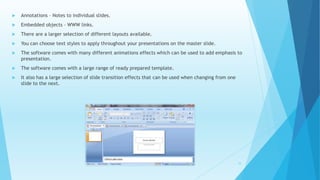
 Annotations – Notes to individual slides.
 Embedded objects – WWW links.
 There are a larger selection of different layouts available.
 You can choose text styles to apply throughout your presentations on the master slide.
 The software comes with many different animations effects which can be used to add emphasis to
presentation.
 The software comes with a large range of ready prepared template.
 It also has a large selection of slide transition effects that can be used when changing from one
slide to the next.
10
 Cut & Paste.
 Duplicate.
 View slide show.
 Find & Replace.
 Copy.
 Font Specifications – bold, Italic, Underline, font size.
 Footnotes & cross-references – Automates the numbering and placement.
 Graphics
 Headers, Footers, and Page numbering.
 Layout.
 Merges.
 Spell Checker.
 Thesaurus – Search for synonyms without leaving the ppt.
 Storyboarding – screenshots, links, import/export shapes
 Translator.
 Compare
11
Word Processing Software
It is known as a document preparation System. It is a
programme where you can type and print documents. It has
replaced the old typewriters. Software used to create and
edit written documents.
12
Word Processing Software Features
 Enter and Edit text.
 Word wrap
 Formatting
 Alter text alignment
 Line spacing
 Alter text style
 Alter page layout
 Alter page size
 Set Margins
 Grammar check
 Search and Replace
 Cursor
 Thesaurus
 Windows
 What you see is What you get – Exactly look when printed
13
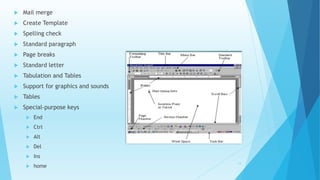
 Mail merge
 Create Template
 Spelling check
 Standard paragraph
 Page breaks
 Standard letter
 Tabulation and Tables
 Support for graphics and sounds
 Tables
 Special-purpose keys
 End
 Ctrl
 Alt
 Del
 Ins
 home
14
 Cut & Paste.
 Page size.
 Search & Replace.
 Print.
 File Management
 Create
 Delete
 Move
 Search for files
 Font Specifications.
 Footnotes and cross-references.
 Graphics
 Headers, Footers and Page numbering.
 Layout.
 macros - Series of keystrokes.
 Merges.
 Tables and Contents and Indexes. 15
Free and Open Source Software
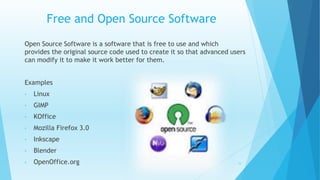
Open Source Software is a software that is free to use and which
provides the original source code used to create it so that advanced users
can modify it to make it work better for them.
Examples
• Linux
• GIMP
• KOffice
• Mozilla Firefox 3.0
• Inkscape
• Blender
• OpenOffice.org 16
Proprietary Software
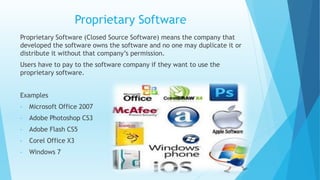
Proprietary Software (Closed Source Software) means the company that
developed the software owns the software and no one may duplicate it or
distribute it without that company’s permission.
Users have to pay to the software company if they want to use the
proprietary software.
Examples
• Microsoft Office 2007
• Adobe Photoshop CS3
• Adobe Flash CS5
• Corel Office X3
• Windows 7
17
18
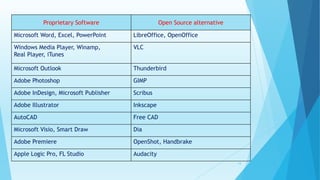
Proprietary Software Open Source alternative
Microsoft Word, Excel, PowerPoint LibreOffice, OpenOffice
Windows Media Player, Winamp,
Real Player, iTunes
VLC
Microsoft Outlook Thunderbird
Adobe Photoshop GIMP
Adobe InDesign, Microsoft Publisher Scribus
Adobe Illustrator Inkscape
AutoCAD Free CAD
Microsoft Visio, Smart Draw Dia
Adobe Premiere OpenShot, Handbrake
Apple Logic Pro, FL Studio Audacity
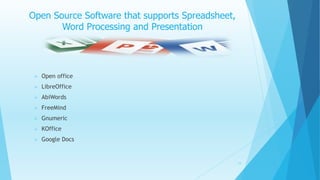
Open Source Software that supports Spreadsheet,
Word Processing and Presentation
19
 Open office
 LibreOffice
 AbiWords
 FreeMind
 Gnumeric
 KOffice
 Google Docs
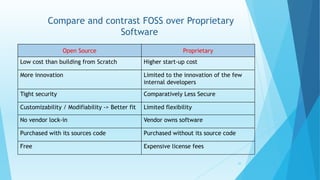
Compare and contrast FOSS over Proprietary
Software
Open Source Proprietary
Low cost than building from Scratch Higher start-up cost
More innovation Limited to the innovation of the few
internal developers
Tight security Comparatively Less Secure
Customizability / Modifiability -> Better fit Limited flexibility
No vendor lock-in Vendor owns software
Purchased with its sources code Purchased without its source code
Free Expensive license fees
20
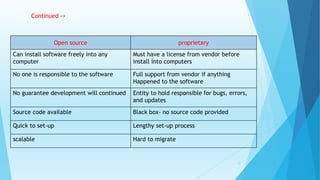
Open source proprietary
Can install software freely into any
computer
Must have a license from vendor before
install into computers
No one is responsible to the software Full support from vendor if anything
Happened to the software
No guarantee development will continued Entity to hold responsible for bugs, errors,
and updates
Source code available Black box- no source code provided
Quick to set-up Lengthy set-up process
scalable Hard to migrate
Continued ->
21
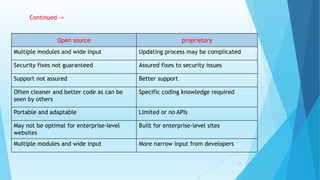
Open source proprietary
Multiple modules and wide input Updating process may be complicated
Security fixes not guaranteed Assured fixes to security issues
Support not assured Better support
Often cleaner and better code as can be
seen by others
Specific coding knowledge required
Portable and adaptable Limited or no APIs
May not be optimal for enterprise-level
websites
Built for enterprise-level sites
Multiple modules and wide input More narrow input from developers
Continued ->
22
Thank you
23

Identifying Microsoft Office Features

  • 1.
    Essentials of Information& Communication Technology Microsoft Office Features Sree Konithippriya Sree Ganathas
  • 2.
    Contents Spread Sheet Introduction03 Spread Sheet Software Features 04 Presentation Software 08 Presentation Software Features 09 Word Processing Software 12 Word Processing Software Features 13 Free and Open Source Software 16 Proprietary Software 17 Open Source Software that supports Spread Sheet, Presentation 19 and Word Processing Compare and contrast FOSS and Proprietary Software 20 2 Page No
  • 3.
    Spread Sheet Spread sheetsoftware allows users to organize data in rows and columns and perform calculations on the data. These rows and columns are collectively called a worksheet. 3
  • 4.
    Spread Sheet SoftwareFeatures  Rows , columns, cells and ranges. • Insert – Allows to insert anywhere in the worksheet • Delete – Allows to erase.  Function keys – text, statistical. (E.g.-mathematical function)  Charts / graphs.  Macros & buttons.  Simple database features – sorting and filtering.  Formatting - % , decimal places , data bars, gradient colors, Icon sets.  Lookup function  What-if scenarios  Importing data from other applications  Patterns.  Alignment. 4
  • 5.
     Format  Cells Rows  Column  Sheets  Headers, Footers, and Page numbering – Allows to modify the top and bottom of every page  Page Break – To different the pages within worksheets.  Spell Checker – Highlight the unrecognized words.  Graphics - To embed illustrations and graphs.  Protection – To manipulate unauthorized data values.  Validation – Check the data to the given format.  Font Specifications – To change fonts.  Insert or Delete Worksheet.  Print.  Charts  Pivot Table 5
  • 6.
     Formula forbasic arithmetic  Resizable formula bar  Function AutoComplete  Structured reference  Easy access to named ranges  Improved sorting and filtering.  Office themes and Excel styles.  Using theme.  Using styles.  Autosum.  List AutoFill.  AutoShapes.  Cut & Paste.  Search & Replace.  Move & Copy 6
  • 7.
     Wizard  Dragand Drop  Shortcut Menus.  styles,.  Comma – Two digits beyond a decimal place.  Comma [0] – Rounds a whole number.  Currency 7
  • 8.
    Presentation Software An applicationprogram that facilitates preparation and presentation of information in the form of slides. A slides are single-screen images that contain texts, graphics and charts. A presentation program lets you create a set of slides and present them to an audience conveniently. 8
  • 9.
    Presentation software Features East preparation of slides.  Insert  delete  Slide animation.  Preparation of speaker notes & handouts.  On-screen slide shows.  Improves effective communication.  Organizes information easily.  Reduces manual presentation processes.  Increases communication with the audience.  Outlining – For contents, arrangement and order.  Sound and video – Audio or multimedia enhancement.  HTML conversion – Presentations on the Web. 9
  • 10.
     Annotations –Notes to individual slides.  Embedded objects – WWW links.  There are a larger selection of different layouts available.  You can choose text styles to apply throughout your presentations on the master slide.  The software comes with many different animations effects which can be used to add emphasis to presentation.  The software comes with a large range of ready prepared template.  It also has a large selection of slide transition effects that can be used when changing from one slide to the next. 10
  • 11.
     Cut &Paste.  Duplicate.  View slide show.  Find & Replace.  Copy.  Font Specifications – bold, Italic, Underline, font size.  Footnotes & cross-references – Automates the numbering and placement.  Graphics  Headers, Footers, and Page numbering.  Layout.  Merges.  Spell Checker.  Thesaurus – Search for synonyms without leaving the ppt.  Storyboarding – screenshots, links, import/export shapes  Translator.  Compare 11
  • 12.
    Word Processing Software Itis known as a document preparation System. It is a programme where you can type and print documents. It has replaced the old typewriters. Software used to create and edit written documents. 12
  • 13.
    Word Processing SoftwareFeatures  Enter and Edit text.  Word wrap  Formatting  Alter text alignment  Line spacing  Alter text style  Alter page layout  Alter page size  Set Margins  Grammar check  Search and Replace  Cursor  Thesaurus  Windows  What you see is What you get – Exactly look when printed 13
  • 14.
     Mail merge Create Template  Spelling check  Standard paragraph  Page breaks  Standard letter  Tabulation and Tables  Support for graphics and sounds  Tables  Special-purpose keys  End  Ctrl  Alt  Del  Ins  home 14
  • 15.
     Cut &Paste.  Page size.  Search & Replace.  Print.  File Management  Create  Delete  Move  Search for files  Font Specifications.  Footnotes and cross-references.  Graphics  Headers, Footers and Page numbering.  Layout.  macros - Series of keystrokes.  Merges.  Tables and Contents and Indexes. 15
  • 16.
    Free and OpenSource Software Open Source Software is a software that is free to use and which provides the original source code used to create it so that advanced users can modify it to make it work better for them. Examples • Linux • GIMP • KOffice • Mozilla Firefox 3.0 • Inkscape • Blender • OpenOffice.org 16
  • 17.
    Proprietary Software Proprietary Software(Closed Source Software) means the company that developed the software owns the software and no one may duplicate it or distribute it without that company’s permission. Users have to pay to the software company if they want to use the proprietary software. Examples • Microsoft Office 2007 • Adobe Photoshop CS3 • Adobe Flash CS5 • Corel Office X3 • Windows 7 17
  • 18.
    18 Proprietary Software OpenSource alternative Microsoft Word, Excel, PowerPoint LibreOffice, OpenOffice Windows Media Player, Winamp, Real Player, iTunes VLC Microsoft Outlook Thunderbird Adobe Photoshop GIMP Adobe InDesign, Microsoft Publisher Scribus Adobe Illustrator Inkscape AutoCAD Free CAD Microsoft Visio, Smart Draw Dia Adobe Premiere OpenShot, Handbrake Apple Logic Pro, FL Studio Audacity
  • 19.
    Open Source Softwarethat supports Spreadsheet, Word Processing and Presentation 19  Open office  LibreOffice  AbiWords  FreeMind  Gnumeric  KOffice  Google Docs
  • 20.
    Compare and contrastFOSS over Proprietary Software Open Source Proprietary Low cost than building from Scratch Higher start-up cost More innovation Limited to the innovation of the few internal developers Tight security Comparatively Less Secure Customizability / Modifiability -> Better fit Limited flexibility No vendor lock-in Vendor owns software Purchased with its sources code Purchased without its source code Free Expensive license fees 20
  • 21.
    Open source proprietary Caninstall software freely into any computer Must have a license from vendor before install into computers No one is responsible to the software Full support from vendor if anything Happened to the software No guarantee development will continued Entity to hold responsible for bugs, errors, and updates Source code available Black box- no source code provided Quick to set-up Lengthy set-up process scalable Hard to migrate Continued -> 21
  • 22.
    Open source proprietary Multiplemodules and wide input Updating process may be complicated Security fixes not guaranteed Assured fixes to security issues Support not assured Better support Often cleaner and better code as can be seen by others Specific coding knowledge required Portable and adaptable Limited or no APIs May not be optimal for enterprise-level websites Built for enterprise-level sites Multiple modules and wide input More narrow input from developers Continued -> 22
  • 23.