How to Use Webhooks for Real-Time Data
Updates in Shopify App Development
Introduction
In the fast-paced world of e-commerce, delays in data updates can lead to missed opportunities.
Imagine a merchant discovering a product is out of stock only after a customer places an order.
Real-time data synchronization is not just a luxury—it’s a necessity. For developers building
Shopify apps, webhooks offer a reliable way to automate workflows and keep data up-to-date
instantly.
This guide explains how webhooks function within Shopify app development, their technical
implementation, and best practices to create responsive, scalable solutions. Whether you’re
building inventory management tools, CRM integrations, or order-tracking systems, mastering
webhooks is critical for delivering value to merchants.
1. Understanding Webhooks
The Basics of Webhooks
Webhooks act as automated notifications sent by Shopify when specific events occur. Instead of
repeatedly checking for updates (a process called polling), your app receives instant alerts.
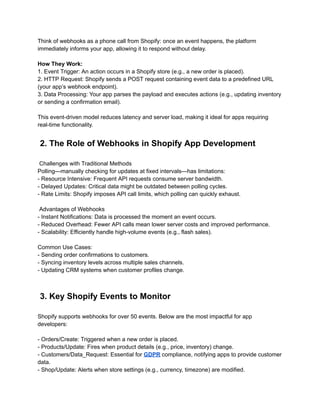
Think of webhooks as a phone call from Shopify: once an event happens, the platform
immediately informs your app, allowing it to respond without delay.
How They Work:
1. Event Trigger: An action occurs in a Shopify store (e.g., a new order is placed).
2. HTTP Request: Shopify sends a POST request containing event data to a predefined URL
(your app’s webhook endpoint).
3. Data Processing: Your app parses the payload and executes actions (e.g., updating inventory
or sending a confirmation email).
This event-driven model reduces latency and server load, making it ideal for apps requiring
real-time functionality.
2. The Role of Webhooks in Shopify App Development
Challenges with Traditional Methods
Polling—manually checking for updates at fixed intervals—has limitations:
- Resource Intensive: Frequent API requests consume server bandwidth.
- Delayed Updates: Critical data might be outdated between polling cycles.
- Rate Limits: Shopify imposes API call limits, which polling can quickly exhaust.
Advantages of Webhooks
- Instant Notifications: Data is processed the moment an event occurs.
- Reduced Overhead: Fewer API calls mean lower server costs and improved performance.
- Scalability: Efficiently handle high-volume events (e.g., flash sales).
Common Use Cases:
- Sending order confirmations to customers.
- Syncing inventory levels across multiple sales channels.
- Updating CRM systems when customer profiles change.
3. Key Shopify Events to Monitor
Shopify supports webhooks for over 50 events. Below are the most impactful for app
developers:
- Orders/Create: Triggered when a new order is placed.
- Products/Update: Fires when product details (e.g., price, inventory) change.
- Customers/Data_Request: Essential for GDPR compliance, notifying apps to provide customer
data.
- Shop/Update: Alerts when store settings (e.g., currency, timezone) are modified.
Pro Tip: Only subscribe to events relevant to your app’s functionality. Overloading with
unnecessary webhooks can complicate maintenance.
4. Implementing Webhooks: A Step-by-Step Guide
4.1 Setting Up a Webhook Endpoint
Your app needs a public URL to receive webhook data. Here’s how to create one using Node.js:
```javascript
const express = require('express');
const app = express();
app.use(express.json());
// Webhook endpoint for order creation
app.post('/webhooks/orders', (req, res) => {
const payload = req.body;
console.log('New order:', payload);
res.status(200).end();
});
app.listen(3000, () => {
console.log('Webhook endpoint running on port 3000');
});
```
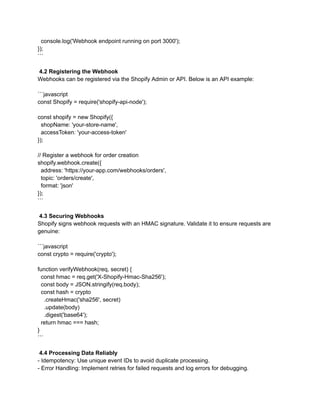
4.2 Registering the Webhook
Webhooks can be registered via the Shopify Admin or API. Below is an API example:
```javascript
const Shopify = require('shopify-api-node');
const shopify = new Shopify({
shopName: 'your-store-name',
accessToken: 'your-access-token'
});
// Register a webhook for order creation
shopify.webhook.create({
address: 'https://your-app.com/webhooks/orders',
topic: 'orders/create',
format: 'json'
});
```
4.3 Securing Webhooks
Shopify signs webhook requests with an HMAC signature. Validate it to ensure requests are
genuine:
```javascript
const crypto = require('crypto');
function verifyWebhook(req, secret) {
const hmac = req.get('X-Shopify-Hmac-Sha256');
const body = JSON.stringify(req.body);
const hash = crypto
.createHmac('sha256', secret)
.update(body)
.digest('base64');
return hmac === hash;
}
```
4.4 Processing Data Reliably
- Idempotency: Use unique event IDs to avoid duplicate processing.
- Error Handling: Implement retries for failed requests and log errors for debugging.
4.5 Testing Webhooks
- Local Development: Use tools like Ngrok to expose local servers to the internet.
- Shopify’s Test Feature: Manually send test webhooks from the Shopify Admin to validate
endpoints.
5. Webhook Failure Handling and Retries
In any real-time data system, there’s always a possibility that a webhook might fail due to
various reasons such as network issues, server downtime, or timeouts. Shopify automatically
retries the delivery of a webhook if it fails, but it’s important to build robust failure-handling
mechanisms on the app side to ensure critical events aren’t missed.
Automatic Retries by Shopify​
When Shopify encounters an error (e.g., a 5xx server error or a timeout), it will retry the
webhook up to 19 times over a 48-hour period. The retry attempts occur at exponential
intervals, with the first retry attempt occurring a few seconds after the initial failure and
subsequent retries spaced out longer.
However, while Shopify’s retries ensure some degree of fault tolerance, it’s up to the app
developer to manage retries more efficiently for long-term reliability and scalability.
Implementing Custom Retry Logic​
To provide more control over retry behavior, you can implement a custom retry mechanism
within your app. For example, you might decide to retry webhook events after a failure, with an
exponential backoff strategy that delays each retry attempt. This will prevent the server from
becoming overwhelmed by constant retry attempts and improve the overall efficiency of
processing webhook events.
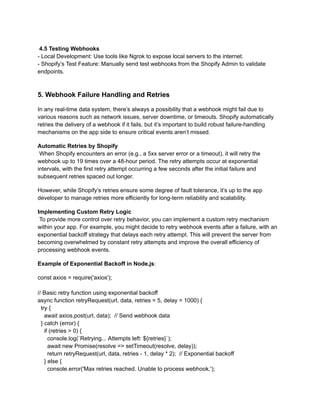
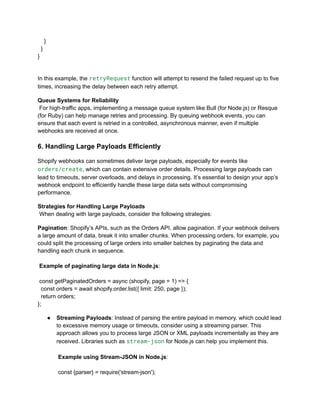
Example of Exponential Backoff in Node.js:
const axios = require('axios');
// Basic retry function using exponential backoff
async function retryRequest(url, data, retries = 5, delay = 1000) {
try {
await axios.post(url, data); // Send webhook data
} catch (error) {
if (retries > 0) {
console.log(`Retrying... Attempts left: ${retries}`);
await new Promise(resolve => setTimeout(resolve, delay));
return retryRequest(url, data, retries - 1, delay * 2); // Exponential backoff
} else {
console.error('Max retries reached. Unable to process webhook.');
}
}
}
In this example, the retryRequest function will attempt to resend the failed request up to five
times, increasing the delay between each retry attempt.
Queue Systems for Reliability​
For high-traffic apps, implementing a message queue system like Bull (for Node.js) or Resque
(for Ruby) can help manage retries and processing. By queuing webhook events, you can
ensure that each event is retried in a controlled, asynchronous manner, even if multiple
webhooks are received at once.
6. Handling Large Payloads Efficiently
Shopify webhooks can sometimes deliver large payloads, especially for events like
orders/create, which can contain extensive order details. Processing large payloads can
lead to timeouts, server overloads, and delays in processing. It’s essential to design your app’s
webhook endpoint to efficiently handle these large data sets without compromising
performance.
Strategies for Handling Large Payloads​
When dealing with large payloads, consider the following strategies:
Pagination: Shopify’s APIs, such as the Orders API, allow pagination. If your webhook delivers
a large amount of data, break it into smaller chunks. When processing orders, for example, you
could split the processing of large orders into smaller batches by paginating the data and
handling each chunk in sequence.​
​
Example of paginating large data in Node.js:​
​
const getPaginatedOrders = async (shopify, page = 1) => {
const orders = await shopify.order.list({ limit: 250, page });
return orders;
};
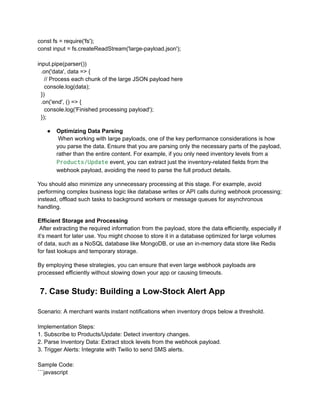
●​ Streaming Payloads: Instead of parsing the entire payload in memory, which could lead
to excessive memory usage or timeouts, consider using a streaming parser. This
approach allows you to process large JSON or XML payloads incrementally as they are
received. Libraries such as stream-json for Node.js can help you implement this.​
​
Example using Stream-JSON in Node.js:​
​
const {parser} = require('stream-json');
const fs = require('fs');
const input = fs.createReadStream('large-payload.json');
input.pipe(parser())
.on('data', data => {
// Process each chunk of the large JSON payload here
console.log(data);
})
.on('end', () => {
console.log('Finished processing payload');
});
●​ Optimizing Data Parsing​
When working with large payloads, one of the key performance considerations is how
you parse the data. Ensure that you are parsing only the necessary parts of the payload,
rather than the entire content. For example, if you only need inventory levels from a
Products/Update event, you can extract just the inventory-related fields from the
webhook payload, avoiding the need to parse the full product details.
You should also minimize any unnecessary processing at this stage. For example, avoid
performing complex business logic like database writes or API calls during webhook processing;
instead, offload such tasks to background workers or message queues for asynchronous
handling.
Efficient Storage and Processing​
After extracting the required information from the payload, store the data efficiently, especially if
it’s meant for later use. You might choose to store it in a database optimized for large volumes
of data, such as a NoSQL database like MongoDB, or use an in-memory data store like Redis
for fast lookups and temporary storage.
By employing these strategies, you can ensure that even large webhook payloads are
processed efficiently without slowing down your app or causing timeouts.
7. Case Study: Building a Low-Stock Alert App
Scenario: A merchant wants instant notifications when inventory drops below a threshold.
Implementation Steps:
1. Subscribe to Products/Update: Detect inventory changes.
2. Parse Inventory Data: Extract stock levels from the webhook payload.
3. Trigger Alerts: Integrate with Twilio to send SMS alerts.
Sample Code:
```javascript
app.post('/webhooks/products', (req, res) => {
const product = req.body;
const inventory = product.variants[0].inventory_quantity;
if (inventory < 10) {
// Send SMS via Twilio
twilio.messages.create({
body: `Low stock alert: ${product.title} has ${inventory} units left.`,
to: '+1234567890',
from: '+0987654321'
});
}
res.status(200).end();
});
```
Conclusion
Webhooks are indispensable for building responsive Shopify apps that meet modern
e-commerce demands. By automating real-time data flows, apps can deliver immediate value to
merchants, from inventory management to customer engagement.
Looking for Expert Shopify App Development Services?
Building a robust and scalable Shopify app requires technical expertise and a deep
understanding of the Shopify ecosystem. If you're looking to develop a custom Shopify app with
seamless webhook integration, API automation, and real-time data processing, consider
working with CartCoders. Our team specializes in creating tailored Shopify apps that enhance
store functionality, streamline workflows, and improve merchant experiences. Whether you need
real-time inventory management, order tracking, or custom automation, our Shopify app
development services can help you build powerful and efficient solutions. Ready to get started?
You can contact CartCoders for a consultation and take your Shopify app idea to the next level.

How to Use Webhooks for Real-Time Data Updates in Shopify App Development.pdf

  • 1.
    How to UseWebhooks for Real-Time Data Updates in Shopify App Development Introduction In the fast-paced world of e-commerce, delays in data updates can lead to missed opportunities. Imagine a merchant discovering a product is out of stock only after a customer places an order. Real-time data synchronization is not just a luxury—it’s a necessity. For developers building Shopify apps, webhooks offer a reliable way to automate workflows and keep data up-to-date instantly. This guide explains how webhooks function within Shopify app development, their technical implementation, and best practices to create responsive, scalable solutions. Whether you’re building inventory management tools, CRM integrations, or order-tracking systems, mastering webhooks is critical for delivering value to merchants. 1. Understanding Webhooks The Basics of Webhooks Webhooks act as automated notifications sent by Shopify when specific events occur. Instead of repeatedly checking for updates (a process called polling), your app receives instant alerts.
  • 2.
    Think of webhooksas a phone call from Shopify: once an event happens, the platform immediately informs your app, allowing it to respond without delay. How They Work: 1. Event Trigger: An action occurs in a Shopify store (e.g., a new order is placed). 2. HTTP Request: Shopify sends a POST request containing event data to a predefined URL (your app’s webhook endpoint). 3. Data Processing: Your app parses the payload and executes actions (e.g., updating inventory or sending a confirmation email). This event-driven model reduces latency and server load, making it ideal for apps requiring real-time functionality. 2. The Role of Webhooks in Shopify App Development Challenges with Traditional Methods Polling—manually checking for updates at fixed intervals—has limitations: - Resource Intensive: Frequent API requests consume server bandwidth. - Delayed Updates: Critical data might be outdated between polling cycles. - Rate Limits: Shopify imposes API call limits, which polling can quickly exhaust. Advantages of Webhooks - Instant Notifications: Data is processed the moment an event occurs. - Reduced Overhead: Fewer API calls mean lower server costs and improved performance. - Scalability: Efficiently handle high-volume events (e.g., flash sales). Common Use Cases: - Sending order confirmations to customers. - Syncing inventory levels across multiple sales channels. - Updating CRM systems when customer profiles change. 3. Key Shopify Events to Monitor Shopify supports webhooks for over 50 events. Below are the most impactful for app developers: - Orders/Create: Triggered when a new order is placed. - Products/Update: Fires when product details (e.g., price, inventory) change. - Customers/Data_Request: Essential for GDPR compliance, notifying apps to provide customer data. - Shop/Update: Alerts when store settings (e.g., currency, timezone) are modified.
  • 3.
    Pro Tip: Onlysubscribe to events relevant to your app’s functionality. Overloading with unnecessary webhooks can complicate maintenance. 4. Implementing Webhooks: A Step-by-Step Guide 4.1 Setting Up a Webhook Endpoint Your app needs a public URL to receive webhook data. Here’s how to create one using Node.js: ```javascript const express = require('express'); const app = express(); app.use(express.json()); // Webhook endpoint for order creation app.post('/webhooks/orders', (req, res) => { const payload = req.body; console.log('New order:', payload); res.status(200).end(); }); app.listen(3000, () => {
  • 4.
    console.log('Webhook endpoint runningon port 3000'); }); ``` 4.2 Registering the Webhook Webhooks can be registered via the Shopify Admin or API. Below is an API example: ```javascript const Shopify = require('shopify-api-node'); const shopify = new Shopify({ shopName: 'your-store-name', accessToken: 'your-access-token' }); // Register a webhook for order creation shopify.webhook.create({ address: 'https://your-app.com/webhooks/orders', topic: 'orders/create', format: 'json' }); ``` 4.3 Securing Webhooks Shopify signs webhook requests with an HMAC signature. Validate it to ensure requests are genuine: ```javascript const crypto = require('crypto'); function verifyWebhook(req, secret) { const hmac = req.get('X-Shopify-Hmac-Sha256'); const body = JSON.stringify(req.body); const hash = crypto .createHmac('sha256', secret) .update(body) .digest('base64'); return hmac === hash; } ``` 4.4 Processing Data Reliably - Idempotency: Use unique event IDs to avoid duplicate processing. - Error Handling: Implement retries for failed requests and log errors for debugging.
  • 5.
    4.5 Testing Webhooks -Local Development: Use tools like Ngrok to expose local servers to the internet. - Shopify’s Test Feature: Manually send test webhooks from the Shopify Admin to validate endpoints. 5. Webhook Failure Handling and Retries In any real-time data system, there’s always a possibility that a webhook might fail due to various reasons such as network issues, server downtime, or timeouts. Shopify automatically retries the delivery of a webhook if it fails, but it’s important to build robust failure-handling mechanisms on the app side to ensure critical events aren’t missed. Automatic Retries by Shopify​ When Shopify encounters an error (e.g., a 5xx server error or a timeout), it will retry the webhook up to 19 times over a 48-hour period. The retry attempts occur at exponential intervals, with the first retry attempt occurring a few seconds after the initial failure and subsequent retries spaced out longer. However, while Shopify’s retries ensure some degree of fault tolerance, it’s up to the app developer to manage retries more efficiently for long-term reliability and scalability. Implementing Custom Retry Logic​ To provide more control over retry behavior, you can implement a custom retry mechanism within your app. For example, you might decide to retry webhook events after a failure, with an exponential backoff strategy that delays each retry attempt. This will prevent the server from becoming overwhelmed by constant retry attempts and improve the overall efficiency of processing webhook events. Example of Exponential Backoff in Node.js: const axios = require('axios'); // Basic retry function using exponential backoff async function retryRequest(url, data, retries = 5, delay = 1000) { try { await axios.post(url, data); // Send webhook data } catch (error) { if (retries > 0) { console.log(`Retrying... Attempts left: ${retries}`); await new Promise(resolve => setTimeout(resolve, delay)); return retryRequest(url, data, retries - 1, delay * 2); // Exponential backoff } else { console.error('Max retries reached. Unable to process webhook.');
  • 6.
    } } } In this example,the retryRequest function will attempt to resend the failed request up to five times, increasing the delay between each retry attempt. Queue Systems for Reliability​ For high-traffic apps, implementing a message queue system like Bull (for Node.js) or Resque (for Ruby) can help manage retries and processing. By queuing webhook events, you can ensure that each event is retried in a controlled, asynchronous manner, even if multiple webhooks are received at once. 6. Handling Large Payloads Efficiently Shopify webhooks can sometimes deliver large payloads, especially for events like orders/create, which can contain extensive order details. Processing large payloads can lead to timeouts, server overloads, and delays in processing. It’s essential to design your app’s webhook endpoint to efficiently handle these large data sets without compromising performance. Strategies for Handling Large Payloads​ When dealing with large payloads, consider the following strategies: Pagination: Shopify’s APIs, such as the Orders API, allow pagination. If your webhook delivers a large amount of data, break it into smaller chunks. When processing orders, for example, you could split the processing of large orders into smaller batches by paginating the data and handling each chunk in sequence.​ ​ Example of paginating large data in Node.js:​ ​ const getPaginatedOrders = async (shopify, page = 1) => { const orders = await shopify.order.list({ limit: 250, page }); return orders; }; ●​ Streaming Payloads: Instead of parsing the entire payload in memory, which could lead to excessive memory usage or timeouts, consider using a streaming parser. This approach allows you to process large JSON or XML payloads incrementally as they are received. Libraries such as stream-json for Node.js can help you implement this.​ ​ Example using Stream-JSON in Node.js:​ ​ const {parser} = require('stream-json');
  • 7.
    const fs =require('fs'); const input = fs.createReadStream('large-payload.json'); input.pipe(parser()) .on('data', data => { // Process each chunk of the large JSON payload here console.log(data); }) .on('end', () => { console.log('Finished processing payload'); }); ●​ Optimizing Data Parsing​ When working with large payloads, one of the key performance considerations is how you parse the data. Ensure that you are parsing only the necessary parts of the payload, rather than the entire content. For example, if you only need inventory levels from a Products/Update event, you can extract just the inventory-related fields from the webhook payload, avoiding the need to parse the full product details. You should also minimize any unnecessary processing at this stage. For example, avoid performing complex business logic like database writes or API calls during webhook processing; instead, offload such tasks to background workers or message queues for asynchronous handling. Efficient Storage and Processing​ After extracting the required information from the payload, store the data efficiently, especially if it’s meant for later use. You might choose to store it in a database optimized for large volumes of data, such as a NoSQL database like MongoDB, or use an in-memory data store like Redis for fast lookups and temporary storage. By employing these strategies, you can ensure that even large webhook payloads are processed efficiently without slowing down your app or causing timeouts. 7. Case Study: Building a Low-Stock Alert App Scenario: A merchant wants instant notifications when inventory drops below a threshold. Implementation Steps: 1. Subscribe to Products/Update: Detect inventory changes. 2. Parse Inventory Data: Extract stock levels from the webhook payload. 3. Trigger Alerts: Integrate with Twilio to send SMS alerts. Sample Code: ```javascript
  • 8.
    app.post('/webhooks/products', (req, res)=> { const product = req.body; const inventory = product.variants[0].inventory_quantity; if (inventory < 10) { // Send SMS via Twilio twilio.messages.create({ body: `Low stock alert: ${product.title} has ${inventory} units left.`, to: '+1234567890', from: '+0987654321' }); } res.status(200).end(); }); ``` Conclusion Webhooks are indispensable for building responsive Shopify apps that meet modern e-commerce demands. By automating real-time data flows, apps can deliver immediate value to merchants, from inventory management to customer engagement. Looking for Expert Shopify App Development Services? Building a robust and scalable Shopify app requires technical expertise and a deep understanding of the Shopify ecosystem. If you're looking to develop a custom Shopify app with seamless webhook integration, API automation, and real-time data processing, consider working with CartCoders. Our team specializes in creating tailored Shopify apps that enhance store functionality, streamline workflows, and improve merchant experiences. Whether you need real-time inventory management, order tracking, or custom automation, our Shopify app development services can help you build powerful and efficient solutions. Ready to get started? You can contact CartCoders for a consultation and take your Shopify app idea to the next level.