How to makedebian package
from scratch
Thierry GAYET
2.
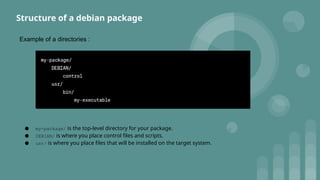
Example of adirectories :
● my-package/ is the top-level directory for your package.
● DEBIAN/ is where you place control files and scripts.
● usr/ is where you place files that will be installed on the target system.
Structure of a debian package
3.
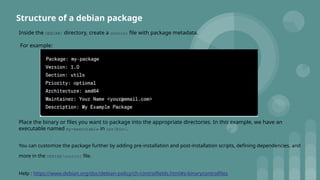
Inside the DEBIAN/directory, create a control file with package metadata.
For example:
Place the binary or files you want to package into the appropriate directories. In this example, we have an
executable named my-executable in usr/bin/.
You can customize the package further by adding pre-installation and post-installation scripts, defining dependencies, and
more in the DEBIAN/control file.
Help : https://www.debian.org/doc/debian-policy/ch-controlfields.html#s-binarycontrolfiles
Structure of a debian package
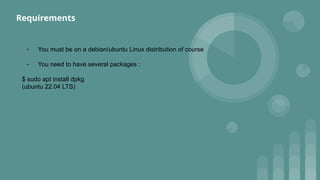
- You mustbe on a debian/ubuntu Linux distribution of course
- You need to have several packages :
$ sudo apt install dpkg
(ubuntu 22.04 LTS)
Requirements
7.
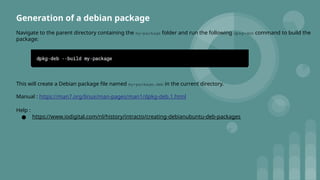
Generation of adebian package
Navigate to the parent directory containing the my-package folder and run the following dpkg-deb command to build the
package:
This will create a Debian package file named my-package.deb in the current directory.
Manual : https://man7.org/linux/man-pages/man1/dpkg-deb.1.html
Help :
● https://www.iodigital.com/nl/history/intracto/creating-debianubuntu-deb-packages
8.
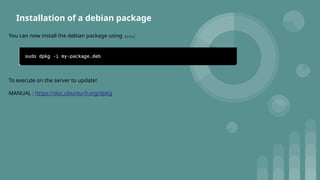
Installation of adebian package
You can now install the debian package using dpkg:
To execute on the server to update!
MANUAL : https://doc.ubuntu-fr.org/dpkg
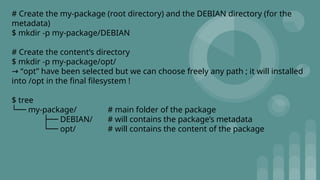
# Create themy-package (root directory) and the DEBIAN directory (for the
metadata)
$ mkdir -p my-package/DEBIAN
# Create the content’s directory
$ mkdir -p my-package/opt/
“
→ opt” have been selected but we can choose freely any path ; it will installed
into /opt in the final filesystem !
$ tree
└── my-package/ # main folder of the package
├── DEBIAN/ # will contains the package’s metadata
└── opt/ # will contains the content of the package
11.
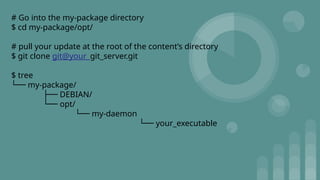
# Go intothe my-package directory
$ cd my-package/opt/
# pull your update at the root of the content’s directory
$ git clone git@your_git_server.git
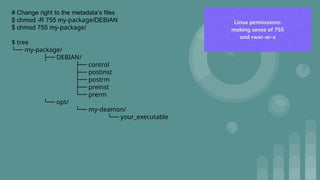
$ tree
└── my-package/
├── DEBIAN/
└── opt/
└── my-daemon
└── your_executable
12.
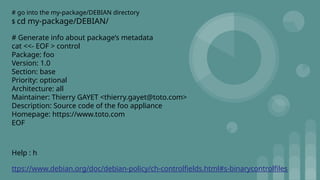
# go intothe my-package/DEBIAN directory
$ cd my-package/DEBIAN/
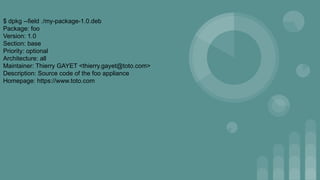
# Generate info about package’s metadata
cat <<- EOF > control
Package: foo
Version: 1.0
Section: base
Priority: optional
Architecture: all
Maintainer: Thierry GAYET <thierry.gayet@toto.com>
Description: Source code of the foo appliance
Homepage: https://www.toto.com
EOF
Help : h
ttps://www.debian.org/doc/debian-policy/ch-controlfields.html#s-binarycontrolfiles
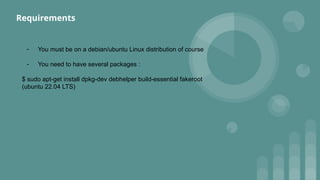
- You mustbe on a debian/ubuntu Linux distribution of course
- You need to have several packages :
$ sudo apt-get install dpkg-dev debhelper build-essential fakeroot
(ubuntu 22.04 LTS)
Requirements
20.
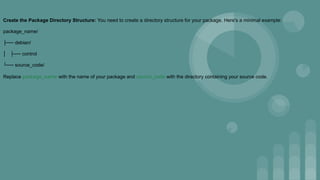
Create the PackageDirectory Structure: You need to create a directory structure for your package. Here's a minimal example:
package_name/
├── debian/
│ ├── control
└── source_code/
Replace package_name with the name of your package and source_code with the directory containing your source code.
21.
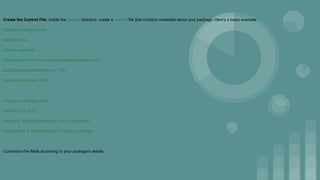
Create the ControlFile: Inside the debian directory, create a control file that contains metadata about your package. Here's a basic example:
Source: package_name
Section: misc
Priority: optional
Maintainer: Your Name <your.email@example.com>
Build-Depends: debhelper (>= 12)
Standards-Version: 4.5.0
Package: package_name
Architecture: any
Depends: ${shlibs:Depends}, ${misc:Depends}
Description: A brief description of your package.
Customize the fields according to your package's details.
22.
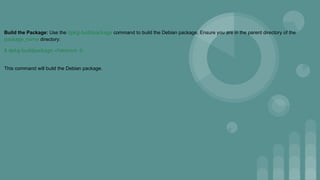
Build the Package:Use the dpkg-buildpackage command to build the Debian package. Ensure you are in the parent directory of the
package_name directory:
$ dpkg-buildpackage -rfakeroot -b
This command will build the Debian package.
23.
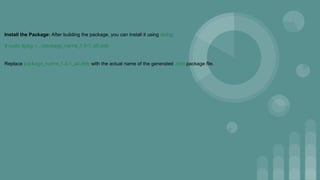
Install the Package:After building the package, you can install it using dpkg:
$ sudo dpkg -i ../package_name_1.0-1_all.deb
Replace package_name_1.0-1_all.deb with the actual name of the generated .deb package file.
24.
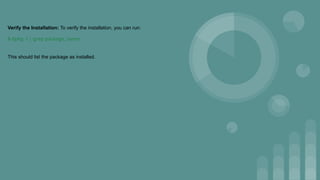
Verify the Installation:To verify the installation, you can run:
$ dpkg -l | grep package_name
This should list the package as installed.
25.
Clean Up: Afteryou're done, you can remove the package:
$ sudo dpkg -r package_name
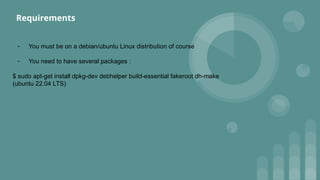
- You mustbe on a debian/ubuntu Linux distribution of course
- You need to have several packages :
$ sudo apt-get install dpkg-dev debhelper build-essential fakeroot dh-make
(ubuntu 22.04 LTS)
Requirements
28.
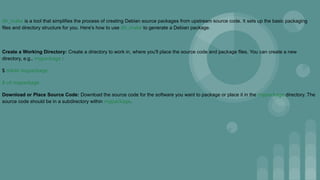
dh_make is atool that simplifies the process of creating Debian source packages from upstream source code. It sets up the basic packaging
files and directory structure for you. Here's how to use dh_make to generate a Debian package.
Create a Working Directory: Create a directory to work in, where you'll place the source code and package files. You can create a new
directory, e.g., mypackage :
$ mkdir mypackage
$ cd mypackage
Download or Place Source Code: Download the source code for the software you want to package or place it in the mypackage directory. The
source code should be in a subdirectory within mypackage.
29.
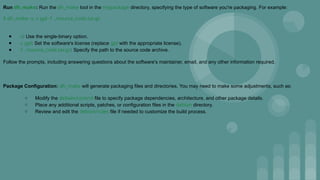
Run dh_make: Runthe dh_make tool in the mypackage directory, specifying the type of software you're packaging. For example:
$ dh_make -s -c gpl -f ../source_code.tar.gz
● -s: Use the single-binary option.
● -c gpl: Set the software's license (replace gpl with the appropriate license).
● -f ../source_code.tar.gz: Specify the path to the source code archive.
Follow the prompts, including answering questions about the software's maintainer, email, and any other information required.
Package Configuration: dh_make will generate packaging files and directories. You may need to make some adjustments, such as:
○ Modify the debian/control file to specify package dependencies, architecture, and other package details.
○ Place any additional scripts, patches, or configuration files in the debian directory.
○ Review and edit the debian/rules file if needed to customize the build process.
30.
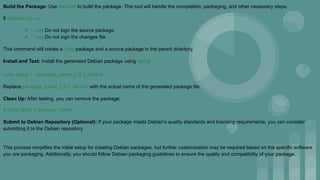
Build the Package:Use debuild to build the package. This tool will handle the compilation, packaging, and other necessary steps.
$ debuild -us -uc
○ -us: Do not sign the source package.
○ -uc: Do not sign the changes file.
This command will create a .deb package and a source package in the parent directory.
Install and Test: Install the generated Debian package using dpkg:
sudo dpkg -i ../package_name_1.0-1_all.deb
Replace package_name_1.0-1_all.deb with the actual name of the generated package file.
Clean Up: After testing, you can remove the package:
$ sudo dpkg -r package_name
Submit to Debian Repository (Optional): If your package meets Debian's quality standards and licensing requirements, you can consider
submitting it to the Debian repository.
This process simplifies the initial setup for creating Debian packages, but further customization may be required based on the specific software
you are packaging. Additionally, you should follow Debian packaging guidelines to ensure the quality and compatibility of your package.
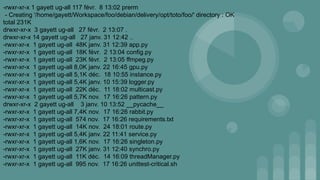
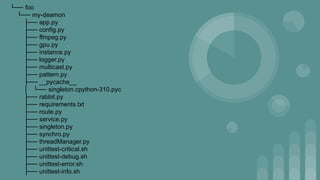
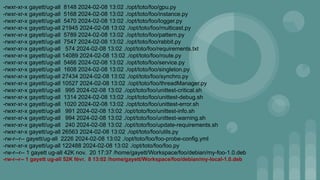
├── unittest-warning.sh
├── update-requirements.sh
├──utils.py
5 directories, 30 files
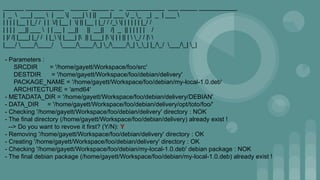
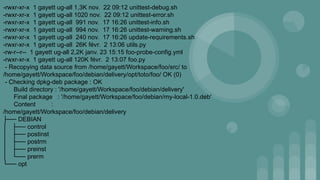
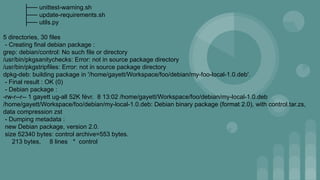
- Creating final debian package :
grep: debian/control: No such file or directory
/usr/bin/pkgsanitychecks: Error: not in source package directory
/usr/bin/pkgstripfiles: Error: not in source package directory
dpkg-deb: building package in '/home/gayett/Workspace/foo/debian/my-foo-local-1.0.deb'.
- Final result : OK (0)
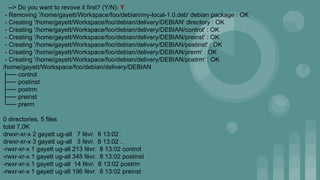
- Debian package :
-rw-r--r-- 1 gayett ug-all 52K févr. 8 13:02 /home/gayett/Workspace/foo/debian/my-local-1.0.deb
/home/gayett/Workspace/foo/debian/my-local-1.0.deb: Debian binary package (format 2.0), with control.tar.zs,
data compression zst
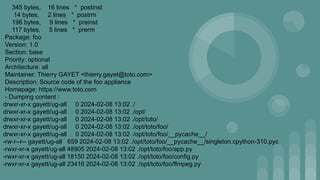
- Dumping metadata :
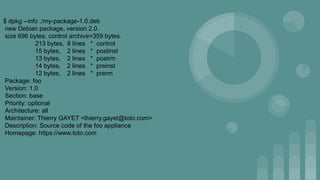
new Debian package, version 2.0.
size 52340 bytes: control archive=553 bytes.
213 bytes, 8 lines * control
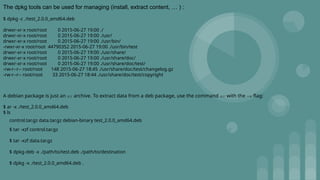
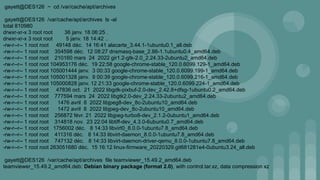
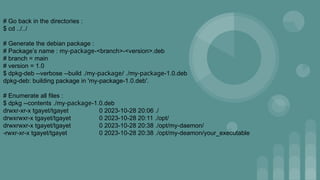
The dpkg toolscan be used for managing (install, extract content, … ) :
$ dpkg -c ./test_2.0.0_amd64.deb
drwxr-xr-x root/root 0 2015-06-27 19:00 ./
drwxr-xr-x root/root 0 2015-06-27 19:00 ./usr/
drwxr-xr-x root/root 0 2015-06-27 19:00 ./usr/bin/
-rwxr-xr-x root/root 44790352 2015-06-27 19:00 ./usr/bin/test
drwxr-xr-x root/root 0 2015-06-27 19:00 ./usr/share/
drwxr-xr-x root/root 0 2015-06-27 19:00 ./usr/share/doc/
drwxr-xr-x root/root 0 2015-06-27 19:00 ./usr/share/doc/test/
-rw-r--r-- root/root 148 2015-06-27 18:45 ./usr/share/doc/test/changelog.gz
-rw-r--r-- root/root 33 2015-06-27 18:44 ./usr/share/doc/test/copyright
A debian package is just an ar archive. To extract data from a deb package, use the command ar with the -x flag:
$ ar -x ./test_2.0.0_amd64.deb
$ ls
control.tar.gz data.tar.gz debian-binary test_2.0.0_amd64.deb
$ tar -xzf control.tar.gz
$ tar -xzf data.tar.gz
$ dpkg-deb -x ./path/to/test.deb ./path/to/destination
$ dpkg -x ./test_2.0.0_amd64.deb .
50.
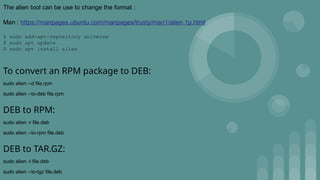
The alien toolcan be use to change the format :
Man : https://manpages.ubuntu.com/manpages/trusty/man1/alien.1p.html
$ sudo add-apt-repository universe
$ sudo apt update
$ sudo apt install alien
To convert an RPM package to DEB:
sudo alien --d file.rpm
sudo alien --to-deb file.rpm
DEB to RPM:
sudo alien -r file.deb
sudo alien --to-rpm file.deb
DEB to TAR.GZ:
sudo alien -t file.deb
sudo alien --to-tgz file.deb



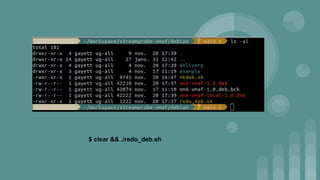
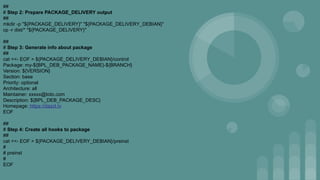
![#!/bin/bash
# debian/release.sh
# ##############
#
# Package for debian system
# shellcheck disable=SC2039,SC2002,SC2005
current_path=$(dirname "$0")
exit_code=0
# shellcheck source=debian/release.sh
. "${current_path}/../tools/debug.sh"
# shellcheck source=debian/release.sh
. "${current_path}/../tools/color.sh"
##
# Step 0: Define varaible env if not settings
#
if [ -z "${BPL_DEB_PACKAGE_NAME}" ]; then
echo -e "${RED}Missing variable environment BPL_DEB_PACKAGE_NAME !${NC}"
exit_code=1
fi
if [ -z "${BPL_DEB_PACKAGE_PATH}" ]; then
echo -e "${RED}Missing variable environment BPL_DEB_PACKAGE_PATH !${NC}"](https://image.slidesharecdn.com/howtomakedebianpackagefromscratch-250521124117-78bfe820/85/how-to-generate-debian-package-from-scratch-43-320.jpg)
![exit_code=1
fi
if [ -z "${BPL_DEB_PACKAGE_DESC}" ]; then
BPL_DEB_PACKAGE_DESC="Dazzl debian pacakges."
fi
BRANCH=$(echo "$(echo "${BITBUCKET_BRANCH}" | tr '[:upper:]' '[:lower:]')" | sed -r 's/[/,;]+/-/g')
if [ "${exit_code}" != "0" ]; then
exit ${exit_code}
fi
##
# Step 1: Add system package
##
# apk add --update
apt update && apt install -y
dpkg tar jq tree httpie
NUM="$(cat package.json | jq .version)"
VERSION=${NUM//"}
PKG_DEBIAN="pkg-debian"
PACKAGE_DELIVERY="${PKG_DEBIAN}${BPL_DEB_PACKAGE_PATH}"
PACKAGE_DELIVERY_DEBIAN="${PKG_DEBIAN}/DEBIAN"
NAME_PACKAGE=$(echo "${BPL_DEB_PACKAGE_NAME}.${BRANCH}.${VERSION}.deb" | sed -r 's/[/,;]+/_/g')](https://image.slidesharecdn.com/howtomakedebianpackagefromscratch-250521124117-78bfe820/85/how-to-generate-debian-package-from-scratch-44-320.jpg)
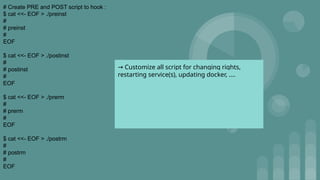
![cat <<- EOF > ${PACKAGE_DELIVERY_DEBIAN}/postinst
#
# postinst
#
EOF
cat <<- EOF > ${PACKAGE_DELIVERY_DEBIAN}/prerm
#
# prerm
#
EOF
cat <<- EOF > ${PACKAGE_DELIVERY_DEBIAN}/postrm
#
# postrm
#
EOF
##
# Step 5: Change right to files
##
echo "Pacakge Delivery Debian : ${PACKAGE_DELIVERY_DEBIAN}"
chmod 755 "${PACKAGE_DELIVERY_DEBIAN}"
chmod 755 "${PACKAGE_DELIVERY_DEBIAN}/postinst"
chmod 755 "${PACKAGE_DELIVERY_DEBIAN}/postrm"
chmod 755 "${PACKAGE_DELIVERY_DEBIAN}/preinst"
chmod 755 "${PACKAGE_DELIVERY_DEBIAN}/prerm"
chmod 755 "${PACKAGE_DELIVERY}"
if [ "${BPL_DEBUG}" = "true" ]; then
tree $PKG_DEBIAN
fi](https://image.slidesharecdn.com/howtomakedebianpackagefromscratch-250521124117-78bfe820/85/how-to-generate-debian-package-from-scratch-46-320.jpg)
![##
# Step 6: Create package '.deb'
##
echo "dpkg-deb --verbose --build ${PKG_DEBIAN} ${NAME_PACKAGE}"
dpkg-deb --verbose --build "${PKG_DEBIAN}" "${NAME_PACKAGE}"
##
# Step 7: Remove package to packagecloud.io
##
if [ "${BITBUCKET_BRANCH}" != 'develop' ] && [ "${BITBUCKET_BRANCH}" != 'staging' ] && [ "${BITBUCKET_BRANCH}" != 'master' ] ; then
versions=("xenial" "bionic" "focal")
# Remove actual package
for ver in "${versions[@]}"; do
http DELETE "https://${PACKAGE_CLOUD_TOKEN}:@packagecloud.io/api/v1/repos/dazzltv/debpkg/ubuntu/${ver}/${NAME_PACKAGE}"
done
fi
# Step 8 : upload the new debian package](https://image.slidesharecdn.com/howtomakedebianpackagefromscratch-250521124117-78bfe820/85/how-to-generate-debian-package-from-scratch-47-320.jpg)