How to encrypt your function or stored procedure on Microsoft SQL Server 2008 R2By: IkhwanKrisnadiSoftware EngineerY!: 	ikhwankrisnadiGtalk:	krisnadiikhwan
IntroductionSQL Server 2008 R2 gives facility to encrypt your script of function or stored procedureIf you encrypt it, your function or stored procedure can not be viewed its source codeAlso, you can not generate script of your function or stored procedure that you encrypted
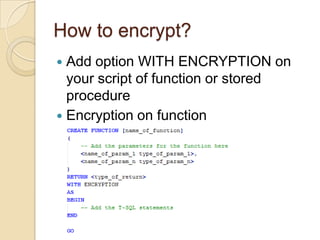
How to encrypt?Add option WITH ENCRYPTION on your script of function or stored procedureEncryption on function
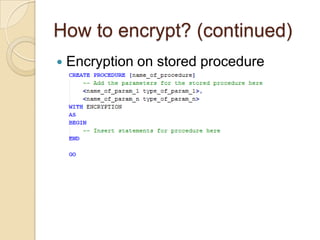
How to encrypt? (continued)Encryption on stored procedure
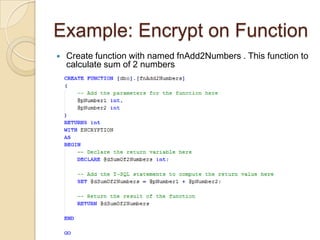
Example: Encrypt on FunctionCreate function with named fnAdd2Numbers . This function to calculate sum of 2 numbers
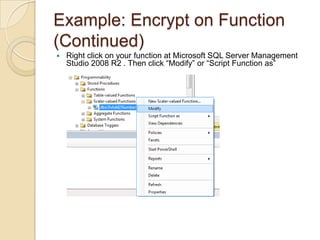
Example: Encrypt on Function (Continued)Right click on your function at Microsoft SQL Server Management Studio 2008 R2 . Then click “Modify” or “Script Function as”
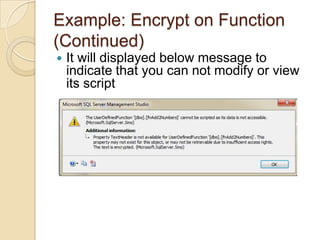
Example: Encrypt on Function (Continued)It will displayed below message to indicate that you can not modify or view its script
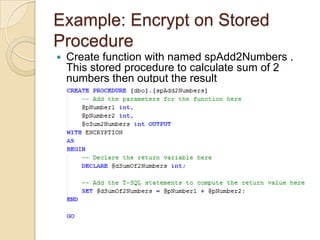
Example: Encrypt on Stored ProcedureCreate function with named spAdd2Numbers . This stored procedure to calculate sum of 2 numbers then output the result
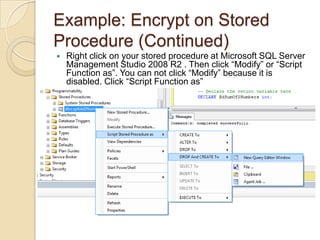
Example: Encrypt on Stored Procedure (Continued)Right click on your stored procedure at Microsoft SQL Server Management Studio 2008 R2 . Then click “Modify” or “Script Function as”. You can not click “Modify” because it is disabled. Click “Script Function as”
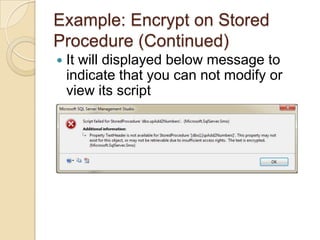
Example: Encrypt on Stored Procedure (Continued)It will displayed below message to indicate that you can not modify or view its script

How to encrypt your script on sql server

  • 1.
    How to encryptyour function or stored procedure on Microsoft SQL Server 2008 R2By: IkhwanKrisnadiSoftware EngineerY!: ikhwankrisnadiGtalk: krisnadiikhwan
  • 2.
    IntroductionSQL Server 2008R2 gives facility to encrypt your script of function or stored procedureIf you encrypt it, your function or stored procedure can not be viewed its source codeAlso, you can not generate script of your function or stored procedure that you encrypted
  • 3.
    How to encrypt?Addoption WITH ENCRYPTION on your script of function or stored procedureEncryption on function
  • 4.
    How to encrypt?(continued)Encryption on stored procedure
  • 5.
    Example: Encrypt onFunctionCreate function with named fnAdd2Numbers . This function to calculate sum of 2 numbers
  • 6.
    Example: Encrypt onFunction (Continued)Right click on your function at Microsoft SQL Server Management Studio 2008 R2 . Then click “Modify” or “Script Function as”
  • 7.
    Example: Encrypt onFunction (Continued)It will displayed below message to indicate that you can not modify or view its script
  • 8.
    Example: Encrypt onStored ProcedureCreate function with named spAdd2Numbers . This stored procedure to calculate sum of 2 numbers then output the result
  • 9.
    Example: Encrypt onStored Procedure (Continued)Right click on your stored procedure at Microsoft SQL Server Management Studio 2008 R2 . Then click “Modify” or “Script Function as”. You can not click “Modify” because it is disabled. Click “Script Function as”
  • 10.
    Example: Encrypt onStored Procedure (Continued)It will displayed below message to indicate that you can not modify or view its script