How to Build the Perfect 

Pattern Library
Wolf Brüning – UXCampEurope 2014
About me
@wolfbruening
produktbezogen.de
I am Senior Interaction Designer at: I write on UX design and product management for the blog:
About OTTO.de
• 2nd largest ecommerce
site in Germany
• 1.7+ billion € revenue
• 1.5+ million daily visits
• Millions of items
ranging from swimwear
to chainsaws
• Relaunch with pattern
library last October
Flashback!
Two years ago: no pattern library
There were 8 solutions for product recommendation cinemas on OTTO.de at the same time! Each with different
design, different behaviors and different code.
Problem 1: Working out of sync
In large organizations it is difficult to completely synchronize all designers and product teams. Different solutions
are built for the same design problem. (This will also happen in smaller organizations on the long run.)
Problem 2: Misunderstandings
Misunderstandings in the communication between design and development create more inconsistencies.
Problem 3: Duplicate work
Even if there would be perfect synchronization and no misunderstandings there would still be duplicate work.
Working without design patterns
• Almost certainly will create inconsistent interfaces
• Leads to misunderstandings
• Leads to lots of extra work and QA
What is a design pattern?
Design pattern definition
A design pattern is an element of an user interface that
solves a specific design problem and repeats across the
product in various contexts and/or with various content.
Perfect example: a button
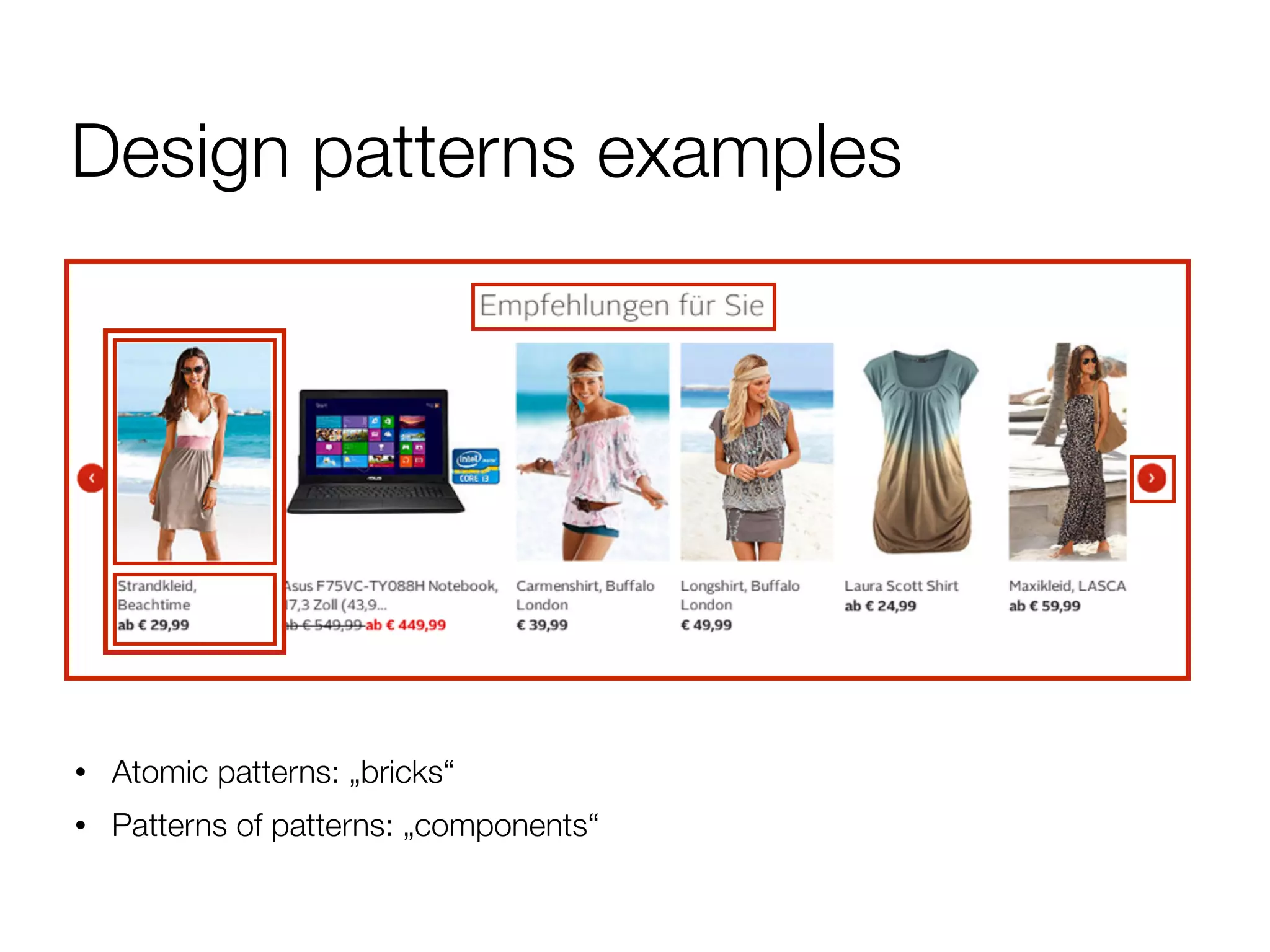
Design patterns examples
• Atomic patterns: „bricks“
• Patterns of patterns: „components“
Design patterns examples
Templates and sub-templates
Atomic Design
patternlab.io
A comparable classification by Brad Frost
Design patterns examples
Flows
Design patterns examples
Animations and transitions
Meaningful Transitions
Johannes Tonollo
Design patterns examples
• Naming conventions
• Visual Design: Style Tiles
Our path to the
perfect pattern library
First try: By the books
„A typical pattern describes the problem, the
chosen solution, the rationale behind that solution,
related patterns that the designer should be aware
of, and the results of usability testing.“
Jared Spool
Founding Principal of UIE
Yahoo Pattern Library
First mock-up
Working like this was tedious
and cost a lot of time
Yahoo Pattern Library
WTF?
Yahoo Pattern Library process
http://boxesandarrows.com/implementing-a-pattern-library-in-the-real-world-a-yahoo-case-study/
Old school pattern libraries
• Too much overhead for documentation and processes
• Operation will cost more time than save time
• High probability of becoming obsolete
Key learnings
1. For pattern libraries being up to date is more
important than anything else.
2. Overhead is the enemy of up-to-dateness.
!
➡ We needed a leaner approach
Second try: Let’s get modular
Back to the drawing board
• But in a big corporation you still have lots of people
and roles involved:
• Interaction Designers
• Visual Designers
• User Experience Managers
• Product Managers
• Developers
• QA
• Project Managers
• Corporate Design
• External Agencies
• Subsidiary Companies
• …
• A big one-size-fits-all solution is too cumbersome
Our solution
A modular pattern library for our three main use cases
• Documentation and communication (long term)
• Discovery and design
• Development
Module 1: Documentation
• Closest to a traditional
pattern library
• Only documentation
that is really necessary
• Should use an existing
tool
Module 2: Discovery & Design
Good overview and quick access to all patterns: PSDs
Module 3: Development
Live preview and quick access to the code of a pattern:
„Code Pattern Library“ inspired by Twitter Bootstrap
Learning: Involve your developers
• Designers AND developers will benefit from a good
pattern library
• It will improve the relationship between the two roles
Modular structure
Documentation
Communication
(Brand Experience Guide)
Code
Layer-Name Pattern-Name Pattern-Name CSS-Classes
Discovery &
Design
(PSD-Files)
Development
(Code Pattern Library)
Modular structure
Documentation
Communication
(Brand Experience Guide)
Code
Layer-Name Pattern-Name Pattern-Name CSS-Classes
Discovery &
Design
(PSD-Files)
Development
(Code Pattern Library)
Key learnings
• Keeping three modules in sync needs a lot of discipline,
especially if you work agile and your patterns still evolve
• Documenting patterns as images gets extremely
cumbersome with components (patterns of patterns)
• Giant PSD-files kill photoshop
• Everybody, even designers, loved the Code Pattern
Library
!
➡ We were still not lean enough
Third (and final) try:
Lean Pattern Library
Simplifying our structure
Documentation
Communication
(Brand Experience Guide)
Code
Layer-Name Pattern-Name Pattern-Name CSS-Classes
Discovery &
Design
(PSD-Files)
Development
(Code Pattern Library)
We stopped using the PSDs (and maybe photoshop at all) and moved the documentation to the code pattern
library.
Simplifying our structure
Code
Layer-Name Pattern-Name CSS-Classes
Discovery &
Design
(???)
Documentation,
Design & Development
(Code Pattern Library)
Brand-
Communication
(Brand Experience Guide)
Only a subset of stable
and brand relevant
patterns is moved to the
brand experience guide.
Principles for a
lean pattern library
Lean processes & documentation
• A not-so-perfect pattern library is a lot better than a
perfectly documented but outdated one
• Try to keep pattern definitions as scarce as possible and
processes and discussions lean
• Work overhead for adding and managing patterns should
be as low as possible
• If maintaining a pattern library saves more time than it
costs, everyone will be motivated to keep it up to date
• This is the most important factor for a successful
implementation
Lean processes & documentation
• With most patterns we start with no documentation at all
• We only add documentation if problems pop up with
understanding the pattern
• One designer and one developer as „pattern masters“
create and manage our patterns
Documenting in code
• Provide an authentic look & feel
• You can inspect the behavior (to some extent)
• Support a closer collaboration between designers and
developers
• No need to update components when one of its sub-
patterns is changed
!
• Be careful if there are users with legacy browsers
Documenting in code
• Our pattern library CSS is synchronous with otto.de
• CSS3 + Webfonts + Icon-Fonts, as few Images as
possible
• Flexible and easy to update
• Future proof: High resolution friendly, responsive design friendly
• No hacks for maintaining a similar look on legacy browsers (but has
to work)
• Outer margins are not part of the pattern (prevent
unnecessary variants)
Stability vs. change
We put up a set of rules that prevent patterns from being
too easily changed:
• Only add new patterns if existing patterns don’t provide a
satisfactory solution
• Change pattern if a new pattern becomes standard in the market
• Chance pattern if a new pattern beats it in user- or a/b-testing
Stability vs. change
• Continuously experiment with new patterns
• Challenge existing patterns on a regular basis
!
• Find a good balance between stability and change.
Don’t be a pattern nazi
„A pattern library is like a compass. It’ll tell you
what direction you should go in, but it’s up to you
to figure out how to get there.“
Lucas Pettinati
UX Lead, Google Apps
Naming Schema
Descriptive vs. semantic names
Shiny Blue Button Shiny Blue Button???
Use semantic names
• Pattern names should always refer to function, not
visual appearance or context
!
• Primary Button
• Secondary Button
• Headline
• Copy
• Navigation-List
Naming variants
Button S
Button M
Button L
???
T-shirt sizes might work for smaller
projects. But with lots of variants you
can’t add variants in between.
US city block numbering
House numbers increase by 100 every block regardless of the number of buildings. This is great for orientation but
also very flexible for adding new houses between existing ones.
City block sizes
button50
button100
button200
button150
City block sizes
• The standard variant of the pattern gets the „100“
• Smaller variants get „75“, „50“, „25“...
• Larger variants get „200“, „300“…
• Numbers don’t resemble exact size rations (i.e.
button200 is not necessary twice as large as
button100) because that would be descriptive naming
!
➡ Now you have a flexible naming system where it‘s easy
to identify if a pattern is standard or larger or smaller
City block sizes
slide200
slide100red100
red200
warmGrey100
warmGrey200
So why use a pattern library?
Patterns improve your UX
• Provide a consistent and predictable UI
• Let you prototype and iterate faster
• Save you time to work on new problems or the details
of your product
• „Dark corners“ of your product benefit from patterns
that have been tested elsewhere
Patterns improve your code
• Speed up implementation
• Prevent code redundancies
• Simplify QA
• Simplify visual redesigns
Patterns improve your team
performance
• Save everybody time
• Create a shared understanding for UI elements
• Prevent misunderstandings
• Reduce complexity so you can tackle harder problems
• Help you onboard new team members
This sounds really cool, but...
!
!
...don‘t patterns limit my creativity?
You’re wrong!
„The use of a pattern library helps designers quickly
craft parts of a design so the bulk of their time is
spent designing what‘s unique, rather than
what‘s common.“
Lucas Pettinati
UX Lead, Google Apps
Patterns support your creativity!
Pattern libraries can do more
Change the way you work
In a traditional process, the interaction designer creates a concept and prototypes hands them over to the visual
designer who does the final design and briefs the developer.
Change the way you work
With patterns the IxD is able to hand over the prototype directly to the developer who – after the coding is done –
pairs up with the visual designer to fine tune the design directly on the website. There is no need to paint a picture of
your website in photoshop anymore.
Enable responsive design
Product
Top-D
ow
n
Bottom
-U
p
Abstract
Concrete
Grid & Breakpoints
Content Reference Wireframes
Layout
Responsive Patterns: Bricks
Responisve Patterns: Components
„We’re not designing pages anymore. We’re
designing systems of components.“
Stephen Hay
Design and development strategist
Great examples
Mailchimp Pattern Library
ux.mailchimp.com/patterns
Lonely Planet Styleguide
rizzo.lonelyplanet.com/styleguide
If you want to build a pattern library
• Start lean, stay lean
• Designers involve your devs, developers involve your
designers
• Use live code, as few images as possible
• Use semantic and flexible pattern names
• Find a balance of stability and change
• Test, learn, adapt
Thank you!
tl;dr Pattern libraries are awesome!
If you want to learn more… 

(in German)
If you always
wanted to...
• do design, testing or research for a billion-euro-revenue-ecommerce site
and make millions of users happy
• work in a highly professional (and fun) team of 16 user experience,
interaction design and visual design experts
• make use of our own testing-lab
• live and work in Germany‘s most beautiful city ;o)
is searching for IxD and UX folks. Talk to us!
Image reference
• Slide 25: Matt Leacock

http://boxesandarrows.com/implementing-a-pattern-
library-in-the-real-world-a-yahoo-case-study/
• Slide 53: Margaret Almon 

http://www.flickr.com/photos/nutmegdesigns

How to build the perfect pattern library

  • 1.
    How to Buildthe Perfect 
 Pattern Library Wolf Brüning – UXCampEurope 2014
  • 2.
    About me @wolfbruening produktbezogen.de I amSenior Interaction Designer at: I write on UX design and product management for the blog:
  • 3.
    About OTTO.de • 2ndlargest ecommerce site in Germany • 1.7+ billion € revenue • 1.5+ million daily visits • Millions of items ranging from swimwear to chainsaws • Relaunch with pattern library last October
  • 4.
  • 5.
    Two years ago:no pattern library There were 8 solutions for product recommendation cinemas on OTTO.de at the same time! Each with different design, different behaviors and different code.
  • 6.
    Problem 1: Workingout of sync In large organizations it is difficult to completely synchronize all designers and product teams. Different solutions are built for the same design problem. (This will also happen in smaller organizations on the long run.)
  • 7.
    Problem 2: Misunderstandings Misunderstandingsin the communication between design and development create more inconsistencies.
  • 8.
    Problem 3: Duplicatework Even if there would be perfect synchronization and no misunderstandings there would still be duplicate work.
  • 9.
    Working without designpatterns • Almost certainly will create inconsistent interfaces • Leads to misunderstandings • Leads to lots of extra work and QA
  • 10.
    What is adesign pattern?
  • 11.
    Design pattern definition Adesign pattern is an element of an user interface that solves a specific design problem and repeats across the product in various contexts and/or with various content. Perfect example: a button
  • 12.
    Design patterns examples •Atomic patterns: „bricks“ • Patterns of patterns: „components“
  • 13.
  • 14.
    Atomic Design patternlab.io A comparableclassification by Brad Frost
  • 15.
  • 16.
    Design patterns examples Animationsand transitions Meaningful Transitions Johannes Tonollo
  • 17.
    Design patterns examples •Naming conventions • Visual Design: Style Tiles
  • 18.
    Our path tothe perfect pattern library
  • 19.
    First try: Bythe books
  • 20.
    „A typical patterndescribes the problem, the chosen solution, the rationale behind that solution, related patterns that the designer should be aware of, and the results of usability testing.“ Jared Spool Founding Principal of UIE
  • 21.
  • 22.
    First mock-up Working likethis was tedious and cost a lot of time
  • 23.
  • 24.
  • 25.
    Yahoo Pattern Libraryprocess http://boxesandarrows.com/implementing-a-pattern-library-in-the-real-world-a-yahoo-case-study/
  • 26.
    Old school patternlibraries • Too much overhead for documentation and processes • Operation will cost more time than save time • High probability of becoming obsolete
  • 27.
    Key learnings 1. Forpattern libraries being up to date is more important than anything else. 2. Overhead is the enemy of up-to-dateness. ! ➡ We needed a leaner approach
  • 28.
  • 29.
    Back to thedrawing board • But in a big corporation you still have lots of people and roles involved: • Interaction Designers • Visual Designers • User Experience Managers • Product Managers • Developers • QA • Project Managers • Corporate Design • External Agencies • Subsidiary Companies • … • A big one-size-fits-all solution is too cumbersome
  • 30.
    Our solution A modularpattern library for our three main use cases • Documentation and communication (long term) • Discovery and design • Development
  • 31.
    Module 1: Documentation •Closest to a traditional pattern library • Only documentation that is really necessary • Should use an existing tool
  • 32.
    Module 2: Discovery& Design Good overview and quick access to all patterns: PSDs
  • 33.
    Module 3: Development Livepreview and quick access to the code of a pattern: „Code Pattern Library“ inspired by Twitter Bootstrap
  • 34.
    Learning: Involve yourdevelopers • Designers AND developers will benefit from a good pattern library • It will improve the relationship between the two roles
  • 35.
    Modular structure Documentation Communication (Brand ExperienceGuide) Code Layer-Name Pattern-Name Pattern-Name CSS-Classes Discovery & Design (PSD-Files) Development (Code Pattern Library)
  • 36.
    Modular structure Documentation Communication (Brand ExperienceGuide) Code Layer-Name Pattern-Name Pattern-Name CSS-Classes Discovery & Design (PSD-Files) Development (Code Pattern Library)
  • 37.
    Key learnings • Keepingthree modules in sync needs a lot of discipline, especially if you work agile and your patterns still evolve • Documenting patterns as images gets extremely cumbersome with components (patterns of patterns) • Giant PSD-files kill photoshop • Everybody, even designers, loved the Code Pattern Library ! ➡ We were still not lean enough
  • 38.
    Third (and final)try: Lean Pattern Library
  • 39.
    Simplifying our structure Documentation Communication (BrandExperience Guide) Code Layer-Name Pattern-Name Pattern-Name CSS-Classes Discovery & Design (PSD-Files) Development (Code Pattern Library) We stopped using the PSDs (and maybe photoshop at all) and moved the documentation to the code pattern library.
  • 40.
    Simplifying our structure Code Layer-NamePattern-Name CSS-Classes Discovery & Design (???) Documentation, Design & Development (Code Pattern Library) Brand- Communication (Brand Experience Guide) Only a subset of stable and brand relevant patterns is moved to the brand experience guide.
  • 41.
    Principles for a leanpattern library
  • 42.
    Lean processes &documentation • A not-so-perfect pattern library is a lot better than a perfectly documented but outdated one • Try to keep pattern definitions as scarce as possible and processes and discussions lean • Work overhead for adding and managing patterns should be as low as possible • If maintaining a pattern library saves more time than it costs, everyone will be motivated to keep it up to date • This is the most important factor for a successful implementation
  • 43.
    Lean processes &documentation • With most patterns we start with no documentation at all • We only add documentation if problems pop up with understanding the pattern • One designer and one developer as „pattern masters“ create and manage our patterns
  • 44.
    Documenting in code •Provide an authentic look & feel • You can inspect the behavior (to some extent) • Support a closer collaboration between designers and developers • No need to update components when one of its sub- patterns is changed ! • Be careful if there are users with legacy browsers
  • 45.
    Documenting in code •Our pattern library CSS is synchronous with otto.de • CSS3 + Webfonts + Icon-Fonts, as few Images as possible • Flexible and easy to update • Future proof: High resolution friendly, responsive design friendly • No hacks for maintaining a similar look on legacy browsers (but has to work) • Outer margins are not part of the pattern (prevent unnecessary variants)
  • 46.
    Stability vs. change Weput up a set of rules that prevent patterns from being too easily changed: • Only add new patterns if existing patterns don’t provide a satisfactory solution • Change pattern if a new pattern becomes standard in the market • Chance pattern if a new pattern beats it in user- or a/b-testing
  • 47.
    Stability vs. change •Continuously experiment with new patterns • Challenge existing patterns on a regular basis ! • Find a good balance between stability and change. Don’t be a pattern nazi
  • 48.
    „A pattern libraryis like a compass. It’ll tell you what direction you should go in, but it’s up to you to figure out how to get there.“ Lucas Pettinati UX Lead, Google Apps
  • 49.
  • 50.
    Descriptive vs. semanticnames Shiny Blue Button Shiny Blue Button???
  • 51.
    Use semantic names •Pattern names should always refer to function, not visual appearance or context ! • Primary Button • Secondary Button • Headline • Copy • Navigation-List
  • 52.
    Naming variants Button S ButtonM Button L ??? T-shirt sizes might work for smaller projects. But with lots of variants you can’t add variants in between.
  • 54.
    US city blocknumbering House numbers increase by 100 every block regardless of the number of buildings. This is great for orientation but also very flexible for adding new houses between existing ones.
  • 55.
  • 56.
    City block sizes •The standard variant of the pattern gets the „100“ • Smaller variants get „75“, „50“, „25“... • Larger variants get „200“, „300“… • Numbers don’t resemble exact size rations (i.e. button200 is not necessary twice as large as button100) because that would be descriptive naming ! ➡ Now you have a flexible naming system where it‘s easy to identify if a pattern is standard or larger or smaller
  • 57.
  • 58.
    So why usea pattern library?
  • 59.
    Patterns improve yourUX • Provide a consistent and predictable UI • Let you prototype and iterate faster • Save you time to work on new problems or the details of your product • „Dark corners“ of your product benefit from patterns that have been tested elsewhere
  • 60.
    Patterns improve yourcode • Speed up implementation • Prevent code redundancies • Simplify QA • Simplify visual redesigns
  • 61.
    Patterns improve yourteam performance • Save everybody time • Create a shared understanding for UI elements • Prevent misunderstandings • Reduce complexity so you can tackle harder problems • Help you onboard new team members
  • 62.
    This sounds reallycool, but... ! ! ...don‘t patterns limit my creativity?
  • 63.
  • 64.
    „The use ofa pattern library helps designers quickly craft parts of a design so the bulk of their time is spent designing what‘s unique, rather than what‘s common.“ Lucas Pettinati UX Lead, Google Apps Patterns support your creativity!
  • 65.
  • 66.
    Change the wayyou work In a traditional process, the interaction designer creates a concept and prototypes hands them over to the visual designer who does the final design and briefs the developer.
  • 67.
    Change the wayyou work With patterns the IxD is able to hand over the prototype directly to the developer who – after the coding is done – pairs up with the visual designer to fine tune the design directly on the website. There is no need to paint a picture of your website in photoshop anymore.
  • 68.
    Enable responsive design Product Top-D ow n Bottom -U p Abstract Concrete Grid& Breakpoints Content Reference Wireframes Layout Responsive Patterns: Bricks Responisve Patterns: Components
  • 69.
    „We’re not designingpages anymore. We’re designing systems of components.“ Stephen Hay Design and development strategist
  • 70.
    Great examples Mailchimp PatternLibrary ux.mailchimp.com/patterns Lonely Planet Styleguide rizzo.lonelyplanet.com/styleguide
  • 71.
    If you wantto build a pattern library • Start lean, stay lean • Designers involve your devs, developers involve your designers • Use live code, as few images as possible • Use semantic and flexible pattern names • Find a balance of stability and change • Test, learn, adapt
  • 72.
    Thank you! tl;dr Patternlibraries are awesome!
  • 73.
    If you wantto learn more… 
 (in German)
  • 74.
    If you always wantedto... • do design, testing or research for a billion-euro-revenue-ecommerce site and make millions of users happy • work in a highly professional (and fun) team of 16 user experience, interaction design and visual design experts • make use of our own testing-lab • live and work in Germany‘s most beautiful city ;o) is searching for IxD and UX folks. Talk to us!
  • 75.
    Image reference • Slide25: Matt Leacock
 http://boxesandarrows.com/implementing-a-pattern- library-in-the-real-world-a-yahoo-case-study/ • Slide 53: Margaret Almon 
 http://www.flickr.com/photos/nutmegdesigns