1
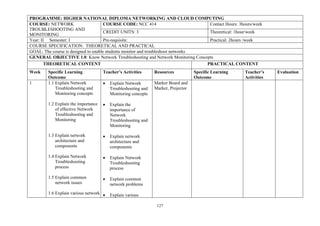
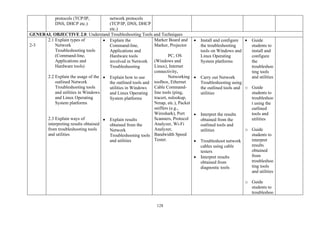
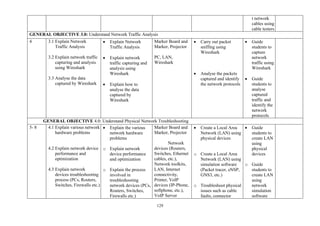
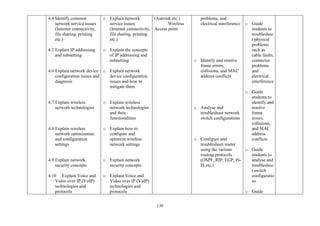
NATIONAL BOARD FOR TECHNICAL EDUCATION
HIGHER NATIONAL DIPLOMA
(HND)
NETWORKING AND CLOUD COMPUTING
CURRICULUM AND COURSE SPECIFICATION
AUGUST, 2023
PLOT B, BIDA ROAD, P.M.B. 2239, KADUNA – NIGERIA
www.nbte.gov.ng
2
Foreword
The Higher National Diploma (HND) Networking and Cloud Computing curriculum is designed to be used
by training institutions to produce manpower to boost the practice of Networking and Cloud Computing in
Nigeria.
There is therefore the need to produce professional practitioners with good ethics and prospects for career
progression, through the acquisition of desirable knowledge and skills. This necessitated the production of
this national curriculum.
It is my belief that this curriculum and course specifications, which is the minimum required to produce
technologists with sound knowledge and skills in Networking and Cloud Computing, if properly implemented
with the required resources along with qualified candidates being admitted into the programme, will lead to
the production of competent and skilled technologists.
I sincerely appreciate all those who made the development of this curriculum possible. The invaluable
contributions of all the members of the committee and resource persons during the pre-critique and national
critique workshops are appreciated.
I hope that the curriculum would be properly implemented so as to produce the required Work Force of our dream.
Prof. Idris M. Bugaje
Executive Secretary
NBTE, Kaduna
3
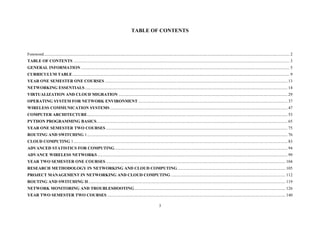
TABLE OF CONTENTS
Foreword.......................................................................................................................................................................................................................................... 2
TABLE OF CONTENTS .............................................................................................................................................................................................................. 3
GENERAL INFORMATION....................................................................................................................................................................................................... 5
CURRICULUM TABLE............................................................................................................................................................................................................... 9
YEAR ONE SEMESTER ONE COURSES .............................................................................................................................................................................. 13
NETWORKING ESSENTIALS................................................................................................................................................................................................. 14
VIRTUALIZATION AND CLOUD MIGRATION ................................................................................................................................................................. 29
OPERATING SYSTEM FOR NETWORK ENVIRONMENT .............................................................................................................................................. 37
WIRELESS COMMUNICATION SYSTEMS ......................................................................................................................................................................... 47
COMPUTER ARCHITECTURE............................................................................................................................................................................................... 53
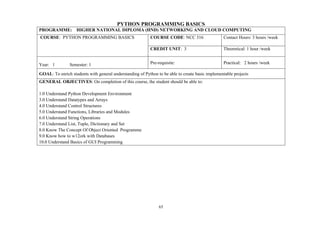
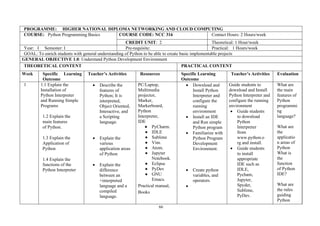
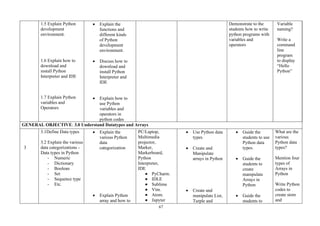
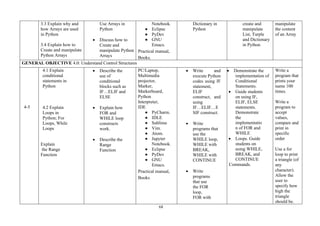
PYTHON PROGRAMMING BASICS...................................................................................................................................................................................... 65
YEAR ONE SEMESTER TWO COURSES ............................................................................................................................................................................. 75
ROUTING AND SWITCHING 1............................................................................................................................................................................................... 76
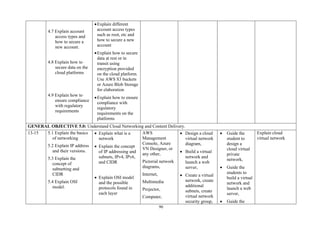
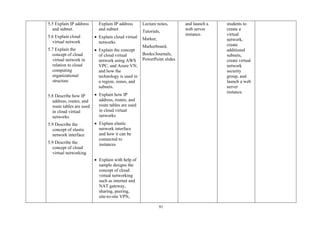
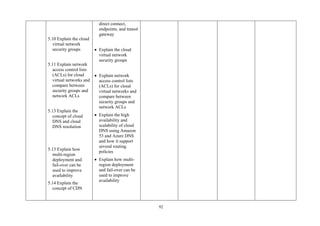
CLOUD COMPUTING 1............................................................................................................................................................................................................ 83
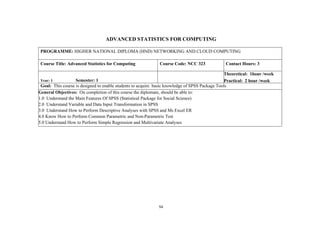
ADVANCED STATISTICS FOR COMPUTING..................................................................................................................................................................... 94
ADVANCE WIRELESS NETWORKS ..................................................................................................................................................................................... 99
YEAR TWO SEMESTER ONE COURSES ........................................................................................................................................................................... 104
RESEARCH METHODOLOGY IN NETWORKING AND CLOUD COMPUTING....................................................................................................... 105
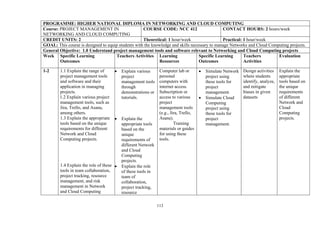
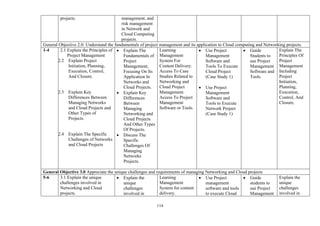
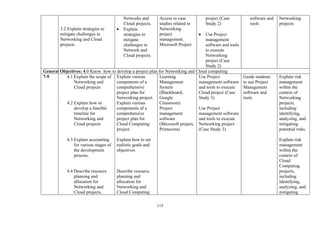
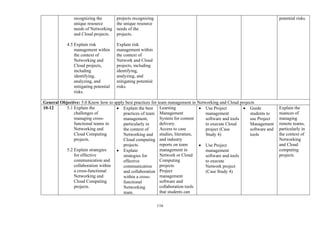
PROJECT MANAGEMENT IN NETWORKING AND CLOUD COMPUTING ............................................................................................................. 112
ROUTING AND SWITCHING II............................................................................................................................................................................................ 119
NETWORK MONITORING AND TROUBLESHOOTING................................................................................................................................................ 126
YEAR TWO SEMESTER TWO COURSES.......................................................................................................................................................................... 140
4
CLOUD COMPUTING II......................................................................................................................................................................................................... 141
ENTERPRISE NETWORKING, SECURITY, AND AUTOMATION................................................................................................................................ 149
ETHICAL AND PROFESSIONAL PRACTICE IN NETWORKING AND CLOUD COMPUTING............................................................................. 161
INTERNET OF THINGS (IOT)............................................................................................................................................................................................... 168
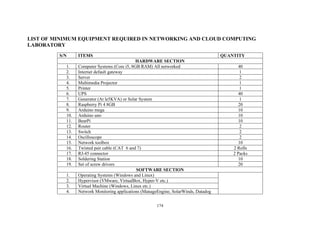
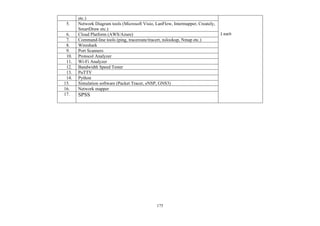
LIST OF MINIMUM EQUIPMENT REQUIRED IN NETWORKING AND CLOUD COMPUTING LABORATORY............................................. 174
LIST OF PARTICIPANTS (PRE-CRITIQUE WORKSHOP)............................................................................................................................................. 176
5
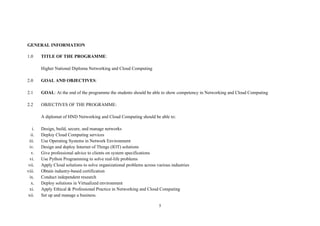
GENERAL INFORMATION
1.0 TITLE OF THE PROGRAMME:
Higher National Diploma Networking and Cloud Computing
2.0 GOAL AND OBJECTIVES:
2.1 GOAL: At the end of the programme the students should be able to show competency in Networking and Cloud Computing
2.2 OBJECTIVES OF THE PROGRAMME:
A diplomat of HND Networking and Cloud Computing should be able to:
i. Design, build, secure, and manage networks
ii. Deploy Cloud Computing services
iii. Use Operating Systems in Network Environment
iv. Design and deploy Internet of Things (IOT) solutions
v. Give professional advice to clients on system specifications
vi. Use Python Programming to solve real-life problems
vii. Apply Cloud solutions to solve organizational problems across various industries
viii. Obtain industry-based certification
ix. Conduct independent research
x. Deploy solutions in Virtualized environment
xi. Apply Ethical & Professional Practice in Networking and Cloud Computing
xii. Set up and manage a business.
6
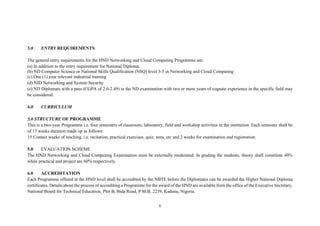
3.0 ENTRY REQUIREMENTS
The general entry requirements for the HND Networking and Cloud Computing Programme are:
(a) In addition to the entry requirement for National Diploma.
(b) ND Computer Science or National Skills Qualification (NSQ) level 3-5 in Networking and Cloud Computing
(c) One (1) year relevant industrial training
(d) NID Networking and System Security
(e) ND Diplomats with a pass (CGPA of 2.0-2.49) in the ND examination with two or more years of cognate experience in the specific field may
be considered.
4.0 CURRICULUM
5.0 STRUCTURE OF PROGRAMME
This is a two-year Programme i.e. four semesters of classroom, laboratory, field and workshop activities in the institution. Each semester shall be
of 17 weeks duration made up as follows:
15 Contact weeks of teaching, i.e. recitation, practical exercises, quiz, tests, etc and 2 weeks for examination and registration.
5.0 EVALUATION SCHEME
The HND Networking and Cloud Computing Examination must be externally moderated. In grading the students, theory shall constitute 40%
while practical and project are 60% respectively.
6.0 ACCREDITATION
Each Programme offered at the HND level shall be accredited by the NBTE before the Diplomates can be awarded the Higher National Diploma
certificates. Details about the process of accrediting a Programme for the award of the HND are available from the office of the Executive Secretary,
National Board for Technical Education, Plot B, Bida Road, P.M.B. 2239, Kaduna, Nigeria.
7
7.0 CONDITIONS FOR THE AWARD OF HND NETWORKING AND CLOUD COMPUTING
Institutions offering this Programme will award the HND certificate to candidates who successfully completed the Programme after passing
prescribed course work, examinations, Project and Industry-based certification as approved by NBTE. Such candidates should have completed a
minimum of 85 semester credit units.
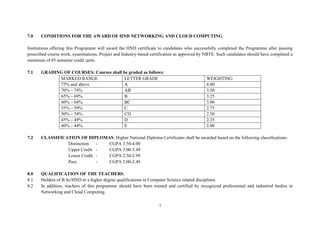
7.1 GRADING OF COURSES: Courses shall be graded as follows:
MARKED RANGE LETTER GRADE
GRADE
WEIGHTING
75% and above A 4.00
70% – 74% AB 3.50
65% – 69% B 3.25
60% – 64% BC 3.00
55% – 59% C 2.75
50% – 54% CD 2.50
45% – 49% D 2.25
40% – 44% E 2.00
7.2 CLASSIFICATION OF DIPLOMAS: Higher National Diploma Certificates shall be awarded based on the following classifications:
Distinction - CGPA 3.50-4.00
Upper Credit - CGPA 3.00-3.49
Lower Credit - CGPA 2.50-2.99
Pass - CGPA 2.00-2.49
8.0 QUALIFICATION OF THE TEACHERS:
8.1 Holders of B.Sc/HND or a higher degree qualifications in Computer Science related disciplines
8.2 In addition, teachers of this programme should have been trained and certified by recognized professional and industrial bodies in
Networking and Cloud Computing.
8
9.0 GUIDANCE NOTES FOR TEACHERS OF THE PROGRAMME
9.1 The new curriculum is drawn in unit courses. This is in keeping with the provisions of the National Policy on Education which stresses the
need to introduce the semester credit units which will enable a student who so wish to transfer the units already completed in an institution of
similar standard from which he is transferring.
9.2 In designing the units, the principle of the modular system by product has been adopted; thus, making each of the professional modules,
when completed provides the student with technician operative skills, which can be used for employment purpose.
As the success of the credit unit system depends on the articulation of Programme between the institutions and industry, the curriculum content
has been written in behavioral objectives, so that it is clear to all the expected performances of the student who successfully completed some of
the courses or the diplomates of the Programme. There is a slight departure in the presentation of the performance-based curriculum which requires
the conditions under which the performance is expected to be carried out and the criteria for the acceptable levels of performance. It is a deliberate
attempt to further involve the staff of the department teaching the Programme to write their own curriculum stating the conditions existing in the
institution under which the performance can take place and to follow that with the criteria for defining an acceptable level of performance.
Departmental submission on the final curriculum may be vetted by the Academic Board of the institution.
9.3 Our aim is to continue to see to it that a solid internal evaluation system exists in each institution for ensuring minimum standard and
quality of education in the programmes offered throughout the Technical and Vocational Education (TVE) system.
9.4 The teaching of the theory and practical work should as much as possible be integrated. Practical exercises, especially those in professional
courses and laboratory work should not be taught in isolation from the theory. For most courses, there should be a balance of theory to practice in
the ratio of 40:60
10. MANDATORY SKILLS QUALIFICATION:
9
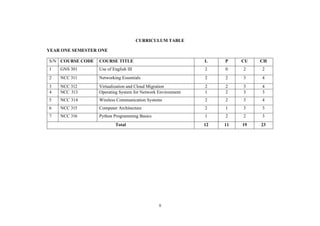
CURRICULUM TABLE
YEAR ONE SEMESTER ONE
S/N COURSE CODE COURSE TITLE L P CU CH
1 GNS 301 Use of English III 2 0 2 2
2 NCC 311 Networking Essentials 2 2 3 4
3 NCC 312 Virtualization and Cloud Migration 2 2 3 4
4 NCC 313 Operating System for Network Environment 1 2 3 3
5 NCC 314 Wireless Communication Systems 2 2 3 4
6 NCC 315 Computer Architecture 2 1 3 3
7 NCC 316 Python Programming Basics 1 2 2 3
Total 12 11 19 23
10
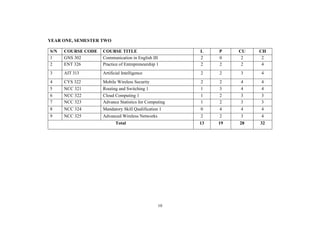
YEAR ONE, SEMESTER TWO
S/N COURSE CODE COURSE TITLE L P CU CH
1 GNS 302 Communication in English III 2 0 2 2
2 ENT 326 Practice of Entrepreneurship 1 2 2 2 4
3 AIT 313 Artificial Intelligence 2 2 3 4
4 CYS 322 Mobile Wireless Security 2 2 4 4
5 NCC 321 Routing and Switching 1 1 3 4 4
6 NCC 322 Cloud Computing 1 1 2 3 3
7 NCC 323 Advance Statistics for Computing 1 2 3 3
8 NCC 324 Mandatory Skill Qualification 1 0 4 4 4
9 NCC 325 Advanced Wireless Networks 2 2 3 4
Total 13 19 28 32
11
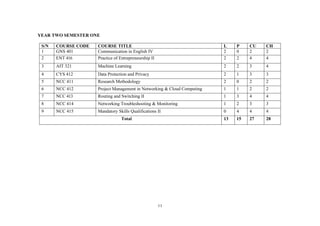
YEAR TWO SEMESTER ONE
S/N COURSE CODE COURSE TITLE L P CU CH
1 GNS 401 Communication in English IV 2 0 2 2
2 ENT 416 Practice of Entrepreneurship II 2 2 4 4
3 AIT 321 Machine Learning 2 2 3 4
4 CYS 412 Data Protection and Privacy 2 1 3 3
5 NCC 411 Research Methodology 2 0 2 2
6 NCC 412 Project Management in Networking & Cloud Computing 1 1 2 2
7 NCC 413 Routing and Switching II 1 3 4 4
8 NCC 414 Networking Troubleshooting & Monitoring 1 2 3 3
9 NCC 415 Mandatory Skills Qualifications II 0 4 4 4
Total 13 15 27 28
12
YEAR TWO, SEMESTER TWO
S/N COURSE CODE COURSE TITLE L P CU CH
1. NCC 421 Cloud Computing II 1 2 3 3
2. NCC 422 Enterprise Networking, Security & Automation 1 3 4 4
3. NCC 423 Ethical & Professional Practice in Networking and Cloud
Computing
2 0 2 2
4. NCC 424 Internet of Things 1 2 3 3
5. NCC 425 Seminar 2 0 2 2
6. NCC 426 Project 0 6 6 6
Total 7 13 20 20
KEY: L= Lecture hours, T= Tutorial hours, P= Practical hours, CU= Credit Units, CH= Contact Hour
13
YEAR ONE SEMESTER ONE COURSES
14
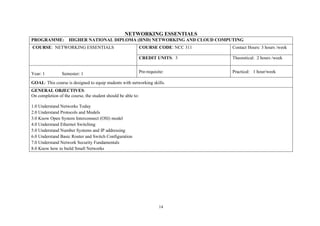
NETWORKING ESSENTIALS
PROGRAMME: HIGHER NATIONAL DIPLOMA (HND) NETWORKING AND CLOUD COMPUTING
COURSE: NETWORKING ESSENTIALS COURSE CODE: NCC 311 Contact Hours: 3 hours /week
CREDIT UNITS: 3 Theoretical: 2 hours /week
Year: 1 Semester: 1 Pre-requisite: Practical: 1 hour/week
GOAL: This course is designed to equip students with networking skills.
GENERAL OBJECTIVES:
On completion of the course, the student should be able to:
1.0 Understand Networks Today
2.0 Understand Protocols and Models
3.0 Know Open System Interconnect (OSI) model
4.0 Understand Ethernet Switching
5.0 Understand Number Systems and IP addressing
6.0 Understand Basic Router and Switch Configuration
7.0 Understand Network Security Fundamentals
8.0 Know how to build Small Networks
15
PROGRAMME: HIGHER NATIONAL DIPLOMA (HND) NETWORKING AND CLOUD COMPUTING
COURSE: NETWORKING
ESSENTIALS
COURSE CODE: NCC 311 Contact Hours: 3hours/Week
CREDIT UNIT: 3 Theoretical: 2 Hours/Week
Year: I Semester: I Pre-requisite: Practical: 1 Hour/Week
GOAL: This course is designed to equip students with networking skills.
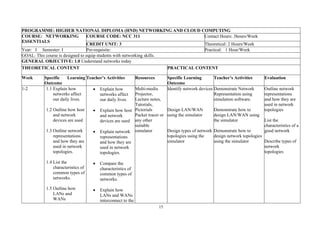
GENERAL OBJECTIVE: 1.0 Understand networks today
THEORETICAL CONTENT PRACTICAL CONTENT
Week Specific Learning
Outcome
Teacher’s Activities Resources Specific Learning
Outcome
Teacher’s Activities Evaluation
1-2 1.1 Explain how
networks affect
our daily lives.
1.2 Outline how host
and network
devices are used
1.3 Outline network
representations
and how they are
used in network
topologies.
1.4 List the
characteristics of
common types of
networks.
1.5 Outline how
LANs and
WANs
• Explain how
networks affect
our daily lives.
• Explain how host
and network
devices are used
• Explain network
representations
and how they are
used in network
topologies.
• Compare the
characteristics of
common types of
networks.
• Explain how
LANs and WANs
interconnect to the
Multi-media
Projector,
Lecture notes,
Tutorials,
Pictorials
Packet tracer or
any other
suitable
simulator
Identify network devices
Design LAN/WAN
using the simulator
Design types of network
topologies using the
simulator
Demonstrate Network
Representation using
simulation software.
Demonstrate how to
design LAN/WAN using
the simulator
Demonstrate how to
design network topologies
using the simulator
Outline network
representations
and how they are
used in network
topologies
List the
characteristics of a
good network
Describe types of
network
topologies
16
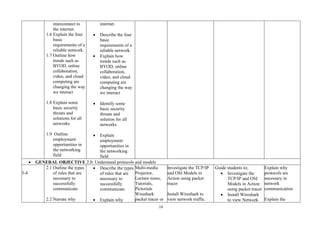
interconnect to
the internet.
1.6 Explain the four
basic
requirements of a
reliable network.
1.7 Outline how
trends such as
BYOD, online
collaboration,
video, and cloud
computing are
changing the way
we interact
1.8 Explain some
basic security
threats and
solutions for all
networks
1.9 Outline
employment
opportunities in
the networking
field
internet.
• Describe the four
basic
requirements of a
reliable network.
• Explain how
trends such as
BYOD, online
collaboration,
video, and cloud
computing are
changing the way
we interact
• Identify some
basic security
threats and
solution for all
networks
• Explain
employment
opportunities in
the networking
field
• GENERAL OBJECTIVE 2.0: Understand protocols and models
3-4
2.1 Outline the types
of rules that are
necessary to
successfully
communicate.
2.2 Narrate why
• Describe the types
of rules that are
necessary to
successfully
communicate.
• Explain why
Multi-media
Projector,
Lecture notes,
Tutorials,
Pictorials
Wireshark
packet tracer or
Investigate the TCP/IP
and OSI Models in
Action using packet
tracer
Install Wireshark to
view network traffic.
Guide students to;
• Investigate the
TCP/IP and OSI
Models in Action
using packet tracer
• Install Wireshark
to view Network
Explain why
protocols are
necessary in
network
communication
Explain the
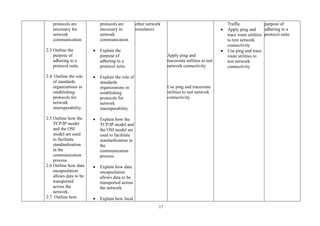
17
protocols are
necessary for
network
communication
2.3 Outline the
purpose of
adhering to a
protocol suite.
2.4 Outline the role
of standards
organizations in
establishing
protocols for
network
interoperability.
2.5 Outline how the
TCP/IP model
and the OSI
model are used
to facilitate
standardization
in the
communication
process.
2.6 Outline how data
encapsulation
allows data to be
transported
across the
network.
2.7 Outline how
protocols are
necessary in
network
communication
• Explain the
purpose of
adhering to a
protocol suite.
• Explain the role of
standards
organizations in
establishing
protocols for
network
interoperability.
• Explain how the
TCP/IP model and
the OSI model are
used to facilitate
standardization in
the
communication
process.
• Explain how data
encapsulation
allows data to be
transported across
the network.
• Explain how local
other network
simulators
Apply ping and
traceroute utilities to test
network connectivity
Use ping and traceroute
utilities to test network
connectivity
Traffic
• Apply ping and
trace route utilities
to test network
connectivity
• Use ping and trace
route utilities to
test network
connectivity
purpose of
adhering to a
protocol suite.
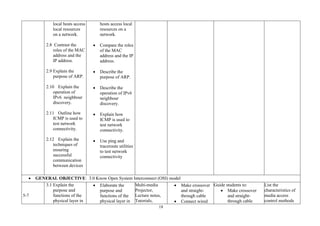
18
local hosts access
local resources
on a network.
2.8 Contrast the
roles of the MAC
address and the
IP address.
2.9 Explain the
purpose of ARP.
2.10 Explain the
operation of
IPv6 neighbour
discovery.
2.11 Outline how
ICMP is used to
test network
connectivity.
2.12 Explain the
techniques of
ensuring
successful
communication
between devices
hosts access local
resources on a
network.
• Compare the roles
of the MAC
address and the IP
address.
• Describe the
purpose of ARP.
• Describe the
operation of IPv6
neighbour
discovery.
• Explain how
ICMP is used to
test network
connectivity.
• Use ping and
traceroute utilities
to test network
connectivity
• GENERAL OBJECTIVE: 3.0 Know Open System Interconnect (OSI) model
5-7
3.1 Explain the
purpose and
functions of the
physical layer in
• Elaborate the
purpose and
functions of the
physical layer in
Multi-media
Projector,
Lecture notes,
Tutorials,
• Make crossover
and straight-
through cable
• Connect wired
Guide students to:
• Make crossover
and straight-
through cable
List the
characteristics of
media access
control methods
19
the network.
3.2 Explain the
characteristics of
the physical
layer.
3.3 Explain the basic
characteristics of
copper cabling.
3.4 Explain how
UTP cable is
used in Ethernet
networks.
3.5 Explain fiber
optic cabling and
its main
advantages over
other media.
3.6 Explain Network
devices using
wired and
wireless media.
3.7 List the purpose
and function of
the data link
layer in
preparing
communication
for transmission
on specific
media.
the network.
• Elaborate the
characteristics of
the physical layer.
• Explain the basic
characteristics of
copper cabling.
• Describe how
UTP cable is used
in Ethernet
networks.
• Explain fiber
optic cabling and
its main
advantages over
other media.
• Explain Network
devices using
wired and
wireless media.
• List the purpose
and function of
the data link layer
in preparing
communication
for transmission
on specific media.
Pictorials
Wireshark
packetacer or
other network
simulators
networking tool
kit
networking
cable
and wireless
LAN.
• View Wired and
Wireless NIC
Information
using
Packet Tracer.
• Observe TCP
and UDP
Communications
• Observe DNS
Resolution
• Connect a Wired
and Wireless LAN
• View Wired and
Wireless NIC
Information
Packet Tracer -
TCP and UDP
Communications
• Observe DNS
Resolution
on WAN and LAN
topologies
20
3.8 List the
characteristics of
media access
control methods
on WAN and
LAN topologies.
3.9 Explain the
characteristics
and functions of
the data link
frame.
3.10 Explain how
the network layer
uses IP protocols
for reliable
communications
3.11 Explain the
role of the major
header fields in
the IPv4 packet.
3.12 Explain the
role of the major
header fields in
the IPv6 packet.
3.13 Explain how
network devices
use routing tables
to direct packets
to a destination
network.
• List the
characteristics of
media access control
methods on WAN and
LAN topologies.
• Explain the
characteristics and
functions of the
data link frame.
• Explain how the
network layer
uses IP protocols
for reliable
communications
• Explain the role of
the major header
fields in the IPv4
packet.
• Explain the role of
the major header
fields in the IPv6
packet.
• Explain how
network devices
use routing tables
to direct packets
to a destination
network.
21
3.14 Explain the
functions of
fields in the
routing table
3.15 Explain the
purpose of the
transport layer in
managing the
transportation of
data in end-to-
end
communication.
3.16 List the
characteristics of
TCP.
3.17 List
characteristics of
UDP.
3.18 Describe how
TCP and UDP
use port
numbers.
3.19 Explain how
TCP session
establishment
and termination
processes
facilitate reliable
communication.
3.20 Explain how
• Explain the
function of fields
in the routing
table of a router.
• Explain the
purpose of the
transport layer in
managing the
transportation of
data in end-to-end
communication.
• List the
characteristics of
TCP.
• List
characteristics of
UDP.
• Describe how
TCP and UDP use
port numbers.
• Explain how TCP
session
establishment and
termination
processes
facilitate reliable
communication.
• Explain how TCP
22
TCP protocol
data units are
transmitted and
acknowledged to
guarantee
delivery.
3.21 Explain the
operations of
transport layer
protocols in
supporting end-
to-end
communication.
3.22 Explain how
the functions of
the application
layer,
presentation
layer, and
session layer
work together to
provide network
services to end-
user applications.
3.23 Explain how
end-user
applications
operate in a peer-
to-peer network.
3.24 Explain how
web and email
protocols
protocol data units
are transmitted
and acknowledged
to guarantee
delivery.
• Explain the
operations of
transport layer
protocols in
supporting end-to-
end
communication.
• Explain how the
functions of the
application layer,
presentation layer,
and session layer
work together to
provide network
services to end-
user applications.
• Explain how end-
user applications
operate in a peer-
to-peer network.
• Explain how web
and email
protocols operate.
23
operate.
3.25 Explain how
DNS and DHCP
operate.
3.26 Explain how
file transfer
protocols
operate.
• Explain how DNS
and DHCP
operate.
• Explain how file
transfer protocols
operate.
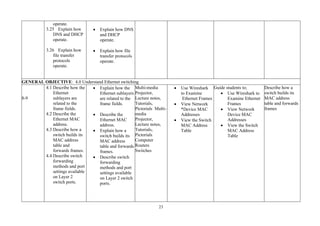
GENERAL OBJECTIVE: 4.0 Understand Ethernet switching
8-9
4.1 Describe how the
Ethernet
sublayers are
related to the
frame fields.
4.2 Describe the
Ethernet MAC
address.
4.3 Describe how a
switch builds its
MAC address
table and
forwards frames.
4.4 Describe switch
forwarding
methods and port
settings available
on Layer 2
switch ports.
• Explain how the
Ethernet sublayers
are related to the
frame fields.
• Describe the
Ethernet MAC
address.
• Explain how a
switch builds its
MAC address
table and forwards
frames.
• Describe switch
forwarding
methods and port
settings available
on Layer 2 switch
ports.
Multi-media
Projector,
Lecture notes,
Tutorials,
Pictorials Multi-
media
Projector,
Lecture notes,
Tutorials,
Pictorials
Computer
Routers
Switches
• Use Wireshark
to Examine
Ethernet Frames
• View Network
*Device MAC
Addresses
• View the Switch
MAC Address
Table
Guide students to;
• Use Wireshark to
Examine Ethernet
Frames
• View Network
Device MAC
Addresses
• View the Switch
MAC Address
Table
Describe how a
switch builds its
MAC address
table and forwards
frames
24
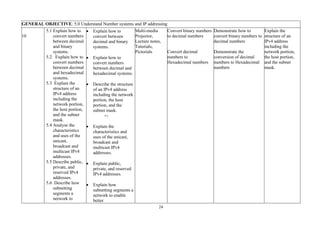
GENERAL OBJECTIVE: 5.0 Understand Number systems and IP addressing
10
5.1 Explain how to
convert numbers
between decimal
and binary
systems.
5.2 Explain how to
convert numbers
between decimal
and hexadecimal
systems.
5.3 Explain the
structure of an
IPv4 address
including the
network portion,
the host portion,
and the subnet
mask.
5.4 Analyse the
characteristics
and uses of the
unicast,
broadcast and
multicast IPv4
addresses.
5.5 Describe public,
private, and
reserved IPv4
addresses.
5.6 Describe how
subnetting
segments a
network to
• Explain how to
convert between
decimal and binary
systems.
• Explain how to
convert numbers
between decimal and
hexadecimal systems.
• Describe the structure
of an IPv4 address
including the network
portion, the host
portion, and the
subnet mask.
+-
• Explain the
characteristics and
uses of the unicast,
broadcast and
multicast IPv4
addresses.
• Explain public,
private, and reserved
IPv4 addresses.
• Explain how
subnetting segments a
network to enable
better
Multi-media
Projector,
Lecture notes,
Tutorials,
Pictorials
Convert binary numbers
to decimal numbers
Convert decimal
numbers to
Hexadecimal numbers
Demonstrate how to
convert binary numbers to
decimal numbers
Demonstrate the
conversion of decimal
numbers to Hexadecimal
numbers
Explain the
structure of an
IPv4 address
including the
network portion,
the host portion,
and the subnet
mask.
25
enable better
communication.
5.7 Compute IPv4
subnets for a /24
prefix.
5.8 Describe the
need for IPv6
addressing.
5.9 Describe how
IPv6 addresses
are represented.
5.10 Contrast types
of IPv6 network
addresses.
5.11 Describe how
to configure
static global
unicast and link-
local IPv6
network
addresses.
5.12 Describe how
to configure
global unicast
addresses
dynamically.
communication.
• Calculate IPv4
subnets for a /24
prefix.
• Explain the need for
IPv6 addressing.
• Explain how IPv6
addresses are
represented.
• Compare types of
IPv6 network
addresses.
• Explain how to
configure static global
unicast and link-local
IPv6 network
addresses.
• Explain how to
configure global
unicast addresses
dynamically.
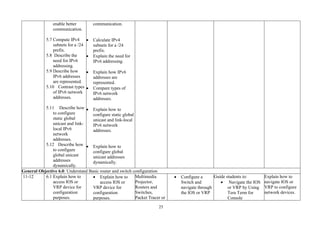
General Objective 6.0: Understand Basic router and switch configuration
11-12 6.1 Explain how to
access IOS or
VRP device for
configuration
purposes.
• Explain how to
access IOS or
VRP device for
configuration
purposes.
Multimedia
Projector,
Routers and
Switches,
Packet Tracer or
• Configure a
Switch and
navigate through
the IOS or VRP
Guide students to:
• Navigate the IOS
or VRP by Using
Tera Term for
Console
Explain how to
navigate IOS or
VRP to configure
network devices.
26
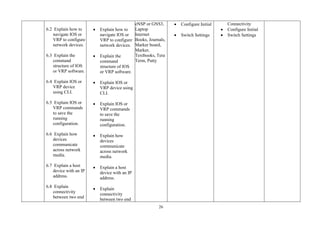
6.2 Explain how to
navigate IOS or
VRP to configure
network devices.
6.3 Explain the
command
structure of IOS
or VRP software.
6.4 Explain IOS or
VRP device
using CLI.
6.5 Explain IOS or
VRP commands
to save the
running
configuration.
6.6 Explain how
devices
communicate
across network
media.
6.7 Explain a host
device with an IP
address.
6.8 Explain
connectivity
between two end
• Explain how to
navigate IOS or
VRP to configure
network devices.
• Explain the
command
structure of IOS
or VRP software.
• Explain IOS or
VRP device using
CLI.
• Explain IOS or
VRP commands
to save the
running
configuration.
• Explain how
devices
communicate
across network
media.
• Explain a host
device with an IP
address.
• Explain
connectivity
between two end
eNSP or GNS3,
Laptop
Internet
Books, Journals,
Marker board,
Marker,
Textbooks, Tera
Term, Putty
• Configure Initial
• Switch Settings
Connectivity
• Configure Initial
• Switch Settings
•
27
devices.
6.9 Explain initial
settings on an
IOS or VRP
router.
6.10 Explain two
active interfaces
on IOS or VRP
router.
6.11 Explain how
devices use the
default gateway.
devices.
• Explain initial
settings on an IOS
or VRP router.
• Explain two
active interfaces
on IOS or VRP
router.
• Explain how
devices use the
default gateway.
General Objective 7.0: Understand Network Security fundamentals
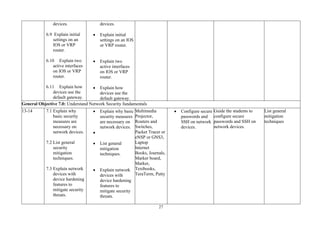
13-14 7.1 Explain why
basic security
measures are
necessary on
network devices.
7.2 List general
security
mitigation
techniques.
7.3 Explain network
devices with
device hardening
features to
mitigate security
threats.
• Explain why basic
security measures
are necessary on
network devices.
•
• List general
mitigation
techniques.
• Explain network
devices with
device hardening
features to
mitigate security
threats.
Multimedia
Projector,
Routers and
Switches,
Packet Tracer or
eNSP or GNS3,
Laptop
Internet
Books, Journals,
Marker board,
Marker,
Textbooks,
TeraTerm, Putty
• Configure secure
passwords and
SSH on network
devices.
Guide the students to
configure secure
passwords and SSH on
network devices.
List general
mitigation
techniques
28
General Objective 8.0: Know how to build small networks
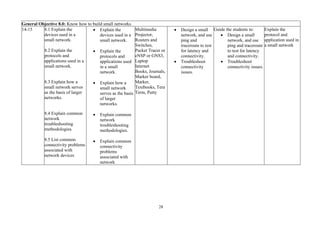
14-15 8.1 Explain the
devices used in a
small network.
8.2 Explain the
protocols and
applications used in a
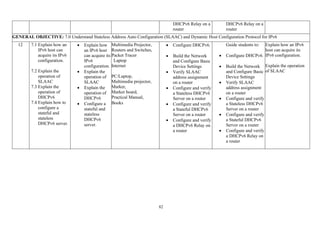
small network.
8.3 Explain how a
small network serves
as the basis of larger
networks.
8.4 Explain common
network
troubleshooting
methodologies.
8.5 List common
connectivity problems
associated with
network devices
• Explain the
devices used in a
small network.
• Explain the
protocols and
applications used
in a small
network.
• Explain how a
small network
serves as the basis
of larger
networks.
• Explain common
network
troubleshooting
methodologies.
• Explain common
connectivity
problems
associated with
network
Multimedia
Projector,
Routers and
Switches,
Packet Tracer or
eNSP or GNS3,
Laptop
Internet
Books, Journals,
Marker board,
Marker,
Textbooks, Tera
Term, Putty
• Design a small
network, and use
ping and
traceroute to test
for latency and
connectivity.
• Troubleshoot
connectivity
issues.
Guide the students to:
• Design a small
network, and use
ping and traceroute
to test for latency
and connectivity.
• Troubleshoot
connectivity issues.
Explain the
protocol and
application used in
a small network
29
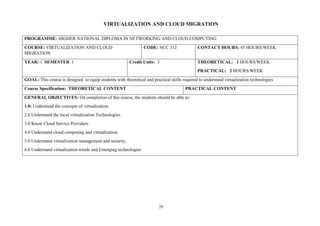
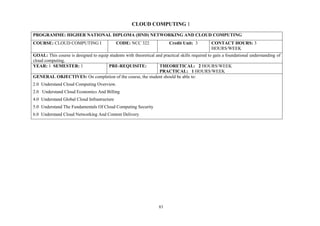
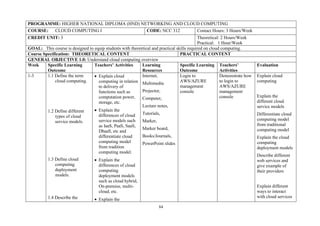
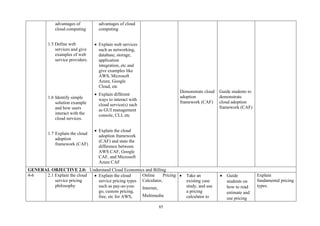
VIRTUALIZATION AND CLOUD MIGRATION
PROGRAMME: HIGHER NATIONAL DIPLOMA IN NETWORKING AND CLOUD COMPUTING
COURSE: VIRTUALIZATION AND CLOUD
MIGRATION
CODE: NCC 312 CONTACT HOURS: 45 HOURS/WEEK
YEAR: 1 SEMESTER 1 Credit Units: 3 THEORETICAL: 1 HOURS/WEEK
PRACTICAL: 2 HOURS/WEEK
GOAL: This course is designed to equip students with theoretical and practical skills required to understand virtualization technologies
Course Specification: THEORETICAL CONTENT PRACTICAL CONTENT
GENERAL OBJECTIVES: On completion of this course, the students should be able to:
1.0: Understand the concepts of virtualization.
2.0 Understand the local virtualization Technologies.
3.0 Know Cloud Service Providers.
4.0 Understand cloud computing and virtualization.
5.0 Understand virtualization management and security.
6.0 Understand virtualization trends and Emerging technologies
30
PROGRAMME: HIGHER NATIONAL DIPLOMA IN NETWORKING AND CLOUD COMPUTING
COURSE: VIRTUALIZATION AND CLOUD MIGRATION CODE: NCC 312 CONTACT HOURS: 45 HOURS/WEEK
YEAR: 1 SEMESTER 1 Credit Units: 3 THEORETICAL: 1 HOURS/WEEK
PRACTICAL: 2 HOURS/WEEK
GOAL: This course is design to equip students with theoretical and practical skills required to understand virtualization technologies
Course Specification: THEORETICAL CONTENT PRACTICAL CONTENT
GENERAL OBJECTIVE 1.0: Understand the concepts of virtualization.
Wee
k
Specific Learning
Outcome
Teachers’ Activities Learning
Resources
Specific Learning
Outcome
Teachers’
Activities
Evaluation
GENERAL OBJECTIVE 2.0: Understand the Local Virtualization Technologies.
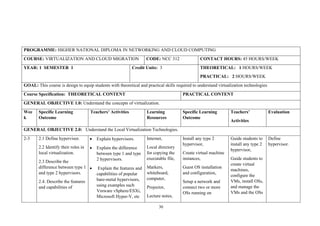
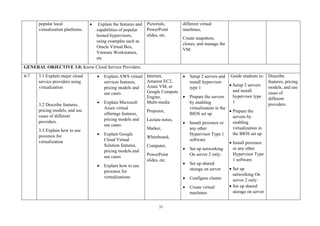
2-3 2.1 Define hypervisor.
2.2 Identify their roles in
local virtualization.
2.3 Describe the
difference between type 1
and type 2 hypervisors.
2.4. Describe the features
and capabilities of
• Explain hypervisors.
• Explain the difference
between type 1 and type
2 hypervisors.
• Explain the features and
capabilities of popular
bare-metal hypervisors,
using examples such
Vmware vSphere/ESXi,
Microsoft Hyper-V, etc
Internet,
Local directory
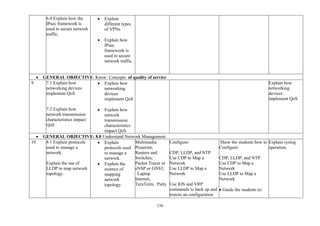
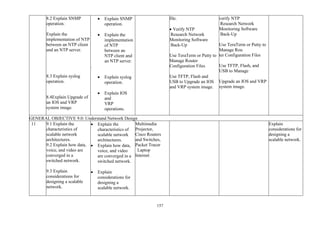
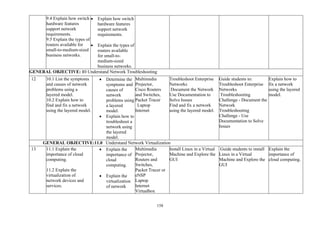
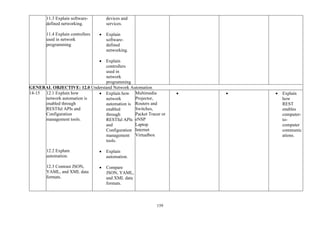
for copying the
executable file,
Markers,
whiteboard,
computer,
Projector,
Lecture notes,
Install any type 2
hypervisor,
Create virtual machine
instances,
Guest OS installation
and configuration,
Setup a network and
connect two or more
OSs running on
Guide students to
install any type 2
hypervisor,
Guide students to
create virtual
machines,
configure the
VMs, install OSs,
and manage the
VMs and the OSs
Define
hypervisor.
31
popular local
virtualization platforms.
• Explain the features and
capabilities of popular
hosted hypervisors,
using examples such as
Oracle Virtual Box,
Vmware Workstation,
etc
Pictorials,
PowerPoint
slides, etc.
different virtual
machines,
Create snapshots,
clones, and manage the
VM.
GENERAL OBJECTIVE 3.0: Know Cloud Service Providers.
4-7 3.1 Explain major cloud
service providers using
virtualization
3.2 Describe features,
pricing models, and use
cases of different
providers.
3.3 Explain how to use
proxmox for
virtualization
• Explain AWS virtual
services features,
pricing models and
use cases
• Explain Microsoft
Azure virtual
offerings features,
pricing models and
use cases.
• Explain Google
Cloud Virtual
Solution features,
pricing models and
use cases
• Explain how to use
proxmox for
virtualizations
Internet,
Amazon EC2,
Azure VM, or
Google Compute
Engine,
Multi-media
Projector,
Lecture notes,
Marker,
Whiteboard,
Computer,
PowerPoint
slides, etc.
• Setup 2 servers and
install hypervisor
type 1
• Prepare the servers
by enabling
virtualization in the
BIOS set up
• Install proxmox or
any other
Hypervisor Type 1
software
• Set up networking
On server 2 only:
• Set up shared
storage on server
• Configure cluster
• Create virtual
machines
Guide students to:
• Setup 2 servers
and install
hypervisor type
1
• Prepare the
servers by
enabling
virtualization in
the BIOS set up
• Install proxmox
or any other
Hypervisor Type
1 software
• Set up
networking On
server 2 only:
• Set up shared
storage on server
Describe
features, pricing
models, and use
cases of
different
providers.
32
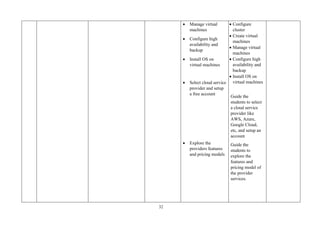
• Manage virtual
machines
• Configure high
availability and
backup
• Install OS on
virtual machines
• Select cloud service
provider and setup
a free account
• Explore the
providers features
and pricing models
• Configure
cluster
• Create virtual
machines
• Manage virtual
machines
• Configure high
availability and
backup
• Install OS on
virtual machines
Guide the
students to select
a cloud service
provider like
AWS, Azure,
Google Cloud,
etc, and setup an
account
Guide the
students to
explore the
features and
pricing model of
the provider
services.
33
GENERAL OBJECTIVE 4.0: Understand Cloud Computing and virtualization.
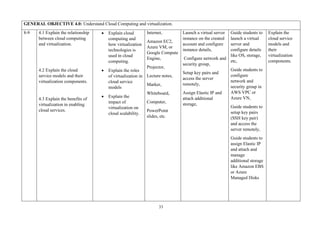
8-9 4.1 Explain the relationship
between cloud computing
and virtualization.
4.2 Explain the cloud
service models and their
virtualization components.
4.3 Explain the benefits of
virtualization in enabling
cloud services.
• Explain cloud
computing and
how virtualization
technologies is
used in cloud
computing.
• Explain the roles
of virtualization in
cloud service
models
• Explain the
impact of
virtualization on
cloud scalability.
Internet,
Amazon EC2,
Azure VM, or
Google Compute
Engine,
Projector,
Lecture notes,
Marker,
Whiteboard,
Computer,
PowerPoint
slides, etc.
Launch a virtual server
instance on the created
account and configure
instance details,
Configure network and
security group,
Setup key pairs and
access the server
remotely,
Assign Elastic IP and
attach additional
storage,
Guide students to
launch a virtual
server and
configure details
like OS, storage,
etc,
Guide students to
configure
network and
security group in
AWS VPC or
Azure VN,
Guide students to
setup key pairs
(SSH key pair)
and access the
server remotely,
Guide students to
assign Elastic IP
and attach and
manage
additional storage
like Amazon EBS
or Azure
Managed Disks
Explain the
cloud service
models and
their
virtualization
components.
34
GENERAL OBJECTIVE 5.0: Understand Virtualization Management and Security.
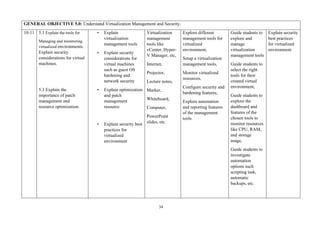
10-11 5.1 Explain the tools for
Managing and monitoring
virtualized environments.
Explain security
considerations for virtual
machines.
5.3 Explain the
importance of patch
management and
resource optimization.
• Explain
virtualization
management tools
• Explain security
considerations for
virtual machines
such as guest OS
hardening and
network security
• Explain optimization
and patch
management
resource
• Explain security best
practices for
virtualized
environment
Virtualization
management
tools like
vCenter, Hyper-
V Manager, etc,
Internet,
Projector,
Lecture notes,
Marker,
Whiteboard,
Computer,
PowerPoint
slides, etc.
Explore different
management tools for
virtualized
environment,
Setup a virtualization
management tools,
Monitor virtualized
resources,
Configure security and
hardening features,
Explore automation
and reporting features
of the management
tools
Guide students to
explore and
manage
virtualization
management tools
Guide students to
select the right
tools for their
created virtual
environment,
Guide students to
explore the
dashboard and
features of the
chosen tools to
monitor resources
like CPU, RAM,
and storage
usage,
Guide students to
investigate
automation
options such
scripting task,
automatic
backups, etc.
Explain security
best practices
for virtualized
environment
35
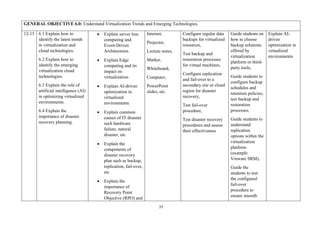
GENERAL OBJECTIVE 6.0: Understand Virtualization Trends and Emerging Technologies.
12-15 6.1 Explain how to
identify the latest trends
in virtualization and
cloud technologies.
6.2 Explain how to
identify the emerging
virtualization cloud
technologies.
6.3 Explain the role of
artificial intelligence (AI)
in optimizing virtualized
environments.
6.4 Explain the
importance of disaster
recovery planning.
• Explain server less
computing and
Event-Driven
Architectures
• Explain Edge
computing and its
impact on
virtualization
• Explain AI-driven
optimization in
virtualized
environments.
• Explain common
causes of IT disaster
such hardware
failure, natural
disaster, etc
• Explain the
components of
disaster recovery
plan such as backup,
replication, fail-over,
etc
• Explain the
importance of
Recovery Point
Objective (RPO) and
Internet,
Projector,
Lecture notes,
Marker,
Whiteboard,
Computer,
PowerPoint
slides, etc.
Configure regular data
backups for virtualized
resources,
Test backup and
restoration processes
for virtual machines,
Configure replication
and fail-over to a
secondary site or cloud
region for disaster
recovery,
Test fail-over
procedure,
Test disaster recovery
procedures and assess
their effectiveness
Guide students on
how to choose
backup solutions
offered by
virtualization
platform or third-
party tools,
Guide students to
configure backup
schedules and
retention policies,
test backup and
restoration
processes,
Guide students to
understand
replication
options within the
virtualization
platform
(example
Vmware SRM),
Guide the
students to test
the configured
fail-over
procedure to
ensure smooth
Explain AI-
driven
optimization in
virtualized
environments
36
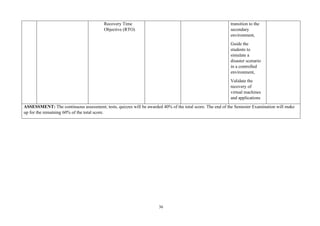
Recovery Time
Objective (RTO)
transition to the
secondary
environment,
Guide the
students to
simulate a
disaster scenario
in a controlled
environment,
Validate the
recovery of
virtual machines
and applications
ASSESSMENT: The continuous assessment; tests, quizzes will be awarded 40% of the total score. The end of the Semester Examination will make
up for the remaining 60% of the total score.
37
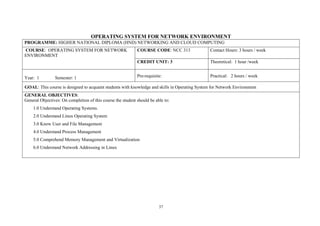
OPERATING SYSTEM FOR NETWORK ENVIRONMENT
PROGRAMME: HIGHER NATIONAL DIPLOMA (HND) NETWORKING AND CLOUD COMPUTING
COURSE: OPERATING SYSTEM FOR NETWORK
ENVIRONMENT
COURSE CODE: NCC 313 Contact Hours: 3 hours / week
CREDIT UNIT: 3 Theoretical: 1 hour /week
Year: 1 Semester: 1 Pre-requisite: Practical: 2 hours / week
GOAL: This course is designed to acquaint students with knowledge and skills in Operating System for Network Environment
GENERAL OBJECTIVES:
General Objectives: On completion of this course the student should be able to:
1.0 Understand Operating Systems.
2.0 Understand Linux Operating System
3.0 Know User and File Management
4.0 Understand Process Management
5.0 Comprehend Memory Management and Virtualization
6.0 Understand Network Addressing in Linux
38
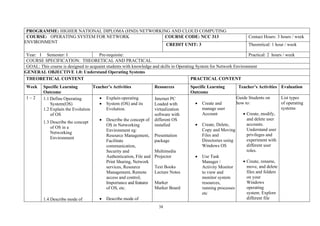
PROGRAMME: HIGHER NATIONAL DIPLOMA (HND) NETWORKING AND CLOUD COMPUTING
COURSE: OPERATING SYSTEM FOR NETWORK
ENVIRONMENT
COURSE CODE: NCC 313 Contact Hours: 3 hours / week
CREDIT UNIT: 3 Theoretical: 1 hour / week
Year: I Semester: I Pre-requisite: Practical: 2 hours / week
COURSE SPECIFICATION: THEORETICAL AND PRACTICAL
GOAL: This course is designed to acquaint students with knowledge and skills in Operating System for Network Environment
GENERAL OBJECTIVE 1.0: Understand Operating Systems
THEORETICAL CONTENT PRACTICAL CONTENT
Week Specific Learning
Outcome
Teacher’s Activities Resources Specific Learning
Outcome
Teacher’s Activities Evaluation
1 – 2 1.1 Define Operating
System(OS)
1.2 Explain the Evolution
of OS
1.3 Describe the concept
of OS in a
Networking
Environment
1.4 Describe mode of
• Explain operating
• System (OS) and its
Evolution.
• Describe the concept of
OS in Networking
Environment eg:
Resource Management,
Facilitate
communication,
Security and
Authentication, File and
Print Sharing, Network
services, Resource
Management, Remote
access and control,
Importance and features
of OS, etc.
• Describe mode of
Internet PC
Loaded with
virtualization
software with
different OS
installed
Presentation
package
Multimedia
Projector
Text Books
Lecture Notes
Marker
Marker Board
• Create and
manage user
Account
• Create, Delete,
Copy and Moving
Files and
Directories using
Windows OS
• Use Task
Manager /
Activity Monitor
to view and
monitor system
resources,
running processes
etc
Guide Students on
how to:
• Create, modify,
and delete user
accounts.
Understand user
privileges and
experiment with
different user
roles.
• Create, rename,
move, and delete
files and folders
on your
Windows
operating
system. Explore
different file
List types
of operating
systems
39
operation and the
architecture of OS
1.5 Explain the types and
classes of Operating
System.
operation and the
Architecture of OS
o (Monolithic, Micro-
kernel,
o Layered Kernel)
• Classify OS intobatch,
real time,timesharing
andnetworking
• Describe the types of
OS such as: Microsoft
Windows,
Apple MacOS, Linux:
Linux Distribution
Red hat and Embedded
Systems
• Perform basic
Command-Line
Interface (CLI)
operations
attributes and
permissions.
• Use the built-
in task
manager
(Windows) or
Activity
Monitor
(macOS/Linux
) to monitor
system
resources,
view running
processes, and
terminate
unresponsive
applications.
• Practice basic
command-line
operations.
Navigate
directories, list
files, copy,
move, and
delete files
using
commands like
ls, cd, cp, mv,
and rm.
40
GENERAL OBJECTIVE: 2.0 Understand Linux Operating System
2 – 4 2.1 Define Linux
Operating System
2.2 Give brief history
and evolution of
Linux
2.3 Describe the Open
Source Philosophy
and the GNU
General Public
License (GPL)
2.4 Describe Linux
Distributions and
Package
Management System
2.5 Explain Installation
Process (dual-boot or
Virtual Machine set up)
2.6 Describe the basic
Linux commands
and command-line
interface (CLI)
2.7 Describe File
System hierarchy and
Navigation
2.8 Explain the usage of
“Getting Help”
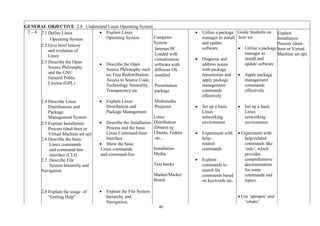
• Explain Linux
Operating System
• Describe the Open
Source Philosophy such
as: Free Redistribution,
Access to Source Code,
Technology Neutrality,
Transparency etc
• Explain Linux
Distribution and
Package Management
• Describe the Installation
Process and the basic
Linux Command-liner
Interface
• Show the basic
Linux commands
and command-line
• Explain the File System
hierarchy and
Navigation,
Computer
System
Internet PC
Loaded with
virtualization
software with
different OS
installed
Presentation
package
Multimedia
Projector
Linux
Distribution
(Distro) eg
Ubuntu, Fedora
etc.,
Installation
Media,
Text books
Marker/Marker
Board
• Utilize a package
manager to install
and update
software
• Diagnose and
address issues
with package
repositories and
apply package
management
commands
effectively
• Set up a basic
Linux
networking
environment
• Experiment with
help-
related
commands
• Explore
commands to
search for
commands based
on keywords etc.
Guide Students on
how to:
• Utilize a package
manager to
install and
update software
• Apply package
management
commands
effectively
• Set up a basic
Linux
networking
environment
• Experiment with
help-related
commands like
‘info’, which
provides
comprehensive
documentation
for some
commands and
topics.
• Use ‘apropos’ and
‘whatis’
Explain
Installation
Process (dual-
boot or Virtual
Machine set up)
41
• Describe “Getting Help”
eg: Introduction, Man
Pages, Finding
Commands and
Documentation, Info
Documentation etc
commands to
search for
commands based
on keywords.
• Use the help’
option with
various
commands to
access built-in
command-line
documentation
GENERAL OBJECTIVE: 3.0 Know User and File Management
5 - 6
3.1 Explain user
accounts and groups
3.2 Explain user
authentication,
Password Policies,
file permissions and
ownership.
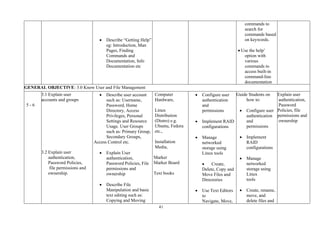
• Describe user account
such as: Username,
Password, Home
Directory, Access
Privileges, Personal
Settings and Resource
Usage. User Groups
such as: Primary Group,
Secondary Groups,
Access Control etc.
• Explain User
authentication,
Password Policies, File
permissions and
ownership
• Describe File
Manipulation and basic
text editing such as:
Copying and Moving
Computer
Hardware,
Linux
Distribution
(Distro) e.g.
Ubuntu, Fedora
etc.,
Installation
Media,
Marker
Marker Board
Text books
• Configure user
authentication
and
permissions
• Implement RAID
configurations
• Manage
networked
storage using
Linux tools
• Create,
Delete, Copy and
Move Files and
Directories
• Use Text Editors
to
Navigate, Move,
Guide Students on
how to:
• Configure user
authentication
and
permissions
• Implement
RAID
configurations
• Manage
networked
storage using
Linux
tools
• Create, rename,
move, and
delete files and
Explain user
authentication,
Password
Policies, file
permissions and
ownership
42
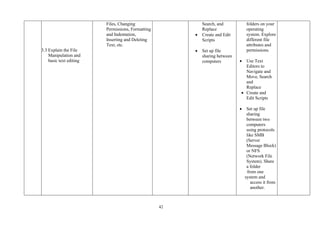
3.3 Explain the File
Manipulation and
basic text editing
Files, Changing
Permissions, Formatting
and Indentation,
Inserting and Deleting
Text, etc.
Search, and
Replace
• Create and Edit
Scripts
• Set up file
sharing between
computers
folders on your
operating
system. Explore
different file
attributes and
permissions.
• Use Text
Editors to
Navigate and
Move, Search
and
Replace
• Create and
Edit Scripts
• Set up file
sharing
between two
computers
using protocols
like SMB
(Server
Message Block)
or NFS
(Network File
System). Share
a folder
from one
system and
access it from
another.
43
GENERAL OBJECTIVE: 4.0: Understand Process Management
7 – 9
4.1 Explain processes and
threads
4.2 Explain Process
states and management
commands.
4.3Explain Process
Scheduling and Priorities,
Process Creation and
Termination,
Concurrency and
Parallelism and Inter-
process communication
(IPC)
4.4 Explain Deadlock
Handling, Load
Balancing and Resource
Management
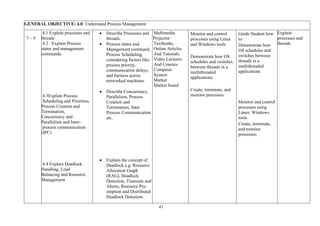
• Describe Processes and
threads,
• Process states and
Management command,
Process Scheduling
considering factors like:
process priority,
communication delays,
and fairness across
networked machines.
• Describe Concurrency,
Parallelism, Process
Creation and
Termination, Inter
Process Communication
etc.
• Explain the concept of
Deadlock e.g. Resource
Allocation Graph
(RAG), Deadlock
Detection, Timeouts and
Aborts, Resource Pre-
emption and Distributed
Deadlock Detection.
Multimedia
Projector
Textbooks,
Online Articles
And Tutorials.
Video Lectures
And Courses.
Computer
System
Marker
Marker board
Monitor and control
processes using Linux
and Windows tools
Demonstrate how OS
schedules and switches
between threads in a
multithreaded
applications
Create, terminate, and
monitor processes.
Guide Student how
to:
Demonstrate how
OS schedules and
switches between
threads in a
multithreaded
applications
Monitor and control
processes using
Linux/ Windows
tools
Create, terminate,
and monitor
processes;
Explain
processes and
threads
44
4.5 Explain Security and
Isolation
• Explain the shared
responsibility model for
cloud security
General Objective 5.0: Comprehend Memory Management and Virtualization
10 - 12
1.1 Explain memory
Management
1.2 Explain Virtual
memory and Paging
5.3 Explain Swap space
Configuration
5.4 Describe
Virtualization (Virtual
Box, KVM)
• Describe Memory
Management with
respect to: Memory
Hierarchy, Memory
Allocation, Memory
Protection, Virtual
Memory, Swapping,
Paging, Demand
Paging, Page
Replacement
Algorithms and
Fragmentation.
• Describe the concept of
virtualization
Open-Source
Operating
Systems
Multimedia
Projector
Textbooks
Online Articles
And Tutorials.
Video Lectures
And Courses.
Marker
Marker Board
.
• Configure
memory settings
and memory
management
strategies in a
Linux and
windows
• Configure virtual
memory settings,
monitor paging
behaviour, and
optimize memory
usage
• Create virtual
machines using
virtualisation
tools
Guide Students how
to:
• Configure
memory
settings and
memory
management
strategies in a
Linux and
windows
• Configure
virtual
memory
settings,
monitor
paging
behaviour,
and optimize
memory
usage
• Create virtual
machines
using
virtualisation
Explain Virtual
memory and
Paging
45
tools
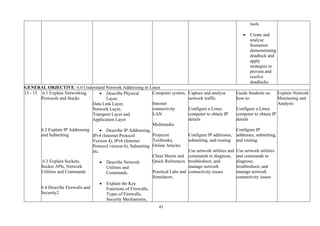
• Create and
analyse
Scenarios
demonstrating
deadlock and
apply
strategies to
prevent and
resolve
deadlocks
GENERAL OBJECTIVE: 6.0 Understand Network Addressing in Linux
13 - 15 6.1 Explain Networking
Protocols and Stacks
6.2 Explain IP Addressing
and Subnetting
6.3 Explain Sockets,
Socket APIs, Network
Utilities and Commands
6.4 Describe Firewalls and
Security2
• Describe Physical
Layer,
Data Link Layer,
Network Layer,
Transport Layer and
Application Layer
• Describe IP Addressing,
IPv4 (Internet Protocol
Version 4), IPv6 (Internet
Protocol version 6), Subnetting
etc.
• Describe Network
Utilities and
Commands.
• Explain the Key
Functions of Firewalls,
Types of Firewalls,
Security Mechanisms,
Computer system,
Internet
connectivity
LAN
Multimedia
Projector
Textbooks,
Online Articles
Cheat Sheets and
Quick References
Practical Labs and
Simulators.
Capture and analyze
network traffic
Configure a Linux
computer to obtain IP
details
Configure IP addresses,
subnetting, and routing
Use network utilities and
commands to diagnose,
troubleshoot, and
manage network
connectivity issues
Guide Students on
how to:
Configure a Linux
computer to obtain IP
details
Configure IP
addresses, subnetting,
and routing
Use network utilities
and commands to
diagnose,
troubleshoot, and
manage network
connectivity issues
Explain Network
Monitoring and
Analysis
46
6.5 Explain Network
Monitoring and
Analysis
How Firewalls Work,
Firewall
Rules, Importance of
Firewalls in Security
• Describe Network
Monitoring and
Analysis
47
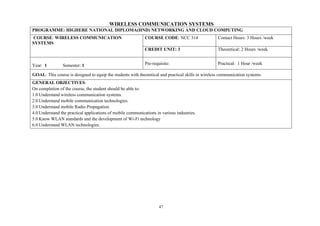
WIRELESS COMMUNICATION SYSTEMS
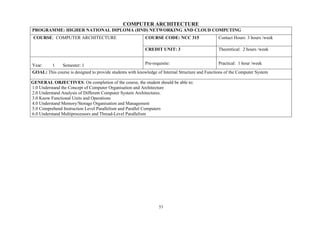
PROGRAMME: HIGHERE NATIONAL DIPLOMA(HND) NETWORKING AND CLOUD COMPUTING
COURSE: WIRELESS COMMUNICATION
SYSTEMS
COURSE CODE: NCC 314 Contact Hours: 3 Hours /week
CREDIT UNIT: 3 Theoretical: 2 Hours /week
Year: 1 Semester: 1 Pre-requisite: Practical: 1 Hour /week
GOAL: This course is designed to equip the students with theoretical and practical skills in wireless communication systems.
GENERAL OBJECTIVES:
On completion of the course, the student should be able to:
1.0 Understand wireless communication systems.
2.0 Understand mobile communication technologies.
3.0 Understand mobile Radio Propagation.
4.0 Understand the practical applications of mobile communications in various industries.
5.0 Know WLAN standards and the development of Wi-Fi technology
6.0 Understand WLAN technologies.
48
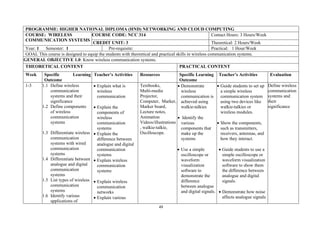
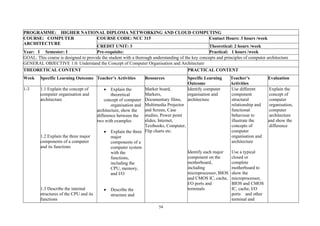
PROGRAMME: HIGHER NATIONAL DIPLOMA (HND) NETWORKING AND CLOUD COMPUTING
COURSE: WIRELESS
COMMUNICATION SYSTEMS
COURSE CODE: NCC 314 Contact Hours: 3 Hours/Week
CREDIT UNIT: 3 Theoretical: 2 Hours/Week
Year: 1 Semester: 1 Pre-requisite: Practical: 1 Hour/Week
GOAL This course is designed to equip the students with theoretical and practical skills in wireless communication systems.
GENERAL OBJECTIVE 1.0: Know wireless communication systems.
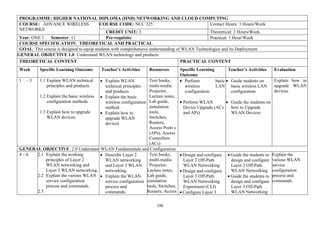
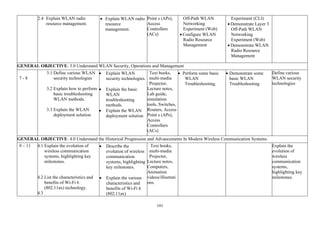
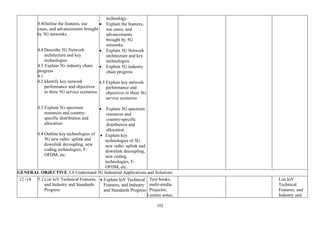
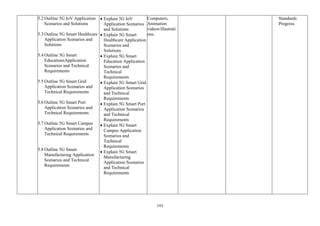
THEORETICAL CONTENT PRACTICAL CONTENT
Week Specific Learning
Outcome
Teacher’s Activities Resources Specific Learning
Outcome
Teacher’s Activities Evaluation
1-3 1.1 Define wireless
communication
systems and their
significance
1.2 Define components
of wireless
communication
systems
1.3 Differentiate wireless
communication
systems with wired
communication
systems
1.4 Differentiate between
analogue and digital
communication
systems
1.5 List types of wireless
communication
systems
1.6 Identify various
applications of
• Explain what is
wireless
communication
• Explain the
components of
wireless
communication
systems
• Explain the
difference between
analogue and digital
communication
systems
• Explain wireless
communication
systems
• Explain wireless
communication
networks
• Explain various
Textbooks,
Multi-media
Projector,
Computer, Marker,
Marker board,
Lecture notes,
Animation
Videos/illustrations
, walkie-talkie,
Oscilloscope.
• Demonstrate
wireless
communication is
achieved using
walkie-talkies
• Identify the
various
components that
make up the
systems
• Use a simple
oscilloscope or
waveform
visualization
software to
demonstrate the
difference
between analogue
and digital signals.
• Guide students to set up
a simple wireless
communication system
using two devices like
walkie-talkies or
wireless modules.
• Show the components,
such as transmitters,
receivers, antennas, and
how they interact.
• Guide students to use a
simple oscilloscope or
waveform visualization
software to show them
the difference between
analogue and digital
signals.
• Demonstrate how noise
affects analogue signals
Define wireless
communication
systems and
their
significance
49
wireless
communication
systems
applications of
wireless
communication
systems
Demonstrate how
noise affects
analogue signals
compared to
digital ones
compared to digital
ones.
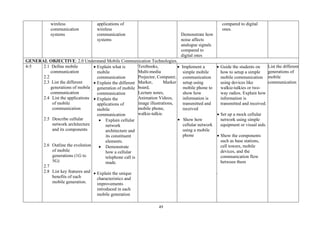
GENERAL OBJECTIVE: 2.0 Understand Mobile Communication Technologies.
4-5 2.1 Define mobile
communication
2.2
2.3 List the different
generations of mobile
communication
2.4 List the applications
of mobile
communication
2.5 Describe cellular
network architecture
and its components
2.6 Outline the evolution
of mobile
generations (1G to
5G)
2.7
2.8 List key features and
benefits of each
mobile generation.
• Explain what is
mobile
communication
• Explain the different
generation of mobile
communication
• Explain the
applications of
mobile
communication
• Explain cellular
network
architecture and
its constituent
elements.
• Demonstrate
how a cellular
telephone call is
made.
• Explain the unique
characteristics and
improvements
introduced in each
mobile generation
Textbooks,
Multi-media
Projector, Computer,
Marker, Marker
board,
Lecture notes,
Animation Videos,
image illustrations,
mobile phone,
walkie-talkie.
• Implement a
simple mobile
communication
setup using
mobile phone to
show how
information is
transmitted and
received
• Show how
cellular network
using a mobile
phone
• Guide the students on
how to setup a simple
mobile communication
using devices like
walkie-talkies or two-
way radios. Explain how
information is
transmitted and received.
• Set up a mock cellular
network using simple
equipment or visual aids.
• Show the components
such as base stations,
cell towers, mobile
devices, and the
communication flow
between them
.
List the different
generations of
mobile
communication
50
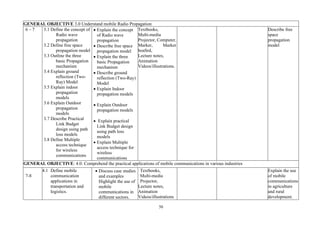
GENERAL OBJECTIVE 3.0 Understand mobile Radio Propagation
6 – 7 3.1 Define the concept of
Radio wave
propagation
3.2 Define free space
propagation model
3.3 Outline the three
basic Propagation
mechanism
3.4 Explain ground
reflection (Two-
Ray) Model
3.5 Explain indoor
propagation
models
3.6 Explain Outdoor
propagation
models
3.7 Describe Practical
Link Budget
design using path
loss models
3.8 Define Multiple
access technique
for wireless
communications
• Explain the concept
of Radio wave
propagation
• Describe free space
propagation model
• Explain the three
basic Propagation
mechanism
• Describe ground
reflection (Two-Ray)
Model
• Explain Indoor
propagation models
• Explain Outdoor
propagation models
• Explain practical
Link Budget design
using path loss
models
• Explain Multiple
access technique for
wireless
communications
Textbooks,
Multi-media
Projector, Computer,
Marker, Marker
boaSrd,
Lecture notes,
Animation
Videos/illustrations.
Describe free
space
propagation
model
GENERAL OBJECTIVE: 4.0: Comprehend the practical applications of mobile communications in various industries
7-8
4.1 Define mobile
communication
applications in
transportation and
logistics.
• Discuss case studies
and examples
Highlight the use of
mobile
communications in
different sectors.
Textbooks,
Multi-media
Projector,
Lecture notes,
Animation
Videos/illustrations
Explain the use
of mobile
communications
in agriculture
and rural
development.
51
4.2 Explain the use of
mobile
communications in
agriculture and rural
development.
4.3 Explain the impact of
mobile
communications on
banking and finance.
• Facilitate a
discussion on the
benefits and
challenges of
applying mobile
communications in
diverse industries.
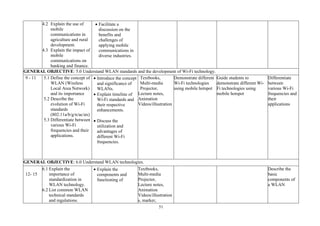
GENERAL OBJECTIVE: 5.0 Understand WLAN standards and the development of Wi-Fi technology.
9 - 11 5.1 Define the concept of
WLAN (Wireless
Local Area Network)
and its importance
5.2 Describe the
evolution of Wi-Fi
standards
(802.11a/b/g/n/ac/ax)
5.3 Differentiate between
various Wi-Fi
frequencies and their
applications.
• Introduce the concept
and significance of
WLANs.
• Explain timeline of
Wi-Fi standards and
their respective
enhancements.
• Discuss the
utilization and
advantages of
different Wi-Fi
frequencies.
Textbooks,
Multi-media
Projector,
Lecture notes,
Animation
Videos/illustration
Demonstrate different
Wi-Fi technologies
using mobile hotspot
Guide students to
demonstrate different Wi-
Fi technologies using
mobile hotspot
Differentiate
between
various Wi-Fi
frequencies and
their
applications
GENERAL OBJECTIVE: 6.0 Understand WLAN technologies.
12- 15
6.1 Explain the
importance of
standardization in
WLAN technology.
6.2 List common WLAN
technical standards
and regulations.
• Explain the
components and
functioning of
Textbooks,
Multi-media
Projector,
Lecture notes,
Animation
Videos/illustration
s, marker,
Describe the
basic
components of
a WLAN
52
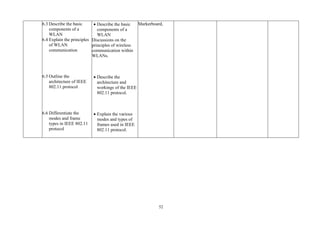
6.3 Describe the basic
components of a
WLAN
6.4 Explain the principles
of WLAN
communication
6.5 Outline the
architecture of IEEE
802.11 protocol
6.6 Differentiate the
modes and frame
types in IEEE 802.11
protocol
• Describe the basic
components of a
WLAN
Discussions on the
principles of wireless
communication within
WLANs.
• Describe the
architecture and
workings of the IEEE
802.11 protocol.
• Explain the various
modes and types of
frames used in IEEE
802.11 protocol.
Markerboard,
53
COMPUTER ARCHITECTURE
PROGRAMME: HIGHER NATIONAL DIPLOMA (HND) NETWORKING AND CLOUD COMPUTING
COURSE: COMPUTER ARCHITECTURE COURSE CODE: NCC 315 Contact Hours: 3 hours /week
CREDIT UNIT: 3 Theoretical: 2 hours /week
Year: 1 Semester: 1 Pre-requisite: Practical: 1 hour /week
GOAL: This course is designed to provide students with knowledge of Internal Structure and Functions of the Computer System
GENERAL OBJECTIVES: On completion of the course, the student should be able to:
1.0 Understand the Concept of Computer Organisation and Architecture
2.0 Understand Analysis of Different Computer System Architectures.
3.0 Know Functional Units and Operations
4.0 Understand Memory/Storage Organisation and Management
5.0 Comprehend Instruction Level Parallelism and Parallel Computers
6.0 Understand Multiprocessors and Thread-Level Parallelism
54
PROGRAMME: HIGHER NATIONAL DIPLOMA NETWORKING AND CLOUD COMPUTING
COURSE: COMPUTER
ARCHITECTURE
COURSE CODE: NCC 315 Contact Hours: 3 hours /week
CREDIT UNIT: 3 Theoretical: 2 hours /week
Year: I Semester: I Pre-requisite: Practical: 1 hours /week
GOAL: This course is designed to provide the student with a thorough understanding of the key concepts and principles of computer architecture
GENERAL OBJECTIVE 1.0: Understand the Concept of Computer Organisation and Architecture
THEORETICAL CONTENT PRACTICAL CONTENT
Week Specific Learning Outcome Teacher’s Activities Resources Specific Learning
Outcome
Teacher’s
Activities
Evaluation
1-3 1.1 Explain the concept of
computer organisation and
architecture
1.2 Explain the three major
components of a computer
and its functions
1.3 Describe the internal
structures of the CPU and its
functions
• Explain the
theoretical
concept of computer
organisation and
architecture, show the
difference between the
two with examples
• Explain the three
major
components of a
computer system
with the
functions,
including the
CPU, memory,
and I/O
• Describe the
structure and
Marker board,
Markers,
Documentary films,
Multimedia Projector
and Screen, Case
studies, Power point
slides, Internet,
Textbooks, Computer,
Flip charts etc.
Identify computer
organisation and
architecture
Identify each major
component on the
motherboard,
including
microprocessor, BIOS
and CMOS IC, cache,
I/O ports and
terminals
Use different
component
structural
relationship and
functional
behaviour to
illustrate the
concepts of
computer
organisation and
architecture
Use a typical
closed or
complete
motherboard to
show the
microprocessor,
BIOS and CMOS
IC, cache, I/O
ports and other
terminal and
Explain the
concept of
computer
organisation,
computer
architecture
and show the
difference
55
1.4 Describe systems
evolution
1.5 Explain processor
performance measurement
metrics
1.6 Explain the factors
affecting processor
performance
Functioning of the
control unit,
execution unit like
arithmetic logic unit,
control unit and
registers within the
CPU.
• Describe Intel
and
Advance RISC
Machine (ARM)
processors
evolution
• Explain the
metrics used in
measuring
processor
performance such
as speed, power,
and
Throughput.
• Explain the
factors
affecting processor
Draw the detailed
diagram of a typical
(Harvard or
Von Neuman)
architecture to show
the
internal layout of the
CPU
Identify different
processors and their
evolution
Check the speed,
power, and throughput
of a processor
Identify how to check
clock
speed, smart cache,
turbo boost, hyper
threading, UHD
graphics features on a
typical system
explain the
function of each
Use either Harvard
or Von Neuman
architecture
diagram to show
the CPU structure
Use different
processors to
describe the
evolution of the
systems
Guide students to
check the speed,
power, and
throughput of a
processor.
Guide students to
identify how to
check clock speed,
Explain the
metrics used in
measuring
processor
performance
such as speed,
power, and
throughput.
Explain the
factors
affecting
processor
performance
such as
architecture
design, clock
speed,
56
1.7 Explain the concept of
processor benchmarking and
the use of benchmarking
software.
1.8 Explain Microprocessor -
I/O Interfacing
1.9 Explain I/O interface
(interrupt and DMA mode)
serial and parallel
communications.
performance such
as architecture
design,
clock speed, instruction
set complexity, and
parallel processing
capabilities
• Discuss the
concept of
processor
benchmarking
and the use of
Benchmarking
Explain I/O interface
(interrupt and DMA
mode)
Software.
Identify how
microprocessor
communicate with
outside world
Use method of
interrupt and DMA for
interfacing
Use of different ports,
terminal and
connectors
Use spooling in
sending data from the
system to a printer
smart cache, turbo
boost, hyper
threading, UHD
graphics features
on a typical system
instruction set
complexity,
and
parallel
processing
Capabilities.
57
GENERAL OBJECTIVE: 2.0 Understand Analysis of Different Computer System Architectures
4-6 2.1 Explain types of computer
architecture
2.2 Explain Instruction Cycle
2.3 Describe Registers Set
2.4 Explain Instruction Set
2.5 Explain the instruction set
architecture
• Explain types of
Computer architecture
including
Harvard and
Von Neumann
architecture
• Explain
instruction
cycle, including
Fetch
Decode and
execute
• Describe different
CPU registers,
including general
and specific
purpose
• Explain the use of
various set of
instruction in
program
development
• Explain different
instruction set
architecture
design, including
Marker board,
Markers,
Documentary
films,
Multimedia
Projector and
Screen, Case
studies, Power
point slides,
Internet,
Textbooks,
Computer, Flip
charts etc.
Disassemble and
assemble system unit
Guide students to
disassemble and
assemble system
unit
Explain
Instruction
Cycle
58
2.6 Explain different
addressing modes
2.7 Explain different types of
operations
Reduced
Instruction Set
Computers,
Complex
Instruction set
computers
• Explain different
addressing
modes, including
Immediate,
direct, indirect
and indexing
• Explain different
operations,
including
arithmetic, logic,
data movement
and control
operations
59
• GENERAL OBJECTIVE 3.0: Know Functional Units and Operations
7-8 3.1 Explain Arithmetic and
logic unit
3.2 Explain Floating points
units
3.3 Explain Graphical
Processing Unit (GPU)
3.4 Explain control unit
design
3.5 Explain system bus
• Explain basic
arithmetic
operations,
including adder,
subtractor,
multiplier, two’s
complement
addition
• Explain floating
point arithmetic
operations
• Explain GPU
•
• Explain
hardwired and
Micro
programmed
control unit,
control unit
design
• Explain control
bus, address bus
and data bus
Marker board,
Markers,
Documentary films,
Multimedia Projector
and Screen, Case
studies, Power point
slides, Internet,
Textbooks, Computer,
Flip charts etc.
Identify system bus
diagram of a
motherboard
Guide student to
identify system bus
diagram of a
motherboard
• GENERAL OBJECTIVE 4.0: Understand Memory/Storage Organisation and Management
9-10 4.1 Explain the hierarchy of
different types of memory and
storage devices
• Explain the
hierarchy
Marker board,
Markers,
Documentary films,
Use simulation
software to visualize
how data is stored and
Guide students to
use simulation
software to
Explain the
hierarchy of
different types
60
4.2 Explain the characteristics
of different types of memory
and storage devices
4.3 Describe how data is
stored and retrieved in
different memory types
4.4 Describe the performance
differences among various
• and
characteristics of
• different types of
• memory and
storage
• devices (Static
RAM, Dynamic
RAM, ROM,
• Hard disk, SSD,
Cache
• etc.). levels of
cache, cache
replacement
algorithm, write
policy
• Explain different
memory
characteristic,
including
location, capacity,
access method,
physical type,
speed
• Explain how data
is stored and
retrieved in
different memory
types.
Multimedia Projector
and Screen, Case
studies, Power point
slides, Internet,
Textbooks, Computer,
Flip charts
Simulink
Stateflow
etc.
retrieved in different
memory types.
Format HDD drive,
both logically and
physically, create
partitions, create file
systems NTFS, Linux
file system(ext3)
Demonstrate different
speed of data or file
transfer using
different storage and
memories
Create Virtual
memory
visualize how data
is stored and
retrieved in
different memory
types.
Guide students on
how to format
HDD drive, both
logically and
physically, create
partitions, create
file systems
Use USB flash,
external HDD, SSD
to copy file to
demonstrate
different speed of
data or file transfer
using different
medium
Guide students to
create Virtual
memory
of memory and
storage devices
61
types of memory and storage
devices.
4.5 Describe the concept and
the use of virtual memory in
computer systems.
• Discuss
performance
differences
among various
types of memory
and storage
devices.
• Discuss the use of
virtual memory in
computer
systems.
• Explain the
concept of
memory
management in
operating
systems.
including line
replacement
strategies
• GENERAL OBJECTIVE: 5.0 Comprehend Instruction Level Parallelism and Parallel Computers
11-12 5.1 Explain the concept of
Instruction Level Parallelism
(ILP) and its importance in
increasing computing
performance.
• Explain the
concept of
Instruction Level
Parallelism (ILP)
and its
importance in
increasing
computing
performance.
Marker board,
Markers,
Documentary films,
Multimedia Projector
and Screen, Case
studies, Power point
slides, Internet,
Textbooks, Computer,
Flip charts
Simulink, etc.
Use different
techniques to increase
ILP using simulation
software.
Use simulation
software to explore
the concepts of out-of-
order execution and
speculative execution
Guide students to
use different
techniques to
increase ILP using
simulation
software.
Assist students to
use simulation
software to explore
the concepts of out-
of-order execution
Explain the
impact of ILP
on pipeline
performance.
Describe the
concepts of out-
of-order
execution and
speculative
62
5.2 Explain hardware and
software techniques used to
increase ILP.
5.3 Explain the impact of ILP
on pipeline performance.
5.4 Describe the concepts of
out-of-order execution and
speculative execution in the
context of ILP.
5.5 Describe the implications
of dependencies between
instructions in the context of
ILP.
• Discuss the
hardware and
software
techniques used
to increase ILP.
• Explain the
impact of ILP on
pipeline
performance.
• Describe the
concepts of out-
of-order
execution and
speculative
execution in the
context of ILP.
• Describe the
implications of
dependencies
between
instructions in the
context of ILP.
• Explain Single
Instruction, single
and speculative
execution.
execution in the
context of ILP.
63
5.6 Explain Flynn’s
classification parallel
computers
Data(SISD),
Single Instruction
Multiple
Data9SIMD),
Multiple
Instruction Single
Data(MISD),
Multiple
Instruction
Multiple
Data(MIMD)
GENERAL OBJECTIVE: 6.0 Understand Multiprocessors and Thread-Level Parallelism
13-15 6.1 Explain the basic concepts
of multiprocessors and
thread-level parallelism.
s6.2 Explain the different
architectures of
multiprocessor systems
6.3 Explain the importance of
cache coherence and memory
• Explain the basic
concepts of
multiprocessors
and thread-level
parallelism.
• Discuss the
different
architectures of
multiprocessor
systems, such as
symmetric
multiprocessing
(SMP) and
massively parallel
processing
(MPP).
• Explain the
importance of
cache coherence
Marker board,
Markers,
Documentary films,
Multimedia Projector
and Screen, Case
studies, Power point
slides, Internet,
Textbooks, Computer,
Flip charts
Simulink
Stateflow
etc.
Use different
architectures of
multiprocessor
systems, such as
symmetric
multiprocessing
(SMP) and massively
parallel processing
(MPP).
Carry out parallel
programming, and
exploit thread-level
parallelism.
Assist students to
use different
architectures of
multiprocessor
systems, such as
symmetric
multiprocessing
(SMP) and
massively parallel
processing (MPP).
Guide students to
carry out parallel
programming, and
exploit thread-level
parallelism.
Explain the
basic concepts
of
multiprocessors
and thread-level
parallelism.
Discuss the
different
architectures of
multiprocessor
systems, such
as symmetric
multiprocessing
(SMP) and
massively
parallel
processing
(MPP).
64
consistency in multiprocessor
systems.
6.4 Explain the role of
parallel programming, and
how to exploit thread-level
parallelism.
6.5 Explain the performance
implications and scalability of
multiprocessor systems.
and memory
consistency in
multiprocessor
systems.
• Explain the role
of parallel
programming,
and how to
exploit thread-
level parallelism.
• Explain the
performance
implications and
scalability of
multiprocessor
systems.
Explain the
performance
implications
and scalability
of
multiprocessor
systems.
65
PYTHON PROGRAMMING BASICS
PROGRAMME: HIGHER NATIONAL DIPLOMA (HND) NETWORKING AND CLOUD COMPUTING
COURSE: PYTHON PROGRAMMING BASICS COURSE CODE: NCC 316 Contact Hours: 3 hours /week
CREDIT UNIT: 3 Theoretical: 1 hour /week
Year: 1 Semester: 1 Pre-requisite: Practical: 2 hours /week
GOAL: To enrich students with general understanding of Python to be able to create basic implementable projects
GENERAL OBJECTIVES: On completion of this course, the student should be able to:
1.0 Understand Python Development Environment
3.0 Understand Datatypes and Arrays
4.0 Understand Control Structures
5.0 Understand Functions, Libraries and Modules
6.0 Understand String Operations
7.0 Understand List, Tuple, Dictionary and Set
8.0 Know The Concept Of Object Oriented Programme
9.0 Know how to w12ork with Databases
10.0 Understand Basics of GUI Programming
66
PROGRAMME: HIGHER NATIONAL DIPLOMA NETWORKING AND CLOUD COMPUTING
COURSE: Python Programming Basics COURSE CODE: NCC 316 Contact Hours: 2 Hours/week
CREDIT UNIT: 2 Theoretical: 1 Hour/week
Year: I Semester: I Pre-requisite: Practical: 1 Hours/week
GOAL: To enrich students with general understanding of Python to be able to create basic implementable projects
GENERAL OBJECTIVE 1.0: Understand Python Development Environment
THEORETICAL CONTENT PRACTICAL CONTENT
Week Specific Learning
Outcome
Teacher’s Activities Resources Specific Learning
Outcome
Teacher’s Activities Evaluation
1 1.1 Explain the
Installation of
Python Interpreter
and Running Simple
Programs
1.2 Explain the
main features
of Python.
1.3 Explain the
Application of
Python
1.4 Explain the
functions of the
Python Interpreter
• Describe the
features of
Python; It is
interpreted,
Object Oriented,
Interactive, and
a Scripting
language.
• Explain the
various
application areas
of Python
• Explain the
difference
between an
+interpreted
language and a
compiled
language.
PC/Laptop,
Multimedia
projector,
Marker,
Markerboard,
Python
Interpreter,
IDE
● PyCharm.
● IDLE
● Sublime
● Vim.
● Atom.
● Jupyter
Notebook.
● Eclipse
● PyDev
● GNU
Emacs.
Practical manual,
Books
• Download and
Install Python
Interpreter and
configure the
running
environment
• Install an IDE
and Run simple
Python program
• Familiarize with
Python Program
Development
Environment.
• Create python
variables, and
operators
•
Guide students to
download and Install
Python Interpreter and
configure the running
environment
• Guide students
to download
Python
Interpreter
from
www.python.o
rg and install.
• Guide students
to install
appropriate
IDE such as
IDLE,
Pycham,
Jupyter,
Spyder,
Sublime,
PyDev.
What are
the main
features of
Python
programmi
ng
language?
What are
the
applicatio
n areas of
Python
What is
the
function
of Python
IDE?
What are
the rules
guiding
Python
67
1.5 Explain Python
development
environment.
1.6 Explain how to
download and
install Python
Interpreter and IDE
1.7 Explain Python
variables and
Operators
• Explain the
functions and
different kinds
of Python
development
environment.
• Discuss how to
download and
install Python
Interpreter and
IDE
• Explain how to
use Python
variables and
operators in
python codes
Demonstrate to the
students how to write
python programs with
variables and
operators
Variable
naming?
Write a
command
line
program
to display
“Hello
Python”
GENERAL OBJECTIVE: 3.0 Understand Datatypes and Arrays
3
3.1Define Data types
3.2 Explain the various
data categorizations -
Data types in Python
- Numeric
- Dictionary
- Boolean
- Set
- Sequence type
- Etc.
• Explain the
various Python
data
categorization
• Explain Python
array and how to
PC/Laptop,
Multimedia
projector,
Marker,
Markerboard,
Python
Interpreter,
IDE
● PyCharm.
● IDLE
● Sublime
● Vim.
● Atom.
● Jupyter
• Use Python data
types
• Create and
Manipulate
arrays in Python
• Create and
manipulate List,
Turple and
• Guide the
students to use
Python data
types.
• Guide the
students to
create
manipulate
Arrays in
Python
• Guide the
students to
What are the
various
Python data
types?
Mention four
types of
Arrays in
Python
Write Python
codes to
create store
and
68
3.3 Explain why and
how Arrays are used
in Python
3.4 Explain how to
Create and manipulate
Python Arrays
Use Arrays in
Python
• Discuss how to
Create and
manipulate Python
Arrays
Notebook.
● Eclipse
● PyDev
● GNU
Emacs.
Practical manual,
Books.
Dictionary in
Python
create and
manipulate
List, Turple
and Dictionary
in Python
manipulate
the content
of an Array
GENERAL OBJECTIVE 4.0: Understand Control Structures
4-5
4.1 Explain
conditional
statements in
Python
4.2 Explain
Loops in
Python; For
Loops, While
Loops
Explain
the Range
Function
• Describe the
use of
conditional
blocks such as
IF…ELIF and
ELSE
• Explain how
FOR and
WHILE loop
constructs
work.
• Describe the
Range
Function
PC/Laptop,
Multimedia
projector,
Marker,
Markerboard,
Python
Interpreter,
IDE
● PyCharm.
● IDLE
● Sublime
● Vim.
● Atom.
● Jupyter
Notebook.
● Eclipse
● PyDev
● GNU
Emacs.
Practical manual,
Books
• Write and
execute Python
codes using IF
statement,
ELIF
construct, and
using
IF…ELIF…E
SIF construct.
• Write
programs that
use the
WHILE loop,
WHILE with
BREAK,
WHILE with
CONTINUE
• Write
programs
that use
the FOR
loop,
FOR with
• Demonstrate the
implementation of
Conditional
Statements.
• Guide students
on using IF,
ELIF, ELSE
statements.
Demonstrate
the
implementatio
n of FOR and
WHILE
• Loops. Guide
students on
using WHILE,
BREAK, and
CONTINUE
Commands.
Write a
program that
prints your
name 100
times.
Write a
program to
accept
values,
compare and
print in
specific
order
Use a for
loop to print
a triangle (of
any
character).
Allow the
user to
specify how
high the
triangle
should be.
69
BREAK
GENERAL OBJECTIVE 5.0: Understand Functions, Libraries and Modules
6-7
5.1 Explain
Functions and
differentiate
between Library
functions and
User- defined
functions.
5.2 List the rules for
creating functions.
5.3 Explain the need
for Recursive
functions.-*-++
5.4 Explain module
• Explain
Functions and
function
parameters.
• Outline the
rules for
creating
functions
• Explain
how
Recursive
functions
work
• Explain
modules
• Explain how
recursive
functions work
PC/Laptop,
Multimedia
projector,
Marker,
Markerboard,
Python
Interpreter,
IDE
● PyCharm.
● IDLE
● Sublime
● Vim.
● Atom.
● Jupyter
Notebook.
● Eclipse
● PyDev
● GNU
Emacs.
Practical manual,
Books
• Write
programs
that calls
built-in
functions
from the
Python
Library
• Write a
program
that is
made of at
least two
modules.
• Guide students
to:
• Use the Def
command to
define a
function and
set its
parameters.
Call the
function.
• Use the
Return
statement
to exit a
function
• Create a
recursive
function
Explain
Functions
and
function
parameter
s.
Write
programs
that calls
built-in
functions
from the
Python
Library
Write a
program
that is
made of at
least two
modules
70
GENERAL OBJECTIVE: 6.0 Understand Strings operations
8
6.1 Define strings
6.2 Explain string
data types and
string Methods
6.3 Explain how to
use String
Operators to
Manipulates
Strings
6.4 Identify and
implement String
Build-in Methods
• Explain String
data type in
Python
• List the String
Methods and
Implementati
on
• Identify and
implement
String Build-
+-6589
• I9+3
• 01n Methods
PC/Laptop,
Multimedia
projector,
Marker,
Markerboard,
Python
Interpreter,
IDE
● PyCharm.
● IDLE
● Sublime
● Vim.
● Atom.
● Jupyter
Notebook.
● Eclipse
● PyDev
● GNU
Emacs.
Practical manual,
Books
• Write codes to
Create and
Manipulate Strings
• Use Operators to
manipulate strings
• Use build-in
methods
Guide the students to:
• Guide students to
use Operators to
manipulate strings
• Guide students to
use build-in
methods
List the
String
Operators
Write
Python
Code to
Manipulat
e String
with
Build-in
Methods
GENERAL OBJECTIVE 7.0: Understand List, Tuple, Dictionary and Set
9-10 7.1 Describe List,
Tuple, Dictionary and
Set
7.2 Explain the Basic
Operations of List,
Tuple, Dictionary and
Set
- Indexing
- Slicing
• Explain List, Tuple,
Dictionary and Set
• Explain basic List
Operations
PC/Laptop,
Multimedia
projector,
Marker,
Markerboard,
Python
Interpreter,
IDE
● PyCharm.
● IDLE
• Manipulate List,
Tuple,
Dictionary and
Set in Python
• Demonstrate
Indexing,
Slicing, and
Matrixes in List
and Tuple
Illustrate how to:
• Create and
Manipulate
List
• Create and
Manipulate
Tuple
• Create and
What are the
similarities
and
differences
between List
and Tuple?
What are the
similarities
and
71
- Matrixes
7.3 Explain the Built-
in Functions and
Methods
• Explain Built-in
List Functions and
Methods
● Sublime
● Vim.
● Atom.
● Jupyter
Notebook.
● Eclipse
● PyDev
● GNU
Emacs.
Practical manual,
Books.
Manipulate
Dictionary
• Create and
Manipulate Set
differences
between a
dictionary
and a set?
State the
properties of
a dictionary
General Objective 8.0: Know the concepts of Object Oriented Programming
11-12 8.1 Explain Object
Oriented
programming
8.2 Define
Class and Object
8.3 Define Methods
8.4 Define Parent
and Child Classes
• Explain Object
Oriented
concepts:
Abstraction,
Polymorphism,
Inheritance, and
Encapsulation
• Explain class
and object
• Explain
Methods and
how they relate
to Objects in a
Class.
• Explain Parent
Class and Child
Class
PC/Laptop,
Multimedia
projector,
Marker,
Markerboard,
Python
Interpreter,
IDE
● PyCharm.
● IDLE
● Sublime
● Vim.
● Atom.
● Jupyter
Notebook.
● Eclipse
● PyDev
● GNU
Emacs.
Practical manual,
Books
• Create a class
named MyClass,
with a property
named x
• Create an object
named p1, and
print the value
of x
• Create a class
named Person, use
the
• init() function to
assign values for
name and age
• Insert a function
that prints a
greeting, and
execute it on the
• Demonstrate the
concept of OOP
in Python
• Demonstrate how
to create object
and class
Define
OOP
Write a
python
code to
create and
object and
print the
value
72
p1 object
• Create a Parent
Class named
Person, with
firstname and
lastname
properties, and a
printname method
• Create a class
named Student,
which will inherit
the properties and
methods from the
Person class
General Objective 9.0: Know how to work with Databases
13-14 9.1 List the
different
databases that
Python API
supports
-
9.2 Explain
MySQL
database
commands.
• Explain the need
for database
• List and explain
the different
Databases that
Python API
supports.
• Explain database
operations and
the syntaxes and
functions of the
following
database
command: Create
Database, Create
PC/Laptop,
Multimedia
projector,
Marker,
Marker board,
Python
Interpreter,
IDE
● PyCharm.
● IDLE
● Sublime
● Vim.
● Atom.
● Jupyter
Notebook.
● Eclipse
● PyDev
• Create a
database
named
"mydatabase"
using the
Create
Database
command.
• Create a table
named
"customers"
with two
fields “Name”
and “Address”
in
“mydatabase”
Guide students to:
• Create a
database
named
"mydatabas
e" using the
Create
Database
command.
Create a
table
named
"customers
" with two
fields
“Name”
and
Use the
appropriat
e SQL
statement
to create a
Database
with at
least two
tables and
write
statement
s to
manage
the
content of
the tables
73
Table, Insert,
Select, Where,
Order by, Delete,
Drop Table,
Update, Join
● GNU
Emacs.
Practical manual,
Books
using the
Create Table
command.
• Insert a record
in the
"customers"
table using the
Insert Into
command
Query the
“customers”
using the
Select..From..W
here statement
Delete a record
from
“customers”
using the
Delete...From…
Where statement
Delete
“customers” from
“mydatabase”
using the Drop
Table statement
“Address”
in
“mydatabas
e” using the
Create
Table
command.
• Insert a
record in
the
"customer
s" table
using the
Insert Into
command
• Query the
“customers”
using the
Select..From
..Where
statement
• Delete a
record from
“customers”
using the
Delete...Fro
m…Where
statement
• Delete
“customers
” from
“mydataba
se” using
the Drop
74
Table
statement
General Objective 10: Understand ases of Graphic User Interface (GUI) Programming
15 10.1 Explain
GUI
10.2 Explain
how to
implement GUI
Elements
-Labels
-Entry box
-Grids
-Buttons
-Canvass
10.3 Explain the
concept of Global
variables
10.3 Explain
callbacks and
lamba
• Describe GUI
imports modules
• Explain how to
create labels, text
boxes, buttons,
grids, canvass,
and window
colors
PC/Laptop,
Multimedia
projector,
Marker,
Markerboard,
Python
Interpreter,
IDE
● PyCharm.
● IDLE
● Sublime
● Vim.
● Atom.
● Jupyter
Notebook.
● Eclipse
● PyDev
● GNU
Emacs.
Practical manual,
Books
• Import GUI
module
• Create Labels
• Creates a
simple entry
• box using Entry
( ) method and
place it on the
screen.
• Use the get(),
delete() and
insert ()
methods to get
input from the
box, erase the
content of the
box and to
insert text into
the entry box
• Demonstrate
how to
import the
modules for
GUI.
• Guide the
students to
create
Labels, text
boxes,
buttons,
grids for
accepting
user inputs
and
manipulate
contents
Explain
how to
create
labels,
text
boxes,
buttons,
grids,
canvass,
and
window
colors
75
YEAR ONE SEMESTER TWO COURSES
76
ROUTING AND SWITCHING 1
PROGRAMME: HIGHER NATIONAL DIPLOMA NETWORKING AND CLOUD COMPUTING
COURSE: Routing and Switching 11 COURSE CODE: NCC 321 Contact Hours: 4 hours /week
CREDIT UNIT: 4 Theoretical: 1 hour /week
Year: 1 Semester: 11 Pre-requisite: NCC 311 Practical: 3 hours /week
GOAL: This Course is designed to equip students with the essentials of Routing and Switching Technologies.
GENERAL OBJECTIVES: On completion of the course, the student should be able to:
1.0 Understand Basic Device Configuration
2.0 Understand Virtual Local Area Networks (VLANs)
3.0 Understand Inter-VLAN Routing
4.0 Know Spanning Tree Protocol Concepts
5.0 Know link Aggregation Technology
6.0 Understand Dynamic Host Configuration Protocol for IPv4/ IPv6
7.0 Understand Stateless Address Auto Configuration (SLAAC)
77
PROGRAMME: HIGHER NATIONAL DIPLOMA NETWORKING AND CLOUD COMPUTING
COURSE: Routing and Swutching1 COURSE CODE: NCC 321 Contact Hours: 4 hours /week
CREDIT UNIT: 4 Theoretical: 1 hours /week
Year: I Semester: 11 Pre-requisite: NCC 311 Practical: 3 hours /week
GOAL: This Course is designed to equip the students with the essentials of Switching and Routing Technologies.
GENERAL OBJECTIVE 1.0: Understand Basic Device Configuration
THEORETICAL CONTENT PRACTICAL CONTENT
Week Specific Learning
Outcome
Teacher’s
Activities
Resources Specific Learning
Outcome
Teacher’s Activities Evaluation
1-2 1.1 Define switch
1.2 Explain Frame
Forwarding
1.3 Define Switching
Domains
1.4 Explain how to
setup a Switch
with Initial
Settings.
1.5 Define Switch
Ports.
1.6 Explain Remote
Access.
1.7 Explain Router
Configuration.
• Explain
Frame
Forwarding.
• Explain
Switching
Domains.
• Configure a
Switch with
Initial
Settings.
• Explain
Switch Ports.
• Explain
Secure
Remote
Access.
• Explain Basic
Multimedia Projector,
Routers and Switches,
Packet Tracer or eNSP or
GNS3,
Laptop
Internet
Books, Journals, Marker
board, Marker,
Textbooks, TeraTerm,
Putty
• Configure Switches,
Cable the Network
and Verify the
Default Switch
Configuration
• Configure Basic
Network Device
Settings
• Verify and Test
Network
Connectivity
Guide students to:
• Configure Switches,
Cable the Network
and Verify the
Default Switch
Configuration
• Configure Basic
Network Device
Settings
• Verify and Test
Network
Connectivity
Define switch.
Define frame
forwarding.
Define switching
domains
78
1.8 Explain Directly
Connected
Networks.
Router
Configuration
.
• Explain
directly
Connected
Networks.
GENERAL OBJECTIVE: 2.0 Understand Virtual Local Area Networks (VLANs)
4 - 5
3.1 Explain the
purpose of VLANs in
a switched Network.
s
3.2 Explain frame
forwarding within a
Multi-Switched
Environment using
VLAN
3.3 Explain how to
Setup a switch Port to
be assigned to a
VLAN.
3.4 Explain how to
Configure a switch
port for VLAN
• Explain the
purpose of
VLANs in a
switched
Network.
• Explain frame
forwarding
within a
Multi-
Switched
Environment
using VLAN
• Explain how
to configure a
switch Port to
be assigned to
a VLAN.
• Explain how
to Configure a
switch port
for VLAN
Trunks
• Explain how
Multimedia Projector,
Routers and Switches,
Packet Tracer or eNSP or
GNS3,
Laptop
Internet
Books, Journals, Marker
board, Marker,
Textbooks, TeraTerm,
Putty
• Build a Network;
• Create VLAN
• Configure VLANs
and Trunking
• Configure Basic
Device Settings
• Assign Switch Ports
• Maintain VLAN
Port Assignments
from the VLAN
Database
• Configure an
802.1Q Trunk
Between the
Switches
Guide students to:
• Build a Network;
• Configure VLANs
and Trunking
• Configure Basic
Device Settings
• Create VLANs;
Assign Switch Ports
• Maintain VLAN
Port Assignments
and the VLAN
Database
• Configure an
802.1Q Trunk
Between the
Switches
Explain the purpose of
VLANs in a switched
Network.
79
Trunks
3.5 Explain how to
Configure Dynamic
Trunking Protocol
to Configure
Dynamic
Trunking
Protocol
GENERAL OBJECTIVE: 3.0 Understand Inter-VLAN Routing
6 - 7
3.1 Explain options
for configuring
inter-VLAN
routing.
3.2 Explain Router-
on-a-stick inter-
VLAN routing.
3.3 Explain inter-
3.4 VLAN routing
using Layer 3
switching.
3.5 Explain
troubleshooting
in inter-VLAN.
• Explain
options for
configuring
inter-VLAN
routing.
• Explain
Router-on-a-
stick inter-
VLAN
routing.
• Explain inter-
VLAN
routing using
Layer 3
switching.
• Explain
troubleshootin
g in inter-
VLAN.
Multimedia Projector,
Routers and Switches,
Packet Tracer or eNSP or
GNS3,
Laptop
Internet
Books, Journals, Marker
board, Marker,
Textbooks, TeraTerm,
Putty
Configure Router-on-a-
Stick Inter-VLAN Routing.
Troubleshoot Inter-VLAN
Routing.
Configure Inter-VLAN
Routing.
Demonstrate how to:
Configure Router-on-a-
Stick Inter-VLAN Routing.
Troubleshoot Inter-VLAN
Routing.
Configure Inter-VLAN
Routing
Explain options for
configuring inter-
VLAN routing
80
GENERAL OBJECTIVE: 4.0 Know Spanning Tree Protocol Concepts
8
4.1 Explain common
problems in a
redundant, Layer
2 switched
network
4.2 Explain how
STP operates in
a simple
switched
network.
4.3 Explain RSTP
operations.
• Explain
common
problems in a
redundant,
Layer 2
switched
network
• Explain how
STP operates
in a simple
switched
network.
• Explain RSTP
operations
Multimedia Projector,
Routers and Switches,
Packet Tracer or eNSP or
GNS3,
Laptop
Internet
Books, Journals, Marker
board, Marker,
Textbooks, TeraTerm,
Putty
• Investigate STP
Loop Prevention.
• Build a simple
three-switch
network with STP.
• View STP operation
• Disable STP and
view operation again
• Configure RSTP
and/or Rapid per -
VLAN Spanning
tree (PVST+)
Guide students to;
• Investigate STP
Loop Prevention.
• Build a simple
three-switch
network with STP.
• View STP operation
• Disable STP and
view operation again
• Configure RSTP
and/or Rapid per -
VLAN Spanning
tree (PVST+)
Explain common
problems in a
redundant, Layer 2
switched network
GENERAL OBJECTIVE: 5.0 Know link Aggregation Technology.
9 5.1 Explain link
aggregation
technology.
5.2 Explain Setup of
link aggregation.
5.3 Explain
troubleshooting
in link
aggregation
• Explain link
aggregation
technology.
• Explain Setup
of link
aggregation.
• Explain
troubleshootin
g in link
aggregation
Multimedia Projector,
Routers and Switches,
Packet Tracer or eNSP or
GNS3, network cables,
network toolbox,
Laptop
Internet
Books, Journals, Marker
board, Marker,
Textbooks, TeraTerm,
Putty
• Configure link
aggregation.
• Troubleshoot link
aggregation.
• Verify link
aggregation between
the switches
Guide students to;
• Configure link
aggregation.
• Troubleshoot link
aggregation.
• Verify link
aggregation between
the switches
Explain link
aggregation technology
81
GENERAL OBJECTIVE: 6.0 Understand Dynamic Host Configuration Protocol for IPv4/ IPv6
10 -11 6.1 Explain
DHCPv4
operations in a
small- to
medium-sized
business
network.
6.2 Explain how an
IPv6 host can
acquire its IPv6
configuration.
6.3 Explain the
operation of
SLAAC
6.4 Explain the
operation of
DHCPv6
• Explain
DHCPv4
operations in
a small- to
medium-sized
business
network.
• Explain how
an IPv6 host
can acquire its
IPv6
configuration.
• Explain the
operation of
SLAAC
• Explain the
operation of
DHCPv6
Multimedia Projector,
Routers and Switches,
Packet Tracer or eNSP or
GNS3, network cables,
network toolbox, lab
guides,
Laptop
Internet
Books, Journals, Marker
board, Marker,
Textbooks, TeraTerm,
Putty
• Configure DHCPv4:
• Configure a Router
as a DHCP Server
• Configure DHCP
Relay
• Configure a Router
as a DHCP Client
• Verify DHCP and
Connectivity.
• Implement DHCPv4
• Configure DHCPv6.
• Verify SLAAC
address assignment
on a router
• Configure a
Stateless DHCPv6
Server on a router
• Configure a Stateful
DHCPv6 Server on
a router
• Configure a
Guide students to;
• Configure DHCPv4:
• Configure a Router
as a DHCP Server
• Configure DHCP
Relay
• Configure a Router
as a DHCP Client
• Verify DHCP and
Connectivity.
• Implement DHCPv4
• Configure DHCPv6.
• Verify SLAAC
address assignment
on a router
• Configure a
Stateless DHCPv6
Server on a router
• Configure a Stateful
DHCPv6 Server on
a router
• Configure a
Explain DHCPv4
operations in a small-
to medium-sized
business network.
82
DHCPv6 Relay on a
router
DHCPv6 Relay on a
router
GENERAL OBJECTIVE: 7.0 Understand Stateless Address Auto Configuration (SLAAC) and Dynamic Host Configuration Protocol for IPv6
12 7.1 Explain how an
IPv6 host can
acquire its IPv6
configuration.
7.2 Explain the
operation of
SLAAC
7.3 Explain the
operation of
DHCPv6
7.4 Explain how to
configure a
stateful and
stateless
DHCPv6 server.
• Explain how
an IPv6 host
can acquire its
IPv6
configuration.
• Explain the
operation of
SLAAC
• Explain the
operation of
DHCPv6
• Configure a
stateful and
stateless
DHCPv6
server.
Multimedia Projector,
Routers and Switches,
Packet Tracer
Laptop
Internet
PC/Laptop,
Multimedia projector,
Marker,
Marker board,
Practical Manual,
Books
• Configure DHCPv6.
• Build the Network
and Configure Basic
Device Settings
• Verify SLAAC
address assignment
on a router
• Configure and verify
a Stateless DHCPv6
Server on a router
• Configure and verify
a Stateful DHCPv6
Server on a router
• Configure and verify
a DHCPv6 Relay on
a router
Guide students to:
• Configure DHCPv6.
• Build the Network
and Configure Basic
Device Settings
• Verify SLAAC
address assignment
on a router
• Configure and verify
a Stateless DHCPv6
Server on a router
• Configure and verify
a Stateful DHCPv6
Server on a router
• Configure and verify
a DHCPv6 Relay on
a router
Explain how an IPv6
host can acquire its
IPv6 configuration.
Explain the operation
of SLAAC
83
CLOUD COMPUTING 1
PROGRAMME: HIGHER NATIONAL DIPLOMA (HND) NETWORKING AND CLOUD COMPUTING
COURSE: CLOUD COMPUTING I CODE: NCC 322 Credit Unit: 3 CONTACT HOURS: 3
HOURS/WEEK
GOAL: This course is designed to equip students with theoretical and practical skills required to gain a foundational understanding of
cloud computing.
YEAR: 1 SEMESTER: 1 PRE-REQUISITE: THEORETICAL: 2 HOURS/WEEK
PRACTICAL: 1 HOURS/WEEK
GENERAL OBJECTIVES: On completion of the course, the student should be able to:
2.0 Understand Cloud Computing Overview.
3.0 2.0 Understand Cloud Economics And Billing
4.0 Understand Global Cloud Infrastructure
5.0 Understand The Fundamentals Of Cloud Computing Security
6.0 Understand Cloud Networking And Content Delivery
84
PROGRAMME: HIGHER NATIONAL DIPLOMA (HND) NETWORKING AND CLOUD COMPUTING
COURSE: CLOUD COMPUTING I CODE: NCC 312 Contact Hours: 3 Hours/Week
CREDIT UNIT: 3 Theoretical: 2 Hours/Week
Practical: 1 Hour/Week
GOAL: This course is designed to equip students with theoretical and practical skills required on cloud computing.
Course Specification: THEORETICAL CONTENT PRACTICAL CONTENT
GENERAL OBJECTIVE 1.0: Understand cloud computing overview
Week Specific Learning
Outcome
Teachers’ Activities Learning
Resources
Specific Learning
Outcome
Teachers’
Activities
Evaluation
1-3 1.1 Define the term
cloud computing.
1.2 Define different
types of cloud
service models.
1.3 Define cloud
computing
deployment
models.
1.4 Describe the
• Explain cloud
computing in relation
to delivery of
functions such as
computation power,
storage, etc.
• Explain the
differences of cloud
service models such
as IaaS, PaaS, SaaS,
DbaaS, etc and
differentiate cloud
computing model
from tradition
computing model.
• Explain the
differences of cloud
computing
deployment models
such as cloud hybrid,
On-premise, multi-
cloud, etc.
• Explain the
Internet,
Multimedia
Projector,
Computer,
Lecture notes,
Tutorials,
Marker,
Marker board,
Books/Journals,
PowerPoint slides
Login to
AWS/AZURE
management
console
Demonstrate how
to login to
AWS/AZURE
management
console
Explain cloud
computing
Explain the
different cloud
service models
Differentiate cloud
computing model
from traditional
computing model
Explain the cloud
computing
deployment models
Describe different
web services and
give example of
their providers
Explain different
ways to interact
with cloud services
85
advantages of
cloud computing
1.5 Define web
services and give
examples of web
service providers.
1.6 Identify simple
solution example
and how users
interact with the
cloud services.
1.7 Explain the cloud
adoption
framework (CAF)
advantages of cloud
computing
• Explain web services
such as networking,
database, storage,
application
integration, etc and
give examples like
AWS, Microsoft
Azure, Google
Cloud, etc
• Explain different
ways to interact with
cloud service(s) such
as GUI management
console, CLI, etc
• Explain the cloud
adoption framework
(CAF) and state the
difference between
AWS CAF, Google
CAF, and Microsoft
Azure CAF
Demonstrate cloud
adoption
framework (CAF)
Guide students to
demonstrate
cloud adoption
framework (CAF)
GENERAL OBJECTIVE 2.0: Understand Cloud Economics and Billing
4-6 2.1 Explain the cloud
service pricing
philosophy
• Explain the cloud
service pricing types
such as pay-as-you-
go, custom pricing,
free, etc for AWS,
Online Pricing
Calculator,
Internet,
Multimedia
• Take an
existing case
study, and use
a pricing
calculator to
• Guide
students on
how to read
estimate and
use pricing
Explain
fundamental pricing
types.
86
2.2 Explain
fundamental
pricing types.
2.3 Differentiate
premises versus
cloud costing
2.4 Explain the
elements of total
cost of ownership
(TCO).
2.5 Explain the
components to
consider for TCO
preparation.
2.6 Explain how to set
up an
organizational
structure that
simplifies billing
and account
visibility to review
cost data.
2.7 Explain the
functionality in an
online billing
Microsoft Azure, etc.
• Explain fundamental
pricing
characteristics for
different providers.
• Explain and
differentiate
premises versus
cloud costing.
• Explain Total cost of
ownership
• Explain the TCO
consideration.
• Explain the 4 steps to
setup organization on
a provider’s platform
for efficient billing
and account
management, etc.
• Explain cloud service
organizations
terminologies
Projector,
Computer,
Lecture notes,
Tutorials,
Marker,
Marker board,
Books/Journals,
PowerPoint slides
provide an
estimate.
• Use billing
tools such as
Bills, Cost
Explorer,
Budgets, etc.
calculator
with a case
study.
• Guide
students on
how to use
the billing
tools.
87
dashboard.
2.8 Explain the
limitations imposed on
the providers platform
for setting up
organizations
2.9 Explain how to use
costing and billing
tools.
Explain organizations
security, key features
and benefits
Explain how to use
billing tools such as
Bills, Cost Explorer,
Budgets, etc
GENERAL OBJECTIVE 3.0: Understand Global Cloud Infrastructure
7-9 3.1 Explain the
purpose of global
cloud
infrastructure.
3.2 Explain the
components that
make up a cloud
global cloud
infrastructure
3.3 Explain factors to
consider when
selecting a region.
3.4 Define data center
and explain where
it fits in the global
cloud
infrastructure.
• Explain the meaning
and purpose of
global cloud
infrastructure.
• Explain the
components that
make up a global
cloud infrastructure
• Explain the factors
that are considered
when selecting a
region for
implementing the
infrastructure.
• Explain the
components such as
global regions,
zones, data centers,
Online global
infrastructure
view for
Microsoft Azure,
AWS, or any
other,
Internet,
Multimedia
Projector,
Computer,
Lecture notes,
Tutorials,
Marker,
Marker board,
Books/Journals,
PowerPoint slides
Identify global
cloud
infrastructures
Show global
cloud
infrastructure
Explain the
components that
make up a cloud
global cloud
infrastructure
88
3.5 Explain point of
presence for
different global
cloud
infrastructure
3.6 Explain different
categories of
services and their
cloud service
providers
3.7 Explain different
management
consoles
etc
• Explain points of
presence for different
global cloud
infrastructure from
different providers
• Explain common
categories of services
such as compute,
storage, database,
networking, and
outline some
proprietary examples
specific to different
providers
• Explain some
popular management
consoles such as
Azure Portal, AWS
Management
Console
GENERAL OBJECTIVE 4.0: Understand the Fundamentals of Cloud Computing Security
10-12 4.1 Explain the shared
responsibility
model for cloud
security
4.2 Explain the
components that
form both the
•Explain the shared
responsibility model
for cloud security
using models such as
AWS, Azure AD, etc.
•Explain the
responsibility of the
customer and the
Microsoft Azure,
AWS, or any
other,
Internet,
Multimedia
Projector,
Computer,
Create Account on
AWS, Microsoft
Azure platforms
and others.
Create and add
users to groups.
Explore the users
and groups,
Guide students to
create account,
add users, create
groups, add users
to groups, and test
sign-in to the
created accounts
Explain the shared
responsibility
model for cloud
security
89
customer and the
provider
responsibilities in
the shared model.
4.3 Explain the cloud
service
characteristics and
security.
4.4 Explain the shared
responsibilities
component by
answering the
scenario-based
quiz.
4.5 Explain the
components of
cloud service
access and control
management.
4.6 Explain the
management of
control and access
to resources.
provider in cloud
security model.
•Explain and
differentiate security
services manage by
customer and those
manage by the
provider with
examples
•Explain the concept of
shared responsibilities
using scenario-based
quiz
•Explain the access
and control
management essential
components such as
users, group, policy,
and role. And explain
the components using
AWS IAM, Azure
AD, or any other
service
•Explain how the
access and control is
managed using user
and group, roles,
MFA, access
conditions, directory
integration
Lecture notes,
Tutorials,
Marker,
Markerboard,
Books/Journals,
PowerPoint slides
Sign-in and test
users account.
Demonstrate how
to secure data on
the cloud
platforms
Guide students
to demonstrate
how to secure
data on the cloud
platforms
90
4.7 Explain account
access types and
how to secure a
new account.
4.8 Explain how to
secure data on the
cloud platforms
4.9 Explain how to
ensure compliance
with regulatory
requirements
•Explain different
account access types
such as root, etc and
how to secure a new
account
•Explain how to secure
data at rest or in
transit using
encryption provided
on the cloud platform.
Use AWS S3 buckets
or Azure Blob Storage
for elaboration
•Explain how to ensure
compliance with
regulatory
requirements on the
platforms
GENERAL OBJECTIVE 5.0: Understand Cloud Networking and Content Delivery.
13-15 5.1 Explain the basics
of networking
5.2 Explain IP address
and their versions.
5.3 Explain the
concept of
subnetting and
CIDR
5.4 Explain OSI
model.
• Explain what is a
network
• Explain the concept
of IP addressing and
subnets, IPv4, IPv6,
and CIDR
• Explain OSI model
and the possible
protocols found in
each layer
AWS
Management
Console, Azure
VN Designer, or
any other,
Pictorial network
diagrams,
Internet,
Multimedia
Projector,
Computer,
• Design a cloud
virtual network
diagram,
• Build a virtual
network and
launch a web
server,
• Create a virtual
network, create
additional
subnets, create
virtual network
security group,
• Guide the
student to
design a
cloud virtual
private
network,
• Guide the
students to
build a virtual
network and
launch a web
server,
• Guide the
Explain cloud
virtual network
91
5.5 Explain IP address
and subnet.
5.6 Explain cloud
virtual network
5.7 Explain the
concept of cloud
virtual network in
relation to cloud
computing
organizational
structure
5.8 Describe how IP
address, routes, and
route tables are used
in cloud virtual
networks
5.9 Describe the
concept of elastic
network interface
5.9 Describe the
concept of cloud
virtual networking
Explain IP address
and subnet
• Explain cloud virtual
networks
• Explain the concept
of cloud virtual
network using AWS
VPC, and Azure VN,
and how the
technology is used in
a region, zones, and
subnets.
• Explain how IP
address, routes, and
route tables are used
in cloud virtual
networks
• Explain elastic
network interface
and how it can be
connected to
instances
• Explain with help of
sample designs the
concept of cloud
virtual networking
such as internet and
NAT gateway,
sharing, peering,
site-to-site VPN,
Lecture notes,
Tutorials,
Marker,
Markerboard,
Books/Journals,
PowerPoint slides
and launch a
web server
instance.
students to
create a
virtual
network,
create
additional
subnets,
create virtual
network
security
group, and
launch a web
server
instance.
92
5.10 Explain the cloud
virtual network
security groups
5.11 Explain network
access control lists
(ACLs) for cloud
virtual networks and
compare between
security groups and
network ACLs
5.13 Explain the
concept of cloud
DNS and cloud
DNS resolution
5.13 Explain how
multi-region
deployment and
fail-over can be
used to improve
availability
5.14 Explain the
concept of CDN
direct connect,
endpoints, and transit
gateway
• Explain the cloud
virtual network
security groups
• Explain network
access control lists
(ACLs) for cloud
virtual networks and
compare between
security groups and
network ACLs
• Explain the high
availability and
scalability of cloud
DNS using Amazon
53 and Azure DNS
and how it support
several routing
policies
• Explain how multi-
region deployment
and fail-over can be
used to improve
availability
93
• Explain how CDN is
used to accelerate
delivery of content
using either AWS
CloudFront or Azure
CDN
ASSESSMENT: The continuous assessment; tests, quizzes will be awarded 40% of the total score. The end of the Semester Examination will
make up for the remaining 60% of the total score.
94
ADVANCED STATISTICS FOR COMPUTING
PROGRAMME: HIGHER NATIONAL DIPLOMA (HND) NETWORKING AND CLOUD COMPUTING
Course Title: Advanced Statistics for Computing Course Code: NCC 323 Contact Hours: 3
Year: 1 Semester: 1
Theoretical: 1hour /week
Practical: 2 hour /week
Goal: This course is designed to enable students to acquire basic knowledge of SPSS Package Tools
General Objectives: On completion of this course the diplomate, should be able to:
1.0 Understand the Main Features Of SPSS (Statistical Package for Social Science)
2.0 Understand Variable and Data Input Transformation in SPSS
3.0 Understand How to Perform Descriptive Analyses with SPSS and Ms Excel ER
4.0 Know How to Perform Common Parametric and Non-Parametric Test
5.0 Understand How to Perform Simple Regression and Multivariate Analyses
95
PROGRAMME: HIGHER NATIONAL DIPLOMA (HND) NETWORKING AND CLOUD COMPUTING
Course Title: Advanced Statistics for Computing Course Code: NCC 323 Contact Hours: 3
CREDIT UNITS: 3 Theoretical: 1 hour /week
Practical: 2 hour /week
Theoretical Content Practical Content
General Objective 1: Understand the main features of SPSS (Statistical Package for Social Science)
Week Specific Learning
Outcomes
Teacher’s activities Resources
Specific
Learning
Outcomes
Teacher’s
activities
Evaluation
1-2 1.1 Define SPSS
Package
1.2 Explain SPSS
general features
1.3 Explain the
Importance of SPSS
1.4 Describe File
management in
SPSS
1.5 Explain data
file Storage and
Retrieval
• Explain
the main
features of
SPSS
• Explain the
general aspect,
workflow and
critical issues
• Explain
Functions,
Menus and
commands
• Explain file
management in
SPSS
• Explain data file
Storage and
Retrieval
Books of
recorded
statistics
Internet
Install SPSS
Identify the features
in SPSS
Guide students to:
• Install SPSS
• Identify the
features in SPSS
Explain SPSS
Identify general
Features of SPSS
Explain Sorting,
Transpose in SPSS
Explain how to store
and retrievefiles
96
• Explain the
importance
of SPSS
General Objective 2.0 Understand Variable and Data Input Transformation in SPSS
3-4 2.1 Define Variable,
2.2 Describe Manual
Data input
2.3 Explain
Automated Data
Input andfile import
2.4 Explain Data
Transformation
2.5 Explain syntax
files and scripts
2.6 Explain Output
Management
• Define
Variable and
Explain
variable view
spreadsheet
• Explain
ManualData
Entry
• Explain Data
Transformation
• Explain Syntax
files and script
• Describe how to
generate data
andImport file
using computer
system
Textbooks
Lecture notes
InternetPCs
SPSS
Textbooks PCs
SPSS
Demonstrate the
concept of
Variable
Use computer
system to generate
data
Demonstratethe
concept of Variable
Illustrate how to
generate data online
Illustrate how to
TransformData
Describe variable
Explain the various
methodsof data Input
Explain Data
Transformation
97
General Objective 3: Understand how to perform descriptive analyses with SPSS
5-6 3.1 Explain
Frequencies
3.2 Explain
Descriptive
Analysis
3.3 Explain Crosstab
3.4 Explain Charts
Explain Frequencies
Explain Descriptive
analysis
Explain Crosstab
Explain and discuss
Charts
Textbooks
Ms. Excel
Textbooks Ms.
Excel Hard disk,
Flash drive,CD,
internet
SPSS etc
Categories various
data
collected
Illustrate Crosstab
and Chart
Explain and
supervise student
exercises andstudent
work
Explain crosstab
andChart
Explain frequency,
Explain Crosstab
and Chart
General Objective 4 : Know how to perform common parametric and non-parametric test
7-8
4.1 Identify and
Explain different
statistical test:
Mean, T test, One-
wayANOVA, Non
Parametric test,
Normality test
4.3 Explain
Correlation and
Regression:
- Linear Correlation
and Regression,
- Multiple regression
(Linear)
Explain and discuss
various types of
statistical tests
Explain Linear
Correlation and
Regression
Explain Multiple
regression (Linear)
Textbooks
Statistical
tables
Statistical
tables,
PCs, Charts,Ms.
Excel
SPSS
Identify the
various types of
statistical table
Demonstrate
how to construct
scattered
diagrams,
frequency tables
andgraphs
Demonstratehow to
identify the various
types
of statisticaltables
Demonstrateby
exampleshow to
construct scattered
diagrams, frequency
tables and graphs
Enumerate the
various types of
statistical tables
Explain how to
construct
frequency tables
and graphs
Enumerate the
merits and
demerits of charts
and diagrams
98
General Objective 5: Understand how to perform advanced regression and multivariate analyses
9
5.1 Explain Factor
Analysis
5.2 Explain Cluster
Analysis
5.3 Analyze Data using
SPSS
• Define and
Explain
Factor
Analysis
• Define and
Explain
Cluster
Analysis
• Explain how
to analyze
data using
SPSS
Text books
SPSS
PCs SPSS
Package
Analyze data
using Factor
analysis
Analyze data
using cluster
analysis
Analyze data
using SPSS
Guide students to
analyze datausing
factoranalysis
Guide students to
analyze data using
SPSS
Explain factorand
cluster analysis
Use SPSS to
analyze data
10-
12
99
ADVANCE WIRELESS NETWORKS
PROGRAMME: HIGHER NATIONAL DIPLOMA (HND) NETWORKING AND CLOUD COMPUTING
COURSE: ADVANCE WIRELESS
NETWORKS
COURSE CODE: NCC 325 Contact Hours: 3 Hours/Week
CREDIT UNIT: 3 Theoretical: 2 Hours/Week
Year: 1 Semester: 1
Pre-requisite: Practical: 1 Hour/Week
GOAL: This course is designed to equip students with comprehensive understanding of WLAN Technologies and its Deployment.
GENERAL OBJECTIVES: On Completion Of The Course, The Student Should Be Able To:
1.0 Understand WLAN Technology, Products and VRP
2.0 Understand WLAN Fundamentals and Configuration
3.0 Understand the WLAN Security, Operation and Management
4.0 Understand Historical Progression and Advancements in Modern Wireless Communication Systems.
5.0 Understand 5G Industrial Applications and Solutions
100
PROGRAMME: HIGHER NATIONAL DIPLOMA (HND) NETWORKING AND CLOUD COMPUTING
COURSE: ADVANCE WIRELESS
NETWORKS
COURSE CODE: NCC 325 Contact Hours: 3 Hours/Week
CREDIT UNIT: 3 Theoretical: 2 Hours/Week
Year: ONE 1 Semester: 11 Pre-requisite: Practical: 1 Hour/Week
COURSE SPECIFICATION: THEORETICAL AND PRACTICAL
GOAL: This course is designed to equip students with comprehensive understanding of WLAN Technologies and its Deployment.
GENERAL OBJECTIVE 1.0: Understand WLAN technology and products
THEORETICAL CONTENT PRACTICAL CONTENT
Week Specific Learning Outcome Teacher’s Activities Resources Specific Learning
Outcome
Teacher’s Activities Evaluation
1 – 3 1.1 Explain WLAN technical
principles and products.
1.2 Explain the basic wireless
configuration methods
1.3 Explain how to upgrade
WLAN devices.
• Explain WLAN
technical principles
and products
• Explain the basic
wireless configuration
method.
• Explain how to
upgrade WLAN
devices
Text books,
multi-media
Projector,
Lecture notes,
Lab guide,
simulation
tools,
Switches,
Routers,
Access Point s
(APs), Access
Controllers
(ACs)
• Perform basic
wireless LAN
configuration
• Perform WLAN
Device Upgrade (ACs
and APs)
• Guide students on
basic wireless LAN
configuration
• Guide the students on
how to Upgrade
WLAN Devices
Explain how to
upgrade WLAN
devices.
GENERAL OBJECTIVE: 2.0 Understand WLAN Fundamentals and Configuration
4 – 6 2.1 Explain the working
principles of Layer 2
WLAN networking and
Layer 3 WLAN networking.
2.2 Explain the various WLAN
service configuration
process and commands.
2.3
• Describe Layer 2
WLAN networking
and Layer 3 WLAN
networking.
• Explain the WLAN
service configuration
process and
commands.
Text books,
multi-media
Projector,
Lecture notes,
Lab guide,
simulation
tools, Switches,
Routers, Access
• Design and configure
Layer 2 Off-Path
WLAN Networking
• Design and configure
Layer 3 Off-Path
WLAN Networking
Experiment (CLI)
• Configure Layer 3
• Guide the students to
design and configure
Layer 2 Off-Path
WLAN Networking
• Guide the students to
design and configure
Layer 3 Off-Path
WLAN Networking
Explain the
various WLAN
service
configuration
process and
commands.
101
2.4 Explain WLAN radio
resource management.
• Explain WLAN radio
resource
management.
Point s (APs),
Access
Controllers
(ACs)
Off-Path WLAN
Networking
Experiment (Web)
• Configure WLAN
Radio Resource
Management
Experiment (CLI)
• Demonstrate Layer 3
Off-Path WLAN
Networking
Experiment (Web)
• Demonstrate WLAN
Radio Resource
Management
GENERAL OBJECTIVE: 3.0 Understand WLAN Security, Operations and Management
7 - 8
3.1 Define various WLAN
security technologies
.
3.2 Explain how to perform
basic troubleshooting
WLAN methods.
3.3 Explain the WLAN
deployment solution
• Explain WLAN
security technologies.
• Explain the basic
WLAN
troubleshooting
methods.
• Explain the WLAN
deployment solution
Text books,
multi-media
Projector,
Lecture notes,
Lab guide,
simulation
tools, Switches,
Routers, Access
Point s (APs),
Access
Controllers
(ACs)
• Perform some basic
WLAN
Troubleshooting.
• Demonstrate some
basic WLAN
Troubleshooting
Define various
WLAN security
technologies
GENERAL OBJECTIVE: 4.0 Understand the Historical Progression and Advancements In Modern Wireless Communication Systems.
9 – 11 4.1 Explain the evolution of
wireless communication
systems, highlighting key
milestones.
4.2 List the characteristics and
benefits of Wi-Fi 6
(802.11ax) technology.
4.3
• Describe the
evolution of wireless
communication
systems, highlighting
key milestones.
• Explain the various
characteristics and
benefits of Wi-Fi 6
(802.11ax)
Text books,
multi-media
Projector,
Lecture notes,
Computers,
Animation
videos/illustrati
ons.
Explain the
evolution of
wireless
communication
systems,
highlighting key
milestones.
102
4.4Outline the features, use
cases, and advancements brought
by 5G networks.
4.4 Describe 5G Network
architecture and key
technologies
4.5 Explain 5G industry chain
progress
4.1
4.2 Identify key network
performance and objectives
in three 5G service scenarios
4.3 Explain 5G spectrum
resources and country-
specific distribution and
allocation
4.4 Outline key technologies of
5G new radio: uplink and
downlink decoupling, new
coding technologies, F-
OFDM, etc.
technology.
• Explain the features,
use cases, and
advancements
brought by 5G
networks.
• Explain 5G Network
architecture and key
technologies
• Explain 5G industry
chain progress
4.5 Explain key network
performance and
objectives in three 5G
service scenarios
• Explain 5G spectrum
resources and
country-specific
distribution and
allocation
• Explain key
technologies of 5G
new radio: uplink and
downlink decoupling,
new coding
technologies, F-
OFDM, etc.
GENERAL OBJECTIVE:5.0 Understand 5G Industrial Applications and Solutions
12 -14 5.1 List IoV Technical Features,
and Industry and Standards
Progress
• Explain IoV Technical
Features, and Industry
and Standards Progress
Text books,
multi-media
Projector,
Lecture notes,
List IoV
Technical
Features, and
Industry and
103
5.2 Outline 5G IoV Application
Scenarios and Solutions
5.3 Outline 5G Smart Healthcare
Application Scenarios and
Solutions
5.4 Outline 5G Smart
EducationsApplication
Scenarios and Technical
Requirements
5.5 Outline 5G Smart Grid
Application Scenarios and
Technical Requirements
5.6 Outline 5G Smart Port
Application Scenarios and
Technical Requirements
5.7 Outline 5G Smart Campus
Application Scenarios and
Technical Requirements
5.8 Outline 5G Smart
Manufacturing Application
Scenarios and Technical
Requirements
• Explain 5G IoV
Application Scenarios
and Solutions
• Explain 5G Smart
Healthcare Application
Scenarios and
Solutions
• Explain 5G Smart
Education Application
Scenarios and
Technical
Requirements
• Explain 5G Smart Grid
Application Scenarios
and Technical
Requirements
• Explain 5G Smart Port
Application Scenarios
and Technical
Requirements
• Explain 5G Smart
Campus Application
Scenarios and
Technical
Requirements
• Explain 5G Smart
Manufacturing
Application Scenarios
and Technical
Requirements
Computers,
Animation
videos/illustrati
ons.
Standards
Progress
104
YEAR TWO SEMESTER ONE COURSES
105
RESEARCH METHODOLOGY IN NETWORKING AND CLOUD COMPUTING
PROGRAMME: HIGHER NATIONAL DIPLOMA NETWORKING AND CLOUD COMPUTING
Course: RESEARCH METHODOLOGY IN
NETWORKING AND CLOUD COMPUTING
Course Code: NCC 411 Credit Unit: 2
Contact Hours: 60 (2 hrs lecture, 2 hrs
practical)
Year: 11 Semester: 1 Pre requisite
GOAL: This course is designed to provide students with a comprehensive understanding of the fundamental research principles, methodologies,
and best practices essential for conducting effective and innovative research in Networking and Cloud Computing
General Objectives:
1.0 Understand NCC Research scope.
2.0 Evaluate Research Literature
3.0 Design Robust NCC Experiments
4.0 Apply Ethical Research Practices
5.0 Utilize NCC Tools and Frameworks
6.0 Collaborate in Research Projects
106
PROGRAMME: HIGHER NATIONAL DIPLOMA NETWORKING AND CLOUD COMPUTING
Course: RESEARCH METHODOLOGY IN
NETWORKING AND CLOUD COMPUTING
Course Code: NCC 411 Credit Unit: 2
Contact Hours: 60 (2 hrs lecture, 2
hrs practical)
Year: II Semester: I
GOAL: This course is designed to provide students with a comprehensive understanding of the fundamental research principles, methodologies,
and best practices essential for conducting effective and innovative research in Networking and Cloud Computing
Course Specification: THEORETICAL CONTENT PRACTICAL CONTENT
General /Objective 1.0: Understand NCC Research scope.
Week Specific Learning
Outcome
Teachers’ Activities Learning Resources Specific
Learning
Outcome
Teachers’
Activities
Evaluation
1-2 1.1 Explain the fundamental
concepts of NCC and its
applications.
1.2 Explain key milestones
and historical
developments in NCC
research.
1.3 Explain the current
state of NCC research,
including major trends
and breakthroughs.
1.4 Explain ethical
considerations and
challenges related to
NCC research.
Discuss NCC concepts
and real-world
applications.
Discuss timeline of
significant events in
NCC research history
and facilitate
discussions
Discuss the current state
of NCC research,
including major trends
and breakthroughs
Discuss on ethical
issues in NCC research.
Reading materials,
case studies, and
research papers for
students to explore
current NCC research
trends.
Analyze real-
world NCC
projects or case
studies and
identify their key
components and
challenges.
Develop a simple
NCC prototype or
model using a
programming
language or NCC
toolkit.
Guide student to
analyze real-
world NCC
projects or case
studies and
identify their key
components and
challenges.
Guide student to
Develop a simple
NCC prototype
or model using a
programming
language or NCC
toolkit.
Explain the
fundamental
concepts of NCC
and its applications.
Enumerate key
milestones and
historical
developments in
NCC research.
Explain the current
state of NCC
research, including
major trends and
breakthroughs.
107
1.5 Explain the
interdisciplinary nature
of NCC and its
collaboration with other
fields
Discuss the
interdisciplinary nature
of NCC and its
collaboration with other
fields
General Objective 2.0: Evaluate Research Literature
3-4 2.1 Explain key
components of research
literature.
2.2 Explain the credibility
and reliability of research
sources and identify
potential biases.
2.3 Explain the criteria to
evaluate the quality and
relevance of research
articles.
2.4 Explain the strengths
and weaknesses of different
research methodologies
used in the literature.
2.5 Explain how to
synthesize information
from multiple research
papers to form a
Discuss key
components of research
literature, such as
abstracts, introductions,
methodologies, results,
and conclusions.
Discuss the credibility
and reliability of
research sources and
identify potential biases.
Discuss the appropriate
criteria to evaluate the
quality and relevance of
research articles.
Discuss the strengths
and weaknesses of
different research
methodologies used in
the literature.
Discuss how to
Synthesize information
from multiple research
papers to form a
Reading materials,
case studies, and
research papers for
students to explore
current NCC research
trends.
Evaluate a
research paper
and present
findings in a
structured
manner.
Compare and
contrast research
methodologies
used in two
different papers.
Prepare a
literature review
by synthesizing
information from
multiple research
articles.
Guide student to
evaluate a
research paper
and present
findings in a
structured
manner.
Guide student to
Compare and
contrast research
methodologies
used in two
different papers.
Guide student to
Prepare a
literature review
by synthesizing
information from
multiple research
articles.
Define key
components of
research literature.
Explain the
credibility and
reliability of
research sources
and identify
potential biases.
108
coherent and well-
supported argument.
coherent and well-
supported argument.
General Objective 3.0: Design Robust NCC Experiments
5-6 3.1 Explain the key
components of a robust
NCC experiment.
3.2 Explain how to
formulate research
questions suitable for NCC
experimentation.
3.3 Explain how to Select
appropriate datasets for
NCC experiments.
3.4 Explain how to apply
relevant machine learning
algorithms to solve specific
problems.
3.5 Explain how to analyze
and interpret the results of
NCC experiments. f.
Implement proper
techniques for model
evaluation and validation.
3.6 Explain ethical
considerations in NCC
experiment design.
Discuss the key
components of a robust
NCC experiment.
Discuss how to
formulate research
questions suitable for
NCC experimentation.
Discuss how to Select
appropriate datasets for
NCC experiments.
Discuss how to apply
relevant machine
learning algorithms to
solve specific problems.
Discuss how to analyze
and interpret the results
of NCC experiments.
Discuss ethical
considerations in NCC
experiment design.
Marker board,
Markers,
Documentary films,
Multimedia Projector
and Screen, Case
studies, Power point
slides, Internet,
Textbooks, Computer,
Flip charts, Policy
documents, research
papers, etc.
Apply relevant
machine learning
algorithms to
solve specific
problems.
Implement proper
techniques for
model evaluation
and validation.
Demonstrate
ethical
considerations in
NCC experiment
design.
Guide student to
apply relevant
machine learning
algorithms to
solve specific
problems.
Guide student to
Implement proper
techniques for
model evaluation
and validation.
Demonstrate to
student ethical
considerations in
NCC experiment
design.
Explain the key
components of a
robust NCC
experiment.
Formulate research
questions suitable
for NCC
experimentation.
Explain how to
Select appropriate
datasets for NCC
experiments.
109
General Objective 4.0: Apply Ethical Research Practices:
7-8 4.1 Explain the principles of
ethical research and their
importance in academic and
professional settings.
4.2. Explain potential
ethical issues and
challenges that may arise
during the research process.
4.3 Explain the ethical
guidelines and protocols to
design, conduct, and report
research studies.
4.4. Explain the ethical
implications of research
findings and propose
appropriate solutions.
4.5 Explain awareness of
the ethical use of data,
including privacy,
confidentiality, and
informed consent.
Discuss ethical research
principles, codes, and
guidelines.
Discuss potential ethical
issues and challenges
that may arise during
the research process.
Discuss the ethical
guidelines and protocols
to design, conduct, and
report research studies.
Discuss the ethical
implications of research
findings and propose
appropriate solutions.
Discuss awareness of
the ethical use of data,
including privacy,
confidentiality, and
informed consent.
Marker board,
Markers,
Documentary films,
Multimedia Projector
and Screen, Case
studies, Power point
slides, Internet,
Textbooks, Computer,
Flip charts, Policy
documents, research
papers, etc.
Develop a
research proposal
that incorporates
ethical
considerations.
Conduct
practical on
ethical review of
an existing
research study.
Prepare an ethical
data management
plan for a
research project.
Guide student to
develop a
research proposal
that incorporates
ethical
considerations.
Guide student to
conduct practical
on ethical review
of an existing
research study.
Guide student to
prepare an ethical
data management
plan for a
research project.
Describe the
principles of ethical
research and their
importance in
academic and
professional
settings.
Explain potential
ethical issues and
challenges that may
arise during the
research process.
Describe ethical
guidelines and
protocols to design,
conduct, and report
research studies.
General Objective 5.0: Utilize NCC Tools and Frameworks
9-10 5.1. Explain proficiency in
using popular NCC tools
and frameworks
Discuss proficiency in
using popular NCC
tools and frameworks,
such as Mindspor,
TensorFlow or
Marker board,
Markers,
Documentary films,
Multimedia Projector
Build and train an
image
classification
model using
TensorFlow.
Guide student to
Build and train an
image
classification
model using
Explain NCC tools
to preprocess data
and prepare it for
model training and
evaluation.
110
5.2. Explain AI tools to
preprocess data and prepare
it for model training and
evaluation.
5.3. Explain and train NCC
models using the selected
frameworks to solve
specific problems
5.4. Explain the
performance of NCC
models and fine-tune hyper
parameters for optimization.
5.5. Explain how to
integrate NCC models into
real-world applications and
interpret their outputs.
PyTorch.
Discuss exercises for
data preprocessing tasks
using NCC tools.
Discuss coding sessions
and projects where
students build NCC
models using selected
frameworks.
Discuss case studies on
model evaluation and
hyper parameter tuning.
Discuss NCC model
integration into
applications.
and Screen, Case
studies, Power point
slides, Internet,
Textbooks, Computer,
Flip charts, Policy
documents, research
papers, etc. Mindspor,
TensorFlow or
PyTorch
Fine-tune a pre-
trained natural
language
processing model
with PyTorch.
Implement a
simple NCC-
based
recommendation
system using a
relevant
framework.
TensorFlow.
Guide student to
fine-tune a pre-
trained natural
language
processing model
with PyTorch.
Guide student to
Implement a
simple NCC-
based
recommendation
system using a
relevant
framework.
Explain and train
NCC models using
the selected
frameworks to
solve specific
problems
General Objective 6.0: Collaborate in Research Projects
11-13 6.1 Explain effective
communication and
teamwork skills in a
research project setting.
6.2 Explain actively to
research discussions and
propose valuable ideas and
insights.
6.3 Explain the
management of project
Discuss effective
communication and
teamwork skills in a
research project setting.
Discuss actively to
research discussions and
propose valuable ideas
and insights.
Discuss with peers to
divide tasks, set goals,
Marker board,
Markers,
Documentary films,
Multimedia Projector
and Screen, Case
studies, Power point
slides, Internet,
Textbooks, Computer,
Flip charts, Policy
Mindspor,
TensorFlow or
Collaborate in a
research project
with a team of
peers.
Conduct data
analysis and
interpretation as
part of the
research project
Assign students
to research
project teams
based on their
interests and
expertise.
Provide
guidance and
support to
student during
data analysis and
Explain actively to
research
discussions and
propose valuable
ideas and insights.
Discuss with peers
to divide tasks, set
goals, and manage
project timelines.
111
timelines.
6.4 Explain in data
collection, analysis, and
interpretation in a research
project.
6.5 Explain research
findings coherently and
professionally to an
audience.
and manage project
timelines.
Discuss data collection,
analysis, and
interpretation in a
research project.
Discuss research
findings coherently and
professionally to an
audience.
PyTorch documents,
research papers, etc.
Deliver a group
presentation on
the research
project's findings
interpretation
stages.
Guide students
to present
research project's
findings
112
PROJECT MANAGEMENT IN NETWORKING AND CLOUD COMPUTING
PROGRAMME: HIGHER NATIONAL DIPLOMA IN NETWORKING AND CLOUD COMPUTING
COURSE TITLE: PROJECT MANAGEMENT IN
NETWORKING AND CLOUD COMPUTING
Course Code: NCC 412 CONTACT HOURS: 2 hours/week
YEAR: II SEMESTER I CREDIT UNITS: 2 Theoretical: 1 hours/week
PRE-REQUISITE: Practical: 1 hours/week
GOAL: This course is designed to equip students with the knowledge and skills necessary to manage networks and Cloud projects.
General Objectives: On completion of the course, the student should be able to:
1.0 Understand Project management tools and software relevant to Networking and Cloud Computing projects.
2.0 Understand the fundamentals of project management and its application to Cloud Computing and Networking projects.
3.0 Appreciate the unique challenges and requirements of managing Networks and Cloud Projects
4.0 Know how to develop project plan for Networking and Cloud Computing.
5.0 Know how to apply best practices for team management in Networking and Cloud Computing projects.
6.0 Understand ethical considerations, privacy issues, and legal implications inherent in Networking and Cloud Computing project
management.
113
PROGRAMME: HIGHER NATIONAL DIPLOMA IN NETWORKING AND CLOUD COMPUTING
Course: PROJECT MANAGEMENT IN
NETWORKING AND CLOUD COMPUTING
COURSE CODE: NCC 412 CONTACT HOURS: 2 hours/week
CREDIT UNITS: 2 Theoretical: 1 hour/week Practical: 1 hour/week
GOAL: This course is designed to equip students with the knowledge and skills necessary to manage Networks and Cloud Computing projects.
General Objective: 1.0 Understand project management tools and software relevant to Networking and Cloud Computing projects
Week Specific Learning
Outcomes
Teachers Activities Learning
Resources
Specific Learning
Outcomes
Teachers
Activities
Evaluation
1-2 1.1 Explain the range of
project management tools
and software and their
application in managing
projects.
1.2 Explain various project
management tools, such as
Jira, Trello, and Asana,
among others.
1.3 Explain the appropriate
tools based on the unique
requirements for different
Network and Cloud
Computing projects.
1.4 Explain the role of these
tools in team collaboration,
project tracking, resource
management, and risk
management in Network
and Cloud Computing
• Explain various
project
management tools
through
demonstrations or
tutorials.
• Explain the
appropriate tools
based on the
unique
requirements of
different Network
and Cloud
Computing
projects.
• Explain the role
of these tools in
team of
collaboration,
project tracking,
resource
Computer lab or
personal
computers with
internet access.
Subscription or
access to various
project
management tools
(e.g., Jira, Trello,
Asana).
Training
materials or guides
for using these
tools.
• Simulate Network
project using
these tools for
project
management.
• Simulate Cloud
Computing
project using
these tools for
project
management.
Design activities
where students
identify, analyze,
and mitigate
biases in given
datasets
Explain the
appropriate
tools based on
the unique
requirements
of different
Network and
Cloud
Computing
projects.
114
projects. management, and
risk management
in Network and
Cloud Computing
projects.
General Objective 2.0: Understand the fundamentals of project management and its application to Cloud computing and Networking projects.
1-4 2.1 Explain the Principles of
Project Management
2.2 Explain Project
Initiation, Planning,
Execution, Control,
And Closure.
2.3 Explain Key
Differences Between
Managing Networks
and Cloud Projects and
Other Types of
Projects.
2.4 Explain The Specific
Challenges of Networks
and Cloud Projects
• Explain The
Fundamentals of
Project
Management,
Focusing On Its
Application In
Networks and
Cloud Projects.
• Explain Key
Differences
Between
Managing
Networking and
Cloud Projects
And Other Types
Of Projects.
• Discuss The
Specific
Challenges Of
Managing
Networks
Projects.
Learning
Management
System For
Content Delivery.
Access To Case
Studies Related to
Networking and
Cloud Project
Management.
Access To Project
Management
Software or Tools.
• Use Project
Management
Software and
Tools To Execute
Cloud Project
(Case Study 1)
• Use Project
Management
Software and
Tools to Execute
Network Project
(Case Study 1)
• Guide
Students to
use Project
Management
Software and
Tools
Explain The
Principles Of
Project
Management
Including
Project
Initiation,
Planning,
Execution,
Control, And
Closure.
General Objective 3.0 Appreciate the unique challenges and requirements of managing Networking and Cloud projects
5-6 3.1 Explain the unique
challenges involved in
Networking and Cloud
projects.
• Explain the
unique
challenges
involved in
Learning
Management
System for content
delivery.
• Use Project
management
software and tools
to execute Cloud
• Guide
students to
use Project
Management
Explain the
unique
challenges
involved in
115
3.2 Explain strategies to
mitigate challenges in
Networking and Cloud
projects
Networks and
Cloud projects.
• Explain
strategies to
mitigate
challenges in
Network and
Cloud projects.
Access to case
studies related to
Networking
project
management.
Microsoft Project
project (Case
Study 2)
• Use Project
management
software and tools
to execute
Networking
project (Case
Study 2)
software and
tools
Networking
projects
General Objectives: 4.0 Know how to develop a project plan for Networking and Cloud computing
7-9 4.1 Explain the scope of
Networking and
Cloud projects
.
4.2 Explain how to
develop a feasible
timeline for
Networking and
Cloud projects
4.3 Explain accounting
for various stages of
the development
process.
4.4 Describe resource
planning and
allocation for
Networking and
Cloud projects,
Explain various
components of a
comprehensive
project plan for
Networking project.
Explain various
components of a
comprehensive
project plan for
Cloud Computing
project.
Explain how to set
realistic goals and
objectives
Describe resource
planning and
allocation for
Networking and
Cloud Computing
Learning
Management
System
(Blackboard,
Google
Classroom)
Project
management
software
(Microsoft project,
Primavera)
Use Project
management software
and tools to execute
Cloud project (Case
Study 3)
Use Project
management software
and tools to execute
Networking project
(Case Study 3)
Guide students
to use Project
Management
software and
tools
Explain risk
management
within the
context of
Networking
projects,
including
identifying,
analyzing, and
mitigating
potential risks.
Explain risk
management
within the
context of
Cloud
Computing
projects,
including
identifying,
analyzing, and
mitigating
116
recognizing the
unique resource
needs of Networking
and Cloud projects.
4.5 Explain risk
management within
the context of
Networking and
Cloud projects,
including
identifying,
analyzing, and
mitigating potential
risks.
projects recognizing
the unique resource
needs of the
projects.
Explain risk
management within
the context of
Network and Cloud
projects, including
identifying,
analyzing, and
mitigating potential
risks.
potential risks.
General Objective: 5.0 Know how to apply best practices for team management in Networking and Cloud projects
10-12 5.1 Explain the
challenges of
managing cross-
functional teams in
Networking and
Cloud Computing
projects.
5.2 Explain strategies
for effective
communication and
collaboration within
a cross-functional
Networking and
Cloud Computing
projects.
• Explain the best
practices of team
management,
particularly in
the context of
Networking and
Cloud computing
projects.
• Explain
strategies for
effective
communication
and collaboration
within a cross-
functional
Networking
team.
Learning
Management
System for content
delivery.
Access to case
studies, literature,
and industry
reports on team
management in
Network or Cloud
Computing
projects.
Project
management
software and
collaboration tools
that students can
• Use Project
management
software and tools
to execute Cloud
project (Case
Study 4)
• Use Project
management
software and tools
to execute
Network project
(Case Study 4)
• Guide
students to
use Project
Management
software and
tools
Explain the
nuances of
managing
remote teams,
particularly in
the context of
Networking
and Cloud
computing
projects.
117
5.3 Explain how to
leverage project
management tools
and technology for
effective team
management in
Network and Cloud
Computing projects.
• Explain the
nuances of
managing remote
teams,
particularly in
the context of
Networking and
Cloud computing
projects.
use to practice
managing virtual
teams.
General Objective 6.0 Understand the ethical considerations, privacy issues, and legal implications inherent in Networking and Cloud project
management
6.1 Explain the ethical
considerations in
managing
Networking and
Cloud Computing
projects, including
issues of fairness,
accountability, and
transparency.
6.2 Explain privacy
issues in Networking
and Cloud
Computing projects.
6.3 Explain the legal
implications of
Networking and
Cloud Computing
projects, such as
intellectual property
rights, compliance
Discuss the ethical,
privacy, and legal
issues in Networking
and Cloud
Computing project
management.
Illustrate how these
issues can arise in
real-world
Networking projects
and how they can be
managed.
Explain the potential
implications of
ignoring above
considerations and
issues
Classroom or
virtual learning
platform for
lectures and
discussions.
Access to research
papers, articles,
and case studies
related to ethical,
privacy, and legal
issues related to
Networking and
Cloud Computing.
• Use Project
management
software and tools
to execute Cloud
project (Case
Study 5)
• Use Project
management
software and tools
to execute
Networking and
cloud projects
(Case Study 5)
• Guide
students to
use Project
Management
software and
tools
Describe
privacy issues
in networking
and cloud
computing
projects,
especially
related to data
management.
118
with all established
laws, and other
regulations.
119
ROUTING AND SWITCHING II
PROGRAMME: HIGHER NATIONAL DIPLOMA NETWORKING AND CLOUD COMPUTING
COURSE: ROUTING AND SWITCHING II COURSE CODE: NCC 413 Contact Hours: 4 hours /week
CREDIT UNITS: 4 Theoretical: 1 hours /week
Year: 11 Semester: 1
Pre-requisite: Practical: 3 hours /week
GOAL: This Course is designed to equip students with advanced skills in Routing and Switching Technologies.
GENERAL OBJECTIVES: On completion of this course, the students should be able to;
1.0 Understand First Hop Redundancy Protocols
2.0 Understand LAN Security Concepts
3.0 Understand Switch Security Configuration
4.0 Understand WLAN configuration
5.0 Know Routing protocols
6.0 Understand IP Static Routing
7.0 Understand Troubleshooting Static and Default Routes
120
PROGRAMME: HIGHER NATIONAL DIPLOMA NETWORKING AND CLOUD COMPUTING
COURSE: ROUTING AND
SWITCHING II
COURSE CODE: NCC 413 Contact Hours: 4 hours /week
CREDIT UNITS: 4 Theoretical: 1 hours /week
Year: 11 Semester: I Pre-requisite: Practical: 3 hours /week
GOAL: This Course is designed to equip the students with advanced skills in Routing and Switching Technologies.
GENERAL OBJECTIVE 1.0: Understand First Hop Redundancy Protocols
THEORETICAL CONTENT PRACTICAL CONTENT
Week Specific Learning
Outcome
Teacher’s Activities Resources Specific Learning
Outcome
Teacher’s Activities Evaluation
1 - 2 1.1 Explain the
operations of first-hop
redundancy protocols.
1.2 Explain VRRP
1.3 Explain HSRP
Explain the operations of
first-hop redundancy
protocols.
• Explain VRRP
• Explain HSRP
Multimedia
Projector,
Cisco Routers
and Switches,
Packet Tracer
Laptop
Internet
eNSP
• Configure and
test VRRP and
HSRP
• Guide students to
configure and test
VRRP and HSRP
Explain
VRRP and
HSRP
GENERAL OBJECTIVE: 2.0 Understand LAN Security Concepts
3
2.1 Explain how to
use endpoint security
to mitigate attacks
2.2 Explain how AAA
and 802.1x are used to
authenticate LAN
endpoints and devices
2.3 Explain Layer 2
vulnerabilities
• Explain how to use
endpoint security to
mitigate attacks
• Explain how AAA
and 802.1x are
used to authenticate
LAN endpoints and
devices
• Explain Layer 2
vulnerabilities
Multimedia
Projector,
Cisco Routers
and Switches,
Packet Tracer
Laptop
Internet
eNSP
Explain how
to use
endpoint
security to
mitigate
attacks
121
2.4 Explain how a
MAC address table
attack compromise
LAN security
2.5 Explain how LAN
attacks compromise
LAN security
• Explain how a
MAC address table
attack compromise
LAN security
• Explain how LAN
attacks
compromise LAN
security
o
• GENERAL OBJECTIVE: 3.0 Understand Switch Security Configuration
4 - 5
3.1Explain port
security
3.2 Explain DTP and
native VLAN.
3.3 Explain DHCP
snooping.
3.4 Explain ARP
inspection
3.5 Explain Port Fast
and BPDU Guard
Explain port security
Explain DTP and native
VLAN
Explain how to configure
DHCP snooping to
mitigate DHCP attacks.
Explain how to configure
ARP inspection to mitigate
ARP attacks.
Explain how to configure
Port Fast and BPDU Guard
to mitigate STP Attacks.
Multimedia
Projector,
Cisco Routers
and Switches,
Packet Tracer
Laptop
Internet
Multimedia
Projector,
Cisco Access
Point, Wireless
LAN Controller
(WLC)
Packet Tracer,
SNMP Server
Laptop
Internet
eNSP
Configure;
Switch Security
and Port Security
Secure unused
ports
Mitigate;
- VLAN hopping
attacks
- DHCP attacks
- ARP attacks
- STP attacks
Verify the switch
security
configuration
Guide students to;
Configure;
Switch Security and Port
Security
Secure unused ports
Mitigate;
- VLAN hopping
attacks
- DHCP attacks
- ARP attacks
- STP attacks
Verify the switch security
configuration
Explain
DHCP
snooping.
122
GENERAL OBJECTIVE: 4.0 Understand WLAN configuration
6 4.1 Explain WLAN
technology and
standards.
4.2 Explain the
components of a
WLAN infrastructure.
4.3 Explain how
wireless technology
enables WLAN
operation.
4.4 Explain how a
WLC uses CAPWAP
to manage multiple
APs.
4.5 Explain channel
management in a
WLAN.
4.6 Explain threats to
WLANs.
4.7 Explain WLAN
security
mechanisms.
4.8 Explain WLAN
support for remote
site.
4.9 Explain WLC
Explain WLAN
technology and standards.
Explain the components of
a WLAN infrastructure.
Explain how wireless
technology enables WLAN
operation.
Explain how a WLC uses
CAPWAP to manage
multiple APs.
Explain channel
management in a WLAN.
Explain threats to WLANs.
Explain WLAN security
mechanisms.
Configure a WLAN to
support a remote site.
Configure a WLC WLAN
Multimedia
Projector,
Cisco Routers
and Switches,
Packet Tracer
Laptop
Internet
Multimedia
Projector,
Cisco Access
Point, Wireless
LAN Controller
(WLC)
Packet Tracer,
SNMP Server
Laptop
Internet
eNSP
Configure a
Wireless Network
Configure a Basic
WLAN on the
WLC
Configure a WPA2
Enterprise WLAN
on the WLC
Troubleshoot
WLAN Issues
Guide students to:
Configure a Wireless
Network
Configure a Basic WLAN
on the WLC
Configure a WPA2
Enterprise WLAN on the
WLC
Troubleshoot WLAN
Issues
123
WLAN management
interface and WPA2
PSK authentication.
4.10 Explain how to
configure a WLC
WLAN to use a
VLAN interface, a
DHCP server, and
WPA2 Enterprise
authentication
4.11 Explain how to
troubleshoot common
wireless configuration
issues.
to use the management
interface and WPA2 PSK
authentication.
Explain how to configure a
WLC WLAN to use a
VLAN interface, a DHCP
server, and WPA2
Enterprise authentication
Explain how to
troubleshoot common
wireless configuration
issues.
GENERAL OBJECTIVE: 5.0 Know Routing Protocols
9 5.1 Explain how
routers determine the
best path.
5.2 Explain how
routers forward
packets to the
destination.
5.3 Explain basic
settings on a router.
5.4 Explain the
structure of a routing
table.
5.5 Contrast static and
Explain how routers
determine the best path.
Explain how routers
forward packets to the
destination.
Explain how to configure
basic settings on a router.
Explain the structure of a
routing table.
Compare static and
Multimedia
Projector,
Routers and
Switches,
Packet Tracer
Laptop
Internet
eNSP
• Configure basic
Router
configuration
• Guide students to
configure basic Router
configuration
124
dynamic routing
concepts.
dynamic routing concepts.
GENERAL OBJECTIVE: 6.0 Understand IP Static Routing
10 - 11
6.1 Explain the
command syntax for
static routes.
6.2 Explain IPv4 and
IPv6 static routes.
6.3 Explain IPv4 and
IPv6 default static
routes.
6.4 Explain the
floating static route to
provide a backup
connection.
6.5 Explain IPv4 and
IPv6 static host routes
that direct traffic to a
specific host.
Explain the command
syntax for static routes.
Explain how to configure
IPv4 and IPv6 static
routes.
Explain how to configure
IPv4 and IPv6 default
static routes.
Explain how to configure a
floating static route to
provide a backup
connection.
Explain how to configure
IPv4 and IPv6 static host
routes that direct traffic to
a specific host.
Multimedia
Projector,
Routers and
Switches,
Packet Tracer
Laptop
Internet
eNSP
• Configure IPv4
and IPv6 Static
and Default
Routes
o Configure IPv4
and IPv6 Static
and Default
Routes
o Configure and
Verify IP and
IPv6
Addressing on
Routers
Guide students to:
• Configure IPv4 and
IPv6 Static and
Default Routes
• Configure IPv4 and
IPv6 Static and
Default Routes
o Configure and Verify IP
and IPv6 Addressing on
Routers
GENERAL OBJECTIVE: 7.0 Understand Troubleshooting Static and Default Routes
12
7.1 Explain how a
router processes
packets when a static
route is configured.
7.2 Explain how to
find and fix common
static and default
route configuration
Explain how a router
processes packets when a
static route is configured.
Explain how to
troubleshoot common
static and default route
configuration issues.
Multimedia
Projector,
Routers and
Switches,
Packet Tracer
eNSP
Laptop
Internet
Troubleshoot Static
and Default Route
Troubleshoot IPv4
static routes.
Troubleshoot IPv6
static routes.
Guide students to:
• Troubleshoot Static
and Default Route
• Troubleshoot IPv4
static routes.
• Troubleshoot IPv6
static
125
issues. Configure IPv4
static routes.
Configure IPv4
default routes.
Configure IPv6
static routes
126
NETWORK MONITORING AND TROUBLESHOOTING
PROGRAMME: HIGHER NATIONAL DIPLOMA NETWORKING AND CLOUD COMPUTING
COURSE: NETWORK MONITORING AND
TROUBLESHOOTING
COURSE CODE: NCC 414 Contact Hours: 3 hours/ week
CREDIT UNITS: 3 Theoretical: 1hour/week
Year: II Semester: I
Pre-requisite: Practical: 2hours /week
GOAL: The course is designed to enable students monitor and troubleshoot networks
GENERAL OBJECTIVES: On completion of this course, the students should be able to:
1.0 Understand Troubleshooting and Monitoring concepts
2.0 Know Troubleshooting Tools and Techniques
3.0 Understand Network Traffic Analysis
4.0 Understand Physical Network Troubleshooting
5.0 Understand Virtual and Cloud Network Troubleshooting
6.0 Understand Network Monitoring and Management
7.0 Understand Network Troubleshooting and Monitoring Best Practices and Applications
127
PROGRAMME: HIGHER NATIONAL DIPLOMA NETWORKING AND CLOUD COMPUTING
COURSE: NETWORK
TROUBLESHOOTING AND
MONITORING
COURSE CODE: NCC 414 Contact Hours: 3hours/week
CREDIT UNITS: 3 Theoretical: 1hour/week
Year: II Semester: I Pre-requisite: Practical: 2hours /week
COURSE SPECIFICATION: THEORETICAL AND PRACTICAL
GOAL: The course is designed to enable students monitor and troubleshoot networks
GENERAL OBJECTIVE 1.0: Know Network Troubleshooting and Network Monitoring Concepts
THEORETICAL CONTENT PRACTICAL CONTENT
Week Specific Learning
Outcome
Teacher’s Activities Resources Specific Learning
Outcome
Teacher’s
Activities
Evaluation
1 1.1 Explain Network
Troubleshooting and
Monitoring concepts
1.2 Explain the importance
of effective Network
Troubleshooting and
Monitoring
1.3 Explain network
architecture and
components
1.4 Explain Network
Troubleshooting
process
1.5 Explain common
network issues
1.6 Explain various network
• Explain Network
Troubleshooting and
Monitoring concepts
• Explain the
importance of
Network
Troubleshooting and
Monitoring
• Explain network
architecture and
components
• Explain Network
Troubleshooting
process
• Explain common
network problems
• Explain various
Marker Board and
Marker, Projector
128
protocols (TCP/IP,
DNS, DHCP etc.)
network protocols
(TCP/IP, DNS, DHCP
etc.)
GENERAL OBJECTIVE 2.0: Understand Troubleshooting Tools and Techniques
2-3
2.1 Explain types of
Network
Troubleshooting tools
(Command-line,
Applications and
Hardware tools)
2.2 Explain the usage of the
outlined Network
Troubleshooting tools
and utilities in Windows
and Linux Operating
System platforms
2.3 Explain ways of
interpreting results obtained
from troubleshooting tools
and utilities
• Explain the
Command-line,
Applications and
Hardware tools
involved in Network
Troubleshooting
• Explain how to use
the outlined tools and
utilities in Windows
and Linux Operating
System platforms
• Explain results
obtained from the
Network
Troubleshooting tools
and utilities
Marker Board and
Marker, Projector
PC, OS
(Windows and
Linux), Internet
connectivity,
Networking
toolbox, Ethernet
Cable Command-
line tools (ping,
tracert, nslookup,
Nmap, etc.), Packet
sniffers (e.g.,
Wireshark), Port
Scanners, Protocol
Analyzer, Wi-Fi
Analyzer,
Bandwidth Speed
Tester.
• Install and configure
the troubleshooting
tools on Windows and
Linux Operating
System platforms
• Carry out Network
Troubleshooting using
the outlined tools and
utilities
• Interpret the results
obtained from the
outlined tools and
utilities
• Troubleshoot network
cables using cable
testers
• Interpret results
obtained from
diagnostic tools
• Guide
students to
install and
configure
the
troubleshoo
ting tools
and utilities
o Guide
students to
troubleshoo
t using the
outlined
tools and
utilities
o Guide
students to
interpret
results
obtained
from
troubleshoo
ting tools
and utilities
o Guide
students to
troubleshoo
129
t network
cables using
cable testers
GENERAL OBJECTIVE 3.0: Understand Network Traffic Analysis
4 3.1 Explain Network
Traffic Analysis
3.2 Explain network traffic
capturing and analysis
using Wireshark
3.3 Analyse the data
captured by Wireshark
• Explain Network
Traffic Analysis
• Explain network
traffic capturing and
analysis using
Wireshark
• Explain how to
analyse the data
captured by
Wireshark
Marker Board and
Marker, Projector
PC, LAN,
Wireshark
• Carry out packet
sniffing using
Wireshark
• Analyse the packets
captured and identify
the network protocols
• Guide
students to
capture
network
traffic using
Wireshark
• Guide
students to
analyse
captured
traffic and
identify the
network
protocols
GENERAL OBJECTIVE 4.0: Understand Physical Network Troubleshooting
5- 8 4.1 Explain various network
hardware problems
4.2 Explain network device
performance and
optimization
4.3 Explain network
devices troubleshooting
process (PCs, Routers,
Switches, Firewalls etc.)
• Explain the various
network hardware
problems
o Explain network
device performance
and optimization
o Explain the process
involved in
troubleshooting
network devices (PCs,
Routers, Switches,
Firewalls etc.)
Marker Board and
Marker, Projector
Network
devices (Routers,
Switches, Ethernet
cables, etc.),
Network toolkits,
LAN, Internet
connectivity,
Printer, VoIP
devices (IP-Phone,
softphone, etc.),
VoIP Server
• Create a Local Area
Network (LAN) using
physical devices
o Create a Local Area
Network (LAN) using
simulation software
(Packet tracer, eNSP,
GNS3, etc.)
o Troubleshoot physical
issues such as cable
faults, connector
• Guide
students to
create LAN
using
physical
devices
o Guide
students to
create LAN
using
network
simulation
software
130
4.4 Identify common
network service issues
(Internet connectivity,
file sharing, printing
etc.)
4.5 Explain IP addressing
and subnetting
4.6 Explain network device
configuration issues and
diagnosis
4.7 Explain wireless
network technologies
4.8 Explain wireless
network optimization
and configuration
settings
4.9 Explain network
security concepts
4.10 Explain Voice and
Video over IP (VoIP)
technologies and
protocols
o Explain network
service issues
(Internet connectivity,
file sharing, printing
etc.)
o Explain the concepts
of IP addressing and
subnetting
o Explain network
device configuration
issues and how to
mitigate them
o Explain wireless
network technologies
and their
functionalities
o Explain how to
configure and
optimize wireless
network settings
o Explain network
security concepts
o Explain Voice and
Video over IP (VoIP)
technologies and
protocols
(Asterisk etc.)
Wireless
Access point
problems, and
electrical interference
o Identify and resolve
frame errors,
collisions, and MAC
address conflicts
o Analyse and
troubleshoot network
switch configurations
o Configure and
troubleshoot router
using the various
routing protocols
(OSPF, RIP, EGP, IS-
IS etc.)
o Guide
students to
troubleshoo
t physical
problems
such as
cable faults,
connector
problems
and
electrical
interference
o Guide
students to
identify and
resolve
frame
errors,
collisions,
and MAC
address
conflicts
o Guide
students to
analyse and
troubleshoo
t switch
configuratio
ns
o Guide
131
4.11 Identify common
VoIP issues
4.12 Explain how to
Configure and optimize
VoIP devices
o Explain common
issues in VoIP and
how to mitigate them
o Explain how to install,
configure, and
mitigate VoIP devices
o Troubleshoot IP
addressing, routing
and subnetting
problems
o Troubleshoot
connectivity issues
using ping,
traceroute/tracert, and
IP scanners
o Analyse TCP and
UDP for performance
and congestion issues
o Troubleshoot TCP
connection problems
such as Packet loss
and latency
o Resolve issues related
students to
configure
and
troubleshoo
t router
using the
various
routing
protocols
(OSPF,
RIP, EGP,
IS-IS etc.)
o Guide
students to
troubleshoo
t IP
addressing,
routing and
subnetting
problems
o Guide
students to
troubleshoo
t network
connectivit
y issues
using ping,
traceroute/tr
acert, and
IP scanners
o Guide
132
to DNS, DHCP and
HTTP
o Troubleshoot email
and file transfer issues
o Analyse device logs
and error messages
o Troubleshoot wireless
signal interference,
coverage, and
authentication
problems
o Identify and mitigate
common VoIP issues
o Configure and
optimize VoIP
students to
analyse
TCP and
UDP for
performanc
e and
congestion
issues
o Guide
students to
troubleshoo
t TCP
connection
problems
like Packet
loss and
latency
o Guide
students to
identify and
resolve
issues
related to
DNS,
DHCP and
HTTP
o Guide
students to
troubleshoo
t email and
file transfer
133
devices issues
o Guide
students to
access and
analyse
network
device logs
and error
messages
o Guide
students to
troubleshoo
t wireless
signal
interference
, coverage,
and
authenticati
on
problems
o Guide
students to
identify and
mitigate
VoIP issues
o Guide
students to
configure
and
optimize
134
VoIP
devices
GENERAL OBJECTIVE 5.0: Understand Virtual and Cloud Network Troubleshooting
9-11
5.1 Explain Network
Virtualization
(VMware, VirtualBox,
Hyper-V, etc.)
5.2 Explain common issues
in virtualized network
environment and their
causes
5.3 Explain problems
related to virtual
switches, routers,
network overlays and
their causes
5.4 Explain virtual network
logs and performance
metrics
5.5 Explain networking in
cloud environments
5.6 Explain causes of
network connectivity
and performance issues
in cloud environments
• Explain Network
Virtualization
(VMware,
VirtualBox, Hyper-V
etc.)
• Explain common
issues in virtualized
network environment
and their causes
• Explain problems
related to virtual
switches, routers,
network overlays and
their causes
• Explain how to access
and analyse logs and
performance metrics
in virtual
environments
• Explain networking
cloud environments
• Explain causes of
network connectivity
and performance
issues in cloud
environments
Marker Board and
Marker,
PCs, Internet
connectivity,
Hypervisor
(VMware,
VirtualBox, Hyper-
V etc.) Cloud
platform (AWS,
Azure etc.)
• Set up virtual
environments and
install virtual
machines
• Set up LAN within
the virtual
environment
• Troubleshoot virtual
network
configurations and
connectivity issues
• Access and analyse
log files and
performance metrics
in virtual
environments
• Set up LAN in cloud
environments
• Guide
students to
install
Hypervisor
and set up
virtual
machines
• Guide
students to
set up Local
Area
Network
(LAN) in
cloud
environmen
t
• Guide
students to
troubleshoo
t virtual
network
configuratio
ns and
connectivit
y issues
• Teach the
students
how to
135
5.7 Explain cloud network
logs and metrics
5.8 Explain issues related to
cloud network
configuration
• Explain how to access
and analyse logs and
performance metrics
• Explain issues related
to cloud network
configuration
• Troubleshoot network
connectivity in cloud
environment
• Access and analyse
cloud network logs
and performance
metrics
• Troubleshoot
configuration issues
within cloud
environment
access and
analyse log
files on
virtual
machines
• Guide
students to
set up Local
Area
Network in
a cloud
environmen
t
• Guide
students to
troubleshoo
t network
connectivit
y issues in
cloud
environmen
t
• Teach
students
how to
access and
analyse
network
logs and
performanc
e metrics in
136
cloud
environmen
ts
• Guide
students to
troubleshoo
t
configuratio
n issues in
cloud
environmen
ts
GENERAL OBJECTIVE 6.0: Understand Network Monitoring and Management
12-13 6.1 Explain Network
Monitoring and
Management
6.2 Explain Network
Monitoring and
Management tools
(SNMP, NMS etc.)
6.3 Explain Network
performance metrics
and monitoring
techniques
6.4 Explain network
performance
optimization
• Explain Network
Monitoring and
Management
o Explain Network
Monitoring and
Management tools
(SNMP, NMS etc.)
o Explain network
performance metrics
and monitoring
techniques
o Explain network
performance
optimization
Marker Board and
Marker
PCs, LAN,
Internet
connectivity,
Network
Monitoring
applications
(SolarWinds,
Datadog, Mange
Engine etc.)
• Install and configure
Network Monitoring
systems
o Monitor network
performance using
SNMP, NetFlow and
Syslog
o Analyse network
performance metrics
and identify
bottlenecks
• Guide
students to
install and
configure
Network
Monitoring
systems
o Guide
students to
monitor
network
performanc
e using
SNMP,
NetFlow
and Syslog
o Guide
students to
analyse
137
o Optimize network
performance through
configuration changes
network
performanc
e metrics
and identify
bottlenecks
o Guide
students to
optimize
network
performanc
e through
configuratio
n changes
GENERAL OBJECTIVE 7.0: Understand Network Troubleshooting and Monitoring Best Practices and Applications
14-15 7.1 Explain effective
network monitoring
implementation
strategies
7.2 Explain the procedures
to configure alerts and
notifications for critical
network events
7.3 Explain troubleshooting
methodologies and
techniques and their
applications in solving
complex problems
• Explain effective
network monitoring
implementation
strategies
• Explain the
procedures to
configure alerts and
notifications for
critical network
events
• Explain
troubleshooting
methodologies and
techniques and their
applications in solving
complex problems
Marker
Board and Marker
PCs, LAN,
Internet
connectivity,
Network diagram
tools (Microsoft
Visio, Lan Flow,
SolarWinds,
Intermapper,
Creately, Smart
Draw, etc.)
• Configure alerts and
notifications for
critical network
events
• Analyse network
monitoring data to
proactively identify
issues
• Apply troubleshooting
methodologies and
techniques to solve
• Guide
students to
configure
alerts and
notification
s for critical
network
events
• Guide
students to
analyse
network
monitoring
data to
proactively
identify
issues
138
7.4 Explain the importance
of network
documentation and
reporting
7.5 Explain network
diagram
• Explain network
documentation and
reporting, importance,
and real-world
application.
• Explain network
diagrams
complex problems
• Create network
diagrams
• Write effective
network
troubleshooting and
monitoring reports
• Analyse real-world
network
troubleshooting
scenarios
• Guide
students to
apply
troubleshoo
ting
methodolog
ies and
techniques
to solve
complex
problems
• Guide
students to
design
network
diagrams
using
Network
Diagram
tools
(Microsoft
Visio,
SolarWinds
,
Intermapper
, Lan Flow,
Smart Draw
etc.)
• Guide
students to
write
effective
139
• Implement effective
network monitoring
strategies
network
troubleshoo
ting and
monitoring
reports
• Guide
students
using case
studies to
implement
effective
network
monitoring
strategies
140
YEAR TWO SEMESTER TWO COURSES
141
CLOUD COMPUTING II
PROGRAMME: HIGHER NATIONAL DIPLOMA (HND) NETWORKING AND CLOUD COMPUTING
COURSE: CLOUD COMPUTING II CODE: NCC 421 Credit Unit: 3 CONTACT HOURS: 3 HOURS/WEEK
YEAR: 11 SEMESTER: 11 PRE-REQUISITE: THEORETICAL: 1 HOURS/WEEK
PRACTICAL: 2 HOURS/WEEK
GOAL: This course is designed to equip students with Cloud Services Implementation
GENERAL OBJECTIVES On completion of the course, the student should be able to:
1.0 Understand Cloud Architecture
2.0 Understand the implementation of Compute in the Cloud.
3.0 Understand the implementation of storage in the Cloud.
4.0 Understand the implementation of Database in the cloud.
5.0 Understand Automatic Scaling and Monitoring.
142
PROGRAMME: HIGHER NATIONAL DIPLOMA IN NETWORKING AND CLOUD COMPUTING
COURSE: CLOUD COMPUTING II CODE: NCC 421 CONTACT HOURS: 3 HOURS/WEEK
Credit Unit: 3 Theoretical: 1 HOUR/WEEK
Practical: 2 HOURS/WEEK
Year: II Semester: II
GOAL: This course is designed to equip students to attain foundational comprehension of cloud implementation.
Course Specification: THEORETICAL CONTENT PRACTICAL CONTENT
GENERAL OBJECTIVE 1.0: Understand cloud architecture.
Week Specific Learning
Outcome
Teachers’ Activities Learning
Resources
Specific Learning
Outcome
Teachers’
Activities
Evaluation
1-3 1.1 Explain the AWS
Well-Architected
Framework,
including the five
pillars.
1.2 Explain the design
principles of the
AWS Well-
Architected
Framework.
1.3 Explain the
importance of
reliability and high
availability.
1.4 Explain how AWS
Trusted Advisor
helps customers.
1.5 Explain AWS
Trusted Advisor
recommendations.
•Explain the AWS Well-
Architected
Framework, including
the five pillars.
•Explain the design
principles of the AWS
Well-Architected.
Framework.
•Explain the importance
of reliability and high
availability.
•Explain how AWS
Trusted Advisor helps
customers.
•Explain AWS Trusted
Advisor
recommendations
AWS
platforms,
Multi-media
Projector,
Lecture notes,
Internet
Computers,
etc.
Explain the
AWS Well-
Architected
Framework,
including the
five pillars.
143
General Objective 2.0: Understand the implementation of compute in the cloud.
4-6
2.1 Explain an overview
of different compute
services in the cloud
2.2 Explain the reasons
for using cloud
compute
2.3 Explain the
functionality in the
compute console
2.4 Explain basic
functions in cloud
compute to build a
virtual computing
environment
2.5 Explain compute cost
optimization
elements
2.6 Explain when to use
platform as a service
(PaaS)
2.7 Explain when to use
serverless compute
• Explain an overview
of different compute
services in the cloud
• Explain the reasons for
using cloud compute
• Explain the
functionality in the
compute console
• Explain basic
functions in compute
to build a virtual
computing
environment
• Explain compute cost
optimization elements
• Explain when to use
PaaS using such
examples such AWS
Elastic Beanstalk,
Azure App Service, or
any other PaaS
• Explain when to use
Internet,
AWS
platform or
Azure
Platform, or
any other
platform
Multimedia
Projector,
Computer,
Lecture notes,
Tutorials,
Marker,
Markerboard,
Books/Journal
s,
PowerPoint
slides
• Sign up for an
account
• Explore the
features of AWS
EC2, Azure App, or
any other platform
• Create virtual
machines
• Configure access
and security
• Attach storage and
take snapshots
• create custom
images
•
Guide students
to:
• Sign up for
an account
• Explore the
features of
AWS EC2,
Azure
App, or
any other
platform
• Sign up for
an account
if you
don’t have
one,
• Create
virtual
machines
• Configure
access and
security
• Configure
load
scaling and
load
Explain
an
overvie
w of
different
compute
services
in the
cloud
Explain
the
reasons
for using
cloud
compute
144
service
2.8 Explain how to run
containerized
applications in a
cluster of managed
servers
serverless compute
services such as AWS
Lambda, Azure
Functions, or any other
• Explain how to run
containerized
applications in a
cluster of managed
servers
balancing
• Attach
storage and
take
snapshots
• Create
custom
images
GENERAL OBJECTIVE 3.0: Understand the implementation of storage in the cloud.
7-9 3.1 Explain different
storage services in
the cloud
3.2 Explain the
functionality in cloud
storage services
3.3 Explain functions in
cloud storage service
to build a storage
solution
3.4 Explain cloud file
system
3.5 Explain the
functionality in cloud
file system
• Explain the different
types of storage
• Explain the
functionality in cloud
storage services using
Amazon EBS, Azure
Blob Storage, and any
other storage service
• Explain functions in
cloud storage service
to build a storage
solution such Amazon
EBS to build an
Amazon EC2 storage
solution, or Azure
Blob Storage
• Explain cloud file
system such as
Amazon EFS, Azure
Files, or any other
Internet,
AWS
platform or
Azure
Platform, or
any other
platform
Multimedia
Projector,
Computer,
Lecture notes,
Tutorials,
Marker,
Markerboard,
Books/Journal
s,
PowerPoint
Sign into the created
account to explore
the features of AWS
EBS, Azure Blob
Storage, or any other
storage service to
create, attach, and
format volumes,
take snapshots and
create backup,
resize volumes,
enable encryption for
the volumes,
configure high
availability and
redundancy,
create custom images
and templates
Guide students
on how to sign
into the
created
account in
order to
explore the
features of
AWS EBS,
Azure Blob
Storage, or any
other storage
service to
create, attach,
and format
volumes,
take snapshots
and create
backup,
resize
volumes,
Explain the
functionality
in cloud
storage
services
145
3.6 Explain cloud
archiving system
3.7 Explain the
functionality in cloud
archiving system
3.8 Explain the
difference between
different cloud
storage and archiving
services
• Explain the
functionality in cloud
file system such as
Amazon EFS, Azure
Files, or any other
• Explain cloud
archiving system such
as Amazon S3 Glacier,
Azure Archive
Storage, or any other
• Explain the
functionality in cloud
archiving system
• Explain the difference
between different
cloud storage and
archiving services
Amazon EBS,
Amazon S3, Amazon
EFS, and Amazon S3
Glacier;
Azure Blob Storage,
Azure Managed Disks,
Azure Files, Azure
Archive Storage
slides enable
encryption for
the volumes,
configure high
availability
and
redundancy,
create custom
images and
templates
146
GENERAL OBJECTIVE 4.0: Understand the implementation of database in the cloud.
10-12 4.1 Explain relational
database use in cloud
services
4.2 Explain the
functionality in cloud
base database
4.3 Explain NoSQL
database use in cloud
services
4.4 Explain the
functionality in
NoSQL database
4.5 Explain data
warehousing services
• Explain relational
database use in cloud
services such Amazon
Relational Database
Service (Amazon
RDS), Azure SQL
database, and any
other cloud database
service
• Explain the
functionality in cloud
based data using
Amazon RDS, Azure
SQL Database
• Explain NoSQL
database use in the
cloud such as Amazon
DynamoDB, Azure
Cosmos DB
• Explain the
functionality in
NoSQL database such
as Amazon
DynamoDB, Azure
Cosmos DB, or any
other
• Explain cloud-based
data warehousing
services such as
Internet,
AWS
platform or
Azure
Platform, or
any other
platform
Multimedia
Projector,
Computer,
Lecture notes,
Tutorials,
Marker,
Markerboard,
Books/Journal
s,
PowerPoint
slides
• Build a DB
Server and
Interact with
the DB Using
an App
• Guide the
students to
build a DB
Server and
Interact
with the
DB Using
an App
Explain
relational
database use
in cloud
services
147
4.6 Explain relational
database engine
4.7 Explain the tasks
required in
launching,
configuring, and
interacting with a
cloud database
Amazon Redshift,
Azure Synapse
Analytics, or any other
• Explain relational
database engine such
as Amazon Aurora,
Azure Database for
Hyperscale
• Explain tasks in an
RDS database, such as
launching,
configuring, and
interacting
GENERAL OBJECTIVE 5.0: Understand automatic scaling and monitoring
13-15 5.1 Explain how to
distribute traffic
across Amazon Elastic
Compute Cloud
(Amazon EC2)
instances by using
Elastic Load
Balancing
5.2 Explain how
Amazon CloudWatch
enables you to monitor
AWS resources and
applications in real
time
5.3 Explain how
Amazon EC2 Auto
• Explain how to
distribute traffic across
Amazon Elastic
Compute Cloud
(Amazon EC2)
instances by using
Elastic Load
Balancing
• Explain how Amazon
CloudWatch enables
you to monitor AWS
resources and
applications in real
time
• Explain how Amazon
EC2 Auto Scaling
launches and releases
Internet,
AWS
Platform,
Markers,
Marker board,
Projector,
Lecture notes,
etc.
• Perform scaling
and load
balancing
• Guide the
students to
perform
scaling and
load
balancing
Explain how
to distribute
traffic across
Amazon
Elastic
Compute
Cloud
(Amazon
EC2)
instances by
using Elastic
Load
Balancing
148
Scaling launches and
releases servers in
response to workload
changes
servers in response to
workload changes
ASSESSMENT: The continuous assessment; tests, quizzes will be awarded 40% of the total score. The end of the Semester Examination
will make up for the remaining 60% of the total score.
149
ENTERPRISE NETWORKING, SECURITY, AND AUTOMATION
PROGRAMME: HIGHER NATIONAL DIPLOMA NETWORKING AND CLOUD COMPUTING
COURSE: ENTERPRISE NETWORKING,
SECURITY, AND AUTOMATION
COURSE CODE: NCC 422 Contact Hours: 4 hours/week
Credit units: 4 Theoretical: 1 hours /week
Year: II Semester: II Pre-requisite: Practical: 3 hours /week
GOAL: This Course is designed to equip students with skills in Enterprise Networking, Security, and Automation.
GENERAL OBJECTIVES: on completion of this of the course, the students should be able to;
1.0 Understand Single-Area Open Shortest Path First (OSPFv2)
2.0 Understand Network Security Concepts
3.0 Understand Access Control List (ACL) Concepts and Configuration
4.0 Understand Network Address Translation (NAT) for IPv4 Wide Area Network (WAN) Concepts
5.0 Understand Wide Area Network (WAN) Concepts
6.0 Understand Virtual Private Network (VPN) and IPsec Concepts
7.0 Know Concept of Quality of Service (QoS)
8.0 Understand Network Management
9.0 Understand Network Design
10. Understand Network Troubleshooting
11. Understand Network Virtualization
12. Understand Network Automation.
150
PROGRAMME: HIGHER NATIONAL DIPLOMA NETWORKING AND CLOUD COMPUTING
COURSE: ENTERPRISE NETWORKING, SECURITY,
AND AUTOMATION
COURSE CODE: NCC 422 Contact Hours: 4 hours/week
Credit unit: 4
Theoretical: 1 hours /week
Year: II Semester: II Pre-requisite: Practical: 3 hours /week
GOAL: This Course is designed to equip with skills in enterprise networking, security, and automation
GENERAL OBJECTIVE 1.0: Understand Single-Area Open Shortest Path First (OSPFv2)
THEORETICAL CONTENT PRACTICAL CONTENT
Week Specific Learning
Outcome
Teacher’s Activities Resources Specific Learning
Outcome
Teacher’s Activities Evaluation
1 1.1 Explain OSPF
operations
1.2 Explain the OSPF
packet types used in
single-area OSPF
1.3 Explain single-area
OSPF operations
• Explain OSPF
operations
• Explain the OSPF
packet types used
in single-area
OSPF
• Explain single-area
OSPF operations
Multimedia
Projector,
Routers and
Switches,
Packet Tracer or
eNSP or GNS3,
Laptop
Internet
Books, Journals,
Markerboard,
Marker,
Textbooks
• Configure:
• Single-area OSPFv2
in both point-to-point
and
• Broadcast multi-
access networks.
• OSPF interface
priority to influence a
multi-access network's
DR/BDR election.
• OSPF to propagate a
default route
• Modify the
configuration to change
• Guide students to
configure:
• Single-area OSPFv2
in both point-to-point
and
• Broadcast multi-
access networks.
• OSPF interface
priority to influence a
multi-access network's
DR/BDR election.
• Verify a single-area
OSPFv2
implementation
OSPF to propagate a
default route
Explain single-
area OSPF
operations
151
the operation of single
area OSPFv2
• Modify the
configuration to change
the operation of single
area OSPFv2
GENERAL OBJECTIVE: 2.0 Understand Network Security Concepts
2-3 2.1 Explain network
vulnerabilities, threats,
and mitigation
techniques
2.2 Explain the current
state of cybersecurity
and vectors of data loss
2.3 Explain the tools
used by threat actors to
exploit networks
2.4 Explain malware
types
2.5 Explain common
network attacks
• Explain
network
vulnerabilities,
threats, and
mitigation
techniques
• Explain the
current state of
cybersecurity
and vectors of
data loss
• Explain the
tools used by
threat actors to
exploit
networks
• Explain
malware types
• Explain
common
network attacks
Multimedia
Projector,
Computer,
Internet,
Books, Journals,
Markerboard,
Marker,
Textbooks,
wireshark
Explore DNS Traffic
using Wireshark
Guide the students to
explore DNS Traffic
using Wireshark
Explain the
current state of
cybersecurity and
vectors of data
loss
152
2.6 Explain IP
vulnerabilities and
exploitations
2.7 Explain TCP and
UDP vulnerabilities
and mitigations
2.8 Explain common
cryptographic
processes used to
protect data in transit
2.9 Explain Social
Engineering techniques
• Explain IP
vulnerabilities
and
exploitations
• Explain TCP
and UDP
vulnerabilities
and mitigations
• Explain
common
cryptographic
processes used
to protect data
in transit
• Explain Social
Engineering
techniques
• GENERAL OBJECTIVE: 3.0 Understand ACL Concepts and Configuration
4-5 3.1 Explain how ACLs
are used as part of a
network security
policy.
3.2 Explain how ACLs
filter traffic.
• Explain how
ACLs are used
as part of a
network
security policy.
• Explain how
ACLs filter
traffic.
Multimedia
Projector,
Routers and
Switches,
Packet Tracer or
eNSP or GNS3,
Laptop
Internet
Multimedia
Projector,
Routers and
Configure:
Numbered Standard IPv4
ACLs
Extended IPv4 ACLs -
Configure Extended
• Modify Standard IPv4
ACLs- Configurations
Guide the students to
configure:
Numbered Standard IPv4
ACLs
Extended IPv4 ACLs -
Configure Extended
• Modify Standard IPv4
Explain how
ACLs filter
traffic.
153
3.3 Explain how ACLs
use wildcard masks.
3.4 Explain how to
create ACLs.
3.5 Contrast standard
and extended IPv4
ACLs
• Explain how
ACLs use
wildcard masks.
• Explain how to
create ACLs.
Compare standard and
extended IPv4 ACLs
Explain the
implementation of IPv4
ACLs to filter traffic
and secure
administrative access.
Explain how to
configure standard
IPv4 ACLs to filter
traffic to meet
networking
requirements.
Explain the use of
sequence numbers to
edit existing standard
IPv4 ACLs.
3.10 Configure a
standard ACL to secure
Vty access.
3.11 Configure
extended IPv4 ACLs to
Switches,
Packet Tracer or
eNSP or GNS3,
Laptop
Internet
Apply IPv4 ACLs to
filter traffic and secure
administrative access.
Set up standard IPv4
ACLs to filter traffic to
meet networking
requirements.
Apply sequence numbers
to edit existing standard
IPv4 ACLs.
Set up a standard ACL to
secure vty access.
Set up extended IPv4
ACLs to filter traffic
according to networking
requirements.
ACLs- Configurations
154
filter traffic according
to networking
requirements.
GENERAL OBJECTIVE: 4.0 Understand NAT and PAT for IPv4 and IPv6
6 4.1 Explain the purpose
and function of NAT
4.2 Explain the
operation of different
types of NAT.
4.3 Explain the
advantages and
disadvantages of NAT
4.5 Explain NAT for
IPv6.
• Explain NAT
services on
edge router to
provide IPv4
address
scalability.
• Explain the
purpose and
function of
NAT
• Explain the
operation of
different types
of NAT.
• Explain the
advantages and
disadvantages
of NAT
• Explain NAT
for IPv6.
Multimedia
Projector,
Routers and
Switches,
Packet Tracer or
eNSP or GNS3,
Laptop
Internet
Books, Journals,
Markerboard,
Marker,
Textbooks
Configure:
Static NAT
Dynamic NAT and
PAT
NAT for IPv4
Set up static NAT using
the CLI.
Guide the students to
configure:
Static NAT
Dynamic NAT and
PAT
NAT for IPv4
Set up static NAT using
the CLI.
Explain the
advantages and
disadvantages of
NAT
• GENERAL OBJECTIVE: 5.0 Understand WAN Concepts
7 5.1 Explain how WAN
access technologies can
be used to satisfy
business requirements
• Explain how
WAN access
technologies
can be used to
Multimedia
Projector, Laptop
Internet
Books, Journals,
Markerboard,
Conduct a Research on
Broadband Internet
Access Technologies
WAN Concepts
Guide the students to
Research Broadband
Internet Access
Technologies
WAN Concepts
Explain how
WANs operate.
155
5.2 Explain the purpose
of WAN
5.3 Explain how
WANs operate.
5.4 Differentiate
between traditional
WAN connectivity,
modern WAN
connectivity, and
internet-based WAN
connectivity options.
satisfy business
requirements
• Explain the
purpose of a
WAN
• Explain how
WANs operate.
• Discuss the
differences
between
traditional
WAN
connectivity,
modern WAN
connectivity,
and internet-
based WAN
connectivity
options.
Marker,
Textbooks,
TeraTerm,
Putty
• GENERAL OBJECTIVE: 6.0 Understand VPN and IPsec Concepts
8 6.1 Explain how VPNs
and IPsec secure site-
to-site and remote
access connectivity.
6.2 Explain the
benefits of VPN
technology.
6.3 Explain different
types of VPNs
• Explain how
VPNs and IPsec
secure site-to-
site and remote
access
connectivity.
• Explain the
benefits of VPN
technology.
Multimedia
Projector, Laptop
Internet
Books, Journals,
Markerboard,
Marker,
Textbooks.t
Configure site to site VPN
Configure remote VPN
Guide students to:
Configure site to site VPN
Configure remote VPN
Explain different
types of VPNs
156
6.4 Explain how the
IPsec framework is
used to secure network
traffic.
• Explain
different types
of VPNs
• Explain how
IPsec
framework is
used to secure
network traffic.
• GENERAL OBJECTIVE: Know Concepts of quality of service
9 7.1 Explain how
networking devices
implement QoS
7.2 Explain how
network transmission
characteristics impact
QoS
• Explain how
networking
devices
implement QoS
• Explain how
network
transmission
characteristics
impact QoS
Explain how
networking
devices
implement QoS
• GENERAL OBJECTIVE: 8.0 Understand Network Management
10 8.1 Explain protocols
used to manage a
network.
Explain the use of
LLDP to map network
topology.
• Explain
protocols used
to manage a
network.
• Explain the
essence of
mapping
network
topology.
Multimedia
Projector,
Routers and
Switches,
Packet Tracer or
eNSP or GNS3,
Laptop
Internet,
TeraTerm, Putty
Configure:
CDP, LLDP, and NTP
Use CDP to Map a
Network
Use LLDP to Map a
Network
Use IOS and VRP
commands to back up and
restore an configuration
Show the students how to
Configure:
CDP, LLDP, and NTP
Use CDP to Map a
Network
Use LLDP to Map a
Network
• Guide the students to:
Explain syslog
operation.
157
8.2 Explain SNMP
operation.
Explain the
implementation of NTP
between an NTP client
and an NTP server.
8.3 Explain syslog
operation.
8.4Explain Upgrade of
an IOS and VRP
system image.
• Explain SNMP
operation.
• Explain the
implementation
of NTP
between an
NTP client and
an NTP server.
.
• Explain syslog
operation.
• Explain IOS
and
VRP
operations.
file.
• Verify NTP
Research Network
Monitoring Software
Back-Up
Use TeraTerm or Putty to
Manage Router
Configuration Files
Use TFTP, Flash and
USB to Upgrade an IOS
and VRP system image.
verify NTP
Research Network
Monitoring Software
Back-Up
Use TeraTerm or Putty to
Manage Rou
ter Configuration Files
Use TFTP, Flash, and
USB to Manage
Upgrade an IOS and VRP
system image.
GENERAL OBJECTIVE 9.0: Understand Network Design
11 9.1 Explain the
characteristics of
scalable network
architectures.
9.2 Explain how data,
voice, and video are
converged in a
switched network.
9.3 Explain
considerations for
designing a scalable
network.
• Explain the
characteristics of
scalable network
architectures.
• Explain how data,
voice, and video
are converged in a
switched network.
• Explain
considerations for
designing a
scalable network.
Multimedia
Projector,
Cisco Routers
and Switches,
Packet Tracer
Laptop
Internet
Explain
considerations for
designing a
scalable network.
158
9.4 Explain how switch
hardware features
support network
requirements.
9.5 Explain the types of
routers available for
small-to-medium-sized
business networks.
• Explain how switch
hardware features
support network
requirements.
• Explain the types of
routers available
for small-to-
medium-sized
business networks.
GENERAL OBJECTIVE: 10 Understand Network Troubleshooting
12 10.1 List the symptoms
and causes of network
problems using a
layered model.
10.2 Explain how to
find and fix a network
using the layered model.
• Determine the
symptoms and
causes of
network
problems using
a layered
model.
• Explain how to
troubleshoot a
network using
the layered
model.
Multimedia
Projector,
Cisco Routers
and Switches,
Packet Tracer
Laptop
Internet
Troubleshoot Enterprise
Networks
Document the Network
Use Documentation to
Solve Issues
Find and fix a network
using the layered model.
Guide students to:
Troubleshoot Enterprise
Networks
Troubleshooting
Challenge - Document the
Network
Troubleshooting
Challenge - Use
Documentation to Solve
Issues
Explain how to
fix a network
using the layered
model.
GENERAL OBJECTIVE:11.0 Understand Network Virtualization
13 11.1 Explain the
importance of cloud
computing.
11.2 Explain the
virtualization of
network devices and
services.
• Explain the
importance of
cloud
computing.
• Explain the
virtualization
of network
Multimedia
Projector,
Routers and
Switches,
Packet Tracer or
eNSP
Laptop
Internet
Virtualbox
Install Linux in a Virtual
Machine and Explore the
GUI
Guide students to install
Linux in a Virtual
Machine and Explore the
GUI
Explain the
importance of
cloud computing.
159
11.3 Explain software-
defined networking.
11.4 Explain controllers
used in network
programming
devices and
services.
• Explain
software-
defined
networking.
• Explain
controllers
used in
network
programming
GENERAL OBJECTIVE: 12.0 Understand Network Automation
14-15 12.1 Explain how
network automation is
enabled through
RESTful APIs and
Configuration
management tools.
12.2 Explain
automation.
12.3 Contrast JSON,
YAML, and XML data
formats.
• Explain how
network
automation is
enabled
through
RESTful APIs
and
Configuration
management
tools.
• Explain
automation.
• Compare
JSON, YAML,
and XML data
formats.
Multimedia
Projector,
Routers and
Switches,
Packet Tracer or
eNSP
Laptop
Internet
Virtualbox
• • • Explain
how
REST
enables
computer-
to-
computer
communic
ations.
160
12.4 Explain how APIs
enable computer-to-
computer
communications.
12.5 Explain how REST
enables computer-to-
computer
communications.
12.6 Contrast the
configuration
management tools
Puppet, Chef, Ansible,
and SaltStack
12.7 Explain how Cisco
DNA centre enables
intent-based networking
• Explain how
APIs enable
computer-to-
computer
communicatio
ns.
• Explain how
REST enables
computer-to-
computer
communicatio
ns.
• Compare the
configuration
management
tools Puppet,
Chef, Ansible,
and SaltStack
• Explain how
Cisco DNA
center enables
intent-based
networking
161
ETHICAL AND PROFESSIONAL PRACTICE IN NETWORKING AND CLOUD COMPUTING
PROGRAMME: HIGHER NATIONAL DIPLOMA NETWORKING AND CLOUD COMPUTING
COURSE TITLE: Ethical and Professional
Practice In networking and cloud computing
Course Code: NCC 423 CONTACT HOURS: 2 HOURS/week
YEAR: 11 SEMESTER 11 PRE-REQUISITE: Theoretical: 2 HOURS/week
CREDIT UNIT: 2 Practical: 0 HOURS/week
GOAL: This course is designed to enable students to acquire knowledge and skills to navigate the ethical challenges that arise in
the field of Networking and Cloud Computing
General Objectives: On completion of the course, the students should be able to:
1.0 Understand ethical Awareness related to the design, development, and deployment of Networking and Cloud Computing
Technologies.
2.0 Understand ethical decision-making when working with Networking and Cloud Computing Technologies.
3.0 Understand how to design Networking and Cloud Computing systems that adhere to ethical principles.
4.0 Comprehend the importance of safeguarding user privacy and personal data in Networking and Cloud Computing applications.
5.0 Explore the societal and legal implications of Networking and Cloud Computing Technologies.
6.0 Cultivate professional ethics and responsible conduct in Networking and Cloud Computing development and research
7.0 Explore the ethics of Networking and Cloud Computing for Intelligence Analysis
162
PROGRAMME: HIGHER NATIONAL DIPLOMA NETWORKING AND CLOUD COMPUTING
COURSE: Ethical Professional Practice in
Networking and cloud computing
COURSE CODE: NCC 423 CONTACT HOURS: 2 hrs.
GOAL: This course is designed to enable students to acquire knowledge and skills to navigate the ethical challenges that arise in the field of
Networking and Cloud Computing
Year: II Semester: II
COURSE SPECIFICATION: Theoretical Contents: Practical Contents:.
General Objective 1.0: Understand ethical Awareness related to the design, development, and deployment of Networking and Cloud
Computing technologies
Week Specific Learning
Outcomes
Teachers Activities Learning
Resources
Specific Learning
Outcomes
Teachers
Activities
Evaluation
1 1.1 Explain Ethical
Principles in Networking
and Cloud Computing
1.2 Explain Ethical
Dilemmas in Networking
and Cloud Computing
Applications
1.3. Explain the Impact of
on Society and Individuals
1.4. Explain Privacy and
Data Protection in
Networking and Cloud
Computing
• Explain principles
and values relevant to
Networking and
Cloud Computing
development.
• Discuss ethical
dilemmas in
Networking and
Cloud Computing
applications.
• Explain Networking
and Cloud
Computing’s societal
impact.
• Discuss privacy and
data protection
regulations in
Networking and
Text books,
multi-media
Projector,
Computer,
marker,
markerboard,
Lecture notes
Explain Ethical
Dilemmas in
Networking
and Cloud
Computing
Applications
163
1.5 Explain how to
evaluate Bias and Fairness
in Networking and Cloud
Computing
Cloud Computing.
• Discuss Bias and
Fairness in
Networking and
Cloud Computing
GENERAL OBJECTIVE 2.0: Understand ethical decision-making when working with Networking and Cloud Computing Technologies.
4 2.1 Explain ethical
Decision-making in
Networking and Cloud
Computing
2.2. Analyze Ethical
Dilemmas in Networking
and Cloud Computing
Applications
2.3. Explain ethical
Considerations in
Networking and
CloudTComputing
Research
2.4. Explain Impact of
Stakeholders in
Networking and Cloud
Computing Decisions
2.5. Explain how to apply
Ethical Frameworks in
Networking and Cloud
Computing Decision-
making
• Explain ethical
decision-making
principles and
methodologies.
• Discuss ethical
dilemmas in
Networking and
Cloud Computing
applications.
• Discuss ethical
considerations in
Networking and
Cloud Computing
research projects.
• Discuss the impact of
Networking and
Cloud Computing
decisions on
stakeholders.
• Discuss ethical
frameworks
applicable to
Networking and
Cloud Computing
Text books,
multi-media
Projector,
Computer,
marker,
markerboard,
Lecture notes
Explain ethical
decision-
making
principles and
methodologies.
164
decisions.
General Objective 3.0: Understand how to Design Networking and Cloud Computing systems that adhere to ethical principles.
6 3.1Explain Ethical
Principles in Networking
and Cloud Computing
Development
3.2. Explain how to
Promote Fairness and
Transparency in
Networking and Cloud
Computing
3.3. Describe how to
ensure Accountability in
Networking and Cloud
Computing Decision-
making
3.4. Explain ethical Data
Collection and Usage in
Networking and Cloud
Computing
• Explain Ethical
Principles in
Networking and
Cloud Computing
Development
• Discuss how to
promote Fairness and
Transparency in
Networking and
Cloud Computing
• Explain
Accountability in
Networking and
Cloud Computing
Decision-making
• Explain ethical Data
Collection and Usage
in
Text books,
multi-media
Projector,
Computer,
marker,
markerboard,
Lecture notes
Discuss how to
promote
Fairness and
Transparency
in Networking
and Cloud
Computing
General Objectives: 4.0 Comprehend the importance of safeguarding user privacy and personal data in Networking and Cloud Computing
applications.
10 4.1. Explain Privacy and
Data Protection Principles
4.2. Explain how to
comply with Privacy
Regulations in Networking
and Cloud Computing
4.3. Explain how to ensure
• Explain Privacy
and Data
Protection
Principles
• Explain Privacy
Regulations in
Networking and
Cloud Computing
• Explain Data
Text books,
multi-media
Projector,
Computer,
marker,
markerboard,
Lecture notes
Explain ethical
use of User
Data in
Networking
and Cloud
Computing
Applications
165
Data Minimization and
Consent in Networking and
Cloud Computing
4.4. Explain how to secure
Data Storage and
Transmission in
Networking and Cloud
Computing
4.5. Explain ethical use of
User Data in Networking
and Cloud Computing
Applications
Minimization and
Consent in
Networking and
Cloud Computing
• Explain how to
Secure Data
Storage and
Transmission in
Networking and
Cloud Computing
• Explain the
ethical Use of
User Data in
Networking and
Cloud Computing
Applications
General Objective 5.0: Explore the societal and legal implications of Networking and Cloud Computing technologies
12 5.1. Explain the Social
Impact of Networking and
Cloud Computing
5.2 Analyze Legal
Implications of
Networking and Cloud
Computing
5.3 Examine Networking
and Cloud Computing
Impact on Privacy Laws
5.4. Explain ethical
Considerations in AI
Applications
• Explain the Social
Impact of
Networking and
Cloud Computing
• Analyze Legal
Implications of
Networking and
Cloud Computing
• Examine Networking
and Cloud
Computing Impact on
Privacy Laws
• Explain ethical
Considerations in
Text books,
multi-media
Projector,
Computer,
marker,
markerboard,
Lecture notes
Explain ethical
Considerations
in Networking
and Cloud
Computing
Applications
166
5.5. Explain how to
address Networking and
Cloud Computing Impact
on Human Rights
Networking and
Cloud Computing
Applications
• Discuss how to
address Networking
and Cloud
Computing Impact on
Human Rights
General Objective 6.0 Cultivate professional ethics and responsible conduct in Networking and Cloud Computing development and research
13 6.1. Explain Professional
Ethics in Networking and
Cloud Computing
6.2. Explain how to
promote Responsible
Networking and Cloud
Computing Development
6.3. Explain how to Adhere
to Ethical Guidelines in
Networking and Cloud
Computing Research
6.4. Explain transparency
and accountability in
Networking and Cloud
Computing Development
6.5. Explain ethical
Decision-making in
Networking and Cloud
Computing Applications
• Explain Professional
Ethics in Networking
and Cloud
Computing
• Explain how to
promote responsible
Networking and
Cloud Computing
development
• Explain Ethical
Guidelines in
Networking and
Cloud Computing
Research
• Explain transparency
and accountability in
Networking and
Cloud Computing
Development
• Explain ethical
Decision-making in
Text books,
multi-media
Projector,
Computer,
marker,
markerboard,
Lecture notes
Explain
transparency
and
accountability
in Networking
and Cloud
Computing
Development
167
Networking and
Cloud Computing
Applications
General Objective 7.0: Explore the Ethics of Networking and Cloud Computing for intelligence Analysis
14
7.1 Explain the ethics of
vulnerability testing
7.2 Explain the ethics of
visualizations
7.3 Describe the ethics of
managing data Analytics
7.4 Describe the ethics of
IoT Vulnerabilities
• Describe the ethics of
vulnerability testing
• Explain the ethics of
visualizations
• Describe the ethics of
managing data
Analytics
• Describe ethics of
IoT Vulnerabilities
Text books,
multi-media
Projector,
Computer,
marker,
markerboard,
Lecture notes
168
INTERNET OF THINGS (IOT)
PROGRAMME: HIGHER NATIONAL DIPLOMA NETWORKING AND CLOUD COMPUTING
COURSE: Internet of Things (IoT) COURSE CODE: NCC 424 Contact Hours: 3 Hours/week
Credit units: 3 Theoretical: 1 hour /week
YEAR 11 SEMESTER 11 Pre-requisite: Practical: 2 hours /week
GOAL: This course is designed to provide student with a Knowledge on Internet of Things (IoT), its areas of application, and significance
in modern Technology
GENERAL OBJECTIVES: On completion of the course, the students should be able to:
1.0 Understand the concept and significance of Internet of Things (IoT).
2.0 Know the importance of security and privacy in IoT systems and some key IoT technologies.
3.0 Understand advanced communication technologies, IoT gateways' challenges in various industrial scenarios, and the capabilities
and solutions offered by home gateways.
4.0 Know IoT platforms, their positioning, capabilities, development process, and the role of operating systems
5.0 Understand essential concepts for device development, sensor technologies, the kernel framework and APIs of Lite OS, and AT
commands.
169
PROGRAMME: HIGHER NATIONAL DIPLOMA NETWORKING AND CLOUD COMPUTING
COURSE: Internet of Things (IoT) COURSE CODE: NCC 424 Contact Hours: 3 Hours/week
Credit units: 3 Theoretical: 1 hour /week
Year: I1 Semester: I1 Pre-requisite: Practical: 2 hours /week
COURSE SPECIFICATION: THEORETICAL PRACTICAL
GOAL: This course is designed to provide students with a knowledge on Internet of Things (IoT), its area of application, and significance in
modern Technology
GENERAL OBJECTIVE 1.0: Understand the concept and significance of Internet of Things (IoT).
THEORETICAL CONTENT PRACTICAL CONTENT
Week Specific Learning Outcome Teacher’s Activities Resources Specific Learning
Outcome
Teacher’s
Activities
Evaluation
1-4 1.1 Explain the concept and
development history of the
IoT, layers of the IoT
architecture, and solutions
1.2 Explain IoT industry
applications and solutions,
covering smart city, smart
campus, smart grid, IoV,
and industrial IoT
scenarios.
1.3 Describe the difficulties
facing each industry and
the transformation and
benefits brought by IoT
technology.
• Describe the
concept and
development
history of the IoT,
layers of the IoT
architecture, and
solutions
• Describe IoT
industry
applications and
solutions, covering
smart city, smart
campus, smart grid,
IoV, and industrial
IoT scenarios
• Explain the
difficulties facing
each industry and
the transformation
and benefits
brought by IoT
Text books, multi-
media
Projector,
Computer, marker,
markerboard,
Lecture notes, Lab
guide,
IoT simulation
tools,
microcontroller’s
electronic devices,
project
development
board, Proteus,
KiCad.
• Design and
model IoT
solutions using
simulation tools
• Design and
prototype IoT
solutions using
electronics and
microcontrollers
.
• Demonstrate
and model IoT
solutions using
simulation tools
• Demonstrate
and prototype
IoT solutions
using
electronics and
microcontroller
s
Explain the
concept and
development
history of
the IoT,
layers of the
IoT
architecture,
and
solutions
170
1.4 Describe the combination
of the IoT with six
emerging technologies and
know the development
trends of the IoT industry.
1.5 Explain Sensors, Actuators
and microcontrollers
technology.
• Explain the
combination of the
IoT with six
emerging
technologies and
know the
development trends
of the IoT industry.
• Describe Sensors,
Actuators and
microcontrollers
GENERAL OBJECTIVE: 2.0 Understand the importance of security and privacy in IoT systems and some key IoT systems and Technologies.
5 – 7 2.1 Describe the security
challenges faced by the
IoT industry, and list IoT
security solutions and
related applications.
2.2 Describe common
network communications
technologies of IoT based
on the solutions described
in 2.1
2.3 Define key technologies
and corresponding
solutions of the widely
• Explain the
security
challenges
faced by the
IoT industry,
and introduces
some IoT
security
solutions and
applications.
• Explain
common
network
communication
s technologies
of IoT based on
the solutions
described in 2.
• Explain key
technologies
and
• Text books,
multi-media
Projector,
Lecture notes, Lab
guide, simulation
tools,
microcontrollers,
sensors
Raspberry Pi,
Arduino, etc
• Discover physical
vulnerabilities in a
mock-up IoT
system with
physical access to
a Raspberry Pi and
other tools.
Perform a threat
modelling exercise
using simulation
tool to model IoT
physical
vulnerabilities.
• Perform a threat
modelling
exercise using
simulation tool to
model IoT
application
vulnerabilities.
• Demonstrate
physical
vulnerabilities in
a mock-up IoT
system with
physical access
to a Raspberry Pi
and other tools.
• Perform a threat
modelling
exercise using
simulation tool
to model IoT
physical
vulnerabilities.
Explain
Sensors,
Actuators
and
microcontrol
lers
171
used NB-IoT
communications
technology in the IoT
field
corresponding
solutions of the
widely used
NB-IoT
communication
s technology in
the IoT field
GENERAL OBJECTIVE: 3.0 Understand advanced communication technologies, IoT gateways' challenges in various industrial scenarios, and
the capabilities and solutions offered by home gateways.
8 – 9 3.1 Describe the popular
communication
technology 5G, including
its development process,
core technologies,
application scenarios, and
commercial solutions.
3.2 Describe difficulties and
challenges faced by IoT
gateways in industrial
scenarios, edge
computing, and mesh
networking.
3.3 Describe capabilities of
home gateways, as well as
platforms and
corresponding solutions.
• Explain the popular
communication
technology 5G,
including its
development
process, core
technologies,
application
scenarios, and
commercial
solutions.
• Explain difficulties
and challenges
faced by IoT
gateways in
industrial scenarios,
edge computing,
and mesh
networking.
• Explain capabilities
of home gateways,
as well as
platforms and
corresponding
solutions.
Text books, multi-
media
Projector,
Lecture notes, Lab
guide, simulation
tools,
microcontrollers,
sensors
Raspberry Pi,
Arduino, etc
• Use Wi-Fi to
implement a
smart agriculture
case, which
involves
collecting real-
time data,
responding to
command
delivery, and
implementing
device-cloud
synergy.
• Implement some
other
experiments like
smart smoke
detector, smart
logistics, and
smart street
lamp
• Demonstrate on
how to use Wi-
Fi to implement
a smart
agriculture case,
which involves
collecting real-
time data,
responding to
command
delivery, and
implementing
device-cloud
synergy.
172
GENERAL OBJECTIVE 4.0: Understand IoT platforms, their positioning, capabilities, development process, and the role of operating systems
10 – 11 4.1 Describe the IoT
platforms, their
positioning and
capabilities
4.2 Describe the basic
knowledge required for
IoT platform development
and the secondary
development process.
4.3 Describe the development
history of IoT operating
systems
4.4 Describe the problems
faced by the IoT operating
systems and devices
Explain Describe the
IoT platforms, their
positioning and
capabilities
Explain the basic
knowledge required for
IoT platform
development and the
secondary
development process
Explain the
development history of
IoT operating systems
Explain the problems
faced by the IoT
operating systems and
devices
Text books, multi-
media
Projector,
Lecture notes, Lab
guide, simulation
tools,
microcontroller,
Python IDE
Raspberry Pi,
Arduino, etc
Use Python to create
a data pipeline to
acquire, manipulate
and visualize
sensor-generated
data
• Guide the
students to use
Python to create
a data pipeline
to acquire,
manipulate and
visualize
sensor-
generated data
GENERAL OBJECTIVE: 5.0 Understand essential concepts for device development, sensor technologies, the kernel framework and APIs of
Lite OS, and AT commands
12 – 14 5.1 Describe the features of
single-chip
microcomputer and
sensor technologies
required for device
development, kernel
framework, and APIs of
LiteOS.
5.2 Describe AT commands
used in communications
Explain the features of
single-chip
microcomputer and
sensor technologies
required for device
development, kernel
framework, and APIs
of LiteOS.
Explain AT commands
Text books, multi-
media
Projector,
Lecture notes, Lab
guide, simulation
tools,
microcontroller
(Raspberry Pi,
BearPi), LiteOS
Raspberry Pi,
• Use LiteOS
Studio to
develop IoT
devices and use
LiteOS to
control the IoT
development
board.
• Implement
device-cloud
• Demonstrate
how to use
LiteOS Studio
to develop IoT
devices and use
LiteOS to
control the IoT
development
board.
• Guide the
173
modules interconnection
testing
5.3 Describe network
interconnection process
using communications
modules
used in
communications
modules
interconnection testing
Describe network
interconnection
process using
communications
modules
Arduino, etc connection
based on NB-
IoT Module
students to
implement
device-cloud
connection
based on NB-
IoT Module
174
LIST OF MINIMUM EQUIPMENT REQUIRED IN NETWORKING AND CLOUD COMPUTING
LABORATORY
S/N ITEMS QUANTITY
HARDWARE SECTION
1. Computer Systems (Core i5, 8GB RAM) All networked 40
2. Internet default gateway 1
3. Server 2
4. Multimedia Projector 1
5. Printer 1
6. UPS 40
7. Generator (At le5KVA) or Solar System 1
8. Raspberry Pi 4 8GB 20
9. Arduino mega 10
10. Arduino uno 10
11. BearPi 10
12. Router 2
13. Switch 2
14. Oscilloscope 2
15. Network toolbox 10
16. Twisted pair cable (CAT 6 and 7) 2 Rolls
17. RJ-45 connector 2 Packs
18. Soldering Station 10
19. Set of screw drivers 20
SOFTWARE SECTION
1. Operating Systems (Windows and Linux)
2. Hypervisor (VMware, VirtualBox, Hyper-V etc.)
3. Virtual Machine (Windows, Linux etc.)
4. Network Monitoring applications (ManageEngine, SolarWinds, Datadog

175
etc.)
1 each
5. Network Diagram tools (Microsoft Visio, LanFlow, Intermapper, Creately,
SmartDraw etc.)
6. Cloud Platform (AWS/Azure)
7. Command-line tools (ping, traceroute/tracert, nslookup, Nmap etc.)
8. Wireshark
9. Port Scanners
10. Protocol Analyzer
11. Wi-Fi Analyzer
12. Bandwidth Speed Tester
13. PuTTY
14. Python
15. Simulation software (Packet Tracer, eNSP, GNS3)
16. Network mapper
17. SPSS
176
LIST OF PARTICIPANTS (PRE-CRITIQUE WORKSHOP)
S/N NAME ADDRESS E-MAIL
1. Dr. Naseer Sanni Ajoge Computer Professional Registration
Council of Nigeria (C.P.N)
Representative
ajogenass@kadunapolytechnic.edu.ng
2. Auwal Idris Zakari Jigawa State Institute of Information
Technology, Kazaure
awwaliz78@gmail.com
3. Roland Adeyemi CISCO browseroland2@gmail.com
4. Adelokun A.P Yaba Tech adebowale.adelokun@yabatech.edu.ng
5. Miri Ebipade M.P. NBTE, Kaduna miri.ebipade@gmail.com
6. Dr. Zakari Abdullahi NBTE, Kaduna zakariabdullahi@g.mail.com
7. Hafsat Mora Kaduna Polytechnic hafsatumora@gmail.com
8. Knimi Musa Huawei Technology, Abuja knimimusa@gmail.com
9. Dr. Daniel Audu Ekpah Uniport-CISCO Systems daniel.ekpah@gmail.com
NBTE STAFF
10 Prof. Idris M. Bugaje NBTE, Kaduna es@nbte.gov.ng
11. Ibrahim Bashir Bello NBTE, Kaduna
12. Dr. Musa, Hatim Koko NBTE, Kaduna hatimlion@gmail.com
13. Bala Danladi Akut NBTE, Kaduna baladanladi2000@yahoo.ca
14. Ismail Hussaini NBTE, Kaduna Ihussaini002@gmail.com
15. Muhammad Umar Auna NBTE, Kaduna muhammadauna.mu@gmail.com
16. Jamila Isah NBTE, Kaduna isajamila10@gmail.com
SECRETARIAT
17. Dije Ali NBTE, Kaduna dijeali_2006@yahoo.com
18. Ibrahim Yayork NBTE, Kaduna ibrahimyayork@gmail.com
177
LIST OF PARTICIPANTS (FINAL CRITIQUE WORKSHOP)
S/N NAMES ADDRESS E-MAIL
1. Muhammed Auwal Ahamed CPN Rep.
Dept of Computer Science
Kaduna Polytechnic. Kaduna
mahmed@kadunapolytechnic.edu.ng
2. Dr Babangida Abubakar
Albaba
Katsina State Institute of Technology &
Management. Katsina
rector@ksitm.edu.ng
3. Dr Niran Oyekale Commit Technology & consult ltd commitechng@gmail.com
4. Roland Adeyemi CISCO Browseroland2@gmail.com
5. Hafsat Mora Kaduna Polytechnic hafsatumora@gmail.com
6. NBTE STAFF
7. Prof Idris M. Bugaje Executive Secretary,
NBTE
8. Dr Ibrahim Bashir NBTE
9. Dr Musa Hatim Koko NBTE hatimlion@gmail.com
10. Bala Danladi Akut NBTE baladanladi2000@yahoo.ca
11. Miri Ebipade MP NBTE miriebipade@gmail.com
12. Mrs Ramatu Adeiza NBTE ramatuishaq04@gmail.com
13 Muhammed Auna NBTE
SECRETARIAT
14. Ibrahim Attahiru NBTE ibrahimattahiru87@gmail.com
15 Mrs Rabi Sani NBTE rabohiol@gmail.com

HND Networking and Cloud Computing (NCC).pdf

  • 1.
    1 NATIONAL BOARD FORTECHNICAL EDUCATION HIGHER NATIONAL DIPLOMA (HND) NETWORKING AND CLOUD COMPUTING CURRICULUM AND COURSE SPECIFICATION AUGUST, 2023 PLOT B, BIDA ROAD, P.M.B. 2239, KADUNA – NIGERIA www.nbte.gov.ng
  • 2.
    2 Foreword The Higher NationalDiploma (HND) Networking and Cloud Computing curriculum is designed to be used by training institutions to produce manpower to boost the practice of Networking and Cloud Computing in Nigeria. There is therefore the need to produce professional practitioners with good ethics and prospects for career progression, through the acquisition of desirable knowledge and skills. This necessitated the production of this national curriculum. It is my belief that this curriculum and course specifications, which is the minimum required to produce technologists with sound knowledge and skills in Networking and Cloud Computing, if properly implemented with the required resources along with qualified candidates being admitted into the programme, will lead to the production of competent and skilled technologists. I sincerely appreciate all those who made the development of this curriculum possible. The invaluable contributions of all the members of the committee and resource persons during the pre-critique and national critique workshops are appreciated. I hope that the curriculum would be properly implemented so as to produce the required Work Force of our dream. Prof. Idris M. Bugaje Executive Secretary NBTE, Kaduna
  • 3.
    3 TABLE OF CONTENTS Foreword..........................................................................................................................................................................................................................................2 TABLE OF CONTENTS .............................................................................................................................................................................................................. 3 GENERAL INFORMATION....................................................................................................................................................................................................... 5 CURRICULUM TABLE............................................................................................................................................................................................................... 9 YEAR ONE SEMESTER ONE COURSES .............................................................................................................................................................................. 13 NETWORKING ESSENTIALS................................................................................................................................................................................................. 14 VIRTUALIZATION AND CLOUD MIGRATION ................................................................................................................................................................. 29 OPERATING SYSTEM FOR NETWORK ENVIRONMENT .............................................................................................................................................. 37 WIRELESS COMMUNICATION SYSTEMS ......................................................................................................................................................................... 47 COMPUTER ARCHITECTURE............................................................................................................................................................................................... 53 PYTHON PROGRAMMING BASICS...................................................................................................................................................................................... 65 YEAR ONE SEMESTER TWO COURSES ............................................................................................................................................................................. 75 ROUTING AND SWITCHING 1............................................................................................................................................................................................... 76 CLOUD COMPUTING 1............................................................................................................................................................................................................ 83 ADVANCED STATISTICS FOR COMPUTING..................................................................................................................................................................... 94 ADVANCE WIRELESS NETWORKS ..................................................................................................................................................................................... 99 YEAR TWO SEMESTER ONE COURSES ........................................................................................................................................................................... 104 RESEARCH METHODOLOGY IN NETWORKING AND CLOUD COMPUTING....................................................................................................... 105 PROJECT MANAGEMENT IN NETWORKING AND CLOUD COMPUTING ............................................................................................................. 112 ROUTING AND SWITCHING II............................................................................................................................................................................................ 119 NETWORK MONITORING AND TROUBLESHOOTING................................................................................................................................................ 126 YEAR TWO SEMESTER TWO COURSES.......................................................................................................................................................................... 140
  • 4.
    4 CLOUD COMPUTING II.........................................................................................................................................................................................................141 ENTERPRISE NETWORKING, SECURITY, AND AUTOMATION................................................................................................................................ 149 ETHICAL AND PROFESSIONAL PRACTICE IN NETWORKING AND CLOUD COMPUTING............................................................................. 161 INTERNET OF THINGS (IOT)............................................................................................................................................................................................... 168 LIST OF MINIMUM EQUIPMENT REQUIRED IN NETWORKING AND CLOUD COMPUTING LABORATORY............................................. 174 LIST OF PARTICIPANTS (PRE-CRITIQUE WORKSHOP)............................................................................................................................................. 176
  • 5.
    5 GENERAL INFORMATION 1.0 TITLEOF THE PROGRAMME: Higher National Diploma Networking and Cloud Computing 2.0 GOAL AND OBJECTIVES: 2.1 GOAL: At the end of the programme the students should be able to show competency in Networking and Cloud Computing 2.2 OBJECTIVES OF THE PROGRAMME: A diplomat of HND Networking and Cloud Computing should be able to: i. Design, build, secure, and manage networks ii. Deploy Cloud Computing services iii. Use Operating Systems in Network Environment iv. Design and deploy Internet of Things (IOT) solutions v. Give professional advice to clients on system specifications vi. Use Python Programming to solve real-life problems vii. Apply Cloud solutions to solve organizational problems across various industries viii. Obtain industry-based certification ix. Conduct independent research x. Deploy solutions in Virtualized environment xi. Apply Ethical & Professional Practice in Networking and Cloud Computing xii. Set up and manage a business.
  • 6.
    6 3.0 ENTRY REQUIREMENTS Thegeneral entry requirements for the HND Networking and Cloud Computing Programme are: (a) In addition to the entry requirement for National Diploma. (b) ND Computer Science or National Skills Qualification (NSQ) level 3-5 in Networking and Cloud Computing (c) One (1) year relevant industrial training (d) NID Networking and System Security (e) ND Diplomats with a pass (CGPA of 2.0-2.49) in the ND examination with two or more years of cognate experience in the specific field may be considered. 4.0 CURRICULUM 5.0 STRUCTURE OF PROGRAMME This is a two-year Programme i.e. four semesters of classroom, laboratory, field and workshop activities in the institution. Each semester shall be of 17 weeks duration made up as follows: 15 Contact weeks of teaching, i.e. recitation, practical exercises, quiz, tests, etc and 2 weeks for examination and registration. 5.0 EVALUATION SCHEME The HND Networking and Cloud Computing Examination must be externally moderated. In grading the students, theory shall constitute 40% while practical and project are 60% respectively. 6.0 ACCREDITATION Each Programme offered at the HND level shall be accredited by the NBTE before the Diplomates can be awarded the Higher National Diploma certificates. Details about the process of accrediting a Programme for the award of the HND are available from the office of the Executive Secretary, National Board for Technical Education, Plot B, Bida Road, P.M.B. 2239, Kaduna, Nigeria.
  • 7.
    7 7.0 CONDITIONS FORTHE AWARD OF HND NETWORKING AND CLOUD COMPUTING Institutions offering this Programme will award the HND certificate to candidates who successfully completed the Programme after passing prescribed course work, examinations, Project and Industry-based certification as approved by NBTE. Such candidates should have completed a minimum of 85 semester credit units. 7.1 GRADING OF COURSES: Courses shall be graded as follows: MARKED RANGE LETTER GRADE GRADE WEIGHTING 75% and above A 4.00 70% – 74% AB 3.50 65% – 69% B 3.25 60% – 64% BC 3.00 55% – 59% C 2.75 50% – 54% CD 2.50 45% – 49% D 2.25 40% – 44% E 2.00 7.2 CLASSIFICATION OF DIPLOMAS: Higher National Diploma Certificates shall be awarded based on the following classifications: Distinction - CGPA 3.50-4.00 Upper Credit - CGPA 3.00-3.49 Lower Credit - CGPA 2.50-2.99 Pass - CGPA 2.00-2.49 8.0 QUALIFICATION OF THE TEACHERS: 8.1 Holders of B.Sc/HND or a higher degree qualifications in Computer Science related disciplines 8.2 In addition, teachers of this programme should have been trained and certified by recognized professional and industrial bodies in Networking and Cloud Computing.
  • 8.
    8 9.0 GUIDANCE NOTESFOR TEACHERS OF THE PROGRAMME 9.1 The new curriculum is drawn in unit courses. This is in keeping with the provisions of the National Policy on Education which stresses the need to introduce the semester credit units which will enable a student who so wish to transfer the units already completed in an institution of similar standard from which he is transferring. 9.2 In designing the units, the principle of the modular system by product has been adopted; thus, making each of the professional modules, when completed provides the student with technician operative skills, which can be used for employment purpose. As the success of the credit unit system depends on the articulation of Programme between the institutions and industry, the curriculum content has been written in behavioral objectives, so that it is clear to all the expected performances of the student who successfully completed some of the courses or the diplomates of the Programme. There is a slight departure in the presentation of the performance-based curriculum which requires the conditions under which the performance is expected to be carried out and the criteria for the acceptable levels of performance. It is a deliberate attempt to further involve the staff of the department teaching the Programme to write their own curriculum stating the conditions existing in the institution under which the performance can take place and to follow that with the criteria for defining an acceptable level of performance. Departmental submission on the final curriculum may be vetted by the Academic Board of the institution. 9.3 Our aim is to continue to see to it that a solid internal evaluation system exists in each institution for ensuring minimum standard and quality of education in the programmes offered throughout the Technical and Vocational Education (TVE) system. 9.4 The teaching of the theory and practical work should as much as possible be integrated. Practical exercises, especially those in professional courses and laboratory work should not be taught in isolation from the theory. For most courses, there should be a balance of theory to practice in the ratio of 40:60 10. MANDATORY SKILLS QUALIFICATION:
  • 9.
    9 CURRICULUM TABLE YEAR ONESEMESTER ONE S/N COURSE CODE COURSE TITLE L P CU CH 1 GNS 301 Use of English III 2 0 2 2 2 NCC 311 Networking Essentials 2 2 3 4 3 NCC 312 Virtualization and Cloud Migration 2 2 3 4 4 NCC 313 Operating System for Network Environment 1 2 3 3 5 NCC 314 Wireless Communication Systems 2 2 3 4 6 NCC 315 Computer Architecture 2 1 3 3 7 NCC 316 Python Programming Basics 1 2 2 3 Total 12 11 19 23
  • 10.
    10 YEAR ONE, SEMESTERTWO S/N COURSE CODE COURSE TITLE L P CU CH 1 GNS 302 Communication in English III 2 0 2 2 2 ENT 326 Practice of Entrepreneurship 1 2 2 2 4 3 AIT 313 Artificial Intelligence 2 2 3 4 4 CYS 322 Mobile Wireless Security 2 2 4 4 5 NCC 321 Routing and Switching 1 1 3 4 4 6 NCC 322 Cloud Computing 1 1 2 3 3 7 NCC 323 Advance Statistics for Computing 1 2 3 3 8 NCC 324 Mandatory Skill Qualification 1 0 4 4 4 9 NCC 325 Advanced Wireless Networks 2 2 3 4 Total 13 19 28 32
  • 11.
    11 YEAR TWO SEMESTERONE S/N COURSE CODE COURSE TITLE L P CU CH 1 GNS 401 Communication in English IV 2 0 2 2 2 ENT 416 Practice of Entrepreneurship II 2 2 4 4 3 AIT 321 Machine Learning 2 2 3 4 4 CYS 412 Data Protection and Privacy 2 1 3 3 5 NCC 411 Research Methodology 2 0 2 2 6 NCC 412 Project Management in Networking & Cloud Computing 1 1 2 2 7 NCC 413 Routing and Switching II 1 3 4 4 8 NCC 414 Networking Troubleshooting & Monitoring 1 2 3 3 9 NCC 415 Mandatory Skills Qualifications II 0 4 4 4 Total 13 15 27 28
  • 12.
    12 YEAR TWO, SEMESTERTWO S/N COURSE CODE COURSE TITLE L P CU CH 1. NCC 421 Cloud Computing II 1 2 3 3 2. NCC 422 Enterprise Networking, Security & Automation 1 3 4 4 3. NCC 423 Ethical & Professional Practice in Networking and Cloud Computing 2 0 2 2 4. NCC 424 Internet of Things 1 2 3 3 5. NCC 425 Seminar 2 0 2 2 6. NCC 426 Project 0 6 6 6 Total 7 13 20 20 KEY: L= Lecture hours, T= Tutorial hours, P= Practical hours, CU= Credit Units, CH= Contact Hour
  • 13.
  • 14.
    14 NETWORKING ESSENTIALS PROGRAMME: HIGHERNATIONAL DIPLOMA (HND) NETWORKING AND CLOUD COMPUTING COURSE: NETWORKING ESSENTIALS COURSE CODE: NCC 311 Contact Hours: 3 hours /week CREDIT UNITS: 3 Theoretical: 2 hours /week Year: 1 Semester: 1 Pre-requisite: Practical: 1 hour/week GOAL: This course is designed to equip students with networking skills. GENERAL OBJECTIVES: On completion of the course, the student should be able to: 1.0 Understand Networks Today 2.0 Understand Protocols and Models 3.0 Know Open System Interconnect (OSI) model 4.0 Understand Ethernet Switching 5.0 Understand Number Systems and IP addressing 6.0 Understand Basic Router and Switch Configuration 7.0 Understand Network Security Fundamentals 8.0 Know how to build Small Networks
  • 15.
    15 PROGRAMME: HIGHER NATIONALDIPLOMA (HND) NETWORKING AND CLOUD COMPUTING COURSE: NETWORKING ESSENTIALS COURSE CODE: NCC 311 Contact Hours: 3hours/Week CREDIT UNIT: 3 Theoretical: 2 Hours/Week Year: I Semester: I Pre-requisite: Practical: 1 Hour/Week GOAL: This course is designed to equip students with networking skills. GENERAL OBJECTIVE: 1.0 Understand networks today THEORETICAL CONTENT PRACTICAL CONTENT Week Specific Learning Outcome Teacher’s Activities Resources Specific Learning Outcome Teacher’s Activities Evaluation 1-2 1.1 Explain how networks affect our daily lives. 1.2 Outline how host and network devices are used 1.3 Outline network representations and how they are used in network topologies. 1.4 List the characteristics of common types of networks. 1.5 Outline how LANs and WANs • Explain how networks affect our daily lives. • Explain how host and network devices are used • Explain network representations and how they are used in network topologies. • Compare the characteristics of common types of networks. • Explain how LANs and WANs interconnect to the Multi-media Projector, Lecture notes, Tutorials, Pictorials Packet tracer or any other suitable simulator Identify network devices Design LAN/WAN using the simulator Design types of network topologies using the simulator Demonstrate Network Representation using simulation software. Demonstrate how to design LAN/WAN using the simulator Demonstrate how to design network topologies using the simulator Outline network representations and how they are used in network topologies List the characteristics of a good network Describe types of network topologies
  • 16.
    16 interconnect to the internet. 1.6Explain the four basic requirements of a reliable network. 1.7 Outline how trends such as BYOD, online collaboration, video, and cloud computing are changing the way we interact 1.8 Explain some basic security threats and solutions for all networks 1.9 Outline employment opportunities in the networking field internet. • Describe the four basic requirements of a reliable network. • Explain how trends such as BYOD, online collaboration, video, and cloud computing are changing the way we interact • Identify some basic security threats and solution for all networks • Explain employment opportunities in the networking field • GENERAL OBJECTIVE 2.0: Understand protocols and models 3-4 2.1 Outline the types of rules that are necessary to successfully communicate. 2.2 Narrate why • Describe the types of rules that are necessary to successfully communicate. • Explain why Multi-media Projector, Lecture notes, Tutorials, Pictorials Wireshark packet tracer or Investigate the TCP/IP and OSI Models in Action using packet tracer Install Wireshark to view network traffic. Guide students to; • Investigate the TCP/IP and OSI Models in Action using packet tracer • Install Wireshark to view Network Explain why protocols are necessary in network communication Explain the
  • 17.
    17 protocols are necessary for network communication 2.3Outline the purpose of adhering to a protocol suite. 2.4 Outline the role of standards organizations in establishing protocols for network interoperability. 2.5 Outline how the TCP/IP model and the OSI model are used to facilitate standardization in the communication process. 2.6 Outline how data encapsulation allows data to be transported across the network. 2.7 Outline how protocols are necessary in network communication • Explain the purpose of adhering to a protocol suite. • Explain the role of standards organizations in establishing protocols for network interoperability. • Explain how the TCP/IP model and the OSI model are used to facilitate standardization in the communication process. • Explain how data encapsulation allows data to be transported across the network. • Explain how local other network simulators Apply ping and traceroute utilities to test network connectivity Use ping and traceroute utilities to test network connectivity Traffic • Apply ping and trace route utilities to test network connectivity • Use ping and trace route utilities to test network connectivity purpose of adhering to a protocol suite.
  • 18.
    18 local hosts access localresources on a network. 2.8 Contrast the roles of the MAC address and the IP address. 2.9 Explain the purpose of ARP. 2.10 Explain the operation of IPv6 neighbour discovery. 2.11 Outline how ICMP is used to test network connectivity. 2.12 Explain the techniques of ensuring successful communication between devices hosts access local resources on a network. • Compare the roles of the MAC address and the IP address. • Describe the purpose of ARP. • Describe the operation of IPv6 neighbour discovery. • Explain how ICMP is used to test network connectivity. • Use ping and traceroute utilities to test network connectivity • GENERAL OBJECTIVE: 3.0 Know Open System Interconnect (OSI) model 5-7 3.1 Explain the purpose and functions of the physical layer in • Elaborate the purpose and functions of the physical layer in Multi-media Projector, Lecture notes, Tutorials, • Make crossover and straight- through cable • Connect wired Guide students to: • Make crossover and straight- through cable List the characteristics of media access control methods
  • 19.
    19 the network. 3.2 Explainthe characteristics of the physical layer. 3.3 Explain the basic characteristics of copper cabling. 3.4 Explain how UTP cable is used in Ethernet networks. 3.5 Explain fiber optic cabling and its main advantages over other media. 3.6 Explain Network devices using wired and wireless media. 3.7 List the purpose and function of the data link layer in preparing communication for transmission on specific media. the network. • Elaborate the characteristics of the physical layer. • Explain the basic characteristics of copper cabling. • Describe how UTP cable is used in Ethernet networks. • Explain fiber optic cabling and its main advantages over other media. • Explain Network devices using wired and wireless media. • List the purpose and function of the data link layer in preparing communication for transmission on specific media. Pictorials Wireshark packetacer or other network simulators networking tool kit networking cable and wireless LAN. • View Wired and Wireless NIC Information using Packet Tracer. • Observe TCP and UDP Communications • Observe DNS Resolution • Connect a Wired and Wireless LAN • View Wired and Wireless NIC Information Packet Tracer - TCP and UDP Communications • Observe DNS Resolution on WAN and LAN topologies
  • 20.
    20 3.8 List the characteristicsof media access control methods on WAN and LAN topologies. 3.9 Explain the characteristics and functions of the data link frame. 3.10 Explain how the network layer uses IP protocols for reliable communications 3.11 Explain the role of the major header fields in the IPv4 packet. 3.12 Explain the role of the major header fields in the IPv6 packet. 3.13 Explain how network devices use routing tables to direct packets to a destination network. • List the characteristics of media access control methods on WAN and LAN topologies. • Explain the characteristics and functions of the data link frame. • Explain how the network layer uses IP protocols for reliable communications • Explain the role of the major header fields in the IPv4 packet. • Explain the role of the major header fields in the IPv6 packet. • Explain how network devices use routing tables to direct packets to a destination network.
  • 21.
    21 3.14 Explain the functionsof fields in the routing table 3.15 Explain the purpose of the transport layer in managing the transportation of data in end-to- end communication. 3.16 List the characteristics of TCP. 3.17 List characteristics of UDP. 3.18 Describe how TCP and UDP use port numbers. 3.19 Explain how TCP session establishment and termination processes facilitate reliable communication. 3.20 Explain how • Explain the function of fields in the routing table of a router. • Explain the purpose of the transport layer in managing the transportation of data in end-to-end communication. • List the characteristics of TCP. • List characteristics of UDP. • Describe how TCP and UDP use port numbers. • Explain how TCP session establishment and termination processes facilitate reliable communication. • Explain how TCP
  • 22.
    22 TCP protocol data unitsare transmitted and acknowledged to guarantee delivery. 3.21 Explain the operations of transport layer protocols in supporting end- to-end communication. 3.22 Explain how the functions of the application layer, presentation layer, and session layer work together to provide network services to end- user applications. 3.23 Explain how end-user applications operate in a peer- to-peer network. 3.24 Explain how web and email protocols protocol data units are transmitted and acknowledged to guarantee delivery. • Explain the operations of transport layer protocols in supporting end-to- end communication. • Explain how the functions of the application layer, presentation layer, and session layer work together to provide network services to end- user applications. • Explain how end- user applications operate in a peer- to-peer network. • Explain how web and email protocols operate.
  • 23.
    23 operate. 3.25 Explain how DNSand DHCP operate. 3.26 Explain how file transfer protocols operate. • Explain how DNS and DHCP operate. • Explain how file transfer protocols operate. GENERAL OBJECTIVE: 4.0 Understand Ethernet switching 8-9 4.1 Describe how the Ethernet sublayers are related to the frame fields. 4.2 Describe the Ethernet MAC address. 4.3 Describe how a switch builds its MAC address table and forwards frames. 4.4 Describe switch forwarding methods and port settings available on Layer 2 switch ports. • Explain how the Ethernet sublayers are related to the frame fields. • Describe the Ethernet MAC address. • Explain how a switch builds its MAC address table and forwards frames. • Describe switch forwarding methods and port settings available on Layer 2 switch ports. Multi-media Projector, Lecture notes, Tutorials, Pictorials Multi- media Projector, Lecture notes, Tutorials, Pictorials Computer Routers Switches • Use Wireshark to Examine Ethernet Frames • View Network *Device MAC Addresses • View the Switch MAC Address Table Guide students to; • Use Wireshark to Examine Ethernet Frames • View Network Device MAC Addresses • View the Switch MAC Address Table Describe how a switch builds its MAC address table and forwards frames
  • 24.
    24 GENERAL OBJECTIVE: 5.0Understand Number systems and IP addressing 10 5.1 Explain how to convert numbers between decimal and binary systems. 5.2 Explain how to convert numbers between decimal and hexadecimal systems. 5.3 Explain the structure of an IPv4 address including the network portion, the host portion, and the subnet mask. 5.4 Analyse the characteristics and uses of the unicast, broadcast and multicast IPv4 addresses. 5.5 Describe public, private, and reserved IPv4 addresses. 5.6 Describe how subnetting segments a network to • Explain how to convert between decimal and binary systems. • Explain how to convert numbers between decimal and hexadecimal systems. • Describe the structure of an IPv4 address including the network portion, the host portion, and the subnet mask. +- • Explain the characteristics and uses of the unicast, broadcast and multicast IPv4 addresses. • Explain public, private, and reserved IPv4 addresses. • Explain how subnetting segments a network to enable better Multi-media Projector, Lecture notes, Tutorials, Pictorials Convert binary numbers to decimal numbers Convert decimal numbers to Hexadecimal numbers Demonstrate how to convert binary numbers to decimal numbers Demonstrate the conversion of decimal numbers to Hexadecimal numbers Explain the structure of an IPv4 address including the network portion, the host portion, and the subnet mask.
  • 25.
    25 enable better communication. 5.7 ComputeIPv4 subnets for a /24 prefix. 5.8 Describe the need for IPv6 addressing. 5.9 Describe how IPv6 addresses are represented. 5.10 Contrast types of IPv6 network addresses. 5.11 Describe how to configure static global unicast and link- local IPv6 network addresses. 5.12 Describe how to configure global unicast addresses dynamically. communication. • Calculate IPv4 subnets for a /24 prefix. • Explain the need for IPv6 addressing. • Explain how IPv6 addresses are represented. • Compare types of IPv6 network addresses. • Explain how to configure static global unicast and link-local IPv6 network addresses. • Explain how to configure global unicast addresses dynamically. General Objective 6.0: Understand Basic router and switch configuration 11-12 6.1 Explain how to access IOS or VRP device for configuration purposes. • Explain how to access IOS or VRP device for configuration purposes. Multimedia Projector, Routers and Switches, Packet Tracer or • Configure a Switch and navigate through the IOS or VRP Guide students to: • Navigate the IOS or VRP by Using Tera Term for Console Explain how to navigate IOS or VRP to configure network devices.
  • 26.
    26 6.2 Explain howto navigate IOS or VRP to configure network devices. 6.3 Explain the command structure of IOS or VRP software. 6.4 Explain IOS or VRP device using CLI. 6.5 Explain IOS or VRP commands to save the running configuration. 6.6 Explain how devices communicate across network media. 6.7 Explain a host device with an IP address. 6.8 Explain connectivity between two end • Explain how to navigate IOS or VRP to configure network devices. • Explain the command structure of IOS or VRP software. • Explain IOS or VRP device using CLI. • Explain IOS or VRP commands to save the running configuration. • Explain how devices communicate across network media. • Explain a host device with an IP address. • Explain connectivity between two end eNSP or GNS3, Laptop Internet Books, Journals, Marker board, Marker, Textbooks, Tera Term, Putty • Configure Initial • Switch Settings Connectivity • Configure Initial • Switch Settings •
  • 27.
    27 devices. 6.9 Explain initial settingson an IOS or VRP router. 6.10 Explain two active interfaces on IOS or VRP router. 6.11 Explain how devices use the default gateway. devices. • Explain initial settings on an IOS or VRP router. • Explain two active interfaces on IOS or VRP router. • Explain how devices use the default gateway. General Objective 7.0: Understand Network Security fundamentals 13-14 7.1 Explain why basic security measures are necessary on network devices. 7.2 List general security mitigation techniques. 7.3 Explain network devices with device hardening features to mitigate security threats. • Explain why basic security measures are necessary on network devices. • • List general mitigation techniques. • Explain network devices with device hardening features to mitigate security threats. Multimedia Projector, Routers and Switches, Packet Tracer or eNSP or GNS3, Laptop Internet Books, Journals, Marker board, Marker, Textbooks, TeraTerm, Putty • Configure secure passwords and SSH on network devices. Guide the students to configure secure passwords and SSH on network devices. List general mitigation techniques
  • 28.
    28 General Objective 8.0:Know how to build small networks 14-15 8.1 Explain the devices used in a small network. 8.2 Explain the protocols and applications used in a small network. 8.3 Explain how a small network serves as the basis of larger networks. 8.4 Explain common network troubleshooting methodologies. 8.5 List common connectivity problems associated with network devices • Explain the devices used in a small network. • Explain the protocols and applications used in a small network. • Explain how a small network serves as the basis of larger networks. • Explain common network troubleshooting methodologies. • Explain common connectivity problems associated with network Multimedia Projector, Routers and Switches, Packet Tracer or eNSP or GNS3, Laptop Internet Books, Journals, Marker board, Marker, Textbooks, Tera Term, Putty • Design a small network, and use ping and traceroute to test for latency and connectivity. • Troubleshoot connectivity issues. Guide the students to: • Design a small network, and use ping and traceroute to test for latency and connectivity. • Troubleshoot connectivity issues. Explain the protocol and application used in a small network
  • 29.
    29 VIRTUALIZATION AND CLOUDMIGRATION PROGRAMME: HIGHER NATIONAL DIPLOMA IN NETWORKING AND CLOUD COMPUTING COURSE: VIRTUALIZATION AND CLOUD MIGRATION CODE: NCC 312 CONTACT HOURS: 45 HOURS/WEEK YEAR: 1 SEMESTER 1 Credit Units: 3 THEORETICAL: 1 HOURS/WEEK PRACTICAL: 2 HOURS/WEEK GOAL: This course is designed to equip students with theoretical and practical skills required to understand virtualization technologies Course Specification: THEORETICAL CONTENT PRACTICAL CONTENT GENERAL OBJECTIVES: On completion of this course, the students should be able to: 1.0: Understand the concepts of virtualization. 2.0 Understand the local virtualization Technologies. 3.0 Know Cloud Service Providers. 4.0 Understand cloud computing and virtualization. 5.0 Understand virtualization management and security. 6.0 Understand virtualization trends and Emerging technologies
  • 30.
    30 PROGRAMME: HIGHER NATIONALDIPLOMA IN NETWORKING AND CLOUD COMPUTING COURSE: VIRTUALIZATION AND CLOUD MIGRATION CODE: NCC 312 CONTACT HOURS: 45 HOURS/WEEK YEAR: 1 SEMESTER 1 Credit Units: 3 THEORETICAL: 1 HOURS/WEEK PRACTICAL: 2 HOURS/WEEK GOAL: This course is design to equip students with theoretical and practical skills required to understand virtualization technologies Course Specification: THEORETICAL CONTENT PRACTICAL CONTENT GENERAL OBJECTIVE 1.0: Understand the concepts of virtualization. Wee k Specific Learning Outcome Teachers’ Activities Learning Resources Specific Learning Outcome Teachers’ Activities Evaluation GENERAL OBJECTIVE 2.0: Understand the Local Virtualization Technologies. 2-3 2.1 Define hypervisor. 2.2 Identify their roles in local virtualization. 2.3 Describe the difference between type 1 and type 2 hypervisors. 2.4. Describe the features and capabilities of • Explain hypervisors. • Explain the difference between type 1 and type 2 hypervisors. • Explain the features and capabilities of popular bare-metal hypervisors, using examples such Vmware vSphere/ESXi, Microsoft Hyper-V, etc Internet, Local directory for copying the executable file, Markers, whiteboard, computer, Projector, Lecture notes, Install any type 2 hypervisor, Create virtual machine instances, Guest OS installation and configuration, Setup a network and connect two or more OSs running on Guide students to install any type 2 hypervisor, Guide students to create virtual machines, configure the VMs, install OSs, and manage the VMs and the OSs Define hypervisor.
  • 31.
    31 popular local virtualization platforms. •Explain the features and capabilities of popular hosted hypervisors, using examples such as Oracle Virtual Box, Vmware Workstation, etc Pictorials, PowerPoint slides, etc. different virtual machines, Create snapshots, clones, and manage the VM. GENERAL OBJECTIVE 3.0: Know Cloud Service Providers. 4-7 3.1 Explain major cloud service providers using virtualization 3.2 Describe features, pricing models, and use cases of different providers. 3.3 Explain how to use proxmox for virtualization • Explain AWS virtual services features, pricing models and use cases • Explain Microsoft Azure virtual offerings features, pricing models and use cases. • Explain Google Cloud Virtual Solution features, pricing models and use cases • Explain how to use proxmox for virtualizations Internet, Amazon EC2, Azure VM, or Google Compute Engine, Multi-media Projector, Lecture notes, Marker, Whiteboard, Computer, PowerPoint slides, etc. • Setup 2 servers and install hypervisor type 1 • Prepare the servers by enabling virtualization in the BIOS set up • Install proxmox or any other Hypervisor Type 1 software • Set up networking On server 2 only: • Set up shared storage on server • Configure cluster • Create virtual machines Guide students to: • Setup 2 servers and install hypervisor type 1 • Prepare the servers by enabling virtualization in the BIOS set up • Install proxmox or any other Hypervisor Type 1 software • Set up networking On server 2 only: • Set up shared storage on server Describe features, pricing models, and use cases of different providers.
  • 32.
    32 • Manage virtual machines •Configure high availability and backup • Install OS on virtual machines • Select cloud service provider and setup a free account • Explore the providers features and pricing models • Configure cluster • Create virtual machines • Manage virtual machines • Configure high availability and backup • Install OS on virtual machines Guide the students to select a cloud service provider like AWS, Azure, Google Cloud, etc, and setup an account Guide the students to explore the features and pricing model of the provider services.
  • 33.
    33 GENERAL OBJECTIVE 4.0:Understand Cloud Computing and virtualization. 8-9 4.1 Explain the relationship between cloud computing and virtualization. 4.2 Explain the cloud service models and their virtualization components. 4.3 Explain the benefits of virtualization in enabling cloud services. • Explain cloud computing and how virtualization technologies is used in cloud computing. • Explain the roles of virtualization in cloud service models • Explain the impact of virtualization on cloud scalability. Internet, Amazon EC2, Azure VM, or Google Compute Engine, Projector, Lecture notes, Marker, Whiteboard, Computer, PowerPoint slides, etc. Launch a virtual server instance on the created account and configure instance details, Configure network and security group, Setup key pairs and access the server remotely, Assign Elastic IP and attach additional storage, Guide students to launch a virtual server and configure details like OS, storage, etc, Guide students to configure network and security group in AWS VPC or Azure VN, Guide students to setup key pairs (SSH key pair) and access the server remotely, Guide students to assign Elastic IP and attach and manage additional storage like Amazon EBS or Azure Managed Disks Explain the cloud service models and their virtualization components.
  • 34.
    34 GENERAL OBJECTIVE 5.0:Understand Virtualization Management and Security. 10-11 5.1 Explain the tools for Managing and monitoring virtualized environments. Explain security considerations for virtual machines. 5.3 Explain the importance of patch management and resource optimization. • Explain virtualization management tools • Explain security considerations for virtual machines such as guest OS hardening and network security • Explain optimization and patch management resource • Explain security best practices for virtualized environment Virtualization management tools like vCenter, Hyper- V Manager, etc, Internet, Projector, Lecture notes, Marker, Whiteboard, Computer, PowerPoint slides, etc. Explore different management tools for virtualized environment, Setup a virtualization management tools, Monitor virtualized resources, Configure security and hardening features, Explore automation and reporting features of the management tools Guide students to explore and manage virtualization management tools Guide students to select the right tools for their created virtual environment, Guide students to explore the dashboard and features of the chosen tools to monitor resources like CPU, RAM, and storage usage, Guide students to investigate automation options such scripting task, automatic backups, etc. Explain security best practices for virtualized environment
  • 35.
    35 GENERAL OBJECTIVE 6.0:Understand Virtualization Trends and Emerging Technologies. 12-15 6.1 Explain how to identify the latest trends in virtualization and cloud technologies. 6.2 Explain how to identify the emerging virtualization cloud technologies. 6.3 Explain the role of artificial intelligence (AI) in optimizing virtualized environments. 6.4 Explain the importance of disaster recovery planning. • Explain server less computing and Event-Driven Architectures • Explain Edge computing and its impact on virtualization • Explain AI-driven optimization in virtualized environments. • Explain common causes of IT disaster such hardware failure, natural disaster, etc • Explain the components of disaster recovery plan such as backup, replication, fail-over, etc • Explain the importance of Recovery Point Objective (RPO) and Internet, Projector, Lecture notes, Marker, Whiteboard, Computer, PowerPoint slides, etc. Configure regular data backups for virtualized resources, Test backup and restoration processes for virtual machines, Configure replication and fail-over to a secondary site or cloud region for disaster recovery, Test fail-over procedure, Test disaster recovery procedures and assess their effectiveness Guide students on how to choose backup solutions offered by virtualization platform or third- party tools, Guide students to configure backup schedules and retention policies, test backup and restoration processes, Guide students to understand replication options within the virtualization platform (example Vmware SRM), Guide the students to test the configured fail-over procedure to ensure smooth Explain AI- driven optimization in virtualized environments
  • 36.
    36 Recovery Time Objective (RTO) transitionto the secondary environment, Guide the students to simulate a disaster scenario in a controlled environment, Validate the recovery of virtual machines and applications ASSESSMENT: The continuous assessment; tests, quizzes will be awarded 40% of the total score. The end of the Semester Examination will make up for the remaining 60% of the total score.
  • 37.
    37 OPERATING SYSTEM FORNETWORK ENVIRONMENT PROGRAMME: HIGHER NATIONAL DIPLOMA (HND) NETWORKING AND CLOUD COMPUTING COURSE: OPERATING SYSTEM FOR NETWORK ENVIRONMENT COURSE CODE: NCC 313 Contact Hours: 3 hours / week CREDIT UNIT: 3 Theoretical: 1 hour /week Year: 1 Semester: 1 Pre-requisite: Practical: 2 hours / week GOAL: This course is designed to acquaint students with knowledge and skills in Operating System for Network Environment GENERAL OBJECTIVES: General Objectives: On completion of this course the student should be able to: 1.0 Understand Operating Systems. 2.0 Understand Linux Operating System 3.0 Know User and File Management 4.0 Understand Process Management 5.0 Comprehend Memory Management and Virtualization 6.0 Understand Network Addressing in Linux
  • 38.
    38 PROGRAMME: HIGHER NATIONALDIPLOMA (HND) NETWORKING AND CLOUD COMPUTING COURSE: OPERATING SYSTEM FOR NETWORK ENVIRONMENT COURSE CODE: NCC 313 Contact Hours: 3 hours / week CREDIT UNIT: 3 Theoretical: 1 hour / week Year: I Semester: I Pre-requisite: Practical: 2 hours / week COURSE SPECIFICATION: THEORETICAL AND PRACTICAL GOAL: This course is designed to acquaint students with knowledge and skills in Operating System for Network Environment GENERAL OBJECTIVE 1.0: Understand Operating Systems THEORETICAL CONTENT PRACTICAL CONTENT Week Specific Learning Outcome Teacher’s Activities Resources Specific Learning Outcome Teacher’s Activities Evaluation 1 – 2 1.1 Define Operating System(OS) 1.2 Explain the Evolution of OS 1.3 Describe the concept of OS in a Networking Environment 1.4 Describe mode of • Explain operating • System (OS) and its Evolution. • Describe the concept of OS in Networking Environment eg: Resource Management, Facilitate communication, Security and Authentication, File and Print Sharing, Network services, Resource Management, Remote access and control, Importance and features of OS, etc. • Describe mode of Internet PC Loaded with virtualization software with different OS installed Presentation package Multimedia Projector Text Books Lecture Notes Marker Marker Board • Create and manage user Account • Create, Delete, Copy and Moving Files and Directories using Windows OS • Use Task Manager / Activity Monitor to view and monitor system resources, running processes etc Guide Students on how to: • Create, modify, and delete user accounts. Understand user privileges and experiment with different user roles. • Create, rename, move, and delete files and folders on your Windows operating system. Explore different file List types of operating systems
  • 39.
    39 operation and the architectureof OS 1.5 Explain the types and classes of Operating System. operation and the Architecture of OS o (Monolithic, Micro- kernel, o Layered Kernel) • Classify OS intobatch, real time,timesharing andnetworking • Describe the types of OS such as: Microsoft Windows, Apple MacOS, Linux: Linux Distribution Red hat and Embedded Systems • Perform basic Command-Line Interface (CLI) operations attributes and permissions. • Use the built- in task manager (Windows) or Activity Monitor (macOS/Linux ) to monitor system resources, view running processes, and terminate unresponsive applications. • Practice basic command-line operations. Navigate directories, list files, copy, move, and delete files using commands like ls, cd, cp, mv, and rm.
  • 40.
    40 GENERAL OBJECTIVE: 2.0Understand Linux Operating System 2 – 4 2.1 Define Linux Operating System 2.2 Give brief history and evolution of Linux 2.3 Describe the Open Source Philosophy and the GNU General Public License (GPL) 2.4 Describe Linux Distributions and Package Management System 2.5 Explain Installation Process (dual-boot or Virtual Machine set up) 2.6 Describe the basic Linux commands and command-line interface (CLI) 2.7 Describe File System hierarchy and Navigation 2.8 Explain the usage of “Getting Help” • Explain Linux Operating System • Describe the Open Source Philosophy such as: Free Redistribution, Access to Source Code, Technology Neutrality, Transparency etc • Explain Linux Distribution and Package Management • Describe the Installation Process and the basic Linux Command-liner Interface • Show the basic Linux commands and command-line • Explain the File System hierarchy and Navigation, Computer System Internet PC Loaded with virtualization software with different OS installed Presentation package Multimedia Projector Linux Distribution (Distro) eg Ubuntu, Fedora etc., Installation Media, Text books Marker/Marker Board • Utilize a package manager to install and update software • Diagnose and address issues with package repositories and apply package management commands effectively • Set up a basic Linux networking environment • Experiment with help- related commands • Explore commands to search for commands based on keywords etc. Guide Students on how to: • Utilize a package manager to install and update software • Apply package management commands effectively • Set up a basic Linux networking environment • Experiment with help-related commands like ‘info’, which provides comprehensive documentation for some commands and topics. • Use ‘apropos’ and ‘whatis’ Explain Installation Process (dual- boot or Virtual Machine set up)
  • 41.
    41 • Describe “GettingHelp” eg: Introduction, Man Pages, Finding Commands and Documentation, Info Documentation etc commands to search for commands based on keywords. • Use the help’ option with various commands to access built-in command-line documentation GENERAL OBJECTIVE: 3.0 Know User and File Management 5 - 6 3.1 Explain user accounts and groups 3.2 Explain user authentication, Password Policies, file permissions and ownership. • Describe user account such as: Username, Password, Home Directory, Access Privileges, Personal Settings and Resource Usage. User Groups such as: Primary Group, Secondary Groups, Access Control etc. • Explain User authentication, Password Policies, File permissions and ownership • Describe File Manipulation and basic text editing such as: Copying and Moving Computer Hardware, Linux Distribution (Distro) e.g. Ubuntu, Fedora etc., Installation Media, Marker Marker Board Text books • Configure user authentication and permissions • Implement RAID configurations • Manage networked storage using Linux tools • Create, Delete, Copy and Move Files and Directories • Use Text Editors to Navigate, Move, Guide Students on how to: • Configure user authentication and permissions • Implement RAID configurations • Manage networked storage using Linux tools • Create, rename, move, and delete files and Explain user authentication, Password Policies, file permissions and ownership
  • 42.
    42 3.3 Explain theFile Manipulation and basic text editing Files, Changing Permissions, Formatting and Indentation, Inserting and Deleting Text, etc. Search, and Replace • Create and Edit Scripts • Set up file sharing between computers folders on your operating system. Explore different file attributes and permissions. • Use Text Editors to Navigate and Move, Search and Replace • Create and Edit Scripts • Set up file sharing between two computers using protocols like SMB (Server Message Block) or NFS (Network File System). Share a folder from one system and access it from another.
  • 43.
    43 GENERAL OBJECTIVE: 4.0:Understand Process Management 7 – 9 4.1 Explain processes and threads 4.2 Explain Process states and management commands. 4.3Explain Process Scheduling and Priorities, Process Creation and Termination, Concurrency and Parallelism and Inter- process communication (IPC) 4.4 Explain Deadlock Handling, Load Balancing and Resource Management • Describe Processes and threads, • Process states and Management command, Process Scheduling considering factors like: process priority, communication delays, and fairness across networked machines. • Describe Concurrency, Parallelism, Process Creation and Termination, Inter Process Communication etc. • Explain the concept of Deadlock e.g. Resource Allocation Graph (RAG), Deadlock Detection, Timeouts and Aborts, Resource Pre- emption and Distributed Deadlock Detection. Multimedia Projector Textbooks, Online Articles And Tutorials. Video Lectures And Courses. Computer System Marker Marker board Monitor and control processes using Linux and Windows tools Demonstrate how OS schedules and switches between threads in a multithreaded applications Create, terminate, and monitor processes. Guide Student how to: Demonstrate how OS schedules and switches between threads in a multithreaded applications Monitor and control processes using Linux/ Windows tools Create, terminate, and monitor processes; Explain processes and threads
  • 44.
    44 4.5 Explain Securityand Isolation • Explain the shared responsibility model for cloud security General Objective 5.0: Comprehend Memory Management and Virtualization 10 - 12 1.1 Explain memory Management 1.2 Explain Virtual memory and Paging 5.3 Explain Swap space Configuration 5.4 Describe Virtualization (Virtual Box, KVM) • Describe Memory Management with respect to: Memory Hierarchy, Memory Allocation, Memory Protection, Virtual Memory, Swapping, Paging, Demand Paging, Page Replacement Algorithms and Fragmentation. • Describe the concept of virtualization Open-Source Operating Systems Multimedia Projector Textbooks Online Articles And Tutorials. Video Lectures And Courses. Marker Marker Board . • Configure memory settings and memory management strategies in a Linux and windows • Configure virtual memory settings, monitor paging behaviour, and optimize memory usage • Create virtual machines using virtualisation tools Guide Students how to: • Configure memory settings and memory management strategies in a Linux and windows • Configure virtual memory settings, monitor paging behaviour, and optimize memory usage • Create virtual machines using virtualisation Explain Virtual memory and Paging
  • 45.
    45 tools • Create and analyse Scenarios demonstrating deadlockand apply strategies to prevent and resolve deadlocks GENERAL OBJECTIVE: 6.0 Understand Network Addressing in Linux 13 - 15 6.1 Explain Networking Protocols and Stacks 6.2 Explain IP Addressing and Subnetting 6.3 Explain Sockets, Socket APIs, Network Utilities and Commands 6.4 Describe Firewalls and Security2 • Describe Physical Layer, Data Link Layer, Network Layer, Transport Layer and Application Layer • Describe IP Addressing, IPv4 (Internet Protocol Version 4), IPv6 (Internet Protocol version 6), Subnetting etc. • Describe Network Utilities and Commands. • Explain the Key Functions of Firewalls, Types of Firewalls, Security Mechanisms, Computer system, Internet connectivity LAN Multimedia Projector Textbooks, Online Articles Cheat Sheets and Quick References Practical Labs and Simulators. Capture and analyze network traffic Configure a Linux computer to obtain IP details Configure IP addresses, subnetting, and routing Use network utilities and commands to diagnose, troubleshoot, and manage network connectivity issues Guide Students on how to: Configure a Linux computer to obtain IP details Configure IP addresses, subnetting, and routing Use network utilities and commands to diagnose, troubleshoot, and manage network connectivity issues Explain Network Monitoring and Analysis
  • 46.
    46 6.5 Explain Network Monitoringand Analysis How Firewalls Work, Firewall Rules, Importance of Firewalls in Security • Describe Network Monitoring and Analysis
  • 47.
    47 WIRELESS COMMUNICATION SYSTEMS PROGRAMME:HIGHERE NATIONAL DIPLOMA(HND) NETWORKING AND CLOUD COMPUTING COURSE: WIRELESS COMMUNICATION SYSTEMS COURSE CODE: NCC 314 Contact Hours: 3 Hours /week CREDIT UNIT: 3 Theoretical: 2 Hours /week Year: 1 Semester: 1 Pre-requisite: Practical: 1 Hour /week GOAL: This course is designed to equip the students with theoretical and practical skills in wireless communication systems. GENERAL OBJECTIVES: On completion of the course, the student should be able to: 1.0 Understand wireless communication systems. 2.0 Understand mobile communication technologies. 3.0 Understand mobile Radio Propagation. 4.0 Understand the practical applications of mobile communications in various industries. 5.0 Know WLAN standards and the development of Wi-Fi technology 6.0 Understand WLAN technologies.
  • 48.
    48 PROGRAMME: HIGHER NATIONALDIPLOMA (HND) NETWORKING AND CLOUD COMPUTING COURSE: WIRELESS COMMUNICATION SYSTEMS COURSE CODE: NCC 314 Contact Hours: 3 Hours/Week CREDIT UNIT: 3 Theoretical: 2 Hours/Week Year: 1 Semester: 1 Pre-requisite: Practical: 1 Hour/Week GOAL This course is designed to equip the students with theoretical and practical skills in wireless communication systems. GENERAL OBJECTIVE 1.0: Know wireless communication systems. THEORETICAL CONTENT PRACTICAL CONTENT Week Specific Learning Outcome Teacher’s Activities Resources Specific Learning Outcome Teacher’s Activities Evaluation 1-3 1.1 Define wireless communication systems and their significance 1.2 Define components of wireless communication systems 1.3 Differentiate wireless communication systems with wired communication systems 1.4 Differentiate between analogue and digital communication systems 1.5 List types of wireless communication systems 1.6 Identify various applications of • Explain what is wireless communication • Explain the components of wireless communication systems • Explain the difference between analogue and digital communication systems • Explain wireless communication systems • Explain wireless communication networks • Explain various Textbooks, Multi-media Projector, Computer, Marker, Marker board, Lecture notes, Animation Videos/illustrations , walkie-talkie, Oscilloscope. • Demonstrate wireless communication is achieved using walkie-talkies • Identify the various components that make up the systems • Use a simple oscilloscope or waveform visualization software to demonstrate the difference between analogue and digital signals. • Guide students to set up a simple wireless communication system using two devices like walkie-talkies or wireless modules. • Show the components, such as transmitters, receivers, antennas, and how they interact. • Guide students to use a simple oscilloscope or waveform visualization software to show them the difference between analogue and digital signals. • Demonstrate how noise affects analogue signals Define wireless communication systems and their significance
  • 49.
    49 wireless communication systems applications of wireless communication systems Demonstrate how noiseaffects analogue signals compared to digital ones compared to digital ones. GENERAL OBJECTIVE: 2.0 Understand Mobile Communication Technologies. 4-5 2.1 Define mobile communication 2.2 2.3 List the different generations of mobile communication 2.4 List the applications of mobile communication 2.5 Describe cellular network architecture and its components 2.6 Outline the evolution of mobile generations (1G to 5G) 2.7 2.8 List key features and benefits of each mobile generation. • Explain what is mobile communication • Explain the different generation of mobile communication • Explain the applications of mobile communication • Explain cellular network architecture and its constituent elements. • Demonstrate how a cellular telephone call is made. • Explain the unique characteristics and improvements introduced in each mobile generation Textbooks, Multi-media Projector, Computer, Marker, Marker board, Lecture notes, Animation Videos, image illustrations, mobile phone, walkie-talkie. • Implement a simple mobile communication setup using mobile phone to show how information is transmitted and received • Show how cellular network using a mobile phone • Guide the students on how to setup a simple mobile communication using devices like walkie-talkies or two- way radios. Explain how information is transmitted and received. • Set up a mock cellular network using simple equipment or visual aids. • Show the components such as base stations, cell towers, mobile devices, and the communication flow between them . List the different generations of mobile communication
  • 50.
    50 GENERAL OBJECTIVE 3.0Understand mobile Radio Propagation 6 – 7 3.1 Define the concept of Radio wave propagation 3.2 Define free space propagation model 3.3 Outline the three basic Propagation mechanism 3.4 Explain ground reflection (Two- Ray) Model 3.5 Explain indoor propagation models 3.6 Explain Outdoor propagation models 3.7 Describe Practical Link Budget design using path loss models 3.8 Define Multiple access technique for wireless communications • Explain the concept of Radio wave propagation • Describe free space propagation model • Explain the three basic Propagation mechanism • Describe ground reflection (Two-Ray) Model • Explain Indoor propagation models • Explain Outdoor propagation models • Explain practical Link Budget design using path loss models • Explain Multiple access technique for wireless communications Textbooks, Multi-media Projector, Computer, Marker, Marker boaSrd, Lecture notes, Animation Videos/illustrations. Describe free space propagation model GENERAL OBJECTIVE: 4.0: Comprehend the practical applications of mobile communications in various industries 7-8 4.1 Define mobile communication applications in transportation and logistics. • Discuss case studies and examples Highlight the use of mobile communications in different sectors. Textbooks, Multi-media Projector, Lecture notes, Animation Videos/illustrations Explain the use of mobile communications in agriculture and rural development.
  • 51.
    51 4.2 Explain theuse of mobile communications in agriculture and rural development. 4.3 Explain the impact of mobile communications on banking and finance. • Facilitate a discussion on the benefits and challenges of applying mobile communications in diverse industries. GENERAL OBJECTIVE: 5.0 Understand WLAN standards and the development of Wi-Fi technology. 9 - 11 5.1 Define the concept of WLAN (Wireless Local Area Network) and its importance 5.2 Describe the evolution of Wi-Fi standards (802.11a/b/g/n/ac/ax) 5.3 Differentiate between various Wi-Fi frequencies and their applications. • Introduce the concept and significance of WLANs. • Explain timeline of Wi-Fi standards and their respective enhancements. • Discuss the utilization and advantages of different Wi-Fi frequencies. Textbooks, Multi-media Projector, Lecture notes, Animation Videos/illustration Demonstrate different Wi-Fi technologies using mobile hotspot Guide students to demonstrate different Wi- Fi technologies using mobile hotspot Differentiate between various Wi-Fi frequencies and their applications GENERAL OBJECTIVE: 6.0 Understand WLAN technologies. 12- 15 6.1 Explain the importance of standardization in WLAN technology. 6.2 List common WLAN technical standards and regulations. • Explain the components and functioning of Textbooks, Multi-media Projector, Lecture notes, Animation Videos/illustration s, marker, Describe the basic components of a WLAN
  • 52.
    52 6.3 Describe thebasic components of a WLAN 6.4 Explain the principles of WLAN communication 6.5 Outline the architecture of IEEE 802.11 protocol 6.6 Differentiate the modes and frame types in IEEE 802.11 protocol • Describe the basic components of a WLAN Discussions on the principles of wireless communication within WLANs. • Describe the architecture and workings of the IEEE 802.11 protocol. • Explain the various modes and types of frames used in IEEE 802.11 protocol. Markerboard,
  • 53.
    53 COMPUTER ARCHITECTURE PROGRAMME: HIGHERNATIONAL DIPLOMA (HND) NETWORKING AND CLOUD COMPUTING COURSE: COMPUTER ARCHITECTURE COURSE CODE: NCC 315 Contact Hours: 3 hours /week CREDIT UNIT: 3 Theoretical: 2 hours /week Year: 1 Semester: 1 Pre-requisite: Practical: 1 hour /week GOAL: This course is designed to provide students with knowledge of Internal Structure and Functions of the Computer System GENERAL OBJECTIVES: On completion of the course, the student should be able to: 1.0 Understand the Concept of Computer Organisation and Architecture 2.0 Understand Analysis of Different Computer System Architectures. 3.0 Know Functional Units and Operations 4.0 Understand Memory/Storage Organisation and Management 5.0 Comprehend Instruction Level Parallelism and Parallel Computers 6.0 Understand Multiprocessors and Thread-Level Parallelism
  • 54.
    54 PROGRAMME: HIGHER NATIONALDIPLOMA NETWORKING AND CLOUD COMPUTING COURSE: COMPUTER ARCHITECTURE COURSE CODE: NCC 315 Contact Hours: 3 hours /week CREDIT UNIT: 3 Theoretical: 2 hours /week Year: I Semester: I Pre-requisite: Practical: 1 hours /week GOAL: This course is designed to provide the student with a thorough understanding of the key concepts and principles of computer architecture GENERAL OBJECTIVE 1.0: Understand the Concept of Computer Organisation and Architecture THEORETICAL CONTENT PRACTICAL CONTENT Week Specific Learning Outcome Teacher’s Activities Resources Specific Learning Outcome Teacher’s Activities Evaluation 1-3 1.1 Explain the concept of computer organisation and architecture 1.2 Explain the three major components of a computer and its functions 1.3 Describe the internal structures of the CPU and its functions • Explain the theoretical concept of computer organisation and architecture, show the difference between the two with examples • Explain the three major components of a computer system with the functions, including the CPU, memory, and I/O • Describe the structure and Marker board, Markers, Documentary films, Multimedia Projector and Screen, Case studies, Power point slides, Internet, Textbooks, Computer, Flip charts etc. Identify computer organisation and architecture Identify each major component on the motherboard, including microprocessor, BIOS and CMOS IC, cache, I/O ports and terminals Use different component structural relationship and functional behaviour to illustrate the concepts of computer organisation and architecture Use a typical closed or complete motherboard to show the microprocessor, BIOS and CMOS IC, cache, I/O ports and other terminal and Explain the concept of computer organisation, computer architecture and show the difference
  • 55.
    55 1.4 Describe systems evolution 1.5Explain processor performance measurement metrics 1.6 Explain the factors affecting processor performance Functioning of the control unit, execution unit like arithmetic logic unit, control unit and registers within the CPU. • Describe Intel and Advance RISC Machine (ARM) processors evolution • Explain the metrics used in measuring processor performance such as speed, power, and Throughput. • Explain the factors affecting processor Draw the detailed diagram of a typical (Harvard or Von Neuman) architecture to show the internal layout of the CPU Identify different processors and their evolution Check the speed, power, and throughput of a processor Identify how to check clock speed, smart cache, turbo boost, hyper threading, UHD graphics features on a typical system explain the function of each Use either Harvard or Von Neuman architecture diagram to show the CPU structure Use different processors to describe the evolution of the systems Guide students to check the speed, power, and throughput of a processor. Guide students to identify how to check clock speed, Explain the metrics used in measuring processor performance such as speed, power, and throughput. Explain the factors affecting processor performance such as architecture design, clock speed,
  • 56.
    56 1.7 Explain theconcept of processor benchmarking and the use of benchmarking software. 1.8 Explain Microprocessor - I/O Interfacing 1.9 Explain I/O interface (interrupt and DMA mode) serial and parallel communications. performance such as architecture design, clock speed, instruction set complexity, and parallel processing capabilities • Discuss the concept of processor benchmarking and the use of Benchmarking Explain I/O interface (interrupt and DMA mode) Software. Identify how microprocessor communicate with outside world Use method of interrupt and DMA for interfacing Use of different ports, terminal and connectors Use spooling in sending data from the system to a printer smart cache, turbo boost, hyper threading, UHD graphics features on a typical system instruction set complexity, and parallel processing Capabilities.
  • 57.
    57 GENERAL OBJECTIVE: 2.0Understand Analysis of Different Computer System Architectures 4-6 2.1 Explain types of computer architecture 2.2 Explain Instruction Cycle 2.3 Describe Registers Set 2.4 Explain Instruction Set 2.5 Explain the instruction set architecture • Explain types of Computer architecture including Harvard and Von Neumann architecture • Explain instruction cycle, including Fetch Decode and execute • Describe different CPU registers, including general and specific purpose • Explain the use of various set of instruction in program development • Explain different instruction set architecture design, including Marker board, Markers, Documentary films, Multimedia Projector and Screen, Case studies, Power point slides, Internet, Textbooks, Computer, Flip charts etc. Disassemble and assemble system unit Guide students to disassemble and assemble system unit Explain Instruction Cycle
  • 58.
    58 2.6 Explain different addressingmodes 2.7 Explain different types of operations Reduced Instruction Set Computers, Complex Instruction set computers • Explain different addressing modes, including Immediate, direct, indirect and indexing • Explain different operations, including arithmetic, logic, data movement and control operations
  • 59.
    59 • GENERAL OBJECTIVE3.0: Know Functional Units and Operations 7-8 3.1 Explain Arithmetic and logic unit 3.2 Explain Floating points units 3.3 Explain Graphical Processing Unit (GPU) 3.4 Explain control unit design 3.5 Explain system bus • Explain basic arithmetic operations, including adder, subtractor, multiplier, two’s complement addition • Explain floating point arithmetic operations • Explain GPU • • Explain hardwired and Micro programmed control unit, control unit design • Explain control bus, address bus and data bus Marker board, Markers, Documentary films, Multimedia Projector and Screen, Case studies, Power point slides, Internet, Textbooks, Computer, Flip charts etc. Identify system bus diagram of a motherboard Guide student to identify system bus diagram of a motherboard • GENERAL OBJECTIVE 4.0: Understand Memory/Storage Organisation and Management 9-10 4.1 Explain the hierarchy of different types of memory and storage devices • Explain the hierarchy Marker board, Markers, Documentary films, Use simulation software to visualize how data is stored and Guide students to use simulation software to Explain the hierarchy of different types
  • 60.
    60 4.2 Explain thecharacteristics of different types of memory and storage devices 4.3 Describe how data is stored and retrieved in different memory types 4.4 Describe the performance differences among various • and characteristics of • different types of • memory and storage • devices (Static RAM, Dynamic RAM, ROM, • Hard disk, SSD, Cache • etc.). levels of cache, cache replacement algorithm, write policy • Explain different memory characteristic, including location, capacity, access method, physical type, speed • Explain how data is stored and retrieved in different memory types. Multimedia Projector and Screen, Case studies, Power point slides, Internet, Textbooks, Computer, Flip charts Simulink Stateflow etc. retrieved in different memory types. Format HDD drive, both logically and physically, create partitions, create file systems NTFS, Linux file system(ext3) Demonstrate different speed of data or file transfer using different storage and memories Create Virtual memory visualize how data is stored and retrieved in different memory types. Guide students on how to format HDD drive, both logically and physically, create partitions, create file systems Use USB flash, external HDD, SSD to copy file to demonstrate different speed of data or file transfer using different medium Guide students to create Virtual memory of memory and storage devices
  • 61.
    61 types of memoryand storage devices. 4.5 Describe the concept and the use of virtual memory in computer systems. • Discuss performance differences among various types of memory and storage devices. • Discuss the use of virtual memory in computer systems. • Explain the concept of memory management in operating systems. including line replacement strategies • GENERAL OBJECTIVE: 5.0 Comprehend Instruction Level Parallelism and Parallel Computers 11-12 5.1 Explain the concept of Instruction Level Parallelism (ILP) and its importance in increasing computing performance. • Explain the concept of Instruction Level Parallelism (ILP) and its importance in increasing computing performance. Marker board, Markers, Documentary films, Multimedia Projector and Screen, Case studies, Power point slides, Internet, Textbooks, Computer, Flip charts Simulink, etc. Use different techniques to increase ILP using simulation software. Use simulation software to explore the concepts of out-of- order execution and speculative execution Guide students to use different techniques to increase ILP using simulation software. Assist students to use simulation software to explore the concepts of out- of-order execution Explain the impact of ILP on pipeline performance. Describe the concepts of out- of-order execution and speculative
  • 62.
    62 5.2 Explain hardwareand software techniques used to increase ILP. 5.3 Explain the impact of ILP on pipeline performance. 5.4 Describe the concepts of out-of-order execution and speculative execution in the context of ILP. 5.5 Describe the implications of dependencies between instructions in the context of ILP. • Discuss the hardware and software techniques used to increase ILP. • Explain the impact of ILP on pipeline performance. • Describe the concepts of out- of-order execution and speculative execution in the context of ILP. • Describe the implications of dependencies between instructions in the context of ILP. • Explain Single Instruction, single and speculative execution. execution in the context of ILP.
  • 63.
    63 5.6 Explain Flynn’s classificationparallel computers Data(SISD), Single Instruction Multiple Data9SIMD), Multiple Instruction Single Data(MISD), Multiple Instruction Multiple Data(MIMD) GENERAL OBJECTIVE: 6.0 Understand Multiprocessors and Thread-Level Parallelism 13-15 6.1 Explain the basic concepts of multiprocessors and thread-level parallelism. s6.2 Explain the different architectures of multiprocessor systems 6.3 Explain the importance of cache coherence and memory • Explain the basic concepts of multiprocessors and thread-level parallelism. • Discuss the different architectures of multiprocessor systems, such as symmetric multiprocessing (SMP) and massively parallel processing (MPP). • Explain the importance of cache coherence Marker board, Markers, Documentary films, Multimedia Projector and Screen, Case studies, Power point slides, Internet, Textbooks, Computer, Flip charts Simulink Stateflow etc. Use different architectures of multiprocessor systems, such as symmetric multiprocessing (SMP) and massively parallel processing (MPP). Carry out parallel programming, and exploit thread-level parallelism. Assist students to use different architectures of multiprocessor systems, such as symmetric multiprocessing (SMP) and massively parallel processing (MPP). Guide students to carry out parallel programming, and exploit thread-level parallelism. Explain the basic concepts of multiprocessors and thread-level parallelism. Discuss the different architectures of multiprocessor systems, such as symmetric multiprocessing (SMP) and massively parallel processing (MPP).
  • 64.
    64 consistency in multiprocessor systems. 6.4Explain the role of parallel programming, and how to exploit thread-level parallelism. 6.5 Explain the performance implications and scalability of multiprocessor systems. and memory consistency in multiprocessor systems. • Explain the role of parallel programming, and how to exploit thread- level parallelism. • Explain the performance implications and scalability of multiprocessor systems. Explain the performance implications and scalability of multiprocessor systems.
  • 65.
    65 PYTHON PROGRAMMING BASICS PROGRAMME:HIGHER NATIONAL DIPLOMA (HND) NETWORKING AND CLOUD COMPUTING COURSE: PYTHON PROGRAMMING BASICS COURSE CODE: NCC 316 Contact Hours: 3 hours /week CREDIT UNIT: 3 Theoretical: 1 hour /week Year: 1 Semester: 1 Pre-requisite: Practical: 2 hours /week GOAL: To enrich students with general understanding of Python to be able to create basic implementable projects GENERAL OBJECTIVES: On completion of this course, the student should be able to: 1.0 Understand Python Development Environment 3.0 Understand Datatypes and Arrays 4.0 Understand Control Structures 5.0 Understand Functions, Libraries and Modules 6.0 Understand String Operations 7.0 Understand List, Tuple, Dictionary and Set 8.0 Know The Concept Of Object Oriented Programme 9.0 Know how to w12ork with Databases 10.0 Understand Basics of GUI Programming
  • 66.
    66 PROGRAMME: HIGHER NATIONALDIPLOMA NETWORKING AND CLOUD COMPUTING COURSE: Python Programming Basics COURSE CODE: NCC 316 Contact Hours: 2 Hours/week CREDIT UNIT: 2 Theoretical: 1 Hour/week Year: I Semester: I Pre-requisite: Practical: 1 Hours/week GOAL: To enrich students with general understanding of Python to be able to create basic implementable projects GENERAL OBJECTIVE 1.0: Understand Python Development Environment THEORETICAL CONTENT PRACTICAL CONTENT Week Specific Learning Outcome Teacher’s Activities Resources Specific Learning Outcome Teacher’s Activities Evaluation 1 1.1 Explain the Installation of Python Interpreter and Running Simple Programs 1.2 Explain the main features of Python. 1.3 Explain the Application of Python 1.4 Explain the functions of the Python Interpreter • Describe the features of Python; It is interpreted, Object Oriented, Interactive, and a Scripting language. • Explain the various application areas of Python • Explain the difference between an +interpreted language and a compiled language. PC/Laptop, Multimedia projector, Marker, Markerboard, Python Interpreter, IDE ● PyCharm. ● IDLE ● Sublime ● Vim. ● Atom. ● Jupyter Notebook. ● Eclipse ● PyDev ● GNU Emacs. Practical manual, Books • Download and Install Python Interpreter and configure the running environment • Install an IDE and Run simple Python program • Familiarize with Python Program Development Environment. • Create python variables, and operators • Guide students to download and Install Python Interpreter and configure the running environment • Guide students to download Python Interpreter from www.python.o rg and install. • Guide students to install appropriate IDE such as IDLE, Pycham, Jupyter, Spyder, Sublime, PyDev. What are the main features of Python programmi ng language? What are the applicatio n areas of Python What is the function of Python IDE? What are the rules guiding Python
  • 67.
    67 1.5 Explain Python development environment. 1.6Explain how to download and install Python Interpreter and IDE 1.7 Explain Python variables and Operators • Explain the functions and different kinds of Python development environment. • Discuss how to download and install Python Interpreter and IDE • Explain how to use Python variables and operators in python codes Demonstrate to the students how to write python programs with variables and operators Variable naming? Write a command line program to display “Hello Python” GENERAL OBJECTIVE: 3.0 Understand Datatypes and Arrays 3 3.1Define Data types 3.2 Explain the various data categorizations - Data types in Python - Numeric - Dictionary - Boolean - Set - Sequence type - Etc. • Explain the various Python data categorization • Explain Python array and how to PC/Laptop, Multimedia projector, Marker, Markerboard, Python Interpreter, IDE ● PyCharm. ● IDLE ● Sublime ● Vim. ● Atom. ● Jupyter • Use Python data types • Create and Manipulate arrays in Python • Create and manipulate List, Turple and • Guide the students to use Python data types. • Guide the students to create manipulate Arrays in Python • Guide the students to What are the various Python data types? Mention four types of Arrays in Python Write Python codes to create store and
  • 68.
    68 3.3 Explain whyand how Arrays are used in Python 3.4 Explain how to Create and manipulate Python Arrays Use Arrays in Python • Discuss how to Create and manipulate Python Arrays Notebook. ● Eclipse ● PyDev ● GNU Emacs. Practical manual, Books. Dictionary in Python create and manipulate List, Turple and Dictionary in Python manipulate the content of an Array GENERAL OBJECTIVE 4.0: Understand Control Structures 4-5 4.1 Explain conditional statements in Python 4.2 Explain Loops in Python; For Loops, While Loops Explain the Range Function • Describe the use of conditional blocks such as IF…ELIF and ELSE • Explain how FOR and WHILE loop constructs work. • Describe the Range Function PC/Laptop, Multimedia projector, Marker, Markerboard, Python Interpreter, IDE ● PyCharm. ● IDLE ● Sublime ● Vim. ● Atom. ● Jupyter Notebook. ● Eclipse ● PyDev ● GNU Emacs. Practical manual, Books • Write and execute Python codes using IF statement, ELIF construct, and using IF…ELIF…E SIF construct. • Write programs that use the WHILE loop, WHILE with BREAK, WHILE with CONTINUE • Write programs that use the FOR loop, FOR with • Demonstrate the implementation of Conditional Statements. • Guide students on using IF, ELIF, ELSE statements. Demonstrate the implementatio n of FOR and WHILE • Loops. Guide students on using WHILE, BREAK, and CONTINUE Commands. Write a program that prints your name 100 times. Write a program to accept values, compare and print in specific order Use a for loop to print a triangle (of any character). Allow the user to specify how high the triangle should be.
  • 69.
    69 BREAK GENERAL OBJECTIVE 5.0:Understand Functions, Libraries and Modules 6-7 5.1 Explain Functions and differentiate between Library functions and User- defined functions. 5.2 List the rules for creating functions. 5.3 Explain the need for Recursive functions.-*-++ 5.4 Explain module • Explain Functions and function parameters. • Outline the rules for creating functions • Explain how Recursive functions work • Explain modules • Explain how recursive functions work PC/Laptop, Multimedia projector, Marker, Markerboard, Python Interpreter, IDE ● PyCharm. ● IDLE ● Sublime ● Vim. ● Atom. ● Jupyter Notebook. ● Eclipse ● PyDev ● GNU Emacs. Practical manual, Books • Write programs that calls built-in functions from the Python Library • Write a program that is made of at least two modules. • Guide students to: • Use the Def command to define a function and set its parameters. Call the function. • Use the Return statement to exit a function • Create a recursive function Explain Functions and function parameter s. Write programs that calls built-in functions from the Python Library Write a program that is made of at least two modules
  • 70.
    70 GENERAL OBJECTIVE: 6.0Understand Strings operations 8 6.1 Define strings 6.2 Explain string data types and string Methods 6.3 Explain how to use String Operators to Manipulates Strings 6.4 Identify and implement String Build-in Methods • Explain String data type in Python • List the String Methods and Implementati on • Identify and implement String Build- +-6589 • I9+3 • 01n Methods PC/Laptop, Multimedia projector, Marker, Markerboard, Python Interpreter, IDE ● PyCharm. ● IDLE ● Sublime ● Vim. ● Atom. ● Jupyter Notebook. ● Eclipse ● PyDev ● GNU Emacs. Practical manual, Books • Write codes to Create and Manipulate Strings • Use Operators to manipulate strings • Use build-in methods Guide the students to: • Guide students to use Operators to manipulate strings • Guide students to use build-in methods List the String Operators Write Python Code to Manipulat e String with Build-in Methods GENERAL OBJECTIVE 7.0: Understand List, Tuple, Dictionary and Set 9-10 7.1 Describe List, Tuple, Dictionary and Set 7.2 Explain the Basic Operations of List, Tuple, Dictionary and Set - Indexing - Slicing • Explain List, Tuple, Dictionary and Set • Explain basic List Operations PC/Laptop, Multimedia projector, Marker, Markerboard, Python Interpreter, IDE ● PyCharm. ● IDLE • Manipulate List, Tuple, Dictionary and Set in Python • Demonstrate Indexing, Slicing, and Matrixes in List and Tuple Illustrate how to: • Create and Manipulate List • Create and Manipulate Tuple • Create and What are the similarities and differences between List and Tuple? What are the similarities and
  • 71.
    71 - Matrixes 7.3 Explainthe Built- in Functions and Methods • Explain Built-in List Functions and Methods ● Sublime ● Vim. ● Atom. ● Jupyter Notebook. ● Eclipse ● PyDev ● GNU Emacs. Practical manual, Books. Manipulate Dictionary • Create and Manipulate Set differences between a dictionary and a set? State the properties of a dictionary General Objective 8.0: Know the concepts of Object Oriented Programming 11-12 8.1 Explain Object Oriented programming 8.2 Define Class and Object 8.3 Define Methods 8.4 Define Parent and Child Classes • Explain Object Oriented concepts: Abstraction, Polymorphism, Inheritance, and Encapsulation • Explain class and object • Explain Methods and how they relate to Objects in a Class. • Explain Parent Class and Child Class PC/Laptop, Multimedia projector, Marker, Markerboard, Python Interpreter, IDE ● PyCharm. ● IDLE ● Sublime ● Vim. ● Atom. ● Jupyter Notebook. ● Eclipse ● PyDev ● GNU Emacs. Practical manual, Books • Create a class named MyClass, with a property named x • Create an object named p1, and print the value of x • Create a class named Person, use the • init() function to assign values for name and age • Insert a function that prints a greeting, and execute it on the • Demonstrate the concept of OOP in Python • Demonstrate how to create object and class Define OOP Write a python code to create and object and print the value
  • 72.
    72 p1 object • Createa Parent Class named Person, with firstname and lastname properties, and a printname method • Create a class named Student, which will inherit the properties and methods from the Person class General Objective 9.0: Know how to work with Databases 13-14 9.1 List the different databases that Python API supports - 9.2 Explain MySQL database commands. • Explain the need for database • List and explain the different Databases that Python API supports. • Explain database operations and the syntaxes and functions of the following database command: Create Database, Create PC/Laptop, Multimedia projector, Marker, Marker board, Python Interpreter, IDE ● PyCharm. ● IDLE ● Sublime ● Vim. ● Atom. ● Jupyter Notebook. ● Eclipse ● PyDev • Create a database named "mydatabase" using the Create Database command. • Create a table named "customers" with two fields “Name” and “Address” in “mydatabase” Guide students to: • Create a database named "mydatabas e" using the Create Database command. Create a table named "customers " with two fields “Name” and Use the appropriat e SQL statement to create a Database with at least two tables and write statement s to manage the content of the tables
  • 73.
    73 Table, Insert, Select, Where, Orderby, Delete, Drop Table, Update, Join ● GNU Emacs. Practical manual, Books using the Create Table command. • Insert a record in the "customers" table using the Insert Into command Query the “customers” using the Select..From..W here statement Delete a record from “customers” using the Delete...From… Where statement Delete “customers” from “mydatabase” using the Drop Table statement “Address” in “mydatabas e” using the Create Table command. • Insert a record in the "customer s" table using the Insert Into command • Query the “customers” using the Select..From ..Where statement • Delete a record from “customers” using the Delete...Fro m…Where statement • Delete “customers ” from “mydataba se” using the Drop
  • 74.
    74 Table statement General Objective 10:Understand ases of Graphic User Interface (GUI) Programming 15 10.1 Explain GUI 10.2 Explain how to implement GUI Elements -Labels -Entry box -Grids -Buttons -Canvass 10.3 Explain the concept of Global variables 10.3 Explain callbacks and lamba • Describe GUI imports modules • Explain how to create labels, text boxes, buttons, grids, canvass, and window colors PC/Laptop, Multimedia projector, Marker, Markerboard, Python Interpreter, IDE ● PyCharm. ● IDLE ● Sublime ● Vim. ● Atom. ● Jupyter Notebook. ● Eclipse ● PyDev ● GNU Emacs. Practical manual, Books • Import GUI module • Create Labels • Creates a simple entry • box using Entry ( ) method and place it on the screen. • Use the get(), delete() and insert () methods to get input from the box, erase the content of the box and to insert text into the entry box • Demonstrate how to import the modules for GUI. • Guide the students to create Labels, text boxes, buttons, grids for accepting user inputs and manipulate contents Explain how to create labels, text boxes, buttons, grids, canvass, and window colors
  • 75.
  • 76.
    76 ROUTING AND SWITCHING1 PROGRAMME: HIGHER NATIONAL DIPLOMA NETWORKING AND CLOUD COMPUTING COURSE: Routing and Switching 11 COURSE CODE: NCC 321 Contact Hours: 4 hours /week CREDIT UNIT: 4 Theoretical: 1 hour /week Year: 1 Semester: 11 Pre-requisite: NCC 311 Practical: 3 hours /week GOAL: This Course is designed to equip students with the essentials of Routing and Switching Technologies. GENERAL OBJECTIVES: On completion of the course, the student should be able to: 1.0 Understand Basic Device Configuration 2.0 Understand Virtual Local Area Networks (VLANs) 3.0 Understand Inter-VLAN Routing 4.0 Know Spanning Tree Protocol Concepts 5.0 Know link Aggregation Technology 6.0 Understand Dynamic Host Configuration Protocol for IPv4/ IPv6 7.0 Understand Stateless Address Auto Configuration (SLAAC)
  • 77.
    77 PROGRAMME: HIGHER NATIONALDIPLOMA NETWORKING AND CLOUD COMPUTING COURSE: Routing and Swutching1 COURSE CODE: NCC 321 Contact Hours: 4 hours /week CREDIT UNIT: 4 Theoretical: 1 hours /week Year: I Semester: 11 Pre-requisite: NCC 311 Practical: 3 hours /week GOAL: This Course is designed to equip the students with the essentials of Switching and Routing Technologies. GENERAL OBJECTIVE 1.0: Understand Basic Device Configuration THEORETICAL CONTENT PRACTICAL CONTENT Week Specific Learning Outcome Teacher’s Activities Resources Specific Learning Outcome Teacher’s Activities Evaluation 1-2 1.1 Define switch 1.2 Explain Frame Forwarding 1.3 Define Switching Domains 1.4 Explain how to setup a Switch with Initial Settings. 1.5 Define Switch Ports. 1.6 Explain Remote Access. 1.7 Explain Router Configuration. • Explain Frame Forwarding. • Explain Switching Domains. • Configure a Switch with Initial Settings. • Explain Switch Ports. • Explain Secure Remote Access. • Explain Basic Multimedia Projector, Routers and Switches, Packet Tracer or eNSP or GNS3, Laptop Internet Books, Journals, Marker board, Marker, Textbooks, TeraTerm, Putty • Configure Switches, Cable the Network and Verify the Default Switch Configuration • Configure Basic Network Device Settings • Verify and Test Network Connectivity Guide students to: • Configure Switches, Cable the Network and Verify the Default Switch Configuration • Configure Basic Network Device Settings • Verify and Test Network Connectivity Define switch. Define frame forwarding. Define switching domains
  • 78.
    78 1.8 Explain Directly Connected Networks. Router Configuration . •Explain directly Connected Networks. GENERAL OBJECTIVE: 2.0 Understand Virtual Local Area Networks (VLANs) 4 - 5 3.1 Explain the purpose of VLANs in a switched Network. s 3.2 Explain frame forwarding within a Multi-Switched Environment using VLAN 3.3 Explain how to Setup a switch Port to be assigned to a VLAN. 3.4 Explain how to Configure a switch port for VLAN • Explain the purpose of VLANs in a switched Network. • Explain frame forwarding within a Multi- Switched Environment using VLAN • Explain how to configure a switch Port to be assigned to a VLAN. • Explain how to Configure a switch port for VLAN Trunks • Explain how Multimedia Projector, Routers and Switches, Packet Tracer or eNSP or GNS3, Laptop Internet Books, Journals, Marker board, Marker, Textbooks, TeraTerm, Putty • Build a Network; • Create VLAN • Configure VLANs and Trunking • Configure Basic Device Settings • Assign Switch Ports • Maintain VLAN Port Assignments from the VLAN Database • Configure an 802.1Q Trunk Between the Switches Guide students to: • Build a Network; • Configure VLANs and Trunking • Configure Basic Device Settings • Create VLANs; Assign Switch Ports • Maintain VLAN Port Assignments and the VLAN Database • Configure an 802.1Q Trunk Between the Switches Explain the purpose of VLANs in a switched Network.
  • 79.
    79 Trunks 3.5 Explain howto Configure Dynamic Trunking Protocol to Configure Dynamic Trunking Protocol GENERAL OBJECTIVE: 3.0 Understand Inter-VLAN Routing 6 - 7 3.1 Explain options for configuring inter-VLAN routing. 3.2 Explain Router- on-a-stick inter- VLAN routing. 3.3 Explain inter- 3.4 VLAN routing using Layer 3 switching. 3.5 Explain troubleshooting in inter-VLAN. • Explain options for configuring inter-VLAN routing. • Explain Router-on-a- stick inter- VLAN routing. • Explain inter- VLAN routing using Layer 3 switching. • Explain troubleshootin g in inter- VLAN. Multimedia Projector, Routers and Switches, Packet Tracer or eNSP or GNS3, Laptop Internet Books, Journals, Marker board, Marker, Textbooks, TeraTerm, Putty Configure Router-on-a- Stick Inter-VLAN Routing. Troubleshoot Inter-VLAN Routing. Configure Inter-VLAN Routing. Demonstrate how to: Configure Router-on-a- Stick Inter-VLAN Routing. Troubleshoot Inter-VLAN Routing. Configure Inter-VLAN Routing Explain options for configuring inter- VLAN routing
  • 80.
    80 GENERAL OBJECTIVE: 4.0Know Spanning Tree Protocol Concepts 8 4.1 Explain common problems in a redundant, Layer 2 switched network 4.2 Explain how STP operates in a simple switched network. 4.3 Explain RSTP operations. • Explain common problems in a redundant, Layer 2 switched network • Explain how STP operates in a simple switched network. • Explain RSTP operations Multimedia Projector, Routers and Switches, Packet Tracer or eNSP or GNS3, Laptop Internet Books, Journals, Marker board, Marker, Textbooks, TeraTerm, Putty • Investigate STP Loop Prevention. • Build a simple three-switch network with STP. • View STP operation • Disable STP and view operation again • Configure RSTP and/or Rapid per - VLAN Spanning tree (PVST+) Guide students to; • Investigate STP Loop Prevention. • Build a simple three-switch network with STP. • View STP operation • Disable STP and view operation again • Configure RSTP and/or Rapid per - VLAN Spanning tree (PVST+) Explain common problems in a redundant, Layer 2 switched network GENERAL OBJECTIVE: 5.0 Know link Aggregation Technology. 9 5.1 Explain link aggregation technology. 5.2 Explain Setup of link aggregation. 5.3 Explain troubleshooting in link aggregation • Explain link aggregation technology. • Explain Setup of link aggregation. • Explain troubleshootin g in link aggregation Multimedia Projector, Routers and Switches, Packet Tracer or eNSP or GNS3, network cables, network toolbox, Laptop Internet Books, Journals, Marker board, Marker, Textbooks, TeraTerm, Putty • Configure link aggregation. • Troubleshoot link aggregation. • Verify link aggregation between the switches Guide students to; • Configure link aggregation. • Troubleshoot link aggregation. • Verify link aggregation between the switches Explain link aggregation technology
  • 81.
    81 GENERAL OBJECTIVE: 6.0Understand Dynamic Host Configuration Protocol for IPv4/ IPv6 10 -11 6.1 Explain DHCPv4 operations in a small- to medium-sized business network. 6.2 Explain how an IPv6 host can acquire its IPv6 configuration. 6.3 Explain the operation of SLAAC 6.4 Explain the operation of DHCPv6 • Explain DHCPv4 operations in a small- to medium-sized business network. • Explain how an IPv6 host can acquire its IPv6 configuration. • Explain the operation of SLAAC • Explain the operation of DHCPv6 Multimedia Projector, Routers and Switches, Packet Tracer or eNSP or GNS3, network cables, network toolbox, lab guides, Laptop Internet Books, Journals, Marker board, Marker, Textbooks, TeraTerm, Putty • Configure DHCPv4: • Configure a Router as a DHCP Server • Configure DHCP Relay • Configure a Router as a DHCP Client • Verify DHCP and Connectivity. • Implement DHCPv4 • Configure DHCPv6. • Verify SLAAC address assignment on a router • Configure a Stateless DHCPv6 Server on a router • Configure a Stateful DHCPv6 Server on a router • Configure a Guide students to; • Configure DHCPv4: • Configure a Router as a DHCP Server • Configure DHCP Relay • Configure a Router as a DHCP Client • Verify DHCP and Connectivity. • Implement DHCPv4 • Configure DHCPv6. • Verify SLAAC address assignment on a router • Configure a Stateless DHCPv6 Server on a router • Configure a Stateful DHCPv6 Server on a router • Configure a Explain DHCPv4 operations in a small- to medium-sized business network.
  • 82.
    82 DHCPv6 Relay ona router DHCPv6 Relay on a router GENERAL OBJECTIVE: 7.0 Understand Stateless Address Auto Configuration (SLAAC) and Dynamic Host Configuration Protocol for IPv6 12 7.1 Explain how an IPv6 host can acquire its IPv6 configuration. 7.2 Explain the operation of SLAAC 7.3 Explain the operation of DHCPv6 7.4 Explain how to configure a stateful and stateless DHCPv6 server. • Explain how an IPv6 host can acquire its IPv6 configuration. • Explain the operation of SLAAC • Explain the operation of DHCPv6 • Configure a stateful and stateless DHCPv6 server. Multimedia Projector, Routers and Switches, Packet Tracer Laptop Internet PC/Laptop, Multimedia projector, Marker, Marker board, Practical Manual, Books • Configure DHCPv6. • Build the Network and Configure Basic Device Settings • Verify SLAAC address assignment on a router • Configure and verify a Stateless DHCPv6 Server on a router • Configure and verify a Stateful DHCPv6 Server on a router • Configure and verify a DHCPv6 Relay on a router Guide students to: • Configure DHCPv6. • Build the Network and Configure Basic Device Settings • Verify SLAAC address assignment on a router • Configure and verify a Stateless DHCPv6 Server on a router • Configure and verify a Stateful DHCPv6 Server on a router • Configure and verify a DHCPv6 Relay on a router Explain how an IPv6 host can acquire its IPv6 configuration. Explain the operation of SLAAC
  • 83.
    83 CLOUD COMPUTING 1 PROGRAMME:HIGHER NATIONAL DIPLOMA (HND) NETWORKING AND CLOUD COMPUTING COURSE: CLOUD COMPUTING I CODE: NCC 322 Credit Unit: 3 CONTACT HOURS: 3 HOURS/WEEK GOAL: This course is designed to equip students with theoretical and practical skills required to gain a foundational understanding of cloud computing. YEAR: 1 SEMESTER: 1 PRE-REQUISITE: THEORETICAL: 2 HOURS/WEEK PRACTICAL: 1 HOURS/WEEK GENERAL OBJECTIVES: On completion of the course, the student should be able to: 2.0 Understand Cloud Computing Overview. 3.0 2.0 Understand Cloud Economics And Billing 4.0 Understand Global Cloud Infrastructure 5.0 Understand The Fundamentals Of Cloud Computing Security 6.0 Understand Cloud Networking And Content Delivery
  • 84.
    84 PROGRAMME: HIGHER NATIONALDIPLOMA (HND) NETWORKING AND CLOUD COMPUTING COURSE: CLOUD COMPUTING I CODE: NCC 312 Contact Hours: 3 Hours/Week CREDIT UNIT: 3 Theoretical: 2 Hours/Week Practical: 1 Hour/Week GOAL: This course is designed to equip students with theoretical and practical skills required on cloud computing. Course Specification: THEORETICAL CONTENT PRACTICAL CONTENT GENERAL OBJECTIVE 1.0: Understand cloud computing overview Week Specific Learning Outcome Teachers’ Activities Learning Resources Specific Learning Outcome Teachers’ Activities Evaluation 1-3 1.1 Define the term cloud computing. 1.2 Define different types of cloud service models. 1.3 Define cloud computing deployment models. 1.4 Describe the • Explain cloud computing in relation to delivery of functions such as computation power, storage, etc. • Explain the differences of cloud service models such as IaaS, PaaS, SaaS, DbaaS, etc and differentiate cloud computing model from tradition computing model. • Explain the differences of cloud computing deployment models such as cloud hybrid, On-premise, multi- cloud, etc. • Explain the Internet, Multimedia Projector, Computer, Lecture notes, Tutorials, Marker, Marker board, Books/Journals, PowerPoint slides Login to AWS/AZURE management console Demonstrate how to login to AWS/AZURE management console Explain cloud computing Explain the different cloud service models Differentiate cloud computing model from traditional computing model Explain the cloud computing deployment models Describe different web services and give example of their providers Explain different ways to interact with cloud services
  • 85.
    85 advantages of cloud computing 1.5Define web services and give examples of web service providers. 1.6 Identify simple solution example and how users interact with the cloud services. 1.7 Explain the cloud adoption framework (CAF) advantages of cloud computing • Explain web services such as networking, database, storage, application integration, etc and give examples like AWS, Microsoft Azure, Google Cloud, etc • Explain different ways to interact with cloud service(s) such as GUI management console, CLI, etc • Explain the cloud adoption framework (CAF) and state the difference between AWS CAF, Google CAF, and Microsoft Azure CAF Demonstrate cloud adoption framework (CAF) Guide students to demonstrate cloud adoption framework (CAF) GENERAL OBJECTIVE 2.0: Understand Cloud Economics and Billing 4-6 2.1 Explain the cloud service pricing philosophy • Explain the cloud service pricing types such as pay-as-you- go, custom pricing, free, etc for AWS, Online Pricing Calculator, Internet, Multimedia • Take an existing case study, and use a pricing calculator to • Guide students on how to read estimate and use pricing Explain fundamental pricing types.
  • 86.
    86 2.2 Explain fundamental pricing types. 2.3Differentiate premises versus cloud costing 2.4 Explain the elements of total cost of ownership (TCO). 2.5 Explain the components to consider for TCO preparation. 2.6 Explain how to set up an organizational structure that simplifies billing and account visibility to review cost data. 2.7 Explain the functionality in an online billing Microsoft Azure, etc. • Explain fundamental pricing characteristics for different providers. • Explain and differentiate premises versus cloud costing. • Explain Total cost of ownership • Explain the TCO consideration. • Explain the 4 steps to setup organization on a provider’s platform for efficient billing and account management, etc. • Explain cloud service organizations terminologies Projector, Computer, Lecture notes, Tutorials, Marker, Marker board, Books/Journals, PowerPoint slides provide an estimate. • Use billing tools such as Bills, Cost Explorer, Budgets, etc. calculator with a case study. • Guide students on how to use the billing tools.
  • 87.
    87 dashboard. 2.8 Explain the limitationsimposed on the providers platform for setting up organizations 2.9 Explain how to use costing and billing tools. Explain organizations security, key features and benefits Explain how to use billing tools such as Bills, Cost Explorer, Budgets, etc GENERAL OBJECTIVE 3.0: Understand Global Cloud Infrastructure 7-9 3.1 Explain the purpose of global cloud infrastructure. 3.2 Explain the components that make up a cloud global cloud infrastructure 3.3 Explain factors to consider when selecting a region. 3.4 Define data center and explain where it fits in the global cloud infrastructure. • Explain the meaning and purpose of global cloud infrastructure. • Explain the components that make up a global cloud infrastructure • Explain the factors that are considered when selecting a region for implementing the infrastructure. • Explain the components such as global regions, zones, data centers, Online global infrastructure view for Microsoft Azure, AWS, or any other, Internet, Multimedia Projector, Computer, Lecture notes, Tutorials, Marker, Marker board, Books/Journals, PowerPoint slides Identify global cloud infrastructures Show global cloud infrastructure Explain the components that make up a cloud global cloud infrastructure
  • 88.
    88 3.5 Explain pointof presence for different global cloud infrastructure 3.6 Explain different categories of services and their cloud service providers 3.7 Explain different management consoles etc • Explain points of presence for different global cloud infrastructure from different providers • Explain common categories of services such as compute, storage, database, networking, and outline some proprietary examples specific to different providers • Explain some popular management consoles such as Azure Portal, AWS Management Console GENERAL OBJECTIVE 4.0: Understand the Fundamentals of Cloud Computing Security 10-12 4.1 Explain the shared responsibility model for cloud security 4.2 Explain the components that form both the •Explain the shared responsibility model for cloud security using models such as AWS, Azure AD, etc. •Explain the responsibility of the customer and the Microsoft Azure, AWS, or any other, Internet, Multimedia Projector, Computer, Create Account on AWS, Microsoft Azure platforms and others. Create and add users to groups. Explore the users and groups, Guide students to create account, add users, create groups, add users to groups, and test sign-in to the created accounts Explain the shared responsibility model for cloud security
  • 89.
    89 customer and the provider responsibilitiesin the shared model. 4.3 Explain the cloud service characteristics and security. 4.4 Explain the shared responsibilities component by answering the scenario-based quiz. 4.5 Explain the components of cloud service access and control management. 4.6 Explain the management of control and access to resources. provider in cloud security model. •Explain and differentiate security services manage by customer and those manage by the provider with examples •Explain the concept of shared responsibilities using scenario-based quiz •Explain the access and control management essential components such as users, group, policy, and role. And explain the components using AWS IAM, Azure AD, or any other service •Explain how the access and control is managed using user and group, roles, MFA, access conditions, directory integration Lecture notes, Tutorials, Marker, Markerboard, Books/Journals, PowerPoint slides Sign-in and test users account. Demonstrate how to secure data on the cloud platforms Guide students to demonstrate how to secure data on the cloud platforms
  • 90.
    90 4.7 Explain account accesstypes and how to secure a new account. 4.8 Explain how to secure data on the cloud platforms 4.9 Explain how to ensure compliance with regulatory requirements •Explain different account access types such as root, etc and how to secure a new account •Explain how to secure data at rest or in transit using encryption provided on the cloud platform. Use AWS S3 buckets or Azure Blob Storage for elaboration •Explain how to ensure compliance with regulatory requirements on the platforms GENERAL OBJECTIVE 5.0: Understand Cloud Networking and Content Delivery. 13-15 5.1 Explain the basics of networking 5.2 Explain IP address and their versions. 5.3 Explain the concept of subnetting and CIDR 5.4 Explain OSI model. • Explain what is a network • Explain the concept of IP addressing and subnets, IPv4, IPv6, and CIDR • Explain OSI model and the possible protocols found in each layer AWS Management Console, Azure VN Designer, or any other, Pictorial network diagrams, Internet, Multimedia Projector, Computer, • Design a cloud virtual network diagram, • Build a virtual network and launch a web server, • Create a virtual network, create additional subnets, create virtual network security group, • Guide the student to design a cloud virtual private network, • Guide the students to build a virtual network and launch a web server, • Guide the Explain cloud virtual network
  • 91.
    91 5.5 Explain IPaddress and subnet. 5.6 Explain cloud virtual network 5.7 Explain the concept of cloud virtual network in relation to cloud computing organizational structure 5.8 Describe how IP address, routes, and route tables are used in cloud virtual networks 5.9 Describe the concept of elastic network interface 5.9 Describe the concept of cloud virtual networking Explain IP address and subnet • Explain cloud virtual networks • Explain the concept of cloud virtual network using AWS VPC, and Azure VN, and how the technology is used in a region, zones, and subnets. • Explain how IP address, routes, and route tables are used in cloud virtual networks • Explain elastic network interface and how it can be connected to instances • Explain with help of sample designs the concept of cloud virtual networking such as internet and NAT gateway, sharing, peering, site-to-site VPN, Lecture notes, Tutorials, Marker, Markerboard, Books/Journals, PowerPoint slides and launch a web server instance. students to create a virtual network, create additional subnets, create virtual network security group, and launch a web server instance.
  • 92.
    92 5.10 Explain thecloud virtual network security groups 5.11 Explain network access control lists (ACLs) for cloud virtual networks and compare between security groups and network ACLs 5.13 Explain the concept of cloud DNS and cloud DNS resolution 5.13 Explain how multi-region deployment and fail-over can be used to improve availability 5.14 Explain the concept of CDN direct connect, endpoints, and transit gateway • Explain the cloud virtual network security groups • Explain network access control lists (ACLs) for cloud virtual networks and compare between security groups and network ACLs • Explain the high availability and scalability of cloud DNS using Amazon 53 and Azure DNS and how it support several routing policies • Explain how multi- region deployment and fail-over can be used to improve availability
  • 93.
    93 • Explain howCDN is used to accelerate delivery of content using either AWS CloudFront or Azure CDN ASSESSMENT: The continuous assessment; tests, quizzes will be awarded 40% of the total score. The end of the Semester Examination will make up for the remaining 60% of the total score.
  • 94.
    94 ADVANCED STATISTICS FORCOMPUTING PROGRAMME: HIGHER NATIONAL DIPLOMA (HND) NETWORKING AND CLOUD COMPUTING Course Title: Advanced Statistics for Computing Course Code: NCC 323 Contact Hours: 3 Year: 1 Semester: 1 Theoretical: 1hour /week Practical: 2 hour /week Goal: This course is designed to enable students to acquire basic knowledge of SPSS Package Tools General Objectives: On completion of this course the diplomate, should be able to: 1.0 Understand the Main Features Of SPSS (Statistical Package for Social Science) 2.0 Understand Variable and Data Input Transformation in SPSS 3.0 Understand How to Perform Descriptive Analyses with SPSS and Ms Excel ER 4.0 Know How to Perform Common Parametric and Non-Parametric Test 5.0 Understand How to Perform Simple Regression and Multivariate Analyses
  • 95.
    95 PROGRAMME: HIGHER NATIONALDIPLOMA (HND) NETWORKING AND CLOUD COMPUTING Course Title: Advanced Statistics for Computing Course Code: NCC 323 Contact Hours: 3 CREDIT UNITS: 3 Theoretical: 1 hour /week Practical: 2 hour /week Theoretical Content Practical Content General Objective 1: Understand the main features of SPSS (Statistical Package for Social Science) Week Specific Learning Outcomes Teacher’s activities Resources Specific Learning Outcomes Teacher’s activities Evaluation 1-2 1.1 Define SPSS Package 1.2 Explain SPSS general features 1.3 Explain the Importance of SPSS 1.4 Describe File management in SPSS 1.5 Explain data file Storage and Retrieval • Explain the main features of SPSS • Explain the general aspect, workflow and critical issues • Explain Functions, Menus and commands • Explain file management in SPSS • Explain data file Storage and Retrieval Books of recorded statistics Internet Install SPSS Identify the features in SPSS Guide students to: • Install SPSS • Identify the features in SPSS Explain SPSS Identify general Features of SPSS Explain Sorting, Transpose in SPSS Explain how to store and retrievefiles
  • 96.
    96 • Explain the importance ofSPSS General Objective 2.0 Understand Variable and Data Input Transformation in SPSS 3-4 2.1 Define Variable, 2.2 Describe Manual Data input 2.3 Explain Automated Data Input andfile import 2.4 Explain Data Transformation 2.5 Explain syntax files and scripts 2.6 Explain Output Management • Define Variable and Explain variable view spreadsheet • Explain ManualData Entry • Explain Data Transformation • Explain Syntax files and script • Describe how to generate data andImport file using computer system Textbooks Lecture notes InternetPCs SPSS Textbooks PCs SPSS Demonstrate the concept of Variable Use computer system to generate data Demonstratethe concept of Variable Illustrate how to generate data online Illustrate how to TransformData Describe variable Explain the various methodsof data Input Explain Data Transformation
  • 97.
    97 General Objective 3:Understand how to perform descriptive analyses with SPSS 5-6 3.1 Explain Frequencies 3.2 Explain Descriptive Analysis 3.3 Explain Crosstab 3.4 Explain Charts Explain Frequencies Explain Descriptive analysis Explain Crosstab Explain and discuss Charts Textbooks Ms. Excel Textbooks Ms. Excel Hard disk, Flash drive,CD, internet SPSS etc Categories various data collected Illustrate Crosstab and Chart Explain and supervise student exercises andstudent work Explain crosstab andChart Explain frequency, Explain Crosstab and Chart General Objective 4 : Know how to perform common parametric and non-parametric test 7-8 4.1 Identify and Explain different statistical test: Mean, T test, One- wayANOVA, Non Parametric test, Normality test 4.3 Explain Correlation and Regression: - Linear Correlation and Regression, - Multiple regression (Linear) Explain and discuss various types of statistical tests Explain Linear Correlation and Regression Explain Multiple regression (Linear) Textbooks Statistical tables Statistical tables, PCs, Charts,Ms. Excel SPSS Identify the various types of statistical table Demonstrate how to construct scattered diagrams, frequency tables andgraphs Demonstratehow to identify the various types of statisticaltables Demonstrateby exampleshow to construct scattered diagrams, frequency tables and graphs Enumerate the various types of statistical tables Explain how to construct frequency tables and graphs Enumerate the merits and demerits of charts and diagrams
  • 98.
    98 General Objective 5:Understand how to perform advanced regression and multivariate analyses 9 5.1 Explain Factor Analysis 5.2 Explain Cluster Analysis 5.3 Analyze Data using SPSS • Define and Explain Factor Analysis • Define and Explain Cluster Analysis • Explain how to analyze data using SPSS Text books SPSS PCs SPSS Package Analyze data using Factor analysis Analyze data using cluster analysis Analyze data using SPSS Guide students to analyze datausing factoranalysis Guide students to analyze data using SPSS Explain factorand cluster analysis Use SPSS to analyze data 10- 12
  • 99.
    99 ADVANCE WIRELESS NETWORKS PROGRAMME:HIGHER NATIONAL DIPLOMA (HND) NETWORKING AND CLOUD COMPUTING COURSE: ADVANCE WIRELESS NETWORKS COURSE CODE: NCC 325 Contact Hours: 3 Hours/Week CREDIT UNIT: 3 Theoretical: 2 Hours/Week Year: 1 Semester: 1 Pre-requisite: Practical: 1 Hour/Week GOAL: This course is designed to equip students with comprehensive understanding of WLAN Technologies and its Deployment. GENERAL OBJECTIVES: On Completion Of The Course, The Student Should Be Able To: 1.0 Understand WLAN Technology, Products and VRP 2.0 Understand WLAN Fundamentals and Configuration 3.0 Understand the WLAN Security, Operation and Management 4.0 Understand Historical Progression and Advancements in Modern Wireless Communication Systems. 5.0 Understand 5G Industrial Applications and Solutions
  • 100.
    100 PROGRAMME: HIGHER NATIONALDIPLOMA (HND) NETWORKING AND CLOUD COMPUTING COURSE: ADVANCE WIRELESS NETWORKS COURSE CODE: NCC 325 Contact Hours: 3 Hours/Week CREDIT UNIT: 3 Theoretical: 2 Hours/Week Year: ONE 1 Semester: 11 Pre-requisite: Practical: 1 Hour/Week COURSE SPECIFICATION: THEORETICAL AND PRACTICAL GOAL: This course is designed to equip students with comprehensive understanding of WLAN Technologies and its Deployment. GENERAL OBJECTIVE 1.0: Understand WLAN technology and products THEORETICAL CONTENT PRACTICAL CONTENT Week Specific Learning Outcome Teacher’s Activities Resources Specific Learning Outcome Teacher’s Activities Evaluation 1 – 3 1.1 Explain WLAN technical principles and products. 1.2 Explain the basic wireless configuration methods 1.3 Explain how to upgrade WLAN devices. • Explain WLAN technical principles and products • Explain the basic wireless configuration method. • Explain how to upgrade WLAN devices Text books, multi-media Projector, Lecture notes, Lab guide, simulation tools, Switches, Routers, Access Point s (APs), Access Controllers (ACs) • Perform basic wireless LAN configuration • Perform WLAN Device Upgrade (ACs and APs) • Guide students on basic wireless LAN configuration • Guide the students on how to Upgrade WLAN Devices Explain how to upgrade WLAN devices. GENERAL OBJECTIVE: 2.0 Understand WLAN Fundamentals and Configuration 4 – 6 2.1 Explain the working principles of Layer 2 WLAN networking and Layer 3 WLAN networking. 2.2 Explain the various WLAN service configuration process and commands. 2.3 • Describe Layer 2 WLAN networking and Layer 3 WLAN networking. • Explain the WLAN service configuration process and commands. Text books, multi-media Projector, Lecture notes, Lab guide, simulation tools, Switches, Routers, Access • Design and configure Layer 2 Off-Path WLAN Networking • Design and configure Layer 3 Off-Path WLAN Networking Experiment (CLI) • Configure Layer 3 • Guide the students to design and configure Layer 2 Off-Path WLAN Networking • Guide the students to design and configure Layer 3 Off-Path WLAN Networking Explain the various WLAN service configuration process and commands.
  • 101.
    101 2.4 Explain WLANradio resource management. • Explain WLAN radio resource management. Point s (APs), Access Controllers (ACs) Off-Path WLAN Networking Experiment (Web) • Configure WLAN Radio Resource Management Experiment (CLI) • Demonstrate Layer 3 Off-Path WLAN Networking Experiment (Web) • Demonstrate WLAN Radio Resource Management GENERAL OBJECTIVE: 3.0 Understand WLAN Security, Operations and Management 7 - 8 3.1 Define various WLAN security technologies . 3.2 Explain how to perform basic troubleshooting WLAN methods. 3.3 Explain the WLAN deployment solution • Explain WLAN security technologies. • Explain the basic WLAN troubleshooting methods. • Explain the WLAN deployment solution Text books, multi-media Projector, Lecture notes, Lab guide, simulation tools, Switches, Routers, Access Point s (APs), Access Controllers (ACs) • Perform some basic WLAN Troubleshooting. • Demonstrate some basic WLAN Troubleshooting Define various WLAN security technologies GENERAL OBJECTIVE: 4.0 Understand the Historical Progression and Advancements In Modern Wireless Communication Systems. 9 – 11 4.1 Explain the evolution of wireless communication systems, highlighting key milestones. 4.2 List the characteristics and benefits of Wi-Fi 6 (802.11ax) technology. 4.3 • Describe the evolution of wireless communication systems, highlighting key milestones. • Explain the various characteristics and benefits of Wi-Fi 6 (802.11ax) Text books, multi-media Projector, Lecture notes, Computers, Animation videos/illustrati ons. Explain the evolution of wireless communication systems, highlighting key milestones.
  • 102.
    102 4.4Outline the features,use cases, and advancements brought by 5G networks. 4.4 Describe 5G Network architecture and key technologies 4.5 Explain 5G industry chain progress 4.1 4.2 Identify key network performance and objectives in three 5G service scenarios 4.3 Explain 5G spectrum resources and country- specific distribution and allocation 4.4 Outline key technologies of 5G new radio: uplink and downlink decoupling, new coding technologies, F- OFDM, etc. technology. • Explain the features, use cases, and advancements brought by 5G networks. • Explain 5G Network architecture and key technologies • Explain 5G industry chain progress 4.5 Explain key network performance and objectives in three 5G service scenarios • Explain 5G spectrum resources and country-specific distribution and allocation • Explain key technologies of 5G new radio: uplink and downlink decoupling, new coding technologies, F- OFDM, etc. GENERAL OBJECTIVE:5.0 Understand 5G Industrial Applications and Solutions 12 -14 5.1 List IoV Technical Features, and Industry and Standards Progress • Explain IoV Technical Features, and Industry and Standards Progress Text books, multi-media Projector, Lecture notes, List IoV Technical Features, and Industry and
  • 103.
    103 5.2 Outline 5GIoV Application Scenarios and Solutions 5.3 Outline 5G Smart Healthcare Application Scenarios and Solutions 5.4 Outline 5G Smart EducationsApplication Scenarios and Technical Requirements 5.5 Outline 5G Smart Grid Application Scenarios and Technical Requirements 5.6 Outline 5G Smart Port Application Scenarios and Technical Requirements 5.7 Outline 5G Smart Campus Application Scenarios and Technical Requirements 5.8 Outline 5G Smart Manufacturing Application Scenarios and Technical Requirements • Explain 5G IoV Application Scenarios and Solutions • Explain 5G Smart Healthcare Application Scenarios and Solutions • Explain 5G Smart Education Application Scenarios and Technical Requirements • Explain 5G Smart Grid Application Scenarios and Technical Requirements • Explain 5G Smart Port Application Scenarios and Technical Requirements • Explain 5G Smart Campus Application Scenarios and Technical Requirements • Explain 5G Smart Manufacturing Application Scenarios and Technical Requirements Computers, Animation videos/illustrati ons. Standards Progress
  • 104.
  • 105.
    105 RESEARCH METHODOLOGY INNETWORKING AND CLOUD COMPUTING PROGRAMME: HIGHER NATIONAL DIPLOMA NETWORKING AND CLOUD COMPUTING Course: RESEARCH METHODOLOGY IN NETWORKING AND CLOUD COMPUTING Course Code: NCC 411 Credit Unit: 2 Contact Hours: 60 (2 hrs lecture, 2 hrs practical) Year: 11 Semester: 1 Pre requisite GOAL: This course is designed to provide students with a comprehensive understanding of the fundamental research principles, methodologies, and best practices essential for conducting effective and innovative research in Networking and Cloud Computing General Objectives: 1.0 Understand NCC Research scope. 2.0 Evaluate Research Literature 3.0 Design Robust NCC Experiments 4.0 Apply Ethical Research Practices 5.0 Utilize NCC Tools and Frameworks 6.0 Collaborate in Research Projects
  • 106.
    106 PROGRAMME: HIGHER NATIONALDIPLOMA NETWORKING AND CLOUD COMPUTING Course: RESEARCH METHODOLOGY IN NETWORKING AND CLOUD COMPUTING Course Code: NCC 411 Credit Unit: 2 Contact Hours: 60 (2 hrs lecture, 2 hrs practical) Year: II Semester: I GOAL: This course is designed to provide students with a comprehensive understanding of the fundamental research principles, methodologies, and best practices essential for conducting effective and innovative research in Networking and Cloud Computing Course Specification: THEORETICAL CONTENT PRACTICAL CONTENT General /Objective 1.0: Understand NCC Research scope. Week Specific Learning Outcome Teachers’ Activities Learning Resources Specific Learning Outcome Teachers’ Activities Evaluation 1-2 1.1 Explain the fundamental concepts of NCC and its applications. 1.2 Explain key milestones and historical developments in NCC research. 1.3 Explain the current state of NCC research, including major trends and breakthroughs. 1.4 Explain ethical considerations and challenges related to NCC research. Discuss NCC concepts and real-world applications. Discuss timeline of significant events in NCC research history and facilitate discussions Discuss the current state of NCC research, including major trends and breakthroughs Discuss on ethical issues in NCC research. Reading materials, case studies, and research papers for students to explore current NCC research trends. Analyze real- world NCC projects or case studies and identify their key components and challenges. Develop a simple NCC prototype or model using a programming language or NCC toolkit. Guide student to analyze real- world NCC projects or case studies and identify their key components and challenges. Guide student to Develop a simple NCC prototype or model using a programming language or NCC toolkit. Explain the fundamental concepts of NCC and its applications. Enumerate key milestones and historical developments in NCC research. Explain the current state of NCC research, including major trends and breakthroughs.
  • 107.
    107 1.5 Explain the interdisciplinarynature of NCC and its collaboration with other fields Discuss the interdisciplinary nature of NCC and its collaboration with other fields General Objective 2.0: Evaluate Research Literature 3-4 2.1 Explain key components of research literature. 2.2 Explain the credibility and reliability of research sources and identify potential biases. 2.3 Explain the criteria to evaluate the quality and relevance of research articles. 2.4 Explain the strengths and weaknesses of different research methodologies used in the literature. 2.5 Explain how to synthesize information from multiple research papers to form a Discuss key components of research literature, such as abstracts, introductions, methodologies, results, and conclusions. Discuss the credibility and reliability of research sources and identify potential biases. Discuss the appropriate criteria to evaluate the quality and relevance of research articles. Discuss the strengths and weaknesses of different research methodologies used in the literature. Discuss how to Synthesize information from multiple research papers to form a Reading materials, case studies, and research papers for students to explore current NCC research trends. Evaluate a research paper and present findings in a structured manner. Compare and contrast research methodologies used in two different papers. Prepare a literature review by synthesizing information from multiple research articles. Guide student to evaluate a research paper and present findings in a structured manner. Guide student to Compare and contrast research methodologies used in two different papers. Guide student to Prepare a literature review by synthesizing information from multiple research articles. Define key components of research literature. Explain the credibility and reliability of research sources and identify potential biases.
  • 108.
    108 coherent and well- supportedargument. coherent and well- supported argument. General Objective 3.0: Design Robust NCC Experiments 5-6 3.1 Explain the key components of a robust NCC experiment. 3.2 Explain how to formulate research questions suitable for NCC experimentation. 3.3 Explain how to Select appropriate datasets for NCC experiments. 3.4 Explain how to apply relevant machine learning algorithms to solve specific problems. 3.5 Explain how to analyze and interpret the results of NCC experiments. f. Implement proper techniques for model evaluation and validation. 3.6 Explain ethical considerations in NCC experiment design. Discuss the key components of a robust NCC experiment. Discuss how to formulate research questions suitable for NCC experimentation. Discuss how to Select appropriate datasets for NCC experiments. Discuss how to apply relevant machine learning algorithms to solve specific problems. Discuss how to analyze and interpret the results of NCC experiments. Discuss ethical considerations in NCC experiment design. Marker board, Markers, Documentary films, Multimedia Projector and Screen, Case studies, Power point slides, Internet, Textbooks, Computer, Flip charts, Policy documents, research papers, etc. Apply relevant machine learning algorithms to solve specific problems. Implement proper techniques for model evaluation and validation. Demonstrate ethical considerations in NCC experiment design. Guide student to apply relevant machine learning algorithms to solve specific problems. Guide student to Implement proper techniques for model evaluation and validation. Demonstrate to student ethical considerations in NCC experiment design. Explain the key components of a robust NCC experiment. Formulate research questions suitable for NCC experimentation. Explain how to Select appropriate datasets for NCC experiments.
  • 109.
    109 General Objective 4.0:Apply Ethical Research Practices: 7-8 4.1 Explain the principles of ethical research and their importance in academic and professional settings. 4.2. Explain potential ethical issues and challenges that may arise during the research process. 4.3 Explain the ethical guidelines and protocols to design, conduct, and report research studies. 4.4. Explain the ethical implications of research findings and propose appropriate solutions. 4.5 Explain awareness of the ethical use of data, including privacy, confidentiality, and informed consent. Discuss ethical research principles, codes, and guidelines. Discuss potential ethical issues and challenges that may arise during the research process. Discuss the ethical guidelines and protocols to design, conduct, and report research studies. Discuss the ethical implications of research findings and propose appropriate solutions. Discuss awareness of the ethical use of data, including privacy, confidentiality, and informed consent. Marker board, Markers, Documentary films, Multimedia Projector and Screen, Case studies, Power point slides, Internet, Textbooks, Computer, Flip charts, Policy documents, research papers, etc. Develop a research proposal that incorporates ethical considerations. Conduct practical on ethical review of an existing research study. Prepare an ethical data management plan for a research project. Guide student to develop a research proposal that incorporates ethical considerations. Guide student to conduct practical on ethical review of an existing research study. Guide student to prepare an ethical data management plan for a research project. Describe the principles of ethical research and their importance in academic and professional settings. Explain potential ethical issues and challenges that may arise during the research process. Describe ethical guidelines and protocols to design, conduct, and report research studies. General Objective 5.0: Utilize NCC Tools and Frameworks 9-10 5.1. Explain proficiency in using popular NCC tools and frameworks Discuss proficiency in using popular NCC tools and frameworks, such as Mindspor, TensorFlow or Marker board, Markers, Documentary films, Multimedia Projector Build and train an image classification model using TensorFlow. Guide student to Build and train an image classification model using Explain NCC tools to preprocess data and prepare it for model training and evaluation.
  • 110.
    110 5.2. Explain AItools to preprocess data and prepare it for model training and evaluation. 5.3. Explain and train NCC models using the selected frameworks to solve specific problems 5.4. Explain the performance of NCC models and fine-tune hyper parameters for optimization. 5.5. Explain how to integrate NCC models into real-world applications and interpret their outputs. PyTorch. Discuss exercises for data preprocessing tasks using NCC tools. Discuss coding sessions and projects where students build NCC models using selected frameworks. Discuss case studies on model evaluation and hyper parameter tuning. Discuss NCC model integration into applications. and Screen, Case studies, Power point slides, Internet, Textbooks, Computer, Flip charts, Policy documents, research papers, etc. Mindspor, TensorFlow or PyTorch Fine-tune a pre- trained natural language processing model with PyTorch. Implement a simple NCC- based recommendation system using a relevant framework. TensorFlow. Guide student to fine-tune a pre- trained natural language processing model with PyTorch. Guide student to Implement a simple NCC- based recommendation system using a relevant framework. Explain and train NCC models using the selected frameworks to solve specific problems General Objective 6.0: Collaborate in Research Projects 11-13 6.1 Explain effective communication and teamwork skills in a research project setting. 6.2 Explain actively to research discussions and propose valuable ideas and insights. 6.3 Explain the management of project Discuss effective communication and teamwork skills in a research project setting. Discuss actively to research discussions and propose valuable ideas and insights. Discuss with peers to divide tasks, set goals, Marker board, Markers, Documentary films, Multimedia Projector and Screen, Case studies, Power point slides, Internet, Textbooks, Computer, Flip charts, Policy Mindspor, TensorFlow or Collaborate in a research project with a team of peers. Conduct data analysis and interpretation as part of the research project Assign students to research project teams based on their interests and expertise. Provide guidance and support to student during data analysis and Explain actively to research discussions and propose valuable ideas and insights. Discuss with peers to divide tasks, set goals, and manage project timelines.
  • 111.
    111 timelines. 6.4 Explain indata collection, analysis, and interpretation in a research project. 6.5 Explain research findings coherently and professionally to an audience. and manage project timelines. Discuss data collection, analysis, and interpretation in a research project. Discuss research findings coherently and professionally to an audience. PyTorch documents, research papers, etc. Deliver a group presentation on the research project's findings interpretation stages. Guide students to present research project's findings
  • 112.
    112 PROJECT MANAGEMENT INNETWORKING AND CLOUD COMPUTING PROGRAMME: HIGHER NATIONAL DIPLOMA IN NETWORKING AND CLOUD COMPUTING COURSE TITLE: PROJECT MANAGEMENT IN NETWORKING AND CLOUD COMPUTING Course Code: NCC 412 CONTACT HOURS: 2 hours/week YEAR: II SEMESTER I CREDIT UNITS: 2 Theoretical: 1 hours/week PRE-REQUISITE: Practical: 1 hours/week GOAL: This course is designed to equip students with the knowledge and skills necessary to manage networks and Cloud projects. General Objectives: On completion of the course, the student should be able to: 1.0 Understand Project management tools and software relevant to Networking and Cloud Computing projects. 2.0 Understand the fundamentals of project management and its application to Cloud Computing and Networking projects. 3.0 Appreciate the unique challenges and requirements of managing Networks and Cloud Projects 4.0 Know how to develop project plan for Networking and Cloud Computing. 5.0 Know how to apply best practices for team management in Networking and Cloud Computing projects. 6.0 Understand ethical considerations, privacy issues, and legal implications inherent in Networking and Cloud Computing project management.
  • 113.
    113 PROGRAMME: HIGHER NATIONALDIPLOMA IN NETWORKING AND CLOUD COMPUTING Course: PROJECT MANAGEMENT IN NETWORKING AND CLOUD COMPUTING COURSE CODE: NCC 412 CONTACT HOURS: 2 hours/week CREDIT UNITS: 2 Theoretical: 1 hour/week Practical: 1 hour/week GOAL: This course is designed to equip students with the knowledge and skills necessary to manage Networks and Cloud Computing projects. General Objective: 1.0 Understand project management tools and software relevant to Networking and Cloud Computing projects Week Specific Learning Outcomes Teachers Activities Learning Resources Specific Learning Outcomes Teachers Activities Evaluation 1-2 1.1 Explain the range of project management tools and software and their application in managing projects. 1.2 Explain various project management tools, such as Jira, Trello, and Asana, among others. 1.3 Explain the appropriate tools based on the unique requirements for different Network and Cloud Computing projects. 1.4 Explain the role of these tools in team collaboration, project tracking, resource management, and risk management in Network and Cloud Computing • Explain various project management tools through demonstrations or tutorials. • Explain the appropriate tools based on the unique requirements of different Network and Cloud Computing projects. • Explain the role of these tools in team of collaboration, project tracking, resource Computer lab or personal computers with internet access. Subscription or access to various project management tools (e.g., Jira, Trello, Asana). Training materials or guides for using these tools. • Simulate Network project using these tools for project management. • Simulate Cloud Computing project using these tools for project management. Design activities where students identify, analyze, and mitigate biases in given datasets Explain the appropriate tools based on the unique requirements of different Network and Cloud Computing projects.
  • 114.
    114 projects. management, and riskmanagement in Network and Cloud Computing projects. General Objective 2.0: Understand the fundamentals of project management and its application to Cloud computing and Networking projects. 1-4 2.1 Explain the Principles of Project Management 2.2 Explain Project Initiation, Planning, Execution, Control, And Closure. 2.3 Explain Key Differences Between Managing Networks and Cloud Projects and Other Types of Projects. 2.4 Explain The Specific Challenges of Networks and Cloud Projects • Explain The Fundamentals of Project Management, Focusing On Its Application In Networks and Cloud Projects. • Explain Key Differences Between Managing Networking and Cloud Projects And Other Types Of Projects. • Discuss The Specific Challenges Of Managing Networks Projects. Learning Management System For Content Delivery. Access To Case Studies Related to Networking and Cloud Project Management. Access To Project Management Software or Tools. • Use Project Management Software and Tools To Execute Cloud Project (Case Study 1) • Use Project Management Software and Tools to Execute Network Project (Case Study 1) • Guide Students to use Project Management Software and Tools Explain The Principles Of Project Management Including Project Initiation, Planning, Execution, Control, And Closure. General Objective 3.0 Appreciate the unique challenges and requirements of managing Networking and Cloud projects 5-6 3.1 Explain the unique challenges involved in Networking and Cloud projects. • Explain the unique challenges involved in Learning Management System for content delivery. • Use Project management software and tools to execute Cloud • Guide students to use Project Management Explain the unique challenges involved in
  • 115.
    115 3.2 Explain strategiesto mitigate challenges in Networking and Cloud projects Networks and Cloud projects. • Explain strategies to mitigate challenges in Network and Cloud projects. Access to case studies related to Networking project management. Microsoft Project project (Case Study 2) • Use Project management software and tools to execute Networking project (Case Study 2) software and tools Networking projects General Objectives: 4.0 Know how to develop a project plan for Networking and Cloud computing 7-9 4.1 Explain the scope of Networking and Cloud projects . 4.2 Explain how to develop a feasible timeline for Networking and Cloud projects 4.3 Explain accounting for various stages of the development process. 4.4 Describe resource planning and allocation for Networking and Cloud projects, Explain various components of a comprehensive project plan for Networking project. Explain various components of a comprehensive project plan for Cloud Computing project. Explain how to set realistic goals and objectives Describe resource planning and allocation for Networking and Cloud Computing Learning Management System (Blackboard, Google Classroom) Project management software (Microsoft project, Primavera) Use Project management software and tools to execute Cloud project (Case Study 3) Use Project management software and tools to execute Networking project (Case Study 3) Guide students to use Project Management software and tools Explain risk management within the context of Networking projects, including identifying, analyzing, and mitigating potential risks. Explain risk management within the context of Cloud Computing projects, including identifying, analyzing, and mitigating
  • 116.
    116 recognizing the unique resource needsof Networking and Cloud projects. 4.5 Explain risk management within the context of Networking and Cloud projects, including identifying, analyzing, and mitigating potential risks. projects recognizing the unique resource needs of the projects. Explain risk management within the context of Network and Cloud projects, including identifying, analyzing, and mitigating potential risks. potential risks. General Objective: 5.0 Know how to apply best practices for team management in Networking and Cloud projects 10-12 5.1 Explain the challenges of managing cross- functional teams in Networking and Cloud Computing projects. 5.2 Explain strategies for effective communication and collaboration within a cross-functional Networking and Cloud Computing projects. • Explain the best practices of team management, particularly in the context of Networking and Cloud computing projects. • Explain strategies for effective communication and collaboration within a cross- functional Networking team. Learning Management System for content delivery. Access to case studies, literature, and industry reports on team management in Network or Cloud Computing projects. Project management software and collaboration tools that students can • Use Project management software and tools to execute Cloud project (Case Study 4) • Use Project management software and tools to execute Network project (Case Study 4) • Guide students to use Project Management software and tools Explain the nuances of managing remote teams, particularly in the context of Networking and Cloud computing projects.
  • 117.
    117 5.3 Explain howto leverage project management tools and technology for effective team management in Network and Cloud Computing projects. • Explain the nuances of managing remote teams, particularly in the context of Networking and Cloud computing projects. use to practice managing virtual teams. General Objective 6.0 Understand the ethical considerations, privacy issues, and legal implications inherent in Networking and Cloud project management 6.1 Explain the ethical considerations in managing Networking and Cloud Computing projects, including issues of fairness, accountability, and transparency. 6.2 Explain privacy issues in Networking and Cloud Computing projects. 6.3 Explain the legal implications of Networking and Cloud Computing projects, such as intellectual property rights, compliance Discuss the ethical, privacy, and legal issues in Networking and Cloud Computing project management. Illustrate how these issues can arise in real-world Networking projects and how they can be managed. Explain the potential implications of ignoring above considerations and issues Classroom or virtual learning platform for lectures and discussions. Access to research papers, articles, and case studies related to ethical, privacy, and legal issues related to Networking and Cloud Computing. • Use Project management software and tools to execute Cloud project (Case Study 5) • Use Project management software and tools to execute Networking and cloud projects (Case Study 5) • Guide students to use Project Management software and tools Describe privacy issues in networking and cloud computing projects, especially related to data management.
  • 118.
    118 with all established laws,and other regulations.
  • 119.
    119 ROUTING AND SWITCHINGII PROGRAMME: HIGHER NATIONAL DIPLOMA NETWORKING AND CLOUD COMPUTING COURSE: ROUTING AND SWITCHING II COURSE CODE: NCC 413 Contact Hours: 4 hours /week CREDIT UNITS: 4 Theoretical: 1 hours /week Year: 11 Semester: 1 Pre-requisite: Practical: 3 hours /week GOAL: This Course is designed to equip students with advanced skills in Routing and Switching Technologies. GENERAL OBJECTIVES: On completion of this course, the students should be able to; 1.0 Understand First Hop Redundancy Protocols 2.0 Understand LAN Security Concepts 3.0 Understand Switch Security Configuration 4.0 Understand WLAN configuration 5.0 Know Routing protocols 6.0 Understand IP Static Routing 7.0 Understand Troubleshooting Static and Default Routes
  • 120.
    120 PROGRAMME: HIGHER NATIONALDIPLOMA NETWORKING AND CLOUD COMPUTING COURSE: ROUTING AND SWITCHING II COURSE CODE: NCC 413 Contact Hours: 4 hours /week CREDIT UNITS: 4 Theoretical: 1 hours /week Year: 11 Semester: I Pre-requisite: Practical: 3 hours /week GOAL: This Course is designed to equip the students with advanced skills in Routing and Switching Technologies. GENERAL OBJECTIVE 1.0: Understand First Hop Redundancy Protocols THEORETICAL CONTENT PRACTICAL CONTENT Week Specific Learning Outcome Teacher’s Activities Resources Specific Learning Outcome Teacher’s Activities Evaluation 1 - 2 1.1 Explain the operations of first-hop redundancy protocols. 1.2 Explain VRRP 1.3 Explain HSRP Explain the operations of first-hop redundancy protocols. • Explain VRRP • Explain HSRP Multimedia Projector, Cisco Routers and Switches, Packet Tracer Laptop Internet eNSP • Configure and test VRRP and HSRP • Guide students to configure and test VRRP and HSRP Explain VRRP and HSRP GENERAL OBJECTIVE: 2.0 Understand LAN Security Concepts 3 2.1 Explain how to use endpoint security to mitigate attacks 2.2 Explain how AAA and 802.1x are used to authenticate LAN endpoints and devices 2.3 Explain Layer 2 vulnerabilities • Explain how to use endpoint security to mitigate attacks • Explain how AAA and 802.1x are used to authenticate LAN endpoints and devices • Explain Layer 2 vulnerabilities Multimedia Projector, Cisco Routers and Switches, Packet Tracer Laptop Internet eNSP Explain how to use endpoint security to mitigate attacks
  • 121.
    121 2.4 Explain howa MAC address table attack compromise LAN security 2.5 Explain how LAN attacks compromise LAN security • Explain how a MAC address table attack compromise LAN security • Explain how LAN attacks compromise LAN security o • GENERAL OBJECTIVE: 3.0 Understand Switch Security Configuration 4 - 5 3.1Explain port security 3.2 Explain DTP and native VLAN. 3.3 Explain DHCP snooping. 3.4 Explain ARP inspection 3.5 Explain Port Fast and BPDU Guard Explain port security Explain DTP and native VLAN Explain how to configure DHCP snooping to mitigate DHCP attacks. Explain how to configure ARP inspection to mitigate ARP attacks. Explain how to configure Port Fast and BPDU Guard to mitigate STP Attacks. Multimedia Projector, Cisco Routers and Switches, Packet Tracer Laptop Internet Multimedia Projector, Cisco Access Point, Wireless LAN Controller (WLC) Packet Tracer, SNMP Server Laptop Internet eNSP Configure; Switch Security and Port Security Secure unused ports Mitigate; - VLAN hopping attacks - DHCP attacks - ARP attacks - STP attacks Verify the switch security configuration Guide students to; Configure; Switch Security and Port Security Secure unused ports Mitigate; - VLAN hopping attacks - DHCP attacks - ARP attacks - STP attacks Verify the switch security configuration Explain DHCP snooping.
  • 122.
    122 GENERAL OBJECTIVE: 4.0Understand WLAN configuration 6 4.1 Explain WLAN technology and standards. 4.2 Explain the components of a WLAN infrastructure. 4.3 Explain how wireless technology enables WLAN operation. 4.4 Explain how a WLC uses CAPWAP to manage multiple APs. 4.5 Explain channel management in a WLAN. 4.6 Explain threats to WLANs. 4.7 Explain WLAN security mechanisms. 4.8 Explain WLAN support for remote site. 4.9 Explain WLC Explain WLAN technology and standards. Explain the components of a WLAN infrastructure. Explain how wireless technology enables WLAN operation. Explain how a WLC uses CAPWAP to manage multiple APs. Explain channel management in a WLAN. Explain threats to WLANs. Explain WLAN security mechanisms. Configure a WLAN to support a remote site. Configure a WLC WLAN Multimedia Projector, Cisco Routers and Switches, Packet Tracer Laptop Internet Multimedia Projector, Cisco Access Point, Wireless LAN Controller (WLC) Packet Tracer, SNMP Server Laptop Internet eNSP Configure a Wireless Network Configure a Basic WLAN on the WLC Configure a WPA2 Enterprise WLAN on the WLC Troubleshoot WLAN Issues Guide students to: Configure a Wireless Network Configure a Basic WLAN on the WLC Configure a WPA2 Enterprise WLAN on the WLC Troubleshoot WLAN Issues
  • 123.
    123 WLAN management interface andWPA2 PSK authentication. 4.10 Explain how to configure a WLC WLAN to use a VLAN interface, a DHCP server, and WPA2 Enterprise authentication 4.11 Explain how to troubleshoot common wireless configuration issues. to use the management interface and WPA2 PSK authentication. Explain how to configure a WLC WLAN to use a VLAN interface, a DHCP server, and WPA2 Enterprise authentication Explain how to troubleshoot common wireless configuration issues. GENERAL OBJECTIVE: 5.0 Know Routing Protocols 9 5.1 Explain how routers determine the best path. 5.2 Explain how routers forward packets to the destination. 5.3 Explain basic settings on a router. 5.4 Explain the structure of a routing table. 5.5 Contrast static and Explain how routers determine the best path. Explain how routers forward packets to the destination. Explain how to configure basic settings on a router. Explain the structure of a routing table. Compare static and Multimedia Projector, Routers and Switches, Packet Tracer Laptop Internet eNSP • Configure basic Router configuration • Guide students to configure basic Router configuration
  • 124.
    124 dynamic routing concepts. dynamic routingconcepts. GENERAL OBJECTIVE: 6.0 Understand IP Static Routing 10 - 11 6.1 Explain the command syntax for static routes. 6.2 Explain IPv4 and IPv6 static routes. 6.3 Explain IPv4 and IPv6 default static routes. 6.4 Explain the floating static route to provide a backup connection. 6.5 Explain IPv4 and IPv6 static host routes that direct traffic to a specific host. Explain the command syntax for static routes. Explain how to configure IPv4 and IPv6 static routes. Explain how to configure IPv4 and IPv6 default static routes. Explain how to configure a floating static route to provide a backup connection. Explain how to configure IPv4 and IPv6 static host routes that direct traffic to a specific host. Multimedia Projector, Routers and Switches, Packet Tracer Laptop Internet eNSP • Configure IPv4 and IPv6 Static and Default Routes o Configure IPv4 and IPv6 Static and Default Routes o Configure and Verify IP and IPv6 Addressing on Routers Guide students to: • Configure IPv4 and IPv6 Static and Default Routes • Configure IPv4 and IPv6 Static and Default Routes o Configure and Verify IP and IPv6 Addressing on Routers GENERAL OBJECTIVE: 7.0 Understand Troubleshooting Static and Default Routes 12 7.1 Explain how a router processes packets when a static route is configured. 7.2 Explain how to find and fix common static and default route configuration Explain how a router processes packets when a static route is configured. Explain how to troubleshoot common static and default route configuration issues. Multimedia Projector, Routers and Switches, Packet Tracer eNSP Laptop Internet Troubleshoot Static and Default Route Troubleshoot IPv4 static routes. Troubleshoot IPv6 static routes. Guide students to: • Troubleshoot Static and Default Route • Troubleshoot IPv4 static routes. • Troubleshoot IPv6 static
  • 125.
    125 issues. Configure IPv4 staticroutes. Configure IPv4 default routes. Configure IPv6 static routes
  • 126.
    126 NETWORK MONITORING ANDTROUBLESHOOTING PROGRAMME: HIGHER NATIONAL DIPLOMA NETWORKING AND CLOUD COMPUTING COURSE: NETWORK MONITORING AND TROUBLESHOOTING COURSE CODE: NCC 414 Contact Hours: 3 hours/ week CREDIT UNITS: 3 Theoretical: 1hour/week Year: II Semester: I Pre-requisite: Practical: 2hours /week GOAL: The course is designed to enable students monitor and troubleshoot networks GENERAL OBJECTIVES: On completion of this course, the students should be able to: 1.0 Understand Troubleshooting and Monitoring concepts 2.0 Know Troubleshooting Tools and Techniques 3.0 Understand Network Traffic Analysis 4.0 Understand Physical Network Troubleshooting 5.0 Understand Virtual and Cloud Network Troubleshooting 6.0 Understand Network Monitoring and Management 7.0 Understand Network Troubleshooting and Monitoring Best Practices and Applications
  • 127.
    127 PROGRAMME: HIGHER NATIONALDIPLOMA NETWORKING AND CLOUD COMPUTING COURSE: NETWORK TROUBLESHOOTING AND MONITORING COURSE CODE: NCC 414 Contact Hours: 3hours/week CREDIT UNITS: 3 Theoretical: 1hour/week Year: II Semester: I Pre-requisite: Practical: 2hours /week COURSE SPECIFICATION: THEORETICAL AND PRACTICAL GOAL: The course is designed to enable students monitor and troubleshoot networks GENERAL OBJECTIVE 1.0: Know Network Troubleshooting and Network Monitoring Concepts THEORETICAL CONTENT PRACTICAL CONTENT Week Specific Learning Outcome Teacher’s Activities Resources Specific Learning Outcome Teacher’s Activities Evaluation 1 1.1 Explain Network Troubleshooting and Monitoring concepts 1.2 Explain the importance of effective Network Troubleshooting and Monitoring 1.3 Explain network architecture and components 1.4 Explain Network Troubleshooting process 1.5 Explain common network issues 1.6 Explain various network • Explain Network Troubleshooting and Monitoring concepts • Explain the importance of Network Troubleshooting and Monitoring • Explain network architecture and components • Explain Network Troubleshooting process • Explain common network problems • Explain various Marker Board and Marker, Projector
  • 128.
    128 protocols (TCP/IP, DNS, DHCPetc.) network protocols (TCP/IP, DNS, DHCP etc.) GENERAL OBJECTIVE 2.0: Understand Troubleshooting Tools and Techniques 2-3 2.1 Explain types of Network Troubleshooting tools (Command-line, Applications and Hardware tools) 2.2 Explain the usage of the outlined Network Troubleshooting tools and utilities in Windows and Linux Operating System platforms 2.3 Explain ways of interpreting results obtained from troubleshooting tools and utilities • Explain the Command-line, Applications and Hardware tools involved in Network Troubleshooting • Explain how to use the outlined tools and utilities in Windows and Linux Operating System platforms • Explain results obtained from the Network Troubleshooting tools and utilities Marker Board and Marker, Projector PC, OS (Windows and Linux), Internet connectivity, Networking toolbox, Ethernet Cable Command- line tools (ping, tracert, nslookup, Nmap, etc.), Packet sniffers (e.g., Wireshark), Port Scanners, Protocol Analyzer, Wi-Fi Analyzer, Bandwidth Speed Tester. • Install and configure the troubleshooting tools on Windows and Linux Operating System platforms • Carry out Network Troubleshooting using the outlined tools and utilities • Interpret the results obtained from the outlined tools and utilities • Troubleshoot network cables using cable testers • Interpret results obtained from diagnostic tools • Guide students to install and configure the troubleshoo ting tools and utilities o Guide students to troubleshoo t using the outlined tools and utilities o Guide students to interpret results obtained from troubleshoo ting tools and utilities o Guide students to troubleshoo
  • 129.
    129 t network cables using cabletesters GENERAL OBJECTIVE 3.0: Understand Network Traffic Analysis 4 3.1 Explain Network Traffic Analysis 3.2 Explain network traffic capturing and analysis using Wireshark 3.3 Analyse the data captured by Wireshark • Explain Network Traffic Analysis • Explain network traffic capturing and analysis using Wireshark • Explain how to analyse the data captured by Wireshark Marker Board and Marker, Projector PC, LAN, Wireshark • Carry out packet sniffing using Wireshark • Analyse the packets captured and identify the network protocols • Guide students to capture network traffic using Wireshark • Guide students to analyse captured traffic and identify the network protocols GENERAL OBJECTIVE 4.0: Understand Physical Network Troubleshooting 5- 8 4.1 Explain various network hardware problems 4.2 Explain network device performance and optimization 4.3 Explain network devices troubleshooting process (PCs, Routers, Switches, Firewalls etc.) • Explain the various network hardware problems o Explain network device performance and optimization o Explain the process involved in troubleshooting network devices (PCs, Routers, Switches, Firewalls etc.) Marker Board and Marker, Projector Network devices (Routers, Switches, Ethernet cables, etc.), Network toolkits, LAN, Internet connectivity, Printer, VoIP devices (IP-Phone, softphone, etc.), VoIP Server • Create a Local Area Network (LAN) using physical devices o Create a Local Area Network (LAN) using simulation software (Packet tracer, eNSP, GNS3, etc.) o Troubleshoot physical issues such as cable faults, connector • Guide students to create LAN using physical devices o Guide students to create LAN using network simulation software
  • 130.
    130 4.4 Identify common networkservice issues (Internet connectivity, file sharing, printing etc.) 4.5 Explain IP addressing and subnetting 4.6 Explain network device configuration issues and diagnosis 4.7 Explain wireless network technologies 4.8 Explain wireless network optimization and configuration settings 4.9 Explain network security concepts 4.10 Explain Voice and Video over IP (VoIP) technologies and protocols o Explain network service issues (Internet connectivity, file sharing, printing etc.) o Explain the concepts of IP addressing and subnetting o Explain network device configuration issues and how to mitigate them o Explain wireless network technologies and their functionalities o Explain how to configure and optimize wireless network settings o Explain network security concepts o Explain Voice and Video over IP (VoIP) technologies and protocols (Asterisk etc.) Wireless Access point problems, and electrical interference o Identify and resolve frame errors, collisions, and MAC address conflicts o Analyse and troubleshoot network switch configurations o Configure and troubleshoot router using the various routing protocols (OSPF, RIP, EGP, IS- IS etc.) o Guide students to troubleshoo t physical problems such as cable faults, connector problems and electrical interference o Guide students to identify and resolve frame errors, collisions, and MAC address conflicts o Guide students to analyse and troubleshoo t switch configuratio ns o Guide
  • 131.
    131 4.11 Identify common VoIPissues 4.12 Explain how to Configure and optimize VoIP devices o Explain common issues in VoIP and how to mitigate them o Explain how to install, configure, and mitigate VoIP devices o Troubleshoot IP addressing, routing and subnetting problems o Troubleshoot connectivity issues using ping, traceroute/tracert, and IP scanners o Analyse TCP and UDP for performance and congestion issues o Troubleshoot TCP connection problems such as Packet loss and latency o Resolve issues related students to configure and troubleshoo t router using the various routing protocols (OSPF, RIP, EGP, IS-IS etc.) o Guide students to troubleshoo t IP addressing, routing and subnetting problems o Guide students to troubleshoo t network connectivit y issues using ping, traceroute/tr acert, and IP scanners o Guide
  • 132.
    132 to DNS, DHCPand HTTP o Troubleshoot email and file transfer issues o Analyse device logs and error messages o Troubleshoot wireless signal interference, coverage, and authentication problems o Identify and mitigate common VoIP issues o Configure and optimize VoIP students to analyse TCP and UDP for performanc e and congestion issues o Guide students to troubleshoo t TCP connection problems like Packet loss and latency o Guide students to identify and resolve issues related to DNS, DHCP and HTTP o Guide students to troubleshoo t email and file transfer
  • 133.
    133 devices issues o Guide studentsto access and analyse network device logs and error messages o Guide students to troubleshoo t wireless signal interference , coverage, and authenticati on problems o Guide students to identify and mitigate VoIP issues o Guide students to configure and optimize
  • 134.
    134 VoIP devices GENERAL OBJECTIVE 5.0:Understand Virtual and Cloud Network Troubleshooting 9-11 5.1 Explain Network Virtualization (VMware, VirtualBox, Hyper-V, etc.) 5.2 Explain common issues in virtualized network environment and their causes 5.3 Explain problems related to virtual switches, routers, network overlays and their causes 5.4 Explain virtual network logs and performance metrics 5.5 Explain networking in cloud environments 5.6 Explain causes of network connectivity and performance issues in cloud environments • Explain Network Virtualization (VMware, VirtualBox, Hyper-V etc.) • Explain common issues in virtualized network environment and their causes • Explain problems related to virtual switches, routers, network overlays and their causes • Explain how to access and analyse logs and performance metrics in virtual environments • Explain networking cloud environments • Explain causes of network connectivity and performance issues in cloud environments Marker Board and Marker, PCs, Internet connectivity, Hypervisor (VMware, VirtualBox, Hyper- V etc.) Cloud platform (AWS, Azure etc.) • Set up virtual environments and install virtual machines • Set up LAN within the virtual environment • Troubleshoot virtual network configurations and connectivity issues • Access and analyse log files and performance metrics in virtual environments • Set up LAN in cloud environments • Guide students to install Hypervisor and set up virtual machines • Guide students to set up Local Area Network (LAN) in cloud environmen t • Guide students to troubleshoo t virtual network configuratio ns and connectivit y issues • Teach the students how to
  • 135.
    135 5.7 Explain cloudnetwork logs and metrics 5.8 Explain issues related to cloud network configuration • Explain how to access and analyse logs and performance metrics • Explain issues related to cloud network configuration • Troubleshoot network connectivity in cloud environment • Access and analyse cloud network logs and performance metrics • Troubleshoot configuration issues within cloud environment access and analyse log files on virtual machines • Guide students to set up Local Area Network in a cloud environmen t • Guide students to troubleshoo t network connectivit y issues in cloud environmen t • Teach students how to access and analyse network logs and performanc e metrics in
  • 136.
    136 cloud environmen ts • Guide students to troubleshoo t configuratio nissues in cloud environmen ts GENERAL OBJECTIVE 6.0: Understand Network Monitoring and Management 12-13 6.1 Explain Network Monitoring and Management 6.2 Explain Network Monitoring and Management tools (SNMP, NMS etc.) 6.3 Explain Network performance metrics and monitoring techniques 6.4 Explain network performance optimization • Explain Network Monitoring and Management o Explain Network Monitoring and Management tools (SNMP, NMS etc.) o Explain network performance metrics and monitoring techniques o Explain network performance optimization Marker Board and Marker PCs, LAN, Internet connectivity, Network Monitoring applications (SolarWinds, Datadog, Mange Engine etc.) • Install and configure Network Monitoring systems o Monitor network performance using SNMP, NetFlow and Syslog o Analyse network performance metrics and identify bottlenecks • Guide students to install and configure Network Monitoring systems o Guide students to monitor network performanc e using SNMP, NetFlow and Syslog o Guide students to analyse
  • 137.
    137 o Optimize network performancethrough configuration changes network performanc e metrics and identify bottlenecks o Guide students to optimize network performanc e through configuratio n changes GENERAL OBJECTIVE 7.0: Understand Network Troubleshooting and Monitoring Best Practices and Applications 14-15 7.1 Explain effective network monitoring implementation strategies 7.2 Explain the procedures to configure alerts and notifications for critical network events 7.3 Explain troubleshooting methodologies and techniques and their applications in solving complex problems • Explain effective network monitoring implementation strategies • Explain the procedures to configure alerts and notifications for critical network events • Explain troubleshooting methodologies and techniques and their applications in solving complex problems Marker Board and Marker PCs, LAN, Internet connectivity, Network diagram tools (Microsoft Visio, Lan Flow, SolarWinds, Intermapper, Creately, Smart Draw, etc.) • Configure alerts and notifications for critical network events • Analyse network monitoring data to proactively identify issues • Apply troubleshooting methodologies and techniques to solve • Guide students to configure alerts and notification s for critical network events • Guide students to analyse network monitoring data to proactively identify issues
  • 138.
    138 7.4 Explain theimportance of network documentation and reporting 7.5 Explain network diagram • Explain network documentation and reporting, importance, and real-world application. • Explain network diagrams complex problems • Create network diagrams • Write effective network troubleshooting and monitoring reports • Analyse real-world network troubleshooting scenarios • Guide students to apply troubleshoo ting methodolog ies and techniques to solve complex problems • Guide students to design network diagrams using Network Diagram tools (Microsoft Visio, SolarWinds , Intermapper , Lan Flow, Smart Draw etc.) • Guide students to write effective
  • 139.
    139 • Implement effective networkmonitoring strategies network troubleshoo ting and monitoring reports • Guide students using case studies to implement effective network monitoring strategies
  • 140.
  • 141.
    141 CLOUD COMPUTING II PROGRAMME:HIGHER NATIONAL DIPLOMA (HND) NETWORKING AND CLOUD COMPUTING COURSE: CLOUD COMPUTING II CODE: NCC 421 Credit Unit: 3 CONTACT HOURS: 3 HOURS/WEEK YEAR: 11 SEMESTER: 11 PRE-REQUISITE: THEORETICAL: 1 HOURS/WEEK PRACTICAL: 2 HOURS/WEEK GOAL: This course is designed to equip students with Cloud Services Implementation GENERAL OBJECTIVES On completion of the course, the student should be able to: 1.0 Understand Cloud Architecture 2.0 Understand the implementation of Compute in the Cloud. 3.0 Understand the implementation of storage in the Cloud. 4.0 Understand the implementation of Database in the cloud. 5.0 Understand Automatic Scaling and Monitoring.
  • 142.
    142 PROGRAMME: HIGHER NATIONALDIPLOMA IN NETWORKING AND CLOUD COMPUTING COURSE: CLOUD COMPUTING II CODE: NCC 421 CONTACT HOURS: 3 HOURS/WEEK Credit Unit: 3 Theoretical: 1 HOUR/WEEK Practical: 2 HOURS/WEEK Year: II Semester: II GOAL: This course is designed to equip students to attain foundational comprehension of cloud implementation. Course Specification: THEORETICAL CONTENT PRACTICAL CONTENT GENERAL OBJECTIVE 1.0: Understand cloud architecture. Week Specific Learning Outcome Teachers’ Activities Learning Resources Specific Learning Outcome Teachers’ Activities Evaluation 1-3 1.1 Explain the AWS Well-Architected Framework, including the five pillars. 1.2 Explain the design principles of the AWS Well- Architected Framework. 1.3 Explain the importance of reliability and high availability. 1.4 Explain how AWS Trusted Advisor helps customers. 1.5 Explain AWS Trusted Advisor recommendations. •Explain the AWS Well- Architected Framework, including the five pillars. •Explain the design principles of the AWS Well-Architected. Framework. •Explain the importance of reliability and high availability. •Explain how AWS Trusted Advisor helps customers. •Explain AWS Trusted Advisor recommendations AWS platforms, Multi-media Projector, Lecture notes, Internet Computers, etc. Explain the AWS Well- Architected Framework, including the five pillars.
  • 143.
    143 General Objective 2.0:Understand the implementation of compute in the cloud. 4-6 2.1 Explain an overview of different compute services in the cloud 2.2 Explain the reasons for using cloud compute 2.3 Explain the functionality in the compute console 2.4 Explain basic functions in cloud compute to build a virtual computing environment 2.5 Explain compute cost optimization elements 2.6 Explain when to use platform as a service (PaaS) 2.7 Explain when to use serverless compute • Explain an overview of different compute services in the cloud • Explain the reasons for using cloud compute • Explain the functionality in the compute console • Explain basic functions in compute to build a virtual computing environment • Explain compute cost optimization elements • Explain when to use PaaS using such examples such AWS Elastic Beanstalk, Azure App Service, or any other PaaS • Explain when to use Internet, AWS platform or Azure Platform, or any other platform Multimedia Projector, Computer, Lecture notes, Tutorials, Marker, Markerboard, Books/Journal s, PowerPoint slides • Sign up for an account • Explore the features of AWS EC2, Azure App, or any other platform • Create virtual machines • Configure access and security • Attach storage and take snapshots • create custom images • Guide students to: • Sign up for an account • Explore the features of AWS EC2, Azure App, or any other platform • Sign up for an account if you don’t have one, • Create virtual machines • Configure access and security • Configure load scaling and load Explain an overvie w of different compute services in the cloud Explain the reasons for using cloud compute
  • 144.
    144 service 2.8 Explain howto run containerized applications in a cluster of managed servers serverless compute services such as AWS Lambda, Azure Functions, or any other • Explain how to run containerized applications in a cluster of managed servers balancing • Attach storage and take snapshots • Create custom images GENERAL OBJECTIVE 3.0: Understand the implementation of storage in the cloud. 7-9 3.1 Explain different storage services in the cloud 3.2 Explain the functionality in cloud storage services 3.3 Explain functions in cloud storage service to build a storage solution 3.4 Explain cloud file system 3.5 Explain the functionality in cloud file system • Explain the different types of storage • Explain the functionality in cloud storage services using Amazon EBS, Azure Blob Storage, and any other storage service • Explain functions in cloud storage service to build a storage solution such Amazon EBS to build an Amazon EC2 storage solution, or Azure Blob Storage • Explain cloud file system such as Amazon EFS, Azure Files, or any other Internet, AWS platform or Azure Platform, or any other platform Multimedia Projector, Computer, Lecture notes, Tutorials, Marker, Markerboard, Books/Journal s, PowerPoint Sign into the created account to explore the features of AWS EBS, Azure Blob Storage, or any other storage service to create, attach, and format volumes, take snapshots and create backup, resize volumes, enable encryption for the volumes, configure high availability and redundancy, create custom images and templates Guide students on how to sign into the created account in order to explore the features of AWS EBS, Azure Blob Storage, or any other storage service to create, attach, and format volumes, take snapshots and create backup, resize volumes, Explain the functionality in cloud storage services
  • 145.
    145 3.6 Explain cloud archivingsystem 3.7 Explain the functionality in cloud archiving system 3.8 Explain the difference between different cloud storage and archiving services • Explain the functionality in cloud file system such as Amazon EFS, Azure Files, or any other • Explain cloud archiving system such as Amazon S3 Glacier, Azure Archive Storage, or any other • Explain the functionality in cloud archiving system • Explain the difference between different cloud storage and archiving services Amazon EBS, Amazon S3, Amazon EFS, and Amazon S3 Glacier; Azure Blob Storage, Azure Managed Disks, Azure Files, Azure Archive Storage slides enable encryption for the volumes, configure high availability and redundancy, create custom images and templates
  • 146.
    146 GENERAL OBJECTIVE 4.0:Understand the implementation of database in the cloud. 10-12 4.1 Explain relational database use in cloud services 4.2 Explain the functionality in cloud base database 4.3 Explain NoSQL database use in cloud services 4.4 Explain the functionality in NoSQL database 4.5 Explain data warehousing services • Explain relational database use in cloud services such Amazon Relational Database Service (Amazon RDS), Azure SQL database, and any other cloud database service • Explain the functionality in cloud based data using Amazon RDS, Azure SQL Database • Explain NoSQL database use in the cloud such as Amazon DynamoDB, Azure Cosmos DB • Explain the functionality in NoSQL database such as Amazon DynamoDB, Azure Cosmos DB, or any other • Explain cloud-based data warehousing services such as Internet, AWS platform or Azure Platform, or any other platform Multimedia Projector, Computer, Lecture notes, Tutorials, Marker, Markerboard, Books/Journal s, PowerPoint slides • Build a DB Server and Interact with the DB Using an App • Guide the students to build a DB Server and Interact with the DB Using an App Explain relational database use in cloud services
  • 147.
    147 4.6 Explain relational databaseengine 4.7 Explain the tasks required in launching, configuring, and interacting with a cloud database Amazon Redshift, Azure Synapse Analytics, or any other • Explain relational database engine such as Amazon Aurora, Azure Database for Hyperscale • Explain tasks in an RDS database, such as launching, configuring, and interacting GENERAL OBJECTIVE 5.0: Understand automatic scaling and monitoring 13-15 5.1 Explain how to distribute traffic across Amazon Elastic Compute Cloud (Amazon EC2) instances by using Elastic Load Balancing 5.2 Explain how Amazon CloudWatch enables you to monitor AWS resources and applications in real time 5.3 Explain how Amazon EC2 Auto • Explain how to distribute traffic across Amazon Elastic Compute Cloud (Amazon EC2) instances by using Elastic Load Balancing • Explain how Amazon CloudWatch enables you to monitor AWS resources and applications in real time • Explain how Amazon EC2 Auto Scaling launches and releases Internet, AWS Platform, Markers, Marker board, Projector, Lecture notes, etc. • Perform scaling and load balancing • Guide the students to perform scaling and load balancing Explain how to distribute traffic across Amazon Elastic Compute Cloud (Amazon EC2) instances by using Elastic Load Balancing
  • 148.
    148 Scaling launches and releasesservers in response to workload changes servers in response to workload changes ASSESSMENT: The continuous assessment; tests, quizzes will be awarded 40% of the total score. The end of the Semester Examination will make up for the remaining 60% of the total score.
  • 149.
    149 ENTERPRISE NETWORKING, SECURITY,AND AUTOMATION PROGRAMME: HIGHER NATIONAL DIPLOMA NETWORKING AND CLOUD COMPUTING COURSE: ENTERPRISE NETWORKING, SECURITY, AND AUTOMATION COURSE CODE: NCC 422 Contact Hours: 4 hours/week Credit units: 4 Theoretical: 1 hours /week Year: II Semester: II Pre-requisite: Practical: 3 hours /week GOAL: This Course is designed to equip students with skills in Enterprise Networking, Security, and Automation. GENERAL OBJECTIVES: on completion of this of the course, the students should be able to; 1.0 Understand Single-Area Open Shortest Path First (OSPFv2) 2.0 Understand Network Security Concepts 3.0 Understand Access Control List (ACL) Concepts and Configuration 4.0 Understand Network Address Translation (NAT) for IPv4 Wide Area Network (WAN) Concepts 5.0 Understand Wide Area Network (WAN) Concepts 6.0 Understand Virtual Private Network (VPN) and IPsec Concepts 7.0 Know Concept of Quality of Service (QoS) 8.0 Understand Network Management 9.0 Understand Network Design 10. Understand Network Troubleshooting 11. Understand Network Virtualization 12. Understand Network Automation.
  • 150.
    150 PROGRAMME: HIGHER NATIONALDIPLOMA NETWORKING AND CLOUD COMPUTING COURSE: ENTERPRISE NETWORKING, SECURITY, AND AUTOMATION COURSE CODE: NCC 422 Contact Hours: 4 hours/week Credit unit: 4 Theoretical: 1 hours /week Year: II Semester: II Pre-requisite: Practical: 3 hours /week GOAL: This Course is designed to equip with skills in enterprise networking, security, and automation GENERAL OBJECTIVE 1.0: Understand Single-Area Open Shortest Path First (OSPFv2) THEORETICAL CONTENT PRACTICAL CONTENT Week Specific Learning Outcome Teacher’s Activities Resources Specific Learning Outcome Teacher’s Activities Evaluation 1 1.1 Explain OSPF operations 1.2 Explain the OSPF packet types used in single-area OSPF 1.3 Explain single-area OSPF operations • Explain OSPF operations • Explain the OSPF packet types used in single-area OSPF • Explain single-area OSPF operations Multimedia Projector, Routers and Switches, Packet Tracer or eNSP or GNS3, Laptop Internet Books, Journals, Markerboard, Marker, Textbooks • Configure: • Single-area OSPFv2 in both point-to-point and • Broadcast multi- access networks. • OSPF interface priority to influence a multi-access network's DR/BDR election. • OSPF to propagate a default route • Modify the configuration to change • Guide students to configure: • Single-area OSPFv2 in both point-to-point and • Broadcast multi- access networks. • OSPF interface priority to influence a multi-access network's DR/BDR election. • Verify a single-area OSPFv2 implementation OSPF to propagate a default route Explain single- area OSPF operations
  • 151.
    151 the operation ofsingle area OSPFv2 • Modify the configuration to change the operation of single area OSPFv2 GENERAL OBJECTIVE: 2.0 Understand Network Security Concepts 2-3 2.1 Explain network vulnerabilities, threats, and mitigation techniques 2.2 Explain the current state of cybersecurity and vectors of data loss 2.3 Explain the tools used by threat actors to exploit networks 2.4 Explain malware types 2.5 Explain common network attacks • Explain network vulnerabilities, threats, and mitigation techniques • Explain the current state of cybersecurity and vectors of data loss • Explain the tools used by threat actors to exploit networks • Explain malware types • Explain common network attacks Multimedia Projector, Computer, Internet, Books, Journals, Markerboard, Marker, Textbooks, wireshark Explore DNS Traffic using Wireshark Guide the students to explore DNS Traffic using Wireshark Explain the current state of cybersecurity and vectors of data loss
  • 152.
    152 2.6 Explain IP vulnerabilitiesand exploitations 2.7 Explain TCP and UDP vulnerabilities and mitigations 2.8 Explain common cryptographic processes used to protect data in transit 2.9 Explain Social Engineering techniques • Explain IP vulnerabilities and exploitations • Explain TCP and UDP vulnerabilities and mitigations • Explain common cryptographic processes used to protect data in transit • Explain Social Engineering techniques • GENERAL OBJECTIVE: 3.0 Understand ACL Concepts and Configuration 4-5 3.1 Explain how ACLs are used as part of a network security policy. 3.2 Explain how ACLs filter traffic. • Explain how ACLs are used as part of a network security policy. • Explain how ACLs filter traffic. Multimedia Projector, Routers and Switches, Packet Tracer or eNSP or GNS3, Laptop Internet Multimedia Projector, Routers and Configure: Numbered Standard IPv4 ACLs Extended IPv4 ACLs - Configure Extended • Modify Standard IPv4 ACLs- Configurations Guide the students to configure: Numbered Standard IPv4 ACLs Extended IPv4 ACLs - Configure Extended • Modify Standard IPv4 Explain how ACLs filter traffic.
  • 153.
    153 3.3 Explain howACLs use wildcard masks. 3.4 Explain how to create ACLs. 3.5 Contrast standard and extended IPv4 ACLs • Explain how ACLs use wildcard masks. • Explain how to create ACLs. Compare standard and extended IPv4 ACLs Explain the implementation of IPv4 ACLs to filter traffic and secure administrative access. Explain how to configure standard IPv4 ACLs to filter traffic to meet networking requirements. Explain the use of sequence numbers to edit existing standard IPv4 ACLs. 3.10 Configure a standard ACL to secure Vty access. 3.11 Configure extended IPv4 ACLs to Switches, Packet Tracer or eNSP or GNS3, Laptop Internet Apply IPv4 ACLs to filter traffic and secure administrative access. Set up standard IPv4 ACLs to filter traffic to meet networking requirements. Apply sequence numbers to edit existing standard IPv4 ACLs. Set up a standard ACL to secure vty access. Set up extended IPv4 ACLs to filter traffic according to networking requirements. ACLs- Configurations
  • 154.
    154 filter traffic according tonetworking requirements. GENERAL OBJECTIVE: 4.0 Understand NAT and PAT for IPv4 and IPv6 6 4.1 Explain the purpose and function of NAT 4.2 Explain the operation of different types of NAT. 4.3 Explain the advantages and disadvantages of NAT 4.5 Explain NAT for IPv6. • Explain NAT services on edge router to provide IPv4 address scalability. • Explain the purpose and function of NAT • Explain the operation of different types of NAT. • Explain the advantages and disadvantages of NAT • Explain NAT for IPv6. Multimedia Projector, Routers and Switches, Packet Tracer or eNSP or GNS3, Laptop Internet Books, Journals, Markerboard, Marker, Textbooks Configure: Static NAT Dynamic NAT and PAT NAT for IPv4 Set up static NAT using the CLI. Guide the students to configure: Static NAT Dynamic NAT and PAT NAT for IPv4 Set up static NAT using the CLI. Explain the advantages and disadvantages of NAT • GENERAL OBJECTIVE: 5.0 Understand WAN Concepts 7 5.1 Explain how WAN access technologies can be used to satisfy business requirements • Explain how WAN access technologies can be used to Multimedia Projector, Laptop Internet Books, Journals, Markerboard, Conduct a Research on Broadband Internet Access Technologies WAN Concepts Guide the students to Research Broadband Internet Access Technologies WAN Concepts Explain how WANs operate.
  • 155.
    155 5.2 Explain thepurpose of WAN 5.3 Explain how WANs operate. 5.4 Differentiate between traditional WAN connectivity, modern WAN connectivity, and internet-based WAN connectivity options. satisfy business requirements • Explain the purpose of a WAN • Explain how WANs operate. • Discuss the differences between traditional WAN connectivity, modern WAN connectivity, and internet- based WAN connectivity options. Marker, Textbooks, TeraTerm, Putty • GENERAL OBJECTIVE: 6.0 Understand VPN and IPsec Concepts 8 6.1 Explain how VPNs and IPsec secure site- to-site and remote access connectivity. 6.2 Explain the benefits of VPN technology. 6.3 Explain different types of VPNs • Explain how VPNs and IPsec secure site-to- site and remote access connectivity. • Explain the benefits of VPN technology. Multimedia Projector, Laptop Internet Books, Journals, Markerboard, Marker, Textbooks.t Configure site to site VPN Configure remote VPN Guide students to: Configure site to site VPN Configure remote VPN Explain different types of VPNs
  • 156.
    156 6.4 Explain howthe IPsec framework is used to secure network traffic. • Explain different types of VPNs • Explain how IPsec framework is used to secure network traffic. • GENERAL OBJECTIVE: Know Concepts of quality of service 9 7.1 Explain how networking devices implement QoS 7.2 Explain how network transmission characteristics impact QoS • Explain how networking devices implement QoS • Explain how network transmission characteristics impact QoS Explain how networking devices implement QoS • GENERAL OBJECTIVE: 8.0 Understand Network Management 10 8.1 Explain protocols used to manage a network. Explain the use of LLDP to map network topology. • Explain protocols used to manage a network. • Explain the essence of mapping network topology. Multimedia Projector, Routers and Switches, Packet Tracer or eNSP or GNS3, Laptop Internet, TeraTerm, Putty Configure: CDP, LLDP, and NTP Use CDP to Map a Network Use LLDP to Map a Network Use IOS and VRP commands to back up and restore an configuration Show the students how to Configure: CDP, LLDP, and NTP Use CDP to Map a Network Use LLDP to Map a Network • Guide the students to: Explain syslog operation.
  • 157.
    157 8.2 Explain SNMP operation. Explainthe implementation of NTP between an NTP client and an NTP server. 8.3 Explain syslog operation. 8.4Explain Upgrade of an IOS and VRP system image. • Explain SNMP operation. • Explain the implementation of NTP between an NTP client and an NTP server. . • Explain syslog operation. • Explain IOS and VRP operations. file. • Verify NTP Research Network Monitoring Software Back-Up Use TeraTerm or Putty to Manage Router Configuration Files Use TFTP, Flash and USB to Upgrade an IOS and VRP system image. verify NTP Research Network Monitoring Software Back-Up Use TeraTerm or Putty to Manage Rou ter Configuration Files Use TFTP, Flash, and USB to Manage Upgrade an IOS and VRP system image. GENERAL OBJECTIVE 9.0: Understand Network Design 11 9.1 Explain the characteristics of scalable network architectures. 9.2 Explain how data, voice, and video are converged in a switched network. 9.3 Explain considerations for designing a scalable network. • Explain the characteristics of scalable network architectures. • Explain how data, voice, and video are converged in a switched network. • Explain considerations for designing a scalable network. Multimedia Projector, Cisco Routers and Switches, Packet Tracer Laptop Internet Explain considerations for designing a scalable network.
  • 158.
    158 9.4 Explain howswitch hardware features support network requirements. 9.5 Explain the types of routers available for small-to-medium-sized business networks. • Explain how switch hardware features support network requirements. • Explain the types of routers available for small-to- medium-sized business networks. GENERAL OBJECTIVE: 10 Understand Network Troubleshooting 12 10.1 List the symptoms and causes of network problems using a layered model. 10.2 Explain how to find and fix a network using the layered model. • Determine the symptoms and causes of network problems using a layered model. • Explain how to troubleshoot a network using the layered model. Multimedia Projector, Cisco Routers and Switches, Packet Tracer Laptop Internet Troubleshoot Enterprise Networks Document the Network Use Documentation to Solve Issues Find and fix a network using the layered model. Guide students to: Troubleshoot Enterprise Networks Troubleshooting Challenge - Document the Network Troubleshooting Challenge - Use Documentation to Solve Issues Explain how to fix a network using the layered model. GENERAL OBJECTIVE:11.0 Understand Network Virtualization 13 11.1 Explain the importance of cloud computing. 11.2 Explain the virtualization of network devices and services. • Explain the importance of cloud computing. • Explain the virtualization of network Multimedia Projector, Routers and Switches, Packet Tracer or eNSP Laptop Internet Virtualbox Install Linux in a Virtual Machine and Explore the GUI Guide students to install Linux in a Virtual Machine and Explore the GUI Explain the importance of cloud computing.
  • 159.
    159 11.3 Explain software- definednetworking. 11.4 Explain controllers used in network programming devices and services. • Explain software- defined networking. • Explain controllers used in network programming GENERAL OBJECTIVE: 12.0 Understand Network Automation 14-15 12.1 Explain how network automation is enabled through RESTful APIs and Configuration management tools. 12.2 Explain automation. 12.3 Contrast JSON, YAML, and XML data formats. • Explain how network automation is enabled through RESTful APIs and Configuration management tools. • Explain automation. • Compare JSON, YAML, and XML data formats. Multimedia Projector, Routers and Switches, Packet Tracer or eNSP Laptop Internet Virtualbox • • • Explain how REST enables computer- to- computer communic ations.
  • 160.
    160 12.4 Explain howAPIs enable computer-to- computer communications. 12.5 Explain how REST enables computer-to- computer communications. 12.6 Contrast the configuration management tools Puppet, Chef, Ansible, and SaltStack 12.7 Explain how Cisco DNA centre enables intent-based networking • Explain how APIs enable computer-to- computer communicatio ns. • Explain how REST enables computer-to- computer communicatio ns. • Compare the configuration management tools Puppet, Chef, Ansible, and SaltStack • Explain how Cisco DNA center enables intent-based networking
  • 161.
    161 ETHICAL AND PROFESSIONALPRACTICE IN NETWORKING AND CLOUD COMPUTING PROGRAMME: HIGHER NATIONAL DIPLOMA NETWORKING AND CLOUD COMPUTING COURSE TITLE: Ethical and Professional Practice In networking and cloud computing Course Code: NCC 423 CONTACT HOURS: 2 HOURS/week YEAR: 11 SEMESTER 11 PRE-REQUISITE: Theoretical: 2 HOURS/week CREDIT UNIT: 2 Practical: 0 HOURS/week GOAL: This course is designed to enable students to acquire knowledge and skills to navigate the ethical challenges that arise in the field of Networking and Cloud Computing General Objectives: On completion of the course, the students should be able to: 1.0 Understand ethical Awareness related to the design, development, and deployment of Networking and Cloud Computing Technologies. 2.0 Understand ethical decision-making when working with Networking and Cloud Computing Technologies. 3.0 Understand how to design Networking and Cloud Computing systems that adhere to ethical principles. 4.0 Comprehend the importance of safeguarding user privacy and personal data in Networking and Cloud Computing applications. 5.0 Explore the societal and legal implications of Networking and Cloud Computing Technologies. 6.0 Cultivate professional ethics and responsible conduct in Networking and Cloud Computing development and research 7.0 Explore the ethics of Networking and Cloud Computing for Intelligence Analysis
  • 162.
    162 PROGRAMME: HIGHER NATIONALDIPLOMA NETWORKING AND CLOUD COMPUTING COURSE: Ethical Professional Practice in Networking and cloud computing COURSE CODE: NCC 423 CONTACT HOURS: 2 hrs. GOAL: This course is designed to enable students to acquire knowledge and skills to navigate the ethical challenges that arise in the field of Networking and Cloud Computing Year: II Semester: II COURSE SPECIFICATION: Theoretical Contents: Practical Contents:. General Objective 1.0: Understand ethical Awareness related to the design, development, and deployment of Networking and Cloud Computing technologies Week Specific Learning Outcomes Teachers Activities Learning Resources Specific Learning Outcomes Teachers Activities Evaluation 1 1.1 Explain Ethical Principles in Networking and Cloud Computing 1.2 Explain Ethical Dilemmas in Networking and Cloud Computing Applications 1.3. Explain the Impact of on Society and Individuals 1.4. Explain Privacy and Data Protection in Networking and Cloud Computing • Explain principles and values relevant to Networking and Cloud Computing development. • Discuss ethical dilemmas in Networking and Cloud Computing applications. • Explain Networking and Cloud Computing’s societal impact. • Discuss privacy and data protection regulations in Networking and Text books, multi-media Projector, Computer, marker, markerboard, Lecture notes Explain Ethical Dilemmas in Networking and Cloud Computing Applications
  • 163.
    163 1.5 Explain howto evaluate Bias and Fairness in Networking and Cloud Computing Cloud Computing. • Discuss Bias and Fairness in Networking and Cloud Computing GENERAL OBJECTIVE 2.0: Understand ethical decision-making when working with Networking and Cloud Computing Technologies. 4 2.1 Explain ethical Decision-making in Networking and Cloud Computing 2.2. Analyze Ethical Dilemmas in Networking and Cloud Computing Applications 2.3. Explain ethical Considerations in Networking and CloudTComputing Research 2.4. Explain Impact of Stakeholders in Networking and Cloud Computing Decisions 2.5. Explain how to apply Ethical Frameworks in Networking and Cloud Computing Decision- making • Explain ethical decision-making principles and methodologies. • Discuss ethical dilemmas in Networking and Cloud Computing applications. • Discuss ethical considerations in Networking and Cloud Computing research projects. • Discuss the impact of Networking and Cloud Computing decisions on stakeholders. • Discuss ethical frameworks applicable to Networking and Cloud Computing Text books, multi-media Projector, Computer, marker, markerboard, Lecture notes Explain ethical decision- making principles and methodologies.
  • 164.
    164 decisions. General Objective 3.0:Understand how to Design Networking and Cloud Computing systems that adhere to ethical principles. 6 3.1Explain Ethical Principles in Networking and Cloud Computing Development 3.2. Explain how to Promote Fairness and Transparency in Networking and Cloud Computing 3.3. Describe how to ensure Accountability in Networking and Cloud Computing Decision- making 3.4. Explain ethical Data Collection and Usage in Networking and Cloud Computing • Explain Ethical Principles in Networking and Cloud Computing Development • Discuss how to promote Fairness and Transparency in Networking and Cloud Computing • Explain Accountability in Networking and Cloud Computing Decision-making • Explain ethical Data Collection and Usage in Text books, multi-media Projector, Computer, marker, markerboard, Lecture notes Discuss how to promote Fairness and Transparency in Networking and Cloud Computing General Objectives: 4.0 Comprehend the importance of safeguarding user privacy and personal data in Networking and Cloud Computing applications. 10 4.1. Explain Privacy and Data Protection Principles 4.2. Explain how to comply with Privacy Regulations in Networking and Cloud Computing 4.3. Explain how to ensure • Explain Privacy and Data Protection Principles • Explain Privacy Regulations in Networking and Cloud Computing • Explain Data Text books, multi-media Projector, Computer, marker, markerboard, Lecture notes Explain ethical use of User Data in Networking and Cloud Computing Applications
  • 165.
    165 Data Minimization and Consentin Networking and Cloud Computing 4.4. Explain how to secure Data Storage and Transmission in Networking and Cloud Computing 4.5. Explain ethical use of User Data in Networking and Cloud Computing Applications Minimization and Consent in Networking and Cloud Computing • Explain how to Secure Data Storage and Transmission in Networking and Cloud Computing • Explain the ethical Use of User Data in Networking and Cloud Computing Applications General Objective 5.0: Explore the societal and legal implications of Networking and Cloud Computing technologies 12 5.1. Explain the Social Impact of Networking and Cloud Computing 5.2 Analyze Legal Implications of Networking and Cloud Computing 5.3 Examine Networking and Cloud Computing Impact on Privacy Laws 5.4. Explain ethical Considerations in AI Applications • Explain the Social Impact of Networking and Cloud Computing • Analyze Legal Implications of Networking and Cloud Computing • Examine Networking and Cloud Computing Impact on Privacy Laws • Explain ethical Considerations in Text books, multi-media Projector, Computer, marker, markerboard, Lecture notes Explain ethical Considerations in Networking and Cloud Computing Applications
  • 166.
    166 5.5. Explain howto address Networking and Cloud Computing Impact on Human Rights Networking and Cloud Computing Applications • Discuss how to address Networking and Cloud Computing Impact on Human Rights General Objective 6.0 Cultivate professional ethics and responsible conduct in Networking and Cloud Computing development and research 13 6.1. Explain Professional Ethics in Networking and Cloud Computing 6.2. Explain how to promote Responsible Networking and Cloud Computing Development 6.3. Explain how to Adhere to Ethical Guidelines in Networking and Cloud Computing Research 6.4. Explain transparency and accountability in Networking and Cloud Computing Development 6.5. Explain ethical Decision-making in Networking and Cloud Computing Applications • Explain Professional Ethics in Networking and Cloud Computing • Explain how to promote responsible Networking and Cloud Computing development • Explain Ethical Guidelines in Networking and Cloud Computing Research • Explain transparency and accountability in Networking and Cloud Computing Development • Explain ethical Decision-making in Text books, multi-media Projector, Computer, marker, markerboard, Lecture notes Explain transparency and accountability in Networking and Cloud Computing Development
  • 167.
    167 Networking and Cloud Computing Applications GeneralObjective 7.0: Explore the Ethics of Networking and Cloud Computing for intelligence Analysis 14 7.1 Explain the ethics of vulnerability testing 7.2 Explain the ethics of visualizations 7.3 Describe the ethics of managing data Analytics 7.4 Describe the ethics of IoT Vulnerabilities • Describe the ethics of vulnerability testing • Explain the ethics of visualizations • Describe the ethics of managing data Analytics • Describe ethics of IoT Vulnerabilities Text books, multi-media Projector, Computer, marker, markerboard, Lecture notes
  • 168.
    168 INTERNET OF THINGS(IOT) PROGRAMME: HIGHER NATIONAL DIPLOMA NETWORKING AND CLOUD COMPUTING COURSE: Internet of Things (IoT) COURSE CODE: NCC 424 Contact Hours: 3 Hours/week Credit units: 3 Theoretical: 1 hour /week YEAR 11 SEMESTER 11 Pre-requisite: Practical: 2 hours /week GOAL: This course is designed to provide student with a Knowledge on Internet of Things (IoT), its areas of application, and significance in modern Technology GENERAL OBJECTIVES: On completion of the course, the students should be able to: 1.0 Understand the concept and significance of Internet of Things (IoT). 2.0 Know the importance of security and privacy in IoT systems and some key IoT technologies. 3.0 Understand advanced communication technologies, IoT gateways' challenges in various industrial scenarios, and the capabilities and solutions offered by home gateways. 4.0 Know IoT platforms, their positioning, capabilities, development process, and the role of operating systems 5.0 Understand essential concepts for device development, sensor technologies, the kernel framework and APIs of Lite OS, and AT commands.
  • 169.
    169 PROGRAMME: HIGHER NATIONALDIPLOMA NETWORKING AND CLOUD COMPUTING COURSE: Internet of Things (IoT) COURSE CODE: NCC 424 Contact Hours: 3 Hours/week Credit units: 3 Theoretical: 1 hour /week Year: I1 Semester: I1 Pre-requisite: Practical: 2 hours /week COURSE SPECIFICATION: THEORETICAL PRACTICAL GOAL: This course is designed to provide students with a knowledge on Internet of Things (IoT), its area of application, and significance in modern Technology GENERAL OBJECTIVE 1.0: Understand the concept and significance of Internet of Things (IoT). THEORETICAL CONTENT PRACTICAL CONTENT Week Specific Learning Outcome Teacher’s Activities Resources Specific Learning Outcome Teacher’s Activities Evaluation 1-4 1.1 Explain the concept and development history of the IoT, layers of the IoT architecture, and solutions 1.2 Explain IoT industry applications and solutions, covering smart city, smart campus, smart grid, IoV, and industrial IoT scenarios. 1.3 Describe the difficulties facing each industry and the transformation and benefits brought by IoT technology. • Describe the concept and development history of the IoT, layers of the IoT architecture, and solutions • Describe IoT industry applications and solutions, covering smart city, smart campus, smart grid, IoV, and industrial IoT scenarios • Explain the difficulties facing each industry and the transformation and benefits brought by IoT Text books, multi- media Projector, Computer, marker, markerboard, Lecture notes, Lab guide, IoT simulation tools, microcontroller’s electronic devices, project development board, Proteus, KiCad. • Design and model IoT solutions using simulation tools • Design and prototype IoT solutions using electronics and microcontrollers . • Demonstrate and model IoT solutions using simulation tools • Demonstrate and prototype IoT solutions using electronics and microcontroller s Explain the concept and development history of the IoT, layers of the IoT architecture, and solutions
  • 170.
    170 1.4 Describe thecombination of the IoT with six emerging technologies and know the development trends of the IoT industry. 1.5 Explain Sensors, Actuators and microcontrollers technology. • Explain the combination of the IoT with six emerging technologies and know the development trends of the IoT industry. • Describe Sensors, Actuators and microcontrollers GENERAL OBJECTIVE: 2.0 Understand the importance of security and privacy in IoT systems and some key IoT systems and Technologies. 5 – 7 2.1 Describe the security challenges faced by the IoT industry, and list IoT security solutions and related applications. 2.2 Describe common network communications technologies of IoT based on the solutions described in 2.1 2.3 Define key technologies and corresponding solutions of the widely • Explain the security challenges faced by the IoT industry, and introduces some IoT security solutions and applications. • Explain common network communication s technologies of IoT based on the solutions described in 2. • Explain key technologies and • Text books, multi-media Projector, Lecture notes, Lab guide, simulation tools, microcontrollers, sensors Raspberry Pi, Arduino, etc • Discover physical vulnerabilities in a mock-up IoT system with physical access to a Raspberry Pi and other tools. Perform a threat modelling exercise using simulation tool to model IoT physical vulnerabilities. • Perform a threat modelling exercise using simulation tool to model IoT application vulnerabilities. • Demonstrate physical vulnerabilities in a mock-up IoT system with physical access to a Raspberry Pi and other tools. • Perform a threat modelling exercise using simulation tool to model IoT physical vulnerabilities. Explain Sensors, Actuators and microcontrol lers
  • 171.
    171 used NB-IoT communications technology inthe IoT field corresponding solutions of the widely used NB-IoT communication s technology in the IoT field GENERAL OBJECTIVE: 3.0 Understand advanced communication technologies, IoT gateways' challenges in various industrial scenarios, and the capabilities and solutions offered by home gateways. 8 – 9 3.1 Describe the popular communication technology 5G, including its development process, core technologies, application scenarios, and commercial solutions. 3.2 Describe difficulties and challenges faced by IoT gateways in industrial scenarios, edge computing, and mesh networking. 3.3 Describe capabilities of home gateways, as well as platforms and corresponding solutions. • Explain the popular communication technology 5G, including its development process, core technologies, application scenarios, and commercial solutions. • Explain difficulties and challenges faced by IoT gateways in industrial scenarios, edge computing, and mesh networking. • Explain capabilities of home gateways, as well as platforms and corresponding solutions. Text books, multi- media Projector, Lecture notes, Lab guide, simulation tools, microcontrollers, sensors Raspberry Pi, Arduino, etc • Use Wi-Fi to implement a smart agriculture case, which involves collecting real- time data, responding to command delivery, and implementing device-cloud synergy. • Implement some other experiments like smart smoke detector, smart logistics, and smart street lamp • Demonstrate on how to use Wi- Fi to implement a smart agriculture case, which involves collecting real- time data, responding to command delivery, and implementing device-cloud synergy.
  • 172.
    172 GENERAL OBJECTIVE 4.0:Understand IoT platforms, their positioning, capabilities, development process, and the role of operating systems 10 – 11 4.1 Describe the IoT platforms, their positioning and capabilities 4.2 Describe the basic knowledge required for IoT platform development and the secondary development process. 4.3 Describe the development history of IoT operating systems 4.4 Describe the problems faced by the IoT operating systems and devices Explain Describe the IoT platforms, their positioning and capabilities Explain the basic knowledge required for IoT platform development and the secondary development process Explain the development history of IoT operating systems Explain the problems faced by the IoT operating systems and devices Text books, multi- media Projector, Lecture notes, Lab guide, simulation tools, microcontroller, Python IDE Raspberry Pi, Arduino, etc Use Python to create a data pipeline to acquire, manipulate and visualize sensor-generated data • Guide the students to use Python to create a data pipeline to acquire, manipulate and visualize sensor- generated data GENERAL OBJECTIVE: 5.0 Understand essential concepts for device development, sensor technologies, the kernel framework and APIs of Lite OS, and AT commands 12 – 14 5.1 Describe the features of single-chip microcomputer and sensor technologies required for device development, kernel framework, and APIs of LiteOS. 5.2 Describe AT commands used in communications Explain the features of single-chip microcomputer and sensor technologies required for device development, kernel framework, and APIs of LiteOS. Explain AT commands Text books, multi- media Projector, Lecture notes, Lab guide, simulation tools, microcontroller (Raspberry Pi, BearPi), LiteOS Raspberry Pi, • Use LiteOS Studio to develop IoT devices and use LiteOS to control the IoT development board. • Implement device-cloud • Demonstrate how to use LiteOS Studio to develop IoT devices and use LiteOS to control the IoT development board. • Guide the
  • 173.
    173 modules interconnection testing 5.3 Describenetwork interconnection process using communications modules used in communications modules interconnection testing Describe network interconnection process using communications modules Arduino, etc connection based on NB- IoT Module students to implement device-cloud connection based on NB- IoT Module
  • 174.
    174 LIST OF MINIMUMEQUIPMENT REQUIRED IN NETWORKING AND CLOUD COMPUTING LABORATORY S/N ITEMS QUANTITY HARDWARE SECTION 1. Computer Systems (Core i5, 8GB RAM) All networked 40 2. Internet default gateway 1 3. Server 2 4. Multimedia Projector 1 5. Printer 1 6. UPS 40 7. Generator (At le5KVA) or Solar System 1 8. Raspberry Pi 4 8GB 20 9. Arduino mega 10 10. Arduino uno 10 11. BearPi 10 12. Router 2 13. Switch 2 14. Oscilloscope 2 15. Network toolbox 10 16. Twisted pair cable (CAT 6 and 7) 2 Rolls 17. RJ-45 connector 2 Packs 18. Soldering Station 10 19. Set of screw drivers 20 SOFTWARE SECTION 1. Operating Systems (Windows and Linux) 2. Hypervisor (VMware, VirtualBox, Hyper-V etc.) 3. Virtual Machine (Windows, Linux etc.) 4. Network Monitoring applications (ManageEngine, SolarWinds, Datadog
  • 175.
    175 etc.) 1 each 5. NetworkDiagram tools (Microsoft Visio, LanFlow, Intermapper, Creately, SmartDraw etc.) 6. Cloud Platform (AWS/Azure) 7. Command-line tools (ping, traceroute/tracert, nslookup, Nmap etc.) 8. Wireshark 9. Port Scanners 10. Protocol Analyzer 11. Wi-Fi Analyzer 12. Bandwidth Speed Tester 13. PuTTY 14. Python 15. Simulation software (Packet Tracer, eNSP, GNS3) 16. Network mapper 17. SPSS
  • 176.
    176 LIST OF PARTICIPANTS(PRE-CRITIQUE WORKSHOP) S/N NAME ADDRESS E-MAIL 1. Dr. Naseer Sanni Ajoge Computer Professional Registration Council of Nigeria (C.P.N) Representative ajogenass@kadunapolytechnic.edu.ng 2. Auwal Idris Zakari Jigawa State Institute of Information Technology, Kazaure awwaliz78@gmail.com 3. Roland Adeyemi CISCO browseroland2@gmail.com 4. Adelokun A.P Yaba Tech adebowale.adelokun@yabatech.edu.ng 5. Miri Ebipade M.P. NBTE, Kaduna miri.ebipade@gmail.com 6. Dr. Zakari Abdullahi NBTE, Kaduna zakariabdullahi@g.mail.com 7. Hafsat Mora Kaduna Polytechnic hafsatumora@gmail.com 8. Knimi Musa Huawei Technology, Abuja knimimusa@gmail.com 9. Dr. Daniel Audu Ekpah Uniport-CISCO Systems daniel.ekpah@gmail.com NBTE STAFF 10 Prof. Idris M. Bugaje NBTE, Kaduna es@nbte.gov.ng 11. Ibrahim Bashir Bello NBTE, Kaduna 12. Dr. Musa, Hatim Koko NBTE, Kaduna hatimlion@gmail.com 13. Bala Danladi Akut NBTE, Kaduna baladanladi2000@yahoo.ca 14. Ismail Hussaini NBTE, Kaduna Ihussaini002@gmail.com 15. Muhammad Umar Auna NBTE, Kaduna muhammadauna.mu@gmail.com 16. Jamila Isah NBTE, Kaduna isajamila10@gmail.com SECRETARIAT 17. Dije Ali NBTE, Kaduna dijeali_2006@yahoo.com 18. Ibrahim Yayork NBTE, Kaduna ibrahimyayork@gmail.com
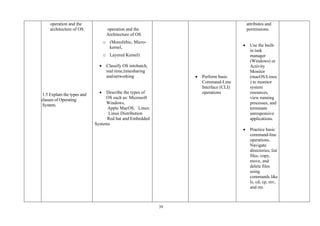
  • 177.
    177 LIST OF PARTICIPANTS(FINAL CRITIQUE WORKSHOP) S/N NAMES ADDRESS E-MAIL 1. Muhammed Auwal Ahamed CPN Rep. Dept of Computer Science Kaduna Polytechnic. Kaduna mahmed@kadunapolytechnic.edu.ng 2. Dr Babangida Abubakar Albaba Katsina State Institute of Technology & Management. Katsina rector@ksitm.edu.ng 3. Dr Niran Oyekale Commit Technology & consult ltd commitechng@gmail.com 4. Roland Adeyemi CISCO Browseroland2@gmail.com 5. Hafsat Mora Kaduna Polytechnic hafsatumora@gmail.com 6. NBTE STAFF 7. Prof Idris M. Bugaje Executive Secretary, NBTE 8. Dr Ibrahim Bashir NBTE 9. Dr Musa Hatim Koko NBTE hatimlion@gmail.com 10. Bala Danladi Akut NBTE baladanladi2000@yahoo.ca 11. Miri Ebipade MP NBTE miriebipade@gmail.com 12. Mrs Ramatu Adeiza NBTE ramatuishaq04@gmail.com 13 Muhammed Auna NBTE SECRETARIAT 14. Ibrahim Attahiru NBTE ibrahimattahiru87@gmail.com 15 Mrs Rabi Sani NBTE rabohiol@gmail.com