Presented By:
Yatharth Sharma
Software Consultant
HELM 2
Package Manager
for Kubernetes
Lack of etiquette and manners is a huge turn off.
KnolX Etiquettes
Punctuality
Respect Knolx session timings, you
are requested not to join sessions
after a 5 minutes threshold post
the session start time.
Feedback
Make sure to submit a constructive
feedback for all sessions as it is
very helpful for the presenter.
Silent Mode
Keep your mobile devices in silent
mode, feel free to move out of
session in case you need to attend
an urgent call.
Avoid Disturbance
Avoid unwanted chit chat during
the session.
Our Agenda
Kubernetes Recap
Kubernetes Objects
Demo 1: Going without Helm
Why Helm?
What is Helm
How Helm Works and its Architecture
Helm Concepts
Helm Chart Structure
Helm Templates
Helm2 vs Helm3
Demo 2: Installing charts with Helm
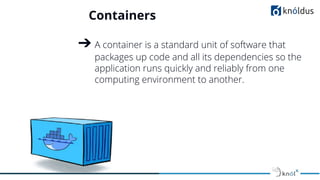
Containers
➔ A container is a standard unit of software that
packages up code and all its dependencies so the
application runs quickly and reliably from one
computing environment to another.
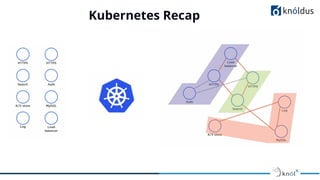
Kubernetes Recap
➔ Kubernetes is a portable, extensible, open-source
platform for managing containerized workloads
and services
➔ An Orchestrator for containerized Microservice
Apps
➔ Born in Google
➔ Written in Go/Golang
➔ Platform Agnostic
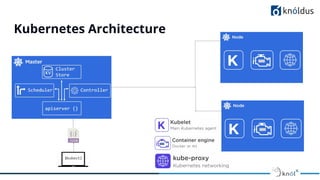
Kubernetes Architecture
Kubernetes Recap
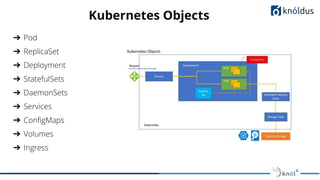
Kubernetes Objects
➔ Pod
➔ ReplicaSet
➔ Deployment
➔ StatefulSets
➔ DaemonSets
➔ Services
➔ ConfigMaps
➔ Volumes
➔ Ingress
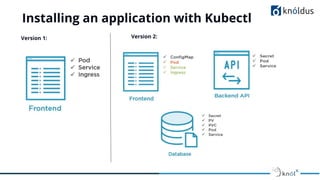
Installing an application with Kubectl
Version 1: Version 2:
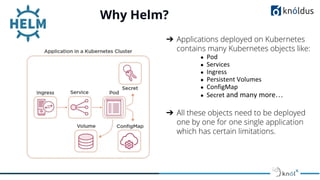
Why Helm?
➔ Applications deployed on Kubernetes
contains many Kubernetes objects like:
●
●
●
●
●
● …
➔ All these objects need to be deployed
one by one for one single application
which has certain limitations.
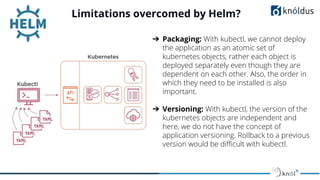
Limitations overcomed by Helm?
➔ Packaging: With kubectl, we cannot deploy
the application as an atomic set of
kubernetes objects, rather each object is
deployed separately even though they are
dependent on each other. Also, the order in
which they need to be installed is also
important.
➔ Versioning: With kubectl, the version of the
kubernetes objects are independent and
here, we do not have the concept of
application versioning. Rollback to a previous
version would be difficult with kubectl.
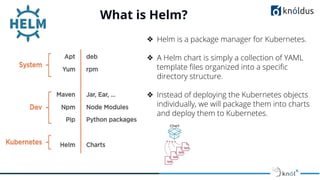
What is Helm?
❖ Helm is a package manager for Kubernetes.
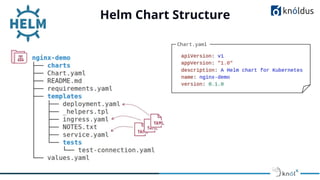
❖ A Helm chart is simply a collection of YAML
template files organized into a specific
directory structure.
❖ Instead of deploying the Kubernetes objects
individually, we will package them into charts
and deploy them to Kubernetes.
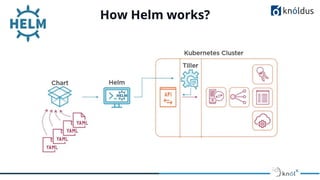
How Helm works?
Helm Architecture
Helm has two major components:
❖ Helm Client: Helm Client is a command-line client for end users. The client is
responsible for the following domains:
❖ Chart Deployment
❖ Managing Repositories
❖ Interaction with Tiller Server
❖ Asking for information about the releases
❖ Requesting upgrading or uninstalling of existing releases
❖ Tiller Server: The Tiller Server is an in-cluster server that interacts with the
Helm client, and interfaces with the Kubernetes API server. The server is
responsible for the following:
❖ Listening for incoming requests from the Helm client
❖ Combining a chart and configuration to build a release
❖ Installing charts into Kubernetes, and then tracking the subsequent release
❖ Upgrading and uninstalling charts by interacting with Kubernetes
In a nutshell, the client is responsible for managing charts, and the server is
responsible for managing releases.
Helm Chart Structure
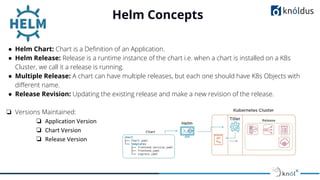
Helm Concepts
● Helm Chart: Chart is a Definition of an Application.
● Helm Release: Release is a runtime instance of the chart i.e. when a chart is installed on a K8s
Cluster, we call it a release is running.
● Multiple Release: A chart can have multiple releases, but each one should have K8s Objects with
different name.
● Release Revision: Updating the existing release and make a new revision of the release.
❏ Versions Maintained:
❏
❏
❏
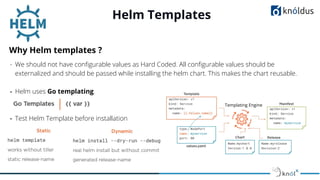
Helm Templates
Why Helm templates ?
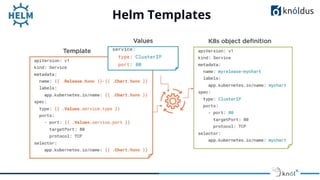
- We should not have configurable values as Hard Coded. All configurable values should be
externalized and should be passed while installing the helm chart. This makes the chart reusable.
- Helm uses Go templating.
- Test Helm Template before installation
Templating Engine
Helm Templates
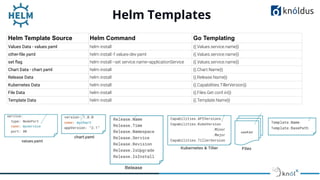
Helm Template Source Helm Command Go Templating
Values Data - values.yaml helm install {{.Values.service.name}}
other-file.yaml helm install -f values-dev.yaml {{.Values.service.name}}
set flag helm install --set service.name=applicationService {{.Values.service.name}}
Chart Data - chart.yaml helm install {{.Chart.Name}}
Release Data helm install {{.Release.Name}}
Kubernetes Data helm install {{.Capabilities.TillerVersion}}
File Data helm install {{.Files.Get conf.ini}}
Template Data helm install {{.Template.Name}}
Helm Templates
Helm 2 vs Helm 3
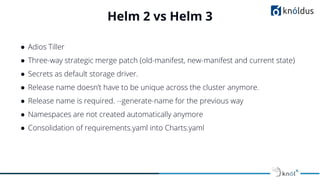
● Adios Tiller
● Three-way strategic merge patch (old-manifest, new-manifest and current state)
● Secrets as default storage driver.
● Release name doesn’t have to be unique across the cluster anymore.
● Release name is required. --generate-name for the previous way
● Namespaces are not created automatically anymore
● Consolidation of requirements.yaml into Charts.yaml
Helm Commands
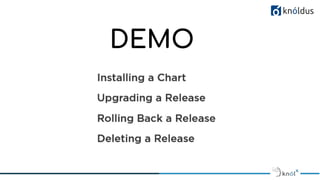
DEMO
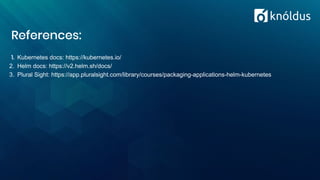
References:
1. Kubernetes docs: https://kubernetes.io/
2. Helm docs: https://v2.helm.sh/docs/
3. Plural Sight: https://app.pluralsight.com/library/courses/packaging-applications-helm-kubernetes
Thank You !

Helm - Package Manager for Kubernetes

  • 1.
    Presented By: Yatharth Sharma SoftwareConsultant HELM 2 Package Manager for Kubernetes
  • 2.
    Lack of etiquetteand manners is a huge turn off. KnolX Etiquettes Punctuality Respect Knolx session timings, you are requested not to join sessions after a 5 minutes threshold post the session start time. Feedback Make sure to submit a constructive feedback for all sessions as it is very helpful for the presenter. Silent Mode Keep your mobile devices in silent mode, feel free to move out of session in case you need to attend an urgent call. Avoid Disturbance Avoid unwanted chit chat during the session.
  • 3.
    Our Agenda Kubernetes Recap KubernetesObjects Demo 1: Going without Helm Why Helm? What is Helm How Helm Works and its Architecture Helm Concepts Helm Chart Structure Helm Templates Helm2 vs Helm3 Demo 2: Installing charts with Helm
  • 4.
    Containers ➔ A containeris a standard unit of software that packages up code and all its dependencies so the application runs quickly and reliably from one computing environment to another.
  • 5.
    Kubernetes Recap ➔ Kubernetesis a portable, extensible, open-source platform for managing containerized workloads and services ➔ An Orchestrator for containerized Microservice Apps ➔ Born in Google ➔ Written in Go/Golang ➔ Platform Agnostic
  • 6.
  • 7.
  • 8.
    Kubernetes Objects ➔ Pod ➔ReplicaSet ➔ Deployment ➔ StatefulSets ➔ DaemonSets ➔ Services ➔ ConfigMaps ➔ Volumes ➔ Ingress
  • 9.
    Installing an applicationwith Kubectl Version 1: Version 2:
  • 10.
    Why Helm? ➔ Applicationsdeployed on Kubernetes contains many Kubernetes objects like: ● ● ● ● ● ● … ➔ All these objects need to be deployed one by one for one single application which has certain limitations.
  • 11.
    Limitations overcomed byHelm? ➔ Packaging: With kubectl, we cannot deploy the application as an atomic set of kubernetes objects, rather each object is deployed separately even though they are dependent on each other. Also, the order in which they need to be installed is also important. ➔ Versioning: With kubectl, the version of the kubernetes objects are independent and here, we do not have the concept of application versioning. Rollback to a previous version would be difficult with kubectl.
  • 12.
    What is Helm? ❖Helm is a package manager for Kubernetes. ❖ A Helm chart is simply a collection of YAML template files organized into a specific directory structure. ❖ Instead of deploying the Kubernetes objects individually, we will package them into charts and deploy them to Kubernetes.
  • 13.
  • 14.
    Helm Architecture Helm hastwo major components: ❖ Helm Client: Helm Client is a command-line client for end users. The client is responsible for the following domains: ❖ Chart Deployment ❖ Managing Repositories ❖ Interaction with Tiller Server ❖ Asking for information about the releases ❖ Requesting upgrading or uninstalling of existing releases ❖ Tiller Server: The Tiller Server is an in-cluster server that interacts with the Helm client, and interfaces with the Kubernetes API server. The server is responsible for the following: ❖ Listening for incoming requests from the Helm client ❖ Combining a chart and configuration to build a release ❖ Installing charts into Kubernetes, and then tracking the subsequent release ❖ Upgrading and uninstalling charts by interacting with Kubernetes In a nutshell, the client is responsible for managing charts, and the server is responsible for managing releases.
  • 15.
  • 16.
    Helm Concepts ● HelmChart: Chart is a Definition of an Application. ● Helm Release: Release is a runtime instance of the chart i.e. when a chart is installed on a K8s Cluster, we call it a release is running. ● Multiple Release: A chart can have multiple releases, but each one should have K8s Objects with different name. ● Release Revision: Updating the existing release and make a new revision of the release. ❏ Versions Maintained: ❏ ❏ ❏
  • 17.
    Helm Templates Why Helmtemplates ? - We should not have configurable values as Hard Coded. All configurable values should be externalized and should be passed while installing the helm chart. This makes the chart reusable. - Helm uses Go templating. - Test Helm Template before installation Templating Engine
  • 18.
    Helm Templates Helm TemplateSource Helm Command Go Templating Values Data - values.yaml helm install {{.Values.service.name}} other-file.yaml helm install -f values-dev.yaml {{.Values.service.name}} set flag helm install --set service.name=applicationService {{.Values.service.name}} Chart Data - chart.yaml helm install {{.Chart.Name}} Release Data helm install {{.Release.Name}} Kubernetes Data helm install {{.Capabilities.TillerVersion}} File Data helm install {{.Files.Get conf.ini}} Template Data helm install {{.Template.Name}}
  • 19.
  • 20.
    Helm 2 vsHelm 3 ● Adios Tiller ● Three-way strategic merge patch (old-manifest, new-manifest and current state) ● Secrets as default storage driver. ● Release name doesn’t have to be unique across the cluster anymore. ● Release name is required. --generate-name for the previous way ● Namespaces are not created automatically anymore ● Consolidation of requirements.yaml into Charts.yaml
  • 21.
  • 22.
  • 23.
    References: 1. Kubernetes docs:https://kubernetes.io/ 2. Helm docs: https://v2.helm.sh/docs/ 3. Plural Sight: https://app.pluralsight.com/library/courses/packaging-applications-helm-kubernetes
  • 24.