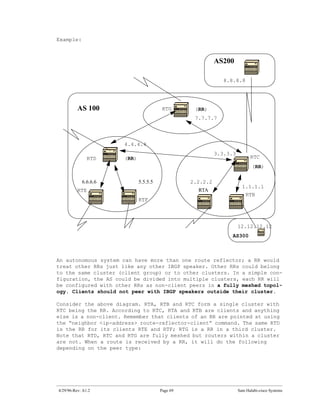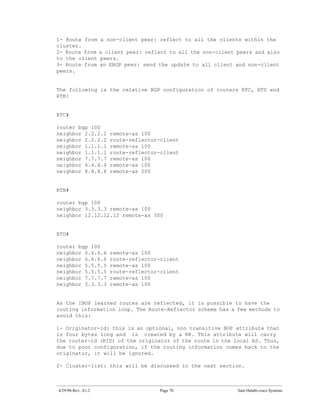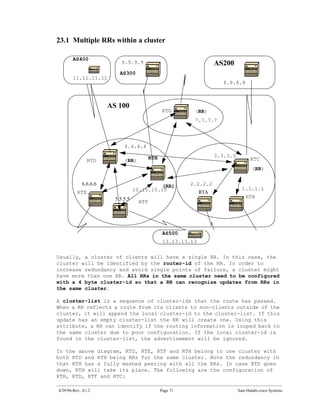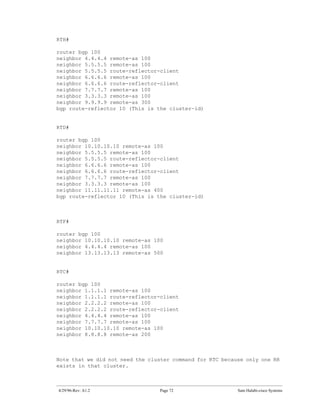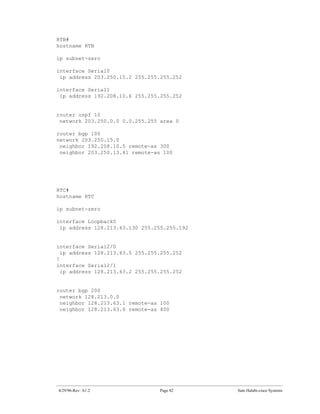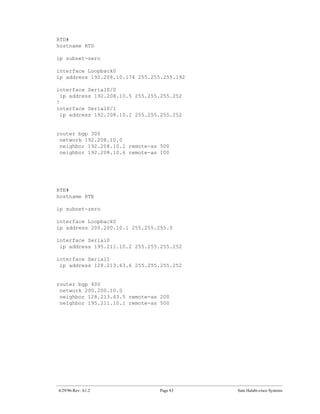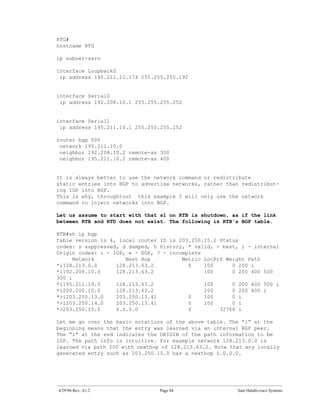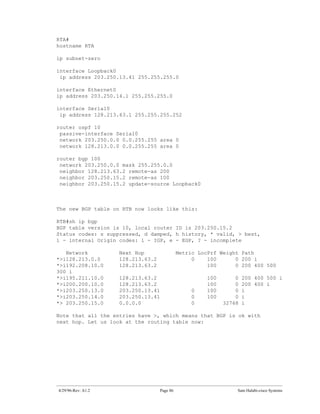
BGP4 Case Studies/Tutorial

                                Sam Halabi-cisco Systems


The purpose of this paper is to introduce the reader to the latest in BGP4 terminology and
design issues. It is targeted to the novice as well as the experienced user. For any clarifica-
tion or comments please send e-mail to shalabi@cisco.com.


Copyright 1995 ©Cisco Systems Inc.

4/29/96-Rev: A1.2                          Page 1                          Sam Halabi-cisco Systems
1.0      Introduction..............................................................................................................4
         1.1        How does BGP work ...........................................................................................................4
         1.2        What are peers (neighbors) ..................................................................................................4
         1.3        Information exchange between peers...................................................................................4
2.0      EBGP and IBGP ......................................................................................................5
3.0      Enabling BGP routing..............................................................................................6
         3.1        BGP Neighbors/Peers ..........................................................................................................7
4.0      BGP and Loopback interfaces ...............................................................................10
5.0      EBGP Multihop .....................................................................................................11
         5.1        EBGP Multihop (Load Balancing) ....................................................................................12
6.0      Route Maps ............................................................................................................13
7.0      Network command.................................................................................................17
         7.1        Redistribution.....................................................................................................................18
         7.2        Static routes and redistribution ..........................................................................................20
8.0      Internal BGP ..........................................................................................................22
9.0      The BGP decision algorithm..................................................................................23
10.0     As_path Attribute...................................................................................................24
11.0     Origin Attribute......................................................................................................25
12.0     BGP Nexthop Attribute..........................................................................................27
         12.1       BGP Nexthop (Multiaccess Networks)..............................................................................29
         12.2       BGP Nexthop (NBMA) .....................................................................................................30
         12.3       Next-hop-self .....................................................................................................................31
13.0     BGP Backdoor .......................................................................................................32
14.0     Synchronization .....................................................................................................34
         14.1       Disabling synchronization .................................................................................................35
15.0     Weight Attribute.....................................................................................................37
16.0     Local Preference Attribute.....................................................................................39
17.0     Metric Attribute .....................................................................................................41
18.0     Community Attribute .............................................................................................44
19.0     BGP Filtering .........................................................................................................45
         19.1       Route Filtering ...................................................................................................................45
         19.2       Path Filtering......................................................................................................................47
                    19.2.1 AS-Regular Expression .......................................................................................49
         19.3       BGP Community Filtering.................................................................................................50
20.0     BGP Neighbors and Route maps ...........................................................................53
         20.1       Use of set as-path prepend .................................................................................................55
         20.2       BGP Peer Groups...............................................................................................................56
21.0     CIDR and Aggregate Addresses ............................................................................58

4/29/96-Rev: A1.2                                                 Page 2                                                  Sam Halabi-cisco Systems
21.1       Aggregate Commands........................................................................................................59
         21.2       CIDR example 1 ................................................................................................................61
         21.3       CIDR example 2 (as-set)....................................................................................................63
22.0     BGP Confederation................................................................................................65
23.0     Route Reflectors.....................................................................................................68
         23.1       Multiple RRs within a cluster ............................................................................................71
         23.2       RR and conventional BGP speakers ..................................................................................73
         23.3       Avoiding looping of routing information...........................................................................74
24.0     Route Flap Dampening ..........................................................................................75
25.0     How BGP selects a Path ........................................................................................79
26.0     Practical design example: ......................................................................................80


4/29/96-Rev: A1.2                                                Page 3                                               Sam Halabi-cisco Systems
1.0 Introduction

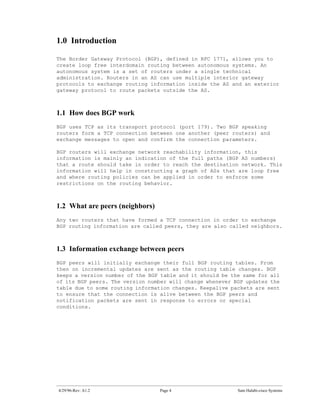
The Border Gateway Protocol (BGP), defined in RFC 1771, allows you to
create loop free interdomain routing between autonomous systems. An
autonomous system is a set of routers under a single technical
administration. Routers in an AS can use multiple interior gateway
protocols to exchange routing information inside the AS and an exterior
gateway protocol to route packets outside the AS.


1.1 How does BGP work
BGP uses TCP as its transport protocol (port 179). Two BGP speaking
routers form a TCP connection between one another (peer routers) and
exchange messages to open and confirm the connection parameters.

BGP routers will exchange network reachability information, this
information is mainly an indication of the full paths (BGP AS numbers)
that a route should take in order to reach the destination network. This
information will help in constructing a graph of ASs that are loop free
and where routing policies can be applied in order to enforce some
restrictions on the routing behavior.


1.2 What are peers (neighbors)
Any two routers that have formed a TCP connection in order to exchange
BGP routing information are called peers, they are also called neighbors.


1.3 Information exchange between peers
BGP peers will initially exchange their full BGP routing tables. From
then on incremental updates are sent as the routing table changes. BGP
keeps a version number of the BGP table and it should be the same for all
of its BGP peers. The version number will change whenever BGP updates the
table due to some routing information changes. Keepalive packets are sent
to ensure that the connection is alive between the BGP peers and
notification packets are sent in response to errors or special
conditions.


4/29/96-Rev: A1.2                Page 4                    Sam Halabi-cisco Systems
2.0 EBGP and IBGP

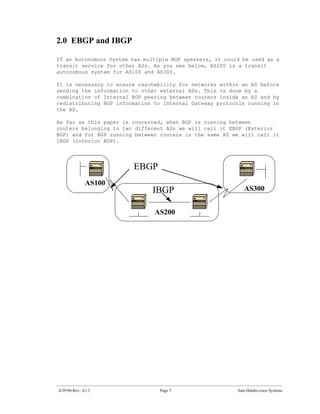
If an Autonomous System has multiple BGP speakers, it could be used as a
transit service for other ASs. As you see below, AS200 is a transit
autonomous system for AS100 and AS300.

It is necessary to ensure reachability for networks within an AS before
sending the information to other external ASs. This is done by a
combination of Internal BGP peering between routers inside an AS and by
redistributing BGP information to Internal Gateway protocols running in
the AS.

As far as this paper is concerned, when BGP is running between
routers belonging to two different ASs we will call it EBGP (Exterior
BGP) and for BGP running between routers in the same AS we will call it
IBGP (Interior BGP).


                        EBGP
              AS100
                               IBGP                          AS300


                               AS200


4/29/96-Rev: A1.2                Page 5                   Sam Halabi-cisco Systems
3.0 Enabling BGP routing

Here are the steps needed to enable and configure BGP.

Let us assume you want to have two routers RTA and RTB talk BGP. In the
first example RTA and RTB are in different autonomous systems and in the
second example both routers belong to the same AS.

We start by defining the router process and define the AS number that the
routers belong to:


The command used to enable BGP on a router is:

router bgp autonomous-system

RTA#
router bgp 100

RTB#
router bgp 200


The above statements indicate that RTA is running BGP and it belongs to
AS100 and RTB is running BGP and it belongs to AS200 and so on.


The next step in the configuration process is to define BGP neighbors.
The neighbor definition indicates which routers we are trying to talk to
with BGP.


The next section will introduce you to what is involved in forming a
valid peer connection.


4/29/96-Rev: A1.2                Page 6                   Sam Halabi-cisco Systems
3.1 BGP Neighbors/Peers
Two BGP routers become neighbors or peers once they establish a TCP
connection between one another. The TCP connection is essential in order
for the two peer routers to start exchanging routing updates.

Two BGP speaking routers trying to become neighbors will first bring up
the TCP connection between one another and then send open messages in
order to exchange values such as the AS number, the BGP version they are
running (version 3 or 4), the BGP router ID and the keepalive hold time,
etc. After these values are confirmed and accepted the neighbor
connection will be established. Any state other than established is an
indication that the two routers did not become neighbors and hence the
BGP updates will not be exchanged.


The neighbor command used to establish a TCP connection is:

neighbor ip-address remote-as number

The remote-as number is the AS number of the router we are trying to
connect to via BGP.

The ip-address is the next hop directly connected address for EBGP1 and
any IP address2 on the other router for IBGP.

It is essential that the two IP addresses used in the neighbor command of
the peer routers be able to reach one another. One sure way to verify
reachability is an extended ping between the two IP addresses, the
extended ping forces the pinging router to use as source the IP address
specified in the neighbor command rather than the IP address of the
interface the packet is going out from.


   1.A special case (EBGP multihop) will be discussed later when the external BGP peers are not
   directly connected.
   2.A special case for loopback interfaces is discussed later.

4/29/96-Rev: A1.2                             Page 7                              Sam Halabi-cisco Systems
It is important to reset the neighbor connection in case any bgp
configuration changes are made in order for the new parameters to take
effect.

clear ip bgp address (where address is the neighbor address)
clear ip bgp * (clear all neighbor connections)

By default, BGP sessions begin using BGP Version 4 and negotiating
downward to earlier versions if necessary. To prevent negotiations and
force the BGP version used to communicate with a neighbor, perform the
following task in router configuration mode:

neighbor {ip address|peer-group-name} version value

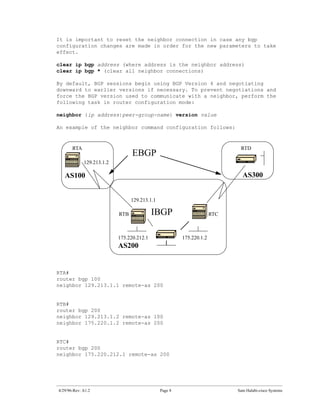
An example of the neighbor command configuration follows:


       RTA                                                                   RTD
                                 EBGP
             129.213.1.2

   AS100                                                                      AS300


                                 129.213.1.1

                           RTB             IBGP                       RTC


                           175.220.212.1                175.220.1.2
                           AS200


RTA#
router bgp 100
neighbor 129.213.1.1 remote-as 200


RTB#
router bgp 200
neighbor 129.213.1.2 remote-as 100
neighbor 175.220.1.2 remote-as 200


RTC#
router bgp 200
neighbor 175.220.212.1 remote-as 200


4/29/96-Rev: A1.2                              Page 8                       Sam Halabi-cisco Systems
In the above example RTA and RTB are running EBGP. RTB and RTC are run-
ning IBGP. The difference between EBGP and IBGP is manifested by having
the remote-as number pointing to either an external or an internal AS.

Also, the EBGP peers are directly connected and the IBGP peers
are not. IBGP routers do not have to be directly connected, as long as
there is some IGP running that allows the two neighbors to reach one
another.


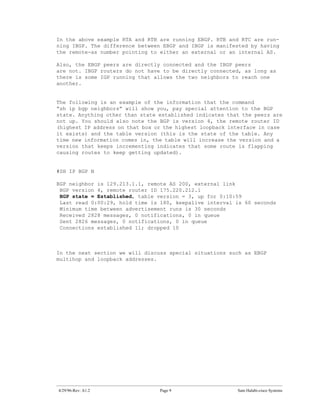
The following is an example of the information that the command
“sh ip bgp neighbors” will show you, pay special attention to the BGP
state. Anything other than state established indicates that the peers are
not up. You should also note the BGP is version 4, the remote router ID
(highest IP address on that box or the highest loopback interface in case
it exists) and the table version (this is the state of the table. Any
time new information comes in, the table will increase the version and a
version that keeps incrementing indicates that some route is flapping
causing routes to keep getting updated).


#SH IP BGP N

BGP neighbor is 129.213.1.1, remote AS 200, external link
 BGP version 4, remote router ID 175.220.212.1
 BGP state = Established, table version = 3, up for 0:10:59
 Last read 0:00:29, hold time is 180, keepalive interval is 60 seconds
 Minimum time between advertisement runs is 30 seconds
 Received 2828 messages, 0 notifications, 0 in queue
 Sent 2826 messages, 0 notifications, 0 in queue
 Connections established 11; dropped 10


In the next section we will discuss special situations such as EBGP
multihop and loopback addresses.


4/29/96-Rev: A1.2                Page 9                   Sam Halabi-cisco Systems
4.0 BGP and Loopback interfaces

Using a loopback interface to define neighbors is commonly used with IBGP
rather than EBGP. Normally the loopback interface is used to make sure
that the IP address of the neighbor stays up and is independent of an
interface that might be flaky. In the case of EBGP, most of the time the
peer routers are directly connected and loopback does not apply.

If the IP address of a loopback interface is used in the neighbor com-
mand, some extra configuration needs to be done on the neighbor router.
The neighbor router needs to tell BGP that it is using a loopback
interface rather than a physical interface to initiate the BGP neighbor
TCP connection. The command used to indicate a loopback interface is:

neighbor ip-address update-source interface

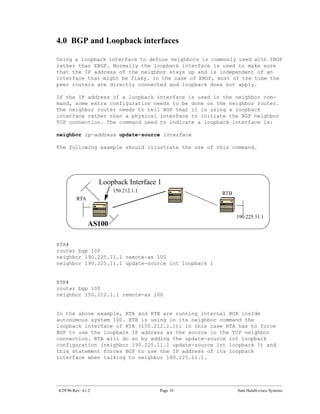
The following example should illustrate the use of this command.


                    Loopback Interface 1
                        150.212.1.1
                                                     RTB
         RTA


                                                           190.225.11.1
               AS100

RTA#
router bgp 100
neighbor 190.225.11.1 remote-as 100
neighbor 190.225.11.1 update-source int loopback 1


RTB#
router bgp 100
neighbor 150.212.1.1 remote-as 100


In the above example, RTA and RTB are running internal BGP inside
autonomous system 100. RTB is using in its neighbor command the
loopback interface of RTA (150.212.1.1); in this case RTA has to force
BGP to use the loopback IP address as the source in the TCP neighbor
connection. RTA will do so by adding the update-source int loopback
configuration (neighbor 190.225.11.1 update-source int loopback 1) and
this statement forces BGP to use the IP address of its loopback
interface when talking to neighbor 190.225.11.1.


4/29/96-Rev: A1.2                      Page 10             Sam Halabi-cisco Systems
Note that RTA has used the physical interface IP address (190.225.11.1)
of RTB as a neighbor and that is why RTB does not need to do any
special configuration.


5.0 EBGP Multihop

In some special cases, there could be a requirement for EBGP speakers to
be not directly connected. In this case EBGP multihop is used to allow
the neighbor connection to be established between two non directly con-
nected external peers. The multihop is used only for external BGP and not
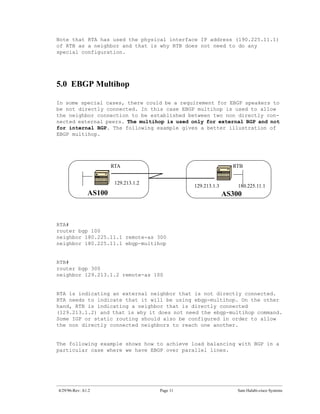
for internal BGP. The following example gives a better illustration of
EBGP multihop.


                       RTA                                      RTB


                        129.213.1.2
                                                129.213.1.3       180.225.11.1
               AS100                                          AS300


RTA#
router bgp 100
neighbor 180.225.11.1 remote-as 300
neighbor 180.225.11.1 ebgp-multihop


RTB#
router bgp 300
neighbor 129.213.1.2 remote-as 100


RTA is indicating an external neighbor that is not directly connected.
RTA needs to indicate that it will be using ebgp-multihop. On the other
hand, RTB is indicating a neighbor that is directly connected
(129.213.1.2) and that is why it does not need the ebgp-multihop command.
Some IGP or static routing should also be configured in order to allow
the non directly connected neighbors to reach one another.


The following example shows how to achieve load balancing with BGP in a
particular case where we have EBGP over parallel lines.


4/29/96-Rev: A1.2                     Page 11                     Sam Halabi-cisco Systems
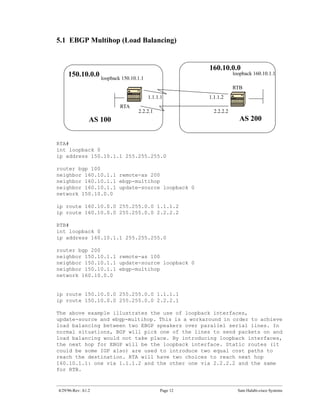
5.1 EBGP Multihop (Load Balancing)


                                                     160.10.0.0
     150.10.0.0 loopback 150.10.1.1                              loopback 160.10.1.1

                                                                 RTB
                                      1.1.1.1        1.1.1.2
                         RTA
                                2.2.2.1                2.2.2.2
                AS 100                                              AS 200


RTA#
int loopback 0
ip address 150.10.1.1 255.255.255.0

router bgp 100
neighbor 160.10.1.1 remote-as 200
neighbor 160.10.1.1 ebgp-multihop
neighbor 160.10.1.1 update-source loopback 0
network 150.10.0.0

ip route 160.10.0.0 255.255.0.0 1.1.1.2
ip route 160.10.0.0 255.255.0.0 2.2.2.2

RTB#
int loopback 0
ip address 160.10.1.1 255.255.255.0

router bgp 200
neighbor 150.10.1.1 remote-as 100
neighbor 150.10.1.1 update-source loopback 0
neighbor 150.10.1.1 ebgp-multihop
network 160.10.0.0


ip route 150.10.0.0 255.255.0.0 1.1.1.1
ip route 150.10.0.0 255.255.0.0 2.2.2.1

The above example illustrates the use of loopback interfaces,
update-source and ebgp-multihop. This is a workaround in order to achieve
load balancing between two EBGP speakers over parallel serial lines. In
normal situations, BGP will pick one of the lines to send packets on and
load balancing would not take place. By introducing loopback interfaces,
the next hop for EBGP will be the loopback interface. Static routes (it
could be some IGP also) are used to introduce two equal cost paths to
reach the destination. RTA will have two choices to reach next hop
160.10.1.1: one via 1.1.1.2 and the other one via 2.2.2.2 and the same
for RTB.


4/29/96-Rev: A1.2                          Page 12                 Sam Halabi-cisco Systems
6.0 Route Maps

At this point I would like to introduce route maps because they will be
used heavily with BGP. In the BGP context, route map is a method used to
control and modify routing information. This is done by defining condi-
tions for redistributing routes from one routing protocol to another or
controlling routing information when injected in and out of BGP. The for-
mat of the route map follows:

route-map map-tag [[permit | deny] | [sequence-number]]


The map-tag is just a name you give to the route-map. Multiple instances
of the same route map (same name-tag) can be defined. The sequence number
is just an indication of the position a new route map is to have in the
list of route maps already configured with the same name.

For example, if I define two instances of the route map, let us call it
MYMAP, the first instance will have a sequence-number of 10, and the
second will have a sequence number of 20.

route-map MYMAP permit 10
(first set of conditions goes here.)

route-map MYMAP permit 20
(second set of conditions goes here.)

When applying route map MYMAP to incoming or outgoing routes, the first
set of conditions will be applied via instance 10. If the first set of
conditions is not met then we proceed to a higher instance of the route
map.

The conditions that we talked about are defined by the match and set
configuration commands. Each route map will consist of a list of match
and set configuration. The match will specify a match criteria and set
specifies a set action if the criteria enforced by the match command are
met.

For example, I could define a route map that checks outgoing updates and
if there is a match for IP address 1.1.1.1 then the metric for that
update will be set to 5. The above can be illustrated by the following
commands:

match ip address 1.1.1.1
set metric 5

Now, if the match criteria are met and we have a permit then the routes
will be redistributed or controlled as specified by the set action and we
break out of the list.

If the match criteria are met and we have a deny then the route will not
be redistributed or controlled and we break out of the list.


4/29/96-Rev: A1.2                Page 13                   Sam Halabi-cisco Systems
If the match criteria are not met and we have a permit or deny then the
next instance of the route map (instance 20 for example) will be checked,
and so on until we either break out or finish all the instances of the
route map. If we finish the list without a match then the route we are
looking at will not be accepted nor forwarded.

One restriction on route maps is that when used for filtering BGP updates
(as we will see later) rather than when redistributing between protocols,
you can NOT filter on the inbound when using a “match” on the ip address.
Filtering on the outbound is OK.


The related commands for match are:

match    as-path
match    community
match    clns
match    interface
match    ip address
match    ip next-hop
match    ip route-source
match    metric
match    route-type
match    tag

The related commands for set are:

set   as-path
set   automatic-tag
set   community
set   clns
set   interface
set   default interface
set   ip next-hop
set   ip default next-hop
set   ip precedence
set   tos
set   level
set   local-preference
set   metric
set   metric-type
set   next-hop
set   origin
set   tag
set   weight


Let’s look at some route-map examples:


4/29/96-Rev: A1.2                Page 14                   Sam Halabi-cisco Systems
150.10.0.0

                      RTA
                                                               RTB
                                3.3.3.3              3.3.3.4


      AS 100          2.2.2.2


                                          RTC
                            2.2.2.3


                    170.10.0.0              AS 300


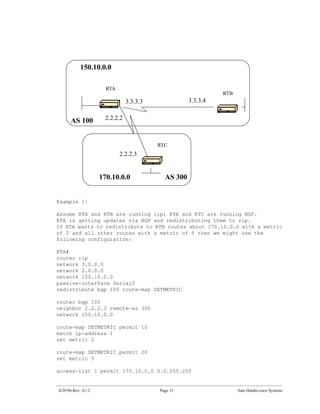
Example 1:

Assume RTA and RTB are running rip; RTA and RTC are running BGP.
RTA is getting updates via BGP and redistributing them to rip.
If RTA wants to redistribute to RTB routes about 170.10.0.0 with a metric
of 2 and all other routes with a metric of 5 then we might use the
following configuration:

RTA#
router rip
network 3.0.0.0
network 2.0.0.0
network 150.10.0.0
passive-interface Serial0
redistribute bgp 100 route-map SETMETRIC

router bgp 100
neighbor 2.2.2.3 remote-as 300
network 150.10.0.0

route-map SETMETRIC permit 10
match ip-address 1
set metric 2

route-map SETMETRIC permit 20
set metric 5

access-list 1 permit 170.10.0.0 0.0.255.255


4/29/96-Rev: A1.2                         Page 15                    Sam Halabi-cisco Systems
In the above example if a route matches the IP address 170.10.0.0 it will
have a metric of 2 and then we break out of the route map list. If there
is no match then we go down the route map list which says, set everything
else to metric 5. It is always very important to ask the question, what
will happen to routes that do not match any of the match statements
because they will be dropped by default.


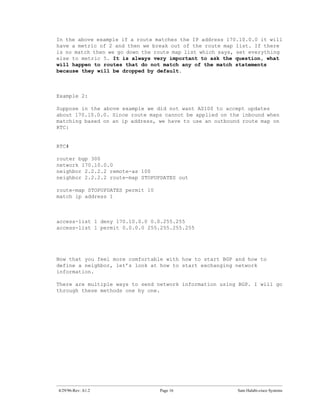
Example 2:

Suppose in the above example we did not want AS100 to accept updates
about 170.10.0.0. Since route maps cannot be applied on the inbound when
matching based on an ip address, we have to use an outbound route map on
RTC:


RTC#

router bgp 300
network 170.10.0.0
neighbor 2.2.2.2 remote-as 100
neighbor 2.2.2.2 route-map STOPUPDATES out

route-map STOPUPDATES permit 10
match ip address 1


access-list 1 deny 170.10.0.0 0.0.255.255
access-list 1 permit 0.0.0.0 255.255.255.255


Now that you feel more comfortable with how to start BGP and how to
define a neighbor, let’s look at how to start exchanging network
information.

There are multiple ways to send network information using BGP. I will go
through these methods one by one.


4/29/96-Rev: A1.2                 Page 16                 Sam Halabi-cisco Systems
7.0 Network command

The format of the network command follows:

network network-number [mask network-mask]

The network command controls what networks are originated by this box.
This is a different concept from what you are used to configuring with
IGRP and RIP. With this command we are not trying to run BGP on a certain
interface, rather we are trying to indicate to BGP what networks it
should originate from this box. The mask portion is used because BGP4 can
handle subnetting and supernetting. A maximum of 200 entries of the
network command are accepted.

The network command will work if the network you are trying to advertise
is known to the router, whether connected, static or learned dynamically.

An example of the network command follows:

RTA#
router bgp 1
network 192.213.0.0 mask 255.255.0.0

ip route 192.213.0.0 255.255.0.0 null 0

The above example indicates that router A, will generate a network entry
for 192.213.0.0/16. The /16 indicates that we are using a supernet of the
class C address and we are advertizing the first two octets (the first 16
bits).


Note that we need the static route to get the router to generate
192.213.0.0 because the static route will put a matching entry in the
routing table.


4/29/96-Rev: A1.2                Page 17                   Sam Halabi-cisco Systems
7.1 Redistribution
The network command is one way to advertise your networks via BGP.
Another way is to redistribute your IGP (IGRP, OSPF, RIP, EIGRP, etc.)
into BGP. This sounds scary because now you are dumping all of your
internal routes into BGP, some of these routes might have been learned
via BGP and you do not need to send them out again. Careful filtering
should be applied to make sure you are sending to the internet only
routes that you want to advertise and not everything you have. Let us
look at the example below.

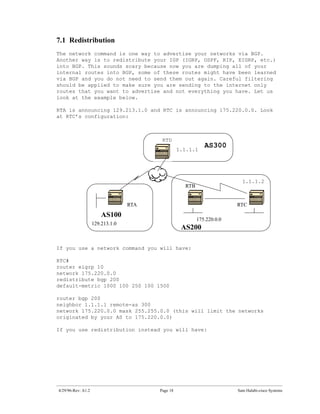
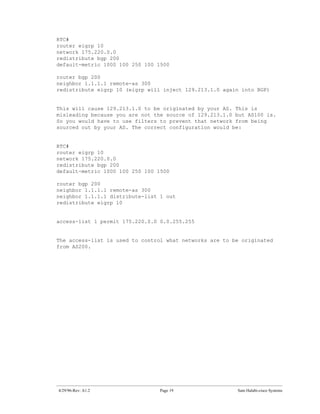
RTA is announcing 129.213.1.0 and RTC is announcing 175.220.0.0. Look
at RTC’s configuration:


                                         RTD
                                                  1.1.1.1
                                                             AS300


                                                                          1.1.1.2
                                                    RTB


                                  RTA                                   RTC

                        AS100
                                                          175.220.0.0
                    129.213.1.0
                                                   AS200

If you use a network command you will have:

RTC#
router eigrp 10
network 175.220.0.0
redistribute bgp 200
default-metric 1000 100 250 100 1500

router bgp 200
neighbor 1.1.1.1 remote-as 300
network 175.220.0.0 mask 255.255.0.0 (this will limit the networks
originated by your AS to 175.220.0.0)

If you use redistribution instead you will have:


4/29/96-Rev: A1.2                       Page 18                         Sam Halabi-cisco Systems
RTC#
router eigrp 10
network 175.220.0.0
redistribute bgp 200
default-metric 1000 100 250 100 1500

router bgp 200
neighbor 1.1.1.1 remote-as 300
redistribute eigrp 10 (eigrp will inject 129.213.1.0 again into BGP)


This will cause 129.213.1.0 to be originated by your AS. This is
misleading because you are not the source of 129.213.1.0 but AS100 is.
So you would have to use filters to prevent that network from being
sourced out by your AS. The correct configuration would be:


RTC#
router eigrp 10
network 175.220.0.0
redistribute bgp 200
default-metric 1000 100 250 100 1500

router bgp 200
neighbor 1.1.1.1 remote-as 300
neighbor 1.1.1.1 distribute-list 1 out
redistribute eigrp 10


access-list 1 permit 175.220.0.0 0.0.255.255


The access-list is used to control what networks are to be originated
from AS200.


4/29/96-Rev: A1.2                Page 19                 Sam Halabi-cisco Systems
7.2 Static routes and redistribution
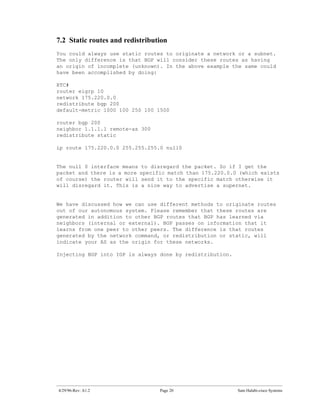
You could always use static routes to originate a network or a subnet.
The only difference is that BGP will consider these routes as having
an origin of incomplete (unknown). In the above example the same could
have been accomplished by doing:

RTC#
router eigrp 10
network 175.220.0.0
redistribute bgp 200
default-metric 1000 100 250 100 1500

router bgp 200
neighbor 1.1.1.1 remote-as 300
redistribute static

ip route 175.220.0.0 255.255.255.0 null0


The null 0 interface means    to disregard the packet. So if I get the
packet and there is a more   specific match than 175.220.0.0 (which exists
of course) the router will    send it to the specific match otherwise it
will disregard it. This is    a nice way to advertise a supernet.


We have discussed how we can use different methods to originate routes
out of our autonomous system. Please remember that these routes are
generated in addition to other BGP routes that BGP has learned via
neighbors (internal or external). BGP passes on information that it
learns from one peer to other peers. The difference is that routes
generated by the network command, or redistribution or static, will
indicate your AS as the origin for these networks.

Injecting BGP into IGP is always done by redistribution.


4/29/96-Rev: A1.2                  Page 20                  Sam Halabi-cisco Systems
Example:


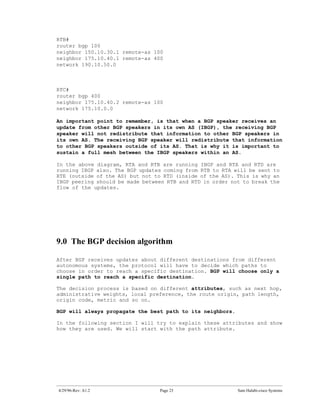
        150.10.0.0               AS 100
                      RTA                               160.10.0.0
                                                               RTB

               150.10.20.1
                                                                               AS 200
                                                            160.10.20.1


                         150.10.20.2
                                          160.10.20.2
                                 RTC


                    170.10.0.0            AS 300

RTA#
router bgp 100
neighbor 150.10.20.2 remote-as 300
network 150.10.0.0


RTB#
router bgp 200
neighbor 160.10.20.2 remote-as 300
network 160.10.0.0

RTC#
router bgp 300
neighbor 150.10.20.1 remote-as 100
neighbor 160.10.20.1 remote-as 200
network 170.10.00

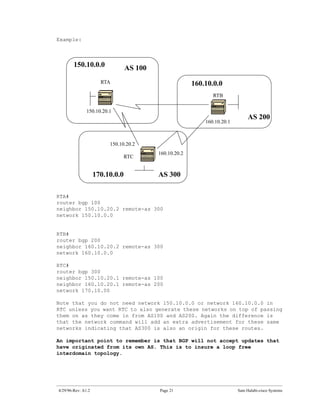
Note that you do not need network 150.10.0.0 or network 160.10.0.0 in
RTC unless you want RTC to also generate these networks on top of passing
them on as they come in from AS100 and AS200. Again the difference is
that the network command will add an extra advertisement for these same
networks indicating that AS300 is also an origin for these routes.

An important point to remember is that BGP will not accept updates that
have originated from its own AS. This is to insure a loop free
interdomain topology.


4/29/96-Rev: A1.2                         Page 21                         Sam Halabi-cisco Systems
For example, assume AS200 above had a direct BGP connection into AS100.
RTA will generate a route 150.10.0.0 and will send it to AS300, then RTC
will pass this route to AS200 with the origin kept as AS100, RTB will
pass 150.10.0.0 to AS100 with origin still AS100. RTA will notice that
the update has originated from its own AS and will ignore it.


8.0 Internal BGP

IBGP is used if an AS wants to act as a transit system to other ASs.
You might ask, why can’t we do the same thing by learning via EBGP
redistributing into IGP and then redistributing again into another AS?
We can, but IBGP offers more flexibility and more efficient ways to
exchange information within an AS; for example IBGP provides us with ways
to control what is the best exit point out of the AS by using local
preference (will be discussed later).


             RTD


                    IBGP                                           RTB
                                                                              190.10.50.1
                             150.10.30.1

                             170.10.20.1         IBGP       175.10.40.2
                    RTA
          AS 100

                                           170.10.20.2                                      RTC
                                                                            175.10.40.1
                                                RTE

                                                                          175.10.0.0
         AS500                                                                     AS400

                          170.10.0.0                    AS300


RTA#
router bgp 100
neighbor 190.10.50.1 remote-as 100
neighbor 170.10.20.2 remote-as 300
network 150.10.0.0


4/29/96-Rev: A1.2                             Page 22                           Sam Halabi-cisco Systems
RTB#
router bgp 100
neighbor 150.10.30.1 remote-as 100
neighbor 175.10.40.1 remote-as 400
network 190.10.50.0


RTC#
router bgp 400
neighbor 175.10.40.2 remote-as 100
network 175.10.0.0

An important point to remember, is that when a BGP speaker receives an
update from other BGP speakers in its own AS (IBGP), the receiving BGP
speaker will not redistribute that information to other BGP speakers in
its own AS. The receiving BGP speaker will redistribute that information
to other BGP speakers outside of its AS. That is why it is important to
sustain a full mesh between the IBGP speakers within an AS.

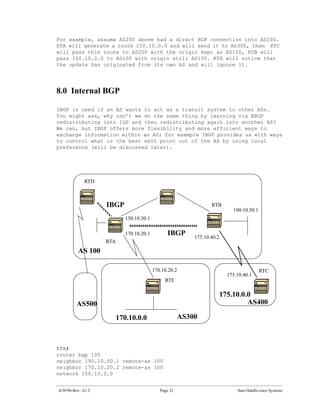
In the above diagram, RTA and RTB are running IBGP and RTA and RTD are
running IBGP also. The BGP updates coming from RTB to RTA will be sent to
RTE (outside of the AS) but not to RTD (inside of the AS). This is why an
IBGP peering should be made between RTB and RTD in order not to break the
flow of the updates.


9.0 The BGP decision algorithm

After BGP receives updates about different destinations from different
autonomous systems, the protocol will have to decide which paths to
choose in order to reach a specific destination. BGP will choose only a
single path to reach a specific destination.

The decision process is based on different attributes, such as next hop,
administrative weights, local preference, the route origin, path length,
origin code, metric and so on.

BGP will always propagate the best path to its neighbors.

In the following section I will try to explain these attributes and show
how they are used. We will start with the path attribute.


4/29/96-Rev: A1.2                Page 23                    Sam Halabi-cisco Systems
10.0 As_path Attribute


       170.10.0.0
                                            190.10.0.0
         AS 100
                                            AS200
                                                         RTB
                     RTA


                    AS 300
                                     RTC
                                                      100                  200


                      180.10.10.10


                                                                300

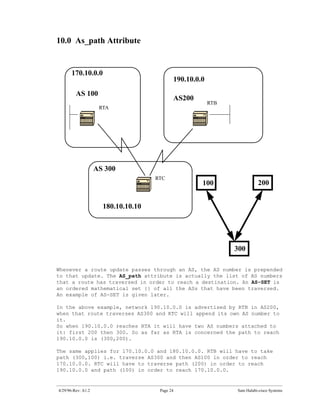
Whenever a route update passes through an AS, the AS number is prepended
to that update. The AS_path attribute is actually the list of AS numbers
that a route has traversed in order to reach a destination. An AS-SET is
an ordered mathematical set {} of all the ASs that have been traversed.
An example of AS-SET is given later.

In the above example, network 190.10.0.0 is         advertised by RTB in AS200,
when that route traverses AS300 and RTC will        append its own AS number to
it.
So when 190.10.0.0 reaches RTA it will have         two AS numbers attached to
it: first 200 then 300. So as far as RTA is         concerned the path to reach
190.10.0.0 is (300,200).

The same applies for 170.10.0.0 and 180.10.0.0. RTB will have to take
path (300,100) i.e. traverse AS300 and then AS100 in order to reach
170.10.0.0. RTC will have to traverse path (200) in order to reach
190.10.0.0 and path (100) in order to reach 170.10.0.0.


4/29/96-Rev: A1.2                     Page 24                    Sam Halabi-cisco Systems
11.0 Origin Attribute

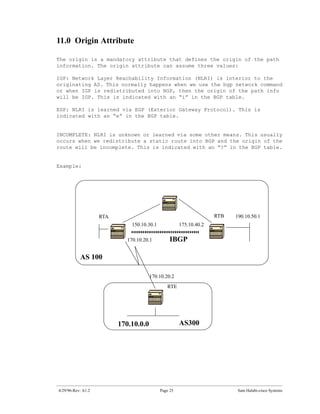
The origin is a mandatory attribute that defines the origin of the path
information. The origin attribute can assume three values:

IGP: Network Layer Reachability Information (NLRI) is interior to the
originating AS. This normally happens when we use the bgp network command
or when IGP is redistributed into BGP, then the origin of the path info
will be IGP. This is indicated with an “i” in the BGP table.

EGP: NLRI is learned via EGP (Exterior Gateway Protocol). This is
indicated with an “e” in the BGP table.


INCOMPLETE: NLRI is unknown or learned via some other means. This usually
occurs when we redistribute a static route into BGP and the origin of the
route will be incomplete. This is indicated with an “?” in the BGP table.


Example:


                    RTA                                              RTB   190.10.50.1
                               150.10.30.1             175.10.40.2

                             170.10.20.1          IBGP

           AS 100

                                       170.10.20.2
                                                RTE


                          170.10.0.0                   AS300


4/29/96-Rev: A1.2                            Page 25                        Sam Halabi-cisco Systems
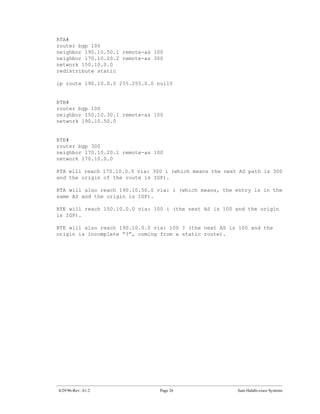
RTA#
router bgp 100
neighbor 190.10.50.1 remote-as 100
neighbor 170.10.20.2 remote-as 300
network 150.10.0.0
redistribute static

ip route 190.10.0.0 255.255.0.0 null0


RTB#
router bgp 100
neighbor 150.10.30.1 remote-as 100
network 190.10.50.0


RTE#
router bgp 300
neighbor 170.10.20.1 remote-as 100
network 170.10.0.0

RTA will reach 170.10.0.0 via: 300 i (which means the next AS path is 300
and the origin of the route is IGP).

RTA will also reach 190.10.50.0 via: i (which means, the entry is in the
same AS and the origin is IGP).

RTE will reach 150.10.0.0 via: 100 i (the next AS is 100 and the origin
is IGP).

RTE will also reach 190.10.0.0 via: 100 ? (the next AS is 100 and the
origin is incomplete “?”, coming from a static route).


4/29/96-Rev: A1.2                Page 26                  Sam Halabi-cisco Systems
12.0 BGP Nexthop Attribute


            150.10.0.0
                     RTA
                                                                           RTB         150.10.50.1
                             150.10.30.1         IBGP


               170.10.20.1


           AS 100


                        170.10.20.2             RTC


                         170.10.0.0                    AS 300


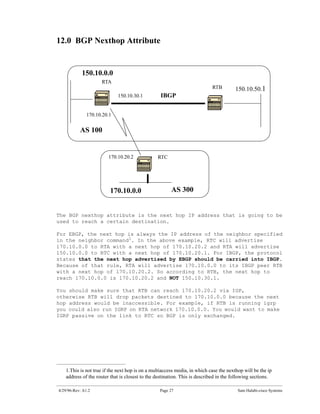
The BGP nexthop attribute is the next hop IP address that is going to be
used to reach a certain destination.

For EBGP, the next hop is always the IP address of the neighbor specified
in the neighbor command1. In the above example, RTC will advertise
170.10.0.0 to RTA with a next hop of 170.10.20.2 and RTA will advertise
150.10.0.0 to RTC with a next hop of 170.10.20.1. For IBGP, the protocol
states that the next hop advertised by EBGP should be carried into IBGP.
Because of that rule, RTA will advertise 170.10.0.0 to its IBGP peer RTB
with a next hop of 170.10.20.2. So according to RTB, the next hop to
reach 170.10.0.0 is 170.10.20.2 and NOT 150.10.30.1.

You should make sure that RTB can reach 170.10.20.2 via IGP,
otherwise RTB will drop packets destined to 170.10.0.0 because the next
hop address would be inaccessible. For example, if RTB is running igrp
you could also run IGRP on RTA network 170.10.0.0. You would want to make
IGRP passive on the link to RTC so BGP is only exchanged.


   1.This is not true if the next hop is on a multiaccess media, in which case the nexthop will be the ip
   address of the router that is closest to the destination. This is described in the following sections.

4/29/96-Rev: A1.2                                Page 27                                Sam Halabi-cisco Systems
Example:

RTA#
router bgp 100
neighbor 170.10.20.2 remote-as 300
neighbor 150.10.50.1 remote-as 100
network 150.10.0.0

RTB#
router bgp 100
neighbor 150.10.30.1 remote-as 100

RTC#
router bgp 300
neighbor 170.10.20.1 remote-as 100
network 170.10.0.0

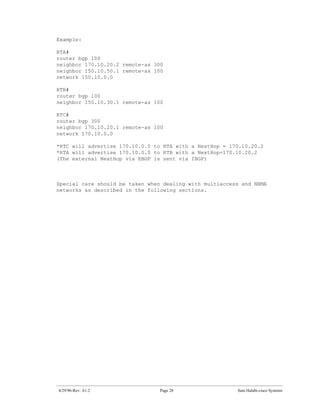
*RTC will advertise 170.10.0.0 to RTA with a NextHop = 170.10.20.2
*RTA will advertise 170.10.0.0 to RTB with a NextHop=170.10.20.2
(The external NextHop via EBGP is sent via IBGP)


Special care should be taken when dealing with multiaccess and NBMA
networks as described in the following sections.


4/29/96-Rev: A1.2                Page 28                 Sam Halabi-cisco Systems
12.1 BGP Nexthop (Multiaccess Networks)


         150.10.0.0                     AS 100
                    RTA
                                                           RTB         150.10.50.1
                               150.10.30.1

                          170.10.20.1


                      170.10.20.2         RTC
                                                         170.10.20.3   RTD


                                                AS 300
                                                              180.20.0.0

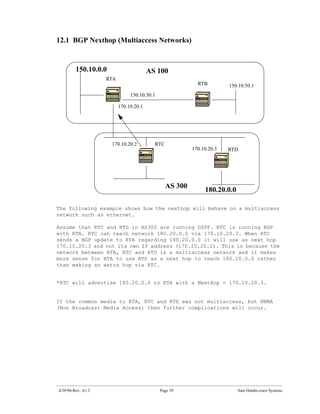
The following example shows how the nexthop will behave on a multiaccess
network such as ethernet.

Assume that RTC and RTD in AS300 are running OSPF. RTC is running BGP
with RTA. RTC can reach network 180.20.0.0 via 170.10.20.3. When RTC
sends a BGP update to RTA regarding 180.20.0.0 it will use as next hop
170.10.20.3 and not its own IP address (170.10.20.2). This is because the
network between RTA, RTC and RTD is a multiaccess network and it makes
more sense for RTA to use RTD as a next hop to reach 180.20.0.0 rather
than making an extra hop via RTC.


*RTC will advertise 180.20.0.0 to RTA with a NextHop = 170.10.20.3.


If the common media to RTA, RTC and RTD was not multiaccess, but NBMA
(Non Broadcast Media Access) then further complications will occur.


4/29/96-Rev: A1.2                            Page 29                       Sam Halabi-cisco Systems
12.2 BGP Nexthop (NBMA)


          150.10.0.0                       AS 100
                       RTA
                                                                  RTB        150.10.50.1
                                 150.10.30.1

                             170.10.20.1


                       FR

                                                                    170.10.20.3        AS 400
                                                                                     RTD
                                               170.10.20.2
                                                    RTC


                                                         AS 300
                                                                        180.20.0.0

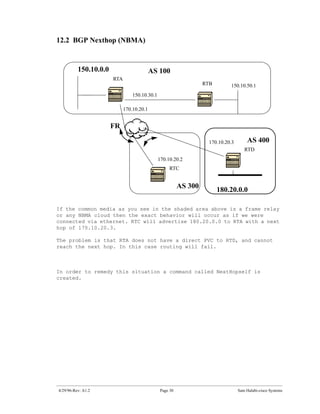
If the common media as you see in the shaded area above is a frame relay
or any NBMA cloud then the exact behavior will occur as if we were
connected via ethernet. RTC will advertise 180.20.0.0 to RTA with a next
hop of 170.10.20.3.

The problem is that RTA does not have a direct PVC to RTD, and cannot
reach the next hop. In this case routing will fail.


In order to remedy this situation a command called NextHopself is
created.


4/29/96-Rev: A1.2                              Page 30                            Sam Halabi-cisco Systems
12.3 Next-hop-self
Because of certain situations with the nexthop as we saw in the previous
example, a command called next-hop-self is created.

the syntax is:

neighbor {ip-address|peer-group-name1} next-hop-self

The next-hop-self command will allow us to force BGP to use a specified
IP address as the next hop rather than letting the protocol choose the
nexthop.

In the previous example the following will solve our problem:


RTC#
router bgp 300
neighbor 170.10.20.1 remote-as 100
neighbor 170.10.20.1 next-hop-self

RTC will advertise 180.20.0.0 with a NextHop = 170.10.20.2


   1.We will discuss peer-group-names later on

4/29/96-Rev: A1.2                                Page 31   Sam Halabi-cisco Systems
13.0 BGP Backdoor


                    150.10.0.0

                                                                       160.10.0.0
                        RTA
                                                                             RTB
                                        IGP
                              2.2.2.2
                                                                           3.3.3.3
                                                                                     AS 200
                AS 100
                                              2.2.2.1

                                                          3.3.3.1

                                                        RTC


                                 170.10.0.0                   AS 300

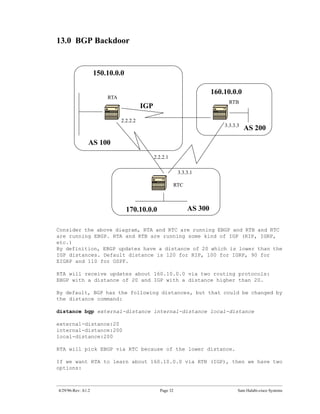
Consider the above diagram, RTA and RTC are running EBGP and RTB and RTC
are running EBGP. RTA and RTB are running some kind of IGP (RIP, IGRP,
etc.)
By definition, EBGP updates have a distance of 20 which is lower than the
IGP distances. Default distance is 120 for RIP, 100 for IGRP, 90 for
EIGRP and 110 for OSPF.

RTA will receive updates about 160.10.0.0 via two routing protocols:
EBGP with a distance of 20 and IGP with a distance higher than 20.

By default, BGP has the following distances, but that could be changed by
the distance command:

distance bgp external-distance internal-distance local-distance

external-distance:20
internal-distance:200
local-distance:200

RTA will pick EBGP via RTC because of the lower distance.

If we want RTA to learn about 160.10.0.0 via RTB (IGP), then we have two
options:


4/29/96-Rev: A1.2                               Page 32                          Sam Halabi-cisco Systems
1- Change EBGP’s external distance or IGP’s distance which is NOT
recommended.

2- Use BGP backdoor


BGP backdoor will make the IGP route, the preferred route.
Use the following command: network address backdoor.
The configured network is the network that we would like to reach via
IGP. For BGP this network will be treated as a locally assigned network
except it will not be advertised in bgp updates.


Example:


RTA#
router eigrp 10
network 160.10.0.0

router bgp 100
neighbor 2.2.2.1 remote-as 300
network 160.10.0.0 backdoor

Network 160.10.0.0 will be treated as a local entry but will not be
advertised as a normal network entry would.

RTA will learn 160.10.0.0 from RTB via EIGRP with distance 90, and will
also learn it from RTC via EBGP with distance 20. Normally EBGP will be
preferred, but because of the backdoor command EIGRP will be preferred.


4/29/96-Rev: A1.2                Page 33                 Sam Halabi-cisco Systems
14.0 Synchronization


     150.10.0.0                                       RTE

                                                              Was 170.10.0.0
                                                              propagated within IGP?
          RTA
                                                                        RTB
                         IBGP

          2.2.2.2
                                                170.10.0.0
        AS 100

                                              170.10.0.0
                         2.2.2.1
                                                                                             RTD
                           RTC


                                                                                        AS400
                    170.10.0.0                     AS 300


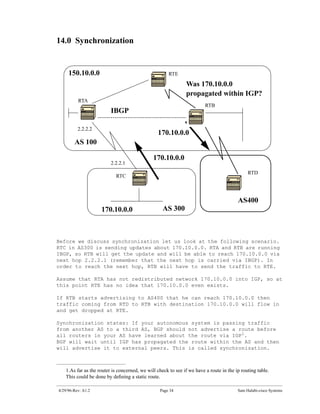
Before we discuss synchronization let us look at the following scenario.
RTC in AS300 is sending updates about 170.10.0.0. RTA and RTB are running
IBGP, so RTB will get the update and will be able to reach 170.10.0.0 via
next hop 2.2.2.1 (remember that the next hop is carried via IBGP). In
order to reach the next hop, RTB will have to send the traffic to RTE.

Assume that RTA has not redistributed network 170.10.0.0 into IGP, so at
this point RTE has no idea that 170.10.0.0 even exists.

If RTB starts advertising to AS400 that he can reach 170.10.0.0 then
traffic coming from RTD to RTB with destination 170.10.0.0 will flow in
and get dropped at RTE.

Synchronization states: If your autonomous system is passing traffic
from another AS to a third AS, BGP should not advertise a route before
all routers in your AS have learned about the route via IGP1.
BGP will wait until IGP has propagated the route within the AS and then
will advertise it to external peers. This is called synchronization.


   1.As far as the router is concerned, we will check to see if we have a route in the ip routing table.
   This could be done by defining a static route.

4/29/96-Rev: A1.2                                Page 34                                Sam Halabi-cisco Systems
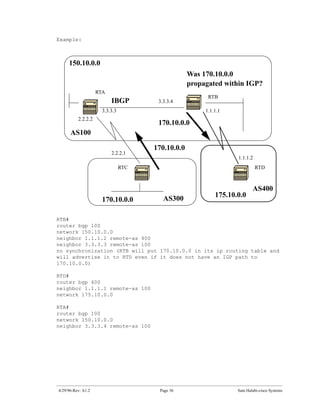
In the above example, RTB will wait to hear about 170.10.0.0 via IGP
before it starts sending the update to RTD. We can fool RTB into thinking
that IGP has propagated the information by adding a static route in RTB
pointing to 170.10.0.0. Care should be taken to make sure that other
routers can reach 170.10.0.0 otherwise we will have a problem reaching
that network.


14.1 Disabling synchronization
In some cases you do not need synchronization. If you will not be passing
traffic from a different autonomous system through your AS, or if all
routers in your AS will be running BGP, you can disable synchronization.
Disabling this feature can allow you to carry fewer routes in your IGP
and allow BGP to converge more quickly.

Disabling synchronization is not automatic, if you have all your routers
in the AS running BGP and you are not running any IGP, the router has no
way of knowing that, and your router will be waiting forever for an IGP
update about a certain route before sending it to external peers. You
have to disable synchronization manually in this case for routing to work
correctly.


router bgp 100
no synchronization.

(Make sure you do a clear ip bgp address to reset the session)


4/29/96-Rev: A1.2                Page 35                   Sam Halabi-cisco Systems
Example:


     150.10.0.0
                                                   Was 170.10.0.0
                                                   propagated within IGP?
                    RTA
                                                         RTB
                          IBGP         3.3.3.4
                      3.3.3.3                           1.1.1.1
          2.2.2.2
                                       170.10.0.0
      AS100

                                      170.10.0.0
                          2.2.2.1
                                                                   1.1.1.2
                                RTC                                          RTD


                                                                           AS400
                                                            175.10.0.0
                      170.10.0.0         AS300

RTB#
router bgp 100
network 150.10.0.0
neighbor 1.1.1.2 remote-as 400
neighbor 3.3.3.3 remote-as 100
no synchronization (RTB will put 170.10.0.0 in its ip routing table and
will advertise it to RTD even if it does not have an IGP path to
170.10.0.0)

RTD#
router bgp 400
neighbor 1.1.1.1 remote-as 100
network 175.10.0.0

RTA#
router bgp 100
network 150.10.0.0
neighbor 3.3.3.4 remote-as 100


4/29/96-Rev: A1.2                      Page 36                     Sam Halabi-cisco Systems
15.0 Weight Attribute


     170.10.0.0                                                              190.10.0.0
      AS100                             175.10.0.0
                        RTA                                        AS200      RTB


                                         AS4                       2.2.2.2
                    1.1.1.1


            (175.10.0.0)                                  (175.10.0.0)

                               w=200
                                  RTC            w= 100
                              AS300


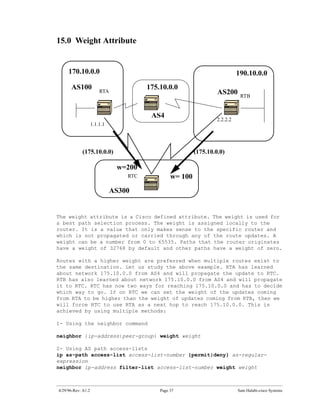
The weight attribute is a Cisco defined attribute. The weight is used for
a best path selection process. The weight is assigned locally to the
router. It is a value that only makes sense to the specific router and
which is not propagated or carried through any of the route updates. A
weight can be a number from 0 to 65535. Paths that the router originates
have a weight of 32768 by default and other paths have a weight of zero.

Routes with a higher weight are preferred when multiple routes exist to
the same destination. Let us study the above example. RTA has learned
about network 175.10.0.0 from AS4 and will propagate the update to RTC.
RTB has also learned about network 175.10.0.0 from AS4 and will propagate
it to RTC. RTC has now two ways for reaching 175.10.0.0 and has to decide
which way to go. If on RTC we can set the weight of the updates coming
from RTA to be higher than the weight of updates coming from RTB, then we
will force RTC to use RTA as a next hop to reach 175.10.0.0. This is
achieved by using multiple methods:

1- Using the neighbor command

neighbor {ip-address|peer-group} weight weight

2- Using AS path access-lists
ip as-path access-list access-list-number {permit|deny} as-regular-
expression
neighbor ip-address filter-list access-list-number weight weight


4/29/96-Rev: A1.2                           Page 37                          Sam Halabi-cisco Systems
3-Using route-maps

example:

RTC#
router bgp 300
neighbor 1.1.1.1    remote-as 100
neighbor 1.1.1.1    weight 200 (route to 175.10.0.0 from RTA will have 200
weight)
neighbor 2.2.2.2    remote-as 200
neighbor 2.2.2.2    weight 100 (route to 175.10.0.0 from RTB will have 100
weight)

*Routes with higher weight are preferred when multiple routes
exist to the same destination. RTA will be preferred as the next hop.

The same outcome can be achieved via ip as-path and filter lists.

RTC#
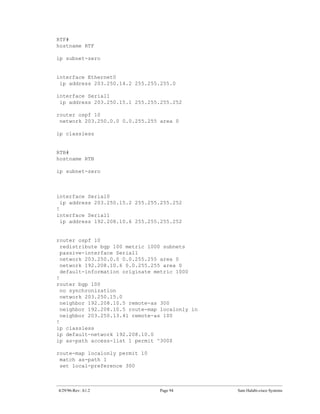
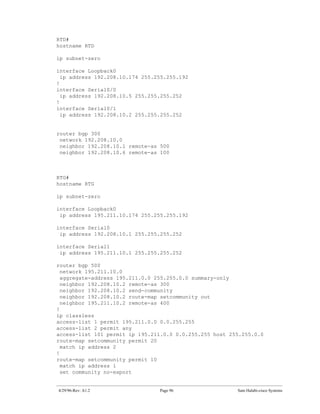
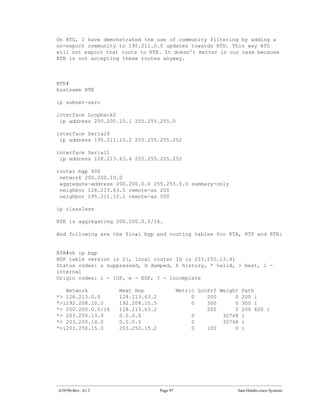
router bgp 300
neighbor 1.1.1.1    remote-as 100
neighbor 1.1.1.1    filter-list 5 weight 200
neighbor 2.2.2.2    remote-as 200
neighbor 2.2.2.2    filter-list 6 weight 100

ip as-path access-list 5 permit ^100$(this will only permit path 100)
ip as-path access-list 6 permit ^200$

The same outcome as above can be achieved by using routmaps.

RTC#
router bgp 300
neighbor 1.1.1.1    remote-as   100
neighbor 1.1.1.1    route-map   setweightin in
neighbor 2.2.2.2    remote-as   200
neighbor 2.2.2.2    route-map   setweightin in

ip as-path access-list 5 permit ^100$

route-map setweightin permit 10
match as-path 5
set weight 200
(anything that applies to access-list 5, i.e. packets from AS100, would
have weight 200)

route-map setweightin permit 20
set weight 100
(anything else would have weight 100)


4/29/96-Rev: A1.2                     Page 38               Sam Halabi-cisco Systems
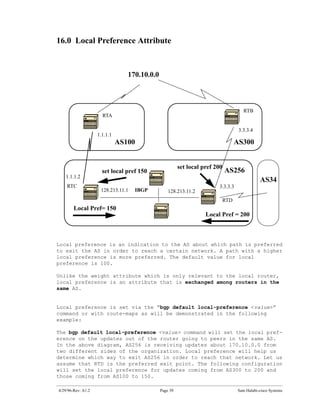
16.0 Local Preference Attribute


                                 170.10.0.0


                                                                                      RTB
                      RTA

                                                                                    3.3.3.4
                    1.1.1.1
                              AS100                                                AS300


                                                        set local pref 200
                      set local pref 150                                     AS256
   1.1.1.2
                                                                                              AS34
    RTC                                                                 3.3.3.3
                     128.213.11.1   IBGP          128.213.11.2
                                                                             RTD
        Local Pref= 150
                                                                   Local Pref = 200


Local preference is an indication to the AS about which path is preferred
to exit the AS in order to reach a certain network. A path with a higher
local preference is more preferred. The default value for local
preference is 100.

Unlike the weight attribute which is only relevant to the local router,
local preference is an attribute that is exchanged among routers in the
same AS.


Local preference is set via the “bgp default local-preference <value>”
command or with route-maps as will be demonstrated in the following
example:

The bgp default local-preference <value> command will set the local pref-
erence on the updates out of the router going to peers in the same AS.
In the above diagram, AS256 is receiving updates about 170.10.0.0 from
two different sides of the organization. Local preference will help us
determine which way to exit AS256 in order to reach that network. Let us
assume that RTD is the preferred exit point. The following configuration
will set the local preference for updates coming from AS300 to 200 and
those coming from AS100 to 150.

4/29/96-Rev: A1.2                             Page 39                              Sam Halabi-cisco Systems
RTC#
router bgp 256
neighbor 1.1.1.1 remote-as 100
neighbor 128.213.11.2 remote-as 256
bgp default local-preference 150


RTD#
router bgp 256
neighbor 3.3.3.4 remote-as 300
neighbor 128.213.11.1 remote-as 256
bgp default local-preference 200

In the above configuration RTC will set the local preference of all
updates to 150. The same RTD will set the local preference of all updates
to 200. Since local preference is exchanged within AS256, both RTC and
RTD will realize that network 170.10.0.0 has a higher local preference
when coming from AS300 rather than when coming from AS100. All traffic in
AS256 addressed to that network will be sent to RTD as an exit point.

More flexibility is provided by using route maps. In the above example,
all updates received by RTD will be tagged with local preference 200 when
they reach RTD. This means that updates coming from AS34 will also be
tagged with the local preference of 200. This might not be needed. This
is why we can use route maps to specify what specific updates need to be
tagged with a specific local preference as shown below:

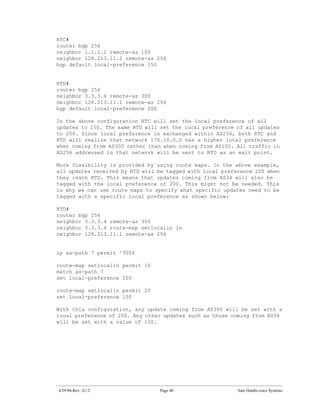
RTD#
router bgp 256
neighbor 3.3.3.4 remote-as 300
neighbor 3.3.3.4 route-map setlocalin in
neighbor 128.213.11.1 remote-as 256


ip as-path 7 permit ^300$

route-map setlocalin permit 10
match as-path 7
set local-preference 200

route-map setlocalin permit 20
set local-preference 150

With this configuration, any update coming from AS300 will be set with a
local preference of 200. Any other updates such as those coming from AS34
will be set with a value of 150.


4/29/96-Rev: A1.2                Page 40                   Sam Halabi-cisco Systems
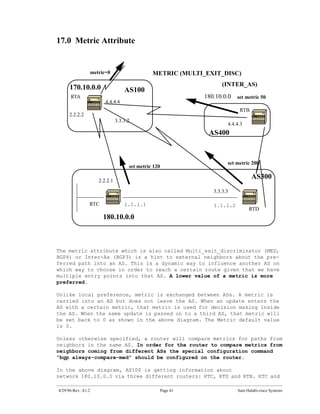
17.0 Metric Attribute


                    metric=0                     METRIC (MULTI_EXIT_DISC)
                                                                         (INTER_AS)
      170.10.0.0                     AS100
      RTA                                                         180.10.0.0 set metric 50
                          4.4.4.4
                                                                                RTB
     2.2.2.2
                                 3.3.3.2
                                                                           4.4.4.3
                                                                   AS400


                                                                           set metric 200
                                       set metric 120

                       2.2.2.1
                                                                                      AS300
                                                                     3.3.3.3

                RTC                  1.1.1.1                         1.1.1.2
                                                                                     RTD
                         180.10.0.0


The metric attribute which is also called Multi_exit_discriminator (MED,
BGP4) or Inter-As (BGP3) is a hint to external neighbors about the pre-
ferred path into an AS. This is a dynamic way to influence another AS on
which way to choose in order to reach a certain route given that we have
multiple entry points into that AS. A lower value of a metric is more
preferred.

Unlike local preference, metric is exchanged between ASs. A metric is
carried into an AS but does not leave the AS. When an update enters the
AS with a certain metric, that metric is used for decision making inside
the AS. When the same update is passed on to a third AS, that metric will
be set back to 0 as shown in the above diagram. The Metric default value
is 0.

Unless otherwise specified, a router will compare metrics for paths from
neighbors in the same AS. In order for the router to compare metrics from
neighbors coming from different ASs the special configuration command
“bgp always-compare-med” should be configured on the router.

In the above diagram, AS100 is getting information about
network 180.10.0.0 via three different routers: RTC, RTD and RTB. RTC and

4/29/96-Rev: A1.2                                       Page 41                Sam Halabi-cisco Systems
RTD are in AS300 and RTB is in AS400.

Assume that we have set the metric coming from RTC to 120, the metric
coming from RTD to 200 and the metric coming from RTB to 50. Given that
by default a router compares metrics coming from neighbors in the same
AS, RTA can only compare the metric coming from RTC to the metric coming
from RTD and will pick RTC as the best next hop because 120 is less than
200. When RTA gets an update from RTB with metric 50, he can not compare
it to 120 because RTC and RTB are in different ASs (RTA has to choose
based on some other attributes).

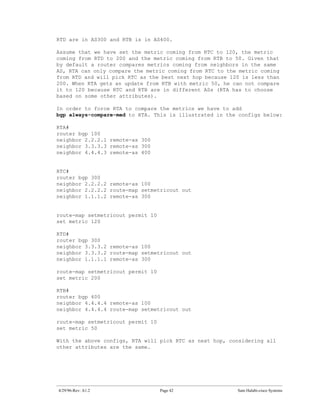
In order to force RTA to compare the metrics we have to add
bgp always-compare-med to RTA. This is illustrated in the configs below:

RTA#
router bgp 100
neighbor 2.2.2.1 remote-as 300
neighbor 3.3.3.3 remote-as 300
neighbor 4.4.4.3 remote-as 400


RTC#
router bgp 300
neighbor 2.2.2.2 remote-as 100
neighbor 2.2.2.2 route-map setmetricout out
neighbor 1.1.1.2 remote-as 300


route-map setmetricout permit 10
set metric 120

RTD#
router bgp 300
neighbor 3.3.3.2 remote-as 100
neighbor 3.3.3.2 route-map setmetricout out
neighbor 1.1.1.1 remote-as 300

route-map setmetricout permit 10
set metric 200

RTB#
router bgp 400
neighbor 4.4.4.4 remote-as 100
neighbor 4.4.4.4 route-map setmetricout out

route-map setmetricout permit 10
set metric 50

With the above configs, RTA will pick RTC as next hop, considering all
other attributes are the same.


4/29/96-Rev: A1.2                  Page 42                Sam Halabi-cisco Systems
In order to have RTB included in the metric comparison, we have to
configure RTA as follows:


RTA#
router bgp 100
neighbor 2.2.21 remote-as 300
neighbor 3.3.3.3 remote-as 300
neighbor 4.4.4.3 remote-as 400
bgp always-compare-med

In this case RTA will pick RTB as the best next hop in order to reach
network 180.10.0.0.


Metric can also be set while redistributing routes into BGP, the command
is:

default-metric number

Assume in the above example that RTB is injecting a network via static
into AS100 then the following configs:

RTB#
router bgp 400
redistribute static
default-metric 50

ip route 180.10.0.0 255.255.0.0 null 0

will cause RTB to send out 180.10.0.0 with a metric of 50.


4/29/96-Rev: A1.2                Page 43                 Sam Halabi-cisco Systems
18.0 Community Attribute
The community attribute is a way to group destinations in a certain com-
munity and apply routing decisions (accept, prefer, redistribute, etc.)
according to those communities.

We can use route maps to set the community attributes. The route map set
command has the following syntax:

set community community-number [additive]

A few predefined well known communities (community-number) are:

-no-export (Do not advertise to EBGP peers)
-no-advertise (Do not advertise this route to any peer)
-internet (Advertise this route to the internet community, any router
belongs to it)

An example of route maps where community is set is:

route-map communitymap
match ip address 1
set community no-advertise

or

route-map setcommunity
match as-path 1
set community 200 additive

If the additive keyword is not set, 200 will replace any old community
that already exits; if we use the keyword additive then the 200 will be
added to the community.

Even if we set the community attribute, this attribute will not be sent
to neighbors by default.

In order to send the attribute to our neighbor we have to use the
following:

neighbor {ip-address|peer-group-name} send-community

Example:

RTA#
router bgp 100
neighbor 3.3.3.3 remote-as 300
neighbor 3.3.3.3 send-community
neighbor 3.3.3.3 route-map setcommunity out


4/29/96-Rev: A1.2                Page 44                  Sam Halabi-cisco Systems
19.0 BGP Filtering

Sending and receiving BGP updates can be controlled by using a number of
different filtering methods. BGP updates can be filtered based on route
information, on path information or on communities. All methods will
achieve the same results, choosing one over the other depends on the spe-
cific network configuration.


19.1 Route Filtering


           150.10.0.0

                                                             160.10.0.0
                    RTA
                                                                  RTB


                          2.2.2.2
                                                                 3.3.3.3
                                                                           AS 200
         AS 100

                                2.2.2.1
                                          3.3.3.1
                                          RTC


                            170.10.0.0              AS 300

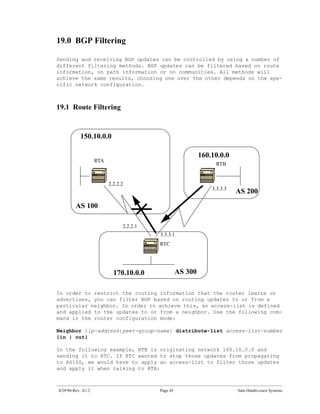
In order to restrict the routing information that the router learns or
advertises, you can filter BGP based on routing updates to or from a
particular neighbor. In order to achieve this, an access-list is defined
and applied to the updates to or from a neighbor. Use the following com-
mand in the router configuration mode:

Neighbor {ip-address|peer-group-name} distribute-list access-list-number
{in | out}

In the following example, RTB is originating network 160.10.0.0 and
sending it to RTC. If RTC wanted to stop those updates from propagating
to AS100, we would have to apply an access-list to filter those updates
and apply it when talking to RTA:


4/29/96-Rev: A1.2                         Page 45                          Sam Halabi-cisco Systems
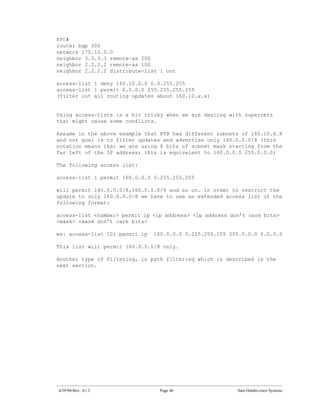
RTC#
router bgp 300
network 170.10.0.0
neighbor 3.3.3.3 remote-as 200
neighbor 2.2.2.2 remote-as 100
neighbor 2.2.2.2 distribute-list 1 out

access-list 1 deny 160.10.0.0 0.0.255.255
access-list 1 permit 0.0.0.0 255.255.255.255
(filter out all routing updates about 160.10.x.x)


Using access-lists is a bit tricky when we are dealing with supernets
that might cause some conflicts.

Assume in the above example that RTB has different subnets of 160.10.X.X
and our goal is to filter updates and advertise only 160.0.0.0/8 (this
notation means that we are using 8 bits of subnet mask starting from the
far left of the IP address; this is equivalent to 160.0.0.0 255.0.0.0)

The following access list:

access-list 1 permit 160.0.0.0 0.255.255.255

will permit 160.0.0.0/8,160.0.0.0/9 and so on. In order to restrict the
update to only 160.0.0.0/8 we have to use an extended access list of the
following format:

access-list <number> permit ip <ip address> <ip address don’t care bits>
<mask> <mask don’t care bits>

ex: access-list 101 permit ip   160.0.0.0 0.255.255.255 255.0.0.0 0.0.0.0

This list will permit 160.0.0.0/8 only.

Another type of filtering, is path filtering which is described in the
next section.


4/29/96-Rev: A1.2                Page 46                  Sam Halabi-cisco Systems
19.2 Path Filtering


                150.10.0.0                                                    AS400

                                                                    160.10.0.0
                                                                          RTB
                       RTA


                            2.2.2.2
                                                                        3.3.3.3
                                                                              AS 200
              AS 100

                                   2.2.2.1
                                                       3.3.3.1

                                                  RTC


                              170.10.0.0                   AS 300


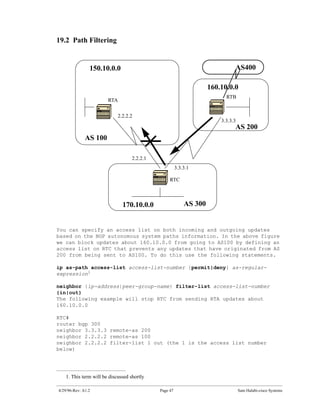
You can specify an access list on both incoming and outgoing updates
based on the BGP autonomous system paths information. In the above figure
we can block updates about 160.10.0.0 from going to AS100 by defining an
access list on RTC that prevents any updates that have originated from AS
200 from being sent to AS100. To do this use the following statements.

ip as-path access-list access-list-number {permit|deny} as-regular-
expression1

neighbor {ip-address|peer-group-name} filter-list access-list-number
{in|out}
The following example will stop RTC from sending RTA updates about
160.10.0.0

RTC#
router bgp 300
neighbor 3.3.3.3 remote-as 200
neighbor 2.2.2.2 remote-as 100
neighbor 2.2.2.2 filter-list 1 out (the 1 is the access list number
below)


   1. This term will be discussed shortly

4/29/96-Rev: A1.2                            Page 47                              Sam Halabi-cisco Systems
ip as-path access-list 1 deny ^200$
ip as-path access-list 1 permit .*
In the above example, access-list 1 states: deny any updates with path
information that start with 200 (^) and end with 200 ($). The ^200$ is
called a regular expression, with ^ meaning starts with and $ meaning
ends with. Since RTB sends updates about 160.10.0.0 with path information
starting with 200 and ending with 200, then this update will match the
access list and will be denied.

The .* is another regular expression with the dot meaning any character
and the * meaning the repetition of that character. So .* is actually any
path information, which is needed to permit all other updates to be sent.

What would happen if instead of using ^200$ we have used ^200
If you have an AS400 (see figure above), updates originated by AS400 will
have path information of the form (200, 400) with 200 being first and 400
being last. Those updates will match the access list ^200 because they
start with 200 and will be prevented from being sent to RTA which is not
the required behavior.

A good way to check whether we have implemented the correct regular
expression is to do:

sh ip bgp regexp <regular expression>.

This will show us all the path that has matched the configured regular
expression.

Regular expressions sound a bit complicated but actually they are not.
The next section will explain what is involved in creating a regular
expression.


4/29/96-Rev: A1.2                Page 48                  Sam Halabi-cisco Systems
19.2.1 AS-Regular Expression

A regular expression is a pattern to match against an input string.
By building a regular expression we specify a string that input must
match. In case of BGP we are specifying a string consisting of path
information that an input should match.

In the previous example we specified the string ^200$ and wanted path
information coming inside updates to match it in order to perform a
decision.

The regular expression is composed of the following:

A- Ranges:
A range is a sequence of characters contained within left and right
square brackets. ex: [abcd]

B- Atoms
An atom is a single character

. (Matches any single character)
^ (Matches the beginning of the input string)
$ (Matches the end of the input string)
character (Matches the character)
- (Matches a comma (,), left brace ({), right brace (}), the beginning
of the input string, the end of the input string, or a space.

C-Pieces
A piece is an atom followed by one of the symbols:

* (Matches 0 or more sequences of the atom)
+ (Matches 1 or more sequences of the atom)
? (Matches the atom or the null string)

D- Branch
A branch is a 0 or more concatenated pieces.

Examples of regular expressions follow:

a* any occurrence of the letter a, including none
a+ at least one occurrence of a should be present
ab?a this will match aa or aba

ex:
_100_(via AS100)
^100$ (origin AS100)
^100 .* (coming from AS100)
^$ (originated from this AS)


4/29/96-Rev: A1.2                Page 49                 Sam Halabi-cisco Systems
19.3 BGP Community Filtering
We have already seen route filtering and as-path filtering. Another
method is community filtering. Community has been discussed in section
19.0 and here are few examples of how we can use it.


               150.10.0.0
                                                                  160.10.0.0
                       RTA                                             RTB


                            2.2.2.2
                                                                      3.3.3.3
                                                                         AS 200
              AS 100

                                  2.2.2.1
                                                      3.3.3.1
                                                  RTC


                              170.10.0.0                 AS 300


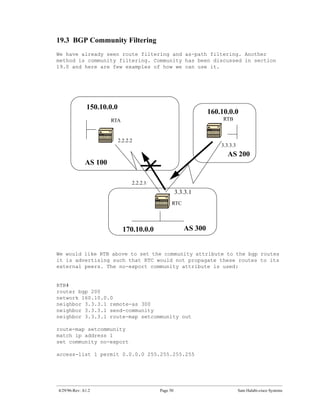
We would like RTB above to set the community attribute to the bgp routes
it is advertising such that RTC would not propagate these routes to its
external peers. The no-export community attribute is used:


RTB#
router bgp 200
network 160.10.0.0
neighbor 3.3.3.1 remote-as 300
neighbor 3.3.3.1 send-community
neighbor 3.3.3.1 route-map setcommunity out

route-map setcommunity
match ip address 1
set community no-export

access-list 1 permit 0.0.0.0 255.255.255.255


4/29/96-Rev: A1.2                           Page 50                             Sam Halabi-cisco Systems
Note that we have used the route-map setcommunity in order to set the
community to no-export. Note also that we had to use the “neighbor
send-community” command in order to send this attribute to RTC.

When RTC gets the updates with the attribute no-export, it will not
propagate them to its external peer RTA.

Example 2:

RTB#
router bgp 200
network 160.10.0.0
neighbor 3.3.3.1 remote-as 300
neighbor 3.3.3.1 send-community
neighbor 3.3.3.1 route-map setcommunity out

route-map setcommunity
match ip address 2
set community 100 200 additive

access-list 2 permit 0.0.0.0 255.255.255.255

In the above example, RTB has set the community attribute to 100 200
additive. The value 100 200 will be added to any existing community value
before being sent to RTC.


A community list is a group of communities that we use in a match clause
of a route map which allows us to do filtering or setting attributes
based on different lists of community numbers.

ip community-list community-list-number {permit|deny} community-number

For example we can define the following route map, match-on-community:

route-map match-on-community
match community 10 (10 is the community-list number)
set weight 20

ip community-list 10 permit 200 300 (200 300 is the community number)

We can use the above in order to filter or set certain parameters like
weight and metric based on the community value in certain updates. In
example two above, RTB was sending updates to RTC with a community of 100
200. If RTC wants to set the weight based on those values we could do the
following:


4/29/96-Rev: A1.2                Page 51                  Sam Halabi-cisco Systems
RTC#
router bgp 300
neighbor 3.3.3.3 remote-as 200
neighbor 3.3.3.3 route-map check-community in

route-map check-community permit 10
match community 1
set weight 20

route-map check-community permit 20
match community 2 exact
set weight 10

route-map check-community permit 30
match community 3


ip community-list 1 permit 100
ip community-list 2 permit 200
ip community-list 3 permit internet

In the above example, any route that has 100 in its community attribute
will match list 1 and will have the weight set to 20. Any route that has
only 200 as community will match list 2 and will have weight 10. The key-
word exact states that community should consist of 200 only and nothing
else. The last community list is here to make sure that other
updates are not dropped. Remember that anything that does not match, will
be dropped by default. The keyword internet means all routes because all
routes are members of the internet community.


4/29/96-Rev: A1.2                Page 52                  Sam Halabi-cisco Systems
20.0 BGP Neighbors and Route maps


                                                            190.10.10.0
             150.10.0.0                                      AS600

                                                                   AS400
                    RTA
                                                                              160.10.0.0
                                                                       RTB
                          2.2.2.2


           AS 100                                                3.3.3.3     AS 200


                                    2.2.2.1
                                                  3.3.3.1
                                                RTC


                            170.10.0.0                  AS 300


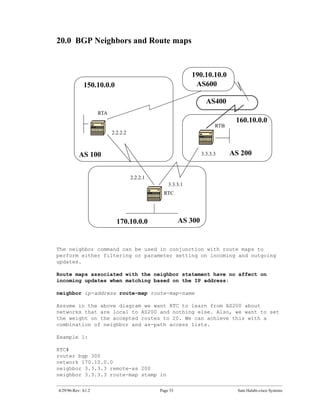
The neighbor command can be used in conjunction with route maps to
perform either filtering or parameter setting on incoming and outgoing
updates.

Route maps associated with the neighbor statement have no affect on
incoming updates when matching based on the IP address:

neighbor ip-address route-map route-map-name

Assume in the above diagram we want RTC to learn from AS200 about
networks that are local to AS200 and nothing else. Also, we want to set
the weight on the accepted routes to 20. We can achieve this with a
combination of neighbor and as-path access lists.

Example 1:

RTC#
router bgp 300
network 170.10.0.0
neighbor 3.3.3.3 remote-as 200
neighbor 3.3.3.3 route-map stamp in

4/29/96-Rev: A1.2                             Page 53                          Sam Halabi-cisco Systems
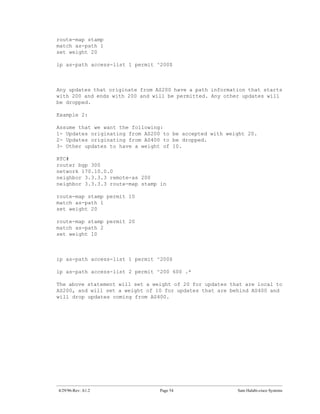
route-map stamp
match as-path 1
set weight 20

ip as-path access-list 1 permit ^200$


Any updates that originate from AS200 have a path information that starts
with 200 and ends with 200 and will be permitted. Any other updates will
be dropped.

Example 2:

Assume that we want the following:
1- Updates originating from AS200 to be accepted with weight 20.
2- Updates originating from AS400 to be dropped.
3- Other updates to have a weight of 10.

RTC#
router bgp 300
network 170.10.0.0
neighbor 3.3.3.3 remote-as 200
neighbor 3.3.3.3 route-map stamp in

route-map stamp permit 10
match as-path 1
set weight 20

route-map stamp permit 20
match as-path 2
set weight 10


ip as-path access-list 1 permit ^200$

ip as-path access-list 2 permit ^200 600 .*

The above statement will set a weight of 20 for updates that are local to
AS200, and will set a weight of 10 for updates that are behind AS400 and
will drop updates coming from AS400.


4/29/96-Rev: A1.2                Page 54                  Sam Halabi-cisco Systems
20.1 Use of set as-path prepend
In some situations we are forced to manipulate the path information in
order to manipulate the BGP decision process. The command that is used
with a route map is:

set as-path prepend <as-path#> <as-path#> ...


Suppose in the above diagram that RTC is advertising its own network
170.10.0.0 to two different ASs: AS100 and AS200. When the information is
propagated to AS600, the routers in AS600 will have network
reachability information about 170.10.0.0 via two different routes, the
first route is via AS100 with path (100, 300) and the second one is via
AS400 with path (400, 200,300). Assuming that all other attributes are
the same, AS600 will pick the shortest path and will choose the route via
AS100.

AS300 will be getting all its traffic via AS100. If we want to influence
this decision from the AS300 end we can make the path through AS100 look
like it is longer than the path going through AS400. We can do this by
prepending autonomous system numbers to the existing path info adver-
tised to AS100. A common practice is to repeat our own AS number using
the following:

RTC#
router bgp 300
network 170.10.0.0
neighbor 2.2.2.2 remote-as 100
neighbor 2.2.2.2 route-map SETPATH out

route-map SETPATH
set as-path prepend 300 300

Because of the above configuration, AS600 will receive updates about
170.10.0.0 via AS100 with a path information of: (100, 300, 300, 300)
which is longer than (400, 200, 300) received from AS100.


4/29/96-Rev: A1.2                 Page 55                  Sam Halabi-cisco Systems
20.2 BGP Peer Groups


         150.10.0.0
                                                   RTH

                    RTA
                                                                        RTB
                                                   4.4.4.2
                      2.2.2.2

                                                    AS600                         AS200
                                                                        1.1.1.2
      AS100
                                                                             RTE
                             2.2.2.1                          3.3.3.2
                                           1.1.1.1                                      RTF

                             RTC             5.5.5.1                       5.5.5.2

                                       6.6.6.1
                                                              6.6.6.2
                          170.10.0.0
                                                                            RTG
                                                      AS300


A BGP peer group, is a group of BGP neighbors with the same update
policies. Update policies are usually set by route maps,
distribute-lists and filter-lists, etc. Instead of defining the same
policies for each separate neighbor, we define a peer group name and we
assign these policies to the peer group.

Members of the peer group inherit all of the configuration options of the
peer group. Members can also be configured to override these options if
these options do not affect outbound updates; you can only override
options set on the inbound.

To define a peer group use the following:

neighbor peer-group-name peer-group

In the following example we will see how peer groups are applied to
internal and external BGP neighbors.


4/29/96-Rev: A1.2                                Page 56                          Sam Halabi-cisco Systems
Example 1:

RTC#
router bgp 300
neighbor internalmap peer-group
neighbor internalmap remote-as 300
neighbor internalmap route-map SETMETRIC out
neighbor internalmap filter-list 1 out
neighbor internalmap filter-list 2 in
neighbor 5.5.5.2 peer-group internalmap
neighbor 6.6.6.2 peer-group internalmap
neighbor 3.3.3.2 peer-group internalmap
neighbor 3.3.3.2 filter-list 3 in


In the above configuration, we have defined a peer group named
internalmap and we have defined some policies for that group, such as a
route map SETMETRIC to set the metric to 5 and two different filter lists
1 and 2. We have applied the peer group to all internal neighbors RTE,
RTF and RTG. We have defined a separate filter-list 3 for neighbor RTE,
and this will override filter-list 2 inside the peer group. Note that we
could only override options that affect inbound updates.

Now, let us look at how we can use peer groups with external neighbors.
In the same diagram we will configure RTC with a peer-group externalmap
and we will apply it to external neighbors.

Example 2:

RTC#
router bgp 300
neighbor externalmap peer-group
neighbor externalmap route-map SETMETRIC
neighbor externalmap filter-list 1 out
neighbor externalmap filter-list 2 in
neighbor 2.2.2.2 remote-as 100
neighbor 2.2.2.2 peer-group externalmap
neighbor 4.4.4.2 remote-as 600
neighbor 4.4.4.2 peer-group externalmap
neighbor 1.1.1.2 remote-as 200
neighbor 1.1.1.2 peer-group externalmap
neighbor 1.1.1.2 filter-list 3 in


Note that in the above configs we have defined the remote-as statements
outside of the peer group because we have to define different external
ASs. Also we did an override for the inbound updates of neighbor 1.1.1.2
by assigning filter-list 3.


4/29/96-Rev: A1.2                Page 57                   Sam Halabi-cisco Systems
21.0 CIDR and Aggregate Addresses


                    150.10.0.0                                         160.10.0.0
                           RTA                                     RTB


                             2.2.2.2
                                                                           3.3.3.3
                                                                                 AS 200
                AS 100

                                    2.2.2.1
                                                         3.3.3.1

                                                        RTC


                                 170.10.0.0                   AS 300

One of the main enhancements of BGP4 over BGP3 is CIDR (Classless
Interdomain Routing). CIDR or supernetting is a new way of looking at IP
addresses. There is no notion of classes anymore (class A, B or C). For
example, network 192.213.0.0 which used to be an illegal class C network
is now a legal supernet represented by 192.213.0.0/16 where the 16 is the
number of bits in the subnet mask counting from the far left of the IP
address. This is similar to 192.213.0.0 255.255.0.0.

Aggregates are used to minimize the size of routing tables. Aggregation
is the process of combining the characteristics of several different
routes in such a way that a single route can be advertised. In the
example below, RTB is generating network 160.10.0.0. We will configure
RTC to propagate a supernet of that route 160.0.0.0 to RTA.

RTB#
router bgp 200
neighbor 3.3.3.1 remote-as 300
network 160.10.0.0

RTC#
router bgp 300
neighbor 3.3.3.3 remote-as 200
neighbor 2.2.2.2 remote-as 100
network 170.10.0.0
aggregate-address 160.0.0.0 255.0.0.0

RTC will propagate the aggregate address 160.0.0.0 to RTA.


4/29/96-Rev: A1.2                             Page 58                           Sam Halabi-cisco Systems
21.1 Aggregate Commands
There is a wide range of aggregate commands. It is important to
understand how each one works in order to have the desired aggregation
behavior.

The first command is the one used in the previous example:

aggregate-address address mask

This will advertise the prefix route, and all of the more specific
routes. The command aggregate-address 160.0.0.0 will propagate an addi-
tional network 160.0.0.0 but will not prevent 160.10.0.0 from being also
propagated to RTA. The outcome of this is that both networks 160.0.0.0
and 160.10.0.0 have been propagated to RTA. This is what we mean by
advertising the
prefix and the more specific route.

Please note that you can not aggregate an address if you do not have a
more specific route of that address in the BGP routing table.

For example, RTB can not generate an aggregate for 160.0.0.0 if it does
not have a more specific entry of 160.0.0.0 in its BGP table. The more
specific route could have been injected into the BGP table via incoming
updates from other ASs, from redistributing an IGP or static into BGP or
via the network command (network 160.10.0.0).


In case we would like RTC to propagate network 160.0.0.0 only and NOT the
more specific route then we would have to use the following:

aggregate-address address mask summary-only

This will a advertise the prefix only; all the more specific routes are
suppressed.

The command aggregate 160.0.0.0 255.0.0.0 summary-only will propagate
network 160.0.0.0 and will suppress the more specific route 160.10.0.0.

Please note that if we are aggregating a network that is injected into
our BGP via the network statement (ex: network 160.10.0.0 on RTB) then
the network entry is always injected into BGP updates even though we are
using the “aggregate summary-only” command. The upcoming CIDR example
discusses this situation.


4/29/96-Rev: A1.2                Page 59                  Sam Halabi-cisco Systems
aggregate-address address mask as-set

This advertises the prefix and the more specific routes but it includes
as-set information in the path information of the routing updates.
ex: aggregate 129.0.0.0 255.0.0.0 as-set.

This will be discussed in an example by itself in the following sections.


In case we would like to suppress more specific routes when doing the
aggregation we can define a route map and apply it to the aggregates.
This will allow us to be selective about which more specific routes to
suppress.

aggregate-address address-mask suppress-map map-name

This advertises the prefix and the more specific routes but it
suppresses advertisement according to a route-map. In the previous
diagram, if we would like to aggregate 160.0.0.0 and suppress the more
specific route 160.20.0.0 and allow 160.10.0.0 to be propagated, we can
use the following route map:

route-map CHECK permit 10
match ip address 1

access-list 1 deny 160.20.0.0 0.0.255.255
access-list 1 permit 0.0.0.0 255.255.255.255

Then we apply the route-map to the aggregate statement.

RTC#
router bgp 300
neighbor 3.3.3.3 remote-as 200
neighbor 2.2.2.2 remote-as 100
network 170.10.0.0
aggregate-address 160.0.0.0 255.0.0.0 suppress-map CHECK

Another variation is the:

aggregate-address address mask attribute-map map-name

This allows us to set the attributes (metric, etc.) when aggregates are
sent out. The following route map when applied to the aggregate
attribute-map command will set the origin of the aggregates to IGP.

route-map SETORIGIN
set origin igp

aggregate-address 160.0.0.0 255.0.0.0 attribute-map SETORIGIN


4/29/96-Rev: A1.2                Page 60                   Sam Halabi-cisco Systems
21.2 CIDR example 1


                     150.10.0.0                                       160.10.0.0
                                  RTA                                       RTB


                              2.2.2.2
                                                                          3.3.3.3


                    AS 100                                               AS 200


                                     2.2.2.1
                                                         3.3.3.1
                                                         RTC


                                  170.10.0.0                 AS 300


Request: Allow RTB to advertise the prefix 160.0.0.0 and suppress
all the more specific routes. The problem here is that network 160.10.0.0
is local to AS200 i.e. AS200 is the originator of 160.10.0.0.
You cannot have RTB generate a prefix for 160.0.0.0 without generating
an entry for 160.10.0.0 even if you use the “aggregate summary-only”
command because RTB is the originator of 160.10.0.0.

Solution 1:

The first solution is to use a static route and redistribute it into BGP.
The outcome is that RTB will advertise the aggregate with an origin of
incomplete (?).

RTB#
router bgp 200
neighbor 3.3.3.1 remote-as 300
redistribute static (This will generate an update for 160.0.0.0 with the
origin path as *incomplete*)

ip route 160.0.0.0 255.0.0.0 null0


4/29/96-Rev: A1.2                              Page 61                       Sam Halabi-cisco Systems
Solution 2:

In addition to the static route we add an entry for the network command,
this will have the same effect except that the origin of the update will
be set to IGP.

RTB#
router bgp 200
network 160.0.0.0 mask 255.0.0.0 (this will mark the update with origin
IGP)
neighbor 3.3.3.1 remote-as 300
redistribute static

ip route 160.0.0.0 255.0.0.0 null0


4/29/96-Rev: A1.2                Page 62                 Sam Halabi-cisco Systems
21.3 CIDR example 2 (as-set)
AS-SETS are used in aggregation to reduce the size of the path
information by listing the AS number only once, regardless of how many
times it may have appeared in multiple paths that were aggregated.
The as-set aggregate command is used in situations were aggregation of
information causes loss of information regarding the path attribute. In
the following example RTC is getting updates about 160.20.0.0 from RTA
and updates about 160.10.0.0 from RTB. Suppose RTC wants to aggregate
network 160.0.0.0/8 and send it to RTD. RTD would not know what the
origin of that route is. By adding the aggregate as-set statement we
force RTC to generate path information in the form of a set {}. All the
path information is included in that set irrespective of which path came
first.


       160.20.0.0                               160.10.0.0
                                                    RTB
                    RTA

                    2.2.2.2
                                                    3.3.3.3
                                                          AS200
           AS 100

                          2.2.2.1
                                    3.3.3.1                         RTD
                              RTC
                                    4.4.4.1
                                                      4.4.4.4

                                        AS300                   AS400
                      170.10.0.0


RTB#
router bgp 200
network 160.10.0.0
neighbor 3.3.3.1 remote-as 300

RTA#
router bgp 100
network 160.20.0.0
neighbor 2.2.2.1 remote-as 300


4/29/96-Rev: A1.2                    Page 63                      Sam Halabi-cisco Systems
Case 1:

RTC does not have an as-set statement. RTC will send an update
160.0.0.0/8to RTD with path information (300) as if the route has
originated from AS300.

RTC#
router bgp 300
neighbor 3.3.3.3 remote-as 200
neighbor 2.2.2.2 remote-as 100
neighbor 4.4.4.4 remote-as 400
aggregate 160.0.0.0 255.0.0.0 summary-only
(this causes RTC to send RTD updates about 160.0.0.0/8 with no indication
that 160.0.0.0 is actually coming from two different autonomous systems,
this may create loops if RT4 has an entry back into AS100

Case 2:

RTC#
router bgp 300
neighbor 3.3.3.3 remote-as 200
neighbor 2.2.2.2 remote-as 100
neighbor 4.4.4.4 remote-as 400
aggregate 160.0.0.0 255.0.0.0 summary-only
aggregate 160.0.0.0 255.0.0.0 as-set
(causes RTC to send RTD updates about 160.0.0.0/8 with an indication that
160.0.0.0 belongs to a set {100 200})


4/29/96-Rev: A1.2                Page 64                  Sam Halabi-cisco Systems
The next two subjects, “confederation” and “route reflectors” are
designed for ISPs who would like to further control the explosion of IBGP
peering inside their autonomous systems.


22.0 BGP Confederation

BGP confederation is implemented in order to reduce the IBGP mesh inside
an AS. The trick is to divide an AS into multiple ASs and assign the
whole group to a single confederation. Each AS by itself will have IBGP
fully meshed and has connections to other ASs inside the confederation.
Even though these ASs will have EBGP peers to ASs within the confedera-
tion, they exchange routing as if they were using IBGP; next hop, metric
and local preference information are preserved. To the outside world, the
confederation (the group of ASs) will look as a single AS.

To configure a BGP confederation use the following:

bgp confederation identifier autonomous-system

The confederation identifier will be the AS number of the confederation
group. The group of ASs will look to the outside world as one AS with the
AS number being the confederation identifier.

Peering within the confederation between multiple ASs is done via the
following command:

bgp confederation peers autonomous-system [autonomous-system.]

The following is an example of confederation:


4/29/96-Rev: A1.2                Page 65                   Sam Halabi-cisco Systems
Example:


                RTA

                                                           6.6.6.6
                    5.5.5.5                  AS600

    AS 100


             5.5.5.4
                        RTC
                                               RTD
                                                      AS60
                          128.213.30.1
                                                     129.210.11.1

                              128.213.10.1
                                                                                AS70
                                AS50           129.210.30.2          135.212.14.1

                       128.213.20.1
                                                       AS 500


Let us assume that you have an autonomous system 500 consisting of nine
BGP speakers (other non BGP speakers exist also, but we are only
interested in the BGP speakers that have EBGP connections to other ASs).
If you want to make a full IBGP mesh inside AS500 then you would need
nine peer connections for each router, 8 IBGP peers and one EBGP peer to
external ASs.

By using confederation we can divide AS500 into multiple ASs: AS50, AS60
and AS70. We give the AS a confederation identifier of 500. The outside
world will see only one AS500. For each AS50, AS60 and AS70 we define a
full mesh of IBGP peers and we define the list of confederation peers
using the bgp confederation peers command.

I will show a sample configuration of routers RTC, RTD and RTA. Note that
RTA has no knowledge of ASs 50, 60 or 70. RTA has only knowledge of
AS500.


4/29/96-Rev: A1.2                                Page 66                            Sam Halabi-cisco Systems
RTC#
router bgp 50
bgp confederation identifier 500
bgp confederation peers 60 70
neighbor 128.213.10.1 remote-as 50 (IBGP connection within AS50)
neighbor 128.213.20.1 remote-as 50 (IBGP connection within AS50)
neighbor 129.210.11.1 remote-as 60 (BGP connection with confederation
peer 60)
neighbor 135.212.14.1 remote-as 70 (BGP connection with confederation
peer 70)
neighbor 5.5.5.5 remote-as 100 (EBGP connection to external AS100)


RTD#
router bgp 60
bgp confederation identifier 500
bgp confederation peers 50 70
neighbor 129.210.30.2 remote-as 60 (IBGP connection within AS60)
neighbor 128.213.30.1 remote-as 50(BGP connection with confederation
peer 50)
neighbor 135.212.14.1 remote-as 70 (BGP connection with confederation
peer 70)
neighbor 6.6.6.6 remote-as 600 (EBGP connection to external AS600)


RTA#
router bgp 100
neighbor 5.5.5.4 remote-as 500 (EBGP connection to confederation 500)


4/29/96-Rev: A1.2                Page 67                 Sam Halabi-cisco Systems
23.0 Route Reflectors

Another solution for the explosion of IBGP peering within an autonomous
system is Route Reflectors (RR). As demonstrated in section 9.0 (Internal
BGP), a BGP speaker will not advertise a route learned via another IBGP
speaker to a third IBGP speaker. By relaxing this restriction a bit and
by providing additional control, we can allow a router to advertise
(reflect) IBGP learned routes to other IBGP speakers. This will reduce
the number of IBGP peers within an AS.

Example:


                             RTA                           (RR)

                                                        RTC


                    AS 100                     RTB


In normal cases, a full IBGP mesh should be maintained between RTA, RTB
and RTC within AS100. By utilizing the route reflector concept, RTC could
be elected as a RR and have a partial IBGP peering with RTA and RTB.
Peering between RTA and RTB is not needed because RTC will be a route
reflector for the updates coming from RTA and RTB.

Configuring a route reflector is done using the following BGP router sub-
command:

neighbor <ip-address> route-reflector-client

The router with the above command would be the RR and the neighbors
pointed at would be the clients of that RR. In our example, RTC would
be configured with the “neighbor route-reflector-client” command point-
ing at RTA and RTB’s IP addresses. The combination of the RR and its cli-
ents is called a cluster. RTA, RTB and RTC above would form a cluster
with a single RR within AS100.

Other IBGP peers of the RR that are not clients are called non-clients.


4/29/96-Rev: A1.2                  Page 68                    Sam Halabi-cisco Systems
Example:


                                                           AS200

                                                              8.8.8.8


          AS 100                        RTG       (RR)
                                                  7.7.7.7


                      4.4.4.4
                                                           3.3.3.3
               RTD    (RR)                                                 RTC
                                                                            (RR)

            6.6.6.6          5.5.5.5             2.2.2.2
                                                                       1.1.1.1
          RTE                                      RTA
                                                                         RTB
                             RTF


                                                                     12.12.12.12
                                                                 AS300


An autonomous system can have more than one route reflector; a RR would
treat other RRs just like any other IBGP speaker. Other RRs could belong
to the same cluster (client group) or to other clusters. In a simple con-
figuration, the AS could be divided into multiple clusters, each RR will
be configured with other RRs as non-client peers in a fully meshed topol-
ogy. Clients should not peer with IBGP speakers outside their cluster.

Consider the above diagram. RTA, RTB and RTC form a single cluster with
RTC being the RR. According to RTC, RTA and RTB are clients and anything
else is a non-client. Remember that clients of an RR are pointed at using
the “neighbor <ip-address> route-reflector-client” command. The same RTD
is the RR for its clients RTE and RTF; RTG is a RR in a third cluster.
Note that RTD, RTC and RTG are fully meshed but routers within a cluster
are not. When a route is received by a RR, it will do the following
depending on the peer type:


4/29/96-Rev: A1.2                      Page 69                       Sam Halabi-cisco Systems
1- Route from       a non-client peer: reflect to all the clients within the
cluster.
2- Route from       a client peer: reflect to all the non-client peers and also
to the client       peers.
3- Route from       an EBGP peer: send the update to all client and non-client
peers.


The following is the relative BGP configuration of routers RTC, RTD and
RTB:


RTC#

router bgp 100
neighbor 2.2.2.2       remote-as 100
neighbor 2.2.2.2       route-reflector-client
neighbor 1.1.1.1       remote-as 100
neighbor 1.1.1.1       route-reflector-client
neighbor 7.7.7.7       remote-as 100
neighbor 4.4.4.4       remote-as 100
neighbor 8.8.8.8       remote-as 200


RTB#

router bgp 100
neighbor 3.3.3.3 remote-as 100
neighbor 12.12.12.12 remote-as 300


RTD#

router bgp 100
neighbor 6.6.6.6       remote-as 100
neighbor 6.6.6.6       route-reflector-client
neighbor 5.5.5.5       remote-as 100
neighbor 5.5.5.5       route-reflector-client
neighbor 7.7.7.7       remote-as 100
neighbor 3.3.3.3       remote-as 100


As the IBGP learned routes are reflected, it is possible to have the
routing information loop. The Route-Reflector scheme has a few methods to
avoid this:

1- Originator-id: this is an optional, non transitive BGP attribute that
is four bytes long and is created by a RR. This attribute will carry
the router-id (RID) of the originator of the route in the local AS. Thus,
due to poor configuration, if the routing information comes back to the
originator, it will be ignored.

2- Cluster-list: this will be discussed in the next section.


4/29/96-Rev: A1.2                      Page 70                   Sam Halabi-cisco Systems
23.1 Multiple RRs within a cluster

       AS400
                           9.9.9.9                                   AS200
                          AS300
       11.11.11.11
                                                                        8.8.8.8


                      AS 100
                                                 RTG       (RR)
                                                           7.7.7.7


                            4.4.4.4

                                          RTH                        3.3.3.3
               RTD          (RR)                                                     RTC
                                                                                      (RR)

            6.6.6.6                         (RR)          2.2.2.2
                                  10.10.10.10                                    1.1.1.1
          RTE                                                  RTA
                        5.5.5.5                                                    RTB
                                    RTF


                                                 AS500
                                                 13.13.13.13

Usually, a cluster of clients will have a single RR. In this case, the
cluster will be identified by the router-id of the RR. In order to
increase redundancy and avoid single points of failure, a cluster might
have more than one RR. All RRs in the same cluster need to be configured
with a 4 byte cluster-id so that a RR can recognize updates from RRs in
the same cluster.

A cluster-list is a sequence of cluster-ids that the route has passed.
When a RR reflects a route from its clients to non-clients outside of the
cluster, it will append the local cluster-id to the cluster-list. If this
update has an empty cluster-list the RR will create one. Using this
attribute, a RR can identify if the routing information is looped back to
the same cluster due to poor configuration. If the local cluster-id is
found in the cluster-list, the advertisement will be ignored.

In the above diagram, RTD, RTE, RTF and RTH belong to one cluster with
both RTD and RTH being RRs for the same cluster. Note the redundancy in
that RTH has a fully meshed peering with all the RRs. In case RTD goes
down, RTH will take its place. The following are the configuration of
RTH, RTD, RTF and RTC:

4/29/96-Rev: A1.2                               Page 71                        Sam Halabi-cisco Systems
RTH#

router bgp 100
neighbor 4.4.4.4 remote-as 100
neighbor 5.5.5.5 remote-as 100
neighbor 5.5.5.5 route-reflector-client
neighbor 6.6.6.6 remote-as 100
neighbor 6.6.6.6 route-reflector-client
neighbor 7.7.7.7 remote-as 100
neighbor 3.3.3.3 remote-as 100
neighbor 9.9.9.9 remote-as 300
bgp route-reflector 10 (This is the cluster-id)


RTD#

router bgp 100
neighbor 10.10.10.10 remote-as 100
neighbor 5.5.5.5 remote-as 100
neighbor 5.5.5.5 route-reflector-client
neighbor 6.6.6.6 remote-as 100
neighbor 6.6.6.6 route-reflector-client
neighbor 7.7.7.7 remote-as 100
neighbor 3.3.3.3 remote-as 100
neighbor 11.11.11.11 remote-as 400
bgp route-reflector 10 (This is the cluster-id)


RTF#

router bgp 100
neighbor 10.10.10.10 remote-as 100
neighbor 4.4.4.4 remote-as 100
neighbor 13.13.13.13 remote-as 500


RTC#

router bgp 100
neighbor 1.1.1.1 remote-as 100
neighbor 1.1.1.1 route-reflector-client
neighbor 2.2.2.2 remote-as 100
neighbor 2.2.2.2 route-reflector-client
neighbor 4.4.4.4 remote-as 100
neighbor 7.7.7.7 remote-as 100
neighbor 10.10.10.10 remote-as 100
neighbor 8.8.8.8 remote-as 200


Note that we did not need the cluster command for RTC because only one RR
exists in that cluster.


4/29/96-Rev: A1.2                Page 72                   Sam Halabi-cisco Systems
An important thing to note, is that peer-groups were not used in the
above configuration. If the clients inside a cluster do not have direct
IBGP peers among one another and they exchange updates through the RR,
peer-goups should not be used. If peer groups were to be configured, then
a potential withdrawal to the source of a route on the RR would be sent
to all clients inside the cluster and could cause problems.

The router sub-command bgp client-to-client reflection is enabled by
default on the RR.If BGP client-to-client reflection were turned off on
the RR and redundant BGP peering was made between the clients, then using
peer groups would be alright.


23.2 RR and conventional BGP speakers
It is normal in an AS to have BGP speakers that do not understand the
concept of route reflectors. We will call these routers conventional BGP
speakers. The route reflector scheme will allow such conventional BGP
speakers to coexist. These routers could be either members of a client
group or a non-client group. This would allow easy and gradual migration
from the current IBGP model to the route reflector model. One could start
creating clusters by configuring a single router as RR and making other
RRs and their clients normal IBGP peers. Then more clusters could be cre-
ated gradually.


Example:


            AS300
                                                             AS200

                      13.13.13.13
                                                                   8.8.8.8


                                              AS 100
                              4.4.4.4
                                                                   3.3.3.3
               RTD                                                                 RTC
                            (RR)


            6.6.6.6                 5.5.5.5              2.2.2.2
                                                                               1.1.1.1
          RTE                                              RTA
                                                                                 RTB
                                    RTF


                                                             AS400 14.14.14.14


4/29/96-Rev: A1.2                              Page 73                       Sam Halabi-cisco Systems
In the above diagram, RTD, RTE and RTF have the concept of route reflec-
tion. RTC, RTA and RTB are what we call conventional routers and cannot
be configured as RRs. Normal IBGP mesh could be done between these rout-
ers and RTD. Later on, when we are ready to upgrade, RTC could be made a
RR with clients RTA and RTB. Clients do not have to understand the route
reflection scheme; it is only the RRs that would have to be upgraded.

The following is the configuration of RTD and RTC:

RTD#

router bgp 100
neighbor 6.6.6.6 remote-as 100
neighbor 6.6.6.6 route-reflector-client
neighbor 5.5.5.5 remote-as 100
neighbor 5.5.5.5 route-reflector-client
neighbor 3.3.3.3 remote-as 100
neighbor 2.2.2.2 remote-as 100
neighbor 1.1.1.1 remote-as 100
neighbor 13.13.13.13 remote-as 300


RTC#

router bgp 100
neighbor 4.4.4.4    remote-as   100
neighbor 2.2.2.2    remote-as   100
neighbor 1.1.1.1    remote-as   100
neighbor 8.8.8.8    remote-as   200

When we are ready to upgrade RTC and make it a RR, we would remove the
IBGP full mesh and have RTA and RTB become clients of RTC.


23.3 Avoiding looping of routing information
We have mentioned so far two attributes that are used to prevent poten-
tial information looping: the originator-id and the cluster-list.


Another means of controlling loops is to put more restrictions on the set
clause of out-bound route-maps.

The set clause for out-bound route-maps does not affect routes reflected
to IBGP peers.

More restrictions are also put on the nexthop-self which is a per neigh-
bor configuration option. When used on RRs the nexthop-self will only
affect the nexthop of EBGP learned routes because the nexthop of
reflected routes should not be changed.


4/29/96-Rev: A1.2                     Page 74              Sam Halabi-cisco Systems
24.0 Route Flap Dampening

Route dampening (introduced in Cisco IOS version 11.0) is a mechanism to minimize the
instability caused by route flapping and oscillation over the network. To accomplish this,
criteria are defined to identify poorly behaved routes. A route which is flapping gets a pen-
alty for each flap (1000). As soon as the cumulative penalty reaches a predefined “sup-
press-limit”, the advertisement of the route will be suppressed. The penalty will be
exponentially decayed based on a preconfigured “half-time”. Once the penalty decreases
below a predefined “reuse-limit”, the route advertisement will be un-suppressed.

Routes, external to an AS, learned via IBGP will not be dampened. This is to avoid the
IBGP peers having higher penalty for routes external to the AS.

The penalty will be decayed at a granularity of 5 seconds and the routes will be un-sup-
pressed at a granularity of 10 seconds. The dampening information is kept until the pen-
alty becomes less than half of “reuse-limit”, at that point the information is purged from
the router.

Initially, dampening will be off by default. This might change if there is a need to have this
feature enabled by default. The following are the commands used to control route damp-
ening:

bgp dampening                            - will turn on dampening.
no bgp dampening                         - will turn off dampening.
bgp dampening <half-life-time>           - change the half-life time.

A command that sets all parameters at the same time is:

bgp dampening <half-life-time> <reuse> <suppress> <maximum-suppress-time>

<half-life-time>    range is 1-45 min, current default is 15 min.
<reuse-value>       range is 1-20000, default is 750.
<suppress-value>     range is 1-20000, default is 2000.
<max-suppress-time> maximum duration a route can be suppressed,
                      range is 1-255, default is 4 times half-life-time.


4/29/96-Rev: A1.2                          Page 75                         Sam Halabi-cisco Systems
Example:


            S0 203.250.15.2


                       RTB                      S0/0 192.208.10.5
                    S1 192.208.10.6                                       RTD
               AS100
                                                AS300               L0 192.208.10.174


RTB#
hostname RTB


interface Serial0
 ip address 203.250.15.2 255.255.255.252

interface Serial1
 ip address 192.208.10.6 255.255.255.252


router bgp 100
 bgp dampening
 network 203.250.15.0
 neighbor 192.208.10.5 remote-as 300

RTD#
hostname RTD


interface Loopback0
ip address 192.208.10.174 255.255.255.192

interface Serial0/0
 ip address 192.208.10.5 255.255.255.252

router bgp 300
 network 192.208.10.0
 neighbor 192.208.10.6 remote-as 100

RTB is configured for route dampening with default parameters. Assuming
the EBGP link to RTD is stable, RTB’s BGP table would look like this:


4/29/96-Rev: A1.2                     Page 76                               Sam Halabi-cisco Systems
RTB#sh ip bgp
BGP table version is 24, local router ID is 203.250.15.2 Status codes: s
suppressed, d damped, h history, * valid, > best, i - internal
Origin codes: i - IGP, e - EGP, ? - incomplete


   Network            Next Hop                 Metric LocPrf Weight Path
*> 192.208.10.0       192.208.10.5                  0             0 300 i
*> 203.250.15.0       0.0.0.0                       0         32768 i


In order to simulate a route flap, I will do a “clear ip bgp
192.208.10.6” on RTD. RTB’s BGP table will look like this:

RTB#sh ip bgp
BGP table version is 24, local router ID is 203.250.15.2 Status codes: s
suppressed, d damped, h history, * valid, > best, i - internal
Origin codes: i - IGP, e - EGP, ? - incomplete


   Network            Next Hop                 Metric LocPrf Weight Path
 h 192.208.10.0       192.208.10.5                  0             0 300 i
*> 203.250.15.0       0.0.0.0                       0         32768 i

The BGP entry for 192.208.10.0 has been put in a “history” state. Which
means that we do not have a best path to the route but information about
the route flapping still exists.


RTB#sh ip bgp 192.208.10.0
BGP routing table entry for 192.208.10.0 255.255.255.0, version 25
Paths: (1 available, no best path)
300 (history entry)
    192.208.10.5 from 192.208.10.5 (192.208.10.174)
Origin IGP, metric 0, external
Dampinfo: penalty 910, flapped 1 times in 0:02:03


The route has been given a penalty for flapping but the penalty is still
below the “suppress limit” (default is 2000). The route is not yet sup-
pressed. If the route flaps few more times we will see the following:


4/29/96-Rev: A1.2                    Page 77                      Sam Halabi-cisco Systems
RTB#sh ip bgp
BGP table version is 32, local router ID is 203.250.15.2 Status codes:
s suppressed, d damped, h history, * valid, > best, i - internal Origin
codes: i - IGP, e - EGP, ? - incomplete


   Network          Next Hop                 Metric LocPrf Weight Path
*d 192.208.10.0     192.208.10.5                0            0   300 i
*> 203.250.15.0      0.0.0.0                     0       32768   i


RTB#sh ip bgp 192.208.10.0
BGP routing table entry for 192.208.10.0 255.255.255.0, version 32
Paths: (1 available, no best path)
300, (suppressed due to dampening)
192.208.10.5 from 192.208.10.5 (192.208.10.174)
      Origin IGP, metric 0, valid, external
Dampinfo: penalty 2615, flapped 3 times in 0:05:18 , reuse in 0:27:00


The route has been dampened (suppressed). The route will be reused when
the penalty reaches the “reuse value”, in our case 750 (default).The
dampening information will be purged when the penalty becomes less than
half of the reuse-limit, in our case (750/2=375). The Following are the
commands used to show and clear flap statistics information:


show ip bgp flap-statistics
(displays flap statistics for all the paths)
show ip bgp-flap-statistics regexp <regexp>
(displays flap statistics for all paths that match the regexp)
show ip bgp flap-statistics filter-list <list>
(displays flap statistics for all paths that pass the filter)
show ip bgp flap-statistics A.B.C.D m.m.m.m
(displays flap statistics for a single entry)
show ip bgp flap-statistics A.B.C.D m.m.m.m longer-prefixes
(displays flap statistics for more specific entries)
show ip bgp neighbor [dampened-routes] | [flap-statistics]
(displays flap statistics for all paths from a neighbor)
clear ip bgp flap-statistics (clears flap statistics for all routes)
clear ip bgp flap-statistics regexp <regexp>
(clears flap statistics for all the paths that match the regexp)
clear ip bgp flap-statistics filter-list <list>
(clears flap statistics for all the paths that pass the filter)
clear ip bgp flap-statistics A.B.C.D m.m.m.m
(clears flap statistics for a single entry)
clear ip bgp A.B.C.D flap-statistics
(clears flap statistics for all paths from a neighbor)


4/29/96-Rev: A1.2                  Page 78                       Sam Halabi-cisco Systems
25.0 How BGP selects a Path

Now that we are familiar with the BGP attributes and terminology, the
following list indicates how BGP selects the best path for a particular
destination. Remember that we only select one path as the best path. We
put that path in our routing table and we propagate it to our BGP
neighbors.

Path selection is based on the following:

1-If NextHop is inaccessible do not consider it.
2-Prefer the largest Weight.
3-If same weight prefer largest Local Preference.
4-If same Local Preference prefer the route that the
specified router has originated.
5-If no route was originated prefer the shorter AS path.
6-If all paths are external prefer the lowest origin code
(IGP<EGP<INCOMPLETE).
7-If origin codes are the same prefer the path with the lowest
MULTI_EXIT_DISC.
8-If path is the same length prefer External path over Internal.
9-If IGP synchronization is disabled and only internal path remain prefer
the path through the closest IGP neighbor.
10-Prefer the route with the lowest ip address value for BGP router ID.


The ollowing is a design example thatis intended to show the configura-
tion and routing tables as they actually appear on the C.isco routers.


4/29/96-Rev: A1.2                Page 79                   Sam Halabi-cisco Systems
26.0 Practical design example:


                                                RTF                                  203.250.X.X
                          E0 203.250.14.2                   S1 203.250.15.1


                                                                              S0 203.250.15.2
       L0 203.250.13.41
              RTA             E0 203.250.14.1         IBGP
                                                                                   RTB
      S0 128.213.63.1                                                         S1 192.208.10.6
                                            AS100


                                                                                         192.208.X.X
                                                                  AS300
                                                                                   S0/0 192.208.10.5

      128.213.X.X                   AS200                                                RTD
           S2/1 128.213.63.2
                                                               S0/1 192.208.10.2     L0 192.208.10.174
                                    RTC
        L0 128.213.63.130
                                  S2/0 128.213.63.5
                                                                195.211.X.X
                                                               S0 192.208.10.1
                                                                                          AS500


                                                                  RTG              L0 195.211.10.174

                                                                          S1 195.211.10.1


                                200.200.X.X                           AS400
                                                            S0 195.211.10.2
                                S1 128.213.63.6

                                                               RTE

                                            L0 200.200.10.1


4/29/96-Rev: A1.2                                 Page 80                                Sam Halabi-cisco Systems
We will build the above configuration step by step and see what can go
wrong along the way. Whenver you have an AS that is connected to two ISPs
via EBGP, it is always good to run IBGP within your AS in order to have a
better control of your routes. In this example we will run IBGP inside
AS100 between RTA and RTB and we will run OSPF as an IGP.
Assuming that AS200 and AS300 are the two ISPs we are connected to, the
following are the first run of configuration for all the routers. This is
NOT the final configuration.


RTA#
hostname RTA

ip subnet-zero

interface Loopback0
 ip address 203.250.13.41 255.255.255.0

interface Ethernet0
ip address 203.250.14.1 255.255.255.0

interface Serial0
 ip address 128.213.63.1 255.255.255.252

router ospf 10
 network 203.250.0.0 0.0.255.255 area 0

router bgp 100
 network 203.250.0.0 mask 255.255.0.0
 neighbor 128.213.63.2 remote-as 200
 neighbor 203.250.15.2 remote-as 100
 neighbor 203.250.15.2 update-source Loopback0


RTF#
hostname RTF

ip subnet-zero

interface Ethernet0
 ip address 203.250.14.2 255.255.255.0

interface Serial1
 ip address 203.250.15.1 255.255.255.252


router ospf 10
 network 203.250.0.0 0.0.255.255 area 0


4/29/96-Rev: A1.2                Page 81                   Sam Halabi-cisco Systems
RTB#
hostname RTB

ip subnet-zero

interface Serial0
 ip address 203.250.15.2 255.255.255.252

interface Serial1
 ip address 192.208.10.6 255.255.255.252


router ospf 10
 network 203.250.0.0 0.0.255.255 area 0

router bgp 100
network 203.250.15.0
 neighbor 192.208.10.5 remote-as 300
 neighbor 203.250.13.41 remote-as 100


RTC#
hostname RTC

ip subnet-zero

interface Loopback0
 ip address 128.213.63.130 255.255.255.192


interface Serial2/0
  ip address 128.213.63.5 255.255.255.252
!
interface Serial2/1
  ip address 128.213.63.2 255.255.255.252


router bgp 200
 network 128.213.0.0
 neighbor 128.213.63.1 remote-as 100
 neighbor 128.213.63.6 remote-as 400


4/29/96-Rev: A1.2                Page 82     Sam Halabi-cisco Systems
RTD#
hostname RTD

ip subnet-zero

interface Loopback0
ip address 192.208.10.174 255.255.255.192

interface Serial0/0
  ip address 192.208.10.5 255.255.255.252
!
interface Serial0/1
  ip address 192.208.10.2 255.255.255.252


router bgp 300
 network 192.208.10.0
 neighbor 192.208.10.1 remote-as 500
 neighbor 192.208.10.6 remote-as 100


RTE#
hostname RTE

ip subnet-zero

interface Loopback0
ip address 200.200.10.1 255.255.255.0

interface Serial0
 ip address 195.211.10.2 255.255.255.252

interface Serial1
 ip address 128.213.63.6 255.255.255.252


router bgp 400
 network 200.200.10.0
 neighbor 128.213.63.5 remote-as 200
 neighbor 195.211.10.1 remote-as 500


4/29/96-Rev: A1.2                Page 83    Sam Halabi-cisco Systems
RTG#
hostname RTG

ip subnet-zero

interface Loopback0
 ip address 195.211.10.174 255.255.255.192


interface Serial0
 ip address 192.208.10.1 255.255.255.252


interface Serial1
 ip address 195.211.10.1 255.255.255.252

router bgp 500
 network 195.211.10.0
 neighbor 192.208.10.2 remote-as 300
 neighbor 195.211.10.2 remote-as 400


It is always better to use the network command or redistribute
static entries into BGP to advertise networks, rather than redistribut-
ing IGP into BGP.
This is why, throughtout this example I will only use the network
command to inject networks into BGP.

Let us assume to start with that s1 on RTB is shutdown, as if the link
between RTB and RTD does not exist. The following is RTB's BGP table.

RTB#sh ip bgp
table version is 4, local router ID is 203.250.15.2 Status
codes: s suppressed, d damped, h history, * valid, > best, i - internal
Origin codes: i - IGP, e - EGP, ? - incomplete
      Network         Next Hop          Metric LocPrf Weight Path
*i128.213.0.0      128.213.63.2           0    100      0 200 i
*i192.208.10.0     128.213.63.2                100      0 200 400 500
300 i
*i195.211.10.0     128.213.63.2                100      0 200 400 500 i
*i200.200.10.0     128.213.63.2                100      0 200 400 i
*>i203.250.13.0    203.250.13.41          0    100      0 i
*>i203.250.14.0    203.250.13.41          0    100      0 i
*>203.250.15.0     0.0.0.0                0         32768 i

Let me go over the basic notations of the above table. The “i” at the
beginning means that the entry was learned via an internal BGP peer.
The “i” at the end indicates the ORIGIN of the path information to be
IGP. The path info is intuitive. For example network 128.213.0.0 is
learned via path 200 with nexthop of 128.213.63.2. Note that any locally
generated entry such as 203.250.15.0 has a nexthop 0.0.0.0.


4/29/96-Rev: A1.2                Page 84                  Sam Halabi-cisco Systems
The > symbol indicates that BGP has chosen the best route based on the
list of decision steps that I have gone through earlier in this document
under "How BGP selects a Path". Bgp will only pick one best Path to
reach a destination, will install this path in the ip routing table
and will advertise it to other bgp peers. Notice the nexthop
attribute. RTB knows about 128.213.0.0 via a nexthop of 128.213.63.2
which is the ebgp nexthop carried into IBGP.


Let us look at the IP routing table:

RTB#sh ip rou
Codes: C - connected, S - static, I - IGRP, R - RIP, M - mobile, B - BGP
        D - EIGRP, EX - EIGRP external, O - OSPF, IA - OSPF inter area
        E1 - OSPF external type 1, E2 - OSPF external type 2, E - EGP
        i - IS-IS, L1 - IS-IS level-1, L2 - IS-IS level-2, * - candidate
default

Gateway of last resort is not set

       203.250.13.0 255.255.255.255 is subnetted, 1 subnets
O         203.250.13.41 [110/75] via 203.250.15.1, 02:50:45, Serial0
       203.250.15.0 255.255.255.252 is subnetted, 1 subnets
C         203.250.15.0 is directly connected, Serial0
O      203.250.14.0 [110/74] via 203.250.15.1, 02:50:46, Serial0


Well, it doesn't look like any of the BGP entries has made it to the
routing table. There are two problems here:

Problem 1:

The Nexthop for these entries 128.213.63.2 is unreachable. This is
true because we do not have a way to reach that nexthop via our
IGP (OSPF). RTB has not learned about 128.213.63.0 via OSPF. We can
run OSPF on RTA s0 and make it passive, and this way RTB would know
how to reach the nexthop 128.213.63.2. We could also change the
nexthop by using the bgp nexthopself command between RTA and RTB.
RTA's configs would be:


4/29/96-Rev: A1.2                  Page 85                 Sam Halabi-cisco Systems
RTA#
hostname RTA

ip subnet-zero

interface Loopback0
 ip address 203.250.13.41 255.255.255.0

interface Ethernet0
ip address 203.250.14.1 255.255.255.0

interface Serial0
 ip address 128.213.63.1 255.255.255.252

router ospf 10
 passive-interface Serial0
 network 203.250.0.0 0.0.255.255 area 0
 network 128.213.0.0 0.0.255.255 area 0

router bgp 100
 network 203.250.0.0 mask 255.255.0.0
 neighbor 128.213.63.2 remote-as 200
 neighbor 203.250.15.2 remote-as 100
 neighbor 203.250.15.2 update-source Loopback0


The new BGP table on RTB now looks like this:

RTB#sh ip bgp
BGP table version is 10, local router ID is 203.250.15.2
Status codes: s suppressed, d damped, h history, * valid, > best,
i - internal Origin codes: i - IGP, e - EGP, ? - incomplete

   Network          Next Hop                 Metric LocPrf Weight Path
*>i128.213.0.0      128.213.63.2                  0    100      0 200 i
*>i192.208.10.0     128.213.63.2                       100      0 200 400 500
300 i
*>i195.211.10.0     128.213.63.2                       100       0   200 400 500 i
*>i200.200.10.0     128.213.63.2                       100       0   200 400 i
*>i203.250.13.0     203.250.13.41                 0    100       0   i
*>i203.250.14.0     203.250.13.41                 0    100       0   i
*> 203.250.15.0     0.0.0.0                       0          32768   i

Note that all the entries have >, which means that BGP is ok with
next hop. Let us look at the routing table now:


4/29/96-Rev: A1.2                  Page 86                       Sam Halabi-cisco Systems
RTB#sh ip rou
Codes: C - connected, S - static, I - IGRP, R - RIP, M - mobile, B - BGP
       D - EIGRP, EX - EIGRP external, O - OSPF, IA - OSPF inter area
       E1 - OSPF external type 1, E2 - OSPF external type 2, E - EGP
       i - IS-IS, L1 - IS-IS level-1, L2 - IS-IS level-2, * -
candidate default

Gateway of last resort is not set

       203.250.13.0 255.255.255.255 is subnetted, 1 subnets
O         203.250.13.41 [110/75] via 203.250.15.1, 00:04:46, Serial0
       203.250.15.0 255.255.255.252 is subnetted, 1 subnets
C         203.250.15.0 is directly connected, Serial0
O      203.250.14.0 [110/74] via 203.250.15.1, 00:04:46, Serial0
       128.213.0.0 255.255.255.252 is subnetted, 1 subnets
O         128.213.63.0 [110/138] via 203.250.15.1, 00:04:47, Serial0

Problem 2:

We still do not see the BGP entries; the only difference is that
128.213.63.0 is now reachable via OSPF. This is the synchronization
issue, BGP is not putting these entries in the routing table and will
not send them in BGP updates because it is not synchronized with the
IGP. Note that RTF has no notion of networks 192.208.10.0 or
195.211.10.0 because we have not redistributed BGP into OSPF yet.

In this scenario, if we turn synchronization off, we will have the
entries in the routing table, but connectivity would still be broken.


If you turn off synchronization on RTB this is what will happen:


4/29/96-Rev: A1.2                  Page 87                 Sam Halabi-cisco Systems
RTB#sh ip rou
Codes: C - connected, S - static, I - IGRP, R - RIP, M - mobile, B - BGP
       D - EIGRP, EX - EIGRP external, O - OSPF, IA - OSPF inter area
       E1 - OSPF external type 1, E2 - OSPF external type 2, E - EGP
       i - IS-IS, L1 - IS-IS level-1, L2 - IS-IS level-2, * -
candidate default

Gateway of last resort is not set

B      200.200.10.0 [200/0] via 128.213.63.2, 00:01:07
B      195.211.10.0 [200/0] via 128.213.63.2, 00:01:07
B      192.208.10.0 [200/0] via 128.213.63.2, 00:01:07
       203.250.13.0 is variably subnetted, 2 subnets, 2 masks
O         203.250.13.41 255.255.255.255
             [110/75] via 203.250.15.1, 00:12:37, Serial0
B         203.250.13.0 255.255.255.0 [200/0] via 203.250.13.41, 00:01:08
       203.250.15.0 255.255.255.252 is subnetted, 1 subnets
C         203.250.15.0 is directly connected, Serial0
O      203.250.14.0 [110/74] via 203.250.15.1, 00:12:37, Serial0
       128.213.0.0 is variably subnetted, 2 subnets, 2 masks
B         128.213.0.0 255.255.0.0 [200/0] via 128.213.63.2, 00:01:08
O         128.213.63.0 255.255.255.252
             [110/138] via 203.250.15.1, 00:12:37, Serial0

The routing table looks fine, but there is no way we can reach those
networks because RTF in the middle does not know how to reach them:

RTF#sh ip rou
Codes: C - connected, S - static, I - IGRP, R - RIP, M - mobile, B - BGP
       D - EIGRP, EX - EIGRP external, O - OSPF, IA - OSPF inter area
       E1 - OSPF external type 1, E2 - OSPF external type 2, E - EGP
       i - IS-IS, L1 - IS-IS level-1, L2 - IS-IS level-2, * -
candidate default

Gateway of last resort is not set

       203.250.13.0 255.255.255.255 is subnetted, 1 subnets
O         203.250.13.41 [110/11] via 203.250.14.1, 00:14:15, Ethernet0
       203.250.15.0 255.255.255.252 is subnetted, 1 subnets
C         203.250.15.0 is directly connected, Serial1
C      203.250.14.0 is directly connected, Ethernet0
       128.213.0.0 255.255.255.252 is subnetted, 1 subnets
O         128.213.63.0 [110/74] via 203.250.14.1, 00:14:15, Ethernet0

So, turning off synchronization in this situation did not help this
particular issue, but we will need it for other issues later on.
Let’s redistribute OSPF into BGP on RTA , with a metric of
2000.


4/29/96-Rev: A1.2                  Page 88                 Sam Halabi-cisco Systems
RTA#
hostname RTA

ip subnet-zero

interface Loopback0
 ip address 203.250.13.41 255.255.255.0

interface Ethernet0
ip address 203.250.14.1 255.255.255.0

interface Serial0
 ip address 128.213.63.1 255.255.255.252

router ospf 10
 redistribute bgp 100 metric 2000 subnets
 passive-interface Serial0
 network 203.250.0.0 0.0.255.255 area 0
 network 128.213.0.0 0.0.255.255 area 0

router bgp 100
 network 203.250.0.0 mask 255.255.0.0
 neighbor 128.213.63.2 remote-as 200
 neighbor 203.250.15.2 remote-as 100
 neighbor 203.250.15.2 update-source Loopback0

The routing table will look like this:

RTB#sh ip rou
Codes: C - connected, S - static, I - IGRP, R - RIP, M - mobile, B - BGP
       D - EIGRP, EX - EIGRP external, O - OSPF, IA - OSPF inter area
       E1 - OSPF external type 1, E2 - OSPF external type 2, E - EGP
       i - IS-IS, L1 - IS-IS level-1, L2 - IS-IS level-2, * -
candidate default

Gateway of last resort is not set

O E2 200.200.10.0 [110/2000] via 203.250.15.1, 00:00:14, Serial0
O E2 195.211.10.0 [110/2000] via 203.250.15.1, 00:00:14, Serial0
O E2 192.208.10.0 [110/2000] via 203.250.15.1, 00:00:14, Serial0
     203.250.13.0 is variably subnetted, 2 subnets, 2 masks
O       203.250.13.41 255.255.255.255
           [110/75] via 203.250.15.1, 00:00:15, Serial0
O E2    203.250.13.0 255.255.255.0
           [110/2000] via 203.250.15.1, 00:00:15, Serial0
     203.250.15.0 255.255.255.252 is subnetted, 2 subnets
C       203.250.15.8 is directly connected, Loopback1
C       203.250.15.0 is directly connected, Serial0
O    203.250.14.0 [110/74] via 203.250.15.1, 00:00:15, Serial0
     128.213.0.0 is variably subnetted, 2 subnets, 2 masks
O E2    128.213.0.0 255.255.0.0 [110/2000] via 203.250.15.1,
00:00:15,Serial0
O       128.213.63.0 255.255.255.252
           [110/138] via 203.250.15.1, 00:00:16, Serial0


4/29/96-Rev: A1.2                Page 89                 Sam Halabi-cisco Systems
The BGP entries have disappeared because OSPF has a better distance
(110) than internal bgp (200).

I will also turn sync off on RTA in order for it to advertise
203.250.15.0, because it will not sync up with OSPF due
to the difference in masks. I will also keep sync off on RTB
in order for it to advertise 203.250.13.0 for the same reason.


Let us bring RTB’s s1 up and see what all the routes will look
like. I will also enable OSPF on serial 1 of RTB and make it
passive in order for RTA to know about the nexthop 192.208.10.5
via IGP. Otherwise some looping will occur because in order to
get to nexthop 192.208.10.5 we would have to go the other
way via EBGP. The updated configs of RTA and RTB follow:


RTA#
hostname RTA

ip subnet-zero

interface Loopback0
 ip address 203.250.13.41 255.255.255.0

interface Ethernet0
ip address 203.250.14.1 255.255.255.0

interface Serial0
 ip address 128.213.63.1 255.255.255.252

router ospf 10
 redistribute bgp 100 metric 2000 subnets
 passive-interface Serial0
 network 203.250.0.0 0.0.255.255 area 0
 network 128.213.0.0 0.0.255.255 area 0

router bgp 100
 no synchronization
 network 203.250.0.0 mask 255.255.0.0
 neighbor 128.213.63.2 remote-as 200
 neighbor 203.250.15.2 remote-as 100
 neighbor 203.250.15.2 update-source Loopback0


4/29/96-Rev: A1.2                Page 90                 Sam Halabi-cisco Systems
RTB#
hostname RTB

ip subnet-zero

interface Serial0
 ip address 203.250.15.2 255.255.255.252

interface Serial1
 ip address 192.208.10.6 255.255.255.252


router ospf 10
 redistribute bgp 100 metric 1000 subnets
 passive-interface Serial1
 network 203.250.0.0 0.0.255.255 area 0
 network 192.208.0.0 0.0.255.255 area 0

router bgp 100
 no synchronization
 network 203.250.15.0
 neighbor 192.208.10.5 remote-as 300
 neighbor 203.250.13.41 remote-as 100

And the BGP tables look like this:

RTA#sh ip bgp
BGP table version is 117, local router ID is 203.250.13.41
Status codes: s suppressed, d damped, h history, * valid, > best,
i -internal Origin codes: i - IGP, e - EGP, ? - incomplete

   Network          Next Hop                 Metric LocPrf Weight Path
*> 128.213.0.0      128.213.63.2                  0             0 200 i
*>i192.208.10.0     192.208.10.5                  0    100      0 300 i
*>i195.211.10.0     192.208.10.5                       100      0 300 500 i
*                   128.213.63.2                                0 200 400 500 i
*> 200.200.10.0     128.213.63.2                                0 200 400 i
*> 203.250.13.0     0.0.0.0                       0         32768 i
*> 203.250.14.0     0.0.0.0                       0         32768 i
*>i203.250.15.0     203.250.15.2                  0    100      0 i


4/29/96-Rev: A1.2                  Page 91                      Sam Halabi-cisco Systems
RTB#sh ip bgp
BGP table version is 12, local router ID is 203.250.15.2
Status codes: s suppressed, d damped, h history, * valid, > best,
i -internal Origin codes: i - IGP, e - EGP, ? - incomplete

   Network          Next Hop                 Metric LocPrf Weight Path
*>i128.213.0.0      128.213.63.2                  0    100      0 200 i
*                   192.208.10.5                                0 300 500 400
200 i
*> 192.208.10.0     192.208.10.5                  0              0   300   i
*> 195.211.10.0     192.208.10.5                                 0   300   500 i
*>i200.200.10.0     128.213.63.2                       100       0   200   400 i
*                   192.208.10.5                                 0   300   500 400 i
*>i203.250.13.0     203.250.13.41                 0    100       0   i
*>i203.250.14.0     203.250.13.41                 0    100       0   i
*> 203.250.15.0     0.0.0.0                       0          32768   i


There are multiple ways to design our network to talk to the two
different ISPs AS200 and AS300. One way is to have a primary ISP and a
backup ISP. We could learn partial routes from one of the ISPs and
default routes to both ISPs. In this example, I have chosen to receive
partial routes from AS200 and only local routes from AS300.
Both RTA and RTB are generating default routes into OSPF with RTB
being more preferred (lower metric). This way I could balance outgoing
traffic between the two ISPs.

Potential asymmetry might occur if traffic going out from RTA comes back
via RTB. This might occur if you are using the same pool of IP
addresses (same major net) when talking to the two ISPs. Because of
aggregation your whole AS might look as one whole entity to the
outside world and entry points to your network could occur via RTA
or RTB. You might find out that all incoming traffic to your AS is
coming via one single point even though you have multiple points
to the internet. In our example, I have chosen two different major
nets when talking to the two ISPs.

One other potential reason for asymmetry is the different advertised
path length to reach your AS. One service provider might be closer to
a certain destination than another. In our example, traffic from AS400
destined to your network will always come in via RTA because of the
shorter path. You might try to affect that decision by prepending
path numbers to your updates to make the path length look longer
(set as-path prepend). But, if AS400 has somehow set its exit
point to be via AS200 based on attributes such as local preference
or metric or weight then there is nothing you can do.


This is the final configuration for all of the routers:


4/29/96-Rev: A1.2                  Page 92                       Sam Halabi-cisco Systems
RTA#
hostname RTA

ip subnet-zero

interface Loopback0
 ip address 203.250.13.41 255.255.255.0

interface Ethernet0
 ip address 203.250.14.1 255.255.255.0

interface Serial0
 ip address 128.213.63.1 255.255.255.252


router ospf 10
 redistribute bgp 100 metric 2000 subnets
 passive-interface Serial0
 network 203.250.0.0 0.0.255.255 area 0
 network 128.213.0.0 0.0.255.255 area 0
 default-information originate metric 2000

router bgp 100
 no synchronization
 network 203.250.13.0
 network 203.250.14.0
 neighbor 128.213.63.2   remote-as 200
 neighbor 128.213.63.2   route-map setlocalpref in
 neighbor 203.250.15.2   remote-as 100
 neighbor 203.250.15.2   update-source Loopback0

ip classless
ip default-network 200.200.0.0

route-map setlocalpref permit 10
 set local-preference 200


On RTA, the local preference for routes coming from AS200 is set
to 200. I have also picked network 200.200.0.0 to be the candidate
default, using the “ip default-network” command.

The “default-information originate” command is used with OSPF to
inject the default route inside the OSPF domain. This command is
also used with ISIS and BGP. For RIP, 0.0.0.0 is automatically
redistributed into RIP without additional configuration. For IGRP
and EIGRP, the default information is injected into the IGP
domain after redistributing BGP into IGRP/EIGRP. Also with
IGRP/EIGRP we can redistribute a static route to 0.0.0.0 into the
IGP domain.


4/29/96-Rev: A1.2                  Page 93               Sam Halabi-cisco Systems
RTF#
hostname RTF

ip subnet-zero


interface Ethernet0
 ip address 203.250.14.2 255.255.255.0

interface Serial1
 ip address 203.250.15.1 255.255.255.252

router ospf 10
 network 203.250.0.0 0.0.255.255 area 0

ip classless


RTB#
hostname RTB

ip subnet-zero


interface Serial0
  ip address 203.250.15.2 255.255.255.252
!
interface Serial1
  ip address 192.208.10.6 255.255.255.252


router ospf 10
  redistribute bgp 100 metric 1000 subnets
  passive-interface Serial1
  network 203.250.0.0 0.0.255.255 area 0
  network 192.208.10.6 0.0.255.255 area 0
  default-information originate metric 1000
!
router bgp 100
  no synchronization
  network 203.250.15.0
  neighbor 192.208.10.5 remote-as 300
  neighbor 192.208.10.5 route-map localonly in
  neighbor 203.250.13.41 remote-as 100
!
ip classless
ip default-network 192.208.10.0
ip as-path access-list 1 permit ^300$

route-map localonly permit 10
 match as-path 1
 set local-preference 300


4/29/96-Rev: A1.2                Page 94         Sam Halabi-cisco Systems
For RTB, the local preference for updates coming in from AS300 is set
to 300 which is higher than the IBGP updates coming in from RTA. This
way AS100 will pick RTB for AS300’s local routes. Any other routes on
RTB (if they exist) will be sent internally with a local preference of
100 which is lower than 200 coming in from RTA, and this way RTA will be
preferred.
Note that I have only advertised AS300’s local routes. Any path info
that does not match ^300$ will be dropped. If you wanted to advertise
the local routes and the neighbor routes (customers of the ISP) you
can use the following: ^300_[0-9]*
This is the output of the regular expression indicating AS300’s local
routes:


RTB#sh ip bgp regexp ^300$
BGP table version is 14, local router ID is 203.250.15.2
Status codes: s suppressed, d damped, h history, * valid, > best, i -
internal
Origin codes: i - IGP, e - EGP, ? - incomplete

   Network          Next Hop                 Metric LocPrf Weight Path
*> 192.208.10.0     192.208.10.5                  0    300      0 300


RTC#
hostname RTC

ip subnet-zero

interface Loopback0
 ip address 128.213.63.130 255.255.255.192

interface Serial2/0
  ip address 128.213.63.5 255.255.255.252
!
interface Serial2/1
  ip address 128.213.63.2 255.255.255.252


router bgp 200
 network 128.213.0.0
 aggregate-address 128.213.0.0 255.255.0.0 summary-only
 neighbor 128.213.63.1 remote-as 100
 neighbor 128.213.63.1 distribute-list 1 out
 neighbor 128.213.63.6 remote-as 400

ip classless
access-list 1 deny   195.211.0.0 0.0.255.255
access-list 1 permit any

On RTC, I have aggregated 128.213.0.0/16 and indicated the specific
routes to be injected into AS100. If the ISP refuses to do this task
then you have to filter on the incoming end of AS100.


4/29/96-Rev: A1.2                  Page 95                      Sam Halabi-cisco Systems
RTD#
hostname RTD

ip subnet-zero

interface Loopback0
  ip address 192.208.10.174 255.255.255.192
!
interface Serial0/0
  ip address 192.208.10.5 255.255.255.252
!
interface Serial0/1
  ip address 192.208.10.2 255.255.255.252


router bgp 300
 network 192.208.10.0
 neighbor 192.208.10.1 remote-as 500
 neighbor 192.208.10.6 remote-as 100


RTG#
hostname RTG

ip subnet-zero

interface Loopback0
 ip address 195.211.10.174 255.255.255.192

interface Serial0
 ip address 192.208.10.1 255.255.255.252

interface Serial1
 ip address 195.211.10.1 255.255.255.252

router bgp 500
  network 195.211.10.0
  aggregate-address 195.211.0.0 255.255.0.0 summary-only
  neighbor 192.208.10.2 remote-as 300
  neighbor 192.208.10.2 send-community
  neighbor 192.208.10.2 route-map setcommunity out
  neighbor 195.211.10.2 remote-as 400
!
ip classless
access-list 1 permit 195.211.0.0 0.0.255.255
access-list 2 permit any
access-list 101 permit ip 195.211.0.0 0.0.255.255 host 255.255.0.0
route-map setcommunity permit 20
  match ip address 2
!
route-map setcommunity permit 10
  match ip address 1
  set community no-export


4/29/96-Rev: A1.2                Page 96                 Sam Halabi-cisco Systems
On RTG, I have demonstrated the use of community filtering by adding a
no-export community to 195.211.0.0 updates towards RTD. This way RTD
will not export that route to RTB. It doesn’t matter in our case because
RTB is not accepting these routes anyway.


RTE#
hostname RTE

ip subnet-zero

interface Loopback0
 ip address 200.200.10.1 255.255.255.0

interface Serial0
 ip address 195.211.10.2 255.255.255.252

interface Serial1
 ip address 128.213.63.6 255.255.255.252

router bgp 400
 network 200.200.10.0
 aggregate-address 200.200.0.0 255.255.0.0 summary-only
 neighbor 128.213.63.5 remote-as 200
 neighbor 195.211.10.1 remote-as 500

ip classless

RTE is aggregating 200.200.0.0/16.

And following are the final bgp and routing tables for RTA, RTF and RTB:


RTA#sh ip bgp
BGP table version is 21, local router ID is 203.250.13.41
Status codes: s suppressed, d damped, h history, * valid, > best, i -
internal
Origin codes: i - IGP, e - EGP, ? - incomplete

   Network          Next Hop                 Metric LocPrf Weight Path
*> 128.213.0.0      128.213.63.2                  0    200      0 200 i
*>i192.208.10.0     192.208.10.5                  0    300      0 300 i
*> 200.200.0.0/16   128.213.63.2                       200      0 200 400 i
*> 203.250.13.0     0.0.0.0                       0         32768 i
*> 203.250.14.0     0.0.0.0                       0         32768 i
*>i203.250.15.0     203.250.15.2                  0    100      0 i


4/29/96-Rev: A1.2                  Page 97                      Sam Halabi-cisco Systems
RTA#sh ip rou
Codes: C - connected, S - static, I - IGRP, R - RIP, M - mobile, B - BGP
       D - EIGRP, EX - EIGRP external, O - OSPF, IA - OSPF inter area
       E1 - OSPF external type 1, E2 - OSPF external type 2, E - EGP
       i - IS-IS, L1 - IS-IS level-1, L2 - IS-IS level-2, * -
candidate default

Gateway of last resort is 128.213.63.2 to network 200.200.0.0

       192.208.10.0 is variably subnetted, 2 subnets, 2 masks
O E2      192.208.10.0 255.255.255.0
             [110/1000] via 203.250.14.2, 00:41:25, Ethernet0
O         192.208.10.4 255.255.255.252
             [110/138] via 203.250.14.2, 00:41:25, Ethernet0
C      203.250.13.0 is directly connected, Loopback0
       203.250.15.0 is variably subnetted, 3 subnets, 3 masks
O         203.250.15.10 255.255.255.255
             [110/75] via 203.250.14.2, 00:41:25, Ethernet0
O         203.250.15.0 255.255.255.252
             [110/74] via 203.250.14.2, 00:41:25, Ethernet0
B         203.250.15.0 255.255.255.0 [200/0] via 203.250.15.2, 00:41:25
C      203.250.14.0 is directly connected, Ethernet0
       128.213.0.0 is variably subnetted, 2 subnets, 2 masks
B         128.213.0.0 255.255.0.0 [20/0] via 128.213.63.2, 00:41:26
C         128.213.63.0 255.255.255.252 is directly connected, Serial0
B*     200.200.0.0 255.255.0.0 [20/0] via 128.213.63.2, 00:02:38


4/29/96-Rev: A1.2                  Page 98                 Sam Halabi-cisco Systems
RTF#sh ip rou
Codes: C - connected, S - static, I - IGRP, R - RIP, M - mobile, B - BGP
       D - EIGRP, EX - EIGRP external, O - OSPF, IA - OSPF inter area
       E1 - OSPF external type 1, E2 - OSPF external type 2, E - EGP
       i - IS-IS, L1 - IS-IS level-1, L2 - IS-IS level-2, * -
candidate default

Gateway of last resort is 203.250.15.2 to network 0.0.0.0

     192.208.10.0 is variably subnetted, 2 subnets, 2 masks
O E2    192.208.10.0 255.255.255.0
           [110/1000] via 203.250.15.2, 00:48:50, Serial1
O       192.208.10.4 255.255.255.252
           [110/128] via 203.250.15.2, 01:12:09, Serial1
     203.250.13.0 is variably subnetted, 2 subnets, 2 masks
O       203.250.13.41 255.255.255.255
           [110/11] via 203.250.14.1, 01:12:09, Ethernet0
O E2    203.250.13.0 255.255.255.0
           [110/2000] via 203.250.14.1, 01:12:09, Ethernet0
     203.250.15.0 is variably subnetted, 2 subnets, 2 masks
O       203.250.15.10 255.255.255.255
           [110/65] via 203.250.15.2, 01:12:09, Serial1
C       203.250.15.0 255.255.255.252 is directly connected, Serial1
C    203.250.14.0 is directly connected, Ethernet0
     128.213.0.0 is variably subnetted, 2 subnets, 2 masks
O E2    128.213.0.0 255.255.0.0
           [110/2000] via 203.250.14.1, 00:45:01, Ethernet0
O       128.213.63.0 255.255.255.252
           [110/74] via 203.250.14.1, 01:12:11, Ethernet0
O E2 200.200.0.0 255.255.0.0 [110/2000] via 203.250.14.1, 00:03:47,
Ethernet0
O*E2 0.0.0.0 0.0.0.0 [110/1000] via 203.250.15.2, 00:03:33, Serial1


Note RTF’s routing table which indicates that networks local to
AS300 such as 192.208.10.0 are to be reached via RTB. Other known
networks such as 200.200.0.0 are to be reached via RTA. The
gateway of last resort is set to RTB. In case something
happens to the connection between RTB and RTD, then the default
advertised by RTA will kick in with a metric of 2000.


4/29/96-Rev: A1.2                Page 99                    Sam Halabi-cisco Systems
RTB#sh ip bgp
BGP table version is 14, local router ID is 203.250.15.10
Status codes: s suppressed, d damped, h history, * valid, > best, i -
internal
Origin codes: i - IGP, e - EGP, ? - incomplete

   Network           Next Hop                Metric LocPrf Weight Path
*>i128.213.0.0       128.213.63.2                 0    200      0 200 i
*> 192.208.10.0      192.208.10.5                 0    300      0 300 i
*>i200.200.0.0/16    128.213.63.2                      200      0 200 400 i
*>i203.250.13.0      203.250.13.41                0    100      0 i
*>i203.250.14.0      203.250.13.41                0    100      0 i
*> 203.250.15.0      0.0.0.0                      0         32768 i


RTB#sh ip rou
Codes: C - connected, S - static, I - IGRP, R - RIP, M - mobile, B - BGP
       D - EIGRP, EX - EIGRP external, O - OSPF, IA - OSPF inter area
       E1 - OSPF external type 1, E2 - OSPF external type 2, E - EGP
       i - IS-IS, L1 - IS-IS level-1, L2 - IS-IS level-2, * -
candidate default

Gateway of last resort is 192.208.10.5 to network 192.208.10.0

  *  192.208.10.0 is variably subnetted, 2 subnets, 2 masks
B*      192.208.10.0 255.255.255.0 [20/0] via 192.208.10.5, 00:50:46
C       192.208.10.4 255.255.255.252 is directly connected, Serial1
     203.250.13.0 is variably subnetted, 2 subnets, 2 masks
O       203.250.13.41 255.255.255.255
           [110/75] via 203.250.15.1, 01:20:33, Serial0
O E2    203.250.13.0 255.255.255.0
           [110/2000] via 203.250.15.1, 01:15:40, Serial0
     203.250.15.0 255.255.255.252 is subnetted, 2 subnets
C       203.250.15.8 is directly connected, Loopback1
C       203.250.15.0 is directly connected, Serial0
O    203.250.14.0 [110/74] via 203.250.15.1, 01:20:33, Serial0
     128.213.0.0 is variably subnetted, 2 subnets, 2 masks
O E2    128.213.0.0 255.255.0.0 [110/2000] via 203.250.15.1, 00:46:55,
Serial0
O       128.213.63.0 255.255.255.252
           [110/138] via 203.250.15.1, 01:20:34, Serial0
O E2 200.200.0.0 255.255.0.0 [110/2000] via 203.250.15.1, 00:05:42,
Serial0


 4/29/96-Rev: A1.2                Page 100                      Sam Halabi-cisco Systems

Halabi Bgp4 Case Studies Tutorial

  • 1.
    BGP4 Case Studies/Tutorial Sam Halabi-cisco Systems The purpose of this paper is to introduce the reader to the latest in BGP4 terminology and design issues. It is targeted to the novice as well as the experienced user. For any clarifica- tion or comments please send e-mail to shalabi@cisco.com. Copyright 1995 ©Cisco Systems Inc. 4/29/96-Rev: A1.2 Page 1 Sam Halabi-cisco Systems
  • 2.
    1.0 Introduction..............................................................................................................4 1.1 How does BGP work ...........................................................................................................4 1.2 What are peers (neighbors) ..................................................................................................4 1.3 Information exchange between peers...................................................................................4 2.0 EBGP and IBGP ......................................................................................................5 3.0 Enabling BGP routing..............................................................................................6 3.1 BGP Neighbors/Peers ..........................................................................................................7 4.0 BGP and Loopback interfaces ...............................................................................10 5.0 EBGP Multihop .....................................................................................................11 5.1 EBGP Multihop (Load Balancing) ....................................................................................12 6.0 Route Maps ............................................................................................................13 7.0 Network command.................................................................................................17 7.1 Redistribution.....................................................................................................................18 7.2 Static routes and redistribution ..........................................................................................20 8.0 Internal BGP ..........................................................................................................22 9.0 The BGP decision algorithm..................................................................................23 10.0 As_path Attribute...................................................................................................24 11.0 Origin Attribute......................................................................................................25 12.0 BGP Nexthop Attribute..........................................................................................27 12.1 BGP Nexthop (Multiaccess Networks)..............................................................................29 12.2 BGP Nexthop (NBMA) .....................................................................................................30 12.3 Next-hop-self .....................................................................................................................31 13.0 BGP Backdoor .......................................................................................................32 14.0 Synchronization .....................................................................................................34 14.1 Disabling synchronization .................................................................................................35 15.0 Weight Attribute.....................................................................................................37 16.0 Local Preference Attribute.....................................................................................39 17.0 Metric Attribute .....................................................................................................41 18.0 Community Attribute .............................................................................................44 19.0 BGP Filtering .........................................................................................................45 19.1 Route Filtering ...................................................................................................................45 19.2 Path Filtering......................................................................................................................47 19.2.1 AS-Regular Expression .......................................................................................49 19.3 BGP Community Filtering.................................................................................................50 20.0 BGP Neighbors and Route maps ...........................................................................53 20.1 Use of set as-path prepend .................................................................................................55 20.2 BGP Peer Groups...............................................................................................................56 21.0 CIDR and Aggregate Addresses ............................................................................58 4/29/96-Rev: A1.2 Page 2 Sam Halabi-cisco Systems
  • 3.
    21.1 Aggregate Commands........................................................................................................59 21.2 CIDR example 1 ................................................................................................................61 21.3 CIDR example 2 (as-set)....................................................................................................63 22.0 BGP Confederation................................................................................................65 23.0 Route Reflectors.....................................................................................................68 23.1 Multiple RRs within a cluster ............................................................................................71 23.2 RR and conventional BGP speakers ..................................................................................73 23.3 Avoiding looping of routing information...........................................................................74 24.0 Route Flap Dampening ..........................................................................................75 25.0 How BGP selects a Path ........................................................................................79 26.0 Practical design example: ......................................................................................80 4/29/96-Rev: A1.2 Page 3 Sam Halabi-cisco Systems
  • 4.
    1.0 Introduction The BorderGateway Protocol (BGP), defined in RFC 1771, allows you to create loop free interdomain routing between autonomous systems. An autonomous system is a set of routers under a single technical administration. Routers in an AS can use multiple interior gateway protocols to exchange routing information inside the AS and an exterior gateway protocol to route packets outside the AS. 1.1 How does BGP work BGP uses TCP as its transport protocol (port 179). Two BGP speaking routers form a TCP connection between one another (peer routers) and exchange messages to open and confirm the connection parameters. BGP routers will exchange network reachability information, this information is mainly an indication of the full paths (BGP AS numbers) that a route should take in order to reach the destination network. This information will help in constructing a graph of ASs that are loop free and where routing policies can be applied in order to enforce some restrictions on the routing behavior. 1.2 What are peers (neighbors) Any two routers that have formed a TCP connection in order to exchange BGP routing information are called peers, they are also called neighbors. 1.3 Information exchange between peers BGP peers will initially exchange their full BGP routing tables. From then on incremental updates are sent as the routing table changes. BGP keeps a version number of the BGP table and it should be the same for all of its BGP peers. The version number will change whenever BGP updates the table due to some routing information changes. Keepalive packets are sent to ensure that the connection is alive between the BGP peers and notification packets are sent in response to errors or special conditions. 4/29/96-Rev: A1.2 Page 4 Sam Halabi-cisco Systems
  • 5.
    2.0 EBGP andIBGP If an Autonomous System has multiple BGP speakers, it could be used as a transit service for other ASs. As you see below, AS200 is a transit autonomous system for AS100 and AS300. It is necessary to ensure reachability for networks within an AS before sending the information to other external ASs. This is done by a combination of Internal BGP peering between routers inside an AS and by redistributing BGP information to Internal Gateway protocols running in the AS. As far as this paper is concerned, when BGP is running between routers belonging to two different ASs we will call it EBGP (Exterior BGP) and for BGP running between routers in the same AS we will call it IBGP (Interior BGP). EBGP AS100 IBGP AS300 AS200 4/29/96-Rev: A1.2 Page 5 Sam Halabi-cisco Systems
  • 6.
    3.0 Enabling BGProuting Here are the steps needed to enable and configure BGP. Let us assume you want to have two routers RTA and RTB talk BGP. In the first example RTA and RTB are in different autonomous systems and in the second example both routers belong to the same AS. We start by defining the router process and define the AS number that the routers belong to: The command used to enable BGP on a router is: router bgp autonomous-system RTA# router bgp 100 RTB# router bgp 200 The above statements indicate that RTA is running BGP and it belongs to AS100 and RTB is running BGP and it belongs to AS200 and so on. The next step in the configuration process is to define BGP neighbors. The neighbor definition indicates which routers we are trying to talk to with BGP. The next section will introduce you to what is involved in forming a valid peer connection. 4/29/96-Rev: A1.2 Page 6 Sam Halabi-cisco Systems
  • 7.
    3.1 BGP Neighbors/Peers TwoBGP routers become neighbors or peers once they establish a TCP connection between one another. The TCP connection is essential in order for the two peer routers to start exchanging routing updates. Two BGP speaking routers trying to become neighbors will first bring up the TCP connection between one another and then send open messages in order to exchange values such as the AS number, the BGP version they are running (version 3 or 4), the BGP router ID and the keepalive hold time, etc. After these values are confirmed and accepted the neighbor connection will be established. Any state other than established is an indication that the two routers did not become neighbors and hence the BGP updates will not be exchanged. The neighbor command used to establish a TCP connection is: neighbor ip-address remote-as number The remote-as number is the AS number of the router we are trying to connect to via BGP. The ip-address is the next hop directly connected address for EBGP1 and any IP address2 on the other router for IBGP. It is essential that the two IP addresses used in the neighbor command of the peer routers be able to reach one another. One sure way to verify reachability is an extended ping between the two IP addresses, the extended ping forces the pinging router to use as source the IP address specified in the neighbor command rather than the IP address of the interface the packet is going out from. 1.A special case (EBGP multihop) will be discussed later when the external BGP peers are not directly connected. 2.A special case for loopback interfaces is discussed later. 4/29/96-Rev: A1.2 Page 7 Sam Halabi-cisco Systems
  • 8.
    It is importantto reset the neighbor connection in case any bgp configuration changes are made in order for the new parameters to take effect. clear ip bgp address (where address is the neighbor address) clear ip bgp * (clear all neighbor connections) By default, BGP sessions begin using BGP Version 4 and negotiating downward to earlier versions if necessary. To prevent negotiations and force the BGP version used to communicate with a neighbor, perform the following task in router configuration mode: neighbor {ip address|peer-group-name} version value An example of the neighbor command configuration follows: RTA RTD EBGP 129.213.1.2 AS100 AS300 129.213.1.1 RTB IBGP RTC 175.220.212.1 175.220.1.2 AS200 RTA# router bgp 100 neighbor 129.213.1.1 remote-as 200 RTB# router bgp 200 neighbor 129.213.1.2 remote-as 100 neighbor 175.220.1.2 remote-as 200 RTC# router bgp 200 neighbor 175.220.212.1 remote-as 200 4/29/96-Rev: A1.2 Page 8 Sam Halabi-cisco Systems
  • 9.
    In the aboveexample RTA and RTB are running EBGP. RTB and RTC are run- ning IBGP. The difference between EBGP and IBGP is manifested by having the remote-as number pointing to either an external or an internal AS. Also, the EBGP peers are directly connected and the IBGP peers are not. IBGP routers do not have to be directly connected, as long as there is some IGP running that allows the two neighbors to reach one another. The following is an example of the information that the command “sh ip bgp neighbors” will show you, pay special attention to the BGP state. Anything other than state established indicates that the peers are not up. You should also note the BGP is version 4, the remote router ID (highest IP address on that box or the highest loopback interface in case it exists) and the table version (this is the state of the table. Any time new information comes in, the table will increase the version and a version that keeps incrementing indicates that some route is flapping causing routes to keep getting updated). #SH IP BGP N BGP neighbor is 129.213.1.1, remote AS 200, external link BGP version 4, remote router ID 175.220.212.1 BGP state = Established, table version = 3, up for 0:10:59 Last read 0:00:29, hold time is 180, keepalive interval is 60 seconds Minimum time between advertisement runs is 30 seconds Received 2828 messages, 0 notifications, 0 in queue Sent 2826 messages, 0 notifications, 0 in queue Connections established 11; dropped 10 In the next section we will discuss special situations such as EBGP multihop and loopback addresses. 4/29/96-Rev: A1.2 Page 9 Sam Halabi-cisco Systems
  • 10.
    4.0 BGP andLoopback interfaces Using a loopback interface to define neighbors is commonly used with IBGP rather than EBGP. Normally the loopback interface is used to make sure that the IP address of the neighbor stays up and is independent of an interface that might be flaky. In the case of EBGP, most of the time the peer routers are directly connected and loopback does not apply. If the IP address of a loopback interface is used in the neighbor com- mand, some extra configuration needs to be done on the neighbor router. The neighbor router needs to tell BGP that it is using a loopback interface rather than a physical interface to initiate the BGP neighbor TCP connection. The command used to indicate a loopback interface is: neighbor ip-address update-source interface The following example should illustrate the use of this command. Loopback Interface 1 150.212.1.1 RTB RTA 190.225.11.1 AS100 RTA# router bgp 100 neighbor 190.225.11.1 remote-as 100 neighbor 190.225.11.1 update-source int loopback 1 RTB# router bgp 100 neighbor 150.212.1.1 remote-as 100 In the above example, RTA and RTB are running internal BGP inside autonomous system 100. RTB is using in its neighbor command the loopback interface of RTA (150.212.1.1); in this case RTA has to force BGP to use the loopback IP address as the source in the TCP neighbor connection. RTA will do so by adding the update-source int loopback configuration (neighbor 190.225.11.1 update-source int loopback 1) and this statement forces BGP to use the IP address of its loopback interface when talking to neighbor 190.225.11.1. 4/29/96-Rev: A1.2 Page 10 Sam Halabi-cisco Systems
  • 11.
    Note that RTAhas used the physical interface IP address (190.225.11.1) of RTB as a neighbor and that is why RTB does not need to do any special configuration. 5.0 EBGP Multihop In some special cases, there could be a requirement for EBGP speakers to be not directly connected. In this case EBGP multihop is used to allow the neighbor connection to be established between two non directly con- nected external peers. The multihop is used only for external BGP and not for internal BGP. The following example gives a better illustration of EBGP multihop. RTA RTB 129.213.1.2 129.213.1.3 180.225.11.1 AS100 AS300 RTA# router bgp 100 neighbor 180.225.11.1 remote-as 300 neighbor 180.225.11.1 ebgp-multihop RTB# router bgp 300 neighbor 129.213.1.2 remote-as 100 RTA is indicating an external neighbor that is not directly connected. RTA needs to indicate that it will be using ebgp-multihop. On the other hand, RTB is indicating a neighbor that is directly connected (129.213.1.2) and that is why it does not need the ebgp-multihop command. Some IGP or static routing should also be configured in order to allow the non directly connected neighbors to reach one another. The following example shows how to achieve load balancing with BGP in a particular case where we have EBGP over parallel lines. 4/29/96-Rev: A1.2 Page 11 Sam Halabi-cisco Systems
  • 12.
    5.1 EBGP Multihop(Load Balancing) 160.10.0.0 150.10.0.0 loopback 150.10.1.1 loopback 160.10.1.1 RTB 1.1.1.1 1.1.1.2 RTA 2.2.2.1 2.2.2.2 AS 100 AS 200 RTA# int loopback 0 ip address 150.10.1.1 255.255.255.0 router bgp 100 neighbor 160.10.1.1 remote-as 200 neighbor 160.10.1.1 ebgp-multihop neighbor 160.10.1.1 update-source loopback 0 network 150.10.0.0 ip route 160.10.0.0 255.255.0.0 1.1.1.2 ip route 160.10.0.0 255.255.0.0 2.2.2.2 RTB# int loopback 0 ip address 160.10.1.1 255.255.255.0 router bgp 200 neighbor 150.10.1.1 remote-as 100 neighbor 150.10.1.1 update-source loopback 0 neighbor 150.10.1.1 ebgp-multihop network 160.10.0.0 ip route 150.10.0.0 255.255.0.0 1.1.1.1 ip route 150.10.0.0 255.255.0.0 2.2.2.1 The above example illustrates the use of loopback interfaces, update-source and ebgp-multihop. This is a workaround in order to achieve load balancing between two EBGP speakers over parallel serial lines. In normal situations, BGP will pick one of the lines to send packets on and load balancing would not take place. By introducing loopback interfaces, the next hop for EBGP will be the loopback interface. Static routes (it could be some IGP also) are used to introduce two equal cost paths to reach the destination. RTA will have two choices to reach next hop 160.10.1.1: one via 1.1.1.2 and the other one via 2.2.2.2 and the same for RTB. 4/29/96-Rev: A1.2 Page 12 Sam Halabi-cisco Systems
  • 13.
    6.0 Route Maps Atthis point I would like to introduce route maps because they will be used heavily with BGP. In the BGP context, route map is a method used to control and modify routing information. This is done by defining condi- tions for redistributing routes from one routing protocol to another or controlling routing information when injected in and out of BGP. The for- mat of the route map follows: route-map map-tag [[permit | deny] | [sequence-number]] The map-tag is just a name you give to the route-map. Multiple instances of the same route map (same name-tag) can be defined. The sequence number is just an indication of the position a new route map is to have in the list of route maps already configured with the same name. For example, if I define two instances of the route map, let us call it MYMAP, the first instance will have a sequence-number of 10, and the second will have a sequence number of 20. route-map MYMAP permit 10 (first set of conditions goes here.) route-map MYMAP permit 20 (second set of conditions goes here.) When applying route map MYMAP to incoming or outgoing routes, the first set of conditions will be applied via instance 10. If the first set of conditions is not met then we proceed to a higher instance of the route map. The conditions that we talked about are defined by the match and set configuration commands. Each route map will consist of a list of match and set configuration. The match will specify a match criteria and set specifies a set action if the criteria enforced by the match command are met. For example, I could define a route map that checks outgoing updates and if there is a match for IP address 1.1.1.1 then the metric for that update will be set to 5. The above can be illustrated by the following commands: match ip address 1.1.1.1 set metric 5 Now, if the match criteria are met and we have a permit then the routes will be redistributed or controlled as specified by the set action and we break out of the list. If the match criteria are met and we have a deny then the route will not be redistributed or controlled and we break out of the list. 4/29/96-Rev: A1.2 Page 13 Sam Halabi-cisco Systems
  • 14.
    If the matchcriteria are not met and we have a permit or deny then the next instance of the route map (instance 20 for example) will be checked, and so on until we either break out or finish all the instances of the route map. If we finish the list without a match then the route we are looking at will not be accepted nor forwarded. One restriction on route maps is that when used for filtering BGP updates (as we will see later) rather than when redistributing between protocols, you can NOT filter on the inbound when using a “match” on the ip address. Filtering on the outbound is OK. The related commands for match are: match as-path match community match clns match interface match ip address match ip next-hop match ip route-source match metric match route-type match tag The related commands for set are: set as-path set automatic-tag set community set clns set interface set default interface set ip next-hop set ip default next-hop set ip precedence set tos set level set local-preference set metric set metric-type set next-hop set origin set tag set weight Let’s look at some route-map examples: 4/29/96-Rev: A1.2 Page 14 Sam Halabi-cisco Systems
  • 15.
    150.10.0.0 RTA RTB 3.3.3.3 3.3.3.4 AS 100 2.2.2.2 RTC 2.2.2.3 170.10.0.0 AS 300 Example 1: Assume RTA and RTB are running rip; RTA and RTC are running BGP. RTA is getting updates via BGP and redistributing them to rip. If RTA wants to redistribute to RTB routes about 170.10.0.0 with a metric of 2 and all other routes with a metric of 5 then we might use the following configuration: RTA# router rip network 3.0.0.0 network 2.0.0.0 network 150.10.0.0 passive-interface Serial0 redistribute bgp 100 route-map SETMETRIC router bgp 100 neighbor 2.2.2.3 remote-as 300 network 150.10.0.0 route-map SETMETRIC permit 10 match ip-address 1 set metric 2 route-map SETMETRIC permit 20 set metric 5 access-list 1 permit 170.10.0.0 0.0.255.255 4/29/96-Rev: A1.2 Page 15 Sam Halabi-cisco Systems
  • 16.
    In the aboveexample if a route matches the IP address 170.10.0.0 it will have a metric of 2 and then we break out of the route map list. If there is no match then we go down the route map list which says, set everything else to metric 5. It is always very important to ask the question, what will happen to routes that do not match any of the match statements because they will be dropped by default. Example 2: Suppose in the above example we did not want AS100 to accept updates about 170.10.0.0. Since route maps cannot be applied on the inbound when matching based on an ip address, we have to use an outbound route map on RTC: RTC# router bgp 300 network 170.10.0.0 neighbor 2.2.2.2 remote-as 100 neighbor 2.2.2.2 route-map STOPUPDATES out route-map STOPUPDATES permit 10 match ip address 1 access-list 1 deny 170.10.0.0 0.0.255.255 access-list 1 permit 0.0.0.0 255.255.255.255 Now that you feel more comfortable with how to start BGP and how to define a neighbor, let’s look at how to start exchanging network information. There are multiple ways to send network information using BGP. I will go through these methods one by one. 4/29/96-Rev: A1.2 Page 16 Sam Halabi-cisco Systems
  • 17.
    7.0 Network command Theformat of the network command follows: network network-number [mask network-mask] The network command controls what networks are originated by this box. This is a different concept from what you are used to configuring with IGRP and RIP. With this command we are not trying to run BGP on a certain interface, rather we are trying to indicate to BGP what networks it should originate from this box. The mask portion is used because BGP4 can handle subnetting and supernetting. A maximum of 200 entries of the network command are accepted. The network command will work if the network you are trying to advertise is known to the router, whether connected, static or learned dynamically. An example of the network command follows: RTA# router bgp 1 network 192.213.0.0 mask 255.255.0.0 ip route 192.213.0.0 255.255.0.0 null 0 The above example indicates that router A, will generate a network entry for 192.213.0.0/16. The /16 indicates that we are using a supernet of the class C address and we are advertizing the first two octets (the first 16 bits). Note that we need the static route to get the router to generate 192.213.0.0 because the static route will put a matching entry in the routing table. 4/29/96-Rev: A1.2 Page 17 Sam Halabi-cisco Systems
  • 18.
    7.1 Redistribution The networkcommand is one way to advertise your networks via BGP. Another way is to redistribute your IGP (IGRP, OSPF, RIP, EIGRP, etc.) into BGP. This sounds scary because now you are dumping all of your internal routes into BGP, some of these routes might have been learned via BGP and you do not need to send them out again. Careful filtering should be applied to make sure you are sending to the internet only routes that you want to advertise and not everything you have. Let us look at the example below. RTA is announcing 129.213.1.0 and RTC is announcing 175.220.0.0. Look at RTC’s configuration: RTD 1.1.1.1 AS300 1.1.1.2 RTB RTA RTC AS100 175.220.0.0 129.213.1.0 AS200 If you use a network command you will have: RTC# router eigrp 10 network 175.220.0.0 redistribute bgp 200 default-metric 1000 100 250 100 1500 router bgp 200 neighbor 1.1.1.1 remote-as 300 network 175.220.0.0 mask 255.255.0.0 (this will limit the networks originated by your AS to 175.220.0.0) If you use redistribution instead you will have: 4/29/96-Rev: A1.2 Page 18 Sam Halabi-cisco Systems
  • 19.
    RTC# router eigrp 10 network175.220.0.0 redistribute bgp 200 default-metric 1000 100 250 100 1500 router bgp 200 neighbor 1.1.1.1 remote-as 300 redistribute eigrp 10 (eigrp will inject 129.213.1.0 again into BGP) This will cause 129.213.1.0 to be originated by your AS. This is misleading because you are not the source of 129.213.1.0 but AS100 is. So you would have to use filters to prevent that network from being sourced out by your AS. The correct configuration would be: RTC# router eigrp 10 network 175.220.0.0 redistribute bgp 200 default-metric 1000 100 250 100 1500 router bgp 200 neighbor 1.1.1.1 remote-as 300 neighbor 1.1.1.1 distribute-list 1 out redistribute eigrp 10 access-list 1 permit 175.220.0.0 0.0.255.255 The access-list is used to control what networks are to be originated from AS200. 4/29/96-Rev: A1.2 Page 19 Sam Halabi-cisco Systems
  • 20.
    7.2 Static routesand redistribution You could always use static routes to originate a network or a subnet. The only difference is that BGP will consider these routes as having an origin of incomplete (unknown). In the above example the same could have been accomplished by doing: RTC# router eigrp 10 network 175.220.0.0 redistribute bgp 200 default-metric 1000 100 250 100 1500 router bgp 200 neighbor 1.1.1.1 remote-as 300 redistribute static ip route 175.220.0.0 255.255.255.0 null0 The null 0 interface means to disregard the packet. So if I get the packet and there is a more specific match than 175.220.0.0 (which exists of course) the router will send it to the specific match otherwise it will disregard it. This is a nice way to advertise a supernet. We have discussed how we can use different methods to originate routes out of our autonomous system. Please remember that these routes are generated in addition to other BGP routes that BGP has learned via neighbors (internal or external). BGP passes on information that it learns from one peer to other peers. The difference is that routes generated by the network command, or redistribution or static, will indicate your AS as the origin for these networks. Injecting BGP into IGP is always done by redistribution. 4/29/96-Rev: A1.2 Page 20 Sam Halabi-cisco Systems
  • 21.
    Example: 150.10.0.0 AS 100 RTA 160.10.0.0 RTB 150.10.20.1 AS 200 160.10.20.1 150.10.20.2 160.10.20.2 RTC 170.10.0.0 AS 300 RTA# router bgp 100 neighbor 150.10.20.2 remote-as 300 network 150.10.0.0 RTB# router bgp 200 neighbor 160.10.20.2 remote-as 300 network 160.10.0.0 RTC# router bgp 300 neighbor 150.10.20.1 remote-as 100 neighbor 160.10.20.1 remote-as 200 network 170.10.00 Note that you do not need network 150.10.0.0 or network 160.10.0.0 in RTC unless you want RTC to also generate these networks on top of passing them on as they come in from AS100 and AS200. Again the difference is that the network command will add an extra advertisement for these same networks indicating that AS300 is also an origin for these routes. An important point to remember is that BGP will not accept updates that have originated from its own AS. This is to insure a loop free interdomain topology. 4/29/96-Rev: A1.2 Page 21 Sam Halabi-cisco Systems
  • 22.
    For example, assumeAS200 above had a direct BGP connection into AS100. RTA will generate a route 150.10.0.0 and will send it to AS300, then RTC will pass this route to AS200 with the origin kept as AS100, RTB will pass 150.10.0.0 to AS100 with origin still AS100. RTA will notice that the update has originated from its own AS and will ignore it. 8.0 Internal BGP IBGP is used if an AS wants to act as a transit system to other ASs. You might ask, why can’t we do the same thing by learning via EBGP redistributing into IGP and then redistributing again into another AS? We can, but IBGP offers more flexibility and more efficient ways to exchange information within an AS; for example IBGP provides us with ways to control what is the best exit point out of the AS by using local preference (will be discussed later). RTD IBGP RTB 190.10.50.1 150.10.30.1 170.10.20.1 IBGP 175.10.40.2 RTA AS 100 170.10.20.2 RTC 175.10.40.1 RTE 175.10.0.0 AS500 AS400 170.10.0.0 AS300 RTA# router bgp 100 neighbor 190.10.50.1 remote-as 100 neighbor 170.10.20.2 remote-as 300 network 150.10.0.0 4/29/96-Rev: A1.2 Page 22 Sam Halabi-cisco Systems
  • 23.
    RTB# router bgp 100 neighbor150.10.30.1 remote-as 100 neighbor 175.10.40.1 remote-as 400 network 190.10.50.0 RTC# router bgp 400 neighbor 175.10.40.2 remote-as 100 network 175.10.0.0 An important point to remember, is that when a BGP speaker receives an update from other BGP speakers in its own AS (IBGP), the receiving BGP speaker will not redistribute that information to other BGP speakers in its own AS. The receiving BGP speaker will redistribute that information to other BGP speakers outside of its AS. That is why it is important to sustain a full mesh between the IBGP speakers within an AS. In the above diagram, RTA and RTB are running IBGP and RTA and RTD are running IBGP also. The BGP updates coming from RTB to RTA will be sent to RTE (outside of the AS) but not to RTD (inside of the AS). This is why an IBGP peering should be made between RTB and RTD in order not to break the flow of the updates. 9.0 The BGP decision algorithm After BGP receives updates about different destinations from different autonomous systems, the protocol will have to decide which paths to choose in order to reach a specific destination. BGP will choose only a single path to reach a specific destination. The decision process is based on different attributes, such as next hop, administrative weights, local preference, the route origin, path length, origin code, metric and so on. BGP will always propagate the best path to its neighbors. In the following section I will try to explain these attributes and show how they are used. We will start with the path attribute. 4/29/96-Rev: A1.2 Page 23 Sam Halabi-cisco Systems
  • 24.
    10.0 As_path Attribute 170.10.0.0 190.10.0.0 AS 100 AS200 RTB RTA AS 300 RTC 100 200 180.10.10.10 300 Whenever a route update passes through an AS, the AS number is prepended to that update. The AS_path attribute is actually the list of AS numbers that a route has traversed in order to reach a destination. An AS-SET is an ordered mathematical set {} of all the ASs that have been traversed. An example of AS-SET is given later. In the above example, network 190.10.0.0 is advertised by RTB in AS200, when that route traverses AS300 and RTC will append its own AS number to it. So when 190.10.0.0 reaches RTA it will have two AS numbers attached to it: first 200 then 300. So as far as RTA is concerned the path to reach 190.10.0.0 is (300,200). The same applies for 170.10.0.0 and 180.10.0.0. RTB will have to take path (300,100) i.e. traverse AS300 and then AS100 in order to reach 170.10.0.0. RTC will have to traverse path (200) in order to reach 190.10.0.0 and path (100) in order to reach 170.10.0.0. 4/29/96-Rev: A1.2 Page 24 Sam Halabi-cisco Systems
  • 25.
    11.0 Origin Attribute Theorigin is a mandatory attribute that defines the origin of the path information. The origin attribute can assume three values: IGP: Network Layer Reachability Information (NLRI) is interior to the originating AS. This normally happens when we use the bgp network command or when IGP is redistributed into BGP, then the origin of the path info will be IGP. This is indicated with an “i” in the BGP table. EGP: NLRI is learned via EGP (Exterior Gateway Protocol). This is indicated with an “e” in the BGP table. INCOMPLETE: NLRI is unknown or learned via some other means. This usually occurs when we redistribute a static route into BGP and the origin of the route will be incomplete. This is indicated with an “?” in the BGP table. Example: RTA RTB 190.10.50.1 150.10.30.1 175.10.40.2 170.10.20.1 IBGP AS 100 170.10.20.2 RTE 170.10.0.0 AS300 4/29/96-Rev: A1.2 Page 25 Sam Halabi-cisco Systems
  • 26.
    RTA# router bgp 100 neighbor190.10.50.1 remote-as 100 neighbor 170.10.20.2 remote-as 300 network 150.10.0.0 redistribute static ip route 190.10.0.0 255.255.0.0 null0 RTB# router bgp 100 neighbor 150.10.30.1 remote-as 100 network 190.10.50.0 RTE# router bgp 300 neighbor 170.10.20.1 remote-as 100 network 170.10.0.0 RTA will reach 170.10.0.0 via: 300 i (which means the next AS path is 300 and the origin of the route is IGP). RTA will also reach 190.10.50.0 via: i (which means, the entry is in the same AS and the origin is IGP). RTE will reach 150.10.0.0 via: 100 i (the next AS is 100 and the origin is IGP). RTE will also reach 190.10.0.0 via: 100 ? (the next AS is 100 and the origin is incomplete “?”, coming from a static route). 4/29/96-Rev: A1.2 Page 26 Sam Halabi-cisco Systems
  • 27.
    12.0 BGP NexthopAttribute 150.10.0.0 RTA RTB 150.10.50.1 150.10.30.1 IBGP 170.10.20.1 AS 100 170.10.20.2 RTC 170.10.0.0 AS 300 The BGP nexthop attribute is the next hop IP address that is going to be used to reach a certain destination. For EBGP, the next hop is always the IP address of the neighbor specified in the neighbor command1. In the above example, RTC will advertise 170.10.0.0 to RTA with a next hop of 170.10.20.2 and RTA will advertise 150.10.0.0 to RTC with a next hop of 170.10.20.1. For IBGP, the protocol states that the next hop advertised by EBGP should be carried into IBGP. Because of that rule, RTA will advertise 170.10.0.0 to its IBGP peer RTB with a next hop of 170.10.20.2. So according to RTB, the next hop to reach 170.10.0.0 is 170.10.20.2 and NOT 150.10.30.1. You should make sure that RTB can reach 170.10.20.2 via IGP, otherwise RTB will drop packets destined to 170.10.0.0 because the next hop address would be inaccessible. For example, if RTB is running igrp you could also run IGRP on RTA network 170.10.0.0. You would want to make IGRP passive on the link to RTC so BGP is only exchanged. 1.This is not true if the next hop is on a multiaccess media, in which case the nexthop will be the ip address of the router that is closest to the destination. This is described in the following sections. 4/29/96-Rev: A1.2 Page 27 Sam Halabi-cisco Systems
  • 28.
    Example: RTA# router bgp 100 neighbor170.10.20.2 remote-as 300 neighbor 150.10.50.1 remote-as 100 network 150.10.0.0 RTB# router bgp 100 neighbor 150.10.30.1 remote-as 100 RTC# router bgp 300 neighbor 170.10.20.1 remote-as 100 network 170.10.0.0 *RTC will advertise 170.10.0.0 to RTA with a NextHop = 170.10.20.2 *RTA will advertise 170.10.0.0 to RTB with a NextHop=170.10.20.2 (The external NextHop via EBGP is sent via IBGP) Special care should be taken when dealing with multiaccess and NBMA networks as described in the following sections. 4/29/96-Rev: A1.2 Page 28 Sam Halabi-cisco Systems
  • 29.
    12.1 BGP Nexthop(Multiaccess Networks) 150.10.0.0 AS 100 RTA RTB 150.10.50.1 150.10.30.1 170.10.20.1 170.10.20.2 RTC 170.10.20.3 RTD AS 300 180.20.0.0 The following example shows how the nexthop will behave on a multiaccess network such as ethernet. Assume that RTC and RTD in AS300 are running OSPF. RTC is running BGP with RTA. RTC can reach network 180.20.0.0 via 170.10.20.3. When RTC sends a BGP update to RTA regarding 180.20.0.0 it will use as next hop 170.10.20.3 and not its own IP address (170.10.20.2). This is because the network between RTA, RTC and RTD is a multiaccess network and it makes more sense for RTA to use RTD as a next hop to reach 180.20.0.0 rather than making an extra hop via RTC. *RTC will advertise 180.20.0.0 to RTA with a NextHop = 170.10.20.3. If the common media to RTA, RTC and RTD was not multiaccess, but NBMA (Non Broadcast Media Access) then further complications will occur. 4/29/96-Rev: A1.2 Page 29 Sam Halabi-cisco Systems
  • 30.
    12.2 BGP Nexthop(NBMA) 150.10.0.0 AS 100 RTA RTB 150.10.50.1 150.10.30.1 170.10.20.1 FR 170.10.20.3 AS 400 RTD 170.10.20.2 RTC AS 300 180.20.0.0 If the common media as you see in the shaded area above is a frame relay or any NBMA cloud then the exact behavior will occur as if we were connected via ethernet. RTC will advertise 180.20.0.0 to RTA with a next hop of 170.10.20.3. The problem is that RTA does not have a direct PVC to RTD, and cannot reach the next hop. In this case routing will fail. In order to remedy this situation a command called NextHopself is created. 4/29/96-Rev: A1.2 Page 30 Sam Halabi-cisco Systems
  • 31.
    12.3 Next-hop-self Because ofcertain situations with the nexthop as we saw in the previous example, a command called next-hop-self is created. the syntax is: neighbor {ip-address|peer-group-name1} next-hop-self The next-hop-self command will allow us to force BGP to use a specified IP address as the next hop rather than letting the protocol choose the nexthop. In the previous example the following will solve our problem: RTC# router bgp 300 neighbor 170.10.20.1 remote-as 100 neighbor 170.10.20.1 next-hop-self RTC will advertise 180.20.0.0 with a NextHop = 170.10.20.2 1.We will discuss peer-group-names later on 4/29/96-Rev: A1.2 Page 31 Sam Halabi-cisco Systems
  • 32.
    13.0 BGP Backdoor 150.10.0.0 160.10.0.0 RTA RTB IGP 2.2.2.2 3.3.3.3 AS 200 AS 100 2.2.2.1 3.3.3.1 RTC 170.10.0.0 AS 300 Consider the above diagram, RTA and RTC are running EBGP and RTB and RTC are running EBGP. RTA and RTB are running some kind of IGP (RIP, IGRP, etc.) By definition, EBGP updates have a distance of 20 which is lower than the IGP distances. Default distance is 120 for RIP, 100 for IGRP, 90 for EIGRP and 110 for OSPF. RTA will receive updates about 160.10.0.0 via two routing protocols: EBGP with a distance of 20 and IGP with a distance higher than 20. By default, BGP has the following distances, but that could be changed by the distance command: distance bgp external-distance internal-distance local-distance external-distance:20 internal-distance:200 local-distance:200 RTA will pick EBGP via RTC because of the lower distance. If we want RTA to learn about 160.10.0.0 via RTB (IGP), then we have two options: 4/29/96-Rev: A1.2 Page 32 Sam Halabi-cisco Systems
  • 33.
    1- Change EBGP’sexternal distance or IGP’s distance which is NOT recommended. 2- Use BGP backdoor BGP backdoor will make the IGP route, the preferred route. Use the following command: network address backdoor. The configured network is the network that we would like to reach via IGP. For BGP this network will be treated as a locally assigned network except it will not be advertised in bgp updates. Example: RTA# router eigrp 10 network 160.10.0.0 router bgp 100 neighbor 2.2.2.1 remote-as 300 network 160.10.0.0 backdoor Network 160.10.0.0 will be treated as a local entry but will not be advertised as a normal network entry would. RTA will learn 160.10.0.0 from RTB via EIGRP with distance 90, and will also learn it from RTC via EBGP with distance 20. Normally EBGP will be preferred, but because of the backdoor command EIGRP will be preferred. 4/29/96-Rev: A1.2 Page 33 Sam Halabi-cisco Systems
  • 34.
    14.0 Synchronization 150.10.0.0 RTE Was 170.10.0.0 propagated within IGP? RTA RTB IBGP 2.2.2.2 170.10.0.0 AS 100 170.10.0.0 2.2.2.1 RTD RTC AS400 170.10.0.0 AS 300 Before we discuss synchronization let us look at the following scenario. RTC in AS300 is sending updates about 170.10.0.0. RTA and RTB are running IBGP, so RTB will get the update and will be able to reach 170.10.0.0 via next hop 2.2.2.1 (remember that the next hop is carried via IBGP). In order to reach the next hop, RTB will have to send the traffic to RTE. Assume that RTA has not redistributed network 170.10.0.0 into IGP, so at this point RTE has no idea that 170.10.0.0 even exists. If RTB starts advertising to AS400 that he can reach 170.10.0.0 then traffic coming from RTD to RTB with destination 170.10.0.0 will flow in and get dropped at RTE. Synchronization states: If your autonomous system is passing traffic from another AS to a third AS, BGP should not advertise a route before all routers in your AS have learned about the route via IGP1. BGP will wait until IGP has propagated the route within the AS and then will advertise it to external peers. This is called synchronization. 1.As far as the router is concerned, we will check to see if we have a route in the ip routing table. This could be done by defining a static route. 4/29/96-Rev: A1.2 Page 34 Sam Halabi-cisco Systems
  • 35.
    In the aboveexample, RTB will wait to hear about 170.10.0.0 via IGP before it starts sending the update to RTD. We can fool RTB into thinking that IGP has propagated the information by adding a static route in RTB pointing to 170.10.0.0. Care should be taken to make sure that other routers can reach 170.10.0.0 otherwise we will have a problem reaching that network. 14.1 Disabling synchronization In some cases you do not need synchronization. If you will not be passing traffic from a different autonomous system through your AS, or if all routers in your AS will be running BGP, you can disable synchronization. Disabling this feature can allow you to carry fewer routes in your IGP and allow BGP to converge more quickly. Disabling synchronization is not automatic, if you have all your routers in the AS running BGP and you are not running any IGP, the router has no way of knowing that, and your router will be waiting forever for an IGP update about a certain route before sending it to external peers. You have to disable synchronization manually in this case for routing to work correctly. router bgp 100 no synchronization. (Make sure you do a clear ip bgp address to reset the session) 4/29/96-Rev: A1.2 Page 35 Sam Halabi-cisco Systems
  • 36.
    Example: 150.10.0.0 Was 170.10.0.0 propagated within IGP? RTA RTB IBGP 3.3.3.4 3.3.3.3 1.1.1.1 2.2.2.2 170.10.0.0 AS100 170.10.0.0 2.2.2.1 1.1.1.2 RTC RTD AS400 175.10.0.0 170.10.0.0 AS300 RTB# router bgp 100 network 150.10.0.0 neighbor 1.1.1.2 remote-as 400 neighbor 3.3.3.3 remote-as 100 no synchronization (RTB will put 170.10.0.0 in its ip routing table and will advertise it to RTD even if it does not have an IGP path to 170.10.0.0) RTD# router bgp 400 neighbor 1.1.1.1 remote-as 100 network 175.10.0.0 RTA# router bgp 100 network 150.10.0.0 neighbor 3.3.3.4 remote-as 100 4/29/96-Rev: A1.2 Page 36 Sam Halabi-cisco Systems
  • 37.
    15.0 Weight Attribute 170.10.0.0 190.10.0.0 AS100 175.10.0.0 RTA AS200 RTB AS4 2.2.2.2 1.1.1.1 (175.10.0.0) (175.10.0.0) w=200 RTC w= 100 AS300 The weight attribute is a Cisco defined attribute. The weight is used for a best path selection process. The weight is assigned locally to the router. It is a value that only makes sense to the specific router and which is not propagated or carried through any of the route updates. A weight can be a number from 0 to 65535. Paths that the router originates have a weight of 32768 by default and other paths have a weight of zero. Routes with a higher weight are preferred when multiple routes exist to the same destination. Let us study the above example. RTA has learned about network 175.10.0.0 from AS4 and will propagate the update to RTC. RTB has also learned about network 175.10.0.0 from AS4 and will propagate it to RTC. RTC has now two ways for reaching 175.10.0.0 and has to decide which way to go. If on RTC we can set the weight of the updates coming from RTA to be higher than the weight of updates coming from RTB, then we will force RTC to use RTA as a next hop to reach 175.10.0.0. This is achieved by using multiple methods: 1- Using the neighbor command neighbor {ip-address|peer-group} weight weight 2- Using AS path access-lists ip as-path access-list access-list-number {permit|deny} as-regular- expression neighbor ip-address filter-list access-list-number weight weight 4/29/96-Rev: A1.2 Page 37 Sam Halabi-cisco Systems
  • 38.
    3-Using route-maps example: RTC# router bgp300 neighbor 1.1.1.1 remote-as 100 neighbor 1.1.1.1 weight 200 (route to 175.10.0.0 from RTA will have 200 weight) neighbor 2.2.2.2 remote-as 200 neighbor 2.2.2.2 weight 100 (route to 175.10.0.0 from RTB will have 100 weight) *Routes with higher weight are preferred when multiple routes exist to the same destination. RTA will be preferred as the next hop. The same outcome can be achieved via ip as-path and filter lists. RTC# router bgp 300 neighbor 1.1.1.1 remote-as 100 neighbor 1.1.1.1 filter-list 5 weight 200 neighbor 2.2.2.2 remote-as 200 neighbor 2.2.2.2 filter-list 6 weight 100 ip as-path access-list 5 permit ^100$(this will only permit path 100) ip as-path access-list 6 permit ^200$ The same outcome as above can be achieved by using routmaps. RTC# router bgp 300 neighbor 1.1.1.1 remote-as 100 neighbor 1.1.1.1 route-map setweightin in neighbor 2.2.2.2 remote-as 200 neighbor 2.2.2.2 route-map setweightin in ip as-path access-list 5 permit ^100$ route-map setweightin permit 10 match as-path 5 set weight 200 (anything that applies to access-list 5, i.e. packets from AS100, would have weight 200) route-map setweightin permit 20 set weight 100 (anything else would have weight 100) 4/29/96-Rev: A1.2 Page 38 Sam Halabi-cisco Systems
  • 39.
    16.0 Local PreferenceAttribute 170.10.0.0 RTB RTA 3.3.3.4 1.1.1.1 AS100 AS300 set local pref 200 set local pref 150 AS256 1.1.1.2 AS34 RTC 3.3.3.3 128.213.11.1 IBGP 128.213.11.2 RTD Local Pref= 150 Local Pref = 200 Local preference is an indication to the AS about which path is preferred to exit the AS in order to reach a certain network. A path with a higher local preference is more preferred. The default value for local preference is 100. Unlike the weight attribute which is only relevant to the local router, local preference is an attribute that is exchanged among routers in the same AS. Local preference is set via the “bgp default local-preference <value>” command or with route-maps as will be demonstrated in the following example: The bgp default local-preference <value> command will set the local pref- erence on the updates out of the router going to peers in the same AS. In the above diagram, AS256 is receiving updates about 170.10.0.0 from two different sides of the organization. Local preference will help us determine which way to exit AS256 in order to reach that network. Let us assume that RTD is the preferred exit point. The following configuration will set the local preference for updates coming from AS300 to 200 and those coming from AS100 to 150. 4/29/96-Rev: A1.2 Page 39 Sam Halabi-cisco Systems
  • 40.
    RTC# router bgp 256 neighbor1.1.1.1 remote-as 100 neighbor 128.213.11.2 remote-as 256 bgp default local-preference 150 RTD# router bgp 256 neighbor 3.3.3.4 remote-as 300 neighbor 128.213.11.1 remote-as 256 bgp default local-preference 200 In the above configuration RTC will set the local preference of all updates to 150. The same RTD will set the local preference of all updates to 200. Since local preference is exchanged within AS256, both RTC and RTD will realize that network 170.10.0.0 has a higher local preference when coming from AS300 rather than when coming from AS100. All traffic in AS256 addressed to that network will be sent to RTD as an exit point. More flexibility is provided by using route maps. In the above example, all updates received by RTD will be tagged with local preference 200 when they reach RTD. This means that updates coming from AS34 will also be tagged with the local preference of 200. This might not be needed. This is why we can use route maps to specify what specific updates need to be tagged with a specific local preference as shown below: RTD# router bgp 256 neighbor 3.3.3.4 remote-as 300 neighbor 3.3.3.4 route-map setlocalin in neighbor 128.213.11.1 remote-as 256 ip as-path 7 permit ^300$ route-map setlocalin permit 10 match as-path 7 set local-preference 200 route-map setlocalin permit 20 set local-preference 150 With this configuration, any update coming from AS300 will be set with a local preference of 200. Any other updates such as those coming from AS34 will be set with a value of 150. 4/29/96-Rev: A1.2 Page 40 Sam Halabi-cisco Systems
  • 41.
    17.0 Metric Attribute metric=0 METRIC (MULTI_EXIT_DISC) (INTER_AS) 170.10.0.0 AS100 RTA 180.10.0.0 set metric 50 4.4.4.4 RTB 2.2.2.2 3.3.3.2 4.4.4.3 AS400 set metric 200 set metric 120 2.2.2.1 AS300 3.3.3.3 RTC 1.1.1.1 1.1.1.2 RTD 180.10.0.0 The metric attribute which is also called Multi_exit_discriminator (MED, BGP4) or Inter-As (BGP3) is a hint to external neighbors about the pre- ferred path into an AS. This is a dynamic way to influence another AS on which way to choose in order to reach a certain route given that we have multiple entry points into that AS. A lower value of a metric is more preferred. Unlike local preference, metric is exchanged between ASs. A metric is carried into an AS but does not leave the AS. When an update enters the AS with a certain metric, that metric is used for decision making inside the AS. When the same update is passed on to a third AS, that metric will be set back to 0 as shown in the above diagram. The Metric default value is 0. Unless otherwise specified, a router will compare metrics for paths from neighbors in the same AS. In order for the router to compare metrics from neighbors coming from different ASs the special configuration command “bgp always-compare-med” should be configured on the router. In the above diagram, AS100 is getting information about network 180.10.0.0 via three different routers: RTC, RTD and RTB. RTC and 4/29/96-Rev: A1.2 Page 41 Sam Halabi-cisco Systems
  • 42.
    RTD are inAS300 and RTB is in AS400. Assume that we have set the metric coming from RTC to 120, the metric coming from RTD to 200 and the metric coming from RTB to 50. Given that by default a router compares metrics coming from neighbors in the same AS, RTA can only compare the metric coming from RTC to the metric coming from RTD and will pick RTC as the best next hop because 120 is less than 200. When RTA gets an update from RTB with metric 50, he can not compare it to 120 because RTC and RTB are in different ASs (RTA has to choose based on some other attributes). In order to force RTA to compare the metrics we have to add bgp always-compare-med to RTA. This is illustrated in the configs below: RTA# router bgp 100 neighbor 2.2.2.1 remote-as 300 neighbor 3.3.3.3 remote-as 300 neighbor 4.4.4.3 remote-as 400 RTC# router bgp 300 neighbor 2.2.2.2 remote-as 100 neighbor 2.2.2.2 route-map setmetricout out neighbor 1.1.1.2 remote-as 300 route-map setmetricout permit 10 set metric 120 RTD# router bgp 300 neighbor 3.3.3.2 remote-as 100 neighbor 3.3.3.2 route-map setmetricout out neighbor 1.1.1.1 remote-as 300 route-map setmetricout permit 10 set metric 200 RTB# router bgp 400 neighbor 4.4.4.4 remote-as 100 neighbor 4.4.4.4 route-map setmetricout out route-map setmetricout permit 10 set metric 50 With the above configs, RTA will pick RTC as next hop, considering all other attributes are the same. 4/29/96-Rev: A1.2 Page 42 Sam Halabi-cisco Systems
  • 43.
    In order tohave RTB included in the metric comparison, we have to configure RTA as follows: RTA# router bgp 100 neighbor 2.2.21 remote-as 300 neighbor 3.3.3.3 remote-as 300 neighbor 4.4.4.3 remote-as 400 bgp always-compare-med In this case RTA will pick RTB as the best next hop in order to reach network 180.10.0.0. Metric can also be set while redistributing routes into BGP, the command is: default-metric number Assume in the above example that RTB is injecting a network via static into AS100 then the following configs: RTB# router bgp 400 redistribute static default-metric 50 ip route 180.10.0.0 255.255.0.0 null 0 will cause RTB to send out 180.10.0.0 with a metric of 50. 4/29/96-Rev: A1.2 Page 43 Sam Halabi-cisco Systems
  • 44.
    18.0 Community Attribute Thecommunity attribute is a way to group destinations in a certain com- munity and apply routing decisions (accept, prefer, redistribute, etc.) according to those communities. We can use route maps to set the community attributes. The route map set command has the following syntax: set community community-number [additive] A few predefined well known communities (community-number) are: -no-export (Do not advertise to EBGP peers) -no-advertise (Do not advertise this route to any peer) -internet (Advertise this route to the internet community, any router belongs to it) An example of route maps where community is set is: route-map communitymap match ip address 1 set community no-advertise or route-map setcommunity match as-path 1 set community 200 additive If the additive keyword is not set, 200 will replace any old community that already exits; if we use the keyword additive then the 200 will be added to the community. Even if we set the community attribute, this attribute will not be sent to neighbors by default. In order to send the attribute to our neighbor we have to use the following: neighbor {ip-address|peer-group-name} send-community Example: RTA# router bgp 100 neighbor 3.3.3.3 remote-as 300 neighbor 3.3.3.3 send-community neighbor 3.3.3.3 route-map setcommunity out 4/29/96-Rev: A1.2 Page 44 Sam Halabi-cisco Systems
  • 45.
    19.0 BGP Filtering Sendingand receiving BGP updates can be controlled by using a number of different filtering methods. BGP updates can be filtered based on route information, on path information or on communities. All methods will achieve the same results, choosing one over the other depends on the spe- cific network configuration. 19.1 Route Filtering 150.10.0.0 160.10.0.0 RTA RTB 2.2.2.2 3.3.3.3 AS 200 AS 100 2.2.2.1 3.3.3.1 RTC 170.10.0.0 AS 300 In order to restrict the routing information that the router learns or advertises, you can filter BGP based on routing updates to or from a particular neighbor. In order to achieve this, an access-list is defined and applied to the updates to or from a neighbor. Use the following com- mand in the router configuration mode: Neighbor {ip-address|peer-group-name} distribute-list access-list-number {in | out} In the following example, RTB is originating network 160.10.0.0 and sending it to RTC. If RTC wanted to stop those updates from propagating to AS100, we would have to apply an access-list to filter those updates and apply it when talking to RTA: 4/29/96-Rev: A1.2 Page 45 Sam Halabi-cisco Systems
  • 46.
    RTC# router bgp 300 network170.10.0.0 neighbor 3.3.3.3 remote-as 200 neighbor 2.2.2.2 remote-as 100 neighbor 2.2.2.2 distribute-list 1 out access-list 1 deny 160.10.0.0 0.0.255.255 access-list 1 permit 0.0.0.0 255.255.255.255 (filter out all routing updates about 160.10.x.x) Using access-lists is a bit tricky when we are dealing with supernets that might cause some conflicts. Assume in the above example that RTB has different subnets of 160.10.X.X and our goal is to filter updates and advertise only 160.0.0.0/8 (this notation means that we are using 8 bits of subnet mask starting from the far left of the IP address; this is equivalent to 160.0.0.0 255.0.0.0) The following access list: access-list 1 permit 160.0.0.0 0.255.255.255 will permit 160.0.0.0/8,160.0.0.0/9 and so on. In order to restrict the update to only 160.0.0.0/8 we have to use an extended access list of the following format: access-list <number> permit ip <ip address> <ip address don’t care bits> <mask> <mask don’t care bits> ex: access-list 101 permit ip 160.0.0.0 0.255.255.255 255.0.0.0 0.0.0.0 This list will permit 160.0.0.0/8 only. Another type of filtering, is path filtering which is described in the next section. 4/29/96-Rev: A1.2 Page 46 Sam Halabi-cisco Systems
  • 47.
    19.2 Path Filtering 150.10.0.0 AS400 160.10.0.0 RTB RTA 2.2.2.2 3.3.3.3 AS 200 AS 100 2.2.2.1 3.3.3.1 RTC 170.10.0.0 AS 300 You can specify an access list on both incoming and outgoing updates based on the BGP autonomous system paths information. In the above figure we can block updates about 160.10.0.0 from going to AS100 by defining an access list on RTC that prevents any updates that have originated from AS 200 from being sent to AS100. To do this use the following statements. ip as-path access-list access-list-number {permit|deny} as-regular- expression1 neighbor {ip-address|peer-group-name} filter-list access-list-number {in|out} The following example will stop RTC from sending RTA updates about 160.10.0.0 RTC# router bgp 300 neighbor 3.3.3.3 remote-as 200 neighbor 2.2.2.2 remote-as 100 neighbor 2.2.2.2 filter-list 1 out (the 1 is the access list number below) 1. This term will be discussed shortly 4/29/96-Rev: A1.2 Page 47 Sam Halabi-cisco Systems
  • 48.
    ip as-path access-list1 deny ^200$ ip as-path access-list 1 permit .* In the above example, access-list 1 states: deny any updates with path information that start with 200 (^) and end with 200 ($). The ^200$ is called a regular expression, with ^ meaning starts with and $ meaning ends with. Since RTB sends updates about 160.10.0.0 with path information starting with 200 and ending with 200, then this update will match the access list and will be denied. The .* is another regular expression with the dot meaning any character and the * meaning the repetition of that character. So .* is actually any path information, which is needed to permit all other updates to be sent. What would happen if instead of using ^200$ we have used ^200 If you have an AS400 (see figure above), updates originated by AS400 will have path information of the form (200, 400) with 200 being first and 400 being last. Those updates will match the access list ^200 because they start with 200 and will be prevented from being sent to RTA which is not the required behavior. A good way to check whether we have implemented the correct regular expression is to do: sh ip bgp regexp <regular expression>. This will show us all the path that has matched the configured regular expression. Regular expressions sound a bit complicated but actually they are not. The next section will explain what is involved in creating a regular expression. 4/29/96-Rev: A1.2 Page 48 Sam Halabi-cisco Systems
  • 49.
    19.2.1 AS-Regular Expression Aregular expression is a pattern to match against an input string. By building a regular expression we specify a string that input must match. In case of BGP we are specifying a string consisting of path information that an input should match. In the previous example we specified the string ^200$ and wanted path information coming inside updates to match it in order to perform a decision. The regular expression is composed of the following: A- Ranges: A range is a sequence of characters contained within left and right square brackets. ex: [abcd] B- Atoms An atom is a single character . (Matches any single character) ^ (Matches the beginning of the input string) $ (Matches the end of the input string) character (Matches the character) - (Matches a comma (,), left brace ({), right brace (}), the beginning of the input string, the end of the input string, or a space. C-Pieces A piece is an atom followed by one of the symbols: * (Matches 0 or more sequences of the atom) + (Matches 1 or more sequences of the atom) ? (Matches the atom or the null string) D- Branch A branch is a 0 or more concatenated pieces. Examples of regular expressions follow: a* any occurrence of the letter a, including none a+ at least one occurrence of a should be present ab?a this will match aa or aba ex: _100_(via AS100) ^100$ (origin AS100) ^100 .* (coming from AS100) ^$ (originated from this AS) 4/29/96-Rev: A1.2 Page 49 Sam Halabi-cisco Systems
  • 50.
    19.3 BGP CommunityFiltering We have already seen route filtering and as-path filtering. Another method is community filtering. Community has been discussed in section 19.0 and here are few examples of how we can use it. 150.10.0.0 160.10.0.0 RTA RTB 2.2.2.2 3.3.3.3 AS 200 AS 100 2.2.2.1 3.3.3.1 RTC 170.10.0.0 AS 300 We would like RTB above to set the community attribute to the bgp routes it is advertising such that RTC would not propagate these routes to its external peers. The no-export community attribute is used: RTB# router bgp 200 network 160.10.0.0 neighbor 3.3.3.1 remote-as 300 neighbor 3.3.3.1 send-community neighbor 3.3.3.1 route-map setcommunity out route-map setcommunity match ip address 1 set community no-export access-list 1 permit 0.0.0.0 255.255.255.255 4/29/96-Rev: A1.2 Page 50 Sam Halabi-cisco Systems
  • 51.
    Note that wehave used the route-map setcommunity in order to set the community to no-export. Note also that we had to use the “neighbor send-community” command in order to send this attribute to RTC. When RTC gets the updates with the attribute no-export, it will not propagate them to its external peer RTA. Example 2: RTB# router bgp 200 network 160.10.0.0 neighbor 3.3.3.1 remote-as 300 neighbor 3.3.3.1 send-community neighbor 3.3.3.1 route-map setcommunity out route-map setcommunity match ip address 2 set community 100 200 additive access-list 2 permit 0.0.0.0 255.255.255.255 In the above example, RTB has set the community attribute to 100 200 additive. The value 100 200 will be added to any existing community value before being sent to RTC. A community list is a group of communities that we use in a match clause of a route map which allows us to do filtering or setting attributes based on different lists of community numbers. ip community-list community-list-number {permit|deny} community-number For example we can define the following route map, match-on-community: route-map match-on-community match community 10 (10 is the community-list number) set weight 20 ip community-list 10 permit 200 300 (200 300 is the community number) We can use the above in order to filter or set certain parameters like weight and metric based on the community value in certain updates. In example two above, RTB was sending updates to RTC with a community of 100 200. If RTC wants to set the weight based on those values we could do the following: 4/29/96-Rev: A1.2 Page 51 Sam Halabi-cisco Systems
  • 52.
    RTC# router bgp 300 neighbor3.3.3.3 remote-as 200 neighbor 3.3.3.3 route-map check-community in route-map check-community permit 10 match community 1 set weight 20 route-map check-community permit 20 match community 2 exact set weight 10 route-map check-community permit 30 match community 3 ip community-list 1 permit 100 ip community-list 2 permit 200 ip community-list 3 permit internet In the above example, any route that has 100 in its community attribute will match list 1 and will have the weight set to 20. Any route that has only 200 as community will match list 2 and will have weight 10. The key- word exact states that community should consist of 200 only and nothing else. The last community list is here to make sure that other updates are not dropped. Remember that anything that does not match, will be dropped by default. The keyword internet means all routes because all routes are members of the internet community. 4/29/96-Rev: A1.2 Page 52 Sam Halabi-cisco Systems
  • 53.
    20.0 BGP Neighborsand Route maps 190.10.10.0 150.10.0.0 AS600 AS400 RTA 160.10.0.0 RTB 2.2.2.2 AS 100 3.3.3.3 AS 200 2.2.2.1 3.3.3.1 RTC 170.10.0.0 AS 300 The neighbor command can be used in conjunction with route maps to perform either filtering or parameter setting on incoming and outgoing updates. Route maps associated with the neighbor statement have no affect on incoming updates when matching based on the IP address: neighbor ip-address route-map route-map-name Assume in the above diagram we want RTC to learn from AS200 about networks that are local to AS200 and nothing else. Also, we want to set the weight on the accepted routes to 20. We can achieve this with a combination of neighbor and as-path access lists. Example 1: RTC# router bgp 300 network 170.10.0.0 neighbor 3.3.3.3 remote-as 200 neighbor 3.3.3.3 route-map stamp in 4/29/96-Rev: A1.2 Page 53 Sam Halabi-cisco Systems
  • 54.
    route-map stamp match as-path1 set weight 20 ip as-path access-list 1 permit ^200$ Any updates that originate from AS200 have a path information that starts with 200 and ends with 200 and will be permitted. Any other updates will be dropped. Example 2: Assume that we want the following: 1- Updates originating from AS200 to be accepted with weight 20. 2- Updates originating from AS400 to be dropped. 3- Other updates to have a weight of 10. RTC# router bgp 300 network 170.10.0.0 neighbor 3.3.3.3 remote-as 200 neighbor 3.3.3.3 route-map stamp in route-map stamp permit 10 match as-path 1 set weight 20 route-map stamp permit 20 match as-path 2 set weight 10 ip as-path access-list 1 permit ^200$ ip as-path access-list 2 permit ^200 600 .* The above statement will set a weight of 20 for updates that are local to AS200, and will set a weight of 10 for updates that are behind AS400 and will drop updates coming from AS400. 4/29/96-Rev: A1.2 Page 54 Sam Halabi-cisco Systems
  • 55.
    20.1 Use ofset as-path prepend In some situations we are forced to manipulate the path information in order to manipulate the BGP decision process. The command that is used with a route map is: set as-path prepend <as-path#> <as-path#> ... Suppose in the above diagram that RTC is advertising its own network 170.10.0.0 to two different ASs: AS100 and AS200. When the information is propagated to AS600, the routers in AS600 will have network reachability information about 170.10.0.0 via two different routes, the first route is via AS100 with path (100, 300) and the second one is via AS400 with path (400, 200,300). Assuming that all other attributes are the same, AS600 will pick the shortest path and will choose the route via AS100. AS300 will be getting all its traffic via AS100. If we want to influence this decision from the AS300 end we can make the path through AS100 look like it is longer than the path going through AS400. We can do this by prepending autonomous system numbers to the existing path info adver- tised to AS100. A common practice is to repeat our own AS number using the following: RTC# router bgp 300 network 170.10.0.0 neighbor 2.2.2.2 remote-as 100 neighbor 2.2.2.2 route-map SETPATH out route-map SETPATH set as-path prepend 300 300 Because of the above configuration, AS600 will receive updates about 170.10.0.0 via AS100 with a path information of: (100, 300, 300, 300) which is longer than (400, 200, 300) received from AS100. 4/29/96-Rev: A1.2 Page 55 Sam Halabi-cisco Systems
  • 56.
    20.2 BGP PeerGroups 150.10.0.0 RTH RTA RTB 4.4.4.2 2.2.2.2 AS600 AS200 1.1.1.2 AS100 RTE 2.2.2.1 3.3.3.2 1.1.1.1 RTF RTC 5.5.5.1 5.5.5.2 6.6.6.1 6.6.6.2 170.10.0.0 RTG AS300 A BGP peer group, is a group of BGP neighbors with the same update policies. Update policies are usually set by route maps, distribute-lists and filter-lists, etc. Instead of defining the same policies for each separate neighbor, we define a peer group name and we assign these policies to the peer group. Members of the peer group inherit all of the configuration options of the peer group. Members can also be configured to override these options if these options do not affect outbound updates; you can only override options set on the inbound. To define a peer group use the following: neighbor peer-group-name peer-group In the following example we will see how peer groups are applied to internal and external BGP neighbors. 4/29/96-Rev: A1.2 Page 56 Sam Halabi-cisco Systems
  • 57.
    Example 1: RTC# router bgp300 neighbor internalmap peer-group neighbor internalmap remote-as 300 neighbor internalmap route-map SETMETRIC out neighbor internalmap filter-list 1 out neighbor internalmap filter-list 2 in neighbor 5.5.5.2 peer-group internalmap neighbor 6.6.6.2 peer-group internalmap neighbor 3.3.3.2 peer-group internalmap neighbor 3.3.3.2 filter-list 3 in In the above configuration, we have defined a peer group named internalmap and we have defined some policies for that group, such as a route map SETMETRIC to set the metric to 5 and two different filter lists 1 and 2. We have applied the peer group to all internal neighbors RTE, RTF and RTG. We have defined a separate filter-list 3 for neighbor RTE, and this will override filter-list 2 inside the peer group. Note that we could only override options that affect inbound updates. Now, let us look at how we can use peer groups with external neighbors. In the same diagram we will configure RTC with a peer-group externalmap and we will apply it to external neighbors. Example 2: RTC# router bgp 300 neighbor externalmap peer-group neighbor externalmap route-map SETMETRIC neighbor externalmap filter-list 1 out neighbor externalmap filter-list 2 in neighbor 2.2.2.2 remote-as 100 neighbor 2.2.2.2 peer-group externalmap neighbor 4.4.4.2 remote-as 600 neighbor 4.4.4.2 peer-group externalmap neighbor 1.1.1.2 remote-as 200 neighbor 1.1.1.2 peer-group externalmap neighbor 1.1.1.2 filter-list 3 in Note that in the above configs we have defined the remote-as statements outside of the peer group because we have to define different external ASs. Also we did an override for the inbound updates of neighbor 1.1.1.2 by assigning filter-list 3. 4/29/96-Rev: A1.2 Page 57 Sam Halabi-cisco Systems
  • 58.
    21.0 CIDR andAggregate Addresses 150.10.0.0 160.10.0.0 RTA RTB 2.2.2.2 3.3.3.3 AS 200 AS 100 2.2.2.1 3.3.3.1 RTC 170.10.0.0 AS 300 One of the main enhancements of BGP4 over BGP3 is CIDR (Classless Interdomain Routing). CIDR or supernetting is a new way of looking at IP addresses. There is no notion of classes anymore (class A, B or C). For example, network 192.213.0.0 which used to be an illegal class C network is now a legal supernet represented by 192.213.0.0/16 where the 16 is the number of bits in the subnet mask counting from the far left of the IP address. This is similar to 192.213.0.0 255.255.0.0. Aggregates are used to minimize the size of routing tables. Aggregation is the process of combining the characteristics of several different routes in such a way that a single route can be advertised. In the example below, RTB is generating network 160.10.0.0. We will configure RTC to propagate a supernet of that route 160.0.0.0 to RTA. RTB# router bgp 200 neighbor 3.3.3.1 remote-as 300 network 160.10.0.0 RTC# router bgp 300 neighbor 3.3.3.3 remote-as 200 neighbor 2.2.2.2 remote-as 100 network 170.10.0.0 aggregate-address 160.0.0.0 255.0.0.0 RTC will propagate the aggregate address 160.0.0.0 to RTA. 4/29/96-Rev: A1.2 Page 58 Sam Halabi-cisco Systems
  • 59.
    21.1 Aggregate Commands Thereis a wide range of aggregate commands. It is important to understand how each one works in order to have the desired aggregation behavior. The first command is the one used in the previous example: aggregate-address address mask This will advertise the prefix route, and all of the more specific routes. The command aggregate-address 160.0.0.0 will propagate an addi- tional network 160.0.0.0 but will not prevent 160.10.0.0 from being also propagated to RTA. The outcome of this is that both networks 160.0.0.0 and 160.10.0.0 have been propagated to RTA. This is what we mean by advertising the prefix and the more specific route. Please note that you can not aggregate an address if you do not have a more specific route of that address in the BGP routing table. For example, RTB can not generate an aggregate for 160.0.0.0 if it does not have a more specific entry of 160.0.0.0 in its BGP table. The more specific route could have been injected into the BGP table via incoming updates from other ASs, from redistributing an IGP or static into BGP or via the network command (network 160.10.0.0). In case we would like RTC to propagate network 160.0.0.0 only and NOT the more specific route then we would have to use the following: aggregate-address address mask summary-only This will a advertise the prefix only; all the more specific routes are suppressed. The command aggregate 160.0.0.0 255.0.0.0 summary-only will propagate network 160.0.0.0 and will suppress the more specific route 160.10.0.0. Please note that if we are aggregating a network that is injected into our BGP via the network statement (ex: network 160.10.0.0 on RTB) then the network entry is always injected into BGP updates even though we are using the “aggregate summary-only” command. The upcoming CIDR example discusses this situation. 4/29/96-Rev: A1.2 Page 59 Sam Halabi-cisco Systems
  • 60.
    aggregate-address address maskas-set This advertises the prefix and the more specific routes but it includes as-set information in the path information of the routing updates. ex: aggregate 129.0.0.0 255.0.0.0 as-set. This will be discussed in an example by itself in the following sections. In case we would like to suppress more specific routes when doing the aggregation we can define a route map and apply it to the aggregates. This will allow us to be selective about which more specific routes to suppress. aggregate-address address-mask suppress-map map-name This advertises the prefix and the more specific routes but it suppresses advertisement according to a route-map. In the previous diagram, if we would like to aggregate 160.0.0.0 and suppress the more specific route 160.20.0.0 and allow 160.10.0.0 to be propagated, we can use the following route map: route-map CHECK permit 10 match ip address 1 access-list 1 deny 160.20.0.0 0.0.255.255 access-list 1 permit 0.0.0.0 255.255.255.255 Then we apply the route-map to the aggregate statement. RTC# router bgp 300 neighbor 3.3.3.3 remote-as 200 neighbor 2.2.2.2 remote-as 100 network 170.10.0.0 aggregate-address 160.0.0.0 255.0.0.0 suppress-map CHECK Another variation is the: aggregate-address address mask attribute-map map-name This allows us to set the attributes (metric, etc.) when aggregates are sent out. The following route map when applied to the aggregate attribute-map command will set the origin of the aggregates to IGP. route-map SETORIGIN set origin igp aggregate-address 160.0.0.0 255.0.0.0 attribute-map SETORIGIN 4/29/96-Rev: A1.2 Page 60 Sam Halabi-cisco Systems
  • 61.
    21.2 CIDR example1 150.10.0.0 160.10.0.0 RTA RTB 2.2.2.2 3.3.3.3 AS 100 AS 200 2.2.2.1 3.3.3.1 RTC 170.10.0.0 AS 300 Request: Allow RTB to advertise the prefix 160.0.0.0 and suppress all the more specific routes. The problem here is that network 160.10.0.0 is local to AS200 i.e. AS200 is the originator of 160.10.0.0. You cannot have RTB generate a prefix for 160.0.0.0 without generating an entry for 160.10.0.0 even if you use the “aggregate summary-only” command because RTB is the originator of 160.10.0.0. Solution 1: The first solution is to use a static route and redistribute it into BGP. The outcome is that RTB will advertise the aggregate with an origin of incomplete (?). RTB# router bgp 200 neighbor 3.3.3.1 remote-as 300 redistribute static (This will generate an update for 160.0.0.0 with the origin path as *incomplete*) ip route 160.0.0.0 255.0.0.0 null0 4/29/96-Rev: A1.2 Page 61 Sam Halabi-cisco Systems
  • 62.
    Solution 2: In additionto the static route we add an entry for the network command, this will have the same effect except that the origin of the update will be set to IGP. RTB# router bgp 200 network 160.0.0.0 mask 255.0.0.0 (this will mark the update with origin IGP) neighbor 3.3.3.1 remote-as 300 redistribute static ip route 160.0.0.0 255.0.0.0 null0 4/29/96-Rev: A1.2 Page 62 Sam Halabi-cisco Systems
  • 63.
    21.3 CIDR example2 (as-set) AS-SETS are used in aggregation to reduce the size of the path information by listing the AS number only once, regardless of how many times it may have appeared in multiple paths that were aggregated. The as-set aggregate command is used in situations were aggregation of information causes loss of information regarding the path attribute. In the following example RTC is getting updates about 160.20.0.0 from RTA and updates about 160.10.0.0 from RTB. Suppose RTC wants to aggregate network 160.0.0.0/8 and send it to RTD. RTD would not know what the origin of that route is. By adding the aggregate as-set statement we force RTC to generate path information in the form of a set {}. All the path information is included in that set irrespective of which path came first. 160.20.0.0 160.10.0.0 RTB RTA 2.2.2.2 3.3.3.3 AS200 AS 100 2.2.2.1 3.3.3.1 RTD RTC 4.4.4.1 4.4.4.4 AS300 AS400 170.10.0.0 RTB# router bgp 200 network 160.10.0.0 neighbor 3.3.3.1 remote-as 300 RTA# router bgp 100 network 160.20.0.0 neighbor 2.2.2.1 remote-as 300 4/29/96-Rev: A1.2 Page 63 Sam Halabi-cisco Systems
  • 64.
    Case 1: RTC doesnot have an as-set statement. RTC will send an update 160.0.0.0/8to RTD with path information (300) as if the route has originated from AS300. RTC# router bgp 300 neighbor 3.3.3.3 remote-as 200 neighbor 2.2.2.2 remote-as 100 neighbor 4.4.4.4 remote-as 400 aggregate 160.0.0.0 255.0.0.0 summary-only (this causes RTC to send RTD updates about 160.0.0.0/8 with no indication that 160.0.0.0 is actually coming from two different autonomous systems, this may create loops if RT4 has an entry back into AS100 Case 2: RTC# router bgp 300 neighbor 3.3.3.3 remote-as 200 neighbor 2.2.2.2 remote-as 100 neighbor 4.4.4.4 remote-as 400 aggregate 160.0.0.0 255.0.0.0 summary-only aggregate 160.0.0.0 255.0.0.0 as-set (causes RTC to send RTD updates about 160.0.0.0/8 with an indication that 160.0.0.0 belongs to a set {100 200}) 4/29/96-Rev: A1.2 Page 64 Sam Halabi-cisco Systems
  • 65.
    The next twosubjects, “confederation” and “route reflectors” are designed for ISPs who would like to further control the explosion of IBGP peering inside their autonomous systems. 22.0 BGP Confederation BGP confederation is implemented in order to reduce the IBGP mesh inside an AS. The trick is to divide an AS into multiple ASs and assign the whole group to a single confederation. Each AS by itself will have IBGP fully meshed and has connections to other ASs inside the confederation. Even though these ASs will have EBGP peers to ASs within the confedera- tion, they exchange routing as if they were using IBGP; next hop, metric and local preference information are preserved. To the outside world, the confederation (the group of ASs) will look as a single AS. To configure a BGP confederation use the following: bgp confederation identifier autonomous-system The confederation identifier will be the AS number of the confederation group. The group of ASs will look to the outside world as one AS with the AS number being the confederation identifier. Peering within the confederation between multiple ASs is done via the following command: bgp confederation peers autonomous-system [autonomous-system.] The following is an example of confederation: 4/29/96-Rev: A1.2 Page 65 Sam Halabi-cisco Systems
  • 66.
    Example: RTA 6.6.6.6 5.5.5.5 AS600 AS 100 5.5.5.4 RTC RTD AS60 128.213.30.1 129.210.11.1 128.213.10.1 AS70 AS50 129.210.30.2 135.212.14.1 128.213.20.1 AS 500 Let us assume that you have an autonomous system 500 consisting of nine BGP speakers (other non BGP speakers exist also, but we are only interested in the BGP speakers that have EBGP connections to other ASs). If you want to make a full IBGP mesh inside AS500 then you would need nine peer connections for each router, 8 IBGP peers and one EBGP peer to external ASs. By using confederation we can divide AS500 into multiple ASs: AS50, AS60 and AS70. We give the AS a confederation identifier of 500. The outside world will see only one AS500. For each AS50, AS60 and AS70 we define a full mesh of IBGP peers and we define the list of confederation peers using the bgp confederation peers command. I will show a sample configuration of routers RTC, RTD and RTA. Note that RTA has no knowledge of ASs 50, 60 or 70. RTA has only knowledge of AS500. 4/29/96-Rev: A1.2 Page 66 Sam Halabi-cisco Systems
  • 67.
    RTC# router bgp 50 bgpconfederation identifier 500 bgp confederation peers 60 70 neighbor 128.213.10.1 remote-as 50 (IBGP connection within AS50) neighbor 128.213.20.1 remote-as 50 (IBGP connection within AS50) neighbor 129.210.11.1 remote-as 60 (BGP connection with confederation peer 60) neighbor 135.212.14.1 remote-as 70 (BGP connection with confederation peer 70) neighbor 5.5.5.5 remote-as 100 (EBGP connection to external AS100) RTD# router bgp 60 bgp confederation identifier 500 bgp confederation peers 50 70 neighbor 129.210.30.2 remote-as 60 (IBGP connection within AS60) neighbor 128.213.30.1 remote-as 50(BGP connection with confederation peer 50) neighbor 135.212.14.1 remote-as 70 (BGP connection with confederation peer 70) neighbor 6.6.6.6 remote-as 600 (EBGP connection to external AS600) RTA# router bgp 100 neighbor 5.5.5.4 remote-as 500 (EBGP connection to confederation 500) 4/29/96-Rev: A1.2 Page 67 Sam Halabi-cisco Systems
  • 68.
    23.0 Route Reflectors Anothersolution for the explosion of IBGP peering within an autonomous system is Route Reflectors (RR). As demonstrated in section 9.0 (Internal BGP), a BGP speaker will not advertise a route learned via another IBGP speaker to a third IBGP speaker. By relaxing this restriction a bit and by providing additional control, we can allow a router to advertise (reflect) IBGP learned routes to other IBGP speakers. This will reduce the number of IBGP peers within an AS. Example: RTA (RR) RTC AS 100 RTB In normal cases, a full IBGP mesh should be maintained between RTA, RTB and RTC within AS100. By utilizing the route reflector concept, RTC could be elected as a RR and have a partial IBGP peering with RTA and RTB. Peering between RTA and RTB is not needed because RTC will be a route reflector for the updates coming from RTA and RTB. Configuring a route reflector is done using the following BGP router sub- command: neighbor <ip-address> route-reflector-client The router with the above command would be the RR and the neighbors pointed at would be the clients of that RR. In our example, RTC would be configured with the “neighbor route-reflector-client” command point- ing at RTA and RTB’s IP addresses. The combination of the RR and its cli- ents is called a cluster. RTA, RTB and RTC above would form a cluster with a single RR within AS100. Other IBGP peers of the RR that are not clients are called non-clients. 4/29/96-Rev: A1.2 Page 68 Sam Halabi-cisco Systems
  • 69.
    Example: AS200 8.8.8.8 AS 100 RTG (RR) 7.7.7.7 4.4.4.4 3.3.3.3 RTD (RR) RTC (RR) 6.6.6.6 5.5.5.5 2.2.2.2 1.1.1.1 RTE RTA RTB RTF 12.12.12.12 AS300 An autonomous system can have more than one route reflector; a RR would treat other RRs just like any other IBGP speaker. Other RRs could belong to the same cluster (client group) or to other clusters. In a simple con- figuration, the AS could be divided into multiple clusters, each RR will be configured with other RRs as non-client peers in a fully meshed topol- ogy. Clients should not peer with IBGP speakers outside their cluster. Consider the above diagram. RTA, RTB and RTC form a single cluster with RTC being the RR. According to RTC, RTA and RTB are clients and anything else is a non-client. Remember that clients of an RR are pointed at using the “neighbor <ip-address> route-reflector-client” command. The same RTD is the RR for its clients RTE and RTF; RTG is a RR in a third cluster. Note that RTD, RTC and RTG are fully meshed but routers within a cluster are not. When a route is received by a RR, it will do the following depending on the peer type: 4/29/96-Rev: A1.2 Page 69 Sam Halabi-cisco Systems
  • 70.
    1- Route from a non-client peer: reflect to all the clients within the cluster. 2- Route from a client peer: reflect to all the non-client peers and also to the client peers. 3- Route from an EBGP peer: send the update to all client and non-client peers. The following is the relative BGP configuration of routers RTC, RTD and RTB: RTC# router bgp 100 neighbor 2.2.2.2 remote-as 100 neighbor 2.2.2.2 route-reflector-client neighbor 1.1.1.1 remote-as 100 neighbor 1.1.1.1 route-reflector-client neighbor 7.7.7.7 remote-as 100 neighbor 4.4.4.4 remote-as 100 neighbor 8.8.8.8 remote-as 200 RTB# router bgp 100 neighbor 3.3.3.3 remote-as 100 neighbor 12.12.12.12 remote-as 300 RTD# router bgp 100 neighbor 6.6.6.6 remote-as 100 neighbor 6.6.6.6 route-reflector-client neighbor 5.5.5.5 remote-as 100 neighbor 5.5.5.5 route-reflector-client neighbor 7.7.7.7 remote-as 100 neighbor 3.3.3.3 remote-as 100 As the IBGP learned routes are reflected, it is possible to have the routing information loop. The Route-Reflector scheme has a few methods to avoid this: 1- Originator-id: this is an optional, non transitive BGP attribute that is four bytes long and is created by a RR. This attribute will carry the router-id (RID) of the originator of the route in the local AS. Thus, due to poor configuration, if the routing information comes back to the originator, it will be ignored. 2- Cluster-list: this will be discussed in the next section. 4/29/96-Rev: A1.2 Page 70 Sam Halabi-cisco Systems
  • 71.
    23.1 Multiple RRswithin a cluster AS400 9.9.9.9 AS200 AS300 11.11.11.11 8.8.8.8 AS 100 RTG (RR) 7.7.7.7 4.4.4.4 RTH 3.3.3.3 RTD (RR) RTC (RR) 6.6.6.6 (RR) 2.2.2.2 10.10.10.10 1.1.1.1 RTE RTA 5.5.5.5 RTB RTF AS500 13.13.13.13 Usually, a cluster of clients will have a single RR. In this case, the cluster will be identified by the router-id of the RR. In order to increase redundancy and avoid single points of failure, a cluster might have more than one RR. All RRs in the same cluster need to be configured with a 4 byte cluster-id so that a RR can recognize updates from RRs in the same cluster. A cluster-list is a sequence of cluster-ids that the route has passed. When a RR reflects a route from its clients to non-clients outside of the cluster, it will append the local cluster-id to the cluster-list. If this update has an empty cluster-list the RR will create one. Using this attribute, a RR can identify if the routing information is looped back to the same cluster due to poor configuration. If the local cluster-id is found in the cluster-list, the advertisement will be ignored. In the above diagram, RTD, RTE, RTF and RTH belong to one cluster with both RTD and RTH being RRs for the same cluster. Note the redundancy in that RTH has a fully meshed peering with all the RRs. In case RTD goes down, RTH will take its place. The following are the configuration of RTH, RTD, RTF and RTC: 4/29/96-Rev: A1.2 Page 71 Sam Halabi-cisco Systems
  • 72.
    RTH# router bgp 100 neighbor4.4.4.4 remote-as 100 neighbor 5.5.5.5 remote-as 100 neighbor 5.5.5.5 route-reflector-client neighbor 6.6.6.6 remote-as 100 neighbor 6.6.6.6 route-reflector-client neighbor 7.7.7.7 remote-as 100 neighbor 3.3.3.3 remote-as 100 neighbor 9.9.9.9 remote-as 300 bgp route-reflector 10 (This is the cluster-id) RTD# router bgp 100 neighbor 10.10.10.10 remote-as 100 neighbor 5.5.5.5 remote-as 100 neighbor 5.5.5.5 route-reflector-client neighbor 6.6.6.6 remote-as 100 neighbor 6.6.6.6 route-reflector-client neighbor 7.7.7.7 remote-as 100 neighbor 3.3.3.3 remote-as 100 neighbor 11.11.11.11 remote-as 400 bgp route-reflector 10 (This is the cluster-id) RTF# router bgp 100 neighbor 10.10.10.10 remote-as 100 neighbor 4.4.4.4 remote-as 100 neighbor 13.13.13.13 remote-as 500 RTC# router bgp 100 neighbor 1.1.1.1 remote-as 100 neighbor 1.1.1.1 route-reflector-client neighbor 2.2.2.2 remote-as 100 neighbor 2.2.2.2 route-reflector-client neighbor 4.4.4.4 remote-as 100 neighbor 7.7.7.7 remote-as 100 neighbor 10.10.10.10 remote-as 100 neighbor 8.8.8.8 remote-as 200 Note that we did not need the cluster command for RTC because only one RR exists in that cluster. 4/29/96-Rev: A1.2 Page 72 Sam Halabi-cisco Systems
  • 73.
    An important thingto note, is that peer-groups were not used in the above configuration. If the clients inside a cluster do not have direct IBGP peers among one another and they exchange updates through the RR, peer-goups should not be used. If peer groups were to be configured, then a potential withdrawal to the source of a route on the RR would be sent to all clients inside the cluster and could cause problems. The router sub-command bgp client-to-client reflection is enabled by default on the RR.If BGP client-to-client reflection were turned off on the RR and redundant BGP peering was made between the clients, then using peer groups would be alright. 23.2 RR and conventional BGP speakers It is normal in an AS to have BGP speakers that do not understand the concept of route reflectors. We will call these routers conventional BGP speakers. The route reflector scheme will allow such conventional BGP speakers to coexist. These routers could be either members of a client group or a non-client group. This would allow easy and gradual migration from the current IBGP model to the route reflector model. One could start creating clusters by configuring a single router as RR and making other RRs and their clients normal IBGP peers. Then more clusters could be cre- ated gradually. Example: AS300 AS200 13.13.13.13 8.8.8.8 AS 100 4.4.4.4 3.3.3.3 RTD RTC (RR) 6.6.6.6 5.5.5.5 2.2.2.2 1.1.1.1 RTE RTA RTB RTF AS400 14.14.14.14 4/29/96-Rev: A1.2 Page 73 Sam Halabi-cisco Systems
  • 74.
    In the abovediagram, RTD, RTE and RTF have the concept of route reflec- tion. RTC, RTA and RTB are what we call conventional routers and cannot be configured as RRs. Normal IBGP mesh could be done between these rout- ers and RTD. Later on, when we are ready to upgrade, RTC could be made a RR with clients RTA and RTB. Clients do not have to understand the route reflection scheme; it is only the RRs that would have to be upgraded. The following is the configuration of RTD and RTC: RTD# router bgp 100 neighbor 6.6.6.6 remote-as 100 neighbor 6.6.6.6 route-reflector-client neighbor 5.5.5.5 remote-as 100 neighbor 5.5.5.5 route-reflector-client neighbor 3.3.3.3 remote-as 100 neighbor 2.2.2.2 remote-as 100 neighbor 1.1.1.1 remote-as 100 neighbor 13.13.13.13 remote-as 300 RTC# router bgp 100 neighbor 4.4.4.4 remote-as 100 neighbor 2.2.2.2 remote-as 100 neighbor 1.1.1.1 remote-as 100 neighbor 8.8.8.8 remote-as 200 When we are ready to upgrade RTC and make it a RR, we would remove the IBGP full mesh and have RTA and RTB become clients of RTC. 23.3 Avoiding looping of routing information We have mentioned so far two attributes that are used to prevent poten- tial information looping: the originator-id and the cluster-list. Another means of controlling loops is to put more restrictions on the set clause of out-bound route-maps. The set clause for out-bound route-maps does not affect routes reflected to IBGP peers. More restrictions are also put on the nexthop-self which is a per neigh- bor configuration option. When used on RRs the nexthop-self will only affect the nexthop of EBGP learned routes because the nexthop of reflected routes should not be changed. 4/29/96-Rev: A1.2 Page 74 Sam Halabi-cisco Systems
  • 75.
    24.0 Route FlapDampening Route dampening (introduced in Cisco IOS version 11.0) is a mechanism to minimize the instability caused by route flapping and oscillation over the network. To accomplish this, criteria are defined to identify poorly behaved routes. A route which is flapping gets a pen- alty for each flap (1000). As soon as the cumulative penalty reaches a predefined “sup- press-limit”, the advertisement of the route will be suppressed. The penalty will be exponentially decayed based on a preconfigured “half-time”. Once the penalty decreases below a predefined “reuse-limit”, the route advertisement will be un-suppressed. Routes, external to an AS, learned via IBGP will not be dampened. This is to avoid the IBGP peers having higher penalty for routes external to the AS. The penalty will be decayed at a granularity of 5 seconds and the routes will be un-sup- pressed at a granularity of 10 seconds. The dampening information is kept until the pen- alty becomes less than half of “reuse-limit”, at that point the information is purged from the router. Initially, dampening will be off by default. This might change if there is a need to have this feature enabled by default. The following are the commands used to control route damp- ening: bgp dampening - will turn on dampening. no bgp dampening - will turn off dampening. bgp dampening <half-life-time> - change the half-life time. A command that sets all parameters at the same time is: bgp dampening <half-life-time> <reuse> <suppress> <maximum-suppress-time> <half-life-time> range is 1-45 min, current default is 15 min. <reuse-value> range is 1-20000, default is 750. <suppress-value> range is 1-20000, default is 2000. <max-suppress-time> maximum duration a route can be suppressed, range is 1-255, default is 4 times half-life-time. 4/29/96-Rev: A1.2 Page 75 Sam Halabi-cisco Systems
  • 76.
    Example: S0 203.250.15.2 RTB S0/0 192.208.10.5 S1 192.208.10.6 RTD AS100 AS300 L0 192.208.10.174 RTB# hostname RTB interface Serial0 ip address 203.250.15.2 255.255.255.252 interface Serial1 ip address 192.208.10.6 255.255.255.252 router bgp 100 bgp dampening network 203.250.15.0 neighbor 192.208.10.5 remote-as 300 RTD# hostname RTD interface Loopback0 ip address 192.208.10.174 255.255.255.192 interface Serial0/0 ip address 192.208.10.5 255.255.255.252 router bgp 300 network 192.208.10.0 neighbor 192.208.10.6 remote-as 100 RTB is configured for route dampening with default parameters. Assuming the EBGP link to RTD is stable, RTB’s BGP table would look like this: 4/29/96-Rev: A1.2 Page 76 Sam Halabi-cisco Systems
  • 77.
    RTB#sh ip bgp BGPtable version is 24, local router ID is 203.250.15.2 Status codes: s suppressed, d damped, h history, * valid, > best, i - internal Origin codes: i - IGP, e - EGP, ? - incomplete Network Next Hop Metric LocPrf Weight Path *> 192.208.10.0 192.208.10.5 0 0 300 i *> 203.250.15.0 0.0.0.0 0 32768 i In order to simulate a route flap, I will do a “clear ip bgp 192.208.10.6” on RTD. RTB’s BGP table will look like this: RTB#sh ip bgp BGP table version is 24, local router ID is 203.250.15.2 Status codes: s suppressed, d damped, h history, * valid, > best, i - internal Origin codes: i - IGP, e - EGP, ? - incomplete Network Next Hop Metric LocPrf Weight Path h 192.208.10.0 192.208.10.5 0 0 300 i *> 203.250.15.0 0.0.0.0 0 32768 i The BGP entry for 192.208.10.0 has been put in a “history” state. Which means that we do not have a best path to the route but information about the route flapping still exists. RTB#sh ip bgp 192.208.10.0 BGP routing table entry for 192.208.10.0 255.255.255.0, version 25 Paths: (1 available, no best path) 300 (history entry) 192.208.10.5 from 192.208.10.5 (192.208.10.174) Origin IGP, metric 0, external Dampinfo: penalty 910, flapped 1 times in 0:02:03 The route has been given a penalty for flapping but the penalty is still below the “suppress limit” (default is 2000). The route is not yet sup- pressed. If the route flaps few more times we will see the following: 4/29/96-Rev: A1.2 Page 77 Sam Halabi-cisco Systems
  • 78.
    RTB#sh ip bgp BGPtable version is 32, local router ID is 203.250.15.2 Status codes: s suppressed, d damped, h history, * valid, > best, i - internal Origin codes: i - IGP, e - EGP, ? - incomplete Network Next Hop Metric LocPrf Weight Path *d 192.208.10.0 192.208.10.5 0 0 300 i *> 203.250.15.0 0.0.0.0 0 32768 i RTB#sh ip bgp 192.208.10.0 BGP routing table entry for 192.208.10.0 255.255.255.0, version 32 Paths: (1 available, no best path) 300, (suppressed due to dampening) 192.208.10.5 from 192.208.10.5 (192.208.10.174) Origin IGP, metric 0, valid, external Dampinfo: penalty 2615, flapped 3 times in 0:05:18 , reuse in 0:27:00 The route has been dampened (suppressed). The route will be reused when the penalty reaches the “reuse value”, in our case 750 (default).The dampening information will be purged when the penalty becomes less than half of the reuse-limit, in our case (750/2=375). The Following are the commands used to show and clear flap statistics information: show ip bgp flap-statistics (displays flap statistics for all the paths) show ip bgp-flap-statistics regexp <regexp> (displays flap statistics for all paths that match the regexp) show ip bgp flap-statistics filter-list <list> (displays flap statistics for all paths that pass the filter) show ip bgp flap-statistics A.B.C.D m.m.m.m (displays flap statistics for a single entry) show ip bgp flap-statistics A.B.C.D m.m.m.m longer-prefixes (displays flap statistics for more specific entries) show ip bgp neighbor [dampened-routes] | [flap-statistics] (displays flap statistics for all paths from a neighbor) clear ip bgp flap-statistics (clears flap statistics for all routes) clear ip bgp flap-statistics regexp <regexp> (clears flap statistics for all the paths that match the regexp) clear ip bgp flap-statistics filter-list <list> (clears flap statistics for all the paths that pass the filter) clear ip bgp flap-statistics A.B.C.D m.m.m.m (clears flap statistics for a single entry) clear ip bgp A.B.C.D flap-statistics (clears flap statistics for all paths from a neighbor) 4/29/96-Rev: A1.2 Page 78 Sam Halabi-cisco Systems
  • 79.
    25.0 How BGPselects a Path Now that we are familiar with the BGP attributes and terminology, the following list indicates how BGP selects the best path for a particular destination. Remember that we only select one path as the best path. We put that path in our routing table and we propagate it to our BGP neighbors. Path selection is based on the following: 1-If NextHop is inaccessible do not consider it. 2-Prefer the largest Weight. 3-If same weight prefer largest Local Preference. 4-If same Local Preference prefer the route that the specified router has originated. 5-If no route was originated prefer the shorter AS path. 6-If all paths are external prefer the lowest origin code (IGP<EGP<INCOMPLETE). 7-If origin codes are the same prefer the path with the lowest MULTI_EXIT_DISC. 8-If path is the same length prefer External path over Internal. 9-If IGP synchronization is disabled and only internal path remain prefer the path through the closest IGP neighbor. 10-Prefer the route with the lowest ip address value for BGP router ID. The ollowing is a design example thatis intended to show the configura- tion and routing tables as they actually appear on the C.isco routers. 4/29/96-Rev: A1.2 Page 79 Sam Halabi-cisco Systems
  • 80.
    26.0 Practical designexample: RTF 203.250.X.X E0 203.250.14.2 S1 203.250.15.1 S0 203.250.15.2 L0 203.250.13.41 RTA E0 203.250.14.1 IBGP RTB S0 128.213.63.1 S1 192.208.10.6 AS100 192.208.X.X AS300 S0/0 192.208.10.5 128.213.X.X AS200 RTD S2/1 128.213.63.2 S0/1 192.208.10.2 L0 192.208.10.174 RTC L0 128.213.63.130 S2/0 128.213.63.5 195.211.X.X S0 192.208.10.1 AS500 RTG L0 195.211.10.174 S1 195.211.10.1 200.200.X.X AS400 S0 195.211.10.2 S1 128.213.63.6 RTE L0 200.200.10.1 4/29/96-Rev: A1.2 Page 80 Sam Halabi-cisco Systems
  • 81.
    We will buildthe above configuration step by step and see what can go wrong along the way. Whenver you have an AS that is connected to two ISPs via EBGP, it is always good to run IBGP within your AS in order to have a better control of your routes. In this example we will run IBGP inside AS100 between RTA and RTB and we will run OSPF as an IGP. Assuming that AS200 and AS300 are the two ISPs we are connected to, the following are the first run of configuration for all the routers. This is NOT the final configuration. RTA# hostname RTA ip subnet-zero interface Loopback0 ip address 203.250.13.41 255.255.255.0 interface Ethernet0 ip address 203.250.14.1 255.255.255.0 interface Serial0 ip address 128.213.63.1 255.255.255.252 router ospf 10 network 203.250.0.0 0.0.255.255 area 0 router bgp 100 network 203.250.0.0 mask 255.255.0.0 neighbor 128.213.63.2 remote-as 200 neighbor 203.250.15.2 remote-as 100 neighbor 203.250.15.2 update-source Loopback0 RTF# hostname RTF ip subnet-zero interface Ethernet0 ip address 203.250.14.2 255.255.255.0 interface Serial1 ip address 203.250.15.1 255.255.255.252 router ospf 10 network 203.250.0.0 0.0.255.255 area 0 4/29/96-Rev: A1.2 Page 81 Sam Halabi-cisco Systems
  • 82.
    RTB# hostname RTB ip subnet-zero interfaceSerial0 ip address 203.250.15.2 255.255.255.252 interface Serial1 ip address 192.208.10.6 255.255.255.252 router ospf 10 network 203.250.0.0 0.0.255.255 area 0 router bgp 100 network 203.250.15.0 neighbor 192.208.10.5 remote-as 300 neighbor 203.250.13.41 remote-as 100 RTC# hostname RTC ip subnet-zero interface Loopback0 ip address 128.213.63.130 255.255.255.192 interface Serial2/0 ip address 128.213.63.5 255.255.255.252 ! interface Serial2/1 ip address 128.213.63.2 255.255.255.252 router bgp 200 network 128.213.0.0 neighbor 128.213.63.1 remote-as 100 neighbor 128.213.63.6 remote-as 400 4/29/96-Rev: A1.2 Page 82 Sam Halabi-cisco Systems
  • 83.
    RTD# hostname RTD ip subnet-zero interfaceLoopback0 ip address 192.208.10.174 255.255.255.192 interface Serial0/0 ip address 192.208.10.5 255.255.255.252 ! interface Serial0/1 ip address 192.208.10.2 255.255.255.252 router bgp 300 network 192.208.10.0 neighbor 192.208.10.1 remote-as 500 neighbor 192.208.10.6 remote-as 100 RTE# hostname RTE ip subnet-zero interface Loopback0 ip address 200.200.10.1 255.255.255.0 interface Serial0 ip address 195.211.10.2 255.255.255.252 interface Serial1 ip address 128.213.63.6 255.255.255.252 router bgp 400 network 200.200.10.0 neighbor 128.213.63.5 remote-as 200 neighbor 195.211.10.1 remote-as 500 4/29/96-Rev: A1.2 Page 83 Sam Halabi-cisco Systems
  • 84.
    RTG# hostname RTG ip subnet-zero interfaceLoopback0 ip address 195.211.10.174 255.255.255.192 interface Serial0 ip address 192.208.10.1 255.255.255.252 interface Serial1 ip address 195.211.10.1 255.255.255.252 router bgp 500 network 195.211.10.0 neighbor 192.208.10.2 remote-as 300 neighbor 195.211.10.2 remote-as 400 It is always better to use the network command or redistribute static entries into BGP to advertise networks, rather than redistribut- ing IGP into BGP. This is why, throughtout this example I will only use the network command to inject networks into BGP. Let us assume to start with that s1 on RTB is shutdown, as if the link between RTB and RTD does not exist. The following is RTB's BGP table. RTB#sh ip bgp table version is 4, local router ID is 203.250.15.2 Status codes: s suppressed, d damped, h history, * valid, > best, i - internal Origin codes: i - IGP, e - EGP, ? - incomplete Network Next Hop Metric LocPrf Weight Path *i128.213.0.0 128.213.63.2 0 100 0 200 i *i192.208.10.0 128.213.63.2 100 0 200 400 500 300 i *i195.211.10.0 128.213.63.2 100 0 200 400 500 i *i200.200.10.0 128.213.63.2 100 0 200 400 i *>i203.250.13.0 203.250.13.41 0 100 0 i *>i203.250.14.0 203.250.13.41 0 100 0 i *>203.250.15.0 0.0.0.0 0 32768 i Let me go over the basic notations of the above table. The “i” at the beginning means that the entry was learned via an internal BGP peer. The “i” at the end indicates the ORIGIN of the path information to be IGP. The path info is intuitive. For example network 128.213.0.0 is learned via path 200 with nexthop of 128.213.63.2. Note that any locally generated entry such as 203.250.15.0 has a nexthop 0.0.0.0. 4/29/96-Rev: A1.2 Page 84 Sam Halabi-cisco Systems
  • 85.
    The > symbolindicates that BGP has chosen the best route based on the list of decision steps that I have gone through earlier in this document under "How BGP selects a Path". Bgp will only pick one best Path to reach a destination, will install this path in the ip routing table and will advertise it to other bgp peers. Notice the nexthop attribute. RTB knows about 128.213.0.0 via a nexthop of 128.213.63.2 which is the ebgp nexthop carried into IBGP. Let us look at the IP routing table: RTB#sh ip rou Codes: C - connected, S - static, I - IGRP, R - RIP, M - mobile, B - BGP D - EIGRP, EX - EIGRP external, O - OSPF, IA - OSPF inter area E1 - OSPF external type 1, E2 - OSPF external type 2, E - EGP i - IS-IS, L1 - IS-IS level-1, L2 - IS-IS level-2, * - candidate default Gateway of last resort is not set 203.250.13.0 255.255.255.255 is subnetted, 1 subnets O 203.250.13.41 [110/75] via 203.250.15.1, 02:50:45, Serial0 203.250.15.0 255.255.255.252 is subnetted, 1 subnets C 203.250.15.0 is directly connected, Serial0 O 203.250.14.0 [110/74] via 203.250.15.1, 02:50:46, Serial0 Well, it doesn't look like any of the BGP entries has made it to the routing table. There are two problems here: Problem 1: The Nexthop for these entries 128.213.63.2 is unreachable. This is true because we do not have a way to reach that nexthop via our IGP (OSPF). RTB has not learned about 128.213.63.0 via OSPF. We can run OSPF on RTA s0 and make it passive, and this way RTB would know how to reach the nexthop 128.213.63.2. We could also change the nexthop by using the bgp nexthopself command between RTA and RTB. RTA's configs would be: 4/29/96-Rev: A1.2 Page 85 Sam Halabi-cisco Systems
  • 86.
    RTA# hostname RTA ip subnet-zero interfaceLoopback0 ip address 203.250.13.41 255.255.255.0 interface Ethernet0 ip address 203.250.14.1 255.255.255.0 interface Serial0 ip address 128.213.63.1 255.255.255.252 router ospf 10 passive-interface Serial0 network 203.250.0.0 0.0.255.255 area 0 network 128.213.0.0 0.0.255.255 area 0 router bgp 100 network 203.250.0.0 mask 255.255.0.0 neighbor 128.213.63.2 remote-as 200 neighbor 203.250.15.2 remote-as 100 neighbor 203.250.15.2 update-source Loopback0 The new BGP table on RTB now looks like this: RTB#sh ip bgp BGP table version is 10, local router ID is 203.250.15.2 Status codes: s suppressed, d damped, h history, * valid, > best, i - internal Origin codes: i - IGP, e - EGP, ? - incomplete Network Next Hop Metric LocPrf Weight Path *>i128.213.0.0 128.213.63.2 0 100 0 200 i *>i192.208.10.0 128.213.63.2 100 0 200 400 500 300 i *>i195.211.10.0 128.213.63.2 100 0 200 400 500 i *>i200.200.10.0 128.213.63.2 100 0 200 400 i *>i203.250.13.0 203.250.13.41 0 100 0 i *>i203.250.14.0 203.250.13.41 0 100 0 i *> 203.250.15.0 0.0.0.0 0 32768 i Note that all the entries have >, which means that BGP is ok with next hop. Let us look at the routing table now: 4/29/96-Rev: A1.2 Page 86 Sam Halabi-cisco Systems
  • 87.
    RTB#sh ip rou Codes:C - connected, S - static, I - IGRP, R - RIP, M - mobile, B - BGP D - EIGRP, EX - EIGRP external, O - OSPF, IA - OSPF inter area E1 - OSPF external type 1, E2 - OSPF external type 2, E - EGP i - IS-IS, L1 - IS-IS level-1, L2 - IS-IS level-2, * - candidate default Gateway of last resort is not set 203.250.13.0 255.255.255.255 is subnetted, 1 subnets O 203.250.13.41 [110/75] via 203.250.15.1, 00:04:46, Serial0 203.250.15.0 255.255.255.252 is subnetted, 1 subnets C 203.250.15.0 is directly connected, Serial0 O 203.250.14.0 [110/74] via 203.250.15.1, 00:04:46, Serial0 128.213.0.0 255.255.255.252 is subnetted, 1 subnets O 128.213.63.0 [110/138] via 203.250.15.1, 00:04:47, Serial0 Problem 2: We still do not see the BGP entries; the only difference is that 128.213.63.0 is now reachable via OSPF. This is the synchronization issue, BGP is not putting these entries in the routing table and will not send them in BGP updates because it is not synchronized with the IGP. Note that RTF has no notion of networks 192.208.10.0 or 195.211.10.0 because we have not redistributed BGP into OSPF yet. In this scenario, if we turn synchronization off, we will have the entries in the routing table, but connectivity would still be broken. If you turn off synchronization on RTB this is what will happen: 4/29/96-Rev: A1.2 Page 87 Sam Halabi-cisco Systems
  • 88.
    RTB#sh ip rou Codes:C - connected, S - static, I - IGRP, R - RIP, M - mobile, B - BGP D - EIGRP, EX - EIGRP external, O - OSPF, IA - OSPF inter area E1 - OSPF external type 1, E2 - OSPF external type 2, E - EGP i - IS-IS, L1 - IS-IS level-1, L2 - IS-IS level-2, * - candidate default Gateway of last resort is not set B 200.200.10.0 [200/0] via 128.213.63.2, 00:01:07 B 195.211.10.0 [200/0] via 128.213.63.2, 00:01:07 B 192.208.10.0 [200/0] via 128.213.63.2, 00:01:07 203.250.13.0 is variably subnetted, 2 subnets, 2 masks O 203.250.13.41 255.255.255.255 [110/75] via 203.250.15.1, 00:12:37, Serial0 B 203.250.13.0 255.255.255.0 [200/0] via 203.250.13.41, 00:01:08 203.250.15.0 255.255.255.252 is subnetted, 1 subnets C 203.250.15.0 is directly connected, Serial0 O 203.250.14.0 [110/74] via 203.250.15.1, 00:12:37, Serial0 128.213.0.0 is variably subnetted, 2 subnets, 2 masks B 128.213.0.0 255.255.0.0 [200/0] via 128.213.63.2, 00:01:08 O 128.213.63.0 255.255.255.252 [110/138] via 203.250.15.1, 00:12:37, Serial0 The routing table looks fine, but there is no way we can reach those networks because RTF in the middle does not know how to reach them: RTF#sh ip rou Codes: C - connected, S - static, I - IGRP, R - RIP, M - mobile, B - BGP D - EIGRP, EX - EIGRP external, O - OSPF, IA - OSPF inter area E1 - OSPF external type 1, E2 - OSPF external type 2, E - EGP i - IS-IS, L1 - IS-IS level-1, L2 - IS-IS level-2, * - candidate default Gateway of last resort is not set 203.250.13.0 255.255.255.255 is subnetted, 1 subnets O 203.250.13.41 [110/11] via 203.250.14.1, 00:14:15, Ethernet0 203.250.15.0 255.255.255.252 is subnetted, 1 subnets C 203.250.15.0 is directly connected, Serial1 C 203.250.14.0 is directly connected, Ethernet0 128.213.0.0 255.255.255.252 is subnetted, 1 subnets O 128.213.63.0 [110/74] via 203.250.14.1, 00:14:15, Ethernet0 So, turning off synchronization in this situation did not help this particular issue, but we will need it for other issues later on. Let’s redistribute OSPF into BGP on RTA , with a metric of 2000. 4/29/96-Rev: A1.2 Page 88 Sam Halabi-cisco Systems
  • 89.
    RTA# hostname RTA ip subnet-zero interfaceLoopback0 ip address 203.250.13.41 255.255.255.0 interface Ethernet0 ip address 203.250.14.1 255.255.255.0 interface Serial0 ip address 128.213.63.1 255.255.255.252 router ospf 10 redistribute bgp 100 metric 2000 subnets passive-interface Serial0 network 203.250.0.0 0.0.255.255 area 0 network 128.213.0.0 0.0.255.255 area 0 router bgp 100 network 203.250.0.0 mask 255.255.0.0 neighbor 128.213.63.2 remote-as 200 neighbor 203.250.15.2 remote-as 100 neighbor 203.250.15.2 update-source Loopback0 The routing table will look like this: RTB#sh ip rou Codes: C - connected, S - static, I - IGRP, R - RIP, M - mobile, B - BGP D - EIGRP, EX - EIGRP external, O - OSPF, IA - OSPF inter area E1 - OSPF external type 1, E2 - OSPF external type 2, E - EGP i - IS-IS, L1 - IS-IS level-1, L2 - IS-IS level-2, * - candidate default Gateway of last resort is not set O E2 200.200.10.0 [110/2000] via 203.250.15.1, 00:00:14, Serial0 O E2 195.211.10.0 [110/2000] via 203.250.15.1, 00:00:14, Serial0 O E2 192.208.10.0 [110/2000] via 203.250.15.1, 00:00:14, Serial0 203.250.13.0 is variably subnetted, 2 subnets, 2 masks O 203.250.13.41 255.255.255.255 [110/75] via 203.250.15.1, 00:00:15, Serial0 O E2 203.250.13.0 255.255.255.0 [110/2000] via 203.250.15.1, 00:00:15, Serial0 203.250.15.0 255.255.255.252 is subnetted, 2 subnets C 203.250.15.8 is directly connected, Loopback1 C 203.250.15.0 is directly connected, Serial0 O 203.250.14.0 [110/74] via 203.250.15.1, 00:00:15, Serial0 128.213.0.0 is variably subnetted, 2 subnets, 2 masks O E2 128.213.0.0 255.255.0.0 [110/2000] via 203.250.15.1, 00:00:15,Serial0 O 128.213.63.0 255.255.255.252 [110/138] via 203.250.15.1, 00:00:16, Serial0 4/29/96-Rev: A1.2 Page 89 Sam Halabi-cisco Systems
  • 90.
    The BGP entrieshave disappeared because OSPF has a better distance (110) than internal bgp (200). I will also turn sync off on RTA in order for it to advertise 203.250.15.0, because it will not sync up with OSPF due to the difference in masks. I will also keep sync off on RTB in order for it to advertise 203.250.13.0 for the same reason. Let us bring RTB’s s1 up and see what all the routes will look like. I will also enable OSPF on serial 1 of RTB and make it passive in order for RTA to know about the nexthop 192.208.10.5 via IGP. Otherwise some looping will occur because in order to get to nexthop 192.208.10.5 we would have to go the other way via EBGP. The updated configs of RTA and RTB follow: RTA# hostname RTA ip subnet-zero interface Loopback0 ip address 203.250.13.41 255.255.255.0 interface Ethernet0 ip address 203.250.14.1 255.255.255.0 interface Serial0 ip address 128.213.63.1 255.255.255.252 router ospf 10 redistribute bgp 100 metric 2000 subnets passive-interface Serial0 network 203.250.0.0 0.0.255.255 area 0 network 128.213.0.0 0.0.255.255 area 0 router bgp 100 no synchronization network 203.250.0.0 mask 255.255.0.0 neighbor 128.213.63.2 remote-as 200 neighbor 203.250.15.2 remote-as 100 neighbor 203.250.15.2 update-source Loopback0 4/29/96-Rev: A1.2 Page 90 Sam Halabi-cisco Systems
  • 91.
    RTB# hostname RTB ip subnet-zero interfaceSerial0 ip address 203.250.15.2 255.255.255.252 interface Serial1 ip address 192.208.10.6 255.255.255.252 router ospf 10 redistribute bgp 100 metric 1000 subnets passive-interface Serial1 network 203.250.0.0 0.0.255.255 area 0 network 192.208.0.0 0.0.255.255 area 0 router bgp 100 no synchronization network 203.250.15.0 neighbor 192.208.10.5 remote-as 300 neighbor 203.250.13.41 remote-as 100 And the BGP tables look like this: RTA#sh ip bgp BGP table version is 117, local router ID is 203.250.13.41 Status codes: s suppressed, d damped, h history, * valid, > best, i -internal Origin codes: i - IGP, e - EGP, ? - incomplete Network Next Hop Metric LocPrf Weight Path *> 128.213.0.0 128.213.63.2 0 0 200 i *>i192.208.10.0 192.208.10.5 0 100 0 300 i *>i195.211.10.0 192.208.10.5 100 0 300 500 i * 128.213.63.2 0 200 400 500 i *> 200.200.10.0 128.213.63.2 0 200 400 i *> 203.250.13.0 0.0.0.0 0 32768 i *> 203.250.14.0 0.0.0.0 0 32768 i *>i203.250.15.0 203.250.15.2 0 100 0 i 4/29/96-Rev: A1.2 Page 91 Sam Halabi-cisco Systems
  • 92.
    RTB#sh ip bgp BGPtable version is 12, local router ID is 203.250.15.2 Status codes: s suppressed, d damped, h history, * valid, > best, i -internal Origin codes: i - IGP, e - EGP, ? - incomplete Network Next Hop Metric LocPrf Weight Path *>i128.213.0.0 128.213.63.2 0 100 0 200 i * 192.208.10.5 0 300 500 400 200 i *> 192.208.10.0 192.208.10.5 0 0 300 i *> 195.211.10.0 192.208.10.5 0 300 500 i *>i200.200.10.0 128.213.63.2 100 0 200 400 i * 192.208.10.5 0 300 500 400 i *>i203.250.13.0 203.250.13.41 0 100 0 i *>i203.250.14.0 203.250.13.41 0 100 0 i *> 203.250.15.0 0.0.0.0 0 32768 i There are multiple ways to design our network to talk to the two different ISPs AS200 and AS300. One way is to have a primary ISP and a backup ISP. We could learn partial routes from one of the ISPs and default routes to both ISPs. In this example, I have chosen to receive partial routes from AS200 and only local routes from AS300. Both RTA and RTB are generating default routes into OSPF with RTB being more preferred (lower metric). This way I could balance outgoing traffic between the two ISPs. Potential asymmetry might occur if traffic going out from RTA comes back via RTB. This might occur if you are using the same pool of IP addresses (same major net) when talking to the two ISPs. Because of aggregation your whole AS might look as one whole entity to the outside world and entry points to your network could occur via RTA or RTB. You might find out that all incoming traffic to your AS is coming via one single point even though you have multiple points to the internet. In our example, I have chosen two different major nets when talking to the two ISPs. One other potential reason for asymmetry is the different advertised path length to reach your AS. One service provider might be closer to a certain destination than another. In our example, traffic from AS400 destined to your network will always come in via RTA because of the shorter path. You might try to affect that decision by prepending path numbers to your updates to make the path length look longer (set as-path prepend). But, if AS400 has somehow set its exit point to be via AS200 based on attributes such as local preference or metric or weight then there is nothing you can do. This is the final configuration for all of the routers: 4/29/96-Rev: A1.2 Page 92 Sam Halabi-cisco Systems
  • 93.
    RTA# hostname RTA ip subnet-zero interfaceLoopback0 ip address 203.250.13.41 255.255.255.0 interface Ethernet0 ip address 203.250.14.1 255.255.255.0 interface Serial0 ip address 128.213.63.1 255.255.255.252 router ospf 10 redistribute bgp 100 metric 2000 subnets passive-interface Serial0 network 203.250.0.0 0.0.255.255 area 0 network 128.213.0.0 0.0.255.255 area 0 default-information originate metric 2000 router bgp 100 no synchronization network 203.250.13.0 network 203.250.14.0 neighbor 128.213.63.2 remote-as 200 neighbor 128.213.63.2 route-map setlocalpref in neighbor 203.250.15.2 remote-as 100 neighbor 203.250.15.2 update-source Loopback0 ip classless ip default-network 200.200.0.0 route-map setlocalpref permit 10 set local-preference 200 On RTA, the local preference for routes coming from AS200 is set to 200. I have also picked network 200.200.0.0 to be the candidate default, using the “ip default-network” command. The “default-information originate” command is used with OSPF to inject the default route inside the OSPF domain. This command is also used with ISIS and BGP. For RIP, 0.0.0.0 is automatically redistributed into RIP without additional configuration. For IGRP and EIGRP, the default information is injected into the IGP domain after redistributing BGP into IGRP/EIGRP. Also with IGRP/EIGRP we can redistribute a static route to 0.0.0.0 into the IGP domain. 4/29/96-Rev: A1.2 Page 93 Sam Halabi-cisco Systems
  • 94.
    RTF# hostname RTF ip subnet-zero interfaceEthernet0 ip address 203.250.14.2 255.255.255.0 interface Serial1 ip address 203.250.15.1 255.255.255.252 router ospf 10 network 203.250.0.0 0.0.255.255 area 0 ip classless RTB# hostname RTB ip subnet-zero interface Serial0 ip address 203.250.15.2 255.255.255.252 ! interface Serial1 ip address 192.208.10.6 255.255.255.252 router ospf 10 redistribute bgp 100 metric 1000 subnets passive-interface Serial1 network 203.250.0.0 0.0.255.255 area 0 network 192.208.10.6 0.0.255.255 area 0 default-information originate metric 1000 ! router bgp 100 no synchronization network 203.250.15.0 neighbor 192.208.10.5 remote-as 300 neighbor 192.208.10.5 route-map localonly in neighbor 203.250.13.41 remote-as 100 ! ip classless ip default-network 192.208.10.0 ip as-path access-list 1 permit ^300$ route-map localonly permit 10 match as-path 1 set local-preference 300 4/29/96-Rev: A1.2 Page 94 Sam Halabi-cisco Systems
  • 95.
    For RTB, thelocal preference for updates coming in from AS300 is set to 300 which is higher than the IBGP updates coming in from RTA. This way AS100 will pick RTB for AS300’s local routes. Any other routes on RTB (if they exist) will be sent internally with a local preference of 100 which is lower than 200 coming in from RTA, and this way RTA will be preferred. Note that I have only advertised AS300’s local routes. Any path info that does not match ^300$ will be dropped. If you wanted to advertise the local routes and the neighbor routes (customers of the ISP) you can use the following: ^300_[0-9]* This is the output of the regular expression indicating AS300’s local routes: RTB#sh ip bgp regexp ^300$ BGP table version is 14, local router ID is 203.250.15.2 Status codes: s suppressed, d damped, h history, * valid, > best, i - internal Origin codes: i - IGP, e - EGP, ? - incomplete Network Next Hop Metric LocPrf Weight Path *> 192.208.10.0 192.208.10.5 0 300 0 300 RTC# hostname RTC ip subnet-zero interface Loopback0 ip address 128.213.63.130 255.255.255.192 interface Serial2/0 ip address 128.213.63.5 255.255.255.252 ! interface Serial2/1 ip address 128.213.63.2 255.255.255.252 router bgp 200 network 128.213.0.0 aggregate-address 128.213.0.0 255.255.0.0 summary-only neighbor 128.213.63.1 remote-as 100 neighbor 128.213.63.1 distribute-list 1 out neighbor 128.213.63.6 remote-as 400 ip classless access-list 1 deny 195.211.0.0 0.0.255.255 access-list 1 permit any On RTC, I have aggregated 128.213.0.0/16 and indicated the specific routes to be injected into AS100. If the ISP refuses to do this task then you have to filter on the incoming end of AS100. 4/29/96-Rev: A1.2 Page 95 Sam Halabi-cisco Systems
  • 96.
    RTD# hostname RTD ip subnet-zero interfaceLoopback0 ip address 192.208.10.174 255.255.255.192 ! interface Serial0/0 ip address 192.208.10.5 255.255.255.252 ! interface Serial0/1 ip address 192.208.10.2 255.255.255.252 router bgp 300 network 192.208.10.0 neighbor 192.208.10.1 remote-as 500 neighbor 192.208.10.6 remote-as 100 RTG# hostname RTG ip subnet-zero interface Loopback0 ip address 195.211.10.174 255.255.255.192 interface Serial0 ip address 192.208.10.1 255.255.255.252 interface Serial1 ip address 195.211.10.1 255.255.255.252 router bgp 500 network 195.211.10.0 aggregate-address 195.211.0.0 255.255.0.0 summary-only neighbor 192.208.10.2 remote-as 300 neighbor 192.208.10.2 send-community neighbor 192.208.10.2 route-map setcommunity out neighbor 195.211.10.2 remote-as 400 ! ip classless access-list 1 permit 195.211.0.0 0.0.255.255 access-list 2 permit any access-list 101 permit ip 195.211.0.0 0.0.255.255 host 255.255.0.0 route-map setcommunity permit 20 match ip address 2 ! route-map setcommunity permit 10 match ip address 1 set community no-export 4/29/96-Rev: A1.2 Page 96 Sam Halabi-cisco Systems
  • 97.
    On RTG, Ihave demonstrated the use of community filtering by adding a no-export community to 195.211.0.0 updates towards RTD. This way RTD will not export that route to RTB. It doesn’t matter in our case because RTB is not accepting these routes anyway. RTE# hostname RTE ip subnet-zero interface Loopback0 ip address 200.200.10.1 255.255.255.0 interface Serial0 ip address 195.211.10.2 255.255.255.252 interface Serial1 ip address 128.213.63.6 255.255.255.252 router bgp 400 network 200.200.10.0 aggregate-address 200.200.0.0 255.255.0.0 summary-only neighbor 128.213.63.5 remote-as 200 neighbor 195.211.10.1 remote-as 500 ip classless RTE is aggregating 200.200.0.0/16. And following are the final bgp and routing tables for RTA, RTF and RTB: RTA#sh ip bgp BGP table version is 21, local router ID is 203.250.13.41 Status codes: s suppressed, d damped, h history, * valid, > best, i - internal Origin codes: i - IGP, e - EGP, ? - incomplete Network Next Hop Metric LocPrf Weight Path *> 128.213.0.0 128.213.63.2 0 200 0 200 i *>i192.208.10.0 192.208.10.5 0 300 0 300 i *> 200.200.0.0/16 128.213.63.2 200 0 200 400 i *> 203.250.13.0 0.0.0.0 0 32768 i *> 203.250.14.0 0.0.0.0 0 32768 i *>i203.250.15.0 203.250.15.2 0 100 0 i 4/29/96-Rev: A1.2 Page 97 Sam Halabi-cisco Systems
  • 98.
    RTA#sh ip rou Codes:C - connected, S - static, I - IGRP, R - RIP, M - mobile, B - BGP D - EIGRP, EX - EIGRP external, O - OSPF, IA - OSPF inter area E1 - OSPF external type 1, E2 - OSPF external type 2, E - EGP i - IS-IS, L1 - IS-IS level-1, L2 - IS-IS level-2, * - candidate default Gateway of last resort is 128.213.63.2 to network 200.200.0.0 192.208.10.0 is variably subnetted, 2 subnets, 2 masks O E2 192.208.10.0 255.255.255.0 [110/1000] via 203.250.14.2, 00:41:25, Ethernet0 O 192.208.10.4 255.255.255.252 [110/138] via 203.250.14.2, 00:41:25, Ethernet0 C 203.250.13.0 is directly connected, Loopback0 203.250.15.0 is variably subnetted, 3 subnets, 3 masks O 203.250.15.10 255.255.255.255 [110/75] via 203.250.14.2, 00:41:25, Ethernet0 O 203.250.15.0 255.255.255.252 [110/74] via 203.250.14.2, 00:41:25, Ethernet0 B 203.250.15.0 255.255.255.0 [200/0] via 203.250.15.2, 00:41:25 C 203.250.14.0 is directly connected, Ethernet0 128.213.0.0 is variably subnetted, 2 subnets, 2 masks B 128.213.0.0 255.255.0.0 [20/0] via 128.213.63.2, 00:41:26 C 128.213.63.0 255.255.255.252 is directly connected, Serial0 B* 200.200.0.0 255.255.0.0 [20/0] via 128.213.63.2, 00:02:38 4/29/96-Rev: A1.2 Page 98 Sam Halabi-cisco Systems
  • 99.
    RTF#sh ip rou Codes:C - connected, S - static, I - IGRP, R - RIP, M - mobile, B - BGP D - EIGRP, EX - EIGRP external, O - OSPF, IA - OSPF inter area E1 - OSPF external type 1, E2 - OSPF external type 2, E - EGP i - IS-IS, L1 - IS-IS level-1, L2 - IS-IS level-2, * - candidate default Gateway of last resort is 203.250.15.2 to network 0.0.0.0 192.208.10.0 is variably subnetted, 2 subnets, 2 masks O E2 192.208.10.0 255.255.255.0 [110/1000] via 203.250.15.2, 00:48:50, Serial1 O 192.208.10.4 255.255.255.252 [110/128] via 203.250.15.2, 01:12:09, Serial1 203.250.13.0 is variably subnetted, 2 subnets, 2 masks O 203.250.13.41 255.255.255.255 [110/11] via 203.250.14.1, 01:12:09, Ethernet0 O E2 203.250.13.0 255.255.255.0 [110/2000] via 203.250.14.1, 01:12:09, Ethernet0 203.250.15.0 is variably subnetted, 2 subnets, 2 masks O 203.250.15.10 255.255.255.255 [110/65] via 203.250.15.2, 01:12:09, Serial1 C 203.250.15.0 255.255.255.252 is directly connected, Serial1 C 203.250.14.0 is directly connected, Ethernet0 128.213.0.0 is variably subnetted, 2 subnets, 2 masks O E2 128.213.0.0 255.255.0.0 [110/2000] via 203.250.14.1, 00:45:01, Ethernet0 O 128.213.63.0 255.255.255.252 [110/74] via 203.250.14.1, 01:12:11, Ethernet0 O E2 200.200.0.0 255.255.0.0 [110/2000] via 203.250.14.1, 00:03:47, Ethernet0 O*E2 0.0.0.0 0.0.0.0 [110/1000] via 203.250.15.2, 00:03:33, Serial1 Note RTF’s routing table which indicates that networks local to AS300 such as 192.208.10.0 are to be reached via RTB. Other known networks such as 200.200.0.0 are to be reached via RTA. The gateway of last resort is set to RTB. In case something happens to the connection between RTB and RTD, then the default advertised by RTA will kick in with a metric of 2000. 4/29/96-Rev: A1.2 Page 99 Sam Halabi-cisco Systems
  • 100.
    RTB#sh ip bgp BGPtable version is 14, local router ID is 203.250.15.10 Status codes: s suppressed, d damped, h history, * valid, > best, i - internal Origin codes: i - IGP, e - EGP, ? - incomplete Network Next Hop Metric LocPrf Weight Path *>i128.213.0.0 128.213.63.2 0 200 0 200 i *> 192.208.10.0 192.208.10.5 0 300 0 300 i *>i200.200.0.0/16 128.213.63.2 200 0 200 400 i *>i203.250.13.0 203.250.13.41 0 100 0 i *>i203.250.14.0 203.250.13.41 0 100 0 i *> 203.250.15.0 0.0.0.0 0 32768 i RTB#sh ip rou Codes: C - connected, S - static, I - IGRP, R - RIP, M - mobile, B - BGP D - EIGRP, EX - EIGRP external, O - OSPF, IA - OSPF inter area E1 - OSPF external type 1, E2 - OSPF external type 2, E - EGP i - IS-IS, L1 - IS-IS level-1, L2 - IS-IS level-2, * - candidate default Gateway of last resort is 192.208.10.5 to network 192.208.10.0 * 192.208.10.0 is variably subnetted, 2 subnets, 2 masks B* 192.208.10.0 255.255.255.0 [20/0] via 192.208.10.5, 00:50:46 C 192.208.10.4 255.255.255.252 is directly connected, Serial1 203.250.13.0 is variably subnetted, 2 subnets, 2 masks O 203.250.13.41 255.255.255.255 [110/75] via 203.250.15.1, 01:20:33, Serial0 O E2 203.250.13.0 255.255.255.0 [110/2000] via 203.250.15.1, 01:15:40, Serial0 203.250.15.0 255.255.255.252 is subnetted, 2 subnets C 203.250.15.8 is directly connected, Loopback1 C 203.250.15.0 is directly connected, Serial0 O 203.250.14.0 [110/74] via 203.250.15.1, 01:20:33, Serial0 128.213.0.0 is variably subnetted, 2 subnets, 2 masks O E2 128.213.0.0 255.255.0.0 [110/2000] via 203.250.15.1, 00:46:55, Serial0 O 128.213.63.0 255.255.255.252 [110/138] via 203.250.15.1, 01:20:34, Serial0 O E2 200.200.0.0 255.255.0.0 [110/2000] via 203.250.15.1, 00:05:42, Serial0 4/29/96-Rev: A1.2 Page 100 Sam Halabi-cisco Systems