How to make your Testing
© ASERT 2006-2009


                          more Groovy
                      Dr Paul King             Craig Smith
                    paulk@asert.com.au   craig.smith@suncorp.com.au
                       @paulk_asert              @smithcdau
                      ASERT, Australia        Suncorp, Australia
Topics
                    •   Why Groovy for Testing?
                    •   Groovy Intro
                    •   Web Drivers
                    •   Test Runners
                    •   Non-web Drivers
                    •   Other Tools
© ASERT 2006-2009


                    •   Going beyond
                        Focus is on using the Groovy dynamic language
                        for primarily functional and acceptance testing
                        with a forward looking perspective. Also considers
                        polyglot options. The techniques and lessons
                        learned can be applied to other kinds of testing
                        and are also applicable to similar languages.
                                                                       Agile2009 - 2
Topics not covered in detail
                    • Coverage
                      – But coverage options available

                    • Mocking
                      – But built-in support and many libraries available

                    • CI Support
© ASERT 2006-2009


                      – Support in Hudson, Team City, Anthill Pro to call
                        Groovy
                    • Code Metrics
                      – CodeNarc and other tools available
                    • Build Tools
                      – Ant, Maven, GMaven, Gant, Gradle, ...

                                                                            Agile2009 - 3
Topics
                     Why Groovy for Testing?
                    • Groovy Intro
                    • Web Drivers
                      – Native Groovy, HttpBuilder, HtmlUnit
                        WebTest, Watij, Selenium, WebDriver
                        Tellurium, JWebUnit
© ASERT 2006-2009


                    • Test Runners
                      – Native Groovy, JUnit, TestNG, Spock, EasyB, JBehave, Cucumber
                    • Non-web Drivers
                      – SOAP/REST, Database, FEST, ...
                    • Other Tools
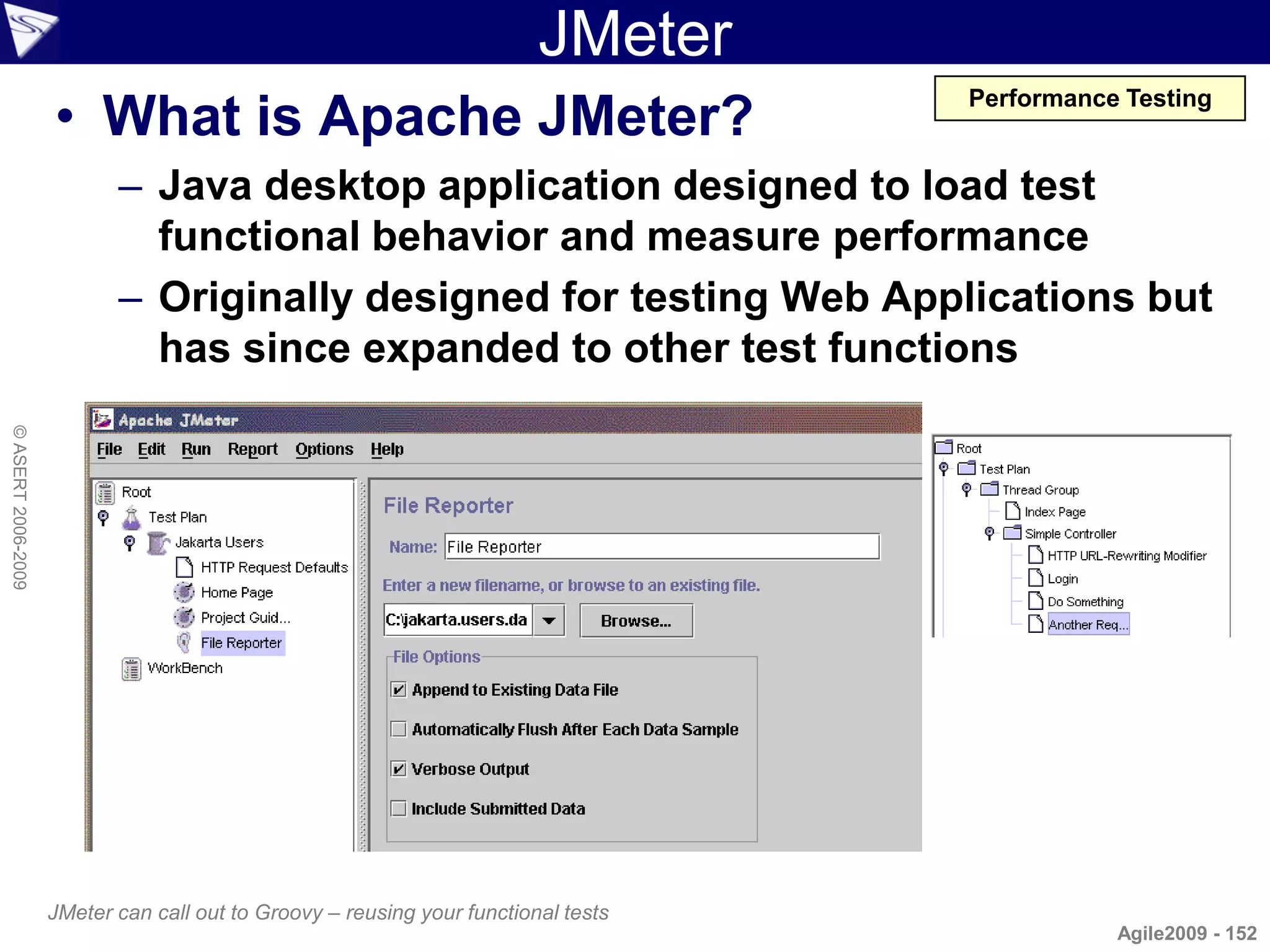
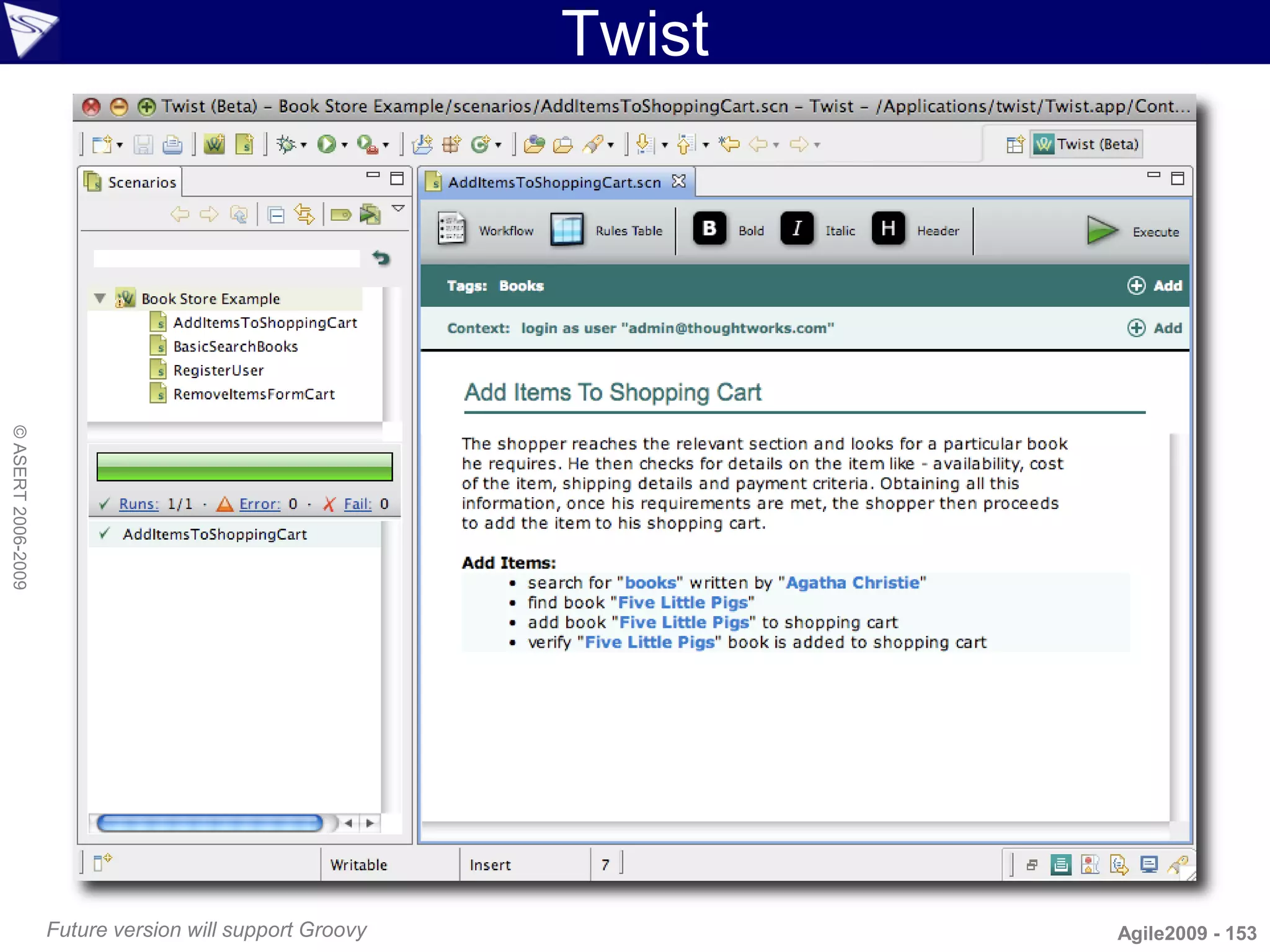
                      – SoapUI, ITest2, JMeter, Twist, ...
                    • Going beyond
                      – Polyglot, Model-driven, Constraint/logic languages, Rules
                                                                                    Agile2009 - 4
Why Test With Groovy?


                           ?
© ASERT 2006-2009


                                            Agile2009 - 5
Why Test With Groovy?
                    • Wrong first question!
                    • Perfect second question? 


                                      X
© ASERT 2006-2009


                    Consider first the task at hand and the
                    organization and people fit!
                                                              Agile2009 - 6
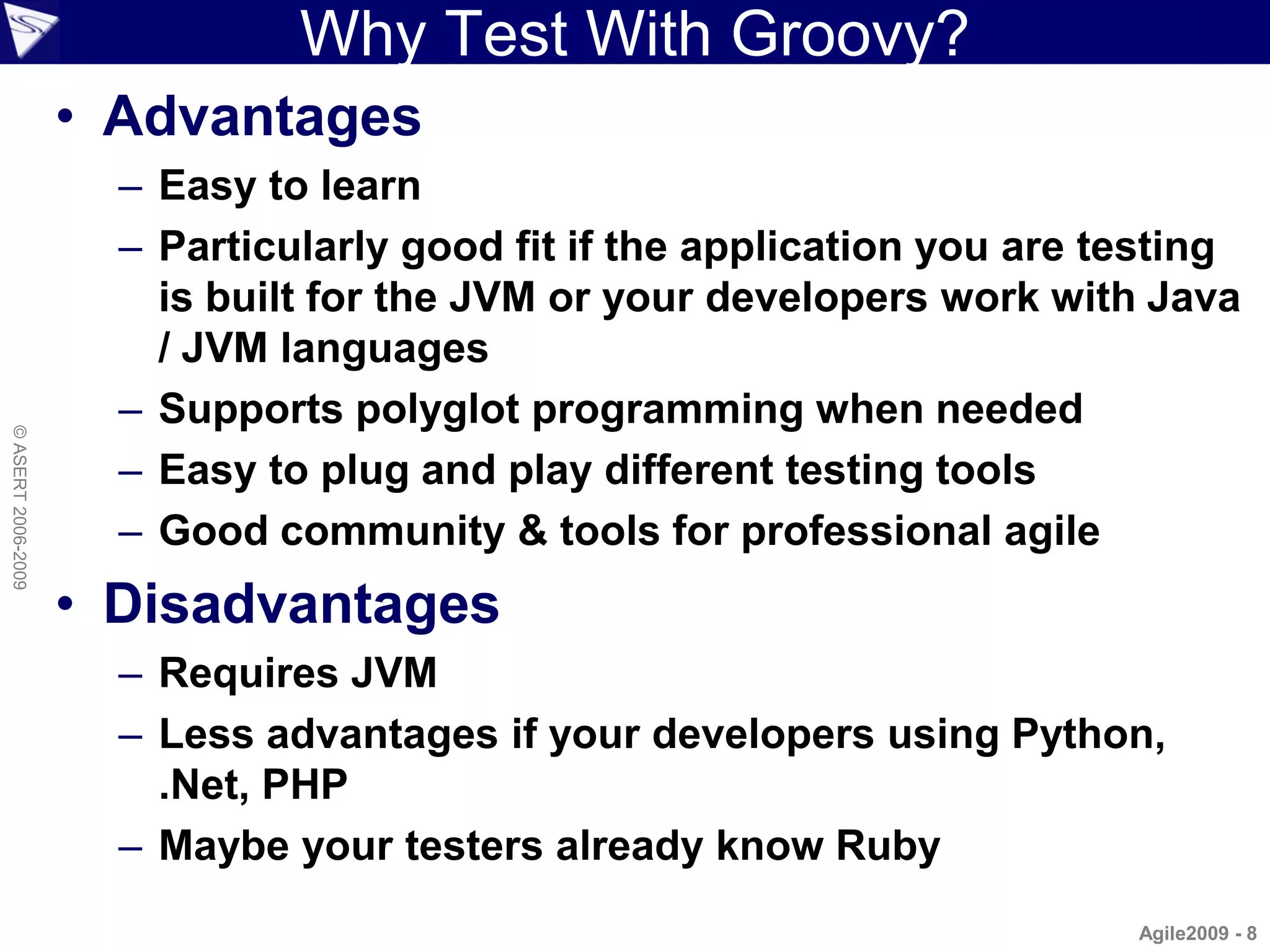
“People Fit” / “Organization Fit”
                    • People
                      –   Developers (familiarity with languages)
                      –   Testers (tools language familiarity)
                      –   Responsibility to create/run/maintain
                      –   BAs/SMEs (ability to read technical tests)
                      –   Consider both development and maintenance
© ASERT 2006-2009


                      –   Expected feedback from tests (JUnit/Reports)
                    • Organization
                      –   Maturity level
                      –   Degree of automation
                      –   Tools in use
                      –   Need for adaptability

                                                                         Agile2009 - 7
Why Test With Groovy?
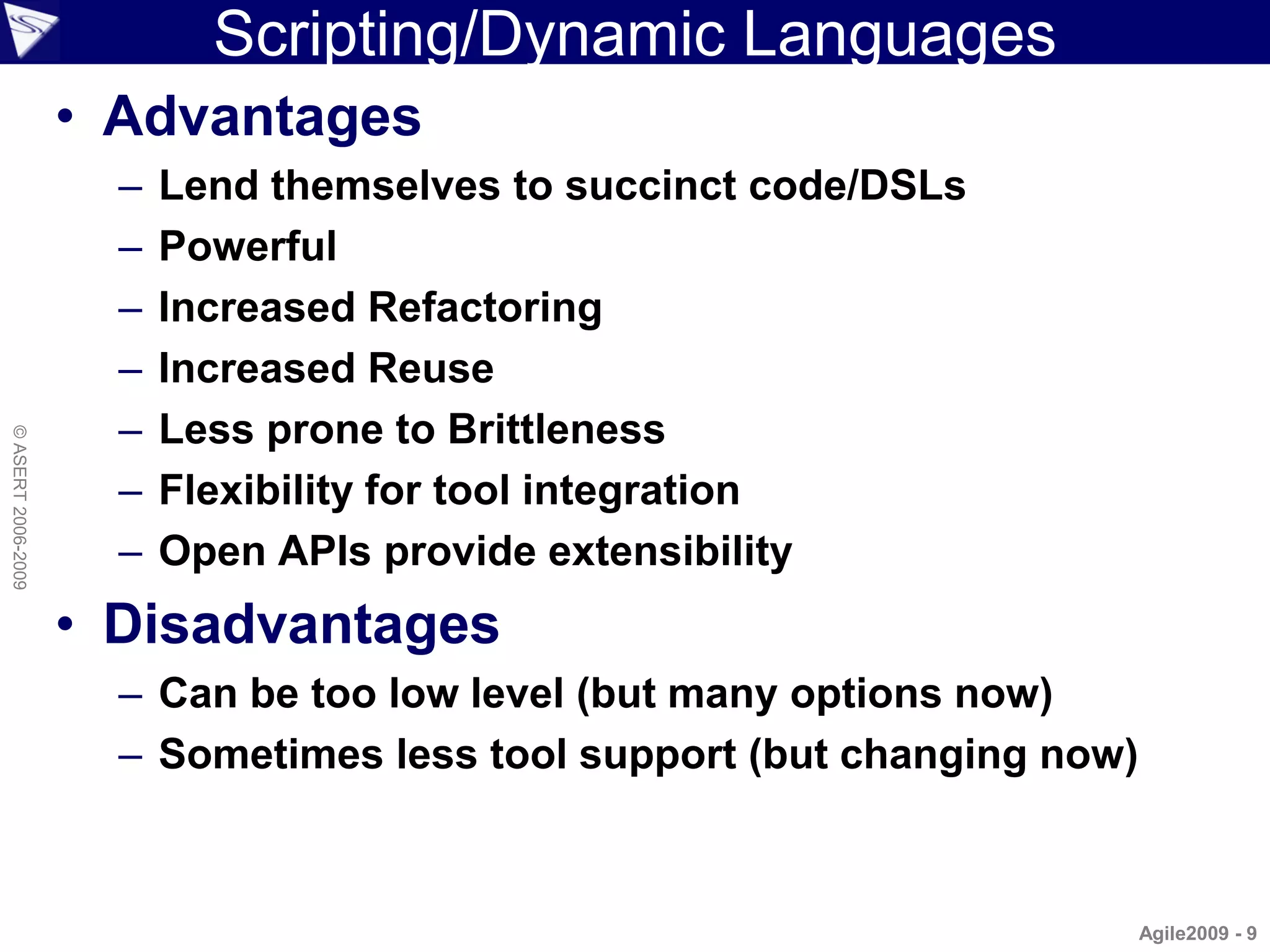
                    • Advantages
                      – Easy to learn
                      – Particularly good fit if the application you are testing
                        is built for the JVM or your developers work with Java
                        / JVM languages
                      – Supports polyglot programming when needed
© ASERT 2006-2009


                      – Easy to plug and play different testing tools
                      – Good community & tools for professional agile
                    • Disadvantages
                      – Requires JVM
                      – Less advantages if your developers using Python,
                        .Net, PHP
                      – Maybe your testers already know Ruby
                                                                          Agile2009 - 8
Scripting/Dynamic Languages
                    • Advantages
                      –   Lend themselves to succinct code/DSLs
                      –   Powerful
                      –   Increased Refactoring
                      –   Increased Reuse
                      –   Less prone to Brittleness
© ASERT 2006-2009


                      –   Flexibility for tool integration
                      –   Open APIs provide extensibility
                    • Disadvantages
                      – Can be too low level (but many options now)
                      – Sometimes less tool support (but changing now)


                                                                         Agile2009 - 9
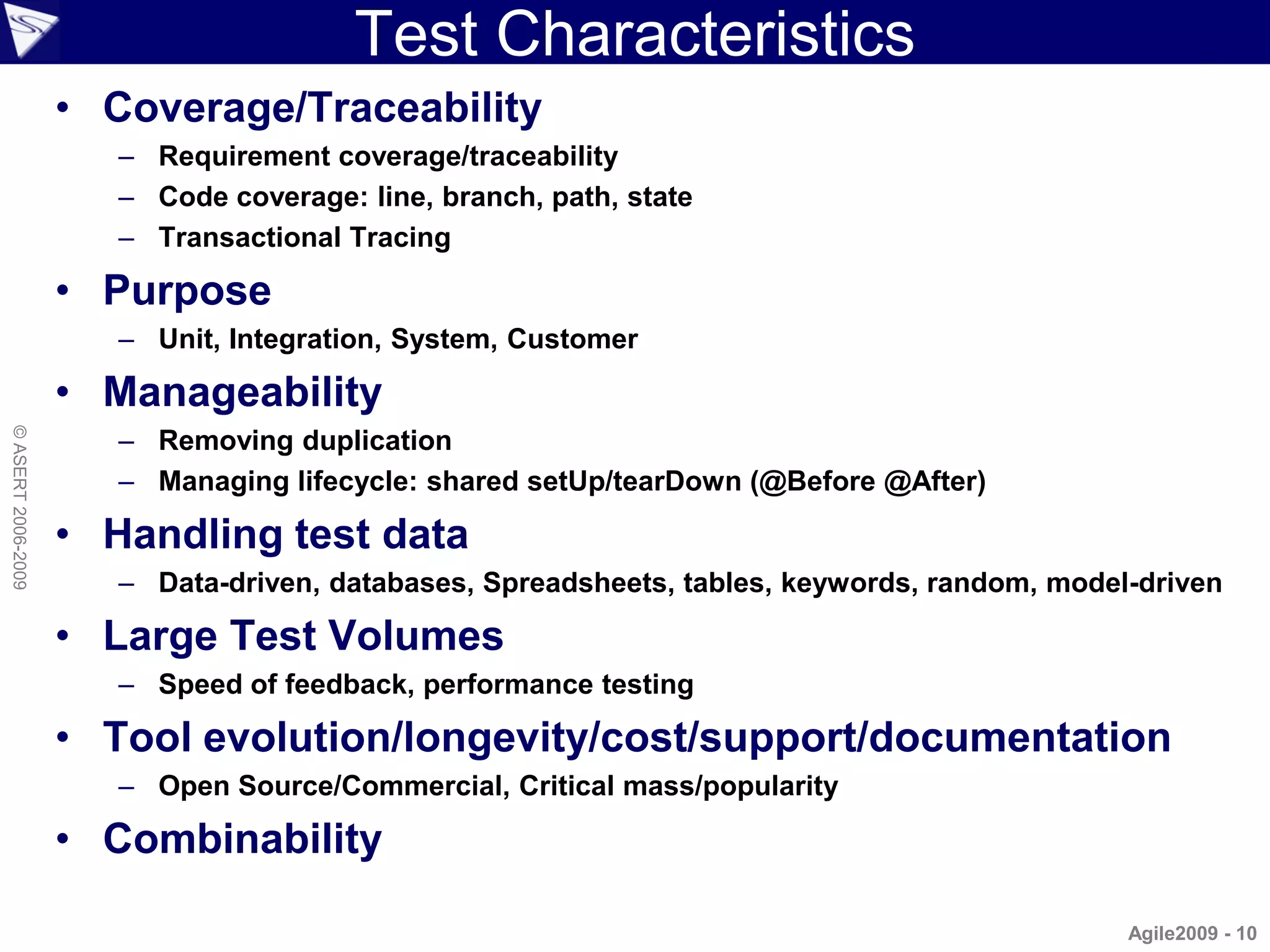
Test Characteristics
                    • Coverage/Traceability
                       – Requirement coverage/traceability
                       – Code coverage: line, branch, path, state
                       – Transactional Tracing

                    • Purpose
                       – Unit, Integration, System, Customer

                    • Manageability
                       – Removing duplication
© ASERT 2006-2009


                       – Managing lifecycle: shared setUp/tearDown (@Before @After)

                    • Handling test data
                       – Data-driven, databases, Spreadsheets, tables, keywords, random, model-driven

                    • Large Test Volumes
                       – Speed of feedback, performance testing

                    • Tool evolution/longevity/cost/support/documentation
                       – Open Source/Commercial, Critical mass/popularity

                    • Combinability

                                                                                              Agile2009 - 10
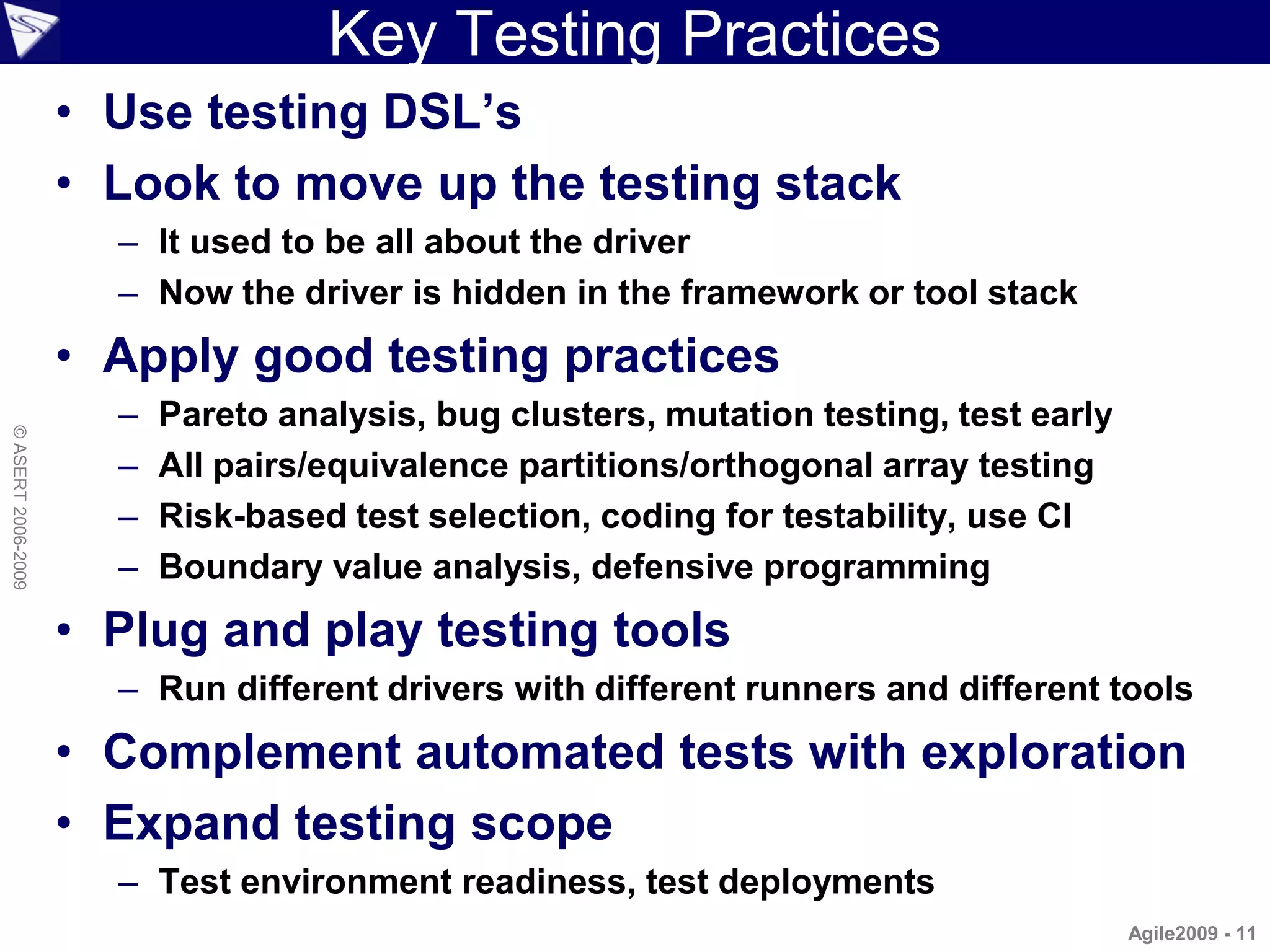
Key Testing Practices
                    • Use testing DSL’s
                    • Look to move up the testing stack
                      – It used to be all about the driver
                      – Now the driver is hidden in the framework or tool stack
                    • Apply good testing practices
                      –   Pareto analysis, bug clusters, mutation testing, test early
© ASERT 2006-2009


                      –   All pairs/equivalence partitions/orthogonal array testing
                      –   Risk-based test selection, coding for testability, use CI
                      –   Boundary value analysis, defensive programming
                    • Plug and play testing tools
                      – Run different drivers with different runners and different tools
                    • Complement automated tests with exploration
                    • Expand testing scope
                      – Test environment readiness, test deployments
                                                                                        Agile2009 - 11
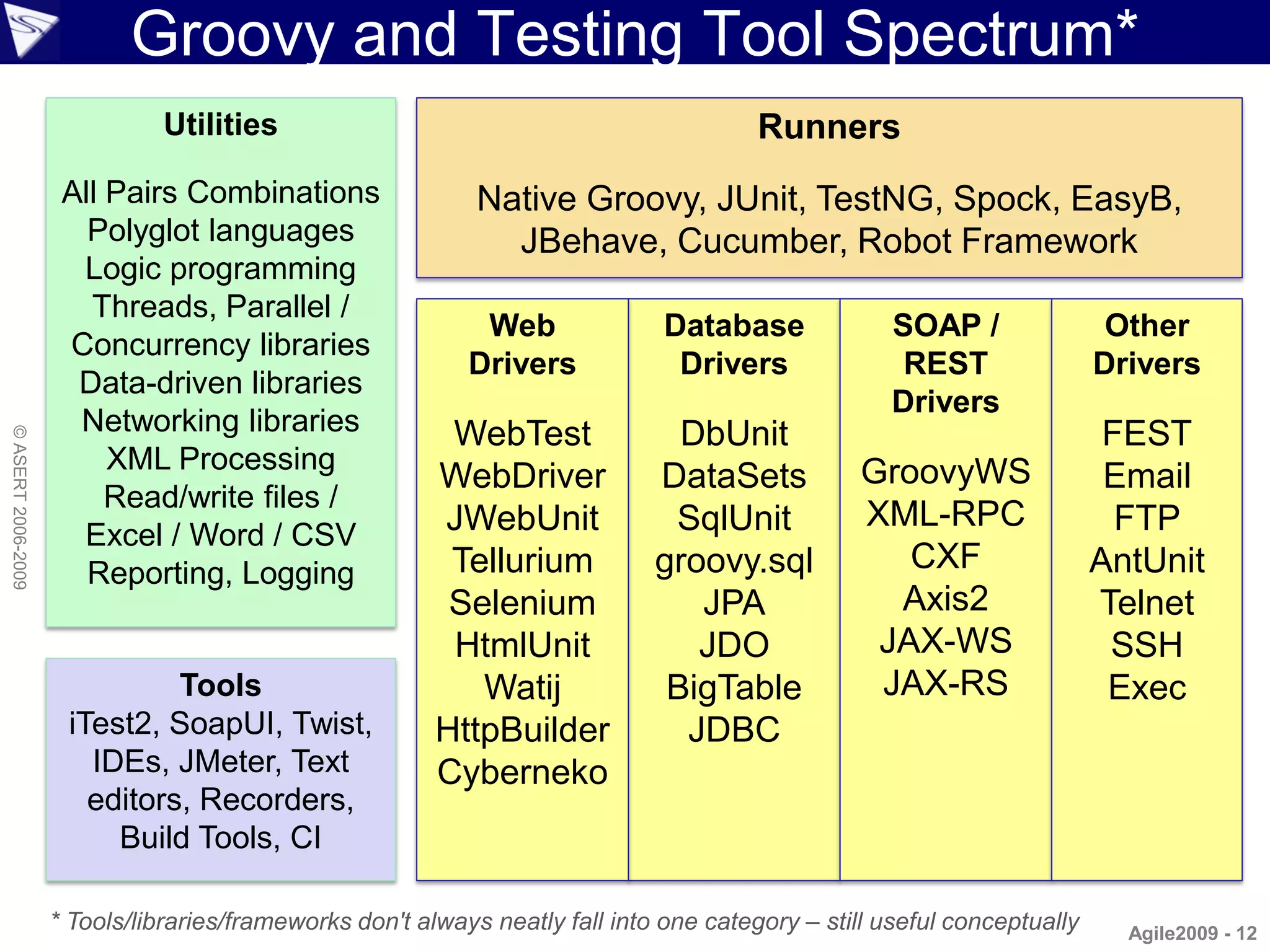
Groovy and Testing Tool Spectrum*
                              Utilities                                                 Runners
                     All Pairs Combinations                  Native Groovy, JUnit, TestNG, Spock, EasyB,
                       Polyglot languages                      JBehave, Cucumber, Robot Framework
                      Logic programming
                       Threads, Parallel /
                                                             Web               Database             SOAP /                 Other
                     Concurrency libraries
                                                            Drivers             Drivers              REST                 Drivers
                      Data-driven libraries
                                                                                                    Drivers
                      Networking libraries                WebTest               DbUnit                                     FEST
© ASERT 2006-2009


                         XML Processing                                                           GroovyWS
                                                         WebDriver            DataSets                                     Email
                         Read/write files /
                                                         JWebUnit              SqlUnit            XML-RPC                   FTP
                      Excel / Word / CSV
                       Reporting, Logging                 Tellurium           groovy.sql             CXF                  AntUnit
                                                          Selenium               JPA                Axis2                 Telnet
                                                          HtmlUnit               JDO               JAX-WS                  SSH
                              Tools                         Watij              BigTable            JAX-RS                  Exec
                     iTest2, SoapUI, Twist,              HttpBuilder            JDBC
                       IDEs, JMeter, Text                Cyberneko
                       editors, Recorders,
                         Build Tools, CI

                    * Tools/libraries/frameworks don't always neatly fall into one category – still useful conceptually     Agile2009 - 12
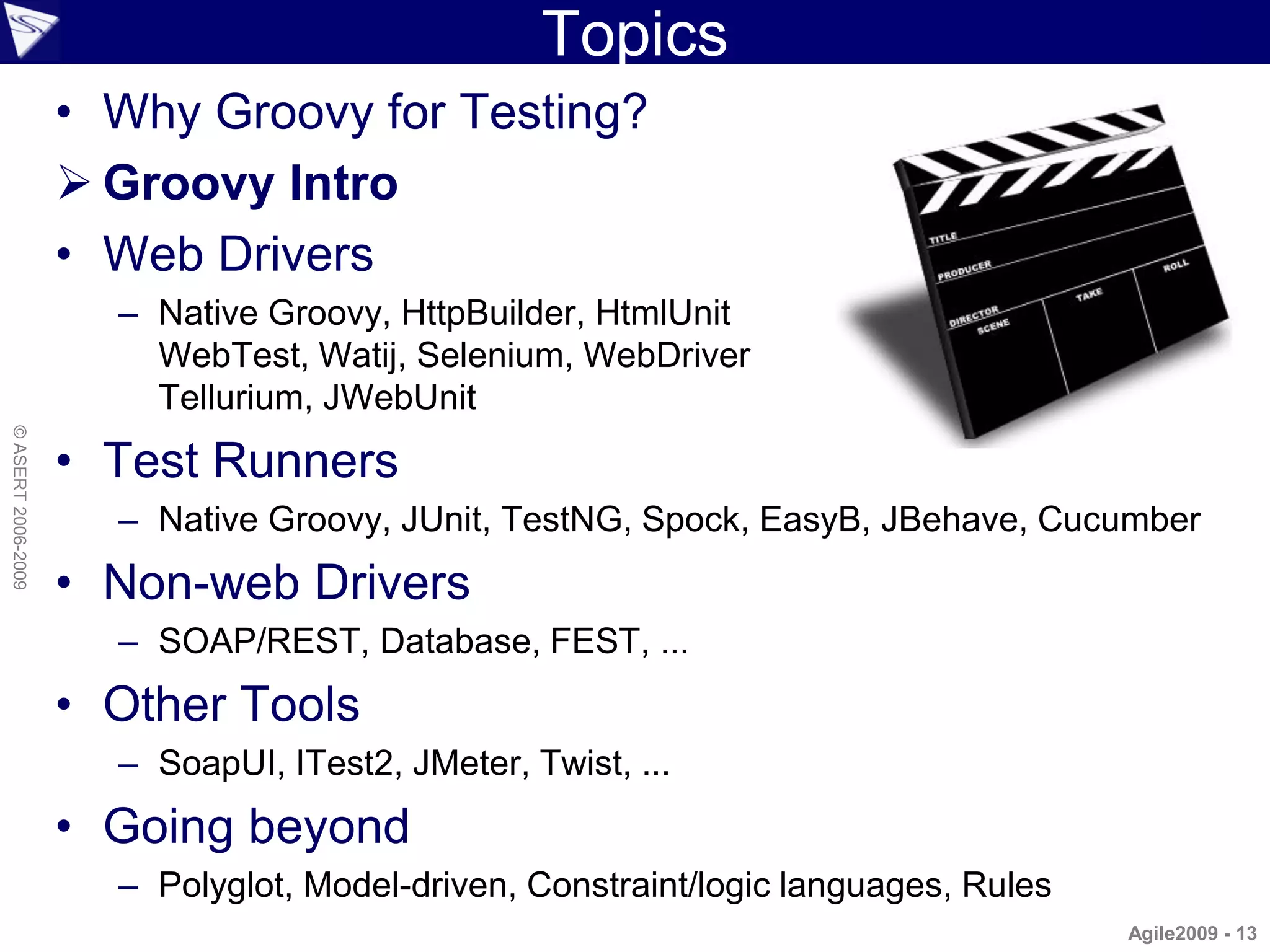
Topics
                    • Why Groovy for Testing?
                     Groovy Intro
                    • Web Drivers
                      – Native Groovy, HttpBuilder, HtmlUnit
                        WebTest, Watij, Selenium, WebDriver
                        Tellurium, JWebUnit
© ASERT 2006-2009


                    • Test Runners
                      – Native Groovy, JUnit, TestNG, Spock, EasyB, JBehave, Cucumber
                    • Non-web Drivers
                      – SOAP/REST, Database, FEST, ...
                    • Other Tools
                      – SoapUI, ITest2, JMeter, Twist, ...
                    • Going beyond
                      – Polyglot, Model-driven, Constraint/logic languages, Rules
                                                                                    Agile2009 - 13
What is Groovy?
                    • “Groovy is like a super version
                      of Java. It can leverage Java's
                      enterprise capabilities but also
                      has cool productivity features like closures,
                      DSL support, builders and dynamic typing.”
© ASERT 2006-2009


                     Groovy = Java –   boiler plate code
                                   +   optional dynamic typing
                                   +   closures
                                   +   domain specific languages
                                   +   builders
                                   +   metaprogramming
                                                                Agile2009 - 14
Groovy Goodies Overview
                    • Fully object oriented
                    • Closures: reusable
                      and assignable
                      pieces of code
                    • Operators can be          • GPath: efficient
                      overloaded
© ASERT 2006-2009


                                                  object navigation
                    • Multimethods              • GroovyBeans
                    • Literal declaration for   • grep and switch
                      lists (arrays), maps,
                      ranges and regular        • Templates, builder,
                      expressions                 swing, Ant, markup,
                                                  XML, SQL, XML-RPC,
                                                  Scriptom, Grails,
                                                  tests, Mocks   Agile2009 - 15
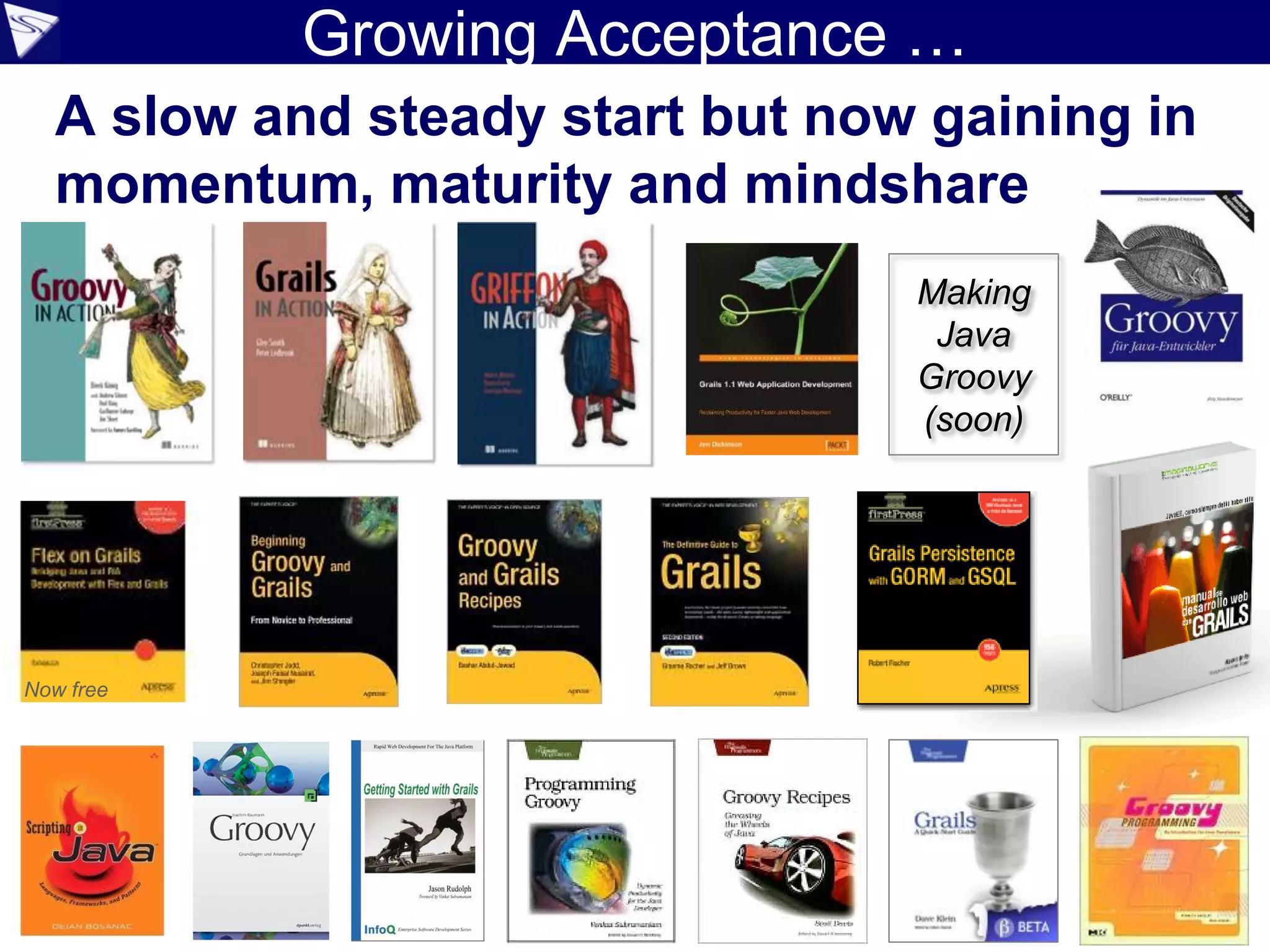
Growing Acceptance …
  A slow and steady start but now gaining in
  momentum, maturity and mindshare
                                 Making
                                  Java
                                 Groovy
                                 (soon)


Now free
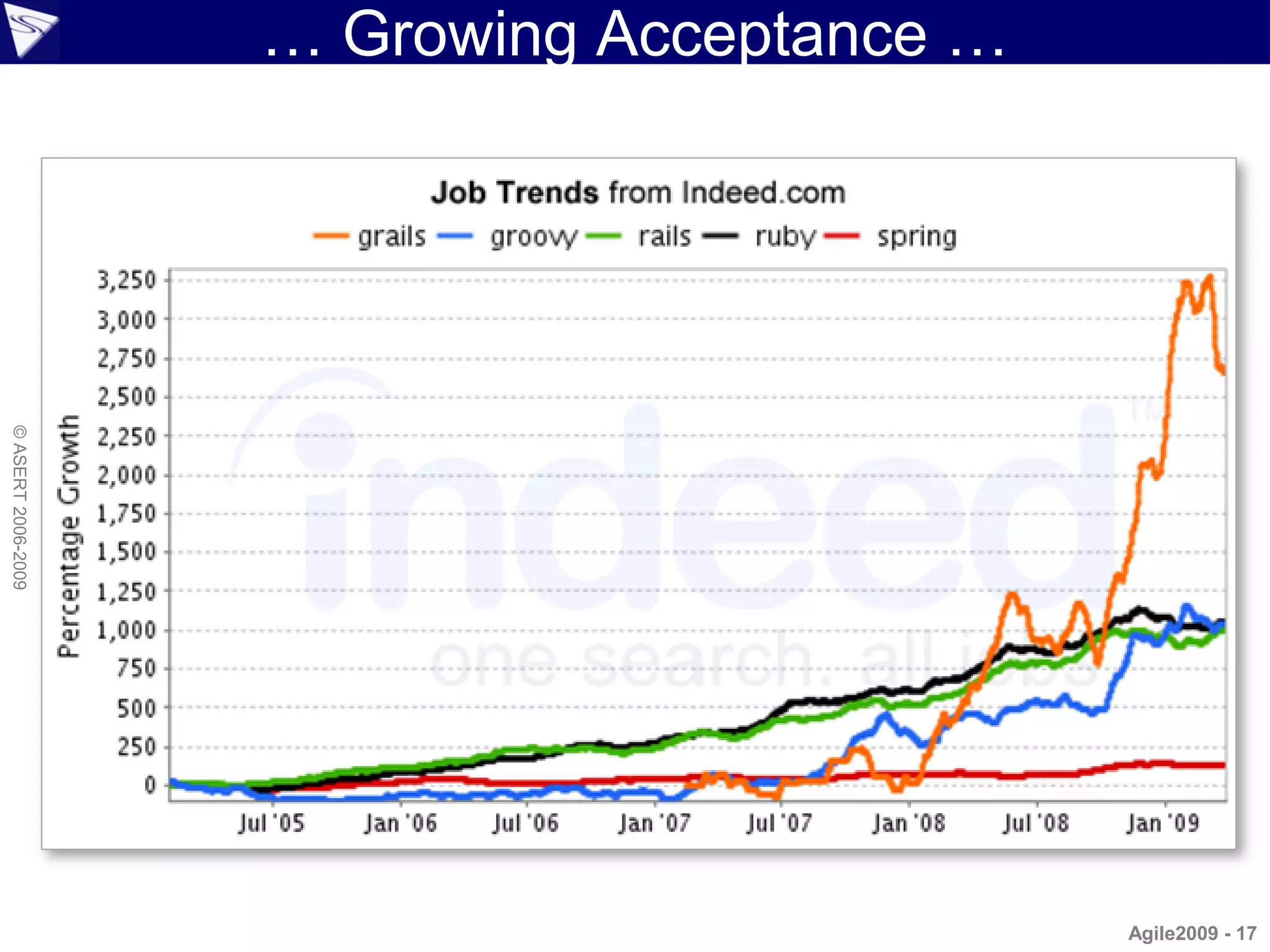
… Growing Acceptance …
© ASERT 2006-2009


                                             Agile2009 - 17
… Growing Acceptance …
© ASERT 2006-2009


                                      Groovy and
                                   Grails downloads:
                                   70-90K per month
                                     and growing

                                                  Agile2009 - 18
… Growing Acceptance …
© ASERT 2006-2009


                             Source: http://www.micropoll.com/akira/mpresult/501697-116746


                                                      Source: http://www.grailspodcast.com/
                                                                                        Agile2009 - 19
… Growing Acceptance …
© ASERT 2006-2009


                          http://www.jroller.com/scolebourne/entry/devoxx_2008_whiteboard_votes


                                                                     http://www.java.net
                                                                                           Agile2009 - 20
… Growing Acceptance …
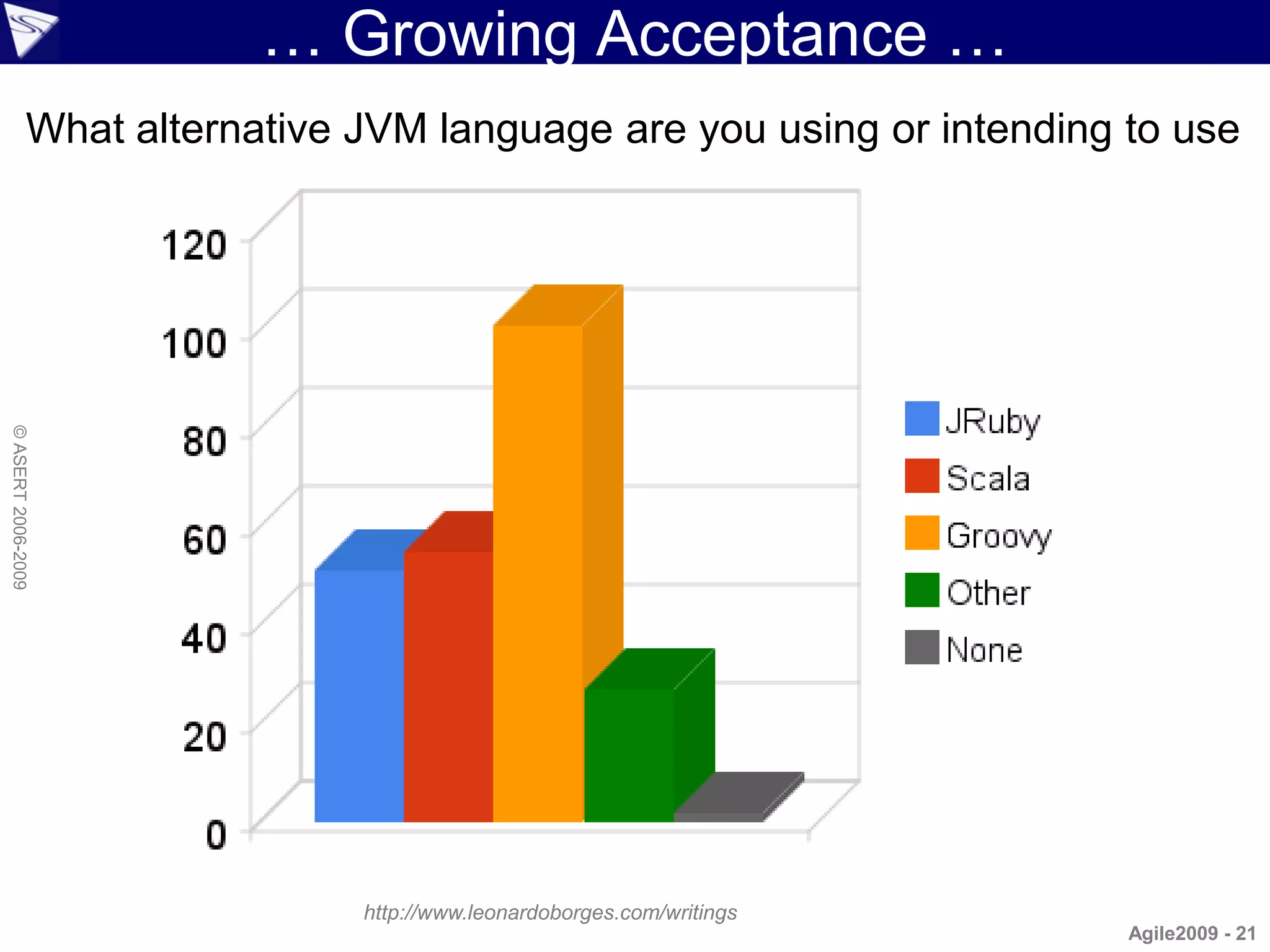
                What alternative JVM language are you using or intending to use
© ASERT 2006-2009


                                 http://www.leonardoborges.com/writings
                                                                          Agile2009 - 21
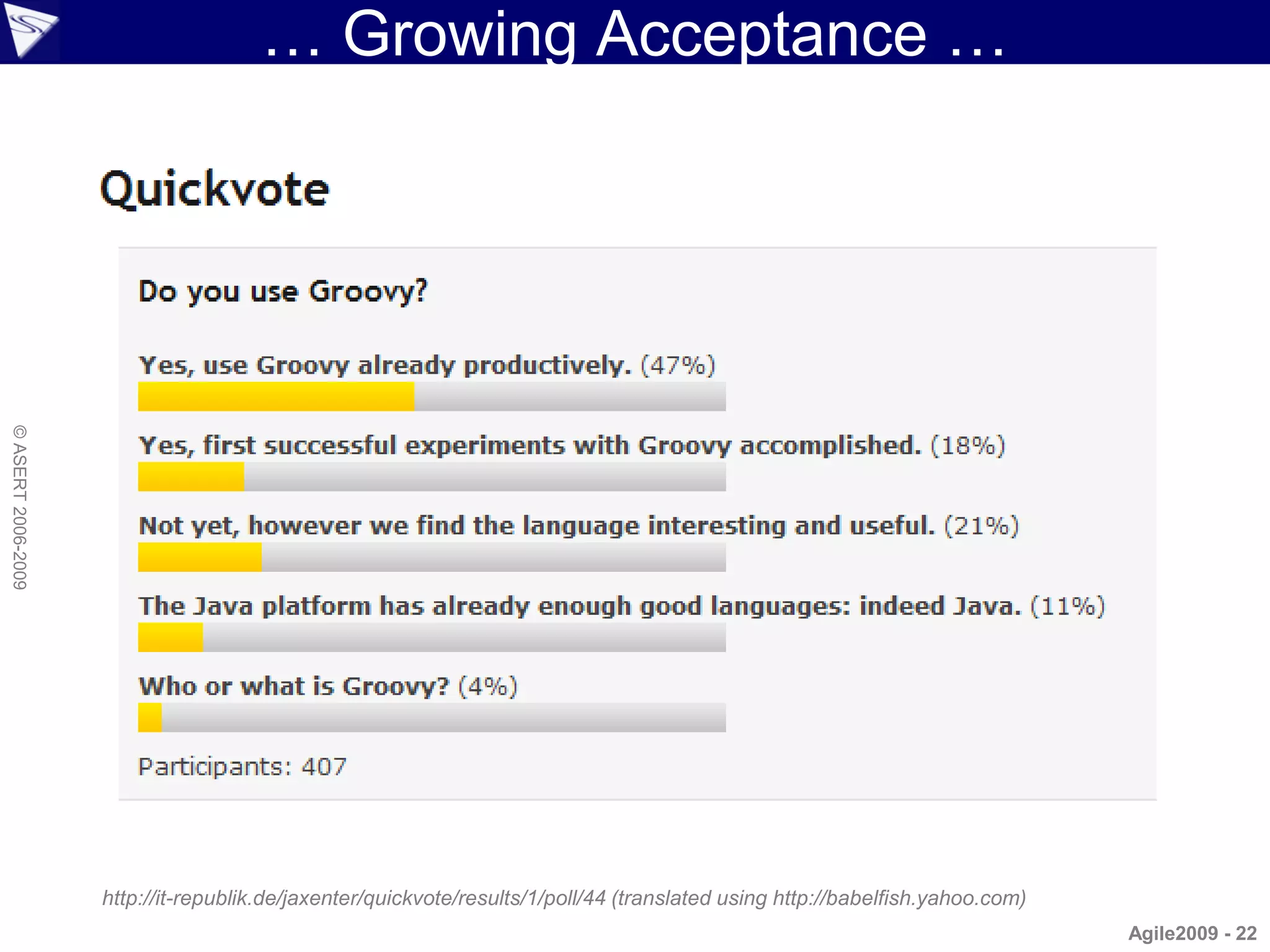
… Growing Acceptance …
© ASERT 2006-2009


                    http://it-republik.de/jaxenter/quickvote/results/1/poll/44 (translated using http://babelfish.yahoo.com)
                                                                                                                               Agile2009 - 22
… Growing Acceptance
© ASERT 2006-2009


                                           Agile2009 - 23
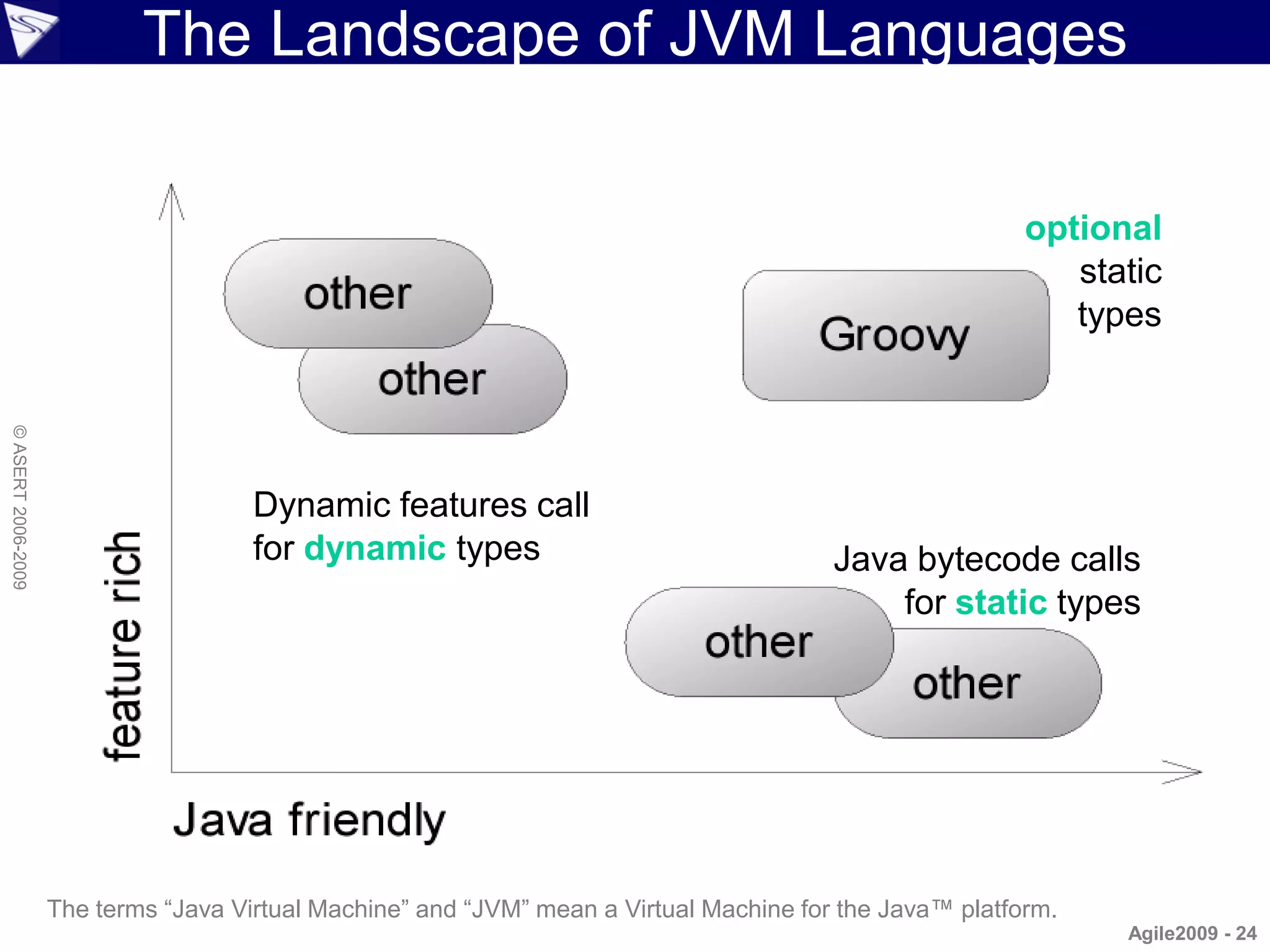
The Landscape of JVM Languages

                                                                                                          optional
                                                                                                             static
                                                                                                             types
© ASERT 2006-2009


                                      Dynamic features call
                                      for dynamic types                                  Java bytecode calls
                                                                                             for static types


                    The terms “Java Virtual Machine” and “JVM” mean a Virtual Machine for the Java™ platform.
                                                                                                                Agile2009 - 24
Groovy Starter
                    System.out.println("Hello, World!");   // optional semicolon,
                    println 'Hello, World!'                // System.out, brackets,
                                                           // main() method, class defn

                    def name = 'Guillaume'                 // dynamic typing
                    println "$name, I'll get the car."     // GString

                    String longer = """${name}, the car
                    is in the next row."""                 // multi-line string
© ASERT 2006-2009


                                                           // with static typing

                    assert 0.5 == 1/2                      // BigDecimal equals()

                    def printSize(obj) {                   // optional duck typing
                        print obj?.size()                  // safe dereferencing
                    }

                    def pets = ['ant', 'bee', 'cat']       //   native list syntax
                    pets.each { pet ->                     //   closure support
                        assert pet < 'dog'                 //   overloading '<' on String
                    }                                      //   or: for (pet in pets)...
                                                                                     Agile2009 - 25
A Better Java...
                    import java.util.List;
                    import java.util.ArrayList;

                    class Erase {
                        private List removeLongerThan(List strings, int length) {    This code
                            List result = new ArrayList();
                            for (int i = 0; i < strings.size(); i++) {
                                                                                       is valid
                                String s = (String) strings.get(i);                  Java and
                                if (s.length() <= length) {
                                    result.add(s);                                  valid Groovy
                                }
                            }
© ASERT 2006-2009


                            return result;
                        }
                        public static void main(String[] args) {
                            List names = new ArrayList();
                            names.add("Ted"); names.add("Fred");
                            names.add("Jed"); names.add("Ned");
                            System.out.println(names);
                                                                                     Based on an
                            Erase e = new Erase();                                   example by
                            List shortNames = e.removeLongerThan(names, 3);          Jim Weirich
                            System.out.println(shortNames.size());
                            for (int i = 0; i < shortNames.size(); i++) {            & Ted Leung
                                String s = (String) shortNames.get(i);
                                System.out.println(s);
                            }
                        }
                    }
                                                                                           Agile2009 - 26
...A Better Java...
                    import java.util.List;
                    import java.util.ArrayList;

                    class Erase {
                        private List removeLongerThan(List strings, int length) {        Do the
                            List result = new ArrayList();
                            for (int i = 0; i < strings.size(); i++) {
                                                                                      semicolons
                                String s = (String) strings.get(i);                  add anything?
                                if (s.length() <= length) {
                                    result.add(s);                                   And shouldn‟t
                                }
                            }                                                         we us more
© ASERT 2006-2009


                        }
                            return result;                                            modern list
                        public static void main(String[] args) {                       notation?
                            List names = new ArrayList();
                            names.add("Ted"); names.add("Fred");                        Why not
                            names.add("Jed"); names.add("Ned");
                            System.out.println(names);
                                                                                    import common
                            Erase e = new Erase();                                     libraries?
                            List shortNames = e.removeLongerThan(names, 3);
                            System.out.println(shortNames.size());
                            for (int i = 0; i < shortNames.size(); i++) {
                                String s = (String) shortNames.get(i);
                                System.out.println(s);
                            }
                        }
                    }
                                                                                           Agile2009 - 27
...A Better Java...
                    class Erase {
                        private List removeLongerThan(List strings, int length) {
                            List result = new ArrayList()
                            for (String s in strings) {
                                if (s.length() <= length) {
                                    result.add(s)
                                }
                            }
                            return result
                        }

                        public static void main(String[] args) {
© ASERT 2006-2009


                            List names = new ArrayList()
                            names.add("Ted"); names.add("Fred")
                            names.add("Jed"); names.add("Ned")
                            System.out.println(names)
                            Erase e = new Erase()
                            List shortNames = e.removeLongerThan(names, 3)
                            System.out.println(shortNames.size())
                            for (String s in shortNames) {
                                System.out.println(s)
                            }
                        }
                    }


                                                                                    Agile2009 - 28
...A Better Java...
                    class Erase {
                        private List removeLongerThan(List strings, int length) {
                            List result = new ArrayList()
                            for (String s in strings) {
                                if (s.length() <= length) {
                                    result.add(s)
                                                                                      Do we need
                                }                                                   the static types?
                            }
                            return result                                           Must we always
                        }
                                                                                      have a main
                        public static void main(String[] args) {                       method and
© ASERT 2006-2009


                            List names = new ArrayList()
                            names.add("Ted"); names.add("Fred")                     class definition?
                            names.add("Jed"); names.add("Ned")
                            System.out.println(names)                                  How about
                            Erase e = new Erase()
                            List shortNames = e.removeLongerThan(names, 3)
                                                                                        improved
                            System.out.println(shortNames.size())                     consistency?
                            for (String s in shortNames) {
                                System.out.println(s)
                            }
                        }
                    }


                                                                                             Agile2009 - 29
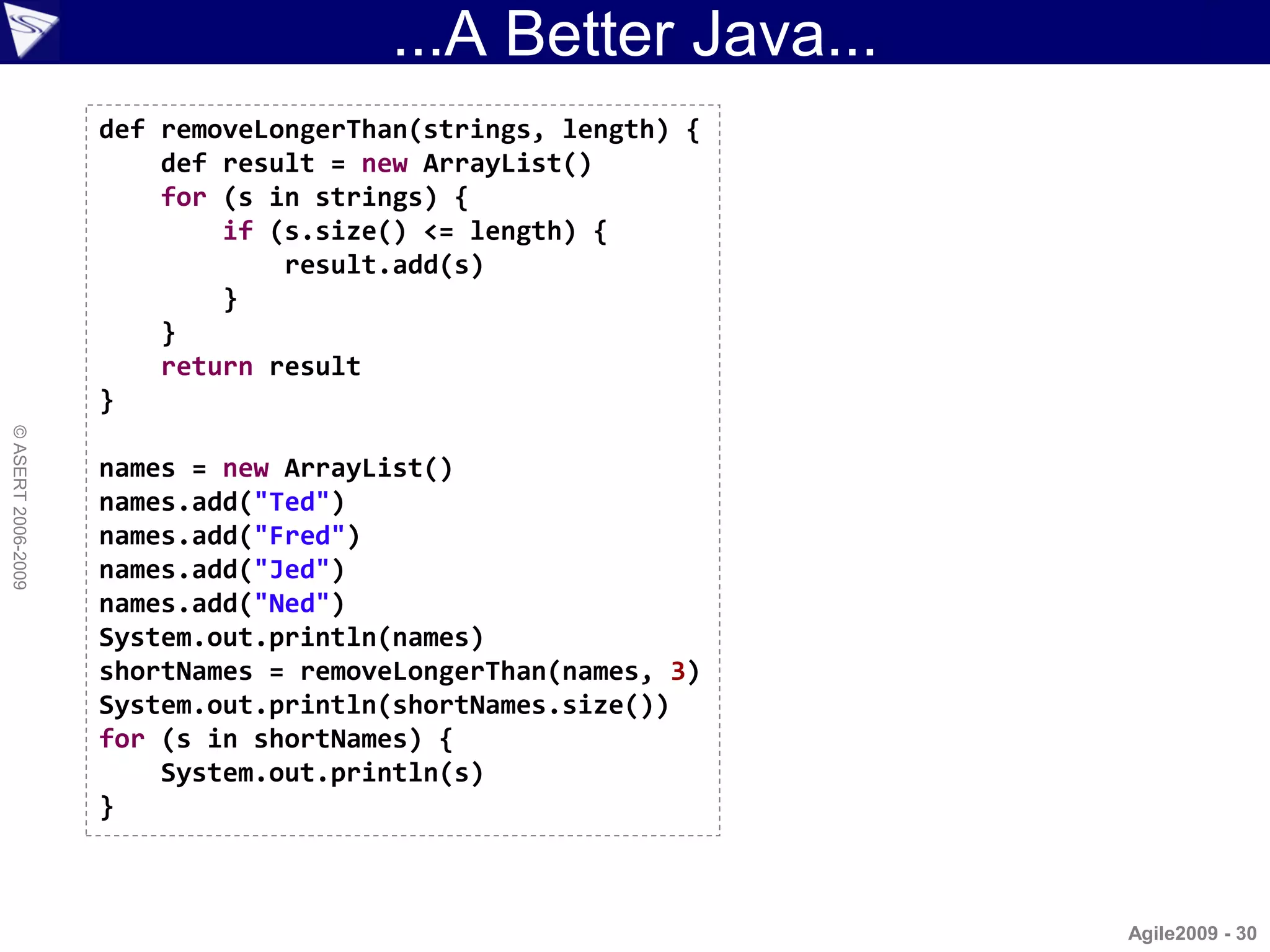
...A Better Java...
                    def removeLongerThan(strings, length) {
                        def result = new ArrayList()
                        for (s in strings) {
                            if (s.size() <= length) {
                                result.add(s)
                            }
                        }
                        return result
                    }
© ASERT 2006-2009


                    names = new ArrayList()
                    names.add("Ted")
                    names.add("Fred")
                    names.add("Jed")
                    names.add("Ned")
                    System.out.println(names)
                    shortNames = removeLongerThan(names, 3)
                    System.out.println(shortNames.size())
                    for (s in shortNames) {
                        System.out.println(s)
                    }


                                                              Agile2009 - 30
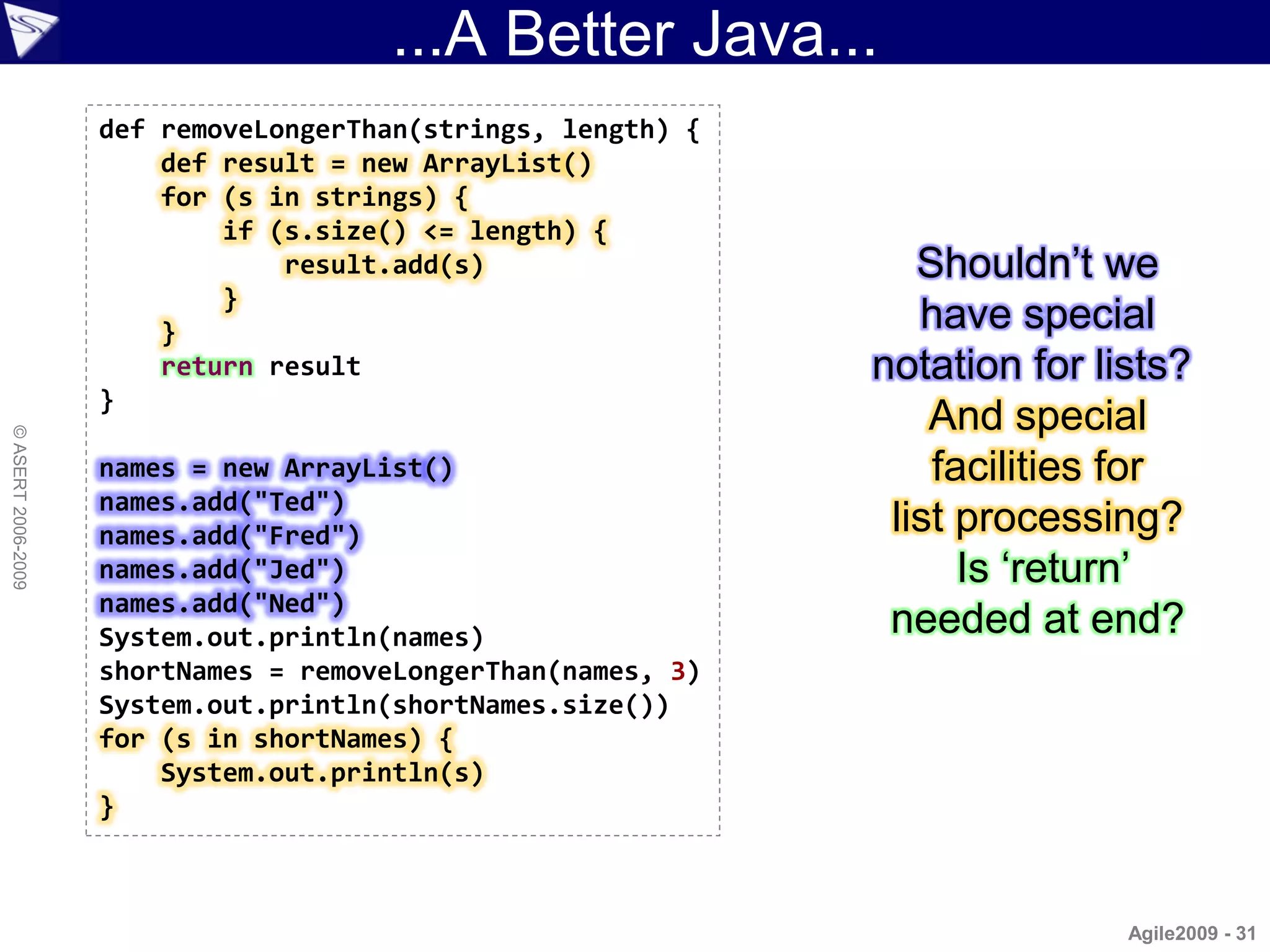
...A Better Java...
                    def removeLongerThan(strings, length) {
                        def result = new ArrayList()
                        for (s in strings) {
                            if (s.size() <= length) {
                                result.add(s)                    Shouldn‟t we
                            }
                        }                                        have special
                        return result                         notation for lists?
                    }
                                                                  And special
© ASERT 2006-2009


                    names = new ArrayList()                       facilities for
                    names.add("Ted")
                    names.add("Fred")                          list processing?
                    names.add("Jed")                                Is „return‟
                    names.add("Ned")
                    System.out.println(names)                  needed at end?
                    shortNames = removeLongerThan(names, 3)
                    System.out.println(shortNames.size())
                    for (s in shortNames) {
                        System.out.println(s)
                    }


                                                                             Agile2009 - 31
...A Better Java...
                    def removeLongerThan(strings, length) {
                        strings.findAll{ it.size() <= length }
                    }

                    names = ["Ted", "Fred", "Jed", "Ned"]
                    System.out.println(names)
                    shortNames = removeLongerThan(names, 3)
                    System.out.println(shortNames.size())
                    shortNames.each{ System.out.println(s) }
© ASERT 2006-2009


                                                                 Agile2009 - 32
...A Better Java...
                    def removeLongerThan(strings, length) {
                        strings.findAll{ it.size() <= length }
                    }
                                                                  Is the method
                    names = ["Ted", "Fred", "Jed", "Ned"]         now needed?
                    System.out.println(names)
                    shortNames = removeLongerThan(names, 3)      Easier ways to
                    System.out.println(shortNames.size())          use common
                    shortNames.each{ System.out.println(s) }
                                                                    methods?
© ASERT 2006-2009


                                                                   Are brackets
                                                                 required here?


                                                                         Agile2009 - 33
...A Better Java...
                    names = ["Ted", "Fred", "Jed", "Ned"]
                    println names
                    shortNames = names.findAll{ it.size() <= 3 }
                    println shortNames.size()
                    shortNames.each{ println it }
© ASERT 2006-2009


                                                               Agile2009 - 34
...A Better Java
                    names = ["Ted", "Fred", "Jed", "Ned"]
                    println names
                    shortNames = names.findAll{ it.size() <= 3 }
                    println shortNames.size()
                    shortNames.each{ println it }
© ASERT 2006-2009


                           ["Ted", "Fred", "Jed", "Ned"]
                           3
                           Ted
                           Jed
                           Ned


                                                               Agile2009 - 35
Better Lists, Maps, Ranges
                    • Lists
                      – Special syntax for list literals
                      – Additional common methods (operator overloading)
                              def list = [3, new Date(), 'Jan']
                              assert list + list == list * 2

                    • Maps
© ASERT 2006-2009


                      – Special syntax for map literals
                      – Additional common methods
                              def map = [a: 1, b: 2]
                              assert map['a'] == 1 && map.b == 2

                    • Ranges
                      – Special syntax for various kinds of ranges
                              def letters = 'a'..'z'
                              def numbers = 0..<10
                                                                     Agile2009 - 36
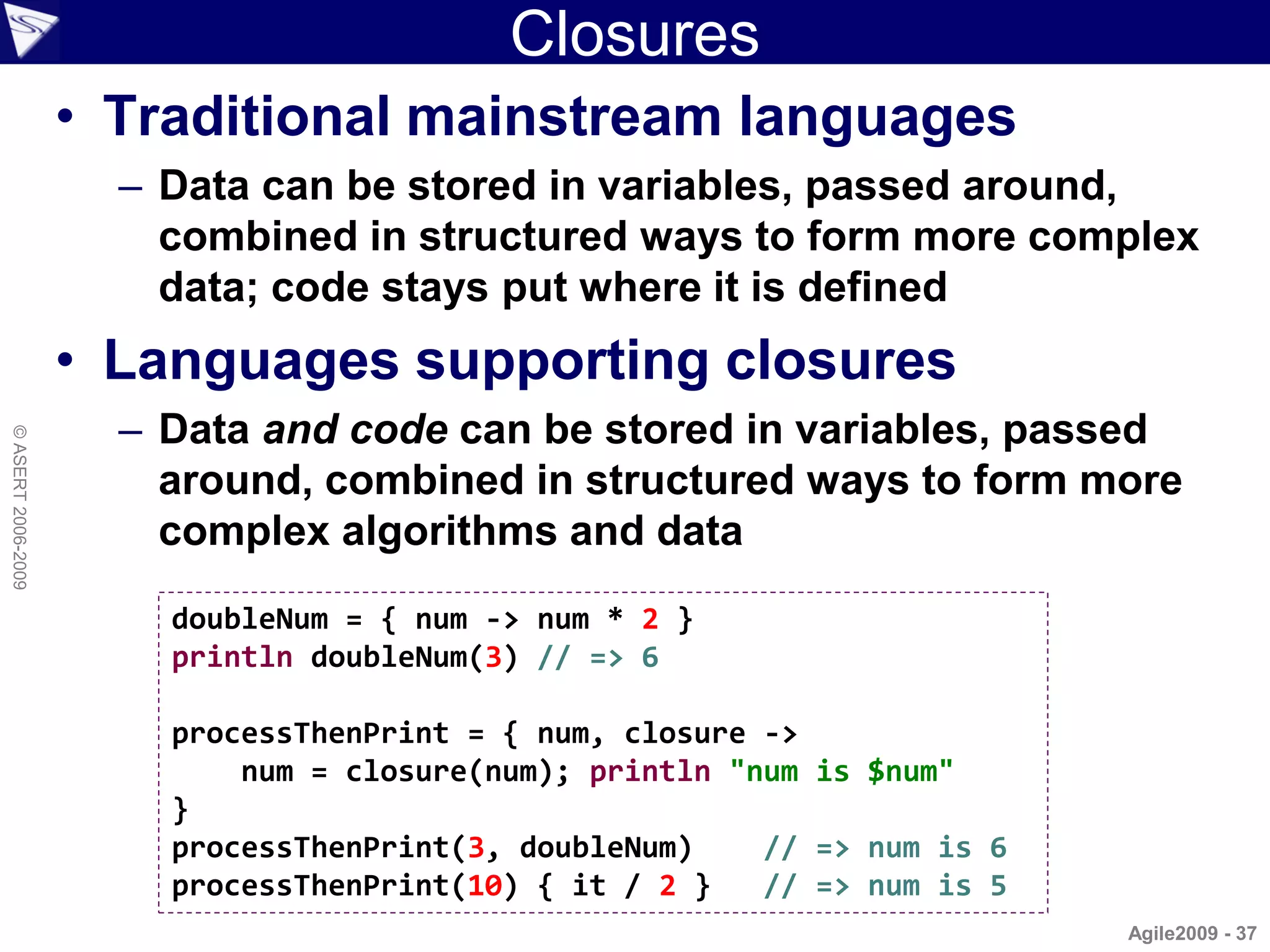
Closures
                    • Traditional mainstream languages
                      – Data can be stored in variables, passed around,
                        combined in structured ways to form more complex
                        data; code stays put where it is defined
                    • Languages supporting closures
                      – Data and code can be stored in variables, passed
© ASERT 2006-2009


                        around, combined in structured ways to form more
                        complex algorithms and data
                        doubleNum = { num -> num * 2 }
                        println doubleNum(3) // => 6

                        processThenPrint = { num, closure ->
                            num = closure(num); println "num is $num"
                        }
                        processThenPrint(3, doubleNum)    // => num is 6
                        processThenPrint(10) { it / 2 }   // => num is 5
                                                                           Agile2009 - 37
SwingXBuilder


                    import groovy.swing.SwingXBuilder
© ASERT 2006-2009


                    import static java.awt.Color.*
                    import static java.lang.Math.*

                    def swing = new SwingXBuilder()
                    def frame = swing.frame(size: [300, 300]) {
                        graph(plots: [
                             [GREEN, {value -> sin(value)}],
                             [BLUE, {value -> cos(value)}],
                             [RED,   {value -> tan(value)}]
                        ])
                    }.show()
                                                                  Agile2009 - 38
Topics
                    • Why Groovy for Testing?
                    • Groovy Intro
                     Web Drivers
                      – Native Groovy, HttpBuilder, HtmlUnit
                        WebTest, Watij, Selenium, WebDriver
                        Tellurium, JWebUnit
© ASERT 2006-2009


                    • Test Runners
                      – Native Groovy, JUnit, TestNG, Spock, EasyB, JBehave, Cucumber
                    • Non-web Drivers
                      – SOAP/REST, Database, FEST, ...
                    • Other Tools
                      – SoapUI, ITest2, JMeter, Twist, ...
                    • Going beyond
                      – Polyglot, Model-driven, Constraint/logic languages, Rules
                                                                                    Agile2009 - 39
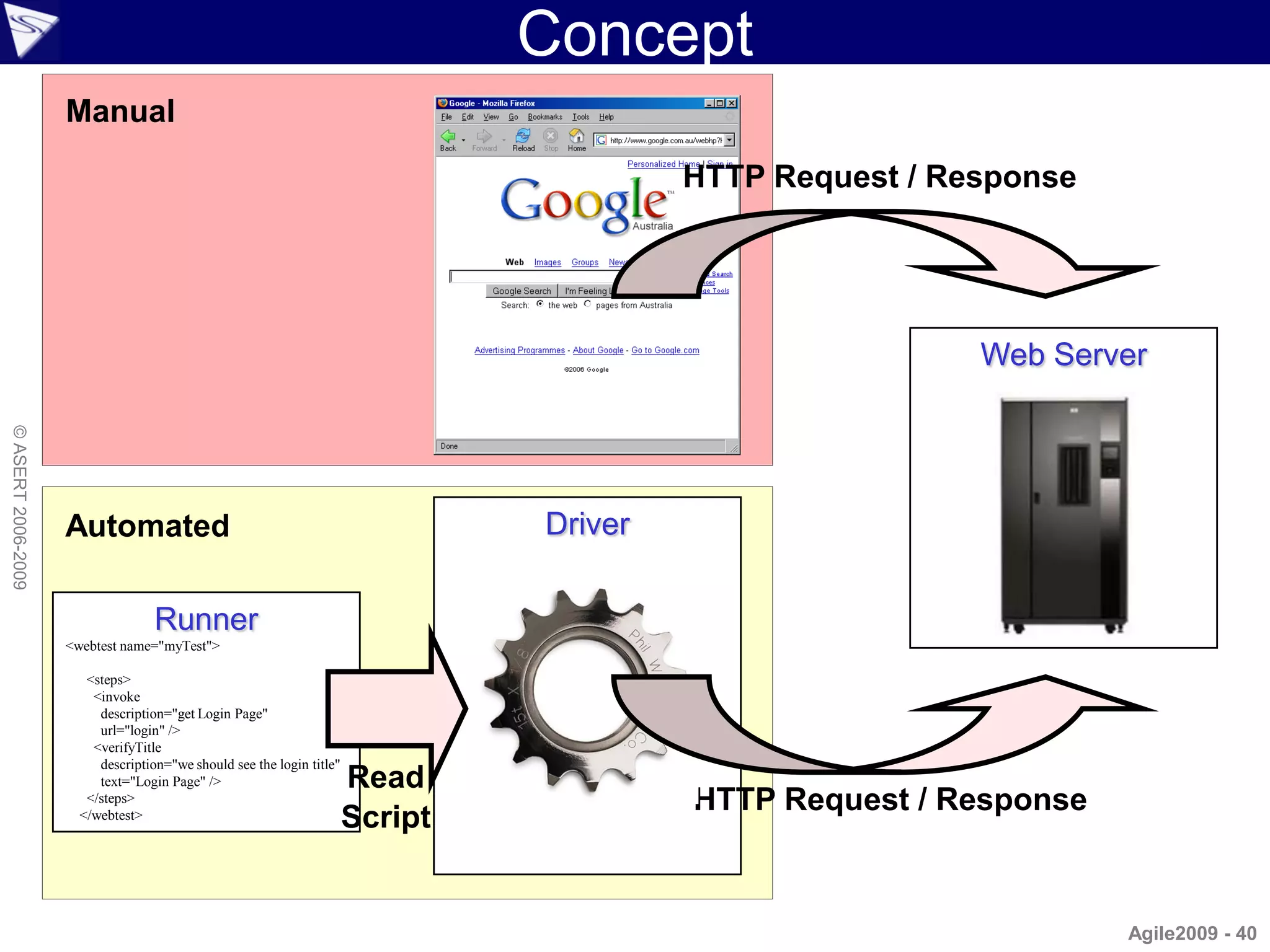
Concept
                    Manual

                                                                                         HTTP Request / Response


                                                                                                          Web Server
© ASERT 2006-2009


                    Automated                                                   Driver


                                   Runner
                    <webtest name="myTest">

                       <steps>
                        <invoke
                         description="get Login Page"
                         url="login" />
                        <verifyTitle
                         description="we should see the login title"
                         text="Login Page" />                          Read
                       </steps>
                                                                                         HTTP Request / Response
                      </webtest>
                                                                       Script


                                                                                                                   Agile2009 - 40
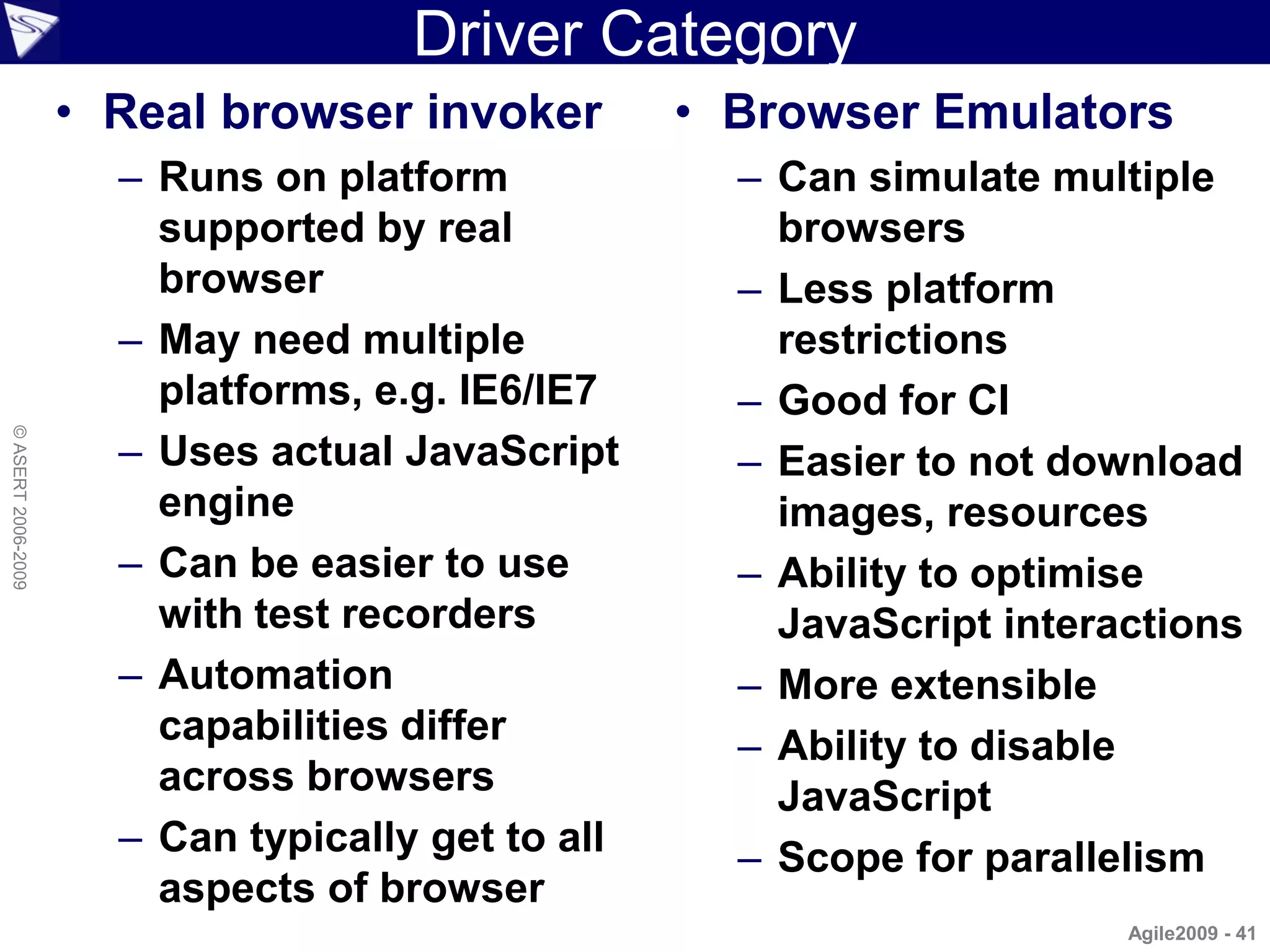
Driver Category
                    • Real browser invoker         • Browser Emulators
                      – Runs on platform             – Can simulate multiple
                        supported by real              browsers
                        browser                      – Less platform
                      – May need multiple              restrictions
                        platforms, e.g. IE6/IE7      – Good for CI
© ASERT 2006-2009


                      – Uses actual JavaScript       – Easier to not download
                        engine                         images, resources
                      – Can be easier to use         – Ability to optimise
                        with test recorders            JavaScript interactions
                      – Automation                   – More extensible
                        capabilities differ          – Ability to disable
                        across browsers                JavaScript
                      – Can typically get to all     – Scope for parallelism
                        aspects of browser
                                                                        Agile2009 - 41
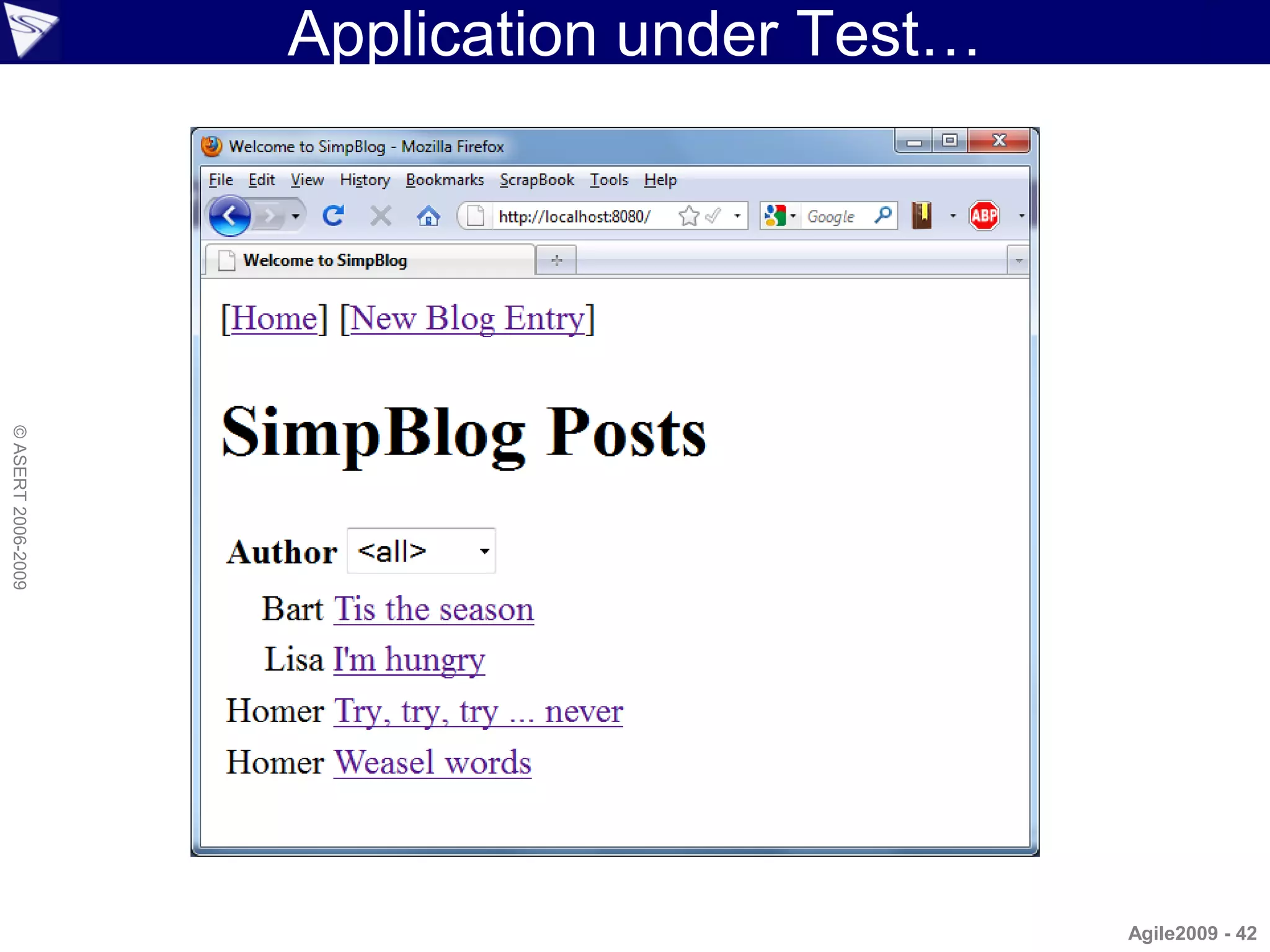
Application under Test…
© ASERT 2006-2009


                                              Agile2009 - 42
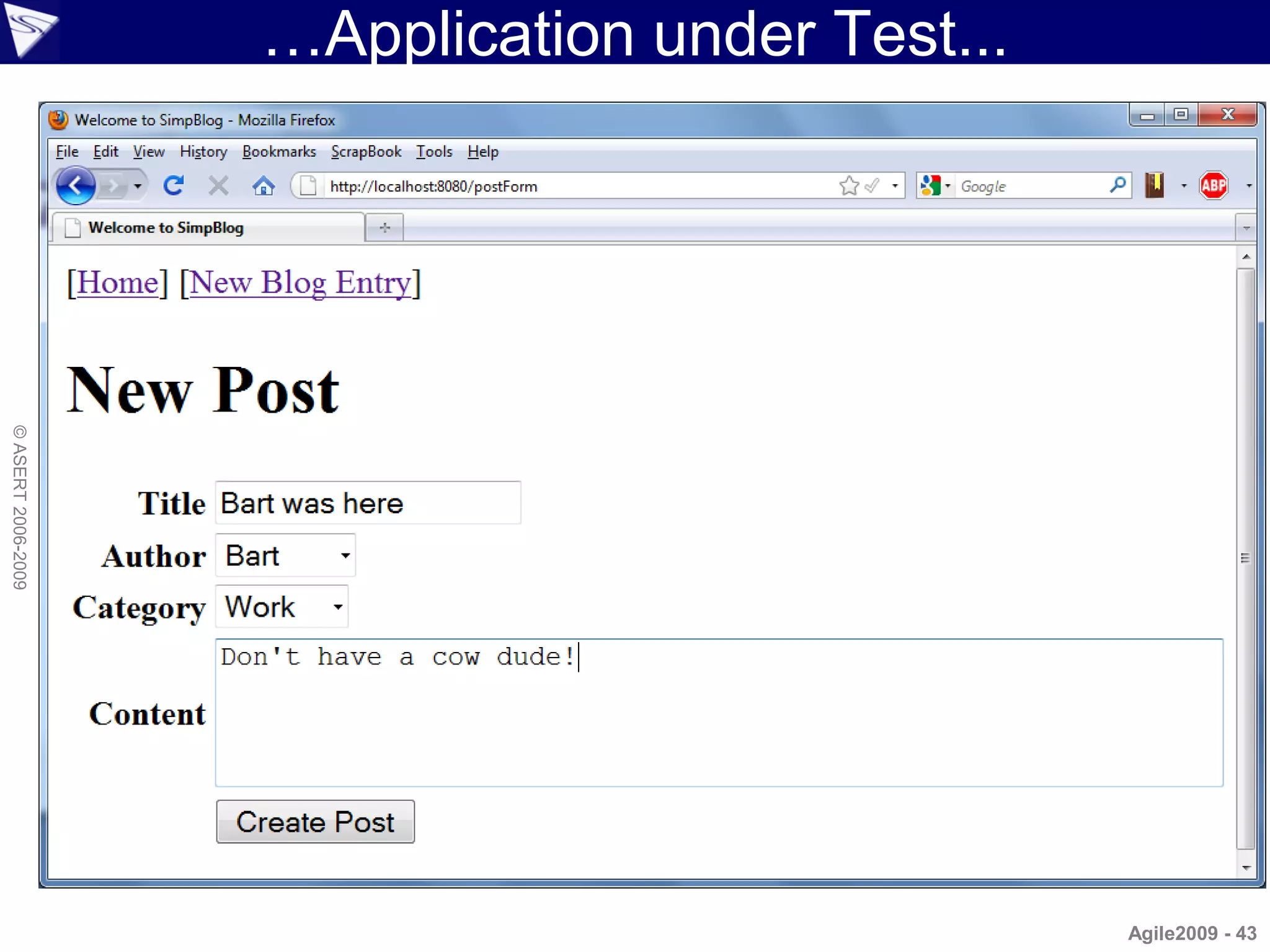
…Application under Test...
© ASERT 2006-2009


                                                 Agile2009 - 43
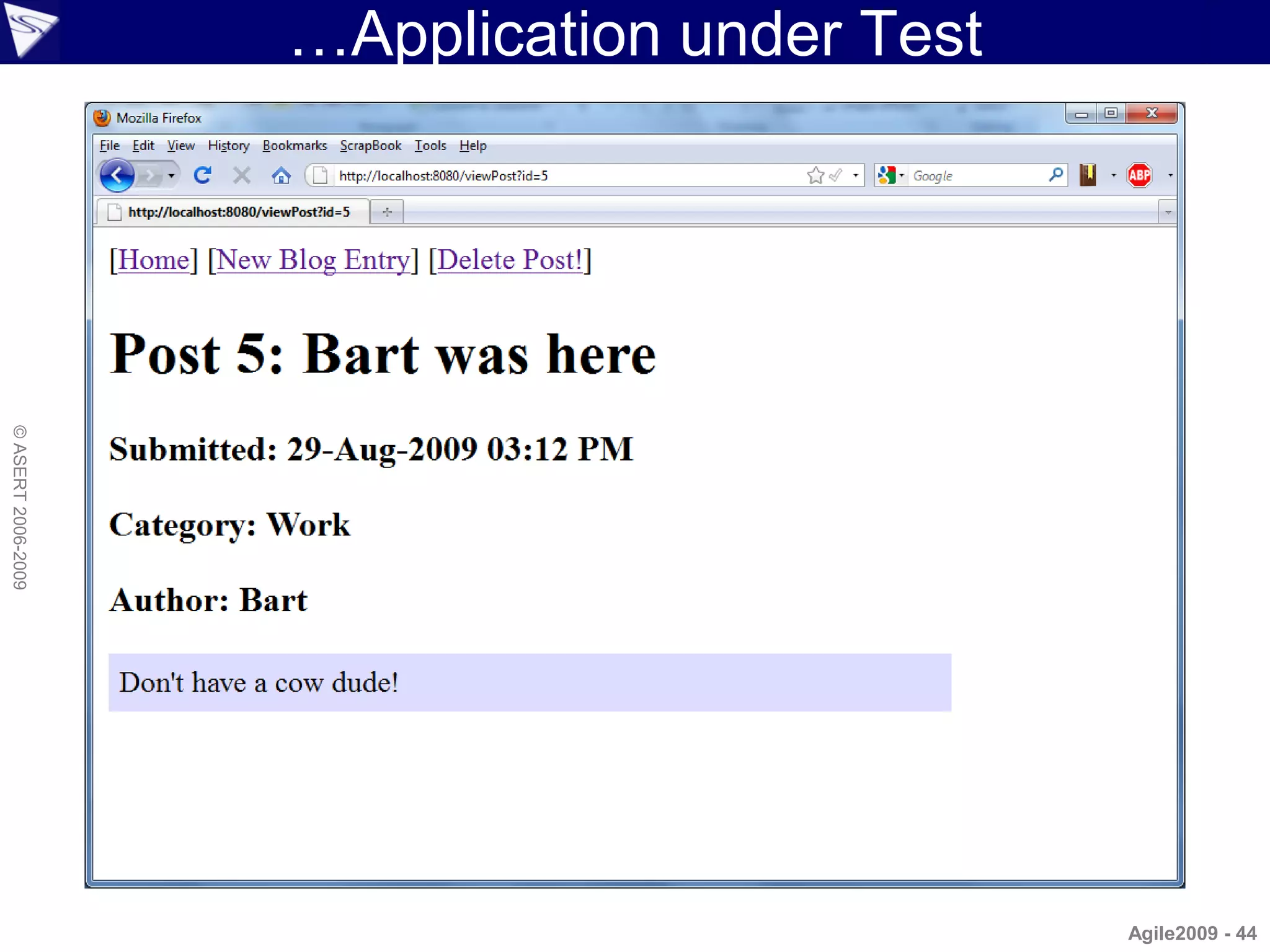
…Application under Test
© ASERT 2006-2009


                                              Agile2009 - 44
Native Groovy...
                    •   Access URLs
                    •   Built-in XML parsing
                    •   Built-in friendly regular expression syntax
                    •   Even for advanced cases, there is friendly
                        access to low-level things:
© ASERT 2006-2009


                        – Sockets, Processes
                        – Databases and other things
                        – Files
                    • Huge range of Java libraries
                        – PDF
                        – Reading, writing Excel

                                                               Agile2009 - 45
...Native Groovy...
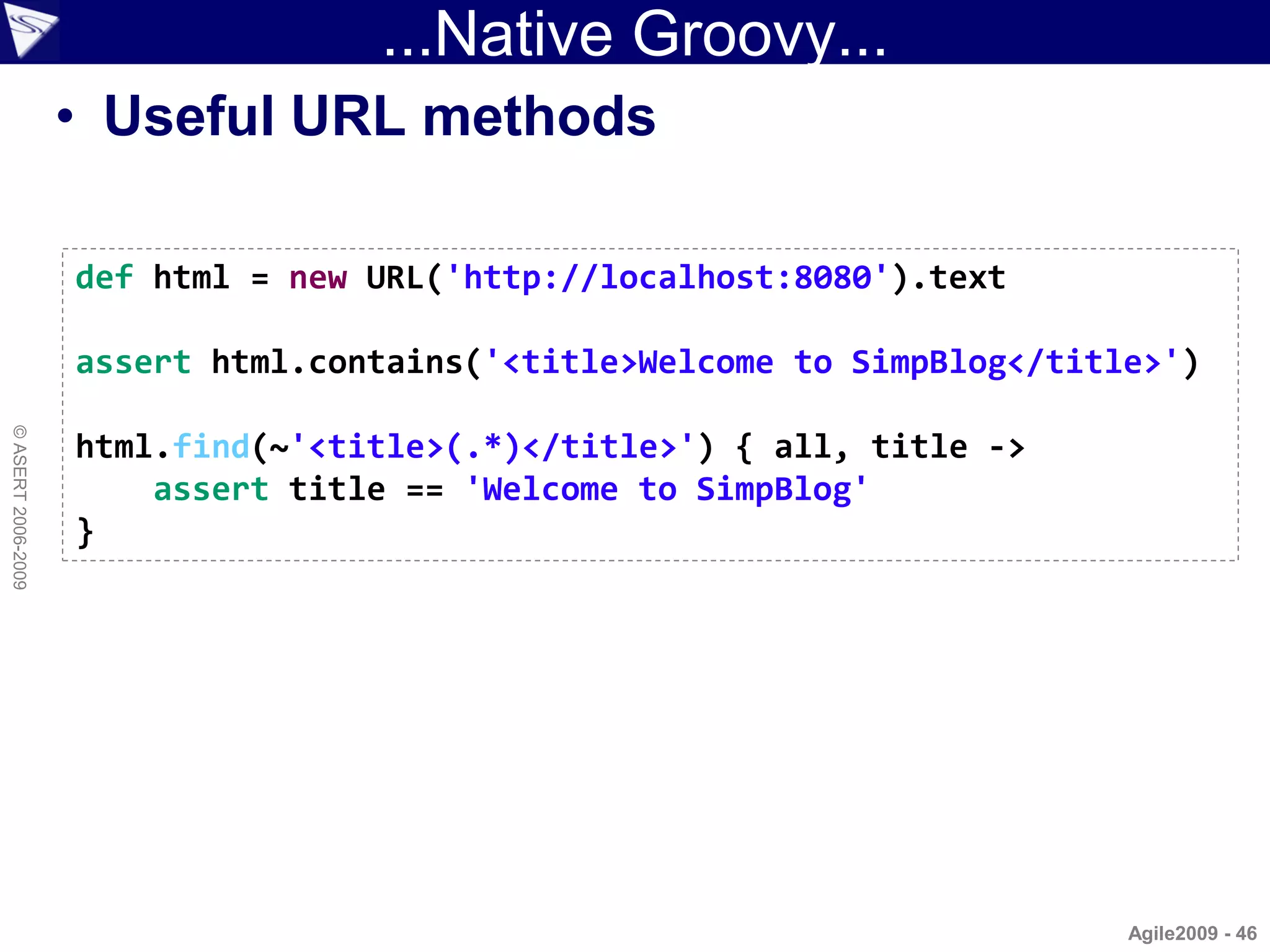
                    • Useful URL methods

                    def html = new URL('http://localhost:8080').text

                    assert html.contains('<title>Welcome to SimpBlog</title>')
© ASERT 2006-2009


                    html.find(~'<title>(.*)</title>') { all, title ->
                        assert title == 'Welcome to SimpBlog'
                    }


                                                                          Agile2009 - 46
...Native Groovy...
                    • Built-in XML Parsing

                    def page = new
                    XmlSlurper().parse('http://localhost:8080/viewPost?id=1')

                    assert page.body.h1.text().contains('Tis the season')
© ASERT 2006-2009


                    assert page.body.h3[1].text() == 'Category: Home'
                    assert page.body.h3[2].text() == 'Author: Bart'
                    assert page.body.table.tr.td.p.text() ==
                            "Aren't we forgeting the true meaning of Christmas?
                    You know, the birth of Santa."


                                                                          Agile2009 - 47
...Native Groovy
                    • Easy access to Java libraries

                    @Grab('nekohtml:nekohtml:1.9.6.2')
                    import org.cyberneko.html.parsers.SAXParser

                    def parser = new XmlSlurper(new SAXParser())
                    def page = parser.parse('http://localhost:8080/viewPost?id=1')
© ASERT 2006-2009


                    assert page.BODY.H1.text().contains('Tis the season')
                    assert page.BODY.H3[1].text() == 'Category: Home'
                    assert page.BODY.H3[2].text() == 'Author: Bart'
                    assert page.BODY.TABLE.TR.TD.P.text() ==
                            "Aren't we forgeting the true meaning of Christmas? You
                    know, the birth of Santa."


                                                                                Agile2009 - 48
HttpBuilder
                    • Builder for Http interactions
                      – Flexible: bogus posts, response codes, JSON, non-
                        HTML
                    @Grab(group='org.codehaus.groovy.modules.http-builder',
                        module='http-builder', version='0.5.0-RC1')
                    import groovyx.net.http.*
                    import static groovyx.net.http.ContentType.URLENC
© ASERT 2006-2009


                    def http = new HTTPBuilder('http://localhost:8080')
                    def postBody = [title:'Bart was here (and so was HttpBuilder)',
                            content:'Cowabunga Dude!', author:'1', category:'3']
                    http.post(path:'/addPost', body: postBody,
                            requestContentType: URLENC) { resp, html ->
                        assert resp.contentType == 'text/html'
                        assert resp.status == 200
                        assert html.BODY.H1.text().matches('Post.*: Bart was here.*')
                        assert html.BODY.H3[1].text() == 'Category: Home'
                        assert html.BODY.H3[2].text() == 'Author: Bart'
                        assert html.BODY.TABLE.TR.TD.P.text() == 'Cowabunga Dude!'
                    }
                                                                                Agile2009 - 49
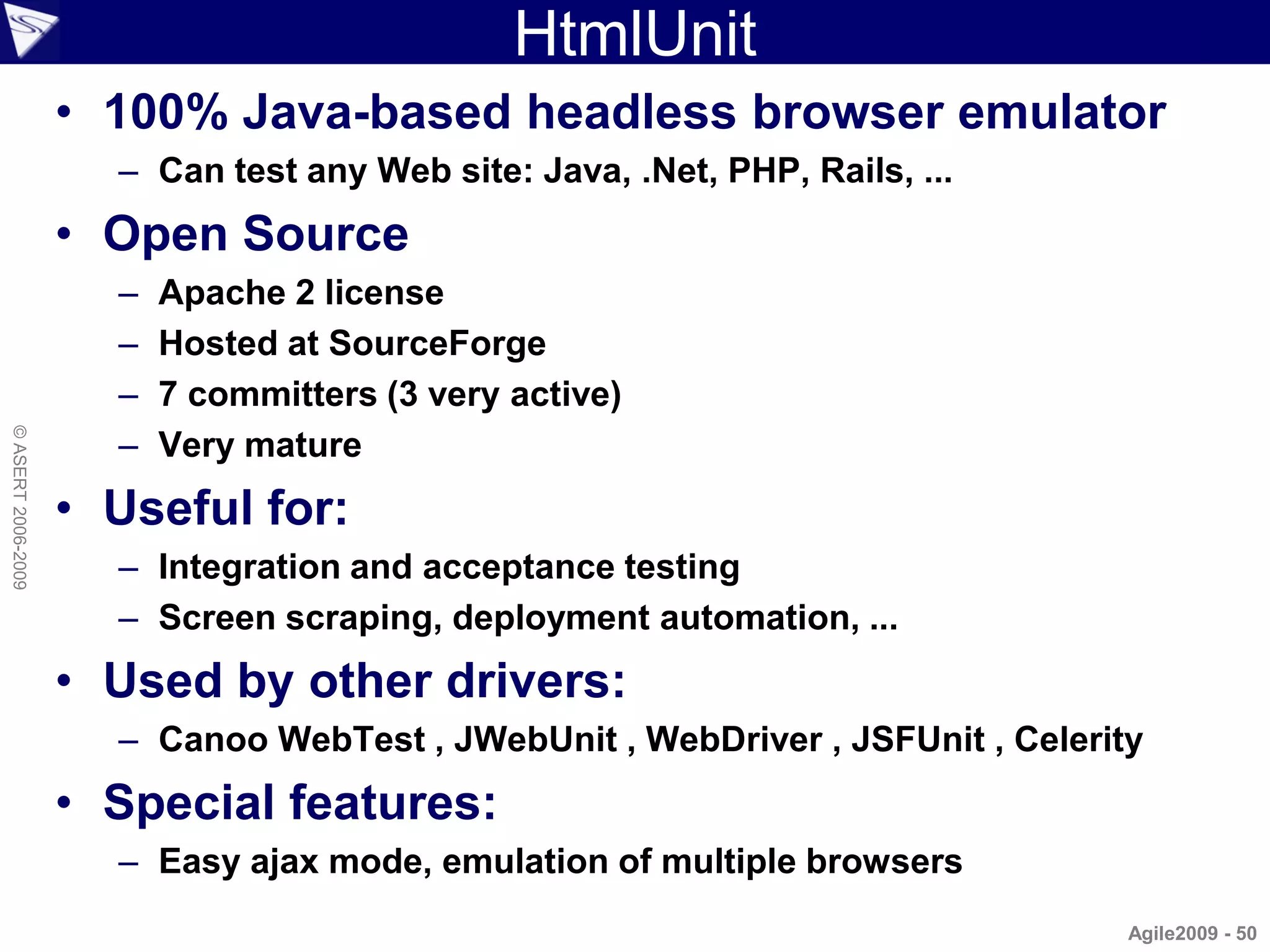
HtmlUnit
                    • 100% Java-based headless browser emulator
                      – Can test any Web site: Java, .Net, PHP, Rails, ...
                    • Open Source
                      –   Apache 2 license
                      –   Hosted at SourceForge
                      –   7 committers (3 very active)
                      –
© ASERT 2006-2009


                          Very mature
                    • Useful for:
                      – Integration and acceptance testing
                      – Screen scraping, deployment automation, ...
                    • Used by other drivers:
                      – Canoo WebTest , JWebUnit , WebDriver , JSFUnit , Celerity
                    • Special features:
                      – Easy ajax mode, emulation of multiple browsers
                                                                                Agile2009 - 50
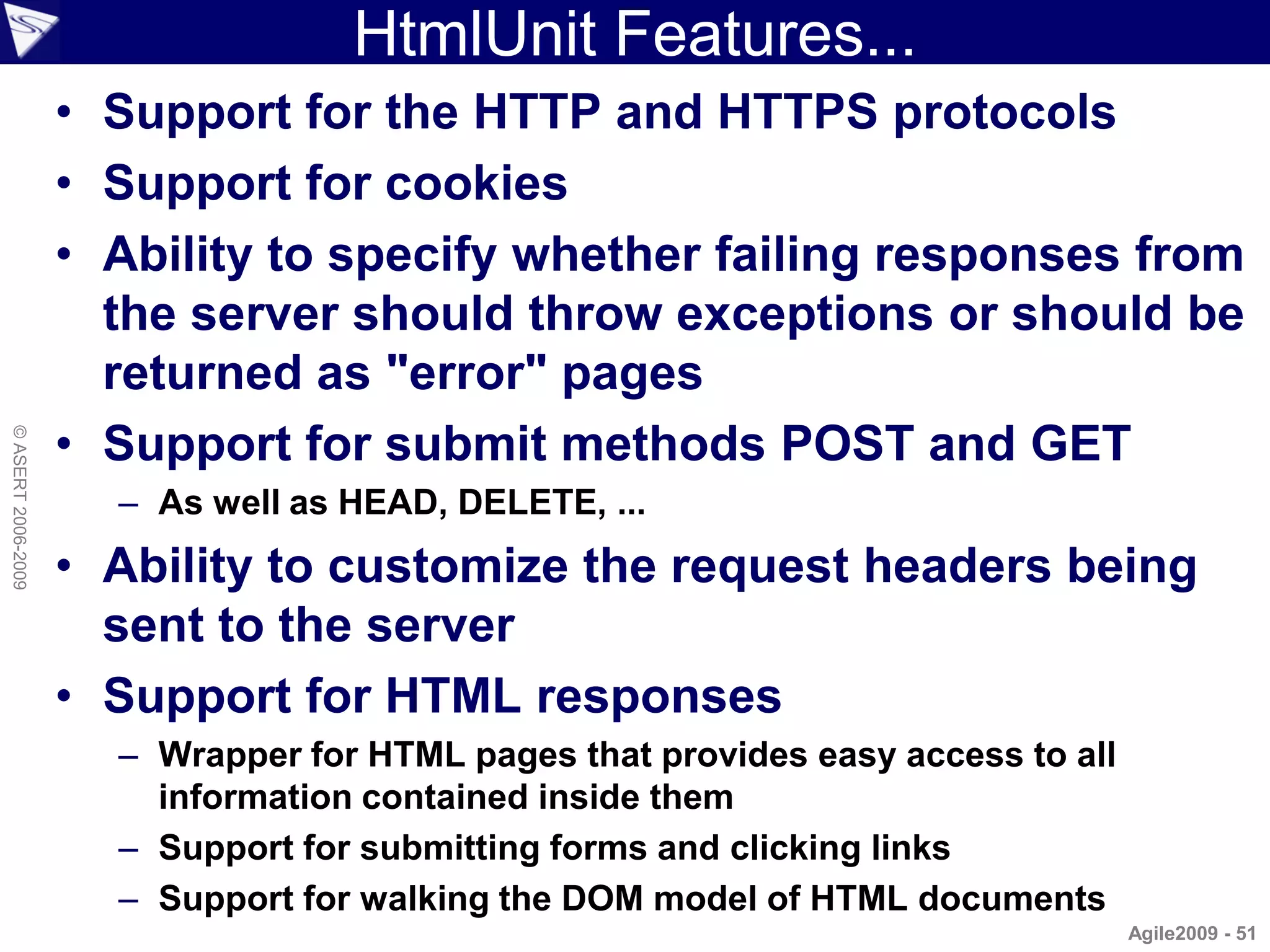
HtmlUnit Features...
                    • Support for the HTTP and HTTPS protocols
                    • Support for cookies
                    • Ability to specify whether failing responses from
                      the server should throw exceptions or should be
                      returned as "error" pages
                    • Support for submit methods POST and GET
© ASERT 2006-2009


                      – As well as HEAD, DELETE, ...
                    • Ability to customize the request headers being
                      sent to the server
                    • Support for HTML responses
                      – Wrapper for HTML pages that provides easy access to all
                        information contained inside them
                      – Support for submitting forms and clicking links
                      – Support for walking the DOM model of HTML documents
                                                                                  Agile2009 - 51
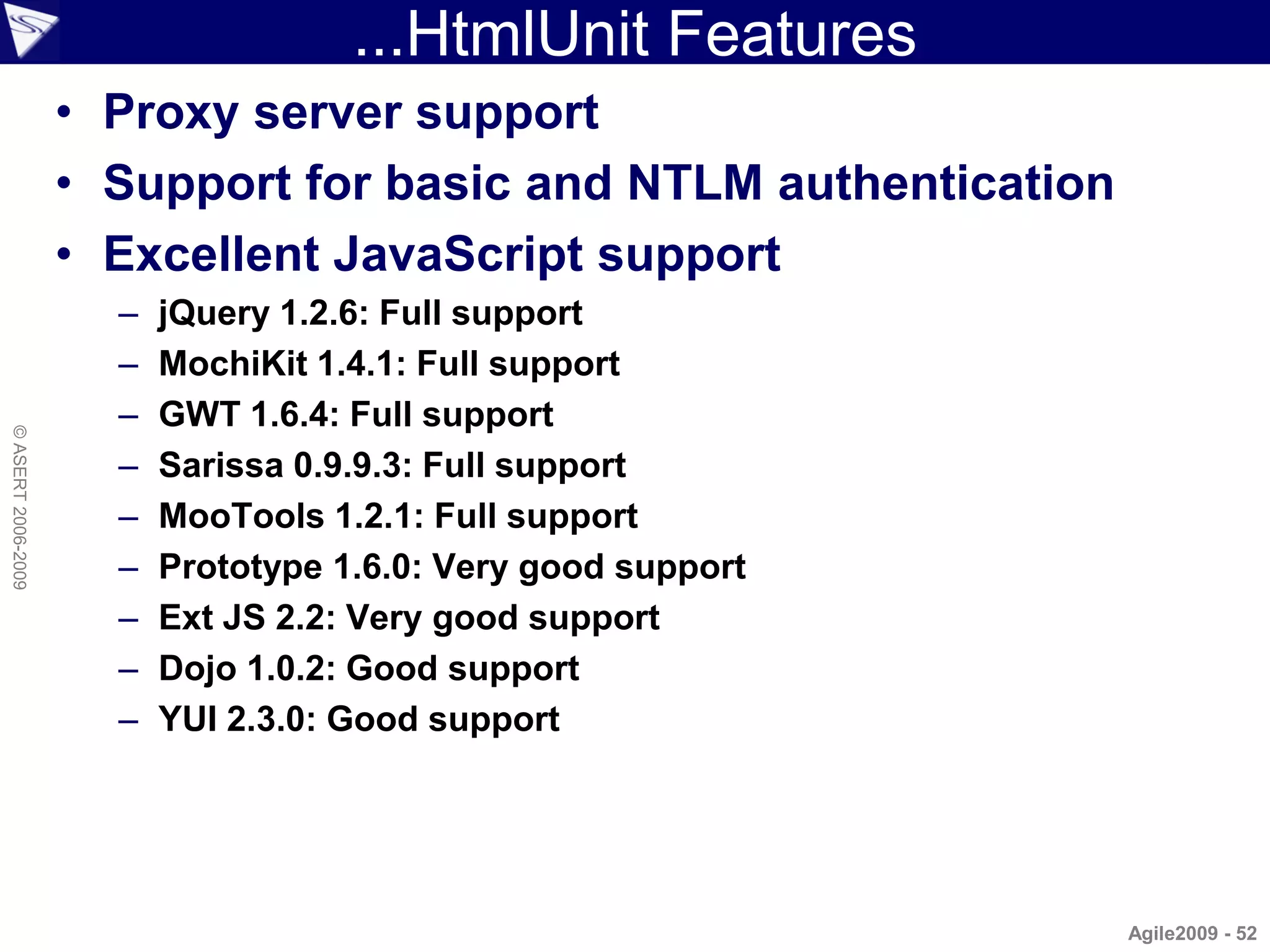
...HtmlUnit Features
                    • Proxy server support
                    • Support for basic and NTLM authentication
                    • Excellent JavaScript support
                      –   jQuery 1.2.6: Full support
                      –   MochiKit 1.4.1: Full support
                      –   GWT 1.6.4: Full support
© ASERT 2006-2009


                      –   Sarissa 0.9.9.3: Full support
                      –   MooTools 1.2.1: Full support
                      –   Prototype 1.6.0: Very good support
                      –   Ext JS 2.2: Very good support
                      –   Dojo 1.0.2: Good support
                      –   YUI 2.3.0: Good support


                                                                  Agile2009 - 52
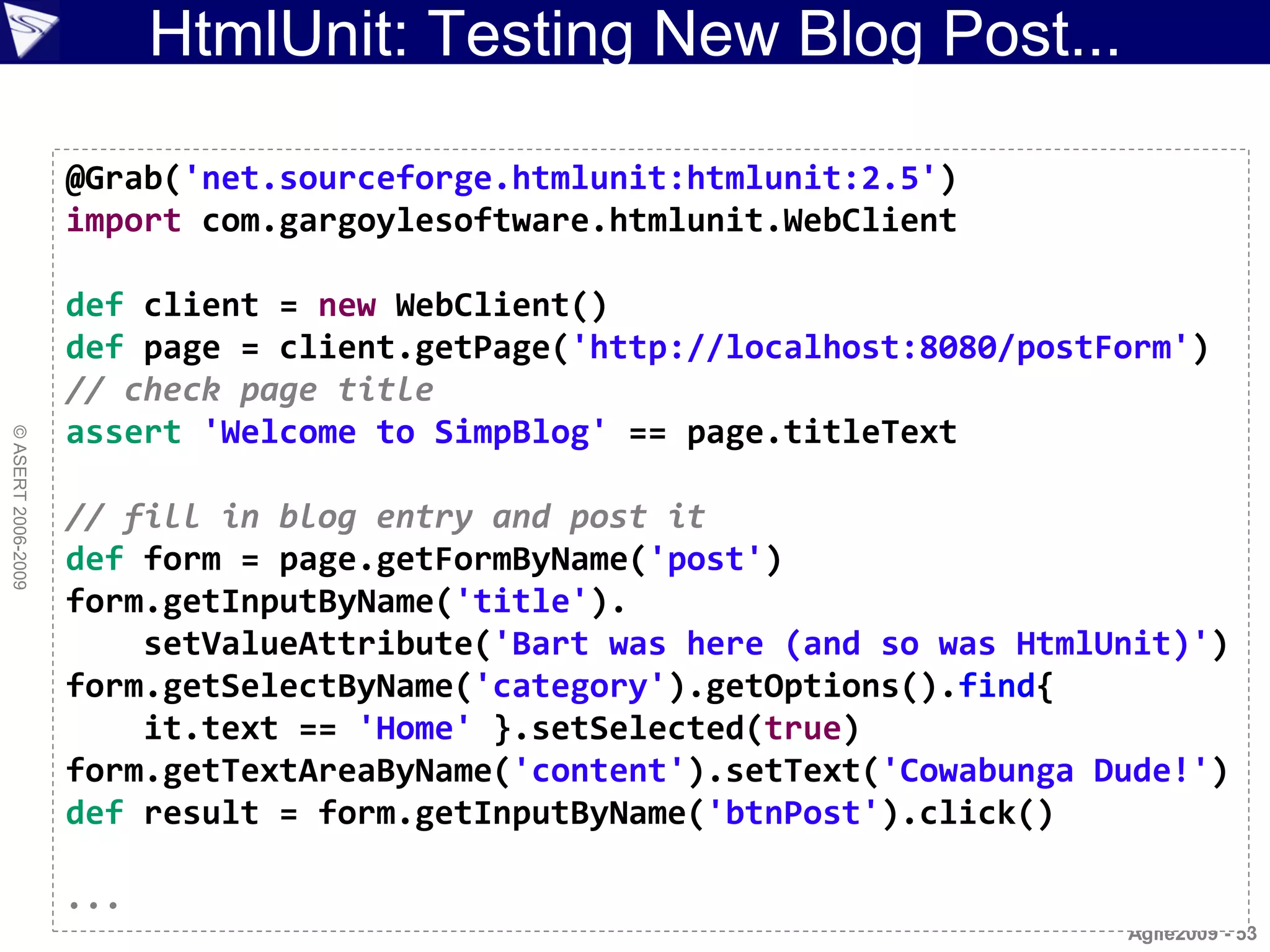
HtmlUnit: Testing New Blog Post...

                    @Grab('net.sourceforge.htmlunit:htmlunit:2.5')
                    import com.gargoylesoftware.htmlunit.WebClient

                    def client = new WebClient()
                    def page = client.getPage('http://localhost:8080/postForm')
                    // check page title
                    assert 'Welcome to SimpBlog' == page.titleText
© ASERT 2006-2009


                    // fill in blog entry and post it
                    def form = page.getFormByName('post')
                    form.getInputByName('title').
                        setValueAttribute('Bart was here (and so was HtmlUnit)')
                    form.getSelectByName('category').getOptions().find{
                        it.text == 'Home' }.setSelected(true)
                    form.getTextAreaByName('content').setText('Cowabunga Dude!')
                    def result = form.getInputByName('btnPost').click()

                    ...
                                                                          Agile2009 - 53
...HtmlUnit: Testing New Blog Post

                    ...

                    // check blog post details
                    assert result.getElementsByTagName('h1').item(0).
                        textContent.matches('Post.*: Bart was here.*')
                    def h3headings = result.getElementsByTagName('h3')
© ASERT 2006-2009


                    assert h3headings.item(1).textContent == 'Category: Home'
                    assert h3headings.item(2).textContent == 'Author: Bart'

                    // expecting:
                    // <table><tr><td><p>Cowabunga Dude!</p></td></tr></table>
                    def cell = result.getByXPath('//TABLE//TR/TD')[0]
                    def para = cell.getFirstChild()
                    assert para.textContent == 'Cowabunga Dude!'


                                                                          Agile2009 - 54
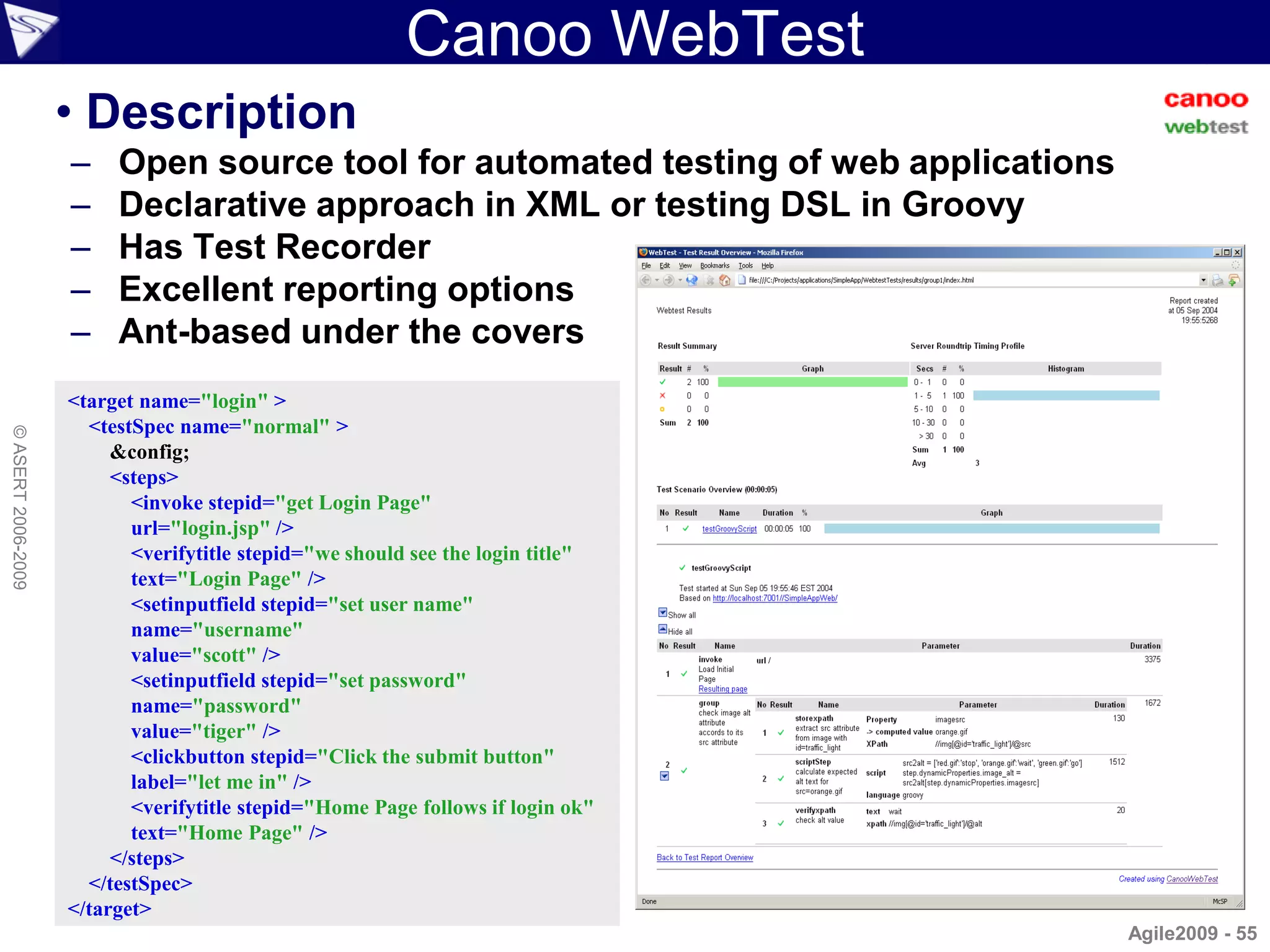
Canoo WebTest
                    • Description
                    –    Open source tool for automated testing of web applications
                    –    Declarative approach in XML or testing DSL in Groovy
                    –    Has Test Recorder
                    –    Excellent reporting options
                    –    Ant-based under the covers
                    <target name="login" >
                      <testSpec name="normal" >
© ASERT 2006-2009


                         &config;
                         <steps>
                           <invoke stepid="get Login Page"
                           url="login.jsp" />
                           <verifytitle stepid="we should see the login title"
                           text="Login Page" />
                           <setinputfield stepid="set user name"
                           name="username"
                           value="scott" />
                           <setinputfield stepid="set password"
                           name="password"
                           value="tiger" />
                           <clickbutton stepid="Click the submit button"
                           label="let me in" />
                           <verifytitle stepid="Home Page follows if login ok"
                           text="Home Page" />
                         </steps>
                      </testSpec>
                    </target>
                                                                                      Agile2009 - 55
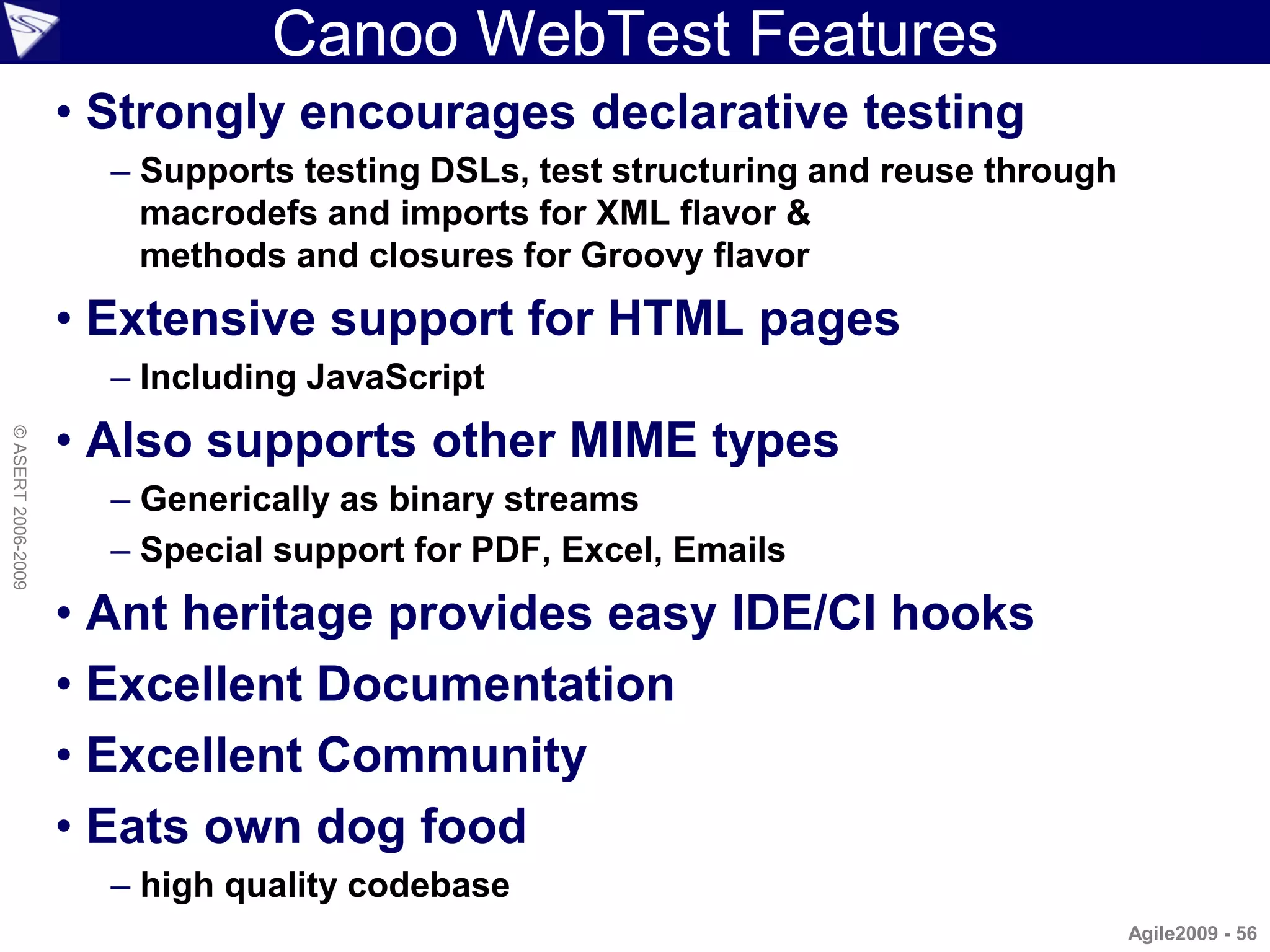
Canoo WebTest Features
                    • Strongly encourages declarative testing
                      – Supports testing DSLs, test structuring and reuse through
                        macrodefs and imports for XML flavor &
                        methods and closures for Groovy flavor
                    • Extensive support for HTML pages
                      – Including JavaScript
                    • Also supports other MIME types
© ASERT 2006-2009


                      – Generically as binary streams
                      – Special support for PDF, Excel, Emails
                    • Ant heritage provides easy IDE/CI hooks
                    • Excellent Documentation
                    • Excellent Community
                    • Eats own dog food
                      – high quality codebase
                                                                                    Agile2009 - 56
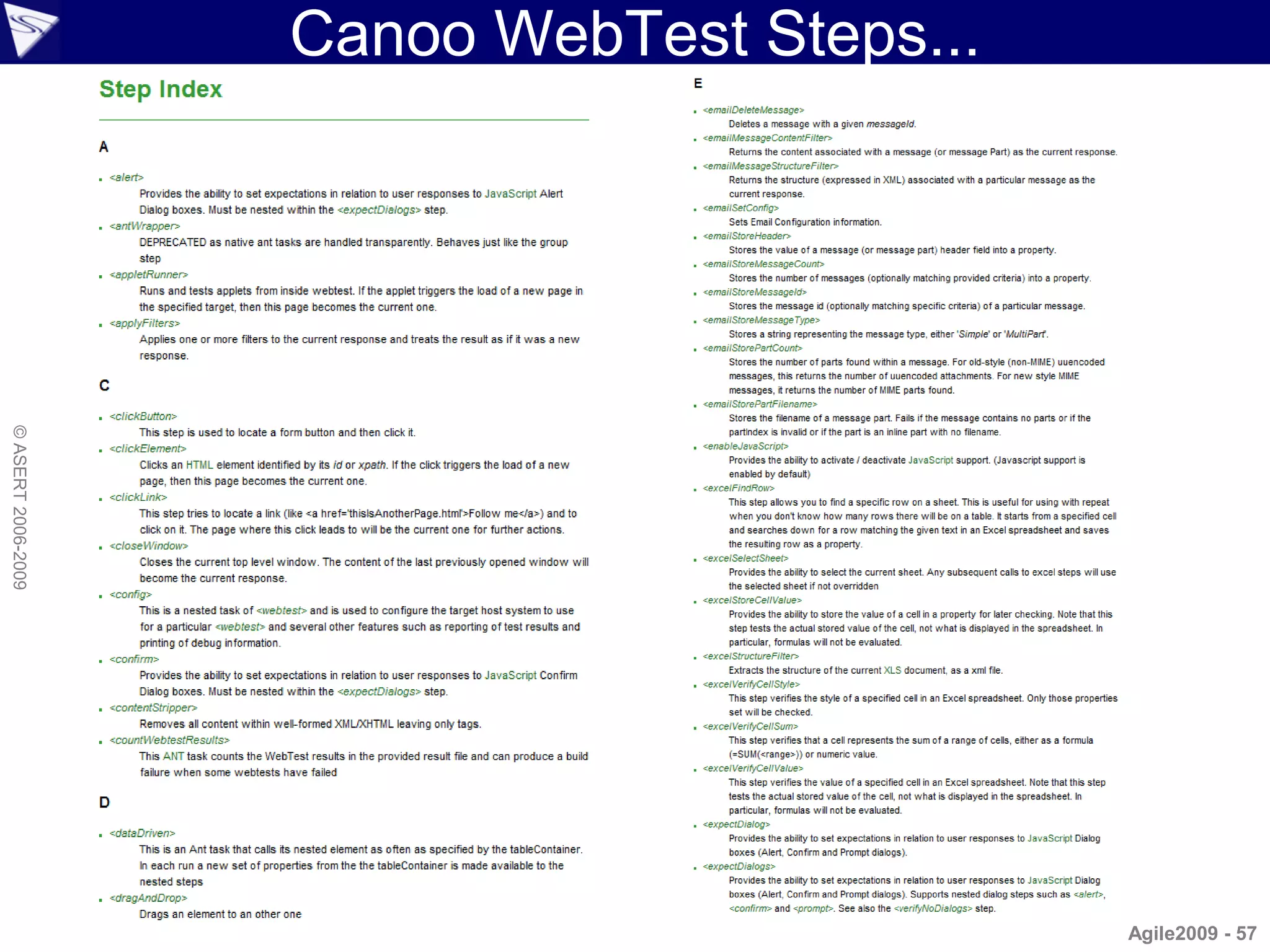
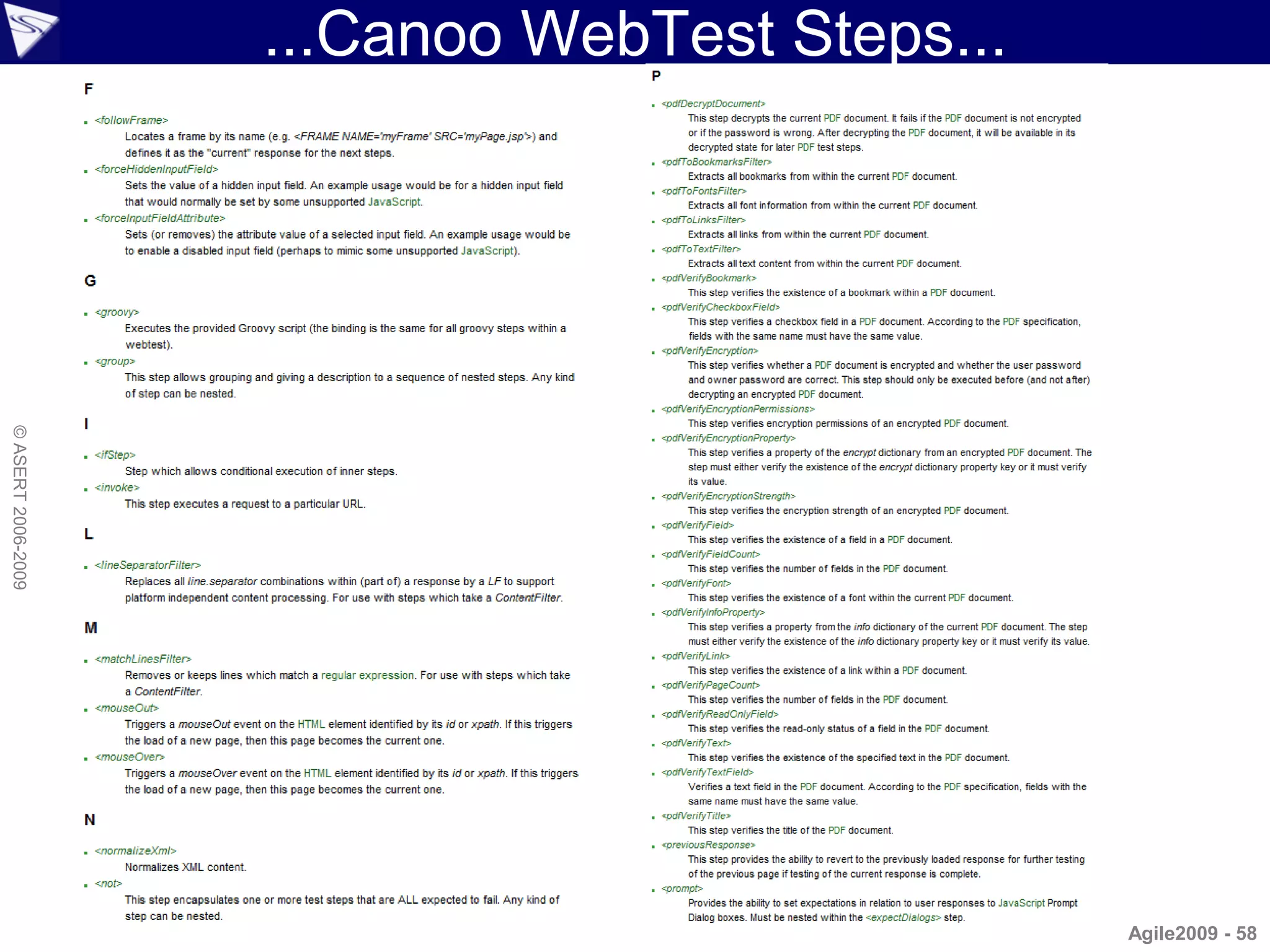
Canoo WebTest Steps...
© ASERT 2006-2009


                                             Agile2009 - 57
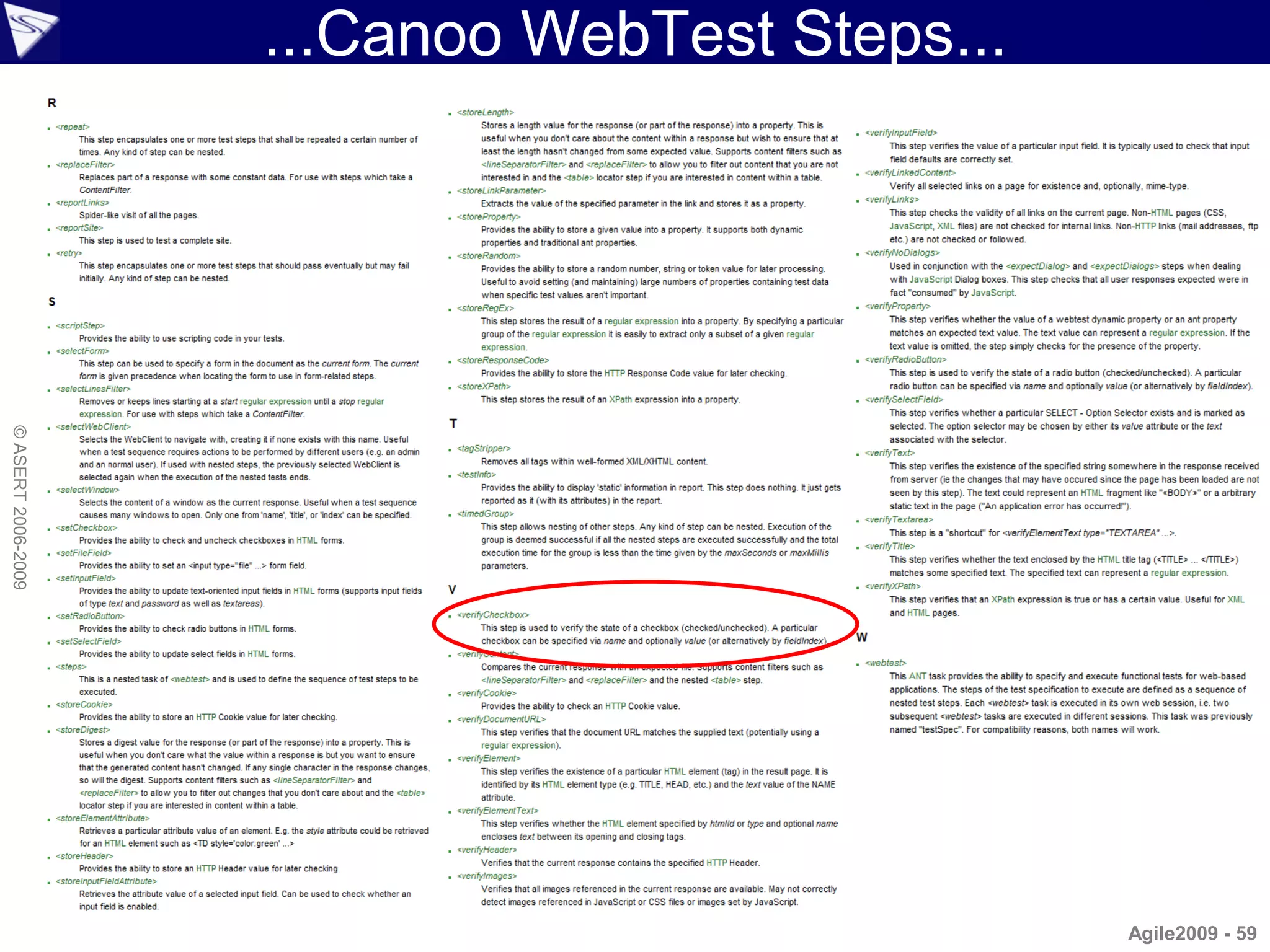
...Canoo WebTest Steps...
© ASERT 2006-2009


                                                Agile2009 - 58
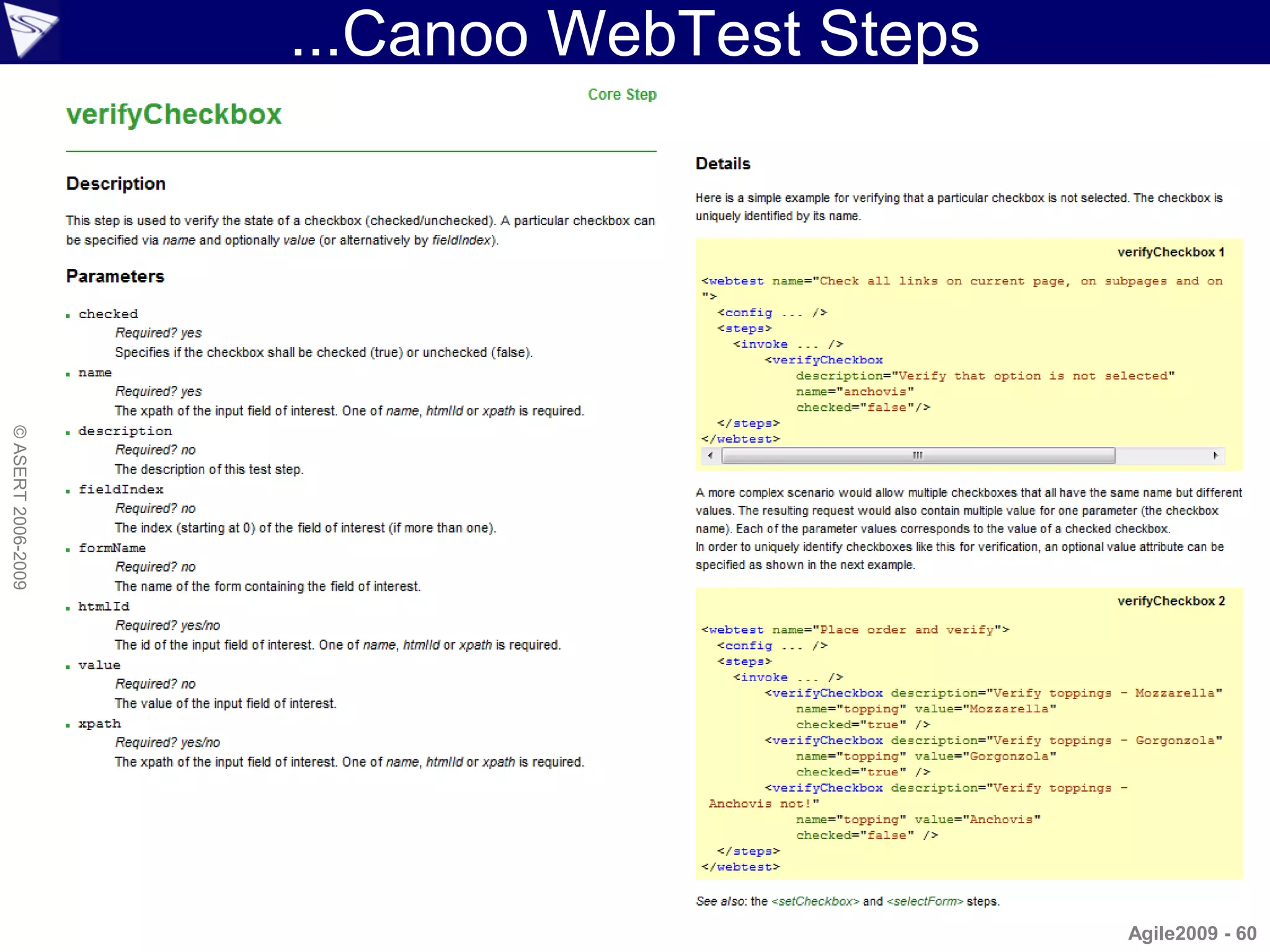
...Canoo WebTest Steps...
© ASERT 2006-2009


                                                Agile2009 - 59
...Canoo WebTest Steps
© ASERT 2006-2009


                                             Agile2009 - 60
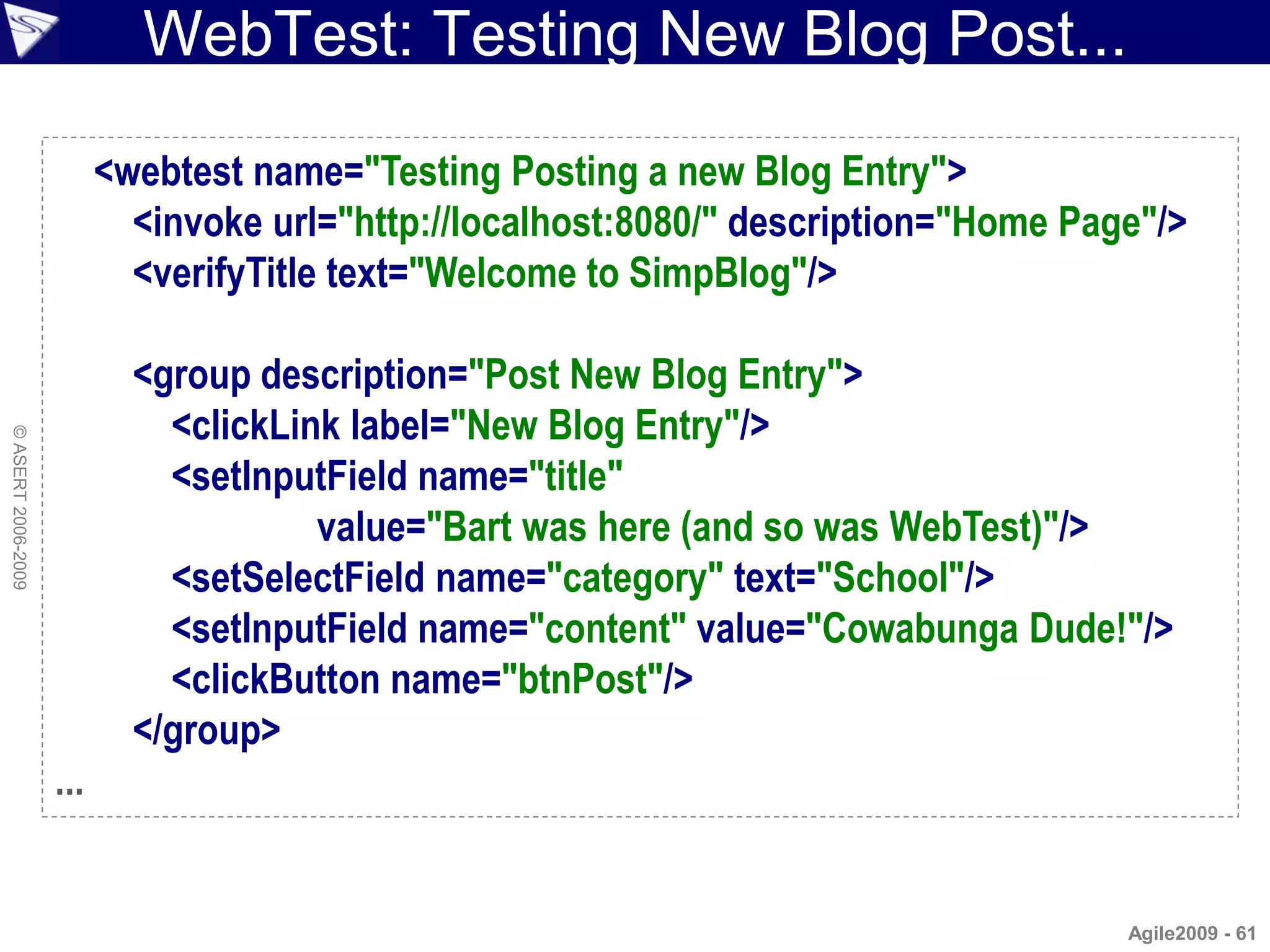
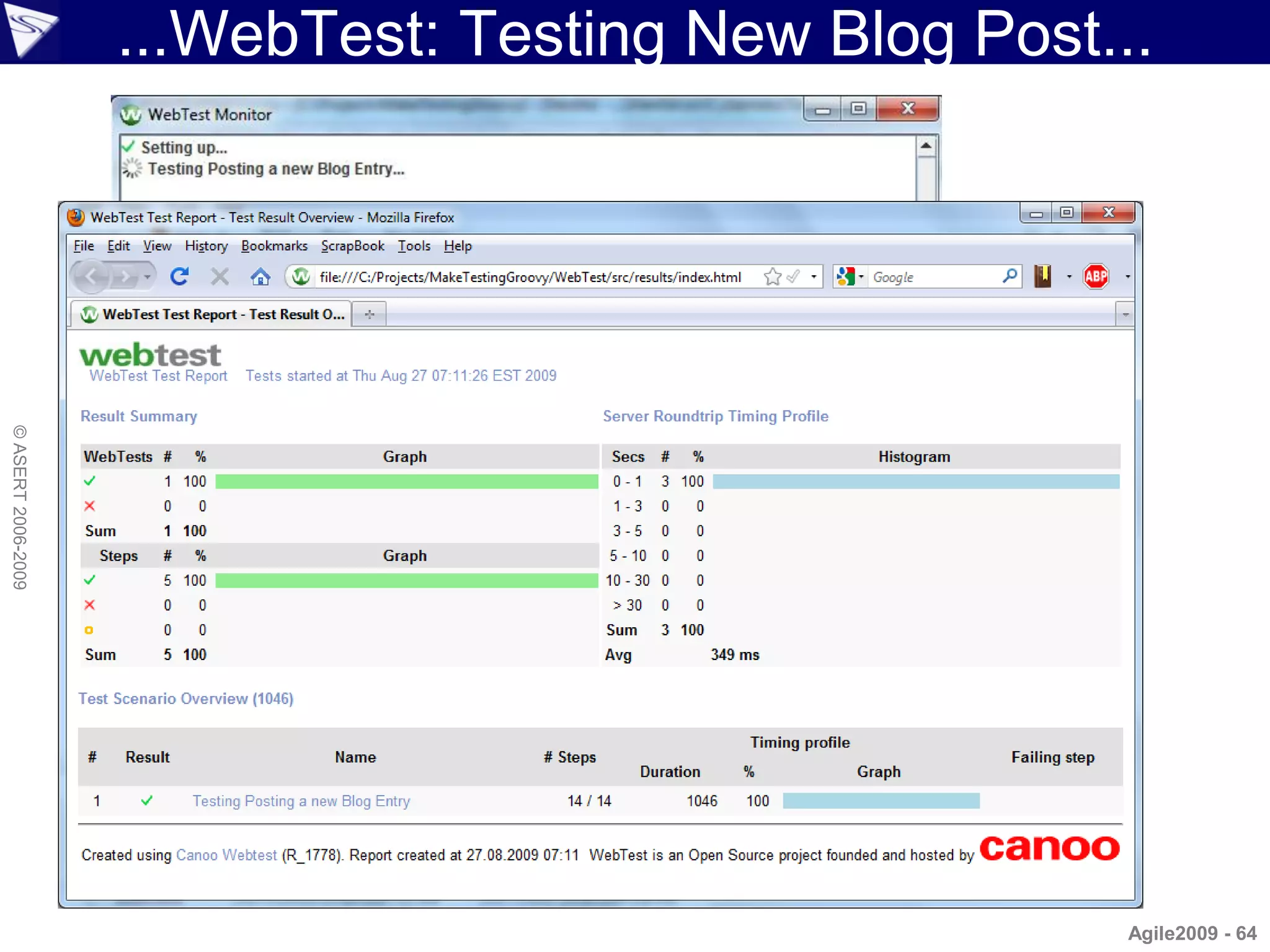
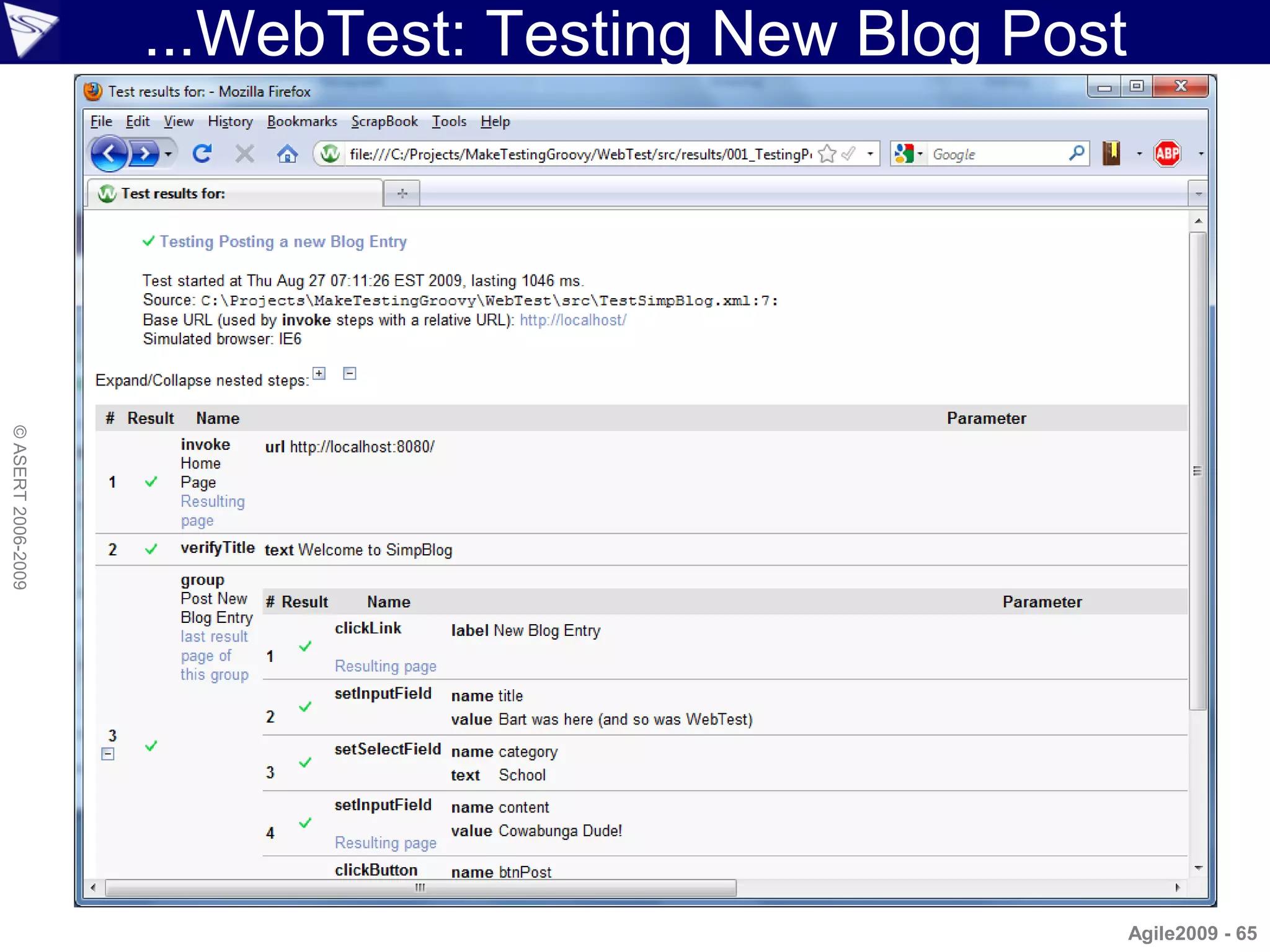
WebTest: Testing New Blog Post...

                          <webtest name="Testing Posting a new Blog Entry">
                            <invoke url="http://localhost:8080/" description="Home Page"/>
                            <verifyTitle text="Welcome to SimpBlog"/>

                            <group description="Post New Blog Entry">
                              <clickLink label="New Blog Entry"/>
© ASERT 2006-2009


                              <setInputField name="title"
                                       value="Bart was here (and so was WebTest)"/>
                              <setSelectField name="category" text="School"/>
                              <setInputField name="content" value="Cowabunga Dude!"/>
                              <clickButton name="btnPost"/>
                            </group>
                    ...


                                                                                      Agile2009 - 61
...WebTest: Testing New Blog Post...

                    ...
                            <group description="Check Blog Post">
                              <verifyElementText type="h1" regex="true"
                                          text="Post.*: Bart was here.*"/>
                              <verifyXPath xpath="//h3[2]/text()" text="Category: School"/>
© ASERT 2006-2009


                              <verifyXPath xpath="//h3[3]/text()" text="Author: Bart"/>
                              <verifyElementText type="p" text="Cowabunga Dude!"/>
                            </group>
                            <groovy>
                              println "Test run at: ${new Date()}"
                            </groovy>
                          </webtest>


                                                                                       Agile2009 - 62
...WebTest: Testing New Blog Post...
                    ant.webtest(name: 'Test SimpBlog') {
                      invoke url: "http://localhost:8080/",
                          description: "Home Page"
                      verifyTitle text: "Welcome to SimpBlog"
                      group description: "Post New Blog Entry", {
                        clickLink label: "New Blog Entry"
                        setInputField name: "title",
                            value: "Bart was here (and so was WebTest with Groovy)"
                        setSelectField name: "category", text: "School"
© ASERT 2006-2009


                        setInputField name: "content", value: "Cowabunga Dude!"
                        clickButton name: "btnPost"
                      }
                      group description: "Check Blog Post", {
                        verifyElementText type: "h1", regex: "true",
                            text: "Post.*: Bart was here.*"
                        verifyXPath xpath: "//h3[2]/text()", text: "Category: School"
                        verifyXPath xpath: "//h3[3]/text()", text: "Author: Bart"
                        verifyElementText type: "p", text: "Cowabunga Dude!"
                      }
                    }

                                                                                Agile2009 - 63
...WebTest: Testing New Blog Post...
© ASERT 2006-2009


                                                       Agile2009 - 64
...WebTest: Testing New Blog Post
© ASERT 2006-2009


                                                        Agile2009 - 65
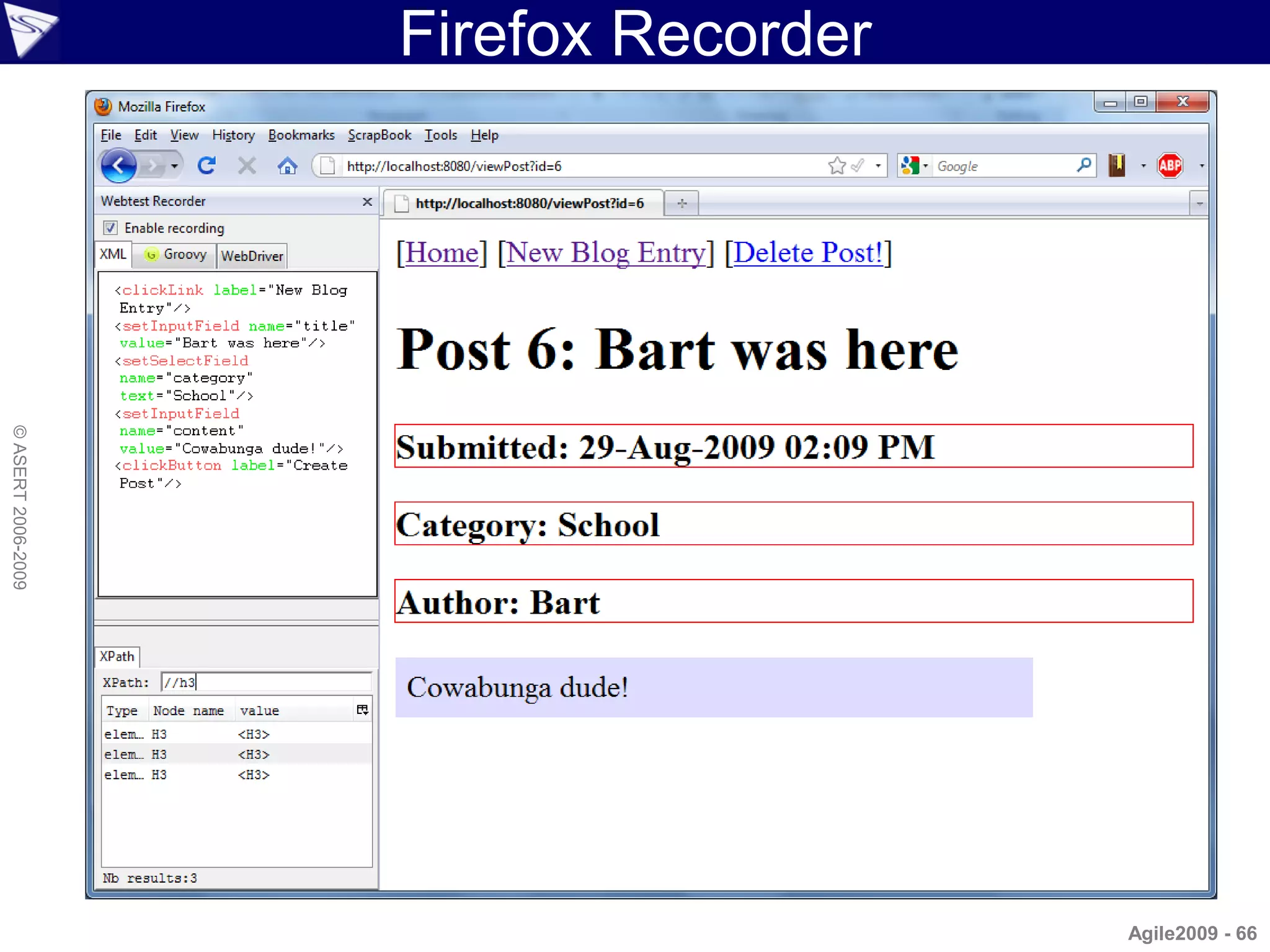
Firefox Recorder
© ASERT 2006-2009


                                       Agile2009 - 66
Watij
                    • Description
                      – Java API that provides control and automation of
                        Internet Explorer
                      – Supports actions like navigating, clicking links, filling
                        out forms, etc.
                      – Also supports more complex actions like file
© ASERT 2006-2009


                        downloading and uploading, popup windows and
                        dialogs, and screen captures
                    • Special Features
                      –   Ability to work with IE interactively
                      –   Can attach to an existing browser session
                      –   Special browser commands, e.g. ie.fullScreen(true)
                      –   Handles child browsers and popup dialogs

                                                                           Agile2009 - 67
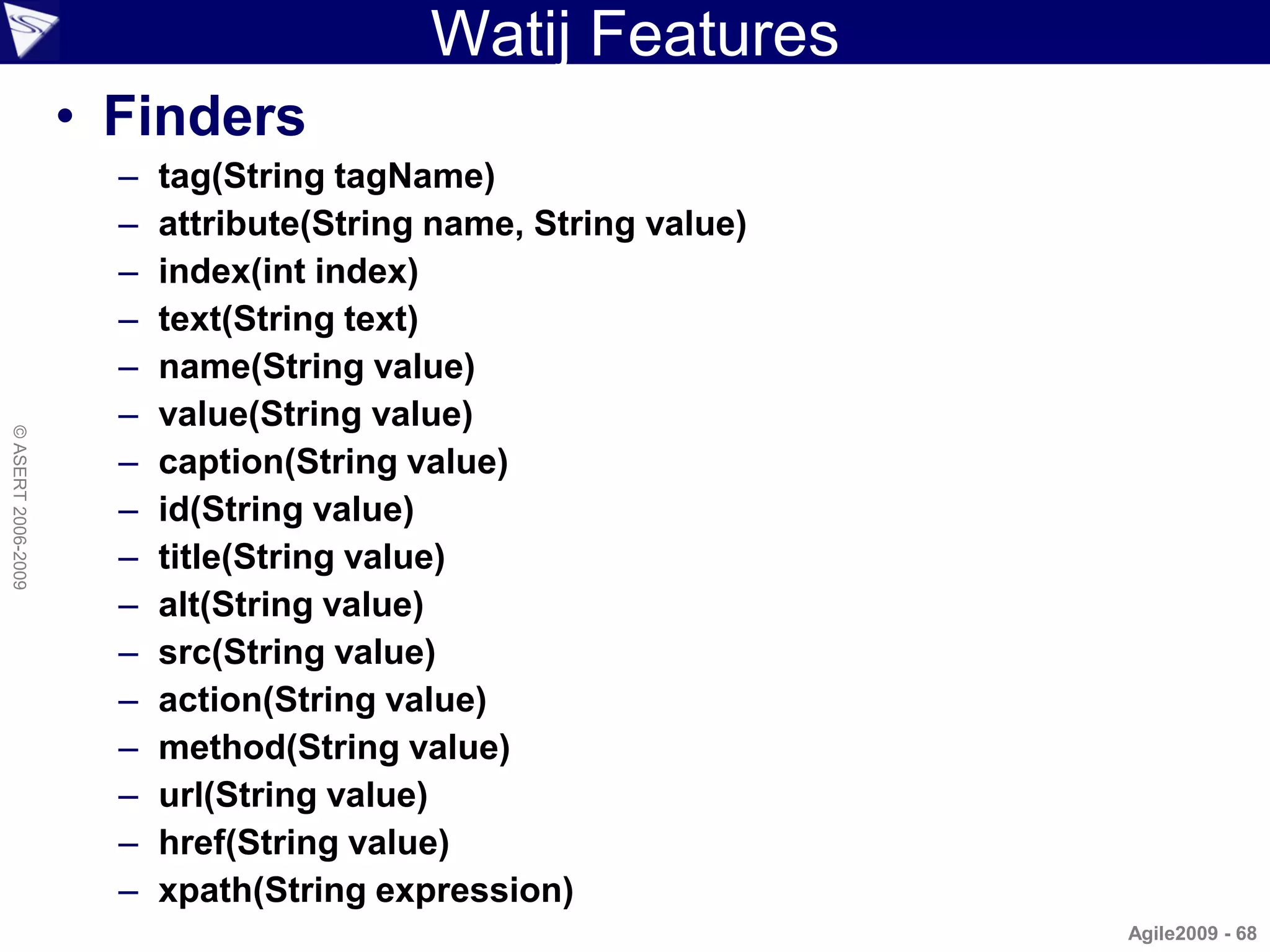
Watij Features
                    • Finders
                      –   tag(String tagName)
                      –   attribute(String name, String value)
                      –   index(int index)
                      –   text(String text)
                      –   name(String value)
                      –   value(String value)
© ASERT 2006-2009


                      –   caption(String value)
                      –   id(String value)
                      –   title(String value)
                      –   alt(String value)
                      –   src(String value)
                      –   action(String value)
                      –   method(String value)
                      –   url(String value)
                      –   href(String value)
                      –   xpath(String expression)
                                                                 Agile2009 - 68
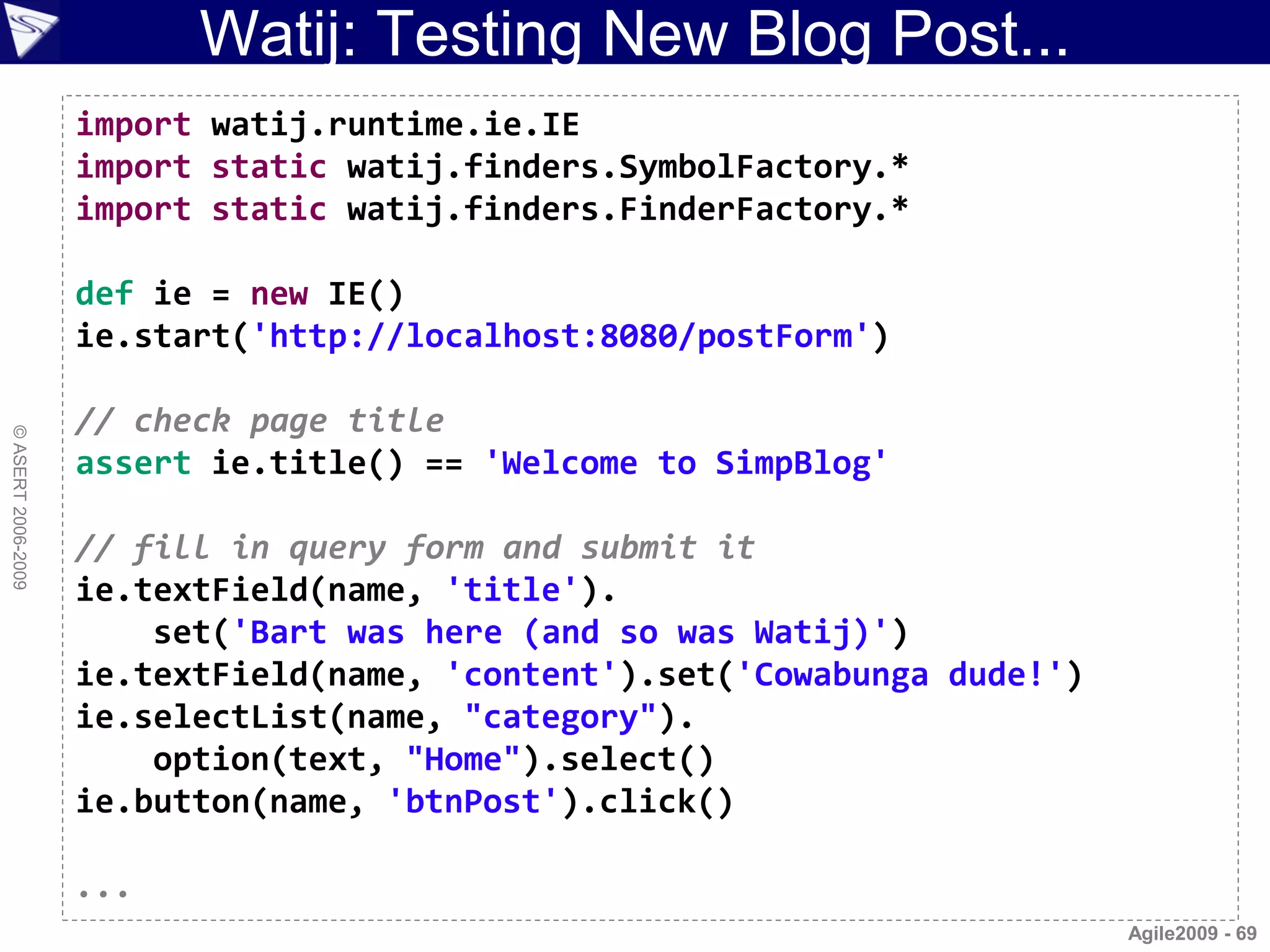
Watij: Testing New Blog Post...
                    import watij.runtime.ie.IE
                    import static watij.finders.SymbolFactory.*
                    import static watij.finders.FinderFactory.*

                    def ie = new IE()
                    ie.start('http://localhost:8080/postForm')

                    // check page title
© ASERT 2006-2009


                    assert ie.title() == 'Welcome to SimpBlog'

                    // fill in query form and submit it
                    ie.textField(name, 'title').
                        set('Bart was here (and so was Watij)')
                    ie.textField(name, 'content').set('Cowabunga dude!')
                    ie.selectList(name, "category").
                        option(text, "Home").select()
                    ie.button(name, 'btnPost').click()

                    ...
                                                                           Agile2009 - 69
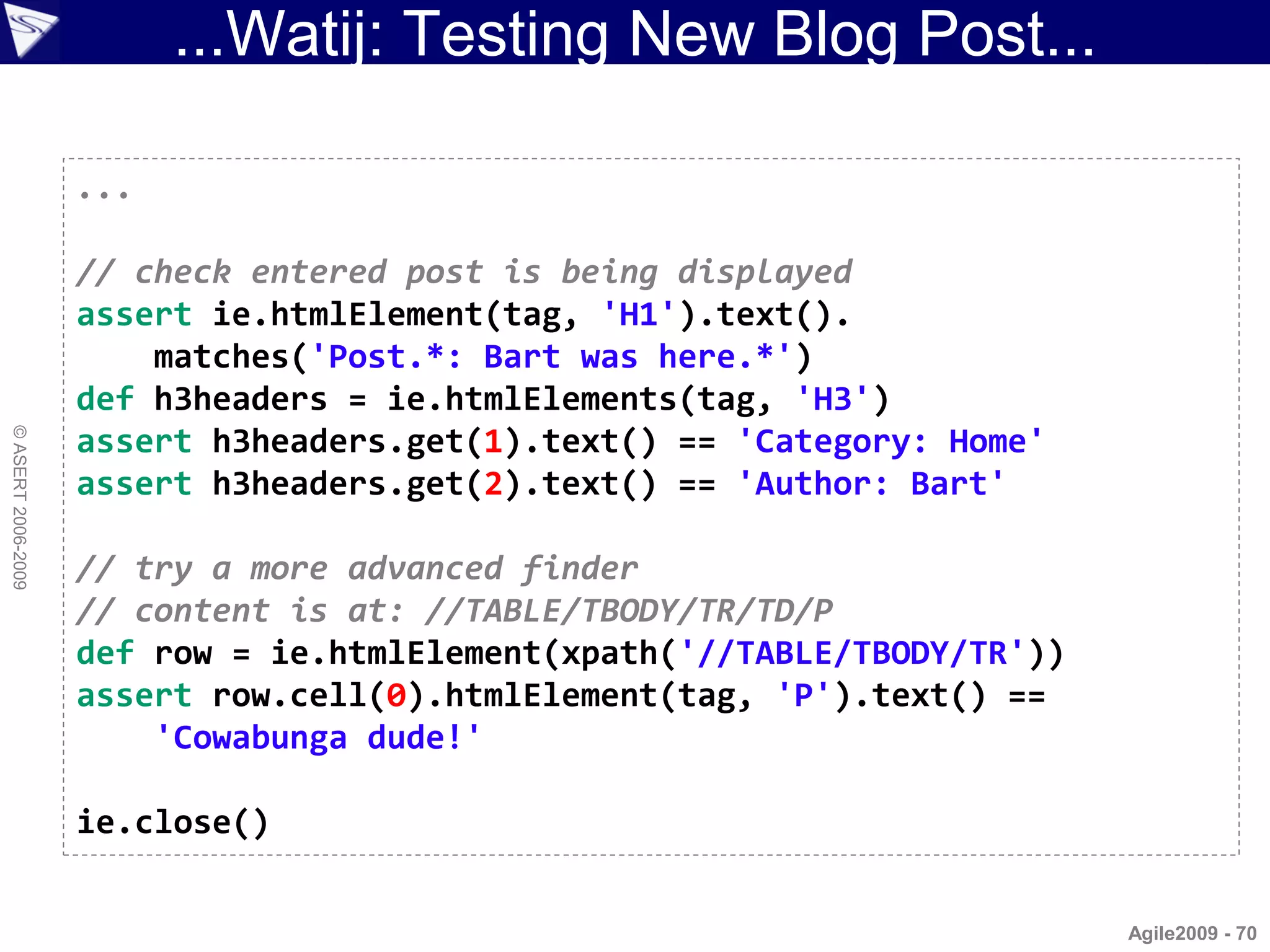
...Watij: Testing New Blog Post...

                    ...

                    // check entered post is being displayed
                    assert ie.htmlElement(tag, 'H1').text().
                        matches('Post.*: Bart was here.*')
                    def h3headers = ie.htmlElements(tag, 'H3')
© ASERT 2006-2009


                    assert h3headers.get(1).text() == 'Category: Home'
                    assert h3headers.get(2).text() == 'Author: Bart'

                    // try a more advanced finder
                    // content is at: //TABLE/TBODY/TR/TD/P
                    def row = ie.htmlElement(xpath('//TABLE/TBODY/TR'))
                    assert row.cell(0).htmlElement(tag, 'P').text() ==
                        'Cowabunga dude!'

                    ie.close()


                                                                          Agile2009 - 70
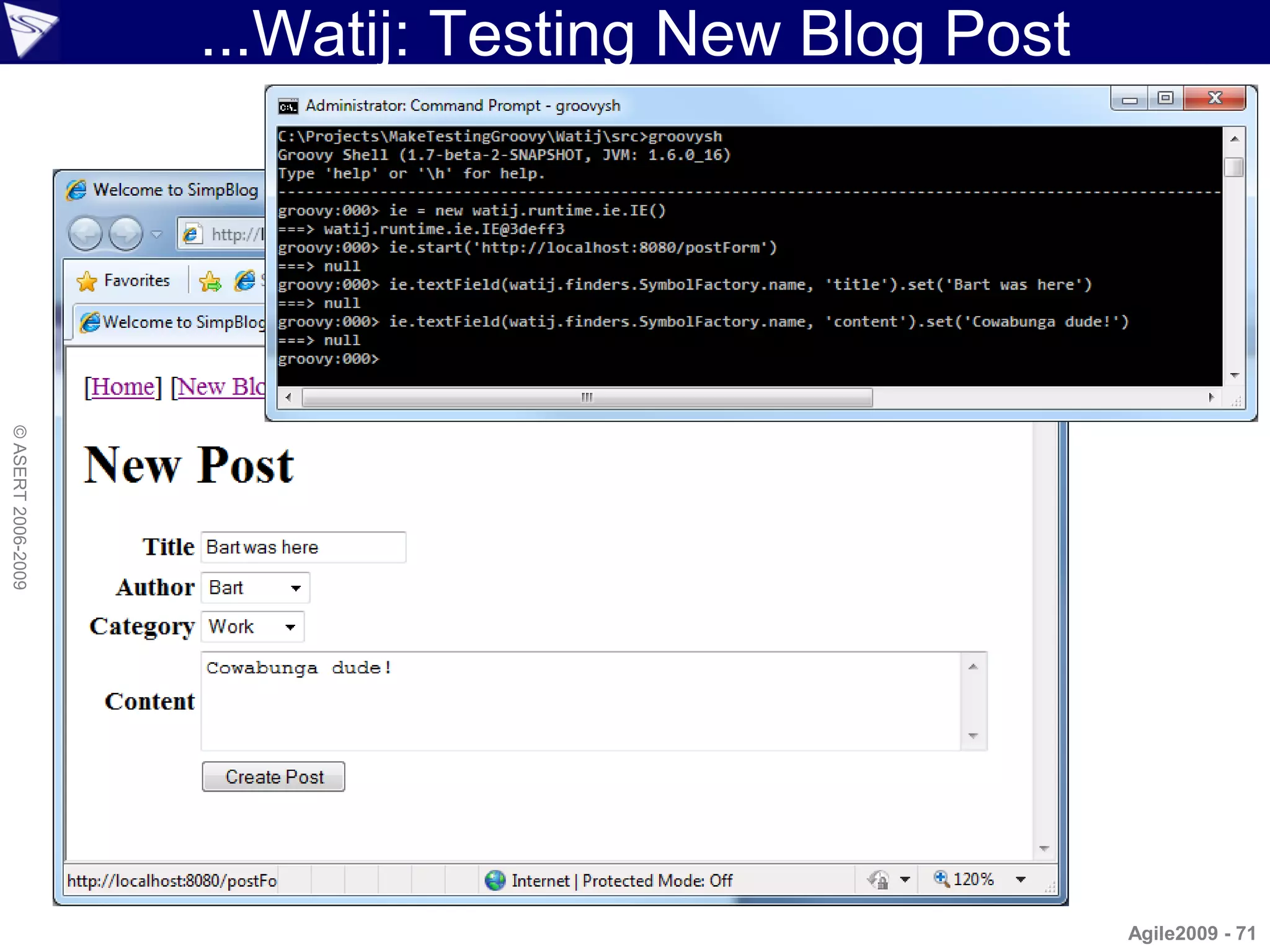
...Watij: Testing New Blog Post
© ASERT 2006-2009


                                                      Agile2009 - 71
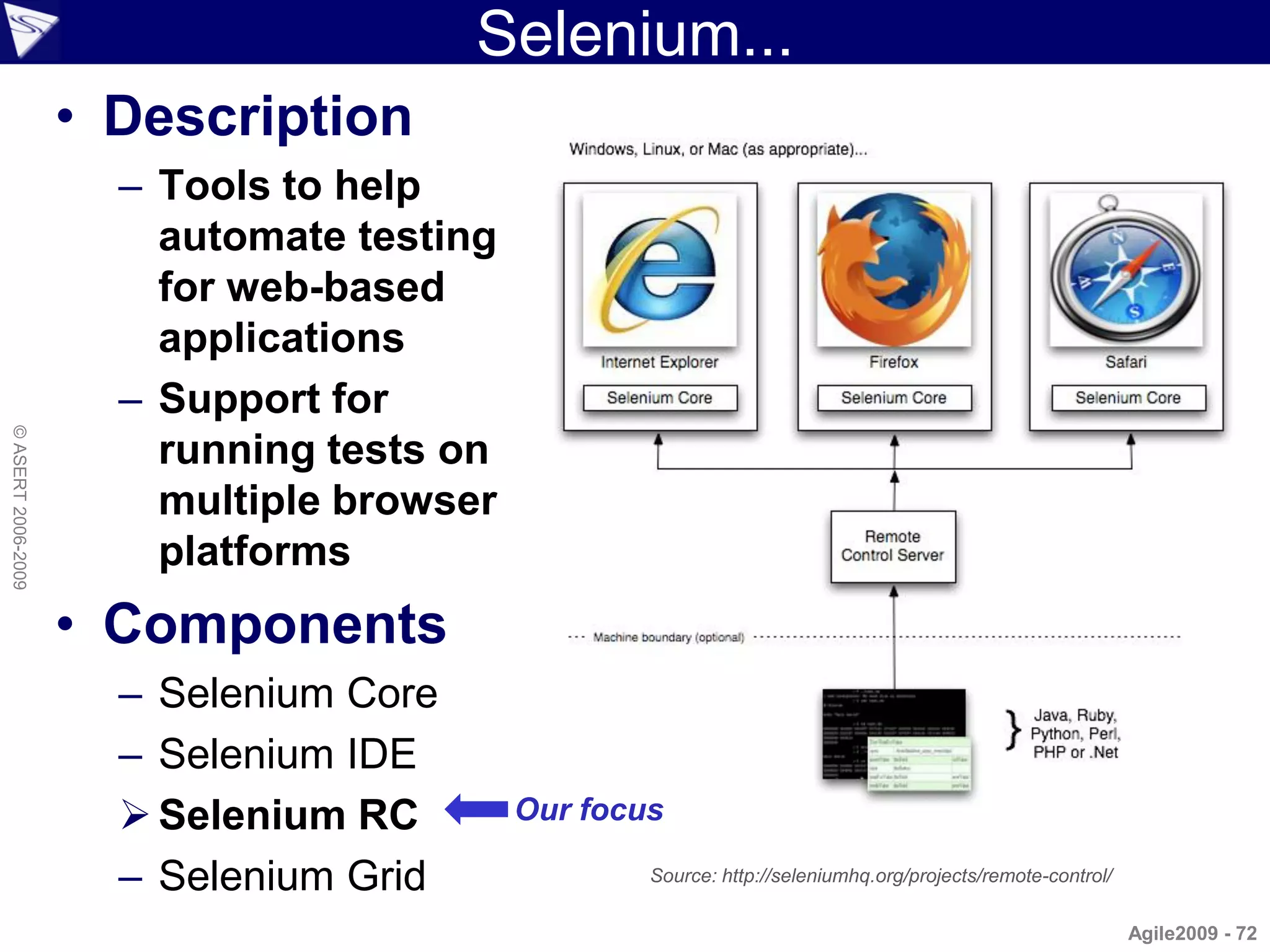
Selenium...
                    • Description
                      – Tools to help
                        automate testing
                        for web-based
                        applications
                      – Support for
© ASERT 2006-2009


                        running tests on
                        multiple browser
                        platforms
                    • Components
                      – Selenium Core
                      – Selenium IDE
                       Selenium RC        Our focus

                      – Selenium Grid              Source: http://seleniumhq.org/projects/remote-control/

                                                                                                            Agile2009 - 72
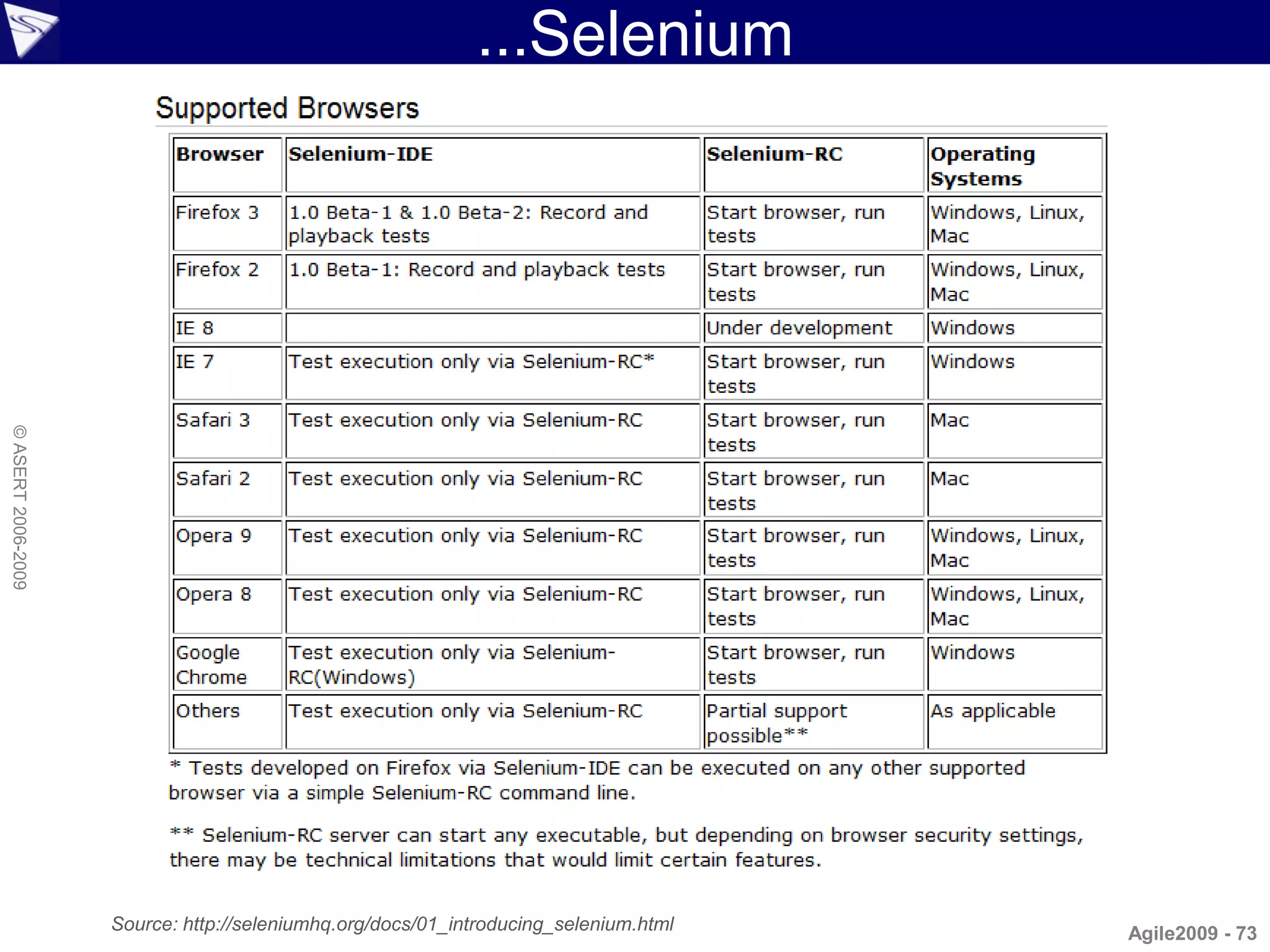
...Selenium
© ASERT 2006-2009


                    Source: http://seleniumhq.org/docs/01_introducing_selenium.html   Agile2009 - 73
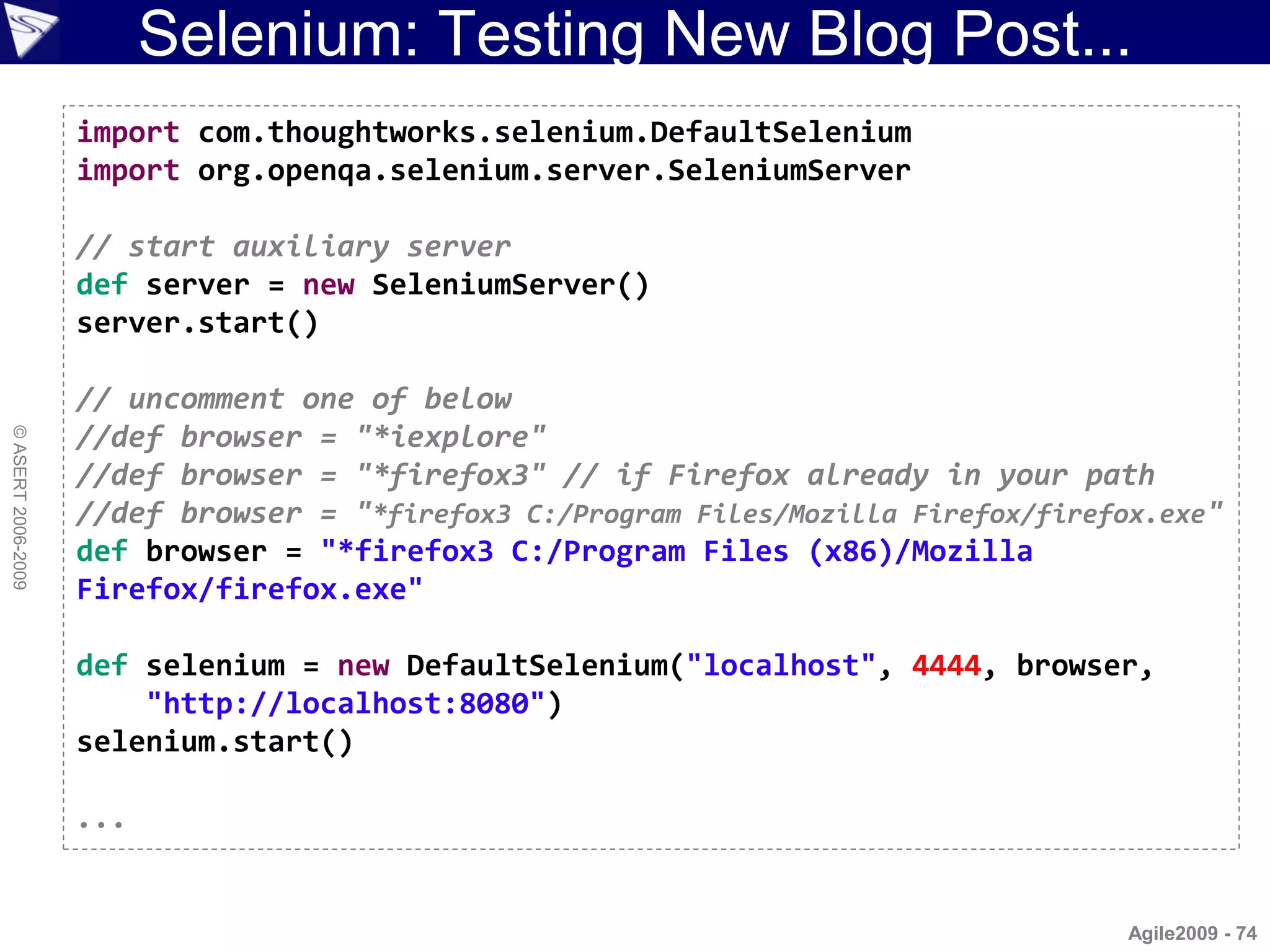
Selenium: Testing New Blog Post...
                    import com.thoughtworks.selenium.DefaultSelenium
                    import org.openqa.selenium.server.SeleniumServer

                    // start auxiliary server
                    def server = new SeleniumServer()
                    server.start()

                    // uncomment one of below
                    //def browser = "*iexplore"
© ASERT 2006-2009


                    //def browser = "*firefox3" // if Firefox already in your path
                    //def browser = "*firefox3 C:/Program Files/Mozilla Firefox/firefox.exe"
                    def browser = "*firefox3 C:/Program Files (x86)/Mozilla
                    Firefox/firefox.exe"

                    def selenium = new DefaultSelenium("localhost", 4444, browser,
                        "http://localhost:8080")
                    selenium.start()

                    ...


                                                                                      Agile2009 - 74
...Selenium: Testing New Blog Post
                    ...

                    // post blog
                    selenium.open "/postForm"
                    selenium.type "title", "Bart was here (and so was Selenium)"
                    selenium.select "category", "Home"
                    selenium.type "content", "Cowabunga Dude!"
                    selenium.click "btnPost"
© ASERT 2006-2009


                    selenium.waitForPageToLoad "5000"

                    // checks
                    assert selenium.isTextPresent('regex:Post.*: Bart was here')
                    assert selenium.isElementPresent('//h3[text()="Author: Bart"]')
                    assert selenium.isElementPresent('//h3[text()="Category: Home"]')
                    assert selenium.isElementPresent(
                        '//table//tr/td/p[text()="Cowabunga Dude!"]')

                    selenium.stop()
                    server.stop()

                                                                                   Agile2009 - 75
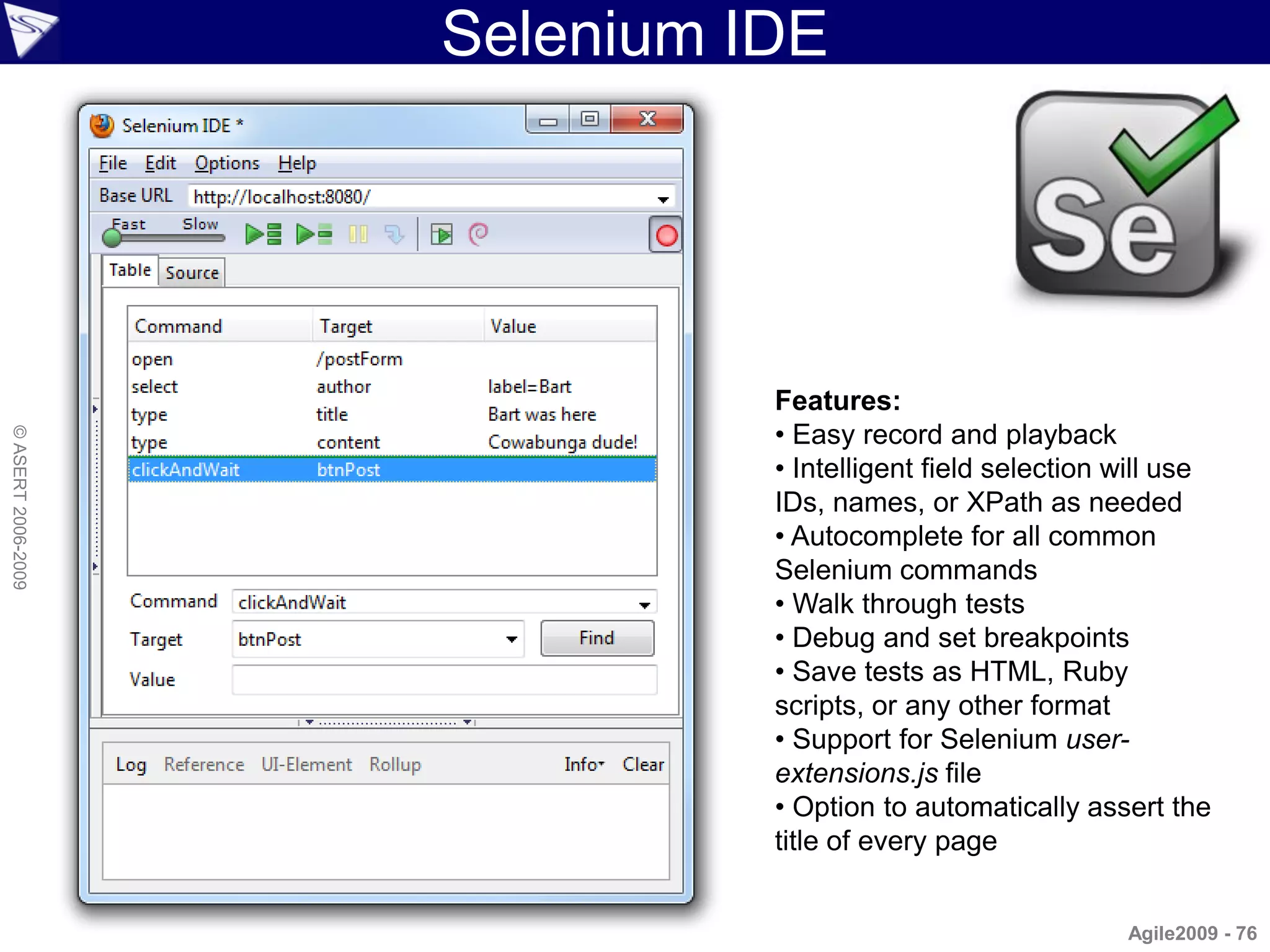
Selenium IDE


                              Features:
                              • Easy record and playback
© ASERT 2006-2009


                              • Intelligent field selection will use
                              IDs, names, or XPath as needed
                              • Autocomplete for all common
                              Selenium commands
                              • Walk through tests
                              • Debug and set breakpoints
                              • Save tests as HTML, Ruby
                              scripts, or any other format
                              • Support for Selenium user-
                              extensions.js file
                              • Option to automatically assert the
                              title of every page


                                                            Agile2009 - 76
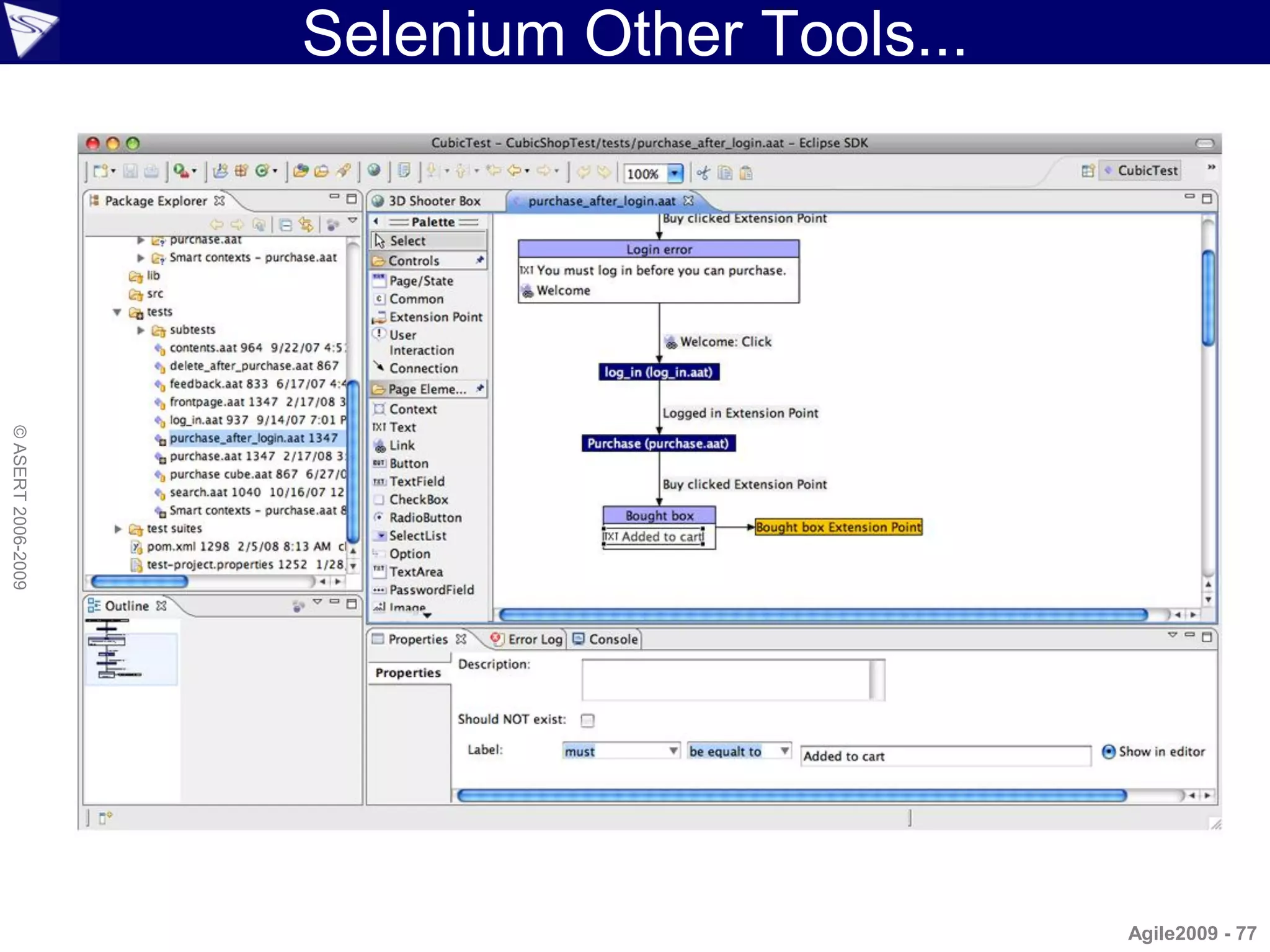
Selenium Other Tools...
© ASERT 2006-2009


                                              Agile2009 - 77
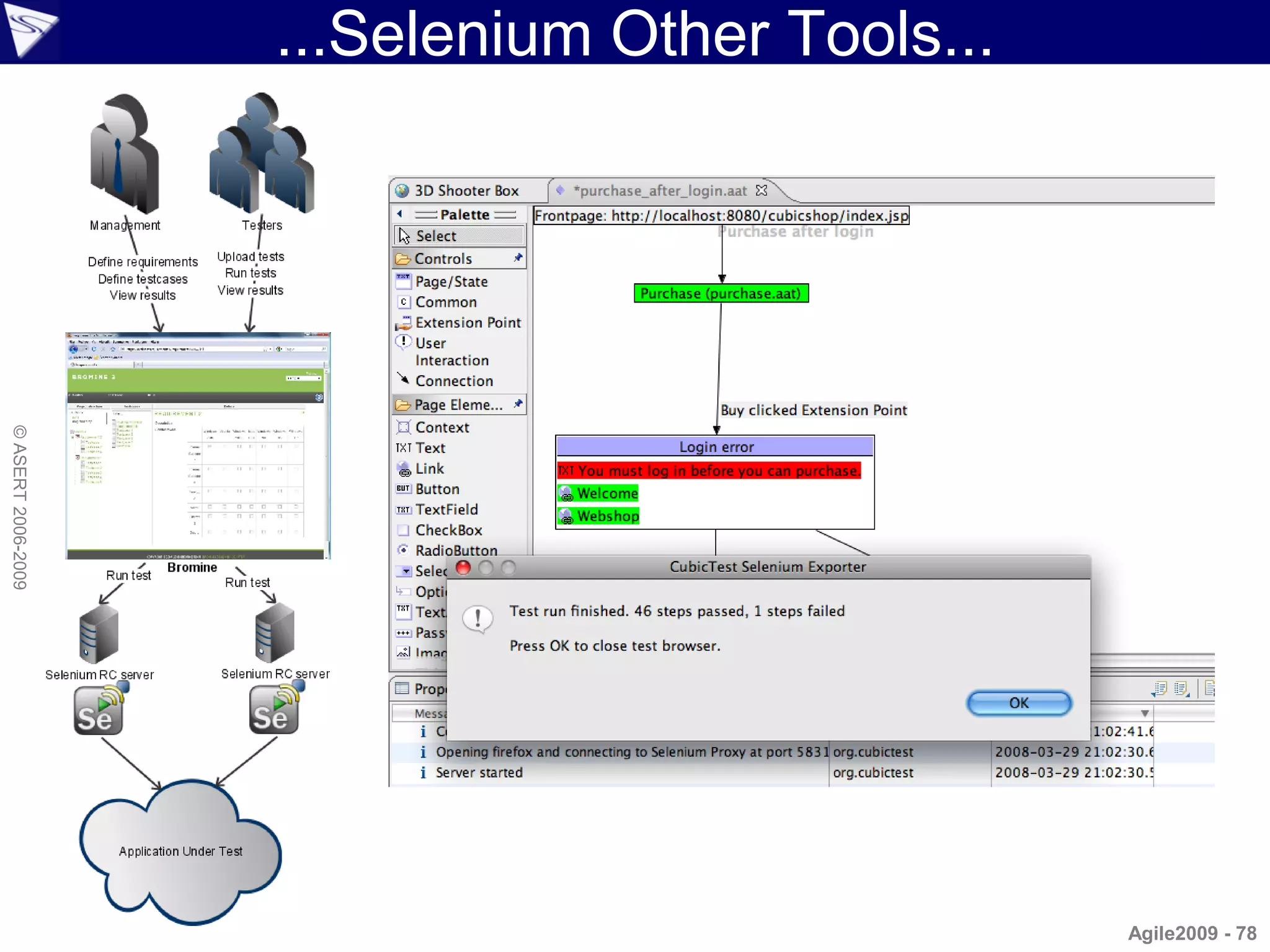
...Selenium Other Tools...
© ASERT 2006-2009


                                                 Agile2009 - 78
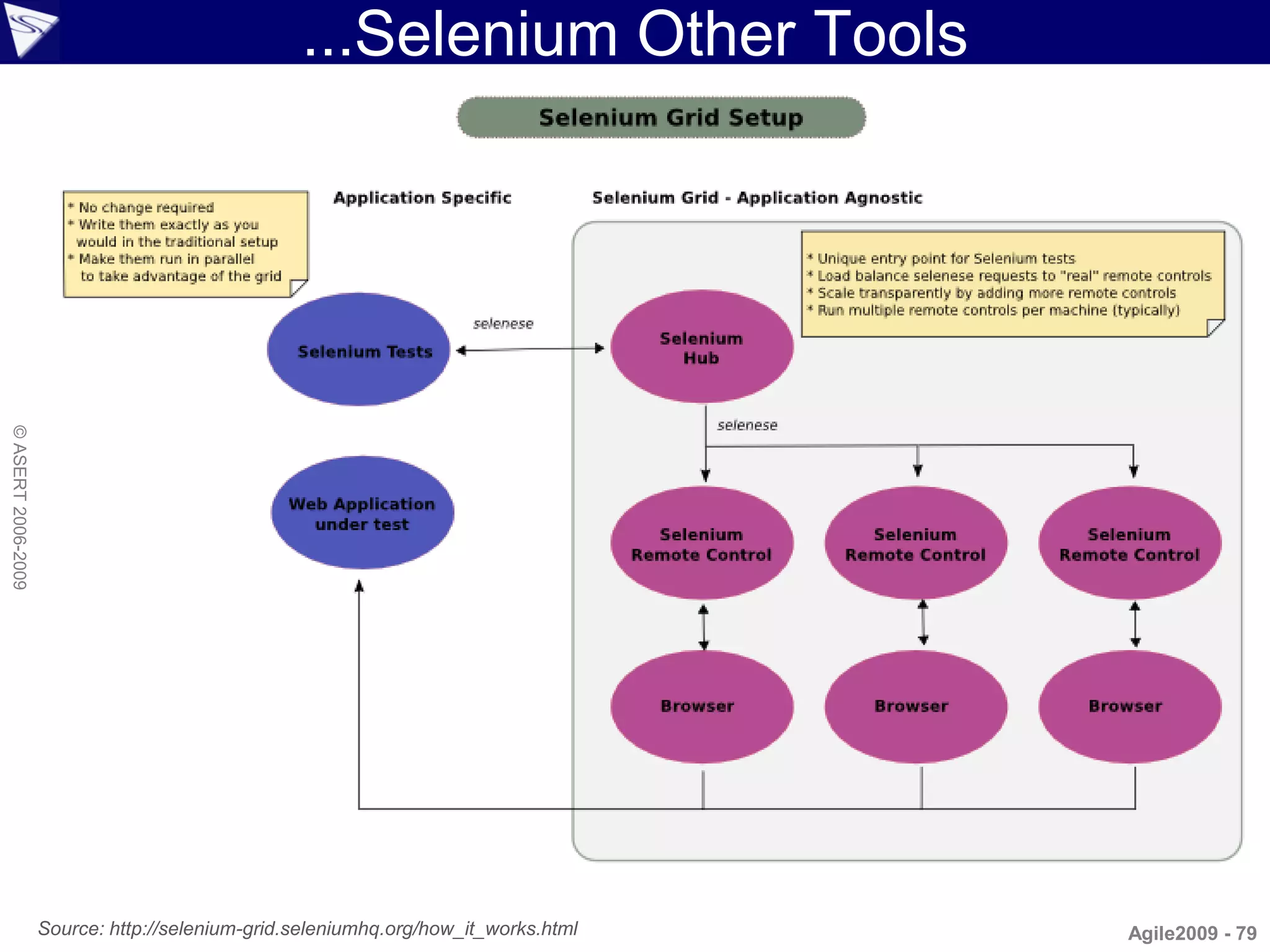
...Selenium Other Tools
© ASERT 2006-2009


                    Source: http://selenium-grid.seleniumhq.org/how_it_works.html   Agile2009 - 79
WebDriver
                    • Description
                      – Simple API to drive both real browsers
                         • for testing javascript heavy apps
                      – and a pure 'in memory' emulator solution
                         • for faster testing of simpler apps
                         • uses HtmlUnit under the covers in emulator mode
© ASERT 2006-2009


                      – Represents next generation of Selenium RC
                         • though merging into Selenium may happen under the covers
                           if you are a Selenium user
                      – Roadmap has plans to leverage some advanced
                        Selenium like features
                         • RemoteWebDriver
                         • FarmedWebDriver (think Selenium Grid)


                                                                             Agile2009 - 80
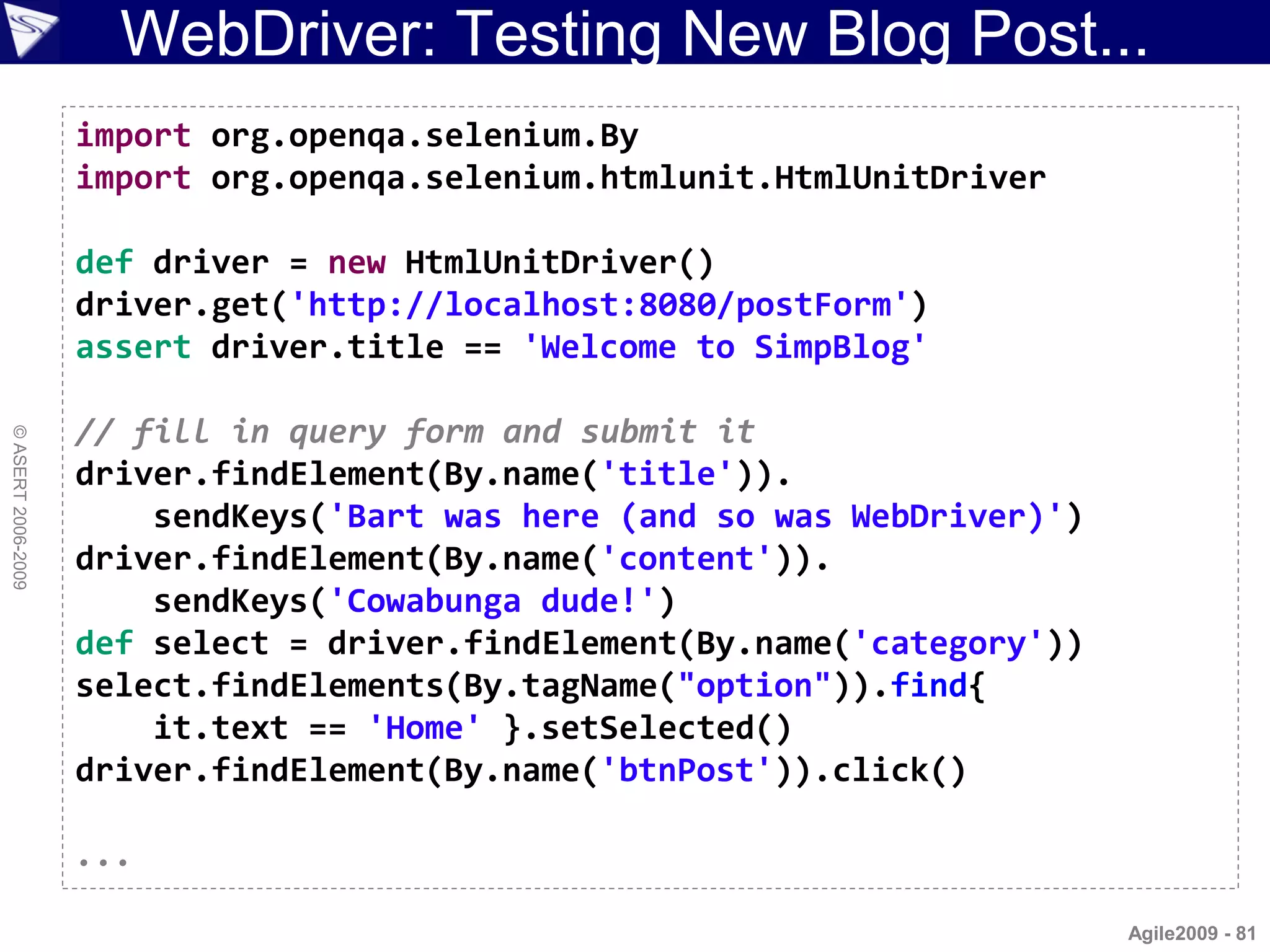
WebDriver: Testing New Blog Post...
                    import org.openqa.selenium.By
                    import org.openqa.selenium.htmlunit.HtmlUnitDriver

                    def driver = new HtmlUnitDriver()
                    driver.get('http://localhost:8080/postForm')
                    assert driver.title == 'Welcome to SimpBlog'

                    // fill in query form and submit it
© ASERT 2006-2009


                    driver.findElement(By.name('title')).
                        sendKeys('Bart was here (and so was WebDriver)')
                    driver.findElement(By.name('content')).
                        sendKeys('Cowabunga dude!')
                    def select = driver.findElement(By.name('category'))
                    select.findElements(By.tagName("option")).find{
                        it.text == 'Home' }.setSelected()
                    driver.findElement(By.name('btnPost')).click()

                    ...

                                                                           Agile2009 - 81
...WebDriver: Testing New Blog Post

                    ...

                    assert driver.findElement(By.tagName("h1")).text.
                        matches('Post.*: Bart was here.*')
                    def h3headers = driver.findElements(By.tagName("h3"))
                    assert h3headers[1].text == 'Category: Home'
© ASERT 2006-2009


                    assert h3headers[2].text == 'Author: Bart'

                    // try a more advanced finder
                    // content is at: //TABLE/TBODY/TR/TD/P
                    def row = driver.findElement(By.xpath("//table/tbody/tr"))
                    def col = row.findElement(By.tagName("td"))
                    def para = col.findElement(By.tagName("p"))
                    assert para.text == 'Cowabunga dude!'


                                                                            Agile2009 - 82
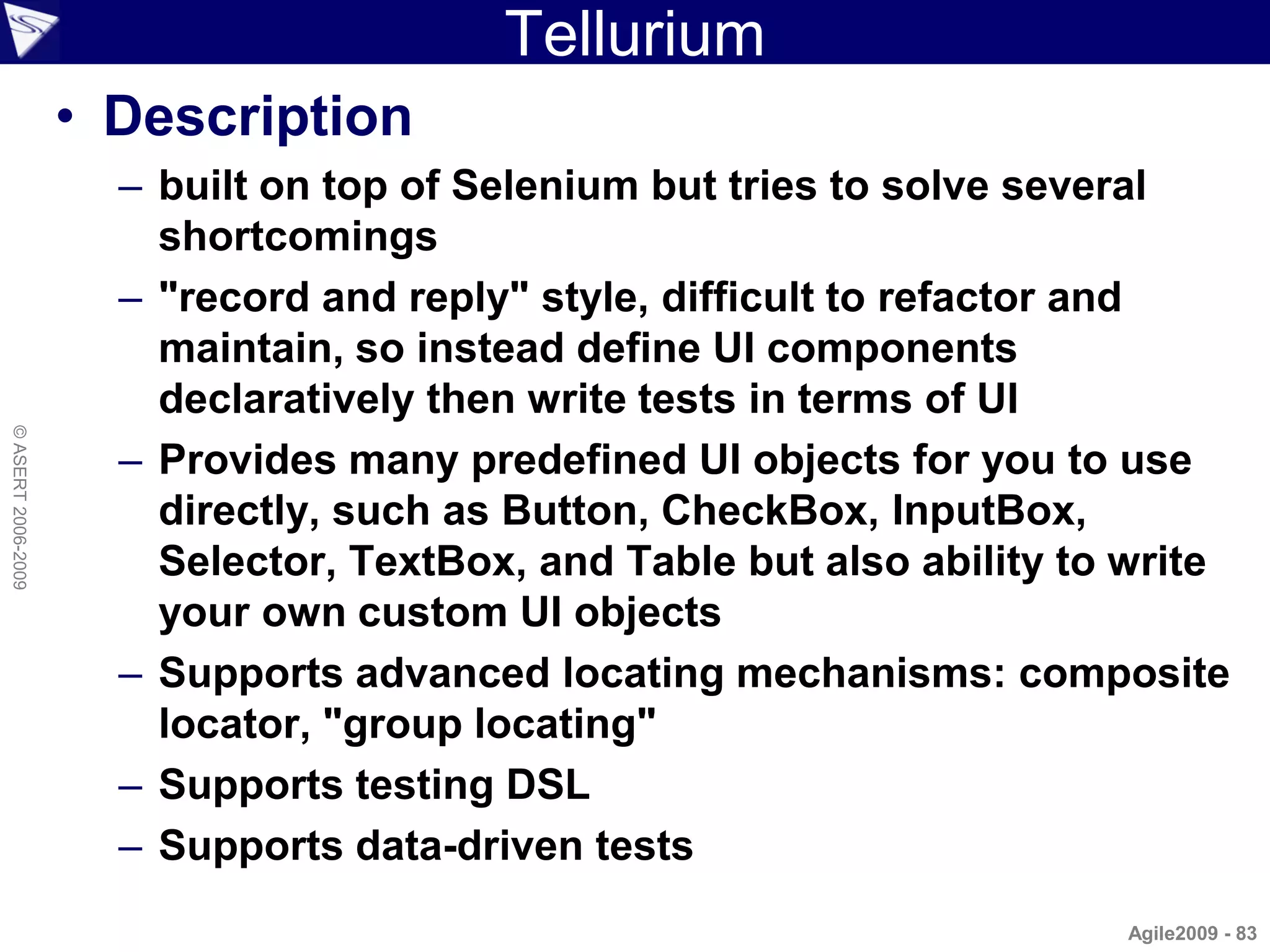
Tellurium
                    • Description
                      – built on top of Selenium but tries to solve several
                        shortcomings
                      – "record and reply" style, difficult to refactor and
                        maintain, so instead define UI components
                        declaratively then write tests in terms of UI
© ASERT 2006-2009


                      – Provides many predefined UI objects for you to use
                        directly, such as Button, CheckBox, InputBox,
                        Selector, TextBox, and Table but also ability to write
                        your own custom UI objects
                      – Supports advanced locating mechanisms: composite
                        locator, "group locating"
                      – Supports testing DSL
                      – Supports data-driven tests
                                                                        Agile2009 - 83
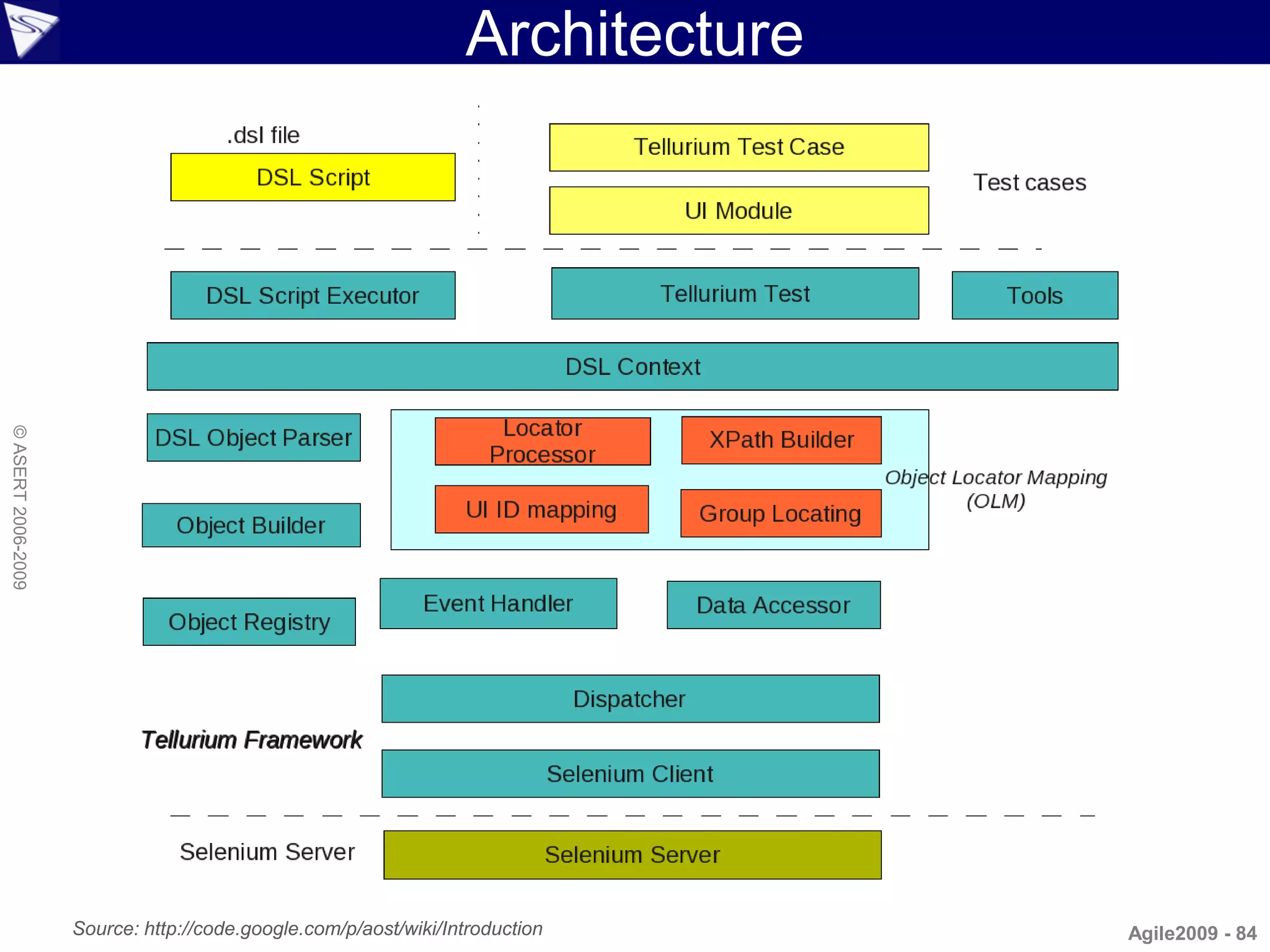
Architecture
© ASERT 2006-2009


                    Source: http://code.google.com/p/aost/wiki/Introduction     Agile2009 - 84
Tellurium Example
                    • Selenium:
                    selenium.type("//input[@title='Google Search']", input)
                    selenium.click("//input[@name='btnG' and @type='submit']")

                    • Tellurium UI:
                    ui.Container(uid: "google_start_page",
© ASERT 2006-2009


                            clocator: [tag: "td"], group: "true") {
                        InputBox(uid: "searchbox",
                            clocator: [title: "Google Search"])
                        SubmitButton(uid: "googlesearch",
                            clocator: [name: "btnG", value: "Google Search"])
                    }

                    • Tellurium DSL Test:
                    type "google_start_page.searchbox", input
                    click "google_start_page.googlesearch"
                                                                          Agile2009 - 85
Tellurium: Testing New Blog Post...
                    ui.UrlLink(uid: "create_new_post",
                            clocator: [tag:'a', text: "New Blog Entry"])

                    ui.Form(uid: "blogform",
                            clocator: [tag: 'form', name:'post'], group: "true") {
                        InputBox(uid: "title", clocator: [name: "title"])
                        InputBox(uid: "content", clocator: [tag:'textarea', name: "content"])
                        Selector(uid: "category", clocator: [name: "category"])
                        Selector(uid: "author", clocator: [name: "author"])
© ASERT 2006-2009


                        SubmitButton(uid: "post_button",
                            clocator: [name: 'btnPost', value: "Create Post"])
                    }

                    ui.TextBox(uid: 'main_header', clocator: [tag: 'h1'])
                    ui.TextBox(uid: 'category_header', clocator: [tag: 'h3', position: '2'])
                    ui.TextBox(uid: 'author_header', clocator: [tag: 'h3', position: '3'])
                    ui.Container(uid: 'table', clocator: [tag: 'table']) {
                        ui.TextBox(uid: 'content_para', locator: '//tr/td/p')
                    }


                                                                                        Agile2009 - 86
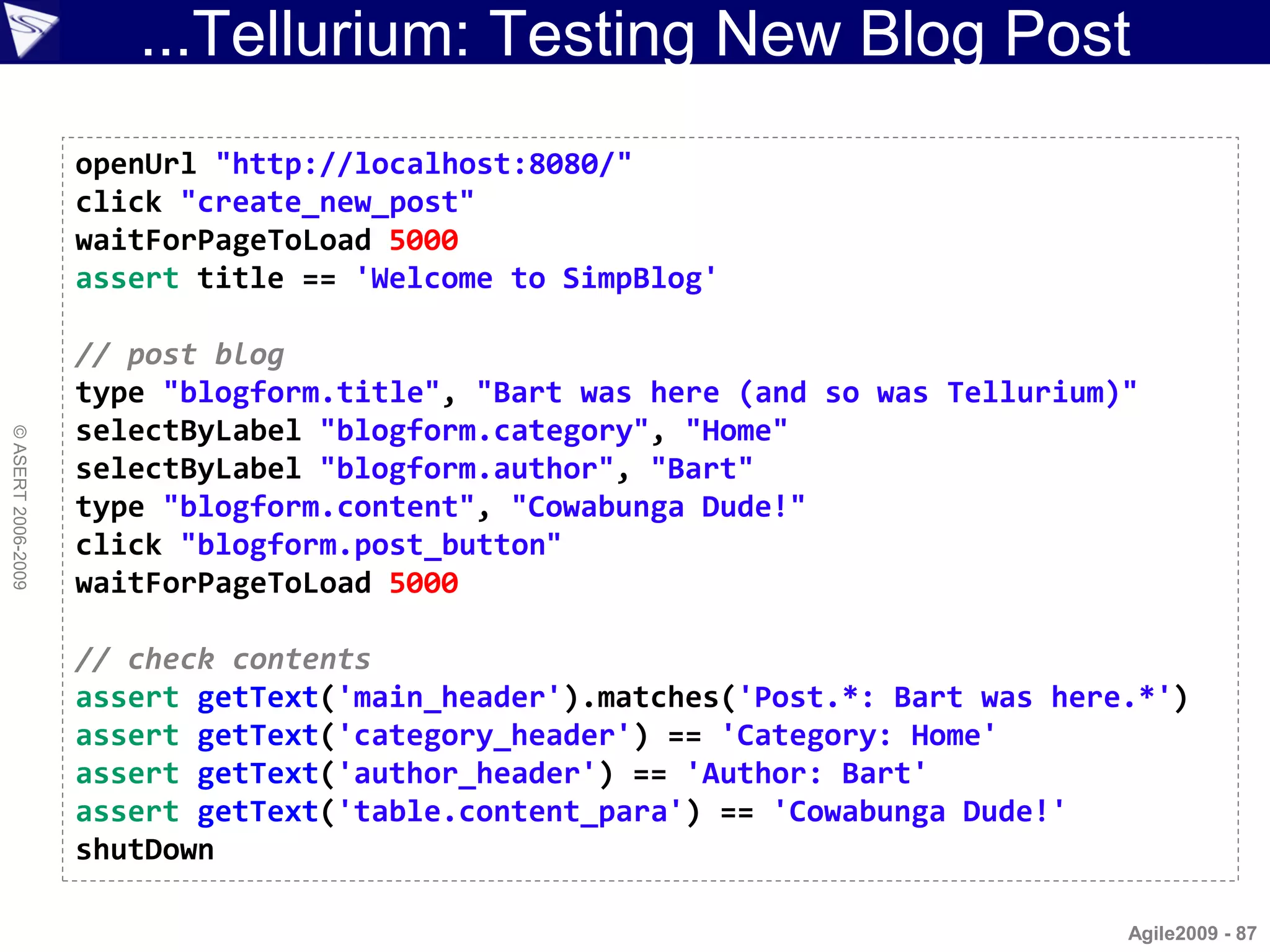
...Tellurium: Testing New Blog Post
                    openUrl "http://localhost:8080/"
                    click "create_new_post"
                    waitForPageToLoad 5000
                    assert title == 'Welcome to SimpBlog'

                    // post blog
                    type "blogform.title", "Bart was here (and so was Tellurium)"
                    selectByLabel "blogform.category", "Home"
© ASERT 2006-2009


                    selectByLabel "blogform.author", "Bart"
                    type "blogform.content", "Cowabunga Dude!"
                    click "blogform.post_button"
                    waitForPageToLoad 5000

                    // check contents
                    assert getText('main_header').matches('Post.*: Bart was here.*')
                    assert getText('category_header') == 'Category: Home'
                    assert getText('author_header') == 'Author: Bart'
                    assert getText('table.content_para') == 'Cowabunga Dude!'
                    shutDown

                                                                                Agile2009 - 87
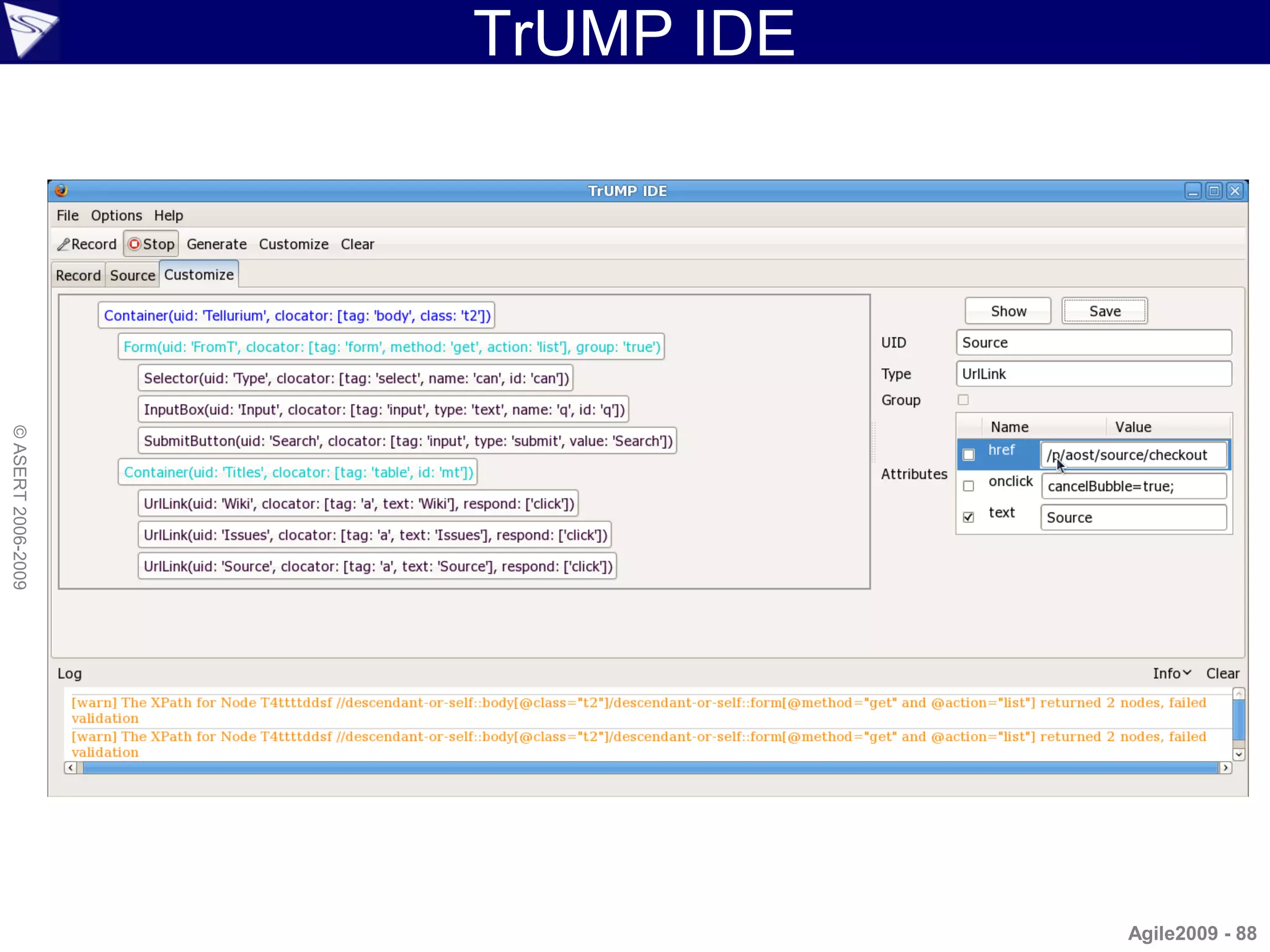
TrUMP IDE
© ASERT 2006-2009


                                Agile2009 - 88
JWebUnit...
                    • Description
                      – Java-based testing framework for web applications
                      – Intention is to provide a high-level "driver" Java API
                      – Wraps existing testing frameworks such as HtmlUnit
                        and Selenium with a unified, simple testing interface
                      – Support includes navigation via links, form entry and
© ASERT 2006-2009


                        submission, validation of table contents, and other
                        verification steps
                      – Includes some runner capabilities
                      – Useful in that it allows you to switch between
                        different lower level drivers without re-writing your
                        tests


                                                                         Agile2009 - 89
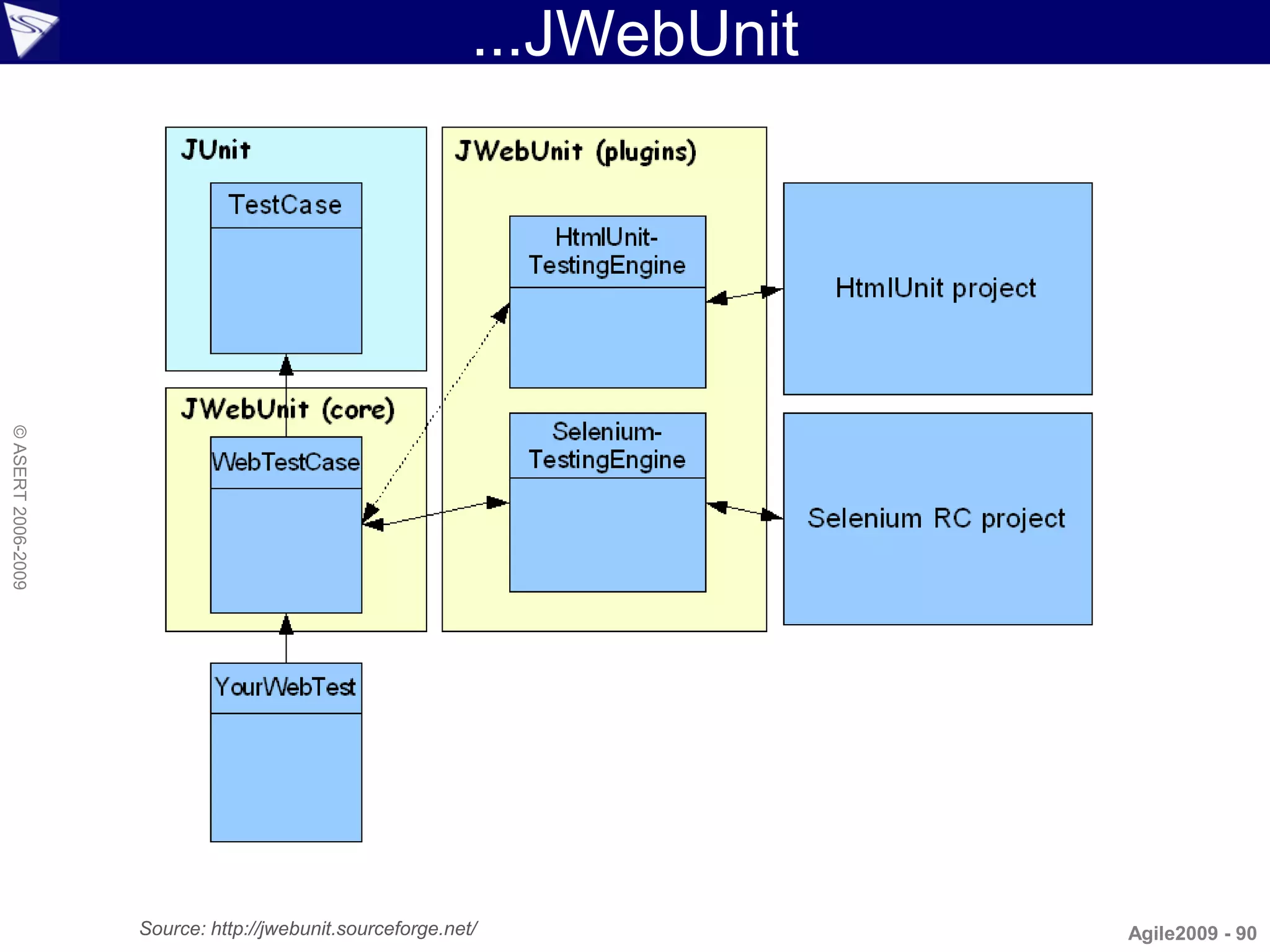
...JWebUnit
© ASERT 2006-2009


                    Source: http://jwebunit.sourceforge.net/             Agile2009 - 90
JWebUnit: Testing New Blog Post
                    import net.sourceforge.jwebunit.junit.*

                    class TestSimpBlog extends WebTestCase {
                      void setUp() { setBaseUrl("http://localhost:8080") }

                        void testPostBlog() {
                          beginAt "/postForm"
                          assertTitleEquals "Welcome to SimpBlog"
                          setTextField "title", "Bart was here (and so was JWebUnit)"
© ASERT 2006-2009


                          setTextField "content", "Cowabunga Dude!"
                          selectOption "category", "Home"
                          clickButtonWithText "Create Post"
                          assert getElementByXPath('//H1').textContent.
                            matches('Post.*: Bart was here.*')
                          def h3headings = getElementsByXPath('//H3')
                          assert h3headings[1].textContent == "Category: Home"
                          assert h3headings[2].textContent == "Author: Bart"
                          def cell = getElementByXPath('//TABLE//TR/TD')
                          assert cell.children[0].textContent == 'Cowabunga Dude!'
                        }
                    }
                                                                                  Agile2009 - 91
Topics
                    • Why Groovy for Testing?
                    • Groovy Intro
                    • Web Drivers
                      – Native Groovy, HttpBuilder, HtmlUnit
                        WebTest, Watij, Selenium, WebDriver
                        Tellurium, JWebUnit
© ASERT 2006-2009


                     Test Runners
                      – Native Groovy, JUnit, TestNG, Spock, EasyB, JBehave,
                        Cucumber
                    • Non-web Drivers
                      – SOAP/REST, Database, FEST, ...
                    • Other Tools
                      – SoapUI, ITest2, JMeter, Twist, ...
                    • Going beyond
                      – Polyglot, Model-driven, Constraint/logic languages, Rules   Agile2009 - 92
Native Groovy
                    • Groovy has a friendly ‘==‘
                    • Built-in assert
                    • Scripts are low ceremony
                    • By utilising @Grab are easy to share
                    • Many in-built testing capabilities are
© ASERT 2006-2009


                      accessible even from scripts
                    • Easy to version control or treat like
                      operating system scripts
                    • Out of the box detection of JUnit and
                      TestNG tests

                                                               Agile2009 - 93
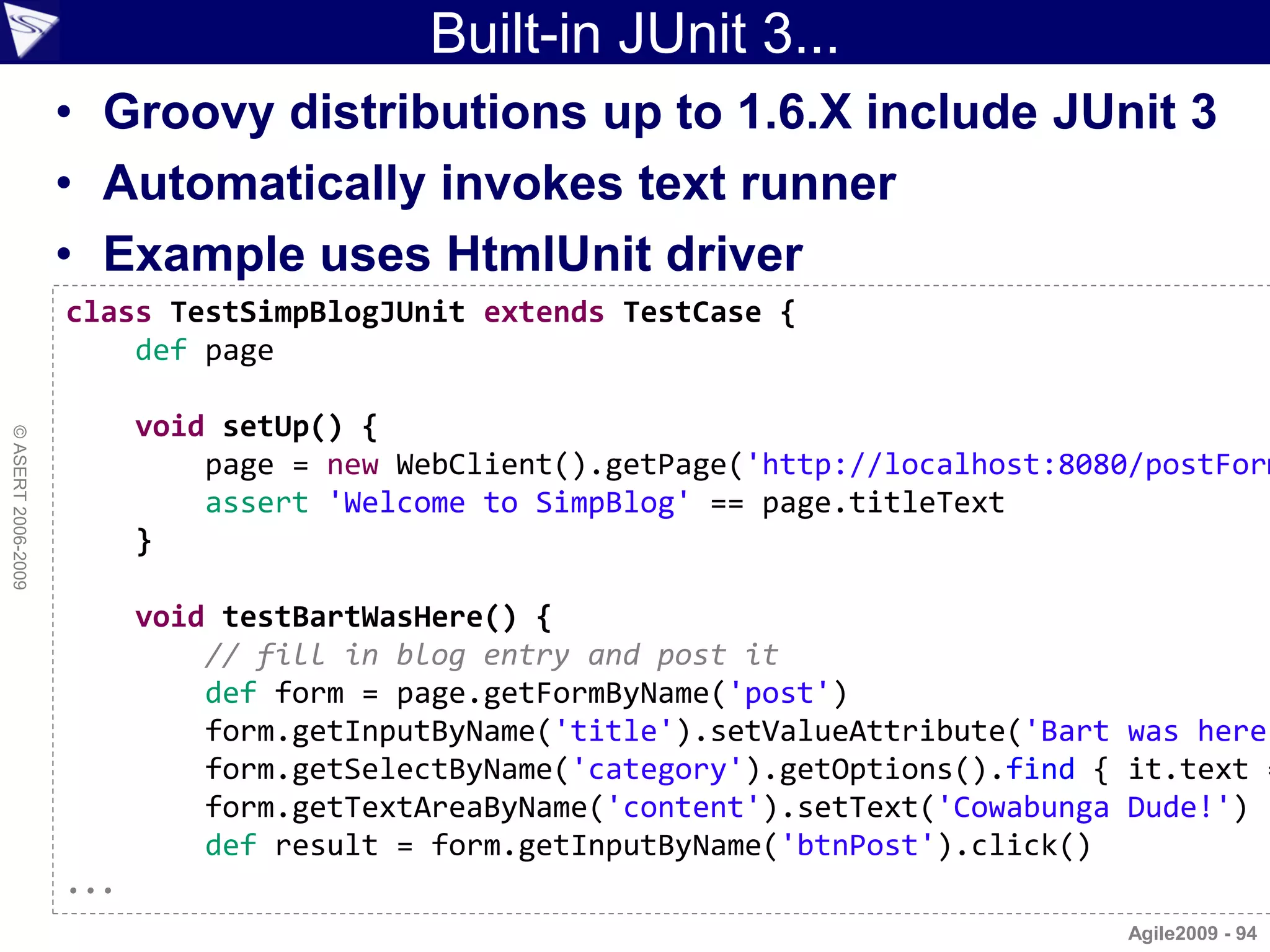
Built-in JUnit 3...
                    • Groovy distributions up to 1.6.X include JUnit 3
                    • Automatically invokes text runner
                    • Example uses HtmlUnit driver
                    class TestSimpBlogJUnit extends TestCase {
                        def page

                          void setUp() {
© ASERT 2006-2009


                              page = new WebClient().getPage('http://localhost:8080/postForm
                              assert 'Welcome to SimpBlog' == page.titleText
                          }

                          void testBartWasHere() {
                              // fill in blog entry and post it
                              def form = page.getFormByName('post')
                              form.getInputByName('title').setValueAttribute('Bart was here
                              form.getSelectByName('category').getOptions().find { it.text =
                              form.getTextAreaByName('content').setText('Cowabunga Dude!')
                              def result = form.getInputByName('btnPost').click()
                    ...
                                                                                   Agile2009 - 94
...Built-in JUnit 3...
                    ...
                              def form = page.getFormByName('post')
                              form.getInputByName('title').setValueAttribute(
                                  'Bart was here (and so was HtmlUnit)')
                              form.getSelectByName('category').getOptions().find {
                                  it.text == 'Home' }.setSelected(true)
                              form.getTextAreaByName('content').setText('Cowabunga Dude!')
                              def result = form.getInputByName('btnPost').click()

                              // check blog post details
© ASERT 2006-2009


                              assert result.getElementsByTagName('h1').item(0).
                                  textContent.matches('Post.*: Bart was here.*')
                              def h3headings = result.getElementsByTagName('h3')
                              assert h3headings.item(1).textContent == 'Category: Home'
                              assert h3headings.item(2).textContent == 'Author: Bart'

                              // expecting: <table><tr><td><p>Cowabunga Dude!</p></td></tr><
                              def cell = result.getByXPath('//TABLE//TR/TD')[0]
                              def para = cell.getFirstChild()
                              assert para.textContent == 'Cowabunga Dude!'
                          }
                    }
                                                                                   Agile2009 - 95
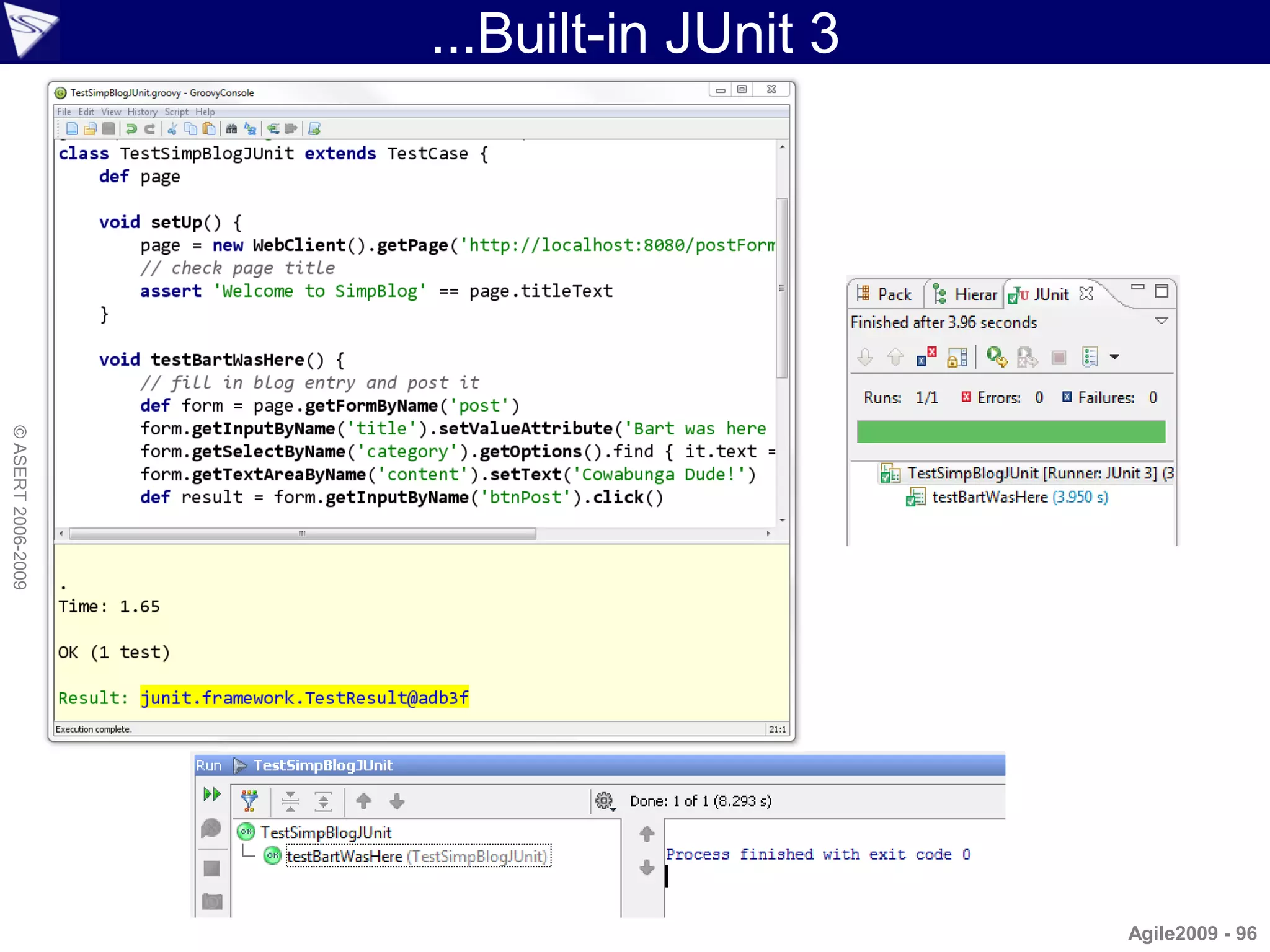
...Built-in JUnit 3
© ASERT 2006-2009


                                          Agile2009 - 96
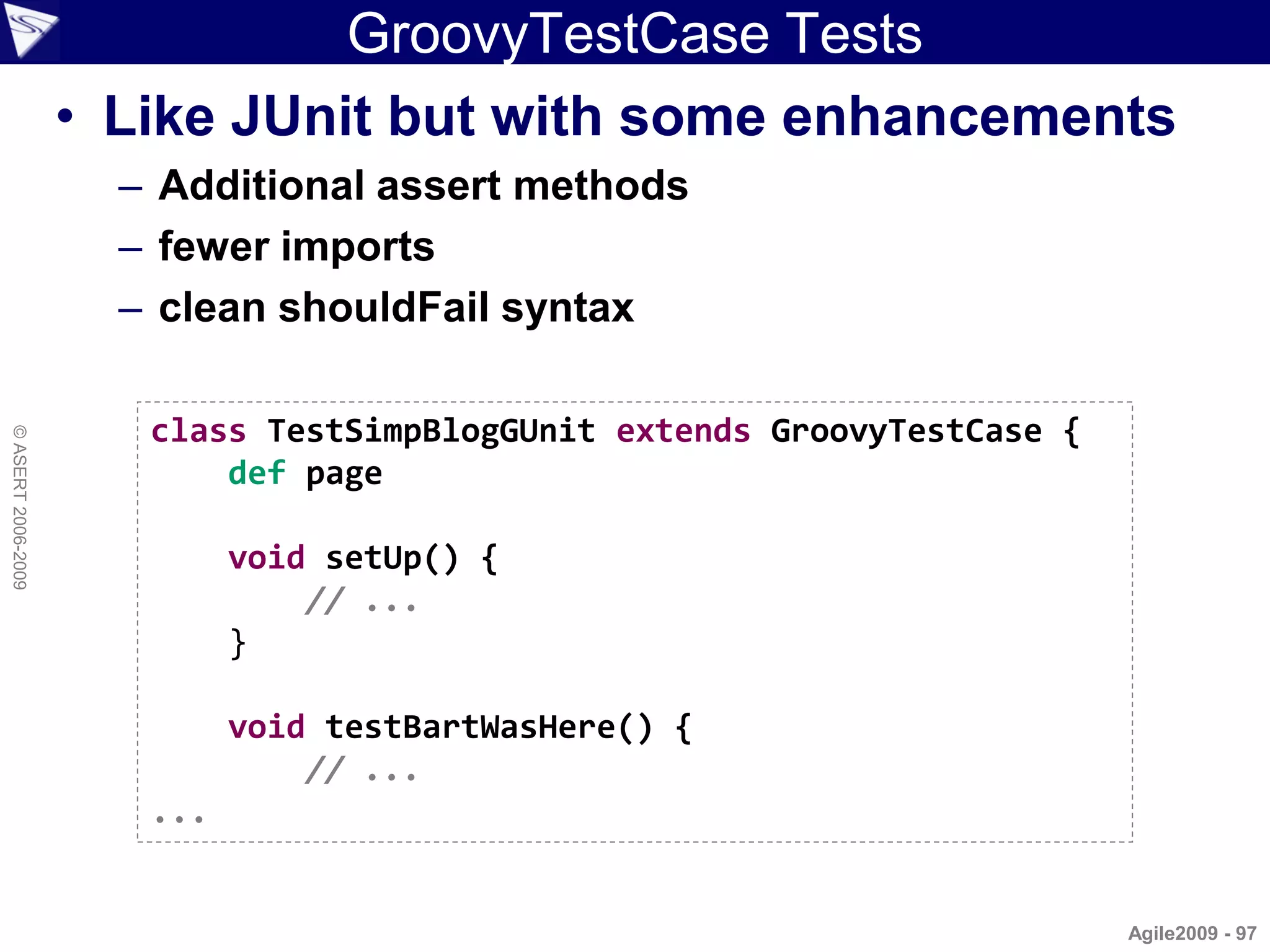
GroovyTestCase Tests
                    • Like JUnit but with some enhancements
                      – Additional assert methods
                      – fewer imports
                      – clean shouldFail syntax

                       class TestSimpBlogGUnit extends GroovyTestCase {
© ASERT 2006-2009


                           def page

                             void setUp() {
                                 // ...
                             }

                             void testBartWasHere() {
                                 // ...
                       ...


                                                                          Agile2009 - 97
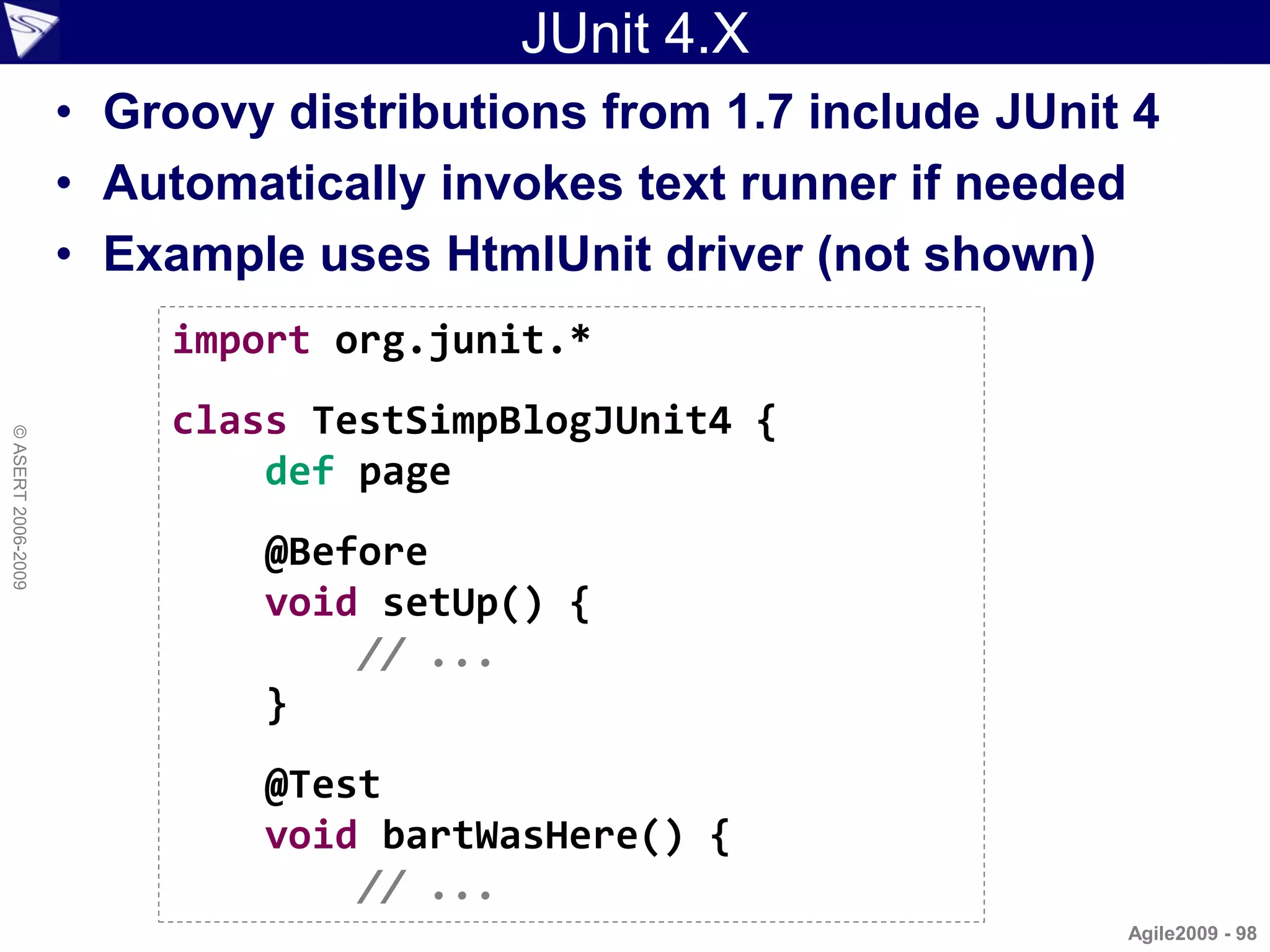
JUnit 4.X
                    • Groovy distributions from 1.7 include JUnit 4
                    • Automatically invokes text runner if needed
                    • Example uses HtmlUnit driver (not shown)
                        import org.junit.*
                        class TestSimpBlogJUnit4 {
© ASERT 2006-2009


                            def page
                            @Before
                            void setUp() {
                                // ...
                            }
                            @Test
                            void bartWasHere() {
                                // ...
                                                                 Agile2009 - 98
JUnit 4.X Parameterized Tests
                    @RunWith(Parameterized)
                    class TestSimpBlogJUnit4DD {
                        def page, author, title, category, content

                          TestSimpBlogJUnit4DD(author, title,
                                               category, content) {
                              this.author = author
                              this.title = title
© ASERT 2006-2009


                              this.category = category
                              this.content = content
                          }

                          @Parameters static data() {
                              return [
                                  ['Bart', 'Title 1', 'Home', 'Content 1'],
                                  ['Homer', 'Title 2', 'Work', 'Content 2'],
                                  ['Marge', 'Title 3', 'Food', 'Content 3']
                              ].collect{ it as String[] }
                          }
                    ...
                                                                               Agile2009 - 99
TestNG
                    • Groovy automatically invokes text runner if run
                      as a script
                    • Example shows grouping, driver not shown

                     import org.testng.annotations.*

                     class TestSimpBlogTestNG {
© ASERT 2006-2009


                         def page

                         @BeforeClass
                         void setUp() {
                             // ...
                         }

                         @Test(groups = [ "slow" ])
                         void bartWasHere() {
                             // ...

                                                                Agile2009 - 100
TestNG Data Driven
                    import org.testng.annotations.*

                    class TestSimpBlogTestNGDD {
                        // ...

                        @DataProvider(name='SimpBlogDataProvider')
                        Object[][] data() {
© ASERT 2006-2009


                            return [
                                ['Bart', 'Title 1', 'Home', 'Content 1'],
                                ['Homer', 'Title 2', 'Work', 'Content 2'],
                                ['Marge', 'Title 3', 'Food', 'Content 3']
                            ].collect{ it as Object[] } as Object[]
                        }

                        @Test(dataProvider = "SimpBlogDataProvider")
                        void bartWasHere(author, title, category, content) {
                            // ...

                                                                             Agile2009 - 101
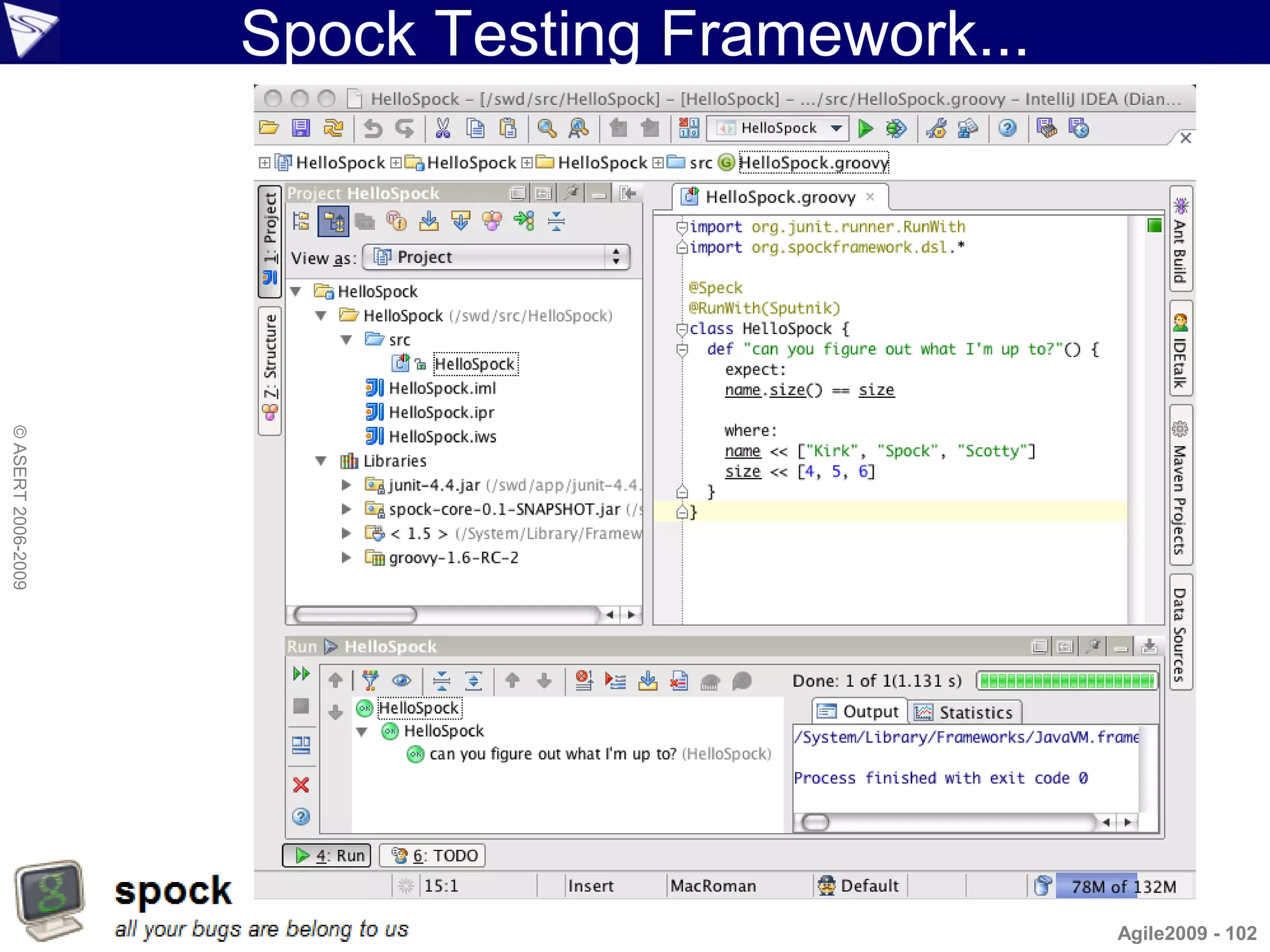
Spock Testing Framework...
© ASERT 2006-2009


                                                 Agile2009 - 102
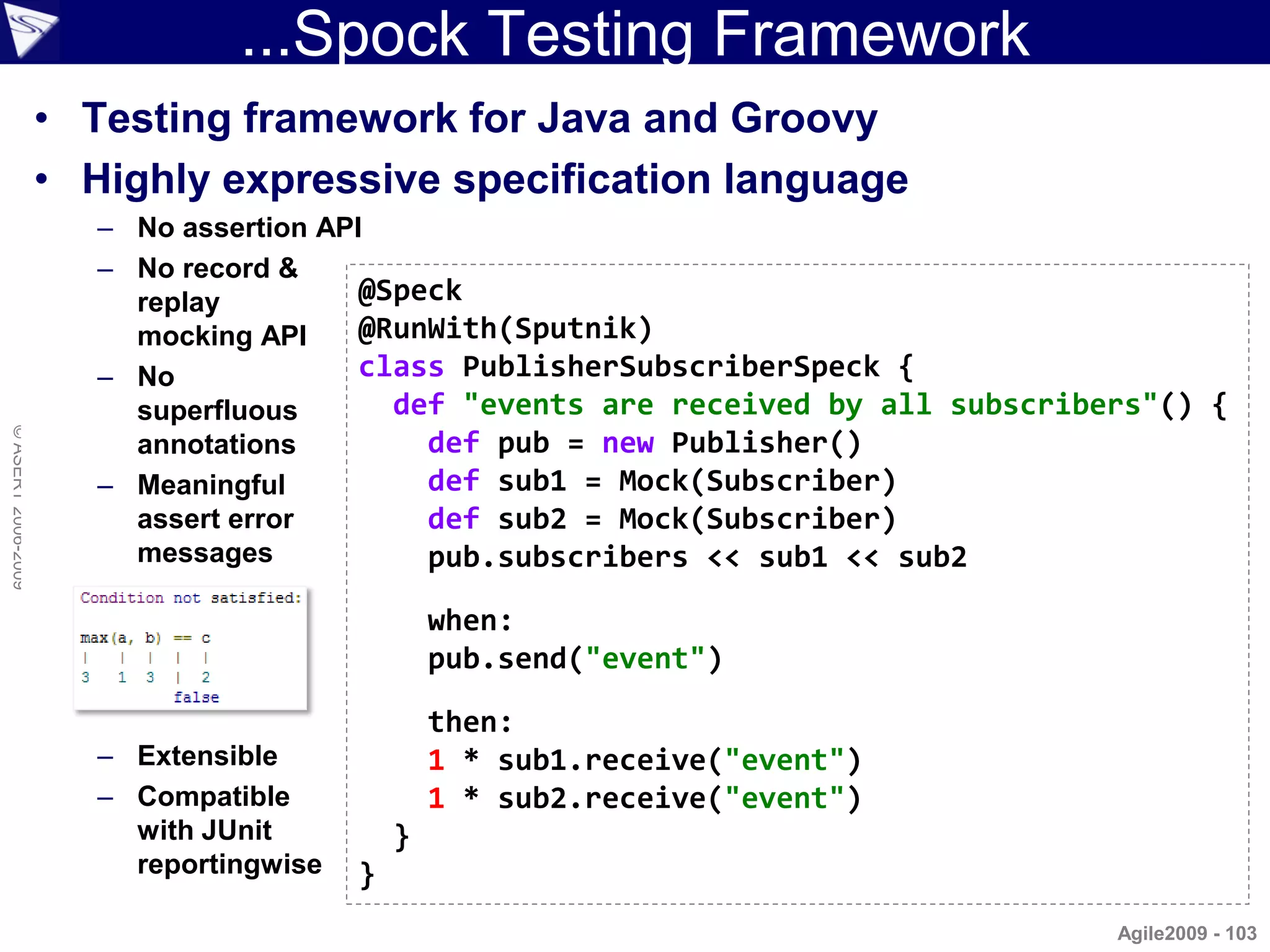
...Spock Testing Framework
                    • Testing framework for Java and Groovy
                    • Highly expressive specification language
                       – No assertion API
                       – No record &
                         replay          @Speck
                         mocking API     @RunWith(Sputnik)
                       – No              class PublisherSubscriberSpeck {
                         superfluous       def "events are received by all subscribers"() {
© ASERT 2006-2009


                         annotations         def pub = new Publisher()
                       – Meaningful          def sub1 = Mock(Subscriber)
                         assert error        def sub2 = Mock(Subscriber)
                         messages            pub.subscribers << sub1 << sub2

                                                 when:
                                                 pub.send("event")

                                                 then:
                       – Extensible              1 * sub1.receive("event")
                       – Compatible              1 * sub2.receive("event")
                         with JUnit          }
                         reportingwise   }
                                                                                    Agile2009 - 103
Spock Example...
                    import com.gargoylesoftware.htmlunit.WebClient
                    import spock.lang.*
                    import org.junit.runner.RunWith

                    @Speck ()
                    @RunWith (Sputnik)
                    class TestSimpBlogSpock {
                        def page, subheadings, para, form, result

                          @Unroll("When #author posts a #category blog with content '#content' it sho
© ASERT 2006-2009


                          def "when creating a new blog entry"() {
                              given:
                                  page = new WebClient().getPage('http://localhost:8080/postForm')
                                  form = page.getFormByName('post')

                              when:
                                  form.getInputByName('title').setValueAttribute("$author was here (a
                                  form.getSelectByName('category').getOptions().find { it.text == cat
                                  form.getSelectByName('author').getOptions().find { it.text == autho
                                  form.getTextAreaByName('content').setText(content)
                                  result = form.getInputByName('btnPost').click()
                                  subheadings = result.getElementsByTagName('h3')
                                  para = result.getByXPath('//TABLE//TR/TD/P')[0]
                    ...
                                                                                          Agile2009 - 104
...Spock Example
                    ...

                              then:
                                  page.titleText == 'Welcome to SimpBlog'
                                  result.getElementsByTagName('h1').item(0).textContent.matches("Post
                                  subheadings.item(1).textContent == "Category: $category"
                                  subheadings.item(2).textContent == "Author: $author"

                              and:
                                  para.textContent == content              // Optional use of 'and:'
© ASERT 2006-2009


                              where:
                                  author   << ['Bart', 'Homer', 'Lisa']
                                  category << ['Home', 'Work', 'Food']
                                  content << ['foo', 'bar', 'baz']
                          }
                    }


                                                                                               Agile2009 - 105
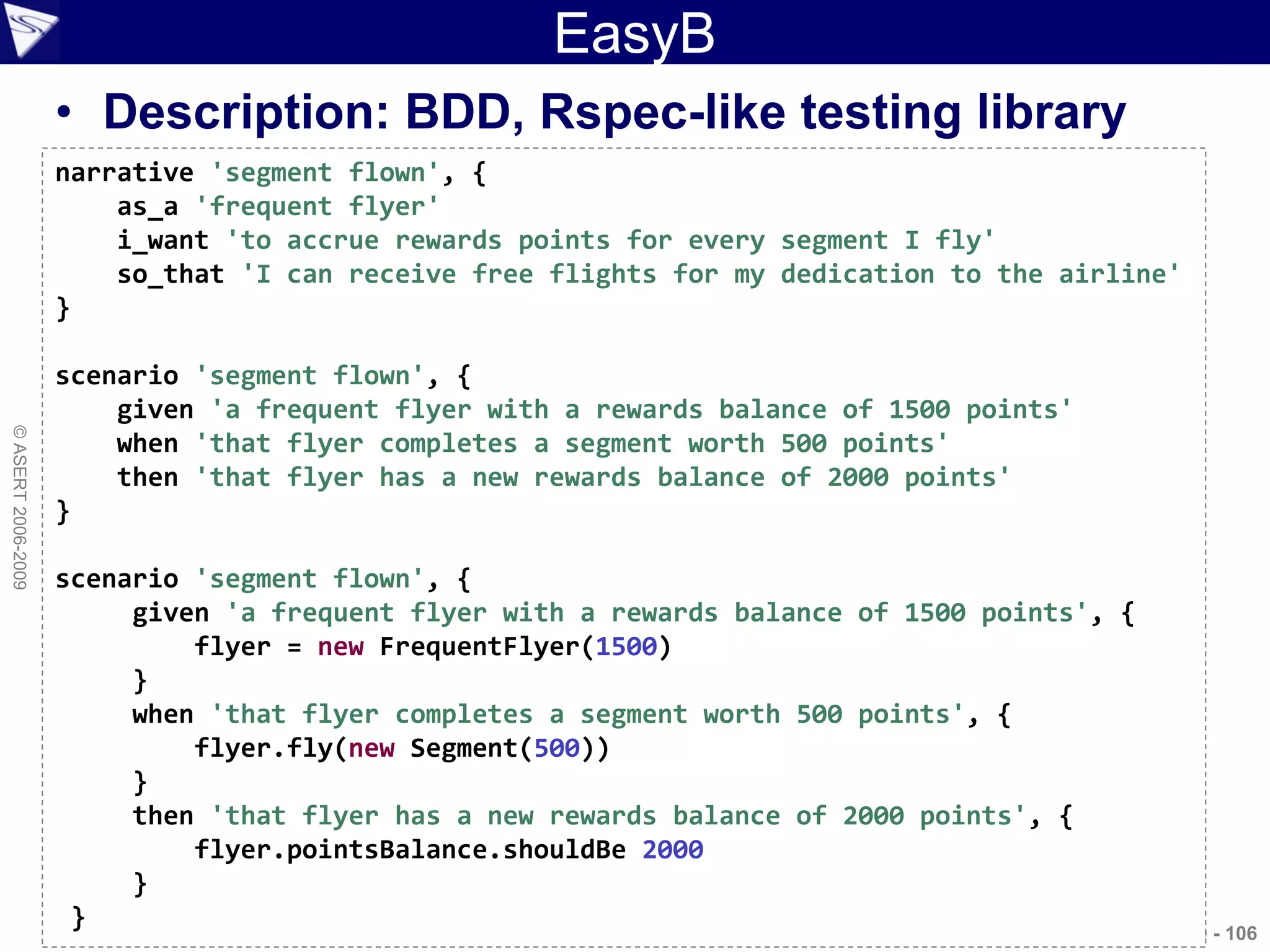
EasyB
                    • Description: BDD, Rspec-like testing library
                    narrative 'segment flown', {
                        as_a 'frequent flyer'
                        i_want 'to accrue rewards points for every segment I fly'
                        so_that 'I can receive free flights for my dedication to the airline'
                    }

                    scenario 'segment flown', {
                        given 'a frequent flyer with a rewards balance of 1500 points'
© ASERT 2006-2009


                        when 'that flyer completes a segment worth 500 points'
                        then 'that flyer has a new rewards balance of 2000 points'
                    }

                    scenario 'segment flown', {
                         given 'a frequent flyer with a rewards balance of 1500 points', {
                             flyer = new FrequentFlyer(1500)
                         }
                         when 'that flyer completes a segment worth 500 points', {
                             flyer.fly(new Segment(500))
                         }
                         then 'that flyer has a new rewards balance of 2000 points', {
                             flyer.pointsBalance.shouldBe 2000
                         }
                     }                                                                   Agile2009 - 106
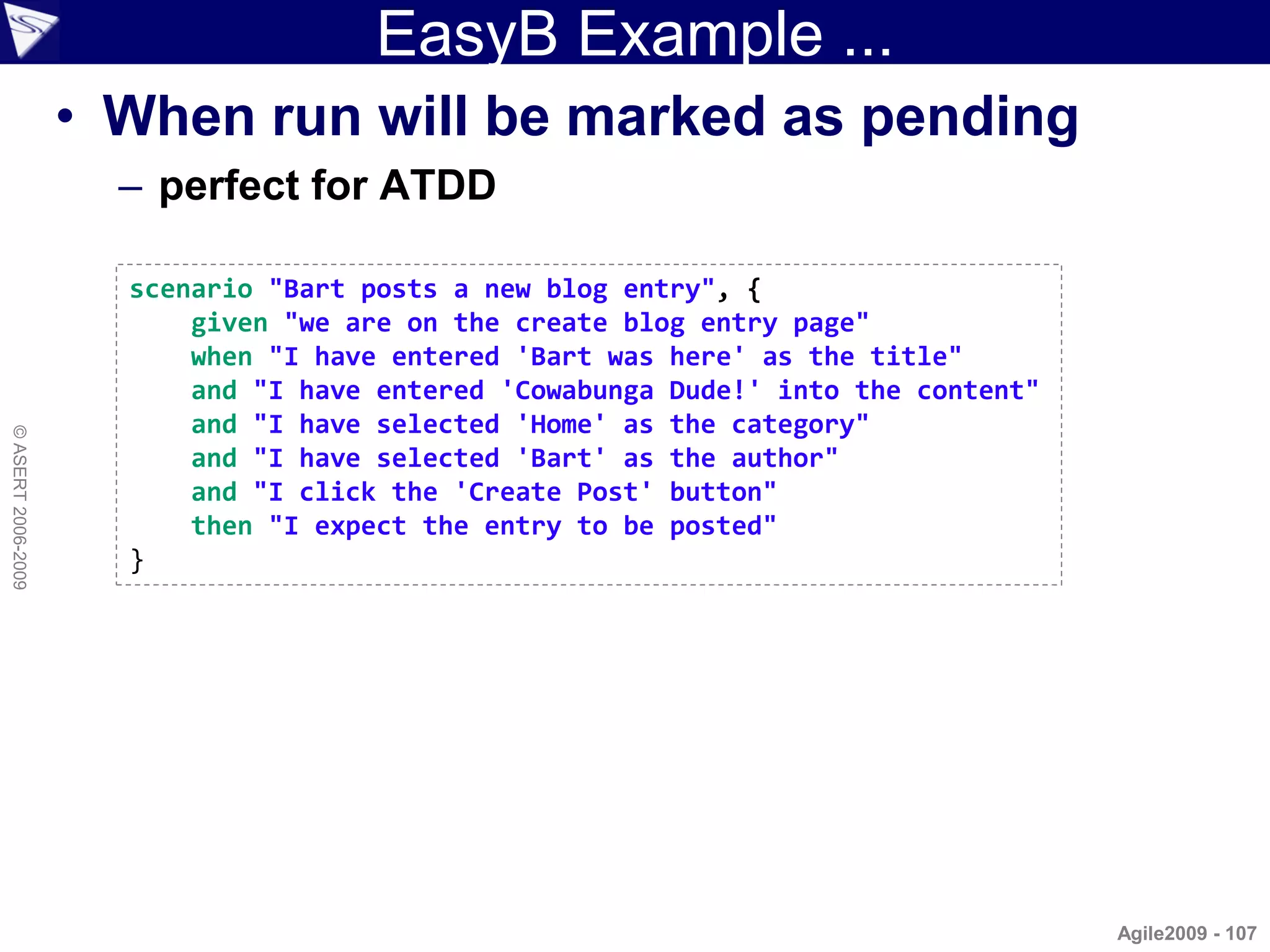
EasyB Example ...
                    • When run will be marked as pending
                      – perfect for ATDD

                      scenario "Bart posts a new blog entry", {
                          given "we are on the create blog entry page"
                          when "I have entered 'Bart was here' as the title"
                          and "I have entered 'Cowabunga Dude!' into the content"
                          and "I have selected 'Home' as the category"
© ASERT 2006-2009


                          and "I have selected 'Bart' as the author"
                          and "I click the 'Create Post' button"
                          then "I expect the entry to be posted"
                      }


                                                                                    Agile2009 - 107
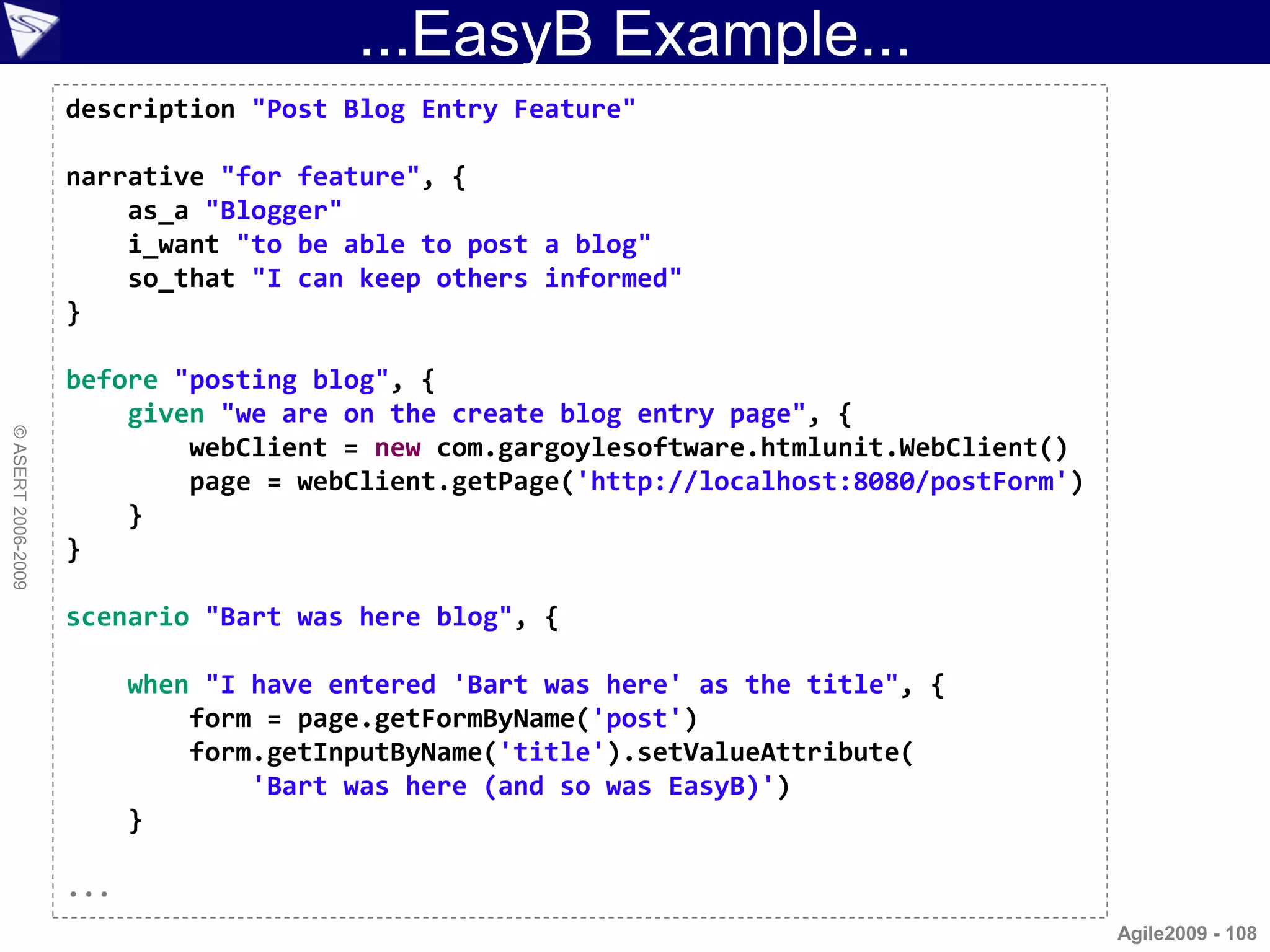
...EasyB Example...
                    description "Post Blog Entry Feature"

                    narrative "for feature", {
                        as_a "Blogger"
                        i_want "to be able to post a blog"
                        so_that "I can keep others informed"
                    }

                    before "posting blog", {
                        given "we are on the create blog entry page", {
© ASERT 2006-2009


                            webClient = new com.gargoylesoftware.htmlunit.WebClient()
                            page = webClient.getPage('http://localhost:8080/postForm')
                        }
                    }

                    scenario "Bart was here blog", {

                          when "I have entered 'Bart was here' as the title", {
                              form = page.getFormByName('post')
                              form.getInputByName('title').setValueAttribute(
                                  'Bart was here (and so was EasyB)')
                          }

                    ...
                                                                                         Agile2009 - 108
...EasyB Example...
                    ...

                        and "I have entered 'Cowabunga Dude!' into the content", {
                          form.getTextAreaByName('content').setText('Cowabunga Dude!')
                        }

                        and "I have selected 'Home' as the category", {
                          form.getSelectByName('category').getOptions().find { it.text == 'Home' }.setSelected(
                        }

                        and "I click the 'Create Post' button", {
                          result = form.getInputByName('btnPost').click()
© ASERT 2006-2009


                        }

                        then "I expect the entry to be posted", {
                          // check blog post details
                          assert result.getElementsByTagName('h1').item(0).textContent.matches('Post.*: Bart wa
                          def h3headings = result.getElementsByTagName('h3')
                          assert h3headings.item(1).textContent == 'Category: Home'      // traditional style
                          h3headings.item(2).textContent.shouldBe 'Author: Bart'         // BDD style

                            // expecting: <table><tr><td><p>Cowabunga Dude!</p></td></tr></table>
                            def cell = result.getByXPath('//TABLE//TR/TD')[0]
                            def para = cell.firstChild
                            assert para.textContent == 'Cowabunga Dude!'
                            // para.shouldHave textContent: 'Cowabunga Dude!'
                        }
                    }
                                                                                                    Agile2009 - 109
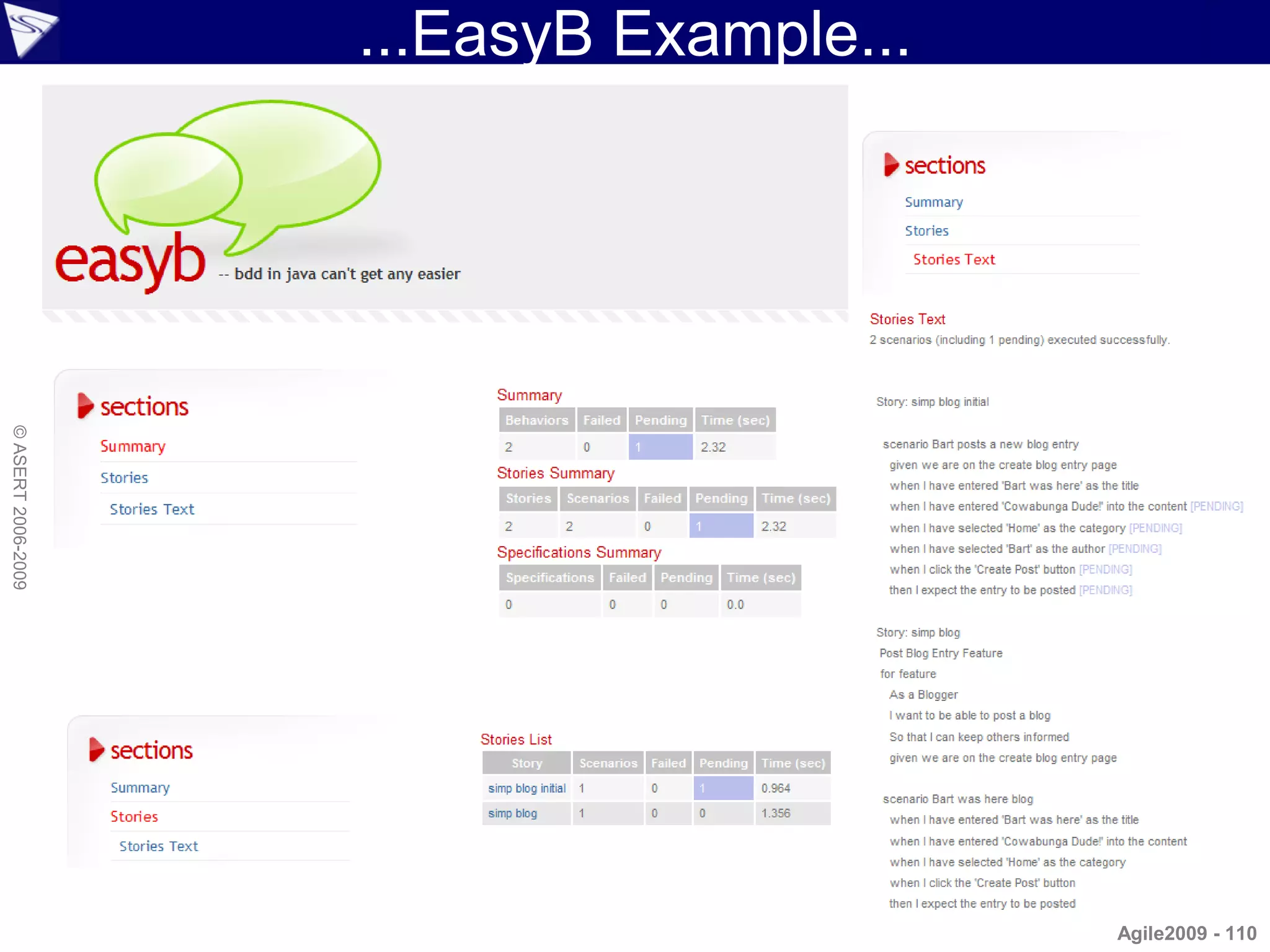
...EasyB Example...
© ASERT 2006-2009


                                          Agile2009 - 110
...EasyB Example
                    2 scenarios (including 1 pending) executed successfully.

                     Story: simp blog initial

                      scenario Bart posts a new blog entry [PENDING]
                       given we are on the create blog entry page
                       when I have entered 'Bart was here' as the title
                       when I have entered 'Cowabunga Dude!' into the content [PENDING]
                       when I have selected 'Home' as the category [PENDING]
                       when I have selected 'Bart' as the author [PENDING]
                       when I click the 'Create Post' button [PENDING]
                       then I expect the entry to be posted [PENDING]

                     Story: simp blog                                easyb is preparing to process 2 file(s)
© ASERT 2006-2009


                     Post Blog Entry Feature                         Running simp blog initial story (SimpBlogInitialStory.groovy)
                     for feature                                     Scenarios run: 1, Failures: 0, Pending: 1, Time elapsed: 1.049 sec
                       As a Blogger                                  Running simp blog story (SimpBlogStory.groovy)
                       I want to be able to post a blog              Scenarios run: 1, Failures: 0, Pending: 0, Time elapsed: 1.356 sec
                       So that I can keep others informed
                       given we are on the create blog entry page    2 total behaviors ran (including 1 pending behavior) with no failures
                                                                     easyb execution passed
                      scenario Bart was here blog
                       when I have entered 'Bart was here' as the title
                       when I have entered 'Cowabunga Dude!' into the content
                       when I have selected 'Home' as the category
                       when I click the 'Create Post' button
                       then I expect the entry to be posted


                                                                                                                             Agile2009 - 111
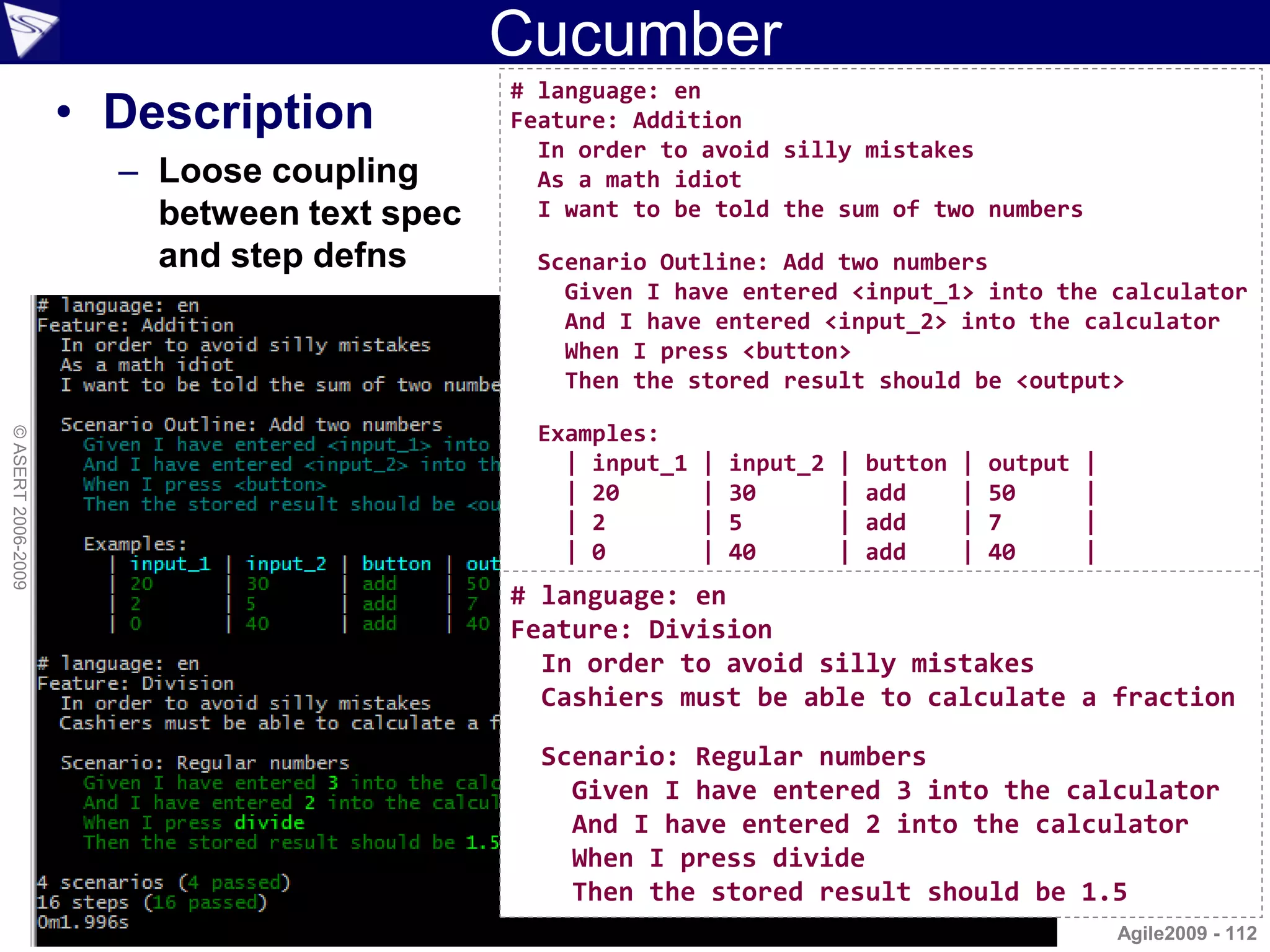
Cucumber
                                            # language: en
                    • Description           Feature: Addition
                                              In order to avoid silly mistakes
                      – Loose coupling        As a math idiot
                        between text spec     I want to be told the sum of two numbers

                        and step defns       Scenario Outline: Add two numbers
                                               Given I have entered <input_1> into the calculator
                                               And I have entered <input_2> into the calculator
                                               When I press <button>
                                               Then the stored result should be <output>

                                             Examples:
© ASERT 2006-2009


                                               | input_1   |   input_2   |   button   |   output   |
                                               | 20        |   30        |   add      |   50       |
                                               | 2         |   5         |   add      |   7        |
                                               | 0         |   40        |   add      |   40       |
                                            # language: en
                                            Feature: Division
                                              In order to avoid silly mistakes
                                              Cashiers must be able to calculate a fraction

                                              Scenario: Regular numbers
                                                Given I have entered 3 into the calculator
                                                And I have entered 2 into the calculator
                                                When I press divide
                                                Then the stored result should be 1.5
                                                                                                       Agile2009 - 112
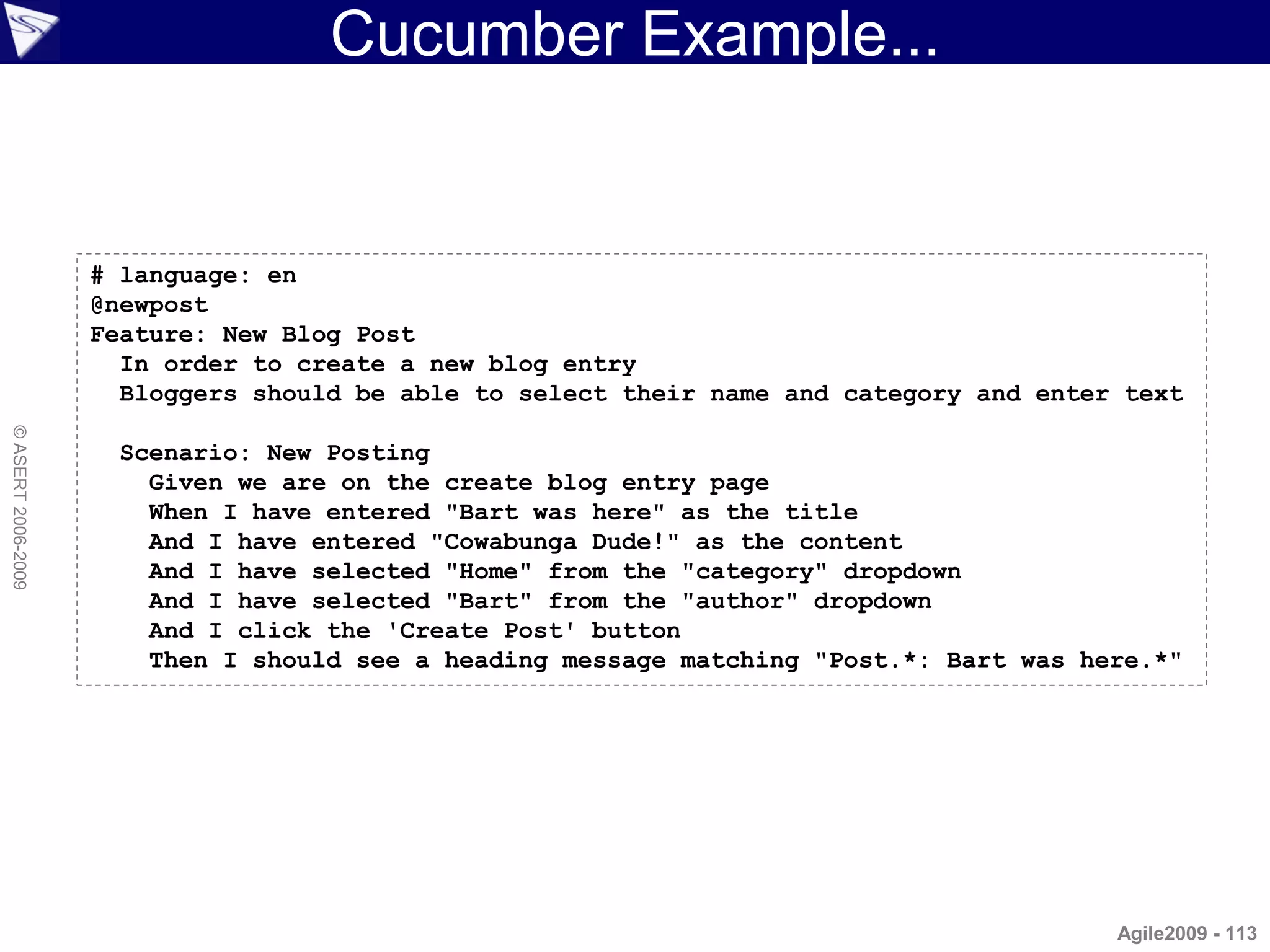
Cucumber Example...


                    # language: en
                    @newpost
                    Feature: New Blog Post
                      In order to create a new blog entry
                      Bloggers should be able to select their name and category and enter text
© ASERT 2006-2009


                      Scenario: New Posting
                        Given we are on the create blog entry page
                        When I have entered "Bart was here" as the title
                        And I have entered "Cowabunga Dude!" as the content
                        And I have selected "Home" from the "category" dropdown
                        And I have selected "Bart" from the "author" dropdown
                        And I click the 'Create Post' button
                        Then I should see a heading message matching "Post.*: Bart was here.*"


                                                                                         Agile2009 - 113
...Cucumber Example...
© ASERT 2006-2009


                                             Agile2009 - 114
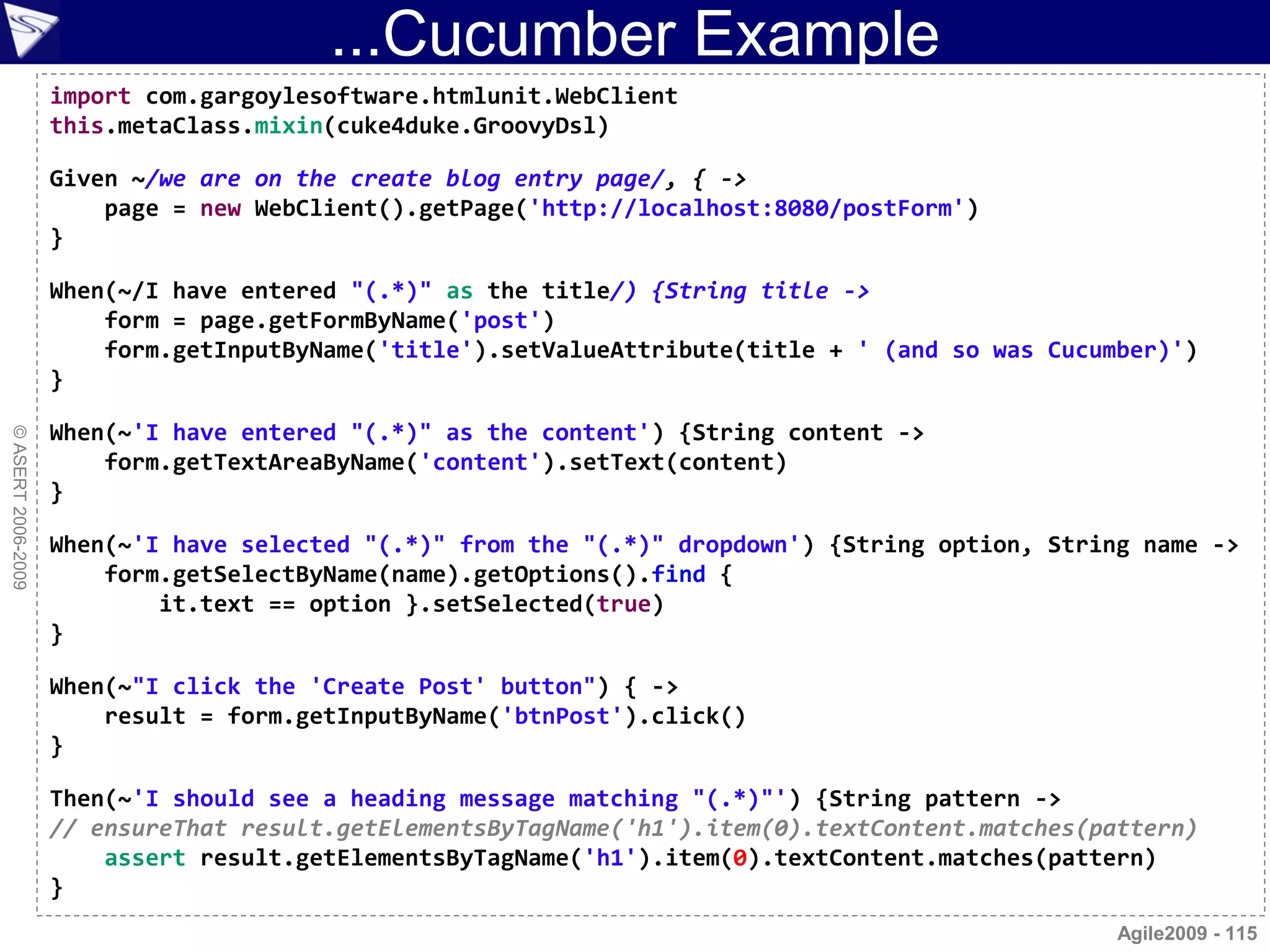
...Cucumber Example
                    import com.gargoylesoftware.htmlunit.WebClient
                    this.metaClass.mixin(cuke4duke.GroovyDsl)

                    Given ~/we are on the create blog entry page/, { ->
                        page = new WebClient().getPage('http://localhost:8080/postForm')
                    }

                    When(~/I have entered "(.*)" as the title/) {String title ->
                        form = page.getFormByName('post')
                        form.getInputByName('title').setValueAttribute(title + ' (and so was Cucumber)')
                    }

                    When(~'I have entered "(.*)" as the content') {String content ->
© ASERT 2006-2009


                        form.getTextAreaByName('content').setText(content)
                    }

                    When(~'I have selected "(.*)" from the "(.*)" dropdown') {String option, String name ->
                        form.getSelectByName(name).getOptions().find {
                            it.text == option }.setSelected(true)
                    }

                    When(~"I click the 'Create Post' button") { ->
                        result = form.getInputByName('btnPost').click()
                    }

                    Then(~'I should see a heading message matching "(.*)"') {String pattern ->
                    // ensureThat result.getElementsByTagName('h1').item(0).textContent.matches(pattern)
                        assert result.getElementsByTagName('h1').item(0).textContent.matches(pattern)
                    }
                                                                                                  Agile2009 - 115
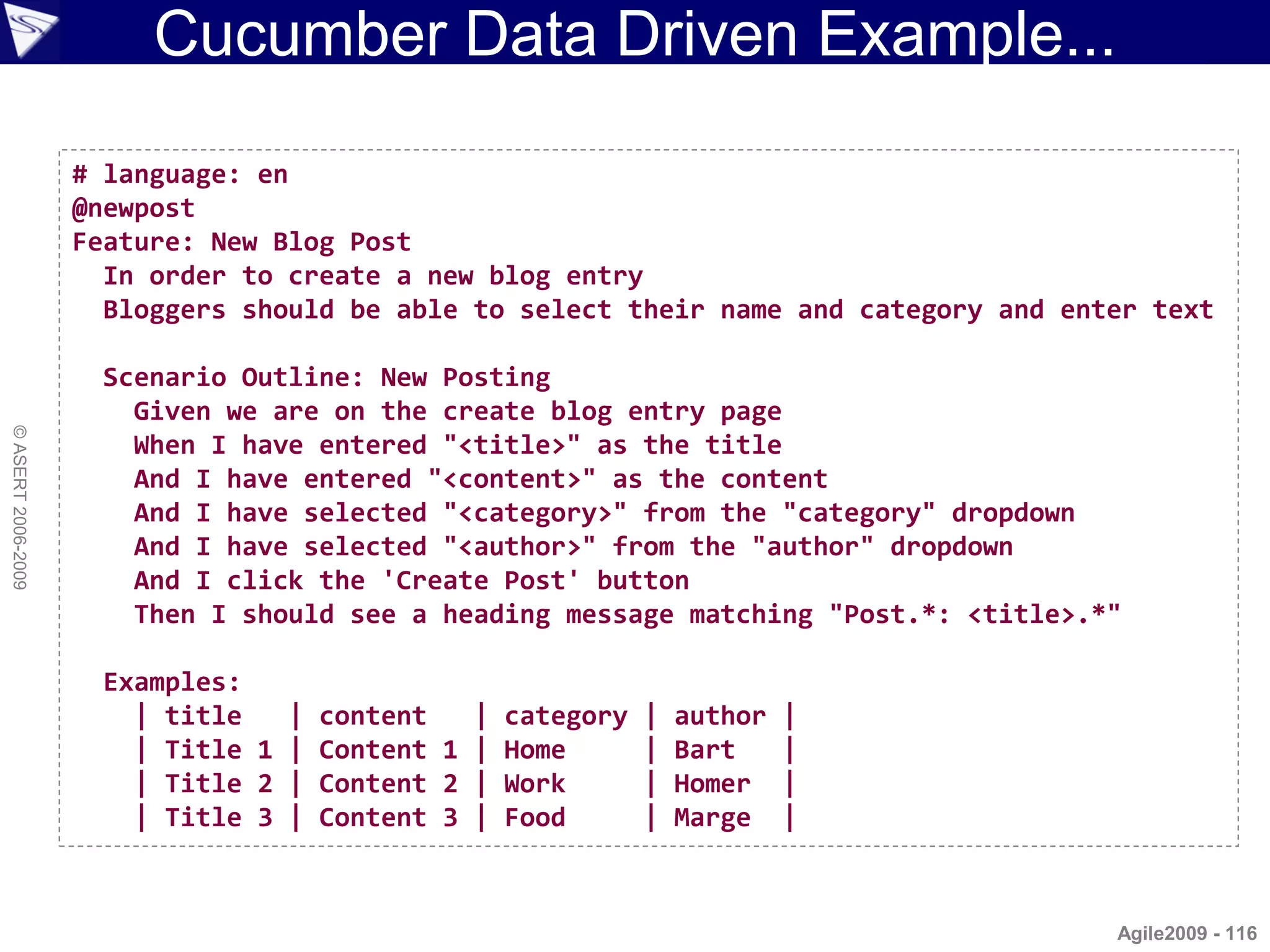
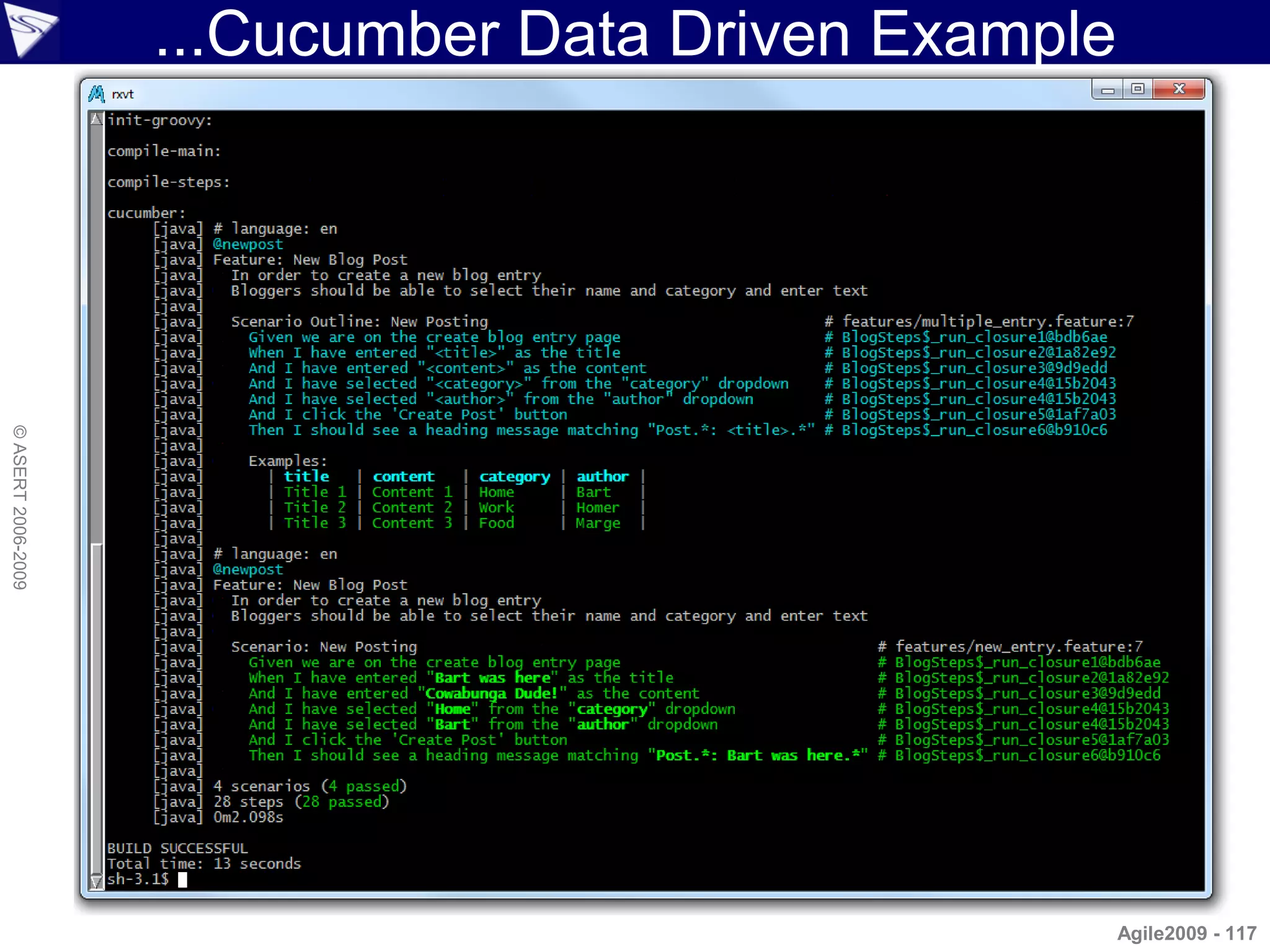
Cucumber Data Driven Example...

                    # language: en
                    @newpost
                    Feature: New Blog Post
                      In order to create a new blog entry
                      Bloggers should be able to select their name and category and enter text

                      Scenario Outline: New Posting
                        Given we are on the create blog entry page
© ASERT 2006-2009


                        When I have entered "<title>" as the title
                        And I have entered "<content>" as the content
                        And I have selected "<category>" from the "category" dropdown
                        And I have selected "<author>" from the "author" dropdown
                        And I click the 'Create Post' button
                        Then I should see a heading message matching "Post.*: <title>.*"

                      Examples:
                        | title   | content   | category   |   author   |
                        | Title 1 | Content 1 | Home       |   Bart     |
                        | Title 2 | Content 2 | Work       |   Homer    |
                        | Title 3 | Content 3 | Food       |   Marge    |


                                                                                       Agile2009 - 116
...Cucumber Data Driven Example
© ASERT 2006-2009


                                                      Agile2009 - 117
JBehave
                    • Description
                      – Behaviour-driven development in Java
                         • Also works out of the box for Groovy
                      – Behavior scenarios written in text
                         • Use the words Given, When, Then and And.
                      – Mapped using regular expressions and annotations
© ASERT 2006-2009


                        to step methods
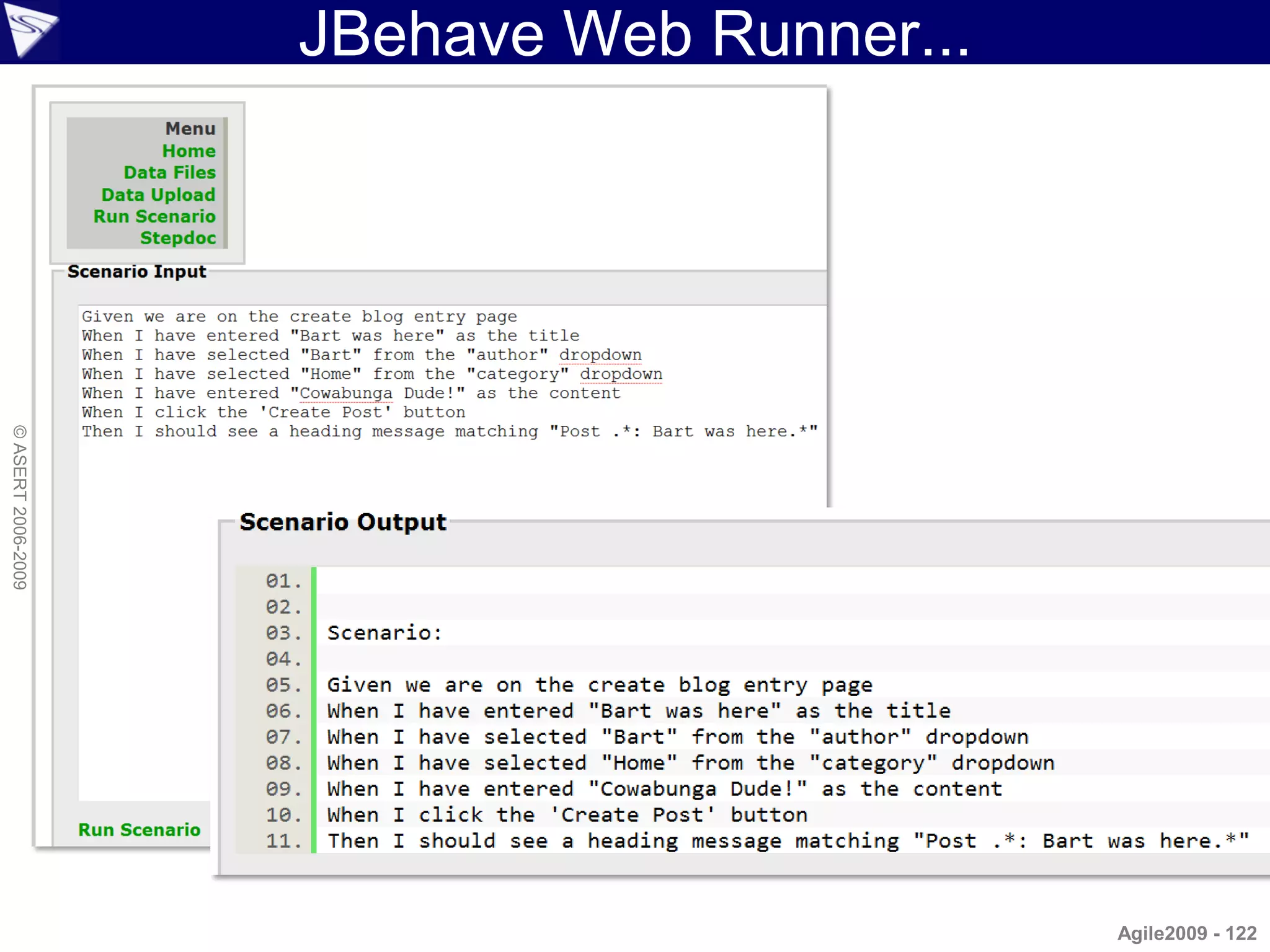
                      – Web Runner available for non-technical users to
                        easily run tests
                      – Hooks to Selenium available in JBehave Web
                         • Other Java libraries (e.g. HtmlUnit) easy to use too
                      – Supports parameter converters
                         • Getting 'String' parameters into appropriate Object values
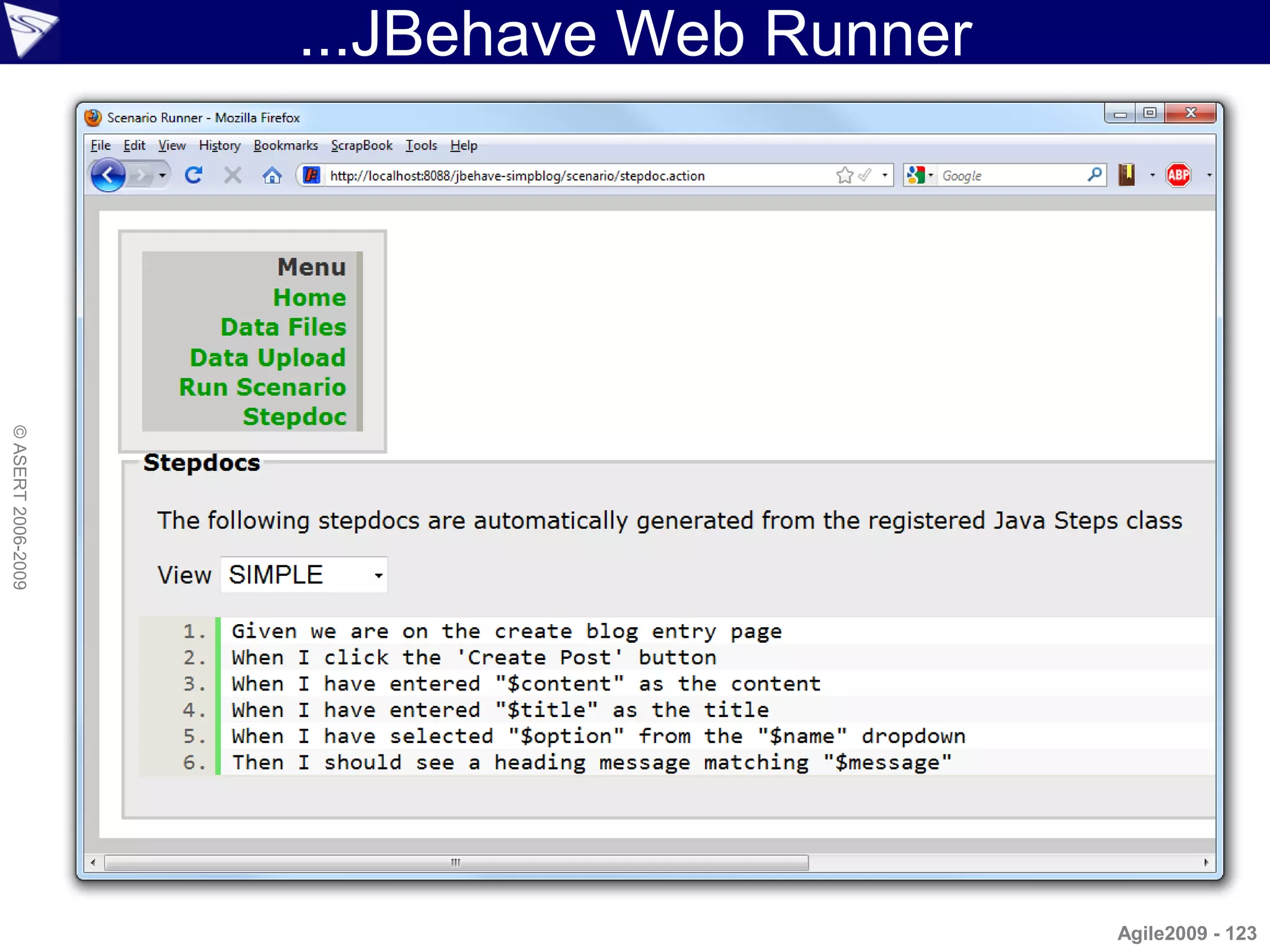
                      – Supports a 'StepDoc' function
                         • For listing available scenario clauses
                                                                                  Agile2009 - 118
JBehave Example...
                    Given we are on the create blog entry page
                    When I have entered "Bart was here" as the title
                    And I have entered "Cowabunga Dude!" as the content
                    And I have selected "Home" from the "category" dropdown
                    And I have selected "Bart" from the "author" dropdown
                    And I click the 'Create Post' button
                    Then I should see a heading message matching "Post.*: Bart was here.*"

                     import org.jbehave.scenario.Scenario
© ASERT 2006-2009


                     import org.jbehave.scenario.steps.Steps

                     class NewPostScenario extends Scenario {
                         NewPostScenario() {
                             super([new CreateBlogSteps()] as Steps[])
                         }
                     }            Scenario:

                                  Given we are on the create blog entry page
                                  When I have entered "Bart was here" as the title
                                  And I have entered "Cowabunga Dude!" as the content
                                  And I have selected "Home" from the "category" dropdown
                                  And I have selected "Bart" from the "author" dropdown
                                  And I click the 'Create Post' button
                                  Then I should see a heading message matching "Post.*: Bart was here.*"

                                                                                                           Agile2009 - 119
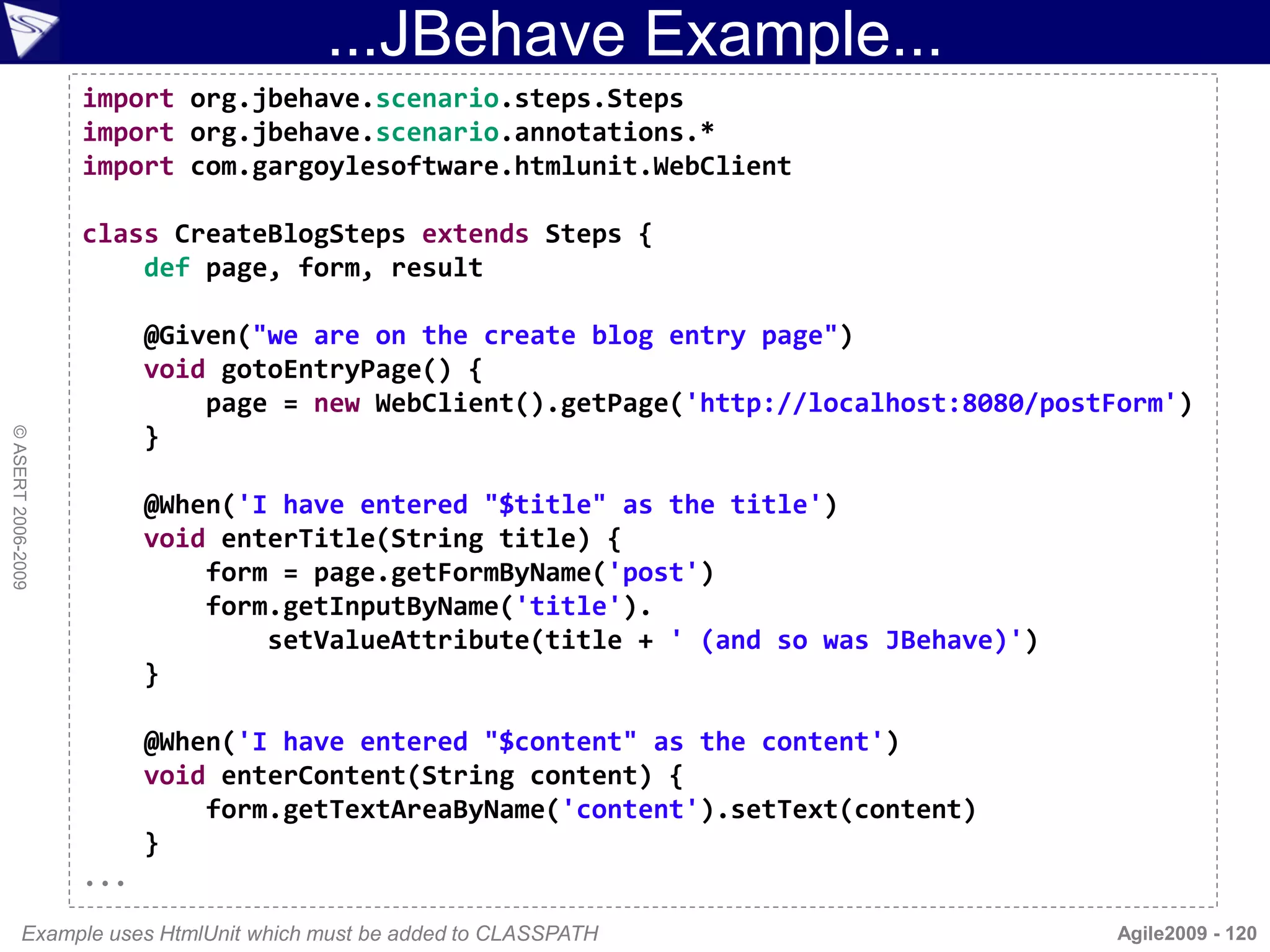
...JBehave Example...
                    import org.jbehave.scenario.steps.Steps
                    import org.jbehave.scenario.annotations.*
                    import com.gargoylesoftware.htmlunit.WebClient

                    class CreateBlogSteps extends Steps {
                        def page, form, result

                          @Given("we are on the create blog entry page")
                          void gotoEntryPage() {
                              page = new WebClient().getPage('http://localhost:8080/postForm')
                          }
© ASERT 2006-2009


                          @When('I have entered "$title" as the title')
                          void enterTitle(String title) {
                              form = page.getFormByName('post')
                              form.getInputByName('title').
                                  setValueAttribute(title + ' (and so was JBehave)')
                          }

                          @When('I have entered "$content" as the content')
                          void enterContent(String content) {
                              form.getTextAreaByName('content').setText(content)
                          }
                    ...
           Example uses HtmlUnit which must be added to CLASSPATH                        Agile2009 - 120
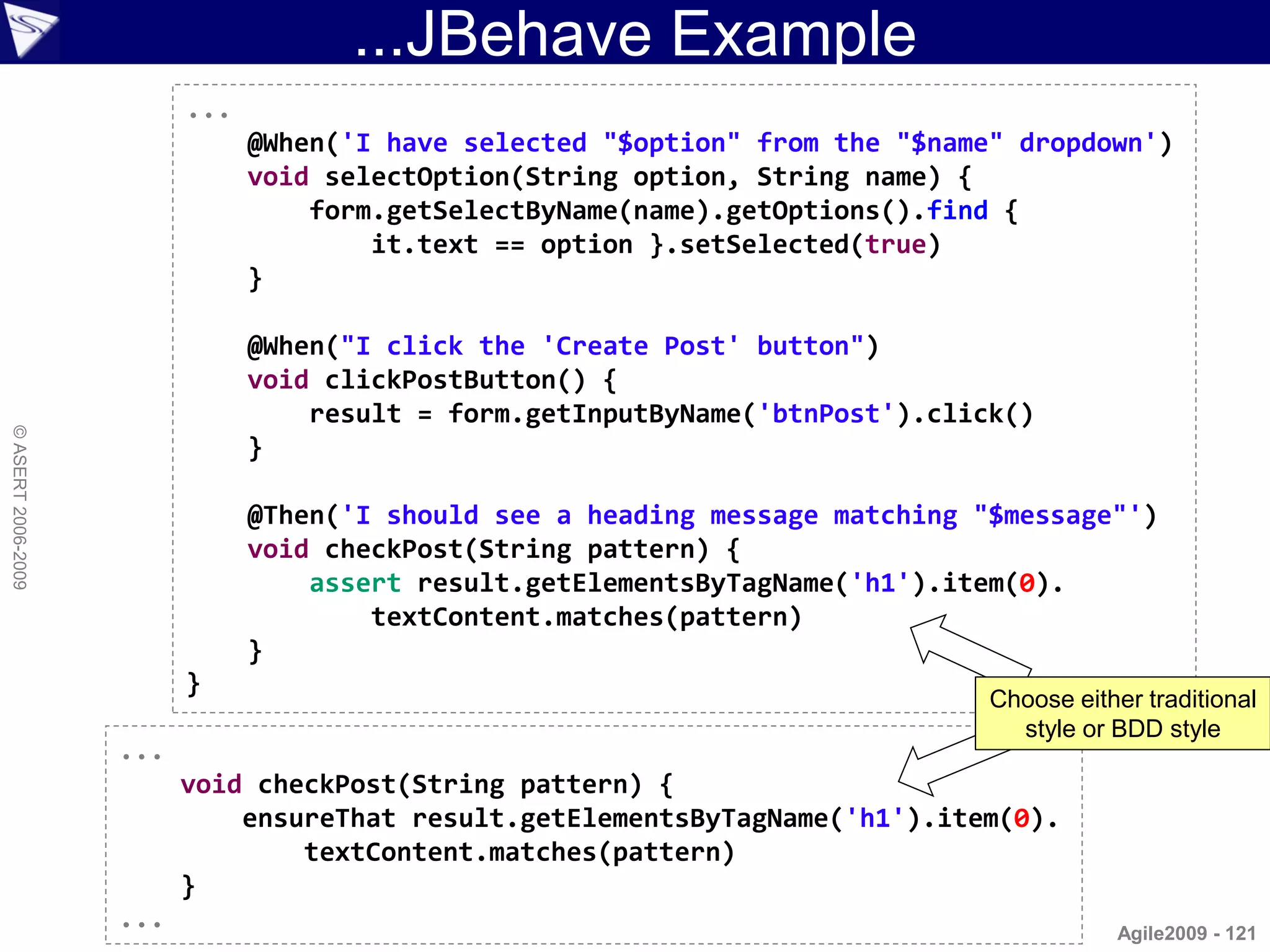
...JBehave Example
                          ...
                                @When('I have selected "$option" from the "$name" dropdown')
                                void selectOption(String option, String name) {
                                    form.getSelectByName(name).getOptions().find {
                                        it.text == option }.setSelected(true)
                                }

                                @When("I click the 'Create Post' button")
                                void clickPostButton() {
                                    result = form.getInputByName('btnPost').click()
© ASERT 2006-2009


                                }

                                @Then('I should see a heading message matching "$message"')
                                void checkPost(String pattern) {
                                    assert result.getElementsByTagName('h1').item(0).
                                        textContent.matches(pattern)
                                }
                          }
                                                                                Choose either traditional
                                                                                  style or BDD style
                    ...
                          void checkPost(String pattern) {
                              ensureThat result.getElementsByTagName('h1').item(0).
                                  textContent.matches(pattern)
                          }
                    ...                                                                    Agile2009 - 121
JBehave Web Runner...
© ASERT 2006-2009


                                            Agile2009 - 122
...JBehave Web Runner
© ASERT 2006-2009


                                            Agile2009 - 123
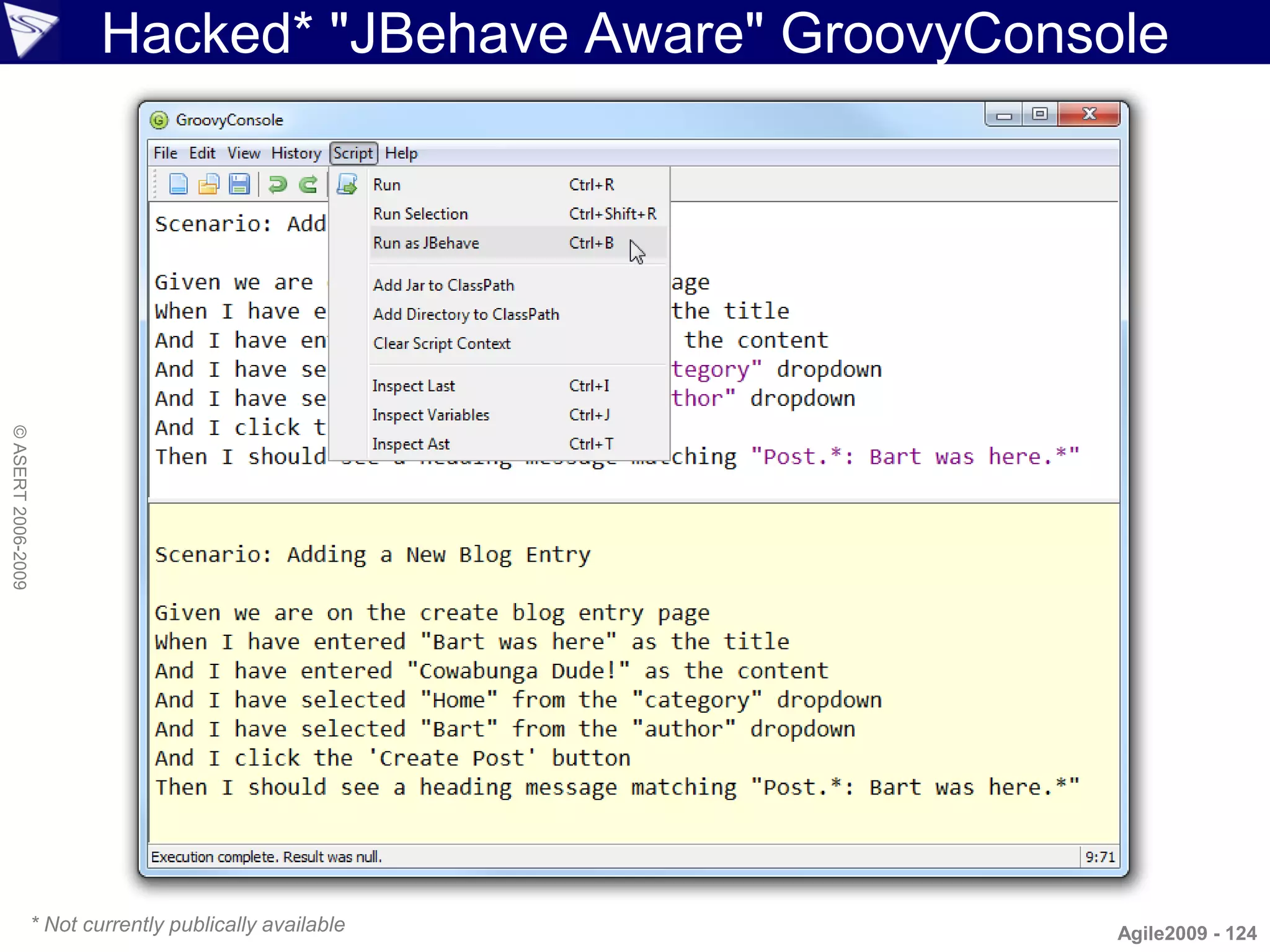
Hacked* "JBehave Aware" GroovyConsole
© ASERT 2006-2009


                    * Not currently publically available       Agile2009 - 124
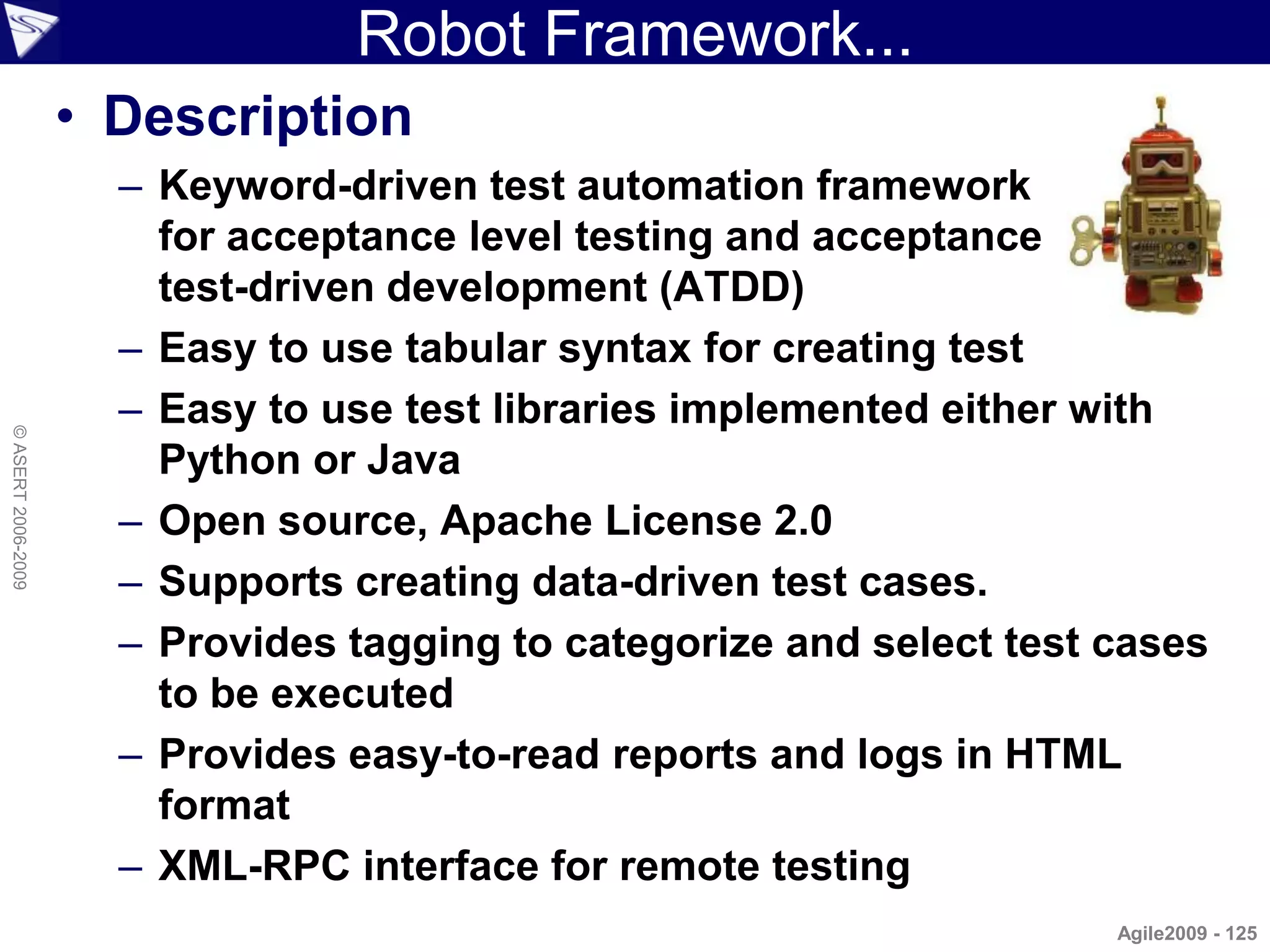
Robot Framework...
                    • Description
                      – Keyword-driven test automation framework
                        for acceptance level testing and acceptance
                        test-driven development (ATDD)
                      – Easy to use tabular syntax for creating test
                      – Easy to use test libraries implemented either with
© ASERT 2006-2009


                        Python or Java
                      – Open source, Apache License 2.0
                      – Supports creating data-driven test cases.
                      – Provides tagging to categorize and select test cases
                        to be executed
                      – Provides easy-to-read reports and logs in HTML
                        format
                      – XML-RPC interface for remote testing
                                                                       Agile2009 - 125
...Robot Framework...
                    • Tabular tests / Executable Specs
                          – In HTML or Text
© ASERT 2006-2009


                    ***Settings***
                    Library OperatingSystem

                    ***Variables***
                    ${MESSAGE} Hello, world!

                    ***Test Cases***
                    My Test [Documentation] Example test
                       Log      ${MESSAGE}
                       My Keyword /tmp

                    Another Test
                      Should Be Equal ${MESSAGE} Hello, world!

                    ***Keywords***
                    My Keyword [Arguments] ${path}
                       Directory Should Exist ${path}
                                                                       Agile2009 - 126
...Robot Framework...
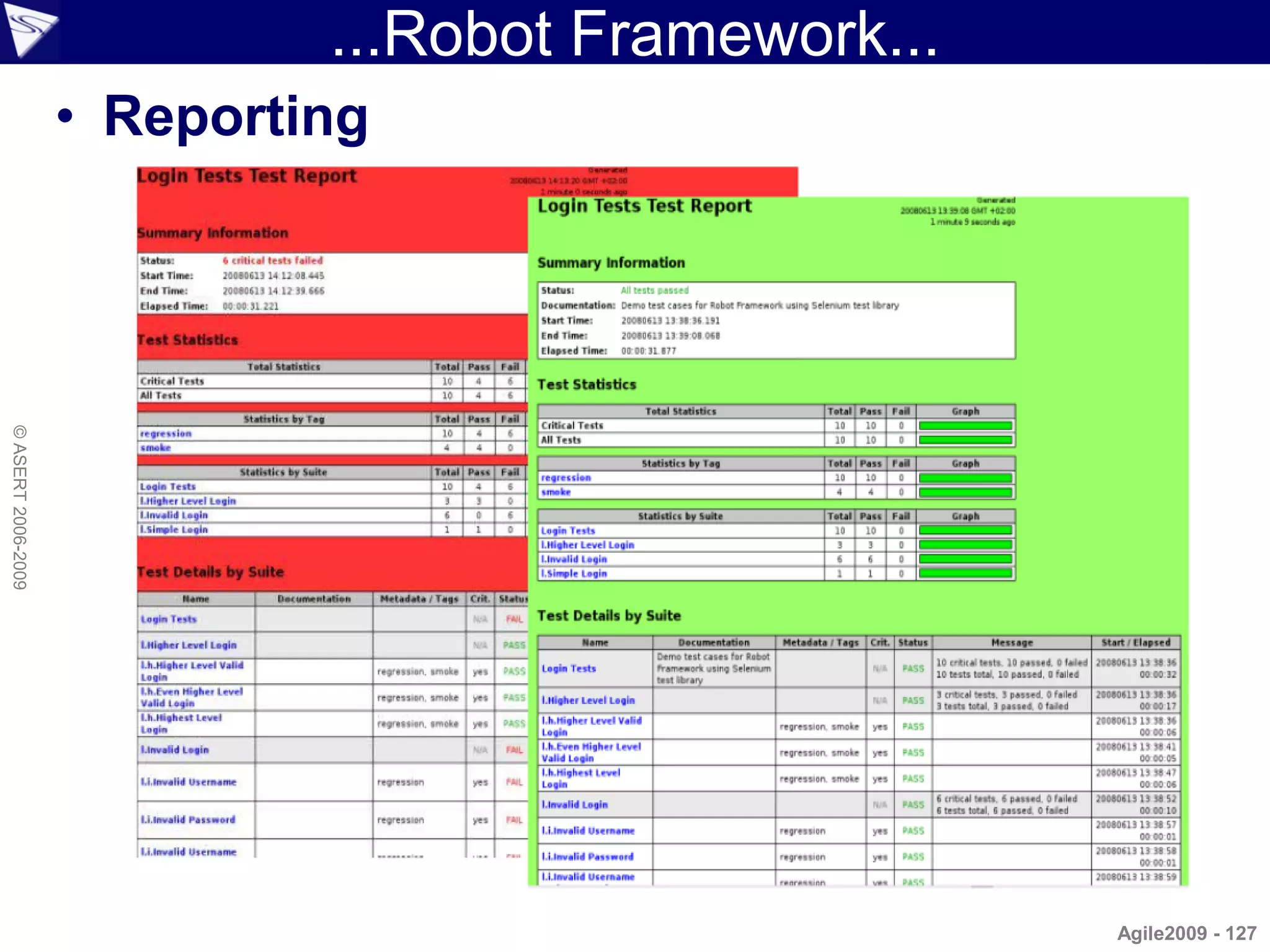
                    • Reporting
© ASERT 2006-2009


                                                     Agile2009 - 127
...Robot Framework...
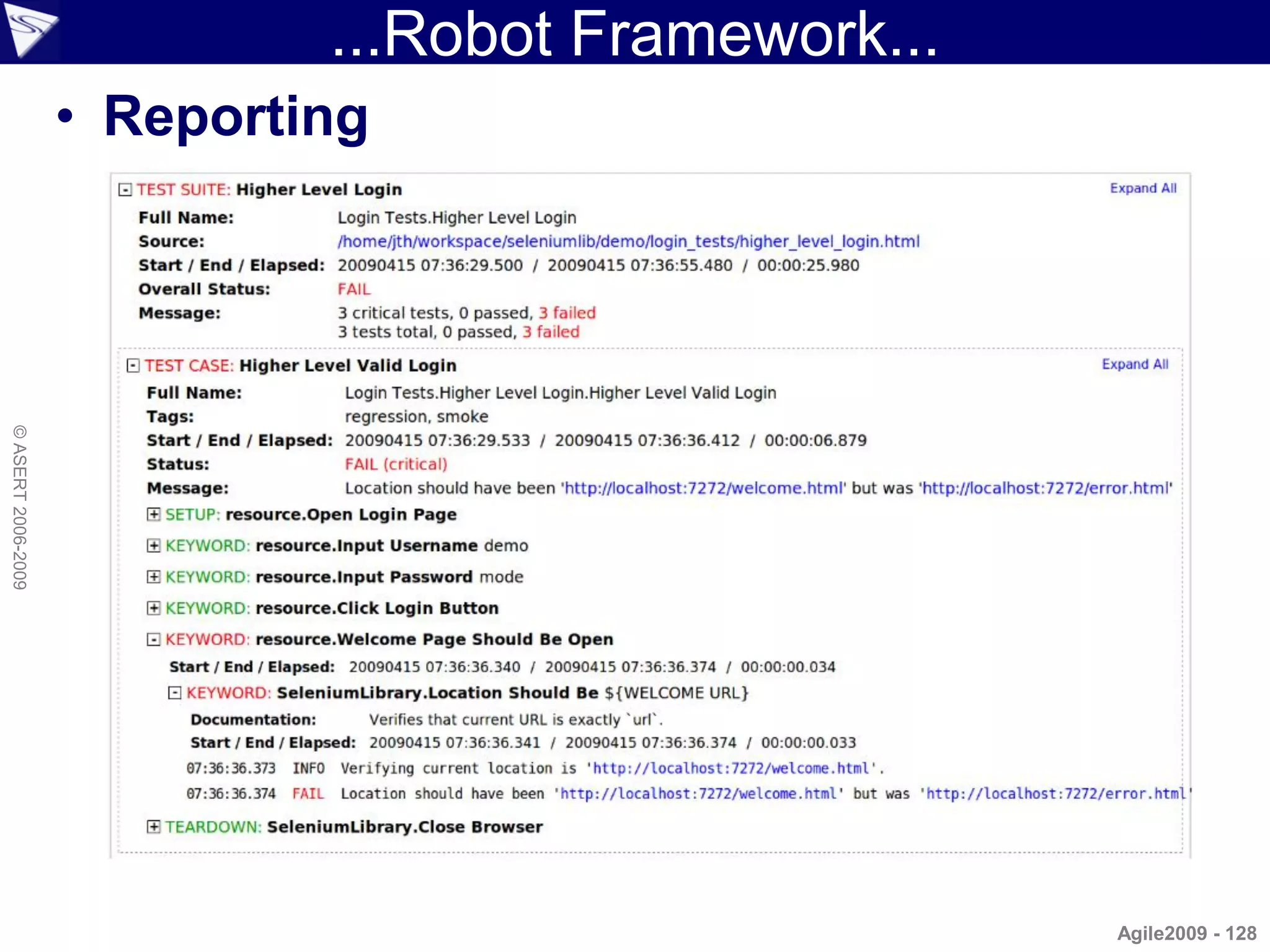
                    • Reporting
© ASERT 2006-2009


                                                     Agile2009 - 128
...Robot Framework...
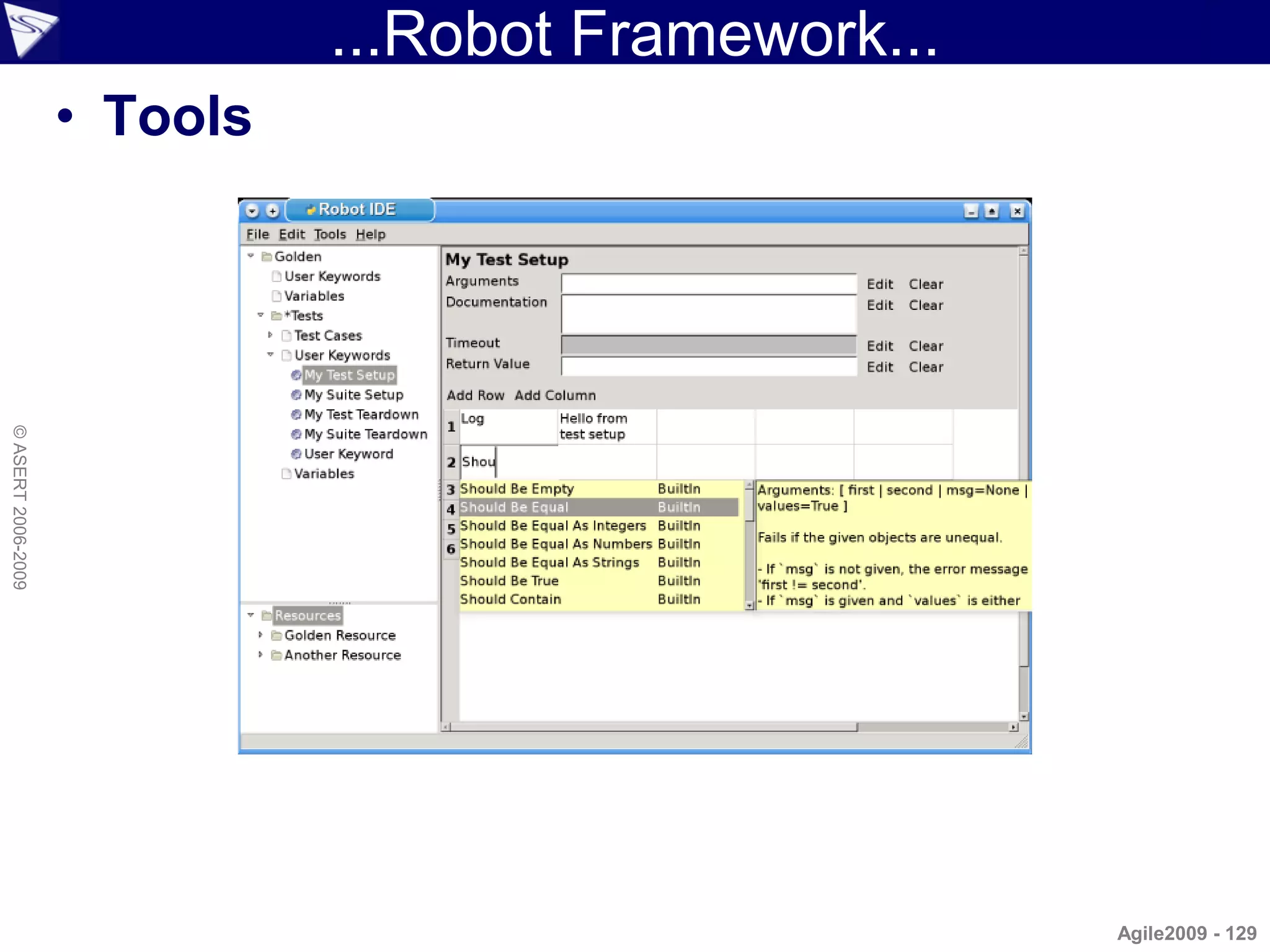
                    • Tools
© ASERT 2006-2009


                                                      Agile2009 - 129
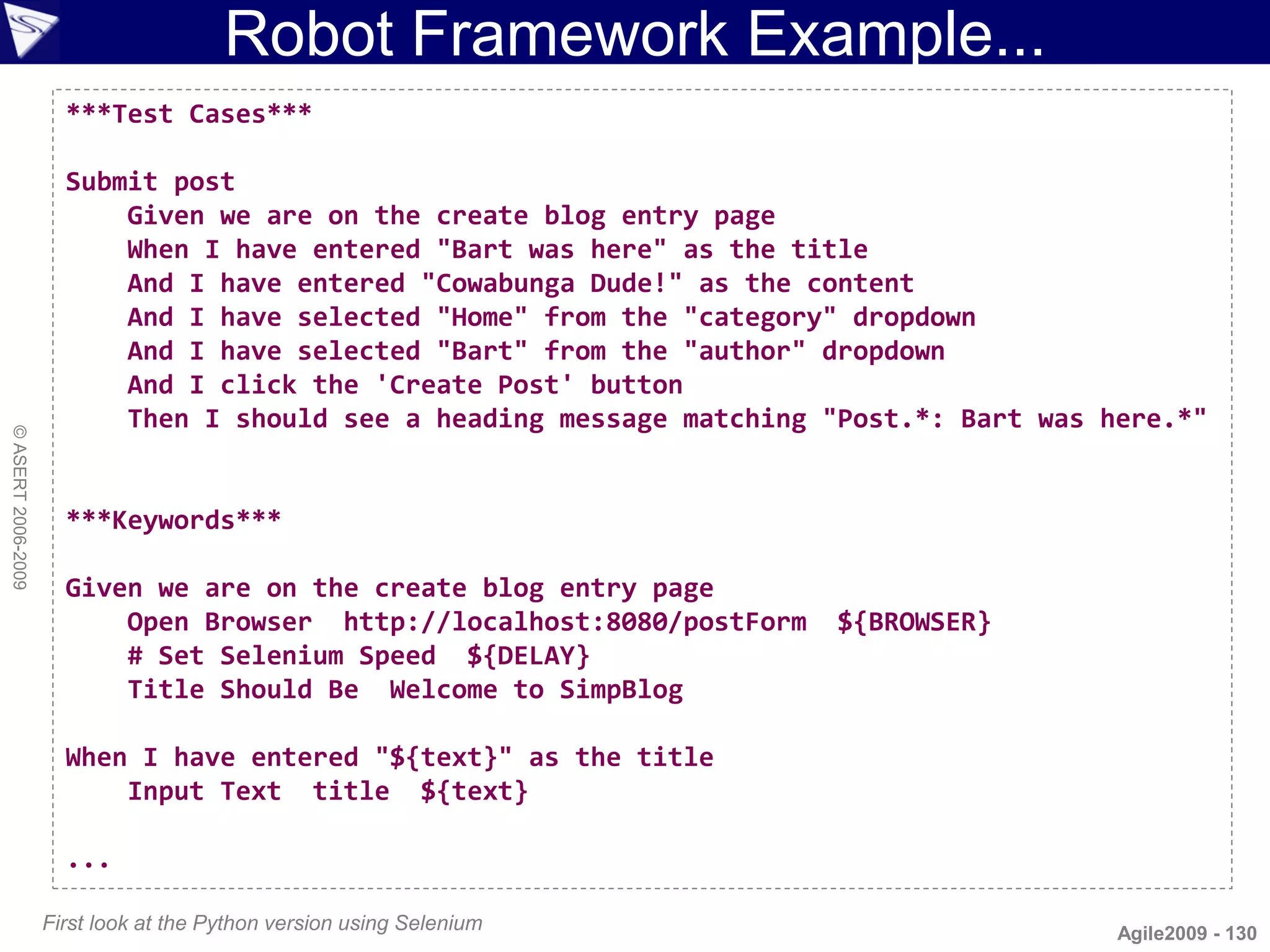
Robot Framework Example...
                      ***Test Cases***

                      Submit post
                          Given we are on the create blog entry page
                          When I have entered "Bart was here" as the title
                          And I have entered "Cowabunga Dude!" as the content
                          And I have selected "Home" from the "category" dropdown
                          And I have selected "Bart" from the "author" dropdown
                          And I click the 'Create Post' button
                          Then I should see a heading message matching "Post.*: Bart was here.*"
© ASERT 2006-2009


                      ***Keywords***

                      Given we are on the create blog entry page
                          Open Browser http://localhost:8080/postForm   ${BROWSER}
                          # Set Selenium Speed ${DELAY}
                          Title Should Be Welcome to SimpBlog

                      When I have entered "${text}" as the title
                          Input Text title ${text}

                      ...

                    First look at the Python version using Selenium                       Agile2009 - 130
...Robot Framework Example
                    ...

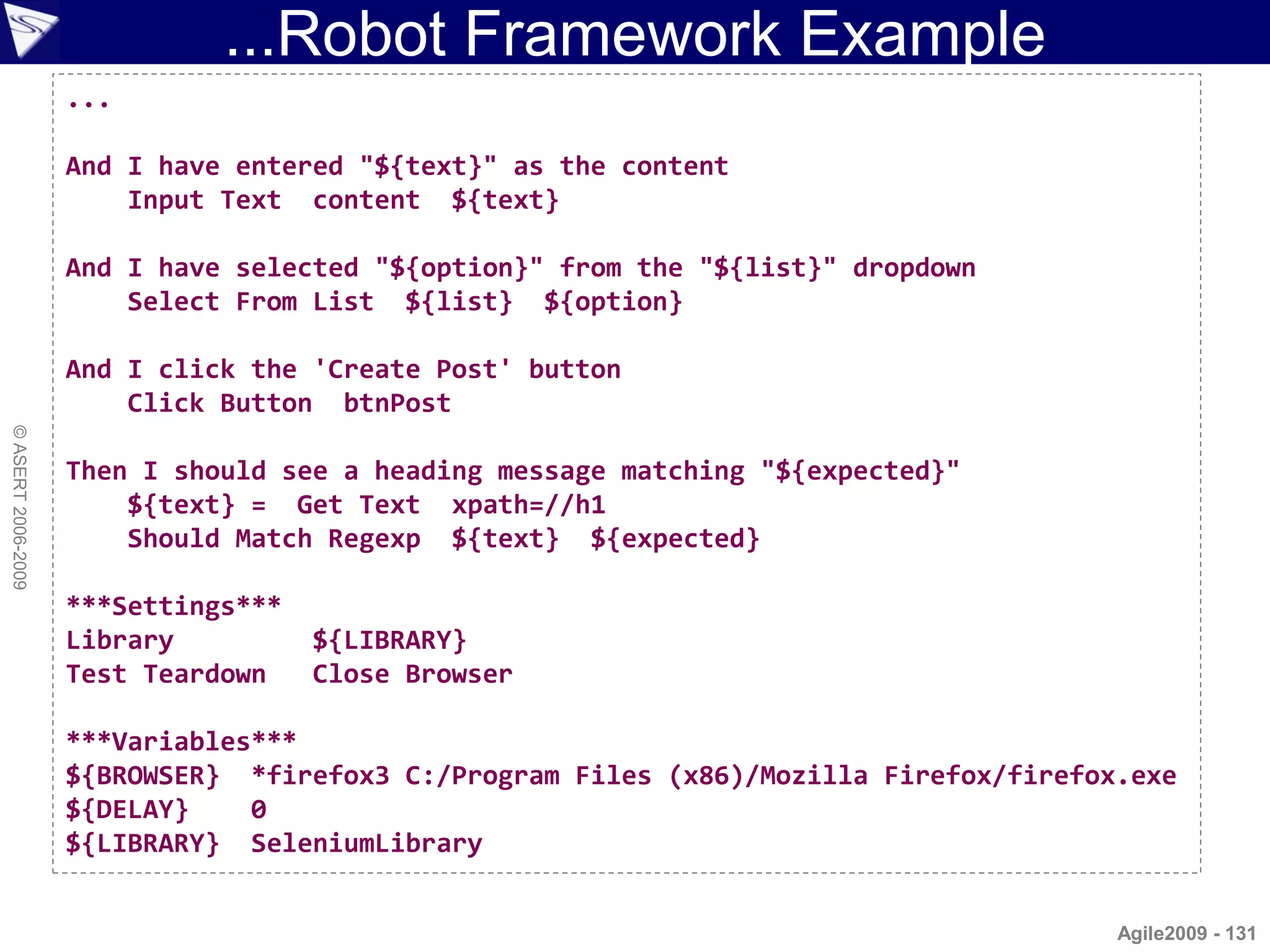
                    And I have entered "${text}" as the content
                        Input Text content ${text}

                    And I have selected "${option}" from the "${list}" dropdown
                        Select From List ${list} ${option}

                    And I click the 'Create Post' button
                        Click Button btnPost
© ASERT 2006-2009


                    Then I should see a heading message matching "${expected}"
                        ${text} = Get Text xpath=//h1
                        Should Match Regexp ${text} ${expected}

                    ***Settings***
                    Library          ${LIBRARY}
                    Test Teardown    Close Browser

                    ***Variables***
                    ${BROWSER} *firefox3 C:/Program Files (x86)/Mozilla Firefox/firefox.exe
                    ${DELAY}    0
                    ${LIBRARY} SeleniumLibrary


                                                                                       Agile2009 - 131
Robot Framework with Groovy...
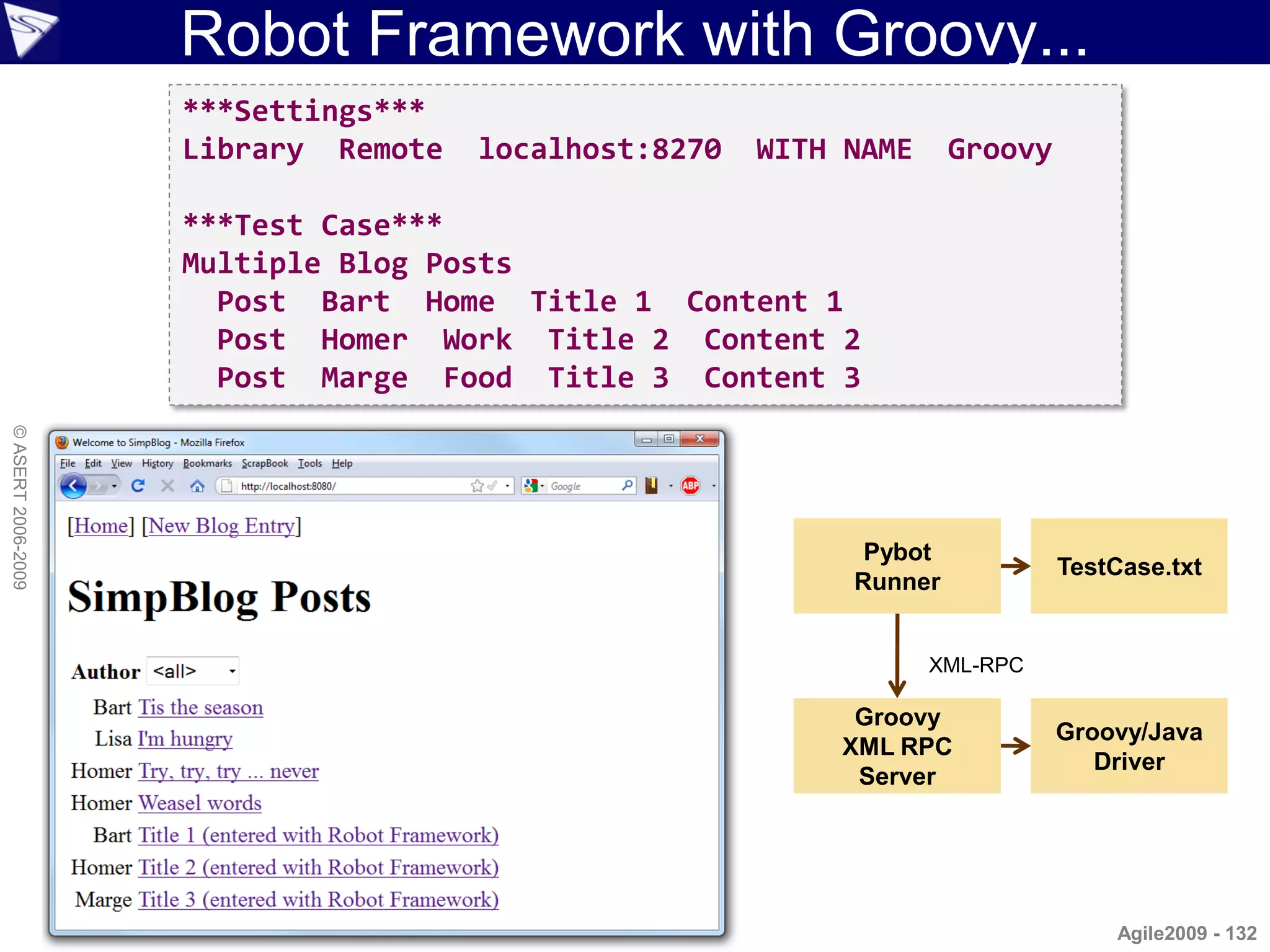
                    ***Settings***
                    Library Remote   localhost:8270   WITH NAME     Groovy

                    ***Test Case***
                    Multiple Blog Posts
                      Post Bart Home Title 1 Content 1
                      Post Homer Work Title 2 Content 2
                      Post Marge Food Title 3 Content 3
© ASERT 2006-2009


                                                            Pybot
                                                                             TestCase.txt
                                                           Runner


                                                                  XML-RPC

                                                           Groovy
                                                                             Groovy/Java
                                                          XML RPC
                                                                                Driver
                                                           Server


                                                                                 Agile2009 - 132
...Robot Framework with Groovy...
                     import groovy.net.xmlrpc.*
                     import java.net.ServerSocket
                     import com.gargoylesoftware.htmlunit.WebClient

                     def server = new XMLRPCServer()
                     server.get_keyword_names = { ["Post"] }
                     server.get_keyword_documentation = { "" }
                     server.get_keyword_arguments = { ["*args"] }
                     server.run_keyword = { name, args ->
                         assert name == 'Post'
                         def (author, category, title, content) = args
                         def client = new WebClient()
                         def page = client.getPage('http://localhost:8080/postForm')
                         assert 'Welcome to SimpBlog' == page.titleText
© ASERT 2006-2009


                         def form = page.getFormByName('post')
                         form.getInputByName('title').setValueAttribute("$title (entered with Robot Framework)")
                         form.getSelectByName('author').getOptions().find{ it.text == author }.setSelected(true)
                         form.getSelectByName('category').getOptions().find{ it.text == category }.setSelected(true)
                         form.getTextAreaByName('content').setText(content)
                         def result = form.getInputByName('btnPost').click()
                         assert result.getElementsByTagName('h1').item(0).textContent.matches("Post.*: $title.*")
                         def h3headings = result.getElementsByTagName('h3')
                         assert h3headings.item(1).textContent == "Category: $category"
                         assert h3headings.item(2).textContent == "Author: $author"
                         def para = result.getByXPath('//TABLE//TR/TD/P')[0]
                         assert para.textContent == content
                         return [status:'PASS', output:"$name $args", error:'bad arg']
                     }

                     def serverSocket = new ServerSocket(8270)
                     server.startServer(serverSocket)

                    In the future, a generic version of this file may be possible                             Agile2009 - 133
...Robot Framework with Groovy...
© ASERT 2006-2009


                                                        Agile2009 - 134
...Robot Framework with Groovy
© ASERT 2006-2009


                                                     Agile2009 - 135
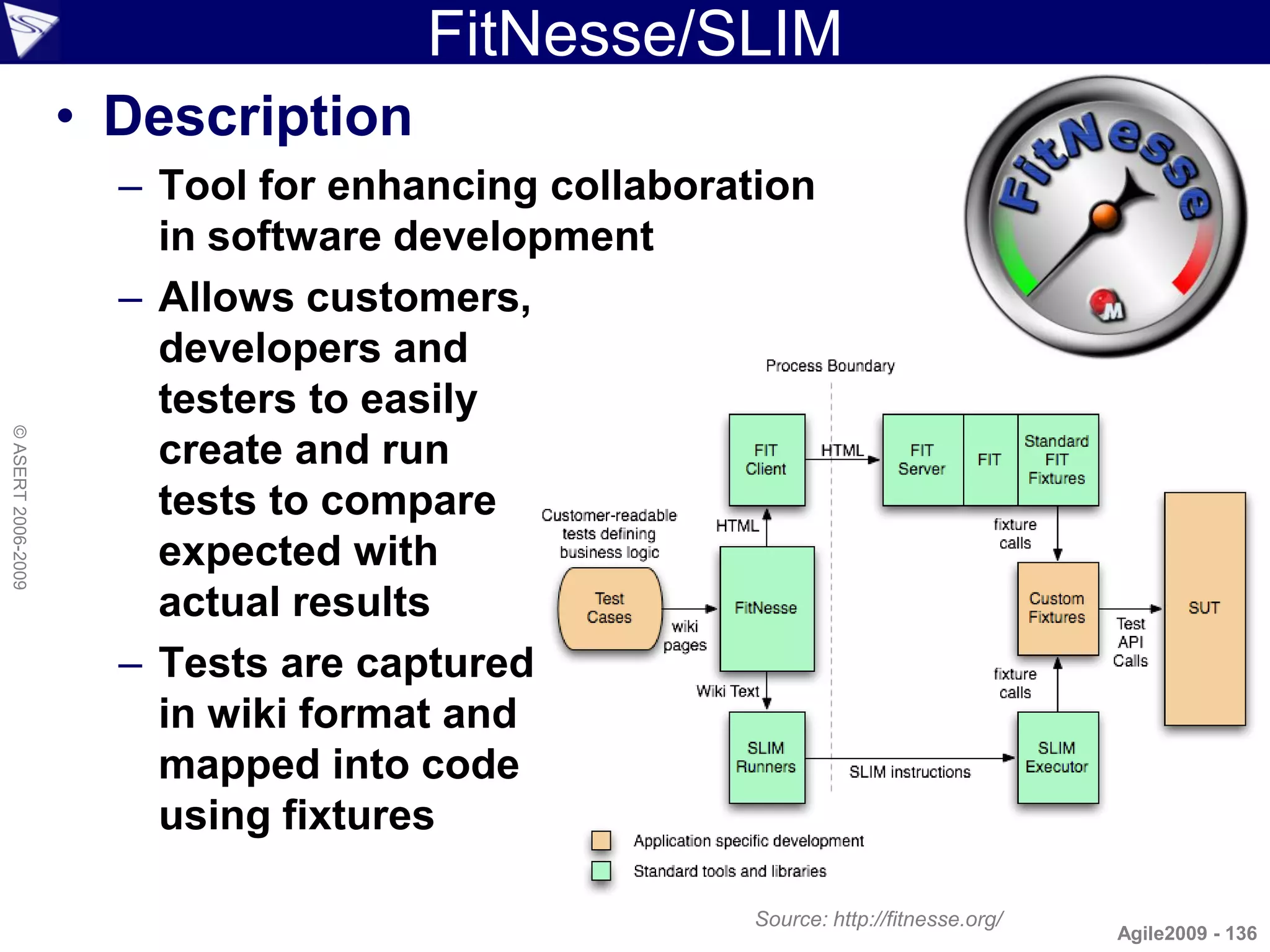
FitNesse/SLIM
                    • Description
                      – Tool for enhancing collaboration
                        in software development
                      – Allows customers,
                        developers and
                        testers to easily
© ASERT 2006-2009


                        create and run
                        tests to compare
                        expected with
                        actual results
                      – Tests are captured
                        in wiki format and
                        mapped into code
                        using fixtures

                                                     Source: http://fitnesse.org/
                                                                                    Agile2009 - 136
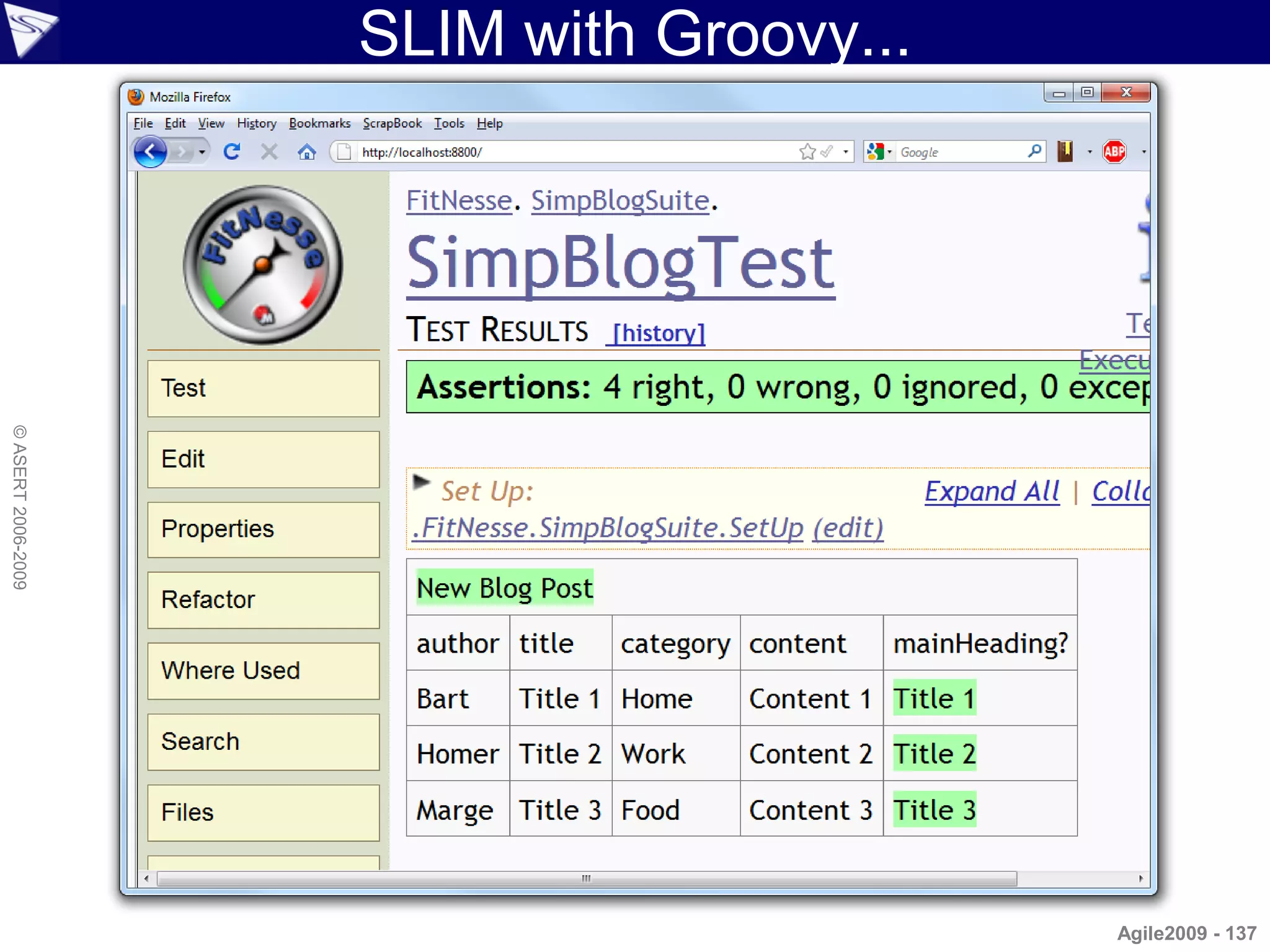
SLIM with Groovy...
© ASERT 2006-2009


                                          Agile2009 - 137
...SLIM with Groovy
                         package simpblog

                         import com.gargoylesoftware.htmlunit.WebClient

                         class NewBlogPost {
                             String author, title, content, category
                             private result
                             def execute() {
                                 def client = new WebClient()
                                 def page = client.getPage('http://localhost:8080/postForm')
                                 assert 'Welcome to SimpBlog' == page.titleText
                                 def form = page.getFormByName('post')
© ASERT 2006-2009


                                 form.getInputByName('title').
                                     setValueAttribute("$title (entered with Robot Framework)")
                                 form.getSelectByName('author').getOptions().find{
                                     it.text == author }.setSelected(true)
                                 form.getSelectByName('category').getOptions().find{
                                     it.text == category }.setSelected(true)
                                 form.getTextAreaByName('content').setText(content)
                                 result = form.getInputByName('btnPost').click()
                             }
                             def mainHeading() {
                                 def m = result.getElementsByTagName('h1').item(0).textContent =~
                                     /Post .*: (.*) ([^)]*)/
                                 m[0][1]
                             }
                         }

                    Example uses HtmlUnit to call SimpBlog web site but those details aren't important here   Agile2009 - 138
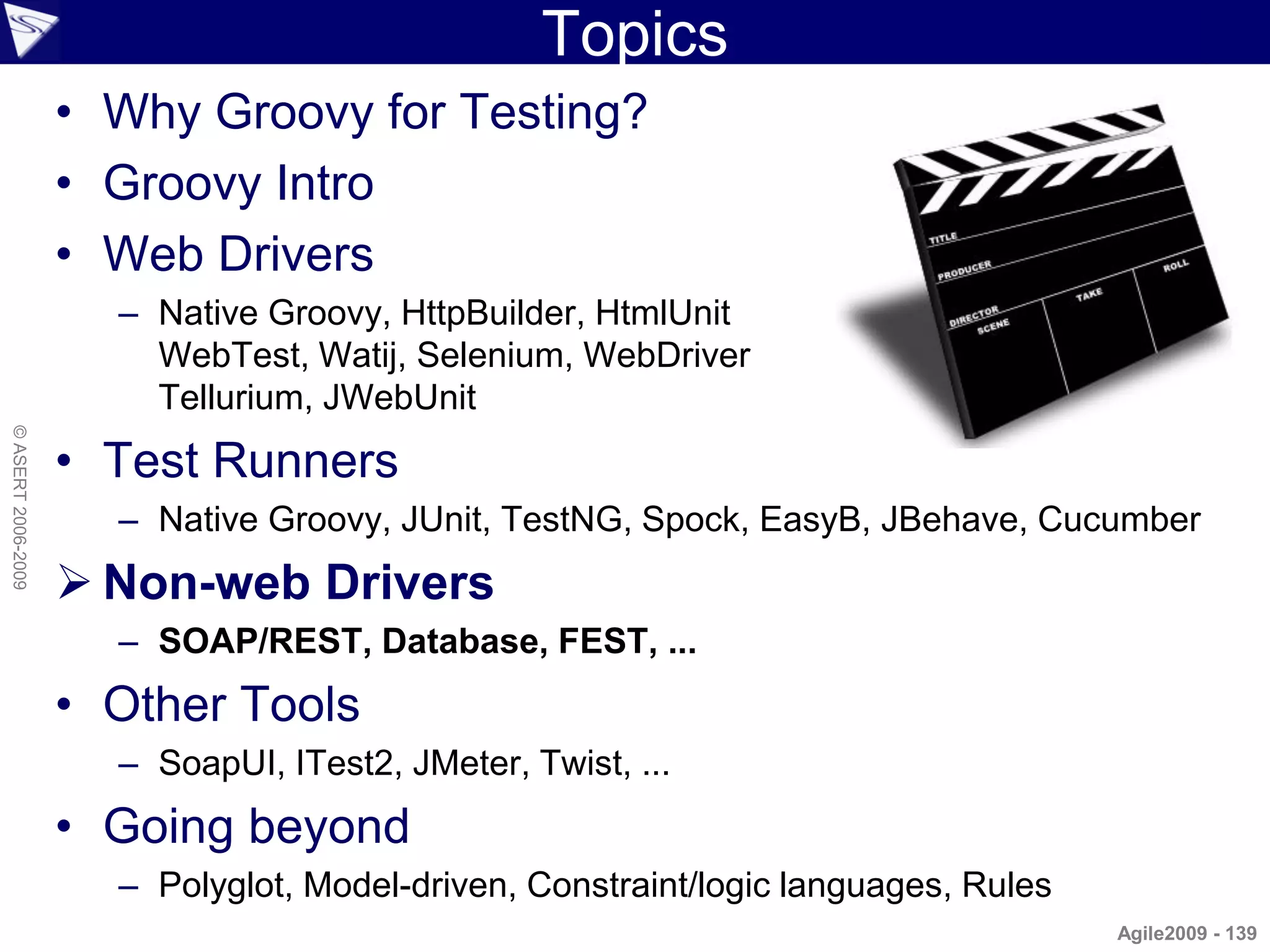
Topics
                    • Why Groovy for Testing?
                    • Groovy Intro
                    • Web Drivers
                      – Native Groovy, HttpBuilder, HtmlUnit
                        WebTest, Watij, Selenium, WebDriver
                        Tellurium, JWebUnit
© ASERT 2006-2009


                    • Test Runners
                      – Native Groovy, JUnit, TestNG, Spock, EasyB, JBehave, Cucumber
                     Non-web Drivers
                      – SOAP/REST, Database, FEST, ...
                    • Other Tools
                      – SoapUI, ITest2, JMeter, Twist, ...
                    • Going beyond
                      – Polyglot, Model-driven, Constraint/logic languages, Rules
                                                                                    Agile2009 - 139
Better SQL Manipulation...
                    import   java.sql.Connection;
                    import   java.sql.DriverManager;
                    import   java.sql.Statement;
                                                                                       // ...
                    import   java.sql.ResultSet;
                                                                                           finally {
                    import   java.sql.SQLException;
                                                                                             // release database resources
                                                                                             close(rs); // close the ResultSet
                    public class JdbcJava {
                                                                                             close(stmt); // close the Statement
                      public static Connection getConnection() throws Exception {
                                                                                             close(conn); // close the Connection
                        String driver = "org.hsqldb.jdbcDriver";
                                                                                           }
                        String url = "jdbc:hsqldb:file:EMPDB";
                                                                                         }
                        String username = "sa"; String password = "";
                        Class.forName(driver);
                                                                                           private static void close(ResultSet rs) {
                        return DriverManager.getConnection(url, username, password);
                                                                                             try {
                      }
                                                                                               if (rs != null) rs.close();
                                                                                             } catch (SQLException e) {
© ASERT 2006-2009


                      public static void main(String[] args) {
                        Connection conn = null;                                                e.printStackTrace();
                        Statement stmt = null;                                               }
                        ResultSet rs = null;                                               }
                        try {
                          conn = getConnection();                                          private static void close(Statement st) {
                          stmt = conn.createStatement();                                     try {
                                                                                               if (st != null) st.close();
                          String query =
                                                                                             } catch (SQLException e) {
                            "select id, lastname, firstname from Employees";
                          rs = stmt.executeQuery(query);                                       e.printStackTrace();
                                                                                             }
                          while (rs.next()) {
                            System.out.println(rs.getString("id") +                        }
                              ": " + rs.getString("firstname") +
                              " " + rs.getString("lastname"));                             private static void close(Connection cn) {
                                                                                             try {
                          }
                                                                                               if (cn != null) cn.close();
                        }
                        catch (Exception e) {                                                } catch (SQLException e) {
                          // handle the exception                                              e.printStackTrace();
                          e.printStackTrace();                                               }
                          System.err.println(e.getMessage());                              }
                        }                                                              }
                    // ...                                                                                                Agile2009 - 140
...Better SQL Manipulation...
                    import
                    import
                             java.sql.Connection;
                             java.sql.DriverManager;                                                               boilerplate
                    import   java.sql.Statement;
                                                                                       // ...
                    import   java.sql.ResultSet;
                                                                                           finally {
                    import   java.sql.SQLException;
                                                                                             // release database resources
                                                                                             close(rs); // close the ResultSet
                    public class JdbcJava {
                                                                                             close(stmt); // close the Statement
                      public static Connection getConnection() throws Exception {
                                                                                             close(conn); // close the Connection
                        String driver = "org.hsqldb.jdbcDriver";
                                                                                           }
                        String url = "jdbc:hsqldb:file:EMPDB";
                                                                                         }
                        String username = "sa"; String password = "";
                        Class.forName(driver);
                                                                                           private static void close(ResultSet rs) {
                        return DriverManager.getConnection(url, username, password);
                                                                                             try {
                      }
                                                                                               if (rs != null) rs.close();
                                                                                             } catch (SQLException e) {
© ASERT 2006-2009


                      public static void main(String[] args) {
                        Connection conn = null;                                                e.printStackTrace();
                        Statement stmt = null;                                               }
                        ResultSet rs = null;                                               }
                        try {
                          conn = getConnection();                                          private static void close(Statement st) {
                          stmt = conn.createStatement();                                     try {
                                                                                               if (st != null) st.close();
                          String query =
                                                                                             } catch (SQLException e) {
                            "select id, lastname, firstname from Employees";
                          rs = stmt.executeQuery(query);                                       e.printStackTrace();
                                                                                             }
                          while (rs.next()) {
                            System.out.println(rs.getString("id") +                        }
                              ": " + rs.getString("firstname") +
                              " " + rs.getString("lastname"));                             private static void close(Connection cn) {
                                                                                             try {
                          }
                                                                                               if (cn != null) cn.close();
                        }
                        catch (Exception e) {                                                } catch (SQLException e) {
                          // handle the exception                                              e.printStackTrace();
                          e.printStackTrace();                                               }
                          System.err.println(e.getMessage());                              }
                        }                                                              }
                    // ...                                                                                                Agile2009 - 141
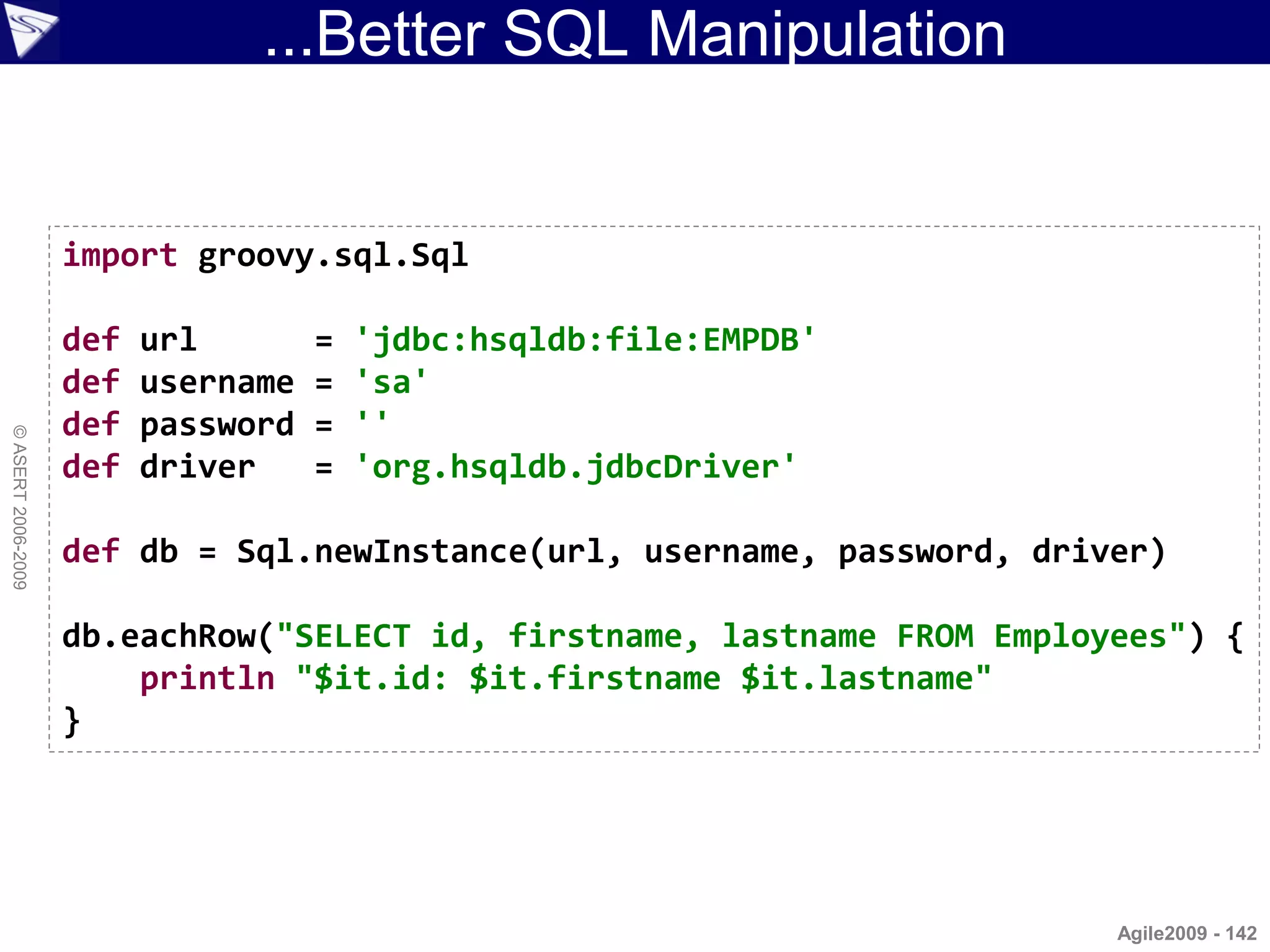
...Better SQL Manipulation


                    import groovy.sql.Sql

                    def   url        =   'jdbc:hsqldb:file:EMPDB'
                    def   username   =   'sa'
                    def   password   =   ''
© ASERT 2006-2009


                    def   driver     =   'org.hsqldb.jdbcDriver'

                    def db = Sql.newInstance(url, username, password, driver)

                    db.eachRow("SELECT id, firstname, lastname FROM Employees") {
                        println "$it.id: $it.firstname $it.lastname"
                    }


                                                                          Agile2009 - 142
More Details: Working with Databases
                    • Using standard SQL statements
                     import groovy.sql.Sql

                     def foo = 'cheese'
                     def db = Sql.newInstance("jdbc:mysql://localhost:3306/mydb",
                                              "user", "pswd", "com.mysql.jdbc.Driver")

                     db.eachRow("select * from FOOD where type=${foo}") {
                         println "Gromit likes ${it.name}"
© ASERT 2006-2009


                     }

                    • Using DataSets
                     import groovy.sql.Sql

                     def db = Sql.newInstance("jdbc:mysql://localhost:3306/mydb",
                                              "user", "pswd", "com.mysql.jdbc.Driver")

                     def food = db.dataSet('FOOD')
                     def cheese = food.findAll { it.type == 'cheese' }
                     cheese.each { println "Gromit likes ${it.name}" }
                                                                                Agile2009 - 143
WebTest testing Web Sites
                    def ant = new AntBuilder()

                    def webtest_home = System.properties.'webtest.home'

                    ant.taskdef(resource:'webtest.taskdef') {
                      classpath {
                           pathelement(location:"$webtest_home/lib")
                           fileset(dir:"$webtest_home/lib", includes:"**/*.jar")
                      }
                    }
© ASERT 2006-2009


                    def config_map = [:]
                    ['protocol','host','port','basepath','resultfile',
                    'resultpath', 'summary', 'saveresponse','defaultpropertytype'].each {
                       config_map[it] = System.properties['webtest.'+it]
                    }

                    ant.testSpec(name:'groovy: Test Groovy Scripting at creation time') {
                      config(config_map)
                      steps {
                         invoke(url:'linkpage.html')
                         for (i in 1..10) {
                            verifyText(description:"verify number ${i} is on pages", text:"${i}")
                         }
                      }
                    }
                                                                                                    Agile2009 - 144
WebTest testing Emails
                    def ant = new AntBuilder()

                    def webtest_home = System.properties.'webtest.home'

                    ant.taskdef(resource:'webtest.taskdef'){
                      classpath(){
                         pathelement(location:"$webtest_home/lib")
                         fileset(dir:"$webtest_home/lib", includes:"**/*.jar")
                      }
                    }
© ASERT 2006-2009


                    ant.testSpec(name:'Email Test'){
                      steps {
                         emailSetConfig(server:'localhost', password:'password',
                            username:'devteam@mycompany.org', type:'pop3')
                         emailStoreMessageId(subject:'/Build notification/',
                            property:'msg')
                         emailStoreHeader(property:'subject',
                            messageId:'#{msg}', headerName:'Subject')
                         groovy('''def subject = step.webtestProperties.subject
                            assert subject.startsWith('Build notification')''')
                         emailMessageContentFilter(messageId:'#{msg}')
                         verifyText(text:'Failed build')
                      }
                    }
                                                                                   Agile2009 - 145
SOAP Client and Server
                             class MathService {
                                 double add(double a, double b) {
                                     a + b
                                 }
                                 double square(double c) {
                                     c * c
                                 }
                             }
© ASERT 2006-2009


                             import groovy.net.soap.SoapServer

                             def server = new SoapServer('localhost', 6789)
                             server.setNode('MathService')
                             server.start()


                    import groovy.net.soap.SoapClient

                    def math = new SoapClient('http://localhost:6789/MathServiceInterface?wsdl')
                    assert math.add(1.0, 2.0) == 3.0
                    assert math.square(3.0) == 9.0

                                                                                         Agile2009 - 146
FEST
                    • Description
                        – Framework for testing Swing GUIs (among other things)
                        – Simulation of user interaction with a GUI (e.g. mouse / keyboard input)
                        – Reliable GUI component lookup
                            • by type, by name or custom search criteria
                        – Support for all Swing components included in the JDK
                        – Compact and powerful API for creation and maintenance of functional
                          GUI tests
© ASERT 2006-2009


                        – Regular expression matching
                        – Supports Applet testing
                        – Ability to embed screenshots of failed GUI tests in HTML test reports
                        – Can be used with either TestNG or JUnit
                        – Supports testing violations of Swing's threading rules
                        – Experimental Groovy Builder support (coming soon!)

                    dialog.comboBox("domain").select("Users")
                    dialog.textBox("username").enterText("leia.organa")
                    dialog.button("login").click()
                    dialog.optionPane().requireErrorMessage()
                                       .requireMessage("Please enter your .*")
                                                                                          Agile2009 - 147
Topics
                    • Why Groovy for Testing?
                    • Groovy Intro
                    • Web Drivers
                      – Native Groovy, HttpBuilder, HtmlUnit
                        WebTest, Watij, Selenium, WebDriver
                        Tellurium, JWebUnit
© ASERT 2006-2009


                    • Test Runners
                      – Native Groovy, JUnit, TestNG, Spock, EasyB, JBehave, Cucumber
                    • Non-web Drivers
                      – SOAP/REST, Database, FEST, ...
                     Other Tools
                      – SoapUI, ITest2, JMeter, Twist, ...
                    • Going beyond
                      – Polyglot, Model-driven, Constraint/logic languages, Rules
                                                                                    Agile2009 - 148
SoapUI...
© ASERT 2006-2009


                                Agile2009 - 149
...SoapUI
                    • Tool for testing Web Services has a built-
                      in Groovy editor for custom steps
© ASERT 2006-2009


                                                            Agile2009 - 150
iTest2
                     • Tool for recording, refactoring and
                       running watir style tests
© ASERT 2006-2009


                    We have had success cutting and pasting recorded test steps – using metaprogramming to map to Groovy testing DSL
                                                                                                                                 Agile2009 - 151
JMeter
                    • What is Apache JMeter?
                                                                                    Performance Testing


                           – Java desktop application designed to load test
                             functional behavior and measure performance
                           – Originally designed for testing Web Applications but
                             has since expanded to other test functions
© ASERT 2006-2009


                    JMeter can call out to Groovy – reusing your functional tests
                                                                                               Agile2009 - 152
Twist
© ASERT 2006-2009


                    Future version will support Groovy           Agile2009 - 153
Topics
                    • Why Groovy for Testing?
                    • Groovy Intro
                    • Web Drivers
                      – Native Groovy, HttpBuilder, HtmlUnit
                        WebTest, Watij, Selenium, WebDriver
                        Tellurium, JWebUnit
© ASERT 2006-2009


                    • Test Runners
                      – Native Groovy, JUnit, TestNG, Spock, EasyB, JBehave, Cucumber
                    • Non-web Drivers
                      – SOAP/REST, Database, FEST, ...
                    • Other Tools
                      – SoapUI, ITest2, JMeter, Twist, ...
                     Going beyond
                      – Polyglot, Model-driven, Constraint/logic languages, Rules
                                                                                Agile2009 - 154
GParallelizer
                    import java.util.concurrent.Future

                    // multiply numbers asynchronously
                    Asynchronizer.withAsynchronizer(5) {
                        Collection<Future> result =
                                [1, 2, 3, 4, 5].collectAsync{it * 10}
                        assertEquals(new HashSet([10, 20, 30, 40, 50]),
© ASERT 2006-2009


                                     new HashSet((Collection) result*.get()))
                    }

                    // run multiple closures in parallel
                    Asynchronizer.withAsynchronizer {
                        assert AsyncInvokerUtil.doInParallel(
                                {calculateA()}, {calculateB()}
                        ) == [10, 20]
                    }


                                                                         Agile2009 - 155
Constraint/Logic Programming...
© ASERT 2006-2009


                    Source: http://xkcd.com/287/
                                                                Agile2009 - 156
...Constraint/Logic Programming
© ASERT 2006-2009


                                                      Agile2009 - 157
Polyglot Programming
© ASERT 2006-2009


                                           Agile2009 - 158
ModelJUnit...
© ASERT 2006-2009


                                    Agile2009 - 159
...ModelJUnit
© ASERT 2006-2009


                                    Agile2009 - 160
More Information about Groovy
                    • Web sites
                      –   http://groovy.codehaus.org
                      –   http://grails.codehaus.org
                      –   http://pleac.sourceforge.net/pleac_groovy (many examples)
                      –   http://www.asert.com.au/training/java/GV110.htm (workshop)
                    • Mailing list for users
                      – user@groovy.codehaus.org
© ASERT 2006-2009


                    • Information portals
                      – http://www.aboutgroovy.org
                      – http://www.groovyblogs.org
                    • Documentation (1000+ pages)
                      – Getting Started Guide, User Guide, Developer Guide, Testing
                        Guide, Cookbook Examples, Advanced Usage Guide
                    • Books
                      – Several to choose from ...
                                                                                Agile2009 - 161
More Information: Groovy in Action
© ASERT 2006-2009


                    Second edition of GinA, ‘ReGinA’ now under development   Agile2009 - 162

Groovy Testing Aug2009

  • 1.
    How to makeyour Testing © ASERT 2006-2009 more Groovy Dr Paul King Craig Smith paulk@asert.com.au craig.smith@suncorp.com.au @paulk_asert @smithcdau ASERT, Australia Suncorp, Australia
  • 2.
    Topics • Why Groovy for Testing? • Groovy Intro • Web Drivers • Test Runners • Non-web Drivers • Other Tools © ASERT 2006-2009 • Going beyond Focus is on using the Groovy dynamic language for primarily functional and acceptance testing with a forward looking perspective. Also considers polyglot options. The techniques and lessons learned can be applied to other kinds of testing and are also applicable to similar languages. Agile2009 - 2
  • 3.
    Topics not coveredin detail • Coverage – But coverage options available • Mocking – But built-in support and many libraries available • CI Support © ASERT 2006-2009 – Support in Hudson, Team City, Anthill Pro to call Groovy • Code Metrics – CodeNarc and other tools available • Build Tools – Ant, Maven, GMaven, Gant, Gradle, ... Agile2009 - 3
  • 4.
    Topics  Why Groovy for Testing? • Groovy Intro • Web Drivers – Native Groovy, HttpBuilder, HtmlUnit WebTest, Watij, Selenium, WebDriver Tellurium, JWebUnit © ASERT 2006-2009 • Test Runners – Native Groovy, JUnit, TestNG, Spock, EasyB, JBehave, Cucumber • Non-web Drivers – SOAP/REST, Database, FEST, ... • Other Tools – SoapUI, ITest2, JMeter, Twist, ... • Going beyond – Polyglot, Model-driven, Constraint/logic languages, Rules Agile2009 - 4
  • 5.
    Why Test WithGroovy? ? © ASERT 2006-2009 Agile2009 - 5
  • 6.
    Why Test WithGroovy? • Wrong first question! • Perfect second question?  X © ASERT 2006-2009 Consider first the task at hand and the organization and people fit! Agile2009 - 6
  • 7.
    “People Fit” /“Organization Fit” • People – Developers (familiarity with languages) – Testers (tools language familiarity) – Responsibility to create/run/maintain – BAs/SMEs (ability to read technical tests) – Consider both development and maintenance © ASERT 2006-2009 – Expected feedback from tests (JUnit/Reports) • Organization – Maturity level – Degree of automation – Tools in use – Need for adaptability Agile2009 - 7
  • 8.
    Why Test WithGroovy? • Advantages – Easy to learn – Particularly good fit if the application you are testing is built for the JVM or your developers work with Java / JVM languages – Supports polyglot programming when needed © ASERT 2006-2009 – Easy to plug and play different testing tools – Good community & tools for professional agile • Disadvantages – Requires JVM – Less advantages if your developers using Python, .Net, PHP – Maybe your testers already know Ruby Agile2009 - 8
  • 9.
    Scripting/Dynamic Languages • Advantages – Lend themselves to succinct code/DSLs – Powerful – Increased Refactoring – Increased Reuse – Less prone to Brittleness © ASERT 2006-2009 – Flexibility for tool integration – Open APIs provide extensibility • Disadvantages – Can be too low level (but many options now) – Sometimes less tool support (but changing now) Agile2009 - 9
  • 10.
    Test Characteristics • Coverage/Traceability – Requirement coverage/traceability – Code coverage: line, branch, path, state – Transactional Tracing • Purpose – Unit, Integration, System, Customer • Manageability – Removing duplication © ASERT 2006-2009 – Managing lifecycle: shared setUp/tearDown (@Before @After) • Handling test data – Data-driven, databases, Spreadsheets, tables, keywords, random, model-driven • Large Test Volumes – Speed of feedback, performance testing • Tool evolution/longevity/cost/support/documentation – Open Source/Commercial, Critical mass/popularity • Combinability Agile2009 - 10
  • 11.
    Key Testing Practices • Use testing DSL’s • Look to move up the testing stack – It used to be all about the driver – Now the driver is hidden in the framework or tool stack • Apply good testing practices – Pareto analysis, bug clusters, mutation testing, test early © ASERT 2006-2009 – All pairs/equivalence partitions/orthogonal array testing – Risk-based test selection, coding for testability, use CI – Boundary value analysis, defensive programming • Plug and play testing tools – Run different drivers with different runners and different tools • Complement automated tests with exploration • Expand testing scope – Test environment readiness, test deployments Agile2009 - 11
  • 12.
    Groovy and TestingTool Spectrum* Utilities Runners All Pairs Combinations Native Groovy, JUnit, TestNG, Spock, EasyB, Polyglot languages JBehave, Cucumber, Robot Framework Logic programming Threads, Parallel / Web Database SOAP / Other Concurrency libraries Drivers Drivers REST Drivers Data-driven libraries Drivers Networking libraries WebTest DbUnit FEST © ASERT 2006-2009 XML Processing GroovyWS WebDriver DataSets Email Read/write files / JWebUnit SqlUnit XML-RPC FTP Excel / Word / CSV Reporting, Logging Tellurium groovy.sql CXF AntUnit Selenium JPA Axis2 Telnet HtmlUnit JDO JAX-WS SSH Tools Watij BigTable JAX-RS Exec iTest2, SoapUI, Twist, HttpBuilder JDBC IDEs, JMeter, Text Cyberneko editors, Recorders, Build Tools, CI * Tools/libraries/frameworks don't always neatly fall into one category – still useful conceptually Agile2009 - 12
  • 13.
    Topics • Why Groovy for Testing?  Groovy Intro • Web Drivers – Native Groovy, HttpBuilder, HtmlUnit WebTest, Watij, Selenium, WebDriver Tellurium, JWebUnit © ASERT 2006-2009 • Test Runners – Native Groovy, JUnit, TestNG, Spock, EasyB, JBehave, Cucumber • Non-web Drivers – SOAP/REST, Database, FEST, ... • Other Tools – SoapUI, ITest2, JMeter, Twist, ... • Going beyond – Polyglot, Model-driven, Constraint/logic languages, Rules Agile2009 - 13
  • 14.
    What is Groovy? • “Groovy is like a super version of Java. It can leverage Java's enterprise capabilities but also has cool productivity features like closures, DSL support, builders and dynamic typing.” © ASERT 2006-2009 Groovy = Java – boiler plate code + optional dynamic typing + closures + domain specific languages + builders + metaprogramming Agile2009 - 14
  • 15.
    Groovy Goodies Overview • Fully object oriented • Closures: reusable and assignable pieces of code • Operators can be • GPath: efficient overloaded © ASERT 2006-2009 object navigation • Multimethods • GroovyBeans • Literal declaration for • grep and switch lists (arrays), maps, ranges and regular • Templates, builder, expressions swing, Ant, markup, XML, SQL, XML-RPC, Scriptom, Grails, tests, Mocks Agile2009 - 15
  • 16.
    Growing Acceptance … A slow and steady start but now gaining in momentum, maturity and mindshare Making Java Groovy (soon) Now free
  • 17.
    … Growing Acceptance… © ASERT 2006-2009 Agile2009 - 17
  • 18.
    … Growing Acceptance… © ASERT 2006-2009 Groovy and Grails downloads: 70-90K per month and growing Agile2009 - 18
  • 19.
    … Growing Acceptance… © ASERT 2006-2009 Source: http://www.micropoll.com/akira/mpresult/501697-116746 Source: http://www.grailspodcast.com/ Agile2009 - 19
  • 20.
    … Growing Acceptance… © ASERT 2006-2009 http://www.jroller.com/scolebourne/entry/devoxx_2008_whiteboard_votes http://www.java.net Agile2009 - 20
  • 21.
    … Growing Acceptance… What alternative JVM language are you using or intending to use © ASERT 2006-2009 http://www.leonardoborges.com/writings Agile2009 - 21
  • 22.
    … Growing Acceptance… © ASERT 2006-2009 http://it-republik.de/jaxenter/quickvote/results/1/poll/44 (translated using http://babelfish.yahoo.com) Agile2009 - 22
  • 23.
    … Growing Acceptance ©ASERT 2006-2009 Agile2009 - 23
  • 24.
    The Landscape ofJVM Languages optional static types © ASERT 2006-2009 Dynamic features call for dynamic types Java bytecode calls for static types The terms “Java Virtual Machine” and “JVM” mean a Virtual Machine for the Java™ platform. Agile2009 - 24
  • 25.
    Groovy Starter System.out.println("Hello, World!"); // optional semicolon, println 'Hello, World!' // System.out, brackets, // main() method, class defn def name = 'Guillaume' // dynamic typing println "$name, I'll get the car." // GString String longer = """${name}, the car is in the next row.""" // multi-line string © ASERT 2006-2009 // with static typing assert 0.5 == 1/2 // BigDecimal equals() def printSize(obj) { // optional duck typing print obj?.size() // safe dereferencing } def pets = ['ant', 'bee', 'cat'] // native list syntax pets.each { pet -> // closure support assert pet < 'dog' // overloading '<' on String } // or: for (pet in pets)... Agile2009 - 25
  • 26.
    A Better Java... import java.util.List; import java.util.ArrayList; class Erase { private List removeLongerThan(List strings, int length) { This code List result = new ArrayList(); for (int i = 0; i < strings.size(); i++) { is valid String s = (String) strings.get(i); Java and if (s.length() <= length) { result.add(s); valid Groovy } } © ASERT 2006-2009 return result; } public static void main(String[] args) { List names = new ArrayList(); names.add("Ted"); names.add("Fred"); names.add("Jed"); names.add("Ned"); System.out.println(names); Based on an Erase e = new Erase(); example by List shortNames = e.removeLongerThan(names, 3); Jim Weirich System.out.println(shortNames.size()); for (int i = 0; i < shortNames.size(); i++) { & Ted Leung String s = (String) shortNames.get(i); System.out.println(s); } } } Agile2009 - 26
  • 27.
    ...A Better Java... import java.util.List; import java.util.ArrayList; class Erase { private List removeLongerThan(List strings, int length) { Do the List result = new ArrayList(); for (int i = 0; i < strings.size(); i++) { semicolons String s = (String) strings.get(i); add anything? if (s.length() <= length) { result.add(s); And shouldn‟t } } we us more © ASERT 2006-2009 } return result; modern list public static void main(String[] args) { notation? List names = new ArrayList(); names.add("Ted"); names.add("Fred"); Why not names.add("Jed"); names.add("Ned"); System.out.println(names); import common Erase e = new Erase(); libraries? List shortNames = e.removeLongerThan(names, 3); System.out.println(shortNames.size()); for (int i = 0; i < shortNames.size(); i++) { String s = (String) shortNames.get(i); System.out.println(s); } } } Agile2009 - 27
  • 28.
    ...A Better Java... class Erase { private List removeLongerThan(List strings, int length) { List result = new ArrayList() for (String s in strings) { if (s.length() <= length) { result.add(s) } } return result } public static void main(String[] args) { © ASERT 2006-2009 List names = new ArrayList() names.add("Ted"); names.add("Fred") names.add("Jed"); names.add("Ned") System.out.println(names) Erase e = new Erase() List shortNames = e.removeLongerThan(names, 3) System.out.println(shortNames.size()) for (String s in shortNames) { System.out.println(s) } } } Agile2009 - 28
  • 29.
    ...A Better Java... class Erase { private List removeLongerThan(List strings, int length) { List result = new ArrayList() for (String s in strings) { if (s.length() <= length) { result.add(s) Do we need } the static types? } return result Must we always } have a main public static void main(String[] args) { method and © ASERT 2006-2009 List names = new ArrayList() names.add("Ted"); names.add("Fred") class definition? names.add("Jed"); names.add("Ned") System.out.println(names) How about Erase e = new Erase() List shortNames = e.removeLongerThan(names, 3) improved System.out.println(shortNames.size()) consistency? for (String s in shortNames) { System.out.println(s) } } } Agile2009 - 29
  • 30.
    ...A Better Java... def removeLongerThan(strings, length) { def result = new ArrayList() for (s in strings) { if (s.size() <= length) { result.add(s) } } return result } © ASERT 2006-2009 names = new ArrayList() names.add("Ted") names.add("Fred") names.add("Jed") names.add("Ned") System.out.println(names) shortNames = removeLongerThan(names, 3) System.out.println(shortNames.size()) for (s in shortNames) { System.out.println(s) } Agile2009 - 30
  • 31.
    ...A Better Java... def removeLongerThan(strings, length) { def result = new ArrayList() for (s in strings) { if (s.size() <= length) { result.add(s) Shouldn‟t we } } have special return result notation for lists? } And special © ASERT 2006-2009 names = new ArrayList() facilities for names.add("Ted") names.add("Fred") list processing? names.add("Jed") Is „return‟ names.add("Ned") System.out.println(names) needed at end? shortNames = removeLongerThan(names, 3) System.out.println(shortNames.size()) for (s in shortNames) { System.out.println(s) } Agile2009 - 31
  • 32.
    ...A Better Java... def removeLongerThan(strings, length) { strings.findAll{ it.size() <= length } } names = ["Ted", "Fred", "Jed", "Ned"] System.out.println(names) shortNames = removeLongerThan(names, 3) System.out.println(shortNames.size()) shortNames.each{ System.out.println(s) } © ASERT 2006-2009 Agile2009 - 32
  • 33.
    ...A Better Java... def removeLongerThan(strings, length) { strings.findAll{ it.size() <= length } } Is the method names = ["Ted", "Fred", "Jed", "Ned"] now needed? System.out.println(names) shortNames = removeLongerThan(names, 3) Easier ways to System.out.println(shortNames.size()) use common shortNames.each{ System.out.println(s) } methods? © ASERT 2006-2009 Are brackets required here? Agile2009 - 33
  • 34.
    ...A Better Java... names = ["Ted", "Fred", "Jed", "Ned"] println names shortNames = names.findAll{ it.size() <= 3 } println shortNames.size() shortNames.each{ println it } © ASERT 2006-2009 Agile2009 - 34
  • 35.
    ...A Better Java names = ["Ted", "Fred", "Jed", "Ned"] println names shortNames = names.findAll{ it.size() <= 3 } println shortNames.size() shortNames.each{ println it } © ASERT 2006-2009 ["Ted", "Fred", "Jed", "Ned"] 3 Ted Jed Ned Agile2009 - 35
  • 36.
    Better Lists, Maps,Ranges • Lists – Special syntax for list literals – Additional common methods (operator overloading) def list = [3, new Date(), 'Jan'] assert list + list == list * 2 • Maps © ASERT 2006-2009 – Special syntax for map literals – Additional common methods def map = [a: 1, b: 2] assert map['a'] == 1 && map.b == 2 • Ranges – Special syntax for various kinds of ranges def letters = 'a'..'z' def numbers = 0..<10 Agile2009 - 36
  • 37.
    Closures • Traditional mainstream languages – Data can be stored in variables, passed around, combined in structured ways to form more complex data; code stays put where it is defined • Languages supporting closures – Data and code can be stored in variables, passed © ASERT 2006-2009 around, combined in structured ways to form more complex algorithms and data doubleNum = { num -> num * 2 } println doubleNum(3) // => 6 processThenPrint = { num, closure -> num = closure(num); println "num is $num" } processThenPrint(3, doubleNum) // => num is 6 processThenPrint(10) { it / 2 } // => num is 5 Agile2009 - 37
  • 38.
    SwingXBuilder import groovy.swing.SwingXBuilder © ASERT 2006-2009 import static java.awt.Color.* import static java.lang.Math.* def swing = new SwingXBuilder() def frame = swing.frame(size: [300, 300]) { graph(plots: [ [GREEN, {value -> sin(value)}], [BLUE, {value -> cos(value)}], [RED, {value -> tan(value)}] ]) }.show() Agile2009 - 38
  • 39.
    Topics • Why Groovy for Testing? • Groovy Intro  Web Drivers – Native Groovy, HttpBuilder, HtmlUnit WebTest, Watij, Selenium, WebDriver Tellurium, JWebUnit © ASERT 2006-2009 • Test Runners – Native Groovy, JUnit, TestNG, Spock, EasyB, JBehave, Cucumber • Non-web Drivers – SOAP/REST, Database, FEST, ... • Other Tools – SoapUI, ITest2, JMeter, Twist, ... • Going beyond – Polyglot, Model-driven, Constraint/logic languages, Rules Agile2009 - 39
  • 40.
    Concept Manual HTTP Request / Response Web Server © ASERT 2006-2009 Automated Driver Runner <webtest name="myTest"> <steps> <invoke description="get Login Page" url="login" /> <verifyTitle description="we should see the login title" text="Login Page" /> Read </steps> HTTP Request / Response </webtest> Script Agile2009 - 40
  • 41.
    Driver Category • Real browser invoker • Browser Emulators – Runs on platform – Can simulate multiple supported by real browsers browser – Less platform – May need multiple restrictions platforms, e.g. IE6/IE7 – Good for CI © ASERT 2006-2009 – Uses actual JavaScript – Easier to not download engine images, resources – Can be easier to use – Ability to optimise with test recorders JavaScript interactions – Automation – More extensible capabilities differ – Ability to disable across browsers JavaScript – Can typically get to all – Scope for parallelism aspects of browser Agile2009 - 41
  • 42.
    Application under Test… ©ASERT 2006-2009 Agile2009 - 42
  • 43.
    …Application under Test... ©ASERT 2006-2009 Agile2009 - 43
  • 44.
    …Application under Test ©ASERT 2006-2009 Agile2009 - 44
  • 45.
    Native Groovy... • Access URLs • Built-in XML parsing • Built-in friendly regular expression syntax • Even for advanced cases, there is friendly access to low-level things: © ASERT 2006-2009 – Sockets, Processes – Databases and other things – Files • Huge range of Java libraries – PDF – Reading, writing Excel Agile2009 - 45
  • 46.
    ...Native Groovy... • Useful URL methods def html = new URL('http://localhost:8080').text assert html.contains('<title>Welcome to SimpBlog</title>') © ASERT 2006-2009 html.find(~'<title>(.*)</title>') { all, title -> assert title == 'Welcome to SimpBlog' } Agile2009 - 46
  • 47.
    ...Native Groovy... • Built-in XML Parsing def page = new XmlSlurper().parse('http://localhost:8080/viewPost?id=1') assert page.body.h1.text().contains('Tis the season') © ASERT 2006-2009 assert page.body.h3[1].text() == 'Category: Home' assert page.body.h3[2].text() == 'Author: Bart' assert page.body.table.tr.td.p.text() == "Aren't we forgeting the true meaning of Christmas? You know, the birth of Santa." Agile2009 - 47
  • 48.
    ...Native Groovy • Easy access to Java libraries @Grab('nekohtml:nekohtml:1.9.6.2') import org.cyberneko.html.parsers.SAXParser def parser = new XmlSlurper(new SAXParser()) def page = parser.parse('http://localhost:8080/viewPost?id=1') © ASERT 2006-2009 assert page.BODY.H1.text().contains('Tis the season') assert page.BODY.H3[1].text() == 'Category: Home' assert page.BODY.H3[2].text() == 'Author: Bart' assert page.BODY.TABLE.TR.TD.P.text() == "Aren't we forgeting the true meaning of Christmas? You know, the birth of Santa." Agile2009 - 48
  • 49.
    HttpBuilder • Builder for Http interactions – Flexible: bogus posts, response codes, JSON, non- HTML @Grab(group='org.codehaus.groovy.modules.http-builder', module='http-builder', version='0.5.0-RC1') import groovyx.net.http.* import static groovyx.net.http.ContentType.URLENC © ASERT 2006-2009 def http = new HTTPBuilder('http://localhost:8080') def postBody = [title:'Bart was here (and so was HttpBuilder)', content:'Cowabunga Dude!', author:'1', category:'3'] http.post(path:'/addPost', body: postBody, requestContentType: URLENC) { resp, html -> assert resp.contentType == 'text/html' assert resp.status == 200 assert html.BODY.H1.text().matches('Post.*: Bart was here.*') assert html.BODY.H3[1].text() == 'Category: Home' assert html.BODY.H3[2].text() == 'Author: Bart' assert html.BODY.TABLE.TR.TD.P.text() == 'Cowabunga Dude!' } Agile2009 - 49
  • 50.
    HtmlUnit • 100% Java-based headless browser emulator – Can test any Web site: Java, .Net, PHP, Rails, ... • Open Source – Apache 2 license – Hosted at SourceForge – 7 committers (3 very active) – © ASERT 2006-2009 Very mature • Useful for: – Integration and acceptance testing – Screen scraping, deployment automation, ... • Used by other drivers: – Canoo WebTest , JWebUnit , WebDriver , JSFUnit , Celerity • Special features: – Easy ajax mode, emulation of multiple browsers Agile2009 - 50
  • 51.
    HtmlUnit Features... • Support for the HTTP and HTTPS protocols • Support for cookies • Ability to specify whether failing responses from the server should throw exceptions or should be returned as "error" pages • Support for submit methods POST and GET © ASERT 2006-2009 – As well as HEAD, DELETE, ... • Ability to customize the request headers being sent to the server • Support for HTML responses – Wrapper for HTML pages that provides easy access to all information contained inside them – Support for submitting forms and clicking links – Support for walking the DOM model of HTML documents Agile2009 - 51
  • 52.
    ...HtmlUnit Features • Proxy server support • Support for basic and NTLM authentication • Excellent JavaScript support – jQuery 1.2.6: Full support – MochiKit 1.4.1: Full support – GWT 1.6.4: Full support © ASERT 2006-2009 – Sarissa 0.9.9.3: Full support – MooTools 1.2.1: Full support – Prototype 1.6.0: Very good support – Ext JS 2.2: Very good support – Dojo 1.0.2: Good support – YUI 2.3.0: Good support Agile2009 - 52
  • 53.
    HtmlUnit: Testing NewBlog Post... @Grab('net.sourceforge.htmlunit:htmlunit:2.5') import com.gargoylesoftware.htmlunit.WebClient def client = new WebClient() def page = client.getPage('http://localhost:8080/postForm') // check page title assert 'Welcome to SimpBlog' == page.titleText © ASERT 2006-2009 // fill in blog entry and post it def form = page.getFormByName('post') form.getInputByName('title'). setValueAttribute('Bart was here (and so was HtmlUnit)') form.getSelectByName('category').getOptions().find{ it.text == 'Home' }.setSelected(true) form.getTextAreaByName('content').setText('Cowabunga Dude!') def result = form.getInputByName('btnPost').click() ... Agile2009 - 53
  • 54.
    ...HtmlUnit: Testing NewBlog Post ... // check blog post details assert result.getElementsByTagName('h1').item(0). textContent.matches('Post.*: Bart was here.*') def h3headings = result.getElementsByTagName('h3') © ASERT 2006-2009 assert h3headings.item(1).textContent == 'Category: Home' assert h3headings.item(2).textContent == 'Author: Bart' // expecting: // <table><tr><td><p>Cowabunga Dude!</p></td></tr></table> def cell = result.getByXPath('//TABLE//TR/TD')[0] def para = cell.getFirstChild() assert para.textContent == 'Cowabunga Dude!' Agile2009 - 54
  • 55.
    Canoo WebTest • Description – Open source tool for automated testing of web applications – Declarative approach in XML or testing DSL in Groovy – Has Test Recorder – Excellent reporting options – Ant-based under the covers <target name="login" > <testSpec name="normal" > © ASERT 2006-2009 &config; <steps> <invoke stepid="get Login Page" url="login.jsp" /> <verifytitle stepid="we should see the login title" text="Login Page" /> <setinputfield stepid="set user name" name="username" value="scott" /> <setinputfield stepid="set password" name="password" value="tiger" /> <clickbutton stepid="Click the submit button" label="let me in" /> <verifytitle stepid="Home Page follows if login ok" text="Home Page" /> </steps> </testSpec> </target> Agile2009 - 55
  • 56.
    Canoo WebTest Features • Strongly encourages declarative testing – Supports testing DSLs, test structuring and reuse through macrodefs and imports for XML flavor & methods and closures for Groovy flavor • Extensive support for HTML pages – Including JavaScript • Also supports other MIME types © ASERT 2006-2009 – Generically as binary streams – Special support for PDF, Excel, Emails • Ant heritage provides easy IDE/CI hooks • Excellent Documentation • Excellent Community • Eats own dog food – high quality codebase Agile2009 - 56
  • 57.
    Canoo WebTest Steps... ©ASERT 2006-2009 Agile2009 - 57
  • 58.
    ...Canoo WebTest Steps... ©ASERT 2006-2009 Agile2009 - 58
  • 59.
    ...Canoo WebTest Steps... ©ASERT 2006-2009 Agile2009 - 59
  • 60.
    ...Canoo WebTest Steps ©ASERT 2006-2009 Agile2009 - 60
  • 61.
    WebTest: Testing NewBlog Post... <webtest name="Testing Posting a new Blog Entry"> <invoke url="http://localhost:8080/" description="Home Page"/> <verifyTitle text="Welcome to SimpBlog"/> <group description="Post New Blog Entry"> <clickLink label="New Blog Entry"/> © ASERT 2006-2009 <setInputField name="title" value="Bart was here (and so was WebTest)"/> <setSelectField name="category" text="School"/> <setInputField name="content" value="Cowabunga Dude!"/> <clickButton name="btnPost"/> </group> ... Agile2009 - 61
  • 62.
    ...WebTest: Testing NewBlog Post... ... <group description="Check Blog Post"> <verifyElementText type="h1" regex="true" text="Post.*: Bart was here.*"/> <verifyXPath xpath="//h3[2]/text()" text="Category: School"/> © ASERT 2006-2009 <verifyXPath xpath="//h3[3]/text()" text="Author: Bart"/> <verifyElementText type="p" text="Cowabunga Dude!"/> </group> <groovy> println "Test run at: ${new Date()}" </groovy> </webtest> Agile2009 - 62
  • 63.
    ...WebTest: Testing NewBlog Post... ant.webtest(name: 'Test SimpBlog') { invoke url: "http://localhost:8080/", description: "Home Page" verifyTitle text: "Welcome to SimpBlog" group description: "Post New Blog Entry", { clickLink label: "New Blog Entry" setInputField name: "title", value: "Bart was here (and so was WebTest with Groovy)" setSelectField name: "category", text: "School" © ASERT 2006-2009 setInputField name: "content", value: "Cowabunga Dude!" clickButton name: "btnPost" } group description: "Check Blog Post", { verifyElementText type: "h1", regex: "true", text: "Post.*: Bart was here.*" verifyXPath xpath: "//h3[2]/text()", text: "Category: School" verifyXPath xpath: "//h3[3]/text()", text: "Author: Bart" verifyElementText type: "p", text: "Cowabunga Dude!" } } Agile2009 - 63
  • 64.
    ...WebTest: Testing NewBlog Post... © ASERT 2006-2009 Agile2009 - 64
  • 65.
    ...WebTest: Testing NewBlog Post © ASERT 2006-2009 Agile2009 - 65
  • 66.
    Firefox Recorder © ASERT2006-2009 Agile2009 - 66
  • 67.
    Watij • Description – Java API that provides control and automation of Internet Explorer – Supports actions like navigating, clicking links, filling out forms, etc. – Also supports more complex actions like file © ASERT 2006-2009 downloading and uploading, popup windows and dialogs, and screen captures • Special Features – Ability to work with IE interactively – Can attach to an existing browser session – Special browser commands, e.g. ie.fullScreen(true) – Handles child browsers and popup dialogs Agile2009 - 67
  • 68.
    Watij Features • Finders – tag(String tagName) – attribute(String name, String value) – index(int index) – text(String text) – name(String value) – value(String value) © ASERT 2006-2009 – caption(String value) – id(String value) – title(String value) – alt(String value) – src(String value) – action(String value) – method(String value) – url(String value) – href(String value) – xpath(String expression) Agile2009 - 68
  • 69.
    Watij: Testing NewBlog Post... import watij.runtime.ie.IE import static watij.finders.SymbolFactory.* import static watij.finders.FinderFactory.* def ie = new IE() ie.start('http://localhost:8080/postForm') // check page title © ASERT 2006-2009 assert ie.title() == 'Welcome to SimpBlog' // fill in query form and submit it ie.textField(name, 'title'). set('Bart was here (and so was Watij)') ie.textField(name, 'content').set('Cowabunga dude!') ie.selectList(name, "category"). option(text, "Home").select() ie.button(name, 'btnPost').click() ... Agile2009 - 69
  • 70.
    ...Watij: Testing NewBlog Post... ... // check entered post is being displayed assert ie.htmlElement(tag, 'H1').text(). matches('Post.*: Bart was here.*') def h3headers = ie.htmlElements(tag, 'H3') © ASERT 2006-2009 assert h3headers.get(1).text() == 'Category: Home' assert h3headers.get(2).text() == 'Author: Bart' // try a more advanced finder // content is at: //TABLE/TBODY/TR/TD/P def row = ie.htmlElement(xpath('//TABLE/TBODY/TR')) assert row.cell(0).htmlElement(tag, 'P').text() == 'Cowabunga dude!' ie.close() Agile2009 - 70
  • 71.
    ...Watij: Testing NewBlog Post © ASERT 2006-2009 Agile2009 - 71
  • 72.
    Selenium... • Description – Tools to help automate testing for web-based applications – Support for © ASERT 2006-2009 running tests on multiple browser platforms • Components – Selenium Core – Selenium IDE  Selenium RC Our focus – Selenium Grid Source: http://seleniumhq.org/projects/remote-control/ Agile2009 - 72
  • 73.
    ...Selenium © ASERT 2006-2009 Source: http://seleniumhq.org/docs/01_introducing_selenium.html Agile2009 - 73
  • 74.
    Selenium: Testing NewBlog Post... import com.thoughtworks.selenium.DefaultSelenium import org.openqa.selenium.server.SeleniumServer // start auxiliary server def server = new SeleniumServer() server.start() // uncomment one of below //def browser = "*iexplore" © ASERT 2006-2009 //def browser = "*firefox3" // if Firefox already in your path //def browser = "*firefox3 C:/Program Files/Mozilla Firefox/firefox.exe" def browser = "*firefox3 C:/Program Files (x86)/Mozilla Firefox/firefox.exe" def selenium = new DefaultSelenium("localhost", 4444, browser, "http://localhost:8080") selenium.start() ... Agile2009 - 74
  • 75.
    ...Selenium: Testing NewBlog Post ... // post blog selenium.open "/postForm" selenium.type "title", "Bart was here (and so was Selenium)" selenium.select "category", "Home" selenium.type "content", "Cowabunga Dude!" selenium.click "btnPost" © ASERT 2006-2009 selenium.waitForPageToLoad "5000" // checks assert selenium.isTextPresent('regex:Post.*: Bart was here') assert selenium.isElementPresent('//h3[text()="Author: Bart"]') assert selenium.isElementPresent('//h3[text()="Category: Home"]') assert selenium.isElementPresent( '//table//tr/td/p[text()="Cowabunga Dude!"]') selenium.stop() server.stop() Agile2009 - 75
  • 76.
    Selenium IDE Features: • Easy record and playback © ASERT 2006-2009 • Intelligent field selection will use IDs, names, or XPath as needed • Autocomplete for all common Selenium commands • Walk through tests • Debug and set breakpoints • Save tests as HTML, Ruby scripts, or any other format • Support for Selenium user- extensions.js file • Option to automatically assert the title of every page Agile2009 - 76
  • 77.
    Selenium Other Tools... ©ASERT 2006-2009 Agile2009 - 77
  • 78.
    ...Selenium Other Tools... ©ASERT 2006-2009 Agile2009 - 78
  • 79.
    ...Selenium Other Tools ©ASERT 2006-2009 Source: http://selenium-grid.seleniumhq.org/how_it_works.html Agile2009 - 79
  • 80.
    WebDriver • Description – Simple API to drive both real browsers • for testing javascript heavy apps – and a pure 'in memory' emulator solution • for faster testing of simpler apps • uses HtmlUnit under the covers in emulator mode © ASERT 2006-2009 – Represents next generation of Selenium RC • though merging into Selenium may happen under the covers if you are a Selenium user – Roadmap has plans to leverage some advanced Selenium like features • RemoteWebDriver • FarmedWebDriver (think Selenium Grid) Agile2009 - 80
  • 81.
    WebDriver: Testing NewBlog Post... import org.openqa.selenium.By import org.openqa.selenium.htmlunit.HtmlUnitDriver def driver = new HtmlUnitDriver() driver.get('http://localhost:8080/postForm') assert driver.title == 'Welcome to SimpBlog' // fill in query form and submit it © ASERT 2006-2009 driver.findElement(By.name('title')). sendKeys('Bart was here (and so was WebDriver)') driver.findElement(By.name('content')). sendKeys('Cowabunga dude!') def select = driver.findElement(By.name('category')) select.findElements(By.tagName("option")).find{ it.text == 'Home' }.setSelected() driver.findElement(By.name('btnPost')).click() ... Agile2009 - 81
  • 82.
    ...WebDriver: Testing NewBlog Post ... assert driver.findElement(By.tagName("h1")).text. matches('Post.*: Bart was here.*') def h3headers = driver.findElements(By.tagName("h3")) assert h3headers[1].text == 'Category: Home' © ASERT 2006-2009 assert h3headers[2].text == 'Author: Bart' // try a more advanced finder // content is at: //TABLE/TBODY/TR/TD/P def row = driver.findElement(By.xpath("//table/tbody/tr")) def col = row.findElement(By.tagName("td")) def para = col.findElement(By.tagName("p")) assert para.text == 'Cowabunga dude!' Agile2009 - 82
  • 83.
    Tellurium • Description – built on top of Selenium but tries to solve several shortcomings – "record and reply" style, difficult to refactor and maintain, so instead define UI components declaratively then write tests in terms of UI © ASERT 2006-2009 – Provides many predefined UI objects for you to use directly, such as Button, CheckBox, InputBox, Selector, TextBox, and Table but also ability to write your own custom UI objects – Supports advanced locating mechanisms: composite locator, "group locating" – Supports testing DSL – Supports data-driven tests Agile2009 - 83
  • 84.
    Architecture © ASERT 2006-2009 Source: http://code.google.com/p/aost/wiki/Introduction Agile2009 - 84
  • 85.
    Tellurium Example • Selenium: selenium.type("//input[@title='Google Search']", input) selenium.click("//input[@name='btnG' and @type='submit']") • Tellurium UI: ui.Container(uid: "google_start_page", © ASERT 2006-2009 clocator: [tag: "td"], group: "true") { InputBox(uid: "searchbox", clocator: [title: "Google Search"]) SubmitButton(uid: "googlesearch", clocator: [name: "btnG", value: "Google Search"]) } • Tellurium DSL Test: type "google_start_page.searchbox", input click "google_start_page.googlesearch" Agile2009 - 85
  • 86.
    Tellurium: Testing NewBlog Post... ui.UrlLink(uid: "create_new_post", clocator: [tag:'a', text: "New Blog Entry"]) ui.Form(uid: "blogform", clocator: [tag: 'form', name:'post'], group: "true") { InputBox(uid: "title", clocator: [name: "title"]) InputBox(uid: "content", clocator: [tag:'textarea', name: "content"]) Selector(uid: "category", clocator: [name: "category"]) Selector(uid: "author", clocator: [name: "author"]) © ASERT 2006-2009 SubmitButton(uid: "post_button", clocator: [name: 'btnPost', value: "Create Post"]) } ui.TextBox(uid: 'main_header', clocator: [tag: 'h1']) ui.TextBox(uid: 'category_header', clocator: [tag: 'h3', position: '2']) ui.TextBox(uid: 'author_header', clocator: [tag: 'h3', position: '3']) ui.Container(uid: 'table', clocator: [tag: 'table']) { ui.TextBox(uid: 'content_para', locator: '//tr/td/p') } Agile2009 - 86
  • 87.
    ...Tellurium: Testing NewBlog Post openUrl "http://localhost:8080/" click "create_new_post" waitForPageToLoad 5000 assert title == 'Welcome to SimpBlog' // post blog type "blogform.title", "Bart was here (and so was Tellurium)" selectByLabel "blogform.category", "Home" © ASERT 2006-2009 selectByLabel "blogform.author", "Bart" type "blogform.content", "Cowabunga Dude!" click "blogform.post_button" waitForPageToLoad 5000 // check contents assert getText('main_header').matches('Post.*: Bart was here.*') assert getText('category_header') == 'Category: Home' assert getText('author_header') == 'Author: Bart' assert getText('table.content_para') == 'Cowabunga Dude!' shutDown Agile2009 - 87
  • 88.
    TrUMP IDE © ASERT2006-2009 Agile2009 - 88
  • 89.
    JWebUnit... • Description – Java-based testing framework for web applications – Intention is to provide a high-level "driver" Java API – Wraps existing testing frameworks such as HtmlUnit and Selenium with a unified, simple testing interface – Support includes navigation via links, form entry and © ASERT 2006-2009 submission, validation of table contents, and other verification steps – Includes some runner capabilities – Useful in that it allows you to switch between different lower level drivers without re-writing your tests Agile2009 - 89
  • 90.
    ...JWebUnit © ASERT 2006-2009 Source: http://jwebunit.sourceforge.net/ Agile2009 - 90
  • 91.
    JWebUnit: Testing NewBlog Post import net.sourceforge.jwebunit.junit.* class TestSimpBlog extends WebTestCase { void setUp() { setBaseUrl("http://localhost:8080") } void testPostBlog() { beginAt "/postForm" assertTitleEquals "Welcome to SimpBlog" setTextField "title", "Bart was here (and so was JWebUnit)" © ASERT 2006-2009 setTextField "content", "Cowabunga Dude!" selectOption "category", "Home" clickButtonWithText "Create Post" assert getElementByXPath('//H1').textContent. matches('Post.*: Bart was here.*') def h3headings = getElementsByXPath('//H3') assert h3headings[1].textContent == "Category: Home" assert h3headings[2].textContent == "Author: Bart" def cell = getElementByXPath('//TABLE//TR/TD') assert cell.children[0].textContent == 'Cowabunga Dude!' } } Agile2009 - 91
  • 92.
    Topics • Why Groovy for Testing? • Groovy Intro • Web Drivers – Native Groovy, HttpBuilder, HtmlUnit WebTest, Watij, Selenium, WebDriver Tellurium, JWebUnit © ASERT 2006-2009  Test Runners – Native Groovy, JUnit, TestNG, Spock, EasyB, JBehave, Cucumber • Non-web Drivers – SOAP/REST, Database, FEST, ... • Other Tools – SoapUI, ITest2, JMeter, Twist, ... • Going beyond – Polyglot, Model-driven, Constraint/logic languages, Rules Agile2009 - 92
  • 93.
    Native Groovy • Groovy has a friendly ‘==‘ • Built-in assert • Scripts are low ceremony • By utilising @Grab are easy to share • Many in-built testing capabilities are © ASERT 2006-2009 accessible even from scripts • Easy to version control or treat like operating system scripts • Out of the box detection of JUnit and TestNG tests Agile2009 - 93
  • 94.
    Built-in JUnit 3... • Groovy distributions up to 1.6.X include JUnit 3 • Automatically invokes text runner • Example uses HtmlUnit driver class TestSimpBlogJUnit extends TestCase { def page void setUp() { © ASERT 2006-2009 page = new WebClient().getPage('http://localhost:8080/postForm assert 'Welcome to SimpBlog' == page.titleText } void testBartWasHere() { // fill in blog entry and post it def form = page.getFormByName('post') form.getInputByName('title').setValueAttribute('Bart was here form.getSelectByName('category').getOptions().find { it.text = form.getTextAreaByName('content').setText('Cowabunga Dude!') def result = form.getInputByName('btnPost').click() ... Agile2009 - 94
  • 95.
    ...Built-in JUnit 3... ... def form = page.getFormByName('post') form.getInputByName('title').setValueAttribute( 'Bart was here (and so was HtmlUnit)') form.getSelectByName('category').getOptions().find { it.text == 'Home' }.setSelected(true) form.getTextAreaByName('content').setText('Cowabunga Dude!') def result = form.getInputByName('btnPost').click() // check blog post details © ASERT 2006-2009 assert result.getElementsByTagName('h1').item(0). textContent.matches('Post.*: Bart was here.*') def h3headings = result.getElementsByTagName('h3') assert h3headings.item(1).textContent == 'Category: Home' assert h3headings.item(2).textContent == 'Author: Bart' // expecting: <table><tr><td><p>Cowabunga Dude!</p></td></tr>< def cell = result.getByXPath('//TABLE//TR/TD')[0] def para = cell.getFirstChild() assert para.textContent == 'Cowabunga Dude!' } } Agile2009 - 95
  • 96.
    ...Built-in JUnit 3 ©ASERT 2006-2009 Agile2009 - 96
  • 97.
    GroovyTestCase Tests • Like JUnit but with some enhancements – Additional assert methods – fewer imports – clean shouldFail syntax class TestSimpBlogGUnit extends GroovyTestCase { © ASERT 2006-2009 def page void setUp() { // ... } void testBartWasHere() { // ... ... Agile2009 - 97
  • 98.
    JUnit 4.X • Groovy distributions from 1.7 include JUnit 4 • Automatically invokes text runner if needed • Example uses HtmlUnit driver (not shown) import org.junit.* class TestSimpBlogJUnit4 { © ASERT 2006-2009 def page @Before void setUp() { // ... } @Test void bartWasHere() { // ... Agile2009 - 98
  • 99.
    JUnit 4.X ParameterizedTests @RunWith(Parameterized) class TestSimpBlogJUnit4DD { def page, author, title, category, content TestSimpBlogJUnit4DD(author, title, category, content) { this.author = author this.title = title © ASERT 2006-2009 this.category = category this.content = content } @Parameters static data() { return [ ['Bart', 'Title 1', 'Home', 'Content 1'], ['Homer', 'Title 2', 'Work', 'Content 2'], ['Marge', 'Title 3', 'Food', 'Content 3'] ].collect{ it as String[] } } ... Agile2009 - 99
  • 100.
    TestNG • Groovy automatically invokes text runner if run as a script • Example shows grouping, driver not shown import org.testng.annotations.* class TestSimpBlogTestNG { © ASERT 2006-2009 def page @BeforeClass void setUp() { // ... } @Test(groups = [ "slow" ]) void bartWasHere() { // ... Agile2009 - 100
  • 101.
    TestNG Data Driven import org.testng.annotations.* class TestSimpBlogTestNGDD { // ... @DataProvider(name='SimpBlogDataProvider') Object[][] data() { © ASERT 2006-2009 return [ ['Bart', 'Title 1', 'Home', 'Content 1'], ['Homer', 'Title 2', 'Work', 'Content 2'], ['Marge', 'Title 3', 'Food', 'Content 3'] ].collect{ it as Object[] } as Object[] } @Test(dataProvider = "SimpBlogDataProvider") void bartWasHere(author, title, category, content) { // ... Agile2009 - 101
  • 102.
    Spock Testing Framework... ©ASERT 2006-2009 Agile2009 - 102
  • 103.
    ...Spock Testing Framework • Testing framework for Java and Groovy • Highly expressive specification language – No assertion API – No record & replay @Speck mocking API @RunWith(Sputnik) – No class PublisherSubscriberSpeck { superfluous def "events are received by all subscribers"() { © ASERT 2006-2009 annotations def pub = new Publisher() – Meaningful def sub1 = Mock(Subscriber) assert error def sub2 = Mock(Subscriber) messages pub.subscribers << sub1 << sub2 when: pub.send("event") then: – Extensible 1 * sub1.receive("event") – Compatible 1 * sub2.receive("event") with JUnit } reportingwise } Agile2009 - 103
  • 104.
    Spock Example... import com.gargoylesoftware.htmlunit.WebClient import spock.lang.* import org.junit.runner.RunWith @Speck () @RunWith (Sputnik) class TestSimpBlogSpock { def page, subheadings, para, form, result @Unroll("When #author posts a #category blog with content '#content' it sho © ASERT 2006-2009 def "when creating a new blog entry"() { given: page = new WebClient().getPage('http://localhost:8080/postForm') form = page.getFormByName('post') when: form.getInputByName('title').setValueAttribute("$author was here (a form.getSelectByName('category').getOptions().find { it.text == cat form.getSelectByName('author').getOptions().find { it.text == autho form.getTextAreaByName('content').setText(content) result = form.getInputByName('btnPost').click() subheadings = result.getElementsByTagName('h3') para = result.getByXPath('//TABLE//TR/TD/P')[0] ... Agile2009 - 104
  • 105.
    ...Spock Example ... then: page.titleText == 'Welcome to SimpBlog' result.getElementsByTagName('h1').item(0).textContent.matches("Post subheadings.item(1).textContent == "Category: $category" subheadings.item(2).textContent == "Author: $author" and: para.textContent == content // Optional use of 'and:' © ASERT 2006-2009 where: author << ['Bart', 'Homer', 'Lisa'] category << ['Home', 'Work', 'Food'] content << ['foo', 'bar', 'baz'] } } Agile2009 - 105
  • 106.
    EasyB • Description: BDD, Rspec-like testing library narrative 'segment flown', { as_a 'frequent flyer' i_want 'to accrue rewards points for every segment I fly' so_that 'I can receive free flights for my dedication to the airline' } scenario 'segment flown', { given 'a frequent flyer with a rewards balance of 1500 points' © ASERT 2006-2009 when 'that flyer completes a segment worth 500 points' then 'that flyer has a new rewards balance of 2000 points' } scenario 'segment flown', { given 'a frequent flyer with a rewards balance of 1500 points', { flyer = new FrequentFlyer(1500) } when 'that flyer completes a segment worth 500 points', { flyer.fly(new Segment(500)) } then 'that flyer has a new rewards balance of 2000 points', { flyer.pointsBalance.shouldBe 2000 } } Agile2009 - 106
  • 107.
    EasyB Example ... • When run will be marked as pending – perfect for ATDD scenario "Bart posts a new blog entry", { given "we are on the create blog entry page" when "I have entered 'Bart was here' as the title" and "I have entered 'Cowabunga Dude!' into the content" and "I have selected 'Home' as the category" © ASERT 2006-2009 and "I have selected 'Bart' as the author" and "I click the 'Create Post' button" then "I expect the entry to be posted" } Agile2009 - 107
  • 108.
    ...EasyB Example... description "Post Blog Entry Feature" narrative "for feature", { as_a "Blogger" i_want "to be able to post a blog" so_that "I can keep others informed" } before "posting blog", { given "we are on the create blog entry page", { © ASERT 2006-2009 webClient = new com.gargoylesoftware.htmlunit.WebClient() page = webClient.getPage('http://localhost:8080/postForm') } } scenario "Bart was here blog", { when "I have entered 'Bart was here' as the title", { form = page.getFormByName('post') form.getInputByName('title').setValueAttribute( 'Bart was here (and so was EasyB)') } ... Agile2009 - 108
  • 109.
    ...EasyB Example... ... and "I have entered 'Cowabunga Dude!' into the content", { form.getTextAreaByName('content').setText('Cowabunga Dude!') } and "I have selected 'Home' as the category", { form.getSelectByName('category').getOptions().find { it.text == 'Home' }.setSelected( } and "I click the 'Create Post' button", { result = form.getInputByName('btnPost').click() © ASERT 2006-2009 } then "I expect the entry to be posted", { // check blog post details assert result.getElementsByTagName('h1').item(0).textContent.matches('Post.*: Bart wa def h3headings = result.getElementsByTagName('h3') assert h3headings.item(1).textContent == 'Category: Home' // traditional style h3headings.item(2).textContent.shouldBe 'Author: Bart' // BDD style // expecting: <table><tr><td><p>Cowabunga Dude!</p></td></tr></table> def cell = result.getByXPath('//TABLE//TR/TD')[0] def para = cell.firstChild assert para.textContent == 'Cowabunga Dude!' // para.shouldHave textContent: 'Cowabunga Dude!' } } Agile2009 - 109
  • 110.
    ...EasyB Example... © ASERT2006-2009 Agile2009 - 110
  • 111.
    ...EasyB Example 2 scenarios (including 1 pending) executed successfully. Story: simp blog initial scenario Bart posts a new blog entry [PENDING] given we are on the create blog entry page when I have entered 'Bart was here' as the title when I have entered 'Cowabunga Dude!' into the content [PENDING] when I have selected 'Home' as the category [PENDING] when I have selected 'Bart' as the author [PENDING] when I click the 'Create Post' button [PENDING] then I expect the entry to be posted [PENDING] Story: simp blog easyb is preparing to process 2 file(s) © ASERT 2006-2009 Post Blog Entry Feature Running simp blog initial story (SimpBlogInitialStory.groovy) for feature Scenarios run: 1, Failures: 0, Pending: 1, Time elapsed: 1.049 sec As a Blogger Running simp blog story (SimpBlogStory.groovy) I want to be able to post a blog Scenarios run: 1, Failures: 0, Pending: 0, Time elapsed: 1.356 sec So that I can keep others informed given we are on the create blog entry page 2 total behaviors ran (including 1 pending behavior) with no failures easyb execution passed scenario Bart was here blog when I have entered 'Bart was here' as the title when I have entered 'Cowabunga Dude!' into the content when I have selected 'Home' as the category when I click the 'Create Post' button then I expect the entry to be posted Agile2009 - 111
  • 112.
    Cucumber # language: en • Description Feature: Addition In order to avoid silly mistakes – Loose coupling As a math idiot between text spec I want to be told the sum of two numbers and step defns Scenario Outline: Add two numbers Given I have entered <input_1> into the calculator And I have entered <input_2> into the calculator When I press <button> Then the stored result should be <output> Examples: © ASERT 2006-2009 | input_1 | input_2 | button | output | | 20 | 30 | add | 50 | | 2 | 5 | add | 7 | | 0 | 40 | add | 40 | # language: en Feature: Division In order to avoid silly mistakes Cashiers must be able to calculate a fraction Scenario: Regular numbers Given I have entered 3 into the calculator And I have entered 2 into the calculator When I press divide Then the stored result should be 1.5 Agile2009 - 112
  • 113.
    Cucumber Example... # language: en @newpost Feature: New Blog Post In order to create a new blog entry Bloggers should be able to select their name and category and enter text © ASERT 2006-2009 Scenario: New Posting Given we are on the create blog entry page When I have entered "Bart was here" as the title And I have entered "Cowabunga Dude!" as the content And I have selected "Home" from the "category" dropdown And I have selected "Bart" from the "author" dropdown And I click the 'Create Post' button Then I should see a heading message matching "Post.*: Bart was here.*" Agile2009 - 113
  • 114.
    ...Cucumber Example... © ASERT2006-2009 Agile2009 - 114
  • 115.
    ...Cucumber Example import com.gargoylesoftware.htmlunit.WebClient this.metaClass.mixin(cuke4duke.GroovyDsl) Given ~/we are on the create blog entry page/, { -> page = new WebClient().getPage('http://localhost:8080/postForm') } When(~/I have entered "(.*)" as the title/) {String title -> form = page.getFormByName('post') form.getInputByName('title').setValueAttribute(title + ' (and so was Cucumber)') } When(~'I have entered "(.*)" as the content') {String content -> © ASERT 2006-2009 form.getTextAreaByName('content').setText(content) } When(~'I have selected "(.*)" from the "(.*)" dropdown') {String option, String name -> form.getSelectByName(name).getOptions().find { it.text == option }.setSelected(true) } When(~"I click the 'Create Post' button") { -> result = form.getInputByName('btnPost').click() } Then(~'I should see a heading message matching "(.*)"') {String pattern -> // ensureThat result.getElementsByTagName('h1').item(0).textContent.matches(pattern) assert result.getElementsByTagName('h1').item(0).textContent.matches(pattern) } Agile2009 - 115
  • 116.
    Cucumber Data DrivenExample... # language: en @newpost Feature: New Blog Post In order to create a new blog entry Bloggers should be able to select their name and category and enter text Scenario Outline: New Posting Given we are on the create blog entry page © ASERT 2006-2009 When I have entered "<title>" as the title And I have entered "<content>" as the content And I have selected "<category>" from the "category" dropdown And I have selected "<author>" from the "author" dropdown And I click the 'Create Post' button Then I should see a heading message matching "Post.*: <title>.*" Examples: | title | content | category | author | | Title 1 | Content 1 | Home | Bart | | Title 2 | Content 2 | Work | Homer | | Title 3 | Content 3 | Food | Marge | Agile2009 - 116
  • 117.
    ...Cucumber Data DrivenExample © ASERT 2006-2009 Agile2009 - 117
  • 118.
    JBehave • Description – Behaviour-driven development in Java • Also works out of the box for Groovy – Behavior scenarios written in text • Use the words Given, When, Then and And. – Mapped using regular expressions and annotations © ASERT 2006-2009 to step methods – Web Runner available for non-technical users to easily run tests – Hooks to Selenium available in JBehave Web • Other Java libraries (e.g. HtmlUnit) easy to use too – Supports parameter converters • Getting 'String' parameters into appropriate Object values – Supports a 'StepDoc' function • For listing available scenario clauses Agile2009 - 118
  • 119.
    JBehave Example... Given we are on the create blog entry page When I have entered "Bart was here" as the title And I have entered "Cowabunga Dude!" as the content And I have selected "Home" from the "category" dropdown And I have selected "Bart" from the "author" dropdown And I click the 'Create Post' button Then I should see a heading message matching "Post.*: Bart was here.*" import org.jbehave.scenario.Scenario © ASERT 2006-2009 import org.jbehave.scenario.steps.Steps class NewPostScenario extends Scenario { NewPostScenario() { super([new CreateBlogSteps()] as Steps[]) } } Scenario: Given we are on the create blog entry page When I have entered "Bart was here" as the title And I have entered "Cowabunga Dude!" as the content And I have selected "Home" from the "category" dropdown And I have selected "Bart" from the "author" dropdown And I click the 'Create Post' button Then I should see a heading message matching "Post.*: Bart was here.*" Agile2009 - 119
  • 120.
    ...JBehave Example... import org.jbehave.scenario.steps.Steps import org.jbehave.scenario.annotations.* import com.gargoylesoftware.htmlunit.WebClient class CreateBlogSteps extends Steps { def page, form, result @Given("we are on the create blog entry page") void gotoEntryPage() { page = new WebClient().getPage('http://localhost:8080/postForm') } © ASERT 2006-2009 @When('I have entered "$title" as the title') void enterTitle(String title) { form = page.getFormByName('post') form.getInputByName('title'). setValueAttribute(title + ' (and so was JBehave)') } @When('I have entered "$content" as the content') void enterContent(String content) { form.getTextAreaByName('content').setText(content) } ... Example uses HtmlUnit which must be added to CLASSPATH Agile2009 - 120
  • 121.
    ...JBehave Example ... @When('I have selected "$option" from the "$name" dropdown') void selectOption(String option, String name) { form.getSelectByName(name).getOptions().find { it.text == option }.setSelected(true) } @When("I click the 'Create Post' button") void clickPostButton() { result = form.getInputByName('btnPost').click() © ASERT 2006-2009 } @Then('I should see a heading message matching "$message"') void checkPost(String pattern) { assert result.getElementsByTagName('h1').item(0). textContent.matches(pattern) } } Choose either traditional style or BDD style ... void checkPost(String pattern) { ensureThat result.getElementsByTagName('h1').item(0). textContent.matches(pattern) } ... Agile2009 - 121
  • 122.
    JBehave Web Runner... ©ASERT 2006-2009 Agile2009 - 122
  • 123.
    ...JBehave Web Runner ©ASERT 2006-2009 Agile2009 - 123
  • 124.
    Hacked* "JBehave Aware"GroovyConsole © ASERT 2006-2009 * Not currently publically available Agile2009 - 124
  • 125.
    Robot Framework... • Description – Keyword-driven test automation framework for acceptance level testing and acceptance test-driven development (ATDD) – Easy to use tabular syntax for creating test – Easy to use test libraries implemented either with © ASERT 2006-2009 Python or Java – Open source, Apache License 2.0 – Supports creating data-driven test cases. – Provides tagging to categorize and select test cases to be executed – Provides easy-to-read reports and logs in HTML format – XML-RPC interface for remote testing Agile2009 - 125
  • 126.
    ...Robot Framework... • Tabular tests / Executable Specs – In HTML or Text © ASERT 2006-2009 ***Settings*** Library OperatingSystem ***Variables*** ${MESSAGE} Hello, world! ***Test Cases*** My Test [Documentation] Example test Log ${MESSAGE} My Keyword /tmp Another Test Should Be Equal ${MESSAGE} Hello, world! ***Keywords*** My Keyword [Arguments] ${path} Directory Should Exist ${path} Agile2009 - 126
  • 127.
    ...Robot Framework... • Reporting © ASERT 2006-2009 Agile2009 - 127
  • 128.
    ...Robot Framework... • Reporting © ASERT 2006-2009 Agile2009 - 128
  • 129.
    ...Robot Framework... • Tools © ASERT 2006-2009 Agile2009 - 129
  • 130.
    Robot Framework Example... ***Test Cases*** Submit post Given we are on the create blog entry page When I have entered "Bart was here" as the title And I have entered "Cowabunga Dude!" as the content And I have selected "Home" from the "category" dropdown And I have selected "Bart" from the "author" dropdown And I click the 'Create Post' button Then I should see a heading message matching "Post.*: Bart was here.*" © ASERT 2006-2009 ***Keywords*** Given we are on the create blog entry page Open Browser http://localhost:8080/postForm ${BROWSER} # Set Selenium Speed ${DELAY} Title Should Be Welcome to SimpBlog When I have entered "${text}" as the title Input Text title ${text} ... First look at the Python version using Selenium Agile2009 - 130
  • 131.
    ...Robot Framework Example ... And I have entered "${text}" as the content Input Text content ${text} And I have selected "${option}" from the "${list}" dropdown Select From List ${list} ${option} And I click the 'Create Post' button Click Button btnPost © ASERT 2006-2009 Then I should see a heading message matching "${expected}" ${text} = Get Text xpath=//h1 Should Match Regexp ${text} ${expected} ***Settings*** Library ${LIBRARY} Test Teardown Close Browser ***Variables*** ${BROWSER} *firefox3 C:/Program Files (x86)/Mozilla Firefox/firefox.exe ${DELAY} 0 ${LIBRARY} SeleniumLibrary Agile2009 - 131
  • 132.
    Robot Framework withGroovy... ***Settings*** Library Remote localhost:8270 WITH NAME Groovy ***Test Case*** Multiple Blog Posts Post Bart Home Title 1 Content 1 Post Homer Work Title 2 Content 2 Post Marge Food Title 3 Content 3 © ASERT 2006-2009 Pybot TestCase.txt Runner XML-RPC Groovy Groovy/Java XML RPC Driver Server Agile2009 - 132
  • 133.
    ...Robot Framework withGroovy... import groovy.net.xmlrpc.* import java.net.ServerSocket import com.gargoylesoftware.htmlunit.WebClient def server = new XMLRPCServer() server.get_keyword_names = { ["Post"] } server.get_keyword_documentation = { "" } server.get_keyword_arguments = { ["*args"] } server.run_keyword = { name, args -> assert name == 'Post' def (author, category, title, content) = args def client = new WebClient() def page = client.getPage('http://localhost:8080/postForm') assert 'Welcome to SimpBlog' == page.titleText © ASERT 2006-2009 def form = page.getFormByName('post') form.getInputByName('title').setValueAttribute("$title (entered with Robot Framework)") form.getSelectByName('author').getOptions().find{ it.text == author }.setSelected(true) form.getSelectByName('category').getOptions().find{ it.text == category }.setSelected(true) form.getTextAreaByName('content').setText(content) def result = form.getInputByName('btnPost').click() assert result.getElementsByTagName('h1').item(0).textContent.matches("Post.*: $title.*") def h3headings = result.getElementsByTagName('h3') assert h3headings.item(1).textContent == "Category: $category" assert h3headings.item(2).textContent == "Author: $author" def para = result.getByXPath('//TABLE//TR/TD/P')[0] assert para.textContent == content return [status:'PASS', output:"$name $args", error:'bad arg'] } def serverSocket = new ServerSocket(8270) server.startServer(serverSocket) In the future, a generic version of this file may be possible Agile2009 - 133
  • 134.
    ...Robot Framework withGroovy... © ASERT 2006-2009 Agile2009 - 134
  • 135.
    ...Robot Framework withGroovy © ASERT 2006-2009 Agile2009 - 135
  • 136.
    FitNesse/SLIM • Description – Tool for enhancing collaboration in software development – Allows customers, developers and testers to easily © ASERT 2006-2009 create and run tests to compare expected with actual results – Tests are captured in wiki format and mapped into code using fixtures Source: http://fitnesse.org/ Agile2009 - 136
  • 137.
    SLIM with Groovy... ©ASERT 2006-2009 Agile2009 - 137
  • 138.
    ...SLIM with Groovy package simpblog import com.gargoylesoftware.htmlunit.WebClient class NewBlogPost { String author, title, content, category private result def execute() { def client = new WebClient() def page = client.getPage('http://localhost:8080/postForm') assert 'Welcome to SimpBlog' == page.titleText def form = page.getFormByName('post') © ASERT 2006-2009 form.getInputByName('title'). setValueAttribute("$title (entered with Robot Framework)") form.getSelectByName('author').getOptions().find{ it.text == author }.setSelected(true) form.getSelectByName('category').getOptions().find{ it.text == category }.setSelected(true) form.getTextAreaByName('content').setText(content) result = form.getInputByName('btnPost').click() } def mainHeading() { def m = result.getElementsByTagName('h1').item(0).textContent =~ /Post .*: (.*) ([^)]*)/ m[0][1] } } Example uses HtmlUnit to call SimpBlog web site but those details aren't important here Agile2009 - 138
  • 139.
    Topics • Why Groovy for Testing? • Groovy Intro • Web Drivers – Native Groovy, HttpBuilder, HtmlUnit WebTest, Watij, Selenium, WebDriver Tellurium, JWebUnit © ASERT 2006-2009 • Test Runners – Native Groovy, JUnit, TestNG, Spock, EasyB, JBehave, Cucumber  Non-web Drivers – SOAP/REST, Database, FEST, ... • Other Tools – SoapUI, ITest2, JMeter, Twist, ... • Going beyond – Polyglot, Model-driven, Constraint/logic languages, Rules Agile2009 - 139
  • 140.
    Better SQL Manipulation... import java.sql.Connection; import java.sql.DriverManager; import java.sql.Statement; // ... import java.sql.ResultSet; finally { import java.sql.SQLException; // release database resources close(rs); // close the ResultSet public class JdbcJava { close(stmt); // close the Statement public static Connection getConnection() throws Exception { close(conn); // close the Connection String driver = "org.hsqldb.jdbcDriver"; } String url = "jdbc:hsqldb:file:EMPDB"; } String username = "sa"; String password = ""; Class.forName(driver); private static void close(ResultSet rs) { return DriverManager.getConnection(url, username, password); try { } if (rs != null) rs.close(); } catch (SQLException e) { © ASERT 2006-2009 public static void main(String[] args) { Connection conn = null; e.printStackTrace(); Statement stmt = null; } ResultSet rs = null; } try { conn = getConnection(); private static void close(Statement st) { stmt = conn.createStatement(); try { if (st != null) st.close(); String query = } catch (SQLException e) { "select id, lastname, firstname from Employees"; rs = stmt.executeQuery(query); e.printStackTrace(); } while (rs.next()) { System.out.println(rs.getString("id") + } ": " + rs.getString("firstname") + " " + rs.getString("lastname")); private static void close(Connection cn) { try { } if (cn != null) cn.close(); } catch (Exception e) { } catch (SQLException e) { // handle the exception e.printStackTrace(); e.printStackTrace(); } System.err.println(e.getMessage()); } } } // ... Agile2009 - 140
  • 141.
    ...Better SQL Manipulation... import import java.sql.Connection; java.sql.DriverManager; boilerplate import java.sql.Statement; // ... import java.sql.ResultSet; finally { import java.sql.SQLException; // release database resources close(rs); // close the ResultSet public class JdbcJava { close(stmt); // close the Statement public static Connection getConnection() throws Exception { close(conn); // close the Connection String driver = "org.hsqldb.jdbcDriver"; } String url = "jdbc:hsqldb:file:EMPDB"; } String username = "sa"; String password = ""; Class.forName(driver); private static void close(ResultSet rs) { return DriverManager.getConnection(url, username, password); try { } if (rs != null) rs.close(); } catch (SQLException e) { © ASERT 2006-2009 public static void main(String[] args) { Connection conn = null; e.printStackTrace(); Statement stmt = null; } ResultSet rs = null; } try { conn = getConnection(); private static void close(Statement st) { stmt = conn.createStatement(); try { if (st != null) st.close(); String query = } catch (SQLException e) { "select id, lastname, firstname from Employees"; rs = stmt.executeQuery(query); e.printStackTrace(); } while (rs.next()) { System.out.println(rs.getString("id") + } ": " + rs.getString("firstname") + " " + rs.getString("lastname")); private static void close(Connection cn) { try { } if (cn != null) cn.close(); } catch (Exception e) { } catch (SQLException e) { // handle the exception e.printStackTrace(); e.printStackTrace(); } System.err.println(e.getMessage()); } } } // ... Agile2009 - 141
  • 142.
    ...Better SQL Manipulation import groovy.sql.Sql def url = 'jdbc:hsqldb:file:EMPDB' def username = 'sa' def password = '' © ASERT 2006-2009 def driver = 'org.hsqldb.jdbcDriver' def db = Sql.newInstance(url, username, password, driver) db.eachRow("SELECT id, firstname, lastname FROM Employees") { println "$it.id: $it.firstname $it.lastname" } Agile2009 - 142
  • 143.
    More Details: Workingwith Databases • Using standard SQL statements import groovy.sql.Sql def foo = 'cheese' def db = Sql.newInstance("jdbc:mysql://localhost:3306/mydb", "user", "pswd", "com.mysql.jdbc.Driver") db.eachRow("select * from FOOD where type=${foo}") { println "Gromit likes ${it.name}" © ASERT 2006-2009 } • Using DataSets import groovy.sql.Sql def db = Sql.newInstance("jdbc:mysql://localhost:3306/mydb", "user", "pswd", "com.mysql.jdbc.Driver") def food = db.dataSet('FOOD') def cheese = food.findAll { it.type == 'cheese' } cheese.each { println "Gromit likes ${it.name}" } Agile2009 - 143
  • 144.
    WebTest testing WebSites def ant = new AntBuilder() def webtest_home = System.properties.'webtest.home' ant.taskdef(resource:'webtest.taskdef') { classpath { pathelement(location:"$webtest_home/lib") fileset(dir:"$webtest_home/lib", includes:"**/*.jar") } } © ASERT 2006-2009 def config_map = [:] ['protocol','host','port','basepath','resultfile', 'resultpath', 'summary', 'saveresponse','defaultpropertytype'].each { config_map[it] = System.properties['webtest.'+it] } ant.testSpec(name:'groovy: Test Groovy Scripting at creation time') { config(config_map) steps { invoke(url:'linkpage.html') for (i in 1..10) { verifyText(description:"verify number ${i} is on pages", text:"${i}") } } } Agile2009 - 144
  • 145.
    WebTest testing Emails def ant = new AntBuilder() def webtest_home = System.properties.'webtest.home' ant.taskdef(resource:'webtest.taskdef'){ classpath(){ pathelement(location:"$webtest_home/lib") fileset(dir:"$webtest_home/lib", includes:"**/*.jar") } } © ASERT 2006-2009 ant.testSpec(name:'Email Test'){ steps { emailSetConfig(server:'localhost', password:'password', username:'devteam@mycompany.org', type:'pop3') emailStoreMessageId(subject:'/Build notification/', property:'msg') emailStoreHeader(property:'subject', messageId:'#{msg}', headerName:'Subject') groovy('''def subject = step.webtestProperties.subject assert subject.startsWith('Build notification')''') emailMessageContentFilter(messageId:'#{msg}') verifyText(text:'Failed build') } } Agile2009 - 145
  • 146.
    SOAP Client andServer class MathService { double add(double a, double b) { a + b } double square(double c) { c * c } } © ASERT 2006-2009 import groovy.net.soap.SoapServer def server = new SoapServer('localhost', 6789) server.setNode('MathService') server.start() import groovy.net.soap.SoapClient def math = new SoapClient('http://localhost:6789/MathServiceInterface?wsdl') assert math.add(1.0, 2.0) == 3.0 assert math.square(3.0) == 9.0 Agile2009 - 146
  • 147.
    FEST • Description – Framework for testing Swing GUIs (among other things) – Simulation of user interaction with a GUI (e.g. mouse / keyboard input) – Reliable GUI component lookup • by type, by name or custom search criteria – Support for all Swing components included in the JDK – Compact and powerful API for creation and maintenance of functional GUI tests © ASERT 2006-2009 – Regular expression matching – Supports Applet testing – Ability to embed screenshots of failed GUI tests in HTML test reports – Can be used with either TestNG or JUnit – Supports testing violations of Swing's threading rules – Experimental Groovy Builder support (coming soon!) dialog.comboBox("domain").select("Users") dialog.textBox("username").enterText("leia.organa") dialog.button("login").click() dialog.optionPane().requireErrorMessage() .requireMessage("Please enter your .*") Agile2009 - 147
  • 148.
    Topics • Why Groovy for Testing? • Groovy Intro • Web Drivers – Native Groovy, HttpBuilder, HtmlUnit WebTest, Watij, Selenium, WebDriver Tellurium, JWebUnit © ASERT 2006-2009 • Test Runners – Native Groovy, JUnit, TestNG, Spock, EasyB, JBehave, Cucumber • Non-web Drivers – SOAP/REST, Database, FEST, ...  Other Tools – SoapUI, ITest2, JMeter, Twist, ... • Going beyond – Polyglot, Model-driven, Constraint/logic languages, Rules Agile2009 - 148
  • 149.
  • 150.
    ...SoapUI • Tool for testing Web Services has a built- in Groovy editor for custom steps © ASERT 2006-2009 Agile2009 - 150
  • 151.
    iTest2 • Tool for recording, refactoring and running watir style tests © ASERT 2006-2009 We have had success cutting and pasting recorded test steps – using metaprogramming to map to Groovy testing DSL Agile2009 - 151
  • 152.
    JMeter • What is Apache JMeter? Performance Testing – Java desktop application designed to load test functional behavior and measure performance – Originally designed for testing Web Applications but has since expanded to other test functions © ASERT 2006-2009 JMeter can call out to Groovy – reusing your functional tests Agile2009 - 152
  • 153.
    Twist © ASERT 2006-2009 Future version will support Groovy Agile2009 - 153
  • 154.
    Topics • Why Groovy for Testing? • Groovy Intro • Web Drivers – Native Groovy, HttpBuilder, HtmlUnit WebTest, Watij, Selenium, WebDriver Tellurium, JWebUnit © ASERT 2006-2009 • Test Runners – Native Groovy, JUnit, TestNG, Spock, EasyB, JBehave, Cucumber • Non-web Drivers – SOAP/REST, Database, FEST, ... • Other Tools – SoapUI, ITest2, JMeter, Twist, ...  Going beyond – Polyglot, Model-driven, Constraint/logic languages, Rules Agile2009 - 154
  • 155.
    GParallelizer import java.util.concurrent.Future // multiply numbers asynchronously Asynchronizer.withAsynchronizer(5) { Collection<Future> result = [1, 2, 3, 4, 5].collectAsync{it * 10} assertEquals(new HashSet([10, 20, 30, 40, 50]), © ASERT 2006-2009 new HashSet((Collection) result*.get())) } // run multiple closures in parallel Asynchronizer.withAsynchronizer { assert AsyncInvokerUtil.doInParallel( {calculateA()}, {calculateB()} ) == [10, 20] } Agile2009 - 155
  • 156.
    Constraint/Logic Programming... © ASERT2006-2009 Source: http://xkcd.com/287/ Agile2009 - 156
  • 157.
  • 158.
    Polyglot Programming © ASERT2006-2009 Agile2009 - 158
  • 159.
  • 160.
  • 161.
    More Information aboutGroovy • Web sites – http://groovy.codehaus.org – http://grails.codehaus.org – http://pleac.sourceforge.net/pleac_groovy (many examples) – http://www.asert.com.au/training/java/GV110.htm (workshop) • Mailing list for users – user@groovy.codehaus.org © ASERT 2006-2009 • Information portals – http://www.aboutgroovy.org – http://www.groovyblogs.org • Documentation (1000+ pages) – Getting Started Guide, User Guide, Developer Guide, Testing Guide, Cookbook Examples, Advanced Usage Guide • Books – Several to choose from ... Agile2009 - 161
  • 162.
    More Information: Groovyin Action © ASERT 2006-2009 Second edition of GinA, ‘ReGinA’ now under development Agile2009 - 162