GitLab Continuous Integration (GitLab CI/CD)
Dan MAGIER
2
Dan Magier
CEO
+33683224954
dan@heiwa-it.com
www.heiwa-it.com
Adresse - Paris - France
https://www.linkedin.com/in/dan-magier-67a9374/
@MagierDan
dan@heiwa-it.com
REMERCIEMENTS
3
4
Gitlab Continuous Integration (Gitlab CI/CD)
CONTINUOUS INTEGRATION
➤ Continuous Integration is a software development practice in
which you build and test software every time a developer
pushes code to the application, and it happens several times a
day.
5
Continuous Integration: TEST - BUILD
CONTINUOUS DELIVERY
➤ Continuous Delivery is a software engineering approach in
which continuous integration, automated testing,
and automated deployment capabilities allow software to be
developed and deployed rapidly, reliably and repeatedly with
minimal human intervention. Still, the deployment to
production is defined strategically and triggered manually.
6
Continuous Delivery: TEST - BUILD - DEPLOY MANUALLY
CONTINUOUS DEPLOYMENT
➤ Continuous Deployment is a software development practice
in which every code change goes through the entire pipeline
and is put into production automatically, resulting in many
production deployments every day. It does everything that
Continuous Delivery does, but the process is fully automated,
there's no human intervention at all.
7
Continuous Deployment: TEST - BUILD - DEPLOY AUTOMATICALLY
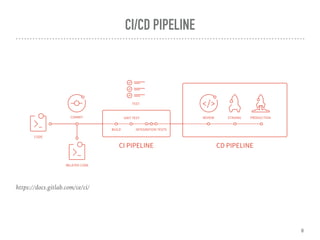
CI/CD PIPELINE
8
https://docs.gitlab.com/ce/ci/
9
Gitlab CI/CD Configuration File
10
Pipelines
PIPELINE
A pipeline is a group of jobs that get executed in stages.
All of the jobs in a stage are executed in parallel (if there are enough
concurrent Runners)
If all the jobs succeed, the pipeline moves on to the next stage.
If one of the jobs fails, the next stage is not (usually) executed.
You can access the pipelines page in your project's Pipelines tab.
11
12
Stages
STAGES
stages is used to define stages that can be used by jobs and is defined
globally.
The specification of stages allows for having flexible multi stage
pipelines. The ordering of elements in stages defines the ordering of jobs'
execution:
1.Jobs of the same stage are run in parallel.
2.Jobs of the next stage are run after the jobs from the previous stage
complete successfully.
13
14
Jobs
JOBS
15
The YAML file defines a set of jobs with constraints stating when they should be run.
You can specify an unlimited number of jobs which are defined as top-level elements
with an arbitrary name and always have to contain at least the script clause.
Jobs are picked up by Runners and executed within the environment of the Runner.
What is important, is that each job is run independently from each other.
Each job must have a unique name, but there are a few reserved keywords that
cannot be used as job names:
• image, services, stages, types, before_script, after_script,
variables and cache
•
Gitlab RUNNERS
16
RUNNER
GitLab Runner is the open source project that is used to run your jobs
and send the results back to GitLab.
It is written in GO.
It is used in conjunction with GitLab CI, the open-source continuous
integration service included with GitLab that coordinates the jobs.
17
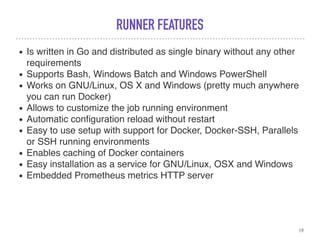
RUNNER FEATURES
• Allows to run:
◦ multiple jobs concurrently
◦ use multiple tokens with multiple server (even per-project)
◦ limit number of concurrent jobs per-token
• Jobs can be run:
◦ locally
◦ using Docker containers
◦ using Docker containers and executing job over SSH
◦ using Docker containers with autoscaling on different clouds
and virtualization hypervisors
◦ connecting to remote SSH server
18
RUNNER FEATURES
• Is written in Go and distributed as single binary without any other
requirements
• Supports Bash, Windows Batch and Windows PowerShell
• Works on GNU/Linux, OS X and Windows (pretty much anywhere
you can run Docker)
• Allows to customize the job running environment
• Automatic configuration reload without restart
• Easy to use setup with support for Docker, Docker-SSH, Parallels
or SSH running environments
• Enables caching of Docker containers
• Easy installation as a service for GNU/Linux, OSX and Windows
• Embedded Prometheus metrics HTTP server
19
20
CI/CD Pipelines
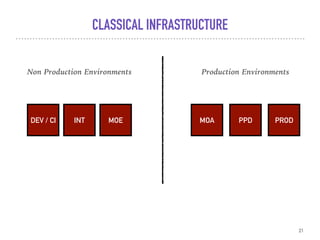
CLASSICAL INFRASTRUCTURE
21
DEV / CI INT MOE MOA PPD PROD
Non Production Environments Production Environments
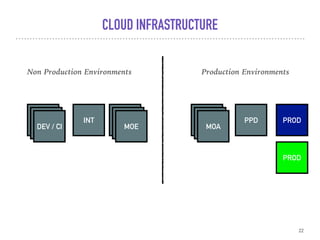
CLOUD INFRASTRUCTURE
22
DEV / CI INT MOA PPD PROD
Non Production Environments Production Environments
DEV / CIDEV / CI
MOEMOEMOE MOAMOA
PROD
23
WHY USING GITLAB ?
PRO
• Integrated in Gitlab
• Docker and kubernetes integration
• Parallel builds
• CI/CD by code
• No fu…g plugins ^^
• Open to other source control tools : GitHub
• Scripting is the base
24
CON
• Only available in Gitlab
25
REFERENCES
26
https://docs.gitlab.com/
THANK YOU
Q&A
27

Gitlab ci-cd

  • 1.
    GitLab Continuous Integration(GitLab CI/CD) Dan MAGIER
  • 2.
    2 Dan Magier CEO +33683224954 dan@heiwa-it.com www.heiwa-it.com Adresse -Paris - France https://www.linkedin.com/in/dan-magier-67a9374/ @MagierDan dan@heiwa-it.com
  • 3.
  • 4.
  • 5.
    CONTINUOUS INTEGRATION ➤ ContinuousIntegration is a software development practice in which you build and test software every time a developer pushes code to the application, and it happens several times a day. 5 Continuous Integration: TEST - BUILD
  • 6.
    CONTINUOUS DELIVERY ➤ ContinuousDelivery is a software engineering approach in which continuous integration, automated testing, and automated deployment capabilities allow software to be developed and deployed rapidly, reliably and repeatedly with minimal human intervention. Still, the deployment to production is defined strategically and triggered manually. 6 Continuous Delivery: TEST - BUILD - DEPLOY MANUALLY
  • 7.
    CONTINUOUS DEPLOYMENT ➤ ContinuousDeployment is a software development practice in which every code change goes through the entire pipeline and is put into production automatically, resulting in many production deployments every day. It does everything that Continuous Delivery does, but the process is fully automated, there's no human intervention at all. 7 Continuous Deployment: TEST - BUILD - DEPLOY AUTOMATICALLY
  • 8.
  • 9.
  • 10.
  • 11.
    PIPELINE A pipeline isa group of jobs that get executed in stages. All of the jobs in a stage are executed in parallel (if there are enough concurrent Runners) If all the jobs succeed, the pipeline moves on to the next stage. If one of the jobs fails, the next stage is not (usually) executed. You can access the pipelines page in your project's Pipelines tab. 11
  • 12.
  • 13.
    STAGES stages is used todefine stages that can be used by jobs and is defined globally. The specification of stages allows for having flexible multi stage pipelines. The ordering of elements in stages defines the ordering of jobs' execution: 1.Jobs of the same stage are run in parallel. 2.Jobs of the next stage are run after the jobs from the previous stage complete successfully. 13
  • 14.
  • 15.
    JOBS 15 The YAML filedefines a set of jobs with constraints stating when they should be run. You can specify an unlimited number of jobs which are defined as top-level elements with an arbitrary name and always have to contain at least the script clause. Jobs are picked up by Runners and executed within the environment of the Runner. What is important, is that each job is run independently from each other. Each job must have a unique name, but there are a few reserved keywords that cannot be used as job names: • image, services, stages, types, before_script, after_script, variables and cache •
  • 16.
  • 17.
    RUNNER GitLab Runner isthe open source project that is used to run your jobs and send the results back to GitLab. It is written in GO. It is used in conjunction with GitLab CI, the open-source continuous integration service included with GitLab that coordinates the jobs. 17
  • 18.
    RUNNER FEATURES • Allowsto run: ◦ multiple jobs concurrently ◦ use multiple tokens with multiple server (even per-project) ◦ limit number of concurrent jobs per-token • Jobs can be run: ◦ locally ◦ using Docker containers ◦ using Docker containers and executing job over SSH ◦ using Docker containers with autoscaling on different clouds and virtualization hypervisors ◦ connecting to remote SSH server 18
  • 19.
    RUNNER FEATURES • Iswritten in Go and distributed as single binary without any other requirements • Supports Bash, Windows Batch and Windows PowerShell • Works on GNU/Linux, OS X and Windows (pretty much anywhere you can run Docker) • Allows to customize the job running environment • Automatic configuration reload without restart • Easy to use setup with support for Docker, Docker-SSH, Parallels or SSH running environments • Enables caching of Docker containers • Easy installation as a service for GNU/Linux, OSX and Windows • Embedded Prometheus metrics HTTP server 19
  • 20.
  • 21.
    CLASSICAL INFRASTRUCTURE 21 DEV /CI INT MOE MOA PPD PROD Non Production Environments Production Environments
  • 22.
    CLOUD INFRASTRUCTURE 22 DEV /CI INT MOA PPD PROD Non Production Environments Production Environments DEV / CIDEV / CI MOEMOEMOE MOAMOA PROD
  • 23.
  • 24.
    PRO • Integrated inGitlab • Docker and kubernetes integration • Parallel builds • CI/CD by code • No fu…g plugins ^^ • Open to other source control tools : GitHub • Scripting is the base 24
  • 25.
  • 26.
  • 27.