Git Workshop
by Kugathasan Abimaran
Getting Git
Why Version Control?
• Made a change to code, realized it was a mistake and wanted
to go back?
• You don't lose anything.
• I never again commented out code, I simply delete it
• Working as a Team..?
• Wanted to experiment new feature without affecting working
code?
• What did I do yesterday?
• Wanted Copy of Copy of Copy of Project?
Git
• A directory content management system
• Download & Install
– http://msysgit.github.com/
• git help
• git <command> -h
• $HOME/.gitconfig
– git config --global user.name “Kugathasan Abimaran"
– git config --global user.email development@domain51.com
– git config --global color.ui true
GitHub
• Build Software Better and Together.
• Create a GitHub account
• Install GitHub for Windows from here
– http://github-
windows.s3.amazonaws.com/GitHubSetup.exe
• World largest open source community
• Create own repository
• Work on your dream project..?
Create/Clone
• Create a git repository
– git init
• Obtains a copy of a project for you with entire
history
• Valid URLs are project directory names by
various protocols
– git clone git@github.com:abi-maran/demo.git
– git clone https://github.com/abi-maran/demo.git
• Clone the repository from
https://github.com/abi-maran/demo
Commit
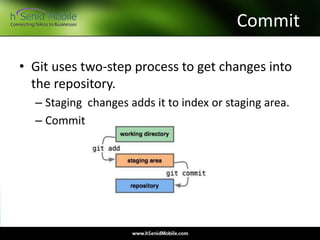
• Git uses two-step process to get changes into
the repository.
– Staging changes adds it to index or staging area.
– Commit
Commit …
• Each commit needs a commit message.
• Git don’t track empty directories
• git status
Fix/Revert Commit
• Change last commit
– git commit –amend
• Unmodify modified file
– git checkout -- file.py
• Git revert <commit-id>
• By creating new commit that reverse the
commit
Differences
• git diff – changes between index and working
files
• git diff HEAD
• git diff --stat
• git diff $commit $commit
• git log
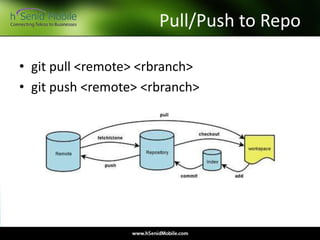
Pull/Push to Repo
• git pull <remote> <rbranch>
• git push <remote> <rbranch>
Ignoring Files
• For the which you don’t want to add in git
repo forever!
• .gitignore file – a project specific file
• .git/info/excludes – global
Stashing
• To save uncommitted files and return clean
repo
– git stash “description”
– Do that work
– git stash apply
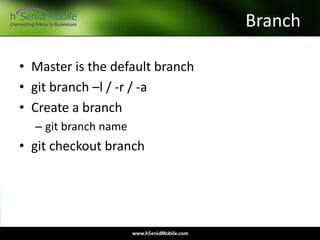
Branch
• Master is the default branch
• git branch –l / -r / -a
• Create a branch
– git branch name
• git checkout branch
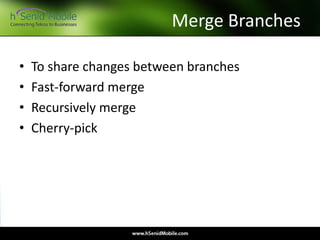
Merge Branches
• To share changes between branches
• Fast-forward merge
• Recursively merge
• Cherry-pick
Conflicts
• When both changes the same line of code
<<<<<<< HEAD
def _handle_response(self, response, data=[], raw=False):
return data if raw else simplejson.loads(data)
=======
def _handle_response(self, response, raw=False, data=[]):
if raw:
return data
return simplejson.loads(data)
>>>>>>> added_raw
git merge tool
Tag
• To mark milestones in your project such as
releases.
• Read only
GUI/References
• Gitk – for Linux
• Git Extentions – For Windows
• Home Page : http://www.git-scm.com/
• Reference : http://gitref.org/
For more information
General
Careers
Web
: info@hsenidmobile.com
: careers@hsenidmobile.com
: www.hSenidMobile.com

Git workshop - University of Moratuwa, Department of Computer Science and Engineering

  • 1.
  • 2.
  • 3.
    Why Version Control? •Made a change to code, realized it was a mistake and wanted to go back? • You don't lose anything. • I never again commented out code, I simply delete it • Working as a Team..? • Wanted to experiment new feature without affecting working code? • What did I do yesterday? • Wanted Copy of Copy of Copy of Project?
  • 4.
    Git • A directorycontent management system • Download & Install – http://msysgit.github.com/ • git help • git <command> -h • $HOME/.gitconfig – git config --global user.name “Kugathasan Abimaran" – git config --global user.email development@domain51.com – git config --global color.ui true
  • 5.
    GitHub • Build SoftwareBetter and Together. • Create a GitHub account • Install GitHub for Windows from here – http://github- windows.s3.amazonaws.com/GitHubSetup.exe • World largest open source community • Create own repository • Work on your dream project..?
  • 6.
    Create/Clone • Create agit repository – git init • Obtains a copy of a project for you with entire history • Valid URLs are project directory names by various protocols – git clone git@github.com:abi-maran/demo.git – git clone https://github.com/abi-maran/demo.git • Clone the repository from https://github.com/abi-maran/demo
  • 7.
    Commit • Git usestwo-step process to get changes into the repository. – Staging changes adds it to index or staging area. – Commit
  • 8.
    Commit … • Eachcommit needs a commit message. • Git don’t track empty directories • git status
  • 9.
    Fix/Revert Commit • Changelast commit – git commit –amend • Unmodify modified file – git checkout -- file.py • Git revert <commit-id> • By creating new commit that reverse the commit
  • 10.
    Differences • git diff– changes between index and working files • git diff HEAD • git diff --stat • git diff $commit $commit • git log
  • 11.
    Pull/Push to Repo •git pull <remote> <rbranch> • git push <remote> <rbranch>
  • 12.
    Ignoring Files • Forthe which you don’t want to add in git repo forever! • .gitignore file – a project specific file • .git/info/excludes – global
  • 13.
    Stashing • To saveuncommitted files and return clean repo – git stash “description” – Do that work – git stash apply
  • 14.
    Branch • Master isthe default branch • git branch –l / -r / -a • Create a branch – git branch name • git checkout branch
  • 15.
    Merge Branches • Toshare changes between branches • Fast-forward merge • Recursively merge • Cherry-pick
  • 16.
    Conflicts • When bothchanges the same line of code <<<<<<< HEAD def _handle_response(self, response, data=[], raw=False): return data if raw else simplejson.loads(data) ======= def _handle_response(self, response, raw=False, data=[]): if raw: return data return simplejson.loads(data) >>>>>>> added_raw git merge tool
  • 17.
    Tag • To markmilestones in your project such as releases. • Read only
  • 18.
    GUI/References • Gitk –for Linux • Git Extentions – For Windows • Home Page : http://www.git-scm.com/ • Reference : http://gitref.org/
  • 19.
    For more information General Careers Web :info@hsenidmobile.com : careers@hsenidmobile.com : www.hSenidMobile.com