

hebinbin.herokuapp.com
Agile development
1. Using Git as software version
management tool
2. Using JIRA On Demand as our project
management tool
3. Ticket Driven Process. Before you begin
to program, create ticket.
4. No Ticket, No Commit
5. Using Pull Request to do code review.
When you get a ticket with ticket number
like WEB-1234, normally it belongs to one
of the following two types: feature or
bugfix.
Since, we use pull request, before write
down code, we need to checkout a new
branch.
We decided our branch name should be
type-ticketnumber-destinationbranch
ex:
feature-WEB-1234-1.1
bugfix-WEB-2345-2.1
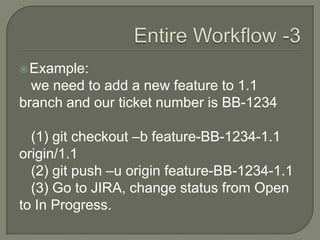
Example:
we need to add a new feature to 1.1
branch and our ticket number is BB-1234
(1) git checkout –b feature-BB-1234-1.1
origin/1.1
(2) git push –u origin feature-BB-1234-1.1
(3) Go to JIRA, change status from Open
to In Progress.
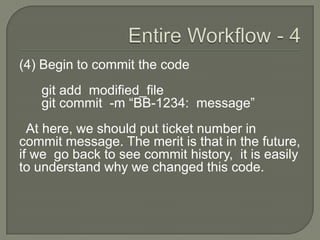
(4) Begin to commit the code
git add modified_file
git commit -m “BB-1234: message”
At here, we should put ticket number in
commit message. The merit is that in the future,
if we go back to see commit history, it is easily
to understand why we changed this code.
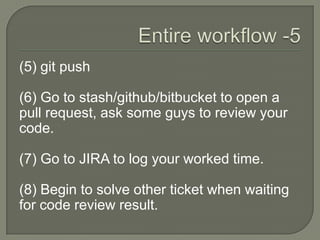
(5) git push
(6) Go to stash/github/bitbucket to open a
pull request, ask some guys to review your
code.
(7) Go to JIRA to log your worked time.
(8) Begin to solve other ticket when waiting
for code review result.
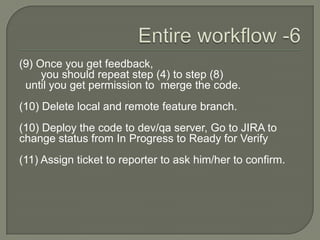
(9) Once you get feedback,
you should repeat step (4) to step (8)
until you get permission to merge the code.
(10) Delete local and remote feature branch.
(10) Deploy the code to dev/qa server, Go to JIRA to
change status from In Progress to Ready for Verify
(11) Assign ticket to reporter to ask him/her to confirm.
(12) When everything goes well, reporter will
close the ticket. Otherwise, reporter will
reopen the ticket and you should repeat step
(1) to step(11) again.
1. Easily forget to log work time.
2. Easily forget to change status.
3. Easily forget to put ticket number in
commit message.
4. Easily forget to push branch to remote
server.
Using git hooks and JIRA rest API
post-checkout hook:
1. Automatically change JIRA ticket status
from Open to In progress
2. Automatically push local branch to
remote server
Prepare-commit-msg hook:
1. Automatically get ticket number from
branch name, and put it into commit
message.
Add worked time in commit message.
Commit-msg hook:
1. Check commit message has ticket
number or not
2. Check commit message has right worked
time or not
Post-commit hook:
1. Automatically update worked time in
JIRA.
2. Automatically add branch name and
commit message as comment.
https://github.com/hebinbin/git-hooks-jira
Let us make a world better.

Git and jira

  • 1.
  • 2.
    Agile development 1. UsingGit as software version management tool 2. Using JIRA On Demand as our project management tool 3. Ticket Driven Process. Before you begin to program, create ticket. 4. No Ticket, No Commit 5. Using Pull Request to do code review.
  • 3.
    When you geta ticket with ticket number like WEB-1234, normally it belongs to one of the following two types: feature or bugfix. Since, we use pull request, before write down code, we need to checkout a new branch.
  • 4.
    We decided ourbranch name should be type-ticketnumber-destinationbranch ex: feature-WEB-1234-1.1 bugfix-WEB-2345-2.1
  • 5.
    Example: we need toadd a new feature to 1.1 branch and our ticket number is BB-1234 (1) git checkout –b feature-BB-1234-1.1 origin/1.1 (2) git push –u origin feature-BB-1234-1.1 (3) Go to JIRA, change status from Open to In Progress.
  • 6.
    (4) Begin tocommit the code git add modified_file git commit -m “BB-1234: message” At here, we should put ticket number in commit message. The merit is that in the future, if we go back to see commit history, it is easily to understand why we changed this code.
  • 7.
    (5) git push (6)Go to stash/github/bitbucket to open a pull request, ask some guys to review your code. (7) Go to JIRA to log your worked time. (8) Begin to solve other ticket when waiting for code review result.
  • 8.
    (9) Once youget feedback, you should repeat step (4) to step (8) until you get permission to merge the code. (10) Delete local and remote feature branch. (10) Deploy the code to dev/qa server, Go to JIRA to change status from In Progress to Ready for Verify (11) Assign ticket to reporter to ask him/her to confirm.
  • 9.
    (12) When everythinggoes well, reporter will close the ticket. Otherwise, reporter will reopen the ticket and you should repeat step (1) to step(11) again.
  • 10.
    1. Easily forgetto log work time. 2. Easily forget to change status. 3. Easily forget to put ticket number in commit message. 4. Easily forget to push branch to remote server.
  • 11.
    Using git hooksand JIRA rest API post-checkout hook: 1. Automatically change JIRA ticket status from Open to In progress 2. Automatically push local branch to remote server
  • 12.
    Prepare-commit-msg hook: 1. Automaticallyget ticket number from branch name, and put it into commit message.
  • 13.
    Add worked timein commit message.
  • 14.
    Commit-msg hook: 1. Checkcommit message has ticket number or not 2. Check commit message has right worked time or not
  • 15.
    Post-commit hook: 1. Automaticallyupdate worked time in JIRA. 2. Automatically add branch name and commit message as comment.
  • 16.
  • 17.
    Let us makea world better.