该文档详细介绍了Git的实战项目开发流程,包括远程仓库克隆、本地仓库配置、分支管理、功能开发及合并发布的步骤。文中提供了多种Git命令的用法示例以及最佳实践,旨在帮助开发者有效使用Git进行版本控制和协作开发。最后,文档提供了参考资料链接,以便深入了解Git相关内容。

![git-help – 打开命令的本地HTML手册页
模式
git help [-w] [COMMAND]
示例
1. git help help
2. git help -w clone
―浏览器‖方式打开
1.
git config --global help.format html
2.
git config --global web.browser firefox
|3](https://image.slidesharecdn.com/git-131219055946-phpapp01/85/Git-3-320.jpg)
![git-clone – 克隆一个仓库到一个新的目录
模式
git clone <repository> [<directory>]
示例
1. git clone http://git.intra.weibo.com/huagang1/git_demo.git
git_demo # 克隆远程仓库到本地
2. cd git_demo
3. ls –a
.git :Git目录($GIT_DIR)
|4](https://image.slidesharecdn.com/git-131219055946-phpapp01/85/Git-4-320.jpg)
![git-config – 配置开发者用户名和邮箱地址
模式
git config [--global] name [value]
git config --get name
示例
1. git config user.name xxx
2. git config user.email xxx@xxx
配置文件
1.
.git/config:仓库层面
2.
~/.gitconfig:用户层面(--global)
|5](https://image.slidesharecdn.com/git-131219055946-phpapp01/85/Git-5-320.jpg)
![git-status – 显示工作目录的状态
模式
git status [<options>…]
示例
1. git status
[InfoQ专栏] Git历险记(四)—— 索引与提交的幕后故事
|7](https://image.slidesharecdn.com/git-131219055946-phpapp01/85/Git-7-320.jpg)
![git-add – 添加文件内容到索引
模式
git add [<filepattern>…]
示例
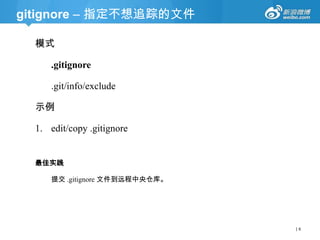
1. git add .gitignore
2. git ls-files --stage # 查看暂存区内容
3. git cat-file -p [Content-SHA1] # 查看文件内容
相关知识
索引,也称暂存区(staging area),存放下一次提交的内容。(.git/index)
|8](https://image.slidesharecdn.com/git-131219055946-phpapp01/85/Git-8-320.jpg)
![git-commit - 记录变更到本地仓库
模式
git commit [-a] [-m <msg>] [<file>…]
示例
1. git commit -m ―add .gitignore file‖ # 提交已暂存的文件
提交描述编码(.git/etc/gitconfig)
[i18n]
commitencoding = UTF-8
logoutputencoding = UTF-8
|9](https://image.slidesharecdn.com/git-131219055946-phpapp01/85/Git-9-320.jpg)
![git-branch – 查看、创建分支
模式
git branch [-r | -a] [<pattern>…]
git branch <branchname>
示例
1. git branch # 查看本地仓库的所有分支(.git/refs/heads)
2. git branch demo # 创建“demo”分支
3. ls .git/refs/heads # 一个分支名对应一个文件
4. less .git/refs/heads/demo # 查看“demo”分支内容
[InfoQ专栏] Git历险记(五)—— Git里的分支&合并
| 10](https://image.slidesharecdn.com/git-131219055946-phpapp01/85/Git-10-320.jpg)
![git-checkout – 切换工作目录到另一个分支
模式
git checkout [<branch>]
示例
1. git checkout demo # 切换到“demo”分支工作
2. Make demo dir, then add 1.txt 2.txt 3.txt # 伪代码
3. git status
| 11](https://image.slidesharecdn.com/git-131219055946-phpapp01/85/Git-11-320.jpg)
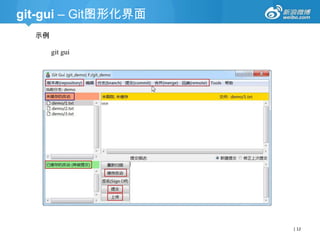
![git-reset – 重置当前HEAD到指定的状态
模式
git reset [<commit>] <paths>…
git reset (--soft | --mixed | --hard) [<commit>]
示例
1.
git add demo/2.txt demo/3.txt # 添加到索引
2.
git status
3.
git reset HEAD demo/2.txt # 撤销2.txt的变更
4.
git commit -am "add 'demo/3.txt' file"
5.
git reset --soft HEAD^ # 回滚最近一次提交的所有内容,但保留本地变更内容
6.
git reset --hard HEAD^ # 彻底回滚最近一次提交
[警告] 慎用git-checkout命令,其会把所有本地变更都覆盖掉!
| 13](https://image.slidesharecdn.com/git-131219055946-phpapp01/85/Git-13-320.jpg)
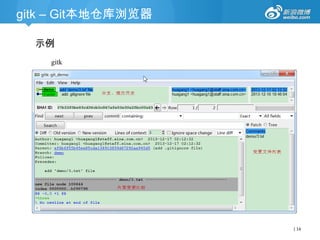
![[练手] 改动分支内容并提交
示例
1.
git add demo/2.txt
2.
modify 3.txt file
3.
git status
4.
git commit -m "add 'demo/2.txt' file" #只提交暂存区里的内容
5.
git status
6.
git commit -am "add 3 to 'demo/2.txt' file" # 提交已暂存的3.txt文件内容,但注释有
误!
7.
git reset --soft HEAD^ # 回滚最近一次提交,同时保留本地所有改动的内容
8.
git status
9.
git commit -a -m "add 3 to 'demo/3.txt' file"
| 15](https://image.slidesharecdn.com/git-131219055946-phpapp01/85/Git-15-320.jpg)
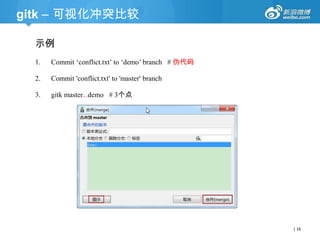
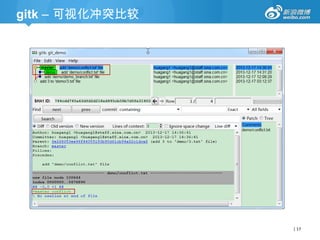
![git-branch – 删除分支
模式
git branch (-d | -D) [-r] <branchname>…
示例
1. git branch
2. git branch -d demo # “demo”分支必须已完全被合并到上游
分支
3. git branch -D demo # [慎用] 强制删除“demo”分支,即使改
动还未被提交
| 22](https://image.slidesharecdn.com/git-131219055946-phpapp01/85/Git-22-320.jpg)
![git-remote – 管理跟踪的远程仓库集
模式
git remote [-v]
git remote add [--mirror=<fetch|push>] <name> <url>
示例
1. git remote -v # 查看远程仓库地址短别名
2. git remote add origin
http://git.intra.weibo.com/huagang1/git_demo.git # 定义远程仓
库地址短别名
| 23](https://image.slidesharecdn.com/git-131219055946-phpapp01/85/Git-23-320.jpg)
![git-fetch – 抓取远程仓库的对象和引用信息
模式
git fetch <repository> [<refspec>…]
示例
1. git fetch # 更新远程改动
2. git branch -r # 查看远程本地分支
3. gitk master...origin/master # 比较改动内容
4. git status
5. git merge origin/master # 合并远程“master”分支到当前分支
| 24](https://image.slidesharecdn.com/git-131219055946-phpapp01/85/Git-24-320.jpg)
![git-pull – 抓取并合并远程仓库的一个分支
模式
git pull <repository> [<refspec>…]
示例
1. git checkout master
2. git pull origin master # 合并远程“origin”仓库的“master‖分支
到当前分支
| 25](https://image.slidesharecdn.com/git-131219055946-phpapp01/85/Git-25-320.jpg)
![git-push – 推送本地分支到远程仓库
模式
git push -u <repository> [<refspec>…]
示例
1. git push -u origin release # 预发布测试分支
2. git push -u origin version # 打Tag(git tag)
3. git push -u origin master # 发布功能
| 26](https://image.slidesharecdn.com/git-131219055946-phpapp01/85/Git-26-320.jpg)
![参考资料
[1] Git
http://git-scm.com
[2] Git Doc
http://git-scm.com/docs/git
[3] Git Tutorial
http://git-scm.com/docs/gittutorial.html
[4] Everyday Git
http://git-scm.com/docs/everyday.html
[5] Git Basics
http://www.slideshare.net/ariejan/git-basics
[6] A successful Git branching model - nvie
http://nvie.com/posts/a-successful-git-branching-model
[译文] http://www.juvenxu.com/2010/11/28/a-successful-git-branching-model
https://github.com/nvie/gitflow
[7] Git历险记 - InfoQ专栏
http://www.infoq.com/cn/git-adventures
[8] Git FAQ
https://git.wiki.kernel.org/index.php/Git_FAQ
https://help.github.com/
| 28](https://image.slidesharecdn.com/git-131219055946-phpapp01/85/Git-28-320.jpg)