Tom Markiewicz
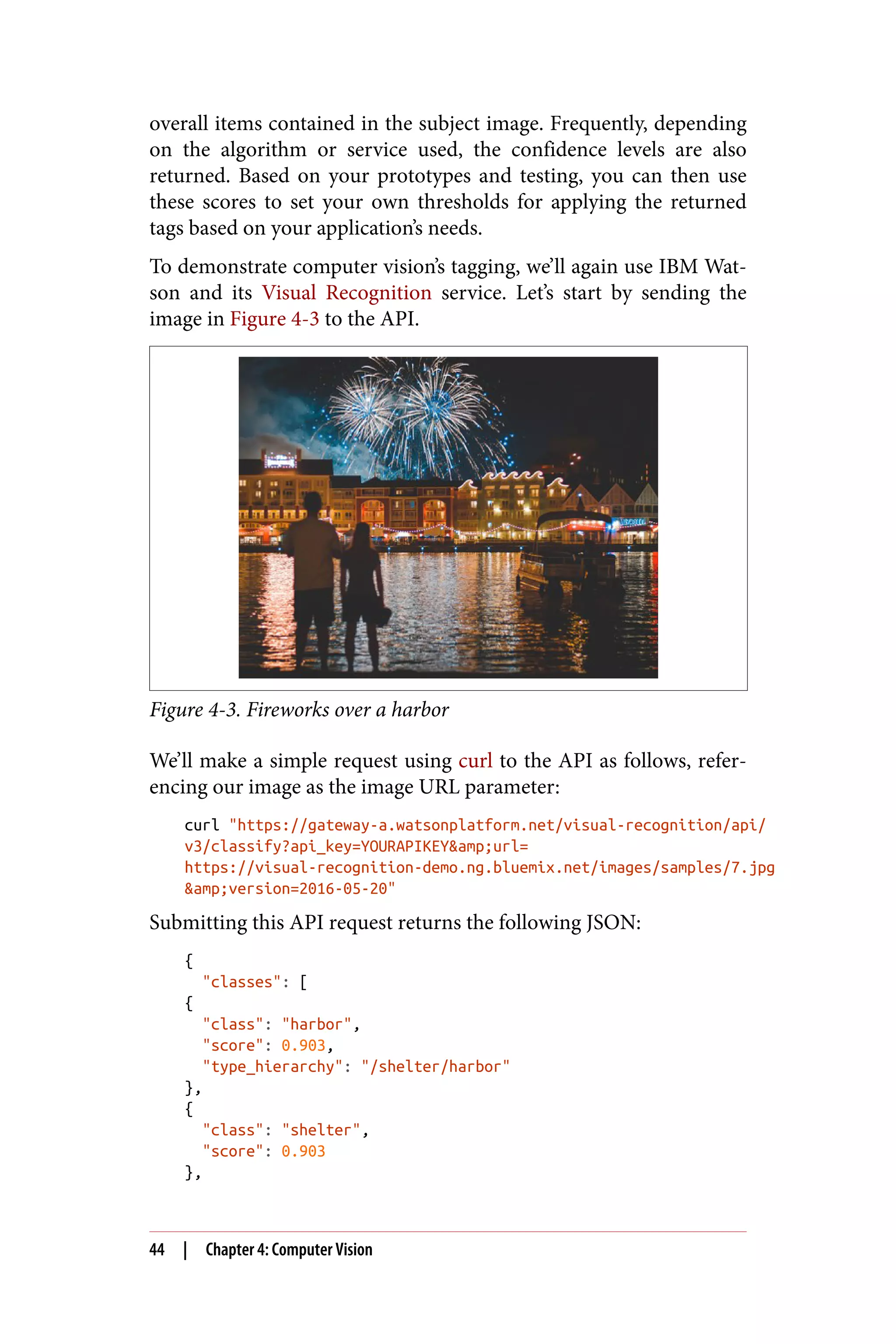
& Josh Zheng
A Practical Guide to Building
Enterprise Applications
GettingStartedwith
ArtificialIntelligence
Com
plim
entsof
Tom Markiewicz and Josh Zheng
Getting Started with
Artificial Intelligence
A Practical Guide to Building
Enterprise Applications
Boston Farnham Sebastopol TokyoBeijing Boston Farnham Sebastopol TokyoBeijing
978-1-492-02777-5
[LSI]
Getting Started with Artificial Intelligence
by Tom Markiewicz and Josh Zheng
Copyright © 2018 International Business Machines Corporation. All rights reserved.
Printed in the United States of America.
Published by O’Reilly Media, Inc., 1005 Gravenstein Highway North, Sebastopol, CA
95472.
O’Reilly books may be purchased for educational, business, or sales promotional use.
Online editions are also available for most titles (http://oreilly.com/safari). For more
information, contact our corporate/institutional sales department: 800-998-9938
or corporate@oreilly.com.
Editor: Nicole Tache
Production Editor: Justin Billing
Copyeditor: Rachel Monaghan
Proofreader: Charles Roumeliotis
Interior Designer: David Futato
Cover Designer: Karen Montgomery
Illustrator: Rebecca Demarest
December 2017: First Edition
Revision History for the First Edition
2017-12-15: First Release
The O’Reilly logo is a registered trademark of O’Reilly Media, Inc. Getting Started
with Artificial Intelligence, the cover image, and related trade dress are trademarks of
O’Reilly Media, Inc.
While the publisher and the authors have used good faith efforts to ensure that the
information and instructions contained in this work are accurate, the publisher and
the authors disclaim all responsibility for errors or omissions, including without
limitation responsibility for damages resulting from the use of or reliance on this
work. Use of the information and instructions contained in this work is at your own
risk. If any code samples or other technology this work contains or describes is sub‐
ject to open source licenses or the intellectual property rights of others, it is your
responsibility to ensure that your use thereof complies with such licenses and/or
rights.
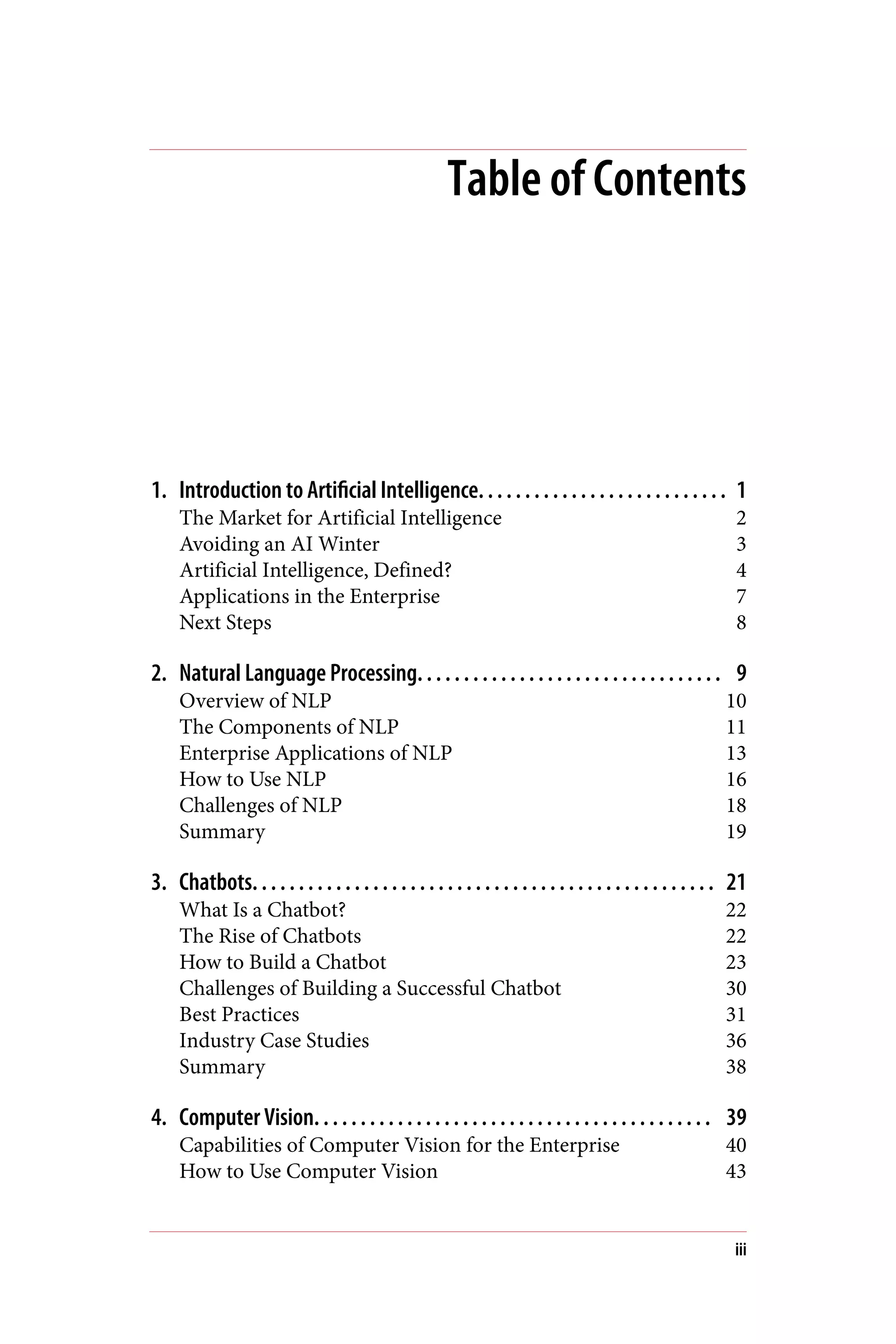
Table of Contents
1. Introduction to Artificial Intelligence. . . . . . . . . . . . . . . . . . . . . . . . . . . 1
The Market for Artificial Intelligence 2
Avoiding an AI Winter 3
Artificial Intelligence, Defined? 4
Applications in the Enterprise 7
Next Steps 8
2. Natural Language Processing. . . . . . . . . . . . . . . . . . . . . . . . . . . . . . . . . 9
Overview of NLP 10
The Components of NLP 11
Enterprise Applications of NLP 13
How to Use NLP 16
Challenges of NLP 18
Summary 19
3. Chatbots. . . . . . . . . . . . . . . . . . . . . . . . . . . . . . . . . . . . . . . . . . . . . . . . . . 21
What Is a Chatbot? 22
The Rise of Chatbots 22
How to Build a Chatbot 23
Challenges of Building a Successful Chatbot 30
Best Practices 31
Industry Case Studies 36
Summary 38
4. Computer Vision. . . . . . . . . . . . . . . . . . . . . . . . . . . . . . . . . . . . . . . . . . . 39
Capabilities of Computer Vision for the Enterprise 40
How to Use Computer Vision 43
iii
Computer Vision on Mobile Devices 45
Best Practices 46
Use Cases 48
Existing Challenges in Computer Vision 50
Implementing a Computer Vision Solution 51
Summary 52
5. AI Data Pipeline. . . . . . . . . . . . . . . . . . . . . . . . . . . . . . . . . . . . . . . . . . . . 53
Preparing for a Data Pipeline 55
Sourcing Big Data 55
Storage: Apache Hadoop 56
Hadoop as a Data Lake 57
Discovery: Apache Spark 58
Summary 59
6. Looking Forward. . . . . . . . . . . . . . . . . . . . . . . . . . . . . . . . . . . . . . . . . . . 61
What Makes Enterprises Unique? 62
Current Challenges, Trends, and Opportunities 63
Scalability 67
Social Implications 67
Summary 68
iv | Table of Contents
CHAPTER 1
Introduction to Artificial
Intelligence
In the future AI will be diffused into every aspect of the economy.
—Nils J. Nilsson, Founding researcher, Artificial Intelligence &
Computer Science, Stanford University
Beyond the buzzwords, media coverage, and hype, artificial intelli‐
gence techniques are becoming a fundamental component of busi‐
ness growth across a wide range of industries. And while the various
terms (algorithms, transfer learning, deep learning, neural networks,
NLP, etc.) associated with AI are thrown around in meetings and
product planning sessions, it’s easy to be skeptical of the potential
impact of these technologies.
Today’s media represents AI in many ways, both good and bad—
from the fear of machines taking over all human jobs and portrayals
of evil AIs via Hollywood to the much-lauded potential of curing
cancer and making our lives easier. Of course, the truth is some‐
where in between.
While there are obviously valid concerns about how the future of
artificial intelligence will play out (and the social implications), the
reality is that the technology is currently used in companies across
all industries.
AI is used everywhere—IoT (Internet of Things) and home devices,
commercial and industrial robots, autonomous vehicles, drones,
digital assistants, and even wearables. And that’s just the start. AI
1
will drive future user experiences that are immersive, continuous,
ambient, and conversational. These conversational services (e.g.,
chatbots and virtual agents) are currently exploding, while AI will
continue to improve these contextual experiences.
Despite several stumbles over the past 60–70 years of effort on
developing artificial intelligence, the future is here. If your business
is not incorporating at least some AI, you’ll quickly find you’re at a
competitive disadvantage in today’s rapidly evolving market.
Just what are these enterprises doing with AI? How are they ensur‐
ing an AI implementation is successful (and provides a positive
return on investment)? These are only a few of the questions we’ll
address in this book. From natural language understanding to com‐
puter vision, this book will provide you a high-level introduction to
the tools and techniques to better understand the AI landscape in
the enterprise and initial steps on how to get started with AI in your
own company.
It used to be that AI was quite expensive, and a luxury reserved for
specific industries. Now it’s accessible for everyone in every indus‐
try, including you. We’ll cover the modern enterprise-level AI tech‐
niques available that allow you to both create models efficiently and
implement them into your environment. While not meant as an in-
depth technical guide, the book is intended as a starting point for
your journey into learning more and building applications that
implement AI.
The Market for Artificial Intelligence
The market for artificial intelligence is already large and growing
rapidly, with numerous research reports indicating a growing
demand for tools that automate, predict, and quickly analyze. Esti‐
mates from IDC predict revenue from artificial intelligence will top
$47 billion by the year 2020 with a compound annual growth rate
(CAGR) of 55.1% over the forecast period, with nearly half of that
going to software. Additionally, investment in AI and machine
learning companies has increased dramatically—AI startups have
raised close to $10 billion in funding. Clearly, the future of artificial
intelligence appears healthy.
2 | Chapter 1: Introduction to Artificial Intelligence
Avoiding an AI Winter
Modern AI as we know it started in earnest in the 1950s. While it’s
not necessary to understand the detailed history of AI, it is helpful
to understand one particular concept—the AI winter—as it shapes
the current environment.
There were two primary eras of artificial intelligence research where
high levels of excitement and enthusiasm for the technology never
lived up to expectations, causing funding, interest, and continued
development to dry up. The buildup of hype followed by disappoint‐
ment is the definition of an AI winter.
So why are we now seeing a resurgence in AI interest? What’s the
difference today that’s making AI so popular in the enterprise, and
should we fear another AI winter? The short answer is likely no—we
expect to avoid another AI winter this time around due primarily to
much more (or big) data and the advent of better processing power
and GPUs. From the tiny supercomputers we all carry in our pock‐
ets to the ever-expanding role of IoT, we’re generating more data
now, at an ever-increasing rate. For example, IDC estimates that 180
zettabytes of data will be created globally in 2025, up from less than
10 zettabytes in 2015.
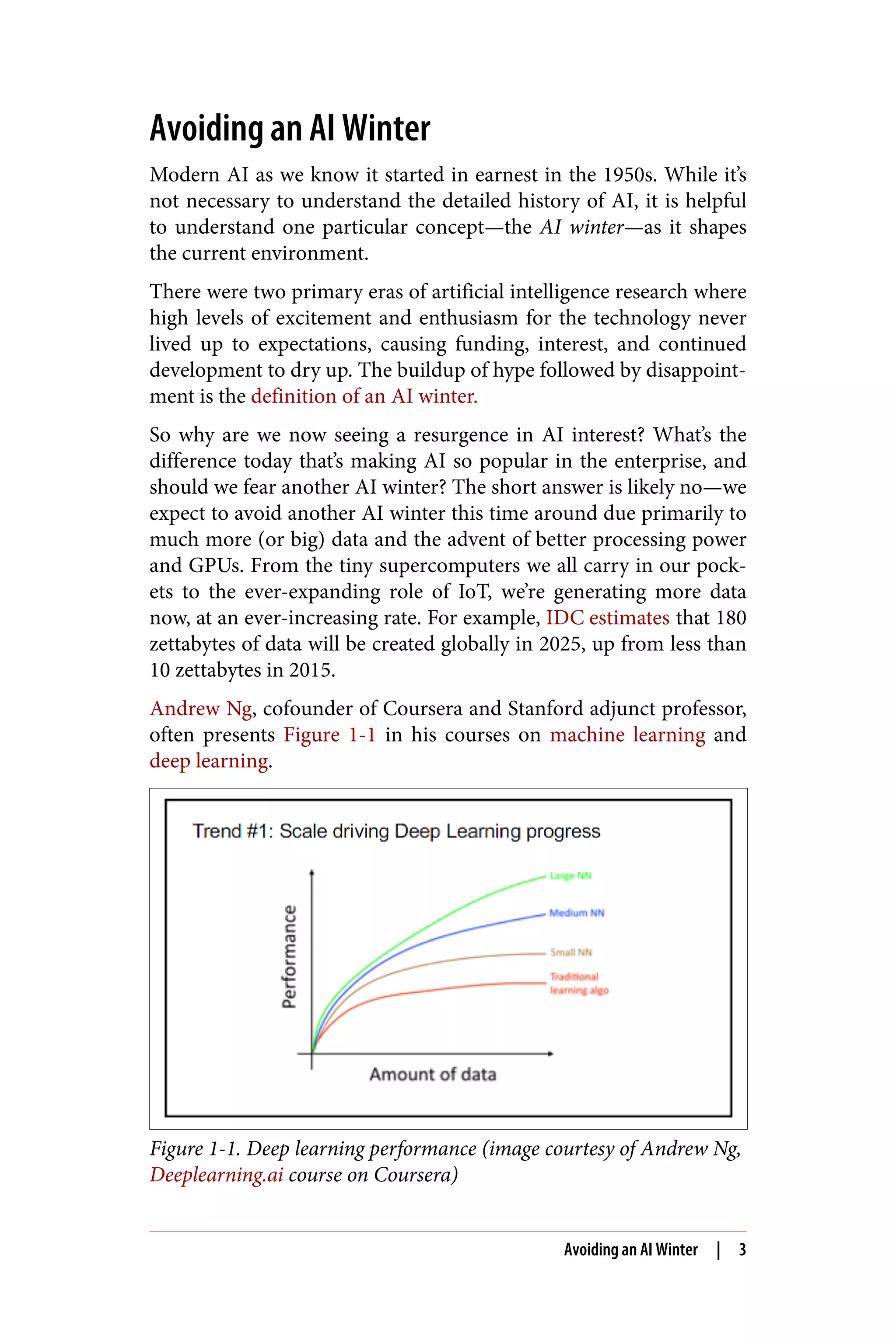
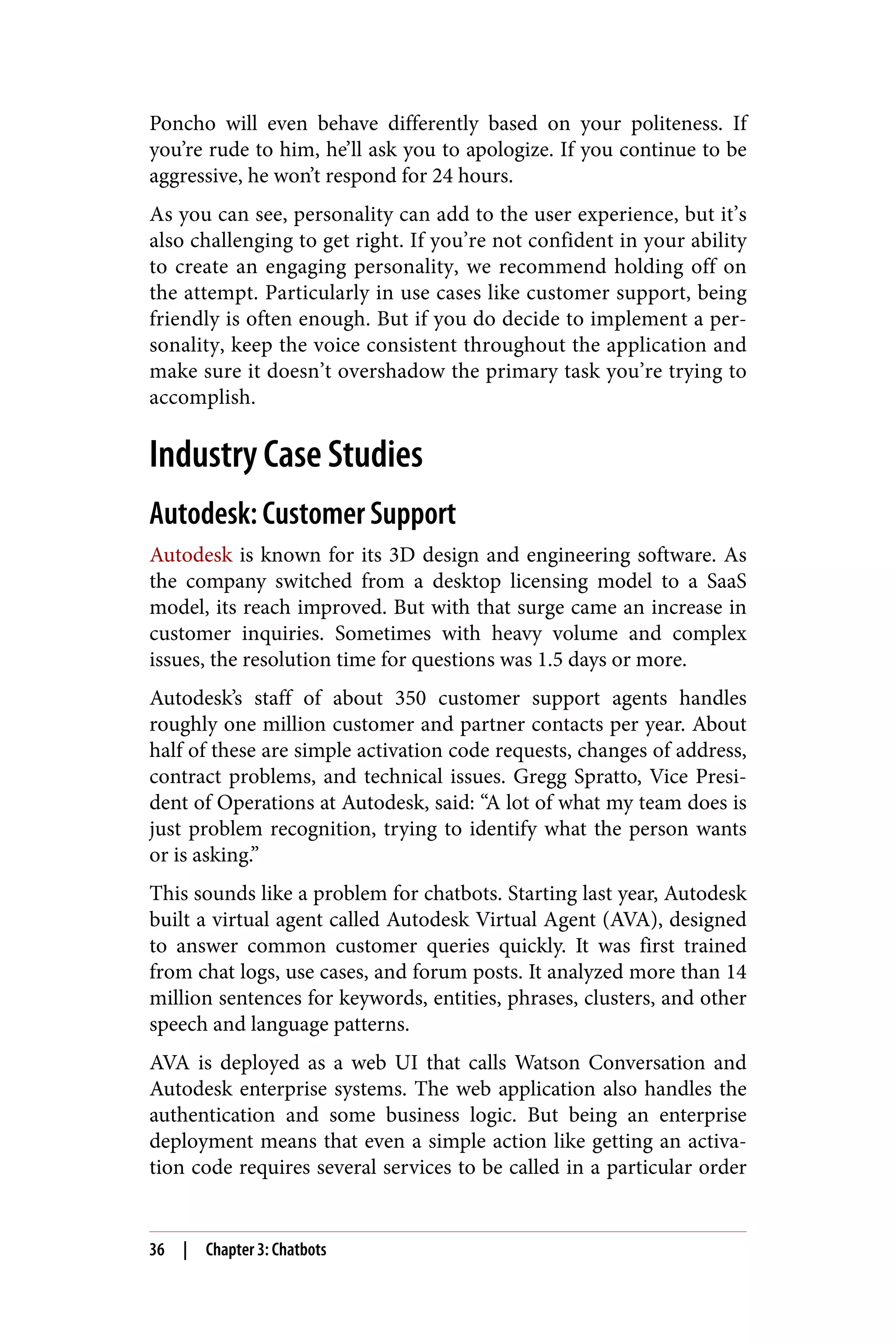
Andrew Ng, cofounder of Coursera and Stanford adjunct professor,
often presents Figure 1-1 in his courses on machine learning and
deep learning.
Figure 1-1. Deep learning performance (image courtesy of Andrew Ng,
Deeplearning.ai course on Coursera)
Avoiding an AI Winter | 3
Conceptually, this chart illustrates how the performance of deep
learning algorithms improves with an increasing amount of data—
data that we now have in abundance and that is growing at an expo‐
nential rate.
So why does it matter whether we understand the AI winter? Well, if
companies are going to invest in AI, it’s essential to avoid the hyper‐
bole of the past and keep expectations based in reality. While the
current situation is much more likely to justify the enthusiasm, that
excitement still needs to be tempered with real-world results to
avoid another AI winter. As (future) AI practitioners, that’s some‐
thing we can all agree would challenge your businesses.
Artificial Intelligence, Defined?
The market for artificial intelligence is immense, but what are we
truly discussing? While it sounds great to say you’re going to imple‐
ment AI in your business, just what does that mean in practical
terms? Artificial intelligence is quite a broad term and is, in reality,
an umbrella over a few different concepts.
So, to get started and keep everyone on the same page, let’s briefly
discuss some of the terms associated with AI that are often confused
or interchanged: artificial intelligence, machine learning, and deep
learning.
Artificial Intelligence
Over the years, there have been numerous attempts at precisely
defining AI. While there’s never really been an official, accepted def‐
inition, there are a few high-level concepts that shape and define
what we mean. The descriptions range from artificial intelligence
merely aiming to augment human intelligence to thinking machines
and true computer intelligence. For our purposes, we can think of
AI as being any technique that allows computers to bring meaning
to data in similar ways to a human.
While most AI is focused on specific problem domains (natural lan‐
guage processing or computer vision, for example), the idea of artifi‐
cial general intelligence or having a machine perform any task a
human could (also commonly referred to as “strong AI”) is still
more than 10 years out according to Gartner.
4 | Chapter 1: Introduction to Artificial Intelligence
Machine Learning
In 1959 Arthur L. Samuel, an IBM researcher and Stanford profes‐
sor, is said to have stated that “machine learning is the field of study
that gives computers the ability to learn without being explicitly
programmed,” thereby becoming the originator of the term.
Essentially, machine learning is a subset of AI focused on having
computers provide insights into problems without explicitly pro‐
gramming them to do so. Most of the tools and techniques that
today refer to AI are representative of machine learning. There are
three main types of machine learning—supervised learning, unsu‐
pervised learning, and reinforcement learning.
By looking at many labeled data points and examples of historical
problems, supervised learning algorithms can help solve similar
problems under new circumstances. Supervised learning trains on
large volumes of historical data and then builds general rules to be
applied to future problems. The better the training set data, the bet‐
ter the output. In supervised learning, the system learns from these
human-labeled examples.
While supervised learning relies on labeled or structured data (think
rows in a database), unsupervised learning trains on unlabeled or
unstructured data (the text of a book). These algorithms explore the
data and try to find structure. Here, widely used unsupervised learn‐
ing algorithms are cluster analysis and market basket analysis. Natu‐
rally, this tends to be more difficult, as the data has no preexisting
labels to assist the algorithms in understanding the data. While
more challenging to process, as we’ll discuss later, unstructured data
makes up the vast majority of data that enterprises need to process
today.
Finally, there’s reinforcement learning as a machine learning techni‐
que. Reinforcement learning takes an approach similar to behavioral
psychology. Instead of training a model with predefined training
sets (i.e., where you know the prescribed answers in advance) as in
supervised learning, reinforcement learning rewards the algo‐
rithm when it performs the correct action (behavior). Reinforce‐
ment learning resists providing too much training and allows the
algorithm to optimize itself for performance-based rewards.
Reinforcement learning was initially conceived in 1951 by Marvin
Minsky, but as was the case with many AI implementations, the
Artificial Intelligence, Defined? | 5
algorithms were held back by both the scale of data and computer
processing power needed for effectiveness. Today, we see many more
successful examples of reinforcement learning in the field, with
Alphabet subsidiary DeepMind’s AlphaGo one of the more promi‐
nent. Another notable application of reinforcement learning is the
development of self-driving cars.
Deep Learning
No book on developing AI applications in the enterprise would be
complete without a discussion of deep learning. One way to under‐
stand deep learning is to think of it as a subset of AI that attempts to
develop computer systems that learn using neural networks like
those in the human brain. While machine learning is mostly about
optimization, deep learning is more focused on creating algorithms
to simulate how the human brain’s neurons work.
Deep learning algorithms are composed of an interconnected web of
nodes called neurons and the edges that join them together. Neural
nets receive inputs, perform calculations, and then use this output to
solve given problems.
One of the ultimate goals of AI is to have computers think and learn
like human beings. Using neural networks that are based on the
human brain’s decision-making process, deep learning is a set of
computational techniques that move us closest to that goal.
According to Stanford professor Chris Manning, around the year
2010 deep learning techniques started to outperform other machine
learning techniques. Shortly after that, in 2012, Geoffrey Hinton at
the University of Toronto led a team creating a neural network that
learned to recognize images. Additionally, that year Andrew Ng led
a team at Google that created a system to recognize cats in YouTube
videos without explicitly training it on cats.
By building multiple layers of abstraction, deep learning technology
can also solve complex semantic problems. Traditional AI follows a
linear programming structure, thus limiting the ability for a com‐
puter to learn without human intervention. However, deep learning
replaces this existing approach with self-learning and self-teaching
algorithms enabling more advanced interpretation of data. For
example, traditional AI could read a zip code and mailing address
off of an envelope, but deep learning could also infer from the enve‐
lope’s color and date sent that the letter contains a holiday card.
6 | Chapter 1: Introduction to Artificial Intelligence
Deep learning’s closer approximation to how the human brain pro‐
cesses information via neural networks offers numerous benefits.
First, the approach delivers a significantly improved ability to pro‐
cess large volumes of unstructured data, finding meaningful pat‐
terns and insights. Next, deep learning offers the ability to develop
models across a wide variety of data, highlighted by advanced
approaches toward text, images, audio, and video content. Finally,
deep learning’s massive parallelism allows for the use of multiple
processing cores/computers to maximize overall performance as
well as faster training with the advent of GPUs.
As with all advances in AI, deep learning benefits from much more
training data than ever before, faster machines and GPUs, and
improved algorithms. These neural networks are driving rapid
advances in speech recognition, image recognition, and machine
translation, with some systems performing as well or better than
humans.
Applications in the Enterprise
From finance to cybersecurity to manufacturing, there isn’t an
industry that will not be affected by AI. But before we can discuss
and examine building applications in the enterprise with AI, we first
need to define what we mean by enterprise applications. There are
two common definitions of “the enterprise”:
• A company of significant size and budget
• Any business-to-business commerce (i.e., not a consumer)
So Geico, Procter & Gamble, IBM, and Sprint would all be enter‐
prise companies. And by this definition, any software designed and
built internally would be considered enterprise software. On the
other hand, a small company or startup could develop applications
to be used by businesses (whether large or small), and this would
still be considered enterprise software. However, a photo sharing
app for the average consumer would not be considered enterprise
software.
This is probably obvious, but since we’re discussing enterprise appli‐
cations with AI in this book, it’s important to be explicit about just
what we mean when talking about the enterprise. For the rest of the
book, the context of an enterprise will be that the end user is a busi‐
ness or business employee.
Applications in the Enterprise | 7
Does that mean if you are building the next great consumer photo
sharing application that this book will be of no use? Absolutely not!
Many (if not most) of the concepts discussed throughout the book
can be directly applied to consumer-facing applications as well.
However, the use cases and discussion will be centered on the enter‐
prise.
Next Steps
This book is intended to provide a broad overview of artificial intel‐
ligence, the various technologies involved, relevant case studies and
examples of implementation, and the current landscape. Also, we’ll
discuss the future of AI and where we see it moving in the enterprise
from a current practitioner’s viewpoint.
While the book focuses on a more technical audience, specifically
application developers looking to apply AI in their business, the
overall topics and discussion will be useful for anyone interested in
how artificial intelligence will impact the enterprise.
Note that this book is not a substitute for a course or deep study on
these topics, but we hope the material covered here jump-starts the
process of your becoming a proficient practitioner of AI technolo‐
gies.
While there are many options for implementing the various AI tech‐
niques we’ll discuss in this book—coding in-house from scratch,
outsourcing, the use of open source libraries, software-as-a-service
APIs from leading vendors—our familiarity and deep experience
revolves around IBM Watson, so we’ll be using those code examples
to illustrate the individual topics as necessary.
It’s important to note that, while we believe IBM Watson provides a
great end-to-end solution for applying AI in the enterprise, it’s not
the only option. All the major cloud computing providers offer sim‐
ilar solutions. Also, there are numerous open source tools that we’ll
discuss later.
In the next few chapters, we’ll go into more depth on some of the
more common uses for AI in the enterprise (natural language pro‐
cessing, chatbots, and computer vision). Then we’ll discuss the
importance of a solid data pipeline, followed by a look forward at
the challenges and trends for AI in the enterprise.
8 | Chapter 1: Introduction to Artificial Intelligence
CHAPTER 2
Natural Language Processing
Humans have been creating the written word for thousands of years,
and we’ve become pretty good at reading and interpreting the con‐
tent quickly. Intention, tone, slang, and abbreviations—most native
speakers of a language can process this context in both written and
spoken word quite well. But machines are another story. As early as
the 1950s computer scientists began attempts at using software to
process and analyze textual components, sentiment, parts of speech,
and the various entities that make up a body of text. Until relatively
recently, processing and analyzing language has been quite a chal‐
lenge.
Ever since IBM’s Watson won on the game show Jeopardy!, the
promise of machines being able to understand language has slowly
edged closer. In today’s world, where people live out their lives
through social media, the opportunity to gain insights from the mil‐
lions of words of text being produced every day has led to an arms
race. New tools allow developers to easily create models that under‐
stand words used in the context of their industry. This leads to bet‐
ter business decisions and has resulted in a high-stakes competition
in many industries to be the first to deliver.
Strikingly, 90% of the world’s data was created in the past two years,
and 80% of that data is unstructured. Insights valuable to the enter‐
prise are hidden in this data—which ranges from emails to customer
support discussions to research reports. This information is incredi‐
bly useful if it can be found, interpreted, and utilized. When an
enterprise can harness this massive amount of unstructured data
9
and transform it into something meaningful, there are endless pos‐
sibilities for improving business process, reducing costs, and
enhancing products and services.
Alternatively, those companies without the ability to handle their
unstructured data suffer lost revenue, missed business opportuni‐
ties, and increased costs, all likely without knowledge of it happen‐
ing.
Interpreting this unstructured data is quite difficult. In fact, process‐
ing human-generated (not machine) words (or natural language) is
considered an AI-hard or AI-complete problem. In other words, it’s a
challenge that brings the full effort of AI to bear on the problem and
isn’t easily solved by a single algorithm designed for a particular pur‐
pose.
In this chapter, we’ll give an overview of NLP, discuss some industry
examples and use cases, and look at some strategies for implement‐
ing NLP in enterprise applications.
Overview of NLP
Natural language processing is essentially the ability to take a body
of text and extract meaning from it using a computer. While compu‐
tational language is very structured (think XML or JSON) and easily
understood by a machine, written words by humans are quite messy
and unstructured—meaning when you write about a house, friend,
pet, or a phone in a paragraph, there’s no explicit reference that
labels each of them as such.
For example, take this simple sentence:
I drove my friend Mary to the park in my Tesla while listening to
music on my iPhone.
For a human reader, this is an easily understandable sentence and
paints a clear picture of what’s happening. But for a computer, not so
much. For a machine, the sentence would need to be broken down
into its structured parts. Instead of an entire sentence, the computer
would need to see both the individual parts or entities along with
the relations between these entities.
Humans understand that Mary is a friend and that a Tesla is likely a
car. Since we have the context of bringing our friend along with us,
we intuitively rule out that we’re driving something else, like a bicy‐
10 | Chapter 2: Natural Language Processing
cle. Additionally, after many years of popularity and cultural refer‐
ences, we all know that an iPhone is a smartphone.
None of the above is understood by a computer without assistance.
Now let’s take a look at how that sentence could be written as struc‐
tured data from the outset. If developers had made time in advance
to structure the data in our sentence, in XML you’d see the following
entities:
<friend>Mary</friend>
<car>Tesla</car>
<phone>iPhone</phone>
But obviously, this can’t happen on the fly without assistance. As
mentioned previously, we have significantly more unstructured data
than structured. And unless time is taken to apply the correct struc‐
ture to the text in advance, we have a massive problem that needs
solving. This is where NLP enters the picture.
Natural language processing is needed when you wish to mine
unstructured data and extract meaningful insight from text. General
applications of NLP attempt to identify common entities from a
body of text; but when you start working with domain-specific con‐
tent, a custom model needs training.
The Components of NLP
In order to understand NLP, we first need to understand the compo‐
nents of its model. Specifically, natural language processing lets you
analyze and extract key metadata from text, including entities, rela‐
tions, concepts, sentiment, and emotion.
Let’s briefly discuss each of these aspects that can be extracted from
a body of text.
Entities
Likely the most common use case for natural language processing,
entities are the people, places, organizations, and things in your text.
In our initial example sentence, we identified several entities in the
text—friend, car, and phone.
The Components of NLP | 11
Relations
How are entities related? Natural language processing can identify
whether there is a relationship between multiple entities and tell the
type of relation between them. For example, a “createdBy” relation
might connect the entities “iPhone” and “Apple.”
Concepts
One of the more magical aspects of NLP is extracting general con‐
cepts from the body of text that may not explicitly appear in the cor‐
pus. This is a potent tool. For example, analysis of an article about
Tesla may return the concepts “electric cars“ or “Elon Musk,” even if
those terms are not explicitly mentioned in the text.
Keywords
NLP can identify the important and relevant keywords in your con‐
tent. This allows you to create a base of words from the corpus that
are important to the business value you’re trying to drive.
Semantic Roles
Semantic roles are the subjects, actions, and the objects they act
upon in the text. Take the sentence, “IBM bought a company.” In this
sentence the subject is “IBM,” the action is “bought,” and the object
is “company.” NLP can parse sentences into these semantic roles for
a variety of business uses—for example, determining which compa‐
nies were acquired last week or receiving notifications any time a
particular company launches a product.
Categories
Categories describe what a piece of content is about at a high
level. NLP can analyze text and then place it into a hierarchical
taxonomy, providing categories to use in applications. Depending
on the content, categories could be one or more of sports, finance,
travel, computing, and so on. Possible applications include placing
relevant ads alongside user-generated content on a website or dis‐
playing all the articles talking about a particular subject.
12 | Chapter 2: Natural Language Processing
Emotion
Whether you’re trying to understand the emotion conveyed by a
post on social media or analyze incoming customer support tickets,
detecting emotions in text is extremely valuable. Is the content con‐
veying anger, disgust, fear, joy, or sadness? Emotion detection in
NLP will assist in solving this problem.
Sentiment
Similarly, what is the general sentiment in the content? Is it positive,
neutral, or negative? NLP can provide a score as to the level of posi‐
tive or negative sentiment of the text. Again, this proves to be
extremely valuable in the context of customer support. This enables
automatic understanding of sentiment related to your product on a
continual basis.
Now that we’ve covered what constitutes natural language process‐
ing, let’s look at some examples to illustrate how NLP is currently
being used across various industries.
Enterprise Applications of NLP
While there are numerous examples of natural language processing
being used in enterprise applications, the following are some of the
best representations of the power of NLP.
Social Media Analysis
One of the most common enterprise applications of natural lan‐
guage processing is in the area of social media monitoring, analytics,
and analysis. Over 500 million tweets are sent per day. How can we
extract valuable insights from them? What are the relevant trending
topics and hashtags for a business? Natural language processing can
deliver this information and more by analyzing social media. Not
only can sentiment and mentions be mined across all this user-
generated social content, but specific conversations can also be
found to help companies better interact with customers.
Additionally, when an incident occurs in real time, applying NLP to
monitor social media provides a distinct advantage to help busi‐
nesses react immediately with the appropriate understanding of the
issue at hand.
Enterprise Applications of NLP | 13
Customer Support
A recent study has shown that companies lose more than $62 billion
annually due to poor customer service, a 51% increase since
2013. Therefore, there’s obviously a need for ways to improve cus‐
tomer support.
Companies are using natural language processing in a variety of
ways in customer support. For each incoming support ticket, the
content can be analyzed to obtain its sentiment, relevant keywords,
and a categorization. This process can be used to route the support
ticket faster to the correct representative and in some cases to auto‐
matically respond to the request (this can then be extended with
chatbots, as we’ll see in the next chapter).
Natural language processing can also assist in making sure support
representatives are both consistent as well as nonaggressive (or any
other trait the company is looking to minimize) in their language.
When preparing a reply to a support question, an application incor‐
porated with NLP can provide a suggested vocabulary to assist this
process.
These approaches to customer support can make the overall system
much faster, more efficient, and easier to maintain, and subse‐
quently reduce costs over a traditional ticketing system.
Business Intelligence
According to Gartner, the market for business intelligence (BI) soft‐
ware is expected to reach $18.3 billion in 2017. Unfortunately, one of
the common problems associated with BI is the reliance on running
complex queries to access the mostly structured data. This presents
two major problems. First, how does a company access the bigger
set of unstructured data, and second, how can this data be queried
on a more ad hoc basis without the need for developers to write
complex queries?
The inability to use unstructured data, both internal and external,
for business decision making is a critical problem. Natural language
processing allows all users, especially nontechnical experts, to ask
questions of the data as opposed to needing to write a complex
query of the database. This allows the business users to ask ques‐
tions of the data without having to request developer resources to
make it happen. This democratizes BI within the enterprise and
14 | Chapter 2: Natural Language Processing
frees up crucial development time for developers in other areas.
Additionally, this significantly improves overall productivity in the
organization and also allows for a potential reduction in staff for a
particular project or application implementation.
Content Marketing and Recommendation
As it becomes harder to reach customers with advertising, compa‐
nies now look to content marketing to produce unique stories that
will drive traffic and increase brand awareness. Not only do they
look for new content to create, but companies also want better ways
to recommend more relevant content to their readers. Everyone is
familiar with being recommended articles that are merely click bait
with little value or applicability to your interests.
Also, as more people use ad blockers, the traditional method of
monetizing content is rapidly waning. In response, this leads busi‐
nesses to engage in more compelling ways, primarily through better
content and unique storytelling.
Natural language processing enables companies publishing content
to take all the articles, blog posts, and customer comments and
reviews to both understand what to write about as well as produce
more interesting and relevant topics to readers. Additionally, mas‐
sive amounts of trend data can also be gleaned from this newly pro‐
cessed content, providing additional insights for the company.
Additional Topics
We have discussed just a few industry examples, but there are many
more. For example, natural language processing is used in brand
management. Customers are talking about brands every day across
multiple channels. How does a company both monitor what’s said
about the brand as well as understand the content and sentiment?
Relatedly, market intelligence is another area often improved
through natural language processing.
There are also other examples that, while more specific to a particu‐
lar domain or industry, illustrate the power of natural language pro‐
cessing for improving business results. An example of this is the
legal industry. NLP is being used by numerous companies to review
cases and other legal documents to alleviate the need for expensive
lawyers and paralegals to do so. Not only do legal professionals save
time by not having to read every word personally, but the firms also
Enterprise Applications of NLP | 15
reduce error rates by having a machine quickly process many thou‐
sands of words quickly as opposed to a human reader who can
quickly tire. Interestingly, while one may think this leads to a reduc‐
tion in jobs (particularly for the relatively lower-cost paralegals and
legal assistants), it has in fact improved their efficiency instead,
allowing them to spend their time doing more/higher-rate billable
work.
Practical Tip
Now that you’ve read some examples of natural language process‐
ing used in the enterprise, take a minute to think about your indus‐
try. First, in what areas have you seen the approach applied in your
field? Second, brainstorm some examples of how NLP can be used
in your company. Finally, start to think of what you may need to
implement these as solutions. We’ll discuss options as the book pro‐
ceeds, but challenge yourself to think of what’s required to improve
your applications with NLP.
How to Use NLP
Now that we’ve provided an overview of natural language processing
and given some industry examples, let’s look at some of the strate‐
gies for actually implementing NLP in an application.
There are a number of solutions for natural language processing.
Starting with open source software projects, a few of the more popu‐
lar include:
• Apache NLP
• Stanford CoreNLP
• NLTK for Python
• SyntaxNet
While these are some of the more popular options, there’s a collec‐
tion of open source libraries for natural language processing in
almost every programming language. For example, if you use Ruby,
you can find a collection of small libraries at http://rubynlp.org. The
same goes for PHP: http://php-nlp-tools.com. At this point, there’s
typically no need to reinvent the wheel, or in this case the algorithm!
16 | Chapter 2: Natural Language Processing
Nevertheless, while there are many options to implement natural
language processing using open source as a starting point, from a
cost-benefit perspective, it can often make sense for enterprise
applications to utilize one of the numerous third-party services.
Currently, several companies provide APIs offered as software as a
service. From IBM Watson’s Natural Language Understanding to
Azure Text Analytics to Amazon’s Lex, utilizing a hosted service API
can reduce developer time and save these vital resources for other
aspects of the application development.
When evaluating whether to build in-house, outsource, or use hos‐
ted APIs, ask yourself the following important question: how much
of a core component to your business is artificial intelligence? Your
answer can then drive the technical level of expertise requirement
for your enterprise application. For example, if you’re an ecommerce
company attempting to add intelligence to your customer support
system, it would be more appropriate to start with hosted APIs, as
better customer support improves the business but isn’t your core
functionality.
Alternatively, companies like Amazon and Netflix rely on recom‐
mendation engines as core functions of their business, assisting in
the creation of a personalized experience. According to McKin‐
sey, these recommendation algorithms produce 35 percent of Ama‐
zon purchases and 75 percent of Netflix viewings. In this case, they
would employ machine learning engineers and data scientists to
improve this part of the application continually.
Practical Tip
When comparing NLP tools, take care to examine how the service
is composed. Most third-party providers like IBM Watson bundle
together several algorithms to create their product. Either plan to
mix and match to meet your needs or carefully examine what the
specific natural language processing API offers to meet your appli‐
cation’s needs.
Training Models
If you develop natural language processing from scratch in your
enterprise, you’ll be creating custom models by default. But when
How to Use NLP | 17
you’re using third-party solutions or open source options, the out-
of-the-box solution will cover only the majority of cases and it will
be decidedly non-domain-specific. If you want to improve the accu‐
racy and reliability of your output, you’ll want to create and train a
custom model. This is especially true if you’re using a third-party
service.
While there are a variety of ways to accomplish training a model, the
details are beyond the scope of this book, as they vary depending on
the particular solution.
Using IBM Watson’s NLU service as an example, you can train a cus‐
tom model using the Watson Knowledge Studio (WKS). WKS is a
web-based tool that enables domain experts to train a custom natu‐
ral language processing model without the need for programming.
Both developers and nontechnical end users can upload relevant
documents and then annotate them for their domain-specific enti‐
ties and relations. They can then use this data to train a custom
model via machine learning and publish it to the Watson NLU APIs
for use in their applications.
Challenges of NLP
Despite being a robust technology at this point, natural language
processing isn’t always a perfect solution. While we’ve previously
discussed the numerous benefits of NLP, two major areas still prove
to be a challenge for its implementation in enterprise applications.
First, natural language processing works best with massive datasets.
The more data, the better for accuracy. While the necessary size of
the dataset depends on the actual application, in general, more data
is better.
Second, natural language processing isn’t a magic bullet. After
you’ve been exploring and working on NLP some, it’s easy to think
you’ll obtain easy answers to questions. When you’re testing out
NLP, the results tend to be very accurate, as the tendency is to input
relatively straightforward bodies of text for testing. Unfortunately,
human languages have many nuances. Think of all the phrases and
words that are open to interpretation. Concepts like sarcasm are still
quite hard to understand via natural language processing. Slang, jar‐
gon, and humor are hard to process as well. There’s a tremendous
amount of ambiguity in language that is only understood from the
18 | Chapter 2: Natural Language Processing
context. Additionally, handling spelling mistakes and errors in
grammar is especially tricky.
What’s the best way to handle these challenges then? Until the tech‐
nology catches up and increases accuracy in these cases, the best
approach is simply to know they exist and filter/review the content
going through natural language processing as much as possible.
While this isn’t an optimal solution in and of itself, paying attention
to your preprocessed content beforehand and filtering any question‐
able content in advance is the best option.
Practical Tip
Take a minute and visit your Twitter, Facebook, or LinkedIn feeds.
Read through the posts and imagine being able to programmati‐
cally read and understand every piece of text almost instantane‐
ously. What would you do with that insight? How could you
incorporate this new knowledge into your enterprise application?
Summary
Natural language processing is a powerful tool used in a wide range
of enterprise applications. Since text appears almost everywhere,
NLP provides an essential building block for all enterprise applica‐
tions utilizing artificial intelligence.
In this vein, natural language processing also forms the backbone
for creating conversational applications, more commonly known as
chatbots. In the next chapter, we’ll discuss these in more detail.
Summary | 19
CHAPTER 3
Chatbots
Dr. Ashok Goel teaches a class called Knowledge-Based Artificial
Intelligence every semester at Georgia Tech. It’s a massive class of
around 300 registered students. Understandably, being a teaching
assistant (TA) for this course can be quite the challenge as 300 stu‐
dents post roughly 10,000 messages in the online forums. But dur‐
ing the spring semester of 2017, one particular TA was especially
good at her job. She answered the students’ questions with excellent
efficiency. She would even make herself available during late hours
the night before a deadline. Naturally, the students loved her and
gave her rave reviews.
You can probably guess how the story ends. At the end of the semes‐
ter, most students were surprised to find out that the TA, named Jill
Watson, was actually a chatbot. Dr. Goel and his team built Jill by
tracking down all the questions that had ever been asked on the
course’s online forum (about 40,000 postings in all). They then
trained Jill to answer these questions using IBM Watson. Jill wasn’t
very good at first, but she learned from her mistakes and was even‐
tually giving answers with 97% certainty.
It’s stories like this that sparked the interest of developers and entre‐
preneurs and made 2016 the year of chatbots. In this chapter, we will
explore a few aspects of this topic. We’ll first talk about what a chat‐
bot is and why now is a good time for you to build one. We’ll then
share a few important considerations for creating a successful chat‐
bot, along with some practical tips. Finally, we’ll discuss some case
studies in the customer support and ecommerce industry.
21
What Is a Chatbot?
So what exactly is a chatbot? A chatbot is a way to expose a busi‐
ness’s service or data via a natural language interface. It’s important
to understand that as an interface, the chatbot is only as good as the
underlying service or data. So if you’re thinking about building a
chatbot, first make sure your services and data are solid. How do
you know if your services and data are in good shape? Imagine the
service you’re providing has a traditional web or mobile interface.
Would that still be a useful service? If the answer is “no,” then your
service is not ready for a chatbot interface either.
If built well, chatbots can help your business cut costs and establish
additional revenue streams. A virtual customer support agent can
reduce headcount and exponentially scale your real-time customer
support capabilities. A conversational commerce chatbot gives your
business a whole new channel to engage with your customers via
messaging platforms.
The Rise of Chatbots
Chatbots have been around for a long time. Twenty years ago, they
would only look for a couple of words from a very highly restricted
set of commands: “Is this correct? Type yes or no.” But as you can
see from the Georgia Tech story, the chatbots of today look entirely
different.
There are a few reasons why this is happening now, especially in the
enterprise:
• The availability of NLP capabilities as discussed in the previous
chapter, and particularly those in the cloud
• The proliferation of popular messaging platforms such as Slack
and Facebook Messenger
• The push for natural language interfaces
The next several sections will elaborate more on each.
Natural Language Processing in the Cloud
The availability of natural language processing capabilities in the
cloud has been the most potent force behind the rise of chatbots.
NLP, specifically text classifiers and entity extractors, powers a few
22 | Chapter 3: Chatbots
of the core functionalities inside a chatbot. If you’ve read the previ‐
ous chapter or have experience in machine learning, you’ll know
that these NLP techniques are not new. The problem has been the
difficulty in utilizing them for people outside the research commu‐
nity. Open source solutions have made these methods more accessi‐
ble, but the arrival of cloud APIs, with a much superior user
experience, has enabled many more enterprises to use this technol‐
ogy.
Proliferation of Messaging Platforms
Messaging apps have come to dominate our mobile app usage.
Recent data shows that these messaging apps have surpassed social
networks in monthly active users.
As more users spend time on messaging apps, companies are look‐
ing at ways to reach users through these channels. It turns out there
is a large amount of contextual data buried in these messages. We
make dinner plans, inquire about stores, and look to purchase
goods. Companies are now looking to help users by embedding
chatbots inside these message channels to answer questions or assist
with various tasks.
Natural Language Interface
In most human–machine interactions, users translate their inten‐
tions into a series of keystrokes and button clicks. The machine then
responds via pixels on a screen. Wouldn’t it be nice to talk to com‐
puters the way we talk to each other? This desire for natural lan‐
guage interfaces has always been around. In the early days of search
engines, people liked AskJeeves because it allowed its users to search
the web using natural language. Now, the proliferation of devices
such as the Amazon Echo has drawn developers toward the idea of a
voice-controlled home. After all, home appliances are notorious for
their clunky user interfaces, and to replace them with smart agents
that we could talk to seems like a much better user experience.
How to Build a Chatbot
A chatbot has a frontend and a backend. The frontend is the mes‐
saging channel where the chatbot interacts with the user. The back‐
end is the application logic, the persistence stores, and the
supporting services.
How to Build a Chatbot | 23
The Messaging Channel
There are a lot of messaging channels out there. You can leverage an
existing one such as Slack, Facebook Messenger, or Kik. You can also
build your own messaging layer such as a custom website or mobile
app. Choosing the right channel depends on how you plan to engage
your users. If you’re a bank with a popular mobile app, you should
expose your chatbot there. If you’re a small business that has an
active Facebook page, integrating your chatbot with Facebook Mes‐
senger is a good idea.
The Backend
Text classifiers
Let’s first discuss and expand upon one NLP technology in particu‐
lar—text classifiers. It was not until recently that text classifiers
became easy to use and available on the cloud. They’re an important
part of chatbots. If you were to approach building a customer sup‐
port chatbot from scratch, the task probably seems overwhelming.
After all, even in a narrow domain such as customer support, there
can still be an intractable number of different requests. How can you
have an answer to every single one of them? The key insight is that
though customer requests can be expressed in an almost infinite
number of ways, the solution space is magnitudes smaller.
Here’s a more specific example. When talking to a customer service
agent, a customer might say any of the following:
• “How come I can’t log into my account anymore?”
• “I forgot my password.”
• “It says my password is incorrect.”
• “I’m locked out of my account.”
Luckily, all these requests have the same solution, which is to reset
the customer password. So the core functionality of a chatbot is to
map all possible user inputs into a much smaller set of responses.
This type of pattern recognition is what text classifiers do best.
Dr. Goel reached the same conclusion when building Jill Watson:
“One of the secrets of online classes is that the number of questions
increases if you have more students, but the number of different
questions doesn’t really go up. Students tend to ask the same ques‐
tions over and over again.”
24 | Chapter 3: Chatbots
Using a framework versus building your own
The first significant decision in building a chatbot backend is to
decide whether or not to leverage an existing framework. There are
pros and cons to using one, and if chosen correctly, a framework can
provide a large part of the solution with little effort. But this also
means giving up control to the framework itself. It’s straightforward
to build a chatbot within it, but impossible to customize or integrate
the chatbot in a way that’s outside the design of the framework.
There are many chatbot frameworks available, including API.ai,
Wit.ai, Microsoft Bot Framework, and IBM Watson Conversation.
The next few sections will use IBM Watson Conversation as an
example to help illustrate the concepts in leveraging an existing
framework. Though it may appear product-specific, the ideas are
translatable to other chatbot frameworks as well as building chatbots
in general.
Anatomy of a chatbot backend
If you do decide to choose a framework, the backend of your chat‐
bot will most likely consist of three main parts: intents, entities, and
dialog. These can then be integrated with one or more messaging
channels. Extra features such as sentiment analysis, human inter‐
vention, or personality can be added as well.
Intent. You usually start building a chatbot with intents. An intent
is the purpose of a user’s input. This can be a question about your
business hours or a complaint about the registration process. The
response of your chatbot to this intent is entirely up to you. It might
be a paragraph that answers the question or an action such as start‐
ing the password reset process. Another way to think about intents
is that they’re the verbs for your chatbots to act on. They dictate
what your chatbots will do next.
To train your chatbot to recognize an intent, first determine the
action you’d like to map to this intent—for example, provide infor‐
mation on business hours. Then supply the framework with exam‐
ples of user inputs that would require this action. The business
hours scenario would include example inputs such as the following:
“What time are you open?” “Are you open on weekends?” “I can’t
find your hours of operation.” Usually, a minimum of five inputs is
needed, but more is better. Remember, it might be tempting to make
up these examples, but it is always better to draw these from past
How to Build a Chatbot | 25
data. The more similar these examples are to real-world user
requests, the better your chatbot will perform. With Watson Conver‐
sation, an intent (really a text classifier) is built from these examples
so the service will recognize similar inputs in the future, even if
they’re not exact matches.
Let’s see this in action. The most common intent for a chatbot is to
greet the user. When a user first comes in contact with your chatbot,
it needs to introduce itself. This is an excellent opportunity to estab‐
lish the context of the chatbot, state its purpose, and set boundaries.
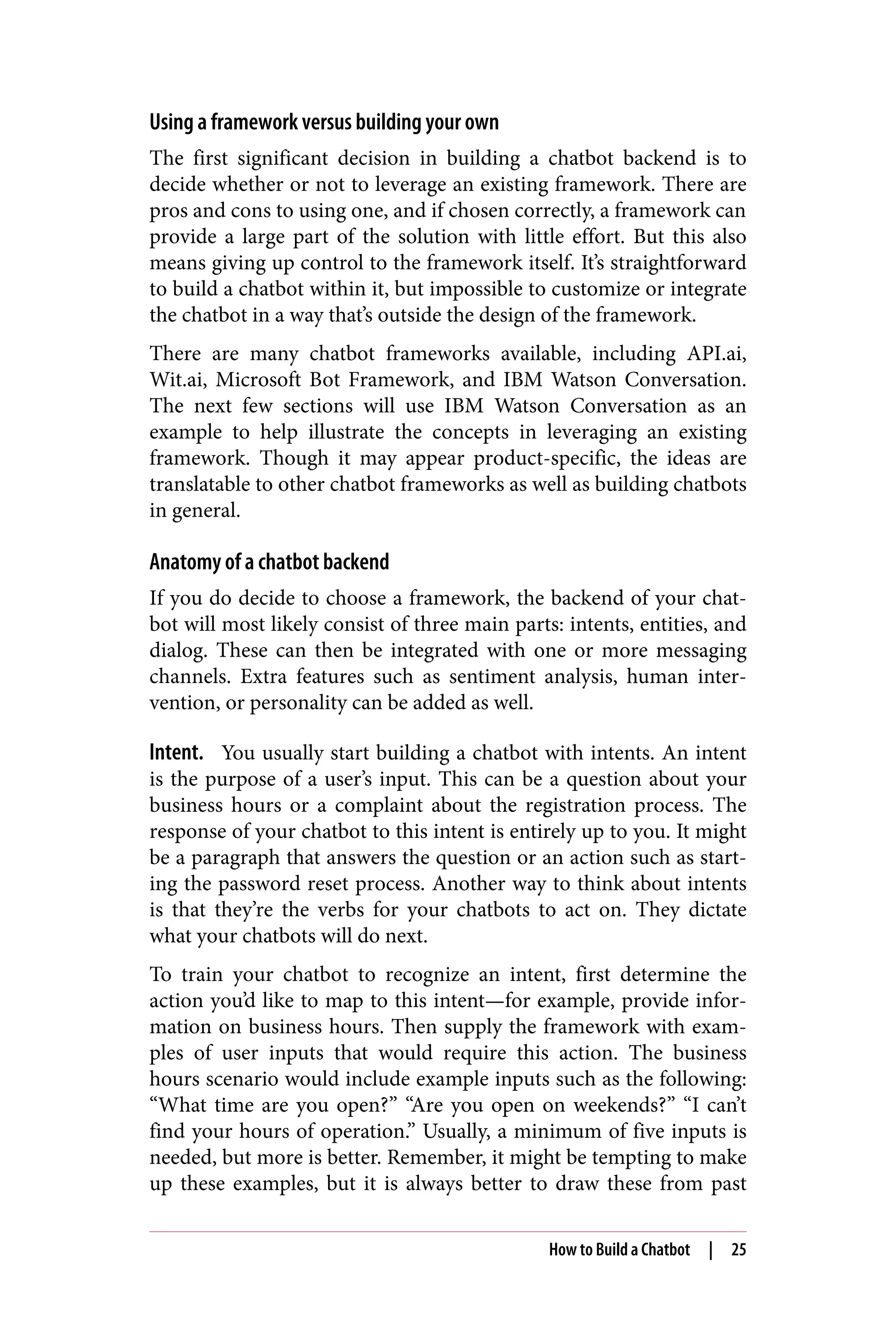
Figure 3-1 shows an example of some common greetings that a
developer might deploy using Watson Conversation’s Intents tab.
Figure 3-1. Some example greetings your chatbot might use
Entities. If intents are the verbs for a chatbot to act on, then entities
are the nouns. They’re the keywords in a user’s input. If a particular
word differentiates one input from another, it probably should be an
entity.
26 | Chapter 3: Chatbots
For example, if a user wants to find the business hours of a bank’s
branch, the location of the bank would be one of the entities. Specif‐
ically, if a user asks, “What are the hours for the Austin branch?”
provide business hours would be the intent and Austin would be the
entity.
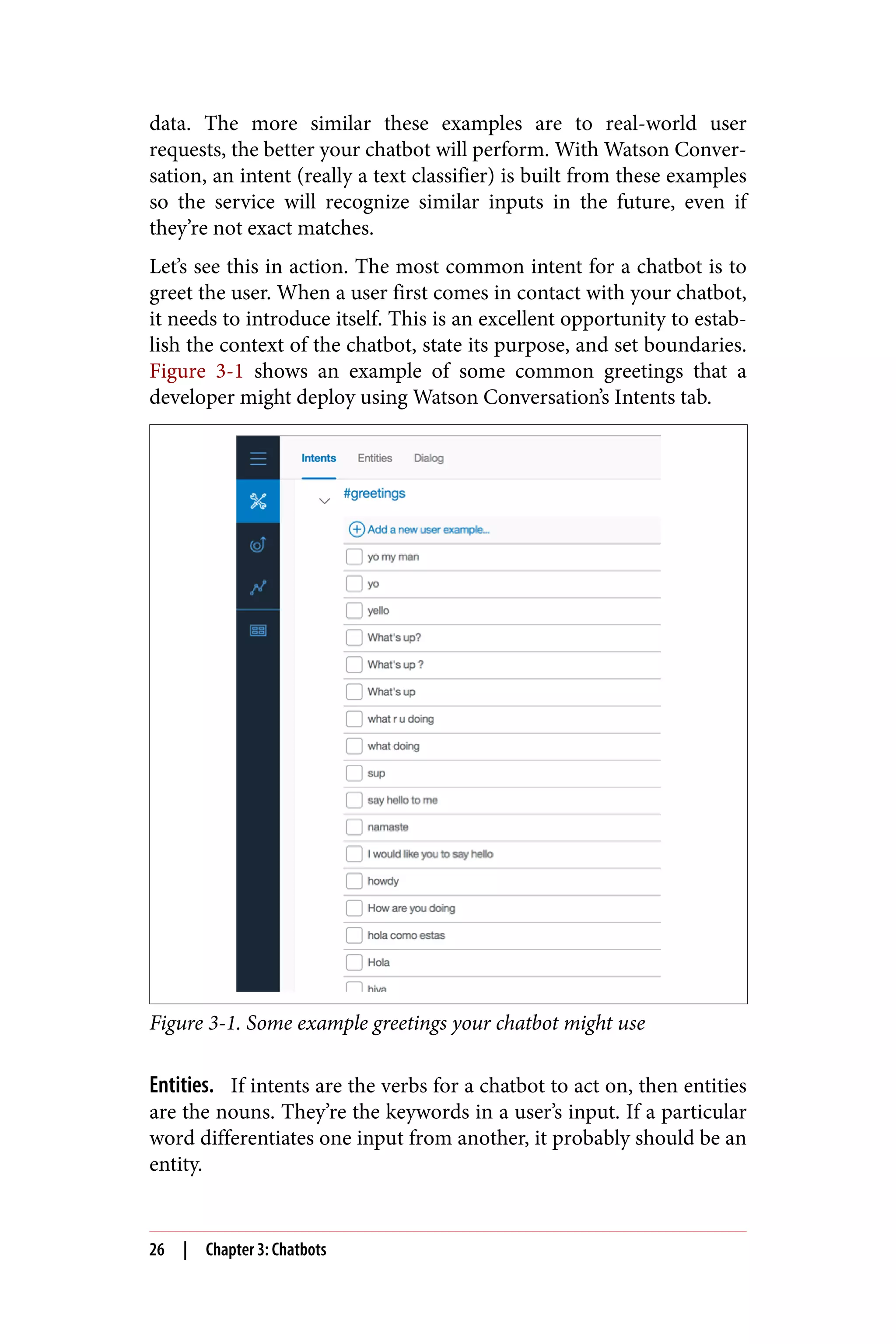
Figure 3-2 shows an example of a cuisine entity in Watson Conver‐
sation’s Entities tab.
Figure 3-2. An example of a cuisine entity, which encompasses a list of
different cuisines that you’d like your chatbot to recognize
Dialog. Dialog is the conversation flow. It’s usually represented as a
directed graph where each node represents one exchange in the con‐
How to Build a Chatbot | 27
versation. Together, it is the combined structure of all your possible
conversations. Since this can become quite complex, most chatbot
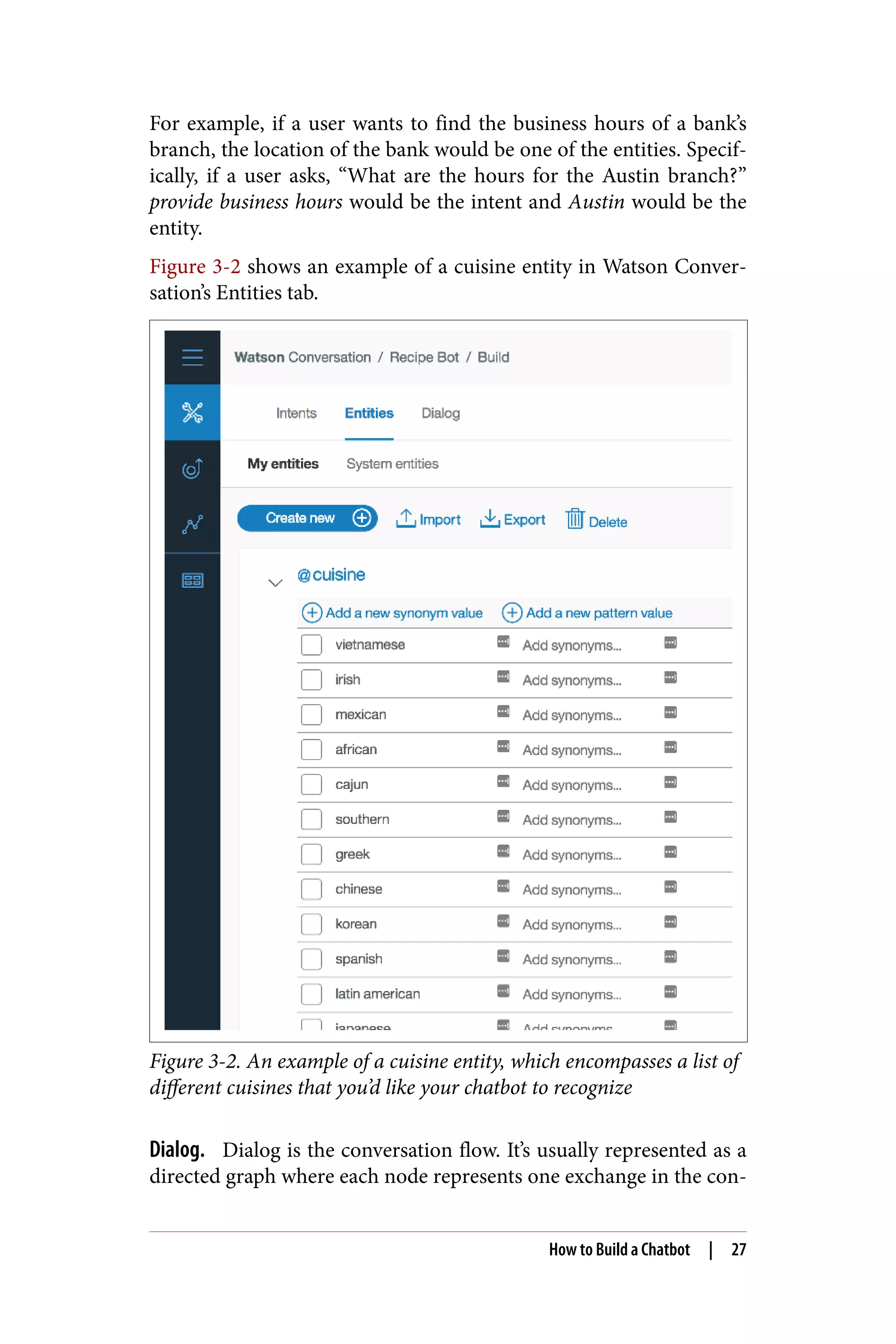
platforms provide a UI to help you visualize the process. Figure 3-3
shows an example in Watson Conversation’s Dialog tab.
Figure 3-3. An example of a dialog tree in Watson Conversation
The screenshot in Figure 3-3 shows an example of a dialog tree,
starting with the blue Greeting node at the top left. The screen on
the right shows the detailed view of this node when it’s selected. In
this case, the condition that triggers this node is the welcome condi‐
tion, which the system understands to be the start of the conversa‐
tion. You can then dictate the response of the chatbot via
the “Respond with” section. Here, the chatbot introduces itself as the
Watson RecipeBot.
Context variable. A context variable contains the information shared
between the framework and your application. It’s the way to
exchange information between your business logic and the frame‐
work.
Watson Conversation provides a context object that lets you store
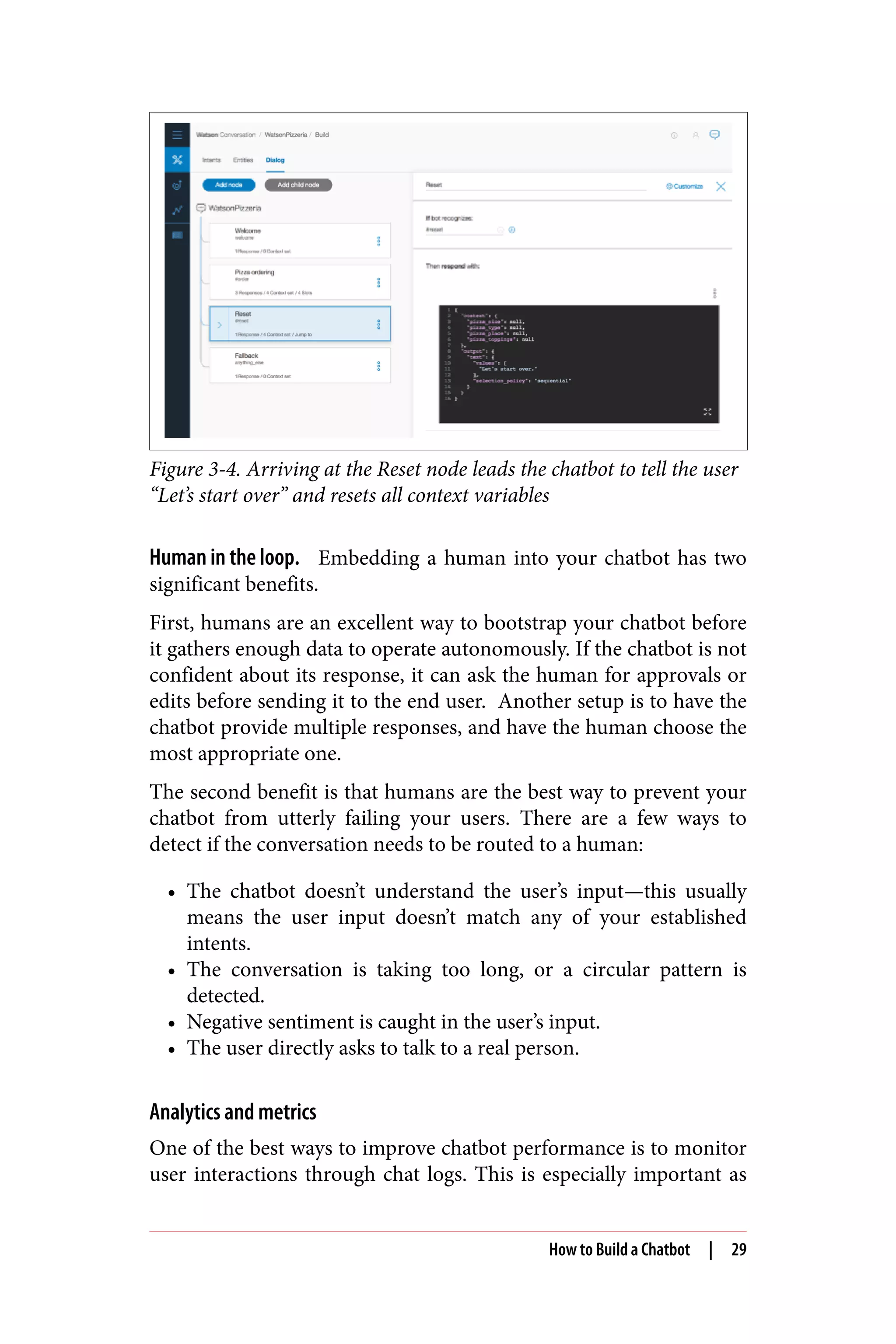
any key/value pair as context variables. In Figure 3-4, the context
object stores all the variables related to the user’s pizza order. The
variables are updated as the user progresses through the ordering
process. If the chatbot recognizes the reset intent, it will set all pizza
parameters to null so the user can restart the order.
28 | Chapter 3: Chatbots
Figure 3-4. Arriving at the Reset node leads the chatbot to tell the user
“Let’s start over” and resets all context variables
Human in the loop. Embedding a human into your chatbot has two
significant benefits.
First, humans are an excellent way to bootstrap your chatbot before
it gathers enough data to operate autonomously. If the chatbot is not
confident about its response, it can ask the human for approvals or
edits before sending it to the end user. Another setup is to have the
chatbot provide multiple responses, and have the human choose the
most appropriate one.
The second benefit is that humans are the best way to prevent your
chatbot from utterly failing your users. There are a few ways to
detect if the conversation needs to be routed to a human:
• The chatbot doesn’t understand the user’s input—this usually
means the user input doesn’t match any of your established
intents.
• The conversation is taking too long, or a circular pattern is
detected.
• Negative sentiment is caught in the user’s input.
• The user directly asks to talk to a real person.
Analytics and metrics
One of the best ways to improve chatbot performance is to monitor
user interactions through chat logs. This is especially important as
How to Build a Chatbot | 29
you scale up your operation to simultaneously serve multiple cus‐
tomers. The more users you have, the larger the chat logs. Being able
to examine the logs effectively will help you monitor your chatbot
performance, and deliver a better user experience.
Typically, analytics for chatbots include general statistics such as
average length of conversation as well as a complete history of all
messages. If you’re building your own analytics backend, make sure
you provide these along with the ability to open a specific conversa‐
tion to go back to the thread to better understand the original con‐
text.
Challenges of Building a Successful Chatbot
There are many things to get right for a chatbot to be useful. One of
the most important is to define the project scope correctly. It needs
to be broad enough for the chatbot to be helpful, yet narrow enough
so that you’re not wasting time building artificial general intelli‐
gence. Specifically, this means capturing as many user requests as
possible, yet still being able to reconcile the nuanced differences
between each one.
This is not an easy problem. For example, one travel agency tried to
deploy a vacation planning chatbot. A critical component was a
vocabulary base large enough to recognize all the destinations, along
with its colloquial variations. It turns out there were over 10 ways
people could refer to the Cayman Islands, even assuming all spell‐
ings were correct. It took the company months to build a list that
could confidently capture all the variations for this one destination.
Practical Tip
It takes at least six months to create a chatbot that’s useful, so make
sure to give yourself or your development team enough of a run‐
way.
While the next section will discuss some best practices, there is not a
one-size-fits-all solution. Your best option is to put the chatbot in
front of real customers and iterate through user feedback. If you’re a
product manager or developer, this should sound familiar. Keep in
mind that chatbots are a nascent field in the enterprise, so you’ll be
one of the first in your industry. Nothing but trial and error will
30 | Chapter 3: Chatbots
help you discover the problems and edge cases specific to your
domain.
Best Practices
In this section, we’ll introduce some basic best practices for building
chatbots. Most of these focus on user experience because it is the
most important aspect of an enterprise chatbot, especially in ecom‐
merce and customer support.
Tip #1: Introduce Your Chatbot to First-Time Users
When a user comes across your chatbot for the first time, they will
not know how to interact with it. In fact, this might be the first time
this user has interacted with any chatbot. At this point, the worst
thing you can do is to present the user with a blank screen.
One way to create a better user experience is to immediately intro‐
duce the user to the chatbot’s capabilities and explain how to con‐
verse with it. A welcome message (something short, simple, and
motivating) is usually best followed by a helpful paragraph describ‐
ing the chatbot.
Tip #2: Add Variations to Your Responses
Adding variations to your responses makes your chatbot seem more
human, and thus more engaging. One simple trick is to rotate
through a set of different replies to the same question. This gives
your chatbot an additional sense of randomness. After all, as
humans, we rarely give the same response to a question twice in a
row.
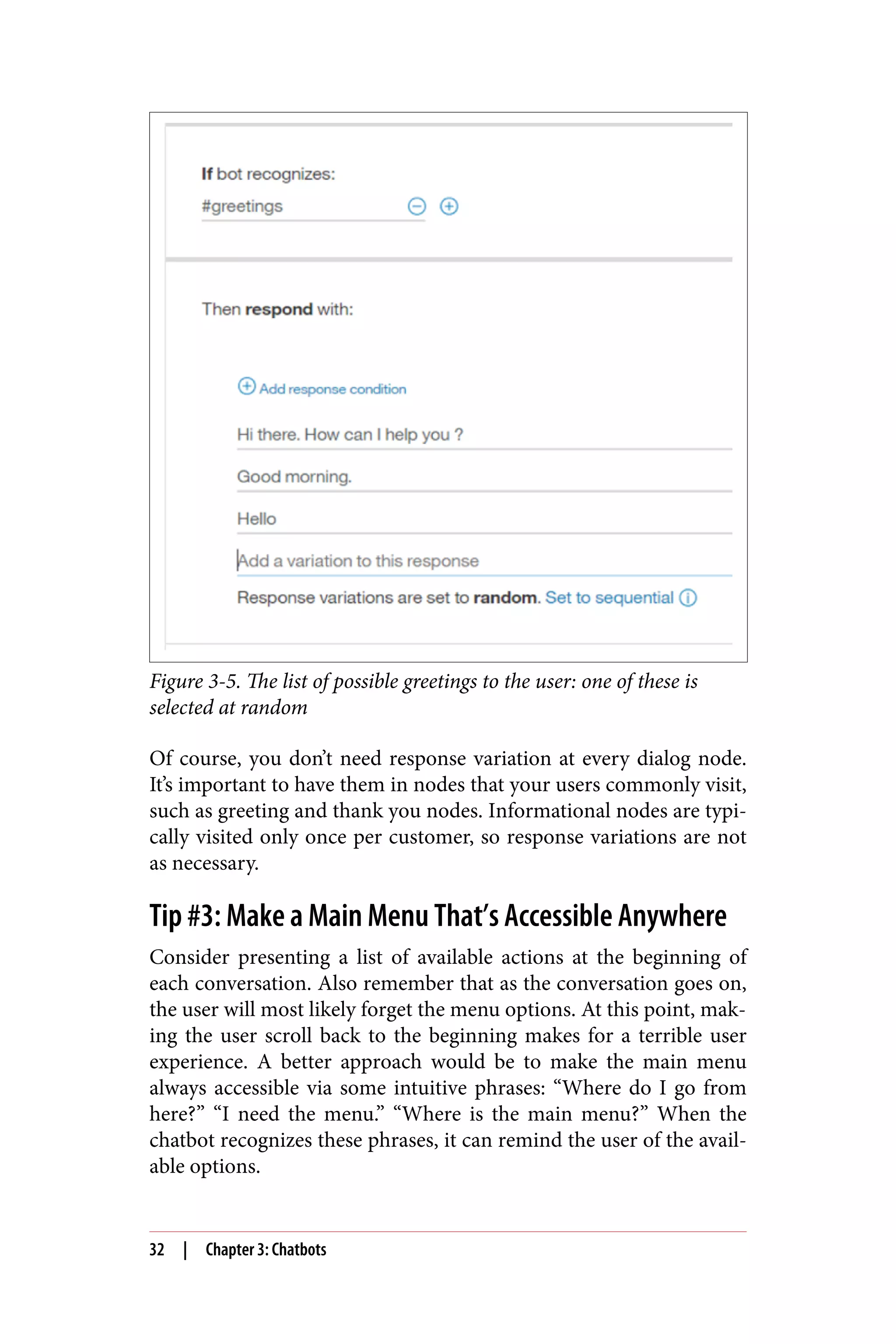
The screenshot from Watson Conversation in Figure 3-5 shows a
node that is activated when the chatbot greets the user. You’ll see
that there is a list of possible greetings, each of which is chosen at
random, so a user is greeted differently at the beginning of a differ‐
ent conversation.
Best Practices | 31
Figure 3-5. The list of possible greetings to the user: one of these is
selected at random
Of course, you don’t need response variation at every dialog node.
It’s important to have them in nodes that your users commonly visit,
such as greeting and thank you nodes. Informational nodes are typi‐
cally visited only once per customer, so response variations are not
as necessary.
Tip #3: Make a Main Menu That’s Accessible Anywhere
Consider presenting a list of available actions at the beginning of
each conversation. Also remember that as the conversation goes on,
the user will most likely forget the menu options. At this point, mak‐
ing the user scroll back to the beginning makes for a terrible user
experience. A better approach would be to make the main menu
always accessible via some intuitive phrases: “Where do I go from
here?” “I need the menu.” “Where is the main menu?” When the
chatbot recognizes these phrases, it can remind the user of the avail‐
able options.
32 | Chapter 3: Chatbots
Back to our running example, the way to make such a menu in Wat‐
son Conversation is to create an intent around these phrases. Two
related intents that should also be present throughout your conver‐
sations are the help and the start over intents.
The help intent should lead your users to a help menu. Sometimes,
your users get stuck in conversation loops or merely become lost
altogether. Having a help intent is like having an emergency eject
button that gets your users to safety. Better yet, the help menu
should have an option to talk to a human support agent. This is
important because your users are most likely already a bit frustrated
by the time they’re asking for help. The option to talk to a human
reminds them that they’re not alone, and their problem will be
solved even if the chatbot didn’t work as intended.
The start over intent is self-explanatory. Sometimes a user has gone
down an incorrect path and realizes it’s easier to start over. At this
point, it’s useful to have an intent that registers messages such as “I
want to start over” or “Let’s restart this conversation.” Including all
these intents will save your users a lot of time and frustration.
Tip #4: Have Context Awareness
Having context awareness means your chatbot remembers impor‐
tant information about your users. Your users should never have to
provide a piece of information twice, or worse, get asked repeated
questions.
One example of having context awareness is storing information
that has already been discussed. As we mentioned earlier, Watson
Conversation provides a context object that stores context variables
as key/value pairs.
Practical Tip
Another way to acquire some context around your users is to inte‐
grate with a customer relationship mangement (CRM) system or a
third-party database. If you’re on Facebook Messenger, you can pull
information about your user from their profile. Remember, starting
a conversation with even some basic knowledge of your user (name,
occupation, location, etc.) can make your chatbot seem more famil‐
iar and start the interaction off on the right foot.
Best Practices | 33
Tip #5: Be Able to Fix Incorrect Inputs
Users will inevitably enter incorrect information in the middle of a
conversation. When that happens, starting over should be the last
resort. Instead, the user should be able to enter the correct response
immediately after. One way to implement this is with an idea similar
to the slots feature in Watson Conversation.
Slots are a way to collapse dialog nodes. In some instances, you need
to gather multiple pieces of information in a single node. For exam‐
ple, to make a reservation, you need the reservation name, number
of people, and the time. It’s quite cumbersome to create three dialog
nodes to do this, so you should use slots instead.
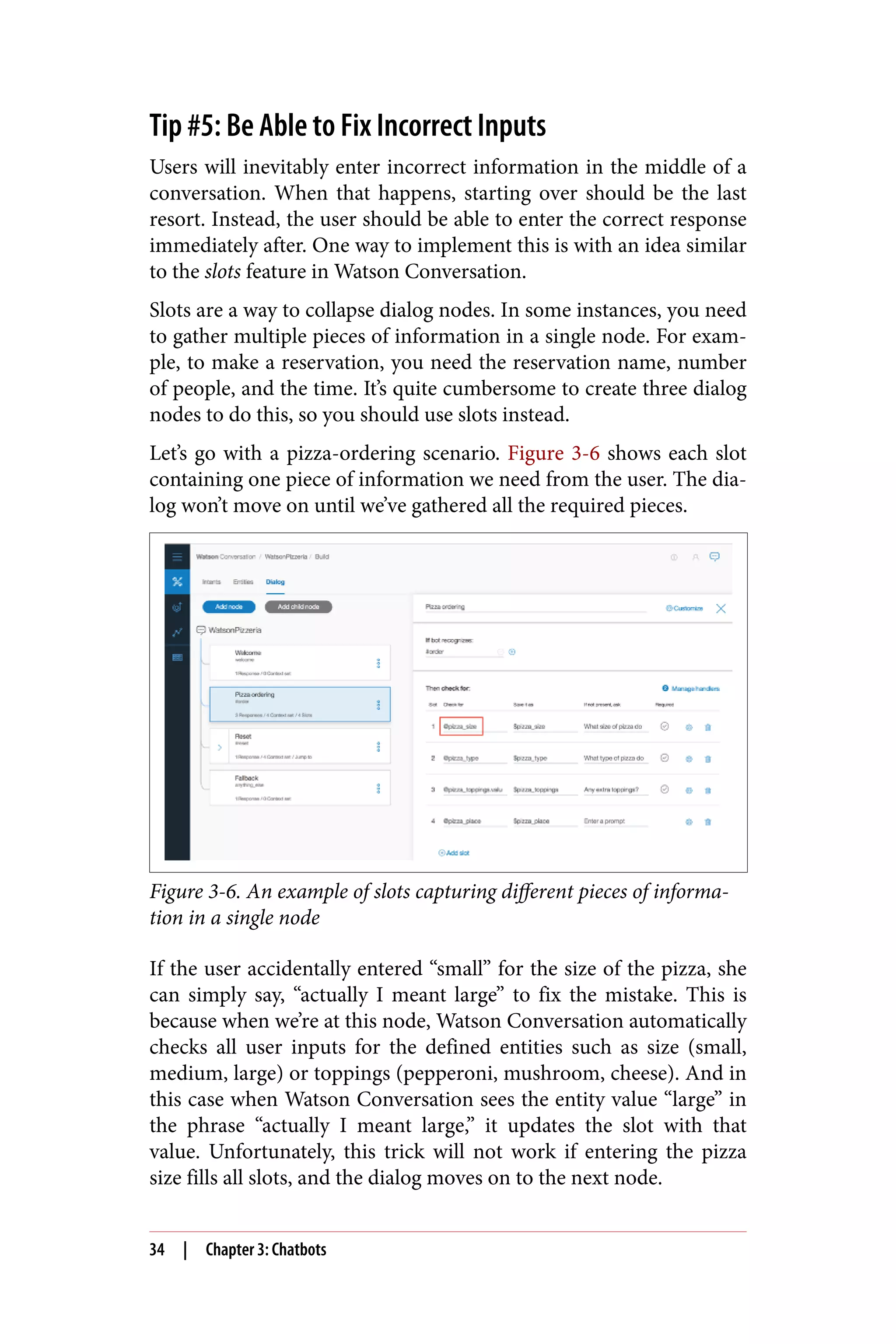
Let’s go with a pizza-ordering scenario. Figure 3-6 shows each slot
containing one piece of information we need from the user. The dia‐
log won’t move on until we’ve gathered all the required pieces.
Figure 3-6. An example of slots capturing different pieces of informa‐
tion in a single node
If the user accidentally entered “small” for the size of the pizza, she
can simply say, “actually I meant large” to fix the mistake. This is
because when we’re at this node, Watson Conversation automatically
checks all user inputs for the defined entities such as size (small,
medium, large) or toppings (pepperoni, mushroom, cheese). And in
this case when Watson Conversation sees the entity value “large” in
the phrase “actually I meant large,” it updates the slot with that
value. Unfortunately, this trick will not work if entering the pizza
size fills all slots, and the dialog moves on to the next node.
34 | Chapter 3: Chatbots
Tip #6: Handle the “I Do Not Understand” Case
As users interact with your chatbot, you’ll encounter messages that
you’ve never seen before. That’s OK. When it happens, the most
important thing is to acknowledge the situation rather than having
no response. This is why it’s essential to have a catch-all node in
your dialog.
Of course, this is not ideal, but be honest and inform the user that
you do not understand the message. Then, either ask the user to
rephrase the request or look to transfer the conversation to a human
support agent. You can even thank the user for the new message and
say that an answer will be available on her next visit. Finally, be sure
to go back to your chat log and figure out what went wrong.
Tip #7: Be Careful About Creating a Personality
Creating a personality for your chatbot is tempting. After all, it can
be a crucial differentiator. An example of a fun personality is Face‐
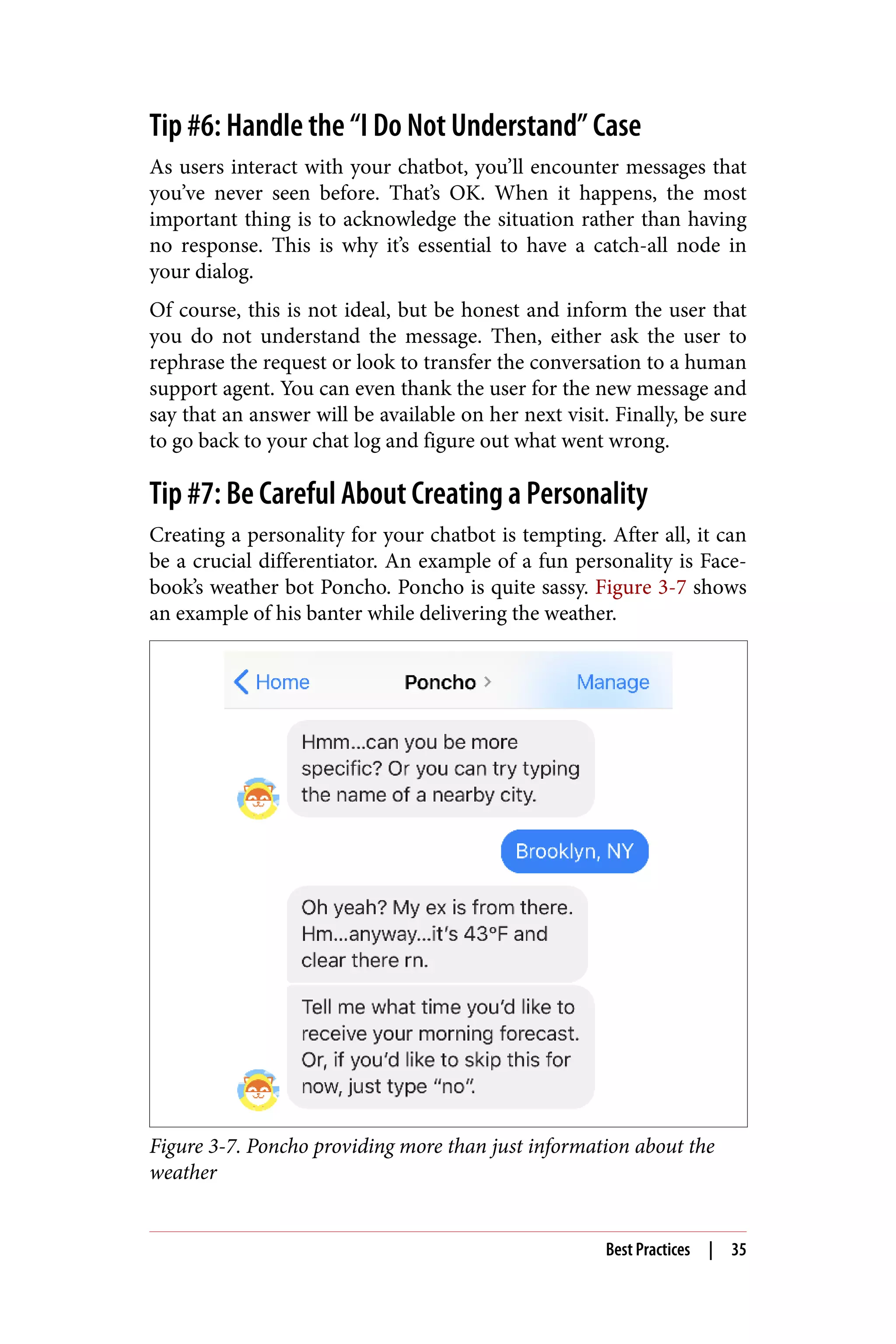
book’s weather bot Poncho. Poncho is quite sassy. Figure 3-7 shows
an example of his banter while delivering the weather.
Figure 3-7. Poncho providing more than just information about the
weather
Best Practices | 35
Poncho will even behave differently based on your politeness. If
you’re rude to him, he’ll ask you to apologize. If you continue to be
aggressive, he won’t respond for 24 hours.
As you can see, personality can add to the user experience, but it’s
also challenging to get right. If you’re not confident in your ability
to create an engaging personality, we recommend holding off on
the attempt. Particularly in use cases like customer support, being
friendly is often enough. But if you do decide to implement a per‐
sonality, keep the voice consistent throughout the application and
make sure it doesn’t overshadow the primary task you’re trying to
accomplish.
Industry Case Studies
Autodesk: Customer Support
Autodesk is known for its 3D design and engineering software. As
the company switched from a desktop licensing model to a SaaS
model, its reach improved. But with that surge came an increase in
customer inquiries. Sometimes with heavy volume and complex
issues, the resolution time for questions was 1.5 days or more.
Autodesk’s staff of about 350 customer support agents handles
roughly one million customer and partner contacts per year. About
half of these are simple activation code requests, changes of address,
contract problems, and technical issues. Gregg Spratto, Vice Presi‐
dent of Operations at Autodesk, said: “A lot of what my team does is
just problem recognition, trying to identify what the person wants
or is asking.”
This sounds like a problem for chatbots. Starting last year, Autodesk
built a virtual agent called Autodesk Virtual Agent (AVA), designed
to answer common customer queries quickly. It was first trained
from chat logs, use cases, and forum posts. It analyzed more than 14
million sentences for keywords, entities, phrases, clusters, and other
speech and language patterns.
AVA is deployed as a web UI that calls Watson Conversation and
Autodesk enterprise systems. The web application also handles the
authentication and some business logic. But being an enterprise
deployment means that even a simple action like getting an activa‐
tion code requires several services to be called in a particular order
36 | Chapter 3: Chatbots
with contingent flows and error handling. After helping Autodesk
overcome many of these deployment issues, IBM eventually gave
complete ownership over to Autodesk. The most recent numbers
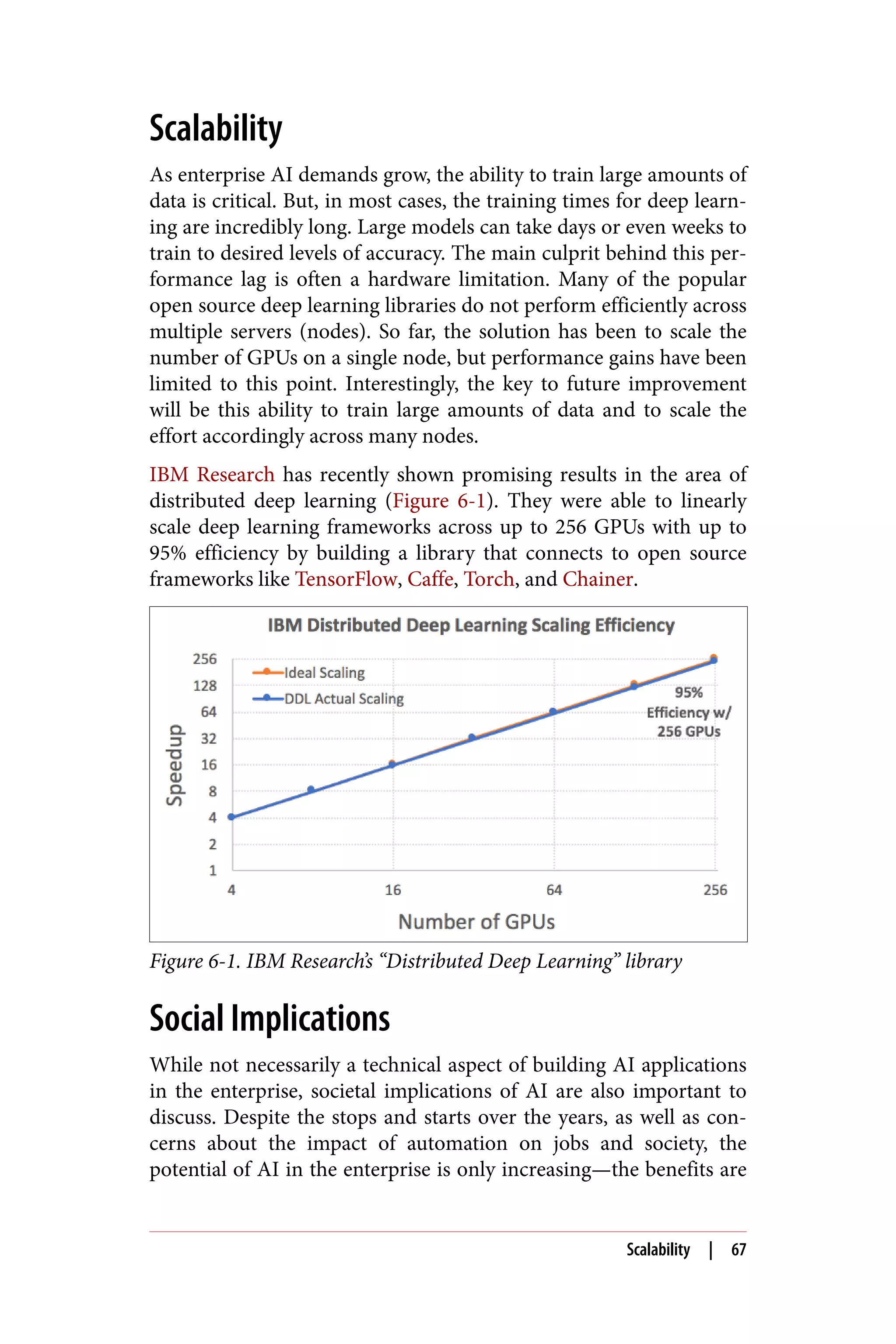
from Autodesk show:
• AVA has had 146,652 conversations, a 35% increase quarter
over quarter (QoQ).
• AVA has helped 45,514 customers total, a 54% increase QoQ.
• Resolution takes an average of 5.6 minutes, compared to the
original 38 hours with human support agents.
• Autodesk estimates a support agent headcount savings of 12–15.
Staples: Conversational Commerce
Staples has been a very successful brick-and-mortar office products
store. But in the age of ecommerce, it’s looking for additional chan‐
nels to reach its customers. After talking to numerous business cus‐
tomers, the company decided it needed to embed itself into the daily
workflow of office managers better. This led to Staples taking a sec‐
ond look at its iconic Easy Button.
Staples built an intelligent Easy Button such that when a customer
speaks to it, the Watson Conversation service extracts the customer’s
intent and entities. The system currently understands five intents:
product ordering, product reordering, shipment tracking, checking
on reward summaries, and processing back-to-school lists from
scanned images provided by customers. Entities are office products
contained in the company’s vast catalog, such as pens, toner, and
paper, each of which has its own stock keeping unit (SKU).
After Watson Conversation recognizes the intent and entity of a
request such as “I want to reorder black pens,” it calls the Staples
personalization engine. This engine combs through the customer’s
purchasing history to identify the pen (an excellent use of contextual
information). Finally, if the system is confident it has identified the
correct SKU, it uses voice feedback to confirm the purchase with the
customer. If the system is not entirely confident about the user
order, it suggests a variety of pens based on past orders. Staples also
deploys human support agents in the loop. If the chatbot cannot
confidently return a customer’s request, it forwards the request to a
live agent who can help the customer.
Industry Case Studies | 37
Summary
Remember, it’s easy to get started with chatbots, but it takes patience
and hard work to create a truly successful one. Don’t try to develop
general intelligence! Define the correct scope for your chatbot and
keep in mind that context is vital, as the medium has much less
bandwidth for communication. We’ll leave you with this analogy
from one of our colleagues. Building a chatbot is much like training
a new hire—they probably only know a little on their first day, but
through coaching and supervision they’ll eventually become a pro‐
ductive employee. It’s essential for your users to see your chatbot as
a human, but it’s equally crucial for you to do the same. In the next
chapter, we’ll switch gears and talk about computer vision.
38 | Chapter 3: Chatbots
CHAPTER 4
Computer Vision
Take a moment and look up from this book. Examine the room
around you and take a quick inventory of what you see. Perhaps a
desk, some chairs, bookshelves, and maybe even your laptop. Iden‐
tifying these items is an effortless process for a human, even a
young child.
Speaking of children, it’s quite easy to teach them the difference
between multiple objects. Over time, parents show them objects or
pictures and then repeat the name or description. Show them a pic‐
ture of an apple, and then repeat the word apple. In the kitchen,
hand them an apple, and then repeat the word apple. Eventually,
through much repetition, the child learns what an apple is along
with its many color and shape variations—red, green, yellow. Over
time, we provide information as to what is a correct example and
what isn’t. But how does this translate to machines? How can we
train computers to recognize patterns visually, as the human brain
does?
Training computer vision models is done in much the same way as
teaching children about objects visually. Instead of a person being
shown physical items and having them identified, however, the
computer vision algorithms are provided many examples of images
that have been tagged with their contents. In addition to these posi‐
tive examples, negative examples are also added to the training. For
example, if we’re training for images of cars, we may also include
negative examples of airplanes, trucks, and even boats.
39
Giving computers the ability to see opens up a world of possibilities
for many industries—from recognizing human faces for security to
automating processes that would take a human days, if not weeks.
Let’s take one industry as a quick example—insurance. Using com‐
puter vision to quickly, accurately, and objectively receive an auto‐
mated analysis of images—for example, of a fender bender or a
weather-damaged roof—allows insurance companies to deliver bet‐
ter service to their clients.
Machine learning is pattern recognition through learned examples.
Nothing exemplifies this more than computer vision. Just as NLP
provides a core functionality of AI in the enterprise, computer
vision extends a machine’s ability to recognize and process images.
Capabilities of Computer Vision for the
Enterprise
So just what can computer vision do for our applications? Before
diving into the details of computer vision and how to use it in the
enterprise, let’s examine some of the specific capabilities computer
vision brings to your applications.
Image Classification and Tagging
Computer vision’s most core functionality, general image tagging
and classification, allows users to understand the content of an
image. While you’ll often see image classification and tagging used
interchangeably, it’s best to consider classification as assigning an
image to one or more categories, while tagging is an assignment of a
single word (or multiple words) describing the image. When an
image is processed, various keyword tags or classes are returned,
describing the image with varying confidence levels. Based on an
application’s needs, these can be used to identify the image contents.
For example, you may need to find images with contents of “male
playing soccer outside” or organize images into visual themes such
as cars, sports, or fruits.
Words, phrases, and other text are frequently part of images. In our
day-to-day lives, we come across street signs, documents, and adver‐
tisements. Humans see the text, read it, and comprehend it rather
easily. For machines, this is an entirely different challenge. Via opti‐
cal character recognition (OCR), computers can extract text from an
40 | Chapter 4: Computer Vision
image, enabling a wide range of potential applications. From lan‐
guage translation to mobile apps that assist the vision impaired,
computer vision algorithms equip users to pull words out of a pic‐
ture into readily usable text in applications.
In addition to general image tagging, computer vision can be used
for more specific tasks. Some of the more common are the ability to
detect logos in images as well as food items. Another frequent appli‐
cation of computer vision is in facial detection. With training, com‐
puter vision algorithms allow developers to recognize faces,
sometimes getting even more specialized to detect celebrities.
Object Localization
Another capability of computer vision is object localization. Some‐
times your application’s requirements will include not just classify‐
ing what is in the image, but also understanding the position of the
particular object in relation to everything else. This is where object
localization comes into play. Localization finds a specific object’s
location within an image, displaying the results as a bounding box
around the specified object. Similarly, object detection then identi‐
fies a varying number of objects within the image. An example is the
ability to recognize faces or vehicles in an image. Figure 4-1 shows
an example of object detection with dogs.
There are some challenges associated with object localization, how‐
ever. Often, objects in an image overlap, making it difficult to ascer‐
tain their specific boundaries. Another challenge is visually similar
items. When the colors or patterns of an object match their back‐
ground in an image, it can again be difficult to determine the
objects.
Capabilities of Computer Vision for the Enterprise | 41
Figure 4-1. Object detection
Custom Classifiers
Most of the time, you don’t need to recognize everything. If you’re
looking to identify or classify only a small set of objects, custom
classifiers could be the right tool. Most of the large third-party plat‐
forms provide some mechanism for building custom visual classifi‐
ers, allowing you to train the computer vision algorithms to
recognize specific content within your images. Custom classifiers
extend general tagging to meet your application’s particular needs to
recognize your visual content, and primarily exist to gain higher
accuracy by reducing the search space of your visual classifier.
At a high level, when creating a custom classifier, you’ll need to have
a collection of images that are identified as positive and negative
examples. For example, if you were training a custom classifier on
fruits, you’d want to have positive training images of apples, bana‐
nas, and pears. For negative examples, you could have pictures of
vegetables, cheese, or meat (see Figure 4-2).
42 | Chapter 4: Computer Vision
Figure 4-2. Creating a custom classifier
Most computer vision uses deep learning algorithms (discussed in
Chapter 1), specifically convolutional neural networks (CNNs). If
you’re interested in building CNNs from scratch and going more in
depth with deep learning for computer vision, there are a wide vari‐
ety of resources available. We recommend Andrew Ng’s Deep Learn‐
ing specialization on Coursera as well as fast.ai. Additionally, the
following resources dive deeper into relevant computer vision top‐
ics:
• Programming Computer Vision with Python (Jan Erik Solem,
O’Reilly)
• Learning Path: Deep Learning Models and Computer Vision with
TensorFlow (ed. Shannon Cutt, O’Reilly)
• Learning OpenCV3 (Gary Bradski and Adrian Kaehler, O’Reilly)
In the next section, we’ll start to look at how to use computer vision
in enterprise applications.
How to Use Computer Vision
When discussing how to use computer vision, we’ll look at an exam‐
ple of the most common output—general tagging. As covered ear‐
lier, general tagging in computer vision returns to the user the
How to Use Computer Vision | 43
overall items contained in the subject image. Frequently, depending
on the algorithm or service used, the confidence levels are also
returned. Based on your prototypes and testing, you can then use
these scores to set your own thresholds for applying the returned
tags based on your application’s needs.
To demonstrate computer vision’s tagging, we’ll again use IBM Wat‐
son and its Visual Recognition service. Let’s start by sending the
image in Figure 4-3 to the API.
Figure 4-3. Fireworks over a harbor
We’ll make a simple request using curl to the API as follows, refer‐
encing our image as the image URL parameter:
curl "https://gateway-a.watsonplatform.net/visual-recognition/api/
v3/classify?api_key=YOURAPIKEY&amp;url=
https://visual-recognition-demo.ng.bluemix.net/images/samples/7.jpg
&amp;version=2016-05-20"
Submitting this API request returns the following JSON:
{
"classes": [
{
"class": "harbor",
"score": 0.903,
"type_hierarchy": "/shelter/harbor"
},
{
"class": "shelter",
"score": 0.903
},
44 | Chapter 4: Computer Vision
{
"class": "Fireworks",
"score": 0.558
},
{
"class": "waterfront",
"score": 0.5
},
{
"class": "blue color",
"score": 0.9
},
{
"class": "steel blue color",
"score": 0.879
}
],
"classifier_id": "default",
"name": "default"
}
As you can see from these JSON results, the API returns varying
classes with confidence scores on what it thinks the image contains.
If we look at the picture again and compare it with the returned key‐
words, the essential elements of the image are returned with high
confidence. To improve these scores for groups of images, you’d
need to train the computer vision model using custom classifiers.
We’ll cover this more in an upcoming section, but mainly this con‐
sists of providing the algorithm with many images of both positive
and negative examples for training. A useful demo of this IBM Wat‐
son service can be found online.
Computer Vision on Mobile Devices
Another fascinating application of computer vision is that algo‐
rithms may run locally on mobile devices and IoT. Machine learning
is now able to run on devices without necessarily having to connect
to the cloud. Without sending and receiving data from the cloud,
processing speed is increased and security is improved.
There are some pros and cons associated with this approach, how‐
ever. Let’s start with the positive aspects of running computer vision
locally. First, the speed and refresh rate of object detection are sig‐
nificantly faster than sending and receiving data from the cloud.
Specifically, not needing to wait for the cloud to respond to a request
speeds the process up considerably. This is quite important for con‐
Computer Vision on Mobile Devices | 45
sumer products, such as virtual reality (VR) and augmented reality
(AR), where our eyes are very much used to an immediate reaction.
Quick response times for certain queries and questions make mobile
processing more natural for responding in specific applications. Pri‐
vacy is another benefit as all computation is done locally, and no
personal or private data is sent to remote servers. If the application
needs data analysis, then it only has to send the result of the infer‐
ence rather than the actual data, thus preserving privacy.
Some examples of areas where running computer vision locally is
advantageous include language translation, drones, autonomous
vehicles, the self-monitoring of industrial IoT devices, and the abil‐
ity to diagnose health issues without having to send private data to
the cloud.
While these are some compelling reasons to use computer vision
locally on mobile devices, there are some drawbacks to discuss as
well. For mobile applications, battery life and resource allocation are
critical issues. Running computer vision locally uses much more
computing power and requires optimization, so this is a factor to
take into consideration when building your application. Addition‐
ally, it’s more challenging to deploy computer vision applications
locally, but is quickly becoming much easier. These days, you can
even run a detection and classification system on a Raspberry Pi.
There is a hybrid approach, though, that solves some of the issues—
using a local model for simple object detection such as “Is that a
dog?" and then sending the object to the cloud to determine the
breed of dog. Another example of this hybrid approach is detecting
a product while a user is in a grocery store, but then sending the
data to the cloud to retrieve the actual pricing information.
The key to running models locally is model compression. You might
need a large model in the cloud if you’re trying to recognize every‐
thing in the world, but the model can be much smaller if you’re
merely interested in recognizing the faces of your family mem‐
bers. There are now ways to reduce the parameters of visual recog‐
nition models by magnitudes and thus effectively reduce their size.
Best Practices
Next, we’ll look at some best practices in developing applications
with computer vision. First, though, an overall rule of thumb is the
46 | Chapter 4: Computer Vision
more quality images for training, the better. We’ll discuss what
makes good training images shortly, but in general, the more good
images you can provide for training, the better the results.
The accuracy of custom classifiers depends on the quality of your
training data as well as process. Data from IBM Watson has shown
that clients “who closely controlled their training processes have
observed greater than 98% accuracy for their use cases.” This accu‐
racy was based on the ground truth for their classification problem
and data set.
Quality Training Images
Let’s now take a quick look at some guidelines for good training
images. There are several characteristics of good training images.
The images in your training and testing sets should ideally resemble
each other in as many ways as possible. For example, be sure they’re
similar in regards to angle, lighting, distance, and the size of the sub‐
ject.
Also, make sure the training images represent what the test image
will show. For example, if your test images show baskets of apples,
then a close-up of a single apple would not be a good training image
(Figures 4-4 and 4-5). Just because there’s an apple in the image
doesn’t mean it meets the criteria for good training images.
Figure 4-4. A single apple on a table (photo courtesy of adrianbartel,
Creative Commons License 2.0)
Best Practices | 47
Figure 4-5. Multiple apples in a basket (photo courtesy of Mike
Mozart, Creative Commons License 2.0)
Use Cases
Now that we’ve discussed computer vision in some detail, let’s take a
look at some industry examples and use cases.
Satellite Imaging
When a drought in California reached crisis level in April 2015,
Governor Jerry Brown issued the state’s first mandatory water
restrictions. All cities and towns were instructed to reduce water
usage by 25% in 10 months. Achieving this required measures more
effective than just asking residents to use less water. Specifically, the
state needed to run ad campaigns targeted to property owners who
were using more water than necessary. Unfortunately, the state
didn’t even have water consumption data on such a granular level.
Scientists at OmniEarth came up with the idea of analyzing aerial
images to identify these property owners. They first trained IBM
Watson’s Visual Recognition service on a set of aerial images con‐
taining individual homes with different topographical features,
including pools, grass, turf, shrubs, and gravel. They then fed a mas‐
sive amount of similar aerial imagery to Watson for classification.
Partnering with water districts, cities, and counties, the scientists at
OmniEarth could then quickly identify precisely which land parcels
needed to reduce water consumption, and by how much. For exam‐
48 | Chapter 4: Computer Vision
ples, they identified swimming pools in 150,000 parcels in just 12
minutes.
Armed with this knowledge, OmniEarth helped water districts make
specific recommendations to property owners and governments.
Such recommendations included replacing a patch or percentage of
turf with mulch, rocks, or a more drought-tolerant species, or drain‐
ing and filling a swimming pool less frequently.
Video Search in Surveillance and Entertainment
The proliferation of cameras in recent years has led to an explosion
in video data. Though videos contain numerous insights, these are
hard to extract using computers. In many cases, such as home sur‐
veillance videos, the only viable solution is still human monitoring.
That is, a human sits in an operations center 24/7, watching screens
and raising an alert when something happens, or reviewing dozens
or even hundreds of hours of past footage to identify key events.
BlueChasm is a company looking to tackle this problem using com‐
puter vision. The founder, Ryan VanAlstine, believes that if success‐
ful, video can be a new form of sensor where traditional detection
and human inspection fail. BlueChasm’s product, VideoRecon, can
watch and listen to videos, identifying key objects, themes, or events
within the footage. It will then tag and timestamp those events, and
then return the metadata to the end user.
The industry the company plans to focus on first is law enforce‐
ment. Ryan explains: “Imagine you work in law enforcement, and
you knew there was a traffic camera on a street where a burglary
occurred last night. You could use VideoRecon to review the footage
from that camera and create a tag whenever it detected a person
going into the burgled house. Within a few minutes, you would be
able to review all the sections of the video that had been tagged and
find the footage of the break-in, instead of having to watch hours of
footage yourself.” Once a video is uploaded, IBM Watson’s Visual
Recognition is used to analyze the video footage and identify vehi‐
cles, weapons, and other objects of interest.
BlueChasm is also looking to help media companies analyze movies
and TV shows. It wants to track the episodes, scenes, and moments
where a particular actor appears, a setting is shown, or a line of dia‐
log is spoken. This metadata could help viewers find a classic scene
from a show they’d like to rewatch by simply typing in some search
Use Cases | 49
terms and navigating straight to the relevant episode. More gener‐
ally, for any organization that manages an extensive video archive,
the ability to search and filter by content is an enormous time-saver.
Additional Examples: Social Media and Insurance
Just as NLP was found to be incredibly useful in social media and
content discovery, computer vision also proves to be similarly bene‐
ficial. For example, a company called Ampsy uses computer vision
to grab all the historical images shared by an audience on social
media to retrieve a list of activities, interests, people, and places for
an influencer, which brands are obviously very interested in learn‐
ing. Additionally, Ampsy uses custom visual classifiers to train on
specific corporate logos. It can then detect all the images in a partic‐
ular event where the advertiser’s logos are captured. The company is
then offering a search capability for its users to search for their logos
in the collected images.
Similarly, social media analytics company iTrend uses general tag‐
ging to understand content within images gathered from social
media, blogs, and live streaming feeds. The company claims that it
can analyze 20–50 times more data than its competition and then
provide up to 80% of its findings as actionable insights.
Finally, another industry using computer vision in innovative ways
is insurance. Primarily used in processing claims, visual recognition
techniques as well as augmented reality are used by insurance com‐
panies to make the claims process much faster, decreasing costs and
increasing customer satisfaction. They’re accomplishing this
through applications that allow customers to take multiple photos of
accident and vehicle damage and send these to the insurer’s servers
for processing, eliminating much of the manual human processing
the was previously required. According to Accenture, 82% of insur‐
ers believe AI-driven automation will be embedded into every
aspect of their business over the next five years. Additionally, 35% of
insurers report more than 15% in cost savings from this automation
over the past two years. This is an industry using AI and computer
vision techniques to their fullest potential to improve their business.
Existing Challenges in Computer Vision
In the chapter on NLP, we discussed the challenges of extracting
meaningful information from text, and doing the same for images is
50 | Chapter 4: Computer Vision
just as challenging. Let’s forget about recognizing tens of thousands
of objects, a complex classification problem, and instead examine a
much simpler case of just recognizing cats versus dogs in an image.
If you didn’t have experience in machine learning before approach‐
ing this problem, you might first start by writing an algorithm that
separates the animals by color. But what if the pictures are black and
white? Maybe you’d then try to separate them by color and texture.
But what if it’s a Golden Retriever instead of a Labrador? You get the
point—building a successful visual classification system requires
more than a rote list of rules, because you can always find excep‐
tions that break them. The correct approach is to develop an algo‐
rithm that will automatically generalize to a set of rules based on a
large enough data set. Over time, as you train the vision model by
providing more and more positive and negative examples to learn
from, the algorithm improves, ultimately providing an incredibly
useful method for identifying objects within images.
Similar to our discussion of challenges in NLP, several applications
of computer vision still pose considerable challenges to implementa‐
tion. First is facial recognition. While computer vision is very capa‐
ble of face detection (detecting the presence of faces), face
recognition (identifying individuals) does not come easily out of the
box. Large data sets for training on individual faces is needed for
this to be an effective process.
Another area of concern is detecting details. If you want to classify
an image based on a small section of it or the details scattered within
it, this tends to be a more challenging action. Services like IBM Wat‐
son analyze an entire image when training, so they may struggle on
classifications that depend on small details. A solution to this prob‐
lem is breaking down the image into smaller pieces or zooming into
the relevant parts of the image.
Implementing a Computer Vision Solution
As with the other AI solutions discussed in this book, you’ll always
face the decision of build versus buy when determining an imple‐
mentation. As in previous chapters, we’ll look briefly at some of the
popular open source options as well as the SaaS services available.
As always, you need to try these yourself via testing and prototyping
to see which meets your needs, including but not limited to price,
accuracy, and the available code libraries.
Implementing a Computer Vision Solution | 51
Regarding open source, two of the primary options for building
applications using computer vision are OpenCV and SimpleCV.
They both provide access to computer vision, with OpenCV being a
library available for many programming languages and SimpleCV a
framework incorporating several libraries written in Python.
In addition to IBM Watson’s Visual Recognition, other services are
providing similar computer vision services as APIs. These include
Clarifai, Google Cloud Vision, Microsoft Computer Vision, and
Amazon Rekognition. Each service has its pros and cons, so we
again recommend testing and building prototypes for those that
appear to meet your needs to find the proper fit.
Summary
Computers “see” very differently than humans, and almost always
within the context of how they are trained. The computer vision
topics covered in this chapter have hopefully inspired you to use
vision as a powerful tool to increase the utility of your enterprise
applications. As we’ve discussed, numerous industries are already
taking advantage of computer vision with great success. How might
you incorporate computer vision in your applications?
Now that we’ve covered some of the major use cases of AI in the
enterprise (NLP, chatbots, and computer vision), let’s take a look at
our data and how it gets processed in AI data pipelines.
52 | Chapter 4: Computer Vision
CHAPTER 5
AI Data Pipeline
In God we trust; all others bring data.
—W. Edwards Deming
There are now more mobile devices than people on the planet and
each is collecting data every second on our habits, physical activity,
locations traveled, and daily preferences. Daily, we create 2.5 quintil‐
lion bytes of data from a wide variety of sources. And it’s coming
from everywhere. Just think of all the sources collecting data—IoT
sensors in the home, social media posts, pictures, videos, all our
purchase transactions, as well as GPS location data monitoring our
every move.
Data is even touted as being more important and valuable than oil.
For that reason, companies are creating vast repositories of raw data
(typically called data lakes) of both historical and real-time data.
Being able to apply AI to this enormous quantity of data is a dream
of many companies across industries. To do so, you have to pick the
right set of tools not only to store the data but also to access the data
as efficiently as possible. Current tools are evolving, and the way in
which you store and present your data must change accordingly.
Failure to do so will leave you and your data behind. To illustrate
this point, MIT professor Erik Brynjolfsson performed a study that
found firms using data-driven decision making are 5% more pro‐
ductive and profitable than competitors. Additional research shows
that organizations using analytics see a payback of $13.01 for every
dollar spent.
53
As we’ve seen so far, if large amounts of high-quality data are a pre‐
requisite for a successful implementation of AI in the enterprise,
then a process for obtaining and preparing the data is equally criti‐
cal.
In previous chapters, we’ve covered some of the major applications
of AI in the enterprise, from NLP to chatbots to computer vision.
We’ve also discussed the importance of data to all of these imple‐
mentations. What we’ve implied, yet haven’t actually touched on to
this point, is the concept of a data pipeline that forms the backbone
for all these AI implementations.
Whether you use off-the-shelf technology or build your own, these
AI solutions can’t be effective without a data pipeline. With the
numerous third-party solutions in the market like IBM Watson, it’s
easy to forget that with even the simplest implementation, you need
to have a data pipeline. For example, in a computer vision solution
you still need to find representative images, train them, and then
provide a mechanism for repeating this loop with new and better
data as the algorithm improves. With NLP, you still need to feed the
APIs source text to process and then often train custom models with
data from your domain. With chatbots, your initial data pipeline
would focus on the known questions and answers from your exist‐
ing customer support logs and then building a process to capture
new data to feed back into the chatbot. From SaaS all the way to
developing your own AI solutions, data pipeline needs grow even
larger—and more critical to the overall implementation of AI in our
enterprise applications.
Not only is the data pipeline a crucial component of performing AI,
but it also applies elsewhere in the enterprise—specifically in analyt‐
ics and business intelligence. While the intricacies of creating a full
AI data pipeline are outside the scope of this book, next we’ll pro‐
vide a high-level guide for getting started.
So what exactly is a data pipeline for AI? Dataconomy defines a data
pipeline as “an ideal mix of software technologies that automate the
management, analysis and visualization of data from multiple sour‐
ces, making it available for strategic use.” Data preparation, a data
platform, and discovery are all significant pieces of an effective pipe‐
line. Unfortunately, a data pipeline can be one of the most expensive
parts of the enterprise AI solution.
54 | Chapter 5: AI Data Pipeline
Key to this process is making sure data can be accessed in an inte‐
grated manner instead of sitting in different silos, both internal and
external to the enterprise. This ability to access and analyze real-
time or at least recent data is key to an AI data pipeline (Figure 5-1).
Figure 5-1. AI data pipeline
As we’ll discuss in the next few sections, outside of the actual data
itself, the two most popular components of an AI data pipeline are
Apache Hadoop and Apache Spark. In fact, an IBM study of organi‐
zations with more than 1,000 employees from 90 countries showed
that 57% of surveyed firms either already had or planned to imple‐
ment a pipeline based on Hadoop/Spark.
Preparing for a Data Pipeline
At a high level, there are several areas enterprises must focus on to
effectively build and maintain a data pipeline. The key consideration
before even beginning the process is to make sure all stakeholders
have bought into the idea of having a data pipeline. There are no
shortcuts here and enterprises must be sure of their preparedness in
several areas. First, are your data storage and cloud practices solid?
Are employees trained and aware of them? Next, where is the data
stored? Frequently in the enterprise, the data is located in numerous
silos, controlled and maintained by different groups in the company.
Is everyone bought in and prepared to break down these data silos
in order to build the AI pipeline? Finally, is there a process for clean‐
ing data and repairing any issues with metadata? It’s crucial that the
enterprise embraces modern data science practices and not just a
rehash of their existing business intelligence systems.
Sourcing Big Data
Just like AI itself, the term big data has a variety of definitions
depending on who you talk to. But generally speaking, once the data
you’re collecting is too large to store in memory or your existing
storage systems, you’re entering big data territory. Depending on the
infrastructure in your enterprise, this will obviously vary considera‐
Preparing for a Data Pipeline | 55
bly. As the adage goes, you’ll know it when you see it! For our pur‐
poses, we’ll define big data as bringing structured and unstructured
data together in one place to do some analysis with AI.
IBM describes big data as having four major dimensions: volume,
velocity, variety, and veracity. Volume refers to the amount of data
needed. As discussed in previous chapters, we’re inundated with
data, and it isn’t slowing down. From the over 500 million tweets per
day to the 350 billion annual meter readings to better predict power
consumption, enterprises generate large amounts of information.
How fast are you storing and processing your data? Many applica‐
tions are extremely time-sensitive, so the velocity of the data with
respect to your storage and application processing is critical. For
example, in areas like fraud detection and customer support, being
able to access the data quickly is essential. Variety refers to the diver‐
sity of the collected data, from structured to unstructured. This
includes text, video, audio, clicks, IoT sensor data, payment records,
and more. Finally, big data must have veracity. How accurate or
trustworthy is the data? When 1 in 3 business leaders don’t trust the
data they need to make decisions, it’s clear that the vast majority of
data has accuracy issues.
Returning to our previous discussion of AI winters and how the
convergence of various trends has allowed AI to flourish again, a
subtheme of this is how big data technology has come to the fore‐
front. Commodity hardware, inexpensive storage, open source soft‐
ware and databases, and the adoption of APIs all have enabled new
strategies for creating data pipelines.
Storage: Apache Hadoop
Originally written in Java by Doug Cutting, Hadoop is an open
source framework for distributed processing and computing of large
data sets using MapReduce for parallel processing. Incredibly popu‐
lar and rapidly growing, it’s been estimated that the global market
for Hadoop will reach $21 billion by 2018. So just what is Hadoop?
IBM Analytics defines it as “a highly scalable storage platform
designed to process very large data sets across hundreds to thou‐
sands of computing nodes that operate in parallel. It provides a cost-
effective storage solution for large data volumes with no format
requirements.”
56 | Chapter 5: AI Data Pipeline
Hadoop can store data from many sources, serving as a centralized
location for storing data needed for machine learning. Apache
Hadoop is itself an ecosystem, made popular by its ability to run on
commodity hardware. Two major Hadoop concepts we’ll discuss
that are relevant to an AI data pipeline are HDFS and MapReduce.
Built to support MapReduce, the Hadoop Distributed File System
(HDFS) can process both structured and unstructured data, resil‐
iently enabling scalable storage across multiple computers. HDFS is
a purpose-built filesystem for storing big data, while MapReduce is a
programming paradigm that refers to two distinct tasks that are per‐
formed: map and reduce. The map job takes a set of data and con‐
verts it to key/value pairs. The reduce job then takes this output
from the map job and combines it into a smaller set of key/value
pairs for summary operations.
Like other powerful programming tools, MapReduce allows devel‐
opers to write code without needing to understand the underlying
complexion of distributed systems. If you’d like more detailed info
on Hadoop, HDFS, and MapReduce, the following books are excel‐
lent resources:
• Hadoop: What You Need to Know (Donald Miner, O’Reilly)
• Hadoop: The Definitive Guide (Tom White, O’Reilly)
• MapReduce Design Patterns (Donald Miner and Adam Shook,
O’Reilly)
Hadoop as a Data Lake
Hadoop is often used as a data lake. Again, while definitions vary,
data lakes are typically considered shared storage environments for
large amounts of varying data types, both structured and unstruc‐
tured. This data can then be used for a variety of applications
including analytics and machine learning.
The main feature of a data lake is the ability to centrally store and
process raw data where before it would be too expensive to do so. In
contrast to data warehouses, which stored structured, processed
data, data lakes store large amounts of raw data in its native format,
including structured, semistructured, and unstructured
data. Hadoop shines in storing both this structured as well as
unstructured data, thus making it an excellent tool for data lakes.
Hadoop as a Data Lake | 57
While data lakes have numerous benefits, from supporting data dis‐
covery to analytics and reporting, they do come with a caveat. As an
IBM report stated: “Without proper management and governance, a
data lake can quickly become a data swamp.”
Discovery: Apache Spark
Created in 2009 at the University of California Berkeley AMPLab,
Apache Spark is an open source distributed computing framework
that uses in-memory processing to speed up analytic applica‐
tions. Written in Scala (though also supporting Java, Python, Clo‐
jure, and R), Spark is not necessarily a replacement for Hadoop, but
is instead complementary and can work on top of Hadoop, taking
advantage of Hadoop’s previously discussed benefits.
Contributing to its popularity among data scientists, the technology
is extremely fast. According to Databricks, Apache Spark can be up
to 100x faster than Hadoop MapReduce for large-scale data process‐
ing. This increased speed enables it to solve machine learning prob‐
lems at a much greater scale than other solutions. Additionally,
Spark comes with built-in libraries for working with structured data,
streaming/stream processing, graphs, and machine learning
(Figure 5-2). There are also numerous third-party projects that have
created a thriving ecosystem around Spark.
Figure 5-2. Apache Spark stack
Spark itself doesn’t have a persistent data store and instead keeps
data in memory for processing. It’s important to reiterate that Spark
isn’t a database, but instead connects to external data sources, usu‐
ally Hadoop’s HDFS, but also anything commercial or open source
that developers are already using and/or familiar with, such as
HBase, Cassandra, MapR, MongoDB, Hive, Google Cloud, and
Amazon S3. Selecting a database for your application is outside the
58 | Chapter 5: AI Data Pipeline
scope of this book, but it’s helpful to know that Spark supports a
wide variety of popular database options.
Spark Versus MapReduce
While using Spark doesn’t necessarily preclude the use of Map‐
Reduce, it does in many ways compete with MapReduce. For our
purposes, there are two main differences to consider. First, the
major difference between the two is where the data is stored while
processing. MapReduce stores the data to disk, constantly writing
in/out, while Spark keeps the data in memory. Writing to disk is
much slower, which is why Spark often sees performance gains of
100x over MapReduce. Additionally, development is considered eas‐
ier and more expressive, as in addition to map and reduce, Spark
also has filter, join, and group-by functions.
Machine Learning with Spark
As previously mentioned, Spark has a built-in module for machine
learning called MLib. This is an integrated, scalable machine learn‐
ing library consisting of common learning algorithms and utilities,
including classification, regression, clustering, and collaborative fil‐
tering. Having this library native to Spark makes machine learning
much more accessible, easy, and scalable for developers. It’s easy to
get started locally from a command line and then move on to full
cluster deployments. With machine learning in Spark, it becomes a
foundation to build data-centric applications across the organiza‐
tion. Since much of machine learning centers on repeated iterations
for training, Spark’s ability to store data in memory makes this pro‐
cess much faster and more efficient for the task.
Summary
Big data is being captured everywhere and rapidly increasing.
Where is your data stored and what can you do now to future-proof
for machine learning? While the enterprise typically embraces the
tried and true—and in this case, Hadoop and Spark—there are other
technologies that show great promise and are being embraced in
research as well as startup companies. Some of these open source
projects include TensorFlow, Caffe, Torch, Chainer, and Theano.
We’ve covered some of the basics of AI, discussed essential technolo‐
gies like NLP and chatbots, and now provided an overview of the AI
Summary | 59
data pipeline. Though various tools and techniques have been dis‐
cussed throughout, in the next chapter, we’ll wrap up the discussion
of AI in the enterprise with a look at how to move forward and
really begin your AI journey.
60 | Chapter 5: AI Data Pipeline
CHAPTER 6
Looking Forward
Over the next decade, AI won’t replace managers, but managers who
use AI will replace those who don’t.
—Erik Brynjolfsson and Andrew McAfee, Harvard Business
Review, 2017
Throughout this book, we’ve discussed practical techniques for
implementing AI in the enterprise. Ranging from NLP to chatbots
to computer vision, these technologies provide businesses not only
significant cost savings over the long term but also the ability to
solve problems they previously could not.
While we’ve discussed the benefits and methods of implementing AI
in the enterprise, there are a few additional aspects any AI practi‐
tioner should keep in mind for the future. The next few sections dis‐
cuss some of these forward-looking areas in the enterprise that
artificial intelligence will impact.
First, let’s recap our initial discussion of AI in the first chapter.
Despite what we see in the media, it’s important to remember that
we’re not talking about building artificial general intelligence in the
enterprise (at least in the relatively short term anyway!). Instead,
we’re talking about building augmented intelligence for the enter‐
prise. Augmenting human intelligence is more about scaling our
human capabilities and helping employees make better decisions,
versus creating a newly intelligent lifeform.
Enterprise technologies that automate and detect patterns can now
advise and enhance human expertise, empowering both employees
61
and applications to make richer, more data-driven decisions. This is
just an extension of what we’ve already been doing with computers,
but helping humans to make these better decisions is now the real
problem we’re trying to solve in the enterprise.
Most machines can’t read the majority of data that’s created, as it’s
not structured. As we discussed in Chapter 2, 90% of the world’s
data was created in the last two years, and 80% of that data is
unstructured. So again, dealing with messy, unstructured data
becomes a primary focus for developers of enterprise applications
using AI.
We’ll next discuss some aspects of enterprises that make them par‐
ticularly unique compared to other types of companies. Then we’ll
examine some current challenges, trends, and opportunities for
bringing AI to the enterprise. We’ll wrap up the chapter by exploring
the topics of scalability and societal impact of AI on an organization.
What Makes Enterprises Unique?
In Chapter 1, we laid out a basic definition of an enterprise to make
sure we were all on the same page. As a refresher, we defined an
enterprise as companies whose end users were other businesses or
business employees. In this section, we’ll expand on that by looking
at some of the unique features of enterprises.
First, let’s circle back to data. For enterprise companies, their data is
of the highest importance. Enterprise data is not a commodity to be
monetized or traded. Not only are there privacy and personal data
issues to worry about, but there’s also a primary concern for protect‐
ing data that becomes valuable intellectual property (IP). Addition‐
ally, enterprise companies must have control and choice over how
this data, now critical IP, is handled. Even if they let the data move
somewhere else, there are not enough people (likely in the world)
with the skill required to label their specific data. All these reasons
make managing data in the enterprise a much more complicated
endeavor than their consumer-focused counterparts.
Another area specific to the enterprise is their overall technology
stack and how AI integrates into it. Technology in the enterprise is
typically focused on solving complex but mundane problems. So
while adding AI to applications sounds sexy, there are many stages
that developers must go through to integrate the technology. Any
62 | Chapter 6: Looking Forward
new implementation of AI in applications must adapt to the usually
numerous existing enterprise processes. The positive side of this
more extended undertaking is that the AI implementation can often
be customized to business-specific problems, thus providing higher
orders of value to the firm.
Finally, most enterprise companies need domain and industry
expertise. For most machine learning problems, they require unique
and pretrained data sets. Also, there are often industry-specific con‐
cerns to consider. For example, the financial, healthcare, and human
resources industries all have distinct sets of regulations that must be
addressed and followed. Other industries, such as cybersecurity, IoT,
and customer care/support, all have special requirements when it
comes to data management. While each enterprise is unique in
many ways, the key is building a set of customization tools that lets
each company define the solution to its needs.
Current Challenges, Trends, and Opportunities
Going forward, developers face several challenges to implementing
enterprise AI, all of which fortunately reflect some of the future
trends in the industry. We’ll discuss these in the next few sections.
Data Confinement
Data is the competitive advantage for many companies and becomes
a prized asset for the enterprise. The challenge is how to balance
where the data resides while still enabling the use of a variety of AI
techniques and approaches. For example, if all of a company’s data
resides on-premises, how can the company use a SaaS service like
the IBM Watson APIs for some of its machine learning needs?
Enterprise requirements concerning their data’s physical location is a
challenge that will bring about new models for data confinement. In
addition to keeping data on-premises, companies also have the
options to keep the data in the cloud, or use hybrid models to meet
their unique needs. Innovative deployment models are already being
used by third-party enterprise AI vendors to meet their clients’ data
needs. For example, IBM Watson offers its services in three different
deployment models: dedicated, hybrid, and the public cloud.
Current Challenges, Trends, and Opportunities | 63
Little Data
Enterprises have smaller or less data compared to consumer applica‐
tions. We’ve talked a lot about big data in previous chapters, but the
truth is that while big data exists in the enterprise, it’s typically on a
much smaller scale than consumer-facing applications. In addition
to less data, the information that does exist is frequently locked up,
inaccessible, and unable to be shared for various reasons (including
IP and regulations). So the crucial issue here is how to obtain high
accuracy in the algorithms using much less data. The typical solu‐
tion to working efficiently with a small amount of data is a techni‐
que called transfer learning.
Transfer learning is an approach that can use much smaller amounts
of data, as opposed to deep learning, which needs lots of data. Trans‐
fer learning allows the leveraging of existing labeled data from a dif‐
ferent (though very related) domain than the one in which we’re
trying to solve the business problem. What’s interesting about this
approach is that even as humans we learn from relatively small
amounts of data—we don’t learn from scratch, nor do we learn from
large amounts of data. We’re able to learn from the collection of
experiences we’ve gained somewhere else. Transfer learning is an
approach that mimics this human process, which parallels deep lear‐
ning’s relationship to how the brain works.
In the enterprise, there are different workspaces or domain areas, so
how do we use what we’ve learned in one workspace to inform
another in an efficient manner? This is where transfer learning
comes into play, and it will be a driving force in the future.
Additionally, one-shot learning is the ability to solve problems using
an even smaller amount of training data. Most frequently used in
computer vision problems, one-shot learning attempts to classify
images using a single or very few training images.
Inaccessible Data Formats
While the collective AI industry has made prodigious progress,
there are still areas, especially in NLP, that prove to be a special chal‐
lenge for the enterprise. Specifically, much knowledge in companies
is contained in PDFs, Word documents, and other proprietary for‐
mats. Within these documents, tables and graphs are extremely
tough to understand for NLP algorithms.
64 | Chapter 6: Looking Forward
Being able to understand these tables and graphs is a challenging
problem. It’s much easier to recognize images given enough quality
data. Given a structured table in a PDF, there are infinite combina‐
tions. Companies like IBM are actively working on solutions to this
problem and think they are close to a solution. Again, in the enter‐
prise, these are some of the unglamorous issues you have to deal
with that are quite essential to the business. You can’t just throw
these documents away, as they’re often half of your data.
Challenges of Ensuring Fairness, Accountability, and
Interpretability
Even if we use machine learning algorithms (either developed in-
house or through third parties) that we deem effective, there’s often
the issue of being able to explain the results and defend the algo‐
rithm to stakeholders. A question that frequently gets asked of
developers is, how did you reach these conclusions? Deep learning,
in particular, doesn’t offer much transparency into the model and
this can pose problems in some situations.
Many of these algorithms are black boxes. We can understand how
the algorithm works technically, but the steps it takes from iterating
over training data to the final predictive results are not usually laid
out for anyone to review and interpret. Adding to the issue is that
interpretability, by definition, is subjective for humans.
Trying to balance the quantitative algorithms with the qualitative
interpretive processes is exacerbated by more and more algorithmic
improvements. It’s great to be innovative with our machine learning
algorithms, but at what expense? Regardless of the precision, any‐
thing less than 100% can cause stakeholders to focus on the error
rate instead of the success of high accuracy. Here’s a familiar expres‐
sion: “80% accuracy, that sounds great, but why was there a 20%
error rate?” There needs to be a trade-off between accuracy and
interpretability. But what we’ve seen is that often more accuracy
means less interpretability. This lack of data interpretability then
poses issues for companies in many industries, especially those with
regulatory requirements, and any errors in these highly regulated
industries are much more costly.
So the issue for an enterprise developer now becomes, how can I
explain the data to both internal teams and outside regulators?
Again, the predictions from machine learning models are opaque
Current Challenges, Trends, and Opportunities | 65
and hard to understand. How did our algorithms get to this conclu‐
sion? And how reproducible are the results? When they’re a black
box, this becomes quite a challenging problem. Audit trails are vital
to tackling this problem. Tracking a prediction to each model’s
unique heritage is critical to regulatory compliance. Additionally,
enforcing access controls for model sharing and deployment ensures
data security and application stability.
Outside the needs of the enterprise itself (executives and other
employees), external forces are coming in to play. In May 2018, the
EU’s General Data Protection Regulation (GDPR) takes effect and
grants consumers a limited legal “right to explanation” from organi‐
zations that use algorithmic decision making. The GDPR applies to
any company “if they collect or process personal data of EU resi‐
dents.” And while many experts believe this type of legislation can
potentially slow down the development and use of AI, the political
trend is clear, and we can expect to see more of these initiatives in
the future. While the ramifications of these laws are still in question,
the fact remains that governments have demonstrated their willing‐
ness to legislate ways for companies to shed light on their algorith‐
mic decision making. For more information on possible solutions,
see Patrick Hall’s excellent overview of striking a balance between
accuracy and interpretability.
Directly related to the issue of regulation concerns is bias in the data
and algorithms. It’s critical to understand any partiality in the data
or algorithms. There have been some high profile examples of bias
from large companies. The concern is if developers are not responsi‐
ble for making sure bias is removed from the outset—both from
their machine learning algorithms as well as the data—then govern‐
ments will regulate this for them. It’s much better to self-regulate,
not only from a legal perspective but also from a social responsibil‐
ity perspective, as biased results have real-world impacts.
This is a thorny problem, as most developers and data scientists are
likely not planning to create bias initially. Unfortunately, it is chal‐
lenging to identify our own biases, let alone those that creep into our
models over time. And as we discussed, this is even more difficult to
detect when the algorithms are mostly black boxes. While humans
can self-reflect and try to identify bias, our algorithms have no such
built-in mechanism. Future work in this area will likely provide
enormous overall gains for all stakeholders.
66 | Chapter 6: Looking Forward
Scalability
As enterprise AI demands grow, the ability to train large amounts of
data is critical. But, in most cases, the training times for deep learn‐
ing are incredibly long. Large models can take days or even weeks to
train to desired levels of accuracy. The main culprit behind this per‐
formance lag is often a hardware limitation. Many of the popular
open source deep learning libraries do not perform efficiently across
multiple servers (nodes). So far, the solution has been to scale the
number of GPUs on a single node, but performance gains have been
limited to this point. Interestingly, the key to future improvement
will be this ability to train large amounts of data and to scale the
effort accordingly across many nodes.
IBM Research has recently shown promising results in the area of
distributed deep learning (Figure 6-1). They were able to linearly
scale deep learning frameworks across up to 256 GPUs with up to
95% efficiency by building a library that connects to open source
frameworks like TensorFlow, Caffe, Torch, and Chainer.
Figure 6-1. IBM Research’s “Distributed Deep Learning” library
Social Implications
While not necessarily a technical aspect of building AI applications
in the enterprise, societal implications of AI are also important to
discuss. Despite the stops and starts over the years, as well as con‐
cerns about the impact of automation on jobs and society, the
potential of AI in the enterprise is only increasing—the benefits are
Scalability | 67
too significant. For example, McKinsey Global Institute found that
“45% of work activities could potentially be automated by today’s
technologies, and 80% of that is enabled by machine learning.”
Additionally, 10% of all jobs in America are driving-related. What
happens when AI-powered and automated, self-driving vehicles are
ubiquitous and 30 million jobs have been eliminated or vastly
reduced in capacity? It begs the question: if any technology elimi‐
nates jobs, can it also create new ones? How do we effectively train
workers, especially those displaced by modern technology, to work
in these new industries?
The solutions to this problem are debatable, but one thing is sure—
throughout history, advances in technology have created upheaval
across industries and eliminated jobs. However, they’ve always gen‐
erated new ones in their place. The key will likely be the retraining
and continuing education of workers to take advantage of the new
positions that will be created.
Although we worry about the loss of jobs from AI, the other side of
the coin is that there’s a desperate, immediate need for more engi‐
neers and data scientists trained on applying AI, especially in the
enterprise. In the US alone, companies are expected to spend more
than $650 million on annual salaries on AI jobs in 2017. Addition‐
ally, they found that 35% percent of these AI jobs required a PhD
and 26% a master’s degree. While not necessarily likely to slow
down the technological progress and innovations, this increasing
shortage of engineering talent will affect how enterprises build
applications. Without the ability to hire or train in-house expertise
fast enough, companies will be forced to either outsource these
capabilities to third parties (if they themselves are not facing the
same shortages) or rely more heavily on SaaS solutions for these
skills.
Summary
Building enterprise AI applications is more about augmenting than
replacing human intelligence. In this chapter, we examined this
topic as well what makes enterprises unique, especially their data.
We also discussed some of the challenges in enterprise AI including
data confinement, little and inaccessible data, and social accounta‐
bility. While each of these poses problems, they’re also opportunities
68 | Chapter 6: Looking Forward
to make better applications and improve the enterprise development
process.
We’ve covered a lot of ground in this book, but hopefully, we’ve pro‐
vided you a starting point to apply AI in your enterprise applica‐
tions. The future is always cloudy, but one thing is sure—AI is here
to stay and will be necessary for your enterprise applications to
remain relevant today and into the future. Good luck with your
development efforts!
Summary | 69
About the Authors
Tom Markiewicz is a developer advocate for IBM Watson. He has a
BS in aerospace engineering and an MBA. Before joining IBM, Tom
was the founder of multiple startups. His preferred programming
languages are Ruby and Swift. In his free time, Tom is an avid rock
climber, trail runner, and skier.
Josh Zheng is a developer advocate for IBM Watson. Before joining
IBM, he was a full-stack developer at a political data mining com‐
pany in DC. His favorite language is Python, followed by JavaScript.
Since Josh has a background in robotics, he still likes to dabble in
hardware as well. Outside of work, he likes to build robots and play
soccer.

Getting started-with-artificial-intelligence-a-practical-guide-to-building-enterprise-applications

  • 1.
    Tom Markiewicz & JoshZheng A Practical Guide to Building Enterprise Applications GettingStartedwith ArtificialIntelligence Com plim entsof
  • 3.
    Tom Markiewicz andJosh Zheng Getting Started with Artificial Intelligence A Practical Guide to Building Enterprise Applications Boston Farnham Sebastopol TokyoBeijing Boston Farnham Sebastopol TokyoBeijing
  • 4.
    978-1-492-02777-5 [LSI] Getting Started withArtificial Intelligence by Tom Markiewicz and Josh Zheng Copyright © 2018 International Business Machines Corporation. All rights reserved. Printed in the United States of America. Published by O’Reilly Media, Inc., 1005 Gravenstein Highway North, Sebastopol, CA 95472. O’Reilly books may be purchased for educational, business, or sales promotional use. Online editions are also available for most titles (http://oreilly.com/safari). For more information, contact our corporate/institutional sales department: 800-998-9938 or corporate@oreilly.com. Editor: Nicole Tache Production Editor: Justin Billing Copyeditor: Rachel Monaghan Proofreader: Charles Roumeliotis Interior Designer: David Futato Cover Designer: Karen Montgomery Illustrator: Rebecca Demarest December 2017: First Edition Revision History for the First Edition 2017-12-15: First Release The O’Reilly logo is a registered trademark of O’Reilly Media, Inc. Getting Started with Artificial Intelligence, the cover image, and related trade dress are trademarks of O’Reilly Media, Inc. While the publisher and the authors have used good faith efforts to ensure that the information and instructions contained in this work are accurate, the publisher and the authors disclaim all responsibility for errors or omissions, including without limitation responsibility for damages resulting from the use of or reliance on this work. Use of the information and instructions contained in this work is at your own risk. If any code samples or other technology this work contains or describes is sub‐ ject to open source licenses or the intellectual property rights of others, it is your responsibility to ensure that your use thereof complies with such licenses and/or rights.
  • 5.
    Table of Contents 1.Introduction to Artificial Intelligence. . . . . . . . . . . . . . . . . . . . . . . . . . . 1 The Market for Artificial Intelligence 2 Avoiding an AI Winter 3 Artificial Intelligence, Defined? 4 Applications in the Enterprise 7 Next Steps 8 2. Natural Language Processing. . . . . . . . . . . . . . . . . . . . . . . . . . . . . . . . . 9 Overview of NLP 10 The Components of NLP 11 Enterprise Applications of NLP 13 How to Use NLP 16 Challenges of NLP 18 Summary 19 3. Chatbots. . . . . . . . . . . . . . . . . . . . . . . . . . . . . . . . . . . . . . . . . . . . . . . . . . 21 What Is a Chatbot? 22 The Rise of Chatbots 22 How to Build a Chatbot 23 Challenges of Building a Successful Chatbot 30 Best Practices 31 Industry Case Studies 36 Summary 38 4. Computer Vision. . . . . . . . . . . . . . . . . . . . . . . . . . . . . . . . . . . . . . . . . . . 39 Capabilities of Computer Vision for the Enterprise 40 How to Use Computer Vision 43 iii
  • 6.
    Computer Vision onMobile Devices 45 Best Practices 46 Use Cases 48 Existing Challenges in Computer Vision 50 Implementing a Computer Vision Solution 51 Summary 52 5. AI Data Pipeline. . . . . . . . . . . . . . . . . . . . . . . . . . . . . . . . . . . . . . . . . . . . 53 Preparing for a Data Pipeline 55 Sourcing Big Data 55 Storage: Apache Hadoop 56 Hadoop as a Data Lake 57 Discovery: Apache Spark 58 Summary 59 6. Looking Forward. . . . . . . . . . . . . . . . . . . . . . . . . . . . . . . . . . . . . . . . . . . 61 What Makes Enterprises Unique? 62 Current Challenges, Trends, and Opportunities 63 Scalability 67 Social Implications 67 Summary 68 iv | Table of Contents
  • 7.
    CHAPTER 1 Introduction toArtificial Intelligence In the future AI will be diffused into every aspect of the economy. —Nils J. Nilsson, Founding researcher, Artificial Intelligence & Computer Science, Stanford University Beyond the buzzwords, media coverage, and hype, artificial intelli‐ gence techniques are becoming a fundamental component of busi‐ ness growth across a wide range of industries. And while the various terms (algorithms, transfer learning, deep learning, neural networks, NLP, etc.) associated with AI are thrown around in meetings and product planning sessions, it’s easy to be skeptical of the potential impact of these technologies. Today’s media represents AI in many ways, both good and bad— from the fear of machines taking over all human jobs and portrayals of evil AIs via Hollywood to the much-lauded potential of curing cancer and making our lives easier. Of course, the truth is some‐ where in between. While there are obviously valid concerns about how the future of artificial intelligence will play out (and the social implications), the reality is that the technology is currently used in companies across all industries. AI is used everywhere—IoT (Internet of Things) and home devices, commercial and industrial robots, autonomous vehicles, drones, digital assistants, and even wearables. And that’s just the start. AI 1
  • 8.
    will drive futureuser experiences that are immersive, continuous, ambient, and conversational. These conversational services (e.g., chatbots and virtual agents) are currently exploding, while AI will continue to improve these contextual experiences. Despite several stumbles over the past 60–70 years of effort on developing artificial intelligence, the future is here. If your business is not incorporating at least some AI, you’ll quickly find you’re at a competitive disadvantage in today’s rapidly evolving market. Just what are these enterprises doing with AI? How are they ensur‐ ing an AI implementation is successful (and provides a positive return on investment)? These are only a few of the questions we’ll address in this book. From natural language understanding to com‐ puter vision, this book will provide you a high-level introduction to the tools and techniques to better understand the AI landscape in the enterprise and initial steps on how to get started with AI in your own company. It used to be that AI was quite expensive, and a luxury reserved for specific industries. Now it’s accessible for everyone in every indus‐ try, including you. We’ll cover the modern enterprise-level AI tech‐ niques available that allow you to both create models efficiently and implement them into your environment. While not meant as an in- depth technical guide, the book is intended as a starting point for your journey into learning more and building applications that implement AI. The Market for Artificial Intelligence The market for artificial intelligence is already large and growing rapidly, with numerous research reports indicating a growing demand for tools that automate, predict, and quickly analyze. Esti‐ mates from IDC predict revenue from artificial intelligence will top $47 billion by the year 2020 with a compound annual growth rate (CAGR) of 55.1% over the forecast period, with nearly half of that going to software. Additionally, investment in AI and machine learning companies has increased dramatically—AI startups have raised close to $10 billion in funding. Clearly, the future of artificial intelligence appears healthy. 2 | Chapter 1: Introduction to Artificial Intelligence
  • 9.
    Avoiding an AIWinter Modern AI as we know it started in earnest in the 1950s. While it’s not necessary to understand the detailed history of AI, it is helpful to understand one particular concept—the AI winter—as it shapes the current environment. There were two primary eras of artificial intelligence research where high levels of excitement and enthusiasm for the technology never lived up to expectations, causing funding, interest, and continued development to dry up. The buildup of hype followed by disappoint‐ ment is the definition of an AI winter. So why are we now seeing a resurgence in AI interest? What’s the difference today that’s making AI so popular in the enterprise, and should we fear another AI winter? The short answer is likely no—we expect to avoid another AI winter this time around due primarily to much more (or big) data and the advent of better processing power and GPUs. From the tiny supercomputers we all carry in our pock‐ ets to the ever-expanding role of IoT, we’re generating more data now, at an ever-increasing rate. For example, IDC estimates that 180 zettabytes of data will be created globally in 2025, up from less than 10 zettabytes in 2015. Andrew Ng, cofounder of Coursera and Stanford adjunct professor, often presents Figure 1-1 in his courses on machine learning and deep learning. Figure 1-1. Deep learning performance (image courtesy of Andrew Ng, Deeplearning.ai course on Coursera) Avoiding an AI Winter | 3
  • 10.
    Conceptually, this chartillustrates how the performance of deep learning algorithms improves with an increasing amount of data— data that we now have in abundance and that is growing at an expo‐ nential rate. So why does it matter whether we understand the AI winter? Well, if companies are going to invest in AI, it’s essential to avoid the hyper‐ bole of the past and keep expectations based in reality. While the current situation is much more likely to justify the enthusiasm, that excitement still needs to be tempered with real-world results to avoid another AI winter. As (future) AI practitioners, that’s some‐ thing we can all agree would challenge your businesses. Artificial Intelligence, Defined? The market for artificial intelligence is immense, but what are we truly discussing? While it sounds great to say you’re going to imple‐ ment AI in your business, just what does that mean in practical terms? Artificial intelligence is quite a broad term and is, in reality, an umbrella over a few different concepts. So, to get started and keep everyone on the same page, let’s briefly discuss some of the terms associated with AI that are often confused or interchanged: artificial intelligence, machine learning, and deep learning. Artificial Intelligence Over the years, there have been numerous attempts at precisely defining AI. While there’s never really been an official, accepted def‐ inition, there are a few high-level concepts that shape and define what we mean. The descriptions range from artificial intelligence merely aiming to augment human intelligence to thinking machines and true computer intelligence. For our purposes, we can think of AI as being any technique that allows computers to bring meaning to data in similar ways to a human. While most AI is focused on specific problem domains (natural lan‐ guage processing or computer vision, for example), the idea of artifi‐ cial general intelligence or having a machine perform any task a human could (also commonly referred to as “strong AI”) is still more than 10 years out according to Gartner. 4 | Chapter 1: Introduction to Artificial Intelligence
  • 11.
    Machine Learning In 1959Arthur L. Samuel, an IBM researcher and Stanford profes‐ sor, is said to have stated that “machine learning is the field of study that gives computers the ability to learn without being explicitly programmed,” thereby becoming the originator of the term. Essentially, machine learning is a subset of AI focused on having computers provide insights into problems without explicitly pro‐ gramming them to do so. Most of the tools and techniques that today refer to AI are representative of machine learning. There are three main types of machine learning—supervised learning, unsu‐ pervised learning, and reinforcement learning. By looking at many labeled data points and examples of historical problems, supervised learning algorithms can help solve similar problems under new circumstances. Supervised learning trains on large volumes of historical data and then builds general rules to be applied to future problems. The better the training set data, the bet‐ ter the output. In supervised learning, the system learns from these human-labeled examples. While supervised learning relies on labeled or structured data (think rows in a database), unsupervised learning trains on unlabeled or unstructured data (the text of a book). These algorithms explore the data and try to find structure. Here, widely used unsupervised learn‐ ing algorithms are cluster analysis and market basket analysis. Natu‐ rally, this tends to be more difficult, as the data has no preexisting labels to assist the algorithms in understanding the data. While more challenging to process, as we’ll discuss later, unstructured data makes up the vast majority of data that enterprises need to process today. Finally, there’s reinforcement learning as a machine learning techni‐ que. Reinforcement learning takes an approach similar to behavioral psychology. Instead of training a model with predefined training sets (i.e., where you know the prescribed answers in advance) as in supervised learning, reinforcement learning rewards the algo‐ rithm when it performs the correct action (behavior). Reinforce‐ ment learning resists providing too much training and allows the algorithm to optimize itself for performance-based rewards. Reinforcement learning was initially conceived in 1951 by Marvin Minsky, but as was the case with many AI implementations, the Artificial Intelligence, Defined? | 5
  • 12.
    algorithms were heldback by both the scale of data and computer processing power needed for effectiveness. Today, we see many more successful examples of reinforcement learning in the field, with Alphabet subsidiary DeepMind’s AlphaGo one of the more promi‐ nent. Another notable application of reinforcement learning is the development of self-driving cars. Deep Learning No book on developing AI applications in the enterprise would be complete without a discussion of deep learning. One way to under‐ stand deep learning is to think of it as a subset of AI that attempts to develop computer systems that learn using neural networks like those in the human brain. While machine learning is mostly about optimization, deep learning is more focused on creating algorithms to simulate how the human brain’s neurons work. Deep learning algorithms are composed of an interconnected web of nodes called neurons and the edges that join them together. Neural nets receive inputs, perform calculations, and then use this output to solve given problems. One of the ultimate goals of AI is to have computers think and learn like human beings. Using neural networks that are based on the human brain’s decision-making process, deep learning is a set of computational techniques that move us closest to that goal. According to Stanford professor Chris Manning, around the year 2010 deep learning techniques started to outperform other machine learning techniques. Shortly after that, in 2012, Geoffrey Hinton at the University of Toronto led a team creating a neural network that learned to recognize images. Additionally, that year Andrew Ng led a team at Google that created a system to recognize cats in YouTube videos without explicitly training it on cats. By building multiple layers of abstraction, deep learning technology can also solve complex semantic problems. Traditional AI follows a linear programming structure, thus limiting the ability for a com‐ puter to learn without human intervention. However, deep learning replaces this existing approach with self-learning and self-teaching algorithms enabling more advanced interpretation of data. For example, traditional AI could read a zip code and mailing address off of an envelope, but deep learning could also infer from the enve‐ lope’s color and date sent that the letter contains a holiday card. 6 | Chapter 1: Introduction to Artificial Intelligence
  • 13.
    Deep learning’s closerapproximation to how the human brain pro‐ cesses information via neural networks offers numerous benefits. First, the approach delivers a significantly improved ability to pro‐ cess large volumes of unstructured data, finding meaningful pat‐ terns and insights. Next, deep learning offers the ability to develop models across a wide variety of data, highlighted by advanced approaches toward text, images, audio, and video content. Finally, deep learning’s massive parallelism allows for the use of multiple processing cores/computers to maximize overall performance as well as faster training with the advent of GPUs. As with all advances in AI, deep learning benefits from much more training data than ever before, faster machines and GPUs, and improved algorithms. These neural networks are driving rapid advances in speech recognition, image recognition, and machine translation, with some systems performing as well or better than humans. Applications in the Enterprise From finance to cybersecurity to manufacturing, there isn’t an industry that will not be affected by AI. But before we can discuss and examine building applications in the enterprise with AI, we first need to define what we mean by enterprise applications. There are two common definitions of “the enterprise”: • A company of significant size and budget • Any business-to-business commerce (i.e., not a consumer) So Geico, Procter & Gamble, IBM, and Sprint would all be enter‐ prise companies. And by this definition, any software designed and built internally would be considered enterprise software. On the other hand, a small company or startup could develop applications to be used by businesses (whether large or small), and this would still be considered enterprise software. However, a photo sharing app for the average consumer would not be considered enterprise software. This is probably obvious, but since we’re discussing enterprise appli‐ cations with AI in this book, it’s important to be explicit about just what we mean when talking about the enterprise. For the rest of the book, the context of an enterprise will be that the end user is a busi‐ ness or business employee. Applications in the Enterprise | 7
  • 14.
    Does that meanif you are building the next great consumer photo sharing application that this book will be of no use? Absolutely not! Many (if not most) of the concepts discussed throughout the book can be directly applied to consumer-facing applications as well. However, the use cases and discussion will be centered on the enter‐ prise. Next Steps This book is intended to provide a broad overview of artificial intel‐ ligence, the various technologies involved, relevant case studies and examples of implementation, and the current landscape. Also, we’ll discuss the future of AI and where we see it moving in the enterprise from a current practitioner’s viewpoint. While the book focuses on a more technical audience, specifically application developers looking to apply AI in their business, the overall topics and discussion will be useful for anyone interested in how artificial intelligence will impact the enterprise. Note that this book is not a substitute for a course or deep study on these topics, but we hope the material covered here jump-starts the process of your becoming a proficient practitioner of AI technolo‐ gies. While there are many options for implementing the various AI tech‐ niques we’ll discuss in this book—coding in-house from scratch, outsourcing, the use of open source libraries, software-as-a-service APIs from leading vendors—our familiarity and deep experience revolves around IBM Watson, so we’ll be using those code examples to illustrate the individual topics as necessary. It’s important to note that, while we believe IBM Watson provides a great end-to-end solution for applying AI in the enterprise, it’s not the only option. All the major cloud computing providers offer sim‐ ilar solutions. Also, there are numerous open source tools that we’ll discuss later. In the next few chapters, we’ll go into more depth on some of the more common uses for AI in the enterprise (natural language pro‐ cessing, chatbots, and computer vision). Then we’ll discuss the importance of a solid data pipeline, followed by a look forward at the challenges and trends for AI in the enterprise. 8 | Chapter 1: Introduction to Artificial Intelligence
  • 15.
    CHAPTER 2 Natural LanguageProcessing Humans have been creating the written word for thousands of years, and we’ve become pretty good at reading and interpreting the con‐ tent quickly. Intention, tone, slang, and abbreviations—most native speakers of a language can process this context in both written and spoken word quite well. But machines are another story. As early as the 1950s computer scientists began attempts at using software to process and analyze textual components, sentiment, parts of speech, and the various entities that make up a body of text. Until relatively recently, processing and analyzing language has been quite a chal‐ lenge. Ever since IBM’s Watson won on the game show Jeopardy!, the promise of machines being able to understand language has slowly edged closer. In today’s world, where people live out their lives through social media, the opportunity to gain insights from the mil‐ lions of words of text being produced every day has led to an arms race. New tools allow developers to easily create models that under‐ stand words used in the context of their industry. This leads to bet‐ ter business decisions and has resulted in a high-stakes competition in many industries to be the first to deliver. Strikingly, 90% of the world’s data was created in the past two years, and 80% of that data is unstructured. Insights valuable to the enter‐ prise are hidden in this data—which ranges from emails to customer support discussions to research reports. This information is incredi‐ bly useful if it can be found, interpreted, and utilized. When an enterprise can harness this massive amount of unstructured data 9
  • 16.
    and transform itinto something meaningful, there are endless pos‐ sibilities for improving business process, reducing costs, and enhancing products and services. Alternatively, those companies without the ability to handle their unstructured data suffer lost revenue, missed business opportuni‐ ties, and increased costs, all likely without knowledge of it happen‐ ing. Interpreting this unstructured data is quite difficult. In fact, process‐ ing human-generated (not machine) words (or natural language) is considered an AI-hard or AI-complete problem. In other words, it’s a challenge that brings the full effort of AI to bear on the problem and isn’t easily solved by a single algorithm designed for a particular pur‐ pose. In this chapter, we’ll give an overview of NLP, discuss some industry examples and use cases, and look at some strategies for implement‐ ing NLP in enterprise applications. Overview of NLP Natural language processing is essentially the ability to take a body of text and extract meaning from it using a computer. While compu‐ tational language is very structured (think XML or JSON) and easily understood by a machine, written words by humans are quite messy and unstructured—meaning when you write about a house, friend, pet, or a phone in a paragraph, there’s no explicit reference that labels each of them as such. For example, take this simple sentence: I drove my friend Mary to the park in my Tesla while listening to music on my iPhone. For a human reader, this is an easily understandable sentence and paints a clear picture of what’s happening. But for a computer, not so much. For a machine, the sentence would need to be broken down into its structured parts. Instead of an entire sentence, the computer would need to see both the individual parts or entities along with the relations between these entities. Humans understand that Mary is a friend and that a Tesla is likely a car. Since we have the context of bringing our friend along with us, we intuitively rule out that we’re driving something else, like a bicy‐ 10 | Chapter 2: Natural Language Processing
  • 17.
    cle. Additionally, aftermany years of popularity and cultural refer‐ ences, we all know that an iPhone is a smartphone. None of the above is understood by a computer without assistance. Now let’s take a look at how that sentence could be written as struc‐ tured data from the outset. If developers had made time in advance to structure the data in our sentence, in XML you’d see the following entities: <friend>Mary</friend> <car>Tesla</car> <phone>iPhone</phone> But obviously, this can’t happen on the fly without assistance. As mentioned previously, we have significantly more unstructured data than structured. And unless time is taken to apply the correct struc‐ ture to the text in advance, we have a massive problem that needs solving. This is where NLP enters the picture. Natural language processing is needed when you wish to mine unstructured data and extract meaningful insight from text. General applications of NLP attempt to identify common entities from a body of text; but when you start working with domain-specific con‐ tent, a custom model needs training. The Components of NLP In order to understand NLP, we first need to understand the compo‐ nents of its model. Specifically, natural language processing lets you analyze and extract key metadata from text, including entities, rela‐ tions, concepts, sentiment, and emotion. Let’s briefly discuss each of these aspects that can be extracted from a body of text. Entities Likely the most common use case for natural language processing, entities are the people, places, organizations, and things in your text. In our initial example sentence, we identified several entities in the text—friend, car, and phone. The Components of NLP | 11
  • 18.
    Relations How are entitiesrelated? Natural language processing can identify whether there is a relationship between multiple entities and tell the type of relation between them. For example, a “createdBy” relation might connect the entities “iPhone” and “Apple.” Concepts One of the more magical aspects of NLP is extracting general con‐ cepts from the body of text that may not explicitly appear in the cor‐ pus. This is a potent tool. For example, analysis of an article about Tesla may return the concepts “electric cars“ or “Elon Musk,” even if those terms are not explicitly mentioned in the text. Keywords NLP can identify the important and relevant keywords in your con‐ tent. This allows you to create a base of words from the corpus that are important to the business value you’re trying to drive. Semantic Roles Semantic roles are the subjects, actions, and the objects they act upon in the text. Take the sentence, “IBM bought a company.” In this sentence the subject is “IBM,” the action is “bought,” and the object is “company.” NLP can parse sentences into these semantic roles for a variety of business uses—for example, determining which compa‐ nies were acquired last week or receiving notifications any time a particular company launches a product. Categories Categories describe what a piece of content is about at a high level. NLP can analyze text and then place it into a hierarchical taxonomy, providing categories to use in applications. Depending on the content, categories could be one or more of sports, finance, travel, computing, and so on. Possible applications include placing relevant ads alongside user-generated content on a website or dis‐ playing all the articles talking about a particular subject. 12 | Chapter 2: Natural Language Processing
  • 19.
    Emotion Whether you’re tryingto understand the emotion conveyed by a post on social media or analyze incoming customer support tickets, detecting emotions in text is extremely valuable. Is the content con‐ veying anger, disgust, fear, joy, or sadness? Emotion detection in NLP will assist in solving this problem. Sentiment Similarly, what is the general sentiment in the content? Is it positive, neutral, or negative? NLP can provide a score as to the level of posi‐ tive or negative sentiment of the text. Again, this proves to be extremely valuable in the context of customer support. This enables automatic understanding of sentiment related to your product on a continual basis. Now that we’ve covered what constitutes natural language process‐ ing, let’s look at some examples to illustrate how NLP is currently being used across various industries. Enterprise Applications of NLP While there are numerous examples of natural language processing being used in enterprise applications, the following are some of the best representations of the power of NLP. Social Media Analysis One of the most common enterprise applications of natural lan‐ guage processing is in the area of social media monitoring, analytics, and analysis. Over 500 million tweets are sent per day. How can we extract valuable insights from them? What are the relevant trending topics and hashtags for a business? Natural language processing can deliver this information and more by analyzing social media. Not only can sentiment and mentions be mined across all this user- generated social content, but specific conversations can also be found to help companies better interact with customers. Additionally, when an incident occurs in real time, applying NLP to monitor social media provides a distinct advantage to help busi‐ nesses react immediately with the appropriate understanding of the issue at hand. Enterprise Applications of NLP | 13
  • 20.
    Customer Support A recentstudy has shown that companies lose more than $62 billion annually due to poor customer service, a 51% increase since 2013. Therefore, there’s obviously a need for ways to improve cus‐ tomer support. Companies are using natural language processing in a variety of ways in customer support. For each incoming support ticket, the content can be analyzed to obtain its sentiment, relevant keywords, and a categorization. This process can be used to route the support ticket faster to the correct representative and in some cases to auto‐ matically respond to the request (this can then be extended with chatbots, as we’ll see in the next chapter). Natural language processing can also assist in making sure support representatives are both consistent as well as nonaggressive (or any other trait the company is looking to minimize) in their language. When preparing a reply to a support question, an application incor‐ porated with NLP can provide a suggested vocabulary to assist this process. These approaches to customer support can make the overall system much faster, more efficient, and easier to maintain, and subse‐ quently reduce costs over a traditional ticketing system. Business Intelligence According to Gartner, the market for business intelligence (BI) soft‐ ware is expected to reach $18.3 billion in 2017. Unfortunately, one of the common problems associated with BI is the reliance on running complex queries to access the mostly structured data. This presents two major problems. First, how does a company access the bigger set of unstructured data, and second, how can this data be queried on a more ad hoc basis without the need for developers to write complex queries? The inability to use unstructured data, both internal and external, for business decision making is a critical problem. Natural language processing allows all users, especially nontechnical experts, to ask questions of the data as opposed to needing to write a complex query of the database. This allows the business users to ask ques‐ tions of the data without having to request developer resources to make it happen. This democratizes BI within the enterprise and 14 | Chapter 2: Natural Language Processing
  • 21.
    frees up crucialdevelopment time for developers in other areas. Additionally, this significantly improves overall productivity in the organization and also allows for a potential reduction in staff for a particular project or application implementation. Content Marketing and Recommendation As it becomes harder to reach customers with advertising, compa‐ nies now look to content marketing to produce unique stories that will drive traffic and increase brand awareness. Not only do they look for new content to create, but companies also want better ways to recommend more relevant content to their readers. Everyone is familiar with being recommended articles that are merely click bait with little value or applicability to your interests. Also, as more people use ad blockers, the traditional method of monetizing content is rapidly waning. In response, this leads busi‐ nesses to engage in more compelling ways, primarily through better content and unique storytelling. Natural language processing enables companies publishing content to take all the articles, blog posts, and customer comments and reviews to both understand what to write about as well as produce more interesting and relevant topics to readers. Additionally, mas‐ sive amounts of trend data can also be gleaned from this newly pro‐ cessed content, providing additional insights for the company. Additional Topics We have discussed just a few industry examples, but there are many more. For example, natural language processing is used in brand management. Customers are talking about brands every day across multiple channels. How does a company both monitor what’s said about the brand as well as understand the content and sentiment? Relatedly, market intelligence is another area often improved through natural language processing. There are also other examples that, while more specific to a particu‐ lar domain or industry, illustrate the power of natural language pro‐ cessing for improving business results. An example of this is the legal industry. NLP is being used by numerous companies to review cases and other legal documents to alleviate the need for expensive lawyers and paralegals to do so. Not only do legal professionals save time by not having to read every word personally, but the firms also Enterprise Applications of NLP | 15
  • 22.
    reduce error ratesby having a machine quickly process many thou‐ sands of words quickly as opposed to a human reader who can quickly tire. Interestingly, while one may think this leads to a reduc‐ tion in jobs (particularly for the relatively lower-cost paralegals and legal assistants), it has in fact improved their efficiency instead, allowing them to spend their time doing more/higher-rate billable work. Practical Tip Now that you’ve read some examples of natural language process‐ ing used in the enterprise, take a minute to think about your indus‐ try. First, in what areas have you seen the approach applied in your field? Second, brainstorm some examples of how NLP can be used in your company. Finally, start to think of what you may need to implement these as solutions. We’ll discuss options as the book pro‐ ceeds, but challenge yourself to think of what’s required to improve your applications with NLP. How to Use NLP Now that we’ve provided an overview of natural language processing and given some industry examples, let’s look at some of the strate‐ gies for actually implementing NLP in an application. There are a number of solutions for natural language processing. Starting with open source software projects, a few of the more popu‐ lar include: • Apache NLP • Stanford CoreNLP • NLTK for Python • SyntaxNet While these are some of the more popular options, there’s a collec‐ tion of open source libraries for natural language processing in almost every programming language. For example, if you use Ruby, you can find a collection of small libraries at http://rubynlp.org. The same goes for PHP: http://php-nlp-tools.com. At this point, there’s typically no need to reinvent the wheel, or in this case the algorithm! 16 | Chapter 2: Natural Language Processing
  • 23.
    Nevertheless, while thereare many options to implement natural language processing using open source as a starting point, from a cost-benefit perspective, it can often make sense for enterprise applications to utilize one of the numerous third-party services. Currently, several companies provide APIs offered as software as a service. From IBM Watson’s Natural Language Understanding to Azure Text Analytics to Amazon’s Lex, utilizing a hosted service API can reduce developer time and save these vital resources for other aspects of the application development. When evaluating whether to build in-house, outsource, or use hos‐ ted APIs, ask yourself the following important question: how much of a core component to your business is artificial intelligence? Your answer can then drive the technical level of expertise requirement for your enterprise application. For example, if you’re an ecommerce company attempting to add intelligence to your customer support system, it would be more appropriate to start with hosted APIs, as better customer support improves the business but isn’t your core functionality. Alternatively, companies like Amazon and Netflix rely on recom‐ mendation engines as core functions of their business, assisting in the creation of a personalized experience. According to McKin‐ sey, these recommendation algorithms produce 35 percent of Ama‐ zon purchases and 75 percent of Netflix viewings. In this case, they would employ machine learning engineers and data scientists to improve this part of the application continually. Practical Tip When comparing NLP tools, take care to examine how the service is composed. Most third-party providers like IBM Watson bundle together several algorithms to create their product. Either plan to mix and match to meet your needs or carefully examine what the specific natural language processing API offers to meet your appli‐ cation’s needs. Training Models If you develop natural language processing from scratch in your enterprise, you’ll be creating custom models by default. But when How to Use NLP | 17
  • 24.
    you’re using third-partysolutions or open source options, the out- of-the-box solution will cover only the majority of cases and it will be decidedly non-domain-specific. If you want to improve the accu‐ racy and reliability of your output, you’ll want to create and train a custom model. This is especially true if you’re using a third-party service. While there are a variety of ways to accomplish training a model, the details are beyond the scope of this book, as they vary depending on the particular solution. Using IBM Watson’s NLU service as an example, you can train a cus‐ tom model using the Watson Knowledge Studio (WKS). WKS is a web-based tool that enables domain experts to train a custom natu‐ ral language processing model without the need for programming. Both developers and nontechnical end users can upload relevant documents and then annotate them for their domain-specific enti‐ ties and relations. They can then use this data to train a custom model via machine learning and publish it to the Watson NLU APIs for use in their applications. Challenges of NLP Despite being a robust technology at this point, natural language processing isn’t always a perfect solution. While we’ve previously discussed the numerous benefits of NLP, two major areas still prove to be a challenge for its implementation in enterprise applications. First, natural language processing works best with massive datasets. The more data, the better for accuracy. While the necessary size of the dataset depends on the actual application, in general, more data is better. Second, natural language processing isn’t a magic bullet. After you’ve been exploring and working on NLP some, it’s easy to think you’ll obtain easy answers to questions. When you’re testing out NLP, the results tend to be very accurate, as the tendency is to input relatively straightforward bodies of text for testing. Unfortunately, human languages have many nuances. Think of all the phrases and words that are open to interpretation. Concepts like sarcasm are still quite hard to understand via natural language processing. Slang, jar‐ gon, and humor are hard to process as well. There’s a tremendous amount of ambiguity in language that is only understood from the 18 | Chapter 2: Natural Language Processing
  • 25.
    context. Additionally, handlingspelling mistakes and errors in grammar is especially tricky. What’s the best way to handle these challenges then? Until the tech‐ nology catches up and increases accuracy in these cases, the best approach is simply to know they exist and filter/review the content going through natural language processing as much as possible. While this isn’t an optimal solution in and of itself, paying attention to your preprocessed content beforehand and filtering any question‐ able content in advance is the best option. Practical Tip Take a minute and visit your Twitter, Facebook, or LinkedIn feeds. Read through the posts and imagine being able to programmati‐ cally read and understand every piece of text almost instantane‐ ously. What would you do with that insight? How could you incorporate this new knowledge into your enterprise application? Summary Natural language processing is a powerful tool used in a wide range of enterprise applications. Since text appears almost everywhere, NLP provides an essential building block for all enterprise applica‐ tions utilizing artificial intelligence. In this vein, natural language processing also forms the backbone for creating conversational applications, more commonly known as chatbots. In the next chapter, we’ll discuss these in more detail. Summary | 19
  • 27.
    CHAPTER 3 Chatbots Dr. AshokGoel teaches a class called Knowledge-Based Artificial Intelligence every semester at Georgia Tech. It’s a massive class of around 300 registered students. Understandably, being a teaching assistant (TA) for this course can be quite the challenge as 300 stu‐ dents post roughly 10,000 messages in the online forums. But dur‐ ing the spring semester of 2017, one particular TA was especially good at her job. She answered the students’ questions with excellent efficiency. She would even make herself available during late hours the night before a deadline. Naturally, the students loved her and gave her rave reviews. You can probably guess how the story ends. At the end of the semes‐ ter, most students were surprised to find out that the TA, named Jill Watson, was actually a chatbot. Dr. Goel and his team built Jill by tracking down all the questions that had ever been asked on the course’s online forum (about 40,000 postings in all). They then trained Jill to answer these questions using IBM Watson. Jill wasn’t very good at first, but she learned from her mistakes and was even‐ tually giving answers with 97% certainty. It’s stories like this that sparked the interest of developers and entre‐ preneurs and made 2016 the year of chatbots. In this chapter, we will explore a few aspects of this topic. We’ll first talk about what a chat‐ bot is and why now is a good time for you to build one. We’ll then share a few important considerations for creating a successful chat‐ bot, along with some practical tips. Finally, we’ll discuss some case studies in the customer support and ecommerce industry. 21
  • 28.
    What Is aChatbot? So what exactly is a chatbot? A chatbot is a way to expose a busi‐ ness’s service or data via a natural language interface. It’s important to understand that as an interface, the chatbot is only as good as the underlying service or data. So if you’re thinking about building a chatbot, first make sure your services and data are solid. How do you know if your services and data are in good shape? Imagine the service you’re providing has a traditional web or mobile interface. Would that still be a useful service? If the answer is “no,” then your service is not ready for a chatbot interface either. If built well, chatbots can help your business cut costs and establish additional revenue streams. A virtual customer support agent can reduce headcount and exponentially scale your real-time customer support capabilities. A conversational commerce chatbot gives your business a whole new channel to engage with your customers via messaging platforms. The Rise of Chatbots Chatbots have been around for a long time. Twenty years ago, they would only look for a couple of words from a very highly restricted set of commands: “Is this correct? Type yes or no.” But as you can see from the Georgia Tech story, the chatbots of today look entirely different. There are a few reasons why this is happening now, especially in the enterprise: • The availability of NLP capabilities as discussed in the previous chapter, and particularly those in the cloud • The proliferation of popular messaging platforms such as Slack and Facebook Messenger • The push for natural language interfaces The next several sections will elaborate more on each. Natural Language Processing in the Cloud The availability of natural language processing capabilities in the cloud has been the most potent force behind the rise of chatbots. NLP, specifically text classifiers and entity extractors, powers a few 22 | Chapter 3: Chatbots
  • 29.
    of the corefunctionalities inside a chatbot. If you’ve read the previ‐ ous chapter or have experience in machine learning, you’ll know that these NLP techniques are not new. The problem has been the difficulty in utilizing them for people outside the research commu‐ nity. Open source solutions have made these methods more accessi‐ ble, but the arrival of cloud APIs, with a much superior user experience, has enabled many more enterprises to use this technol‐ ogy. Proliferation of Messaging Platforms Messaging apps have come to dominate our mobile app usage. Recent data shows that these messaging apps have surpassed social networks in monthly active users. As more users spend time on messaging apps, companies are look‐ ing at ways to reach users through these channels. It turns out there is a large amount of contextual data buried in these messages. We make dinner plans, inquire about stores, and look to purchase goods. Companies are now looking to help users by embedding chatbots inside these message channels to answer questions or assist with various tasks. Natural Language Interface In most human–machine interactions, users translate their inten‐ tions into a series of keystrokes and button clicks. The machine then responds via pixels on a screen. Wouldn’t it be nice to talk to com‐ puters the way we talk to each other? This desire for natural lan‐ guage interfaces has always been around. In the early days of search engines, people liked AskJeeves because it allowed its users to search the web using natural language. Now, the proliferation of devices such as the Amazon Echo has drawn developers toward the idea of a voice-controlled home. After all, home appliances are notorious for their clunky user interfaces, and to replace them with smart agents that we could talk to seems like a much better user experience. How to Build a Chatbot A chatbot has a frontend and a backend. The frontend is the mes‐ saging channel where the chatbot interacts with the user. The back‐ end is the application logic, the persistence stores, and the supporting services. How to Build a Chatbot | 23
  • 30.
    The Messaging Channel Thereare a lot of messaging channels out there. You can leverage an existing one such as Slack, Facebook Messenger, or Kik. You can also build your own messaging layer such as a custom website or mobile app. Choosing the right channel depends on how you plan to engage your users. If you’re a bank with a popular mobile app, you should expose your chatbot there. If you’re a small business that has an active Facebook page, integrating your chatbot with Facebook Mes‐ senger is a good idea. The Backend Text classifiers Let’s first discuss and expand upon one NLP technology in particu‐ lar—text classifiers. It was not until recently that text classifiers became easy to use and available on the cloud. They’re an important part of chatbots. If you were to approach building a customer sup‐ port chatbot from scratch, the task probably seems overwhelming. After all, even in a narrow domain such as customer support, there can still be an intractable number of different requests. How can you have an answer to every single one of them? The key insight is that though customer requests can be expressed in an almost infinite number of ways, the solution space is magnitudes smaller. Here’s a more specific example. When talking to a customer service agent, a customer might say any of the following: • “How come I can’t log into my account anymore?” • “I forgot my password.” • “It says my password is incorrect.” • “I’m locked out of my account.” Luckily, all these requests have the same solution, which is to reset the customer password. So the core functionality of a chatbot is to map all possible user inputs into a much smaller set of responses. This type of pattern recognition is what text classifiers do best. Dr. Goel reached the same conclusion when building Jill Watson: “One of the secrets of online classes is that the number of questions increases if you have more students, but the number of different questions doesn’t really go up. Students tend to ask the same ques‐ tions over and over again.” 24 | Chapter 3: Chatbots
  • 31.
    Using a frameworkversus building your own The first significant decision in building a chatbot backend is to decide whether or not to leverage an existing framework. There are pros and cons to using one, and if chosen correctly, a framework can provide a large part of the solution with little effort. But this also means giving up control to the framework itself. It’s straightforward to build a chatbot within it, but impossible to customize or integrate the chatbot in a way that’s outside the design of the framework. There are many chatbot frameworks available, including API.ai, Wit.ai, Microsoft Bot Framework, and IBM Watson Conversation. The next few sections will use IBM Watson Conversation as an example to help illustrate the concepts in leveraging an existing framework. Though it may appear product-specific, the ideas are translatable to other chatbot frameworks as well as building chatbots in general. Anatomy of a chatbot backend If you do decide to choose a framework, the backend of your chat‐ bot will most likely consist of three main parts: intents, entities, and dialog. These can then be integrated with one or more messaging channels. Extra features such as sentiment analysis, human inter‐ vention, or personality can be added as well. Intent. You usually start building a chatbot with intents. An intent is the purpose of a user’s input. This can be a question about your business hours or a complaint about the registration process. The response of your chatbot to this intent is entirely up to you. It might be a paragraph that answers the question or an action such as start‐ ing the password reset process. Another way to think about intents is that they’re the verbs for your chatbots to act on. They dictate what your chatbots will do next. To train your chatbot to recognize an intent, first determine the action you’d like to map to this intent—for example, provide infor‐ mation on business hours. Then supply the framework with exam‐ ples of user inputs that would require this action. The business hours scenario would include example inputs such as the following: “What time are you open?” “Are you open on weekends?” “I can’t find your hours of operation.” Usually, a minimum of five inputs is needed, but more is better. Remember, it might be tempting to make up these examples, but it is always better to draw these from past How to Build a Chatbot | 25
  • 32.
    data. The moresimilar these examples are to real-world user requests, the better your chatbot will perform. With Watson Conver‐ sation, an intent (really a text classifier) is built from these examples so the service will recognize similar inputs in the future, even if they’re not exact matches. Let’s see this in action. The most common intent for a chatbot is to greet the user. When a user first comes in contact with your chatbot, it needs to introduce itself. This is an excellent opportunity to estab‐ lish the context of the chatbot, state its purpose, and set boundaries. Figure 3-1 shows an example of some common greetings that a developer might deploy using Watson Conversation’s Intents tab. Figure 3-1. Some example greetings your chatbot might use Entities. If intents are the verbs for a chatbot to act on, then entities are the nouns. They’re the keywords in a user’s input. If a particular word differentiates one input from another, it probably should be an entity. 26 | Chapter 3: Chatbots
  • 33.
    For example, ifa user wants to find the business hours of a bank’s branch, the location of the bank would be one of the entities. Specif‐ ically, if a user asks, “What are the hours for the Austin branch?” provide business hours would be the intent and Austin would be the entity. Figure 3-2 shows an example of a cuisine entity in Watson Conver‐ sation’s Entities tab. Figure 3-2. An example of a cuisine entity, which encompasses a list of different cuisines that you’d like your chatbot to recognize Dialog. Dialog is the conversation flow. It’s usually represented as a directed graph where each node represents one exchange in the con‐ How to Build a Chatbot | 27
  • 34.
    versation. Together, itis the combined structure of all your possible conversations. Since this can become quite complex, most chatbot platforms provide a UI to help you visualize the process. Figure 3-3 shows an example in Watson Conversation’s Dialog tab. Figure 3-3. An example of a dialog tree in Watson Conversation The screenshot in Figure 3-3 shows an example of a dialog tree, starting with the blue Greeting node at the top left. The screen on the right shows the detailed view of this node when it’s selected. In this case, the condition that triggers this node is the welcome condi‐ tion, which the system understands to be the start of the conversa‐ tion. You can then dictate the response of the chatbot via the “Respond with” section. Here, the chatbot introduces itself as the Watson RecipeBot. Context variable. A context variable contains the information shared between the framework and your application. It’s the way to exchange information between your business logic and the frame‐ work. Watson Conversation provides a context object that lets you store any key/value pair as context variables. In Figure 3-4, the context object stores all the variables related to the user’s pizza order. The variables are updated as the user progresses through the ordering process. If the chatbot recognizes the reset intent, it will set all pizza parameters to null so the user can restart the order. 28 | Chapter 3: Chatbots
  • 35.
    Figure 3-4. Arrivingat the Reset node leads the chatbot to tell the user “Let’s start over” and resets all context variables Human in the loop. Embedding a human into your chatbot has two significant benefits. First, humans are an excellent way to bootstrap your chatbot before it gathers enough data to operate autonomously. If the chatbot is not confident about its response, it can ask the human for approvals or edits before sending it to the end user. Another setup is to have the chatbot provide multiple responses, and have the human choose the most appropriate one. The second benefit is that humans are the best way to prevent your chatbot from utterly failing your users. There are a few ways to detect if the conversation needs to be routed to a human: • The chatbot doesn’t understand the user’s input—this usually means the user input doesn’t match any of your established intents. • The conversation is taking too long, or a circular pattern is detected. • Negative sentiment is caught in the user’s input. • The user directly asks to talk to a real person. Analytics and metrics One of the best ways to improve chatbot performance is to monitor user interactions through chat logs. This is especially important as How to Build a Chatbot | 29
  • 36.
    you scale upyour operation to simultaneously serve multiple cus‐ tomers. The more users you have, the larger the chat logs. Being able to examine the logs effectively will help you monitor your chatbot performance, and deliver a better user experience. Typically, analytics for chatbots include general statistics such as average length of conversation as well as a complete history of all messages. If you’re building your own analytics backend, make sure you provide these along with the ability to open a specific conversa‐ tion to go back to the thread to better understand the original con‐ text. Challenges of Building a Successful Chatbot There are many things to get right for a chatbot to be useful. One of the most important is to define the project scope correctly. It needs to be broad enough for the chatbot to be helpful, yet narrow enough so that you’re not wasting time building artificial general intelli‐ gence. Specifically, this means capturing as many user requests as possible, yet still being able to reconcile the nuanced differences between each one. This is not an easy problem. For example, one travel agency tried to deploy a vacation planning chatbot. A critical component was a vocabulary base large enough to recognize all the destinations, along with its colloquial variations. It turns out there were over 10 ways people could refer to the Cayman Islands, even assuming all spell‐ ings were correct. It took the company months to build a list that could confidently capture all the variations for this one destination. Practical Tip It takes at least six months to create a chatbot that’s useful, so make sure to give yourself or your development team enough of a run‐ way. While the next section will discuss some best practices, there is not a one-size-fits-all solution. Your best option is to put the chatbot in front of real customers and iterate through user feedback. If you’re a product manager or developer, this should sound familiar. Keep in mind that chatbots are a nascent field in the enterprise, so you’ll be one of the first in your industry. Nothing but trial and error will 30 | Chapter 3: Chatbots
  • 37.
    help you discoverthe problems and edge cases specific to your domain. Best Practices In this section, we’ll introduce some basic best practices for building chatbots. Most of these focus on user experience because it is the most important aspect of an enterprise chatbot, especially in ecom‐ merce and customer support. Tip #1: Introduce Your Chatbot to First-Time Users When a user comes across your chatbot for the first time, they will not know how to interact with it. In fact, this might be the first time this user has interacted with any chatbot. At this point, the worst thing you can do is to present the user with a blank screen. One way to create a better user experience is to immediately intro‐ duce the user to the chatbot’s capabilities and explain how to con‐ verse with it. A welcome message (something short, simple, and motivating) is usually best followed by a helpful paragraph describ‐ ing the chatbot. Tip #2: Add Variations to Your Responses Adding variations to your responses makes your chatbot seem more human, and thus more engaging. One simple trick is to rotate through a set of different replies to the same question. This gives your chatbot an additional sense of randomness. After all, as humans, we rarely give the same response to a question twice in a row. The screenshot from Watson Conversation in Figure 3-5 shows a node that is activated when the chatbot greets the user. You’ll see that there is a list of possible greetings, each of which is chosen at random, so a user is greeted differently at the beginning of a differ‐ ent conversation. Best Practices | 31
  • 38.
    Figure 3-5. Thelist of possible greetings to the user: one of these is selected at random Of course, you don’t need response variation at every dialog node. It’s important to have them in nodes that your users commonly visit, such as greeting and thank you nodes. Informational nodes are typi‐ cally visited only once per customer, so response variations are not as necessary. Tip #3: Make a Main Menu That’s Accessible Anywhere Consider presenting a list of available actions at the beginning of each conversation. Also remember that as the conversation goes on, the user will most likely forget the menu options. At this point, mak‐ ing the user scroll back to the beginning makes for a terrible user experience. A better approach would be to make the main menu always accessible via some intuitive phrases: “Where do I go from here?” “I need the menu.” “Where is the main menu?” When the chatbot recognizes these phrases, it can remind the user of the avail‐ able options. 32 | Chapter 3: Chatbots
  • 39.
    Back to ourrunning example, the way to make such a menu in Wat‐ son Conversation is to create an intent around these phrases. Two related intents that should also be present throughout your conver‐ sations are the help and the start over intents. The help intent should lead your users to a help menu. Sometimes, your users get stuck in conversation loops or merely become lost altogether. Having a help intent is like having an emergency eject button that gets your users to safety. Better yet, the help menu should have an option to talk to a human support agent. This is important because your users are most likely already a bit frustrated by the time they’re asking for help. The option to talk to a human reminds them that they’re not alone, and their problem will be solved even if the chatbot didn’t work as intended. The start over intent is self-explanatory. Sometimes a user has gone down an incorrect path and realizes it’s easier to start over. At this point, it’s useful to have an intent that registers messages such as “I want to start over” or “Let’s restart this conversation.” Including all these intents will save your users a lot of time and frustration. Tip #4: Have Context Awareness Having context awareness means your chatbot remembers impor‐ tant information about your users. Your users should never have to provide a piece of information twice, or worse, get asked repeated questions. One example of having context awareness is storing information that has already been discussed. As we mentioned earlier, Watson Conversation provides a context object that stores context variables as key/value pairs. Practical Tip Another way to acquire some context around your users is to inte‐ grate with a customer relationship mangement (CRM) system or a third-party database. If you’re on Facebook Messenger, you can pull information about your user from their profile. Remember, starting a conversation with even some basic knowledge of your user (name, occupation, location, etc.) can make your chatbot seem more famil‐ iar and start the interaction off on the right foot. Best Practices | 33
  • 40.
    Tip #5: BeAble to Fix Incorrect Inputs Users will inevitably enter incorrect information in the middle of a conversation. When that happens, starting over should be the last resort. Instead, the user should be able to enter the correct response immediately after. One way to implement this is with an idea similar to the slots feature in Watson Conversation. Slots are a way to collapse dialog nodes. In some instances, you need to gather multiple pieces of information in a single node. For exam‐ ple, to make a reservation, you need the reservation name, number of people, and the time. It’s quite cumbersome to create three dialog nodes to do this, so you should use slots instead. Let’s go with a pizza-ordering scenario. Figure 3-6 shows each slot containing one piece of information we need from the user. The dia‐ log won’t move on until we’ve gathered all the required pieces. Figure 3-6. An example of slots capturing different pieces of informa‐ tion in a single node If the user accidentally entered “small” for the size of the pizza, she can simply say, “actually I meant large” to fix the mistake. This is because when we’re at this node, Watson Conversation automatically checks all user inputs for the defined entities such as size (small, medium, large) or toppings (pepperoni, mushroom, cheese). And in this case when Watson Conversation sees the entity value “large” in the phrase “actually I meant large,” it updates the slot with that value. Unfortunately, this trick will not work if entering the pizza size fills all slots, and the dialog moves on to the next node. 34 | Chapter 3: Chatbots
  • 41.
    Tip #6: Handlethe “I Do Not Understand” Case As users interact with your chatbot, you’ll encounter messages that you’ve never seen before. That’s OK. When it happens, the most important thing is to acknowledge the situation rather than having no response. This is why it’s essential to have a catch-all node in your dialog. Of course, this is not ideal, but be honest and inform the user that you do not understand the message. Then, either ask the user to rephrase the request or look to transfer the conversation to a human support agent. You can even thank the user for the new message and say that an answer will be available on her next visit. Finally, be sure to go back to your chat log and figure out what went wrong. Tip #7: Be Careful About Creating a Personality Creating a personality for your chatbot is tempting. After all, it can be a crucial differentiator. An example of a fun personality is Face‐ book’s weather bot Poncho. Poncho is quite sassy. Figure 3-7 shows an example of his banter while delivering the weather. Figure 3-7. Poncho providing more than just information about the weather Best Practices | 35
  • 42.
    Poncho will evenbehave differently based on your politeness. If you’re rude to him, he’ll ask you to apologize. If you continue to be aggressive, he won’t respond for 24 hours. As you can see, personality can add to the user experience, but it’s also challenging to get right. If you’re not confident in your ability to create an engaging personality, we recommend holding off on the attempt. Particularly in use cases like customer support, being friendly is often enough. But if you do decide to implement a per‐ sonality, keep the voice consistent throughout the application and make sure it doesn’t overshadow the primary task you’re trying to accomplish. Industry Case Studies Autodesk: Customer Support Autodesk is known for its 3D design and engineering software. As the company switched from a desktop licensing model to a SaaS model, its reach improved. But with that surge came an increase in customer inquiries. Sometimes with heavy volume and complex issues, the resolution time for questions was 1.5 days or more. Autodesk’s staff of about 350 customer support agents handles roughly one million customer and partner contacts per year. About half of these are simple activation code requests, changes of address, contract problems, and technical issues. Gregg Spratto, Vice Presi‐ dent of Operations at Autodesk, said: “A lot of what my team does is just problem recognition, trying to identify what the person wants or is asking.” This sounds like a problem for chatbots. Starting last year, Autodesk built a virtual agent called Autodesk Virtual Agent (AVA), designed to answer common customer queries quickly. It was first trained from chat logs, use cases, and forum posts. It analyzed more than 14 million sentences for keywords, entities, phrases, clusters, and other speech and language patterns. AVA is deployed as a web UI that calls Watson Conversation and Autodesk enterprise systems. The web application also handles the authentication and some business logic. But being an enterprise deployment means that even a simple action like getting an activa‐ tion code requires several services to be called in a particular order 36 | Chapter 3: Chatbots
  • 43.
    with contingent flowsand error handling. After helping Autodesk overcome many of these deployment issues, IBM eventually gave complete ownership over to Autodesk. The most recent numbers from Autodesk show: • AVA has had 146,652 conversations, a 35% increase quarter over quarter (QoQ). • AVA has helped 45,514 customers total, a 54% increase QoQ. • Resolution takes an average of 5.6 minutes, compared to the original 38 hours with human support agents. • Autodesk estimates a support agent headcount savings of 12–15. Staples: Conversational Commerce Staples has been a very successful brick-and-mortar office products store. But in the age of ecommerce, it’s looking for additional chan‐ nels to reach its customers. After talking to numerous business cus‐ tomers, the company decided it needed to embed itself into the daily workflow of office managers better. This led to Staples taking a sec‐ ond look at its iconic Easy Button. Staples built an intelligent Easy Button such that when a customer speaks to it, the Watson Conversation service extracts the customer’s intent and entities. The system currently understands five intents: product ordering, product reordering, shipment tracking, checking on reward summaries, and processing back-to-school lists from scanned images provided by customers. Entities are office products contained in the company’s vast catalog, such as pens, toner, and paper, each of which has its own stock keeping unit (SKU). After Watson Conversation recognizes the intent and entity of a request such as “I want to reorder black pens,” it calls the Staples personalization engine. This engine combs through the customer’s purchasing history to identify the pen (an excellent use of contextual information). Finally, if the system is confident it has identified the correct SKU, it uses voice feedback to confirm the purchase with the customer. If the system is not entirely confident about the user order, it suggests a variety of pens based on past orders. Staples also deploys human support agents in the loop. If the chatbot cannot confidently return a customer’s request, it forwards the request to a live agent who can help the customer. Industry Case Studies | 37
  • 44.
    Summary Remember, it’s easyto get started with chatbots, but it takes patience and hard work to create a truly successful one. Don’t try to develop general intelligence! Define the correct scope for your chatbot and keep in mind that context is vital, as the medium has much less bandwidth for communication. We’ll leave you with this analogy from one of our colleagues. Building a chatbot is much like training a new hire—they probably only know a little on their first day, but through coaching and supervision they’ll eventually become a pro‐ ductive employee. It’s essential for your users to see your chatbot as a human, but it’s equally crucial for you to do the same. In the next chapter, we’ll switch gears and talk about computer vision. 38 | Chapter 3: Chatbots
  • 45.
    CHAPTER 4 Computer Vision Takea moment and look up from this book. Examine the room around you and take a quick inventory of what you see. Perhaps a desk, some chairs, bookshelves, and maybe even your laptop. Iden‐ tifying these items is an effortless process for a human, even a young child. Speaking of children, it’s quite easy to teach them the difference between multiple objects. Over time, parents show them objects or pictures and then repeat the name or description. Show them a pic‐ ture of an apple, and then repeat the word apple. In the kitchen, hand them an apple, and then repeat the word apple. Eventually, through much repetition, the child learns what an apple is along with its many color and shape variations—red, green, yellow. Over time, we provide information as to what is a correct example and what isn’t. But how does this translate to machines? How can we train computers to recognize patterns visually, as the human brain does? Training computer vision models is done in much the same way as teaching children about objects visually. Instead of a person being shown physical items and having them identified, however, the computer vision algorithms are provided many examples of images that have been tagged with their contents. In addition to these posi‐ tive examples, negative examples are also added to the training. For example, if we’re training for images of cars, we may also include negative examples of airplanes, trucks, and even boats. 39
  • 46.
    Giving computers theability to see opens up a world of possibilities for many industries—from recognizing human faces for security to automating processes that would take a human days, if not weeks. Let’s take one industry as a quick example—insurance. Using com‐ puter vision to quickly, accurately, and objectively receive an auto‐ mated analysis of images—for example, of a fender bender or a weather-damaged roof—allows insurance companies to deliver bet‐ ter service to their clients. Machine learning is pattern recognition through learned examples. Nothing exemplifies this more than computer vision. Just as NLP provides a core functionality of AI in the enterprise, computer vision extends a machine’s ability to recognize and process images. Capabilities of Computer Vision for the Enterprise So just what can computer vision do for our applications? Before diving into the details of computer vision and how to use it in the enterprise, let’s examine some of the specific capabilities computer vision brings to your applications. Image Classification and Tagging Computer vision’s most core functionality, general image tagging and classification, allows users to understand the content of an image. While you’ll often see image classification and tagging used interchangeably, it’s best to consider classification as assigning an image to one or more categories, while tagging is an assignment of a single word (or multiple words) describing the image. When an image is processed, various keyword tags or classes are returned, describing the image with varying confidence levels. Based on an application’s needs, these can be used to identify the image contents. For example, you may need to find images with contents of “male playing soccer outside” or organize images into visual themes such as cars, sports, or fruits. Words, phrases, and other text are frequently part of images. In our day-to-day lives, we come across street signs, documents, and adver‐ tisements. Humans see the text, read it, and comprehend it rather easily. For machines, this is an entirely different challenge. Via opti‐ cal character recognition (OCR), computers can extract text from an 40 | Chapter 4: Computer Vision
  • 47.
    image, enabling awide range of potential applications. From lan‐ guage translation to mobile apps that assist the vision impaired, computer vision algorithms equip users to pull words out of a pic‐ ture into readily usable text in applications. In addition to general image tagging, computer vision can be used for more specific tasks. Some of the more common are the ability to detect logos in images as well as food items. Another frequent appli‐ cation of computer vision is in facial detection. With training, com‐ puter vision algorithms allow developers to recognize faces, sometimes getting even more specialized to detect celebrities. Object Localization Another capability of computer vision is object localization. Some‐ times your application’s requirements will include not just classify‐ ing what is in the image, but also understanding the position of the particular object in relation to everything else. This is where object localization comes into play. Localization finds a specific object’s location within an image, displaying the results as a bounding box around the specified object. Similarly, object detection then identi‐ fies a varying number of objects within the image. An example is the ability to recognize faces or vehicles in an image. Figure 4-1 shows an example of object detection with dogs. There are some challenges associated with object localization, how‐ ever. Often, objects in an image overlap, making it difficult to ascer‐ tain their specific boundaries. Another challenge is visually similar items. When the colors or patterns of an object match their back‐ ground in an image, it can again be difficult to determine the objects. Capabilities of Computer Vision for the Enterprise | 41
  • 48.
    Figure 4-1. Objectdetection Custom Classifiers Most of the time, you don’t need to recognize everything. If you’re looking to identify or classify only a small set of objects, custom classifiers could be the right tool. Most of the large third-party plat‐ forms provide some mechanism for building custom visual classifi‐ ers, allowing you to train the computer vision algorithms to recognize specific content within your images. Custom classifiers extend general tagging to meet your application’s particular needs to recognize your visual content, and primarily exist to gain higher accuracy by reducing the search space of your visual classifier. At a high level, when creating a custom classifier, you’ll need to have a collection of images that are identified as positive and negative examples. For example, if you were training a custom classifier on fruits, you’d want to have positive training images of apples, bana‐ nas, and pears. For negative examples, you could have pictures of vegetables, cheese, or meat (see Figure 4-2). 42 | Chapter 4: Computer Vision
  • 49.
    Figure 4-2. Creatinga custom classifier Most computer vision uses deep learning algorithms (discussed in Chapter 1), specifically convolutional neural networks (CNNs). If you’re interested in building CNNs from scratch and going more in depth with deep learning for computer vision, there are a wide vari‐ ety of resources available. We recommend Andrew Ng’s Deep Learn‐ ing specialization on Coursera as well as fast.ai. Additionally, the following resources dive deeper into relevant computer vision top‐ ics: • Programming Computer Vision with Python (Jan Erik Solem, O’Reilly) • Learning Path: Deep Learning Models and Computer Vision with TensorFlow (ed. Shannon Cutt, O’Reilly) • Learning OpenCV3 (Gary Bradski and Adrian Kaehler, O’Reilly) In the next section, we’ll start to look at how to use computer vision in enterprise applications. How to Use Computer Vision When discussing how to use computer vision, we’ll look at an exam‐ ple of the most common output—general tagging. As covered ear‐ lier, general tagging in computer vision returns to the user the How to Use Computer Vision | 43
  • 50.
    overall items containedin the subject image. Frequently, depending on the algorithm or service used, the confidence levels are also returned. Based on your prototypes and testing, you can then use these scores to set your own thresholds for applying the returned tags based on your application’s needs. To demonstrate computer vision’s tagging, we’ll again use IBM Wat‐ son and its Visual Recognition service. Let’s start by sending the image in Figure 4-3 to the API. Figure 4-3. Fireworks over a harbor We’ll make a simple request using curl to the API as follows, refer‐ encing our image as the image URL parameter: curl "https://gateway-a.watsonplatform.net/visual-recognition/api/ v3/classify?api_key=YOURAPIKEY&amp;url= https://visual-recognition-demo.ng.bluemix.net/images/samples/7.jpg &amp;version=2016-05-20" Submitting this API request returns the following JSON: { "classes": [ { "class": "harbor", "score": 0.903, "type_hierarchy": "/shelter/harbor" }, { "class": "shelter", "score": 0.903 }, 44 | Chapter 4: Computer Vision
  • 51.
    { "class": "Fireworks", "score": 0.558 }, { "class":"waterfront", "score": 0.5 }, { "class": "blue color", "score": 0.9 }, { "class": "steel blue color", "score": 0.879 } ], "classifier_id": "default", "name": "default" } As you can see from these JSON results, the API returns varying classes with confidence scores on what it thinks the image contains. If we look at the picture again and compare it with the returned key‐ words, the essential elements of the image are returned with high confidence. To improve these scores for groups of images, you’d need to train the computer vision model using custom classifiers. We’ll cover this more in an upcoming section, but mainly this con‐ sists of providing the algorithm with many images of both positive and negative examples for training. A useful demo of this IBM Wat‐ son service can be found online. Computer Vision on Mobile Devices Another fascinating application of computer vision is that algo‐ rithms may run locally on mobile devices and IoT. Machine learning is now able to run on devices without necessarily having to connect to the cloud. Without sending and receiving data from the cloud, processing speed is increased and security is improved. There are some pros and cons associated with this approach, how‐ ever. Let’s start with the positive aspects of running computer vision locally. First, the speed and refresh rate of object detection are sig‐ nificantly faster than sending and receiving data from the cloud. Specifically, not needing to wait for the cloud to respond to a request speeds the process up considerably. This is quite important for con‐ Computer Vision on Mobile Devices | 45
  • 52.
    sumer products, suchas virtual reality (VR) and augmented reality (AR), where our eyes are very much used to an immediate reaction. Quick response times for certain queries and questions make mobile processing more natural for responding in specific applications. Pri‐ vacy is another benefit as all computation is done locally, and no personal or private data is sent to remote servers. If the application needs data analysis, then it only has to send the result of the infer‐ ence rather than the actual data, thus preserving privacy. Some examples of areas where running computer vision locally is advantageous include language translation, drones, autonomous vehicles, the self-monitoring of industrial IoT devices, and the abil‐ ity to diagnose health issues without having to send private data to the cloud. While these are some compelling reasons to use computer vision locally on mobile devices, there are some drawbacks to discuss as well. For mobile applications, battery life and resource allocation are critical issues. Running computer vision locally uses much more computing power and requires optimization, so this is a factor to take into consideration when building your application. Addition‐ ally, it’s more challenging to deploy computer vision applications locally, but is quickly becoming much easier. These days, you can even run a detection and classification system on a Raspberry Pi. There is a hybrid approach, though, that solves some of the issues— using a local model for simple object detection such as “Is that a dog?" and then sending the object to the cloud to determine the breed of dog. Another example of this hybrid approach is detecting a product while a user is in a grocery store, but then sending the data to the cloud to retrieve the actual pricing information. The key to running models locally is model compression. You might need a large model in the cloud if you’re trying to recognize every‐ thing in the world, but the model can be much smaller if you’re merely interested in recognizing the faces of your family mem‐ bers. There are now ways to reduce the parameters of visual recog‐ nition models by magnitudes and thus effectively reduce their size. Best Practices Next, we’ll look at some best practices in developing applications with computer vision. First, though, an overall rule of thumb is the 46 | Chapter 4: Computer Vision
  • 53.
    more quality imagesfor training, the better. We’ll discuss what makes good training images shortly, but in general, the more good images you can provide for training, the better the results. The accuracy of custom classifiers depends on the quality of your training data as well as process. Data from IBM Watson has shown that clients “who closely controlled their training processes have observed greater than 98% accuracy for their use cases.” This accu‐ racy was based on the ground truth for their classification problem and data set. Quality Training Images Let’s now take a quick look at some guidelines for good training images. There are several characteristics of good training images. The images in your training and testing sets should ideally resemble each other in as many ways as possible. For example, be sure they’re similar in regards to angle, lighting, distance, and the size of the sub‐ ject. Also, make sure the training images represent what the test image will show. For example, if your test images show baskets of apples, then a close-up of a single apple would not be a good training image (Figures 4-4 and 4-5). Just because there’s an apple in the image doesn’t mean it meets the criteria for good training images. Figure 4-4. A single apple on a table (photo courtesy of adrianbartel, Creative Commons License 2.0) Best Practices | 47
  • 54.
    Figure 4-5. Multipleapples in a basket (photo courtesy of Mike Mozart, Creative Commons License 2.0) Use Cases Now that we’ve discussed computer vision in some detail, let’s take a look at some industry examples and use cases. Satellite Imaging When a drought in California reached crisis level in April 2015, Governor Jerry Brown issued the state’s first mandatory water restrictions. All cities and towns were instructed to reduce water usage by 25% in 10 months. Achieving this required measures more effective than just asking residents to use less water. Specifically, the state needed to run ad campaigns targeted to property owners who were using more water than necessary. Unfortunately, the state didn’t even have water consumption data on such a granular level. Scientists at OmniEarth came up with the idea of analyzing aerial images to identify these property owners. They first trained IBM Watson’s Visual Recognition service on a set of aerial images con‐ taining individual homes with different topographical features, including pools, grass, turf, shrubs, and gravel. They then fed a mas‐ sive amount of similar aerial imagery to Watson for classification. Partnering with water districts, cities, and counties, the scientists at OmniEarth could then quickly identify precisely which land parcels needed to reduce water consumption, and by how much. For exam‐ 48 | Chapter 4: Computer Vision
  • 55.
    ples, they identifiedswimming pools in 150,000 parcels in just 12 minutes. Armed with this knowledge, OmniEarth helped water districts make specific recommendations to property owners and governments. Such recommendations included replacing a patch or percentage of turf with mulch, rocks, or a more drought-tolerant species, or drain‐ ing and filling a swimming pool less frequently. Video Search in Surveillance and Entertainment The proliferation of cameras in recent years has led to an explosion in video data. Though videos contain numerous insights, these are hard to extract using computers. In many cases, such as home sur‐ veillance videos, the only viable solution is still human monitoring. That is, a human sits in an operations center 24/7, watching screens and raising an alert when something happens, or reviewing dozens or even hundreds of hours of past footage to identify key events. BlueChasm is a company looking to tackle this problem using com‐ puter vision. The founder, Ryan VanAlstine, believes that if success‐ ful, video can be a new form of sensor where traditional detection and human inspection fail. BlueChasm’s product, VideoRecon, can watch and listen to videos, identifying key objects, themes, or events within the footage. It will then tag and timestamp those events, and then return the metadata to the end user. The industry the company plans to focus on first is law enforce‐ ment. Ryan explains: “Imagine you work in law enforcement, and you knew there was a traffic camera on a street where a burglary occurred last night. You could use VideoRecon to review the footage from that camera and create a tag whenever it detected a person going into the burgled house. Within a few minutes, you would be able to review all the sections of the video that had been tagged and find the footage of the break-in, instead of having to watch hours of footage yourself.” Once a video is uploaded, IBM Watson’s Visual Recognition is used to analyze the video footage and identify vehi‐ cles, weapons, and other objects of interest. BlueChasm is also looking to help media companies analyze movies and TV shows. It wants to track the episodes, scenes, and moments where a particular actor appears, a setting is shown, or a line of dia‐ log is spoken. This metadata could help viewers find a classic scene from a show they’d like to rewatch by simply typing in some search Use Cases | 49
  • 56.
    terms and navigatingstraight to the relevant episode. More gener‐ ally, for any organization that manages an extensive video archive, the ability to search and filter by content is an enormous time-saver. Additional Examples: Social Media and Insurance Just as NLP was found to be incredibly useful in social media and content discovery, computer vision also proves to be similarly bene‐ ficial. For example, a company called Ampsy uses computer vision to grab all the historical images shared by an audience on social media to retrieve a list of activities, interests, people, and places for an influencer, which brands are obviously very interested in learn‐ ing. Additionally, Ampsy uses custom visual classifiers to train on specific corporate logos. It can then detect all the images in a partic‐ ular event where the advertiser’s logos are captured. The company is then offering a search capability for its users to search for their logos in the collected images. Similarly, social media analytics company iTrend uses general tag‐ ging to understand content within images gathered from social media, blogs, and live streaming feeds. The company claims that it can analyze 20–50 times more data than its competition and then provide up to 80% of its findings as actionable insights. Finally, another industry using computer vision in innovative ways is insurance. Primarily used in processing claims, visual recognition techniques as well as augmented reality are used by insurance com‐ panies to make the claims process much faster, decreasing costs and increasing customer satisfaction. They’re accomplishing this through applications that allow customers to take multiple photos of accident and vehicle damage and send these to the insurer’s servers for processing, eliminating much of the manual human processing the was previously required. According to Accenture, 82% of insur‐ ers believe AI-driven automation will be embedded into every aspect of their business over the next five years. Additionally, 35% of insurers report more than 15% in cost savings from this automation over the past two years. This is an industry using AI and computer vision techniques to their fullest potential to improve their business. Existing Challenges in Computer Vision In the chapter on NLP, we discussed the challenges of extracting meaningful information from text, and doing the same for images is 50 | Chapter 4: Computer Vision
  • 57.
    just as challenging.Let’s forget about recognizing tens of thousands of objects, a complex classification problem, and instead examine a much simpler case of just recognizing cats versus dogs in an image. If you didn’t have experience in machine learning before approach‐ ing this problem, you might first start by writing an algorithm that separates the animals by color. But what if the pictures are black and white? Maybe you’d then try to separate them by color and texture. But what if it’s a Golden Retriever instead of a Labrador? You get the point—building a successful visual classification system requires more than a rote list of rules, because you can always find excep‐ tions that break them. The correct approach is to develop an algo‐ rithm that will automatically generalize to a set of rules based on a large enough data set. Over time, as you train the vision model by providing more and more positive and negative examples to learn from, the algorithm improves, ultimately providing an incredibly useful method for identifying objects within images. Similar to our discussion of challenges in NLP, several applications of computer vision still pose considerable challenges to implementa‐ tion. First is facial recognition. While computer vision is very capa‐ ble of face detection (detecting the presence of faces), face recognition (identifying individuals) does not come easily out of the box. Large data sets for training on individual faces is needed for this to be an effective process. Another area of concern is detecting details. If you want to classify an image based on a small section of it or the details scattered within it, this tends to be a more challenging action. Services like IBM Wat‐ son analyze an entire image when training, so they may struggle on classifications that depend on small details. A solution to this prob‐ lem is breaking down the image into smaller pieces or zooming into the relevant parts of the image. Implementing a Computer Vision Solution As with the other AI solutions discussed in this book, you’ll always face the decision of build versus buy when determining an imple‐ mentation. As in previous chapters, we’ll look briefly at some of the popular open source options as well as the SaaS services available. As always, you need to try these yourself via testing and prototyping to see which meets your needs, including but not limited to price, accuracy, and the available code libraries. Implementing a Computer Vision Solution | 51
  • 58.
    Regarding open source,two of the primary options for building applications using computer vision are OpenCV and SimpleCV. They both provide access to computer vision, with OpenCV being a library available for many programming languages and SimpleCV a framework incorporating several libraries written in Python. In addition to IBM Watson’s Visual Recognition, other services are providing similar computer vision services as APIs. These include Clarifai, Google Cloud Vision, Microsoft Computer Vision, and Amazon Rekognition. Each service has its pros and cons, so we again recommend testing and building prototypes for those that appear to meet your needs to find the proper fit. Summary Computers “see” very differently than humans, and almost always within the context of how they are trained. The computer vision topics covered in this chapter have hopefully inspired you to use vision as a powerful tool to increase the utility of your enterprise applications. As we’ve discussed, numerous industries are already taking advantage of computer vision with great success. How might you incorporate computer vision in your applications? Now that we’ve covered some of the major use cases of AI in the enterprise (NLP, chatbots, and computer vision), let’s take a look at our data and how it gets processed in AI data pipelines. 52 | Chapter 4: Computer Vision
  • 59.
    CHAPTER 5 AI DataPipeline In God we trust; all others bring data. —W. Edwards Deming There are now more mobile devices than people on the planet and each is collecting data every second on our habits, physical activity, locations traveled, and daily preferences. Daily, we create 2.5 quintil‐ lion bytes of data from a wide variety of sources. And it’s coming from everywhere. Just think of all the sources collecting data—IoT sensors in the home, social media posts, pictures, videos, all our purchase transactions, as well as GPS location data monitoring our every move. Data is even touted as being more important and valuable than oil. For that reason, companies are creating vast repositories of raw data (typically called data lakes) of both historical and real-time data. Being able to apply AI to this enormous quantity of data is a dream of many companies across industries. To do so, you have to pick the right set of tools not only to store the data but also to access the data as efficiently as possible. Current tools are evolving, and the way in which you store and present your data must change accordingly. Failure to do so will leave you and your data behind. To illustrate this point, MIT professor Erik Brynjolfsson performed a study that found firms using data-driven decision making are 5% more pro‐ ductive and profitable than competitors. Additional research shows that organizations using analytics see a payback of $13.01 for every dollar spent. 53
  • 60.
    As we’ve seenso far, if large amounts of high-quality data are a pre‐ requisite for a successful implementation of AI in the enterprise, then a process for obtaining and preparing the data is equally criti‐ cal. In previous chapters, we’ve covered some of the major applications of AI in the enterprise, from NLP to chatbots to computer vision. We’ve also discussed the importance of data to all of these imple‐ mentations. What we’ve implied, yet haven’t actually touched on to this point, is the concept of a data pipeline that forms the backbone for all these AI implementations. Whether you use off-the-shelf technology or build your own, these AI solutions can’t be effective without a data pipeline. With the numerous third-party solutions in the market like IBM Watson, it’s easy to forget that with even the simplest implementation, you need to have a data pipeline. For example, in a computer vision solution you still need to find representative images, train them, and then provide a mechanism for repeating this loop with new and better data as the algorithm improves. With NLP, you still need to feed the APIs source text to process and then often train custom models with data from your domain. With chatbots, your initial data pipeline would focus on the known questions and answers from your exist‐ ing customer support logs and then building a process to capture new data to feed back into the chatbot. From SaaS all the way to developing your own AI solutions, data pipeline needs grow even larger—and more critical to the overall implementation of AI in our enterprise applications. Not only is the data pipeline a crucial component of performing AI, but it also applies elsewhere in the enterprise—specifically in analyt‐ ics and business intelligence. While the intricacies of creating a full AI data pipeline are outside the scope of this book, next we’ll pro‐ vide a high-level guide for getting started. So what exactly is a data pipeline for AI? Dataconomy defines a data pipeline as “an ideal mix of software technologies that automate the management, analysis and visualization of data from multiple sour‐ ces, making it available for strategic use.” Data preparation, a data platform, and discovery are all significant pieces of an effective pipe‐ line. Unfortunately, a data pipeline can be one of the most expensive parts of the enterprise AI solution. 54 | Chapter 5: AI Data Pipeline
  • 61.
    Key to thisprocess is making sure data can be accessed in an inte‐ grated manner instead of sitting in different silos, both internal and external to the enterprise. This ability to access and analyze real- time or at least recent data is key to an AI data pipeline (Figure 5-1). Figure 5-1. AI data pipeline As we’ll discuss in the next few sections, outside of the actual data itself, the two most popular components of an AI data pipeline are Apache Hadoop and Apache Spark. In fact, an IBM study of organi‐ zations with more than 1,000 employees from 90 countries showed that 57% of surveyed firms either already had or planned to imple‐ ment a pipeline based on Hadoop/Spark. Preparing for a Data Pipeline At a high level, there are several areas enterprises must focus on to effectively build and maintain a data pipeline. The key consideration before even beginning the process is to make sure all stakeholders have bought into the idea of having a data pipeline. There are no shortcuts here and enterprises must be sure of their preparedness in several areas. First, are your data storage and cloud practices solid? Are employees trained and aware of them? Next, where is the data stored? Frequently in the enterprise, the data is located in numerous silos, controlled and maintained by different groups in the company. Is everyone bought in and prepared to break down these data silos in order to build the AI pipeline? Finally, is there a process for clean‐ ing data and repairing any issues with metadata? It’s crucial that the enterprise embraces modern data science practices and not just a rehash of their existing business intelligence systems. Sourcing Big Data Just like AI itself, the term big data has a variety of definitions depending on who you talk to. But generally speaking, once the data you’re collecting is too large to store in memory or your existing storage systems, you’re entering big data territory. Depending on the infrastructure in your enterprise, this will obviously vary considera‐ Preparing for a Data Pipeline | 55
  • 62.
    bly. As theadage goes, you’ll know it when you see it! For our pur‐ poses, we’ll define big data as bringing structured and unstructured data together in one place to do some analysis with AI. IBM describes big data as having four major dimensions: volume, velocity, variety, and veracity. Volume refers to the amount of data needed. As discussed in previous chapters, we’re inundated with data, and it isn’t slowing down. From the over 500 million tweets per day to the 350 billion annual meter readings to better predict power consumption, enterprises generate large amounts of information. How fast are you storing and processing your data? Many applica‐ tions are extremely time-sensitive, so the velocity of the data with respect to your storage and application processing is critical. For example, in areas like fraud detection and customer support, being able to access the data quickly is essential. Variety refers to the diver‐ sity of the collected data, from structured to unstructured. This includes text, video, audio, clicks, IoT sensor data, payment records, and more. Finally, big data must have veracity. How accurate or trustworthy is the data? When 1 in 3 business leaders don’t trust the data they need to make decisions, it’s clear that the vast majority of data has accuracy issues. Returning to our previous discussion of AI winters and how the convergence of various trends has allowed AI to flourish again, a subtheme of this is how big data technology has come to the fore‐ front. Commodity hardware, inexpensive storage, open source soft‐ ware and databases, and the adoption of APIs all have enabled new strategies for creating data pipelines. Storage: Apache Hadoop Originally written in Java by Doug Cutting, Hadoop is an open source framework for distributed processing and computing of large data sets using MapReduce for parallel processing. Incredibly popu‐ lar and rapidly growing, it’s been estimated that the global market for Hadoop will reach $21 billion by 2018. So just what is Hadoop? IBM Analytics defines it as “a highly scalable storage platform designed to process very large data sets across hundreds to thou‐ sands of computing nodes that operate in parallel. It provides a cost- effective storage solution for large data volumes with no format requirements.” 56 | Chapter 5: AI Data Pipeline
  • 63.
    Hadoop can storedata from many sources, serving as a centralized location for storing data needed for machine learning. Apache Hadoop is itself an ecosystem, made popular by its ability to run on commodity hardware. Two major Hadoop concepts we’ll discuss that are relevant to an AI data pipeline are HDFS and MapReduce. Built to support MapReduce, the Hadoop Distributed File System (HDFS) can process both structured and unstructured data, resil‐ iently enabling scalable storage across multiple computers. HDFS is a purpose-built filesystem for storing big data, while MapReduce is a programming paradigm that refers to two distinct tasks that are per‐ formed: map and reduce. The map job takes a set of data and con‐ verts it to key/value pairs. The reduce job then takes this output from the map job and combines it into a smaller set of key/value pairs for summary operations. Like other powerful programming tools, MapReduce allows devel‐ opers to write code without needing to understand the underlying complexion of distributed systems. If you’d like more detailed info on Hadoop, HDFS, and MapReduce, the following books are excel‐ lent resources: • Hadoop: What You Need to Know (Donald Miner, O’Reilly) • Hadoop: The Definitive Guide (Tom White, O’Reilly) • MapReduce Design Patterns (Donald Miner and Adam Shook, O’Reilly) Hadoop as a Data Lake Hadoop is often used as a data lake. Again, while definitions vary, data lakes are typically considered shared storage environments for large amounts of varying data types, both structured and unstruc‐ tured. This data can then be used for a variety of applications including analytics and machine learning. The main feature of a data lake is the ability to centrally store and process raw data where before it would be too expensive to do so. In contrast to data warehouses, which stored structured, processed data, data lakes store large amounts of raw data in its native format, including structured, semistructured, and unstructured data. Hadoop shines in storing both this structured as well as unstructured data, thus making it an excellent tool for data lakes. Hadoop as a Data Lake | 57
  • 64.
    While data lakeshave numerous benefits, from supporting data dis‐ covery to analytics and reporting, they do come with a caveat. As an IBM report stated: “Without proper management and governance, a data lake can quickly become a data swamp.” Discovery: Apache Spark Created in 2009 at the University of California Berkeley AMPLab, Apache Spark is an open source distributed computing framework that uses in-memory processing to speed up analytic applica‐ tions. Written in Scala (though also supporting Java, Python, Clo‐ jure, and R), Spark is not necessarily a replacement for Hadoop, but is instead complementary and can work on top of Hadoop, taking advantage of Hadoop’s previously discussed benefits. Contributing to its popularity among data scientists, the technology is extremely fast. According to Databricks, Apache Spark can be up to 100x faster than Hadoop MapReduce for large-scale data process‐ ing. This increased speed enables it to solve machine learning prob‐ lems at a much greater scale than other solutions. Additionally, Spark comes with built-in libraries for working with structured data, streaming/stream processing, graphs, and machine learning (Figure 5-2). There are also numerous third-party projects that have created a thriving ecosystem around Spark. Figure 5-2. Apache Spark stack Spark itself doesn’t have a persistent data store and instead keeps data in memory for processing. It’s important to reiterate that Spark isn’t a database, but instead connects to external data sources, usu‐ ally Hadoop’s HDFS, but also anything commercial or open source that developers are already using and/or familiar with, such as HBase, Cassandra, MapR, MongoDB, Hive, Google Cloud, and Amazon S3. Selecting a database for your application is outside the 58 | Chapter 5: AI Data Pipeline
  • 65.
    scope of thisbook, but it’s helpful to know that Spark supports a wide variety of popular database options. Spark Versus MapReduce While using Spark doesn’t necessarily preclude the use of Map‐ Reduce, it does in many ways compete with MapReduce. For our purposes, there are two main differences to consider. First, the major difference between the two is where the data is stored while processing. MapReduce stores the data to disk, constantly writing in/out, while Spark keeps the data in memory. Writing to disk is much slower, which is why Spark often sees performance gains of 100x over MapReduce. Additionally, development is considered eas‐ ier and more expressive, as in addition to map and reduce, Spark also has filter, join, and group-by functions. Machine Learning with Spark As previously mentioned, Spark has a built-in module for machine learning called MLib. This is an integrated, scalable machine learn‐ ing library consisting of common learning algorithms and utilities, including classification, regression, clustering, and collaborative fil‐ tering. Having this library native to Spark makes machine learning much more accessible, easy, and scalable for developers. It’s easy to get started locally from a command line and then move on to full cluster deployments. With machine learning in Spark, it becomes a foundation to build data-centric applications across the organiza‐ tion. Since much of machine learning centers on repeated iterations for training, Spark’s ability to store data in memory makes this pro‐ cess much faster and more efficient for the task. Summary Big data is being captured everywhere and rapidly increasing. Where is your data stored and what can you do now to future-proof for machine learning? While the enterprise typically embraces the tried and true—and in this case, Hadoop and Spark—there are other technologies that show great promise and are being embraced in research as well as startup companies. Some of these open source projects include TensorFlow, Caffe, Torch, Chainer, and Theano. We’ve covered some of the basics of AI, discussed essential technolo‐ gies like NLP and chatbots, and now provided an overview of the AI Summary | 59
  • 66.
    data pipeline. Thoughvarious tools and techniques have been dis‐ cussed throughout, in the next chapter, we’ll wrap up the discussion of AI in the enterprise with a look at how to move forward and really begin your AI journey. 60 | Chapter 5: AI Data Pipeline
  • 67.
    CHAPTER 6 Looking Forward Overthe next decade, AI won’t replace managers, but managers who use AI will replace those who don’t. —Erik Brynjolfsson and Andrew McAfee, Harvard Business Review, 2017 Throughout this book, we’ve discussed practical techniques for implementing AI in the enterprise. Ranging from NLP to chatbots to computer vision, these technologies provide businesses not only significant cost savings over the long term but also the ability to solve problems they previously could not. While we’ve discussed the benefits and methods of implementing AI in the enterprise, there are a few additional aspects any AI practi‐ tioner should keep in mind for the future. The next few sections dis‐ cuss some of these forward-looking areas in the enterprise that artificial intelligence will impact. First, let’s recap our initial discussion of AI in the first chapter. Despite what we see in the media, it’s important to remember that we’re not talking about building artificial general intelligence in the enterprise (at least in the relatively short term anyway!). Instead, we’re talking about building augmented intelligence for the enter‐ prise. Augmenting human intelligence is more about scaling our human capabilities and helping employees make better decisions, versus creating a newly intelligent lifeform. Enterprise technologies that automate and detect patterns can now advise and enhance human expertise, empowering both employees 61
  • 68.
    and applications tomake richer, more data-driven decisions. This is just an extension of what we’ve already been doing with computers, but helping humans to make these better decisions is now the real problem we’re trying to solve in the enterprise. Most machines can’t read the majority of data that’s created, as it’s not structured. As we discussed in Chapter 2, 90% of the world’s data was created in the last two years, and 80% of that data is unstructured. So again, dealing with messy, unstructured data becomes a primary focus for developers of enterprise applications using AI. We’ll next discuss some aspects of enterprises that make them par‐ ticularly unique compared to other types of companies. Then we’ll examine some current challenges, trends, and opportunities for bringing AI to the enterprise. We’ll wrap up the chapter by exploring the topics of scalability and societal impact of AI on an organization. What Makes Enterprises Unique? In Chapter 1, we laid out a basic definition of an enterprise to make sure we were all on the same page. As a refresher, we defined an enterprise as companies whose end users were other businesses or business employees. In this section, we’ll expand on that by looking at some of the unique features of enterprises. First, let’s circle back to data. For enterprise companies, their data is of the highest importance. Enterprise data is not a commodity to be monetized or traded. Not only are there privacy and personal data issues to worry about, but there’s also a primary concern for protect‐ ing data that becomes valuable intellectual property (IP). Addition‐ ally, enterprise companies must have control and choice over how this data, now critical IP, is handled. Even if they let the data move somewhere else, there are not enough people (likely in the world) with the skill required to label their specific data. All these reasons make managing data in the enterprise a much more complicated endeavor than their consumer-focused counterparts. Another area specific to the enterprise is their overall technology stack and how AI integrates into it. Technology in the enterprise is typically focused on solving complex but mundane problems. So while adding AI to applications sounds sexy, there are many stages that developers must go through to integrate the technology. Any 62 | Chapter 6: Looking Forward
  • 69.
    new implementation ofAI in applications must adapt to the usually numerous existing enterprise processes. The positive side of this more extended undertaking is that the AI implementation can often be customized to business-specific problems, thus providing higher orders of value to the firm. Finally, most enterprise companies need domain and industry expertise. For most machine learning problems, they require unique and pretrained data sets. Also, there are often industry-specific con‐ cerns to consider. For example, the financial, healthcare, and human resources industries all have distinct sets of regulations that must be addressed and followed. Other industries, such as cybersecurity, IoT, and customer care/support, all have special requirements when it comes to data management. While each enterprise is unique in many ways, the key is building a set of customization tools that lets each company define the solution to its needs. Current Challenges, Trends, and Opportunities Going forward, developers face several challenges to implementing enterprise AI, all of which fortunately reflect some of the future trends in the industry. We’ll discuss these in the next few sections. Data Confinement Data is the competitive advantage for many companies and becomes a prized asset for the enterprise. The challenge is how to balance where the data resides while still enabling the use of a variety of AI techniques and approaches. For example, if all of a company’s data resides on-premises, how can the company use a SaaS service like the IBM Watson APIs for some of its machine learning needs? Enterprise requirements concerning their data’s physical location is a challenge that will bring about new models for data confinement. In addition to keeping data on-premises, companies also have the options to keep the data in the cloud, or use hybrid models to meet their unique needs. Innovative deployment models are already being used by third-party enterprise AI vendors to meet their clients’ data needs. For example, IBM Watson offers its services in three different deployment models: dedicated, hybrid, and the public cloud. Current Challenges, Trends, and Opportunities | 63
  • 70.
    Little Data Enterprises havesmaller or less data compared to consumer applica‐ tions. We’ve talked a lot about big data in previous chapters, but the truth is that while big data exists in the enterprise, it’s typically on a much smaller scale than consumer-facing applications. In addition to less data, the information that does exist is frequently locked up, inaccessible, and unable to be shared for various reasons (including IP and regulations). So the crucial issue here is how to obtain high accuracy in the algorithms using much less data. The typical solu‐ tion to working efficiently with a small amount of data is a techni‐ que called transfer learning. Transfer learning is an approach that can use much smaller amounts of data, as opposed to deep learning, which needs lots of data. Trans‐ fer learning allows the leveraging of existing labeled data from a dif‐ ferent (though very related) domain than the one in which we’re trying to solve the business problem. What’s interesting about this approach is that even as humans we learn from relatively small amounts of data—we don’t learn from scratch, nor do we learn from large amounts of data. We’re able to learn from the collection of experiences we’ve gained somewhere else. Transfer learning is an approach that mimics this human process, which parallels deep lear‐ ning’s relationship to how the brain works. In the enterprise, there are different workspaces or domain areas, so how do we use what we’ve learned in one workspace to inform another in an efficient manner? This is where transfer learning comes into play, and it will be a driving force in the future. Additionally, one-shot learning is the ability to solve problems using an even smaller amount of training data. Most frequently used in computer vision problems, one-shot learning attempts to classify images using a single or very few training images. Inaccessible Data Formats While the collective AI industry has made prodigious progress, there are still areas, especially in NLP, that prove to be a special chal‐ lenge for the enterprise. Specifically, much knowledge in companies is contained in PDFs, Word documents, and other proprietary for‐ mats. Within these documents, tables and graphs are extremely tough to understand for NLP algorithms. 64 | Chapter 6: Looking Forward
  • 71.
    Being able tounderstand these tables and graphs is a challenging problem. It’s much easier to recognize images given enough quality data. Given a structured table in a PDF, there are infinite combina‐ tions. Companies like IBM are actively working on solutions to this problem and think they are close to a solution. Again, in the enter‐ prise, these are some of the unglamorous issues you have to deal with that are quite essential to the business. You can’t just throw these documents away, as they’re often half of your data. Challenges of Ensuring Fairness, Accountability, and Interpretability Even if we use machine learning algorithms (either developed in- house or through third parties) that we deem effective, there’s often the issue of being able to explain the results and defend the algo‐ rithm to stakeholders. A question that frequently gets asked of developers is, how did you reach these conclusions? Deep learning, in particular, doesn’t offer much transparency into the model and this can pose problems in some situations. Many of these algorithms are black boxes. We can understand how the algorithm works technically, but the steps it takes from iterating over training data to the final predictive results are not usually laid out for anyone to review and interpret. Adding to the issue is that interpretability, by definition, is subjective for humans. Trying to balance the quantitative algorithms with the qualitative interpretive processes is exacerbated by more and more algorithmic improvements. It’s great to be innovative with our machine learning algorithms, but at what expense? Regardless of the precision, any‐ thing less than 100% can cause stakeholders to focus on the error rate instead of the success of high accuracy. Here’s a familiar expres‐ sion: “80% accuracy, that sounds great, but why was there a 20% error rate?” There needs to be a trade-off between accuracy and interpretability. But what we’ve seen is that often more accuracy means less interpretability. This lack of data interpretability then poses issues for companies in many industries, especially those with regulatory requirements, and any errors in these highly regulated industries are much more costly. So the issue for an enterprise developer now becomes, how can I explain the data to both internal teams and outside regulators? Again, the predictions from machine learning models are opaque Current Challenges, Trends, and Opportunities | 65
  • 72.
    and hard tounderstand. How did our algorithms get to this conclu‐ sion? And how reproducible are the results? When they’re a black box, this becomes quite a challenging problem. Audit trails are vital to tackling this problem. Tracking a prediction to each model’s unique heritage is critical to regulatory compliance. Additionally, enforcing access controls for model sharing and deployment ensures data security and application stability. Outside the needs of the enterprise itself (executives and other employees), external forces are coming in to play. In May 2018, the EU’s General Data Protection Regulation (GDPR) takes effect and grants consumers a limited legal “right to explanation” from organi‐ zations that use algorithmic decision making. The GDPR applies to any company “if they collect or process personal data of EU resi‐ dents.” And while many experts believe this type of legislation can potentially slow down the development and use of AI, the political trend is clear, and we can expect to see more of these initiatives in the future. While the ramifications of these laws are still in question, the fact remains that governments have demonstrated their willing‐ ness to legislate ways for companies to shed light on their algorith‐ mic decision making. For more information on possible solutions, see Patrick Hall’s excellent overview of striking a balance between accuracy and interpretability. Directly related to the issue of regulation concerns is bias in the data and algorithms. It’s critical to understand any partiality in the data or algorithms. There have been some high profile examples of bias from large companies. The concern is if developers are not responsi‐ ble for making sure bias is removed from the outset—both from their machine learning algorithms as well as the data—then govern‐ ments will regulate this for them. It’s much better to self-regulate, not only from a legal perspective but also from a social responsibil‐ ity perspective, as biased results have real-world impacts. This is a thorny problem, as most developers and data scientists are likely not planning to create bias initially. Unfortunately, it is chal‐ lenging to identify our own biases, let alone those that creep into our models over time. And as we discussed, this is even more difficult to detect when the algorithms are mostly black boxes. While humans can self-reflect and try to identify bias, our algorithms have no such built-in mechanism. Future work in this area will likely provide enormous overall gains for all stakeholders. 66 | Chapter 6: Looking Forward
  • 73.
    Scalability As enterprise AIdemands grow, the ability to train large amounts of data is critical. But, in most cases, the training times for deep learn‐ ing are incredibly long. Large models can take days or even weeks to train to desired levels of accuracy. The main culprit behind this per‐ formance lag is often a hardware limitation. Many of the popular open source deep learning libraries do not perform efficiently across multiple servers (nodes). So far, the solution has been to scale the number of GPUs on a single node, but performance gains have been limited to this point. Interestingly, the key to future improvement will be this ability to train large amounts of data and to scale the effort accordingly across many nodes. IBM Research has recently shown promising results in the area of distributed deep learning (Figure 6-1). They were able to linearly scale deep learning frameworks across up to 256 GPUs with up to 95% efficiency by building a library that connects to open source frameworks like TensorFlow, Caffe, Torch, and Chainer. Figure 6-1. IBM Research’s “Distributed Deep Learning” library Social Implications While not necessarily a technical aspect of building AI applications in the enterprise, societal implications of AI are also important to discuss. Despite the stops and starts over the years, as well as con‐ cerns about the impact of automation on jobs and society, the potential of AI in the enterprise is only increasing—the benefits are Scalability | 67
  • 74.
    too significant. Forexample, McKinsey Global Institute found that “45% of work activities could potentially be automated by today’s technologies, and 80% of that is enabled by machine learning.” Additionally, 10% of all jobs in America are driving-related. What happens when AI-powered and automated, self-driving vehicles are ubiquitous and 30 million jobs have been eliminated or vastly reduced in capacity? It begs the question: if any technology elimi‐ nates jobs, can it also create new ones? How do we effectively train workers, especially those displaced by modern technology, to work in these new industries? The solutions to this problem are debatable, but one thing is sure— throughout history, advances in technology have created upheaval across industries and eliminated jobs. However, they’ve always gen‐ erated new ones in their place. The key will likely be the retraining and continuing education of workers to take advantage of the new positions that will be created. Although we worry about the loss of jobs from AI, the other side of the coin is that there’s a desperate, immediate need for more engi‐ neers and data scientists trained on applying AI, especially in the enterprise. In the US alone, companies are expected to spend more than $650 million on annual salaries on AI jobs in 2017. Addition‐ ally, they found that 35% percent of these AI jobs required a PhD and 26% a master’s degree. While not necessarily likely to slow down the technological progress and innovations, this increasing shortage of engineering talent will affect how enterprises build applications. Without the ability to hire or train in-house expertise fast enough, companies will be forced to either outsource these capabilities to third parties (if they themselves are not facing the same shortages) or rely more heavily on SaaS solutions for these skills. Summary Building enterprise AI applications is more about augmenting than replacing human intelligence. In this chapter, we examined this topic as well what makes enterprises unique, especially their data. We also discussed some of the challenges in enterprise AI including data confinement, little and inaccessible data, and social accounta‐ bility. While each of these poses problems, they’re also opportunities 68 | Chapter 6: Looking Forward
  • 75.
    to make betterapplications and improve the enterprise development process. We’ve covered a lot of ground in this book, but hopefully, we’ve pro‐ vided you a starting point to apply AI in your enterprise applica‐ tions. The future is always cloudy, but one thing is sure—AI is here to stay and will be necessary for your enterprise applications to remain relevant today and into the future. Good luck with your development efforts! Summary | 69
  • 76.
    About the Authors TomMarkiewicz is a developer advocate for IBM Watson. He has a BS in aerospace engineering and an MBA. Before joining IBM, Tom was the founder of multiple startups. His preferred programming languages are Ruby and Swift. In his free time, Tom is an avid rock climber, trail runner, and skier. Josh Zheng is a developer advocate for IBM Watson. Before joining IBM, he was a full-stack developer at a political data mining com‐ pany in DC. His favorite language is Python, followed by JavaScript. Since Josh has a background in robotics, he still likes to dabble in hardware as well. Outside of work, he likes to build robots and play soccer.