Getting Started with Application SoftwareThe Basics
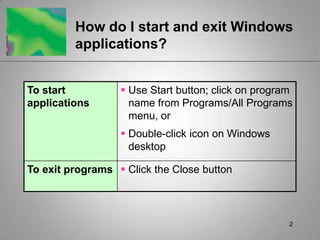
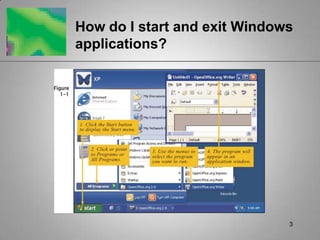
2How do I start and exit Windows applications?
3How do I start and exit Windows applications?
4How do I start and exit Windows applications? Close unused programs to free up memoryClose all programs before initiating shut down procedures
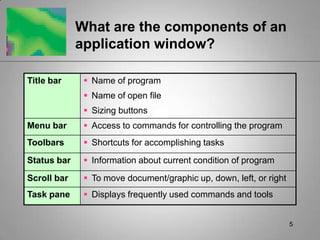
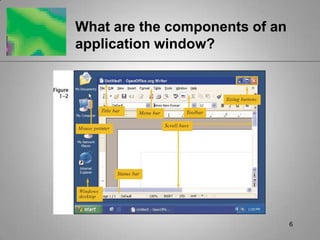
5What are the components of an application window?
6What are the components of an application window?
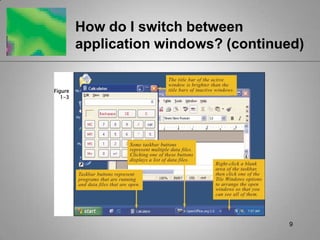
7How do I switch between application windows?Open application windows are represented by buttons on taskbarMultiple programs can be open at the same time, but only one can be activeAn active window’s title bar is highlighted
8How do I switch between application windows? (continued)Click program’s button on taskbar to bring that window to the frontClick any visible part of hidden window to make it activeClick Window on the menu bar to see a list of files and switch from one to other
9How do I switch between application windows? (continued)
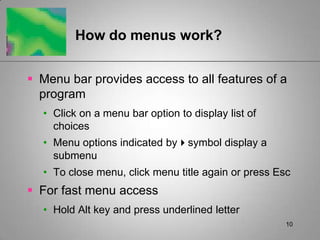
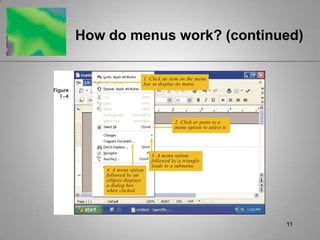
10How do menus work?Menu bar provides access to all features of a programClick on a menu bar option to display list of choicesMenu options indicated bysymbol display a submenuTo close menu, click menu title again or press EscFor fast menu accessHold Alt key and press underlined letter
11How do menus work? (continued)
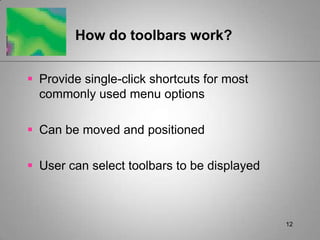
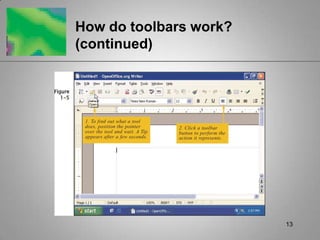
12How do toolbars work?Provide single-click shortcuts for most commonly used menu optionsCan be moved and positionedUser can select toolbars to be displayed
13How do toolbars work? (continued)
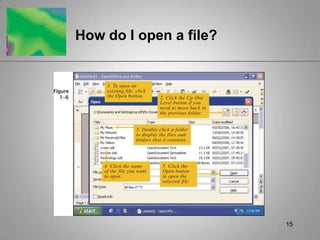
14How do I open a file?Use Documents option on Start menu to view list of recently saved filesDouble-click file shortcut icon (if one exists) on Windows desktopDouble-click file name from within Windows ExplorerUse Open dialog box from application’s File menu
15How do I open a file?
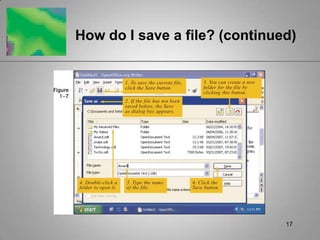
16How do I save a file?Click Save buttonIf file was previously savedAutomatically stores file using original name, drive, and folder where previously storedIf file hasn’t been saved beforeOpens Save as dialog boxUser selects desired drive and folder, enters file name, clicks Save button
17How do I save a file? (continued)
18How do I save a file? (continued)File namesAcceptable characters are letters, spaces, numbers, certain punctuation symbolsUnacceptable characters are / ? : + < > |Maximum length: 255Cannot be duplicated in a particular folder
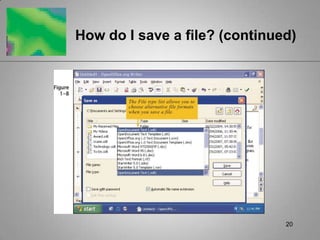
19How do I save a file? (continued)User has full control over destination of files (e.g., My Documents, any storage device, a network)Windows automatically adds appropriate file extensionUser can change format using File type list in Save as dialog box
20How do I save a file? (continued)
21How do I save a file? (continued)Options for saving a document as a templateUse Save as dialog boxStores template in My Documents folderUse Templates/Save option from File menuStores template in Template folder
22How do I access help for an application?On-screen Help windows (most frequently used)Additional documentation (printed user manual, CD, third-party reference books)Online user groups or publisher’s Web siteOrganization’s Help desk (for work-related procedures)Co-workers and friends
23OpenOffice.org SuiteMain ComponentsWriter: Word processing with desktop publishing featuresCalc: Spreadsheet calculationsBase: DatabaseImpress: PresentationsCan open and edit Microsoft Office files, then save back to original format

Getting Started - The Basics

  • 1.
    Getting Started withApplication SoftwareThe Basics
  • 2.
    2How do Istart and exit Windows applications?
  • 3.
    3How do Istart and exit Windows applications?
  • 4.
    4How do Istart and exit Windows applications? Close unused programs to free up memoryClose all programs before initiating shut down procedures
  • 5.
    5What are thecomponents of an application window?
  • 6.
    6What are thecomponents of an application window?
  • 7.
    7How do Iswitch between application windows?Open application windows are represented by buttons on taskbarMultiple programs can be open at the same time, but only one can be activeAn active window’s title bar is highlighted
  • 8.
    8How do Iswitch between application windows? (continued)Click program’s button on taskbar to bring that window to the frontClick any visible part of hidden window to make it activeClick Window on the menu bar to see a list of files and switch from one to other
  • 9.
    9How do Iswitch between application windows? (continued)
  • 10.
    10How do menuswork?Menu bar provides access to all features of a programClick on a menu bar option to display list of choicesMenu options indicated bysymbol display a submenuTo close menu, click menu title again or press EscFor fast menu accessHold Alt key and press underlined letter
  • 11.
    11How do menuswork? (continued)
  • 12.
    12How do toolbarswork?Provide single-click shortcuts for most commonly used menu optionsCan be moved and positionedUser can select toolbars to be displayed
  • 13.
    13How do toolbarswork? (continued)
  • 14.
    14How do Iopen a file?Use Documents option on Start menu to view list of recently saved filesDouble-click file shortcut icon (if one exists) on Windows desktopDouble-click file name from within Windows ExplorerUse Open dialog box from application’s File menu
  • 15.
    15How do Iopen a file?
  • 16.
    16How do Isave a file?Click Save buttonIf file was previously savedAutomatically stores file using original name, drive, and folder where previously storedIf file hasn’t been saved beforeOpens Save as dialog boxUser selects desired drive and folder, enters file name, clicks Save button
  • 17.
    17How do Isave a file? (continued)
  • 18.
    18How do Isave a file? (continued)File namesAcceptable characters are letters, spaces, numbers, certain punctuation symbolsUnacceptable characters are / ? : + < > |Maximum length: 255Cannot be duplicated in a particular folder
  • 19.
    19How do Isave a file? (continued)User has full control over destination of files (e.g., My Documents, any storage device, a network)Windows automatically adds appropriate file extensionUser can change format using File type list in Save as dialog box
  • 20.
    20How do Isave a file? (continued)
  • 21.
    21How do Isave a file? (continued)Options for saving a document as a templateUse Save as dialog boxStores template in My Documents folderUse Templates/Save option from File menuStores template in Template folder
  • 22.
    22How do Iaccess help for an application?On-screen Help windows (most frequently used)Additional documentation (printed user manual, CD, third-party reference books)Online user groups or publisher’s Web siteOrganization’s Help desk (for work-related procedures)Co-workers and friends
  • 23.
    23OpenOffice.org SuiteMain ComponentsWriter:Word processing with desktop publishing featuresCalc: Spreadsheet calculationsBase: DatabaseImpress: PresentationsCan open and edit Microsoft Office files, then save back to original format