
Get Social
  With Social Media
Basics, Tips, & Tactics for Connecting
   and Growing Your Business on

Twitter and Facebook
         Presented by Colleen Foshee


            Powerpoint Templates
                                         Page 1
Expect to learn:
• Your way around the Twitter Platform

• Your way around the Facebook Page

• Tactics for making the most of your
  time on Twitter and Facebook.


              Powerpoint Templates
                                        Page 2
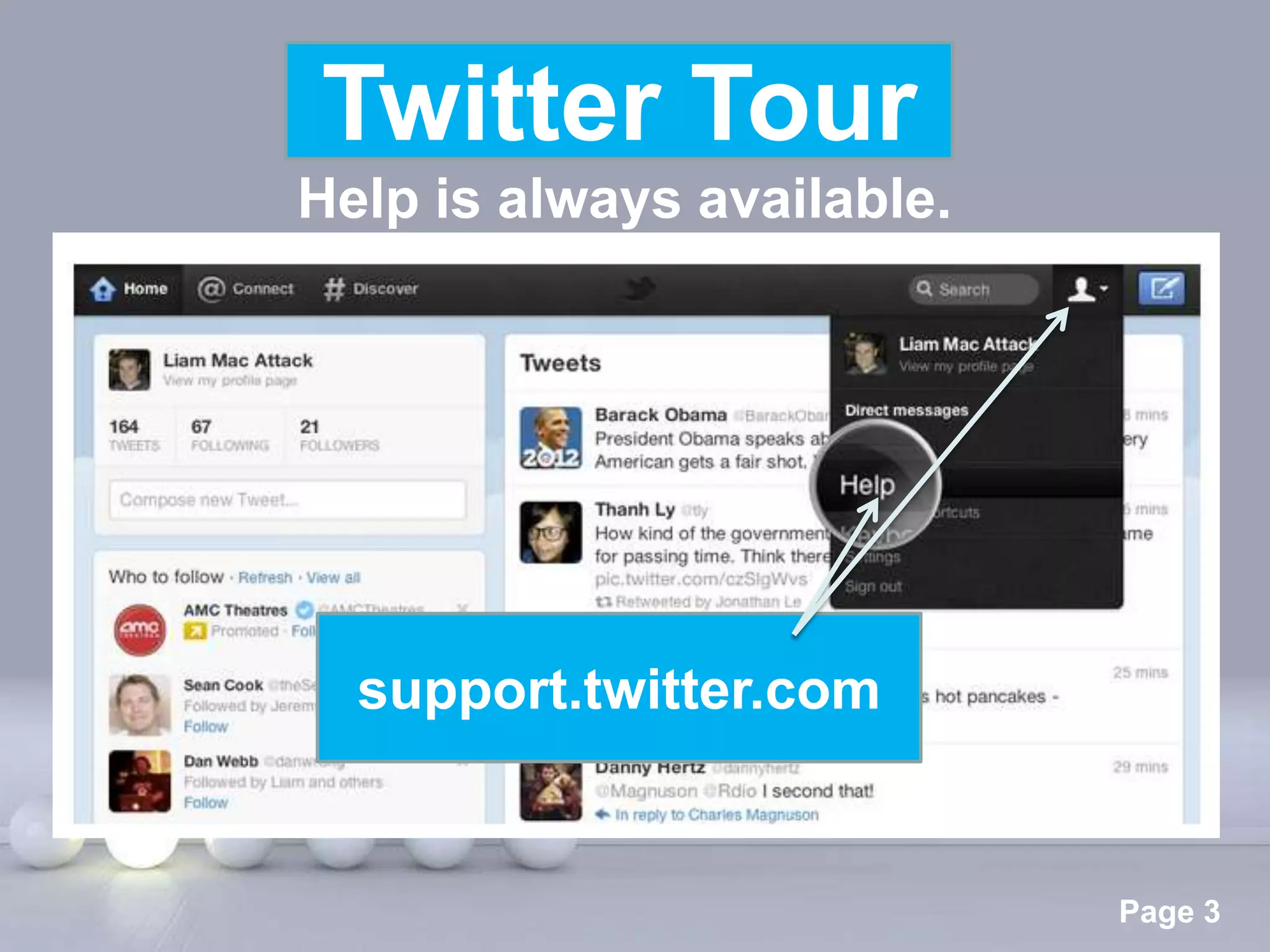
Twitter Tour
Twitter Tour
Help is always available.


  support.twitter.com


      Powerpoint Templates
                             Page 3
Twitter Page Tour


    Powerpoint Templates
                           Page 4
Twitter Page Tour
                          Page Essentials

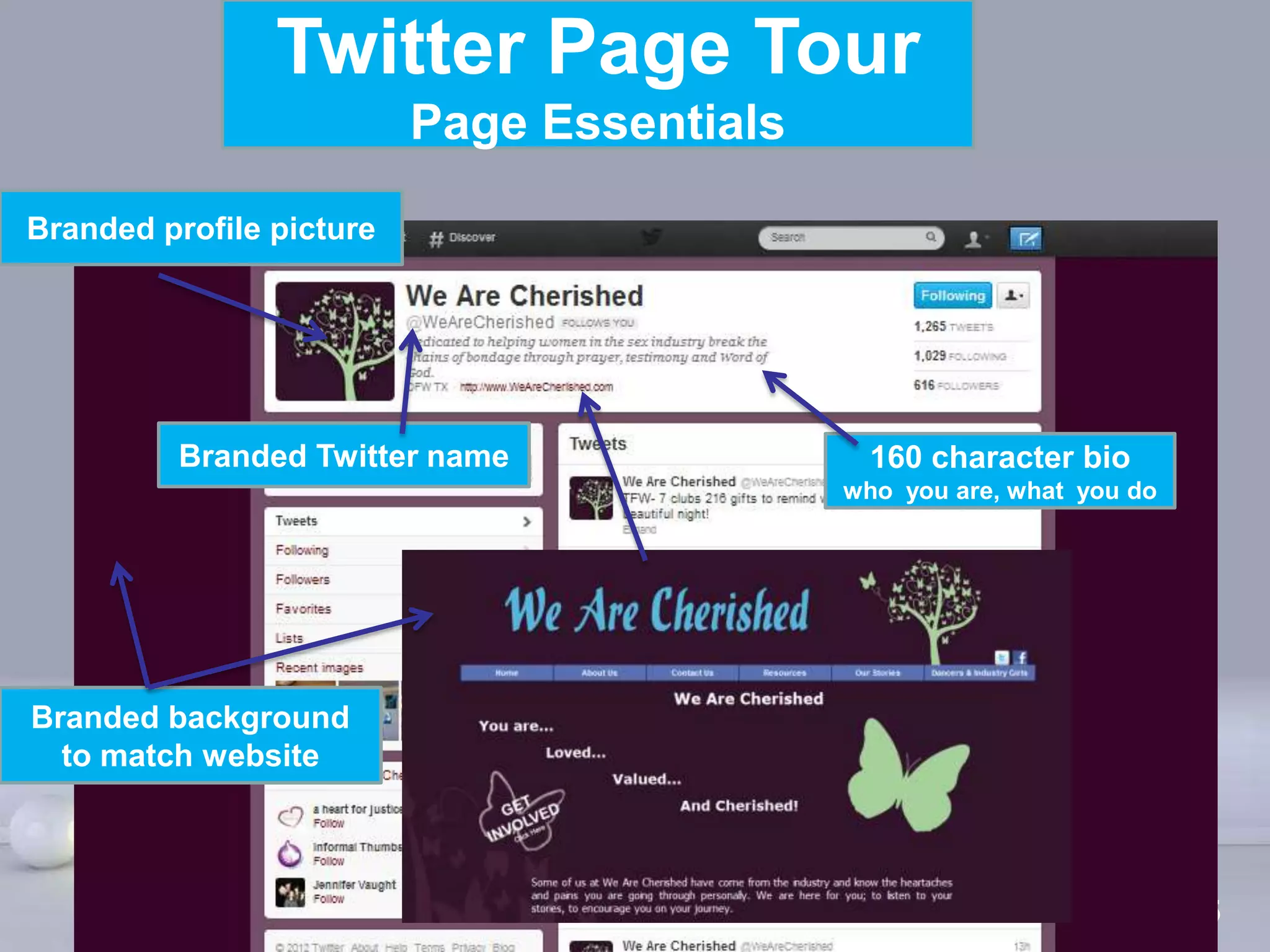
Branded profile picture


          Branded Twitter name                       160 character bio
                                                   who you are, what you do


Branded background
  to match website


                            Powerpoint Templates
                                                                        Page 5
Twitter Page Tour
           Other Basic Page Components


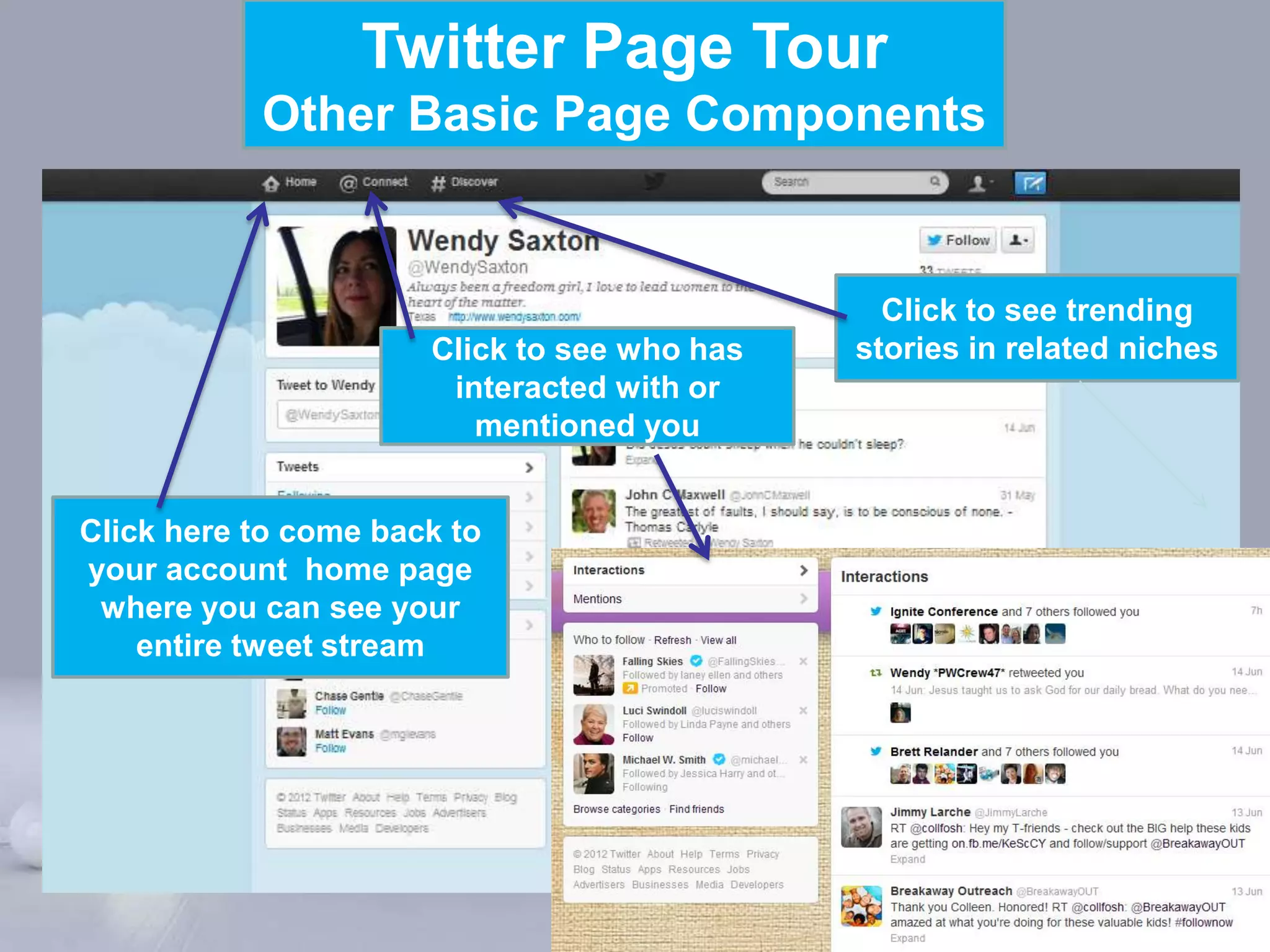
                                                  Click to see trending
                      Click to see who has      stories in related niches
                       interacted with or
                         mentioned you


Click here to come back to
your account home page
 where you can see your
    entire tweet stream


                         Powerpoint Templates
                                                                  Page 6
Twitter Page Tour
           Other Basic Page Components


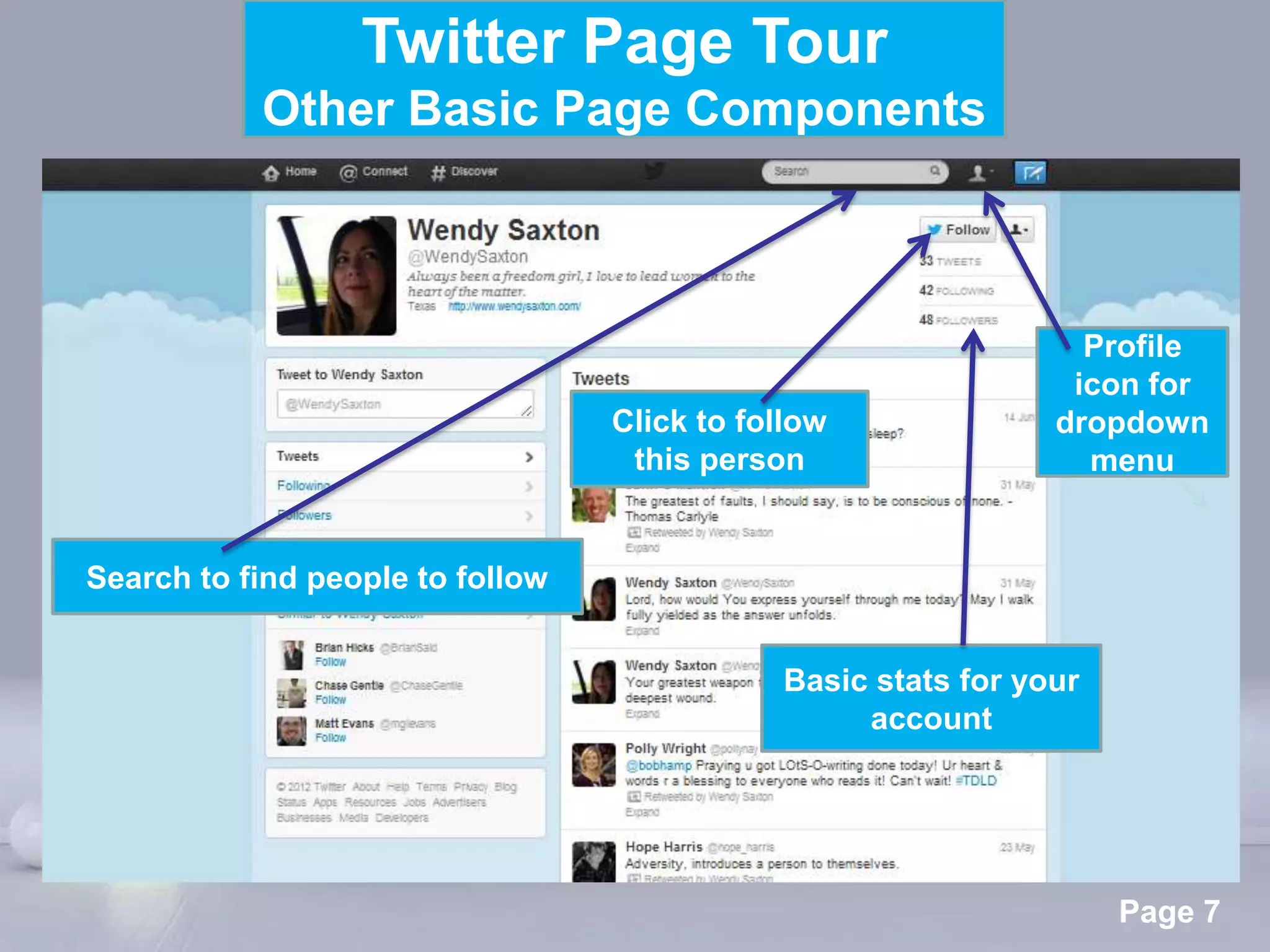
                                                                 Profile
                                                                icon for
                                  Click to follow              dropdown
                                   this person                   menu


Search to find people to follow


                                             Basic stats for your
                                                  account


                          Powerpoint Templates
                                                                    Page 7
Twitter Page Tour
         “Profile Page” Basics


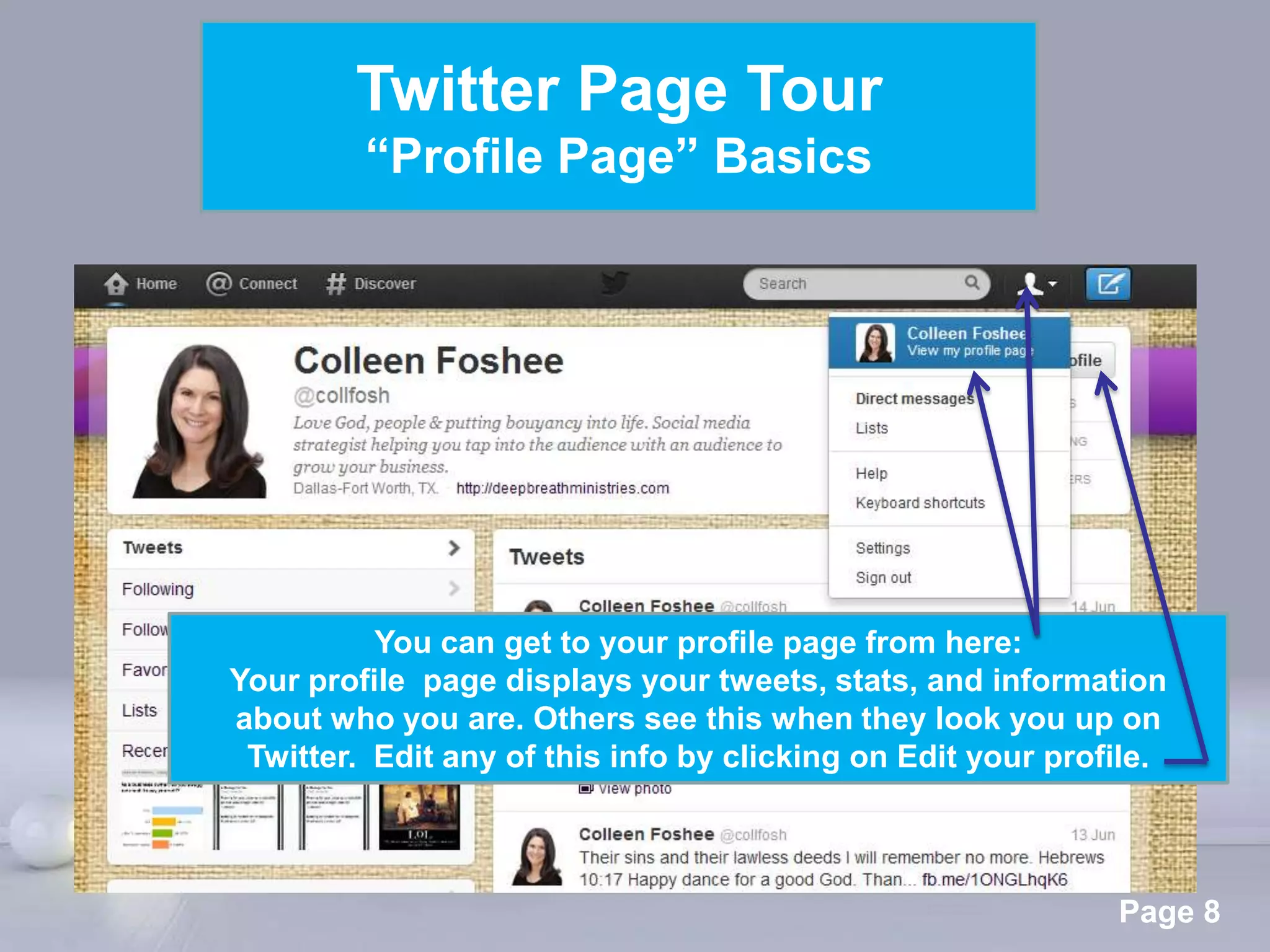
          You can get to your profile page from here:
Your profile page displays your tweets, stats, and information
about who you are. Others see this when they look you up on
 Twitter. Edit any of this info by clicking on Edit your profile.


                 Powerpoint Templates
                                                             Page 8
Twitter Page Tour
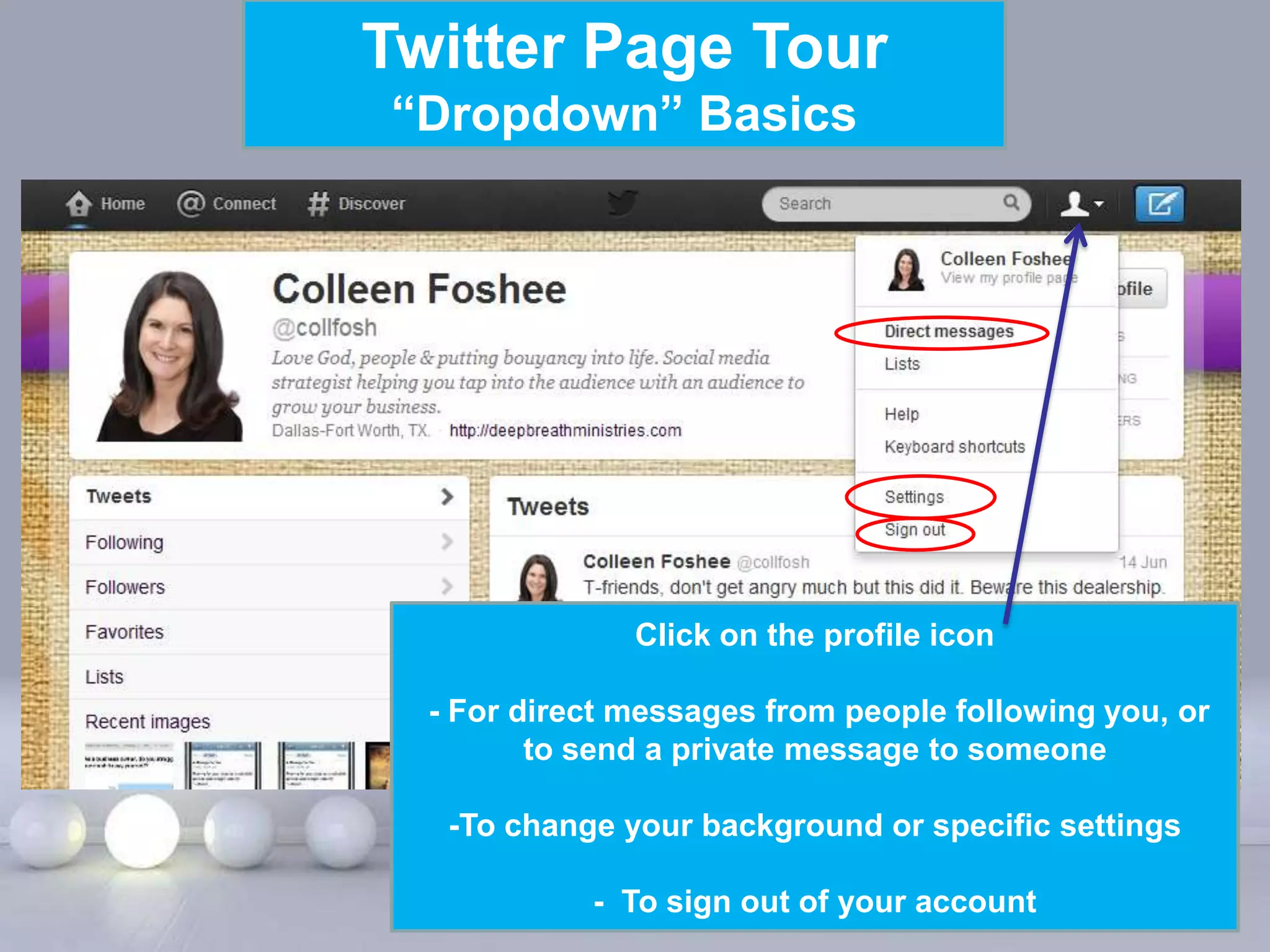
“Dropdown” Basics


               Click on the profile icon

  - For direct messages from people following you, or
         to send a private message to someone

   -To change your background or specific settings

     Powerpoint Templates of your account
           - To sign out                       Page 9
Twitter Page Tour
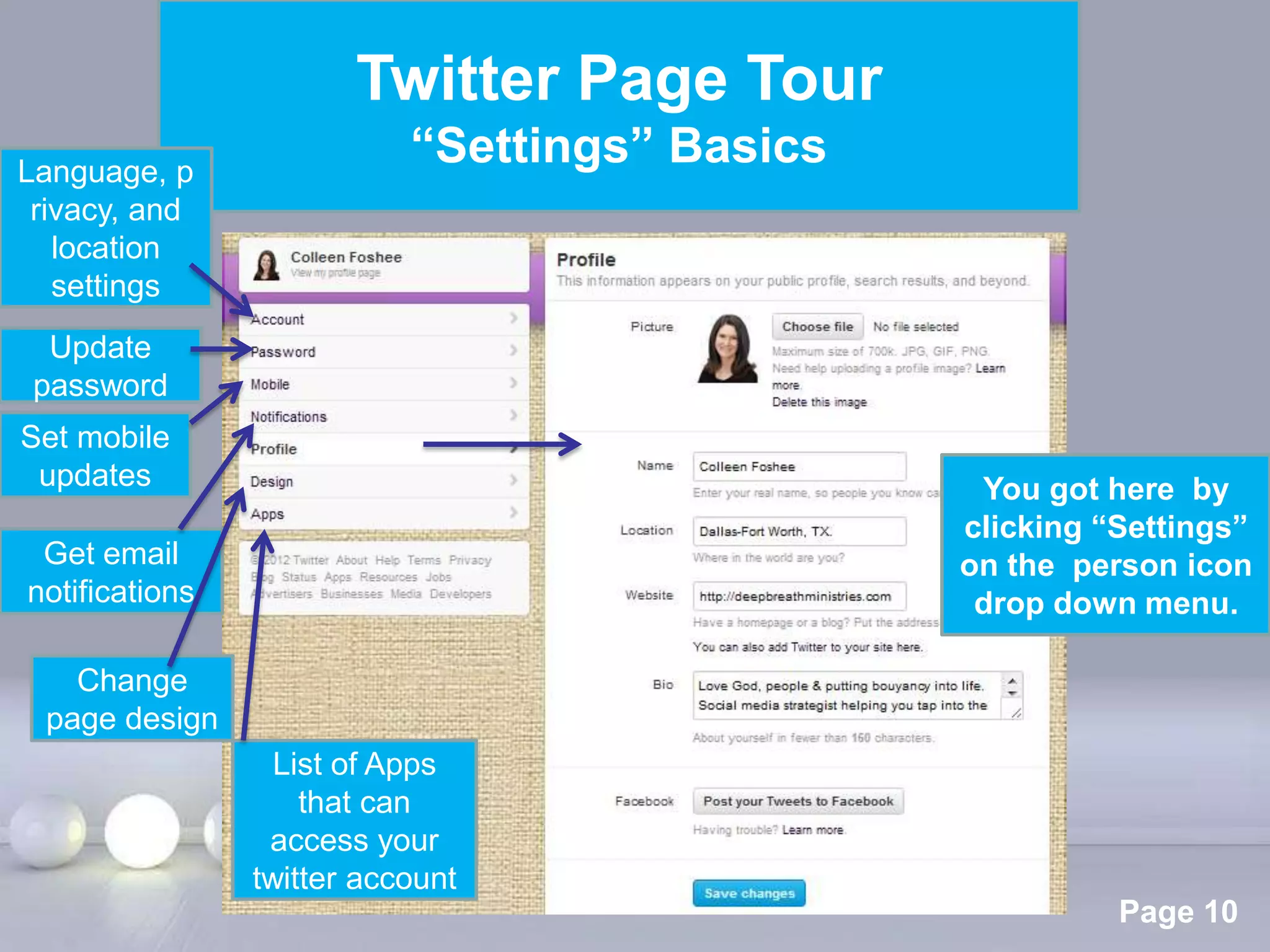
Language, p
                          “Settings” Basics
 rivacy, and
   location
   settings
  Update
 password
Set mobile
 updates                                                You got here by
                                                       clicking “Settings”
 Get email                                             on the person icon
notifications                                           drop down menu.

   Change
 page design
                  List of Apps
                    that can
                 access your
                twitter account Powerpoint Templates
                                                                 Page 10
Twitter Page Tour
                          “Email” Basics


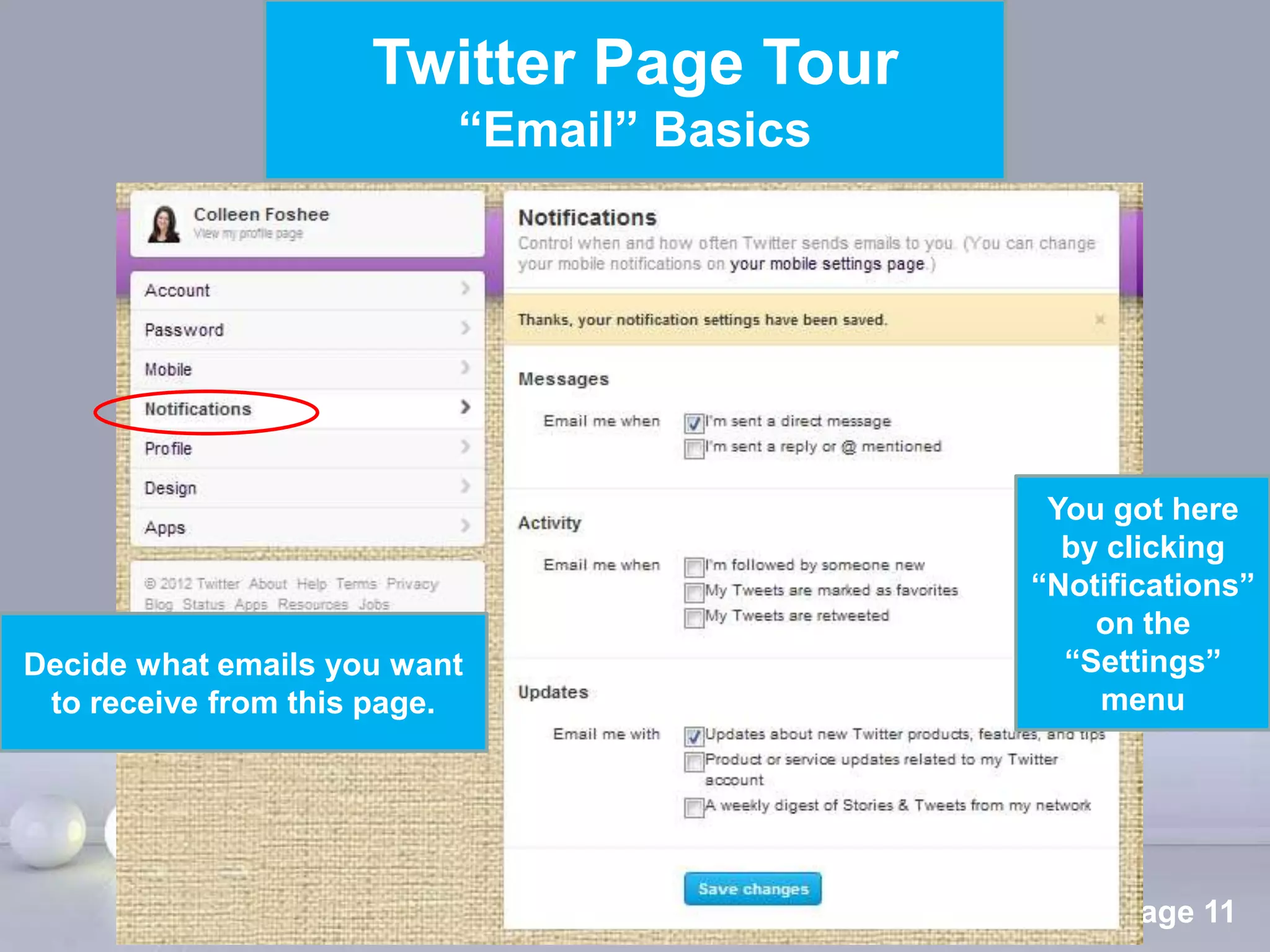
                                                      You got here
                                                       by clicking
                                                     “Notifications”
                                                         on the
Decide what emails you want                            “Settings”
 to receive from this page.                              menu


                              Powerpoint Templates
                                                          Page 11
Twitter Activity Tour


      Powerpoint Templates
                             Page 12
Twitter Activity Tour
                 How to tweet


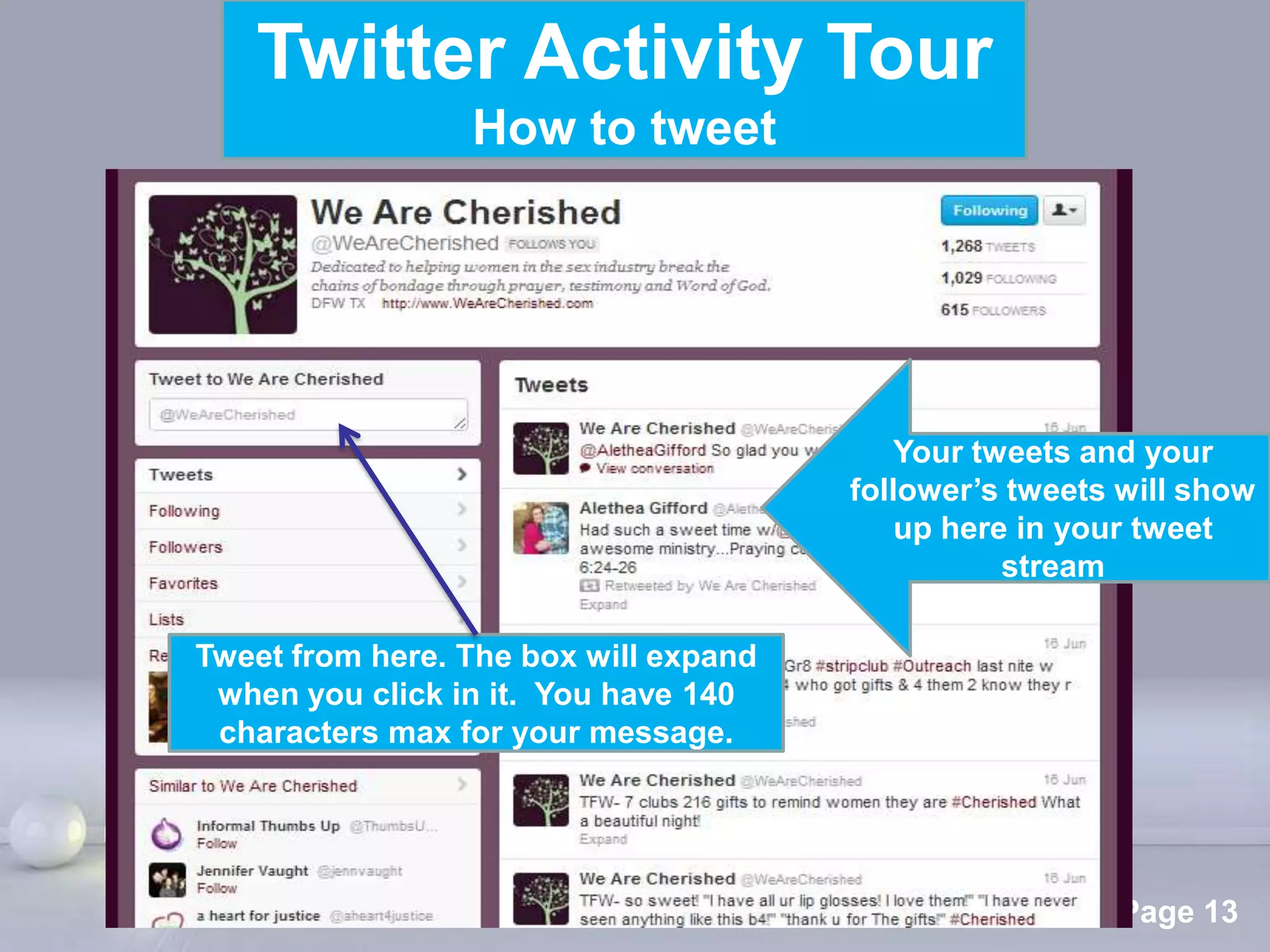
                                            Your tweets and your
                                         follower’s tweets will show
                                             up here in your tweet
                                                    stream

Tweet from here. The box will expand
 when you click in it. You have 140
 characters max for your message.


                  Powerpoint Templates
                                                          Page 13
Twitter Activity Tour
                           How to tweet


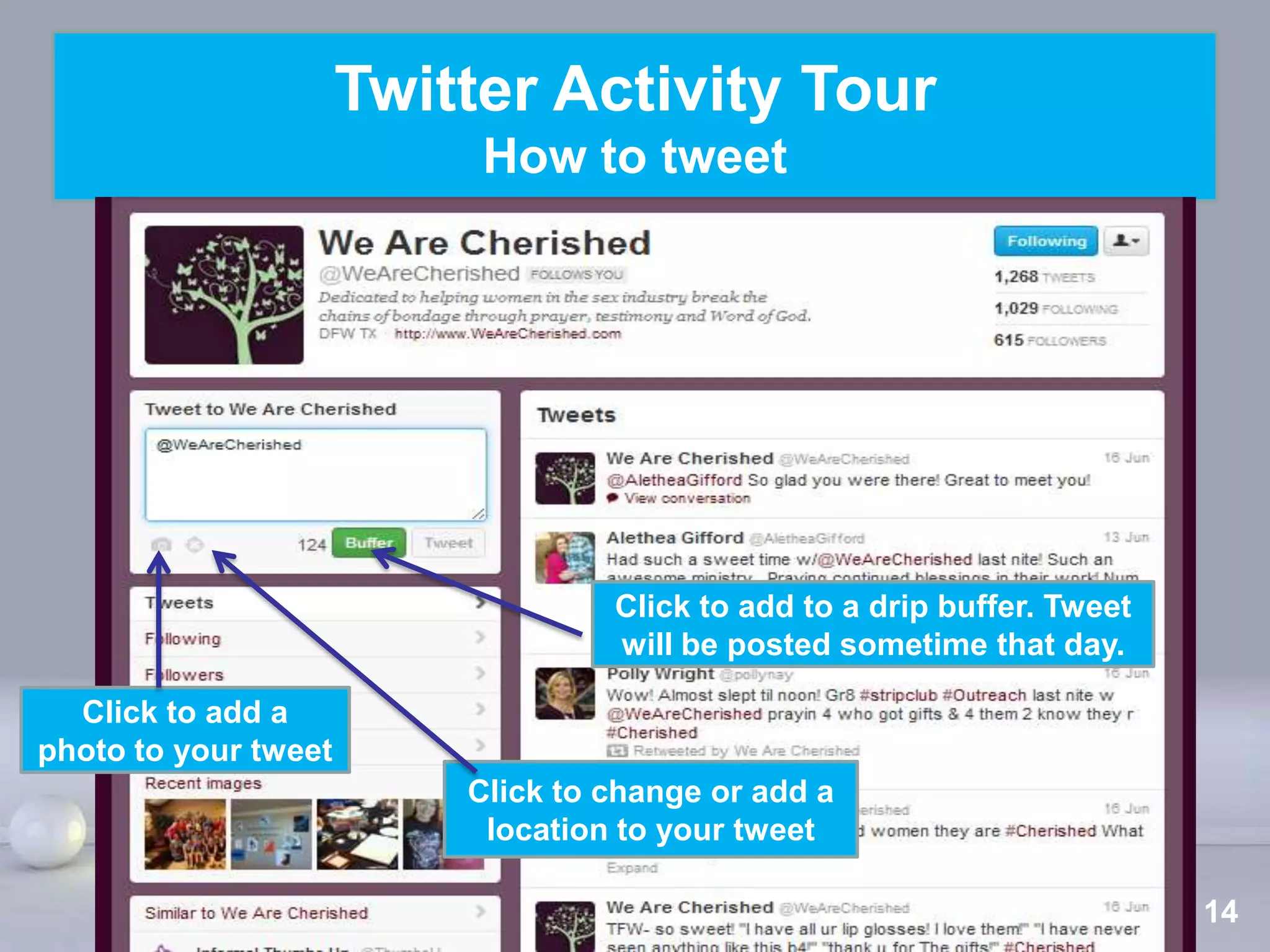
                                   Click to add to a drip buffer. Tweet
                                   will be posted sometime that day.

  Click to add a
photo to your tweet
                          Click to change or add a
                           location to your tweet
                           Powerpoint Templates
                                                                      Page 14
Twitter Activity Tour
                               How to tweet


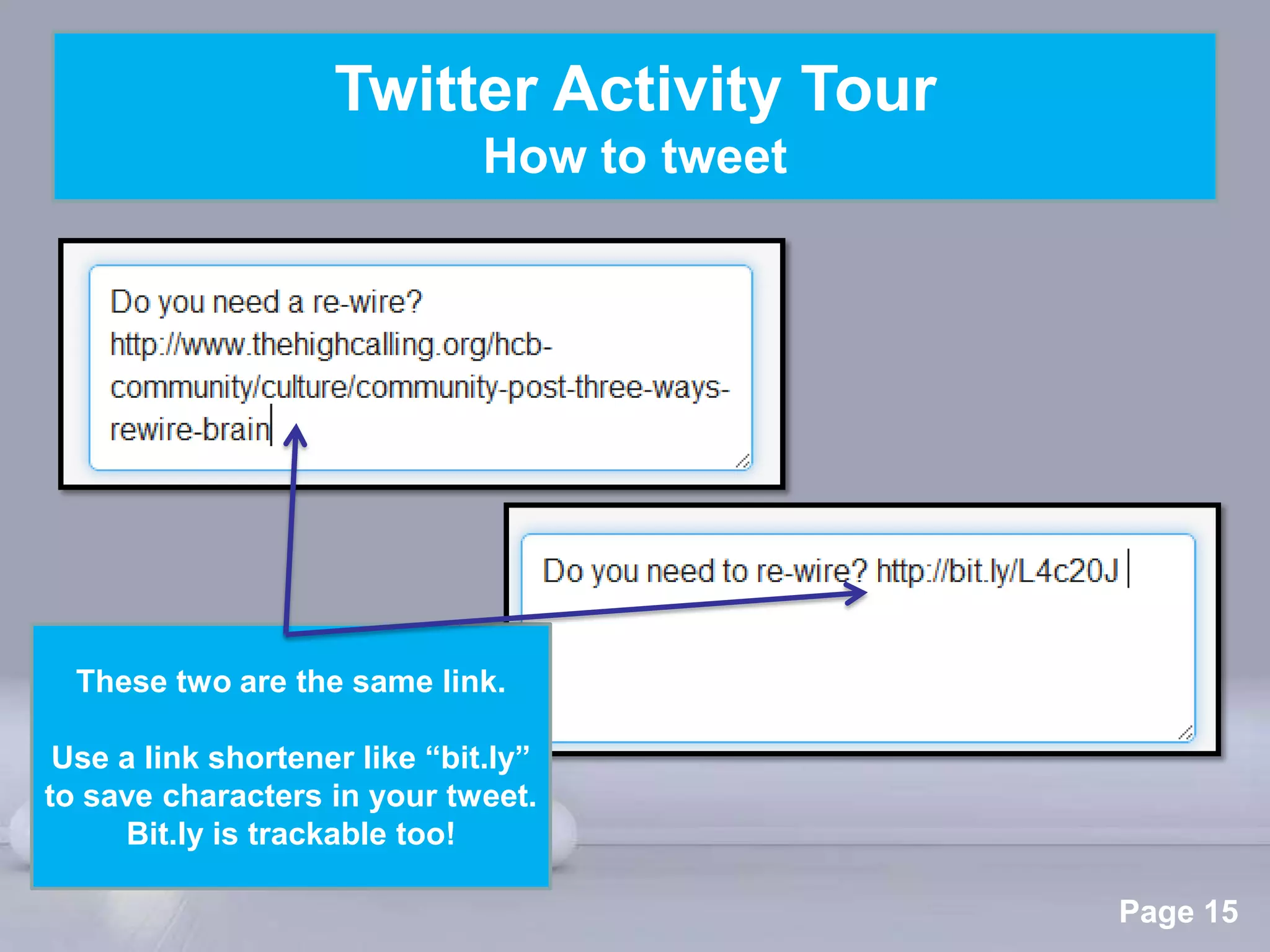
  These two are the same link.

 Use a link shortener like “bit.ly”
to save characters in your tweet.
     Bit.ly is trackable too!
                              Powerpoint Templates
                                                     Page 15
Twitter Activity Tour
                                “Replies”


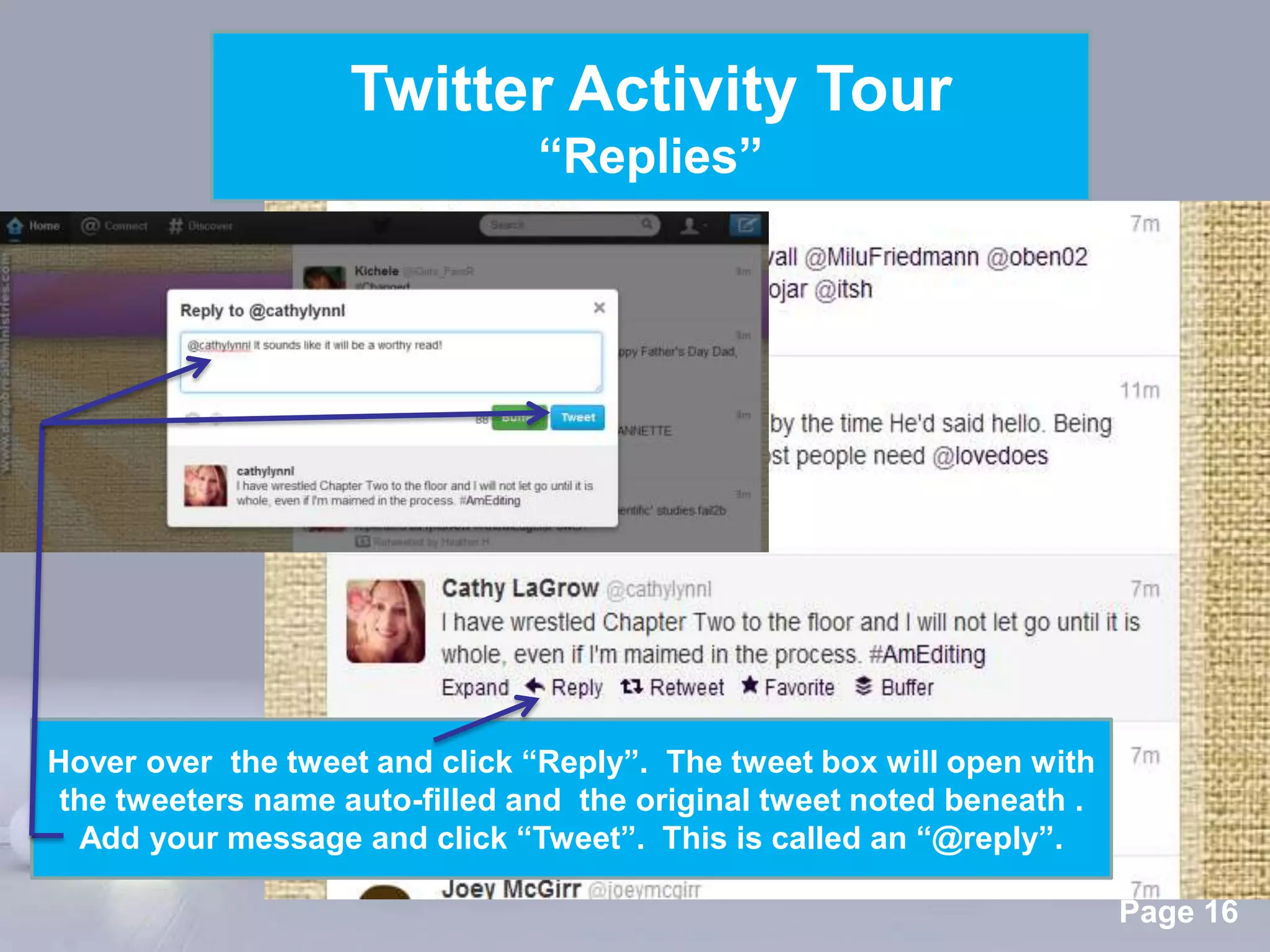
Hover over the tweet and click “Reply”. The tweet box will open with
 the tweeters name auto-filled and the original tweet noted beneath .
  Add your message and click “Tweet”. This is called an “@reply”.
                            Powerpoint Templates
                                                                        Page 16
Twitter Activity Tour
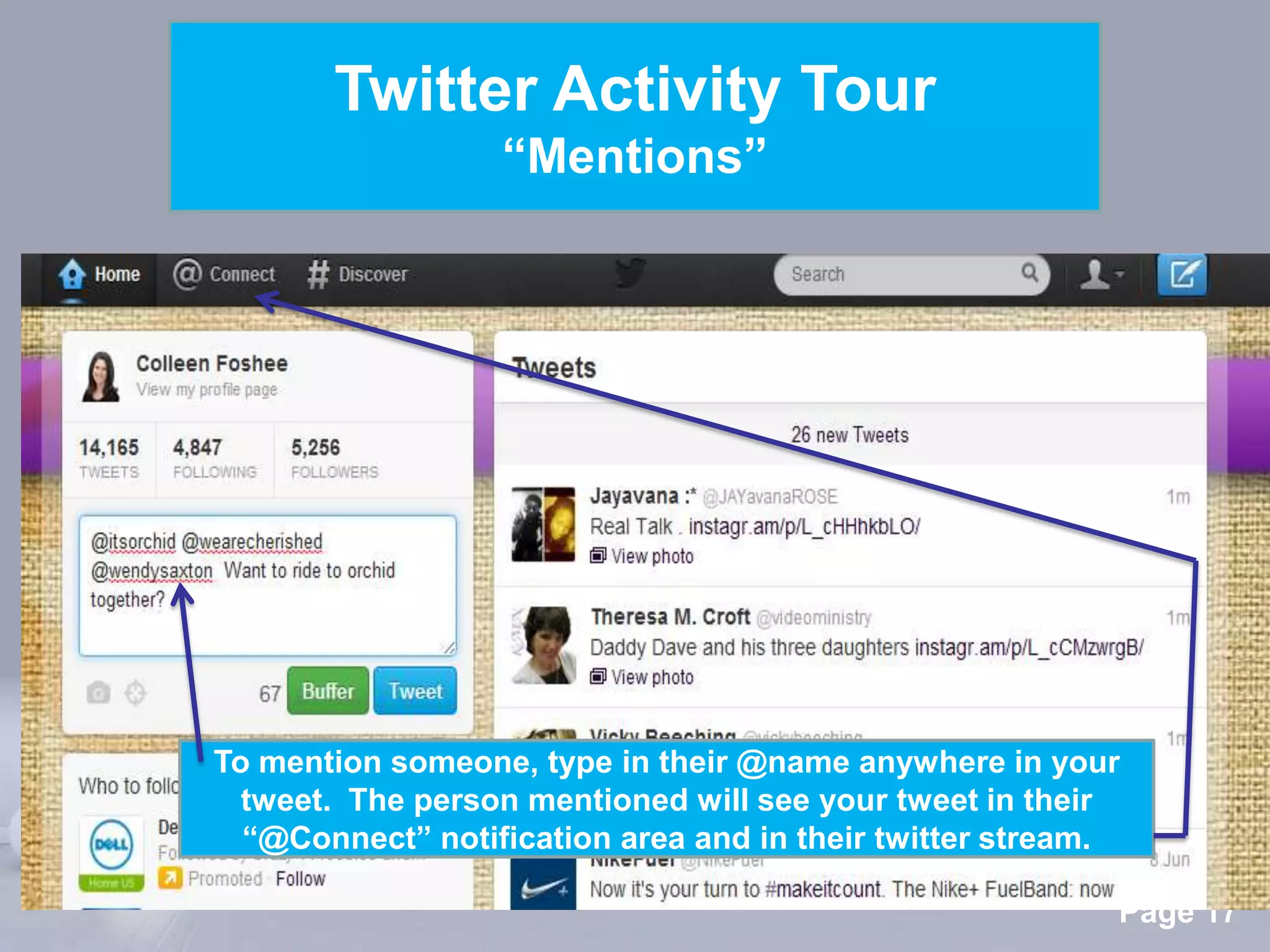
                  “Mentions”


To mention someone, type in their @name anywhere in your
  tweet. The person mentioned will see your tweet in their
  “@Connect” notification area and in their twitter stream.
                 Powerpoint Templates
                                                          Page 17
Twitter Activity Tour
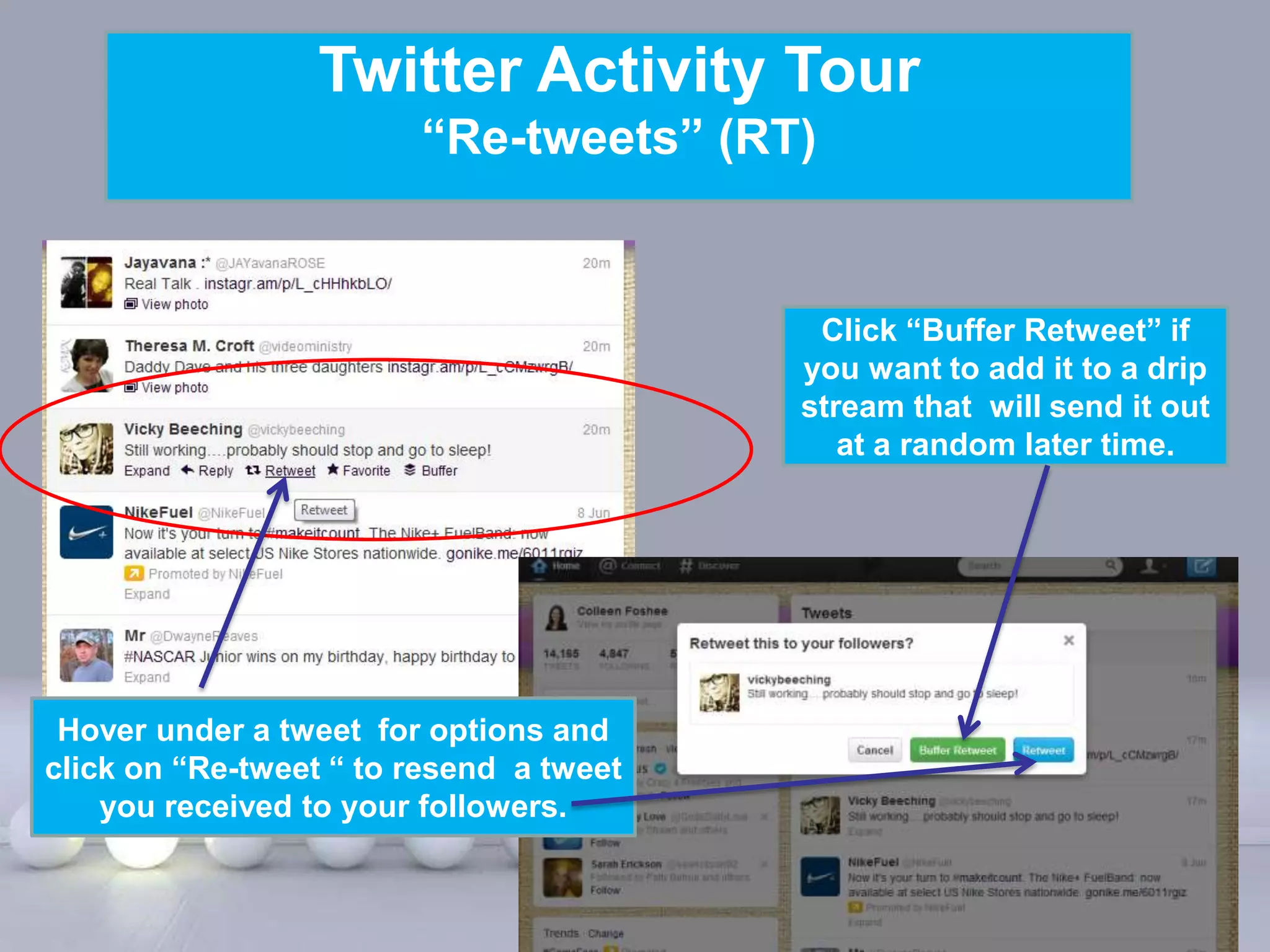
                        “Re-tweets” (RT)


                                                    Click “Buffer Retweet” if
                                                   you want to add it to a drip
                                                   stream that will send it out
                                                      at a random later time.


 Hover under a tweet for options and
click on “Re-tweet “ to resend a tweet
    you received to your followers.

                            Powerpoint Templates
                                                                        Page 18
Twitter Activity Tour
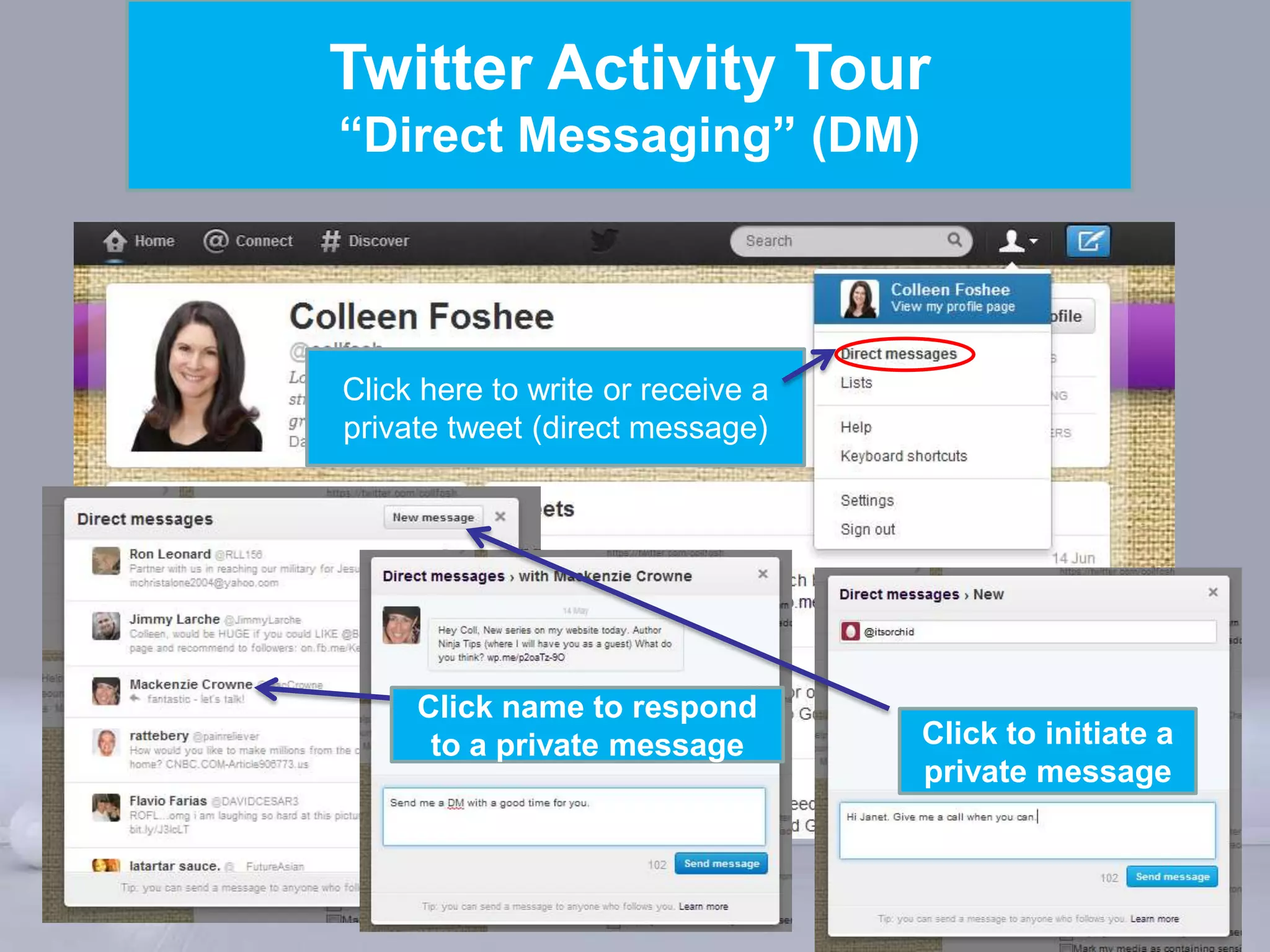
“Direct Messaging” (DM)


Click here to write or receive a
private tweet (direct message)


     Click name to respond
      to a private message         Click to initiate a
                                   private message


          Powerpoint Templates
                                                 Page 19
Twitter Activity Tour
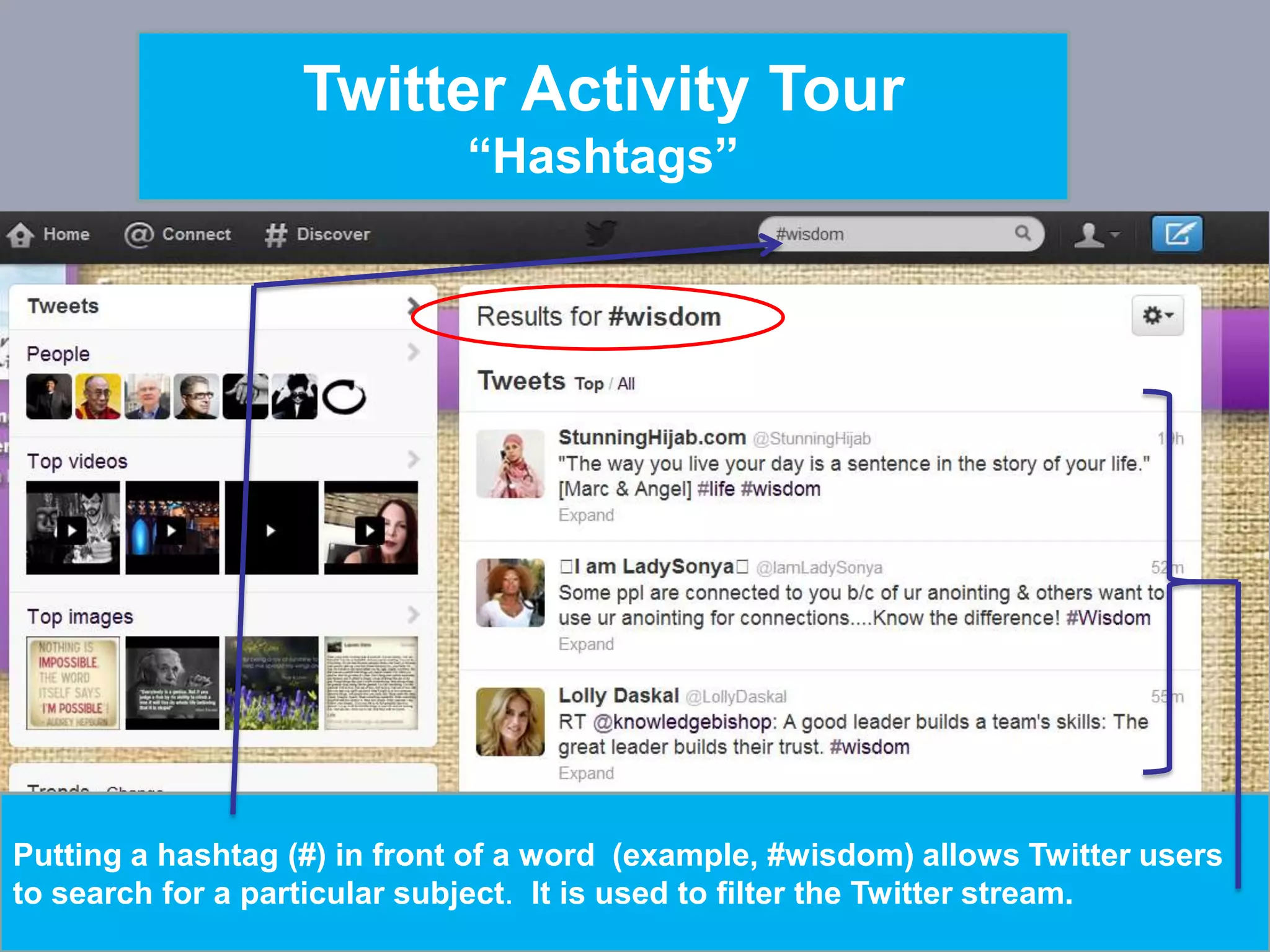
                               “Hashtags”


Putting a hashtag (#) in front of a word (example, #wisdom) allows Twitter users
                                Powerpoint Templates
to search for a particular subject. It is used to filter the Twitter stream.
                                                                             Page 20
Twitter Marketing Tour
            Why spend the time?

Twitter is an information network that can:
• Increase visits to your website
• Build personal/brand credibility
• Increase your email list
• Connect with your target audience
• Help sell your products and/or services
• Help you become a noticed thought leader

               Powerpoint Templates
                                      Page 21
Twitter Marketing Tour
           Secrets Most People Don’t Know/Do
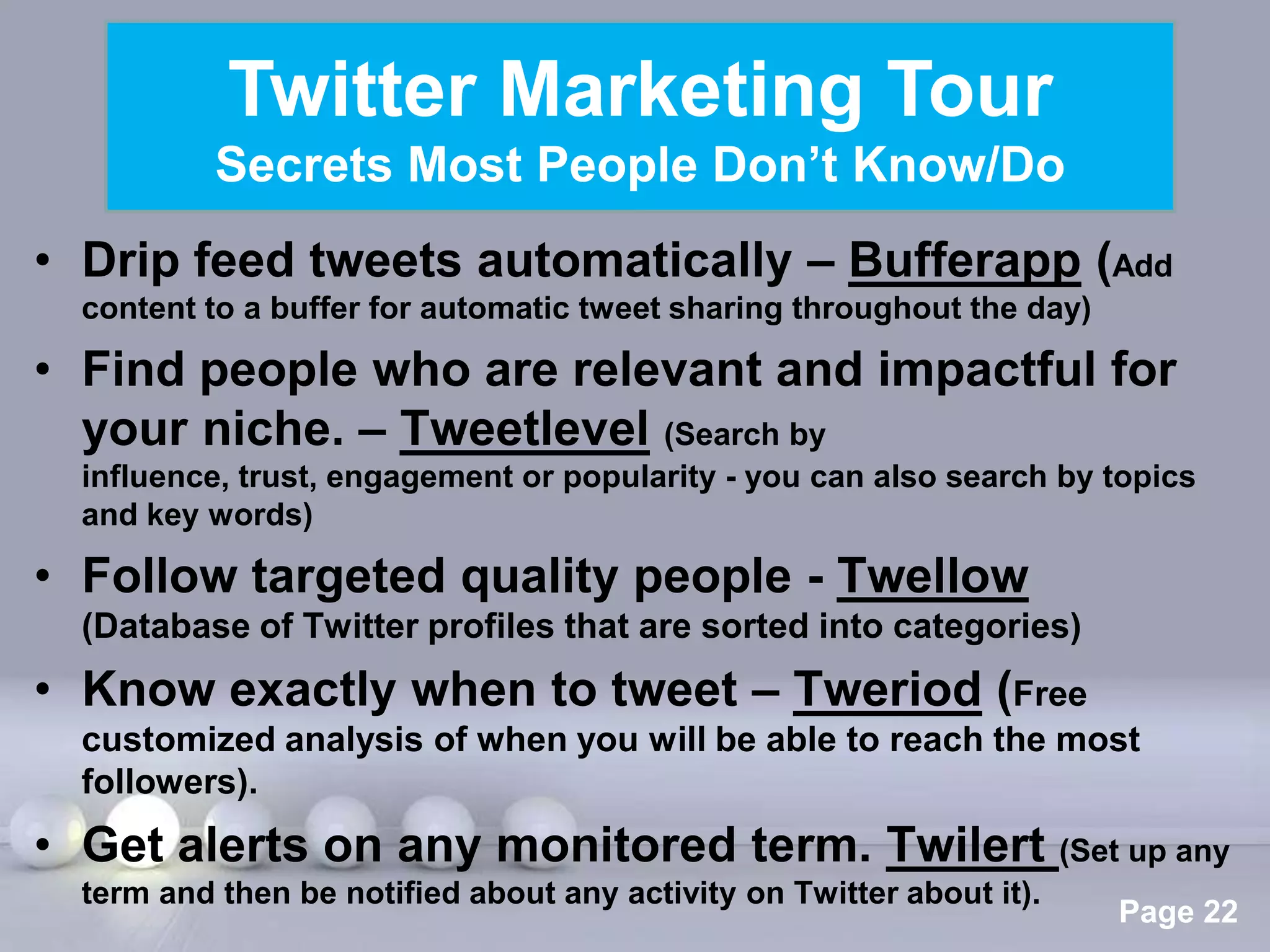
• Drip feed tweets automatically – Bufferapp (Add
  content to a buffer for automatic tweet sharing throughout the day)

• Find people who are relevant and impactful for
  your niche. – Tweetlevel (Search by
  influence, trust, engagement or popularity - you can also search by topics
  and key words)

• Follow targeted quality people - Twellow
  (Database of Twitter profiles that are sorted into categories)
• Know exactly when to tweet – Tweriod (Free
  customized analysis of when you will be able to reach the most
  followers).
• Get alerts on any monitored term. Twilert (Set up any
                            Powerpoint Templates
  term and then be notified about any activity on Twitter about it).
                                                                        Page 22
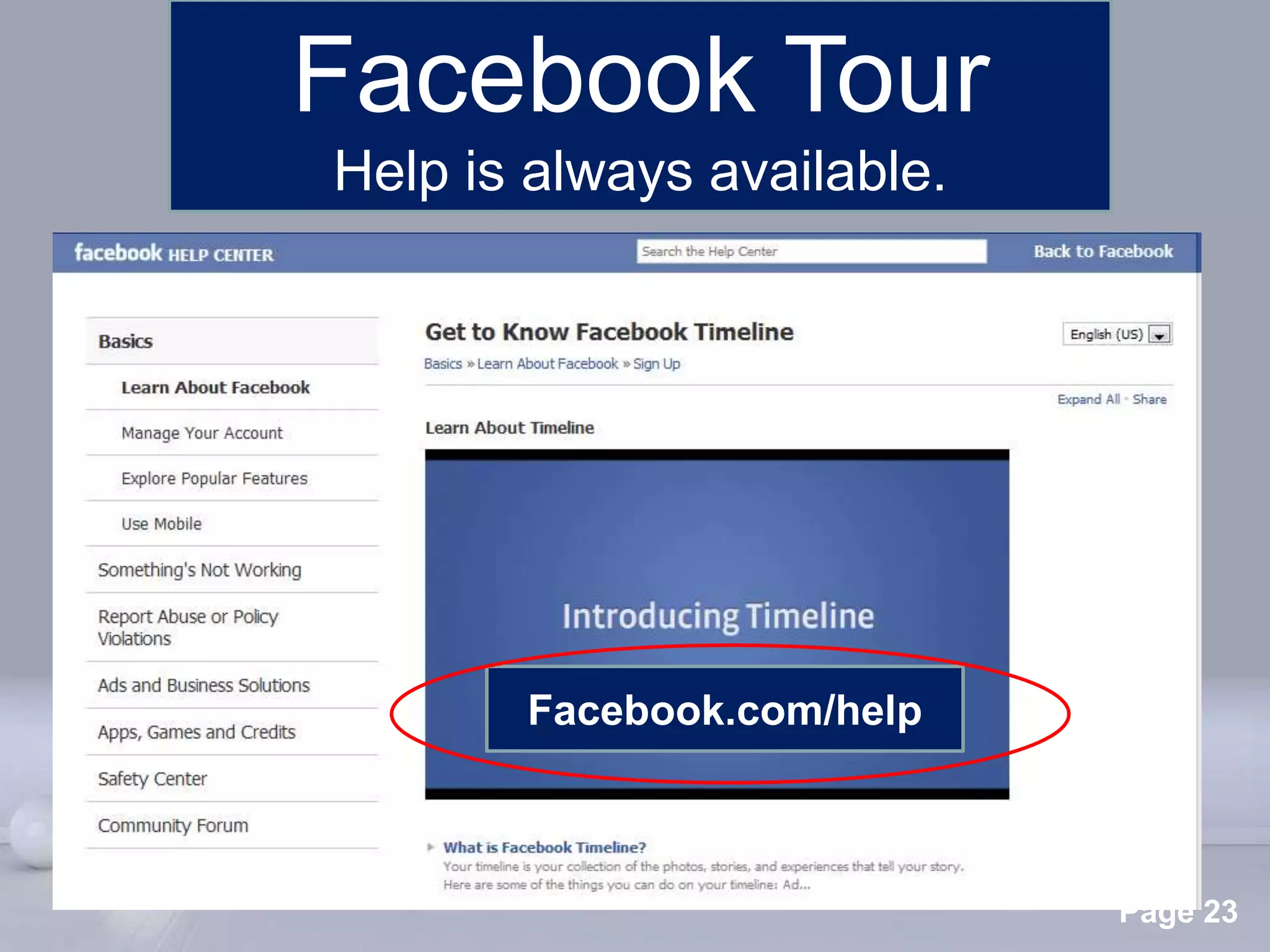
Facebook Tour
Help is always available.


        Facebook.com/help


     Powerpoint Templates
                            Page 23
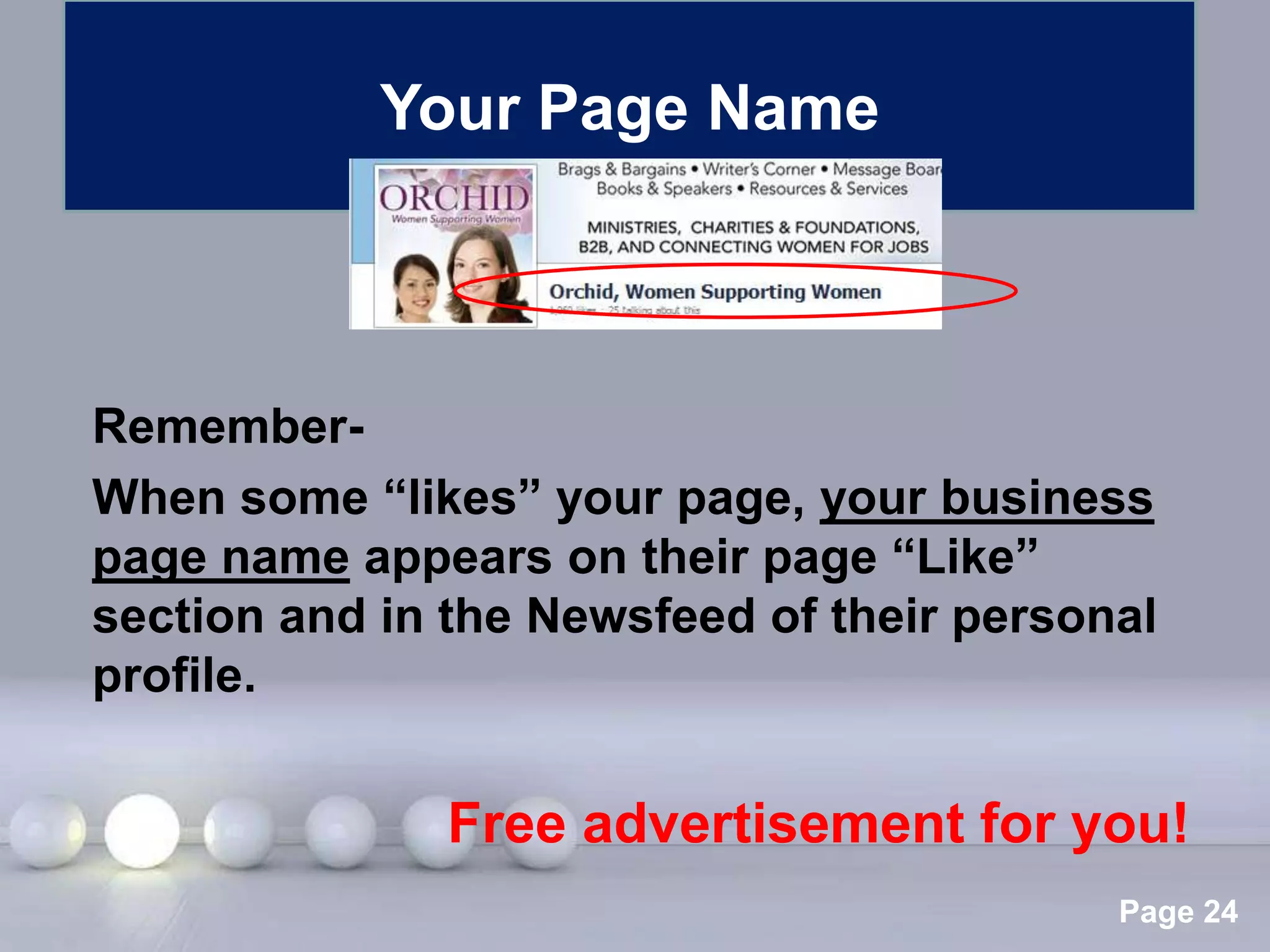
Your Page Name


Remember-
When some “likes” your page, your business
page name appears on their page “Like”
section and in the Newsfeed of their personal
profile.


               Free advertisement for you!
                Powerpoint Templates
                                           Page 24
Facebook Page Tour


     Powerpoint Templates
                            Page 25
Facebook Page Tour
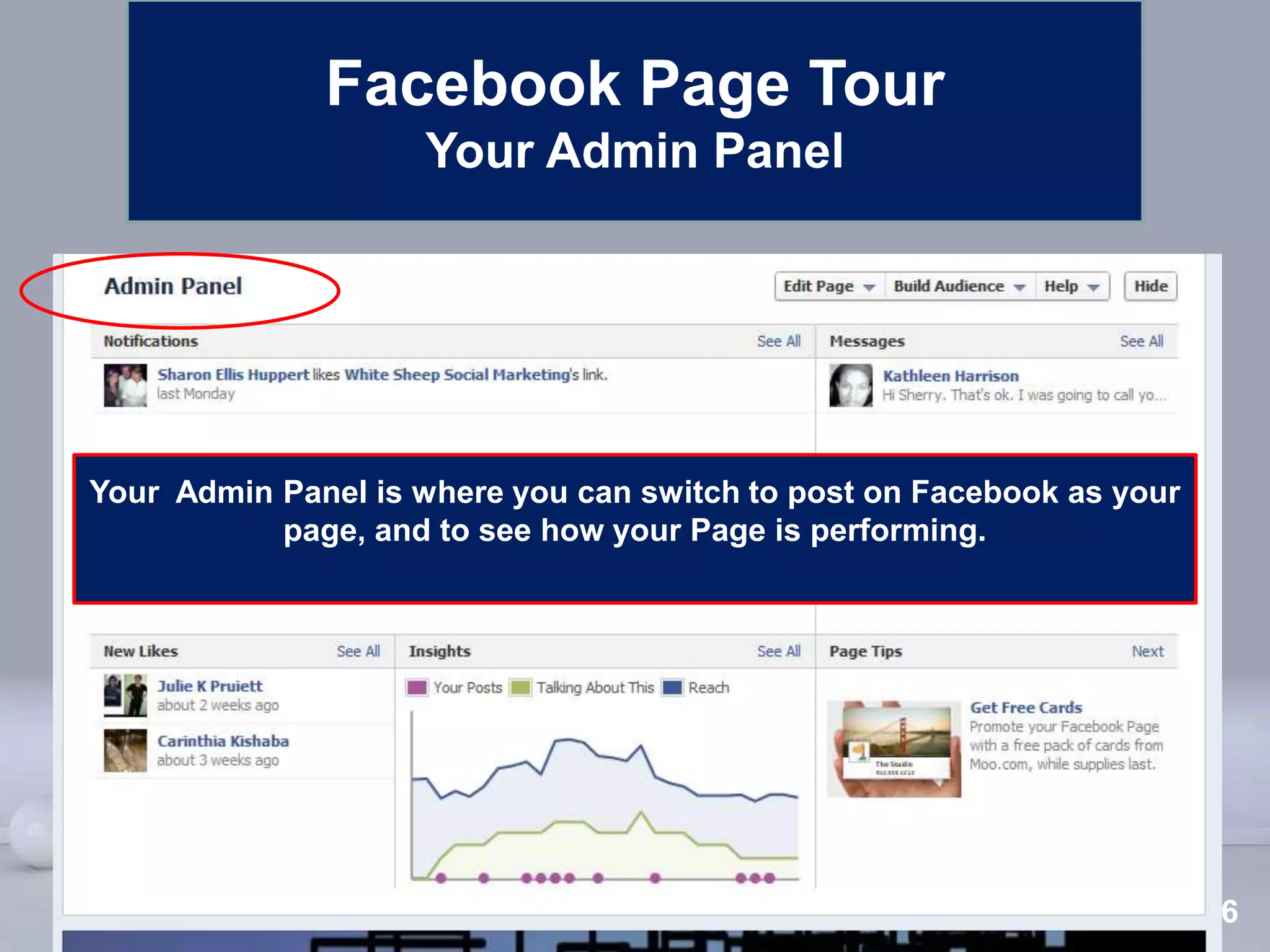
                    Your Admin Panel


Your Admin Panel is where you can switch to post on Facebook as your
           page, and to see how your Page is performing.


                        Powerpoint Templates
                                                                Page 26
Facebook Page Tour
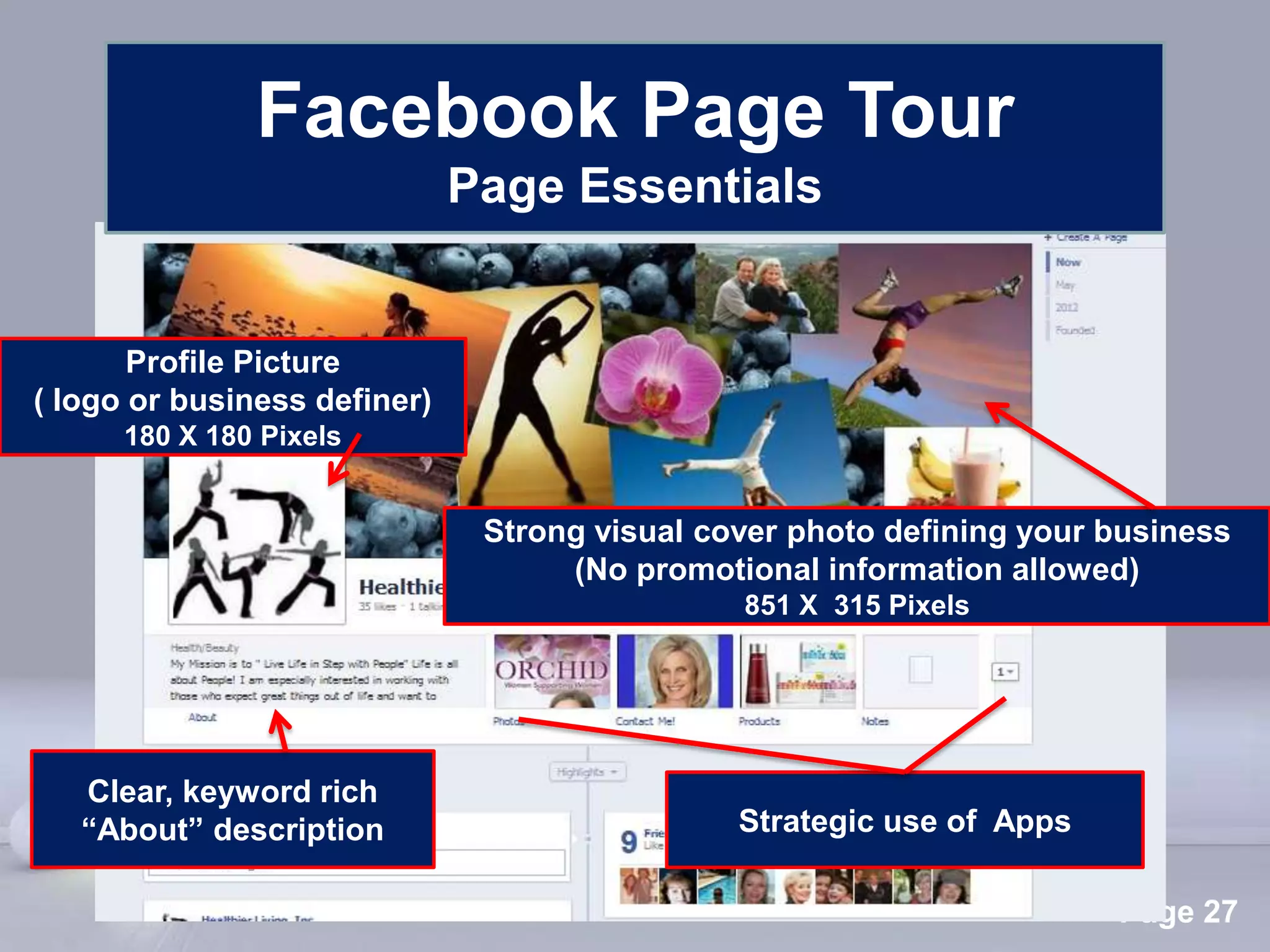
                              Page Essentials


       Profile Picture
( logo or business definer)
      180 X 180 Pixels


                               Strong visual cover photo defining your business
                                    (No promotional information allowed)
                                                851 X 315 Pixels


   Clear, keyword rich
   “About” description                         Strategic use of Apps

                               Powerpoint Templates
                                                                       Page 27
Facebook Page Tour
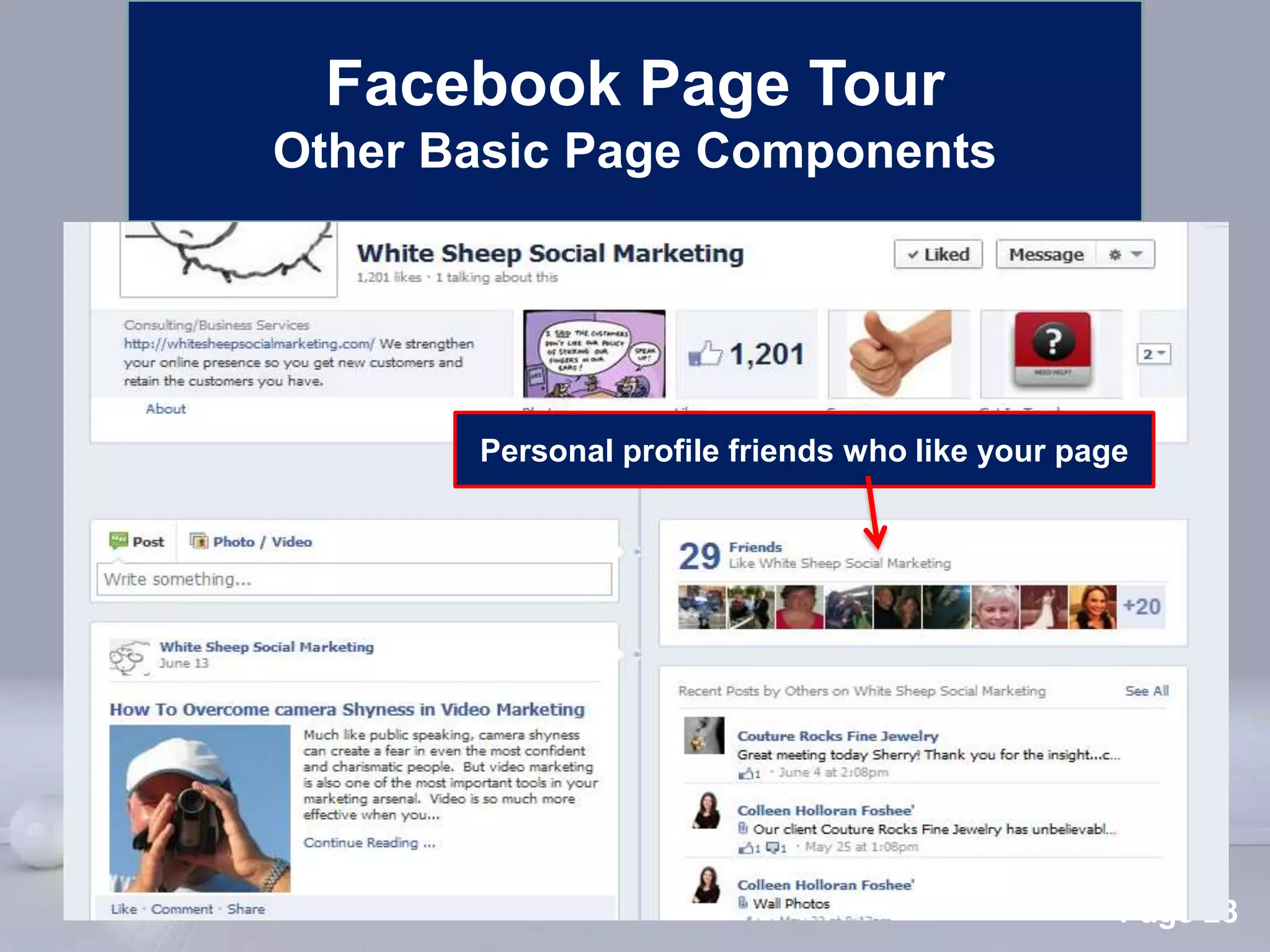
Other Basic Page Components


       Personal profile friends who like your page


       Powerpoint Templates
                                                 Page 28
Facebook Page Tour
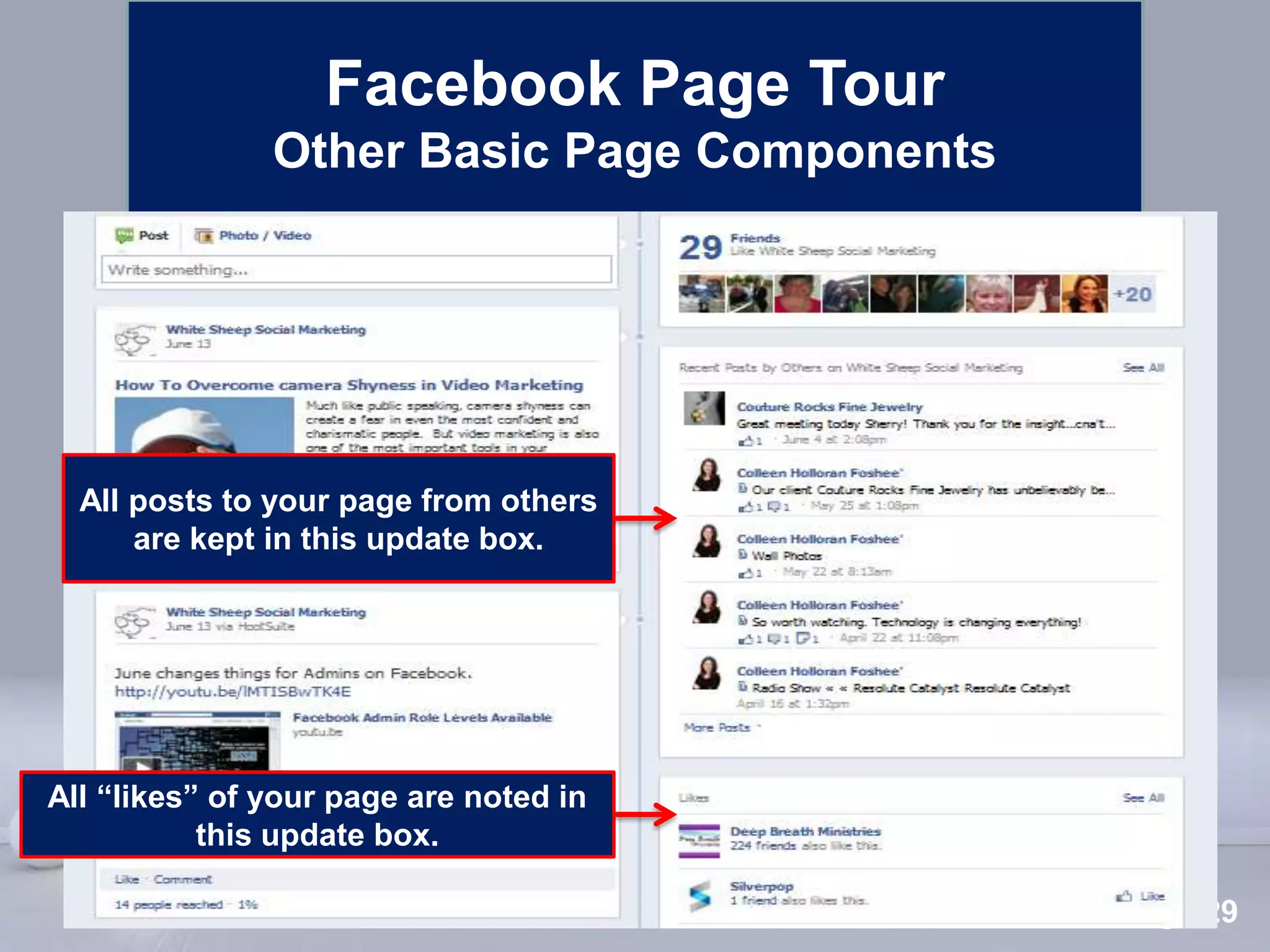
               Other Basic Page Components


  All posts to your page from others
      are kept in this update box.


All “likes” of your page are noted in
           this update box.
                             Powerpoint Templates
                                                    Page 29
Facebook Activity Tour


      Powerpoint Templates
                             Page 30
Facebook Activity Tour
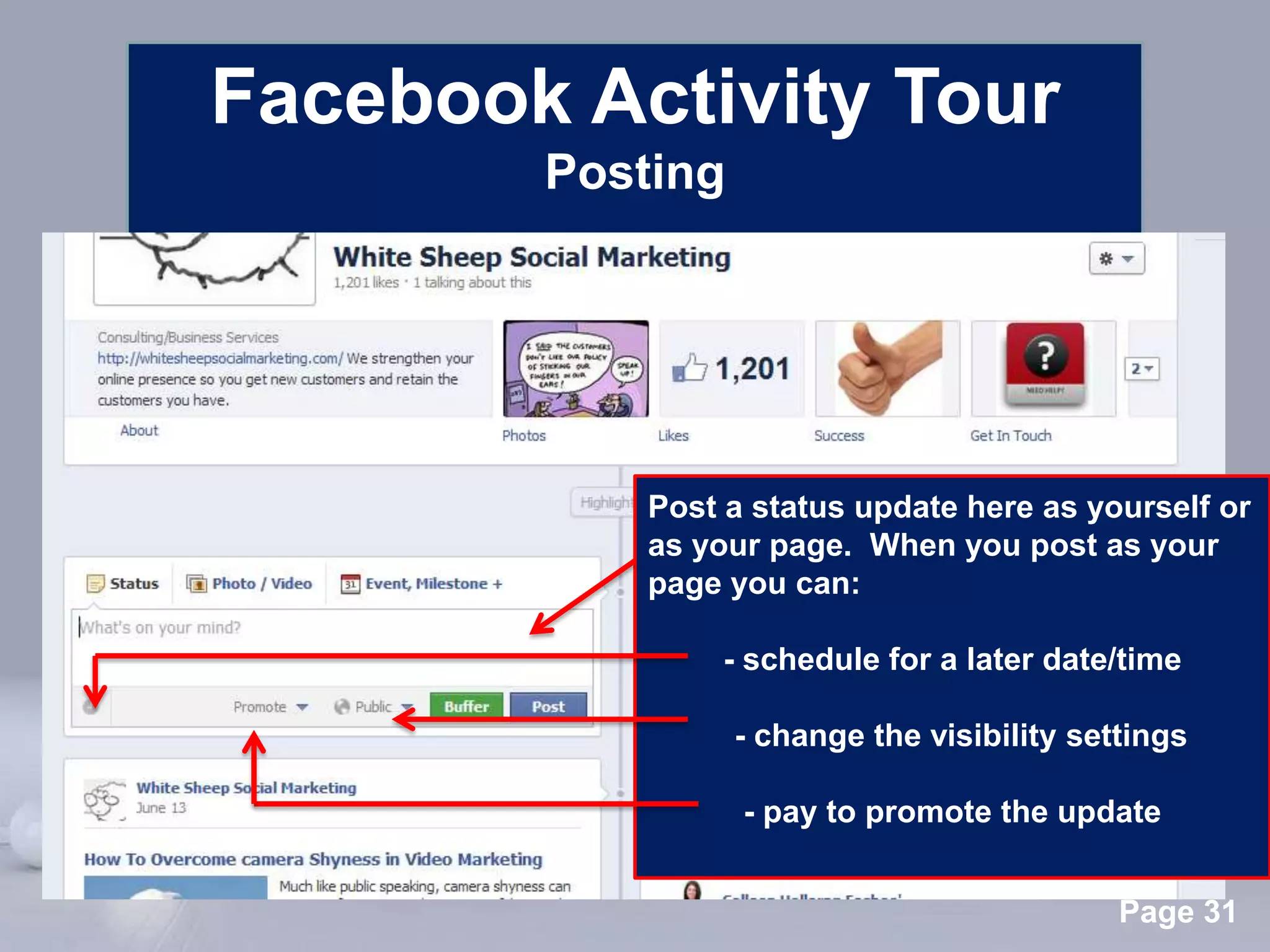
          Posting


                Post a status update here as yourself or
                as your page. When you post as your
                page you can:

                     - schedule for a later date/time

                      - change the visibility settings

                       - pay to promote the update

      Powerpoint Templates
                                                 Page 31
Facebook Activity Tour
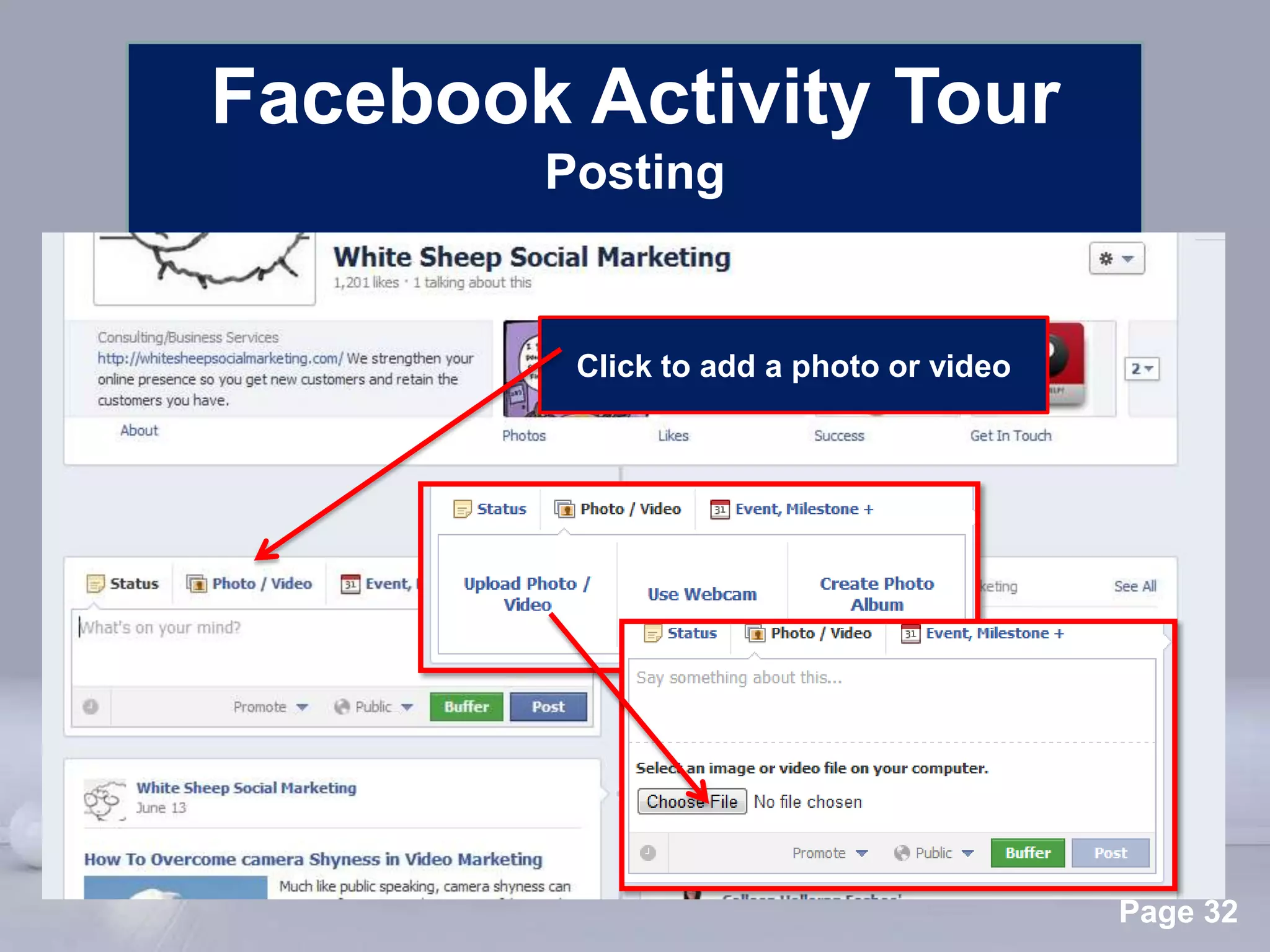
          Posting


            Click to add a photo or video


      Powerpoint Templates
                                            Page 32
Facebook Activity Tour
                            Posting


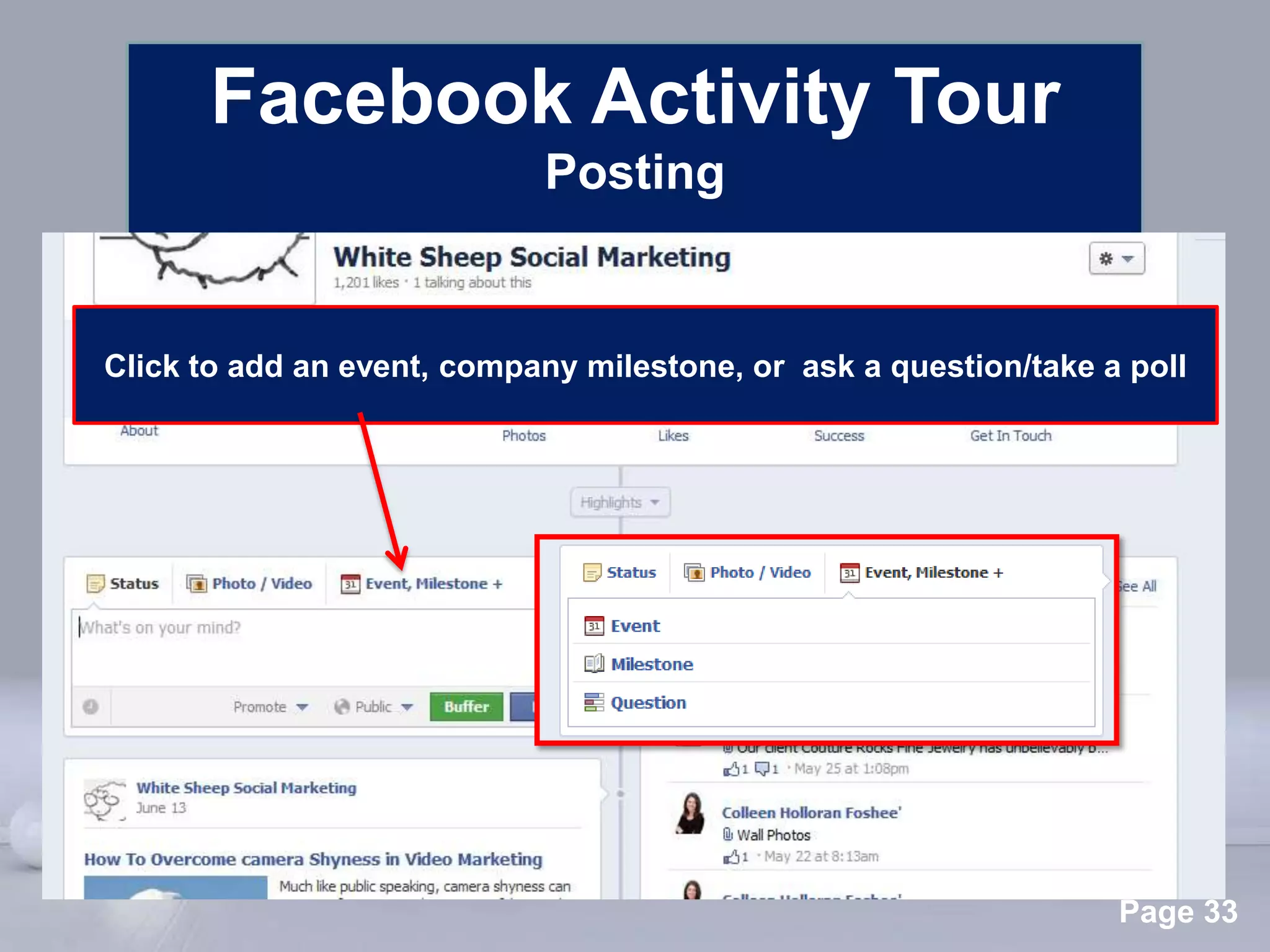
Click to add an event, company milestone, or ask a question/take a poll


                        Powerpoint Templates
                                                                  Page 33
Facebook Activity Tour
                            Posting


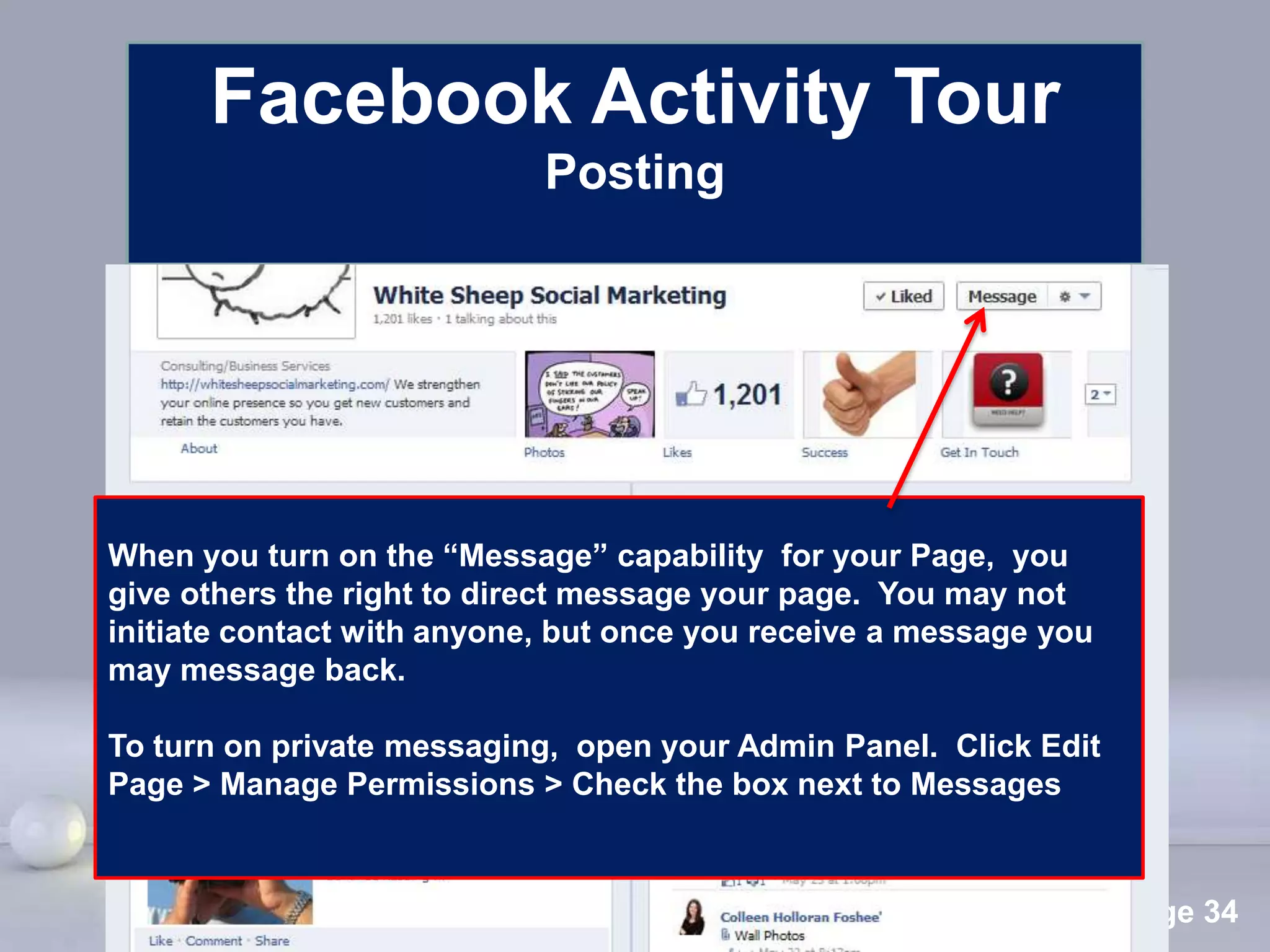
When you turn on the “Message” capability for your Page, you
give others the right to direct message your page. You may not
initiate contact with anyone, but once you receive a message you
may message back.

To turn on private messaging, open your Admin Panel. Click Edit
Page > Manage Permissions > Check the box next to Messages


                        Powerpoint Templates
                                                                   Page 34
Facebook Activity Tour
                      Post Options


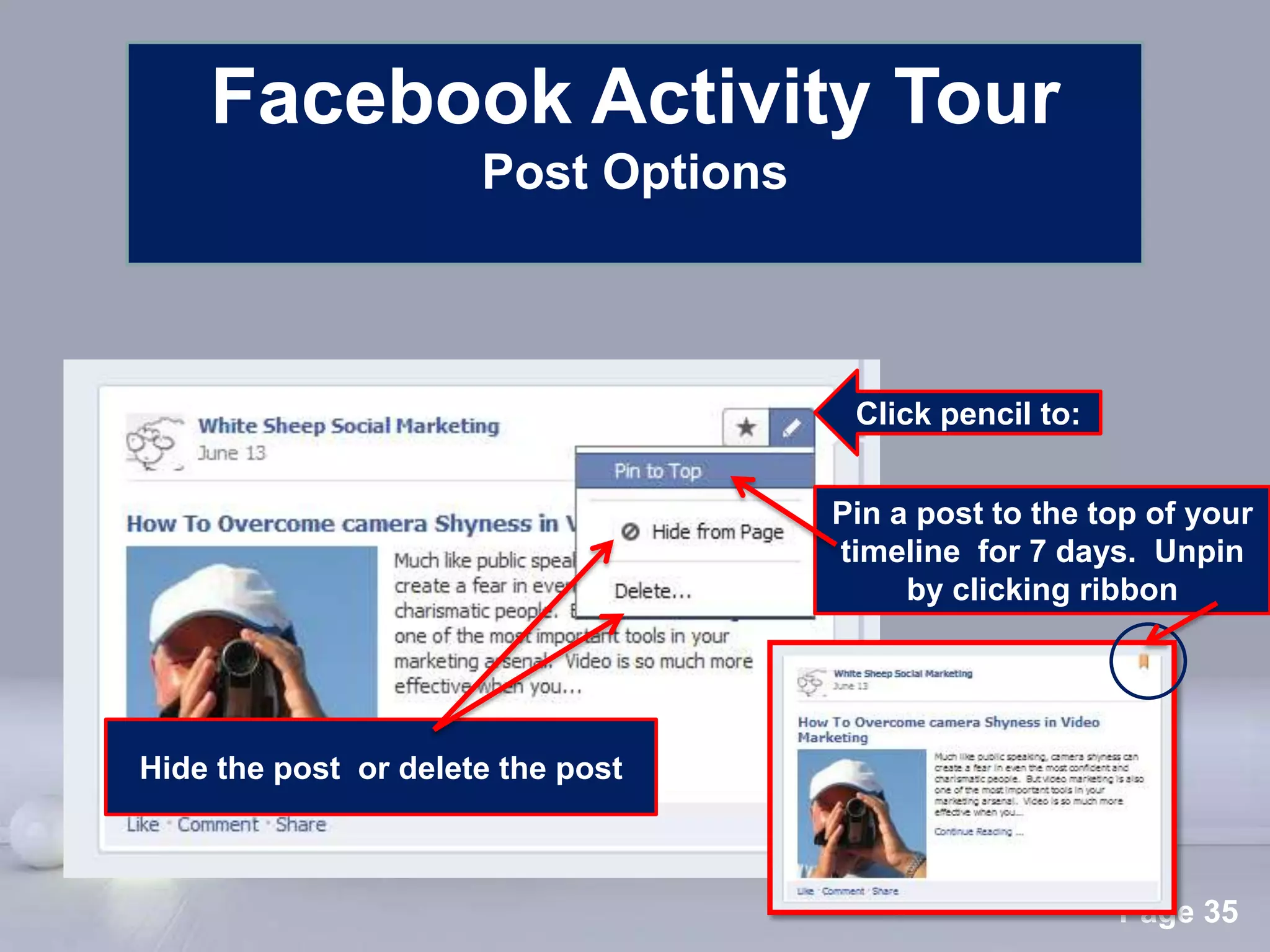
                                              Click pencil to:


                                             Pin a post to the top of your
                                             timeline for 7 days. Unpin
                                                  by clicking ribbon


Hide the post or delete the post


                      Powerpoint Templates
                                                                 Page 35
Facebook Activity Tour
       Post Options


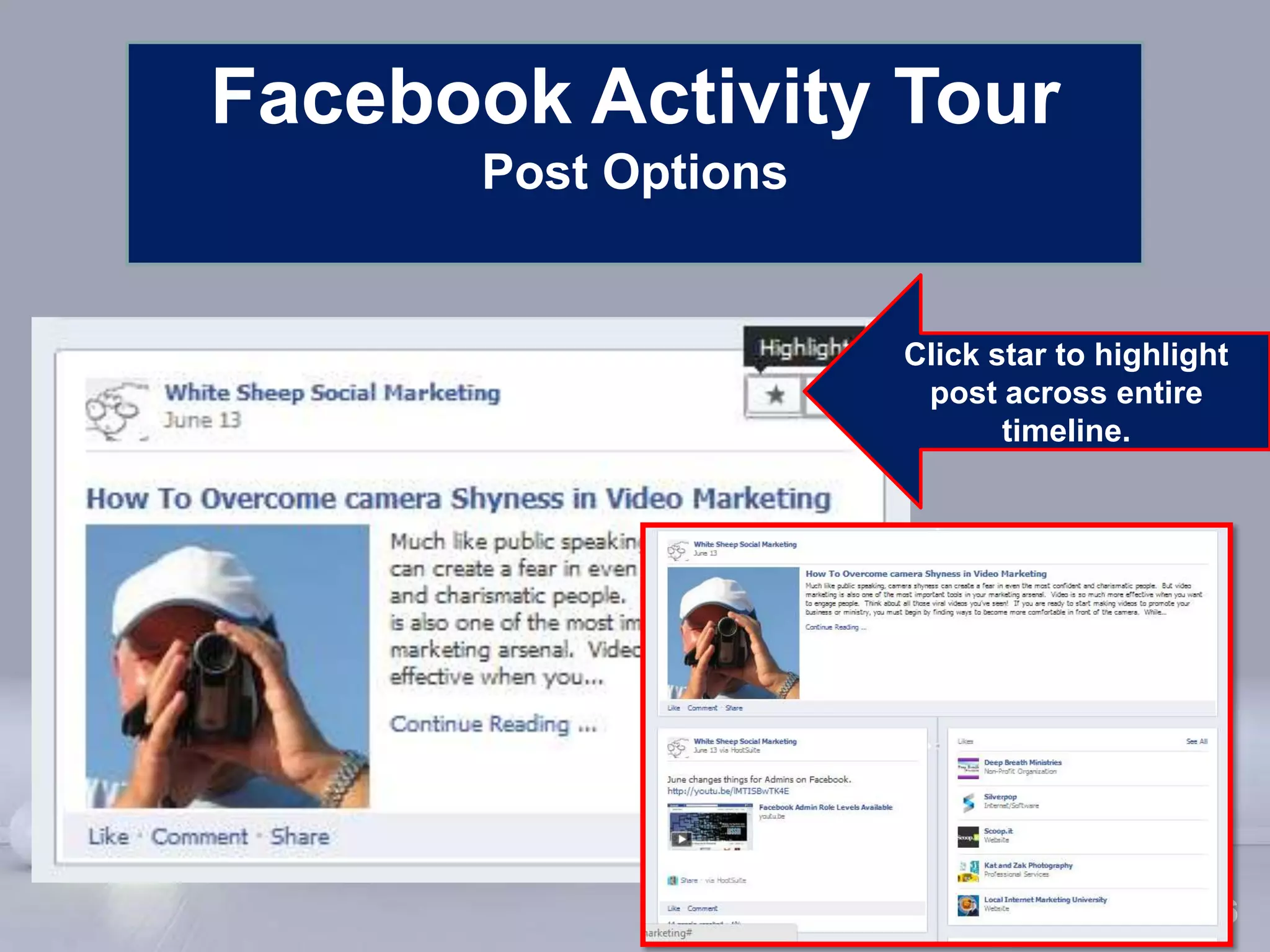
                             Click star to highlight
                              post across entire
                                    timeline.


      Powerpoint Templates
                                            Page 36
Facebook Marketing Tour


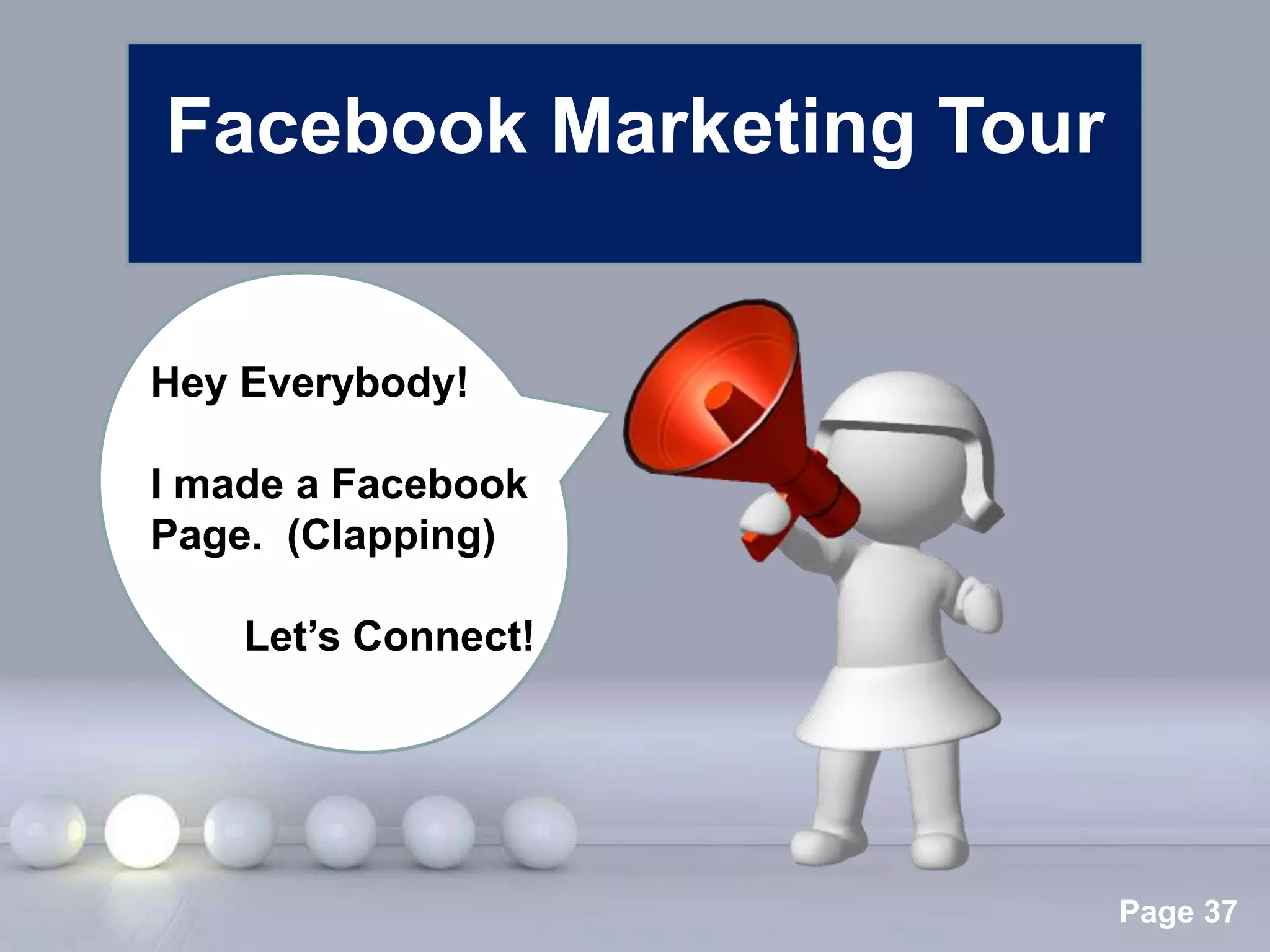
Hey Everybody!

I made a Facebook
Page. (Clapping)

    Let’s Connect!


                 Powerpoint Templates
                                        Page 37
Facebook Marketing Tour
           Why spend the time?

Facebook is a social network that can:
• Talk with your customers/prospects
• Help you do customer service well
• Build personal/brand credibility
• Increase your email list
• Help sell your products and/or services
• Increase visits to your website

              Powerpoint Templates
                                      Page 38
Facebook Marketing Tour
     Secrets Most People Don’t Know/Do

• Encourage customers to check-in so your
  name shows up in their Newsfeeds. More
  free advertisement
• Post photos of customers and tag them so
  they see them
• Share success stories: Ask your customers
  to discuss how you've helped them on your
  page.
• Join Groups related to your business and
  add value through comments. Interact with
  other group members Templates partnerships. 39
                 Powerpoint to build
                                           Page
Facebook Marketing Tour
    Secrets Most People Don’t Know/Do


• Post valuable information FOR YOUR
  CUSTOMER to keep them interested
• Use video to significantly boost
  connection, education, personalization, and
  sales
• Use your apps area URL’s to send prospects
  to your page offers and information
• Invest in Facebook paid ads to increase
  sales (Inexpensive and very targeted)
               Powerpoint Templates
                                         Page 40
Twitter                       Facebook

                  Now you know:
• Your way around the Twitter Platform
• Your way around the Facebook Page
• Tactics for making the most of your
  time on Twitter and Facebook.
           Decide To Take Action Today!
  Help others on Twitter and Facebook with your product or service.

                        Powerpoint Templates
                                                                  Page 41
Get Social
         With Social Media
For additional help with your social media needs,
                     Call us.


                 Powerpoint Templates
             www.whitesheepmarketing.com
                                             Page 42

Get Social Twitter and Facebook Basics 2012

  • 1.
    Get Social With Social Media Basics, Tips, & Tactics for Connecting and Growing Your Business on Twitter and Facebook Presented by Colleen Foshee Powerpoint Templates Page 1
  • 2.
    Expect to learn: •Your way around the Twitter Platform • Your way around the Facebook Page • Tactics for making the most of your time on Twitter and Facebook. Powerpoint Templates Page 2
  • 3.
    Twitter Tour Twitter Tour Helpis always available. support.twitter.com Powerpoint Templates Page 3
  • 4.
    Twitter Page Tour Powerpoint Templates Page 4
  • 5.
    Twitter Page Tour Page Essentials Branded profile picture Branded Twitter name 160 character bio who you are, what you do Branded background to match website Powerpoint Templates Page 5
  • 6.
    Twitter Page Tour Other Basic Page Components Click to see trending Click to see who has stories in related niches interacted with or mentioned you Click here to come back to your account home page where you can see your entire tweet stream Powerpoint Templates Page 6
  • 7.
    Twitter Page Tour Other Basic Page Components Profile icon for Click to follow dropdown this person menu Search to find people to follow Basic stats for your account Powerpoint Templates Page 7
  • 8.
    Twitter Page Tour “Profile Page” Basics You can get to your profile page from here: Your profile page displays your tweets, stats, and information about who you are. Others see this when they look you up on Twitter. Edit any of this info by clicking on Edit your profile. Powerpoint Templates Page 8
  • 9.
    Twitter Page Tour “Dropdown”Basics Click on the profile icon - For direct messages from people following you, or to send a private message to someone -To change your background or specific settings Powerpoint Templates of your account - To sign out Page 9
  • 10.
    Twitter Page Tour Language,p “Settings” Basics rivacy, and location settings Update password Set mobile updates You got here by clicking “Settings” Get email on the person icon notifications drop down menu. Change page design List of Apps that can access your twitter account Powerpoint Templates Page 10
  • 11.
    Twitter Page Tour “Email” Basics You got here by clicking “Notifications” on the Decide what emails you want “Settings” to receive from this page. menu Powerpoint Templates Page 11
  • 12.
    Twitter Activity Tour Powerpoint Templates Page 12
  • 13.
    Twitter Activity Tour How to tweet Your tweets and your follower’s tweets will show up here in your tweet stream Tweet from here. The box will expand when you click in it. You have 140 characters max for your message. Powerpoint Templates Page 13
  • 14.
    Twitter Activity Tour How to tweet Click to add to a drip buffer. Tweet will be posted sometime that day. Click to add a photo to your tweet Click to change or add a location to your tweet Powerpoint Templates Page 14
  • 15.
    Twitter Activity Tour How to tweet These two are the same link. Use a link shortener like “bit.ly” to save characters in your tweet. Bit.ly is trackable too! Powerpoint Templates Page 15
  • 16.
    Twitter Activity Tour “Replies” Hover over the tweet and click “Reply”. The tweet box will open with the tweeters name auto-filled and the original tweet noted beneath . Add your message and click “Tweet”. This is called an “@reply”. Powerpoint Templates Page 16
  • 17.
    Twitter Activity Tour “Mentions” To mention someone, type in their @name anywhere in your tweet. The person mentioned will see your tweet in their “@Connect” notification area and in their twitter stream. Powerpoint Templates Page 17
  • 18.
    Twitter Activity Tour “Re-tweets” (RT) Click “Buffer Retweet” if you want to add it to a drip stream that will send it out at a random later time. Hover under a tweet for options and click on “Re-tweet “ to resend a tweet you received to your followers. Powerpoint Templates Page 18
  • 19.
    Twitter Activity Tour “DirectMessaging” (DM) Click here to write or receive a private tweet (direct message) Click name to respond to a private message Click to initiate a private message Powerpoint Templates Page 19
  • 20.
    Twitter Activity Tour “Hashtags” Putting a hashtag (#) in front of a word (example, #wisdom) allows Twitter users Powerpoint Templates to search for a particular subject. It is used to filter the Twitter stream. Page 20
  • 21.
    Twitter Marketing Tour Why spend the time? Twitter is an information network that can: • Increase visits to your website • Build personal/brand credibility • Increase your email list • Connect with your target audience • Help sell your products and/or services • Help you become a noticed thought leader Powerpoint Templates Page 21
  • 22.
    Twitter Marketing Tour Secrets Most People Don’t Know/Do • Drip feed tweets automatically – Bufferapp (Add content to a buffer for automatic tweet sharing throughout the day) • Find people who are relevant and impactful for your niche. – Tweetlevel (Search by influence, trust, engagement or popularity - you can also search by topics and key words) • Follow targeted quality people - Twellow (Database of Twitter profiles that are sorted into categories) • Know exactly when to tweet – Tweriod (Free customized analysis of when you will be able to reach the most followers). • Get alerts on any monitored term. Twilert (Set up any Powerpoint Templates term and then be notified about any activity on Twitter about it). Page 22
  • 23.
    Facebook Tour Help isalways available. Facebook.com/help Powerpoint Templates Page 23
  • 24.
    Your Page Name Remember- Whensome “likes” your page, your business page name appears on their page “Like” section and in the Newsfeed of their personal profile. Free advertisement for you! Powerpoint Templates Page 24
  • 25.
    Facebook Page Tour Powerpoint Templates Page 25
  • 26.
    Facebook Page Tour Your Admin Panel Your Admin Panel is where you can switch to post on Facebook as your page, and to see how your Page is performing. Powerpoint Templates Page 26
  • 27.
    Facebook Page Tour Page Essentials Profile Picture ( logo or business definer) 180 X 180 Pixels Strong visual cover photo defining your business (No promotional information allowed) 851 X 315 Pixels Clear, keyword rich “About” description Strategic use of Apps Powerpoint Templates Page 27
  • 28.
    Facebook Page Tour OtherBasic Page Components Personal profile friends who like your page Powerpoint Templates Page 28
  • 29.
    Facebook Page Tour Other Basic Page Components All posts to your page from others are kept in this update box. All “likes” of your page are noted in this update box. Powerpoint Templates Page 29
  • 30.
    Facebook Activity Tour Powerpoint Templates Page 30
  • 31.
    Facebook Activity Tour Posting Post a status update here as yourself or as your page. When you post as your page you can: - schedule for a later date/time - change the visibility settings - pay to promote the update Powerpoint Templates Page 31
  • 32.
    Facebook Activity Tour Posting Click to add a photo or video Powerpoint Templates Page 32
  • 33.
    Facebook Activity Tour Posting Click to add an event, company milestone, or ask a question/take a poll Powerpoint Templates Page 33
  • 34.
    Facebook Activity Tour Posting When you turn on the “Message” capability for your Page, you give others the right to direct message your page. You may not initiate contact with anyone, but once you receive a message you may message back. To turn on private messaging, open your Admin Panel. Click Edit Page > Manage Permissions > Check the box next to Messages Powerpoint Templates Page 34
  • 35.
    Facebook Activity Tour Post Options Click pencil to: Pin a post to the top of your timeline for 7 days. Unpin by clicking ribbon Hide the post or delete the post Powerpoint Templates Page 35
  • 36.
    Facebook Activity Tour Post Options Click star to highlight post across entire timeline. Powerpoint Templates Page 36
  • 37.
    Facebook Marketing Tour HeyEverybody! I made a Facebook Page. (Clapping) Let’s Connect! Powerpoint Templates Page 37
  • 38.
    Facebook Marketing Tour Why spend the time? Facebook is a social network that can: • Talk with your customers/prospects • Help you do customer service well • Build personal/brand credibility • Increase your email list • Help sell your products and/or services • Increase visits to your website Powerpoint Templates Page 38
  • 39.
    Facebook Marketing Tour Secrets Most People Don’t Know/Do • Encourage customers to check-in so your name shows up in their Newsfeeds. More free advertisement • Post photos of customers and tag them so they see them • Share success stories: Ask your customers to discuss how you've helped them on your page. • Join Groups related to your business and add value through comments. Interact with other group members Templates partnerships. 39 Powerpoint to build Page
  • 40.
    Facebook Marketing Tour Secrets Most People Don’t Know/Do • Post valuable information FOR YOUR CUSTOMER to keep them interested • Use video to significantly boost connection, education, personalization, and sales • Use your apps area URL’s to send prospects to your page offers and information • Invest in Facebook paid ads to increase sales (Inexpensive and very targeted) Powerpoint Templates Page 40
  • 41.
    Twitter Facebook Now you know: • Your way around the Twitter Platform • Your way around the Facebook Page • Tactics for making the most of your time on Twitter and Facebook. Decide To Take Action Today! Help others on Twitter and Facebook with your product or service. Powerpoint Templates Page 41
  • 42.
    Get Social With Social Media For additional help with your social media needs, Call us. Powerpoint Templates www.whitesheepmarketing.com Page 42