Geometric Objects and
Transformations -I
By: Saad Siddiqui
Frames in OpenGL
• 2 frames:
– Camera: regard as fix
– World:
• The model-view matrix position related to camera
• Convert homogeneous coordinates representation of object to camera
frame

• OpenGL provided matrix stack for store model view
matrices or frames
• By default camera and world have the same origin
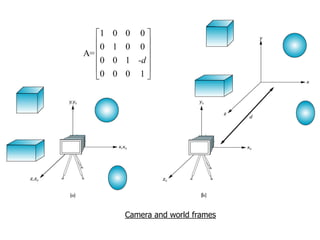
• If moving world frame distance d from camera the
model-view matrix would be
1
0
A= 
0

0

0
0

0 1 -d 

0 0 1

0 0
1 0

Camera and world frames
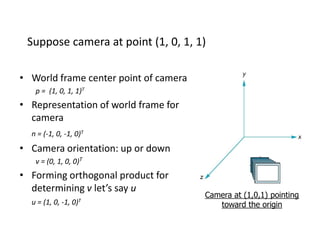
Suppose camera at point (1, 0, 1, 1)
• World frame center point of camera
p = (1, 0, 1, 1)T

• Representation of world frame for
camera
n = (-1, 0, -1, 0)T

• Camera orientation: up or down
v = (0, 1, 0, 0)T

• Forming orthogonal product for
determining v let’s say u
u = (1, 0, -1,

0)T

Camera at (1,0,1) pointing
toward the origin
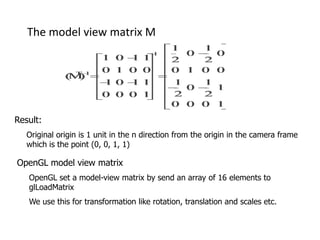
The model view matrix M

Result:
Original origin is 1 unit in the n direction from the origin in the camera frame
which is the point (0, 0, 1, 1)

OpenGL model view matrix
OpenGL set a model-view matrix by send an array of 16 elements to
glLoadMatrix
We use this for transformation like rotation, translation and scales etc.
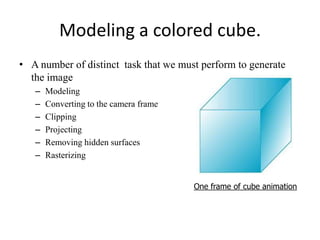
Modeling a colored cube.
• A number of distinct task that we must perform to generate
the image
–
–
–
–
–
–

Modeling
Converting to the camera frame
Clipping
Projecting
Removing hidden surfaces
Rasterizing
One frame of cube animation
Modeling a Cube
• Model as 6 planes intersection or six polygons as cube facets
• Ex. of cube definition
GLfloat vertices[8][3] = {
{-1.0,-1.0,-1.0}, {1.0,-1.0,-1.0},
{1.0,1.0,-1.0}, {-1.0,1.0,-1.0},
{-1.0,-1.0,1.0}, {1.0,-1.0,1.0},
{1.0,1.0,1.0}, {-1.0,1.0,1.0}
};
// or
typedef point3[3];
// then may define as
point3 vertices[8] = {
{-1.0,-1.0,-1.0}, {1.0,-1.0,-1.0},
{1.0,1.0,-1.0}, {-1.0,1.0,-1.0},
{-1.0,-1.0,1.0}, {1.0,-1.0,1.0},
{1.0,1.0,1.0}, {-1.0,1.0,1.0}
};

// object may defined as
void polygon(int a, int b, int c , int d) {
/* draw a polygon via list of vertices */
glBegin(GL_POLYGON);
glVertex3fv(vertices[a]);
glVertex3fv(vertices[b]);
glVertex3fv(vertices[c]);
glVertex3fv(vertices[d]);
glEnd();
}
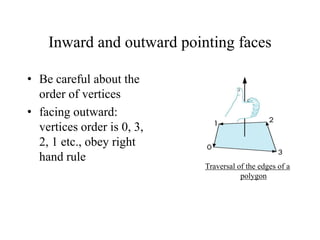
Inward and outward pointing faces
• Be careful about the
order of vertices
• facing outward:
vertices order is 0, 3,
2, 1 etc., obey right
hand rule
Traversal of the edges of a
polygon
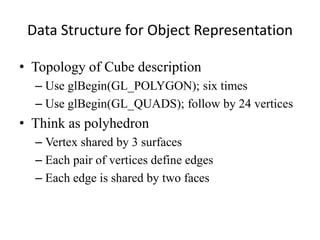
Data Structure for Object Representation
• Topology of Cube description
– Use glBegin(GL_POLYGON); six times
– Use glBegin(GL_QUADS); follow by 24 vertices

• Think as polyhedron
– Vertex shared by 3 surfaces
– Each pair of vertices define edges
– Each edge is shared by two faces
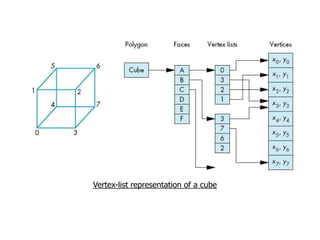
Vertex-list representation of a cube
The color cube
• Color to vertex list -> color 6 faces
• Define function “quad” for drawing quadrilateral polygon
• Next define 6 faces, be careful about define outwarding
Glfloat vertices[8][3] = {{-1.0,-1.0, 1.0},{-1.0, 1.0, 1.0}, {1.0,1.0, 1.0}, {1.0,-1.0, 1.0},
{-1.0,-1.0,-1.0}, {1.0,-1.0,-1.0}, {1.0,1.0,-1.0}, {-1.0,1.0,-1.0}};
GLfloat colors[8][3] = {{0.0,0.0,0.0},{1.0,0.0,0.0}, {1.0,1.0,0.0}, {0.0,1.0,0.0},
{0.0,0.0,1.0}, {1.0,0.0,1.0}, {1.0,1.0,1.0}, {0.0,1.0,1.0}};
void quad(int a, int b, int c , int d) {
glBegin(GL_QUADS);
glColor3fv(colors[a]); glVertex3fv(vertices[a]); glColor3fv(colors[b]); glVertex3fv(vertices[b]);
glColor3fv(colors[c]); glVertex3fv(vertices[c]); glColor3fv(colors[d]); glVertex3fv(vertices[d]);
glEnd();
}
void colorcube() {
quad(0, 3, 2, 1); quad(2, 3, 7, 6); quad(0, 4, 7, 3); quad(1, 2, 6, 5); quad(4, 5, 6, 7); quad(0, 1, 5, 4);
}
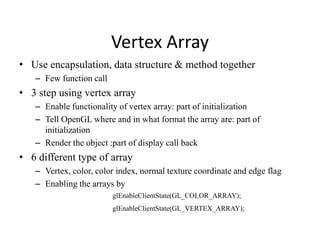
Vertex Array
• Use encapsulation, data structure & method together
– Few function call

• 3 step using vertex array
– Enable functionality of vertex array: part of initialization
– Tell OpenGL where and in what format the array are: part of
initialization
– Render the object :part of display call back

• 6 different type of array
– Vertex, color, color index, normal texture coordinate and edge flag
– Enabling the arrays by
glEnableClientState(GL_COLOR_ARRAY);
glEnableClientState(GL_VERTEX_ARRAY);
// The arrays are the same as before and can be set up as globals:
GLfloat vertices[] = {{-1,-1,-1}, {1,-1,1}, {1,1,-1}, {-1,1,-1},{-1,-1,1}, {1,-1,1}, {1,1,1}, {-1,1,1}};
GLfloat colors[] = {{0,0,0}, {1,0,0},{1,1,0},{0,1,0},{0,0,1},{1,0,1}, {1,1,1},{0,1,1}};
// Next identify where the arrays are by
glVertexPointer(3, GL_FLOAT, 0, vertices);
glColorPointer(3, GL_FLOAT, 0, colors);
// Define the array to hold the 24 order of vertex indices for 6 faces

GLubyte cubeIndices[24] = {0,3,2,1, 2,3,7,6, 0,4,7,3, 1,2,6,5,

4,5,6,7,

0,1,5,4};

glDrawElements(type, n, format, pointer);
for (i=0; i<6; i++)
glDrawElement(GL_POLYGON, 4, GL_UNSIGNED_BYTE, &cubeIndex[4*i]};

// Do better by seeing each face as quadrilateral polygon

glDrawElements(GL_QUADS, 24, GL_UNSIGNED_BYTE, cubeIndices);
// GL_QUADS starts a new quadrilateral after each four vertices
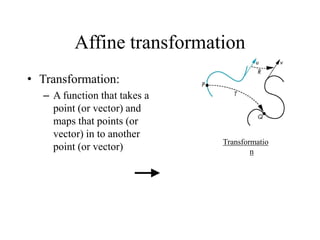
Affine transformation
• Transformation:
– A function that takes a
point (or vector) and
maps that points (or
vector) in to another
point (or vector)

Transformatio
n

Q = f ( P),
v = f u  ,
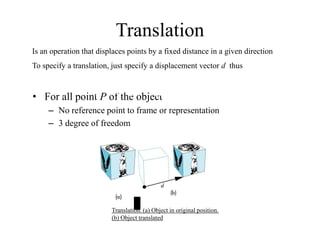
Translation
Is an operation that displaces points by a fixed distance in a given direction
To specify a translation, just specify a displacement vector d thus

P = P  d

• For all point P of the object

– No reference point to frame or representation
– 3 degree of freedom

Translation. (a) Object in original position.
(b) Object translated
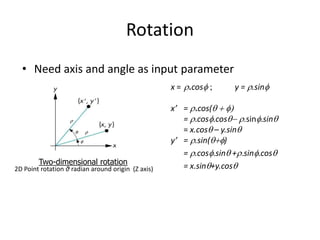
Rotation
• Need axis and angle as input parameter
x = r.cosf ;

Two-dimensional rotation

2D Point rotation θ radian around origin (Z axis)

x’ = r.cos(q  f
= r.cosf.cosq- r.sinf.sinq
= x.cosq – y.sinq
y’ = r.sin(qf)
= r.cosf.sinq +r.sinf.cosq
= x.sinq+y.cosq

These equations can be written in matrix form as
 x  cos q
 y =  sin q
  

y = r.sinf

- sin q   x 
cos q   y 
 
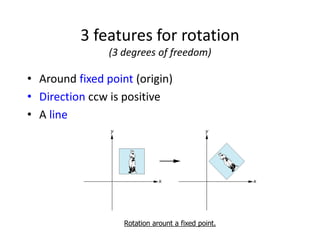
3 features for rotation
(3 degrees of freedom)

• Around fixed point (origin)
• Direction ccw is positive
• A line

Rotation arount a fixed point.
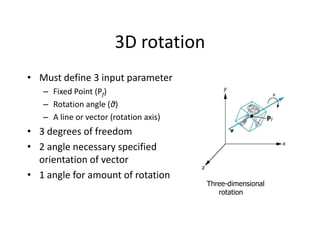
3D rotation
• Must define 3 input parameter
– Fixed Point (Pf)
– Rotation angle (θ)
– A line or vector (rotation axis)

• 3 degrees of freedom
• 2 angle necessary specified
orientation of vector
• 1 angle for amount of rotation

Three-dimensional
rotation
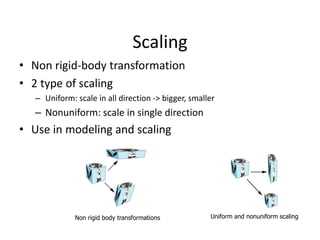
Scaling
• Non rigid-body transformation
• 2 type of scaling
– Uniform: scale in all direction -> bigger, smaller

– Nonuniform: scale in single direction

• Use in modeling and scaling

Non rigid body transformations

Uniform and nonuniform scaling
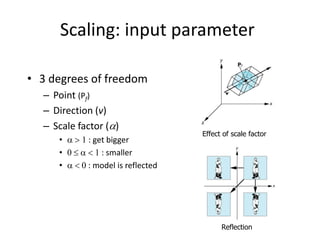
Scaling: input parameter
• 3 degrees of freedom
– Point (Pf)
– Direction (v)
– Scale factor ()
•  > 1 : get bigger
• 0   < 1 : smaller
•  < 0 : model is reflected

Effect of scale factor

Reflection
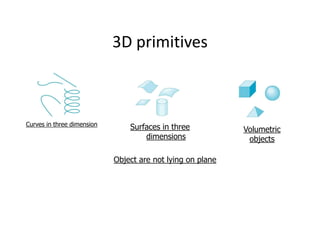
3D primitives

Curves in three dimension

Surfaces in three
dimensions
Object are not lying on plane

Volumetric
objects
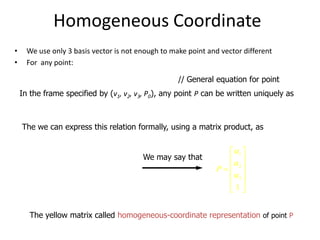
Homogeneous Coordinate
•
•

We use only 3 basis vector is not enough to make point and vector different
For any point:

P = P0  xv1  yv2  zv3

// General equation for point

In the frame specified by (v1, v2, v3, P0), any point P can be written uniquely as

P = 1v1   2v2  3v3  P0
The we can express this relation formally, using a matrix product, as

P = 1  2  3

 v1 
v 
1  2 
 v3 
 
 P0 

We may say that

 1 
 
P =  2
 3 
 
1

The yellow matrix called homogeneous-coordinate representation of point P
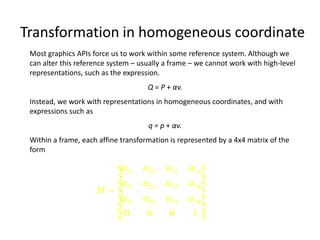
Transformation in homogeneous coordinate
Most graphics APIs force us to work within some reference system. Although we
can alter this reference system – usually a frame – we cannot work with high-level
representations, such as the expression.
Q = P + αv.
Instead, we work with representations in homogeneous coordinates, and with
expressions such as
q = p + αv.
Within a frame, each affine transformation is represented by a 4x4 matrix of the
form

é 11 12 13 14 ù

ê
ú
ê 21  22  23  24 ú

ê
ú
M= ê
 31  32  33  34 ú
ê
ú
ê0
0
0
1 ú
ë
û
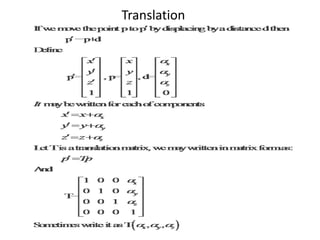
Translation
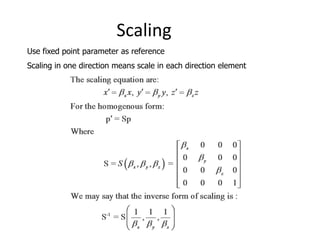
Scaling
Use fixed point parameter as reference
Scaling in one direction means scale in each direction element
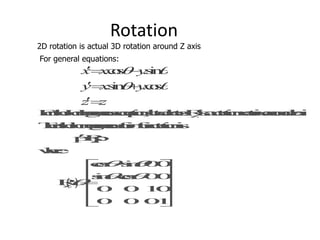
Rotation

2D rotation is actual 3D rotation around Z axis
For general equations:
Shear
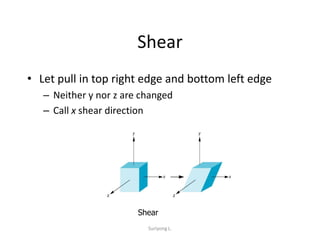
• Let pull in top right edge and bottom left edge
– Neither y nor z are changed
– Call x shear direction

Shear
Suriyong L.
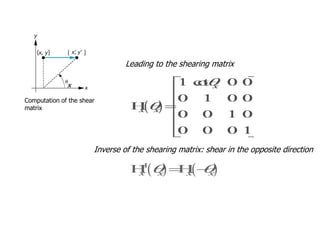
x = x  y cot q x
y = y
z = z
Leading to the shearing matrix
x
Computation of the shear
matrix

Inverse of the shearing matrix: shear in the opposite direction
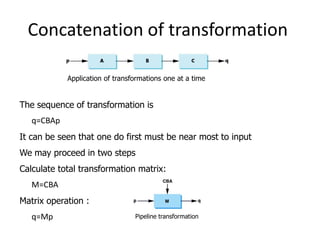
Concatenation of transformation
Application of transformations one at a time

The sequence of transformation is
q=CBAp
It can be seen that one do first must be near most to input
We may proceed in two steps
Calculate total transformation matrix:

M=CBA
Matrix operation :
q=Mp

Pipeline transformation
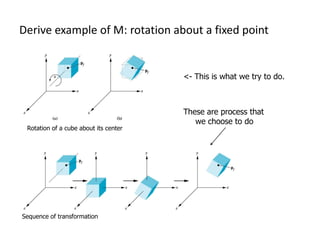
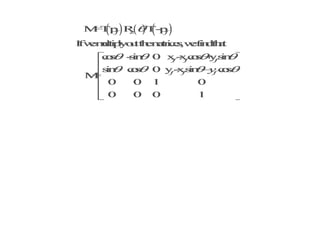
Derive example of M: rotation about a fixed point

<- This is what we try to do.

Rotation of a cube about its center

Sequence of transformation

These are process that
we choose to do
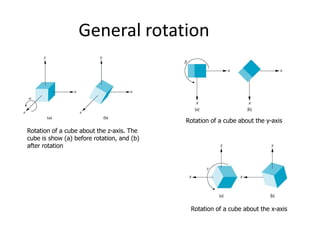
General rotation

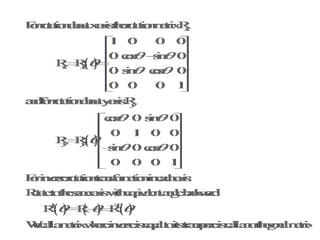
Rotation of a cube about the y-axis

Rotation of a cube about the z-axis. The
cube is show (a) before rotation, and (b)
after rotation

R = R xR yR z
Rotation of a cube about the x-axis
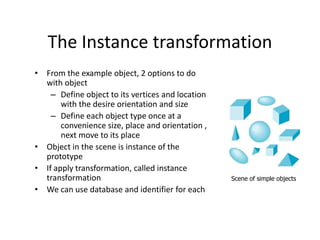
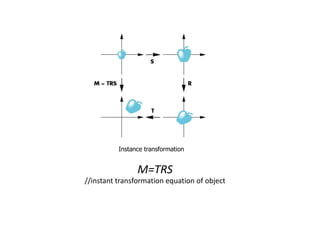
The Instance transformation
• From the example object, 2 options to do
with object
– Define object to its vertices and location
with the desire orientation and size
– Define each object type once at a
convenience size, place and orientation ,
next move to its place
• Object in the scene is instance of the
prototype
• If apply transformation, called instance
transformation
• We can use database and identifier for each

Scene of simple objects
Instance transformation

M=TRS
//instant transformation equation of object
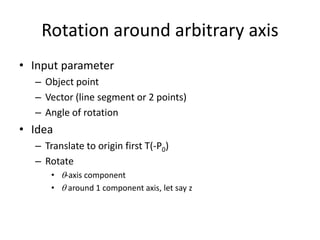
Rotation around arbitrary axis
• Input parameter
– Object point
– Vector (line segment or 2 points)
– Angle of rotation

• Idea
– Translate to origin first T(-P0)
– Rotate
• q-axis component
• q around 1 component axis, let say z
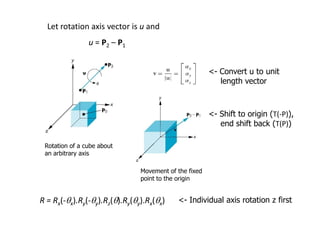
Let rotation axis vector is u and
u = P2 – P1
<- Convert u to unit
length vector

<- Shift to origin (T(-P)),
end shift back (T(P))
Rotation of a cube about
an arbitrary axis
Movement of the fixed
point to the origin

R = Rx(-qx).Ry(-qy).Rz(q).Ry(qy).Rx(qx)

<- Individual axis rotation z first
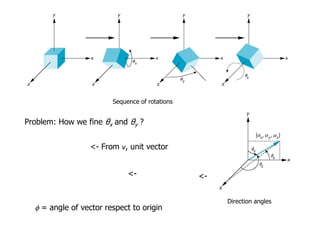
Sequence of rotations

Problem: How we fine θx and θy ?
2
2
 x   y   z2 = 1

<- From v, unit vector

cos2 fx  cos2 fy  cos2 fz = 1 <-

cos fx =  x
cos f y =  y

<-

cos fz =  z
f = angle of vector respect to origin

Direction angles
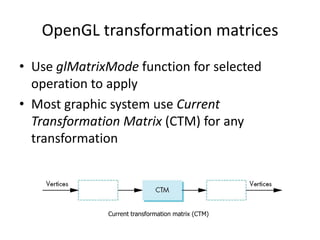
OpenGL transformation matrices
• Use glMatrixMode function for selected
operation to apply
• Most graphic system use Current
Transformation Matrix (CTM) for any
transformation

Current transformation matrix (CTM)
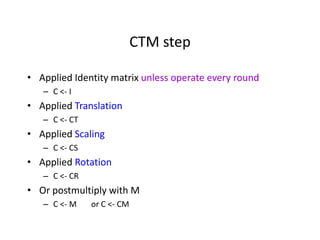
CTM step
• Applied Identity matrix unless operate every round
– C <- I

• Applied Translation
– C <- CT

• Applied Scaling
– C <- CS

• Applied Rotation
– C <- CR

• Or postmultiply with M
– C <- M

or C <- CM
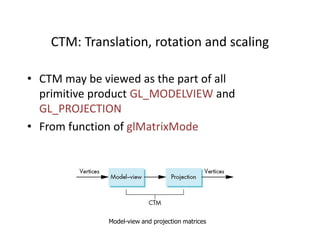
CTM: Translation, rotation and scaling
• CTM may be viewed as the part of all
primitive product GL_MODELVIEW and
GL_PROJECTION
• From function of glMatrixMode

Model-view and projection matrices
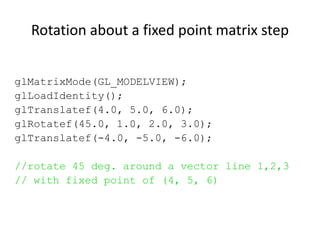
Rotation about a fixed point matrix step
glMatrixMode(GL_MODELVIEW);
glLoadIdentity();
glTranslatef(4.0, 5.0, 6.0);
glRotatef(45.0, 1.0, 2.0, 3.0);
glTranslatef(-4.0, -5.0, -6.0);
//rotate 45 deg. around a vector line 1,2,3
// with fixed point of (4, 5, 6)
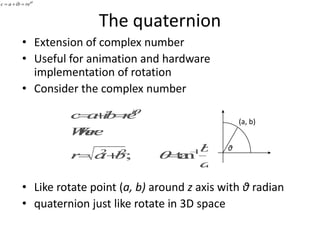
c = a  ib = reiq

The quaternion
• Extension of complex number
• Useful for animation and hardware
implementation of rotation
• Consider the complex number
(a, b)

θ

• Like rotate point (a, b) around z axis with θ radian
• quaternion just like rotate in 3D space
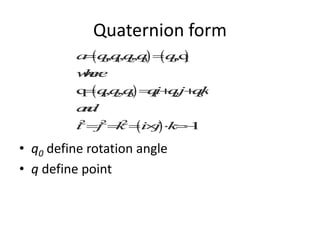
Quaternion form

• q0 define rotation angle
• q define point
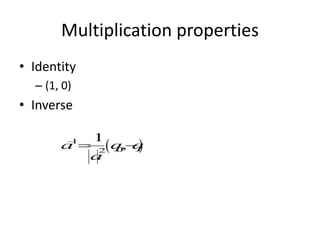
Multiplication properties
• Identity
– (1, 0)

• Inverse
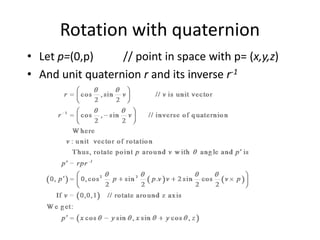
Rotation with quaternion
• Let p=(0,p)
// point in space with p= (x,y,z)
• And unit quaternion r and its inverse r-1
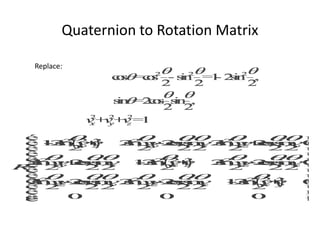
Quaternion to Rotation Matrix
Replace:

Geometric objects and transformations

  • 1.
  • 2.
    Frames in OpenGL •2 frames: – Camera: regard as fix – World: • The model-view matrix position related to camera • Convert homogeneous coordinates representation of object to camera frame • OpenGL provided matrix stack for store model view matrices or frames • By default camera and world have the same origin • If moving world frame distance d from camera the model-view matrix would be
  • 3.
    1 0 A=  0  0 0 0  0 1-d   0 0 1 0 0 1 0 Camera and world frames
  • 4.
    Suppose camera atpoint (1, 0, 1, 1) • World frame center point of camera p = (1, 0, 1, 1)T • Representation of world frame for camera n = (-1, 0, -1, 0)T • Camera orientation: up or down v = (0, 1, 0, 0)T • Forming orthogonal product for determining v let’s say u u = (1, 0, -1, 0)T Camera at (1,0,1) pointing toward the origin
  • 5.
    The model viewmatrix M Result: Original origin is 1 unit in the n direction from the origin in the camera frame which is the point (0, 0, 1, 1) OpenGL model view matrix OpenGL set a model-view matrix by send an array of 16 elements to glLoadMatrix We use this for transformation like rotation, translation and scales etc.
  • 6.
    Modeling a coloredcube. • A number of distinct task that we must perform to generate the image – – – – – – Modeling Converting to the camera frame Clipping Projecting Removing hidden surfaces Rasterizing One frame of cube animation
  • 7.
    Modeling a Cube •Model as 6 planes intersection or six polygons as cube facets • Ex. of cube definition GLfloat vertices[8][3] = { {-1.0,-1.0,-1.0}, {1.0,-1.0,-1.0}, {1.0,1.0,-1.0}, {-1.0,1.0,-1.0}, {-1.0,-1.0,1.0}, {1.0,-1.0,1.0}, {1.0,1.0,1.0}, {-1.0,1.0,1.0} }; // or typedef point3[3]; // then may define as point3 vertices[8] = { {-1.0,-1.0,-1.0}, {1.0,-1.0,-1.0}, {1.0,1.0,-1.0}, {-1.0,1.0,-1.0}, {-1.0,-1.0,1.0}, {1.0,-1.0,1.0}, {1.0,1.0,1.0}, {-1.0,1.0,1.0} }; // object may defined as void polygon(int a, int b, int c , int d) { /* draw a polygon via list of vertices */ glBegin(GL_POLYGON); glVertex3fv(vertices[a]); glVertex3fv(vertices[b]); glVertex3fv(vertices[c]); glVertex3fv(vertices[d]); glEnd(); }
  • 8.
    Inward and outwardpointing faces • Be careful about the order of vertices • facing outward: vertices order is 0, 3, 2, 1 etc., obey right hand rule Traversal of the edges of a polygon
  • 9.
    Data Structure forObject Representation • Topology of Cube description – Use glBegin(GL_POLYGON); six times – Use glBegin(GL_QUADS); follow by 24 vertices • Think as polyhedron – Vertex shared by 3 surfaces – Each pair of vertices define edges – Each edge is shared by two faces
  • 10.
  • 11.
    The color cube •Color to vertex list -> color 6 faces • Define function “quad” for drawing quadrilateral polygon • Next define 6 faces, be careful about define outwarding Glfloat vertices[8][3] = {{-1.0,-1.0, 1.0},{-1.0, 1.0, 1.0}, {1.0,1.0, 1.0}, {1.0,-1.0, 1.0}, {-1.0,-1.0,-1.0}, {1.0,-1.0,-1.0}, {1.0,1.0,-1.0}, {-1.0,1.0,-1.0}}; GLfloat colors[8][3] = {{0.0,0.0,0.0},{1.0,0.0,0.0}, {1.0,1.0,0.0}, {0.0,1.0,0.0}, {0.0,0.0,1.0}, {1.0,0.0,1.0}, {1.0,1.0,1.0}, {0.0,1.0,1.0}}; void quad(int a, int b, int c , int d) { glBegin(GL_QUADS); glColor3fv(colors[a]); glVertex3fv(vertices[a]); glColor3fv(colors[b]); glVertex3fv(vertices[b]); glColor3fv(colors[c]); glVertex3fv(vertices[c]); glColor3fv(colors[d]); glVertex3fv(vertices[d]); glEnd(); } void colorcube() { quad(0, 3, 2, 1); quad(2, 3, 7, 6); quad(0, 4, 7, 3); quad(1, 2, 6, 5); quad(4, 5, 6, 7); quad(0, 1, 5, 4); }
  • 12.
    Vertex Array • Useencapsulation, data structure & method together – Few function call • 3 step using vertex array – Enable functionality of vertex array: part of initialization – Tell OpenGL where and in what format the array are: part of initialization – Render the object :part of display call back • 6 different type of array – Vertex, color, color index, normal texture coordinate and edge flag – Enabling the arrays by glEnableClientState(GL_COLOR_ARRAY); glEnableClientState(GL_VERTEX_ARRAY);
  • 13.
    // The arraysare the same as before and can be set up as globals: GLfloat vertices[] = {{-1,-1,-1}, {1,-1,1}, {1,1,-1}, {-1,1,-1},{-1,-1,1}, {1,-1,1}, {1,1,1}, {-1,1,1}}; GLfloat colors[] = {{0,0,0}, {1,0,0},{1,1,0},{0,1,0},{0,0,1},{1,0,1}, {1,1,1},{0,1,1}}; // Next identify where the arrays are by glVertexPointer(3, GL_FLOAT, 0, vertices); glColorPointer(3, GL_FLOAT, 0, colors); // Define the array to hold the 24 order of vertex indices for 6 faces GLubyte cubeIndices[24] = {0,3,2,1, 2,3,7,6, 0,4,7,3, 1,2,6,5, 4,5,6,7, 0,1,5,4}; glDrawElements(type, n, format, pointer); for (i=0; i<6; i++) glDrawElement(GL_POLYGON, 4, GL_UNSIGNED_BYTE, &cubeIndex[4*i]}; // Do better by seeing each face as quadrilateral polygon glDrawElements(GL_QUADS, 24, GL_UNSIGNED_BYTE, cubeIndices); // GL_QUADS starts a new quadrilateral after each four vertices
  • 14.
    Affine transformation • Transformation: –A function that takes a point (or vector) and maps that points (or vector) in to another point (or vector) Transformatio n Q = f ( P), v = f u  ,
  • 15.
    Translation Is an operationthat displaces points by a fixed distance in a given direction To specify a translation, just specify a displacement vector d thus P = P  d • For all point P of the object – No reference point to frame or representation – 3 degree of freedom Translation. (a) Object in original position. (b) Object translated
  • 16.
    Rotation • Need axisand angle as input parameter x = r.cosf ; Two-dimensional rotation 2D Point rotation θ radian around origin (Z axis) x’ = r.cos(q  f = r.cosf.cosq- r.sinf.sinq = x.cosq – y.sinq y’ = r.sin(qf) = r.cosf.sinq +r.sinf.cosq = x.sinq+y.cosq These equations can be written in matrix form as  x  cos q  y =  sin q    y = r.sinf - sin q   x  cos q   y   
  • 17.
    3 features forrotation (3 degrees of freedom) • Around fixed point (origin) • Direction ccw is positive • A line Rotation arount a fixed point.
  • 18.
    3D rotation • Mustdefine 3 input parameter – Fixed Point (Pf) – Rotation angle (θ) – A line or vector (rotation axis) • 3 degrees of freedom • 2 angle necessary specified orientation of vector • 1 angle for amount of rotation Three-dimensional rotation
  • 19.
    Scaling • Non rigid-bodytransformation • 2 type of scaling – Uniform: scale in all direction -> bigger, smaller – Nonuniform: scale in single direction • Use in modeling and scaling Non rigid body transformations Uniform and nonuniform scaling
  • 20.
    Scaling: input parameter •3 degrees of freedom – Point (Pf) – Direction (v) – Scale factor () •  > 1 : get bigger • 0   < 1 : smaller •  < 0 : model is reflected Effect of scale factor Reflection
  • 21.
    3D primitives Curves inthree dimension Surfaces in three dimensions Object are not lying on plane Volumetric objects
  • 22.
    Homogeneous Coordinate • • We useonly 3 basis vector is not enough to make point and vector different For any point: P = P0  xv1  yv2  zv3 // General equation for point In the frame specified by (v1, v2, v3, P0), any point P can be written uniquely as P = 1v1   2v2  3v3  P0 The we can express this relation formally, using a matrix product, as P = 1  2  3  v1  v  1  2   v3     P0  We may say that  1    P =  2  3    1 The yellow matrix called homogeneous-coordinate representation of point P
  • 23.
    Transformation in homogeneouscoordinate Most graphics APIs force us to work within some reference system. Although we can alter this reference system – usually a frame – we cannot work with high-level representations, such as the expression. Q = P + αv. Instead, we work with representations in homogeneous coordinates, and with expressions such as q = p + αv. Within a frame, each affine transformation is represented by a 4x4 matrix of the form é 11 12 13 14 ù  ê ú ê 21  22  23  24 ú  ê ú M= ê  31  32  33  34 ú ê ú ê0 0 0 1 ú ë û
  • 24.
  • 25.
    Scaling Use fixed pointparameter as reference Scaling in one direction means scale in each direction element
  • 26.
    Rotation 2D rotation isactual 3D rotation around Z axis For general equations:
  • 28.
    Shear • Let pullin top right edge and bottom left edge – Neither y nor z are changed – Call x shear direction Shear Suriyong L.
  • 29.
    x = x y cot q x y = y z = z Leading to the shearing matrix x Computation of the shear matrix Inverse of the shearing matrix: shear in the opposite direction
  • 30.
    Concatenation of transformation Applicationof transformations one at a time The sequence of transformation is q=CBAp It can be seen that one do first must be near most to input We may proceed in two steps Calculate total transformation matrix: M=CBA Matrix operation : q=Mp Pipeline transformation
  • 31.
    Derive example ofM: rotation about a fixed point <- This is what we try to do. Rotation of a cube about its center Sequence of transformation These are process that we choose to do
  • 33.
    General rotation Rotation ofa cube about the y-axis Rotation of a cube about the z-axis. The cube is show (a) before rotation, and (b) after rotation R = R xR yR z Rotation of a cube about the x-axis
  • 34.
    The Instance transformation •From the example object, 2 options to do with object – Define object to its vertices and location with the desire orientation and size – Define each object type once at a convenience size, place and orientation , next move to its place • Object in the scene is instance of the prototype • If apply transformation, called instance transformation • We can use database and identifier for each Scene of simple objects
  • 35.
  • 36.
    Rotation around arbitraryaxis • Input parameter – Object point – Vector (line segment or 2 points) – Angle of rotation • Idea – Translate to origin first T(-P0) – Rotate • q-axis component • q around 1 component axis, let say z
  • 37.
    Let rotation axisvector is u and u = P2 – P1 <- Convert u to unit length vector <- Shift to origin (T(-P)), end shift back (T(P)) Rotation of a cube about an arbitrary axis Movement of the fixed point to the origin R = Rx(-qx).Ry(-qy).Rz(q).Ry(qy).Rx(qx) <- Individual axis rotation z first
  • 38.
    Sequence of rotations Problem:How we fine θx and θy ? 2 2  x   y   z2 = 1 <- From v, unit vector cos2 fx  cos2 fy  cos2 fz = 1 <- cos fx =  x cos f y =  y <- cos fz =  z f = angle of vector respect to origin Direction angles
  • 39.
    OpenGL transformation matrices •Use glMatrixMode function for selected operation to apply • Most graphic system use Current Transformation Matrix (CTM) for any transformation Current transformation matrix (CTM)
  • 40.
    CTM step • AppliedIdentity matrix unless operate every round – C <- I • Applied Translation – C <- CT • Applied Scaling – C <- CS • Applied Rotation – C <- CR • Or postmultiply with M – C <- M or C <- CM
  • 41.
    CTM: Translation, rotationand scaling • CTM may be viewed as the part of all primitive product GL_MODELVIEW and GL_PROJECTION • From function of glMatrixMode Model-view and projection matrices
  • 42.
    Rotation about afixed point matrix step glMatrixMode(GL_MODELVIEW); glLoadIdentity(); glTranslatef(4.0, 5.0, 6.0); glRotatef(45.0, 1.0, 2.0, 3.0); glTranslatef(-4.0, -5.0, -6.0); //rotate 45 deg. around a vector line 1,2,3 // with fixed point of (4, 5, 6)
  • 43.
    c = a ib = reiq The quaternion • Extension of complex number • Useful for animation and hardware implementation of rotation • Consider the complex number (a, b) θ • Like rotate point (a, b) around z axis with θ radian • quaternion just like rotate in 3D space
  • 44.
    Quaternion form • q0define rotation angle • q define point
  • 45.
  • 46.
    Rotation with quaternion •Let p=(0,p) // point in space with p= (x,y,z) • And unit quaternion r and its inverse r-1
  • 47.
    Quaternion to RotationMatrix Replace: