GAE/J  簡介 Cloud Tu
Agenda GAE 是什麼 為何選擇 GAE GAE 支援的程式語言 事前準備 快速上手 深入研究 Q&A
GAE(GoogleAppEngine) 是什麼 官方講法 ( http://code.google.com/intl/en/appengine/docs/whatisgoogleappengine.html ) 簡單來說就是「雲端的 ServletContainer 」 Google 提供 ServletContainer Google 幫你維護系統 你開發在這之上的 App
為何選擇 GAE 免費 ! 只在小型 App 的狀況下啦 收費標準 請參考價目表 ( http:// code.google.com/intl/en/appengine/docs/billing.html ) Google 幫你搞定 Scale 、 Security… 一堆阿殺不魯的工作 雲端服務器比較不會掛掉 免費 ! 只在小型 App 的狀況下啦 收費標準 請參考價目表 ( http:// code.google.com/intl/en/appengine/docs/billing.html ) Google 幫你搞定 Scale 、 Security… 一堆阿殺不魯的工作 雲端服務器比較不會掛掉
GAE 支援的程式語言 可以選擇 Python Java Go 本次介紹 Java 版 GAE
事前準備 必備技能 JSP 、 Servlet 程式能力 略懂 JUnit 略懂 Emma
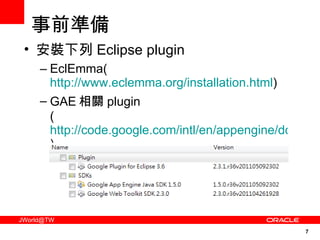
事前準備 安裝下列 Eclipse plugin EclEmma( http://www.eclemma.org/installation.html ) GAE 相關 plugin ( http://code.google.com/intl/en/appengine/docs/java/gettingstarted/installing.html )
快速上手 官方版 http://code.google.com/intl/en/appengine/docs/java/gettingstarted/ 超簡單版本 ( 流程如下 ) 1. 寫 HelloWorldServlet 2. 設定 appengine-web.xml 、 web.xml 3.Local 端測試 LocalAppUrl( http://localhost:8888/ ) LocalAdminConsoleUrl( http://localhost:8888/_ah/admin ) 4. 上傳至 GAE
快速上手 Live Demo
深入研究 申請 GAE 帳號 至 https://appengine.google.com/ 進行申請 申請流程教學可參考  http://nchc-gae.blogspot.com/2009/05/google-app-engine.html GAE 提供的功能 http://code.google.com/intl/en/appengine/docs/java/overview.html 本次介紹主題 Servlet + Datastore + JUnit + Emma
深入研究 ( Servlet+Datastore+JUnit+Emma) Servlet JavaEE 上那套玩意兒,沒有不同 Datastore GAE 專用的資料庫服務,與傳統關聯式資料庫不同,是分散式資料結構資料庫 (NoSQL) JUnit 老牌的單元測試框架 Emma 程式碼涵蓋率工具
深入研究 (Servlet) 大家都會 Servlet  ,直接略過… 
深入研究 ( Datastore) Datastore 簡述 GAE 上面提供的分散式資料結構資料庫 (NoSQL) 服務 Datastore 裡的術語 Kind 、 Entity 、 Key 、 Property Query 、 Index EntityGroup Transaction
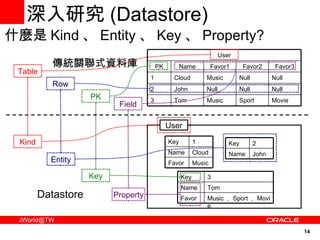
深入研究 ( Datastore) 什麼是 Kind 、 Entity 、 Key 、 Property? User 傳統關聯式資料庫 Datastore User Sport Null Null Favor2 Movie Null Null Favor3 Music Cloud 1 Music Tom 3 Null John 2 Favor1 Name PK Music Favor Cloud Name 1 Key John Name 2 Key Music , Sport , Movie Favor Tom Name 3 Key Kind Table Key PK Property Field Entity Row
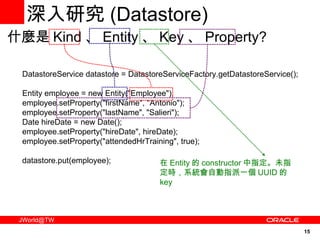
深入研究 ( Datastore) DatastoreService datastore = DatastoreServiceFactory.getDatastoreService(); Entity employee = new Entity("Employee"); employee.setProperty("firstName", "Antonio"); employee.setProperty("lastName", "Salieri"); Date hireDate = new Date(); employee.setProperty("hireDate", hireDate); employee.setProperty("attendedHrTraining", true); datastore.put(employee);  什麼是 Kind 、 Entity 、 Key 、 Property? 在 Entity 的 constructor 中指定。未指定時,系統會自動指派一個 UUID 的 key
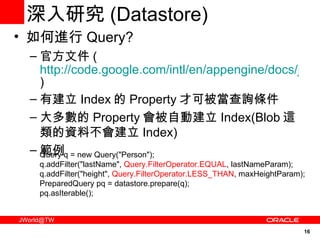
深入研究 ( Datastore) 如何進行 Query? 官方文件 ( http://code.google.com/intl/en/appengine/docs/java/datastore/queries.html ) 有建立 Index 的 Property 才可被當查詢條件 大多數的 Property 會被自動建立 Index(Blob 這類的資料不會建立 Index) 範例 Query q = new Query("Person"); q.addFilter("lastName",  Query.FilterOperator.EQUAL , lastNameParam); q.addFilter("height",  Query.FilterOperator.LESS_THAN , maxHeightParam); PreparedQuery pq = datastore.prepare(q); pq.asIterable();
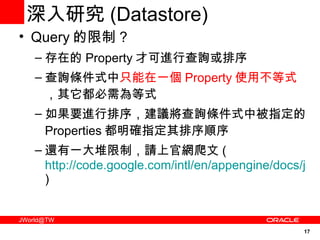
深入研究 ( Datastore) Query 的限制 ? 存在的 Property 才可進行查詢或排序 查詢條件式中 只能在一個 Property 使用不等式 ,其它都必需為等式 如果要進行排序,建議將查詢條件式中被指定的 Properties 都明確指定其排序順序 還有一大堆限制,請上官網爬文 ( http://code.google.com/intl/en/appengine/docs/java/datastore/queries.html )
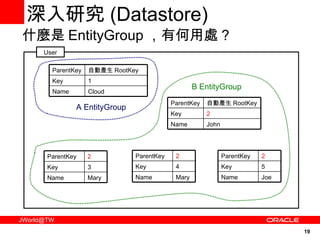
深入研究 ( Datastore) 什麼是 EntityGroup ,有何用處 ? 有相同 ParentKey 的 Entities 稱之為同一 EntityGroup 同一 EntityGroup 的 Entities 可綁定在同一 Transaction 進行資料操作 EntityGroup 一般使用在 OneToMany 的資料關聯之上
深入研究 ( Datastore) 什麼是 EntityGroup ,有何用處 ? User 自動產生 RootKey ParentKey Cloud Name 1 Key 自動產生 RootKey ParentKey John Name 2 Key 2 ParentKey Mary Name 3 Key 2 ParentKey Mary Name 4 Key 2 ParentKey Joe Name 5 Key A EntityGroup B EntityGroup
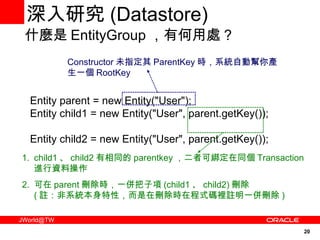
深入研究 ( Datastore) Entity parent = new Entity("User"); Entity child1 = new Entity("User", parent.getKey());  Entity child2 = new Entity("User", parent.getKey());  什麼是 EntityGroup ,有何用處 ? Constructor 未指定其 ParentKey 時,系統自動幫你產生一個 RootKey child1 、 child2 有相同的 parentkey ,二者可綁定在同個 Transaction 進行資料操作 可在 parent 刪除時,一併把子項 (child1 、 child2) 刪除 ( 註:非系統本身特性,而是在刪除時在程式碼裡註明一併刪除 )
深入研究 ( Datastore) Transaction 的特性為何 ? 跟傳統資料庫的 Transaction 大不同 同個 EntityGroup 的資料才可以綁定 Transaction 一個 Transaction 只許可 一個 EntityGroup 進行操作, GAE 不許可同個 Transaction 綁定多個 EntityGroup 官方文件 ( http://code.google.com/intl/en/appengine/docs/java/datastore/transactions.html )
深入研究 ( Datastore) Datastore 格式的選擇 The High Replication Datastore( 官方建議的選擇 ) The Master/Slave Datastore  官方文件 ( http://code.google.com/intl/en/appengine/docs/java/datastore/hr/ )
深入研究 ( Datastore) 其實…可以利用 JPA 或 JDO 對 Datastore 進行操作 ! 我個人比較不建議利用此方式 因為…到頭來還是必需深入了解 Datastore 才能解決資料存取層的各種問題
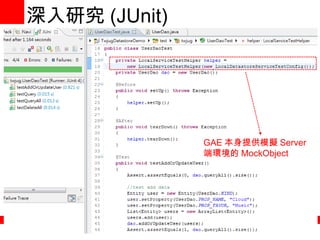
深入研究 (JUnit + Emma) GAE 本身提供各類 Service 的 MockObject 可供測試 官方文件 ( http://code.google.com/intl/en/appengine/docs/java/tools/localunittesting.html )
深入研究 (JUnit) GAE 本身提供模擬 Server 端環境的 MockObject
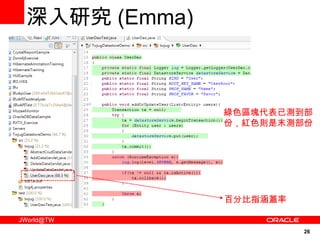
深入研究 (Emma) 綠色區塊代表已測到部份,紅色則是末測部份 百分比指涵蓋率
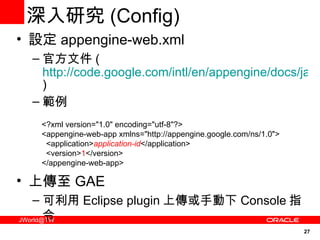
設定 appengine-web.xml 官方文件 ( http://code.google.com/intl/en/appengine/docs/java/config/appconfig.html#About_appengine_web_xml ) 範例 上傳至 GAE 可利用 Eclipse plugin 上傳或手動下 Console 指令 深入研究 (Config) <?xml version=&quot;1.0&quot; encoding=&quot;utf-8&quot;?> <appengine-web-app xmlns=&quot;http://appengine.google.com/ns/1.0&quot;>   <application> application-id </application>   <version> 1 </version> </appengine-web-app>
深入研究 Live Demo
GAE 大爆炸 !!!
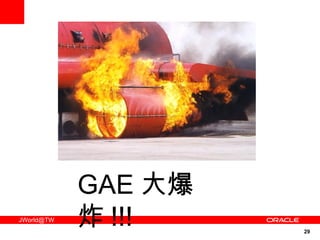
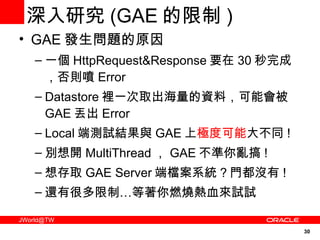
深入研究 (GAE 的限制 ) GAE 發生問題的原因 一個 HttpRequest&Response 要在 30 秒完成,否則噴 Error Datastore 裡一次取出海量的資料,可能會被 GAE 丟出 Error Local 端測試結果與 GAE 上 極度可能 大不同 ! 別想開 MultiThread , GAE 不準你亂搞 ! 想存取 GAE Server 端檔案系統 ? 門都沒有 ! 還有很多限制…等著你燃燒熱血來試試
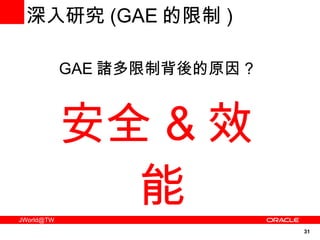
GAE 諸多限制背後的原因 ? 安全 & 效能 深入研究 (GAE 的限制 )
Q&A

GAE/J 簡介

  • 1.
    GAE/J 簡介Cloud Tu
  • 2.
    Agenda GAE 是什麼為何選擇 GAE GAE 支援的程式語言 事前準備 快速上手 深入研究 Q&A
  • 3.
    GAE(GoogleAppEngine) 是什麼 官方講法( http://code.google.com/intl/en/appengine/docs/whatisgoogleappengine.html ) 簡單來說就是「雲端的 ServletContainer 」 Google 提供 ServletContainer Google 幫你維護系統 你開發在這之上的 App
  • 4.
    為何選擇 GAE 免費! 只在小型 App 的狀況下啦 收費標準 請參考價目表 ( http:// code.google.com/intl/en/appengine/docs/billing.html ) Google 幫你搞定 Scale 、 Security… 一堆阿殺不魯的工作 雲端服務器比較不會掛掉 免費 ! 只在小型 App 的狀況下啦 收費標準 請參考價目表 ( http:// code.google.com/intl/en/appengine/docs/billing.html ) Google 幫你搞定 Scale 、 Security… 一堆阿殺不魯的工作 雲端服務器比較不會掛掉
  • 5.
    GAE 支援的程式語言 可以選擇Python Java Go 本次介紹 Java 版 GAE
  • 6.
    事前準備 必備技能 JSP、 Servlet 程式能力 略懂 JUnit 略懂 Emma
  • 7.
    事前準備 安裝下列 Eclipseplugin EclEmma( http://www.eclemma.org/installation.html ) GAE 相關 plugin ( http://code.google.com/intl/en/appengine/docs/java/gettingstarted/installing.html )
  • 8.
    快速上手 官方版 http://code.google.com/intl/en/appengine/docs/java/gettingstarted/超簡單版本 ( 流程如下 ) 1. 寫 HelloWorldServlet 2. 設定 appengine-web.xml 、 web.xml 3.Local 端測試 LocalAppUrl( http://localhost:8888/ ) LocalAdminConsoleUrl( http://localhost:8888/_ah/admin ) 4. 上傳至 GAE
  • 9.
  • 10.
    深入研究 申請 GAE帳號 至 https://appengine.google.com/ 進行申請 申請流程教學可參考 http://nchc-gae.blogspot.com/2009/05/google-app-engine.html GAE 提供的功能 http://code.google.com/intl/en/appengine/docs/java/overview.html 本次介紹主題 Servlet + Datastore + JUnit + Emma
  • 11.
    深入研究 ( Servlet+Datastore+JUnit+Emma)Servlet JavaEE 上那套玩意兒,沒有不同 Datastore GAE 專用的資料庫服務,與傳統關聯式資料庫不同,是分散式資料結構資料庫 (NoSQL) JUnit 老牌的單元測試框架 Emma 程式碼涵蓋率工具
  • 12.
    深入研究 (Servlet) 大家都會Servlet ,直接略過… 
  • 13.
    深入研究 ( Datastore)Datastore 簡述 GAE 上面提供的分散式資料結構資料庫 (NoSQL) 服務 Datastore 裡的術語 Kind 、 Entity 、 Key 、 Property Query 、 Index EntityGroup Transaction
  • 14.
    深入研究 ( Datastore)什麼是 Kind 、 Entity 、 Key 、 Property? User 傳統關聯式資料庫 Datastore User Sport Null Null Favor2 Movie Null Null Favor3 Music Cloud 1 Music Tom 3 Null John 2 Favor1 Name PK Music Favor Cloud Name 1 Key John Name 2 Key Music , Sport , Movie Favor Tom Name 3 Key Kind Table Key PK Property Field Entity Row
  • 15.
    深入研究 ( Datastore)DatastoreService datastore = DatastoreServiceFactory.getDatastoreService(); Entity employee = new Entity(&quot;Employee&quot;); employee.setProperty(&quot;firstName&quot;, &quot;Antonio&quot;); employee.setProperty(&quot;lastName&quot;, &quot;Salieri&quot;); Date hireDate = new Date(); employee.setProperty(&quot;hireDate&quot;, hireDate); employee.setProperty(&quot;attendedHrTraining&quot;, true); datastore.put(employee); 什麼是 Kind 、 Entity 、 Key 、 Property? 在 Entity 的 constructor 中指定。未指定時,系統會自動指派一個 UUID 的 key
  • 16.
    深入研究 ( Datastore)如何進行 Query? 官方文件 ( http://code.google.com/intl/en/appengine/docs/java/datastore/queries.html ) 有建立 Index 的 Property 才可被當查詢條件 大多數的 Property 會被自動建立 Index(Blob 這類的資料不會建立 Index) 範例 Query q = new Query(&quot;Person&quot;); q.addFilter(&quot;lastName&quot;, Query.FilterOperator.EQUAL , lastNameParam); q.addFilter(&quot;height&quot;, Query.FilterOperator.LESS_THAN , maxHeightParam); PreparedQuery pq = datastore.prepare(q); pq.asIterable();
  • 17.
    深入研究 ( Datastore)Query 的限制 ? 存在的 Property 才可進行查詢或排序 查詢條件式中 只能在一個 Property 使用不等式 ,其它都必需為等式 如果要進行排序,建議將查詢條件式中被指定的 Properties 都明確指定其排序順序 還有一大堆限制,請上官網爬文 ( http://code.google.com/intl/en/appengine/docs/java/datastore/queries.html )
  • 18.
    深入研究 ( Datastore)什麼是 EntityGroup ,有何用處 ? 有相同 ParentKey 的 Entities 稱之為同一 EntityGroup 同一 EntityGroup 的 Entities 可綁定在同一 Transaction 進行資料操作 EntityGroup 一般使用在 OneToMany 的資料關聯之上
  • 19.
    深入研究 ( Datastore)什麼是 EntityGroup ,有何用處 ? User 自動產生 RootKey ParentKey Cloud Name 1 Key 自動產生 RootKey ParentKey John Name 2 Key 2 ParentKey Mary Name 3 Key 2 ParentKey Mary Name 4 Key 2 ParentKey Joe Name 5 Key A EntityGroup B EntityGroup
  • 20.
    深入研究 ( Datastore)Entity parent = new Entity(&quot;User&quot;); Entity child1 = new Entity(&quot;User&quot;, parent.getKey()); Entity child2 = new Entity(&quot;User&quot;, parent.getKey()); 什麼是 EntityGroup ,有何用處 ? Constructor 未指定其 ParentKey 時,系統自動幫你產生一個 RootKey child1 、 child2 有相同的 parentkey ,二者可綁定在同個 Transaction 進行資料操作 可在 parent 刪除時,一併把子項 (child1 、 child2) 刪除 ( 註:非系統本身特性,而是在刪除時在程式碼裡註明一併刪除 )
  • 21.
    深入研究 ( Datastore)Transaction 的特性為何 ? 跟傳統資料庫的 Transaction 大不同 同個 EntityGroup 的資料才可以綁定 Transaction 一個 Transaction 只許可 一個 EntityGroup 進行操作, GAE 不許可同個 Transaction 綁定多個 EntityGroup 官方文件 ( http://code.google.com/intl/en/appengine/docs/java/datastore/transactions.html )
  • 22.
    深入研究 ( Datastore)Datastore 格式的選擇 The High Replication Datastore( 官方建議的選擇 ) The Master/Slave Datastore 官方文件 ( http://code.google.com/intl/en/appengine/docs/java/datastore/hr/ )
  • 23.
    深入研究 ( Datastore)其實…可以利用 JPA 或 JDO 對 Datastore 進行操作 ! 我個人比較不建議利用此方式 因為…到頭來還是必需深入了解 Datastore 才能解決資料存取層的各種問題
  • 24.
    深入研究 (JUnit +Emma) GAE 本身提供各類 Service 的 MockObject 可供測試 官方文件 ( http://code.google.com/intl/en/appengine/docs/java/tools/localunittesting.html )
  • 25.
    深入研究 (JUnit) GAE本身提供模擬 Server 端環境的 MockObject
  • 26.
  • 27.
    設定 appengine-web.xml 官方文件( http://code.google.com/intl/en/appengine/docs/java/config/appconfig.html#About_appengine_web_xml ) 範例 上傳至 GAE 可利用 Eclipse plugin 上傳或手動下 Console 指令 深入研究 (Config) <?xml version=&quot;1.0&quot; encoding=&quot;utf-8&quot;?> <appengine-web-app xmlns=&quot;http://appengine.google.com/ns/1.0&quot;>   <application> application-id </application>   <version> 1 </version> </appengine-web-app>
  • 28.
  • 29.
  • 30.
    深入研究 (GAE 的限制) GAE 發生問題的原因 一個 HttpRequest&Response 要在 30 秒完成,否則噴 Error Datastore 裡一次取出海量的資料,可能會被 GAE 丟出 Error Local 端測試結果與 GAE 上 極度可能 大不同 ! 別想開 MultiThread , GAE 不準你亂搞 ! 想存取 GAE Server 端檔案系統 ? 門都沒有 ! 還有很多限制…等著你燃燒熱血來試試
  • 31.
    GAE 諸多限制背後的原因 ?安全 & 效能 深入研究 (GAE 的限制 )
  • 32.