Download free for 30 days
Sign in
Upload
Language (EN)
Support
Business
Mobile
Social Media
Marketing
Technology
Art & Photos
Career
Design
Education
Presentations & Public Speaking
Government & Nonprofit
Healthcare
Internet
Law
Leadership & Management
Automotive
Engineering
Software
Recruiting & HR
Retail
Sales
Services
Science
Small Business & Entrepreneurship
Food
Environment
Economy & Finance
Data & Analytics
Investor Relations
Sports
Spiritual
News & Politics
Travel
Self Improvement
Real Estate
Entertainment & Humor
Health & Medicine
Devices & Hardware
Lifestyle
Change Language
Language
English
Español
Português
Français
Deutsche
Cancel
Save
Submit search
EN
Uploaded by
implantarb101
276 views
Formulario4
formulario con multiples preguntas
Technology
◦
Read more
0
Save
Share
Embed
Embed presentation
Download
Download to read offline
1
/ 9
2
/ 9
3
/ 9
4
/ 9
5
/ 9
6
/ 9
7
/ 9
8
/ 9
9
/ 9
More Related Content
DOCX
Evaluacion
by
jbersosa
PDF
Cuestionario
by
implantarb101
PDF
Formulario6
by
implantarb101
PDF
Formulario
by
implantarb101
PDF
Ejerc3 141204195452-conversion-gate01
by
Ronals Fernandez Jara
DOCX
Perhitungan Dua Bilangan dengan Java NetBeans
by
Aldila Putri
ZIP
変態的PHPフレームワーク rhaco
by
makoto tsuyuki
PDF
JQuery
by
koji lin
Evaluacion
by
jbersosa
Cuestionario
by
implantarb101
Formulario6
by
implantarb101
Formulario
by
implantarb101
Ejerc3 141204195452-conversion-gate01
by
Ronals Fernandez Jara
Perhitungan Dua Bilangan dengan Java NetBeans
by
Aldila Putri
変態的PHPフレームワーク rhaco
by
makoto tsuyuki
JQuery
by
koji lin
Viewers also liked
PPT
Otoño 2015 european projects comunication_2 (3)
by
CARMEN DIEZ CALZADA
PDF
Il Giornale Della Fiera - Editie Zomer 2011
by
Italian Entertainment And More
PDF
Manual terapie ocupationala
by
MIHAELA VLAS
PDF
Lynx mobile corporate (integración smartphones y tablets en la TI Corporativa)
by
Esteve Escuer
PDF
Ethics of Practice Management in the 21st Century
by
Oregon Law Practice Management
PDF
Clase 7 sust. pura 14 1
by
Jonathan Dv Acuña Cordova
PPTX
Migracion 2014 2015
by
Nelva Rossio Ramirez Vargas
PPT
Hugo
by
belen alvarez martinez
PDF
Ponencia sobre Hiperinnovación TEDxLaRioja 2011
by
Toni Mascaró
PDF
Open Solaris Virtual Box
by
JuanDavid17
PPTX
Panamericano promo
by
Luis Moreno
PPTX
facebook
by
daniel Saldarriaga fernandez
PDF
SP-904_EN
by
Sean Ibrahim
PPTX
Biohumana práctica yogur
by
andrea19998
PDF
E commerce-salary-survey-eng
by
Awara Direct Search
PPT
Forum Promotions in seo
by
Paridhi Infotech
PDF
David weber dahak 04 - empire from the ashes
by
AJC25
PPT
Getting Started with VSTO
by
LearnNowOnline
DOCX
Análisis Matricial
by
María José Echeverría Landeta
PPSX
Bo Houmann Nielsen powerpoint Cv.-
by
Bo Houmann
Otoño 2015 european projects comunication_2 (3)
by
CARMEN DIEZ CALZADA
Il Giornale Della Fiera - Editie Zomer 2011
by
Italian Entertainment And More
Manual terapie ocupationala
by
MIHAELA VLAS
Lynx mobile corporate (integración smartphones y tablets en la TI Corporativa)
by
Esteve Escuer
Ethics of Practice Management in the 21st Century
by
Oregon Law Practice Management
Clase 7 sust. pura 14 1
by
Jonathan Dv Acuña Cordova
Migracion 2014 2015
by
Nelva Rossio Ramirez Vargas
Hugo
by
belen alvarez martinez
Ponencia sobre Hiperinnovación TEDxLaRioja 2011
by
Toni Mascaró
Open Solaris Virtual Box
by
JuanDavid17
Panamericano promo
by
Luis Moreno
facebook
by
daniel Saldarriaga fernandez
SP-904_EN
by
Sean Ibrahim
Biohumana práctica yogur
by
andrea19998
E commerce-salary-survey-eng
by
Awara Direct Search
Forum Promotions in seo
by
Paridhi Infotech
David weber dahak 04 - empire from the ashes
by
AJC25
Getting Started with VSTO
by
LearnNowOnline
Análisis Matricial
by
María José Echeverría Landeta
Bo Houmann Nielsen powerpoint Cv.-
by
Bo Houmann
More from implantarb101
PPTX
sistemas de informacion
by
implantarb101
PPTX
Sistema informacion y modelo cliente servidor
by
implantarb101
PDF
Formulario5
by
implantarb101
PPTX
Trabajo de sistemas de s c
by
implantarb101
PPTX
Cliente servidor
by
implantarb101
PDF
Formulario en java
by
implantarb101
PPTX
Sistemas de informacion
by
implantarb101
sistemas de informacion
by
implantarb101
Sistema informacion y modelo cliente servidor
by
implantarb101
Formulario5
by
implantarb101
Trabajo de sistemas de s c
by
implantarb101
Cliente servidor
by
implantarb101
Formulario en java
by
implantarb101
Sistemas de informacion
by
implantarb101
Formulario4
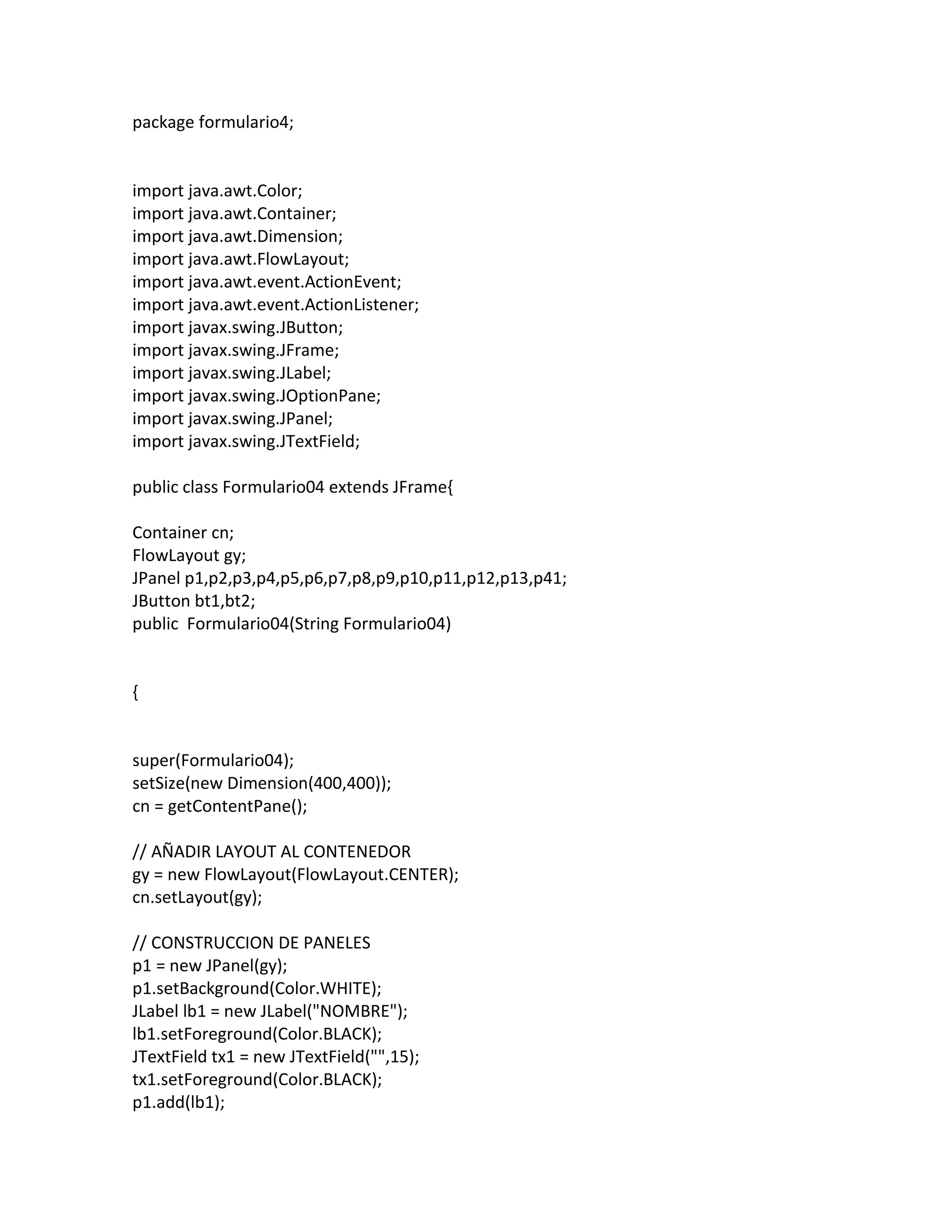
1.
package formulario4; import java.awt.Color; import
java.awt.Container; import java.awt.Dimension; import java.awt.FlowLayout; import java.awt.event.ActionEvent; import java.awt.event.ActionListener; import javax.swing.JButton; import javax.swing.JFrame; import javax.swing.JLabel; import javax.swing.JOptionPane; import javax.swing.JPanel; import javax.swing.JTextField; public class Formulario04 extends JFrame{ Container cn; FlowLayout gy; JPanel p1,p2,p3,p4,p5,p6,p7,p8,p9,p10,p11,p12,p13,p41; JButton bt1,bt2; public Formulario04(String Formulario04) { super(Formulario04); setSize(new Dimension(400,400)); cn = getContentPane(); // AÑADIR LAYOUT AL CONTENEDOR gy = new FlowLayout(FlowLayout.CENTER); cn.setLayout(gy); // CONSTRUCCION DE PANELES p1 = new JPanel(gy); p1.setBackground(Color.WHITE); JLabel lb1 = new JLabel("NOMBRE"); lb1.setForeground(Color.BLACK); JTextField tx1 = new JTextField("",15); tx1.setForeground(Color.BLACK); p1.add(lb1);
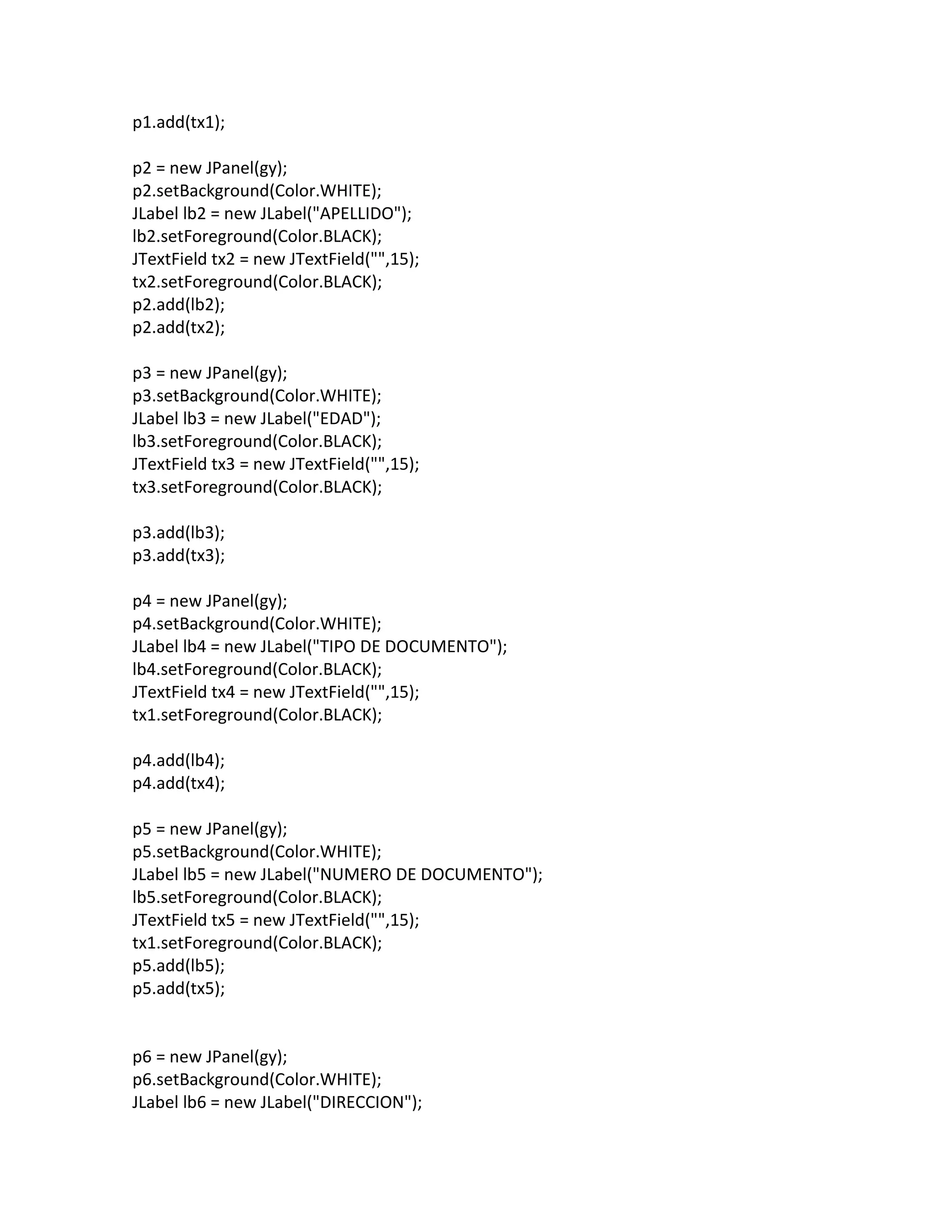
2.
p1.add(tx1); p2 = new
JPanel(gy); p2.setBackground(Color.WHITE); JLabel lb2 = new JLabel("APELLIDO"); lb2.setForeground(Color.BLACK); JTextField tx2 = new JTextField("",15); tx2.setForeground(Color.BLACK); p2.add(lb2); p2.add(tx2); p3 = new JPanel(gy); p3.setBackground(Color.WHITE); JLabel lb3 = new JLabel("EDAD"); lb3.setForeground(Color.BLACK); JTextField tx3 = new JTextField("",15); tx3.setForeground(Color.BLACK); p3.add(lb3); p3.add(tx3); p4 = new JPanel(gy); p4.setBackground(Color.WHITE); JLabel lb4 = new JLabel("TIPO DE DOCUMENTO"); lb4.setForeground(Color.BLACK); JTextField tx4 = new JTextField("",15); tx1.setForeground(Color.BLACK); p4.add(lb4); p4.add(tx4); p5 = new JPanel(gy); p5.setBackground(Color.WHITE); JLabel lb5 = new JLabel("NUMERO DE DOCUMENTO"); lb5.setForeground(Color.BLACK); JTextField tx5 = new JTextField("",15); tx1.setForeground(Color.BLACK); p5.add(lb5); p5.add(tx5); p6 = new JPanel(gy); p6.setBackground(Color.WHITE); JLabel lb6 = new JLabel("DIRECCION");
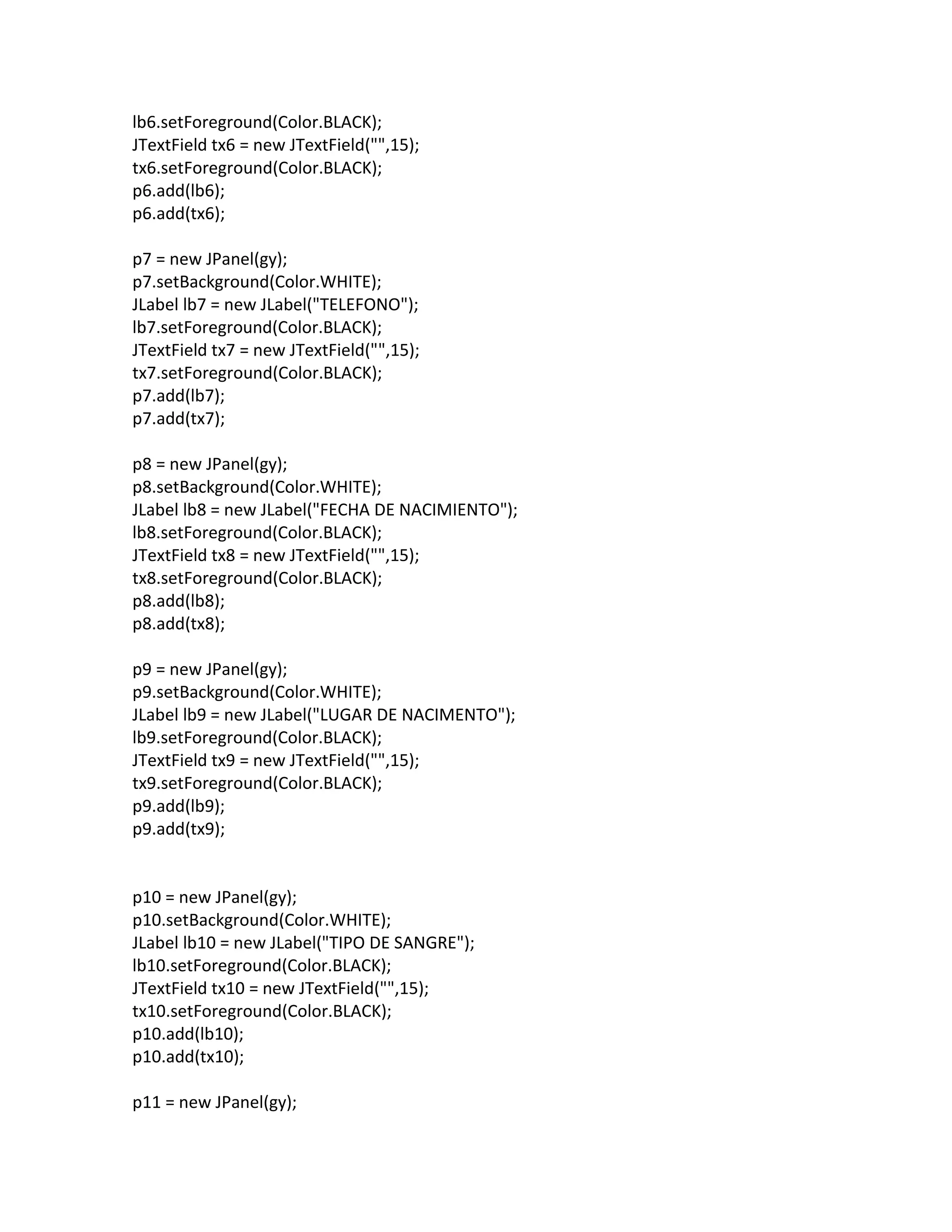
3.
lb6.setForeground(Color.BLACK); JTextField tx6 =
new JTextField("",15); tx6.setForeground(Color.BLACK); p6.add(lb6); p6.add(tx6); p7 = new JPanel(gy); p7.setBackground(Color.WHITE); JLabel lb7 = new JLabel("TELEFONO"); lb7.setForeground(Color.BLACK); JTextField tx7 = new JTextField("",15); tx7.setForeground(Color.BLACK); p7.add(lb7); p7.add(tx7); p8 = new JPanel(gy); p8.setBackground(Color.WHITE); JLabel lb8 = new JLabel("FECHA DE NACIMIENTO"); lb8.setForeground(Color.BLACK); JTextField tx8 = new JTextField("",15); tx8.setForeground(Color.BLACK); p8.add(lb8); p8.add(tx8); p9 = new JPanel(gy); p9.setBackground(Color.WHITE); JLabel lb9 = new JLabel("LUGAR DE NACIMENTO"); lb9.setForeground(Color.BLACK); JTextField tx9 = new JTextField("",15); tx9.setForeground(Color.BLACK); p9.add(lb9); p9.add(tx9); p10 = new JPanel(gy); p10.setBackground(Color.WHITE); JLabel lb10 = new JLabel("TIPO DE SANGRE"); lb10.setForeground(Color.BLACK); JTextField tx10 = new JTextField("",15); tx10.setForeground(Color.BLACK); p10.add(lb10); p10.add(tx10); p11 = new JPanel(gy);
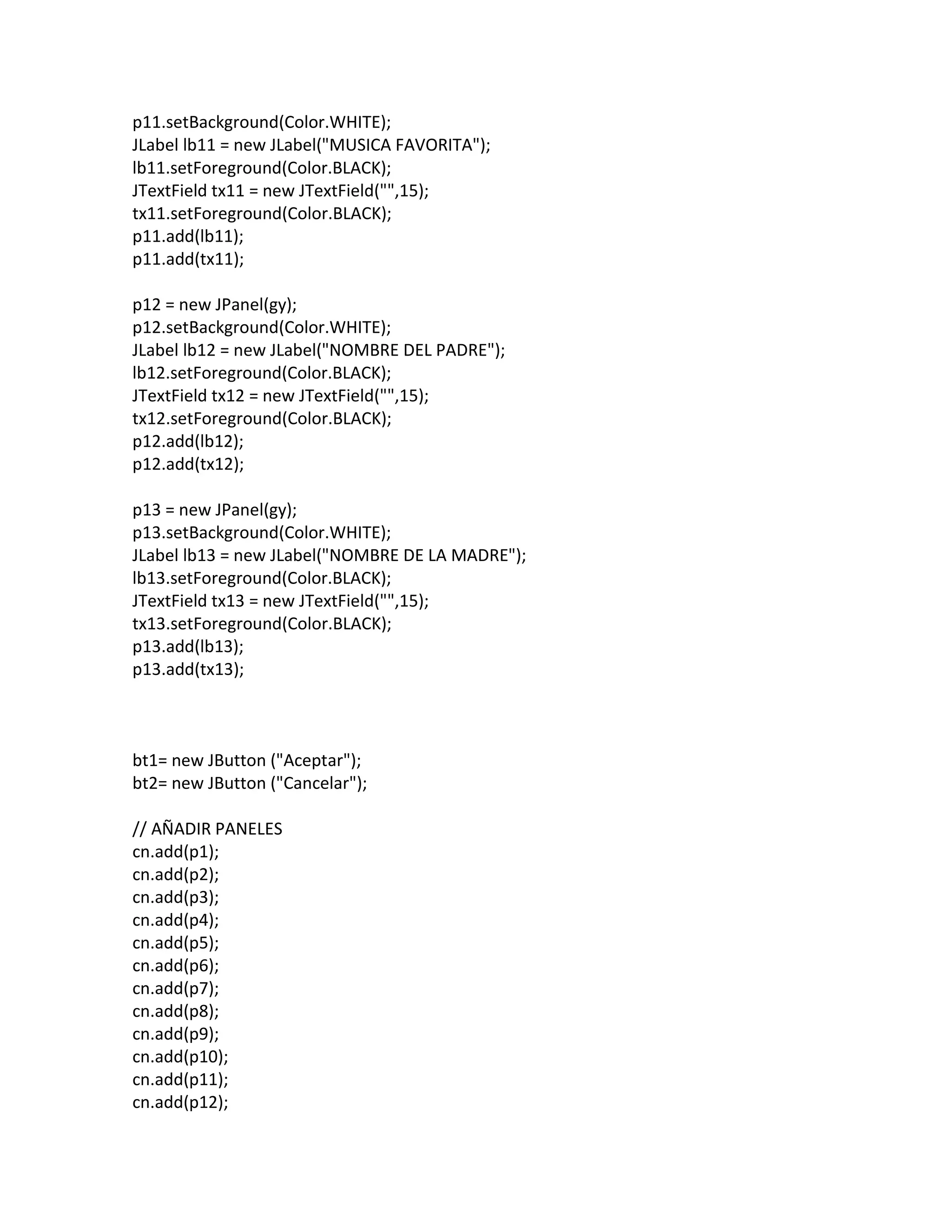
4.
p11.setBackground(Color.WHITE); JLabel lb11 =
new JLabel("MUSICA FAVORITA"); lb11.setForeground(Color.BLACK); JTextField tx11 = new JTextField("",15); tx11.setForeground(Color.BLACK); p11.add(lb11); p11.add(tx11); p12 = new JPanel(gy); p12.setBackground(Color.WHITE); JLabel lb12 = new JLabel("NOMBRE DEL PADRE"); lb12.setForeground(Color.BLACK); JTextField tx12 = new JTextField("",15); tx12.setForeground(Color.BLACK); p12.add(lb12); p12.add(tx12); p13 = new JPanel(gy); p13.setBackground(Color.WHITE); JLabel lb13 = new JLabel("NOMBRE DE LA MADRE"); lb13.setForeground(Color.BLACK); JTextField tx13 = new JTextField("",15); tx13.setForeground(Color.BLACK); p13.add(lb13); p13.add(tx13); bt1= new JButton ("Aceptar"); bt2= new JButton ("Cancelar"); // AÑADIR PANELES cn.add(p1); cn.add(p2); cn.add(p3); cn.add(p4); cn.add(p5); cn.add(p6); cn.add(p7); cn.add(p8); cn.add(p9); cn.add(p10); cn.add(p11); cn.add(p12);
5.
cn.add(p13); // LECTURA DE
DATOS INTRODUCIDOS String texto =tx1.getText(); // TEXTO INICIAL tx1.addActionListener(new Lector1()); tx2.addActionListener(new Lector2()); tx3.addActionListener(new Lector3()); tx4.addActionListener(new Lector4()); tx5.addActionListener(new Lector5()); tx6.addActionListener(new Lector6()); tx7.addActionListener(new Lector7()); tx8.addActionListener(new Lector8()); tx9.addActionListener(new Lector9()); tx10.addActionListener(new Lector10()); tx11.addActionListener(new Lector11()); tx12.addActionListener(new Lector12()); tx13.addActionListener(new Lector13()); // FINAL: CIERRE DE VENTANA setDefaultCloseOperation(JFrame.EXIT_ON_CLOSE); System.out.println("ADIOStexto"); } public static void main(String[] args) { Formulario04 frame = new Formulario04(" Formulario04 "); frame.setVisible(true); } // LEE CUANDO SE PRESIONE RETURN EN EL CAMPO CORRESPONDIENTE class Lector1 implements ActionListener { private int i; @Override public void actionPerformed(ActionEvent e) { System.out.print("NOMBRE" + ": "); System.out.println(((JTextField)e.getSource()).getText()); } } class Lector2 implements ActionListener
6.
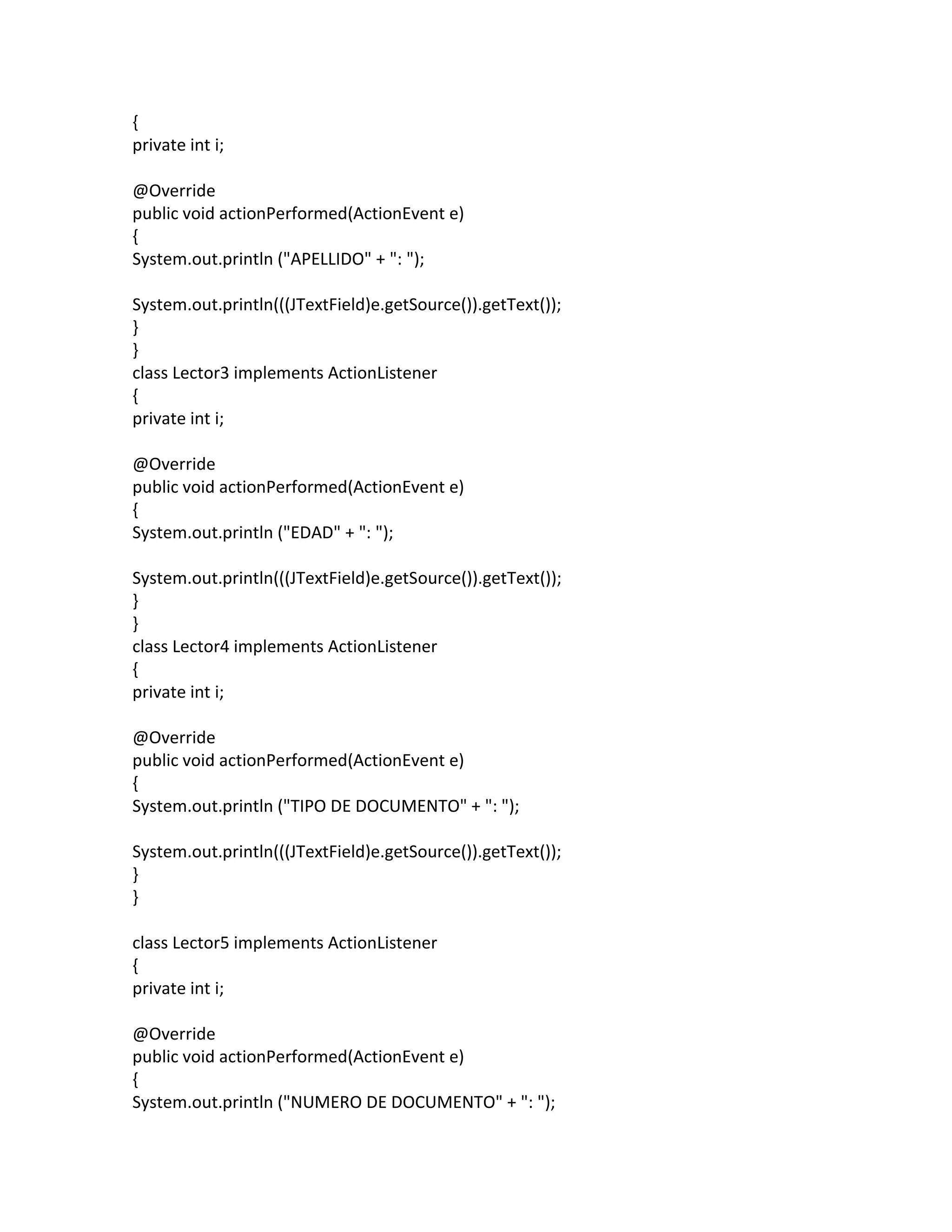
{ private int i; @Override public
void actionPerformed(ActionEvent e) { System.out.println ("APELLIDO" + ": "); System.out.println(((JTextField)e.getSource()).getText()); } } class Lector3 implements ActionListener { private int i; @Override public void actionPerformed(ActionEvent e) { System.out.println ("EDAD" + ": "); System.out.println(((JTextField)e.getSource()).getText()); } } class Lector4 implements ActionListener { private int i; @Override public void actionPerformed(ActionEvent e) { System.out.println ("TIPO DE DOCUMENTO" + ": "); System.out.println(((JTextField)e.getSource()).getText()); } } class Lector5 implements ActionListener { private int i; @Override public void actionPerformed(ActionEvent e) { System.out.println ("NUMERO DE DOCUMENTO" + ": ");
7.
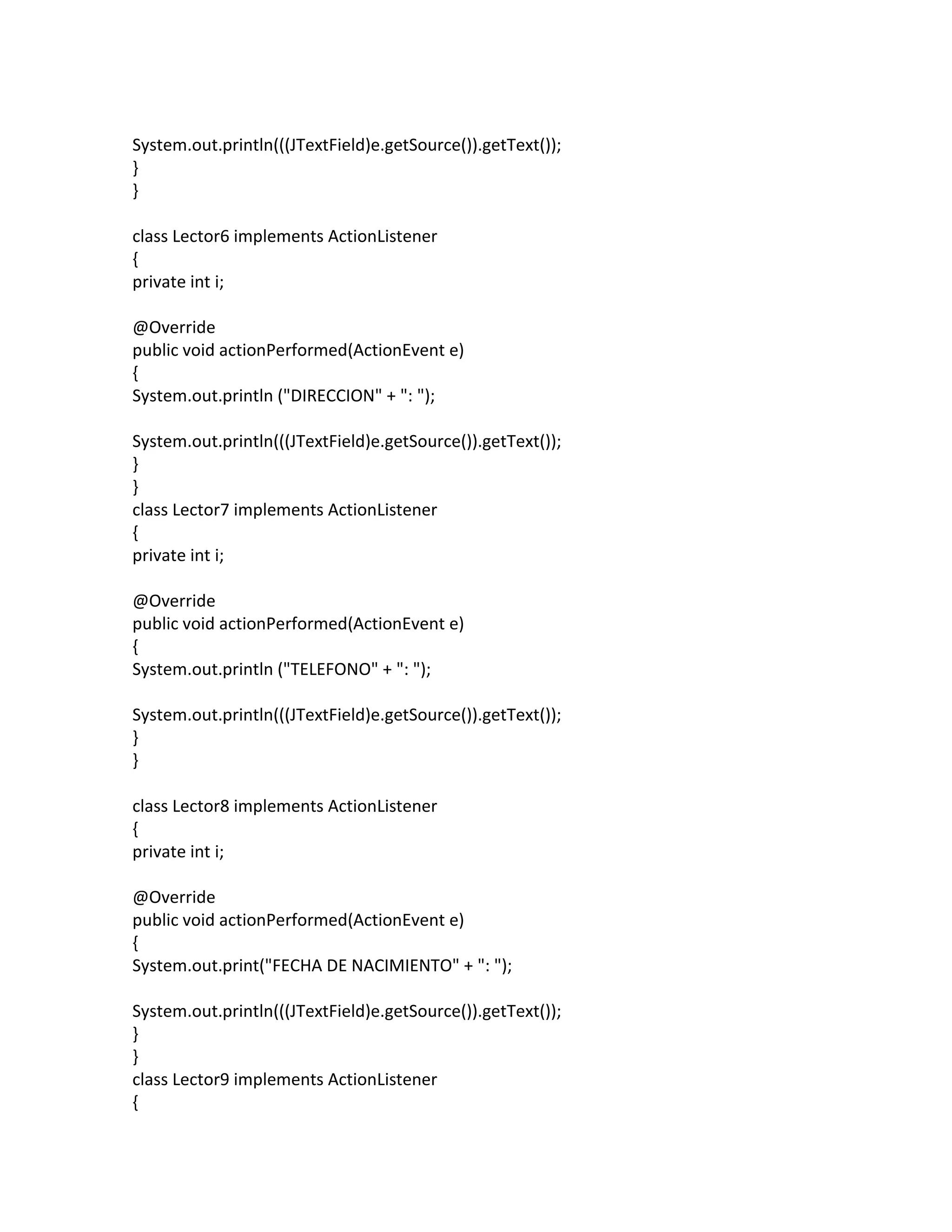
System.out.println(((JTextField)e.getSource()).getText()); } } class Lector6 implements
ActionListener { private int i; @Override public void actionPerformed(ActionEvent e) { System.out.println ("DIRECCION" + ": "); System.out.println(((JTextField)e.getSource()).getText()); } } class Lector7 implements ActionListener { private int i; @Override public void actionPerformed(ActionEvent e) { System.out.println ("TELEFONO" + ": "); System.out.println(((JTextField)e.getSource()).getText()); } } class Lector8 implements ActionListener { private int i; @Override public void actionPerformed(ActionEvent e) { System.out.print("FECHA DE NACIMIENTO" + ": "); System.out.println(((JTextField)e.getSource()).getText()); } } class Lector9 implements ActionListener {
8.
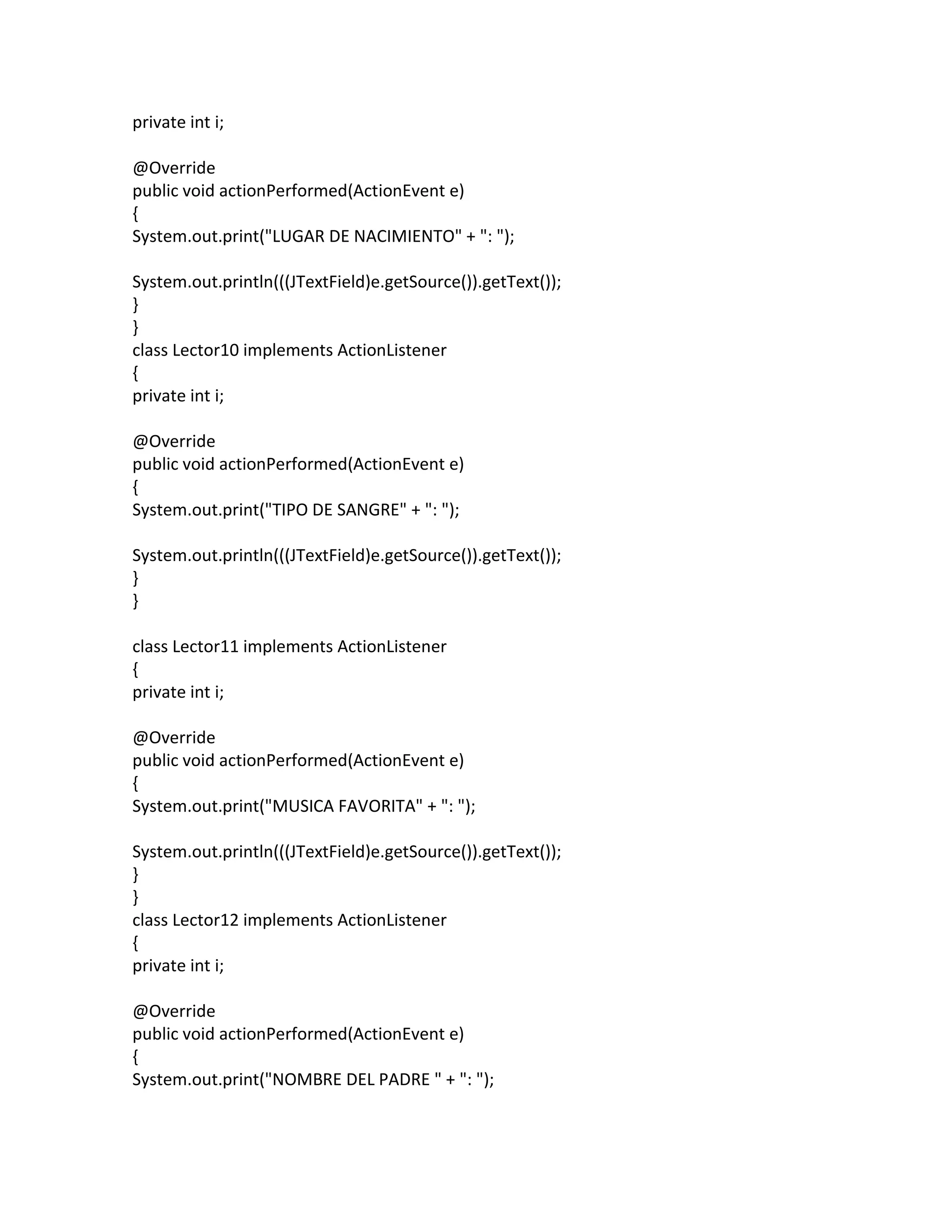
private int i; @Override public
void actionPerformed(ActionEvent e) { System.out.print("LUGAR DE NACIMIENTO" + ": "); System.out.println(((JTextField)e.getSource()).getText()); } } class Lector10 implements ActionListener { private int i; @Override public void actionPerformed(ActionEvent e) { System.out.print("TIPO DE SANGRE" + ": "); System.out.println(((JTextField)e.getSource()).getText()); } } class Lector11 implements ActionListener { private int i; @Override public void actionPerformed(ActionEvent e) { System.out.print("MUSICA FAVORITA" + ": "); System.out.println(((JTextField)e.getSource()).getText()); } } class Lector12 implements ActionListener { private int i; @Override public void actionPerformed(ActionEvent e) { System.out.print("NOMBRE DEL PADRE " + ": ");
9.
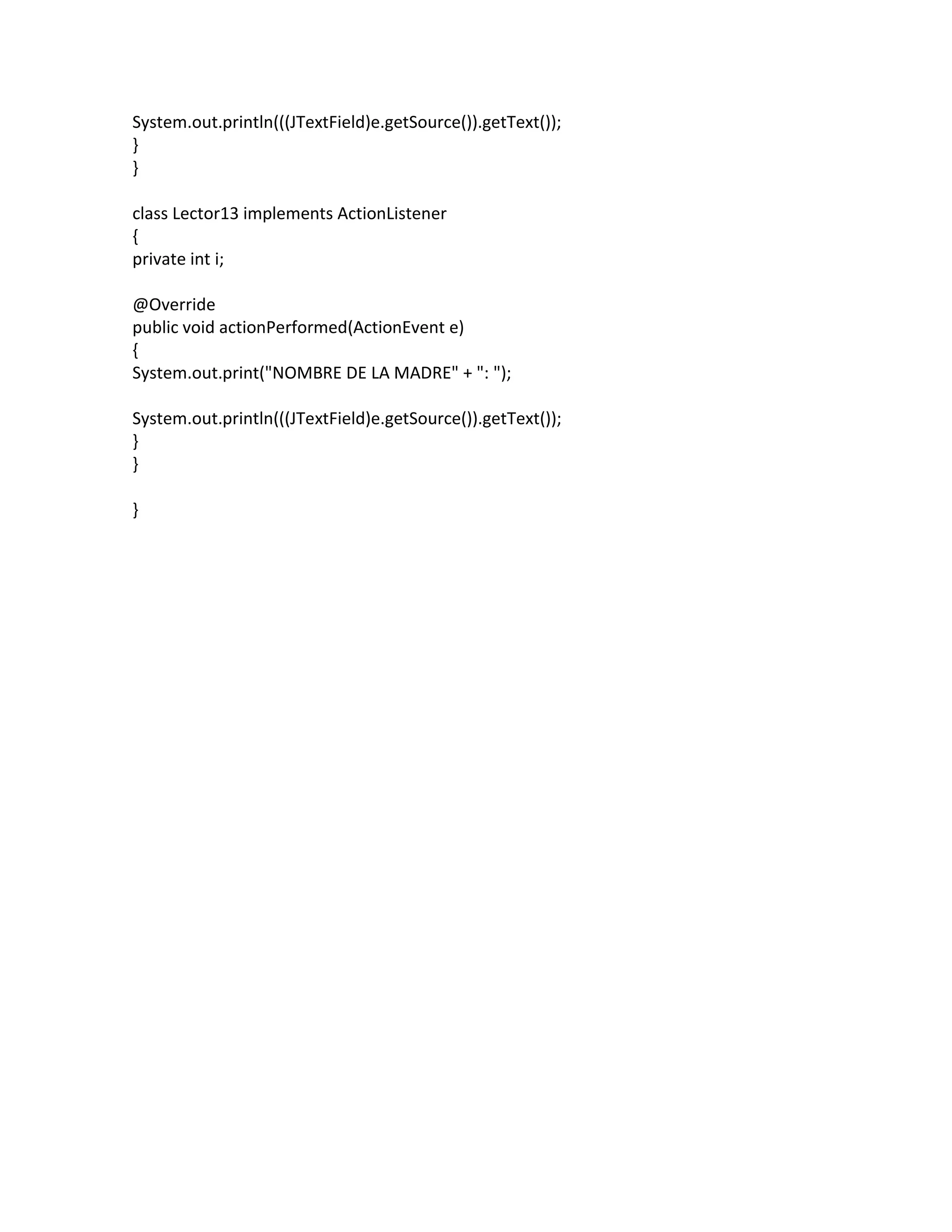
System.out.println(((JTextField)e.getSource()).getText()); } } class Lector13 implements
ActionListener { private int i; @Override public void actionPerformed(ActionEvent e) { System.out.print("NOMBRE DE LA MADRE" + ": "); System.out.println(((JTextField)e.getSource()).getText()); } } }
Download
![cn.add(p13);
// LECTURA DE DATOS INTRODUCIDOS
String texto =tx1.getText(); // TEXTO INICIAL
tx1.addActionListener(new Lector1());
tx2.addActionListener(new Lector2());
tx3.addActionListener(new Lector3());
tx4.addActionListener(new Lector4());
tx5.addActionListener(new Lector5());
tx6.addActionListener(new Lector6());
tx7.addActionListener(new Lector7());
tx8.addActionListener(new Lector8());
tx9.addActionListener(new Lector9());
tx10.addActionListener(new Lector10());
tx11.addActionListener(new Lector11());
tx12.addActionListener(new Lector12());
tx13.addActionListener(new Lector13());
// FINAL: CIERRE DE VENTANA
setDefaultCloseOperation(JFrame.EXIT_ON_CLOSE);
System.out.println("ADIOStexto");
}
public static void main(String[] args)
{
Formulario04 frame = new Formulario04(" Formulario04 ");
frame.setVisible(true);
}
// LEE CUANDO SE PRESIONE RETURN EN EL CAMPO CORRESPONDIENTE
class Lector1 implements ActionListener
{
private int i;
@Override
public void actionPerformed(ActionEvent e)
{
System.out.print("NOMBRE" + ": ");
System.out.println(((JTextField)e.getSource()).getText());
}
}
class Lector2 implements ActionListener](https://image.slidesharecdn.com/formulario4-150430112918-conversion-gate01/75/Formulario4-5-2048.jpg)