Firebase defines for
everyone
By Apaichon Punopas
• Realtime Database call by API
• Store as JSON format
• Sync data from multiple applications
• Only write front end code
• Secure and monitor your data
• Access from everywhere
What is Firebase ?
• Originally referring to "non SQL", "non relational" or "not
only SQL"
• Simplicity of design, simpler "horizontal" scaling to
clusters of machines
• key-value, wide column, graph, or document
• "more flexible" than relational database tables
• Most NoSQL stores lack true ACID transactions
• Most NoSQL use JSON format
What is NO SQL ?
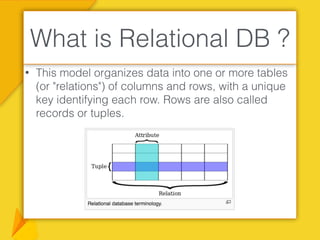
• This model organizes data into one or more tables
(or "relations") of columns and rows, with a unique
key identifying each row. Rows are also called
records or tuples.
What is Relational DB ?
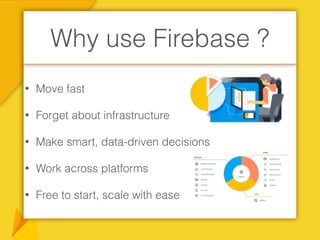
• Move fast
• Forget about infrastructure
• Make smart, data-driven decisions
• Work across platforms
• Free to start, scale with ease
Why use Firebase ?
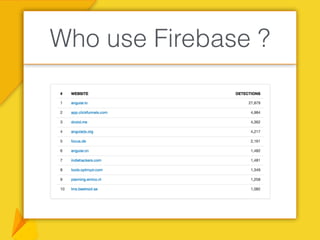
Who use Firebase ?
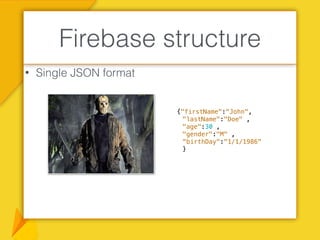
• Single JSON format
Firebase structure
{"firstName":"John",
"lastName":"Doe" ,
"age":30 ,
"gender":"M" ,
“birthDay":"1/1/1986"
}
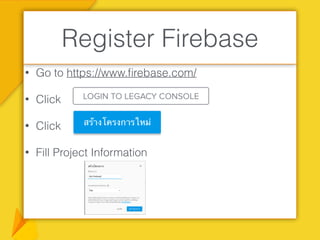
• Go to https://www.firebase.com/
• Click
• Click
• Fill Project Information
Register Firebase
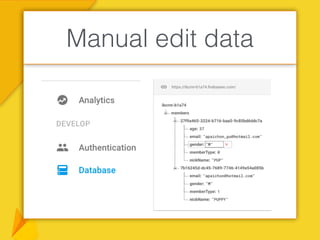
Manual edit data
• Node.js is a server-side platform.
• Built on Google Chrome's JavaScript Engine (V8 Engine).
• It was developed by Ryan Dahl in 2009.
• It is an open source.
• Cross-platform runtime environment for developing
server-side and networking applications.
• Node.js uses an event-driven, non-blocking I/O model.
What is NodeJS ?
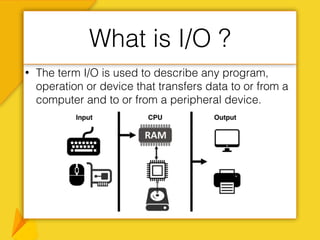
• The term I/O is used to describe any program,
operation or device that transfers data to or from a
computer and to or from a peripheral device.
What is I/O ?
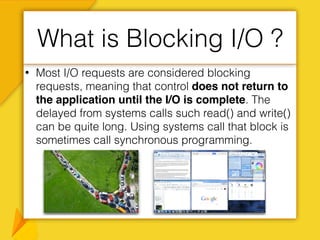
• Most I/O requests are considered blocking
requests, meaning that control does not return to
the application until the I/O is complete. The
delayed from systems calls such read() and write()
can be quite long. Using systems call that block is
sometimes call synchronous programming.
What is Blocking I/O ?
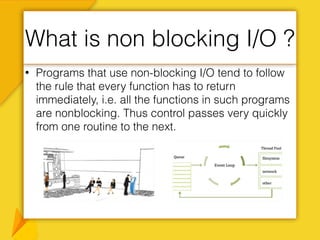
• Programs that use non-blocking I/O tend to follow
the rule that every function has to return
immediately, i.e. all the functions in such programs
are nonblocking. Thus control passes very quickly
from one routine to the next.
What is non blocking I/O ?
1. Go to https://nodejs.org/en/download/
2. Choose NodeJS for your OS.
3. Extract file and Click on Installer package.
4. After finish installed then open terminal and type
command.
Installation NodeJS
>node -v
1. Create file name package.json
Integrate Firebase with
NodeJS #2
{
"name": "testfirebase",
"version": "1.0.0",
"description": "MyService is Rest Api Application for our core system.",
"scripts": {
"test": "echo "Error: no test specified" && exit 1"
},
"keywords": [
"Test Firebase"
],
"author": “Your Name",
"license": "MIT",
"dependencies": {
"body-parser": ">= 1.14.2",
"express": "^4.14.0",
"firebase": "^3.5.2",
"guid": "latest"
}
}
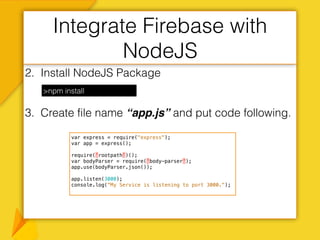
2. Install NodeJS Package
3. Create file name “app.js” and put code following.
Integrate Firebase with
NodeJS
>npm install
var express = require("express");
var app = express();
require('rootpath')();
var bodyParser = require('body-parser');
app.use(bodyParser.json());
app.listen(3000);
console.log("My Service is listening to port 3000.");
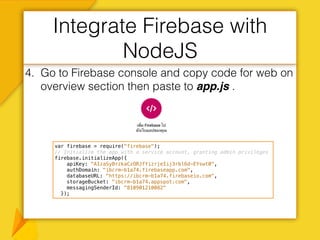
4. Go to Firebase console and copy code for web on
overview section then paste to app.js .
Integrate Firebase with
NodeJS
var firebase = require("firebase");
// Initialize the app with a service account, granting admin privileges
firebase.initializeApp({
apiKey: "AIzaSyBrzkaCzORJfYizrjeIij3rbl6d-EYswt0",
authDomain: "ibcrm-b1a74.firebaseapp.com",
databaseURL: "https://ibcrm-b1a74.firebaseio.com",
storageBucket: "ibcrm-b1a74.appspot.com",
messagingSenderId: "810901210082"
});
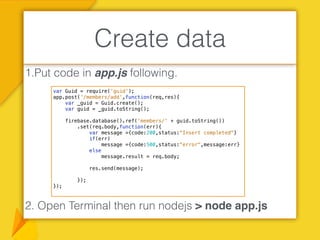
1.Put code in app.js following.
2. Open Terminal then run nodejs > node app.js
Create data
var Guid = require('guid');
app.post('/members/add',function(req,res){
var _guid = Guid.create();
var guid = _guid.toString();
firebase.database().ref('members/' + guid.toString())
.set(req.body,function(err){
var message ={code:200,status:"Insert completed"}
if(err)
message ={code:500,status:"error",message:err}
else
message.result = req.body;
res.send(message);
});
});
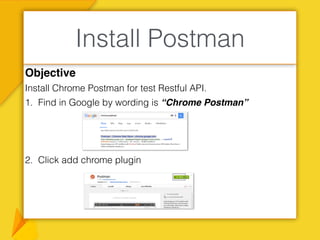
Objective
Install Chrome Postman for test Restful API.
1. Find in Google by wording is “Chrome Postman”
2. Click add chrome plugin
Install Postman
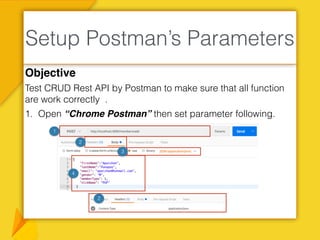
Objective
Test CRUD Rest API by Postman to make sure that all function
are work correctly .
1. Open “Chrome Postman” then set parameter following.
Setup Postman’s Parameters
1
2
3
4
2
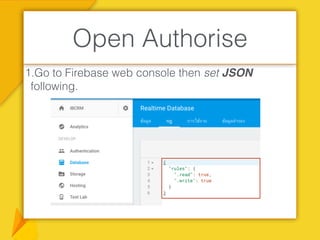
1.Go to Firebase web console then set JSON
following.
Open Authorise
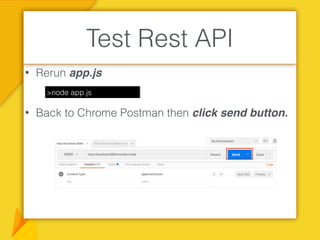
• Rerun app.js
• Back to Chrome Postman then click send button.
Test Rest API
>node app.js
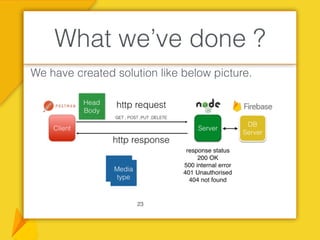
We have created solution like below picture.
What we’ve done ?
23
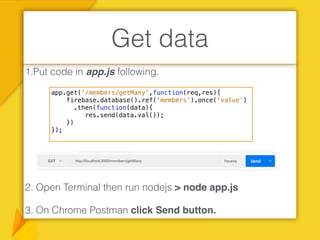
1.Put code in app.js following.
2. Open Terminal then run nodejs > node app.js
3. On Chrome Postman click Send button.
Get data
app.get('/members/getMany',function(req,res){
firebase.database().ref('members').once('value')
.then(function(data){
res.send(data.val());
})
});
1.Put code in app.js following.
2. Open Terminal then run nodejs > node app.js
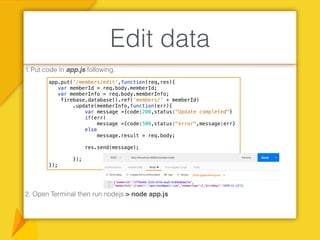
Edit data
app.put('/members/edit',function(req,res){
var memberId = req.body.memberId;
var memberInfo = req.body.memberInfo;
firebase.database().ref('members/' + memberId)
.update(memberInfo,function(err){
var message ={code:200,status:"Update completed"}
if(err)
message ={code:500,status:"error",message:err}
else
message.result = req.body;
res.send(message);
});
});
1.Put code in app.js following.
2. Open Terminal then run nodejs > node app.js
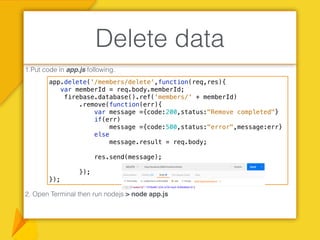
Delete data
app.delete('/members/delete',function(req,res){
var memberId = req.body.memberId;
firebase.database().ref('members/' + memberId)
.remove(function(err){
var message ={code:200,status:"Remove completed"}
if(err)
message ={code:500,status:"error",message:err}
else
message.result = req.body;
res.send(message);
});
});
Human are social animals
Give and Take:
Why Helping Others Drives Our
Success
END
Delete

Firebase slide

  • 1.
  • 2.
    • Realtime Databasecall by API • Store as JSON format • Sync data from multiple applications • Only write front end code • Secure and monitor your data • Access from everywhere What is Firebase ?
  • 3.
    • Originally referringto "non SQL", "non relational" or "not only SQL" • Simplicity of design, simpler "horizontal" scaling to clusters of machines • key-value, wide column, graph, or document • "more flexible" than relational database tables • Most NoSQL stores lack true ACID transactions • Most NoSQL use JSON format What is NO SQL ?
  • 4.
    • This modelorganizes data into one or more tables (or "relations") of columns and rows, with a unique key identifying each row. Rows are also called records or tuples. What is Relational DB ?
  • 5.
    • Move fast •Forget about infrastructure • Make smart, data-driven decisions • Work across platforms • Free to start, scale with ease Why use Firebase ?
  • 6.
  • 7.
    • Single JSONformat Firebase structure {"firstName":"John", "lastName":"Doe" , "age":30 , "gender":"M" , “birthDay":"1/1/1986" }
  • 8.
    • Go tohttps://www.firebase.com/ • Click • Click • Fill Project Information Register Firebase
  • 9.
  • 10.
    • Node.js isa server-side platform. • Built on Google Chrome's JavaScript Engine (V8 Engine). • It was developed by Ryan Dahl in 2009. • It is an open source. • Cross-platform runtime environment for developing server-side and networking applications. • Node.js uses an event-driven, non-blocking I/O model. What is NodeJS ?
  • 11.
    • The termI/O is used to describe any program, operation or device that transfers data to or from a computer and to or from a peripheral device. What is I/O ?
  • 12.
    • Most I/Orequests are considered blocking requests, meaning that control does not return to the application until the I/O is complete. The delayed from systems calls such read() and write() can be quite long. Using systems call that block is sometimes call synchronous programming. What is Blocking I/O ?
  • 13.
    • Programs thatuse non-blocking I/O tend to follow the rule that every function has to return immediately, i.e. all the functions in such programs are nonblocking. Thus control passes very quickly from one routine to the next. What is non blocking I/O ?
  • 14.
    1. Go tohttps://nodejs.org/en/download/ 2. Choose NodeJS for your OS. 3. Extract file and Click on Installer package. 4. After finish installed then open terminal and type command. Installation NodeJS >node -v
  • 15.
    1. Create filename package.json Integrate Firebase with NodeJS #2 { "name": "testfirebase", "version": "1.0.0", "description": "MyService is Rest Api Application for our core system.", "scripts": { "test": "echo "Error: no test specified" && exit 1" }, "keywords": [ "Test Firebase" ], "author": “Your Name", "license": "MIT", "dependencies": { "body-parser": ">= 1.14.2", "express": "^4.14.0", "firebase": "^3.5.2", "guid": "latest" } }
  • 16.
    2. Install NodeJSPackage 3. Create file name “app.js” and put code following. Integrate Firebase with NodeJS >npm install var express = require("express"); var app = express(); require('rootpath')(); var bodyParser = require('body-parser'); app.use(bodyParser.json()); app.listen(3000); console.log("My Service is listening to port 3000.");
  • 17.
    4. Go toFirebase console and copy code for web on overview section then paste to app.js . Integrate Firebase with NodeJS var firebase = require("firebase"); // Initialize the app with a service account, granting admin privileges firebase.initializeApp({ apiKey: "AIzaSyBrzkaCzORJfYizrjeIij3rbl6d-EYswt0", authDomain: "ibcrm-b1a74.firebaseapp.com", databaseURL: "https://ibcrm-b1a74.firebaseio.com", storageBucket: "ibcrm-b1a74.appspot.com", messagingSenderId: "810901210082" });
  • 18.
    1.Put code inapp.js following. 2. Open Terminal then run nodejs > node app.js Create data var Guid = require('guid'); app.post('/members/add',function(req,res){ var _guid = Guid.create(); var guid = _guid.toString(); firebase.database().ref('members/' + guid.toString()) .set(req.body,function(err){ var message ={code:200,status:"Insert completed"} if(err) message ={code:500,status:"error",message:err} else message.result = req.body; res.send(message); }); });
  • 19.
    Objective Install Chrome Postmanfor test Restful API. 1. Find in Google by wording is “Chrome Postman” 2. Click add chrome plugin Install Postman
  • 20.
    Objective Test CRUD RestAPI by Postman to make sure that all function are work correctly . 1. Open “Chrome Postman” then set parameter following. Setup Postman’s Parameters 1 2 3 4 2
  • 21.
    1.Go to Firebaseweb console then set JSON following. Open Authorise
  • 22.
    • Rerun app.js •Back to Chrome Postman then click send button. Test Rest API >node app.js
  • 23.
    We have createdsolution like below picture. What we’ve done ? 23
  • 24.
    1.Put code inapp.js following. 2. Open Terminal then run nodejs > node app.js 3. On Chrome Postman click Send button. Get data app.get('/members/getMany',function(req,res){ firebase.database().ref('members').once('value') .then(function(data){ res.send(data.val()); }) });
  • 25.
    1.Put code inapp.js following. 2. Open Terminal then run nodejs > node app.js Edit data app.put('/members/edit',function(req,res){ var memberId = req.body.memberId; var memberInfo = req.body.memberInfo; firebase.database().ref('members/' + memberId) .update(memberInfo,function(err){ var message ={code:200,status:"Update completed"} if(err) message ={code:500,status:"error",message:err} else message.result = req.body; res.send(message); }); });
  • 26.
    1.Put code inapp.js following. 2. Open Terminal then run nodejs > node app.js Delete data app.delete('/members/delete',function(req,res){ var memberId = req.body.memberId; firebase.database().ref('members/' + memberId) .remove(function(err){ var message ={code:200,status:"Remove completed"} if(err) message ={code:500,status:"error",message:err} else message.result = req.body; res.send(message); }); });
  • 27.
    Human are socialanimals Give and Take: Why Helping Others Drives Our Success END
  • 28.