EETAC App
A new revolutionary software for EETAC’s
students and teachers.

This App comes with localization, routing
mechanisms, social network and much more!
1. Concept                  Introduction to the
                    2. How it works? Stories    application and user
                                                experience
                    3. Workflow

                    4. Entity-Relashionship     Diagrams with different
                                                aspects of the architecture of
                    5. Technologies
Table of Contents


                                                the application.


                    6.   Ericsson Maps
                    7.   Security               Most important technical
                                                aspects, explained in
                    8.   Rest Client Pattern    detail.
                    9.   Cache mechanism

                    10. Traffic Analisys

                    11. Summary & Conclusions
                                                                                 2
Explaining what offers our
App


                             3
» Offers orientation service inside the campus, where the
 user can explore the buildings and find the best route to
 go to any room.


» Follows web 2.0  Users can enrich the App sending
 comments and P.O.I


» Userful tool designed for Eetac students and teachers
 but also for visitors which don’t know the campus.


» What is the difference with Foursquare and other
 similar apps? Indoor positioning and routing.


Concept                                                      4
Giving an example of how
the App works


                           5
» This Monday was about to start badly for Bob. Just landing from
  London at 13:17 am, he could definitively not remember the
  explications about how to reach the conference room. Luckily, he
  downloaded EetacApp before leaving, following his colleague’s
  advice. Within a few moments, the application gave him the
  quickest way to the place.


» After the presentation of Urbanization in room V-212, the group
  was very pleased to see their friends have already taken pictures
  and upload them with the EETAC App, creating several threads
  about the main debated issues. Now, other students can see the
  gallery pictures and add some comments.


Story                                                                 6
Explaining the Flow
Diagram of the layouts of
our App


                            7
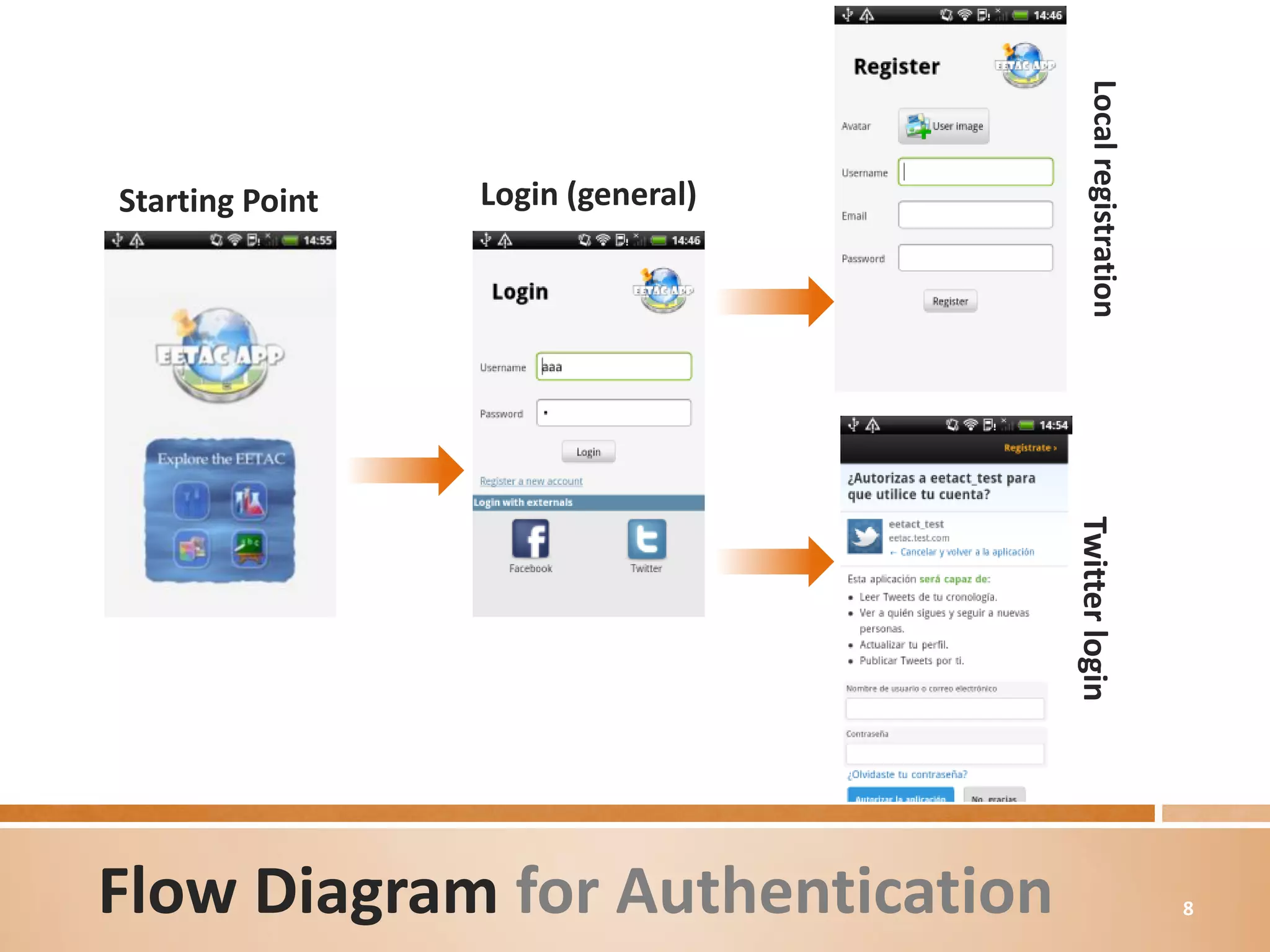
Local registration
Starting Point   Login (general)


                                   Twitter login
Flow Diagram for Authentication                             8
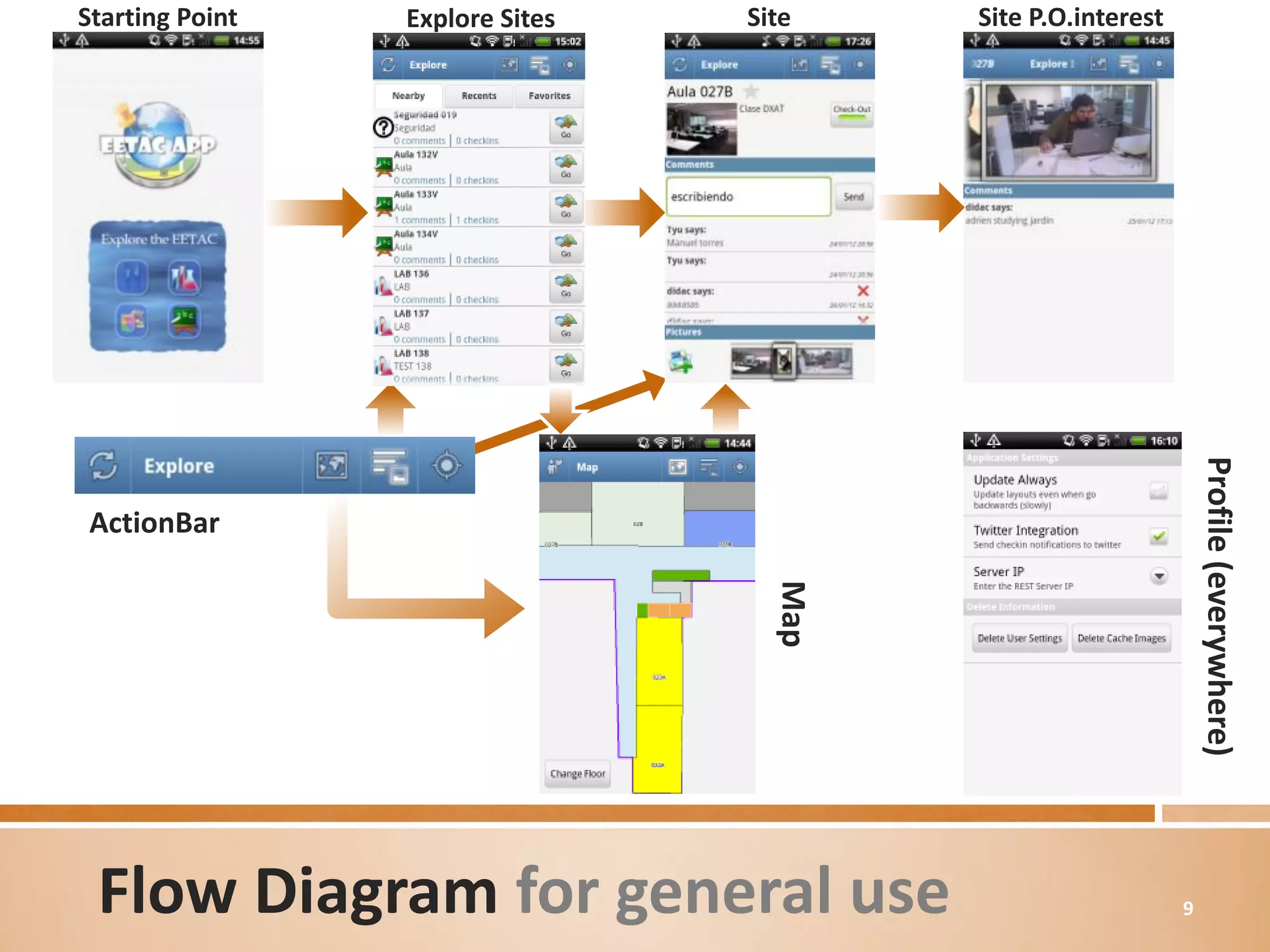
Starting Point   Explore Sites   Site    Site P.O.interest


                                                                 Profile (everywhere)
ActionBar


                                   Map


 Flow Diagram for general use                                9
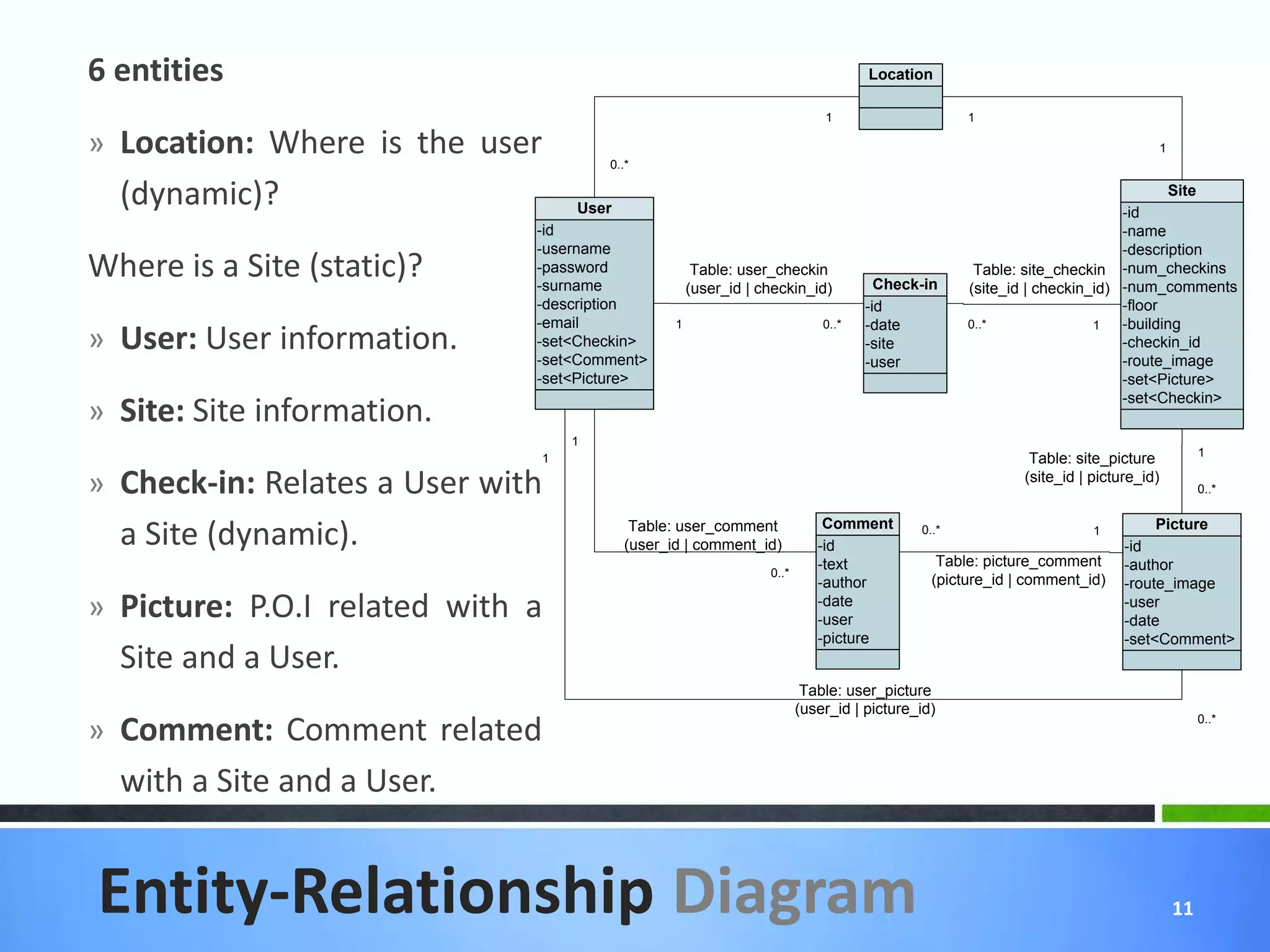
Understanding the Entity-
Relationship diagram


                            10
6 entities                                                                        Location

                                                                           1                     1

» Location: Where is the user         0..*
                                                                                                                                  1


  (dynamic)?                      User                                                                                  -id
                                                                                                                               Site

                              -id                                                                                       -name
                              -username                                                                                 -description
Where is a Site (static)?     -password
                              -surname
                                                     Table: user_checkin
                                                    (user_id | checkin_id)          Check-in
                                                                                                  Table: site_checkin -num_checkins
                                                                                                 (site_id | checkin_id) -num_comments
                              -description                                        -id                                   -floor
                              -email            1                          0..*   -date          0..*               1   -building
» User: User information.     -set<Checkin>
                              -set<Comment>
                                                                                  -site                                 -checkin_id
                                                                                  -user                                 -route_image
                              -set<Picture>                                                                             -set<Picture>
                                                                                                                        -set<Checkin>
» Site: Site information.
                                  1
                                                                                                                                           1
                              1                                                                           Table: site_picture
» Check-in: Relates a User with                                                                          (site_id | picture_id)
                                                                                                                                           0..*

                                                                           Comment
  a Site (dynamic).                       Table: user_comment
                                         (user_id | comment_id)           -id
                                                                                          0..*                      1
                                                                                                                         -id
                                                                                                                              Picture

                                                                          -text              Table: picture_comment      -author
                                                                0..*
                                                                          -author           (picture_id | comment_id)    -route_image
» Picture: P.O.I related with a                                           -date
                                                                          -user
                                                                                                                         -user
                                                                                                                         -date
                                                                          -picture                                       -set<Comment>
  Site and a User.
                                                                        Table: user_picture
                                                                       (user_id | picture_id)
» Comment: Comment related
                                                                                                                                           0..*


  with a Site and a User.


Entity-Relationship Diagram                                                                                                           11
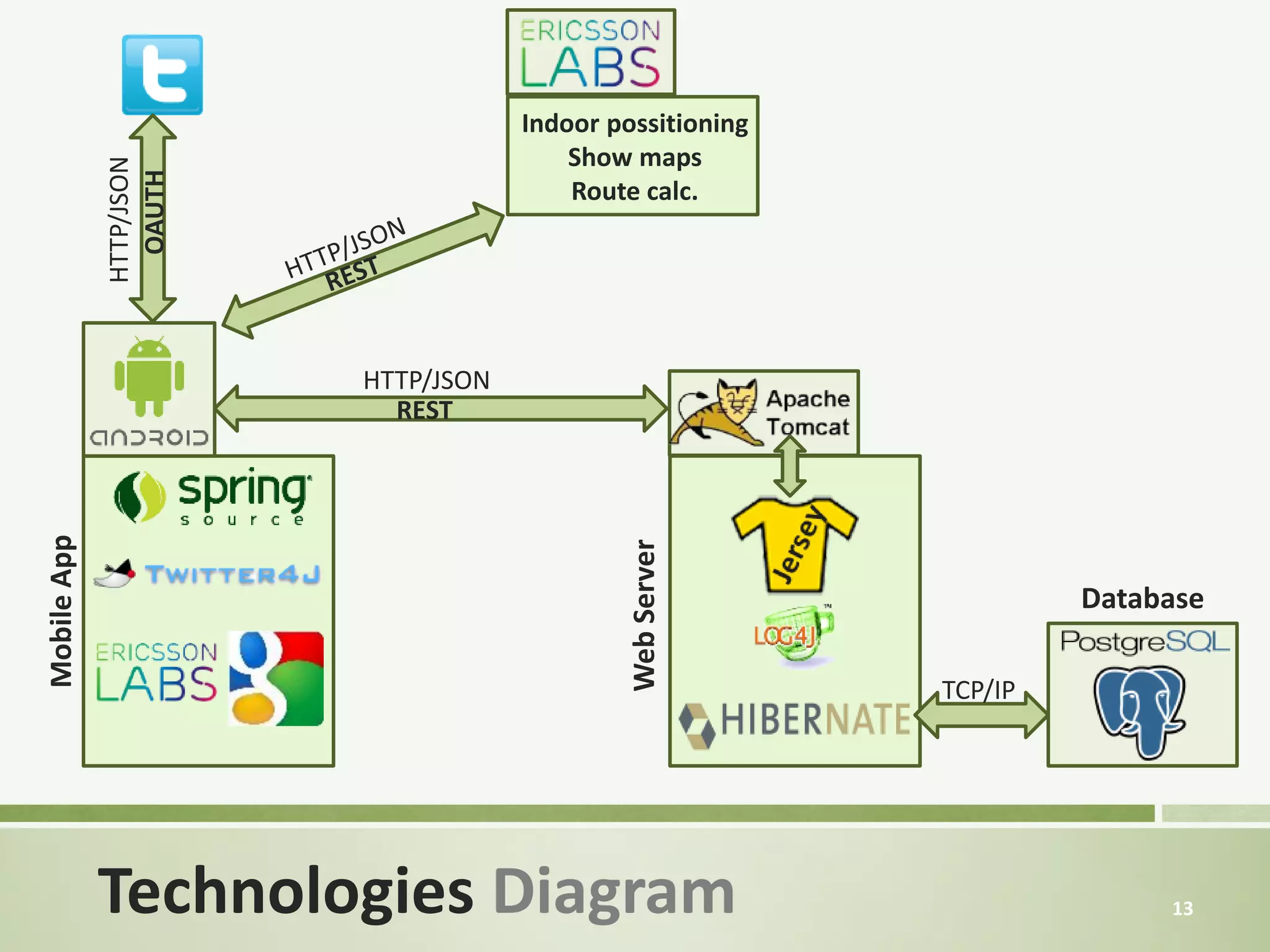
Citing all the Technologies
used for the project


                          12
Indoor possitioning
                                         Show maps
             HTTP/JSON
               OAUTH
                                         Route calc.


                         HTTP/JSON
                           REST
Mobile App


                                              Web Server
                                                                    Database

                                                           TCP/IP


             Technologies Diagram                                        13
Explaining what the App do
with Ericsson Maps API


                        14
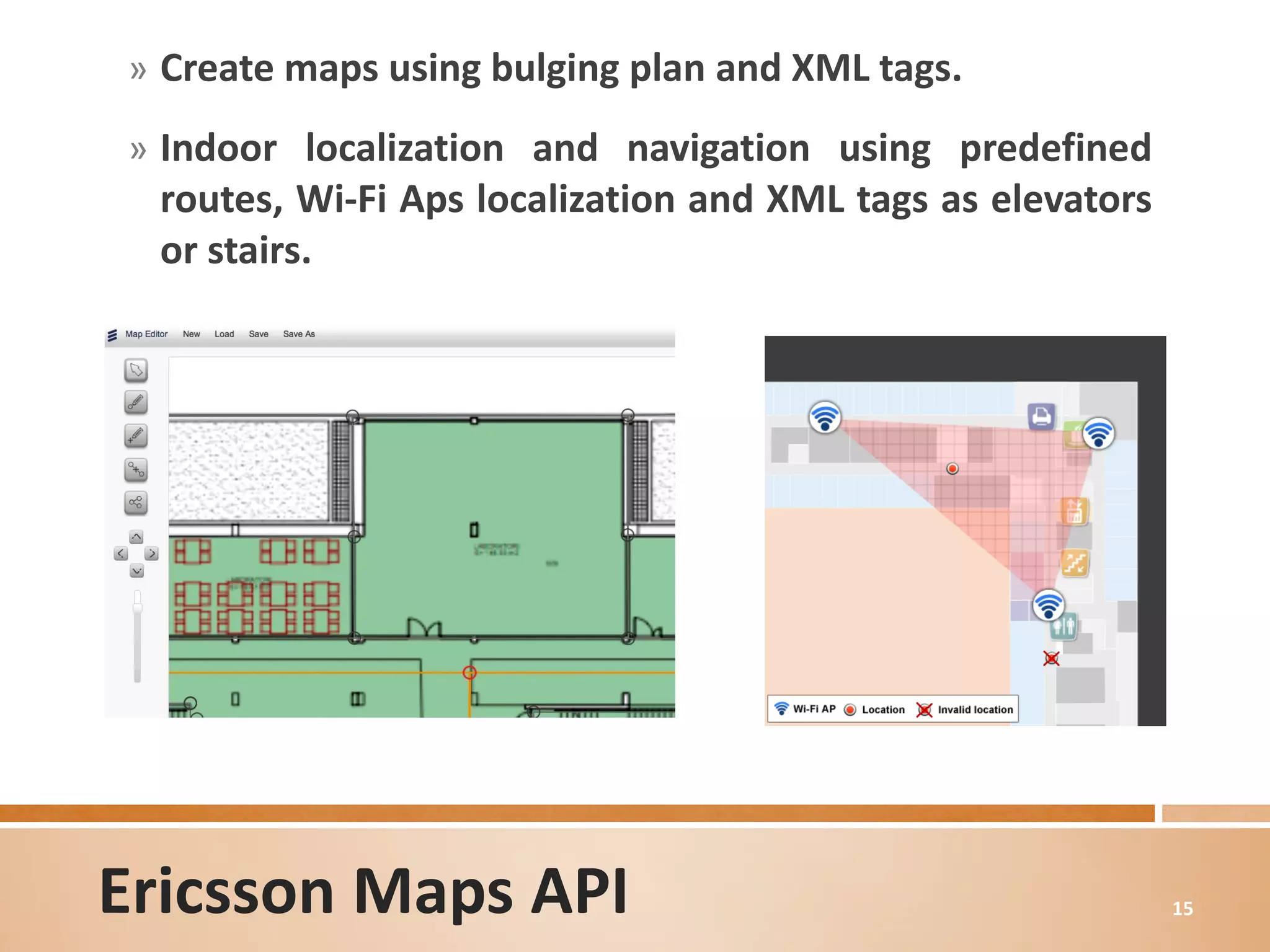
» Create maps using bulging plan and XML tags.

» Indoor localization and navigation using predefined
 routes, Wi-Fi Aps localization and XML tags as elevators
 or stairs.


Ericsson Maps API                                           15
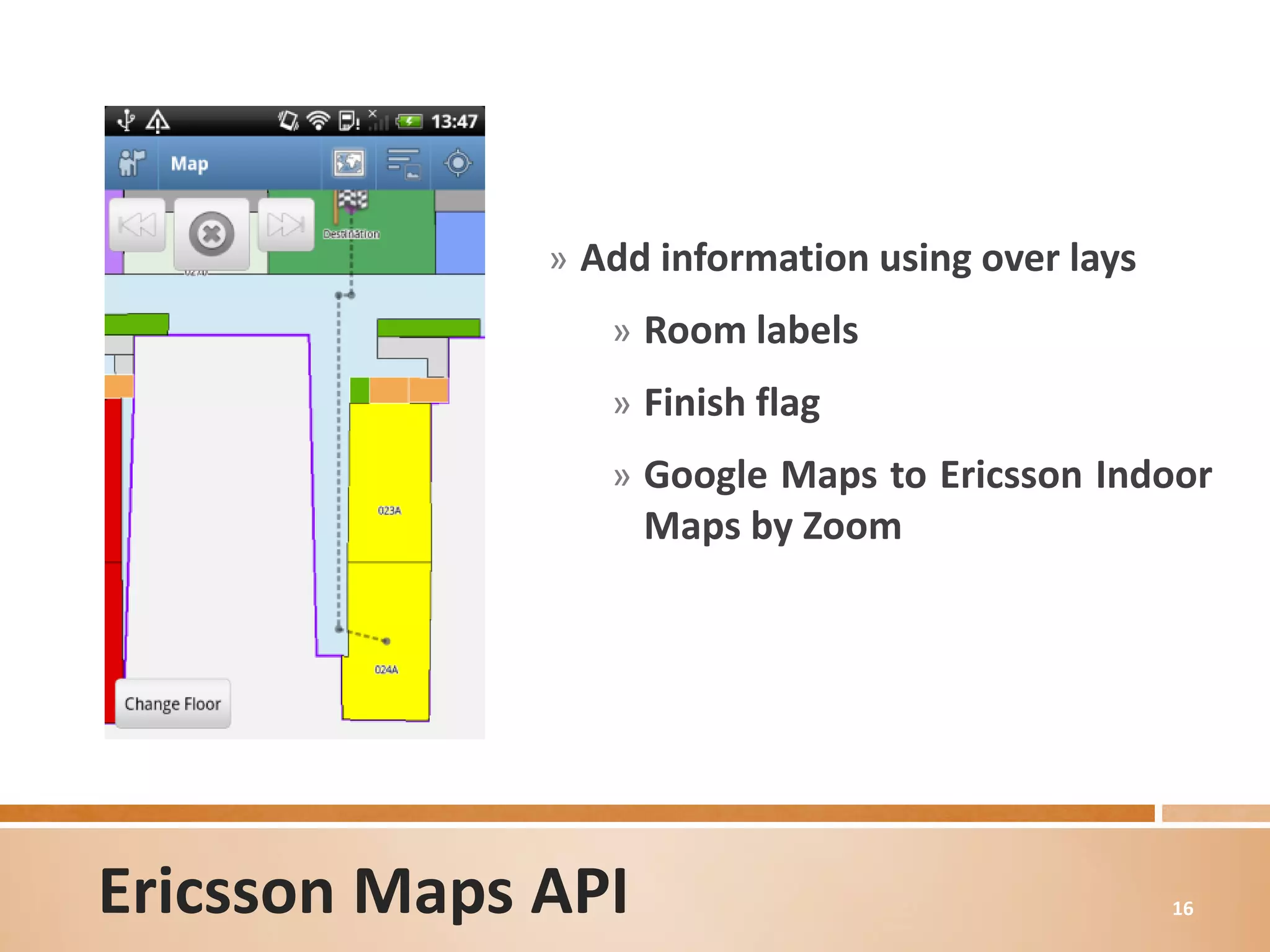
» Add information using over lays
                 » Room labels
                 » Finish flag
                 » Google Maps to Ericsson Indoor
                    Maps by Zoom


Ericsson Maps API                                 16
Adding Security to the App


                         17
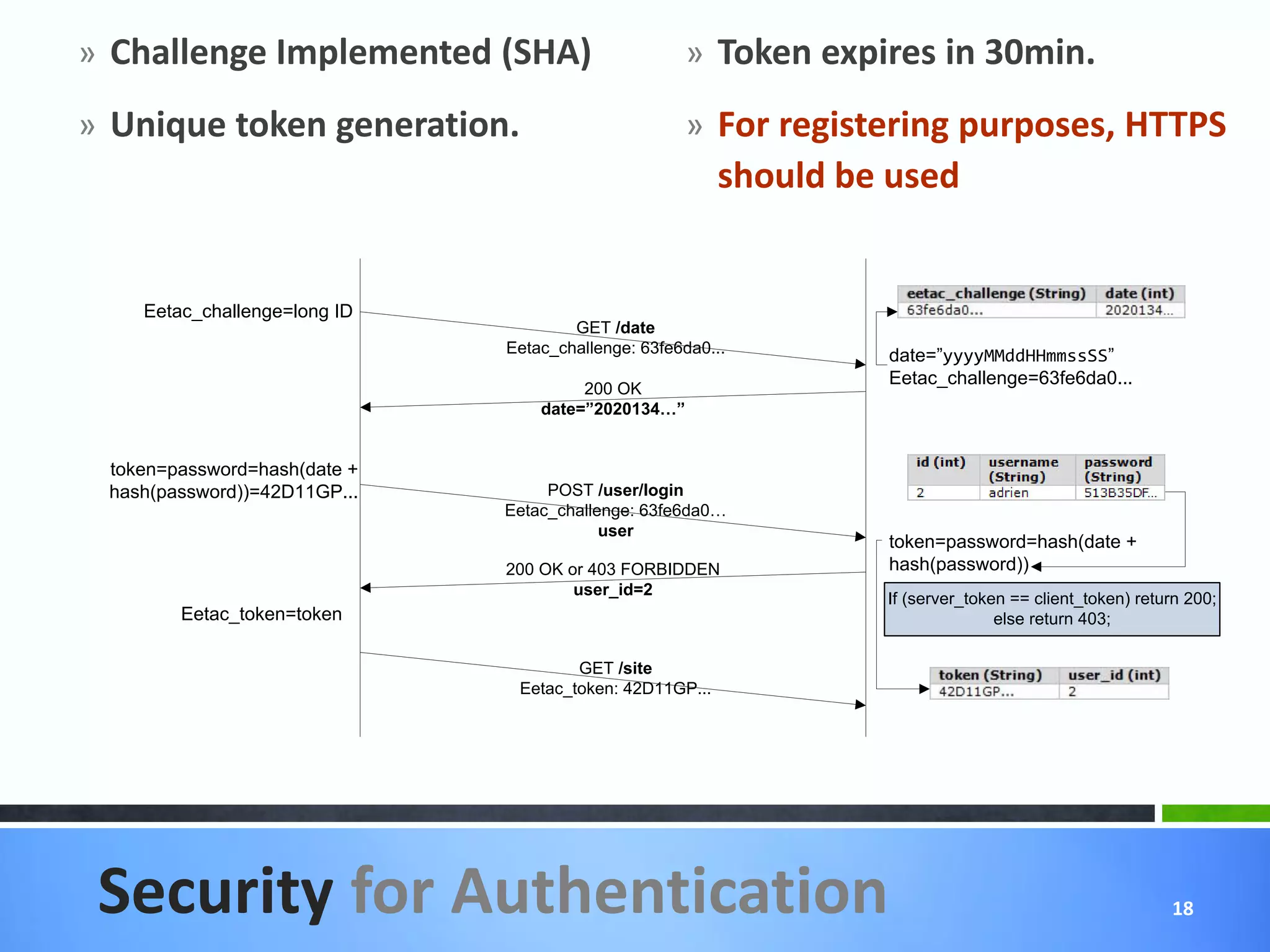
» Challenge Implemented (SHA)                       » Token expires in 30min.
» Unique token generation.                          » For registering purposes, HTTPS
                                                         should be used


    Eetac_challenge=long ID
                                      GET /date
                              Eetac_challenge: 63fe6da0...        date=”yyyyMMddHHmmssSS”
                                                                  Eetac_challenge=63fe6da0...
                                       200 OK
                                  date=”2020134…”


 token=password=hash(date +
 hash(password))=42D11GP...        POST /user/login
                              Eetac_challenge: 63fe6da0…
                                          user
                                                                  token=password=hash(date +
                              200 OK or 403 FORBIDDEN             hash(password))
                                      user_id=2
                                                                  If (server_token == client_token) return 200;
        Eetac_token=token                                                        else return 403;

                                      GET /site
                               Eetac_token: 42D11GP...


 Security for Authentication                                                                            18
Communicating with the
server through a REST
Client Pattern


                         19
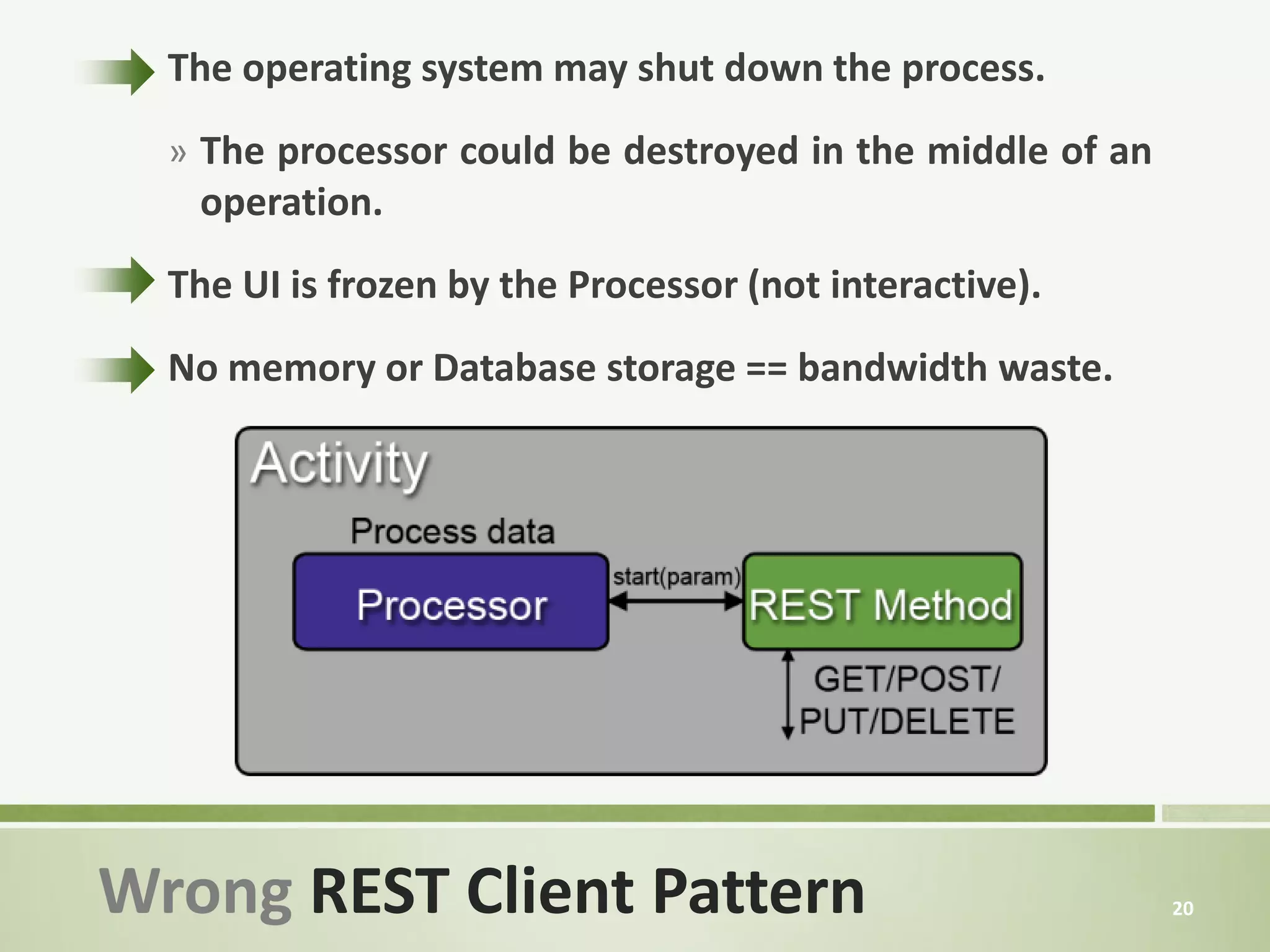
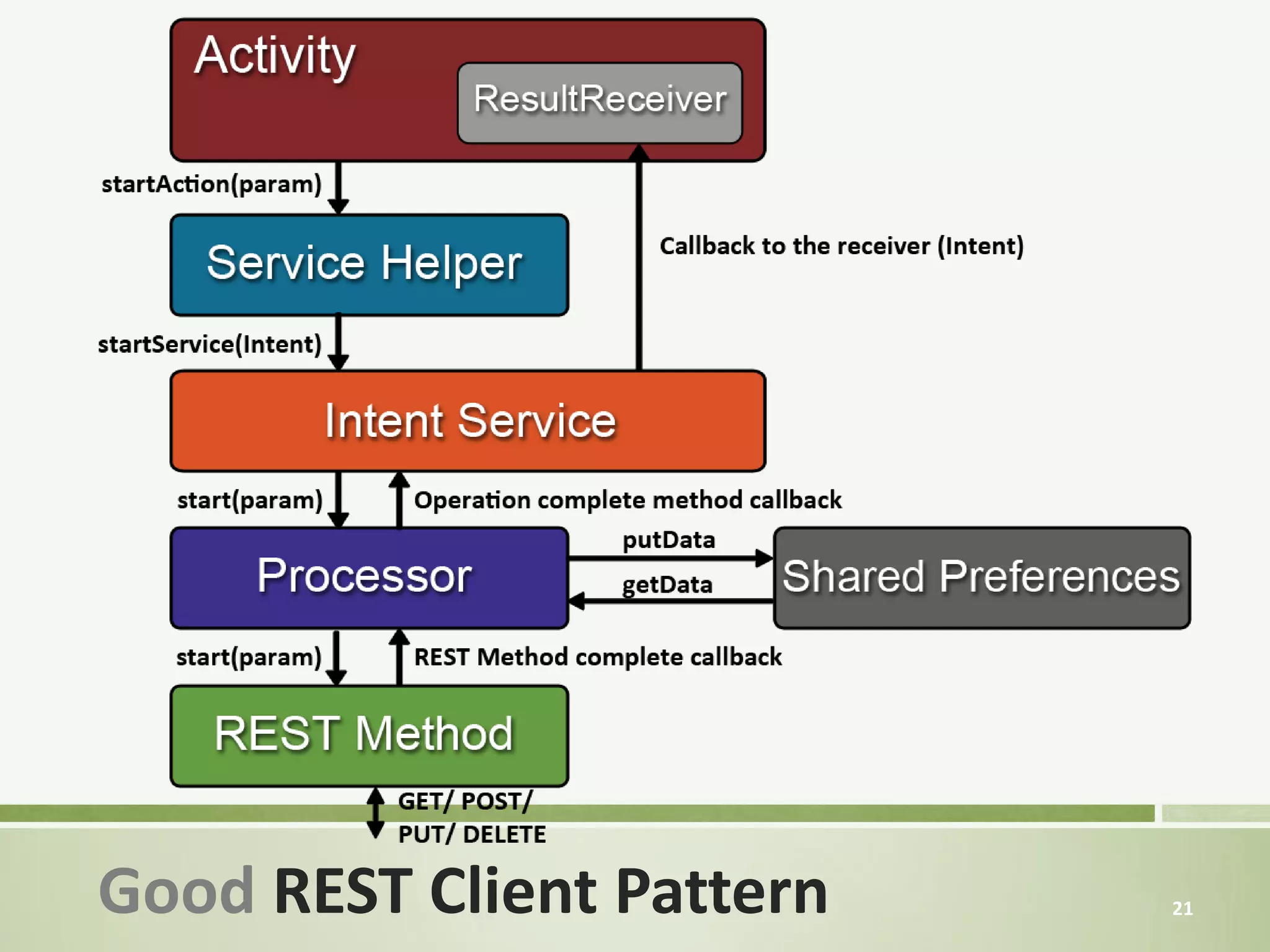
The operating system may shut down the process.
  » The processor could be destroyed in the middle of an
   operation.
  The UI is frozen by the Processor (not interactive).
  No memory or Database storage == bandwidth waste.


Wrong REST Client Pattern                                  20
Good REST Client Pattern   21
Adding Cache mechanism
to the App


                         22
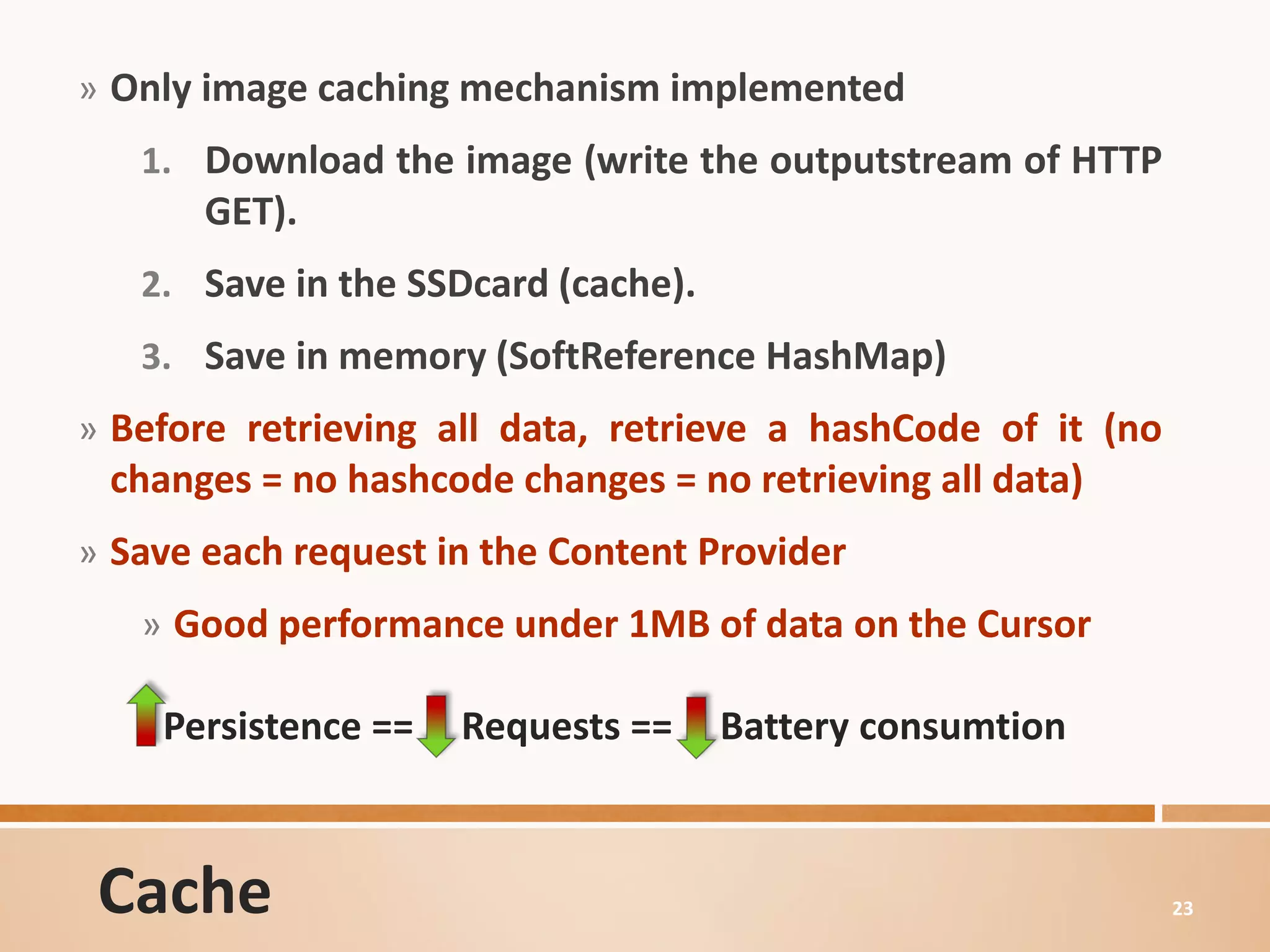
» Only image caching mechanism implemented
   1. Download the image (write the outputstream of HTTP
       GET).
   2. Save in the SSDcard (cache).
   3. Save in memory (SoftReference HashMap)
» Before retrieving all data, retrieve a hashCode of it (no
 changes = no hashcode changes = no retrieving all data)
» Save each request in the Content Provider
   » Good performance under 1MB of data on the Cursor

    Persistence ==   Requests ==     Battery consumtion


 Cache                                                        23
10   Dimensioning our App,
     through a Traffic Analisys


                                  24
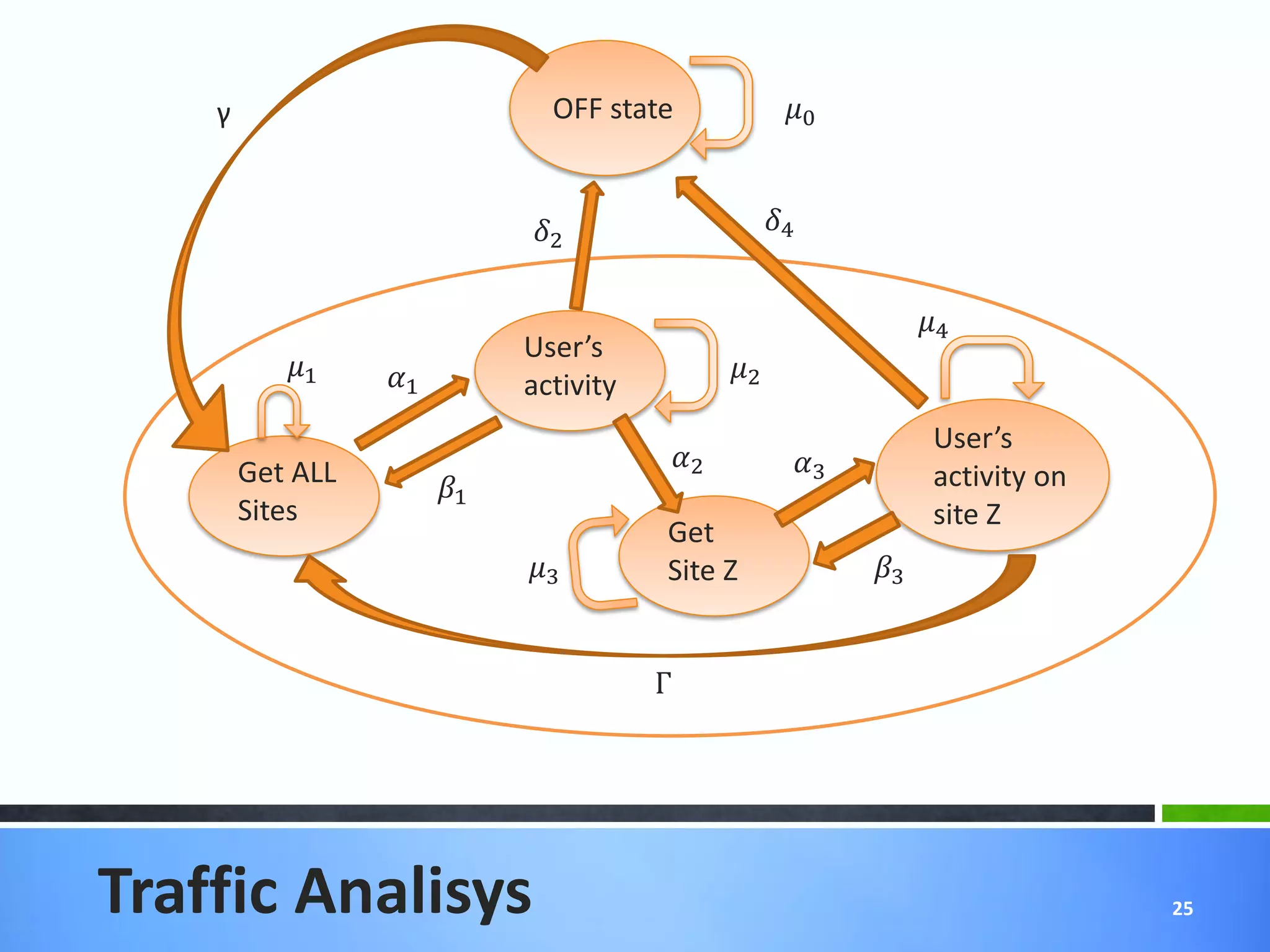
γ                           OFF state              0


                              2                    4


                                                                   4
                              User’s
           1    1                          2
                              activity
                                                                    User’s
        Get ALL                          2           3
                        1                                         activity on
        Sites                                                       site Z
                                         Get
                              3        Site Z              3


                                         Γ


Traffic Analisys                                                                  25
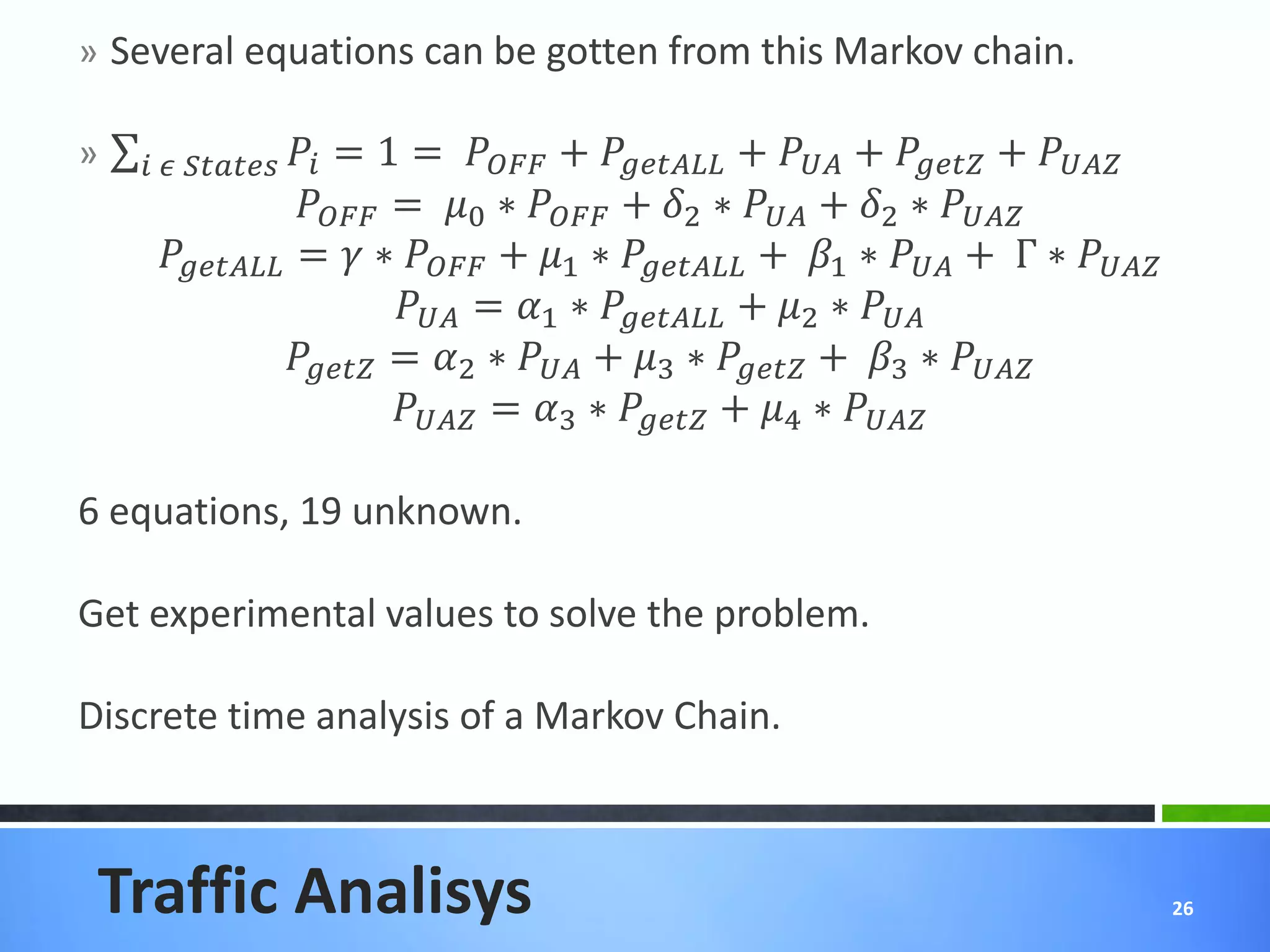
» Several equations can be gotten from this Markov chain.

»      
                         = 1 =  +  +  +  + 
                      = 0 ∗  + 2 ∗  + 2 ∗ 
       =  ∗  + 1 ∗  + 1 ∗  + Γ ∗ 
                                = 1 ∗  + 2 ∗ 
                     = 2 ∗  + 3 ∗  + 3 ∗ 
                                = 3 ∗  + 4 ∗ 

6 equations, 19 unknown.

Get experimental values to solve the problem.

Discrete time analysis of a Markov Chain.


 Traffic Analisys                                                                           26
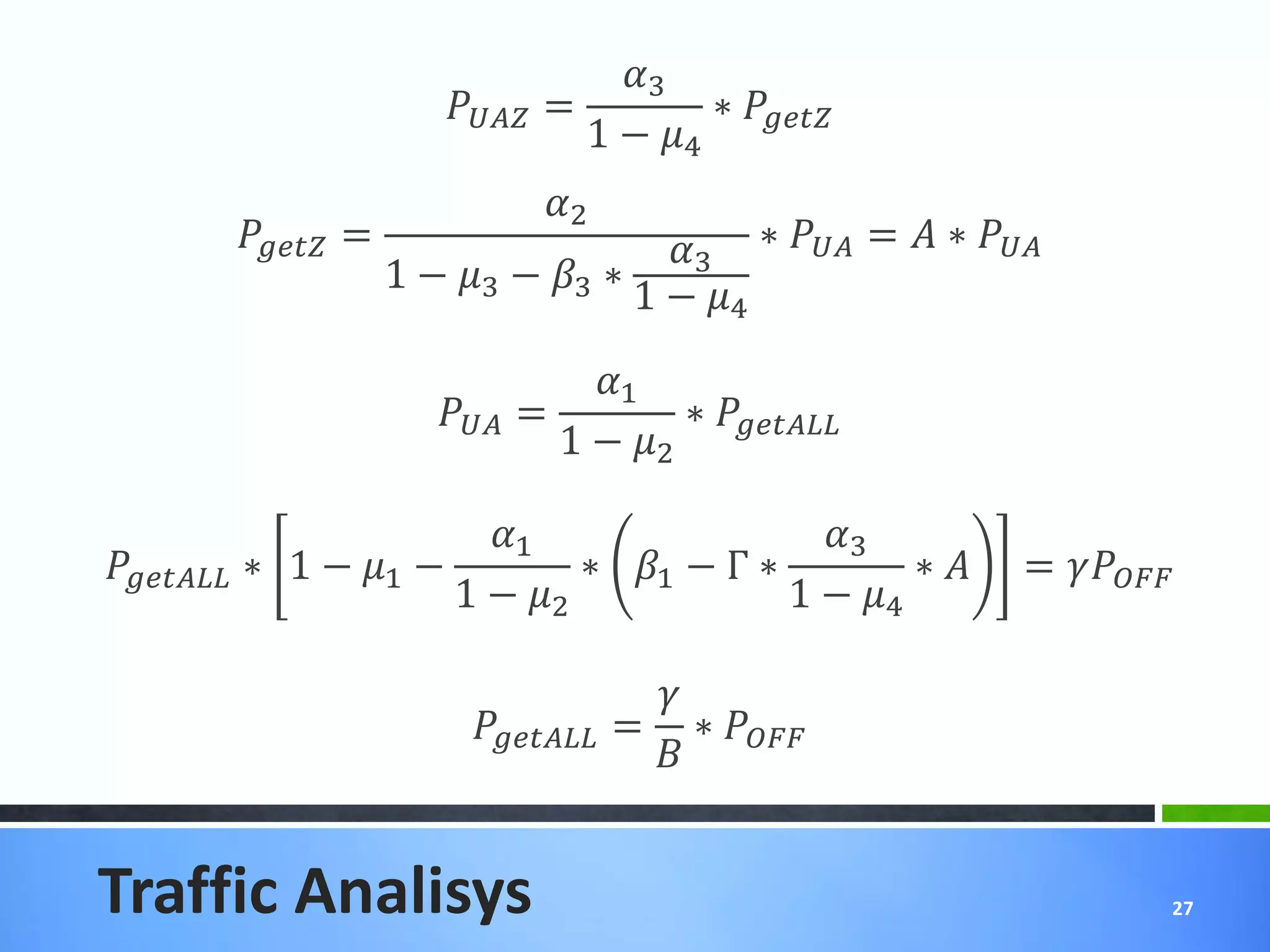
3
                              =         ∗ 
                                        1 − 4
                                      2
         =                     3 ∗  =  ∗ 
                       1 − 3 − 3 ∗
                                       1 − 4
                                       1
                             =         ∗ 
                                     1 − 2

                             1                 3
 ∗ 1 − 1 −         ∗ 1 − Γ ∗         ∗       = 
                           1 − 2             1 − 4

                                               
                                = ∗ 


Traffic Analisys                                                            27
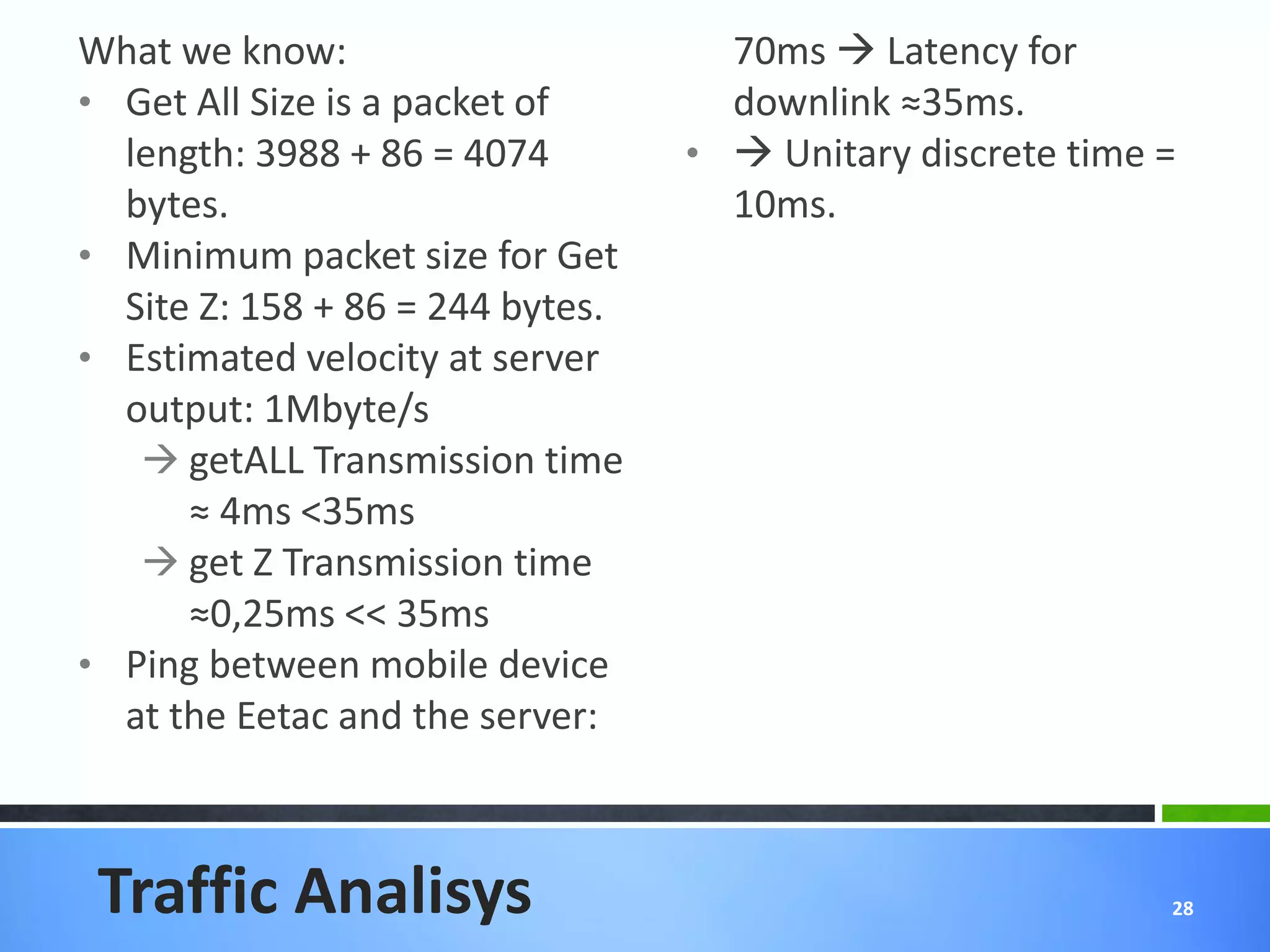
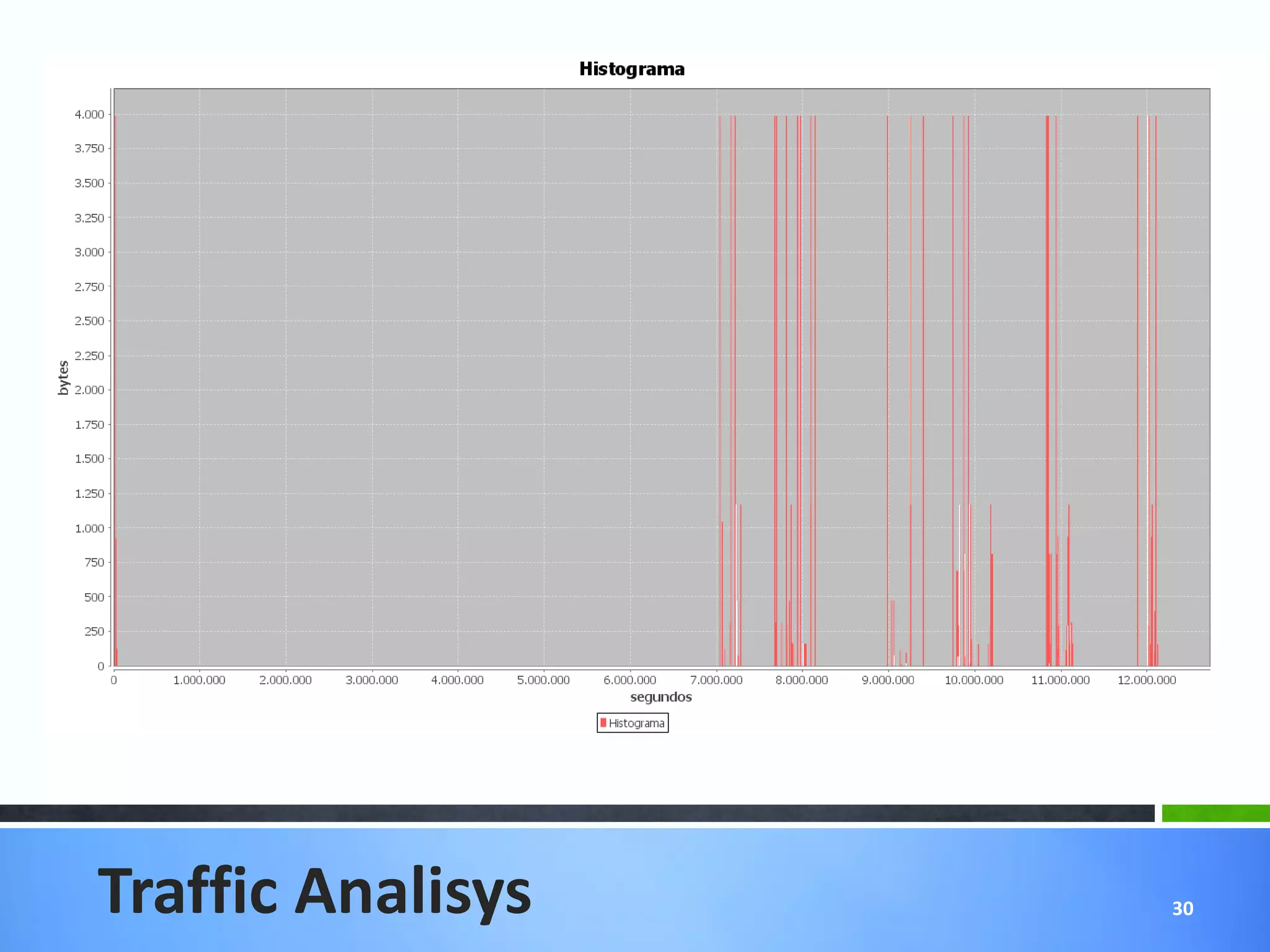
What we know:                       70ms  Latency for
• Get All Size is a packet of       downlink ≈35ms.
  length: 3988 + 86 = 4074        •  Unitary discrete time =
  bytes.                            10ms.
• Minimum packet size for Get
  Site Z: 158 + 86 = 244 bytes.
• Estimated velocity at server
  output: 1Mbyte/s
    getALL Transmission time
      ≈ 4ms <35ms
    get Z Transmission time
      ≈0,25ms << 35ms
• Ping between mobile device
  at the Eetac and the server:


 Traffic Analisys                                           28
Traffic Analisys   29
Traffic Analisys   30
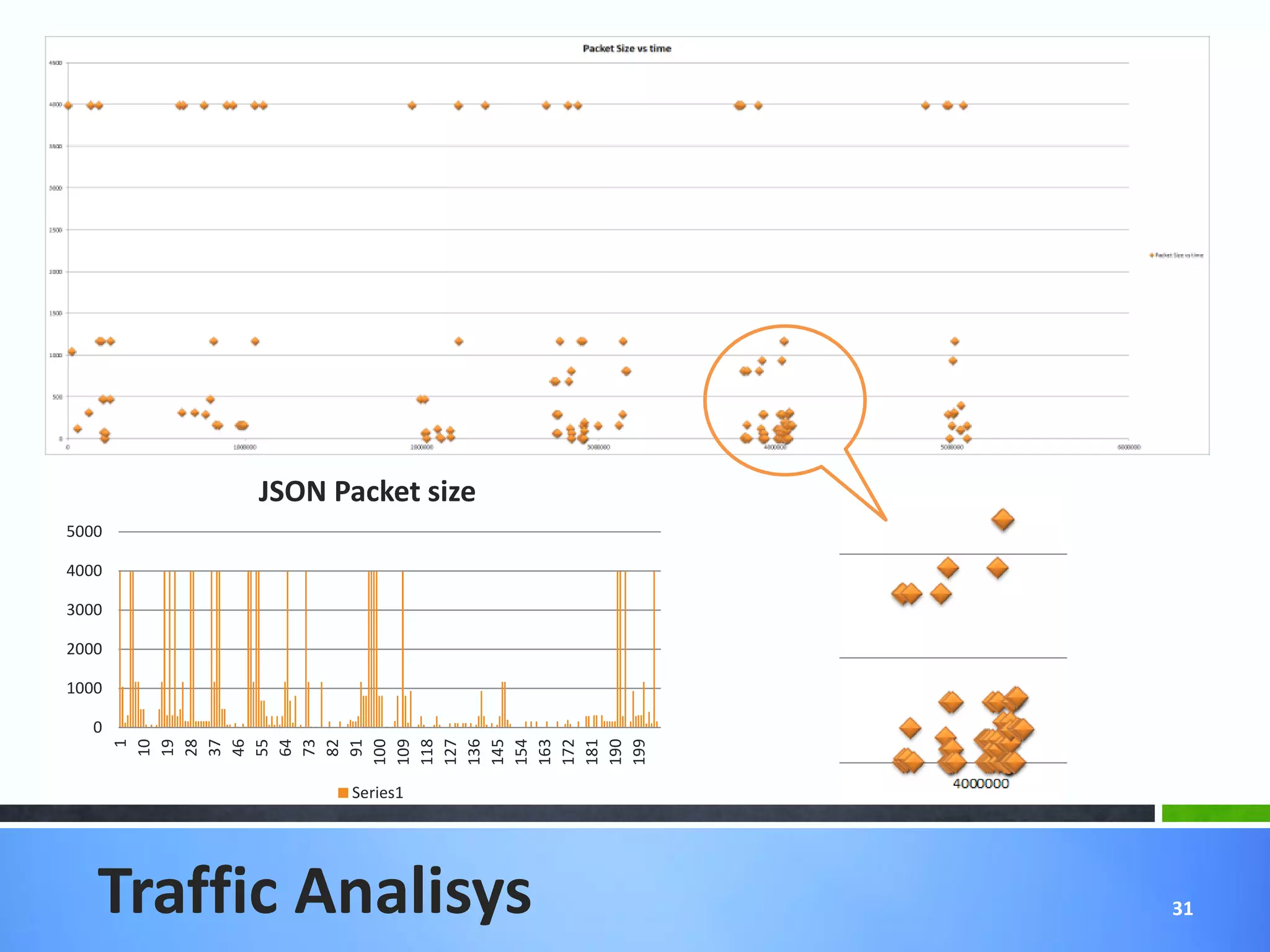
JSON Packet size
5000

4000

3000

2000

1000

  0
       100
       109
       118
       127
       136
       145
       154
       163
       172
       181
       190
       199
         1
        10
        19
        28
        37
        46
        55
        64
        73
        82
        91


              Series1


   Traffic Analisys        31
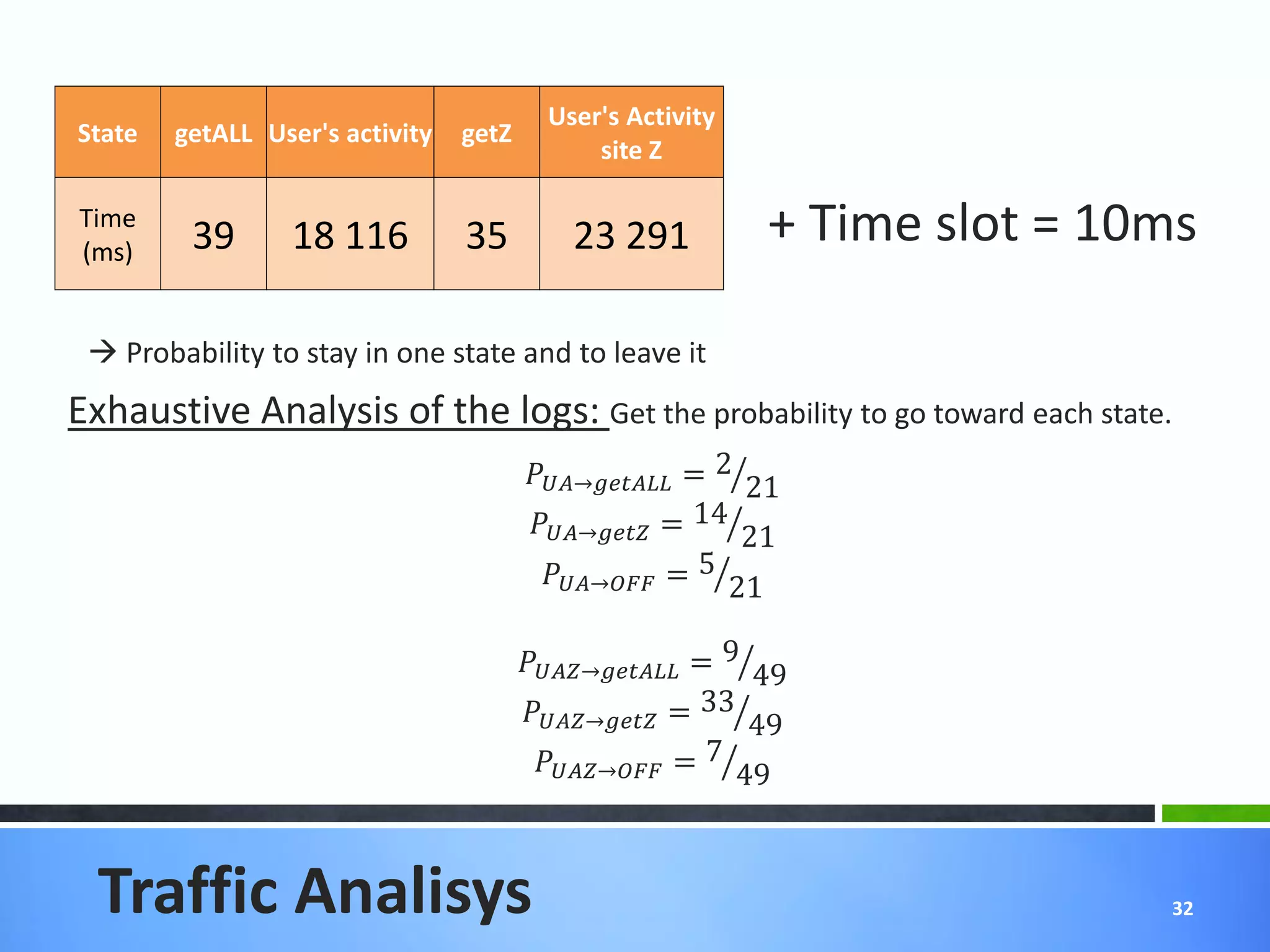
User's Activity
State   getALL User's activity   getZ
                                               site Z

Time
(ms)     39       18 116         35          23 291              + Time slot = 10ms

  Probability to stay in one state and to leave it
Exhaustive Analysis of the logs: Get the probability to go toward each state.
                                        → = 2 21
                                        → = 14 21
                                          → = 5 21

                                        → = 9 49
                                        → = 33 49
                                          → = 7 49


  Traffic Analisys                                                               32
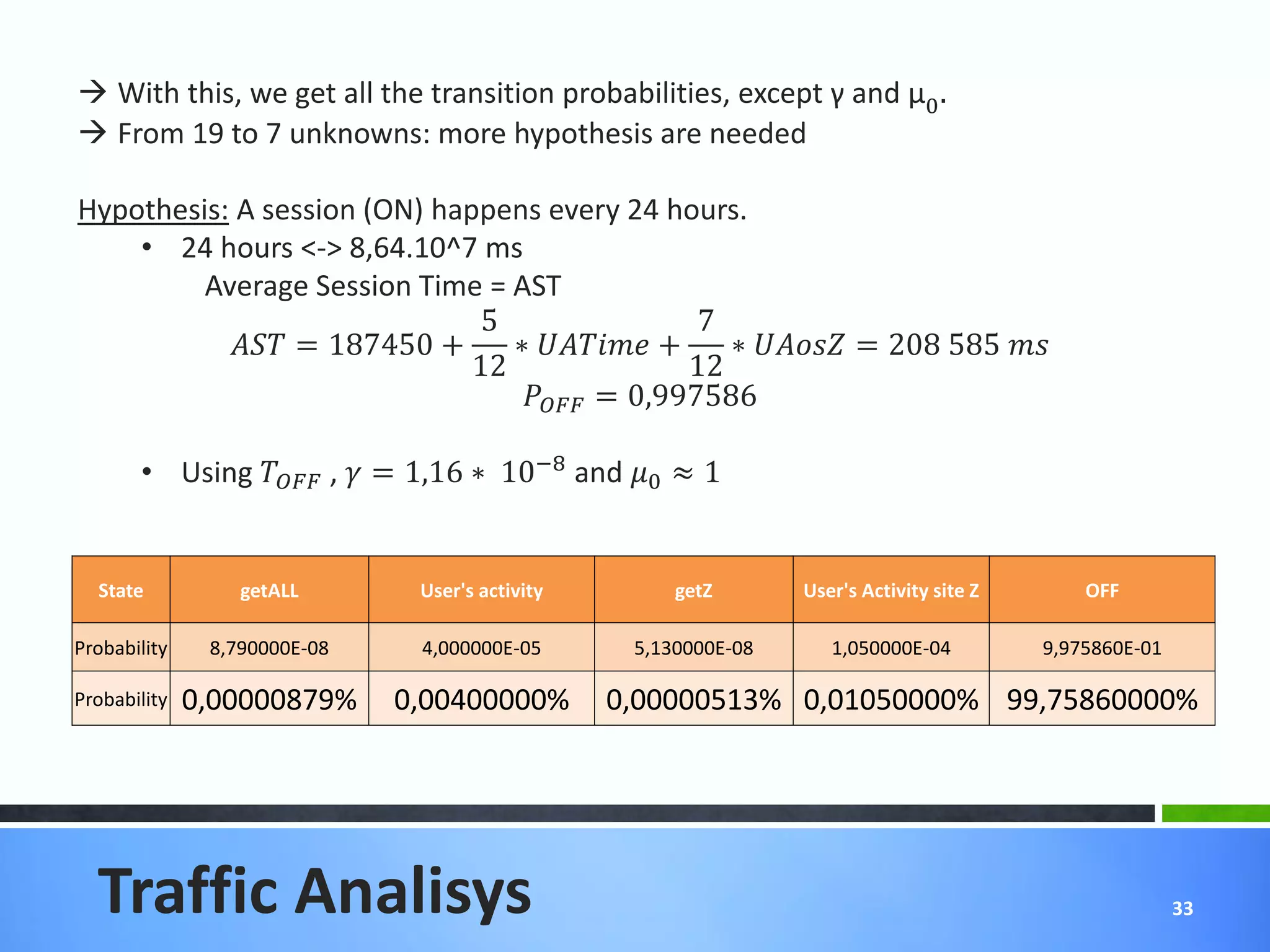
 With this, we get all the transition probabilities, except γ and μ0 .
 From 19 to 7 unknowns: more hypothesis are needed

Hypothesis: A session (ON) happens every 24 hours.
    • 24 hours <-> 8,64.10^7 ms
         Average Session Time = AST
                               5                   7
            = 187450 +     ∗  +    ∗  = 208 585 
                              12                  12
                                   = 0,997586

       • Using  ,  = 1,16 ∗ 10−8 and 0 ≈ 1


  State           getALL       User's activity        getZ       User's Activity site Z       OFF

Probability    8,790000E-08    4,000000E-05       5,130000E-08      1,050000E-04          9,975860E-01

Probability   0,00000879%     0,00400000%        0,00000513% 0,01050000% 99,75860000%


  Traffic Analisys                                                                                       33
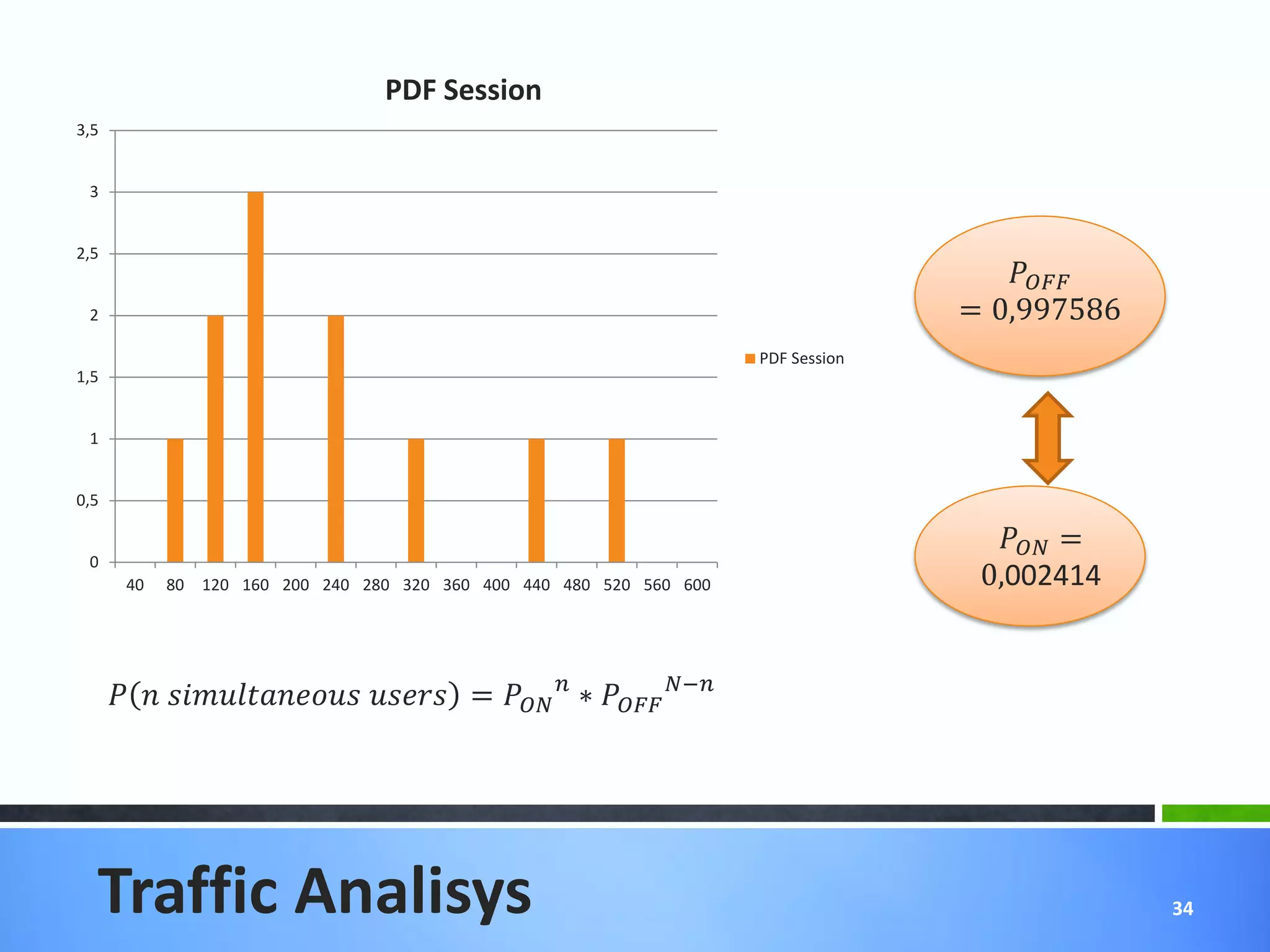
PDF Session
3,5


 3


2,5
                                                                                                
 2                                                                                           = 0,997586
                                                                               PDF Session
1,5


 1


0,5

                                                                                                =
 0
        40   80   120 160 200 240 280 320 360 400 440 480 520 560 600                         0,002414


          =   ∗  −


  Traffic Analisys                                                                                         34
= 0, 000 089 then Number of user: [] = 1,14629

 = 1/ because _ ≪  : support peaks.


Traffic Analisys                                                                  35
11   Explain the tasks done; the
     tasks to be performed and
     the conclusions


                              36
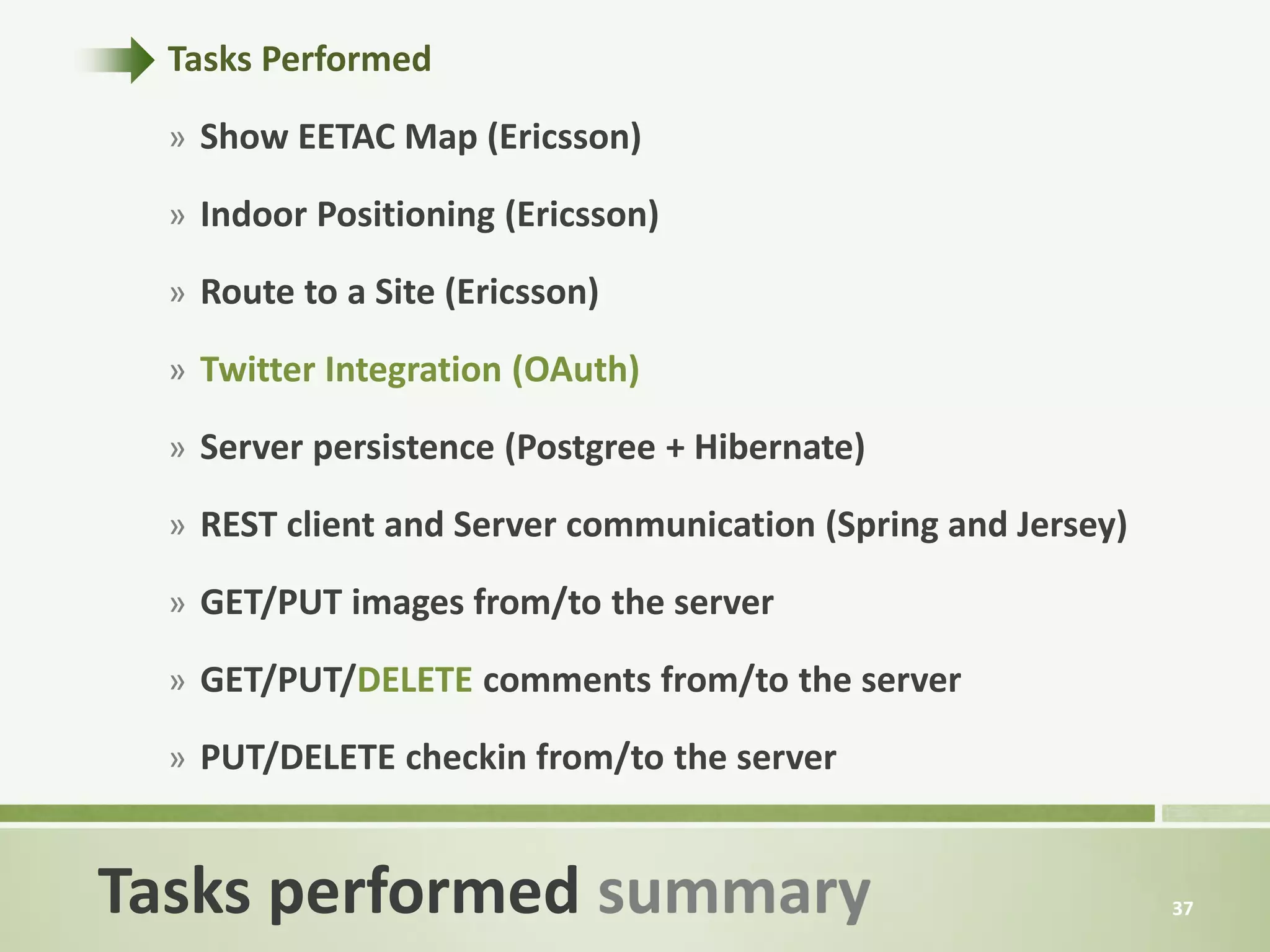
Tasks Performed

  » Show EETAC Map (Ericsson)

  » Indoor Positioning (Ericsson)

  » Route to a Site (Ericsson)

  » Twitter Integration (OAuth)

  » Server persistence (Postgree + Hibernate)

  » REST client and Server communication (Spring and Jersey)

  » GET/PUT images from/to the server

  » GET/PUT/DELETE comments from/to the server

  » PUT/DELETE checkin from/to the server


Tasks performed summary                                        37
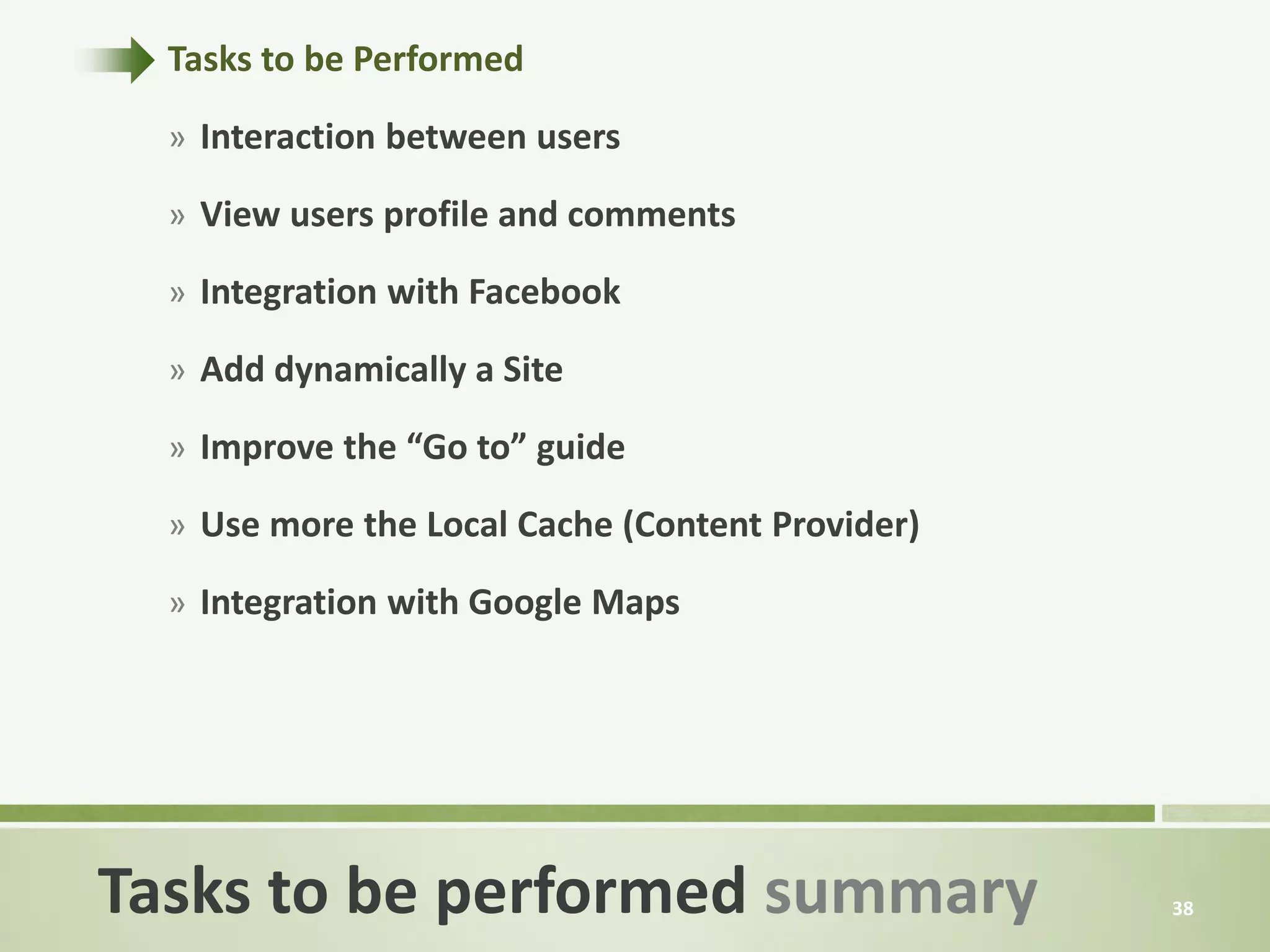
Tasks to be Performed

  » Interaction between users

  » View users profile and comments

  » Integration with Facebook

  » Add dynamically a Site

  » Improve the “Go to” guide

  » Use more the Local Cache (Content Provider)

  » Integration with Google Maps


Tasks to be performed summary                     38
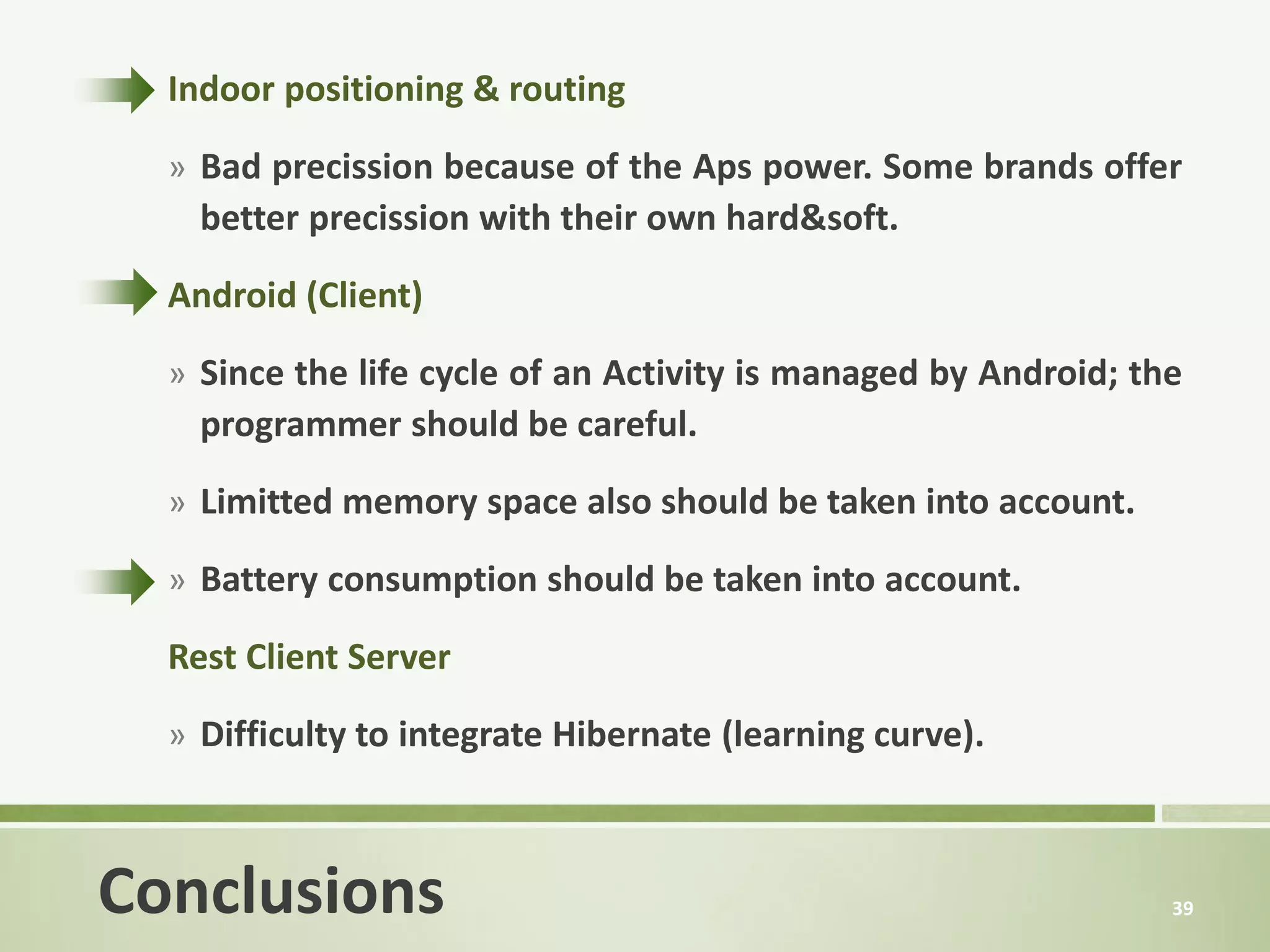
Indoor positioning & routing

  » Bad precission because of the Aps power. Some brands offer
    better precission with their own hard&soft.

  Android (Client)

  » Since the life cycle of an Activity is managed by Android; the
    programmer should be careful.

  » Limitted memory space also should be taken into account.

  » Battery consumption should be taken into account.

  Rest Client Server
  » Difficulty to integrate Hibernate (learning curve).


Conclusions                                                      39
?   Questions?


                 40

Final presentation

  • 1.
    EETAC App A newrevolutionary software for EETAC’s students and teachers. This App comes with localization, routing mechanisms, social network and much more!
  • 2.
    1. Concept Introduction to the 2. How it works? Stories application and user experience 3. Workflow 4. Entity-Relashionship Diagrams with different aspects of the architecture of 5. Technologies Table of Contents the application. 6. Ericsson Maps 7. Security Most important technical aspects, explained in 8. Rest Client Pattern detail. 9. Cache mechanism 10. Traffic Analisys 11. Summary & Conclusions 2
  • 3.
  • 4.
    » Offers orientationservice inside the campus, where the user can explore the buildings and find the best route to go to any room. » Follows web 2.0  Users can enrich the App sending comments and P.O.I » Userful tool designed for Eetac students and teachers but also for visitors which don’t know the campus. » What is the difference with Foursquare and other similar apps? Indoor positioning and routing. Concept 4
  • 5.
    Giving an exampleof how the App works 5
  • 6.
    » This Mondaywas about to start badly for Bob. Just landing from London at 13:17 am, he could definitively not remember the explications about how to reach the conference room. Luckily, he downloaded EetacApp before leaving, following his colleague’s advice. Within a few moments, the application gave him the quickest way to the place. » After the presentation of Urbanization in room V-212, the group was very pleased to see their friends have already taken pictures and upload them with the EETAC App, creating several threads about the main debated issues. Now, other students can see the gallery pictures and add some comments. Story 6
  • 7.
    Explaining the Flow Diagramof the layouts of our App 7
  • 8.
    Local registration Starting Point Login (general) Twitter login Flow Diagram for Authentication 8
  • 9.
    Starting Point Explore Sites Site Site P.O.interest Profile (everywhere) ActionBar Map Flow Diagram for general use 9
  • 10.
  • 11.
    6 entities Location 1 1 » Location: Where is the user 0..* 1 (dynamic)? User -id Site -id -name -username -description Where is a Site (static)? -password -surname Table: user_checkin (user_id | checkin_id) Check-in Table: site_checkin -num_checkins (site_id | checkin_id) -num_comments -description -id -floor -email 1 0..* -date 0..* 1 -building » User: User information. -set<Checkin> -set<Comment> -site -checkin_id -user -route_image -set<Picture> -set<Picture> -set<Checkin> » Site: Site information. 1 1 1 Table: site_picture » Check-in: Relates a User with (site_id | picture_id) 0..* Comment a Site (dynamic). Table: user_comment (user_id | comment_id) -id 0..* 1 -id Picture -text Table: picture_comment -author 0..* -author (picture_id | comment_id) -route_image » Picture: P.O.I related with a -date -user -user -date -picture -set<Comment> Site and a User. Table: user_picture (user_id | picture_id) » Comment: Comment related 0..* with a Site and a User. Entity-Relationship Diagram 11
  • 12.
    Citing all theTechnologies used for the project 12
  • 13.
    Indoor possitioning Show maps HTTP/JSON OAUTH Route calc. HTTP/JSON REST Mobile App Web Server Database TCP/IP Technologies Diagram 13
  • 14.
    Explaining what theApp do with Ericsson Maps API 14
  • 15.
    » Create mapsusing bulging plan and XML tags. » Indoor localization and navigation using predefined routes, Wi-Fi Aps localization and XML tags as elevators or stairs. Ericsson Maps API 15
  • 16.
    » Add informationusing over lays » Room labels » Finish flag » Google Maps to Ericsson Indoor Maps by Zoom Ericsson Maps API 16
  • 17.
  • 18.
    » Challenge Implemented(SHA) » Token expires in 30min. » Unique token generation. » For registering purposes, HTTPS should be used Eetac_challenge=long ID GET /date Eetac_challenge: 63fe6da0... date=”yyyyMMddHHmmssSS” Eetac_challenge=63fe6da0... 200 OK date=”2020134…” token=password=hash(date + hash(password))=42D11GP... POST /user/login Eetac_challenge: 63fe6da0… user token=password=hash(date + 200 OK or 403 FORBIDDEN hash(password)) user_id=2 If (server_token == client_token) return 200; Eetac_token=token else return 403; GET /site Eetac_token: 42D11GP... Security for Authentication 18
  • 19.
    Communicating with the serverthrough a REST Client Pattern 19
  • 20.
    The operating systemmay shut down the process. » The processor could be destroyed in the middle of an operation. The UI is frozen by the Processor (not interactive). No memory or Database storage == bandwidth waste. Wrong REST Client Pattern 20
  • 21.
    Good REST ClientPattern 21
  • 22.
  • 23.
    » Only imagecaching mechanism implemented 1. Download the image (write the outputstream of HTTP GET). 2. Save in the SSDcard (cache). 3. Save in memory (SoftReference HashMap) » Before retrieving all data, retrieve a hashCode of it (no changes = no hashcode changes = no retrieving all data) » Save each request in the Content Provider » Good performance under 1MB of data on the Cursor Persistence == Requests == Battery consumtion Cache 23
  • 24.
    10 Dimensioning our App, through a Traffic Analisys 24
  • 25.
    γ OFF state 0 2 4 4 User’s 1 1 2 activity User’s Get ALL 2 3 1 activity on Sites site Z Get 3 Site Z 3 Γ Traffic Analisys 25
  • 26.
    » Several equationscan be gotten from this Markov chain. » = 1 = + + + + = 0 ∗ + 2 ∗ + 2 ∗ = ∗ + 1 ∗ + 1 ∗ + Γ ∗ = 1 ∗ + 2 ∗ = 2 ∗ + 3 ∗ + 3 ∗ = 3 ∗ + 4 ∗ 6 equations, 19 unknown. Get experimental values to solve the problem. Discrete time analysis of a Markov Chain. Traffic Analisys 26
  • 27.
    3 = ∗ 1 − 4 2 = 3 ∗ = ∗ 1 − 3 − 3 ∗ 1 − 4 1 = ∗ 1 − 2 1 3 ∗ 1 − 1 − ∗ 1 − Γ ∗ ∗ = 1 − 2 1 − 4 = ∗ Traffic Analisys 27
  • 28.
    What we know: 70ms  Latency for • Get All Size is a packet of downlink ≈35ms. length: 3988 + 86 = 4074 •  Unitary discrete time = bytes. 10ms. • Minimum packet size for Get Site Z: 158 + 86 = 244 bytes. • Estimated velocity at server output: 1Mbyte/s  getALL Transmission time ≈ 4ms <35ms  get Z Transmission time ≈0,25ms << 35ms • Ping between mobile device at the Eetac and the server: Traffic Analisys 28
  • 29.
  • 30.
  • 31.
    JSON Packet size 5000 4000 3000 2000 1000 0 100 109 118 127 136 145 154 163 172 181 190 199 1 10 19 28 37 46 55 64 73 82 91 Series1 Traffic Analisys 31
  • 32.
    User's Activity State getALL User's activity getZ site Z Time (ms) 39 18 116 35 23 291 + Time slot = 10ms  Probability to stay in one state and to leave it Exhaustive Analysis of the logs: Get the probability to go toward each state. → = 2 21 → = 14 21 → = 5 21 → = 9 49 → = 33 49 → = 7 49 Traffic Analisys 32
  • 33.
     With this,we get all the transition probabilities, except γ and μ0 .  From 19 to 7 unknowns: more hypothesis are needed Hypothesis: A session (ON) happens every 24 hours. • 24 hours <-> 8,64.10^7 ms Average Session Time = AST 5 7 = 187450 + ∗ + ∗ = 208 585 12 12 = 0,997586 • Using , = 1,16 ∗ 10−8 and 0 ≈ 1 State getALL User's activity getZ User's Activity site Z OFF Probability 8,790000E-08 4,000000E-05 5,130000E-08 1,050000E-04 9,975860E-01 Probability 0,00000879% 0,00400000% 0,00000513% 0,01050000% 99,75860000% Traffic Analisys 33
  • 34.
    PDF Session 3,5 3 2,5 2 = 0,997586 PDF Session 1,5 1 0,5 = 0 40 80 120 160 200 240 280 320 360 400 440 480 520 560 600 0,002414 = ∗ − Traffic Analisys 34
  • 35.
    = 0, 000089 then Number of user: [] = 1,14629 = 1/ because _ ≪ : support peaks. Traffic Analisys 35
  • 36.
    11 Explain the tasks done; the tasks to be performed and the conclusions 36
  • 37.
    Tasks Performed » Show EETAC Map (Ericsson) » Indoor Positioning (Ericsson) » Route to a Site (Ericsson) » Twitter Integration (OAuth) » Server persistence (Postgree + Hibernate) » REST client and Server communication (Spring and Jersey) » GET/PUT images from/to the server » GET/PUT/DELETE comments from/to the server » PUT/DELETE checkin from/to the server Tasks performed summary 37
  • 38.
    Tasks to bePerformed » Interaction between users » View users profile and comments » Integration with Facebook » Add dynamically a Site » Improve the “Go to” guide » Use more the Local Cache (Content Provider) » Integration with Google Maps Tasks to be performed summary 38
  • 39.
    Indoor positioning &routing » Bad precission because of the Aps power. Some brands offer better precission with their own hard&soft. Android (Client) » Since the life cycle of an Activity is managed by Android; the programmer should be careful. » Limitted memory space also should be taken into account. » Battery consumption should be taken into account. Rest Client Server » Difficulty to integrate Hibernate (learning curve). Conclusions 39
  • 40.
    ? Questions? 40