RSSIL 2012


Exploiting the Low Fragmentation Heap for fun and profit


                                            Jeremy Fetiveau
                                                   @__x86
Introduction
● Why talking about the LFH?

  ○ heap exploitation
    ■ what is interesting to overwrite?
    ■ what if you deallocate twice a chunk of memory?

  ○ avoiding pray-after-frees
    ■ because you want to know where your chunks of
       memory will be

  ○ a few references
Introduction
●   A few talks about the LFH
    ○   Chris Valasek, Understanding the Low Fragmentation Heap" (BlackHat USA
        2010)
    ○   Steven Seeley, Ghost in the Seven allocator (HITB 2012)
    ○   Chris Valasek & Tarjei Mandt, Heaps of Doom (Syscan 2012)


●   A few related talks
    ○   Ben hawkes, Attacking the Vista heap (BlackHat USA 2008)
    ○   Richard Johnson, Windows Vista Exploitation Countermeasures (ToorCon
        2006)


●   A few references
    ○   Dr Valasek 's whitepaper
    ○   Steven Seeley's blog (net-ninja)
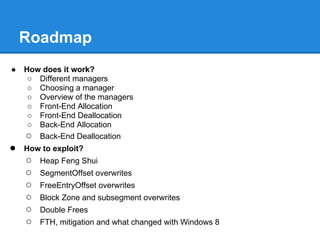
Roadmap
●   How does it work?
     ○ Different managers
     ○ Choosing a manager
     ○ Overview of the managers
     ○ Front-End Allocation
     ○ Front-End Deallocation
     ○ Back-End Allocation
    ○ Back-End Deallocation
●   How to exploit?
    ○   Heap Feng Shui
    ○   SegmentOffset overwrites
    ○   FreeEntryOffset overwrites
    ○   Block Zone and subsegment overwrites
    ○   Double Frees
    ○   FTH, mitigation and what changed with Windows 8
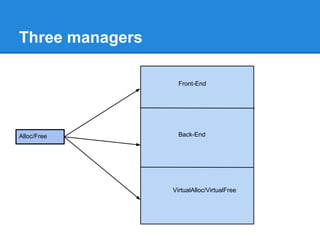
Three managers

                   Front-End


Alloc/Free         Back-End


                 VirtualAlloc/VirtualFree
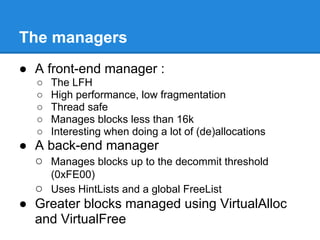
The managers
● A front-end manager :
   ○   The LFH
   ○   High performance, low fragmentation
   ○   Thread safe
   ○   Manages blocks less than 16k
   ○   Interesting when doing a lot of (de)allocations
● A back-end manager
  ○ Manages blocks up to the decommit threshold
       (0xFE00)
  ○    Uses HintLists and a global FreeList
● Greater blocks managed using VirtualAlloc
  and VirtualFree
Memory Commitment
●   Reservation
●   Commitment
●   Releasing
●   Decommitting
●   Decommit Threshold
●   NtAllocateVirtualMemory/NtFreeVirtualMemory
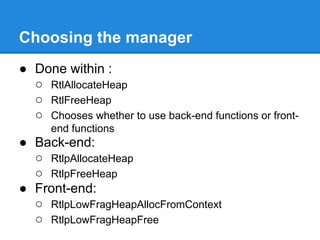
Choosing the manager
● Done within :
  ○ RtlAllocateHeap
  ○ RtlFreeHeap
  ○ Chooses whether to use back-end functions or front-
      end functions
● Back-end:
  ○ RtlpAllocateHeap
  ○ RtlpFreeHeap
● Front-end:
  ○ RtlpLowFragHeapAllocFromContext
  ○ RtlpLowFragHeapFree
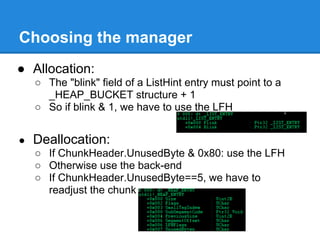
Choosing the manager
● Allocation:
    ○ The "blink" field of a ListHint entry must point to a
      _HEAP_BUCKET structure + 1
    ○ So if blink & 1, we have to use the LFH


●   Deallocation:
    ○ If ChunkHeader.UnusedByte & 0x80: use the LFH
    ○ Otherwise use the back-end
    ○ If ChunkHeader.UnusedByte==5, we have to
      readjust the chunk
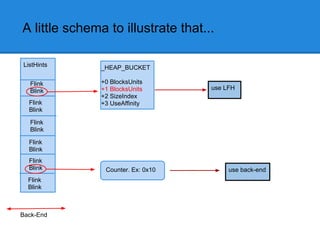
A little schema to illustrate that...

ListHints      _HEAP_BUCKET

  Flink        +0 BlocksUnits
  Blink        +1 BlocksUnits       use LFH
               +2 SizeIndex
  Flink        +3 UseAffinity
  Blink

  Flink
  Blink

  Flink
  Blink
  Flink
  Blink         Counter. Ex: 0x10        use back-end
  Flink
  Blink


Back-End
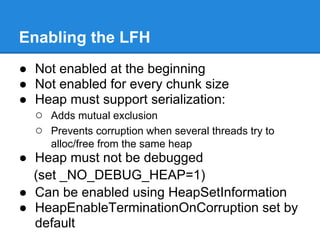
Enabling the LFH
● Not enabled at the beginning
● Not enabled for every chunk size
● Heap must support serialization:
  ○ Adds mutual exclusion
  ○ Prevents corruption when several threads try to
      alloc/free from the same heap
● Heap must not be debugged
  (set _NO_DEBUG_HEAP=1)
● Can be enabled using HeapSetInformation
● HeapEnableTerminationOnCorruption set by
  default
Enabling the LFH
LFH enabled for a chunk size when counter for
the corresponding ListHint entry is >0x20
Allocations increment the counter
Deallocations decrement the counter
● 0x12 consecutive allocations when LFH has
   never been enabled
● 0x11 when enabled for another bucket
Enabling the LFH
● When counter > 0x20:
  ○ RtlpGetLFHContext
  ○ Returns :
    ■ NULL if LFH has not yet been activated
    ■ _LFH_HEAP.bucket[size]

  ○ If context is null : set heap.CompatibilityFlags

   ○ If context not null : save _HEAP_BUCKET+1 in blink
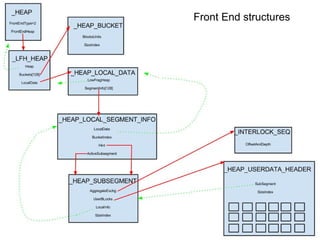
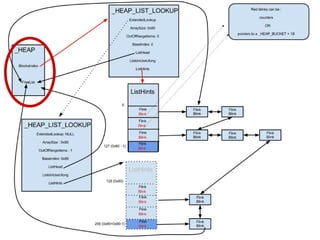
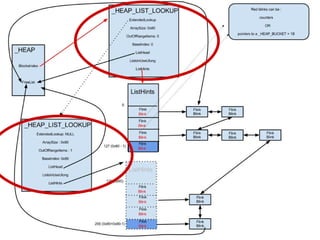
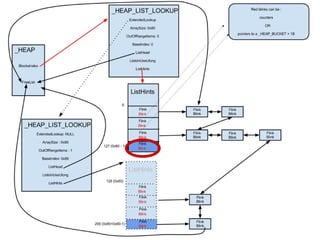
Front End structures
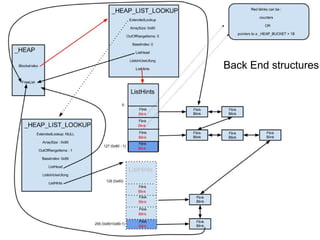
Back End structures
Front-End Allocation
●    RtlAllocateHeap :
1.   Get the heap
2.   Get the correct BlocksIndex
3.   Get the correct ListHints entry
4.   Look at blink
5.   If blink & 1, use LFH, otherwise use back-
     end
Front-End Allocation
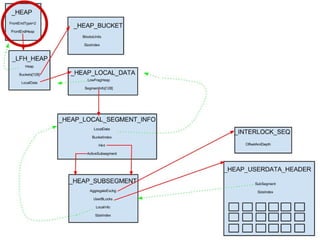
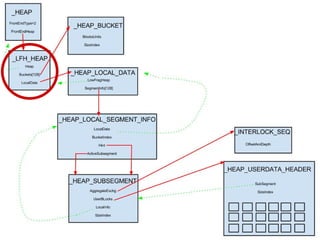
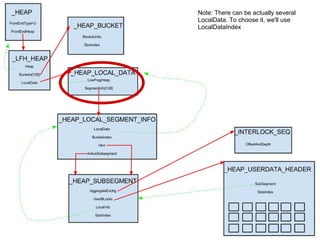
1. Get _HEAP_BUCKET.sizeIndex
2. Get _LFH_HEAP
3. Get _HEAP_LOCAL_DATA
4. Get the correct _HEAP_SEGMENT_INFO
   using sizeIndex
5. Get a _HEAP_SUBSEGMENT
Note: There can be actually several
LocalData. To choose it, we'll use
LocalDataIndex
_HEAP_BUCKET+1

                              sizeIndex


Flink

BLink


        _HEAP_LOCAL_DATA

        LowFragHeap

        SegmentInfo[128]
Heap subsegment
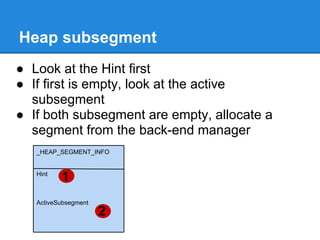
● Look at the Hint first
● If first is empty, look at the active
  subsegment
● If both subsegment are empty, allocate a
  segment from the back-end manager
   _HEAP_SEGMENT_INFO


   Hint
          1
   ActiveSubsegment
                      2
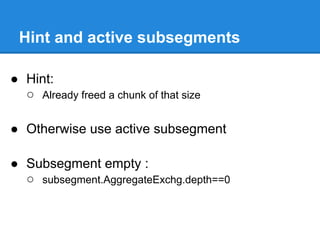
Hint and active subsegments

● Hint:
  ○ Already freed a chunk of that size

● Otherwise use active subsegment

● Subsegment empty :
  ○ subsegment.AggregateExchg.depth==0
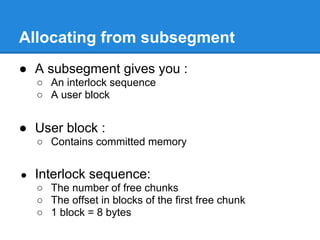
Allocating from subsegment
● A subsegment gives you :
    ○ An interlock sequence
    ○ A user block


● User block :
    ○ Contains committed memory


●   Interlock sequence:
    ○ The number of free chunks
    ○ The offset in blocks of the first free chunk
    ○ 1 block = 8 bytes
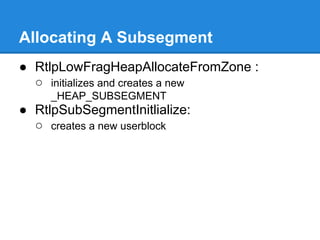
Allocating A Subsegment
● RtlpLowFragHeapAllocateFromZone :
  ○ initializes and creates a new
     _HEAP_SUBSEGMENT
● RtlpSubSegmentInitlialize:
  ○ creates a new userblock
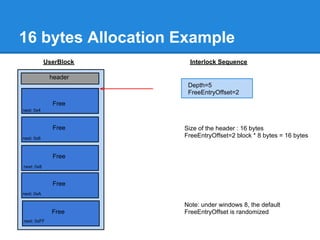
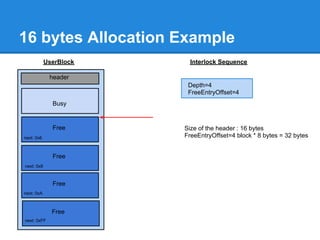
16 bytes Allocation Example
            UserBlock     Interlock Sequence

             header
                         Depth=5
                         FreeEntryOffset=2
              Free
next: 0x4


              Free      Size of the header : 16 bytes
next: 0x6
                        FreeEntryOffset=2 block * 8 bytes = 16 bytes


              Free
next: 0x8


              Free
next: 0xA

                        Note: under windows 8, the default
              Free      FreeEntryOffset is randomized
next: 0xFF
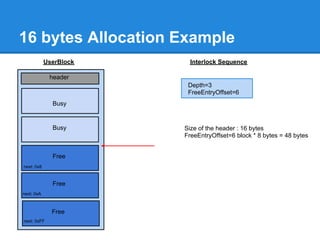
16 bytes Allocation Example
            UserBlock     Interlock Sequence

             header
                         Depth=4
                         FreeEntryOffset=4
              Busy


              Free      Size of the header : 16 bytes
next: 0x6               FreeEntryOffset=4 block * 8 bytes = 32 bytes


              Free
next: 0x8


              Free
next: 0xA


              Free
next: 0xFF
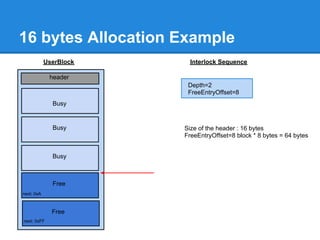
16 bytes Allocation Example
            UserBlock     Interlock Sequence

             header
                         Depth=3
                         FreeEntryOffset=6
              Busy


              Busy      Size of the header : 16 bytes
                        FreeEntryOffset=6 block * 8 bytes = 48 bytes


              Free
next: 0x8


              Free
next: 0xA


              Free
next: 0xFF
16 bytes Allocation Example
            UserBlock     Interlock Sequence

             header
                         Depth=2
                         FreeEntryOffset=8
              Busy


              Busy      Size of the header : 16 bytes
                        FreeEntryOffset=8 block * 8 bytes = 64 bytes


              Busy


              Free
next: 0xA


              Free
next: 0xFF
Front-End Deallocation
● If chunkHeader.UnusedBytes == 0x5 :
  ○ header must be readjusted
  ○ SegmentOffset used for readjusting
● If chunkHeader.UnusedBytes & 0x80
  ○ RtlpLowFragHeapFree
  ○ Don't forget the chunk may have been readjusted!
● Otherwise, use RtlpFreeHeap
Front-End Deallocation
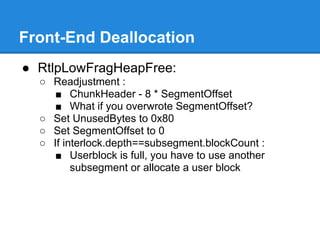
● RtlpLowFragHeapFree:
  ○ Readjustment :
     ■ ChunkHeader - 8 * SegmentOffset
     ■ What if you overwrote SegmentOffset?
  ○ Set UnusedBytes to 0x80
  ○ Set SegmentOffset to 0
  ○ If interlock.depth==subsegment.blockCount :
     ■ Userblock is full, you have to use another
         subsegment or allocate a user block
Front-End Deallocation
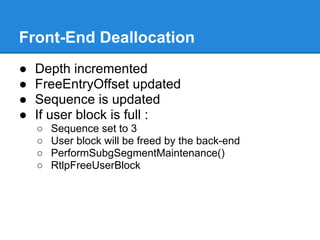
●   Depth incremented
●   FreeEntryOffset updated
●   Sequence is updated
●   If user block is full :
    ○   Sequence set to 3
    ○   User block will be freed by the back-end
    ○   PerformSubgSegmentMaintenance()
    ○   RtlpFreeUserBlock
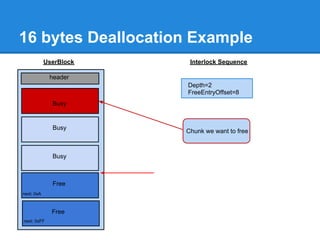
16 bytes Deallocation Example
            UserBlock    Interlock Sequence

             header
                        Depth=2
                        FreeEntryOffset=8
              Busy


              Busy
                        Chunk we want to free


              Busy


              Free
next: 0xA


              Free
next: 0xFF
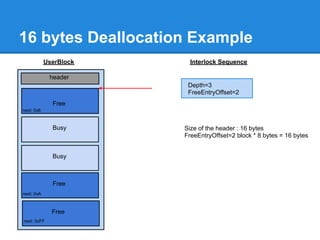
16 bytes Deallocation Example
            UserBlock     Interlock Sequence

             header
                         Depth=3
                         FreeEntryOffset=2
              Free
next: 0x8


              Busy      Size of the header : 16 bytes
                        FreeEntryOffset=2 block * 8 bytes = 16 bytes


              Busy


              Free
next: 0xA


              Free
next: 0xFF
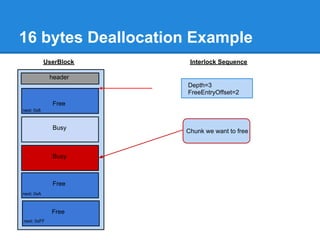
16 bytes Deallocation Example
            UserBlock    Interlock Sequence

             header
                        Depth=3
                        FreeEntryOffset=2
              Free
next: 0x8


              Busy
                        Chunk we want to free


              Busy


              Free
next: 0xA


              Free
next: 0xFF
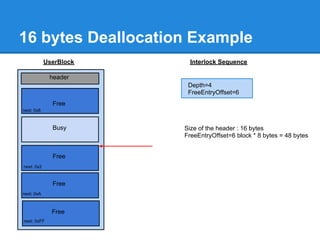
16 bytes Deallocation Example
            UserBlock     Interlock Sequence

             header
                         Depth=4
                         FreeEntryOffset=6
              Free
next: 0x8


              Busy      Size of the header : 16 bytes
                        FreeEntryOffset=6 block * 8 bytes = 48 bytes


              Free
next: 0x2


              Free
next: 0xA


              Free
next: 0xFF
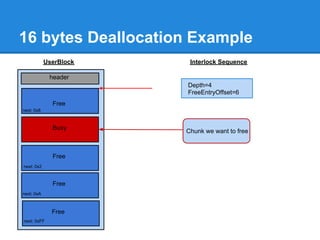
16 bytes Deallocation Example
            UserBlock    Interlock Sequence

             header
                        Depth=4
                        FreeEntryOffset=6
              Free
next: 0x8


              Busy
                        Chunk we want to free


              Free
next: 0x2


              Free
next: 0xA


              Free
next: 0xFF
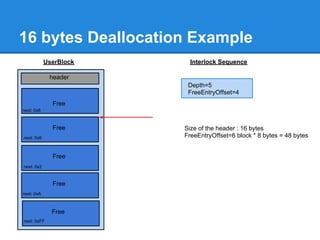
16 bytes Deallocation Example
            UserBlock     Interlock Sequence

             header
                         Depth=5
                         FreeEntryOffset=4
              Free
next: 0x8


              Free      Size of the header : 16 bytes
next: 0x6               FreeEntryOffset=6 block * 8 bytes = 48 bytes


              Free
next: 0x2


              Free
next: 0xA


              Free
next: 0xFF
Now the Back-End!


          Everything's okay?

    Any questions before continuing?
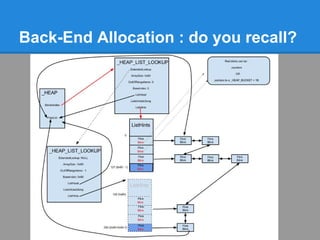
Back-End Allocation : do you recall?
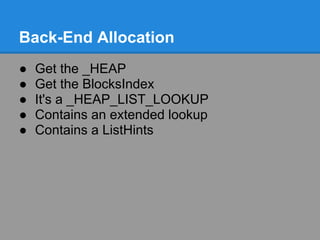
Back-End Allocation
●   Get the _HEAP
●   Get the BlocksIndex
●   It's a _HEAP_LIST_LOOKUP
●   Contains an extended lookup
●   Contains a ListHints
Back-End Allocation
● Is chunkSize < ArraySize?
● If so, use this ListHints
● Otherwise if no extendedLookup:
  ○ use ListHints[ArraySize-1]
● If there is an extendedLookup
  ○ is chunkSize < extended.ArraySize?
● If so, use this ListHints
● Otherwise, use extended.ListHints[ArraySize-
  1]
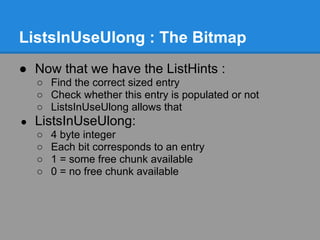
ListsInUseUlong : The Bitmap
● Now that we have the ListHints :
    ○ Find the correct sized entry
    ○ Check whether this entry is populated or not
    ○ ListsInUseUlong allows that
●   ListsInUseUlong:
    ○   4 byte integer
    ○   Each bit corresponds to an entry
    ○   1 = some free chunk available
    ○   0 = no free chunk available
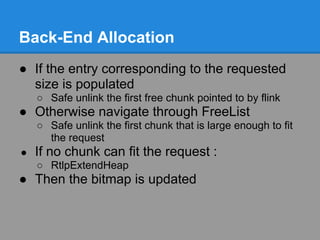
Back-End Allocation
● If the entry corresponding to the requested
  size is populated
    ○ Safe unlink the first free chunk pointed to by flink
● Otherwise navigate through FreeList
    ○ Safe unlink the first chunk that is large enough to fit
      the request
●   If no chunk can fit the request :
    ○ RtlpExtendHeap
● Then the bitmap is updated
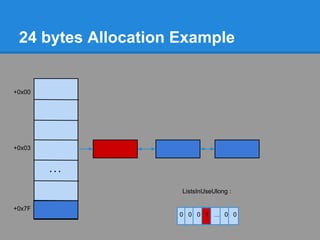
24 bytes Allocation Example
                 The user requested 16 bytes.
                 16 bytes + 8 bytes of header = 24 bytes
                 3*8=24 bytes.
+0x00            Bitmap indicates that ListHints[3] contains free chunks


+0x03


        ...

                             ListsInUseUlong :

+0x7F
                            0 0 0 1 ... 0 0
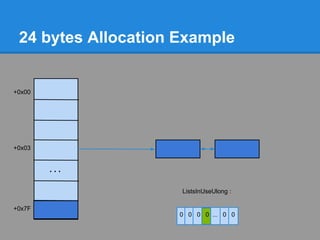
24 bytes Allocation Example


+0x00


+0x03


        ...

                     ListsInUseUlong :

+0x7F
                     0 0 0 1 ... 0 0
24 bytes Allocation Example


+0x00


+0x03


        ...

                     ListsInUseUlong :

+0x7F
                     0 0 0 0 ... 0 0
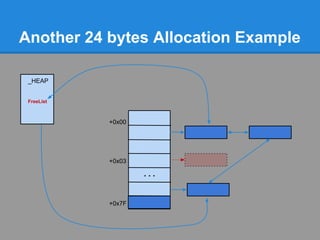
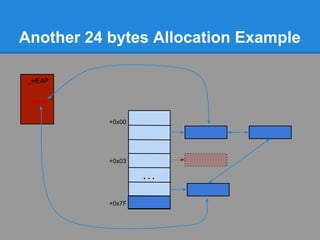
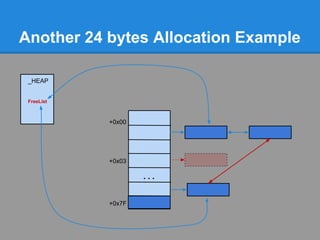
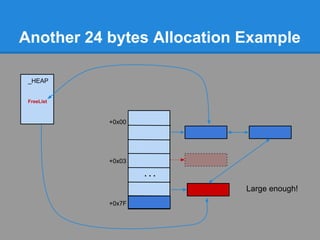
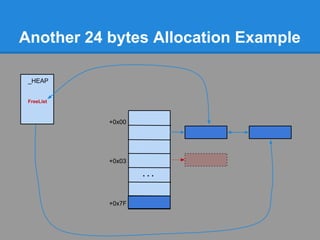
Another 24 bytes Allocation Example
              Problem : No chunk available at ListHints[3]


+0x00


+0x03


        ...


+0x7F
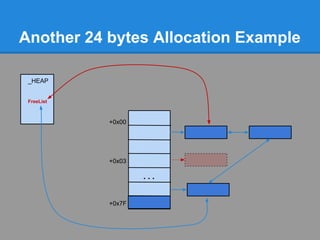
Another 24 bytes Allocation Example

 _HEAP


 FreeList


            +0x00


            +0x03

                    ...


            +0x7F
Another 24 bytes Allocation Example

 _HEAP


 FreeList


            +0x00


            +0x03

                    ...


            +0x7F
Another 24 bytes Allocation Example

 _HEAP


 FreeList


            +0x00


            +0x03

                    ...


            +0x7F
Another 24 bytes Allocation Example

 _HEAP


 FreeList


            +0x00


            +0x03

                    ...


            +0x7F
Another 24 bytes Allocation Example

 _HEAP


 FreeList


            +0x00


            +0x03

                    ...


            +0x7F
Another 24 bytes Allocation Example

 _HEAP


 FreeList


            +0x00


            +0x03

                    ...


            +0x7F
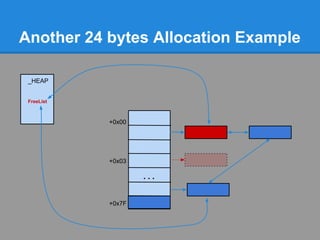
Another 24 bytes Allocation Example

 _HEAP


 FreeList


            +0x00


            +0x03

                    ...
                            Large enough!
            +0x7F
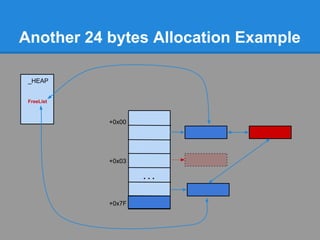
Another 24 bytes Allocation Example

 _HEAP


 FreeList


            +0x00


            +0x03

                    ...


            +0x7F
It's time for exploitation!


            Everything's okay?

     Any questions before continuing?
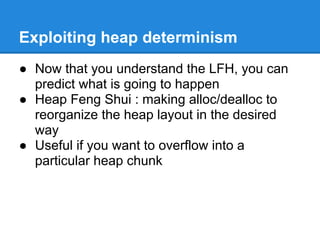
Exploiting heap determinism
● Now that you understand the LFH, you can
  predict what is going to happen
● Heap Feng Shui : making alloc/dealloc to
  reorganize the heap layout in the desired
  way
● Useful if you want to overflow into a
  particular heap chunk
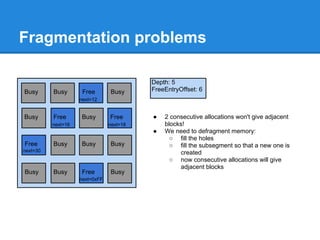
Fragmentation problems

                                          Depth: 5
Busy      Busy       Free       Busy      FreeEntryOffset: 6
                    next=12


Busy      Free      Busy        Free      ●   2 consecutive allocations won't give adjacent
          next=16               next=18       blocks!
                                          ●   We need to defragment memory:
                                                ○ fill the holes
Free      Busy      Busy        Busy            ○ fill the subsegment so that a new one is
next=30                                            created
                                                ○ now consecutive allocations will give
                                                   adjacent blocks
Busy      Busy      Free        Busy
                    next=0xFF
Fragmentation problems
              Enable the LFH


                                           The next alloc will return the address of array2[0],
                                           the second one will return the address of array2[4].
                                           (LFH is kind of LIFO)


          Defragment and allocate a new
          subsegment


         Now, the object is after our "user controlled" buffer
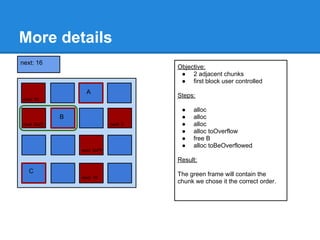
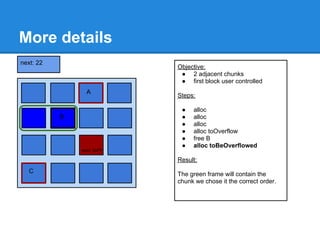
More details
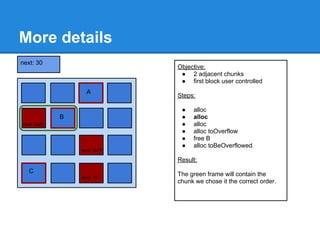
next: 16
                                              Objective:
                                               ● 2 adjacent chunks
                                               ● first block user controlled
                         A
                                              Steps:
next: 30

                                               ●   alloc
               B                               ●   alloc
next: 0x22   next=16                next: 2    ●   alloc
                                               ●   alloc toOverflow
                                               ●   free B
                                               ●   alloc toBeOverflowed
next=30                next: 0xFF

                                              Result:
  C
 Busy                                         The green frame will contain the
                        next: 10
                       next=0xFF
                                              chunk we chose it the correct order.
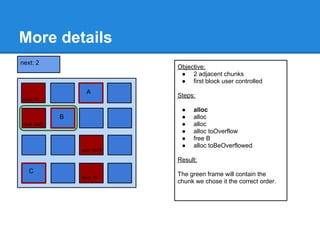
More details
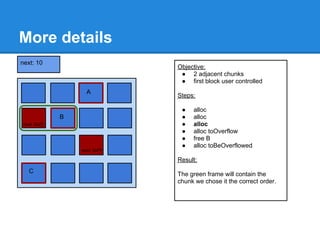
next: 2
                                    Objective:
                                     ● 2 adjacent chunks
                                     ● first block user controlled
                         A
                                    Steps:
next: 30

                                     ●   alloc
               B                     ●   alloc
next: 0x22   next=16                 ●   alloc
                                     ●   alloc toOverflow
                                     ●   free B
                                     ●   alloc toBeOverflowed
next=30                next: 0xFF

                                    Result:
  C
 Busy                               The green frame will contain the
                        next: 10
                       next=0xFF
                                    chunk we chose it the correct order.
More details
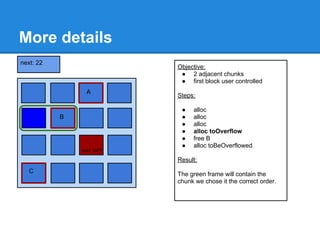
next: 30
                                    Objective:
                                     ● 2 adjacent chunks
                                     ● first block user controlled
                         A
                                    Steps:

                                     ●   alloc
               B                     ●   alloc
next: 0x22   next=16                 ●   alloc
                                     ●   alloc toOverflow
                                     ●   free B
                                     ●   alloc toBeOverflowed
next=30                next: 0xFF

                                    Result:
  C
 Busy                               The green frame will contain the
                        next: 10
                       next=0xFF
                                    chunk we chose it the correct order.
More details
next: 10
                                    Objective:
                                     ● 2 adjacent chunks
                                     ● first block user controlled
                         A
                                    Steps:

                                     ●   alloc
               B                     ●   alloc
next: 0x22   next=16                 ●   alloc
                                     ●   alloc toOverflow
                                     ●   free B
                                     ●   alloc toBeOverflowed
next=30                next: 0xFF

                                    Result:
  C
 Busy                               The green frame will contain the
                       next=0xFF
                                    chunk we chose it the correct order.
More details
next: 22
                                  Objective:
                                   ● 2 adjacent chunks
                                   ● first block user controlled
                       A
                                  Steps:

                                   ●   alloc
             B                     ●   alloc
           next=16                 ●   alloc
                                   ●   alloc toOverflow
                                   ●   free B
                                   ●   alloc toBeOverflowed
next=30              next: 0xFF

                                  Result:
  C
 Busy                             The green frame will contain the
                     next=0xFF
                                  chunk we chose it the correct order.
More details
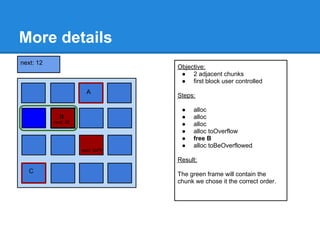
next: 12
                                   Objective:
                                    ● 2 adjacent chunks
                                    ● first block user controlled
                        A
                                   Steps:

                                    ●   alloc
             B                      ●   alloc
           next: 22
           next=16                  ●   alloc
                                    ●   alloc toOverflow
                                    ●   free B
                                    ●   alloc toBeOverflowed
next=30               next: 0xFF

                                   Result:
  C
 Busy                              The green frame will contain the
                      next=0xFF
                                   chunk we chose it the correct order.
More details
next: 22
                                  Objective:
                                   ● 2 adjacent chunks
                                   ● first block user controlled
                       A
                                  Steps:

                                   ●   alloc
             B                     ●   alloc
           next=16                 ●   alloc
                                   ●   alloc toOverflow
                                   ●   free B
                                   ●   alloc toBeOverflowed
next=30              next: 0xFF

                                  Result:
  C
 Busy                             The green frame will contain the
                     next=0xFF
                                  chunk we chose it the correct order.
Remarks
● Be aware that new/delete and
  HeapAlloc/HeapFree don't use the same
  heap

● Of course this example is very simple, but its
  purpose is only to show that you can
  manipulate the heap layout
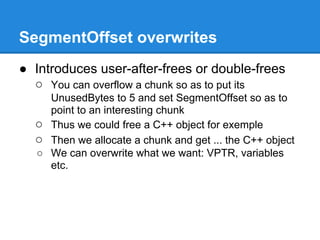
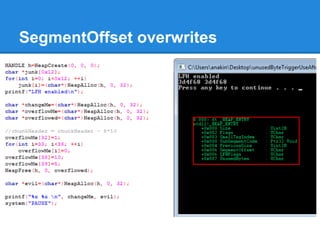
SegmentOffset overwrites
● Introduces user-after-frees or double-frees
  ○ You can overflow a chunk so as to put its
    UnusedBytes to 5 and set SegmentOffset so as to
    point to an interesting chunk
  ○ Thus we could free a C++ object for exemple
  ○ Then we allocate a chunk and get ... the C++ object
  ○ We can overwrite what we want: VPTR, variables
    etc.
SegmentOffset overwrites
FreeEntryOffset overwrites
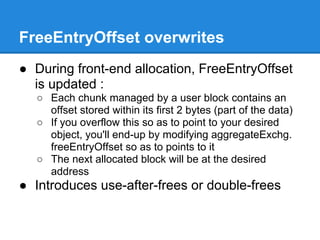
● During front-end allocation, FreeEntryOffset
  is updated :
  ○ Each chunk managed by a user block contains an
    offset stored within its first 2 bytes (part of the data)
  ○ If you overflow this so as to point to your desired
    object, you'll end-up by modifying aggregateExchg.
    freeEntryOffset so as to points to it
  ○ The next allocated block will be at the desired
    address
● Introduces use-after-frees or double-frees
FreeEntryOffset overwrites


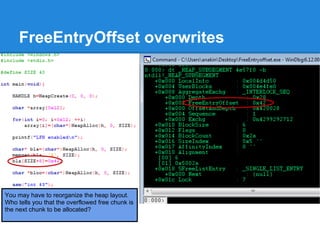
You may have to reorganize the heap layout.
Who tells you that the overflowed free chunk is
the next chunk to be allocated?
FreeEntryOffset overwrites


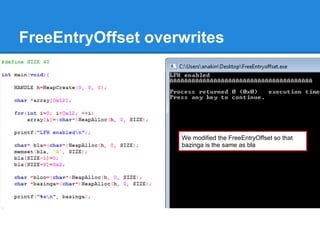
                    We modified the FreeEntryOffset so that
                    bazinga is the same as bla
Double Free


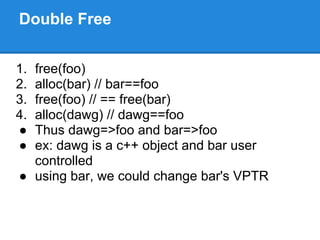
1.free(foo)
2.alloc(bar) // bar==foo
3.free(foo) // == free(bar)
4.alloc(dawg) // dawg==foo
● Thus dawg=>foo and bar=>foo
● ex: dawg is a c++ object and bar user
  controlled
● using bar, we could change bar's VPTR
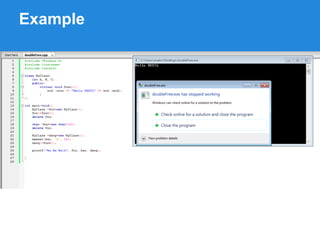
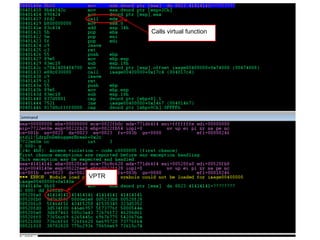
Example
Calls virtual function


VPTR
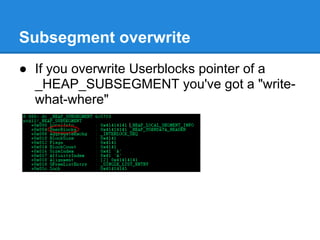
Subsegment overwrite
● If you overwrite Userblocks pointer of a
  _HEAP_SUBSEGMENT you've got a "write-
  what-where"
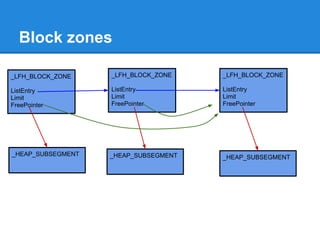
Block zones

_LFH_BLOCK_ZONE    _LFH_BLOCK_ZONE    _LFH_BLOCK_ZONE

ListEntry          ListEntry          ListEntry
Limit              Limit              Limit
FreePointer        FreePointer        FreePointer


_HEAP_SUBSEGMENT   _HEAP_SUBSEGMENT   _HEAP_SUBSEGMENT
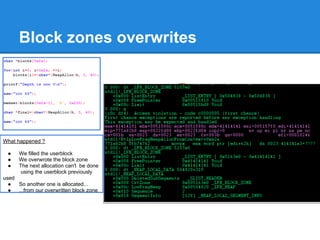
Block zones overwrites


What happened ?

 ●    We filled the userblock
 ●    We overwrote the block zone
 ●    The next allocation can't be done
       using the userblock previously
used
  ●  So another one is allocated...
  ●  ...from our overwritten block zone
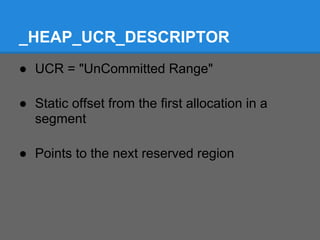
_HEAP_UCR_DESCRIPTOR
● UCR = "UnCommitted Range"

● Static offset from the first allocation in a
  segment

● Points to the next reserved region
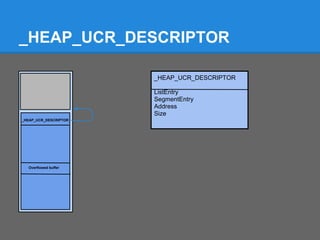
_HEAP_UCR_DESCRIPTOR

                       _HEAP_UCR_DESCRIPTOR

                       ListEntry
                       SegmentEntry
                       Address
                       Size
_HEAP_UCR_DESCRIPTOR


  Overflowed buffer
Overwriting heap base
● If you can control the heap base, you've won
  ○   functions pointers
  ○   pointers to LFH/back-end structures
  ○   canaries
  ○   etc
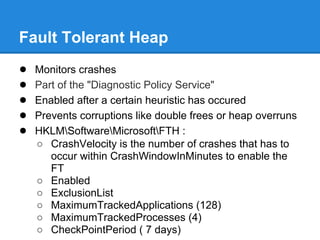
Fault Tolerant Heap
●   Monitors crashes
●   Part of the "Diagnostic Policy Service"
●   Enabled after a certain heuristic has occured
●   Prevents corruptions like double frees or heap overruns
●   HKLMSoftwareMicrosoftFTH :
    ○ CrashVelocity is the number of crashes that has to
       occur within CrashWindowInMinutes to enable the
       FT
    ○ Enabled
    ○ ExclusionList
    ○ MaximumTrackedApplications (128)
    ○ MaximumTrackedProcesses (4)
    ○ CheckPointPeriod ( 7 days)
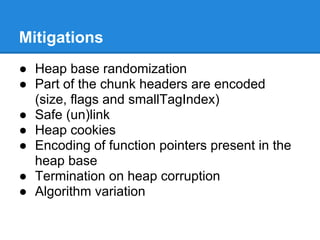
Mitigations
● Heap base randomization
● Part of the chunk headers are encoded
  (size, flags and smallTagIndex)
● Safe (un)link
● Heap cookies
● Encoding of function pointers present in the
  heap base
● Termination on heap corruption
● Algorithm variation
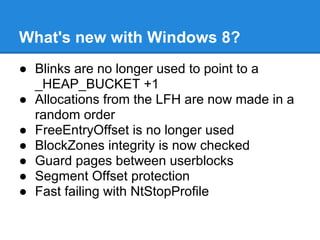
What's new with Windows 8?
● Blinks are no longer used to point to a
  _HEAP_BUCKET +1
● Allocations from the LFH are now made in a
  random order
● FreeEntryOffset is no longer used
● BlockZones integrity is now checked
● Guard pages between userblocks
● Segment Offset protection
● Fast failing with NtStopProfile
Greetings
Special thanks to Ivanlefou for helping me and reviewing my
presentation.

And thanks a lot to Chris Valasek and Steven Seeley for their
work.

Thanks to 0verclok for his review.


Thanks to Tetrane for his sponsor
Questions?

Thank you for your attention!

Final lfh presentation (3)

  • 1.
    RSSIL 2012 Exploiting theLow Fragmentation Heap for fun and profit Jeremy Fetiveau @__x86
  • 2.
    Introduction ● Why talkingabout the LFH? ○ heap exploitation ■ what is interesting to overwrite? ■ what if you deallocate twice a chunk of memory? ○ avoiding pray-after-frees ■ because you want to know where your chunks of memory will be ○ a few references
  • 3.
    Introduction ● A few talks about the LFH ○ Chris Valasek, Understanding the Low Fragmentation Heap" (BlackHat USA 2010) ○ Steven Seeley, Ghost in the Seven allocator (HITB 2012) ○ Chris Valasek & Tarjei Mandt, Heaps of Doom (Syscan 2012) ● A few related talks ○ Ben hawkes, Attacking the Vista heap (BlackHat USA 2008) ○ Richard Johnson, Windows Vista Exploitation Countermeasures (ToorCon 2006) ● A few references ○ Dr Valasek 's whitepaper ○ Steven Seeley's blog (net-ninja)
  • 4.
    Roadmap ● How does it work? ○ Different managers ○ Choosing a manager ○ Overview of the managers ○ Front-End Allocation ○ Front-End Deallocation ○ Back-End Allocation ○ Back-End Deallocation ● How to exploit? ○ Heap Feng Shui ○ SegmentOffset overwrites ○ FreeEntryOffset overwrites ○ Block Zone and subsegment overwrites ○ Double Frees ○ FTH, mitigation and what changed with Windows 8
  • 5.
    Three managers Front-End Alloc/Free Back-End VirtualAlloc/VirtualFree
  • 6.
    The managers ● Afront-end manager : ○ The LFH ○ High performance, low fragmentation ○ Thread safe ○ Manages blocks less than 16k ○ Interesting when doing a lot of (de)allocations ● A back-end manager ○ Manages blocks up to the decommit threshold (0xFE00) ○ Uses HintLists and a global FreeList ● Greater blocks managed using VirtualAlloc and VirtualFree
  • 7.
    Memory Commitment ● Reservation ● Commitment ● Releasing ● Decommitting ● Decommit Threshold ● NtAllocateVirtualMemory/NtFreeVirtualMemory
  • 8.
    Choosing the manager ●Done within : ○ RtlAllocateHeap ○ RtlFreeHeap ○ Chooses whether to use back-end functions or front- end functions ● Back-end: ○ RtlpAllocateHeap ○ RtlpFreeHeap ● Front-end: ○ RtlpLowFragHeapAllocFromContext ○ RtlpLowFragHeapFree
  • 9.
    Choosing the manager ●Allocation: ○ The "blink" field of a ListHint entry must point to a _HEAP_BUCKET structure + 1 ○ So if blink & 1, we have to use the LFH ● Deallocation: ○ If ChunkHeader.UnusedByte & 0x80: use the LFH ○ Otherwise use the back-end ○ If ChunkHeader.UnusedByte==5, we have to readjust the chunk
  • 10.
    A little schemato illustrate that... ListHints _HEAP_BUCKET Flink +0 BlocksUnits Blink +1 BlocksUnits use LFH +2 SizeIndex Flink +3 UseAffinity Blink Flink Blink Flink Blink Flink Blink Counter. Ex: 0x10 use back-end Flink Blink Back-End
  • 11.
    Enabling the LFH ●Not enabled at the beginning ● Not enabled for every chunk size ● Heap must support serialization: ○ Adds mutual exclusion ○ Prevents corruption when several threads try to alloc/free from the same heap ● Heap must not be debugged (set _NO_DEBUG_HEAP=1) ● Can be enabled using HeapSetInformation ● HeapEnableTerminationOnCorruption set by default
  • 12.
    Enabling the LFH LFHenabled for a chunk size when counter for the corresponding ListHint entry is >0x20 Allocations increment the counter Deallocations decrement the counter ● 0x12 consecutive allocations when LFH has never been enabled ● 0x11 when enabled for another bucket
  • 13.
    Enabling the LFH ●When counter > 0x20: ○ RtlpGetLFHContext ○ Returns : ■ NULL if LFH has not yet been activated ■ _LFH_HEAP.bucket[size] ○ If context is null : set heap.CompatibilityFlags ○ If context not null : save _HEAP_BUCKET+1 in blink
  • 14.
  • 15.
  • 16.
    Front-End Allocation ● RtlAllocateHeap : 1. Get the heap 2. Get the correct BlocksIndex 3. Get the correct ListHints entry 4. Look at blink 5. If blink & 1, use LFH, otherwise use back- end
  • 20.
    Front-End Allocation 1. Get_HEAP_BUCKET.sizeIndex 2. Get _LFH_HEAP 3. Get _HEAP_LOCAL_DATA 4. Get the correct _HEAP_SEGMENT_INFO using sizeIndex 5. Get a _HEAP_SUBSEGMENT
  • 23.
    Note: There canbe actually several LocalData. To choose it, we'll use LocalDataIndex
  • 24.
    _HEAP_BUCKET+1 sizeIndex Flink BLink _HEAP_LOCAL_DATA LowFragHeap SegmentInfo[128]
  • 25.
    Heap subsegment ● Lookat the Hint first ● If first is empty, look at the active subsegment ● If both subsegment are empty, allocate a segment from the back-end manager _HEAP_SEGMENT_INFO Hint 1 ActiveSubsegment 2
  • 26.
    Hint and activesubsegments ● Hint: ○ Already freed a chunk of that size ● Otherwise use active subsegment ● Subsegment empty : ○ subsegment.AggregateExchg.depth==0
  • 27.
    Allocating from subsegment ●A subsegment gives you : ○ An interlock sequence ○ A user block ● User block : ○ Contains committed memory ● Interlock sequence: ○ The number of free chunks ○ The offset in blocks of the first free chunk ○ 1 block = 8 bytes
  • 28.
    Allocating A Subsegment ●RtlpLowFragHeapAllocateFromZone : ○ initializes and creates a new _HEAP_SUBSEGMENT ● RtlpSubSegmentInitlialize: ○ creates a new userblock
  • 29.
    16 bytes AllocationExample UserBlock Interlock Sequence header Depth=5 FreeEntryOffset=2 Free next: 0x4 Free Size of the header : 16 bytes next: 0x6 FreeEntryOffset=2 block * 8 bytes = 16 bytes Free next: 0x8 Free next: 0xA Note: under windows 8, the default Free FreeEntryOffset is randomized next: 0xFF
  • 30.
    16 bytes AllocationExample UserBlock Interlock Sequence header Depth=4 FreeEntryOffset=4 Busy Free Size of the header : 16 bytes next: 0x6 FreeEntryOffset=4 block * 8 bytes = 32 bytes Free next: 0x8 Free next: 0xA Free next: 0xFF
  • 31.
    16 bytes AllocationExample UserBlock Interlock Sequence header Depth=3 FreeEntryOffset=6 Busy Busy Size of the header : 16 bytes FreeEntryOffset=6 block * 8 bytes = 48 bytes Free next: 0x8 Free next: 0xA Free next: 0xFF
  • 32.
    16 bytes AllocationExample UserBlock Interlock Sequence header Depth=2 FreeEntryOffset=8 Busy Busy Size of the header : 16 bytes FreeEntryOffset=8 block * 8 bytes = 64 bytes Busy Free next: 0xA Free next: 0xFF
  • 33.
    Front-End Deallocation ● IfchunkHeader.UnusedBytes == 0x5 : ○ header must be readjusted ○ SegmentOffset used for readjusting ● If chunkHeader.UnusedBytes & 0x80 ○ RtlpLowFragHeapFree ○ Don't forget the chunk may have been readjusted! ● Otherwise, use RtlpFreeHeap
  • 34.
    Front-End Deallocation ● RtlpLowFragHeapFree: ○ Readjustment : ■ ChunkHeader - 8 * SegmentOffset ■ What if you overwrote SegmentOffset? ○ Set UnusedBytes to 0x80 ○ Set SegmentOffset to 0 ○ If interlock.depth==subsegment.blockCount : ■ Userblock is full, you have to use another subsegment or allocate a user block
  • 35.
    Front-End Deallocation ● Depth incremented ● FreeEntryOffset updated ● Sequence is updated ● If user block is full : ○ Sequence set to 3 ○ User block will be freed by the back-end ○ PerformSubgSegmentMaintenance() ○ RtlpFreeUserBlock
  • 36.
    16 bytes DeallocationExample UserBlock Interlock Sequence header Depth=2 FreeEntryOffset=8 Busy Busy Chunk we want to free Busy Free next: 0xA Free next: 0xFF
  • 37.
    16 bytes DeallocationExample UserBlock Interlock Sequence header Depth=3 FreeEntryOffset=2 Free next: 0x8 Busy Size of the header : 16 bytes FreeEntryOffset=2 block * 8 bytes = 16 bytes Busy Free next: 0xA Free next: 0xFF
  • 38.
    16 bytes DeallocationExample UserBlock Interlock Sequence header Depth=3 FreeEntryOffset=2 Free next: 0x8 Busy Chunk we want to free Busy Free next: 0xA Free next: 0xFF
  • 39.
    16 bytes DeallocationExample UserBlock Interlock Sequence header Depth=4 FreeEntryOffset=6 Free next: 0x8 Busy Size of the header : 16 bytes FreeEntryOffset=6 block * 8 bytes = 48 bytes Free next: 0x2 Free next: 0xA Free next: 0xFF
  • 40.
    16 bytes DeallocationExample UserBlock Interlock Sequence header Depth=4 FreeEntryOffset=6 Free next: 0x8 Busy Chunk we want to free Free next: 0x2 Free next: 0xA Free next: 0xFF
  • 41.
    16 bytes DeallocationExample UserBlock Interlock Sequence header Depth=5 FreeEntryOffset=4 Free next: 0x8 Free Size of the header : 16 bytes next: 0x6 FreeEntryOffset=6 block * 8 bytes = 48 bytes Free next: 0x2 Free next: 0xA Free next: 0xFF
  • 42.
    Now the Back-End! Everything's okay? Any questions before continuing?
  • 43.
    Back-End Allocation :do you recall?
  • 44.
    Back-End Allocation ● Get the _HEAP ● Get the BlocksIndex ● It's a _HEAP_LIST_LOOKUP ● Contains an extended lookup ● Contains a ListHints
  • 45.
    Back-End Allocation ● IschunkSize < ArraySize? ● If so, use this ListHints ● Otherwise if no extendedLookup: ○ use ListHints[ArraySize-1] ● If there is an extendedLookup ○ is chunkSize < extended.ArraySize? ● If so, use this ListHints ● Otherwise, use extended.ListHints[ArraySize- 1]
  • 46.
    ListsInUseUlong : TheBitmap ● Now that we have the ListHints : ○ Find the correct sized entry ○ Check whether this entry is populated or not ○ ListsInUseUlong allows that ● ListsInUseUlong: ○ 4 byte integer ○ Each bit corresponds to an entry ○ 1 = some free chunk available ○ 0 = no free chunk available
  • 47.
    Back-End Allocation ● Ifthe entry corresponding to the requested size is populated ○ Safe unlink the first free chunk pointed to by flink ● Otherwise navigate through FreeList ○ Safe unlink the first chunk that is large enough to fit the request ● If no chunk can fit the request : ○ RtlpExtendHeap ● Then the bitmap is updated
  • 48.
    24 bytes AllocationExample The user requested 16 bytes. 16 bytes + 8 bytes of header = 24 bytes 3*8=24 bytes. +0x00 Bitmap indicates that ListHints[3] contains free chunks +0x03 ... ListsInUseUlong : +0x7F 0 0 0 1 ... 0 0
  • 49.
    24 bytes AllocationExample +0x00 +0x03 ... ListsInUseUlong : +0x7F 0 0 0 1 ... 0 0
  • 50.
    24 bytes AllocationExample +0x00 +0x03 ... ListsInUseUlong : +0x7F 0 0 0 0 ... 0 0
  • 51.
    Another 24 bytesAllocation Example Problem : No chunk available at ListHints[3] +0x00 +0x03 ... +0x7F
  • 52.
    Another 24 bytesAllocation Example _HEAP FreeList +0x00 +0x03 ... +0x7F
  • 53.
    Another 24 bytesAllocation Example _HEAP FreeList +0x00 +0x03 ... +0x7F
  • 54.
    Another 24 bytesAllocation Example _HEAP FreeList +0x00 +0x03 ... +0x7F
  • 55.
    Another 24 bytesAllocation Example _HEAP FreeList +0x00 +0x03 ... +0x7F
  • 56.
    Another 24 bytesAllocation Example _HEAP FreeList +0x00 +0x03 ... +0x7F
  • 57.
    Another 24 bytesAllocation Example _HEAP FreeList +0x00 +0x03 ... +0x7F
  • 58.
    Another 24 bytesAllocation Example _HEAP FreeList +0x00 +0x03 ... Large enough! +0x7F
  • 59.
    Another 24 bytesAllocation Example _HEAP FreeList +0x00 +0x03 ... +0x7F
  • 60.
    It's time forexploitation! Everything's okay? Any questions before continuing?
  • 61.
    Exploiting heap determinism ●Now that you understand the LFH, you can predict what is going to happen ● Heap Feng Shui : making alloc/dealloc to reorganize the heap layout in the desired way ● Useful if you want to overflow into a particular heap chunk
  • 62.
    Fragmentation problems Depth: 5 Busy Busy Free Busy FreeEntryOffset: 6 next=12 Busy Free Busy Free ● 2 consecutive allocations won't give adjacent next=16 next=18 blocks! ● We need to defragment memory: ○ fill the holes Free Busy Busy Busy ○ fill the subsegment so that a new one is next=30 created ○ now consecutive allocations will give adjacent blocks Busy Busy Free Busy next=0xFF
  • 63.
    Fragmentation problems Enable the LFH The next alloc will return the address of array2[0], the second one will return the address of array2[4]. (LFH is kind of LIFO) Defragment and allocate a new subsegment Now, the object is after our "user controlled" buffer
  • 64.
    More details next: 16 Objective: ● 2 adjacent chunks ● first block user controlled A Steps: next: 30 ● alloc B ● alloc next: 0x22 next=16 next: 2 ● alloc ● alloc toOverflow ● free B ● alloc toBeOverflowed next=30 next: 0xFF Result: C Busy The green frame will contain the next: 10 next=0xFF chunk we chose it the correct order.
  • 65.
    More details next: 2 Objective: ● 2 adjacent chunks ● first block user controlled A Steps: next: 30 ● alloc B ● alloc next: 0x22 next=16 ● alloc ● alloc toOverflow ● free B ● alloc toBeOverflowed next=30 next: 0xFF Result: C Busy The green frame will contain the next: 10 next=0xFF chunk we chose it the correct order.
  • 66.
    More details next: 30 Objective: ● 2 adjacent chunks ● first block user controlled A Steps: ● alloc B ● alloc next: 0x22 next=16 ● alloc ● alloc toOverflow ● free B ● alloc toBeOverflowed next=30 next: 0xFF Result: C Busy The green frame will contain the next: 10 next=0xFF chunk we chose it the correct order.
  • 67.
    More details next: 10 Objective: ● 2 adjacent chunks ● first block user controlled A Steps: ● alloc B ● alloc next: 0x22 next=16 ● alloc ● alloc toOverflow ● free B ● alloc toBeOverflowed next=30 next: 0xFF Result: C Busy The green frame will contain the next=0xFF chunk we chose it the correct order.
  • 68.
    More details next: 22 Objective: ● 2 adjacent chunks ● first block user controlled A Steps: ● alloc B ● alloc next=16 ● alloc ● alloc toOverflow ● free B ● alloc toBeOverflowed next=30 next: 0xFF Result: C Busy The green frame will contain the next=0xFF chunk we chose it the correct order.
  • 69.
    More details next: 12 Objective: ● 2 adjacent chunks ● first block user controlled A Steps: ● alloc B ● alloc next: 22 next=16 ● alloc ● alloc toOverflow ● free B ● alloc toBeOverflowed next=30 next: 0xFF Result: C Busy The green frame will contain the next=0xFF chunk we chose it the correct order.
  • 70.
    More details next: 22 Objective: ● 2 adjacent chunks ● first block user controlled A Steps: ● alloc B ● alloc next=16 ● alloc ● alloc toOverflow ● free B ● alloc toBeOverflowed next=30 next: 0xFF Result: C Busy The green frame will contain the next=0xFF chunk we chose it the correct order.
  • 71.
    Remarks ● Be awarethat new/delete and HeapAlloc/HeapFree don't use the same heap ● Of course this example is very simple, but its purpose is only to show that you can manipulate the heap layout
  • 72.
    SegmentOffset overwrites ● Introducesuser-after-frees or double-frees ○ You can overflow a chunk so as to put its UnusedBytes to 5 and set SegmentOffset so as to point to an interesting chunk ○ Thus we could free a C++ object for exemple ○ Then we allocate a chunk and get ... the C++ object ○ We can overwrite what we want: VPTR, variables etc.
  • 73.
  • 74.
    FreeEntryOffset overwrites ● Duringfront-end allocation, FreeEntryOffset is updated : ○ Each chunk managed by a user block contains an offset stored within its first 2 bytes (part of the data) ○ If you overflow this so as to point to your desired object, you'll end-up by modifying aggregateExchg. freeEntryOffset so as to points to it ○ The next allocated block will be at the desired address ● Introduces use-after-frees or double-frees
  • 75.
    FreeEntryOffset overwrites You mayhave to reorganize the heap layout. Who tells you that the overflowed free chunk is the next chunk to be allocated?
  • 76.
    FreeEntryOffset overwrites We modified the FreeEntryOffset so that bazinga is the same as bla
  • 77.
    Double Free 1.free(foo) 2.alloc(bar) //bar==foo 3.free(foo) // == free(bar) 4.alloc(dawg) // dawg==foo ● Thus dawg=>foo and bar=>foo ● ex: dawg is a c++ object and bar user controlled ● using bar, we could change bar's VPTR
  • 78.
  • 79.
  • 80.
    Subsegment overwrite ● Ifyou overwrite Userblocks pointer of a _HEAP_SUBSEGMENT you've got a "write- what-where"
  • 81.
    Block zones _LFH_BLOCK_ZONE _LFH_BLOCK_ZONE _LFH_BLOCK_ZONE ListEntry ListEntry ListEntry Limit Limit Limit FreePointer FreePointer FreePointer _HEAP_SUBSEGMENT _HEAP_SUBSEGMENT _HEAP_SUBSEGMENT
  • 82.
    Block zones overwrites Whathappened ? ● We filled the userblock ● We overwrote the block zone ● The next allocation can't be done using the userblock previously used ● So another one is allocated... ● ...from our overwritten block zone
  • 83.
    _HEAP_UCR_DESCRIPTOR ● UCR ="UnCommitted Range" ● Static offset from the first allocation in a segment ● Points to the next reserved region
  • 84.
    _HEAP_UCR_DESCRIPTOR _HEAP_UCR_DESCRIPTOR ListEntry SegmentEntry Address Size _HEAP_UCR_DESCRIPTOR Overflowed buffer
  • 85.
    Overwriting heap base ●If you can control the heap base, you've won ○ functions pointers ○ pointers to LFH/back-end structures ○ canaries ○ etc
  • 86.
    Fault Tolerant Heap ● Monitors crashes ● Part of the "Diagnostic Policy Service" ● Enabled after a certain heuristic has occured ● Prevents corruptions like double frees or heap overruns ● HKLMSoftwareMicrosoftFTH : ○ CrashVelocity is the number of crashes that has to occur within CrashWindowInMinutes to enable the FT ○ Enabled ○ ExclusionList ○ MaximumTrackedApplications (128) ○ MaximumTrackedProcesses (4) ○ CheckPointPeriod ( 7 days)
  • 87.
    Mitigations ● Heap baserandomization ● Part of the chunk headers are encoded (size, flags and smallTagIndex) ● Safe (un)link ● Heap cookies ● Encoding of function pointers present in the heap base ● Termination on heap corruption ● Algorithm variation
  • 88.
    What's new withWindows 8? ● Blinks are no longer used to point to a _HEAP_BUCKET +1 ● Allocations from the LFH are now made in a random order ● FreeEntryOffset is no longer used ● BlockZones integrity is now checked ● Guard pages between userblocks ● Segment Offset protection ● Fast failing with NtStopProfile
  • 89.
    Greetings Special thanks toIvanlefou for helping me and reviewing my presentation. And thanks a lot to Chris Valasek and Steven Seeley for their work. Thanks to 0verclok for his review. Thanks to Tetrane for his sponsor
  • 90.
    Questions? Thank you foryour attention!