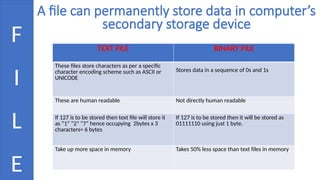
A file canpermanently store data in computer’s
secondary storage device
F
I
L
E
TEXT FILE BINARY FILE
These files store characters as per a specific
character encoding scheme such as ASCII or
UNICODE
Stores data in a sequence of 0s and 1s
These are human readable Not directly human readable
If 127 is to be stored then text file will store it
as “1” “2” “7” hence occupying 2bytes x 3
characters= 6 bytes
If 127 is to be stored then it will be stored as
01111110 using just 1 byte.
Take up more space in memory Takes 50% less space than text files in memory
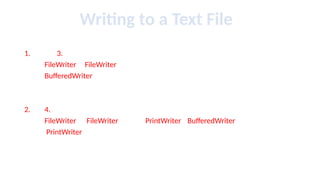
3.
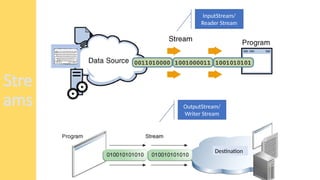
Stream
A stream isa sequence of data which flows from source to
destination. Or we may say that “a stream class establishes a
logical connection between the source and destination”
4.
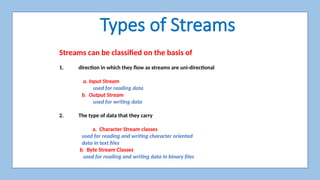
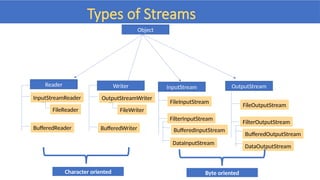
Types of Streams
Streamscan be classified on the basis of
1. direction in which they flow as streams are uni-directional
a. Input Stream
used for reading data
b. Output Stream
used for writing data
2. The type of data that they carry
a. Character Stream classes
used for reading and writing character oriented
data in text files
b. Byte Stream Classes
used for reading and writing data in binary files
Step - 1
Createan object of FileWriter class
FileWriter Fw =new FileWriter(“filename”,true)
Method Description
void write(String text) It is used to write the string into FileWriter.
void write(char c) It is used to write the char into FileWriter.
void write(char[] c) It is used to write char array into FileWriter.
10.
Step - 2
Createan object of BufferedWriter class
BufferedWriter BW =new BufferedWriter(FW);
Method Description
void newLine() It is used to add a new line by writing a line
separator.
void write(int c) It is used to write a single character.
void write(char[] cbuf, int off, int len) It is used to write a portion of an array of
characters.
void write(String s, int off, int len) It is used to write a portion of a string.
11.
Step - 3
Createan object of PrintWriter class
PrintWriter PW=new PrintWriter(BW);
void println(boolean x) It is used to print the boolean
value.
void println(char[] x) It is used to print an array of
characters.
void println(int x) It is used to print an integer.
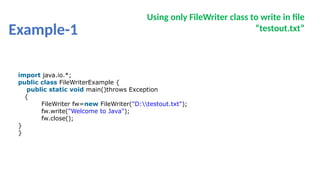
Example-1
Using only FileWriterclass to write in file
“testout.txt”
import java.io.*;
public class FileWriterExample {
public static void main()throws Exception
{
FileWriter fw=new FileWriter("D:testout.txt");
fw.write("Welcome to Java");
fw.close();
}
}
14.
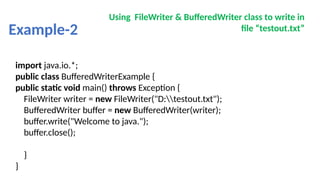
Example-2
Using FileWriter &BufferedWriter class to write in
file “testout.txt”
import java.io.*;
public class BufferedWriterExample {
public static void main() throws Exception {
FileWriter writer = new FileWriter("D:testout.txt");
BufferedWriter buffer = new BufferedWriter(writer);
buffer.write("Welcome to java.");
buffer.close();
}
}
15.
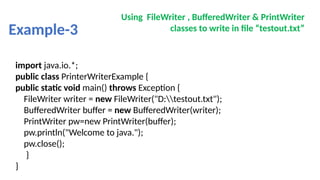
Example-3
Using FileWriter ,BufferedWriter & PrintWriter
classes to write in file “testout.txt”
import java.io.*;
public class PrinterWriterExample {
public static void main() throws Exception {
FileWriter writer = new FileWriter("D:testout.txt");
BufferedWriter buffer = new BufferedWriter(writer);
PrintWriter pw=new PrintWriter(buffer);
pw.println("Welcome to java.");
pw.close();
}
}
16.
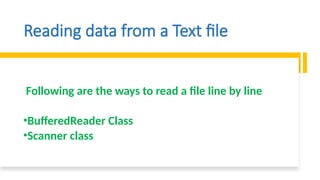
Reading data froma Text file
Following are the ways to read a file line by line
•BufferedReader Class
•Scanner class
17.
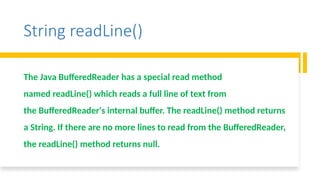
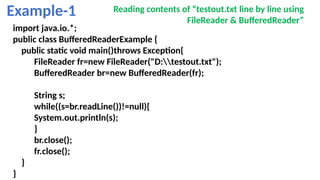
String readLine()
The JavaBufferedReader has a special read method
named readLine() which reads a full line of text from
the BufferedReader's internal buffer. The readLine() method returns
a String. If there are no more lines to read from the BufferedReader,
the readLine() method returns null.
18.
Example-1 Reading contentsof “testout.txt line by line using
FileReader & BufferedReader”
import java.io.*;
public class BufferedReaderExample {
public static void main()throws Exception{
FileReader fr=new FileReader("D:testout.txt");
BufferedReader br=new BufferedReader(fr);
String s;
while((s=br.readLine())!=null){
System.out.println(s);
}
br.close();
fr.close();
}
}
19.
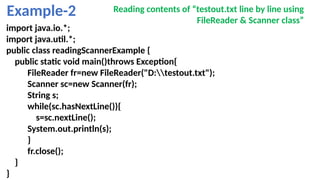
Example-2 Reading contentsof “testout.txt line by line using
FileReader & Scanner class”
import java.io.*;
import java.util.*;
public class readingScannerExample {
public static void main()throws Exception{
FileReader fr=new FileReader("D:testout.txt");
Scanner sc=new Scanner(fr);
String s;
while(sc.hasNextLine()){
s=sc.nextLine();
System.out.println(s);
}
fr.close();
}
}
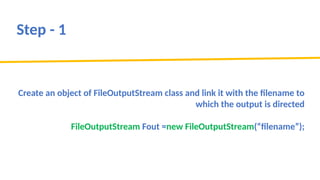
Step - 1
Createan object of FileOutputStream class and link it with the filename to
which the output is directed
FileOutputStream Fout =new FileOutputStream(“filename”);
22.
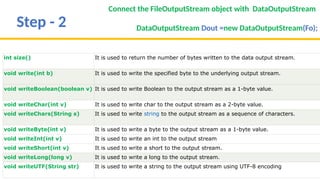
Step - 2
Connectthe FileOutputStream object with DataOutputStream
DataOutputStream Dout =new DataOutputStream(Fo);
int size() It is used to return the number of bytes written to the data output stream.
void write(int b) It is used to write the specified byte to the underlying output stream.
void writeBoolean(boolean v) It is used to write Boolean to the output stream as a 1-byte value.
void writeChar(int v) It is used to write char to the output stream as a 2-byte value.
void writeChars(String s) It is used to write string to the output stream as a sequence of characters.
void writeByte(int v) It is used to write a byte to the output stream as a 1-byte value.
void writeInt(int v) It is used to write an int to the output stream
void writeShort(int v) It is used to write a short to the output stream.
void writeLong(long v) It is used to write a long to the output stream.
void writeUTF(String str) It is used to write a string to the output stream using UTF-8 encoding
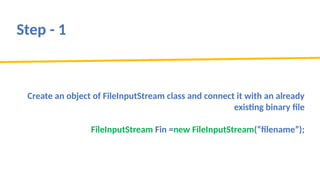
Step - 1
Createan object of FileInputStream class and connect it with an already
existing binary file
FileInputStream Fin =new FileInputStream(“filename”);
26.
Step - 2
Connectthe FileInputStream object with DataInputStream
DataInputStream Din =new DataInputStream(Fin);
int read(byte[] b) It is used to read the number of bytes from the input stream.
int readInt() It is used to read input bytes and return an int value.
byte readByte() It is used to read and return the one input byte.
char readChar() It is used to read two input bytes and returns a char value.
double readDouble() It is used to read eight input bytes and returns a double value.
boolean readBoolean() It is used to read one input byte and return true if byte is non zero,
false if byte is zero.
String readUTF() It is used to read a string that has been encoded using the UTF-8
format.
int read(byte[] b) It is used to read the number of bytes from the input stream.
27.
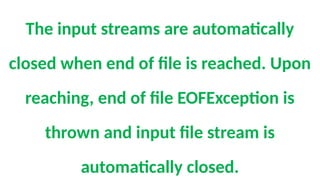
The input streamsare automatically
closed when end of file is reached. Upon
reaching, end of file EOFException is
thrown and input file stream is
automatically closed.
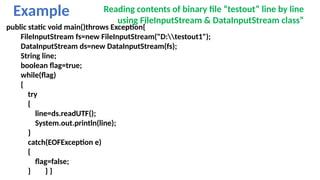
28.
Example Reading contentsof binary file “testout” line by line
using FileInputStream & DataInputStream class”
public static void main()throws Exception{
FileInputStream fs=new FileInputStream("D:testout1");
DataInputStream ds=new DataInputStream(fs);
String line;
boolean flag=true;
while(flag)
{
try
{
line=ds.readUTF();
System.out.println(line);
}
catch(EOFException e)
{
flag=false;
} } }

![Step - 1
Create an object of FileWriter class
FileWriter Fw =new FileWriter(“filename”,true)
Method Description
void write(String text) It is used to write the string into FileWriter.
void write(char c) It is used to write the char into FileWriter.
void write(char[] c) It is used to write char array into FileWriter.](https://image.slidesharecdn.com/filehandling-251011143025-1aca5dac/85/File-Handling-pptx-about-computer-science-9-320.jpg)
![Step - 2
Create an object of BufferedWriter class
BufferedWriter BW =new BufferedWriter(FW);
Method Description
void newLine() It is used to add a new line by writing a line
separator.
void write(int c) It is used to write a single character.
void write(char[] cbuf, int off, int len) It is used to write a portion of an array of
characters.
void write(String s, int off, int len) It is used to write a portion of a string.](https://image.slidesharecdn.com/filehandling-251011143025-1aca5dac/85/File-Handling-pptx-about-computer-science-10-320.jpg)
![Step - 3
Create an object of PrintWriter class
PrintWriter PW=new PrintWriter(BW);
void println(boolean x) It is used to print the boolean
value.
void println(char[] x) It is used to print an array of
characters.
void println(int x) It is used to print an integer.](https://image.slidesharecdn.com/filehandling-251011143025-1aca5dac/85/File-Handling-pptx-about-computer-science-11-320.jpg)
![Step - 2
Connect the FileInputStream object with DataInputStream
DataInputStream Din =new DataInputStream(Fin);
int read(byte[] b) It is used to read the number of bytes from the input stream.
int readInt() It is used to read input bytes and return an int value.
byte readByte() It is used to read and return the one input byte.
char readChar() It is used to read two input bytes and returns a char value.
double readDouble() It is used to read eight input bytes and returns a double value.
boolean readBoolean() It is used to read one input byte and return true if byte is non zero,
false if byte is zero.
String readUTF() It is used to read a string that has been encoded using the UTF-8
format.
int read(byte[] b) It is used to read the number of bytes from the input stream.](https://image.slidesharecdn.com/filehandling-251011143025-1aca5dac/85/File-Handling-pptx-about-computer-science-26-320.jpg)