Creating Extensions, Plugins
    and Components
Agenda
• Learn   about the new class system
  • Ext.class.Base

  • Explore   Mixins
  • Ext.Loader

• Discuss   Component Life Cycle
• Create    a simple extension
• Plugins
What have I been up to?
• Bootstrapping   a new company, Modus Create

 • Focusing on architecting and building kick-ass Ext JS and
   Sencha Touch apps!

 • Regionaland open training on Advanced JavaScript, Ext JS 4
   and Sencha Touch

 • Rapidly  expanding and looking for experienced
   developers (Sencha Touch and Ext JS)

• http://moduscreate.com
On the book front...
• Earlyaccess to Sencha Touch
 in Action available.
• Chapters 1-3 being
 distributed
• Chapter 7 is next to be
 published
• Chapter4 will be published in
 about 2 weeks
• Chapters
         5 and 6 are being
 worked on
On the book front...
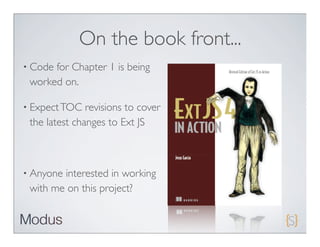
• Codefor Chapter 1 is being
 worked on.

• Expect TOC   revisions to cover
 the latest changes to Ext JS


• Anyoneinterested in working
 with me on this project?
Ext JS 4.0 Class System

• Completely   revised from 3.0
Ext.Base features
• Automatic     Namespace management
• Statics    support
• Mixin   Support
• Alias   management (XTypes)
• Built-in   override/extension methods
• Plays   nicely with the dynamic class Loader system
• Alternate    class name (good for deprecation management)
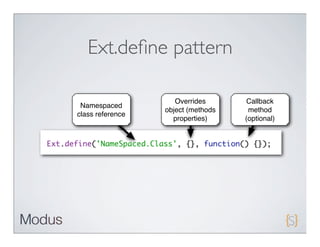
Ext.define pattern

                     Overrides       Callback
 Namespaced
                  object (methods    method
class reference
                    properties)     (optional)
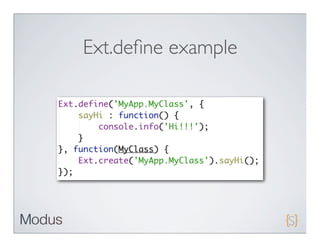
Ext.define example
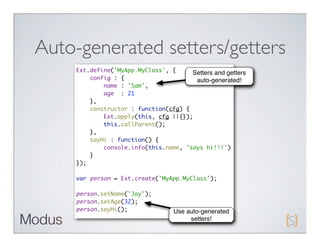
Auto-generated setters/getters
                      Setters and getters
                       auto-generated!


                Use auto-generated
                     setters!
Ext JS 4 Class statics

• Providesscope-independent
 access to static members.

• Applied    before constructor is
 called
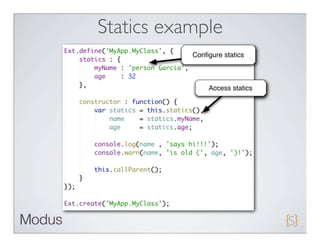
Statics example
           Configure statics


                Access statics
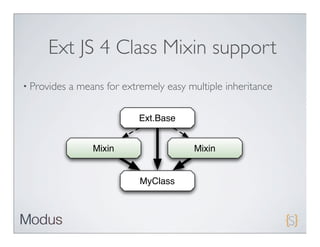
Ext JS 4 Class Mixin support
• Provides   a means for extremely easy multiple inheritance

                             Ext.Base


                  Mixin                  Mixin


                             MyClass
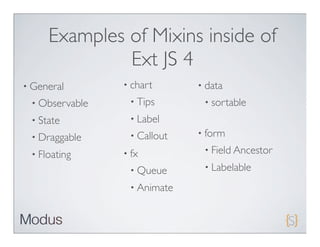
Examples of Mixins inside of
              Ext JS 4
• General       • chart      • data
 • Observable    • Tips       • sortable

 • State         • Label

 • Draggable     • Callout   • form

 • Floating     • fx          • Field Ancestor

                 • Queue      • Labelable

                 • Animate
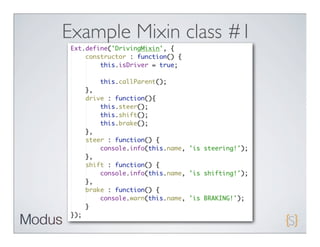
Example Mixin class #1
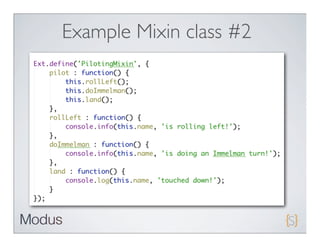
Example Mixin class #2
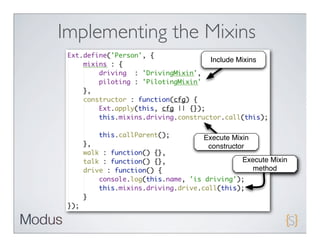
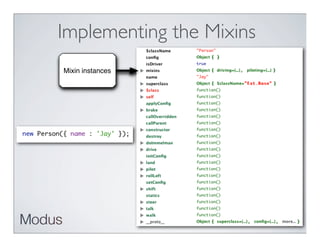
Implementing the Mixins
                 Include Mixins


                Execute Mixin
                 constructor
                           Execute Mixin
                             method
Implementing the Mixins
Mixin instances
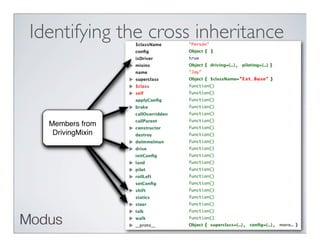
Identifying the cross inheritance


  Members from
   DrivingMixin
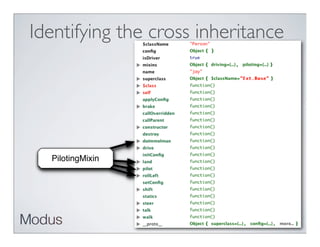
Identifying the cross inheritance


  PilotingMixin
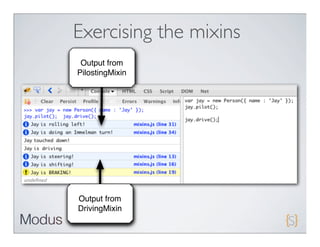
Exercising the mixins
 Output from
PilostingMixin


Output from
DrivingMixin
Ext JS 4 Class Loader
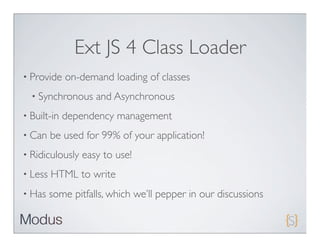
• Provide    on-demand loading of classes
  • Synchronous     and Asynchronous
• Built-in   dependency management
• Can    be used for 99% of your application!
• Ridiculously   easy to use!
• Less   HTML to write
• Has    some pitfalls, which we’ll pepper in our discussions
First step

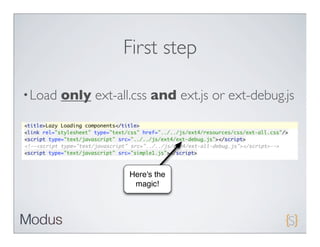
• Load   only ext-all.css and ext.js or ext-debug.js

•

                     Here's the
                      magic!
Second step

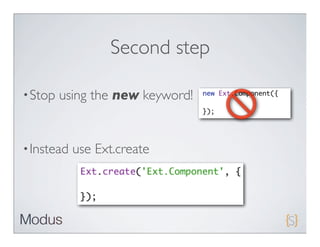
• Stop   using the new keyword!


• Instead   use Ext.create
Simple example
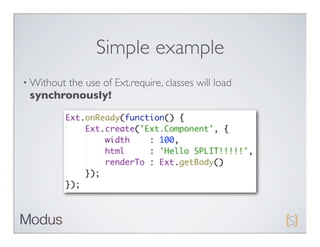
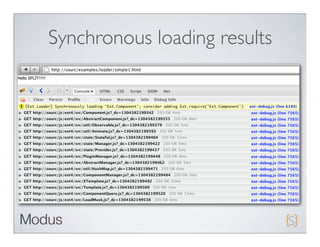
• Without
        the use of Ext.require, classes will load
 synchronously!
Synchronous loading results
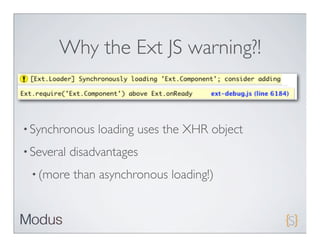
Why the Ext JS warning?!


• Synchronous    loading uses the XHR object
• Several   disadvantages
 • (more    than asynchronous loading!)
Synchronous Loading
               disadvantages
• Uses   the XHR object
 • Limited   to same domain due to “same origin
  policy”
 • XHR    requires a web server
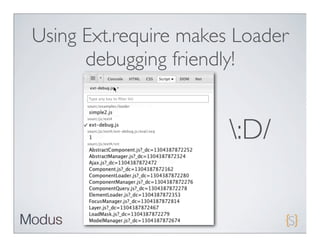
 • Debugging   is a nightmare!
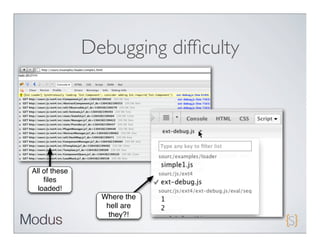
Debugging difficulty


All of these
    files
  loaded!
                 Where the
                  hell are
                  they?!
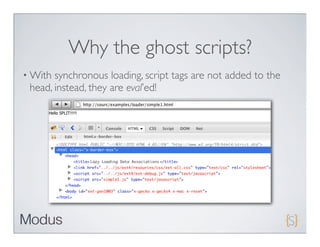
Why the ghost scripts?
• With synchronous loading, script tags are not added to the
 head, instead, they are eval’ed!
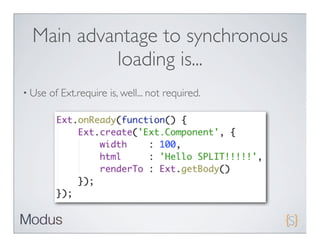
Main advantage to synchronous
           loading is...
• Use   of Ext.require is, well... not required.
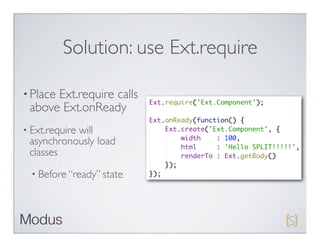
Solution: use Ext.require

• Place
      Ext.require calls
 above Ext.onReady
• Ext.require
           will
 asynchronously load
 classes
  • Before “ready” state
Advantages of Asynchronous
             Loading
• Adds   script tags to the HEAD of the document
• Debugging   friendly
• Cross-domain   compatible (does not use XHR)
• No   web server required
Using Ext.require makes Loader
      debugging friendly!


                       :D/
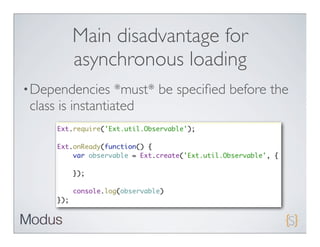
Main disadvantage for
        asynchronous loading
• Dependencies     *must* be specified before the
 class is instantiated
Overall disadvantages to using
                 Ext Loader
• If   at all costs, should not be used in production

  • Can        drive your server NUTS with requests on each page
       load!

• Cache        busting is either all on or all off

  • No    way to configure cache busting on a per require or
       namespace basis
Overall disadvantages to using
         Ext Loader cont.
• Can slow down page loads in firebug significantly for large
 slurps of classes (synchronous)
• No   minified “package” loading.
• Unnecessary   classes loaded at times
 • E.g. Ext.require(‘Ext.Component’)   slurps up Sprite from the
   draw package.
 • Requires   that you exclude unnecessary items
Overall advantages to using Ext
              Loader
• Lightning   fast initial page loads relative to using ext-all.js!

• In   ideal situations, the browser only consumes what is required

• Debugging  is so much easier for the browser because each JS
 file is loaded separately

• No    need to write HTML script tags
Ext JS 4 Component Lifecycle
• Provided    By Ext.component.AbstractComponent

• Abstracts   out common behaviors to a central location

• Adds   dependability and predictability to the framework

• Extremely   important to know for both extending
  widgets and developing robust applications

• Is what makes Ext JS stand out from the rest of all other
  frameworks!
Split


                                      button.Button
                                                                     tab.Tab


                                                              toolbar.Toolbar.Button
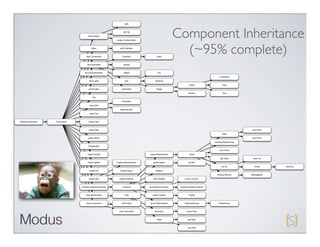
                                                                                                               Component Inheritance
                                          Editor


                                     flash.Component
                                                                 grid.CellEditor


                                                                   Checkbox                   Radio
                                                                                                                 (~95% complete)
                                      form.field.Base                 Display


                                   form.field.HtmlEditor              Hidden                    File

                                                                                                                                                ComboBox

                                        form.Label                    Text                   TextArea

                                                                                                                         Picker                    Date

                                       grid.Scroller               slider.Multi               Trigger

                                                                                                                        Spinner                    Time

                                           Img

                                                                   CheckItem

                                        menu.Item

                                                                 SeparatorItem

                                        panel.Tool


AbstractComponent   Component          picker.Color


                                        picker.Date                                                                                                                 grid.Panel

                                                                                                                                                  Table

                                       picker.Month                                                                                                                 tree.Panel

                                                                                                                                           container.ButtonGroup

                                       ProgressBar

                                                                                                                                                form.Panel

                                      resizer.Handle                                   panel.AbstractPanel               Panel

                                                                                                                                                 tab.Panel          slider.Tip

                                      resizer.Splitter        toolbar.SeparatorItem        panel.header                 tab.Bar

                                                                                                                                                  tip.Tip            Tooltip     QuickTip

                                        toolbar.Fill              toolbar.Space              Viewport

                                                                                                                                              window.Window        MessageBox

                                       toolbar.Item             toolbar.TextItem           field.FieldSet            column.Column


                                container.AbstractContainer         Container          grid.header.Container    property.HeaderContainer


                                    view.AbstractView                 View                toolbar.Toolbar               Paging


                                     draw.Component                chart.Chart         form.FieldContainer          CheckboxGroup              RadioGroup


                                                                chart.TipSurface            BoundList                 picker.Time


                                                                                              Table                    grid.View


                                                                                                                       tree.View
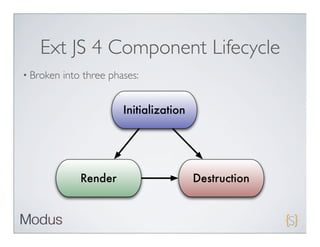
Ext JS 4 Component Lifecycle
• Broken   into three phases:


                         Initialization


               Render                     Destruction
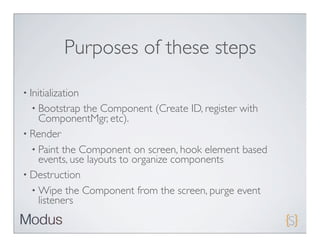
Purposes of these steps

• Initialization
  • Bootstrap  the Component (Create ID, register with
    ComponentMgr, etc).
• Render
  • Paint the Component on screen, hook element based
    events, use layouts to organize components
• Destruction
  • Wipe the Component from the screen, purge event
    listeners
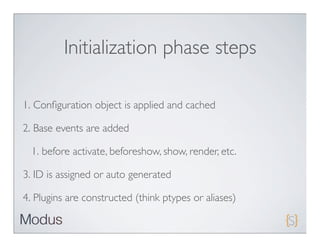
Initialization phase steps

1. Configuration object is applied and cached

2. Base events are added

  1. before activate, beforeshow, show, render, etc.

3. ID is assigned or auto generated

4. Plugins are constructed (think ptypes or aliases)
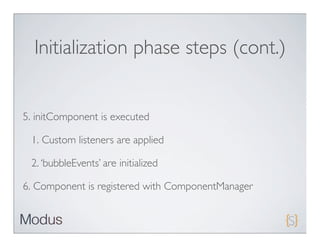
Initialization phase steps (cont.)


5. initComponent is executed

 1. Custom listeners are applied

 2. ‘bubbleEvents’ are initialized

6. Component is registered with ComponentManager
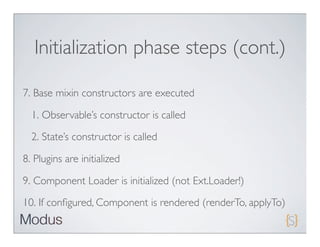
Initialization phase steps (cont.)

7. Base mixin constructors are executed

  1. Observable’s constructor is called
  2. State’s constructor is called

8. Plugins are initialized

9. Component Loader is initialized (not Ext.Loader!)

10. If configured, Component is rendered (renderTo, applyTo)
Initialization phase steps (cont.)

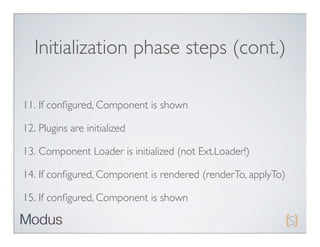
11. If configured, Component is shown

12. Plugins are initialized

13. Component Loader is initialized (not Ext.Loader!)

14. If configured, Component is rendered (renderTo, applyTo)

15. If configured, Component is shown
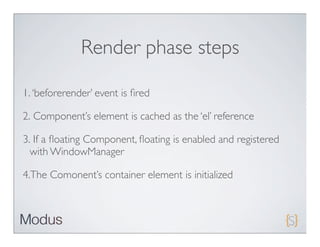
Render phase steps

1. ‘beforerender’ event is fired

2. Component’s element is cached as the ‘el’ reference

3. If a floating Component, floating is enabled and registered
  with WindowManager

4.The Comonent’s container element is initialized
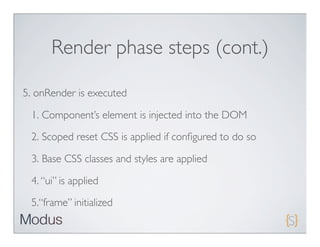
Render phase steps (cont.)

5. onRender is executed

 1. Component’s element is injected into the DOM
 2. Scoped reset CSS is applied if configured to do so

 3. Base CSS classes and styles are applied

 4. “ui” is applied

 5.“frame” initialized
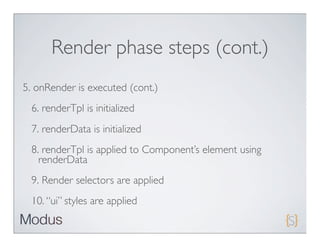
Render phase steps (cont.)
5. onRender is executed (cont.)
 6. renderTpl is initialized
 7. renderData is initialized
 8. renderTpl is applied to Component’s element using
   renderData
 9. Render selectors are applied
 10. “ui” styles are applied
Render phase steps (cont.)

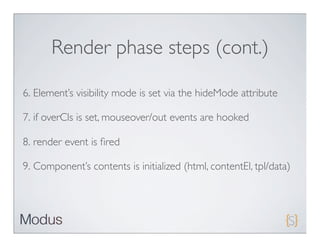
6. Element’s visibility mode is set via the hideMode attribute

7. if overCls is set, mouseover/out events are hooked

8. render event is fired

9. Component’s contents is initialized (html, contentEl, tpl/data)
Render phase steps (cont.)

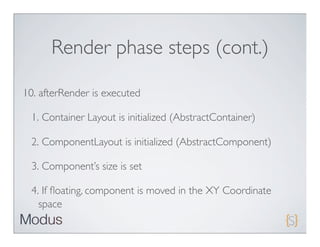
10. afterRender is executed

 1. Container Layout is initialized (AbstractContainer)

 2. ComponentLayout is initialized (AbstractComponent)

 3. Component’s size is set

 4. If floating, component is moved in the XY Coordinate
   space
Render phase steps (cont.)

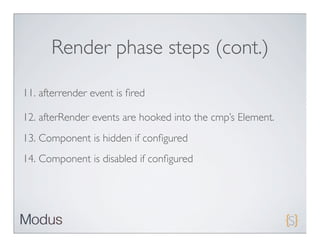
11. afterrender event is fired

12. afterRender events are hooked into the cmp’s Element.
13. Component is hidden if configured
14. Component is disabled if configured
Destruction phase steps

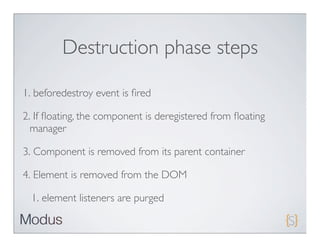
1. beforedestroy event is fired

2. If floating, the component is deregistered from floating
  manager

3. Component is removed from its parent container

4. Element is removed from the DOM

  1. element listeners are purged
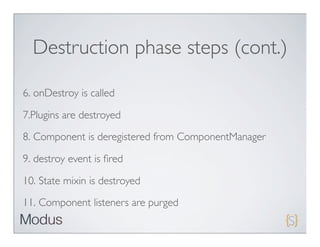
Destruction phase steps (cont.)

6. onDestroy is called

7.Plugins are destroyed
8. Component is deregistered from ComponentManager

9. destroy event is fired

10. State mixin is destroyed

11. Component listeners are purged
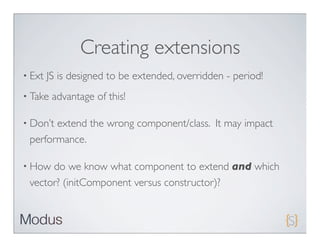
Creating extensions
• Ext   JS is designed to be extended, overridden - period!
• Take   advantage of this!

• Don’textend the wrong component/class. It may impact
 performance.

• How do we know what component to extend and which
 vector? (initComponent versus constructor)?
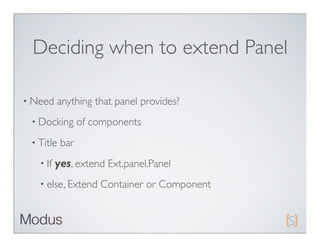
Deciding when to extend Panel

• Need    anything that panel provides?
 • Docking       of components
 • Title   bar
   • If   yes, extend Ext.panel.Panel
   • else, Extend    Container or Component
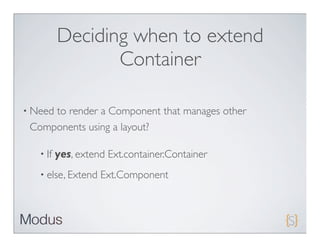
Deciding when to extend
                 Container

• Need
     to render a Component that manages other
 Components using a layout?

   • If   yes, extend Ext.container.Container
   • else, Extend   Ext.Component
Deciding when to extend
                Component
• Need    to render a widget with custom HTML?

• Don’t   need a panel’s title bar, or to dock components?

• Don’t need to render child widgets and manage them with a
 layout?

   • Extend    Ext.Component
Why does this matter?


• Simplyput, choosing the wrong component to extend is
 wasteful!
Panel vs. Component for simple
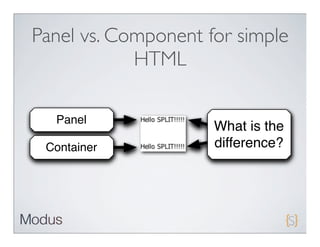
            HTML

  Panel
                     What is the
 Container           difference?
Panel vs. Component for simple
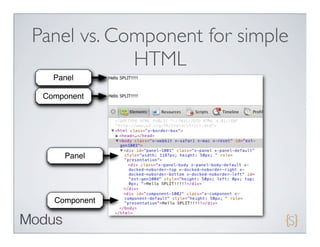
            HTML
   Panel

 Component


     Panel


   Component
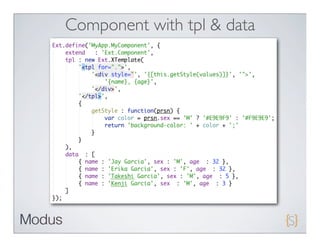
Component with tpl & data
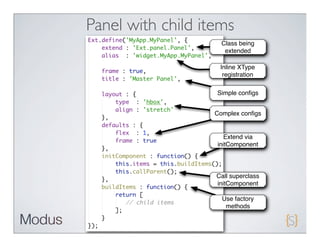
Panel with child items
                     Class being
                      extended

                    Inline XType
                     registration

                   Simple configs


                   Complex configs


                     Extend via
                   initComponent


                   Call superclass
                   initComponent

                     Use factory
                      methods
Plugins
• Instantiated
           & initialized during initialization phase of
  Component

• Typically    used to bridge functionality between classes

• Introduced     in Ext JS 2

• Ext     JS 4 has an Abstract plugin (template)

• Still   has its place in the world of Ext JS 4

• Now      has a pluginId property
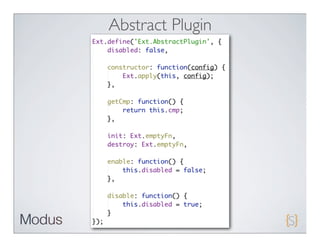
Abstract Plugin
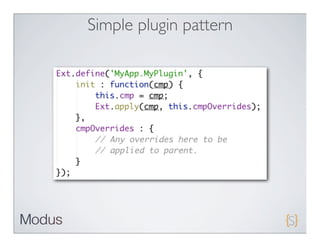
Simple plugin pattern
Thank you!


Contact info:
jay@moduscreate.com
@_jdg (twitter)

Ext JS 4.0 - Creating extensions, plugins and components

  • 1.
  • 2.
    Agenda • Learn about the new class system • Ext.class.Base • Explore Mixins • Ext.Loader • Discuss Component Life Cycle • Create a simple extension • Plugins
  • 3.
    What have Ibeen up to? • Bootstrapping a new company, Modus Create • Focusing on architecting and building kick-ass Ext JS and Sencha Touch apps! • Regionaland open training on Advanced JavaScript, Ext JS 4 and Sencha Touch • Rapidly expanding and looking for experienced developers (Sencha Touch and Ext JS) • http://moduscreate.com
  • 4.
    On the bookfront... • Earlyaccess to Sencha Touch in Action available. • Chapters 1-3 being distributed • Chapter 7 is next to be published • Chapter4 will be published in about 2 weeks • Chapters 5 and 6 are being worked on
  • 5.
    On the bookfront... • Codefor Chapter 1 is being worked on. • Expect TOC revisions to cover the latest changes to Ext JS • Anyoneinterested in working with me on this project?
  • 6.
    Ext JS 4.0Class System • Completely revised from 3.0
  • 7.
    Ext.Base features • Automatic Namespace management • Statics support • Mixin Support • Alias management (XTypes) • Built-in override/extension methods • Plays nicely with the dynamic class Loader system • Alternate class name (good for deprecation management)
  • 8.
    Ext.define pattern Overrides Callback Namespaced object (methods method class reference properties) (optional)
  • 9.
  • 10.
    Auto-generated setters/getters Setters and getters auto-generated! Use auto-generated setters!
  • 11.
    Ext JS 4Class statics • Providesscope-independent access to static members. • Applied before constructor is called
  • 12.
    Statics example Configure statics Access statics
  • 13.
    Ext JS 4Class Mixin support • Provides a means for extremely easy multiple inheritance Ext.Base Mixin Mixin MyClass
  • 14.
    Examples of Mixinsinside of Ext JS 4 • General • chart • data • Observable • Tips • sortable • State • Label • Draggable • Callout • form • Floating • fx • Field Ancestor • Queue • Labelable • Animate
  • 15.
  • 16.
  • 17.
    Implementing the Mixins Include Mixins Execute Mixin constructor Execute Mixin method
  • 18.
  • 19.
    Identifying the crossinheritance Members from DrivingMixin
  • 20.
    Identifying the crossinheritance PilotingMixin
  • 21.
    Exercising the mixins Output from PilostingMixin Output from DrivingMixin
  • 22.
    Ext JS 4Class Loader • Provide on-demand loading of classes • Synchronous and Asynchronous • Built-in dependency management • Can be used for 99% of your application! • Ridiculously easy to use! • Less HTML to write • Has some pitfalls, which we’ll pepper in our discussions
  • 23.
    First step • Load only ext-all.css and ext.js or ext-debug.js • Here's the magic!
  • 24.
    Second step • Stop using the new keyword! • Instead use Ext.create
  • 25.
    Simple example • Without the use of Ext.require, classes will load synchronously!
  • 26.
  • 27.
    Why the ExtJS warning?! • Synchronous loading uses the XHR object • Several disadvantages • (more than asynchronous loading!)
  • 28.
    Synchronous Loading disadvantages • Uses the XHR object • Limited to same domain due to “same origin policy” • XHR requires a web server • Debugging is a nightmare!
  • 29.
    Debugging difficulty All ofthese files loaded! Where the hell are they?!
  • 30.
    Why the ghostscripts? • With synchronous loading, script tags are not added to the head, instead, they are eval’ed!
  • 31.
    Main advantage tosynchronous loading is... • Use of Ext.require is, well... not required.
  • 32.
    Solution: use Ext.require •Place Ext.require calls above Ext.onReady • Ext.require will asynchronously load classes • Before “ready” state
  • 33.
    Advantages of Asynchronous Loading • Adds script tags to the HEAD of the document • Debugging friendly • Cross-domain compatible (does not use XHR) • No web server required
  • 34.
    Using Ext.require makesLoader debugging friendly! :D/
  • 35.
    Main disadvantage for asynchronous loading • Dependencies *must* be specified before the class is instantiated
  • 36.
    Overall disadvantages tousing Ext Loader • If at all costs, should not be used in production • Can drive your server NUTS with requests on each page load! • Cache busting is either all on or all off • No way to configure cache busting on a per require or namespace basis
  • 37.
    Overall disadvantages tousing Ext Loader cont. • Can slow down page loads in firebug significantly for large slurps of classes (synchronous) • No minified “package” loading. • Unnecessary classes loaded at times • E.g. Ext.require(‘Ext.Component’) slurps up Sprite from the draw package. • Requires that you exclude unnecessary items
  • 38.
    Overall advantages tousing Ext Loader • Lightning fast initial page loads relative to using ext-all.js! • In ideal situations, the browser only consumes what is required • Debugging is so much easier for the browser because each JS file is loaded separately • No need to write HTML script tags
  • 39.
    Ext JS 4Component Lifecycle • Provided By Ext.component.AbstractComponent • Abstracts out common behaviors to a central location • Adds dependability and predictability to the framework • Extremely important to know for both extending widgets and developing robust applications • Is what makes Ext JS stand out from the rest of all other frameworks!
  • 40.
    Split button.Button tab.Tab toolbar.Toolbar.Button Component Inheritance Editor flash.Component grid.CellEditor Checkbox Radio (~95% complete) form.field.Base Display form.field.HtmlEditor Hidden File ComboBox form.Label Text TextArea Picker Date grid.Scroller slider.Multi Trigger Spinner Time Img CheckItem menu.Item SeparatorItem panel.Tool AbstractComponent Component picker.Color picker.Date grid.Panel Table picker.Month tree.Panel container.ButtonGroup ProgressBar form.Panel resizer.Handle panel.AbstractPanel Panel tab.Panel slider.Tip resizer.Splitter toolbar.SeparatorItem panel.header tab.Bar tip.Tip Tooltip QuickTip toolbar.Fill toolbar.Space Viewport window.Window MessageBox toolbar.Item toolbar.TextItem field.FieldSet column.Column container.AbstractContainer Container grid.header.Container property.HeaderContainer view.AbstractView View toolbar.Toolbar Paging draw.Component chart.Chart form.FieldContainer CheckboxGroup RadioGroup chart.TipSurface BoundList picker.Time Table grid.View tree.View
  • 41.
    Ext JS 4Component Lifecycle • Broken into three phases: Initialization Render Destruction
  • 42.
    Purposes of thesesteps • Initialization • Bootstrap the Component (Create ID, register with ComponentMgr, etc). • Render • Paint the Component on screen, hook element based events, use layouts to organize components • Destruction • Wipe the Component from the screen, purge event listeners
  • 43.
    Initialization phase steps 1.Configuration object is applied and cached 2. Base events are added 1. before activate, beforeshow, show, render, etc. 3. ID is assigned or auto generated 4. Plugins are constructed (think ptypes or aliases)
  • 44.
    Initialization phase steps(cont.) 5. initComponent is executed 1. Custom listeners are applied 2. ‘bubbleEvents’ are initialized 6. Component is registered with ComponentManager
  • 45.
    Initialization phase steps(cont.) 7. Base mixin constructors are executed 1. Observable’s constructor is called 2. State’s constructor is called 8. Plugins are initialized 9. Component Loader is initialized (not Ext.Loader!) 10. If configured, Component is rendered (renderTo, applyTo)
  • 46.
    Initialization phase steps(cont.) 11. If configured, Component is shown 12. Plugins are initialized 13. Component Loader is initialized (not Ext.Loader!) 14. If configured, Component is rendered (renderTo, applyTo) 15. If configured, Component is shown
  • 47.
    Render phase steps 1.‘beforerender’ event is fired 2. Component’s element is cached as the ‘el’ reference 3. If a floating Component, floating is enabled and registered with WindowManager 4.The Comonent’s container element is initialized
  • 48.
    Render phase steps(cont.) 5. onRender is executed 1. Component’s element is injected into the DOM 2. Scoped reset CSS is applied if configured to do so 3. Base CSS classes and styles are applied 4. “ui” is applied 5.“frame” initialized
  • 49.
    Render phase steps(cont.) 5. onRender is executed (cont.) 6. renderTpl is initialized 7. renderData is initialized 8. renderTpl is applied to Component’s element using renderData 9. Render selectors are applied 10. “ui” styles are applied
  • 50.
    Render phase steps(cont.) 6. Element’s visibility mode is set via the hideMode attribute 7. if overCls is set, mouseover/out events are hooked 8. render event is fired 9. Component’s contents is initialized (html, contentEl, tpl/data)
  • 51.
    Render phase steps(cont.) 10. afterRender is executed 1. Container Layout is initialized (AbstractContainer) 2. ComponentLayout is initialized (AbstractComponent) 3. Component’s size is set 4. If floating, component is moved in the XY Coordinate space
  • 52.
    Render phase steps(cont.) 11. afterrender event is fired 12. afterRender events are hooked into the cmp’s Element. 13. Component is hidden if configured 14. Component is disabled if configured
  • 53.
    Destruction phase steps 1.beforedestroy event is fired 2. If floating, the component is deregistered from floating manager 3. Component is removed from its parent container 4. Element is removed from the DOM 1. element listeners are purged
  • 54.
    Destruction phase steps(cont.) 6. onDestroy is called 7.Plugins are destroyed 8. Component is deregistered from ComponentManager 9. destroy event is fired 10. State mixin is destroyed 11. Component listeners are purged
  • 55.
    Creating extensions • Ext JS is designed to be extended, overridden - period! • Take advantage of this! • Don’textend the wrong component/class. It may impact performance. • How do we know what component to extend and which vector? (initComponent versus constructor)?
  • 56.
    Deciding when toextend Panel • Need anything that panel provides? • Docking of components • Title bar • If yes, extend Ext.panel.Panel • else, Extend Container or Component
  • 57.
    Deciding when toextend Container • Need to render a Component that manages other Components using a layout? • If yes, extend Ext.container.Container • else, Extend Ext.Component
  • 58.
    Deciding when toextend Component • Need to render a widget with custom HTML? • Don’t need a panel’s title bar, or to dock components? • Don’t need to render child widgets and manage them with a layout? • Extend Ext.Component
  • 59.
    Why does thismatter? • Simplyput, choosing the wrong component to extend is wasteful!
  • 60.
    Panel vs. Componentfor simple HTML Panel What is the Container difference?
  • 61.
    Panel vs. Componentfor simple HTML Panel Component Panel Component
  • 62.
  • 63.
    Panel with childitems Class being extended Inline XType registration Simple configs Complex configs Extend via initComponent Call superclass initComponent Use factory methods
  • 64.
    Plugins • Instantiated & initialized during initialization phase of Component • Typically used to bridge functionality between classes • Introduced in Ext JS 2 • Ext JS 4 has an Abstract plugin (template) • Still has its place in the world of Ext JS 4 • Now has a pluginId property
  • 65.
  • 66.
  • 67.