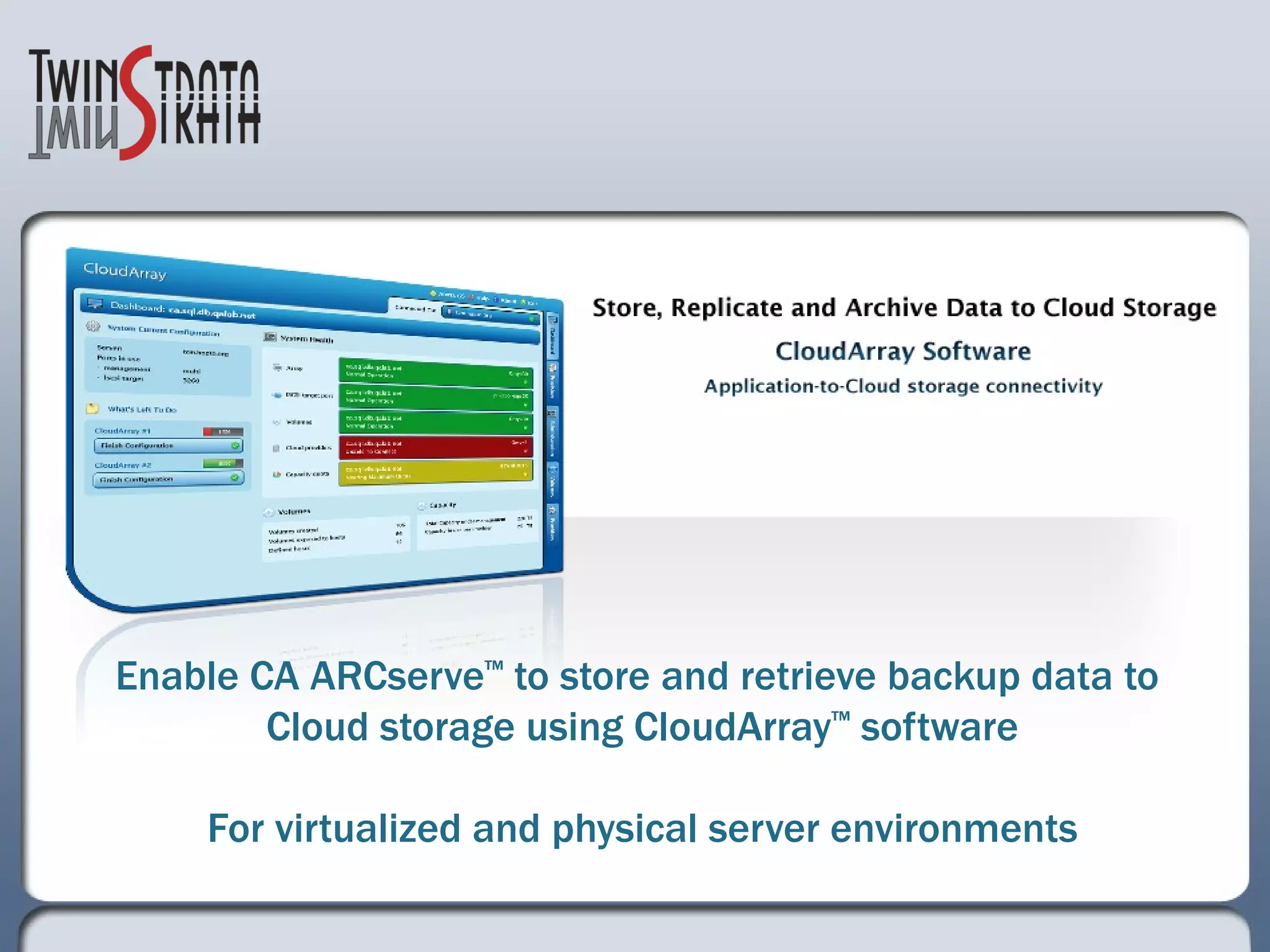
Enable CA ARCserve ™  to store and retrieve backup data to  Cloud storage using CloudArray ™  software For virtualized and physical server environments
Overview The following presentation provides a functional overview on: How CA ARCserve software together with CloudArray work seamlessly to protect virtualized and physical environments  This solution provides an economic and highly reliable storage tier for offsite data backup and replication without the logistics and cost of tape transport.  The presentation also provides a 3-year TCO summary on CloudArray vs. existing backup and replication solutions Details for a Free 30-day evaluation of CloudArray software  TwinStrata.com
Example Environment  3 physical hosts and 14 virtual machines on VMware ESX servers CA ARCserve implemented as data protection solution  Initial CA ARCserve backup targets: tape and offsite tape storage  Enhancement solution for CA ARCserve backup target:  CloudArray software  Cloud storage providers TwinStrata.com
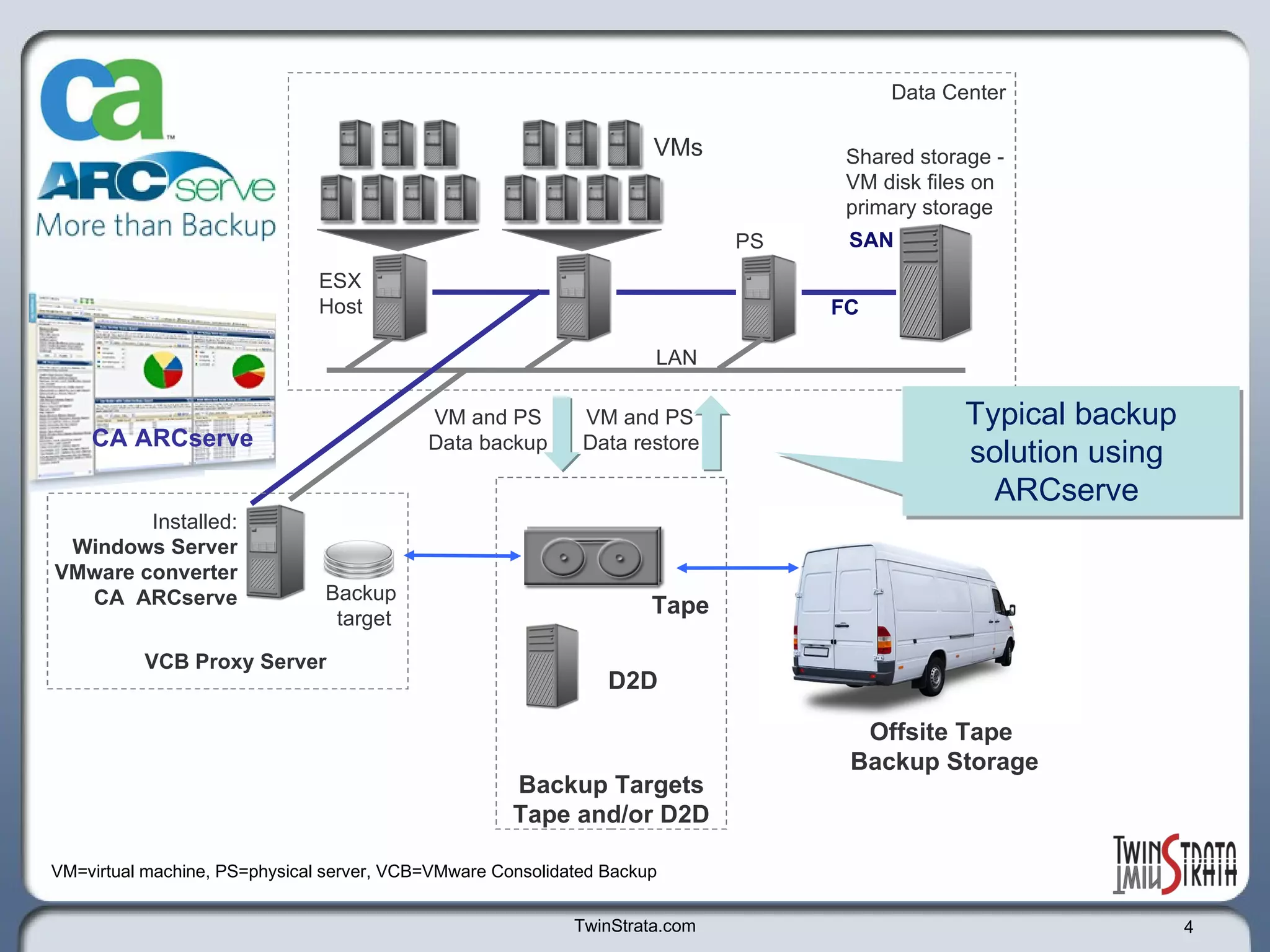
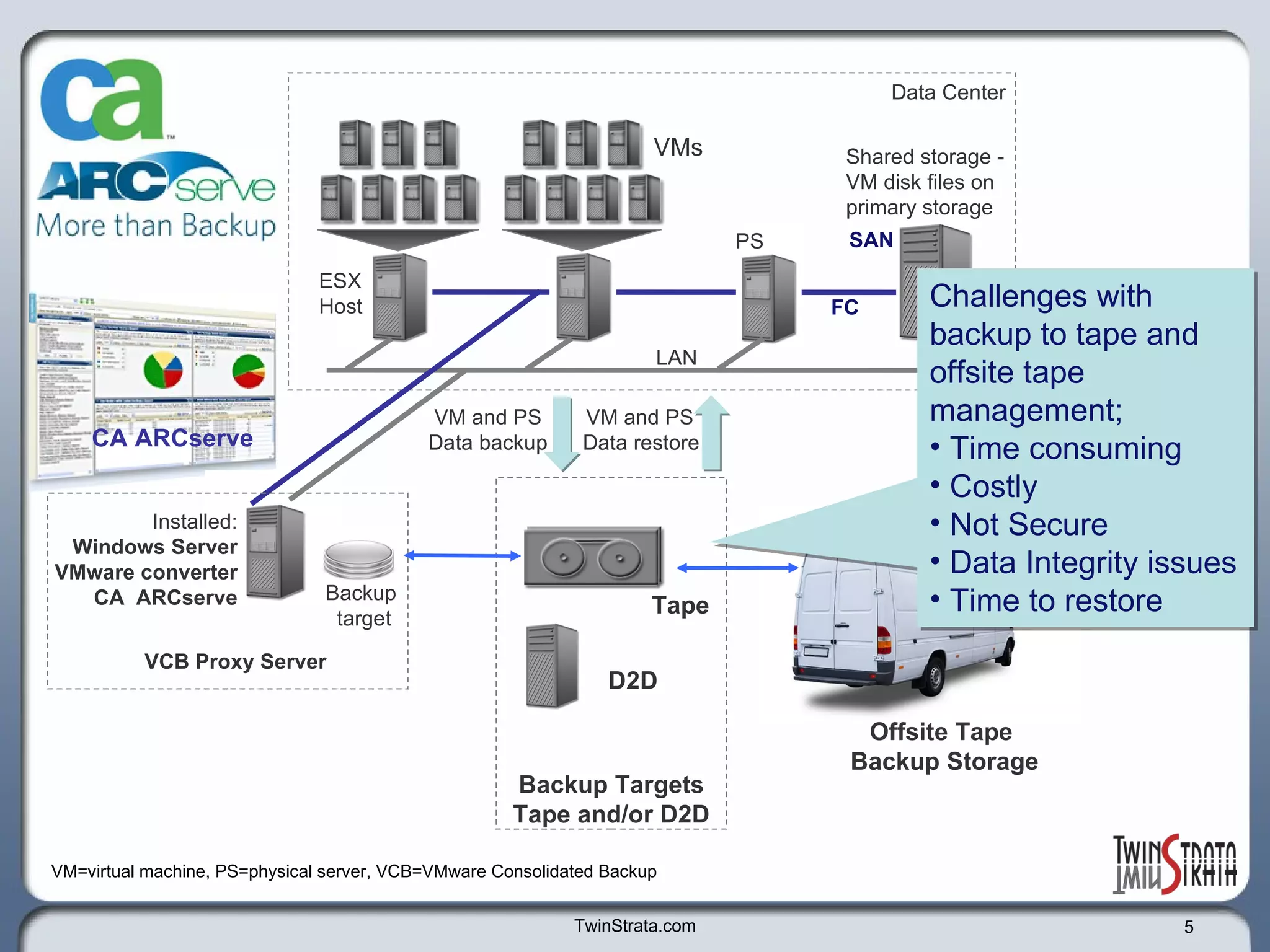
TwinStrata.com Backup Targets Tape and/or D2D VCB Proxy Server VMs ESX Host  Shared storage - VM disk files on  primary storage Data Center D2D Tape PS SAN LAN Offsite Tape  Backup Storage Typical backup solution using  ARCserve  VM and PS  Data backup VM and PS  Data restore VM=virtual machine, PS=physical server, VCB=VMware Consolidated Backup CA ARCserve Backup  target Installed: Windows Server VMware converter CA  ARCserve FC
TwinStrata.com Backup Targets Tape and/or D2D VCB Proxy Server VMs ESX Host  Shared storage - VM disk files on  primary storage Data Center D2D Tape PS SAN LAN Offsite Tape  Backup Storage VM and PS  Data backup VM and PS  Data restore VM=virtual machine, PS=physical server, VCB=VMware Consolidated Backup CA ARCserve Backup  target Installed: Windows Server VMware converter CA  ARCserve FC Challenges with backup to tape and offsite tape management;  Time consuming Costly Not Secure Data Integrity issues Time to restore
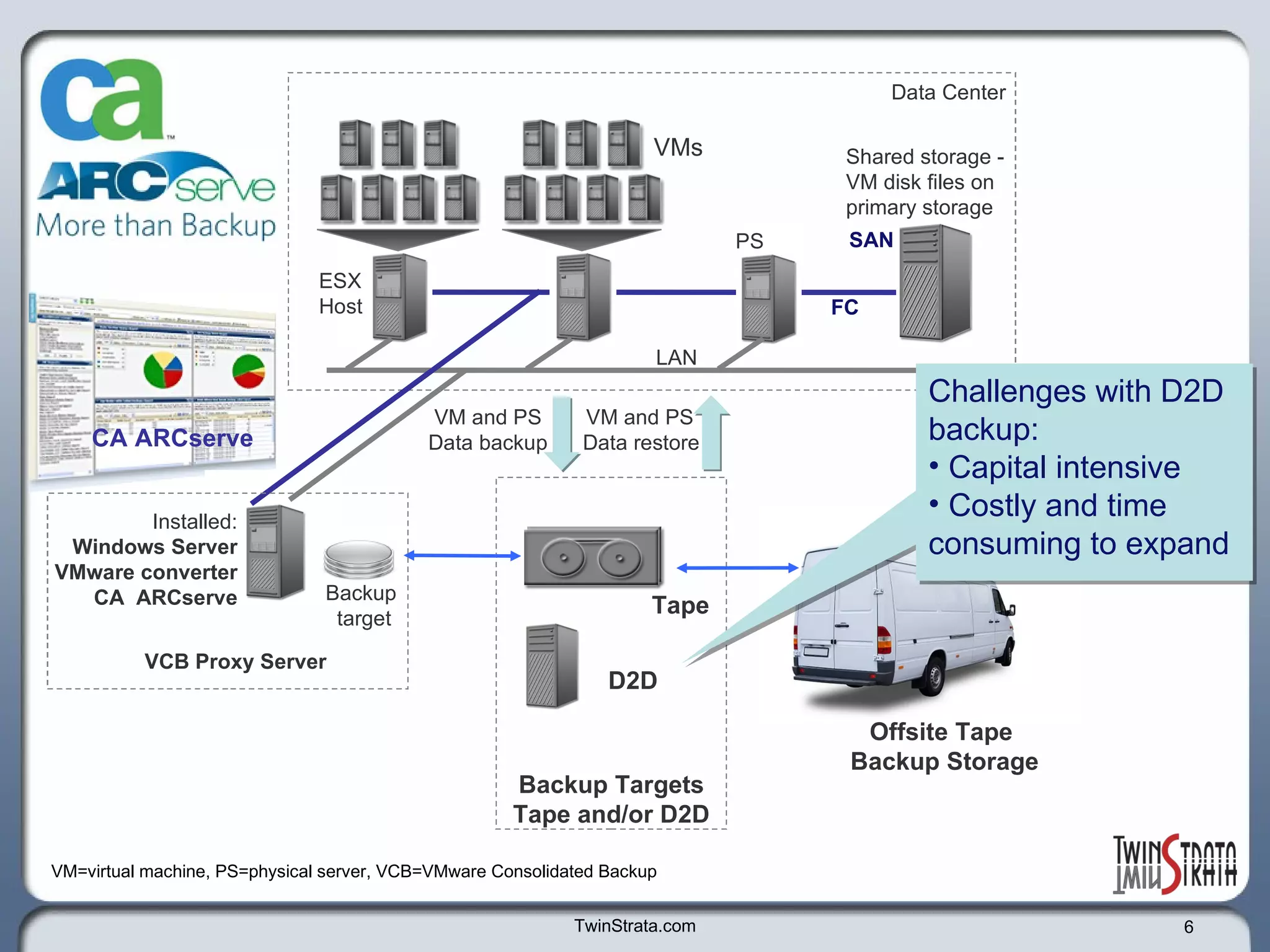
TwinStrata.com Backup Targets Tape and/or D2D VCB Proxy Server VMs ESX Host  Shared storage - VM disk files on  primary storage Data Center D2D Tape PS SAN LAN Offsite Tape  Backup Storage VM and PS  Data backup VM and PS  Data restore VM=virtual machine, PS=physical server, VCB=VMware Consolidated Backup CA ARCserve Backup  target Installed: Windows Server VMware converter CA  ARCserve FC Challenges with D2D backup: Capital intensive Costly and time consuming to expand
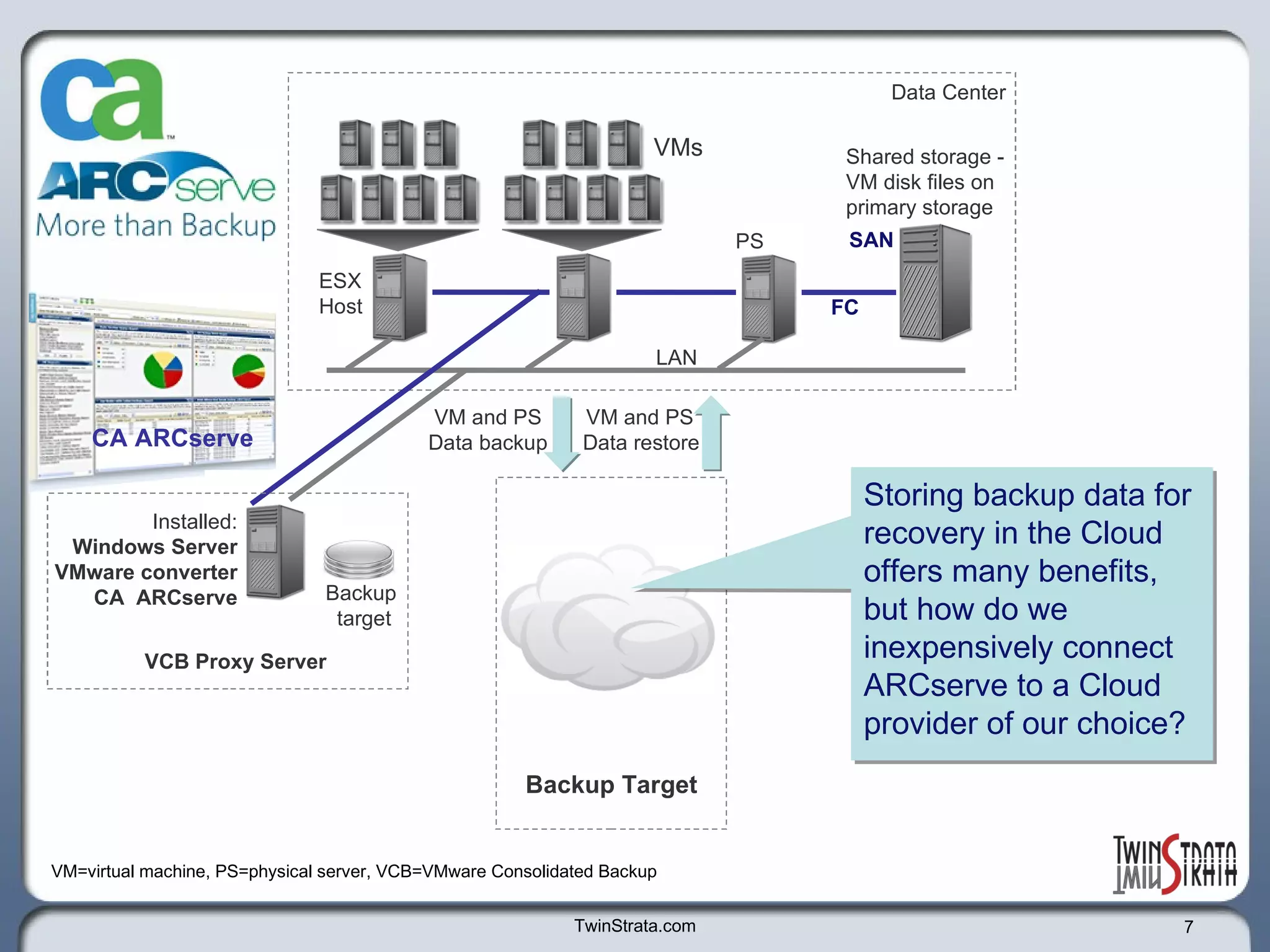
TwinStrata.com VCB Proxy Server VMs ESX Host  Shared storage - VM disk files on  primary storage Data Center PS SAN LAN VM and PS  Data backup VM and PS  Data restore VM=virtual machine, PS=physical server, VCB=VMware Consolidated Backup CA ARCserve Backup  target Installed: Windows Server VMware converter CA  ARCserve FC Backup Target Storing backup data for recovery in the Cloud offers many benefits, but how do we inexpensively connect ARCserve to a Cloud provider of our choice?
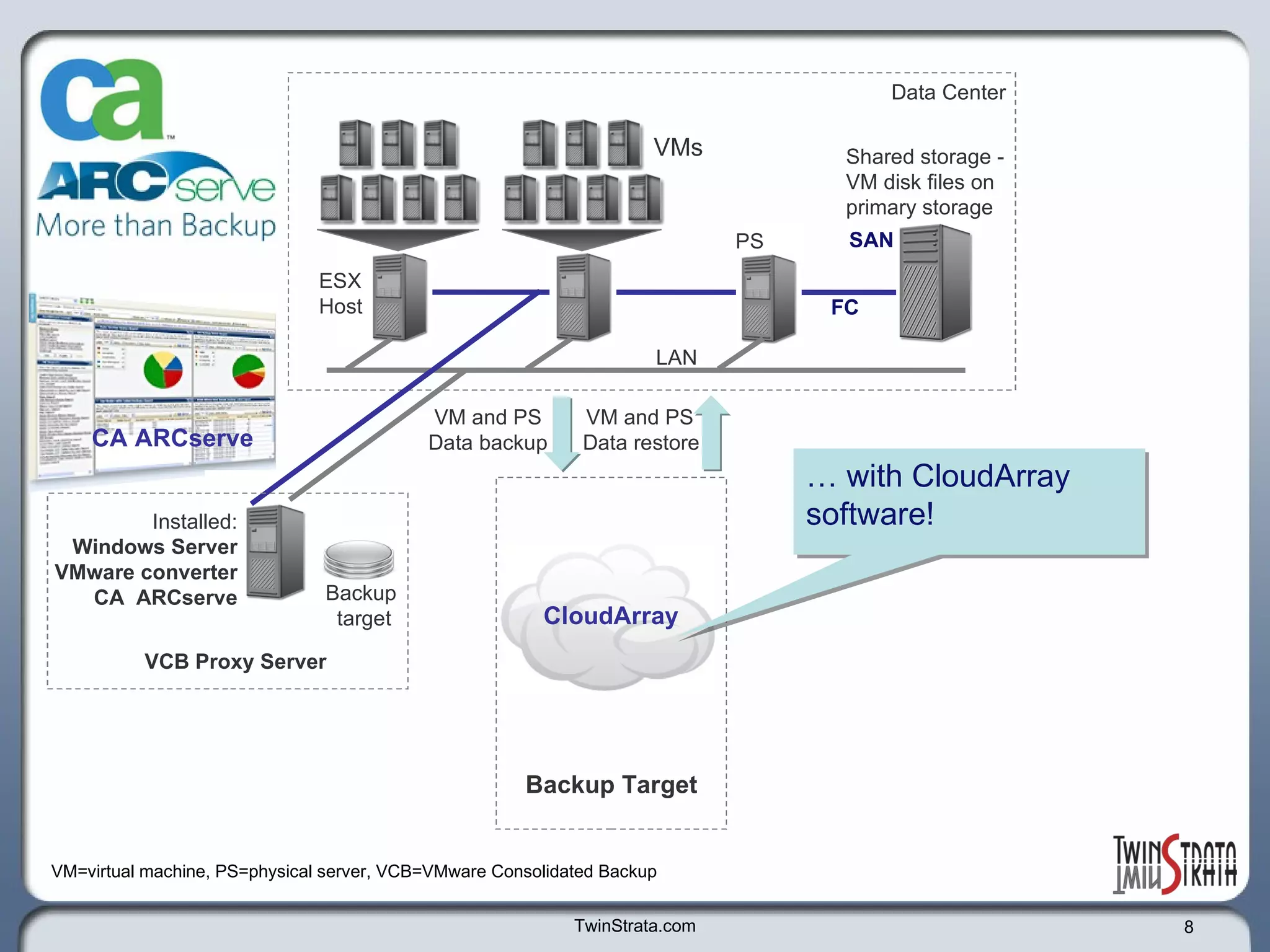
TwinStrata.com VCB Proxy Server VMs ESX Host  Shared storage - VM disk files on  primary storage Data Center PS SAN LAN VM and PS  Data backup VM and PS  Data restore VM=virtual machine, PS=physical server, VCB=VMware Consolidated Backup CA ARCserve Backup  target Installed: Windows Server VMware converter CA  ARCserve FC Backup Target …  with CloudArray software!  CloudArray
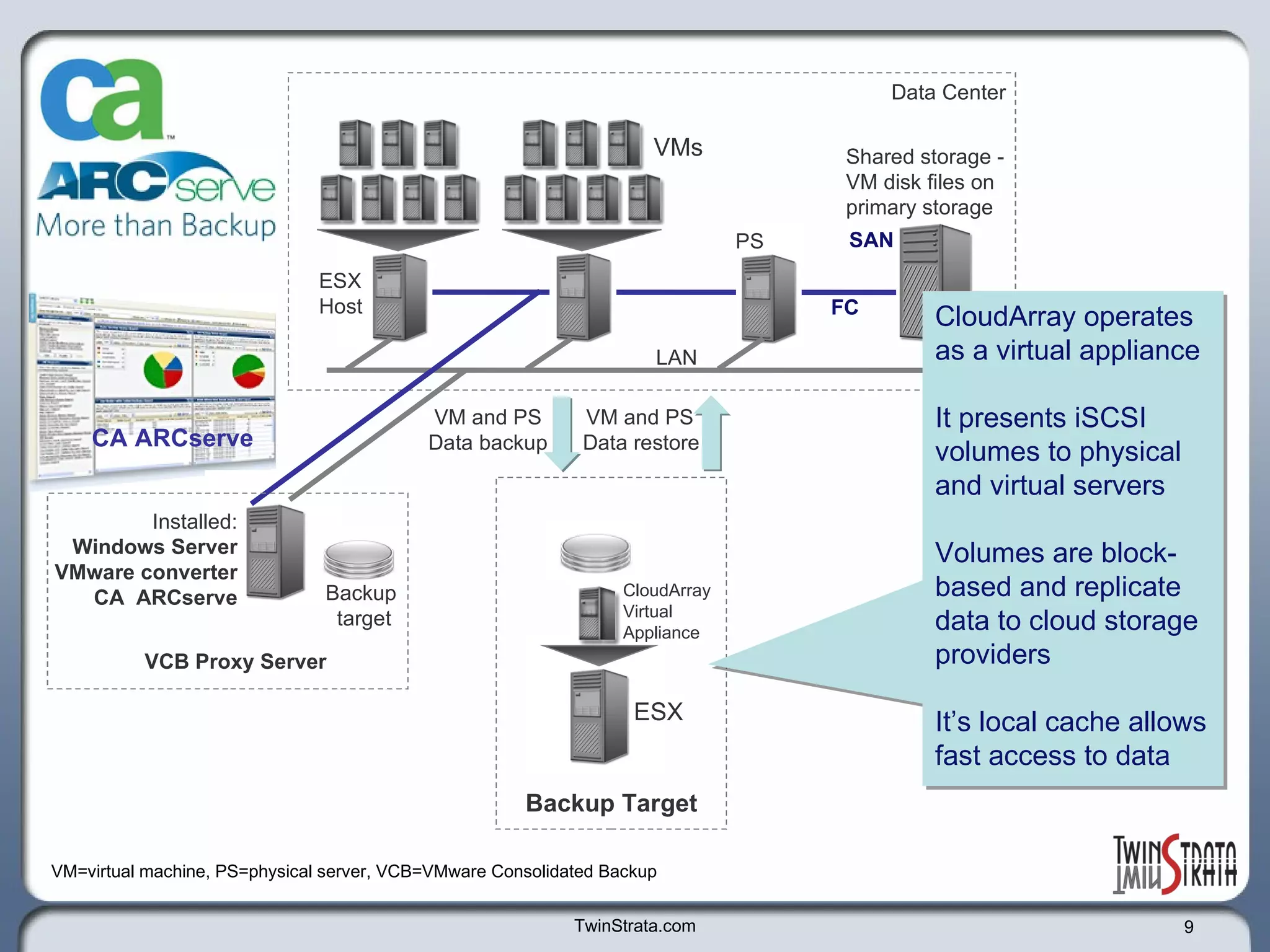
TwinStrata.com VCB Proxy Server VMs ESX Host  Shared storage - VM disk files on  primary storage Data Center PS SAN LAN VM and PS  Data backup VM and PS  Data restore VM=virtual machine, PS=physical server, VCB=VMware Consolidated Backup CA ARCserve Backup  target Installed: Windows Server VMware converter CA  ARCserve FC Backup Target ESX CloudArray Virtual  Appliance CloudArray operates as a virtual appliance  It presents iSCSI volumes to physical and virtual servers Volumes are block-based and replicate data to cloud storage providers It’s local cache allows fast access to data
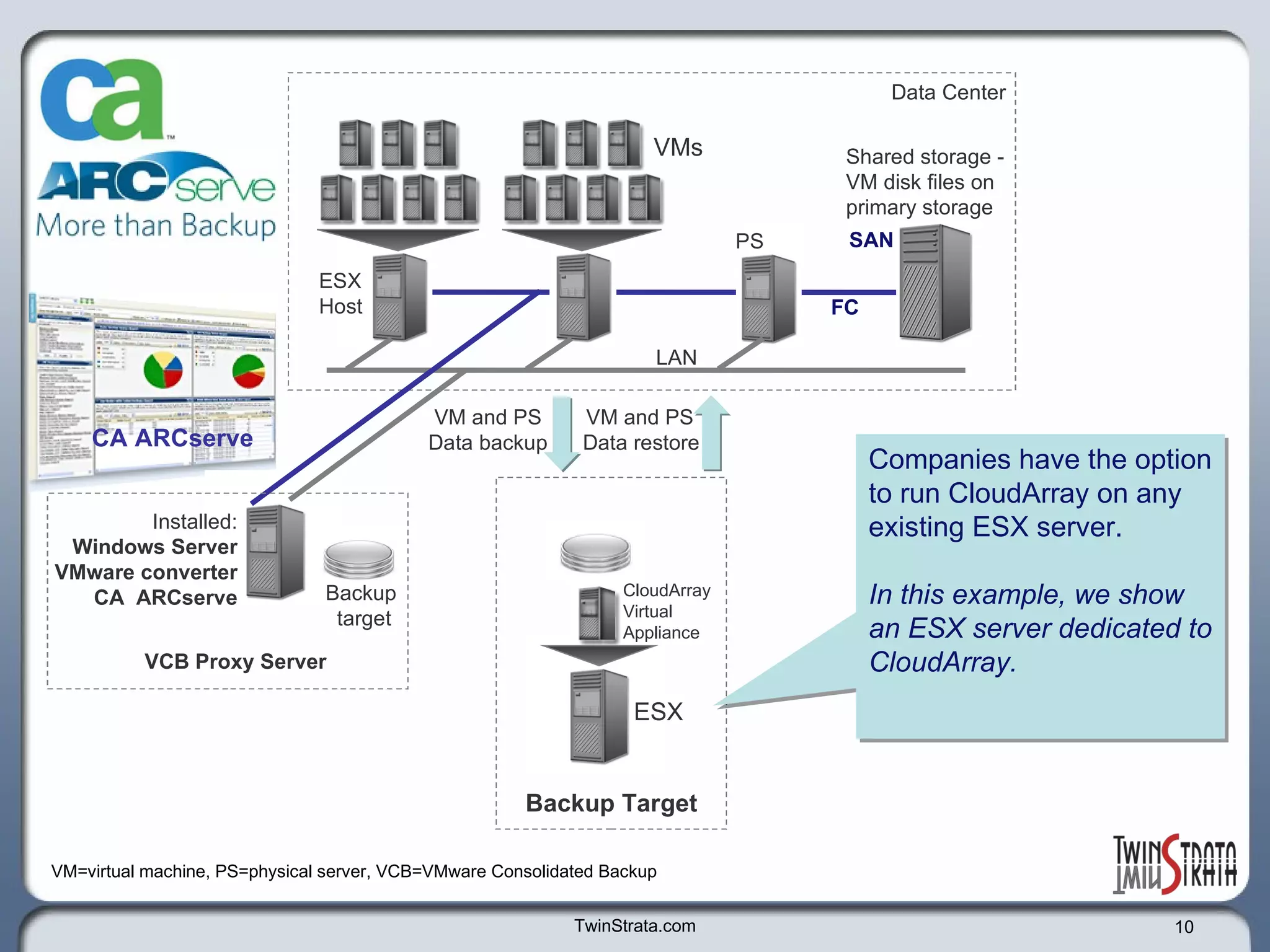
TwinStrata.com VCB Proxy Server VMs ESX Host  Shared storage - VM disk files on  primary storage Data Center PS SAN LAN VM and PS  Data backup VM and PS  Data restore VM=virtual machine, PS=physical server, VCB=VMware Consolidated Backup CA ARCserve Backup  target Installed: Windows Server VMware converter CA  ARCserve FC Backup Target ESX CloudArray Virtual  Appliance Companies have the option to run CloudArray on any existing ESX server.  In this example, we show an ESX server dedicated to CloudArray.
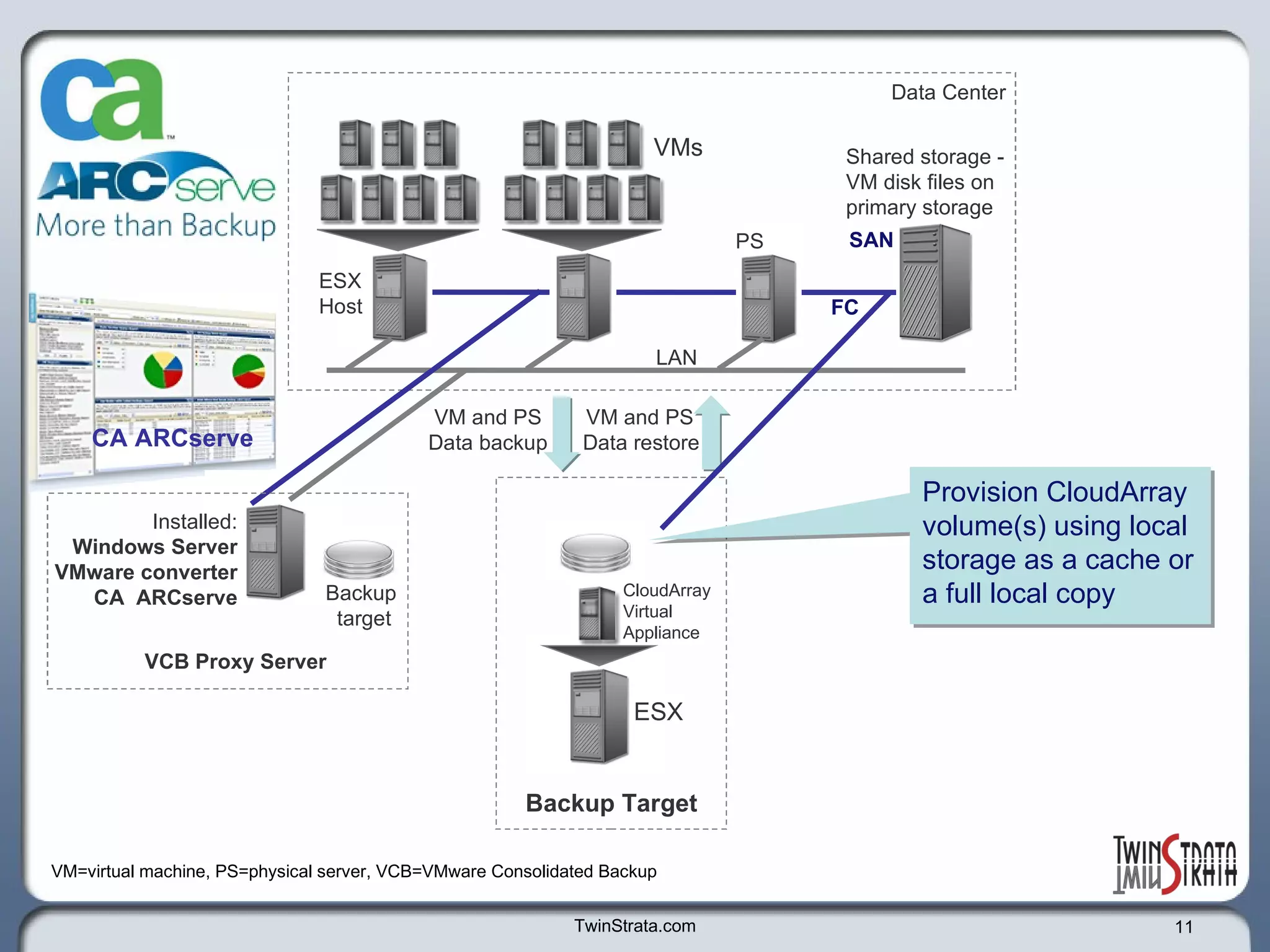
TwinStrata.com VCB Proxy Server VMs ESX Host  Shared storage - VM disk files on  primary storage Data Center PS SAN LAN VM and PS  Data backup VM=virtual machine, PS=physical server, VCB=VMware Consolidated Backup CA ARCserve Backup  target Installed: Windows Server VMware converter CA  ARCserve FC Backup Target ESX CloudArray Virtual  Appliance Provision CloudArray volume(s) using local storage as a cache or a full local copy VM and PS  Data restore
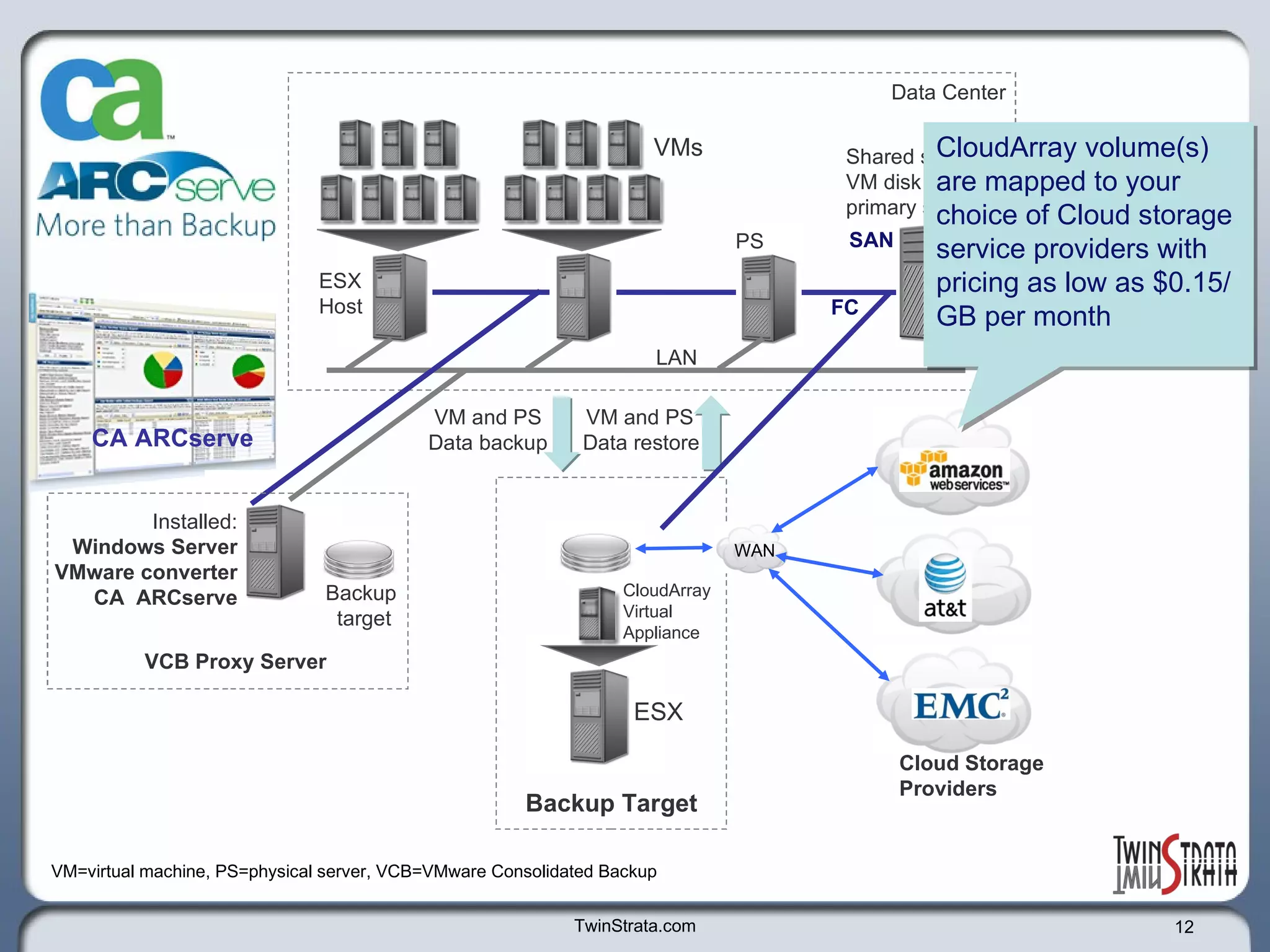
TwinStrata.com VCB Proxy Server VMs ESX Host  Shared storage - VM disk files on  primary storage Data Center PS SAN LAN VM and PS  Data backup VM=virtual machine, PS=physical server, VCB=VMware Consolidated Backup CA ARCserve Backup  target Installed: Windows Server VMware converter CA  ARCserve FC Backup Target ESX CloudArray Virtual  Appliance VM and PS  Data restore Cloud Storage  Providers WAN CloudArray volume(s) are mapped to your choice of Cloud storage service providers with pricing as low as $0.15/GB per month
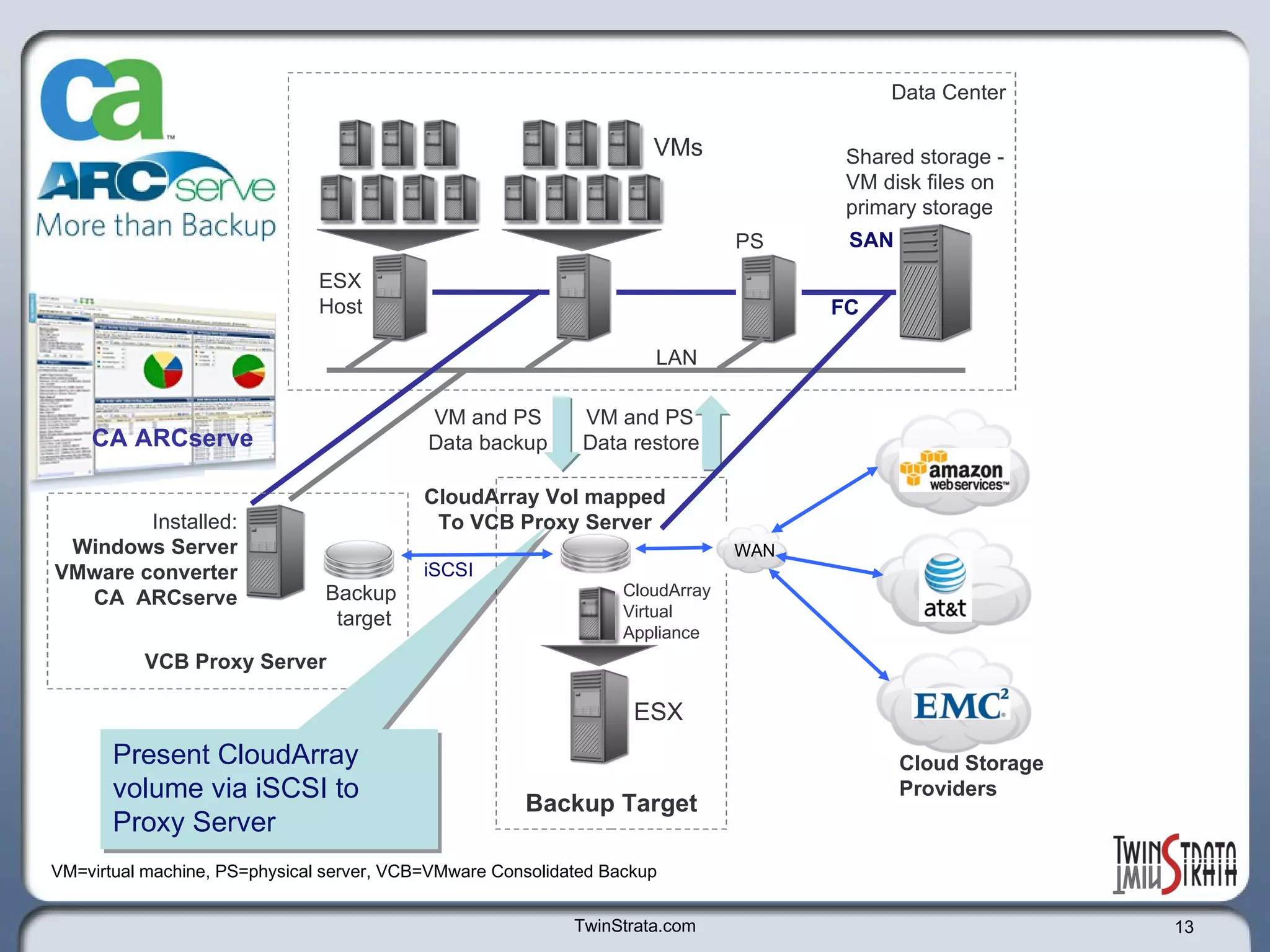
TwinStrata.com VCB Proxy Server VMs ESX Host  Shared storage - VM disk files on  primary storage Data Center PS SAN LAN VM and PS  Data backup VM=virtual machine, PS=physical server, VCB=VMware Consolidated Backup CA ARCserve Backup  target Installed: Windows Server VMware converter CA  ARCserve FC Backup Target ESX CloudArray Virtual  Appliance VM and PS  Data restore Cloud Storage  Providers WAN Present CloudArray volume via iSCSI to Proxy Server CloudArray Vol mapped To VCB Proxy Server iSCSI
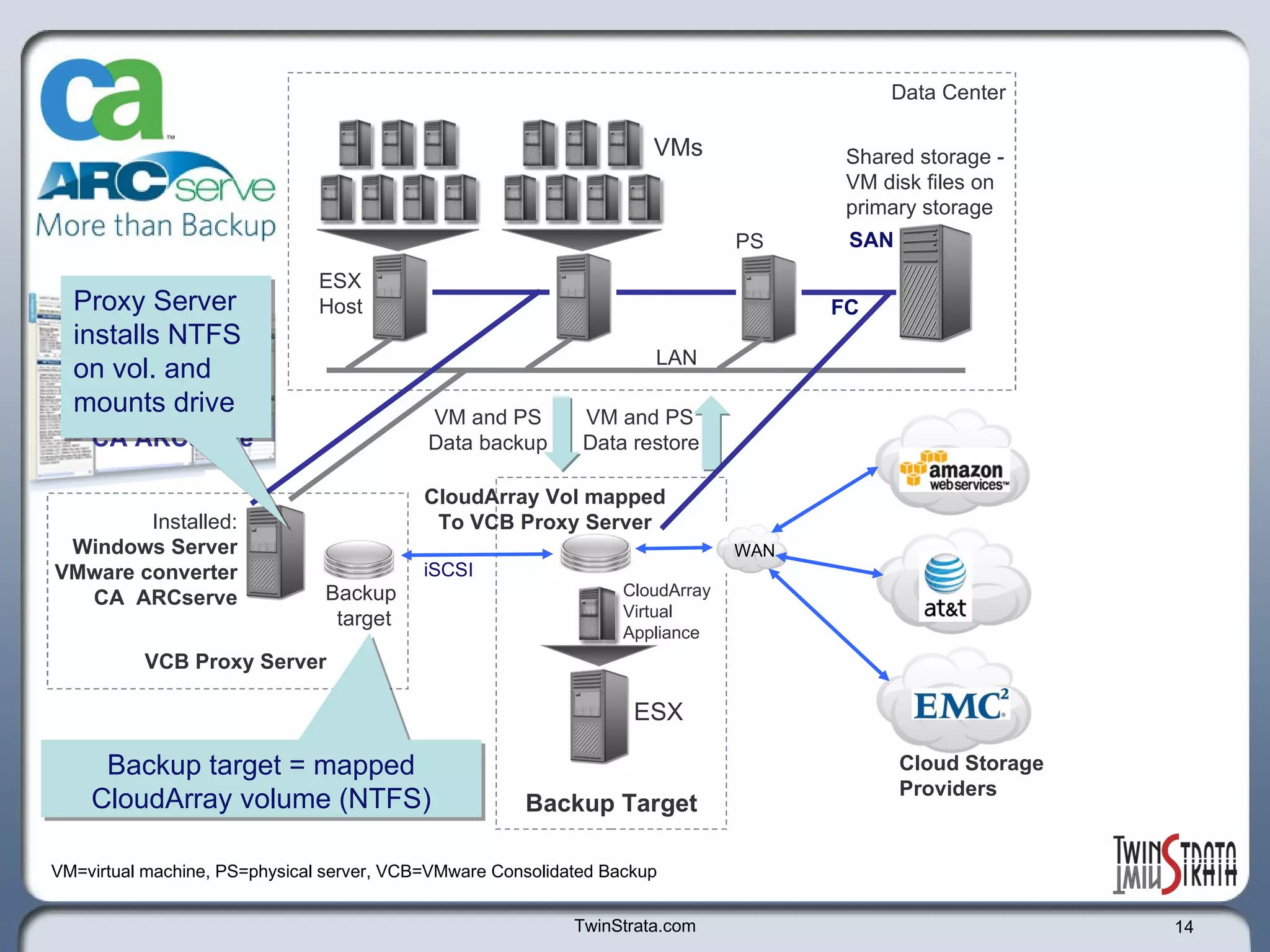
TwinStrata.com VCB Proxy Server VMs ESX Host  Shared storage - VM disk files on  primary storage Data Center PS SAN LAN VM and PS  Data backup VM=virtual machine, PS=physical server, VCB=VMware Consolidated Backup CA ARCserve Backup  target Installed: Windows Server VMware converter CA  ARCserve FC Backup Target ESX CloudArray Virtual  Appliance VM and PS  Data restore Cloud Storage  Providers WAN CloudArray Vol mapped To VCB Proxy Server Backup target = mapped CloudArray volume (NTFS) Proxy Server installs NTFS on vol. and mounts drive iSCSI
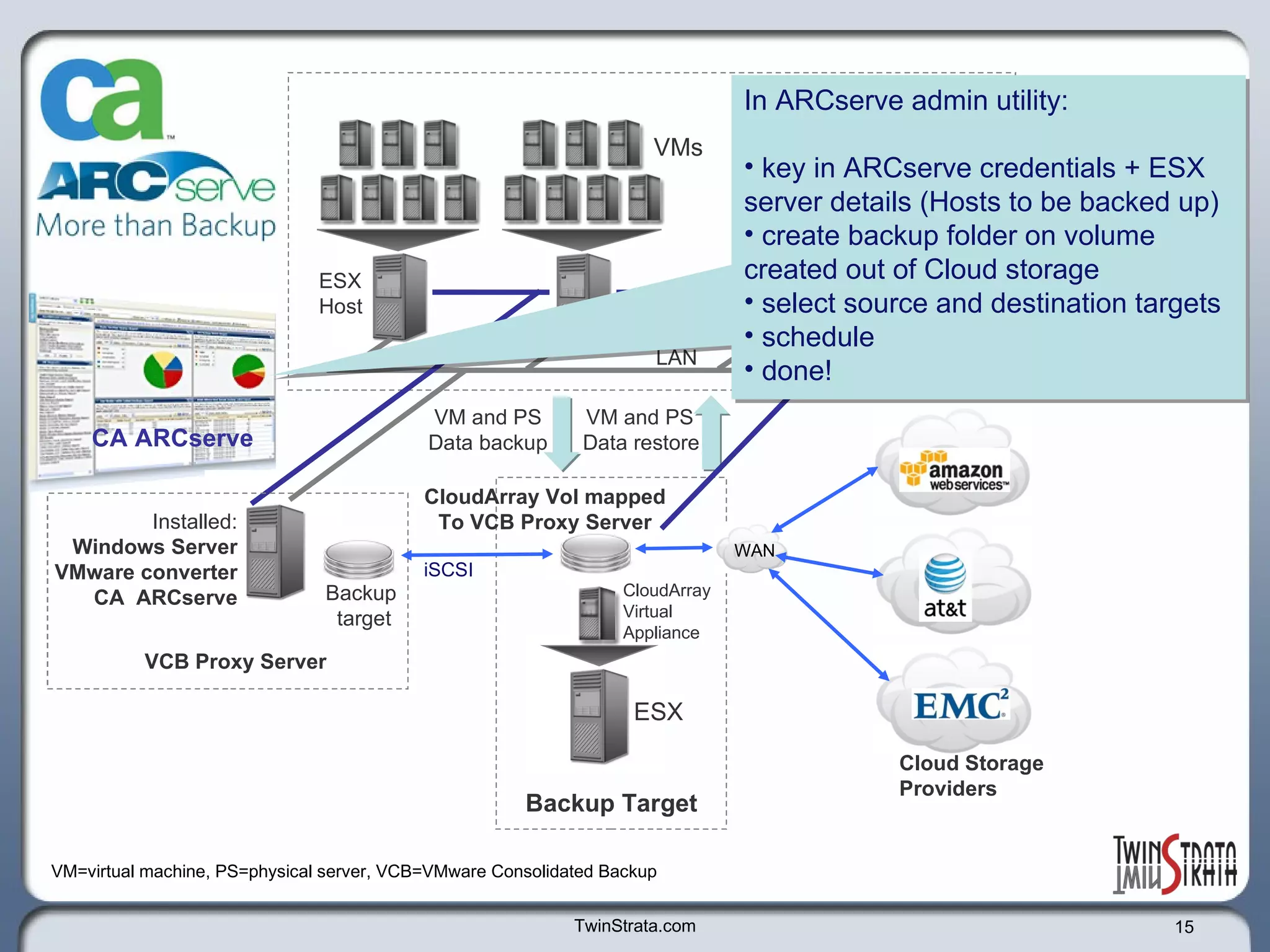
TwinStrata.com VCB Proxy Server VMs ESX Host  Shared storage - VM disk files on  primary storage Data Center PS SAN LAN VM and PS  Data backup VM=virtual machine, PS=physical server, VCB=VMware Consolidated Backup CA ARCserve Backup  target Installed: Windows Server VMware converter CA  ARCserve FC Backup Target ESX CloudArray Virtual  Appliance VM and PS  Data restore Cloud Storage  Providers WAN CloudArray Vol mapped To VCB Proxy Server In ARCserve admin utility:  key in ARCserve credentials + ESX server details (Hosts to be backed up) create backup folder on volume created out of Cloud storage  select source and destination targets schedule  done! iSCSI
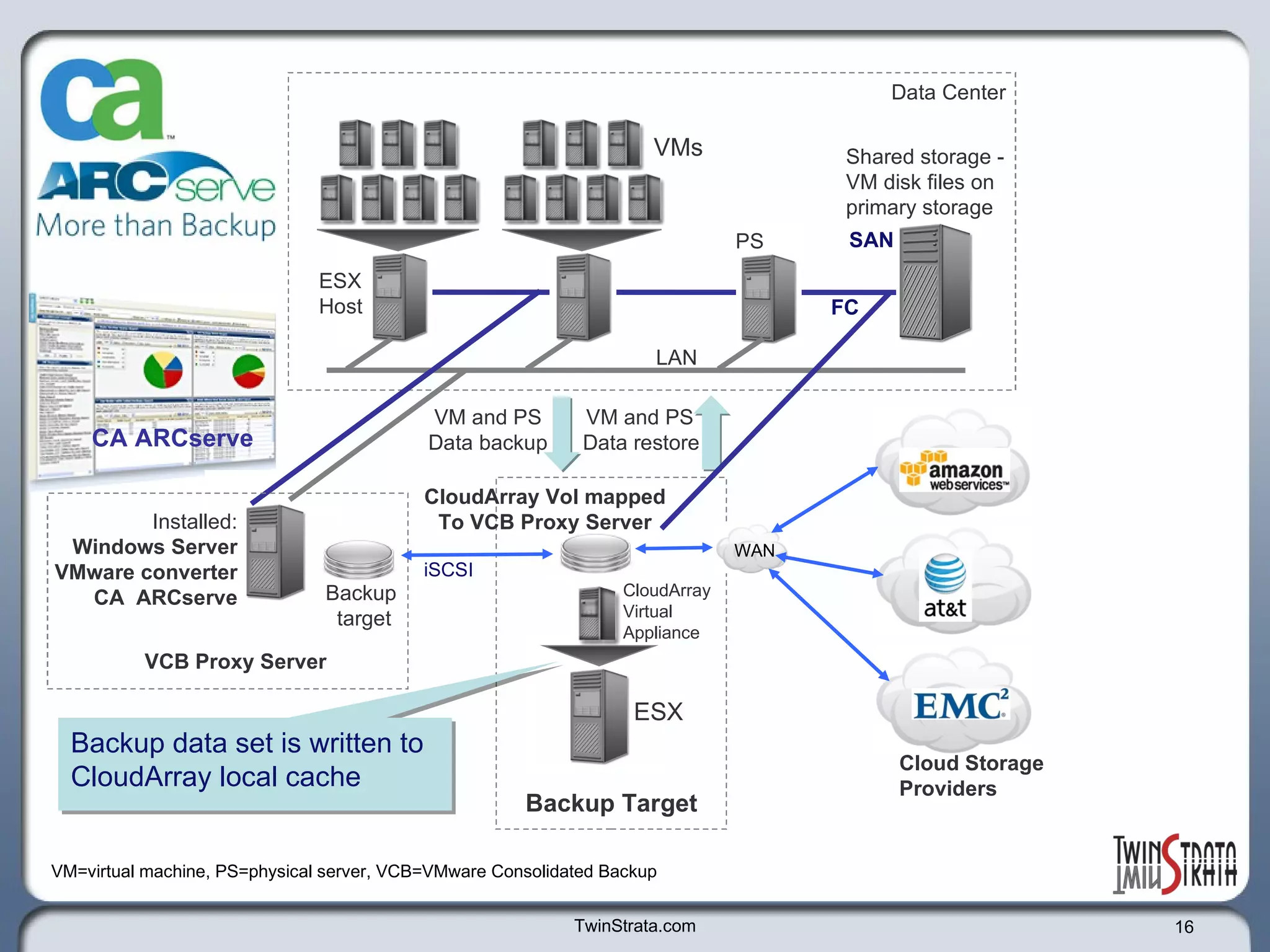
TwinStrata.com VCB Proxy Server VMs ESX Host  Shared storage - VM disk files on  primary storage Data Center PS SAN LAN VM and PS  Data backup VM=virtual machine, PS=physical server, VCB=VMware Consolidated Backup CA ARCserve Backup  target Installed: Windows Server VMware converter CA  ARCserve FC Backup Target ESX CloudArray Virtual  Appliance VM and PS  Data restore Cloud Storage  Providers WAN CloudArray Vol mapped To VCB Proxy Server Backup data set is written to CloudArray local cache iSCSI
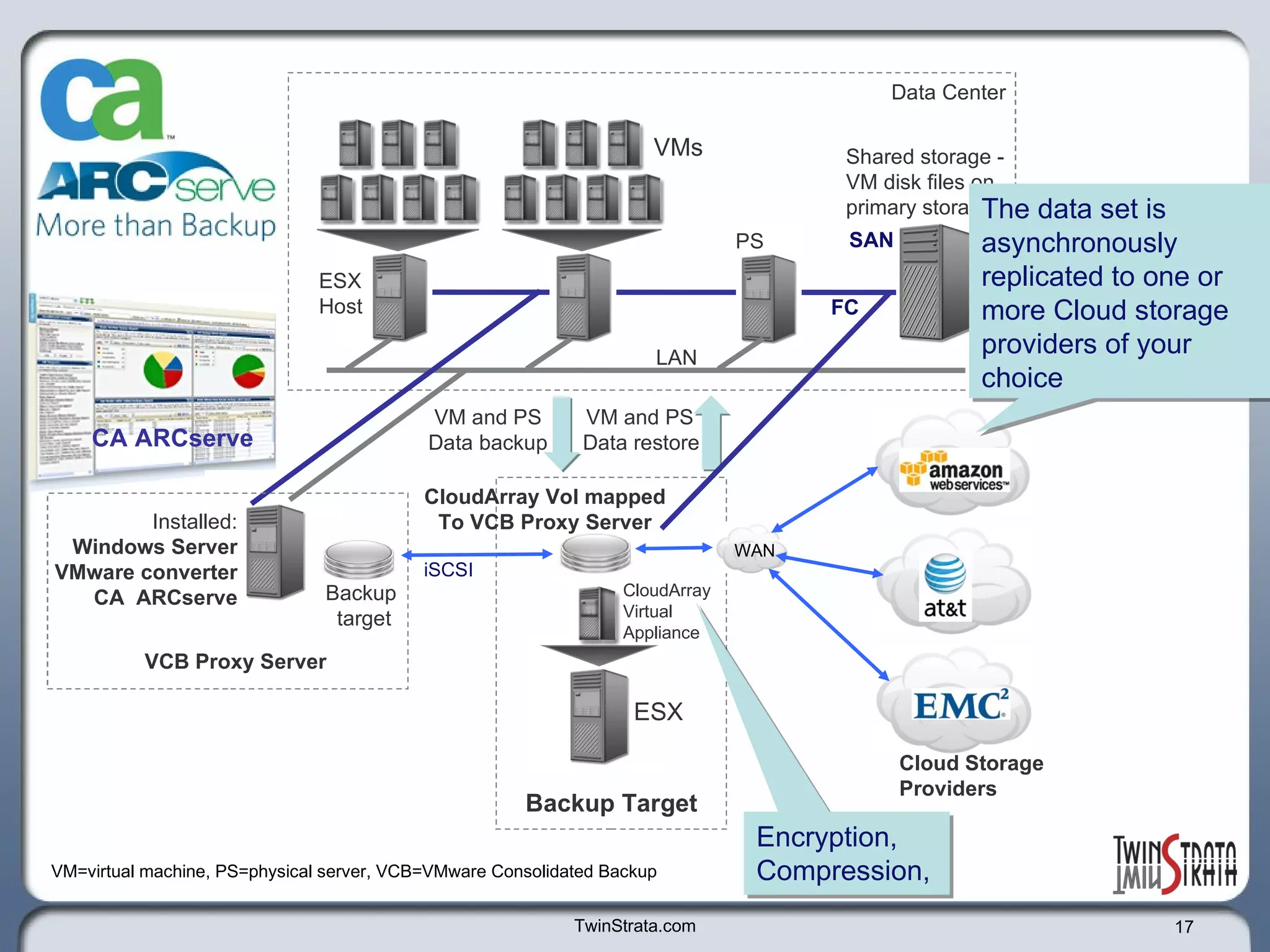
TwinStrata.com VCB Proxy Server VMs ESX Host  Shared storage - VM disk files on  primary storage Data Center PS SAN LAN VM and PS  Data backup VM=virtual machine, PS=physical server, VCB=VMware Consolidated Backup CA ARCserve Backup  target Installed: Windows Server VMware converter CA  ARCserve FC Backup Target ESX CloudArray Virtual  Appliance VM and PS  Data restore Cloud Storage  Providers WAN CloudArray Vol mapped To VCB Proxy Server The data set is asynchronously replicated to one or more Cloud storage providers of your choice Encryption,  Compression,  iSCSI
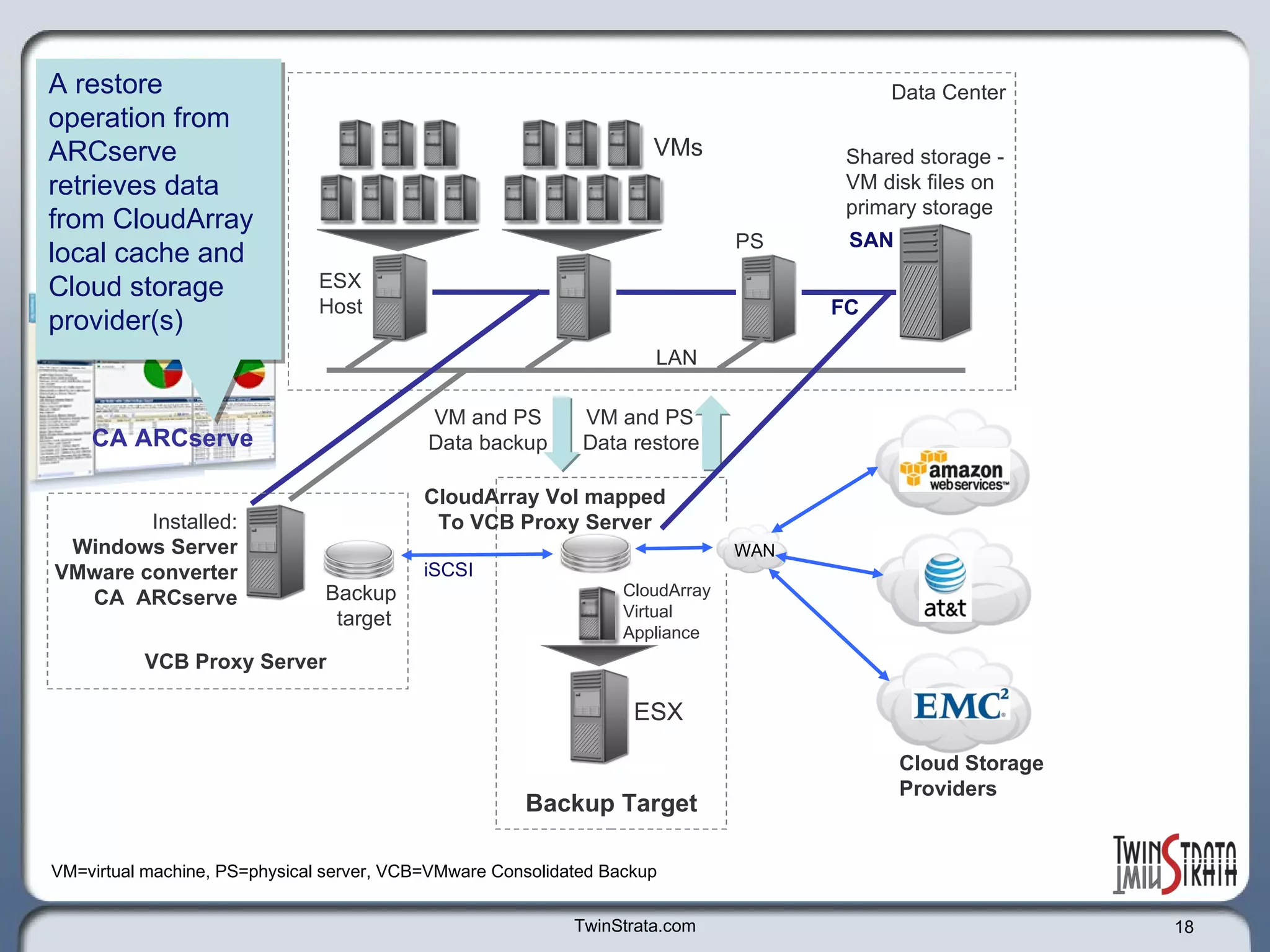
TwinStrata.com VCB Proxy Server VMs ESX Host  Shared storage - VM disk files on  primary storage Data Center PS SAN LAN VM and PS  Data backup VM=virtual machine, PS=physical server, VCB=VMware Consolidated Backup CA ARCserve Backup  target Installed: Windows Server VMware converter CA  ARCserve FC Backup Target ESX CloudArray Virtual  Appliance VM and PS  Data restore Cloud Storage  Providers WAN CloudArray Vol mapped To VCB Proxy Server A restore operation from ARCserve retrieves data from CloudArray local cache and Cloud storage provider(s) iSCSI
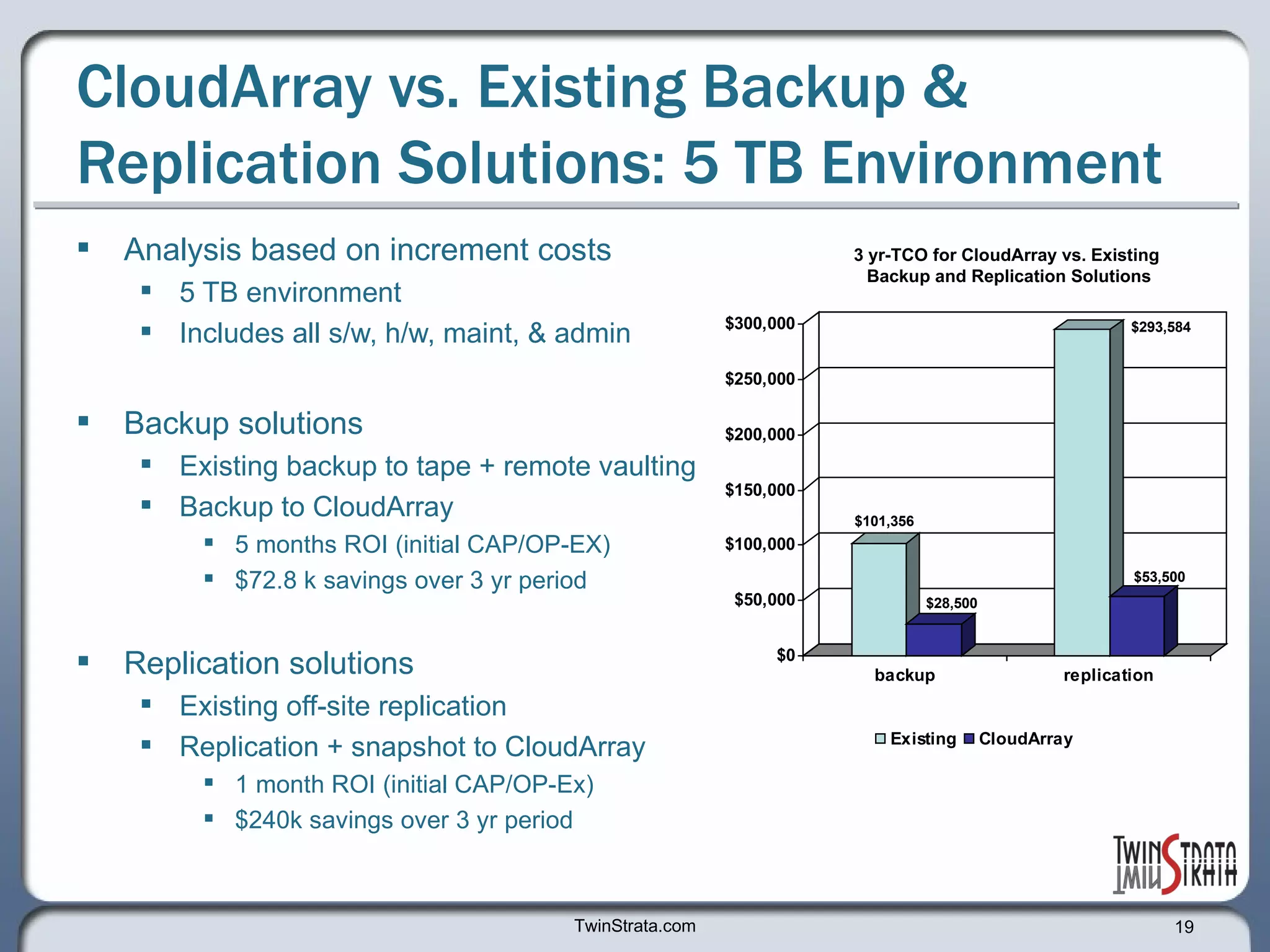
CloudArray vs. Existing Backup & Replication Solutions: 5 TB Environment Analysis based on increment costs 5 TB environment Includes all s/w, h/w, maint, & admin Backup solutions  Existing backup to tape + remote vaulting Backup to CloudArray 5 months ROI (initial CAP/OP-EX) $72.8 k savings over 3 yr period Replication solutions Existing off-site replication Replication + snapshot to CloudArray 1 month ROI (initial CAP/OP-Ex)  $240k savings over 3 yr period  TwinStrata.com 3 yr-TCO for CloudArray vs. Existing  Backup and Replication Solutions
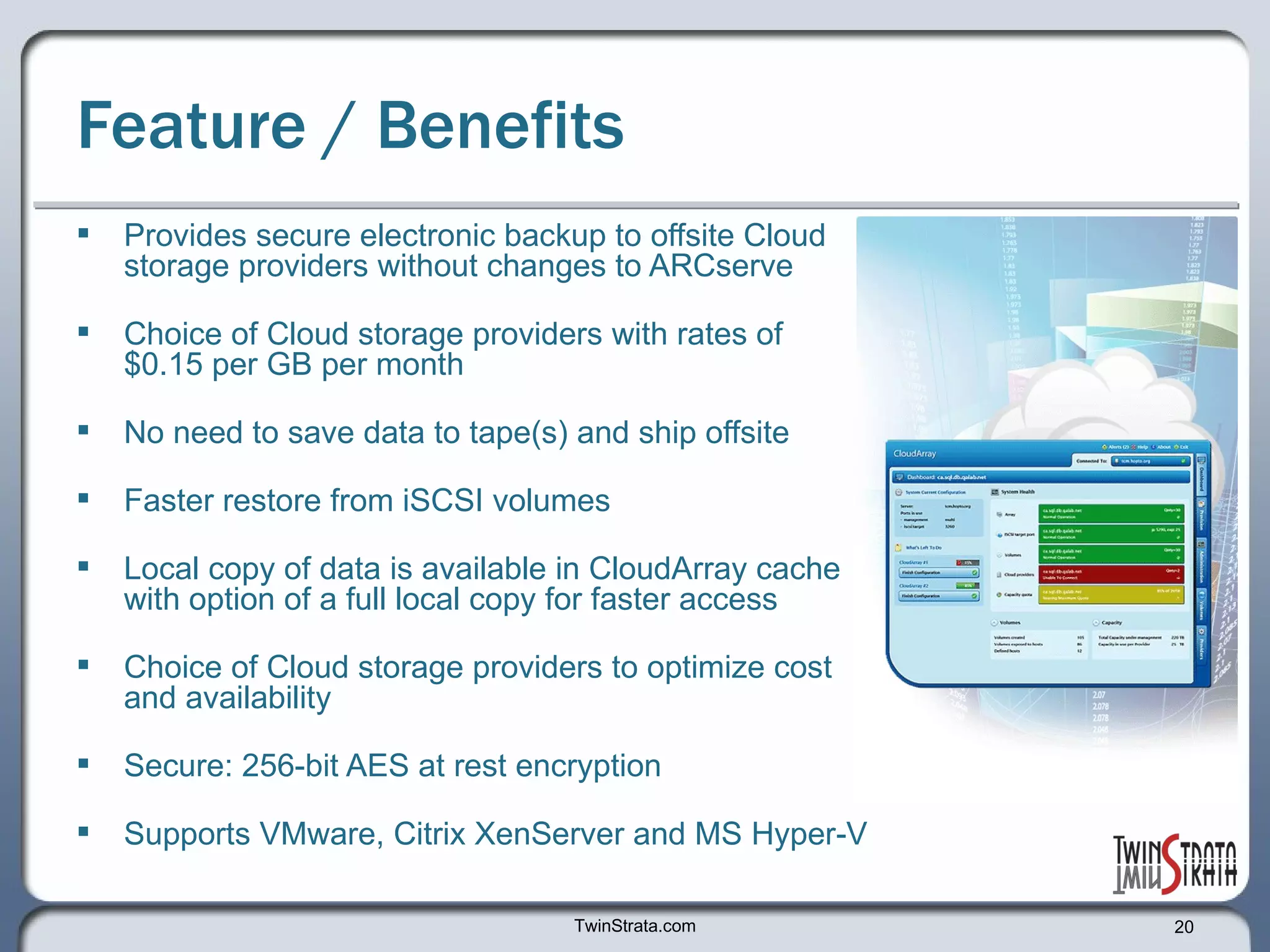
Feature / Benefits Provides secure electronic backup to offsite Cloud storage providers without changes to ARCserve Choice of Cloud storage providers with rates of  $0.15 per GB per month No need to save data to tape(s) and ship offsite  Faster restore from iSCSI volumes  Local copy of data is available in CloudArray cache with option of a full local copy for faster access  Choice of Cloud storage providers to optimize cost and availability Secure: 256-bit AES at rest encryption Supports VMware, Citrix XenServer and MS Hyper-V TwinStrata.com
Eval of CloudArray is Available Now Free 30-day product evaluation of CloudArray  Visit TwinStrata’s Web site to download your evaluation copy of CloudArray and explore other solutions http://www.twinstrata.com Thank you TwinStrata.com

Enable CA ARCserve to store and retrieve backup data to Cloud storage using CloudArray™ software

  • 1.
    Enable CA ARCserve™ to store and retrieve backup data to Cloud storage using CloudArray ™ software For virtualized and physical server environments
  • 2.
    Overview The followingpresentation provides a functional overview on: How CA ARCserve software together with CloudArray work seamlessly to protect virtualized and physical environments This solution provides an economic and highly reliable storage tier for offsite data backup and replication without the logistics and cost of tape transport. The presentation also provides a 3-year TCO summary on CloudArray vs. existing backup and replication solutions Details for a Free 30-day evaluation of CloudArray software TwinStrata.com
  • 3.
    Example Environment 3 physical hosts and 14 virtual machines on VMware ESX servers CA ARCserve implemented as data protection solution Initial CA ARCserve backup targets: tape and offsite tape storage Enhancement solution for CA ARCserve backup target: CloudArray software Cloud storage providers TwinStrata.com
  • 4.
    TwinStrata.com Backup TargetsTape and/or D2D VCB Proxy Server VMs ESX Host Shared storage - VM disk files on primary storage Data Center D2D Tape PS SAN LAN Offsite Tape Backup Storage Typical backup solution using ARCserve VM and PS Data backup VM and PS Data restore VM=virtual machine, PS=physical server, VCB=VMware Consolidated Backup CA ARCserve Backup target Installed: Windows Server VMware converter CA ARCserve FC
  • 5.
    TwinStrata.com Backup TargetsTape and/or D2D VCB Proxy Server VMs ESX Host Shared storage - VM disk files on primary storage Data Center D2D Tape PS SAN LAN Offsite Tape Backup Storage VM and PS Data backup VM and PS Data restore VM=virtual machine, PS=physical server, VCB=VMware Consolidated Backup CA ARCserve Backup target Installed: Windows Server VMware converter CA ARCserve FC Challenges with backup to tape and offsite tape management; Time consuming Costly Not Secure Data Integrity issues Time to restore
  • 6.
    TwinStrata.com Backup TargetsTape and/or D2D VCB Proxy Server VMs ESX Host Shared storage - VM disk files on primary storage Data Center D2D Tape PS SAN LAN Offsite Tape Backup Storage VM and PS Data backup VM and PS Data restore VM=virtual machine, PS=physical server, VCB=VMware Consolidated Backup CA ARCserve Backup target Installed: Windows Server VMware converter CA ARCserve FC Challenges with D2D backup: Capital intensive Costly and time consuming to expand
  • 7.
    TwinStrata.com VCB ProxyServer VMs ESX Host Shared storage - VM disk files on primary storage Data Center PS SAN LAN VM and PS Data backup VM and PS Data restore VM=virtual machine, PS=physical server, VCB=VMware Consolidated Backup CA ARCserve Backup target Installed: Windows Server VMware converter CA ARCserve FC Backup Target Storing backup data for recovery in the Cloud offers many benefits, but how do we inexpensively connect ARCserve to a Cloud provider of our choice?
  • 8.
    TwinStrata.com VCB ProxyServer VMs ESX Host Shared storage - VM disk files on primary storage Data Center PS SAN LAN VM and PS Data backup VM and PS Data restore VM=virtual machine, PS=physical server, VCB=VMware Consolidated Backup CA ARCserve Backup target Installed: Windows Server VMware converter CA ARCserve FC Backup Target … with CloudArray software! CloudArray
  • 9.
    TwinStrata.com VCB ProxyServer VMs ESX Host Shared storage - VM disk files on primary storage Data Center PS SAN LAN VM and PS Data backup VM and PS Data restore VM=virtual machine, PS=physical server, VCB=VMware Consolidated Backup CA ARCserve Backup target Installed: Windows Server VMware converter CA ARCserve FC Backup Target ESX CloudArray Virtual Appliance CloudArray operates as a virtual appliance It presents iSCSI volumes to physical and virtual servers Volumes are block-based and replicate data to cloud storage providers It’s local cache allows fast access to data
  • 10.
    TwinStrata.com VCB ProxyServer VMs ESX Host Shared storage - VM disk files on primary storage Data Center PS SAN LAN VM and PS Data backup VM and PS Data restore VM=virtual machine, PS=physical server, VCB=VMware Consolidated Backup CA ARCserve Backup target Installed: Windows Server VMware converter CA ARCserve FC Backup Target ESX CloudArray Virtual Appliance Companies have the option to run CloudArray on any existing ESX server. In this example, we show an ESX server dedicated to CloudArray.
  • 11.
    TwinStrata.com VCB ProxyServer VMs ESX Host Shared storage - VM disk files on primary storage Data Center PS SAN LAN VM and PS Data backup VM=virtual machine, PS=physical server, VCB=VMware Consolidated Backup CA ARCserve Backup target Installed: Windows Server VMware converter CA ARCserve FC Backup Target ESX CloudArray Virtual Appliance Provision CloudArray volume(s) using local storage as a cache or a full local copy VM and PS Data restore
  • 12.
    TwinStrata.com VCB ProxyServer VMs ESX Host Shared storage - VM disk files on primary storage Data Center PS SAN LAN VM and PS Data backup VM=virtual machine, PS=physical server, VCB=VMware Consolidated Backup CA ARCserve Backup target Installed: Windows Server VMware converter CA ARCserve FC Backup Target ESX CloudArray Virtual Appliance VM and PS Data restore Cloud Storage Providers WAN CloudArray volume(s) are mapped to your choice of Cloud storage service providers with pricing as low as $0.15/GB per month
  • 13.
    TwinStrata.com VCB ProxyServer VMs ESX Host Shared storage - VM disk files on primary storage Data Center PS SAN LAN VM and PS Data backup VM=virtual machine, PS=physical server, VCB=VMware Consolidated Backup CA ARCserve Backup target Installed: Windows Server VMware converter CA ARCserve FC Backup Target ESX CloudArray Virtual Appliance VM and PS Data restore Cloud Storage Providers WAN Present CloudArray volume via iSCSI to Proxy Server CloudArray Vol mapped To VCB Proxy Server iSCSI
  • 14.
    TwinStrata.com VCB ProxyServer VMs ESX Host Shared storage - VM disk files on primary storage Data Center PS SAN LAN VM and PS Data backup VM=virtual machine, PS=physical server, VCB=VMware Consolidated Backup CA ARCserve Backup target Installed: Windows Server VMware converter CA ARCserve FC Backup Target ESX CloudArray Virtual Appliance VM and PS Data restore Cloud Storage Providers WAN CloudArray Vol mapped To VCB Proxy Server Backup target = mapped CloudArray volume (NTFS) Proxy Server installs NTFS on vol. and mounts drive iSCSI
  • 15.
    TwinStrata.com VCB ProxyServer VMs ESX Host Shared storage - VM disk files on primary storage Data Center PS SAN LAN VM and PS Data backup VM=virtual machine, PS=physical server, VCB=VMware Consolidated Backup CA ARCserve Backup target Installed: Windows Server VMware converter CA ARCserve FC Backup Target ESX CloudArray Virtual Appliance VM and PS Data restore Cloud Storage Providers WAN CloudArray Vol mapped To VCB Proxy Server In ARCserve admin utility: key in ARCserve credentials + ESX server details (Hosts to be backed up) create backup folder on volume created out of Cloud storage select source and destination targets schedule done! iSCSI
  • 16.
    TwinStrata.com VCB ProxyServer VMs ESX Host Shared storage - VM disk files on primary storage Data Center PS SAN LAN VM and PS Data backup VM=virtual machine, PS=physical server, VCB=VMware Consolidated Backup CA ARCserve Backup target Installed: Windows Server VMware converter CA ARCserve FC Backup Target ESX CloudArray Virtual Appliance VM and PS Data restore Cloud Storage Providers WAN CloudArray Vol mapped To VCB Proxy Server Backup data set is written to CloudArray local cache iSCSI
  • 17.
    TwinStrata.com VCB ProxyServer VMs ESX Host Shared storage - VM disk files on primary storage Data Center PS SAN LAN VM and PS Data backup VM=virtual machine, PS=physical server, VCB=VMware Consolidated Backup CA ARCserve Backup target Installed: Windows Server VMware converter CA ARCserve FC Backup Target ESX CloudArray Virtual Appliance VM and PS Data restore Cloud Storage Providers WAN CloudArray Vol mapped To VCB Proxy Server The data set is asynchronously replicated to one or more Cloud storage providers of your choice Encryption, Compression, iSCSI
  • 18.
    TwinStrata.com VCB ProxyServer VMs ESX Host Shared storage - VM disk files on primary storage Data Center PS SAN LAN VM and PS Data backup VM=virtual machine, PS=physical server, VCB=VMware Consolidated Backup CA ARCserve Backup target Installed: Windows Server VMware converter CA ARCserve FC Backup Target ESX CloudArray Virtual Appliance VM and PS Data restore Cloud Storage Providers WAN CloudArray Vol mapped To VCB Proxy Server A restore operation from ARCserve retrieves data from CloudArray local cache and Cloud storage provider(s) iSCSI
  • 19.
    CloudArray vs. ExistingBackup & Replication Solutions: 5 TB Environment Analysis based on increment costs 5 TB environment Includes all s/w, h/w, maint, & admin Backup solutions Existing backup to tape + remote vaulting Backup to CloudArray 5 months ROI (initial CAP/OP-EX) $72.8 k savings over 3 yr period Replication solutions Existing off-site replication Replication + snapshot to CloudArray 1 month ROI (initial CAP/OP-Ex) $240k savings over 3 yr period TwinStrata.com 3 yr-TCO for CloudArray vs. Existing Backup and Replication Solutions
  • 20.
    Feature / BenefitsProvides secure electronic backup to offsite Cloud storage providers without changes to ARCserve Choice of Cloud storage providers with rates of $0.15 per GB per month No need to save data to tape(s) and ship offsite Faster restore from iSCSI volumes Local copy of data is available in CloudArray cache with option of a full local copy for faster access Choice of Cloud storage providers to optimize cost and availability Secure: 256-bit AES at rest encryption Supports VMware, Citrix XenServer and MS Hyper-V TwinStrata.com
  • 21.
    Eval of CloudArrayis Available Now Free 30-day product evaluation of CloudArray Visit TwinStrata’s Web site to download your evaluation copy of CloudArray and explore other solutions http://www.twinstrata.com Thank you TwinStrata.com