Enterprise Integration
Patterns in Practice
Andreas Egloff
Sun Microsystems
Bruce Snyder
SpringSource
&
What Are Design Patterns? 
A design pattern is a formal way of
documenting a solution to a design
problem in a particular field of expertise.
(Wikipedia)
2
Got EIP?
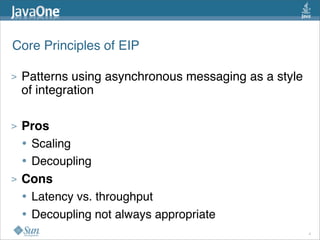
Core Principles of EIP
> Patterns using asynchronous messaging as a style
of integration
> Pros
• Scaling
• Decoupling
> Cons
• Latency vs. throughput
• Decoupling not always appropriate
4
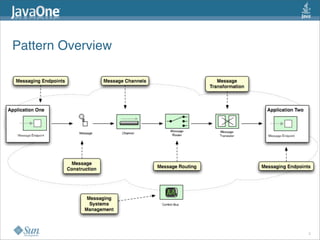
Pattern Overview
5
Identifying and Expressing Patterns
6
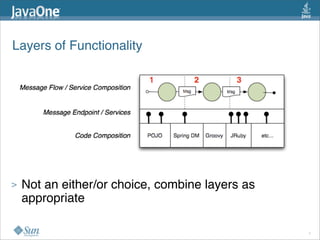
Layers of Functionality
> Not an either/or choice, combine layers as
appropriate
7
Message Flow / Service Composition
> Strengths and uses
• De-coupling and re-using Services
• Easier to evolve
• Scaling, Throughput
• Asynchronous nature
• Message routing, processing, transformation
• Easy to mediate
8
Message Endpoints / Services
> Message Endpoints / Services
• Message based interface
• Expose coarse grained services
• Typically stateless
• Anticipate re-use
• Visibility scope examples
• Within application
• Within ESB
• Anyone with access to JMS server
• External
9
Code Composition
> Strengths and uses
• Fine grained API access
• Stateful, fine grained interactions
• Low latency
> Challenge
• Interface tighter coupled
10
Implicit and Explicit Patterns
> Some patterns inherent in technology / framework
• Not every pattern a "keyword"
• e.g. JMS publish/subscribe ...
> Patterns realized in user code 
• e.g. Scatter-Gather realized in Java
> Platform has pre-built constructs
• e.g. Unix pipe symbol "|" : pipes-and-filters  
• Route in Camel or Fuji: pipes-and-filters
11
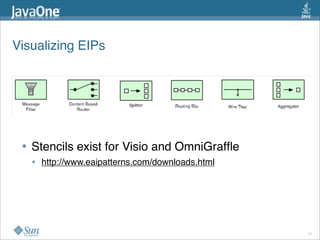
Visualizing EIPs
• Stencils exist for Visio and OmniGraffle 
• http://www.eaipatterns.com/downloads.html  
12
Patterns in Practice
13
> Issue: Too little explicit support out-of-the-box
• Too much roll your own
> Issue: Explicit support out-of-the-box is too rigid
• Does not exactly fit the use case
• Forced to work around or again roll your own
> What you want is out-of-the-box productivity with
explicit constructs AND flexibility to customize the
constructs
Gotcha - Flexibility vs. Productivity
14
Intro to Frameworks 
• Apache Camel
• http://camel.apache.org/
• Project Fuji / OpenESB v3
• http://fuji.dev.java.net/
15
What is Apache Camel? 
A framework for simplifying integration
through the use of the 
Enterprise Integration Patterns for
message mediation, processing,
routing and transformation
http://camel.apache.org/
16
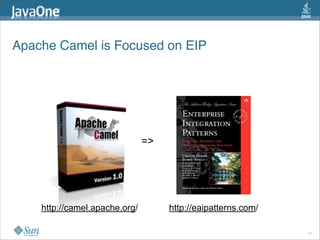
Apache Camel is Focused on EIP
17
http://camel.apache.org/
=>
http://eaipatterns.com/
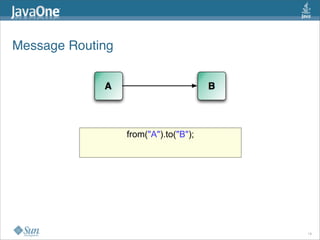
Message Routing
18
from("A").to("B");
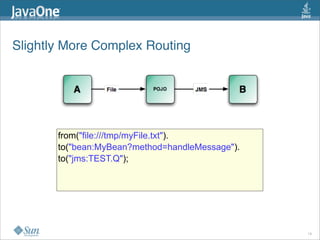
Slightly More Complex Routing
19
from("file:///tmp/myFile.txt").
to("bean:MyBean?method=handleMessage").
to("jms:TEST.Q");
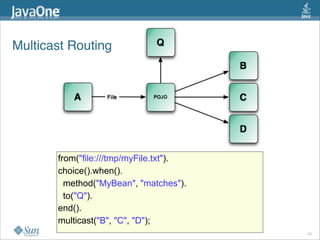
Multicast Routing
20
from("file:///tmp/myFile.txt").
choice().when().
method("MyBean", "matches").
to("Q").
end().
multicast("B", "C", "D");
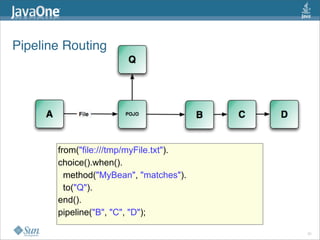
Pipeline Routing
21
from("file:///tmp/myFile.txt").
choice().when().
method("MyBean", "matches").
to("Q").
end().
pipeline("B", "C", "D");
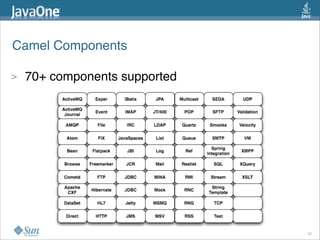
Camel Components
22
>  70+ components supported
What is Project Fuji? 
> Basis for OpenESB v3
> Fuji Goals
• Agility + Flexibility + Ease of Use = Productivity 
> Service Platform to realize
• Service Oriented Architecture (SOA)
• Light weight SOA (aka Web Oriented Architecture)
• Event Driven Architecture (EDA)
• ... last but not least MOM style applications 
> > 40 Components in OpenESB community today
http://fuji.dev.java.net/
23
Interesting Properties of Fuji 
• Convention, Configuration, Code... in that order
• Light weight, OSGi based
• Not JMS centric but Service Centric
• In-VM service composition option
• Choice of transport when going across VMs
• E.g. load balancing via http or federating using JXTA
• Visual and textual (DSL) editing for EIPs
• Camel component is another option 
24
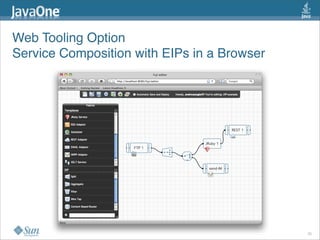
Web Tooling Option
Service Composition with EIPs in a Browser
25
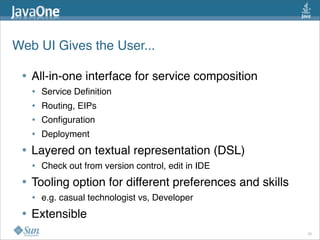
Web UI Gives the User...
• All-in-one interface for service composition
• Service Definition
• Routing, EIPs
• Configuration
• Deployment
• Layered on textual representation (DSL)
• Check out from version control, edit in IDE
• Tooling option for different preferences and skills
• e.g. casual technologist vs, Developer
• Extensible
26
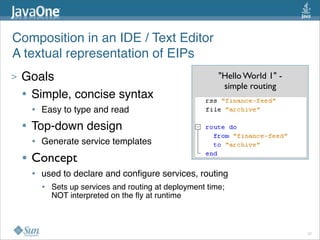
Composition in an IDE / Text Editor
A textual representation of EIPs
> Goals
• Simple, concise syntax
• Easy to type and read
• Top-down design
• Generate service templates 
• Concept
• used to declare and configure services, routing
• Sets up services and routing at deployment time;
NOT interpreted on the fly at runtime
"Hello World 1" - 
simple routing
27
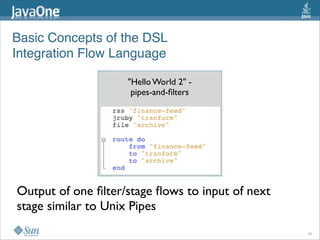
Basic Concepts of the DSL
Integration Flow Language
"Hello World 2" - 
pipes-and-filters
Output of one filter/stage flows to input of next
stage similar to Unix Pipes
28
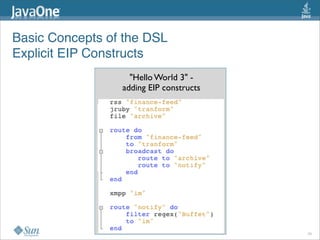
Basic Concepts of the DSL
Explicit EIP Constructs
"Hello World 3" - 
adding EIP constructs
29
Example Pattern Implementations 
30
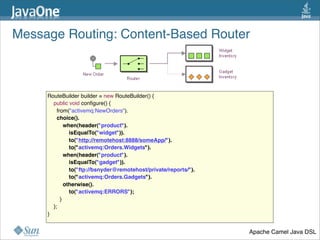
Message Routing: Content-Based Router
31
RouteBuilder builder = new RouteBuilder() {
    public void configure() {
      from("activemq:NewOrders").
      choice().
          when(header("product").
              isEqualTo("widget")).
              to("http://remotehost:8888/someApp/").
              to("activemq:Orders.Widgets").
          when(header("product").
              isEqualTo("gadget")).
              to("ftp://bsnyder@remotehost/private/reports/").
              to("activemq:Orders.Gadgets").
          otherwise().
              to("activemq:ERRORS");
        }
    };
}
Apache Camel Java DSL
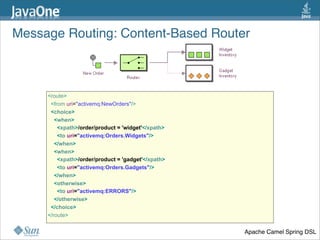
Message Routing: Content-Based Router
32
<route>
<from uri="activemq:NewOrders"/>
<choice>
<when>
<xpath>/order/product = 'widget'</xpath>
<to uri="activemq:Orders.Widgets"/>
</when>
<when>
<xpath>/order/product = 'gadget'</xpath>
<to uri="activemq:Orders.Gadgets"/>
</when>
<otherwise>
<to uri="activemq:ERRORS"/>
</otherwise>
</choice>
</route>
Apache Camel Spring DSL
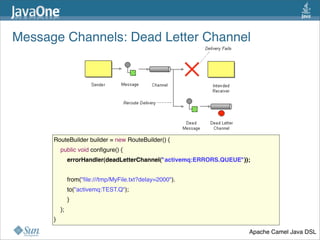
Message Channels: Dead Letter Channel 
33
RouteBuilder builder = new RouteBuilder() {
    public void configure() {
        errorHandler(deadLetterChannel("activemq:ERRORS.QUEUE"));
        from("file:///tmp/MyFile.txt?delay=2000").
        to("activemq:TEST.Q");
        }
    };
}
Apache Camel Java DSL
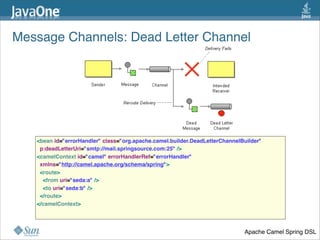
Message Channels: Dead Letter Channel 
34
<bean id="errorHandler" class="org.apache.camel.builder.DeadLetterChannelBuilder"
  p:deadLetterUri="smtp://mail.springsource.com:25" />
<camelContext id="camel" errorHandlerRef="errorHandler" 
  xmlns="http://camel.apache.org/schema/spring">
  <route>
    <from uri="seda:a" />
    <to uri="seda:b" />
  </route>
</camelContext>
Apache Camel Spring DSL
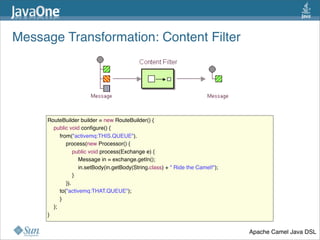
Message Transformation: Content Filter
35
RouteBuilder builder = new RouteBuilder() {
    public void configure() {
        from("activemq:THIS.QUEUE").
            process(new Processor() {
                public void process(Exchange e) {
                    Message in = exchange.getIn();
                    in.setBody(in.getBody(String.class) + " Ride the Camel!");
                }
            }).
        to("activemq:THAT.QUEUE");
        }
    };
}
Apache Camel Java DSL
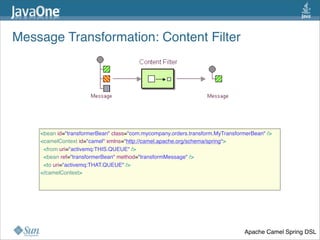
Message Transformation: Content Filter
36
<bean id="transformerBean" class="com.mycompany.orders.transform.MyTransformerBean" />
<camelContext id="camel" xmlns="http://camel.apache.org/schema/spring">
  <from uri="activemq:THIS.QUEUE" />
  <bean ref="transformerBean" method="transformMessage" />
  <to uri="activemq:THAT.QUEUE" />
</camelContext>
Apache Camel Spring DSL
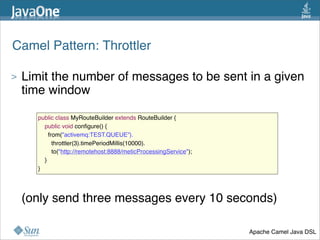
Camel Pattern: Throttler
> Limit the number of messages to be sent in a given
time window
> (only send three messages every 10 seconds)
37
public class MyRouteBuilder extends RouteBuilder {
    public void configure() {
      from("activemq:TEST.QUEUE”).
        throttler(3).timePeriodMillis(10000).
        to("http://remotehost:8888/meticProcessingService");
    }
}
Apache Camel Java DSL
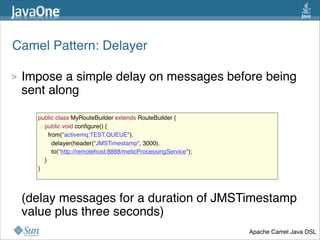
Camel Pattern: Delayer
> Impose a simple delay on messages before being
sent along 
> (delay messages for a duration of JMSTimestamp
value plus three seconds)
38
public class MyRouteBuilder extends RouteBuilder {
    public void configure() {
      from("activemq:TEST.QUEUE").
        delayer(header("JMSTimestamp", 3000).
        to("http://remotehost:8888/meticProcessingService");
    }
}
Apache Camel Java DSL
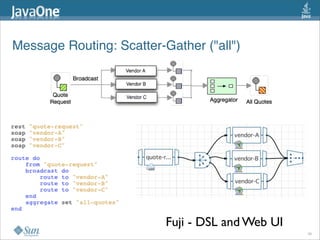
Message Routing: Scatter-Gather ("all")
Fuji - DSL and Web UI
39
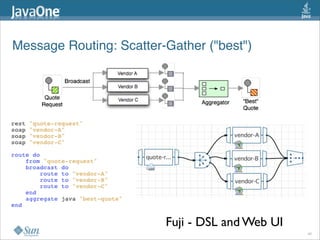
Message Routing: Scatter-Gather ("best")
Fuji - DSL and Web UI
40
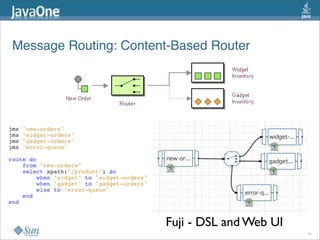
Message Routing: Content-Based Router
Fuji - DSL and Web UI
41
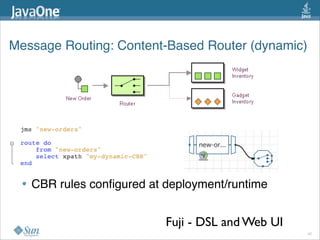
Message Routing: Content-Based Router (dynamic)
• CBR rules configured at deployment/runtime
Fuji - DSL and Web UI
42
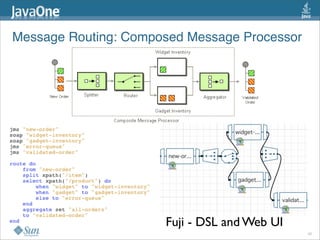
Message Routing: Composed Message Processor
Fuji - DSL and Web UI
43
EIP Product Demo 
• Apache Camel
• Project Fuji
44
Andreas Egloff
andreas.egloff@sun.com
Bruce Snyder
bruce.snyder@springsource.com

EIP In Practice

  • 1.
    Enterprise Integration Patterns inPractice Andreas Egloff Sun Microsystems Bruce Snyder SpringSource &
  • 2.
    What Are DesignPatterns?  A design pattern is a formal way of documenting a solution to a design problem in a particular field of expertise. (Wikipedia) 2
  • 3.
  • 4.
    Core Principles ofEIP > Patterns using asynchronous messaging as a style of integration > Pros • Scaling • Decoupling > Cons • Latency vs. throughput • Decoupling not always appropriate 4
  • 5.
  • 6.
  • 7.
    Layers of Functionality >Not an either/or choice, combine layers as appropriate 7
  • 8.
    Message Flow /Service Composition > Strengths and uses • De-coupling and re-using Services • Easier to evolve • Scaling, Throughput • Asynchronous nature • Message routing, processing, transformation • Easy to mediate 8
  • 9.
    Message Endpoints /Services > Message Endpoints / Services • Message based interface • Expose coarse grained services • Typically stateless • Anticipate re-use • Visibility scope examples • Within application • Within ESB • Anyone with access to JMS server • External 9
  • 10.
    Code Composition > Strengthsand uses • Fine grained API access • Stateful, fine grained interactions • Low latency > Challenge • Interface tighter coupled 10
  • 11.
    Implicit and ExplicitPatterns > Some patterns inherent in technology / framework • Not every pattern a "keyword" • e.g. JMS publish/subscribe ... > Patterns realized in user code  • e.g. Scatter-Gather realized in Java > Platform has pre-built constructs • e.g. Unix pipe symbol "|" : pipes-and-filters   • Route in Camel or Fuji: pipes-and-filters 11
  • 12.
    Visualizing EIPs • Stencilsexist for Visio and OmniGraffle  • http://www.eaipatterns.com/downloads.html   12
  • 13.
  • 14.
    > Issue: Toolittle explicit support out-of-the-box • Too much roll your own > Issue: Explicit support out-of-the-box is too rigid • Does not exactly fit the use case • Forced to work around or again roll your own > What you want is out-of-the-box productivity with explicit constructs AND flexibility to customize the constructs Gotcha - Flexibility vs. Productivity 14
  • 15.
    Intro to Frameworks  •Apache Camel • http://camel.apache.org/ • Project Fuji / OpenESB v3 • http://fuji.dev.java.net/ 15
  • 16.
    What is ApacheCamel?  A framework for simplifying integration through the use of the  Enterprise Integration Patterns for message mediation, processing, routing and transformation http://camel.apache.org/ 16
  • 17.
    Apache Camel isFocused on EIP 17 http://camel.apache.org/ => http://eaipatterns.com/
  • 18.
  • 19.
    Slightly More ComplexRouting 19 from("file:///tmp/myFile.txt"). to("bean:MyBean?method=handleMessage"). to("jms:TEST.Q");
  • 20.
  • 21.
  • 22.
    Camel Components 22 >  70+components supported
  • 23.
    What is ProjectFuji?  > Basis for OpenESB v3 > Fuji Goals • Agility + Flexibility + Ease of Use = Productivity  > Service Platform to realize • Service Oriented Architecture (SOA) • Light weight SOA (aka Web Oriented Architecture) • Event Driven Architecture (EDA) • ... last but not least MOM style applications  > > 40 Components in OpenESB community today http://fuji.dev.java.net/ 23
  • 24.
    Interesting Properties ofFuji  • Convention, Configuration, Code... in that order • Light weight, OSGi based • Not JMS centric but Service Centric • In-VM service composition option • Choice of transport when going across VMs • E.g. load balancing via http or federating using JXTA • Visual and textual (DSL) editing for EIPs • Camel component is another option  24
  • 25.
    Web Tooling Option ServiceComposition with EIPs in a Browser 25
  • 26.
    Web UI Givesthe User... • All-in-one interface for service composition • Service Definition • Routing, EIPs • Configuration • Deployment • Layered on textual representation (DSL) • Check out from version control, edit in IDE • Tooling option for different preferences and skills • e.g. casual technologist vs, Developer • Extensible 26
  • 27.
    Composition in anIDE / Text Editor A textual representation of EIPs > Goals • Simple, concise syntax • Easy to type and read • Top-down design • Generate service templates  • Concept • used to declare and configure services, routing • Sets up services and routing at deployment time; NOT interpreted on the fly at runtime "Hello World 1" -  simple routing 27
  • 28.
    Basic Concepts ofthe DSL Integration Flow Language "Hello World 2" -  pipes-and-filters Output of one filter/stage flows to input of next stage similar to Unix Pipes 28
  • 29.
    Basic Concepts ofthe DSL Explicit EIP Constructs "Hello World 3" -  adding EIP constructs 29
  • 30.
  • 31.
    Message Routing: Content-Based Router 31 RouteBuilderbuilder = new RouteBuilder() {     public void configure() {       from("activemq:NewOrders").       choice().           when(header("product").               isEqualTo("widget")).               to("http://remotehost:8888/someApp/").               to("activemq:Orders.Widgets").           when(header("product").               isEqualTo("gadget")).               to("ftp://bsnyder@remotehost/private/reports/").               to("activemq:Orders.Gadgets").           otherwise().               to("activemq:ERRORS");         }     }; } Apache Camel Java DSL
  • 32.
    Message Routing: Content-Based Router 32 <route> <fromuri="activemq:NewOrders"/> <choice> <when> <xpath>/order/product = 'widget'</xpath> <to uri="activemq:Orders.Widgets"/> </when> <when> <xpath>/order/product = 'gadget'</xpath> <to uri="activemq:Orders.Gadgets"/> </when> <otherwise> <to uri="activemq:ERRORS"/> </otherwise> </choice> </route> Apache Camel Spring DSL
  • 33.
    Message Channels: Dead LetterChannel  33 RouteBuilder builder = new RouteBuilder() {     public void configure() {         errorHandler(deadLetterChannel("activemq:ERRORS.QUEUE"));         from("file:///tmp/MyFile.txt?delay=2000").         to("activemq:TEST.Q");         }     }; } Apache Camel Java DSL
  • 34.
    Message Channels: Dead LetterChannel  34 <bean id="errorHandler" class="org.apache.camel.builder.DeadLetterChannelBuilder"   p:deadLetterUri="smtp://mail.springsource.com:25" /> <camelContext id="camel" errorHandlerRef="errorHandler"    xmlns="http://camel.apache.org/schema/spring">   <route>     <from uri="seda:a" />     <to uri="seda:b" />   </route> </camelContext> Apache Camel Spring DSL
  • 35.
    Message Transformation: Content Filter 35 RouteBuilderbuilder = new RouteBuilder() {     public void configure() {         from("activemq:THIS.QUEUE").             process(new Processor() {                 public void process(Exchange e) {                     Message in = exchange.getIn();                     in.setBody(in.getBody(String.class) + " Ride the Camel!");                 }             }).         to("activemq:THAT.QUEUE");         }     }; } Apache Camel Java DSL
  • 36.
    Message Transformation: Content Filter 36 <beanid="transformerBean" class="com.mycompany.orders.transform.MyTransformerBean" /> <camelContext id="camel" xmlns="http://camel.apache.org/schema/spring">   <from uri="activemq:THIS.QUEUE" />   <bean ref="transformerBean" method="transformMessage" />   <to uri="activemq:THAT.QUEUE" /> </camelContext> Apache Camel Spring DSL
  • 37.
    Camel Pattern: Throttler > Limitthe number of messages to be sent in a given time window > (only send three messages every 10 seconds) 37 public class MyRouteBuilder extends RouteBuilder {     public void configure() {       from("activemq:TEST.QUEUE”).         throttler(3).timePeriodMillis(10000).         to("http://remotehost:8888/meticProcessingService");     } } Apache Camel Java DSL
  • 38.
    Camel Pattern: Delayer > Imposea simple delay on messages before being sent along  > (delay messages for a duration of JMSTimestamp value plus three seconds) 38 public class MyRouteBuilder extends RouteBuilder {     public void configure() {       from("activemq:TEST.QUEUE").         delayer(header("JMSTimestamp", 3000).         to("http://remotehost:8888/meticProcessingService");     } } Apache Camel Java DSL
  • 39.
  • 40.
  • 41.
  • 42.
    Message Routing: Content-Based Router(dynamic) • CBR rules configured at deployment/runtime Fuji - DSL and Web UI 42
  • 43.
    Message Routing: Composed MessageProcessor Fuji - DSL and Web UI 43
  • 44.
    EIP Product Demo  •Apache Camel • Project Fuji 44
  • 45.