Technology. Management. Solutions.
"It’s all in the people and the process..."
Introductions

E2 ManageTech (E2)

Why Use E2 ManageTech?

EHS MIS Design Scope of Work

Discussion
Prospective Client EHS MIS team
 Contact person #1
 Contact person #2


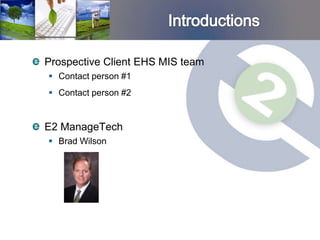
E2 ManageTech
 Brad Wilson
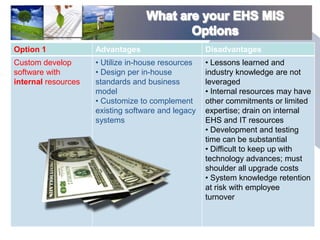
Option 1             Advantages                     Disadvantages
Custom develop       • Utilize in-house resources   • Lessons learned and
software with        • Design per in-house          industry knowledge are not
internal resources   standards and business         leveraged
                     model                          • Internal resources may have
                     • Customize to complement      other commitments or limited
                     existing software and legacy   expertise; drain on internal
                     systems                        EHS and IT resources
                                                    • Development and testing
                                                    time can be substantial
                                                    • Difficult to keep up with
                                                    technology advances; must
                                                    shoulder all upgrade costs
                                                    • System knowledge retention
                                                    at risk with employee
                                                    turnover
What are your EHS MIS Options

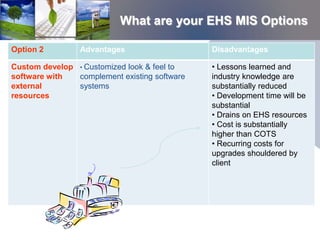
Option 2         Advantages                   Disadvantages

Custom develop • Customized look & feel to    • Lessons learned and
software with  complement existing software   industry knowledge are
external       systems                        substantially reduced
resources                                     • Development time will be
                                              substantial
                                              • Drains on EHS resources
                                              • Cost is substantially
                                              higher than COTS
                                              • Recurring costs for
                                              upgrades shouldered by
                                              client
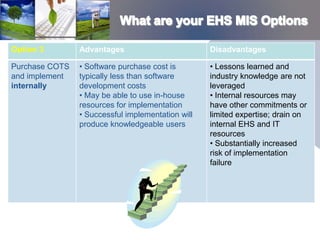
Option 3        Advantages                         Disadvantages

Purchase COTS   • Software purchase cost is        • Lessons learned and
and implement   typically less than software       industry knowledge are not
internally      development costs                  leveraged
                • May be able to use in-house      • Internal resources may
                resources for implementation       have other commitments or
                • Successful implementation will   limited expertise; drain on
                produce knowledgeable users        internal EHS and IT
                                                   resources
                                                   • Substantially increased
                                                   risk of implementation
                                                   failure
EHS MIS Options (con’t)
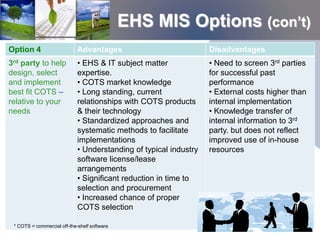
Option 4                     Advantages                            Disadvantages
3rd party to help            • EHS & IT subject matter             • Need to screen 3rd parties
design, select               expertise.                            for successful past
and implement                • COTS market knowledge               performance
best fit COTS –              • Long standing, current              • External costs higher than
relative to your             relationships with COTS products      internal implementation
needs                        & their technology                    • Knowledge transfer of
                             • Standardized approaches and         internal information to 3rd
                             systematic methods to facilitate      party. but does not reflect
                             implementations                       improved use of in-house
                             • Understanding of typical industry   resources
                             software license/lease
                             arrangements
                             • Significant reduction in time to
                             selection and procurement
                             • Increased chance of proper
                             COTS selection

 * COTS = commercial off-the-shelf software
Introductions

E2 ManageTech (E2)

Why Use E2 ManageTech?

EHS MIS Design Scope of Work

Discussion
Introductions

E2 ManageTech (E2)

Why Use E2 ManageTech?

EHS MIS Design Scope of Work

Discussion
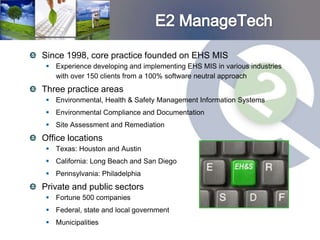
Since 1998, core practice founded on EHS MIS
  Experience developing and implementing EHS MIS in various industries
   with over 150 clients from a 100% software neutral approach
Three practice areas
  Environmental, Health & Safety Management Information Systems
  Environmental Compliance and Documentation
  Site Assessment and Remediation
Office locations
  Texas: Houston and Austin
  California: Long Beach and San Diego
  Pennsylvania: Philadelphia
Private and public sectors
  Fortune 500 companies
  Federal, state and local government
  Municipalities
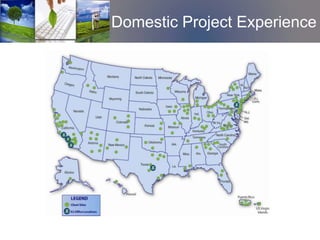
Domestic Project Experience
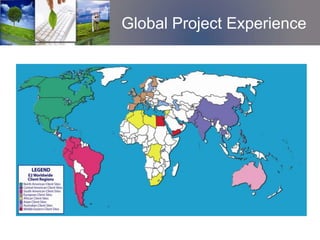
Global Project Experience
E2 provides start to finish support to EHS MIS projects with
expertise in project/program management, EHS subject
matter and information technology.

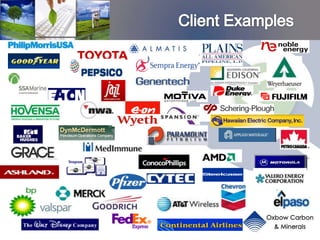
Clients are predominantly global, Fortune 1000 spanning
virtually every industry.

Examples of EHS Information Management Solutions include:
  EHS Compliance (traditional air/water/waste/incident etc)
  EHS Sustainability and Metrics (includes GHG and Carbon Foot
   printing)
  Truck Automation Reporting Systems (TARS)
  Green Remediation Systems
40+ environmental, health, safety and IT (EHS MIS)
specific staff members

Strategic resource partnerships bringing additional
3,500 resources, in 40 world wide offices, with over
900 IT staff (if needed)

Deep pool of technical resources combined with
personal, niche EHS MIS consulting
IT staff expertise
 •   Configuration and Deployment for most COTS in the EHS MIS
     marketplace
 •   Integration/interface development
 •   Business intelligence reporting
 •   General scripting and development
 •   Platform environment maintenance
 •   Many other skills
Business process subject matter expertise
 •   Business analysis
 •   Environmental, health & safety domain knowledge
 •   GHG and air emissions domain knowledge
 •   Environmental Compliance and Documentation
 •   Site assessment and remediation
Introductions

E2 ManageTech (E2)

Why Use E2 ManageTech?

EHS MIS Design Scope of Work

Discussion
1. Accelerate the process

2. Exact scope over 100 times!

3. “Yes” has shades of grey

4. Software success triangle

5. Requirement and budget optimization

6. Negotiating leverage
E2’s focused and committed
experience in this exact service
enables our clients to avoid
pitfalls, false starts and vendor
traps.


 EHS Software experience

 EHS Domain experience

 Industry experience

 Process experience
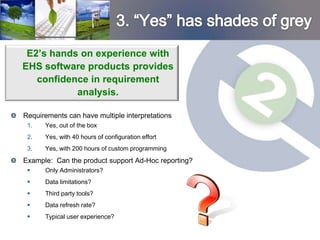
E2’s hands on experience with
EHS software products provides
   confidence in requirement
           analysis.

Requirements can have multiple interpretations
 1.   Yes, out of the box
 2.   Yes, with 40 hours of configuration effort
 3.   Yes, with 200 hours of custom programming
Example: Can the product support Ad-Hoc reporting?
     Only Administrators?
     Data limitations?
     Third party tools?
     Data refresh rate?
     Typical user experience?
4. Software Success Triangle

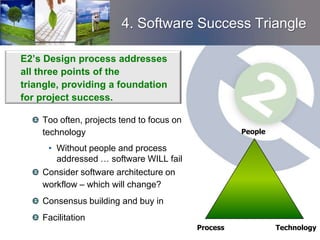
E2’s Design process addresses
all three points of the
triangle, providing a foundation
for project success.

    Too often, projects tend to focus on
    technology                                       People

      • Without people and process
        addressed … software WILL fail
    Consider software architecture on
    workflow – which will change?
    Consensus building and buy in
    Facilitation
                                           Process            Technology
E2’s philosophy is to optimize
project design based on financial
outlay.


  One product will not meet all requirements

  Prioritizing most important

  Design to fit budget

  What can be phased?

  Easy wins first
E2’s design fees are offset (at
least!) by reduced license costs.

Negotiated with nearly all vendors
What will give, what won’t
What is the bottom $
E2 routinely is engaged with the major COTS vendors --
actively working …
 As the overall implementation project management leader
 As an implementation sub-contracted resource
 As design/implementation supplemental staffing
 As implementation oversight and with product development


                                                   * COTS = commercial off-the-shelf software
Introductions

E2 ManageTech (E2)

Why use E2 ManageTech

Proposed Scope of Work

Discussion
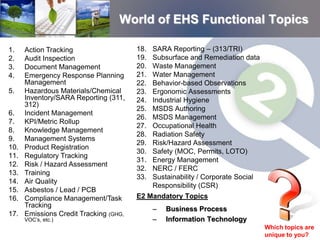
World of EHS Functional Topics

1.    Action Tracking                   18.   SARA Reporting – (313/TRI)
2.    Audit Inspection                  19.   Subsurface and Remediation data
3.    Document Management               20.   Waste Management
4.    Emergency Response Planning       21.   Water Management
      Management                        22.   Behavior-based Observations
5.    Hazardous Materials/Chemical      23.   Ergonomic Assessments
      Inventory/SARA Reporting (311,    24.   Industrial Hygiene
      312)
                                        25.   MSDS Authoring
6.    Incident Management
                                        26.   MSDS Management
7.    KPI/Metric Rollup
                                        27.   Occupational Health
8.    Knowledge Management
                                        28.   Radiation Safety
9.    Management Systems
                                        29.   Risk/Hazard Assessment
10.   Product Registration
                                        30.   Safety (MOC, Permits, LOTO)
11.   Regulatory Tracking
                                        31.   Energy Management
12.   Risk / Hazard Assessment
                                        32.   NERC / FERC
13.   Training
                                        33.   Sustainability / Corporate Social
14.   Air Quality
                                              Responsibility (CSR)
15.   Asbestos / Lead / PCB
16.   Compliance Management/Task        E2 Mandatory Topics
      Tracking
                                              –   Business Process
17.   Emissions Credit Tracking (GHG,
      VOC’s, etc.)                            –   Information Technology
                                                                                  Which topics are
                                                                                  unique to you?
Task 1 – Requirements definition

Task 2 – Vendor screening and
evaluation

Task 3 – Cost/Benefit analysis
(optional)

Task 4 – Facilitate demos from
short-listed COTS vendors

Task 5 – Design Summary
Requirements definition workshop conducted for each
functional topic identified

Workshop participant considerations:
 Technical vs. “people management” considerations (NIH)

 Operational representation

 Geographical representation


                                 * NIH – “Not invented here” mentality
Use ARD (accelerated requirements definition)
templates
 Compilation of other clients requirement
 Use templates to accept, reject or modify others’ requirements
 Typically these templates form 65% to 85% of common user
  requirements
 Spend the balance of time on the truly unique requirements
Can also include web polls, teleconferencing to gather
information
Primary benefits: accelerate the process while
leveraging best practices from other clients.
Two additional mandatory workshops
conducted: IT and Business Process

IT Workshop:
 Define in house technical requirements

 Firewall issues, databases, platforms, etc

Business Process Workshop:
 Identify internal approval requirements to properly
  tailor deliverable
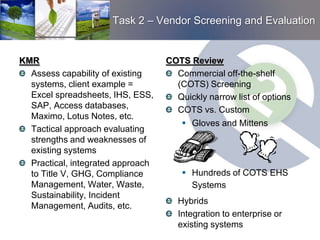
Task 2 – Vendor Screening and Evaluation


KMR                                COTS Review
  Assess capability of existing      Commercial off-the-shelf
  systems, client example =          (COTS) Screening
  Excel spreadsheets, IHS, ESS,      Quickly narrow list of options
  SAP, Access databases,             COTS vs. Custom
  Maximo, Lotus Notes, etc.
                                        Gloves and Mittens
  Tactical approach evaluating
  strengths and weaknesses of
  existing systems
  Practical, integrated approach
  to Title V, GHG, Compliance           Hundreds of COTS EHS
  Management, Water, Waste,              Systems
  Sustainability, Incident
                                      Hybrids
  Management, Audits, etc.
                                      Integration to enterprise or
                                      existing systems
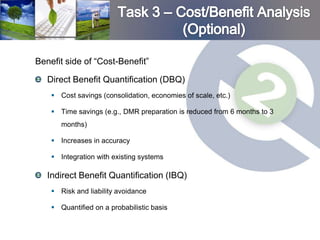
Benefit side of “Cost-Benefit”

   Direct Benefit Quantification (DBQ)
     Cost savings (consolidation, economies of scale, etc.)

     Time savings (e.g., DMR preparation is reduced from 6 months to 3
       months)

     Increases in accuracy

     Integration with existing systems

   Indirect Benefit Quantification (IBQ)
     Risk and liability avoidance

     Quantified on a probabilistic basis
Cost side of “cost-benefit”
    Software Licensing

    Initial Implementation

    Annual Renewal

    Ongoing Maintenance
Answers to specific questions:
  Go/no-go
  Optimal integration plan
  How and when to implement
Summarized in business terms
  Net Present Value (NPV)
  Payback period
  Internal Rate of Return (IRR)
  Return on Investment (ROI)
C/B time line of cash flows is the basis to reduce
costs, increase overall gains, and accelerate the
receipt of gains
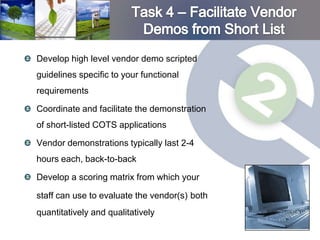
Develop high level vendor demo scripted
guidelines specific to your functional
requirements

Coordinate and facilitate the demonstration
of short-listed COTS applications

Vendor demonstrations typically last 2-4
hours each, back-to-back

Develop a scoring matrix from which your

staff can use to evaluate the vendor(s) both
quantitatively and qualitatively
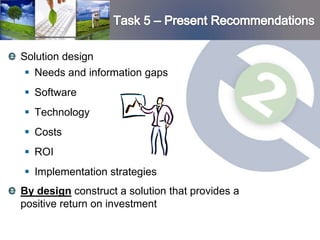
Solution design
  Needs and information gaps
 Software
 Technology
 Costs
 ROI
 Implementation strategies
By design construct a solution that provides a
positive return on investment
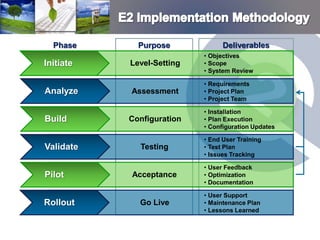
Phase      Purpose             Deliverables
                           • Objectives
Initiate   Level-Setting   • Scope
                           • System Review

                           • Requirements
Analyze    Assessment      • Project Plan
                           • Project Team

                           • Installation
Build      Configuration   • Plan Execution
                           • Configuration Updates

                           • End User Training
Validate     Testing       • Test Plan
                           • Issues Tracking

                           • User Feedback
Pilot      Acceptance      • Optimization
                           • Documentation

                           • User Support
Rollout      Go Live       • Maintenance Plan
                           • Lessons Learned
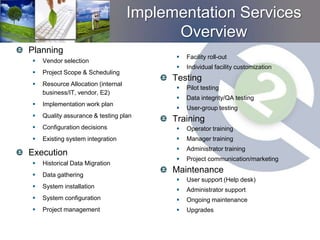
Implementation Services
                                          Overview
Planning
                                             Facility roll-out
   Vendor selection
                                             Individual facility customization
   Project Scope & Scheduling
                                          Testing
   Resource Allocation (internal
                                             Pilot testing
    business/IT, vendor, E2)
                                             Data integrity/QA testing
   Implementation work plan
                                             User-group testing
   Quality assurance & testing plan
                                          Training
   Configuration decisions                  Operator training
   Existing system integration              Manager training
                                             Administrator training
Execution
                                             Project communication/marketing
   Historical Data Migration
   Data gathering
                                          Maintenance
                                             User support (Help desk)
   System installation
                                             Administrator support
   System configuration                     Ongoing maintenance
   Project management                       Upgrades
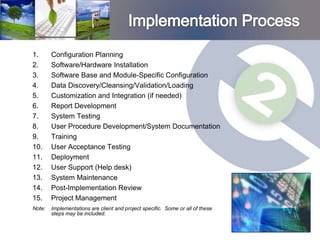
1.      Configuration Planning
2.      Software/Hardware Installation
3.      Software Base and Module-Specific Configuration
4.      Data Discovery/Cleansing/Validation/Loading
5.      Customization and Integration (if needed)
6.      Report Development
7.      System Testing
8.      User Procedure Development/System Documentation
9.      Training
10.     User Acceptance Testing
11.     Deployment
12.     User Support (Help desk)
13.     System Maintenance
14.     Post-Implementation Review
15.     Project Management
Note:   Implementations are client and project specific. Some or all of these
        steps may be included.
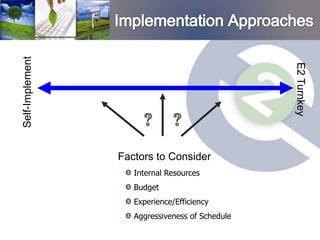
Self-Implement


                                                 E2 Turnkey
                 Factors to Consider
                    Internal Resources
                    Budget
                    Experience/Efficiency
                    Aggressiveness of Schedule
Introductions

E2 ManageTech (E2)

Why Use E2 ManageTech?

EHS MIS Design Scope of Work

Discussion – Next Steps?

E2 Manage Tech Design Implementation General 2010

  • 1.
    Technology. Management. Solutions. "It’sall in the people and the process..."
  • 2.
    Introductions E2 ManageTech (E2) WhyUse E2 ManageTech? EHS MIS Design Scope of Work Discussion
  • 3.
    Prospective Client EHSMIS team  Contact person #1  Contact person #2 E2 ManageTech  Brad Wilson
  • 4.
    Option 1 Advantages Disadvantages Custom develop • Utilize in-house resources • Lessons learned and software with • Design per in-house industry knowledge are not internal resources standards and business leveraged model • Internal resources may have • Customize to complement other commitments or limited existing software and legacy expertise; drain on internal systems EHS and IT resources • Development and testing time can be substantial • Difficult to keep up with technology advances; must shoulder all upgrade costs • System knowledge retention at risk with employee turnover
  • 5.
    What are yourEHS MIS Options Option 2 Advantages Disadvantages Custom develop • Customized look & feel to • Lessons learned and software with complement existing software industry knowledge are external systems substantially reduced resources • Development time will be substantial • Drains on EHS resources • Cost is substantially higher than COTS • Recurring costs for upgrades shouldered by client
  • 6.
    Option 3 Advantages Disadvantages Purchase COTS • Software purchase cost is • Lessons learned and and implement typically less than software industry knowledge are not internally development costs leveraged • May be able to use in-house • Internal resources may resources for implementation have other commitments or • Successful implementation will limited expertise; drain on produce knowledgeable users internal EHS and IT resources • Substantially increased risk of implementation failure
  • 7.
    EHS MIS Options(con’t) Option 4 Advantages Disadvantages 3rd party to help • EHS & IT subject matter • Need to screen 3rd parties design, select expertise. for successful past and implement • COTS market knowledge performance best fit COTS – • Long standing, current • External costs higher than relative to your relationships with COTS products internal implementation needs & their technology • Knowledge transfer of • Standardized approaches and internal information to 3rd systematic methods to facilitate party. but does not reflect implementations improved use of in-house • Understanding of typical industry resources software license/lease arrangements • Significant reduction in time to selection and procurement • Increased chance of proper COTS selection * COTS = commercial off-the-shelf software
  • 8.
    Introductions E2 ManageTech (E2) WhyUse E2 ManageTech? EHS MIS Design Scope of Work Discussion
  • 9.
    Introductions E2 ManageTech (E2) WhyUse E2 ManageTech? EHS MIS Design Scope of Work Discussion
  • 10.
    Since 1998, corepractice founded on EHS MIS  Experience developing and implementing EHS MIS in various industries with over 150 clients from a 100% software neutral approach Three practice areas  Environmental, Health & Safety Management Information Systems  Environmental Compliance and Documentation  Site Assessment and Remediation Office locations  Texas: Houston and Austin  California: Long Beach and San Diego  Pennsylvania: Philadelphia Private and public sectors  Fortune 500 companies  Federal, state and local government  Municipalities
  • 12.
  • 13.
  • 14.
    E2 provides startto finish support to EHS MIS projects with expertise in project/program management, EHS subject matter and information technology. Clients are predominantly global, Fortune 1000 spanning virtually every industry. Examples of EHS Information Management Solutions include:  EHS Compliance (traditional air/water/waste/incident etc)  EHS Sustainability and Metrics (includes GHG and Carbon Foot printing)  Truck Automation Reporting Systems (TARS)  Green Remediation Systems
  • 15.
    40+ environmental, health,safety and IT (EHS MIS) specific staff members Strategic resource partnerships bringing additional 3,500 resources, in 40 world wide offices, with over 900 IT staff (if needed) Deep pool of technical resources combined with personal, niche EHS MIS consulting
  • 16.
    IT staff expertise • Configuration and Deployment for most COTS in the EHS MIS marketplace • Integration/interface development • Business intelligence reporting • General scripting and development • Platform environment maintenance • Many other skills Business process subject matter expertise • Business analysis • Environmental, health & safety domain knowledge • GHG and air emissions domain knowledge • Environmental Compliance and Documentation • Site assessment and remediation
  • 17.
    Introductions E2 ManageTech (E2) WhyUse E2 ManageTech? EHS MIS Design Scope of Work Discussion
  • 18.
    1. Accelerate theprocess 2. Exact scope over 100 times! 3. “Yes” has shades of grey 4. Software success triangle 5. Requirement and budget optimization 6. Negotiating leverage
  • 19.
    E2’s focused andcommitted experience in this exact service enables our clients to avoid pitfalls, false starts and vendor traps. EHS Software experience EHS Domain experience Industry experience Process experience
  • 20.
    E2’s hands onexperience with EHS software products provides confidence in requirement analysis. Requirements can have multiple interpretations 1. Yes, out of the box 2. Yes, with 40 hours of configuration effort 3. Yes, with 200 hours of custom programming Example: Can the product support Ad-Hoc reporting?  Only Administrators?  Data limitations?  Third party tools?  Data refresh rate?  Typical user experience?
  • 21.
    4. Software SuccessTriangle E2’s Design process addresses all three points of the triangle, providing a foundation for project success. Too often, projects tend to focus on technology People • Without people and process addressed … software WILL fail Consider software architecture on workflow – which will change? Consensus building and buy in Facilitation Process Technology
  • 22.
    E2’s philosophy isto optimize project design based on financial outlay. One product will not meet all requirements Prioritizing most important Design to fit budget What can be phased? Easy wins first
  • 23.
    E2’s design feesare offset (at least!) by reduced license costs. Negotiated with nearly all vendors What will give, what won’t What is the bottom $ E2 routinely is engaged with the major COTS vendors -- actively working …  As the overall implementation project management leader  As an implementation sub-contracted resource  As design/implementation supplemental staffing  As implementation oversight and with product development * COTS = commercial off-the-shelf software
  • 24.
    Introductions E2 ManageTech (E2) Whyuse E2 ManageTech Proposed Scope of Work Discussion
  • 25.
    World of EHSFunctional Topics 1. Action Tracking 18. SARA Reporting – (313/TRI) 2. Audit Inspection 19. Subsurface and Remediation data 3. Document Management 20. Waste Management 4. Emergency Response Planning 21. Water Management Management 22. Behavior-based Observations 5. Hazardous Materials/Chemical 23. Ergonomic Assessments Inventory/SARA Reporting (311, 24. Industrial Hygiene 312) 25. MSDS Authoring 6. Incident Management 26. MSDS Management 7. KPI/Metric Rollup 27. Occupational Health 8. Knowledge Management 28. Radiation Safety 9. Management Systems 29. Risk/Hazard Assessment 10. Product Registration 30. Safety (MOC, Permits, LOTO) 11. Regulatory Tracking 31. Energy Management 12. Risk / Hazard Assessment 32. NERC / FERC 13. Training 33. Sustainability / Corporate Social 14. Air Quality Responsibility (CSR) 15. Asbestos / Lead / PCB 16. Compliance Management/Task E2 Mandatory Topics Tracking – Business Process 17. Emissions Credit Tracking (GHG, VOC’s, etc.) – Information Technology Which topics are unique to you?
  • 26.
    Task 1 –Requirements definition Task 2 – Vendor screening and evaluation Task 3 – Cost/Benefit analysis (optional) Task 4 – Facilitate demos from short-listed COTS vendors Task 5 – Design Summary
  • 27.
    Requirements definition workshopconducted for each functional topic identified Workshop participant considerations:  Technical vs. “people management” considerations (NIH)  Operational representation  Geographical representation * NIH – “Not invented here” mentality
  • 28.
    Use ARD (acceleratedrequirements definition) templates  Compilation of other clients requirement  Use templates to accept, reject or modify others’ requirements  Typically these templates form 65% to 85% of common user requirements  Spend the balance of time on the truly unique requirements Can also include web polls, teleconferencing to gather information Primary benefits: accelerate the process while leveraging best practices from other clients.
  • 29.
    Two additional mandatoryworkshops conducted: IT and Business Process IT Workshop:  Define in house technical requirements  Firewall issues, databases, platforms, etc Business Process Workshop:  Identify internal approval requirements to properly tailor deliverable
  • 30.
    Task 2 –Vendor Screening and Evaluation KMR COTS Review Assess capability of existing Commercial off-the-shelf systems, client example = (COTS) Screening Excel spreadsheets, IHS, ESS, Quickly narrow list of options SAP, Access databases, COTS vs. Custom Maximo, Lotus Notes, etc.  Gloves and Mittens Tactical approach evaluating strengths and weaknesses of existing systems Practical, integrated approach to Title V, GHG, Compliance  Hundreds of COTS EHS Management, Water, Waste, Systems Sustainability, Incident Hybrids Management, Audits, etc. Integration to enterprise or existing systems
  • 31.
    Benefit side of“Cost-Benefit” Direct Benefit Quantification (DBQ)  Cost savings (consolidation, economies of scale, etc.)  Time savings (e.g., DMR preparation is reduced from 6 months to 3 months)  Increases in accuracy  Integration with existing systems Indirect Benefit Quantification (IBQ)  Risk and liability avoidance  Quantified on a probabilistic basis
  • 32.
    Cost side of“cost-benefit” Software Licensing Initial Implementation Annual Renewal Ongoing Maintenance
  • 33.
    Answers to specificquestions:  Go/no-go  Optimal integration plan  How and when to implement Summarized in business terms  Net Present Value (NPV)  Payback period  Internal Rate of Return (IRR)  Return on Investment (ROI) C/B time line of cash flows is the basis to reduce costs, increase overall gains, and accelerate the receipt of gains
  • 34.
    Develop high levelvendor demo scripted guidelines specific to your functional requirements Coordinate and facilitate the demonstration of short-listed COTS applications Vendor demonstrations typically last 2-4 hours each, back-to-back Develop a scoring matrix from which your staff can use to evaluate the vendor(s) both quantitatively and qualitatively
  • 35.
    Solution design Needs and information gaps  Software  Technology  Costs  ROI  Implementation strategies By design construct a solution that provides a positive return on investment
  • 36.
    Phase Purpose Deliverables • Objectives Initiate Level-Setting • Scope • System Review • Requirements Analyze Assessment • Project Plan • Project Team • Installation Build Configuration • Plan Execution • Configuration Updates • End User Training Validate Testing • Test Plan • Issues Tracking • User Feedback Pilot Acceptance • Optimization • Documentation • User Support Rollout Go Live • Maintenance Plan • Lessons Learned
  • 37.
    Implementation Services Overview Planning  Facility roll-out  Vendor selection  Individual facility customization  Project Scope & Scheduling Testing  Resource Allocation (internal  Pilot testing business/IT, vendor, E2)  Data integrity/QA testing  Implementation work plan  User-group testing  Quality assurance & testing plan Training  Configuration decisions  Operator training  Existing system integration  Manager training  Administrator training Execution  Project communication/marketing  Historical Data Migration  Data gathering Maintenance  User support (Help desk)  System installation  Administrator support  System configuration  Ongoing maintenance  Project management  Upgrades
  • 38.
    1. Configuration Planning 2. Software/Hardware Installation 3. Software Base and Module-Specific Configuration 4. Data Discovery/Cleansing/Validation/Loading 5. Customization and Integration (if needed) 6. Report Development 7. System Testing 8. User Procedure Development/System Documentation 9. Training 10. User Acceptance Testing 11. Deployment 12. User Support (Help desk) 13. System Maintenance 14. Post-Implementation Review 15. Project Management Note: Implementations are client and project specific. Some or all of these steps may be included.
  • 39.
    Self-Implement E2 Turnkey Factors to Consider Internal Resources Budget Experience/Efficiency Aggressiveness of Schedule
  • 40.
    Introductions E2 ManageTech (E2) WhyUse E2 ManageTech? EHS MIS Design Scope of Work Discussion – Next Steps?