Drug Glossaries

  There are several ways to make a
 glossary. This will create an empty
glossary. Each time you encounter a
 drug not in your glossary, take time
   to add it. Use this glossary as an
  include anytime you need a drug
                glossary.
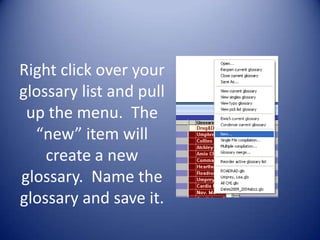
Right click over your
glossary list and pull
 up the menu. The
  “new” item will
    create a new
glossary. Name the
glossary and save it.
Research Once

• My goal is to research a drug once
  and enter it in Instant Text with
  enough information that I don’t need
  to look it up again as all the
  information I need is at my
  fingertips.
Single letter shorts
• For all my drug shorts I use a single letter. This
  will pull up the entry in the Words advisory.
  As long as you get the first letter correct and
  the following letters in the correct sequence,
  you can pull up the drug without
  remembering the exact spelling.
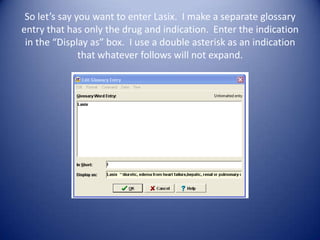
So let’s say you want to enter Lasix. I make a separate glossary
entry that has only the drug and indication. Enter the indication
 in the “Display as” box. I use a double asterisk as an indication
               that whatever follows will not expand.
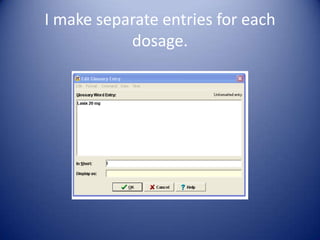
I make separate entries for each
           dosage.
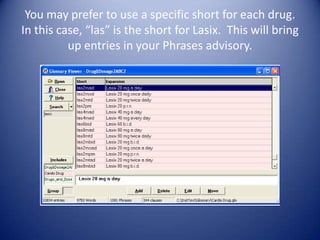
You may prefer to use a specific short for each drug.
In this case, “las” is the short for Lasix. This will bring
          up entries in your Phrases advisory.
You have options!
• You may find you like having drug entries in
  both your Word and Phrase advisories. There
  is no right or wrong way. Just be sure each
  entry is accurate. Once it is entered, chances
  are good you won’t need to research that drug
  again.
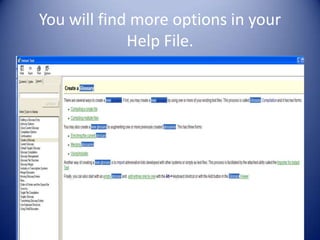
You will find more options in your
             Help File.
Just do it!
• You will get out of Instant Text what
     you put into it. It will require an
   initial investment of time, but that
    investment will pay off down the
 road. The most important thing is to
               try something!

Drug glossaries

  • 1.
    Drug Glossaries There are several ways to make a glossary. This will create an empty glossary. Each time you encounter a drug not in your glossary, take time to add it. Use this glossary as an include anytime you need a drug glossary.
  • 2.
    Right click overyour glossary list and pull up the menu. The “new” item will create a new glossary. Name the glossary and save it.
  • 3.
    Research Once • Mygoal is to research a drug once and enter it in Instant Text with enough information that I don’t need to look it up again as all the information I need is at my fingertips.
  • 4.
    Single letter shorts •For all my drug shorts I use a single letter. This will pull up the entry in the Words advisory. As long as you get the first letter correct and the following letters in the correct sequence, you can pull up the drug without remembering the exact spelling.
  • 5.
    So let’s sayyou want to enter Lasix. I make a separate glossary entry that has only the drug and indication. Enter the indication in the “Display as” box. I use a double asterisk as an indication that whatever follows will not expand.
  • 6.
    I make separateentries for each dosage.
  • 7.
    You may preferto use a specific short for each drug. In this case, “las” is the short for Lasix. This will bring up entries in your Phrases advisory.
  • 8.
    You have options! •You may find you like having drug entries in both your Word and Phrase advisories. There is no right or wrong way. Just be sure each entry is accurate. Once it is entered, chances are good you won’t need to research that drug again.
  • 9.
    You will findmore options in your Help File.
  • 10.
    Just do it! •You will get out of Instant Text what you put into it. It will require an initial investment of time, but that investment will pay off down the road. The most important thing is to try something!

Editor's Notes

  • #9 Created by Karen Gerlitz