Django on GAE course


                           Course summary


Version 0.1, 13-May-2010
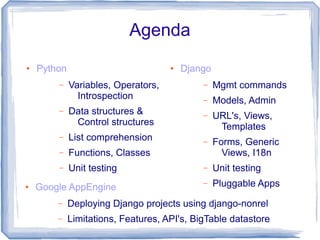
Agenda
●   Python                           ●   Django
        –    Variables, Operators,           –    Mgmt commands
               Introspection                 –    Models, Admin
        –    Data structures &               –    URL's, Views,
              Control structures                   Templates
        –    List comprehension              –    Forms, Generic
        –    Functions, Classes                     Views, I18n
        –    Unit testing                    –    Unit testing
●   Google AppEngine                         –    Pluggable Apps
        –    Deploying Django projects using django-nonrel
        –    Limitations, Features, API's, BigTable datastore
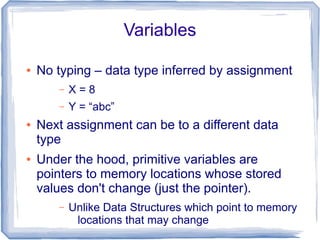
Variables

●   No typing – data type inferred by assignment
       –   X=8
       –   Y = “abc”
●   Next assignment can be to a different data
    type
●   Under the hood, primitive variables are
    pointers to memory locations whose stored
    values don't change (just the pointer).
       –   Unlike Data Structures which point to memory
            locations that may change
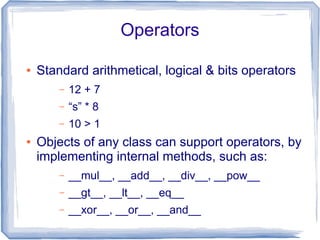
Operators

●   Standard arithmetical, logical & bits operators
        –   12 + 7
        –   “s” * 8
        –   10 > 1
●   Objects of any class can support operators, by
    implementing internal methods, such as:
        –   __mul__, __add__, __div__, __pow__
        –   __gt__, __lt__, __eq__
        –   __xor__, __or__, __and__
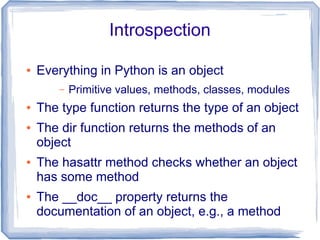
Introspection

●   Everything in Python is an object
        –   Primitive values, methods, classes, modules
●   The type function returns the type of an object
●   The dir function returns the methods of an
    object
●   The hasattr method checks whether an object
    has some method
●   The __doc__ property returns the
    documentation of an object, e.g., a method
Data Structures

●   There are 4 main types:
       –   Lists: ordered collection of variables, of any
             type
               ●   l = [21, “ac”, 3.12, 21]
       –   Tuples: just like lists, but immutable
               ●   t = (21, “ac”, 3.12, 21)
       –   Dictionary (map): set of key-value pairs
               ●   d = {“x”: 12, “abc”: “de”, 12: “hh”}
       –   Set: unordered collection of unique variables
               ●   S = {21, “ac”, 3.12}
List Comprehension

●   Useful way to transform a collection into
    another
        –   e.g., suppose we want to multiply each
              element of a list by 2:
                ●   list2 = [x*2 for x in list1]
        –   We can also add condition filtering the
             elements, e.g., remove odd elements:
                ●   list2 = [x*2 for x in list1 if x mod 2 == 0]
        –   List comprehension can be nested too:
                ●   List3 = [x*2 for x in list2 for list2 in list1]
Unpacking

●   Unpacking means assigning the contents of a
    collection into stand-alone variables
       –   E.g., you can do:
                ●   x, y, z = [56, “bb”, 7]
●   There's also an operator for unpacking a
    sequence - * - e.g.:
       –   head, *tail = [87, 98, “kk”, 9.8]
                ●   head will contain 87, & tail: [98, “kk”, 9.8]
       –   first, *mid, last = “Charles Philip Arthur George
              Windsor”.split()
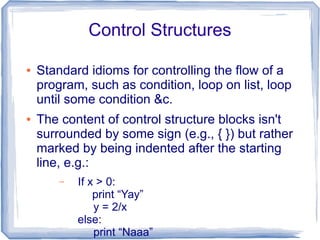
Control Structures

●   Standard idioms for controlling the flow of a
    program, such as condition, loop on list, loop
    until some condition &c.
●   The content of control structure blocks isn't
    surrounded by some sign (e.g., { }) but rather
    marked by being indented after the starting
    line, e.g.:
        –   If x > 0:
                print “Yay”
                y = 2/x
            else:
                print “Naaa”
Loops

●   Looping on lists is done like this:
        –   for el in li:
                 print el
        –   for i in range(10):
                  print i
●   You can also use unpacking:
        –     li = [(1, “w”), (2, “b”), (3, “f”)]
              for i, c in li:
                  print i, “=”, c
        –     for i, el in enumerate(list1):
                 print i, “ = “, el
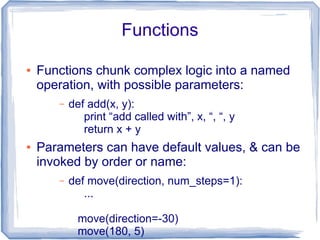
Functions

●   Functions chunk complex logic into a named
    operation, with possible parameters:
       –   def add(x, y):
              print “add called with”, x, “, “, y
              return x + y
●   Parameters can have default values, & can be
    invoked by order or name:
       –   def move(direction, num_steps=1):
              ...

             move(direction=-30)
             move(180, 5)
Classes
String Formatting
Unit Testing
Reading from the Web
Files IO
Useful Libraries
Summary Examples in Shell
Management Commands

●   To start a project, run the startproject
    command:
        –   django-admin.py startproject myproj
●   Inside this folder, create a Pluggable App:
        –   python manage.py startapp myapp
●   To create the DB (configured it in settings.py):
        –   python manage.py syncdb
●   Now run the server:
        –   python manage.py runserver
Models

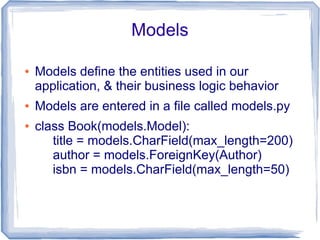
●   Models define the entities used in our
    application, & their business logic behavior
●   Models are entered in a file called models.py
●   class Book(models.Model):
       title = models.CharField(max_length=200)
       author = models.ForeignKey(Author)
       isbn = models.CharField(max_length=50)
Admin

●   Django arrives with an app for generating
    high-quality data entry GUI for your models
●   You need to add metadata for the admin app
    in a file called admin.py
       –   The file should contain a metadata class per
            any model entity you'll need to edit:
       –   class BookAdmin(admin.ModelAdmin):
               list_display = [“isbn”, “title”, “author”]
               search_fields = [“isbn”, “title”]
               list_filter = [“author”]
               ordering = [“author”, “title”]
URL's Configuration

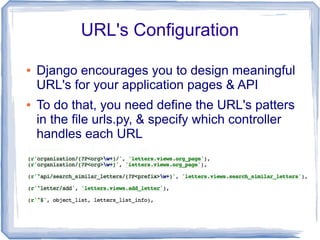
●   Django encourages you to design meaningful
    URL's for your application pages & API
●   To do that, you need define the URL's patters
    in the file urls.py, & specify which controller
    handles each URL
Views

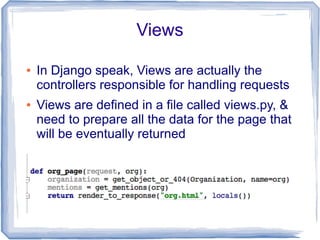
●   In Django speak, Views are actually the
    controllers responsible for handling requests
●   Views are defined in a file called views.py, &
    need to prepare all the data for the page that
    will be eventually returned
Templates

●   To actually render the result page, using the
    data prepared by the view, you need to write
    Templates
●   Templates are located in 1 or more folders,
    listed in the settings file
●   In order to maintain the DRY (Don't Repeat
    Yourself) principle, templates can inherit one
    another, in order for each one to add or
    override another, without duplicating anything
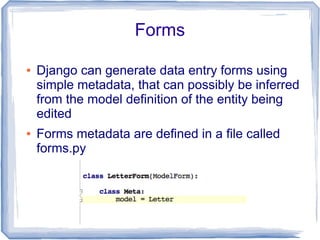
Forms

●   Django can generate data entry forms using
    simple metadata, that can possibly be inferred
    from the model definition of the entity being
    edited
●   Forms metadata are defined in a file called
    forms.py
Generic Views

●   Some views repeat themselves, so Django
    offers several basic views that can replace
    them, with parameters, such as:
        –   direct_to_template: view that just returns some
              template
        –   object_list: view that lists entities received by
             some query
        –   object_detail: view that presents the details of
             some entity
●   The parameters for a generic view are
    provided as a dictionary
I18n

●   Django makes it easy to offer your application
    in several languages. To do that:
        –   Wrap the strings you want to translate in your
             code with a special function (ugettext in
             code, of trans in templates)
        –   Run: python manage.py makemessages-l he
                ●   This will generate a file containing the strings
                     you need to translate
        –   Translate the .po file generated
        –   Run: python manage.py compile messages
        –   You can now switch language in the settings,
             or let the user switch language
Unit Testing

●   There are several ways to prepare unit tests
    for your Django code, in order to be able to
    monitor that nothing got broken following
    some code change.
●   A nice way is to invoke a view – without having
    s running server - & test its output or the
    model embedded inside it
        –   See the example test developed in the class
●   To run all tests defined in some app, run:
        –   python manage.py test myapp
Pluggable Apps
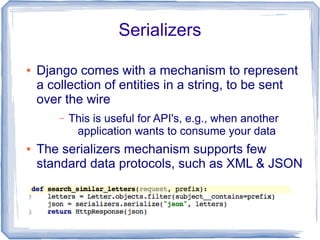
Serializers

●   Django comes with a mechanism to represent
    a collection of entities in a string, to be sent
    over the wire
        –   This is useful for API's, e.g., when another
             application wants to consume your data
●   The serializers mechanism supports few
    standard data protocols, such as XML & JSON
Reverse URL
Absolute URL
Settings
Serving Static Files
Dumping & Loading Data
Deploying using django-nonrel
Limitations
Features
API's
BigTable Datastore

Django course summary

  • 1.
    Django on GAEcourse Course summary Version 0.1, 13-May-2010
  • 2.
    Agenda ● Python ● Django – Variables, Operators, – Mgmt commands Introspection – Models, Admin – Data structures & – URL's, Views, Control structures Templates – List comprehension – Forms, Generic – Functions, Classes Views, I18n – Unit testing – Unit testing ● Google AppEngine – Pluggable Apps – Deploying Django projects using django-nonrel – Limitations, Features, API's, BigTable datastore
  • 4.
    Variables ● No typing – data type inferred by assignment – X=8 – Y = “abc” ● Next assignment can be to a different data type ● Under the hood, primitive variables are pointers to memory locations whose stored values don't change (just the pointer). – Unlike Data Structures which point to memory locations that may change
  • 5.
    Operators ● Standard arithmetical, logical & bits operators – 12 + 7 – “s” * 8 – 10 > 1 ● Objects of any class can support operators, by implementing internal methods, such as: – __mul__, __add__, __div__, __pow__ – __gt__, __lt__, __eq__ – __xor__, __or__, __and__
  • 6.
    Introspection ● Everything in Python is an object – Primitive values, methods, classes, modules ● The type function returns the type of an object ● The dir function returns the methods of an object ● The hasattr method checks whether an object has some method ● The __doc__ property returns the documentation of an object, e.g., a method
  • 7.
    Data Structures ● There are 4 main types: – Lists: ordered collection of variables, of any type ● l = [21, “ac”, 3.12, 21] – Tuples: just like lists, but immutable ● t = (21, “ac”, 3.12, 21) – Dictionary (map): set of key-value pairs ● d = {“x”: 12, “abc”: “de”, 12: “hh”} – Set: unordered collection of unique variables ● S = {21, “ac”, 3.12}
  • 8.
    List Comprehension ● Useful way to transform a collection into another – e.g., suppose we want to multiply each element of a list by 2: ● list2 = [x*2 for x in list1] – We can also add condition filtering the elements, e.g., remove odd elements: ● list2 = [x*2 for x in list1 if x mod 2 == 0] – List comprehension can be nested too: ● List3 = [x*2 for x in list2 for list2 in list1]
  • 9.
    Unpacking ● Unpacking means assigning the contents of a collection into stand-alone variables – E.g., you can do: ● x, y, z = [56, “bb”, 7] ● There's also an operator for unpacking a sequence - * - e.g.: – head, *tail = [87, 98, “kk”, 9.8] ● head will contain 87, & tail: [98, “kk”, 9.8] – first, *mid, last = “Charles Philip Arthur George Windsor”.split()
  • 10.
    Control Structures ● Standard idioms for controlling the flow of a program, such as condition, loop on list, loop until some condition &c. ● The content of control structure blocks isn't surrounded by some sign (e.g., { }) but rather marked by being indented after the starting line, e.g.: – If x > 0: print “Yay” y = 2/x else: print “Naaa”
  • 11.
    Loops ● Looping on lists is done like this: – for el in li: print el – for i in range(10): print i ● You can also use unpacking: – li = [(1, “w”), (2, “b”), (3, “f”)] for i, c in li: print i, “=”, c – for i, el in enumerate(list1): print i, “ = “, el
  • 12.
    Functions ● Functions chunk complex logic into a named operation, with possible parameters: – def add(x, y): print “add called with”, x, “, “, y return x + y ● Parameters can have default values, & can be invoked by order or name: – def move(direction, num_steps=1): ... move(direction=-30) move(180, 5)
  • 13.
  • 14.
  • 15.
  • 16.
  • 17.
  • 18.
  • 19.
  • 23.
    Management Commands ● To start a project, run the startproject command: – django-admin.py startproject myproj ● Inside this folder, create a Pluggable App: – python manage.py startapp myapp ● To create the DB (configured it in settings.py): – python manage.py syncdb ● Now run the server: – python manage.py runserver
  • 24.
    Models ● Models define the entities used in our application, & their business logic behavior ● Models are entered in a file called models.py ● class Book(models.Model): title = models.CharField(max_length=200) author = models.ForeignKey(Author) isbn = models.CharField(max_length=50)
  • 25.
    Admin ● Django arrives with an app for generating high-quality data entry GUI for your models ● You need to add metadata for the admin app in a file called admin.py – The file should contain a metadata class per any model entity you'll need to edit: – class BookAdmin(admin.ModelAdmin): list_display = [“isbn”, “title”, “author”] search_fields = [“isbn”, “title”] list_filter = [“author”] ordering = [“author”, “title”]
  • 26.
    URL's Configuration ● Django encourages you to design meaningful URL's for your application pages & API ● To do that, you need define the URL's patters in the file urls.py, & specify which controller handles each URL
  • 27.
    Views ● In Django speak, Views are actually the controllers responsible for handling requests ● Views are defined in a file called views.py, & need to prepare all the data for the page that will be eventually returned
  • 28.
    Templates ● To actually render the result page, using the data prepared by the view, you need to write Templates ● Templates are located in 1 or more folders, listed in the settings file ● In order to maintain the DRY (Don't Repeat Yourself) principle, templates can inherit one another, in order for each one to add or override another, without duplicating anything
  • 29.
    Forms ● Django can generate data entry forms using simple metadata, that can possibly be inferred from the model definition of the entity being edited ● Forms metadata are defined in a file called forms.py
  • 30.
    Generic Views ● Some views repeat themselves, so Django offers several basic views that can replace them, with parameters, such as: – direct_to_template: view that just returns some template – object_list: view that lists entities received by some query – object_detail: view that presents the details of some entity ● The parameters for a generic view are provided as a dictionary
  • 31.
    I18n ● Django makes it easy to offer your application in several languages. To do that: – Wrap the strings you want to translate in your code with a special function (ugettext in code, of trans in templates) – Run: python manage.py makemessages-l he ● This will generate a file containing the strings you need to translate – Translate the .po file generated – Run: python manage.py compile messages – You can now switch language in the settings, or let the user switch language
  • 32.
    Unit Testing ● There are several ways to prepare unit tests for your Django code, in order to be able to monitor that nothing got broken following some code change. ● A nice way is to invoke a view – without having s running server - & test its output or the model embedded inside it – See the example test developed in the class ● To run all tests defined in some app, run: – python manage.py test myapp
  • 33.
  • 34.
    Serializers ● Django comes with a mechanism to represent a collection of entities in a string, to be sent over the wire – This is useful for API's, e.g., when another application wants to consume your data ● The serializers mechanism supports few standard data protocols, such as XML & JSON
  • 35.
  • 36.
  • 37.
  • 38.
  • 39.
  • 41.
  • 42.
  • 43.
  • 44.
  • 45.