
Django is a high-level Python Web framework that 
encourages rapid development, pragmatic design and follows 
DRY principles. 
By Abhijeet Shekhar 
Blog: http://ashekhar.wordpress.com
Features 
• Legacy DB 
• Test Framework 
• Multi- DB 
• Geodjango 
• Aggregation 
• JSON Serializer 
• Stable API Promise 
• Fantastic Docs 
• Generic View 
• Template Inheritance 
• Template Filters 
• Humanize 
• Runs on Jython /Iron 
Python 
• Google App Engine
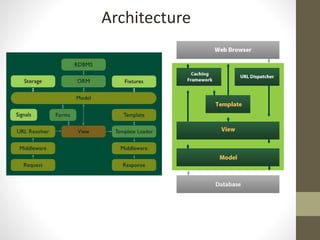
Architecture
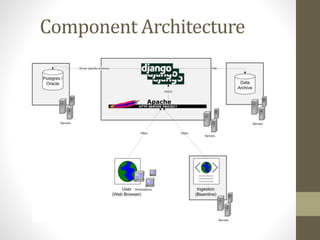
Component Architecture
Django is MTV/MVP framework 
-Model 
(app/models.py 
-Template 
( app/templates/*.html) 
-View (app/view.py)
Project Structure 
-project= the full website 
app=python library 
-Sample 
--__init__.py 
--settings.py 
--urls.py 
--wsgi.py 
-app-1 
--_init_.py 
--admin.py 
--models.py 
--tests.py 
--urls.py 
--view.py 
-app-2 
template/ 
manage.py 
env/ 
readme
Environment setup and installation 
Standard installation: 
• Content will be stored in the default location of 
python 
Virtual installation: 
• All dependent library can be installed in the virtual 
environment. 
• one project will be one virtualenv. 
• Every project with different dependencies in terms 
of libraries and version. 
• Easier to deploy and forget dependency 
• Virtualenvwrapper is a convenient
Steps to create a project 
• Create a project 
• Start an application 
• Create your database(Mysql, Post gre) 
• Configure DB settings in settings.py 
• Define your models 
• Add external modules 
• Add your template 
• Write your view 
• Create url mappping 
• Test application 
• Deploy application (linux apache , mod 
python
Initialize Your Project 
$ django-admin.py startproject <project_name> 
$ cd <project_name> 
$ Python manage.py startapp my 
$ edit settings.py and set DB info 
$ python manage.py runserver 
Browse http://localhost:8000
Settings: 
-multiple setting files: 
-per environment: dev, testing, staging , 
Production Per developer (local settings, 
use the host name ) 
-all setting file must inherit from , so you can do 
INSTALLED_APPS +=(‘debug_toolbar’) 
-version control all the setting !
Fat models, thin viewer… 
-multiple setting files: 
-per environment: dev, testing, staging , production 
Per developer (local settings, use the host name ) 
-all setting file must inherit from , so you can do 
INSTALLED_APPS +=(‘debug_toolbar’) 
-version control all the setting !
Debugging 
- ipython (./mange.py shell) 
- Ipdb 
- Import ipdb 
- Ipdb.set_trace() 
- django-debug-toolbar 
- very powerful 
- use it to optimze db performance, view by view
Migration 
- South/migrate: 
- Intelligent schema & data migrations for 
Django 
- Can do backward migrations
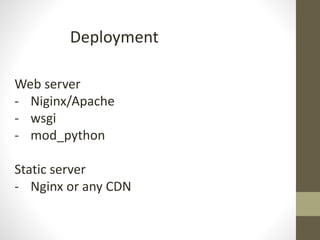
Deployment 
Web server 
- Niginx/Apache 
- wsgi 
- mod_python 
Static server 
- Nginx or any CDN
Thanks 

Django

  • 1.
    Django is ahigh-level Python Web framework that encourages rapid development, pragmatic design and follows DRY principles. By Abhijeet Shekhar Blog: http://ashekhar.wordpress.com
  • 2.
    Features • LegacyDB • Test Framework • Multi- DB • Geodjango • Aggregation • JSON Serializer • Stable API Promise • Fantastic Docs • Generic View • Template Inheritance • Template Filters • Humanize • Runs on Jython /Iron Python • Google App Engine
  • 3.
  • 4.
  • 5.
    Django is MTV/MVPframework -Model (app/models.py -Template ( app/templates/*.html) -View (app/view.py)
  • 6.
    Project Structure -project=the full website app=python library -Sample --__init__.py --settings.py --urls.py --wsgi.py -app-1 --_init_.py --admin.py --models.py --tests.py --urls.py --view.py -app-2 template/ manage.py env/ readme
  • 7.
    Environment setup andinstallation Standard installation: • Content will be stored in the default location of python Virtual installation: • All dependent library can be installed in the virtual environment. • one project will be one virtualenv. • Every project with different dependencies in terms of libraries and version. • Easier to deploy and forget dependency • Virtualenvwrapper is a convenient
  • 8.
    Steps to createa project • Create a project • Start an application • Create your database(Mysql, Post gre) • Configure DB settings in settings.py • Define your models • Add external modules • Add your template • Write your view • Create url mappping • Test application • Deploy application (linux apache , mod python
  • 9.
    Initialize Your Project $ django-admin.py startproject <project_name> $ cd <project_name> $ Python manage.py startapp my $ edit settings.py and set DB info $ python manage.py runserver Browse http://localhost:8000
  • 10.
    Settings: -multiple settingfiles: -per environment: dev, testing, staging , Production Per developer (local settings, use the host name ) -all setting file must inherit from , so you can do INSTALLED_APPS +=(‘debug_toolbar’) -version control all the setting !
  • 11.
    Fat models, thinviewer… -multiple setting files: -per environment: dev, testing, staging , production Per developer (local settings, use the host name ) -all setting file must inherit from , so you can do INSTALLED_APPS +=(‘debug_toolbar’) -version control all the setting !
  • 12.
    Debugging - ipython(./mange.py shell) - Ipdb - Import ipdb - Ipdb.set_trace() - django-debug-toolbar - very powerful - use it to optimze db performance, view by view
  • 13.
    Migration - South/migrate: - Intelligent schema & data migrations for Django - Can do backward migrations
  • 14.
    Deployment Web server - Niginx/Apache - wsgi - mod_python Static server - Nginx or any CDN
  • 15.