Apache Kafka
Real-Time Data Pipelines
http://kafka.apache.org/
Joe Stein
● Developer, Architect & Technologist
● Founder & Principal Consultant => Big Data Open Source Security LLC - http://stealth.ly
Big Data Open Source Security LLC provides professional services and product solutions for the collection,
storage, transfer, real-time analytics, batch processing and reporting for complex data streams, data sets and
distributed systems. BDOSS is all about the "glue" and helping companies to not only figure out what Big Data
Infrastructure Components to use but also how to change their existing (or build new) systems to work with
them.
● Apache Kafka Committer & PMC member
● Blog & Podcast - http://allthingshadoop.com
● Twitter @allthingshadoop
Overview
● What is Apache Kafka?
○ Data pipelines
○ Architecture
● How does Apache Kafka work?
○ Brokers
○ Producers
○ Consumers
○ Topics
○ Partitions
● How to use Apache Kafka?
○ Existing Integrations
○ Client Libraries
○ Out of the box API
○ Tools
Apache Kafka
● Apache Kafka
○ http://kafka.apache.org
● Apache Kafka Source Code
○ https://github.com/apache/kafka
● Documentation
○ http://kafka.apache.org/documentation.html
● Wiki
○ https://cwiki.apache.org/confluence/display/KAFKA/Index
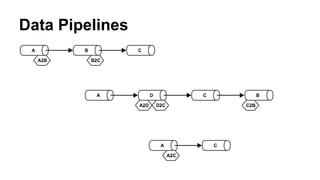
Data Pipelines
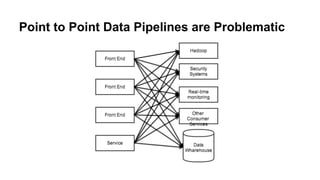
Point to Point Data Pipelines are Problematic
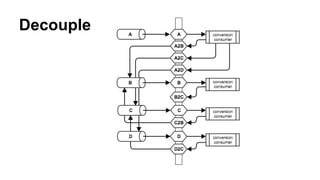
Decouple
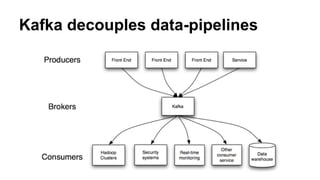
Kafka decouples data-pipelines
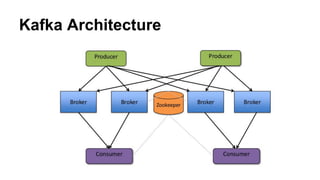
Kafka Architecture
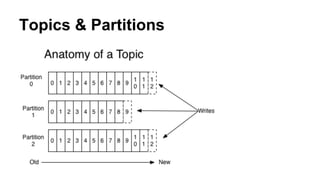
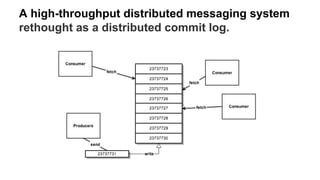
Topics & Partitions
A high-throughput distributed messaging system
rethought as a distributed commit log.
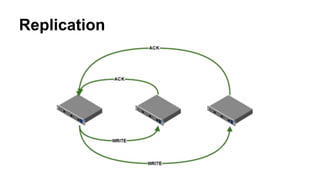
Replication
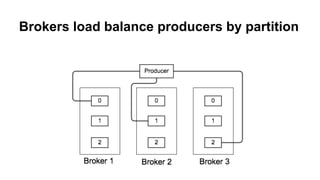
Brokers load balance producers by partition
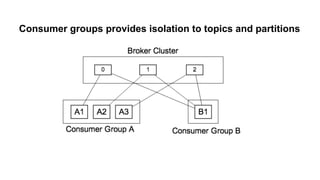
Consumer groups provides isolation to topics and partitions
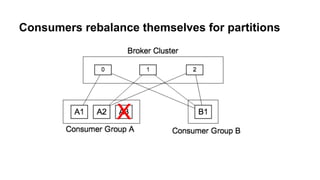
Consumers rebalance themselves for partitions
How does Kafka do all of this?
● Producers - ** push **
○ Batching
○ Compression
○ Sync (Ack), Async (auto batch)
○ Replication
○ Sequential writes, guaranteed ordering within each partition
● Consumers - ** pull **
○ No state held by broker
○ Consumers control reading from the stream
● Zero Copy for producers and consumers to and from the broker http://kafka.
apache.org/documentation.html#maximizingefficiency
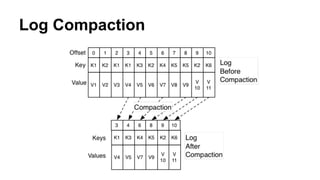
● Message stay on disk when consumed, deletes on TTL with compaction
available in 0.8.1 https://kafka.apache.org/documentation.html#compaction
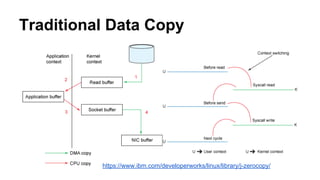
Traditional Data Copy
https://www.ibm.com/developerworks/linux/library/j-zerocopy/
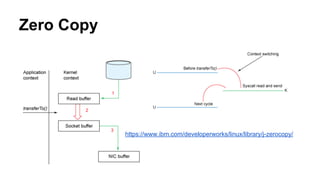
Zero Copy
https://www.ibm.com/developerworks/linux/library/j-zerocopy/
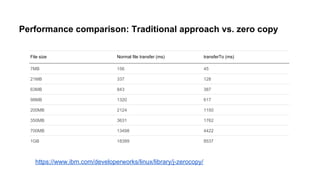
Performance comparison: Traditional approach vs. zero copy
File size Normal file transfer (ms) transferTo (ms)
7MB 156 45
21MB 337 128
63MB 843 387
98MB 1320 617
200MB 2124 1150
350MB 3631 1762
700MB 13498 4422
1GB 18399 8537
https://www.ibm.com/developerworks/linux/library/j-zerocopy/
Log Compaction
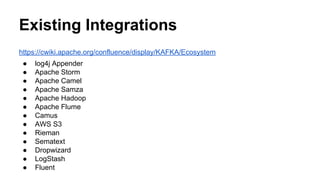
Existing Integrations
https://cwiki.apache.org/confluence/display/KAFKA/Ecosystem
● log4j Appender
● Apache Storm
● Apache Camel
● Apache Samza
● Apache Hadoop
● Apache Flume
● Camus
● AWS S3
● Rieman
● Sematext
● Dropwizard
● LogStash
● Fluent
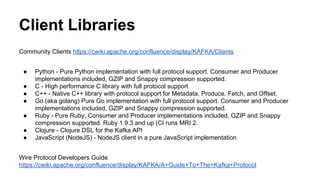
Client Libraries
Community Clients https://cwiki.apache.org/confluence/display/KAFKA/Clients
● Python - Pure Python implementation with full protocol support. Consumer and Producer
implementations included, GZIP and Snappy compression supported.
● C - High performance C library with full protocol support
● C++ - Native C++ library with protocol support for Metadata, Produce, Fetch, and Offset.
● Go (aka golang) Pure Go implementation with full protocol support. Consumer and Producer
implementations included, GZIP and Snappy compression supported.
● Ruby - Pure Ruby, Consumer and Producer implementations included, GZIP and Snappy
compression supported. Ruby 1.9.3 and up (CI runs MRI 2.
● Clojure - Clojure DSL for the Kafka API
● JavaScript (NodeJS) - NodeJS client in a pure JavaScript implementation
Wire Protocol Developers Guide
https://cwiki.apache.org/confluence/display/KAFKA/A+Guide+To+The+Kafka+Protocol
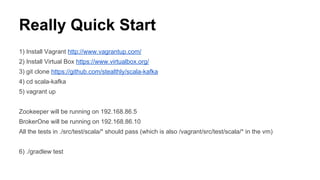
Really Quick Start
1) Install Vagrant http://www.vagrantup.com/
2) Install Virtual Box https://www.virtualbox.org/
3) git clone https://github.com/stealthly/scala-kafka
4) cd scala-kafka
5) vagrant up
Zookeeper will be running on 192.168.86.5
BrokerOne will be running on 192.168.86.10
All the tests in ./src/test/scala/* should pass (which is also /vagrant/src/test/scala/* in the vm)
6) ./gradlew test
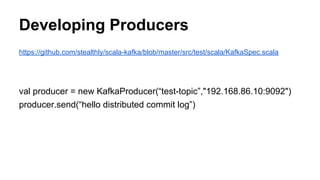
Developing Producers
https://github.com/stealthly/scala-kafka/blob/master/src/test/scala/KafkaSpec.scala
val producer = new KafkaProducer(“test-topic”,"192.168.86.10:9092")
producer.send(“hello distributed commit log”)
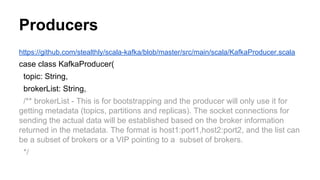
Producers
https://github.com/stealthly/scala-kafka/blob/master/src/main/scala/KafkaProducer.scala
case class KafkaProducer(
topic: String,
brokerList: String,
/** brokerList - This is for bootstrapping and the producer will only use it for
getting metadata (topics, partitions and replicas). The socket connections for
sending the actual data will be established based on the broker information
returned in the metadata. The format is host1:port1,host2:port2, and the list can
be a subset of brokers or a VIP pointing to a subset of brokers.
*/
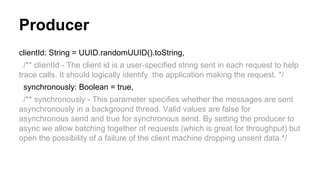
Producer
clientId: String = UUID.randomUUID().toString,
/** clientId - The client id is a user-specified string sent in each request to help
trace calls. It should logically identify the application making the request. */
synchronously: Boolean = true,
/** synchronously - This parameter specifies whether the messages are sent
asynchronously in a background thread. Valid values are false for
asynchronous send and true for synchronous send. By setting the producer to
async we allow batching together of requests (which is great for throughput) but
open the possibility of a failure of the client machine dropping unsent data.*/
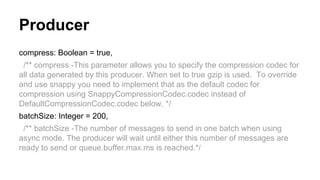
Producer
compress: Boolean = true,
/** compress -This parameter allows you to specify the compression codec for
all data generated by this producer. When set to true gzip is used. To override
and use snappy you need to implement that as the default codec for
compression using SnappyCompressionCodec.codec instead of
DefaultCompressionCodec.codec below. */
batchSize: Integer = 200,
/** batchSize -The number of messages to send in one batch when using
async mode. The producer will wait until either this number of messages are
ready to send or queue.buffer.max.ms is reached.*/
Producer
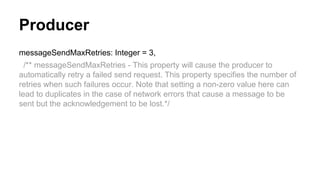
messageSendMaxRetries: Integer = 3,
/** messageSendMaxRetries - This property will cause the producer to
automatically retry a failed send request. This property specifies the number of
retries when such failures occur. Note that setting a non-zero value here can
lead to duplicates in the case of network errors that cause a message to be
sent but the acknowledgement to be lost.*/
Producer
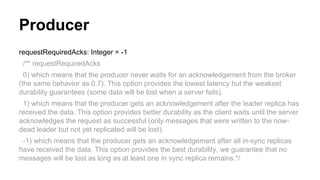
requestRequiredAcks: Integer = -1
/** requestRequiredAcks
0) which means that the producer never waits for an acknowledgement from the broker
(the same behavior as 0.7). This option provides the lowest latency but the weakest
durability guarantees (some data will be lost when a server fails).
1) which means that the producer gets an acknowledgement after the leader replica has
received the data. This option provides better durability as the client waits until the server
acknowledges the request as successful (only messages that were written to the now-
dead leader but not yet replicated will be lost).
-1) which means that the producer gets an acknowledgement after all in-sync replicas
have received the data. This option provides the best durability, we guarantee that no
messages will be lost as long as at least one in sync replica remains.*/
val props = new Properties()
val codec = if(compress) DefaultCompressionCodec.codec else NoCompressionCodec.codec
props.put("compression.codec", codec.toString)
http://kafka.apache.org/documentation.html#producerconfigs
props.put("require.requred.acks",requestRequiredAcks.toString)
val producer = new Producer[AnyRef, AnyRef](new ProducerConfig(props))
def kafkaMesssage(message: Array[Byte], partition: Array[Byte]): KeyedMessage[AnyRef, AnyRef] = {
if (partition == null) {
new KeyedMessage(topic,message)
} else {
new KeyedMessage(topic,message, partition)
}
}
Producer
Producer
def send(message: String, partition: String = null): Unit = {
send(message.getBytes("UTF8"), if (partition == null) null else partition.getBytes("UTF8"))
}
def send(message: Array[Byte], partition: Array[Byte]): Unit = {
try {
producer.send(kafkaMesssage(message, partition))
} catch {
case e: Exception =>
e.printStackTrace
System.exit(1)
}
}
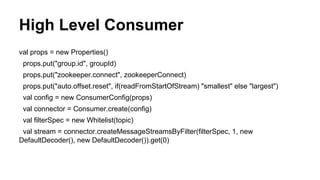
High Level Consumer
https://github.com/stealthly/scala-kafka/blob/master/src/main/scala/KafkaConsumer.scala
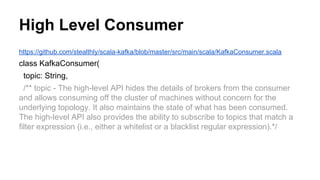
class KafkaConsumer(
topic: String,
/** topic - The high-level API hides the details of brokers from the consumer
and allows consuming off the cluster of machines without concern for the
underlying topology. It also maintains the state of what has been consumed.
The high-level API also provides the ability to subscribe to topics that match a
filter expression (i.e., either a whitelist or a blacklist regular expression).*/
High Level Consumer
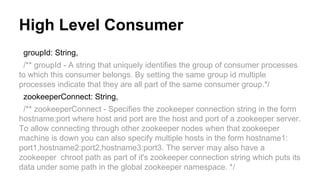
groupId: String,
/** groupId - A string that uniquely identifies the group of consumer processes
to which this consumer belongs. By setting the same group id multiple
processes indicate that they are all part of the same consumer group.*/
zookeeperConnect: String,
/** zookeeperConnect - Specifies the zookeeper connection string in the form
hostname:port where host and port are the host and port of a zookeeper server.
To allow connecting through other zookeeper nodes when that zookeeper
machine is down you can also specify multiple hosts in the form hostname1:
port1,hostname2:port2,hostname3:port3. The server may also have a
zookeeper chroot path as part of it's zookeeper connection string which puts its
data under some path in the global zookeeper namespace. */
High Level Consumer
val props = new Properties()
props.put("group.id", groupId)
props.put("zookeeper.connect", zookeeperConnect)
props.put("auto.offset.reset", if(readFromStartOfStream) "smallest" else "largest")
val config = new ConsumerConfig(props)
val connector = Consumer.create(config)
val filterSpec = new Whitelist(topic)
val stream = connector.createMessageStreamsByFilter(filterSpec, 1, new
DefaultDecoder(), new DefaultDecoder()).get(0)
High Level Consumer
def read(write: (Array[Byte])=>Unit) = {
for(messageAndTopic <- stream) {
try {
write(messageAndTopic.message)
} catch {
case e: Throwable => error("Error processing message, skipping this message: ", e)
}
}
}
High Level Consumer
https://github.com/stealthly/scala-kafka/blob/master/src/test/scala/KafkaSpec.scala
val consumer = new KafkaConsumer(“test-topic”,”groupTest”,"192.168.86.5:2181")
def exec(binaryObject: Array[Byte]) = {
//magic happens
}
consumer.read(exec)
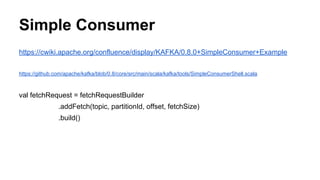
Simple Consumer
https://cwiki.apache.org/confluence/display/KAFKA/0.8.0+SimpleConsumer+Example
https://github.com/apache/kafka/blob/0.8/core/src/main/scala/kafka/tools/SimpleConsumerShell.scala
val fetchRequest = fetchRequestBuilder
.addFetch(topic, partitionId, offset, fetchSize)
.build()
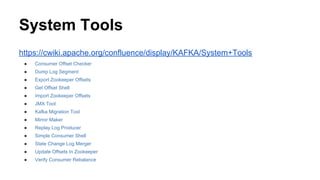
System Tools
https://cwiki.apache.org/confluence/display/KAFKA/System+Tools
● Consumer Offset Checker
● Dump Log Segment
● Export Zookeeper Offsets
● Get Offset Shell
● Import Zookeeper Offsets
● JMX Tool
● Kafka Migration Tool
● Mirror Maker
● Replay Log Producer
● Simple Consumer Shell
● State Change Log Merger
● Update Offsets In Zookeeper
● Verify Consumer Rebalance
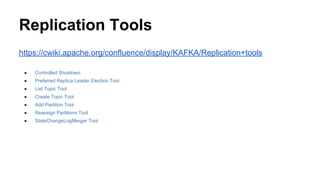
Replication Tools
https://cwiki.apache.org/confluence/display/KAFKA/Replication+tools
● Controlled Shutdown
● Preferred Replica Leader Election Tool
● List Topic Tool
● Create Topic Tool
● Add Partition Tool
● Reassign Partitions Tool
● StateChangeLogMerger Tool
Questions?
/*******************************************
Joe Stein
Founder, Principal Consultant
Big Data Open Source Security LLC
http://www.stealth.ly
Twitter: @allthingshadoop
********************************************/

Developing Realtime Data Pipelines With Apache Kafka

  • 1.
    Apache Kafka Real-Time DataPipelines http://kafka.apache.org/
  • 2.
    Joe Stein ● Developer,Architect & Technologist ● Founder & Principal Consultant => Big Data Open Source Security LLC - http://stealth.ly Big Data Open Source Security LLC provides professional services and product solutions for the collection, storage, transfer, real-time analytics, batch processing and reporting for complex data streams, data sets and distributed systems. BDOSS is all about the "glue" and helping companies to not only figure out what Big Data Infrastructure Components to use but also how to change their existing (or build new) systems to work with them. ● Apache Kafka Committer & PMC member ● Blog & Podcast - http://allthingshadoop.com ● Twitter @allthingshadoop
  • 3.
    Overview ● What isApache Kafka? ○ Data pipelines ○ Architecture ● How does Apache Kafka work? ○ Brokers ○ Producers ○ Consumers ○ Topics ○ Partitions ● How to use Apache Kafka? ○ Existing Integrations ○ Client Libraries ○ Out of the box API ○ Tools
  • 4.
    Apache Kafka ● ApacheKafka ○ http://kafka.apache.org ● Apache Kafka Source Code ○ https://github.com/apache/kafka ● Documentation ○ http://kafka.apache.org/documentation.html ● Wiki ○ https://cwiki.apache.org/confluence/display/KAFKA/Index
  • 5.
  • 6.
    Point to PointData Pipelines are Problematic
  • 7.
  • 8.
  • 9.
  • 10.
  • 11.
    A high-throughput distributedmessaging system rethought as a distributed commit log.
  • 12.
  • 13.
    Brokers load balanceproducers by partition
  • 14.
    Consumer groups providesisolation to topics and partitions
  • 15.
  • 16.
    How does Kafkado all of this? ● Producers - ** push ** ○ Batching ○ Compression ○ Sync (Ack), Async (auto batch) ○ Replication ○ Sequential writes, guaranteed ordering within each partition ● Consumers - ** pull ** ○ No state held by broker ○ Consumers control reading from the stream ● Zero Copy for producers and consumers to and from the broker http://kafka. apache.org/documentation.html#maximizingefficiency ● Message stay on disk when consumed, deletes on TTL with compaction available in 0.8.1 https://kafka.apache.org/documentation.html#compaction
  • 17.
  • 18.
  • 19.
    Performance comparison: Traditionalapproach vs. zero copy File size Normal file transfer (ms) transferTo (ms) 7MB 156 45 21MB 337 128 63MB 843 387 98MB 1320 617 200MB 2124 1150 350MB 3631 1762 700MB 13498 4422 1GB 18399 8537 https://www.ibm.com/developerworks/linux/library/j-zerocopy/
  • 20.
  • 21.
    Existing Integrations https://cwiki.apache.org/confluence/display/KAFKA/Ecosystem ● log4jAppender ● Apache Storm ● Apache Camel ● Apache Samza ● Apache Hadoop ● Apache Flume ● Camus ● AWS S3 ● Rieman ● Sematext ● Dropwizard ● LogStash ● Fluent
  • 22.
    Client Libraries Community Clientshttps://cwiki.apache.org/confluence/display/KAFKA/Clients ● Python - Pure Python implementation with full protocol support. Consumer and Producer implementations included, GZIP and Snappy compression supported. ● C - High performance C library with full protocol support ● C++ - Native C++ library with protocol support for Metadata, Produce, Fetch, and Offset. ● Go (aka golang) Pure Go implementation with full protocol support. Consumer and Producer implementations included, GZIP and Snappy compression supported. ● Ruby - Pure Ruby, Consumer and Producer implementations included, GZIP and Snappy compression supported. Ruby 1.9.3 and up (CI runs MRI 2. ● Clojure - Clojure DSL for the Kafka API ● JavaScript (NodeJS) - NodeJS client in a pure JavaScript implementation Wire Protocol Developers Guide https://cwiki.apache.org/confluence/display/KAFKA/A+Guide+To+The+Kafka+Protocol
  • 23.
    Really Quick Start 1)Install Vagrant http://www.vagrantup.com/ 2) Install Virtual Box https://www.virtualbox.org/ 3) git clone https://github.com/stealthly/scala-kafka 4) cd scala-kafka 5) vagrant up Zookeeper will be running on 192.168.86.5 BrokerOne will be running on 192.168.86.10 All the tests in ./src/test/scala/* should pass (which is also /vagrant/src/test/scala/* in the vm) 6) ./gradlew test
  • 24.
    Developing Producers https://github.com/stealthly/scala-kafka/blob/master/src/test/scala/KafkaSpec.scala val producer= new KafkaProducer(“test-topic”,"192.168.86.10:9092") producer.send(“hello distributed commit log”)
  • 25.
    Producers https://github.com/stealthly/scala-kafka/blob/master/src/main/scala/KafkaProducer.scala case class KafkaProducer( topic:String, brokerList: String, /** brokerList - This is for bootstrapping and the producer will only use it for getting metadata (topics, partitions and replicas). The socket connections for sending the actual data will be established based on the broker information returned in the metadata. The format is host1:port1,host2:port2, and the list can be a subset of brokers or a VIP pointing to a subset of brokers. */
  • 26.
    Producer clientId: String =UUID.randomUUID().toString, /** clientId - The client id is a user-specified string sent in each request to help trace calls. It should logically identify the application making the request. */ synchronously: Boolean = true, /** synchronously - This parameter specifies whether the messages are sent asynchronously in a background thread. Valid values are false for asynchronous send and true for synchronous send. By setting the producer to async we allow batching together of requests (which is great for throughput) but open the possibility of a failure of the client machine dropping unsent data.*/
  • 27.
    Producer compress: Boolean =true, /** compress -This parameter allows you to specify the compression codec for all data generated by this producer. When set to true gzip is used. To override and use snappy you need to implement that as the default codec for compression using SnappyCompressionCodec.codec instead of DefaultCompressionCodec.codec below. */ batchSize: Integer = 200, /** batchSize -The number of messages to send in one batch when using async mode. The producer will wait until either this number of messages are ready to send or queue.buffer.max.ms is reached.*/
  • 28.
    Producer messageSendMaxRetries: Integer =3, /** messageSendMaxRetries - This property will cause the producer to automatically retry a failed send request. This property specifies the number of retries when such failures occur. Note that setting a non-zero value here can lead to duplicates in the case of network errors that cause a message to be sent but the acknowledgement to be lost.*/
  • 29.
    Producer requestRequiredAcks: Integer =-1 /** requestRequiredAcks 0) which means that the producer never waits for an acknowledgement from the broker (the same behavior as 0.7). This option provides the lowest latency but the weakest durability guarantees (some data will be lost when a server fails). 1) which means that the producer gets an acknowledgement after the leader replica has received the data. This option provides better durability as the client waits until the server acknowledges the request as successful (only messages that were written to the now- dead leader but not yet replicated will be lost). -1) which means that the producer gets an acknowledgement after all in-sync replicas have received the data. This option provides the best durability, we guarantee that no messages will be lost as long as at least one in sync replica remains.*/
  • 30.
    val props =new Properties() val codec = if(compress) DefaultCompressionCodec.codec else NoCompressionCodec.codec props.put("compression.codec", codec.toString) http://kafka.apache.org/documentation.html#producerconfigs props.put("require.requred.acks",requestRequiredAcks.toString) val producer = new Producer[AnyRef, AnyRef](new ProducerConfig(props)) def kafkaMesssage(message: Array[Byte], partition: Array[Byte]): KeyedMessage[AnyRef, AnyRef] = { if (partition == null) { new KeyedMessage(topic,message) } else { new KeyedMessage(topic,message, partition) } } Producer
  • 31.
    Producer def send(message: String,partition: String = null): Unit = { send(message.getBytes("UTF8"), if (partition == null) null else partition.getBytes("UTF8")) } def send(message: Array[Byte], partition: Array[Byte]): Unit = { try { producer.send(kafkaMesssage(message, partition)) } catch { case e: Exception => e.printStackTrace System.exit(1) } }
  • 32.
    High Level Consumer https://github.com/stealthly/scala-kafka/blob/master/src/main/scala/KafkaConsumer.scala classKafkaConsumer( topic: String, /** topic - The high-level API hides the details of brokers from the consumer and allows consuming off the cluster of machines without concern for the underlying topology. It also maintains the state of what has been consumed. The high-level API also provides the ability to subscribe to topics that match a filter expression (i.e., either a whitelist or a blacklist regular expression).*/
  • 33.
    High Level Consumer groupId:String, /** groupId - A string that uniquely identifies the group of consumer processes to which this consumer belongs. By setting the same group id multiple processes indicate that they are all part of the same consumer group.*/ zookeeperConnect: String, /** zookeeperConnect - Specifies the zookeeper connection string in the form hostname:port where host and port are the host and port of a zookeeper server. To allow connecting through other zookeeper nodes when that zookeeper machine is down you can also specify multiple hosts in the form hostname1: port1,hostname2:port2,hostname3:port3. The server may also have a zookeeper chroot path as part of it's zookeeper connection string which puts its data under some path in the global zookeeper namespace. */
  • 34.
    High Level Consumer valprops = new Properties() props.put("group.id", groupId) props.put("zookeeper.connect", zookeeperConnect) props.put("auto.offset.reset", if(readFromStartOfStream) "smallest" else "largest") val config = new ConsumerConfig(props) val connector = Consumer.create(config) val filterSpec = new Whitelist(topic) val stream = connector.createMessageStreamsByFilter(filterSpec, 1, new DefaultDecoder(), new DefaultDecoder()).get(0)
  • 35.
    High Level Consumer defread(write: (Array[Byte])=>Unit) = { for(messageAndTopic <- stream) { try { write(messageAndTopic.message) } catch { case e: Throwable => error("Error processing message, skipping this message: ", e) } } }
  • 36.
    High Level Consumer https://github.com/stealthly/scala-kafka/blob/master/src/test/scala/KafkaSpec.scala valconsumer = new KafkaConsumer(“test-topic”,”groupTest”,"192.168.86.5:2181") def exec(binaryObject: Array[Byte]) = { //magic happens } consumer.read(exec)
  • 37.
  • 38.
    System Tools https://cwiki.apache.org/confluence/display/KAFKA/System+Tools ● ConsumerOffset Checker ● Dump Log Segment ● Export Zookeeper Offsets ● Get Offset Shell ● Import Zookeeper Offsets ● JMX Tool ● Kafka Migration Tool ● Mirror Maker ● Replay Log Producer ● Simple Consumer Shell ● State Change Log Merger ● Update Offsets In Zookeeper ● Verify Consumer Rebalance
  • 39.
    Replication Tools https://cwiki.apache.org/confluence/display/KAFKA/Replication+tools ● ControlledShutdown ● Preferred Replica Leader Election Tool ● List Topic Tool ● Create Topic Tool ● Add Partition Tool ● Reassign Partitions Tool ● StateChangeLogMerger Tool
  • 40.
    Questions? /******************************************* Joe Stein Founder, PrincipalConsultant Big Data Open Source Security LLC http://www.stealth.ly Twitter: @allthingshadoop ********************************************/